Blog

  • The complete guide to content remarketing: 20 tips and examples to re-engage audience

    The complete guide to content remarketing: 20 tips and examples to re-engage audience

    It is funny how very few people know about content remarketing. Some confuse it with usual content marketing, but it is actually a separate technique that has its own aims and practices involved.

    Don’t worry, you are on the right foot steps as this walk-through and guide is what you need to begin with content remarketing.

    What is content remarketing?

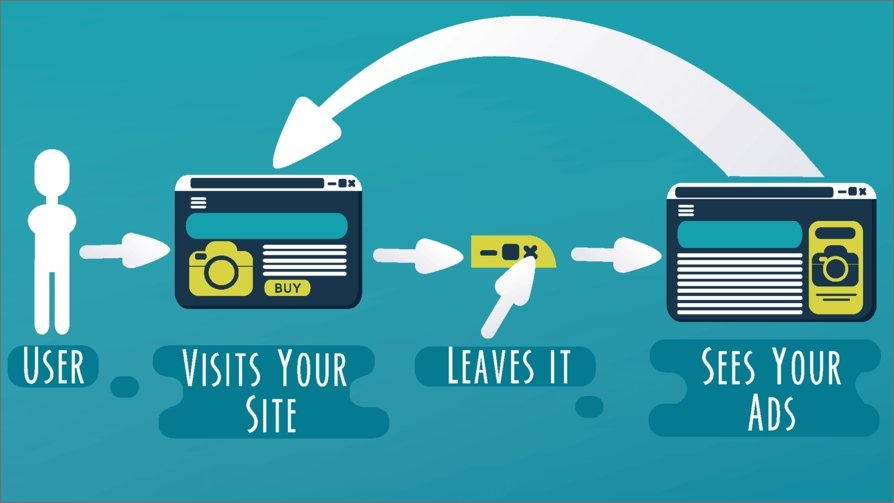
    Content remarketing is a strategy of targeting to bring back and re-engaging with people who have already visited your website or have been past customers of your brand.

    What is the goal of remarketing?

    With this strategy, marketers strive to capture the attention of your site’s visitors to make them come back to your website and complete an action they didn’t make during their first visit. This can be anything from purchasing your product to subscribing to your newsletter. Content remarketing is like that second chance you needed desperately.

    What are the benefits of remarketing?

    Remarketing helps you to:

    • Increase brand recall and branded searches.
    • Turn abandoners and bouncers into leads.
    • Improve the repeat visitor rate and engagement.
    • Improve SEO

    What’s the difference between remarketing and retargeting?
    Remarketing vs. Retargeting

    The two terms can confuse many as they are very interrelated.

    In general, the goals of both are focused on targeting and converting potential clients that have bounced from your socials or website.

    But what really makes remarketing different from retargeting?

    In the beginning, remarketing was thought off as sending just email campaigns to re-engage with customers to inform about discounts, trial expiry or to follow up potential clients, whereas retargeting involved paid advertising.

    However, with the evolution of internet and social media both have evolved though the goal is still the same.

    Retargeting still involves paid advertising to target and convert potential clients. While, remarketing involves reaching out or following up to past customers or potential clients through various channels that may be Instagram, Facebook, Email, SMS or Whatsapp etc.

    Generally, the key medium of remarketing strategy is still email. Both strategies can be used in conjunction, where emails are sent with a paid advertisement.

    Further in-depth study of the both terms makes one thing clear that they are not the same.

    According to Neil Patel, a famous digital marketing expert,

    “I see remarketing more as an umbrella term for marketing to the same prospect multiple times, whereas retargeting really is targeting online ads at the same traffic again and again.”

    So it’s safe to say that retargeting ads and remarketing emails are actually two sides of the same coin. However, retargeting is more of a subset of remarketing which only targets website traffic, while remarketing is more concerned with getting back to past visitors using personalized content mostly confined to emails. The image below will develop a better understanding of the subject.
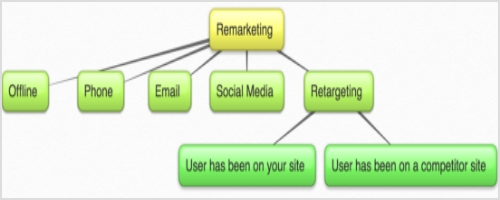
    Content-Remarketing-

    Now that the difference between the two is clear. Let’s move on further.

    What are the different types of remarketing?

    Remarketing is categorized into 5 types. The five types are

    • Standard Remarketing
    • Email Remarketing
    • Dynamic Remarketing
    • Video Remarketing
    • Remarketing Lists for Search Ads

    When to use remarketing?

    • Use remarketing strategy for
    • Up-selling products and services
    • Cross selling 
    • Special offers
    • Re-engagement campaigns
    • Customer support campaigns
    • Inventory update campaigns
    • Follow ups such as cart abandonment or trial expiry etc.

    The right tools and channels for content remarketing

    You can create personalized content using these different channels that can be used for remarketing are

    Facebook ads

    It’s an analytics tool by Facebook containing a pixel code that can be put on your website. A pixel is a small box that is placed on a webpage. When someone visits the page, the pixel is able to collect information about the visitor. This information can then be used by other websites to target that person with ads. In remarketing, an advertiser places a pixel on their website. When a user visits the site, the pixel is able to track everything from their web browser’s cookie to their IP address. This data is then used to track people who have visited other websites or viewed certain content. The advertiser can then use this information to show them relevant ads across multiple websites. For example, if a user has visited Amazon and viewed an item for sale, an ad for the same product could be shown on Facebook which would drive more purchases for the advertiser.

    Related: Getting Started with Meta Pixel: The Key to Successful Retargeting

    Google ads

    The Google Display Network is a web-based advertising network run by Google. The network allows advertisers to place text, image, video and Native ad units on websites and mobile apps.

    One of the best things about using GDN for remarketing is that it gives you a lot of reaches. You will be able to find your tagged site visitors on the network several times per day across many different sites. In general, you will be able to connect with the people you tagged several times per month.

    The first step in remarketing is to create an audience of users that you will be remarketing too. This can include people who visited specific pages on your website or read your blog, but you will have to group

    them into separate audiences depending on your goals.

    By grouping your tagged site visitors into audiences, you will be able to reach out to only certain people and persuade them to come back to you.

    Another benefit of grouping your audience is that you can bid more aggressively. Consequently, this will lead to more impressions and higher ad positions. Some pages on your website such as the pricing or product pages are way more valuable than your blog. By selecting those who visited specifically your product and pricing pages, you can write follow up mails to them.

    In order to define your audience, create a new remarketing list on GDN and define which website visitors you want to include and which you want to exclude. Don’t worry about cookies and such, because Google will take care of them itself.

    Yet another great idea is to group your blog audience by the posts they read. So, for example, if you have articles on three different topics, create three remarketing lists for each of these topics’ visitors.
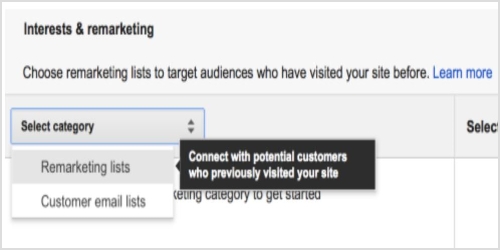
    Remarketing-List

    Once you have your remarketing lists set up, you must decide on your audience membership duration. In remarketing, this refers to the number of days you follow a user around. This means that setting your audience membership duration to 30 days will make your site visitors see your ads for, you guessed it, 30 days.

    The problem with deciding on the “right” audience member duration is that there is such a fatigue which results in overly aggressive remarketing. Many experts believe that being too “creepy” with your ads may result in the loss of ROI of your campaigns or can even damage your brand. This is why so many marketers advocate for shortening audience membership duration, even though the reality seems to be different.

    Fortunately, remarketing has shown to be way more effective. In fact, they stay effective even after ad fatigue starts setting in and viewers are more likely to engage with remarketing campaigns.

    This brings us to the fact that being bold with your remarketing is the way to go. Set your audience membership duration for longer time (something like three times your average sale cycle length). Having more impressions means a higher conversion rate and can help you fight ad fatigue.

    Related: Google retargeting: The ultimate guide for 2026

    Email lists

    Prior to Google ads and Facebook ads, emails were the original form of remarketing. With email remarketing, you can take advantage of existing customers who’ve visited your website and email them with targeted offers. By targeting specific segments of customers who have shown interest in your product or service, you can increase the likelihood of success with your campaign.

    For example, you might use an email remarketing list to send out emails to past customers with discounts on flights or hotel stays.

    Another way to use email remarketing is to show ads to people who have already looked at your website. This allows you to broaden the pool of potential customers, while also reducing the cost of running an ad. While email remarketing can be a powerful tool for reaching out-of-the-people, it does require some preparation and maintenance.

    First, you’ll need to create a custom audience that’s carefully selected so that you don’t run into any false positives. Next, make sure that your campaign doesn’t overreach by carefully monitoring performance and experimenting with different tactics until you find the one that works best for you.

    Look at the example of Tarte Cosmetics remarketing email.
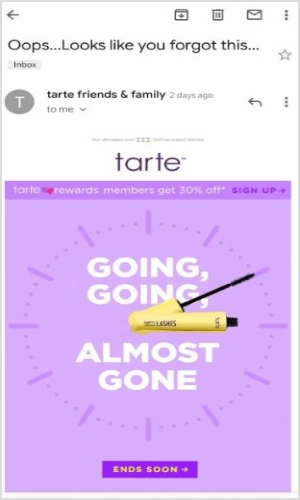
    Tarte-Email-Remarketing

    The “Ends Soon” call to action button creates a sense of urgency and persuades the customer to click and reach directly to the meaningful content.

    Email remarketing is the practice of sending out an email to people who have previously expressed interest in your product or service. It’s a great way to reach out to customers who were previously interested in your brand, but may no longer be actively using it. Remarketing allows you to keep them in the loop and possibly re-engage with them. There are two types of remarketing lists:

    1. Remarketing lists for customers who’ve already completed a purchase. These are referred to as Customer Lists.

    2. Remarketing lists for people who have shown interest in your company in some way, but have never purchased from you (yet). These are referred to as Leads Lists. Remarketing is a very effective way to keep in touch with existing customers and generate new ones.

    Related: How to Create an Email Marketing Strategy to Grow Your Business

    Replug

    In addition to GDN and Facebook, you can also use Replug (a reliable link management platform for URL shortening, tracking, optimization, and deep analytics) which is quite valuable for content remarketing. You can use other platforms as well to send personalized messages and ads to your past visitors on the respected platforms.

    Using Replug’s custom URL shortener tool, you can create a retargeting pixel campaign and add relevant tags to track for any shortened URL. Here’s a preview of it.
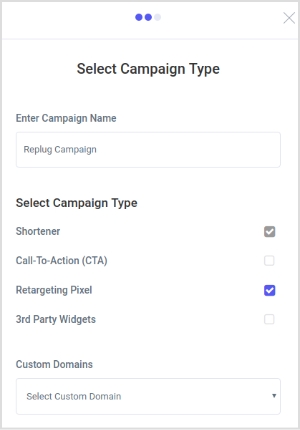
    Retargeting-Pixel-Replug-

    Related:Retargeting Pixel Setup

    Content remarketing best practices

    Here are the best practices in content remarketing for you to use:

    Ads that push to “hard” offers: The best way to get your ads working is to promote your best offers. If you have a bestselling product, make an ad for it, because this will make it sell even better and will help you get your other products selling too.

    Conversion path analysis: Do a conversion path analysis and figure out which pages the user usually visits before converting. Once you know what these pages are, target them with your ads.

    Ads that push to content: Your content may be even more important to visitors than your products. This means that it may be better to target an article in your ad rather than promote a product page.

    Social shares on your blog content: Analyze your blog content and see which content gets the most shares to social media. This will give you a general idea of what kind of content people are interested in and you will be able to target your ads at those articles on your blog.

    Email segmentation: Segmenting emails lists depending on specific actions taken by the customer when making the purchase. Depending on the actions, you can send more information and a personalized email using CRM with email marketing software to target specific segments.

    Reengage with inactive subscribers: There are a lot of people that subscribe to emails but remain inactive, reengaging with such potential customers by reminding them at the first place that why they subscribed the email. Adding an CTA within the email can encourage them to complete the journey.

    Below is an example of American Giant who sent an remarketing email to its subscriber by including the product they browsed previously.
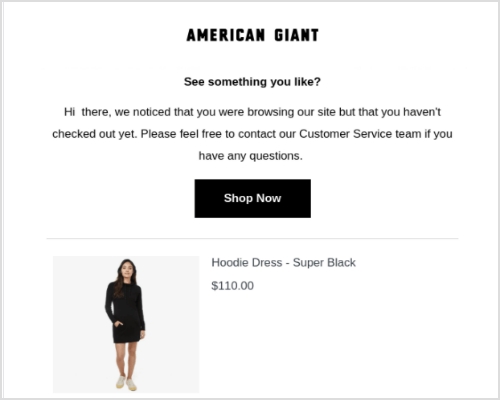
    american-giant-remarketing-email

    20 tips for remarketing

    Lastly, to give you more ideas about how to retarget your ads and remarket your content, here are twenty examples from the past:

    1. The right link

    One of the biggest mistakes you can possibly do is sending your customers to the wrong place. Imagine you posted a picture of one product, but linked to another one. The person who clicks on the link wants to see the product in the picture, but once they see something different, they quickly lose interest. Instead of doing this, act like Kelley Blue Book on Twitter – link the corresponding product that is in the image you attach to the post.

    2. Customer buying window

    A common misconception in remarketing is that you have to retarget potential buyers with ads for the product they haven’t bought. In reality, there are many customers who can’t afford certain products and have simply browsed through your catalogue before and viewed these very products. As Rob Weatherhead, the owner of Agent Wolf, says, you must retarget these individuals only for a certain amount of time while their interest is still present. If they don’t convert during this time, it means they either decided not to purchase your product or bought something similar elsewhere.

    3. Separate landing pages

    This is a mistake done not only by those who practice remarketing but also by many experienced marketers. Instead of linking their ads to separate landing pages, they simply link them to the homepage which is a big turnoff for many consumers. Neil Andrew, Marketing Manager at PPC Protect Limited, recommends creating separate landing pages for your ads and always linking to them.

    4. Cheap alternatives

    Philippe Côté-Léger, Marketing Director at Lab Urbain, believes that using Facebook and Google is not mandatory. You can follow suit and make use of cheaper alternatives that can prove to be just as effective as Google and Facebook. For example, a content discovery network like Outbrain offers inexpensive CPC.

    5. Dynamic remarketing ads

    This is one of the simplest yet overlooked tips. Using dynamic remarketing tips is essential for getting the best results.

    For example, Ryan Scollon says that dynamic remarketing ads allow him to show ads with products that customers have viewed before. This makes the ads way more interesting instead of leaving them generic. The only thing to keep in mind when designing dynamic remarketing ads is that your imagery must be on point to capture the attention of your target audience.

    6. Email promotion

    Learning Success Systems has been implementing this technique into their strategy for quite a while now. They match their retargeting campaign with email promotion making it twice as effective. There is no logical explanation for why this works so well, but it has been proven to be successful for many businesses. Perhaps, people remember their emails once they see the ads.

    7. Reviews

    Karen Sahetya, the founder of Brand Central Marketing, says that one of the best ways to build social proof is to use reviews for retargeting and remarketing. Those who viewed your products but didn’t make a purchase are more likely to buy once they see that others have had a positive experience with your brand and with some particular products of yours. It is the equivalent of someone considering buying a car in real life and a friend telling that person about their positive experience with this model.

    8. Social proof

    This is very similar to the previous example, but it is still quite different. Let’s look into this practice with the help of Birchbox. They have successfully integrated social proof into their retargeting ads. You can either send those who click on the ads to reviews of your products or include quotes from your past customers about your brand into the ads themselves among other things.

    9. Audience segmenting

    Audience segmenting is crucial for your digital remarketing campaign. Separating your targeted audience into those who have converted and those who haven’t will allow you to show corresponding ads to different individuals. This practice has been proven effective by many businesses that used it and Evoke Strategy LLC in particular. Its co-founder Devon Vocke says that audience segmenting has always helped them make their campaigns more effective.

    10. Best offer

    Displaying your best offer is essential for attracting the most attention. One of the best examples of this is Handy’s home cleaning retargeting banner that appears after a customer views other similar websites with home cleaning services. Making such ads catchy is also very important. They have to have bright colors, a promotional offer, and a call to action that stands out and speaks to the audience.

    11. Prioritizing users

    Joe Castro from Elevation says that prioritizing users that are close to completing a purchase is crucial for achieving more conversions. Those who added products to the cart or went as far as to get to the billing stage are more likely to purchase something than those who simply visited your homepage or product pages. Be ready to invest more in targeting the former ones and offer them free shipping or something similar to get them to convert.

    12. Potential clients over sales

    Instead of focusing on making a sale, nurture potential clients. Take WordStream, for example. The company offered a free assessment instead of a discount for their products. Consequently, many customers let their guard down because they weren’t pressured into purchasing. WordStream offered a service of value related to what their customers wanted based on what their remarketing “sensors” detected. Always think of customers first and sales second.

    13. Urgency

    Many marketers know of this simple characteristic that always works. Creating a sense of urgency will motivate your customers to complete the action you want them to faster. For example, Expedia uses urgency in their retargeting ads to prompt users to book travel from their site. Expedia uses irresistible deals with a last-minute offer and this works like a miracle. This is credited to the fear of missing out that most people experience when they see such ads.

    14. Interesting & relatable

    It has been said before, but it will never be old: make your ads interesting and relatable. There is also a great example of this technique. Mazda and Merchenta worked together to create ads that would attract more potential customers to test drive their cars. Merchenta built customized ads that were based on geographic radius matching individuals to the nearest Mazda dealership. The ads displayed the nearest dealership houses that had the specific Mazda car models that customers viewed online. This, in turn, raised the chances of these people visiting the saloon and test driving the car.

    15. Frequency cap

    Using a frequency cap can prevent overexposure. As Kyna Garrett from Strike Social points out, social media ads are everywhere, so applying a frequency cap can prevent potential customers from being overwhelmed by your ads. In fact, overexposure can be very damaging to your brand, so it is important to determine the right frequency (which is also not that easy). Find the perfect balance by testing different frequencies and then use the one that works best.

    16. Avoid spammy ads

    Patric Kreidler from Power Digital Marketing talks about something very closely related to the previous example. Such ads as pop-ups, countdown ads, ads with sound on autoplay, and so on are seen as spam by many users and usually ignored. Moreover, they often lead to viewers associating them with a bad experience. Obviously, no brand would want that, so avoid using such ads at all costs.

    17. Emotional connection

    It has long been proven that ads that create an emotional connection in viewers are way more powerful than usual ads. For example, Think Engraved uses cute pictures in a combination with cute statements to draw a smile or make the viewer laugh. This draws in potential customers and hooks them onto what else the brand can offer. You can also add an extra something to such ads to make them even more appealing (e.g. a discount or a gift).

    18. Videos & slideshows

    What can be better than visuals that “speak” to the audience? Images are so common that most ads get lost even if they have a stunning design. This is why videos and slideshows are now becoming so popular. However, you must remember to keep your slideshows with no audio and disable autoplay on your videos. Otherwise, they can become annoying.

    19. Relevant sites

    Thomas Budnik from Auto Accessories Garage says that including only those sites that are relevant to your brand will ensure that you don’t waste your money for nothing and target only the relevant audiences. Before letting your remarketing campaign go live, check that only the relevant websites are included or the irrelevant ones excluded.

    20. Content messaging

    Last but not least, Robb Hecht has adopted a social content messaging strategy to help his remarketing efforts. This simply means that you use a special framework that breaks down your ads and serves them to customers at different stages of your sales funnel.

    Bonus Tip: Raising your click-through rates will reduce your click prices. This way, you will be paying for a greater volume of clicks, but they will cost you several times less. Just remember to have image ads rather than text-turned-image ads.

    Final thoughts on content remarketing

    All in all, content remarketing is one of the best techniques to use in your online marketing strategy, and you will definitely get something useful out of it. Make sure to read this article carefully again to refresh your memory about what content remarketing is and how to use it properly.


  • What Is Affiliate Link Cloaking & How To Do It?

    What Is Affiliate Link Cloaking & How To Do It?

    What is Affiliate Link Cloaking?

    Affiliate Link Cloaking is a process of replacing the long and clunky affiliate product links with short links that trackable links and point visitors to the same URL destination, but are trustworthy and brandable.

    Expert affiliate marketers use affiliate link cloaking to make their affiliate product links look more trustable. You might be wondering how to get your hands on those short links. So let me briefly explain affiliate link cloaking, and then we will touch on more relevant topics you should know about.

    Shall we?

    Bloggers and marketers use affiliate link cloaking because visitors are hesitant toward longs and clunky product URLs. Most experts try to simplify the URLs, CTAs, and navigation so that readers feel safe.

    Perhaps, people are skeptical about long URLs because scammers use several protocols in the URLs or page contents that lead to data theft or privacy issues.

    Most website owners want to track the clickability on their site pages to analyze their on-page SEO strategies and understand the content performance through user behavior.

    Anyway, affiliate link cloaking allows affiliate marketers and bloggers to minimize the complexity in the website navigation and provide a better user experience.

    Should You Cloak Your Affiliate Links?

    If you have ever thought about whether or not you should cloak your affiliate links, then this section might convince you to start paying close attention to affiliate link cloaking. 

    I like cloaking affiliate links because I don’t want to scare off readers – some visitors hover over the links and when they see the long, clunky URLs, they avoid clicking on those links.

    Cloaking affiliate links doesn’t mean you want to hide your association with the brands. But instead, it makes readers feel safe when the links seem short and sweet.

    Below is a video that will make you understand the importance and benefits of affiliate links.

    Can You Make a Living Off of Affiliate Marketing?

     The answer is yes; you can make a living off of affiliate marketing. Affiliate marketing is a lucrative business model if done right. The only caveat is that you must understand how it works.

    Even though most affiliate marketers fail to make a significant amount of money with affiliate marketing, it’s still one of the most popular ways to earn money online.

    When content creators put out valuable content to solve the audiences’ problems and mention the links to the products or services they have been using, the audience trusts them with their recommendations. 

    The best part is that bloggers, YouTubers, and TikTokers make money off of affiliate marketing the same way – they build a fan base, provide value to earn trust, and make money by recommending products.

    Related: Affiliate Marketing Guideline for Beginners: A Step-by-Step Guide

    Fundamental Steps of Link Cloaking 

    Since you have some idea of how link cloaking works, it’s important to discuss the fundamental steps of link cloaking.

    i. Figure Out the Purpose of URL Shortening

    Before you jump on cloaking random links on your blog just because you have seen influencers do this, it’s important to understand why you need to do this. A lot of bloggers blindly follow what experts are doing without having a plan in mind.

    Most influencers and pro-bloggers cloak links because they don’t want messy links on their blogs. However, there are other reasons for cloaking links. For instance, short URLs or cloaked links also help in tracking clicks on those links. So figure out why you need to cloak links first.

    ii. Identify the Website URLs to Trim Down

    It’d be unfair if you start shortening the random URLs on your blog or website. Affiliate marketers and bloggers usually cloak affiliate product links to make them look decent. The reason is that affiliate product links are long and clunky, so cloaking them with a URL shortening tool makes them look nice.

    You might not want to shorten the post or page URLs on your blog. Just stick to the affiliate product links when trimming the long URLs.

    iii. Choose the Best URL Shortener

    Cloaking links isn’t possible without an excellent URL shortener. Even though the core purpose of a link cloaking tool is to make links shorter and cleaner, it’ll be a bonus if any URL shortener provides additional features.

    The value-added feature that you may want to look out for in a URL shortener or cloaking tool is click tracking. It’s vital to find out where visitors are clicking on your blog when it comes to affiliate marketing.

    iv. Replace the Long URLs with Short Ones

    Once you have shortened the long and clunky URLs on your blog using an external URL shortener or a WordPress plugin, the next up is the replacement of the long URLs with shorter ones. 

    It shouldn’t take so long if you’re using a tool like Lasso. However, you can always replace the links manually.

    How to Cloak Links Using URL Shorteners?

    If you’re curious about how to cloak affiliate or e-commerce products on your blog or website, then there are several tools to cloak links that might come in handy.
    One of the methods to cloak links on a blog or a website is by using a link cloaking WordPress plugin.
    However, it’s only possible when you’re using the WordPress open-source program.

    Do-Affiliate-Links-Cloaking-Affect-SEO

    I use Replug for creating short links. It’s a top-notch URL shortener that could connect with custom domains for creating branded short URLs. Plus, it has some of the best features, such as click tracking, integrations, bio link, UTM codes, retargeting, and more.

    Let me show you how Replug.io works.

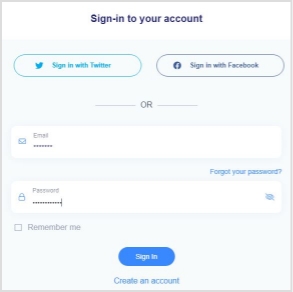
    Go to the Replug website and log in to your account.

    Replug-log-in

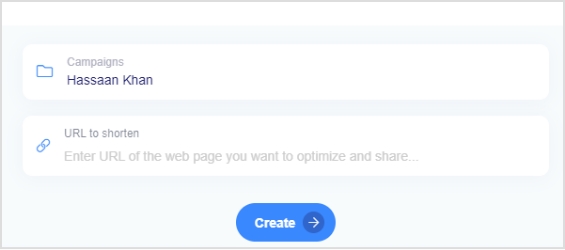
    Once you’re in the dashboard, you’ll see the option called “Create Quick Replug Link” – this is where you could shorten the URLs.

    replug-url-shortener

    However, I’d highly recommend checking out a few of our articles on how to use branded URLs or the benefits of using the short branded URLs, etc. 

    Once you’re logged in to your Replug account, you’ll see the URL shortening section right at the top of the dashboard. All you need is to choose a campaign name and insert the URL you want to shorten.

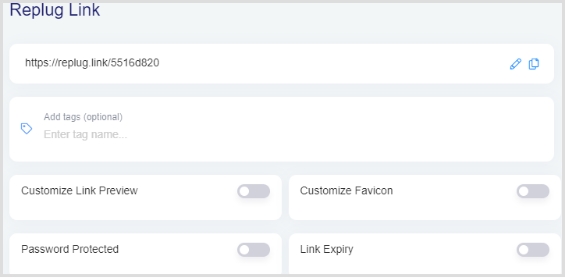
    Once you select the campaign name and paste the long URL to shorten it and proceed with it by clicking on the “create” button, a popup will be prompted with a form to fill out about the short URL.

    replug-link-created

    Fill out the form and you’re all set.

    Now you have generated a short URL using Replug URL shortener.

    You could later check out the Analytics section to analyze the clickability of the short URLs.

    Related: How to Setup Your Branded Short URL in Replug

    5 Reasons Why You Should Cloak Affiliate Links

    5-reasons-to-cloak-affiliate-links

    There are several reasons why you should cloak affiliate links, so allow me to share them with you.

    Let’s take a look:

    i. Clean Link Structure

    Let’s admit that when you have short URLs instead of long ones, they look better. One of the aspects of URLs most people ignore is the link structure. If your affiliate link has a bunch of UTM codes, tracking codes, and serial numbers, people won’t trust your links, and rightly so.

    So one of the biggest perks of cloaking affiliate links is that you clean up the link structure, which plays a vital role in improving the conversion rate.

    ii. Clicks Tracking

    You may or may not be properly tracking the affiliate conversion. Most bloggers and affiliate marketers rely on the merchants’ tracking – whatever the seller is using for affiliate sales tracking, and you have to rely on that.

    However, when you’re using cloaked affiliate links, you have some control over click tracking. You know how many clicks have been recorded in your URL tracking system and you could match the number with your affiliate statistics. It’d help you figure out how accurate your affiliate dashboard is or enable you to find any discrepancies in the affiliate dashboard tool.

    iii. Nofollow Affiliate Links

    Most beginner affiliate marketers don’t even know that they should nofollow every affiliate link and most of them let the link juice pass to the merchant sites. When you let the link juice pass to the external sources, you’re letting the search engine bots slip to other sites.

    There are WordPress plugins or nofollow scripts (for manual insertion) available for bloggers and affiliate marketers. Plus, you could always use a top-notch link management tool to have more control over your links, even when you’re shortening them.

    iv. Increase Clickability

    The experts in the SEO industry believe that visitors are likely to click more on short links rather than long links. You may have noticed that professional SEOs and bloggers keep their page URL slugs as short as possible. The same goes for other links, such as affiliate links.

    Pro-bloggers and SEO experts think that shorter links get more clickability and add more relevance to the destination URL. 

    v. Ease of Management

    When you’re using a URL shortener to track clicks or conversion, you don’t just have control over data and statistics, but you also have ease of link management. Using a tool like Replug would enable you to track clicks on the short links as well as help you retarget the audiences who have clicked on the links.

    So these were some of the main reasons why you should cloak affiliate links and make this process a part of your affiliate marketing regime.

    Two Reasons Why Most Affiliate Marketers Fail At Affiliate Marketing

    1. Zero Understanding

    The no. 1 reason why most affiliate marketers fail is that they don’t figure it out. They think that just because they’ve put out a link to an affiliate product, people will click and buy the product. 

    It doesn’t work that way – you have to convince people that this product is worth buying. In some cases, the affiliate marketer purchases the product themselves to test out and share the results with the audience. It earns them the trust and loyalty of the audience. Be ready to go above and beyond to earn trust online.

    2. Get Quick Rich Scheme

    Affiliate marketing isn’t a quick money-making scheme. You’re most likely to fail at affiliate marketing if you don’t have the patience. It ain’t work too fast. Most bloggers who successfully monetize their blogs with affiliate marketing have had loads of failures, and they always learn from their mistakes. 

    If you want quick money out of it, you’re destined to fail at affiliate marketing. It doesn’t matter if you start with bloggers, YouTube, Instagram, or TikTok – it makes no difference unless you understand the game.

    So you’ll be better off if you learn how to make money from affiliate marketing before jumping on the bandwagon of affiliate marketing.

    Do Affiliate Links Affect SEO?

    Do-Affiliate-Links-Cloaking-Affect-SEO

    Affiliate links drive website visitors to the merchant’s website or landing page. It’s not rocket science that driving traffic to a page or website helps the destination page or website because everyone knows this.

    But there is a caveat: if a link is pointing the visitor in a specific direction per se, then the destination page would benefit from it unless the link is nofollowed. 

    Whenever a link is nofollowed, the search engine bots are directed not to follow the link. This way, the bots don’t travel through that link. Thus, the page or website keeps the bots for a little longer.

    However, some SEOs believe that even nofollow links add credibility and trustworthiness in the search engines’ eyes, but not in the same way as the dofollow links.

    If you’re wondering whether or not the affiliate links affect SEO, then here are a few cases when affiliate links could potentially affect the SEO performance of a site:

    i. Dofollow External Links

    Since affiliate links are external or outbound links because they’re directing visitors to a merchant’s website, they could harm your site SEO if they’re dofollow. Most bloggers and affiliate marketers keep their affiliate links nofollow to avoid passing the unnecessary juice to the merchant’s website.

    It’s safe to say that dofollow external links could affect your site’s SEO unless they aren’t taken care of from an SEO standpoint.

    ii. Broken Affiliate Links

    When affiliate links are broken, they’re quite damaging for an affiliate marketing website. There are several reasons why a broken link is dangerous; for instance, it doesn’t generate a sale, and it drives visitors away. This can frustrate readers when they don’t land on the intended merchant page.

    So no doubt, a broken affiliate link could result in a bad user experience for your website visitors. And you can’t dominate with SEO techniques if you’re providing a bad user experience to the visitors. 

    Furthermore, there are WordPress plugins and online tools available that scan your site and report all the broken links.

    iii. Clunky Product Links

    Have you ever seen a long and clunky product link on e-commerce sites or affiliate blogs? When you hover on the products, you see unending URLs that seem scary at times. 

    One of the disadvantages of those clunky URLs is that they aren’t optimized for SEO. Plus, it scares visitors off due to their scammy appearance. Such affiliate product links are a no-go.

    iv. Bunch of Affiliate Banners

    A ton of affiliate product banner ads could frustrate visitors that are trying to learn about the product or find an answer to their query. You don’t have to bombard the visitors with several banner ads. Instead, put a couple of banner ads on the side or in the content if you have to put the banner ads.

    Moreover, these image-based banner ads often increase the page loading speed, which fails websites at core web vitals. It’s Google’s mechanism to check and analyze the website page loading speed, accuracy, and quality.

    So clearly, loads of banner ads could affect your site’s SEO performance. 

    Related: SEO Links for Replug Campaigns

    How Many Affiliate Links Are Too Many?

    The key to winning at affiliate marketing is figuring out the balance between several things, such as:

    • Niche identification
    • Target audience
    • Engaging content
    • Relevant affiliate products

    However, there is no guarantee that more affiliates would bring in more money or fewer affiliate programs would earn you less money. 

    It seems impossible to pull off if you’re doing something wrong in affiliate marketing. On the other hand, it may look very simple to those bloggers who figured this out. 

    I’ve written a blog post about joining multiple affiliate programs and the gist of the blog post was that you should join multiple affiliate programs as long as they are in line with your content strategy.

    A lot of affiliate bloggers say that building a topical authority on your blog or affiliate site is the stepping stone to start generating sales. 

    The way it works is that you test out different topics by publishing a handful of articles across three to four categories.

    Once a cluster of topics starts getting traction from search engines, you could double-down on that and write a bunch of more articles on that topic/category and become an authority in that area. That’s how you build topical authority around a certain topic or category.

    So several affiliate links or affiliate programs won’t make a difference unless your content is worth paying attention to from the readers’ standpoint. 

    However, indeed, placing dozens of the same affiliate links in a brief blog post may annoy the readers, so you need to create a balance in that area. 

    Make sure that your blog doesn’t look pushy when it comes to affiliate product insertion. 

    Related: How to Create a SEO Friendly URL: Ultimate Tips

    Are You Ready to Cloak Affiliate Links?

    We’ve explained what affiliate links are and how they work on affiliate blogs. 

    The reason why we discussed this topic is that it’s vital to use link cloaking, especially when you’re monetizing blogs with affiliate marketing. 

    If you have been paying attention to quality content, link building, site design, page speed, and on-page SEO, then you can’t mess up with long and clunky affiliate links.

    Several branded URL shorteners and affiliate link cloaking tools are available on the market. Choose the link cloaking tool that provides in-depth reporting and click-tracking so that you keep track of your clicks on the affiliate links.


  • How To Utilize Replug for Facebook Retargeting Ads?

    How To Utilize Replug for Facebook Retargeting Ads?

    Facebook retargeting ads is a marketing strategy used for selling your products or services on Facebook while focusing on a very definitive consumer base. It is observed that only 2% of people are inspired to buy your product on the first go. Whereas, the rest of the 98% audience could be converted via retargeting. The approach Retargeting or Retargeting Pixels is to attract the users who have visited your website but haven’t explored or bought your product yet.

    Fortunately, with the evolution of brand marketing, this can easily be done with the help of a ‘Retargeting Pixel. Retargeting pixel is just a snippet of code which when added to your website, drives traffic towards you by promoting your brand on social media platforms.

    The beauty of this technology is that it only brings tailored audiences; people who are familiar with your product but chose not to perform any operations during their first visit.

    So, basically, it assists the users in making a decision by highlighting your key features to them, all in a very convenient way.

    How Do Retargeting Pixels Work in Replug?

    Replug can configure Retargeting pixels of social media platforms for your businesses in very simple and easy steps. A step by step demonstration has been given below.

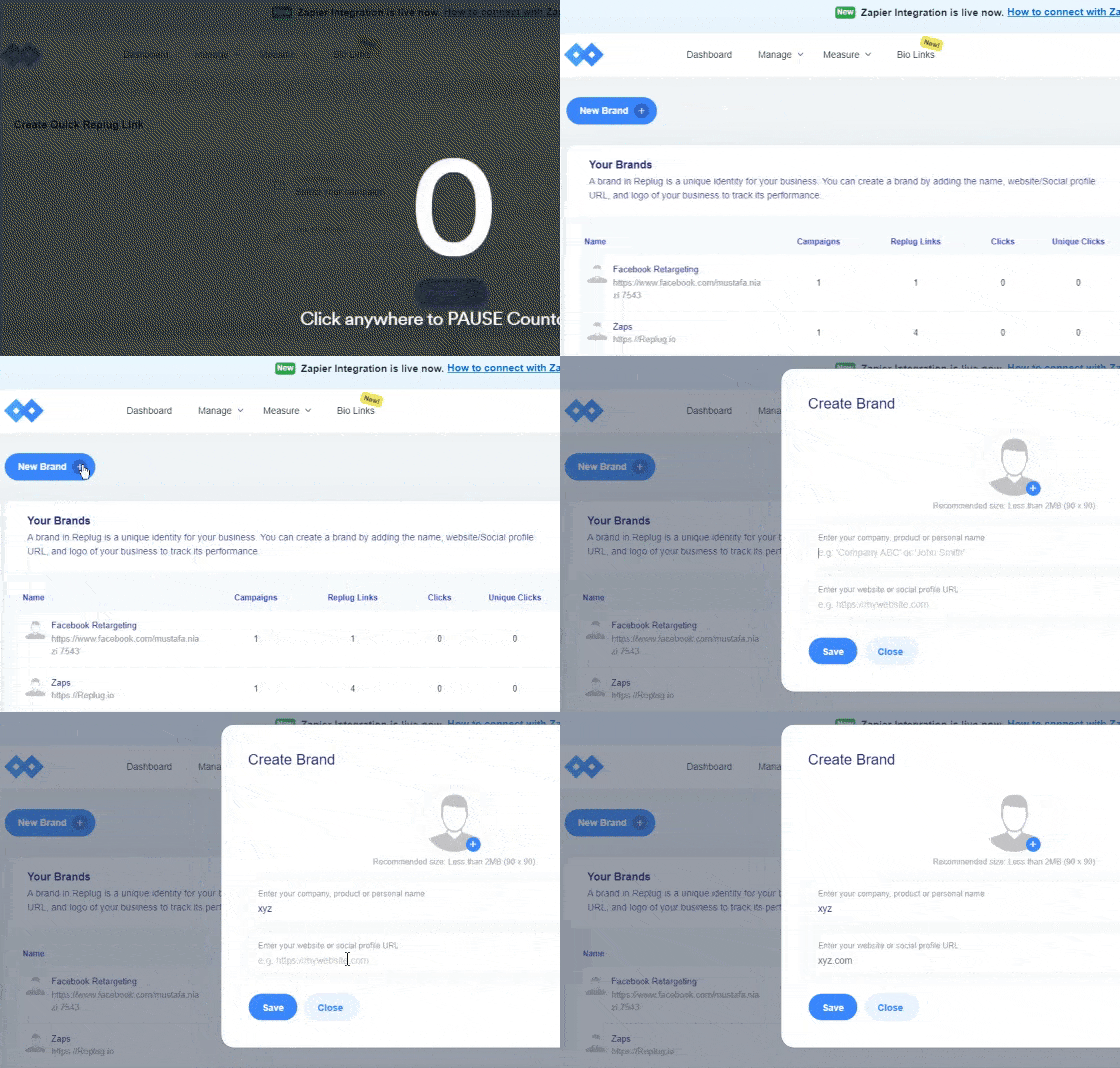
    Step 1: Log into your Replug account and “Create a Brand” which you wish to advertise. Add the name of your business and your company’s official website.

    This can be done by clicking on the + New Brand button as shown in the GiF below.


    Create a Brand


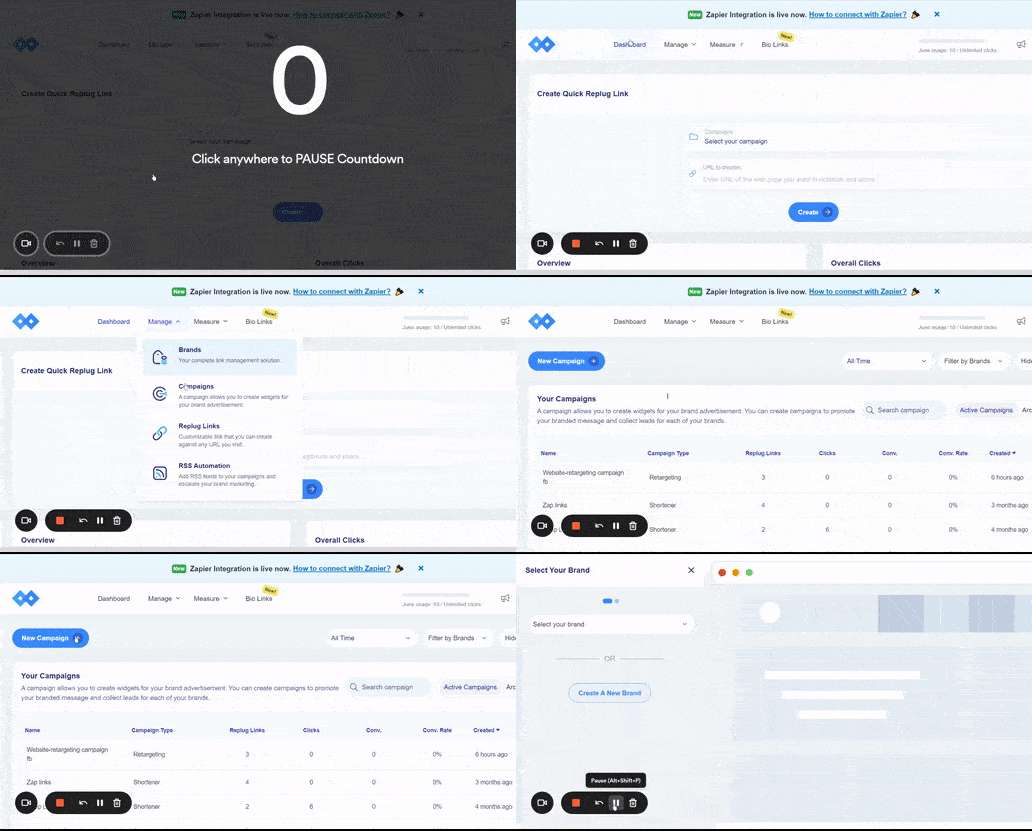
    Step 2: The next step is to “Create a Campaign. This campaign will help you choose the advertisement strategies for your business.

    Create a new campaign by clicking on the + New Campaign button.

    Note: You can choose multiple options here i.e. Brand, Campaign Name and Campaign Type.


    Create-Retargeting-Pixel-Campaign

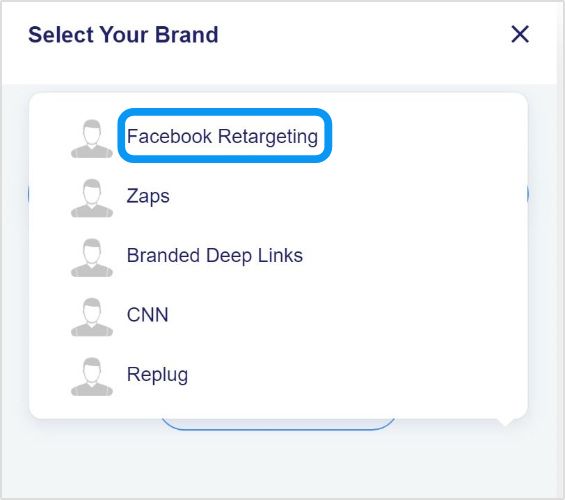
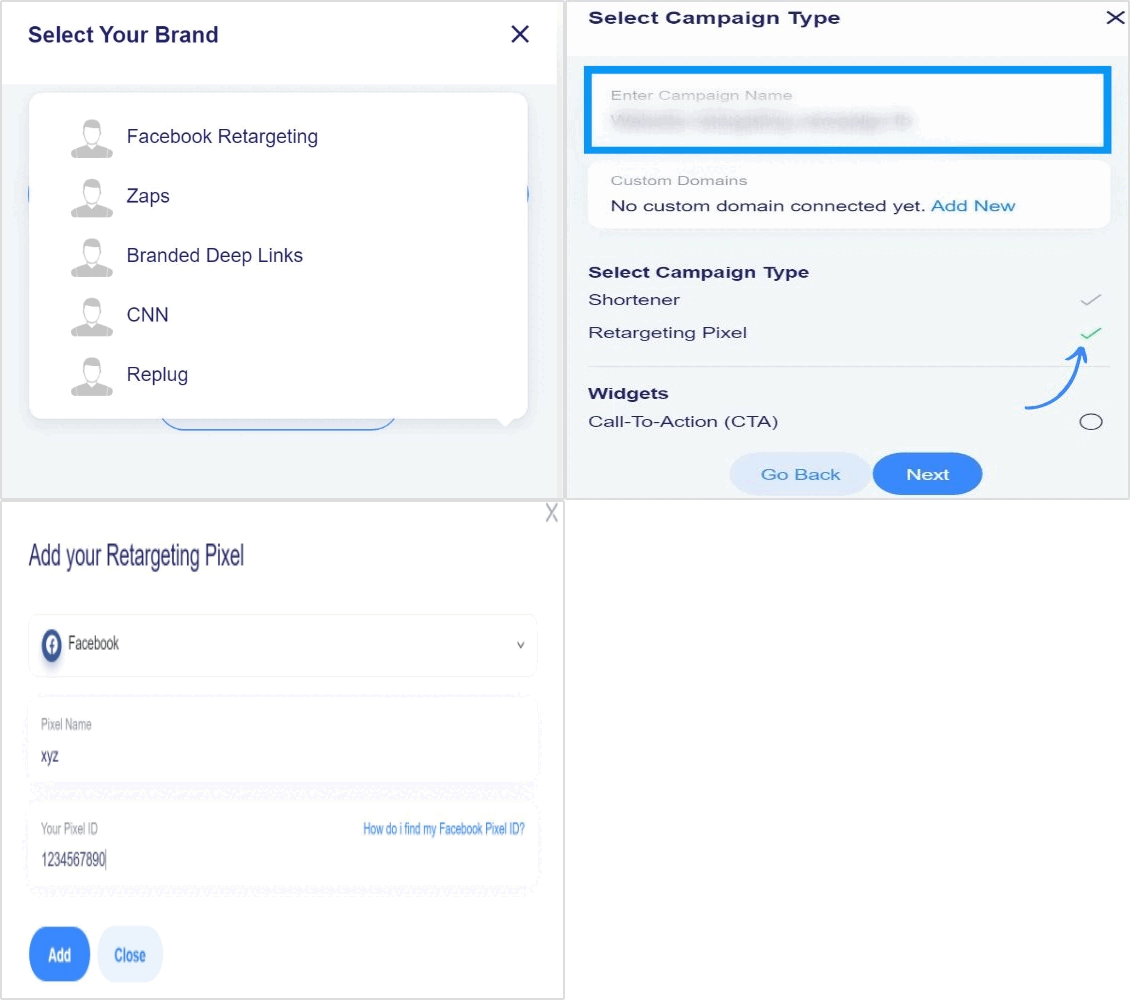
    Step 3: Select the brand you created among all your listed brands in Replug.

    select-brand-for-retargeting-campaign

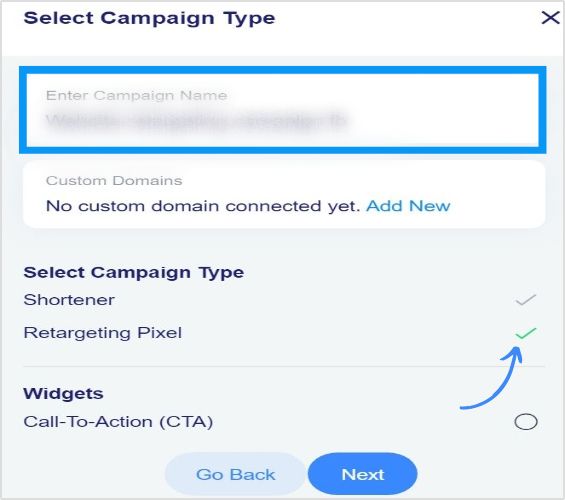
    Step 4: Now type in your campaign name and select “Retargeting Pixel” as your campaign type and click next.

    Enter-Campaign-Name-Type

    Step 5: In this step, you are required to add your retargeting code.

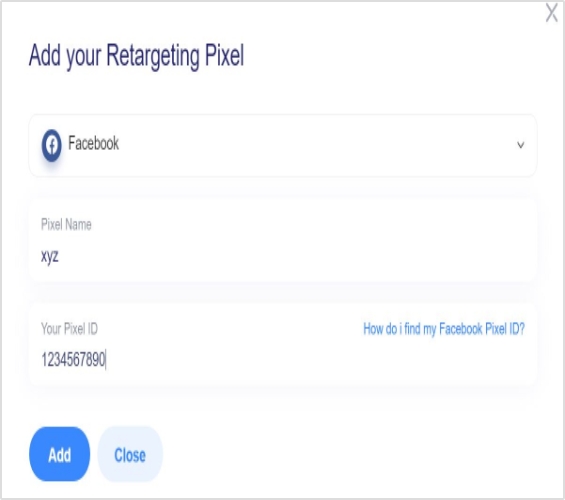
    Select the social network where you want to run your campaign. Type your script name and your pixel ID and add your script. 

    Note: You can check the option redirecting to the original website so that the user may be redirected to the original website in case he/she enters an invalid URL.

    Add-retargeting-codes-for-campaign-


    Your script added in the previous step is selected automatically now. You can create as many scripts as you want for different platforms and save your campaign.

    Recap: Creating Facebook Retargeting Ads Campaign Using Replug

    Create-Retargeting-Campaign-


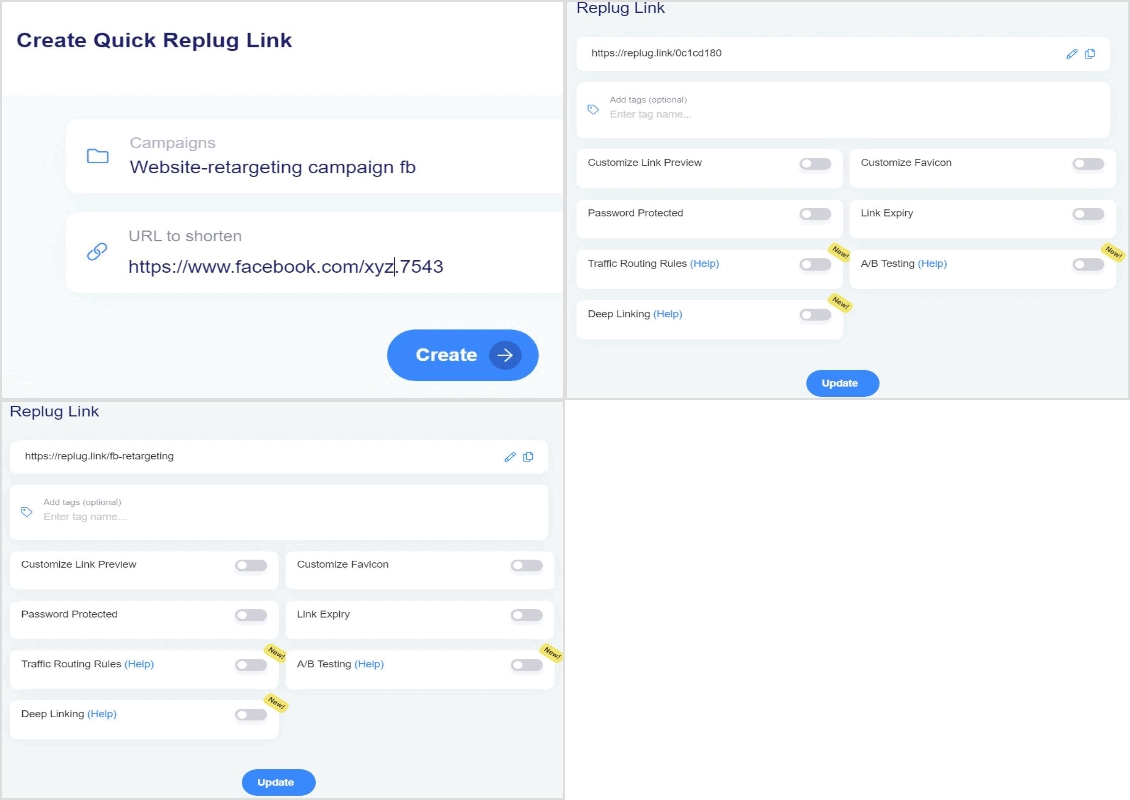
    Step 6: Now, you just need to shorten the link for the Facebook retargeting ad campaign created and whenever a user visits the link, your selected pixels will be fired.

    Create-Retargeting-Replug-Link-

    Maximize on Your Facebook Retargeting Ads using Replug

    Replug makes it very easy for you to create Facebook retargeting ad campaigns as you want in a minimal amount of time. You can select all kinds of social platforms by adding your own custom networks.

    All you have to do is add retargeting pixels and you’re good to go. You can also track the traffic brought in by this campaign in the analytics section and monitor all your campaigns.

    To further enhance tracking and branding, must check out this custom URL shortener to create branded links that help you monitor engagement and improve campaign performance seamlessly.
    FAQs

    Here are some quick faqs that can help boost your retargeting efforts.

    How much of Facebook ads you should be retargeting?

    It is recommended by sources that frequency of ads should be 2 to 3 for a week while 20% of the total marketing budget should be allocated for Facebook retargeting ads.

    What is the minimum audience size for Facebook ads?

    Minimum audience size is 100 but it mostly depends on the businesses and size of businesses. Ideal audience size to start with retargeting is 30K to 50K. You need to test what size best suits your business as you don’t want to end up going for larger audience size but not targeting the right people.

    When should I use retargeting ads?

    Retarget when your website or page is getting minimum 100 visitors. Retargeting allows you to connect with users that have connected with your brand in some sort or way.

    What is the best way to target Facebook Ads?

    Here are some tips that can help you make most of Facebook Ads.

    – Target audiences that meet your business needs (saved audiences, custom audiences, and lookalike audiences).
    – Combine unique audiences.
    – Utilize Facebook insights and keep an eye on recent purchase behaviors.
    – Repurpose your unicorn content for ads.
    – Last and most important, retarget Facebook ads using Replug.

  • TikTok Trends for Businesses, Brands, and Others

    TikTok Trends for Businesses, Brands, and Others

    TikTok doesn’t need any introduction. It has become the new normal, a buzzing phenomenon or a global trend, whatever you want to call it.

    It’s the most downloaded app of all time. So it opens up an opportunity for businesses, brands, and influencers to cash in on this hot, trendy mobile platform.

    For a few of those who haven’t had a chance to go through TikTok, I’d say it’s a short-form, vertical video app that has taken the world by storm.

    There might be several ways to hop on the TikTok and become successful. However, understanding TikTok trends for individuals and businesses might set a pathway for long-lasting attention on the platform.

    If you’re a business or brand and trying to get the hang of this 15-second vertical video trend, then you’re at the right place.

    This article encapsulates major TikTok trends to follow and strategies to apply to make the most of this short-form vertical video social media platform.

    Without any further ado, let’s jump right into it.

    TikTok Trends for Businesses

    Everyone knows that TikTok is on the rise, so brands and marketers want to cash in on this opportunity, and rightly so. 

    However, most companies don’t have TikTok trends for businesses to follow, and most end up frustrated after all. The reason is that they don’t have a plan in place. 

    One of the underestimated growth tactics is following the social media trends. We sat down to discover some of the hottest TikTok trends that businesses should surely look into. Here are those TikTok trends for businesses:

    i. Influencers and Celebs are Joining TikTok

    Influencer-collaboration-TikTok-Trends

    One of the trends businesses need to look at is how influencers and celebs take TikTok seriously. It’s a massive shift in the social media realm. There were celebrities in every part of the world who always avoided social media despite pressure from fans. 

    However, a lot of celebs have jumped on the bandwagon. Jennifer Aniston joined Instagram in 2019 and reached one million followers in five hours and sixteen minutes.

    Similarly, some celebs and influencers are taking TikTok seriously. It seems like nobody wants to miss out on a boat. It’s a sign that there is attention shifting toward TikTok. The reason is that when influencers or celebs start a hashtag or hop on a platform, it means the audience follows it. As a result, the platform or a trend comes under the spotlight.

    Related: Successful influencer marketing campaigns: 7 best examples

    ii. TikTok is Popular Among Generation Z

    Millenials are quite popular, but Generation Z has taken over their position. Since we’re discussing TikTok trends, it’s impossible to talk about TikTok and not discuss Generation Z. 

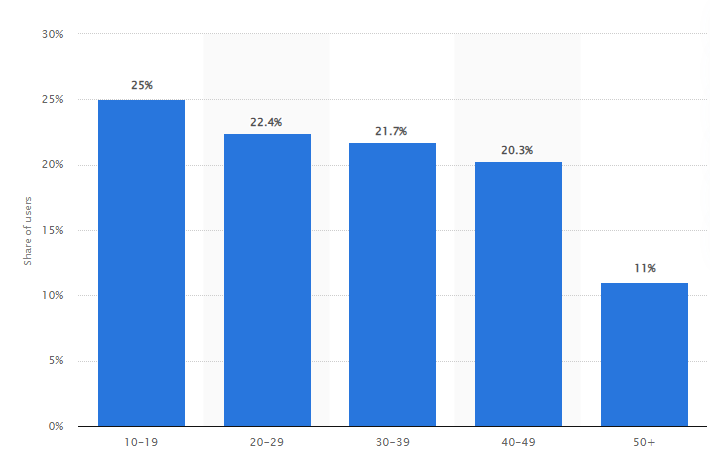
    The TikTok’s popularity wouldn’t be the same if it weren’t for the Generation Z. The platform became wildly famous among Generation Z. According to Comscore, 32.5% of US-TikTok users are between 10 to 19, 29.5% are 20 to 29, 16.4% are 30 to 39, 13.9% are 40 to 49, and 7.1% are 50+.

    The data shows that TikTok is the go-to platform for a younger audience, and brands could use TikTok as a source of engagement and relationship-building with the young audience through TikTok.

    iii. Indie Musicians Collaborate with TikTokers

    One of the TikTok trends is musical collaboration. Nowadays, indie singers and musicians create music, and besides putting it out on Spotify or SoundCloud, they collaborate with TikTokers to promote their songs. 

    TikTokers don’t only get the music to put out new videos, but they also get paid money to use that music in their TikTok content. You could easily spot such collaboration with hashtags such as #ad or #paid. Moreover, you could also notice that the TikToker would also mention the singer’s TikTok handle in the description or comment. 

    Brands should closely look at this TikTok trend, as they might be able to collaborate with the TikTokers in their niche. Check out the creative agency Collab Inc which connects content creators and brands.

    iv. Social Commerce is Expected to Grow on TikTok

    Social commerce isn’t a mystery anymore – Instagram, Snapchat, and YouTube have already been testing social media management tools. TikTok hasn’t been that far away. You can check out our tutorial on how to make money on TikTok.

    It’s expected that the trend of TikTok commerce will go up in the next few years or so and users will be spending more money.While brands will be cashing in on their TikTok attention without leaving the TikTok app. 

    v. TikTok Challenges are Gaining Popularity

    TikTok-Trends-TikTok-Challenge

    One of the TikTok trends businesses and brands should keep an eye on is the TikTok challenges. It works because an influencer or celebrity makes a TikTok video about a particular challenge, and it’s most likely to go viral if it happens to be fun.

    Brands who keep an eye on TikTok trends to follow and take advantage of all the attention must keep an eye on the for you page or discover section on TikTok. Plus, following a bunch of creators would go a long way. 

    There might be dozens of more TikTok trends out there, and the strange part is that they keep changing every week. So anyway, stick around to keep learning about TikTok for business.

    Related: How To Get More TikTok Views? 15 Hacks That Work

    What are the Most Popular TikTok Trends?

    TikTok trends change from time to time, just like top trending hashtags on Twitter. Therefore, it’s difficult to point out a TikTok trend because no one knows how long it will last.

    Brands who want to capitalize on TikTok trends shouldn’t overthink making videos on the latest TikTok trends – all they need is to create videos and move on.

    When TikToker influencers come across a new trend through the discover page or for your section and find it interesting, they jump on the bandwagon and make a video around that.

    Here are three TikTok trends that I spotted recently:

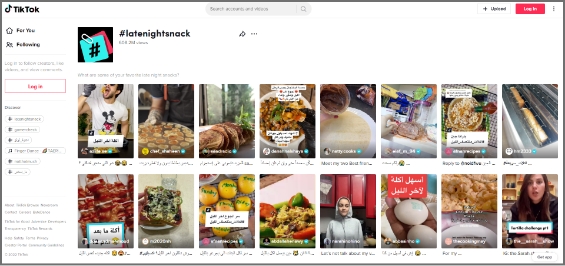
    1. Latenightsnack

    latenightsnack-tiktok-trend

    Latenightsnack trend was recently spotted on TikTok. It was about what people snack on late at night. TikTokers were making short, vertical videos about what they were eating while watching Netflix or working late. 

    This TikTok trend had gotten over 608 million views. So this is why it was trending on TikTok the other day. 

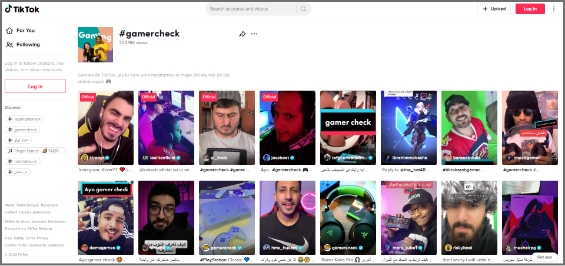
    2. Gamercheck

    latenightsnack-tiktok-trend

    Gamercheck was also a TikTok trend I came across lately. It was the trend about how TikTok users play games, what their gaming rooms look like, what gaming equipment they use, and all things gaming. 

    The Gamercheck TikTok trend had gotten over 300 million views, and the numbers were growing. 

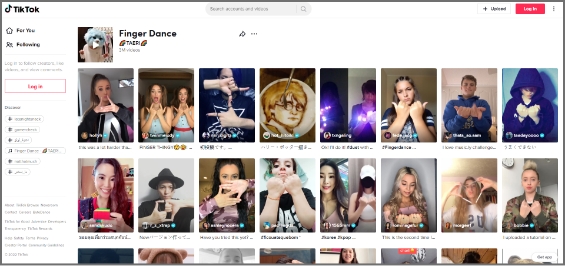
    3. Finger Dance

    finger-dance-tiktok-trend

    Finger Dance was a relatively newer trend that was seen on Twitter. The TikTok trend was about finger dancing – TikTokers were making their fingers dance to the music. It was fun to watch people doing finger dancing.

    This TikTok trend had reached 3 million views, but it looked like it would become a massive TikTok trend in the coming weeks.

    Strategies to Apply to Trend on TikTok

    Trending on TikTok doesn’t happen on a whim, especially if you’re a business. Usually, influencers and celebs fascinate people to follow the trends on social media.

    However, if brands want to trend on TikTok, they must humanize themselves – people like to connect with people rather than bots or faceless social profiles.

    Here are some strategies brands can opt for to trend on TikTok:

    1.Understand the Market Demand

    Trending on any social media platform is no easy game – you have to be an expert at this or know how to make content that immediately goes viral.

    For the majority of the brands and individuals, it’s essential to figure out what’s happening in the market. It doesn’t apply to only brands who want to dominate on TikTok. But instead, it’s for everyone who wants to jump on this bandwagon.

    Understanding the market demand means figuring out what people like, what they want to consume more, and what type of TikTok accounts are getting more traction. 

    The easiest way to understand the market demand is to spend a good couple of days on TikTok and analyze the “for you” and “discover” sections on TikTok. This will allow brands to comprehend what people are watching, liking, and enjoying. 

    2.Use Trending Sounds in the Videos

    TikTok is a social media platform that might be new for most of us, but it’s certainly not impossible to pull this off. 

    One of the best strategies to go viral on TikTok or make trending videos is by simply using the trending sounds available on this short-form video app. If you’re new to TikTok, you’d probably think about where to find trending soundtracks on TikTok.

    Well, you don’t need to find those popular sounds. In fact, TikTok allows you to use the TikTok sounds from the trending videos. All you need is to look out for the popular videos on the “discover page” or “for you” section. 

    The videos that get recommended to the TikTok users are the ones that are trending or gaining some traction. 

    Since you’re a business and want to trend on TikTok, the easiest way is to start using trending sounds in your TikTok videos. This will allow you to blend in with the TikTok community, and your content will start getting discovered through the trending sounds you have been using.

    3. Collaborate with Other TikTokers

    Tiktok-Collaboration

    One of the easy wins for brands to trend on TikTok is collaborating with TikTokers. These TikTokers could be influencers or up-and-coming content creators. The brands may have to cherry-pick these TikTokers based on their content type, audience demographics, and fan loyalty. 

    Get paid through collaborations with other Tiktokers, and it doesn’t cost as much as Facebook or Instagram ads. However, the return of these collaborations could be an eye-opener.

    If you haven’t had a chance to spot a TikTok collaboration, then you perhaps don’t know why these collaborations happen. Obviously, the content creators want to monetize their social media existence through these paid collaborations, and brands get the attention, eyeballs, and publicity.

    If you think a single collaboration with a TikToker would get you to the For you page or the discover section, then you’re mistaken. It doesn’t happen so quickly for most brands, but with time and effort, you never know.

    So don’t rule out the possibility of going viral on TikTok just by collaborating with a famous TikToker. 

    4. Upload Multiple Videos Every Day

    One of the strategies that take TikTok influencers to the next level is that they upload multiple videos a day. The influx of continuous videos often helps such TikTokers in getting so much attention on the platform. 

    Any social media platform will put you on a pedestal if you keep putting out fresh content consistently. So an easy hack for trending on TikTok is to experiment with uploading multiple videos daily. 

    Sure, it’ll be tough to maintain the quality of every video, but it’s worth the risk. If you follow social media gurus, they put out a ton of content daily on Instagram, Twitter, and TikTok. 

    Evan Carmichael is a video curator who started on YouTube and now also has a TikTok account. He uploads multiple videos on TikTok every day. 

    He has got half a million TikTok followers.

    5. Use the Relevant Hashtags in the Video Descriptions 

    tiktok-hashtags

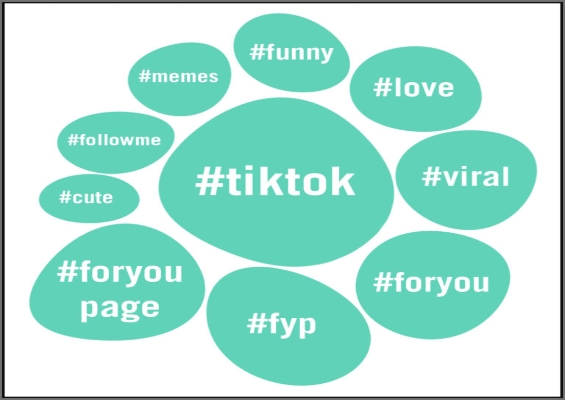
    Hashtags have a lot of potential if done right. The majority of the users don’t know how to use hashtags across all social media platforms. 

    As far as the hashtags on TikTok are concerned, they play a vital role in taking any content on the “for you” page or discover section. Since the hashtags are connected to the discoverability of the content, they have the potential to make your videos quite popular.

    However, the common mistake people make is going after generic hashtags. For instance, if they’re sharing a picture of rice, they might use hashtags such as #rice, #food, and #tasty. 

    So instead of using those generic hashtags, they must go after specific hashtags to be more precise, for instance, #chickenrice #bestfoodintown, #bestricerecipe, etc. 

    The hashtags must be relevant yet specific – opting for broad and short hashtags won’t help the cause. 

    6. Engage with TikTokers in the Same Niche

    The most undervalued TikTok growth strategy that could help a brand or individual trend on TikTok is engaging with TikTokers in the same niche. 

    Usually, it’s said that you must engage with your audience through comments, replies, and DMs – the same applies to the TikTokers. 

    When TikTokers communicate with each other on the platform through DMs or comments, it builds a relationship among them, which could lead to collaborations and more opportunities.

    Furthermore, the TikTokers openly engage with each other through commenting or duets. This gives a chance for the audience to pay attention to both sides. The audience loves their favorite content creators collaborating or talking publicly.

    It opens up a plethora of opportunities for brands to cash in just by building relationships with TikTok content creators or providing a stage for other TikTok influencers to come on board and entertain the audience.

    There are countless ways to get the attention on TikTok, which is key to gaining popularity and getting on the trending sections on the vertical videos app. 

    Related: TikTok For Business: Strategies to Promote Small Businesses

    Best TikTok Examples to Understand TikTok Trending

    It would be unfair to discuss TikTok trends and not talk about the TikTok influencers who have been crushing it with their uniqueness, innovation, and strengths. 

    Interestingly, some high-profile TikTokers don’t always worry about the trends. Sure, some try to cash in on it, but most just go with the flow. 

    Here are three TikTokers that have their unique style, posture, and genre, but they’re doing quite well on TikTok:

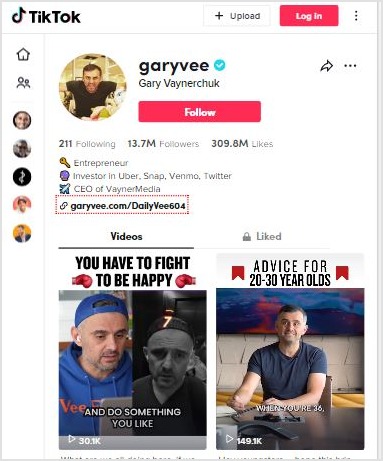
    1. GaryVee

    GaryVee

    Gary Vaynerchuk is an entrepreneur, investor, author, and social media expert. He has over million followers on Instagram, Facebook, Twitter, YouTube, and TikTok. 

    He always advises people to post multiple times on TikTok and Instagram to pop up. 

    So it’s a no-brainer that if you start uploading several videos on TikTok daily, your numbers will skyrocket in a month or so. Once you start to get those followers consistently, you could be trending on TikTok.

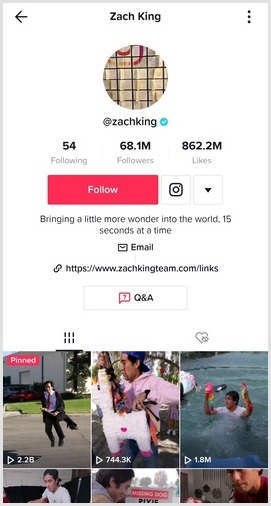
    2. Zach King

    Zach-King

    Zach King is a popular social media influencer, filmmaker, and illusionist. He became popular from his 6-second magic videos on Vine. Even though Vine shut down, Zack didn’t stop there.

    When TikTok popped up, he hopped on this 15-sec vertical video platform and started doing the same. And now, he is among the top TikTok influencers in the world. He has over 68 million followers on TikTok. 

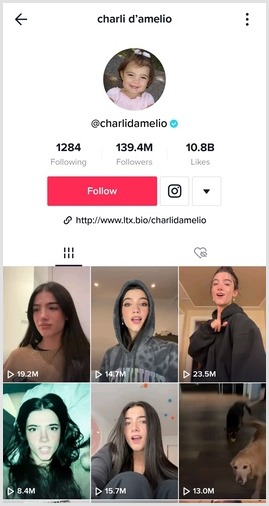
    3. Charli D’Amelio

    charli-d'amelio-

    Charli D’Amelio is the biggest TikToker in the world. Now she has over 141 million TikTok followers. Not only is she the top TikToker, but she is also among the highest-paid TikTok influencers in the world.

    The interesting thing about Charli is that she showcases her passion and talent for dancing in her TikTok videos. It’s a true testament to following your passion and making the most of it.

    Why Brands Should Use a URL Shortener

    Short URLs have not been this relevant before. It doesn’t matter what social media platform you’re focusing on. A URL shortener tool can come in handy.

    Not only does it allow you to shorten the long URLs, but you can also create branded short URLs for newsletters and social media sharing.

    Here are some of the main reasons why brands need a URL shortener:

    Bio Links on TikTok, Instagram, and Twitter

    All major social media platforms allow users to put their website or blog URL in the bio. However, a long URL doesn’t look reasonable. As a result, it affects the overall look and decency of the social media profile.

    This is where an efficient short URL shortener comes in handy and solves the problem. It lets users convert long and clunky URLs into short and sweet URLs in no time at all.

    Now brands can put their sales pages or discount offer page URLs in the bio section of Instagram or TikTok without any problem.

    Related: How To Put A Link In TikTok Bio?

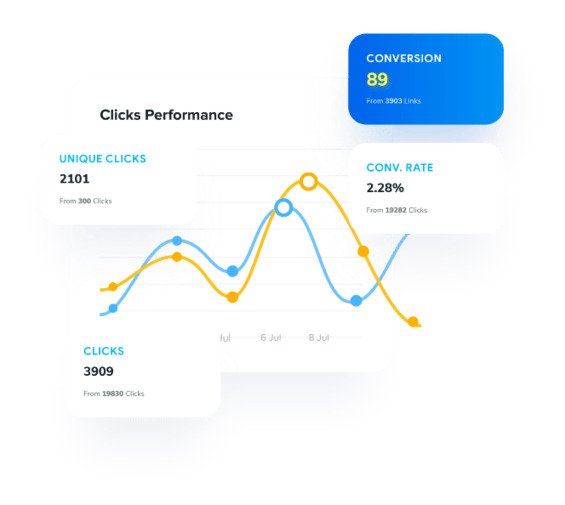
    URL Clicks Tracking

    Replug-Link-Management-Tool

    Placing the short URLs in the bio or story on social media platforms isn’t enough – it’s half the equation unless you could track the clicks. 

    The reason is that click tracking can help you analyze the conversion from the clicks. You might not want to generate short links that don’t have any performance tracking system in place.

    When a brand is on the lookout for a link management tool for URL shortening, they must try to find a URL shortening tool that offers click tracking. Otherwise, it would be impossible for them to identify where the clicks are coming from. Usually, a website gets traffic from several sources. 

    Long URLs Look Spammy

    ugly-short-links

    One of the main reasons why URL shortener tools became popular is that long URLs often look spammy. People generally don’t trust those long URLs as they seem fishy. 

    Have you ever come across a long URL on social media that look malicious? We often receive such spammy links in the DM, and most receivers hesitate to click on those links. 

    Branded URLs are Trustworthy

    Amazon-Branded-URL-Example

    A huge perk of using a branded URL shortener tool is that it could flawlessly integrate with your domain name. 

    Brands need trust from the audience, especially on social media platforms. So using a short branded domain for sharing social media content could turn things around for any business. Here’s the guide on adding a custom domain.

    Drive Website Traffic from Social Media 

    Brands that develop websites want website visitors, they use different traffic strategies and digital marketing tactics to drive website visitors to their websites. 

    There are several ways to drive website traffic, such as:

    • Social media marketing
    • Social media ads
    • Search ads
    • SEO
    • Sponsored content
    • Guest posting
    • Paid collaborations

    Most of you might already know about these different ways to drive website traffic. However, Replug.io allows you to drive visitors from sharing content on social media seamlessly.

    If you want to test this feature of Replug, all you need is to start a campaign and choose retargeting as your campaign type. Then, opt for the widget as a call-to-action.

    Choose the CTA type afterward; you can either go with a button, link, or form. Then, add a personalized headline, message body, CTA text, and the link to drive traffic. That’s it.

    Related: What is the Best Time to Post on TikTok?

    Are You Ready to Cash in on TikTok Trends?

    No doubt, TikTok has taken the world by storm, and it’s essential to figure out how to use this short-form, vertical video platform with immense attention on it. 

    We’ve discussed TikTok trends and strategies to make the most of popular TikTok trends. Plus, we also shared some TikTok influencer examples that are using the platform quite impressively. 

    We’ve previously discussed how to make money on TikTok in detail. If you haven’t seen this detailed guide, we highly recommend checking it out. 

    So, are you ready to cash in on TikTok?

  • How to get more TikTok views? 15 hacks that work

    How to get more TikTok views? 15 hacks that work

    TikTok is getting bigger everyday and has taken over a big chunk of its competitors’ audience. It was the most downloaded app in the first quarter of 2025. So, it comes as no surprise that more and more social media influencers, celebrities, and stars are dominating the app.

    As a result, it is difficult for content to get noticed. People are wondering how to get more views and followers. Hence, we have rounded 15 strategies that will help you get more TikTok views on the app.

    1. Use Bio Links

    Bio-Links

    Adding a link to your TikTok bio is a highly effective strategy to keep your audience hooked to your profile. Bio links boost traffic to your website. You can improve business by reaching potential customers.

    They allow TikTok users to know more about your business by redirecting them to your business website. They serve the commercial purpose as well. Adding links to your bio will boost conversion rates and turn followers into buying customers.

    Note: If you want a unified way to manage all your bio-links, deep links and campaign URLs, consider using a dedicated link optimization platform to keep your links organized and trackable. And, before you share your bio link or campaign URL, especially if it’s long and cluttered, you might want to shorten link first to make it cleaner, easier to share, and more professional-looking.

    2. Create High-Quality Videos

    Well, it is an obvious but underrated aspect. Make sure your videos look good (lightning, pixels, sounds, peppy edits). People will be more likely to watch clear videos than blurry ones. Also, some investment in high-quality cameras may earn you a big chunk of money later.

    TikTok also tends to prioritize high-quality videos on FYP. Try to shoot in trending effects, and incorporate sounds and vertical format. Once your views start pouring in, your TikTok journey has begun. Creating high-quality videos not only grabs views but loyal followers who would be there through thick and thin.

    3. Keep TikTok Video Short and Sweet

    Though TikTok Videos can be posted for up to three minutes-long, videos under 30 seconds are likely to wind up on the FYP. Of course, people would also re-watch something fast and furious a second or third time.

    Social media growth has spanned human attention to become shorter and shorter. A short video is ideal for TikTok because people are scrolling quickly, and their time is at a premium.

    As a result, these videos have a higher retention rate, more likely to capture viewers’ attention for longer. Therefore, leveraging the short video content will give you a leg up on your competitors and help to capture the audience’s attention.

    4. Understand How Hashtags Work

    Hashtag-Gif

    Hashtags are powerful aspects of the TikTok platform. It’s how the TikTok algorithm identifies what you are posting about and who might be interested in watching it.

    Hashtags also allow people to discover your content via search. Going for a particular niche with specific hashtags relevant to your audience and topic is one way to take it.

    Thus, you must be clever with hashtags and keep a few tips in mind;

    • Discover trending hashtags using the discover tab.
    • Don’t use the most generic and overused hashtags; the most common is #foryou
    • Try to experiment with broad hashtags #clothes or specific ones like #frock
    • Furthermore, to find out which hashtags are trending, tap on the discover tab and then tap trends at the top of the screen. 61% of TikTiok users said they like the brand better when participating in a TikTok trend.

    5. Trending Sounds

    Hashtags aren’t the only factor that has their own trend cycle. TikTok sounds also go through rounds of popularity. Be active for recurring sounds track that you might be able to perform. You can also discover trending soundtracks by tapping create (+) button in-app and then tapping add sound. Here you can see the trending and most popular audio clips.

    6. Deep Links

    Deep-Links

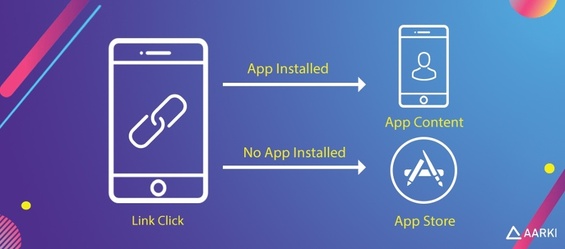
    You can put deep links in your TikTok profile and share them on other social media sites (Facebook, Instagram, Youtube etc.).  The good thing is it automatically detects devices then will lead.

    How TikTokers can get more views using deep links?

    When users will share Tiktok videos using deep links, it will take the users direct to the intended location within the app and give you a view, like or follow. In case the app is not installed then it will direct the user to install the app.

    What does this mean?

    When the user directly reaches the your intended location in the app or even in the PC, these users are more likely to convert to subscribers or customers depending on the goal behind using deep links. Hence, you are getting more likes, more follows and definitely more views.

    7. Target your Specific Audience

    There is a specific community of TikTok for everyone out there, from the hip-hop acts to a vibrant makeup transition community. Search for who is your target audience with, and look for popular accounts in those genres to see what type of hashtags, references, and formats they might be using to promote your own related content.

    Commenting and liking will also help build a relationship with your targeted audience. Your encouragement for their content will inspire them to check what kind of content you are producing on your account.

    8. Optimize your TikTok Profile

    Your TiTtok profile presents who you are as a creator. You can tell a lot about a person by looking at the profile picture, bio section, and video thumbnails. An optimized profile gives insights to prospective followers about what kind of creator you are and what to expect.

    Another reason for optimizing your profile is that it makes you searchable. If you have put an irrational sequence of symbols and characters in your profile, then your fans will not be able to easily find you, even if they are the people that know you by name.  Therefore, ensure that your profile name is easy to remember by avoiding unfamiliar characters and symbols.

    9. Try a Duet

    A duet allows you to create a video side by side with a video from another creator on TikTok; a duet has two videos but on a split-screen that play together. Duets are a great way to reach popular accounts on TikTok, spot their followers, and allow their fans to see your content.

    It is a creative way of interacting with other creators, building on existing stories, and creating unique content in collaboration with other TikTok user across the platform. Remember; you have to make your account public to allow others to duet with your videos.

    10. Try How-To-Do Videos

    There are a lot of YouTube channels out there that are dedicated to helping you learn how to do things. These can be great resources and get good views, they’ll often explain in detail what needs to be done in order to complete the task. You can follow the same pattern on Tiktok to get more views.

    Here are a few tips for how-to videos:

    • It’s essential to keep it short. Keep your message simple, and don’t try to be funny.
    • If you’re having a hard time coming up with what to say, start with the basics: “Hello, and thank you for watching.”
    • It’s also important to have good lighting and good audio quality.
    • It’s also useful to do some research before you start recording.
    • Know the format of the platform you’re using, and whether there are any rules or restrictions you should follow.
    • Make sure that your video is high-quality and lacks any distracting elements that could get in the way of your viewers.
    • Be mindful of your surroundings.
    • Also, remember that you’re not limited to just one angle: shoot from multiple angles so that viewers can see from different perspectives.

    11. Collaborate with Social Media Influence or Celebrities

    Influencer collaboration-for-more-TikTok-views

    Whether you hired a social media influencer or celebrity to promote another brand for a cross-over opportunity, bringing some outside looks into your TikTok is an easy way to reach a new audience.

    Your special guest appearance will heighten your content and attract the attention of their fans to your new videos.

    12. Upload Multiple Videos a Day

    Things move quickly on the TikTok platform. It would be best if you didn’t worry about overwhelming your followers by posting continuous content.

    TikTok guidelines recommended posting 1-4 times per day. If you have a sufficient number of videos every day, the audience will be more likely to visit looking for more content. Therefore, upload multiple videos a day to get more views.

    13. Focus on Video Completion Rate

    It is true that people need to see the friction of videos for you to earn a view. However, it is important to keep them watching all the way to the end. TikTok Algorithm prioritizes videos with a high completion rate. They serve high-quality videos as “For You Page” recommendations.

    How can you hold your audience’s attention for a longer time?

    You can hook them up with different content ideas for 2 to 3 seconds. You can create curiosity with a promise that what is coming next is breathtaking. Moreover, you can use captions with suspense for the big reveal.

    14. Post at the Right Time

    Once you target your specific audience, you start learning when is the best time to upload your TikTok Video. For example, how a busy worker uses TikTok is very different from how a college student uses it.

    Fortunately, TikTok offers analytics to support you see when your videos get the higher engagement. Furthermore, Tiktok is a global app, and your audience might not even be in the same country. You need to put a little bit more focus on the activities, behaviors, and age group of your target audience. It will help you find the right time to upload your content.

    Is There a Best Time to Post on TikTok?

    The answer is yes or no. TikTok’s “For You Tab” perform an outstanding job of serving every user high personalized content. Usually, the videos on the “For You page” are no longer than a couple of days. So, for significant views, you will post on TikTok when your audience is most likely to scroll. Moreover, finding your best time requires where your target audience is located and when they are online.

    But reaching significant views depends on when you post and how often you post. These elements will distribute your content on Tiktok. To find a posting schedule that will satisfy your fans and Tiktok algorithm, you may keep your eyes on your performance until you find a frequency that works.

    15. Tracking Analytics

    url-tracking- analytics

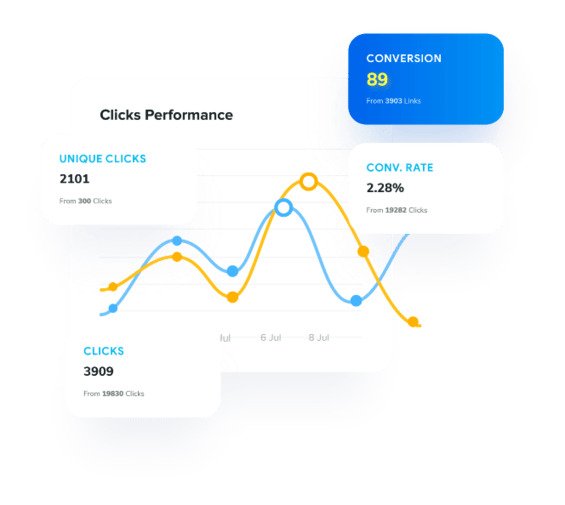
    If users view specific videos then keep an eye on them through tracking and analytics. Analyze what campaigns they are interacting more with. Then provide users with similar content to get more views on TikTok.

    Final Words

    Though you may feel getting views on TikTok is a mystery, but TikTok algorithm is becoming more transparent. Above mentioned 15 tips will help your brand attract significant views and loyal fans who are more willing to join your owned audience and eventually become clients too.

    FAQs on getting more views on TikTok

    Can I see who views my TikTok?

    On TikTok, you can’t keep track of which users are watching your video or profile. There used to be a workaround that allowed you to view who visited your profile to get a sense of who was watching your videos, but that option has been removed.

    How much does 50k views on TikTok pay?

    According to our TikTok calculator, if you achieve an average of 50,000 views for every sponsored post, you will earn between $500 and $1000.

    How many views on Tiktok to get paid?

    Users must be 18 years old or older, have a minimum of 10,000 followers, and have achieved at least 100,000 TikTok views in the last 30 days to earn directly from TikTok. They may apply for TikTok’s Creator Fund via the app once they achieve that criterion.

    Do views mean anything on TikTok?

    Yes, views are a game-changer. However, it’s true that users need to view a fraction of a second of your video to get you a “view,” but keeping them view all the way to the end is important because the TikTok algorithm favors videos with higher completion rates.

  • How to add links to TikTok bio in 2026: TikTok link in bio requirements explained!

    How to add links to TikTok bio in 2026: TikTok link in bio requirements explained!

    Scrolling through TikTok, it takes one good post to send thousands of people to a profile in a single day.

    TikTok now has well over a billion monthly users, and studies show that a large share of them search for brands, products, and creators before making a decision. Without a clear link in your profile, all that attention fades as fast as it came.

    That is why knowing how to add links to a TikTok bio is a real power move for social media managers, creators, and marketers. A single tap can send people to a store, a newsletter, an affiliate page, or a long‑form video that closes the sale.

    In this guide, you will see what a TikTok bio link is, who gets it, how to work around follower limits, and how tools like Replug help you turn one link into many, hassle-free!

    Let’s start with the basics and answer what a TikTok link in bio actually is!

    What is a TikTok link in bio?

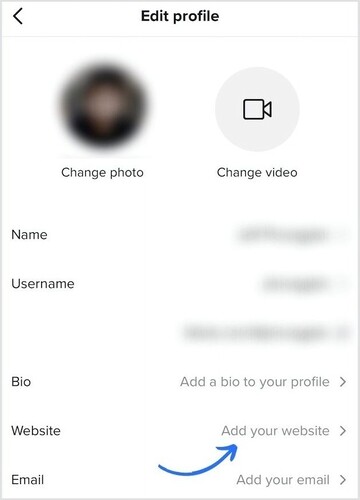
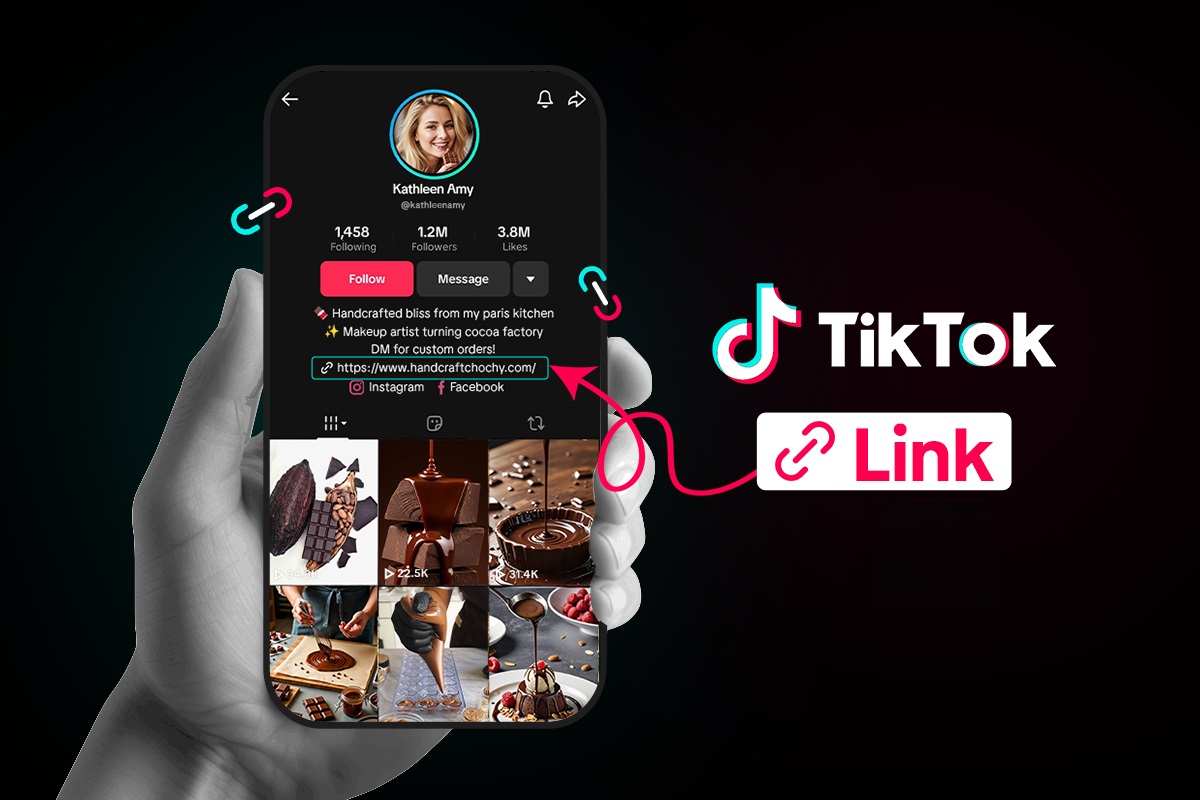
    A “TikTok link in bio,” or simply a “TikTok bio link,” is a clickable URL that appears right under your profile photo, name, and short bio on your TikTok profile. It sends people straight from your profile to a website, online store, funnel page, portfolio, or any other destination you choose.

    What is a TikTok link in bio

    TikTok only gives you one clickable website field, so it is prime space for anyone who cares about traffic and sales.

    For content creators, marketers, and brands, that website field works as a bio link page. Videos bring the views, but the link in bio turns that attention into page views, sign‑ups, and purchases.

    When someone taps your profile after seeing a post, that bio link is the bridge from casual interest to real action.

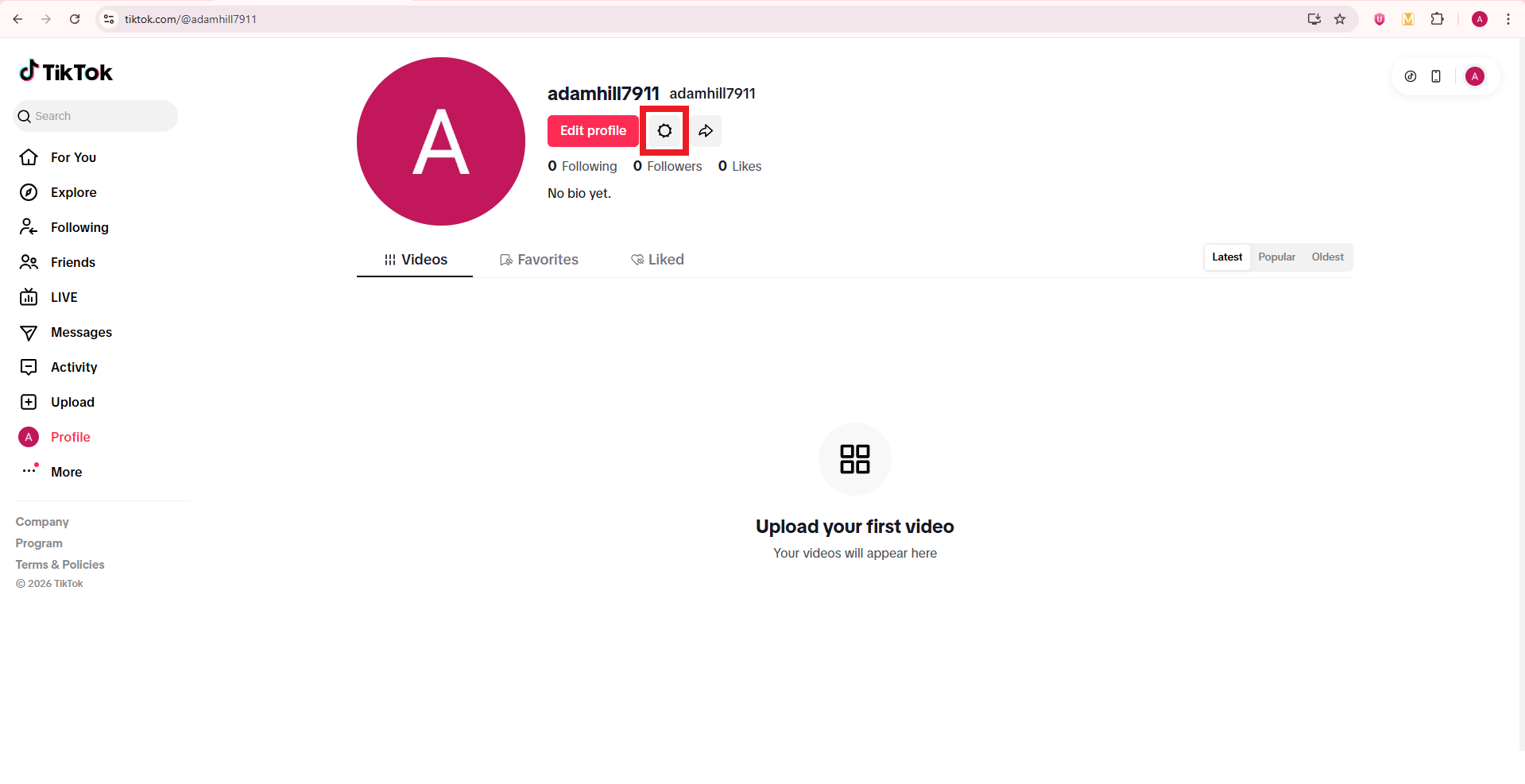
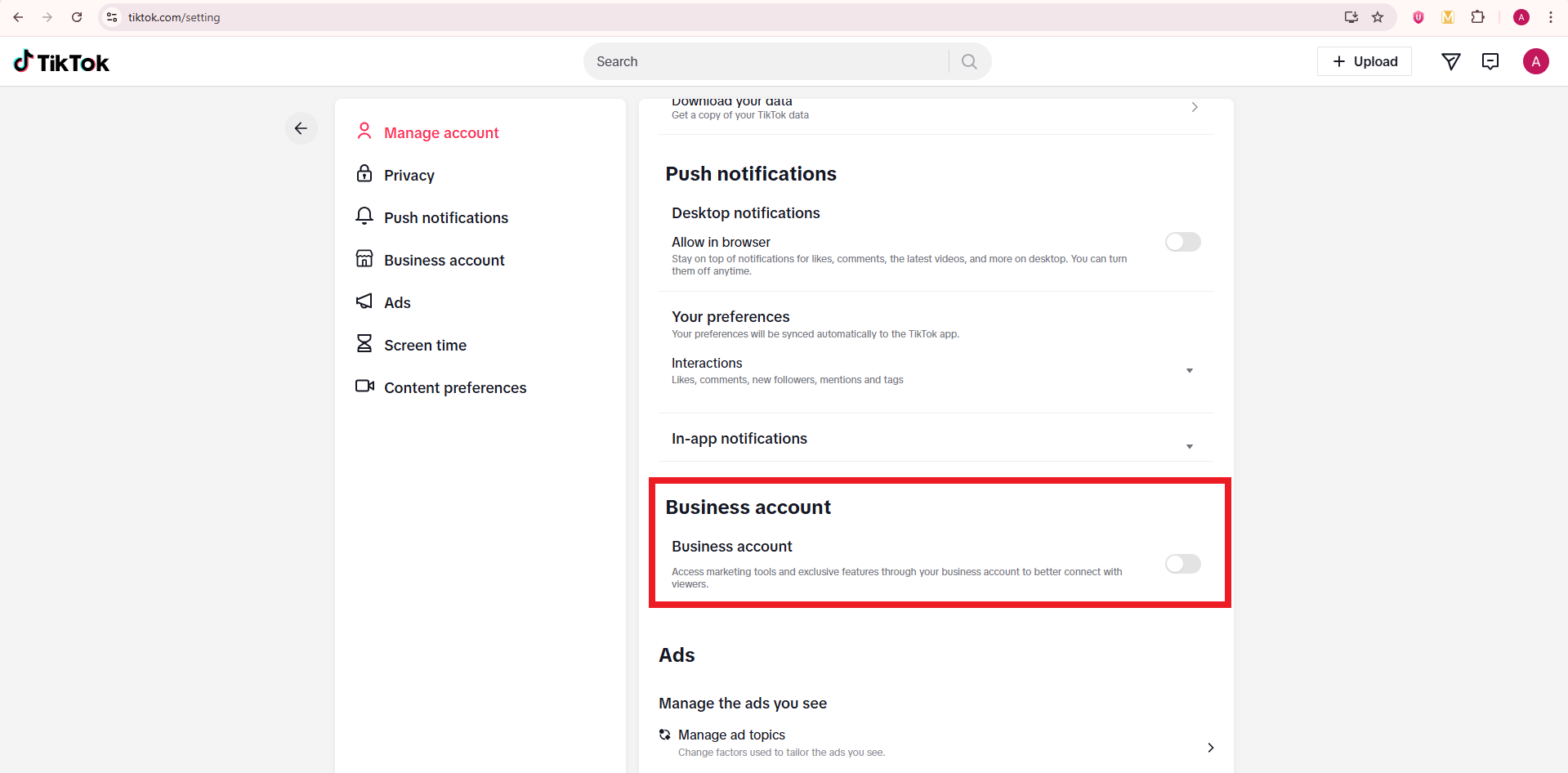
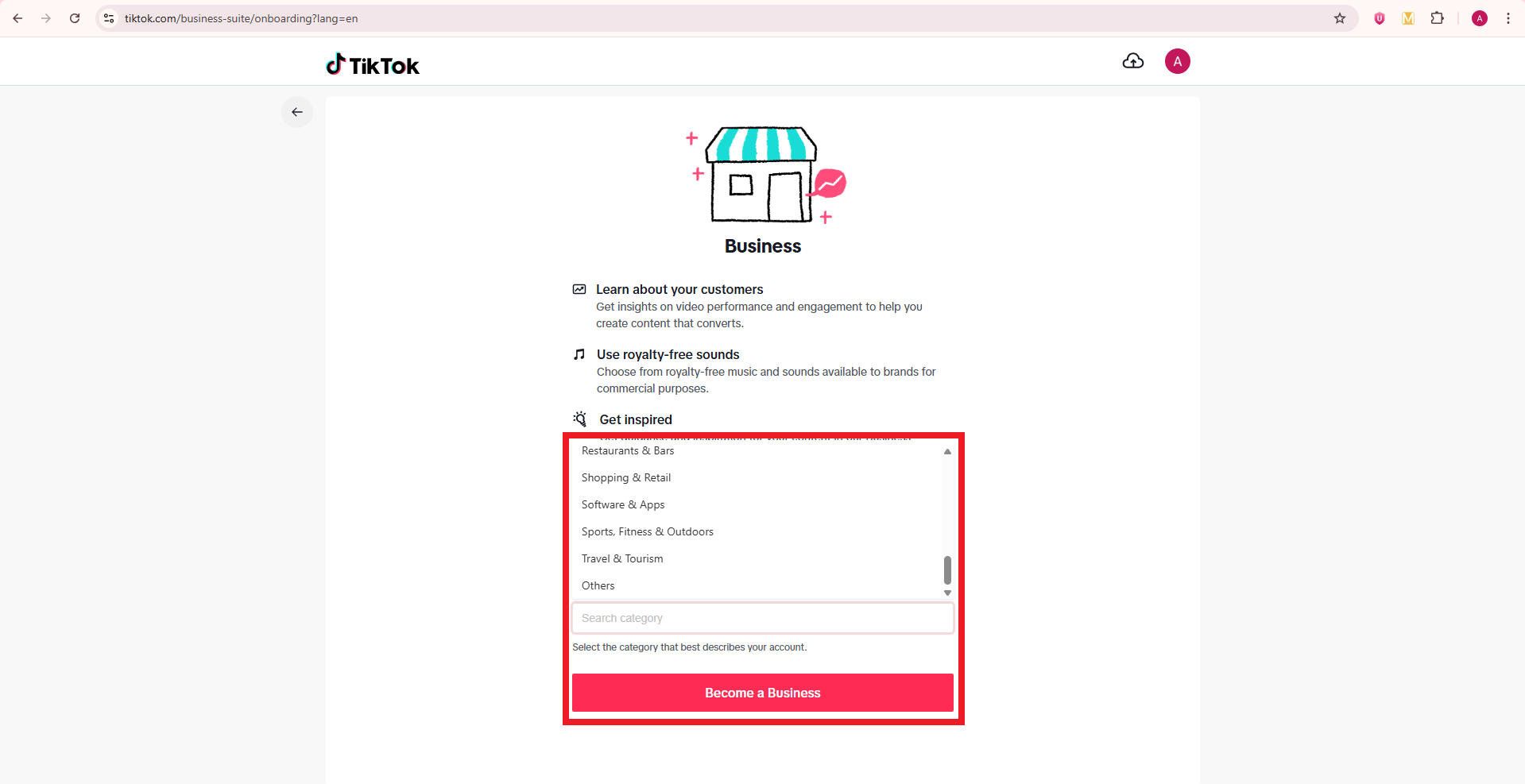
    Importance of a custom link in your TikTok bio

    A custom link makes your profile look serious and safe to tap, because the URL matches your brand name instead of a long random string. That clear branding builds trust, which matters a lot when people decide whether to click from a short video to an outside site.

    When people see the same domain on your TikTok bio link, website, and other social apps, they feel more confident that they are in the right place.

    Besides, a custom link also:

    • Gives you control over where traffic goes, even when your content focus changes over time. You can send everyone to a special landing page for a product launch, then later switch that same link to a newsletter or affiliate hub without touching the profile field again. That kind of control helps you test offers, track performance, and keep your promotion in sync across campaigns.
    • Helps you improve your TikTok work, instead of guessing. When you use a managed link that connects to analytics, you can see how many clicks come from TikTok, which videos move people to your profile, and which pages convert best. Those numbers guide smart content choices, better calls to action, and a more focused professional bio that fits the audience you want.
    • Offers you more room to grow across platforms. Many creators use a branded bio link that lists their store, podcast, YouTube, email list, and partnerships in one place. That means a single tap on TikTok can spread your audience across every channel that matters to your brand.

    Can’t add link to TikTok bio: Eligibility criteria defined!

    Many people open their TikTok profile, tap Edit, and notice there is no “website” field. This can feel confusing, but it usually comes down to TikTok rules about who can add a clickable link.

    TikTok link in bio eligibility depends on your account type and follower count!

    Here is a quick view of how it works by account type.

    Account typeBio website field accessFollower requirementExtra notes
    Personal accountThe website field appears after TikTok grants access in your regionOften 1,000 followers or moreSome regions still limit the website field for personal profiles
    Business accountThe website field appears once you switch to businessNo follower minimumBest option when you need a link but do not have 1,000 followers yet
    Underage accountOften no website field, even with followersNot available in many casesTikTok protects younger users with tighter link rules
    New accountThe website field may be missing while the account is still freshNot clearly statedYou may need some activity and time before all profile features show up

    TikTok updates its rules from time to time, and rollouts can be different by region. The safest plan is to use a “Business account” if you need a clickable link as soon as possible.

    How to open a business account on TikTok

    A TikTok Business account gives you faster access to the website field, plus better analytics and other tools. The good news is that it is free and takes only a minute to set up.

    Here’s how to set up a TikTok business account via the TikTok app:

    1. Open the TikTok app and go to your Profile tab at the bottom right. Make sure you are logged into the account you want to switch.

    TikTok app on phone
    Profile icon on TikTok app

    2. Tap the three‑line menu in the top right, then tap Settings and privacy. This opens the main control area for your account.

    Three lines menu icon on TikTok app
    Settings and privacy option on TikTok app

    3. Tap Account. On most profiles, this sits near the top of the settings list and controls account type and region.

    Account option on TikTok app

    4. Tap Switch to Business Account. TikTok may show a short explanation of what a business profile can do before you confirm your choice.

    Switch to Business Account option on TikTok app

    5. Choose a category that best fits you, such as Education & Training, Software & Apps, or Others. This helps TikTok understand your content and may influence which features you see.

    Choose a category option on TikTok app

    6. Add an email address and your bio (you can skip these if you want), and that’s all! You can always review those settings later if something looks off.

    Successful creation of Business account on TikTok app

    Here’s how to set up a TikTok business account from a desktop browser:

    1. Open a browser on your computer, go to the TikTok website, and sign in.

    Sign in on TikTok website on desktop

    2. Move your mouse over your profile photo in the top-right corner and click View profile → Settings.

    View profile option on TikTok web app
    Settings icon on TikTok web app

    3. Look for the Business account section and turn on the toggle button.

    Business account option on TikTok web app

    4. Pick your business category and click the button labeled Become a Business. TikTok may ask for more details, such as country or business name, especially if you plan to run ads later.

    Become a Business button on TikTok web app

    After this, go back to your profile and check the Edit profile screen. You should now have access to the website field that allows a clickable bio link.

    Note: Alternatively, register directly at business.tiktok.com using a business email to create a new, separate business-specific account.

    How to add links to TikTok bio on PC

    Many managers like to work from a computer, so it is natural to ask how to add links to a TikTok bio on a PC.

    TikTok still keeps most profile edits on mobile, but in some regions, you can add or edit the website field in a desktop browser. Even when that field is missing, you can still change your business status and social links from a computer.

    How to add links to TikTok bio on PC

    Here’s how to add links to TikTok bio on laptop/PC:

    1. Open the TikTok website in a browser and log in to the right account.

    2. Click your profile photo in the top right, then click View profile.

    3. Click Edit profile. On a desktop, this button usually appears near your avatar and username.

    4. Look for a field named Website. If it appears, click it and paste your full URL, starting with https. If it does not appear, your account or region is limited on desktop, so you will need to use the mobile app instead.

    5. Scroll through any other fields you want to adjust, such as your bio text or social media icons, then click Save.

    6. Refresh your profile page and click the link to test it.

    How to add links to your TikTok bio on phone

    Most people will add a bio link from the TikTok app, because this is where TikTok gives full control over profile fields. Once your account meets the rules for a clickable link, the process is quick.

    How to add links to your TikTok bio on phone

    Here’s how to add links to TikTok bio on mobile in a clear, step‑by‑step way:

    1. Open the TikTok app and go straight to your Profile tab. Make sure you are on the account where you want the link to appear, especially if you manage more than one.

    2. Tap Edit button. You will see fields for your name, username, bio, and other info. For Business accounts, you should also see fields for Website and email.

    3. Find the Website field. If you see only options for Instagram, YouTube, or other socials, your profile may not yet meet the website rules, or you may need to switch to a Business account, as shown earlier.

    4. Tap the Website field and paste or type your URL. This can be your store home page, a newsletter sign‑up, a podcast, or any other main call to action. It is often smarter to send people to a single bio site rather than a random page.

    5. Double‑check the URL. Confirm that there are no spaces, missing dots, or spelling errors, because even a small mistake will break the link. You can copy the link from your browser beforehand to avoid typos.

    6. Tap Save in the top right. Then go back to your public profile and tap the link to test it. If it opens the right page, you are good to go. If not, repeat the steps and correct the URL.

    A clean link in the right field makes it effortless for people to move from your videos to your site.

    How to add link to TikTok bio without business account

    Some creators prefer to stay on a personal account due to various reasons. In many regions, you can still add a website field on a personal profile once TikTok opens access for that account. The exact rules can depend on your country and TikTok’s current tests, but there are clear steps to follow.

    Here’s how to put link in TikTok bio without business account:

    1. Grow your follower base and keep your account active with steady posts, replies, and profile visits. TikTok often gives the website option to personal accounts that reach a follower milestone (1,000+ followers) and show healthy activity.

    2. Keep your app updated. New versions of TikTok may change profile options, so check your app store for updates if you do not yet see the website field.

    3. Open TikTok, go to your Profile tab, and tap Edit profile. On some personal profiles, a Website field appears once you reach a certain follower count (e.g., 1,000+ followers).

    4. If you see the Website field, tap it and add your URL just like you would on a Business account, then tap Save. Test the link from your public profile to confirm that it works.

    5. If you do not see the Website field, use a short, clear URL in your bio as a backup. People cannot tap it, but they can copy or type it. You can also push traffic to another platform, such as Instagram, where you keep a full link in your bio.

    Staying on a personal profile gives you more freedom with sounds, but it may slow down access to clickable links depending on TikTok’s rules in your region.

    How to add multiple links to TikTok bio

    TikTok only gives you one clickable website field, which feels tight when you have offers, socials, and partner links to share. The smart way to handle this is to send that single link to a simple landing page that lists everything (all significant links) in a single, clean view. Tools such as Replug.io make this pretty easy and trackable.

    Here is a simple process to turn one TikTok link into a full link hub:

    1. Create a bio links page with Replug. This page serves as your mini-site and can display buttons for your store, newsletter, latest video, lead magnets, and affiliate links. You control the colors, layout, and branding so they match your profile and look like a professional bio extension.

    2. Add key buttons to that page instead of clutter. Include links for:

    • Your main revenue source (services or flagship product)
    • One or two free resources
    • Your top social channels

    Try not to overload visitors with too many options, because clear choices tend to get more clicks.

    3. Copy the bio page URL from your Replug dashboard. If you use a branded short domain with a short path, the link will look clean on TikTok and other apps. This also helps people remember it if they see it in a video overlay.

    4. Open TikTok, go to Edit profile, and paste that bio page URL into the Website field. Tap Save, then test it from your public profile. Every visitor now lands on your link hub instead of a single destination.

    5. Update the contents of your bio link page over time without changing the URL in TikTok. When you launch new campaigns or features, just swap buttons or move them higher on the page. The TikTok link stays the same, but the experience stays fresh.

    This approach gives you “multiple links in one link” and makes your TikTok bio much more flexible as your content plan grows.

    How to add link to TikTok bio without 1000 followers

    That “1,000 followers” number scares many new creators, but there are ways to have a functional link strategy before you hit that mark. The key idea is to use the tools TikTok does offer and make good use of your other profiles.

    Follow these steps if you have not reached 1,000 followers yet:

    1. Switch to a Business account if your region allows it. As covered earlier, many Business profiles can add a website link without any follower minimum. This is the fastest and most direct path when you care about traffic and sales.

    2. If a Business account still does not show a Website field, use the Instagram and YouTube social buttons in your TikTok profile. Add your full link hub or store link in the bio of those platforms, then point TikTok viewers there through your videos and captions.

    3. Place a short, easy domain in your TikTok bio text as plain text. Viewers cannot tap it, but if the domain is simple, they can type it into a browser seamlessly. A branded domain with a short path, made with a reliable free link shortener, helps a lot here.

    4. Keep working toward 1,000 followers with focused content, smart hooks, and strong storytelling. Once TikTok gives your profile full website access, you can move your main link from those workarounds into the Website field and reuse the same URL.

    How to add link to TikTok bio with 1000 followers

    If your personal account has at least 1,000 followers and TikTok supports website links in your region, the setup is simple. The hard work was growing the audience; now you just need to plug in the link and keep it sharp.

    Use this quick guide once you reach that milestone:

    1. Open the TikTok app and go to your Profile. Check the top of the screen to confirm your follower count is at or above 1,000. If it is close but not quite there, give the system a little time to update.

    2. Tap Edit profile. TikTok often adds the Website field to personal accounts once they qualify under the TikTok link-in-bio eligibility rules for your region.

    3. Look for the Website field and tap it. If it still does not show, try closing and reopening the app or updating TikTok from your app store.

    4. Paste your main URL or a key landing page, then tap Save. Make sure the link starts with https, so it opens correctly.

    5. Visit your public profile and tap the new link to check that it loads quickly and takes you to the right place. If you see any issues, fix the link and test again.

    Read also: How to add your Discord link to TikTok bio (2 easy ways)

    Key benefits of adding links to your TikTok bio

    Adding a clickable link to your TikTok bio turns your profile from a simple page into a real traffic and revenue tool.

    Instead of letting viewers stop at Like and Follow, you give them a clear next step that helps your business or brand. When used well, a bio link supports everything from affiliate offers to client work.

    Key benefits of adding links to your TikTok bio

    Here are some of the most important advantages:

    • A bio link sends steady, targeted traffic to your website, shop, or email list. Each time a video hits the For You feed and pulls new views, some of those viewers click through to your profile. When your website field points to a focused page with a clear offer, a portion of that attention turns into leads or sales rather than random profile visits. Over time, this adds up to a large, reliable stream of visitors from TikTok.
    • A good bio link shortens the gap between discovery and action. People see a quick video, tap your name, and land on a page that matches the promise in the content. That direct flow matters a lot for impulse buys, time‑limited campaigns, and product drops, because it removes extra steps that often kill conversions. This is where a well‑built professional bio and a tight landing page work together.
    • A managed bio link gives you better data than TikTok alone. When you use a tool that tracks clicks, you see which topics, hooks, and posting times send the most visitors to your link. Then you can double down on what works, cut what does not, and plan content using real numbers rather than guesswork. This feedback loop is a big win for social media managers and paid media teams.
    • A smart bio link setup protects you from sudden changes inside TikTok. If one feature gets limited or a trend cools down, your followers already know that the link in bio is the main hub for everything you do. You can adjust that hub any time without editing all your older posts, which makes your whole presence more stable.

    Make the most of your TikTok bio link with Replug!

    Once you know how to add links to your TikTok bio, the next question is what link to place there. This is where Replug helps a lot.

    Replug is an all‑in‑one link management platform that gives you a branded bio link page, deep click tracking, and a custom URL shortener so your URLs stay clean and on‑brand.

    With Replug, you can build a simple bio site that acts as your TikTok control center. On that page, you can:

    • Add buttons for your store, email list, affiliate offers, and every other key asset
    • Connect up to eight social profiles
    • Embed video blocks
    • Organize the layout with text and card blocks so visitors immediately see what matters most

    This turns your one TikTok link into a smooth path through your whole online presence.

    Boost ROI with branded URLs - Replug dashboard showing performance metrics and branded URL creation

    Go beyond generic link pages!

    Create custom bio links that truly fit your brand

    With Replug, you can create bio links that are unique, engaging, and built to convert.

    Start free trial

    Replug also lets you shorten long URLs into branded links that fit TikTok’s tight character bio limit. You can add custom slugs, titles, and preview images, which make your links look sharp when people share them or see them on other platforms. Behind the scenes, Replug tracks every click, so you know exactly how much traffic your TikTok profile sends and which buttons people choose.

    For advanced teams, Replug supports retargeting pixels and QR code generation. That means anyone who taps your TikTok bio link can later see tailored ads on other channels, and you can even send offline audiences to the same bio page through scannable codes. Put simply, Replug helps you turn that tiny TikTok bio space into a full traffic engine without adding extra work for your team.

    Wrapping up

    A strong TikTok presence is much more than just random views. It is about where people go after they like a post, and that is where your link in bio does the heavy lifting.

    You have seen how to add links to TikTok bio on phone and PC, how to work around follower limits, and how to use bio link tools to share more than one destination at once.

    When you connect that link to a focused bio page and track every click, TikTok becomes a real growth channel instead of just an awareness play.

    Replug brings this all together with bio link pages, analytics, and extra helpers such as a free TikTok downloader and caption generator, so you can publish faster and measure better. Set up your link, test it, and let every new view work harder for your brand.

    Frequently asked questions

    Why can’t I put a link in my TikTok bio?

    Most of the time, you cannot add a link because your account does not yet meet the TikTok link-in-bio eligibility rules. Personal accounts in many regions need at least 1,000 followers before the Website field appears, and some underage or very new accounts do not get it at all. Switching to a Business account often makes the website field available, so try that first if you need a clickable link quickly.

    Do you need 1000 followers to add a link on TikTok?

    You may need 1,000 followers on a personal account, but that is not the only path. Many Business accounts can add a website link with zero followers, as long as the feature is live in your region. If you want to skip the wait, switch to a Business account, then check the Edit profile screen on the TikTok app to see if the Website field appears.

    How do I put a clickable link on TikTok?

    To add a clickable link, open the TikTok app → go to your Profile → and tap Edit profile. If your account is eligible, you will see a Website field. Paste your URL there → tap Save, and then test the link from your public profile. If you do not see the Website field at all, you likely need either a Business account or more followers before TikTok enables this option.

    How to link a website or social media account to your TikTok profile?

    You can link a website in the Website field and social profiles in the Social section of TikTok’s Edit profile option.

    – For Instagram or YouTube, tap Add next to the relevant option, sign into that platform, and approve the connection.
    – For a website, paste your URL into the Website field and save.

    Together, these features let your followers reach your main site plus other platforms in just a couple of taps.

    Where is the TikTok bio located?

    Your TikTok bio sits on your profile page, under your profile photo and username. You will see your short text bio first, then the clickable Website field if you have one, and then your linked social icons. When someone taps your profile name under a video, this is the section they see before scrolling down to your posted clips.

    Why is my link in TikTok bio not clickable?

    If your link appears as plain text, it is likely in the main bio text box rather than the Website field. Keep in mind, only the Website field creates a clickable link. Go to Edit profile, find the Website option, and enter your URL there. If the field is missing entirely, your account is not yet eligible for a clickable link, so you will need to meet the rules or switch to a Business account.

    Can personal TikTok accounts have a link in bio?

    Yes, many personal accounts can have a link in bio once they meet TikTok’s internal rules. In some regions, that means reaching 1,000 followers and maintaining a healthy account. Once TikTok flags your profile as eligible, a Website field appears in the Edit profile section on the app, and any link you place there becomes clickable on your public profile.

    How to add links on TikTok bio and posts?

    In your bio, add links using the Website field. Posts are different because regular video captions do not support clickable links. To send people to a link from a post, add a strong call to action like “Link in bio” in your caption and say it in the video. Some ad formats and shopping tools allow extra buttons, but for normal posts, the main link lives in your profile bio.

    How to add link to TikTok story or video?

    To add a clickable link to a TikTok story, create your story → tap the Sticker icon → select Link → and paste your URL. Standard TikTok videos do not allow most users to add clickable web links within the content itself. Instead, you mention your link verbally and in on‑screen text, then direct viewers to tap your profile and hit the link in bio. If you run paid ads or use TikTok Shop, you may see extra action buttons in the ad or product cards, but those features sit under TikTok’s ad and commerce tools, not regular posts.

    Who can add a link to their TikTok bio?

    Two main groups can add a link:

    Business accounts in regions where TikTok allows website fields for all businesses, regardless of follower count.
    – Personal accounts that reach TikTok’s follower and activity thresholds, often around 1,000 followers.

    TikTok may also limit links for younger users, so age and country can play a part, too.

    How to add links to my TikTok bio via the TikTok app?

    Open the TikTok app → go to your Profile tab → and tap Edit profile. If your account qualifies, you will see a Website field where you can paste your custom link. This can be a direct page or a Replug bio link that holds many links at once. Tap Save, then open your profile as a viewer and tap the link to confirm it loads the correct page on your phone.

    How to add Instagram link to TikTok bio?

    To link Instagram, open TikTok → go to Edit profile → and find the Social section. Tap Add Instagram, then sign into your Instagram account and approve the connection. After that, an Instagram icon shows on your TikTok profile. When people tap it, they go straight to your Instagram page, where you can place another bio link or more detailed profile information.

    How to add Linktree to TikTok bio?

    The steps are the same:

    1. First, log in to your Linktree admin and copy your link from the Share menu.
    2. Then, open TikTok, go to your Profile, and tap Edit profile.
    3. Paste the copied URL into the Website field and hit Save.

    Now, when someone taps the link on your profile, they land on your dedicated page.

    How to add other links to TikTok bio?

    No matter the site, the process is the same. Copy the full URL from your browser, open TikTok, go to Edit profile, and paste it into the Website field. As long as your account has access to that field, TikTok makes the link clickable on your profile. If you want to share multiple links, send people to a bio link page and place all other URLs there instead of swapping the TikTok link each time.

    Provide a list of creative ideas for my TikTok link in bio?

    You can send people to many kinds of pages through your TikTok link in bio. Popular ideas include:

    – a “Start here” page that explains who you are
    – a free mini course
    – a PDF resource library
    – a quiz that matches people with products
    – a behind‑the‑scenes vlog playlist

    How to write a standout TikTok bio in 2026?

    A standout TikTok bio is focused on the viewer. Here are some tips for writing a winning TikTok bio:

    – Use one line to say who you are and what you help people do, and one line to tell them what to tap next.
    – Add one or two emojis that match your style, plus a strong call to action pointing to your link in bio.

    When your wording, visuals, and link all support one main goal, your professional bio turns profile views into real results.

  • How to add a link in bio to your Instagram profile?

    How to add a link in bio to your Instagram profile?

    Most of us who use popular social media platforms are familiar with bio links. But many of us do not know about it or even how to add Instagram link in bio.

    What does Link in Bio Mean?

    It’s a clickable URL link that Instagram users can add to their Instagram profile. Many other social platforms such as Facebook, Twitter and others also have this option to add a link to their profile section.

    The next question in your mind must be who can add Instagram links?

    Anyone, either a regular Instagram user or a business account holder, can add Instagram links to their bio.

    Related: Instagram Story Hacks: 30 Ways To Boost Your Engagement

    How to put a Instagram link in bio?

    Creating a Instagram URL is simple. Follow the steps and you will have a bio link in no time. 

    Step 1 

    Log in to your Instagram Account. Navigate to the profile icon on the top left corner and go to the settings page.

    Navigate-to-Profile-Tap-Settings

    Step 2

    Add your desired Instagram link in the website field.

    Instagram-Link-In-Bio
    Boost ROI with branded URLs - Replug dashboard showing performance metrics and branded URL creation

    Go beyond generic link pages!

    Create custom bio links that truly fit your brand

    With Replug, you can create bio links that are unique, engaging, and built to convert.

    Start free trial

    Step3

    Add an appealing bio if not added yet. Then, click on submit to complete the process.

    Submit

    Here’s a recap of the above steps

    Instagram-Link-In-Bio

    How Would Your Instagram Link Appear to Others?

    Anyone that hovers over your profile pic can view your Bio Link. They can also view this link when they visit your profile.

    Instagram-Link

    How to Add Multiple Links in Your Instagram Bio?

    Replug enables users to easily add multiple short links. With the Instagram link in bio tool, you can create a landing page for any link and add multiple CTA’s on that page routing to multiple destinations. It allows users to access more information about yourself or your business. 

    Why Do I Need An Instagram Link?

    Here are some of the significant benefits of adding a BIO Link.

    • Keeps your audience engaged
    • Drives traffic to your desired website and social pages
    • More conversions
    • Higher impact

    What Mistakes to Avoid When Creating a Instagram Link in Bio?

    We have identified inevitable mistakes to avoid when you add a link to your Instagram Bio.

    • Adding many links
    • Avoid long bios
    • Not adding a CTA
    • Do not boast about yourself
    • Unclear bio
    • Adding random links

    How To Use Your Bio Link Effectively?

    Here are some tips to use Instagram bio links to your advantage.

    • Follow a strategic approach when creating a bio link. Connect your account to ContentStudio and boost your engagement.
    • Use Bio links to direct users to access more information about yourself or your business.
    •  Promote business products and services such as discount offers, free trials, ETC.
    • A solid way to get leads with tracking analytics.

    That’s all from our side, just keep these tips in mind and start attracting solid leads with your Instagram bio Links. Now that you have learned how to add or even find an Instagram link within minutes, go create a bio link now and turn followers into customers.

  • How to make money on TikTok?

    How to make money on TikTok?

    Since TikTok has taken the world by storm, everyone wants to know, does TikTok really pay?

    To be short and sweet, yes, it does!

    Now you must be wondering.

    How to make money on TikTok?

    Who can make money on TikTok?

    TikTok is probably one of the hardest things to resist at the moment. Even though TikTok has become the most popular mobile app, most users still don’t know how to make money on TikTok.

    No Worries!

    We’ll walk you through how to start and monetize your TikTok account, but you have to put in the work and spend some time reading this piece.

    So whether you installed TikTok just to watch funny videos or want to be a TikToker, this article could be an eye-opener for all of you.

    Buckle up! It’s a complete guide on TikTok monetization. 

    Let’s get down to business by answering some highly relevant questions. 

    How Do I Start Making TikTok Money?

    Hit the milestones from the number of followers and monthly views standpoint, then apply for the creator fund program. 

    Simply put, anybody can make money from TikTok.  Just grow a following on TikTok by creating content around any of this:

    • Passion 
    • Skill
    • Day job
    • Side hustle
    • Knowledge
    • Experience

    Once your TikTok content starts getting traction on the platform, the followers will pour in, and some money-making opportunities will eventually begin to unfold.

    Related: What is the Best Time to Post on TikTok

    What is the TikTok Creator Fund?

    The TikTok Creator Fund is a creator reward program that pays TikTok creators for being creative, inspirational, and consistent on the platform. It’s not a grant or ad revenue-sharing program. Instead, it’s a way of celebrating the uniqueness and talent that creators bring to the platform. 

    The purpose of the TikTok Creator Fund is to appreciate the creators’ success, commitment, and passion for showcasing their skills, talent, and passion. Since it’s not a monetization method, it may vary from month to month, depending on numerous factors. 

    How to Apply for TikTok Creator’s Fund?

    First achieve the required number of followers and views. Then follow these steps to get your TikTok Creators Fund.

    • Open your TikTok app and go to the account settings.
    • Next, open the “Creator tools” and click the “TikTok Creator Fund” to apply for the program. 

    How Much Does TikTok Pay Per 1000?

    It pays 2 to 4 cents per 1000 views.

    How Many Views Do You Need to Get Paid by TikTok?

    You must have at least 100,000 views in the last 30 days or so.

    Keep in mind that a hundred thousand views are a minimum. The more views you get, the higher you could earn. However, other factors determine how much you’d make each month on TikTok. 

    TikTok shared how they calculate funds and how creators get their share. 

    Following are the elements that determine how much you’d make from TikTok:

    • Number of views on the videos
    • The engagement level of the audience
    • Compliance with terms of service and community guidelines
    • The authenticity of the views

    15 Surefire Ways on How to Make Money on TikTok

    how-to-make-money-on-TikTok

    Let’s quickly move on to the list of various methods to make money on TikTok:

    • Selling Direct-to-Consumer Products

    If you have a 10 or 15 years old in your house, the kid would know the top TikTokers in the country. Nowadays, kids don’t know the TV stars and film celebs. Instead, they have favorite YouTubers and TikTokers. 

    Since TikTok is a short video platform that attracts an audience ranging from 12 to 60 years old, it has gotten so much attention lately. The TikTok demographics provide brands with loads of opportunities to sell directly to consumers. 

    Brands could potentially start their TikTok accounts or opt for either running TikTok ad campaigns to sell directly to the consumers. When a brand uses a platform like TikTok and connects with the potential audience, it widens the brand’s social media reach. This removes the middleman, but it also builds a relationship between the brand and the potential customers.

    • Reselling Fashion Accessories

    You might think of TikTok as a platform to watch entertaining or funny videos, but it has gotten much bigger. Since TikTok has a massive audience, it has created business opportunities for brands, entrepreneurs, and almost everyone.

    You may or may not have seen this, but many TikTok users are selling clothes and accessories on TikTok. TikTok may not have the transactional facility to carry out the selling and purchasing of products. Still, things seem to be working out for many.

    One of the ways to make money on TikTok could be reselling fashion accessories, such as clothes like men’s leather blazers, jackets, suits, jewelry, makeup, and other relevant products. However, you may have to create a TikTok account dedicated to selling those items. Otherwise, it won’t work out. For example, you can’t use your same TikTok account for cat videos and selling clothes.

    • Promoting Songs on TikTok

      Once you’ve managed to gain a sizeable audience on TikTok, there will be many monetization opportunities waiting for you. One of those opportunities would be promoting songs of indie singers. 

    Many indie singers who release their singles reach out to TikTok influencers and pay them to use their songs in their videos. Plus, TikTokers often tag them in the video description on TikTok. Thus, they also get promotions along with the song. 

    I have been noticing song promotion tactics for the last three years or so. It’s a win-win situation for both parties. The TikTok influencer gets paid a good amount for a 15 or 30-second video. The singer gets to promote the songs without spending hundreds of thousands of dollars on traditional marketing channels.

    • Hiring Micro-Influencers Over Superstars

      Do you know celebs get paid millions of dollars to post on Instagram? According to Influencer Marketing Hub, Kendall Jenner is among the top 10 highest-paid celebs for publishing a single Instagram post. The article revealed that she could charge up to half a million for a single post on Instagram.

    Most of us don’t have that kind of money to spend on influencer marketing. However, TikTok is a great platform for hiring micro-influencers over TV celebs. These TikTok influencers have an engaged audience, but they are also quite affordable compared to top-tier global celebrities.

    Remember that it won’t happen on a whim. You can’t just download TikTok and start finding a TikTok influencer. You must give it time before you jump the gun. 

    Therefore, if you’re trying to make money on TikTok, you could put yourself in a micro-influencer shoe and try to build an engaged audience to attract sponsors. However, you’ll be better off sticking to a specific niche while creating TikTok videos.

    • Create Sponsored Content

      Have you ever seen a popular tech YouTuber unboxing a cell phone or tech gadget? Well, tech companies pay those YouTube influencers to unbox and review their products. 

    The same thing could work out for you on TikTok. However, the key to getting paid for your TikTok videos, you must cross a threshold. In other words, you must have a rather large followers base to attract sponsored content deals.

    TikTok Creator Marketplace is the official TikTok marketplace for finding TikTok influencers for your sponsored content deals. It’s a complete TikTok influencer discovery network that provides advertisers with the statistics to find the most suitable TikToker for sponsored content.

    • Accept Video Gifts

      One of the TikTok monetization methods is receiving video gifts. Even though it won’t work for every video or creator, it is still a way to make money on TikTok. Before we dig deeper into how it works on the platform, let’s discuss the eligibility criteria for accepting video gifts.

    The creator must be 18 years of age and should have 100,000 followers. In addition, the account should be at least 30 days old with at least one public video during that period. Above all, the TikTok account must not be violating the community guidelines.

    The TikTok users should join the Creator Next program to access several TikTok monetization tools, including video gifts. The creator must enable this feature from account settings to accept video gifts. Go to the “Creator Tools” to enable this feature and select the “Video gifts.” Then, turn on the video gifts. 

    If the video gifts feature hasn’t rolled out in your country, you could go to the “Creator Tools” and toggle on the “Video gifts” feature.

    Once it’s enabled on your TikTok account, the algorithm would decide the eligibility of the TikTok videos for video gifts. Then, the audience would see a gift button next to the comment section for sending you a video gift that you could redeem later on.

    • Grow & Sell TikTok Accounts


    Make-Money-on-TikTok

    Most beginners have no idea about social media real estate. Buying and selling of social accounts and channels is a common practice, and TikTok is no exception. The point is that you can grow a TikTok account and flip it for thousands of dollars. 

    All you need is to figure out how you can scale a TikTok account rather quickly. There is no secret to growing a TikTok account rapidly. All you need is to create a content strategy by keeping the target audience in mind. If you hit the bullseye with your targeting and creating exciting content, your TikTok account would surely take off. 

    Once you cross a 100,000 followers mark, you could either monetize it with Creators Fund or sell your TikTok account for a heap of money. 

    • Manage Influencer Campaigns

      If you are camera shy and don’t want to create videos for TikTok, you can still monetize TikTok. However, you won’t be under the spotlight in this situation. Instead, you’d be offering your expertise to connect creators and brands. 

    So let me explain how it works: one of the easiest ways to earn money on TikTok is by managing influencer campaigns. All you need is to connect with TikTok influencers in your town, city, or country and build a strong relationship with them. 

    If you have a solid social media follower base, it’ll be easier for you to pull this off. Influencers usually don’t like to be friends with random people unless they’re formally introduced to them for business. 

    Once you have TikTok influencers onboard, you could help brands and influencers strike a deal and charge a small fee from both parties for your service.

    • Management Services

      Social media influencers rely on management services to help them find clients to work with and get their merchandise ready for them or even manage their social media profiles. 

    Therefore, you could offer a management service for TikTokers or TikTok influencers and charge a fee. This way, you get a chance to use any of your soft skills or a passion for earning some side money.

    There are various management services you can go for. Like TikTok video editing, music discovery, social media management, merchandise management, community management, etc. 

    You might not be monetizing your TikTok profile, but you’d be making money from your work for other TikTokers. 

    • Place Affiliate Links

      A common yet under-utilized method of making money on TikTok is placing affiliate links in your TikTok bio. You may not be able to make a clickable link in the video description on TikTok, but the bio link works like a charm.

    Experts from different walks of life use Instagram and TikTok bios for giving away freebies using short links. Replug is a popular URL shortener for creating short branded links for TikTok or Instagram bio. This amazing link management platform offers branded URLs, custom audience clicks, performance tracking, retargeting, bio links, etc.

    As far as placing the affiliate links in TikTok videos is concerned, you could insert the affiliate links in your TikTok bio. Not only does TikTok help you reach newer audiences, but it also creates chances for you to generate more affiliate sales.

    • Paid Collaborations


    Paid-colloborations

    One of the ways to make money on TikTok is paid collaboration. Usually, smaller TikTokers pay influencers to collaborate with them and highlight their account in the paid video description.

    Have you ever seen two or more TikTokers make videos together and mention each other’s handles in the video description? Well, it could be a paid collaboration.

    Brands collaborate with TikTok influencers as well. They pay TikTokers to use their products or showcase their product in the video and cash in on the traction those TikTokers get on the platform.

    • TikTok Script Writing

      You may have seen Fiverr gigs or Upwork projects about YouTube scripts. Well, TikTok scripts writing could be your TikTok monetization strategy. I’m not saying it would immediately work out for everyone, but you got to have a little faith when trying something new.

    You need to reach out to the TikTokers in your genre or area of expertise and ask them if you could write their TikTok video scripts. You never know what happens after that. Don’t give up if the first 10 TikTokers turn you down; it won’t happen so quickly, so just keep on trying. 

    • TikTok Video Editing

      One of the secrets to winning on TikTok is creating unique, creative, and eye-catching videos. Therefore, your video editing skill can come in handy when trying to make money on TikTok. Several video editing tools can help you create content effectively

    Reach out to the TikTokers and ask them if you could edit their videos. However, I’d suggest setting up your TikTok profiles and start uploading fantastically edited videos to showcase. You never know which one of these videos will go viral. All you need is to set up your TikTok profile as a TikTok video editor. Use the video description and account bio to explain what your service is.

    • Creating Original Music for TikTok


      Many services sell original music for YouTube videos and Vlogs. Wouldn’t it be cool if you started offering premium music for TikTok? Of course, you’d need to crush it with your TikTok account to get the attention and drive TikTok creators to your music website.

    Moreover, you could run TikTok ads to get the eyeballs around and make an impact. But, anyway, it’s only possible if you have a passion for music and you’re already creating music for selling on the internet. 

    • Running TikTok Ads

      Speaking of TikTok ads, it’s not something everyone around here has already explored. Most of you didn’t even know that this ad service exists until now. 

    The catch is that you could learn how to run TikTok ads by taking an online course and running a couple of test campaigns to brush up your ad running skills. 

    Once you’ve mastered the art of running TikTok ads, you could run these ad campaigns for TikTokers or brands who want to crush in on TikTok. You would surely make good money doing this.

    So these were fifteen ways to make money on TikTok. I promise there are so many more out there that you should explore, but try to pick a few of these and see what happens next.

    5 TikTok Influencers to Follow

    Let’s take a sneak peek at five TikTok influencers and follow them to understand what separates them from the rest:

    1. Charli D’Amelio

    charli-d'amelio-

    Charli D’Amelio is an American TikToker and without a doubt, the biggest TikToker in the world. As of December 2021, she had 136 million followers on TikTok. She is likewise, Charli is among the highest-paid TikTok influencers in the world.

    2. Khabby Lame

    Khabby Lame, a Senegalese content creator from Italy became famous for his comedic content. He lost his job in the pandemic and continued his passion which has provided him great fame. Now with 134 million followers and growing. he’s among the top TikTokers in the world.

    Here’s one of his clips

    @khaby.lame Usually I always win but this time……I v waited a year for a worthy opponent????You r King #zlatanibrahimovic @Netflix #squidgame #leanfromkhaby ♬ suono originale – Khabane lame

    3. Bella Poarch

    Bella Poarch is one of the top TikTokers in the world. She has 89 million followers on the platform. Besides TikTok, she is a singer and has already released her debut single, “build a bitch” in May 2021.

    4. Zach King

    Zach-King

    Zach King is a famous social media influencer, filmmaker, and illusionist based in LA, California. He started making 6-second magic videos on Vine and became a popular social media personality. Now he is among the top TikTok influencers in the world. He has over 68 million followers on TikTok.

    5.Addison Rae

    Addison-Rae

    Famous for her dance and choreography, Addison Rae has over 87 million followers on TikTok. Plus, she is making 5 million annually using TikTok which is more than what Charli D’Amelio earns from TikTok.She has also launched her own fragrance brand. Further, she has appeared in the Netflix series and has also signed a film “Fashionista”. 

    How Would You Make Money on TikTok?

    There are several ways to cash in on your TikTok account and get paid for making videos you love to make. However, remember that it doesn’t happen quickly, or maybe it doesn’t happen to every TikToker. 

    It doesn’t mean you can’t make it happen. If you have been consuming TikTok content for a while, you will notice that anybody could be a star on TikTok. All you need is to put your real self out there and do something you enjoy.

    Unfortunately, making TikTok videos starts to look like a job you hate, which is unlikely to happen for you.

    We shared many ways to start making money on TikTok, and it’s up to you which ones you’re going to pick and try out.

    Let us know how you’d like to make money from TikTok.

    What else would you do to get paid on TikTok?

  • TikTok For Business: Strategies to Promote Small Businesses

    TikTok For Business: Strategies to Promote Small Businesses

    Are you a small business looking to grow?

    Do you know which is the most popular platform globally to promote your small business?

    You might think of Google or Facebook. It was true till 2025!

    Google had been the most popular online platform for more than 11 years. However, in July 2010, Google Pulled ahead of Yahoo. Till then it reigned in the top spot for more than 11 years. Moreover, even Facebook couldn’t get ahead of Google. Microsoft came up with its default search engine, Bing, but still couldn’t get ahead of Google.

    But things have started to shuffle. And COVID played a huge role in digital disruption.

    TikTok is the new reigning champion of the internet.

    Yes, you read it right.

    Till 2020 TikTok was the 7th most popular internet platform. Google was on the top, followed by Facebook, Microsoft, Apple, Netflix & Amazon.

    popular domains

    Source: Cloud Flare

    But, in 2021, TikTok jumped to the top. 

    Now TikTok is available in more than 150 markets in more than 75 languages. The platform has surpassed 2 billion monthly active users. In addition to that, according to a report, 1 in 4 TikTok users can’t be found on any other platform.

    This highlights the radical shift for your digital consumer to ‘watching’ instead of ‘reading’.

    TikTok is continuously getting more popular with its trends, memes, music, and endless cultural fascination. Cloudflare’s data suggest that TikTok has become a ubiquitous part of digital consumer’s daily life.

    Source: Cloud Flare

    Why does your business need to be on TikTok for 2026?

    TikTok is the most visited online platform with more than 1 billion monthly active users. Therefore, the platform is worth considering to include in your strategy for 2026 for growing your small business. 

    Its popularity is not going away anytime soon. Due to TikTok’s rising popularity among its users and small businesses, other social media platforms are upgrading their strategies to compete for consumers’ preferences. That is to say, Instagram has officially announced that it will focus more on the video content approach.

    TikTok’s competitor Instagram announced the reels featured in 2020. Subsequently, Instagram’s head Mosseri admitted that their biggest competition is TikTok. He said in his video, “There’s some serious competition now – TikTok is huge”. The fact that the world’s popular social media platforms are admitting the popularity of TikTok certainly tells you the worth of the platform.

    Therefore, many business owners have now started to realize the major TikTok marketing opportunities they had been missing.

    Understanding TikTok Platform for Small Businesses

    TikTok focuses on the user experiences through a personalised feed. Therefore, the unique user experience of the platform makes it to outstand from its competitors.

    Further, the features to shoot, create, edit, customise videos with effects, sounds, and filters within the app; give users a complete experience from creating videos to publishing those. The whole journey takes place within the same app.

    Moreover, the app listens closely to the feedback they get from its users. For example, if certain trends and features are popular among its users, TikTok creates the editing features accordingly to create more content. Thus, users spend more time on the platform.

    Similarly, if there is negative feedback on the content or any feature, the platform quickly adjusts it to users’ likings and preferences.

    tiktok algorithm 2022

    Source: Quora 

    TikTok’s Algorithm

    In a press release by TikTok, they explained how their algorithm works. They also explained what increases the performance of your content for better organic reach. According to them, different factors contribute to the video’s performance, which includes the interests the users have selected.

    The factors which contribute to the performance of your content are as follows:

    1. User Interactions: How many people have viewed, liked, commented, shared, and followed your content? If a viewer has watched the complete video, the algorithm will consider it good content and push it for greater reach. On the contrary, if viewers are skipping your video, it will limit its reach.
      Pro Tip: Make valuable, trending, and entertaining content for your viewers
    2. Video Information: The captions, hashtags, and sounds play a significant role in reaching the relevant audience.
      Pro Tip: Include relevant hashtags, engaging captions, and popular sounds from the TikTok library.
    3. Device & Account Settings: This includes your language preference, location, and device settings according to your audience.
      Pro Tip: Add overlay text on videos, set language preferences, use integrations to drive sales.
    4. Location of Video Viewer & Video Creator: Where is your viewer located? What are the location settings of your business account?
      TikTok for marketing your small business will accelerate your digital marketing efforts for your business.

    Understanding TikTok Audience for Small Businesses

    “Does TikTok has my target audience? Isn’t TikTok just for Gen-Z?”

    These were convenient thoughts to skip TikTok from your marketing strategy. However, when Facebook and Instagram started, those were also considered platforms for ‘young’ people. Businesses didn’t see any value in promoting their businesses on these platforms. Fast forward to the tail-end of 2025, now these platforms serve as marketing tools for millions of businesses.

    Certainly, TikTok is moving in the same direction. The platform started with Gen-Z but is now growing with every second. It is more popular than Google. Therefore, it is safe to assume, everyone is on the platform, including your target audience and potential customers for your small business.

    With Facebook, Instagram and YouTube’s examples, we have seen that small businesses and personal profiles that get in early are rewarded from brand awareness to brand recognition. This also helps to establish brand credibility in the short-term and long term.

    Demographics: TikTok Users By Age

    tiktok users by age

    Source: Statista

    Is TikTok Marketing Right for Your Small Business?

    TikTok offers you to play around with creativity and authenticity. TikTok’s algorithm offers exposure for your small business to a huge audience. This audience determines the success of small businesses it can attract.

    Many small businesses gained success and grew into popular brands through TikTok. Creativity and authenticity helped them win the algorithm. TikTok has a huge audience, and the exposure it can give to your small business is not possible on any other platform.

    If you want to engage the TikTok community, invest time to create valuable and entertaining content. Finding the best time to post on TikTok for your business will help you get the most engagement to the content you produce. This will help you build brand awareness and help you get new customers while retaining the older ones.


    Source:  Marketing Science

    TikTok’s video-focused approach will help you tell your brand story in a creative, authentic and budget-friendly manner. For all your link management needs, from branded bio-links to analytics and traffic routing, check out Replug.io, a full-fledged link management platform built for marketers and small businesses.

    The content produced and published on TikTok can be shared on different social media platforms while driving traffic for the sales at the same time.

    Note: If you need clean, share-ready URLs for your TikTok campaigns or bio, you can simply shorten link using this link-shortener tool to make them concise and professional in no time at all!

    How Did TikTok help Businesses Grow?
    [Case Studies]

    TikTok is changing the marketing landscape for small businesses to grow and drive sales. Even its tagline “Don’t make Ads, Make TikToks” offers a unique strategy for small businesses to grow. Small businesses have always been looking for ways to grow. The fact is consumers are smart in detecting ads, and that’s where TikTok comes in. Every business needs a customised TikTok marketing strategy according to the goals they want to achieve and their target audience.

    TikTok is always working on initiatives for small businesses to grow. Their ongoing efforts small businesses convert their traffic into sales. They even released a series titled “Small Wins” to help small businesses use TikTok strategies for their digital marketing. The series featured various small businesses from across the globe. These success stories and strategies used by small businesses are great examples for all the other business owners who want to grow their small business using TikTok.

    We are sharing 4 case studies of small businesses from the tech, beauty, interior design and training industries who promoted their small business through TikTok

    Acome (Tech-Retail):

    Acome is an Indonesian tech retailer. They provide high-tech products for electric, smart, autonomous and hybrid vehicles. For their TikTok strategy, they created content to showcase their products in a fun but relatable way. The marketing team of Acome, tapped into a wide range of formats for their video content, such as unboxing, hacks, announcements and hilarious skits. However, creativity, authenticity, and recognizable brand identity stayed consistent.

    They also collaborated with TikTok creators for promoting their business while also giving creators creative liberty with the few guidelines. Their collaboration with creators, from telling a story to doing a prank just to promote their products in a subtle manner.

    acome


    Source: TikTok (@Acome)

    Digital marketing supervisor of Acome, Anas Prambudi, stated that they combined their brand’s selling points with user’s daily life. They used the content to add value to their customer’s life while pitching their product.

    Acome has now more than 290K followers and has seen a boost in their business since they included TikTok in their digital marketing strategy to grow their business.

     Josh & Matt Designs (Interior Decor)

    Josh & Matt Designs is a home décor small business run by Melbourne-based duo Josh & Matt. This hobby-turned-venture started during pandemic lockdown when they were living inside a simple home with no décor. They started creating videos about the fun projects they were designing and creating for their home. What started as a simple project was discovered by the TikTok community and gained them more than 260,000 followers. Josh & Designs is now a small business that converts its traffic into buyers on its online store. It all started with TikTok.

    In an interview with TikTok, they said that they started the account only to share the décor they were creating their small home during the lockdown. “During lockdown in Sydney, our home was nothing but a tiny white box. We were like; we need some art that could match our style. So, we started experimenting and creating DIYs with different types of material and showed it to TikTok, and people loved it”.

    josh and matt design case study


    Source: TikTok (@joshandmattdesigns)

    Josh & Matt were a bit apprehensive and unsure at first, but then, after a few weeks, they started seeing traction from people who were interested in their content that it turned into a small business eventually. You can apply their strategy for your small business as well to build brand recognition and sales. 

     Yakitori Don (Restaurant)

    Yakitori Don is a Tokyo-based chicken joint that gained its popularity through TikTok. The restaurant’s owner Hiroaki Higaki used to make videos with funny skits about the restaurant industry and life at a restaurant.

    A lot of people appreciated his videos because of his relatability with people who have worked at a restaurant. Relatability and humor were the secret success formula for Yakitori restaurant. He was discovered by the TikTok community, and people started visiting his restaurant more because of his popularity. 

    tiktok case study

    Source: TikTok (@Higakiyakitori)

    His strategy worked for him in driving more customers to their restaurant and thus increasing sales. They now have more than 184,000 followers and are now accelerating their organic success through paid media ads.

    Girls That Invest (Digital Products)

    Girls That Invest is a community for women who want to learn about investing. Their TikTok strategy comprises of sharing tips, aspirational and informational content related to investments. This content helps them drive traffic to their Masterclass, online courses and podcast about investments.

    girlsthatinvest tiktok strategy
    Source: TikTok (@GirlsthatInvest)

    Girls That Invests used BioLinks to redirect their TikTok traffic for digital products and podcasts which helped them to get to the #1 Podcast in the world in the business category.

    tiktok bio link example

    Source: BioLink Landing Page of GirlsThatInvest

    They started their TikTok journey in September 2021, and within four months, they gained 25,000 followers. Thus, driving more traffic to their website through adding relevant services in their bio link.

    How to Promote Your Business on TikTok?

    Develop a Brand Story

    Sales and creativity are co-related.

    Seth Godin once said, “People don’t buy products. They buy stories”. Your audience connects well with your brand through a story.

    Have you crafted your brand story? 

    Your brand story can be derived from your mission and vision statements. You can strategize the content formats in which you can tell that story, such as hacks, tips, humorous content or engaging TikTok creators and community through a challenge.

    TikTok community thrives on authenticity, creativity and joy. The lesser flashy ads, the more authentic and relatable feel it will give out to its users. Your brand story will be the best way to connect with your audience and can share your mission with them.

    Connect with TikTok Community at all Stages of Your Sales Funnel

    According to a report, 75% of US consumers want to support small businesses by promoting and buying from them. This is the best time for small businesses and brands with consumers on a human level, outside the advertising models. TikTok is the perfect place to connect with your consumers through relatable and non-flashy, budget-friendly content.

    The community on TikTok is always looking for inspiration and discovering new things such as your brand, small business product and services. According to the data from TikTok, some statistics show why it is important to connect with the community.

    • 67% of TikTok users agree that TikTok content inspired them to shop from a small business even they weren’t looking to shop
    • 74% of TikTok users say that TikTok has helped them with brand awareness
    • 66% of TikTok users agreed that TikTok helped them to make a decision to buy something
    tiktok small business statistics

    Source: TikTok Marketing Science

    Optimize Your TikTok Profile

    Your target audience will discover your account based on their interest preferences. Therefore, it is important to optimize the profile with a location setting, using keywords in the info section and using the relevant link in the bio.

    TikTok only allows you to add one link in the bio, but you can use Replug’s bio-link feature to link to multiple platforms and websites using a single link.

    Use Hashtags

    There are a lot of small business conversations already happening on TikTok. From social media tips and strategies to branding small businesses, hashtags cover an ocean of conversations. Do hashtag research for your niche and your small business. These hashtags will help you from reaching new customers to driving sales on the platform.

    tiktok makeup video

    Source: TikTok (_tattilashes)

    The view counts of each hashtag show how small business conversations are popular on the platform.

    For example, #smallbusiness has 33.8 billion views on TikTok, #Entreprenuer has 12.8 billion views, #smallbusinesscheck has 10.2 billion views, #supportsmallbusiness has 3.1 billion views. The popularity of these hashtags shows that small businesses are growing on TikTok as they are already getting a lot of attention from the TikTok community.

    Use TikTok Business Account

    TikTok Business account is designed for commercial purposes. It is a great tool for small businesses to see how their content is performing, the demographics of their audience and analytics. The business account also offers a variety of features and tools such in-built content management platform and music library. The data and analytics feature will help you see how your audience is interacting with your content and how you can optimize for the best results.

    Tiktok business account

    Source: Medium (The Startup) 

    Increase Your Sales Through TikTok with Shopify Integration

    If you are a business owner, we know your primary goal is to increase sales of small businesses. The primary goal of any small business is to increase sales. TikTok’s partnership with Spotify enables small businesses to create shoppable ads. Shopify’s integration will allow the worldwide community to buy products from small businesses.

    More than 1 million users of Shopify can now promote their small business and e-commerce stores on TikTok and sell their products.

    tiktok and shopify

    Source: Shopify

    Shopify integration with TikTok will allow small businesses to set up the TikTok Ads Manager, identify their customers from the TikTok audience and drive more sales.

    The process to synchronize merchandise inventories and payments for your small business with TikTok is very user-friendly. You’ll be able to create videos, ads and optimize your content for the marketing campaigns through TikTok and won’t need to be overwhelmed by video editing tools.

    In addition to all these benefits, you can track the performance of your campaign through pixel setup — this will help you allocate marketing budgets accordingly while increasing your returns on investment.

    Use Bio links to Drive Traffic to Other Platforms

    TikTok is a great tool to drive your traffic to your website, YouTube channel, or other channels. One of the most effective ways to do this is to use bio-link to your advantage. Although TikTok only allows you to add one link in the bio, you can use Replug bio link feature to your benefit.

    With this feature, you can house all the important links within one link. The bio-link will divert your TikTok traffic to other platforms. This is one of the best hacks for small businesses to grow on TikTok.

    Example 1:

    For example, Dwayne Johnson has a bio-link on his TikTok profile which directs his audience to a home page where they can find links to all his social profiles, online shop, affiliate links to his products, and recent news and interviews.

    the rock tiktok

    therock

    Source: TikTok (@TheRock) 

    Example 2:

    Similarly, Ed Sheeran uses bio-links in his profile to promote his recent song releases across different platforms and his concerts. The separate page for all his links helps his audience to listen to his latest hits on different music platforms like SoundCloud, Apple Music, Youtube etc. 

    edsheeran tiktok profile

    edsheeran tiktok

    Source: TikTok (@EdSheeran)

    If Ed-Sheeran and Dwayen Johnson are using the power of bio-links, what’s stopping you from promoting your small business and brand with bio-links? 

    Bio-links is one of the most effective and essential tools to use for your sales funnel. According to a study by Parse.ly:

    Strategic bio-linking can increase traffic by 10%-15%

    This can increase many folds if you are using the TikTok marketing strategy and re-direct the traffic to other platforms as well. 

    Use TikTok Ads Manager

    What is the quickest way to market on TikTok? – TikTok Ads! 

    TikTok’s advertising platforms offer you the complete journey of creating an effective marketing campaign – from creating video ads in seconds to launching them. In addition to that, small businesses are always looking for affordable marketing tools and strategies. Irrespective of the size of your business, TikTok ads manager is simple to use and do all the heavy lifting for you, from creating video ads to adding soundtracks in TikTok Ad studio.

    tiktok ads manager

    Source: TikTok  (@Mercedesbenz)

    Mercedes Benz is a luxury brand but it has been using TikTok advertising to target the viewers through challenges and TikTok Ads.

    TikTok ads appear on the “For You” page. It is curated according to the interests of each user. The ads appear for almost 9 seconds. After 9 seconds the video freezes to the last frame with a clickable Call to Action

    If you include paid advertising in your digital marketing plan for 2026, then TikTok ads are one of the best platforms to invest in. You can also try Facebook ads and Quora ads as your paid marketing strategy.

    Collaborate with TikTok Creators to Communicate Your Small Business

    You can rev up the results of your marketing campaigns by collaborating with TikTok creators. Therefore, TikTok has a creator marketplace that gives you access and information about a diverse pool of influencers, content creators and storytellers. The marketplace will help you understand the right fit for your products and niche.

    The huge following of these content creators and influencers will help you accelerate the growth of your small business. Thus, bringing you buyers for your small business. With TikTok marketplace, you can choose which content creators would go best with your brand’s voice. 

    tiktok collaboration

    Photomyne Creator Collaboration Case Study

    TikTok Opportunities in 2026

    Delivery Only Restaurants for Viral Recipes

    TikTok is partnering with Virtual dining and GrubHub to turn viral videos into meals. Thus, the platform’s community will be able to order through the platform. This is a great opportunity for small businesses in the food and beverages industry. 

    tiktok kitchen

    Source: TechCrunch+

    Longer Videos on TikTok

    TikTok videos get viral because they are quick and snappy. Last year TikTok introduced the feature of longer videos for the creators.  The longer videos received over 5 billion views globally. Hence, the creators and small businesses used the feature to share long-form content such as podcasts, vlogs, and tutorials. Small businesses can leverage this feature to their benefit to increase brand awareness and customer retention. 

    Wrap Up:

    I hope this helps you create a great Tiktok marketing strategy for your business.
    Follow for more strategies and updates on Tiktok Business.

  • A Complete Quora Advertising Guide

    A Complete Quora Advertising Guide

    How long have you been going back and forth between Google ads and Facebook ads?

    I’m no psychic that knows everything; I just stumble upon so many Google and Facebook ads from the brands I’m aware of that use these ad platforms.

    Undoubtedly, both are excellent paid ad options in digital marketing, but the point is that these aren’t the only options out there.

    There are several other online advertising options that some of you may not have even explored yet. When most advertisers plan to start their paid ads journey, they look out for better ROI without breaking the bank.

    This is why I decided to put some light on the Quora ads platform. Before I dig deeper into the nuts and bolts of how to advertise on Quora, I’d like to lay the foundation first.

    In case, you aren’t familiar with the Quora platform, here’s what you should know about this social media platform:

    Quora is a popular questioning and answering platform that connects people through this social media network. It’s a platform that lets users ask questions from industry-relevant users as well as allows users to reply to the questions they stumble upon on the platform.

    It’s similar to Reddit on some level, but I find Quora easy-to-use, effective, and user-friendly. On the contrary, Reddit is more cluttered, difficult-to-get-attention, and hard-to-figure-out.

    Besides the questioning and answering concept, the platform has a lot to offer. You could manage your bio, profile, and credentials. Plus, you could build followers base on Quora through your interactions, activities, and responses.

    If you’re wondering how you can get the ball rolling on this platform from a building the followers base standpoint, then let me tell you more.

    The Quora algorithm detects the relevancy of the questions and puts them in front of the specific users to answer based on their credentials and profile activities.

    You don’t necessarily need to be an expert on a subject to answer the questions on Quora. All it needs is that you’re interested and knowledgeable on the topic.

    The platform does the rest of the job through the feedback it gets on the answer from the users interested in the subject.

    That’s pretty much it.

    Now let’s get back to our topic. Shall we?

    If you’re curious why you need to advertise on Quora in the first place, then it’s time for you to find that out.

    Why Should You Advertise on Quora?

    Quora is one of those top-tier social media platforms that are a little bit underrated when it comes to building a followers base and reaching out to the masses.

    However, my personal experience on the Quora platform tells a different story altogether. Perhaps, this is why I’m a big advocate of using Quora let alone advertising on this question-and-answer platform.

    When I ran the first few campaigns with Google ads, they turned out to be a failure. Then I took an online course about Google ads and it helped me run a few successful Google ad campaigns afterwards.

    The point is that there is no shame in learning something that you don’t know. This is why I’m excited to share my expertise and knowledge on Quora with you.

    You might wonder why you should advertise on Quora instead of any other platform. I’m a big fan of testing out all the options available at my disposal. However, four key elements that might convince you to give Quora advertising a try:

    I. A large User Base

    Quora is undoubtedly one of the top-tier social media platforms among Facebook, LinkedIn, Twitter, YouTube, Pinterest, and Instagram. However, the audience size may not be even close to Facebook, Instagram, and YouTube, but it has a sizeable audience.

    Ryan Browne, VP of Revenue on Quora revealed in December 2019 that Quora has over 300 million monthly active users. It’s not rocket science to figure out that the number would have gone up over the past couple of years.

    Therefore, the Quora ad platform is worth a try if you’re trying to spice up your digital marketing campaign.

    II. Retargeting

    Quora ads program is embedded with several advertising features that make your online advertising experience a whole lot better. One of those features is the Quora Pixel that helps the ad platform identify the occurrence of specific actions on the consumer end, which influences the ad campaign results.

    quora pixel

    In simple words, It is a tracking code that is placed in your website code to track traffic and conversions.

    Furthermore, the Quora Pixel has two parts; the Base Pixel code and the Event Pixel code. The Base Pixel goes into the header of every page of the website, which enables you to leverage website audience building for remarketing and targeting the Lookalike audience.

    Whereas, the Event Pixel code tracks the conversion and needs to be installed on the “thank you” pages which indicate that an event has occurred.

    Related: How to find Quora Pixel ID

    III. Multiple Ad Formats

    The availability of multiple ad formats is the cornerstone of any ad platform. The Quora ad platform does have multiple ad formats that make it easier for the advertisers to A/B test different ads formats in the same ad campaign to analyze the difference.

    The Quora ad platform offers four ad formats which are text ads, image ads, promoted answers, and lead gen forms. To find out what these ad formats look like, check this PDF guide from Quora.

    IV. User-Friendly Dashboard

    quora ads dashboard

    Indeed, I have successfully run a few Google and Quora ad campaigns back in 2019-20, but I’m no expert at PPC advertising whatsoever.

    And, I have never had any problem with the Quora ad platform. I believe the Quora ad platform’s dashboard is quite user-friendly and easy-to-use even for beginner advertisers.

    So these are four of the important elements to keep in mind when getting started with Quora advertising.

    Note: If you want a link tool that pairs beautifully with Quora campaigns, check out Replug.io for branded short links, retargeting, and more.

    Now, let’s dive deep into the process of advertising on Quora.

    How to Advertise on Quora?

    To get started with Quora ads, you don’t need to be an online advertising ninja. However, there are some basics that you should know before running Quora ads. Take a look at the following steps:

    #1: Create a Campaign to Get Started

    Understanding the Quora ad structure is crucial to starting a successful ad campaign. It’s no surprise that the first couple of online ad campaigns don’t do very well because most advertisers don’t know how to run them.

    Before I put some light on the campaign creation process, it’s essential to know the types of ad campaigns available in the Quora ad platform.

    Types of Quora ad Campaigns (or objectives)

    1. Conversions: It’s the ad campaign objective that is used to push the paid visitors to do a certain action, for instance, sign up for a trial account or buy a product. The conversion ad campaign records the event as soon as the visitor completes the process/transaction cycle.
    2. App Installs: The Quora ad platform pays close attention to a mobile audience. Besides the distinction between the desktop and mobile audience, the platform also allows you to advertise your mobile app. The app install objective is selected when you need to increase your mobile app users.
    3. Traffic: One of the most popular objectives of the Quora ad campaign is traffic. It’s typically used for driving traffic to the advertiser’s website. The primary focus of running a traffic-based ad campaign is to increase website visitors.
    4. Awareness: Online advertising isn’t always intended towards selling a product. Instead, sometimes, brands want to create brand awareness through content or ads. Therefore, the awareness ad campaign is used for spreading the word about a brand or product.
    5. Lead generation: This ad campaign type does exactly what it sounds like. The lead generation objective is best for generating leads through Quora advertising.

    Once you’re clear on the objective of your ad campaign, you’re good to go.

    How to Create a Quora ad Campaign?

    To start running ads on Quora, you need to create an ad campaign to determine the nitty-gritty of the advertising campaign.

    This is the area where you need to put the basic information about the campaign. It starts with putting in the campaign name followed by the selection of the campaign objective and campaign budget.

    Let me walk you through the process of creating an ad campaign for Quora ad:

    To create a campaign, click on the profile button and go to the Ads Manager.

    quora ads manager

    Once you’re in the Ads Manager, click on the New campaign button.

    create quora ad campaign

    Name your Quora ad campaign and select the objective of your campaign.

    set up quora ads campaing

    The next up is the budget; it’s up to you whether you choose a lifetime budget or allocate a daily budget for your campaign.

    However, daily budget allocation gives you more control over your ad spending because it won’t spend more than you chose for a single day.

    In the next step, you’ll learn how to set up ad sets.

    #2: Make Suitable ad Sets

    After creating an ad campaign in Quora, the next up is the process of creating ad sets. The ad sets are a good way to differentiate between multiple ad strategies within the same campaign.

    Simply put, you can create a single Quora ad campaign for a specific brand and come up with different ad sets over time.

    Here’s how you can build ad sets:

    Once you have created the Quora ad campaign, just click the next button to proceed with the process. In the next step, you’d stumble upon the ad settings page.

    ad set in quora

    You’d be required to name your ad set right away.

    Then, you’d have to put the location targeting for your ad where you could type in the countries or cities you want to target.

    You’ll be required to choose the primary targeting of your ad set afterwards.

    Here are the targeting options:

    • Contextual targeting: It’ll show your ad to the specific topics, keywords, and questions. It means that your ad would show up in front of the audience that is searching or following the similar topics, keywords, or questions that you’d choose in your ad.
    • Audience targeting: The audience targeting option would show your ad to the audience that would match the web traffic, lookalike audience, or contact lists.
    • Behavioural targeting: It’s the targeting option that allows you to target the audience based on their interests or retarget them based on their interaction history on the Quora platform.
      quora locaion targeting

      Source
    • Broad targeting: Broad targeting is a rather wide targeting strategy that encompasses a broader audience across the Quora platform.

    Related: Google retargeting: The ultimate guide for 2026

    Furthermore, there are a few additional targeting options such as devices/browsers and gender that need to be selected for accuracy.

    Lastly, you’d need to set the bid for your ad campaign. To do this, choose the ad delivery model; you can either optimize your ad units for clicks or impressions.

    If you opt for clicks, you’d have to go with the CPC model, whereas if you select the impressions, you’d see the CPM model.

    It does sound a bit confusing if you haven’t run a Quora ad campaign before, but in reality, it’s quite simple.

    #3: Prepare an ad Unit

    The Quora advertising gets a little confusing, especially if you’re a beginner. When I was getting started with Quora ads, I had no idea what to do after creating a campaign.

    However, the best part is that the Ads Manager’s dashboard walks you through the whole process. And, you’re able to create your first ad up and running within no time.

    Let’s head over to the third stage of the Quora ad creation process. By now, you have created a Quora ad campaign and an ad set as well.

    The third step in the Quora ad process is the creation of the ad unit. One of the hacks of winning at Quora advertising is that you should make multiple ad units within the same ad set.

    Once you create multiple ad units in the ad set and run them simultaneously in your ad campaign, you could A/B test multiple ads units to see which one works better for you.

    Without any further ado, let’s jump right into the process of creating ad units.

    After you hit the next button on the ad set page, you’ll reach the ad units section.

    It’s the section where you need to put in all the ad details. Let’s take a look at the information you need to fill in the ad unit section:

    • Ad Name: You must name the ad unit to differentiate it from other ad units.
    • Format: You can either choose an image ad, text ad, or promoted answer for ad format.
    • Creative: The creative includes Business name, headline, body text, and call-to-action.
    • URL formatting: It’s the URL section where your landing page URL goes.

    As you finish creating your ad unit, you’re almost done with creating an ad on Quora.

    Move on to the final step of the Quora ad process.

    #4: Submit ad for approval

    The Quora ad creation process has give or take three major steps which start with creating a campaign, then adding an ad set, and finally making ad units.

    Once you finish all three steps in the process, the next up is the ad submission. When you submit an ad, it goes into the review. Then, the Quora ad team reviews your ad and decides it.

    The Quora ad team closely analyzes your ad and accepts it if everything seems okay or rejects it if there are discrepancies in the ad copy or formatting. Plus, they’d let you know what needs to be fixed to get the ad approved.

    Once it’s approved, your ad would go live right away.

    Don’t worry if your first couple of ads get rejected. Try learning about the Quora ad requirements and resubmit your improved version of the ad.

    Once you submit your ad, wait about 30 minutes to 3 hours to get your ad reviewed. Don’t panic if takes a day or two to get your ad reviewed, especially during the holiday season.

    5 Key Components of Quora Ads

    It wouldn’t be fair if we don’t discuss some key components of Quora advertising that go hand-in-hand when it comes to running Quora ads:

    Quora ads

    Ads manager

    It’s the dashboard where everything related to Quora ads starts. To access the Ads manager, you need to click through your profile icon and choose the Ads manager from the drop-down menu.

    Pixels & events

    Pixels & events are the sections where the Quora Pixel code and the Event code are created. Both these codes are inserted into the website code to track the users’ activities and performances. As a result, the Quora ad platform can target those users and show them the ads, and this process is called retargeting. Read more about these codes by clicking here.

    Audiences

    The Quora ad platform allows you to create an audience to showcase ads through three ways:

    1) Website traffic audiences,

    2) List match audiences,

    3) Lookalike audiences.

    To better understand how to set up the audience targeting, check out this guide.

    Lead gen

    The Quora ad platform has now the lead generation option as well. It flawlessly integrates with over 2,000 apps. The idea behind the lead gen feature is that it helps you natively generate leads through Quora ads. This feature provides advertisers with customizable forms, performance measurement, and connectivity with over 2,000 apps via Zapier.

    Reporting

    Reporting is an essential component of online advertising or digital marketing campaign. The Quora ad platform does have an excellent reporting dashboard that allows you to generate ads reports on demand.

    Mistakes to Avoid While Advertising on Quora

    There are no hard and fast rules for winning on Quora ads. When you go through the Quora advertising process a few times, you start to realize what’s working and what isn’t. However, sometimes, you need an expert to walk you through the whole process.

    Therefore, I’m sharing a handful of things that could go wrong in your Quora ads. In other words, try to avoid the following mistakes during advertising on Quora:

    Setting the incorrect campaign targeting

    Campaign targeting is crucial to reaching out to the right audience. If you choose the wrong objective, there is no way the campaign would perform well.

    Similarly, if you messed up with location targeting or primary targeting strategy during creating the ad sets, it’s going to hurt the ad outcome. So try to avoid incorrect campaign targeting.

    Lack of understanding of the pricing model

    The Quora ad platform offers three bidding options which are cost per click (CPC), cost per thousand impressions (CPM), and cost per action (CPA). With CPC, you could bid and pay as low as $0.01 per click, whereas in the CPM pricing model, you can bid and pay a minimum of $0.20 per thousand impressions. Lastly, you can target for a CPA and pay per impression.

    Things go south when you don’t have a clear idea of how the Quora ads pricing model works. It’s no surprise that you would choose the wrong bidding option when getting started with Quora ads.

    Choosing the lifetime budget for every campaign

    One of the tips digital marketers and Quora ad experts give is that never set a lifetime budget. What it does is that it could rapidly consume the whole budget over a short period, and you end up finishing the campaign much sooner than expected.

    What you can do instead is try choosing the daily budget, which means the ads won’t consume more than the allocated budget in 24 hours.

    Using a single ad unit instead of multiple units

    quora ad sets

    Creating just one ad unit is a rookie mistake that almost every first-timer makes. In fact, I also did this mistake when I was getting started with Quora ads back in 2019.

    The biggest perk of having multiple ad units is that you could see which ad unit is outperforming the other one. There is no way that two ad units perform the exact same way.

    Sticking with One ad Format

    Most beginner advertisers make the mistake of sticking with just one ad format. Quora ad platform provides you with three ad formats which are text ad, image ad, and promoted answer. You shouldn’t stick to just text ads. Instead, try testing the other two ad formats as well.

    In digital marketing, it’s said that images grasp the attention of the audience. I reckon you should try out the image ads once in a while to see the difference.

    Ignoring the Top-Tier Countries

    It’s important to understand where your potential exists so that you could set the location targeting accordingly. However, if you’re going after the global audience, then the only way to get the ROI is by hitting the bullseye.

    I can tell you off the top of my head that Quora ads work quite well if you target the top-tier countries such as the USA, Canada, United Kingdom, and Australia as compared to the rest of the world. I have had several chances to run Quora ads for European and Asian countries, and the results weren’t very impressive.

    The Final Words on Advertising on Quora

    Quora advertising doesn’t seem to be as popular as other social media ad platforms, but shelving this option might be a huge mistake.

    As you must know ad prices are sky-rocketing on Google ads, Facebook, LinkedIn, and Twitter, but it doesn’t mean I’m writing them off. These top-tier social media platforms and their advertising options are absolutely vital to digital marketing.

    However, Quora advertising is still under-priced as compared to Facebook, Instagram, and YouTube ads.

    Therefore, I tried to come up with a comprehensive yet to-the-point tutorial on how to advertise on Quora.

    This article encapsulates why it’s important to pay close attention to Quora ads as well as the basic steps to make your Quora ad campaign up and running.

    If you have been planning on scaling your digital marketing campaign, then I’d highly recommend adding Quora advertising to your marketing mix before it gets too late.

    Don’t shy away from leaving your thoughts on the Quora ad platform in the comments below.