In today’s digital age, social media platforms have become a powerful tool for individuals and businesses to connect with their audience and grow their online presence.
Instagram and Facebook are two of the most popular social media platforms, with millions of users worldwide. While both platforms are distinct and have unique features, linking your Instagram account to Facebook can provide numerous benefits, including cross-promotion, increased visibility, efficiency, and access to insights.
Let’s discuss how to link Instagram to Facebook and why you want to do so.
How to link Instagram to Facebook?
When you link your Instagram account to Facebook, you can take advantage of the integration of the accounts centre. The accounts centre is a feature that allows you to manage your connected accounts in one place, including Instagram and Facebook. Adding your Instagram account to your duplicate accounts centre as your Facebook account allows you to easily share your Instagram content directly with Facebook.
Here’s how to link your Instagram to Facebook via the accounts center:
On a mobile phone:
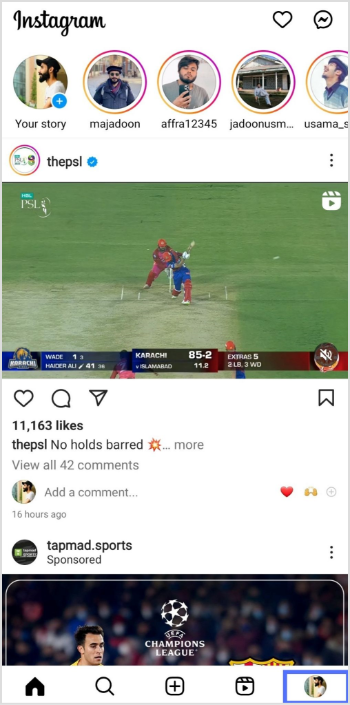
Step 1: Open the Instagram app on your mobile device.
Step 2: Go to your profile by tapping the profile icon at the bottom right corner of the screen.
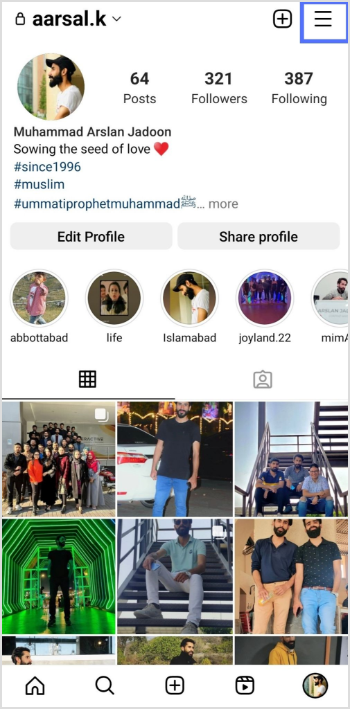
Step 3: Tap the three horizontal lines at the top right corner of the screen to access the options menu.
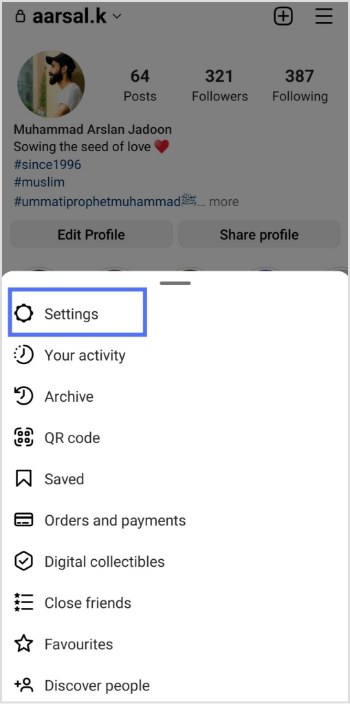
Step 4: Tap on Settings on your mobile screen.
Maximize marketing ROI
by transforming ordinary URLs into branded short links that convert.
Try Replug for free
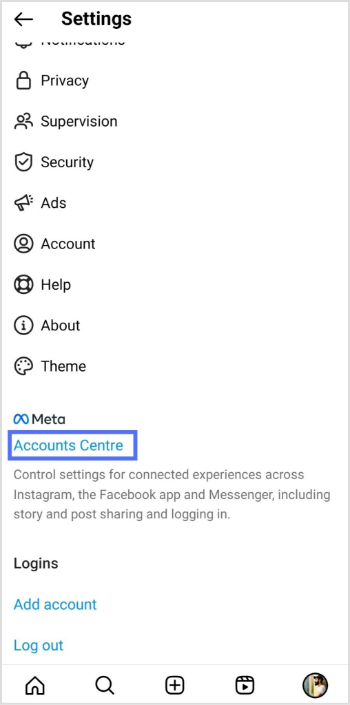
Step 5: Scroll down and tap on the accounts centre.
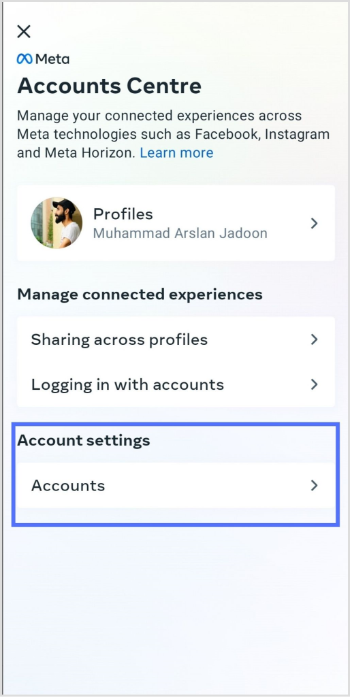
Step 6: Tap on accounts under account settings.
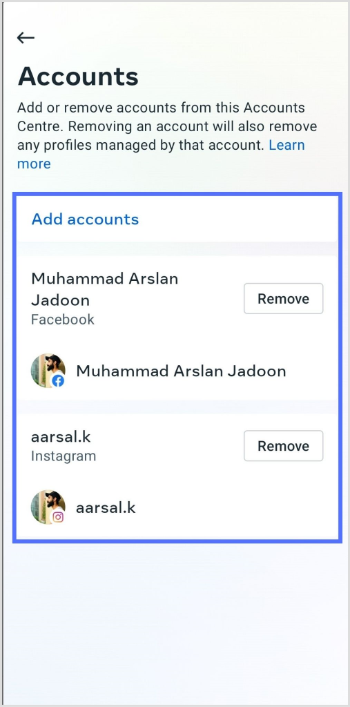
Step 7: Here, you can add or remove an account. Also, you can add multiple Facebook and Instagram accounts. Tap add account and follow the instructions.
Step 1:Log in to Instagram from your computer device.
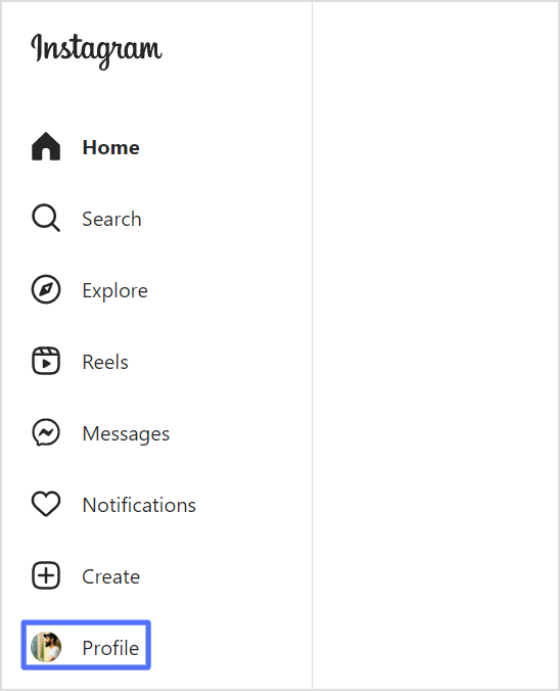
Step 2: Go to your profile by clicking the profile at the bottom of the left-side menu.
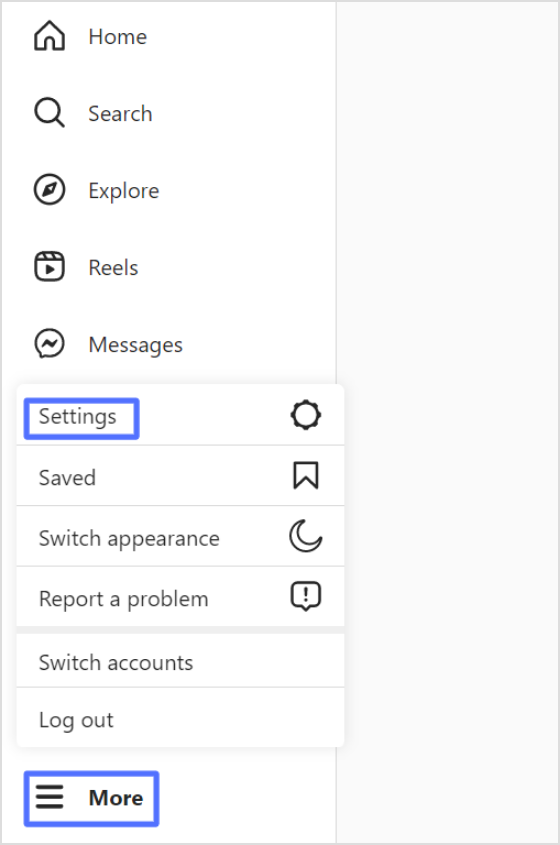
Step 3: Click on more with three horizontal lines at the left bottom side, then click setting.
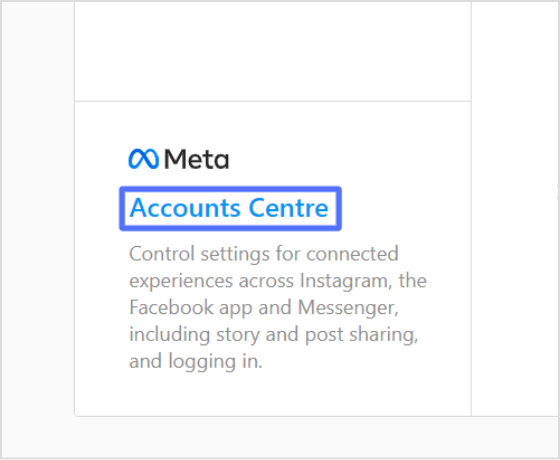
Step 4: Scroll down on your profile section and click accounts centre.
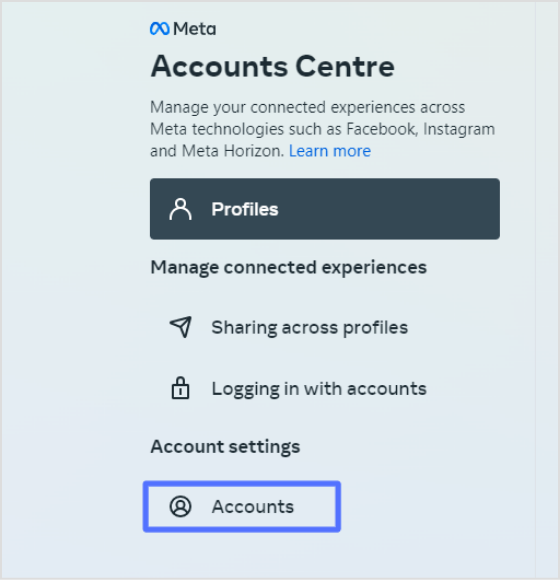
Step 5: Now, click on accounts.
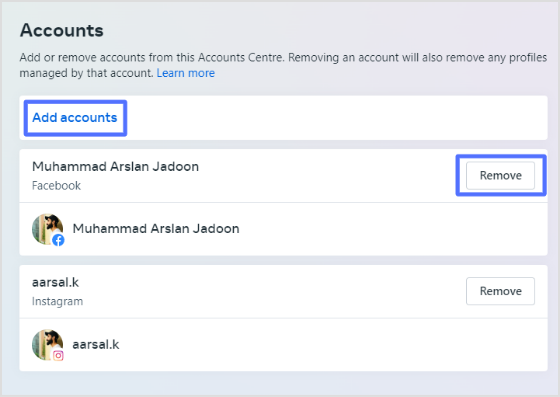
Step 6: You can add or remove an account in the account section. Add an account by clicking on add accounts and following the instructions.
Important note:
Linking your Instagram account to Facebook and using the Accounts Centre is an effective way to streamline your social media marketing efforts and improve your online presence.
By adding your Instagram account to the same Accounts Centre as your Facebook account, you can easily manage your connected accounts in one place and share content, such as stories and posts, directly from Instagram to Facebook. This can save you time and effort while helping you reach a wider audience and gain new followers and engagement on both platforms.
Integrating Instagram and Facebook through the Accounts Centre is a valuable tool for individuals and businesses looking to improve their social media presence and expand their reach.
Also, keep one thing in mind that if you’re managing multiple social profiles and sharing links across platforms, posts, stories, or ads, a dedicated link management platform can help you organize and track all your URLs from one place, hassle-free. And when you share links, whether to your profile, or external content, using a branded short URL makes it a trustworthy option for your audience and quite easier to remember!
Why should I link my Instagram account to my Facebook page?
Linking your Instagram account to your Facebook page allows you to cross-promote your content and reach a wider audience. You can also manage both accounts from a single location, making sharing content and tracking your analytics easier.
Can I link multiple Instagram accounts to a single Facebook page?
Yes, you can link multiple Instagram accounts to a single Facebook page. To do this, repeat the linking process for each Instagram account you want to connect.
If you’re trying to grow on TikTok in 2026, you’re not alone, and you’re definitely in the right place.
TikTok now has nearly 2 billion active users globally, and the average user opens the app more than 15 times a day, spending around ~58 minutes scrolling through their feed. That’s a massive, highly engaged audience just waiting to discover your content.
But here’s the thing: With roughly 23 million videos uploaded every single day, standing out takes more than just posting and hoping for the best. It takes a high-impact strategic approach.
No matter if you’re starting from zero or stuck at a plateau, the provided useful and proven tips will give you a real, actionable game plan.
But first, let’s talk about why growing your TikTok followers count actually makes a difference at present.
Why growing your TikTok following matters in 2026
Having more followers on TikTok isn’t just about the numbers looking good on your profile. It actually affects how far your content travels, how people perceive you, and yes, how much money you can make from the platform.
Initial algorithm testing
Here’s something a lot of people don’t realize. TikTok now shows your new videos to your existing followers first before deciding whether to push them to a wider audience.
So the bigger and more engaged your following, the better your chances of passing that initial test and landing on the “For You Page”.
Searchability & credibility
Think about it for a second: when you land on someone’s profile, and they have a solid follower count, you instantly trust them more.
A strong follower base creates instant credibility and signals to new visitors that your content has already been validated by others. This ultimately makes them far more likely to hit that “follow” button themselves.
Creator monetization
Growing your following also unlocks real income opportunities. To qualify for TikTok’s Creator Rewards Program, you need at least 10,000 followers and 100,000 authentic video views in the last 30 days. So hitting those follower milestones is literally the key that opens the monetization door.
Brand sponsorships
And if you’re dreaming of brand deals, follower growth is what gets brands to notice you. In 2026, a creator with just 50,000 engaged followers in a profitable niche can already command anywhere from $500 to $2,500 per sponsored video (and that number only goes up from there).
Tips on how to get more followers on TikTok
Growing on TikTok doesn’t happen by accident. It takes the right mix of strategy, consistency, and knowing how the platform actually works.
Here are some solid tips to help you start gaining real followers in no time:
Tip #01: Optimize your TikTok profile
Your TikTok profile is basically your first impression, and you’ve got about 7-10 seconds to make it count.
Choose a short, memorable username that matches your niche, and consider working a keyword into your display name(like “Jake | Budget Travel”).
In addition, keep your bio clear and focused. Research suggests a well-optimized TikTok bio can improve follower conversion rates by up to 40%.
And don’t sleep on pinning your best videos at the top. They act like a trailer that convinces new visitors to hit “follow”.
Trying to appeal to everyone on TikTok usually means connecting with no one. In 2026, TikTok’s algorithm rewards niche authority and consistency far more than random, broad content.
When you pick a specific topic, e.g., fitness, book reviews, cooking on a budget, or whatever, the algorithm knows exactly who to show your videos to. This makes growth a whole lot faster and more targeted.
Tip #03: Focus on creating scroll-stopping hooks
Keep in mind that your “hook” is everything on TikTok!
According to TikTok for Business data, 63% of the highest-performing videos hook viewers within the first three seconds. And if viewers don’t stop scrolling within that window, your video essentially dies.
Open with a bold claim, a surprising fact, or a question your audience genuinely wants answered. Don’t save the good stuff for later.
Tip #04: Upload high-quality content regularly
Good content posted consistently beats perfect content posted once in a while. Posting 3–5 times per week is a solid baseline, and data shows videos between 21–34 seconds tend to get the highest completion rates.
TikTok also rewards accounts that post consistently, so think of it less like “going viral once” and more like showing up reliably for your target audience.
Tip #05: Provide unique value through content
There’s a ton of content on TikTok, so the question you should always be asking is: why would someone save, share, or follow this?
Whether you’re teaching something, entertaining people, or solving a real problem, make sure your videos give viewers something they actually walk away with.
Content that gets saved and shared sends the algorithm a strong signal that your stuff is worth pushing out to more people, thus enhancing your chances of gaining more followers.
Tip #06: Follow the latest TikTok trends
Jumping on trends early is one of the fastest ways to get discovered by new audiences on TikTok. Real-world events and cultural moments fuel trends, too.
Brands and creators who align their content with what people are already talking about often see their videos blow up fast.
The key is to put your own spin on it and don’t just copy a trend blindly. Make it relevant to your niche, so it actually brings in the right followers.
Tip #07: Capitalize on user-generated content (UGC)
UGC is one of the most underrated growth tools on TikTok. When real people create content about you or your brand, it builds trust way faster than anything you could say yourself.
Creating a unique branded hashtag and encouraging your audience to post content using it is a simple but effective way to generate a wave of free, authentic content.
Even reposting a fan’s video once a week keeps your community engaged and makes followers feel seen.
Tip #08: Consistently post at the ideal time
Even great content can get buried if you post at the wrong time. Analysis of over 2 million TikTok posts shows that the first 60 minutes after you post determine about 80% of a video’s success, so timing really matters.
Tuesday through Thursday, between 2:00 PM and 6:00 PM (in your target audience’s local time zone) is a consistently strong window, with “Saturday” being the highest-engagement day overall.
That said, check your own TikTok analytics. Your specific audience might have different peak hours.
Tip #09: Actively engage with viewers by replying to comments
Replying to comments isn’t just being polite; it’s a brilliant follower growth strategy.
The algorithm tracks creator activity, and replying to comments within the first hour of posting signals that you’re an active creator, which boosts your video’s distribution.
Even better, reply with a short video clip instead of just text. TikTok lets you do this, and it basically gives you a second piece of content for free.
Tip #10: Consider going live on TikTok
Going live on TikTok puts you right at the top of your followers’ feeds and is a great way to build a real connection with your audience.
TikTok actively emphasizes LIVE events as a native feature that triggers wider reach, especially when your other content is already performing well.
You only need 1,000 followers to unlock TikTok Live, so once you hit that milestone, it’s absolutely worth using regularly. It amplifies your chances of gaining more followers by up to 10%.
Tip #11: Use TikTok’s Duet & Stitch features
Duets and Stitches are great for tapping into content that’s already got momentum.
Duets show both videos side-by-side at the same time, while Stitches play the original clip first and then roll straight into your response. Both are perfect for adding your take on trending videos in your niche.
They also expose your profile to the original creator’s audience, which can bring in a nice wave of new followers.
Tip #12: Use relevant hashtags wisely
Hashtags on TikTok aren’t just for decoration; they help the algorithm figure out what your content is about and who to show it to.
In 2026, hashtags have become a critical part of TikTok SEO, and the smartest strategy is to blend trending tags with more specific, niche-focused ones.
Don’t dump 20 generic hashtags on every post. A focused set of 3–5 well-chosen tags will do far more for your reach than a wall of #fyp.
Tip #13: Use specific TikTok SEO strategies
TikTok has quietly become one of the biggest search engines out there, especially for younger audiences. The algorithm reads your spoken audio, on-screen text, and captions.
So, naturally, saying your target keyword out loud and including it in your caption sends a strong relevance signal to TikTok.
Think about what your ideal viewer would actually search for, and build your video around those terms. That’s how you get discovered long after a video is first posted.
Tip #14: Leverage trending ideas & music
Trending audio is basically free fuel for your content. TikTok actively pushes videos that use trending sounds and tracks.
Creators are reporting millions of views, and a significant growth in their follower count just by pairing their content with the right audio at the right time.
You don’t need to blindly copy what’s trending; just find a sound that fits your niche and put your own spin on it. The key is catching trends early before they get oversaturated.
Tip #15: Create unique & interesting TikTok challenges
TikTok challenges are one of the fastest ways to get a ton of people interacting with your content, and thus hitting that “follow” button.
Challenge-related content regularly pulls engagement rates of 6–8%, which is nearly double TikTok’s platform average of 3.70%. This is because the format naturally drives comments, shares, and duets.
The secret sauce? Keep it simple enough for anyone to try, give it a catchy hashtag, and seed it with a few creators to get the ball rolling.
Tip #16: Tell engaging stories to connect with your target audience
People don’t just follow content on TikTok; they actually follow real people.
TikTok users are reported to spend an average of 1-2 hours per day on the app, and the main force behind that kind of session time is powerful storytelling.
Whether you’re sharing a personal journey, a transformation, or even a behind-the-scenes peek at your day, stories build an emotional connection that makes people want to stick around and come back for more.
Tip #17: Collaborate with popular creators within your niche
Partnering with other creators in your space is one of the quickest ways to get in front of a brand-new audience that’s already interested in what you do.
Collaboration through duets, stitches, co-creations, or creator reactions exposes your profile to entirely new communities without spending a dime on paid promotion.
Even a simple shoutout or joint video with a creator who has a similar-sized following can result in a solid wave of new followers.
Tip #18: Cross-promote your TikTok videos
Don’t let your TikTok content live in one place; spread it around. Sharing your TikTok videos on Instagram Reels, YouTube Shorts, Pinterest, or even in your email newsletter gives every video a second life.
This drives people from other platforms straight to your TikTok profile, some of whom might click that “follow” button.
Cross-platform promotion is one of the most consistent habits among fast-growing creators in 2026, and it takes almost zero extra effort once the video is already made.
Tip #19: See what others are doing within your niche
Before you can stand out, it helps to know what’s already working.
Spend a little time each week scrolling through top creators in your niche. The goal is not to copy them, but to spot content patterns, trending formats, and gaps you can fill.
TikTok’s Creative Center is a free tool that shows you top-performing content and ads by industry. It’s honestly one of the most underused research tools available to creators right now. Utilize it to the best of your benefit and achieve your major objective, i.e., gain more followers on TikTok.
Tip #20: Add closed caption text to your videos
Adding captions to your TikToks isn’t just a nice accessibility touch; it’s genuinely a growth hack.
TikTok videos with captions increase impressions by 55%, and research shows that captioning a video improves comprehension and viewer memory by up to 38%.
Most people scroll TikTok in silent mode (especially in public places), so if your message isn’t readable on screen, you’re losing a massive chunk of potential viewers before they even hear your voice.
Tip #21: Create amazing TikTok stories
TikTok Stories sit right at the top of your followers’ feeds and are a great low-pressure way to stay visible without having to post a polished video every single day.
Use them to share quick updates, sneak peeks, polls, or behind-the-scenes moments that feel more casual and real.
In 2026, TikTok’s algorithm rewards content that builds consistent viewer engagement over time. And Stories are one of the easiest ways to keep that engagement ticking between your main posts.
Tip #22: Leverage Creator Rewards Program
If you’re already putting out quality content, you might as well get paid for it, and the Creator Rewards Program is how TikTok makes that happen.
Creators are now earning between $0.40 and $1.00+ per 1,000 views, with some pulling in $600+ per million views through improved RPM rates.
To qualify, you need to be 18+, have at least 10,000 followers, hit 100,000 qualified views in the last 30 days, and post original videos longer than one minute.
It’s a solid push to focus on longer, higher-quality content. And the more the content is top-notch, the better the chances of gaining more followers along the way!
Tip #23: Leverage TikTok Spark Ads
Spark Ads are basically TikTok’s smartest ad format. Instead of creating a separate ad from scratch, you take one of your already-performing organic videos and put paid reach behind it.
Every engagement earned during a Spark Ads campaign (including new followers) gets permanently added to the original post, unlike standard ads where all that activity disappears the moment your budget runs out. It’s one of the most efficient ways to grow your following without it feeling like an ad.
Tip #24: Use the TikTok “Promote” feature
The Promote feature is TikTok’s built-in boost tool, and it’s designed to be simple enough for any creator to use (no ads manager needed).
You can set your goal as follower growth, more video views, or website traffic, and TikTok will push your content to a broader, targeted audience that matches your niche.
It’s a great option when you have a video that’s already getting decent organic traction, and you just want to give it a little extra push without a huge budget.
Tip #25: Include a clear call-to-action (CTA)
It sounds obvious, but a lot of creators skip this one entirely. If you want people to follow you, tell them to follow you.
Simply ending a video with a clear CTA phrase like “Follow for more” can noticeably increase your follow-through rate. Plus, in some cases, a well-placed CTA can double your conversion from viewer to follower.
Keep it natural and put it at the point in the video where the viewer is most engaged; don’t just tack it on at the very end as an afterthought.
Tip #26: Use TikTok’s built-in analytics
If you’re not checking your analytics regularly, you’re basically flying blind.
According to Influencer Marketing Hub’s 2026 report, 76% of successful creators use TikTok analytics daily, and they consistently outpace creators who don’t check their metrics.
Inside TikTok Studio, you can see exactly who your audience is, when they’re most active, which videos are actually driving new followers, and where your traffic is coming from. Basically, all the info you need to stop guessing and start growing with a real strategy.
How Replug helps content creators succeed on Tiktok
Growing your TikTok following in 2026 isn’t about luck; it’s about combining the right strategy, consistency, and a willingness to actually use the tools available to you.
From optimizing your profile to nailing your hooks, riding trends, and tracking your analytics, every tip above plays a part in building real, lasting growth.
And above all, one small but handy addition to your toolkit is Replug.io. Beyond letting you create short link for your bio and tracking clicks, it also offers free tools like a TikTok caption generator and a TikTok downloader. The perfect solution for streamlining your content workflow.
Give Replug a try today and make your TikTok growth journey just a little easier!
Maximize marketing ROI
by transforming ordinary URLs into branded short links that convert.
Try Replug for free
Frequently asked questions
How to get more followers on TikTok for free?
There’s no shortcut button for free TikTok followers. Anyone promising that is usually selling something shady.
The real “free” method is simple:
– post consistently, – nail your hooks, – jump on trends, – use trending sounds, – add captions, and – engage back with everyone who comments.
In 2026, your follower count is essentially your social currency and your ticket to the For You Page, and that’s built through genuine content, not gimmicks.
How to get followers on TikTok in 5 minutes?
Honestly, you can’t guarantee followers in 5 minutes, but you can set yourself up for fast wins.
– Pick a trending sound, – Record a quick video using a strong 3-second hook, – Add engaging captions with a clear CTA, and – Post it during a peak engagement window
If the hook lands, growth can start almost immediately. But real, lasting follower counts build over days and weeks, not minutes.
How long does it take to gain TikTok followers?
It really depends on your content quality, niche, and consistency, but most creators see meaningful growth (around 1,000+ followers) within their first three months of posting regularly.
Some videos blow up overnight, thanks to the algorithm, while others build slowly through steady, niche-focused content. The key is staying consistent; growth tends to compound over time rather than happen all at once.
What are some of the best content ideas to get TikTok followers fast?
Some formats consistently perform well:
– relatable storytelling, – “day in my life” content, – quick tutorials or hacks, – before-and-after transformations, – trend remixes with your own twist, and – “stitch this” or duet-style reaction videos
A good rule of thumb is mixing roughly 70% community and value-driven content with 30% personal or behind-the-scenes storytelling. This combo keeps people entertained while building a real connection with you.
What are the major benefits of having a large number of followers on TikTok?
A bigger following means your new videos get tested with a larger initial audience, boosting your chances of hitting the For You Page. It also builds instant credibility, since people trust accounts with solid follower counts more.
Besides, it unlocks monetization, since the Creator Rewards Program requires at least 10,000 followers and 100,000 qualified views in the last 30 days. Plus, it makes you far more attractive to brands looking for sponsorship deals.
What are the common mistakes that halt TikTok followers number?
– The biggest one is buy TikTok followers that are fake. TikTok’s 2026 algorithm easily detects inorganic growth and will shadowban your account, destroying your reach and credibility permanently. – Another major mistake is ignoring analytics. Posting blindly without reviewing what’s actually working, like watch time and audience demographics, is like driving without a map. – And finally, inconsistent posting. Disappearing for weeks at a time confuses both the algorithm and your audience.
Avoid all three, and you’re already ahead of most creators.
How does the TikTok algorithm work in 2026?
In 2026, TikTok shows your new videos to your existing followers first, and based on how they respond, decides whether to push the content out to a wider audience.
The algorithm weighs watch time as a percentage of video length as the strongest organic ranking signal, alongside replays, shares, comment depth, and how often a video drives profile follows.
It doesn’t reward likes, follower-only reach, or hashtag stuffing nearly as much as it used to. So the focus has clearly shifted toward genuine engagement and watch-through behavior.
Link tracking is essential for businesses looking to improve their marketing efforts and understand their audience’s engagement. By monitoring clicks on specific links within a marketing campaign, businesses can gather valuable data and make informed decisions that lead to increased conversions and a better return on investment.
For example, imagine a business has created a landing page, an email marketing campaign, or a newsletter to promote its product or service. These marketing efforts require links that redirect the audience to the offered product or service. To ensure the success of future marketing communications and interactions, the business needs to know which links are being clicked by the audience.
This information is valuable for businesses as it reveals engagement statistics and helps evaluate the marketing campaign’s success. By tracking clicks on specific links, businesses can gather data on the number of clicks, the location of clicks, and the time of clicks, which can then be used to improve future marketing efforts and increase conversions.
How to Create a Tracking Link with Replug: Step-by-Step Process
Shortening URLs for precise link tracking with Replug is a quick and simple process. Follow the steps below:
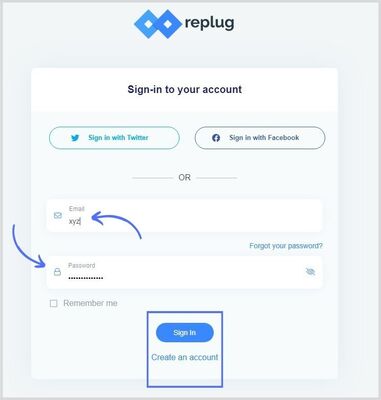
Step 1:Sign in to Replug or create an account for free.
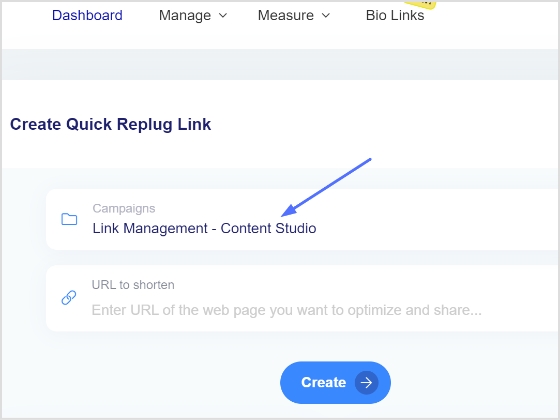
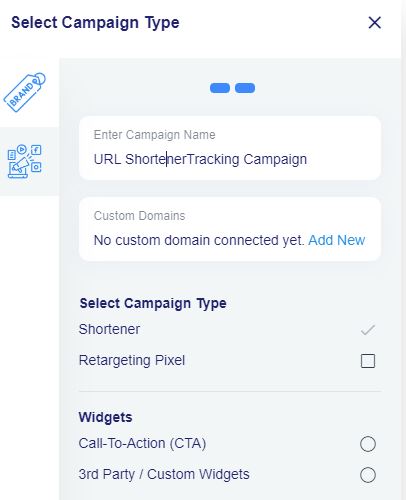
Step 2: Select the desired campaign on the main dashboard or create a new one in a few seconds.
Note: To create a new tracking link, you must create a campaign or select an existing one.
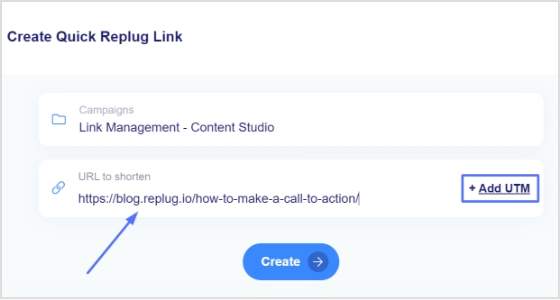
Step 3: Paste the link you want to track in the “URL to shorten” section below the “select your campaign” section.
Note: You can also add the UTM parameters to your link. Learn how to add UTM parameters.
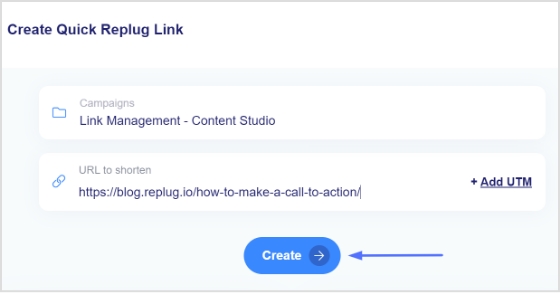
Step 4: Click the create button to create your shortened URL.
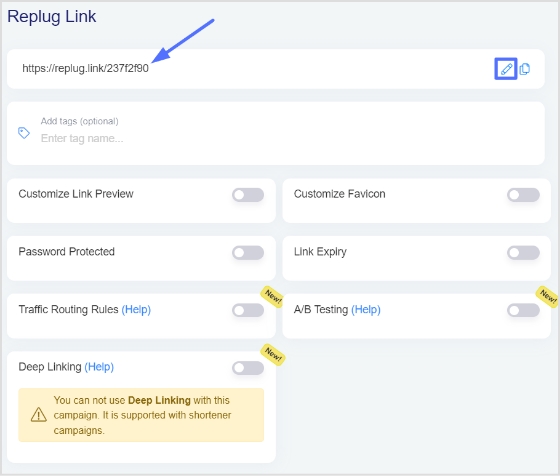
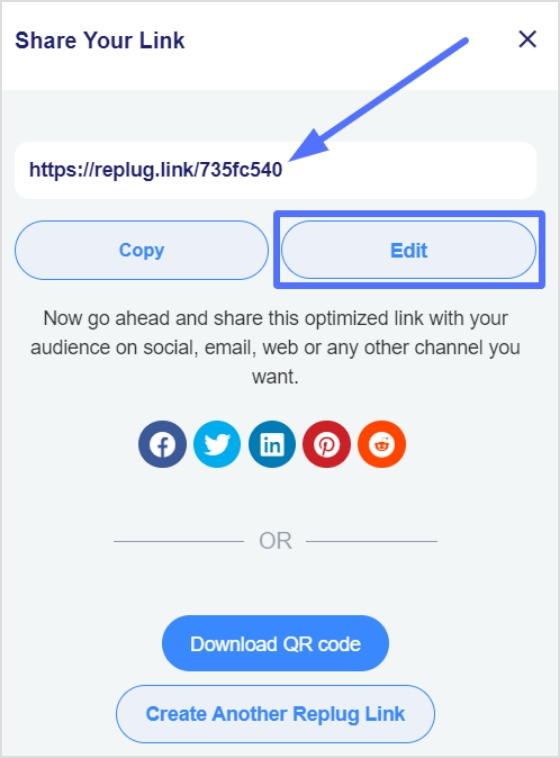
Step 5: Now, you have the shortened version of your link. Click the edit icon to customize your link.
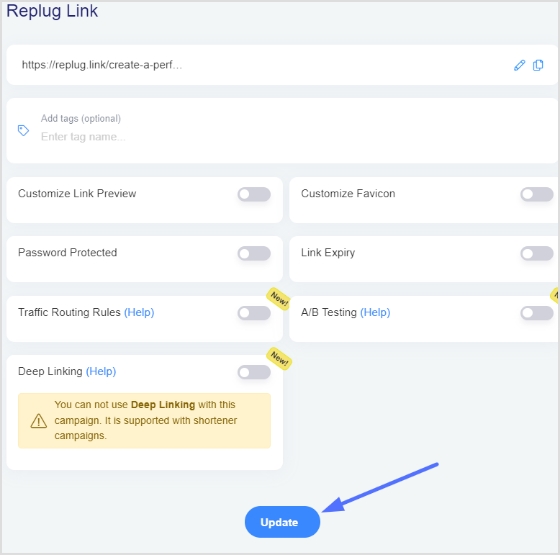
Step 6: Click the update button after editing the link, and you’ve your tracking URL ready.
Maximize marketing ROI
by transforming ordinary URLs into branded short links that convert.
Try Replug for free
Check the tracking parameters:
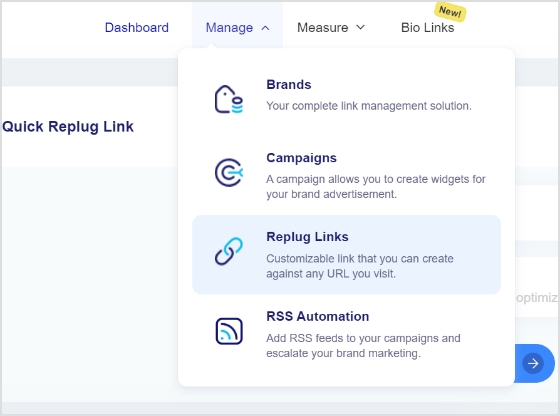
Step 7: Go to the main dashboard, click manage and select Replug links from the drop-down menu.
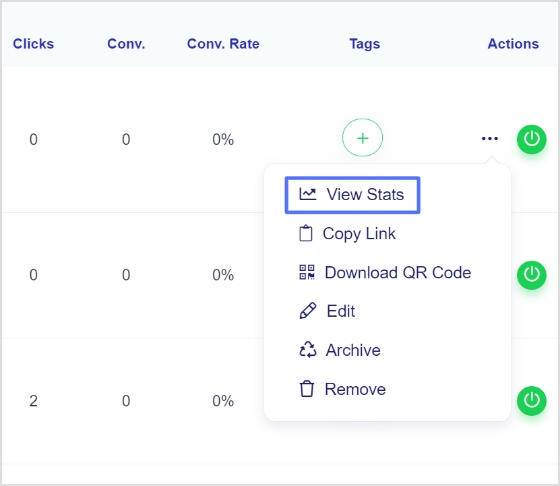
Step 8: You’ll find your newly created link in the Replug links section. Click the three dots at the opposite side of the link, then click view stats.
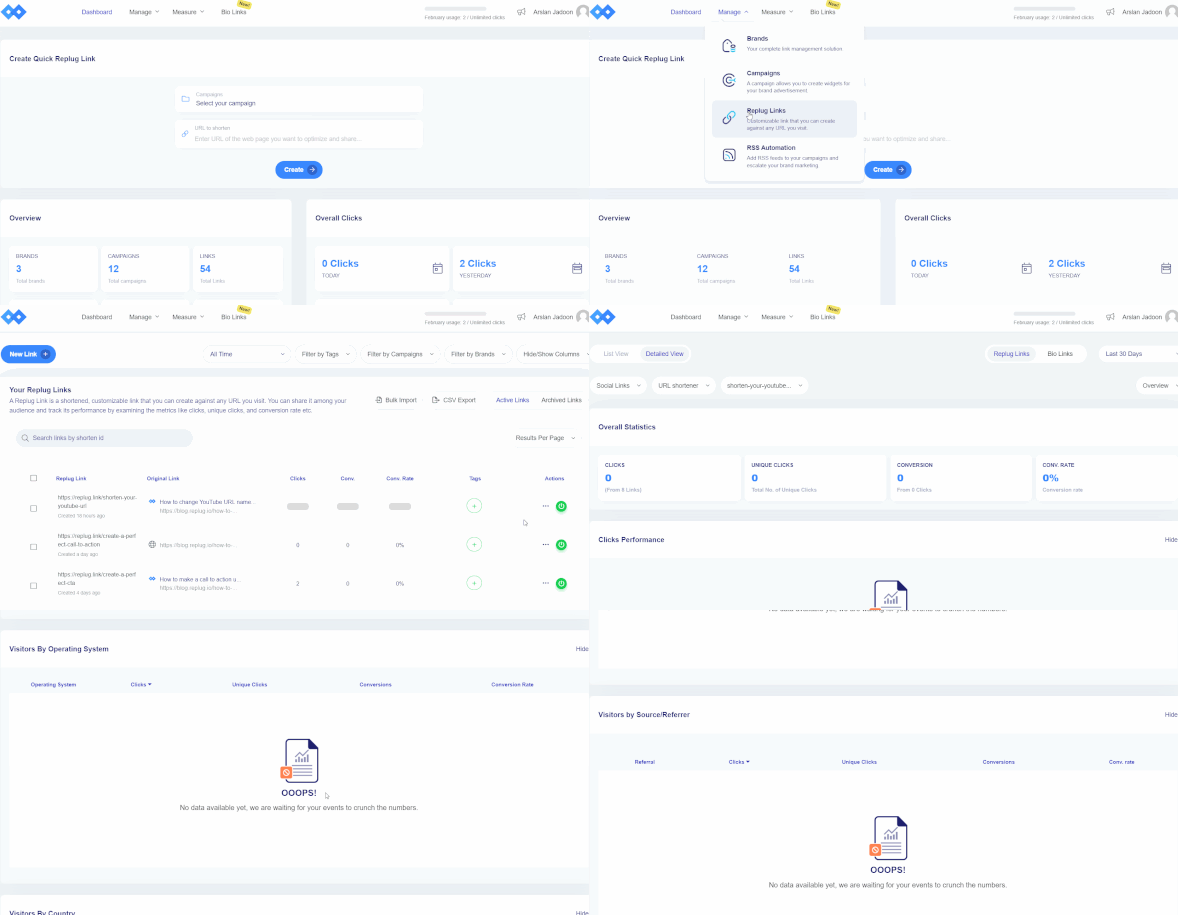
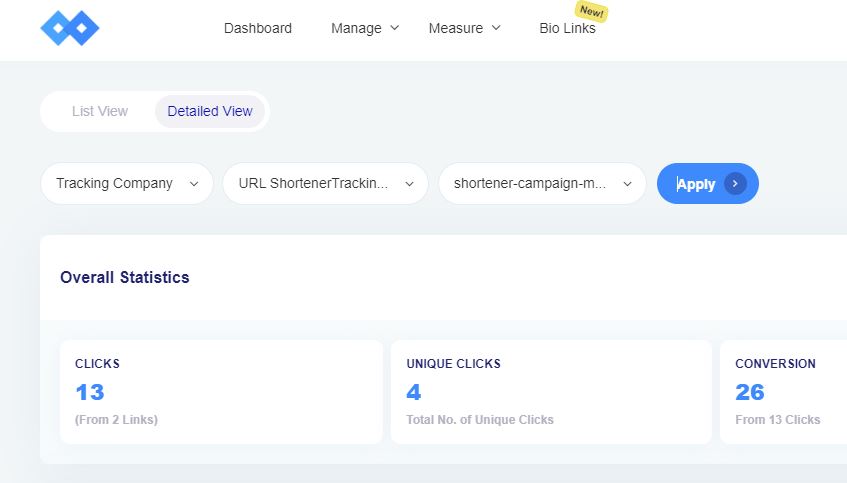
Step 9: You can view the tracking parameters, which include clicks, unique clicks, conversion, and conversion rate.
Note: You can also view the detailed stats on this page by scrolling down. For clarification, watch the video below.
Note: For a quick and effective way to shorten your links while tracking performance, try link shortener free.
A tracking URL or a tracking link is a hyperlink that tracks clicks on a specific link. It usually contains additional parameters and codes used by tracking software to track the clicks’ source, location, and behavior. The information collected through tracking URLs can be used for various purposes, such as website analytics, marketing campaigns, and conversion tracking.
How do tracking links work?
Tracking links work by redirecting clicks from the original link to a tracking link that contains additional parameters. When a user clicks on the tracking link, the tracking software records the information about the click, such as the source, location, and behavior of the user.
The tracking software then sends the user to the original link while keeping a record of the information gathered through the tracking link. This information can then be analyzed to improve marketing strategies, track conversions, and gather insights into user behavior. The tracking process is typically transparent to the user and occurs in the background without affecting the user experience.
Instagram isn’t just a photo-sharing app anymore; it’s a full-blown business engine.
With 3 billion active users as of 2025, the platform has firmly cemented itself as one of the most powerful marketing channels on the planet. And it’s still growing, reaching 2.14 billion monthly active users in Q1 2026 alone, up 6.3% year over year.
No matter if you’re a brand, a creator, or someone just starting out, your follower count can make or break your reach here.
Sure, some people search for free Instagram followers hoping for a shortcut, but real, lasting growth comes from a defined strategy, not shortcuts. That’s exactly what this post is about: 10 proven ways that actually work in 2026.
But first, let’s talk about why your follower count matters more than you might think.
Why do Instagram followers count matter so much?
Before we get into the “how,” it’s worth taking a second to understand the “why”. Your follower count isn’t just a vanity number; it directly shapes how people perceive you, how brands treat you, and how much money you can actually make on the platform.
Social proof & influence
Humans are wired to trust what’s already popular. When someone lands on your profile and sees a solid follower count, they’re far more likely to follow you, engage with your content, and take you seriously. This is because if thousands of others already do, you must be worth it.
Credibility & brand trust
Whether you’re a business, a content creator, or a personal brand, a strong follower count signals that you’re legitimate. It’s often the first thing potential customers or collaborators check, and a low number (even with great content) can make people second-guess hitting that “Follow” button.
Monetization & brand partnerships
Brands don’t just look at your content when considering a partnership; they look at your audience size first. A bigger, engaged following opens the door to sponsored posts, affiliate deals, and long-term collaborations that can turn your Instagram presence into a real income stream.
How to get a lot of followers on Instagram fast
Growing on Instagram in 2026 isn’t just about posting pretty pictures and hoping for the best; it takes real effort and the right moves. Here are the top strategies that actually work if you want to see consistent growth.
1. Build a top-notch strategy before targeting Insta followers
Before you post a single thing, you need a clear game plan. Think about:
who your target audience is,
what kind of content you’ll create,
how often you’ll post, and
what goals you’re working toward
This is because jumping in without a strategy is basically throwing darts in the dark. Accounts that post with purpose and direction consistently outperform those that wing it, so take the time to map things out before hitting that “Share” button.
2. Optimize your IG profile
Your Instagram profile is your first impression, and you’ve got about three seconds to make it count before someone scrolls past. Here’s how to make sure it works hard for you:
Use a clear profile picture & define your niche
Your profile photo should be clean, recognizable, and consistent with your brand, no matter if that’s your logo or a sharp headshot. And make sure your niche is immediately obvious; people should know within seconds what you’re about and whether your account is worth a follow.
Write a compelling bio with your niche’s keywords
Remember, your bio is searchable, so use it wisely. Pack it with relevant keywords that describe what you do and who you serve. This helps Instagram surface your profile to the right people.
If you’re struggling with what to write, an Instagram bio generator can help you craft something sharp and keyword-rich in seconds.
Don’t leave visitors guessing what to do next. A simple CTA phrase like “Follow for daily marketing tips” or “Click below to grab your free guide” gives people a clear next step, and these small nudges can make a big difference in converting profile visitors into actual followers.
Get Meta verified on Instagram
The blue checkmark on your Insta profile still carries serious weight in 2026. Getting Meta verified on Instagram not only boosts your credibility instantly but can also improve your visibility in search results brilliantly.
Besides, it gives your profile that extra layer of legitimacy that makes new visitors more likely to trust and even follow you, right away.
3. Focus on Instagram Reels & Stories
If you’re not prioritizing Reels right now, you’re leaving a massive growth opportunity on the table.
Reels currently drive 50% of all time spent on Instagram, generate 140 billion daily views, and reach an average of 30.81% of audiences. This is more than double the reach of carousels, image posts, and Stories.
Simply put, the algorithm loves Reels, and so does your potential audience!
Post high-quality, keyword-optimized Reels & Stories
Quality matters, but so does discoverability. Use relevant keywords in your Reel captions and audio descriptions so Instagram knows what your content is about and can push it to the right people.
Reels in the 15 to 30-second range tend to average the highest engagement, so keep them tight, punchy, and valuable. Keep in mind:no one wants to watch a slow, padded video!
Like & reply to comments on your Reels
This one’s simple but so often overlooked. When you engage with the people who comment on your Reels, it signals to the algorithm that your content is generating real conversation, which pushes it out to even more people.
Plus, it builds genuine community, and people are far more likely to stick around and follow an account that actually talks back.
4. Consistency is key (post every single day)
The Instagram algorithm rewards accounts that show up regularly and not just occasionally when inspiration strikes. Consistent posting tells the platform you’re an active creator worth promoting, and it keeps your audience engaged and coming back for more.
Find the best time to post on Instagram
Timing can make or break how your content performs. Based on studies and analysis of 9.6 million Instagram posts, the best times to post are:
1. Thursday at 9 a.m.
2. Wednesday & Thursday between 11 a.m. and 1 p.m. and 6 p.m. and 9 p.m.
3. While, Friday and Saturday consistently see the lowest engagement
That said, your ideal time ultimately depends on your specific audience, so use Instagram Insights to see when they are most active and schedule accordingly.
Post top-notch, share-worthy content
Good content stops the scroll, whereas great content gets shared. Focus on creating posts that are genuinely useful, entertaining, or relatable enough that people want to send them to a friend.
According to Instagram’s Head Adam Mosseri, “sends per reach” (how often people DM your post to someone else) is now the platform’s most important algorithmic ranking signal, so if your content isn’t getting shared, it’s not getting pushed.
Share user-generated content (UGC)
Reposting content from your followers or customers is a win on multiple levels. It fills your feed with authentic, relatable content, makes your community feel seen and appreciated, and signals to new visitors that real people love what you do. It also saves you time, so it’s honestly one of the smartest content moves you can make.
5. Craft compelling captions that encourage action
A great visual gets the click, but a great caption gets the comment, the save, and the follow. Your captions should match the tone of your content, speak directly to your audience, and always include some kind of prompt, whether it’s a question, a call to action, or an invitation to share their thoughts.
If writing captions feels like a chore, an Instagram caption generator can give you solid starting points that you can then tweak to match your voice and keep things feeling personal.
6. Use Instagram SEO & hashtags strategically
A lot of people still think Instagram growth is all about hashtags, but the game has completely changed. Instagram has evolved into a visual search engine, and in 2026, SEO and keywords carry far more weight than stuffing your captions with hashtags.
Start by adding relevant, searchable keywords naturally into your captions, bio, and even the on-screen text in your Reels. Instagram now reads all of this to figure out what your content is about and who to show it to.
Think about the actual phrases your ideal follower would type into the search bar and write your captions the way people actually search. Also, don’t forget to optimize your alt text on images; it helps Instagram’s AI understand your content better and quietly improves your discoverability.
As for hashtags, the old “dump 30 tags and pray” approach is officially dead. Instagram now enforces a limit of 5 hashtags per post, and posts that exceed this number can see suppressed distribution in the Explore feed, hashtag browse pages, and Reels recommendations. So keep it tight!
Use 3 to 5 niche-specific, highly relevant hashtags that match exactly what your content is about. Think less about reach and more about relevance, because the algorithm is smart enough now to penalize mismatched tags.
The winning combo in 2026: Keyword-rich captions combined with 3–5 niche hashtags consistently outperform every other approach; use both, not one or the other.
7. Collaborate with influencers
Partnering with the right creators can give your account a serious growth boost, and the numbers back this up. Brands earn around $5.78 in revenue for every $1 spent on influencer marketing campaigns, making it one of the best-performing marketing channels out there right now.
But here’s the thing: You don’t need to blow your budget on mega-celebrities. Micro-influencers (10K–100K followers) generate an average engagement rate of 3.86% compared to just 1.21% for mega-influencers, and they cost around 60% less. So, the ROI is actually much stronger with smaller, niche creators whose audiences genuinely trust them.
The smart move is to find influencers whose audience already overlaps with your ideal follower, and the easiest way to do that at scale is through influencer marketing platforms. These let you search and filter creators by niche, engagement rate, audience demographics, and more.
These tools take the guesswork out of finding the right fit and help you run collaborations that actually drive real followers to your profile, not just empty impressions.
8. Leverage Instagram Ads
If you want to genuinely speed up your follower growth without waiting months for organic traction to kick in, Instagram Ads are absolutely worth considering.
Instagram ads currently reach more than 1.74 billion users worldwide, which means the targeting potential is massive. Plus, with Meta’s advanced audience tools, you can get your content in front of exactly the right people based on their interests, behavior, location, and more.
The key is to not just throw money at random posts. Instead, let your organic content do the testing first. Identify your best-performing Reels and posts, then put ad spend behind those proven pieces to amplify their reach.
Video and Reels-based ads drive roughly 38% higher engagement and ROI than static image formats, so if you’re going to run ads, lead with short-form video. Start small, test different creatives and audiences, and scale what’s working.
Even a modest daily budget, when targeted well, can consistently bring in new, relevant followers who actually care about what you do.
9. Cross-platform promotion
Don’t limit your growth to Instagram alone; the people who should be following you are probably already hanging out on other platforms too. If you’re active on TikTok, YouTube, LinkedIn, or X, use those channels to funnel people back to your Instagram.
Something as simple as adding “follow me on Instagram for more” at the end of a TikTok video, or sharing your Reels on your other social channels, can drive a steady stream of new followers without any extra content creation effort.
Your email list is also a seriously underrated growth tool. A quick shoutout in your newsletter or even adding your Instagram handle to your email signature can convert existing subscribers into followers.
The idea is to make your Instagram visible everywhere your audience already is, because the best followers are the ones who already know and trust you from somewhere else.
10. Tap into analytics & adjust accordingly
All the strategy in the world means nothing if you’re not actually looking at what’s working. Instagram Insights gives you a clear picture of which posts are getting the most reach, saves, shares, and profile visits, and these are the signals you need to pay attention to.
If a certain type of Reel is consistently outperforming everything else, that’s your cue to make more of it. If a posting time isn’t landing, adjust it.
Make it a habit to review your analytics at least once a week and ask yourself the right questions:
Which content drove the most follower growth?
What’s getting shared the most?
Where are people dropping off?
The accounts that grow consistently in 2026 aren’t necessarily the most creative ones; they’re the ones that treat Instagram like a feedback loop, constantly testing, learning, and refining their approach based on real data rather than guesswork.
Growing on Instagram in 2026 takes more than just posting and hoping for the best. It takes strategy, consistency, and a willingness to keep learning and adapting.
From optimizing your profile and mastering Reels to collaborating with the right creators and leaning into analytics, every method we’ve covered works together to build real, lasting growth. Start with two or three strategies, stay consistent, and build from there.
And while you’re at it, make sure every link you’re sharing actually works for you. Replug is an all-in-one link management platform that lets you create personalized branded short URLs within seconds with its efficient custom URL shortener.
So instead of messy, forgettable links in your Instagram bio, Reels, or Stories, you share clean, professional URLs that people actually click and trust.
Maximize marketing ROI
by transforming ordinary URLs into branded short links that convert.
Try Replug for free
Frequently asked questions
What is the 5-3-1 rule on Instagram?
The 5-3-1 rule is a simple daily engagement strategy where:
– you like 5 posts, – leave meaningful comments on 3 posts, and – follow 1 new account within your niche
The idea is to show up consistently as an active member of your community rather than just pushing out content and waiting for results.
When done genuinely, it signals to the algorithm that you’re a real, engaged user, and the people you interact with are far more likely to check out your profile and follow you back. It only takes about 10–15 minutes a day, but the compound effect over weeks adds up.
How to get followers on Instagram fast?
The fastest organic way to grow is by posting Reels consistently. They get pushed to non-followers far more than any other format and currently generate 55% of their views from people who don’t already follow you.
Combine that with a fully optimized profile, strong CTAs, and daily engagement through methods like the 5-3-1 rule.
If you want to speed things up even further, collaborating with micro-influencers in your niche or running targeted Instagram ads behind your best-performing content can bring in a solid wave of new followers in a short time.
How to get free Instagram followers?
Genuine free follower growth comes from:
– consistently creating valuable content (especially Reels), – engaging actively with accounts in your niche, – using relevant keywords and 3–5 niche hashtags, – cross-promoting your Instagram on other platforms, and – collaborating with other creators
There’s no real shortcut here!
Websites claiming to give you hundreds of free IG followers instantly are almost always bots or scams that will do more harm than good to your account. The strategies covered in this blog are your best bet for building a real, engaged audience without spending a dime.
How to get followers on Instagram without posting?
Realistically, not posting at all makes growth very difficult since Instagram’s algorithm heavily favors active creators. That said, you can still attract followers without posting new content by engaging consistently with others (commenting on posts in your niche, replying to Stories, and using the 5-3-1 rule daily).
Making sure your profile is fully optimized with a clear bio, strong profile photo, and well-organized Highlights also helps convert profile visitors into followers. Cross-promoting your Instagram on other platforms where you’re more active is another solid option.
But long-term, some form of content is pretty much non-negotiable if you want real growth.
How many followers on Instagram to get paid?
You can start making money on Instagram with as few as 1,000 followers, provided you have high engagement and a clear niche. However, the exact number of followers you need largely depends on your monetization method, with some tools unlocking at specific follower thresholds.
How to get 1K followers on Instagram in 5 minutes?
Straight answer: you can’t, and anyone promising otherwise is selling you bots or fake accounts. Getting 1,000 real, engaged followers in 5 minutes isn’t possible through any legitimate method.
What you can do is set up a strong foundation quickly:
– optimize your profile fully, – post your first batch of high-quality Reels, – use relevant hashtags and keywords, and – start engaging in your niche right away
With consistent effort over a few weeks, hitting 1K is absolutely realistic, but there’s no genuine shortcut that gets you there in minutes.
Is it legal to buy Instagram followers?
Buying Instagram followers isn’t technically illegal under most countries’ laws, but it directly violates Instagram’s Terms of Service, which is reason enough to avoid it.
Instagram’s algorithms actively detect fake or bot accounts and remove them, so you end up paying for followers that disappear. Beyond that, fake followers destroy your engagement rate, which tanks your organic reach, makes you look less credible to real people and brands, and can get your account restricted or permanently banned.
For businesses, the FTC also has regulations against using fake followers to misrepresent your influence, which can lead to serious financial penalties. The short version: it’s not worth it!
What helps and what hurts your Instagram reach?
This helps: Posting Reels consistently, using keyword-rich captions, earning saves and DM shares (the #1 algorithm signal in 2026), engaging genuinely with your community, posting at peak times for your audience, using 3–5 relevant niche hashtags, and collaborating with other creators.
This hurts: Posting irregular or low-quality content, using irrelevant or banned hashtags, having a poor engagement-to-follower ratio, buying fake followers or using bots, posting too infrequently, ignoring comments, and relying solely on static image posts, which consistently underperform compared to Reels and carousels.
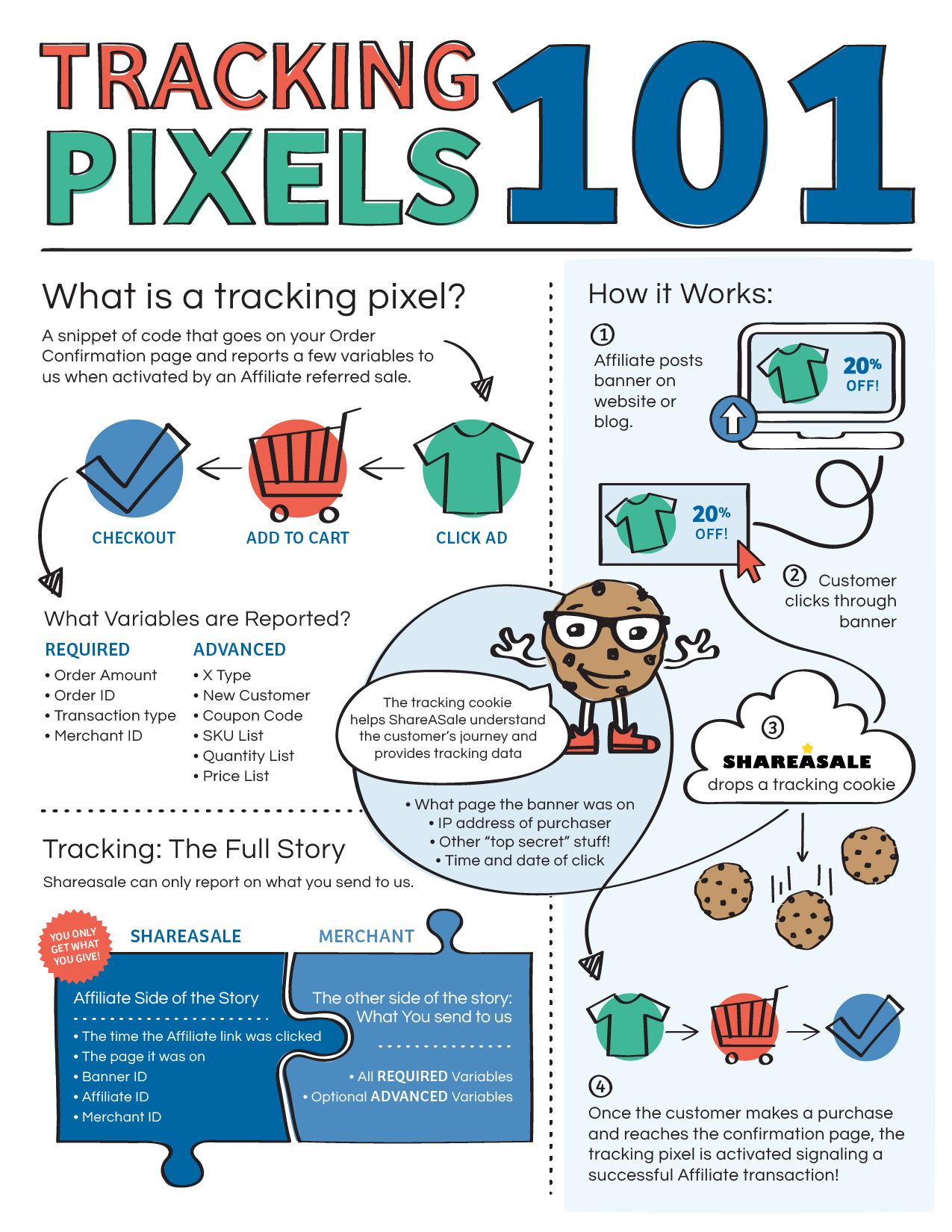
A tracking pixel is a pixel tag or code snippet that triggers the tracking system when a visitor lands on a website page after clicking on a specific link or CTA.
A tracking pixel works by placing it on a website or in an email and tracking the data that helps the marketer or advertiser analyze and track the campaign performance.
Have you ever noticed how quickly you land on a “thank you” page when you finish the checkout process on an e-commerce site?
Do you know that the largest websites, such as e-commerce platforms, social media platforms, and web portals, track their website visitors?
Websites and apps track their users because it helps them navigate in the right direction or understand what they need to accomplish.
In some cases, a tiny image file is added to the website or app, which usually goes unnoticed by the naked eye. While in some instances, a tracking pixel could also be a piece of code that goes into the website page URL and helps marketers track performance through clickability.
Adding a tracking pixel on any web or app property is to collect user data to understand their behaviors, actions, and choices.
Furthermore, it is used to track the activity of users on a website or email campaign to determine the success of the campaign.
Tracking performance is the essence of any marketing campaign, as it helps marketers understand how their marketing efforts will pan out.
Here are four areas where tracking pixels comes in handy:
i. Analyzing website traffic: Tracking pixels can gather data on how users interact with a website. This can help website owners understand which pages are most popular, how users navigate through the site, and where they are coming from.
ii. Measuring the effectiveness of online advertising: Tracking pixels can measure the success of online advertising campaigns by tracking how many users click on an advertisement and then go on to make a purchase or complete some other desired action.
iii.Targeting users with relevant advertisements: Tracking pixels can be used to track user behavior and interests, which can be used to show targeted advertisements to users that are more likely to be interested in them.
iv, Email marketing campaign: Tracking pixels can be used to track the success of email marketing campaigns by measuring how many users open the email and click on links within it.
No doubt, tracking pixels are important for businesses and marketers, as they allow them to gather data on how users interact with their websites and emails regardless of the platform.
Moreover, it enables marketers and advertisers to use this information to improve their marketing efforts and relaunch their advertising campaigns more effectively.
What are the different types of tracking pixels?
There are two main types of tracking pixels used in digital marketing:
Conversion Pixels
Conversion pixels play a vital role in tracking conversions on websites and apps. For example, you may have seen “thank you” or “also check these” pages while buying products online. Such pages trigger or direct visitors to specific pages when they notice a conversion. And conversion pixels help perform this action.
Now a product sale isn’t the only conversion. In fact, a generated lead or downloaded file is also a conversion. It depends on the campaign type and what the marketer or advertiser wants from the audience.
Retargeting Pixels
One of the most popular tracking pixels is the retargeting pixels. It’s used in retargeting campaigns in the digital marketing field. Retargeting is a marketing strategy of targeting the audience that has visited their website or landing page to convert visitors into subscribers or paid users.
Retargeting is usually done through paid advertising. However, the targeting process begins earlier by adding a tracking parameter to the URL or the website code. Hence, the retargeting pixel collects visitor data and helps marketers reach the same audience through paid ads.
How does tracking pixels work?
Tracking pixels are used to track the users’ online behavior, such as the pages they visit, the links they click on, and the products they purchase.
A tracking pixel is a piece of code that embeds into the website code or URL to track the performance of the page or link.
In some cases, tracking pixels are tiny, transparent images placed on web pages or emails to track user behavior.
Advertisers often use tracking pixels to track the effectiveness of their online advertising campaigns. They can also be used by website owners to track the traffic to their sites and to understand the demographics of their users.
The way tracking pixels works is that they are often placed in the HTML code of a web page or in the body of an email. They can be implemented using JavaScript or iFrame.
Example: Suppose a user visits a website or opens an email that contains a tracking pixel; the pixel sends a request to the server that hosts the pixel.
This request includes information about the user’s browser, such as the user’s IP address, the type of device they are using, and the type of browser they are using.
The server then records this information and stores it in a database. This information can be used by the webmaster or by the sender of the email to analyze the user’s behavior and tailor their marketing efforts.
How to Set Up a Tracking Pixel Using Replug?
Replug is a powerful free link shortener tool that allows brands and marketers to create short, branded URLs for marketing, such as for social media, email marketing, and online advertising.
As Replug records data of the users’ behavior on the short links, it makes it possible for marketers and brands to retarget those people through different advertising channels.
Replug plays an anchor role in setting up a retargeting campaign for brands and advertisers using pixel tracking.
Here’s how you can set up tracking pixels using Replug:
Step #1: Create a Replug account
To get started with Replug, you must first create a Replug account. Then, you just need to visit the Replug website and sign-up for a free trial account to start the process.
Once you’ve created your Replug account, log in to your account to explore the features this URL-shortening tool has to offer.
After the successful login to your Replug account, you’ll see the Replug dashboard, where the process begins.
Pay close attention to all the steps for setting up a tracking pixel using Replug before jumping the gun. And more importantly, don’t create a short link right after landing on the dashboard area because you’d have missed out on a few steps.
Step: #2: Setup your brand in the Replug account
All the steps are crucial to setting up the retargeting pixel using Replug. Now select the appropriate brand or create a new one, just in case.
Creating a brand on Replug would only take a few seconds. It’s highly unlikely that most readers have already set up their brands on Replug since most would be new users.
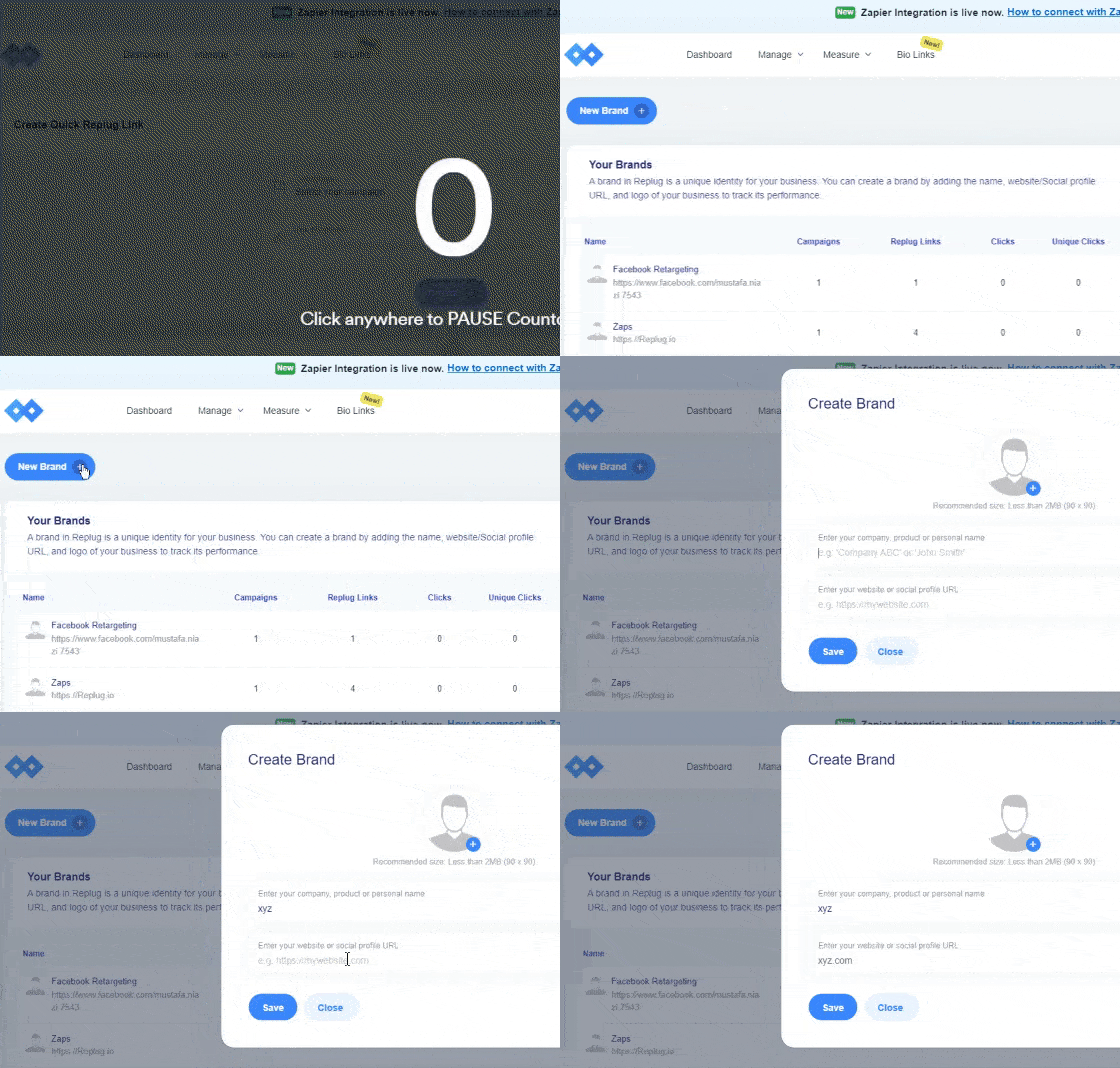
To create a brand:
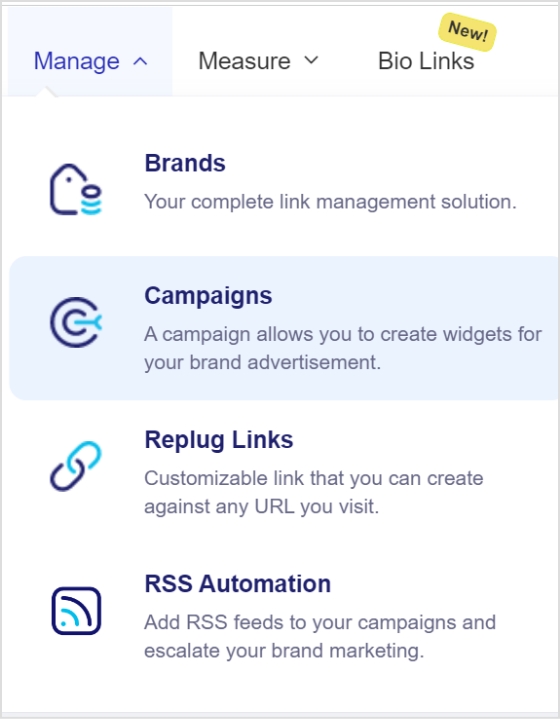
Go to the “Manage” page from the dashboard header menu and click “Brands.”
Option.”
Click on the “Add Brand” button to get started with creating a brand.
Once it’s done, click the “next” button to proceed.
Step #3: Make a new campaign
The next up is creating a new Replug campaign in line with your retargeting campaign. But first, ensure you’ve set up the brand on Replug properly.
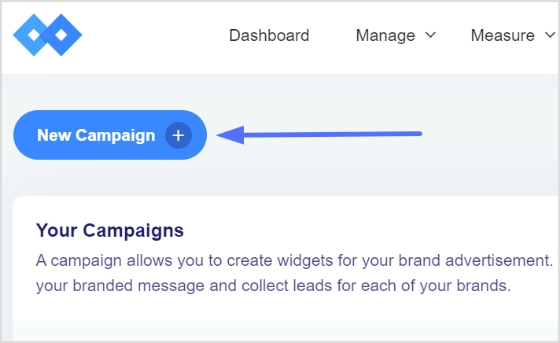
Now go to the “Manage” drop-down from the top menu and click on the “Campaigns” button, and then select “New Campaign” to get started.
At this point, you’d have to select an already existing brand or create a new brand. Since you have just created a new brand, continue with the created brand in the Replug account.
Step #4: Select retargeting as the campaign type
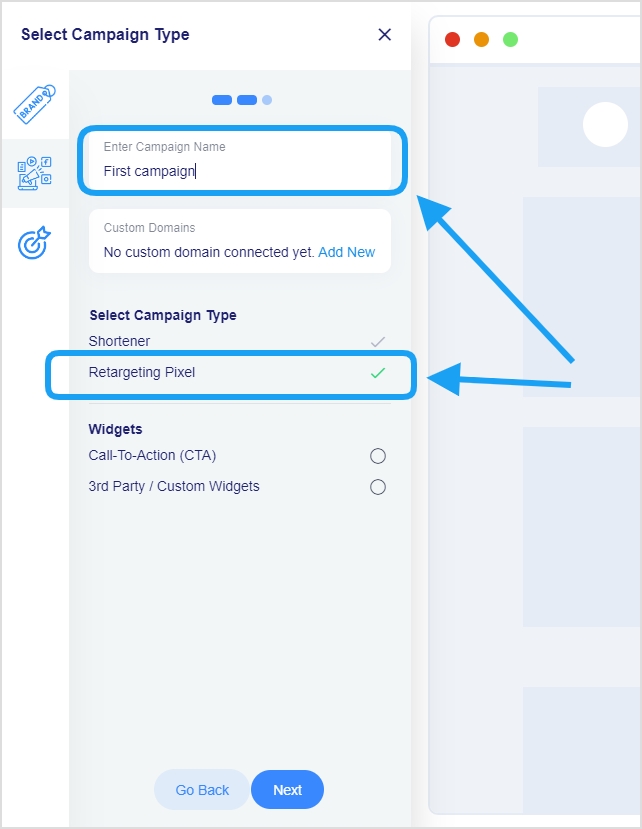
It’s one of the most important steps in the retargeting campaign because it sets the direction of the campaign. This is the part where you name your campaign and choose its type.
Provide a name for your campaign and select the custom domain if required in the campaign. Otherwise, you can skip the custom domain section.
However, make sure that you check the retargeting pixel option before moving on to the next step. Once you choose the retargeting pixel, it becomes crystal clear to the Replug platform that it’s a retargeting campaign.
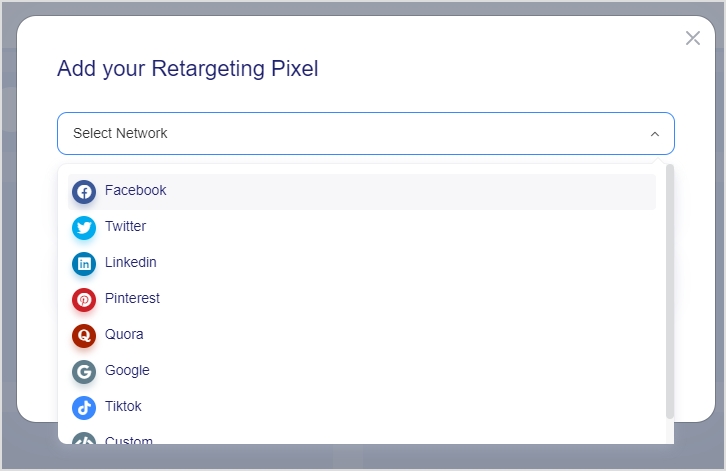
Step #5: Add your retargeting code
Everything seems quite easy until this point, and I’ll ensure the last step goes as smoothly as possible.
Now, this is the part where you select the social media platform to run your retargeting ad campaign.
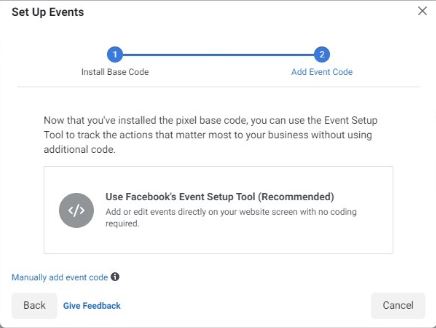
The way it works is that marketers choose the social media platform, give the pixel a name, and finally enter the pixel ID from the respective social media platform such as Facebook pixel id.
Once everything is done, you’re all set to launch your retargeting campaign using Replug.
What are the key differences between a pixel and cookie?
A pixel is a small piece of code placed on a website or in an email. It is often used to track a user’s activity on the website or email and to send this information back to the company or organization that placed the pixel.
Pixels are typically used to track website visitors and to understand how they interact with the website.
A cookie is a tiny chunk of data that is stored on the visitor’s computer by a website. It is used to remember certain information about the user, such as their preferences or login information. In addition, cookies are often used to personalize the user experience and to track a user’s activity on a website.
There are some key differences between pixels and cookies:
Purpose/Goal: Pixels are primarily used for tracking and analytics, while cookies are used for personalization and tracking.
Placement: Pixels are placed on websites or in emails, while cookies are stored on a user’s computer.
Size: Pixels are typically very small (a few hundred bytes), while cookies can be larger (up to 4KB).
Duration: Pixels are usually short-lived and expire after a certain period. At the same time, cookies can persist for extended periods, depending on how they are configured.
Privacy: Pixels can be used to track users across different websites and devices, which has raised privacy concerns. Cookies are generally less controversial, but they can also be used to track users and their activity.
Tracking pixels are legal as long as they comply with relevant laws and regulations, such as the General Data Protection Regulation (GDPR) in the European Union. Therefore, once the users comply with all the legal requirements, there shouldn’t be any problem regarding using tracking pixels.
Is a tracking pixel a cookie?
A tracking pixel is a small, transparent image file that is placed on a website or in an email. It is often used for tracking and analysis purposes. A tracking pixel is not the same as a cookie, a small piece of data stored on a user’s device and used for tracking and personalization targeting.
Does pixel track steps?
A tracking pixel does not track steps, but it can be used to track a user’s actions on a website or in an email. For example, a tracking pixel can be used to track how many people opened an email or clicked on a link.
Is tracking pixel free?
Tracking pixels may or may not be free to use. Some tracking pixels are provided by third-party vendors and may require a subscription or fee to use. However, social media platforms provide pixels for retargeting purposes that are free to use for advertisers.
How to block tracking pixels?
You can use a browser extension that blocks tracking systems set by websites to block tracking pixels. Furthermore, you can also adjust your browser settings to block or limit the use of cookies.
Will users know if I’m using a tracking pixel?
In most cases, users will not know if a tracking pixel is being used on a website or in an email. This is because tracking pixels are typically small and transparent, and they do not interact with the user in any way. However, as described above, users can use tools to detect and block tracking pixels.
Vanity URLs are a valuable tool for branding, marketing, and tracking efforts and can help to improve the overall user experience.
This quick guide will teach you how to create a vanity URL in just a few simple steps and explain what making a vanity URL entails.
Let’s begin!
Vanity URLs: how do you set them up?
Creating a vanity URL can make it easier to remember a web address and can also build brand consistency. To create a vanity URL, you can either use a link management tool or a content management system (CMS).
A link management tool is a standalone platform that specializes in creating custom short links. You simply enter the long URL you want to shorten, and the URL shortenertool generates a vanity URL within seconds.
A CMS, on the other hand, is a platform used to manage the content of a website. Some CMSs’ have built-in redirect functionality, but others may require a redirect plugin to create a vanity URL. To use a CMS to create a vanity URL, you would set up a redirect from the custom short link to the longer, original URL.
In either case, a vanity URL can be easily shared and is a useful tool for branding and marketing.
Vanity URLs can be tracked and measured, enabling businesses to gain a deeper understanding of their campaigns.
A link management tool can allow for the creation of multiple vanity URLs, making it easier to manage multiple campaigns and track their performance.
Boost your marketing with Replug’s vanity URL builder
By using Replug’s vanity URL builder, businesses can improve the efficiency and effectiveness of their marketing efforts, increase click-through rates, and drive more traffic to their website.
Here’s how you can create a vanity URL using Replug:
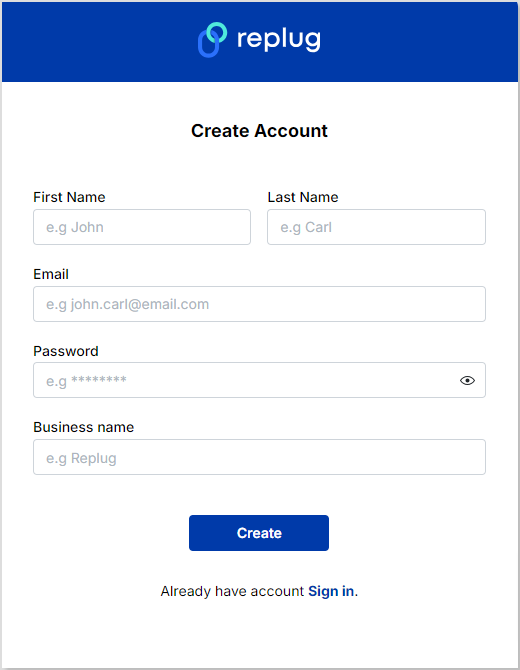
Step 1: Sign in to Replugor create an account for free.
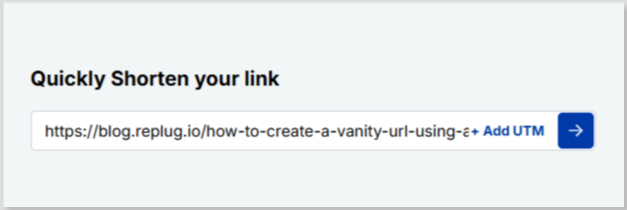
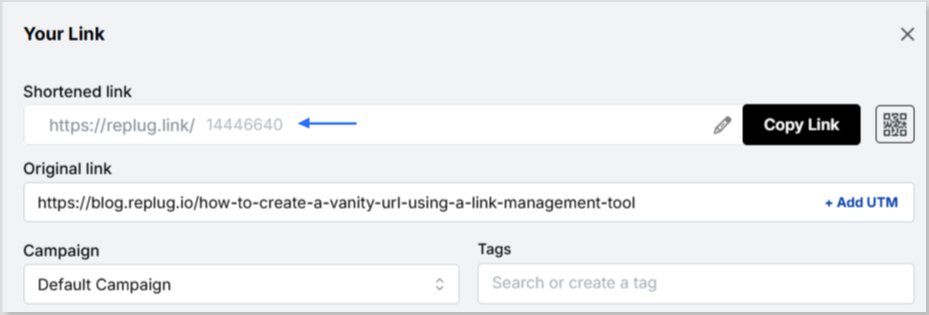
Step 2:Once you’re on the main Replug dashboard, simply enter the long URL in the bar under “Quickly Shorten your link”:
Step 3: Click on the blue arrow button to autogenerate your vanity URL using Replug:
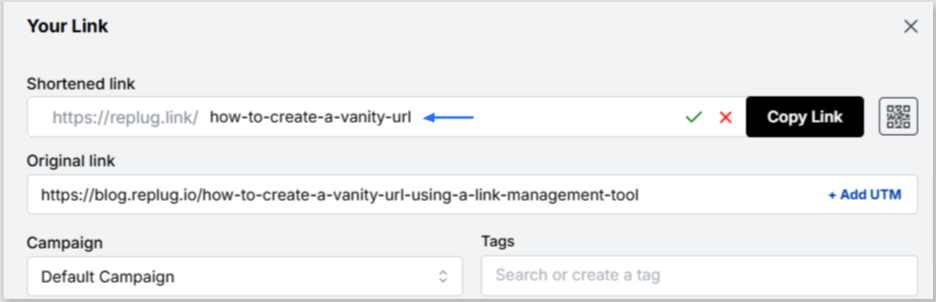
Step 4: Your vanity URL will be generated. You can customize the URL slug using the edit icon to fit your needs:
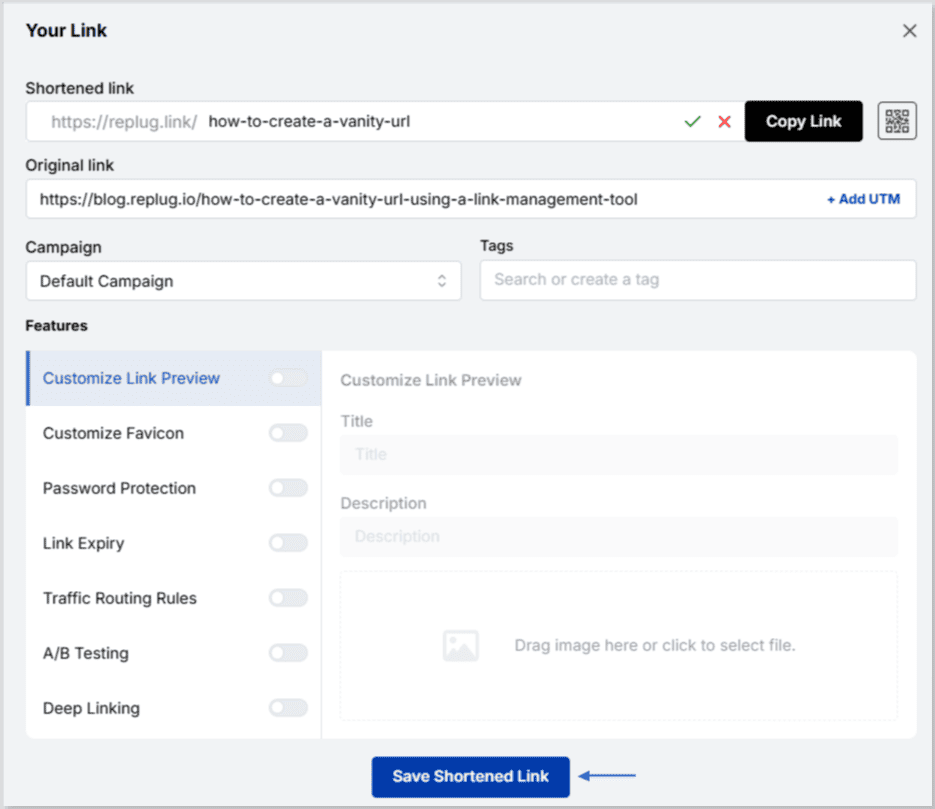
Step 5: Save and share your shortened, memorable link:
To make your vanity URL more clickable using Replug, follow these steps:
Choose a short and memorable vanity URL: The shorter the URL, the easier it will be for your audience to remember and click on it.
Use a relevant keyword: Use keywords relevant to the content behind the link so people know what they’re clicking on.
Use a recognizable brand name: If your brand has a recognizable name, use it in your vanity URL to build trust and make it more recognizable.
Create a custom domain: Replug allows you to create a custom domain for your short links, which can make your links look more professional and increase clicks.
Add a call-to-action (CTA): Adding a CTA to your vanity URL can encourage people to click on it. For example, “Click here to learn more” or “Get your discount now”.
Use UTM parameters: Utilize UTM parameters to track the performance of your links and make data-driven decisions about future link campaigns.
Test and iterate: Test your vanity URL and track its performance to see what’s working and what’s not. Make changes and improvements based on the data you collect.
Boost ROI with branded URLs!
Enhance your marketing campaigns by creating shareable, trackable, and fully multi-purpose
customizable branded URLs.
Looking for a way to connect with your customers and boost engagement without getting lost in crowded inboxes? SMS marketing is the accurate answer. It provides a direct, effective, and highly engaging way to reach your audience instantly.
But why stop there? By incorporating branded short links into your SMS campaigns, you can save valuable character space while gaining powerful insights into how your audience interacts with your messages.
Whether you’re a small business owner aiming to expand your reach or a marketer looking to supercharge your campaigns, SMS links can help you achieve your goals pretty well.
Let’s explore how these branded short links can transform your SMS strategy and drive measurable results!
What are short links for SMS?
Short links for SMS are shortened URLs used in SMS marketing messages to conserve valuable character space and enhance tracking and analytics.
These links function by redirecting users to the intended landing page or website while tracking data, including clicks, time spent on the page, and conversion rates.
When sending SMS messages, businesses often have a limited number of characters to work with. By using short links, they can include more information in their messages while still maintaining a clear and concise message.
Short links also allow firms to track click-through rates and other valuable data that can be used to optimize their SMS marketing campaigns.
How to create a branded shortened link for SMS marketing
Getting started with crafting short links for SMS marketing is pretty straightforward. All you need is a reliable custom link shortener, and you’re ready to optimize your campaigns.
Here’s a step-by-step guide to help you set things up the right way:
Step #1: Use a dedicated SMS platform
Before you start shortening and sending links, it’s essential to have a dedicated SMS marketing platform in place.
These platforms are specifically designed for managing large-scale SMS campaigns. They offer features like audience segmentation, automation, compliance with SMS regulations, and message scheduling.
A good SMS platform ensures your messages are delivered efficiently and at the right time, helping you maximize engagement and ROI.
Tools like Replug and Twilio integrate seamlessly with link shorteners, providing a solid foundation for your campaigns.
Step #2: Choose a link-shortening tool
Once your SMS platform is ready, the next step is to pick and configure a link-shortening tool.
Replug is a top-tier option that goes beyond basic shortening, offering powerful features such as click tracking, branded domains, retargeting, and in-depth analytics.
These capabilities help you monitor link performance, build trust with custom URLs, and ultimately drive better results from your SMS campaigns.
Don’t settle for less when it comes to SMS marketing. Sign up for Replug today and start seeing results!
Step #3: Create your shortened link
Let’s say you select Replug as your link-shortening tool. You can create a shortened link for your SMS campaign by simply pasting your original URL into Replug’s “Shortened link” box and generating a new, shortened link within seconds.
Step #4: Use a custom domain
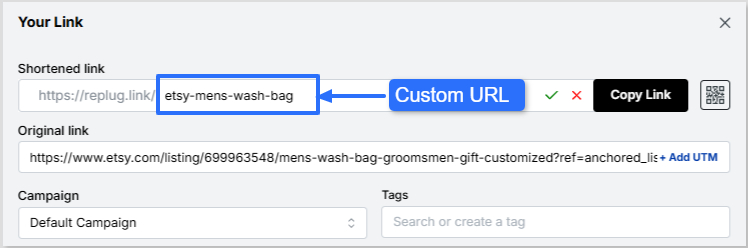
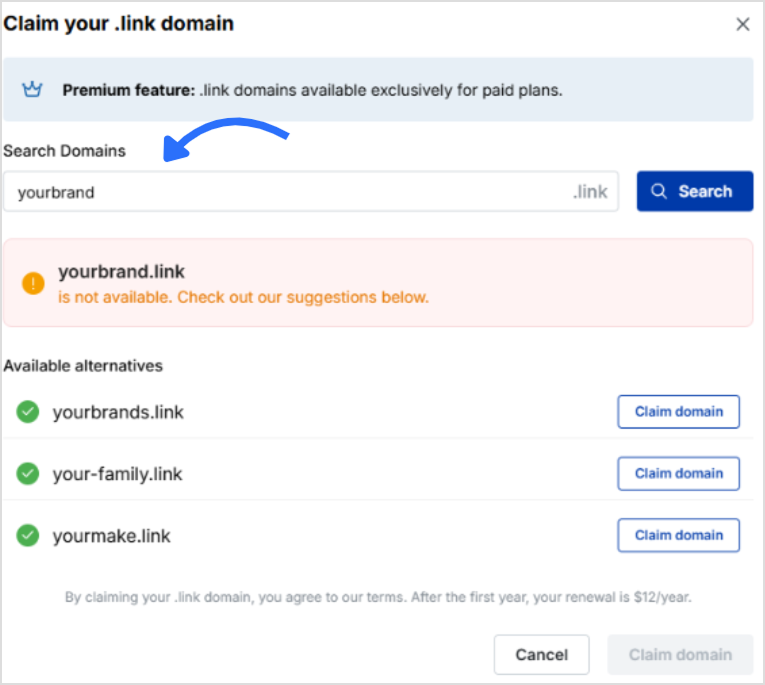
To strengthen brand consistency and recognition, personalize your short link with a custom domain. Instead of using a generic shortener domain, your SMS messages can include your brand name in the slug. This not only looks professional but also builds credibility with your audience. So, add accordingly!
Step #5: Add link preview
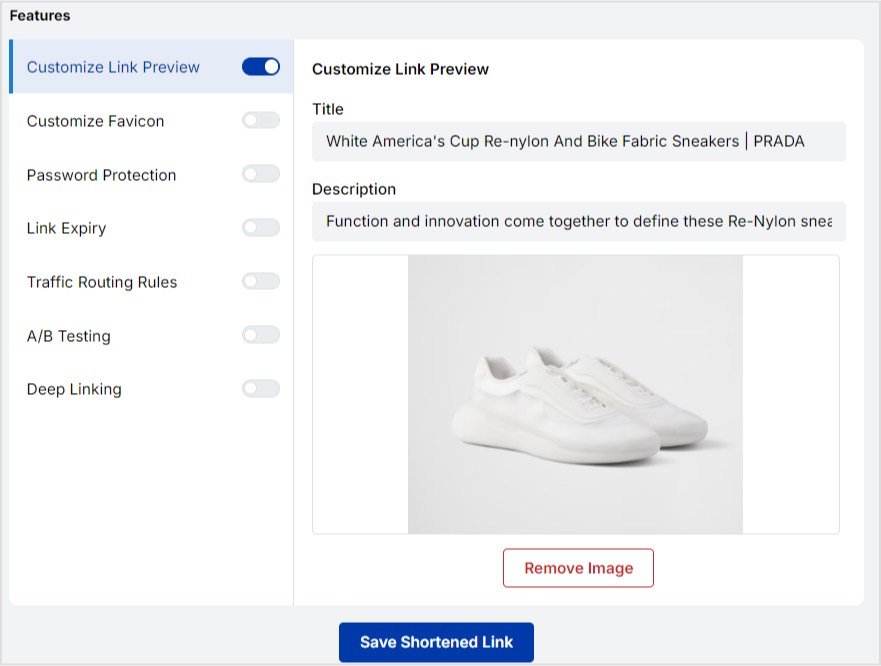
Some devices display a small link preview when a shortened link is shared. With Replug, you can customize its appearance hassle-free, adding a title, description, or image that makes your link more attractive and clickable.
Step #6: Route links
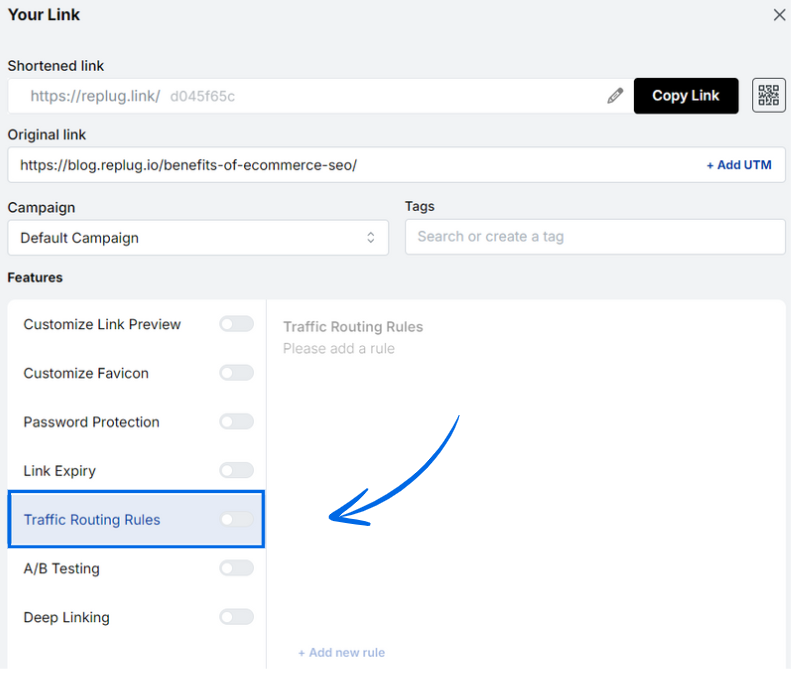
Advanced tools like Replug let you set up link routing. This means you can send different users to different destinations based on factors like location, device type, or campaign variations. It’s quite beneficial for A/B testing or running multi-location promotions.
Add traffic routing rules
Step #7: Include a strong call to action (CTA)
To encourage customers to click on your shortened link, include a clear call-to-action in your SMS message. For example, you could say “Click here to try our new pizza flavor!” with the shortened link included in the message.
Step #8: Add deep links
Deep links allow you to send users directly to a specific page within your app or website, rather than just the homepage. This saves customers valuable time and increases conversions. For instance, an e-commerce brand can send shoppers straight to a product checkout page.
By following the steps outlined above, you can easily create a branded shortened link tailored for SMS marketing that promotes trust, engagement, and CTR.
Why use short links in SMS marketing?
Short links are a must-have tool for businesses seeking to upgrade their SMS marketing strategy. Here are some convincing reasons why you must utilize short links for SMS marketing.
To save space (character count limits)
SMS messages have a 160-character limit, so every character counts. Shortened links take up less space, giving businesses more room to communicate their message effectively.
For example, a retailer can send a message with a shortened link to a product page, allowing them to provide a brief description and the link in one message.
For click tracking & analytics
Shortened links can be used to track clicks and engagement, giving enterprises valuable data on the effectiveness of their campaigns.
For instance, a charity can send an SMS message with a shortened link to a donation page. By tracking clicks on the link, they can determine the success of the campaign and adjust future ones accordingly.
For an optimized mobile experience
Most people access SMS messages on their mobile devices, and shortened links can lead to a better user experience on these gadgets.
For example, an airline can send an SMS message with a shortened link to a mobile boarding pass. This makes it much easier for passengers to access and use the pass on their smartphones.
To increase brand recognition
Shortened links can be customized with branded domains, helping to increase brand recognition and trust.
For instance, a fashion brand can send an SMS message with a shortened link to a new collection, using a branded domain.
For seamless A/B testing
Shortened links can be used for A/B testing and optimization of SMS campaigns.
For example, an online retailer can send two different SMS messages with different shortened links to a product page and track which link receives more clicks. They can then optimize future campaigns for increased engagement.
To enhance trust & click-through rates (CTR)
Branded shortened links look cleaner and more trustworthy than long, generic URLs. When recipients see a familiar brand name in the link, they’re more likely to click, leading to higher engagement and conversions.
For instance, a fitness app can send an SMS with a branded short link, such as “fitco.app/joinnow”, which appears more reliable than a random string of characters.
For better deliverability
SMS messages containing long or suspicious-looking links may get flagged by carriers or filtered as spam. Short, clean links reduce the risk of this happening, ensuring your message reaches the recipient’s inbox without interruption.
For example, a financial service can use a shortened, verified link to send account update notifications, reducing the chances of carrier rejection or message filtering.
For additional data points
Shortened links can capture additional data, such as device type, location, and time of click, providing deeper insights into audience behavior and preferences. This ultimately helps to refine future campaigns.
For instance, a restaurant chain can use shortened links in SMS campaigns to track which city or time slot gets the most reservations, tailoring promotions based on that data.
How brands use short links for SMS marketing: Check out the examples
Here are a few ways renowned brands are utilizing short links in their SMS marketing efforts.
Dunkin’ Donuts
Dunkin’ Donuts uses SMS marketing to send exclusive deals and promotions to its customers.
To track the success of their campaigns, they use shortened links that lead customers to a landing page with the offer.
This enables Dunkin’ Donuts to measure engagement and optimize its campaigns for improved results.
Subway
Subway uses SMS marketing to send coupons and special offers to its consumers.
To provide a better user experience, they use shortened links that lead customers to a mobile-friendly coupon page. This allows them to redeem the offer on their mobile devices easily.
Coca-Cola
Coca-Cola uses this technique to promote new products and events to its customers.
To increase brand recognition, they use custom domains for their shortened links. For example, they might use a link like “www.coke.com/newproduct” to promote a new product launch.
Nordstrom
Nordstrom utilizes SMS marketing to send personalized recommendations to its clients.
To track engagement and improve their recommendations, they use shortened links that lead customers to a product page with more information about the recommended item.
Zara
Zara uses this marketing strategy to promote new collections and limited-time offers to its customers.
To increase engagement and drive sales, they use shortened links that direct customers to a product page featuring the collection or offer.
These are just a few examples of how brands are using short links for SMS marketing to enhance their campaigns and achieve their marketing goals.
Example of a good and bad SMS with shortened links
The way you incorporate shortened links in SMS marketing can significantly impact your campaign’s effectiveness. A well-crafted message with a shortened link should be clear, relevant, and aligned with your brand, encouraging trust and clicks.
On the other hand, a poorly written SMS with an unbranded or unclear link can confuse recipients, lower click-through rates, and even trigger spam filters.
Below is a precise example to illustrate the right and wrong ways to use shortened links in your SMS campaigns.
Good SMS Example:
Hi Sarah! Our Fall Sale is now live 🍁 — enjoy 30% off all items this week only! Shop now: brandshop.co/fall30
Why it’s good:
Personalized greeting
Clear offer and urgency
Branded short link (adds trust)
Friendly, concise tone
Bad SMS Example:
SALE NOW ON! Click here for 30% off: bit.ly/3xY2zZq
Why it’s bad:
All caps feel forceful
No personalization
Vague message
Generic, unbranded link (may seem suspicious)
Wrapping Up
In conclusion, branded short links are a powerful tool for SMS marketing, offering enhanced brand recognition, improved click-through rates, and valuable analytics.
By creating concise, trustworthy, and trackable links, brands can optimize their campaigns and drive engagement effectively.
As shown through examples, well-crafted SMS with branded links resonate with audiences, while poorly designed ones risk losing trust.
By following the steps outlined to create and implement these links, businesses can strengthen their SMS marketing strategy. This ensures messages are impactful, professional, and aligned with their brand identity, ultimately facilitating stronger connections with customers in a competitive digital landscape.
Frequently asked questions
Why SMS Marketing matters for digital marketers?
SMS marketing is essential for digital marketers in 2026 due to its 98% open rate and rapid 90% read-within-3-minute delivery. It enables direct, immediate customer engagement that far surpasses email.
With 66% of businesses adopting SMS software and increasing budgets, it drives high ROI through personalization and AI integration in omnichannel strategies.
How effective is an SMS campaign including short URLs?
SMS campaigns with short URLs achieve 98% open rates and 36% click-through rates, with 28% of recipients clicking links for enhanced tracking and conversions.
Short URLs optimize message length, boost readability, and support 45% response rates, making them 30% more cost-effective than traditional methods.
What are the best link shorteners for SMS marketing in 2026?
– Replug stands out for SMS marketing with its all-in-one link management, retargeting, and bio tools tailored for marketers. –Bitly offers trusted, simple shortening with strong analytics and brand recognition for reliable campaign tracking. –Klaviyo integrates AI-driven SMS with short link support for personalization, while –Twilio enables programmable SMS workflows incorporating shortened URLs for scalable engagement.
How can I optimize my SMS marketing campaigns using short links?
Use branded short links to enhance trust, reduce character count, and lower SMS costs while maintaining clear, concise messaging. Draw click tracking and analytics from shorteners to measure engagement, A/B test variations, and direct to mobile-optimized landing pages for higher conversions.
Campaign tracking is a process of monitoring the performance of the URLs with tracking parameters for marketing campaigns. Marketers use campaign tracking as a tool to evaluate the success of their efforts. It comprises gathering data from several sources, such as website analytics, email campaigns, and social media posts. And then analyzing it to assess the campaign’s effectiveness.
Digital marketers and SEO experts track campaigns to analyze the quality of the marketing channels, traffic sources, and content strategies.
Conversion optimization is a vast area to manage and campaign tracking is an important part of it. To track marketing campaigns, most marketers use URL shortening tools with URL tracking and analytics features.
Why should a company set up campaign tracking?
Campaign tracking is a vital analytics tool. It allows marketers to see which campaigns are performing well and which ones need improvement. Without campaign tracking, it would be difficult to know which marketing strategies are working and which ones are not. There are several aspects of campaign tracking to consider when tracking URLs that an average Joe doesn’t come across every day. Campaign tracking is a URL tracking system to analyze marketing efforts by keeping an eye on the website traffic through specific URLs. Here are the reasons why a company should set up campaign tracking:
To track the clickability and conversion rate of a marketing campaign. When brands and marketers run ad campaigns, they usually add a UTM parameter to the call-to-action button to track clickability and conversion from the specific campaign.
To measure the effectiveness of the channel, meaning campaign tracking comes in handy when the user wants to analyze the performance of a traffic medium, for instance, a banner ad on a popular blog.
To A/B split test two marketing channels. A/B Testing is crucial to finding the best solution in digital marketing. Therefore, marketers compare different tactics to see what works best for them.
To assess the ROI of the marketing campaign, it’s vital to have campaign tracking. It gives brands a deep dive into the quality of the traffic sources.
What are campaign parameters?
Campaign parameters are URL slugs that add to the website page URL to track, identify, and analyze the traffic sources and campaign performance.
A lot of brands start advertising and promotions during the holiday season. Most of these brands use campaign tracking to see where most buyers are coming from during the campaign.
These campaign parameters help them figure out:
The impact of the marketing campaign
What are the number of visitors that the campaign brought?
How engaged those visitors were?
How many visitors converted into paying customers?
Why are campaign tracking parameters important?
Most first-timers wonder why campaign parameters are important when they’re setting up a retargeting campaign or an ad campaign on social media.
The answer is that campaign parameters provide marketers with crucial campaign information that helps them make important decisions going forward.
Brands usually track their CTAs on the landing pages or short URLs shared on social media to see what’s working for them.
Here are four reasons why campaign tracking is important in digital marketing:
Help track campaign results – whether it’s a social media post that contains a short URL with a slug or an online ad, campaign parameters are included to track campaign results.
Separate multiple campaigns and make them identifiable. Otherwise, it won’t be possible to differentiate multiple campaigns in a dashboard.
Gather clicks and conversion data, which is crucial to the campaign analysis. It’s impossible to figure out whether or not the campaign was successful if there are clicks and conversion data available.
Make performance reporting possible for brands and marketers. A lot of experts use URL shorteners to generate short URLs for social media to ensure that performance reporting becomes possible. Replug offers a powerful free link shortener and tracker for creating, managing, and tracking vanity URLs for social media, online advertising, and email newsletters.
Replug.io is an all-in-one link management tool for marketers, social media experts, influencers, and bloggers. It helps users with URL shortening, branded short links, UTM tracking, bio links, retargeting, and lead generation. You can track various campaigns using it, i.e. :
URL campaign tracking
UTM tracking
CTA campaign tracking
Retargeting pixel campaign tracking
Here’s how you can create a tracking URL with Replug:
Step #1: Log in to your Replug account
Go to the Replug website and log in to your account. If you haven’t created your Replug account, sign-up for a free trial account and see how this tool works.
Step #3: Create a short branded URL Paste the URL, you want to shorten afterward and click on the create button.
A new window will open where you can edit your URL slug and save the link.
Step #4: Track URL performance in Replug Analytics
Creating a short URL is incomplete with tracking it. Replug allows users to generate and track short URLs.To track your short URLs, go to the Measure section from your Replug dashboard and click on the Analytics option.
Select the Replug links and click on the appropriate campaign to find your link analytics. Or you can also click on detail analytics to get a detailed view. For a detailed overview, you need to select the brand, campaign and replug link. Detail view highlights click and conversion performance. Furthermore, it shows visitors by country, operating systems, browsers and source. You won’t see the metrics such as clicks, conversion, and conversion rate right away since the link is brand new.
Campaign tracking in Usermaven
Marketing campaigns are only beneficial when they are producing the results you aimed for. With Usermaven’s campaign tracking, you can stop guessing your campaigns’ performance and start analyzing it through data to increase ROI. All you have to do is use UTM tags to analyze which source, content or campaign is producing results and then tweak your marketing campaigns to increase conversion and reach your business goals. Here’s a preview UTM traffic in Usermaven
What are Google UTM campaign tracking parameters?
Google has provided advertisers and publishers with loads of information on running ads and monetizing websites.
As far as campaign tracking is concerned, Google recommends a tool called Google Analytics Campaign URL Builder. You can also check out Google’s support thread on this topic.
The benefit of using this tool is that users can add campaign parameters to URLs and measure custom campaigns in Google Analytics.
The following are the parameters to be entered to generate a campaign tracking URL:
Website URL: The website or page URL that needs to be tracked. Provide the full URL address including HTTPS.
Campaign ID: This is where the ad campaign ID goes. Most ad networks provide advertisers with campaign IDs to track or identify certain campaigns.
Campaign source: Enter the referral platform, such as a Facebook ad or newsletter.
Campaign medium: Provide the campaign medium, meaning what the marketing medium is for the campaign, for instance, direct ad, sponsored email, or PPC ads.
Campaign name: Give your campaign a name for identification purposes, for instance, holiday-sales or Christmas-offer, etc.
Campaign term: Mostly used for paid search.
Campaign content: It’s used for A/B testing and content-targeted ads.
Let’s look at the steps involved in tracking a custom campaign through Google Analytics.
How to track a custom campaign using the Campaign Builder tool?
Go to the campaign URL builder Access the Campaign URL builder to generate the campaign tracking URL. Make sure you have selected the web version instead of the play. Don’t panic if you haven’t done this before because it’s quite a simple process.
Opt for the GA4
Toggle from UA or GA4 using the button on the (left) sidebar. Don’t opt for UA (older Google Analytics edition) will no longer be available after July 2023.
Fill in the campaign builder form
Fill out the form. Go through the explanation of the parameters written in the previous sub-heading of this very article.
Grab the generated URL
When you fill up the form, the custom campaign tracking URL will be ready to use. You could also shorten the URL using the shortener button at the bottom.
Track via Google Analytics
The last step is to track the campaign URL in Google Analytics. Start with logging in to your Google Analytics account. Go to the Reports > Acquisition > Traffic Acquisition > Source/Medium.
A screen like this would appear:
Now you should look out for the campaign after selecting the session source/medium. The campaign source would be a referral, since the traffic would be clicking on your campaign URL and landing on the website.
How to view your URL campaigns in Google Analytics?
Creating any link or CTA is worthless if there is no tracking available to find out the number of clicks and the conversion.
No wonder all major URL shorteners or email marketing services have analytics sections for users to analyze the data.
If you have been playing around with custom short URLs, then you must have thought about viewing the URL campaigns in Google Analytics at some point.
There is a possibility that some marketers have no idea how to capitalize on URL tracking. Therefore, it’s our duty to put some light on every aspect of short-link management and campaign tracking.
Here are the steps involved in retrieving the URL campaigns in Google Analytics to see how they’re doing: Log in to your Google Analytics account
First things first, log in to your Google Analytics account to get started with the viewing process. Make sure that you’re logging in to the correct Google Analytics account.
Go to the reports section
Once you’ve logged in, go to the reports section. It is the area where you see the site performance through reports. If you can’t find the reports option, hover your cursor on the left sidebar or click on the second option from the left – you’ll find the report button.
Open the acquisition area
Go to the Acquisition section from the reports area in the Google Analytics dashboard. It’s the section that provides users with all the information about how a site acquires visitors. The next step will further explain the process.
Access the traffic acquisition
After clicking on the Acquisition option, look out for the Traffic Acquisition option underneath the Acquisition option. It’s the third one under the Acquisition.
Select the campaign source
The source selection is crucial to the whole process. Click on the session drop-down menu right above the data table on the Traffic Acquisition page and choose source/medium.
Search the campaign URL
Provide the campaign URL in the search section right above the session drop-down menu. Once you paste the campaign URL, hit enter and let Google Analytics process your request. It’ll only take a couple of seconds to retrieve the data.
This is how you can view campaign URLs in your Google Analytics account.
This article is written around the importance of campaign tracking, which is essential in digital marketing.
If you haven’t had a chance to learn about campaign tracking, then here’s a quick recap for you: it’s a process of analyzing the performance of the URLs using the tracking parameters that are added to the URLs.
UTM tracking system plays a vital role in tracking URL performance. Replug is a URL shortener and my go-to tool for link tracking along with generating short URLs.
Furthermore, this article goes deep into converting website or blog post URLs into traceable URLs using Campaign URL builder. Plus, I also covered how you can track those campaign URLs using Google Analytics.
Moreover, I cracked open how you can utilize Replug to create tracking URLs for your marketing campaigns. The step-by-step process of creating tracking URLs using Replug would help many readers, especially the beginners.
Digital marketers, social media experts, and content marketers rely heavily on organic traffic, email marketing, and social media marketing.
Therefore, it is essential for them to track campaigns to figure out what is working for them.
Campaign tracking could be a game-changer for gurus and experts trying to understand which medium is getting the most attention. That is why campaign tracking is crucial to the conversion optimization process.
Frequently asked questions
How do you track campaign performance?
Tracking campaign performance involves monitoring and analyzing the key performance indicators (KPIs) that are relevant to the specific campaign goals.
What are campaign tracking codes?
Campaign tracking codes, also known as UTM parameters or tags, are snippets of code that you add to the end of a URL to help you track the performance of a specific marketing campaign. These codes can provide you with information about where your traffic is coming from, which campaigns are driving the most clicks or conversions,
What is UTM campaign term?
UTM (Urchin Tracking Module) campaign term is one of the parameters used in UTM tracking codes to identify the specific keywords or terms associated with a marketing campaign.
As a Twitter user, having a URL for your profile is helpful for several reasons.
First, you can share your URL with friends and gain new followers by promoting it on other social media platforms, including email, business cards, company pamphlets, or restaurant menus. The more your URL is shared, the more likely you attract new followers.
Second, you can include your URL in the social media sections on other websites, allowing you to embed links to other profiles. This can help you grow your following as people search for more of your content on different platforms.
Additionally, having a distinct and solid brand identity across all your social media accounts will help you attract and retain followers.
Here’s how to find your Twitter URL:
How to find my Twitter URL on a mobile phone?
Follow these steps on your iOS or Android mobile device to find your Twitter URL:
Step 1: Open the Twitter app on your mobile device.
Step 2: Tap the profile icon in the top left corner.
Step 3: You will now see your user name in the sidebar below your name.
Looking for a Better Way to Manage Social Media URLs?
Managing multiple social media accounts is time-consuming, and keeping track of all the links to articles can be challenging. To streamline campaigns, it is recommended to use a tool such as Replug to keep all the links in one place.
It serves as a reliable link management platform that simplifies tracking, organizing, and optimizing your URLs.
However, deciding what links to include in the Replug can be confusing. For Twitter, the best link to start with is the URL of the entire profile, which can be easily shared and is always in the format of “twitter.com/username.”
The ultimate solution for managing all your social media links
Our link management tool provides you with a dashboard to manage all your shortened links, including the ability to track clicks and see analytics on the usage of each link. This can help you understand how your social media profiles are being used and accessed.
Replug provides several benefits when handling all your social media URLs:
Create a consistent brand across all profiles
A consistent brand across all your social media profiles is important for building a recognizable and professional image. Using the same URL shortener for all your profiles, such as Replug, ensures that your profiles are all linked together under one recognizable brand. This makes it easier for people to find and remember your profiles and creates a consistent image for your brand.
Replug provides analytics and click tracking on your links, so you can see how many people are clicking on your social media profile links, where they are coming from, and which ones are most popular.
Shortened Replug URLs are easier to remember and share than individual social media profiles’ long, complex URLs. You can enhance brand recognition and improve your profile’s accessibility by shortening your social media URLs with Replug.
Provide Cross-platform compatibility
Handling all your social media URLs through Replug provides cross-platform compatibility, making it easier for people to access your profiles from any device or browser. Replug links are designed to work seamlessly across all platforms, including desktops, laptops, smartphones, and tablets, ensuring that your profiles are accessible to everyone, regardless of their device.
Think about this for a second; there are over 5.42 billion active social media users in the world right now. That’s more than half the planet scrolling, liking, and engaging every single day. And yet, so many businesses are still leaving a goldmine of leads untouched on these platforms.
Here’s the thing: Social media isn’t just for brand awareness anymore. It now drives leads for 68% of marketers, and when paired with a solid content marketing strategy, the results can be staggering. Content marketing alone generates 3X more leads than traditional outbound (at 62% lower cost).
So whether you’re a startup trying to build a pipeline from scratch or an established brand looking to scale, social media lead generation is something you simply can’t ignore in 2026.
But before we jump into the tactics, let’s make sure we’re on the same page, i.e., what exactly is social media lead generation?
What is social media lead generation?
Simply put, social media lead generation is the process of using social media platforms to attract potential customers and collect their information.
This could be things like their name, email address, or phone number, so you can follow up with them and eventually turn them into paying customers.
The primary objective here is pretty straightforward: move people from just “following” your brand to actually showing interest in what you offer. It’s about sparking that initial conversation and guiding people down your sales funnel.
Now, this isn’t just about posting pretty pictures or going viral. It’s a deliberate part of your broader social media marketing strategy, one where every piece of content, every ad, and every interaction is designed with a goal in mind. And that major goal is:
Getting the right people to raise their hand and say, “Yes, I’m interested.”
Significance of social media lead generation
Here’s why social media lead generation is so important:
Massive reach & audience targeting
Social media gives you access to billions of potential customers, and the targeting tools available today let you zero in on exactly the right target audience. It is based on their age, interests, location, job title, and more. You’re not shouting into the void; you’re speaking directly to people who are most likely to care about what you offer.
Cost-effective marketing
Compared to traditional advertising like TV spots or print ads, social media lead generation is incredibly budget-friendly. Even with a modest spend, you can run highly targeted campaigns that consistently bring in quality leads without burning through your entire marketing budget.
Enhanced engagement & trust
Social media lets you have real, two-way conversations with your audience, and that builds trust faster than any billboard ever could. When people see you responding to comments, sharing helpful content, and showing up consistently, they start to feel like they actually know your brand.
Valuable data & insights
Every like, click, comment, and share tells you something useful about your audience. Social platforms give you a steady stream of data that helps you understand what’s resonating, what’s not, and where to focus your efforts for better results.
Reduced friction with lead magnets
Features like LinkedIn Lead Gen Forms or Facebook instant forms let people sign up or express interest without ever leaving the app. That means fewer steps between “I’m curious” and “Here’s my contact info,” which makes a big difference in how many leads you actually capture.
Improved conversion rates & ROI
When you consistently attract the right audience and nurture them with relevant content, your chances of converting them into potential customers go up significantly. Social media lead generation, done well, doesn’t just bring in more leads; it brings in better ones, which means a stronger return on every dollar you invest.
How can you generate leads with social media: Proven tactics & strategies to follow!
There’s no shortage of social media lead generation strategies out there, but not all of them actually move the needle. The key is knowing which tactics are worth your time and how to execute them properly.
Here are some proven ones to get you started!
Tactic #01: Optimize profiles with clear calls-to-action (CTAs)
Your social media profile is often the first thing a potential lead sees, so make it count. Make sure your bio clearly tells people what you do, who you help, and what they should do next.
Add a strong CTA phrase like “Book a free call,” “Download our guide,” or “Visit our website” with a direct link. A well-optimized profile quietly works as a lead generation machine 24/7.
Tactic #02: Share valuable content (use lead magnets like ebooks or webinars)
People won’t hand over their contact info for nothing; you need to give them a reason to. That’s where lead magnets come in.
Offer something genuinely useful, like a free ebook, checklist, webinar, or mini-course in exchange for their email. Share these across your social channels regularly, and make sure whatever you’re offering actually solves a real problem your target audience faces.
Tactic #03: Use relevant keywords & high-quality images
Social platforms are increasingly being used as search engines, especially Instagram, LinkedIn, and TikTok. Using the right keywords in your captions, bios, and hashtags helps the right people find you organically.
Pair that with high-quality, eye-catching visuals, and you’ve got content that not only gets discovered but also stops people mid-scroll long enough to actually engage.
Tactic #04: Design a top-notch content calendar
Posting randomly whenever you feel like it won’t be of much benefit. A solid content calendar keeps you consistent, organized, and strategic.
Plan out your posts in advance. Mix educational content, promotional posts, engagement-driven questions, and lead magnet promotions. Consistency builds familiarity, and familiarity builds the kind of trust that eventually turns followers into leads.
Tactic #05: Leverage strategic posting
It’s not just what you post online; it’s when and where you post it that matters too. Study your platform analytics to figure out when your audience is most active and schedule your posts accordingly.
Also, think about which platform makes the most sense for your audience. A B2B brand will get more traction posting on LinkedIn at 9 AM on a Tuesday than on Instagram at midnight.
Tactic #06: Share user-generated content (UGC)
Nothing builds trust faster than real people vouching for your brand. Encourage your existing customers to share their experiences, tag your brand, or leave reviews. Then repost that content on your own channels.
UGC acts as social proof, and when potential leads see real customers talking positively about you, it removes a lot of the hesitation they might have about reaching out.
Tactic #07: Personalize your pitch
Nobody likes getting a copy-paste DM that was clearly sent to 500 other people. When you’re reaching out to potential leads directly, take a moment to personalize your message.
Reference something specific about their business, content, or a challenge they’ve mentioned. It takes an extra couple of minutes, but it makes a world of difference in whether they respond or ignore you entirely.
Tactic #08: Run contests & giveaways
A well-run contest can generate a serious spike in engagement and leads in a short amount of time. Ask people to enter by submitting their email, tagging a friend, or answering a question.
The key is to make sure the prize is relevant to your target audience (not just a generic gift card), so the leads you collect are actually people who’d be interested in your product or service.
Tactic #09: Run targeted paid ads
Organic reach is great, but paid ads let you put your offer in front of a very specific audience almost instantly. Platforms like Facebook, Instagram, and LinkedIn have incredibly detailed targeting options. You can filter by job title, industry, interests, location, and more.
Even a small budget, when spent wisely on a targeted campaign, can bring in a steady stream of qualified leads.
Tactic #10: Run social lead ads
Social lead ads(like Facebook Lead Ads or LinkedIn Lead Gen Forms) are specifically designed to capture leads without making people leave the platform. The forms auto-fill with the user’s information, which makes the whole process super quick and frictionless.
Since there’s less effort involved for the user, conversion rates on these tend to be significantly higher than driving traffic to an external landing page.
Tactic #11: Use click-to-experience (CTX) ads
CTX ads take things a step further than regular ads by dropping users into an immersive, full-screen experience right inside the platform (no redirects, no waiting for a page to load). Think interactive product demos, mini-quizzes, or instant storefronts.
Because everything happens in-app, people stay engaged longer, and that increased engagement naturally leads to more conversions and captured leads.
Tactic #12: Use retargeting ads
Most people won’t convert the first time they come across your brand, and that’s completely normal. Retargeting ads let you re-engage people who’ve already visited your website, watched your videos, or interacted with your content.
Since these folks already know who you are, they’re much warmer leads. A well-timed retargeting ad can be just the nudge they need to finally take action.
Tactic #13: Run Meta ads
Meta’s ad platform (covering both Facebook and Instagram) is still one of the most powerful tools for lead generation. With over 3 billion monthly active users on Facebook alone, the reach is massive.
What makes Meta ads really shine is the targeting. You can get incredibly specific about who sees your ads, which means you’re spending your budget on people who are genuinely likely to be interested.
Tactic #14: Host a livestream event/session
Livestreams are one of the most underused lead generation tools out there. Hosting a live Q&A, product demo, or educational session gets people to show up in real time and actively engage with your brand.
You can collect leads by requiring registration beforehand or by promoting a lead magnet during the stream. Plus, the real-time interaction builds a level of trust that pre-recorded content just can’t match.
Tactic #15: Engage in social listening
Social listening means keeping an eye on what people are saying about your brand, your competitors, and your industry across social platforms. When someone tweets about a problem your product solves, that’s a lead opportunity sitting right there.
Tools like Sprout Social or Hootsuite make this easy. It’s one of those tactics that doesn’t feel like lead generation, but when done right, it absolutely is.
Tactic #16: Conduct Q&A and encourage audience conversation
Hosting a Q&A, no matter through Instagram Stories, a LinkedIn post, or a live session, gets your audience talking and signals to potential leads that you’re approachable and knowledgeable.
When people ask questions, they’re telling you exactly what they need help with. That’s golden information. Answer genuinely, keep the conversation going, and you’ll naturally draw in people who are ready to take the next step with you.
Tactic #17: Leverage social proof (in customer testimonials & posts)
People trust other people way more than they trust brands; it’s just pure human nature. Sharing real customer testimonials, success stories, before-and-after results, or even screenshots of positive feedback on your social channels goes a long way.
It shows potential leads that your product or service actually delivers. Make it a habit to regularly feature your happy customers, and let their words do the selling for you.
Tactic #18: Connect & collaborate with influencers
Partnering with the right influencers puts your brand in front of an already engaged, already trusting audience. You don’t need mega-celebrities for this. Micro-influencers with smaller but highly engaged followings often drive better lead quality.
Find someone whose audience matches your ideal customer, collaborate on content or a promotion, and watch how quickly the right kind of attention starts coming your way.
Tactic #19: Create clickable content
Clickable content is anything that makes someone stop, think “I need to see more of this,” and actually take action. That could be a bold stat in a carousel post, a curiosity-driven caption, a compelling thumbnail, or a strong CTA at the end of a video.
The goal is to create content that doesn’t just get seen but gets clicked, because clicks are what move people further down your funnel.
Tactic #20: Perform personalized outreach
Personalized outreach is about reaching out to potential leads in a way that feels human, not automated. Do a little research before you hit send. Understand their business, their pain points, and how you can genuinely help.
Whether it’s a LinkedIn DM or a comment on their latest post, make it specific to them. A message that shows you’ve actually paid attention almost always outperforms a generic template.
Tactic #21: Always remember retargeting
Retargeting deserves a second mention because, honestly, most businesses set it up once and forget about it. Keep refreshing your retargeting audiences, update your ad creatives regularly, and segment your audiences based on where they dropped off.
Someone who watched 75% of your product video needs a different message than someone who just visited your homepage once. Stay intentional with it!
Tactic #22: Share & promote links to gated content
Gated content is basically valuable material (think in-depth guides, research reports, templates, or whitepapers) that people can only access after filling out a short form. Share these links consistently across your social channels with a compelling reason to click.
When your gated content genuinely solves a problem, people won’t mind handing over their email address to get it. That’s a lead captured right there!
A great offer can do the hard work for you. No matter if it’s a free trial, a limited-time discount, a free consultation, or an exclusive bonus, people respond to value. The trick is making your offer feel urgent and relevant.
If someone’s been on the fence about trying your product, a well-timed incentive can be exactly what pushes them to finally say “yes” and engage with your brand.
Tactic #24: Respond to messages & comments swiftly
This one sounds simple, but it’s something a lot of brands genuinely fail to act on. When someone comments on your post or slides into your DMs with a question, respond quickly.
Studies show that responding within the first hour dramatically increases the chances of converting that interaction into a lead. People want to feel heard, and a fast, genuine response tells them your brand actually cares.
Tactic #25: Sponsor content creators
Sponsoring content creators is different from a full influencer collaboration. It’s more targeted and often more affordable. You pay a creator to feature your product or service naturally within their content, reaching their specific audience in a way that feels organic rather than salesy.
Pick creators whose followers match your ideal customer profile, and make sure the sponsorship adds genuine value to their content rather than disrupting it.
Tactic #26: Utilize social media AI chatbots
AI chatbots on platforms like Facebook Messenger or Instagram DMs can engage with potential leads around the clock (even when your team is offline). They can answer common questions, qualify leads, recommend products, and even collect contact information automatically.
The technology has come a long way, and today’s chatbots feel a lot more conversational than the awkward ones from a few years ago. Don’t sleep on this one!
Tactic #27: Design a referral program
Your existing customers are one of your most underused lead generation assets. A referral program motivates them to spread the word, offering them a discount, cashback, or a freebie every time they bring in a new customer.
People trust recommendations from friends and family far more than ads, so leads that come through referrals tend to convert faster and stick around longer. It’s a win-win for everyone involved.
Tactic #28: Utilize lead forms
Native lead forms available on platforms like LinkedIn, Facebook, and TikTok make it incredibly easy for people to express interest without leaving the app. The forms typically auto-populate with the user’s information, so there’s almost zero friction involved.
Use them for webinar sign-ups, free trial requests, newsletter subscriptions, or consultation bookings. The lower the effort required, the higher your chances of actually capturing that lead.
Tactic #29: Create user-friendly landing pages
When you do direct people off social media to a landing page, make sure that page is clean, fast, and focused. One clear message, one clear CTA; that’s it. No clutter, no distractions, no slow load times.
A confusing or sluggish landing page will kill your conversion rate, no matter how good your social media content is. Think of your landing page as the closer (it needs to seal the deal).
Tactic #30: Step into analytics
You can’t improve what you’re not measuring in the first place. Dig into your social media analytics regularly to see which content is driving the most clicks, which ads are bringing in leads, and where people are dropping off.
Platforms like Meta Business Suite, LinkedIn Analytics, and third-party tools like Sprout Social give you all the data you need. Let the numbers guide your decisions instead of just going with your gut.
Major benefits of social media lead generation
Social media lead generation isn’t just about collecting contact info; it brings a whole range of benefits that impact your business well beyond the sales funnel.
When done consistently and strategically, it can genuinely transform how your brand grows and connects with the right people.
Here’s a quick look at the key benefits you can expect.
Increased brand visibility & awareness
Every post, ad, comment, and share puts your brand in front of more eyes. As your content gets engagement and circulates across platforms, more people become aware of who you are and what you offer (even if they’re not ready to buy just yet).
Over time, that visibility compounds, and your brand becomes the first name people think of when they need what you provide.
Detailed performance tracking
One of the biggest advantages of social media lead generation over traditional marketing is that everything is measurable. You can track exactly how many people clicked your ad, filled out your form, visited your page, or dropped off mid-funnel.
This level of detail means you’re never guessing; you always know what’s working, what isn’t, and where to put your energy next.
Increased website traffic
Social media is one of the most reliable ways to consistently drive people to your website. Every link you share (whether it’s a blog post, a landing page, or a product page) is an opportunity to pull someone out of their social feed and into your own space.
More targeted traffic means more chances to convert visitors into leads and eventually into paying customers.
Better customer insights
Social media gives you a front-row seat to what your audience actually thinks, feels, and cares about. Through comments, polls, DMs, and engagement patterns, you get real feedback that no survey could fully replicate.
These insights help you fine-tune your messaging, improve your offers, and create content that genuinely resonates, making your entire lead generation effort more effective over time.
Competitive advantage
Brands that actively use social media for lead generation are simply ahead of those that don’t. You get to build relationships, stay top-of-mind, and engage potential customers long before your competitors even enter the picture.
The more consistently you show up and deliver value, the harder it becomes for a competitor to swoop in and steal the leads you’ve already been nurturing.
Convert online traffic into leads with a top-notch social media lead generation agency
All 30 tactics we’ve covered are powerful, but let’s be honest, executing them consistently while running an entire business is a lot to handle on your own. That’s where having the right tools and support makes all the difference.
This is where Replug comes in!
It is an all-in-one link optimization platform designed to help businesses turn their social media traffic into actual, measurable leads. From bio links to branded short URLs, it gives you everything you need to make every click count.
A complete link management solution
for marketing professionals & agencies.
Try Replug for free
With Replug’s custom URL shortener, you get a shorten link that looks professional and builds trust with your audience. No more messy, long URLs cluttering your captions.
And if you’re ever stuck on what to post, the built-in free AI social caption generator helps you craft engaging captions in seconds, saving you time without sacrificing quality.
If you’re serious about turning your social media presence into a lead generation machine, Replug is honestly worth exploring. Give it a try today!
Frequently asked questions
What is lead generation?
Lead generation meaning is simply the process of attracting strangers and getting them interested in your product or service. In lead generation marketing, the goal is to collect contact information from potential customers (like their email or phone number) so you can nurture them toward eventually making a purchase.
What is AI social media lead generation?
It’s using artificial intelligence tools to automate and improve how you find and capture leads on social media. Think AI chatbots that qualify leads, tools that analyze audience behavior, or platforms that auto-personalize your outreach. It makes the whole process faster, smarter, and a lot more scalable than doing everything manually.
How to generate leads with social media automation?
Use tools like ContentStudio, ManyChat, HubSpot, or Hootsuite to automate DMs, schedule posts, run drip campaigns, and follow up with leads automatically. Set up triggered responses when someone comments or clicks a link. Automation handles the repetitive stuff so you can focus on strategy and building genuine relationships with high-quality prospects.
What role does social media play in lead generation?
Social media acts as the bridge between your brand and potential customers. It’s where people discover you, engage with your content, and decide whether they trust you enough to share their information. It creates awareness, builds credibility, and gives you multiple touchpoints to guide someone from a casual scroller to an actual lead.
What is a lead generation format?
A lead generation format is basically the type of content or ad you use to capture leads. Common formats include lead gen forms, gated content like ebooks, webinar registrations, contests, chatbot flows, and landing pages. The best format depends on your platform, your audience, and what kind of value exchange makes sense for your offer.
Which social media platform is best for lead generation?
It depends on your target audience.
– LinkedIn is the clear winner for B2B lead generation. – Facebook and Instagram work best for B2C brands; thanks to Meta’s powerful ad targeting. – YouTube is great for long-form content that builds trust over time. – TikTok is growing fast, especially for reaching younger audiences with short-form video content.
What are the social media lead generation & privacy laws one must be aware of?
A few key ones to know:
– GDPR(Europe) requires clear consent before collecting data. – CCPA(California) gives users the right to know what data you’re collecting. – CAN-SPAM governs email follow-ups.
Always be transparent about how you’ll use someone’s information, include an opt-out option, and never buy contact lists. It’s both risky and ineffective.
Provide some of the best social media lead generation examples?
A few solid real-world examples:
– HubSpot regularly offers free tools and gated reports on LinkedIn to capture B2B leads. – Shopify runs Facebook Lead Ads targeting small business owners. – Netflix uses retargeting ads to re-engage lapsed users. – Adobe hosts webinars promoted via social media to pull in creative professionals.
All simple, strategic, and highly effective!
What are the social media lead generation companies to look out for in 2026?
Some of the top names to know include:
– Cognism – Operatix – Attrock, and – Blackorange
Leadriver is also worth considering, especially for B2B tech companies needing rapid sales scaling. Callbox is another strong option, known for its multi-channel approach combining email, social, chat, and phone outreach. Each has different strengths, so pick based on your budget and goals.
Provide a list of the top social media lead generation tools available online?
Here are some of the best tools worth checking out in 2026:
– HubSpot: An all-in-one platform covering CRM, email marketing, and lead capture forms, great for managing your entire funnel in one place. – Replug: A powerful link optimization platform for turning every shared link into a trackable, branded lead generation touchpoint. – Hootsuite: Goes beyond scheduling with social listening features that help you identify and engage prospects actively discussing your industry. – Sprout Social: Excellent for teams that need deep analytics and CRM integration to track and convert leads more effectively. – ContentStudio: Simple, reliable, and great for maintaining consistent posting, which builds the authority that drives people to your lead magnets. – LinkedIn Sales Navigator: The go-to tool for B2B prospecting, helping you pinpoint decision-makers and reach them at scale. – Mailchimp: A solid choice for nurturing leads through automated email drip campaigns once you’ve captured them from social. – ManyChat: A widely used chatbot tool for automating DMs and lead capture on Instagram and Facebook Messenger.