With over 1.2 billion members in more than 200 countries, LinkedIn is the place to be. Whether you’re looking for side hustle opportunities, a new job, or simply want to grow as a thought leader, LinkedIn can help.
If you’re sharing content, resources, or links regularly on LinkedIn and want an easy way to manage and track them all, Replug.io offers a robust link-management dashboard that keeps everything organized and streamlined.
Whatever your goal is, you’ll need to create high-quality content to stand out in the crowd. So, let’s help you create the perfect LinkedIn content strategy plan for growing your personal brand and attracting the right people to your network.
We’ll start with looking at the benefits of posting more content on LinkedIn. Then, we’ll dip into the algorithm’s working so you can create a strategy that’ll get you high reach and engagement. Finally, we’ll give you the ten steps to create your strategy along with three advanced tips to grow on the platform.
Let’s get on with it.
Benefits of having a well-defined LinkedIn content strategy
A thought-out LinkedIn strategy gives you direction. It sets objectives related to what you’ll post, how frequently you’ll post, and how you’ll grow on the network. Having such a strategy in place also means you’re carefully positioning yourself in front of your audience.
Here’s a brief walkthrough of the upsides of having a defined LinkedIn content marketing strategy.
It helps you define your personal brand
A LinkedIn content strategy help you position your personal brand in a manner that you become recognized for it. With the content you post, you show your values and what you stand for. It also positions you as a subject matter expert – the ultimate goal of LinkedIn users.
It works as a content testing channel
While you can always listen to your audience on LinkedIn by reading and jumping into comments, you can also ask for their opinion yourself.
For example, you can post on a topic and test how well it’s received by your audience. If it gets a positive reaction and stirs conversation, you can tell it’s a topic worth talking about more. For those of you running personal or company blogs and newsletter, this is a good way to identify engaging topics to cover.
It serves as a content distribution channel
On the flip side, LinkedIn is an excellent channel to share the content you publish with your audience. Instead of sharing links on top of links in post after posts though, consider taking a community-building approach that’s based on value.
Note: Before posting, you can create short link versions of your articles or resources. This not only makes URLs cleaner and more user-friendly but also helps track clicks and engagement more accurately. You can also create a LinkedIn QR code to bridge your offline and online presence, especially useful for printed content, event booths, or presentations where a scannable code drives instant profile visits.
Tip: Don’t share any links in your post as it’ll impact your reach. LinkedIn’s goal is to keep users on their platform and a link-bearing post indicates that you’re driving people away from the network, which reduces your reach. A popular alternate to this is adding the link in your first comment. Don’t forget to write, ‘link in comments’ to alert readers.
It opens doors for opportunities
Lastly, LinkedIn is the hub of opportunities since it’s where professionals and decision makers hang out. As a freelance writer, I’ve got a ton of clients come through the network. Others have found their dream jobs, and still others have connect to collaborate on podcasts, co-marketing opportunities, and much more.
Understanding the LinkedIn algorithm
Before you go on to create your LinkedIn content marketing strategy, here’s the quick look at how LinkedIn algorithm works. Knowing this is essential so you can create content that works with it, rather than against it.
Here goes:
The LinkedIn algorithm favors relevancy over recency/freshness. This means the more audience-relevant content you create, the better. It’s why we’ll start working on your strategy with a target audience survey.
The algorithm loves community and relationship building. It’s why it shows you content from people you know, share interests with, and engage with. Translation: be sure to engage with people in your target audience.
The algorithm also favors hashtags and going niche. Pete Davies, LinkedIn’s Senior Director of Product Management explains that going deep into topics stirs conversations, which the algorithm prioritizes. Hence, an important step in strategizing your content for the platform involves niching down.
There’s more on the algorithm too. But, instead of bundling it here, I’ve added the details in relevant sections below so you can better understand its application.
How to create the perfect LinkedIn content strategy in 10 simple steps
Ready to learn? Let’s take things step by step.
1. Start with learning about your audience
As discussed, LinkedIn prioritizes content from the people you interact with. To put it another way, your target audience will only see your content if they interact with it regularly.
One way for that to happen involves you engaging with them. This way, they’ll want to return the comments you make – thanks to the law of reciprocity (a person is likely to return something you do for them).
Another way to get their attention is by posting content that’s valuable for them. This brings us to researching your target audience. If you’re new to LinkedIn, you won’t have much data to pull from your analytics to learn about your intended audience.
So what now? Think of who your ideal audience is and survey your competitors’ audience to create your audience profile. As you spend time on LinkedIn, take insights from your analytics to refine this profile and create increasingly relevant content to attract the right people to your profile.
2. Define your brand
Your goal here is to answer the following: how do you want to position yourself on LinkedIn? Students, for example, can position themselves as learners, sharing what they’ve learned or read. Content managers, on the other hand, can show themselves as experts, sharing their experiences and tips on content creation, distribution, and more.
Now, to get you to work: an easy way to go about creating a personal brand is to ask your colleagues and friends to define you in a few words. Traits that most of these people use to define you can help you define your brand. This way, you can be true to yourself and create an authentic brand as well.
Plan to dive deep in personal branding by creating a logo and brand fonts and colors? Excellent. You can get a professional logo made or use a logo maker.
For the fonts you choose, make sure they’re easy to read. As for the colors, pick ones that define you while also going into color psychology to understand the kind of impact your preferred colors have on your audience.
3. Set a goal for yourself
With your personal brand ready, let’s get into goal setting mode.
Start by asking yourself: what do you want to achieve from LinkedIn? Typically, the answer to this lies somewhere among these pointers:
Grow your network and with it your opportunities
Distribute content to get in front of the right people
Position yourself as a go-to person of authority on a niche topic
Either way, relationship building is the approach to take. Why? Because all opportunities, and networking, even thought leadership are based on strong relationships. On top of that, the LinkedIn algorithm also favors relationships.
To this end, set a goal to offer value. The more value you offer, the better your audience will respond to the content you share until they start seeing you as an expert.
With this out of the way, set yourself some numbers-based SMART goals too. Case in point: I want to grow my LinkedIn followers to X by posting Y times in [specified time].
4. Niche down to a few topics you want to talk about
To position yourself as an authority, you need to niche down to a few topics that you’ll talk about on LinkedIn. If your content’s subject is all over the place, people won’t instantly recall you as an authority on something. We’ve also seen how the algorithm favors niche content. So there’s that too.
For example, Bryan Kelly talks about the art of reading with his network:
Similarly, Camille Trent talks about all things content:
Hence, an action step for you here is to take a piece of paper and brainstorm on topics you can talk about. Don’t filter just yet. Create a list, then tally the topics with how likely your audience is going to like them. Once you do that, your list of topics will automatically chop. From there, narrow down to a topic that you’ll create content on for LinkedIn.
Remember to go deep into the topic. That’s how you’ll use your hashtags too (#projectmanagement instead of #management). Speaking of which, LinkedIn recommends you use no more than three hashtags.
5. Outline a writing style
Identify your content style including tone and voice. Do you want to sound helpful or smart? Or, do you want to keep things light-hearted and humorous in your LinkedIn Posts? Whatever you settle on, don’t deviate far from your original self since it’ll be tough to keep up with a fabricated voice.
Keep in mind: A strong brand has a strong voice. For example, my brand is against swear words. So there are none in my content. If someone from LinkedIn hops on a call with me, they won’t hear me swearing there too.
6. Determine the angle your LinkedIn content will take?
A solid angle helps you set apart from the noise on the platform. So ask yourself: will you tell stories? Do you plan to cover case studies or trending news? Or, do you want to explain your point with examples?
Case in point: Here’s Eddie Shleyner with his storytelling chops on LinkedIn:
Whatever you finalize, keep things human and actionable.
Tip: I don’t recommend creating a year’s worth of LinkedIn content in one sitting. Create a week or month’s content. See how your audience reacts to it. Determine what gets the most attention and what doesn’t attract engagement. Create the next batch of content based on these takeaways.
7. Decide on the visual aspect of your LinkedIn brand
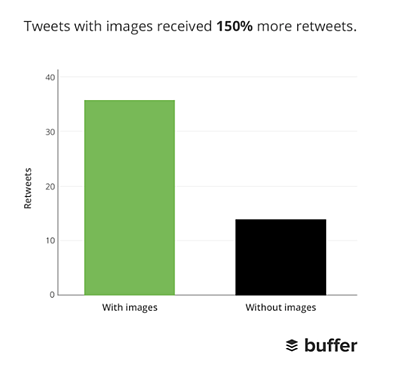
You can always stick with text-based LinkedIn posts. However, it helps to keep in mind that posts with images get 2x the comments that text posts get.
Videos, on the other hand are five times more likely to get comments than text posts. So, in this step, determine what content format you’d like to create for LinkedIn.
You can always start off with text posts, then diversify your content formats. Or, you can start strong by creating a video marketing strategy for the platform. This could be as simple as using GIFs to stand out in a busy LinkedIn feed as James Laurain does.
Or, you can create branded LinkedIn carousels or videos. Here, you’ll find the brand colors you’ve worked on useful as it’s best to create all your visual content using your brand colors and fonts to create a recognizable, signature style.
That said, another LinkedIn content format you can tap into are LinkedIn Stories. For this ephemeral content, brainstorm ideas for sharing behind the scenes content.
Perhaps you’re shooting a new video and you can share a picture of it. Or, you can record yourself with a quick tip/food for thought for the day. Sharing snaps of your lunch or midday snack are also good ideas to engage your audience via Stories. Whatever your approach is, just make sure you’re using a high-quality online video editor to have superb video content.
8. Create an engagement plan
Next up, work on your engagement plan. Since the algorithm favors engagement, you can’t ignore this step or put on the backburner.
Your plan here is going to be two-fold:
Firstly, figure out how you’d engage with others
Begin with setting up a goal of leaving X comments daily. Aim to drive conversations by sharing your experiences or asking questions in the comments.
At the time of writing this, the LinkedIn community is speculating that the algorithm loves comments that get others to engage. For example, a comment is long enough (but not fluff-ridden) to trigger the ‘see more’ option and others click it to read it – signifying engagement. Comments that get likes also tell LinkedIn that you’re offering value to your readers, hence, boosting your content’s reach.
Secondly, plan how you’ll drive engagement to your content
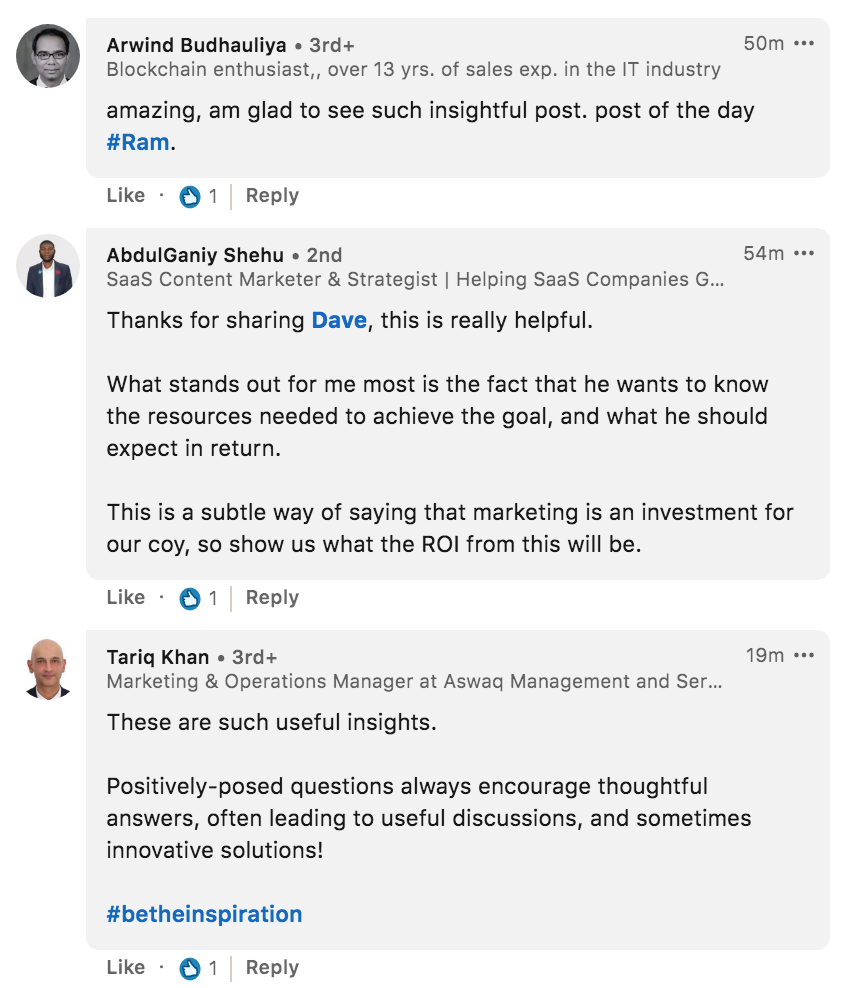
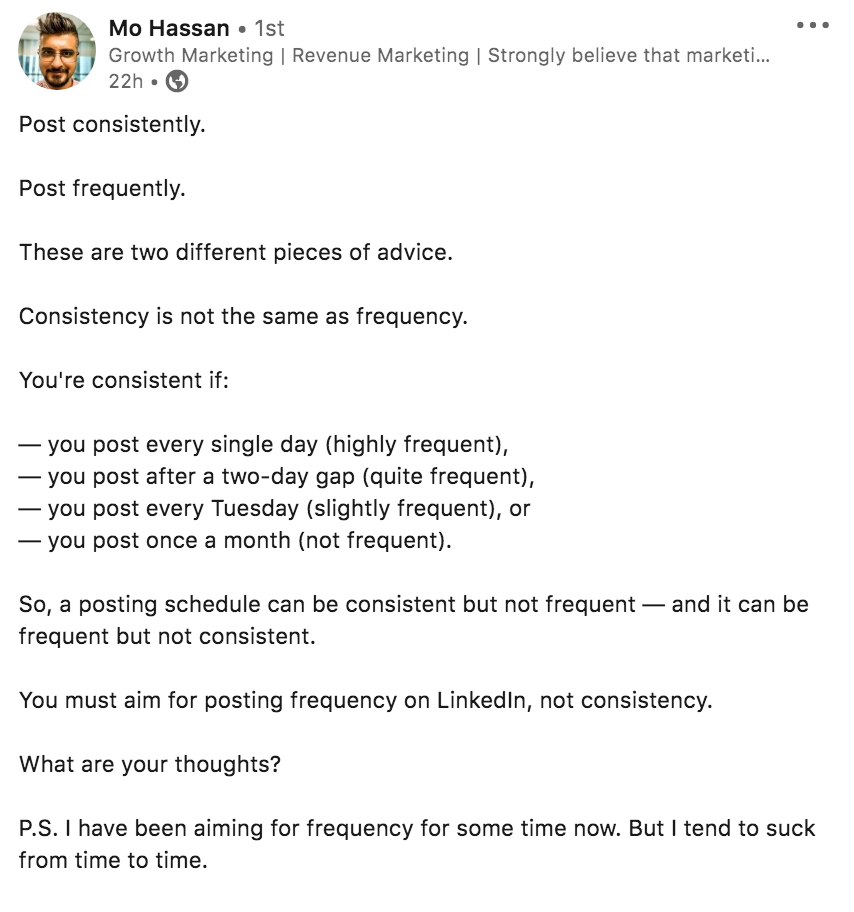
Of course, commenting on other’s content does part of the job. For the remaining of it, the following tips will help: tag relevant people or brands to get them to engage with you (less is more when it comes to tagging), post on times when your audience is active, and ask questions as Mo Hassan does at the end of this post.
If you’ve done your homework on understanding your audience well, you’ll be in a better position to create content that’s relevant to your audience, therefore, growing your engagement.
With that out of the way, aim to rake engagement within the first 60 minutes of posting. The quicker people engage with your content, the faster the algorithm picks up their interest in your content and increases your post’s reach.
9. Know how to format your content on LinkedIn
This is critical. Content that looks easy to read is content that gets read. Formatting your LinkedIn content right makes it visually appealing to read and engage with.
The following tips will help you format your content right:
Break text domination by adding color with relevant emojis. And, before you say emojis aren’t professional, know that they make your writing human. And, whether it’s LinkedIn or Twitter, you’ve got to show your human side.
Tip: Use a brand emoji like Morning Brew has come to be known as coffee cup emoji. ☕
Make friends with whitespace. To this end, add spaces between your lines.
Each paragraph in your 1300-character long post should be no longer than two sentences. Three at most.
Use bullet points to change sentence-based text format. But, remember to keep them short to make them easy to read.
Mix sentence length. Long sentences are boring to read. Short sentences are digestible. Since you can’t do away with long sentences all together, consider mixing short, mid-length, and long sentences.
10. Settle on a publishing frequency and stick to it
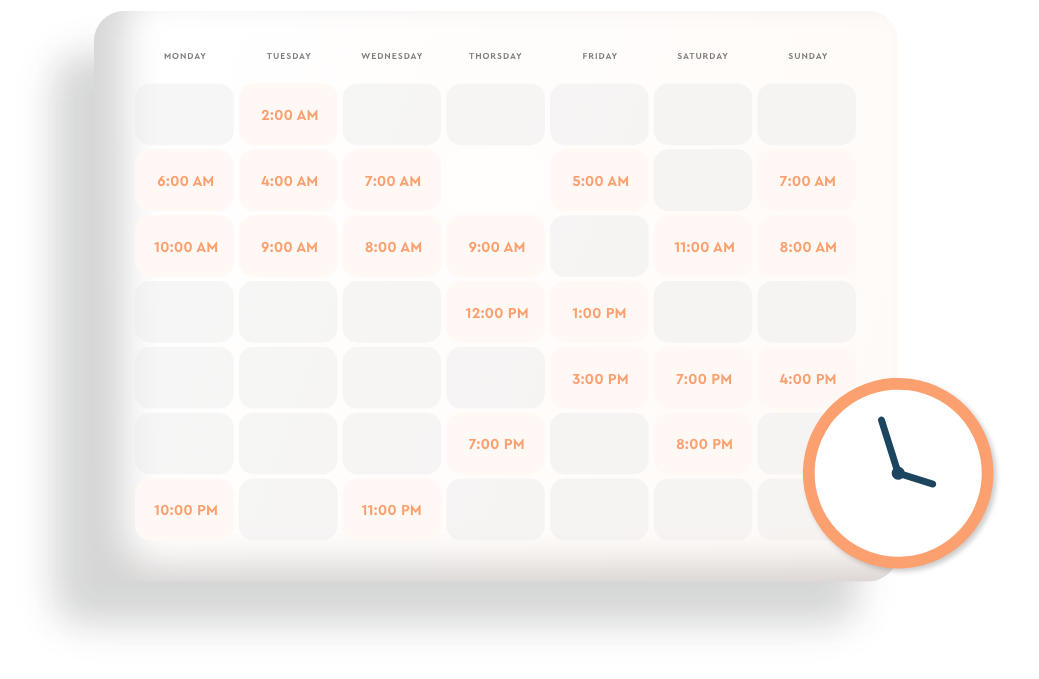
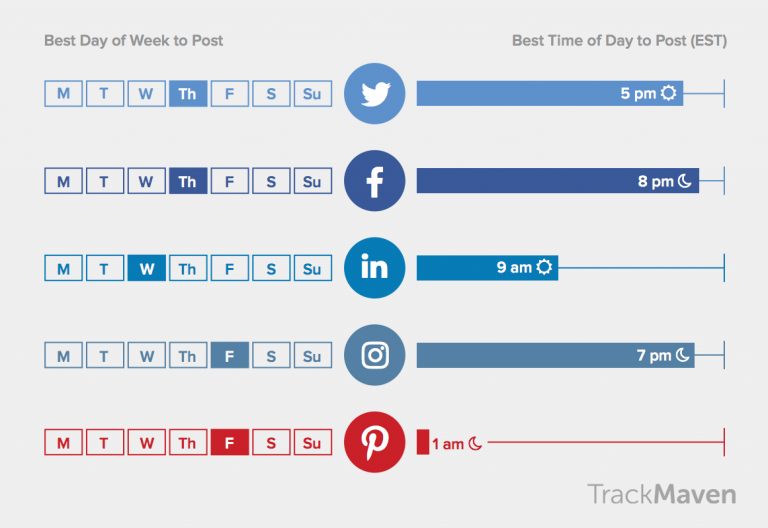
You can learn what suits your audience best by checking your analytics. For starters, however, Tuesdays and Thursdays between 8 am and 2 pm are good posting times for LinkedIn. This varies by industry though. So, again, testing your posting times helps.
What’s more, plan to be regular so your audience sees you regularly on the network. For the posting frequency, show up at least weekly. Four times a week is a good starting goal. This consistency in showing up, posting content, and engaging on LinkedIn regularly is key to success on the network.
Keep in mind: it’s okay if you miss a post or two. Continue engaging with your audience’s content if you can. In this way, you’ll still be showing up and adding value.
Also, remember that it’s easy to get carried away and end up scrolling for hours through LinkedIn. When you’re posting stick to the important actions that add value and avoid wasting time. You can use an hours tracker online app to make sure you stay on track.
Advanced LinkedIn content strategy moves
Once you’ve grown your followers and have a solid grip on your audience and what engages them, you can try these three advanced LinkedIn engagement tactics:
1- Create a branded hashtag
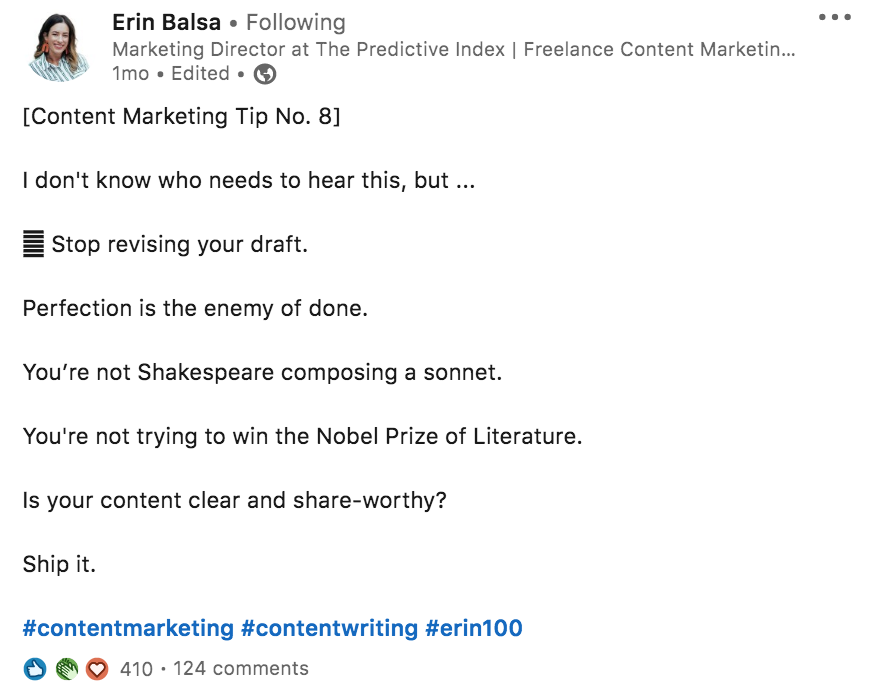
A custom or branded hashtag is one that you create and grow as your own hashtag on the platform. Erin Balsa, for example, posts content under #erin100. Balsa’s agenda is to post hundred content marketing tips using this hashtag.
The plus side to this is that LinkedIn articles get ranked in search, earning you eyeballs outside of the platform. And, if the content is absolute goodness, you can grow your followers further.
Question now is: what should you write about? You can always tweak content that you’ve already published and share it as LinkedIn articles. Or, you can work from scratch. Test the topic you want to cover by writing it out as a post. If it gets good response, go ahead and add details to it, turning it into an article that your audience will be interested in reading.
3. Go live
Live video on the platform gets 7 times the reaction and 24 times more comments than posting native video according to the horse’s mouth. This makes LinkedIn Live gold. Is there a post that’s gotten excellent engagement? Take that topic and discuss it live. Or, ask your audience what they’d want to learn from you and do a live video on it.
Looking for inspiration? Sarah Noel Block is great at hosting guests on LinkedIn Live.
Wrapping up
Tapping into LinkedIn can feel overwhelming in the start. But, that’s true for any social network you want to grow your personal brand on. So I’d say you put that overwhelm aside, create your content strategy and start using the platform. You don’t have to aim for perfection. Aim to get started, be consistent, and learn. Things will take off from there.
So what are you waiting for? Grab a sheet of paper and get to work.
You’re reading about building a successful e-commerce website. Maybe, you want to venture into the e-commerce business. Who doesn’t know that e-commerce is a lucrative B2C business model?
However, you’ve got to have a proper plan in place because launching an e-commerce business isn’t that simple. You must know that it does sound like fun when you’re working a 9-to-5 job and want to start something on the side (or even quit your job to go all in).
But, of course, you’re in luck. I’ve got you covered.
This isn’t the first time I’m helping people to build an e-commerce website. I have had several talks with friends and relatives who wanted to get into this business. Most of them were afraid to “jump off the cliff”.
Maybe, there were two reasons why most people don’t start their these businesses:
1. They lack the right skills
They don’t have any idea where to begin when starting an e-commerce site. They think that launching an e-commerce website might cost them thousands of dollars just because they have no idea where to get started. Let me correct you right off the bat, it won’t cost you thousands of dollars to set up an e-commerce business.
Have you ever heard of a tool called WooCommerce? You might not need to spend a dollar because it’s an e-commerce tool that installs merchandise features to your self-hosted WordPress website. However, there are several paid tools for launching e-commerce sites that are even better; you’ll learn more about them in this article.or a more dynamic and seamless user experience, consider integrating Angular Spreadsheet Controls into your website development. These tools streamline data management and enhance functionality, ultimately contributing to a user-friendly interface. This can be particularly advantageous if you’re using platforms like WooCommerce, making it easier for customers to interact with your digital storefront effectively.
2. They’re afraid of failing
One of the biggest reasons why most people don’t take that leap of faith is that they’re afraid of failing. Most of them overthink the whole thing, but some of them can’t take risks at all. In other words, they’re afraid of failing so they never take action.
If you’re planning on starting an e-commerce website in 2026 or beyond, then don’t let the fear of failing stop you. Gary Vaynerchuk often says to his fans and followers that pay attention to who’s giving the advice. The point is that if you’re asking about starting an e-commerce venture with someone who hasn’t done any business before, you need to rethink your strategy.
As far as my experience with e-commerce websites is concerned, I don’t consider myself an expert in this genre, but I’ve been running a personal online store for the past 15 months.
Plus, I have had some experience selling e-products via 2checkout and Fastspring.
Let’s just say I won’t hire an e-commerce guy if I ever want to scale my e-commerce business because I might not need one.
You’re about to learn:
What an e-commerce website is, and why it is important
3 W’s of building an e-commerce website
The steps involved in building an e-commerce website
The tools that are used for creating e-commerce websites
How to market your e-commerce business in today’s world
So before we dig deeper into building such websites in 2026 or even after that, it’s important to take care of the basics. For those who’re slightly unsure about an e-commerce website, here’s some explanation:
What’s an E-commerce Website?
It’s a website that sells products online and provides a facility for customers to shop on the internet without having to visit a brick-and-mortar store for shopping. It is also known as an e-store or online shop.
Furthermore, some e-commerce websites sell softwares, printables, and digital content, whereas others also sell tangible items. However, for tangible goods, the e-store may ask for freight charges and address of the recipient.
We’re living through a time of Technology and the Internet. Therefore, buying stuff online is no mystery, especially for millennials. Most e-commerce websites accept PayPal, debit cards, credit cards, Apple Pay, Google Play, and other payment options.
The best part about the e-commerce business is that anyone with a certain set of skills can venture into it and start their entrepreneurial journey without a ton of investment. You’ll learn about the e-commerce website building tools that make the launching process a whole lot easier.
3 W’s of Building an E-commerce Website: Who, Why, and What
This might seem like a section that most of you would want to skip so that you can get to the cream of this piece. However, this brief section might turn things around for you. The following three W’s could be crucial to your e-commerce business success:
1. Who is the target audience of the e-commerce business?
The understanding of the target audience means you know who you want to reach out to for selling your products. For instance, if you only sell products in the US, you might not need to run Facebook ads for Canada. It shows that you’re well aware of your target audience.
2. Why did you choose the e-commerce business model?
It’s essential to get the basics right. If you aren’t sure why you entered the e-commerce market, then you should rethink your whole strategy before investing your hard-earned money into this business. You must choose the e-commerce business model if you’re passionate about selling online or you’ve got some experience in sales and marketing.
3. What is your brand’s value proposition?
A brand’s value proposition is the ability to stand out from the crowd. It could be anything from efficient customer support, quick free delivery, to low prices. Make sure that you develop your e-commerce company’s value proposition that sticks with your sales and marketing. Using a strategic clarity canvas, you can visually outline your business objectives and ensure alignment across teams.
That’s pretty much it.
Let’s jump right into the cream of this article.
Five Step Guide on Building an E-commerce Website
Let’s take a look:
1. Understand the E-commerce Business Model Inside-out
The stepping stone of building an e-commerce website is understanding the e-commerce business model. Starting an e-commerce store doesn’t mean you shouldn’t jump straight to choosing the e-store’s name and go for it.
Instead, the groundwork includes several things to be taken care of before you go ahead and launch your e-commerce business. You must first figure out what to sell, where to sell, and who you should sell to before taking any further steps.
So here are some essentials of starting an e-commerce business that you should work on:
1. Business Model
Decide the business model of your e-commerce website whether it’s going to be B2B or B2C. It may vary from business to business. For instance, AliExpress is a popular e-commerce website that caters to both B2B and B2C consumers. However, it’s mainly a B2B business portal that connects wholesalers/manufacturers with retailers.
2. Products Selection
Product selection is one of the fundamental steps of starting an e-commerce website. It’s highly unlikely that you want to start an e-commerce website but you don’t have any products in mind. Choosing the right product requires knowing the products’ categories inside-out. A lot of entrepreneurs either work for others before they venture into the e-commerce industry or they create their own products to sell online.
3. Stock Management
Stock management is managing your product inventory. You don’t need a fancy POS or stock management software in the beginning. However, the first thing you might want to figure out is how you’re going to keep your stock. Do you have a warehouse to store it in or will you buy the product when an order comes?
4. Fulfillment/Shipment
Once you’re done with the product selection and stock management, the next step is the fulfilment or shipment. When you opt for the 3PL fulfillment company it usually means you don’t have to ship the product, but instead, a third-party online store ships your product from their warehouse. On the other hand, when you don’t work with any major e-commerce platform and, instead, sell products through your website, you’d have to manage the shipment yourself. You would be better off striking a deal with a courier company that offers lower charges to you as compared to walk-in customers. In such cases, using a courier invoice template can help streamline the invoicing process, ensuring all details are captured clearly for both the customer and your records. You can also strike a deal.
5. Website Development
E-commerce website development is one of the pillars of launching an e-commerce business. You may want to hire a full-time developer to launch your website or work with a freelance web developer if you have some know-hows of website development. You may also want to check out e-commerce platforms that help you launch your online store within minutes.
These were some fundamental areas to think through before you hop on the e-commerce train and journey ahead. You might also want to consider incorporating some of the latest web design trends before you set out full swing with your web development projects. To ensure a smooth and efficient development process, it’s highly recommended to consult with ecommerce website development services that can guide you through the complexities of creating a site that meets both your business goals and user experience expectations. Building a successful online store requires a strategic approach, from choosing the right platform to optimizing user experience. Investing in ecommerce web development ensures that your website is not only visually appealing but also functional, secure, and scalable for future growth.
2. Choose the Type of E-commerce Business
Step no. 2 might clear things up for many of you. The launch of an e-commerce website isn’t as simple as it seems. Sure, you may have figured out the advanced logistics management such as products, stock management, and shipment, but next up is choosing the type of e-commerce business.
When we hear about an e-commerce store, we simply think of a website that sells products online. You might be intrigued to know that there are several types of e-commerce stores, and choosing the right type of e-commerce business is crucial to your success.When starting an e-commerce store, it’s essential to formalize your business structure. Registering your business or forming a legal entity, such as an LLC (Limited Liability Company), will not only protect your personal assets but also add credibility to your brand. An LLC is particularly popular among e-commerce entrepreneurs because it provides limited liability protection, tax flexibility, and straightforward management options. To further enhance your business presence, consider using a virtual address for LLCs, which offers privacy, professionalism, and flexibility for remote operations.
At this step, you don’t need to jump right into the product creation process, but instead, take your time to decide what e-commerce website type is most likely to work out for you.
Let’s take a look at the different types of e-commerce stores to choose the most suitable one:
Types of E-commerce Stores
Here we go:
1. Online Retail Stores
These are the e-commerce websites that only retail, meaning they buy the products from the wholesale market and resell to the customers. It’s by far the most common e-commerce business model. The best part about choosing this sort of store is that you could sell a million types of products on your e-store.
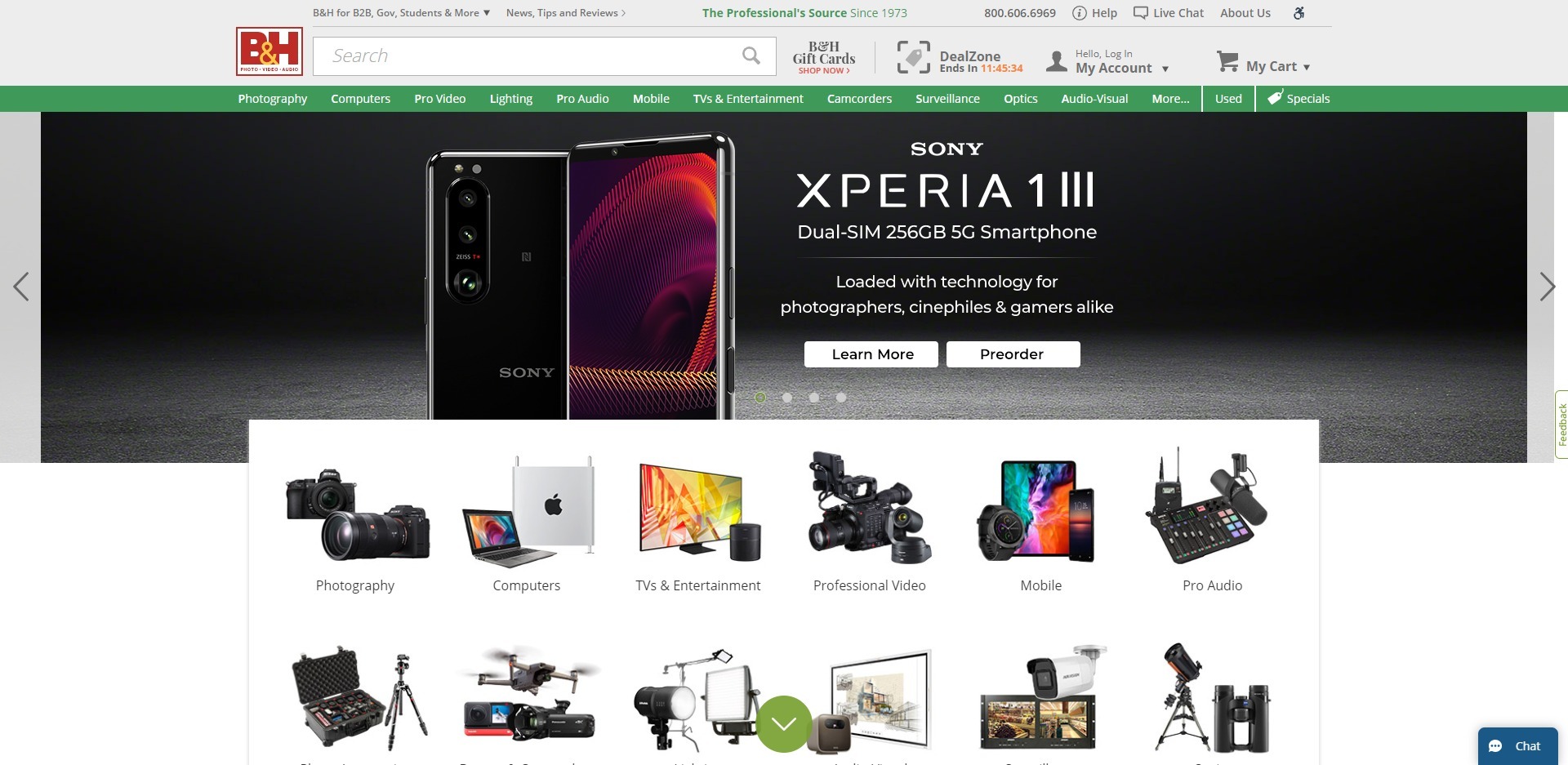
B&H is an online retail store that sells cameras, lenses, and microphones. They’re an e-commerce website, but they’re different from the others I’m going to share with you.
2. Dropshipping Websites
Dropshipping is rather different from an ordinary online retail store. If you haven’t had a chance to learn dropshipping, then let me briefly explain how it works. When the customer places the order on your website and completes the checkout process. You go to the wholesaler or manufacturer for order fulfillment and complete the purchase. The only difference is that you use the customer’s name and address so that the manufacturer/wholesaler ships the product directly to the customer.
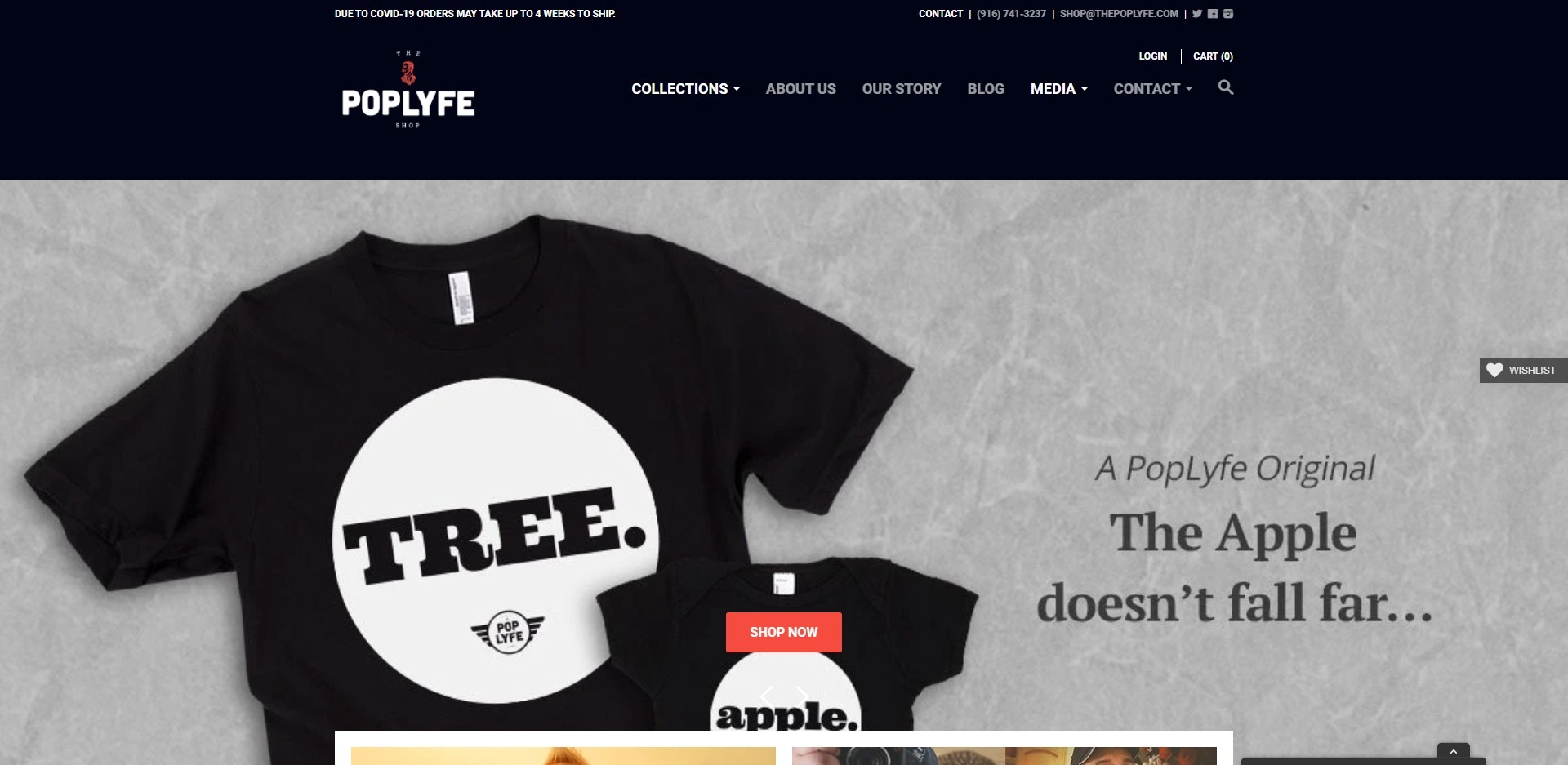
PopLyfe is a dropshipping store that sells t-shirts related to fatherhood. They aren’t just a niche store, but what makes them stand out is that they dropship the merchandise.
3. Online Storefronts
Online storefronts are e-commerce stores, but they aren’t widely popular. A storefront is a website page that an e-commerce website provides to a seller or brand. Such storefronts are often offered to sellers or brands that bring huge sales to the platform. So basically storefronts are e-commerce platforms, but they’re limited to a fewer number of brands and sellers.
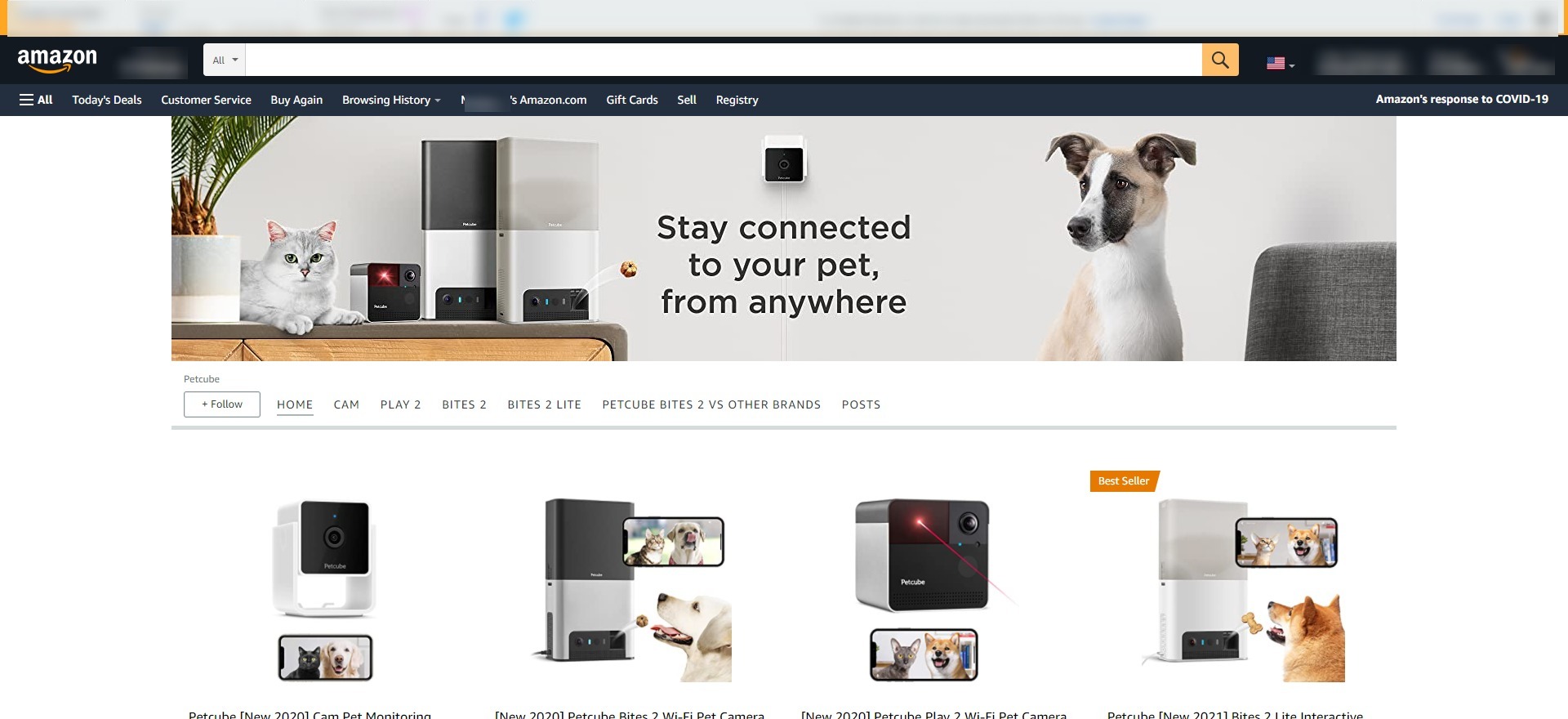
You must have heard about the Amazon FBA program. It stands for fulfillment by Amazon. When a merchant signs up to the Amazon FBA program, the platform provides the storefront to the merchant.
Here’s the example of Amazon storefront:
Petcube is an e-commerce store based on the Amazon storefront feature. There are hundreds of thousands of brands on Amazon that have storefronts. Similarly, there are thousands of giant e-commerce platforms out there that have millions of storefronts.
4. Merch Stores
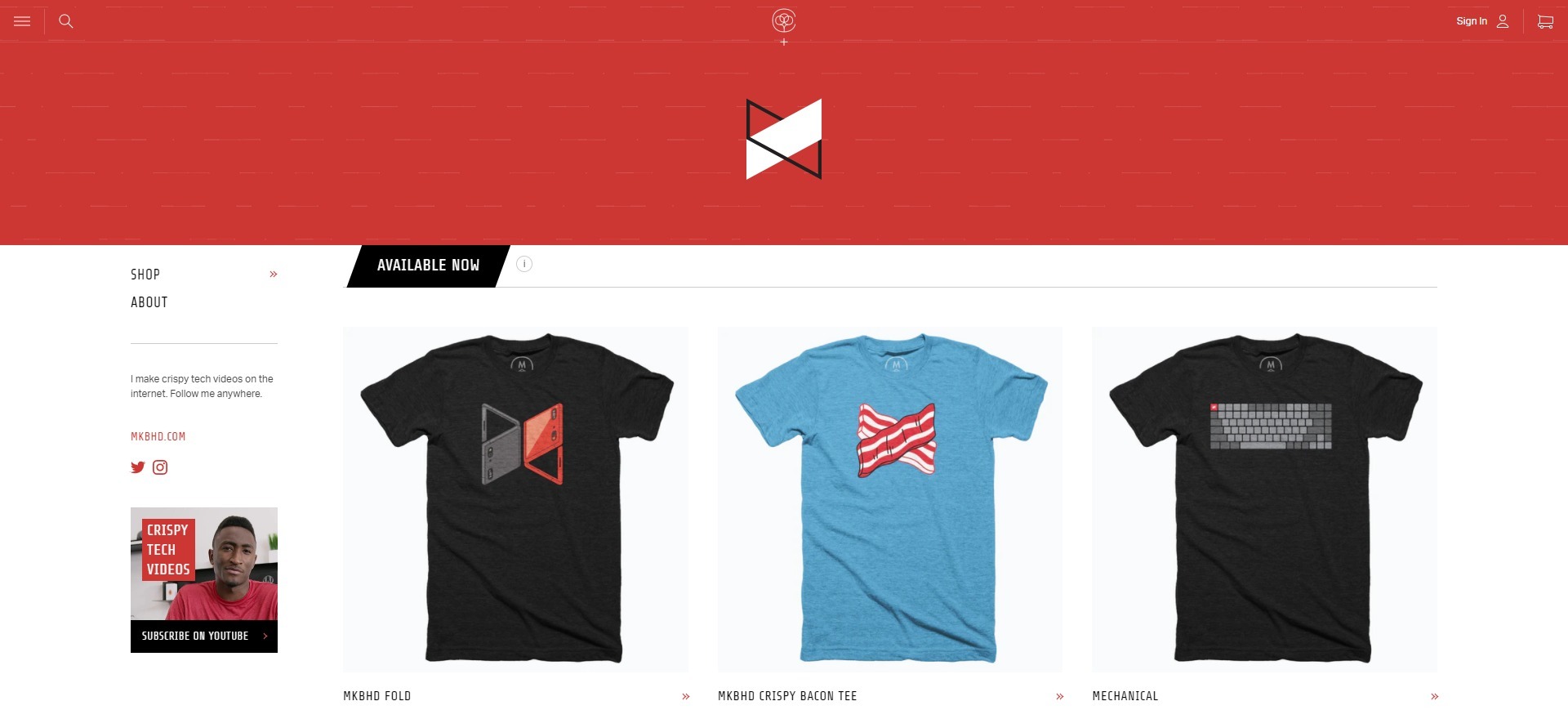
Merch stores are online stores for selling merchandise. Normally, celebs, sports personalities, and famous YouTubers launch their merch stores where they sell their merchandise directly to fans. Not only is it a great way to make money, but it’s also used for donating to a noble cause. Since there is a selling activity that happens on these websites, it’s safe to say that merch stores are e-commerce websites.
Marques Brownlee is a popular tech YouTuber; he has a merch store just like other top YouTubers in the world. He sells his merchandise on his online store.
That’s it.
Choosing a type of e-commerce business is inevitable; you can’t get away from it. The good news is that you now know there are several types of e-commerce businesses. Some of you might have heard about merch stores but may not have any idea about dropshipping and storefronts.
Anyway, the most common one is setting up a retail store for selling your own products or reselling (wholesalers’ or manufacturers’) products.
3. Create/Buy the Products to Sell on the Online Store
You must have some idea about what you want to sell because that’s why you have been doing your research on how to build an e-commerce store. Well, it’s time to discuss whatever you want to sell online.
Step #3 is all about streamlining the product purchase or creation to put it out on your e-commerce website. Therefore, it’s necessary to finalize the product (or products if you have multiple items).
The point is that if you’re planning on buying the products from different wholesalers, then go ahead and order some samples. On the other hand, if you’re creating your products, then speed up the creation process.
For instance, when fashion designers want to establish an e-commerce website to sell clothes online, they don’t launch their site out of the blue. Instead, they spend time creating clothes to display on the website.
Since your online store hasn’t been established just yet, you’d be better off laying the groundwork that could lead to building a successful e-commerce business.
There might be a dozen things required for building any business from the ground up and starting an e-commerce store is no different.
Here’s the checklist for coming up with the products to sell on your e-commerce website:
1. Prepare Your Products
You have to have some products in your stock before the launch. It doesn’t matter whether you’re selling handmade crafts or camera equipment online. You need to prepare some products to put up on the online store. Once you have some products in hand, you could move ahead to the next step in the checklist.
2. Take Product Pictures
Pictures are vital to any e-commerce website. It’s almost impossible to sell a product without a proper picture. In most cases, e-commerce websites use multiple photos of the same product to convince the buyer or to better explain the product. So take your time in taking loads of good photos of your products.
3. Write Product Descriptions
When you’re adding products to your e-commerce website, you won’t just write the product name and add its pictures. Instead, you’d also have a descriptive text that explains every bit of detail about the product. Not only does this description help buyers in picking the product, but it also helps search engines understand your website better. So don’t run away from writing in-depth, meaty product descriptions.
4. Set the Pricing
Pricing is an essential part of the process. Even though the online store hasn’t launched yet, you have time to fix all the loopholes. Use this opportunity to decide the prices of your products and note them down. You may not want to get confused about pricing when the e-commerce website is about to go live.
The gist of step #3 is to be fully prepared for the launch. You might not want to switch the e-store name to a different one or change the product catalog after the launch. Therefore, preparing ahead of time is the way to go.
4. Build Your Store with the Right E-commerce Tool
It all comes down to this step. Choose the right e-commerce tool to get started with building your e-commerce website. You might wonder why I didn’t mention choosing the right e-commerce tool at the beginning. Well, had I started straight away with that, I would have missed so many essential steps that are key to success.
I’m going to briefly discuss a few e-commerce website-building tools that are widely popular among website developers and entrepreneurs. I have tested a few of them, but you shouldn’t blindly take my word for it. Instead, do your research before choosing the e-commerce tool.
Without any further ado, let’s get right to it:
1. Shopify (Recommended)
Shopify is one of the most popular e-commerce tools for creating online stores. Some might say it’s a bit pricey, but they have everything you need to set up and grow your website. Shopify isn’t a self-hosted platform, meaning it doesn’t require a web hosting space. Instead, the platform hosts your online store on its own servers.
However, you could register your domain with Shopify or use your already existing domain with another registrar. As far as the plugins/modules are concerned, there are several third-party Shopify plugins available on the market to fine-tune your Shopify online store.
Free Trial: 14-day free trial and no credit card required
Price: $29 per month
2. Squarespace
Squarespace is an all-in-one website building platform that allows you to build a blog, business websites, and e-commerce stores. Its users don’t need any third-party services such as domain registrar, web hosting, SSL certificate service, or website templates because Squarespace takes care of everything. You can also avail the Squarespace discount to enjoy their premium features for new businesses as well as larger projects.
It’s safe to say that Squarespace is a main competitor of Shopify. Both these services are popular for e-commerce website building. However, Squarespace might have a slight edge over Shopify because their service caters to all types of website builders, whereas Shopify only attracts e-commerce website builders.
Free Trial: 14-day free trial with no credit card required
Price: The commerce plans start at $35 per month
3. Wix
Wix is yet another popular website builder that serves both website owners and e-commerce customers. Just like most website builders, Wix offers templates, domain registration, SSL, business emails, web hosting, and e-commerce solutions.
Besides the basic attributes, there are certain features such as analytics, advanced SEO configurations, mobile-friendliness, unlimited fonts, media galleries, and app market that make this tool stand out from the crowd. Furthermore, Wix also offers a mailbox, Wix chat, social media tools, and contact management to take your e-commerce store to the next level.
Free Trial: No free trial, but there is a 14-day full refund policy
Price: The business & eCommerce plans start at $17 per month
4. Weebly
Weebly is one of the website builders on the market that allows you to set up your website in minutes. The best thing about such online website builders is that you don’t have to be an expert to create websites with them.
Weebly does have an e-commerce feature that lets you create e-commerce websites with it. So this is why Weebly has made it to the list of e-commerce tools. It’s affordable, easy-to-use, and effective.
Free Trial: N/A
Price: $12 per month
5. WooCommerce
WooCommerce is a free e-commerce WordPress plugin that adds e-commerce functionality to a WordPress website. It’s an open-source tool owned by WordPress parent company Automattic. It is a fantastic tool for WordPress users and bloggers who want to sell products online without switching to any other e-commerce tool. Even though this plugin is free, you may want to buy other third-party plugins that connect with WooCommerce for better functionality.
Furthermore, the WooCommerce plugin integrates with several payment processors to manage your income. There are hundreds of thousands of WordPress users that are using this plugin for selling products and services online.
Free Trial: N/A
Price: Free
6. Shopaccino
Shopaccino is an industry-focused eCommerce platform built by identifying real pain points across exporters, manufacturers, distributors, and D2C brands. Unlike generic one-size-fits-all systems, it is designed to support businesses that need structured B2B and B2C operations from a single platform.
The platform enables exporters to sell globally, helps manufacturers and distributors manage both B2B and B2C sales in one system, and supports D2C brands with scalable growth through a branded website and mobile app. Shopaccino also streamlines operations with built-in automation, integrated inventory, payments, logistics, and multi-warehouse order fulfilment. Additionally, it charges zero transaction fees on the platform, allowing businesses to retain their earnings.
It offers flexible plans for businesses at different growth stages.
Free Trial: 14-day free trial (No credit card required)
Price: Starts at $21 per month
I’ve shared a bunch of e-commerce website building options that you can check out, but if I were you, I’d launch my e-commerce website with Shopify.
The reason for this is that it is the best e-commerce website tool out there and it offers everything you need to run your e-commerce business.
Though it may seem costly at first, if you start making money from your online store you’d see its worth.
Building a professional ecommerce website is more than just launching an online store; it’s about creating a seamless shopping experience that builds trust and encourages repeat business. A professional ecommerce website features intuitive navigation, fast load times, and secure payment options, all of which are essential for converting visitors into loyal customers. Investing in quality design and development ensures your business is ready to compete in today’s digital marketplace.
Here are five crucial steps of launching an e-commerce store:
1. Register a Domain
You can always register a domain for your online store through your e-commerce tool, but I’d highly recommend registering your domain separately. The reason for that is if you ever want to switch to a different e-commerce tool, you won’t have to deal with customer care which may cause a delay in the process.
Register your domain with your favorite domain registrars such as Namecheap or GoDaddy. All you need is to select the option that you already have a domain name while launching your e-commerce store. You will find the instructions for pointing your domain to the e-commerce tool’s web hosting servers afterwards.
2. Setup Your E-commerce Store
The next step is setting up your e-commerce store. Pick the best e-commerce site builder to create your e-commerce store and get started with it. You’ll fare well if you opt for a recommended e-commerce tool.
A lot of beginners choose free tools such as WooCommerce, but end up frustrated at some point. It doesn’t mean you can’t achieve your goal with it. The point is that if you don’t want to spend money on your e-commerce store setup, you’re going to miss out on some opportunities along the way.
If you already have a store that is not performing well, go for Ecommerce store migration to a faster and efficient platform like cloud hosting.
3. Add Products to the Store
Once you have set up your online store, the next most important step is adding the products. Adding the products doesn’t mean just adding the products. You must know how to properly do it.
To make things easier for you, let me mention some key things to consider while adding the products to your online store: use clear names for the products, add pictures, write its functions, its details, etc.
4. Optimize the E-commerce Website
Every website needs to be optimized for better user experience and search engine crawling, so an e-commerce website is no exception. If you’re using an e-commerce tool such as Shopify or Squarespace, reach out to these companies to find out how you can optimize your e-commerce websites.
Besides speeding up the website using caching and hosting on a high-end web server, you might have to use compressed yet high-quality product pictures. Furthermore, try to optimize the URLs for the products, so that it becomes easier for search engines to discover pages and drive traffic to the site.
5. Add Multiple Payment Methods
Try adding multiple payment methods to your online store. The more payment methods you offer, the easier it gets for the customers to buy from you. Check out payment processors such as FastSpring, 2Checkout, and Stripe.
Now you know a handful of e-commerce tools to build an online store. Plus, I shared some crucial steps that could help you make the process smoother.
I reckon you’re all set to build your store. Once you’ve built it with one of the tools I mentioned, the next thing you might want to do is establish a marketing strategy for your e-commerce business.
5. Design a Marketing Campaign for the E-commerce website
Hopefully, your e-commerce website is up and running, but the job isn’t done yet. In fact, it’s just the beginning.
The next thing you might want to do is to come up with a marketing plan for your e-commerce business. A marketing campaign means there would be a handful of strategies to test out. A lot of them might not work for everyone, but you must try them out.
There is a misconception about marketing for e-commerce businesses. A lot of people think the it means running social media and Google search ads.
It’s true that online advertising is a major marketing strategy. However, there are various other tactics that are equally important to achieve the goal.
I’ll give you a quick rundown on designing a marketing campaign for your e-commerce website.
Here are the top-notch marketing tactics to try out:
1. Use Content Marketing
Content marketing strategy may comprise of using content to attract, engage, and convert your audience into subscribers, leads, or paying customers. In other words, it’s an art to sugar-coat your value proposition or offering with impeccable information that becomes irresistible for the prospective audience.
One can use various types of content such as written, audio, images, and videos to fuel their content marketing campaign. Similarly, an e-commerce website could also leverage content marketing tips and techniques by putting out useful articles on its official blog, attractive pins on Pinterest, and uploading helpful videos to YouTube. You can even create infographics, which are awesome for sharing lots of information without overwhelming people.
2. Run Facebook Ads
Online advertising is an integral part of any e-commerce business development strategy. Some businesses prefer Google search ads, whereas others opt for Facebook ads. You don’t have to stick to just one platform for that matter, but instead, test out different ad platforms to see what brings the most attention.
Since people like to stumble upon new products and services through Facebook, a lot of e-commerce websites run Facebook ads. Try the ‘A/B test’ for different types of campaigns in Facebook ads to see which ones work best for you.
3. Retarget the Audience
Retargeting the audience refers to a marketing tactic that allows advertisers to target website visitors that have previously landed on your page. The advertisers use a piece of code that goes into the website, which lets the advertising platform recognize the person who has previously visited. You can now retarget your audience through Google ads, Facebook ads, and Quora ads.
4. Try Influencer Marketing
Influencer marketing is a rapidly growing marketing trend. Brands offer lucrative deals to top bloggers, social media experts, Instagrammers, and YouTubers to help spread the word about their brand or product.
An e-commerce website could also use an influencer marketing strategy to attract audience. Make sure that you’re working with influencers from the region you’re doing business in. Otherwise, it won’t make much of a difference.
5. Build an Email List
Establishing an active email list is imperative to creating a successful marketing strategy in today’s world. If you put out an opt-in form and expect people to subscribe to your email list, it might not work very well. Instead, try publishing useful content and write a compelling message on your opt-in forms to entice people to interact with it. Furthermore, don’t overlook the psychology of colors in your emails because that matters too.
The point is that email marketing is an essential part of the modern-day digital marketing strategy. The biggest perk of building an email list is that you can always reach out to your customers or subscribers through it without hesitation.
You’ve got to use every single way to attract, engage, and convert your audience into paying customers. Most successful e-commerce stores pay close attention to cart abandonment, and they use strong email marketing strategies to communicate their offers, discounts, and whatnot.
That’s it.
It’s difficult to succeed just by focusing on a single source. Make sure to create a mix of several top-notch marketing tactics to make an impact.
Introducing Replug: Why it’s beneficial for your e-commerce website
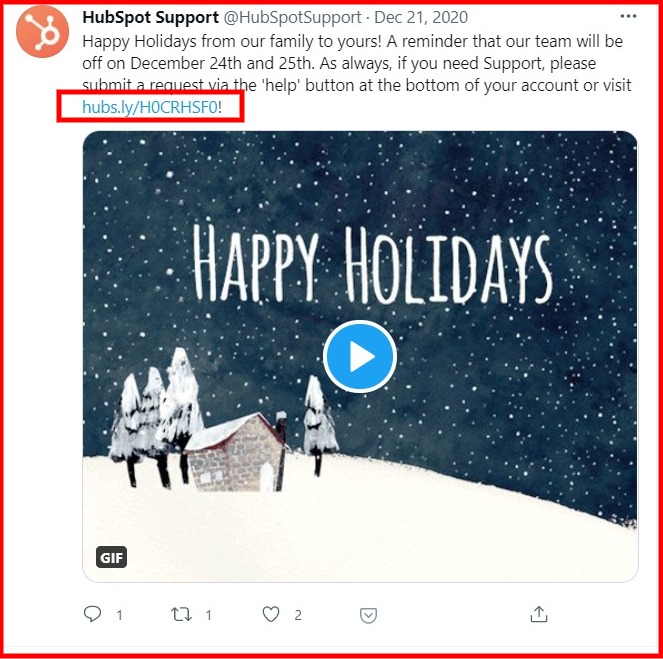
Replug.io is a state-of-the-art URL shortening tool that enables you to shorten the long and clunky URLs into short and sweet ones. Additionally, it flawlessly integrates your short branded URL and helps you take your social media marketing to the next level.
Basically, it’s a one-stop-shop to generate shorten links, tracking the clickability, adding the UTMs, retargeting the visitors, and driving social media followers over to your website.
Simply put, it’s not just a URL shortener, but instead, it comes with a whole package to take your social media engagement and website visitors to the next level.
Key Features of Replug
Here are the features of Replug you shouldn’t overlook:
1. URL Shortener
It could save you from the embarrassment of sharing messy and lengthy URLs on social media. It’s the best URL shortener tool out there. So turn your long URLs short to give it a professional look.
2. UTM Parameters
Replug allows users to add a UTM parameter to their short URLs, which is an optional feature for users to use. However, if you’re trying to track the performance of your social media sharing campaign, you should create and insert a UTM parameter to your short link.
3. Branded URLs
A branded URL is a short URL that is easy to remember and use on the internet. You must have seen some companies use short URLs for their social media posts or otherwise. For instance, YouTube uses youtu.be and Amazon has the amzn.to domain.
4. Social Media Bio Links
One of the perks of the Replug tool is that it lets you create an all-in-one social media bio link that takes visitors to a landing page displaying all of your social media profile links.
5. Retargeting the Audience
One of the benefits of using Replug is that you can retarget the people who clicked on the short URLs through various ad networks that support retargeting.
6. Call-to-Action to Social Media Links
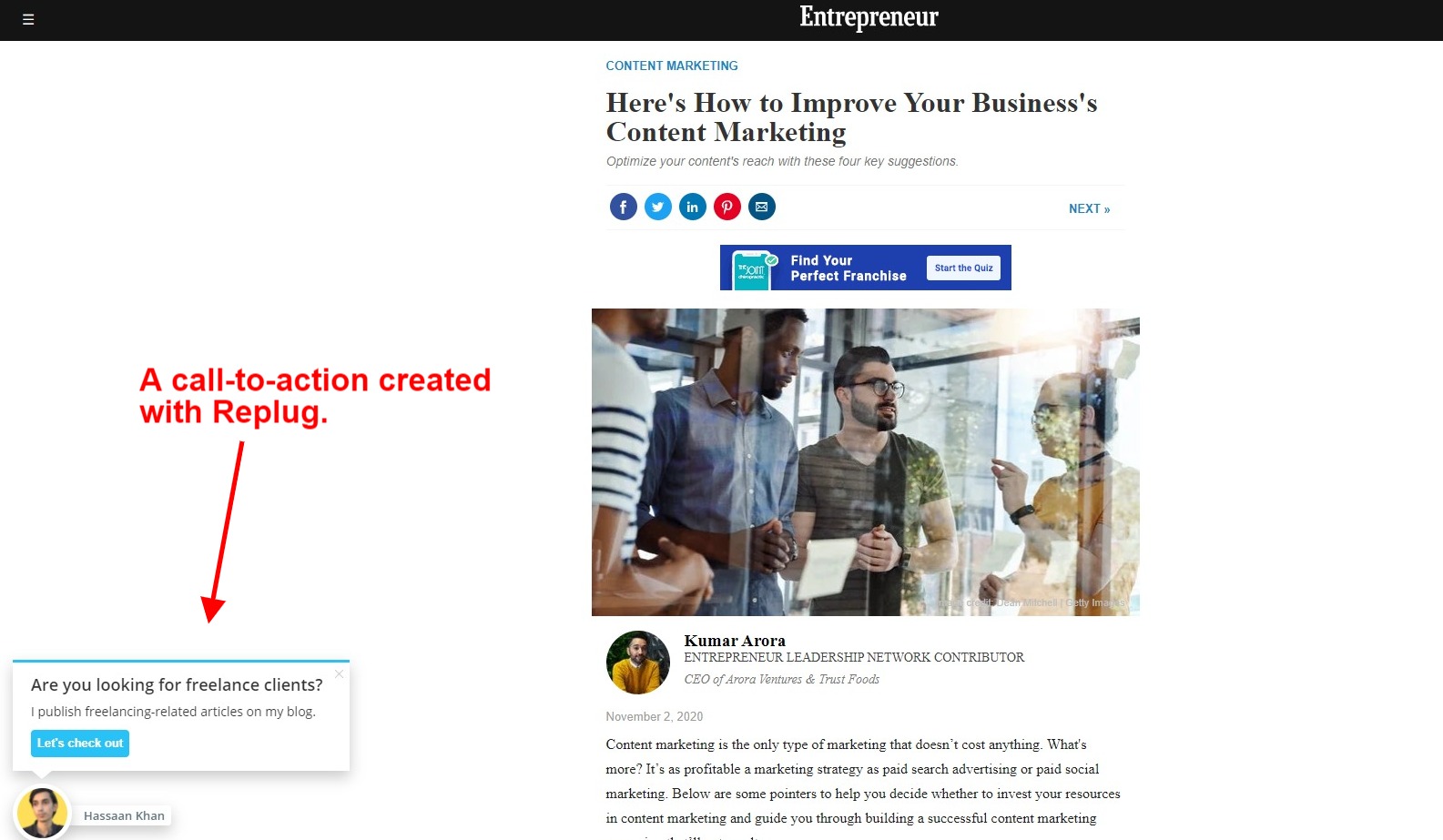
One of the features that make Replug stand out from the rest of the URL shorteners is that it has a call-to-action feature. What it does is that it lets you add a CTA snippet to the URLs you’re shortening. So whenever you shorten someone else’s article to share on your social media, your CTA snippet shows up on the screen, and it could bring traffic back to your website.
How to Use Replug for Your E-commerce Store
Here’s how e-commerce website makers can use Replug to make the most of this tool:
1. Shorten the Long Product Page URLs
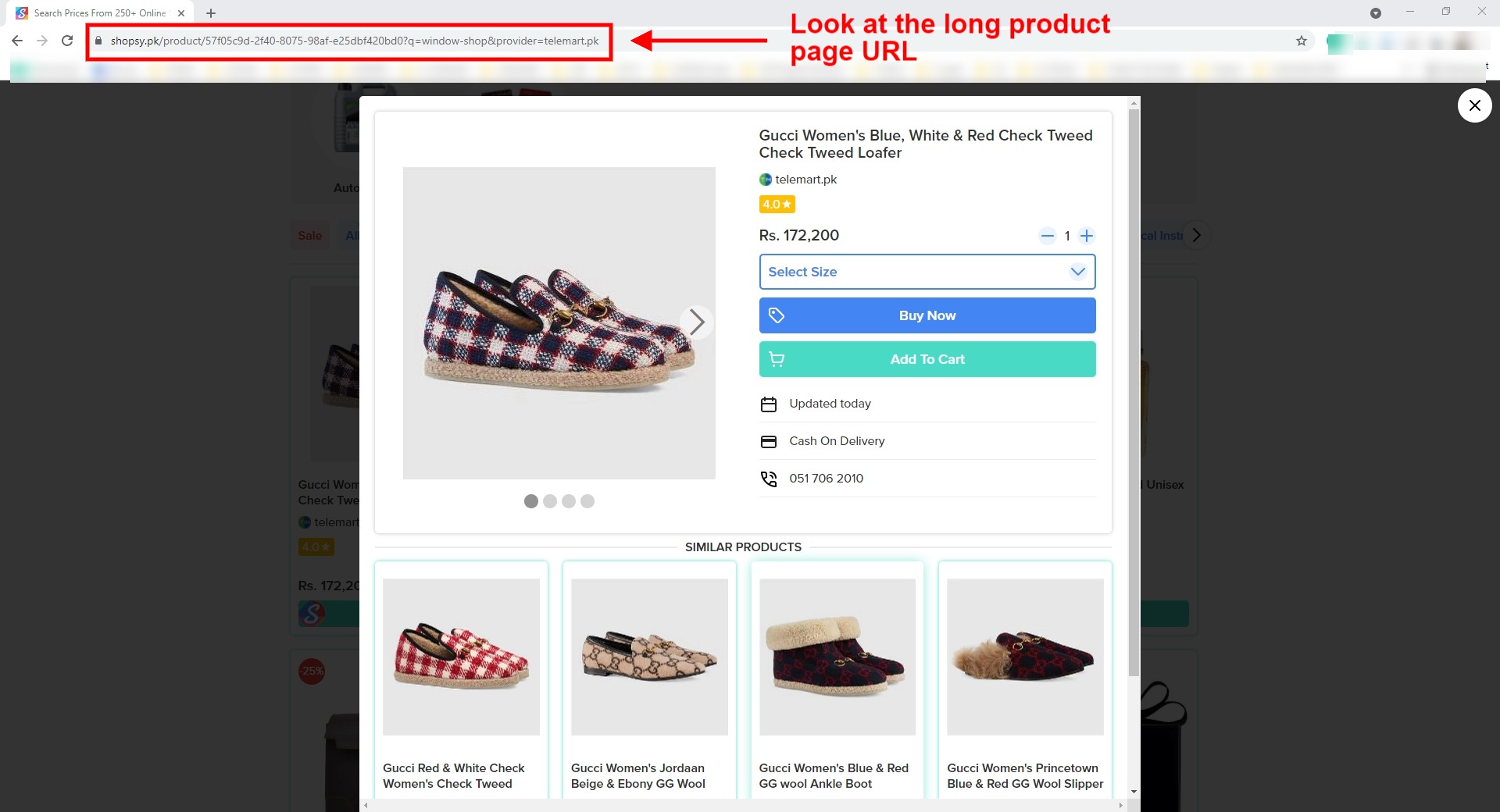
Have you ever noticed that e-commerce websites have very lengthy URLs, especially for product pages?
Well, who would want to share those long URLs that look spammy? That is where Replug comes to your rescue; you can always shorten your product page links with Replug and make them look beautiful on social media.
2. Use a Branded URL for Social Media
Since Replug does allow you to add a custom branded URL to your account, you could use its short branded URL for your social media campaign. Make the most of this opportunity for your e-commerce website. It’ll eventually shorten your product page links to some extent.
3. Drive Social Media Traffic Back to the Store
The call-to-action feature of Replug lets you create CTA snippets that could be added to the short URLs, for instance, when sharing influencers’ content on your social media for engagement and interaction, you could add a CTA to your website in the blog post URL. As a result, when people click-through the short link of the influencers’ article, they’d land on their website and also see your CTA snippet on the page.
4. Retarget the Audience through Ads
When you’re shortening the URLs with Replug and people are clicking through your clicks, you can retarget the audience that clicked on the short URLs through various ad networks.
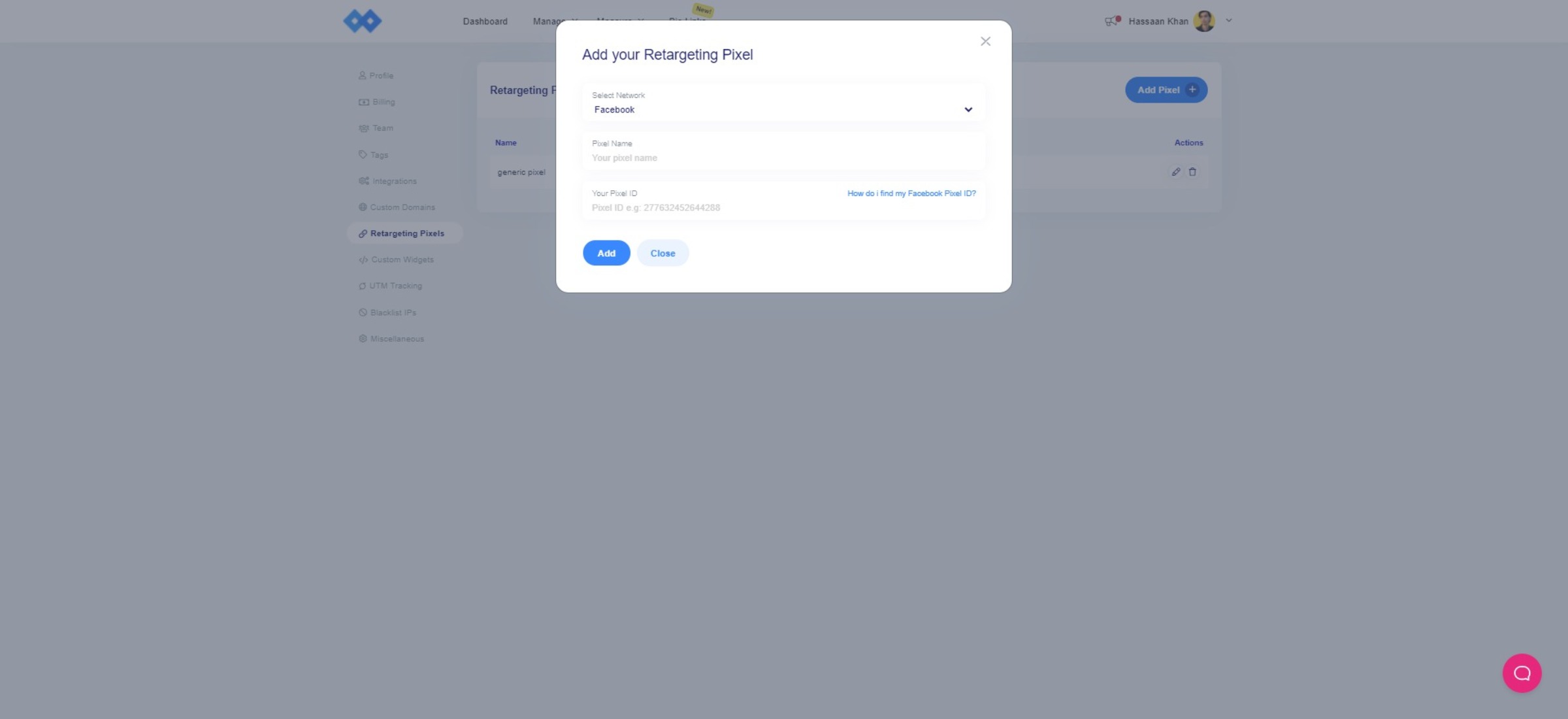
Replug allows you to add a retargeting pixel for Facebook, Twitter, LinkedIn, Pinterest, Quora, and custom websites. The impact wouldn’t only be limited to social media marketing, but in fact, you might see a little spike in conversion as well.
So these were some of the ways to use Replug for your e-commerce business.
What Else Would You Do for Building an E-commerce Website?
I dug deep into the details of establishing an e-commerce website.
Some of you would be excited not just to launch your e-commerce store but also to make it a success story.
I have this temptation to ask you a question: What else would you do if you were to build an e-commerce website?
Some of you might be social media experts, serial entrepreneurs, and e-commerce professionals.
So I’d like to pick an experts’ brains on building an e-commerce website. Feel free to leave your answer in the comments section.
If you are a marketer and running an online business, then you are probably spending more money, resource, energy, and time on email marketing to build a connective relationship with the audience.
Right?
In 2026, attracting more customers to your website or business is not a cup of cake anymore. Why is that?
Causes, there are 4.88 billion internet users in the world who accumulate information, looking for the solution to their problems and receive promotional emails.
If you genuinely want to capture the audience’s attention and give a powerful brand impact on the audience’s mind, then all you need to do is to find the best day and time to send emails.
Makes sense?
I have another intriguing question for you:
Is it important to email at a time that certainly works for your targeted audience?
Absolutely yes, It’s incredibly essential to email at the right time to the right audience, it not only influences your outcome but also sustains you to improve click-through rate (CTR), open rate, and boost your ROI.
Are you aware of email marketing challenges in 2026?
I’m sure you all do. For the past decade, people used to interact with the other business partners and teams in the same office, but now we all prefer to connect through Zoom, Microsoft team, Slack, and more. Things constantly change, but it doesn’t mean email marketing lost its worth.
Even with all these fancy apps, Email marketing is still one of the best and most competent strategies to communicate with customers and others. The study forecast the number of active email users to reach 4.3 billion in 2023 and 4.6 billion in 2025. So that means Email is not dead, it is still alive and more hard-hitting.
In this article, I’ll introduce the five most reliable studies that reveal the best time and date to send emails to your audience after having sent billions of emails.
Read on and find out to make the biggest splash through it.
What’s the best day of the week and time to send emails to your audience?
Let’s dive into some relevant studies:
Yesware
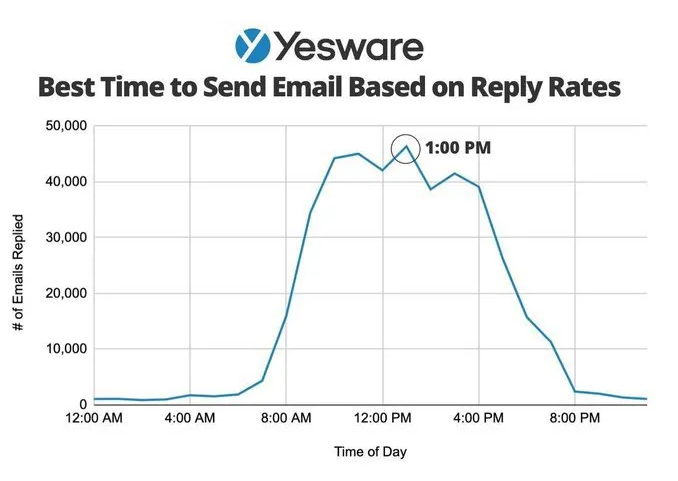
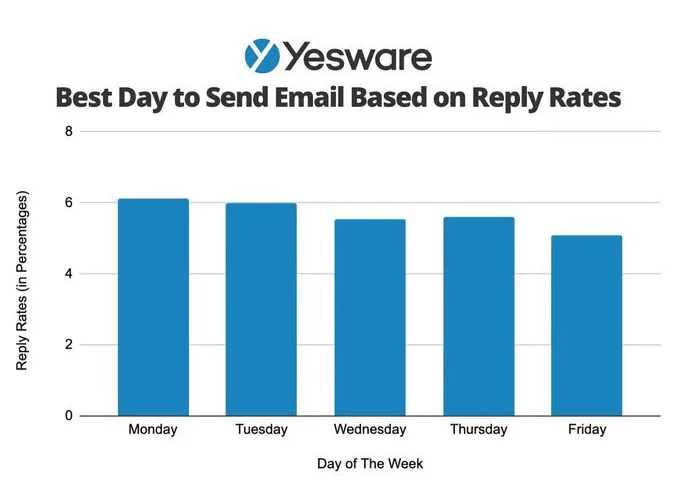
The first study, conducted by Yesware, discovers hundreds of thousands of email activity over the last quarter to analyze the best timing for cold emailing, email campaigns, and follow-ups.
Yesware studying based on the replies rate they have received. According to their data, there are two best times for sending emails that are:
One best time to send an email is: 1 pm
The second best time to send an email is: 11 am
They found sending emails around these frequencies increases the reply rate that assists you to prompt the potential customers into sales customers. On the other hand, the best days to send emails are:
The best day to send an email: Monday and Tuesday
The worst day to send an email: Friday
All marketers want their audience to give some time and importance to emails, newsletter and for that, marketers have to put themselves in the audience’s shoes and select a perfect period to send an email.
Mailerlite
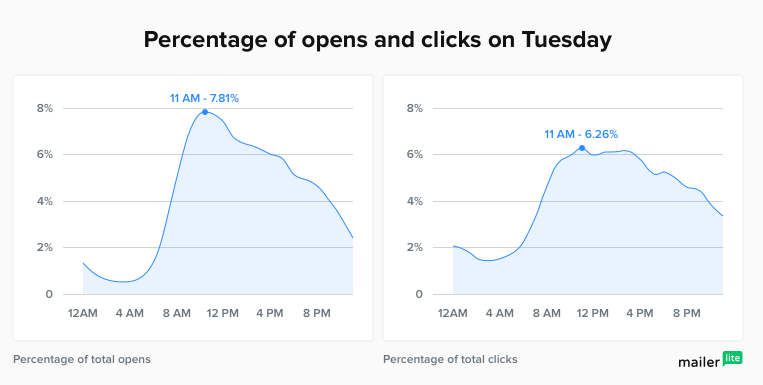
There is another study ofMailerlite, as opposed to Yesware data, Mailerlite reveals Tuesday is the best day to send out the emails, but Wednesdays, Thursdays, and Fridays can also be convenient to send an email. It certainly enhances the highest open rates and click-through rates rapidly.
The Best day and time to send an email: Tuesday at 11 am
The Worst day to send an email: Saturday and Sunday
GetResponse
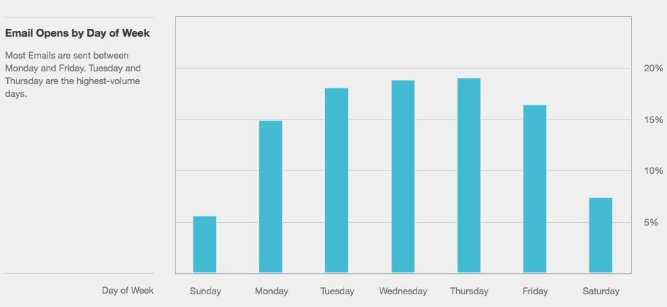
GetResponse found in its studies that Tuesday is the best day to get the most emails opened compared to any other day of the week and accomplish a click-through rate of 2.33%. The second peak day is Friday in order to attain an open rate of 20.58%.
The Best time to send emails for open rate: 4 am
The second-best time to send an email for click-through rate (CTR): 6 am
WordStream
In another study from WordStream, they advise email marketers to avoid Monday anxiety and Friday’s itchy feet.
Because on Monday; people usually march into the office and are flooded in the barrage of emails, and on Friday, people are trying to wind up the thing rather than replying to emails.
So, they also found the Tuesday, Wednesday, and Thursday are traditionally the favorite:
The best day and time to send email is: Thursday 8–9 am
The Worst Time to Send Emails: Tuesday & Wednesday 8–10 am
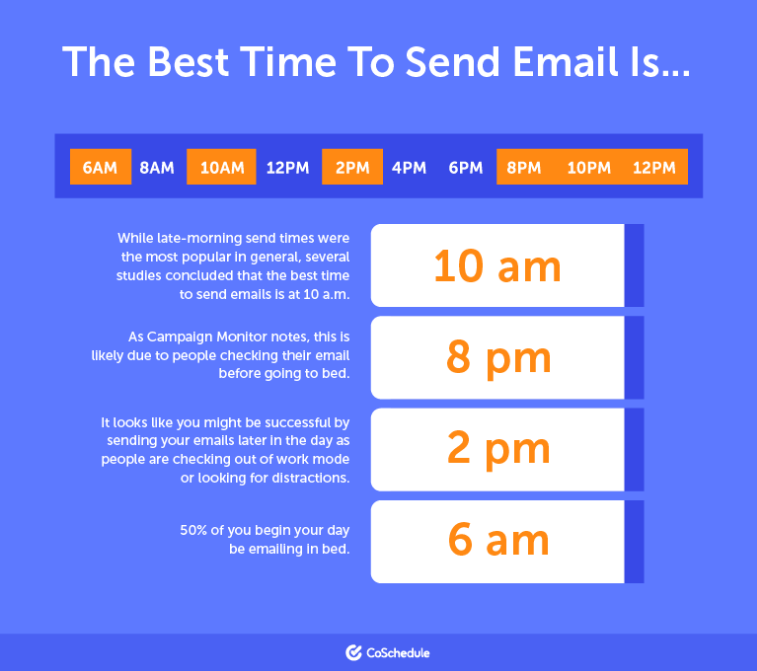
Coschedule
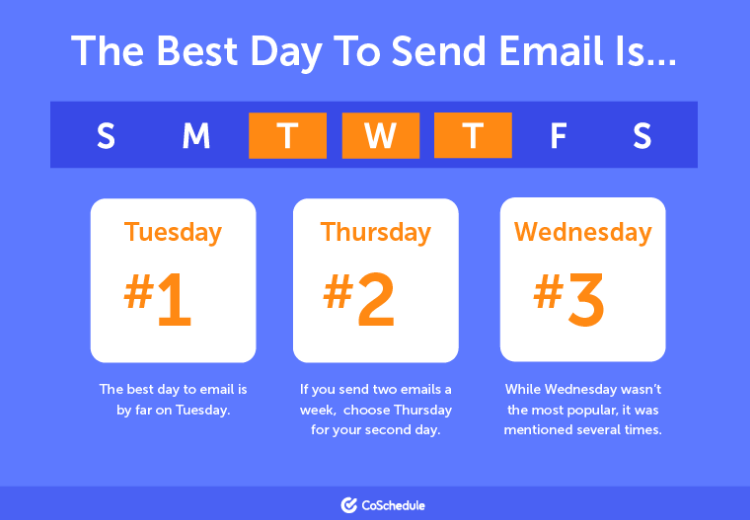
Data from Coschedule reveals Tuesday is one of the most effective days to send an email. In any case, you want to send two emails in a week, then go on Tuesday and Thursday.
The Best time to send email is: 6:00 am, 10 am, 8 pm, and 2 pm
So what is the best day and time to send an email?
What factors should we consider while selecting the time and data?
No doubt, sending emails at the best time is important, but there are some other factors we have to look into before creating an email campaign:
#1. Understand the customer’s behavior and demographic segmentation
Knowing your audience’s behavior and demographic is the most pivotal factor in email marketing strategy. Think about how your audience’s day goes. You wouldn’t want to send your email in the middle of their busy schedules. Doing this might cause them to overlook your message unintentionally. Understanding customers’ needs and wants are the effective approach to sending your email at the right to the right audience and also assists you to improve your ROI, click-through rate, and response rate.
Here we take an example:
Let’s say you have a large no of the audience doing their jobs at night like bartenders or barista, then you are more likely to send your email at night, which gets a more open rate. We have different studies that reveal sending emails at the night is not a good option to increase the click-through rate, but in this case; it is.
#2. Identify your niche
You want to send emails to the audience, but there is the thing that holds your back is: Who is your market niche?
To answer this question, you have to find the audience’s problem, interests and what do you have for them. Let us say you are targeting B2B and B2C marketers, then weekdays are the best days to send emails for you and Tuesday is the peak day to send an email.
#3. Frequency Emails
After identifying the niche and customer demographic segmentation the next step, you need to focus on the frequency of email and the subject line with an intriguing title. If you are looking to enhance your open rate, click-through rate, collect lead and sales then you should send one email per week, and sending one or two bulk emails a week is the ideal situation to enhance your brand visibility and improve ROI.
#4 Identify the Products and Service Offerings
The best time to send your emails is also determined by the type of business you are in. Are your products and services fit under the B2B model or the B2C model?
Based on your solutions and offerings, your time and data can vary accordingly. For example, if you are sending B2B emails then the beginning of the week such as Monday or Tuesday first half usually works the best. Even if you are sending B2B emails, segment your audience to accommodate different modes of working and behaviours.
Are you sending to employees? Or entrepreneurs? Or executives?However, if you are sending B2C emails there are other factors that contribute as well. Such as, is it a retargeting email? If there is an event coming up?
For example, if you are promoting fun entertainment activities with family or the hospitality industry, then Friday evening or the weekend will work best.
#5 Test Different Subject Lines
The first thing your reader will notice about your email is the subject line. It is the first and only determining factor whether your reader will open the mail or not.
Based on your niche you can test which subject line will work the best. You can experiment with subject lines to build curiosity, offer value or highlight time sensitivity and the value the email will provide.
Your subject line will determine the open rate of your emails which will eventually lead your reader to take the action you want them to take.
#6 Make the Best Use of Seasonal Consumer Behavior
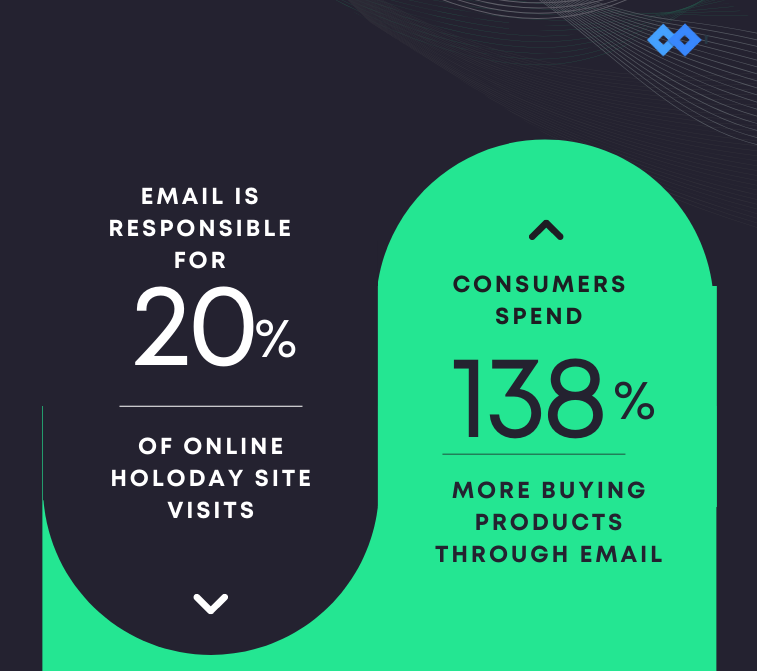
According toCampaign Monitor, Black Friday emails had the highest open rate and highest link click rate. Another insight about consumer behaviour during holidays shows that 20% of online holiday shopping happen because of emails sent during this season.
Therefore, it is important that you have a good strategy of email marketing in place to capitalize on seasonal consumer behaviour.
If you are sending the promotional email about Sales or the New Arrivals, you can schedule the emails for weekends or during lunch hours because they are most likely to take action from your emails during these hours.
#7 Design Mobile-Friendly Emails
More than 47% of your consumers check their emails on their mobile devices. This shows the significance to design mobile-friendly emails.
For designing user-friendly emails, you can work on good graphics, flow of content, copy and personalization. These elements will also determine if your user will take any action from the email or not such as clicking on the link.
6 Email Marketing tools to save your time and money
Marketing trends change with time, but email marketing still has its place in the market. Choosing the best email app to send the right email is another important factor that not only affects your email marketing efforts but also assists you to grow your business smartly with the help of valuable analytics against your email campaign.
Do you need email marketing software, which is cost-effective, easy to use, time and money-saving?
We have listed the 5 most effective email marketing tools which help you to hit the targeted mark every time.
1. ActiveCampaign
ActiveCampaign is one of the most cost-effective and popular email marketing with over 130k customers.
It allies you to reach the target audience, captures their attention with an interesting message, builds relationships, and aids them to address solutions to their problems. It makes it easy for their customers to run email marketing campaigns. A CRM that includes email and sales automation holds all the customer details in one place. Manage the pipelines, keep transactions up to date, and follow up at the right time.
2. Benchmark
Benchmark is another fascinating email marketing tool for agencies that help to create easy professional emails rapidly to keep customers stay and engage.
It is a cost-effective tool and simplifies the assets you need so you can focus on developing connections, growing your market, and raising the bar.
It allows efficient leverage of your most valuable marketing assets, setup and customizes email without spending hours, builds stronger relationships with your contacts, gets access to a robust email marketing tool, and reaches out your goals faster.
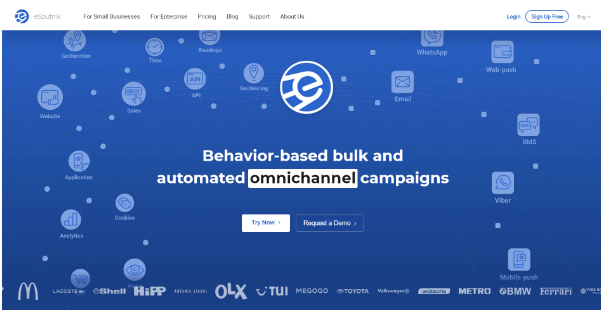
3. eSputnik
eSputnik is a marketing automation tool that offers extensive functionality for customer data management and processing. It provides no-code solutions meaning you don’t need code knowledge to implement them for your business.
The platform helps create and send mass and transactional emails, SMS, app notifications and browser notifications. Such features as advanced contact segmentation, support of multilingual messaging, the substitution of dynamic content and product recommendations allow to automate message personalization and deliver each subscriber and customer only relevant content.
Aside from messaging, eSputnik offers solutions for personalized website marketing such as forms and site recommendations. It integrates with numerous tools, for example, Tilda, Zapier, Google BigQuery, PostgreSQL, which enables you to run multiple marketing activities within one platform.
4. Zoho Campaign
Zoho Campaign is an email marketing platform that allows you to develop, deliver, and monitor emails using permission-based email marketing. Through a real-time analytics platform, it assists you in building a large and future client base.
It assists you in creating visually appealing emails with your brand name, automating your emails, and forming personal relationships with customized emails. It is a malleable and budget-friendly email marketing plan for marketers.
To help you deliver customized messages to your audience, Zoho Campaigns includes features such as interactive content, email surveys, and automatic list segmentation.
5. Sendinblue
Sendinblue helps companies create and develop relationships by using marketing automation, email promotions, transactional communications, SMS messages, chat, CRM, Facebook ads, and retargeting ads.
It is more than just email marketing software for a marketer, offers a wide range of resources for marketing your product or service. So, no need to go anywhere; find anything relevant to digital marketing without leaving your couch.
One of the latest reviews expound upon its features including Email marketing, SMS marketing, and live chat applications will help you reach your target audience on social media, build a good bond with your consumers by using CRM while saving time and energy with email automation.
6. Mailchimp
Mailchimp is the most leading tool for bloggers and small businesses because it was one of the first major email providers to have a fully free package forever.
It let you generate emails, develop a website, register a domain, and design landing pages. It is a top-rated and well-trusted email marketing software that will assist you in growing your company by creating automated emails at critical points in the buyer journey, so you can send out welcoming emails, order confirmations abandoned cart updates, and more with ease.
3 Email Metrics to Calculate the Impact of Your Email Marketing:
It is important to understand the impact of your email marketing after you have identified the best time to send emails.
We have listed down the 3 most important metrics of email marketing to differentiate the best time for people to open emails and the best time for people to take the action (for example, buy a product, complete registration, download an item).
These metrics are:
Open Rate
Click-through Rate
Click-to-open Rate
Open Rate:
Open Rate tells you about how many people from your subscribers opened your email. For a better open rate, have short, crisp and value-added headlines, and add pre-header text.
Click-through Rate:
The click-through rate tells you about how many people engaged with the email content after opening it. The Click-through rate is usually lesser than the open rate since readers abandon emails without reading completely and taking action. To make your emails more engaging, use the elements of personalization, improve the copy and mention CTA clearly.
Click-to-Open Rate:
Click-to-open Rate is determined by comparing the open rate and the number of people who clicked on any link in the mail. This metric is helpful to understand which content is relevant to your audience.
You can calculate the Click-to-Open Rate by using this formula:
Click-to-Open Rate = (Click through rate / Open Rate) x 100
Conclusion
Now, I’m sure you have learned how to get more traffic to your website through email marketing.
Email marketing is the cost-effective approach that takes your business to the next level and assists you to improve sales and ROI. Send an email on Tuesday at 10 am with an engaging subject line aids you to stand out in the market.
Above all, if you want your message links to look clean and professional, especially when sending emails or newsletters, you can use a reliable URL shortener to create tidy, brandable URLs before you hit send. And for this, give Replug a try today!
B2B email marketing focuses on businesses ratfiher than individuals, and the purchase decisions are made on value transfer instead of impulsion. The sales cycle is considerably longer, and it may involve multiple decision-makers, making B2B email marketing significantly different from B2C.
A lot of email marketers apply the same strategies for B2B email communication, which they use for B2C, thus never achieving the true potential of B2B email marketing.
What makes B2B email marketing different from B2C and how to approach it
B2C is more focused on driving sales on almost every message, and it contains little to no educational content. Moreover, the purchase won’t have a long-term impact on consumers.
However, B2B purchases have lasting effects on an organization, and one needs to invest in educational content spread over multiple emails before prospects start engaging truly. You will also have to optimize the messages to deliver value for each stakeholder who takes part in the buying processes. Thus, the B2C approach of generating revenue from single emails isn’t going to work out.
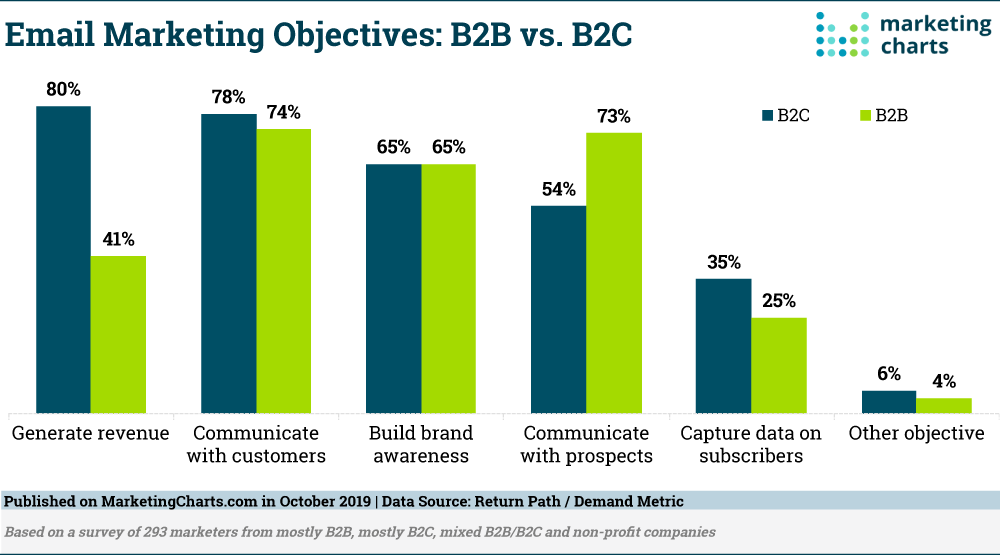
We can consider that their identical objectives are the reason behind many email marketers applying similar strategies:
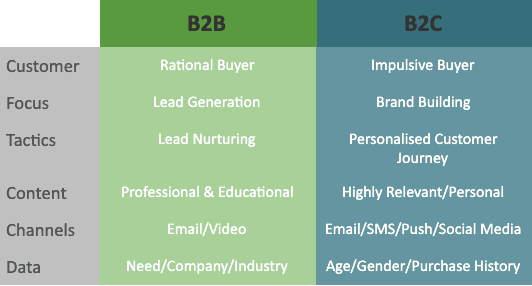
Now that we know about the differences between the two, let us understand how to approach B2B email marketing. Firstly, you will need to curate your content for a rational buyer and focus on lead warming. You also need to understand your prospect’s requirements and satisfy multiple employees’ concerns before your message reaches the actual decision-maker. You can find the subtle differences in the approach in the below table:
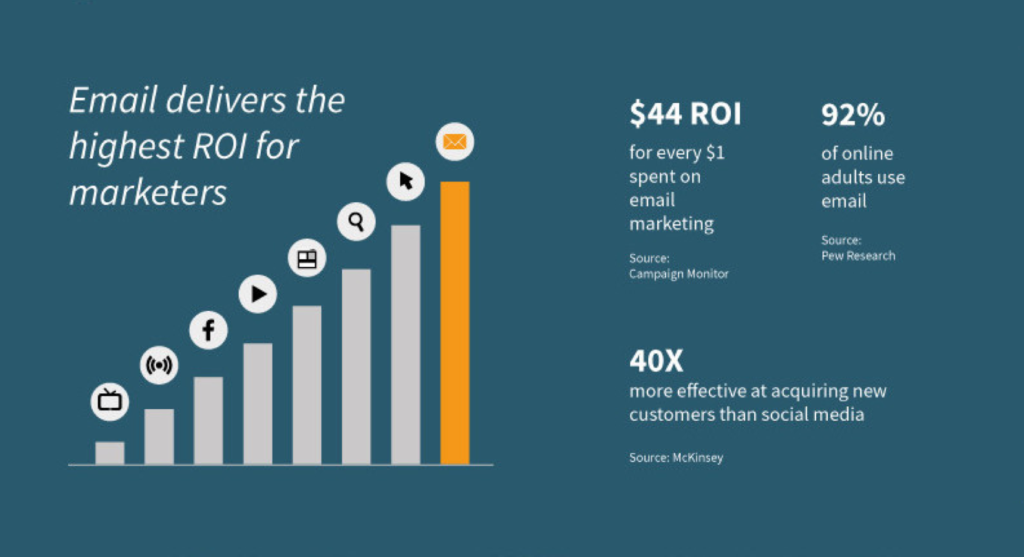
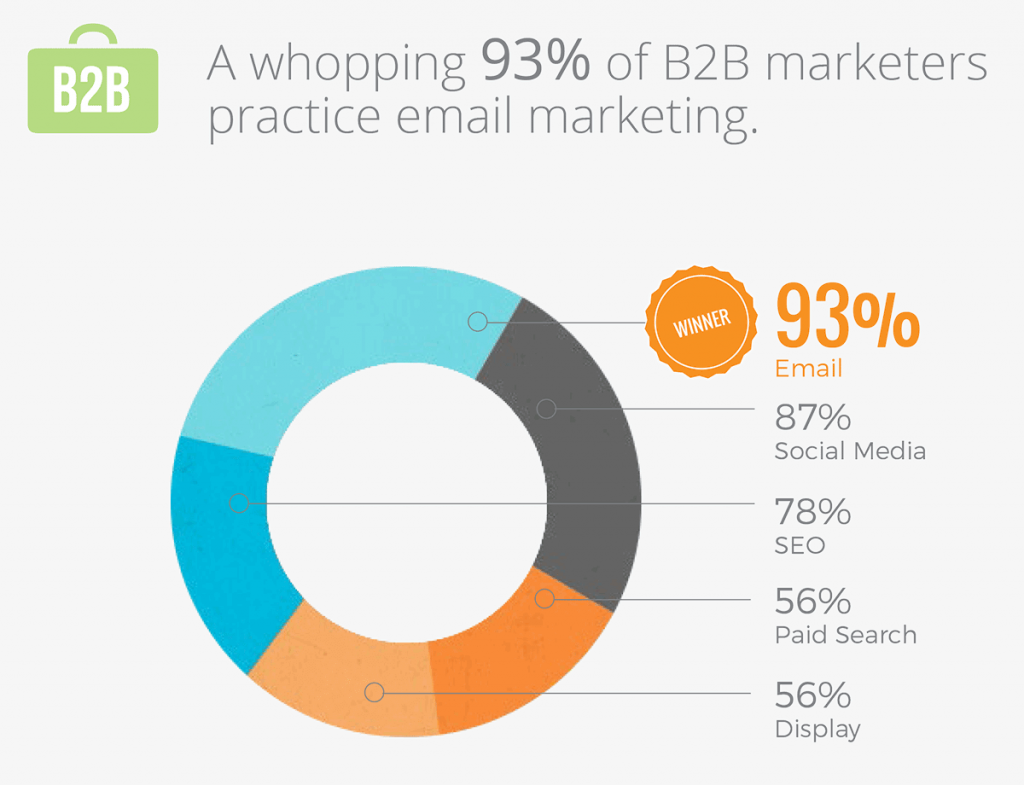
Emails have the best ROI as a digital marketing channel, and B2B emails have 47% higher CTR when compared to B2C messages. Also, checking work emails daily is still a part of every organization, and there’s no reason you should miss on B2B email marketing.
That’s enough of polishing the basics. Let us explore those five B2B email marketing tips that will help you need to try without fail:
5 best B2B email marketing tips
#1 Use Personalization + Dynamic Segmentation Simultaneously
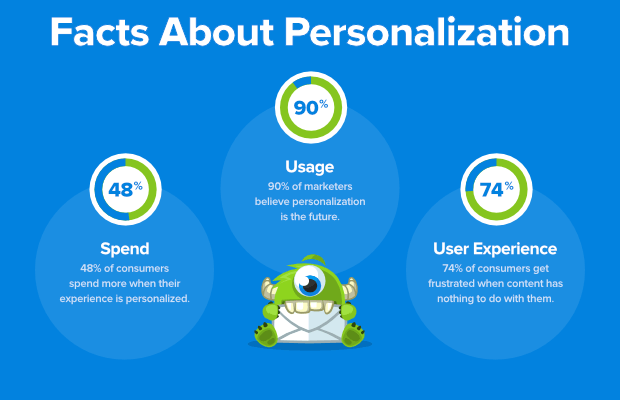
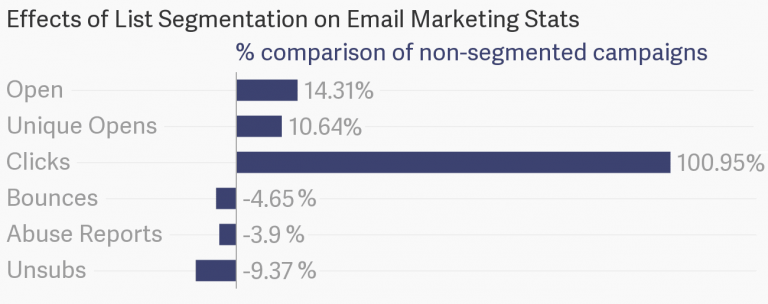
Just because you are going to communicate with different professionals from different levels of hierarchy, it doesn’t mean that you should give up on personalization efforts. You should segment your mailing lists in a way that helps you address different hierarchy levels and then run personalization efforts to make your messages relevant to the job profile. Focus on your prospect organization’s needs and send content as per the powers and understanding level of the concerned job profile.
Dynamic segmentation comes in handy in filtering your mailing list proactively. It aids in targeting the contacts based on their recent activity on your website and response rates to your ongoing email campaigns. Thus, you will be able to get the benefit of staying relevant to the current phase of their buying processes instead of sending messages in a generic fashion.
Personalization coupled with dynamic segmentation is one of the highly effective ways to achieve the right send times. For instance, if your prospect viewed a certain FAQ on your website, sending them a relevant resource on the topic within a few hours can significantly help the customer journey.
#2 Develop content for multiple stakeholders and offer cascading value propositions
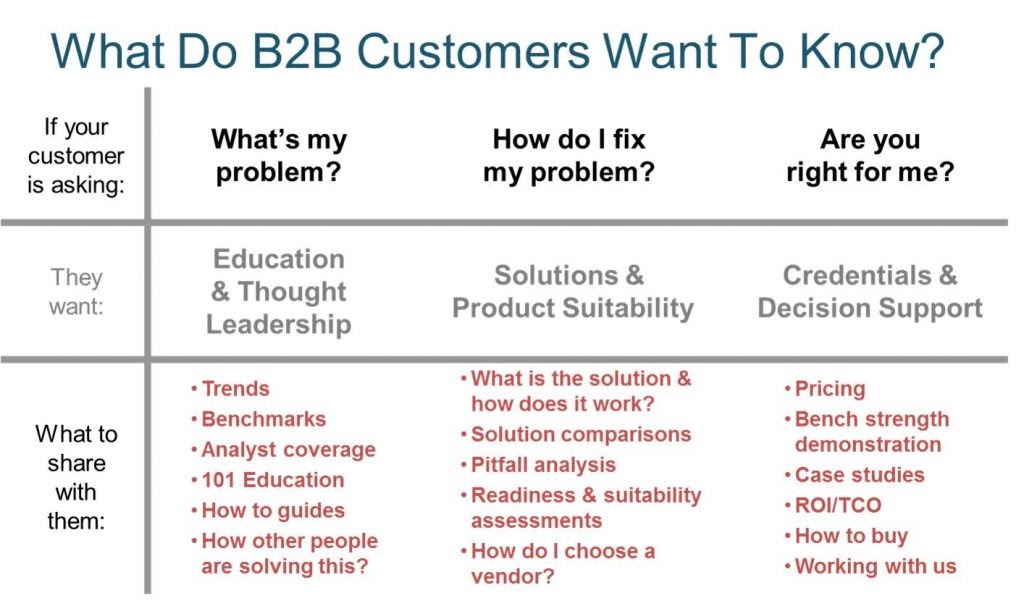
As I mentioned above, B2B email marketing relies on delivering value and establishing reliability. This will require you to create extensive content that complements all phases of the buyer journey. You should start by knowing which stakeholders are going to take part in the purchasing process. A finance manager’s concerns are always going to differ from that of a production or sales manager. Yet, all of them come into the picture at different times and even stay in the loop. You can use the below chart to create email content development guidelines for addressing them:
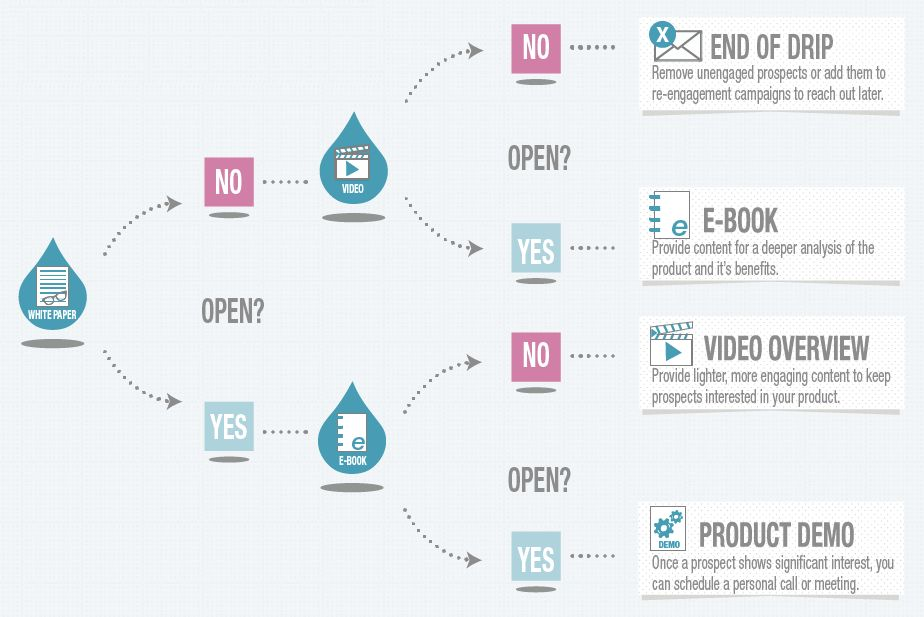
Also, optimize the subject lines, preheader text, and CTAs for various stakeholders when creating resources. Once you develop the basic framework for your email content, you should use different formats to distribute it. This makes content consumption easier. Drip email campaigns are the best solution for offering cascading value propositions. They help you deliver the right content via emails based on engagement and timing. Instead of bombarding the readers with huge amounts of information that either doesn’t connect with their job role or is irrelevant to their buyer journey only discourages further engagement. Below is a schematic diagram of how drip emails deliver meaningful resources using cascading send rules:
I find that using self-nurturing landing pages is a great way when you don’t know the exact profile of your recipient. You can use customized URLs from Replug.io to track their activity and improve your database.
Replug offers a top-notch URL shortener to create short links that look clean and professional. And what’s the best part, is that you can add your custom brand name to the generated URL or link as well!
#3 Leverage newsletters to project thought leadership
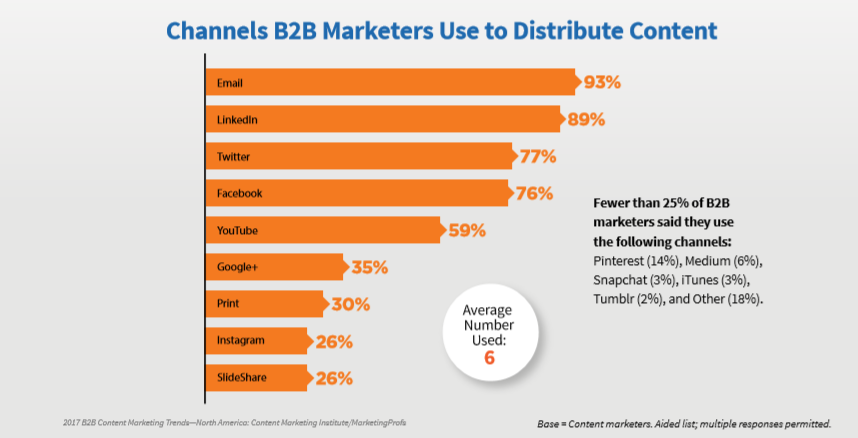
Newsletters are a multi-purpose tool for B2B marketers. They help establish thought leadership by engaging the readers consistently over information that aids their business. They give you an opportunity to send insights on various aspects of your customer’s business and place your product/service as a facilitator of the benefits you mention. In many cases, it takes weeks to go through various offers, terms and conditions, technicalities, and discussions before they approach you again. You can use newsletters to keep your prospective clients engaged during those ‘colder’ phases, and it generally acts in your favour as opposed to brief periods of staying out of touch. No doubt, email is the hot favourite of B2B email marketers when it comes to content distribution:
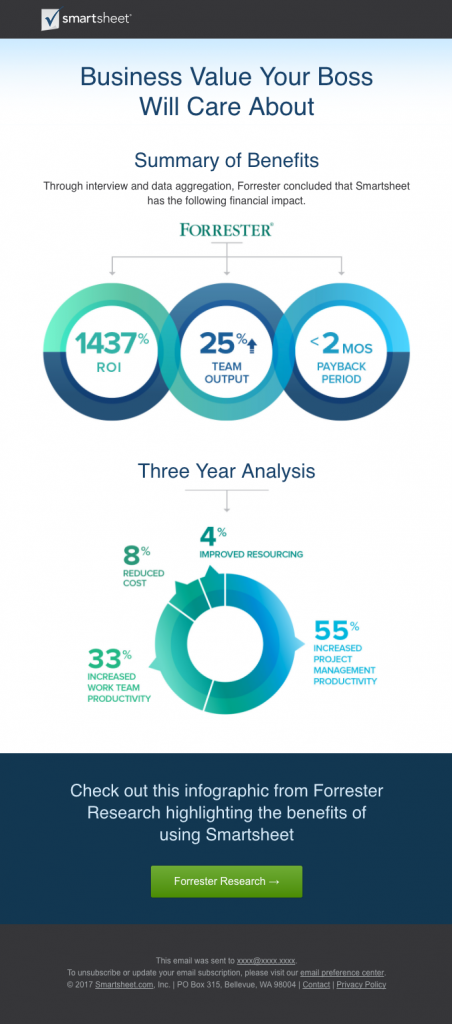
Sharing industry-level research, opinion pieces, and inputs from technical experts are some time-tested ways of projecting thought leadership. You can use tools like ContentStudio to keep your subscribers engaged through highly refined content pieces from third-party sources. The below email from Smartsheet helps it take an authoritative pose, and it will surely increase its trustworthiness among the readers:
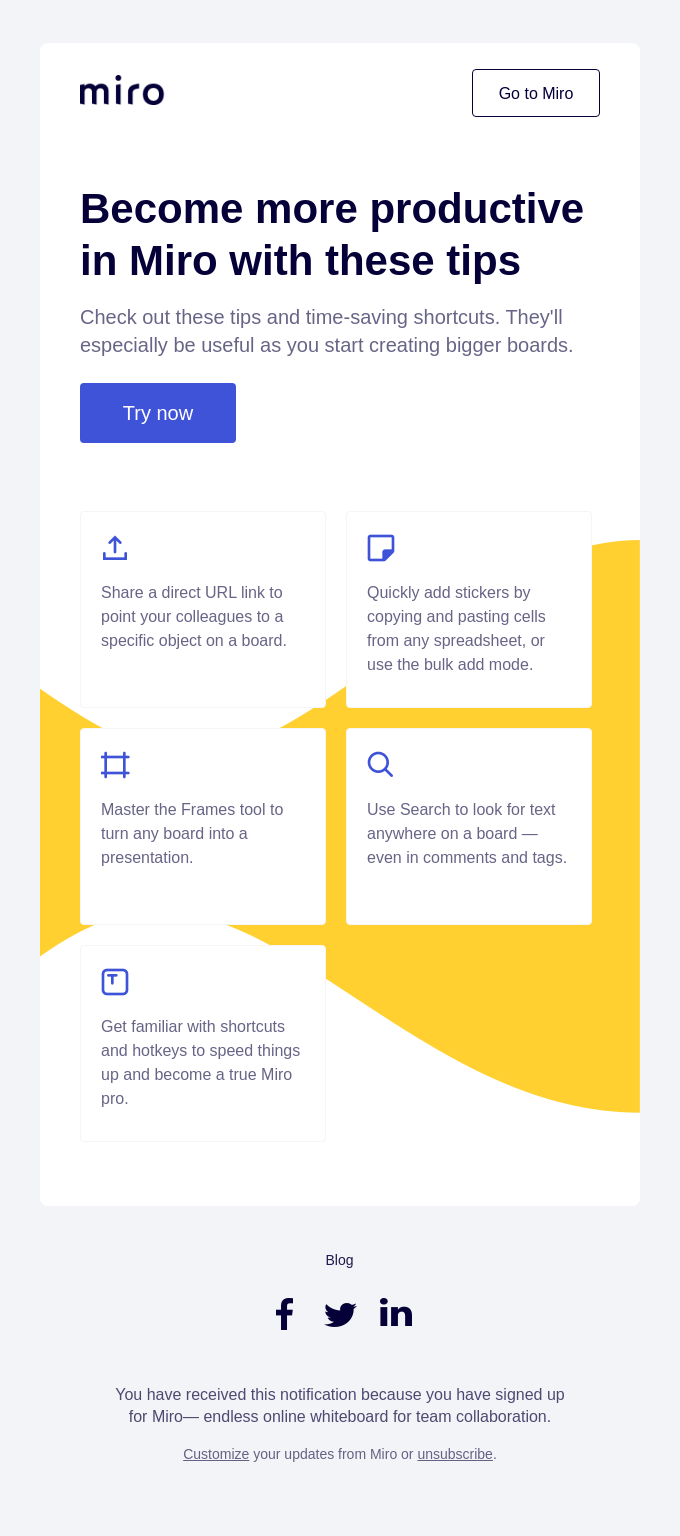
Similarly, if you are a SaaS company, you can send product-specific tips and tricks within your newsletter during the trial period. Here’s an example of doing so from Miro:
Having the right B2B HTML email templates matters! Content plays a decisive role, but curation is another aspect that impacts your campaign’s overall performance. The number of B2B buyers remains less when compared to the B2C buyers, but the ticket size is considerably huge. Thus, you should invest in beautiful email marketing templates that provide dynamic content blocks as it helps your personalization efforts apart from improving aesthetics. It also saves you from degrading your brand value in situations like sending an email with wrong images or URLs, as you can change them even after sending it.
This is how Crowd Writer UK works when they email other businesses. Having personalized subject lines and simple and authentic content has boosted their email marketing campaigns. When curating your content blocks, use visual hierarchy rules for getting the best aesthetic appeal. Keeping the paragraphs and lines shorter is a must, but your email typefaces, branding elements, colour palette, the separation between adjacent elements, font size, and colour play a huge role in determining your message’s readability. Mobile optimization is also necessary as 51% of the total email opens come from smartphones. Here’s a great example of curating a B2B email template in the right manner coming from none other than Campaign Monitor:
#5 Constantly track your success rates and redesign your efforts
Lastly, I would like to tell the readers that tracking your campaign results is 10x more important in B2B email marketing. The reason? Right from the decision-makers to the purchase cycle, everything keeps shifting while your competitors are going to target your leads far more aggressively than the B2C sector. Keeping a tab of how your email copies perform, the subject lines that get maximum opens, most coveted gated content, and CTAs apart from the regular email metrics will pave your way to success. You can learn from successful conversions and replicate the model that helped you convert in your ongoing efforts.
Most businesses run an email audit on a yearly basis, but it is advisable for B2B firms to use real-time insights and constantly tweak their email marketing strategy as per the latest performance results. As the businesses continue to evolve with technological advancements and shifts in end-customer perception, B2B marketers will have to constantly evolve their processes through consistent evaluations.
Putting it together
Coming towards the end, I will draw your attention to one common trait among all of these five B2B email marketing tips: Cater to the needs of the buyer journey on a real-time basis and follow a flexible approach. No doubts that running email campaigns for business-to-business interactions is complicated but following these email marketing tips will help you focus on getting results through coordinated efforts. I hope these tips help you get greater success in your next B2B email marketing campaign.
Affiliate marketing is a lucrative monetization method for bloggers and marketers. However, affiliate marketing isn’t just for bloggers and marketers. YouTubers, podcasters, and live streamers also make money off of affiliate marketing. If you’re looking for affiliate marketing guidelines, you’re at the right place as I’m about to spill the beans.
Affiliate marketing is one of the most popular money-making strategies in the online marketing world. However, most blogging beginners start their blog monetization through Google AdSense or a similar ad network, but later on, transit towards affiliate marketing.
Affiliate marketing comes in handy for beginners who can’t make a ton of money on ad networks due to fewer monthly page views on their blogs. Therefore, the majority of them pursue affiliate marketing to find a better ad alternative.
You don’t always need a blog or website to make money with affiliate marketing. Instead, you can use multiple platforms to promote products and make money. I have a bunch of ideas in mind to share with you so that you could make the most of your affiliate marketing campaign.
Let me tell you a fact right off the bat: it doesn’t work out for every blogger or content creator. You’d find some affiliate marketers complain about the conversion. On the flip side, some affiliate marketers go gaga over this money-making strategy. It all comes down to finding the secret sauce that works for you.
Don’t worry, I’ll try to my level best to help you understand how to develop a perfect synergy between your affiliate offers and content to make the most of this monetization opportunity.
Some of you might be beginners in affiliate marketing, so the chances are, you don’t have a clear idea of affiliate marketing. Don’t panic as I’ll dig deeper into the topic and share some fundamental steps that would take your affiliate marketing to the next level.
But first things first, you should know the basics.
How Affiliate Marketing Works?
It’s a process of promoting the products and earning commissions when people buy through affiliate links. The majority of affiliate programs don’t have strict requirements and pretty much anyone can join them. However, a website or blog or social media account is mandatory in some programs. They make sure that only legitimate and serious marketers join in.
Furthermore, some companies have an affiliate program limited to their paid customers, which means you can’t get access to their affiliate program unless you buy their product. In most cases, there aren’t any hard and fast rules for someone to join the affiliate marketing program.
Moreover, all brands define their own terms of use that affiliate marketers must agree and oblige to for being a part of the program. There are several clauses in the terms of use, but one of the most important ones is that the brand has the right to terminate the affiliate marketer’s participation over any suspicious activity or violation of the terms of use.
That’s it.
Keep reading because you’re about to find out:
How a beginner can get started with affiliate marketing
Where you can promote affiliate products to earn commissions
How much affiliate marketers can earn from a single affiliate sale
How to choose the best affiliate product to promote
How to get more clicks and sales in affiliate marketing
So if you’re serious about your affiliate marketing initiative, then don’t miss out on the steps I’m going to share with you.
Without any further ado, let’s get right into it.
A Step-by-Step Guide on Starting Affiliate Marketing
Here we go:
#1: Choose Your Niche
To make sure you’re off to a good start, choose your niche wisely. It’s a prerequisite not just for starting successful niche websites, but it’s also for authority blogs.
The niche is a category or genre of the blog or website, which determines the type of content a reader can expect on the blog or website.
A niche website or blog caters to a specific audience by solving their problems through their content.
A website’s niche and affiliate marketing success go hand in hand. It’s essential to choose the right niche. Otherwise, it’s highly unlikely that you’d rank on the first page in the SERP as it’s impossible to dominate the niche without having know-how on the subject.
Some multiple factors and metrics influence the search engine ranking. Nobody exactly knows what all of those factors and metrics are, so most bloggers and digital marketers kept on testing different techniques.
The more you bring the right audience to your website, the easier it would become to make money from your affiliate website. However, delivering value through your content makes a lot of difference.
Affiliate marketing works on trust, authority, and reputation. People usually don’t buy recommended products quickly. Instead, they do their due diligence before opting for the product. Therefore, if your emphasis is selling, you might end up suffering in the long run.
There are two parameters of choosing the right niche:
Exposure
It’s impossible to randomly choose a niche and grow a website. Bloggers and affiliate marketers get their hands dirty before they start to make money with affiliate marketing. You can’t promote a product if you haven’t had some experience with it. The experience gives you the exposure which differentiates an expert user and a rookie. Always try to get familiar with the product you’re going to promote.
I’m a big fan of the ContentStudio tool; it’s my go-to software for scheduling social media posts. When I wanted to write the ContentStudio review on my blog, I started using it so that I could write the review with an authoritative voice. I didn’t want to write a review right off the bat. After using it for a while, I sat down to write the review. I’m not subscribed to the mentality of writing content just for the sake of publishing it. I always put my heart and soul into every piece of content. You can’t sign up for a new tool and instantly write a review.
So make yourself familiar with the niche before you jump into it. Don’t hesitate to invest a little bit of money into trying out the stuff before you talk about it on the blog. It’ll give you the exposure that might turn things around for you.
Strength
The strength means you have an interest in something or it’s your skill. It’s essential to choose a niche that’s your strength. If you play soccer and you have the basic knowledge of the game, and you start a blog about ice skating, which you haven’t done in your life, then it won’t be a wise decision.
Anyway, my niche is freelancing; I mostly write about freelancing on and off the platforms.

You can see most of the articles on my blog revolve around the freelancing niche. It didn’t happen on a whim, but instead, I discovered my blogging niche along the way. I kept on publishing content on the blog and freelancing-related content took off.
Plus, people reach out to me to ask freelancing questions all the time, so I decided to pay close attention to what people want from me. And, that’s how I choose my blog’s niche.
Hence, it’s vital to choose the blog niche based on the exposure or strength to earn money from affiliate marketing.
#2: Handpick online platforms
Affiliate marketing success isn’t possible without a bunch of tools and platforms. You got to be careful with the selection of tools and platforms. Presumably, you’re an affiliate marketing beginner and trying to hone in on your online money-making craft.


The most important tool for affiliate marketing is the primary platform. In most cases, bloggers and affiliate marketers choose a blog. So I’ll stick to the blog as our main tool for publishing, but I’d shed some light on other options too.
Once you’ve chosen your niche and you’re crystal clear on the audience targeting, the next move should be handpicking the online platforms to put out content and build an audience.
It’s the most crucial part of the process. You might find affiliate marketers solely rely on the YouTube or Facebook page, but you must future-proof your affiliate marketing business.
There are different ways to go about it, but most of you might be first-timers. I’d highly recommend setting up a publishing platform as well as a social media platform to start on the right foot.
Let’s take a look at the publishing and social media platforms:
Publishing platforms
There are various publishing platforms out there, but here are three of the most common ones:
WordPress [Recommended]
You can either choose the wordpress.com platform or self-hosted wordpress.org to launch your website. WordPress is by far the most popular content management system out there. According to an SEJ’s article, the data revealed by W3Techs showed that WordPress powers 39.5% of overall websites.
Squarespace
It’s an online website builder which allows users to create websites without having any coding knowledge whatsoever. It’s a drag and drop-based tool for businesses, e-commerce stores, bloggers, and entrepreneurs.
Medium
Medium has a publication feature that lets you set up your blog on the Medium platform. Affiliate marketers and bloggers could use the Medium publication for putting out content.
Jeff Bullas is a popular blogger and marketer. He publishes content and promotes products on the blog as well:
There are hundreds of thousands of such examples of beginner and expert-level bloggers who primarily use blogs to earn money from affiliate marketing.
Social media platforms
Affiliate marketers drive traffic and attract a new audience through social media. Not only do they run social media ads, but also engage the audience through sharing content. Let’s take a look at three wildly popular social media platforms among affiliate marketers:
YouTube
YouTube is famous for bringing a lot of eyeballs to the business. The secret to winning at YouTube is making videos that the prospective audience might be interested in and then use the description box to further engage the audience. Affiliate marketers put the landing pages and affiliate product links in the YouTube description and earn a lot of money from affiliate marketing.
Quora
Quora is one of the most underrated social media platforms that could bring website traffic to your platform. It’s a questioning and answering platform that allows you to put links into your answers. Make sure that you aren’t misusing the links feature as its spam detection is quite effective. Your account could get banned over spamming. Affiliate marketers don’t share direct affiliate links on Quora, but instead, they occasionally add content links that may contain affiliate products.
Facebook
Facebook is a major social media player on the market. Affiliate marketers tend to build communities mostly in Facebook groups. They don’t focus much on getting sales by sharing links, but instead, they nurture the audience and drive them to the website from time to time. So don’t underestimate the power of Facebook groups; they’re very much relevant, active, and effective.
There are several other publishing and social media platforms out there which you should explore, but the above-mentioned are quite popular among pro-bloggers and expert affiliate marketers.
Here’s an example of creating a community on social media.
Problogger is a popular blogging tips blog founded by Darren Rowse. He is an Australian blogger, author, and public speaker.
Problogger has an active Facebook group of over 29k members. It’s a community where bloggers communicate, interact, and help each other out:
You won’t essentially find a team of Problogger pushing ProBlogger content or products all the time, but instead, they rarely share offers or announcements from Problogger. It’s mostly fans and readers that interact.
The point is that choose your platforms and stick with them. You’ll eventually start to see traction over time. And once the traction happens, it starts to drive affiliate sales as well.
#3: Do keyword research
Keywords have a significant role in establishing an effective affiliate marketing strategy whether you’re a blogger or YouTuber. However, the caveat is that it’s nearly impossible to find the exact keywords data. According to SEO experts, even the most popular keyword tools aren’t accurate when it comes to the number of searches against keywords. Don’t worry, you can still do keyword research. Here’s how:
Once you’re done with the niche and platform selection, the next up is keyword research. I’m not a fan of traditional keyword research through keyword tools. However, I’ll share some top-notch keywords tools that SEOs and content marketers use for finding the keywords.
On the flip side, I’m more into search analysis through different ways, which I’ll uncover shortly. Before I mention the popular keyword research tool, I want to shed some light on the idea of doing keyword research.
Most SEOs put in the keyword in the keyword research tool and look at the competition and number of searches. It’s also a fact that the number of searchers can’t be accurate since only Google holds that information.
Therefore, I follow a different approach called search analysis. The way how it works is that we analyze the search query through certain ways and create content around that.
A)Autocomplete
Autocomplete is Google’s intelligent search feature which provides recommendations upon typing in half of the search query. It usually recommends the search terms that are popular among the searchers, meaning people are using those search terms.
Analyzing what Google Autocomplete is suggesting gives you a good idea of what people need to know. Using those search terms in the content or writing content around those topics could bring a lot of search traffic.
Tip: the same autocomplete strategy also works for YouTube search.
B)Google Trends
The second most important part of the search analysis is looking at Google Trends. Go to Google Trends and type in your search term or keyword. If you’re using an upward trend or numbers are taking off, then it means there is a demand for this topic or keyword, and you can focus on this.
If Google Trends analysis doesn’t show any traction whatsoever, then you should think twice before covering that topic or keyword in your content.
C)Popular Content
Thirdly, analyze your popular content in Google Analytics or any other tracking software you use for your analytics. I use Google Analytics for analyzing the site performance as well as finding the top pages of my website in terms of page views. It helps me focus on the right topics and understanding the popularity of my content.
You can double-down on the popular content, meaning create similar content of what already working and gain momentum. Not only would it increase your page views, but it would also increase your ads and affiliate revenues.
That’s my search analysis approach. I know a lot of bloggers and affiliate marketers follow the same approach.
However, you can try out the typical keyword research tools, but I won’t recommend relying only on the keyword research tools:
Here are three popular keyword research and SEO tools:
Ahrefs
Long Tail Pro
MarketMuse
SEMRUSH
Once you find a bunch of keywords through keyword research tools and search analysis, get down to writing some top-notch articles and publish them along the way.
#4: Select affiliate products
Affiliate marketers and bloggers have mixed opinions about the timing of selecting affiliate products. There isn’t a right or wrong way of doing it.
Some expert bloggers and affiliate marketers think it’s wise to focus completely on finding the right topics/keyword and rank the articles in the SERP. On the other hand, a lot of bloggers teach and preach to choose the affiliate products beforehand. I tend to focus on the latter.
It’s good to have a list of products in mind before getting down to writing articles in bulk. I have done the mistake of writing articles in bulk without keeping the affiliate products in mind. So I have learned this lesson the hard way.
One of my blogs has 81 blog posts published so far, and more than 80% of the blog posts get fewer visitors every month. The good thing is that I realized my mistake a while ago and started focusing on the right topics, and it’s changing the trajectory of this blog.
So here are three recommendations on selecting the affiliate products:
Relevance:
Keep the relevance factor in mind while selecting the affiliate products for your blog or another platform. It means the product must have coherence with the content. You can’t promote a juicer machine on a mortgage blog.
Personal Experience:
A personal experience with the products goes a long way. You can’t talk about a product with confidence if you haven’t had a chance to try it out. On the contrary, when you have experience of using the product, you can share the details with authority because you know the product inside out.
Affordability:
Pricing matters in the affiliate products’ conversion rate. If you’re targeting beginners through your content, but promoting $500 to $800 products, it won’t work out. You have to keep the price affordability factor in mind while choosing the affiliate products.
Here are some of the popular affiliate marketing networks to find the affiliates:
ShareASale
Impact
FlexOffers
DigiStore24
JVZOO
ClickBank
#5: Put out content
Putting out content means publishing content online to attract, engage, and convert the audience. It’s nearly impossible to generate affiliate sales without putting out content.
Some affiliate marketing gurus create email marketing funnels and use online advertising to drive traffic. It could work as much as any other strategy, but the problem is that the majority of us won’t be able to spend a thousand dollars right off the bat. Therefore, putting out content essential becomes a viable option to pursue.
Once you have done some due diligence on the keywords and topic clusters to target, it means you’re all set for creating content. You’d primarily be using written content, but you’d also need to use other types of content along the way.
Let me breakdown different articles you should be writing on the blog to boost your affiliate marketing sales:
Informational content:
These are types of articles that would purely be providing information to the audience. For instance, if you have a furniture blog, then an article like “how to clean your sofa without hiring an expert” could be an informational piece of content.
Buyer guides:
Buyer guides are typically product guidelines that explain to buyers about the products and help them make a buying decision. Such articles could focus on both single or multiple products. Furthermore, these articles are intended for generating affiliate sales.
Response posts:
Response posts are published to cater to audience questions that are discovered through search analysis, keyword research, and audience feedback.
The story doesn’t end here, but instead, you shouldn’t just rely on the text content. Stretch your content plan further towards other types of content such as videos and images.
Use the power of image platforms such as Pinterest and Instagram. These platforms are massive from an attention standpoint. A lot of bloggers use Pinterest to drive traffic to their blogs and websites.
Similarly, YouTube is the second most popular search engine. Use the videos to drive traffic to your website as well as generate affiliate sales.
Income School once revealed a brand new YouTube channel in their video that they started around shooting sport.
The channel took off fairly nicely; they were able to get 9k subscribers in just four months. It didn’t end here because they also shared that they were able to generate a lot of affiliate sales through that YouTube channel. So it just validates my point of using a platform like YouTube to build a brand and generate affiliate sales.
#6: Run SEO and outreach campaigns
Affiliate marketing seems easy on the outside, but it’s quite tricky on the inside. If you ever come across someone who is making a good income from blogs or niche websites through affiliate marketing, then investigate what else that marketer is doing to stay ahead of others.
There are competition analysis and spying software such as Semrush and Spyfu that marketers and companies use to dominate search ranking.
What I mean is that most affiliate marketers whether they’re running authority blogs or niche websites build links from time to time even if link building isn’t an important part of their strategy.
Many bloggers believe that some niches are competitive enough that it’s becoming harder to outsmart the competition without building a few quality backlinks.
For instance, Carl Broadbent is a British blogger who asked an SEO company to analyze his niche website and report back on ranking against a search term. The SEO company revealed that top-ranking sites against that search term have 60 DA on average and his site needs 250 backlinks to compete with them.
What I’m saying is that I’m a big advocate of getting backlinks naturally, but in some cases, you need a little push to leap. Most affiliate marketers I know take link building very seriously, but they never compromise on the quality of the content.
You don’t need to spend money on outreach for SEO if you’re just a beginner, but if your site is taking off rather slowly due to fierce competition, then you could try out an outreach marketing strategy to see how it works out for you.
It doesn’t necessarily mean you should completely ignore on-page SEO. I’d highly recommend paying close attention to the following on-page SEO elements:
Page loading speed
Keywords targeting
Topic clusters
Page caching
Images compression
In-depth content
#7: Add social media shareability
You have to have a social media sharing strategy in your mix. What I mean by adding social media shareability is that you should create a system of maximizing social media.
You might not be aware of the power of social media posts when it comes to readers’ engagement. Have you ever heard of the phrase “social proof”?
Social proof is a public validation from the audience which puts any product or brand in the good books. People don’t share bad content because nobody cares about it. Plus, if you keep pushing hard bad content, people consider it spam and may start to unfollow you.
It’s vital to know for affiliate marketers how to leverage social media to their advantage. Clearly, shoving low-quality content down the followers’ throat doesn’t work out for anyone.
Here are four things you can do to make the most of social media:
Create compelling yet useful content:
To make sure that your content gets shared by followers, you must create helpful and effective content for the audience. A high-quality content works like a charm, for instance, you never know who comes across your content and shares it to hundreds of thousands of followers on social media. Similarly, when good-quality content gets ranked or goes viral on social media, it also brings backlinks, which plays a vital role in building site authority.
Engage followers on social media:
Engagement matters a lot on social media. What happens is that when someone engages with your content, their followers or friends get notified on the social media platform. Thus, it exposes your content to more people. That’s how engagement brings in more eyeballs and attention.
Make sharing easier for the readers:
Adding social media sharing buttons that are visible on both desktop and mobile versions of the site goes a long way. When a blog doesn’t have social media sharing buttons, it’s highly unlikely that most readers would go the extra mile to share the content. Sharing a piece of content through a sharing button is much easier than copying the link and title manually and then pasting it onto the social media platform. So add social media sharing buttons to your blog.
Share others’ content for more attention
Everyone shares their own content, but sharing others’ content puts you on the pedestal. When you share others’ content on social media, not only does it bring value to the followers, but it also helps the original creator of the content.
Replug is a top-notch link shortener that provides click tracking feature to its users. It’s an excellent link optimization platform for bringing the audience back to your website. When you shorten an article’s link and share it on your social media, the followers start to click-through and land on the article. Furthermore, they’ll see a small pop-up of yours that could take them to your website or profile.
So the takeaway from this step is that it’s good to focus on the keywords selection and putting out valuable content that people like to share, but it shouldn’t end here. Instead, making it easier for the audience to share your content does the trick.
Affiliate marketing success doesn’t only achieve by putting out content. Otherwise, every single affiliate marketer would have been a millionaire. One of the secrets of affiliate marketing success is assisting the audience whether it’s through a free ebook or by recommending a suitable product. Once you start doing that, you won’t be an affiliate marketing failure.
#8: Analyze site performance
No matter what approach of content creation, SEO, and affiliate marketing you adopt, you would ultimately need to analyze your campaign’s performance at some point. Otherwise, you won’t be able to find conclusive evidence of what’s working and what’s not working on your website.
So it’s important to do a little bit of sniff testing after deploying the strategies, but don’t start analyzing the performance of your website after a week or so. Give a good one month before you start examining the performance.
Here are three key indicators that you should look out for in your affiliate site performance analysis:
Clickability:
Analyze the number of overall clicks on your links; you can use the heatmap tools as well as check out the clicks on your in-content affiliate links. If the number of clicks is rising every month, then it’s a good sign.
Conversion Rate:
The conversion rate is the most important indicator to see whether or not your site is performing well. If your affiliate sales are increasing, then it means your tactics are working. In some cases, clicks increase but conversion doesn’t go up, it usually indicates that there is a problem with the audience targeting. Simply put, the right visitors aren’t landing on your website, so you need to fix your content strategy.
Total Pageviews
The number of pageviews is also an essential indicator of how well or poor your search analysis, SEO strategies, and audience engagement are on the site. When page views increase and you’re bringing the right audience to your site, you’d surely see an increase in clickability and conversion rate.
Affiliate marketing beginners must know when and how to analyze their affiliate marketing strategies. I don’t want to indulge you in the analysis paralysis, but you should analyze your blog monetization strategies once every quarter.
Did you learn something about affiliate marketing?
I have shared the lessons I learned over the course of 10 years. Had I known all these things a decade ago, a lot would have been different for me today.
That’s why I shared all these affiliate marketing strategies for beginners so passionately because I know it could turn the table around for anyone who is getting started.
I’m curious to know whether or not you’re taking away something valuable from this blog post.
Please do me a favor and let me know in the comments section.
Did this blog post on affiliate marketing help you in some way?
Video marketing has become a popular tool to generate conversion in such a short time. What makes it different from other marketing strategies is that it turns the art of old copy into an engaging video.
But, there’s another distinct feature that only video marketing has. It is the personal touch of visual storytelling. Unlike any other online videos, this type of marketing video focuses on the audience’s perspective. As a result, the video will act as a great representation of them.
But why must it be a video?
If you’re an avid internet user, you won’t be surprised that most content is video. In reality, video has become a staple content in the online world.
It’s nothing new, really.
In fact, a statistic says that people consumed one billion gigabytes (56 exabytes) of online video monthly. The current stats predict that over 240 exabytes will be consumed monthly in the years to come.
In conclusion, the future of online video is bright. If you’re an entrepreneur, you must’ve taken this information into account. Promote your business with video marketing as soon as possible.
And for marketers who want to combine video content with easy tracking and link management, Replug.io offers a unified solution to manage, shorten, and monitor all your URLs hassle-free!
What is Video Marketing?
Video marketing is the practice of turning textual copy into an entertaining and informative visual with the touch of powerful storytelling, sometimes even starting from simple images using photo to video AI. That’s what we call video marketing.
Video marketing itself covers many types that are aimed for a different purpose – for example, educational videos, product videos, brand videos, and tutorial videos. These are the four major types of video marketing nowadays.
Each type also divides into a more specific video; for example, an explainer video is inside the educational type video. It is the introduction of a company or product to establish a new relationship with the audience.
In short, it’s best to implement video marketing when you begin your entrepreneurial journey and hook the audience’s attention. Video marketing can also act as an educational video since you explain who you are to the public’s eyes.
The Benefits of Video Marketing
Often, you may hear about powerful video marketing tactics that boost conversion rates in no time but you don’t get to know how it works to get you satisfied with the outcome.
Video marketing’s benefits don’t come overnight. In contrast, it is a compilation of teeny-tiny steps that lead to your conversion goals. Here are the benefits (in order) that show you how video marketing can bring you more conversion rates.
1. Capture The Audience Attention
Video marketing is an excellent tool for grabbing the audience’s attention. Since it centres around the audience’s point of view, it’s essential to incorporate a unique approach.
For example, a tutorial video aims to solve the pain point of the audience. Most of the time, the audience doesn’t pay attention to what a product can be used for many possible usages. Your tutorial video will come in handy to help them understand better.
Suppose you’re running an Italian Parmesan business. We all know what we can do with the cheese. It’s a basic complement dish that enhances pasta and pizza into a mouth-watering delicacy. Even without your tutorial, the audience knows how to incorporate parmesan into their meal.
They will come up with the idea of making cheesy pizza or cheese fondue or something ‘normal’ thing to do with the cheese. But if you get your audience a tutorial video to try out something different, you can benefit the most from it.
You can make a fantastic tutorial video by incorporating new recipes for your authentic Italian cheese. For example, cheese tends to be an expensive ingredient in some parts of the world. To tap into an audience of students or people who are tight on a budget, you decide to make a budget-friendly recipe with cheese.
Engaging audiences through visually compelling content can drive remarkable conversion rates. One effective strategy includes leveraging platforms like Idomoo, which specializes in personalized video solutions that capture attention and resonate with viewers instantly. Exploring these advanced video marketing approaches enables brands to deepen connections with their audience.
Doing so helps you reach a new market and provide insight for your existing audience. In the end, you get the best of both worlds.
2. Improve Brand’s Awareness
Video marketing can help you spread more awareness by incorporating an effective strategy. This is where explainer videos play a big part in the game.
First off, an explainer video has the ability to convey a message about your brand and product concisely. If you’re new to the business, it’s an excellent way to apply this method sooner. For an entrepreneur looking to leverage powerful storytelling effectively, utilizing a video presentation maker with advanced capabilities such as text-to-speech, auto-generated subtitles, and AI script writing can revolutionize your marketing approach. Such tools not only simplify the process of turning ideas into compelling videos but also ensure scalability and consistency across different projects.
Let’s get back to the cheese business.
To begin with, there are tons of cheese companies in this world. They aren’t just cheese producers but also dairy companies that supply all dairy-derived products worldwide.
Does it mean you lose the battle as a local cheese producer? No, you still have a chance to acquire markets, at least in your local area.
This is where video marketing comes to the rescue. It enables you to spread out the words about your local-authentic Italian cheese. It also allows the audience to know better about your brand in an amusing way- not too promotional.
3. Boost SEO
Every business needs to have a website to level-up its attention. Often, the audience looks up the website first to judge whether your company is credible or not. Basically, your website is an exceptional online presence that you should nurture in the long run.
Besides, people rely heavily on the search engine to look for anything in today’s internet age. The chance of your business to appear on the search engine will be super low if you don’t incorporate a digital marketing tactic.
A digital marketing tactic includes having video marketing as one of the plans. As mentioned above, video marketing won’t only act better to attract the audience but also the search engine. Including a video on your site will help the search engine rank your site.
A good marketing video on your site allows visitors to get an in-depth explanation within minutes. The presence of video can also attract the eyes first when a user visits your site. It leads them to click and watch without spending time reading a bulky text inside the website.
The relevancy of your marketing video enables the search engine to track your page better. This way, you can improve your site’s appearance on the search engine result page (SERP).
4. Bring More Traffic
Now that you have a fundamental knowledge of websites and SEO, let’s dive into how a better SEO score can bring you more traffic.
When you finally reach page one on the search engine result page, the chance is you generate massive visitors to your site.
And when you share your video pages or content across social media or email campaigns, using a branded short link makes URLs cleaner and more memorable, helping improve click-through rates and user experience.
A small business mostly relies on the classic word of mouth without giving a chance of online presence. Although the former method is still effective today, the online representation can fuel up the businesses’ expansion.
An embedded video marketing on your site isn’t the only source where your enormous traffic comes from. Thanks to social media platforms, people can share your video marketing multiple times. Also, don’t forget about the number of views and impressions. Those are the vital analytic tools to measure your video marketing success.
If you succeed in delivering useful video marketing, the chance of getting overnight popular is very much likely. The audience will be curious as to what your brand is all about. They will dive into more information by visiting the only complete source of you: your website.
Therefore, the more shared your video marketing is, the higher opportunity of you getting more traffic to your website.
5. Increase Conversion Rates
Video marketing is designed to generate leads in the first place. So, there’s no debate on it. But how does it work?
Firstly, in every video marketing, the narrative or storytelling guides the viewers to pay more attention to it. Without the audience realizing it, each video infuses marketing information, leading them to feel attached.
This is where powerful storytelling works. It enchants the audience to stay within the video until it ends. Although many implement an urgency narration, some companies prefer to have it in the end.
We call this actionable narration a call-to-action (CTA). It can be a text, button, banner, or even a story in the narration that gives the audience a sense of urgency to take action. CTA is the gate for every potential lead to embark on your brand’s journey.
CTA works like a magic word. It doesn’t push anyone to click on something or visit your website. Rather, it beautifully persuades the audience to get an experience with you.
That’s why it’s crucial to understand how CTA works for generating the audience. Placing CTAs can also be tricky as it needs some strategies without making your audience feel objectified.
In brief, every video marketing needs CTA to generate leads and measure the conversion rates. That’s a must-have. If not, then what’s the point of your video marketing?
Now that you have a knowledge of video marketing, you may think it’s hard to make one, especially when you’re a novice in this practice. Although you can give it all to the social media video production company to handle, you should know the science behind it. Only then can you work together to receive the best outcome you desire.
Here are some tips for you to create a compelling video marketing script that helps increase conversion rates.
1. Write as you talk
Sometimes scriptwriters don’t put this as equally important as giving the real conversation with the audience. They concentrate more on delivering whatever in their mind into words, which is terrible.
Your writing text doesn’t automatically turn into an engaging story if you ignore this element. That’s why there’s this statement amongst writers, “Write as if you’re speaking.” It means that when you sound your writing, and it comes out great, you have succeeded in your writing hustle. This becomes even more important when using text to video AI tools, which turn your scripts into visual content because if the writing doesn’t feel authentic, no tool can save it.
Writing and visualizing for video marketing can be challenging, but that doesn’t mean impossible to tackle. Using an easy video maker can simplify this process by turning written scripts into engaging visuals without requiring advanced editing skills.
Continuously writing your script or leveraging an AI video generator can enhance your skills in the future to get a better hold of what’s enticing to the audience and what’s not.
2. Educate the audience
Video marketing isn’t that salesy video where you push people into buying your product. It’s never like that, to begin with. There’s a reason why it’s called marketing, not sales. It aims to penetrate the market and acquire leads.
Therefore, your video marketing should be informative and educational for the audience. If they find it helpful, you don’t need to worry much about the upcoming event. A broad audience will be right in your hand.
Your video marketing script must be the first introduction of the following promotional video. In other words, you must create a solid audience that ‘understands’ your brand and your product. And, you can achieve this state by educating them properly.
3. Accentuate your words and tones
If you understand what it means to have a hidden agenda, well, then you can incorporate that method in your scriptwriting. It’s not about the wrong and misleading information to cruelly achieve your goal. It’s about focusing on the thing you want to deliver by accentuating your words.
Words and tones can sometimes be complex to understand fully. People from diverse backgrounds can interpret the words differently too. That’s why a video marketing scriptwriter should emphasize it to give a concise message.
Tones are also vital to leave an impression on the audience. It differs from every business or niche. You can’t apply a happy tone for a product that solves an emotionally dreading situation. That’s inappropriate in the first place, and secondly, it will leave a terrible impression of your brand.
4. Incorporate narrative structure
The thing about storytelling is the beauty of its structure, how it enchants the viewers to feel ‘something.’ Crafting exceptional storytelling needs a lot of practice. But to start on, try implementing the narrative structure in your scriptwriting.
Well, storytelling itself is already in the form of narration. But, most marketers ignore this part as they may straightly think of the words to gain leads. Because, no- you can’t incorporate a brand-centred story if you target a different subject: the audience.
It’s not about telling your features and so on (well, yes, you should put this into the writing), but it’s not the main thing. When you implement a narrative structure about your audience and make it all about them, they sure feel attached.
5. Use illustrative words
Lastly, don’t forget to use illustrative words in your video marketing script. Most scriptwriters forget to put this as they focus more on crafting the big words. The thing is, your heavy words are hard to translate into a video.
Keep in mind that a video needs illustrative words to be acted upon. Your words must be visually friendly so that the production engineer knows what you mean or the message you want to deliver.
Illustrative words also allow the audience to visualize better, albeit there’s a video representing it. But still, it’s a crucial element that every scriptwriter should take notes of.
Conclusion
Video marketing is one of the most popular strategies every marketer has reverted to s in the past decades. Thanks to the growing world of the Internet, people are now relying on it to look up almost everything.
The content itself has shifted from visual to video as the latter has more information included than the former. This is where businesses take an opportunity from. They implement a marketing scheme into an online video that reaches out to a broader audience, in the hope of having more conversion rates and it’s true. Video marketing is now used by many businesses to elevate their performance.
Garnering traffic to your website, regardless of the niche, is always an uphill battle. And whether social media has an impact on your SEO is up for debate, one thing’s for sure ― social media can be a major source of referral traffic to your website.
In fact, social media users have grown by over 10% in the past year, taking the global total to nearly 4 billion, or more than half the world’s population. Clearly, it doesn’t lack the potential to explosively boost your website traffic. 8.79% of the global social media segment is controlled by Twitter, compared to Facebook’s 72.04% or Instagram’s 2.92%
Now, whether you’re posting on social media to earn more readers for your business blog, to get your followers to check out a newly launched product, or win sign-ups for your newsletter, your goal is to get people to engage with your content and visit your website.
However, getting people off the social platform and on to your website can be a tall order, with your audience being constantly flooded with endless other engaging posts in their feed.
So, here are seven powerful ways to help you capture your audience’s attention and make them click through to your website.
1. Determine the Right Social Media Channels
Your very first step is to do your homework about your target audience ― on which platforms do they spend most of their time and what kind of content do they engage with the most.
There’s no need for you to be active on every channel. For example, if you wish to drive traffic to a food review blog, investing all your efforts in posting quality content on Instagram, Facebook, and Twitter will likely fill the bill. Conversely, if you wish to drive traffic to your B2B SaaS blog, focusing on LinkedIn and Twitter makes more sense.
The last thing you want is to waste your efforts by focusing on the wrong channels where you’ll find little-to-no engagement and thus, a negligible bump in traffic at best.
So, if you have a customer base, ask them what social networks they prefer or use the most. Analyze your top competitors’ strategy. Which platforms are your competitors leveraging? Rather than guessing, use data to determine the right channels for successful social media marketing.
2.Craft Persuasive Titles for Your Social Posts
Headlines can make or break your click-through rate. Whether you’re posting an Instagram story or sharing a quick tweet, always keep in mind the three C’s of great social copy: creative, concise, and conversational.
The title of your post is your audience’s first taste of the actual content, so don’t shoo them away with an unexciting or “clickbaity” title.
While it’s a good idea to keep the headline as crisp as you can, crafting a narrative title typically boosts click-through rates. You can include a couple of benefits of clicking-through to your website, some surprising statistics, or an intriguing question the answer to which they’ll find by clicking on your link.
For instance, if you’re posting an article titled “How to Improve Your Customer Retention”, instead of copy-pasting the same title in your tweet, write something like “Want to build long-lasting relationships with your customers? Here are five battle-tested customer retention strategies!”. Clearly, the latter one invites more traffic as it’s conversational and leads with a gripping question.
Pro tip: If you’re using a tool like Missinglettr, which can write social posts for you, it’s worth it to go in and change the post’s titles to make them more human-friendly and appealing compared to what an AI tool can do.
3.Go All Out With Visual Content
Whether it’s Facebook, Instagram, Twitter, or LinkedIn, effective social media marketing is all about posting visually stunning content ― high-res photos, illustrations, infographics, GIFs, and videos ― consistently.
You may not think of Twitter as a visual-first platform, but Twitter’s internal data shows people are three times more likely to engage with tweets that include visual content.
Modern social media users prefer and can’t get enough visual content. Even if you’re not redirecting followers to mouth-watering pizzas or ravishing undergarments on your website, uploading high-quality images with a caption is always better than plain text.
In short, if your content doesn’t catch your audience’s eye, they won’t bother to stop scrolling and click through to your website. So, strive to post striking visuals that people can’t help but pay attention to.
Also, don’t use images that are clearly free stock photos. Create original high-quality visuals or if you’ve transitioned to a remote working company (thanks to the pandemic), then hire a remote designer to help you create visually appealing social content ― don’t cut corners when it comes to quality and originality.
4. Use Custom Branded Links
Your website’s URL you link to can often be long and convoluted, making it visually uninviting for your followers. To simplify and optimize all your shared links from one place, especially when you’re managing multiple social campaigns, you can use a link management platform that centralizes link creation, tracking, and analysis.
You can also use a powerful URL shortener, which not only shortens URLs but also adds your custom brand, tracks clicks, and helps boost click-through rates.
What’s more, a shorter link takes up fewer characters in tweets (where you’re limited to 280 characters), leaving you with more room to craft persuasive titles and exciting captions.
5. Have a Clear Call to Action
What do you want your followers to do when they stop scrolling to check out your post? Make it clear as to what action you want them to take.
If you want them to check out your latest product catalog, tell them that with a direct phrase like “check out our latest fall collection”, and include a link to your catalog page.
Likewise, if you want your audience’s opinion on something, just ask them to drop a quick comment. In essence, a clear call to action (CTA) is a tried-and-true way to boost content engagement and drive click-throughs to your website.
6. Post at the Right Times of the Day
Once you have great content to post, it makes sense to determine the ideal time to pull the trigger. After all, what’s the point of great content if your followers aren’t around to see it?
Sure, you’ll get some impressions and click-through if you post without thinking about the time, but that’s not how you’ll extract the most juice out of every post.
Timing your posts on social media does have an impact on the traffic you generate, and you must try to get your message across when the bulk of your audience is active.
Source: TrackMaven
To work out the best times to post on each channel, start by looking at what times and days you get the most engagement presently.
For Twitter, head over to ‘Twitter Analytics’ and sort by ‘Top Tweets’ to determine your best-performing tweets. Analyze the time and days when you get the most engagement. Use a free tool like Followerwonk to quickly figure out what time of day your audience is most active.
Likewise, for Facebook, head over to the ‘Insights’ tab to understand when you get the most reach and likes. It’s also a good idea to run some tests to see when your audience is most engaged and likely to click through to your website. Once you find a pattern, schedule your content accordingly on each channel.
Moreover, by sharing your content multiple times across each platform, you allow each post to get the maximum possible engagement from your audience. So feel free to post the same link twice or thrice, spacing the posts apart a week or two.
However, don’t risk annoying your audience by posting too frequently, or by posting the same piece of content more than thrice.
7.Deliver What You Promised
Finally, don’t let your audience down when they land on your website. Your post ― with its compelling title, stunning visuals, and inviting CTA ― should lead your followers to a landing page on your website that truly delivers on your post’s promise.
For example, if you share a link to your blog post on Facebook that’s captioned “How to bake an eggless dutch truffle in less than 60 minutes”, then your followers should be able to do that once they click-through to your website and read the post.
Because if you don’t deliver on your promise, you can’t expect people to trust your brand and click-through to your website again. So, make sure to meet your audience’s expectations with quality content that leaves them satisfied and helps you achieve your marketing goals.
To conclude, all the seven ways outlined above have the overarching theme of building trust and adding value to your followers’ social media experience. The more effectively you get it in front of your audience’s eyes (with stellar visuals, branded links, etc.), the more credible you’ll appear, which, in turn, will result in more click-throughs to your website.
Over 10 years of blogging has taught me a million things about launching, optimizing, growing, increasing CTR and selling websites. What if I told you figuring out two things that could turn things around for you? The first is “how to bring visitors to your site” and the second is “how to push them to click on your website.”
If you have been running a website, you’d know that clickability is a massive factor of engagement and conversion. You can’t sell your product or convert a reader into a subscriber if visitors aren’t clicking. It does look so simple on the outside, but it’s a game-changer in conversion optimization.
What if your website visitors don’t know where to click? Or what if they know what exactly you’re offering but they don’t want it?
Wait. No need to feel depressed.
I’ll walk you through the whole process that will surely help you maximize the website conversion. All you need is to be ready to churn the information I’ll throw at you as I’ve got several ways to increase CTR to improve your website conversion.
You should know that every e-commerce store, website owner, and blogger wants more conversion on the website. Some improve their website designs, while others internally link their website pages. The goal remains the same; they want prospects to convert into paying customers.
But when visitors aren’t clicking anywhere on the website, then it got to be something wrong with the website. The primary suspects could be the website speed that may be affecting the ranking, the quality of content that isn’t impressing the readers, or the wrong audience targeting that result in producing irrelevant content.
If you’re wondering why it would matter so much, then you should know that less or no clickability affects a lot of things, such as:
Total page views
Email list growth
Affiliate commissions
Product sales
Since we’re discussing how we can improve the click-through rate for better conversion, it’s imperative to know where website visitors are clicking and where you want them to click. Placing a banner ad on the sidebar or installing an exit-intent won’t make a difference unless you aren’t getting the right traffic to your blog or website.
In the online marketing world, click-through rate (CTR) is crucial to understand various factors that indicate whether or not the content strategy is working, and those factors include but limited to:
The intent of the publisher mirrors in the way content is presented
The interest of the visitors in your content is determined by the engagement
Relevance to the audience reflects in the bounce rate report
Quality of the content can be judged through the conversion
So we’ve established that it’s necessary to have clickability on our website or blog. Therefore, now you need to know is how you can increase clickability on your site.
Let’s head over to the cream of this article.
7 Ways to Increase CTR for Better Conversion on the Website
Let’s change the way website visitors respond to your websites and blogs for the better. Take a look at the methods to increase CTR on your website:
Link to sales page multiple times One of the common mistakes website owners and bloggers make is that they add a single call-to-action button or link once to their sales page in the article. They should know that it isn’t going to cut it. On the other side, what smart marketers do is that they use psychology to push visitors to click-through by adding multiple call-to-actions.
It’s human nature that when something appears frequently, it goes into our subconscious mind and influences our behaviours. Brands know this very well. They’d spend millions of dollars on TV commercials, social media ads, and influencer marketing to build brand recognition.
The point I’m trying to make is that you need to link to your sales pages more often. This linking shouldn’t be limited to the blog posts, but instead, you can do this in other content mediums as well. Here’s how you can link to sales pages on various platforms:
Since our goal here is to improve the website conversion, so the first thing you should do is start linking to your sales page more often.
When I promote products, I tend to link to those affiliate products more often.
Take a look at the example:
Ever since I started linking to the affiliate promotes multiple times in the blog post, my conversion rate needle has started to move. So don’t waste this opportunity to improve your CTR on the site.Add various call-to-action buttons on the website. You can try out multiple CTA variations such as buy now, free trial, sign-up now, get access, et cetera. It increases the clickability when the call-to-action button appears in multiple places on the website pages.
Link to money pages multiple times in the articles. One of the underrated engagement techniques that bloggers and digital marketers don’t capitalize on is linking to money pages. Income School once revealed that they increased their conversion just by adding links multiple times in the blog posts.
Mention CTA at least twice in a podcast so that the listeners could remember your brand or offer once they finish listening to the podcast. I’m a big fan of podcasts, and I know how much attention listeners pay to their favourite content. Almost every podcaster has a specific call-to-action, whether it’s a freebie or a discount coupon.
Highlight the product at the beginning and at the end of the video. Video is a popular content type on social media. So when you put out a video on YouTube or Facebook, try to plug in the call-to-action at the beginning as well as at the end of the video.
Add a comparison table
You got to be on your toes when you’re trying to increase your website click-through rate. There are several factors that determine how good or bad your clickability is going to be on the website.
One of the key factors is “stopping people from leaving your site.”So when you essentially stop people from leaving your website, then it means they’re either enjoying your content or interested in your product. Therefore, you have to try out every single method to stop people from hopping to another website.
Adding a comparison table is a fantastic way to retain the visitors on the page and engage them further on your website. What comparison tables do is that they provide data, statistics, or specs, which essentially help the website to keep the visitors engaged.
It’s easier to engage the website visitors when they’re digging deeper into the information you’ve provided in the content.
There are various comparison tables you can create to make this engagement happen: i) Products comparison ii) Pros and cons of a product iii) Head-to-Head brands analysis iv) Different variants of a productIt reminded me of the Wirecutter website; it’s a product review website that puts out a lot of content related to IT, tech, and gaming. They’re so good at using comparison tables.
Take a look at the comparison table from Wirecutter:The point is that sometimes when you need compelling information or data to tie readers to your content. The longer they stay on your website, the higher the chance of clickability.
However, in some cases, you need some call-to-action in your tables, for instance, read more or buy now to make sure that the engaged visitors take action. So don’t let go of any chance you get to retain the audience on your website.
Use attractive call-to-action buttons
The attractive call-to-action buttons have a lot to do with the click-through rate on the sign-up pages and online forms. Besides building a narrative, it also sends out a psychological message to the viewer. Digital marketers, web developers, and bloggers know how important the text, colour, and size of the call-to-action buttons are. Therefore, they pay close attention to testing out various versions of the call-to-action buttons.


The importance of building attractive CTA buttons isn’t limited to websites, but they also matter in online ads and mobile app interfaces. Have you ever wondered what makes good CTA buttons better than the average CTA buttons? Here are three key factors that differentiate good and bad CTA buttons:

i) Intent The CTAs must align with the intent of the publisher. Suppose a blog is about making money online, and the CTA button is about health and fitness, then it won’t work. There has to be coherence between the content and the text of the CTA button.
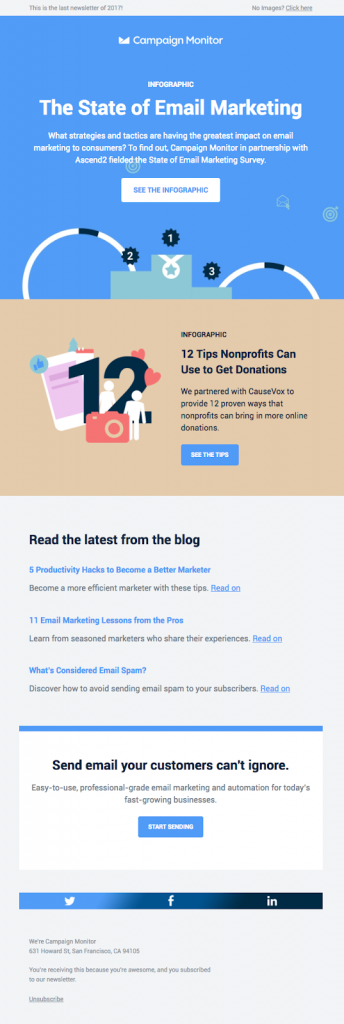
ii) Clarity It’s true that mundane and regular CTA buttons go unnoticed, for instance, “get updates” and “subscribe” are the most common ones. Sometimes, websites and blogs try to fashion CTA buttons and end up writing a word or phrase that doesn’t give out a clear sign of what to expect from the sign-up process. So try creating a clear CTA button that helps the visitor in moving forward.
iii) Message A core element of the CTA button is the message it carries. Not only it matters in understanding the context but also influences the clicks. The clearer the message, the better the CTA.
Call-to-action buttons are essential everywhere on your online real estate whether it’s a website, newsletter, landing page, or article copy.
The team at Elegant Themes understands the importance of attractive call-to-action buttons.
Look at the CTA button in one of their newsletters:
They used a rather large CTA button and clearly hinted “read the full blog post” on the call-to-action button, which explains the point.
Similarly, Appsumo also has an interesting call-to-action button on a popup option box:
Not only did they use the discount offer in the CTA button, but they’re also using a contrast colour for their call-to-action button.
Both of these examples sum up what I’m trying to tell you, which is to make attractive call-to-action buttons for more clickability and better conversion.
Maximize internal linking in the content Internal linking is a vital SEO tactic to keep visitors engaged and tell search engine bots about the relevance of your content pages. SEO experts and bloggers internally link their content or pages because it transfers link juice to other pages as well as keeps visitors and bots remain on the site.If you have done SEO before, you might have an idea of what internal linking does to any blog or site.
On the contrary, if SEO isn’t your cup of tea, then you might not have paid much attention to it.Anyway, I’ll be keeping it digestible for you. The reason I’m discussing internal linking is simple: it increases click-through rate and engagement on the site.
Does this mean you should internally link your pages even if they aren’t relevant?
The answer is no.
You shouldn’t do internal linking of the pages that aren’t relevant or won’t be helping the readers.When your website visitors get engaged on the site, they either convert into a lead or buy the product. The key here is to somehow keep the visitors busy on your site.The following three elements ensure that your internal linking strategy bear fruit:
i)Content Relevance The internal linking doesn’t matter if you aren’t linking to the relevant content. If you’re connecting two pages for the sake of internal linking, and there is no justification whatsoever, then the reader who would end up clicking on the link might not feel clicking on any other link. So keep the content relevant in mind.
ii)Problem-solving Info Your blog posts must be solving the problem. It does look so simple, but in reality, it’s not that easy. First, you’d have to identify a problem, and then you’d have to come up with a solution. Internal linking comes naturally in the content curation and creation process when you’re absolutely sure about the resources you’re linking out to in your content. Remember that the mission is to solve a problem, not to link out to other pages or resources. Once you keep this mindset, you’d succeed in internal linking.
iii)Clean Page Layout Some of you might not agree with this, but I do believe that a clean page layout is worth it. If your blog post or website page is cluttered with ads, popups, and opt-in forms, then visitors might leave the site without clicking on any link. Don’t underestimate the power of having a clean layout on your site.
Copyblogger does internal linking so well:I have been noticing their internal linking strategy for a long time. Often they hyperlink a full phrase, while sometimes they hyperlink a single word.
Hubspot is a popular inbound software services company. If you want to learn the basics of content marketing, you should follow their editorial techniques.They nail it with their internal linking as well.So what I’m trying to say is that internal link your pages and blog post wisely. Remember that the core reason behind internal linking is the delivery of value, not just drag the reader from one page to another. Once the readers start to discover helpful and meaningful resources through your internal linking, they’re likely to trust your content more than ever.
Reduce banner ads on the page Most beginner bloggers don’t realize that adding more banner ads on the page could drastically reduce the clickability on the website, let alone reduce conversion. Understandably, they want to make quick bucks, so they put a lot of banner ads on the site.
As a result, they may end up getting a few clicks on their ads, but they could potentially lose the visitors they’d leave the site and land on the advertiser’s website.
One of the disadvantages of having a bunch of banner ads on a site is that visitors’ attention gets diverted towards the banner ads. Seemingly, it could reduce clicks on the internal links.
Furthermore, having more banner ads on your website means your page loading speed would increase, and that doesn’t just affect the user experience, but it could also affect your SEO.
Take a look at the screenshot from Millennial Money blog:It’s one of those blogs that have a minimalistic approach when it comes to their website designs. What I like about the Millennial Money blog is that they don’t have a single opt-in box or a banner ad on the sidebar of the blog posts. There are so many other blogs out there who follow the same approach.
So what we take away from this example is that sometimes having less number of banner ads could also lead to getting more clicks or higher conversion through internal links.
Make your text links standout
It’s fascinating to understand that users’ behaviour changes when our strategies to engage them to change. Plus, how small changes make a huge difference in the conversion rate and clickability.
So I’m about to share another element of content marketing that would help you increase your website CTR, and therefore, impact the conversion.You’re putting out great content on the blog and you have a fantastic internal linking strategy, but if your links aren’t prominent enough, then it’s a problem.
I’ve seen several blogs that don’t have a distinctive colour for their in-text hyperlinks, which prohibits the links from standing out from the rest of the content.It’s necessary to know why we need to make our text links stand out in the first place. The reason is that we want clickability on the website and blog. Therefore, we add a bunch of internal links along with affiliate links and outbound links.
The goal is to push readers to click on all types of clicks so that they go ahead and complete a specific action.
When a website gets more clicks, the following things happen as a result:
i) The website or blog gets more page views ii) The engagement increases on the site iii) More chances of affiliate conversion get created iv)Display ads generate more money due to page viewsSo to make your text links stand, you need to choose the right combination of the following things: Font: The font of the blog or website must be clean and decent. The font style and size play a vital role in pushing readers to read the blog or leave the page early on without finishing the blog post. Text colour: After the website’s font, the next thing is the text colour, which should be prominent and in contrast to the body of the website body. It’s usually black in most of the blogs and websites. Link colour: The link colour is a big decider of how clear and appealing a hyperlink appears in the content. If the link colour is the same as the colour of the text, it might hurt the clickability on the links. Site template: The blog or website templates have settings where you can change the font size, colour, and hyperlink settings. You can adjust the text link colour if it doesn’t seem appropriate to you.
Look at the screenshot from the Kinsta blog:It seems like they know about this so well. When I was going through their blog content, their hyperlinks were looking so catchy and clickable. The reason is clear, which is they’re standing out.Try experimenting with your text link colours. If you have no idea where to change the colour of your hyperlinks in your site’s CSS, consult a website developer for this task. It’ll only take a few minutes to change it.
Use a Short Branded URL
Most of you would think, how come a short branded URL would bring website visitors or increase click-through rate? Well, all I can say is that you should keep reading.
First things first, what’s the short branded URL? If you have no idea what exactly a short branded URL is, then let me tell you. It’s a short version of the same domain with a different extension. Companies use short branded URL versions to reduce the length of the links as well as record different statistics.
If you’re into affiliate marketing, you might have noticed that Amazon and ShareASale allow users to generate the short URL of the affiliate products to promote.
The exciting part is that any company or blog can use a short branded URL. Now you’d think, why would someone want to use a short branded URL?
The answer is that a short branded URL could increase your CTR as well as land more website visitors on your website.
Well, Replug is a fantastic short URL shortener that does so much more than just creating shorten links. Not only does it allow users to use branded URL, but it also helps users drive visitors to their websites.
If you’re a social media expert or a pro-blogger, you might want to get your hands on this tool. Here’s why: when users shorten the article URLs with Replug.io and share on social media, and their followers click on the short links and land on the articles, they also see a small snippet of the users that could bring those random visitors to their websites.
What it means is that you’re sharing others’ valuable content with your followers after shortening the article URLs with Replug, and those articles could bring people to your website as well.
As a result, you could increase CTR on your website and end up improving your website conversion.
Did You Learn Something New About Increasing CTR on the Website?
I’ve shared seven ways to increase CTR on your website for better conversion. The goal was to help you out by sharing tactics that push visitors to click-through on your website.
I’m sure you’re going to take away a couple of strategies from this blog post. I’ll be thrilled to know what strategies you liked the most. Feel free to share what else readers should do to increase CTR on the website.
Furthermore, if you learned something good from this blog post, do let us know in the comments below.
Being a webmaster requires persistence, hard work, and a lot of patience. However, these are just the essential traits of a successful SEO marketer; when you intend on achieving a higher rating on Search Engine Result Pages (SERPs) and boost your website’s reputation, it is essential to be familiar with all the state of the art link building and technical SEO strategies that could take your website to the next level.
When analyzing such approaches, a site owner would have to particularly emphasize the importance of both on-page SEO and off-page SEO. While the on-page SEO is related to managing the content that is on your particular site, off-page SEO is a way of ensuring that your approach and activity isn’t limited to engaging with your existing audience.
The significance of off-page SEO is often undermined. Several webmasters overlook what they can achieve with it. That’s where Replug can help. As a powerful tool to not only build, shorten, and brand your links, but also track how those backlinks perform over time.
“Off-Page SEO” denotes every activity commenced by site owners away from their website that can assist them in achieving a higher rating on SERPs. On-page SEO takes place on the website while the off-page searches engine optimization outside your website.
Backlinks and Internal Linking
Backlinks and internal linking are separate concepts, and it is essential not to get caught up between the two. Proper understanding is a vital trait of a successful site owner.
A proper linking structure is necessary for progression, and for it, you would need to understand the distinction between the two types.
Internal linking refers to linking a particular web-page through a keyword in a different page. A demonstration of it would be to link a page of your website to another that has a similar content. What it effectively does is that it notifies the user that the site has similar but more in-depth content on a specific topic on the following page that is linked.
Linking increases the bounce rate since the users who might be searching for a specific topic might scroll between pages and spend more time exploring your website. If the content quality of the website is high, then there are a lot more chances of an increased audience.
Such activities are noticed by Google or search engines, and it contributes towards getting a higher and better rank on the SERPs.
Backlinks and Their Significance
Backlinks are when an external website mentions or gives mention yours, and such a reference is made through a backlink. It can provide significant assistance in reiterating your site’s reliability, producing a network of an entree through various web pages and publishers.
The importance of link building cannot be undermined, and therefore it’s vital to be well-aware of how to proceed with it and how does it contribute towards building a robust online presence.
Several site owners might think that link building isn’t that important, and they should spend the time and effort required into something else, but that’s not the case.
In fact, when you’re doing outreach or adding backlinks, using a top-notch URL shortener helps you present clean, memorable links, and makes it easier to track their performance.
Additionally, analysis has shown that various websites have achieved a higher rating even in 2026 through sensible use of link building. It’s a very good practice!
How Does a Webmaster Benefit from Link Building?
The SEO technique of link building assists the reader in finding informational articles and blogs online through various web-pages; it aids brands in getting discovered through the great content sources to present online.
Link building is beneficial for websites and webmasters. When you get backlinks from a website that has matching content as yours, it provides an enormous boost to the status. Since backlinks are often acquired sites that have a similar structure and content subject as yours, it helps attract the organic audience on the website. Access to organic traffic means a higher bounce rate, meaning that the people are more than likely to spend time on your website, exploring it for useful material.
When you get a backlink from a well-reputed website that has a higher domain authority than yours, it provides a signal to search engines that the content that you share on your pages is high-quality content and worth mentioning on other sites; it is a crucial factor in getting a higher rating on search engines and moving up ranks.
Although the user perceives simply a link’s part, the search engine comprehends the complete structure of the hyperlink and abstracts valuable data from it. Linking to a blog on your website is simple by way of a hyperlink, which will direct the user to the desired web-page. However, while linking back to the same blog on a different page, link building procedures need to be prudently obeyed to ensure that Google search engines can easily find and access your page. It means choosing the correct text to be used in the hyperlink. It would include confirming that the keyword exists within the hyperlinked text, and frequently checking to comprehend that your link is still active and it hasn’t broken.
Factors to Consider With Significant Link Building
Link building is a technique to enhance your website’s status and rating on the search engines. However, as stated previously, it required knowledge of not only SEO optimization but strategies as to how you can take your site to the front pages.
High Quality Content
The first thing that you need to ensure is that you post high-quality content on your website. The ‘’Content is King’’ phrase is every green for every site online. When compiling content for your website, there are a few things that must be considered because even if your content is well-written, these can still be a major turn-off for any visitor on your site.
Content with Minimum Grammatical Mistakes
If you are someone who doesn’t have a firm grip over the English language; an excellent way to composing the most error-free content is by verifying it through the Grammar checker tool. The online grammar checker is a straightforward tool to access and use; all it requires is the user inserting their text into it and searching for any grammatical errors. It can help you find punctuation, spelling, and sentence structure mistakes along with spotting and correcting any misuse of clauses and phrases. So, you can use the tool to ensure that your text complies with all the rules of English grammar and composition.
A webmaster is well-aware of the damage that can be inflicted by the detection of plagiarism in the posted content. Apart from resulting in a copyright strike, it could lead to a negative impact on the site. Therefore, it is always advised to check your work before any final submission. One exceptional tool to ensure that your work is plagiarism-free is by checking it through an originality checker before posting it online. The online free plagiarism checker is one of the most accurate tools in its category. Another benefit of using it is that there is no word limit imposed on the free edition, so you can effectively check the file without worrying about the word limit.
Building Links from High Authority Sites
Another major factor that needs to be stressed is that your site should be getting linked to the one which has a higher authority score than yours, or otherwise, it would be of no use since a site already ranks below yours on a SERPs wouldn’t possibly be of many benefits. You can check both the Domain Authority and the Page Authority of any website by the DA PA checker. It’s a free online tool that requires minimal computing expertise while delivering maximum benefit. The tool is developed with the latest MOZ ranking technique and evaluates the exact authority rating of a site.
A key to writing an interesting article is by ensuring that it delivers complete meaning while staying in a specific word limit. The word counter tool can be used to confirm that the allocated word limit has been followed while writing the article.
Some Do’s and Don’ts for Link Building
There are certain things that you can do, and these are regarded as the best practices for a better and healthier internal linking structure.
Google’s examination methods are progressive; they keep making amendments to it, and according to the latest rules laid down in September 2019, it is now capable of identifying spam links.
Applying the rules on the link building sample, you would need to separately identify the content type you are sharing over the blog. When sharing a link, a tag of rel= “UGC” assists Google in understanding that you are mentioning the user-generated content.
It is an ideal specimen of the developing characteristic of link building and how it could pose a challenge to marketers for compliance. Luckily, there are certain dos and don’ts that you can follow, which have proved to be extremely helpful over time.
There are other things that you could follow, but they could be time-specific. So, you would have to identify the new rules and comply with them accordingly. As stated earlier, webmasters need to be aware of the development being made to ensure that they keep up with the high demands.
The following set of dos and don’ts have appeared to be useful and applicable over every stage of criteria that has been introduced.
Do: – Inserting Long Keyword While Link Building
It should come to no surprise that keywords perhaps are central to generating traffic on your website. It provides the reader with the idea that they will get what they are searching for, and it also gives a positive impression since while reading an article, the user can access another one that it finds attractive.
Keywords are central, and there are proper guidelines as to how you can come up with the perfect one. However, there is another thing that needs to be noticed. It’s that when linking, you should add the long keyword and link it to the particular article through a hyperlink.
Adding a long keyword and linking it assists Google in link contextualization and shows it to honestly interested users. It’s one of the best ways to increase the bounce rate of your website. If you have published highly informative and helpful content on your site, link building can be a key to attracting more visitors.
Do: – Increasing the Page’s Social Visibility
Social sites like Facebook, Twitter, and LinkedIn are top-rated. Social visibility is one of the most successful and efficient ways of getting more visitors. Embedding links in multiple social sites can help to achieve a better rank on SERPs.
However, there is one thing that is worth mentioning here, and it’s that if you are intending to encourage users to visit your website, targeting the right audience is extremely important. For instance, if your website is related to cooking recipes and techniques, then it is advised that you feature in pages and groups or engage with the community that is interested in cooking and intends on learning something new. It is the key to getting organic traffic on your site.
DO: – Use Links to Add Value to Your Content
Although link building has significant effects on your page’s SEO, remember that your content should, first and foremost, be helpful to your customers.
For example, if you’re talking about how to build an e-commerce site, use link-building as an opportunity to bridge your readers to tools that might be useful to them such as web hosting services, payment gateways, e-commerce platforms, and others. It wouldn’t make sense to add in links to completely unrelated sites, even if they happen to have great authority, right?
Think about your customers’ objectives whenever you’re producing content. Then, use links to help them achieve their goals more efficiently.
DO: – Keeping Track of Your Backlinks
Several webmasters spend their time, effort, and energy in getting new backlinks, and they overlook one of the most critical aspects that are to keep track of the ones that have already been published previously.
If you don’t track the backlinks, how can you conclude whether you want to have newer ones, or would you instead pause and work upon something else?
At one instant, you might have hundreds of links pointing towards your website, but in a few days, when you check back to your surprise, you might find some of them gone. The key to it is that you actively engage with your audience on your social sites, it will effectively help you generate more links to your website, and it would be the more active ones.
An important point to note here is that you have no control over what others would do with their website and particularly with your backlinks; hence you may find some of your previous links missing, which would impact your linking structure.
Therefore, you should always keep track of your links before deciding to go for new ones.
DO: – Establishing a Content Pillar
Content is the heart and soul of your website. Whether you are an online business, informative site, or a news platform, the quality of your content is something that would decide the fate of your site.
You should always publish well-written content, and it has all the essential traits that might be required for SEO optimization. Only such content attracts traffic and encourages people to access internal links and mention your site through a backlink on theirs.
The posting frequency is a question that often confuses several site owners. The question ‘’How often should I post?’’ is the one that may have different opinions attached to it. While many publishers try to post content continuously, such a high posting frequency might lead to information overload.
Such a tactic could hamper the site’s growth since not many people are free of their daily worries to continuously refreshing the site to access all the latest updates.
Creating a content pillar is an excellent way to deal with it; it should be made once in a while. A pillar article is generally an article which follows a tutorial style. Usually, such articles are longer than 500 words with a lot of practical advice and tips. It is a unique way of engaging your audience in healthy activities. Furthermore, the length of the article ensures that it’s brief, which allows users to read it between their breaks.
DON’T:- Searching for Paid Views
You can find several people online that are selling views for a site. Buying links is a strategy that is disliked by Google and other various search engines, plus it isn’t of many benefits to a site owner as well.
It’s a way that could help you increase viewers for the time being. But it isn’t instrumental in the long run since the bounce rate for it is extremely low, along with the engagement on your articles wouldn’t be very efficient. Furthermore, buying views won’t be very beneficial in the long run since people wouldn’t care to share your website further or recommend it to their friends.
A link building practice for 2026 will be to refer to the rel=”sponsored” tag if you have an agreement that is based upon compensation.
DON’T:- Mentioning the Same Keyword Repeatedly
We are all well-aware of the importance of keywords and how they could be crucial in achieving a higher rating. However, that is to say, and you should never mention the same keyword repeatedly over the article.
It won’t be much sufficient, and you can replace it with slight modification based words that have a similar meaning and link them to the same web page over your article. It will make your link building SEO Technique more effective and would assist in getting a better rank.
DON’T:- Spam Links
The spamming link is a massive turn-off for the search engines and the viewers. The quote ‘’Quality rather than quantity’’ should be emphasized here, and you should only opt for linking more contextually and systematically.
Spam links are annoying, whether they are internal links or backlinks, they frustrate visitors. Spammy links impact the engagement and visitors on your website.
It is advised that while making the ink structure, only refer to a particular page a few times instead of linking every other line. Many webmasters make the mistake of spamming links online either on social platforms or on their web-page. It leaves a harmful impact on the readers who prefer quality since it’s a well-acknowledged fact that people with quality content would instead engage with the right audience than with uninterested ones.
Getting Backlinks
Backlinks are essential to achieve a better rating than before on Search Engine Result Pages (SERPs). The long-anticipated dream of every webmaster to get to the first page can only be achieved through effort.
Backlinks are essential, and a very efficient way for new websites to get backlinks is through the Backlink generator tool.
The tool is encompassed with benefitting features that would help you find sites and attract organic traffic onto your platform. To accomplish the requirement to get free backlinks from various platforms, this is crucial in attracting search engine on your website.
Getting organic backlinks is difficult, and the Online backlink generators can help you with it. The best thing about it is that you can access it without any costs involved, which is excellent considering that beginner websites are usually tight on a budget. They can’t afford the expensive online software that can assist them with the task.
Getting Backlinks From Websites With Higher Authority
The crucial aspect is that you get backlinks from websites that rate higher than yours. Getting backlinks from sites with higher Domain Authority and Page Authority would assist you in getting more visitors.
Artificial Intelligence Features
Every backlink is produced; naturally, the tool is developed with artificial intelligence features, making it more convenient and accurate to find the right sites. It only contributes towards finding the websites that have a similar structure and genre as the one that you have developed.
Relevancy of Backlinks
Relevancy is one of the most critical features of backlinks. If you get a lot of backlinks from websites that don’t match what you have posted on your, there is a high amount of chance that such links are going to have low weightage. The backlink generators only create relevant backlinks and within a few seconds.
However, these tools only help you find relevant websites. Reaching out and securing backlinks is still time-consuming and often more difficult than finding the sites. To avoid this hassle, link building services by repute post are a better option. They work with high-authority websites, handle outreach for you, and deliver quality backlinks.
Usage
The usage is another characteristic of the tool that makes it an exceptional choice. Anyone aware of the basics of computers can easily use the tool to access links for their website.
The following steps have to be followed:-
Access these tools
Scroll over to the Backlink generator tool
Paste the URL of your website
Privacy
Many users are concerned with the privacy of their search history. Although, there are several websites out there claiming to be saving the user’s records and ensurinng that the security of the searched material would be the responsibility of the user. It would be entirely liable for any breach in the policy, although the tool is designed to discard any searched data as soon as the user is done with it.
Further Benefits
These sites developed for maximum benefit to the user. It has up to different tools that not only help in composing content but their application extends to efficient site management. You can use various tools for your benefit in the most straightforward possible manner since all of them are free and highly efficient.
Conclusion
Backlinks are one of the most essentials in order to increase the site’s ranking on the search engine result page. However, Google suggests to get the backlink from another websites naturally. If you still want then above ways can help you to get the backlinks quickly.
Besides the ranking on the search engine, the backlinks are also effective to increase your site’s domain authority. According to the Moz, the biggest factor behind the increase in domain authority is the quality and quantity of the backlinks.
When it comes to promoting your offerings or communicating about your brand, email marketing has proven to be one of the most effective channels online. Businesses, large and small, use email marketing as one of their primary tactics to connect with customers and get more business. The reason email is so popular is that it generates the highest ROI and is 40x more effective than social media marketing.
With so many businesses sending out emails to promote their business, the customers’ inbox is always cluttered. To break through the clutter and stand out in the inbox, it is important to send emails that can create an impact. And, having pitch-perfect emails is not enough; you also need to execute the entire marketing strategy efficiently to make the most out of your efforts.
To help manage all your marketing links efficiently and keep email campaigns clean and trackable, many businesses turn to Replug.io for link management and campaign analytics.
If you are also looking at utilizing the potential of email marketing to grow your business, here are a few must-haves to create an effective email marketing strategy.
Set Clear Goals
The first and foremost thing to do before planning your email marketing strategy is to define your goals. Determining what you want to achieve out of your email marketing campaigns is crucial. Your marketing goals may include acquiring new customers, increasing sales, improving brand visibility and brand loyalty, building connections with existing customers, or just increasing your website traffic. Having clear objectives and setting achievable goals will steer your strategy in the right direction and help you stay focused throughout the entire campaign.
Build your Email List Organically
A clean and organic email list plays a pivotal role in the success of email marketing. Although there is a shortcut option to buy email lists, it is never advisable, because scrapped and borrowed email lists can endanger your sender reputation. Email addresses in the purchased email lists are usually fake or include people who might not be interested in your brand’s offerings. So, sending emails to such contacts will result in lower click-through rates or worse, an increased spam rate. Hence, it is a good practice to get people to opt-in to your email list via subscription forms or lead generation forms, and this way you will have a list of people who are interested in your brand and its niche. Alternatively, you can use GDPR-compliant tools like an email finder to find email addresses of your target prospects, making sure you reach the right contacts without compromising your list’s quality.
In some cases, these tools also allow you to find email with phone number, helping you connect verified contact details across channels while still protecting your list’s quality and compliance.
Alongside this, make sure you perform regular email list validation to eliminate invalid or inactive addresses, which helps improve deliverability and maintain strong sender reputation.
Check out this email from Zapier that confirms subscriptions by asking the users to update preferences.
Build your Email List Organically
Segment your Email Lists
Segmenting your subscriber list and making your emails more relevant to specific segments can help you in creating a well-organized and efficient campaign. Break down your email list into specific segments based on the demographics, lifecycle stage, buying behavior, and buying frequency of the users. Email list segmentation will help you create more targeted and tailored email campaigns that will perform better and engage more users than generic emails. Hire Mailchimp experts or other ESP-specific experts who can help you with effective list segmentation. Make sure their resume reflects a proven track record in email marketing and list segmentation prior to bringing them on board.
This email from Bespoke Posts asks the subscribers to fill out preferences in order to customize the content better. Getting to know about the subscribers’ interests and preferences will help you to divide them into various segments and create targeted emails.
Craft Captivating Subject Lines
The subject line is the first thing that a user notices about your email. It can make or break your email campaign, as it determines whether or not a user will open and read your email. It is therefore important to focus on creating effective, eye-catchy subject lines that will entice the users to open your emails. Make your subject lines short, crisp, engaging, and personalized. Mention attractive offers or include emojis and engaging copy to enthrall email recipients and motivate them to click.
Focus on the Content and Timing
Once you get people to open your email, the next step is to get them to click through and make a purchase. The content is at the core of the email and a deciding factor for the success of your email campaign. Hence, creating quality content that resonates with your audience and prompts users to take action is vital for your email marketing strategy. It is also necessary to have a CTA that stands out and encourages the readers to click through. Apart from this, make sure you send your emails at the best time to get maximum engagement.
Make the Design Attractive
A well-designed email is a key driving factor for conversions, and effective email design plays a crucial role in engagement. To design top-notch, engaging emails, make sure you have a clean layout, use the right colors, keep the content short, use interactive design elements such as images, GIFs, and videos, use ample white space, and include a prominent call-to-action. To begin with, you can make use of custom Mailchimp email templates, Pardot email templates, or Salesforce email templates that follow email design best practices and help you create emails that click.
A/B Test Your Emails
Before you hit the send button, it is essential to test if all elements are correctly placed and your email is all set to render perfectly. A/B testing will enable you to test your emails, get valuable insights, and optimize it for better performance. Use various combinations of the subject line, design elements, copy, placement of CTA, etc. to thoroughly test your emails and see what works best and gets the desired results.
Make them Mobile-Friendly
85% of users check their emails on mobile phones. Keep this in mind while designing your emails. Optimize your email design for mobile screens by using a responsive layout, resizing images to fit smaller screens, using prominent and easy to click CTA buttons, and including shorter texts and longer links. Use responsive Mailchimp templates to make your emails mobile-friendly and get maximum conversions.
Add an Option to Unsubscribe
Make it easy for the uninterested subscribers to opt-out from your email list whenever they want by adding an unsubscribe button in all your emails. This is an essential step because, if you keep sending emails to people who do not want to hear from you, it will lead to your emails being ignored or marked as spam, which will hamper your brand credibility. It is, therefore, better to let them choose to unsubscribe in case they do not want to receive your emails.
Track and Analyze Performance
In order to know if you are moving in the right direction and getting the desired results from your email marketing campaigns, you need to analyze the performance of every email that you send out. Track metrics such as the email deliverability rate, open rate, click-through rate, bounce rate, social sharing rate, unsubscribe rate, etc. to see what works for your brand, and based on the analysis, make necessary changes to your campaign to improve its performance.
All Set to Create a Winning Email Strategy?
A well-executed email strategy will get you more customers, boost engagement, and improve overall ROI. Incorporate all the above best practices while devising your email marketing strategy, and it is certain to make positive impacts on your business.
Keep in mind, using an efficient link shortener can help you generate clean, branded URLs for your email campaigns, making your links more user-friendly and easier to track in analytics.