Link shortener services can create a more memorable and professional-looking URL for your store. A link shortener tool can help shorten the URL of your store’s home page and also help shorten the URLs of individual product pages, making them easier to remember and share.
A link shortener can help create custom URLs with your domain, making them easier to remember and share. They also provide analytics to track your links’ performance and make your store more secure by hiding the link’s true destination.
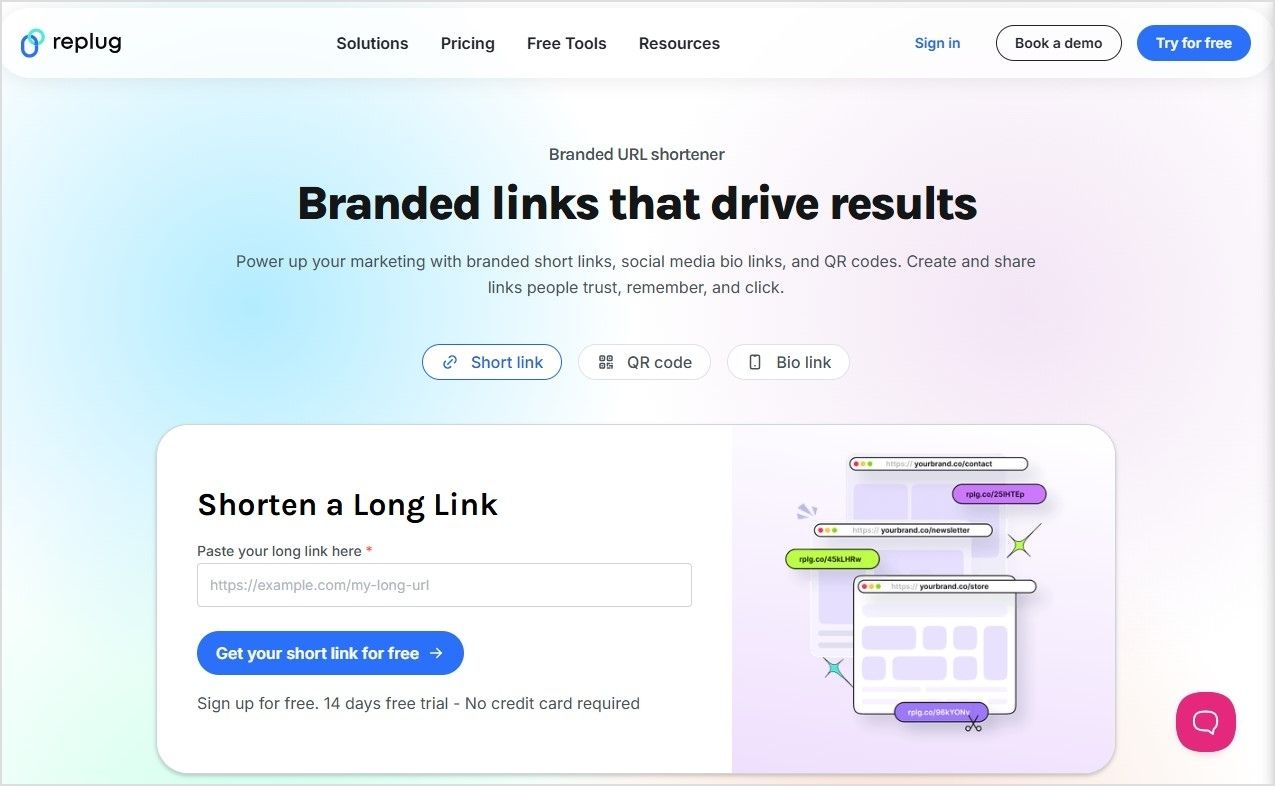
Here’s how to change the shopify URL, shorten it, share it with the audience, and track its performance using Replug’s short link generator online.
How to change Shopify URL using a URL shortener
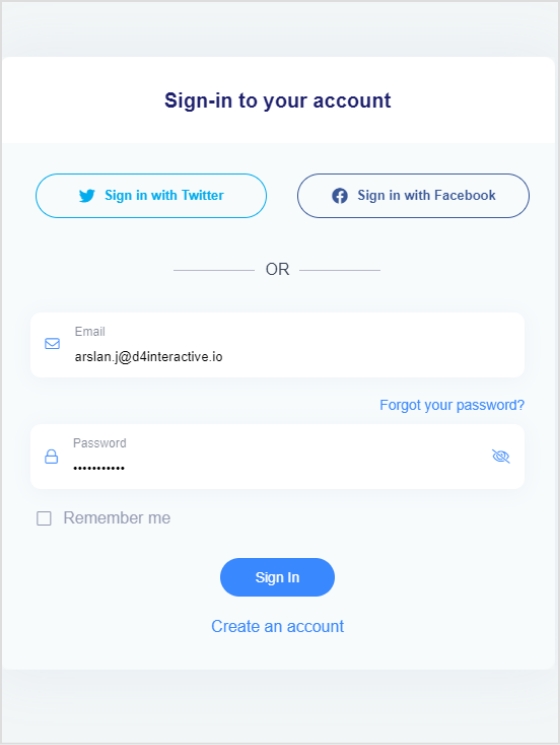
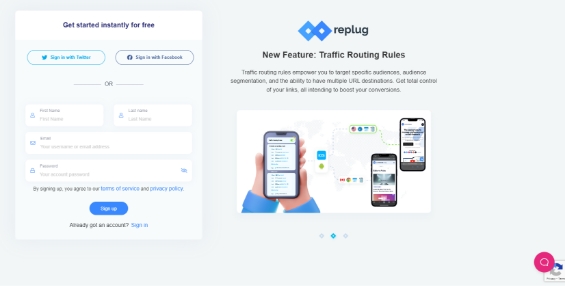
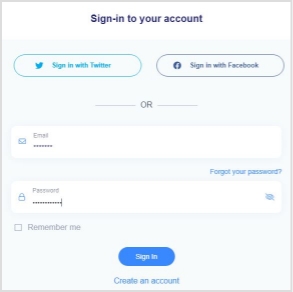
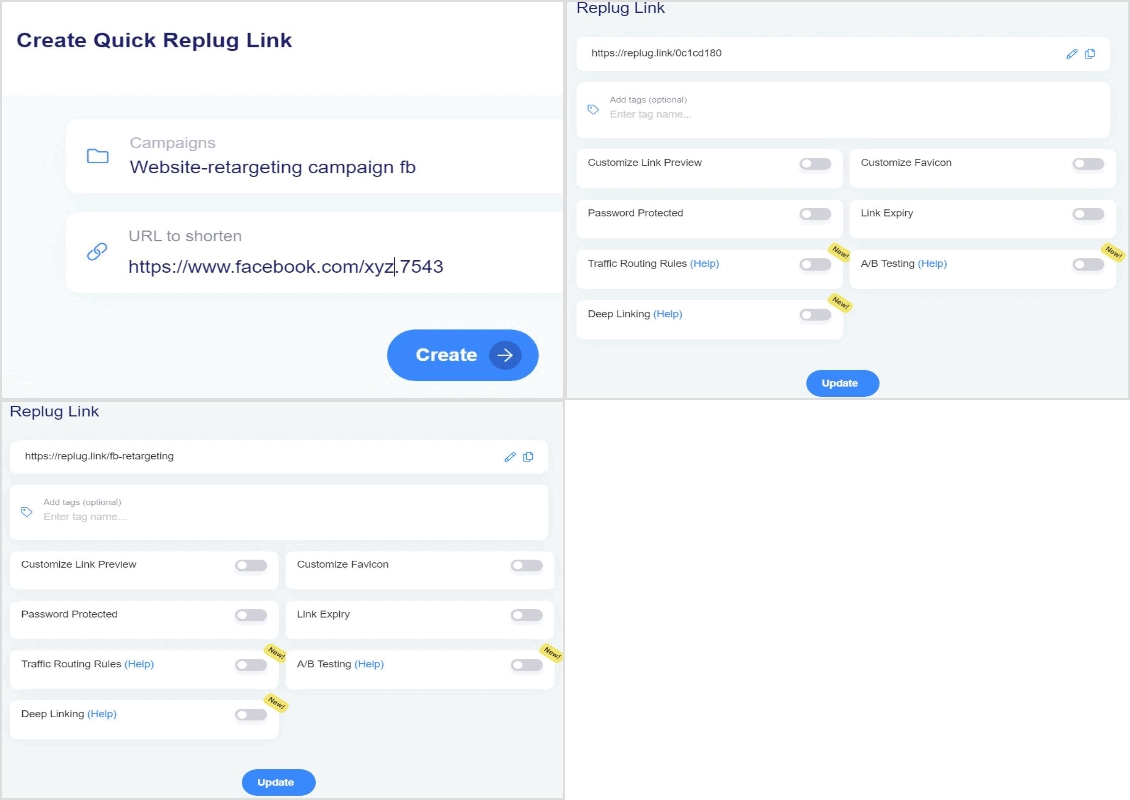
Step 1:Sign in to Replug or create a new account, if you don’t have one.
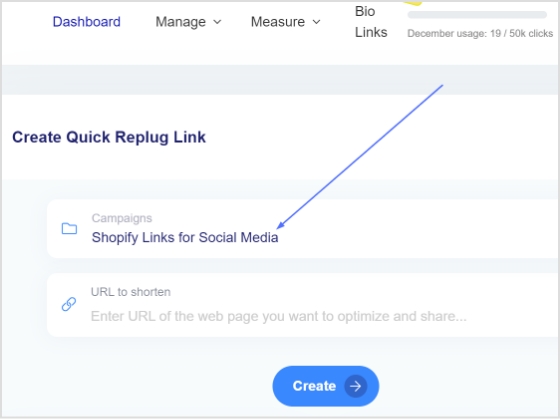
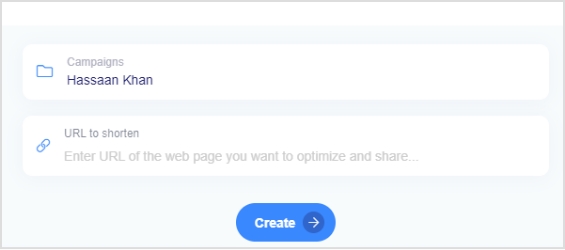
Step 2: Choose a campaign from your dashboard, or create a new one.
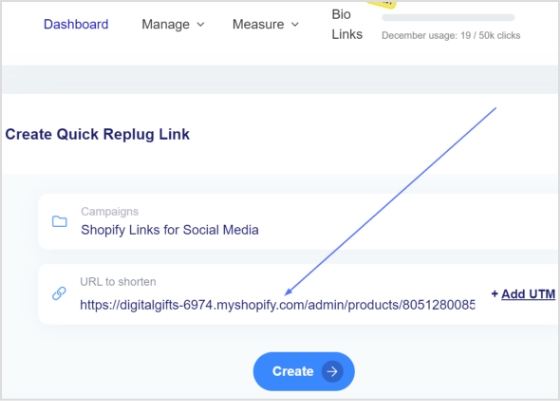
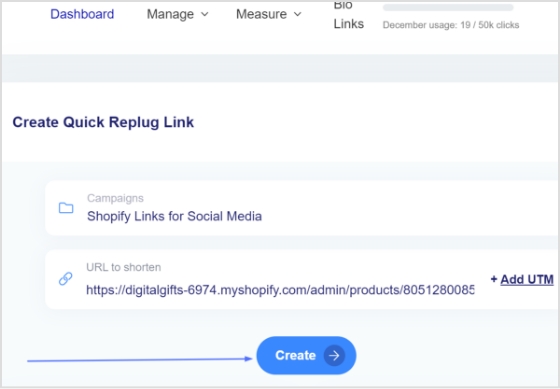
Step 3: Enter your Shopify URL as the destination URL in the “URL to shorten” section below “Select your campaign.”
Step 4: Simply click the create button to create a shortened URL for your Shopify store.
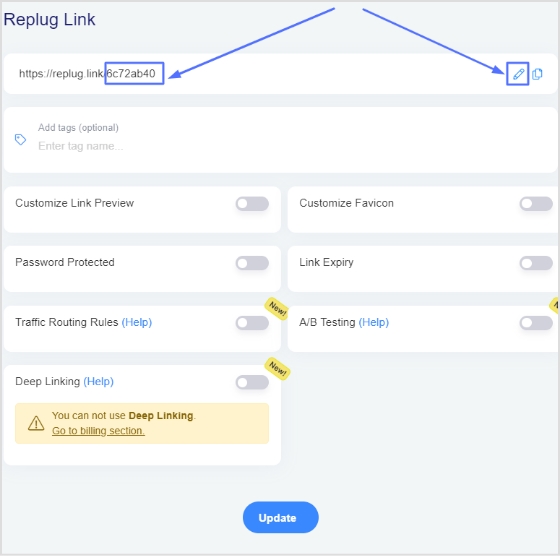
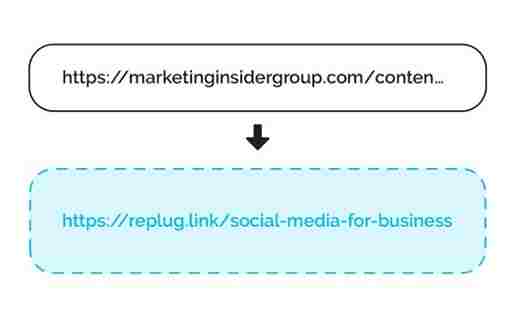
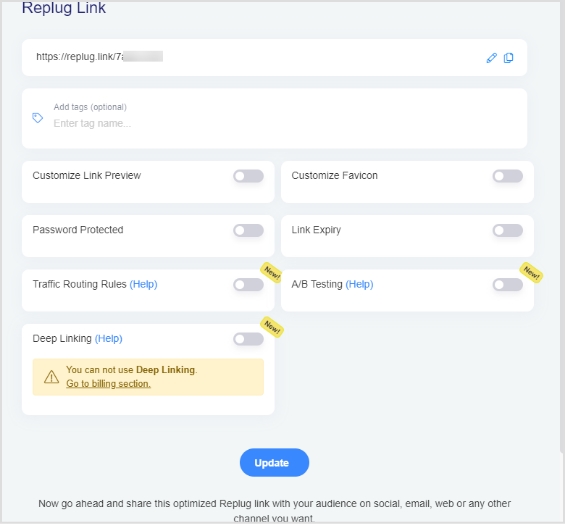
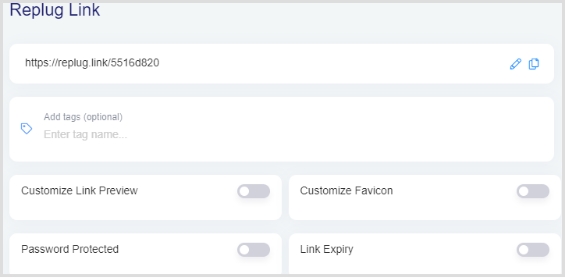
Step 5: Now you have your new URL, which will look like the one below in the picture. You can customize this URL by clicking on the edit icon.
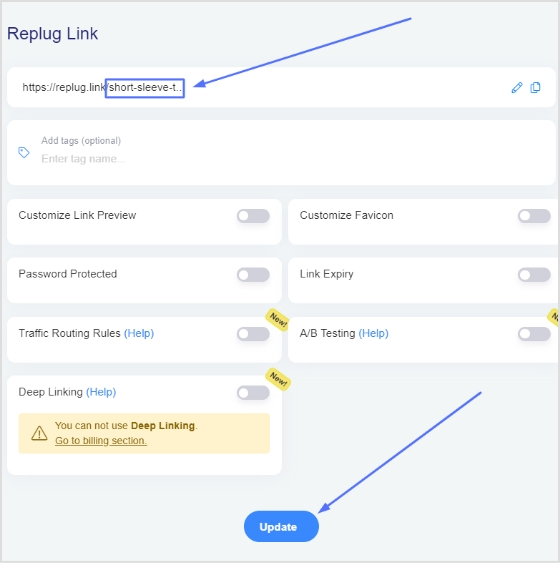
Step 6: Enter the new URL you want to use, and your custom Shopify Store URL is ready for sharing on social media. Click on the update button to save the new URL.
Yes, you can. You must be the store owner to change your Shopify store name. Log in to your Shopify store, go to the Settings page, and click Store Details. You can enter a new store name into the ”Store name” field.
How do I find a Shopify URL?
Log in to your Shopify store admin. The URL will be in the browser address bar. Go to Online Store > Domains in the leading left menu. This will give you an overview of your store domains.
There’s no question that branding is one of the most important elements of any successful business strategy. It’s the first thing customers see and makes them trust you – or not trust you – to do business with you. So it’s important to ensure your branding is consistent across all media platforms, including your website, social media accounts, and marketing materials.
Branded links are one of the most essential pieces of the puzzle regarding building brand consistency. One powerful way to implement this is by using Replug.io, which lets you create, manage, and track your branded links seamlessly. In addition, branded links help achieve brand engagement and traffic.
In this blog post, we’ll outline the benefits of brand consistency and give tips on building it into your business. Navigating the waters of branding can be daunting, but by following these guidelines, you’ll be on your way to a robust and consistent brand identity!
What is brand consistency in marketing?
Creating a solid brand identity is essential for any business. This is especially true for modern businesses that rely on social media and online marketing to reach their target audience. Brand consistency helps to create a unified brand identity that customers can easily recognize. This allows them to form positive customer associations with your brand name, boosting your online presence and attracting new customers. So, keep brand consistency at the top of your mind when planning your marketing strategy. It will help you achieve your marketing goals sooner and with less effort.
Why does consistency matter in marketing?
Building trust and credibility are essential for any business. That’s why consistency is so important in marketing – it helps create a consistent image for your business that customers can trust and rely on. By being consistent, you can decrease the amount of marketing you need to do in the long run – think of it as one significant investment! Plus, a memorable brand experience leads to customer loyalty. When customers re-engage with customers who have drifted away. So, brand consistency is a great way to build a successful business!
What is a branded link?
A branded link is a hyperlink that appears after your company name or website URL in web search engine results pages. In other words, it’s a custom URL slug associated with your brand, feature, or marketing campaign.
How do you achieve brand consistency using branded links?
Building brand consistency is crucial if you want your marketing campaigns to stand out. One way to achieve this is by regularly adding branded links to your content. Branded links help your website look more authoritative and credible and can boost traffic and conversions. To ensure you’re using high-quality anchor texts relevant to your industry and target audience, have a well-organized campaign.
Branded short links create a sense of trust and credibility, which leads to stronger customer relationships and higher loyalty. Additionally, brand consistency can help drive traffic to your website. This, in turn, can increase conversion rates and ROI. So, keep your branding consistent and see its positive impact on your business!
Brand consistency is an essential element of effective online marketing. When you share online links, ensure that your online links are branded. Create a message consistent with your brand so customers can easily understand and trust it.
Benefits of building brand consistency using branded links
Below are several benefits of building brand consistency.
It Builds Trust & Clarity
When your online marketing channels are consistent with each other, it builds trust and familiarity. This increases the chances of conversions as customers feel like they know what to expect from you, and they are not left confused or uncertain about any aspect of your business. This means that having branded URLs can increase your website’s visibility and potential online sales.
Boosts Recognition
Short links are the key for any business that seeks to build brand recognition. You can create a positive brand perception by ensuring that your URLs are not long and random but consistent with your brand. In addition, making it easy for potential customers to understand what you offer helps reduce the chances of them getting confused or frustrated with your product or service.
Valuable for SEO
Vanity links are a valuable tool for SEO efforts. So, be sure to use them wisely! First and foremost, make sure that your branded links are relevant to your business. Secondly, ensure your branding and logo are consistent across all your online platforms. Doing so will help your customers recognize your business when they’re browsing the web and help your internet traffic and SEO rankings grow over time.
Fosters Loyalty
It is essential to have a customer-friendly branding strategy to foster loyalty among your customers. Consistent messaging leads to understanding and acceptance of the message, i.e., necessary for building positive relationships with customers. Branded links help your business stand out from the competition and make customers more loyal.
Including branded short URLs as part of your strategy will help you achieve consistency and trust. In turn, it will result in better web traffic and brand awareness. Creating an image that resonates well with your target market is crucial. Branded links help do that. Thus, establishing credibility and trust among your audience.
Key tips for building brand consistency using branded URLs
Follow these key branding tips, and you’ll be on your way to building a consistent branding strategy that will help your business thrive!
Measure the success of your branded links strategy
Branded links are essential for any online marketing campaign. They help your website or blog rank higher in search engine results pages (SERPs), leading to more website or blog visitors. However, you need to ensure that your links are effective and help you reach your marketing goals. To measure the success of your branded links strategy, look at link analytics. Additionally, keep track of your progress over time to see how you’re doing. If you’re still unsure how to measure your links’ success, don’t worry – many link management tools can help.
Ensure your branded URLs are optimized for SEO
SEO-friendly URLs are an essential part of marketing your business online. They’re significant for businesses that sell products or services. If you’re not optimizing your URLs for SEO, you’re likely missing out on potential customers. Make sure your URLs include the correct keyword and that they’re structured in a way that is easy for search engines to understand.
Use a consistent schedule for your marketing.
It is crucial to have a consistent branding strategy to stay ahead of the competition. This means using the same logo, color scheme, and font throughout all your marketing materials – website, social media platforms, and email newsletters. Make sure that everything you send out has a clear message and purpose – people will be able to understand it if you make it easy for them! By following these simple tips, you’ll be on your way to building an effective brand identity that can help take your business forward.
Note: When sharing, consider using a link shortener, not just to tidy up the URL, but also to reinforce your brand through custom, branded links.
Keep your brand consistent across all channels.
Branding is one of the most important aspects of a successful business. Consistent branding across all channels helps build trust and credibility while creating a sense of community among your customers and followers.
Ensure your branding is visible on all your marketing materials – from website to social media to email campaigns. Use the same fonts, colors, and images to create consistency across all channels. Regularly review your brand messaging for any necessary changes – this will help keep your brand consistent and aligned with what potential customers expect!
Build a cohesive online and offline presence with your brand
Branding your business is essential for success. A good strategy would be consistent across all channels, ensuring the brand image looks great everywhere. This will help build trust and credibility with customers. Additionally, it is important to keep the branding updated to match customer expectations and not look dated or out of place.
When it comes to logo design, use a versatile font combined with well-executed graphics for maximum impact. In copywriting, make sure you strike a balance between personalization and impersonal marketing speak – customers prefer brands they can relate to! Finally, make sure you are using high-quality images that match your brand’s tone and style.
Conclusion
With so many different marketing channels available, your business needs to have consistent branding. This ensures that your target audience can quickly identify your brand and find the right products and services for them. Build brand consistency using branded links and achieve your marketing goals. So, what are you waiting for? Start building consistent branding today!
Frequently Asked Questions
What are the key steps to create branded links on my website?
There are three simple steps you can take to create branded links on your website: 1. Use a URL shortener when creating branded links, making them easier to remember and type. 2. Ensure that the branded link slug is correct to increase brand consistency across your website. Incorrect slugs can make your branding look suspicious and spammy. 3. Always check the link before clicking it to ensure it looks correct and is not sending users to an unknown or untrustworthy page.
What are the 4 elements of branding?
Logo, name, mission, and values. A well-branded company has a good logo that represents the company’s ethos and suits any industry or product. The logo should be catchy and easy to remember, so customers can easily find it when looking for your brand. A name that is catchy and easy to remember also helps in boosting brand recognition. The mission of the company should be crystal clear for customers to understand; values are what tie everything together and make the brand unique. Sticking to a consistent branding strategy will help you build an emotional connection with your customers and improve your online visibility.
Does brand consistency actually work, or does it just sound good?
Brand consistency is a strategy that can help you establish trust and credibility with your customers. It shows them that you value their time and money and are invested in ensuring they have the best experience with your brand. In addition, consistent branding can reduce customer churn rates by creating loyal followers who will stick around even when things get tough. To make the most out of brand consistency, ensure to keep your branding consistent across all channels. i.e., website design, social media profiles, ads… everything! This way, you’ll be able to consistently communicate the same message to your audience and build credibility.
Which is better: strategic or tactical branding decisions?
Both strategic and tactical brand decisions are important when creating a coherent and consistent brand identity for your business. A strategic decision is made when you have a longer-term vision for your brand, which will help you achieve long-term success. On the other hand, a tactical decision is made when you need to take into account the present situation. This means you decide how to move forward based on the current situation. However, both actions are necessary when building a brand because it helps to create consistency and flow throughout all marketing efforts.
One way to increase sales on Shopify is to use apps that allow you to sell on other platforms. This can be a great way to reach more customers. Here are some great apps for Shopify that can help increase sales.
1. Replug
If you are looking for a tool that can help you with both branding and tracking your audience, to serve them better, then Replug.io is for you.
What’s Replug?
It’s the best link management platform to create shorten links and govern them hassle-free. It also includes rich features, such as retargeting pixels, A/B testing, tracking analytics and much more, as explained below.
Branded Links
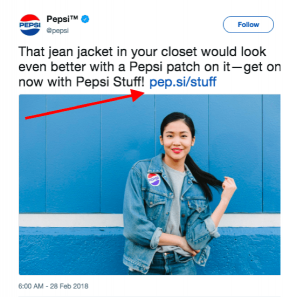
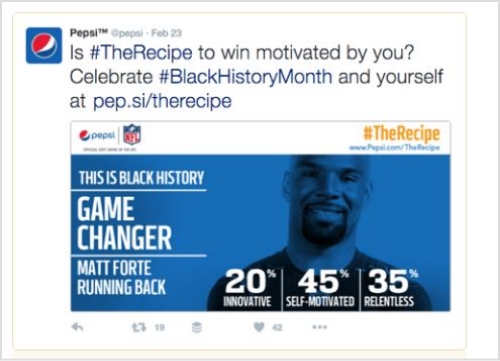
Branded links have become a necessity for online branding and marketing. Usually when we create social campaigns, branded short links look friendlier to eyes and remember compared to any random long URL with multiple characters and numbers. Here is an example of Pepsi brand using a branded URL given in the image below.
Adding to the benefits of branded URLs, they are also easy to share, specially where there are character limits (e.g. Twitter only gives you a limit of 280 characters for the Tweets).
Maximize marketing ROI
by transforming ordinary URLs into branded short links that convert.
Try Replug for free
Retargeting Pixels
Retarget your Shopify audience on other platforms, such as retargeting your Shopify audience on Facebook using Replug retargeting pixels.
For example,create a retargeting campaign in Replug, and connect your Meta pixel with the campaign created. Any one that clicks on your shortened Shopify URL will be tracked, and you can retarget them on Facebook using Retargeting Ads.
Test your webpages, content or campaigns using Replug’s A/B Testing. Compare up to 10 versions of a single URL, and choose the one that gets most traction. A/B testing is a handy feature for e-commerce owners, who can use it when running a special campaign or testing a product/landing page etc.
Call To Action
Create catchy call to actions buttons with CTA phrases that create a sense of urgency to and turn clicks to conversions. Set different types of CTA’s i.e.
Exit Intent
Social
Bridge Page
Pop up
Scroll Box
Bio Links
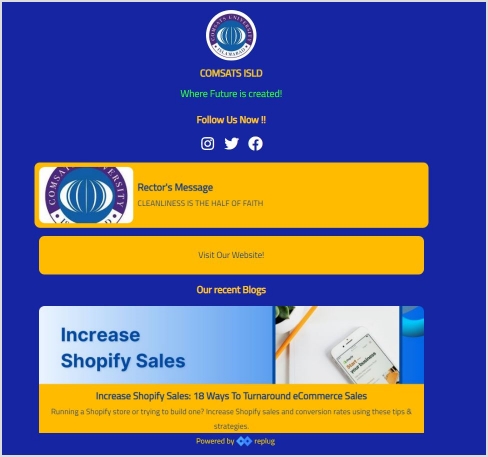
Create one awesome bio link for all social platforms. Using Replug bio links, you can direct your social media audience to your e-commerce store by designing a custom bio link webpage. No technicalities required, just simple drag and drop functions. Easily place your links, social icons, image, videos, text, and much more to design an appealing bio link webpage.
Here’s an example of bio link webpage.
What else?
A link shortener tool gives you the control of shortening, customizing, analyzing and managing branded links.
That’s not just it. There’s more….
Replug has some other cool features that you can check out and make most of your online marketing across the web and social channels.
Another great option is the Shopify Sales Booster app, which helps increase sales by offering discounts and coupons to customers who purchase through your shop. This app is also free and a great way to boost sales on any platform.
Multi-orders
Multi-orders is one of the most popular Shopify apps that allows you to manage and fulfill orders from multiple sales channels in one place. It integrates with popular marketplaces such as Amazon, eBay, and Etsy, as well as with Shopify POS. With Multiorders, you can save time through automation.
3. One Click Checkout & Stickybar
One click checkout & stickybar is a great app if you want to increase sales on e-commerce platforms. The app allows customers to checkout with multiple payment methods and shipping methods. The app also allows customers to track their order status and view their order history.
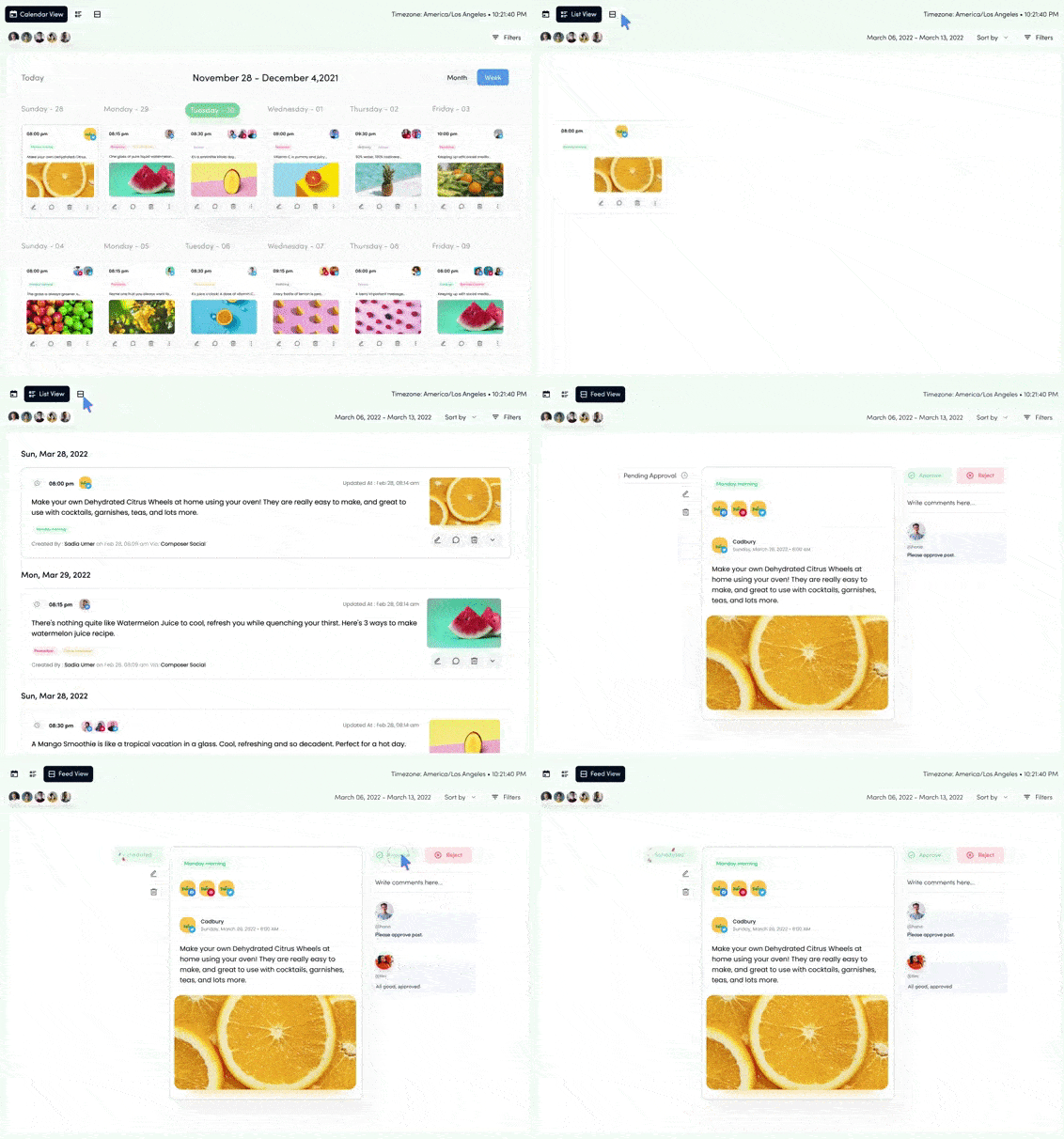
ContentStudio is the best social media management tool out there that lets you post and schedule content, track your analytics, and engage with your audience – all from one platform.
Shopify integration with ContentStudio makes sharing products easier from your e-commerce stores across all social channels.
5. Omnisend
Omnisend is an excellent email marketing app for Shopify. By adding Omnisend to your store, you can increase the number of emails collected from visitors, cultivate leads with email campaigns, and improve sales and marketing. This app is designed to help you quickly build an email list, grow your Shopify store with email, SMS and push marketing, or drive more sales with email automation.
Google Shopping Actions is a program that lets shoppers purchase products from your store directly through Google search results and Google Assistant. This app makes it easy to set up and manage your participation in the program.
Oberlo is my favorite among the best Shopify apps. It is a drop-shipping service that allows the user to find popular products online and start selling immediately. Get products from various suppliers and add them to your online store. Oberlo is a great tool for entrepreneurs who want to start an eCommerce business without investing in inventory.
8. ReferralCandy
Referral Candy is a Shopify app that allows you to create custom referral programs for your store. If you have customers who are satisfied with your products, they will be more likely to tell other people about them. If you don’t have a referral program, you could be missing out on some potential sales. .ReferralCandy has a wide range of customization options to choose from so you can build a referral program that fits your brand perfectly. It is also a system that automatically delivers rewards to make the referral process easier.
9. Podbase
Podbase is a platform that allows you to create and sell print on demand products without holding inventory. If you want to expand your product catalog without worrying about production, packing, or shipping, Podbase can help simplify the process. The platform offers a wide range of customizable print on demand products, including phone cases, laptop sleeves, and tablet accessories. It also integrates with Shopify and Etsy, automatically fulfilling orders so you can focus on growing your business.
10. Product Reviews by Shopify
Product Reviews is an excellent app that allows customers to write reviews for products they have purchased. Customers can also rate products they have purchased. The app also allows customers to share their reviews with their friends and followers on social media.
A call to action for social media is an untold success secret that top brands and influencers use it every day.The majority of the top-performing social media content usually has a strong call-to-action phrase.
No wonder the audience reacts to it quickly. I’ve got social media call-to-action examples to share with you. But, before I get to those examples, it’s essential to discuss the basics around call-to-actions that will come in handy.
Why do CTAs matter in social media marketing?
Social media marketing becomes dull if there is no activity whatsoever. The purpose of social media call-to-actions is to entice the audience to react to the message.
Social media success lies in the engagement process regardless of the social media platform. The reason a call to action matters in social media marketing is that it encourages the audience to respond to social media posts no matter what.
What elements should you include in your CTA strategy?
Here are the seven key elements that should be added to a CTA strategy:
Wittiness: A little bit of fun or excitement goes a long way
Appeal: An appealing message that attracts the audience right away
Shortness: A short and sweet copy that is understandable and catchy
Relevance: It should be related to the target audience in order to work
Clarity: It must help clarify the context of the story or event
Enticement: It must be enticing the audience to reply
FOMO: Sometimes, a fear of missing out also helps in conversion. Try using the urgency-factor in the CTAs.
Call to actions for social media
There is plenty to learn from the experts on social media in every area – CTAs are no exception. A call-to action (CTA) button can be added to any social media post. Take a look at some of the examples of call-to-actions for social media:
LinkedIn CTAs
LinkedIn is a top-tier social media platform, and ignoring this lead-generation machine would be a big mistake. When it comes to LinkedIn posting ideas, CTAs should be part of every social marketer’s LinkedIn content strategy.
Below are some good examples of call-to-actions found on LinkedIn.
1. Amazon Web Services
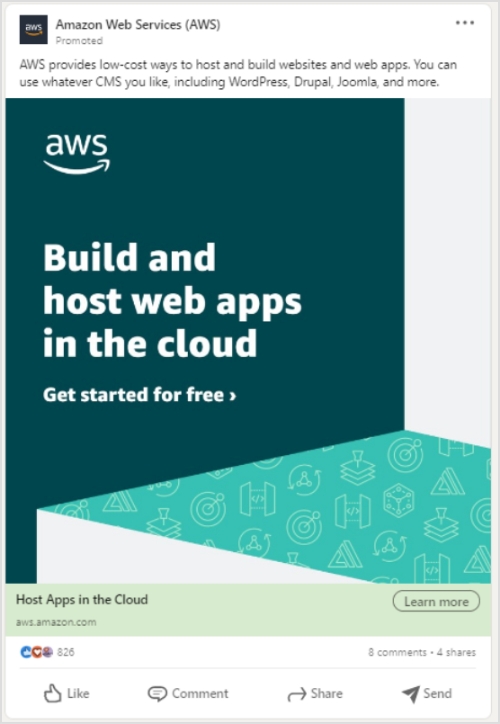
Amazon Web Services (AWS) is a popular cloud hosting service that allows users to host websites and apps.
Let’s check their LinkedIn ad:
Why it works
The main copy of the ad states the message with clarity. It simply hits the bullseye by targeting web and app developers.
A plus point in this LinkedIn ad is that it tells the audience about getting started for free – the CTAs like “sign up for free” and “free trial” in the copy always bring attention.
The ad has a “learn more” call-to-action that drives visitors to the AWS sign-up page. Moreover, such CTAs push prospective customers one step further, especially if they’re on the fence.
If you are looking to track or disguise links that appear much friendlier to the online user, then Amazon link shortener is just the tool for you. It helps you optimize product URLs and turn them into trackable and easy to share short branded links.
Enrolling in an AWS courses can help you better understand these tools and features, enabling you to make the most of AWS for website optimization and performance.
Tip: Make most of your CTAs by using it with deep links to amplify marketing efforts by sending users directly to the in app content and trigger app installations to the users that have not installed the app on their smartphone devices.
2. Microsoft
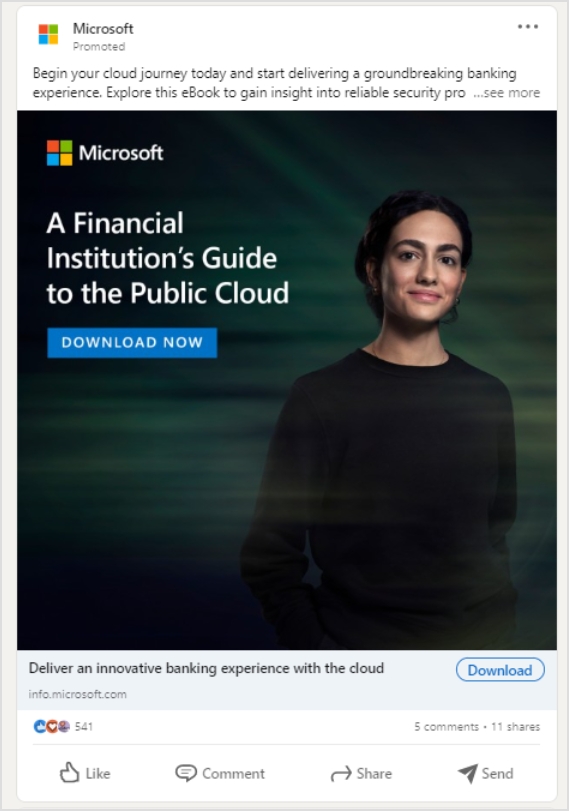
Microsoft is a tech giant that sells software, operating systems, and gadgets.
Here’s Microsoft’s recent LinkedIn ad about financial institution’s guide to the public cloud:
Why it works
The crux of the message is clearly written in the white bold text on the ad. No fluff or detailed text.
The “download now” CTA on the ad banner symbolizes that there is an ad for a downloadable item. It hints to the target audience to look into it.
Microsoft’s marketing team smartly used the “download” call-to-action button on the ad to make it easier for the audience to decide and take action about downloading the public cloud guide.
3. LinkedIn Talent Solutions
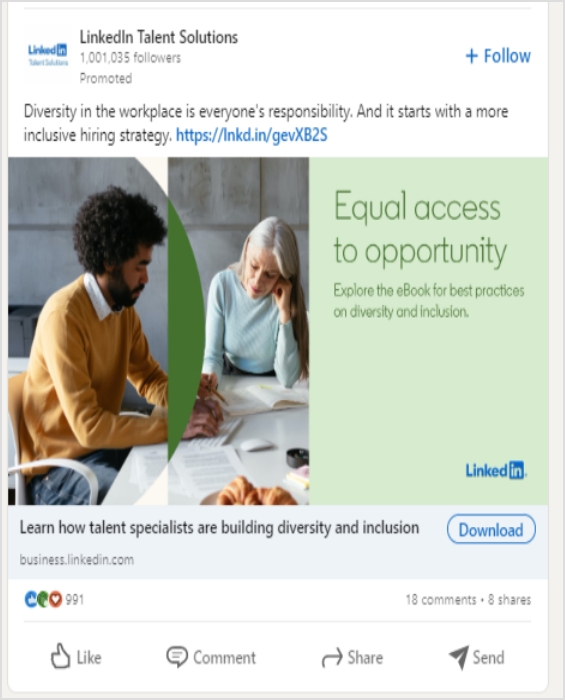
LinkedIn Talent Solutions is a powerful recruitment tool available on the LinkedIn platform.
Here’s their LinkedIn ad:
Why it works
A brief yet meaningful introductory text on the ad steals attention immediately.
Short link at the end of the introductory text gives the audience a chance to explore it further.
A downloadable CTA tells the target audience to get their hands on the downloadable item.
Tip: Audience-matched targeting can help you reach more prospects you already know.
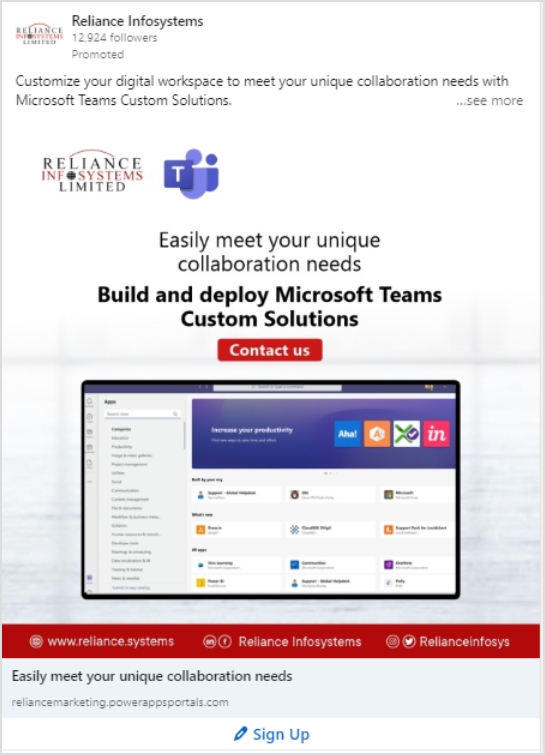
4. Reliance Infosystems
Reliance Infosystems is a tech powerhouse that offers cloud hosting, network management, and IT security management services.
Take a look at their LinkedIn ad:
Why it works
The text on the ad image easily becomes overwhelming for the viewers unless it’s short and precise. Reliance Infosystems seems to be pulling this off quite well.
The dashboard picture of their software solution balances the whole thing. Pictures and vectors mostly help retain the target audience’s attention.
The sign-up call-to-action pushes the audience to take a leap.
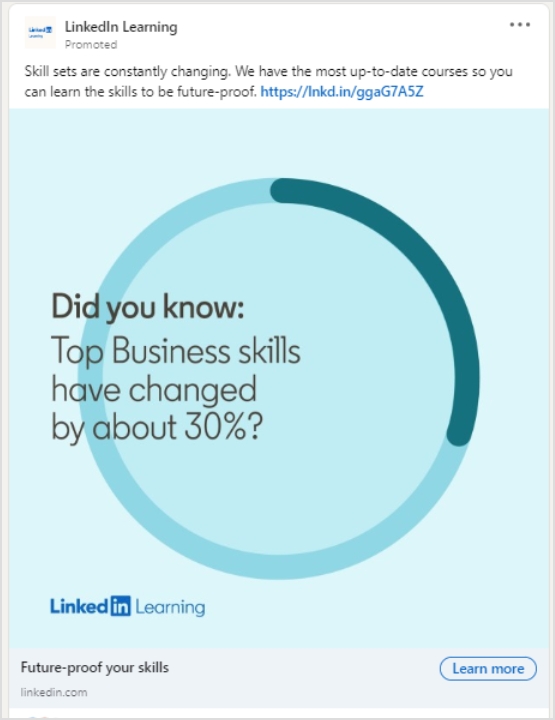
5. LinkedIn Learning
LinkedIn Learning is an educational platform from LinkedIn. It provides users access to the platform through their LinkedIn accounts. Check out their LinkedIn ad:
Why it works
The most attractive part of this ad is the copy of the ad. It has a short yet catchy statement on the ad banner. Along with a strong CTA phrase, the “Learn more” CTA button persuades users to click and get more information.
A number or percentage on the ad copy immediately grasps the attention of the viewers.
The ad design is quite simple which shifts the focus toward the copy.
Twitter CTAs
Twitter may seem simple, but it has a lot to offer. All you need is to know how to capitalize on the attention. Here are some of the tweets from brands and influencers that are crushing it with their call-to-actions on Twitter:
Tweets allow to use a limited amount of characters. So link shorteners for Twitter help create short URLs that can fit into your tweets.
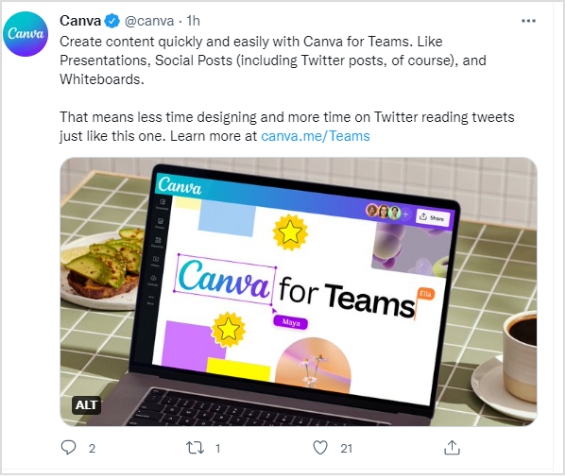
6. Canva
Canva is a popular online graphics designing tool for creating social media images, banners, and ads. Check out their tweet:
Why it works
The tweet from Canva vividly targets the organizations or companies with team members for their “Canva for teams” plan.
The simplicity of the tweet language ensures that readers keep on reading the two-paragraph tweet from them.
A call-to-action text at the end of the tweet makes it easier for the prospective audience to click through and land on the respective plan page.
7. Guy Kawasaki
Guy Kawasaki is an entrepreneur, investor, and adviser to startups.
I stumbled upon one of his recent tweets, and it’s worth mentioning here:
Why it works
A one-line tweet and the text body includes “7 lessons” – it surely rings the bell. People would like to take a sneak peek at the list of seven lessons even for a second. A good move, indeed.
A short URL is used very smartly – the tweet stays in just one line, which makes the short link more prominent and clickable.
A picture is added to the tweet just to weigh in on the organic reach. Pictures and images usually get more attention and organic viewership as compared to text-only social media posts.
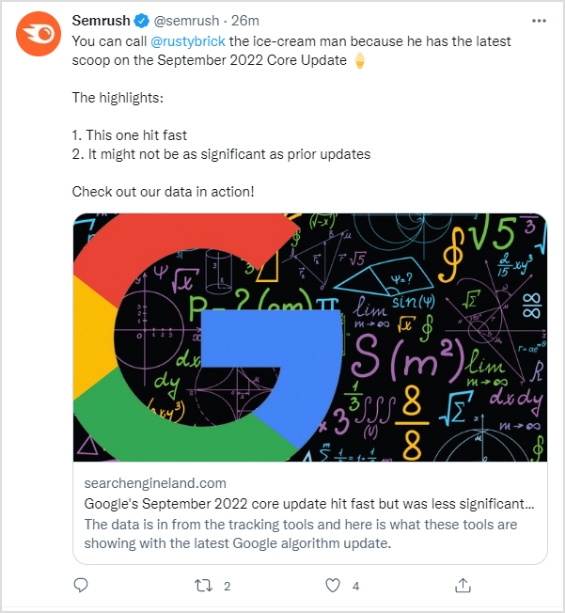
8. Semrush
Semrush is a powerful SEO analysis and rank tracking software used by professional digital marketers around the globe.
Here’s one of their tweets mentioning SEO expert Barry Schwartz.
Why it works
The tweet from Semrush cashed in on the hot trend in the online marketing and SEO fields, which is the September core update 2022.
Semrush mentioned Barry Schwartz in the tweet, which is a fantastic engagement strategy and gets the attention of the audience.
A short and brief call-to-action directs visitors to the article, which makes it a perfect tweet from a social media engagement standpoint.
9. TV Guide
TV Guide is an entertainment portal that discusses TV shows and movies.
Take a look at one of their recent tweets:
Why it works
The tweet has a news update for Netflix fans. It announces the availability of the Witcher: Blood Origin TV series on Netflix.
The tweet is short and sweet with no fluff. Such social media posts get more attention as compared to hefty social media posts.
TV Guide wrote a simple yet attractive call-to-action for driving Twitter followers to the article.
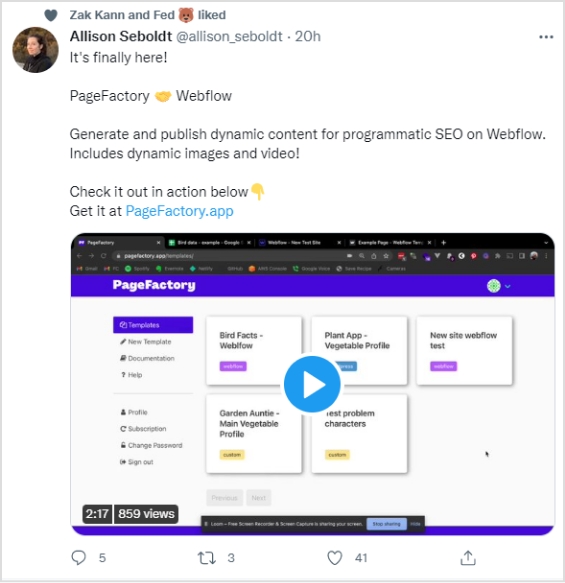
10. PageFactory
Allison Seboldt is the developer of PageFactory – an online content publishing app for content management systems.
Check out her tweet:
Why it works
Allison’s tweet has an attractive text body. She kept it simple yet meaningful. Her tweet was about the announcement of PageFactory’s integration with the Webflow platform.
The second thing that fascinated me was the two-line explanation that summed up the whole tweet.
The call-to-action was clear, concise, and catchy – it pushes the audience to click and check out the website.
The video in the tweet took the announcement to the next level.
Tip: Along with CTA’s, use retargeting ads to retarget people who haven’t visited your website and win back your online customers.
YouTube CTAs
YouTube is the second most popular search engine on the internet. When it comes to call-to-action for social media, YouTube has an excellent real estate to offer for CTAs.
Shorten links and add CTAs to your Youtube links using a Youtube URL shortener.
Let’s take a look at a couple of YouTube influencers who are capitalizing on the call-to-actions on YouTube:
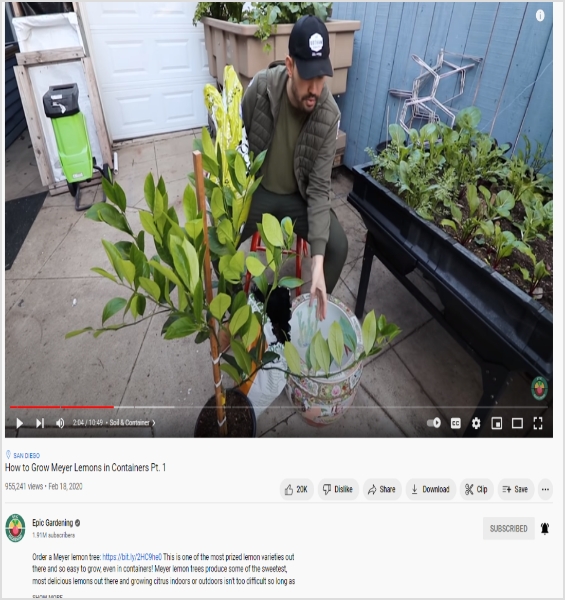
11. Epic Gardening
Epic Gardening is a well-known gardening brand that has a YouTube channel and a website. Let’s see how this gardening brand is using the call-to-actions on social media:
Why it works
Epic Gardening is using the video description for sharing the link. Since the video description is a place to find the detail about the video, the channel has a product link in the video description.
The channel is promoting the lemon plant through the link in the description – the video is also about the same plant. Therefore, relevancy is the key to generating sales.
The product link is in the first line of the video description, which makes the link more prominent.
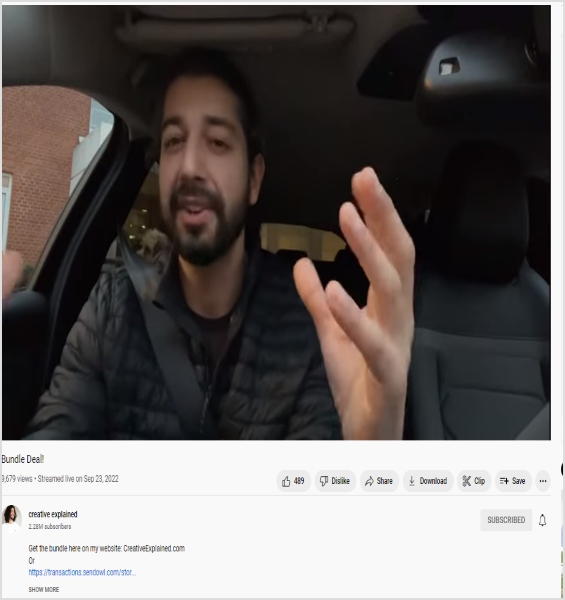
12. Creative Explained
Creative Explained is a YouTube channel around gardening and life hacks made by Armen Adamjan. He is promoting an ebooks bundle deal and using his YouTube video descriptions to sell the bundle deal.
Take a look at the description of one of the recent videos on this channel:
Why it works
Armen mentioned his website address in the very first line to drive people to check out the deal next to the call-to-action.
This YouTube influencer used the naked URL of the bundle deal right below the call-to-action.
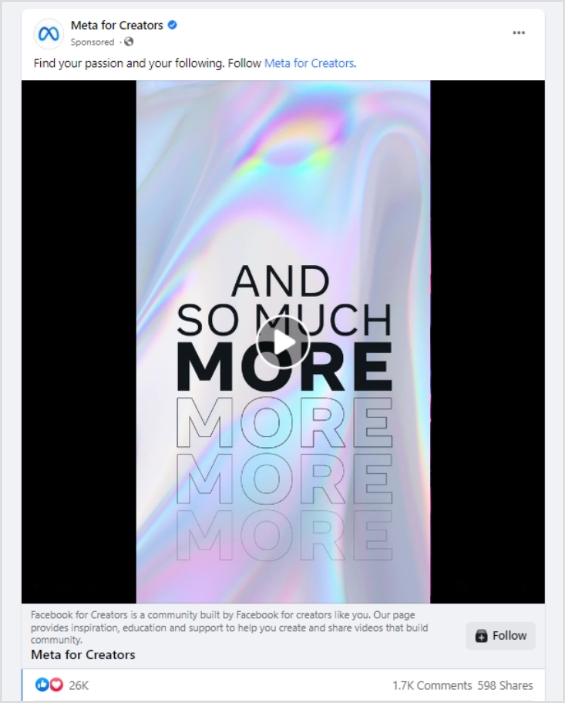
13. Meta for Creators
Meta for Creators is a platform built by Facebook with creators in mind so that they could meet, collaborate, and earn money online.
Check out their Facebook ad:
Why it works
The ad has a short and sweet introductory text, which catches the attention in a split second.
Meta for Creators used the “follow” in the introductory text and mentioned their Facebook page to grow followers.
They used the video to attract, engage, and convert the audience.
The ad also has a “Follow” CTA phrased button at the bottom to ensure that more people follow their Facebook page.
Tip: Use bio links tools for your Instagram, Facebook, TikTok and Twitter to drive more followers and conversions.
14. Compose AI
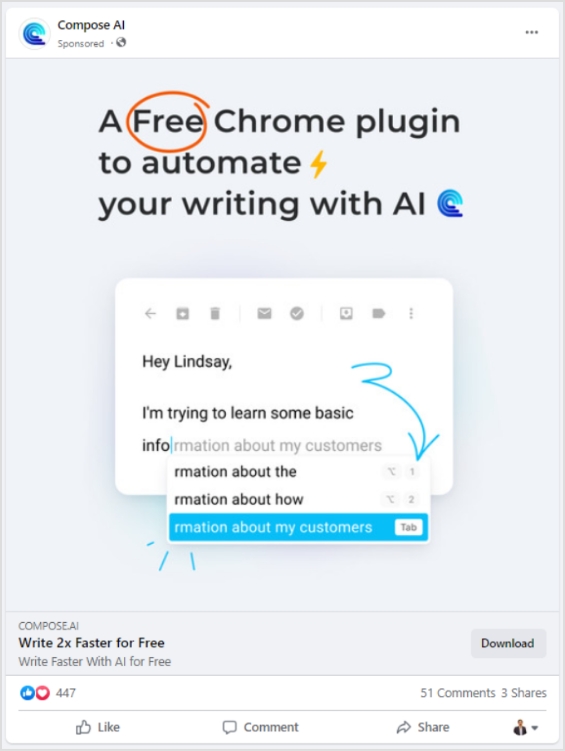
Compose AI is a browser extension that has powerful AI features to write speedy emails and messages. It works across multiple sites but is commonly used for Gmail.
Here’s the Facebook ad for Compose AI:
Why it works
The first and foremost is the circled “free” text in the ad copy, which immediately steals the attention.
The ad image showcases a snippet of how this tool works – it’s an excellent way of enticing the audience to try out the product.
The headline of this Facebook ad says, “Write 2X Faster for Free” – it’s a fantastic one-liner along with the download CTA at the bottom.
Tip: Automate your content publishing using social media management platforms and grow your reach.
15. Circle
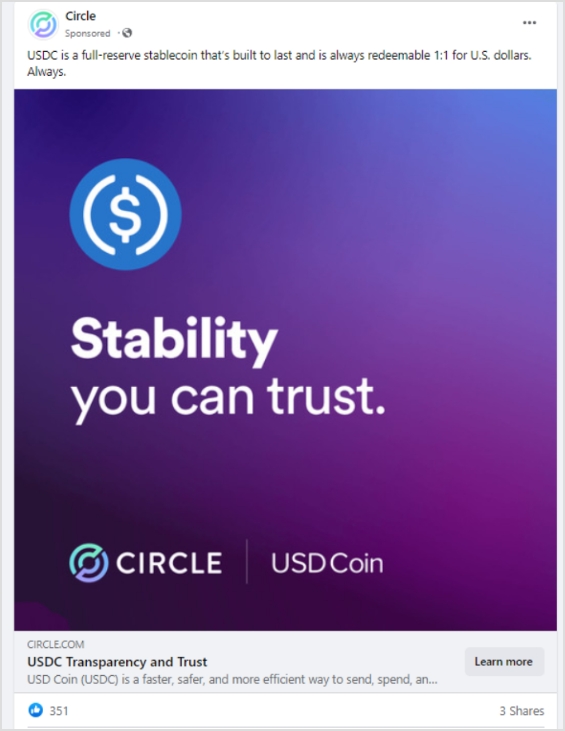
Circle is a financial technology company that helps in financial transactions at a fast-paced using the power of USDC and Euro Coin.
Let’s take a look at their Facebook ad:
Why it works
Circle is cashing in on their ability to deal with USDC cryptocurrency in their Facebook ad.
The copy of the ad emphasizes the trustworthiness of the coin.
They also have a “learn more” CTA at the bottom to drive people to their website for more details.
Replug: How do CTAs work?
Replug is an all-in-one link management tool that creates branded short URLs with the ability to track link performance.You can make your links even more effective by using its short URL generator to create customized, trackable links that enhance your branding and boost click-through rates.
Moreover, the additional features include deep links, custom domains, integrations, bio links, UTM codes, retargeting, and call-to-actions.
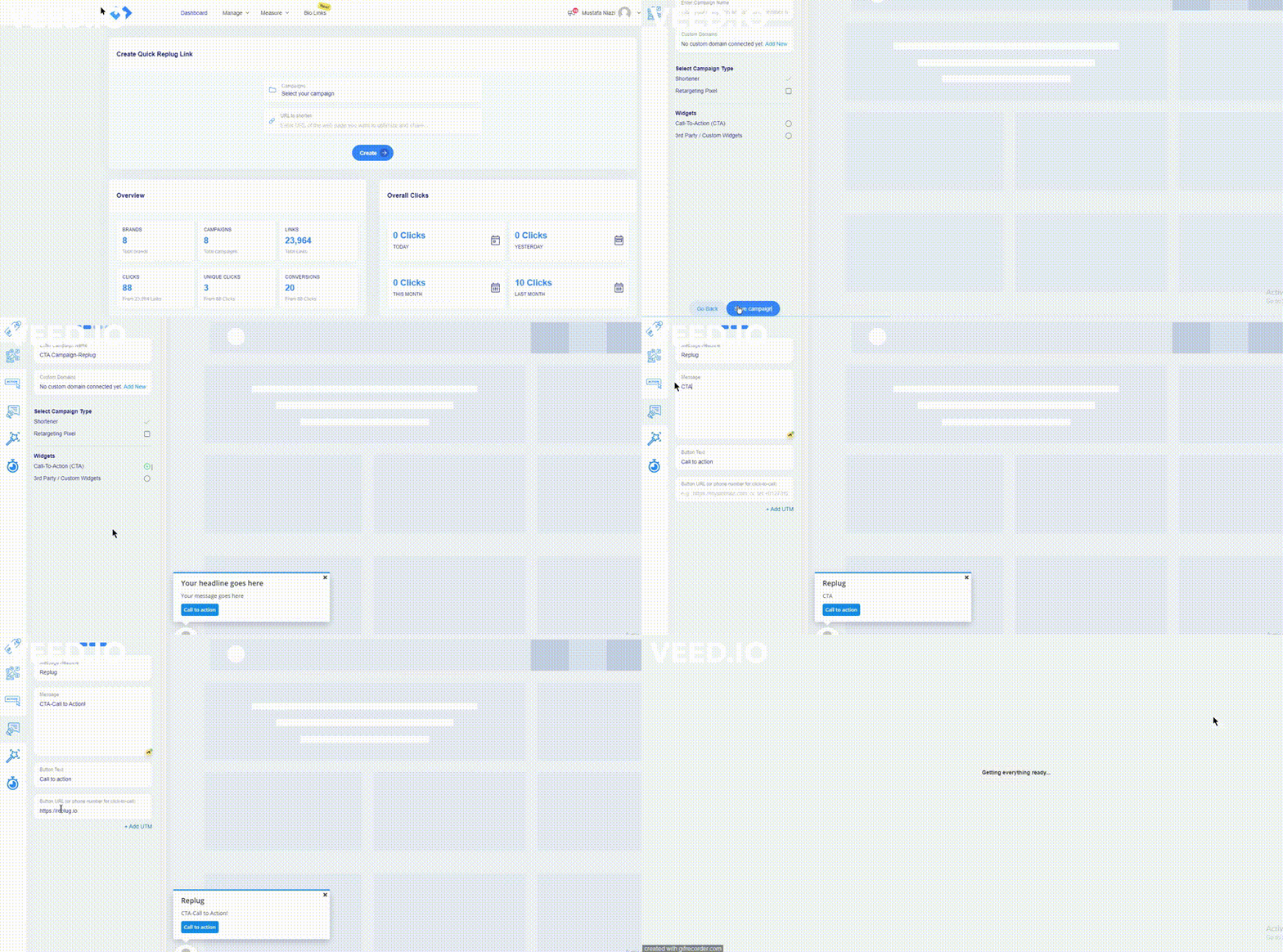
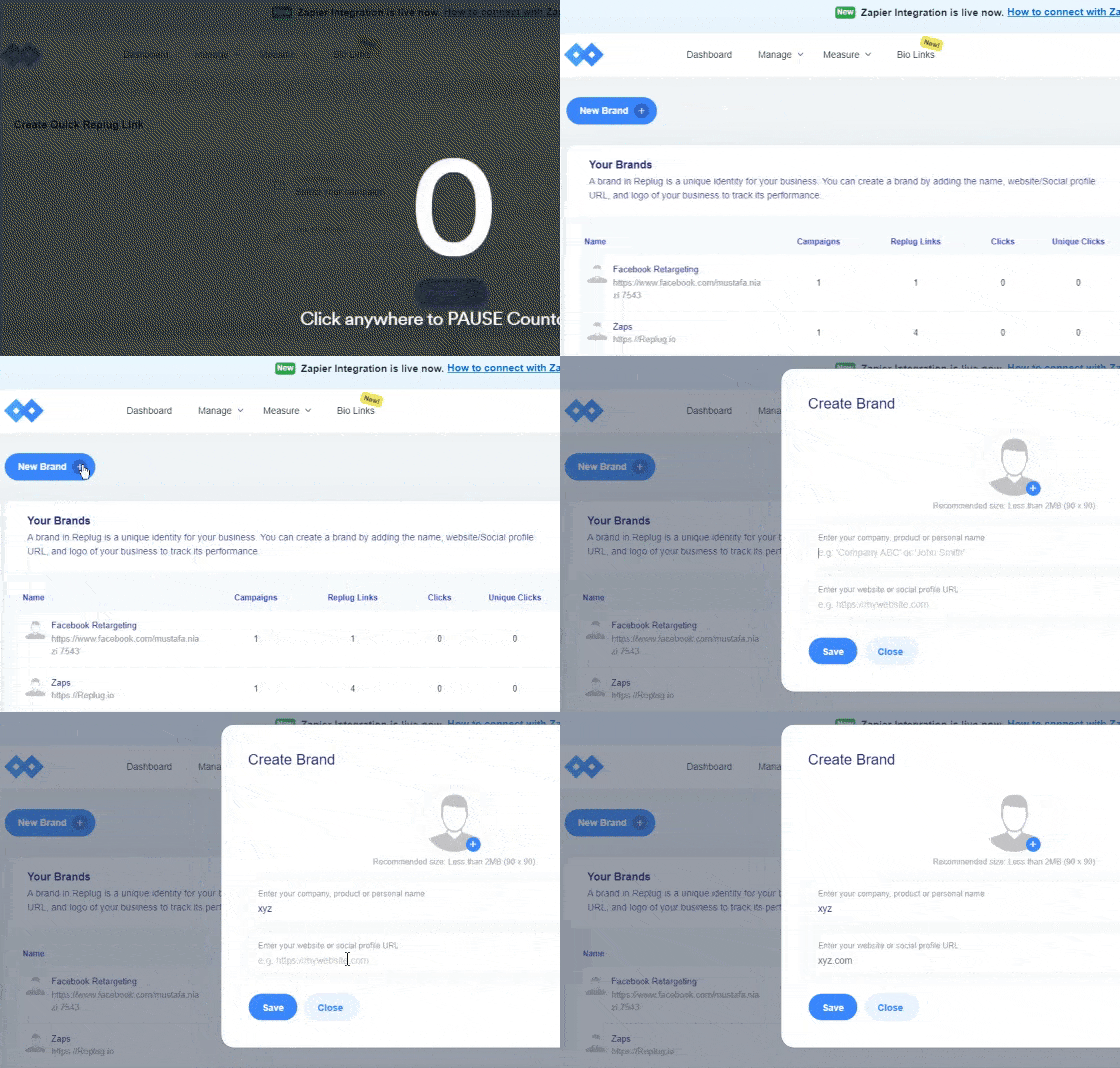
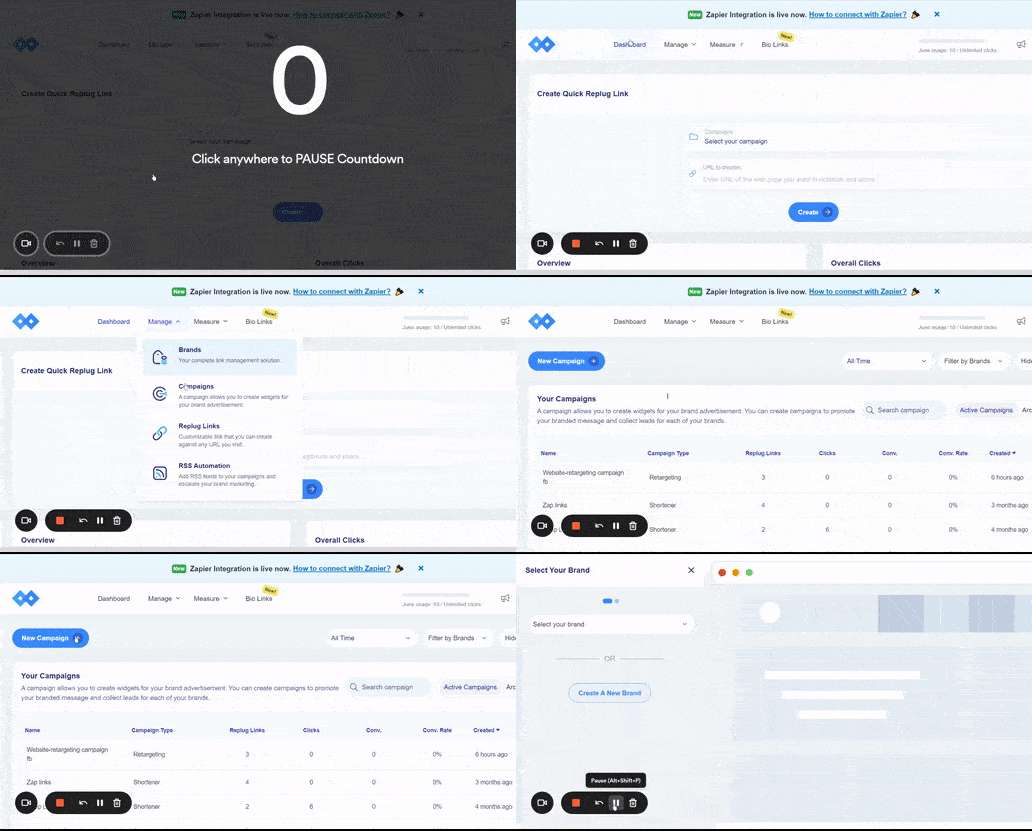
Log in to your Replug account and go to the campaign section. Click on the “New Campaign” button to get started with creating a new campaign.
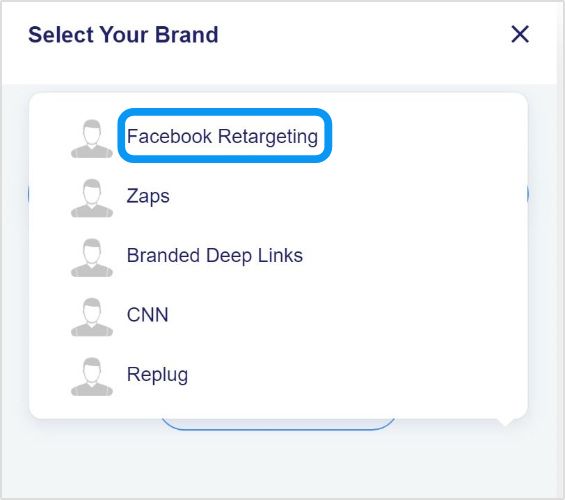
Step #2: Select your brand
The second step is to select the appropriate brand or create a new one just in case. Once you’re done with this, click the “next” button to proceed.
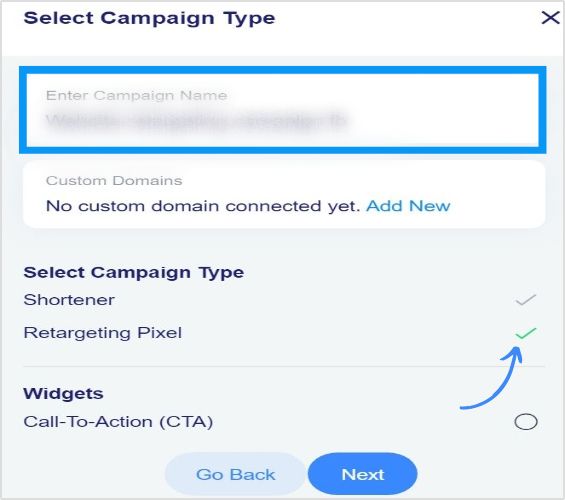
Step #3: Choose the CTA widget
The next up is the selection of the CTA widget. Since you’re creating a call-to-action with Replug, choose the “call-to-action” option from the widgets section.
Step #4: Opt for the CTA type
After selecting the CTA widget, choose the CTA type. You’ll see three options, such as a button, link, and form. Choose the required CTA type to proceed.
Step #5: Add a CTA message
Add a CTA message afterwards. If you opt for the CTA button option in step #4, you’ll have to input the message headline, message body, and button text.
Step #6: Customize the CTA
You can customize the CTA to match your company’s branding if you will.
Step #7: Adjust the appearance
Adjust the popup timing in the appearance settings to make sure that the CTA snippet appears the way you want it to appear.
Final thoughts on call-to-action for social media
Most people think of call-to-action buttons as green or yellow rectangular buttons that say “sign up” or “download” on the websites.
However, a call-to-action doesn’t necessarily mean a button. In fact, it could be a text, image, or emoji that navigates the audience or influences the visitors to take an action.
Since there is cut-throat competition on social media, it’s essential to use every tool available at your disposal to attract, engage, and convert the audience.
The call-to-actions for social media is surely something that could increase post visibility, clickability, and engagement across all social media platforms.
Don’t hesitate to alter your social media strategy by including tailored-made call-to-actions for social media to see how they turned out for you.
Reach out to us on social media and tell us how this tactic worked out for you because if it works, then you could always rinse and repeat.
Frequently asked questions
Here are some burning questions about social media CTAs that need to be answered:
Does every social media post need a call to action?
Social media posts with call-to-actions tend to perform better from an engagement standpoint. However, it’s not absolutely important to infuse a CTA every time you post on social media.
Some social media post types such as useful tips, personal stories, and case studies don’t require call-to-actions. Instead, they have to be authentic, helpful, and engaging.
What is a call to action on TikTok?
The commonly used call-to-action on TikTok is “link in bio” – it’s similar to Instagram. However, it’s a completely different story in the TikTok ads.
What is a call to action on Facebook?
Facebook allows URLs in the caption/introductory text on a post. Most social media users utilize short links on Facebook to drive the audience to their website or a different social media profile. It’s a popular social media tactic to capitalize on the attention.
What is a good call to action on Instagram?
A good call-to-action on Instagram means a CTA that grasps the attention right away. To make such a CTA, make sure that you’re reaching out to the right audience, sharing something relevant with powerful call-to-action such as free, get access, download now, grab it today, avail discount, early access, etc. Instagram link shorteners like Replug help create tracking CTAs and bridge pages that can redirect traffic to any webpage with a shortened URL that helps convert more.
What is a call-to-action hashtag?
It’s a type of hashtag that brands and organizations create that emphasizes taking action or encouraging the followers to perform a specific job. Sometimes, brands start a Twitter trend with a specific hashtag and pay influencers to use that hashtag for promotion.
A tracking URL is a link that contains one or more URL parameters to track, identify, and analyze user activity or behavior on a website.
URL tracking is an engagement strategy used in digital marketing that allows marketers to track the clickability, conversion rate, and call-to-action buttons on the websites.
Have you seen a call-to-action button in an email newsletter or cloaked Amazon affiliate links?
The reason behind it is that e-commerce marketers utilize tracking tools that allow them to add parameters that help track user behavior and also to win back customers through retargeting.
Why is URL tracking important?
URL tracking is an essential process in online marketing that helps marketers in analyzing the overall performance of the URLs. It includes factors such as number of clicks and conversions.
The reason why the URL tracking process is important for bloggers, affiliate marketers, and digital marketers is that it assists users in determining the link performance in an article or on a website page.
It’s nearly impossible to track affiliate sales without URL tracking. Almost every affiliate network or affiliate marketing software uses URL parameters in the product links to track the clicks and conversions.
Digital marketing experts use UTM parameters to track their website visitors and understand the source of the traffic. They set separate UTM parameters for Google ads, Facebook ads, social media, landing pages, etc.
To sum it up, the reason why URL tracking is important in the digital marketing world is that it provides users with insights into link performance, conversion rate, and tracking clicks data.
How does the URL tracking work?
URL tracking is an online marketing strategy that monitors the impact of the marketing campaigns through link performance. Following are the activities that can be tracked with URL tracking:
Clicks
Conversion
Affiliate commissions
Click-through rate
Traffic sources
Leads generated
URL tracking process
Define the purpose of URL tracking:
Bloggers and marketers don’t vaguely start tracking random URLs. Instead, there is always an agenda behind the tracking.
URL selection:
Pinpoint the URLs that you can track over the next few weeks or months.It’s almost impossible to manually track hundreds of thousands of URLs.
Opt for the most suitable UTM parameters:
Opt for the most suitable UTM parameters to insert in the URL to track. A UTM parameter is a tiny code that goes into the URL address to track the sources of website page traffic.
Tracking the UTM parameters:
The last and most important part of the URL tracking process is tracking the UTM parameters. Track UTM parameters through Replug or also can use Google Analytics.
When should I use a tracking URL?
There are several use cases for tracking URLs. Once you have figured out what tracking a URL means, it gets easier to apply the tactics.
Here are different scenarios when you should use a tracking URL:
Record the clicks on the links:
Whenever you want to know how many clicks a link has gotten, the easiest way to track the clicks is by using a tracking URL.
Track sales and conversions:
E-commerce stores and online businesses track sales and conversion through a tracking URL. It usually comes in handy when businesses want to know where the sale or conversion has come from on their website.
Identify the top-performing pages:
When there are multiple sales pages with unique UTM parameters, it’s easier to identify the top-performing sales page.
Study the performance of the links on a site:
There are site-wide links available on every blog or website. Tracking URLs help admins understand the overall link performance on the website.
Allot the affiliate commissions appropriately:
Tracking URLs are imperative in affiliate marketing. No wonder the affiliate product links are long and clunky. The affiliate networks use URL parameters to identify and allot the affiliate sales to the appropriate affiliate account.
Find the traffic sources for a landing page:
When marketers create a new landing page for a new product, they share the landing page link across all channels, such as social media, email newsletter, blog sidebar, etc. Therefore, the source of the website visitor is easily traceable with a tracking URL.
Trace the footprints of the generated leads:
Lead generation means when a visitor signs up for a trial account or downloads a freebie. Marketers insert a UTM parameter that explains where the lead came from.
Types of URL tracking
There are three types of URL tracks that are being used:
1. Auto-tagging
The auto-tagging URL tracking is a URL tracking system that automatically adds relevant slugs to the URL that helps in tracking the data. There is no need to manually add a tag to every URL.
2.Manual tagging for backend systems
Manual tagging for backend systems relies on the ValueTrack parameters. These parameters track information about the ad clicks. Adding these parameters to your ad campaign, the user can track or identify the details such as device, location, and other information about the audience.
3.Manual-tagging
In a manual-tagging system, the user needs to put in the UTM parameters using a URL builder. Usually, the UTM tracking generators have a form and the users need to fill in the blanks using the parameters to generate the tracking URL.
How to track URLs with UTM parameters?
Are you wondering about tracking URLs with UTM parameters?
Here are four steps to follow:
#1. Select the URLs to track
The URL tracking process begins with selecting the URLs to track. Most experts start with choosing the UTM parameters and bypassing step no. 1, which doesn’t make sense. So start with the URL selection and then get to the UTM parameters afterward. Usually, digital marketing experts use UTM parameters on the call-to-action buttons in email newsletters, landing pages, discount offer pages, and Facebook or Google ads.
#2. Choose appropriate UTM parameters
The next up is to choose the suitable UTM parameters to add to your URL. Digital marketers who run Google ads or Facebook ad campaigns know the effectiveness of these UTM parameters. Moreover, a campaign’s URL could have multiple UTM parameters doing their specific jobs. The most common UTM parameters are mentioned below:
utm_source:
To identify the traffic platform sending traffic to a website
utm_medium:
To understand the type of link where it’s being used
utm_campaign:
To specify a certain campaign or promotion
utm_term:
To recognize the search term the brand is targeting
utm_content:
To explain the type of content used to drive website visitors such as an article text or a sidebar banner.
#3. Place the UTM parameter tracking
UTM parameters placement does seem a difficult task, especially for online marketers who have zero experience with HTML or website code editing. However, the manual insertion of the UTM parameter isn’t the only way to do it. There are several UTM tracking code generators available on the market that lets you insert the UTM parameters into a URL. Not only are these UTM generators spot on, but they also make the process faster.
#4. Analyze the results
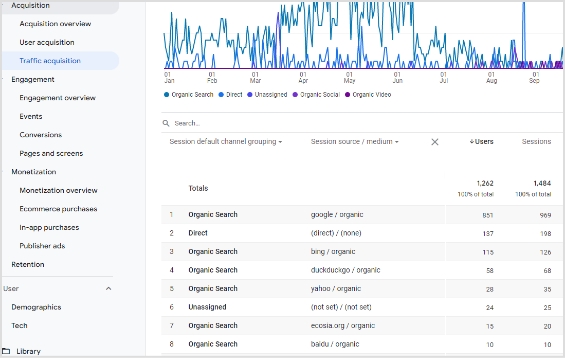
It’s necessary to keep an eye on the campaign results to navigate along the way. To get started with tracking your UTM campaign results, follow these steps: Go to your Google Analytics account for further steps Head over to the Acquisition. Then go to the Traffic Acquisition.
You’ll see all the traffic acquisition channels.
The UTM campaign would reflect under the source/medium section, so look out for that.
How to get a tracking URL?
The UTM parameters are extremely helpful when tracking user behavior during an online campaign. A tracking URL with complete tracking anecdotes could come in handy in social media marketing, online advertising, and email marketing.
Have you ever hovered over a link in an email that includes various terms such as source or medium? The reason is that these are types of UTM parameters that facilitate to track the performance of the email marketing campaigns.
You might wonder, how do I get a tracking URL? Well, you can opt for a decent UTM tracking tool that allows you to add UTM tags to your URLs without making a big deal out of it.
Add UTMs with Replug
Replug is an all-in-one link management platform for creating, managing and tracking vanity URLs for social media, online advertising, or email newsletters. Its custom URL shortener free tool allows users to shorten the long URLs so that they appear clean anywhere you share them.
Moreover, the additional Replug features include UTM, retargeting, bio links, QR generation, mobile deep linking, and more.
Here are four simple steps to get a tracking URL using Replug:
Step 1: Log in to your Replug account Go to the Replug app and log in to your account.
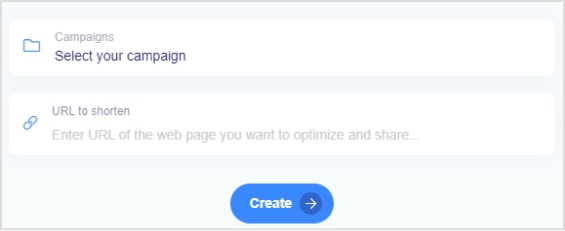
Step 2: Enter the URL to shorten After the login, you’ll see a URL shortening snippet right on the dashboard. Select the Replug campaign and paste the long URL you want to shorten and add UTM parameters to the campaign. If you haven’t created a campaign, you’ll be better off creating one.
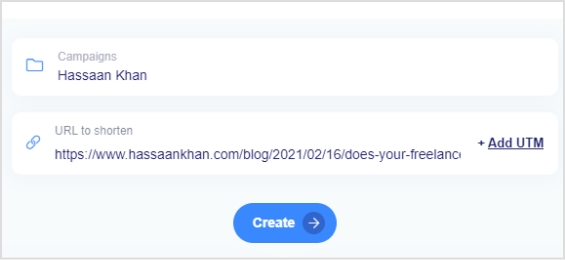
The moment you paste the URL to shorten it, an “Add UTM” CTA button will appear next to the URL.
Step 3: Add UTM parameters
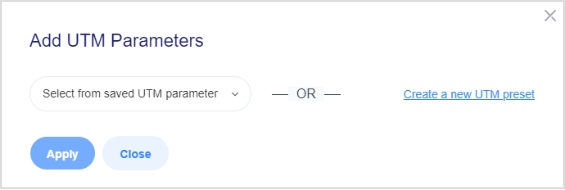
Click on the “Add UTM” CTA button to include the UTM parameters to add the ability to track the URL using Replug.
Once you click that CTA, you’ll be prompted with a UTM screen – you’d have to select an already created UTM or add a new one.
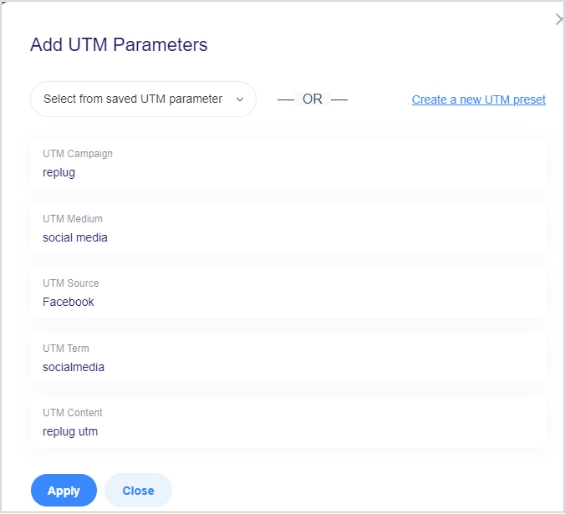
If you choose to create a new UTM code, a form will pop up to fill out.
Go through this step as it’s crucial to add the URL tracking. Once you’re done with adding all required parameters, proceed to the next step.
Step 4: Generate the short URL After you add the parameters, they will appear along with your URL. Proceed further to generate that short URL along with UTM parameters to track link performance.
Start Tracking
Generating a tracking URL is a great tool for online marketers to push sales growth. The fundamentals of a tracking URL will remain the same whether you use Google Analytics or a URL shortener tool. However, the benefits of URL shorteners are still yet to be explored to its maximum potential.
Brands and entrepreneurs use advanced link tracking for branding, building a custom audience, and generating more sales.
Frequently asked questions
Can URL be tracked?
Any URL that contains the tracking parameters can be tracked. The ideal method is to include UTM parameters to track the URL performance.
What is URL tagging?
URL tagging is the process of infusing identifiers to the URLs to attribute the traffic to a specific campaign or event.
What are the essential steps to set up an essential influencer marketing campaign? Influencer marketing campaign steps are to establish goals, identify the right influencers, set strategy, measure results and readjust strategy.
You may have heard the term “influencer marketing” thrown around a lot lately, but what does it mean?
Influencer marketing is about leveraging relationships with key individuals who hold sway over their audience. These people could be bloggers, vloggers, celebrities, or highly engaged customers.
If you want to set up a successful influencer marketing campaign, follow the five essential influencer marketing campaign steps. And, to make managing all those steps easier, consider using a powerful link optimization platform, like most top-notch brands are doing currently.
Read on to find out more!
1. Establish Your Goals
Before you start reaching out to potential influencers, you must first establish your goals. Do you want to increase brand awareness? Drive traffic to your website? Boost sales?
Once you know what you want to achieve, you can start identifying the right influencers to help you reach your goals.
Pro tip: As with any other marketing campaign, these goals must be “Smart”.
Let’s say you want more visitors to your website. A SMART goal would sound like this:
“I want to increase traffic to my website by 10% within the next three months.”
Why is this important?
Having a precise goal helps you establish concrete key performance indicators to track it.
You can pick the right strategy, tools, and messages for this goal.
You can find the right influencers for your purpose.
Take this example:
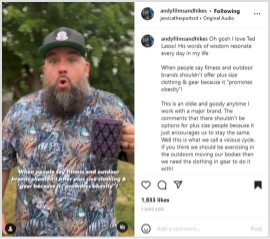
Andy Neal is a plus-size model, hiker, and micro-influencer. His (funny, emotion-filled) posts mostly show him hiking in different environments. Andy has talked at length about his mental health and how hiking outdoors has helped him become more grounded.
As an advocate for health at every size, Andy Neal is the perfect influencer for companies retailing plus-size clothing.
Source: https://www.instagram.com/p/CgumCYsu6TI/
In the post above, you can see Andy touching on a current online controversy: does promoting plus-size gear also mean promoting obesity?
That question raises people’s interest, warming them up as the presented opinion elicits different emotions (intrigue, indignation, approval, and so forth). After reading Andy’s arguments, the followers are presented with a question and the author’s answer:
“Do you have a favorite brand you wear for the trail or the gym or for exercise?
You all know my answer, @columbia1938 !”
After warming his followers up with his diatribe, Andy savvily introduces the brand he’s wearing. That way, after building up people’s approval, they’re more likely to click on the brand mention, thus increasing the traffic.
As such, this post’s primary goal is to raise traffic. The subordinated objective could be increasing sales as people who like the brand’s Instagram posts may also click on its website.
However, raising sales isn’t the main goal because there’s no discount code or direct link to the company’s product pages. You can also notice the perfect fit between the brand and this influencer.
That brings us to the next influencer marketing campaign step.
2. Identify the Right Influencers
Not all influencers are created equal. When looking for people to promote your brand, it’s important to find ones that are a good fit. This means considering factors such as audience, engagement rate, content style, and personal values.
Let’s say you run an eco-friendly fashion brand. You would want to look for influencers who care about sustainability and are likely to resonate with your target audience.
Remember: You also need the right influencers for your goals.
But can you tell if one content creator is better to increase your visibility, boost your sales, or win back old customers?
Yes, and here’s how:
a) Suppose your goal is to increase traffic to your website:
In that case, you’re looking for influencers likely to link to your site in their content. That’s why looking for content creators in your industry would be beneficial.
These people should be popular and know how to push their follower’s emotions. They should create FOMO, desire,trends, and controversy like no other.
That’s exactly what Andy Neal did in the previous example.
b) Or suppose you want more people to buy your product:
In that case, you’ll be looking for influencers with an engaged following on social media, preferably people who have previously talked about similar products.
In this case, you’re looking for more objective influencers. These people can have direct conversations with your audience, convincing them of your product’s true benefits.
One good example, in this case, is Carter Sullivan for the Mogo App. Mogo is an online app that helps people become more financially responsible as they keep track of their expenses. As such, users can get out of debt, save money, and build their financial freedom. If you’re already dealing with financial strain, particularly from existing debt, finding a debt relief service near you can be a practical way to regain control and ease financial stress.
The company’s main audience is Gen Z, Carter Sullivan is an excellent choice. As a Zoomer with some previous debt she got out of by using Mogo, she’s perfect for explaining to people the app’s advantages.
Pro tip: Nano-influencers, although they have smaller audiences, are better at direct contact. That means they can actively engage in conversations about your product with their fans, convincing them to buy your brand.
c) Suppose you want to re-engage old customers that have moved on to a different brand:
In this case, looking for an influencer who’s already talking about your industry but isn’t necessarily promoting any one brand would make sense.
You want an expert in the field who’s identified one key issue with their audience that only your brand can solve.
Here’s a potential example:
Let’s say you’re retailing organic food, but following the latest financial developments, your products have become too expensive for some of your audience. In this case, you can focus on one of their most poignant needs.
And studies show that people often buy products if they feel they’remaking a difference. This is especially valid for Gen Z and Millennials, but also Gen X.
So, you could partner with a local influencer that explains the importance of supporting local producers in troubled times. Alternatively, you could partner with a content creator that promotes eco-friendly, locally sourced brands.
Focusing on health and supporting the environment may bring back some old customers.
However, the premise we started from was the price being the central issue. To solve this, you can consider adding a discount or exclusive access to some products through your content creators.
It’s all about strategy. We’ll talk about that below, but for now, here are just a few reminders before we get started:
Some influencers may be fake:
To avoid being duped, use a fake influencer checker.
Use an engagement rate calculator:
Regardless of your goals, you want to ensure your content creators hold sway over your audience. So, simply having a large following isn’t enough; you want to make sure those followers are involved (quality comments and shares are just a few examples).
Use the proper channels to find influencers:
From Google to hashtag searches on social media, geolocation searches, and dedicated platforms or AI software – the world wide web is your oyster. You can also use your professional network, search through your customer & supplier databases, or Google your brand mentions. But all that may take a lot of time. If you’ve never worked with content creators, your best bet is contacting an influencer marketing agency. The best ones will work with you tightly instead of ignoring your plans, offering comprehensive services. That way, you can learn the ropes and adjust the process to your needs seamlessly.
Before boarding your influencers, create foolproof contracts:
Outline all terms, rights, and obligations for both parties. That way, you can ensure your influencers deliver the promised content without delays orsocial media risks.
3. Define Your Influencer Marketing Strategy
Now that you know your goals and who the right influencers are, it’s time to start planning for your influencer marketing campaign.
Remember: There arevarious ways to collaborate with an influencer, but not all of them will be a good fit for your brand. The key is to find the one that best aligns with your goals.
Some standard options include:
Shout-outs:
A mention of your brand on social media, in a blog post, vlog, or even in a podcast. The goal is to increase visibility, driving more traffic to your website. The influencer may or may not receive compensation for this.
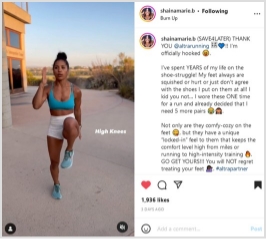
Shaina, a creative fitness and yoga teacher, offers a good example. She usually posts Instagram and TikTok videos showing quick (but muscle-torching) routines, thus promoting her app. In this post, however, she mentions Altra Running using emphatic words: “officially hooked,” “shoe struggle,” “ONE time,” etc. You can also notice the build-up and the hyperboles paired with the objective product description. The CTA “Go get yours” written in capital letters and followed by three exclamation marks is very convincing because:
It’s the natural continuation of the previous points.
It’s nicely fitted between an accurate product description and the workout’s structure details. As such, Marie’s CTA pops out between two less intense arguments with a rhetorical force that would make Aristotle proud.
The content creator uses and reviews your product on their channels, driving awareness and teaching their audience about its features and benefits. These videos work great for products that are hard to explain with words alone or if you’re targeting tech-savvy audiences that prefer seeing a product in action before they buy it.
Tutorials & how-to’s:
The influencer uses your product to create content that’s helpful to their audience. For example, a cooking influencer could use your kitchen supplies to show their audience how to cook a specific dish. These videos are great when you want to position your product as the solution to a problem your target audience is facing. It’s also what Carter Sullivan did for Mogo in the above example.
Contests & giveaways:
The influencer runs a game on their channels, with your products or services as prizes. This is a great way to increase engagement and get people talking about your brand.
Sponsored posts:
The influencer promotes your brand on their channels in a paid partnership. These can be in the form of written blog posts, social media posts, or even videos.
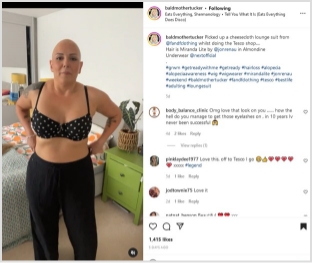
In the post below, Jo promotes three products: a wig, underwear, and a new pantsuit – all from three different brands. What makes this sponsored post different?
You can see Jo using the products, showing how they fit her specific body shape and image.
Source: https://www.instagram.com/p/Cgqz5o4Ar4P/
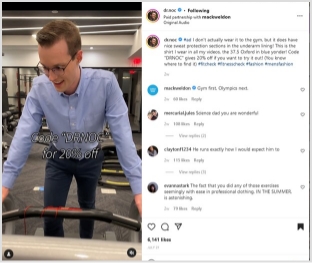
You can see a nice contrast with the following example. Dr. Noc is a Ph.D. immunologist. Both his TikTok and Instagram clips aim to educate a large young audience on different science and medicine-related topics.
This is a great way to increase engagement and get people talking about your brand, leveraging user-generated content on TikTok or Instagram.
Bonus: Dr. Noc is always dressed up, wearing a shirt and a nice pair of pants.
That’s why this clip below is so catchy.
Source: https://www.instagram.com/p/CgRxCIRg9bp/
People can get a kick from seeing Dr. Noc running on the treadmill and lifting weights in his Mark Weldon shirt and pants. Besides, the video is the visual representation of a pun; Dr. Noc asks his followers if they ever get tired in the gym, saying that it never happens to him because he’s always “professionally attired.”
Why it works:
Humor is an effective rhetorical strategy because it suspends critical analysis. On this permeable ground, the 20% discount code is the final push people need to access the Mark Weldon website and buy from it.
Remember: Both these videos use emotion and strategies that fit the content creators’ personalities. The result is they don’t seem sales even if they’re sponsored posts.
Product placement:
The influencer features your product prominently in their content without explicitly talking about it or promoting it. This is a great way to subtly get your product in front of a new audience.
4. Measure the results of your campaign
There’s no point in running an influencer marketing campaign if you’re not going tomeasure the results. After all, you need to know what’s working and what’s not to adjust your strategy accordingly.
Some of the most important metrics to track include:
Reach:How many people saw your campaign?
Engagement:How many people engaged with your campaign (liked, commented, shared)?
Website traffic: How much traffic did your website get due to the campaign? Note: You needURL tracking for this. Consider using a trustworthy URL shortener to get this job done efficiently.
Sales: How many sales can be attributed to the campaign? (Follow your discount codes andUTM links)
You can use Google Analytics, social media analytics tools like Replug or ContentStudio, or even a simple spreadsheet to track these metrics. Just make sure to monitor progress over time to see whether your campaign is successful.
Remember: The indicators above will differ according to your goals. Even if all companies eventually want to increase their ROI, your objective, for now, can be a higher reach without emphasizing sales, traffic, or engagement.
Warning:Don’t become complacent!
If your audience is warmed up enough to buy your products, don’t create yet another engagement campaign. That’s another reason why working with aninfluencer marketing agency is essential at first; an experienced agency will be able to guide you outside your comfort zone, advising you wisely according to your current stats.
5. Adjust your strategy as needed
Lastly, once you’ve measured your campaign results, the next step is to make some adjustments to your influencer marketing campaign. If something isn’t working, don’t be afraid to change it.
For example, suppose you’re not getting the reach you wanted.
In that case, you might need to consider working with bigger-scale influencers, diversifying your channels, or including social media ads into the mix. If engagement is low, you might need to adjust your content or offer more incentives for people to engage.
The important thing is to be flexible and willing to change things up if necessary.
Influencer marketing is an ever-evolving field, and what works today might not work tomorrow. The only way to find out is to experiment and see what works best for your brand.
Wrap Up
Influencer marketing can be a great way to reach new audiences and promote your products or services. Following the steps above, you can set up a solid campaign to help you achieve your business goals.
Frequently asked questions
What is an influencer strategy?
It is a strategy that brand use and collaborate with other influencers to promote their brand services and products.
What are the 5 characteristics of a good influencer?
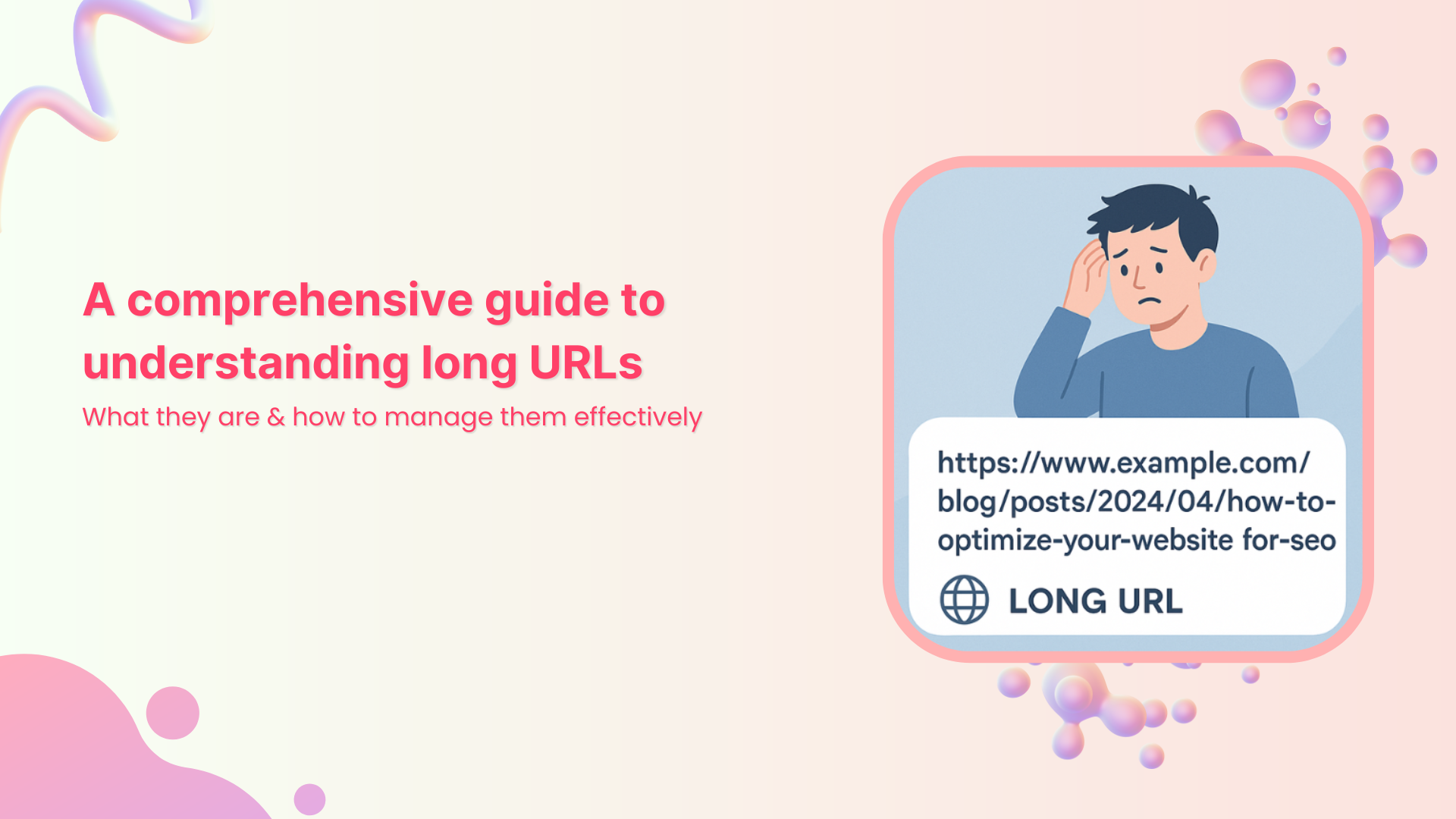
Ever come across a web page with a confusing, never-ending web address (link) filled with random letters, numbers, and symbols? That’s what we call a “long URL link”, and it’s more common than you think.
The problem is, such messy URLs not only look unprofessional but can also hurt your website’s trust and click-through rates. Even worse, they can affect how search engines understand and rank your pages, making your content less SEO-friendly.
The good news?
Managing and optimizing URLs isn’t as complicated as it sounds. With the right understanding and tools, you can turn those long, cluttered links into short, clean, and effective ones that support both branding and SEO.
Let’s start by breaking down the basics, i.e., a long URL’s definition.
What are long URLs?
A long URL (Uniform Resource Locator) is simply the full-length web address that points to a specific page or resource on the internet. It is the kind of link that goes on and on instead of being short and tidy.
Here are some key features of such URLs:
Often more than 100 characters long, because they include a detailed path plus extra parameters.
May contain query strings or UTM codes (e.g., ?utm_source=newsletter&campaign=fall2025) which help with tracking or dynamically generating content.
Can clearly reflect the page’s structure and content (folders, categories, keywords), which can be helpful for transparency.
Can be harder to share, remember, or type manually. It may appear cluttered and less user-friendly.
For SEO purposes, they may include meaningful keywords (good). But if too long, long links impact readability for users and possibly crawling/indexing efficiency.
With that in mind, let’s move on and explore what exactly makes up a long URL, and why it matters when you’re trying to keep your links clean and effective.
Understanding the structure of long URLs
When you look at a long URL link, it’s really just a combination of several pieces stacked together. Knowing what each piece does makes it a lot easier to spot where things can go wrong or how you can clean them up.
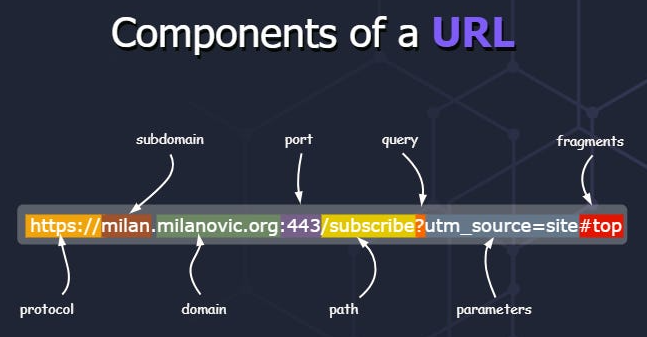
Major components of a long URL:
Protocol: This is the beginning part, like http:// or https://, which tells the browser how to communicate with the server.
Host: This indicates where the resource lives. It often breaks down into three sub-parts:
Subdomain: A prefix before the domain (e.g., www. or blog.) that may point to a specific section of the site.
Domain name: The central part that identifies the website, like example in example.com.
Top-level domain (TLD): The suffix, like .com, .org, .edu, which gives context about the site.
Port: Less common in everyday URLs, but it’s the number (like :80 or :443) specifying which service on the host to talk to.
Path: This follows the host (and optional port) and shows the folder or file structure on the website. It is basically where the resource lives within the site.
Query string: A question mark (?) followed by key-value pairs (like ?utm_source=newsletter&campaign=fall) that provide extra instructions or data to the page.
Parameters: These are often embedded in the query string and act as modifiers, e.g., page=2, sort=price_low_to_high, telling the server how to tweak the response.
Fragment: After a #, this part points to a specific section inside the page (like an anchor) rather than a separate resource.
With all these components in mind, you’ll be better equipped to dissect a long URL link. Moreover, it will be much easier to decide which parts are necessary and which might just be adding clutter.
Real-world examples of long URLs
Now, let’s look at some practical long URL examples to see how they appear in action. This will surely help you spot what makes a URL overly long or messy and why you might want to clean them up at times.
This is a clear case where tracking parameters and referral codes are appended, making the link long and packed with extras.
These examples give you a feel for how long URLs show up online, ranging from domain length, deep paths, heavy filters, to tracking parameters.
Significant role of long URLs in today’s online world
Long URLs might seem awkward at first glance, but when used intentionally, they can carry weight in how both users and search engines perceive your content.
Provide detailed context for both users & search engines: A clear, meaningful URL can act almost like a mini-headline. It tells a visitor what the page is about and makes the address easier to understand. A well-built URL becomes what some call a “vanity URL” or a simplified version of a link someone might remember or share.
Improve search engine optimization (SEO): When you design an SEO-friendly URL, you make it easier for search engines to grasp page relevance and for users to feel confident clicking. Although the overall impact of keywords in URLs is small, clarity and readability still help.
Reflect a website’s structure: A unique URL that follows the logical folders of your site tells both users and bots how pages relate to one another. It gives a sense of order, like a map of your site.
Improved security: Using proper URL practices, like avoiding complex, cryptic strings and sticking with HTTPS, helps instill trust. Clean, predictable URLs reduce the chance of confusion or manipulation (which is good for your site’s reputation).
Keep in mind: Long URL doesn’t automatically mean “bad”. What matters is whether the URL is meaningful, readable, and logically structured. A custom URL crafted with care can serve your site well.
Common causes of long URLs: Key factors that contribute
When you spot a stretched-out URL, it’s usually not just random words or letters. There are specific factors behind the spaghetti-like addresses. By knowing them, you’ll see exactly what makes an overall URL balloon. Plus, how to keep your links tidy, even when you’re dealing with lots of data or advanced site features.
Use of tracking codes: Marketers often rely on tracking codes (e.g., ?utm_source=…) so they can follow where clicks came from. These add to the link’s length and add extra URL parameters that don’t necessarily help the user.
Non-Latin characters: When URLs contain characters from other scripts (like Cyrillic, Chinese, Arabic), they often get encoded into long sequences that pad out the address and make it harder to read.
Complex website structures with multiple sub-folders: If your site’s paths are deep, for example, /category/subcategory/subsubcategory/product/, you’ll end up with a very long link even before adding parameters.
Parameters for filters or search queries: E-commerce and dynamic sites typically let users filter or sort via the URL (e.g., ?brand=Sony&color=black&page=5). These parameters expand the link considerably.
Dynamic content: When pages are generated on-the-fly, the system may include long IDs, session tokens, or variables in the URL. This ultimately results in unique long URLs for each user or context.
In-page anchors: Links that point to a specific section of a page have a fragment (after #), and while this isn’t always a huge contributor, when combined with other factors, it adds to the URL bulk.
Website-generated IDs: Some content management systems (CMS) or platforms embed long numeric or alphanumeric IDs in the URL (e.g., /page/12345cde6789/). This expands the URL without adding immediately readable meaning.
CMS settings: Sometimes the default settings in a CMS build pages with full date stamps, author names, categories, and tags in the URL path. Each of these pieces makes the URL longer.
By recognizing these causes, you’ll be in a much better position to streamline your links, thus making them more user-friendly and easier for humans and search engines to handle.
Advantages & disadvantages of long URLs
When you’re dealing with long URLs, there’s a balance of good and bad to keep in mind. On one hand, they can offer detail and control; on the other, they may create hurdles for sharing and perception.
Let’s break down the pros and cons in a clear, friendly way.
Pros of long URLs
Informative + explanatory
A long URL often tells you exactly where you are on a site, down through subfolders, with context about the content, which helps users feel oriented.
Provides descriptive keywords for SEO
The primary keyword in the URL can make it more transparent for both humans and machines. Quite a suitable practice for a naturally structured, SEO-friendly URL.
Offers full control over the link
You can add meaningful paths, sub-folders, versioning, categories, etc. You’re not stuck with a generic link, so you tailor the URL to your site’s logic.
Shows a clear site’s hierarchy
When you can see site.com/blog/2025/october/guide, you understand where you are in the site structure. Such long URLs are helpful for both users and site admins.
Serves brilliant built-in tracking
With longer URLs, you can embed parameters, campaign UTM codes, or referral identifiers (thinking of a sort of vanity URL for marketing), which help with analytics and tracking without needing redirects.
Cons of long URLs
Difficult to share & remember
If a URL is long and complex, typing it out, recalling it, or passing it verbally becomes a pain, which lowers its shareability.
Poor readability & space constraints
On mobile screens, in print or social posts, long URLs may get truncated or wrap badly, making them less readable.
Prone to mistakes & typos
The more characters, folders, and parameters, the higher the chance someone mistypes or breaks the link accidentally.
A link with a long string of random numbers or parameters may trigger distrust. Users mostly hesitate to click on such links.
Potentially lower click-through rates (CTR)
Because a messy link may feel less “safe” or “clean,” people might skip it intentionally. This affects how many clicks you get.
Security vulnerability
Complex long URLs with many parameters or tracking codes may expose session IDs, tokens, or sensitive data, which can become a risk vector.
Substandard for print materials
If you’re publishing in a magazine, flyer, or business card, a very long URL is impractical for someone to type manually. This often results in broken links.
Potential for URL fragmentation & duplication
Long URLs with multiple query parameters or tracking codes can create many variations of essentially the same page. This can confuse indexing, canonicalization, and duplicate content issues.
In short: Long URLs have their place, especially when you need detail, structure, and tracking. However, they’re not always the best choice for every use case. In the next section, we’ll explore how to manage those long URLs so you can get the benefits without the drawbacks.
Effective strategies for handling long URLs
Optimizing long URLs doesn’t mean you have to strip away meaning or structure. What matters is making them clean, readable, and valuable for your visitors and search engines alike.
Tips for customizing long URLs: Get clean & readable links
Here are some practical tips to help you personalize and optimize your links without losing their value.
Use descriptive keywords: Choose words that clearly reflect the page content (for example, “/best-bluetooth-headphones” instead of “/item/12345”). This makes your link understandable to humans and supports an SEO-friendly URL.
Avoid special characters & unnecessary parameters: Stick with hyphens to separate words, use lowercase letters, and remove excessive query strings or variables that don’t add meaningful context.
Keep it short, but concise: A shorter link is easier to share and remember. You don’t need to add in every detail, just enough to signal what the page is about.
Remove any stop words present: Words like “and”, “the”, “for”, “of” often clutter the URL without adding value. Trimming these can help keep your link tidy.
Redirect old links appropriately: If you change a URL, ensure the old one redirects (using a 301 redirect) to the new one to avoid losing visitors or confusing search engines.
Implement URL rewriting techniques: Use server or CMS rewriting rules to convert long, messy links into cleaner ones (for example, transforming “/product.php?id=2345” into “/products/widget-model-2345”). Just make sure the redirects are appropriately handled.
Using these strategies will help you treat your URLs as part of the overall user experience and SEO effort, not just as something auto-generated.
How to shorten a long URL with Replug?
The most innovative and smart way to shorten a long URL is by using a reliable short link generator, and Replug is one of the best tools for the job.
Unlike basic URL shorteners available online at present, Replug is a full-fledged link management platform designed for marketers, agencies, and businesses that need more than just shorter links.
Here’s how to convert a long URL to a short URL with Replug in just four simple steps.
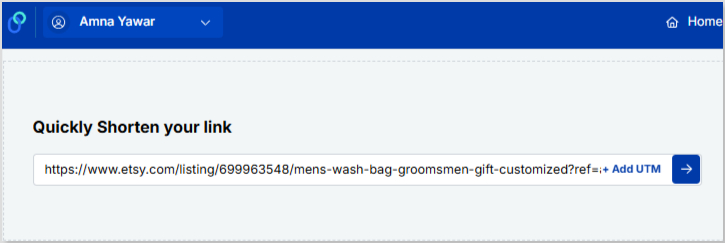
Once logged in successfully, paste your long URL or link in the bar under “Quickly Shorten your link”. After that, click on the blue arrow.
Step #3: Create short URL
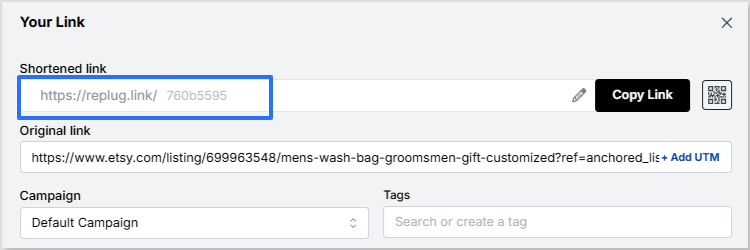
Now, Replug will automatically generate a short link for your long URL within seconds.
Note: Here, you can also add UTM parameters to your short link to track the performance of that link.
Step #4: Save & share
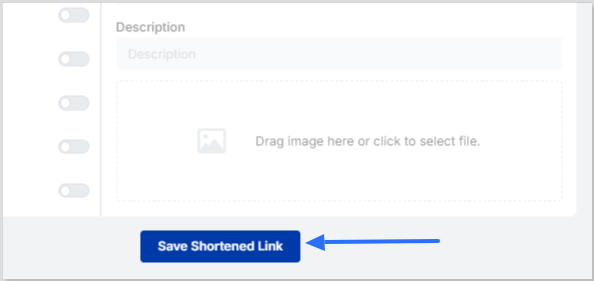
Finally, save your shortened link. Now your link is ready to share anywhere on Instagram, Discord, or in an email campaign, etc.
Maximize marketing ROI
by transforming ordinary URLs into branded short links that convert.
Try Replug for free
Summing up!
To wrap things up, long URLs aren’t always a bad idea. They can be informative, detailed, and great for structure and SEO when handled right. But if they get too messy, they can quickly become a headache for users and marketers alike.
The key is finding the right balance between clarity and simplicity. And if you’re looking for an easy way to turn those long, cluttered links into clean, shareable ones, give Replug a must-try.
It’s one of the best tools out there for converting long URLs into short, branded, and trackable links in seconds!
Frequently asked questions
What’s the longest URL?
The longest recorded URL was reportedly over 2,000 characters, used as a marketing stunt by Hotels.com in 2018.
How long URLs can be?
Technically, there’s no strict global cap on how long a URL can be, but practical limits exist. For instance, old versions of Internet Explorer capped at around 2,083 characters. Some modern browsers can handle tens of thousands of characters, but very long URLs may still cause issues.
How to fix long links?
Use a free long URL shortener like Replug. Just paste the long link and get a short one back. If it’s your site, clean up the structure by:
– cutting extra parameters, – using simpler paths, – using meaningful slugs, – implementing 301 redirects from old links, – and employing URL rewriting rules in your CMS.
Why is there a need to compress a long URL?
Long URLs can break in emails or texts, look messy, and be hard to share or remember. Compressing them makes these links cleaner, easier to share, and often adds tracking to see how many clicks they get. A shorter, tidy link improves readability, helps avoid errors when copying or typing, and enhances user trust, especially in print or social contexts.
Is a long or short URL better?
Short URLs win for ease of use. They’re simpler to share, read, and type, encouraging the overall experience. For SEO, length doesn’t matter much, but including keywords helps either way. Just aim for clear and relevant over super long.
How should I handle a very long URL?
Shorten it with tools like Replug for sharing, or display a truncated version with “…” on your site while keeping the full link active. If you control the site, redirect old long ones to shorter versions with 301 redirects to keep things smooth. Also, ensure canonicalization to avoid duplication and confusion.
How long URLs impact SEO and user experience?
Long URLs can frustrate users by being tough to read, share, or type, hurting engagement and trust. On SEO, they don’t directly lower rankings, but shorter ones with keywords make it easier for search engines to grasp content and improve clicks.
How to make a long URL shorter?
You can easily change a long URL to a short one using a URL-shortening service like Replug or similar. These services map your long URL to a compact redirect link, hassle-free. You can also manually simplify your link by removing unnecessary parameters and using URL rewriting so that the link is more readable.
What are the future trends and developments in long URLs?
Trends lean toward simpler, secure URLs with HTTPS and fewer parameters for better mobile use and speed. We might see more AI-driven shortening and dynamic links, focusing on clean structures that enhance accessibility without losing info.
What are the best use cases of long URLs?
Here are some top long URL use cases:
– They’re great for detailed pages like blog posts, where including full titles or keywords boosts SEO by describing content clearly. – Such links are valuable for e-commerce or apps for passing specific data via parameters, like search filters or tracking codes. – They’re helpful when you need to reflect deep site structure, include filtering parameters for dynamic pages, or embed tracking codes for detailed analytics.
It is funny how very few people know about content remarketing. Some confuse it with usual content marketing, but it is actually a separate technique that has its own aims and practices involved.
Don’t worry, you are on the right foot steps as this walk-through and guide is what you need to begin with content remarketing.
What is content remarketing?
Content remarketing is a strategy of targeting to bring back and re-engaging with people who have already visited your website or have been past customers of your brand.
What is the goal of remarketing?
With this strategy, marketers strive to capture the attention of your site’s visitors to make them come back to your website and complete an action they didn’t make during their first visit. This can be anything from purchasing your product to subscribing to your newsletter. Content remarketing is like that second chance you needed desperately.
What’s the difference between remarketing and retargeting?
The two terms can confuse many as they are very interrelated.
In general, the goals of both are focused on targeting and converting potential clients that have bounced from your socials or website.
But what really makes remarketing different from retargeting?
In the beginning, remarketing was thought off as sending just email campaigns to re-engage with customers to inform about discounts, trial expiry or to follow up potential clients, whereas retargeting involved paid advertising.
However, with the evolution of internet and social media both have evolved though the goal is still the same.
Retargeting still involves paid advertising to target and convert potential clients. While, remarketing involves reaching out or following up to past customers or potential clients through various channels that may be Instagram, Facebook, Email, SMS or Whatsapp etc.
Generally, the key medium of remarketing strategy is still email. Both strategies can be used in conjunction, where emails are sent with a paid advertisement.
Further in-depth study of the both terms makes one thing clear that they are not the same.
According to Neil Patel, a famous digital marketing expert,
“I see remarketing more as an umbrella term for marketing to the same prospect multiple times, whereas retargeting really is targeting online ads at the same traffic again and again.”
So it’s safe to say that retargeting ads and remarketing emails are actually two sides of the same coin. However, retargeting is more of a subset of remarketing which only targets website traffic, while remarketing is more concerned with getting back to past visitors using personalized content mostly confined to emails. The image below will develop a better understanding of the subject.
Now that the difference between the two is clear. Let’s move on further.
What are the different types of remarketing?
Remarketing is categorized into 5 types. The five types are
Standard Remarketing
Email Remarketing
Dynamic Remarketing
Video Remarketing
Remarketing Lists for Search Ads
When to use remarketing?
Use remarketing strategy for
Up-selling products and services
Cross selling
Special offers
Re-engagement campaigns
Customer support campaigns
Inventory update campaigns
Follow ups such as cart abandonment or trial expiry etc.
The right tools and channels for content remarketing
You can create personalized content using these different channels that can be used for remarketing are
Facebook ads
It’s an analytics tool by Facebook containing a pixel code that can be put on your website. A pixel is a small box that is placed on a webpage. When someone visits the page, the pixel is able to collect information about the visitor. This information can then be used by other websites to target that person with ads. In remarketing, an advertiser places a pixel on their website. When a user visits the site, the pixel is able to track everything from their web browser’s cookie to their IP address. This data is then used to track people who have visited other websites or viewed certain content. The advertiser can then use this information to show them relevant ads across multiple websites. For example, if a user has visited Amazon and viewed an item for sale, an ad for the same product could be shown on Facebook which would drive more purchases for the advertiser.
The Google Display Network is a web-based advertising network run by Google. The network allows advertisers to place text, image, video and Native ad units on websites and mobile apps.
One of the best things about using GDN for remarketing is that it gives you a lot of reaches. You will be able to find your tagged site visitors on the network several times per day across many different sites. In general, you will be able to connect with the people you tagged several times per month.
The first step in remarketing is to create an audience of users that you will be remarketing too. This can include people who visited specific pages on your website or read your blog, but you will have to group
them into separate audiences depending on your goals.
By grouping your tagged site visitors into audiences, you will be able to reach out to only certain people and persuade them to come back to you.
Another benefit of grouping your audience is that you can bid more aggressively. Consequently, this will lead to more impressions and higher ad positions. Some pages on your website such as the pricing or product pages are way more valuable than your blog. By selecting those who visited specifically your product and pricing pages, you can write follow up mails to them.
In order to define your audience, create a new remarketing list on GDN and define which website visitors you want to include and which you want to exclude. Don’t worry about cookies and such, because Google will take care of them itself.
Yet another great idea is to group your blog audience by the posts they read. So, for example, if you have articles on three different topics, create three remarketing lists for each of these topics’ visitors.
Once you have your remarketing lists set up, you must decide on your audience membership duration. In remarketing, this refers to the number of days you follow a user around. This means that setting your audience membership duration to 30 days will make your site visitors see your ads for, you guessed it, 30 days.
The problem with deciding on the “right” audience member duration is that there is such a fatigue which results in overly aggressive remarketing. Many experts believe that being too “creepy” with your ads may result in the loss of ROI of your campaigns or can even damage your brand. This is why so many marketers advocate for shortening audience membership duration, even though the reality seems to be different.
Fortunately, remarketing has shown to be way more effective. In fact, they stay effective even after ad fatigue starts setting in and viewers are more likely to engage with remarketing campaigns.
This brings us to the fact that being bold with your remarketing is the way to go. Set your audience membership duration for longer time (something like three times your average sale cycle length). Having more impressions means a higher conversion rate and can help you fight ad fatigue.
Prior to Google ads and Facebook ads, emails were the original form of remarketing. With email remarketing, you can take advantage of existing customers who’ve visited your website and email them with targeted offers. By targeting specific segments of customers who have shown interest in your product or service, you can increase the likelihood of success with your campaign.
For example, you might use an email remarketing list to send out emails to past customers with discounts on flights or hotel stays.
Another way to use email remarketing is to show ads to people who have already looked at your website. This allows you to broaden the pool of potential customers, while also reducing the cost of running an ad. While email remarketing can be a powerful tool for reaching out-of-the-people, it does require some preparation and maintenance.
First, you’ll need to create a custom audience that’s carefully selected so that you don’t run into any false positives. Next, make sure that your campaign doesn’t overreach by carefully monitoring performance and experimenting with different tactics until you find the one that works best for you.
Look at the example of Tarte Cosmetics remarketing email.
The “Ends Soon” call to action button creates a sense of urgency and persuades the customer to click and reach directly to the meaningful content.
Email remarketing is the practice of sending out an email to people who have previously expressed interest in your product or service. It’s a great way to reach out to customers who were previously interested in your brand, but may no longer be actively using it. Remarketing allows you to keep them in the loop and possibly re-engage with them. There are two types of remarketing lists:
1. Remarketing lists for customers who’ve already completed a purchase. These are referred to as Customer Lists.
2. Remarketing lists for people who have shown interest in your company in some way, but have never purchased from you (yet). These are referred to as Leads Lists. Remarketing is a very effective way to keep in touch with existing customers and generate new ones.
In addition to GDN and Facebook, you can also use Replug (a reliable link management platform for URL shortening, tracking, optimization, and deep analytics) which is quite valuable for content remarketing. You can use other platforms as well to send personalized messages and ads to your past visitors on the respected platforms.
Using Replug’s custom URL shortener tool, you can create a retargeting pixel campaign and add relevant tags to track for any shortened URL. Here’s a preview of it.
Here are the best practices in content remarketing for you to use:
Ads that push to “hard” offers: The best way to get your ads working is to promote your best offers. If you have a bestselling product, make an ad for it, because this will make it sell even better and will help you get your other products selling too.
Conversion path analysis: Do a conversion path analysis and figure out which pages the user usually visits before converting. Once you know what these pages are, target them with your ads.
Ads that push to content: Your content may be even more important to visitors than your products. This means that it may be better to target an article in your ad rather than promote a product page.
Social shares on your blog content: Analyze your blog content and see which content gets the most shares to social media. This will give you a general idea of what kind of content people are interested in and you will be able to target your ads at those articles on your blog.
Email segmentation: Segmenting emails lists depending on specific actions taken by the customer when making the purchase. Depending on the actions, you can send more information and a personalized email using CRM with email marketing software to target specific segments.
Reengage with inactive subscribers: There are a lot of people that subscribe to emails but remain inactive, reengaging with such potential customers by reminding them at the first place that why they subscribed the email. Adding an CTA within the email can encourage them to complete the journey.
Below is an example of American Giant who sent an remarketing email to its subscriber by including the product they browsed previously.
20 tips for remarketing
Lastly, to give you more ideas about how to retarget your ads and remarket your content, here are twenty examples from the past:
1. The right link
One of the biggest mistakes you can possibly do is sending your customers to the wrong place. Imagine you posted a picture of one product, but linked to another one. The person who clicks on the link wants to see the product in the picture, but once they see something different, they quickly lose interest. Instead of doing this, act like Kelley Blue Book on Twitter – link the corresponding product that is in the image you attach to the post.
2. Customer buying window
A common misconception in remarketing is that you have to retarget potential buyers with ads for the product they haven’t bought. In reality, there are many customers who can’t afford certain products and have simply browsed through your catalogue before and viewed these very products. As Rob Weatherhead, the owner of Agent Wolf, says, you must retarget these individuals only for a certain amount of time while their interest is still present. If they don’t convert during this time, it means they either decided not to purchase your product or bought something similar elsewhere.
3. Separate landing pages
This is a mistake done not only by those who practice remarketing but also by many experienced marketers. Instead of linking their ads to separate landing pages, they simply link them to the homepage which is a big turnoff for many consumers. Neil Andrew, Marketing Manager at PPC Protect Limited, recommends creating separate landing pages for your ads and always linking to them.
4. Cheap alternatives
Philippe Côté-Léger, Marketing Director at Lab Urbain, believes that using Facebook and Google is not mandatory. You can follow suit and make use of cheaper alternatives that can prove to be just as effective as Google and Facebook. For example, a content discovery network like Outbrain offers inexpensive CPC.
5. Dynamic remarketing ads
This is one of the simplest yet overlooked tips. Using dynamic remarketing tips is essential for getting the best results.
For example, Ryan Scollon says that dynamic remarketing ads allow him to show ads with products that customers have viewed before. This makes the ads way more interesting instead of leaving them generic. The only thing to keep in mind when designing dynamic remarketing ads is that your imagery must be on point to capture the attention of your target audience.
6. Email promotion
Learning Success Systems has been implementing this technique into their strategy for quite a while now. They match their retargeting campaign with email promotion making it twice as effective. There is no logical explanation for why this works so well, but it has been proven to be successful for many businesses. Perhaps, people remember their emails once they see the ads.
7. Reviews
Karen Sahetya, the founder of Brand Central Marketing, says that one of the best ways to build social proof is to use reviews for retargeting and remarketing. Those who viewed your products but didn’t make a purchase are more likely to buy once they see that others have had a positive experience with your brand and with some particular products of yours. It is the equivalent of someone considering buying a car in real life and a friend telling that person about their positive experience with this model.
8. Social proof
This is very similar to the previous example, but it is still quite different. Let’s look into this practice with the help of Birchbox. They have successfully integrated social proof into their retargeting ads. You can either send those who click on the ads to reviews of your products or include quotes from your past customers about your brand into the ads themselves among other things.
9. Audience segmenting
Audience segmenting is crucial for your digital remarketing campaign. Separating your targeted audience into those who have converted and those who haven’t will allow you to show corresponding ads to different individuals. This practice has been proven effective by many businesses that used it and Evoke Strategy LLC in particular. Its co-founder Devon Vocke says that audience segmenting has always helped them make their campaigns more effective.
10. Best offer
Displaying your best offer is essential for attracting the most attention. One of the best examples of this is Handy’s home cleaning retargeting banner that appears after a customer views other similar websites with home cleaning services. Making such ads catchy is also very important. They have to have bright colors, a promotional offer, and a call to action that stands out and speaks to the audience.
11. Prioritizing users
Joe Castro from Elevation says that prioritizing users that are close to completing a purchase is crucial for achieving more conversions. Those who added products to the cart or went as far as to get to the billing stage are more likely to purchase something than those who simply visited your homepage or product pages. Be ready to invest more in targeting the former ones and offer them free shipping or something similar to get them to convert.
12. Potential clients over sales
Instead of focusing on making a sale, nurture potential clients. Take WordStream, for example. The company offered a free assessment instead of a discount for their products. Consequently, many customers let their guard down because they weren’t pressured into purchasing. WordStream offered a service of value related to what their customers wanted based on what their remarketing “sensors” detected. Always think of customers first and sales second.
13. Urgency
Many marketers know of this simple characteristic that always works. Creating a sense of urgency will motivate your customers to complete the action you want them to faster. For example, Expedia uses urgency in their retargeting ads to prompt users to book travel from their site. Expedia uses irresistible deals with a last-minute offer and this works like a miracle. This is credited to the fear of missing out that most people experience when they see such ads.
14. Interesting & relatable
It has been said before, but it will never be old: make your ads interesting and relatable. There is also a great example of this technique. Mazda and Merchenta worked together to create ads that would attract more potential customers to test drive their cars. Merchenta built customized ads that were based on geographic radius matching individuals to the nearest Mazda dealership. The ads displayed the nearest dealership houses that had the specific Mazda car models that customers viewed online. This, in turn, raised the chances of these people visiting the saloon and test driving the car.
15. Frequency cap
Using a frequency cap can prevent overexposure. As Kyna Garrett from Strike Social points out, social media ads are everywhere, so applying a frequency cap can prevent potential customers from being overwhelmed by your ads. In fact, overexposure can be very damaging to your brand, so it is important to determine the right frequency (which is also not that easy). Find the perfect balance by testing different frequencies and then use the one that works best.
16. Avoid spammy ads
Patric Kreidler from Power Digital Marketing talks about something very closely related to the previous example. Such ads as pop-ups, countdown ads, ads with sound on autoplay, and so on are seen as spam by many users and usually ignored. Moreover, they often lead to viewers associating them with a bad experience. Obviously, no brand would want that, so avoid using such ads at all costs.
17. Emotional connection
It has long been proven that ads that create an emotional connection in viewers are way more powerful than usual ads. For example, Think Engraved uses cute pictures in a combination with cute statements to draw a smile or make the viewer laugh. This draws in potential customers and hooks them onto what else the brand can offer. You can also add an extra something to such ads to make them even more appealing (e.g. a discount or a gift).
18. Videos & slideshows
What can be better than visuals that “speak” to the audience? Images are so common that most ads get lost even if they have a stunning design. This is why videos and slideshows are now becoming so popular. However, you must remember to keep your slideshows with no audio and disable autoplay on your videos. Otherwise, they can become annoying.
19. Relevant sites
Thomas Budnik from Auto Accessories Garage says that including only those sites that are relevant to your brand will ensure that you don’t waste your money for nothing and target only the relevant audiences. Before letting your remarketing campaign go live, check that only the relevant websites are included or the irrelevant ones excluded.
20. Content messaging
Last but not least, Robb Hecht has adopted a social content messaging strategy to help his remarketing efforts. This simply means that you use a special framework that breaks down your ads and serves them to customers at different stages of your sales funnel.
Bonus Tip: Raising your click-through rates will reduce your click prices. This way, you will be paying for a greater volume of clicks, but they will cost you several times less. Just remember to have image ads rather than text-turned-image ads.
Final thoughts on content remarketing
All in all, content remarketing is one of the best techniques to use in your online marketing strategy, and you will definitely get something useful out of it. Make sure to read this article carefully again to refresh your memory about what content remarketing is and how to use it properly.
Affiliate Link Cloaking is a process of replacing the long and clunky affiliate product links with short links that trackable links and point visitors to the same URL destination, but are trustworthy and brandable.
Expert affiliate marketers use affiliate link cloaking to make their affiliate product links look more trustable. You might be wondering how to get your hands on those short links. So let me briefly explain affiliate link cloaking, and then we will touch on more relevant topics you should know about.
Shall we?
Bloggers and marketers use affiliate link cloaking because visitors are hesitant toward longs and clunky product URLs. Most experts try to simplify the URLs, CTAs, and navigation so that readers feel safe.
Perhaps, people are skeptical about long URLs because scammers use several protocols in the URLs or page contents that lead to data theft or privacy issues.
Most website owners want to track the clickability on their site pages to analyze their on-page SEO strategies and understand the content performance through user behavior.
Anyway, affiliate link cloaking allows affiliate marketers and bloggers to minimize the complexity in the website navigation and provide a better user experience.
Should You Cloak Your Affiliate Links?
If you have ever thought about whether or not you should cloak your affiliate links, then this section might convince you to start paying close attention to affiliate link cloaking.
I like cloaking affiliate links because I don’t want to scare off readers – some visitors hover over the links and when they see the long, clunky URLs, they avoid clicking on those links.
Cloaking affiliate links doesn’t mean you want to hide your association with the brands. But instead, it makes readers feel safe when the links seem short and sweet.
Below is a video that will make you understand the importance and benefits of affiliate links.
Can You Make a Living Off of Affiliate Marketing?
The answer is yes; you can make a living off of affiliate marketing. Affiliate marketing is a lucrative business model if done right. The only caveat is that you must understand how it works.
Even though most affiliate marketers fail to make a significant amount of money with affiliate marketing, it’s still one of the most popular ways to earn money online.
When content creators put out valuable content to solve the audiences’ problems and mention the links to the products or services they have been using, the audience trusts them with their recommendations.
The best part is that bloggers, YouTubers, and TikTokers make money off of affiliate marketing the same way – they build a fan base, provide value to earn trust, and make money by recommending products.
Since you have some idea of how link cloaking works, it’s important to discuss the fundamental steps of link cloaking.
i. Figure Out the Purpose of URL Shortening
Before you jump on cloaking random links on your blog just because you have seen influencers do this, it’s important to understand why you need to do this. A lot of bloggers blindly follow what experts are doing without having a plan in mind.
Most influencers and pro-bloggers cloak links because they don’t want messy links on their blogs. However, there are other reasons for cloaking links. For instance, short URLs or cloaked links also help in tracking clicks on those links. So figure out why you need to cloak links first.
ii. Identify the Website URLs to Trim Down
It’d be unfair if you start shortening the random URLs on your blog or website. Affiliate marketers and bloggers usually cloak affiliate product links to make them look decent. The reason is that affiliate product links are long and clunky, so cloaking them with a URL shortening tool makes them look nice.
You might not want to shorten the post or page URLs on your blog. Just stick to the affiliate product links when trimming the long URLs.
iii. Choose the Best URL Shortener
Cloaking links isn’t possible without an excellent URL shortener. Even though the core purpose of a link cloaking tool is to make links shorter and cleaner, it’ll be a bonus if any URL shortener provides additional features.
The value-added feature that you may want to look out for in a URL shortener or cloaking tool is click tracking. It’s vital to find out where visitors are clicking on your blog when it comes to affiliate marketing.
iv. Replace the Long URLs with Short Ones
Once you have shortened the long and clunky URLs on your blog using an external URL shortener or a WordPress plugin, the next up is the replacement of the long URLs with shorter ones.
It shouldn’t take so long if you’re using a tool like Lasso. However, you can always replace the links manually.
How to Cloak Links Using URL Shorteners?
If you’re curious about how to cloak affiliate or e-commerce products on your blog or website, then there are several tools to cloak links that might come in handy.
One of the methods to cloak links on a blog or a website is by using a link cloaking WordPress plugin.
However, it’s only possible when you’re using the WordPress open-source program.
I use Replug for creating short links. It’s a top-notch URL shortener that could connect with custom domains for creating branded short URLs. Plus, it has some of the best features, such as click tracking, integrations, bio link, UTM codes, retargeting, and more.
Go to the Replug website and log in to your account.
Once you’re in the dashboard, you’ll see the option called “Create Quick Replug Link” – this is where you could shorten the URLs.
However, I’d highly recommend checking out a few of our articles on how to use branded URLs or the benefits of using the short branded URLs, etc.
Once you’re logged in to your Replug account, you’ll see the URL shortening section right at the top of the dashboard. All you need is to choose a campaign name and insert the URL you want to shorten.
Once you select the campaign name and paste the long URL to shorten it and proceed with it by clicking on the “create” button, a popup will be prompted with a form to fill out about the short URL.
Fill out the form and you’re all set.
Now you have generated a short URL using Replug URL shortener.
You could later check out the Analytics section to analyze the clickability of the short URLs.
Related: How to Setup Your Branded Short URL in Replug
5 Reasons Why You Should Cloak Affiliate Links
There are several reasons why you should cloak affiliate links, so allow me to share them with you.
Let’s take a look:
i. Clean Link Structure
Let’s admit that when you have short URLs instead of long ones, they look better. One of the aspects of URLs most people ignore is the link structure. If your affiliate link has a bunch of UTM codes, tracking codes, and serial numbers, people won’t trust your links, and rightly so.
So one of the biggest perks of cloaking affiliate links is that you clean up the link structure, which plays a vital role in improving the conversion rate.
ii. Clicks Tracking
You may or may not be properly tracking the affiliate conversion. Most bloggers and affiliate marketers rely on the merchants’ tracking – whatever the seller is using for affiliate sales tracking, and you have to rely on that.
However, when you’re using cloaked affiliate links, you have some control over click tracking. You know how many clicks have been recorded in your URL tracking system and you could match the number with your affiliate statistics. It’d help you figure out how accurate your affiliate dashboard is or enable you to find any discrepancies in the affiliate dashboard tool.
iii. Nofollow Affiliate Links
Most beginner affiliate marketers don’t even know that they should nofollow every affiliate link and most of them let the link juice pass to the merchant sites. When you let the link juice pass to the external sources, you’re letting the search engine bots slip to other sites.
There are WordPress plugins or nofollow scripts (for manual insertion) available for bloggers and affiliate marketers. Plus, you could always use a top-notch link management tool to have more control over your links, even when you’re shortening them.
iv. Increase Clickability
The experts in the SEO industry believe that visitors are likely to click more on short links rather than long links. You may have noticed that professional SEOs and bloggers keep their page URL slugs as short as possible. The same goes for other links, such as affiliate links.
Pro-bloggers and SEO experts think that shorter links get more clickability and add more relevance to the destination URL.
v. Ease of Management
When you’re using a URL shortener to track clicks or conversion, you don’t just have control over data and statistics, but you also have ease of link management. Using a tool like Replug would enable you to track clicks on the short links as well as help you retarget the audiences who have clicked on the links.
So these were some of the main reasons why you should cloak affiliate links and make this process a part of your affiliate marketing regime.
Two Reasons Why Most Affiliate Marketers Fail At Affiliate Marketing
1. Zero Understanding
The no. 1 reason why most affiliate marketers fail is that they don’t figure it out. They think that just because they’ve put out a link to an affiliate product, people will click and buy the product.
It doesn’t work that way – you have to convince people that this product is worth buying. In some cases, the affiliate marketer purchases the product themselves to test out and share the results with the audience. It earns them the trust and loyalty of the audience. Be ready to go above and beyond to earn trust online.
2. Get Quick Rich Scheme
Affiliate marketing isn’t a quick money-making scheme. You’re most likely to fail at affiliate marketing if you don’t have the patience. It ain’t work too fast. Most bloggers who successfully monetize their blogs with affiliate marketing have had loads of failures, and they always learn from their mistakes.
If you want quick money out of it, you’re destined to fail at affiliate marketing. It doesn’t matter if you start with bloggers, YouTube, Instagram, or TikTok – it makes no difference unless you understand the game.
So you’ll be better off if you learn how to make money from affiliate marketing before jumping on the bandwagon of affiliate marketing.
Do Affiliate Links Affect SEO?
Affiliate links drive website visitors to the merchant’s website or landing page. It’s not rocket science that driving traffic to a page or website helps the destination page or website because everyone knows this.
But there is a caveat: if a link is pointing the visitor in a specific direction per se, then the destination page would benefit from it unless the link is nofollowed.
Whenever a link is nofollowed, the search engine bots are directed not to follow the link. This way, the bots don’t travel through that link. Thus, the page or website keeps the bots for a little longer.
However, some SEOs believe that even nofollow links add credibility and trustworthiness in the search engines’ eyes, but not in the same way as the dofollow links.
If you’re wondering whether or not the affiliate links affect SEO, then here are a few cases when affiliate links could potentially affect the SEO performance of a site:
i. Dofollow External Links
Since affiliate links are external or outbound links because they’re directing visitors to a merchant’s website, they could harm your site SEO if they’re dofollow. Most bloggers and affiliate marketers keep their affiliate links nofollow to avoid passing the unnecessary juice to the merchant’s website.
It’s safe to say that dofollow external links could affect your site’s SEO unless they aren’t taken care of from an SEO standpoint.
ii. Broken Affiliate Links
When affiliate links are broken, they’re quite damaging for an affiliate marketing website. There are several reasons why a broken link is dangerous; for instance, it doesn’t generate a sale, and it drives visitors away. This can frustrate readers when they don’t land on the intended merchant page.
So no doubt, a broken affiliate link could result in a bad user experience for your website visitors. And you can’t dominate with SEO techniques if you’re providing a bad user experience to the visitors.
Furthermore, there are WordPress plugins and online tools available that scan your site and report all the broken links.
iii. Clunky Product Links
Have you ever seen a long and clunky product link on e-commerce sites or affiliate blogs? When you hover on the products, you see unending URLs that seem scary at times.
One of the disadvantages of those clunky URLs is that they aren’t optimized for SEO. Plus, it scares visitors off due to their scammy appearance. Such affiliate product links are a no-go.
iv. Bunch of Affiliate Banners
A ton of affiliate product banner ads could frustrate visitors that are trying to learn about the product or find an answer to their query. You don’t have to bombard the visitors with several banner ads. Instead, put a couple of banner ads on the side or in the content if you have to put the banner ads.
Moreover, these image-based banner ads often increase the page loading speed, which fails websites at core web vitals. It’s Google’s mechanism to check and analyze the website page loading speed, accuracy, and quality.
So clearly, loads of banner ads could affect your site’s SEO performance.
The key to winning at affiliate marketing is figuring out the balance between several things, such as:
Niche identification
Target audience
Engaging content
Relevant affiliate products
However, there is no guarantee that more affiliates would bring in more money or fewer affiliate programs would earn you less money.
It seems impossible to pull off if you’re doing something wrong in affiliate marketing. On the other hand, it may look very simple to those bloggers who figured this out.
I’ve written a blog post about joining multiple affiliate programs and the gist of the blog post was that you should join multiple affiliate programs as long as they are in line with your content strategy.
A lot of affiliate bloggers say that building a topical authority on your blog or affiliate site is the stepping stone to start generating sales.
The way it works is that you test out different topics by publishing a handful of articles across three to four categories.
Once a cluster of topics starts getting traction from search engines, you could double-down on that and write a bunch of more articles on that topic/category and become an authority in that area. That’s how you build topical authority around a certain topic or category.
So several affiliate links or affiliate programs won’t make a difference unless your content is worth paying attention to from the readers’ standpoint.
However, indeed, placing dozens of the same affiliate links in a brief blog post may annoy the readers, so you need to create a balance in that area.
Make sure that your blog doesn’t look pushy when it comes to affiliate product insertion.
We’ve explained what affiliate links are and how they work on affiliate blogs.
The reason why we discussed this topic is that it’s vital to use link cloaking, especially when you’re monetizing blogs with affiliate marketing.
If you have been paying attention to quality content, link building, site design, page speed, and on-page SEO, then you can’t mess up with long and clunky affiliate links.
Several branded URL shorteners and affiliate link cloaking tools are available on the market. Choose the link cloaking tool that provides in-depth reporting and click-tracking so that you keep track of your clicks on the affiliate links.
Facebook retargeting ads is a marketing strategy used for selling your products or services on Facebook while focusing on a very definitive consumer base. It is observed that only 2% of people are inspired to buy your product on the first go. Whereas, the rest of the 98% audience could be converted via retargeting. The approach Retargeting or Retargeting Pixels is to attract the users who have visited your website but haven’t explored or bought your product yet.
Fortunately, with the evolution of brand marketing, this can easily be done with the help of a ‘Retargeting Pixel. Retargeting pixel is just a snippet of code which when added to your website, drives traffic towards you by promoting your brand on social media platforms.
The beauty of this technology is that it only brings tailored audiences; people who are familiar with your product but chose not to perform any operations during their first visit.
So, basically, it assists the users in making a decision by highlighting your key features to them, all in a very convenient way.
How Do Retargeting Pixels Work in Replug?
Replug can configure retargeting pixels of social media platforms for your businesses in very simple and easy steps via its reliable link retargeting tool. A step-by-step demonstration has been given below.
Step 1: Log into your Replug account and “Create a Brand” which you wish to advertise. Add the name of your business and your company’s official website.
This can be done by clicking on the + New Brand button as shown in the GiF below.
Step 2: The next step is to “Create a Campaign“. This campaign will help you choose the advertisement strategies for your business.
Create a new campaign by clicking on the + New Campaign button.
Note: You can choose multiple options here i.e. Brand, Campaign Name and Campaign Type.
Step 3: Select the brand you created among all your listed brands in Replug.
Step 4: Now type in your campaign name and select “Retargeting Pixel”as your campaign type and click next.
Step 5: In this step, you are required to add your retargeting code.
Select the social network where you want to run your campaign. Type your script name and your pixel ID and add your script.
Note: You can check the option redirecting to the original website so that the user may be redirected to the original website in case he/she enters an invalid URL.
Your script added in the previous step is selected automatically now. You can create as many scripts as you want for different platforms and save your campaign.
Recap: Creating Facebook Retargeting Ads Campaign Using Replug
Step 6: Now, you just need to shorten the link for the Facebook retargeting ad campaign created and whenever a user visits the link, your selected pixels will be fired.
Maximize on Your Facebook Retargeting Ads using Replug
Replug makes it very easy for you to create Facebook retargeting ad campaigns as you want in a minimal amount of time. You can select all kinds of social platforms by adding your own custom networks.
All you have to do is add retargeting pixels and you’re good to go. You can also track the traffic brought in by this campaign in the analyticssection and monitor all your campaigns.
To further enhance tracking and branding, must check out this custom URL shortener to create branded links that help you monitor engagement and improve campaign performance seamlessly.
FAQs
Here are some quick faqs that can help boost your retargeting efforts.
How much of Facebook ads you should be retargeting?
It is recommended by sources that frequency of ads should be 2 to 3 for a week while 20% of the total marketing budget should be allocated for Facebook retargeting ads.
What is the minimum audience size for Facebook ads?
Minimum audience size is 100 but it mostly depends on the businesses and size of businesses. Ideal audience size to start with retargeting is 30K to 50K. You need to test what size best suits your business as you don’t want to end up going for larger audience size but not targeting the right people.
When should I use retargeting ads?
Retarget when your website or page is getting minimum 100 visitors. Retargeting allows you to connect with users that have connected with your brand in some sort or way.
What is the best way to target Facebook Ads?
Here are some tips that can help you make most of Facebook Ads.
– Target audiences that meet your business needs (saved audiences, custom audiences, and lookalike audiences). – Combine unique audiences. – Utilize Facebook insights and keep an eye on recent purchase behaviors. – Repurpose your unicorn content for ads. – Last and most important, retarget Facebook ads using Replug.