Blog

  • Online Branding: The Roadmap to Stand Out and Succeed Online

    Online Branding: The Roadmap to Stand Out and Succeed Online

    In a world where countless brands vie for attention, how can you ensure your voice is heard, and your brand rises above the noise? The answer lies in mastering the art of online branding. Whether you’re an aspiring entrepreneur, a seasoned business owner, or a marketer looking to enhance your digital strategy, this guide is your compass to navigate the exciting world of online branding and emerge as a true digital champion.

    In this guide, we will take a deep dive into the strategies, tactics, and insider secrets that can help you stand out, gain visibility, and create a lasting impact in the digital realm. From crafting a compelling brand identity to leveraging social media, content creation, and online advertising, we will leave no stone unturned on this journey to online branding excellence.

    Moreover, this guide is more than just a collection of tips and techniques. It’s a roadmap that empowers you to unlock the true potential of your brand. 

    Let’s get started!

    Online branding: What does it mean?

    Online branding, also known as digital branding or internet branding, refers to the process of establishing and promoting a brand’s identity, image, and reputation through various online channels and platforms. It involves using digital marketing strategies and techniques to build brand awareness, engage with the target audience, and create a consistent and positive brand perception online.

    Also read: What is Brand Awareness? 9 Trending Techniques to expand your Businesses via Social Media

    Mastering online branding: Where do you begin?

    To master online branding, start by laying a strong foundation. Define your brand identity, understand your target audience, and craft a compelling brand story. With a clear purpose and authentic presence, you can then dive into building a stellar website, creating engaging content, and leveraging social media. 

    These steps pave the way to online branding success, helping your brand stand out and thrive in the digital landscape.

    Also read: Basics of e-commerce marketing, key strategies and more

    Here’s how the online branding process works:

    1. Defining Your Brand Identity

    Defining your brand identity sets the foundation for a cohesive and compelling online presence. It ensures that your brand communicates a clear and consistent message to your target audience, establishing a strong brand image and connection with your customers. 

    Here’s a breakdown of key aspects to consider when defining your brand identity:

    Brand purpose and mission:

    Start by defining the purpose of your brand—why it exists beyond selling products or services. Consider the impact you want to make and the value you aim to provide to your target audience. Your brand mission should be concise, meaningful, and aligned with the needs and aspirations of your customers.

    Target audience: 

    Identify and understand your target audience. Develop detailed buyer personas to gain insights into their demographics, behaviors, preferences, and pain points. This knowledge will help you tailor your brand identity and messaging to resonate with your intended audience.

    Also read: 15 proven Facebook SEO techniques to try in 2026

    Brand values: 

    Define the core values that your brand stands for. These values should guide your decision-making processes, business practices, and interactions with customers. Aligning your brand values with your target audience’s values fosters a sense of authenticity and connection.

    Brand personality: 

    Determine the personality traits and characteristics that represent your brand. Think about how you want your brand to be perceived—whether it’s playful, sophisticated, authoritative, or friendly. This personality should align with your target audience’s preferences and resonate with them on an emotional level.

    Visual identity: 

    Develop a visual identity that reflects your brand’s personality and resonates with your target audience. This includes designing a unique “logo design” and selecting appropriate color schemes, typography, and imagery that communicate your brand’s essence. Consistency across all visual elements strengthens brand recognition.

    Brand voice: 

    Establish a distinct brand voice that reflects your brand’s personality and resonates with your target audience. Determine the tone, language, and communication style that align with your brand identity. Whether it’s conversational, formal, or playful, your brand voice should be consistent across all communication channels.

    Consistency: 

    Consistency is key to brand identity. Ensure that your brand identity elements—such as visuals, messaging, tone, and values—are consistently applied across all touchpoints, including your website, social media profiles, advertising materials, and customer interactions. This builds trust, reinforces brand recognition, and strengthens your brand’s impact.

    Replug Branded Short Links CTA
    Maximize marketing ROI
    by transforming ordinary URLs into
    branded short links that convert.
    Try Replug for free

    2. Building a stellar website

    Building a stellar website is a crucial component of online branding. Your website serves as a digital storefront, representing your brand and engaging visitors. 

    Here are key steps to create a standout website:

    Define your website’s purpose: 

    Clarify your website’s objectives. Is it to showcase products/services, provide information, generate leads, or facilitate online transactions? Align your website’s purpose with your overall brand strategy.

    User-centric design: 

    Prioritize user experience by designing an intuitive and visually appealing website. Ensure easy navigation, clear calls-to-action, and responsive design for seamless viewing across devices.

    Consistent branding: 

    Infuse your brand identity into the website design. Use your logo, colors, fonts, and imagery that align with your brand. Consistency reinforces brand recognition and builds trust.

    Engaging content: 

    Create high-quality, relevant, and compelling content. Craft persuasive copy, incorporate visuals, and include engaging multimedia elements to captivate visitors and convey your brand’s message.

    Clear value proposition: 

    Clearly communicate the unique value your brand offers. Highlight key benefits and differentiators that make your products or services stand out from the competition.

    Optimize for search engines: 

    Implement search engine optimization (SEO) techniques to improve your website’s visibility on search engines. Research relevant keywords, optimize meta tags, and create informative and keyword-rich content.

    Mobile-friendly experience: 

    With the increasing use of mobile devices, ensure your website is mobile-friendly. Responsive design and fast-loading pages are essential for providing an optimal user experience on smartphones and tablets.

    Integration with social media: 

    Incorporate social media integration to encourage sharing and engagement. Display social media icons, integrate social sharing buttons, and embed feeds to enhance your brand’s online presence.

    Clear contact information: 

    Make it easy for visitors to get in touch. Display your contact information prominently, including phone numbers, email addresses, and physical addresses. Consider adding a contact form for easy communication.

    Regular updates and maintenance: 

    Keep your website fresh and up-to-date. Regularly update content, monitor functionality, and fix any issues. A well-maintained website reflects professionalism and reliability.

    Also read: How to Unblock Websites: 7 Ways to Access Restricted Content

    3. Creating Engaging Content

    Creating engaging content is a crucial aspect of online branding that helps capture and retain the attention of your target audience. 

    Here are key steps to creating content that resonates and drives meaningful connections:

    Know your audience: 

    Understand your target audience’s demographics, preferences, and pain points. Conduct research and develop detailed buyer personas to guide your content creation process.

    Define your brand voice: 

    Establish a consistent brand voice that aligns with your brand identity. Determine the tone, style, and language that best represents your brand and resonates with your audience.

    Craft compelling headlines:

    Grab attention with attention-grabbing headlines. Use captivating language, pose intriguing questions, or promise valuable insights to entice readers to click and engage with your content.

    Tell stories: 

    Storytelling is a powerful tool for engaging your audience. Use narratives, anecdotes, and personal experiences to convey your brand’s message and create an emotional connection with your readers.

    Provide value: 

    Ensure that your content offers value to your audience. Educate, entertain, inspire, or solve problems for them. Deliver actionable insights, practical tips, or in-depth information that meets their needs and interests.

    Utilize various formats: 

    Experiment with different content formats to cater to diverse preferences. Incorporate blog posts, videos, infographics, podcasts, and interactive content to deliver your message in engaging ways.

    Also read: From Likes to Love: Comprehensive Social Media Engagement Guide

    Visual appeal: 

    Incorporate visually appealing elements such as high-quality images, graphics, and videos to enhance the visual appeal of your content. Visuals not only capture attention but also help convey information effectively.

    Encourage interaction:

    Foster engagement by encouraging readers to leave comments, share their opinions, or participate in discussions. Respond to comments promptly to nurture a sense of community and connection.

    Incorporate calls-to-action: 

    Guide your audience toward desired actions by incorporating clear and compelling calls-to-action (CTAs). Whether it’s subscribing to a newsletter, downloading a resource, or making a purchase, CTAs help drive conversions.

    Analyze and optimize: 

    Regularly analyze the performance of your content. Monitor metrics like engagement, click-through rates, and conversions. Use this data to identify successful content strategies and optimize future content creation efforts.

    Remember, consistency is key when creating engaging content. Develop an editorial calendar, establish a content creation routine, and ensure a steady flow of valuable content. By delivering content that resonates with your audience, you can build trust, strengthen your brand, and drive meaningful interactions in the online realm.

    Replug Branded Short Links CTA
    Drive more clicks, conversions, and app installations by deep linking
    to your favorite platforms.
    Try deep links for free

    4. Social media branding

    Social media branding is decisive for building and enhancing your brand’s online presence. 

    Here are key steps to effectively establish your brand on social media:

    Define your social media strategy: 

    Clarify your goals and objectives for using social media. Determine which platforms are most relevant to your target audience and align with your brand’s values and messaging.

    Also read: A Comprehensive Guide to Generate Leads With Social Media

    Consistent branding elements: 

    Maintain consistent branding across all social media platforms. Use your logo, colors, fonts, and visual style to ensure brand recognition and cohesiveness.

    Engaging profile: 

    Optimize your social media profiles to create a compelling first impression. Craft a concise and captivating bio, use high-quality visuals for your profile and cover photos, and include relevant links to your website or other online assets.

    Content planning and creation: 

    Develop a content strategy that aligns with your brand identity and resonates with your target audience. Create a mix of engaging and shareable content, including text, images, videos, and interactive elements.

    Consistent brand voice: 

    Maintain a consistent brand voice and tone in your social media posts. Whether it’s informative, conversational, or humorous, ensure it reflects your brand’s personality and resonates with your audience.

    Audience engagement: 

    Actively engage with your audience by responding to comments, messages, and mentions. Encourage conversations, ask questions, and foster a sense of community around your brand.

    Also read: Starter’s Guide to Setup Facebook Custom Audience

    Hashtag strategy: 

    Utilize relevant hashtags in your posts to expand your reach and attract a wider audience. Research popular and industry-specific hashtags to enhance discoverability and engagement.

    Influencer collaboration: 

    Consider partnering with influencers or brand advocates who align with your brand values. Collaborating with influencers helps expand your brand’s reach, build credibility, and generate buzz around your products or services, which is essential for an effective international expansion strategy.

    Social media advertising: 

    Explore paid advertising options on social media platforms to reach a targeted audience and amplify your brand’s visibility. Set specific objectives, define your target audience, and craft compelling ad campaigns.

    Analytics and optimization: 

    Regularly monitor social media metrics and analytics to track the performance of your social media efforts. Adjust your strategy based on insights gained and optimize content to maximize engagement and results.

    5. Online advertising

    Online advertising plays a vital role in boosting brand visibility, driving website traffic, and generating leads in the digital landscape

    Here are key steps to effectively leverage online advertising and promotion:

    Set clear goals: 

    Define your objectives for online advertising and promotion. Is it to increase brand awareness, drive website traffic, generate leads, or boost sales? Setting clear goals helps you tailor your strategies accordingly.

    Identify your target audience: 

    Understand your target audience’s demographics, interests, and online behaviors. This knowledge allows you to target your advertising efforts effectively and deliver relevant messages to the right people.

    Choose the right advertising channels: 

    Select the online advertising channels that align with your target audience and goals. Options include search engine advertising (such as Google Ads), social media advertising (like Facebook Ads), display advertising, influencer collaborations, and native advertising.

    Craft compelling ad copy: 

    Create persuasive and engaging ad copy that grabs attention and compels viewers to take action. Clearly communicate your unique value proposition, highlight benefits, and include a strong call-to-action to drive conversions.

    Utilize visuals: 

    Incorporate visually appealing images or videos in your ads to capture attention and enhance engagement. High-quality visuals that align with your brand identity help make your ads more memorable and impactful.

    Landing page optimization: 

    Ensure that the landing page linked to your ads is optimized for conversions. It should align with the ad’s messaging, provide a seamless user experience, and have clear calls to action to guide visitors toward desired actions.

    Also read: How to create a call to action using a URL shortener?

    Monitor and adjust: 

    Regularly monitor the performance of your online advertising campaigns. Track key metrics such as click-through rates, conversion rates, and return on investment (ROI). Based on data insights, make necessary adjustments to optimize your campaigns for better results.

    Utilize remarketing (retargeting): 

    Implement remarketing strategies to target users who have previously interacted with your brand. Remarketing allows you to re-engage potential customers and drive conversions by showing tailored ads based on their past interactions with your website or app.

    6. Influencer marketing and collaborations

    Influencer marketing has become a powerful strategy for brands to reach their target audience, build credibility, and drive engagement. 

    Here are key steps to effectively leverage influencer marketing and collaborations:

    Define your goals: 

    Clearly define your objectives for influencer marketing. Is it to increase brand awareness, reach a new audience, drive sales, or generate user-generated content? Defining your goals helps you identify the right influencers and measure the success of your campaigns.

    Identify relevant influencers: 

    Research and identify influencers who align with your brand values, target audience, and industry. Look for influencers with an engaged and authentic following, and analyze their content quality, reach, and engagement metrics.

    Also read: Successful influencer marketing campaigns: 7 best examples

    Establish authentic relationships: 

    Build genuine relationships with influencers based on mutual trust and shared values. Reach out to them with personalized messages that demonstrate your understanding of their content and how it aligns with your brand.

    Collaborate on campaigns: 

    Work with influencers to create engaging and authentic content that resonates with their audience and promotes your brand. Collaborate on sponsored posts, product reviews, giveaways, or creative campaigns that showcase your brand organically and compellingly.

    Set clear expectations: 

    Clearly communicate your expectations, campaign goals, and guidelines to influencers. Provide them with the necessary information, assets, and creative briefs to ensure a consistent brand message and visual identity.

    7. Tracking and analyzing performance

    Tracking and analyzing the performance of your online branding efforts is essential for understanding the effectiveness of your strategies and making informed decisions. 

    Here are key steps to effectively track and analyze performance:

    Define key performance indicators (KPIs): 

    Determine the specific metrics that align with your goals. Examples include website traffic, conversion rates, engagement metrics (likes, shares, comments), click-through rates, time spent on a page, bounce rates, and customer acquisition costs.

    Set up analytics tools: 

    Implement robust analytics tools such as Google Analytics to track website traffic, user behavior, and conversion data. Use social media analytics tools to monitor engagement metrics, reach, and audience demographics across different platforms.

    Create custom tracking links: 

    Use custom tracking links (UTM parameters) to identify the source of traffic and the effectiveness of different campaigns or channels. This allows you to attribute conversions and engagement to specific initiatives accurately.

    Monitor website analytics: 

    Regularly review website analytics to gain insights into visitor behavior, traffic sources, popular pages, and conversion funnels. Identify patterns, trends, and areas of improvement to optimize your website for better performance.

    Analyze social media metrics: 

    Leverage social media analytics platforms to track engagement metrics, follower growth, reach, and demographics. Analyze the performance of individual posts and campaigns to identify successful content and optimize future strategies.

    Conduct A/B testing: 

    Test different variations of your content, landing pages, ads, and calls to action to identify which elements perform better. A/B testing allows you to make data-driven decisions and optimize your campaigns for improved results.

    Use conversion tracking: 

    Implement conversion tracking pixels or codes on your website to track specific actions, such as purchases, form submissions, or newsletter sign-ups. This enables you to measure the effectiveness of your online branding efforts in driving conversions.

    Also read: Track Your Success: How to Create a Tracking Link?

    Monitor online mentions: 

    Utilize social listening tools to track online mentions of your brand, products, or industry keywords. This helps you understand the sentiment, identify customer feedback, and address any issues or opportunities proactively.

    Compare performance over time: 

    Analyze performance data over different periods to identify trends, seasonal variations, and the impact of specific campaigns or initiatives. This allows you to make informed decisions and allocate resources effectively.

    Generate reports and insights: 

    Compile regular reports summarizing key metrics, trends, and insights. Present the data in a clear and actionable format that helps stakeholders understand the impact of online branding efforts and guides future strategies.

    Remember, tracking and analyzing performance is an ongoing process. Continuously monitor metrics, adjust strategies based on data insights, and experiment with new approaches to improve your online branding efforts and achieve your business objectives.

    What is brand authority and why it’s important?

    Brand authority refers to the level of expertise, credibility, and influence that a brand possesses within its industry or niche. It represents the brand’s reputation and perception as a trusted source of information, products, or services. Brand authority is built over time through consistent delivery of high-quality content, thought leadership, positive customer experiences, and a strong online presence.

    Also read: How to Strengthen Your Social Media Presence Using Replug and ContentStudio

    Brand authority: why it’s important?

    Brand authority is important for several reasons:

    Trust and Credibility: 

    Brand authority helps establish trust and credibility with customers. When a brand is perceived as an expert in its field, customers are more likely to trust its products or services, resulting in increased customer loyalty and advocacy.

    Competitive Advantage: 

    Brands with high authority have a competitive advantage over their competitors. They are seen as leaders in the industry, attracting more customers and gaining a larger market share.

    Thought Leadership: 

    Brand authority enables brands to position themselves as thought leaders. By sharing valuable insights, industry trends, and expert opinions, they become go-to sources for information and influence the conversation within their industry.

    Brand Recognition and Awareness: 

    A brand with authority is more likely to be recognized and remembered by consumers. It stands out in a crowded marketplace, making it easier to attract new customers and retain existing ones.

    Also read: How to Build Your Brand on YouTube – Branding on Youtube the Right Way!

    Partnerships and Collaborations: 

    Brands with authority often have opportunities for partnerships and collaborations with other influential brands or industry leaders. These partnerships can further enhance their reputation and expand their reach.

    Customer Acquisition and Retention: 

    Brand authority helps attract new customers who seek trusted sources of products or services. Additionally, it fosters customer loyalty, as customers are more likely to continue engaging with a brand they perceive as authoritative.

    Media Coverage and PR Opportunities: 

    Brands with authority are more likely to attract media attention and PR opportunities. Journalists and influencers often seek expert opinions and insights from authoritative brands, leading to increased media coverage and brand exposure.

    Also read: A Complete Guide To Use QR Code Marketing

    Wrap up:

    Building a strong online presence requires mastering online branding strategies. From defining your brand identity to creating engaging content, leveraging social media, and utilizing online advertising, each step plays a crucial role.

    Tools like Replug.io enhance reach and engagement. By continuously refining strategies and staying adaptable, you can establish a compelling online presence that sets you apart.

    Must check out this top-notch URL shortener to create short links that are branded and prove beneficial for your business!

    FAQs

    What strategies can I use to enhance my brand’s visibility online?

    To enhance brand visibility online, focus on search engine optimization (SEO), content marketing, social media marketing, influencer collaborations, online advertising, guest blogging, and leveraging partnerships with complementary brands.

    How can online advertising and promotion boost my brand’s online presence?

    Online advertising and promotion can boost your brand’s online presence by increasing visibility through targeted ads, reaching a wider audience, driving traffic to your website, and generating leads and conversions. It helps amplify your brand message and build brand awareness.

    What role does content marketing play in online branding?

    Content marketing plays a crucial role in online branding by providing valuable, informative, and engaging content that resonates with your target audience. It helps establish thought leadership, build trust, increase brand visibility, and drive organic traffic to your website.

    How can influencer marketing help strengthen my brand’s online presence?

    Influencer marketing can strengthen your brand’s online presence by leveraging the influence and reach of relevant influencers. Collaborating with influencers helps expand your brand’s reach, build credibility, and generate buzz around your products or services.

    What are some common mistakes to avoid in online branding?

    Some common mistakes to avoid in online branding include inconsistent messaging, neglecting social media engagement, ignoring customer feedback, lack of brand differentiation, and failure to monitor and manage online reputation.

    How can I track and measure the performance of my online branding efforts?

    You can track and measure the performance of your online branding efforts through analytics tools like Google Analytics, social media insights, tracking link metrics, conversion tracking, and monitoring key performance indicators (KPIs) such as website traffic, engagement metrics, and conversion rates.

    You may also like:

     How to create a vanity URL?

    How to Shorten a link using a URL shortener?

    How To Put A Link In TikTok Bio?

    How to Get Followers on Instagram Fast?

  • From likes to love: Comprehensive social media engagement guide

    From likes to love: Comprehensive social media engagement guide

    Looking for the secret sauce to boost your social media engagement?

    Guess what?

    We know the proven tips and tricks that can help you engage more with your audience.

    Let’s not waste your time any further and get on with the recipe.

    Giving a quick read might help you reveal some key ingredients that might be missing from your social media engagement strategy.

    What is social media engagement?

    Social media engagement is when users actively interact with content on social media platforms by liking, commenting, sharing, and participating in discussions. It shows how interested and involved users are with the content, and helps assess the effectiveness of social media efforts.

    Why is social media engagement important?

    Social media engagement is of utmost importance in today’s digital landscape. It builds brand perception, fosters relationships, and drives business growth. Whether you’re an individual or a business, understanding its significance is key to unlocking endless possibilities in the digital world.

    Engaging with social media users is essential because it builds relationships, provides valuable feedback, increases brand visibility, and creates a thriving community around your brand.

    Tips & strategies for increasing your social media engagement

    To increase social media engagement, consider implementing the following strategies:

    1. Know your audience: 

    Target-audience

    Gain a deep understanding of your target audience’s preferences, interests, and pain points. Tailor your content to resonate with them and provide valuable solutions.

    To determine your target audience for social media engagement, follow these steps:

    1. Identify your goals.
    2. Conduct market research.
    3. Define your ideal customer.
    4. Analyze existing customer data.
    5. Use social media insights.
    6. Continuously refine and test your approach.

    2. Consistent posting schedule:

    ContentStudio-Scheduling

    Maintain a regular and reliable posting schedule to stay visible and top of mind for your audience. Consistency helps build anticipation and encourages engagement.

    You need to consistently post content, because it increases visibility, encourages audience engagement, boosts the algorithm favorably, and maintains brand consistency. Furthermore, consistently posting content and implementing these tips can help you maximize social media engagement, build a strong online presence, and cultivate meaningful connections with your audience.

    Below are some tips for posting consistently

    • Diversify Content: Offer various content types.
    • Know Your Audience: Understand their preferences.
    • Optimize Timing: Schedule posts during peak engagement times.
    • Encourage Interaction: Use calls-to-action and respond to comments.
    • Track and Analyze: Use social media analytics tools.

    3. Create compelling content:

    Convincing-Content

    What is compelling content?

    Compelling content is highly engaging and captures the attention of the audience.

    Focus on producing high-quality, visually appealing, and content relevance to get more social media engagement.

    Following the given steps can help you create compelling content that captures the attention of your audience and sparks engagement on social media.

    1. Craft Compelling Headlines: Create attention-grabbing headlines that pique curiosity and entice users to click on your content.
    2. Leverage Storytelling Techniques: Use storytelling elements to engage your audience emotionally and make your content more relatable and memorable.
    3. Use Captivating Visuals: Incorporate visually appealing images, videos, or graphics that catch the eye and draw viewers into your content.

    4. Use calls to action (CTAs): 

    Call-to-actions (CTAs) play a crucial role in increasing social media engagement by providing a clear direction and motivating users to take specific actions.

    Now you might be wondering how can you drive social media engagement using CTA’s?

    Here’s how you can do that effectively:

    1. Be clear and direct in your language.
    2. Use action verbs in CTA’s to create urgency.
    3. Offer incentives or rewards.
    4. Place CTAs prominently.
    5. Use visual cues to draw attention.
    6. Personalize CTAs for your audience.
    7. Experiment and test different CTAs.
    8. Be responsive to audience engagement

    Here’s how you can do that effectively:
    Including clear and concise CTAs in your posts to prompt your audience to take specific actions, such as liking, commenting, or sharing, makes it enticing to engage with your content.

    5. Foster engagement through conversations: 

    Actively engage with your audience by responding to comments, messages, and mentions. Initiate and participate in meaningful conversations to show that you value their input and opinions.

    ask-questions-for-social-media-engagement

    Furthermore, asking open-ended questions can encourage audience participation and spark discussions. Initiating conversations with thought-provoking topics helps generate engagement.

    6. Utilize visuals and multimedia:

    Capture the attention of your social media audience and boost engagement by harnessing the power of visuals. With the right visual content, you can create a lasting impact, evoke emotions, and stand out in the sea of social media posts. From stunning images to captivating videos, visuals have the potential to draw people in and encourage them to interact with your brand.

    Visual Content Statistics
    Source:SAGIPL

    Incorporate eye-catching images, videos, infographics, and other multimedia elements in your posts. Visual content attracts more attention and drives higher engagement.

    7. Leverage influencer collaborations: 

    Influencer-collaboration-TikTok-Trends

    Partner with relevant influencers or industry experts who align with your brand values. Their endorsements and collaborations can help increase your reach and credibility, leading to enhanced engagement.

    Successful collaboration between Nike and Cristiano Ronaldo

    One notable example of a successful influencer partnership that drove social media engagement is the collaboration between Nike and Cristiano Ronaldo, one of the world’s most renowned football players. Nike leveraged Ronaldo’s massive following and influence on platforms like Instagram and Twitter to promote their brand and products.

    The partnership involved Ronaldo posting captivating content featuring Nike’s products, highlighting their performance and style. These posts generated a significant buzz among Ronaldo’s followers, leading to a surge in likes, comments, and shares. The combination of Ronaldo’s star power and Nike’s innovative products created a compelling influencer campaign that effectively increased social media engagement and expanded brand reach.

    8. Harness the power of hashtags: 

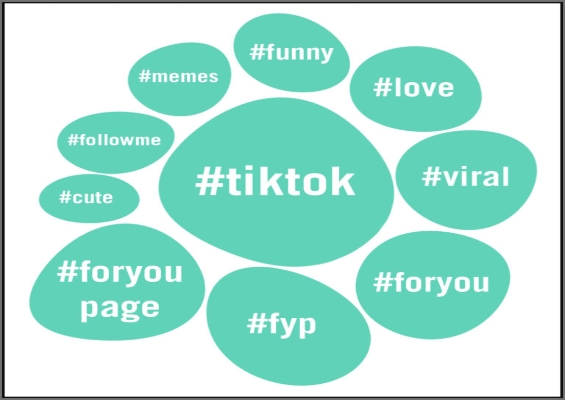
    tiktok-hashtags

    Research and use relevant hashtags to make your content discoverable by users interested in specific topics. Hashtags help expand your reach and expose your content to new audiences.

    Utilize the power of hashtags for social media engagement by:

    • Increasing discoverability
    • Categorizing content
    • Joining conversations
    • Encouraging user-generated content
    • Tracking and measuring performance
    • Fostering community engagement

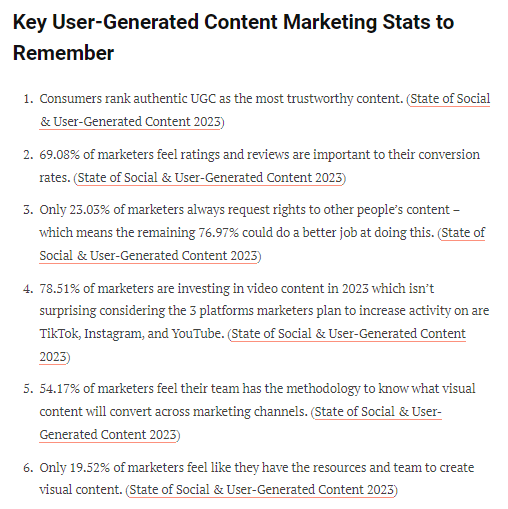
    9. Encourage user-generated content:

    Source: Tintup.com

    Inspire your audience to create and share their own content related to your brand or industry. This could be through contests, challenges, or simply inviting them to share their experiences. User-generated content not only fosters engagement, but also builds a sense of community around your brand.

    The video below by GoDaddy will help you understand its importance more.

    10. Analyze and optimize:

    Regularly analyze your social media analytics to gain insights into the type of content that resonates most with your audience. Use this data to optimize your content strategy and focus on what drives engagement.

    Secondly, identify the optimal times when your audience is most active on social media and schedule your posts accordingly for maximum reach and engagement.

    Ensure your content is mobile-friendly and optimized for various devices. A seamless mobile experience encourages users to engage with your content on-the-go.

    Related: 115 proven Facebook SEO techniques to try in 2026

    11. Cross-Promote on Multiple Platforms:

    Cross-marketing
    Source: https://lapaas.com/

    Promote your social media presence across various platforms to reach a wider audience. Cross-promotion increases your visibility and encourages engagement from different user bases.

    Cross-promoting is a powerful strategy to boost your social media engagement and reach a wider audience.

    Tips to cross-promote your social media channels:

    1. Promote across platforms: Share your social media handles and profiles on your website, blog, and other social media accounts to encourage followers on different platforms.
    2. Adapt content for each platform: Tailor your posts to fit the features and preferences of each platform, ensuring your content resonates with the audience on that specific channel.
    3. Cross-link profiles: Include links to your other social media profiles bio or about section for easy navigation and connection.
    4. Collaborate with others: Partner with influencers, brands, or businesses in your niche to cross-promote each other’s content and tap into new audiences.
    5. Use social media ads: Utilize targeted ads to promote your social media profiles and gain new followers.
    6. Incorporate social sharing buttons: Make it simple for your audience to share your content by adding social sharing buttons to your website and blog posts.
    7. Join cross-promotional events or campaigns: Participate in collective initiatives involving multiple brands or influencers to reach a wider audience and boost engagement.

    12. Stay up-to-date with trends:

    Keep an eye on current trends, viral topics, and popular conversations within your industry or niche. By staying relevant and incorporating timely content, you can attract more engagement from your audience.

    Key ways to stay updated with social media trends:

    1. Follow industry leaders and influencers: Keep an eye on influential figures in your industry or niche and follow them on social media. They often share valuable insights, trends, and updates.
    2. Join relevant communities and groups: Engage in online communities and groups related to your industry or interests. These platforms provide opportunities for discussions and insights into current social media trends.
    3. Attend industry events and webinars: Participate in conferences, webinars, and workshops focused on social media and digital marketing. These events often feature expert speakers who share the latest trends, strategies, and best practices.
    4. Subscribe to industry blogs and newsletters: Follow popular blogs and subscribe to newsletters that cover social media and digital marketing topics. These sources regularly publish articles, case studies, and trend reports to keep you updated.
    5. Monitor social media conversations: Pay attention to discussions, hashtags, and mentions related to your industry or niche. This can provide valuable insights into emerging trends and popular topics.
    6. Engage in social media chats and discussions: Participate in Twitter chats, LinkedIn groups, or Facebook communities focused on your industry. This allows you to connect with peers and gain insights from their experiences.
    7. Stay curious and explore: Take the time to explore different social media platforms, features, and functionalities. Experiment with new strategies and keep an open mind to discover emerging trends.

    Lastly, i would say that utilizing social media management tools that help track conversations, hashtags, social media engagement rates, and mentions related to your niche can certainly boost social media engagement for you as a business or even as an individual. Find what best suits your needs and turn your engagement around with it.

    Top 10 social media tools for engagement

    1. Replug

    A custom URL shortener that helps enhance social media engagement via branded short links. It allows you to create personalized short URLs, add retargeting pixels, and track link clicks. It also provides call-to-action overlays, deep links, bio links to drive engagement and conversions.

    Why Replug? How can you leverage Replug for social media engagement?

    1. Add compelling CTAs to the links you share.
    2. Create branded short links for better brand recognition.
    3. Utilize retargeting pixels to reach engaged users.
    4. Analyze link performance to optimize your strategy.
    5. Utilize bio links to direct your audience to multiple destinations.
    6. Use deep links to send users directly to specific content within your mobile apps.

    2. Contentstudio

    Contentstudio is a content discovery and social media management tool. It offers a wide range of features, including content curation, scheduling, analytics, caption generator, social media automation, and more. It helps streamline your content creation and engagement efforts.

    What makes Contentstudio a powerful social media management tool?

    Here’s how it can help you greatly enhance social media engagement.:

    • Discover trending and relevant content to keep your audience engaged.
    • Plan and schedule social media posts for consistent presence and increased engagement.
    • Manage multiple social media accounts from a single platform.
    • Automate content sharing to save time and ensure regular updates.
    • Analyze social media performance to measure engagement and optimize your strategy.

    3. Tint

    A user-generated content platform that allows you to collect and display authentic user-generated content from social media, fostering engagement and trust with your audience.

    Here’s how this tool can contribute to increased social media engagement and audience interaction.

    • User-Generated Content (UGC): Leverage user-generated content to increase engagement.
    • Social Media Feed Curation: Curate and display social media feeds on your platforms.
    • Visual Display Options: Create visually appealing and engaging displays.
    • Real-Time Updates: Keep your content fresh and up to date with real-time updates.
    • Moderation Tools: Filter out unwanted or inappropriate content.
    • Analytics and Insights: Gain valuable insights into social media performance.

    4. Easypromos

    A platform that enables you to create interactive social media contests, quizzes, polls, and giveaways, encouraging audience participation and boosting engagement.

    How Easypromos can help increase brand engagement?

    • Interactive Promotions: Run engaging contests, giveaways, and interactive campaigns to boost social media engagement.
    • User-Generated Content: Leverage user-generated content through photo contests and hashtag campaigns for increased audience interaction.
    • Customization: Customize your promotions to align with your brand’s style and messaging, making them more appealing to your audience.
    • Analytics and Reporting: Use analytics and reporting features to track the performance of your promotions and gain insights to optimize engagement.
    • Viral Sharing: Encourage participants to share your promotions with their networks, expanding your reach and driving more engagement.
    • Regulatory Compliance: Ensure compliance with legal and regulatory requirements when running promotions on social media.

    5. Flockler

    A social media aggregation and publishing tool that collects social media posts from various channels and displays them on your website or other digital platforms, encouraging engagement and social proof.

    Flockler for social media engagement: Why & how?

    • Content Aggregation: Flockler allows you to collect and curate user-generated content from various social media platforms.
    • Visual Displays: Create visually appealing displays using the curated content to capture audience attention.
    • Social Feeds: Embed social media feeds on your website or blog to showcase real-time social content.
    • Audience Participation: Encourage audience participation by incorporating social media content in your campaigns.
    • Engagement Tracking: Monitor social media engagement metrics to understand the impact of your efforts.
    • Personalization: Tailor the content and display to match your brand identity and connect with your audience.

    6. Yotpo: 

    A user-generated content and reviews platform that allows you to collect and showcase customer reviews, ratings, and photos, enhancing social proof and driving engagement.

    Yotpo for social media engagement offers:

    • UGC collection and showcasing
    • Enhanced social proof
    • Shoppable posts
    • Influencer partnerships
    • Review management
    • Analytics and insights

    7. Mention

    https://www.youtube.com/watch?v=bxk-Yh_jLVc&ab_channel=Mention

    Mention is a social media monitoring tool that tracks mentions of your brand, products, or keywords across various social platforms. It provides real-time alerts, sentiment analysis, and engagement tracking to help you stay on top of conversations and engage with your audience effectively.

    Why Mention is a great social media engagement tool?

    • Real-time social media monitoring
    • Track brand mentions and keywords
    • Monitor competitor activity
    • Engage with your audience and respond to mentions
    • Identify influencers and brand advocates
    • Analyze social media trends and sentiment
    • Discover user-generated content
    • Generate reports and insights on brand performance

    8. Canva

    A versatile graphic design tool that helps you create visually appealing posts, banners, and graphics for your social media channels.

    Key ways Canva can help boost social media engagement:

    • Graphic design and image editing
    • Create visually appealing social media posts
    • Design custom graphics, banners, and infographics
    • Use templates and customizable elements
    • Incorporate branding and logos
    • Add text, filters, and effects
    • Resize images for different social media platforms
    • Collaborate and share designs with team members

    9. SEMrush

    An all-in-one digital marketing tool that provides competitive intelligence, keyword research, and social media analytics to optimize your social media strategies.

    Semrush, a tool tailor made for social media engagement analysis:

    • Identify popular content and topics in your industry
    • Monitor social media mentions and backlinks
    • Analyze competitor’s social media strategies
    • Discover potential influencers for collaborations
    • Track social media performance metrics
    • Find opportunities for guest posting and content promotion
    • Conduct social media research and trend analysis
    • Improve social media visibility

    10. Talkwalker

    A social listening and analytics tool that helps you monitor brand mentions, track social media trends, and analyze audience sentiment, providing insights to optimize your engagement strategies.

    How Talkwalker improves social media engagement?

    • Real-time social media monitoring
    • Sentiment analysis
    • Social listening for brand mentions and conversations
    • Trend analysis and identification
    • Influencer identification and tracking
    • Social media performance analytics
    • Competitive intelligence and benchmarking

    How to measure social media engagement?

    The basic formula for calculating social media engagement rate is as follows:

    Engagement Rate = (Total Engagements / Total Reach) * 100

    To calculate the engagement rate, you need two key metrics: total engagements and total reach.

    1. Total Engagements: This includes all the interactions on your social media post, such as likes, comments, shares, and clicks. Add up the number of engagements for a specific post or across multiple posts within a given timeframe.
    2. Total Reach: This represents the number of unique users who have been exposed to your social media post. It can be measured by the impressions or reach metrics provided by the social media platform.

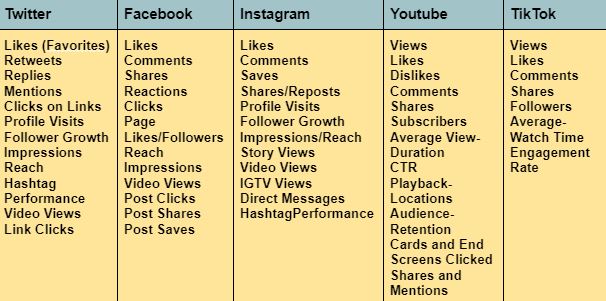
    Here are some engagement factors to consider across major social platforms respectively. 

    Socialmedia engagement factors

    Social media engagement facts & figures

    Social Media Engagement Statistics

    • The number of social media users worldwide is expected to jump to approximately 5.85 billion users by 2027. 
    • 77% of small businesses use social media to connect with their customers. 
    • As of April 2023, the fastest-growing social media platform is BeReal. 
    • With an impressive 4.53% annual growth rate projected to take the market even higher, to $247.30 billion by 2027.

    Source: (Forbes)

    With that being said, lets move on to engagement statistics across the major social media platforms:

    Twitter Engagement Statistics

    • Tweets without hashtags received 23% more engagement compared to those with no hashtags.
    • Including 1-2 hashtags in your tweets can boost engagement by 21%.
    • Tweets with GIFs garnered 55% higher engagement compared to those without.

    Source: (Thrivemyway)

    Instagram Engagement Statistics:

    • The average engagement rate for all types of Instagram posts stands at 0.96%.
    • Posts featuring a face perform nearly 40% better in terms of engagement.
    • Weekdays tend to have higher engagement levels among Instagram users.

    Source: Social Pilot

    Facebook Engagement Statistics:

    • Photos make-up 34.73% of content on Facebook, while videos account for 15.09%.
    • Live videos lasting over one hour experienced an increase in engagement from 0.19% to 0.86%.
    • On average, Facebook users comment five times, like posts 12 times, share content once, and like one page per week.

    Sources:  (Thrivemyway , Social Pilot & Geekflare)

    LinkedIn Engagement Statistics:

    • Approximately 22.04% of LinkedIn traffic comes from search, with 99.63% of that traffic being organic.
    • Companies that post weekly can expect to see a two-fold rise in engagement.
    • Completing a LinkedIn Page results in a 30% increase in weekly views.

    Source: (Thrivemyway)

    TikTok Engagement Statistics:

    • The “Entertainment” category on TikTok has accumulated a staggering 545 billion hashtag overall views.
    • Sound is considered a crucial aspect of the TikTok experience, with 90% of users emphasizing its importance.
    • A significant 43% of TikTok users have participated in duets.

    Sources: (Social Pilot & GeekFlare)

    YouTube Engagement Statistics:

    • Watch time for videos has seen a remarkable 270% growth in the past 12 months.
    • YouTube Shorts now amasses an impressive 50 billion daily views.
    • Around 33% of internet users have reported watching tutorial or how-to videos.
    • Watch time for “wildlife videos” witnessed a notable 40% increase in the previous year.

    Sources: (Social Pilot & Forbes)

    In the end, I would like to say that embrace the evolution of social media. Utilize the strategies highlighted, and watch your brand story unfold in captivating ways.

    You May Also Like:

  • How to Redirect a URL in WordPress – Ultimate Guide

    How to Redirect a URL in WordPress – Ultimate Guide

    Are you tired of encountering dead ends and frustrating error messages while browsing the web? Well, get ready to bid farewell to those exasperating moments because we have a game-changer for you: URL redirection. It’s like having your very own digital GPS that ensures every click you make leads you straight to your desired online destination.

    In this guide, we’re going to unravel the mysteries of URL redirection and make it crystal clear why it’s a must-know concept for anyone navigating the digital realm. No jargon, no complicated technicalities – just straightforward explanations and practical tips that will empower you to redirect URLs like a pro.

    Ready? Let’s dive in and discover how to redirect a URL in WordPress!

    What is URL Redirection?

    URL redirection, also known as URL forwarding, is the process of directing a user from one web address (URL) to another. It is a technique used to ensure that when a user clicks on a specific URL, they are automatically redirected to a different URL, typically to a new location or destination.

    URL redirection serves multiple purposes in the digital landscape. It allows website owners to manage changes such as rebranding, domain changes, or restructuring their website’s content without breaking existing links or causing inconvenience to users. It also helps to maintain search engine rankings by preserving the authority and relevance associated with the original URL.

    Types of URL redirects

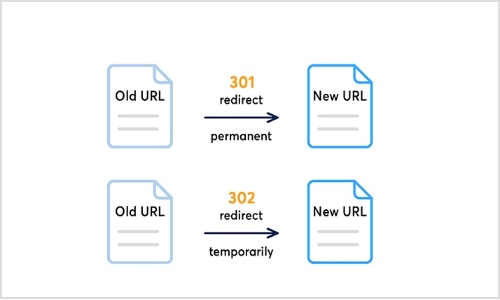
    Types-of-url-redirects

    There are two primary types of URL redirection:

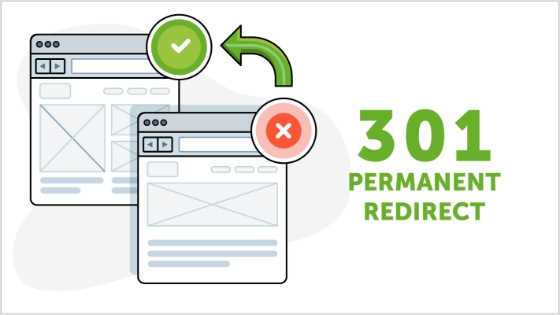
    Permanent redirect (HTTP 301)

    types-of-url-redirect-301

    This type of redirect indicates that the original URL has moved permanently to a new location. It informs search engines and web browsers that the new URL should be considered the main and preferred address for the content. Permanent redirects are commonly used for situations like domain changes or when merging multiple web pages into a single page.

    Also read: How to Change Permalink in WordPress: Step-by-Step

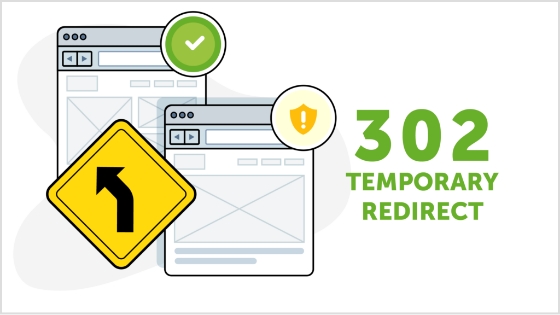
    Temporary redirect (HTTP 302)

    types-of-url-redirect-302

    Temporary redirects are used when the original URL is only temporarily unavailable or has moved to a different location for a short period. It instructs web browsers and search engines to visit the new URL temporarily, while still recognizing the original URL. Temporary redirects are often used during website maintenance or when testing new pages before making them permanent.

    Other unusual redirects include:

    Besides the commonly used permanent redirect (HTTP 301) and temporary redirect (HTTP 302), there are a few other types of redirects that serve specific purposes. These include:

    303 see other

    This redirect is similar to the temporary redirect (HTTP 302) but has a specific meaning defined in the HTTP protocol. It indicates to the browser that the requested resource can be found at a different location, and the response to the redirected request should be a GET method.

    307 temporary redirect

    This is another type of temporary redirect, similar to HTTP 302. It indicates to the browser that the requested resource has temporarily moved to a different location. However, unlike HTTP 302, the browser should continue to use the same HTTP method (e.g., POST) for the redirected request.

    308 permanent redirect

    Similar to the permanent redirect (HTTP 301), the 308 status code indicates that the requested resource has permanently moved to a new location. The key difference is that the browser should use the same HTTP method (e.g., POST) for the redirected request, whereas HTTP 301 may convert a POST request to a GET request.

    These additional redirect types (303, 307, and 308) have specific use cases and are less commonly utilized compared to HTTP 301 and HTTP 302 redirects. The choice of which redirect type to use depends on the specific requirements of your website and the desired behavior for the redirected requests.

    How to redirect a URL in WordPress?

    To redirect a URL in WordPress, you can use either a plugin or modify the .htaccess file. Here are two methods you can follow:

    Method 1: Using a WordPress redirection plugin

    Step 1: Install and activate a redirection plugin

    redirection-plugin

    Go to your WordPress dashboard, navigate to “Plugins” > “Add New,” and search for a redirection plugin such as Redirection or Yoast SEO“. Install and activate the plugin of your choice.

    Step 2: Set up the redirect

    Once the plugin is activated, go to the plugin’s settings or options page (usually located under “Tools” or “SEO” in the dashboard menu). Look for a section related to URL redirection or redirects.

    Step 3: Add a new redirection rule

    In the plugin’s settings, you should find an option to add a new redirection rule. Enter the old URL (source) and the new URL (target) where you want the redirect to point. Choose the appropriate redirect type (301 or 302) as needed.

    Step 4: Save the redirection rule

    After filling in the necessary details, save the redirection rule. The plugin will handle the redirection, and when someone accesses the old URL, they will be automatically redirected to the new URL you specified.

    Also read: How To Change A URL Of Any Website?

    Method 2: Modifying the .htaccess file

    Step 1:Access your website’s files 

    Connect to your website’s hosting account using FTP (File Transfer Protocol) or access the file manager in your WordPress hosting control panel.

    Step 2: Backup the .htaccess file 

    Before making any changes, it’s important to create a backup of the existing .htaccess file in case anything goes wrong. Simply download a copy of the .htaccess file to your local computer.

    Step 3: Edit the .htaccess file 

    open-htaccess-file

    Open the .htaccess file using a text editor. Add the following code at the beginning or end of the file, depending on your preference:

    redirection-in-cpanel

    Replace “/old-url/” with the actual URL slug or path of the old URL you want to redirect, and “http://www.example.com/new-url” with the desired destination URL.

    Also read: What is URL hijacking: Different forms of typosquatting, consequences, and prevention techniques

    Step 4: Save and upload the modified .htaccess file 

    Save the changes to the .htaccess file and upload it back to the root directory of your WordPress installation, overwriting the existing file.

    Step 5: Test the redirection 

    Visit the old URL in your web browser and verify that it correctly redirects to the new URL you specified. If the redirection is working as expected, you have successfully redirected the URL in WordPress.

    Remember, modifying the .htaccess file requires caution, as any mistakes in the code can cause issues with your website. Make sure to double-check the changes and keep a backup of the original .htaccess file for safety purposes.

    Why you should create a redirect?

    There are several scenarios in which you may need to create a redirect. Here are some common situations where redirects are useful:

    1. Rebranding or website restructuring

    If you undergo a rebranding process or make significant changes to your website’s structure, you may need to redirect old URLs to their new equivalents. This ensures that users who access the old URLs are seamlessly directed to the updated content.

    2. Changing domain names

    When you change your website’s domain name, it’s essential to set up redirects from the old domain to the new one. This preserves your website’s traffic, and search engine rankings, and ensures that visitors who may have bookmarked or shared your old URLs are still able to access your content.

    3. Handling outdated or expired content

    When you remove or archive certain pages or posts on your website, you can create redirects to guide users to relevant and up-to-date content. This prevents visitors from encountering dead ends or 404 error pages and helps maintain a positive user experience.

    4. Managing affiliate or marketing campaigns

    If you’re running specific marketing campaigns or affiliate programs that involve unique URLs, you might need to create redirects to track and direct visitors to the intended landing pages. This allows you to monitor campaign performance and ensure visitors land at the correct destination.

    5. Correcting broken or mistyped URLs

    If you discover broken or mistyped URLs on your website, creating redirects can fix these issues. By redirecting the incorrect URLs to the correct ones, you can ensure a smooth browsing experience for your users and prevent them from encountering frustrating dead ends.

    Remember, redirects are powerful tools that can help you maintain website functionality, improve user experience, and preserve SEO efforts. Whenever you make changes to your website that impact URLs, consider whether a redirect is necessary to ensure a seamless transition and to guide users and search engines to the right content.

    Also read: How to create & track text links?

    Final words

    In the vast realm of the internet, URL redirection is the key to unlocking seamless navigation and preserving your online presence.

    And if you want to simplify your links further, making them more shareable, memorable and trackable, a good short url
    tool is worth adding to your toolkit.

    By mastering the art of redirection, you can ensure a flawless user experience, maintain search engine rankings, and adapt to changes with ease. 

    Whether you’re rebranding, restructuring, or simply seeking to enhance your website’s performance, redirecting URLs is your secret weapon.

    If you’re looking for a full-service solution that combines redirects, analytics and team collaboration, you might consider a dedicated link management platform for your entire domain and marketing workflow.

    So, embrace the power of redirection, navigate the digital landscape with confidence, and watch as your online presence soars to new heights. Get ready to redirect your way to success!

    FAQs

    What is the difference between a permanent redirect (HTTP 301) and a temporary redirect (HTTP 302)?

    A permanent redirect (HTTP 301) informs search engines and browsers that the original URL has permanently moved to a new location. A temporary redirect (HTTP 302) indicates a temporary move or change. It’s important to choose the appropriate type depending on the situation.

    How can URL redirection impact my website’s search engine rankings?

    URL redirection can impact search engine rankings by preserving the authority and relevance associated with the original URL. If implemented correctly, redirects can transfer link equity and prevent loss of traffic and rankings when URLs change or move.

    Can I implement URL redirection without a plugin?

    Yes, you can implement URL redirection without a plugin by modifying the .htaccess file on your server. This method allows you to set up server-side redirects using rules defined in the .htaccess file.

    Are there any SEO best practices to consider when setting up URL redirects?

    Yes, when setting up URL redirects, it’s important to ensure that the redirect is a one-to-one mapping from the old URL to the new URL. Additionally, update internal links and notify relevant parties to update their references. Monitor and maintain redirects to address any issues promptly.

    How do I test if my URL redirection is working correctly?

    To test URL redirection, simply access the old URL and verify that you are automatically redirected to the new URL. Test on different devices and browsers to ensure compatibility and functionality.

    What should I do if I encounter redirect loops or broken redirects?

    If you encounter redirect loops or broken redirects, review your redirect configurations and ensure they are set up correctly. Check for any circular redirections or incorrect rules. Make necessary corrections and retest the redirects.

    Is it possible to redirect multiple URLs at once?

    Yes, it is possible to redirect multiple URLs at once. In WordPress, you can use a plugin that supports bulk or wildcard redirects. Alternatively, with server-side redirects, you can set up rules in the .htaccess file to redirect multiple URLs simultaneously.

    You may also like:

    How to automatically shorten URLs in an RSS Feed

    What Is a Permalink? How Does It Impact SEO Ranking?

    Step-by-Step: How to Get a Custom YouTube URL

    How to Convert video to Link?

  • How LinkedIn Retargeting Ads Work – A Complete Guide

    How LinkedIn Retargeting Ads Work – A Complete Guide

    In today’s digital landscape, capturing and retaining the attention of potential customers is a constant challenge. However, what if there was a way to reconnect with those who have already shown interest in your brand? Enter LinkedIn retargeting ads – a game-changing strategy that enables you to precisely target and engage with your desired audience. 

    For those looking for an easy-to-use solution to manage retargeting, Replug.io offers a top-notch link retargeting tool to retarget your links with minimal setup.

    Whether you’re aiming to increase conversions, drive brand awareness, or nurture leads, understanding how LinkedIn retargeting ads work is crucial. In this complete guide, we delve into the intricacies of LinkedIn retargeting, unraveling the mechanisms behind this powerful advertising tool. 

    Get ready to embark on a journey that will transform the way you connect, engage, and convert on the world’s largest professional network – LinkedIn. Buckle up and prepare to discover the untapped potential of LinkedIn retargeting in this comprehensive and insightful guide.

    What is retargeting?

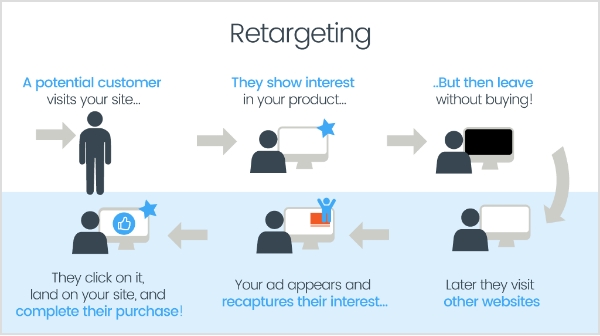
    Retargeting, also known as remarketing, is a strategic advertising technique that allows you to reconnect with users who have previously interacted with your brand or website. It involves targeting ads specifically to individuals who have shown interest in your products or services, but may not have completed a desired action, such as making a purchase or filling out a form.

    When someone visits your website, a small piece of code called a tracking pixel or tag is placed on their browser. This pixel enables your advertising platform to track their online behavior and collect valuable data about their interactions. Using this data, you can then deliver personalized ads to these individuals as they browse other websites or social media platforms.

    By using a dedicated link shortener tool, you can ensure your URLs stay clean and manageable, while still having the retargeting pixel attached and ready to gather visitor data.

    What-is-retargeting

    The goal of retargeting is to stay top-of-mind with potential customers, reminding them of your brand and enticing them to return to your website to complete the desired action. By targeting individuals who have already shown interest, retargeting allows you to maximize your advertising budget and increase the chances of converting leads into customers.

    What is retargeting on LinkedIn?

    Retargeting on LinkedIn refers to the advertising strategy that allows businesses to target and engage with individuals who have previously visited their website or interacted with their brand on LinkedIn. LinkedIn, being the world’s largest professional network, offers powerful retargeting capabilities to reach a specific audience of professionals and decision-makers.

    Retargeting-on-linkedin

    LinkedIn’s retargeting feature utilizes the LinkedIn Insight Tag, which is a code snippet placed on a website to track visitor behavior. This Insight Tag collects valuable data about website visitors, including company names, job seniority, industry, geography, and more. This data enables advertisers to create highly targeted and personalized ad campaigns on LinkedIn.

    With LinkedIn retargeting, businesses can show tailored ads to individuals who have shown interest in their brand by visiting their website. These ads can appear across the LinkedIn platform, including the LinkedIn feed, sponsored content, messaging, and more. By reconnecting with website visitors on LinkedIn, businesses can nurture leads, drive conversions, and increase brand visibility among a professional audience.

    Also read: A step-by-step guide on Tiktok retargeting using Replug

    Retargeting on LinkedIn: How does it work?

    LinkedIn retargeting works by utilizing the LinkedIn Insight Tag, a code snippet placed on a website to track visitor behavior and collect valuable data. Here’s a step-by-step overview of how LinkedIn retargeting works:

    Implement the LinkedIn Insight Tag: 

    To start using LinkedIn retargeting, you need to place the LinkedIn Insight Tag on your website. This tag is a small snippet of code provided by LinkedIn that needs to be added to the pages of your website.

    Capture Visitor Data: 

    Once the Insight Tag is installed, it starts capturing data about the visitors to your website. The tag collects information such as company names, job seniority, industry, geography, and more, providing valuable insights into your website visitors’ characteristics.

    Create Audience Segments: 

    Using the data collected by the Insight Tag, you can create customized audience segments based on specific criteria. For example, you can target visitors from specific industries, job titles, or company sizes. These audience segments allow you to tailor your retargeting campaigns and deliver personalized messaging.

    Set Up Retargeting Campaigns: 

    With your audience segments defined, you can create retargeting campaigns on LinkedIn’s advertising platform. These campaigns enable you to display targeted ads to the specific audience segments you have defined. The ads can appear on various LinkedIn placements, including the LinkedIn feed, sponsored content, and messaging.

    Display Tailored Ads: 

    When a visitor who has previously been on your website visits LinkedIn, the LinkedIn platform recognizes them through the Insight Tag and displays your tailored ads to them. This ensures that your ads reach the right people at the right time, maximizing their effectiveness.

    Drive Engagement and Conversions: 

    Through retargeting, you can engage with visitors who have already shown interest in your brand. By delivering relevant and personalized ads, you can encourage them to take desired actions, such as signing up for a newsletter, requesting a demo, or making a purchase. Retargeting allows you to nurture these leads and guide them through the customer journey.

    How to set up Linkedin retargeting ads?

    Setting up LinkedIn retargeting ads involves a few steps to ensure your campaigns are properly configured.  The first step is to install the LinkedIn Insight Tag on your website. This tag is a code snippet provided by LinkedIn that needs to be placed on all the pages of your website. It enables LinkedIn to track visitor behavior and collect data for retargeting purposes.

    Here’s how to set up retargeting on LinkedIn:

    Once LinkedIn Insight Tag is Installed, you can set up retargeting ads on LinkedIn by following the steps below:

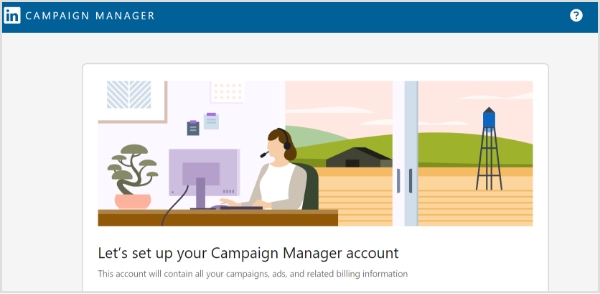
    Step 1: Sign in to LinkedIn Campaign Manager.

    retargeting-on-linkedin

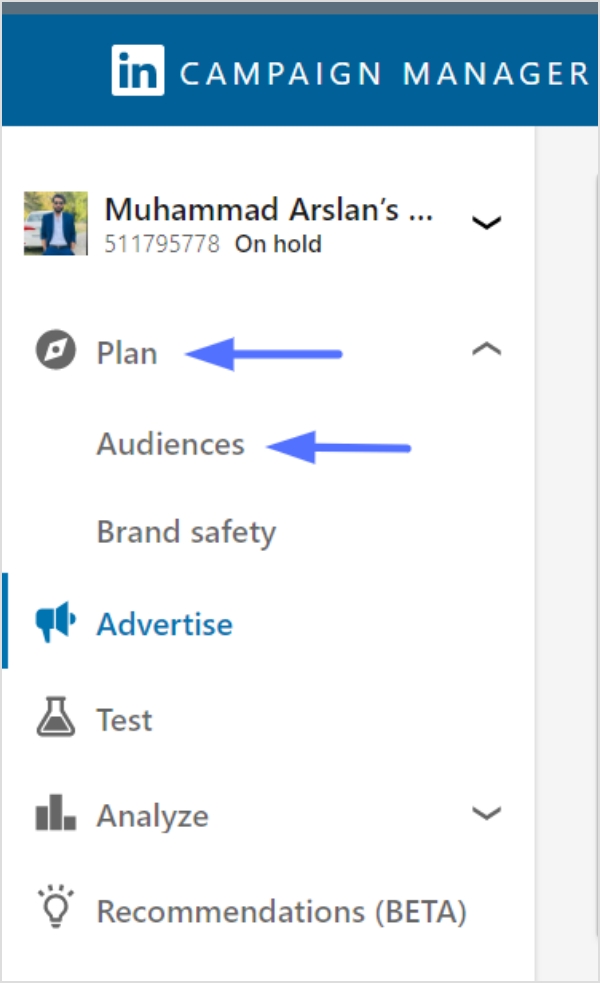
    Step 2: If needed, switch to the correct account by clicking on the account name in the upper-left corner and selecting the desired account from the dropdown.

    Step 3: Click on “Plan” in the left menu and select “Audiences”.

    retargeting-on-linkedin

    Step 4: Click on the “Create Audience” button in the top left of the page.

    retargeting-on-linkedin

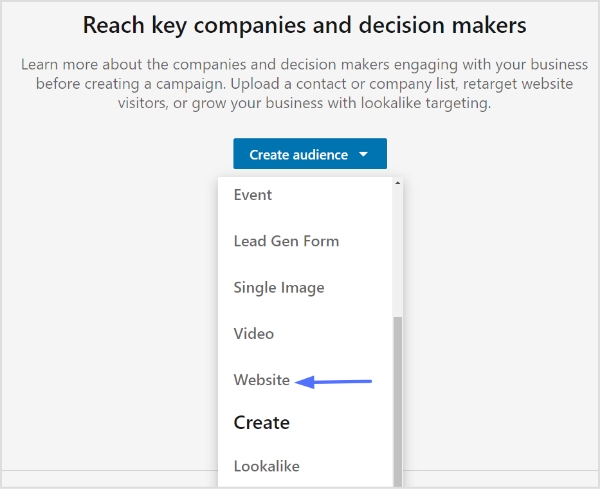
    Step 5: Select “Website” from the dropdown menu.

    retargeting-on-linkedin

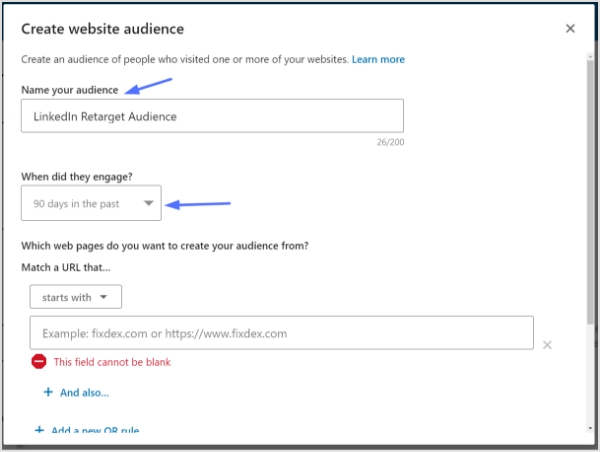
    Step 6: Give your audience a name.

    Step 7: Choose the time range for your audience engagement. You can select from 30, 60, 90, or 180 days in the past.

    retargeting-on-linkedin

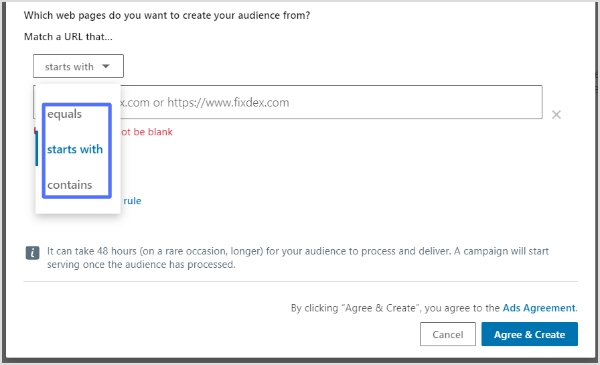
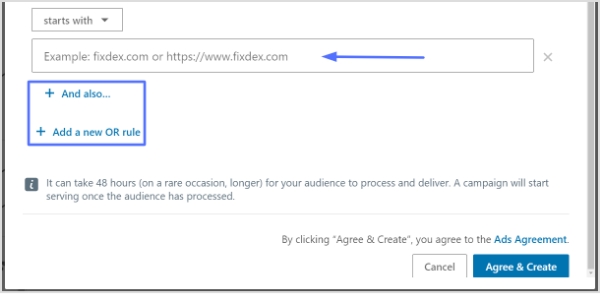
    Step 8: Add the website URLs you want to retarget. You can specify whether the URL starts with, equals, or contains a specific value. This allows you to define the pages on your website that will contribute to building your retargeting audience.

    linkedin-retargeting
    • “Starts with” is useful for URLs with dynamic parameters at the end.
    • “Equals” is used when you want to match a specific URL.
    • “Contains” allows you to target URLs that contain specific keywords or phrases.
    • You can click “+ And also” below a URL to further narrow down the pages where conversions are counted.

    Use “+ Add a new OR rule” if you have multiple URLs contributing to the audience.

    retargeting-on-linkedin

    Step 9: Click “Agree & Create” to create your retargeting audience.

    Important Note:

    Note that your audience needs to have at least 300 website visitors to be usable in an active campaign. Depending on the traffic to your website, it may take up to 48 hours for your audience to build.

    Keep in mind that website retargeting audiences cannot be used with member interests and traits when selecting targeting facets for your campaign audience.

    Benefits of retargeting on LinkedIn:

    The benefits of LinkedIn retargeting are numerous and can significantly enhance your customer acquisition efforts. Here are some key advantages of utilizing LinkedIn retargeting in your marketing strategy:

    Enhanced Customer Acquisition: 

    LinkedIn’s extensive user database and professional targeting options allow you to reach highly relevant audiences. By retargeting individuals who have previously visited your website, you can reconnect with potential customers who have already shown interest in your brand. This familiarity increases the likelihood of engagement and conversion, ultimately driving customer acquisition.

    Increased Engagement: 

    Retargeting allows you to engage with visitors who have already interacted with your brand. These individuals are more likely to view multiple pages on your website, spend more time exploring your offerings, and exhibit a genuine interest in what you have to offer. This heightened engagement can lead to higher conversion rates, increased customer loyalty, and a higher customer lifetime value.

    Integration with Paid Traffic Acquisition: 

    Retargeting works synergistically with paid traffic acquisition efforts. By broadly targeting website pages through paid ads, you can capture initial awareness and generate new traffic. Then, through retargeting, you can focus on those visitors who landed on your pages but did not convert on the first visit. This keeps your brand top of mind as they continue to browse the internet, maximizing the impact of your advertising investment.

    Augment Organic Traffic Strategies: 

    In addition to paid traffic, retargeting can complement your organic traffic strategies. By retargeting visitors who came to your website through search engines, social media platforms, or referral channels, you can reinforce their interest in your brand and encourage them to take further action. This amplifies your organic traffic efforts and increases the likelihood of conversions.

    When to launch a LinkedIn retargeting campaign?

    Launching a LinkedIn retargeting campaign can be a powerful strategy to maximize your marketing efforts and drive better results. While there is no fixed rule on when to start, it is generally recommended to consider a few factors before launching your campaign.

    Minimum visitor requirement:

    Firstly, it’s important to have a sufficient amount of website traffic to retarget. While the common suggestion is to start retargeting once you’ve reached 500-1,000 monthly visitors, the actual number can vary based on your specific circumstances. 

    For example, if you have a one-page website, retargeting 1,000 visitors can yield stronger results compared to retargeting the same number of visitors on a larger website with multiple pages. It’s crucial to have a minimum of 300 visitors for a segment to be eligible for retargeting using the LinkedIn Insight tag.

    Maximizing returns on high-converting pages:

    Additionally, it’s beneficial to launch retargeting campaigns when your traffic acquisition efforts have scaled and are consistently targeting pages that convert visitors into paid customers. By focusing on pages that have a higher conversion rate, you can maximize the effectiveness of your retargeting campaigns and achieve better returns on your investment.

    Timing is the key:

    Timing is key when it comes to retargeting. While launching retargeting early in the traffic acquisition lifecycle has its advantages, such as building brand familiarity and engaging with visitors who have already shown interest, it’s essential to align your retargeting efforts with the stage where your traffic acquisition is scaled and generating consistent conversions.

    Retargeting vs Remarketing: What is the difference?

    Remarketing and retargeting are two distinct methods of marketing to existing leads, often used interchangeably but with subtle differences.

    Retargeting:

    Retargeting involves serving paid ads to previous visitors across various platforms to re-engage them and prompt them to take desired actions. It utilizes tracking pixels and JavaScript codes to capture visitor data and display tailored advertising. 

    Retargeting focuses on reaching out to visitors who have shown interest but may not have converted yet. It helps increase brand visibility, engagement, and customer acquisition.

    Remarketing:

    On the other hand, remarketing uses the retargeting pixel to serve ads specific to existing customers and leads who have provided their email addresses. With access to the visitor’s email address, businesses can leverage email marketing to deliver personalized offers and messages. 

    Remarketing allows for more targeted and personalized communication, such as sending subscription renewal reminders, re-engaging cold subscribers, or offering targeted up-sells and cross-sells based on purchasing behavior. 

    It provides an opportunity to tie behavioral data to action and deliver offers in a more personal environment.

    Conclusion:

    LinkedIn Retargeting offers a powerful means to re-engage with past website visitors, leveraging the platform’s extensive user data and advanced advertising capabilities. By implementing effective retargeting campaigns, businesses can boost engagement, increase conversions, and drive revenue growth. With its unique features and the ability to tailor content based on visitor insights, LinkedIn Retargeting stands out as a valuable tool in any comprehensive customer acquisition strategy.

    Remember, successful LinkedIn Retargeting campaigns require careful planning, audience segmentation, and ongoing optimization to yield optimal results. By harnessing the potential of LinkedIn Retargeting, businesses can connect with their target audience on a more personalized level, nurturing valuable relationships and achieving their marketing objectives.

    Frequently asked questions

    When is the right time to launch a LinkedIn retargeting campaign?

    The ideal time to launch a LinkedIn retargeting campaign may vary depending on the specific circumstances of each business. While some recommend starting retargeting after reaching 500-1,000 monthly visitors, it is crucial to consider the quality and relevance of the traffic. Retargeting campaigns generally yield higher returns when traffic acquisition efforts have scaled and when there are consistent conversions of website visitors into paid customers.

    How many website visitors do I need for LinkedIn retargeting?

    LinkedIn’s Insight tag requires retargeting segments to have a minimum of 300 website visitors. This ensures that the audience is large enough to generate meaningful results and target effectively.

    What are some effective strategies for LinkedIn retargeting?

    Effective strategies for LinkedIn retargeting include segmenting the audience based on specific actions or pages visited, creating compelling ad creatives that align with the visitor’s interests, using personalized messaging, and testing different ad formats and placements to optimize performance. Using a tool like a LinkedIn ad maker can simplify ad creation, save time, and ensure your campaigns stay consistent and professional.

    Can LinkedIn retargeting be used for B2B marketing?

    Yes, LinkedIn retargeting can be used for B2B marketing. With LinkedIn’s professional user base, businesses can target specific industries, job titles, company sizes, and more, making it a valuable platform for reaching and engaging with the B2B audience.

    What metrics should I track to measure the success of my LinkedIn retargeting campaigns?

    Key metrics to track the success of LinkedIn retargeting campaigns include click-through rates (CTRs), conversion rates, cost per click (CPC), return on ad spend (ROAS), and overall campaign performance. These metrics help measure the effectiveness of the ads, audience targeting, and overall campaign ROI.

  • What Is a Permalink? How Does It Impacts SEO Ranking?

    What Is a Permalink? How Does It Impacts SEO Ranking?

    What are Permalinks?

    Permalinks are permanent URLs that lead to specific webpages, enhancing navigation and SEO.

    In the vast landscape of SEO, where digital trails intertwine and vie for attention, there emerges a significant factor known as the permalink. Permalinks give your content a digital identity, helping search engines understand what it’s all about. They’re like carefully crafted labels that can boost your website’s position in search engine rankings.

    In simpler terms, permalinks are like digital fingerprints that help search engines find and rank your website. Using the right words in your permalinks can improve your website’s visibility and attract more visitors. So, let’s discover how they can boost your website’s presence online!

    What are the characteristics of a Permalink?

    The characteristics of a Permalink contribute to effective navigation, accessibility, and search engine optimization for web content. Here are the characteristics of a permalink:

    Permanent: Designed to remain unchanged over time.

    Descriptive: Includes keywords that describe the webpage’s content.

    Readable: Easy to read and understand.

    Consistent: Follows a consistent structure across the website.

    SEO-friendly: Optimized with relevant keywords for search engine visibility.

    Shareable: Allows easy sharing of specific web pages.

    User-friendly: Enhances overall user experience.

    Read also: How to generate SEO-friendly URLs that rank higher & attract clicks

    What is the structure and examples of a Permalink?

    The structure of a permalink typically consists of the base URL of the website followed by additional elements that identify the specific webpage. Here is a common structure for permalinks:

    https://www.example.com/category/post-title

    In this structure, “https://www.example.com” represents the base URL of the website, “category” indicates the category or section of the webpage, and “post-title” denotes the unique title of the specific post.

    Examples of permalinks based on the given structure:

    https://www.example.com/news/introduction-to-permalinks
    https://www.example.com/blog/seo-tips-for-beginners
    https://www.example.com/products/product-name

    https://www.example.com/events/upcoming-conference-detailsThese examples demonstrate how permalinks incorporate the website’s base URL, relevant category or section, and a descriptive element that represents the specific content of the webpage.

    Why should permalinks remain unchanged?

    One-Does-Not-Simply

    Here are the reasons why permalinks should remain unchanged:

    Consistency: Unchanged permalinks provide a consistent and reliable web address.

    Accessibility: They allow users to confidently bookmark, share, and reference specific web pages.

    SEO Impact: Consistent permalinks help search engines establish a historical record of the webpage and improve search engine rankings.

    Backlinks: Changing permalinks can invalidate existing backlinks, leading to traffic loss and credibility.

    User Experience: Unchanged permalinks improve user experience by avoiding broken links and confusion.

    Related: How to Rename Links Using Replug: 5 Simple Steps

    Why Do Permalinks Matter & How Do Permalinks Affect SEO?

    SEO GiF

    Permalinks play an important role in search engine optimization (SEO) as they impact how search engines understand and rank your web pages.Here are some of the factors and tips to keep in mind for optimizing permalinks in the light of SEO:

    • Include relevant keywords: Incorporate keywords that accurately reflect the content of the page. This helps search engines understand the topic and improves your chances of ranking for relevant searches.
    • Keep it concise and readable: Create permalinks that are easy to read and understand.Use hyphens (-) to separate words and avoid using numbers or special characters. A clear and concise permalink improves user experience and SEO.
    • Use a hierarchical structure: Organize your permalinks in a logical and hierarchical structure that reflects the structure of your website. This helps search engines understand the relationships between different pages and sections.
    • Exclude stop words: Remove unnecessary words like “and,” “the,” or “of” from your permalinks. Focus on the essential keywords that convey the main topic of the page.
    • Avoid changing permalinks frequently: Once you set a permalink structure, try to stick with it to maintain consistency. Changing permalinks frequently can lead to broken links and negatively impact your SEO. If you need to change a permalink, set up proper redirects to maintain SEO value.
    • Customize permalink settings:
    permalink setting

    If you’re using a content management system (CMS) like WordPress, utilize its permalink settings to customize the URL structure. Choose a format that includes post titles or categories to optimize for SEO.

    • Consider user experience: Permalinks should not only be optimized for search engines but also for users. Create permalinks that are descriptive and provide a clear idea of what the page is about. This helps users understand the content before clicking.
    • Monitor and update: Regularly monitor your website’s performance, rankings, and user behavior. If you notice any issues or changes in search engine visibility, review and update your permalinks as needed.
    • Set up proper 301 redirects:
    301-redirect

    When you change the permalink, make sure to set up 301 redirects from the old URL to the new URL. This tells search engines that the content has permanently moved and preserves your SEO value.

    Related: What Does HTTP 302 Code Means For URL Shorteners?

    • Keep the keywords consistent: Try to include the same or similar keywords in the new permalink as in the old one. This helps search engines understand the relevance of the content and maintain your rankings.
    • Update internal links: Don’t forget to update any internal links within your website that point to the old permalink. Make sure they now point to the new permalink to provide a seamless user experience and maintain your SEO value.
    • Reach out to external websites: If you have control over external websites linking to your old permalink, it’s a good idea to contact them and ask if they can update the links. This way, you preserve the link equity and SEO value associated with those backlinks.
    • Submit your sitemap and fetch as Google: Update your website’s sitemap to include the new permalink and submit it to search engines. Additionally, use the “Fetch as Google” tool in Google Search Console to prompt search engines to crawl and index the new permalink.
    • Keep an eye on your website’s performance: Monitor your website’s rankings and performance after the permalink change. Check for any fluctuations or issues and make adjustments if necessary.
    • Keyword relevance:
    keyword-ideas

    Permalinks that include relevant keywords help search engines understand the content of a page. Including targeted keywords in the permalink can improve the page’s visibility for those specific search terms.

    • Click-through rates: A well-structured and descriptive permalink can attract more clicks from users in search engine results pages (SERPs). When the permalink accurately reflects the content, it provides a clear idea to users about what they can expect on the page, leading to higher click-through rates.
    • Backlink anchor text: When other websites link to your content, they often use the URL as the anchor text. Having relevant keywords in the permalink contributes to the anchor text of those backlinks, which can positively influence SEO and keyword rankings.
    • Indexing and crawling: Permalinks play a role in search engine crawling and indexing processes. Clear and logical permalink structures make it easier for search engine bots to understand the organization and hierarchy of your website, leading to better indexing and potentially improved search visibility.
    • URL sharing:
    pepsi branded link

    When people share your content via social media, email, or other platforms, they often include the URL. Having a permalink that is concise, descriptive, and visually appealing can encourage more sharing and engagement, amplifying the reach of your content.

    • Credibility and trust: Permalinks that are readable and consistent convey a sense of professionalism and trustworthiness to users. A clean and well-formatted URL is more likely to be clicked and shared by users, contributing to increased traffic and potential backlinks.

    What are the steps to follow to create permalinks?

    Following the steps given below and create effective and SEO-friendly permalinks that accurately represent your content and enhance your website’s visibility in search engine results.

    • Determine the permalink structure: Decide on the format and structure you want to use for your permalinks. Consider including elements such as the post title, category, or date.
    • Access your content management system (CMS): If you’re using a CMS like WordPress, log in to the admin panel or dashboard.
    • Navigate to the permalink settings: In the CMS settings, locate the section related to permalinks. This may be under the “Settings” or “Permalinks” menu.
    • Customize the permalink structure: Within the permalink settings, choose the desired permalink structure that aligns with your preferences and website organization. Many CMS platforms offer predefined options or allow for customization.
    • Incorporate relevant keywords: When creating permalinks, include relevant keywords that accurately describe the content of the page. This helps search engines understand the topic and improve your chances of ranking for relevant searches.
    • Ensure readability and clarity: Create permalinks that are concise, easy to read, and understand. Use hyphens (-) to separate words and avoid unnecessary characters, numbers, or special symbols. Clear and readable permalinks benefit both search engines and users. To clean up long or complex URLs even further, consider running them through a URL shortener, which can convert bulky permanent links into branded, shareable ones.
    • Test the permalink: Before finalizing the permalink, click on it to ensure it directs to the correct page. Verify that the URL structure accurately represents the content and is free from any errors.
    • Avoid frequent permalink changes: It is generally advisable to maintain a consistent permalink structure to avoid broken links and negative impacts on SEO. If you must change a permalink, set up proper redirects to preserve SEO value and user experience.

    How to Change a Permalink in the WordPress Editor?

    wordpress-login

    In order to change a permalink in the WordPress Editor, follow these steps:

    edit-post

    Step 1: Log in to your WordPress dashboard.

    Step 2: Navigate to the “Posts” or “Pages” section, depending on where the content with the permalink is located.

    Edit-Permalink-Wordpress

    Find the specific post or page you want to edit and click on it to open it in the editor.

    Step 3: In the editor, look for the section that displays the permalink. It is usually located below the title of the post or page.
    Click on the “Edit” button next to the permalink. This will allow you to modify the existing URL.

    Make the desired changes to the permalink. You can edit the text, remove certain words, or add new keywords.

    After making the changes, click on the “OK” or “Save” button to update the permalink.

    Once the permalink is updated, click on the “Update” or “Publish” button to save the changes to the post or page.

    Note: It’s important to note that changing the permalink will result in a new URL for that specific content. This may affect any existing links pointing to the old permalink. To mitigate this, WordPress automatically sets up redirects from the old URL to the new one.

    Frequently asked questions

    What is permalink or permanent link?

    A permalink, or permanent link, is a stable and unique URL for a specific piece of web content, such as a blog post or page. Unlike temporary URLs that may change, a permalink is designed to be a persistent address that remains the same over time, making it reliable for sharing and indexing by search engines. The name comes from combining the words “permanent” and “hyperlink”.

    If you’re managing a lot of links, especially in marketing campaigns, using a tool like Replug can help you brand, shorten, and track all your permanent URLs more effectively.

    What is the difference between permalinks, slugs, and links?

    – Permalinks are the permanent URLs that point to specific pages or posts on a website.
    – Slugs are the user-friendly and readable portion of the permalink that comes after the domain name.
    – Links, in general, refer to clickable URLs that direct users to web pages.

    What is the difference between permalinks and dynamic links?

    Permalinks are static and permanent URLs that remain constant over time and point to specific pages or posts on a website. Dynamic links, on the other hand, are generated dynamically and often include query strings or parameters that change based on user interactions or database queries.

    What is a permalink in wordpress?

    In WordPress, a permalink refers to the permanent URL structure assigned to each post, page, or custom post type. It is a web address that remains unchanged over time and provides a direct link to a specific piece of content on a WordPress website. Permalinks play a crucial role in identifying and accessing individual pages or posts, and they can be customized to reflect the content’s title, category, or other elements.

    What Happens If I Change My WordPress Permalinks?

    If you change your WordPress permalinks, it can affect your search engine rankings and lead to broken links. To mitigate this, set up proper redirects and update internal links to preserve SEO value and maintain user access to content.

  • Unleashing sales success: The best sales prospecting tools of 2026

    Unleashing sales success: The best sales prospecting tools of 2026

    As technology continues to advance at a rapid pace, sales prospecting tools have become indispensable assets for sales teams worldwide. These tools empower B2B sales professionals to identify promising prospects, engage with them effectively, and close deals with precision.

    By leveraging the best sales prospecting tools available, sales teams can optimize their efforts, capitalize on opportunities, and stay ahead of the competition. These tools also support a variety of prospecting techniques, allowing teams to tailor their outreach strategies based on audience behavior and engagement patterns.

    In this blog post, we will explore a carefully curated selection of the best B2B sales prospecting tools for 2026. From customer relationship management (CRM) software to sales intelligence platforms and beyond, we will cover the gamut of tools that will redefine your sales prospecting strategy.

    So, whether you’re a seasoned sales veteran looking to enhance your arsenal or a budding sales enthusiast eager to conquer the market, fasten your seatbelt as we guide you through the top sales prospecting tools that will revolutionize your approach and elevate your sales game in 2026.

    Are you ready to discover the ultimate sales prospecting tools that will drive your sales success in 2026? Let’s dive in and explore the game-changers that will shape your prospecting journey and position you at the forefront of the sales landscape.

    What is a sales prospecting tool?

    Sales prospecting is the process of looking for potential customers or buyers and improving your sales pipeline. Its main objective is to arouse the interest of a prospect in your product until you can successfully lead them through the sales funnel and convert them into buying customers. 

    Sales prospecting tools introduce automation into repetitive tasks, helping save time and increase the efficiency of your sales representatives. Sales prospecting tools introduce automation into repetitive tasks, helping save time and increase the efficiency of your sales representatives, especially when paired with smart SaaS sales hiring strategies. With them, you can also generate more data, move faster, and effectively engage your clients in a way that would boost sales and close more deals.

    Also read: Best Apps For Shopify To Create a Surge In Your eCommerce Sales

    Benefits of sales prospecting tools

    There are plenty of sales prospecting tools on the market that you can use to achieve different tasks, such as:

    Efficient lead generation:

    Sales prospecting tools automate the process of finding and qualifying leads, saving time and effort for sales professionals. These tools leverage advanced algorithms and data analytics to identify high-potential prospects, increasing the efficiency of lead-generation activities.

    Improved sales productivity:

    Sales prospecting tools streamline workflows by automating repetitive tasks such as lead research, contact management, and follow-up communications.

    When these processes are elevated into agentic workflows that can act autonomously and supported by insights from a workforce intelligence platform, teams can accelerate qualification and engagement even further, freeing up valuable time to focus on strategic relationships and closing high-value deals.

    This automation frees up valuable time for salespeople, allowing them to focus on building relationships and closing deals. As prospects move further down the funnel, creating a clear and compelling business proposal becomes essential for sealing the agreement. Incorporating AI proposal writing into the process can further accelerate the path to closing deals by generating tailored proposals quickly and accurately.

    Targeted and personalized outreach:

    With sales prospecting tools, sales professionals can gather valuable insights about prospects, including their interests, needs, and pain points. This information enables personalized and targeted outreach, increasing the chances of engagement and conversion.

    Enhanced lead nurturing:

    Sales prospecting tools enable effective lead nurturing by automating follow-ups, scheduling reminders, and tracking interactions. This consistent and timely communication helps build relationships, keep leads engaged, and ultimately increases conversion rates.

    Also read: A Comprehensive Guide to Generate Leads With Social Media

    Access to actionable data:

    Sales prospecting tools provide access to comprehensive data about prospects, including contact information, company details, and reverse name search results for social media profiles. This data empowers sales professionals to make informed decisions, tailor their messaging, and identify the most promising opportunities.

    Integration with CRM systems:

    Many sales prospecting tools seamlessly integrate with customer relationship management (CRM) systems, ensuring smooth data transfer and a unified view of prospects. This integration enables efficient lead management, pipeline tracking, and collaboration among sales team members.

    Data enrichment and accuracy:

    Sales prospecting tools offer data enrichment capabilities, helping to fill in missing information, verify contact details, and update prospect data. This ensures that sales professionals have accurate and up-to-date information, enabling more effective prospecting and engagement.

    Insights and analytics:

    Sales prospecting tools provide valuable insights and analytics on prospecting activities, such as open rates, response rates, and conversion rates. These metrics enable sales teams to measure performance, identify areas for improvement, and optimize their prospecting strategies.

    Scalability and growth:

    Sales prospecting tools are designed to accommodate growing sales teams and increasing prospecting volumes. They offer scalability features that allow businesses to expand their prospecting efforts seamlessly as their sales operations grow.

    Competitive advantage:

    By leveraging the power of sales prospecting tools, sales professionals gain a competitive edge. These tools enable them to identify and engage with prospects more effectively, resulting in higher conversion rates, increased revenue, and a stronger market position.

    How to choose the right sales prospecting tool

    Choosing the right sales prospecting tool can significantly impact the effectiveness and efficiency of your sales efforts. Here are some key factors to consider when selecting the ideal tool for your business:

    1. Define your needs: Start by identifying your specific sales prospecting needs. Consider factors such as lead generation, lead management, contact enrichment, email outreach, social media integration, analytics, and integration with existing systems (e.g., CRM). Understanding your requirements will help narrow down the options.

    2. Evaluate features: Look for sales prospecting tools that offer essential features aligned with your needs. Consider features like lead scoring, data enrichment, email automation, social media prospecting, integration with proposal tools, and analytics. Prioritize tools that provide the functionalities most crucial to your sales process.

    3. User-friendliness: Consider the tool’s user interface and ease of use. A user-friendly tool will minimize the learning curve and allow your team to quickly adopt and leverage its capabilities. Look for intuitive navigation, clear workflows, and a well-designed interface that aligns with your team’s technical proficiency.

    4. Integration capabilities: Assess how well the prospecting tool integrates with your existing technology stack, especially your CRM system. For instance, if you’re using Salesforce, understanding how to implement a Salesforce ETL solution can help streamline data transfer processes, enhance integration, and maintain data accuracy. Seamless integration ensures smooth data transfer, eliminates manual data entry, and provides a unified view of prospecting activities across your sales ecosystem.

    5. Scalability and customization: Consider whether the tool can scale and adapt as your business grows. Look for customization options that allow you to tailor the tool to your specific needs, such as creating custom fields, workflows, and reporting. Ensure the tool can handle increased prospecting volumes and accommodate the evolving requirements of your sales team.

    6. Vendor reputation and support: Research the reputation and credibility of the tool’s vendor. Look for customer reviews, case studies, and testimonials to gain insights into their track record and customer satisfaction. Additionally, assess the vendor’s customer support offerings, including availability, response times, and support channels.

    7. Pricing and ROI: Consider the pricing structure and evaluate the tool’s potential return on investment (ROI). Compare pricing plans, features offered at each tier, and any additional costs such as onboarding or training. Reviewing a proposal pricing example can also help you better understand how different tools justify their costs and structure their value. Calculate the potential value the tool can bring to your sales process and weigh it against the cost. If your team works within strict project budgets, aligning your tool selection with solid project budget management principles can help ensure you stay financially on track while optimizing your sales efforts.

    8. Free trials and demos: Take advantage of free trials or product demonstrations offered by the prospecting tool providers. Test the tool with real-life scenarios and involve key stakeholders to gauge its usability, effectiveness, and fit for your sales team’s needs.

    9. Seek recommendations and feedback: Reach out to peers, industry professionals, and sales communities for recommendations and insights. Their firsthand experiences and feedback can provide valuable perspectives and help you make an informed decision.

    By considering these factors, you can identify the sales prospecting tool that aligns best with your sales process, maximizes productivity, and helps you achieve your sales goals more effectively.

    Also read: How to increase sales on Amazon: Understanding A10 [Updated]

    17 best sale prospecting tools to use in 2026

    Here are some of the best sales prospecting tools:

    1. HubSpot sales lead software 

    sales-prospecting-tools-hubspot-jpg-1

    Consider HubSpot’s Sales Hub for robust sales prospecting. It offers automated prospect list building, real-time tracking, custom views for sorting prospects, automation for timely engagement, and automated email sequences for effective outreach. Explore Sales Hub to elevate your sales efforts.

    Pricing: Offers a free trial, paid plan starts from 45$ per month.

    2. Replug

    Replug

    Replug lets you create custom short links and enables you to generate leads and traffic to your website by including your branded message on any webpage. 

    With this custom URL shortener, you can promote your product, event, or service by optimizing your link with personalized call-to-action, custom domains, powerful analytics, A/B testing, deep links and retargeting pixels. By doing this, you will increase your returns from your shared links.

    Replug now gives you deep analytics by tracking URLs which can help you increase sales by 500%.

    Pricing: Free trial. Paid plans start from $19/month.

    3. LeadFeeder

    LeadFeader

    Leadfeeder is a B2B lead generation tool that recognizes the intention of the buyer through anonymous web traffic. It helps companies see how leads are generated, how they arrive on the website, and what their buying behavior and decisions are. LeedFeeder is also used by businesses to identify what visitors are looking for to directly advertise and engage them.

    Price: Free plan with limited features. Free trial. Paid plans start at $77/month.

    4. ContentStudio

    contentstudio

    ContentStudio is an integrated cloud-based content and social media management tool used by small, medium-sized, and solo businesses. It features content management functionality, automated publishing, social media monitoring, post-scheduling, and multi-user collaboration.


    ContentStudio can help manage multiple social media accounts for users. It also offers a text composer, a search engine optimization tool, and suggestions for creating custom content.

    Pricing: 14-day free trial. Paid plans start at $49/month.

    Also read: How to Strengthen Your Social Media Presence Using Replug and ContentStudio

    5. Snov.io

    snov

    Snov.io is an effective tool for contract management and efficient cold outreach campaigns. It can help you discover more convertible prospects, verify contacts, perform lead progress tracking, and automate cold outreach. 

    With Snov.io, you can find email addresses anywhere – by companies, professional social profiles, or domains via the app or on company websites, search results, and LinkedIn using the Chrome extension. Besides, you will save time and increase your revenue through customizable campaigns and numerous integration options.

    Pricing: Free plan. Paid plans start at $39/month.

    6. Skrapp.io

    scrap.io

    Skrapp.io is an email finder tool that enables you to scrape email addresses from professional social media networks and websites. It comes with an advanced domain search feature that helps you discover the emails of employers and their companies. 

    This email finder tool can also be integrated with LinkedIn or Sales Navigator and find the details of your leads according to their name, email, address, company, and LinkedIn URL. The results can then be easily exported to your ESP, CRM, or file storage service.

    Pricing: Free plan. Paid plans start at $49/month.

    Also read: 5 Tips to Generate Leads Through Cold Emailing 

    7. FindThatLead

    findthatlead

    FindThatLead is a SaaS software used to find leads for businesses based on website traffic. It’s not only used as a lead-generating tool but also as a prospecting tool for cold campaigns and email outreach. On top of it, you can use FindThatLead to find the phone numbers of potential clients. 

    This tool comes with a domain search feature, email verifier, email campaign sender, and social search feature. FindThatLead is also available as an extension that can be easily integrated into your Chrome browser to deliver instant results on your current webpage.


    Pricing: Free plan. Paid plans start at $49/month.

    Also read: Content engagement: 9 key steps for writing engaging content

    8. SendPulse

    sendpulse

    SendPulse is an email marketing automation tool. It can be used to schedule email campaigns, generate and segment email subscribers, launch marketing outreach using web notifications, SMS, and email, perform A/B testing, as well as to evaluate and track performance to collect actionable insights.

    The platform offers a user-friendly interface for launching marketing campaigns, which makes it perfect for both beginners and professional marketers and organizations.

    Pricing: Free plan. Free trial. Paid plans start at $9/month.

    9. Mention

    mention

    Mention is a social listening and monitoring tool that allows brands and agencies to discover the mindset and behaviour of their audience across the web and social media networks. It’s used by companies to monitor the comments about their product, obtain insightful analytics on the industry, and discover the impact they have on their marketing outreach.

    Pricing: Free limited plan. Paid plans start at $29/month.

    Also read: Effective Risk Management Strategies to Manage Social Media Risks

    10. Owler

    Owler

    Owler is a tool that provides difficult company data and insightful news notifications for professional marketers, sales experts, and executives. It also helps businesses across the world to carry out fast market research and discover the latest industry news and updates that can be used to gain a competitive edge.

    Pricing: Free plan. Paid plans start at $99/year.

    11. Calendly

    Calendly

    Calendly is a powerful software for scheduling meetings, group events, and one-on-one appointments with the aim of saving time, improving service quality, and accelerating sales. It removes the archaic method of scheduling appointments, interviews, and likes through emails and phones. 

    Pricing: Free plan. 14-day free trial. Paid plans start at $8/month for every user.

    Also read: Top 29 personal branding tools to upscale your marketing efforts

    12. Close.io

    Close

    Close.io is a sales engagement tool developed to help businesses generate higher revenue by attracting more leads. It automatically tracks every touchpoint with a lead and provides a visual timeline that enables your sales team to skip the back and forth associated with different tabs and apps and focus on the deal.

    Pricing: 14-day free trial. Paid plans start at $25/month.

    13. Zoom

    Zoom

    Zoom is a web-based video conferencing software offered as both a mobile app and a desktop client. It facilitates easy online meetings, video webinars, an app marketplace, chats, and so on. Zoom is a user-friendly platform that provides audio, video, and screen sharing/recording experience across Android, Windows, iOS, and Zoom rooms.

    Pricing: Free plan. Zoom Meeting paid plans to start at $14.99/month.

    14. Prospect.io

    prospect.io

    Prospect.io enables you to generate email lists, launch effective email campaigns, and measure outcomes. It can be easily integrated with different services such as HubSpot Sales and Salesforce. Salesforce data management will allow you to avoid duplicate emails, and inconsistent data and keep contact information secure. 

    Prospect.io also automatically discovers and verifies emails, phone numbers, and job titles of leads. It comes with a drip campaign feature that sends multiple emails with an inbuilt email template that will be filled with the information of the lead.

    Pricing: Paid plans start at $89/month.

    15. LinkedIn Sales Navigator

    LinkedIn Sales Navigator

    LinkedIn Sales Navigator is an effective sales management tool that helps marketers close more deals and rapidly discover new prospects using specific and customized insights such as company updates and lead recommendations. The platform has made it much easier for sales organizations to effectively discover leads and manage their pipelines.

    Pricing: Paid plans start at $79.99/month.

    16. AngelList

    AngelList

    AngelList is a platform for startups that makes hiring, job listing, and investing processes super easy. It’s a pioneer in online startup investing and an excellent choice for early-stage startups. AngelList features a directory of various companies that can be filtered according to organization type and employee size, as well as the stage of funding.

    Pricing: Free plan. Paid plans depend on the company size and can be between $199 and $1,999/month.

    17. NuovoTeam

    Nuovoteam

    NuovoTeam is a business collaboration tool for Android and iOS that offers the Push-to-Talk app for instant on-field connectivity. It facilitates hassle-free two-way communication over cellular or Wi-Fi networks, at the push of a single button. On-field sales representatives can leverage instant messaging, document sharing, location tracking, group calls and much more for instant team collaboration.

    Pricing: NuovoTeam offers a business plan of $5 per user per month

    A summing-up table around 5 criteria

    Categories sales prospecting tools Examples of tools
    List building toolsReplug.io, Snov.io, Skrapp.io, FindThatLead, SendPulse, Close.io, Prospect.io, LinkedIn Sales Navigator
    Lookup toolsLeedFeeder, Skrapp.io, Owler, AngelList
    Prospect qualification toolsReplug.io, LeedFeeder, Snov.io, FindThatLead, Mention, Close.io, NuovoTeam
    Meeting toolsCalendly, Zoom
    Prospect engagement toolsReplug.io, LeedFeeder, Snov.io, Owler, Close.io, Prospect.io, AngelList

    Wrapping up

    Sales prospecting can be quite challenging, filled with different back-and-forth processes and activities, but leveraging the features of some of the tools provided above can help you or your sales team become more productive, rapidly connect with new and existing leads, and generate more revenue.

    Frequently asked questions

    Can sales prospecting tools integrate with my existing CRM system?

    Many sales prospecting tools offer seamless integration with popular CRM systems. This integration ensures smooth data transfer, eliminates manual data entry, and provides a unified view of prospecting activities across your sales ecosystem.

    What kind of automation features do sales prospecting tools provide?

    Sales prospecting tools offer automation features such as automated notifications, email sequences, and follow-up reminders. These features help streamline and optimize prospect engagement, ensuring timely and consistent communication with potential customers.

    How do sales prospecting tools enhance lead nurturing?

    Sales prospecting tools enable effective lead nurturing by automating follow-ups, scheduling reminders, and tracking interactions. These tools help sales teams stay engaged with leads, build relationships, and increase conversion rates by delivering personalized and timely communication.

    Can sales prospecting tools help with data enrichment and accuracy?

    Yes, sales prospecting tools often provide data enrichment capabilities. They help fill in missing information, verify contact details, and update prospect data, ensuring that sales professionals have accurate and up-to-date information for effective prospecting and engagement.

    Are sales prospecting tools suitable for businesses of all sizes?

    Yes, sales prospecting tools cater to businesses of all sizes. They offer scalability features to accommodate growing sales teams and increasing prospecting volumes. Whether you’re a small startup or a large enterprise, there are sales prospecting tools available to meet your specific needs.

    Can sales prospecting tools provide insights and analytics?

    Yes, sales prospecting tools often provide insights and analytics on prospecting activities. You can track metrics such as open rates, response rates, and conversion rates to measure performance, identify areas for improvement, and optimize your prospecting strategies.

  • How to Change Permalink in WordPress: Step-by-Step

    How to Change Permalink in WordPress: Step-by-Step

    In WordPress, permalinks play a crucial role in defining the structure of your website’s URLs. Changing the permalink structure can improve your site’s search engine optimization (SEO) and make your links more user-friendly.

    If you want a tool that helps you brand, shorten, and track those URLs or links across your marketing efforts, Replug.io is a very strong choice.

    This guide will walk you through the process of changing permalinks in WordPress by providing step-by-step instructions.

    Let’s dive in!

    Here’s how to change Permalink in WordPress

    Step 1: Log in to your WordPress admin dashboard

    To begin, log in to your WordPress admin dashboard using your credentials. Once logged in, you’ll have access to the necessary settings to modify your permalink structure.

    wordpress-login

    Step 2: Access Permalink settings

    From the left-hand menu, locate and click on “Settings,” and then select “Permalinks.” This action will take you to the Permalink Settings page, where you can customize your Permalink structure.

    setting-permalinks

    Step 3: Choose a common Permalink structure or create a custom one

    On the Permalink Settings page, you’ll find various pre-defined options for permalink structures, including plain, day and name, month and name, numeric, post name, and more. Select the one that best suits your needs. If you prefer a custom permalink structure, proceed to Step 4.

    permalink setting

    Step 4: Create a custom Permalink structure (optional)

    If you want a custom permalink structure, select the “Custom Structure” option on the Permalink Settings page. This will reveal a text field where you can enter your desired permalink structure using tags. Utilize tags like %year%, %monthnum%, %day%, %post_id%, %postname%, %category%, %author%, and %pagename% to craft a unique permalink structure.

    Step 5: Save changes

    After selecting a common or custom permalink structure, click on the “Save Changes” button located at the bottom of the Permalink Settings page. By doing so, your new permalink settings will be saved, and WordPress will automatically update the URLs accordingly.

    Note: Once you’ve updated your permalinks, it’s smart to run your links through a reliable link shortener. This way, you can create clean, branded URLs and also track how often they’re clicked without any hassle!

    Frequently asked questions

    What is a Permalink?

    A permalink, short for “permanent link,” is a URL (Uniform Resource Locator) that points to a specific web page or post on a website. It is called a “permanent” link because it is intended to remain unchanged and accessible over time, even if the content of the page or post is updated or moved.

    Will changing my permalink structure affect my website’s SEO?

    Yes, changing the permalink structure can impact your SEO. It’s advisable to set up redirects or use a plugin to manage redirects in order to preserve the SEO value of your URLs and prevent broken links.

    Can I change the permalink structure for existing posts and pages?

    Yes, when you modify the permalink structure, it will apply to all new posts and pages you create. However, for existing content, the URLs will change, which may result in broken links. Implementing redirects can help mitigate this issue.

    What if I change my mind after modifying the permalink structure?

    WordPress allows you to revert to your previous permalink structure. Simply revisit the Permalink Settings page, choose the desired structure, and save the changes. However, keep in mind that this will once again alter the URLs of your posts and pages.

    Are there any performance implications of changing the permalink structure?

    Generally, changing the permalink structure itself doesn’t have a significant impact on website performance. However, if you have a large number of posts or pages, updating the URLs may require additional server resources during the redirect process.

    Can I localize my permalinks for different languages?

    Yes, if you have a multilingual website, you can utilize plugins like WPML or Polylang to set up language-specific permalink structures. These plugins enable you to create separate URLs for different language versions of your content.

    Trending:

    How To Put A Link In TikTok Bio?

    How to Get Followers on Instagram Fast?

  • What is RSS Feed and Why Should I Create One?

    What is RSS Feed and Why Should I Create One?

    Are you tired of manually checking multiple websites for updates on your favorite topics? Do you wish there was a simpler way to stay informed without getting lost in the sea of information online? Enter RSS feed, a tool designed to streamline content delivery and help you keep up with your favorite websites and topics. But what exactly is an RSS feed, and why should you consider creating one for your website? 

    In this article, we’ll explore the ins and outs of RSS feeds and show you how this powerful tool can improve your website’s content delivery, increase engagement with your audience, and save you time in the process. So if you’re ready to take your content to the next level, let’s dive in and discover the power of RSS feed.

    What is an RSS feed?

    An RSS feed is a technology that allows websites to automatically syndicate their content to users who subscribe to their feed. In simple terms, it’s a way for websites to push new content to subscribers as soon as it’s published, without the need for users to manually check the website for updates. 

    Here’s an example of how an RSS feed works

    Imagine you are an avid reader of a CNN news website that covers a variety of topics. You want to stay up-to-date with the latest news, but checking the website multiple times a day for new articles is time-consuming and inefficient. 

    Therefore, CNN offers RSS feeds for various topics such as top stories, world news, politics, business, entertainment, and more. By subscribing to one or more of CNN’s RSS feeds, users can receive updates on the latest news articles as soon as they are published, without the need to constantly check the CNN website for updates. 

    Other popular news websites that offer RSS feeds include The New York Times, BBC News, and Reuters.

    cnn-rss-feed-example

    In short, an RSS feed is a powerful tool that benefits both website owners and users, by streamlining content delivery and improving the user experience.

    A brief history of RSS feeds:

    The history of RSS feeds dates back to the late 1990s, with the emergence of the Really Simple Syndication (RSS) technology. It was developed as a means to simplify the distribution and aggregation of web content.

    The roots of RSS can be traced back to a format called RDF (Resource Description Framework), which was developed by the World Wide Web Consortium (W3C) in 1997. RDF aimed to provide a standardized way of describing metadata for web resources.

    In 1999, Netscape, a prominent web browser at the time, introduced a simplified version of RDF called RDF Site Summary (RSS). It was created by Dan Libby and Ramanathan V. Guha, and its purpose was to allow websites to easily syndicate their content.

    rss-feeds-history

    The initial versions of RSS were relatively basic, allowing websites to provide a list of headlines and summaries of their articles. However, as RSS gained popularity, new versions were developed to enhance its capabilities. RSS 1.0, based on RDF, offered more flexibility in terms of data representation and allowed for more detailed metadata.

    In 2002, a different version of RSS emerged, known as RSS 2.0. It was developed by Dave Winer and included improvements such as better support for enclosures (allowing the inclusion of multimedia content) and increased compatibility with various web applications and platforms.

    As the popularity of RSS feeds grew, many software applications and online services were developed to facilitate their use. RSS feed readers, also known as RSS aggregators, allowed users to subscribe to their favorite websites and receive updates automatically. Popular feed readers included Google Reader, Feedly, and Netvibes.

    Also read: The Complete Guide to Content Remarketing: 20 Tips and Examples to Re-Engage Audience

    Are RSS feeds still used in 2023?

    Yes, RSS feeds are still widely used in 2023. In fact, RSS feeds have not only endured the test of time but have also evolved into a convenient, efficient, and personalized method of staying up to date with the latest news and developments.

    With RSS, you have the power to curate your own digital universe. Say goodbye to information overload and hello to a carefully crafted newsstand brimming with the sources you love. Customize your subscriptions with ease, effortlessly adding, removing, and organizing your favorite news outlets. What’s more, you can set up automated systems that whisk the latest updates right to your digital doorstep as soon as they hit the digital realm. 

    But it’s not just users who benefit from RSS feeds. Savvy businesses have tapped into the power of RSS as a marketing tool, offering subscription links on their websites or even exclusive promotions through RSS feeds. It’s a win-win situation, allowing businesses to reach wider audiences while still targeting the most engaged and interested customers.

    How RSS works?

    power-of-RSS

    RSS (Really Simple Syndication) works based on a structured XML (Extensible Markup Language) format. Here’s a step-by-step breakdown of how RSS works:

    Step 1: Content Creation

    Website owners or content creators generate new articles, blog posts, or other forms of content on their websites.

    Step 2: RSS feed generation 

    The website’s content management system or specialized software generates an RSS feed that contains the metadata and information about the new content. This includes the title, summary, publication date, and a link to the full article.

    Step 3: RSS feed publication 

    The website publishes the RSS feed file on a specific URL, often indicated as the website’s RSS feed URL.

    Step 4: User subscription 

    Users who are interested in receiving updates from the website subscribe to its RSS feed. They can do this by using an RSS feed reader, which is a software application or online service designed to read and aggregate RSS feeds.

    Step 5: Feed reading 

    The RSS feed reader regularly checks the subscribed RSS feeds for updates. It sends a request to the website’s RSS feed URL to fetch the latest feed content.

    Step 6: Content delivery 

    If there are new articles or updates in the RSS feed, the RSS reader retrieves the content and presents it to the user in a readable format. This typically includes the title, summary, and a link to the full article on the website.

    Step 7: User interaction 

    Users can click on the links within the RSS reader to access the full content on the original website. They can read, share, or bookmark the articles based on their preferences.

    Step 8:  Update notifications 

    RSS readers can be configured to provide notifications or display unread item counts to keep users informed about new content.

    Step 9: Synchronization 

    Some RSS readers offer synchronization across multiple devices, allowing users to access their subscribed feeds from different devices and keep their reading progress and subscriptions up to date.

    The process repeats itself as new content is published on the website. RSS feeds provide a standardized and efficient method for content distribution, enabling users to stay updated with the latest information from multiple sources without the need to manually visit each website separately.

    Also read: How to Unblock Websites: 7 Ways to Access Restricted Content

    How to use RSS feeds to boost productivity?

    Using RSS feeds can significantly boost productivity by streamlining the process of accessing and managing relevant information. Here are some ways to leverage RSS feeds to enhance productivity:

    • Consolidate information

    Subscribe to RSS feeds from your favorite websites, blogs, news outlets, and industry publications. By aggregating content from various sources into a single RSS feed reader, you can access all the updates and news in one central location, eliminating the need to visit multiple websites individually.

    • Efficient information consumption

    RSS feeds allow you to scan headlines, summaries, and key points of articles without visiting the full web page. This enables you to quickly assess the relevance and importance of each item, saving time by focusing on the most essential content.

    • Customized content curation

    Tailor your RSS feed subscriptions to specific topics, industries, or areas of interest. This customization ensures that you receive content that aligns with your needs and eliminates unnecessary noise. By fine-tuning your feed, you can access high-quality information that directly impacts your work or personal interests.

    • Time-saving automation

    RSS feeds deliver updates automatically, eliminating the need to manually check each website for new content. Set up regular intervals for your RSS reader to refresh and fetch updates, ensuring you stay up to date without wasting time on repetitive manual checks.

    • Prioritize and organize

    RSS readers often provide features to categorize and organize feeds. Take advantage of these capabilities to create folders or tags based on topics, importance, or urgency. This helps you prioritize the content you consume and ensures you don’t miss critical updates.

    • Mobile and cross-device access

    Many RSS readers offer mobile apps and cloud synchronization, enabling you to access your feeds and read content across different devices. This flexibility ensures you can stay productive and consume information wherever you are, whether on your computer, smartphone, or tablet.

    • Reduce information overload

    With RSS feeds, you have control over the sources and types of content you consume. By curating a focused selection of feeds, you can avoid being overwhelmed by excessive information. This reduction in information overload enables you to concentrate on what truly matters, improving your productivity.

    By leveraging the power of RSS feeds, you can streamline information consumption, stay informed efficiently, and focus on content that is most relevant to your work and interests. With reduced distractions and improved content management, you can enhance your productivity and make the most of your valuable time.

    Also read: Affiliate Link Tracking To Optimize Your Earnings

    How can I find the RSS feed of a website?

    how-to-find-rss-feed

    To find the RSS feed of a website, you can try the following methods:

    Method 1: Look for the RSS icon

    Many websites that offer RSS feeds display a recognizable RSS icon or a link to their feed. Look for the RSS icon, usually in the header, footer, or sidebar of the website. It typically looks like a square or rectangle with a curved line in the corner resembling a Wi-Fi signal icon.

    Method 2: Check the source code

    Right-click on the website’s page and select “View Page Source” or “Inspect” (depending on your browser). This will open the HTML source code of the webpage. Search for “RSS” or “feed” using the browser’s search function (usually accessible by pressing Ctrl+F or Command+F). Look for URLs containing “RSS” or “feed” that may indicate the presence of an RSS feed.

    Method 3: Use browser extensions or add-ons

    Some web browser extensions or add-ons are specifically designed to detect and display RSS feeds for websites. Examples include “RSS Subscription Extension” for Chrome and “RSSPreview” for Firefox. Install these extensions, and they will automatically scan the webpage for RSS feeds and provide a convenient way to subscribe.

    Method 4: Search the website

    Use the website’s search functionality and enter keywords such as “RSS” or “feed” to see if any relevant results appear. Some websites may have dedicated pages or sections that provide information or links to their RSS feeds.

    Method 5: Utilize online RSS feed directories

    There are online directories that catalog RSS feeds from various websites. These directories can be searched by topic, website name, or keyword. Examples include Feedly,RSS.com, and Feedspot. Enter the website’s name or topic of interest in the search bar of the directory to see if the website’s RSS feed is listed.

    It’s worth noting that not all websites offer RSS feeds, as some have transitioned to other content distribution methods. If you are unable to find an RSS feed for a specific website, it is possible that they do not provide one.

    How to create an RSS feed for a Podcast?

    rss-feed-for-a-podcast 1

    To create an RSS feed for a podcast, you’ll need to follow the steps below:

    Step 1: Choose a content hosting platform

    Choose a podcast hosting platform that offers RSS feed generation as part of its services. Popular options include Libsyn, Podbean, and Buzzsprout. These platforms provide tools to upload and manage your podcast episodes, as well as automatically generate an RSS feed for your podcast.

    Step 2: Sign up and set up your account

    Create an account on your chosen podcast hosting platform. Follow the platform’s instructions to set up your podcast profile, including providing necessary details such as podcast title, description, cover art, and other metadata.

    Step 3: Upload episodes 

    Use the hosting platform’s interface to upload your podcast episodes. Typically, you’ll need to provide the audio files, episode titles, descriptions, and any additional information required. The platform will store and organize your podcast episodes.

    Step 4: Customize settings 

    Configure settings specific to your podcast, such as episode release schedule, episode numbering, categories, and tags. These settings help categorize and promote your podcast effectively.

    Step 5: Verify and preview 

    Review and verify the information and settings for your podcast episodes. Ensure that the episode titles, descriptions, and other metadata are accurate and formatted correctly. Preview how your podcast will appear in the RSS feed.

    Step 6: Obtain the RSS feed URL 

    Once you’ve uploaded your episodes and configured the necessary settings, your podcast hosting platform will generate an RSS feed URL for your podcast. This URL is crucial for distributing and sharing your podcast with various podcast directories and platforms.

    Also read: 7 Content Marketing Techniques to Generate Web Traffic

    Escalate your brand marketing through Replug RSS Automation

    Replug RSS Automation is a powerful feature that can significantly enhance your brand marketing efforts. Here’s how Replug RSS Automation can take your brand marketing to the next level:

    Efficient content distribution: 

    With Replug RSS Automation, you can automatically distribute your content to various channels, including social media platforms, email newsletters, and content aggregators. This ensures that your brand’s message reaches a wider audience without the need for manual sharing and promotion.

    Customized messaging: 

    Replug RSS Automation allows you to tailor your marketing messages based on the specific content being shared. You can add personalized call-to-actions, branding elements, and tracking links to maximize engagement and drive desired actions from your audience.

    Targeted audience segmentation: 

    Through Replug RSS Automation, you can segment your audience based on their interests, preferences, and behavior. This enables you to deliver highly relevant content to specific segments, increasing the chances of capturing their attention and driving conversions.

    Data-driven insights: 

    Replug RSS Automation provides valuable analytics and performance metrics to help you optimize your content marketing strategy. You can track the engagement, click-through rates, and conversions generated from your automated RSS campaigns. These insights allow you to refine your approach and make data-driven decisions to improve your marketing efforts.

    Also read: How to Strengthen Your Social Media Presence Using Replug and ContentStudio

    FAQs

    Is it legal to use RSS feeds?

    Yes, RSS feeds are completely legal to use either for personal or commercial purposes. But, as there is a rule for using anyone’s personal content commercially one must have its owner’s concern and the same goes for RSS feeds. RSS feeds are free and easy to use. That’s why everyone tries to add them to websites. Moreover, all these perks can be achieved if you are using RSS feeds in a legal way.

    Can RSS feeds be tracked?

    RSS feeds can be tracked easily with Replug’s analytics feature. It is the best tool for estimating the traffic on your websites and achieving meaningful data. 

    Are RSS feeds public?

    Yes, RSS feeds are public as they facilitate users. It has a public URL link anyone can access. RSS feeds are unencrypted readable XML files that are acceptable by any platform that supports RSS. Private security functions are not built into RSS feeds.

    Can RSS feed have images?

    Yes, Images are the crux of all the content available. Generally, graphical representation gives more captivating looks so images play an important role in content ranking. Content can be of any type like images it can be as written media or audio media even. Images must support all the requirements for uploading like size, quality, and pixels so, it must not affect the performance of the website.

    Does Google use RSS feed?

    Google does use RSS feed indirectly but it doesn’t have any such ranking factor pre-defined in its algorithm. However, you can create an RSS feed on any niche by Google Alerts in the settings option. Its major role is, searching for new and updated content for users to get a high ranking. Google News uses RSS feeds to increase the audience and content visibility. 

    What replaced the RSS feed?

    Yes, it is replaced by new advanced techniques. It is human nature that one is always curious to get into new things and the same goes for this RSS Feeds. Email subscriptions, push notifications, and even social media platforms like Facebook, and Twitter are based on a such algorithm that automatically generates user-demanding content on the basis of previous history. Whereas, RSS Feeds are still vastly used to enable the syndication of their content.

    Trending:

    Uses of QR Codes: Marketing, Sustainability & Convenience

    What is a Vanity URL and Why You Need One?

    How to Unblock Websites: 7 Ways to Access Restricted Content

    12 Best Bio Link Tools To Amp Up Your Marketing In 2023

    Brand Consistency:  Build Brand Consistency Using Branded Links

  • How to unblock websites & access restricted content in 2026: 22 proven methods discussed!

    How to unblock websites & access restricted content in 2026: 22 proven methods discussed!

    Have you ever tried clicking a link only to get hit with the “This site is not available in your region” message? 

    Frustrating, right? You’re not alone, not even close.

    Internet shutdowns and systemic censorship affected 4.6 billion people in 2025, which is more than half the world’s population. And roughly 80% of global internet users live in countries that practice some form of online censorship or surveillance.

    Whether it’s a government firewall, a workplace filter, school restrictions, or plain old geo-blocking, chances are you’ve knocked into a digital wall at some point.

    The good news?

    Those walls aren’t as solid as they look. There are dozens of reliable ways to get around them, some technical, some surprisingly simple. 

    In this post, we’re breaking down 22 proven methods to unblock websites and access restricted content in 2026.

    But first, let’s get clear on the basics: What exactly is a blocked website, and why does it happen?

    What is a blocked website?

    A blocked website is any site you can’t access because someone (a government, your ISP, your school, or your employer) has deliberately restricted it. 

    Think of it like a locked door. The website exists, it’s running fine, but you’re simply not being allowed in based on your location, network, or device.

    The goal behind blocking varies:

    • Governments do it to control information. 
    • Schools and workplaces do it to limit distractions. 
    • Streaming platforms do it to enforce licensing deals.

    Whatever the reason, the result is the same: you hit a wall!

    Why are websites blocked/banned?

    Websites get blocked for all kinds of reasons, and it’s not always a government pulling the strings. From your office Wi-Fi to your internet provider, restrictions can come from multiple directions.

    Why are websites blocked or banned

    Here’s a breakdown of the most common culprits:

    School & work policies

    Schools and workplaces block sites like social media, gaming platforms, or streaming services to keep students and employees focused. These restrictions are applied at the network level, so even if a site is perfectly legal, it’s off-limits on their Wi-Fi.

    Geo-restrictions (regional blocks)

    Ever seen “this content is not available in your country”? That’s geo-blocking. Platforms like Netflix, Hulu, or BBC iPlayer license their content by region, so they restrict access based on your IP address and location.

    Censorship

    Some governments block websites to control what their citizens can see or read online. Social media platforms, news outlets, and even messaging apps get restricted this way (China’s Great Firewall being the most well-known example).

    Technical problems/Website server issues

    Sometimes a site isn’t blocked on purpose; it’s just down. Server crashes, maintenance, or technical glitches can make a website temporarily inaccessible, and it can look a lot like a deliberate block from the user’s end.

    Network-level blocking/Network administrator policies

    Network admins (the people managing a Wi-Fi network) are privileged to block specific websites or entire categories of content for everyone connected. This is common in offices, hospitals, universities, and public hotspots.

    Security threats (firewalls & antivirus)

    Firewalls and antivirus software sometimes block websites they flag as dangerous (malware-infected pages, phishing sites, or suspicious domains). This type of block is actually protective, even if it occasionally catches harmless sites by mistake.

    Browser security measures

    Browsers like Chrome or Firefox have built-in safety features that warn you or block access to sites flagged for phishing, malware, or deceptive content. It’s your browser looking out for you, though it can sometimes be overly cautious.

    ISP-level restrictions

    Your Internet Service Provider can block or throttle access to certain websites, either by government mandate or their own policies. In many countries, ISPs are legally required to block specific categories of content, like piracy sites or adult (18+) platforms.

    Is it legal to unblock websites?

    Honestly, it depends on where you live.

    In most Western countries, like the US, UK, Canada, and Australia, using tools like VPNs or proxies to access blocked content is completely legal. You might break a platform’s terms of service, but that’s not the same as breaking the law.

    However, in countries like China, Russia, Iran, and North Korea, bypassing internet restrictions can land you in serious legal trouble. The rules vary wildly from one place to another. 

    So before you try any method to unblock a website, it’s worth doing a quick check on the laws in your specific country. When in doubt, err on the side of caution.

    Top methods to unblock websites easily

    There’s no single “one size fits all” solution when it comes to unblocking websites. Different situations call for different tools. 

    Below, we’ve rounded up the most effective ways people actually use, starting with the most powerful and effective one.

    Top methods to unblock websites easily

    Method #01: Use a VPN service (best security)

    A VPN (Virtual Private Network) is hands down the most popular and reliable way to unblock websites. 

    It works by routing your internet traffic through a server in another country, masking your real IP address and making it look like you’re browsing from somewhere else entirely.

    The biggest benefits? 

    You get access to geo-blocked content, your traffic is encrypted, and your online activity stays private, all at the same time. It’s a clean, all-in-one solution.

    That said, not all VPNs are created equal. A reputable VPN service will offer strong encryption, a strict no-logs policy, and fast server speeds; things that budget or free VPNs often cut corners on. 

    Watch out for VPNs that cap your bandwidth, log your data, or lack basic security features. For best results, always go with a paid, well-reviewed provider.

    Method #02: Use free web proxies (fast & easy)

    A web proxy acts as a middleman between you and the website you’re trying to reach. 

    You type the blocked URL into the proxy site, it fetches the page on your behalf, and boom, you’re in, without changing any settings on your device.

    The biggest appeal here is convenience. No downloads, no sign-ups, no configuration. Just open your browser, find a proxy site, and you’re good to go in seconds. It’s a solid quick fix when you need access fast.

    However, there are a few things to keep in mind. Free proxies are generally slower than VPNs, don’t encrypt your traffic, and some of them can be outright shady (logging your data or serving you ads laced with malware).

    Users looking for more reliable performance often turn to a US proxy because they offer a balance between speed, stability, and lower detection rates during long browsing sessions.

    Also, always verify that the proxy you’re using is actually working and safe. Tools like a free online proxy checker can help you confirm this before you commit.

    For finding reliable and tested proxy options, resources like ProxyCoupons can point you toward trustworthy choices without the guesswork.

    Method #03: Use the Tor browser (high anonymity)

    If privacy is your top concern, Tor is about as anonymous as it gets. 

    The Tor browser routes your traffic through multiple encrypted layers across a network of volunteer-run servers called “nodes” before it reaches its destination. This makes it extremely difficult for anyone to trace your activity back to you.

    It’s completely free, requires no account, and works right out of the box. Journalists, activists, and whistleblowers in heavily censored countries rely on it regularly for unblocking certain websites.

    The main downside, however, is speed. Because your traffic is bouncing through several relays around the world, browsing can feel noticeably slow. It’s not ideal for streaming or downloading large files. 

    Some websites also block Tor exit nodes entirely, so you might still hit walls on certain platforms. Another thing worth noting is that Tor keeps you anonymous, but it doesn’t make you invincible.

    Avoid logging into personal accounts or sharing sensitive information while using it, as that can quickly undo the anonymity it provides.

    Method #04: Change DNS server to Cloudflare’s 1.1.1.1 or Google’s 8.8.8.8

    When you type a website address or a URL into your browser, your DNS server is what translates it into an actual IP address. 

    By default, your ISP assigns you its own DNS, and that’s often where the blocking happens. Switching to a public DNS like Cloudflare’s 1.1.1.1 or Google’s 8.8.8.8 can bypass those restrictions pretty effectively.

    The best part?

    It’s free, takes just a few minutes to set up, and noticeably improves your browsing speed in many cases. No extra software needed, just a small tweak in your network settings.

    That said, this method only works against DNS-level blocking. If a website is blocked through IP blocking or deep packet inspection, changing your DNS won’t help. 

    It also doesn’t encrypt your traffic or hide your activity as a VPN does, so your ISP can still see what sites you’re visiting, just not block them through DNS filtering.

    Overall, it’s a great lightweight option for mild restrictions, but not a complete privacy solution on its own.

    Method #05: Check for “error 1020” or similar warnings

    Before trying any technical workaround, it’s worth pausing and reading the error message on your screen. 

    Error codes like “Error 1020” (Cloudflare access denied), “Error 403” (forbidden), or “Error 404” (not found) each tell a different story. Knowing which one you’re dealing with saves you a lot of wasted effort.

    For example, Error 1020 usually means the website’s firewall is blocking your IP address specifically, not a government or ISP restriction. 

    In that case, simply clearing your cookies, switching browsers, or using a different network might fix it instantly without needing a VPN or proxy at all.

    The benefit here is simple: diagnose first, act second. Jumping straight into complex solutions when a basic fix would do is just unnecessary hassle.

    The thing to watch out for is misreading the error. Not every blocked page looks the same, and some sites show generic error pages that don’t reveal the real cause. 

    If the error message is vague, a quick Google search of the exact code will usually tell you exactly what you’re dealing with.

    Method #06: Use incognito mode

    Incognito mode (or “private browsing”) is probably the quickest thing you can try when a website isn’t loading. 

    It opens a fresh session with no cookies, cached data, or browser extensions running in the background. Sometimes that’s all it takes to get a blocked or misbehaving site to load normally.

    This works particularly well when a site is blocked due to cookies tracking your location or login history, or when a browser extension like an AD Blocker is accidentally interfering with the page.

    The benefits are pretty obvious. It’s instant, built into every major browser, and requires zero technical knowledge. Just press Ctrl+Shift+N (or Cmd+Shift+N on Mac), and you’re in.

    However, don’t mistake incognito for a real privacy or unblocking tool. It doesn’t hide your IP address, bypass network-level restrictions, or fool your ISP in any way. 

    If a website is blocked by your school, workplace, or government, incognito mode won’t make a difference. Think of it as a first quick check rather than a proper solution.

    Method #07: Use Google Translate

    This method surprises a lot of people, but it actually works!

    Google Translate can function as a makeshift proxy. Simply paste the blocked website’s URL into the translation box, set it to translate from any language into English, and click the link in the output. 

    Google fetches the page on your behalf, and you end up viewing it through Google’s servers rather than accessing it directly.

    It’s completely free, requires no downloads or setup, and since the traffic appears to come from Google’s IP address, basic network filters often don’t catch it. Pretty clever for something that wasn’t designed for this purpose at all.

    That said, it does have real limitations. The formatting of the page often looks broken or messy through the translation interface. Dynamic features, videos, and login-based content frequently don’t work properly. It also won’t bypass heavy government-level censorship or sophisticated firewalls.

    Think of it as a handy little trick for occasional use. Great option for quickly reading a blocked article, but not something you’d want to rely on for regular browsing.

    Method #08: Use mobile data or mobile hotspot

    Sometimes the simplest fix is just switching networks entirely. 

    If a website is blocked on your school, office, or home Wi-Fi, it might load just fine on your mobile data. This is because your cellular network operates independently from whoever is managing that Wi-Fi.

    You can either browse directly on your phone or turn on a mobile hotspot and connect your laptop to it.

    The beauty of this method is how effortless it is. No settings to change, no apps to install; just toggle off Wi-Fi and switch to mobile data. It bypasses network-level and administrator-level blocks almost instantly.

    The main thing to watch out for is your data usage. Streaming videos or downloading files over mobile data can eat up your plan surprisingly fast. 

    It’s also worth remembering that if a website is blocked at the ISP level or by government mandate in your country, your mobile carrier (being another ISP) may enforce the exact same restrictions. 

    So this method works brilliantly for workplace and school blocks, but won’t necessarily help with broader regional or government-imposed restrictions.

    Method #09: Use a reliable URL shortener

    Here’s a lesser-known trick that can work surprisingly well in certain situations. 

    When a specific URL is blacklisted by a network filter, the block is often tied to that exact web address. Running it through a URL shortener generates a brand new link pointing to the same destination, and many basic filters simply don’t recognize it as blocked content.

    Replug Branded Short Links CTA
    Maximize marketing ROI
    by transforming ordinary URLs into
    branded short links that convert.
    Try Replug for free

    Tools like Replug.io go beyond just shortening links. They come packed with features like click tracking, branded links, and even A/B testing for different URLs. This makes them genuinely useful for marketers and everyday users alike, not just people trying to bypass restrictions.

    The setup is dead simple. Paste your blocked URL, generate a shortened version, and try accessing it through that new link.

    That said, this method only works against unsophisticated, URL-based filters. More advanced network systems that inspect traffic by destination IP address or domain won’t be fooled by a shortened link. 

    It’s also worth noting that some network filters have caught on to popular shortener domains and block those, too. Use it as a quick first attempt, but don’t rely on it as a permanent solution.

    Method #10: Clear DNS cache

    Your device stores a local record of previously visited websites called a DNS cache to speed up future visits. 

    However, sometimes this cache holds outdated or corrupted information, which can make a perfectly accessible website appear blocked or simply refuse to load.

    Clearing your DNS cache forces your device to fetch fresh DNS information, which can instantly resolve access issues that have nothing to do with actual blocking. 

    It’s one of those fixes that takes under a minute but gets overlooked surprisingly often.

    • On Windows, it’s as simple as opening Command Prompt and running this command as administrator: ipconfig /flushdns
    • On Mac, a quick Terminal command sudo killall -HUP mDNSResponder does the job, and 
    • On mobile devices, toggling airplane mode or a simple restart usually clears it automatically.

    The main thing to keep in mind is that this method only fixes locally stored DNS issues. It won’t help if a website is genuinely blocked by your ISP, network administrator, or government. 

    Think of it more as a housekeeping step than a full unblocking solution. Try it early in your troubleshooting process before jumping to more complex methods. You might be surprised how often it works.

    Method #11: Install an “unblock websites” browser extension

    Browser extensions designed to unblock websites are essentially lightweight VPNs or proxies that work directly inside your browser. 

    Popular options like Windscribe, Hola, or Browsec can be installed in just a couple of clicks from your browser’s extension store and start working almost immediately. No separate app or complicated setup required.

    The appeal is obvious. They’re quick to install, beginner-friendly, and many offer a decent free tier that’s good enough for casual unblocking.

    If you just need to access a blocked site occasionally without committing to a full VPN subscription, an extension is a pretty convenient middle ground.

    That said, there are some real limitations. Browser extensions only route your browser traffic, not your entire device’s connection. So other apps remain unaffected. 

    Free extensions in particular can be hit or miss on privacy, with some known to log browsing data or inject ads into pages.

    Before installing anything, check the reviews carefully and stick to well-known, reputable extensions. Avoid random ones with little to no user feedback.

    The browser extension store, unfortunately, has its fair share of shady options dressed up to look legitimate.

    Method #12: Contact your network administrator or ISP

    Sometimes the most straightforward solution is just asking. 

    If a website you genuinely need access to is blocked on your work or school network, reaching out to your network administrator and explaining why you need it unblocked can actually work.

    The same goes for your ISP. If a site appears to be incorrectly blocked, a simple support call or ticket can get it resolved faster than you’d expect.

    This approach is especially useful in professional settings where you need access to a specific tool or platform for legitimate work purposes. A reasonable request with a clear explanation often gets approved without much pushback.

    The thing to keep in mind is that this only works when the block is unintentional or when you have a valid, justifiable reason. 

    Don’t expect a school IT department to unblock social media just because you asked nicely. Timing and context matter too.

    Framing your request around productivity or work necessity goes a long way compared to a vague “can you just unblock this?”

    It won’t always work, but when it does, it’s the cleanest and most hassle-free solution on this entire list.

    Method #13: Modify the hosts file (advanced)

    Every computer has a hosts file, a small but powerful local text file that maps domain names to IP addresses before your DNS server even gets involved. 

    By editing this file, you can manually redirect a blocked domain to its correct IP address, effectively bypassing DNS-level blocks on your device.

    It’s a genuinely effective method for technically savvy users, and since it works locally on your machine, it doesn’t rely on any third-party tools or services. No subscriptions, no extensions, no extra software needed.

    However, this one comes with a clear warning: it’s not for beginners. Editing the hosts file incorrectly can break your internet connection or stop certain websites from loading altogether.

    • On Windows, you’ll find it at C:\Windows\System32\drivers\etc\hosts, and 
    • On Mac or Linux, it sits at /etc/hosts.

    You’ll need administrator privileges to make any changes!

    It’s also worth noting that this method only bypasses DNS-based blocking. If the website is blocked through IP filtering or deep packet inspection, modifying the hosts file won’t help.

    Always back up the original file before making any edits. That way, you can easily restore it if something goes wrong.

    Method #14: Check your antivirus or security software

    If a website suddenly stops loading and you can’t figure out why, your antivirus or security software might quietly be the culprit. 

    Many security tools come with built-in web filtering features that automatically block sites they flag as suspicious. And sometimes they get it wrong, flagging perfectly safe websites as threats.

    The fix is usually straightforward. Open your antivirus dashboard, look for web protection or URL filtering settings, and check if the site in question has been added to a blocklist. 

    Most programs let you whitelist specific websites, which tells the software to stop interfering with them (in the future).

    The benefit of catching this early is that it saves you from going down a rabbit hole of VPNs and proxies when the real issue is sitting right on your own device.

    That said, be cautious about what you whitelist. Your antivirus flagged that site for a reason, and while false positives do happen regularly, it’s worth doing a quick check on the website’s credibility before overriding the block. 

    Tools like Google’s Safe Browsing checker or VirusTotal can help you verify if a site is genuinely safe before you grant it unrestricted access.

    Method #15: Check your router & browser’s settings/permissions

    Before assuming a website is blocked externally, it’s worth checking closer to home. 

    Many routers come with built-in parental controls or content filtering features that can block specific websites or entire categories of content. And, these settings sometimes get enabled without everyone in the household even knowing about it.

    Log in to your router’s admin panel (usually accessible by typing 192.168.1.1 or 192.168.0.1 into your browser). Then navigate to the content filtering or parental controls section, and check if the site you’re trying to reach has been restricted there.

    On the other side, certain browser permissions and settings, like strict safe browsing modes or content restrictions, can also prevent specific pages from loading correctly.

    The benefit of checking here first is that it’s a quick, free fix that requires no extra tools. If something was accidentally misconfigured, you can sort it out in minutes.

    Just be mindful that if you’re on someone else’s network (a family member’s or roommate’s), changing router settings without permission isn’t great etiquette. Have a conversation first, rather than quietly modifying settings that affect everyone connected to that network.

    Method #16: Disable parental controls

    Parental controls are one of the most overlooked reasons why a website might be blocked, especially on home networks and family devices. 

    These controls can be set up at multiple levels:

    • on the router, 
    • directly on your device, 
    • through your ISP, or 
    • even within specific apps and browsers

    If you’re scratching your head, wondering why a completely harmless site won’t load, parental controls might be quietly doing their job in the background.

    Disabling or adjusting them is usually simple once you locate where they’ve been set up.

    • On Windows, check Family Safety settings. 
    • On Mac, look under Screen Time.

    Router-level controls are accessible through the admin panel, as covered in the previous method.

    The obvious benefit is that once removed, your access is restored instantly (no third-party tools required).

    That said, this one comes with a common-sense reminder. If the parental controls were set up by a parent or guardian for a minor, disabling them without permission isn’t appropriate. 

    This method is really aimed at adults who’ve inherited restricted settings on a device or network, or situations where controls were set up and simply forgotten about over time.

    How to unblock websites without a VPN

    Not everyone wants to pay for a VPN or go through the hassle of setting one up, and that’s completely fair. The good news is that there are several solid ways to access blocked content without one.

    How to unblock websites without a VPN

    Here are some of the best alternatives worth trying:

    Method #17: Use the Google cache

    Google regularly saves snapshots of web pages every time it crawls them. By accessing the cached version, you’re essentially viewing a saved copy stored on Google’s servers rather than the live site itself, bypassing the block entirely. 

    Just type cache:websiteurl.com directly into Google’s search bar to access it.

    It’s free, instant, and requires nothing extra. The downside is that cached pages can be outdated, and interactive or login-based content won’t work.

    Method #18: Use a web archive

    Web archives like the Wayback Machine (web.archive.org) store historical snapshots of websites going back years. If a site is blocked, you can often access a saved version simply by entering the URL into the archive’s search bar.
    It’s completely free and requires no setup whatsoever. Great for accessing blocked articles, research pages, or reference content.

    The catch is that archived versions are static snapshots, so dynamic content, videos, and anything requiring a login won’t function. It’s best suited for reading text-based content rather than interactive browsing.

    Method #19: Use an IP address instead of a URL

    Most website blocks target domain names rather than the actual IP address sitting behind them. So instead of typing www.website.com, try entering the site’s direct IP address into your browser. 

    You can find a website’s IP by running a simple nslookup <domain> or ping <domain> command in your device’s terminal or command prompt.

    It’s free, instant, and requires no extra tools. However, this only works if the block is purely DNS-based. If the IP address itself is blocked, or the site uses shared hosting with multiple sites on one IP, this method won’t get you through.

    Method #20: Switch between HTTP & HTTPS

    Some network filters block either the HTTP or HTTPS version of a website, but not both. So if http://website.com isn’t loading, try https://website.com instead, or vice versa. 

    It sounds almost too simple, but it genuinely works in certain situations. No tools, no setup, completely free. Just manually edit the URL in your address bar and hit “Enter.”

    The limitation is obvious. This only works when the block is version-specific and inconsistent. Against properly configured filters that block both versions simultaneously, simply switching protocols won’t make any difference.

    Method #21: Disable screen time limits

    Screen time features on iOS, Android, macOS, and Windows allow users to restrict access to specific websites or apps during set hours. 

    If a site suddenly becomes inaccessible at certain times of the day, screen time limits could be the reason rather than an external block. Check your device’s screen time or digital wellbeing settings and adjust or disable the restrictions as needed.

    It’s a quick, free fix requiring no extra tools. Just keep in mind that on family-shared devices, these settings may be password-protected by a parent or guardian, so bypassing them without permission isn’t appropriate.

    Method #22: Use an HTML to PDF converter

    Online HTML to PDF converters like PDFcrowd or Web2PDF fetch a webpage on your behalf and convert it into a downloadable PDF file, similar to how a proxy works. Since the request comes from the converter’s servers rather than your device, basic network filters often don’t catch it.

    It’s free, requires no installation, and works directly in your browser. Perfect for accessing blocked articles or text-heavy pages.

    The downside is that it only works for reading static content. Videos, interactive elements, and login-required pages simply won’t convert properly.

    How to unblock websites in specific environments

    The right unblocking method often depends on where you are and what device you’re using. A fix that works perfectly at home might be completely useless at school or work. Here’s a quick environment-by-environment breakdown to point you in the right direction.

    How to unblock websites in specific environments

    Unblock websites at home

    At home, you have the most control.

    • Start by checking your router’s content filtering settings and disabling any parental controls that might be active. 
    • Switching your DNS to Cloudflare’s 1.1.1.1 or Google’s 8.8.8.8 is another easy win. 
    • If your ISP is the one doing the blocking, a VPN is your best bet.

    Since it’s your own network, you have full freedom to adjust settings without needing anyone’s permission, making your home the easiest environment to unblock websites in.

    Unblock websites at school

    School networks are typically locked down pretty tightly by IT administrators. Your best options here are:

    • Using mobile data instead of the school Wi-Fi, or installing a browser extension with built-in proxy or VPN functionality. 
    • Google Translate and web proxies can also work against basic filters.

    Just be aware that many schools actively monitor network activity, so it’s worth understanding your school’s policy before attempting any workaround. This is because some can get you in genuine trouble if caught.

    Unblock websites at work

    Workplace restrictions are similar to school blocks but often more sophisticated.

    • A reputable VPN app installed on your personal device is the cleanest solution, especially if you’re using your own laptop.
    • If you’re on a company-managed device, be cautious. IT departments can often see exactly what’s running on those machines. Using mobile data for personal browsing is a safer, less risky approach.
    • For work-related sites that are unnecessarily blocked, simply contacting your IT department with a clear business reason is always worth trying first.

    Unblock websites on phone

    To unblock websites on iPhone:

    1. Start by checking screen time settings under Settings → Screen Time → Content & Privacy Restrictions → Content Restrictions → Web Content. 

    2. Select “Unrestricted Access” to allow all websites, or remove specific sites from the “Never Allow” list. 

    3. A screen time passcode is required if one was set.

    To unblock websites on an Android smartphone:

    • Use a VPN, 
    • Change your Private DNS to 1dns.cloudflare.net in settings, or 
    • Use a proxy site.

    If your Wi-Fi network is the issue, switching to mobile data usually bypasses it instantly. 

    For broader restrictions, installing a VPN app from the App Store is the most reliable fix. 

    iOS/Android also supports manual DNS changes under Wi-Fi settings, so swapping to a public DNS like 1.1.1.1 is another quick option worth trying.

    Unblock websites on Google Chrome browser

    Chrome has several built-in tools worth checking first.

    • Make sure Safe Browsing settings aren’t overly aggressive, and check that no extensions are interfering with site access. 
    • Trying the site in an Incognito window rules out cookie or cache-related issues. 
    • If the block is network-based, installing a Chrome VPN or proxy extension directly from the Chrome Web Store is the most straightforward browser-level fix. 
    • Switching Chrome’s DNS settings to a public DNS server under Settings → Privacy and Security → Security is another solid option.

    Unblock websites on School Chromebook

    School-issued Chromebooks are among the toughest to work around because they’re typically enrolled in Google Admin, giving IT full control over what’s accessible. Most VPN extensions get blocked at the admin level before you can even use them.

    • Your most practical option is switching to mobile data via a hotspot rather than the school’s network entirely. 
    • Alternatively, accessing cached versions or web archives of blocked content can work for reading purposes. 
    • You can use proxy websites, browser-based proxies (“browser in a browser”), or translation services to bypass firewalls.
    • Specific unblocker platforms like Space Unblocker or Red Exploit Center can often be your friend.
    • For legitimate access needs, speaking directly to your teacher or IT administrator is genuinely the most effective route.

    Unblock websites from different regions

    Geo-blocked content (like streaming libraries, news sites, or regional platforms) requires tools that can mask or change your apparent location.

    • A VPN with servers in the target country is the most reliable and widely used solution here.
    • Proxy servers set to the relevant region work too, though with less security. 
    • Smart DNS services are another popular option specifically for streaming, as they unblock geo-restricted content without slowing down your connection the way some VPNs can.

    What is the best way to access a blocked website in 2026?

    Honestly, it depends on your situation, but if we had to pick one method that works reliably across the board, a secure VPN is still the winner in 2026. 

    It handles geo-blocks, network restrictions, and ISP-level blocks all at once, while keeping your connection encrypted and your activity private. Nothing else on this list does all three simultaneously.

    That said, if a VPN feels like too much for what you need, switching your DNS or using a web proxy gets the job done for lighter restrictions without any fuss.

    The smartest approach is matching the method to the problem. For regional access testing, residential proxies can help simulate normal browsing from specific locations more naturally than basic proxy servers.

    Always identify why a site is blocked first, then pick the tool that fits in the best. Don’t use a sledgehammer when a simple fix will do the job!

    Wrapping up

    And there you have it!

    22 proven ways to unblock websites and take back control of your browsing experience. As internet restrictions continue to tighten globally, knowing your options isn’t just handy, it’s becoming essential. 

    No matter if you go with a full VPN setup, a quick DNS switch, or a simple Google Cache workaround, there’s genuinely something on this list for every situation and skill level.

    The key takeaway is simple: no single method works for everything, so understanding why a site is blocked gets you halfway to fixing it. 

    Stay curious, browse smart, and always make sure whatever method you choose is legal and appropriate in your region.

    Happy browsing!

    Frequently asked questions

    How do I unblock a website at school?

    Your quickest options are:

    – switching to mobile data, 
    – using a web proxy, or 
    – installing a browser extension with built-in VPN functionality

    Google Translate and cached versions also work against basic filters. If it’s a site you genuinely need for academic purposes, asking your IT administrator directly is always worth trying first.

    How do I unblock a website in Safari?

    Here’s how to do it:

    – Start by clearing Safari’s cache and cookies, then check Screen Time restrictions under your device settings. 
    – Switching your DNS to 1.1.1.1 or 8.8.8.8 in your Wi-Fi settings can help bypass DNS-level blocks. 
    – For stronger restrictions, installing a VPN app on your iPhone or Mac and running it alongside Safari is the most reliable fix.

    How do I disable blocked sites?

    It depends on where the block is coming from. Check your router’s admin panel, antivirus settings, parental controls, and browser extensions (any of these could be the source). Identify which one is doing the blocking first, then disable or whitelist the site from within that specific setting.

    How to unblock websites on computer?

    Here are the possible options:

    – Try switching your DNS to Google’s 8.8.8.8 or Cloudflare’s 1.1.1.1, clearing your DNS cache, or checking your antivirus and firewall settings.
    – If the block is network-based, a VPN is your most reliable option.
    – For locally stored blocks, checking your hosts file and browser settings can also quickly resolve the issue.

    How do I remove certain websites from being blocked?

    Locate where the block originates (your router, antivirus, parental controls, browser, or hosts file) and whitelist or remove the site from that specific blocklist. Each platform handles this differently, but most have a straightforward whitelist or “allowed sites” section within their settings where you can add exceptions easily.

    How to unblock websites on school computer without VPN?

    Here’s how to do it:

    – Use mobile data via a hotspot to bypass the school network entirely. 
    – Alternatively, try web proxies, Tor browser, Google Translate, Google Cache, or the Wayback Machine for accessing blocked content. 
    – Switching between HTTP and HTTPS versions of the URL occasionally works, too, against basic filters.

    How to unblock websites on school Wi-Fi without VPN?

    Here’s how to do it:

    – Switch to your phone’s mobile hotspot instead of the school Wi-Fi. This instantly bypasses network-level restrictions. 
    Web proxies, browser extensions with built-in proxy features, URL shorteners, and Google Translate are also solid alternatives.
    – For reading blocked articles specifically, Google Cache and web archives like the Wayback Machine are quick and easy options.

    How to unblock a website blocked by administrator?

    If it’s a legitimate access need, contact the administrator directly and explain your reason. This is genuinely the cleanest solution. 

    Otherwise, using mobile data bypasses administrator-level network blocks entirely. A VPN installed on a personal device also works, though on managed devices, IT may be able to detect and restrict it.

    How to unblock websites on School Chromebook when blocked by an administrator?

    This is tricky since School Chromebooks are enrolled in Google Admin, giving IT deep control. Your best practical option is connecting to a mobile hotspot instead of the school network.

    Accessing cached or archived versions of blocked pages works for reading content. For anything beyond that, speaking to your teacher or administrator remains the most straightforward legitimate route.

    What are the key features to look for when choosing a VPN to unblock websites?

    Must look for:

    – Strong encryption (AES-256), 
    – A strict no-logs policy, 
    – A wide server network across multiple countries, 
    – Fast connection speeds, and 
    – A reliable kill switch

    Split tunneling is a handy bonus. Always choose a paid, well-reviewed provider. Free VPNs frequently compromise on privacy and performance in ways that matter.

  • How to download Facebook videos?

    How to download Facebook videos?

    Facebook is among the most popular social media platforms that billions of people use worldwide. Its vast collection of videos has become a go-to source for entertainment, information, and education.

    However, users may want to download Facebook videos for offline viewing, sharing with friends, or reposting on other platforms. 

    In this context, downloading Facebook videos can be helpful for those who want to save their favorite videos, access them without an internet connection, or keep a backup copy.

    But, it’s essential to remember that downloading videos without the owner’s consent violates copyright laws and Facebook’s terms of service. Therefore, respecting the creator’s rights and using downloaded videos ethically and responsibly is crucial.

    If you often work with social media links or share content regularly across platforms, Replug can streamline your workflow, helping you manage and organize URLs alongside your video-sharing activities seamlessly!

    How to download Facebook videos on a mobile device?

    There are several ways to download Facebook videos on a mobile device. Here’s how:

    Step 1: Log in to Facebook from your mobile phone. 

    Step 2: Play the video you want to download and tap “3 dots” in the upper right corner of the video.

    3 dots

    Step 3: Tap “copy link”.

    copy link

    Note: Before pasting the URL/link into a downloader or sharing it elsewhere, you could optionally use a custom URL shortener. That way the link stays clean, easy to share, and more manageable if you need to store or revisit it later.

    Step 4: Open Chrome on your mobile device. Paste the link in the search bar to open the video in Chrome. 

    Step 5: Play the video and long-tap on it. 

    play video

    Step 6: Tap “download video,” and your video will be downloaded.  

    download video


    Replug Branded Short Links CTA
    Maximize marketing ROI
    by transforming ordinary URLs into
    branded short links that convert.
    Try Replug for free

    How to download Facebook videos on a computer device?

    Step 1: Log in to Facebook on a computer using a browser. 

    Step 2: Open the video you want to download and click “3 dots” on the upper right side of the video. 

    3 dots

    Step 3: Click “copy link” to copy the video link. 

    copy link

    Step 4: Open another tab on your computer browser and writeFacebook video downloader”. 

    Step 5: Open a facebook Video Downloader online tool from the search results, paste the video link, click the download button, and select the preferred quality. Your video will be downloaded within a few moments.

    Facebook Video Downloader- ContentStudio

    You may also like: How to download Instagram videos?

    How to download reel videos from Facebook?

    To download Reels videos from Facebook, you can use the following method:

    1. Open the Facebook app and find the Reels video you want to download.
    2. Tap on the Reels video to open it in full screen.
    3. Tap on the three dots in the bottom right corner of the screen.
    4. Select “Save Video” or “Save Reel” from the options.

    The Reels video will be saved to your device’s camera roll or gallery.

    If the “Save Video” or “Save Reel” option is not available, it may be because the creator has disabled the option to save their videos. For a case like this, you can download Facebook reels with FvDownloader, an online option for saving Facebook reels for offline use.

    However, downloading videos without the owner’s consent violates copyright laws and Facebook’s terms of service. Therefore, using downloaded videos ethically and responsibly is essential, respecting the creator’s rights.

    Frequently asked questions

    Is it legal to download Facebook videos?

    It depends on the copyright laws of your country and Facebook’s terms of service. Downloading videos without the owner’s consent is generally considered a violation of copyright laws, and Facebook’s terms of service prohibit the downloading of videos without permission.

    Can I download live videos from Facebook?

    Live videos cannot be downloaded directly from Facebook, but some third-party tools can help you record and download live videos from Facebook.

    How do I download private Facebook videos?

    Private Facebook videos cannot be downloaded unless you can access the video or the owner’s permission. If you have access to the video, you can use the same methods as downloading public videos. You can try contacting the owner to request permission if you don’t have access.

    Is there any app to download Facebook videos on iOS devices?

    Yes, several apps, such as “Video Downloader for Facebook” or “MyMedia,” can be used to download Facebook videos on iOS devices.

    Can I download Facebook videos in high quality?

    Yes, some video downloader apps and websites allow you to download videos of high quality. However, remember that higher-quality videos take up more space on your device.

    Trending Topics:

    15 proven Facebook SEO techniques to try in 2026

    How to link Instagram to TikTok?

    Top 5 paid URL shorteners worth paying for in 2026

    Effective Risk Management Strategies to Manage Social Media Risks