Blog

  • A complete guide to building a brand marketing strategy

    A complete guide to building a brand marketing strategy

    Brand marketing and online branding have become critical elements for conquering the digital landscape.

    Designing a strategic marketing road map has become necessary to understand the fundamental idea of branding.

    Multiple brands have successfully demonstrated effective brand building and brand marketing strategies.

    apple-branding

    Apple stands out with its sleek design, innovative products, and consistent messaging that evokes sophistication and forward-thinking.

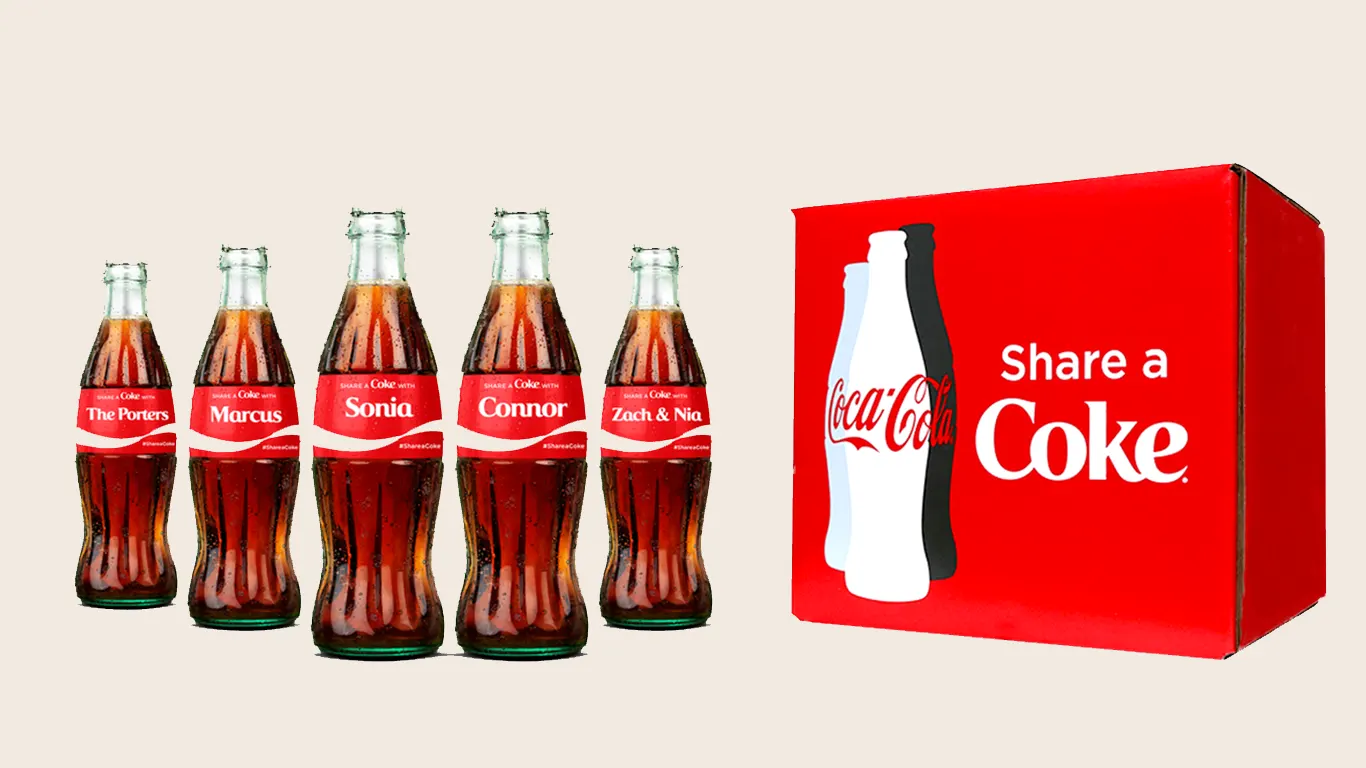
    Coke_branding

    Coca-Cola’s timeless branding focuses on fostering emotional connections and spreading happiness through their refreshing beverages.

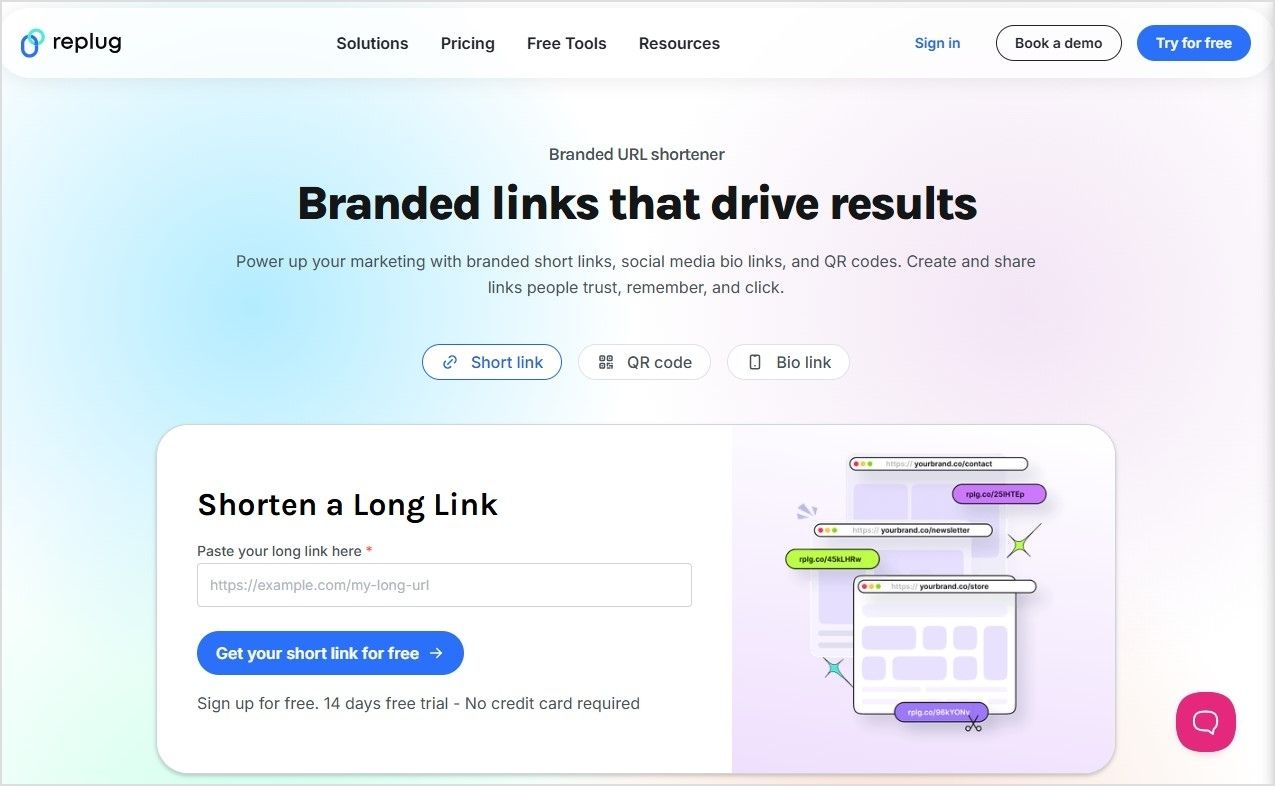
    One excellent tool to help execute and manage branding efforts is Replug, which allows marketers to create and distribute branded links across multiple channels.

    Let’s elaborate on the basic concepts and then we’ll move forward to the details.

    What is a brand?

     Brand Marketing Concept

    A brand is a business or company that sells a product or service and has positioned itself into a well-reputed business in the niche or market segment.

    Plus, the brand identity and positioning in the users’ minds play a vital role in the establishment of any brand.

    Brand Attributes

    Brand attributes are the traits that reassure the brand values by implementing the core values of the brand.

    Here are the most common brand attributes that shape brands’ perceptions:

    • Relevancy: Brand relevancy means how relevant a brand’s approach is toward prospective customers. The target audience is key to getting noticed by the market segment.
    • Consistency: Stick with your publishing or marketing regime, especially if it’s working out for you because consistency takes you ahead of your competition.
    • Credibility: Credibility revolves around how a brand is perceived by people. Brands put a lot of effort into building brand reputation because being in the audience’s good books is essential for repeat clients.
    • Positioning: Brand positioning is an attribute that showcases how a brand shapes its image in the customers’ and prospects’ minds.

    Types of Brand Attributes

    Brand attributes can be divided into two types:

    i. Hard brand attributes: These are the properties involving visual appearance and tangible qualities. It includes logos, brand names, slogans, sign boards, mascots, etc.

    ii. Soft brand attributes: These are the characteristic values of a brand in the customers’ minds. It includes uniqueness, trustworthiness, innovation, convenience, etc.

    What is branding and why is it important?

    What is branding?

    Branding is a marketing buzzword widely used in the sales, marketing, and public relations departments.

    Branding is a strategy to build a company’s identity and carve out an image in the end-users’ minds.

    The purpose of branding is to create awareness and spread the word about the brand.

    For instance, Nike is an American brand known for manufacturing athletic shoes, apparel, and sports equipment. Plus, they sponsor sports celebs and sporting events across the globe.

    The reason we all recognize the “Nike” logo is that they have spent billions of dollars over the years on building their brand’s identity.

    Branding encapsulates everything from creating the identity of a brand to shaping the perception through several tactics, such as:

    • Choosing a brand name
    • Creating a logo
    • Making the branded stationery
    • Designing the official merchandise
    • Putting up the sign boards
    • Printing the pamphlets

    Benefits of branding

    Here are some key benefits of branding to remember:

    • Builds trustworthiness: Branding is crucial to building trust between a brand and the consumer base. A brand’s logo, name, slogan, and colors help develop recognition among the masses.
    • Establishes brand positioning: Brand positioning is the image of a brand in the customers’ minds. Often brands’ are known for their high-quality products or low prices and such perks help shape their position in the end-users’ minds.
    • Infuses brand loyalty: Branding sparks brand association that pulls the loyal customers and fan base toward their favorite brands. Brands understand the psychology of brand loyalty so they use branding to leverage that brand association in their marketing campaigns.
    • Helps customer acquisition: Branding works as a channel to communicate, attract, and engage both existing and potential customers. Companies use all sorts of channels to promote their branding, for instance, giveaways, charity events, sponsorship, etc.
    • Inspires purchase decisions: Since branding is all about creating awareness about a brand with direct and indirect brand promotion, it excites potential buyers and loyal fans to make a decision who are on the fence.

    What is brand marketing?

    Brand marketing is a process of establishing a connection between a brand and its users.

    Brand marketing focuses on highlighting the effectiveness of a brand and how the entirety of the brand is important to the customers’ survival in the market.

    Brand marketing doesn’t emphasize selling the product or service directly. Instead, it paves the way for building and growing a strong relationship with the end users.

    Most brands opt for the traditional route and use digital marketing mediums like ads, email, and social media for product marketing. As a result, their goal gets tied with the transactional part of the communication.

    pepsi branded link

    Pepsi’s brand marketing strategy revolves around capturing the spirit of youth and pop culture. Pepsi’s online brand marketing efforts are a testament to their ability to connect with consumers in the digital sphere.

    Pepsi employs branded URLs strategy to reinforce brand recognition and simplify online experiences. For this, they use a reliable URL shortener, which helps convert long campaign links into clean, memorable, and trackable branded links.

    By using customized short links featuring their brand name, Pepsi ensures consistent branding across digital channels.

    What’s the difference between branding and marketing, and which comes first?

    The main difference between branding and marketing is that branding brings recognition, identity, and positioning. Whereas, marketing gets brand attention, eyeballs, and engagement.

    The branding vs. marketing debate isn’t worth it because both are essential from publicity and sales standpoints.

    However, if you’re wondering which one comes first, it’s pretty clear that branding comes first.

    For instance, if you launch an SEO agency, you’d start with a brand name, logo, domain, and website instead of hopping on Facebook to run Facebook ads.

    What are the types of brand marketing?

    There are several types of brand marketing, the below-mentioned three are the popular types of brand marketing:

    i. Corporate brand marketing: It revolves around companies’ strategies to develop their reputation and build a connection with the audience through different means. These corporations often communicate their brand values through a mission statement, promotional offers, and press releases.

    ii. Personal brand marketing: Personal brands are individuals who have managed to hone in on certain areas and dominate a small segment of the market. Social media influencers cash in on their personal brands. They use content distribution by leveraging social media platforms and amassing an audience which wants to listen to them.

    iii. Product brand marketing: Product brand marketing is a process of branding a specific product by pouring all energies into it. In product brand marketing, brands often pick their best-performing product and try to put it on a pedestal to win the attention of the end users.

    4 things to keep in mind when developing a brand marketing strategy

    A branding marketing strategy doesn’t build on a whim – it always takes some time to put together a strong brand marketing plan.

    Here are a few key elements to consider when developing a brand marketing strategy:

    1. Brand marketing is a long-term strategy. Don’t rush it. Otherwise, you might end up frustrated within a few weeks. It’s about building a brand’s identity based on the available resources, relationships, and communications.
    2. It takes time to reap the fruit. It’s not a short-term marketing strategy like an ads campaign that shows results at the end of the week, month or quarter.
    3. It is ongoing and can take many forms. It doesn’t only revolve around choosing a brand name, opting for a nice logo, and designing the brand’s stationery. In fact, brand marketing encompasses everything you do to establish your brand’s identity through collaborations, partnerships, sponsorship, giveaways, etc.
    4. The overarching goal of brand marketing is to grow the business, whether it’s done through building relationships with new prospects, attending seminars or industry meetups, or launching a content marketing plan to attract, engage, and convert the audience.
    5. An effective brand marketing strategy involves understanding different market attributes, including brand positioning, which is a critical aspect that helps shape how a brand is recognized. In Cincinnati, diverse techniques are blended to leverage brand presence and reach an amplified audience base. This modern approach includes collaboration with a leading Cincinnati marketing agency that inspires local and international brands by marrying traditional concepts with contemporary technology and creative executions.

    How to build a strong brand marketing strategy?

    Brands with strong business positioning in their industry often are the ones that build a branding strategy and follow it. Remember, it’s not a get-rich-quick scheme; branding is a real deal.

    Here are 9 tips that can help you can build a strong brand marketing strategy:

    1. Identify your brand marketing goals and vision

    The first and foremost thing to do when building a strong brand marketing strategy is to identify the brand’s marketing goals. Every brand sets eyes on certain targets to achieve.

    In order to build a powerful brand marketing strategy, start by envisioning the future. It doesn’t matter whether it’s gaining a significant market share or entering into a monopolistic market. Collaborating with a specialized marketing agency can provide valuable insights and expertise in reaching your branding goals.

    Once the brand marketing goals have been set, it gets easier for the team to execute marketing and branding plans.

    2. Develop your brand identity

    The brand identity means what this brand stands for or is known for. These brands try to develop their brand identity to attract potential customers and social media audiences.

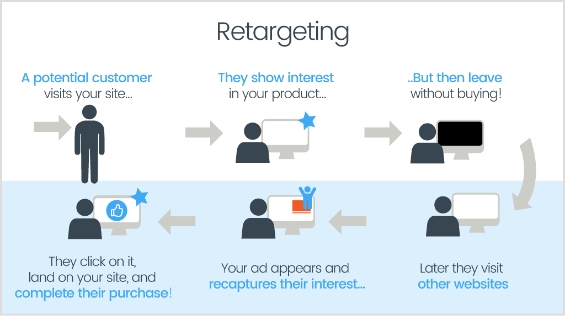
    Interesting read: 8 Best Retargeting Platforms To Retarget Your Potential Audience

    3. Raise brand awareness

    Brand Awareness - replug

    When brands educate the audience about their belief system, they basically share what they believe in to spread brand awareness. Many organizations use digital sign software to display these messages consistently across offices, stores, and public spaces. Almost every brand tries to position itself as culturally diverse, with no tolerance for racism, and gender equality.

    4. Build brand loyalty

    To create a strong brand marketing structure, it’s vital to have brand loyalty on the customers’ part. Brands pay close attention to the ideas that help them earn brand loyalty from customers.

    Once these things sort out, building a brand identity seems like a piece of cake.

    5. Research target market

    Understanding the target market and the challenges that might arise is crucial to establishing a solid brand marketing strategy.

    Researching the target market means analyzing the market segment you’re about to enter to help bring clarity to the process.

    Brands often turn a blind eye to the competition, which is a big mistake. There may have been a couple of reasons: the first is that they overrate themselves right at the beginning of the journey and the second is that they think competitors won’t notice them, so they don’t consider their competitors a threat just yet. Understanding your target market also helps shape your content, SEO, and advertising strategies to match customer expectations. For businesses looking to scale without building an in-house team, partnering with the best white label SEO service can streamline audience targeting and ensure consistent, high-quality search visibility.

    There are two factors to consider when considering research on the target market for building a brand marketing plan:

    • Narrow in on the target audience: Zooming in on the right segment of the audience would take you closer to the target audience. This is exactly what every brand dreams of when entering the market.
    • Know your competition: Every brand that excels on social media or in SEO is always aware of its competition. They closely follow their content strategy, social media content distribution, SEO tactics, and more. To make this process more efficient, many teams automate data collection using proxy scraper tools, which help track competitor site activity and gather structured insights at scale.

    The target market research would take you ahead of many competitors who don’t care much about understanding the competition or haven’t had a chance to learn more on this topic.

    6. Determine your brand marketing tactics

    One of the important steps when building a brand marketing strategy is to determine what route to take to get to the destination. The decisions such as color schemes, blog content style, social media content strategies, and other strategies fall into this category.

    Clarifying the brand marketing tactics would provide the team with a roadmap to follow and help develop a system to save time in the future. Using Gantt chart software can make planning and visualizing these tactics easier, ensuring tasks are organized and deadlines are met.

    However, there are always some inside secrets that only team members know and these secrets aren’t supposed to get out. The reason is that competitors spy on you the way you keep an eye on them.

    The keys to remember when determining the brand marketing tactics are:

    • Develop brand marketing collateral: Branding marketing requires a set of tools and resources. Developing an arsenal whether it’s a PDF outline or a list of online tool subscriptions – this would come in handy for the team.
    • Outline a messaging strategy: The message-driven content always does better than vague and pointless content. Make sure that the content is sending out a clear, concise message to the chosen audience.
    • Define messaging and positioning: It’s necessary to communicate to see that everyone is on the same page. The team must be crystal clear about the brand position. Don’t shy away from explaining the brand message to the team to ensure that every individual team member knows about it.

    7. Rollout a timeline

    Rolling out a timeline means allocating a time window to a specific project or campaign. Brands always set a timeline whether they’re hiring a new freelancer or opting for a new URL shortener.

    It’s best to set a timeline for a campaign to analyze its performance and effectiveness at the end. Brands usually choose monthly, quarterly, biannual, and annual timelines for their campaigns.

    When you’re building a brand marketing strategy, don’t hesitate to choose a time frame for the strategy. The reason why it matters is that it helps brands measure the performance of the campaign afterward.

    8. Create a consistent brand image

    One of the goals of establishing a strong brand marketing strategy is to come up with a consistent brand image. A brand image means building a positive brand reputation among customers.

    brand reputation risks

    Burger King UK faced backlash for tweeting ‘Women belong in the kitchen’ on International Women’s Day. The tweet was criticized for its insensitive and derogatory language, which undermined the significance of the day and perpetuated harmful stereotypes about women. Many people expressed their disappointment and called out the fast-food chain for the inappropriate message. Burger King later issued an apology and acknowledged the need to deliver a more respectful and inclusive message.

    This example shows why it is crucial for companies to recognize the importance of fostering an inclusive and supportive environment both online and offline. Small gestures, like providing personalized office items such as custom paperweights, can also contribute to creating a more welcoming and cohesive workspace.

    brand user experience

    The brand position or image doesn’t establish overnight; it takes forever to establish a brand in the eyes of the audience. It requires continuous effort and a dedicated plan to pull this off.

    Brands that successfully establish their reputation and goodwill try to continue that momentum and live up to the customers’ expectations. No wonder they build this brand position and image over the course of several years.

    Therefore, it’s vital to make efforts to create a consistent brand image through actions, offerings, customer support, high-quality products/services, and pricing to build and maintain a strong brand reputation.

    9. Measure the success of your brand

    social media meme

    No one wants their successful strategies to go unnoticed because otherwise they wouldn’t realize what worked for them and might as well try something new.

    Therefore, the success measurement of the brand marketing campaign is crucial to the whole process.

    In order to get disciplined about measuring the success of the branding strategies, keep the following tactics in mind:

    • Create brand guidelines: Don’t sleep on setting the ground rules for everyone to follow. It could be anything from choosing the best time to post on TikTok to using a specific font for social media image copies.
    • Make sure your product delivers on your promise: The product or service has to be top-notch to fulfill the promise. Otherwise, your marketing tactics would fall flat.

    The question you might ask is how someone could measure the success of their brand marketing strategy.

    Well, there are several indicators that might give you an idea of how well or badly your brand marketing campaign has performed over the course of the campaign, such as:

    • The number of email inquiries received
    • The number of social media followers increased
    • The percentage of social media engagement increased
    • The percentage of website bounce rate decreased
    • The change in the digital marketing ROI

    These indicators may vary from brand to brand. I won’t be surprised if some brand would go further down the rabbit hole and analyze numerous other factors to measure the success of their branding campaign.

    Interesting read: 15 proven Facebook SEO techniques to try in 2026

    How to use social media to market your brand successfully?

    social media meme

    Social media has become an important part of the marketing arsenal. No individual or brand could think of marketing a brand without using social media.

    The reason why social media is inevitable in marketing is because it has the attention of the masses. Now social media platforms have over 1 billion monthly active users.

    So, you might wonder how you can use social media to market your brand without breaking the bank. Well, I have a handful of tips that would help you cash in on the social media real estate:

    • Create a community of like-minded people: Don’t shy away from starting something from scratch. Build a community of true fans or like-minded people using a Facebook group discord channel or any other similar tool.
    • Put out compelling, helpful content: Publishing high-quality, effective, and useful content is your ticket to engagement, attention, and eyeballs. Social media ads won’t cut it for most people, so use content marketing as a great alternative to advertising.
    • Build a strong relationship with the audience: Building a healthy, strong relationship with your audience means you care what they want to know or learn. Provide them with efficient customer support and help them out by going out of the way – it will make a difference in the long term.
    • Show up consistently on social media platforms: One of the best strategies to market a brand on social media is to consistently show up on social media platforms. You could always use a social media scheduling tool like ContentStudio to schedule your posts for the future.
    • Use promotional strategies to spice things up: Most brands only focus on once-a-year discounts. However, if you’re a B2C company, then use giveaways, discounts, and promotional offers throughout the year to strengthen the relationship with the audience. Don’t shy away from giving away free brand merch or arranging meet-ups with customers or fans.

    Frequently asked questions

    Let’s answer some of the burning questions about brand marketing:

    What is the marketing of a brand?

    Marketing a brand means putting the brand in front of the prospective audience and establishing an image of the brand.

    What are the four branding strategies?

    Here are four of the essential branding strategies to follow”

    1) Start with finding your brand’s mission.
    2) Identify the target market to enter.
    3) Build your brand’s image.
    4) Measure the outcome of the branding campaign.

    What are the benefits of using a marketing strategy for a brand?

    – Provides clear direction
    – Targets the audience
    – Increases brand awareness
    – Establishes brand recognition
    – Defines a unique brand identity
    – Engages and fosters customer loyalty
    – Maximizes ROI
    – Drives business growth

    Which is better: marketing or advertising for brands?

    There is no right or wrong answer for this one. It depends on the industry, company’s type, growth hacks being followed, and tactics that have worked – most brands tend to use both and put more energy into whatever works for them.

    When is brand marketing most successful?

    Brand marketing is most successful when it effectively communicates a compelling brand story, resonates with the target audience, and drives positive brand perception, loyalty, and engagement.

    What should be included in a good marketing plan for my brand?

    The common tactics for establishing a solid marketing plan must include clarity of the brand’s offering, effective communication, and a powerful analytical mechanism to measure the outcome.

    You may also like:

    Unique URLs: What they are and how to use them?

    Top 29 personal branding tools to upscale your marketing efforts

  • How to Find the IP Address of a Website: Step-by-Step Guide

    How to Find the IP Address of a Website: Step-by-Step Guide

    Welcome to the fascinating realm of the internet, where websites hold a hidden secret: their unique IP addresses.

    Curious to uncover this mystery? Fear not, we’ll guide you through a simple step-by-step process.

    For those who manage multiple website links and want to streamline link handling, Replug offers a powerful platform to shorten, brand, and track your URLs, on top of standard DNS-based IP lookups.

    Besides, by using commands like ping and nslookup, or employing a handy DNS lookup tool, you’ll swiftly discover the IP address of any website. 

    Get ready to dive into the world of digital discovery and unravel the hidden secrets that make the web tick. Let’s get started on how to find the IP address of a website!

    What is an IP address?

    An IP address, or Internet Protocol address, is a unique numerical label assigned to each device connected to a computer network. It serves as a digital identifier for devices, allowing them to communicate and exchange data with other devices over the internet. 

    IP addresses come in two main versions: 

    IPv4 (Internet Protocol version 4) and IPv6 (Internet Protocol version 6). 

    IPv4 addresses are comprised of four sets of numbers separated by periods, such as 192.168.0.1. 

    IPv6 addresses are longer and written in a hexadecimal format, such as 2001:0db8:85a3:0000:0000:8a2e:0370:7334. 

    IP addresses enable the routing and delivery of information across networks, facilitating seamless connectivity in the digital world.

    Also read: How to Unblock Websites: 7 Ways to Access Restricted Content

    How to find the IP Address of any website?

    Finding the IP address of a website can be done in a few simple steps using either the ping command, the nslookup command, or a DNS lookup tool. For added convenience and privacy, you can check your IP address using tools like Surfshark, which offers a quick and secure way to see your current IP.

    How to find the IP address of a website using the ping command?

    Here’s a step-by-step guide to help you find the IP address using the ping command:

    Step 1: Open the command prompt on your computer.

    Step 2: Type “ping examplewebsite.com” in the command prompt (replace “examplewebsite.com” with the actual website you want to find the IP address for).

    Step 3: Press Enter.

    Step 4: The results will be displayed, including the IP address of the website. 

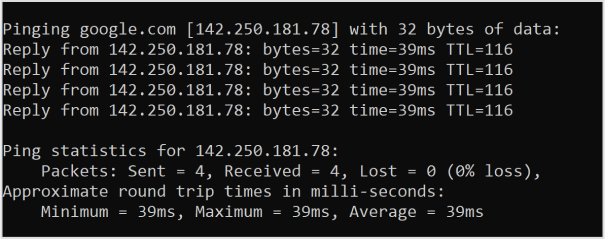
    Below, you can see the pinging results for Google.com

    how-to-find-the-IP-address

    Also read: How to Block a URL in Chrome?

    How to find the IP address of a website using the nslookup command?

    Step 1: Open the command prompt on your computer.

    Step 2: Type “nslookup examplewebsite.com” in the command prompt.

    Step 3: Press Enter.

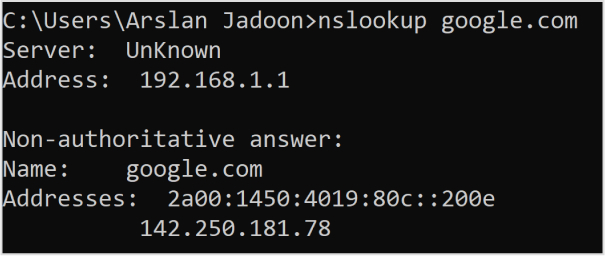
    Step 4: The results will be shown, and you’ll find the IP address of the website. Below is an example of the nslookup command run on Google.com

    how-to-find-the-IP-address

    Also read: Unique URLs: What They Are and How to Use Them?

    How to find the IP address of a website using the DNS lookup tool?

    Step 1: Go to a DNS lookup tool website (you can search for “DNS lookup tool” in your preferred search engine).

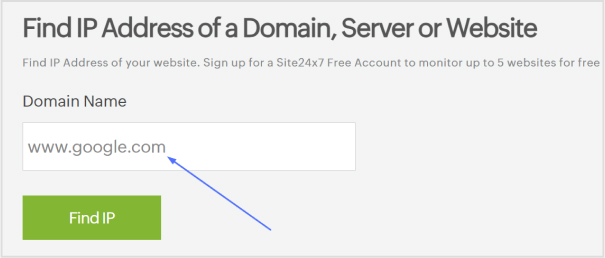
    Step 2: Find the text entry or search box on the website.

    how-to-find-the-IP-address-of-a-website

    Step 3: Type the website URL (e.g., examplewebsite.com) into the text entry.

    Step 4: Click on the “Find IP’’ button.

    Step 5: The results will be displayed, showing the IP address of the website.

    how-to-find-the-IP-address-of-a-website

    Also read: What is URL hijacking: Different forms of typosquatting, consequences, and prevention techniques

    Remember that a website can have both IPv4 and IPv6 addresses, and the results may differ depending on the method used or the website itself. IPv6 addresses are newer and offer more combinations, while IPv4 addresses are more commonly used. Both types of addresses are valid and can be assigned to a website.

    That’s it! You have now learned how to find the IP address of a website using different methods.

    Remember, if you’re sharing the URL publicly or across social media, you could also use a short link created via Replug to make the address cleaner and more user-friendly, plus track performance if needed.

    FAQs

    What is an IP address and how does it work?

    An IP address is a unique numerical label assigned to devices on a network. It allows devices to communicate and exchange data over the internet by providing them with a distinct identity.

    How can I find the IP address of a website?

    You can find the IP address of a website by using commands like ping or nslookup in the command prompt or by utilizing a DNS lookup tool online.

    What is the difference between IPv4 and IPv6?

    IPv4 uses a 32-bit address format and is widely used, while IPv6 uses a 128-bit address format and provides a larger pool of available addresses to accommodate the growing number of internet-connected devices.

    Can I change my IP address?

    Yes, you can change your IP address by contacting your internet service provider (ISP) or using certain software or tools that allow you to mask or modify your IP address.

    Are IP addresses unique to each device?

    Yes, IP addresses are unique to each device connected to a network. They serve as a digital identifiers for devices to ensure proper communication.

    Can someone track my physical location through my IP address?

    While IP addresses can provide a general indication of your location, they cannot pinpoint your exact physical address. However, certain techniques and additional data may potentially help narrow down your location.

    What is a static IP address and a dynamic IP address?

    A static IP address remains constant and is manually assigned to a device, while a dynamic IP address is automatically assigned by a network’s DHCP server and may change over time.
  • How to save a URL to desktop: Step-by-step guide to make a desktop shortcut for a website

    How to save a URL to desktop: Step-by-step guide to make a desktop shortcut for a website

    We’ve all been there; juggling a dozen tabs just to visit the same website over and over. 

    With more than 5.4 billion people browsing the web daily, and desktop users often sinking deeper into content than mobile visitors, quick access matters more than ever.

    Constantly typing or searching for your go-to websites or URLs eats up precious time.

    In a world where half of users abandon slow or hard-to-find content in under three seconds, wasting clicks on simple tasks can feel downright frustrating.

    That’s exactly why knowing how to save a link to desktop or how to save a webpage to desktop can be a game-changer. One click and you’re there!

    Ready to cut the clutter and boost your efficiency?

    Let’s step into the practical ways to make a desktop shortcut for a website!

    How to make a desktop shortcut for a website: Quick & effective methods mentioned!

    Wondering “how to save a URL link to desktop”? Creating a desktop shortcut for a website is simple and only takes a minute or two.

    You can either drag and drop the site’s address from your browser straight onto the desktop, or manually create a shortcut using Windows’ “New Shortcut” feature. 

    Both methods work great and don’t require any special tools or software!

    Method #01: Drag & drop (easiest way)

    This is the quickest and most straightforward method. It’s perfect if you want a shortcut without extra steps.

    1. Open your web browser (like Chrome, Edge, or Firefox) and go to the website you want a shortcut for.

    2. Resize the browser window so you can see both the browser and your desktop at the same time.

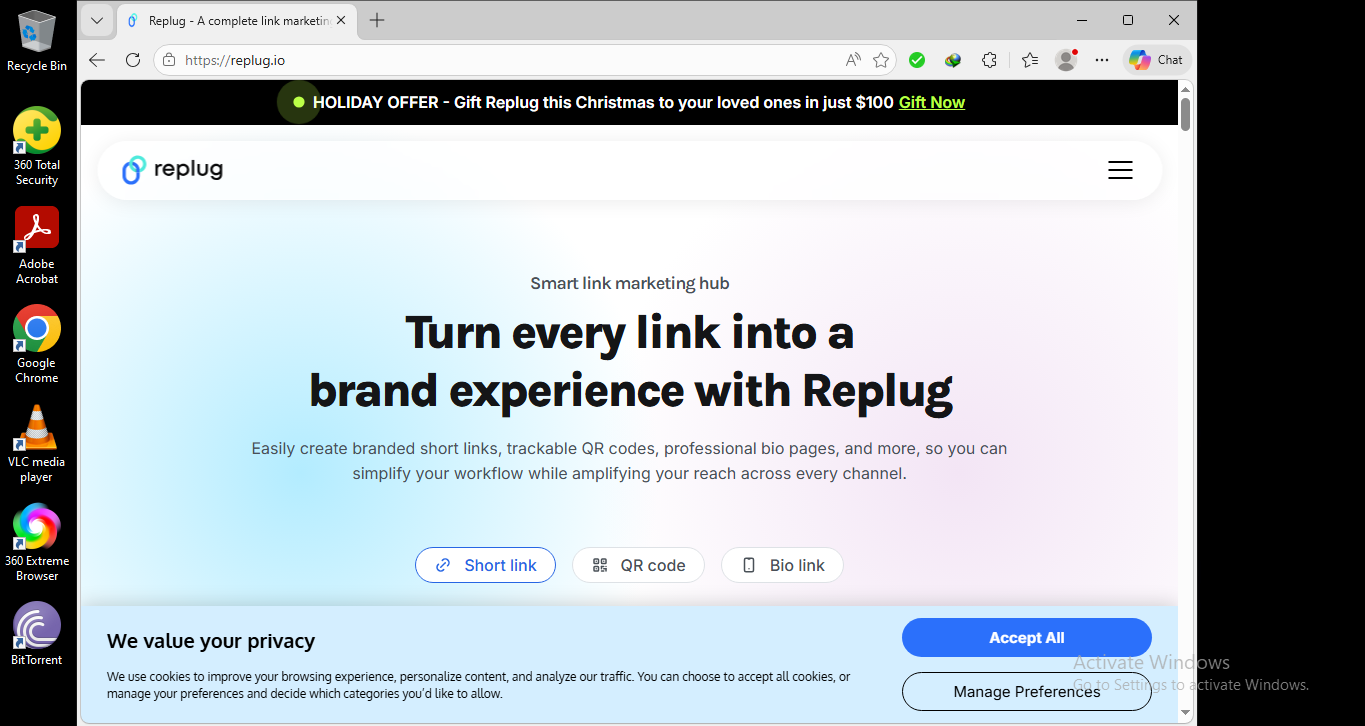
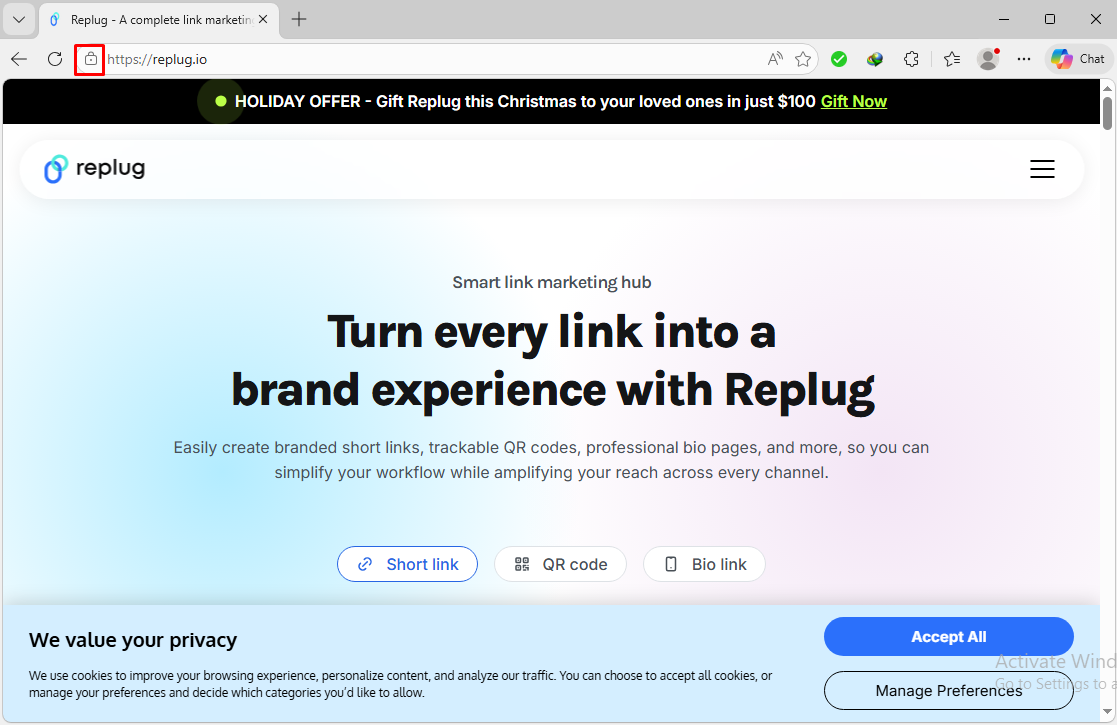
    3. Look on the left side of the address bar. You’ll see a small icon (often a padlock 🔒 or a globe 🌐).

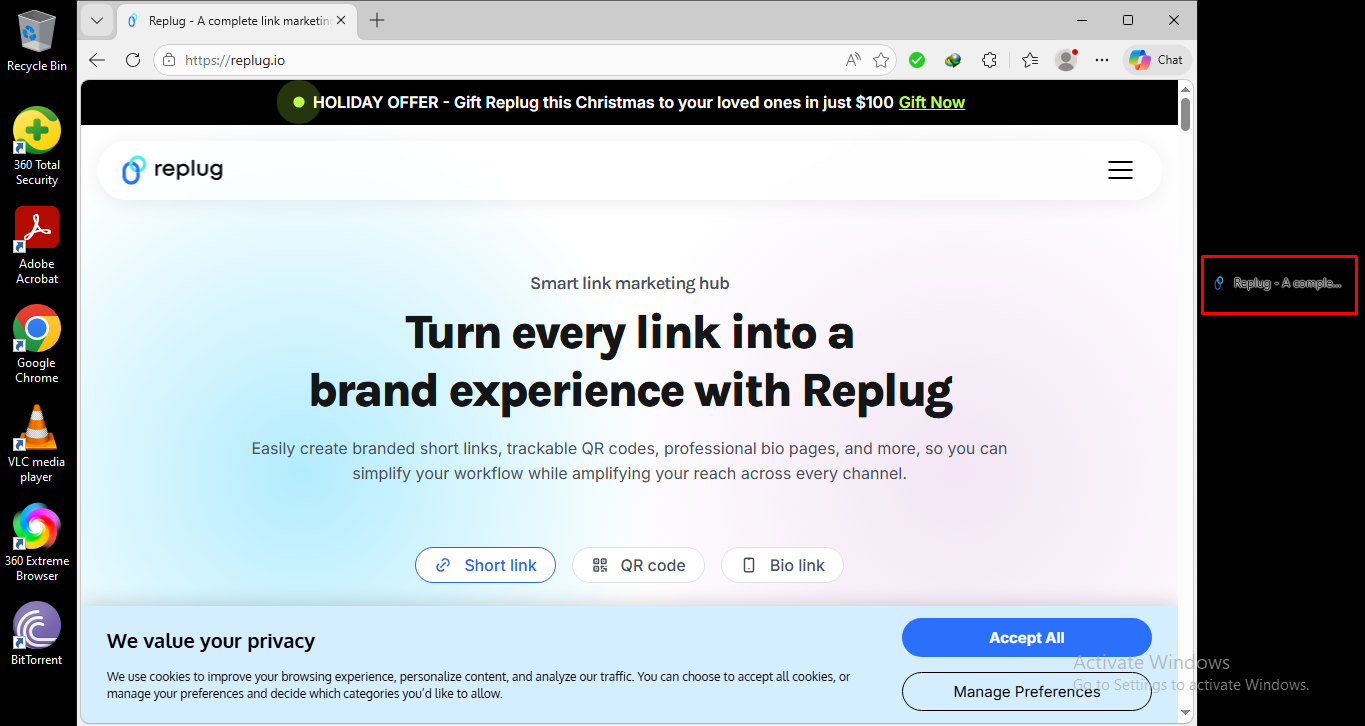
    4. Click and hold that icon, then drag it onto your desktop.

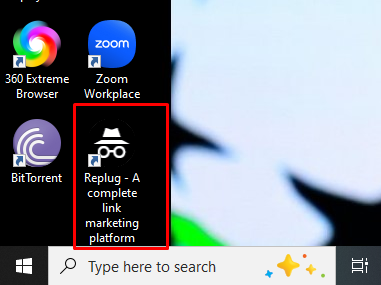
    5. Release the mouse button, and boom! 

    A shortcut to the website now sits on your desktop.

    Note: Just double-click that icon anytime you want to open the site!

    Method #02: Right-click & create shortcut

    If you prefer a more traditional way, or your browser doesn’t let you drag the icon (at times), this manual method works everywhere on Windows.

    1. First, copy the website’s URL from the address bar at the top of your browser.

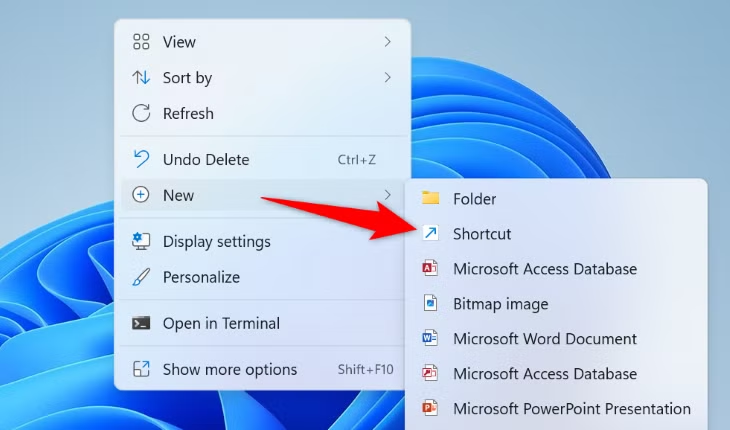
    2. Then, go to your desktop and right-click on any empty space.

    3. From the menu that appears, click New and then Shortcut.

    4. In the box that pops up, paste the URL you copied, then click Next.

    5. Type a name for your shortcut (like “My Favorite Site”), and click Finish.

    Done! You’ll now see a shortcut icon with the name you chose, and double-clicking it opens the website right away.

    Note: If you want, you can also rename the shortcut later or even change its icon by right-clicking it and selecting Rename or Properties.

    How to create a desktop shortcut to a website in Chrome

    When you make a desktop shortcut for a website in Chrome, you’ll get an icon on your desktop that opens that site directly in Chrome. No need to open the browser and type the address or a messy, long URL first. 

    Let’s walk through “How to save a URL to desktop using Chrome” in easy steps!

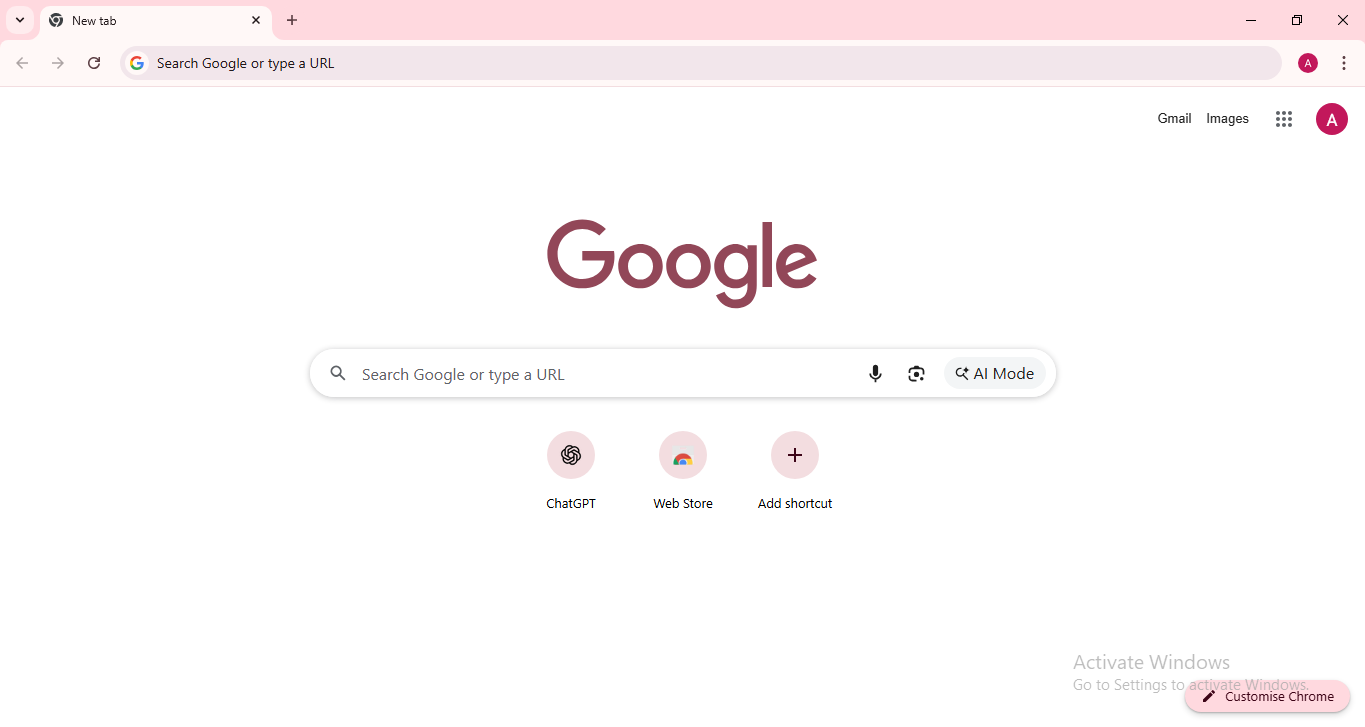
    1. Open Google Chrome on your computer: Start Chrome like you usually do. Make sure it’s up-to-date so all the settings are where they should be.

    Open Google Chrome on your computer

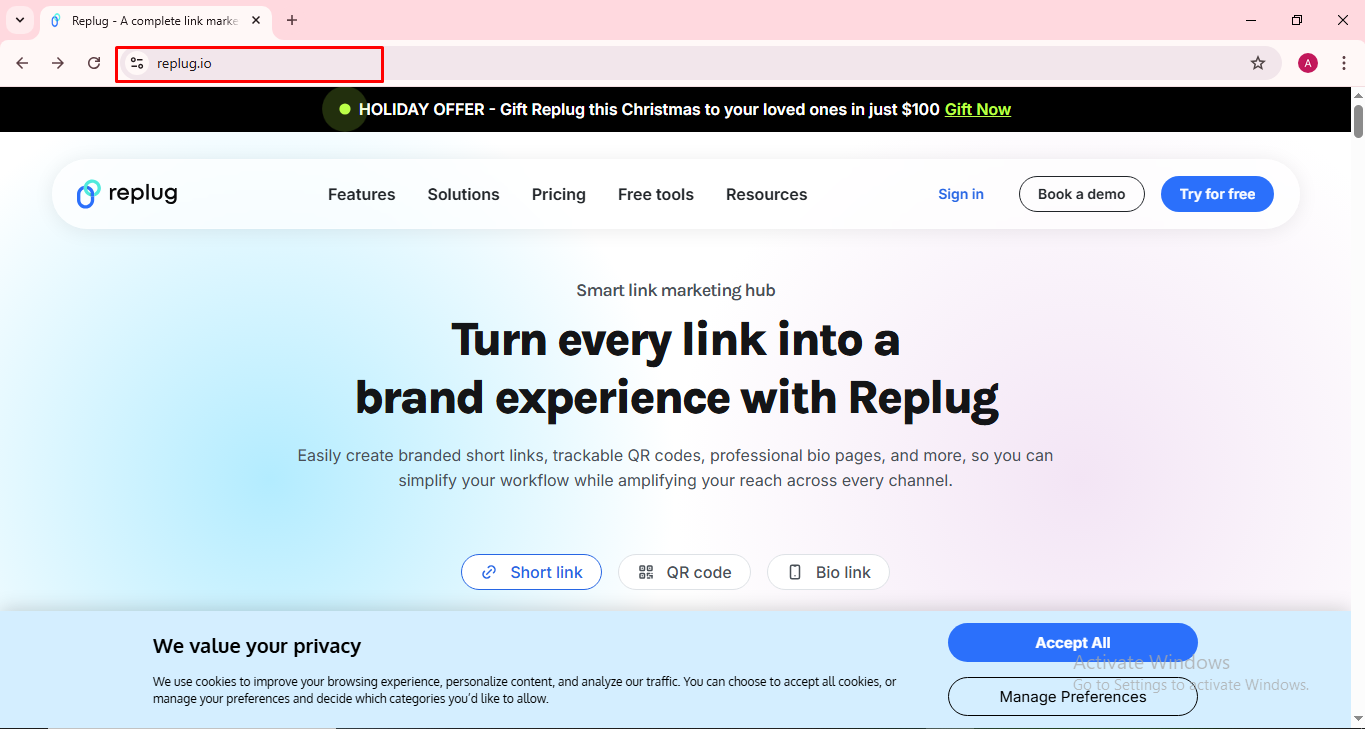
    2. Go to the website you want to make a shortcut for: Just type the URL in the address bar and hit Enter so the site loads fully.

    URL address bar

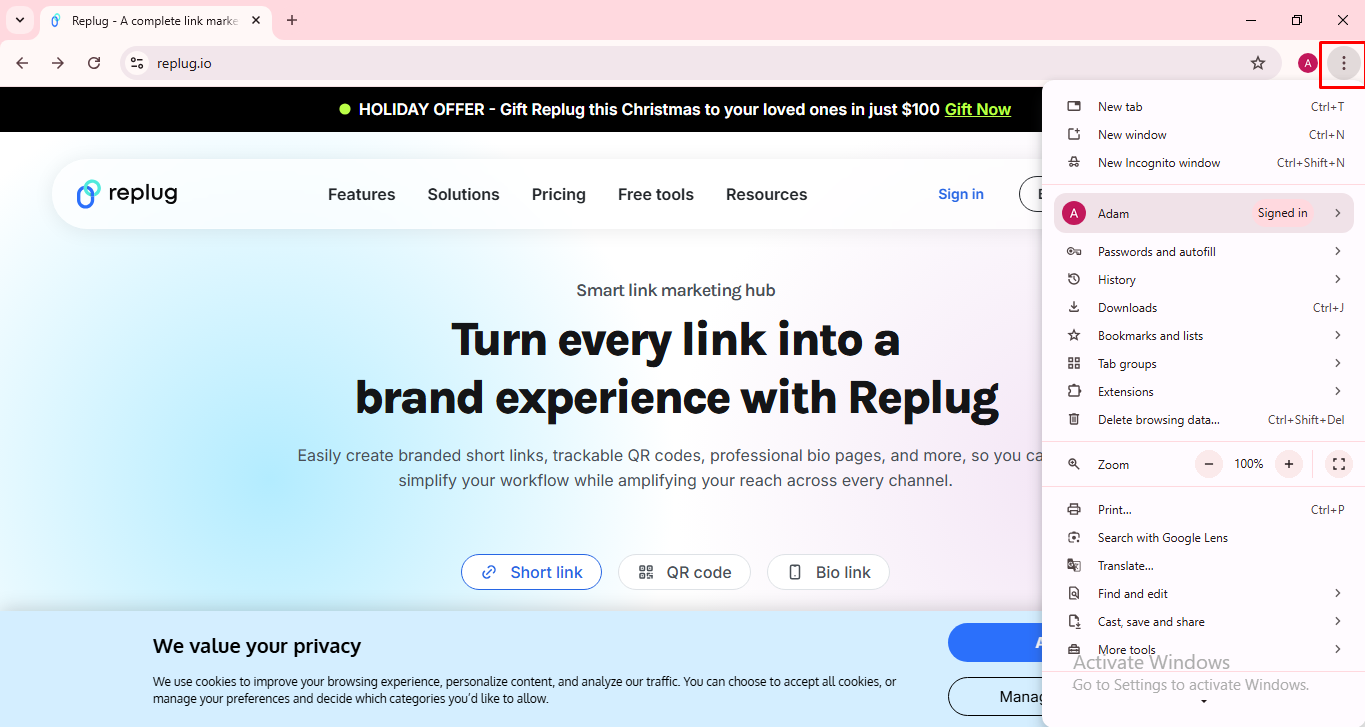
    3. Click the three dots menu (⋮) in the top-right corner: That’s Chrome’s main menu button. You’ll find it on the right side of the toolbar.

    Three dots menu Google Chrome

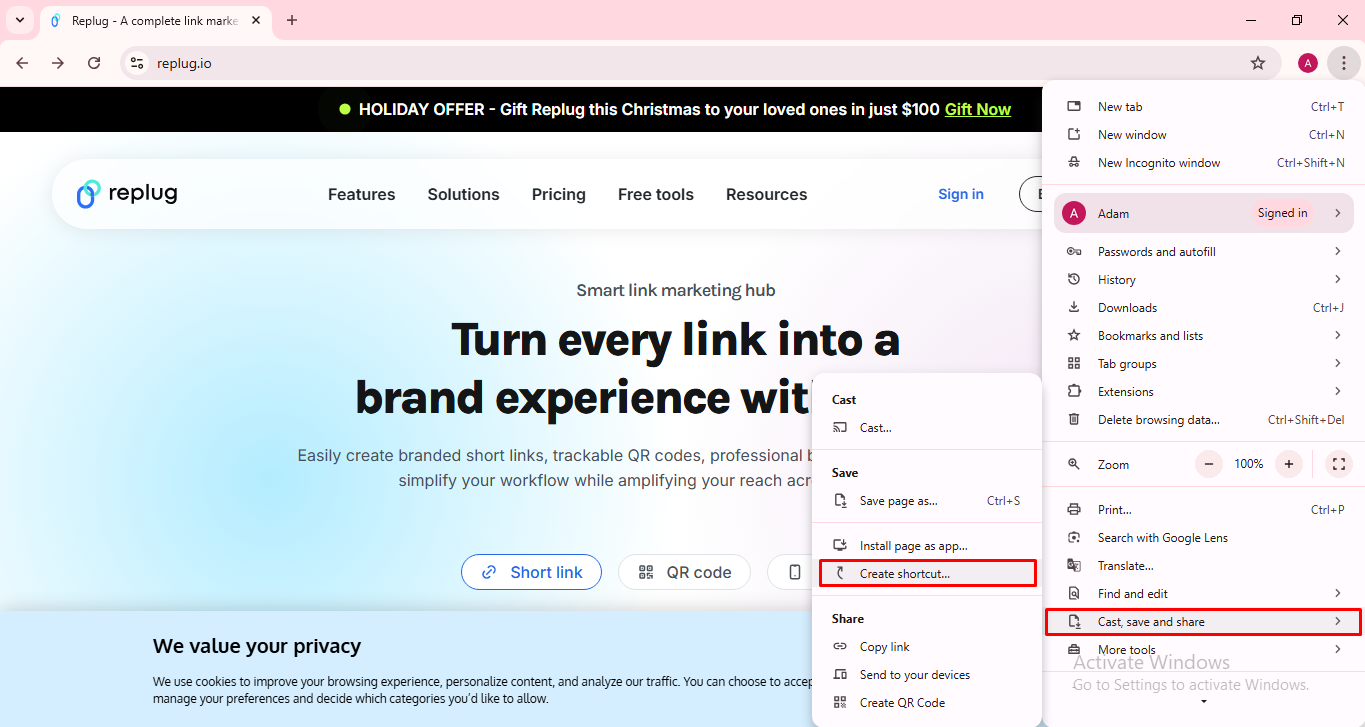
    4. Choose “Cast, save and share,” then click “Create shortcut…”: In some Chrome versions, the “Create shortcut…” option might be right under “More tools,” or inside a submenu called “Save and share.” Either way, just look for Create shortcut… and click it.

    Create shortcut option Google Chrome

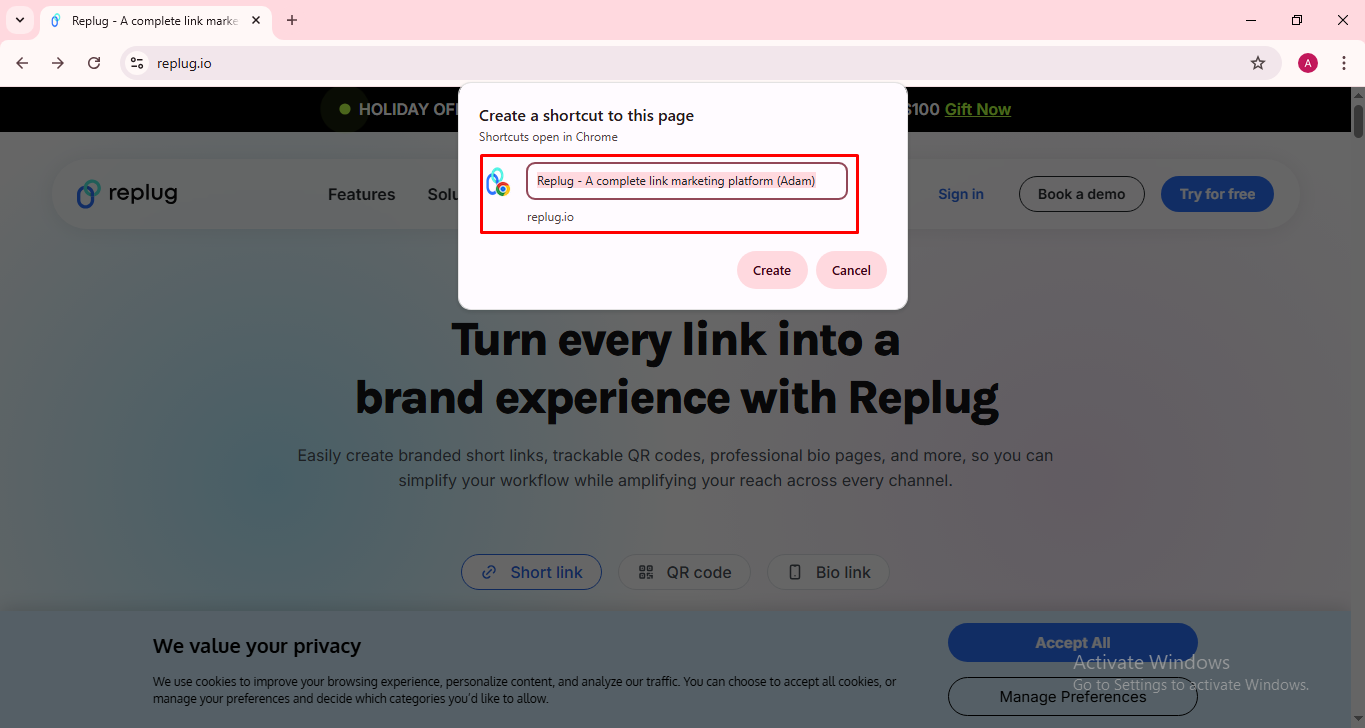
    5. Name the shortcut: A small box will pop up. You’ll see a field where you can enter a name for your shortcut (something like the site’s name so you recognize it easily).

    Name the shortcut Google Chrome

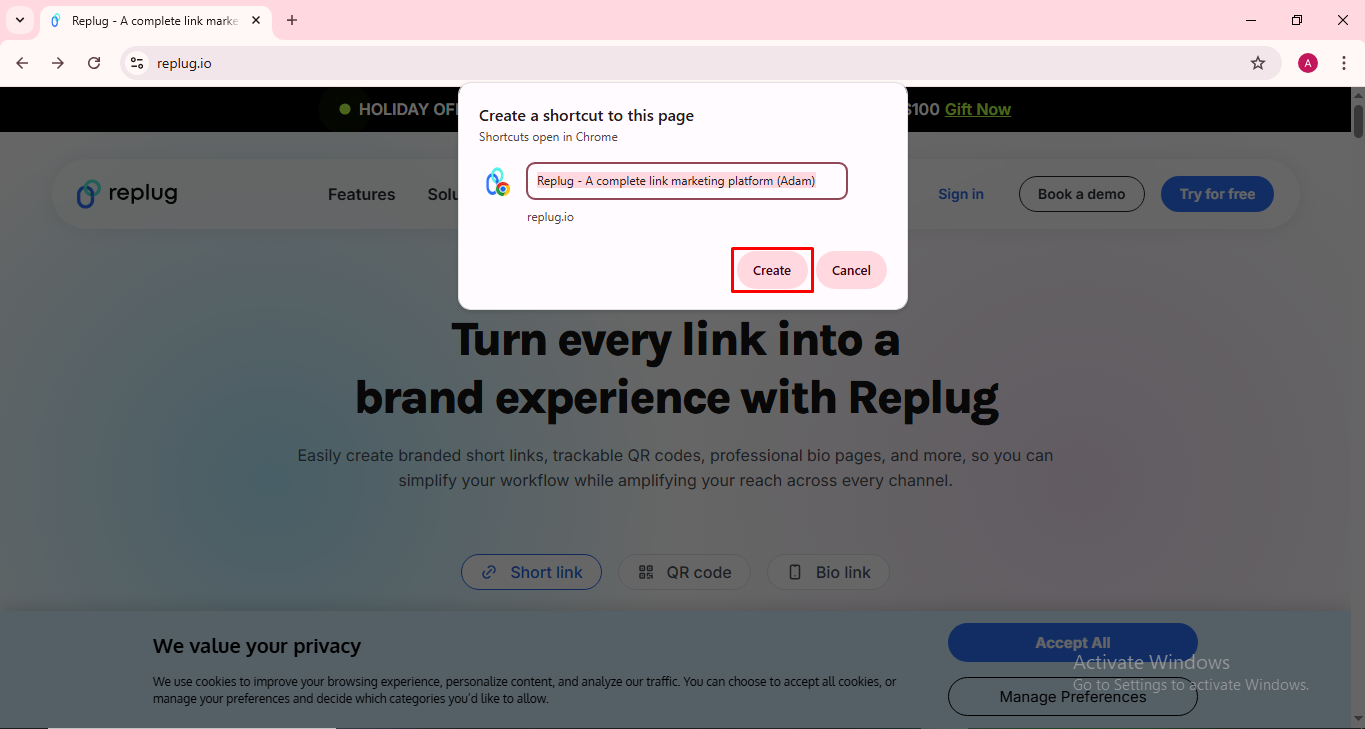
    6. Click “Create”: Once you’ve named it, press Create, and Chrome will put the shortcut on your desktop.

    Create shortcut Google Chrome

    That’s it! 🎉

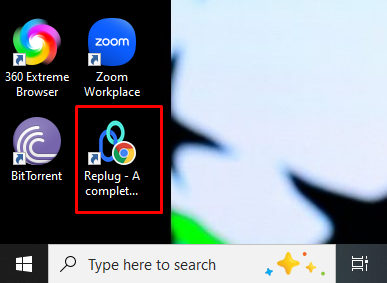
    You will now see a new icon on your desktop that opens the website you chose whenever you double-click it. This shortcut will open the page straight in Chrome, even if Chrome isn’t your default browser.

    Replug website shortcut desktop

    Note: If you ever want to remove the shortcut, just right-click it and select Delete. Super easy!

    Read also: How to block a URL in Chrome: 8 effective & proven methods [tried & tested]

    How to make a website shortcut on desktop using Microsoft Edge

    If there’s a site you visit a lot, you don’t have to open Edge and type the address every time. You can put a shortcut for it right on your desktop so it opens with just a single double-click.

    Below are the easiest ways to do it:

    Drag & drop from the address bar (quickest way)

    This is the simplest method if you wish to save a website shortcut to your desktop using Edge.

    1. Open Microsoft Edge and go to the website you want.

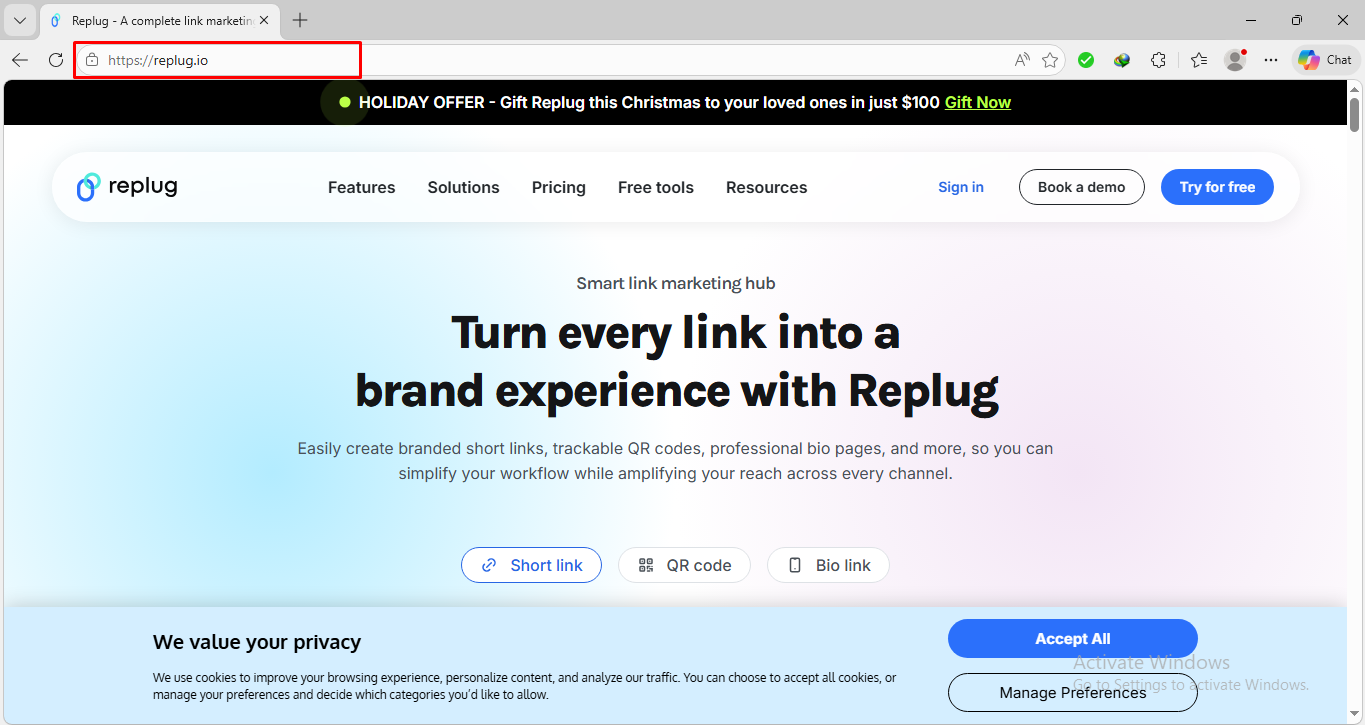
    Microsoft Edge Replug website

    2. Resize the Edge window so you can see your desktop behind it.

    Resize the Edge window

    3. Look at the left side of the address bar. There, you’ll see a small icon (like a padlock or globe).

    Padlock icon Microsoft Edge

    4. Click and hold that icon, then drag it onto your desktop and release.

    Click and hold padlock icon and drag it to desktop

    5. A shortcut will appear on your desktop that opens the site.

    Desktop shortcut Replug

    That’s it!

    Use Edge’s “Install as App” option (nice & clean)

    This method makes the shortcut feel a bit more like an app, and opens the site in a neat window without all the browser extra fuss.

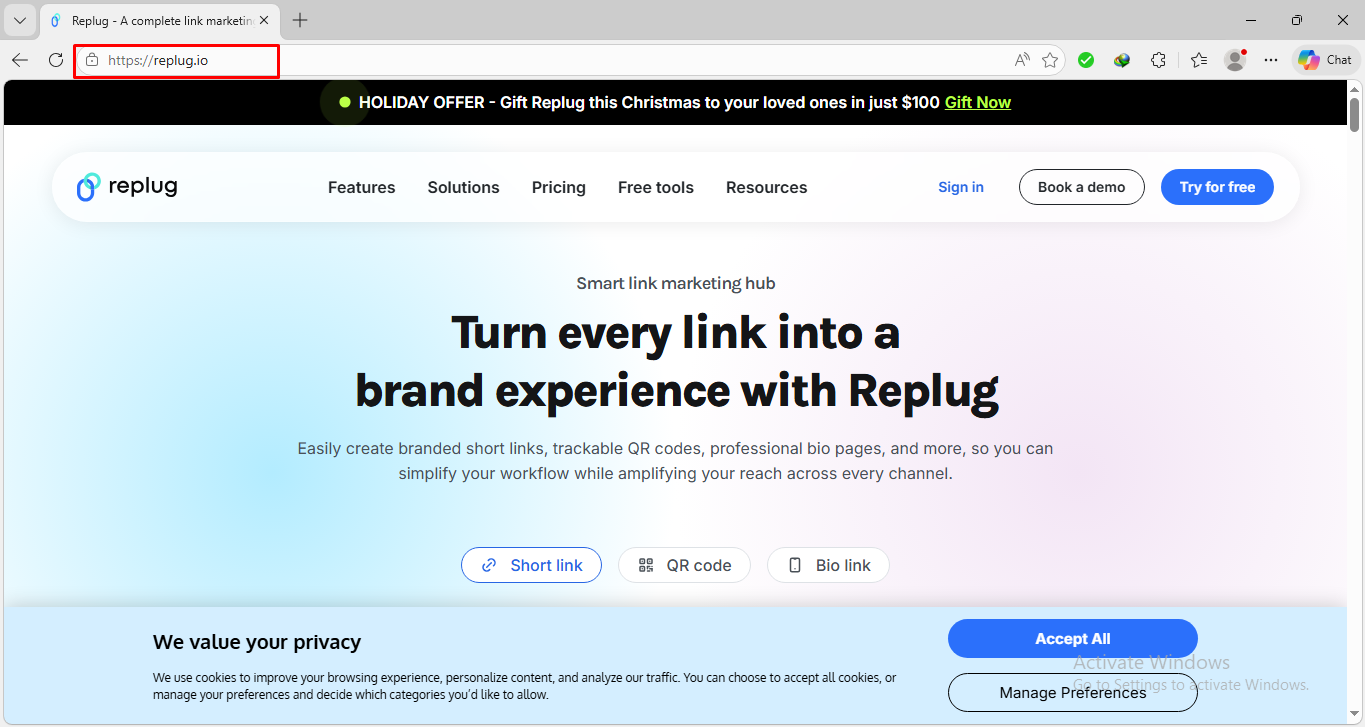
    1. Open Edge and go to your chosen website.

    Replug.io Microsoft Edge

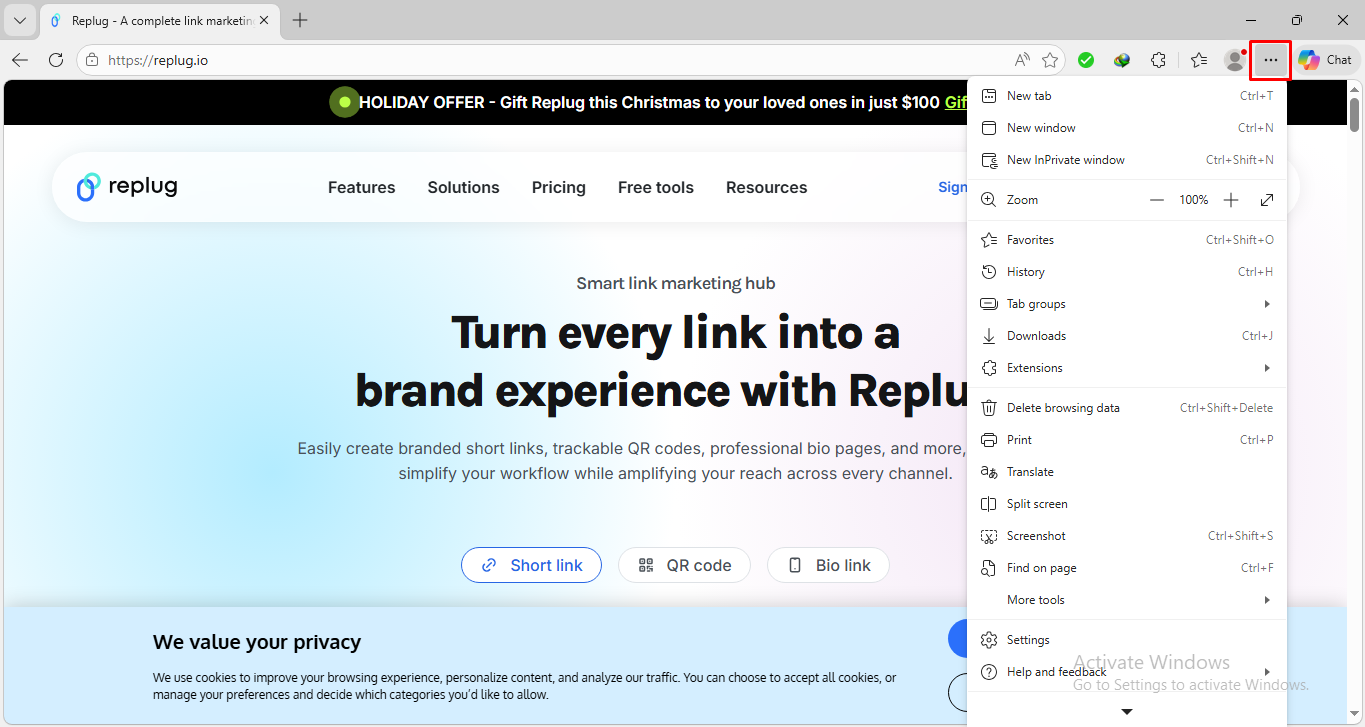
    2. Click the three dots (…) in the top right corner of Edge.

    Three dots menu Microsoft Edge

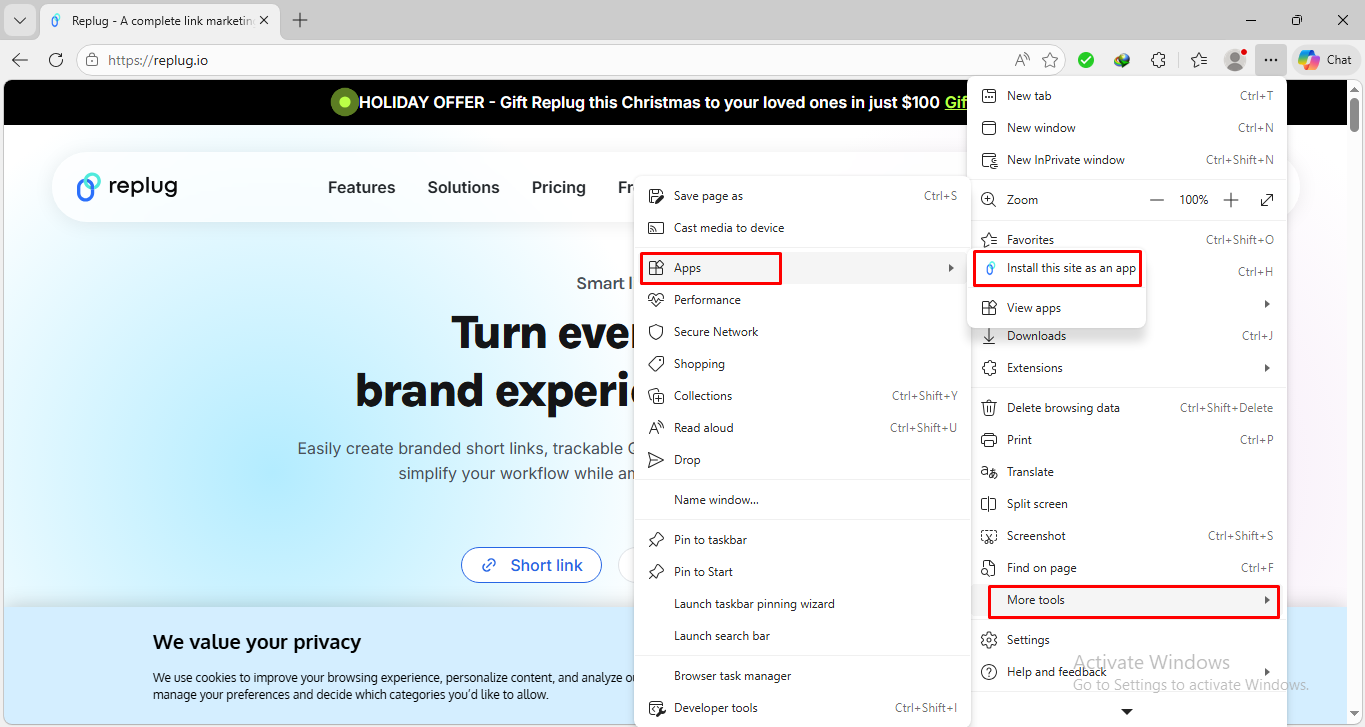
    3. Hover over More toolsApps and then click “Install this site as an app”.

    Install this site as an app option in Microsoft Edge

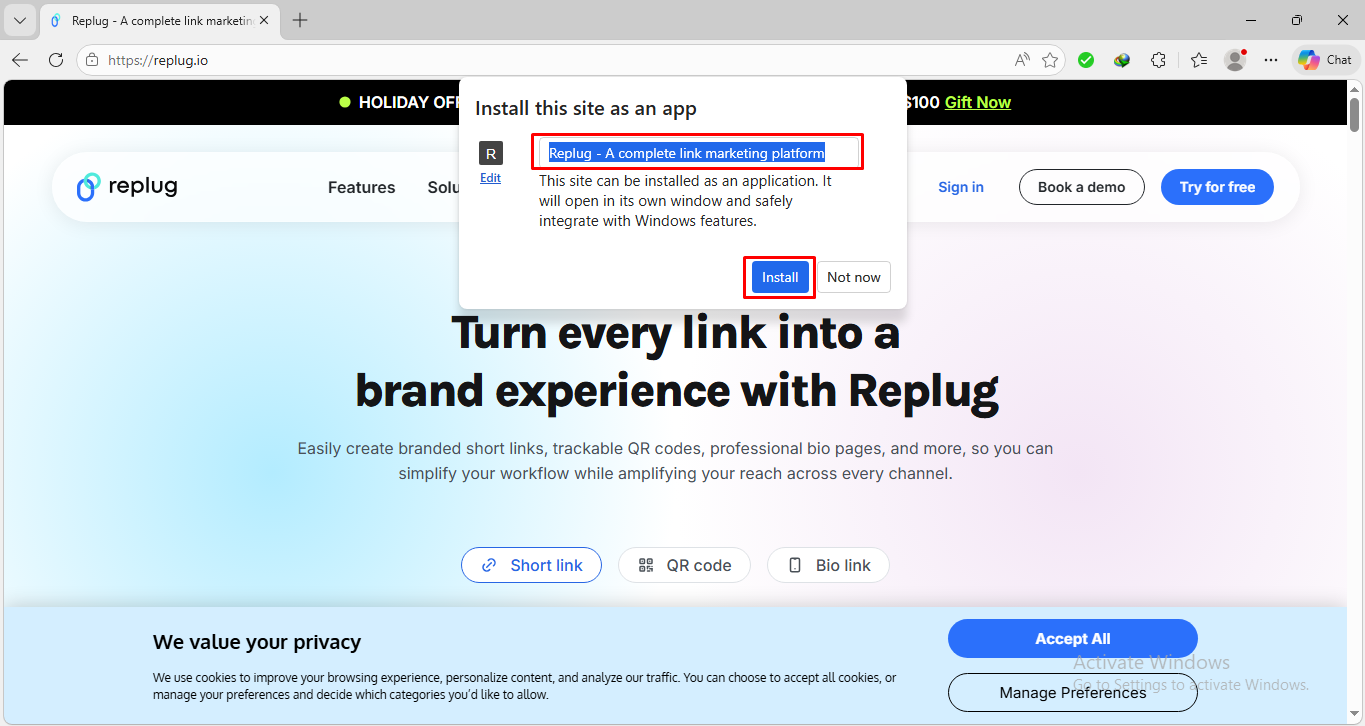
    4. Type a name for the site and click Install.

    Install this site as an app pop-up Microsoft Edge

    That’s all there is to it! Edge will now create a desktop shortcut automatically.

    Note: This is great for things like email, chat portals, or tools you use all the time.

    Create a shortcut using Windows’ New Shortcut option

    If you want full control, this manual method works pretty well too:

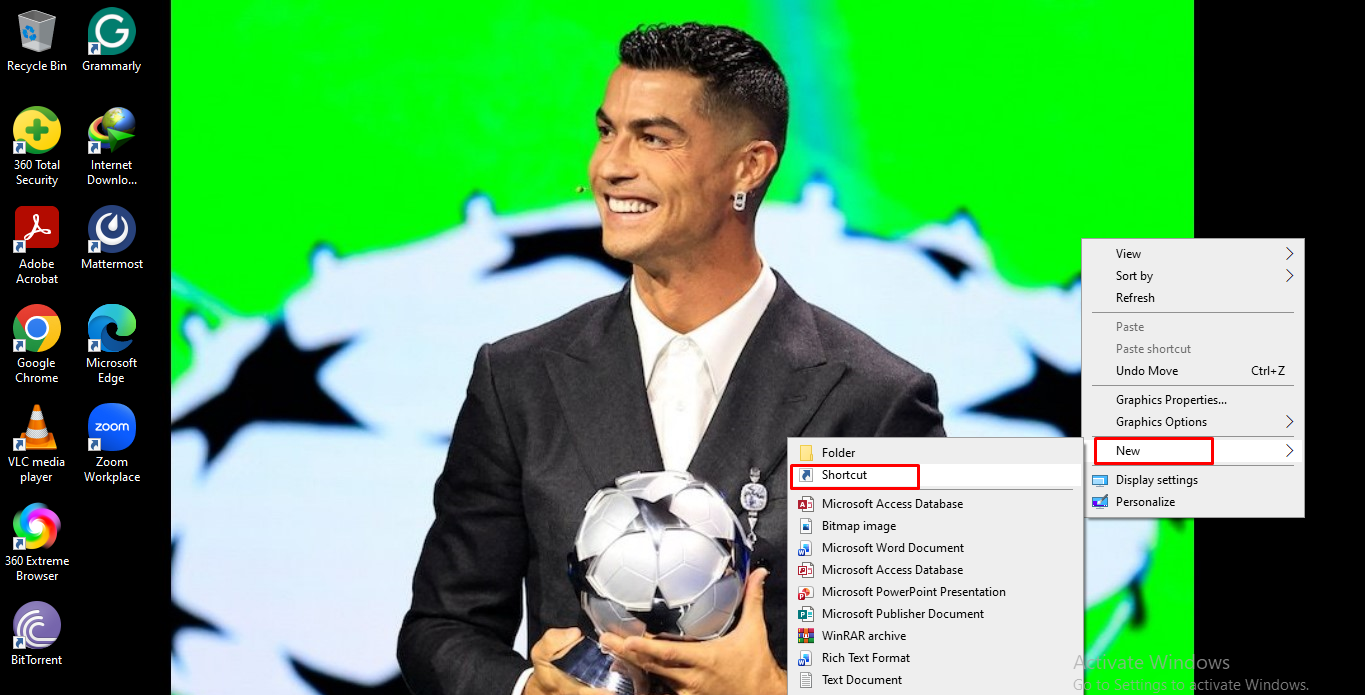
    1. Right-click on your desktop in an empty space.

    Right-click on desktop

    2. Choose New → Shortcut.

    New Shortcut option

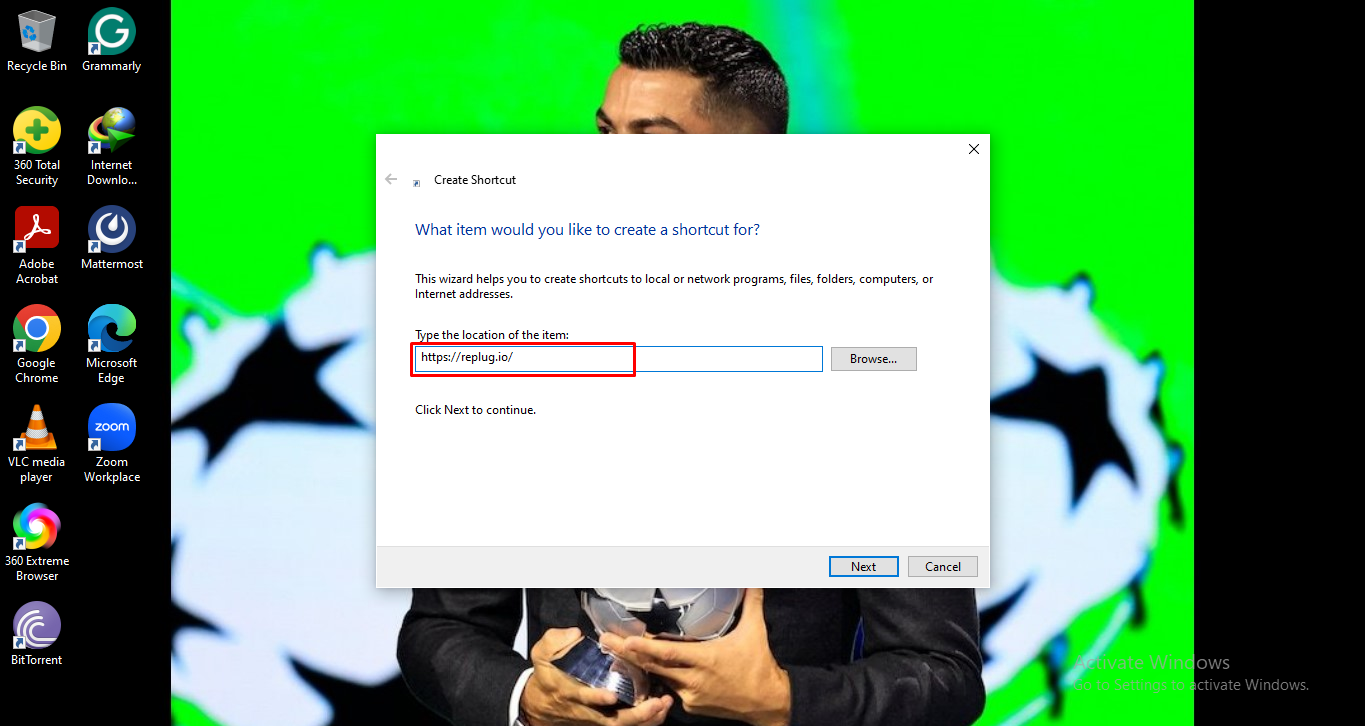
    3. In the box that appears, type or paste the website’s URL (like https://replug.io/).

    Paste website URL for creating shortcut

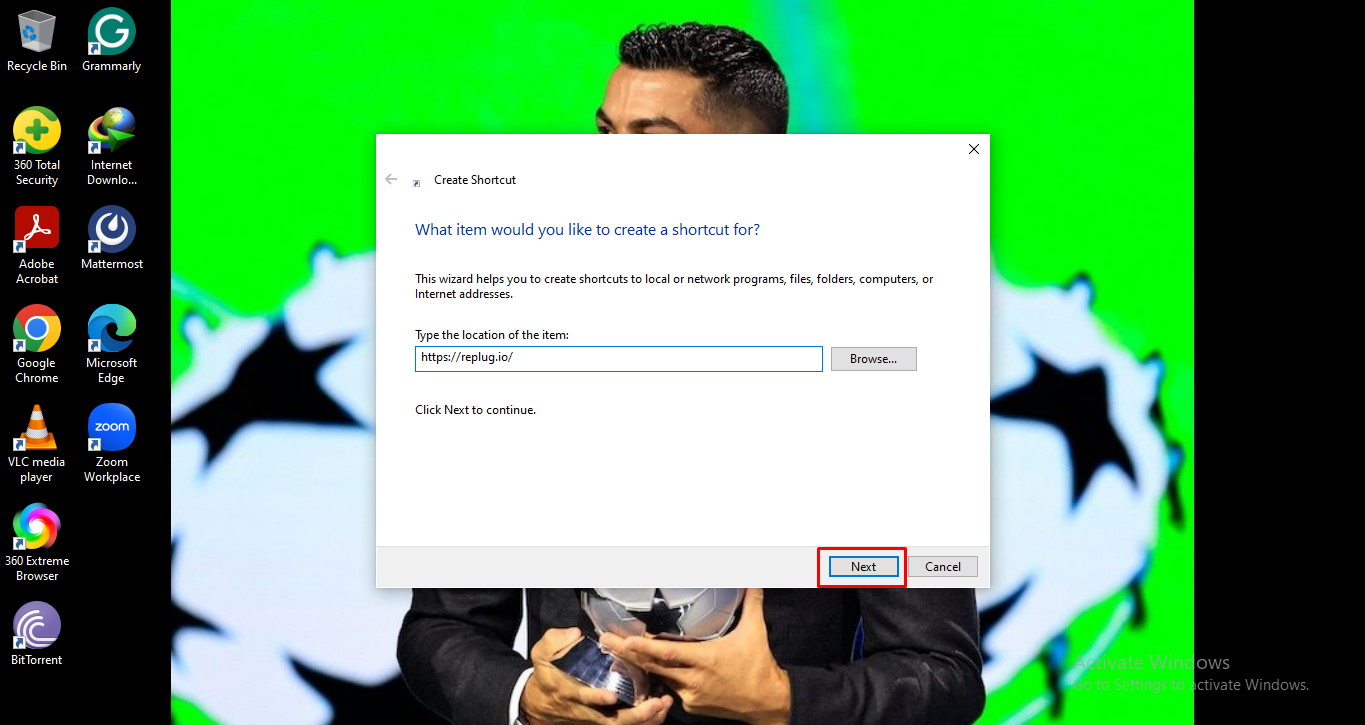
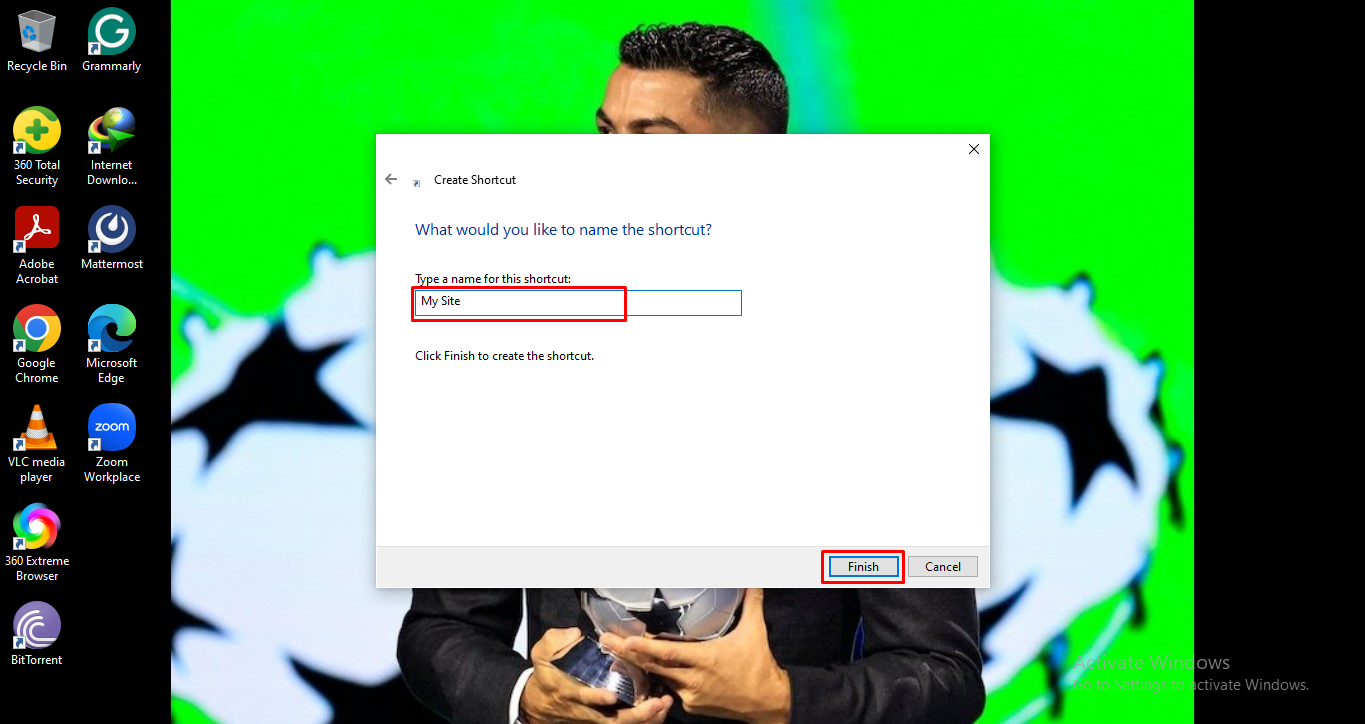
    4. Click Next, give it a name (like “My Site”), and click Finish.

    Next button when creating shortcut
    Setting name while creating shortcut

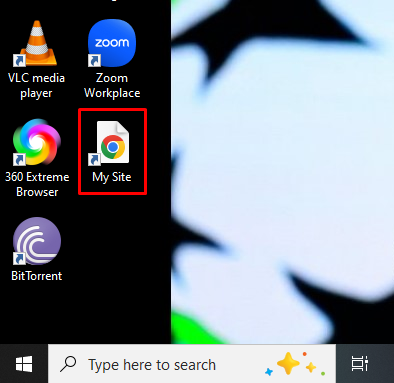
    A shortcut will appear instantly!

    Webpage shortcut on desktop

    Note: If Edge isn’t your default browser, it might open in a different browser, but you can tweak the shortcut so it opens in Edge specifically if you want.

    You now have a quick way to open your favorite sites right from your desktop using Microsoft Edge.

    How to save a link to desktop on Windows 11

    Saving a website link to your desktop in Windows 11 is actually pretty simple. 

    You can do it either by dragging the link from your browser onto the desktop or by manually creating a shortcut that points to the website’s URL. 

    Both ways work well; choose whichever feels easier to you!

    How to save a link to desktop on Windows 11

    Here is how to add a website to desktop on Windows 11:

    • Method #01: Drag & drop the website link (already discussed above)
    • Method #02: Create a shortcut manually (already discussed above)

    These ways make getting to your favorite sites much quicker and more convenient.

    How to save a URL to desktop on Mac

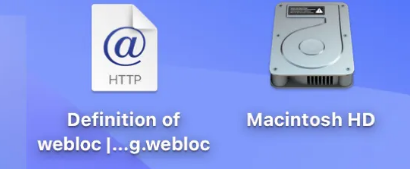
    Saving a website link to your desktop on a Mac is easy and only takes a couple of minutes. When you do this, macOS creates a small file (a .webloc file) on your desktop that opens the site in your browser with a double-click.

    Here’s how to save a link to desktop on a MacBook:

    1. Open your web browser: Open Safari, Chrome, or any browser you like on your Mac.

    2. Go to the website you want to save: Type the site address in the address bar and press Enter so the page loads fully.

    3. Resize the browser window: Make sure part of your desktop is visible behind the browser. This makes it easier to drag the link.

    4. Click the URL in the address bar: Click once to highlight the whole web address at the top of the browser.

    5. Drag the URL to your desktop: While still holding the mouse or trackpad button, drag the highlighted web address and drop it on your desktop.

    6. Check the newly created shortcut: You’ll see a file on your desktop with the website’s name and a .webloc extension.

    Webloc extension file on Mac

    That’s all!

    Also read: How to bookmark a webpage in any browser & on any device in 2026!

    Wrapping up

    In the end, all the methods we covered, from quick drag-and-drop tricks to browser-specific ways of making shortcuts in Chrome and Microsoft Edge, as well as saving links on Windows 11 and on a Mac, are here to make your life easier.

    Whether you want one-click access to your favorite sites or prefer to organize links right on your desktop, these steps are simple to follow and work reliably for everyday use.

    Now that you’re managing website shortcuts like a pro, why not take your link game even further? Give Replug a try today! 

    It’s a top-notch short URL generator that helps you generate branded short URLs in no time, track link analytics and performance, and share clean, trustworthy links wherever you want on the go!

    Replug Branded Short Links CTA
    Maximize marketing ROI
    by transforming ordinary URLs into
    branded short links that convert.
    Try Replug for free

    Frequently asked questions

    How to save a URL to desktop on a laptop?

    On most laptops (Windows or Mac), you can save a website link by dragging the URL from the browser’s address bar onto your desktop. Simply click the padlock or site icon to the left of the URL, drag it down, and drop it on your desktop. You’ll see a clickable shortcut there.

    How to save a link to desktop from an email?

    If you want a website link you received in an email on your desktop, first open the email and copy the URL (right-click link → Copy link). Then, on your desktop, right-click → New → Shortcut (Windows), or drag a web link to the desktop (Mac). Paste the copied URL when prompted.

    How to save a hyperlink to desktop?

    A “hyperlink” is just a clickable web link. To save it to your desktop, copy the hyperlink URL from wherever you see it (email, document, webpage). Then, create a desktop shortcut and paste that URL into it (Windows), or drag the link from your browser address bar to the desktop (Mac).

    How to save a URL shortcut to desktop easily?

    The easiest way is to drag the URL (or the small icon next to it) directly from your browser’s address bar onto your desktop. This instantly creates a shortcut you can double-click to open the site at any time.

    How to save a website to desktop on an iPhone?

    You can’t save a website to the desktop on an iPhone like you do on a computer, but you can add it to your Home Screen so it works like a shortcut.

    1. Open “Safari” and go to the website you want.
    2. Tap the Share icon (square with an arrow up).
    3. Scroll and tap Add to Home Screen.
    4. Give it a name and tap Add.

    An icon will appear on your iPhone’s home screen that opens that site.

    How to save a website link to desktop on a PC?

    On a Windows PC, open your browser (Chrome/Edge/Firefox), go to the site you want, then click and drag the icon from the address bar (the small padlock or globe) onto your desktop. A shortcut will be created that you can double-click to open the link at any time.

    How do I save a URL to my home screen?

    On most smartphones, open the website in your browser (Safari on iPhone, Chrome on Android), tap the Share or Menu button, and then hit Add to Home Screen. This creates an icon on your home screen that opens the URL with just one tap.

    How to pin a website to your taskbar?

    On Windows, open the website in Microsoft Edge. Then click the three dots (⋯) in the top right, go to More tools, and choose Pin to taskbar. The site’s icon will now appear on your taskbar for quick access.

  • What is an RSS feed URL & how to find it for any website

    What is an RSS feed URL & how to find it for any website

    Are you tired of managing bookmarks, refreshing dozens of websites, or missing out on updates because you simply forgot to check? That’s the core problem!

    It’s really frustrating, especially when you know the content you care about could land in your inbox the moment it’s published. 

    But, here’s the good news, guys…

    A vast number of sites still publish through RSS, and over 100 million websites are identified as using this technology in the tail-end of 2025.

    By learning the right “RSS feed URL”, you can get those updates delivered automatically, without doing the hard work yourself; no more manual checking or refreshing.

    Ready to step in? Let’s start with a quick overview: what exactly is an RSS feed URL, and why it matters.

    RSS feed URL meaning

    An “RSS feed URL” is simply the web address (URL) that points to a site’s feed, a kind of machine-readable summary of everything new on that website. 

    The feed (often in XML format) lists the latest posts, news, articles, or media, letting you know when new content is published.

    RSS feed URL meaning

    The primary objective of that URL is to give you a single, reliable link that any “RSS reader” (also called a feed reader or aggregator) can visit regularly to check for new content. 

    Instead of you opening dozens of websites manually, the reader fetches updates automatically and compiles them into one stream, easy to browse and always up to date.

    Why does this matter?

    Because with an RSS feed URL, you can:

    • Save time, no need to manually revisit each site.
    • Get content delivered as soon as it’s published. Nothing gets missed!
    • Avoid algorithmic filters or noise that you usually get on social media. You only see what you subscribe to.

    In short, grabbing a site’s RSS feed URL gives you a direct, streamlined line to all its latest content; neat, efficient, and under your control.

    RSS feed URL structure

    When you get hold of an RSS feed URL, it helps to know that there are some common patterns or “formats” that many websites follow. This makes it pretty easy to guess or locate the feed if it’s not obvious.

    Common RSS feed URL formats

    Many sites use simple, predictable URL patterns for their feeds. Some of the most common are:

    • https://example.com/feed/ (a generic feed link).
    • https://example.com/rss/ (another frequent pattern).
    • https://example.com/rss.xml or https://example.com/feed.xml (especially when the feed is provided as an XML file).
    • For some websites structured with subfolders or sections, you might see variants like https://example.com/blog/feed/ or https://example.com/blog/rss/.

    Note: These patterns aren’t universal. Some sites hide their RSS feeds, give them custom URLs, or even omit them altogether. But starting with these standard formats is often the quickest way to find a feed, especially if the site is built on a common platform (like those that auto-generate feeds).

    RSS feed URL examples

    Here are a few concrete examples to give you a clearer idea:

    • If a blog lives at https://myblog.com, its feed might be https://myblog.com/feed/
    • Another site might offer its feed at https://news.example.com/rss.xml
    • A blog’s older implementation could use https://example.com/blog/rss/ or https://example.com/blog/feed.xml

    When you paste one of these into an RSS reader (or simply your browser), you’ll often see a basic XML file: with <rss> at the top, a <channel> describing the feed, and multiple <item> entries, each representing a post or article.

    How to find an RSS feed URL

    When you want to subscribe to a website via RSS, the tricky part is often just finding the correct link, i.e., the actual RSS feed URL. Below are four friendly, reliable ways to track it down hassle-free!

    How to find an RSS feed URL

    Method #01: Look for the RSS logo

    Many websites still show the classic orange RSS icon (or a similar feed icon) somewhere on their pages, often in the header, footer, or sidebar. If you spot it, click on it. That almost always leads you directly to the RSS feed URL.

    Method #02: Check the page source

    If there’s no visible icon, you can look under the hood. Right-click on the page, choose “View page source” or “Inspect”. Then search with “Ctrl + F” or “Cmd + F” for keywords like “RSS” or “feed”. If a feed exists, you’ll likely find a <link rel=”alternate” type=”application/rss+xml” tag; the “href=” value is the feed’s URL.

    Method #03: Guess common suffixes

    A lot of sites, especially blogs and those built on popular platforms, use simple, predictable endings for their feed URLs. Common guesses: adding /feed, /rss, /feed.xml, or /rss.xml to the site’s base address (e.g., https://example.com/feed/). 

    Note: You can also try /blog/feed/ or /blog/rss/ if there’s a blog section. It doesn’t always work, but when the site follows conventions, this method often hits the mark.

    Method #04: Use platform-specific methods

    Depending on the platform the website runs on (e.g., WordPress, Blogger, or others), shortcuts are available. 

    For instance, many WordPress-powered sites make their feed available at /feed/. However, if the site is newer or uses a custom CMS, you may need a browser extension (or an RSS feed URL finder) that scans page metadata or the site’s structure to detect a feed automatically.

    Using these methods, from obvious to more technical, you can usually uncover a website’s RSS feed URL within a minute or two.

    How to find the RSS feed URL for the most popular websites

    Now, if you are someone who wants to follow big sites, blogs, or social platforms via RSS feed URLs, it helps to know their typical feed-URL formats.

    How to find the RSS feed URL for the most popular websites

    Mentioned next are many of the most popular websites, along with how you can find or build their RSS feed URL so you can subscribe easily.

    YouTube RSS feed URL

    For YouTube channels or users, the feed URL often uses this format:

    https://www.youtube.com/feeds/videos.xml?channel_id={CHANNEL_ID}

    You just need the channel’s unique ID (or username in some cases) and place it in the URL. A similar feed URL format also works for playlists.

    Reddit RSS feed URL

    On Reddit, you can get feeds for the whole site or specific sub-sections. For example:

    • Front page: https://www.reddit.com/.rss
    • Subreddit: https://www.reddit.com/r/{subreddit-name}/.rss
    • User feed: https://www.reddit.com/user/{user-name}/.rss

    These links will deliver the latest posts (or comments, depending on the URL) for the chosen Subreddit or user.

    Medium RSS feed URL

    For Medium content (either for a user, a publication, or a custom domain), the feed URL usually goes like:

    https://medium.com/feed/{username-or-publication-name}

    If it’s a custom domain, it might simply be /feed appended to the base URL.

    Tumblr RSS feed URL

    For a blog on Tumblr, just add /rss to the blog’s URL. For example:

    https://yourblog.tumblr.com/rss

    That’ll work for default blogs. If it’s on a custom domain, the same rule often applies.

    Blogger RSS feed URL

    For blogs on Blogger (also known as Blogspot), the feed URL often uses this pattern:

    https://{blogname}.blogspot.com/feeds/posts/default

    This gives you a feed of all blog posts published on that Blogger site.

    Wix RSS feed URL

    If a site is built with Wix, some of them expose feeds via a “blog-feed.xml” file. So you might try a URL like:

    https://www.example-wix-site.com/blog/blog-feed.xml

    Note: It’s not guaranteed, because Wix sites vary, but this is a typical pattern.

    CNN RSS feed URL

    CNN offers RSS feeds for different news categories. One common feed URL is:

    http://rss.cnn.com/rss/cnn_topstories.rss

    You can subscribe to this (or other category-specific feeds) to get the latest headlines directly via RSS.

    RSS feed URL Spotify

    For platforms like Spotify, especially if you follow artists/playlists/podcasts, there are services/tools (e.g., online RSS feed URL generators) that can convert your Spotify content into an RSS feed URL in no time at all.

    RSS feed URL ESPNcricinfo

    If you want updates from ESPNcricinfo, i.e., one of the top cricket news websites, there are official RSS feeds for news, live match updates, player news, series, teams, etc. Their “Cricket RSS feed URL” collection includes global news, live matches, and more.

    • Global news feed: https://www.espncricinfo.com/ci/content/rss/news_1.xml, this is their main “all-news” feed.
    • Live scores feed: https://www.espncricinfo.com/ci/engine/match/scores/rss.xml (or similar, check their RSS feed index page)

    By knowing these standard feed-URL patterns, you can quickly subscribe to many big websites and stay updated without manually checking them.

    How to get RSS feed URL for news

    Suppose you want to stay updated with the latest news, whether world headlines, tech articles, or niche updates like sports, having the right RSS feed URL makes all the difference.

    How to get RSS feed URL for news

    Here’s how you can easily grab feed URLs for different kinds of news.

    General news RSS feed URL

    Many major news sites openly provide an RSS feed for their general or “top stories”. 

    For example, CNN makes its feed available at: http://rss.cnn.com/rss/cnn_topstories.rss.

    Similarly, BBC News offers a world news feed at: https://feeds.bbci.co.uk/news/world/rss.xml.

    By subscribing to such general news RSS feed URLs, you can get updates covering all major topics (headlines, international affairs, breaking stories, etc.) in one go.

    Cricket news RSS feed URL

    If you follow sports, say cricket, you can look for news sites or sections that support RSS and target cricket or sports in general. 

    For example, if a major news publisher has a “sports” or “cricket” section, check if they publish an RSS feed for that section. 

    Using the term “RSS feed URL cricket news” in your search (site name + “cricket feed”) can help you locate those niche feeds more easily.

    RSS feed URL for Google News

    Even though platforms like Google News don’t always display a visible RSS button, you can generate a feed from a Google News search or topic page. 

    Tools such as feed generators let you paste the Google News page URL to produce a valid RSS feed that tracks that topic or query. This is handy if you want aggregated news across publishers, filtered by your interests.

    RSS feed URL for technology news

    Tech-news publishers often provide dedicated RSS feeds for their technology sections. 

    For instance, BBC’s technology feed is available at: https://feeds.bbci.co.uk/news/technology/rss.xml.

    You can also subscribe to feeds from specialized tech platforms (blogs, gadget-review sites, IT-news outlets), usually by using standard feed URL formats or a dedicated “feed” link.

    💡 Pro tip: You can also check out this RSS feed URL list if you want a quick way to subscribe to all major updates in one go!

    Create & shorten your own RSS feed URL with Replug!

    If you want to build a clean, easy-to-share RSS feed link, maybe for your blog, newsletter, or curated content, Replug makes it pretty simple. 

    With this efficient URL shortener, you can plug in an existing feed or use a feed you already have, and get a simplified, “nice and neat” version of the RSS link within seconds.

    That means you get an RSS feed URL free that’s shorter, uncluttered, and often better for sharing on social media or embedding in other platforms.

    Here’s how it works:

    1. You sign in, head to Replug’s “RSS Feed” section, and enter your original feed link.
    2. Replug then converts all the messy, long URLs inside the feed into compact, branded short links.
    3. After that, you receive a fresh, shareable RSS feed URL, ideal if you want to distribute content without overloading readers with cluttered links or disorganized URLs.

    Note: This is especially handy if you run a blog, curatorial site, or content aggregator, or just want a simple, clean feed URL to give others. With a quick setup, you get a user-friendly RSS link that’s easy to share and manage.

    Replug Branded Short Links CTA
    Maximize marketing ROI
    by transforming ordinary URLs into
    branded short links that convert.
    Try Replug for free

    Summing up

    All in all, finding an RSS feed URL isn’t as complicated as it seems. Once you know the common formats, where to look, and how different platforms handle feeds, staying updated becomes a whole lot easier. 

    No matter if it’s news, blogs, videos, or niche content, RSS gives you a simple way to pull everything into one place without chasing multiple sites every day. 

    And if you ever want to clean up, organize, or shorten your feed links, Replug makes the process quick and stress-free.

    Give it a try now, and you might be surprised how much simpler your content routine becomes!

    Frequently asked questions

    What is an RSS feed, and how do I use it?

    An RSS feed is a standardized file (usually in XML) that a website offers to share all its recent updates, like blog posts, news articles, or podcast episodes, in one place. 

    To use it, you need to copy the feed’s URL and add it to an “RSS reader”. That reader keeps checking the feed and shows you new items automatically, so you don’t have to visit each website manually.

    How to add RSS feed URL?

    Once you have an RSS feed URL, open an RSS reader (web-based or app) and use the “Add feed” or “Subscribe” option. 

    Paste the URL there and confirm. Then the reader will start pulling updates from that feed regularly. If the site offers multiple feeds (for posts, comments, categories, etc.), you can add each URL you want to follow.

    Where can I find the feed URL?

    You’ll often find a website’s RSS link via:

    – A visible RSS icon or link on the site (often in header, footer, or sidebar).
    – Guessing standard URL endings like /feed/, /rss.xml, /rss/, etc.
    – Checking the site’s source code. Searching for <link rel=”alternate” type=”application/rss+xml”>, to discover the feed URL, even if it’s hidden visually.

    How to get the RSS feed URL for a podcast?

    Podcasts generally publish an RSS feed that lists episodes (with titles, descriptions, media files, etc.). If the podcast is on a hosting platform, look for a “Share,” “Subscribe,” or “RSS” link. This will usually reveal its feed URL. 

    Once you copy that URL into your RSS reader or podcast app, you’ll get updates whenever a new episode drops.

    How to get the RSS feed URL for WordPress?

    If a website runs on WordPress, you can usually get its feed by simply adding /feed/ to the end of its main URL, e.g., https://example.com/feed/. That’s the default!

    However, WordPress sites often provide additional feeds too for comments, categories, tags, or authors. For instance: https://example.com/category/technology/feed/ or https://example.com/tag/health/feed/.

    How to find an RSS feed URL of a website from its source code?

    If the feed isn’t obvious on the page, open the page source (right-click → “View source” or “Inspect”), and search for terms like rss, feed, or application/rss+xml

    If the site supports RSS, you’ll usually find a <link> tag with the feed URL there. That URL is what you copy into the RSS reader.

    How to find an RSS feed in your RSS reader?

    Most RSS readers list all the feeds you’ve subscribed to, often in a sidebar or under a “Subscriptions/Feeds” menu. There you’ll see the feed names (or your custom labels). 

    If you want the original URL, some readers let you view feed details or feed settings that show the actual URL. Otherwise, you can right-click or view feed properties to copy it.

    Are RSS feeds still relevant in 2026?

    Yes, RSS feeds remain useful in 2026. Even though social media and algorithm-driven platforms dominate, RSS offers a clean, chronological, ad-free (or low-noise) stream of content from multiple sources. 

    It still lets you follow blogs, news sites, podcasts, or niche websites without being filtered by algorithms. It’s one of the most privacy-friendly and efficient ways to stay updated.

    Provide an example of a category RSS URL and a tag RSS URL?

    Using WordPress as an example:

    Category RSS URL: If your site has a category “technology”, the feed could be https://example.com/category/technology/feed/
    Tag RSS URL: If you have a tag “health”, the feed could be https://example.com/tag/health/feed/

    These links pull only posts from that specific category or tag. Pretty useful when you only care about a subset of content.

    Which is the best RSS feed URL extension or RSS feed URL app out there?

    There’s no one-size-fits-all “best”, but what matters is a reader or tool that’s simple, reliable, and lets you manage multiple feeds easily. Good RSS readers that support standard feeds and let you organize subscriptions tend to work best. 

    Another helpful option: if you want custom, clean, or shareable feeds, consider a feed builder or feed shortener, especially when the original feed URL is messy or quite complicated to share.

  • How to add a clickable link in YouTube description (2026 update)

    How to add a clickable link in YouTube description (2026 update)

    Want more clicks, more traffic, and maybe even more sales from your YouTube videos? It all starts with one simple thing: a clickable link in your description.

    With over 2.7 billion monthly active users on YouTube and more than 1 billion hours of video watched every day, even a small tweak like adding the right link can make a huge difference.

    But here’s the catch: many creators still get it wrong or miss out on easy opportunities. In this guide, we’ll show you exactly how to do it the right way in 2026, step by step.

    First, let’s quickly understand the basics, starting with what a YouTube video description actually is.

    What is a YouTube video description?

    A YouTube video description is the text section you see right below a video. It explains what the video is about, gives extra context, and helps both viewers and YouTube understand your content. In simple terms, it’s like a mini guide for your video.

    Its main purpose is twofold: to help people quickly decide if your video is worth watching and to help YouTube rank your video in search results. When written properly, it can improve discoverability, boost clicks, and even drive traffic to your links.

    Core elements of a YouTube video description

    Here are the key elements:

    • The hook (an engaging, keyword-rich opening line): The first 1–2 lines grab attention and include your main keyword since this part is visible before clicking “show more.”
    • Detailed description/summary of the content: A clear, simple summary that tells viewers exactly what they’ll learn or get from the video.
    • Clickable timestamps/chapters for navigation: Time-based links that let viewers jump to specific parts of the video easily.
    • A clear call to action (CTA): A direct prompt telling viewers what to do next, like subscribe, click a link, or watch another video.
    • Relevant links & resources: Useful URLs (website, products, references) that add extra value beyond the video.
    • Social media handles & hashtags: Your social links and hashtags help people connect with you and improve content reach.
    • Channel bio/disclaimer: A short intro about your channel or any necessary disclaimer (like affiliate links or sponsorships).

    How to add a clickable link in YouTube video description (step by step)

    Adding a clickable link in your YouTube description is actually very simple. You just need to paste the right type of URL in the right place. 

    Once done correctly, YouTube automatically turns it into a clickable link that viewers can tap or click, hassle-free.

    Let’s break it down step by step for both phone and desktop so you can follow along easily 👇

    How to add a clickable link in YouTube description on phone

    Here’s how to do it on mobile:

    1. Open the YouTube Studio app.

    YouTube Studio mobile app

    2. Select the video you want to edit.

    Select a video inside YouTube Studio app

    3. Tap the pencil (edit) icon at the top of the screen.

    Pencil (edit) icon inside YouTube Studio app

    4. Tap on the Description section.

    Video description section inside YouTube Studio app

    5. In the description box, paste your link (make sure it starts with https://).

    Clickable link inside the video description section on YouTube Studio app

    6. Tap Save.

    Save button inside the YouTube Studio app

    That’s it! YouTube will automatically make the link clickable once the video is updated.

    How to add a clickable link in YouTube description on desktop

    Here’s how to do it on PC:

    1. Go to YouTube Studio and log in.

    YouTube Studio web app

    2. Click on Content from the left menu.

    Content option inside YouTube Studio web app

    3. Find your video and click the edit (pencil) icon.

    Edit (pencil) icon inside YouTube Studio web app

    4. Scroll to the Description field, and paste your link with https:// at the start.

    Clickable link inside the video description section on YouTube Studio web app

    5. Click the Save button.

    Save button inside the YouTube Studio web app

    Once saved, your link becomes clickable in the description.

    💡 Quick tip: If your link isn’t clickable, it’s usually because it doesn’t include “https://”, so always double-check that part.

    How to add a clickable link in YouTube Shorts description

    Before you jump in, here’s something important to know 👇

    YouTube works a bit differently for Shorts. In most cases, links placed directly in Shorts descriptions are NOT clickable. They show as plain text to reduce spam and scams.

    So while you can add a link in the description, it won’t behave like regular video links. Instead, YouTube gives you a few alternative ways to share clickable links (like related videos or other features).

    Step-by-step guide:

    1. Open YouTube Studio (app or desktop).

    2. Go to Content and select your Short.

    3. Click the edit (pencil) icon.

    4. In the description box, paste your link (make sure it includes https://).

    5. Click Save.

    Your link will appear in the description, but keep in mind, viewers won’t be able to click it directly.

    💡 Better (working) ways to add clickable links in Shorts

    Since description links aren’t clickable, here are smarter options you should use:

    • Add a “Related Video” link: You can link your Short to one of your long videos, which viewers can easily click.
    • Use channel profile links: Add your website or important links in your channel bio. These are clickable.
    • Mention links in comments or CTA: Guide viewers to your bio or a full video where clickable links are available.

    In short, you can add links in Shorts descriptions, but for optimized results, use YouTube’s built-in linking features instead.

    How to add a clickable link in the YouTube channel description

    Adding links to your YouTube channel description (the “About” section) is a great way to guide viewers to your website or social profiles. To make links clickable on your channel, you need to use YouTube’s channel profile links (banner links) feature.

    Step-by-step guide:

    1. Go to YouTube Studio and log in to your account.

    2. From the left menu, click on Customization.

    3. Open the Basic Info or Profile tab.

    4. Scroll down to the Links section.

    5. Click + Add Link.

    6. Enter your link title (e.g., “My Website” or “Instagram”).

    7. Paste your full URL (make sure it starts with https://).

    8. Click Publish in the top right-hand corner.

    Once saved, these links (up to the first 14) will show up on your channel banner and are fully clickable for viewers.

    Why add a clickable link in the YouTube video description

    Adding a clickable link isn’t just a small detail; it’s one of the easiest ways to turn viewers into action-takers. Whether you want traffic, sales, or engagement, that single link can make a real difference.

    • Monetization & marketing: You can promote products, services, or affiliate offers, directly turning views into real income opportunities.
    • Engagement & traffic: Links help drive viewers to your website or other content, increasing traffic and interaction beyond YouTube.
    • Improved user experience: You give viewers quick access to helpful resources, making your content more useful and easy to explore.
    • SEO boost: Descriptions help YouTube understand your content better, improving visibility in search and recommendations.
    • Lead generation: A well-placed link can capture leads by directing viewers to sign-up pages, offers, or landing pages.

    Importance of a good YouTube video description in 2026

    At present, a YouTube description is more than just a summary. It’s a key part of how your video gets discovered and how viewers interact with it. A well-written description helps both the algorithm and your audience understand your content better.

    • Boosts searchability: Using the right keywords helps YouTube understand your video and improves its chances of showing up in search results.
    • Enhances viewer experience: A clear description, links, and timestamps make it easier for viewers to navigate and get value quickly.
    • Increases engagement: When viewers know what to expect, they’re more likely to watch longer, click links, and interact.
    • Builds loyalty & revenue: Good descriptions guide users to subscribe, explore more content, or check out your offers.
    • Strategic optimization: Descriptions are a core part of YouTube SEO along with titles and tags, helping your content perform better.
    • Context for AI: With AI-driven search growing, descriptions help systems understand and recommend your content accurately.

    Create short clickable links for your YouTube description with Replug!

    If you’ve ever pasted a long, messy URL in your YouTube description, you already know that it doesn’t look great. That’s where Replug comes in!

    It’s a powerful link shortener that helps you turn long, cluttered links into clean, professional, and clickable ones. Plus, it does a lot more than just shortening links.

    Replug Branded Short Links CTA
    Maximize marketing ROI
    by transforming ordinary URLs into
    branded short links that convert.
    Try Replug for free

    Replug is an all-in-one link optimization platform that lets you brand and track your links, so you can see how they perform and improve your results over time.

    Here’s why it’s worth using for YouTube:

    • Clean & short links: Turn long URLs into simple, easy-to-click links that look better in descriptions.
    • Branded links: Use your own custom domain to make links look more trustworthy and professional.
    • Click tracking & analytics: See how many people are clicking your links and where they’re coming from.
    • Add call-to-actions (CTAs): You can attach small messages or buttons to boost clicks and conversions.
    • Campaign optimization: Test and improve your links using A/B testing and smart routing features.

    In short, Replug doesn’t just shorten your links; it helps you turn every link into a small marketing tool.

    Summing up

    To wrap things up, adding clickable links to your YouTube description might seem like a small step, but it can seriously level up your results. 

    From driving traffic and boosting engagement to helping with SEO and lead generation, it all adds up. 

    And the best part? It only takes a few seconds. Just paste your link with “https://,” and you’re good to go. 

    If you really want to take things further, tools like Replug can help you create clean, trackable links that actually convert.

    👉 Before you go, give Replug’s free YouTube title generator a try as well. It’s a quick, efficient way to make your videos stand out even more!

    Frequently asked questions

    How do I put a clickable link in a YouTube description?

    Just paste your full URL (with https://) into the description box while editing your video, and YouTube will automatically turn it into a clickable link.

    Should you put links in a YouTube description in 2026?

    Yes, absolutely! Links help drive traffic, promote products, and improve engagement. Still a key strategy for content creators in 2026.

    Where is the link in the description on YouTube?

    It appears just below the video. On mobile, it’s under “Show more,” and on desktop, it’s visible directly under the title (or after expanding).

    Why is my link not clickable in the YouTube description?

    The most common reason for this is that the link doesn’t start with https://. Without it, YouTube won’t recognize it as clickable.

    How to add social media links in YouTube description?

    Simply copy your Instagram, Facebook, or other profile link and paste it into the description with https://, and it will become clickable instantly.

    How to put links in YouTube description without verification?

    You can still paste links without advanced verification, but some features (like external linking tools) may require channel verification. You must include the full URL starting with https://

    Can you hyperlink text in YouTube description?

    No, YouTube doesn’t support custom anchor text. You must paste the full URL; no “click here” style hyperlinks.

    How to add a hyperlink to the YouTube description?

    Same process: paste the full https:// link inside the description box. YouTube automatically converts it into a clickable hyperlink.

    How do I add a link to a YouTube description on my iPhone?

    Open the YouTube app → tap on your profile icon → go to your desired video → tap Edit → paste your link in the description box → save.

    How to add a clickable link in the YouTube video comments section?

    Paste your full URL in the comment. In regular videos, it becomes clickable, but avoid spammy posting to stay within YouTube rules.

    How to add a clickable Instagram link in the YouTube description?

    Copy your Instagram profile link (e.g., https://instagram.com/username) and paste it in the description box. It will be clickable like any other link.

    How to add a clickable link to a YouTube video using end screen & card?

    Go to YouTube Studio → Content → select video → Cards or End Screen → Add link → Save. These appear during or at the end of the video and are fully clickable.

    1. Most strange websites on the internet in 2026: Weird websites to visit when bored!

      Most strange websites on the internet in 2026: Weird websites to visit when bored!

      Ever fallen down a Google rabbit hole only to end up bored out of your mind? You’re not alone!

      With over 1.2 billion websites online in 2026 and counting, it’s wild how hard it can be to find fun content worth your time.

      The major problem?

      Most of us stick to the same top 10 sites every day, leaving millions of odd, quirky corners of the web unexplored, and honestly, half of the internet feels forgotten or weirdly mysterious. 

      That means you’re missing out on digital oddities and hilarious gems that make scrolling actually fun.

      Lucky for you, we’ve combed through the strange, the silly, and the downright bizarre websites worth your next bored afternoon.

      So… what exactly makes a website strange anyway? 

      Let’s break it down next!

      What is a strange website?

      When we talk about a “strange website,” we’re really talking about any URL that doesn’t behave or look the way you expect a normal site to. 

      Unlike typical websites (such as news sites, social platforms, or stores), these odd corners of the web often defy logic, purpose, and standard design.

      Here’s what usually makes a site weird or weirdly fun:

      • Interactivity: Sites that respond in unexpected ways when you click, drag, or move your cursor around (like bouncing cats or endless animations).
      • Minimalism: Some strange sites are super simple, with almost nothing on the page except an odd message or function that feels weirdly satisfying.
      • Artistic expression: Some are basically web art (abstract, symbolic, and more like a digital art piece than a traditional site).
      • A sense of humor: Humor (sometimes absurd or ironic) is a big part of weird website links that make you laugh or scratch your head.
      • Unique content: Content you won’t find anywhere else, like bizarre animations, strange games, or totally random ideas.
      • Niche appeal: Sites that seem built for a tiny group of people or a very specific interest.
      • Quirky web design: Unusual layouts, odd navigation, or visual chaos that feels intentional.
      • Distinctive purpose/functionality: Some strange URLs literally do nothing useful, and that’s the key point.
      • Odd interactive elements: Weird effects, unpredictable responses, or just things that make you go “huh?” when you interact.

      Note: Weird sites embrace creativity over clarity, and that’s what makes browsing them so worthwhile!

      A quick note before you start clicking

      Most of the sites on this list are completely harmless, but a few things are worth keeping in mind before you go down the rabbit hole.

      • Watch out for flashing visuals. A handful of sites like Staggering Beauty and Strobe Illusion contain rapid flashing effects that are not suitable for people with photosensitive epilepsy. We have flagged these where possible, but always keep your volume low and proceed carefully on unfamiliar sites.
      • Do not download anything. None of the sites on this list require you to download files or install software. If a site prompts you to download something, close it immediately.
      • Never enter real passwords or payment info. Sites like Passweird and Try PaP are password-themed but treat them as entertainment only. Never type your actual credentials into any site you do not fully trust.
      • Use a private window if you are clicking through lots of unknown links. It keeps your browsing history clean and adds a small layer of separation between you and anything unexpected.
      • Some links may change over time. The internet is unpredictable and sites go down, move, or change hands. If something is not loading, try searching the name directly or checking a cached version on the Wayback Machine at archive.org.

      List of 120+ weird websites that will blow your mind, for sure!

      From utterly useless pages to interactive oddities you’ll lose time playing with, these weird websites are perfect for killing boredom, laughing out loud, or simply wondering, “What did I just find?”

      Below is the ultimate list, starting with one of the most classic oddballs online…

      1. Zoomquilt

      Zoomquilt

      Zoomquilt is a collaborative piece of digital art that feels like an endless journey. It’s an interactive, infinitely zooming painting that takes you deeper into surreal scenes the more you explore. It was created back in 2004 and has stuck around as a mesmerizing web oddity.

      2. THIS IS SAND

      THIS IS SAND

      This Is Sand is a free interactive digital sandbox where you pour virtual sand onto your screen to create layered landscapes, gradients, and abstract pieces with just clicks and drags. It started as a simple web art project in 2008 and later became a popular app too.

      3. WindowSwap

      WindowSwap

      WindowSwap is a simple yet magical virtual travel site that lets you open a random video from someone else’s real window, anywhere in the world. Each clip (usually about ten minutes long) shows what a person sees outside their window, from city streets to quiet countryside, complete with natural sounds.

      4. Staggering Beauty

      Staggering Beauty

      Staggering Beauty is a quirky interactive web toy featuring a black, worm-like creature that follows your mouse movements playfully on your screen. As you move the cursor, it wiggles and reacts, and if you shake it fast enough, the site explodes into flashy colors and loud sounds, entirely different from anything you’d expect from a regular webpage.

      5. Hacker Typer

      Hacker Typer

      Hacker Typer is a fun little website that makes it look like you’re typing real code just by striking your keyboard keys. It is especially designed for pretending to hack, as you see in movies. It’s strange because the code that appears doesn’t actually do anything or make any sense, and you don’t need to know programming at all, yet it still looks dramatic and impressive.

      6. The Useless Web

      The Useless Web

      The Useless Web is a playful website that shows one big button saying “TAKE ME TO A USELESS WEBSITE (PLEASE)”. When you click it, it instantly sends you to a random, quirky page somewhere else on the internet.

      7. Cat Bounce!

      Cat Bounce!

      Cat Bounce! is a whimsical interactive site where adorable cartoon cats bounce around your screen when you click and drag them, using simple physics that let you make them fly higher the harder you interact.

      8. Eel slap!

      Eel slap!

      Eel slap! is a ridiculously simple and funny little website where you use your mouse or finger on mobile to swing a giant animated eel and slap a guy in the face just for laughs.

      9. Endless Horse

      Endless Horse

      Endless Horse is a quirky, one-page website that shows you a giant ASCII-art horse whose legs stretch down the page forever as you scroll.

      10. Pointer Pointer

      Pointer Pointer

      Pointer Pointer is a fun little site that plays a simple trick: wherever you move your mouse cursor, it finds a photo of someone pointing right at that exact spot on the screen.

      11. Heaven’s Gate

      Heaven’s Gate

      Heaven’s Gate is the old official website of the Heaven’s Gate religious group, a UFO-focused cult most famous for the mass suicide of 39 members in 1997 after believing a comet signaled their “ascension.” 

      12. Ever Dream This Man?

      Ever Dream This Man

      Ever Dream This Man? is a strange internet page built around a simple idea. It shows a sketch of a man that, according to the story, thousands of people around the world have allegedly seen in their dreams, even though no one has ever met him in real life.

      13. The Nicest Place on the Internet

      The Nicest Place on the Internet

      The Nicest Place on the Internet is a feel-good website where strangers from around the world send you free, virtual video hugs set to gentle music to make you smile.

      14. ZOMBO

      ZOMBO

      ZOMBO is one of the internet’s classic single-serving joke sites, dating back to 1999. It opens with a looping message and animation where a voice keeps welcoming you and saying, “Welcome to Zombo com, This is Zombo com,” yet nothing useful ever happens.

      15. The Long Doge Challenge

      The Long Doge Challenge

      The Long Doge Challenge is a playful, meme-based web page built around the beloved Doge internet meme. You just scroll down forever to make a big ASCII Doge image stretch and collect “wows” as you go. It’s basically a scrolling challenge that turns a silly dog meme into an endless, absurd experience.

      16. Paper Toilet

      Paper Toilet

      Paper Toilet is a tiny, playful art website where all you do is scroll down to unroll a giant virtual toilet paper roll until it runs out, and then you can click to reset it and do it again. It was created as one of those simple, useless internet gems, meant for fun, not for any real purpose.

      17. Find the Invisible Cow

      Find the Invisible Cow

      Find the Invisible Cow is a simple, funny browser game where you try to find a hidden cow somewhere on a blank screen by moving your mouse and listening for audio clues. The louder the cow-shouting gets, the closer you are to finding one!

      18. A Soft Murmur

      A Soft Murmur

      A Soft Murmur is a simple online sound mixer that lets you blend relaxing background noises like rain, thunder, waves, birds, coffee shop buzz, and more to create a calm, custom soundscape for focus, sleep, or chill time. 

      19. Is it Christmas Today?

      Is it Christmas Today

      Is it Christmas Today? is a super simple website that tells you right away whether today is Christmas or not. Usually, it just says “NO!” unless it’s December 25. It’s weird because that’s literally all it does: no menus, no games, no countdowns, just the answer to one very specific question.

      20. RRR GGG BBB

      RRR GGG BBB

      RRR GGG BBB is a weird little site that basically shows huge letters “R”, “G”, and “B” in bold red, green, and blue blocks. It doesn’t do much more than present these big colorful blocks on a blank page, and when you hover your mouse on a particular letter, the background turns to that color instantly.

      21. Patatap

      Patatap

      Patatap is a playful, interactive sound-and-animation site that turns your browser into a creative audio-visual playground. Press any key from A to Z and watch colorful shapes dance across the screen as unique sounds play. It’s basically a portable animation and sound kit right in your web browser.

      22. Koalas to the Max dot Com

      Koalas to the Max dot Com

      Koalas to the Max dot Com is a simple but fascinating interactive web experience. It starts with one large, colored circle, and as you hover over and click, each circle splits into smaller ones that eventually reveal a detailed image made of tiny dots. It was originally created as a fun, interactive art piece by Vadim Ogievetsky.

      23. Bury Me With My Money

      Bury Me With My Money

      Bury Me With My Money is one of those surreal, single-page internet masterpieces that doesn’t try to be deep or useful. It just shows a looping animation inspired by the old arcade game “Sunset Riders,” where a character falls with cash, and the phrase “Bury me with my money” plays on repeat.

      24. He-Man Sings – What’s Going On?

      He-Man Sings - What’s Going On

      He-Man Sings – “What’s Going On?” is a random little web page that plays the infamous “HEYYEYAAEYAAAEYAEYAA” video. It is a viral clip in which He-Man from the old cartoon weirdly sings a remix of the song “What’s Up” by 4 Non Blondes. This mashup first popped up online in the mid-2000s and quickly became a classic meme and internet oddity.

      25. SCREAM INTO THE VOID

      SCREAM INTO THE VOID

      SCREAM INTO THE VOID is a simple but uniquely expressive online page that invites you to type whatever you’re feeling and scream it into the internet. There’s no menu, no ads, just a space to let out thoughts, frustrations, or random words and hit the “SCREAM” button to send them off into nowhere.

      26. Shady URL

      Shady URL

      Shady URL is a playful little web tool that takes any normal link you give it and turns it into a super-suspicious-looking URL that still points to the same place. The catch is that the new link looks sketchy on purpose. It uses a real shortening service but adds weird, edgy words so the link appears ominous or shady to anyone who sees it.

      27. Nooooooooooooooooooooooooo!

      Nooooooooooooooooooooooooo!

      Nooooooooooooooooooooooooo! is a classic meme-style novelty site that gives you a single big blue button inspired by Darth Vader’s dramatic scream from “Star Wars: Episode III – Revenge of the Sith”. When you click it, a loud and stretched-out “Nooooooooooooooooooooooooo!” sound blasts, and that’s literally the whole point.

      28. Trashloop

      Trashloop

      Trashloop is a crazy little interactive art site where you click and drag a crumpled piece of paper around the screen and drop it into a trash can. However, no matter how many times you throw it away, it keeps popping back up again, creating a strange loop of pointless action.

      29. The Boohbah Zone

      The Boohbah Zone

      The Boohbah Zone is a throwback interactive Flash experience based on the early-2000s preschool series “Boohbah.” It is where you click around a colorful world of fuzzy, round characters and explore simple mini-activities, sounds, and animations. It was originally a playful Flash site filled with quirky screens and little games tied to the show’s characters and environment.

      30. Falling Falling

      Falling Falling

      Falling Falling is a minimalist digital art experience created by artist “Rafaël Rozendaal” that fills your screen with endlessly cascading colored rectangles set to calming ambient sound. Think of it as a visual meditation you watch rather than scroll or click.

      31. Electric Boogie-Woogie

      Electric Boogie-Woogie

      What it is (an overview):

      Electric Boogie-Woogie is a quirky, conservative web art piece by “Rafaël Rozendaal” that plays with animated shapes and colors reminiscent of Mondrian’s Broadway Boogie Woogie, turning simple lines into a looping visual rhythm.

      32. That’s The Finger

      That’s The Finger

      That’s The Finger is one of those super simple, pointless internet sites that just shows a big pixel-style middle finger on your screen, basically “The finger, deal with it.”

      33. You Should Have Seen This

      You Should Have Seen This

      YouShouldHaveSeenThis.com is a simple, old-school internet site that’s basically Greg Rutter’s definitive list of the “99 Things You Should Have Already Experienced on the Internet.” It is a collection of classic websites, viral videos, and quirky links the creator thinks everyone should’ve seen at least once.

      34. Please Like

      Please Like

      Please Like is a super compact, offbeat internet art page by artist “Rafaël Rozendaal” that just shows a tiny Facebook-style “Like” button in the middle of an otherwise blank web page. There’s nothing else going on.

      35. The Pug In A Rug

      The Pug In A Rug

      The Pug In A Rug is one of those delightfully pointless little web experiences that just shows a pug chilling in a rug and a timer that tracks how long you’ve been honoring it. There’s no big menu, no shopping, just that useless, funny idea.

      36. Patience is a virtue

      Patience is a virtue

      Patience is a virtue is an old-school minimal website that basically makes you wait all day long. All it shows is a loading spinner and forces you to sit there without explanation, so you literally experience the phrase “patience-is-a-virtue” by waiting for nothing.

      37. Binary Music Player

      Binary Music Player

      Binary Music Player is a fun little web toy that turns binary code into music. It counts up in binary (0s and 1s) and plays a note whenever there’s a “1,” creating a looping melody right in your browser.

      38. Can’t Not Tweet This

      Can’t Not Tweet This

      Can’t Not Tweet This is a silly little web page that plays on the idea of you literally can’t avoid tweeting it. As you move your mouse around, a button follows you that tries to make you post a tweet linking back to the site.

      39. Procatinator

      Procatinator

      Procatinator is a fun, no-stress website that shows you random full-screen animated cat GIFs set to a cool music track every time you visit or click for another cat. It’s basically a mix of silly cat visuals and sound that plays right in your browser, with no sign-up or buttons to fuss with besides a single click.

      40. NYAN.CAT!

      NYAN.CAT!

      NYAN.CAT! is the official website for the famous Nyan Cat internet meme. It is that flying cartoon cat with a Pop-Tarts body, trailing a rainbow and catchy music that went viral online. It basically plays the Nyan Cat animation and tracks how long you’ve nyaned.

      41. BEES BEES BEES BEES

      BEES BEES BEES BEES

      Bees Bees Bees Bees is a hilariously pointless little website that shows a looping GIF of Oprah Winfrey shouting “Bees!!!” with bees flying around, and that’s basically it. It’s strange because it has no buttons, no info, and no real purpose besides showing this crazy clip on repeat, which makes it feel like one of those classic, useless internet oddities.

      42. Bored Button

      Bored Button

      Bored Button is a playful website built to cure boredom with just one click. When you press its big red button, it randomly takes you to a fun game, quirky activity, weird website, or surprising little online thing to explore. What’s best is that no sign-ups or downloads are needed!

      43. The quiet place project

      The quiet place project

      The quiet place project is a simple, calming website that invites you to take a short break from all the noise of apps, notifications, and social media and just relax for a moment. It shows gentle text, peaceful music, and asks you to breathe and clear your mind for about 90 seconds without distractions, almost like a tiny online meditation session.

      44. Passweird

      Passweird

      Passweird is a playful online tool that generates quirky, ultra-weird passwords by mixing letters, numbers, and symbols. It does so in ways that are meant to be so odd and gross that no one, not even hackers or curious partners, would want to steal or guess them.

      45. Click Click Click

      Click Click Click

      Click Click Click is a wild interactive browser project that starts with a plain white page and a single green “Button,” but the fun begins when you click this button. The site tracks your every move in real time and writes humorous, judgmental remarks about your behavior, while a voice sometimes narrates what you’re doing.

      46. Bacon Ipsum

      Bacon Ipsum

      Bacon Ipsum is a fun twist on the classic lorem ipsum placeholder text used by designers and developers. But, instead of random Latin, it uses meaty, bacon-and-other-meat words to make the filler text sound way more playful.

      47. ALL GLORY TO THE HYPNOTOAD!

      ALL GLORY TO THE HYPNOTOAD!

      ALL GLORY TO THE HYPNOTOAD! is a super simple, nostalgia-style internet page that just displays the phrase “ALL GLORY TO THE HYPNOTOAD!”. It is a reference to the hypnotic toad character from the animated show Futurama, beloved by fans for its funny, trance-like scenes.

      48. FFFFidget

      FFFFidget

      FFFFidget is a simple, playful website that gives you a virtual fidget spinner right in your browser. You click or drag to spin it around, just like the real toy that was once a massive trend.

      49. Mondrian And Me

      Mondrian And Me

      Mondrian And Me is a creative, playful, art-inspired website that lets you make your own compositions in the style of Dutch abstract painter named “Piet Mondrian,” using simple geometric shapes and primary colors right in your browser.

      50. Try PaP

      Try PaP

      Try PaP (short for Passive Aggressive Passwords) is a fun online tool that asks you to enter a password and then gives unusual comments with a humorous, passive-aggressive twist, rather than simply agreeing with you. It turns the otherwise dull task of creating a password into something a bit cheeky and memorable.

      51. Into Time

      Into Time

      Into Time is one of many single-serving web artworks by digital artist “Rafaël Rozendaal.” It is a simple but visually intriguing page that fills your browser with an abstract, browser-based composition that feels more like a living painting than a normal website. It was originally created around 2011 as part of Rozendaal’s early internet art projects.

      52. Strobe Illusion

      Strobe Illusion

      Strobe Illusion is a trippy optical illusion site that shows you a stroboscopic animation, i.e., a pattern of flashing shapes you stare at for about 30 seconds. Then, when you look away, your vision seems to warp, bend, or twist as if the world is melting or moving oddly.

      53. Sneeze the dragon

      Sneeze the dragon

      Sneeze the Dragon is a fun 3D interactive web experience where you’re greeted by a cute dragon. You can rotate this dragon with your mouse and make it sneeze by clicking or holding down the mouse button. The longer you click, the bigger and more dramatic the sneeze becomes, complete with fire and smoke effects.

      54. OMFGDOGS

      OMFGDOGS

      OMFGDOGS is a playful and chaotic internet anomaly that greets you with rainbow-background pixel art of dogs running endlessly across the screen while quirky chiptune music plays in a loop. Think of it as a dog-themed cousin to cult classics like Nyan Cat.

      55. Make Everything OK

      Make Everything OK

      Make Everything OK is a simple, one-page website built around a big magic button that claims to make everything in your life “OK” when you click it. When you press the button, a message pops up saying “Making everything OK is in progress” and then “Everything is OK now”, even if nothing in your real life has changed.

      56. Smash The Walls

      Smash The Walls

      Smash The Walls is a simple, strangely satisfying click-based website where all you do is smash down a virtual wall with each click (no menus, no scroll, nothing else but that satisfying action). It’s become popular as a classic, useless but fun corner of the internet, with over 500 million walls reportedly broken by visitors.

      57. The Zen Zone

      The Zen Zone

      The Zen Zone is a minimalistic online space designed to help you chill out and feel calm through simple visuals and mellow interactions that create a peaceful browsing vibe. It’s more about feeling a mood than reading text or clicking menus. Think of it as a tiny digital break that nudges your brain toward relaxation.

      58. Neonflames

      Neonflames

      Neonflames is a generative art web experiment that lets you draw your own glowing nebula-like designs right in your browser using particle effects and vibrant color choices. Instead of text or pages to click through, you simply pick a color and drag your mouse to create swirling, space-like visuals, almost like painting with digital fire and cosmic dust.

      Mini games and browser challenges

      • Quick, Draw: A Google AI game that tries to guess what you are doodling within 20 seconds, getting smarter with every drawing you contribute.
      • The Wiki Game: A race where you start on one Wikipedia page and must reach another using only internal links, as fast as possible.
      • GeoGuessr: A geography game that drops you into a random Google Street View location anywhere on Earth and challenges you to guess exactly where you are.
      • Akinator: A genie that guesses any real or fictional character you are thinking of by asking a series of surprisingly accurate yes or no questions.
      • The Password Game: A password field that keeps adding increasingly absurd and impossible rules the longer you try to comply, turning a mundane task into a full boss fight.
      • Draw a Perfect Circle: A deceptively simple challenge that scores how close your freehand circle is to a perfect one, and it is much harder than it sounds.
      • Checkbox Olympics: A series of absurd Olympic-style events played entirely through browser checkboxes, including hurdles, shot put, and more.
      • Little Alchemy 2: A browser game where you combine basic elements like fire, water, and earth to discover over 700 new items, some of which get genuinely philosophical.
      • Spend Bill Gates Money: A clicking game that lets you spend Bill Gates’ entire fortune on real items, and the sheer scale of the wealth becomes genuinely unsettling.

      Random launchers and internet rabbit holes

      • Neal.fun: A homepage full of polished, weird, and surprisingly deep browser experiments covering everything from space to mortality to world spending.
      • MapCrunch: Drops you into a random Google Street View location anywhere on Earth with no coordinates, turning aimless virtual exploration into a strangely addictive game.
      • Wiki Roulette: Sends you to a completely random Wikipedia article every click, making it one of the most reliable rabbit holes on the internet.
      • The Secret Door: Click a mysterious door and get teleported to a random beautiful or bizarre location somewhere in the world via Street View.
      • Neave Interactive: A classic collection of web toys and interactive experiments that has been delighting bored internet users since the early 2000s.
      • Feeling Unlucky: The opposite of Google’s “I’m Feeling Lucky,” this tool shows you the very last search result for any query you type instead of the first.

      Existential and mind-bending sites

      • The Scale of the Universe: An interactive zoom that takes you from the smallest known particles all the way to the observable universe, making you feel appropriately tiny.
      • Neal.fun Deep Sea: A scrolling dive into the ocean that reveals increasingly strange creatures the deeper you go, with accurate depth markers that genuinely get unsettling.
      • Neal.fun Life Stats: Enter your birthday and watch the site calculate how many times your heart has beaten, how far Earth has traveled since you were born, and other existential statistics.
      • The True Size Of: A map tool that lets you drag countries around the globe to compare their real sizes, revealing how distorted our standard world maps actually are.
      • FutureMe: A site that lets you write an email to your future self and choose a date in the future for it to be delivered, which sounds simple until you actually try it.
      • Death Date: A morbidly playful site that uses your birthday and basic stats to estimate your death date, presented in a surprisingly calm and matter-of-fact way.
      • How Many People Are In Space Right Now: A single-purpose page that tells you exactly how many humans are currently off Earth, updated in real time.

      Weird but oddly useful

      • Hemingway Editor: A writing tool that brutally highlights every sentence that is too long, too passive, or too complicated, making it the most honest editor you will ever use.
      • The Most Dangerous Writing App: A writing app that deletes everything you have typed if you stop writing for more than five seconds, forcing you to keep going no matter what.
      • Random.org: A site that generates truly random numbers using atmospheric noise rather than computer algorithms, which sounds unnecessary until you realize how useful it actually is.
      • Zoom Earth: A real-time satellite view of Earth showing live weather, storms, and wildfires that makes your browser feel like mission control at NASA.
      • Every Time Zone: A beautifully simple visual chart of every time zone in the world that somehow makes scheduling across continents feel almost pleasant.
      • Radio Garden: A spinning interactive globe that lets you click on any city in the world and instantly tune into a live local radio station from that exact location.
      • Stellarium Web: A fully interactive star map of the night sky that shows you exactly what is above you right now, down to individual stars, planets, and constellations.

      Pure internet chaos

      • Cornify: A bookmarklet that floods any webpage you are currently on with rainbows and unicorns, turning even the most serious website into pure visual chaos.
      • Heeeeeeeey: A website that is nothing but an endlessly repeated greeting, stretched across the entire page with no further explanation or purpose.
      • Zombo.com: The original 1999 internet absurdity, a site that promises you can do anything here while an audio loop repeats this claim to infinity without ever delivering anything.
      • Don’t Even Reply: An archive of deliberately absurd and provocative replies to Craigslist ads that escalate into some of the funniest and most unhinged email exchanges ever documented.
      • One Million Checkboxes: A page containing exactly one million checkboxes that are shared live with every other visitor, so checking or unchecking any box affects what everyone else sees in real time.
      • The Million Dollar Homepage: A frozen relic from 2005 where a student sold every single pixel of a webpage for one dollar each, creating a bizarre mosaic of old ads and dead links still visible today.

      SCP and internet mythology

      • SCP Foundation: A massive collaborative fiction wiki written as if it were the classified database of a secret organization that captures and contains supernatural anomalies.
      • The Library of Babel: A digital recreation of Borges’ fictional infinite library containing every possible combination of letters, meaning every book ever written and every book that could ever exist is technically already here.
      • The SCP Foundation Explained: A companion guide to the SCP universe that breaks down the lore, the anomalies, and the mythology of one of the internet’s most elaborate fictional worlds.

      Wholesome oddities

      • The Nicest Place on the Internet: Strangers from around the world offer you a virtual hug through short video clips set to gentle music, which feels strangely moving every single time.
      • Pixel Thoughts: A 60-second meditation where you type something that is stressing you out, watch it shrink into a tiny star, and feel surprisingly better by the end of it.
      • The Wilderness Downtown: An interactive music video experience by Arcade Fire that uses Google Maps to generate a personalized film set on the streets where you grew up.
      • Weave Silk: A mesmerizing drawing tool that mirrors every brush stroke into symmetrical silk-like patterns, making anyone feel like a surprisingly talented digital artist.
      • Draw a Stickman: An interactive storytelling adventure that starts with you drawing a stickman and then takes your character through a series of puzzles you solve by drawing objects.

      Bizarre data and weird knowledge

      • Internet Artifacts: An interactive museum of early internet history featuring real artifacts like the first website, the first tweet, and original viral content from the web’s earliest days.
      • Not Always Right: A community archive of real customer service stories submitted by retail and hospitality workers that range from hilarious to genuinely hard to believe.
      • Wait But Why: A blog of extraordinarily deep and funny long-form articles about everything from artificial intelligence to procrastination, illustrated entirely with stick figures.
      • The Pudding: A publication that turns complex cultural data into stunning visual essays, making topics like music trends and pop culture feel like interactive art installations.
      • Information Is Beautiful: A data visualization site that turns statistics and research into gorgeous, explorable graphics covering topics from nutrition to misinformation.
      • The Internet Archive: A nonprofit digital library preserving billions of web pages, books, films, and audio recordings, including a full Wayback Machine that lets you revisit any website as it looked in the past.
      • Null Island: Not a real island but a famous imaginary point at 0 degrees latitude and 0 degrees longitude where millions of incorrectly geocoded data points accidentally end up on maps.

      Strangely specific single-purpose sites

      • Is It Friday Yet? A website with one job: telling you whether it is Friday. It is not Friday most of the time, which somehow never makes it less satisfying to check.
      • Make It Rain: A single button that makes it rain dollar bills across your screen with sound effects, serving absolutely no purpose and feeling completely worth it.
      • Headspin: A site that spins a photo of Nicolas Cage’s head in increasingly dramatic ways the longer you stay on the page, for reasons that are never explained.
      • The Quiet Place: A simple dark page that plays gentle ambient sound and asks you to just sit quietly for a moment, with no scrolling, no clicking, and no notifications.
      • Corndog: A website where you press and hold a button to build up a corndog, and absolutely nothing else happens beyond that single satisfying interaction.
      • Scream Into The Void: You type your frustrations, hit scream, and are told “glad nobody read that,” which is oddly more comforting than it has any right to be.
      • Long Doge Challenge: An endlessly scrolling page built around the Doge meme that stretches the dog image further and further with every scroll.
      • Sad Trombone: A single button that plays the classic comedic sad trombone sound effect, ready for deployment whenever life needs a soundtrack.
      • Incredibox: A browser music app where you drag sound icons onto animated characters to build layered beatbox tracks, with surprisingly professional results every time.
      • Cross Divisions: A digital art piece by Rafaël Rozendaal that fills your screen with hypnotic tunneling gradient shapes that shift and change color every time you click.
      • Music Map: Type any artist and watch a live constellation of similar artists appear and rearrange around them, making music discovery feel like exploring a galaxy.

      Amazing tips for finding more top strange websites

      If you’re hungry for even more weird, random, and mind-bending corners of the web, there are some easy and fun ways to uncover them beyond just Googling.

      Here’s how you can dig up more gems like the ones on this list:

      Tip #01: Use website aggregators & generators

      There are curated lists and random site generators that point you straight to odd corners of the internet, from simple directories of weird sites to click-to-surprise tools that take you somewhere new with each visit. These are great starting points when you’re bored and want something unexpected, without having to search for hours.

      Tip #02: Explore communities & forums

      Online communities love sharing strange finds. Subreddits like r/OldWebsites, r/ForgottenWebsites, or r/InternetIsBeautiful are full of people posting obscure, quirky, or nostalgic sites they’ve stumbled onto, and you can ask for recommendations too.

      Tip #03: Use advanced search techniques

      Instead of broad searches, try using advanced operators like site:, keyword combos, or even niche terms like “interactive art web experiment” or “odd internet projects.” These help filter out the usual results and surface smaller, stranger pages most people miss.

      Tip #04: Visit web archives

      Web archives like the “Wayback Machine” let you explore old or dead websites; sometimes the weirdest stuff that no longer lives but is preserved in history. Just type in a URL or keyword and scroll back in time to see sites from years past.

      Tip #05: Ask your friends

      Never underestimate word of mouth! Friends who love internet oddities can point you to weird URLs they’ve saved or stumbled on. Sharing discoveries is half the fun and often leads to even stranger finds.

      Wrapping up

      As we’ve seen from what strange websites are, what makes them weird, and a massive list of jaw-dropping odd sites, the internet still has plenty of surprising corners that break the usual mold. 

      In 2026, these quirky pages remain popular because they’re fun, unexpected, and give us a break from the usual algorithm-driven feed. 

      While Google keeps pushing quality content, weird sites that engage real people will continue popping up, shared by communities and explorers who love the unusual. 

      And if you ever get stuck trying to collect or share these bizarre URLs, give Replug.io a try. It’s a top-notch link management platform and branded URL shortener that helps you generate clean, memorable short links in no time.

      Replug Branded Short Links CTA
      A complete link management solution
      for marketing professionals & agencies.
      Try Replug for free

      Go ahead and explore more weird web gems!

    2. Online Branding: The Roadmap to Stand Out and Succeed Online

      Online Branding: The Roadmap to Stand Out and Succeed Online

      In a world where countless brands vie for attention, how can you ensure your voice is heard, and your brand rises above the noise? The answer lies in mastering the art of online branding. Whether you’re an aspiring entrepreneur, a seasoned business owner, or a marketer looking to enhance your digital strategy, this guide is your compass to navigate the exciting world of online branding and emerge as a true digital champion.

      In this guide, we will take a deep dive into the strategies, tactics, and insider secrets that can help you stand out, gain visibility, and create a lasting impact in the digital realm. From crafting a compelling brand identity to leveraging social media, content creation, and online advertising, we will leave no stone unturned on this journey to online branding excellence.

      Moreover, this guide is more than just a collection of tips and techniques. It’s a roadmap that empowers you to unlock the true potential of your brand. 

      Let’s get started!

      Online branding: What does it mean?

      Online branding, also known as digital branding or internet branding, refers to the process of establishing and promoting a brand’s identity, image, and reputation through various online channels and platforms. It involves using digital marketing strategies and techniques to build brand awareness, engage with the target audience, and create a consistent and positive brand perception online.

      Also read: What is Brand Awareness? 9 Trending Techniques to expand your Businesses via Social Media

      Mastering online branding: Where do you begin?

      To master online branding, start by laying a strong foundation. Define your brand identity, understand your target audience, and craft a compelling brand story. With a clear purpose and authentic presence, you can then dive into building a stellar website, creating engaging content, and leveraging social media. 

      These steps pave the way to online branding success, helping your brand stand out and thrive in the digital landscape.

      Also read: Basics of e-commerce marketing, key strategies and more

      Here’s how the online branding process works:

      1. Defining Your Brand Identity

      Defining your brand identity sets the foundation for a cohesive and compelling online presence. It ensures that your brand communicates a clear and consistent message to your target audience, establishing a strong brand image and connection with your customers. 

      Here’s a breakdown of key aspects to consider when defining your brand identity:

      Brand purpose and mission:

      Start by defining the purpose of your brand—why it exists beyond selling products or services. Consider the impact you want to make and the value you aim to provide to your target audience. Your brand mission should be concise, meaningful, and aligned with the needs and aspirations of your customers.

      Target audience: 

      Identify and understand your target audience. Develop detailed buyer personas to gain insights into their demographics, behaviors, preferences, and pain points. This knowledge will help you tailor your brand identity and messaging to resonate with your intended audience.

      Also read: 15 proven Facebook SEO techniques to try in 2026

      Brand values: 

      Define the core values that your brand stands for. These values should guide your decision-making processes, business practices, and interactions with customers. Aligning your brand values with your target audience’s values fosters a sense of authenticity and connection.

      Brand personality: 

      Determine the personality traits and characteristics that represent your brand. Think about how you want your brand to be perceived—whether it’s playful, sophisticated, authoritative, or friendly. This personality should align with your target audience’s preferences and resonate with them on an emotional level.

      Visual identity: 

      Develop a visual identity that reflects your brand’s personality and resonates with your target audience. This includes designing a unique “logo design” and selecting appropriate color schemes, typography, and imagery that communicate your brand’s essence. Consistency across all visual elements strengthens brand recognition.

      Brand voice: 

      Establish a distinct brand voice that reflects your brand’s personality and resonates with your target audience. Determine the tone, language, and communication style that align with your brand identity. Whether it’s conversational, formal, or playful, your brand voice should be consistent across all communication channels.

      Consistency: 

      Consistency is key to brand identity. Ensure that your brand identity elements—such as visuals, messaging, tone, and values—are consistently applied across all touchpoints, including your website, social media profiles, advertising materials, and customer interactions. This builds trust, reinforces brand recognition, and strengthens your brand’s impact.

      Replug Branded Short Links CTA
      Maximize marketing ROI
      by transforming ordinary URLs into
      branded short links that convert.
      Try Replug for free

      2. Building a stellar website

      Building a stellar website is a crucial component of online branding. Your website serves as a digital storefront, representing your brand and engaging visitors. 

      Here are key steps to create a standout website:

      Define your website’s purpose: 

      Clarify your website’s objectives. Is it to showcase products/services, provide information, generate leads, or facilitate online transactions? Align your website’s purpose with your overall brand strategy.

      User-centric design: 

      Prioritize user experience by designing an intuitive and visually appealing website. Ensure easy navigation, clear calls-to-action, and responsive design for seamless viewing across devices.

      Consistent branding: 

      Infuse your brand identity into the website design. Use your logo, colors, fonts, and imagery that align with your brand. Consistency reinforces brand recognition and builds trust.

      Engaging content: 

      Create high-quality, relevant, and compelling content. Craft persuasive copy, incorporate visuals, and include engaging multimedia elements to captivate visitors and convey your brand’s message.

      Clear value proposition: 

      Clearly communicate the unique value your brand offers. Highlight key benefits and differentiators that make your products or services stand out from the competition.

      Optimize for search engines: 

      Implement search engine optimization (SEO) techniques to improve your website’s visibility on search engines. Research relevant keywords, optimize meta tags, and create informative and keyword-rich content.

      Mobile-friendly experience: 

      With the increasing use of mobile devices, ensure your website is mobile-friendly. Responsive design and fast-loading pages are essential for providing an optimal user experience on smartphones and tablets.

      Integration with social media: 

      Incorporate social media integration to encourage sharing and engagement. Display social media icons, integrate social sharing buttons, and embed feeds to enhance your brand’s online presence.

      Clear contact information: 

      Make it easy for visitors to get in touch. Display your contact information prominently, including phone numbers, email addresses, and physical addresses. Consider adding a contact form for easy communication.

      Regular updates and maintenance: 

      Keep your website fresh and up-to-date. Regularly update content, monitor functionality, and fix any issues. A well-maintained website reflects professionalism and reliability.

      Also read: How to Unblock Websites: 7 Ways to Access Restricted Content

      3. Creating Engaging Content

      Creating engaging content is a crucial aspect of online branding that helps capture and retain the attention of your target audience. 

      Here are key steps to creating content that resonates and drives meaningful connections:

      Know your audience: 

      Understand your target audience’s demographics, preferences, and pain points. Conduct research and develop detailed buyer personas to guide your content creation process.

      Define your brand voice: 

      Establish a consistent brand voice that aligns with your brand identity. Determine the tone, style, and language that best represents your brand and resonates with your audience.

      Craft compelling headlines:

      Grab attention with attention-grabbing headlines. Use captivating language, pose intriguing questions, or promise valuable insights to entice readers to click and engage with your content.

      Tell stories: 

      Storytelling is a powerful tool for engaging your audience. Use narratives, anecdotes, and personal experiences to convey your brand’s message and create an emotional connection with your readers.

      Provide value: 

      Ensure that your content offers value to your audience. Educate, entertain, inspire, or solve problems for them. Deliver actionable insights, practical tips, or in-depth information that meets their needs and interests.

      Utilize various formats: 

      Experiment with different content formats to cater to diverse preferences. Incorporate blog posts, videos, infographics, podcasts, and interactive content to deliver your message in engaging ways.

      Also read: From Likes to Love: Comprehensive Social Media Engagement Guide

      Visual appeal: 

      Incorporate visually appealing elements such as high-quality images, graphics, and videos to enhance the visual appeal of your content. Visuals not only capture attention but also help convey information effectively.

      Encourage interaction:

      Foster engagement by encouraging readers to leave comments, share their opinions, or participate in discussions. Respond to comments promptly to nurture a sense of community and connection.

      Incorporate calls-to-action: 

      Guide your audience toward desired actions by incorporating clear and compelling calls-to-action (CTAs). Whether it’s subscribing to a newsletter, downloading a resource, or making a purchase, CTAs help drive conversions.

      Analyze and optimize: 

      Regularly analyze the performance of your content. Monitor metrics like engagement, click-through rates, and conversions. Use this data to identify successful content strategies and optimize future content creation efforts.

      Remember, consistency is key when creating engaging content. Develop an editorial calendar, establish a content creation routine, and ensure a steady flow of valuable content. By delivering content that resonates with your audience, you can build trust, strengthen your brand, and drive meaningful interactions in the online realm.

      Replug Branded Short Links CTA
      Drive more clicks, conversions, and app installations by deep linking
      to your favorite platforms.
      Try deep links for free

      4. Social media branding

      Social media branding is decisive for building and enhancing your brand’s online presence. 

      Here are key steps to effectively establish your brand on social media:

      Define your social media strategy: 

      Clarify your goals and objectives for using social media. Determine which platforms are most relevant to your target audience and align with your brand’s values and messaging.

      Also read: A Comprehensive Guide to Generate Leads With Social Media

      Consistent branding elements: 

      Maintain consistent branding across all social media platforms. Use your logo, colors, fonts, and visual style to ensure brand recognition and cohesiveness.

      Engaging profile: 

      Optimize your social media profiles to create a compelling first impression. Craft a concise and captivating bio, use high-quality visuals for your profile and cover photos, and include relevant links to your website or other online assets.

      Content planning and creation: 

      Develop a content strategy that aligns with your brand identity and resonates with your target audience. Create a mix of engaging and shareable content, including text, images, videos, and interactive elements.

      Consistent brand voice: 

      Maintain a consistent brand voice and tone in your social media posts. Whether it’s informative, conversational, or humorous, ensure it reflects your brand’s personality and resonates with your audience.

      Audience engagement: 

      Actively engage with your audience by responding to comments, messages, and mentions. Encourage conversations, ask questions, and foster a sense of community around your brand.

      Also read: Starter’s Guide to Setup Facebook Custom Audience

      Hashtag strategy: 

      Utilize relevant hashtags in your posts to expand your reach and attract a wider audience. Research popular and industry-specific hashtags to enhance discoverability and engagement.

      Influencer collaboration: 

      Consider partnering with influencers or brand advocates who align with your brand values. Collaborating with influencers helps expand your brand’s reach, build credibility, and generate buzz around your products or services, which is essential for an effective international expansion strategy.

      Social media advertising: 

      Explore paid advertising options on social media platforms to reach a targeted audience and amplify your brand’s visibility. Set specific objectives, define your target audience, and craft compelling ad campaigns.

      Analytics and optimization: 

      Regularly monitor social media metrics and analytics to track the performance of your social media efforts. Adjust your strategy based on insights gained and optimize content to maximize engagement and results.

      5. Online advertising

      Online advertising plays a vital role in boosting brand visibility, driving website traffic, and generating leads in the digital landscape

      Here are key steps to effectively leverage online advertising and promotion:

      Set clear goals: 

      Define your objectives for online advertising and promotion. Is it to increase brand awareness, drive website traffic, generate leads, or boost sales? Setting clear goals helps you tailor your strategies accordingly.

      Identify your target audience: 

      Understand your target audience’s demographics, interests, and online behaviors. This knowledge allows you to target your advertising efforts effectively and deliver relevant messages to the right people.

      Choose the right advertising channels: 

      Select the online advertising channels that align with your target audience and goals. Options include search engine advertising (such as Google Ads), social media advertising (like Facebook Ads), display advertising, influencer collaborations, and native advertising.

      Craft compelling ad copy: 

      Create persuasive and engaging ad copy that grabs attention and compels viewers to take action. Clearly communicate your unique value proposition, highlight benefits, and include a strong call-to-action to drive conversions.

      Utilize visuals: 

      Incorporate visually appealing images or videos in your ads to capture attention and enhance engagement. High-quality visuals that align with your brand identity help make your ads more memorable and impactful.

      Landing page optimization: 

      Ensure that the landing page linked to your ads is optimized for conversions. It should align with the ad’s messaging, provide a seamless user experience, and have clear calls to action to guide visitors toward desired actions.

      Also read: How to create a call to action using a URL shortener?

      Monitor and adjust: 

      Regularly monitor the performance of your online advertising campaigns. Track key metrics such as click-through rates, conversion rates, and return on investment (ROI). Based on data insights, make necessary adjustments to optimize your campaigns for better results.

      Utilize remarketing (retargeting): 

      Implement remarketing strategies to target users who have previously interacted with your brand. Remarketing allows you to re-engage potential customers and drive conversions by showing tailored ads based on their past interactions with your website or app.

      6. Influencer marketing and collaborations

      Influencer marketing has become a powerful strategy for brands to reach their target audience, build credibility, and drive engagement. 

      Here are key steps to effectively leverage influencer marketing and collaborations:

      Define your goals: 

      Clearly define your objectives for influencer marketing. Is it to increase brand awareness, reach a new audience, drive sales, or generate user-generated content? Defining your goals helps you identify the right influencers and measure the success of your campaigns.

      Identify relevant influencers: 

      Research and identify influencers who align with your brand values, target audience, and industry. Look for influencers with an engaged and authentic following, and analyze their content quality, reach, and engagement metrics.

      Also read: Successful influencer marketing campaigns: 7 best examples

      Establish authentic relationships: 

      Build genuine relationships with influencers based on mutual trust and shared values. Reach out to them with personalized messages that demonstrate your understanding of their content and how it aligns with your brand.

      Collaborate on campaigns: 

      Work with influencers to create engaging and authentic content that resonates with their audience and promotes your brand. Collaborate on sponsored posts, product reviews, giveaways, or creative campaigns that showcase your brand organically and compellingly.

      Set clear expectations: 

      Clearly communicate your expectations, campaign goals, and guidelines to influencers. Provide them with the necessary information, assets, and creative briefs to ensure a consistent brand message and visual identity.

      7. Tracking and analyzing performance

      Tracking and analyzing the performance of your online branding efforts is essential for understanding the effectiveness of your strategies and making informed decisions. 

      Here are key steps to effectively track and analyze performance:

      Define key performance indicators (KPIs): 

      Determine the specific metrics that align with your goals. Examples include website traffic, conversion rates, engagement metrics (likes, shares, comments), click-through rates, time spent on a page, bounce rates, and customer acquisition costs.

      Set up analytics tools: 

      Implement robust analytics tools such as Google Analytics to track website traffic, user behavior, and conversion data. Use social media analytics tools to monitor engagement metrics, reach, and audience demographics across different platforms.

      Create custom tracking links: 

      Use custom tracking links (UTM parameters) to identify the source of traffic and the effectiveness of different campaigns or channels. This allows you to attribute conversions and engagement to specific initiatives accurately.

      Monitor website analytics: 

      Regularly review website analytics to gain insights into visitor behavior, traffic sources, popular pages, and conversion funnels. Identify patterns, trends, and areas of improvement to optimize your website for better performance.

      Analyze social media metrics: 

      Leverage social media analytics platforms to track engagement metrics, follower growth, reach, and demographics. Analyze the performance of individual posts and campaigns to identify successful content and optimize future strategies.

      Conduct A/B testing: 

      Test different variations of your content, landing pages, ads, and calls to action to identify which elements perform better. A/B testing allows you to make data-driven decisions and optimize your campaigns for improved results.

      Use conversion tracking: 

      Implement conversion tracking pixels or codes on your website to track specific actions, such as purchases, form submissions, or newsletter sign-ups. This enables you to measure the effectiveness of your online branding efforts in driving conversions.

      Also read: Track Your Success: How to Create a Tracking Link?

      Monitor online mentions: 

      Utilize social listening tools to track online mentions of your brand, products, or industry keywords. This helps you understand the sentiment, identify customer feedback, and address any issues or opportunities proactively.

      Compare performance over time: 

      Analyze performance data over different periods to identify trends, seasonal variations, and the impact of specific campaigns or initiatives. This allows you to make informed decisions and allocate resources effectively.

      Generate reports and insights: 

      Compile regular reports summarizing key metrics, trends, and insights. Present the data in a clear and actionable format that helps stakeholders understand the impact of online branding efforts and guides future strategies.

      Remember, tracking and analyzing performance is an ongoing process. Continuously monitor metrics, adjust strategies based on data insights, and experiment with new approaches to improve your online branding efforts and achieve your business objectives.

      What is brand authority and why it’s important?

      Brand authority refers to the level of expertise, credibility, and influence that a brand possesses within its industry or niche. It represents the brand’s reputation and perception as a trusted source of information, products, or services. Brand authority is built over time through consistent delivery of high-quality content, thought leadership, positive customer experiences, and a strong online presence.

      Also read: How to Strengthen Your Social Media Presence Using Replug and ContentStudio

      Brand authority: why it’s important?

      Brand authority is important for several reasons:

      Trust and Credibility: 

      Brand authority helps establish trust and credibility with customers. When a brand is perceived as an expert in its field, customers are more likely to trust its products or services, resulting in increased customer loyalty and advocacy.

      Competitive Advantage: 

      Brands with high authority have a competitive advantage over their competitors. They are seen as leaders in the industry, attracting more customers and gaining a larger market share.

      Thought Leadership: 

      Brand authority enables brands to position themselves as thought leaders. By sharing valuable insights, industry trends, and expert opinions, they become go-to sources for information and influence the conversation within their industry.

      Brand Recognition and Awareness: 

      A brand with authority is more likely to be recognized and remembered by consumers. It stands out in a crowded marketplace, making it easier to attract new customers and retain existing ones.

      Also read: How to Build Your Brand on YouTube – Branding on Youtube the Right Way!

      Partnerships and Collaborations: 

      Brands with authority often have opportunities for partnerships and collaborations with other influential brands or industry leaders. These partnerships can further enhance their reputation and expand their reach.

      Customer Acquisition and Retention: 

      Brand authority helps attract new customers who seek trusted sources of products or services. Additionally, it fosters customer loyalty, as customers are more likely to continue engaging with a brand they perceive as authoritative.

      Media Coverage and PR Opportunities: 

      Brands with authority are more likely to attract media attention and PR opportunities. Journalists and influencers often seek expert opinions and insights from authoritative brands, leading to increased media coverage and brand exposure.

      Also read: A Complete Guide To Use QR Code Marketing

      Wrap up:

      Building a strong online presence requires mastering online branding strategies. From defining your brand identity to creating engaging content, leveraging social media, and utilizing online advertising, each step plays a crucial role.

      Tools like Replug.io enhance reach and engagement. By continuously refining strategies and staying adaptable, you can establish a compelling online presence that sets you apart.

      Must check out this top-notch URL shortener to create short links that are branded and prove beneficial for your business!

      FAQs

      What strategies can I use to enhance my brand’s visibility online?

      To enhance brand visibility online, focus on search engine optimization (SEO), content marketing, social media marketing, influencer collaborations, online advertising, guest blogging, and leveraging partnerships with complementary brands.

      How can online advertising and promotion boost my brand’s online presence?

      Online advertising and promotion can boost your brand’s online presence by increasing visibility through targeted ads, reaching a wider audience, driving traffic to your website, and generating leads and conversions. It helps amplify your brand message and build brand awareness.

      What role does content marketing play in online branding?

      Content marketing plays a crucial role in online branding by providing valuable, informative, and engaging content that resonates with your target audience. It helps establish thought leadership, build trust, increase brand visibility, and drive organic traffic to your website.

      How can influencer marketing help strengthen my brand’s online presence?

      Influencer marketing can strengthen your brand’s online presence by leveraging the influence and reach of relevant influencers. Collaborating with influencers helps expand your brand’s reach, build credibility, and generate buzz around your products or services.

      What are some common mistakes to avoid in online branding?

      Some common mistakes to avoid in online branding include inconsistent messaging, neglecting social media engagement, ignoring customer feedback, lack of brand differentiation, and failure to monitor and manage online reputation.

      How can I track and measure the performance of my online branding efforts?

      You can track and measure the performance of your online branding efforts through analytics tools like Google Analytics, social media insights, tracking link metrics, conversion tracking, and monitoring key performance indicators (KPIs) such as website traffic, engagement metrics, and conversion rates.

      You may also like:

       How to create a vanity URL?

      How to Shorten a link using a URL shortener?

      How To Put A Link In TikTok Bio?

      How to Get Followers on Instagram Fast?

    3. From likes to love: Comprehensive social media engagement guide

      From likes to love: Comprehensive social media engagement guide

      Looking for the secret sauce to boost your social media engagement?

      Guess what?

      We know the proven tips and tricks that can help you engage more with your audience.

      Let’s not waste your time any further and get on with the recipe.

      Giving a quick read might help you reveal some key ingredients that might be missing from your social media engagement strategy.

      What is social media engagement?

      Social media engagement is when users actively interact with content on social media platforms by liking, commenting, sharing, and participating in discussions. It shows how interested and involved users are with the content, and helps assess the effectiveness of social media efforts.

      Why is social media engagement important?

      Social media engagement is of utmost importance in today’s digital landscape. It builds brand perception, fosters relationships, and drives business growth. Whether you’re an individual or a business, understanding its significance is key to unlocking endless possibilities in the digital world.

      Engaging with social media users is essential because it builds relationships, provides valuable feedback, increases brand visibility, and creates a thriving community around your brand.

      Tips & strategies for increasing your social media engagement

      To increase social media engagement, consider implementing the following strategies:

      1. Know your audience: 

      Target-audience

      Gain a deep understanding of your target audience’s preferences, interests, and pain points. Tailor your content to resonate with them and provide valuable solutions.

      To determine your target audience for social media engagement, follow these steps:

      1. Identify your goals.
      2. Conduct market research.
      3. Define your ideal customer.
      4. Analyze existing customer data.
      5. Use social media insights.
      6. Continuously refine and test your approach.

      2. Consistent posting schedule:

      ContentStudio-Scheduling

      Maintain a regular and reliable posting schedule to stay visible and top of mind for your audience. Consistency helps build anticipation and encourages engagement.

      You need to consistently post content, because it increases visibility, encourages audience engagement, boosts the algorithm favorably, and maintains brand consistency. Furthermore, consistently posting content and implementing these tips can help you maximize social media engagement, build a strong online presence, and cultivate meaningful connections with your audience.

      Below are some tips for posting consistently

      • Diversify Content: Offer various content types.
      • Know Your Audience: Understand their preferences.
      • Optimize Timing: Schedule posts during peak engagement times.
      • Encourage Interaction: Use calls-to-action and respond to comments.
      • Track and Analyze: Use social media analytics tools.

      3. Create compelling content:

      Convincing-Content

      What is compelling content?

      Compelling content is highly engaging and captures the attention of the audience.

      Focus on producing high-quality, visually appealing, and content relevance to get more social media engagement.

      Following the given steps can help you create compelling content that captures the attention of your audience and sparks engagement on social media.

      1. Craft Compelling Headlines: Create attention-grabbing headlines that pique curiosity and entice users to click on your content.
      2. Leverage Storytelling Techniques: Use storytelling elements to engage your audience emotionally and make your content more relatable and memorable.
      3. Use Captivating Visuals: Incorporate visually appealing images, videos, or graphics that catch the eye and draw viewers into your content.

      4. Use calls to action (CTAs): 

      Call-to-actions (CTAs) play a crucial role in increasing social media engagement by providing a clear direction and motivating users to take specific actions.

      Now you might be wondering how can you drive social media engagement using CTA’s?

      Here’s how you can do that effectively:

      1. Be clear and direct in your language.
      2. Use action verbs in CTA’s to create urgency.
      3. Offer incentives or rewards.
      4. Place CTAs prominently.
      5. Use visual cues to draw attention.
      6. Personalize CTAs for your audience.
      7. Experiment and test different CTAs.
      8. Be responsive to audience engagement

      Here’s how you can do that effectively:
      Including clear and concise CTAs in your posts to prompt your audience to take specific actions, such as liking, commenting, or sharing, makes it enticing to engage with your content.

      5. Foster engagement through conversations: 

      Actively engage with your audience by responding to comments, messages, and mentions. Initiate and participate in meaningful conversations to show that you value their input and opinions.

      ask-questions-for-social-media-engagement

      Furthermore, asking open-ended questions can encourage audience participation and spark discussions. Initiating conversations with thought-provoking topics helps generate engagement.

      6. Utilize visuals and multimedia:

      Capture the attention of your social media audience and boost engagement by harnessing the power of visuals. With the right visual content, you can create a lasting impact, evoke emotions, and stand out in the sea of social media posts. From stunning images to captivating videos, visuals have the potential to draw people in and encourage them to interact with your brand.

      Visual Content Statistics
      Source:SAGIPL

      Incorporate eye-catching images, videos, infographics, and other multimedia elements in your posts. Visual content attracts more attention and drives higher engagement.

      7. Leverage influencer collaborations: 

      Influencer-collaboration-TikTok-Trends

      Partner with relevant influencers or industry experts who align with your brand values. Their endorsements and collaborations can help increase your reach and credibility, leading to enhanced engagement.

      Successful collaboration between Nike and Cristiano Ronaldo

      One notable example of a successful influencer partnership that drove social media engagement is the collaboration between Nike and Cristiano Ronaldo, one of the world’s most renowned football players. Nike leveraged Ronaldo’s massive following and influence on platforms like Instagram and Twitter to promote their brand and products.

      The partnership involved Ronaldo posting captivating content featuring Nike’s products, highlighting their performance and style. These posts generated a significant buzz among Ronaldo’s followers, leading to a surge in likes, comments, and shares. The combination of Ronaldo’s star power and Nike’s innovative products created a compelling influencer campaign that effectively increased social media engagement and expanded brand reach.

      8. Harness the power of hashtags: 

      tiktok-hashtags

      Research and use relevant hashtags to make your content discoverable by users interested in specific topics. Hashtags help expand your reach and expose your content to new audiences.

      Utilize the power of hashtags for social media engagement by:

      • Increasing discoverability
      • Categorizing content
      • Joining conversations
      • Encouraging user-generated content
      • Tracking and measuring performance
      • Fostering community engagement

      9. Encourage user-generated content:

      Source: Tintup.com

      Inspire your audience to create and share their own content related to your brand or industry. This could be through contests, challenges, or simply inviting them to share their experiences. User-generated content not only fosters engagement, but also builds a sense of community around your brand.

      The video below by GoDaddy will help you understand its importance more.

      10. Analyze and optimize:

      Regularly analyze your social media analytics to gain insights into the type of content that resonates most with your audience. Use this data to optimize your content strategy and focus on what drives engagement.

      Secondly, identify the optimal times when your audience is most active on social media and schedule your posts accordingly for maximum reach and engagement.

      Ensure your content is mobile-friendly and optimized for various devices. A seamless mobile experience encourages users to engage with your content on-the-go.

      Related: 115 proven Facebook SEO techniques to try in 2026

      11. Cross-Promote on Multiple Platforms:

      Cross-marketing
      Source: https://lapaas.com/

      Promote your social media presence across various platforms to reach a wider audience. Cross-promotion increases your visibility and encourages engagement from different user bases.

      Cross-promoting is a powerful strategy to boost your social media engagement and reach a wider audience.

      Tips to cross-promote your social media channels:

      1. Promote across platforms: Share your social media handles and profiles on your website, blog, and other social media accounts to encourage followers on different platforms.
      2. Adapt content for each platform: Tailor your posts to fit the features and preferences of each platform, ensuring your content resonates with the audience on that specific channel.
      3. Cross-link profiles: Include links to your other social media profiles bio or about section for easy navigation and connection.
      4. Collaborate with others: Partner with influencers, brands, or businesses in your niche to cross-promote each other’s content and tap into new audiences.
      5. Use social media ads: Utilize targeted ads to promote your social media profiles and gain new followers.
      6. Incorporate social sharing buttons: Make it simple for your audience to share your content by adding social sharing buttons to your website and blog posts.
      7. Join cross-promotional events or campaigns: Participate in collective initiatives involving multiple brands or influencers to reach a wider audience and boost engagement.

      12. Stay up-to-date with trends:

      Keep an eye on current trends, viral topics, and popular conversations within your industry or niche. By staying relevant and incorporating timely content, you can attract more engagement from your audience.

      Key ways to stay updated with social media trends:

      1. Follow industry leaders and influencers: Keep an eye on influential figures in your industry or niche and follow them on social media. They often share valuable insights, trends, and updates.
      2. Join relevant communities and groups: Engage in online communities and groups related to your industry or interests. These platforms provide opportunities for discussions and insights into current social media trends.
      3. Attend industry events and webinars: Participate in conferences, webinars, and workshops focused on social media and digital marketing. These events often feature expert speakers who share the latest trends, strategies, and best practices.
      4. Subscribe to industry blogs and newsletters: Follow popular blogs and subscribe to newsletters that cover social media and digital marketing topics. These sources regularly publish articles, case studies, and trend reports to keep you updated.
      5. Monitor social media conversations: Pay attention to discussions, hashtags, and mentions related to your industry or niche. This can provide valuable insights into emerging trends and popular topics.
      6. Engage in social media chats and discussions: Participate in Twitter chats, LinkedIn groups, or Facebook communities focused on your industry. This allows you to connect with peers and gain insights from their experiences.
      7. Stay curious and explore: Take the time to explore different social media platforms, features, and functionalities. Experiment with new strategies and keep an open mind to discover emerging trends.

      Lastly, i would say that utilizing social media management tools that help track conversations, hashtags, social media engagement rates, and mentions related to your niche can certainly boost social media engagement for you as a business or even as an individual. Find what best suits your needs and turn your engagement around with it.

      Top 10 social media tools for engagement

      1. Replug

      A custom URL shortener that helps enhance social media engagement via branded short links. It allows you to create personalized short URLs, add retargeting pixels, and track link clicks. It also provides call-to-action overlays, deep links, bio links to drive engagement and conversions.

      Why Replug? How can you leverage Replug for social media engagement?

      1. Add compelling CTAs to the links you share.
      2. Create branded short links for better brand recognition.
      3. Utilize retargeting pixels to reach engaged users.
      4. Analyze link performance to optimize your strategy.
      5. Utilize bio links to direct your audience to multiple destinations.
      6. Use deep links to send users directly to specific content within your mobile apps.

      2. Contentstudio

      Contentstudio is a content discovery and social media management tool. It offers a wide range of features, including content curation, scheduling, analytics, caption generator, social media automation, and more. It helps streamline your content creation and engagement efforts.

      What makes Contentstudio a powerful social media management tool?

      Here’s how it can help you greatly enhance social media engagement.:

      • Discover trending and relevant content to keep your audience engaged.
      • Plan and schedule social media posts for consistent presence and increased engagement.
      • Manage multiple social media accounts from a single platform.
      • Automate content sharing to save time and ensure regular updates.
      • Analyze social media performance to measure engagement and optimize your strategy.

      3. Tint

      A user-generated content platform that allows you to collect and display authentic user-generated content from social media, fostering engagement and trust with your audience.

      Here’s how this tool can contribute to increased social media engagement and audience interaction.

      • User-Generated Content (UGC): Leverage user-generated content to increase engagement.
      • Social Media Feed Curation: Curate and display social media feeds on your platforms.
      • Visual Display Options: Create visually appealing and engaging displays.
      • Real-Time Updates: Keep your content fresh and up to date with real-time updates.
      • Moderation Tools: Filter out unwanted or inappropriate content.
      • Analytics and Insights: Gain valuable insights into social media performance.

      4. Easypromos

      A platform that enables you to create interactive social media contests, quizzes, polls, and giveaways, encouraging audience participation and boosting engagement.

      How Easypromos can help increase brand engagement?

      • Interactive Promotions: Run engaging contests, giveaways, and interactive campaigns to boost social media engagement.
      • User-Generated Content: Leverage user-generated content through photo contests and hashtag campaigns for increased audience interaction.
      • Customization: Customize your promotions to align with your brand’s style and messaging, making them more appealing to your audience.
      • Analytics and Reporting: Use analytics and reporting features to track the performance of your promotions and gain insights to optimize engagement.
      • Viral Sharing: Encourage participants to share your promotions with their networks, expanding your reach and driving more engagement.
      • Regulatory Compliance: Ensure compliance with legal and regulatory requirements when running promotions on social media.

      5. Flockler

      A social media aggregation and publishing tool that collects social media posts from various channels and displays them on your website or other digital platforms, encouraging engagement and social proof.

      Flockler for social media engagement: Why & how?

      • Content Aggregation: Flockler allows you to collect and curate user-generated content from various social media platforms.
      • Visual Displays: Create visually appealing displays using the curated content to capture audience attention.
      • Social Feeds: Embed social media feeds on your website or blog to showcase real-time social content.
      • Audience Participation: Encourage audience participation by incorporating social media content in your campaigns.
      • Engagement Tracking: Monitor social media engagement metrics to understand the impact of your efforts.
      • Personalization: Tailor the content and display to match your brand identity and connect with your audience.

      6. Yotpo: 

      A user-generated content and reviews platform that allows you to collect and showcase customer reviews, ratings, and photos, enhancing social proof and driving engagement.

      Yotpo for social media engagement offers:

      • UGC collection and showcasing
      • Enhanced social proof
      • Shoppable posts
      • Influencer partnerships
      • Review management
      • Analytics and insights

      7. Mention

      https://www.youtube.com/watch?v=bxk-Yh_jLVc&ab_channel=Mention

      Mention is a social media monitoring tool that tracks mentions of your brand, products, or keywords across various social platforms. It provides real-time alerts, sentiment analysis, and engagement tracking to help you stay on top of conversations and engage with your audience effectively.

      Why Mention is a great social media engagement tool?

      • Real-time social media monitoring
      • Track brand mentions and keywords
      • Monitor competitor activity
      • Engage with your audience and respond to mentions
      • Identify influencers and brand advocates
      • Analyze social media trends and sentiment
      • Discover user-generated content
      • Generate reports and insights on brand performance

      8. Canva

      A versatile graphic design tool that helps you create visually appealing posts, banners, and graphics for your social media channels.

      Key ways Canva can help boost social media engagement:

      • Graphic design and image editing
      • Create visually appealing social media posts
      • Design custom graphics, banners, and infographics
      • Use templates and customizable elements
      • Incorporate branding and logos
      • Add text, filters, and effects
      • Resize images for different social media platforms
      • Collaborate and share designs with team members

      9. SEMrush

      An all-in-one digital marketing tool that provides competitive intelligence, keyword research, and social media analytics to optimize your social media strategies.

      Semrush, a tool tailor made for social media engagement analysis:

      • Identify popular content and topics in your industry
      • Monitor social media mentions and backlinks
      • Analyze competitor’s social media strategies
      • Discover potential influencers for collaborations
      • Track social media performance metrics
      • Find opportunities for guest posting and content promotion
      • Conduct social media research and trend analysis
      • Improve social media visibility

      10. Talkwalker

      A social listening and analytics tool that helps you monitor brand mentions, track social media trends, and analyze audience sentiment, providing insights to optimize your engagement strategies.

      How Talkwalker improves social media engagement?

      • Real-time social media monitoring
      • Sentiment analysis
      • Social listening for brand mentions and conversations
      • Trend analysis and identification
      • Influencer identification and tracking
      • Social media performance analytics
      • Competitive intelligence and benchmarking

      How to measure social media engagement?

      The basic formula for calculating social media engagement rate is as follows:

      Engagement Rate = (Total Engagements / Total Reach) * 100

      To calculate the engagement rate, you need two key metrics: total engagements and total reach.

      1. Total Engagements: This includes all the interactions on your social media post, such as likes, comments, shares, and clicks. Add up the number of engagements for a specific post or across multiple posts within a given timeframe.
      2. Total Reach: This represents the number of unique users who have been exposed to your social media post. It can be measured by the impressions or reach metrics provided by the social media platform.

      Here are some engagement factors to consider across major social platforms respectively. 

      Socialmedia engagement factors

      Social media engagement facts & figures

      Social Media Engagement Statistics

      • The number of social media users worldwide is expected to jump to approximately 5.85 billion users by 2027. 
      • 77% of small businesses use social media to connect with their customers. 
      • As of April 2023, the fastest-growing social media platform is BeReal. 
      • With an impressive 4.53% annual growth rate projected to take the market even higher, to $247.30 billion by 2027.

      Source: (Forbes)

      With that being said, lets move on to engagement statistics across the major social media platforms:

      Twitter Engagement Statistics

      • Tweets without hashtags received 23% more engagement compared to those with no hashtags.
      • Including 1-2 hashtags in your tweets can boost engagement by 21%.
      • Tweets with GIFs garnered 55% higher engagement compared to those without.

      Source: (Thrivemyway)

      Instagram Engagement Statistics:

      • The average engagement rate for all types of Instagram posts stands at 0.96%.
      • Posts featuring a face perform nearly 40% better in terms of engagement.
      • Weekdays tend to have higher engagement levels among Instagram users.

      Source: Social Pilot

      Facebook Engagement Statistics:

      • Photos make-up 34.73% of content on Facebook, while videos account for 15.09%.
      • Live videos lasting over one hour experienced an increase in engagement from 0.19% to 0.86%.
      • On average, Facebook users comment five times, like posts 12 times, share content once, and like one page per week.

      Sources:  (Thrivemyway , Social Pilot & Geekflare)

      LinkedIn Engagement Statistics:

      • Approximately 22.04% of LinkedIn traffic comes from search, with 99.63% of that traffic being organic.
      • Companies that post weekly can expect to see a two-fold rise in engagement.
      • Completing a LinkedIn Page results in a 30% increase in weekly views.

      Source: (Thrivemyway)

      TikTok Engagement Statistics:

      • The “Entertainment” category on TikTok has accumulated a staggering 545 billion hashtag overall views.
      • Sound is considered a crucial aspect of the TikTok experience, with 90% of users emphasizing its importance.
      • A significant 43% of TikTok users have participated in duets.

      Sources: (Social Pilot & GeekFlare)

      YouTube Engagement Statistics:

      • Watch time for videos has seen a remarkable 270% growth in the past 12 months.
      • YouTube Shorts now amasses an impressive 50 billion daily views.
      • Around 33% of internet users have reported watching tutorial or how-to videos.
      • Watch time for “wildlife videos” witnessed a notable 40% increase in the previous year.

      Sources: (Social Pilot & Forbes)

      In the end, I would like to say that embrace the evolution of social media. Utilize the strategies highlighted, and watch your brand story unfold in captivating ways.

      You May Also Like:

    4. How to Redirect a URL in WordPress – Ultimate Guide

      How to Redirect a URL in WordPress – Ultimate Guide

      Are you tired of encountering dead ends and frustrating error messages while browsing the web? Well, get ready to bid farewell to those exasperating moments because we have a game-changer for you: URL redirection. It’s like having your very own digital GPS that ensures every click you make leads you straight to your desired online destination.

      In this guide, we’re going to unravel the mysteries of URL redirection and make it crystal clear why it’s a must-know concept for anyone navigating the digital realm. No jargon, no complicated technicalities – just straightforward explanations and practical tips that will empower you to redirect URLs like a pro.

      Ready? Let’s dive in and discover how to redirect a URL in WordPress!

      What is URL Redirection?

      URL redirection, also known as URL forwarding, is the process of directing a user from one web address (URL) to another. It is a technique used to ensure that when a user clicks on a specific URL, they are automatically redirected to a different URL, typically to a new location or destination.

      URL redirection serves multiple purposes in the digital landscape. It allows website owners to manage changes such as rebranding, domain changes, or restructuring their website’s content without breaking existing links or causing inconvenience to users. It also helps to maintain search engine rankings by preserving the authority and relevance associated with the original URL.

      Types of URL redirects

      Types-of-url-redirects

      There are two primary types of URL redirection:

      Permanent redirect (HTTP 301)

      types-of-url-redirect-301

      This type of redirect indicates that the original URL has moved permanently to a new location. It informs search engines and web browsers that the new URL should be considered the main and preferred address for the content. Permanent redirects are commonly used for situations like domain changes or when merging multiple web pages into a single page.

      Also read: How to Change Permalink in WordPress: Step-by-Step

      Temporary redirect (HTTP 302)

      types-of-url-redirect-302

      Temporary redirects are used when the original URL is only temporarily unavailable or has moved to a different location for a short period. It instructs web browsers and search engines to visit the new URL temporarily, while still recognizing the original URL. Temporary redirects are often used during website maintenance or when testing new pages before making them permanent.

      Other unusual redirects include:

      Besides the commonly used permanent redirect (HTTP 301) and temporary redirect (HTTP 302), there are a few other types of redirects that serve specific purposes. These include:

      303 see other

      This redirect is similar to the temporary redirect (HTTP 302) but has a specific meaning defined in the HTTP protocol. It indicates to the browser that the requested resource can be found at a different location, and the response to the redirected request should be a GET method.

      307 temporary redirect

      This is another type of temporary redirect, similar to HTTP 302. It indicates to the browser that the requested resource has temporarily moved to a different location. However, unlike HTTP 302, the browser should continue to use the same HTTP method (e.g., POST) for the redirected request.

      308 permanent redirect

      Similar to the permanent redirect (HTTP 301), the 308 status code indicates that the requested resource has permanently moved to a new location. The key difference is that the browser should use the same HTTP method (e.g., POST) for the redirected request, whereas HTTP 301 may convert a POST request to a GET request.

      These additional redirect types (303, 307, and 308) have specific use cases and are less commonly utilized compared to HTTP 301 and HTTP 302 redirects. The choice of which redirect type to use depends on the specific requirements of your website and the desired behavior for the redirected requests.

      How to redirect a URL in WordPress?

      To redirect a URL in WordPress, you can use either a plugin or modify the .htaccess file. Here are two methods you can follow:

      Method 1: Using a WordPress redirection plugin

      Step 1: Install and activate a redirection plugin

      redirection-plugin

      Go to your WordPress dashboard, navigate to “Plugins” > “Add New,” and search for a redirection plugin such as Redirection or Yoast SEO“. Install and activate the plugin of your choice.

      Step 2: Set up the redirect

      Once the plugin is activated, go to the plugin’s settings or options page (usually located under “Tools” or “SEO” in the dashboard menu). Look for a section related to URL redirection or redirects.

      Step 3: Add a new redirection rule

      In the plugin’s settings, you should find an option to add a new redirection rule. Enter the old URL (source) and the new URL (target) where you want the redirect to point. Choose the appropriate redirect type (301 or 302) as needed.

      Step 4: Save the redirection rule

      After filling in the necessary details, save the redirection rule. The plugin will handle the redirection, and when someone accesses the old URL, they will be automatically redirected to the new URL you specified.

      Also read: How To Change A URL Of Any Website?

      Method 2: Modifying the .htaccess file

      Step 1:Access your website’s files 

      Connect to your website’s hosting account using FTP (File Transfer Protocol) or access the file manager in your WordPress hosting control panel.

      Step 2: Backup the .htaccess file 

      Before making any changes, it’s important to create a backup of the existing .htaccess file in case anything goes wrong. Simply download a copy of the .htaccess file to your local computer.

      Step 3: Edit the .htaccess file 

      open-htaccess-file

      Open the .htaccess file using a text editor. Add the following code at the beginning or end of the file, depending on your preference:

      redirection-in-cpanel

      Replace “/old-url/” with the actual URL slug or path of the old URL you want to redirect, and “http://www.example.com/new-url” with the desired destination URL.

      Also read: What is URL hijacking: Different forms of typosquatting, consequences, and prevention techniques

      Step 4: Save and upload the modified .htaccess file 

      Save the changes to the .htaccess file and upload it back to the root directory of your WordPress installation, overwriting the existing file.

      Step 5: Test the redirection 

      Visit the old URL in your web browser and verify that it correctly redirects to the new URL you specified. If the redirection is working as expected, you have successfully redirected the URL in WordPress.

      Remember, modifying the .htaccess file requires caution, as any mistakes in the code can cause issues with your website. Make sure to double-check the changes and keep a backup of the original .htaccess file for safety purposes.

      Why you should create a redirect?

      There are several scenarios in which you may need to create a redirect. Here are some common situations where redirects are useful:

      1. Rebranding or website restructuring

      If you undergo a rebranding process or make significant changes to your website’s structure, you may need to redirect old URLs to their new equivalents. This ensures that users who access the old URLs are seamlessly directed to the updated content.

      2. Changing domain names

      When you change your website’s domain name, it’s essential to set up redirects from the old domain to the new one. This preserves your website’s traffic, and search engine rankings, and ensures that visitors who may have bookmarked or shared your old URLs are still able to access your content.

      3. Handling outdated or expired content

      When you remove or archive certain pages or posts on your website, you can create redirects to guide users to relevant and up-to-date content. This prevents visitors from encountering dead ends or 404 error pages and helps maintain a positive user experience.

      4. Managing affiliate or marketing campaigns

      If you’re running specific marketing campaigns or affiliate programs that involve unique URLs, you might need to create redirects to track and direct visitors to the intended landing pages. This allows you to monitor campaign performance and ensure visitors land at the correct destination.

      5. Correcting broken or mistyped URLs

      If you discover broken or mistyped URLs on your website, creating redirects can fix these issues. By redirecting the incorrect URLs to the correct ones, you can ensure a smooth browsing experience for your users and prevent them from encountering frustrating dead ends.

      Remember, redirects are powerful tools that can help you maintain website functionality, improve user experience, and preserve SEO efforts. Whenever you make changes to your website that impact URLs, consider whether a redirect is necessary to ensure a seamless transition and to guide users and search engines to the right content.

      Also read: How to create & track text links?

      Final words

      In the vast realm of the internet, URL redirection is the key to unlocking seamless navigation and preserving your online presence.

      And if you want to simplify your links further, making them more shareable, memorable and trackable, a good short url
      tool is worth adding to your toolkit.

      By mastering the art of redirection, you can ensure a flawless user experience, maintain search engine rankings, and adapt to changes with ease. 

      Whether you’re rebranding, restructuring, or simply seeking to enhance your website’s performance, redirecting URLs is your secret weapon.

      If you’re looking for a full-service solution that combines redirects, analytics and team collaboration, you might consider a dedicated link management platform for your entire domain and marketing workflow.

      So, embrace the power of redirection, navigate the digital landscape with confidence, and watch as your online presence soars to new heights. Get ready to redirect your way to success!

      FAQs

      What is the difference between a permanent redirect (HTTP 301) and a temporary redirect (HTTP 302)?

      A permanent redirect (HTTP 301) informs search engines and browsers that the original URL has permanently moved to a new location. A temporary redirect (HTTP 302) indicates a temporary move or change. It’s important to choose the appropriate type depending on the situation.

      How can URL redirection impact my website’s search engine rankings?

      URL redirection can impact search engine rankings by preserving the authority and relevance associated with the original URL. If implemented correctly, redirects can transfer link equity and prevent loss of traffic and rankings when URLs change or move.

      Can I implement URL redirection without a plugin?

      Yes, you can implement URL redirection without a plugin by modifying the .htaccess file on your server. This method allows you to set up server-side redirects using rules defined in the .htaccess file.

      Are there any SEO best practices to consider when setting up URL redirects?

      Yes, when setting up URL redirects, it’s important to ensure that the redirect is a one-to-one mapping from the old URL to the new URL. Additionally, update internal links and notify relevant parties to update their references. Monitor and maintain redirects to address any issues promptly.

      How do I test if my URL redirection is working correctly?

      To test URL redirection, simply access the old URL and verify that you are automatically redirected to the new URL. Test on different devices and browsers to ensure compatibility and functionality.

      What should I do if I encounter redirect loops or broken redirects?

      If you encounter redirect loops or broken redirects, review your redirect configurations and ensure they are set up correctly. Check for any circular redirections or incorrect rules. Make necessary corrections and retest the redirects.

      Is it possible to redirect multiple URLs at once?

      Yes, it is possible to redirect multiple URLs at once. In WordPress, you can use a plugin that supports bulk or wildcard redirects. Alternatively, with server-side redirects, you can set up rules in the .htaccess file to redirect multiple URLs simultaneously.

      You may also like:

      How to automatically shorten URLs in an RSS Feed

      What Is a Permalink? How Does It Impact SEO Ranking?

      Step-by-Step: How to Get a Custom YouTube URL

      How to Convert video to Link?

    5. How LinkedIn Retargeting Ads Work – A Complete Guide

      How LinkedIn Retargeting Ads Work – A Complete Guide

      In today’s digital landscape, capturing and retaining the attention of potential customers is a constant challenge. However, what if there was a way to reconnect with those who have already shown interest in your brand? Enter LinkedIn retargeting ads – a game-changing strategy that enables you to precisely target and engage with your desired audience. 

      For those looking for an easy-to-use solution to manage retargeting, Replug.io offers a unified platform to shorten, track and retarget your links with minimal setup.

      Whether you’re aiming to increase conversions, drive brand awareness, or nurture leads, understanding how LinkedIn retargeting ads work is crucial. In this complete guide, we delve into the intricacies of LinkedIn retargeting, unraveling the mechanisms behind this powerful advertising tool. 

      Get ready to embark on a journey that will transform the way you connect, engage, and convert on the world’s largest professional network – LinkedIn. Buckle up and prepare to discover the untapped potential of LinkedIn retargeting in this comprehensive and insightful guide.

      What is retargeting?

      Retargeting, also known as remarketing, is a strategic advertising technique that allows you to reconnect with users who have previously interacted with your brand or website. It involves targeting ads specifically to individuals who have shown interest in your products or services, but may not have completed a desired action, such as making a purchase or filling out a form.

      When someone visits your website, a small piece of code called a tracking pixel or tag is placed on their browser. This pixel enables your advertising platform to track their online behavior and collect valuable data about their interactions. Using this data, you can then deliver personalized ads to these individuals as they browse other websites or social media platforms.

      By using a dedicated link shortener tool, you can ensure your URLs stay clean and manageable, while still having the retargeting pixel attached and ready to gather visitor data.

      Also read: 8 Best Retargeting Platforms To Retarget Your Potential Audience

      What-is-retargeting

      The goal of retargeting is to stay top-of-mind with potential customers, reminding them of your brand and enticing them to return to your website to complete the desired action. By targeting individuals who have already shown interest, retargeting allows you to maximize your advertising budget and increase the chances of converting leads into customers.

      What is retargeting on LinkedIn?

      Retargeting on LinkedIn refers to the advertising strategy that allows businesses to target and engage with individuals who have previously visited their website or interacted with their brand on LinkedIn. LinkedIn, being the world’s largest professional network, offers powerful retargeting capabilities to reach a specific audience of professionals and decision-makers.

      Retargeting-on-linkedin

      LinkedIn’s retargeting feature utilizes the LinkedIn Insight Tag, which is a code snippet placed on a website to track visitor behavior. This Insight Tag collects valuable data about website visitors, including company names, job seniority, industry, geography, and more. This data enables advertisers to create highly targeted and personalized ad campaigns on LinkedIn.

      With LinkedIn retargeting, businesses can show tailored ads to individuals who have shown interest in their brand by visiting their website. These ads can appear across the LinkedIn platform, including the LinkedIn feed, sponsored content, messaging, and more. By reconnecting with website visitors on LinkedIn, businesses can nurture leads, drive conversions, and increase brand visibility among a professional audience.

      Also read: Getting Started with Meta Pixel: The Key to Successful Retargeting

      Retargeting on LinkedIn: How does it work?

      LinkedIn retargeting works by utilizing the LinkedIn Insight Tag, a code snippet placed on a website to track visitor behavior and collect valuable data. Here’s a step-by-step overview of how LinkedIn retargeting works:

      Implement the LinkedIn Insight Tag: 

      To start using LinkedIn retargeting, you need to place the LinkedIn Insight Tag on your website. This tag is a small snippet of code provided by LinkedIn that needs to be added to the pages of your website.

      Capture Visitor Data: 

      Once the Insight Tag is installed, it starts capturing data about the visitors to your website. The tag collects information such as company names, job seniority, industry, geography, and more, providing valuable insights into your website visitors’ characteristics.

      Create Audience Segments: 

      Using the data collected by the Insight Tag, you can create customized audience segments based on specific criteria. For example, you can target visitors from specific industries, job titles, or company sizes. These audience segments allow you to tailor your retargeting campaigns and deliver personalized messaging.

      Also read: Starter’s Guide to Setup Facebook Custom Audience

      Set Up Retargeting Campaigns: 

      With your audience segments defined, you can create retargeting campaigns on LinkedIn’s advertising platform. These campaigns enable you to display targeted ads to the specific audience segments you have defined. The ads can appear on various LinkedIn placements, including the LinkedIn feed, sponsored content, and messaging.

      Display Tailored Ads: 

      When a visitor who has previously been on your website visits LinkedIn, the LinkedIn platform recognizes them through the Insight Tag and displays your tailored ads to them. This ensures that your ads reach the right people at the right time, maximizing their effectiveness.

      Drive Engagement and Conversions: 

      Through retargeting, you can engage with visitors who have already shown interest in your brand. By delivering relevant and personalized ads, you can encourage them to take desired actions, such as signing up for a newsletter, requesting a demo, or making a purchase. Retargeting allows you to nurture these leads and guide them through the customer journey.

      Also read: How To Utilize Replug for Facebook Retargeting Ads?

      How to set up Linkedin retargeting ads?

      Setting up LinkedIn retargeting ads involves a few steps to ensure your campaigns are properly configured.  The first step is to install the LinkedIn Insight Tag on your website. This tag is a code snippet provided by LinkedIn that needs to be placed on all the pages of your website. It enables LinkedIn to track visitor behavior and collect data for retargeting purposes.

      Here’s how to set up retargeting on LinkedIn:

      Once LinkedIn Insight Tag is Installed, you can set up retargeting ads on LinkedIn by following the steps below:

      Step 1: Sign in to LinkedIn Campaign Manager.

      retargeting-on-linkedin

      Step 2: If needed, switch to the correct account by clicking on the account name in the upper-left corner and selecting the desired account from the dropdown.

      Step 3: Click on “Plan” in the left menu and select “Audiences”.

      retargeting-on-linkedin

      Step 4: Click on the “Create Audience” button in the top left of the page.

      retargeting-on-linkedin

      Step 5: Select “Website” from the dropdown menu.

      retargeting-on-linkedin

      Step 6: Give your audience a name.

      Step 7: Choose the time range for your audience engagement. You can select from 30, 60, 90, or 180 days in the past.

      retargeting-on-linkedin

      Step 8: Add the website URLs you want to retarget. You can specify whether the URL starts with, equals, or contains a specific value. This allows you to define the pages on your website that will contribute to building your retargeting audience.

      linkedin-retargeting
      • “Starts with” is useful for URLs with dynamic parameters at the end.
      • “Equals” is used when you want to match a specific URL.
      • “Contains” allows you to target URLs that contain specific keywords or phrases.
      • You can click “+ And also” below a URL to further narrow down the pages where conversions are counted.

      Use “+ Add a new OR rule” if you have multiple URLs contributing to the audience.

      retargeting-on-linkedin

      Step 9: Click “Agree & Create” to create your retargeting audience.

      Important Note:

      Note that your audience needs to have at least 300 website visitors to be usable in an active campaign. Depending on the traffic to your website, it may take up to 48 hours for your audience to build.

      Keep in mind that website retargeting audiences cannot be used with member interests and traits when selecting targeting facets for your campaign audience.

      Also read: 7 retargeting best practices every marketer should follow

      Benefits of retargeting on LinkedIn:

      The benefits of LinkedIn retargeting are numerous and can significantly enhance your customer acquisition efforts. Here are some key advantages of utilizing LinkedIn retargeting in your marketing strategy:

      Enhanced Customer Acquisition: 

      LinkedIn’s extensive user database and professional targeting options allow you to reach highly relevant audiences. By retargeting individuals who have previously visited your website, you can reconnect with potential customers who have already shown interest in your brand. This familiarity increases the likelihood of engagement and conversion, ultimately driving customer acquisition.

      Increased Engagement: 

      Retargeting allows you to engage with visitors who have already interacted with your brand. These individuals are more likely to view multiple pages on your website, spend more time exploring your offerings, and exhibit a genuine interest in what you have to offer. This heightened engagement can lead to higher conversion rates, increased customer loyalty, and a higher customer lifetime value.

      Integration with Paid Traffic Acquisition: 

      Retargeting works synergistically with paid traffic acquisition efforts. By broadly targeting website pages through paid ads, you can capture initial awareness and generate new traffic. Then, through retargeting, you can focus on those visitors who landed on your pages but did not convert on the first visit. This keeps your brand top of mind as they continue to browse the internet, maximizing the impact of your advertising investment.

      Augment Organic Traffic Strategies: 

      In addition to paid traffic, retargeting can complement your organic traffic strategies. By retargeting visitors who came to your website through search engines, social media platforms, or referral channels, you can reinforce their interest in your brand and encourage them to take further action. This amplifies your organic traffic efforts and increases the likelihood of conversions.

      Also read: 7 Powerful Ways to Boost Your Website Traffic Through Social Media

      When to launch a LinkedIn retargeting campaign?

      Launching a LinkedIn retargeting campaign can be a powerful strategy to maximize your marketing efforts and drive better results. While there is no fixed rule on when to start, it is generally recommended to consider a few factors before launching your campaign.

      Minimum visitor requirement:

      Firstly, it’s important to have a sufficient amount of website traffic to retarget. While the common suggestion is to start retargeting once you’ve reached 500-1,000 monthly visitors, the actual number can vary based on your specific circumstances. 

      For example, if you have a one-page website, retargeting 1,000 visitors can yield stronger results compared to retargeting the same number of visitors on a larger website with multiple pages. It’s crucial to have a minimum of 300 visitors for a segment to be eligible for retargeting using the LinkedIn Insight tag.

      Maximizing returns on high-converting pages:

      Additionally, it’s beneficial to launch retargeting campaigns when your traffic acquisition efforts have scaled and are consistently targeting pages that convert visitors into paid customers. By focusing on pages that have a higher conversion rate, you can maximize the effectiveness of your retargeting campaigns and achieve better returns on your investment.

      Timing is the key:

      Timing is key when it comes to retargeting. While launching retargeting early in the traffic acquisition lifecycle has its advantages, such as building brand familiarity and engaging with visitors who have already shown interest, it’s essential to align your retargeting efforts with the stage where your traffic acquisition is scaled and generating consistent conversions.

      Also read: 9 ways to multiply your sales with eCommerce retargeting

      Retargeting vs Remarketing: What is the difference?

      Remarketing and retargeting are two distinct methods of marketing to existing leads, often used interchangeably but with subtle differences.

      Retargeting:

      Retargeting involves serving paid ads to previous visitors across various platforms to re-engage them and prompt them to take desired actions. It utilizes tracking pixels and JavaScript codes to capture visitor data and display tailored advertising. 

      Retargeting focuses on reaching out to visitors who have shown interest but may not have converted yet. It helps increase brand visibility, engagement, and customer acquisition.

      Remarketing:

      On the other hand, remarketing uses the retargeting pixel to serve ads specific to existing customers and leads who have provided their email addresses. With access to the visitor’s email address, businesses can leverage email marketing to deliver personalized offers and messages. 

      Remarketing allows for more targeted and personalized communication, such as sending subscription renewal reminders, re-engaging cold subscribers, or offering targeted up-sells and cross-sells based on purchasing behavior. 

      It provides an opportunity to tie behavioral data to action and deliver offers in a more personal environment.

      Also read: The Complete Guide to Content Remarketing: 20 Tips and Examples to Re-Engage Audience

      Conclusion:

      LinkedIn Retargeting offers a powerful means to re-engage with past website visitors, leveraging the platform’s extensive user data and advanced advertising capabilities. By implementing effective retargeting campaigns, businesses can boost engagement, increase conversions, and drive revenue growth. With its unique features and the ability to tailor content based on visitor insights, LinkedIn Retargeting stands out as a valuable tool in any comprehensive customer acquisition strategy.

      Remember, successful LinkedIn Retargeting campaigns require careful planning, audience segmentation, and ongoing optimization to yield optimal results. By harnessing the potential of LinkedIn Retargeting, businesses can connect with their target audience on a more personalized level, nurturing valuable relationships and achieving their marketing objectives.

      Frequently asked questions

      When is the right time to launch a LinkedIn retargeting campaign?

      The ideal time to launch a LinkedIn retargeting campaign may vary depending on the specific circumstances of each business. While some recommend starting retargeting after reaching 500-1,000 monthly visitors, it is crucial to consider the quality and relevance of the traffic. Retargeting campaigns generally yield higher returns when traffic acquisition efforts have scaled and when there are consistent conversions of website visitors into paid customers.

      How many website visitors do I need for LinkedIn retargeting?

      LinkedIn’s Insight tag requires retargeting segments to have a minimum of 300 website visitors. This ensures that the audience is large enough to generate meaningful results and target effectively.

      What are some effective strategies for LinkedIn retargeting?

      Effective strategies for LinkedIn retargeting include segmenting the audience based on specific actions or pages visited, creating compelling ad creatives that align with the visitor’s interests, using personalized messaging, and testing different ad formats and placements to optimize performance. Using a tool like a LinkedIn ad maker can simplify ad creation, save time, and ensure your campaigns stay consistent and professional.

      Can LinkedIn retargeting be used for B2B marketing?

      Yes, LinkedIn retargeting can be used for B2B marketing. With LinkedIn’s professional user base, businesses can target specific industries, job titles, company sizes, and more, making it a valuable platform for reaching and engaging with the B2B audience.

      What metrics should I track to measure the success of my LinkedIn retargeting campaigns?

      Key metrics to track the success of LinkedIn retargeting campaigns include click-through rates (CTRs), conversion rates, cost per click (CPC), return on ad spend (ROAS), and overall campaign performance. These metrics help measure the effectiveness of the ads, audience targeting, and overall campaign ROI.