No, it’s not measuring how many people fall asleep on their keyboards while reading your blog.
Although, if that were a metric, some of us would be setting records!
We get it; creating engaging content in 2026 can be a real challenge.
But worry not!
We’ve put together a practical guide with tips and tricks to help you out. Let’s get started.
What is content engagement?
The term “content engagement” describes a level at which a person is interested in and involved with a specific content. This interaction can take various forms, such as:
Engaging content builds trust and credibility, enhances visibility, and drives conversions. Moreover, it provides valuable feedback for content improvement and fosters long-term relationships with your audience.
To make that process easier, from branding to tracking link performance, many content creators rely on Replug.io as their go-to solution for professional link management and optimization.
Steps to create engaging content
Step 1: Understand your audience – The secret key
Before you put pen to paper, you need to get inside the minds of your readers. What are their pain points?
What keeps them up at night?
Tailoring your content to their needs and desires is the first step to engagement.
Step 2: Craft a catchy headline – Reel ’em in
Your headline is the first thing people see.
Make it count!
All the best headlines have the following qualities:
Emotionally compelling
Problems, questions, and curiosities
Relevant keywords
Perfect length
Clear and specific
Without a catchy headline, your content won’t get a chance to engage readers. So craft headlines that stop readers and compel them to click through. Creating engaging challenges as part of your strategy can motivate readers to interact and participate, enhancing their overall experience with your content.
Step 3: The storytelling magic
Stories connect with people. They remind us that we are more alike than we tend to think. That’s why storytelling is one of the most popular writing methods among content marketing best practices.
Some of the stories you can tell:
Success stories
Case studies
Showcase your brand’s values
Your challenging beginnings
Choosing to take chances
Remember, great storytelling combines high-quality content, using real-life stories and testimonials from customers and employees.
Nobody has time for long, dense paragraphs. Format your content for easy scanning, making it accessible and engaging. Lists, for example, are shared more frequently than other types of content.
Try Adding:
Contests
Quizzes
Assessments
Infographics
Learning doesn’t have to be boring or monotonous. It can be a thrilling adventure that keeps you hooked and wanting more.
Step 5: Add some personality – Don’t be a robot
Readers can easily spot when something feels forced or insincere. Try adding some personality.
Whether you’re writing a blog post, an article, or even a social media caption.
Let your true self shine through.
Write as you talk
Be Relatable and Trendy
Use a “behind the curtains” approach
Build suspense
Use User-Generated Content
Be witty or humorous
We know adopting a more formal or generic tone when writing is easy. But when you add relatable content, it builds trust with your readers and also keeps them coming back for more.
Step 6: Power of visuals
Gone are the days when plain text alone could captivate an audience. In this age of “pics or it didn’t happen,” visual content is a must.
A well-designed image or video can instantly capture the viewer’s interest. Stats showed that
Video content generates 1200% more shares than text content.
Infographics are shared 300% more often than text-only articles.
Images are shared 94% more often than text-only articles.
This content format is highly suitable for sharing on social media platforms as it allows for compelling storytelling and visual representation of events.
Step 7: Guide your readers with CTA’s
Every piece of content should have a purpose. So craft compelling CTA’s (calls to action) that guide your readers toward the desired action, whether subscribing, sharing, or purchasing.
Boost your conversion rates with irresistable CTAs with
Some of the evergreen brand-friendly CTA’s include:
Learn more
Sign me up
Get for free
Shop now
Let’s do this
Check now
Try now
Create benefit-oriented CTAs for your websites and multiply your conversion rate and lead generation.
Step 8: Optimize your content
Increase your credibility with potential readers by making it easy for them to find the information they want in your content.
Some tips to optimize your content
Target long-tail keywords
Use key phrases with less competition to rank better
Matching the search intent of a search query
Adding an optimized meta title, meta description, and URL
Fixing technical SEO issues affecting your website
Adding relevant internal links and working on your backlink strategy.
Answer frequently asked questions.
While content optimization focuses on improving the user experience and providing value to visitors, SEO primarily drives traffic and improves a website’s visibility in SERPs.
Step 9: Use of AI tools
You can produce high-quality content that resonates with your audience, thanks to Ai. Here’s how AI helps you in the following fields:
Keyword Suggestions: AI tools can suggest topic keywords, helping you hit the bullseye with your content.
Content Structuring: They help structure your ideas, ensuring your content flows seamlessly and keeps readers engaged.
Data Analysis: AI tools analyze data and trends, giving you precious insights to make your content stand out in the crowd.
Grammar and Spelling: Bid farewell to embarrassing typos and grammar slip-ups. AI tools ensure your content is polished and error-free, and exploring a detailed Grammarly review can help creators understand how AI-powered writing assistants improve editing accuracy and content quality.
Enhanced Readability: AI paraphrasing tools offer style and tone suggestions, making your writing more engaging and enjoyable.
SEO Optimization: Boost your content’s visibility with AI’s SEO process. They analyze keywords and offer tips to improve your content’s search engine ranking.
AI Checker Support: Many creators now rely on an AI checker to ensure their content remains authentic, high-quality, and free from unintentional overuse of automation. Many writers now use an AI humanizer to make their content sound more natural and emotionally engaging, ensuring every piece feels authentic and truly written by a human. In addition, platforms like Coursiv can help creators integrate these AI insights seamlessly into their workflow, making the process more organized and actionable.
In short, AI tools have transformed content creation into an efficient, streamlined process, saving time and effort.
How do we measure content engagement?
There is a famous saying; ‘what doesn’t kill you makes you stronger.’ When you have a detailed report, you can measure your achievements and identify past mistakes However, tools like Usermavenprovide privacy-friendly websites and product analytics with pre-built reports.
Here are some key metrics to consider:
1. Session metrics
Understanding the average session length helps decipher user behavior. Long sessions signal that your content structure effectively guides users to explore more. Short sessions, on the other hand, can be positive if users quickly find what they seek.
2. Page views and (CTR)
These basic metrics show how many people view your content and click through to read more. While they don’t provide deep insights into engagement, they are still essential indicators.
3. Time spent on page
This metric tells you how much time users are spending on your content. A longer time spent typically indicates higher engagement as it suggests that users are reading or consuming the content rather than quickly bouncing away.
4. Social shares and likes
Monitoring how often your content is shared on social media platforms, and how many likes or reactions it receives, can provide insights into its popularity and appeal.
Utilizing specialized analytics tools like ContentStudio and staying up-to-date with trends in the field is crucial for successful social media engagement tracking.
5. Scroll depth
This metric measures how far users scroll down a webpage. If users are scrolling deeply into your content, they find it engaging and valuable.
6. Email sign-ups
Email sign-ups are the link that connects visitors to leads and future customers. They represent an urge to remain connected. You may efficiently nurture leads by including a simple sign-up option within your content.
7. CTAs & conversion rates
Conversion rates for various CTAs might shed light on how effective they are. However, if your content is part of a larger marketing funnel, track how many users take a desired action (e.g., signing up for a newsletter and purchasing) after going through your content. You may also like
8. Bounce rate
This is the percentage of visitors who leave your website after viewing only one page. A high bounce rate can indicate that your content is not engaging enough or irrelevant to the audience.
Final Word
To measure content engagement effectively, it’s essential to use a combination of these metrics and tools. Additionally, the specific metrics you focus on may vary depending on your goals and the type of content you’re producing.
Regularly analyzing these metrics and adjusting your content strategy based on the insights gained is vital to improving content engagement over time.
You can even use this brilliant link shortener to turn long, messy URLs into polished, branded links, making sharing easier and more trustworthy across social, email, and content platforms.
Ever wondered how to make your online engagement more personalized and effective? That’s where link rotators come into play, and they’re pretty awesome.
Picture this: You have a single link, but you want to send people to different web pages based on where they’re located, what language they speak, or even the device they’re using. That’s exactly what link rotators do, and they can seriously up your online game.
In this guide, we’re going to walk you through link rotators. We’ll break down how they work, why they’re so important, and how you can use them to boost your online strategy.
So, if you’re ready to take your online engagement to the next level, let’s dive in!
What is a link rotator?
A link rotator is a web service or software tool that dynamically redirects users clicking on a single link to various destination URLs based on predefined conditions or rules. These conditions can include factors like user location, language, device, or specific time frames.
This tool is commonly used in online marketing and website optimization to deliver personalized and contextually relevant content to different segments of an audience, enhancing user engagement and campaign effectiveness.
How does a link rotator work?
Here’s a simplified explanation of how it operates:
Incoming Click: When a user clicks on a link that is managed by a link rotator, their action triggers the link rotator’s evaluation process.
Condition Check: The link rotator checks the user’s click against a set of predefined conditions. These conditions can include factors like the user’s location, language preferences, device type, or even the time and date of the click.
Rule-Based Redirect: If the user’s click aligns with one or more of the predefined conditions, the link rotator automatically redirects the user to a specific destination URL associated with that condition.
Personalized Experience: This dynamic redirection process ensures that users are directed to content or web pages that are most relevant to their specific characteristics or context.
Example Scenario:
Imagine a user clicks on your link from a mobile device located in Germany. In this case, the link rotator will recognize both the mobile device and the user’s location. It will then execute the predefined rule, directing the user to the European mobile page, ensuring a tailored and user-centric experience.
In essence, a link rotator is your dynamic tool for creating personalized, efficient, and responsive journeys for your online audience. It’s about delivering the right content to the right audience, at the right time, and in the right way.
Replug’s link rotator empowers personalized online journeys by directing users to different URLs based on factors like date, language, and location.
It’s perfect for time-sensitive campaigns, multilingual support, and regional targeting. Plus, it distinguishes between devices for a tailored experience.
Here’s how to use Replug’s link rotator feature:
Utilizing the traffic routing feature in Replug.io is a straightforward process. Follow the steps below:
Navigate to the Replug Links page, where you manage your links.
Click on the “New Link” button to start the link creation process.
Click on “Choose your campaign” or create a new one, and then enter the URL you want to shorten or optimize, which will serve as the destination.
Step 2: Enable traffic routing
Before saving the link, enable the traffic routing feature by toggling its slider button.
Enabling this feature will reveal the “Add new rule” button, allowing you to create routing rules.
Note: Traffic Routing Rules and A/B testing cannot be used at the same time.
Step 3: Create routing rules
Click on the “Add new rule” button to open a modal window.
In this modal, you can define filters based on criteria like country, device, browser, and operating system.
Configure the rules based on your criteria. For example:
If the visitor’s country is Pakistan,
the browser is Chrome,
the device is Desktop/Laptop, and
the operating system is Windows,
then route them to: https://replug.io/special-offer/.
Otherwise, if the IP Address is 192.168.13.12, the day of the week is Friday/Sunday, and the date is 2021-11-15, then route them to: https://contentstudio.io/.
If none of the specified conditions match, direct them to the default destination URL.
Step 4: Save and Share
You can create up to 10 rules, and each rule can consist of multiple blocks with multiple filters.
For a rule to take effect, at least one block within that rule must match the user’s conditions; otherwise, the default destination URL will be used.
Once you’ve configured your rules, click the “Save” button at the bottom left of the popup.
Your branded link with the Traffic Routing feature enabled is now ready for use. Share it with your audience to provide them with a personalized experience.
Important Note: It’s crucial to select the appropriate campaign type, especially when using the Traffic Routing feature. When opting for a CTA-type campaign, the destination URLs must be iframed (displayed within another website).
A complete link management solution
for marketing professionals & agencies.
Try Replug for free
Why Use Replug’s Dynamic Link Rotator?
When it comes to optimizing your online engagement strategy, Replug’s dynamic link rotator stands out as a game-changing tool. Here’s why it should be a vital part of your campaigns:
Dynamic URL redirection:
At its core, Replug’s traffic routing feature dynamically redirects users to various destination URLs based on predefined conditions or rules. This dynamic flexibility means that your audience can be sent to precisely the right place based on factors like location, language, and device type.
Personalization:
Replug’s traffic routing feature empowers you to deliver a highly personalized user experience. By analyzing user data and behavior, you can tailor their journey, providing content that matches their unique preferences and needs.
Marketing campaigns:
Link rotators are essential for marketing campaigns, especially time-sensitive promotions. They allow for effortless transitions between different offers, making them ideal for rotating product promotions and limited-time deals.
Multilingual support:
For businesses with a diverse, multilingual audience, Replug’s link rotator automatically redirects users to content in their preferred language, significantly boosting user engagement and satisfaction.
Geographic targeting:
Replug’s link rotator can detect a user’s location and seamlessly redirect them to content or offers specific to their region. This is particularly beneficial for global businesses seeking to tailor campaigns for different countries or regions.
Device-specific routing:
Replug’s link rotator distinguishes between various devices, such as mobile phones and desktop computers. It ensures that users are directed to pages optimized for their specific device, providing an exceptional user experience.
A/B testing:
Marketers love Replug’s link rotator for A/B testing. By directing users to different versions of a web page, you can analyze which version performs better in terms of conversion rates, user engagement, and other crucial metrics.
Analytics and tracking:
Replug’s traffic routing comes equipped with comprehensive analytics and tracking features. This allows you to closely monitor link performance, track click-through rates, and gather valuable data to refine your campaigns for maximum impact.
By integrating Replug’s dynamic traffic routing feature into your online strategy, you unlock a world of possibilities. You can create highly targeted, personalized, and data-driven campaigns that not only deliver results but also enhance the overall user experience.
You can seamlessly uplift this strategy even further by using Replug’s link shortener tool to optimize and track your URLs, ensuring every campaign is both measurable and performance-driven.
Boost your conversion rates with irresistable CTAs with
Do I need technical expertise to set up traffic routing?
No, most Link Rotator tools are designed with user-friendly interfaces, making it accessible even for non-technical users to set up and configure.
Are there any limitations to using a Link Rotator?
Some limitations may include a maximum number of rules or conditions, and it’s essential to ensure the destination websites allow iframing for certain campaigns.
Can I track the performance of links in a Link Rotator?
Yes, most Link Rotators come with built-in analytics and tracking features that allow you to monitor link performance, track click-through rates, and gather valuable data for optimization.
Are Link Rotators compatible with different devices and browsers?
Yes, Link Rotators can be configured to work with various devices and browsers, ensuring a seamless user experience regardless of the platform.
Can I change the destination URLs in a Link Rotator after they’re set up?
Yes, you can typically modify the rules and destination URLs in a Link Rotator as needed, offering flexibility in your campaigns.
Is there a limit to the number of rules or conditions I can set in a Link Rotator?
Many Link Rotators allow you to create up to a certain number of rules or conditions, but this limit can vary depending on the specific tool or service you’re using. It’s important to check the capabilities of the Link Rotator you choose.
Have you ever heard the phrase “leaving money on the table”?
Well, cart abandonment is somewhat similar – the customers leave the website without completing the transaction.
Bummer. Right?
Most e-commerce brands struggle with minimizing cart abandonment so that they can squeeze more money from their website traffic.
However, it doesn’t happen unless they have a bullet-proof strategy in place.
To fix the problem, one needs to come up with an excellent shopping cart abandonment email template that tempts the reader to get back to the website and complete the purchase process.
You’re about to learn:
What is a cart abandonment email?
Why do marketers send out cart abandonment emails?
Why buyers abandon shopping carts in the first place?
The best cart abandonment email templates to get inspiration from
How to approach a prospect who has abandoned the cart
But first things first, you must know what the heck is cart abandonment email.
What is an abandoned cart email?
The abandoned cart email is the one that you receive in your inbox when you add a product to your shopping cart on an e-commerce website, but leave the site without completing the transaction.
The purpose of sending an abandoned cart email is to re-engage the customers who left the website without placing the order.
In some cases, e-commerce brands successfully convert those customers who left the website without buying by sending them the best-abandoned cart emails.
I’ve seen some SAAS companies send out a discount offer to website visitors who abandon the shopping cart on their website.
There could be several reasons why customers might abandon a shopping cart, for instance:
Got distracted and left the website
Found the product on a competitor’s website
Changed their mind about buying it
The reason why it’s important to understand abandoned carts and reach out to those customers is that a customer with a buying intent would add a product to the shopping cart.
Such customers are way more valuable than those lurkers who click through your offers from social media ads but never end up buying anything.
So the next time you leave Target or Amazon’s website after adding a product to your shopping cart and receive an email reminder about that product, don’t be surprised.
Do abandoned cart emails work?
Most of the time, they do work unless you mess it up in the email newsletter formatting or send it out too late. No wonder it’s a widely adopted sales strategy. It looks like a lot of brands recover lost sales through abandoned cart emails.
Statistics by Moosend are clear proof that abandoned cart emails actually convert.
Cart abandonment emails exhibit impressive engagement statistics. They achieve open rates of over 40%, occasionally even reaching a remarkable 45%.
Furthermore, half of these abandonment emails are not just opened but also clicked on, with 21% of the opened emails resulting in click-throughs.
The most compelling fact is that 50% of the users who click through these emails go on to complete their purchase. In essence, half of the recipients who engage with the email content ultimately make a purchase, underlining the effectiveness of these campaigns in converting potential customers into buyers.
What do you write in an abandoned cart email?
There is a not rocket science. You have to quickly explain to the customers where they left off when shopping on your website. Showcase the product they added to the cart, and place a CTA button that takes them straight to the shopping.
10 abandoned cart email examples to learn from
Let’s take a look at some of the best-abandoned cart email templates that work for businesses:
1. Fiverr
Fiverr is quick to send out an email to buyers who search for a specific gig but never end up placing an order on the platform.
The freelancing platform finds a bunch of relevant gigs and emails to the buyer. Here’s what I got when I searched for dog-related gigs while doing some research on the platform:
2. Daraz
Daraz is a popular e-commerce website in Pakistan. It was acquired by Alibaba in 2018. Here’s how Daraz sends out emails if you abandoned carts on their platforms.
Here’s what I found:
3. Kayak Media
Kayak Media is a software company that makes small software.
I once wanted to test out one of their softwares, but somehow, I didn’t go through the purchase process.
Then I received this cart abandonment email which sounds about right:
4. NetPeak Software
Netpeak is yet another software company that immediately sends out cart abandonment emails if you don’t complete the purchase process. Here’s an example:
5. Away
Away is an e-commerce website that sells travel and fashion accessories. I stumbled upon their abandoned cart email template while researching this topic. Here’s what their abandoned cart email looks like:
Ugmonk is a desk accessories e-commerce store that sells aesthetically pleasing and classy office and desk accessories. They send out abandoned cart emails in style as well:
Peel is a well-known brand in the phone case space. They sell all sorts of iPhone and Android phone cases. They also send out cart abandonment emails if you don’t complete the purchase and leave their website. Here’s how they send out a reminder via email:
8. Bearsville Soap Company
Bearsville Soap Company has an interesting approach to sending out abandoned cart emails. They have a brief email copy with a CTA that says, “Return to your cart.”
9. ThredUp
ThredUp comes with a straightforward message in their abandoned cart. They have several things added to their abandoned cart email, for instance, discounted prices, coupon codes, and the CTA.
10. Vans
Vans is a footwear brand that sells sneakers for kids, women, and men. They adopted a unique yet interesting approach in their abandoned cart email. They quickly remind the customers who abandoned the cart that they’re still holding the shopping cart for them.
Plus, they go on to mention the products that the customer might also like, which is quite an ambitious approach.
These were some of the examples of abandoned cart newsletters which were using unique and diverse email newsletter templates to attract, re-engage, and convert abandoned visitors. Sure, marketers could take away a lot from these newsletter examples.
Note: If you handle multiple campaigns and want full control over how your links are shared, tracked, and retargeted, Replug is a comprehensive solution that simplifies link management for modern e-commerce marketers.
A complete link management solution
for marketing professionals & agencies.
Try Replug for free
Moreover, by using a branded custom URL shortener, you can generate neat, memorable links for your cart-recovery emails, improving link click rates, brand recall, and overall campaign performance.
Abandoned Cart Email Best Practices
Wondering how do I email someone who’s abandoned a cart?
If you’re curious about emailing customers who have abandoned the shopping cart and are not sure what to do or say, then this section might come in handy.
Compliance with the best practices will give you better results in turning cart abandoners to customers.
Without any further ado, let’s get right into it:
1. Set up the email automation
Email automation is the process of setting up an email sequence that sends out a series of emails to customers depending on the situation.
When a customer signs up on an e-commerce website, usually the first email that comes through is an account verification email. Similarly, when a purchase is made by the user, a confirmation email goes out to the customer.
So most e-commerce platforms seamlessly integrate with email marketing softwares and allow merchants to send out abandoned cart emails.
To get started with sending abandoned cart emails, simply set up an email sequence in your e-commerce platform or email marketing software to get going.
An email newsletter template is an email theme that a sender uses to compose and design the email message.
Keep in mind that most e-commerce businesses go for a fancy email newsletter template when setting up an abandonment cart email.
While an attractive email newsletter template could attract the customers to take action, it could also create a hurdle in engaging the customers.
The reason is that sometimes the email services block out the email template and notify the email receiver to unblock the template if they want to.
This could impact the clickability of the email and divert the attention of the customer to somewhere else. Similarly, a text-only email doesn’t appeal to the customers to take any section.
Therefore, it’s necessary to find a middle ground where you use an email newsletter template that increases the click-through rate of your email.
3. Write a compelling email subject and body
The email subject line and the in-body message are essential parts of the email. No matter how good your offer is, it won’t work out unless you don’t get the email subject line and body right.
The subject line of your cart abandonment email is the gateway to engagement. This can be achieved through various techniques, such as humor, creating a sense of urgency, or utilizing personalized language.
Writing a compelling email subject and body would significantly help you succeed in generating sales from abandoned carts. Whereas, the body of the email message would convince readers to take action or ignore it altogether.
There has always been a debate about the length of the email newsletters. Some believe that it has to be short, sweet, and brief as a well-crafted subject line entices recipients to open the email and explore its contents further. Whereas, a lot of marketers prefer to send out in-depth email newsletters.
Moreover, a catchy and attractive email subject line would massively impact your abandoned cart email open rate.
4. The first email reminder:
The first email should ideally be dispatched within an hour or two of cart abandonment. At this point, the shopper’s interest is at its peak, making them more likely to return and complete the purchase.
Subsequent reminder emails can be strategically spaced out over a few days or a week to gently encourage the customer to take action without bombarding them with messages.
5. Test out the email sequence
It’s vital to do testing before you move on to the next thing. Don’t shy away from sending out a few test email sequences to yourself to be 100% sure about this.
If you don’t test your abandoned cart email sequence, you’ll never know what customers receive when they abandon the cart.
6. Follow-up sequences:
Achieving the right balance in terms of email frequency and timing is crucial. While follow-up emails are effective, sending too many in quick succession can irritate recipients. Experiment with different timing strategies to identify what resonates best with your audience without inundating them with reminders.
A series of follow-up emails can be a powerful strategy if the initial reminder email doesn’t lead to a conversion. These subsequent emails can build upon the previous messages, progressively strengthening the offer or message. By providing additional incentives or addressing specific objections, you increase the likelihood of convincing hesitant shoppers to complete their purchase.
7. Clear & compelling content:
The content of your cart abandonment email should be clear, concise, and compelling. It should remind the shopper about the items they left behind, emphasizing the unique benefits of those products. Explain why completing the purchase is an excellent decision, using persuasive language and complementing your message with high-quality images of the products. The aim is to reignite the shopper’s interest and urgency to buy.
8. Personalization:
Personalization adds a human touch to your emails. It involves addressing the recipient by their first name and referencing the specific items left in their cart. This level of personalization can significantly increase engagement because it demonstrates that you’re paying attention to their preferences and needs.
Urgency and scarcity tactics can create a sense of FOMO (fear of missing out). You can implement these tactics by mentioning limited stock quantities or including countdown timers for discounts or promotions. These elements encourage recipients to take prompt action, fearing they may miss out on a great deal.
10. Call-to-Action (CTA):
The call-to-action (CTA) is the key element that prompts recipients to take action. It should be clear, visually striking, and placed prominently within the email. The CTA button should guide the recipient directly back to their abandoned cart or the checkout page. Use action-oriented language in the CTA, such as “Complete Your Purchase” or “Get Started Now,” to motivate immediate action.
Boost your conversion rates with irresistable CTAs with
Incentives are powerful tools to entice shoppers to return and complete their purchase. Common incentives include limited-time discounts, free shipping, or complimentary gifts. To maximize the effectiveness of incentives, ensure they are directly relevant to the items left in the abandoned cart. Additionally, clearly communicate the urgency of these incentives to drive immediate action.
12. Mobile responsiveness:
Given the prevalence of mobile shopping, it’s imperative that your cart abandonment emails are mobile-responsive. Mobile-responsive design ensures that your emails display correctly and are easy to navigate on smartphones and tablets. To ensure compatibility, thoroughly test your emails on various devices and email clients to guarantee a seamless experience for all recipients.
13. Segmentation:
Segmentation is a strategic approach to dividing your email list into distinct groups based on customer behavior, purchase history, and the value of the abandoned cart. Once segmented, you can tailor your email messaging to suit the unique preferences and needs of each group. This level of personalization can significantly enhance engagement and conversion rates.
14. Social proof:
Social proof is a psychological phenomenon that influences behavior. In your cart abandonment emails, you can leverage social proof by showcasing positive reviews, testimonials, or product ratings from satisfied customers. By highlighting the experiences of others, you build trust and demonstrate the popularity and quality of your products, making recipients more inclined to complete their purchase.
15. Privacy and trust:
In an age of heightened concern for data security and privacy, assuring customers of their information’s safety is paramount. In your cart abandonment emails, display trust symbols, security badges, and contact information prominently to instill confidence. By addressing these concerns, you build trust and reduce potential barriers to completing the purchase.
16. A/B Testing:
A/B testing, also known as split testing, is a method of experimentation where you compare two versions of an element within your emails to determine which performs better. This can involve testing different subject lines, email content, CTA buttons, or incentives. A/B testing is an ongoing process that allows you to fine-tune your emails and optimize their performance based on data-driven insights.
Providing accessible customer support options in your cart abandonment emails demonstrates your commitment to customer satisfaction. Include easy-to-find contact information or a chat option for recipients who may have questions or need assistance. A responsive and helpful customer support system can contribute to higher satisfaction levels and increased conversions.
18. Opt-out option:
Including an opt-out or unsubscribe option is both a best practice and a legal requirement to comply with email regulations. This feature allows recipients to stop receiving emails if they no longer wish to be contacted. Respecting recipients’ preferences is not only ethical but also important for maintaining a positive brand reputation.
19. Analytics and monitoring:
Leveraging analytics tools is essential for tracking the performance of your cart abandonment email campaign. Key metrics to monitor include open rates, click-through rates, conversion rates, and the revenue generated from the campaign. By closely analyzing these metrics, you gain valuable insights into the effectiveness of your strategy and can make informed adjustments.
FAQs About Abandoned Cart Emails
Let’s shed some light on the frequently asked questions about abandoned carts:
How many abandoned cart emails should I send?
There is no right or wrong way of doing this, especially when it comes to the number of emails one should send out when a customer abandons the shopping cart. Most brands send out one email to remind customers to complete the transaction. However, some brands send up to three abandoned cart emails.
How to keep unwanted emails away?
There are several settings available in the user account settings area on almost every e-commerce platform. Users must go through the settings and alter the settings for notifications, promotional offers, and emails. That’s the perfect way to keep unwanted emails away from your inbox.
Is it legal to send abandoned cart emails?
An abandoned cart email is just another email newsletter that you send to your customers. Make sure you have mentioned in the email or communication section of the terms and conditions of your e-commerce website that the customers may receive promotional or abandoned cart emails from the brand.
What is the best time delay for an abandoned cart email?
It depends on multiple factors, such as time zone, genre, demographics, etc. For instance, if a customer is shopping at 3 a.m. and abandons the cart, you might not want to send out that abandoned cart email at 4 a.m. because he might have gone to bed.
Therefore, you can always test out different time delays so that you can decide what works best for you. Give it at least 10 to 12 hours before you send out the first email.
Using only tried-and-true advertising methods won’t cut it in the 21st century. Nowadays, consumers are flooded with knowledge, so companies need to do something creative to stand out.
In such a case, collaborative marketing is an innovative and fruitful marketing method. In this approach, two brands can work together to build positive connections, share resources, boost sales, and increase their respective audiences.
To make collaborative campaigns simpler and more trackable, especially when multiple partners are involved, many teams rely on a dedicated link management platform to organize, share, and monitor their marketing URLs.
Let’s dive into the world of co-branding by looking at its advantages and some inspiring examples of how businesses use it to bring about incredible results.
What is collaborative marketing?
Collaborative marketing is a straightforward and exciting idea. Instead of competing against each other, businesses typically choose to team up and form collaborative partnerships.
This way, brands get to hit the jackpot in making sales and getting their brand out there to a broader audience.
Collaborative marketing definition:
When two or more companies work together to promote their goods and services, it’s known as the practice of collaborative marketing, frequently referred to as co-branding.
How do brand collaborations work?
Brand collaborations aim to utilize each brand’s strengths and equity to achieve specific business goals. In the notion of co-branding, here’s how brand collaborations work.
Determining the Goal
Choosing Suitable Partners
Establishing Responsibility and Values
Creating Co-Branded Products or Services
Quality Assurance and Product Growth
Customer Engagement
Success Metrics
Retaining the Connection
5 benefits of collaborative marketing
Here are 5 benefits of collaborative marketing or co-branding:
1. Greater brand awareness and recognition
Collaborative marketing leverages other businesses’ reach and resources to boost market presence. When two businesses work together to promote one another’s goods or services, it can boost both companies’ reputations and attract new customers.
Note: By using branded and easy-to-share short link URLs for co-branded campaigns and cross-promotions, both partners make it easier for audiences to remember and engage, increasing the chance of conversion or sharing.
2. New leads and a strong customer base
Having a new audience increases brand awareness and expands the sources of lead generation and potential customers for both companies. By introducing new and improved products through unique campaigns, co-brands have the potential to encourage potential customers to purchase their products and services.
Furthermore, brands can potentially attract conversions from customers not typically part of their target audience.
3. Cost-effective and better (ROI)
Businesses can cut down on their marketing budgets by working together. This is a more cost-effective method of advertising for smaller companies. Also, brands can increase their return on investment (ROI) and build a growth marketing strategy with a more significant impact by combining their resources, experience, and marketing expenditures.
4. Greater credibility
By engaging in strategic partnerships with established businesses, companies can strengthen their credibility and foster trust among their intended audience. This partnership may provide an image that is more dependable and trustworthy in the eyes of the customer.
5. Data insights
Collaborative efforts can provide access to valuable customer data and insights, helping brands better understand their target audiences and refine their marketing strategies for improved results.
Steps to a successful collaborative marketing approach
Identify Potential Partners
Determine which brands or businesses align with your goals, target audience, and values. Look for mutually beneficial partnerships.
Set goals
Define clear goals for your collaborative marketing campaign, such as increasing brand awareness, expanding customer reach, or boosting sales.
Plan a Marketing Strategy
Plan a unique marketing strategy with the partner brand, including co-branded ads, PR campaigns, publications, discounts, shared social media, referral/commission plans, and joint promotions.
Setup terms and conditions
Once you establish a partnership, set up terms such as the products or services, promotional plans, launch plan, budget breakdown, and time frame.
Create Co-Branded Content
Create co-branded commercials, content, and materials that reflect both brands and connect to your mutual audience.
Track and Measure Results
Continuously monitor the campaign’s performance using key performance indicators (KPIs) and analytics to assess its impact and make necessary adjustments.
Some creative examples of collaborative marketing
Here are some examples of successful co-branding:
1. Nike & Apple
Nike and Apple’s collaboration resulted in the iconic Nike+ Running app seamlessly integrating with Apple devices.
This partnership encouraged users to track their runs, share progress on social media, and compete with friends, ultimately enhancing the user experience and benefiting both brands.
2. Doritos and Taco Bell
The collaboration between Doritos and Taco Bell resulted in the creation of the “Doritos Locos Tacos,” which quickly became a sensation.
This unique product showcased Taco Bell’s taco wrapped in a crunchy Dorito shell, maintaining the delightful flavors fans adore. The packaging featured clever co-branding to reach out to a wider audience.
3. BMW & Louis Vuitton
Louis Vuitton has developed an exclusive assortment of luggage specifically designed for the plug-in hybrid BMW i8 by BMW. The objective of this collaboration was to reach a specific, high-end audience by capitalizing on their shared values and admiration for talent and innovation.
4. Burger King & McDonald’s
In an unexpected move, Burger King collaborated with its competitor, McDonald’s, to promote each other’s brands.
The popular whopper food item was temporarily taken off the menu at Burger King in favor of a charitable project. The public’s response to this imaginative effort was overwhelmingly positive and highlighted an innovative viewpoint within the same field.
In conclusion, collaborative marketing is a powerful and adaptable tactic that is changing the face of business. Brands can get increased visibility, lower production costs, higher reputation, access to a wider range of expertise, and much more.
Knowing how to create website links is vital in today’s digital world. Whether you’re working with documents, using your smartphone, sending emails, or even building web pages, the ability to connect users to web content is essential.
This guide offers simple, step-by-step instructions for creating website links in four critical contexts: Microsoft Word, HTML for web pages, smartphones, and emails.
Discover how to make online interactions more efficient, engaging, and user-friendly. Whether you’re a web designer, a content creator, or an everyday user, we’ve got you covered. Let’s dive in!
How to create a link to a website in HTML?
Creating a link to a website is a simple task, and it’s typically done using HTML if you’re working on a web page.
Here’s how you can create a basic hyperlink:
In this HTML code:
“<a>” is the anchor element, which is used to create links.
“href” is an attribute within the anchor element that specifies the URL (web address) of the website you want to link to. Replace “https://www.example.com” with the actual URL of the website you want to link to.
The text “Visit Example.com” is the visible link text that users will see on your web page. You can replace this with any text you prefer.
Here’s a breakdown of the steps:
Step 1: Replace “https://www.example.com” with the URL of the website you want to link to.
Step 2: Replace “Visit Example.com” with the text you want to display for the link.
Once you’ve added this HTML code to your webpage, the text “Visit Example.com” will be a clickable link, and when users click on it, they will be taken to the specified website.
Step 3: Remember to save your HTML file with a “.html” extension and open it in a web browser to test the link.
How to create a link to a website in Word?
Here’s how to create a link to a website in Microsoft Word:
Step 1: Open your Microsoft Word document.
Step 2: Select the text or image you want to turn into a hyperlink. Highlight the text or click on the image.
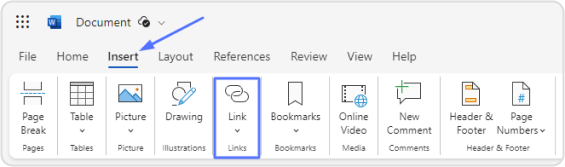
Step 3: In the menu bar at the top, click on the “Insert” tab and Look for the “Link” or “Hyperlink” option (the label may vary depending on your Word version). Click on it.
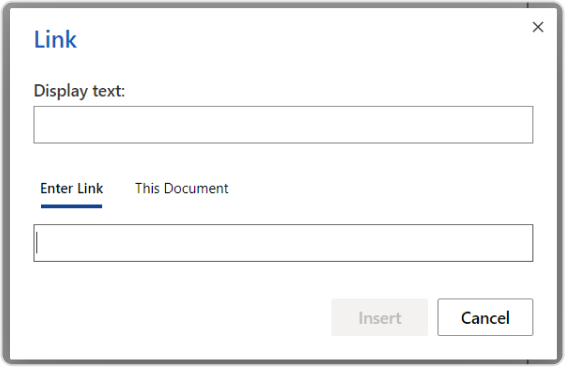
Step 5: A dialog box will appear. In the “Enter Link” field enter the URL (web address) of the website you want to link to (e.g., “https://www.example.com”).
Step 6: You can also give your link a display text if you selected text in Step 2. This is the text that will be visible to readers. If you link an image, this option may not be available.
Step 7: The text you selected will now be a clickable link in your Word document.
A complete link management solution
for marketing professionals & agencies.
Try Replug for free
Creating a link to a website in Microsoft Word is a useful skill, especially for client reports or branded content. Many businesses also consult a web designer to integrate links seamlessly across landing pages, ensuring both visual appeal and conversion efficiency.
How to create a link to a website on a phone?
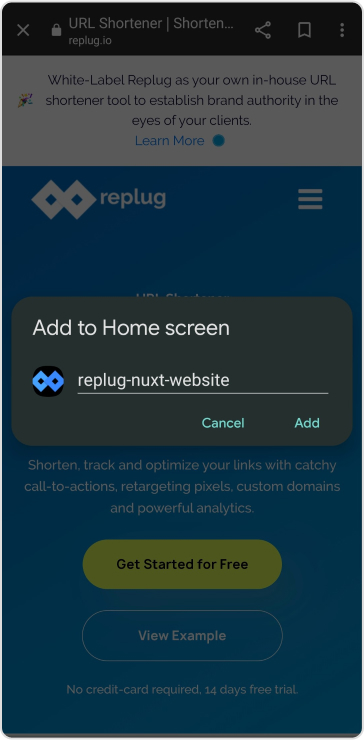
Creating a website link on a phone typically involves adding a website shortcut to your home screen for easy access. Here are the steps for Android and iOS:
For Android:
Step 1: Open the web browser on your Android phone.
Step 2: Visit the website you want to create a link for.
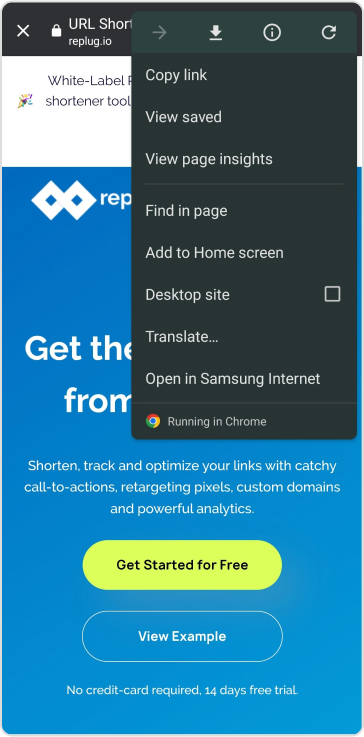
Step 3: Tap the three-dot menu icon (usually located at the top right or bottom of the screen).
Step 4: Select “Add to Home screen” or a similar option from the menu.
Step 5: Give the shortcut a name (this will be the label on your home screen).
The website link will now appear as an icon on your home screen for easy access.
Step 1: Open the Safari web browser on your iOS device.
Step 2: Visit the website you want to create a link for.
Step 3: Tap the “Share” button (it looks like a square with an arrow pointing up, usually located at the bottom center or top of the screen).
Step 4: Scroll down and select “Add to Home Screen.”
Step 5: Customize the name of the shortcut (if desired) and tap “Add.”
The website link will now appear as an icon on your home screen.
How to create a link to a website in an email?
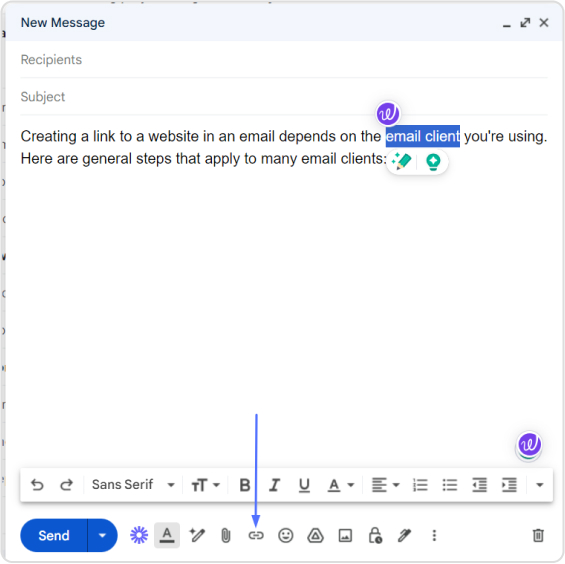
Creating a link to a website in an email depends on the email client you’re using. Here are general steps that apply to many email clients:
Step 1: Open your email client and compose a new email.
Step 2: In the body of the email, type the text that you want to turn into a link.
Step 3: Highlight the text you just typed and look for an option in your email client’s toolbar that resembles a chain link icon or says “Insert Link” or “Hyperlink.” Click on it.
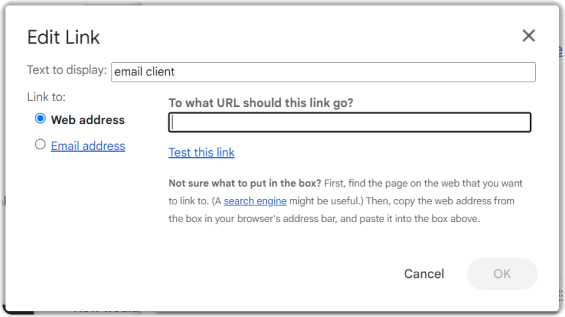
Step 4: A dialog box should appear. In the URL or Link field, enter the web address (e.g., “https://www.example.com”) you want to link to.
Step 5: Optionally, you can specify link text or a title (if your email client allows).
Step 6: Send your email. The text you highlighted will now be a clickable link when recipients open the email.
Boost ROI with branded URLs!
Enhance your marketing campaigns by creating shareable, trackable, and fully multi-purpose
customizable branded URLs.
For those seeking a simple, reliable tool to manage all your link needs, from creation to tracking, Replug.io offers an intuitive dashboard that simplifies link building across documents, web pages, and more.
Moreover, if you want to make those links cleaner and more manageable, especially for sharing or marketing, you can shorten link using Replug’s built-in link shortener to produce crisp, user-friendly URLs.
FAQs
What is a website link?
A website link, also known as a hyperlink, is a clickable element that connects one web page or online resource to another. Clicking on a link typically takes you to the linked web page or resource.
What is the purpose of creating website links in emails?
Creating website links in emails allows you to direct recipients to specific web pages, resources, or information relevant to the email’s content, making it easy for them to access additional information.
How do I create links in WordPress when building a website?
In WordPress, highlight the text or image you want to link, click the “Insert/edit link” button in the editor toolbar, and enter the URL you want to link to. Click “Add Link” to create the hyperlink.
How can I troubleshoot issues with broken links on my website?
You can use online link-checking tools, verify the link’s correctness, and update or fix broken links by correcting the URLs.
Instagram has made it easier than ever to share valuable resources and information with your followers. You can now add links to your Instagram Stories, regardless of your account size. Whether you’re a business, creator, or an individual, this feature empowers you to connect with your audience in new ways.
In this guide, we’ll show you how to add a link to your Instagram story, enabling you to share what matters most to you. Let’s get started.
Why do you need to add a link to your Instagram story?
Adding a link to your Instagram story serves several important purposes:
Share resources: You can direct your followers to external websites, articles, or resources related to the content of your story. This is valuable for sharing information, promoting products or services, or providing additional context.
Drive traffic: If you have a website, blog, or online store, adding a link to your story can help drive traffic to your site. This is essential for businesses and content creators looking to expand their online presence.
Enhance engagement: Links in stories can prompt user interaction. When viewers tap on the link, it provides a way for them to engage further with your content, whether it’s to learn more, shop, or explore related content.
Promote events: If you’re hosting an event, webinar, or live stream, you can use links in stories to invite your audience and provide event details or registration links.
Support causes: Advocates and change-makers can use links to share information about social causes, fundraisers, or petitions, helping raise awareness and drive action.
Connect with your audience: Adding links enables you to offer your followers valuable resources, making your content more relevant and engaging.
Ensure you have the Instagram app installed on your mobile device. Log in to your Instagram account if you’re not already logged in.
Step 2: Access your story creator
Tap your profile picture or swipe right from your home feed to access the story creator.
Step 3: Capture or upload content
At the bottom of the screen, you’ll see options to capture a photo or record a video using your device’s camera. Alternatively, you can swipe up or tap on the gallery icon to upload existing content from your camera roll. Choose the content you want to add to your story.
Step 4: Access the sticker tool
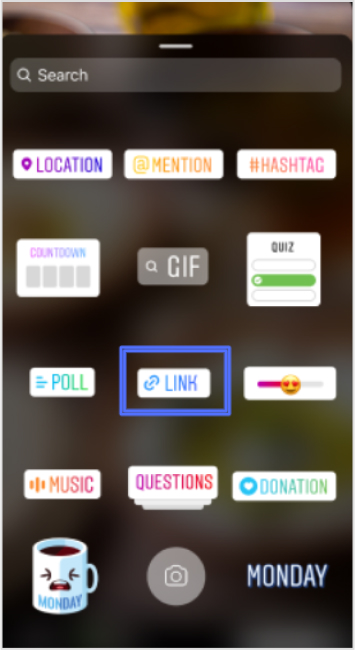
After capturing or uploading your content, you can enhance your story with various stickers and features. To add a link to your story, tap the “Sticker” icon from the top navigation bar.
In the sticker options, locate and tap on the “Link” sticker. This sticker is used to add the link you want to share with your followers.
Step 6: Enter your desired link
A pop-up window will appear, allowing you to enter the web link you want to share. Type or paste the URL into the provided space.
Step 7: Confirm and customize
After entering the link, tap “Done” to confirm. You can also customize the appearance of the Link sticker by tapping on it, which may allow you to choose from different color variations or styles, depending on Instagram’s features at the time.
Step 8: Place the sticker on your story
Now, you can place the Link sticker on your story. Simply drag and drop it onto your image or video, just like you would with other stickers.
Once you’re satisfied with how your story looks with the added link, you can proceed to share it with your followers. Tap the “Your Story” button at the bottom of the screen to post your story.
Step 10: Viewers interact with the link
When someone views your story and taps on the Link sticker, they will be redirected to the web page you’ve shared.
Important Note: Instagram has certain safety measures in place. New accounts and accounts that repeatedly share harmful content or violate community guidelines may not have access to the Link sticker feature. Be sure to follow Instagram’s guidelines and policies to maintain access to this and other features.
Replug: Simplify your social media link management
Managing links on social media platforms like Instagram can be a crucial part of your online strategy. Replug is a comprehensive link management platform and bio-link tool designed to simplify this process.
With Replug’s efficient short URL generator, you can create shortened, trackable links that are perfect for Instagram bio links or sharing in your stories. This Instagram link shortener provides valuable analytics to help you measure the performance of your links, including click-through rates and audience engagement data.
Whether you’re a marketer, business owner, or content creator, Replug can enhance your social media marketing efforts by making link management effortless and effective.
Try Replug today and take control of your links to maximize your online presence.
A complete link management solution
for marketing professionals & agencies.
Try Replug for free
FAQs on adding a link to Instagram Story
Can I add links to any type of Instagram Story, including photos and videos?
Yes, you can add links to both photos and videos in your Instagram Stories.
Is there a limit to the number of links I can add to a single Instagram Story?
You can typically add one link per Instagram Story. If you want to share multiple links, consider creating multiple stories or using the link in the bio feature.
Who can add links to their Instagram Stories?
Instagram has expanded access to this feature, so now, users of all account sizes, including businesses, creators, and individuals, can add links to their stories.
Are there any restrictions on the types of links I can share in my Instagram Story?
Instagram has guidelines in place and links that violate their Community Guidelines may be restricted. It’s important to ensure your content adheres to Instagram’s policies.
Can I track how many people clicked on the link in my Instagram Story?
Yes, Instagram provides insights on the number of clicks your link receives. You can view this data by swiping up your story.
Have you ever clicked a link only to end up somewhere unexpected, or worse, hit a dead end? That tiny URL redirect you didn’t notice might be the culprit.
Around 25–40% of legitimate web URLs involve some form of redirection, and nearly half of the external links you click have been redirected at least once, just to keep the web usable and up to date.
But here’s the catch!
While redirects help fix broken links and support site moves, they can also slow down pages, confuse search engines, and chip away at hard-earned SEO value if misused.
That’s why understanding how redirects really work matters more than ever, especially in 2026, when performance and search rankings go hand-in-hand.
So what exactly is URL redirection, and why should every site owner know it?
Let’s get started!
What is URL redirection?
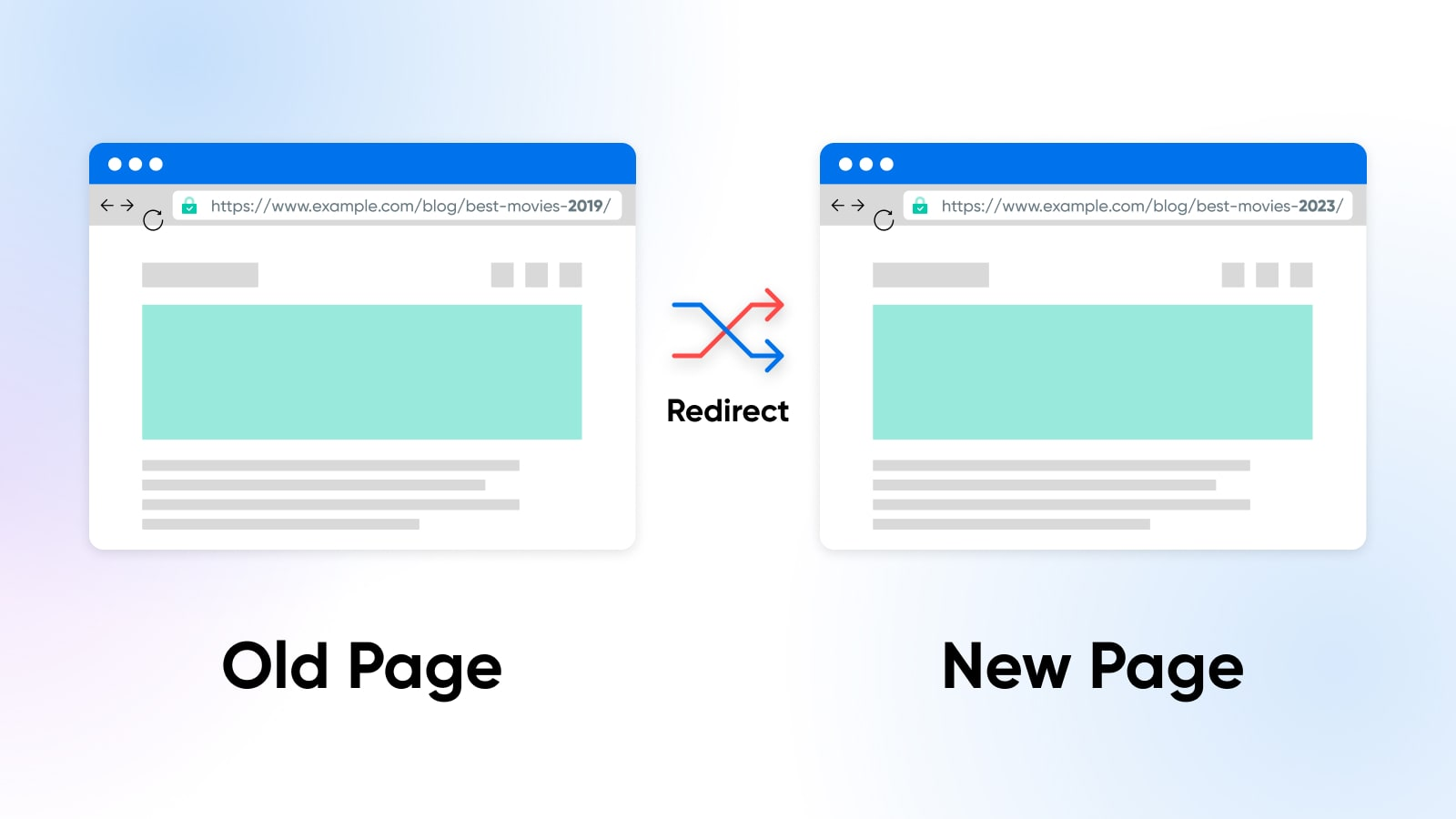
At its simplest, “URL redirection” is when one web address (a URL) automatically sends you to another without you having to click anything.
Think of it like someone gently guiding you to the right room in a huge conference hall. You ask for one door, and a host points you straight to the correct one.
In technical terms, when a browser requests a specific URL, the server tells it, “Hey, this content has moved. Go here instead!”
The primary goal of this technique is to keep users and search engines happy. It ensures that even when content moves, links don’t break, visitors land where they expect, and your website doesn’t lose hard-earned traffic or SEO value.
That’s why good redirects matter so much in web design and site maintenance. They help prevent those annoying dead ends that frustrate users and damage your site’s credibility.
URL redirect types
When we talk about the different types of URL redirects, we’re really just grouping the ways one URL sends users (and search engines) to another.
Redirects can be short- or long-term, and each has its own purpose and impact on how browsers and search bots behave.
They’re a big deal when you’re managing a website because the wrong one can hurt traffic or search rankings if you’re not careful.
Permanent redirects
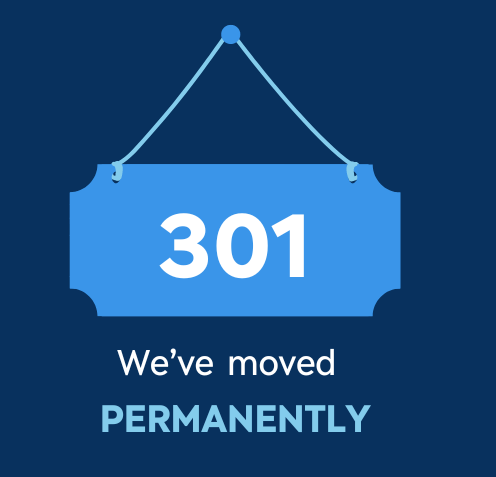
A permanent redirect tells the browser and search engines that a page has moved for good. The most common permanent status code is 301 (“Moved Permanently”), which signals that the original URL should no longer be used and that the new one takes its place.
Search engines typically carry over most of the original’s SEO value to the new URL, making it ideal for site moves, structural changes, or page consolidation.
Temporary redirects
A temporary redirect (like 302, 303, or 307) sends visitors to another URL for now, but indicates the original URL is only temporarily unavailable. The idea is that the original one might come back someday.
Search engines usually keep the old URL indexed and don’t pass along SEO value as a permanent redirect does. This type is handy for things like short-term promotions, maintenance pages, or A/B testing.
Server-side redirects
Server-side redirects happen at the web server level before any content loads. The server simply returns a special HTTP status code and a new destination URL, and the browser follows it immediately.
These are usually the best choice because they’re fast and clear to browsers and search engines.
Permanent server-side redirects
This is the classic “set it and forget it” move, using a server-side permanent status (like 301 or 308) to point an old URL to a new one forever.
It tells crawlers and browsers to update their records so that, over time, users and search engines only experience the new address.
Temporary server-side redirects
With temporary server-side redirects (like 302 or 307), you tell the server to send people elsewhere, but only for a limited time. The server itself handles the redirect, but search engines recognize that the original URL remains the “real” one in the long run.
That makes this perfect for things like site maintenance or seasonal campaigns where you expect to revert back.
How does URL redirection work?
URL redirection might sound technical, but it’s really just about guiding a browser from the URL someone requests to another URL that actually has the content you want them to see.
Behind the scenes, there’s a simple conversation between your browser and the server that makes it happen.
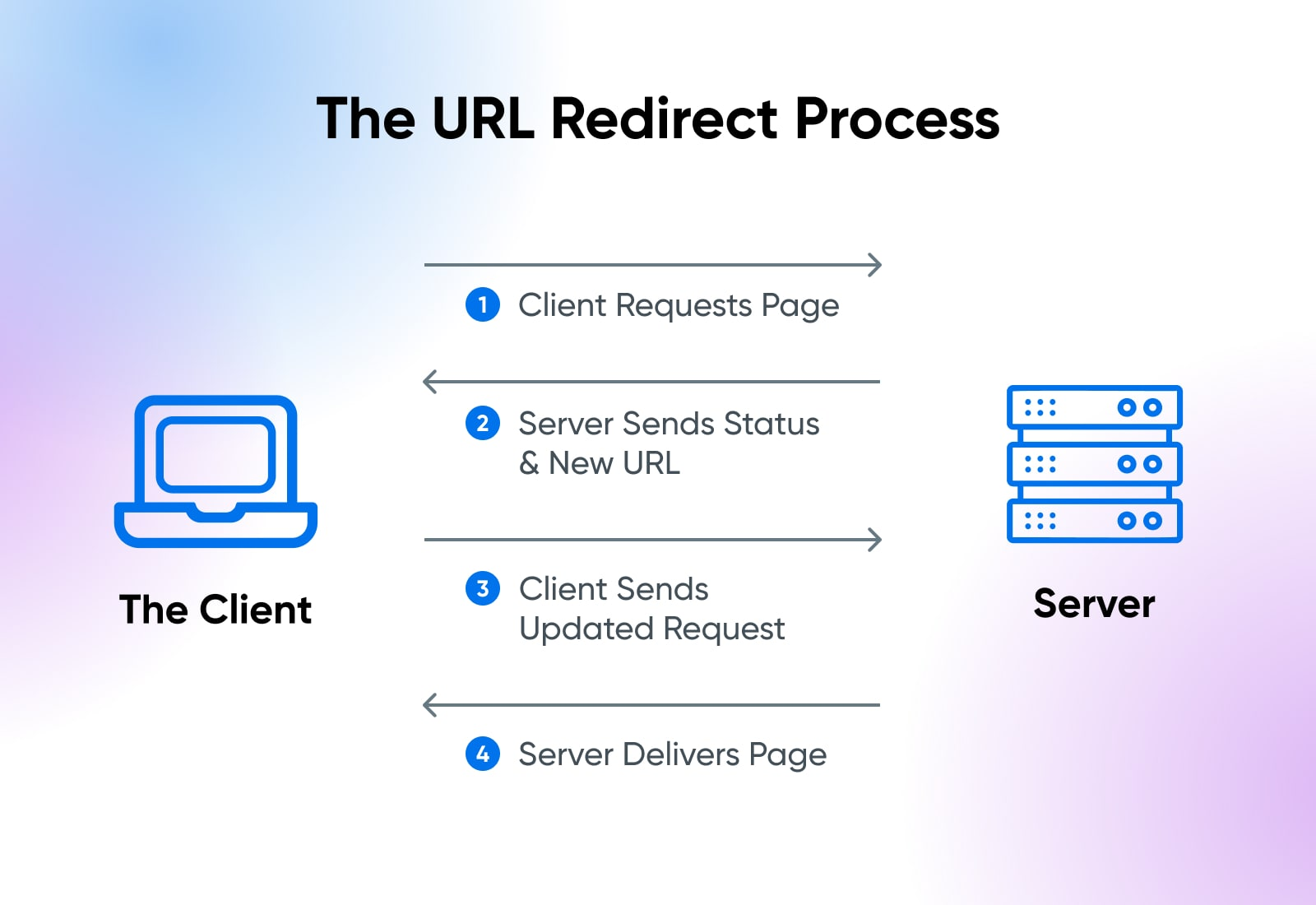
Here’s the complete process explained:
1. Request
It all starts when someone types a URL into their browser or clicks a link. That browser sends a request to the server that hosts that address, asking for the resource (page, image, etc.).
Think of it like knocking on the server’s door and saying, “Hey, can I see this page?”
2. Server response
The server examines the request and checks whether the URL needs to be redirected. If it’s been set up to redirect, the server doesn’t send the page content.
Instead, it sends a special redirect response with a status code in the 300 range, along with a “Location” header that tells the browser the new URL to use.
3. Browser action
Once the browser receives that special response with the new URL, it doesn’t sit there; it follows the instruction immediately.
The browser makes a new request to the destination URL that the server told it about. That’s why when a redirect happens, you might see the address in the browser change (updated).
4. Content served
Now that the browser has requested the correct final URL, the server at that location sends back the real content you were after, no matter if that’s a web page, image, file, or anything else. The browser then displays it as if it were a normal page load.
So, in short:your browser asks for a URL → the server says “go to this other URL instead” → your browser follows it → and then you get the content you wanted. Simple, smooth, and essential for keeping the web working properly!
Common reasons for performing URL redirection
URL redirection isn’t just a typical tech trick! It’s used in lots of everyday web situations to make the internet smoother and more user-friendly.
From cleaning up links to protecting user privacy (and yes, even the bad stuff), redirects play a role in how we get around online.
To shorten URLs or links
Sometimes URLs are long, messy, or hard to remember, especially when you’re sharing them in a tweet or text. Redirects let you use short links that forward users to the original, long URL while keeping things neat and easy to share.
To exclude broken links
When pages move or get deleted, clicking old links can lead to a dead end (like a 404 error). Redirects help by sending visitors from the old URL to a working page instead, keeping links alive and users happy.
To permit multiple domain names
Many site owners register several domain names (like “.com”, “.net”, or common misspellings) but want them all to show the same website. Redirects make this possible by directing everyone to a single primary domain.
To facilitate smooth website navigation
Redirects help guide users around your site hassle-free, e.g., when a page has moved, during maintenance, or when content is reorganized. They assist visitors so they don’t run into confusing errors or outdated pages.
For privacy and data protection
Some services redirect links through intermediary systems to hide things like referrer information and other sensitive details before sending users to their destination. This can help protect user privacy and obscure internal URLs.
For malicious intent (not recommended)
Unfortunately, redirects can also be abused. Cybercriminals sometimes use them to hide phishing pages or distribute malware by making a link look safe before sending you somewhere dangerous. That’s why it’s always best to be cautious with unfamiliar or suspicious links.
URL redirection isn’t just a geeky server trick; it’s used every day on the web to make sure people land where they should, protect data, improve usability, and sometimes (unfortunately) for shady stuff.
Let’s walk through the primary objectives for which this happens!
Ensuring secure site access (HTTPS)
Websites often redirect visitors from HTTP (insecure) to HTTPS(secure) URLs, so data such as passwords and personal information is encrypted. This is critical for privacy and defense against snooping or tampering.
Redirecting misspelled or variant domain names
People often make typos or try different domain endings, like “.net” or “.org”. Redirecting these to your leading site helps capture that traffic instead of losing it or showing errors.
Seamless transition to a new domain
If you redesign your site, rebrand, or change domains, redirects make sure old links still point people to the right place so bookmarks and search results don’t break.
Redirects can be used to log when someone leaves your site, for example, to track which external links get clicked most, helping with link analytics and marketing insights.
Simplifying messy, long URLs with short aliases
Short links (like replug.io links) are easier to share and remember. They work by redirecting people from a short alias to the full, complex URL in the background.
Long-lasting redirect aliases for dynamic URLs
Some services create stable URLs that always point to changing or complex content. This is especially handy with long query strings or dynamic parameters. This makes sharing and linking cleaner.
“Post-Redirect-Get” design pattern to prevent duplicate submissions
In web forms, redirecting after a “POST” request prevents a user from accidentally resubmitting the form if or when they refresh the page, which prevents duplicate actions like double purchases.
Device-specific and geo-based routing
Redirects can send users to different URLs based on their device (mobile vs desktop) or where they’re browsing from (country/language), giving a tailored experience.
Some people try to use redirects to game rankings or send search traffic to pages that shouldn’t rank otherwise, but major search engines now detect and penalize these tricks.
Misleading site visitors
Redirects can be exploited to confuse users, like sending someone to a spammy or unexpected page. Modern browsers show the real URL, but this can still be part of phishing or scam tactics.
Stripping off “referrer” information
When you click a link, browsers send the page you came from in the referrer field. Some redirects hide or strip this to protect privacy or sensitive info before loading the destination.
Various URL redirect implementation methods
There are several ways to make one URL send visitors to another, depending on your access, needs, and how strict you want to be about standards, SEO, or user experience.
Now, let’s walk through the main methods you’ll run into.
Manual redirect
This is the simplest kind! You just put a normal link on a page, asking users to click it to go somewhere else. It’s not automatic, but it works as a fallback or basic suggestion if more advanced redirects aren’t available.
HTTP status codes
This is the most reliable, standard way to redirect. The server responds with a “3xx status code” (e.g., 301, 302, or 307) and a Location header pointing to the new URL. Browsers and search engines understand this instantly and act on it before loading content.
Refresh Meta tag & HTTP refresh header
If you can’t set server headers, you can use an HTML <meta http-equiv=”refresh”> tag in the <head> of a page. With a zero-second delay, browsers will automatically load the new address.
Note: It’s a fallback method and usually less preferred for SEO, but it’s useful when you don’t control the server.
JavaScript URL redirects
You can use JavaScript in a page to change the “window.location” to a new URL. This happens in the browser after the page starts loading and works great for conditional or interactive redirects, but search engines may not always follow it during crawling.
Frame URL redirects
Older sites sometimes use “frames” or “iframes”, where one page loads another inside a frame. This redirect loads the target URL inside the frame, giving a similar effect.
Note: It’s not common anymore and can cause usability or SEO problems, but you may still see it on legacy systems.
Redirect chains & loops
These aren’t methods you want; they’re pitfalls. A redirect chain is when A → B → C happens instead of a direct A → C, which slows loading and can lose SEO value.
On the other hand, a redirect loop occurs when URLs keep pointing back to each other, forming an endless cycle that traps browsers. Both should be avoided with careful planning and testing.
Create & manage URL redirects
Once you know why redirects matter, the next step is figuring out how to actually set them up and manage them, whether you’re using a website platform, a server, a DNS service, or even a browser tool.
Different environments offer different tools and levels of control, so let’s go through the most common ones you’ll encounter.
WordPress URL redirect
On WordPress, the easiest way to create and manage redirects without touching server files is to use a redirect plugin like “Redirection”.
This lets you set up 301s, 302s, and more right from your dashboard, track 404 errors, and handle query parameters without editing “.htaccess” or Nginx configs. It’s especially handy for non-technical users or larger sites with lots of redirects.
Cloudflare URL redirect
If your site uses Cloudflare, you can manage redirects at the edge using “Page Rules”, “Single Redirects”, or “Bulk Redirects” in the dashboard.
These tools let you send traffic from one URL to another before it even reaches your server, which is fast and efficient. You choose the source and destination patterns and set the HTTP status code (e.g., HTTP 301 or HTTP 302).
DNS URL redirect
Some DNS providers let you create simple redirects at the DNS level by pointing a hostname (like a root domain) to an IP and combining it with a redirect rule in your DNS or host settings.
This redirects traffic for the whole domain. It is particularly useful if you want domain-wide forwarding without a web server.
Note: Pure DNS records without associated redirect rules won’t forward URLs on their own.
Google URL redirect
When you set up redirects, Google will follow them and understand relationships between old and new URLs.
For example, with a 301 (permanent) redirect, Google treats the destination as the canonical URL for indexing. This means pages you’ve moved or consolidated can stay visible to search engines with minimal SEO impact.
URL redirect Chrome
On your own browser, tools like Chrome extensions (e.g., “Requestly” or “Redirect Path”) let you test, debug, or override redirects locally.
These are especially useful for developers or QA testers who want to simulate or observe a redirect or a redirect chain in the browser in real-time.
nginx URL redirect
If your site runs on an Nginx server, you can define redirects in your server block using “return” or “rewrite” directives.
For instance, a simple 301 redirect from an old path to a new one can be done in the Nginx “config” file. This is very flexible and powerful, but it requires server access.
Django URL redirect
In Django (a Python web framework), redirects are handled in your app’s URL configuration or views using functions like “redirect()” and careful validation to prevent open redirect vulnerabilities.
Django also provides tools to help ensure safety when redirecting based on request parameters.
URL redirect with parameters
Sometimes you need redirects that include parameters (e.g., “?ref=123”) or that pass query strings through to the new URL.
Many redirect tools, whether in WordPress plugins, Cloudflare rules, or server configurations, let you preserve or customize query parameters so your tracking or dynamic values aren’t lost during redirection.
URL redirection benefits
Now, you guys are well aware that URL redirection isn’t just a behind-the-scenes web thing. It has real perks for your website, your visitors, and your brand.
From keeping your SEO strong to making links easier to use and remember, redirects play a significant role in modern web management.
Preserving SEO value by passing link equity
When you move or rename a page, search engines like Google transfer the link equity (the SEO value built up through backlinks and ranking signals) from the old URL to the new one using a redirect. This keeps your rankings steady and prevents you from losing hard-earned SEO visibility.
Preventing traffic loss from broken links
Without redirects, old links can result in 404 errors, which frustrate users and drive them away. Redirects guide visitors from outdated URLs to the right content, helping you keep traffic flowing where it should.
Improving user experience (UX)
Redirects make sure visitors always land on relevant content, even if they click an old or shared link. This smooth browsing experience keeps people engaged and reduces bounce rates, which search engines appreciate too.
Maintaining brand consistency
No matter if you’ve moved to a new domain or reorganized content, redirects help keep your brand message consistent. Instead of ending up on error pages or old URLs, visitors always see your current, branded content.
Simplifying marketing with memorable, short URLs
Using tactics like a vanity URL (custom, branded short links) makes your URLs easier to remember and share. These clean, descriptive redirects not only look professional, but also encourage more clicks in campaigns and social posts.
Summing up
In a continuously transforming digital world, URL redirection is one of those tools that quietly keep everything running smoothly.
From preserving SEO value and preventing broken links to improving user experience and simplifying marketing with clean, memorable links, everything is done efficiently (behind the scenes).
Whether you’re managing redirects on a CMS, server, or with tools like a URL shortener, understanding how redirects work helps you keep your site healthy and your users happy.
We’ve covered types, purposes, methods, and real-world reasons you’d use them, so you’re set to make smart redirection decisions moving forward.
And if you’re looking to streamline and optimize your links even more, give Replug, i.e., an all-in-one link optimization platform, a try today. It is a reliable URL shortener that shortens links in seconds, with built-in tracking and testing features.
A complete link management solution
for marketing professionals & agencies.
Try Replug for free
Frequently asked questions
How do I redirect a URL to another URL online?
URL redirection is the automatic redirection of a user from one URL to another. A web server usually does this to ensure visitors are directed to the correct page, even if the URL has changed or the page is moved.
What does it mean to redirect a URL?
Redirecting a URL means automatically sending anyone who visits one web address to a different one instead.
When a browser requests a URL that has a redirect, the server tells it to go to a new location, so the visitor ends up at a different page or site without manually typing the new address.
This is commonly used when pages move, domains change, or you want to forward traffic to a new address.
In this case, when someone visits the old URL, they are automatically redirected to the new one.
How to check if a URL is redirecting?
To check if a URL is redirecting, you can:
– Use a URL redirect checker tool (like “Redirect Checker”). – Check the HTTP headers for a “301” or “302” response, indicating a permanent or temporary redirect.
Alternatively, you can use browser developer tools to see the redirection in real-time.
How to set up a URL redirect for a domain?
To set up a URL redirect, you typically:
1. Log in to your domain hosting account. 2. Find the URL forwarding or redirect settings (this may vary depending on your hosting provider). 3. Choose the type of redirect (301 for permanent or 302 for temporary). 4. Enter the destination URL where users should be redirected. 5. Save the settings.
Do URL redirects have a bad impact on SEO?
URL redirects generally do not harm SEO if done correctly, especially when using permanent redirects (301). However, excessive or improper redirection can slow down a website and confuse search engines. Keeping redirects clean and minimal is key to good SEO.
When to use URL redirects?
You should use URL redirects in cases such as:
– When a page is permanently moved to a new URL (301 redirect). – If a page or site has been deleted, but you want to redirect traffic to a related page. – When you restructure your website and URLs change. – To manage changes in domains.
Mention the ways to redirect a website URL efficiently?
Efficient ways to redirect a URL include:
– 301 redirect for permanent redirection. – 302 redirect for temporary redirection. – Using .htaccess files(on Apache servers). – Setting up redirects in CMS platforms like WordPress or Shopify. – Managing redirects through DNS settings for domain-level redirects.
How to redirect a URL in Shopify?
In Shopify, to set up a URL redirect:
1. Go to the Shopify admin panel. 2. Navigate to Online Store > Navigation. 3. Scroll down to URL Redirects and click Add URL Redirect. 4. Enter the old URL in the “Redirect from” field and the new URL in the “Redirect to” field. 5. Save the redirect.
What is the best way to manage URL redirects?
To manage URL redirects effectively:
– Use a URL redirect manager or plugin(if on platforms like WordPress, Shopify, etc.). – Utilize URL redirect services that track and update broken links and redirects. – Set up redirects via the server or CMS settings to ensure they’re applied consistently.
What tools are best for managing large-scale URL redirects?
Some of the best tools for managing large-scale URL redirects include:
–Screaming Frog SEO Spider ( the best URL redirect tool for checking and managing large redirects). –Redirection (URL redirect checker plugin for WordPress). –Ahrefs (URL redirect tester tool with redirect management and SEO features). –Replug (for simple redirects). –Usermaven (for monitoring and managing site redirects).
Are free URL redirection services legit?
Yes, free redirection services can be legitimate, but they vary in quality. It’s essential to use a reputable service to ensure security and performance. Services like Replug offer free redirection, but for professional or business use, premium services may provide more control and fewer limitations.
We all love pizza or some kind of fast food. But what if your favorite fast food brand’s workers uploaded an unsettling video violating the health codes on social media – (there goes all your branding efforts down the hill)
Would you still be up to try that brand? I don’t think so. The least you would do is stop going to that specific franchise.
Similar happened in the case of Domino’s where two workers uploaded a video on Youtube from Domino’s kitchen while preparing pizza and violating the health standards. The video went viral, and the company faced strong backlash over it.
With the right crisis response Domino’s averted serious consequences (more to the story).
While the advantages of social media are obvious, there are also some social media risks to be aware of. When something goes wrong, brands risk losing their reputations.
Companies must be cautious about what they publish online, and they must have a plan to address any issues that develop.
For teams managing multiple campaigns, monitoring brand mentions, or sharing content across social channels, using Replug.io can help streamline link management and make content sharing more secure and trackable.
In this blog, we will make sure that you stay on top of your social media game with proper risk mitigation techniques, and maintain engagement with your audience and increase your sales effectively.
What is social media risk management for brands?
The key to effective social media risk management for brands consists of proactive monitoring, rapid response to negative content, clear social media guidelines, employee training, and crisis communication plans.
To maintain a positive brand image and minimize potential reputation damage, businesses need to understand how social media managers drive brand engagement and stay sharp at all times.
Did You Know! “Report finds 164% increase in cyber threats targeting brands” (ZeroFox)
Benefits of a social media risk management
Here are the key benefits of social media risk management strategies.
If you don’t have the right risk response strategy, then you can end up like United Airlines, where the passenger Dave Caroll’s guitar was damaged. When he took his case up to the airline, it refused to fix or replace his guitar.
In response, Dave wrote a song “United you broke my guitar”. The song got over 9 million views, and more importantly, United Airlines investors lost $180 million as the stock price dropped by 10% after the incident.
However, before moving to the risk management strategies, it’s important to know what kind of social media risks brands are open to.
Major social media risks for brands
It’s necessary for every brand, social media manager, community manager, customer services etc, to have knowledge of the risks that brands can face.
1. Social media security risks
Social security risks can harm your info and identity. Avoid sharing too much, weak passwords, or strange links. Stay safe with strong passwords, cautious sharing, and distrust of unknown emails. Just like locking your door, secure your online stuff!
When you must share URLs on social media or in campaigns, using a trustworthy link shortener ensures your links are clean, branded, and less likely to trigger suspicion, which can help protect both brand reputation and user trust.
Here are different kinds of social security risks for brands, you must be aware of:
Reputation damage: Negative comments, reviews, or misinformation can harm a brand’s image.
Data breaches: Hackers gaining access to customer or employee data can lead to trust loss. Beyond the breach itself, exposed personal details may also appear on people search websites and data broker platforms. Taking steps toward removing personal information from the internet can reduce its ongoing public visibility.
Phishing attacks: Employees might unknowingly reveal sensitive info to fake emails.
Social engineering: Scammers might manipulate employees for confidential data.
Account hijacking: Hackers taking control of a brand’s social media accounts can spread false information.
Inappropriate content: Sharing or being associated with offensive or inappropriate content.
Intellectual property theft: Competitors or others stealing a brand’s ideas or content.
Crisis mishandling: Poorly managed crises can worsen public perception.
Lack of control: Employees’ personal posts reflecting poorly on the brand.
Miscommunication: Messages being misinterpreted can lead to PR issues.
Did you know! “Up to 40% of social media users are estimated to have experienced some form of social engineering or phishing attack.” (GITNUX)
The CNN hacking case
In 2014, the official Twitter and Facebook accounts of CNN were compromised by a hacktivist group, the Syrian Electronic Army (SEA). The hackers posted false information, which spread rapidly, damaging CNN’s credibility and potentially influencing the public.
CNN’s response
CNN’s initial response was somewhat delayed and lacked coordination, allowing the false information to gain traction. However, they swiftly regained control of their accounts, deleted the false posts, and issued clarifications.
What could have been done?
To enhance crisis management, CNN could have benefited from faster response times, clear communication strategies, and pre-established protocols for social media account security. This case underscores the need for organizations to proactively prepare for digital threats and have effective crisis communication strategies in place.
2. Legal risks
Social media legal risks encompass potential legal problems arising from online activities, such as copyright infringement, defamation, and privacy violations.
Here are different kinds of social media risks brands need to be aware of:
Copyright infringement: Sharing content without proper authorization can lead to copyright claims.
Defamation: Posting false or damaging statements about individuals or businesses can result in defamation claims.
Privacy violations: Sharing personal information without consent might lead to privacy lawsuits.
Trademark violations: Unauthorized use of trademarks can result in legal action.
Advertising regulations: Violating advertising laws or not disclosing sponsorships can lead to penalties.
Data protection Laws: Mishandling customer data may breach data protection regulations.
Contractual Issues: Breaching contracts with influencers or partners can result in legal disputes.
Employment matters: Employee social media usage can lead to HR and legal challenges.
Regulatory compliance: Not adhering to industry-specific regulations can lead to fines.
Misleading content: Sharing false or misleading information might breach consumer protection laws.
Managing social media risks effectively is crucial to mitigate these potential financial impacts and maintain a positive brand image, customer trust, and business growth.
Here are some major financial impact on brands that occur due to weak social media risk management:
Customer loss:
Poorly managed social media risks can lead to a loss of existing customers and difficulty in attracting new ones due to negative perceptions. This is why it’s crucial to keep track of TikTok analytics and analyze interactions on Instagram, Twitter, and other platforms to prevent this from happening.
Legal expenses:
Violations such as copyright infringement or privacy breaches can result in legal fees, fines, and settlements, draining financial resources.
Crisis management costs:
Dealing with social media crises requires resources for crisis communication, PR efforts, and reputation repair, leading to additional expenses.
Difficulty in ROI measurement:
Relying on misleading social media metrics can lead to misguided decisions and ineffective strategies. Measuring the actual return on investment from social media efforts can be challenging.
The British Petroleum Gulf oil spill: A risk management debacle
The BP oil spill in the Gulf of Mexico is widely known, and social media has played a crucial role in magnifying and uniting public anger over BP’s management of the crisis in that region.
BP’s brand value has taken a hit of more than $1 billion as a consequence of the situation. Notably, the “Boycott BP” Facebook page has garnered the support of over 750,000 individuals.
Moreover, discussions surrounding “BP” have surfaced across various online platforms, including more than 9,000 blogs and over 23,000 tweets. Impressively, these discussions on Twitter have collectively generated approximately 49.5 million impressions.
4. Competitor risk
Social media risks related to competition involve potential negative impacts that arise from interactions and activities on social media platforms involving competitors. These risks can impact a business’s reputation, customer perception, and overall competitive standing.
Here are some social media risks related to competition:
Comparative marketing gone wrong:
While comparative marketing can be effective, it can backfire if not executed carefully, leading to legal issues or public backlash.
Customer poaching:
Competitors might target your customers with enticing offers or campaigns, attempting to shift their loyalty away from your brand.
Competitors might spread false rumors or disinformation about your products or services, impacting customer trust and potentially causing financial harm.
5. Innovation risk
While social media can be a powerful tool for innovation, it also comes with certain risks. Here are some innovation-related social media risks to be aware of:
Premature exposure:
Sharing innovative ideas or products too early on social media can lead to competitors gaining insight and potentially launching similar initiatives before you do.
Copycat competition:
Competitors might quickly replicate or modify your innovative concepts after seeing them on social media, reducing your competitive advantage.
Expectation management:
Overhyping an innovation on social media can lead to unrealistic customer expectations, making it challenging to meet those expectations in reality.
Critique and negative feedback:
Innovative ideas can attract critique and negative feedback on social media platforms, potentially discouraging further development or affecting your brand perception.
One of the best examples and case studies of crisis management that brands highlight is the Johnson and Johnson’s Tylenol incident.
In 1982, Johnson & Johnson faced a crisis when seven people in the United States died after consuming Tylenol capsules that had been tampered with and laced with cyanide. The company swiftly responded by recalling 31 million bottles of Tylenol, worth around $100 million. They cooperated fully with law enforcement and established a hotline to inform the public about the situation.
Johnson & Johnson also introduced tamper-evident packaging, which later became an industry standard. Their transparent and responsible crisis management approach is often cited as a model for effectively handling product-related emergencies.
Below are more details on this story and crisis management in this video of Retro Report.
Here’s a social media risk management plan tailored for brands for effective crisis management.
1. Risk identification:
Identify potential social media risks, such as reputation damage, data breaches, legal compliance issues, and crisis events.
2. Risk assessment:
Evaluate the potential impact and likelihood of each risk to prioritize them effectively.
3. Prevention and guidelines:
Establish clear social media usage guidelines for employees, including appropriate content and engagement practices.
Enforce strong password policies and enable two-factor authentication for all brand accounts.
4. Monitoring and alerts:
Utilize social media monitoring tools to track brand mentions, sentiment, and potential threats.
Set up real-time alerts for unusual activity or security breaches.
5. Data protection:
Implement stringent data protection measures, including encryption, secure data storage, and regular security audits.
6. Crisis response plan:
Develop a comprehensive crisis management plan with predefined actions for addressing negative events.
Assign specific roles and responsibilities for crisis communication and resolution.
7. Legal compliance:
Stay informed about relevant laws and regulations related to social media usage and advertising.
Ensure all social media content and activities comply with legal requirements.
8. Third-party app evaluation:
Thoroughly vet and monitor third-party apps or tools used for social media management.
Ensure these tools adhere to strict security and privacy standards.
9. Incident handling:
Establish a well-defined incident response process to swiftly address social media-related incidents.
10. Communication strategy:
Develop a clear communication plan for addressing stakeholders, customers, and the public during a crisis. – Prioritize transparency and timely updates.
11. Regular audits:
Conduct regular audits of social media accounts, content, permissions, and security settings.
12. Employee training:
Provide ongoing training to employees about responsible social media practices, data security, and crisis communication. Use Plus AI to create engaging presentations to support these efforts.
13. Continuous improvement:
Regularly review and update the risk management plan to adapt to evolving social media trends and emerging risks.
FAQs about social media risk
What is the biggest risk in using social media for a business?
Biggest risk in using social media for business is reputation damage.
What are the main risks of social media?
Main risks in using social media for brands are reputation, data breaches, legal compliance & misinformation.
What is risk management in social media?
Planning to identify, assess, mitigate, and monitor social media risks.
What are the risks of social media to an organization?
5 types of risk management are strategic, financial, operational, compliance and reputational risks.
What are the 5 types of risk management?
5 types of risk management are strategic, financial, operational, compliance and reputational risk management.
How can you reduce the risk of using social media?
Reduce risk of using social media to educate employees, follow privacy guidelines, use strong passwords, and monitor activities.
If you’re a brand still sleeping on TikTok in 2026, you’re leaving serious money on the table. The platform now has nearly 2 billion monthly active users and an engagement rate of 3.70%, miles ahead of every other major social platform.
And when creators get involved?
68% of TikTok users say they’ve bought something based on a creator’s recommendation. That’s not just scrolling; that’s buying power.
TikTok influencer marketing statistics also show that creators on the platform drive engagement rates 24x higher than on platforms like X. This tells you everything about where your audience’s attention actually lives.
No matter if you’re a startup or an established brand, partnering with the right TikTok creators can completely change the game. But first, let’s get clear on what TikTok influencer marketing actually means and why it’s different from anything you’ve tried before.
What is TikTok influencer marketing?
TikTok influencer marketing is when brands partner with TikTok creators (people who’ve already built a loyal, engaged following) to promote their products or services through authentic, short-form video content.
Unlike traditional advertising, where you’re pushing a message out to a cold audience, influencer marketing on TikTok puts your brand in front of people who already trust the creator talking about it. That trust is the whole point!
The primary objective is simple: Use a creator’s existing influence to spark genuine interest in your brand, drive traffic, and ultimately generate leads or sales, all in a way that feels natural rather than salesy.
It works particularly well on TikTok because the platform rewards authentic, entertaining content over polished ads. When the right creator talks about your product in their own voice, it doesn’t feel like marketing, and that’s exactly why it converts so well.
How TikTok influencer marketing works
Here’s how the process works, broken down into simple steps:
Step #01: Define goals & find creators
Start by getting clear on what you actually want (more brand awareness, website traffic, leads, or direct sales). Once you know your goal, find creators whose audience matches your target customers. Niche relevance matters way more here than just follower count.
Note: Remember, a micro-influencer with 20K highly engaged followers can often outperform a mega-creator with a million passive ones.
Step #02: Negotiate & compensate
Reach out to your shortlisted creators and work out the details (deliverables, timelines, usage rights, and payment). Compensation can be a flat fee, free products, a commission-based deal, or a mix of all three.
Be upfront about expectations, but also give creators room to do what they do best. Their audience follows them for a reason.
Step #03: Review & post
Before anything goes live, review the content to make sure it aligns with your brand guidelines and goals. That said, avoid over-editing or stripping out the creator’s personality.
Authenticity is what makes TikTok content perform at its best. Once you’re both happy with it, it goes live and starts doing its thing.
Step #04: Boost & measure
Don’t just post and hope for the best. Use TikTok’s Spark Ads feature to boost top-performing influencer content to an even wider audience.
Then track the numbers that actually matter (views, clicks, conversions, and ROI) so you know what worked and can make smarter decisions for your next campaign.
Why use TikTok influencer marketing in 2026?
With nearly 2 billion active users and an algorithm that can make anyone go viral overnight, TikTok isn’t just a social media platform anymore; it’s a full-on marketing machine.
If you’re still on the fence about investing in TikTok influencer marketing, these four reasons should clear things up pretty fast.
High return on investment (ROI) through micro & nano-influencers
Here’s the thing: You don’t need to spend a fortune to see real results on TikTok. Bigger doesn’t always mean better when it comes to influencers.
Nano-influencers on TikTok consistently pull in double-digit engagement rates, hovering just above 10%. Whereas micro-influencers deliver 60% higher engagement than mega-influencers at roughly one-tenth the cost per post.
So instead of blowing your entire budget on one big-name creator, you can partner with a handful of smaller creators, stretch your dollars further, and actually get better results.
Nano-influencers on TikTok regularly clear 8–12% engagement, and most accept product-only deals or flat fees in the $25–$500 range for a single video. That’s a pretty solid deal for any brand, either big or small.
The rise of authentic content
People are tired of polished, scripted ads, and TikTok users especially can smell a fake one from a mile away. That’s exactly why UGC (user-generated content) is killing it on TikTok right now.
UGC on TikTok is 22% more effective than brand-created videos and outperforms Facebook ads by 32% and regular ads by 46%. It just feels real, and that’s the whole point.
85% of people find UGC more trustworthy than brand-created content, so when a creator genuinely talks about your product in their own words, their audience listens (quite attentively).
For brands, this means you get high-performing content without the big production budget – just authentic storytelling that connects.
Direct integration with commerce
TikTok has taken influencer marketing a step further by blending content and shopping into one seamless experience.
With TikTok Shop, viewers can go from watching a creator’s video to buying the product without ever leaving the app. TikTok Shop hit $23.4 billion in US GMV and is nearly doubling year-over-year, with conversion rates sitting at 4.7% on average (well above the 2–4% typical of traditional e-commerce).
On top of that, performance-based deals are becoming the new standard. TikTok Shop affiliate commissions typically range from 5–20% of sales, meaning creators only earn when they actually drive results.
This is a win-win situation for brands since you’re paying for performance, not just exposure.
Search & discoverability
TikTok isn’t just a place to scroll for fun anymore. People are actively using it to find products, get recommendations, and make buying decisions.
Nearly half of all consumers surveyed used TikTok as a search engine in 2026, up from 41% in 2024 (a nearly 20% jump in just two years).
Among small business owners, 38% relied on TikTok influencers for product sales or promotions in 2026, up from just 25% in 2024.
When a creator posts a product review or a “best of” video, that content can show up in TikTok search results and keep driving organic traffic long after it’s posted.
So influencer content on TikTok isn’t just a one-time boost; it’s a long-term discoverability asset for your brand.
Running a successful TikTok influencer campaign isn’t just about finding a popular creator and hoping for the best; you need an actual plan.
Whether you’re chasing brand awareness, community growth, or direct sales, picking the right strategy and campaign type makes all the difference.
Let’s break it all down!
Influencer strategy framework
Before you spend a single dollar, you need a clear framework to guide your campaign. Think of it as your game plan.
Here’s how to build one that actually works:
Know your goal first: Are you trying to get more people to know your brand exists, drive traffic to your website, or push product sales? Your goal decides everything else. The type of creator you work with, the content format, the budget, and how you measure success.
Pick the right creator tier: Not every campaign needs a mega-influencer (in fact, most don’t). Match your goals to the right tier. Nano and micro-influencers for targeted, high-engagement campaigns; macro and mega-influencers when you need broad reach fast. A mix of both often works best!
Brief your creators, but give them room: A good creative brief covers your key message, and it must include details (like product features or a promo code) and the dos and don’ts. But here’s the golden rule: don’t script everything. TikTok audiences can tell when a video feels forced, so let the creator speak in their own voice. That’s the whole reason you hired them.
Set a timeline and content schedule: Consistency matters on TikTok. Work out a realistic posting schedule with your creators and make sure it aligns with any product launches, seasonal events, or campaign windows you’re targeting.
Track the right metrics: Views and likes are nice, but they don’t tell the whole story. Depending on your goal, focus on metrics that actually matter (engagement rate, click-through rate, promo code redemptions, TikTok Shop conversions, and overall ROI).
Key influencer campaign types
Now let’s get into the fun part, i.e., the actual campaign types. Each one serves a different purpose, and the best brands mix and match depending on what they’re trying to achieve.
Brand awareness
Product unboxing is one of the most natural and effective ways to introduce your brand to a new audience. Creators unbox your product on camera, walk through how it works, or share an honest review, and their audience gets to see it in action through someone they already trust. It doesn’t feel like an ad; it feels like a recommendation from a friend.
Tutorial videos especially perform well because they’re genuinely useful. They show people exactly how to use your product and answer questions before they’re even asked. The key here is letting creators keep it real. An honest, slightly imperfect review will almost always outperform a perfectly scripted one on TikTok.
Additionally, if you want people to actually participate in your marketing, a branded hashtag challenge is the way to go. You create a challenge, give it a catchy hashtag, and invite TikTok users to join in. The beauty of this format is that it turns your campaign into a trend, and TikTok’s algorithm loves that kind of participation.
Think of Chipotle’s #GuacDance or e.l.f. Cosmetics’ #eyeslipsface challenge. Both went massively viral because they were simple, fun, and easy to recreate. Pairing your challenge with a popular or original sound takes it even further. The goal is to make the barrier to entry low enough that anyone can join, but the idea catchy enough that people actually want to.
Community engagement
Duets and Stitches are TikTok’s built-in tools for creating conversation between creators and brands, and they’re gold for community engagement.
A Duet places two videos side by side, while a Stitch lets a creator clip and react to your content at the start of their own video. Brands can use these features to respond to customer content, collaborate with creators in real time, or even encourage fans to react to a campaign video.
It builds a sense of community because it shows your brand is actually listening and participating (not just broadcasting). Encouraging creators to Duet or Stitch your content also multiplies your reach organically, since their audience sees it too.
An account takeover, on the other hand, is exactly what it sounds like. You hand the keys to your brand’s TikTok account over to a creator for a set period of time (usually 24–48 hours) and let them post as themselves on your page.
This works really well for community engagement because it brings a fresh voice and energy to your account and exposes their fanbase to your brand at the same time. The creator’s followers follow them to your page, your existing audience gets new content they actually enjoy, and everyone wins.
Just make sure you’re choosing someone whose values and vibe genuinely align with your brand. A takeover only works when it feels like a natural fit, not a forced collab.
Conversion & sales
When the goal is to actually drive purchases, tutorials and GRWM videos are some of the highest-converting content formats on TikTok.
A tutorial shows your product being used in a real, relatable situation, such as someone doing their skincare routine, cooking a meal, or styling an outfit, and naturally weaves your product into the story.
GRWM (Get Ready With Me) content works the same way. Creators walk viewers through their daily routine while casually featuring your product, making it feel like a lifestyle choice rather than an advertisement.
The authenticity of these formats is what drives conversions. Viewers watch the whole video, see real results, and feel confident enough to click and buy.
Besides, these three formats are your most direct tools for turning views into sales:
→ With affiliate deals, creators get a unique link and earn a commission on every sale they generate, which keeps them motivated to push your product genuinely and consistently.
→ Promo codes work similarly but with the added bonus of urgency and exclusivity. When a creator says “use my code for 15% off,” their audience feels like they’re getting a special deal.
→ Giveaways, on the other hand, are great for building rapid momentum. They drive comments, shares, and follows in a short burst, boosting your visibility on the “For You Page”.
Use all three smartly:affiliate links for sustained sales, promo codes for conversion pushes, and giveaways when you need a quick spike in engagement or want to grow your following fast.
Find the ideal TikTok influencers for your brand
Finding the right TikTok creator for your brand isn’t just about picking whoever has the most followers; it’s about finding someone whose audience, content style, and values actually align with what you’re selling.
Here’s a simple, step-by-step approach to help you build your TikTok influencer list the right way:
Define your target & budget
Start by getting crystal clear on who you’re trying to reach and how much you’re willing to spend.
Define your target audience(age, interests, location, buying behavior) and let that guide every decision you make. Your budget will also determine what creator tier makes sense.
Working with nano and micro-influencers keeps costs low while still delivering strong results, whereas macro creators need a bigger spend. Set your scope early so you’re not scrambling later.
Leverage influencer discovery tools
TikTok’s own Creator Marketplace is the best place to start. It’s free, built directly into the platform, and lets you filter creators by niche, audience demographics, engagement rate, and location.
If you want to go deeper, third-party platforms like Modash, Upfluence, Heepsy, and Creator.co give you even more data and filtering options.
These tools save you hours of manual searching and help you quickly shortlist creators who actually match your campaign goals.
Manual research & competitive analysis
Don’t underestimate the power of doing a little digging yourself. Check what creators your competitors are tagging or working with. If a creator is driving results for a brand in your space, they’re worth a closer look.
Hashtag surfing is another underrated tactic; just search your niche hashtags on TikTok and see which creators are consistently showing up with solid engagement. This hands-on approach often surfaces hidden gems that no tool would have flagged.
Vetting for the “Ideal fit”
Once you’ve got a shortlist, it’s time to filter out the wrong fits:
Check their engagement rate. A creator with 20K followers and a 9% engagement rate will likely outperform someone with 200K and 1% any day.
Scroll through their past content and comments to assess brand safety. Make sure there’s nothing that could embarrass your brand.
Also look for any past brand collaborations. If they’ve worked with similar brands before and done it well, that’s a solid green flag that they understand how sponsored content works.
Reach out & pitch
Keep your outreach short, personal, and genuine. Mention something specific about their content to show you’ve actually watched it.
Creators get a ton of generic DMs, and a personalized message instantly stands out. Clearly explain who you are, what you’re offering, and what you’re looking for, but keep the tone conversational rather than corporate.
Whether you’re sliding into their DMs on TikTok, emailing through their bio link, or reaching out via their management, lead with value and make it easy for them to say “YES”.
Best TikTok influencer marketing examples
Sometimes the best way to understand what great TikTok influencer marketing looks like is to see it in action.
These five campaigns are some of the most talked-about examples across different industries, and each one has a clear lesson brands can learn from and apply.
e.l.f. Beauty: The #EyesLipsFace Challenge
e.l.f. Beauty made history on TikTok by doing something no brand had done before: commissioning an original song specifically for a TikTok challenge.
The strategy was simple but brilliant. They created a catchy, danceable track and invited users to show off their makeup looks using the #EyesLipsFace hashtag.
The campaign became the most viral US campaign in TikTok history, attracting over 3.5 million user-generated videos and totaling 5.6 billion views. Even celebrities like Lizzo and Reese Witherspoon joined in organically, without being paid.
The key takeaway: When your content is fun, easy to recreate, and culturally on point, your audience does the marketing for you.
Chipotle: #GuacDance
Chipotle turned “National Avocado Day” into one of the most successful branded TikTok campaigns ever.
Partnering with popular creators Brent Rivera and Loren Gray, they launched the #GuacDance challenge, inviting fans to bust out their best guacamole-inspired dance moves to Dr. Jean’s viral “Guacamole Song”.
The campaign received 250,000 video submissions and 430 million video starts in just six days, becoming TikTok’s highest-performing branded challenge in the US at the time. It also resulted in Chipotle’s biggest guacamole day ever, with over 800,000 sides served.
The lesson here is clear: Tie your campaign to a real cultural moment, keep it fun, and let your audience run with it.
YSL Beauty: Loveshine Lip Oil Stick
YSL Beauty’s launch of the Loveshine Lip Oil Stick is a textbook example of mixing high-profile ambassador power with grassroots creator content.
The campaign was fronted by global superstar Dua Lipa as YSL’s new global makeup ambassador, but the real fuel came from TikTok.
Beauty influencers and everyday users alike posted reviews, tutorials, and first impressionsusing branded hashtags, driving millions of views and widespread engagement. Mega-creator Alix Earle’s video alone pulled in over 293,000 likes.
The collaboration with high-profile influencers like Dua Lipa and Alix Earle significantly boosted brand awareness and engagement, particularly for the Loveshine Lip Oil launch. The product quickly went viral and became one of YSL’s most talked-about launches in recent years.
Insta360: #NoseMode Amplification
Insta360’s approach is one of the smartest examples of a brand listening before jumping in.
When users started organically going viral by attaching their Insta360 cameras to selfie sticks pointed at their noses (creating a funny, fish-eye “nose-mode” perspective), the brand didn’t force a campaign.
Instead, they jumped in to amplify what was already happening, engaging with influencers and fans who were already creating this content naturally.
The results were staggering: 680 million views and a cost per view of just $0.0004. The campaign even earned Insta360 a nomination for “Brand of the Year” at the YouTube Streamys.
The lesson learned: Sometimes the best campaign idea is already sitting right in your comment section.
YETI: The “Unknown” Ambassador Program
YETI’s approach to influencer marketing is refreshingly different from most brands.
Instead of chasing celebrities and mega-influencers with millions of followers, YETI built its ambassador program around real outdoor enthusiasts (hunters, fishermen, surfers, chefs, ranchers, and athletes). These are people who genuinely live the lifestyle their products are built for.
Rather than recruiting through influencer marketing agencies or platforms, YETI showed up at community events to discover talent organically. It ran a two-year vetting process for ambassadors to ensure mutual investment and authentic long-term partnerships.
Today, a network of over 500 ambassadors provides authentic user-generated content and product validation, and the brand has grown to nearly $1.8 billion in revenue.
The takeaway is powerful: Choosing creators based on genuine passion over follower count builds a brand community that lasts.
One of the first questions every brand asks is: “How much does this actually cost?”
The honest answer is:It depends!
TikTok influencer pricing varies a lot based on follower count, niche, content format, and a handful of other factors. Here’s a clear breakdown to help you plan your budget without any guesswork.
Influencer cost tiers
Not all creators are priced the same, and that’s actually a good thing. It means there’s a tier that fits almost every budget.
Whether you’re a small business exploring the feasibility of a situation or gauging opinions before fully committing, or an established brand going all in, here’s what you can expect to pay across different influencer tiers on TikTok in 2026.
Influencer tier
Followers
Rate per video
Best for
Nano-influencers
1K – 10K
$25 – $500
Community building, UGC acquisition, niche targeting
A quick tip: Don’t just chase the biggest names. Nano and micro-influencers often deliver better ROI than their pricier counterparts because their audiences are tighter, more engaged, and more likely to actually trust the recommendation.
Core budgeting criteria
Knowing the base rates is just the starting point. Your final campaign cost will be shaped by several other factors that most brands overlook until they’re already negotiating.
Here’s what actually moves the price needle:
Campaign goal & performance metrics
Before you agree to any deal, know what success looks like in numbers. Setting a target Cost Per Acquisition (CPA) or Cost Per Mille (CPM) upfront keeps your spending in check and helps you evaluate whether a creator’s quote is actually worth it. If a creator’s CPM doesn’t align with your targets, it’s okay to simply walk away.
Metric
What it means
Why it matters for budgeting
CPA (Cost Per Acquisition)
Cost to acquire one customer through the campaign
Helps measure direct ROI from influencer spend
CPM (Cost Per Mille)
Cost per 1,000 video views
Great for awareness campaigns with broad reach goals
Engagement rate
Likes, comments, shares relative to views
A high-engagement creator often justifies a higher rate
Conversion rate
Likes, comments, and shares relative to views
Key for sales-focused campaigns via TikTok Shop or links
Usage rights & paid boosting (Spark Ads)
When you want to repurpose a creator’s video as a paid ad (which you absolutely should if it performs well), expect to pay more. Spark Ads let you boost a creator’s organic post directly from their profile, keeping that authentic feel while putting paid spend behind it. Always clarify usage rights before signing any deal.
Usage type
Typical rate increase
Notes
Organic post only
Base rate (no extra charge)
Content lives on the creator’s page only
Spark Ads rights
+20% – 50% on top of the base rate
Brand boosts the creator’s post as a paid ad
Full usage rights (repurpose across channels)
+30% – 100% on top of the base rate
Use on website, email, other paid platforms
Exclusivity clause
+15% – 40% on top of the base rate
Creator agrees not to work with your competitors
Content format
The type of content you request directly impacts what you’ll pay. A simple product mention in an existing video is very different from a fully produced TikTok Shop live session. Here’s how formats generally stack up in terms of pricing.
Content format
Complexity
Typical cost impact
Standard video integration
Low – Medium
Base rate; most common format
Duets or Stitches
Low
Minimal add-on; quick to produce
Green screen challenges
Medium
Slight premium for creative setup
TikTok Shop takeovers / Live shopping
High
Significantly higher; requires real-time hosting, prep, and longer time commitment
Niche premiums
Not all niches are priced equally, and if you’re in a high-value space like finance, tech, or legal, expect to pay more even for the same follower count. That’s because creators in these niches have highly specific, high-intent audiences that are harder to reach and more valuable to advertisers.
Niche
Premium level
Reason
Finance / Investing
Very High
High-intent, high-income audience
Tech / SaaS
High
Niche expertise, trusted by decision-makers
Beauty / Skincare
Medium – High
Large audience, strong purchase intent
Fitness / Health
Medium
Broad but engaged community
Food / Lifestyle
Low – Medium
High volume creators, competitive market
Production requirements
The more hands-on your brief, the more it’ll cost. A casual, phone-shot talking-head video is quick and cheap. Whereas a full production with specific location requirements, custom outfits, or branded props will take more time and effort from the creator, and that time has a price.
Multiple videos, Stories, and Lives bundled together
Key metrics to consider & track for TikTok influencer marketing
Running a TikTok influencer campaign without tracking the right metrics is like driving with your eyes closed. You won’t know what’s working until it’s too late.
These are the numbers that actually matter and what each one tells you about your campaign’s performance.
Average watch time
Average watch time tells you how long, on average, people are actually watching a creator’s video before scrolling away.
On TikTok, this is a big deal because the algorithm heavily favors content that keeps people watching.
If a creator’s videos are holding attention for longer, that’s a strong signal that the audience is genuinely interested and that your brand message is actually being seen, not just skipped past.
Completion rate/retention rate
Completion rate is the percentage of viewers who watch a video all the way to the end, and it’s one of the most honest indicators of content quality.
A high completion rate means the video is compelling enough to hold attention from the first second to the last, which is exactly what TikTok’s algorithm rewards with wider distribution.
When evaluating a creator for your campaign, a consistent completion rate above 25–30% is generally a good sign.
Video views
Video views are the most basic metric, but they still matter, especially for brand awareness campaigns where reach is the primary goal.
On TikTok, views can come from both a creator’s existing followers and completely new audiences through the “For You Page”. This makes the number potentially much larger than the creator’s actual follower count.
That said, views alone don’t tell the whole story, so always look at them alongside engagement and completion data for a fuller picture.
Engagement rate
Engagement rate is the percentage of viewers who actually interact with a video (through likes, comments, shares, and saves) relative to the total views or follower count. It’s one of the best indicators of how connected a creator is with their audience.
A high engagement rate means people aren’t just passively watching; they’re reacting, which is exactly the kind of response you want when promoting a product.
On TikTok, a healthy engagement rate for influencer content generally sits between 3–9%, though nano and micro-influencers often beat this significantly.
Share rate
Share rate measures how often viewers share a video with others, and on TikTok, this is one of the most powerful signals a video can send.
When someone shares a creator’s post to their own followers or via DM, it means the content resonated enough that they wanted other people to see it too.
For brands, a high share rate means your campaign is spreading organically beyond the creator’s existing audience, essentially giving you free additional reach that you didn’t pay for.
Stitch & Duet counts
Stitch & Duet counts show how many other TikTok creators have responded to or remixed a piece of content.
This metric is unique to TikTok and is a strong indicator of cultural traction. It means the content sparked enough of a reaction that other people felt compelled to create their own videos in response.
For influencer campaigns, a high Stitch or Duet count is a great sign that your content is generating real conversation and community buzz. This naturally extends your campaign’s reach without any extra spend.
Click-through rate (CTR)
Click-through rate (CTR) measures how many people clicked on a link in the creator’s bio, a TikTok Shop product tag, or a paid Spark Ad after watching the video. This is the bridge between content performance and actual business results.
A strong CTR tells you the video did its job. It captured attention and created enough curiosity or desire that viewers wanted to take the next step.
For reference, a CTR of 1–3% on TikTok is generally considered solid for influencer-driven content.
Conversion rate
Conversion rate tells you what percentage of the people who clicked actually completed the action you wanted. No matter if that’s making a purchase, signing up for something, or downloading an app.
This is the metric that directly ties your influencer spend to real business outcomes. Tracking this properly requires unique promo codes, UTM parameters, or TikTok Shop affiliate links so you can attribute sales back to specific creators with confidence.
Cost per acquisition (CPA)
Cost Per Acquisition (CPA)is the total amount you spent divided by the number of customers or leads you actually got from a campaign. It’s the clearest way to measure whether your influencer investment was worth it.
If your CPA is lower than what you’d typically pay through paid ads or other channels, your influencer campaign is doing its job efficiently.
Tracking CPA across different creators also helps you figure out which partnerships deliver the best bang for your buck, so you know exactly who to work with again.
How to effectively measure TikTok influencer marketing ROI
Getting influencer content live is only half the job; the other half is knowing whether it actually worked.
Measuring ROI on TikTok isn’t always straightforward, but with the right systems in place, you can get a very clear picture of what your spend is actually delivering.
Here are the key strategies for tracking TikTok’s ROI properly:
Assign dedicated tracking mechanisms
This is the foundation of any solid measurement setup!
Give every creator a unique promo code(like “SARAH07”) so you can directly attribute purchases to their content. Pair that with custom UTM-tagged URLs so your analytics tools can track exactly where traffic is coming from. And don’t underestimate post-purchase surveys.
A simple “How did you hear about us?” question at checkout is surprisingly powerful for capturing TikTok-driven sales that don’t always show up cleanly in your attribution data. This is especially when someone watches a video, closes the app, and buys later.
Monitor platform-specific KPIs
TikTok has its own set of signals that tell you if a campaign is truly resonating.
Keep a close eye on engagement and saves. A high save count means people are bookmarking the content to come back to it, which is a strong purchase-intent signal. Besides, track click-through rates on any linked content or TikTok Shop tags, and watch for branded search lift.
If people are suddenly Googling your brand name or searching for you on TikTok itself after a campaign drops, that’s a clear sign your influencer content is creating real awareness beyond the immediate view count.
Calculate true profitability
To know if your campaign was actually worth it, you need to look at the full financial picture.
Start with your total investment. That’s creator fees, product costs, usage rights, and any Spark Ads spend combined.
Then calculate your Customer Acquisition Cost (CAC)by dividing that total by the number of new customers generated.
Finally, factor in Earned Media Value (EMV), i.e.,the estimated value of the organic reach, UGC, and word-of-mouth your campaign generated beyond paid placements.
This gives you a much more honest picture of what your influencer spend truly returned.
Run holdout tests (incrementality)
This one’s underused but incredibly valuable!
A holdout test works by splitting your audience into two groups. One that sees your influencer campaign and one that doesn’t, and then comparing the purchase behavior between them.
The difference in conversion rates between the two groups is your true incremental lift, meaning the sales that happened specifically because of the campaign, not just organically.
It removes the guesswork around whether your influencer content actually moved the needle or if those customers would have bought anyway. Even a simple version of this test can completely change how you evaluate creator partnerships going forward.
The impact of TikTok influencer marketing on consumer behavior
TikTok hasn’t just changed how brands market; it’s fundamentally changed how people discover, evaluate, and buy products.
From snapping up a skincare product mid-scroll to building brand loyalty through creator communities, the platform is reshaping consumer behavior in ways no other channel has done before.
Here’s exactly how it’s happening:
High impulse & discovery-based purchasing
TikTok is basically the world’s most effective impulse-buying machine right now. With 55% of TikTok users making impulse purchases on the app, the platform has turned casual scrolling into a shopping event.
A huge part of this is driven by the “TikTok Made Me Buy It (TMMBI)” phenomenon. The hashtag has accumulated a staggering 80 billion views from over 20 million posts, with products like the Stanley Cup and Dyson Airwrap going from niche items to sold-out sensations almost overnight.
TikTok’s algorithm is specifically wired to keep showing you content that matches your interests. This means the right product video lands in front of the right person at exactly the right emotional moment, and that’s a very powerful recipe for unplanned purchases.
Trust & relatability over aspiration
What makes TikTok influencer marketing so uniquely effective is the type of trust it creates. People aren’t buying from polished celebrities living unreachable lifestyles. Instead, they’re buying based on recommendations from everyday creators who feel like friends.
This “everyday expert” effect is real and measurable: 92% of consumers trust user-generated content and peer reviews more than traditional ads for unplanned purchases.
When a regular person shows you a product working in their actual bathroom or kitchen, that social proof hits differently than any TV commercial ever could. It feels honest, relatable, and low-risk, which makes the decision to buy a whole lot easier.
Accelerated trend cycles
TikTok has completely compressed the timeline from “unknown product” to “mainstream must-have”.
What used to take months or even years to trend now happens in days. Viral challenges, hashtag trends, and user-generated content can propel specific products or aesthetics into mainstream popularity within days, creating microtrends and accelerating the consumer cycle.
What’s particularly interesting is the democratization this creates. A small brand with zero ad budget can go viral just as fast as a big-name company if their product resonates on the platform.
A creator with 8,000 followers can start a trend that a brand with 8 million followers couldn’t manufacture. That’s a genuinely new dynamic in consumer culture.
Direct conversion (frictionless shopping)
One of the biggest behavioral shifts TikTok has driven is the collapse of the gap between discovery and purchase. Thanks to TikTok Shop, product tags, and in-app checkout.
Now, consumers no longer need to leave the app, search Google, find the website, and then decide to buy. The entire journey now happens in one seamless flow.
Over 71 million users made purchases through TikTok Shop in 2025, with that number continuing to rise in 2026. This shows that consumers are increasingly comfortable buying directly from the app without visiting external websites.
This frictionless path from content to checkout is genuinely changing how purchase decisions are made. They’re faster, more emotional, and increasingly in-the-moment.
Potential for buyer’s regret
Here’s the side of TikTok commerce that doesn’t get talked about enough. Not every impulse purchase lands well.
When people buy quickly based on a 30-second video, the product doesn’t always live up to the hype, and that gap between expectation and reality is called post-purchase dissonance.
More than one in four TikTok users have regretted their impulse purchases, with Gen X users being most likely to experience this remorse at 31%, compared to 25% of both Gen Z and millennial users.
For brands, this is an important signal; the sale isn’t the finish line. Following up with strong post-purchase communication, honest product representation in creator briefs, and easy returns can turn a potentially regretful buyer into a loyal repeat customer.
No matter if you’re just starting out or looking to scale fast, working with the right TikTok influencer marketing agency or platform can save you a ton of time and get you significantly better results.
From full-service agencies that handle everything end-to-end to self-serve marketplaces that put you in the driver’s seat, here are five of the best options worth knowing about in 2026.
Ubiquitous
Ubiquitous is a full-service TikTok influencer marketing agency with over 14,000 creators in their network, covering a combined 27 billion followers.
What makes them stand out is their data-driven approach. They focus on median views and historical performance rather than just follower counts, so you’re actually matched with creators who consistently deliver.
They’ve worked with brands like Amazon, Disney, Netflix, and Adobe, handling everything from creator sourcing and negotiation to content briefing and Spark Ads amplification.
The Influencer Marketing Factory
The Influencer Marketing Factory is known for its creative-first approach and end-to-end influencer marketing support, from defining brand objectives and KPIs through to influencer selection and campaign execution.
With offices in Miami and New York and a globally distributed team, they’ve run campaigns for major names like Google, Hasbro, Amazon, and Bud Light.
They’re a solid pick for brands that want a structured, metrics-driven campaign without sacrificing creative quality.
Collabstr
Collabstr is a self-serve marketplace where brands can search thousands of vetted TikTok, Instagram, and YouTube influencers for free. You only pay once you’ve approved the creator’s content.
There are no subscriptions or hidden fees, which makes it a great starting point for smaller brands or anyone wanting to test influencer marketing without a big upfront commitment.
Their platform has facilitated over 21,000 collaborations and hosts more than 200,000 creators, with real-time tracking built right into the dashboard.
Viral Nation
Viral Nation is a global TikTok influencer marketing agency with access to over 18,000 vetted creators. It offers everything from strategy and content production to paid media integration and AI-powered brand safety tools.
It’s particularly well-suited for enterprise brands and has delivered campaigns for clients in 30+ countries. Besides, it has worked with Fortune 500 companies, including Amazon, Microsoft, and Tencent.
Above all, its social media campaigns have engaged over a billion customers and reduced customer acquisition costs for clients by 42%.
JoinBrands
JoinBrands connects brands with over 100,000 US-based content creators for TikTok, YouTube, Instagram, and Amazon campaigns. Brands own full licensing and distribution rights to all content created.
It’s especially popular with DTC and eCommerce brands because it integrates directly with TikTok Shop, giving you clear visibility into which creators are actually driving sales.
Pricing starts with a pay-as-you-go plan at $0 per month, making it one of the more accessible options for brands at any stage.
Major benefits of TikTok influencer marketing for brands & businesses
TikTok influencer marketing isn’t just another line item in your marketing budget; it’s one of the highest-ROI channels available to brands right now.
From building genuine trust with new audiences to driving direct purchases in-app, here’s why more brands are doubling down on it in 2026.
Unmatched engagement & reach
TikTok’s algorithm is uniquely built to push content beyond a creator’s existing followers, which means your brand can reach completely new audiences without paying extra for it.
With engagement rates sitting at 3.70%, far ahead of Instagram and other major platforms, influencer content on TikTok doesn’t just get seen; it gets genuinely interacted with.
For brands, that kind of organic reach and active engagement is incredibly hard to replicate anywhere else.
Deepening trust & social proof
People buy from people they trust, and TikTok creators have already built that trust with their audiences long before you enter the picture.
When a creator vouches for your product in their own words and style, it carries far more weight than any traditional ad ever could.
92% of consumers say they trust peer recommendations and UGC over branded content, which is exactly why influencer-led campaigns consistently outperform standard brand-produced ads on the platform.
Tapping into niche communities
One of TikTok’s biggest strengths is just how specific its communities get. From #BookTok and #SkinTok to #FitnessTok and #FinTok, there’s a tight-knit community for virtually every niche out there.
Partnering with creators inside these spaces lets your brand speak directly to a hyper-relevant, already-engaged audience instead of casting a wide net and hoping for the best. That kind of precision targeting is genuinely difficult to achieve through paid ads alone.
Direct sales through TikTok Shop
TikTok Shop has completely changed the game by turning content into a checkout experience. Now, viewers can go from watching a creator’s video to completing a purchase without ever leaving the app.
TikTok Shop hit $23.4 billion in US GMV with conversion rates averaging 4.7%, i.e., well above what most traditional e-commerce channels deliver.
For brands, this means every piece of influencer content has the potential to be a direct revenue driver, not just an awareness play.
Highly cost-effective
Compared to traditional advertising and even influencer marketing on other platforms, TikTok gives you more value for your money, especially when you work with nano and micro-influencers.
Over 80% of TikTok influencer collaborations cost under $300, which means even brands with modest budgets can run effective, multi-creator campaigns without overspending.
Add in the organic reach TikTok’s algorithm provides on top of that, and your actual cost per impression ends up being remarkably low compared to most other paid channels.
Best practices to follow for guaranteed TikTok influencer marketing success
Getting results on TikTok isn’t just about throwing money at creators and hoping something sticks. The brands that consistently win on this platform follow a clear set of practices that maximize every dollar they spend.
Here’s what actually works:
Rely on authentic storytelling over high-production value
TikTok users have a sixth sense for content that feels fake or overly polished, and they scroll right past it. Raw, real, and relatable beats glossy and scripted every single time on this platform.
Let creators tell your brand’s story in their own natural way, even if that means a slightly imperfect video shot on a phone in their bedroom. That authenticity is exactly what drives clicks and conversions.
Grant creators creative freedom
You hired a creator in the first place because their audience trusts them, so let them do what they do best. Give them a solid brief that covers your key message and non-negotiables, but don’t script every word or dictate every shot.
Creators who are given room to put their own spin on branded content consistently produce higher-performing videos. This is because the content feels native to their channel rather than like a paid placement.
Target micro-influencers
If budget efficiency and genuine engagement are priorities (and they should be), micro-influencers are your best bet. They have tighter, more loyal audiences that actually listen to their recommendations, and they cost a fraction of what macro or mega-influencers charge.
Running campaigns with multiple micro-creators simultaneously also spreads your risk and gives you a much wider pool of content to test and optimize from.
Track with clear KPIs
Before any campaign goes live, lock in exactly what success looks like in numbers. Whether it’s a target engagement rate, a cost-per-acquisition cap, a minimum click-through rate, or a TikTok Shop conversion goal, having clear KPIs from day one keeps your spend accountable.
Plus, they make it easy to evaluate which creators and content formats are actually delivering. Without them, you’re just guessing!
Utilize Spark Ads
When a piece of influencer content performs well organically, don’t just let it sit there; amplify it. Spark Ads let you boost a creator’s existing post as a paid ad directly from their profile, which keeps the authentic feel intact while dramatically extending the content’s reach.
This is one of the highest-ROI moves in TikTok marketing right now because you’re putting paid budget behind content that’s already been proven to resonate.
Test & learn
No two creators, niches, or audiences are exactly the same, so treat every campaign as a learning opportunity. Run small tests with multiple creators, different content formats, and varying hooks before scaling what works.
The brands that grow fastest on TikTok are the ones that move quickly, analyze results honestly, and aren’t afraid to cut what’s not working and double down on what is.
Build long-term relationships
One-off collaborations are fine for testing, but the real magic happens when you invest in ongoing creator partnerships. When a creator works with your brand repeatedly, their audience starts to associate your product with someone they trust on a regular basis.
And that repeated exposure builds the kind of brand familiarity that actually shifts buying behavior. Long-term partners also produce better content over time because they genuinely get to know your brand inside and out.
Useful tips for starting your own TikTok influencer marketing campaign
Starting a TikTok influencer campaign for the first time can feel a little challenging, since there are a lot of moving parts. But if you break it down into the right steps, it’s actually pretty straightforward.
Here are four practical tips to help you launch with confidence and get real results from day one:
Tip #01: Identify the right influencers
Don’t get distracted by big follower numbers; engagement is what actually matters. A creator with 15K highly engaged followers will almost always outperform one with 500K passive ones.
Before reaching out, dig into their audience demographics to make sure there’s a genuine overlap with your target customers. There’s no point in paying for reach that won’t convert.
Use TikTok’s own Creator Marketplace as your starting point. It gives you real performance data, audience insights, and filtering tools that make shortlisting the right creators a whole lot faster and more reliable.
Tip #02: Focus on genuine storytelling
The golden rule on TikTok is simple:if it feels like an ad, it won’t perform like one.
Let the influencer take the lead on how they present your product. Their audience follows them for their voice, not yours.
Embrace what makes TikTok unique (trending sounds, native formats, humor, and real-life situations). This is because content that fits the platform’s culture always outperforms content that feels imported from Instagram or YouTube.
Just make sure you give creators a clear brief upfront so they understand your key message, any must-include details, and your brand’s boundaries. Then step back and let them do their thing.
Tip #03: Track & measure success
Before anything goes live, get crystal clear on what you’re actually trying to achieve, i.e., more sales, brand awareness, app downloads, or follower growth. This is because your goal shapes everything else about how you measure success.
Set up trackable incentives like unique promo codes, custom affiliate links, or UTM-tagged URLs for every creator so you can directly attribute results to specific partnerships.
Once the campaign is live, monitor performance consistently. Track views, engagement rate, click-throughs, and conversions, and use that data to figure out what’s working, what’s not, and where to put your money next time.
Tip #04: Leverage paid ads & repurposing
When a creator’s video starts performing well organically, that’s your cue to amplify it with Spark Ads. Boosting it as a paid ad straight from the creator’s profile keeps the authentic feel intact while putting real reach behind it.
Don’t let good UGC go to waste either. Top-performing creator content can be repurposed across your own social channels, email campaigns, and product pages, where it often converts better than traditional brand-produced creative.
And finally, don’t just post and ghost. Interact with comments, respond to stitches and duets, and engage with the community your campaign generates. TikTok rewards brands that show up like real participants, not just advertisers.
Common TikTok influencer marketing mistakes to avoid
Even brands with solid budgets and good intentions can fall flat on TikTok if they’re making the wrong moves. The good news is that most of these mistakes are completely avoidable once you know what to look out for.
Here are the six most common ones, and exactly how to fix them:
Over-scripting & controlling the content
When brands hand creators a word-for-word script and demand they stick to it, the content almost always falls flat.
TikTok audiences can immediately tell when a video feels forced or unnatural, and they scroll straight past it.
The impact? Low engagement, poor watch time, and wasted spend.
The fix is simple: Give creators a solid brief with your key message and non-negotiables, then trust them to deliver it in their own voice. That’s literally what their audience showed up for!
Focusing solely on follower count
Chasing big follower numbers without checking engagement is one of the most expensive mistakes you can make.
A creator with a million followers and a 0.5% engagement rate is far less valuable than one with 30K followers and a 9% engagement rate.
The impact is real. Low engagement means your message isn’t landing, no matter how many people technically “saw” it.
Always vet creators based on engagement rate, audience quality, and content relevance first, and treat follower count as a secondary data point.
Treating TikTok like a hard-sell infomercial
TikTok is not the place for aggressive, buy-now-or-miss-out sales tactics. Users come to the platform to be entertained, informed, and inspired, not pitched.
Brands that push hard-sell content see their videos decline in reach because TikTok’s algorithm actively deprioritizes low-engagement posts.
The fix is to lead with value (entertainment, education, humor, or relatability) and let the product recommendation feel like a natural part of the story rather than the whole point of the video.
Neglecting clear calls to action (CTAs)
Great content without a clear next step is a missed opportunity every single time. If viewers watch a video, love the product, but have no idea where to go or what to do next, they just move on.
The impact is poor conversion despite solid views and engagement. The fix is to always include a simple, specific CTA phrase, whether that’s a link in bio, a promo code, a TikTok Shop tag, or a direct “comment below”.
Always make it easy for interested viewers to take the next step without having to think too hard.
Ignoring FTC disclosure guidelines
This one isn’t just a marketing mistake; it can actually get your brand into legal trouble.
The FTC requires that paid partnerships be clearly disclosed, and TikTok’s own branded content policies align with this.
When creators don’t properly label sponsored content with tags like #ad or #sponsored, it misleads viewers and erodes trust when they find out.
The fix is straightforward: Make proper disclosure a non-negotiable part of every creator brief, and confirm it’s in place before any content goes live.
Failing to track campaign metrics
Running a campaign without tracking its performance is like spending money with your eyes closed. If you’re not measuring what’s actually working, you have no way to improve, optimize, or justify future spend.
The impact is wasted budget on partnerships and content that may not be delivering any real results.
However, the fix is to set clear KPIs before launch, i.e., engagement rate, CTR, promo code redemptions, or TikTok Shop conversions. Moreover, review the data consistently throughout the campaign so you can make smart, informed decisions in real time.
Get started with TikTok influencer marketing today!
There’s never been a better time to tap into TikTok influencer marketing. The audience is there, the tools are better than ever, and the ROI speaks for itself. The only thing left is to actually get started!
No matter if you’re a brand manager, a social media marketer, or a content creator looking to streamline your workflow, Replug is the all-in-one link management platform built to make your TikTok campaigns sharper and more precisely trackable.
A complete link management solution
for marketing professionals & agencies.
Try Replug for free
With Replug’s custom URL shortener, you can create clean, branded short links for every influencer campaign, making it easy to track clicks, attribute traffic, and measure exactly where your conversions are coming from.
And if you’re just warming up, Replug also offers free tools to make your TikTok life easier. This includes a free TikTok caption generator to craft scroll-stopping captions in seconds and a free TikTok video downloader to save and repurpose top-performing content without any hassle.
Start smart, track everything, and let the results do the talking!
Frequently asked questions
How to create a TikTok influencer marketing strategy that drives sales, for sure?
Here’s how to create one:
1. Start by defining your goal. 2. Then find creators whose audience matches your target customers. 3. Brief them clearly, but give them creative freedom. 4. Use trackable promo codes or affiliate links, amplify top-performing posts with Spark Ads, and review your metrics consistently to double down on what’s actually working.
How can I use TikTok influencer marketing to drive ecommerce conversions?
Ecommerce influencer marketing on TikTok works best when you combine authentic creator content with TikTok Shop product tags, affiliate links, and in-app checkout.
Tutorials, GRWM videos, and honest product reviews tend to convert the highest because they show the product in real, relatable use (removing hesitation before the purchase decision).
Can small businesses and brands also benefit from TikTok influencer marketing?
Absolutely! Small businesses are actually in a great position because nano and micro-influencers (who are very budget-friendly) deliver some of the highest engagement rates on the platform.
You don’t need a massive budget to see real results; you just need the right creator and a genuine product worth talking about.
Is TikTok influencer marketing effective for all industries in 2026?
It works best for consumer-facing industries like beauty, fashion, food, fitness, tech, and home goods. That said, even B2B brands and service-based businesses are finding success by tapping into niche creator communities.
Resources like the influencer marketing hub TikTok section can help you benchmark what’s working in your specific industry.
Why does TikTok influencer marketing work for product brands?
TikTok’s format (short, engaging, and algorithm-driven) is perfectly built for product discovery. Creators can show your product in action in a way that feels organic rather than advertised, and TikTok Shop makes the path from “I want that” to “I just bought that” incredibly short and frictionless.
What types of influencer marketing campaigns perform best on TikTok?
Product tutorials, GRWM videos, unboxing videos, and branded hashtag challenges consistently perform the best. Affiliate and promo code campaigns are top performers for direct conversions, while challenges drive the most organic participation and UGC.
Also, the TikTok Creative Center is a great place to research trending content formats and sounds before planning your campaign.
Why is TikTok a game-changer for influencer marketing in 2026?
TikTok’s algorithm gives every piece of content a genuine shot at going viral, regardless of the creator’s follower count.
Combined with TikTok Shop’s seamless in-app purchasing and one of the highest engagement rates of any social platform, it creates a rare combination of reach, trust, and direct buyingpower that no other platform currently matches.
How does TikTok influencer marketing differ from other channels?
Unlike Instagram or YouTube, TikTok’s discovery engine pushes content to new audiences organically; you’re not just talking to existing followers.
The TikTok Influencer Program also gives brands a structured, native way to find and collaborate with vetted creators directly on the platform. This ultimately streamlines the whole process compared to manual outreach on other channels.
What are some of the most inspiring TikTok influencer marketing success stories?
Some standout examples include:
– Brand Pierre, which leveraged TikTok creators to build massive organic buzz around their products. – Candy Funhouse, whose creator collaborations turned them into one of the most recognizable candy brands on the platform. – Klassy Network, which used micro-influencer content to drive serious direct sales.
Netflix’s #CobraKaiChop challenge is another great one. It got fans actively participating and generating millions of views, building hype for the show entirely through community-driven content.
Each of these worked because they met TikTok’s audience where they already were!
Music has always been about sharing: a song that gets you through a rough day or a playlist that perfectly captures a road trip. And with Spotify now crossing 760 million monthly active users globally, chances are your friends and family are already on it too.
No matter if you’re curating the ultimate party mix or sending a feel-good playlist to someone going through a hard time, knowing how to share a Spotify playlist is one of those small things that genuinely brings people closer.
It’s easier than most people think, and way more personal than just texting a song title. So let’s start from the very beginning: creating your playlist and getting it share-ready.
How to create and share a Spotify playlist
Before you can share your music with anyone, you need a playlist worth sharing. In this section, we’ll walk you through creating your first (or next) Spotify playlist, and don’t worry, the sharing part is coming up shortly in the sections below.
How to create a playlist on Spotify on mobile (iOS & Android)
Creating a playlist on Spotify’s mobile app is straightforward. Whether you’re on an iPhone or an Android device, the steps are exactly the same.
Here’s how to create a Spotify playlist and share link (step-by-step):
Step#01: Open the Spotify app
Grab your phone and tap the “Spotify” icon to launch the app. Make sure you’re logged into your account before proceeding.
Step#02: Tap “Your Library”
Hit the “Your Library” tab at the bottom center of your screen. This is where all your saved music, podcasts, and playlists live.
Step#03: Tap the “+” icon
Look for the “+” icon at the top right corner of the your library screen and tap it. This is your starting point for creating something new.
Step#04: Select “Playlist”
A small menu will pop up with a couple of options. Tap “Playlist” to begin setting up your new playlist.
Step#05: Enter a name for your playlist
Type in a name that fits the vibe (whether it’s “Favorite Hits 2026,” “Sunday Morning Chill,” or “Gym Hits 2026”). Make it something you and your friends will instantly get.
Step#06: Tap “Create”
Hit the “Create” button, and that’s it. Your playlist is officially live!
Now you can start adding songs to it and get it ready to share!
How to create a playlist on Spotify on desktop (PC & Mac)
Prefer using a PC over a smartphone?
Creating a playlist on Spotify’s desktop web player is just as simple. Follow these steps, and you’ll have one ready in under a minute:
Step#01: Go to open.spotify.com
Open any browser on your PC or Mac and head over to open.spotify.com. This is Spotify’s official web player, so no app download is needed.
Step#02: Click the “Log in” button & sign in
Hit the “Log in” button at the top right corner of the page and enter your Spotify credentials. You can also sign in quickly using your Google, Facebook, or Apple account.
Step#03: Click the “Create playlist” button
Once you’re in, look for the “Create Playlist” button on the left-hand sidebar. One click and Spotify will instantly generate a blank playlist for you.
Step#04: Customize the playlist name & photo
Click on the default playlist name to rename it to something that fits your theme. You can also upload a custom cover photo by hovering over the playlist image area. A small touch that makes your playlist feel a lot more personal!
How to share Spotify playlist on phone
Now that your playlist is ready, it’s time to share it!
Sharing a Spotify playlist from your phone takes less than a minute, and the steps are identical, no matter if you’re on an iPhone or an Android device.
Here’s exactly what to do:
Step#01: Open the Spotify app
Tap the “Spotify” icon on your phone to open the app and make sure you’re logged into your account.
Step#02: Tap “Your Library”
Head to the “Your Library” tab at the center bottom of your screen. All your created and saved playlists will be right there waiting for you.
Step#03: Select the playlist
Scroll through your library and tap on the specific playlist you want to share. This will open it up fully.
Step#04: Tap the three dots (⋮) icon
Look for the three vertical dots (⋮) icon next to the share icon on the playlist page and tap it. This opens up a menu with several options for that playlist.
Step#05: Tap “Share”
From the menu that appears, tap the “Share” option. Spotify will immediately pull up sharing options for you.
Step#06: Tap “Copy link”
Tap “Copy link” to copy the playlist’s unique URL straight to your clipboard. You won’t see any confirmation pop-up; it copies silently, so don’t tap it twice.
Step#07: Share the copied link anywhere
Now paste that link wherever you like, i.e., inside a WhatsApp chat, Instagram DM, text message, email, or even a Tweet. Anyone who taps it will be taken directly to your playlist on Spotify.
📝 Note: Besides copying the link, Spotify also gives you two other handy sharing options. Invite Collaborators(so friends can add songs to your playlist) and Show Spotify Code(a scannable code that opens your playlist instantly).
How to share Spotify playlist on desktop
Sharing a playlist from your desktop is just as quick and hassle-free as doing it from your phone.
Whether you’re on a PC or a Mac, the process is the same. Just a few clicks and your playlist link is ready to go.
Here’s how:
Step#01: Go to open.spotify.com
Open your preferred browser and navigate to open.spotify.com. No app installation required; the web player works just fine for this.
Step#02: Click the “Log in” button & sign in
Hit the “Log in” button at the top right and sign in with your Spotify credentials. Use whichever login method you set your account up with (email, Google, Facebook, or Apple).
Step#03: Click the playlist in your left sidebar
Find your playlist listed in the left-hand sidebar and click on it. This will open the playlist in the main window.
Step#04: Click the three dots (…)
Now, click the three horizontal dots (…) icon that appears next to the invite collaborators icon. This opens up the playlist options menu.
Step#05: Select “Share”
From the dropdown menu, hover over or click “Share” to reveal the sharing options available for your playlist.
Step#06: Click “Copy link to playlist”
Click on “Copy link to playlist,” and the URL will be instantly copied to your clipboard, ready to be pasted anywhere you need it.
Step#07: Paste the copied link anywhere
Now simply paste the link into an email, a Slack message, a DM, or wherever you want to send it. The recipient just clicks it and lands directly on your playlist.
📝 Pro Tip:Prefer a faster route? Simply right-click the playlist directly from the left-hand sidebar and select “Share” from the context menu. No need to open the playlist page at all!
How to share Spotify playlist to Apple Music
Want to send your playlist to someone who uses Apple Music instead of Spotify?
Apple actually has a built-in music transfer feature that makes moving playlists between the two platforms surprisingly simple.
Here’s how to get it done:
Step#01: Go to Settings → Apps → Music
Open the “Settings” app on your iPhone, scroll down to “Apps”, and tap on “Music”. This is where Apple keeps its music transfer options tucked away.
Step#02: Tap “Transfer music from other music services”
Inside the “Music” settings, tap on “Transfer music from other music services”. This feature is Apple’s native tool for pulling in playlists and songs from third-party streaming platforms.
Step#03: Pick “Spotify” from the list
You’ll see a list of supported music services. Tap on “Spotify”. If prompted, sign in to your Spotify account to authorize the transfer.
Step#04: Select the specific playlist to share
Browse through your Spotify playlists and select the one you want to transfer over. You can typically move one playlist at a time through this method.
Step#05: Tap “Add to Library”
Hit “Add to Library,” and Apple Music will start matching and importing the songs into your Apple Music library. Some tracks may not transfer if they aren’t available on Apple Music.
How to share Spotify playlist to YouTube Music
Not everyone you know is on Spotify; some of your friends might be die-hard YouTube Music users.
The good news is that YouTube Music has a built-in playlist transfer feature that lets you move your Spotify playlists over with minimal effort.
Here’s how to do it step-by-step:
Step#01: Open the YouTube Music app
Launch the “YouTube Music” app on your phone. Make sure you’re on the latest version of the app to ensure the transfer feature is available.
Step#02: Tap your profile picture
Tap your profile picture at the top right corner of the screen. This opens up your account menu and settings options.
Step#03: Go to Settings → Privacy & data
From the account menu, tap “Settings” and then navigate to “Privacy & data”. This is where YouTube Music keeps its data and transfer-related options.
Step#04: Tap “Transfer playlists from other apps”
Look for the “Transfer playlists from other apps” option and tap it. YouTube Music will now show you a list of supported platforms to transfer from.
Step#05: Select “Spotify” from the available options
From the list of supported services, tap on “Spotify”. This tells YouTube Music which platform it needs to connect to for the transfer.
Step#06: Log in to authorize the connection
You’ll be prompted to sign in to your Spotify account. Go ahead and log in. This simply gives YouTube Music permission to access your Spotify playlists.
Step#07: Select the playlist you want to share
Browse through your Spotify playlists and tap on the one you’d like to transfer. Pick carefully, especially if you have a lot of playlists to choose from.
Step#08: Confirm the transfer
Hit “Confirm” and YouTube Music will get to work importing your playlist. Tracks that are available on YouTube Music will be matched and added automatically to your library.
📝 Note: If you don’t see Spotify listed as an available option, don’t worry. Simply use a trusted third-party service like “Soundiiz” or “TuneMyMusic” to transfer your playlists from Spotify to YouTube Music hassle-free.
Creating and sharing a playlist is one thing; keeping it well-organized and enjoyable is another. A little smart management goes a long way in making your playlists feel intentional rather than cluttered.
Here are five practical tips to help you stay on top of your Spotify playlists like a pro:
Tip #01: Curate a “Holding Inbox” for new discoveries
Create a dedicated playlist called something like “Inbox” or “New Finds” where you dump every new song you come across. This keeps your main playlists clean while giving you a space to properly evaluate new tracks before adding them permanently.
Tip #02: Utilize desktop playlist folders to group by vibe or year
On the Spotify desktop app, you can create “folders” to organize your playlists into categories. Think “Workout,” “Late Night,” or “2026 Favorites”. It’s a simple habit that saves you a lot of scrolling time, especially if you have dozens of playlists built up over the years.
Tip #03: Take advantage of batch-editing shortcuts
On desktop, you can select multiple songs at once by holding Ctrl (Windows) or Cmd (Mac) and clicking tracks. This makes it easy to move, remove, or reorder several songs in one go rather than doing it one by one.
Tip #04: Use the search bar to refine and filter your tracks
Did you know you can search within a playlist? Just open your playlist and use the search bar at the top to quickly find a specific song or artist without endlessly scrolling through hundreds of tracks.
Tip #05: Enable smart shuffle & filter out bad recommendations
Spotify’s “Smart Shuffle” feature adds recommended songs to your playlist session on the fly. If a suggestion doesn’t fit the vibe, simply tap the minus (−) button next to it to remove it from the recommendation queue. This also trains Spotify to get better at reading your taste over time.
How Replug makes Spotify playlist sharing smarter in 2026
Once you have your playlist link ready, why share a messy, long URL when you can make it look clean and professional?
Replug is an all-in-one link management platform that lets you shorten, brand, and track your links effortlessly.
Its custom link shortener lets you generate a personalized branded short URL within seconds. So instead of a cluttered Spotify URL, you’re sharing something sleek like yourbrand.co/summer-playlist.
Maximize marketing ROI
by transforming ordinary URLs into branded short links that convert.
Try Replug for free
Replug also offers a dedicated Spotify link shortener and a Spotify QR code generator, making it incredibly easy to share your playlists across social media, bios, or even printed materials.
It’s a small upgrade that makes a big difference. Must give it a try!
Frequently asked questions
How to share Spotify playlist link?
Here’s how to do it:
Open the playlist → tap the three dots menu → hit “Share” → and then tap “Copy link”.
You can now paste that link anywhere (a text message, DM, email, or social media post).
How to share Spotify playlist with kids account?
Here’s how to do it:
1. Open the main “Spotify” app on your device and make sure the playlist you want to share is set to “Public”. You must be the original creator of the playlist. 2. Launch the “Spotify Kids” app on your child’s device or your own. 3. On the “Who’s Listening?” screen, tap the “Grown Ups” icon and enter your 4-digit PIN. 4. Pick the specific kid’s profile you want to share the playlist with. 5. Tap on “Shared Playlists”, scroll to find your desired playlist, and tap “Share”.
Your child will now be able to find the playlist in the “Shared with you” section on their homepage.
How to share Spotify playlist with family members?
Simply copy the playlist link (via the three dots → Share → Copy Link) and send it to your family member directly over WhatsApp, iMessage, or any messaging app. If you’re on a “Spotify Family plan”, you can also invite them as collaborators to add songs together.
How to share Spotify playlist to another account?
Simply copy the playlist link and send it to the other account’s owner. As long as the playlist is set to “Public”, anyone with the link can open and follow it on their own Spotify account. No special permissions needed!
How to share a playlist on Spotify without Premium?
You don’t need Premium for this at all!
Playlist sharing is available on the free Spotify tier as well. Just copy the link and share it. The recipient can listen to it whether they’re on free or Premium, though free users will experience shuffle-only playback on mobile.
How to share Spotify playlist to Amazon Music?
Amazon Music doesn’t have a native Spotify import feature built in yet. Your best bet is to use a third-party tool like “Soundiiz” or “TuneMyMusic” to transfer your Spotify playlist directly into your Amazon Music library in just a few steps.
How to share Spotify playlist with someone who is not your friend?
No Spotify “friendship” is required to share a playlist. Just make sure your playlist is set to “Public”, copy the link, and send it to anyone. They can open and follow it even if you’re not connected on Spotify at all.
How do you give someone access to your Spotify playlist?
Open the playlist, tap the three-dot menu, and select “Invite Collaborators”. Share the invite link with whoever you want. Once they accept, they’ll be able to add and remove songs from the playlist just like you can.
How do I share a Spotify playlist to another phone?
The process is the same regardless of the device. Copy the playlist link from your phone and send it to the other person via any messaging app. Once they tap the link on their phone, it’ll open directly in their Spotify app.
How to make a collaborative playlist on Spotify?
To make a Spotify collaborative playlist, open the app, create or select a playlist, and tap the “Invite Collaborators” button. It is the silhouette of a person with a plus sign. Copy the link and send it to your friends so they can start adding songs.








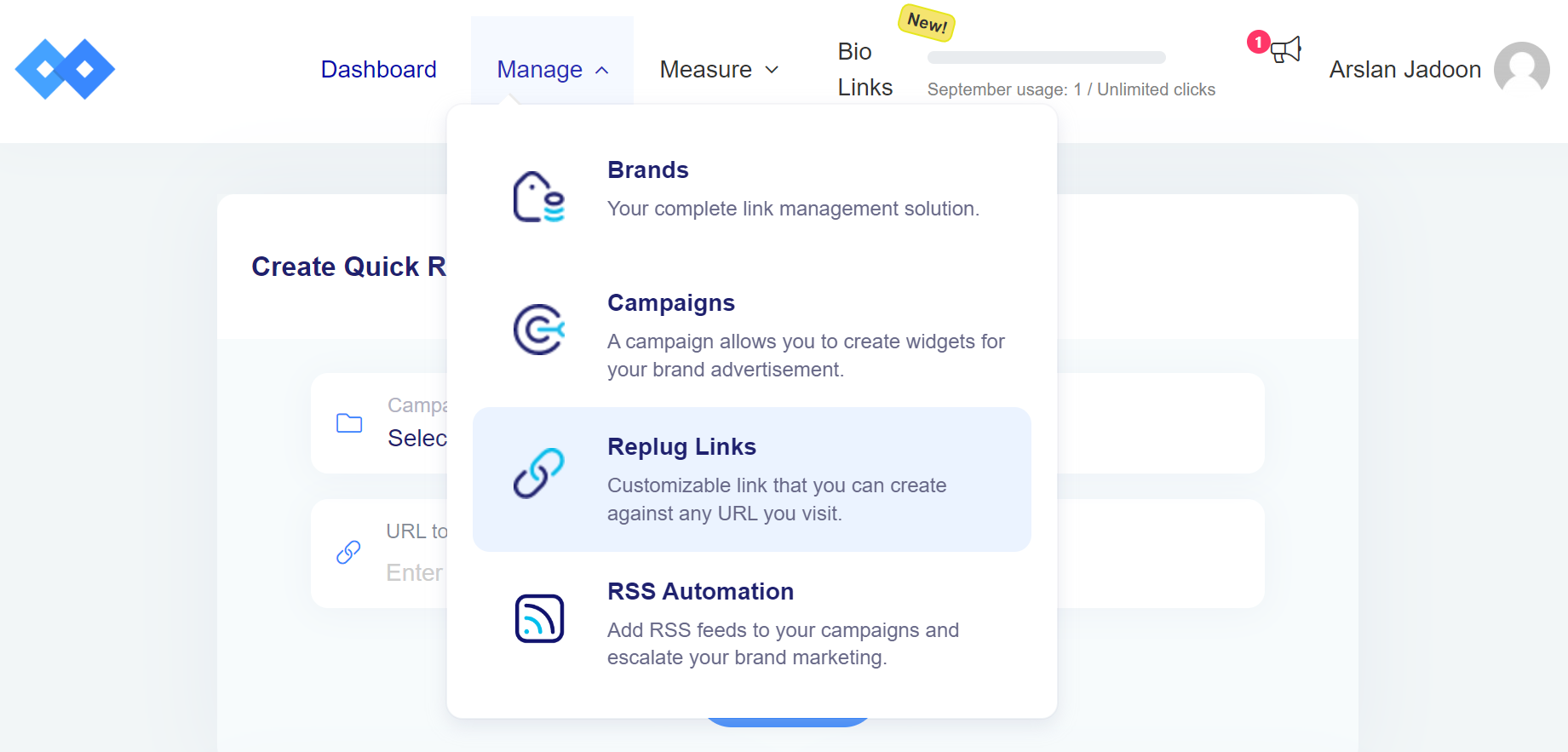
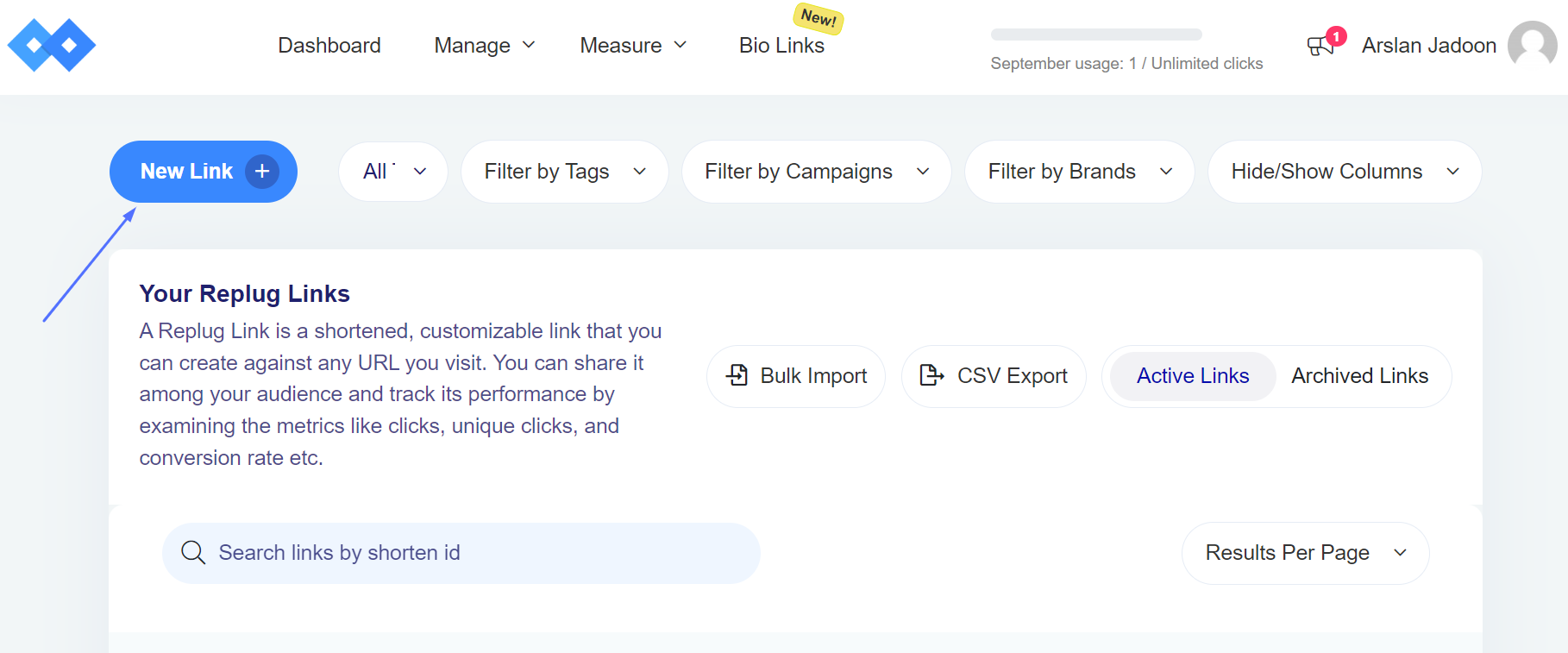
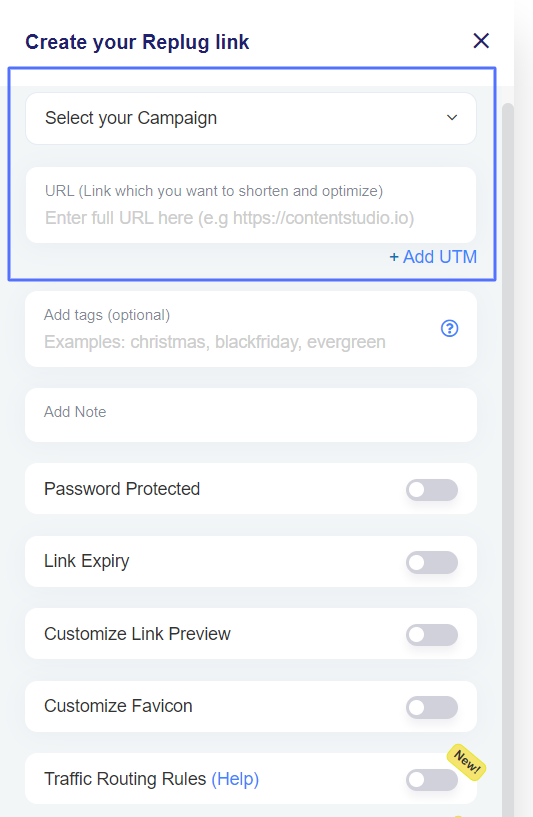
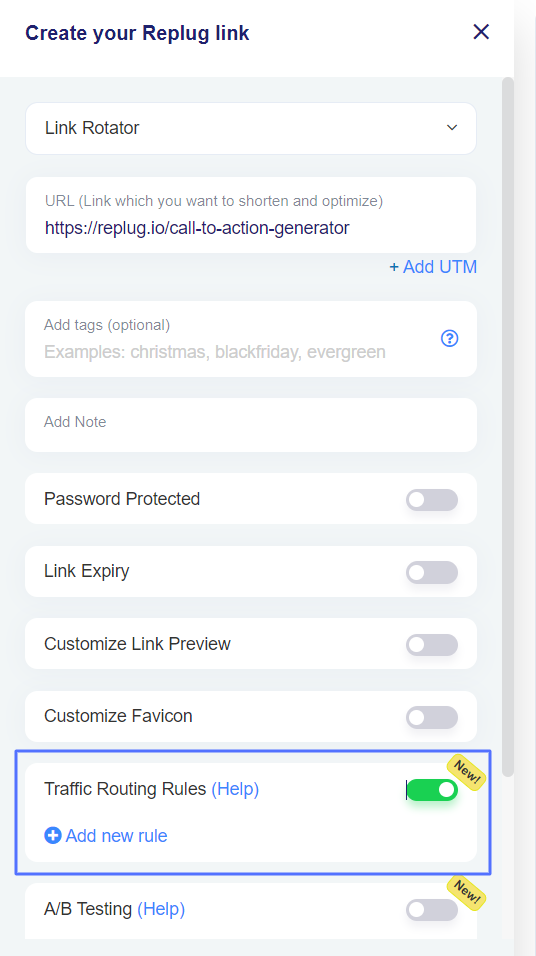
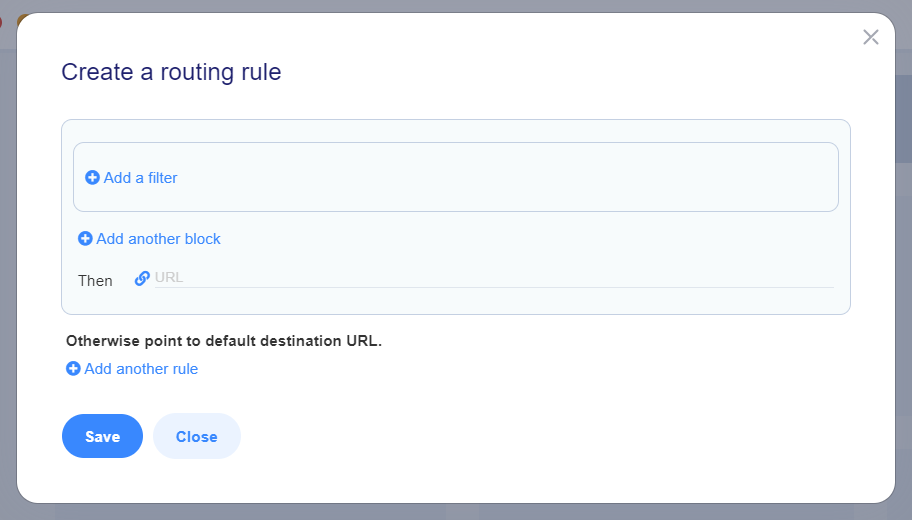
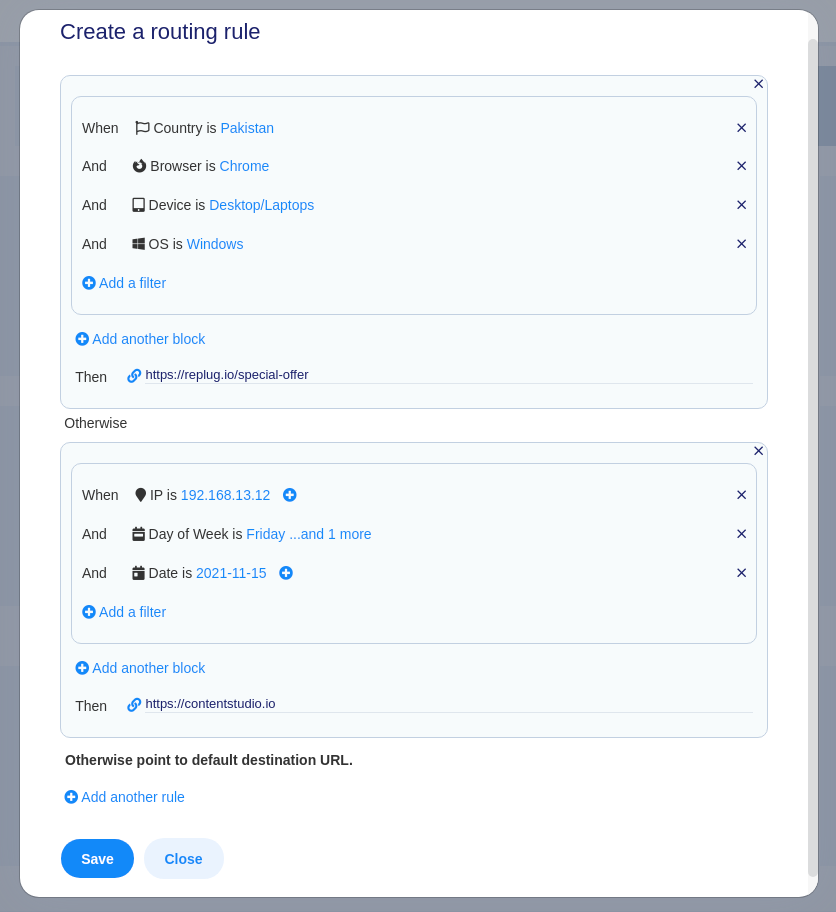

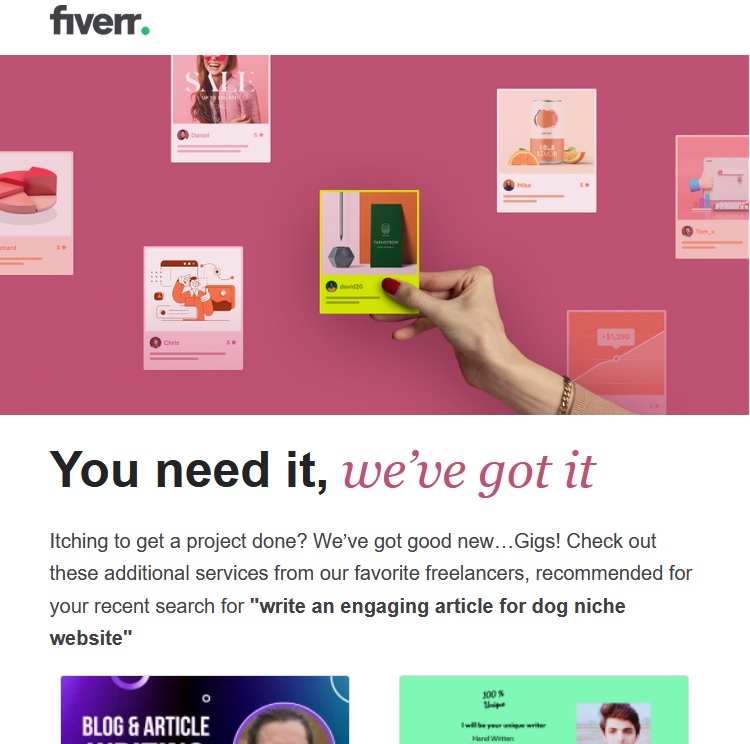
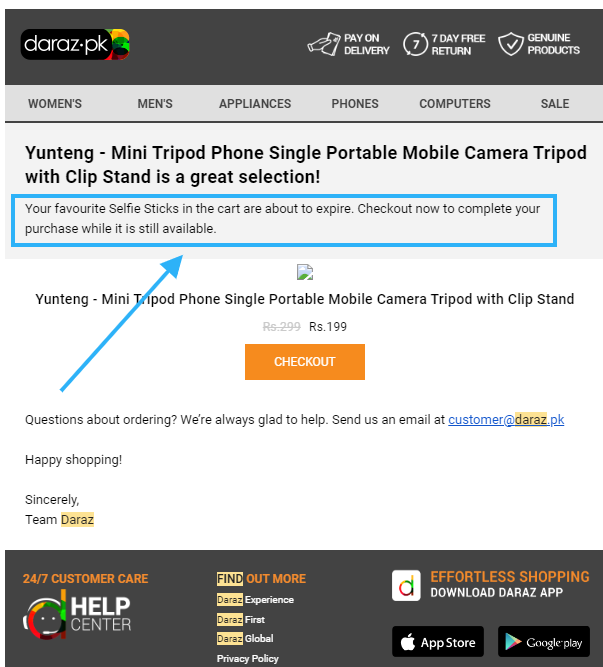
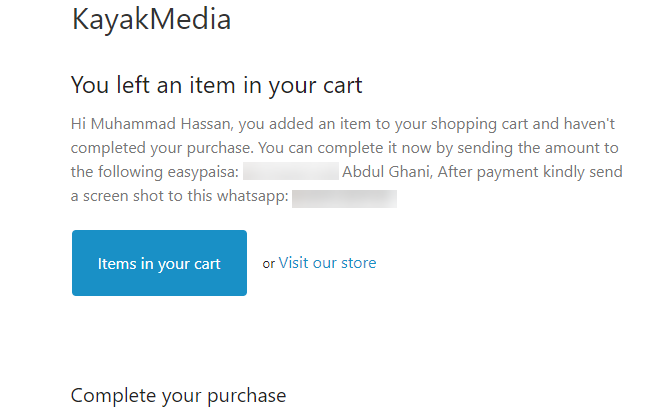
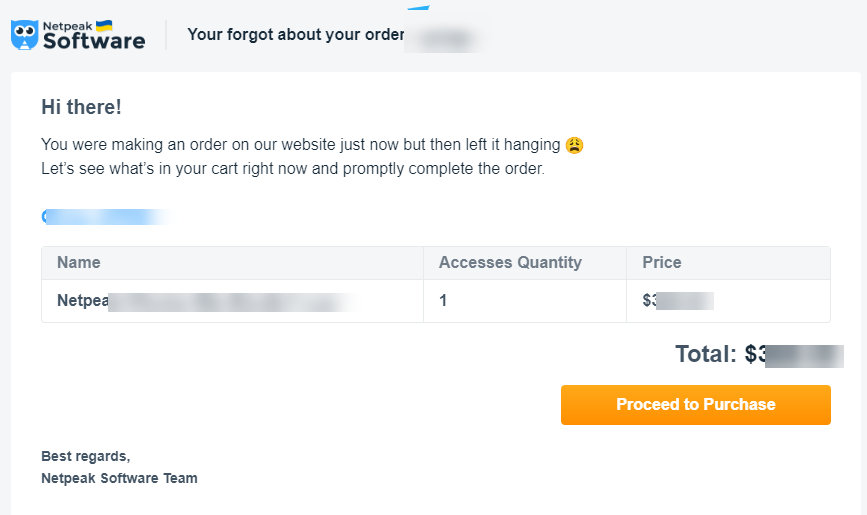
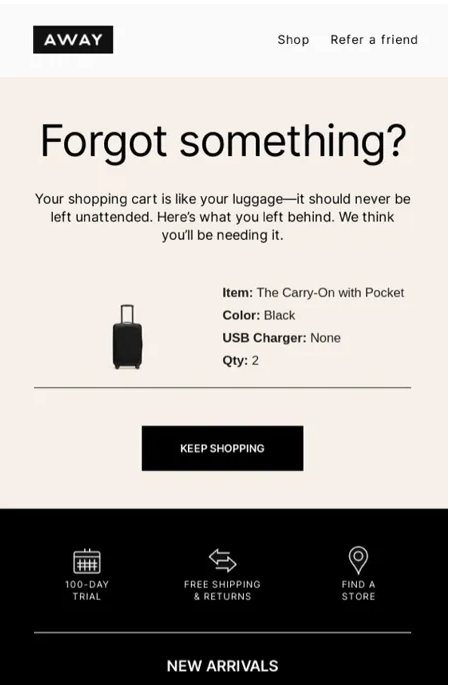
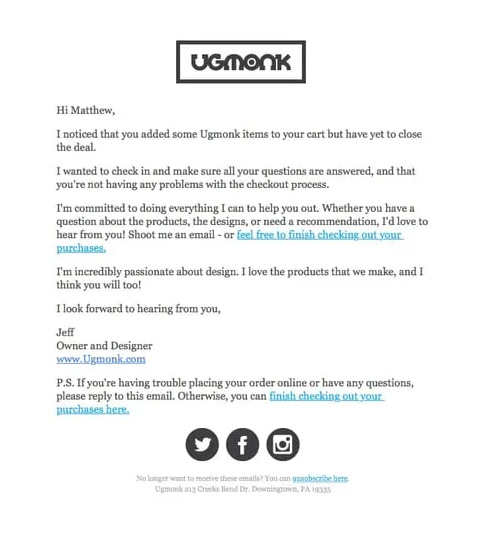
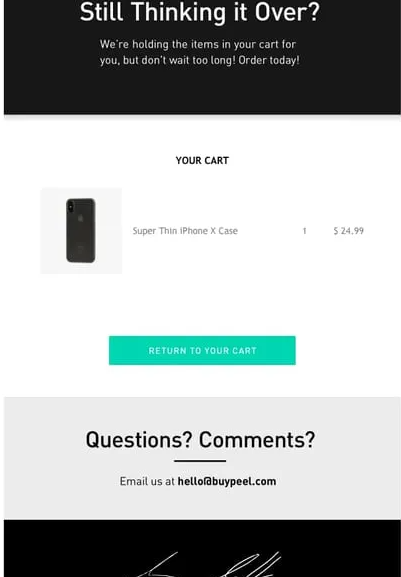
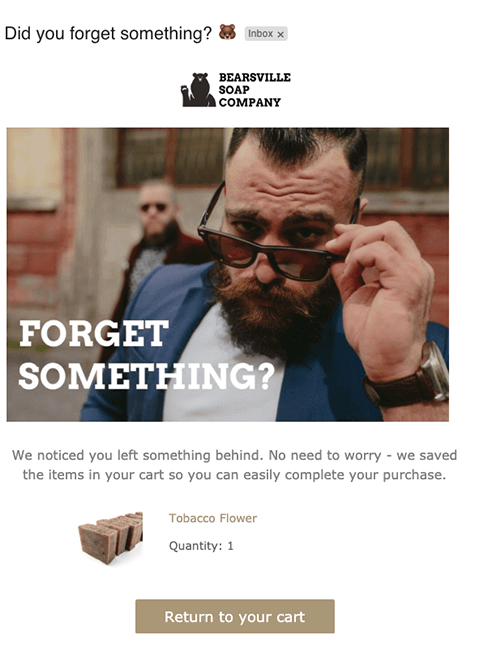
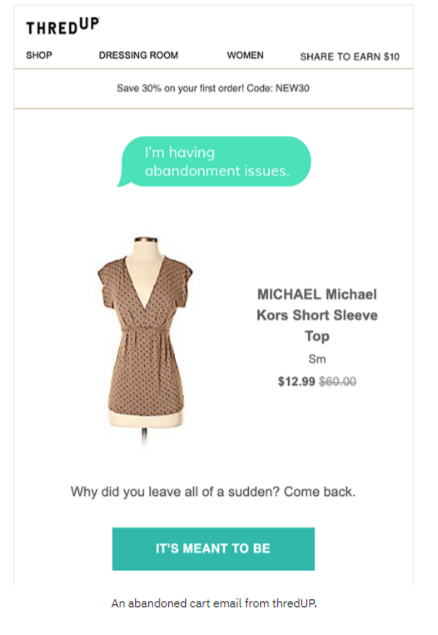
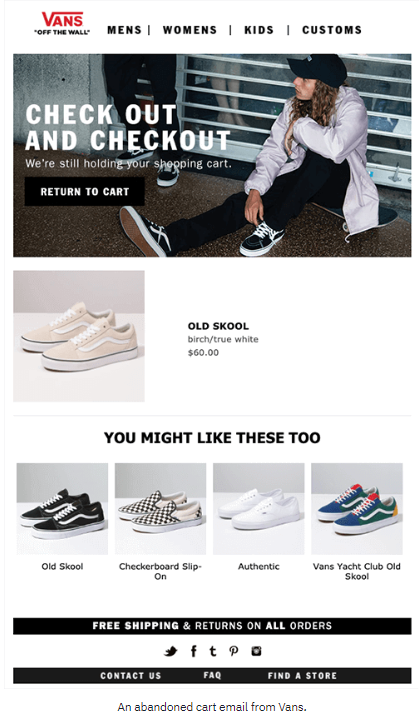
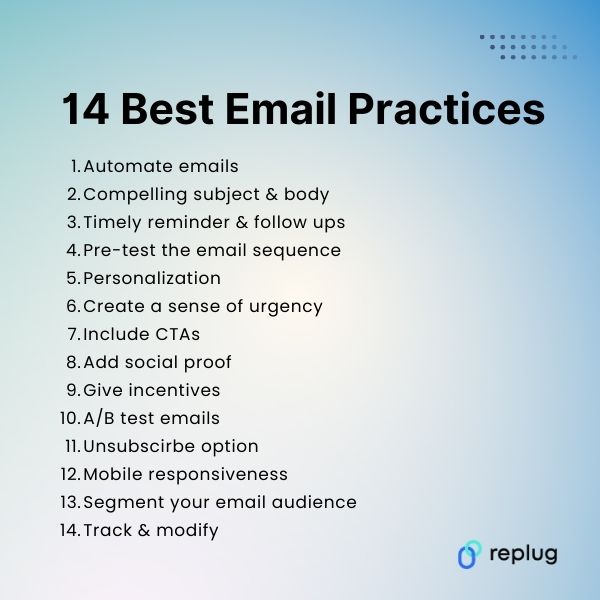
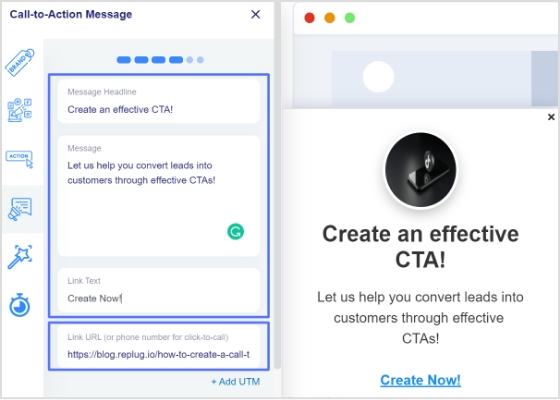
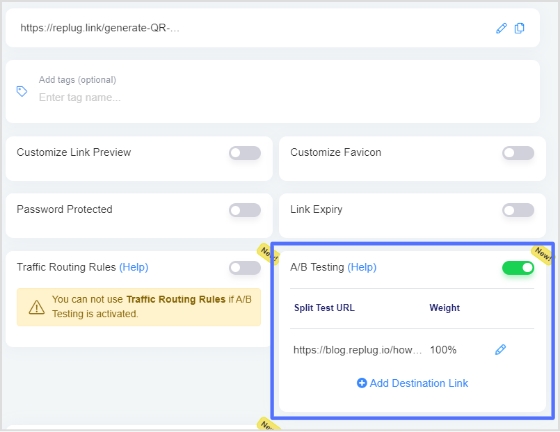
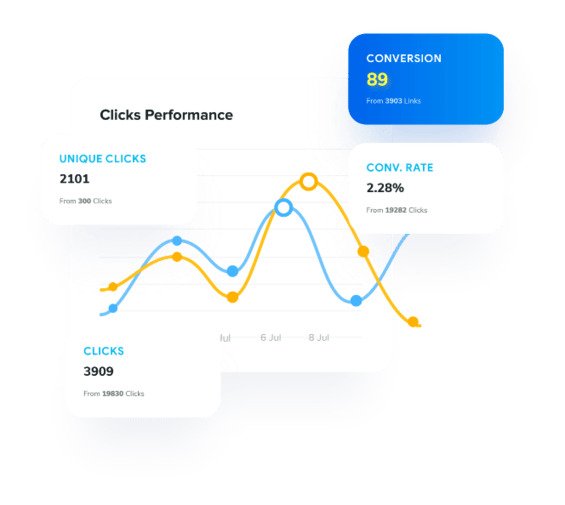

 Furthermore, brands can potentially attract conversions from customers not typically part of their target audience.
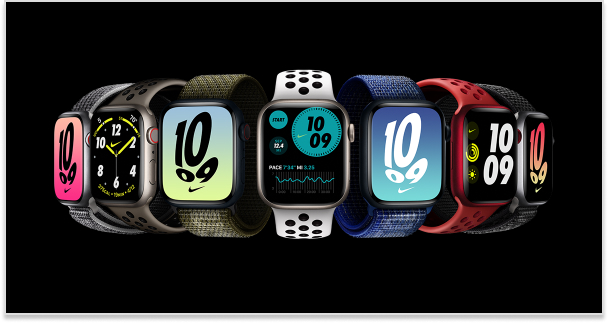
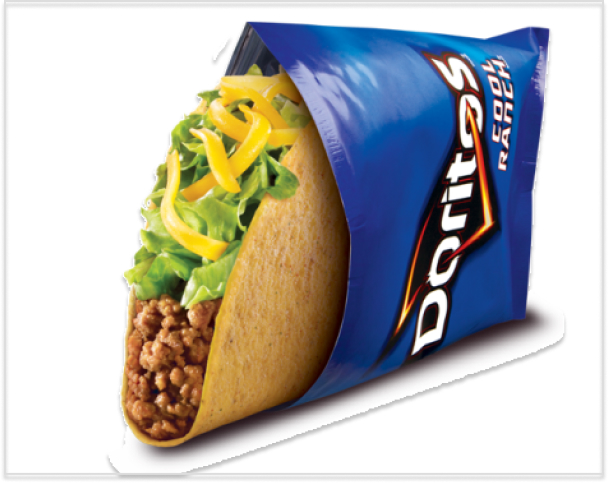
 Louis Vuitton has developed an exclusive assortment of luggage specifically designed for the plug-in hybrid BMW i8 by BMW. The objective of this collaboration was to reach a specific, high-end audience by capitalizing on their shared values and admiration for talent and innovation.