Blog

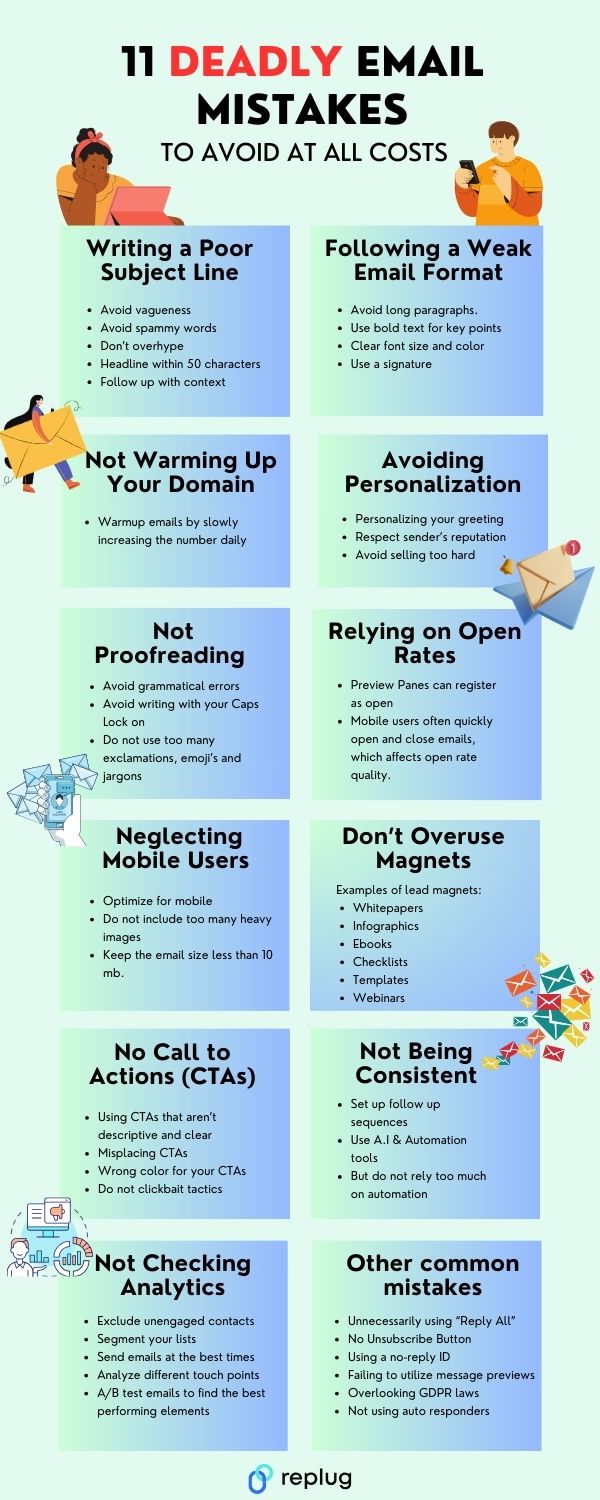
  • Deadly Email Marketing Mistakes to Avoid

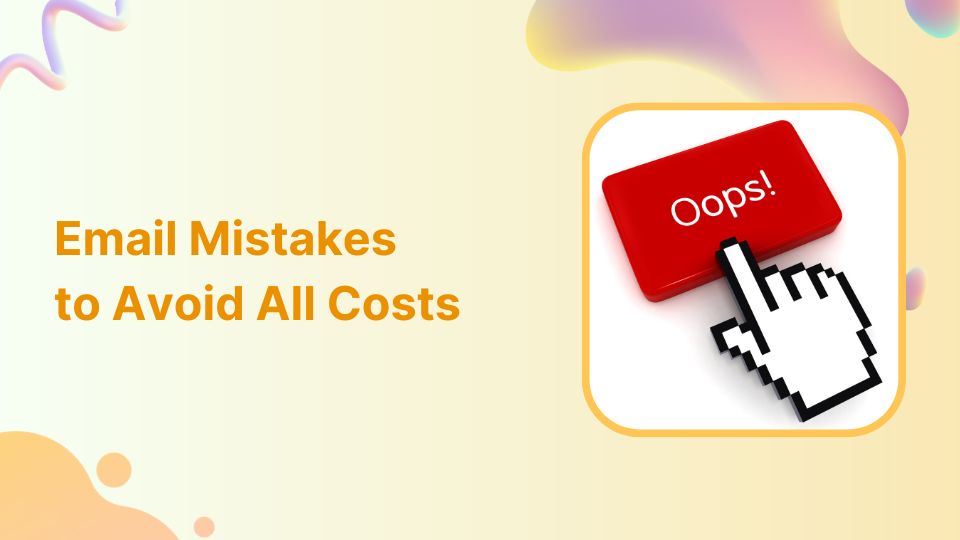
    Deadly Email Marketing Mistakes to Avoid

    In a digital landscape where email usage continues to soar, with 4 billion users currently, and projections indicating a climb to 4.6 billion users by 2026 (source: Statista), the significance of effective email marketing cannot be overstated.

    Sometimes, even the most well-intentioned email marketing can hit a few bumps. For best results, many marketers use a centralized link management platform to organize, brand, and track all their campaign URLs, ensuring every link in your email strategy stays professional and measurable.

    However, let’s take a closer look into the common email mistakes to avoid in email marketing.

    Email mistakes

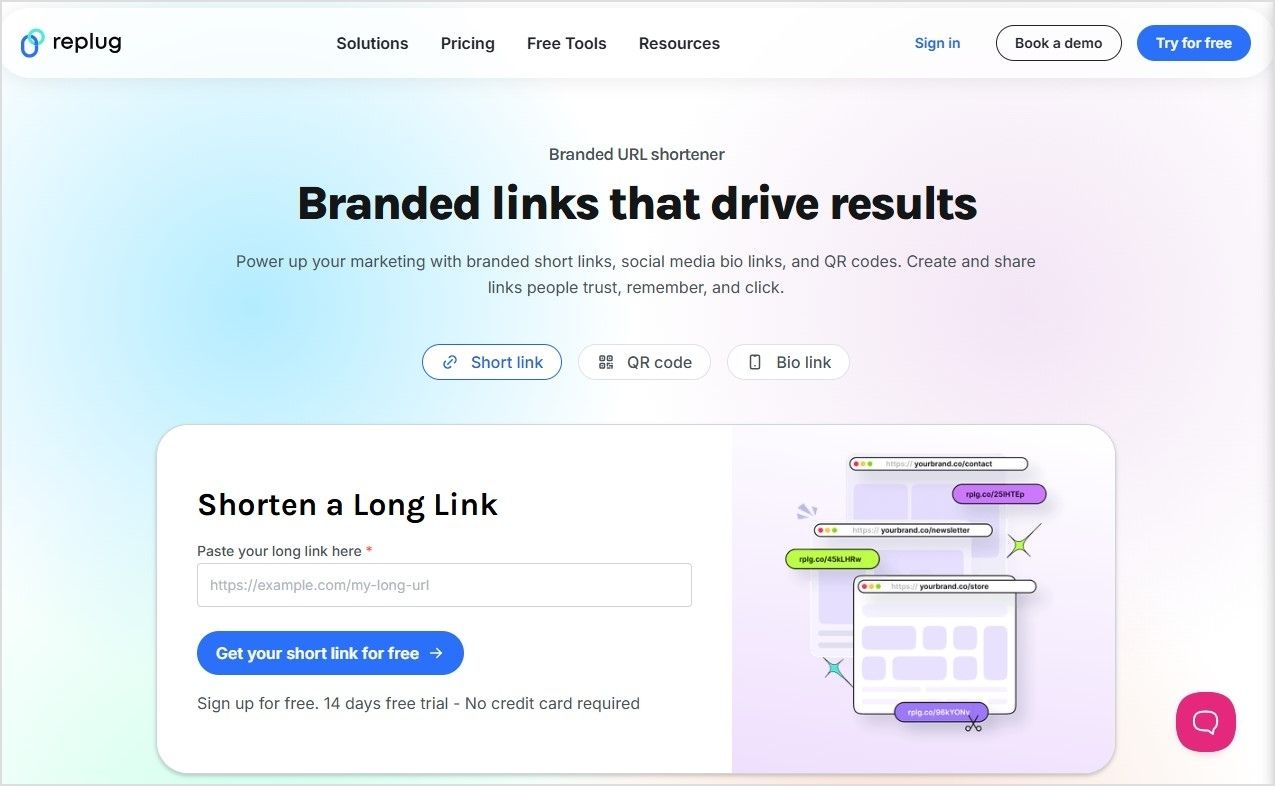
    To avoid these pitfalls and keep your emails clean and trustworthy, you can use Replug to generate a branded short URL, making every link you send in emails neat, easy to click, and easy to track.

    Why do people make email mistakes?

    A study by Tessian has reported that 34% people send emails to the wrong person due to the pressure of sending emails quickly. While the remaining identified, fatigue, distractions and overload to be reasons for such email mistakes.

    Further, the findings of a survey by Grammarly on workplace emails., reported 93% of participants admitted to making errors in their emails.

    Further findings are as below

    • 64 percent of respondents acknowledged making embarrassing typos or grammatical errors.
    • 63 percent reported sending incomplete emails.
    • 50 percent stated that the recipient misunderstood their intended message.

    Common email mistakes

    The most common errors while sending emails are as under.

    The address doesn’t exist:

    This error occurs when the provided email address is invalid or does not correspond to an active email account, possibly due to a typo, a non-existent domain, or an outdated email address.

    Solution: Double-check the email address for accuracy. If possible, verify the recipient’s contact information and ensure that there are no typos. If uncertain, reach out to the recipient through alternative means to confirm the correct email address.

    The email could not be delivered:

    This error indicates a general failure in delivering the email, often due to network problems, server unavailability, or a temporary disruption in email services.

    Solution: Wait for a moment and try resending the email. If the issue persists, consider reaching out to your email service provider for assistance. Check your internet connection and ensure that there are no ongoing service interruptions.

    The recipient’s mailbox is full:

    When the recipient’s email inbox reaches its maximum storage capacity, new emails cannot be delivered.

    Solution: Contact the recipient through an alternative method to inform them about the issue. They will need to clear space in their mailbox to receive new emails. Alternatively, suggest using a file-sharing service for larger attachments.

    The email has been rejected by the server, flagged as spam:

    Email servers often employ spam filters to identify and block unsolicited or potentially harmful emails. If your email is flagged as spam, it might be rejected by the recipient’s server.

    Solution: Review your email content to ensure it doesn’t trigger spam filters. Avoid using excessive capitalization or including suspicious links. If possible, ask the recipient to check their spam folder for your email and mark it as “Not Spam.”

    The domain doesn’t exist:

    This error occurs when the specified domain in the email address is not a valid domain or is no longer active.

    Solution: Verify the domain spelling in the email address. If there’s a mistake, correct it. If the domain no longer exists, try reaching out to the intended recipient through alternative means to obtain their updated email address.

    You may also like:

  • 15 proven Facebook SEO techniques to try in 2026

    15 proven Facebook SEO techniques to try in 2026

    Can you even do SEO on Facebook?

    Facebook, like any other website, can also benefit from SEO practices. This can be done by covering these key elements of Facebook SEO.

    • Optimizing your page’s profile information, such as the page name, description, and keywords.
    • Posting high-quality and relevant content optimized for social platforms and search engines.
    • Building a strong network of followers and engaging with them regularly.
    • Encouraging people to share and interact with your content.
    • Making sure your page is publicly accessible to search engines.
    • Utilize social management and optimization tools to improve branding.

    What is Facebook SEO?

    Facebook SEO is the process of optimizing a Facebook page to increase its visibility in search results on the Facebook platform and other search engines like Google. This can be done by improving the page’s profile information, posts, photos, and followers. By optimizing your Facebook page, you can make it more likely that people will find your page when they search for related topics or keywords on Facebook or other search engines.

    15 techniques for Facebook SEO

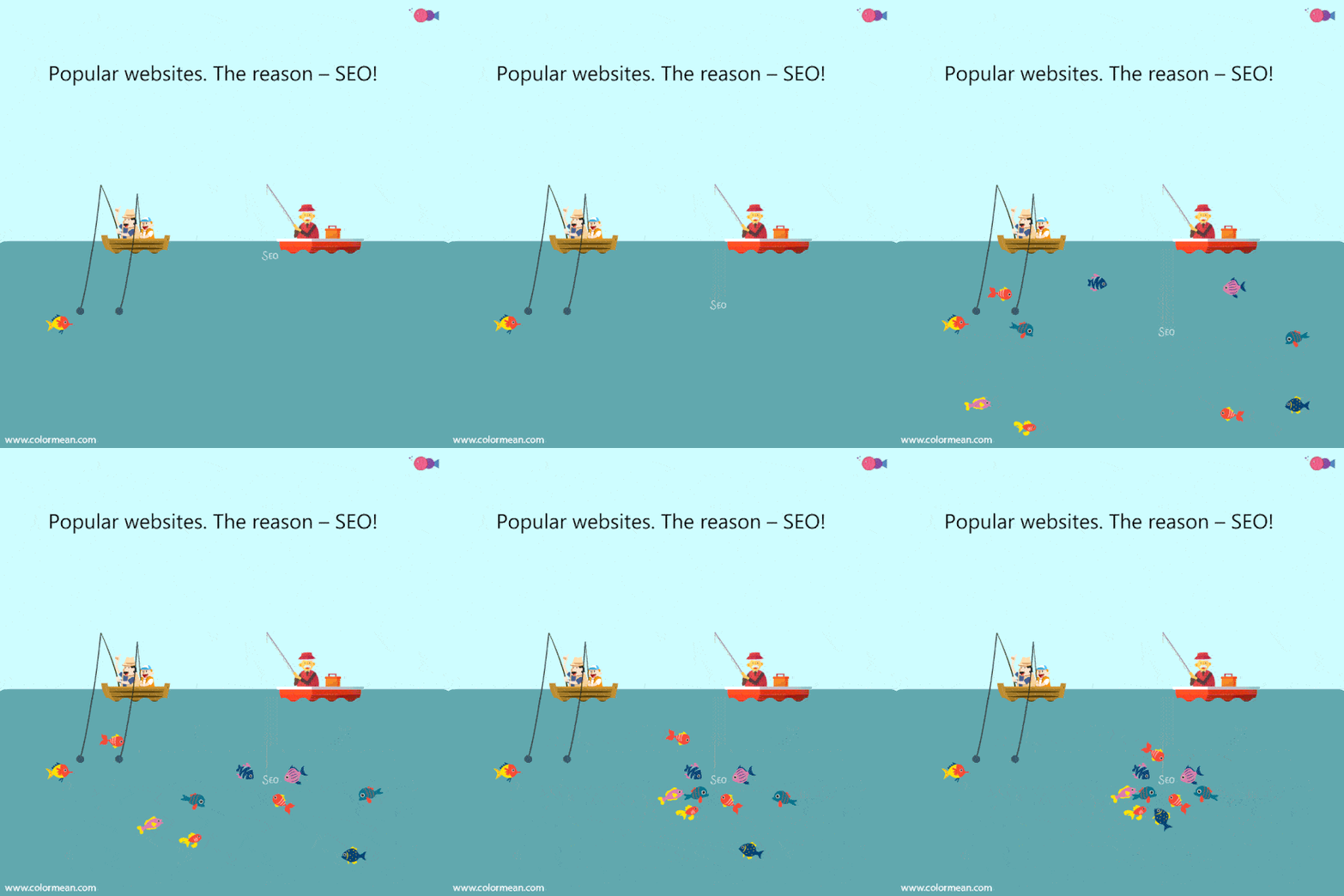
    SEO GiF

    Here are several ways to optimize your Facebook information for better visibility and accessibility in search results:

    1. Know your audience

    Understand who your target audience is and what kind of content they are interested in. Tailor your content to their interests and needs.

    2. Optimize your page’s profile

    Make sure that your page’s profile is fully filled out and includes relevant information about your business, such as your website URL and contact information.

    • Use a descriptive and keyword-rich page name: Your page name should accurately reflect the products or services you offer, and include keywords that people might use when searching for your business.
    • Write a compelling page description: Your page’s description should be a brief summary of what your business is all about, and should also include keywords.
    • Set your page’s privacy settings to “Public”: Go to your page’s settings and make sure that the “Who can see your future posts?” option is set to “Public.” This will allow search engines to crawl and index your page’s content.
    • Add contact information: Adding contact information like your business address, phone number and email address can also help people find your business more easily.
    • Use categories: Assign your page to one or more categories that best describe your business.

    3. Claim unofficial pages

    When advertising on Facebook, it’s important to claim and manage any unofficial pages that may be created by the platform or users. These pages may contain incorrect information and can negatively impact your brand’s reputation. Proper management of your main Facebook page and all other associated pages is essential for building a strong presence on the platform.

    It’s important to note that claiming an unofficial page does not guarantee that it will be removed, but it will give you control over the page’s content and messaging. Also, it’s important to keep the page updated with relevant and accurate information in order to provide value to the audience.

    4. Add keywords in your page’s “About & Bio”

    Use keywords that are relevant to your business in the “About & Bio” sections of your page as it will help search engines understand the context of your pages.

    5. Use friendly URLs for your Facebook Page:

    Use branded short links for your LinkedIn Posts

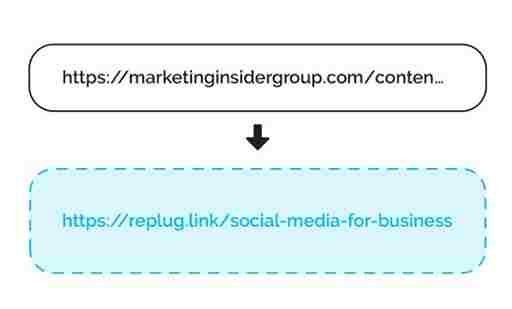
    Build brand consistency by creating SEO-friendly URL’s. These are custom links that can be created for a Facebook page to make it more memorable and easier for people to find. It can improve SEO by making it easier for users to remember and share the link. Utilize personal branding tools to increasing overall brand awareness.

    6. Add your website link to the page


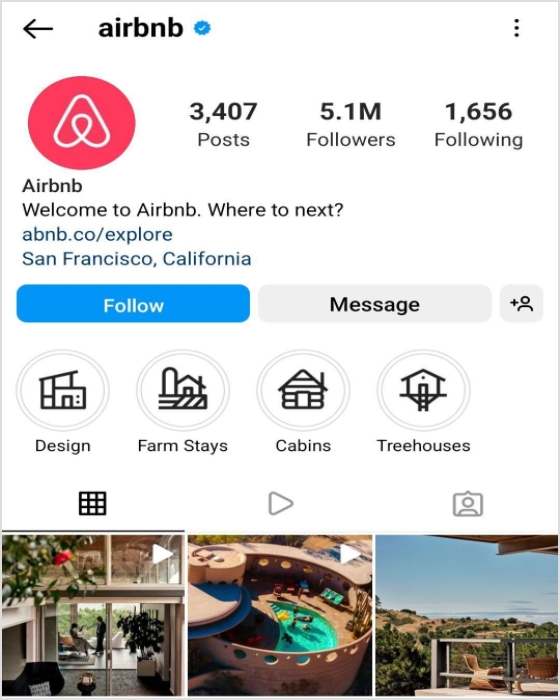
    Air-bnb-bio-link

    Adding your website link to your page can help search engines understand that your website and your Facebook page are related.

    Check also: How to Create a Link to a Website?

    7. Create & share valuable content

    Posting high-quality and relevant content that provides value to your followers. This will encourage them to engage with your content and share it with others.

    • Use interactive content: Use interactive content such as polls, quizzes, and surveys to increase engagement and encourage people to share your post.
    • Post regularly: Posting regularly will help you to keep your page active and relevant and will increase the chances of your post appearing in the news feed of your followers.
    • Share someone else’s post: Sharing post of others will create a community feel and will help you to increase your visibility in search results.
    • Share your page: Sharing your Facebook page with your friends, family, and colleagues and ask them to share it with their network can also help drive more followers.

    8. Optimize your posts

    Using keywords in your post’s title, caption, and text that are relevant to your business and what people might use when searching for your business. 

    • Use hashtags: Use relevant hashtags to make your post more discoverable and increase its visibility in search results. It will help search engines understand the context of your post and make it more discoverable.

    9. Post on the best time

    Best-time-to-Post-On-Facebook-

    By posting during peak activity times, your posts are more likely to be seen by a larger audience, which can increase engagement and participation. Use analytics tools to track the activity on your page and identify the best times to post.

    According to ContentStudio’s study, Thursday is the best day to get most engagement on Facebook. Whereas, Tuesday, Wednesday and Fridays are also good days to post.

    10. Run Facebook Ads

    Facebook advertising - Replug

    Use Facebook ads to reach a larger audience and increase your page’s visibility.

    • Use Facebook targeting: Facebook’s targeting options allows users to reach people who are more likely to be interested in your business.
    • Run retargeting Ads: Retargeting is a form of online advertising that allows you to show ads to users who have previously interacted with your website or content.

    Related: How To Utilize Replug for Facebook Retargeting Ads?

    11. Engage & collaborate with others 

    • Collaborate with other pages: Collaborate with other pages in your industry to reach a larger audience and increase your page’s visibility.
    • Explore Meta partnership ads: Meta’s partnership ads scale creator content across Facebook, from feeds to reels.
    • Engage with your followers: Respond to comments and messages, and actively engage with your followers. This will encourage them to continue following your page.
    • Host contests and giveaways: Hosting contests and giveaways can help you to increase your followers and engagement on your page.
    • Use influencer marketing: Reach out to social media influencers in your niche and ask them to share your page with their followers.

    Related: Successful influencer marketing campaigns: 7 best examples

    12. Get backlinks

    Get external links pointing to your Facebook page from other websites.

    13. Create compelling CTAs

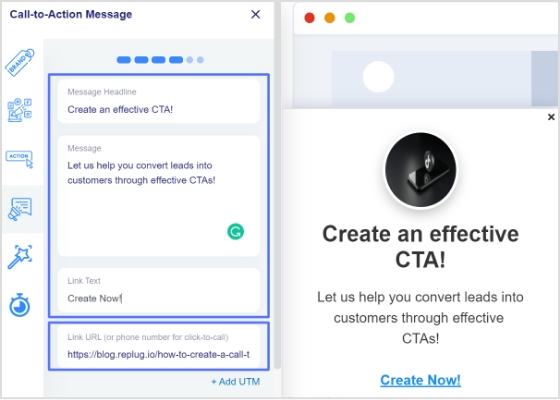
    CTA message and link

    Call-to-Action (CTA) ads can be an effective way to guide potential customers through the sales process and encourage them to take a specific action. To create a successful CTA ad, make sure the language is clear and concise, and addresses the needs and pain points of your target audience. Use a sense of urgency but avoid making unrealistic or aggressive claims. This can help increase your reach and audience by promoting your solution to potential customers.

    Related: Call To Action For Social Media : 15 Best Examples

    14. Use Facebook messenger chatbots

    AI-powered Facebook Messenger Chatbots can be a valuable tool for businesses looking to improve their customer service, lead generation, and marketing efforts.

    Customer service: Chatbots can provide 24/7 customer service by answering frequently asked questions, troubleshooting issues, and directing customers to the appropriate resources or human agents.

    Lead generation: Chatbots can be programmed to ask qualifying questions and collect contact information from potential leads, which can then be passed on to the sales team.

    Marketing: Chatbots can be used to deliver personalized and targeted promotions, content, and offers to customers based on their preferences and behavior.

    15. Use Facebook management & optimization tools

    URL link management tool

    It’s also important to note that using a vanity URL can also be a great way to make a link more memorable and shareable.

    How to create vanity links?

    URL Shorteners

    URL Shorteners!

    URL shorteners can be used to improve SEO on Facebook by creating shorter, more manageable links that are more likely to be shared. These shortened disguised links improve the visibility of the link on Facebook and are more likely to be clicked on.

    Replug

    Use Replug’s custom URL maker free online to create a branded short link for the webpage you want to share on Facebook.

    With Replug you can not only shorten links but it also assists  in several other ways explained below. It is an all-in-one link management platform for businesses and agencies.

    Deep linking improves engagement

    deep-links

    Deep links can improve brand engagement by allowing users to directly access specific pages or content within an app or website, rather than just the homepage. This can help to increase the chances of users finding the content they are looking for and engaging with it, which can lead to increased shares, likes, and comments.

    Google and Facebook recommend the use of deep linking for mobile apps for a better user experience, if the app is installed it will open the content within the app, otherwise it will direct to the website.

    In summary, using deep links can improve engagement and Facebook SEO by making it easier for users to find and engage with specific content, and by making advertisements more effective.

    Increase online visibility using bio links

    bio-link-preview

    Having a bio link on a Facebook page gives you a great opportunity to connect online users to your other accounts. A bio link allows users to access all important information related to you or your brand through a custom designed web page. Most platforms have a restricted space, i.e. mostly only allow to place a single link in profile. But with bio links you can add multiple links and add other key information as well.

    Create clear and compelling call-to-actions

    Using clear and compelling call-to-action phrases such as “Learn more” or “Sign up now” encourage users to click on the link. It becomes easier for users to find and engage with specific content, and makes advertisements more effective. Here’s an example.

    Track clicks and conversions

    URL shorteners come with built-in analytics that allow you to track the number of clicks on the link, which can help you understand how well your content is performing on the social platform.

    Retargeting

    dynamic-facebook-retargeting

    By targeting users with personalized ads that have already visited your website, you can increase the chances of them returning to your website or engaging with your content.
    Retargeting can be done by using Meta Pixel, a small piece of code that can be placed on your website, it allows you to track the actions of users who visit your site and then use that information to create targeted ads.

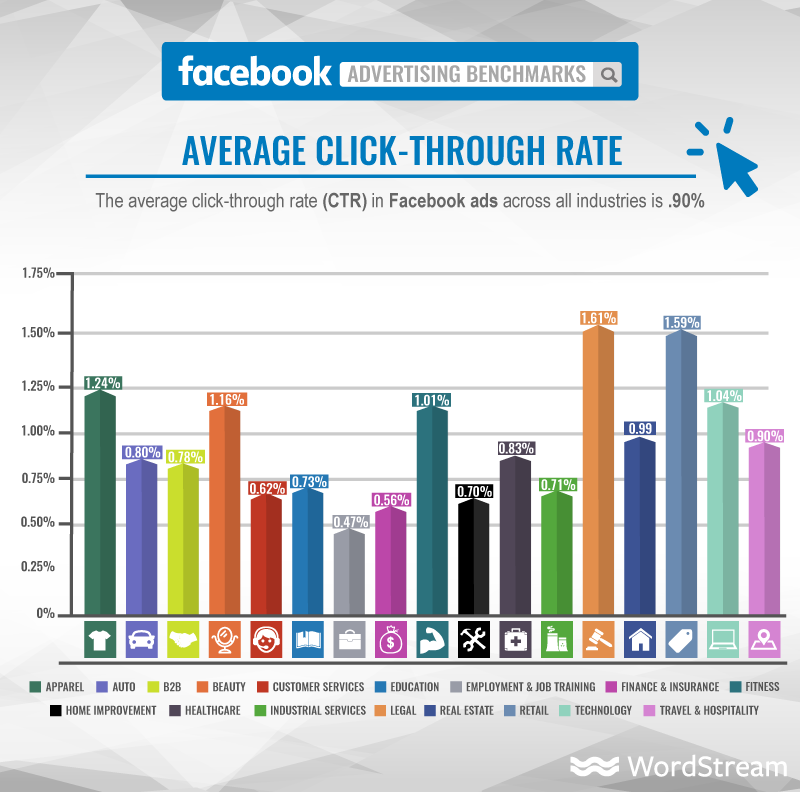
    Additionally, retargeting can also improve the click-through rate (CTR) of your ads, which is a key metric used by Facebook’s algorithm to determine the relevance and quality of your content. This can lead to improved visibility and engagement of your content and advertisements on the platform, which ultimately can help to improve your Facebook SEO.

    Facebook management tool 

    ContentStudio-Scheduling

    Social media management tools can improve Facebook SEO by helping businesses to:

    Create and schedule optimized posts: 

    Social media management tools can help businesses create and schedule posts that are optimized for Facebook’s algorithm, using keywords and other best practices for SEO.

    Track and analyze performance

    Social media management tools can provide businesses with detailed analytics on their Facebook page’s performance, including metrics such as engagement, reach, and click-through rate. This data can be used to inform and improve SEO efforts.

    Monitor and respond to comments and messages

    Social media management tools can help businesses keep track of comments and messages on their Facebook page, and respond to them in a timely and professional manner, which can help improve engagement and build trust with customers.

    Identify and engage with influencers

    Social media management tools can help businesses identify and engage with influencers in their industry, which can help to increase brand awareness and attract more backlinks to their website.

    Automate repetitive tasks: 

    Social media management tools can help businesses automate repetitive tasks such as scheduling posts, sending direct messages, and tracking analytics, which can save time and improve efficiency.

    Monitor competitors

    Social media management tools can help businesses keep an eye on competitors and industry trends, which can help inform their own strategy and stay ahead of the curve.

    It’s worth noting that these tools are just one aspect of a comprehensive SEO strategy, but they can be very helpful in improving a Facebook page’s visibility, engagement and performance, which can help in improving the overall SEO of the website.

    FAQs for Facebook SEO techniques

    Do Facebook ads improve SEO?

    Facebook ads can help improve SEO in a few ways:

    – Drive more traffic to the webpage
    – Increase brand awareness,
    – Improve website’s visibility and searchability
    – Collect data on your target audience

    Do Facebook posts count as backlinks?

    While Facebook posts themselves are indirectly counted as backlinks. Social media platforms, like Twitter, Instagram, and LinkedIn, and it could be a way to drive more organic traffic to your website.

    What are the 5 stages of SEO?

    There are four stages of SEO: keyword research, title optimization, url optimization, content optimization and backlink building.

    What are the 4 types of SEO?

    Technical SEO: This type of SEO focuses on the technical aspects of a website, such as its architecture, code, and site structure, to make it more easily crawlable and indexable by search engines.
    On-Page SEO: This type of SEO focuses on optimizing individual web pages in order to rank higher and earn more relevant traffic in search engine results. This includes optimizing the content and meta data of the page.
    Off-Page SEO: This type of SEO focuses on increasing the authority and trustworthiness of a website, typically through link-building efforts and contextual backlinks service.
    Content SEO: This type of SEO focuses on creating and optimizing content in order to rank higher in search engine results. This includes researching keywords, creating high-quality content, and optimizing the content for search engines.

    Note that these types of SEO often overlap and work together in a comprehensive SEO strategy.

    What is the golden rule of SEO?

    The Golden Rule of SEO is to create valuable and relevant content for users.

  • Elevate Your Bio: Smart Links for Music Artists

    Elevate Your Bio: Smart Links for Music Artists

    Gone are the days of mundane Spotify links. Introducing smart links for music – your all-in-one ticket to global music domination.

    Imagine sharing your songs, albums, and playlists seamlessly across platforms with just one link! It’s not just convenient for your fans; it’s a vibe! But here’s the magic – it’s not just about sharing; it’s about understanding.

    Dive into the analytics playground! Discover where your fans are grooving, and what beats they vibe with, and turn those insights into your superpower. It’s not just music; it’s a connection that spans continents. Don’t just share your music; make it an experience! 

    Make smart links part of your promotional strategy; it’s what will convert listeners into lifelong fans. Let’s make your music journey unforgettable!

    What is a smart music link?

    A smart link for music is a single, easy-to-share link that directs listeners to your music on different streaming platforms like Spotify, Apple Music, YouTube, etc. It’s like a virtual business card for musicians. Instead of sharing multiple links, you share one smart link, and it automatically takes your fans to the right platform based on their location and device. 

    This becomes even more powerful when promoting tracks created or enhanced with tools like minimax music, helping artists distribute and market their AI-powered productions more efficiently.

    Services like Replug, Linkfire, Linktree, and others help musicians create these links, making them convenient for fans and providing analytics and marketing tools for artists. A comprehensive music industry directory can further enhance these resources by connecting musicians with additional promotional opportunities and industry contacts. It’s a neat way to promote and share your music hassle-free!

    Boost ROI with branded URLs - Replug dashboard showing performance metrics and branded URL creation
    Boost your conversion rates with irresistable CTAs with

    for your marketing campaigns.

    Check

    Higher clicks

    Check

    More leads

    Check

    Better ROI

    Generate free CTAs

    How to create a smart music link in Replug?

    Musicians can elevate their online presence by effortlessly creating smart music links using Replug’s innovative bio links feature. This bio link acts as a centralized hub, providing your audience with a seamless experience to explore and enjoy your music across platforms like Spotify, Apple Music, and YouTube.

    Here’s how to create a smart link for music using Replug:

    Step 1: Create a Replug account and log in to your dashboard.

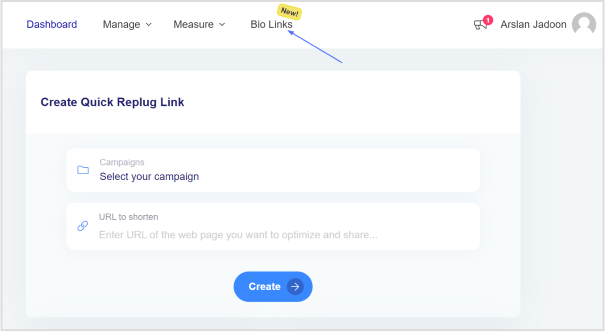
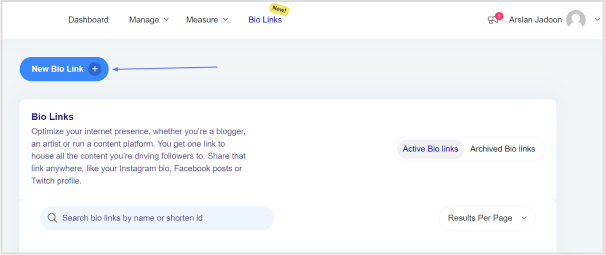
    Step 2: Once logged into your Replug account, head to the Replug dashboard and locate the “Bio Links” feature.

    smart-link-for-music

    Step 3: Initiate the bio link creation process by clicking on the “New Bio Link” button.

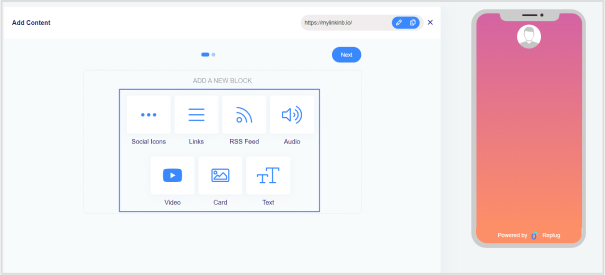
    Step 4: Opt for the content block that aligns with your needs from Replug’s diverse options, such as social icons, links, RSS feeds, audio, video, text, or cards. In the case of music links, you can choose from links, audio, and social icons.

    smart-link-for-music

    Step 5: Once all desired content blocks are added, proceed by clicking “Next.”

    Step 6: Further personalize your bio link page by specifying your brand name, uploading an avatar, and adding a title and subtitle that aptly represent your content or brand.

    smart-link-for-music

    Step 7: Review your bio link page during the creation process to ensure it aligns with your intentions.

    Step 8: In the final step, enhance your bio link’s appeal and effectiveness by considering additional features or marketing elements.

    smart-link-for-music

    Also read: How to Add Multiple Links to Instagram Bio Using Replug?

    Step 9: Save your bio link, and it will be ready to integrate into your bio.

    With the bio link generated by Replug, effortlessly share diverse links and content with your audience, making it an invaluable tool for content promotion and marketing on the platform.

    Boost ROI with branded URLs - Replug dashboard showing performance metrics and branded URL creation
    Boost your conversion rates with irresistable CTAs with

    for your marketing campaigns.

    Check

    Higher clicks

    Check

    More leads

    Check

    Better ROI

    Generate free CTAs

    Benefits of using Replug for smart music links:

    Using a smart music link with Replug offers numerous benefits for musicians and content creators:

    1. Streamlined promotion: Smart music links consolidate multiple streaming platform URLs into a single shareable link, simplifying the promotion process. This ensures that audiences can access your music effortlessly, regardless of their preferred platform.
    2. Enhanced accessibility: With a Replug smart music link, your audience can seamlessly switch between platforms like Spotify, Apple Music, and YouTube, catering to diverse listener preferences. This accessibility increases the likelihood of engagement and plays.
    3. Centralized hub: Replug’s bio link feature serves as a centralized hub for your music and other content. It provides a cohesive and organized space where your audience can discover and explore various links, creating a unified online presence.
    4. Customization options: Tailor your bio link page to reflect your brand identity. With features such as customizable colors, profile pictures, and content blocks, Replug allows you to create a visually appealing and personalized experience for your audience.
    5. Analytics insights: Gain valuable insights into audience behavior through Replug’s analytics tools. Understand where your audience is engaging, and which platforms are most popular, and use this data to refine your promotional strategies and content.
    6. Consistent branding: Maintain consistent branding across platforms by customizing your bio link page. This ensures that your audience recognizes and associates your brand identity with every interaction.

    FAQs

    What is a smart music link, and how does it benefit musicians?

    A smart music link is a consolidated link that directs users to music on multiple streaming platforms. It benefits musicians by simplifying promotion, providing analytics insights, and enhancing accessibility for fans across various platforms.

    How can I create a smart music link?

    To create a smart music link with Replug, login, access the “Bio Links” feature, click “New Bio-Link,” add content blocks like social icons or links, customize, and save. Replug’s user-friendly interface streamlines the process.

    Can I customize the appearance of my bio link page on Replug?

    Absolutely! Replug allows extensive customization, including profile pictures, brand names, avatars, color schemes, and short links, ensuring your bio link page aligns with your brand identity perfectly.

    What analytics insights does Replug provide for smart music links?

    Replug’s analytics offer valuable insights into audience behavior, including engagement locations and popular platforms. This data empowers users to refine their promotional strategies.

  • How to Create a CTA Campaign Using Replug?

    How to Create a CTA Campaign Using Replug?

    Supercharge your marketing with Replug’s Call to Action generator!

    Learn how to create irresistible CTAs to boost your brand’s visibility and multiply conversions.

    This guide will show you the easy steps to leverage Replug’s magnetic feature for maximum sales impact. Let’s turn your clicks into conversions and elevate your digital success with Replug!

    What is a CTA campaign in Replug?

    In Replug, a Call-to-Action (CTA) campaign serves as a powerful message to showcase your deals, offers, and sales to your audience. By using CTAs, you can effectively broadcast your message and prompt your audience to take specific actions that lead to sales.

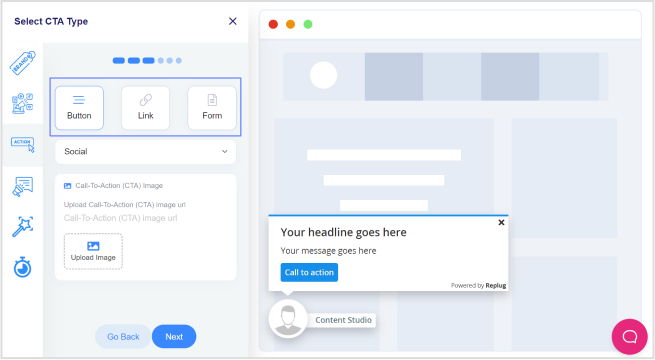
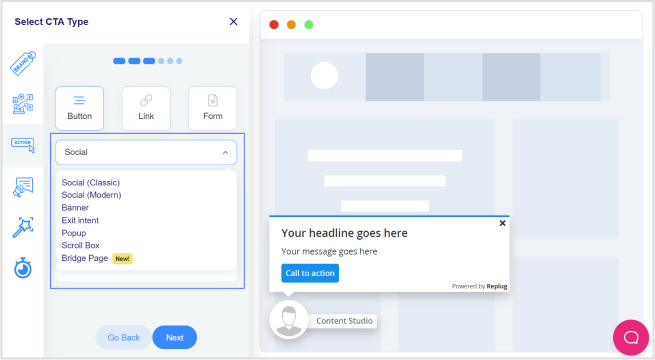
    When you opt for the call-to-action feature in Replug, you encounter three distinct options in the subsequent step:

    1. Button: 

    Ideal for redirecting visitors to your primary source, this option enables you to create a clickable button or link, providing a direct pathway for your audience to take the desired action.

    1. Link: 

    Similar to the button, this option allows you to redirect visitors, providing flexibility in creating clickable links to guide your audience towards the intended action.

    1. Form: 

    If your goal is lead collection, selecting the Form option is key. This choice enables you to integrate with various third-party Email Services for effective lead gathering.

    Replug seamlessly integrates with several third-party email services, including but not limited to:

    • Convertful
    • MailerLite
    • MailChimp
    • Sendlane
    • ActiveCampaign
    • Moosend
    • Aweber
    • SendPuls
    • and more.

    By understanding and leveraging these options, you can tailor your Call-to-Action campaigns in Replug to effectively engage your audience and drive the desired outcomes, whether it’s through clickable buttons, links, or lead collection forms.

    Boost ROI with branded URLs - Replug dashboard showing performance metrics and branded URL creation
    Boost your conversion rates with irresistable CTAs with

    for your marketing campaigns.

    Check

    Higher clicks

    Check

    More leads

    Check

    Better ROI

    Generate free CTAs

    How to create a CTA campaign in Replug?

    Follow the steps below to create a CTA campaign in Replug.

    Step 1: Sign in to Replug or create a free account.

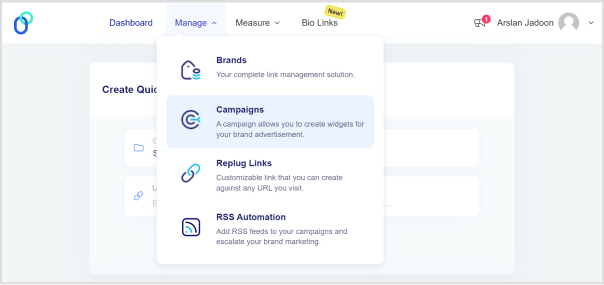
    Step 2: Navigate to the Manage section on the main dashboard and click on “Campaigns.”

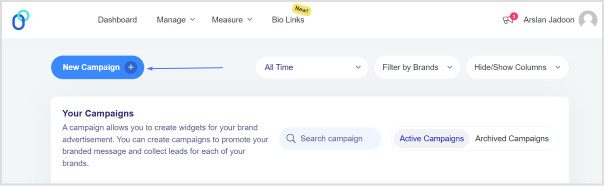
    Step 3: Click the “Create New Campaign” button in the campaign section.

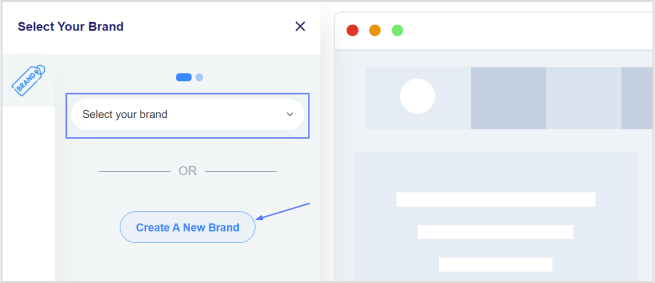
    Step 4: Select or create a brand for your new campaign and click the “Next” button.

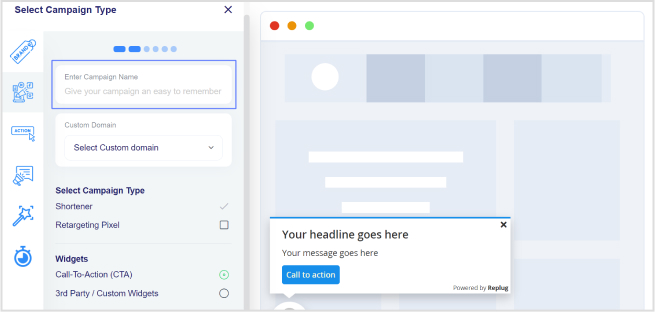
    Step 5: Choose a name for your call-to-action campaign on the campaign type page.

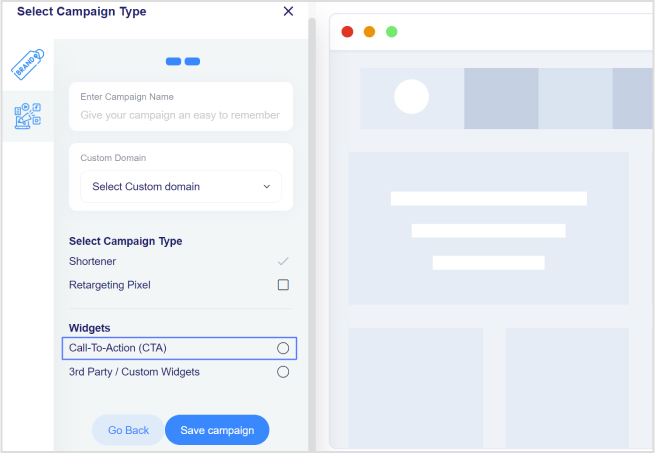
    Step 6: Select the Call-to-Action option and click “Next.”

    Step 7: Choose your CTA type (e.g., Link, Button, Form).

    Step 8: Select a theme for your CTA; for example, you can choose a pop-up theme.

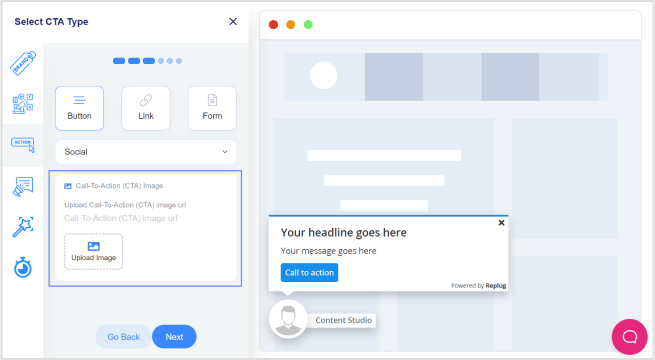
    Step 9: Enter your URL, upload an image for the CTA, and click “Next.”

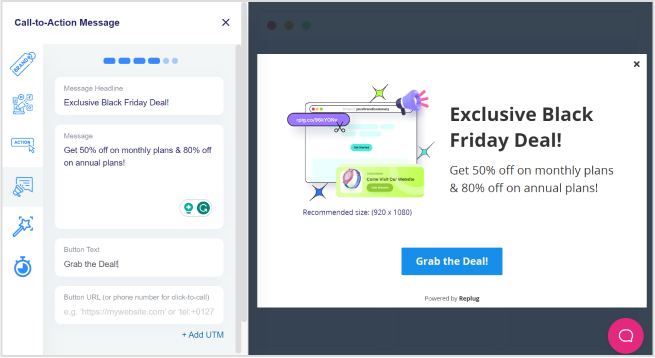
    Step 10: In the CTA message section, write your headline, message, and CTA button text. Enter the URL for the CTA.

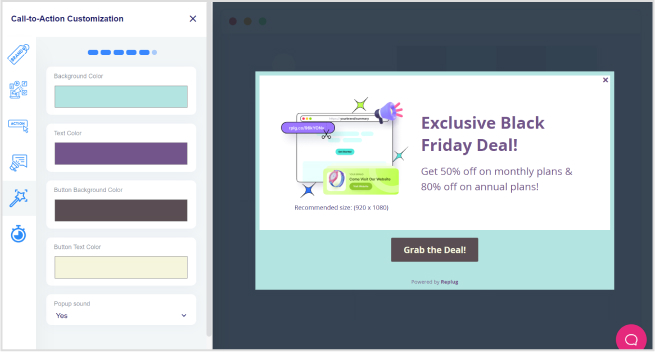
    Step 11: Move to the CTA customization section, where you can add colors for the background, text, CTA button background, and CTA button text. Click “Next.”

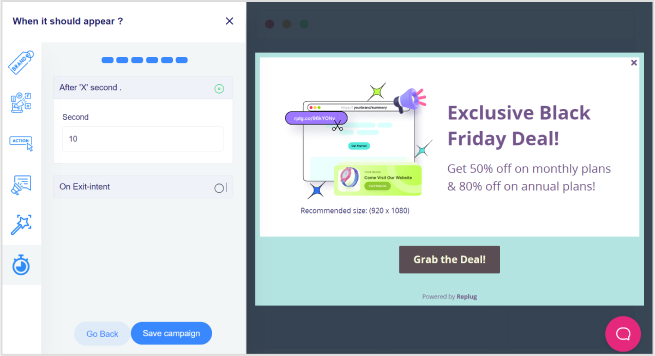
    Step 12: In the final step, select the seconds after which the CTA will be displayed to the user. Alternatively, choose the “On exit-intent” option to display the CTA when the user intends to exit the page.

    Step 13: Save the campaign.

    Boost ROI with branded URLs - Replug dashboard showing performance metrics and branded URL creation
    Boost your conversion rates with irresistable CTAs with

    for your marketing campaigns.

    Check

    Higher clicks

    Check

    More leads

    Check

    Better ROI

    Generate free CTAs

    Also read: How to create a call to action using a URL shortener?

    Track your CTA campaigns with Replug: 

    Effectively monitoring your Call-to-Action (CTA) campaigns with Replug is crucial to ensure their success and optimize for better results. Here’s what to monitor and analyze using Replug:

    1. Dashboard overview:

    Gain instant insights into your campaign’s success with overall statistics, including Clicks, Unique Clicks, Conversions, and Conversion Rate, displayed prominently on your dashboard.

    1. Clicks performance:

    Delve into the performance of your CTAs by analyzing the clicks metric. Understand how many users engaged with your call to action and track click trends over time.

    1. Conversions performance:

    Monitor the effectiveness of your CTAs by examining the Conversions metric. Track the number of desired actions taken by users and assess the overall success of your campaigns.

    1. Visitors by browsers:

    Understand your audience better by exploring the browsers they use. Identify popular browsers to optimize your CTAs for a seamless user experience across different platforms.

    1. Visitors by operating system:

    Gain insights into the operating systems your audience employs. Use this information to tailor your CTAs for compatibility, ensuring a smooth interaction on various devices.

    1. Visitors by country:

    Explore the geographical impact of your CTAs. Identify which countries are most responsive, allowing you to target specific regions more effectively.

    1. Visitors by source/referrer:

    Uncover the sources or referrers driving traffic to your CTAs. Determine the most successful channels and adjust your marketing strategy accordingly to maximize reach.

    By leveraging these monitoring features provided by Replug, you can track the key performance indicators of your Call-to-Action campaigns. Whether it’s understanding user behavior, optimizing for different platforms, or targeting specific regions, Replug equips you with the data needed to refine and enhance your CTAs for optimal results.

    Boost ROI with branded URLs - Replug dashboard showing performance metrics and branded URL creation
    Boost your conversion rates with irresistable CTAs with

    for your marketing campaigns.

    Check

    Higher clicks

    Check

    More leads

    Check

    Better ROI

    Generate free CTAs

    To further boost your campaign performance, consider using a short link generated by Replug to simplify sharing, improve tracking accuracy, and make every CTA more effective.

    FAQs

    How can Replug’s Call-to-Action campaigns benefit my business?

    Replug’s CTAs can significantly enhance your brand’s visibility, multiply conversions, and maximize sales impact. The platform provides a user-friendly interface to create compelling CTAs tailored to your specific goals.

    What types of CTAs can I create using Replug?

    Replug offers versatile CTA types, including buttons, links, and forms. You can redirect users, collect leads, or guide them to perform specific actions based on your campaign objectives.

    How do I track the performance of my Call-to-Action campaigns on Replug?

    Replug provides comprehensive statistics, including overall clicks, unique clicks, conversions, and conversion rates. You can monitor performance trends, analyze clicks and conversions, and gain insights into visitor behavior.

    Can I customize the appearance of my CTAs on Replug?

    Yes, Replug allows you to customize your CTAs extensively. You can choose different themes, add colors to the background and text, and optimize the appearance to align with your brand identity.

    What kind of analytics does Replug offer for my CTA campaigns?

    Replug provides detailed analytics such as click heatmaps, device and location insights, and even integration with third-party analytics platforms. This allows you to make data-driven decisions for refining and optimizing your campaigns.

    Can I use Replug’s CTAs for lead generation?

    Absolutely! Replug offers a Form option where you can integrate with various third-party Email Services to collect leads effectively. Choose the Form type when creating your campaign, select your preferred email service, and start gathering leads seamlessly.

    You may also like:

    How to make a call to action using a link shortener?

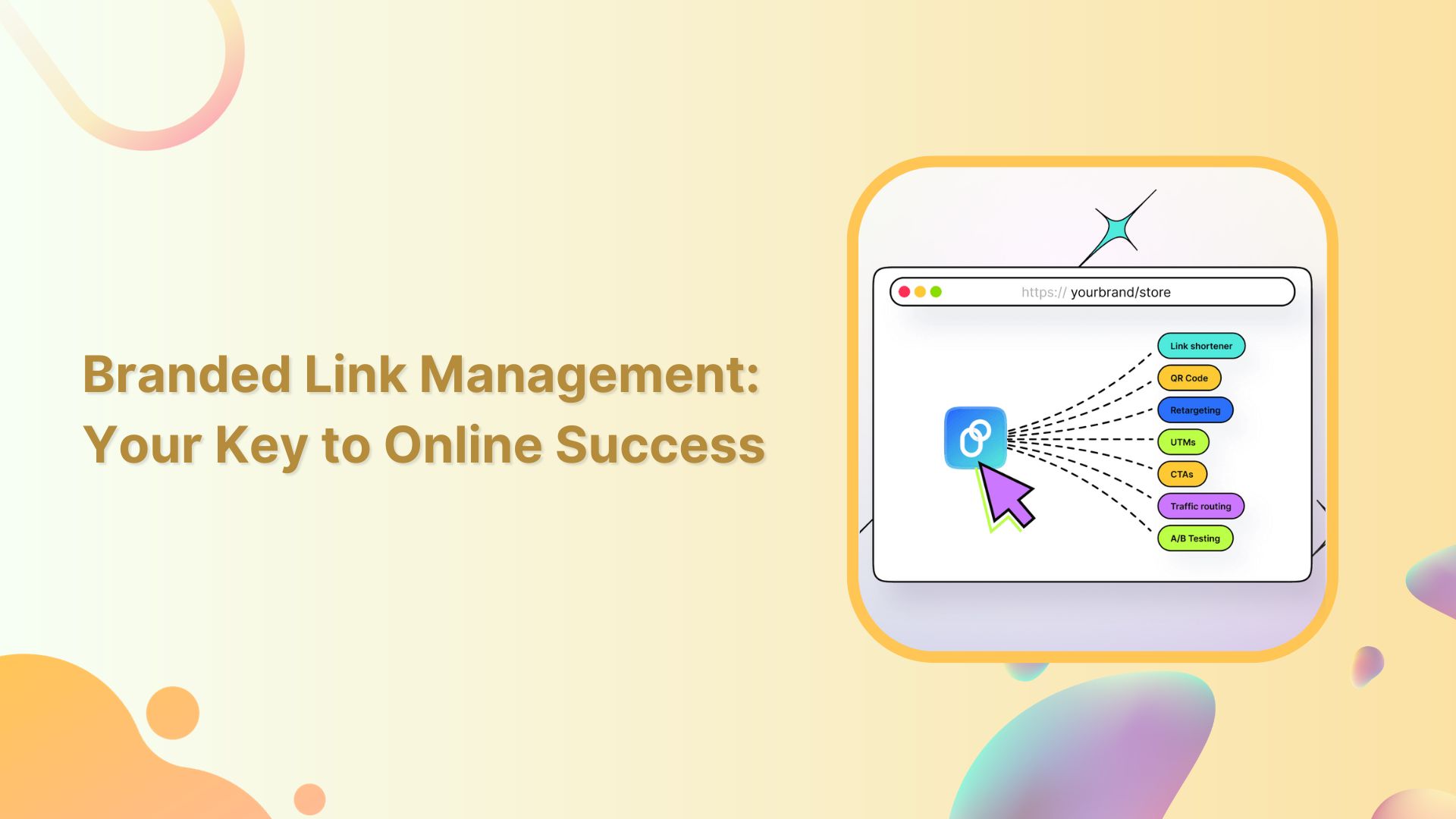
    Branded Link Management: Your Key to Online Success

    How to Create a Smart URL Link: Step-by-Step Guide

  • How to Create Highly Shareable Content?

    How to Create Highly Shareable Content?

    Content marketing is one of the crucial aspects of digital marketing. It is all about how you communicate with your audience and present your content to build up the brand’s reputation.

    If the audience finds your content relatable, informative, and valuable, then they will surely share your content.

    That’s why many marketers turn to Replug — a top-notch solution to craft clean, branded links that make your content more trustworthy and share-worthy before you hit “Publish”.

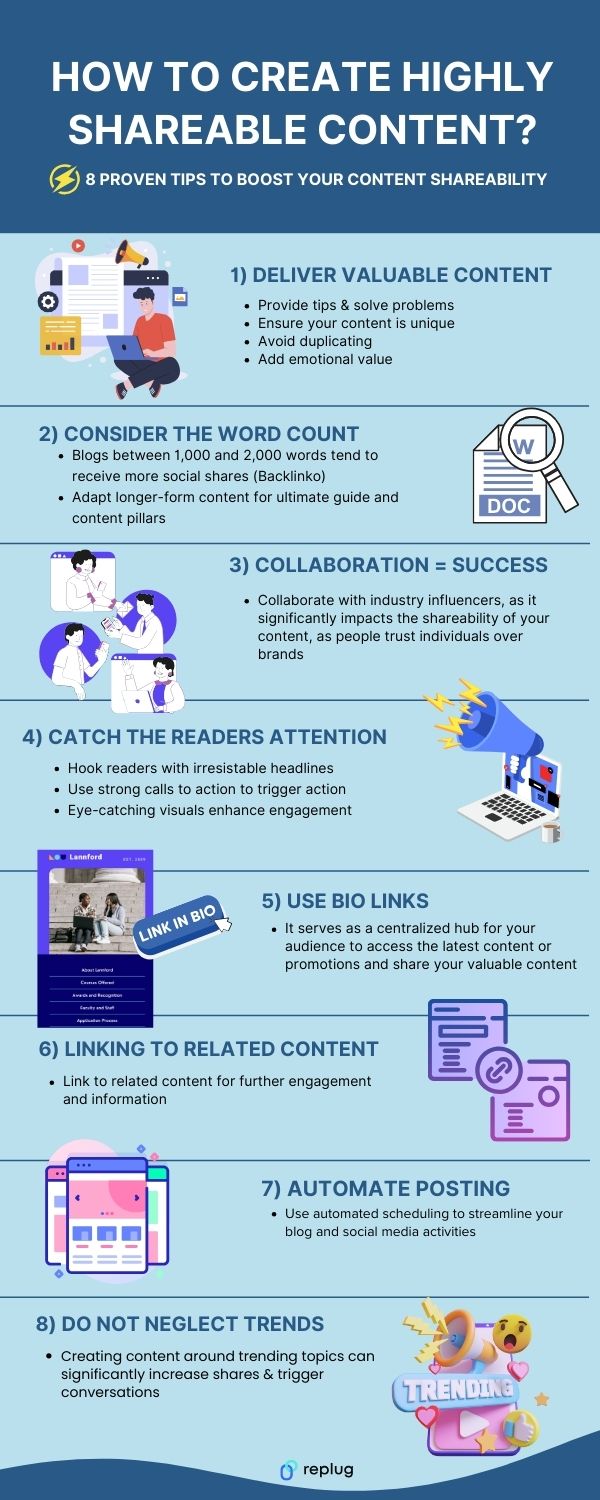
    Here, we have devised 8 tips that will make your content soar and roar in the digital world. Take a look at the below infographics.

    What is shareable content?

    Shareable content refers to digital material, such as articles, videos, images, or infographics, that is designed and crafted in a way that encourages and facilitates easy sharing across various online platforms and social media networks. Shareable content is created with the intention of being shared by users, increasing its visibility and reach on the internet.

    Related: Content engagement: 9 key steps for writing engaging content

    What is the purpose of sharing content?

    The purpose of sharing content is to share valuable information and entertain others. Posting shareable content increases engagement with your audience.

    What makes a content shareable?

    Sr.Creating Shareable Content
    1.Make your content special by bringing something unique to the table, i.e. statistical figures or tips.
    2.Evoke emotions through story telling and discussing the pain points of your target audience.
    3.Make your content digestible. Consider the word count strategically, depending upon the topic you select, you don’t want to deliver less nor do you want to overwhelm your audience.
    4.With the attention spans getting lower and lower. So, the headlines, CTAs and visuals are key drivers to hook attention.
    5.Linking your content to other content pieces can bring more eyes to your content. Create evergreen content and repurposing it for different platforms is one of the smart ways to increase content shareability.
    6.Bio links can give you a 360-degree marketing approach to showcase your top performing content. With this amazing URL shortener you can turn long, messy links into neat, branded URLs, making it easier for readers to click, trust, and share your content across social platforms. Personalizing your bio web page and promoting your content on all platforms using a single bio link is much easier now!
    7.Collaborating with influencers that carry a respectable following can get more eyes on your brand.
    8.When it comes to content, keeping up with the trends is important for any industry to deliver value. Stay updated with the latest trends and developments in the industry, such as trending news, meme marketing or any other information can lead to more likes and share
    9.Last but not the least. Using tools like social media schedulers helps maximize the reach of your content, encouraging more shares across various online platforms, ultimately boosting visibility and engagement.

    Related: 9 Hottest Content Marketing Platforms to Look For in 2026

    Benefits of creating shareable content?

    Below is the list of the benefits of shareable content:

    Sr.Benefits of Shareable Content
    1.Increased Reach
    2.Enhanced Brand Awareness
    3.Improved Engagement
    4.Higher Website Traffic
    5.Improved SEO
    6.Cost-Effective Marketing
    7.Viral Potential
    8.Trust and Credibility
    9.Valuable User Insights
    10.Lead Generation

    You may also like:

  • Discover the Best PixelMe Alternatives for 2026

    Discover the Best PixelMe Alternatives for 2026

    PixelMe, a well-known name, has been a go-to choice for many marketers. But as we step into 2026, it’s essential to understand the changing demands and needs within this industry. This includes factors like competitive pricing, advanced features, strong customer support, and more.

    Unluckily, PixelMe lacks some advanced features and has higher pricing than most of its alternatives. But worry not, we have analyzed the best Pixelme alternatives for you.

    Switching to Replug could be a smart move. Explore further to find out why Replug is a great choice for managing your links in the digital world.

    In this article, we’ll check out what makes Replug better than PixelMe and other similar tools.

    But if your link needs are less extensive, feel free to explore the other options as well.

    Tool NameKey FeatureAgency PlanLimitations
    ReplugAdvanced analytics, link retargeting, customizable short links$79 /moNo Freemium Plan
    BitlyWidely recognized URL shortening with robust analytics$199 /moNo Retargeting
    Limited customization options
    Cutt.lyStraightforward link shortening with detailed analytics$99 /moNo Bio Links
    No CTA
    RebrandlyFocus on link branding and customization$99/moLacks robust analytics
    Higher pricing
    TinyURLLow value for money additional features$129/moLow value for money No additional features
    BL. INKFeature-rich URL shortening with advanced tracking and analytics$599/moHigher pricing
    Not beginner-friendly
    SniplyCustom calls-to-action for enhanced engagement$59 /moLimited link management features
    Variable pricing
    Short.ioUser-friendly URL shortening with custom short links$149 /moLimited advanced analytics
    Features for extensive management

    What is Pixelme?

    PixelMe is a versatile URL shortening and link management platform that provides users with tools to streamline link sharing, customization, and tracking.

    What they offerWhat they don’t 
    Retarget PixelsAgency features
    Custom DomainPassword-protected links
    Browser extensionBranding on micro landing pages
    Link analyticsWhite labeling
    Import linksComprehensive link branding

    Top alternatives to Pixelme:

    Below are some of the best Pixelme alternatives to look for in 2026.

    1. Replug

    Why Consider Replug?

    Replug is a custom URL shortener that offers advanced analytics and link retargeting options. It’s a powerful choice for marketers seeking in-depth insights into link performance.

    Replug-The ultimate link management tool

    Pros:

    • Advanced analytics for in-depth insights.
    • Link retargeting options.
    • Customizable short links.
    • Complete link management solution
    • User-friendly interface.

    Cons:

    • Currently, no freemium plan is available.

    2. Bitly

    Bitly is a widely recognized URL-shortening service that simplifies link management and provides robust analytics. 

    Bitly-url shortener

    Pros:

    • Widely recognized and trusted.
    • Robust link analytics.
    • User-friendly.

    Cons:

    • Does not offer as many advanced features as some competitors.
    • Limited customization options.
    Replug Branded Short Links CTA
    A complete link management solution
    for marketing professionals & agencies.
    Try Replug for free

    3. Cutt.ly

    Cutt.ly offers a straightforward approach to link shortening and management. With customizable short links and detailed analytics, it’s a suitable choice for those looking for an easy-to-use URL management solution.

    Pros:

    • Straightforward link shortening.
    • Customizable short links.
    • Detailed analytics.
    • Easy-to-use.

    Cons:

    • It may lack some advanced features.
    • Limited branding options.

    4. Rebrandly

    Rebrandly focuses on link branding and customization, allowing users to create branded short links. This can enhance brand visibility and recognition, making it a valuable business choice.

    Rebrandly-Link branding tool

    Pros:

    • Focus on link branding and customization.
    • Branded short links.
    • Enhances brand visibility.
    • Suitable for businesses.

    Cons:

    • It may not have as robust analytics as others.
    • Pricing may be higher for branding features.

    5. TinyURL

    TinyURL offers a quick and straightforward approach to link shortening. While it may not provide advanced analytics, its simplicity and speed make it a reliable choice for quick link management.

    Pros:

    • Quick and straightforward link shortening.
    • Simplifies link management.
    • Speedy solution for quick link tasks.

    Cons:

    • Lacks advanced analytics.
    • Limited customization and features.

    6. BL. INK

    BL.INK is a feature-rich URL-shortening tool with advanced link tracking and analytics. If you’re looking for a comprehensive link management solution, BL.INK is a strong choice.

    BL.INK url shortener

    Pros:

    • Feature-rich URL-shortening tool.
    • Advanced link tracking and analytics.
    • Comprehensive link management solution.
    • Suitable for data-driven marketing.

    Cons:

    • Pricing may be higher for the feature set.
    • It may not be as user-friendly for beginners.

    7. Sniply

    Sniply allows users to add custom calls-to-action to shared content. This unique feature can enhance user engagement and conversions, making it a compelling alternative to PixelMe.

    Pros:

    • A unique feature of adding custom calls-to-action.
    • Enhances user engagement and conversions.
    • Compelling for content marketing.

    Cons:

    • Lack of some link management features.
    • Pricing may vary based on usage.

    8. Short.io

    Short.io is a user-friendly URL-shortening service that simplifies creating custom short links. With its ease of use and detailed analytics, it’s a reliable choice for straightforward link management.

    Short.io-URL-shortening service

    Pros:

    • User-friendly URL-shortening service.
    • Simplifies creating custom short links.
    • Easy to use and quick.

    Cons:

    • Does not offer as advanced analytics as competitors.
    • Limited features for extensive link management.

    Why should you consider alternatives to pixel me?

    One should be considering alternatives to pixel me because the tool lacks lots of essential features. Luckily, Replug offers those features and a lot more useful features for agencies and marketers. Here are some reasons to choose Replug over PixelMe. 

    • Integration support is available.
    • Offers traffic routing and link rotation features.
    • Provides the option to add CTA to your links.
    • Offers link expiry feature.
    • Affordable pricing compared to its competitors.
    Replug Branded Short Links CTA
    Maximize marketing ROI
    by transforming ordinary URLs into
    branded short links that convert.
    Try Replug for free
    • QR codes are included.
    • RSS feeds option is available.
    • White-label features are offered.
    • Password-protected links are provided.
    • Easy setup process.
    • A free trial option is available.

    Conclusion

    All in all, if you value advanced features with high-end customer support with less pricing – Replug is a better option. But as you weigh your options, remember that each alternative presented here has its strengths, catering to different needs and preferences. The right choice depends on your marketing goals, budget, and desired features. 

    Make a smart choice that matches your plan for success within your industry. 

    Frequently asked questions

    What is the primary purpose of URL shorteners?

    URL shorteners like Replug or PixelMe are designed to make long, complex URLs more manageable and aesthetically pleasing, making them easier to share and track.

    How do I decide which alternative to PixelMe is right for me?

    Consider your marketing goals, budget, and required features. Each alternative has its strengths, so choose the one that aligns with your needs.

    Why choose Replug over Pixelme?

    Replug gives marketers many helpful tools that are perfect for today’s needs. It lets you customize and analyze links in a way that goes beyond what PixelMe can do.

    Are these alternatives user-friendly for beginners?

    Yes, most of these alternatives, especially Replug, offer user-friendly interfaces and provide tutorials and support to help beginners get started.

    You may also like:

  • Branded Link Management: Your Key to Online Success

    Branded Link Management: Your Key to Online Success

    Links serve as vital assets that connect your brand with the digital world, so having full control over them is essential. Branded Link management empowers you to safeguard your brand, optimize your marketing, and efficiently handle the many links your company generates. 

    Therefore, a central link management tool is essential to enhanced collaboration, accurate tracking, and brand protection.  It can also help to increase brand awareness and streamline link sharing between colleagues.

    Here’s what branded link management is and why it’s crucial for your company’s online success.

    What is branded link management?

    Branded link management, often referred to as branded link shortening is a specialized facet of link management that focuses on shortening, customizing, and optimizing links, particularly for branding and marketing purposes. 

    Branded links are shorter and more user-friendly versions of URLs, and they often feature a custom domain that aligns with a brand or campaign.

    Key aspects of branded link management:

    • Customization: Branded links allow you to tailor URLs to match your brand, campaign, or content. For example, a complex and long URL can be transformed into a concise and branded link.
    • Branding: By using branded links, you reinforce your brand identity in every link you share. This consistency can boost brand recognition and trust among your audience.
    • Tracking and analytics: Branded link management tools often offer robust tracking and analytics features. This data helps you measure the performance of your branded links, enabling data-driven marketing decisions.
    • Link security: Branded link management platforms often include security features that protect your links from malicious activities, ensuring the integrity of your brand’s online presence.
    • User experience: Branded links are user-friendly and can enhance the overall user experience, as they are easier to remember and share.
    Replug Branded Short Links CTA
    A complete link management solution
    for marketing professionals & agencies.
    Try Replug for free

    Branded link management: why do you need it?

    Companies, particularly those engaged in e-commerce, affiliate marketing, and social media marketing, benefit from using a link management tool for several compelling reasons:

    1. URL shortening: 

    A branded link management tool shortens long and cumbersome URLs, making them more user-friendly and aesthetically pleasing. This is particularly useful for sharing links on social media, in email marketing campaigns, and within content.

    1. Tracking and analytics: 

    Link management tools offer robust tracking and analytics features, allowing companies to monitor the performance of their links. This includes tracking click-through rates, conversion rates, and other essential metrics to assess the effectiveness of marketing campaigns.

    1. Conversion analysis: 

    Companies can analyze the conversion rates associated with specific links. This insight helps in optimizing marketing efforts and understanding which links are driving the most conversions and sales.

    1. Branding: 

    Branded links provide consistency and reinforce a company’s brand identity with every link shared. This consistency can boost brand recognition and trust among the audience.

    1. Efficiency: 

    Link management tools streamline the process of creating and managing links, saving time and reducing the risk of errors. This is especially valuable for companies that deal with a large number of links.

    1. Social media traffic: 

    Many link management tools offer features like bio links, which are crucial for social media marketers. These tools help drive social media traffic to the company’s website by providing a simple and appealing way to share links on platforms with character limits or visual constraints.

    1. Lead generation and retargeting: 

    Some link management tools go beyond shortening links and offer lead generation and retargeting capabilities, enabling companies to capture leads and re-engage with potential customers who clicked on their links.

    Replug Branded Short Links CTA
    A complete link management solution
    for marketing professionals & agencies.
    Try Replug for free

    Brand and manage your links with Replug

    A powerful link management tool can be the difference between success and obscurity. Replug.io is not just another option; it’s the best choice, and here’s why:

    Branded short links: 

    Replug’s link shortener transforms lengthy URLs into concise, branded short links. Now, you can create short links in no time at all. Your audience will remember and trust these links, and you can even use your custom domain for that extra touch of professionalism.

    Link analytics: 

    Replug provides in-depth link tracking, so you’re never in the dark about your link performance. UTM tracking allows you to monitor metrics at your fingertips, enabling data-driven decisions.

    Bio links: 

    Say goodbye to juggling multiple links. With Replug, you can consolidate all your branding needs into a single, sleek bio link. It’s a one-stop landing page to engage your audience effectively.

    Retargeting pixel: 

    Lost sales don’t have to stay lost. Replug’s retargeting pixel enables you to re-engage potential customers across multiple networks, increasing your chances of conversion.

    QR code: 

    Create dynamic marketing interactions with QR codes. They’re versatile tools that can bridge the gap between the digital and physical worlds.

    A/B testing: 

    Experiment with up to 10 variations of your URLs to find the winning formula. Replug’s A/B testing feature helps you optimize your links for the best results.

    Deep links: 

    Guide your audience through smooth in-app experiences with deep links. These links enable users to navigate seamlessly within mobile apps, enhancing the customer journey.

    Link rotator: 

    Optimize user experiences by intelligently routing traffic based on user preferences. It’s a powerful tool for keeping your audience engaged and interested.

    SMS links: 

    Improve your SMS marketing efforts with bulk short links and insights provided by Replug. Enhance your messaging strategy and drive more conversions.

    Call to action generator: 

    Simplify your calls to action (CTAs) to increase engagement and conversions. Replug makes it easy to create effective CTAs that drive results.

    Replug Branded Short Links CTA
    Maximize marketing ROI
    by transforming ordinary URLs into
    branded short links that convert.
    Try Replug for free

    Replug’s white label solution: Your brand, your link management

    For businesses, agencies, and professionals looking to maintain brand consistency and provide top-tier link management services, Replug’s White Label Solution is the game-changer you’ve been waiting for. Here’s why it’s the ultimate choice:
    • In-house link management: Replug’s White Label Solution allows you to have your very own, in-house link management tool. It’s an extension of your brand, ensuring a seamless user experience for your clients.
    • Branded experience: Every interaction with your link management tool is a branded experience. Your clients see your branding, reinforcing your identity and building trust.
    • Client control: With your white-label solution, you maintain full control over your client’s experience, ensuring that it aligns perfectly with your brand’s values and message.
    • Streamlined workflow: Replug’s white-label tool streamlines the link management process, saving you time and reducing the risk of errors. It’s all about optimizing your workflow to be more efficient and productive.
    • Data insights: Comprehensive data insights are at your fingertips. Understand how your clients are using the tool and gain insights to guide your services.
    • Agency growth: As an agency, offering a white-label solution positions you as a full-service provider and strengthens your brand as a leader in your industry.

    Final verdict:

    Replug is not just a link management tool; it’s a comprehensive solution that empowers your brand, streamlines your digital efforts, and positions you for success in a competitive online landscape. 

    Whether it’s enhancing brand visibility with branded short links, providing a white-label solution for your agency, or offering a range of powerful features, Replug is the ultimate choice for those who aspire to stand out, make every click count, and unlock their brand’s full potential in the digital world. 

    FAQs

    What is branded link management?

    Branded link management combines link shortening with customization using your branded domain, creating links that reinforce your brand’s identity.

    Can I track the performance of branded links with analytics?

    Yes, our link management tool offers robust analytics, enabling you to monitor click-through rates, conversion rates, and other essential metrics for branded links.

    Can branded link management be used by agencies for their clients?

    Yes, agencies can benefit from white-label branded link management solutions like Replug to provide branded link management services to their clients.

    What tools are available for effective link management?

    Numerous tools and platforms are available, including Replug, which offers branded link management, analytics, custom domains, bio links and more. 

  • 10 hottest content marketing platforms to look for in 2026

    10 hottest content marketing platforms to look for in 2026

    Ready to supercharge your content game?

    We’ve just uncovered the best content marketing platforms and tools that can transform your content creation journey.

    Without crafting a solid plan for distribution and promotion, putting out content could be a waste of energies. Therefore, what you should do is begin with choosing the right content marketing platforms instead.

    This lineup has everything from content management systems to powerful AI-driven tools.

    Sr.Content Marketing PlatformsCategory
    1.ContentStudioSocial Media Management
    2.BrevoEmail Marketing
    3.HubSpot Content HubAll-in-one content marketing suite
    4.ReplugBranded Link Management
    5.RiversideVideo recording & content repurposing
    6.CanvaGraphic & Image Editor
    7.WordPressContent Management System
    8.BuzzSumoSocial Listening Tool
    9.MediumContent Publishing Network
    10.ContentIdeasExplore Content Trends Tools

    What is a content marketing platform?

    A content marketing platform is a digital tool that assists businesses in creating, publishing, and managing marketing content effectively. To maximize its utility and ensure it stays ahead of technological advances and market trends, continuous platform development is essential, enabling the platform to support evolving content strategies and integrate seamlessly with other digital marketing tools

    Top 10 Content Marketing Platforms

    Many kick off their content marketing journey by developing a content plan, which isn’t a bad approach if you have a clear direction.

    But for most, the initial step should be choosing content marketing platforms carefully. This way, they can more easily map out a solid plan to create and spread their content.

    Below is a list of some of the best content marketing platforms:

    1. ContentStudio: Social media management

    ContentStudio is a content marketing and social media management platform that streamlines content discovery, curation, and publishing.

    Key Features:

    • Content curation
    • Social media analytics
    • Social media automation
    • Analytics and reporting
    • Social media management
    ContentStudio-Social media management platform

    Pros:

    • It helps you find trending content in your niche, making it easy to curate and share.
    • Allows you to automate social media posting for consistent engagement.
    • ContentStudio is suitable for teams with workflow and approval features.

    Cons:

    • Like any new tool, it may take time to understand its full capabilities.
    • More advanced features are locked behind higher pricing tiers.
    • It offers basic engagement analytics, but more detailed insights may require integration with other tools.

    Other honorable alternatives:

    • Hootsuite
    • Sprout Social

    2. Brevo: Email marketing tool

    Brevo (formerly Sendinblue) is an all-in-one marketing platform that offers email marketing, marketing automation, and transactional emails.

    Key Features:

    • Email marketing
    • Marketing automation
    • Transactional emails
    SendinBlue-Email Marketing tool

    Pros:

    • SendinBlue combines email marketing, SMS marketing, and marketing automation.
    • It’s beginner-friendly with a simple and intuitive interface.
    • Competitive pricing, especially for small businesses.

    Cons:

    • Some advanced marketing automation features may be limited.
    • Despite being user-friendly, it may take time to master all its capabilities.
    • Email deliverability rates may vary based on the quality of your email list.

    Other honorable alternatives:

    • Mailchimp
    • Moosend
    • Active Campaign

    3. HubSpot Content Hub: All-in-one content marketing suite

    HubSpot Content Hub is an all-in-one content marketing tool suite. The platform includes all the features necessary to grow your business: email and website builders, SEO and A/B testing tools, AI-powered content repurposing features, and more.

    Key features:

    • CRM (Customer Relationship Management)
    • Email marketing and automation
    • Landing pages and forms

    Pros:

    • Content Hub offers a suite of tools, including CRM, live chat and chatbot builders, adaptive testing, as well as SEO analytics and AI-powered optimization recommendations.
    • It allows you to automate marketing campaigns, lead nurturing, and sales processes.
    • Provides detailed omnichannel analytics and reporting to measure the success of your overall marketing efforts.

    Cons:

    • Steep gaps between paid packages might make scalability a challenge.
    • While it offers a free version, more advanced features come at a price.
    • Small businesses may find its array of features overwhelming.

    Other honorable alternative:

    • Sprinkler
    • Share Spring

    4. Replug: Branded Link Management

    Replug is an efficient URL shortener and a complete link optimization platform that helps you optimize, manage, and track your links hassle-free.

    Key Features:

    • Link branding and shortening
    • White-label solution
    • Link tracking and analytics
    • Call-to-action overlays
    • SMS marketing
    • Link rotator
    • Bio-link generator 
    Replug-Link management tool

    Pros:

    • You can customize and brand your links to match your style.
    • Replug offers link analytics to track link clicks and performance.
    • Add call-to-action overlays to your shared links to boost conversions.

    Cons:

    • It’s not a content creation tool but focuses on link optimization.
    • Some advanced features may be behind a paywall.

    Other honorable alternatives:

    • Bitly
    • Rebrandly

    5. Riverside: Video recording & content repurposing

    Riverside’s video editing and recording platform helps content marketers record high-quality video content and automatically repurpose it into multiple formats for distribution across different channels.

    Key Features:

    • AI Magic Clips for automatic short-form video generation
    • Studio-quality local recording for professional output
    • Automatic transcription with speaker labels
    • Multi-track recording capturing separate audio for each participant
    • Built-in video editor with text overlays and transitions
    • Podcast hosting and distribution capabilities
    • One-click publishing to YouTube, Spotify, and Apple Podcasts

    Pros:

    • Record once and automatically generate 10+ pieces of repurposed content (social media clips, blog posts, podcast episodes) without manual editing.
    • Crystal-clear audio and video quality even over unstable internet connections, making remote and distributed content creation seamless.
    • Automatic transcription with speaker labels enables instant repurposing of video content into written articles, email snippets, and social captions.
    • Eliminates time-consuming video editing. Their AI identifies the best moments and formats content automatically for each platform.

    Cons:

    • Focused on video content only; doesn’t handle graphic design or written content creation like Canva or WordPress.
    • Advanced features like custom branding and white-label options require higher-tier paid plans.

    Other honorable alternatives:

    • Loom (quick screen recording)
    • Descript (video editing with transcription)
    • CapCut (video editor)

    6. Canva: Graphic designing tool

    Canva is a user-friendly graphic design tool that empowers everyone to create visually appealing content.

    Key Features:

    • Template library
    • Drag-and-drop design tools
    • Collaboration and sharing

    Pros:

    • Canva’s intuitive interface makes design accessible to beginners and professionals.
    • It offers a vast library of templates for social media, marketing, and more.
    • Teams can collaborate in real time on design projects.

    Cons:

    • While great for basic design, it may not replace advanced graphic design software.
    • Brand consistency can be tricky, especially for larger organizations.
    • Some features may still require design skills to be used effectively.

    Other honorable alternatives:

    • Vengage
    • Adobe Express

    7. WordPress: Content management system

    WordPress is a popular open-source content management system that powers millions of websites and blogs.

    Key Features:

    • Themes and plugins for customization
    • SEO plugins for optimization
    • Blogging capabilities

    Pros:

    • It’s highly customizable and suitable for various website types.
    • WordPress is known for its SEO capabilities and offers numerous plugins for optimization.
    • A vast community ensures plenty of support and resources.

    Cons:

    • Regular updates and maintenance are necessary to secure your website.
    • Customizing and managing WordPress may require a learning curve.
    • You may need to invest in plugins and hosting for optimal website speed.

    Other honorable alternatives:

    • Wix
    • Blogger

    You may also like: 10 content marketing tips to drive conversions and build loyalty

    8. BuzzSumo: Social listening tool

    BuzzSumo is a content research and social listening tool that helps you find popular content and track your brand’s online presence.

    Key Features:

    • Content discovery and research
    • Social listening and monitoring
    • Influencer identification
    BuzzSumo-Social listening tool

    Pros:

    • Discover the most shared and trending content in your niche.
    • Monitor mentions of your brand or topics relevant to your business.
    • Find key influencers in your industry for collaboration.

    Cons:

    • Some advanced features may be available only in higher-priced plans.
    • Learning to use all features effectively may take time.
    • BuzzSumo primarily focuses on content research and may not cover all marketing needs.

    Other honorable alternative

    • Share Spring

    9. Medium: Content publishing network

    Medium is a publishing network that allows you to publish written content. There are several content categories to pick from while posting the content. It’s a complete interactive platform with features like the following system: a paid plan, commenting, and liking.

    Medium- Discover stories and opinions from writers

    Key Features:

    • Writing and publishing articles
    • Partner program for writers to earn income
    • Curation for recommended content

    Pros:

    • Medium is a go-to platform for written content.
    • It’s user-friendly and simplifies the process of publishing.
    • It comes with a built-in audience interested in long-form written content.

    Cons:

    • It focuses on written content, which may not suit all content needs.
    • There are limited options for writers to make money.

    Other honorable alternative

    • Scoop It

    You may also like: Content engagement: 9 key steps for writing engaging content

    10. ContentIdeas: Find top-performing content

    Curate trending content for a better social presence, get ideas for your next blog posts, find new link-building opportunities, or stay updated with the industry via ContentIdeas.

    Key Features:

    • Content topic generator
    • Keyword research
    • Competitor insights
    • Customizable filters
    • Content calendar integration

    Pros:

    • Save time and effort by generating content ideas in seconds.
    • Customize content ideas to match your specific niche and audience.
    • Plan, create, and schedule content all in one place.
    • Work seamlessly with your team on content projects.
    • Understand how well your content ideas are performing and make data-driven decisions.

    Cons:

    • The tool may require some time to learn and fully utilize.
    • Check if the tool integrates with your existing content management systems.
    • Requires a stable internet connection for real-time updates and collaboration.

    Other honorable alternatives:

    • Google Trends
    • Exploding Topics

    How to use content marketing platforms to drive business?

    A roadmap is necessary to achieve any goal. Here’s a road map on how to use content marketing platforms to drive business growth.

    • Choose the best platform for content publishing.
    • Streamline your workflow with cutting-edge software.
    • Distributing the content and boost engagement.
    • Analyzing analytics and conversions.
    • Optimize and necessary changes.

    How to plan a perfect content marketing strategy?

    Here’s what a proper content plan looks like

    A content plan is a roadmap of the content that guides your marketing strategy in translating what your brand wants to achieve through content. The emphasis of a content plan is more on the subject matter and the implication of content on the audience. 

    This is why selecting content marketing platforms was discussed before building the content plan. Understandably, once the content platforms have been selected, your content plan will be built accordingly. 

    Here are the key elements one should consider in building a content plan:

    Setting clear goals

    What do you aim to achieve with your content? Whether it’s generating leads, increasing brand awareness, or boosting sales, your goals should be specific, measurable, and attainable.

    Keyword research and SEO integration

    Keywords are the foundation of SEO. Identify relevant keywords and integrate them strategically into your content. Optimize meta tags, headers, and descriptions to enhance search engine visibility.

    Building a content calendar

    Plan your content in advance with a ContentStudio’s content planner. This helps you organize your topics, schedule posts, and stay ahead of important dates and events.

    Content creation

    This is where the magic happens. Craft compelling and valuable content that addresses your audience’s needs and interests. If you struggle with introductions, reviewing some hook sentence examples can help you grab attention from the first line. Ensure a consistent tone and style across all your materials.

    Analytics and conversion

    Regularly analyze the performance of your content. Utilize tools like Usermaven to track traffic, engagement, and conversions. Adjust your strategy based on the data.

    Creating evergreen content

    Evergreen content remains relevant over time. Balance your content strategy with timely and evergreen pieces to ensure consistent traffic.

    Content promotion

    Producing great content is just half the battle. Promote your content through social media, email marketing, and guest posting to reach a wider audience.

    What are the best platforms for sharing your content?

    You can share content on the following content platforms:

    1. Facebook

    Facebook connects billions worldwide, where you can share text, images, and videos. It’s your personal and business hub.

    Key Features:

    • News Feed for posts and updates
    • Messenger for private chats
    • Business Pages for brands
    • Advertising tools for targeting specific audiences
    Facebook- social networking site that makes it easy for you to connect and share with family and friends online

    Pros:

    • Facebook has a massive user base of over 2.8 billion people, providing a vast reach.
    • You can share text, images, and videos, allowing creative expression.
    • It’s a great place to engage with friends and family through likes, comments, and shares.
    • Businesses find it valuable for advertising, brand-building, and gaining insights into content performance.

    Cons:

    • Frequent algorithm updates can affect how many people see your posts without paid advertising.
    • Facebook has faced privacy concerns, which may worry some users.
    • Standing out in the crowd can be a challenge.

    2. Instagram

    Instagram, the visual wonderland, lets you share stunning images and videos. It’s a creative haven for influencers and brand promotion.

    Key Features:

    • Stories for temporary posts
    • IGTV for longer videos
    • Reels for short, engaging clips
    • Business profiles with insights
    Instagran- free, online photo-sharing application and social network platform

    Pros:

    • Instagram focuses on visual content, making it perfect for showcasing products and services.
    • It’s a hotspot for influencer marketing, with popular users promoting brands.
    • Advertising options are available to reach the right audience.
    • Features like IGTV and Reels keep users entertained.

    Cons:

    • Like Facebook, Instagram’s algorithm can affect organic reach because of continuous algorithm challenges.
    • If your content isn’t visually appealing, it may not perform as well.

    3. TikTok

    TikTok, the addictive platform, offers short, diverse videos. It’s the go-to platform for entertainment and creativity.

    Key Features:

    • Quick, music-filled videos with effects
    • Duets for collaboration
    • Challenges for engagement
    TikTok-social media platform for creating, sharing and discovering short videos.

    Pros:

    • TikTok’s clever algorithm suggests content users love, keeping them hooked.
    • Users can discover a wide range of content, from funny sketches to educational tutorials.
    • It’s incredibly popular with younger folks, making it a hit for reaching Gen Z.

    Cons:

    • TikTok has had its share of privacy concerns.
    • Content is limited to short videos, which may not suit all creators.

    4. YouTube

    YouTube, the video giant, hosts a wealth of content. It’s your source of learning, entertainment, and creativity.

    Key Features:

    • Personal channels for creators
    • Video editing tools
    • Live streaming
    • Options for making money
    • Youtube shorts
    Youtube-Video sharing platform

    Pros:

    • YouTube is the top platform for sharing videos, ideal for content creators.
    • Creators can make money through ads, memberships, and merchandise.
    • It’s a fantastic source for educational and how-to content.

    Cons:

    • The platform is saturated, making it challenging for new creators to gain attention.
    • High-quality video production may be required to stand out.

    5. Pinterest

    Pinterest is a visual treasure trove, inspiring users with captivating images and ideas. It’s a go-to for creative inspiration and visual discovery.

    Key Features:

    • Pins for sharing visual content
    • Boards to organize pins
    • Shopping features for e-commerce
    • Add others’ pins to your boards
    Pinterest-a visual discovery engine for finding ideas

    Pros:

    • Pinterest is the place to discover and get inspired visually.
    • It’s gold for fashion, home decor, and lifestyle businesses.
    • Pins last longer compared to typical social media posts.
    • Create boards related to your famous blog categories.
    • Post pins consistently to increase your chances of ranking.
    • Focus on quality over quantity in your content.

    Cons:

    • Pinterest attracts users with particular interests in visual discovery.
    • It’s best for businesses with highly visual products or services.

    You may also like: How to Create Highly Shareable Content?

    What’s the takeaway?

    The whole point of this article is to educate you on paying close attention to your content types, distribution methods, and the right platforms for getting business.

    The ultimate goal of your content marketing plan is to bring the customers, sell the products, and build an audience around your brand. It might not happen on a whim, but it takes time.

    If your content is working and you’re on the right platforms, things will show indications that you’re moving in the right direction.

    FAQs

    How do I choose the best content platform for my business?

    When choosing a content marketing platform, look for features like ease of use, content creation tools, SEO capabilities, and integration with your existing marketing stack.

    What’s the advantage of using Replug for link management?

    Replug allows you to create short links, track their performance, and add call-to-action features to enhance user engagement. It acts as a complete hub for easily managing all your branded links from one place.

    How do I analyze the conversions or traffic of my website?

    You can use tools like Usermaven to analyze website traffic or conversions.

    Which platform is best for e-commerce businesses?

    Shopify is a great choice for e-commerce businesses, as it provides features tailored to this industry.

    Which is the best social media management tool?

    Contentstudio is the best social media management tool brands can use. 

    Are these platforms suitable for small businesses?

    Yes, most of these platforms offer scalable solutions, making them suitable for businesses of all sizes.

    Other Popular Blogs:

  • What are UTM Codes and How Do They Work?

    What are UTM Codes and How Do They Work?

    Marketing can be complex, but measuring its effectiveness doesn’t have to be. UTM codes are your answer to understanding what’s working and what’s not in your campaigns and, more importantly, to pinpoint which campaigns are doing the heavy lifting. This is where UTM codes come into play, offering a simple solution to the challenge of marketing success. So, let’s break it down:

    What are UTM codes?

    UTM codes are essentially strings of text that are added to URLs. These strings contain specific parameters that provide invaluable information about the source, medium, and campaign that led a user to a particular webpage. In other words, UTM codes act as data markers, offering a clearer view of the user’s journey, from the initial interaction to conversion.

    Here’s a breakdown of the key UTM parameters:

    1. Source: 

    This parameter specifies the origin of your traffic. Is it coming from an email, a social media platform, a search engine, or another source? Accurately tagging the source helps you identify which channels are driving the most traffic.

    1. Medium: 

    The medium parameter describes the type of marketing medium used. It could be an email, social, organic search, paid search, or any other medium relevant to your campaign. Categorizing your traffic in this way allows you to determine which marketing avenues are the most effective.

    1. Campaign: 

    The campaign parameter enables you to track a specific marketing campaign or initiative. Whether it’s a product launch, a seasonal promotion, or an event, this parameter helps you differentiate between different efforts within the same source and medium.

    1. Term (optional): 

    This parameter is often used for paid search campaigns to identify the keywords that triggered the ad click. It’s an optional parameter and is mainly relevant to search engine advertising.

    1. Content (optional): 

    Another optional parameter, content can be used to differentiate between different elements of your marketing efforts, such as different ad variations or links within the same campaign.

    Understand with an example:

    Let’s create an example URL with UTM parameters added.

    Original URL:

    https://www.example.com/product-page

    Now, let’s add UTM parameters to track the source, medium, and campaign:

    • Source: Let’s say the traffic is coming from an email newsletter.
    • Medium: The marketing medium is email.
    • Campaign: It’s part of a campaign called “SummerPromo.”

    Now, we’ll add these UTM parameters to the URL:

    https://www.example.com/product-page?utm_source=email&utm_medium=email&utm_campaign=SummerPromo

    With these UTM parameters added, you can track that anyone who clicks on this URL is coming from the source “email,” through the medium “email,” and as part of the “SummerPromo” campaign. This allows you to monitor the performance of this specific link in your marketing efforts.

    How to create UTM tracking codes?

    Creating UTM tracking codes is a pivotal part of monitoring the performance of your online marketing efforts. While it’s technically possible to manually create these codes by adding specific strings to your URLs, it can be complex and time-consuming, especially when you have to manage them at scale. This is where UTM code generators come into play, making the process much more efficient.

    Google Analytics URL builder:

    Google Analytics offers a straightforward UTM code generator, which has become the go-to choice for many businesses. Here’s how you can use it:

    1. Visit Google’s URL Builder tool.
    2. Fill in the required fields for your campaign: the URL of the landing page, source, medium, campaign, term (optional), and content (optional).
    3. Click “Generate URL,” and Google will create the UTM-coded URL for you.
    how-to-create-utm-parameters-url

    Replug – A convenient alternative:

    Replug.io is another powerful tool for UTM code creation, and here’s why it’s worth considering:

    • Automatic UTM code generation: 

    Replug automates the UTM code creation process, saving you the trouble of manual entry. This means you can gather valuable analytics data as soon as your campaign goes live.

    • Shortened and customized URLs: 

    UTM-coded URLs can become quite lengthy, which can be a problem on platforms like Instagram or when users need to copy and paste links. Replug’s URL shortener free tool shortens and customizes these URLs, making them more elegant and user-friendly.

    For example, a long UTM-coded URL might look like this:

    https://replug.io/pages/resources/blogs/influencermarketing?&utm_source=contentdigest&utm_medium=email&utm_campaign=ebook-influencer-marketing&leadchannel=email&leadchanneldetail=contentdigest

    With Replug, it could be as sleek as this: 

    https://rplg.co/Influencer02

    While preserving all the essential UTM data.

    • Advanced tracking and analytics: 

    While UTM codes are a solid foundation for analyzing marketing performance, they have limitations. Replug offers an enhanced solution called Campaigns, providing in-depth insights and a more hassle-free tracking experience, especially when managing multiple campaigns across various marketing channels.

    Replug Branded Short Links CTA
    A complete link management solution
    for marketing professionals & agencies.
    Try Replug for free

    You may also like: How to Create UTM Links: A Step-by-Step Guide

    Elevate Your Brand Performance with Replug

    UTM codes are a fundamental tool for tracking the success of your brand campaigns, links, and platforms. They provide valuable data, but those unwieldy, lengthy links can be a drawback. As your marketing endeavors become more intricate, it’s essential to adopt a system that offers both enhanced power and efficiency.

    This is where Replug’s UTM builder steps in as the ideal solution. Replug not only helps you track traffic effectively, even in the most complex marketing landscapes, but it also simplifies the process. With Replug, you obtain concise, stylish links that seamlessly fit into any context. Moreover, it offers an analytics tool that’s user-friendly and excels at managing multichannel marketing campaigns.

    In essence, Replug empowers you to elevate your brand’s performance, making tracking and managing your marketing efforts a smoother, more efficient, and ultimately more successful process.

    Frequently asked questions

    What are UTM codes?

    UTM codes are tracking parameters added to URLs to measure marketing performance. They’re vital for data-driven decision-making and proving campaign success.

    How do I create UTM codes for my campaigns?

    You can create UTM codes manually, but it’s easier and error-free to use online UTM code generators like Google’s Campaign URL Builder or Replug’s UTM code builder.

    What is Replug, and how does it work for link tracking?

    Bitly is a URL shortening and link management platform that not only shortens links for sharing but also provides link tracking and analytics to measure click-through rates and engagement.

  • Winning retargeting strategies, factors, KPIs & more

    Winning retargeting strategies, factors, KPIs & more

    Sr.StrategyDescriptionKey FocusTargeting MethodPrimary Objective
    1.Site RetargetingTargets users who visited your website.User’s past website visits.Uses website tracking and cookies.Encourage return visits and conversions.
    2.Onsite RetargetingTargets users while they are actively engaged on your website.User’s behavior and interactions on-site.Customizes content or ads based on on-site activity.Enhance on-site experience and guide users to actions.
    3.Search RetargetingTargets users based on their past search behavior, including search queries and keywords.User’s past search activity.Uses search engine data and keyword targeting.Reach users with tailored ads aligned with their interests.
    4.Contextual RetargetingDisplays ads on contextually relevant websites or platforms.Alignment with users’ prior engagement.Matches ad placement with users’ previous interests.Encourage users to return and convert based on context.
    5.Social RetargetingTargets users on social media platforms who have previously interacted with your brand or website.User’s past social media engagement.Uses social media platform tracking.Reinforce brand awareness and encourage social media engagement.
    6.Conversion RetargetingFocuses on users who have completed specific actions on your website, such as making a purchase or signing up.User’s past conversions.Tracks completed actions and leverages user behavior.Encourage further conversions or upsells to engaged users.
    7.Email RetargetingInvolves sending follow-up emails to users who have abandoned specific actions on your website, such as incomplete purchases or registrations.User’s past email interactions and abandonment.Targets users through email campaigns.Re-engage users and reduce abandonment rates, driving conversions.
    8.List-Based RetargetingCustomizes ads for users based on specific lists or databases, such as email subscriber lists or customer databases.User’s past interactions and segmentation.Utilizes existing customer lists and segmentation data.Personalize content for existing contacts and nurture relationships.
    9.Cross-Channel RetargetingRe-engages users who have interacted with your brand across multiple marketing channels and platforms.User’s multi-channel behavior and interactions.Combines data from various platforms to create a unified strategy.Deliver a cohesive and personalized user experience across channels.

    Most small and mid-sized businesses spend tens of thousands of dollars each year on advertising mediums, such as social media ads, influencer marketing, retargeting ads and search ads.

    A large portion of their ad spend goes into retargeting.

    We all see some ads pop up more than usual on social media. The reason is that those brands have a retargeting ad strategy in place that keeps showing you their ads.

    Ready to explore what retargeting is and how you can develop a retargeting strategy for your business?

    Let’s start with the basics.

    What’s a retargeting strategy?

    A retargeting strategy refers to the tactic a brand or individual uses to re-engage the website visitor who has shown interest in the product or service and hasn’t converted just yet.

    Well, to put it simply: retargeting is remarketing.

    A prospect clicks on the product and goes through the details, but leaves the page without making a buying decision.

    Now the brand pursues that visitor through different retargeting strategies to bring him back and motivate him to take that plunge.

    Remember the ultimate goal of the retargeting campaign is the conversion.

    How does retargeting work?

    What-is-retargeting

    Retargeting allows brands and marketers to remarket the product or service to the audience that has already visited your website.

    The way retargeting works is quite interesting. Digital marketers place a short piece of code called a “Pixelin the website code, which helps social media platforms identify the same visitor to showcase ads.

    Digital marketers and advertisers retarget both website visitors who have previously purchased the product and who haven’t completed the transaction.

    The core purpose of a retargeting campaign is to push the buyers who are on the fence or abandoned the shopping cart for some reason.

    Retargeting isn’t rocket science. Every brand or business that wants to convert visitors into paying customers has to run a retargeting campaign at some point.

    What are pixels for retargeting?

    A pixel is a piece of code that is embedded in a website, mobile app, or email. The goal of adding a pixel to a website or other online property is to track a user’s activities. The pixel monitors user behavior and reports it to the primary source.

    As a result, it opens the door for digital marketers, online enterprises, and e-commerce stores to reach out to the same audience through e-commerce sales retargeting.

    The pixel is the backbone of a retargeting campaign. If it wasn’t for the pixel, the retargeting wouldn’t have been possible.

    The pixel function is typically available on all major social media sites that include ad features for advertisers.

    I hope that helps.

    Now let’s head over to the cream of this article.

    9 types of retargeting strategies

    It’s important to shed some light on different types of retargeting strategies that are being used by marketers and brands.

    1. Contextual retargeting: Increase user engagement through content relevance

    Contextual retargeting involves displaying ads on websites or platforms that are contextually related to the content users have previously engaged with. By aligning ad placement with users’ existing interests and behaviors, this strategy aims to prompt users to return and convert based on their contextual inclinations.

    In other words, it leverages the power of context to re-engage users, offering them content or products that are closely aligned with their demonstrated preferences. This approach enhances the overall user experience and encourages higher conversion rates by delivering precisely what users are interested in within the context of their online journey.

    2. Onsite retargeting: Enhancing user engagement on your website

    Onsite retargeting is a powerful strategy for bloggers that involves targeting users while they are actively engaged on your website. This approach goes beyond conventional retargeting by displaying contextually relevant content or ads to users based on their on-site behavior and interactions. By tailoring the on-site experience, you can guide visitors toward desired actions, boost engagement, and ultimately enhance their overall sales.

    3. Site retargeting: Nurturing your digital footprint

    Site retargeting, often referred to as standard retargeting, is like leaving a friendly breadcrumb trail for users who’ve ventured onto your website but didn’t complete the journey. This strategy re-engages these visitors by presenting tailored ads as they continue their online travels.

    The main goal here is to ensure your brand stays fresh in their memory and guide them back to your website to take those actions you desire, whether it’s making a purchase, signing up, or simply exploring more.

    4. Search retargeting: Tailoring ads to search behavior for precise engagement

    A lot of websites put up cookie notices on their websites. Companies, SAAS businesses, and blogs collect users’ data to send them personalized offers or retarget them via different channels. Search retargeting helps advertisers target users based on their interests and search behavior.
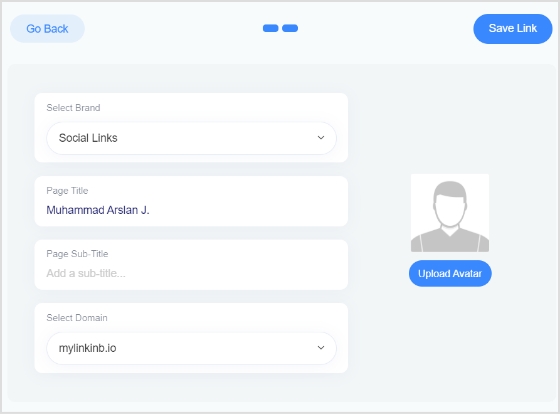
    Search retargeting targets users based on their search queries and the keywords they’ve used in search engines. This strategy allows you to reach users with specific interests related to their search behavior, and tailoring ads specifically to their interests and needs.

    5. Social retargeting: Boosting brand buzz & engagement on social media

    fb retargeting

    Social retargeting is a social media tactic to push the social media users who liked or engaged with your content on or off the social platform. This method is useful for staying in touch with users who have left your site and keeping your brand in their minds.

    It capitalizes on the extensive user base and engagement opportunities on social media platforms like Facebook, Instagram, and Twitter.
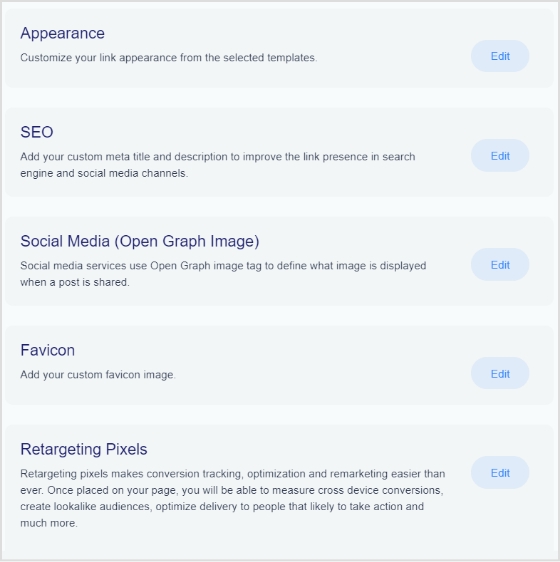
    Social retargeting involves displaying ads on social media platforms to users who have previously interacted with your brand. The goal is to reinforce brand awareness, encourage social media engagement, and drive conversions by reaching users in the social environment they frequent.
    6. Email retargeting: Rekindling interest with follow-up emails

    Think of email retargeting as a friendly reminder to users who got close to completing an action on your website but didn’t quite finish the job, like leaving items in a cart or abandoning a registration.

    american-giant-remarketing-email

    The main goal? Revive their interest. We send them a gentle nudge via email, reminding them about their incomplete task and perhaps sweetening the deal with incentives or useful information.

    The goal is to encourage them to return and complete the desired action.

    7. List-based retargeting: Personalizing content for your most engaged audience

    List-based retargeting is a savvy marketing strategy that centers around specific lists or databases, like your email subscriber list or customer database. This tactic empowers you to deliver meticulously personalized and precisely targeted ads to your existing contacts and customers, all while nurturing relationships with your loyal audience.

    The beauty of list-based retargeting lies in its ability to ensure that your marketing messages are finely tuned to the preferences and behaviors of those who are already well-acquainted with your brand and offerings. It’s a powerful tool in your marketing arsenal for maintaining and enhancing engagement with your established customer base.

    8. Conversion retargeting: Revive your prospects

    Conversion retargeting refers to targeting the audience who has taken an interest in your product or service and is probably on the fence to make the purchase. This strategy is effective for companies and entrepreneurs with longer sales cycles because it allows them to target customers who are familiar with your brand and are more likely to make a purchase.

    Related: Conversion pixels 101: Optimize your conversion strategy

    9. Cross-channel retargeting: Win with the omni approach

    Cross-channel retargeting is a form of retargeting that involves targeting the audience on another platform using the data. Advertisers use targeting data from several sources, which allows them to reach their target audience no matter what device they’re using.

    For B2B campaigns, fresh job postings data can also help identify companies that are actively hiring, expanding teams, or showing new demand signals.

    Moreover, it helps them reach the audience that visits their website or shows interest in the products.

    Note: There are several retargeting strategies that digital marketers implement over time, but all of them aren’t necessarily used at once.

    How does Replug help with retargeting?

    One of the key features of this top-notch link optimization platform is “Link Retargeting Pixel”. You just need to copy your pixel code from your favorite social platform to Replug’s link retargeting tool.

    Shorten a link for free, and with each click on the short link, you will add those visitors to your custom ad audience. Thus, helping you reduce ad costs and build custom audiences through social and cross-channel retargeting.

    How to create a perfect retargeting strategy?

    Retargeting ad campaigns require a strategic approach and discipline to run them successfully, which is why many growing SaaS brands prefer working with an experienced SaaS marketing agency to plan, execute, and optimize high-converting retargeting strategies. To reap the benefits of retargeting, it’s necessary to design a strong strategy.

    We have researched and combined a number of factors that should be considered when you are in the planning phase.

    Let’s go over these key factors.

    1. Capitalize on the existing customers

    Existing customers are a great asset to any business. Remarketing to existing customers is an excellent approach to get repeat business.

    Customers who have previously purchased from you can be shown personalized adverts, such as offering them a discount on their next purchase or displaying them relevant products they might be interested in.

    This technique works well because it focuses on those who are already familiar with your brand and are more likely to convert. It can also help boost customer lifetime value and promote customer loyalty.

    2. Target specific website URL visitors

    Most conversion optimization experts closely track their website visitors’ behavior. Visitors who have visited specific pages on your website are targeted with this retargeting tactic.

    For example, if someone visits your website but does not buy anything, you can retarget them with advertising relating to the product they looked at.

    The reason it works is that it targets those who have expressed an interest in a certain product or service on your website. It can also assist you in determining which pages on your website are most efficient at converting visitors.

    Boost ROI with branded URLs - Replug dashboard showing performance metrics and branded URL creation
    Boost ROI with
    branded URLs!

    Enhance your marketing campaigns by creating shareable, trackable, and fully multi-purpose customizable branded URLs.

    Try Replug for free

    3. Distribute the audience for better targeting

    Understanding the audience is a digital marketer’s superpower. The better you understand your website visitors, the higher the conversion – no doubt about it.

    Categorizing your retargeting audience into multiple categories based on their website behavior and creating personalized offers could make an impact.

    For instance, a digital marketer can separate site visitors who added the products to their cart but did not check out from those who visited your website but did not add anything to their cart.

    It gives the digital marketer a chance to send a follow-up email to these potential customers that are more likely to result in conversions.

    4. Try an action-based targeting strategy

    Since you already know that understanding your audience is the key to improving your conversion rate, the action-based targeting strategy will take your campaign to the next level.

    Experiment with an action-based targeting technique, which entails targeting people based on their behaviors on your website. For instance, you can retarget people who have downloaded a checklist or ebook through your opt-in bribe.

    It’s an effective retargeting strategy as it focuses on people who have expressed an interest in your product or brand.

    5. Improve on-page visitors’ engagement

    This strategy revolves around improving the user experience on your website in order to attract users to interact with your business.

    Brands, affiliate marketers, and digital marketers use opt-in forms to encourage people to sign up for their email newsletter, invite them to receive push notifications to the website visitors, and engage on social media to drive traffic to their website.

    Website visitors’ engagement has never been this easy. Now businesses can incorporate AI chatbots into their website to answer prospects’ queries.

    It surely increases on-page visitor engagement and boosts the likelihood of visitors converting into subscribers or paying customers.

    6. Reach out to a custom audience

    Custom audience isn’t an alien concept for digital marketers, especially Google and Facebook ad experts. This retargeting strategy involves developing a specific audience based on your existing consumer data.

    Identifying the audience who has already purchased from you and targeting them with personalized ads could be a game-changer. The custom audience plays a vital role in running ads to a specific audience instead of a wider audience.

    Most social media and advertising networks allow you to create or use your custom audience for campaign targeting.

    Brands and entrepreneurs try to make the most of their ad spend. Therefore, they try out different ways to advertise as well as find a more niche audience.

    One of the best ways to target a custom audience is to advertise to relevant email newsletter readers.

    7. A/B test your retargeting ad strategy

    Split-Testing-How-does-it-work

    A/B testing refers to the comparison of two versions to find out which outperforms the other. The A/B testing technique is used in link management, social media image ads, blog featured images, YouTube thumbnails, and several other places.

    Call to action

    It involves testing different versions of your retargeting ads to see which ones perform better. For instance, digital marketers test different ad copy, images, or calls to action to find out which one results in more clicks, engagement, or conversions.

    When it comes to benefits of A/B testing your retargeting strategy, you can easily comprehend which elements are most effective at driving conversions or getting more engagement.

    8 ways to make your retargeting strategy stand out

    retargeting hacks

    Developing a retargeting strategy involves a lot of brainstorming before you move forward. It’s necessary that you’re sure and confident about the route you’re taking to pull this off.

    To help you make better decisions regarding establishing and implementing a retargeting strategy, here are some tips in this regard:

    1. Retarget the audience with a discount:

    Discounts attract both prospects and existing customers. Create a discount offer and retarget the audience that has shown interest in your products.

    2. Target people opening your emails:

    The email newsletter data is crucial to your digital marketing success. Use your email newsletter statistics to drive interested readers to your offers. It could move the sales graph upward within a few days.

    3. Remind checkout abandoning visitors what they’re missing out on:

    When you have insights into your shopping cart abandonment, go find the email addresses of the visitors who left the checkout process and went ahead with the purchase. Reach out to them via email or social media ad and tell them what they have been missing out.

    4. Exclude converted visitors:

    Retargeting doesn’t necessarily mean retargeting everyone. Don’t bother the already converted audience right away. Instead, give it some time before you reach out to the same audience who has just bought your product or service. You won’t want to irritate your paying customers.

    5. Use influencers’ testimonials:

    Influencer marketing is an underpriced marketing strategy. A lot of brands use social media influencers to attract, engage, and convert like-minded audiences into paying customers. Furthermore, influencers’ testimonials about your brand could be used to remarket your product.

    6. Upsell to existing customers:

    Retargeting the existing audience could turn out to be a useful hack. Upselling means offering a product to the customer who is buying your product or has already bought one. Since these customers already trust you, they might as well pay attention to your offer.

    7. Retarget based on events:

    One of the retargeting strategies brands and entrepreneurs could try out is to remarket to the audience that has initiated a talk or participated in the event. For instance, if you host a free webinar on Facebook ads and a group of people sign up and show up webinar. You could later reach out to them via email or connect with them via a meeting scheduling tool and offering them your paid training on Google ads

    8. Exclude visitors spending less time on the website:

    Site engagement is a huge conversion factor. If your website has a high bounce rate, then it may have low visitor engagement. A retargeting campaign could also revolve around the visitors who spend more time on your website. All you need is to exclude the visitors who land on your website and leave within ten seconds or so.

    What are the KPIs for retargeting ads?

    Real-time Analytics

    Retargeting is an ad strategy in which advertisers target the audience who have previously interacted with a website. The purpose of a retargeting campaign is to reach out to the segment of the audience that is more likely to convert into paying customers.

    Advertisers use key performance indicators (KPIs) to assess the efficiency of retargeting campaigns. Here are some of the key performance indicators for retargeting ads:

    1. Cost per click (CPC):

    It’s an ad metric used to measure the cost of each click on an ad. Advertisers use CPC ads across different ad platforms.

    2. Cost per acquisition (CPA):

    It’s an advertising metric advertisers use to measure the cost of acquiring a new customer through ads.

    3. Click-through rate (CTR):

    Click-through rate is an engagement metric that measures the percentage of users who click on the ad after seeing it. CTR is used in email marketing, direct ads, PPC, and affiliate marketing – almost everyone in online marketing where clickability is a factor.

    4. Return on investment (ROI):

    ROI is a metric that calculates the revenue generated by a marketing or advertising campaign compared to the cost involved in it. ROI plays a vital role in setting the direction of the retargeting ads campaigns.

    5. Lead generation:

    Lead generation is a process in which a website visitor completes the action and it gets recorded as an event. For instance, a PDF ebook is downloaded by a visitor and offered as an opt-in bribe for an email newsletter. Retargeting ads could be intended to generate leads for a business.

    6. Abandon cart rate:

    It’s a metric that measures the number of website visitors who abandon their shopping carts after visiting the sales page and starting the buying process.

    7. Conversion rate:

    It’s one of the discussed sales metrics in the digital marketing world. The conversion rate measures the percentage of website visitors who take the desired action and complete the transaction. It could be a sign-up to a newsletter, buying a product, or downloading a file.

    These are some of the most commonly used key performance indicators in digital marketing. Therefore, these KPIs have a significant role in making a retargeting ad campaign a success.

    What are the pros and cons of retargeting?

    Retargeting advertising strategy has been around for a while. No wonder more and more advertisers are adopting this ad strategy, which makes it worth paying attention to for everyone learning digital marketing.

    Let’s discuss the pros and cons of retargeting:

    Pros of retargeting

    1. Better conversion rate:

    Targeting website visitors who have shown some interest in your products takes you one step further. The reason is that the chances of conversion increase as they have already interacted with the brand. Most brands are likely to see a better conversion rate when retargeting to an existing audience.

    2. Brand positioning:

    Brand positioning means how a brand positions itself in the customers’ minds. Advertising to potential customers who have seen your products before creates brand recognition. A lot of customers take action when they see an offer multiple times, especially when there is an urgency involved in the offering.

    3. Sifting the audience:

    When a brand retargets to a specific audience, it sifts through a large portion of the population and focuses on the segment of the audience that is more likely to convert. No doubt that retargeting reduces ad wastage on audiences that may take any action on your offer.

    4. Increase the ROI:

    One of the perks of a retargeting campaign is that it double-downs on a specific audience, which leads to higher returns on investment. Such an outcome may not be possible with broad audience targeting.

    5. Personalized offering:

    Tailoring the offer for a specific audience leads to more attention through clickability, engagement, and conversion. One of the benefits of retargeting is to tailor ads based on users’ past interactions. It helps advertisers provide a relevant offer that resonates with the audience.

    Cons of retargeting

    1. Learning curve:

    One of the biggest disadvantages of retargeting is that it has a steep learning curve. A beginner advertiser can’t start a retargeting campaign out of the blue. It does take time for a newbie to learn this advertising technique before this person finally hits the bullseye.

    2. Limited ad reach:

    Since retargeting is all about focusing on a specific group of audience, it could potentially decrease the overall ad reach. In some cases, retargeting could significantly decrease the revenue if the offer isn’t ideal or the retargeting campaign settings aren’t spot on.

    3. Dependency factor:

    Retargeting can surely turn things around if done right. However, it’s dependent on external forces, for instance, user behavior is a huge factor that sets the direction for a retargeting campaign. So retargeting campaign’s effectiveness relies on how users take action or behave on a specific platform, which might be an issue for some people.

    4. Potential ads overexposure:

    One of the cons of retargeting ads is that they’re shown to the audience over and over again. The chances are, that some of them get annoyed by the ads and decide not to see that ad again. It could potentially affect the reach of your retargeting ad campaign.

    FAQs about retargeting

    Let me answer some of the popular questions about retargeting:

    Is retargeting cheaper than advertising?

    The likelihood of a retargeting campaign being cheaper than normal advertising is high because a normal ad campaign is broader in targeting as compared to focused targeting in a retargeting campaign.

    What are the channels for retargeting?

    There are various channels for retargeting, such as:

    – Facebook ads
    – Google ads
    – Quora ads
    – LinkedIn ads
    – Adroll ads

    Which audience is used for retargeting?

    A retargeting campaign is intended for the audience that has already visited our website but never converted just yet.

    What is a good CTR for retargeting ads?

    A good CTR varies from industry to industry. However, it’s been seen that a good CTR for online ad campaigns is between 1% to 3%.

    What is negative retargeting?

    A negative remarketing campaign means excluding a segment of the audience from the retargeting campaign or creating an ad in the campaign that won’t be displayed to some of the members of the campaign.

    Is retargeting inbound or outbound?

    Any form of online advertising is basically an inbound campaign. Since retargeting is running ads to a specific audience, it’s safe to say that retargeting is inbound.