In today’s digital age, keeping your website content fresh and engaging is crucial to attracting and retaining visitors. With Replug’s user-friendly platform, you can effortlessly add an RSS Feed Widget to your website, ensuring that your audience stays updated with the latest industry news and trends.
In this guide, we’ll walk you through the step-by-step process of adding an RSS Feed Widget with Replug. Whether you’re a seasoned marketer or just starting your online journey, you’ll find our guide easy to follow and implement. Let’s get started!
What is an RSS feed widget?
An RSS feed widget is a technique used to display dynamic content from RSS (Really Simple Syndication) feeds on a website or platform. RSS feeds allow websites to publish frequently updated content in a standardized format, which can then be easily consumed and displayed by RSS feed widgets.
These widgets typically appear as boxes or sections on a webpage, showing headlines, summaries, or snippets of articles, blog posts, news updates, or other types of content from external sources. They can be customized in terms of design, layout, and functionality to seamlessly integrate with the look and feel of a website.
How to add an RSS feed widget in Replug?
Replug is a powerful URL tracking and link optimization platform designed to boost your online presence. With this efficient link shortener you can effortlessly brand, track, retarget, and A/B test links to maximize their impact.
Among its many features, adding an RSS Feed Widget stands out as a fantastic way to keep your audience informed and engaged with the latest updates from your industry.
A complete link management solution
for marketing professionals & agencies.
Try Replug for free
Here’s how to an RSS feed widget using Replug:
Step 1: Begin by logging in to your Replug account. If you don’t have one yet, you can easily sign up for an account for free.
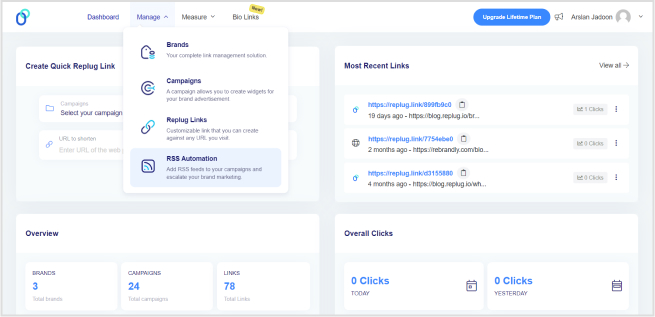
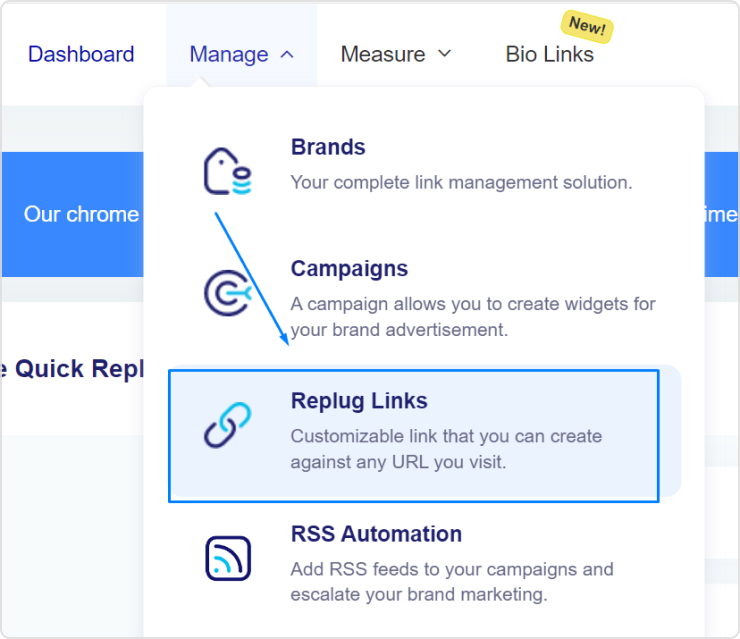
Step 2: Access your Replug account and head over to the dashboard area. Hover your cursor over the “Manage” tab and select “RSS Automation” from the dropdown menu.
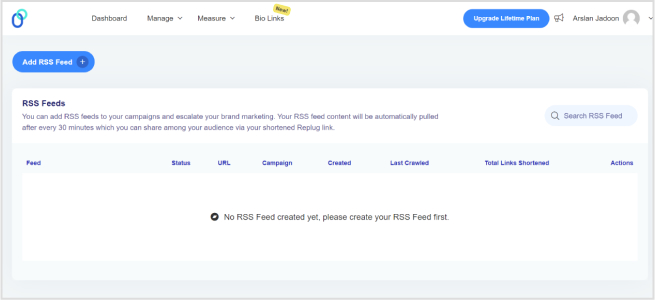
Step 3: Once in the RSS Automation section, locate the “Add RSS Feed” button situated at the top left corner of the screen. Click on this button to proceed.
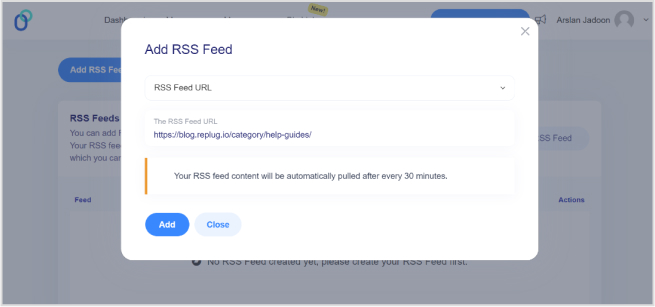
Step 4: A pop-up window will appear prompting you to select your campaign and enter the RSS feed URL. Choose your desired campaign and paste the RSS feed URL into the designated field. Click “Add” to finalize this step.
After completing these steps, your RSS feed will be successfully created. You can then copy the RSS feed URL provided and add it to any third-party platform.
Here’s how you can find the RSS URL for various website platforms using Replug’s RSS Feed widget:
WordPress Website:
Simply add “feed” to the end of your URL. For example: https://yourdomain.com/blog/feed
Blogger Website:
Append “feeds/posts/default” to the end of your URL. For example: http://blogname.blogspot.com/feeds/posts/default
Tumblr Website:
Add “rss” to the end of your Tumblr URL. For example: http://example.tumblr.com/rss
Wix Website:
Generate a Wix RSS Feed URL by adding “blog-feed.xml” to the end of your URL. For example: https://www.yourdomain.com/blog/blog-feed.xml
Squarespace Website:
Find your Squarespace RSS Feed URL by adding “?format=rss” to the end of your URL. For example: https://sitename.squarespace.com/blog?format=rss
By following these steps, you can easily discover the RSS feed links for your website, enabling you to integrate them seamlessly with Replug’s RSS Feed widget and enhance your content distribution strategy.
A complete link management solution
for marketing professionals & agencies.
Try Replug for free
FAQs
What is an RSS feed widget?
An RSS feed widget is a tool that allows you to display dynamic content from RSS feeds on your website. You would want to use one to keep your website’s content fresh and engaging by automatically updating it with the latest news, blog posts, or other updates from your favorite sources.
How do I add an RSS feed to my website’s widget area?
To add an RSS feed to your website’s widget area, you typically need to obtain the RSS feed code from your feed provider and then embed it into the widget area using your website’s content management system or by directly editing the website’s HTML code.
How often does the RSS feed widget update with new content?
The frequency of updates for an RSS feed widget depends on the settings configured by the widget provider and the update frequency of the subscribed RSS feeds. Typically, RSS feed widgets update with new content as soon as it becomes available in the subscribed feeds.
Are you looking to enhance the effectiveness and branding of your shared links?
Learn how to make your links more descriptive, memorable, and on-brand to boost engagement and drive results. Whether you’re a marketer aiming to boost click-through rates or a content creator seeking to strengthen your online presence, using Replug to rename a link can transform your digital strategy.
Let’s find out how to rename links in no time!
Rename your link: What does it mean?
“Rename your link” refers to the action of changing the default or original URL of a webpage to a more personalized and descriptive one. This process involves customizing the link’s text to better reflect its content, purpose, or target audience.
By renaming a link, you make it more informative, engaging, and relevant to those who come across it. This can lead to higher click-through rates, improved user experience, and enhanced branding for your content or website.
In essence, renaming your link is about optimizing its visibility and impact in the digital landscape.
How to rename links using Replug?
Replug.io is a comprehensive link management and tracking platform designed to empower marketers, content creators, and businesses to maximize the effectiveness of their shared links. With it, you can create, customize, and track the performance of your links across various channels.
Here’s how to rename links using Replug:
Step 1: Sign in to Replug if you already have an account, or create one if you’re new to Replug.
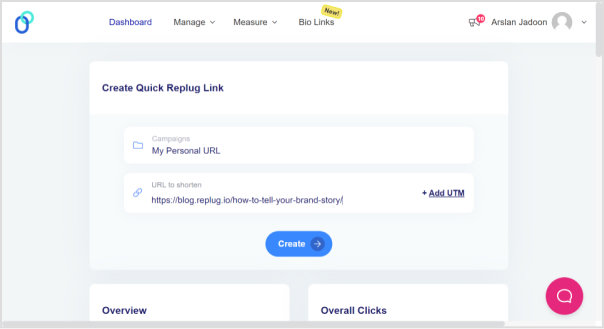
Step 2: Select the campaign you want to associate your link with or create a new campaign if needed.
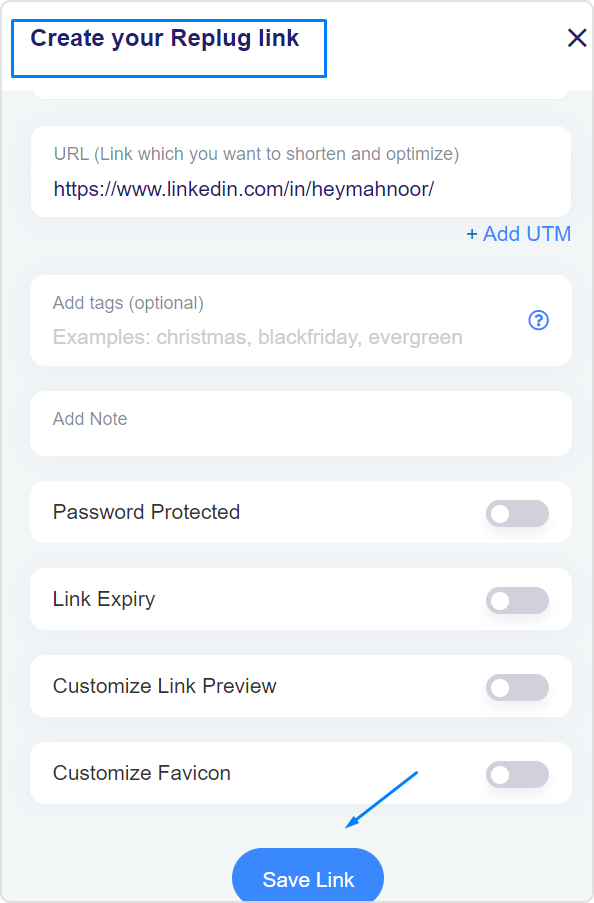
Step 3: Enter the link in the “URL to shorten” section below “Select your campaign” and click “Create”. Optionally, add UTM parameters to track link performance.
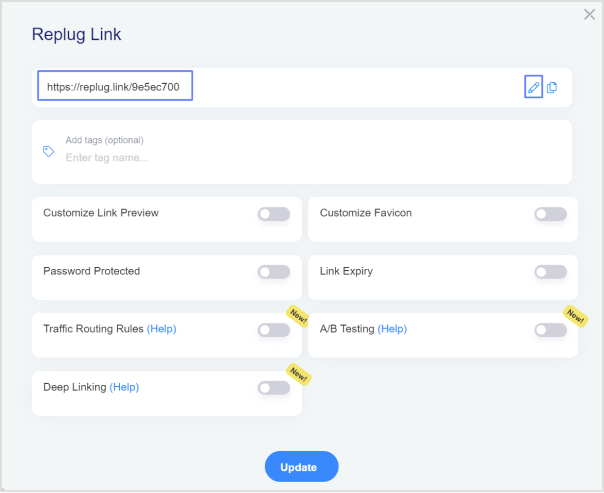
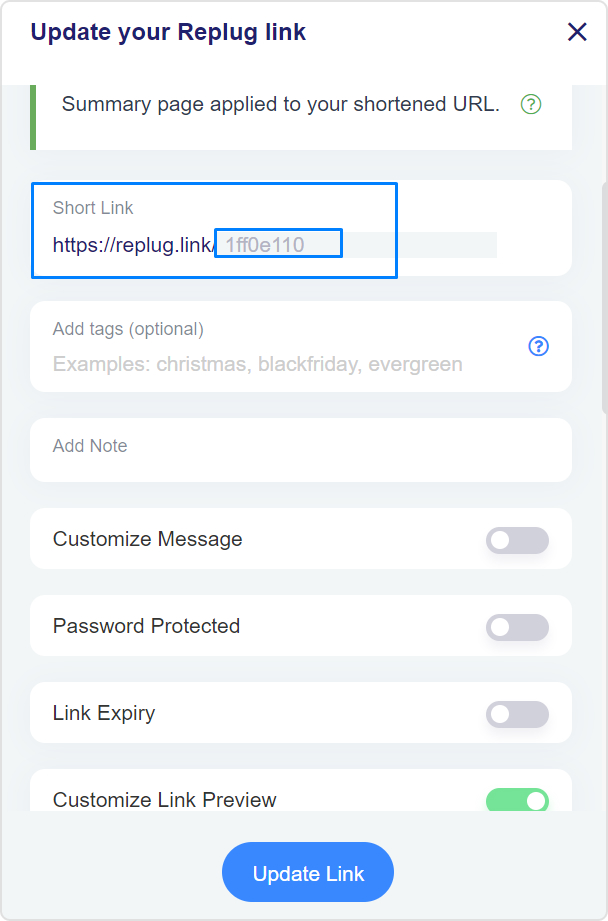
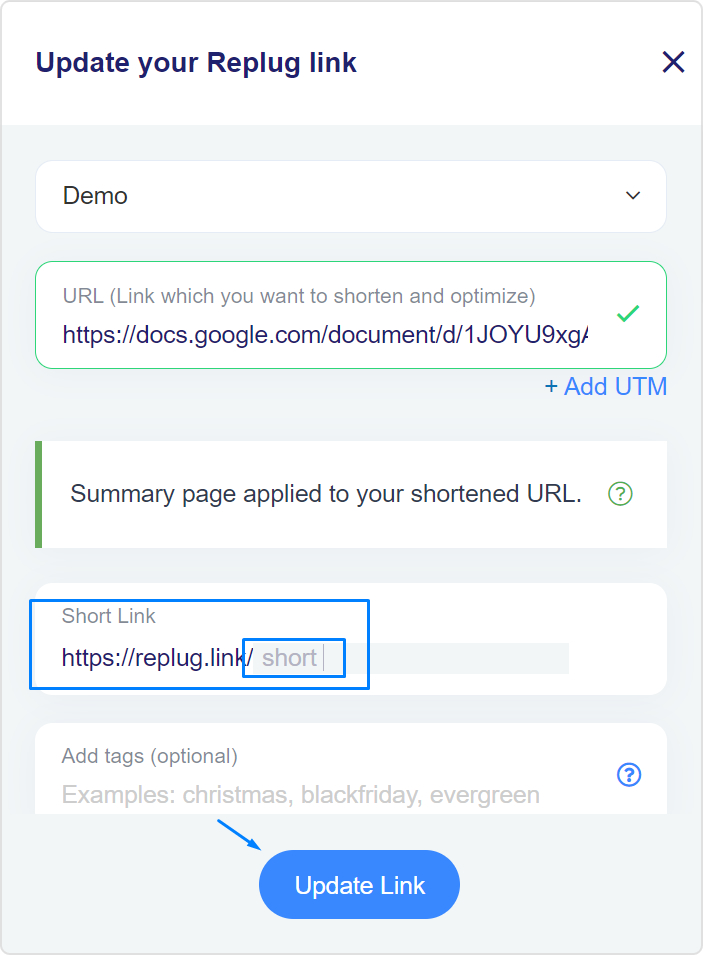
Step 4: Your link will be shortened. Click the edit icon and type the URL slug you want to use in the link.
Step 5: Once you’ve customized the link, copy the new shortened URL and click “Update”. Your renamed link is now ready to be shared.
A complete link management solution
for marketing professionals & agencies.
Try Replug for free
How to rename links in Google Docs?
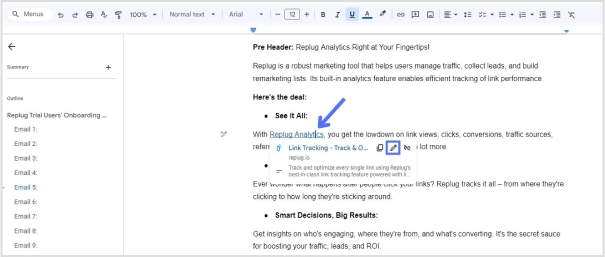
Step 1: To begin, open your document and navigate to the link you want to rename. Simply click on the link to reveal the link options.
Step 2: After clicking on the link, a menu with options such as Copy link, Edit link, and Remove link will appear, along with a preview of the linked webpage or document. To rename the link, locate and click on the “Pencil” icon.
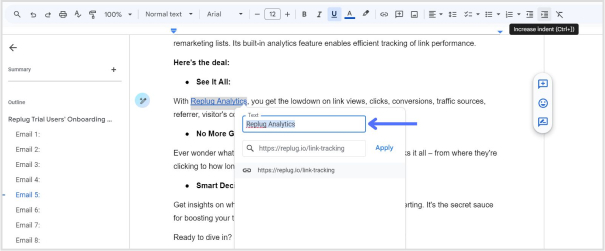
Step 3: In the editing menu, you’ll see three fields: the text field, the URL field, and the clickable URL. Click on the “Text” field to access the text editing mode.
Step 4: Once you’ve clicked on the “Text” field, you can edit the text of the link. Use the backspace key to delete the existing text and type in the new text to rename the link according to your preference.
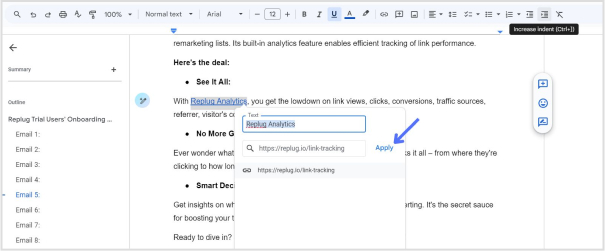
Step 5: After you’ve renamed the link, click on the “Apply” button to confirm the changes. Your link will now be updated with the new text, and the changes will take effect in your Google Docs document.
Using Replug to manage your links offers several advantages:
Link optimization: Replug offers a top-notch tool to create short link with absolute precision. Besides, it provides various options to customize and optimize your links, including link shortening, branding, and tracking features. This helps to make your links more visually appealing, recognizable, and effective in driving engagement.
Branding: With Replug, you can create custom-branded links that reflect your brand identity, increasing brand visibility and credibility when sharing content across different channels.
Performance tracking: Replug offers detailed analytics and insights into link performance, allowing you to monitor metrics such as click-through rates, geographic location of clicks, and conversion rates. This data enables you to assess the effectiveness of your link-sharing efforts and make informed decisions to optimize your strategy.
Call-to-action integration: Replug allows you to add customizable call-to-action overlays to your shared links, directing traffic to specific actions or landing pages. This feature enhances the effectiveness of your links in driving conversions and achieving your marketing goals.
Link rotation: Replug’s link rotation feature distributes traffic evenly among multiple destination URLs, enabling you to conduct A/B testing or distribute traffic to different landing pages based on predefined rules.
A complete link management solution
for marketing professionals & agencies.
Try Replug for free
Frequently asked questions
Why should I rename my links?
Renaming links can make them more descriptive, memorable, and aligned with your brand. This can improve click-through rates, enhance branding, and provide a better user experience.
Can I track the performance of renamed links?
Yes, Replug provides detailed analytics and insights into the performance of your renamed links, including click-through rates, geographic location of clicks, and more.
Can I use Replug to rename links in bulk?
Yes, Replug offers features for bulk link management, including renaming multiple links simultaneously, making it efficient for larger-scale projects or campaigns.
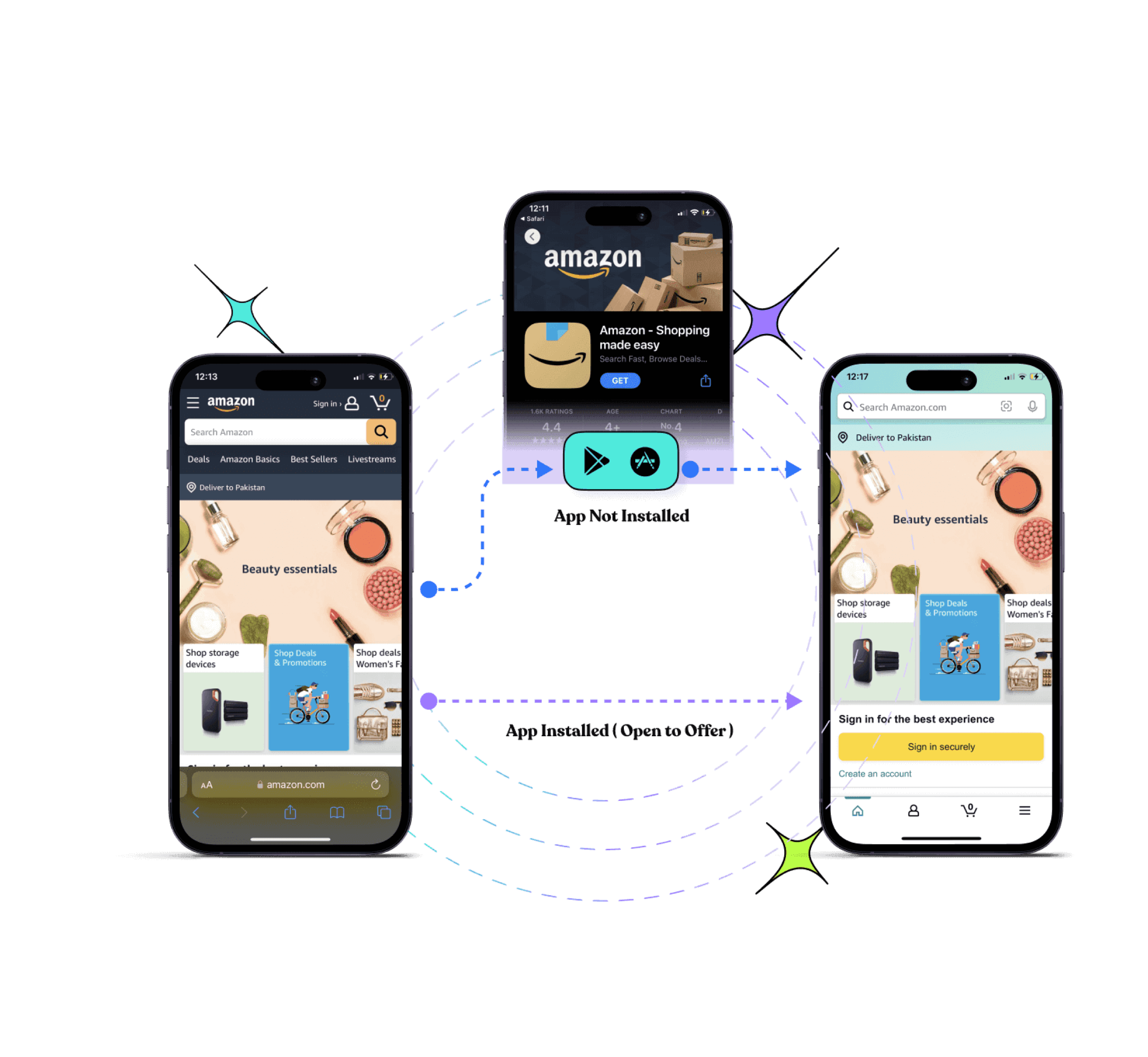
Deep and deferred deep links are often used in mobile app development and marketing. Deep links serve as navigational anchors, seamlessly directing users to specific content within an app. On the other hand, deferred deep links introduce a layer of versatility by preserving context even when the app is not installed.
For marketers and developers, our link optimization platform makes it simple to create and manage deep or deferred deep links, all from a single dashboard.
This duo’s significance extends beyond mere technicalities, impacting how developers and marketers strategically engage with their audience. Whether enhancing your app development strategy or developing marketing strategies, understanding these concepts is the key to unlocking your app’s potential.
Let’s get straight to it!
Drive more clicks, conversions, and app installations by deep linking
to your favorite platforms.
Try deep links for free
What are deep links?
Deep links are URLs that lead directly to specific content or pages within a mobile app, bypassing the app’s homepage. They enhance the user experience by allowing seamless navigation to targeted information.
What are deferred deep links?
Deferred deep links, like deep links, lead to specific app content but add the capability to retain context even when the app is not installed. Users are directed to the intended content after installing the app, enabling a personalized and uninterrupted experience.
Deep link vs. deferred deep link: What’s the difference?
Deep Link:
Immediate Navigation: Deep links provide immediate access to a specific page or content within a mobile app. Users are directed straight to the desired information, bypassing the app’s homepage.
Installed App Requirement: For a deep link to function, the corresponding app must already be installed on the user’s device. It optimizes user engagement and streamlines navigation within the app.
Deferred Deep Link:
Context Retention: One key differentiator is the ability of deferred deep links to preserve context, even if the app is not installed. This means that users clicking on a deferred deep link can be directed to the intended content after installing the app.
Enhanced Onboarding: Deferred deep links are particularly useful for onboarding new users. They ensure a smooth transition from the initial interaction, such as clicking a link, to a personalized experience within the app.
Installation Flexibility: Unlike basic deep links, deferred deep links accommodate scenarios where the app is not yet on the user’s device, offering a more versatile approach to engaging users.
Drive more clicks, conversions, and app installations by deep linking
to your favorite platforms.
Try deep links for free
How do brands use deferred deep links?
Brands leverage deferred deep linking in various strategic ways to enhance customer acquisition and streamline the user experience, ultimately boosting customer satisfaction. Here are common use cases:
1. Placement on the company website:
Brands strategically place deferred deep links on their official websites and banner advertisements. This not only encourages users to explore promotions but also facilitates a seamless transition for those interested in downloading the app. By providing direct access to specific content or promotions within the app, brands attract and engage new customers more efficiently.
2. Integration in social media ads:
Integrating deferred deep links into social media advertising is a powerful strategy for brands. Whether through sponsored posts or targeted ads, these links guide users directly to relevant content within the app. This approach proves highly effective in capturing the attention of potential customers on popular social platforms, contributing to increased app downloads.
3. Inclusion in e-mail marketing campaigns:
Brands enhance their e-mail marketing campaigns by incorporating deferred deep links. This integration ensures a smoother journey for users, allowing them to seamlessly transition from an email promotion to the app. By providing direct access to specific offers or content, brands increase the likelihood of user interaction with the app, thereby strengthening customer engagement.
4. Integration in messages and notifications:
Including deferred deep links in SMS campaigns and push notifications serves as a promotional tool within other applications. This not only increases visibility but also provides potential users with easy access to download the app, encouraging quick and convenient adoption.
Drive more clicks, conversions, and app installations by deep linking
to your favorite platforms.
Try deep links for free
Deferred Deep Linking Best Practices
To optimize your marketing campaigns with deferred deep links, adhere to these three straightforward best practices:
1. Personalization: Tailor links for each user
Create individual, tailored deferred deep links for users to enable highly targeted marketing. Whether re-engaging lapsed users or personalizing onboarding experiences for new downloads, utilize user-specific links to enhance engagement and drive conversions. For instance, offer exclusive discounts to users who dropped off after ‘add-to-cart,’ sending personalized links via email or SMS to increase the likelihood of completing the checkout process.
2. Attribution: Measure success with data
Leverage attribution data provided by deferred deep links to measure the success of your campaigns. By attributing user and conversion data to specific channels and campaigns, you gain insights into audience behavior. This information enables informed decision-making, helping you understand which campaigns are most effective and allowing for strategic adjustments over time. Design, experiment, measure, and refine your campaigns based on actionable insights.
3. Brand consistency: Stay on brand
Maintain brand consistency across all aspects of your deep linking strategy. Whether creating links automatically via API or through a user interface, ensure that your deferred deep link provider supports the seamless integration of your brand elements. Consistent branding enhances user trust and reinforces your app’s identity throughout the user journey.
Elevate your app’s success with Replug’s deep links
Transform customer journeys seamlessly with Replug. Generate deep links within minutes, i.e., the key to uninterrupted in-app navigation. Say goodbye to disengagement and customer dropouts, and hello to a flawless online experience that keeps users hooked from start to finish!
Smooth navigation: Prevent disengagement with uninterrupted in-app navigation.
Boost discovery: Whether installed or not, guide users effortlessly to desired in-app content.
Effortless traffic drive: Use a single deep link for emails, ads, QR codes, banners, and social media to channel users to the relevant app store.
Conversion funnel streamlining: Drive engagement and sales by guiding users directly to specific products in your online store.
Re-engage users: Utilize deep links in push notifications to bring back existing app users for targeted content access.
Cross-app connectivity: Create instant deep links for popular apps, enhancing user experience and engagement.
Whether you need to deep link directly to in-app content or simply shorten a link, Replug takes care of both, making link management effortless while preserving deep-link functionality.
Drive more clicks, conversions, and app installations by deep linking
to your favorite platforms.
Try deep links for free
FAQs
How does a deep link differ from a regular link?
While a regular link typically opens the app’s homepage, a deep link takes users directly to a specific page or content within the app.
What are the benefits of using deep links?
Deep links enhance user experience by providing targeted navigation within an app, improving user engagement and retention.
How can brands use deep links for marketing?
Brands can incorporate deep links in various channels like websites, social media, emails, and notifications to drive traffic, enhance user experience, and improve conversions.
Can deep links be used for re-engagement?
Yes, deep links are effective for re-engagement. Brands can use them in push notifications to bring existing users to specific content within the app.
Do users need to have the app installed for deep links to work?
For basic deep links, yes, the app needs to be installed. However, deferred deep links allow users to be directed to specific content even if the app is not yet installed.
How do deep links contribute to app discoverability?
Deep links drive traffic to apps from various sources, making them a valuable tool for enhancing app discoverability and attracting new users.
Can deep links be used for cross-app connectivity?
Yes, deep links can be created to connect users to specific content within various apps, facilitating a seamless and efficient user experience.
Welcome to the world of deferred deep linking – the game-changer in the digital marketing realm. Ever wondered how businesses seamlessly guide users to their apps instead of websites? That’s where this smart strategy steps in, making the transition smooth and rewarding.
This guide is your shortcut to understanding the power of deferred deep linking. It’s the GPS for users, leading them straight to your app, slashing costs, and skyrocketing engagement. Consider this your ticket to a world where customer loyalty and revenue soar effortlessly. Let’s dive in!
What is deferred deep linking?
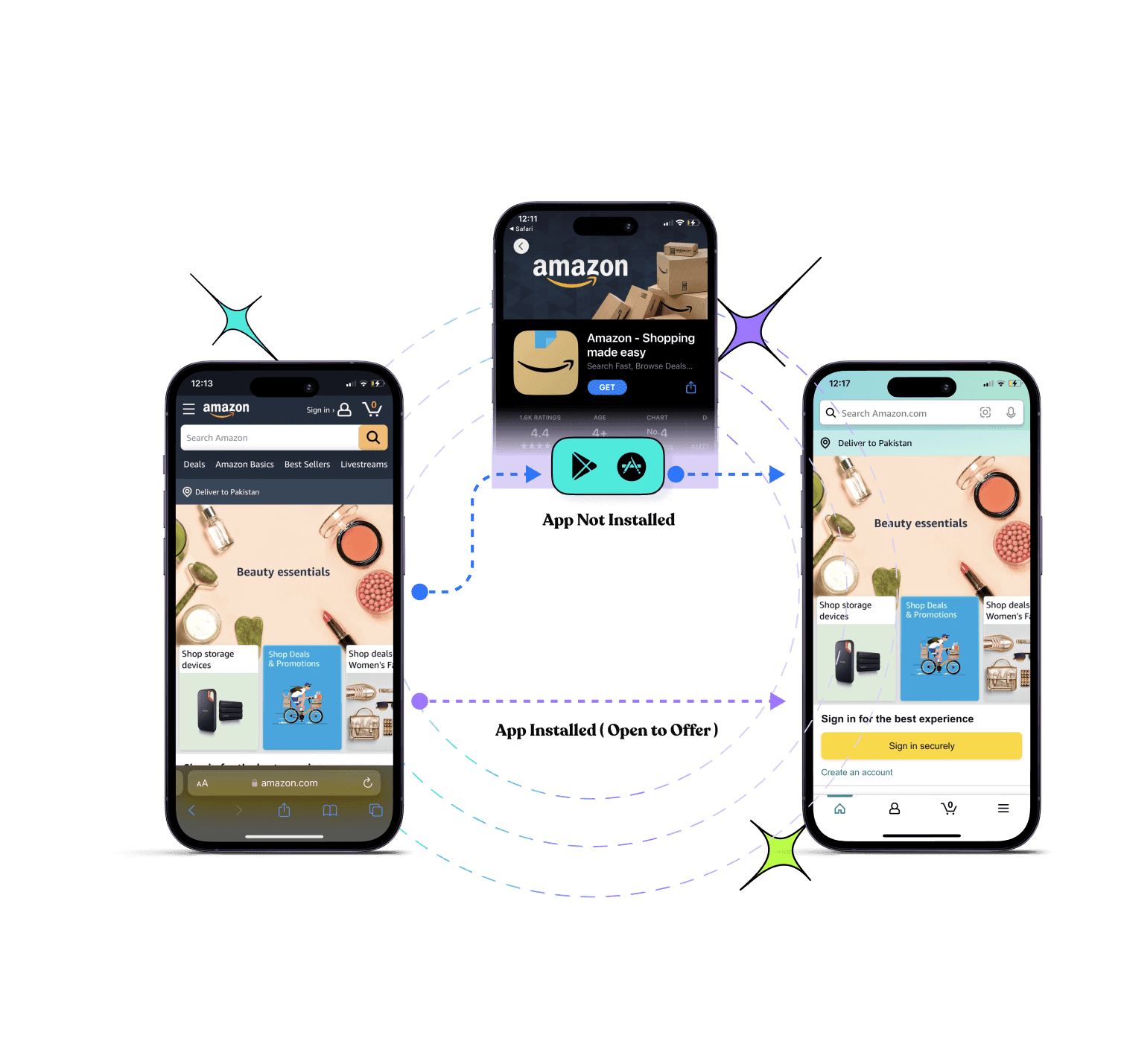
Deferred deep linking is a technique used in mobile app development to handle links in a way that preserves context even when the app is not installed. When a user clicks on a deferred deep link, it not only opens the app but also navigates them to the exact content or location intended by the link.
This functionality is especially valuable when enticing users to download an app. Even if the app is not yet on their device, the link ensures that users are directed to the intended content once the app is installed.
How does deferred deep linking work?
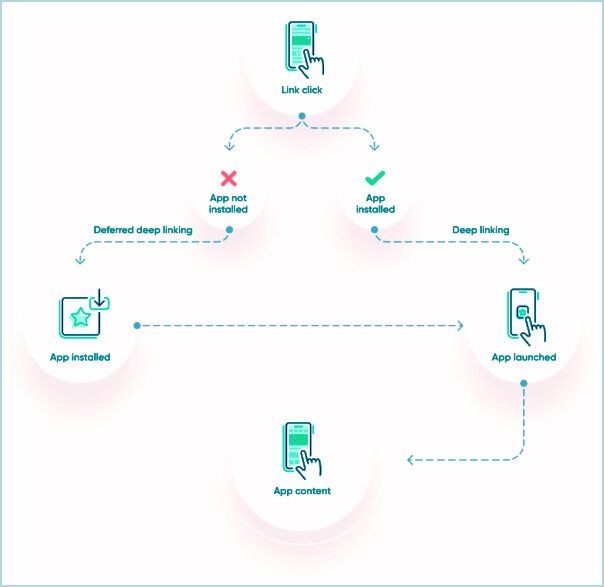
Deferred deep linking operates behind the scenes, creating a seamless user experience by leveraging a deep linking engine—a combination of a web platform and a software development kit (SDK) integrated into your app.
Here’s a breakdown of the process:
Step 1: User clicks the link:
The journey begins when a user clicks on a deferred deep link.
Step 2: Deep linking engine analysis:
The deep linking engine comes into play, analyzing whether the user already has the app installed on their device.
Step 3: Two possible scenarios:
App installed:
If the app is already installed, the engine smoothly directs the user to the relevant page within the app. This is the standard deep-linking scenario.
App not installed:
If the app is not yet installed, the magic happens. The engine guides the user to the appropriate app store for installation.
Step 4: App Store installation:
The user, now in the app store, downloads and installs the app.
Step 5: Return to the deep linking engine:
After installation, the deep linking engine takes charge again, remembering the intended destination from the original link.
Step 6: Finally, the relevant page:
The user is directed to the originally intended page or content within the app. This seamless transition completes the deferred deep-linking process.
Unlocking sales through mobile apps just got a whole lot simpler with Replug. We’re not just a technology partner; we’re your sales ally. How? We take care of the nitty-gritty of deferred deep linking, ensuring it works seamlessly for you. You won’t find a better link management platform online at present than Replug!
Picture this: no tech headaches, just a smooth ride to focus on what truly matters—creating a stellar user experience, amping up engagement, and supercharging your mobile app strategy for maximum sales impact. Ready to turn those clicks into serious cash? Let’s make it happen with this efficient deep link generator!
Drive more clicks, conversions, and app installations by deep linking
to your favorite platforms.
Try deep links for free
How to create deferred deep links with Replug?
Creating deferred deep links with this amazing short URL generator free is a breeze! Here’s a simple step-by-step guide:
Step 1: Log in to your Replug account or sign up for free if you’re new.
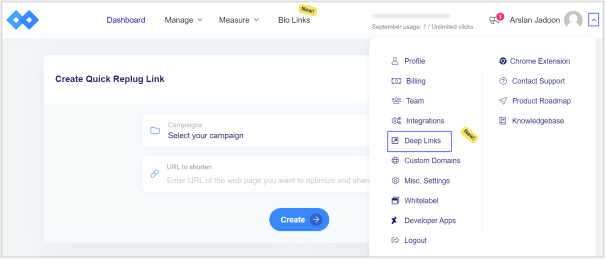
Step 2: On the main dashboard, spot the “drop-down icon” in the top right corner. Choose “deep links” from the list.
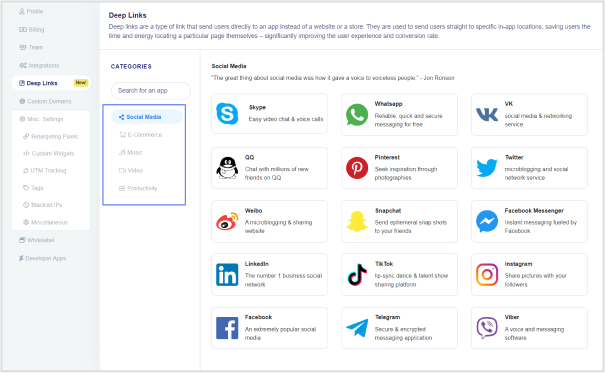
Step 3: Pick a category on the deep links page. Options include Social Media, E-Commerce, Music, Video, and Productivity.
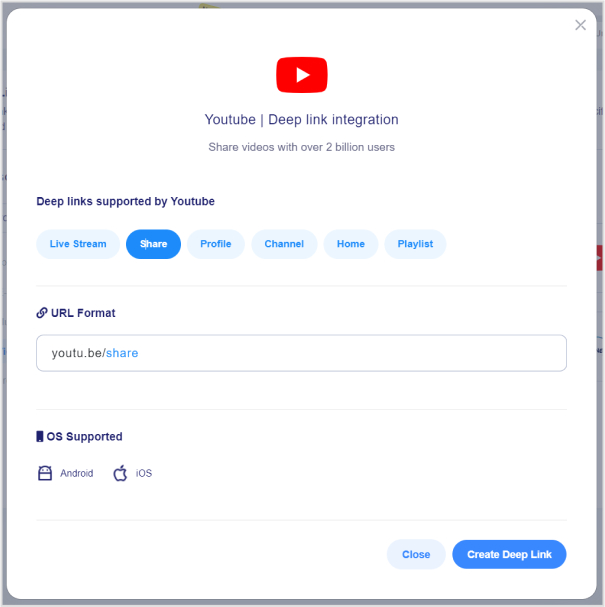
Step 4: Generate your deep link for the selected platform. A click on this link will directly open the desired content in the corresponding app (e.g., YouTube). Choose the specific option (e.g., video or share) and hit “create deep link.”
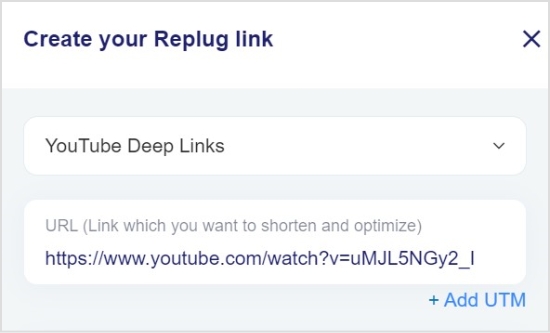
Step 5: You’ll land on the “Replug link” page. Name your “campaign” and paste the URL in the “URL field.”
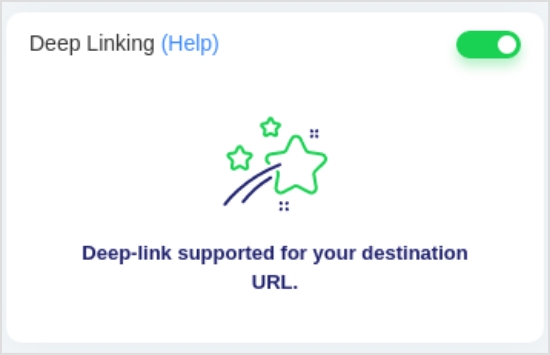
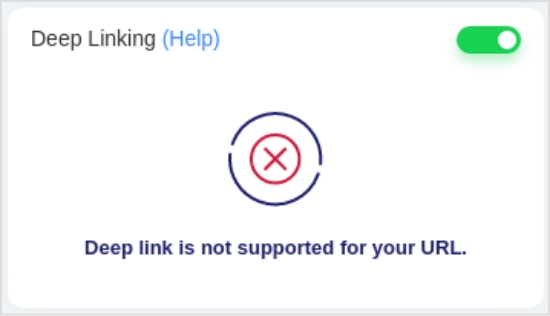
Step 6: Toggle the Deep Links switch to enable. An indicator will confirm if the destination URL is Deep Link compatible.
Note: If the URL can’t be used as a Deep Link, you’ll be notified.
Step 7: Click “save link,” and voila! Your deep link with the deep linking feature is saved and ready to be shared. Easy as that!
Drive more clicks, conversions, and app installations by deep linking
to your favorite platforms.
Try deep links for free
Why are deferred deep links important?
Deferred deep links hold a pivotal role in-app marketing strategies, offering a range of benefits that significantly impact user acquisition, engagement, and overall user experience.
Here’s why they are crucial:
App user acquisition boost:
Deferred deep links act as a powerful tool for increasing app install rates. They create a frictionless journey for users, allowing them to seamlessly transition to the app, preview its value, and make an informed decision to install.
Enhanced app user engagement:
Marketers leverage deferred deep links to precisely target users with tailored content or exclusive offers post-installation. This targeted approach significantly elevates user engagement, leading to higher conversion rates and a more interactive app experience.
Improved user experiences:
The ability of deferred deep links to guide users directly to the specific page or feature they intended to visit enhances overall user satisfaction. This tailored approach contributes to improved user retention, as users find what they are looking for effortlessly.
Personalization potential:
Deferred deep links carry valuable data and context through the app install process. This capability facilitates personalized onboarding experiences and allows for the delivery of content tailored to individual user preferences, enhancing the overall personalization of the app.
Measurement and attribution insights:
One of the key advantages of deferred deep links lies in the valuable data they provide. Marketers gain insights into the effectiveness of their marketing campaigns and app referral sources. This data helps in understanding which strategies and channels are driving the most app users, enabling informed decision-making and optimization of marketing efforts.
In essence, deferred deep links are not just links; they are a strategic asset that propels app marketing efforts, fostering a seamless and personalized user journey from acquisition to engagement. Their multifaceted benefits contribute to the success of app marketing campaigns and the long-term satisfaction of app users.
Drive more clicks, conversions, and app installations by deep linking
to your favorite platforms.
Try deep links for free
FAQs
What is deferred deep linking?
Deferred deep linking is a strategy in mobile app marketing that directs users to specific content within an app, even if the app isn’t installed. It differs from regular deep linking by preserving context, allowing users to land on the intended content after app installation.
Why is deferred deep linking important for mobile app marketing strategies?
Deferred deep linking is crucial for enhancing user acquisition, engagement, and overall experience. It provides a seamless transition to the app, previews its value pre-installation, and targets users with personalized content post-installation.
How can deferred deep links enhance app user acquisition?
By offering a preview of app content pre-installation, deferred deep links reduce friction, increasing app install rates. Users get a glimpse of the app’s value, encouraging them to download and explore further.
We all know the struggle of long and ugly web addresses.
Do you ever dream of a tool that allows you to change your website address? How cool would that be?
That’s why we trust Replug!
But what about changing the web address with a branded domain?
It surely exudes professionalism and legitimacy. It shows you’re serious about your online presence and invested in the long game.
Plus, it tells visitors you’re not some fly-by-night operation – you’re here to stay and slay!
So, let’s explore how you can change the website address using a branded domain.
But before that, do you know what a web address is?
What is a website address?
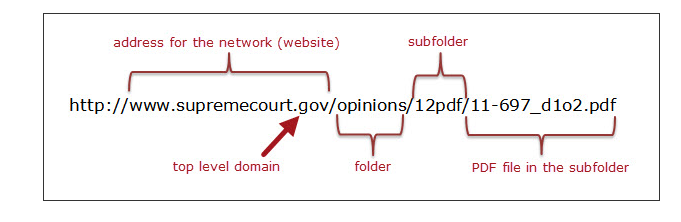
A web address, often referred to as a URL (Uniform Resource Locator), is the specific location of a resource on the internet. It comprises various components, including the protocol (like “https://”), domain name (e.g., www.yourwebsite.com), and additional path information (known as the slug).
Parts of a website address
Protocol/Scheme: This is the beginning part of a website address and typically starts with “http://” or “https://”. It defines the communication protocol used by the web browser to access the website.
Subdomain: This is an optional part that precedes the main domain name and is separated by a dot. For example, in “blog.example.com,” “blog” is the subdomain.
Domain Name: This is the main part of the website address and identifies the specific website. In “www.example.com,” “example” is the domain name.
Top-Level Domain (TLD): This is the last part of the domain and comes after the dot. Common TLDs include “.com,” “.org,” “.net,” and country-code TLDs like “.uk” or “.de.”
Path: The path indicates a specific location or page on the website. It comes after the domain name and is separated by slashes. For example, in “www.example.com/path/to/page,” “/path/to/page” is the path.
Query Parameters: These are optional parameters that come after a question mark (?) in the URL. They provide additional information to the website. For instance, in “www.example.com/search?q=term,” “?q=term” is a query parameter.
Fragment Identifier: The fragment identifier, often represented by a hash (#), points to a specific section within a webpage. It comes after the URL and is used to navigate to a particular section. For example, in “www.example.com/page#section,” “#section” is the fragment identifier.
A complete link management solution
for marketing professionals & agencies.
Try Replug for free
Distinguishing domain name & web address
The terms domain name, web address or website URL are often used interchangeably, but they have distinct meanings:
Think of your website as your house.
Your domain name is like your street address. It’s the unique identifier that tells people where to find your house in the whole neighborhood. (For example, 123 Main Street, Anytown, CA 90210). This address serves as the foundation of your online identity, which is why it is crucial to register your domain name carefully.
A web address or website URL is like a link to a specific room inside your house. It could be the front door (the homepage), the living room (a blog post), or even a specific shelf in the library (a specific product page).
Identifies a specific resource on the internet and specifies how to retrieve it.
Serves as a human-friendly label for the numeric IP address of a server.
Format
Complete URL including protocol, domain, and optional path/query.
Usually consists of subdomain, domain, and TLD.
Registration
Not registered; anyone can use any web address.
Must be registered and renewed through domain registrars.
Example Usage
Clicking a link in a browser or typing in the address bar.
Used in DNS to translate human-readable names into IP addresses.
DNS Resolution
Resolved by DNS to an IP address for server communication.
Resolved by DNS to an IP address for server communication.
Ownership
No ownership, can be used by anyone.
Owned by individuals, organizations, or businesses through registration.
Common TLDs
.com, .org, .net, .edu, .gov, etc.
.com, .org, .net, .edu, .gov, .io, .co, etc.
Difference between a website address, domain and a URL
Now let’s compare the above two terms with URL for more clarity.
Aspect
Definition
Example
Domain
The main part of a website address identifying a specific website.
In “www.example.com,” “example” is the domain.
Website Address
A broader term describing the location of a website, including multiple components like protocol, subdomain, domain name, TLD, path, query parameters, and fragment identifier.
In “https:// www.example.com/path/to/page?q=search#section,” the entire string is the website address.
URL (Uniform Resource Locator)
A specific type of website address providing the exact location of a resource on the internet, typically including the protocol, domain name, path, and optional components like query parameters and fragment identifier.
In “https:// www.example. com/page?q=search#section,” the protocol is “https,” the domain is “www.example.com,” the path is “/page,” the query parameter is “?q=search,” and the fragment identifier is “#section.”
Replug: All in one link management toolbox
Replug is an all-in-one link management platform that offers a comprehensive solution for managing your web links effectively. It goes beyond the basics, allowing you to enhance your links with call-to-action elements, retargeting pixels, and more. One standout feature is the ability to change your web address.
Let’s see how;
How to change a website address using Replug
To change a website address using Replug, follow these steps:
Sign in to your Replug account: If you don’t have an account, create one by visiting the Replug website.
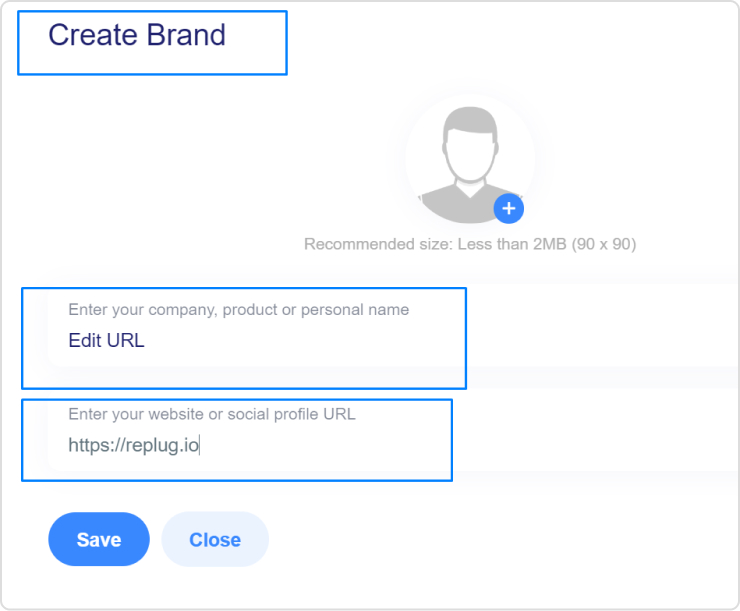
Create a Brand: Create the brand or use the one that you already have.
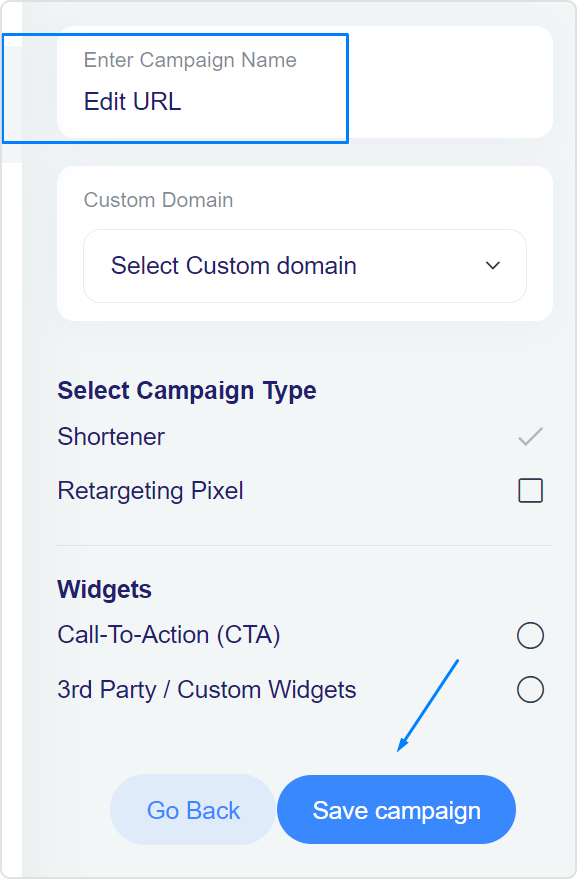
Choose the desired campaign: Select the campaign you want to edit or create a new one; if you don’t have one, you must create one first.
Edit the URL: In the Replug dashboard, paste your long URL into the “URL to shorten” field and click “Shorten.”
Customize the short URL: You can evenmake the short URL more user-friendly by adding a custom slug to the link.
Configure link settings: Set up any additional features, such as retargeting pixels or traffic routing, as needed.
Save the link: After configuring your link settings, save the link.
Now, here comes the moment we have promised: changing the website address with a branded domain using Replug!
Change website address with your branded domain
Making your website address look pro with a branded domain is a smart move! Let’s break it down step by step – it’s easier than you think!
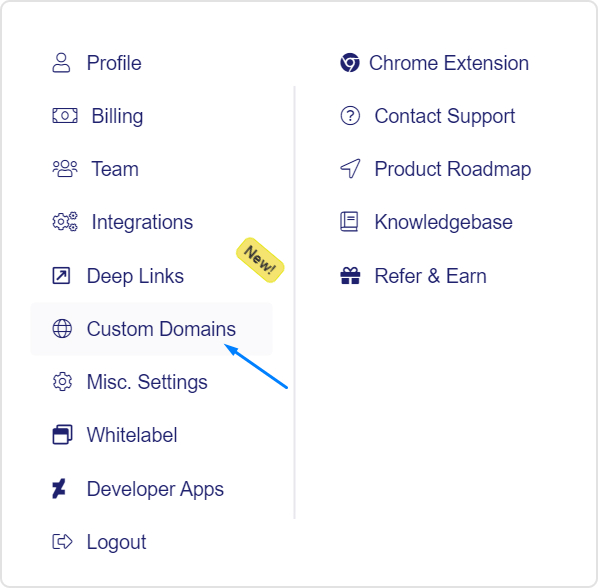
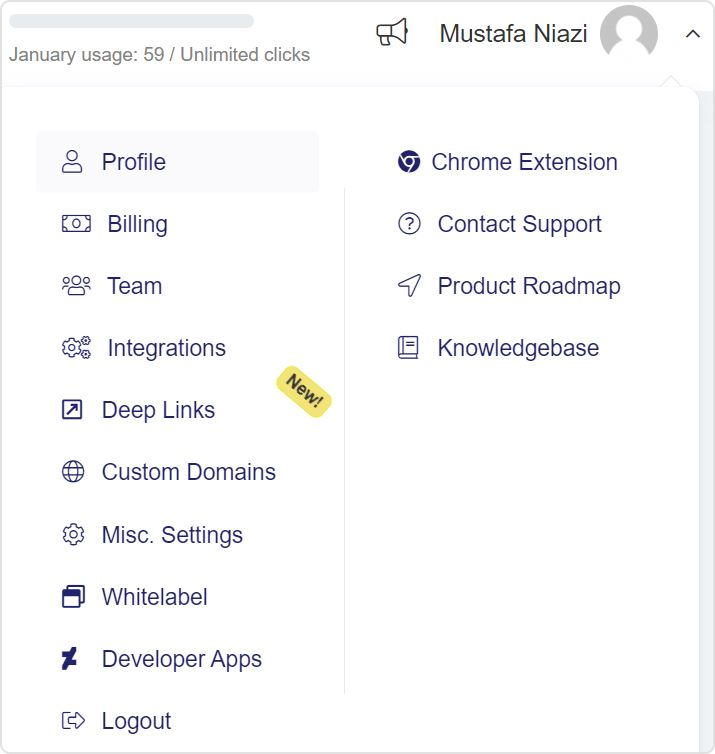
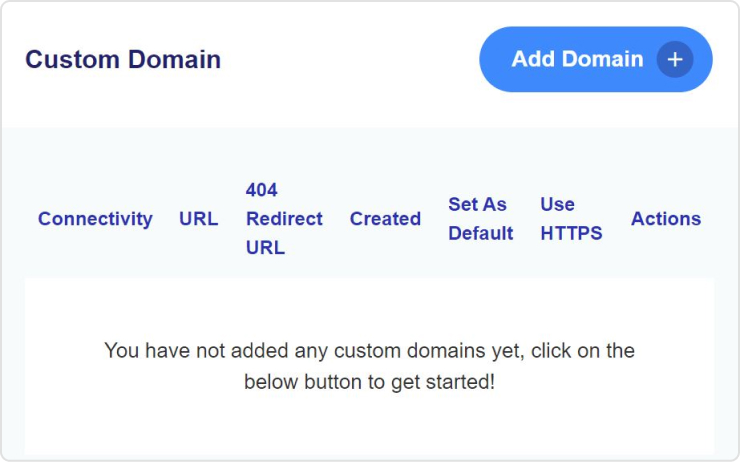
Go to “Settings” and click on “Custom Domains” from the drop-down menu in the Replug dashboard.
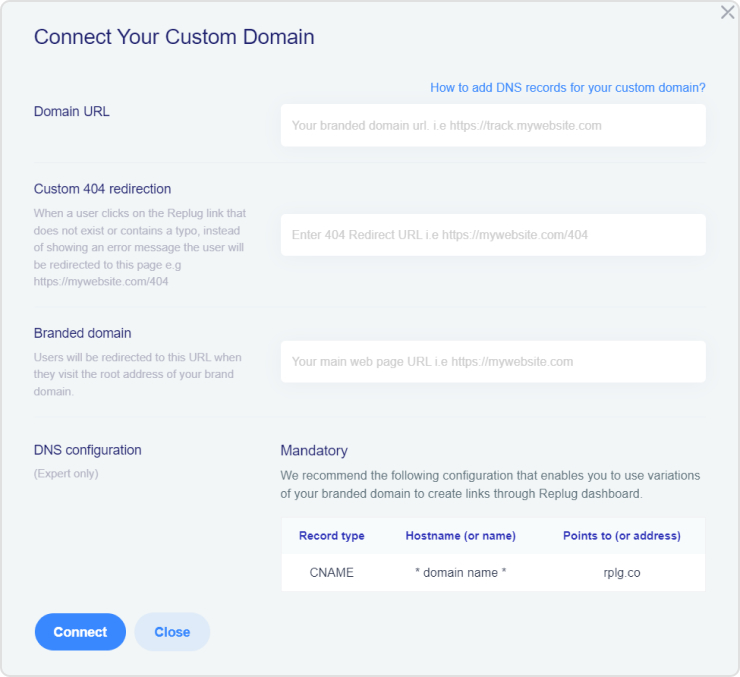
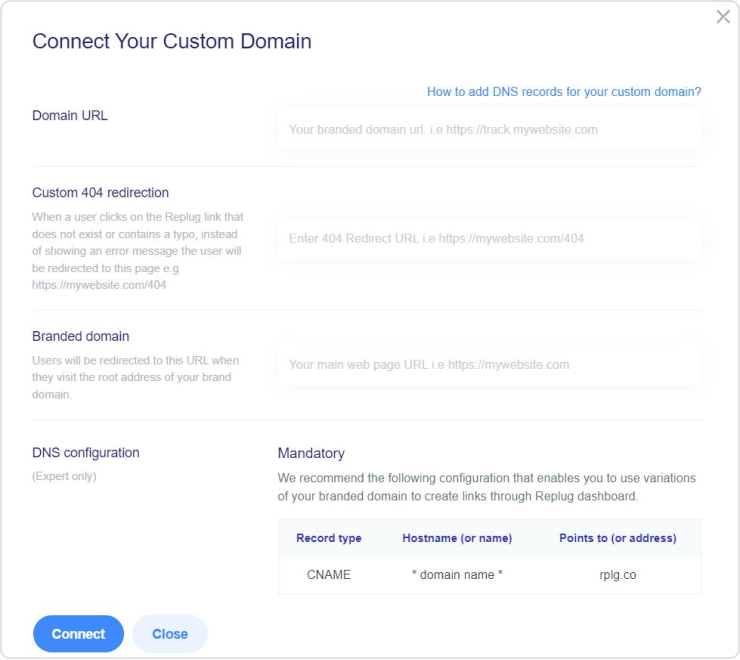
Add your custom domain and configure it as needed, including the Branded Domain and 404 Redirect URL.
After connecting your branded domain, you can edit your website URL using the branded domain.
Do you know that 6 out of 10 cart abandoners come back and buy within 24 hours of getting a personalized email?
That’s what retargeting across social channels does for you as a marketer. The truth is; a lot of people never pay due attention to your product for the first time. In fact, they are staring at different options of solutions to their problem by visiting various sites and might not be in a hurry to make a decision. So it is pretty hard to win customer attention and convert them into your actual buyers.
This is certainly not meant to scare you. In fact, this is where a technique called retargeting comes into play. For this purpose, Google ads retargeting plays an essential role in helping you win customers.
A link retargeting tool is a smart way to re-engage with the audience that has already visited your website at least once before. There is a 98% chance to bring visitors back, help you improve brand recognition, and acquire the most sought-after customer attention.
What is retargeting? How does it work?
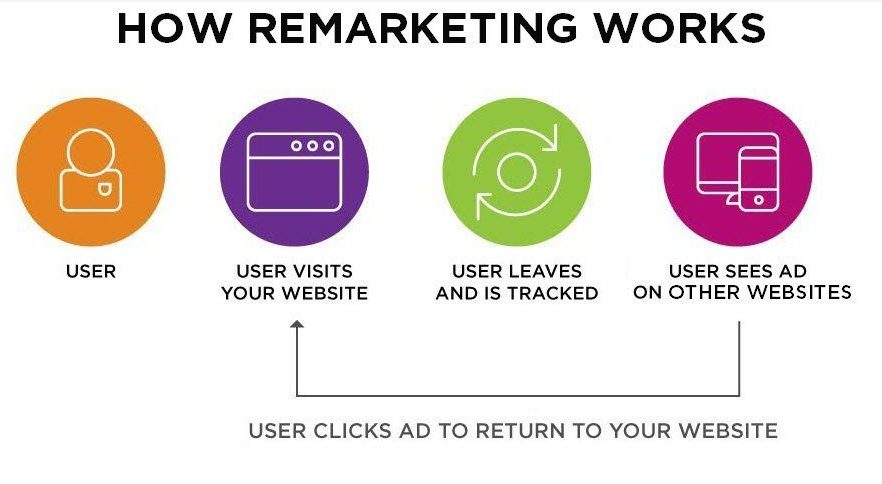
Retargeting also referred to as remarketing, is the process of tracking your online visitors and dropping a cookie to their browsers upon them leaving your website without converting into your customers. This cookie helps marketers retarget their visitors on other websites they visit while they’re online.
Have a look at the image below for a better understanding that how Retargeting works.
Not only remarketing is cost-effective as compared to other traditional paid advertisements, people who visited your website but did not make a purchase are 70% more likely to buy through remarketing campaigns.
For example, a visitor on your site browsing credit card options may respond well to a remarketing ad that highlights exclusive cardholder benefits or limited-time promotions, an approach frequently used in credit card marketing.
The average cost per click on Google Search Network is between $1-$2 which varies according to the keywords. Whereas, the average cost per click for the Google Display Network is under $1.
Google Retargeting ads also gives you the liberty to be creative with making ads more personalized for your customers. For example, let’s suppose a buyer came to your website and added a few items to the cart but did not proceed with the checkout. You can run a separate set of ads for this audience who abandoned the cart by incentivizing the purchase by offering them limited-time free shipping or the discount code.
Another example of making retargeting ads more personalized for the people who have already bought something from you is upselling. You can create custom audience sets based on the category they shopped from. Once you have that set in place, you can retarget them other products and upsell those by offering a unique value to them.
Personalized retargeting ads tend to perform better than search ads. According to a report, the average click-through rate for search ads is 0.07% while the average clicks through rate for retargeted ads are 0.7%. So, you can see not only do retargeting ads have better click-through rates, but they are also more cost-effective.
Benefits of Google retargeting
Get more ROI
Affordability
Customizable Retargeting
Gain more quality traffic and a high conversion rate
Reach a highly targeted audience
Brand Exposure
Increase brand awareness, visibility, and likeability with customized ad designs
Check Google Analytics to understand the Ad performance and make a data-backed strategy
Do you also think Google is a great option for advertising and enhancing brand recognition in the industry?
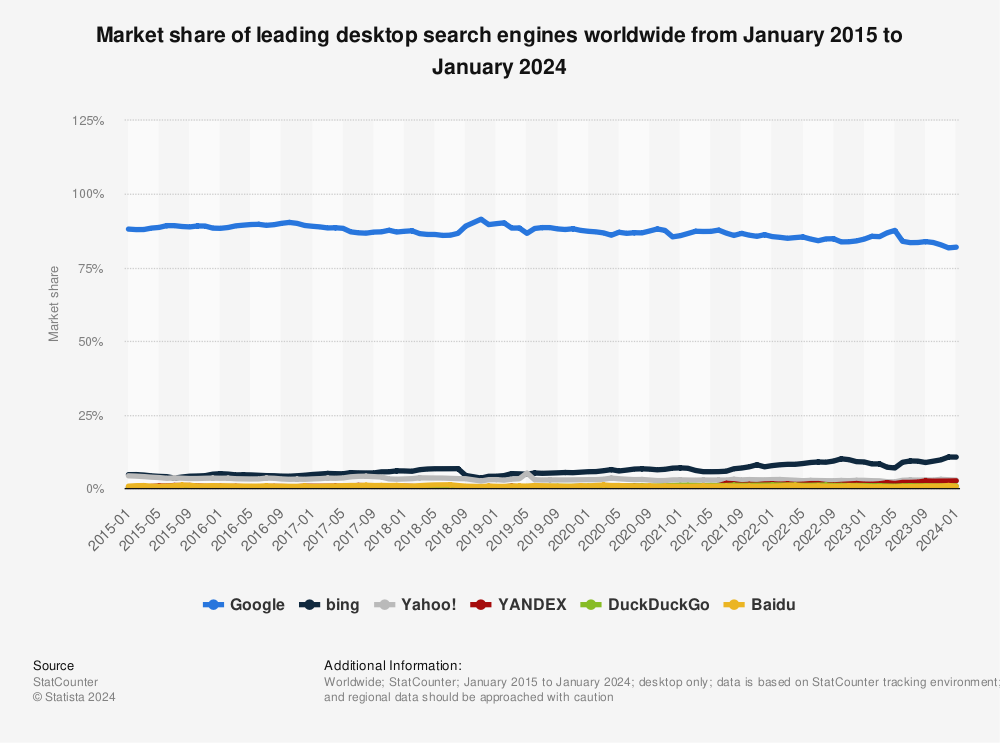
Research says so. Google has dominated the most compelling search engine markets over the past decade and continues to do so. It controls 92.47%of the market share, because it provides a ton of information to marketers or personal users.
For those looking for different avenues beyond Google’s ecosystem, exploring AdSense alternativescan offer new opportunities and insights into digital advertising.
Google is also known as the advertising master of the internet. It is able to grant well-organized tracking and targeting tools to advertisers. It also assists the marketers to find more people to target, building brand awareness, and placing ads with the target keywords.
1. Get more ROI
98% of the customers don’t buy anything from your website on their first visit. But, if you remarket to the same audience through google retargeting ads, they are 70% more likely to buy. This is because Google has a bigger reach and more customizable ad formats. The cost comparison analysis also showed that Google Display Network ads for retargeting are cheaper than search ads. The lower cost per click and better conversion rate, helps you get more ROI.
2. Affordability
The cost per click for the Google display network is less than $1. This is a lot cheaper than the traditional advertisements which charge between $2-$3 for each click (the rate also varies according to the keywords used).
3.Customizable retargeting
Google ads are customizable according to different devices, geographical areas, apps and languages. The customization allows you to run remarketing campaigns at multiple levels. If you are selling dairy products, you can also place your ads on websites that share baking and cooking recipes.
4. Gain more quality traffic & high conversion rate:
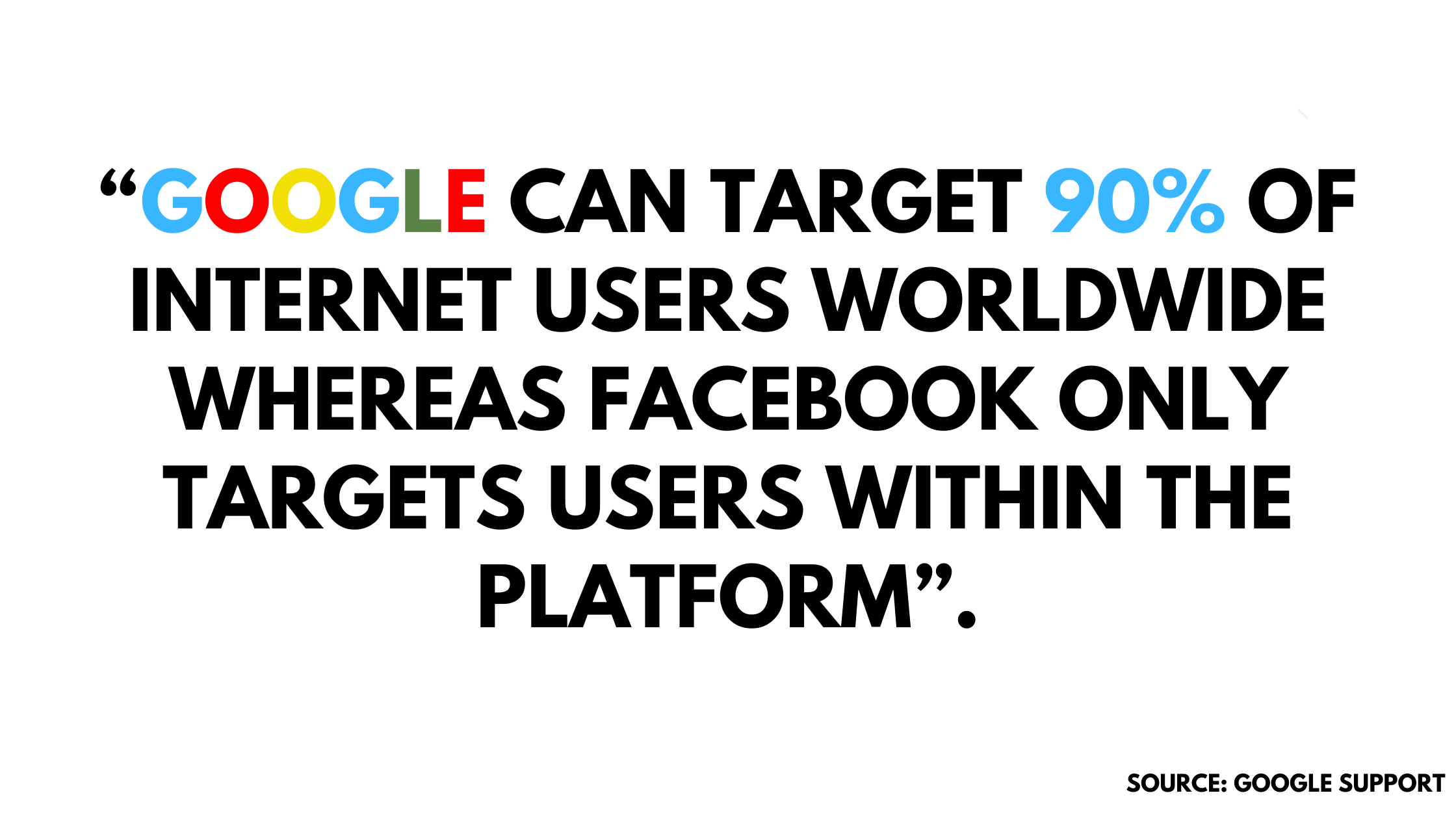
Depending on the capital you can choose social media ads or the Google Display Network. But, the remarketing tool of social media ads is limited, since it’ll only show google remarketing ads only when the user is on the platform. Only 27% of internet users are on the Meta platforms. Whereas, the Google Display Network can show your remarketing ads to more than 2 million websites on the internet. It also allows you to reach a bigger audience, as big as 90% of the internet users.
5. Reach a highly target audience:
Google collects data about every visitor who comes on your website and interacts with the content on it. It does this by tagging those audiences. You can create custom audience sets with that data and can remarket the specific offerings based on their activity and where they are on their customer journey. Google consent management platform ensures that user consent is respected throughout this process. This platform helps manage and document consent preferences, so data collection and usage align with privacy regulations and respect user choices.
6. Brand exposure
Remarketing campaigns bring endless opportunities for brand exposure. When your potential customer sees your ad, it helps them associate the value they are getting from your brand. Brand recalling at the right intervals will help you occupy a space in your customer’s memory, and then they are more likely to consider your brand for the specific product and services needed, especially when a Google Ads agency for your brand is managing audience segmentation, creative refreshes, and frequency controls to keep the message consistent without feeling repetitive.
7. Increase brand awareness, with customized ad designs
Google gives you more flexibility over your digital marketing mix. The control enhances the brand image of your business both at the ads level and at the campaign level. The variety of formats, layouts, graphics, content, and positioning will help you get you to reach more eyeballs and digital consumer is more likely to recall a brand that offered an interactive and personalized experience through their ads.
8. Check Google Analytics to understand the ad performance
Google Analytics gives you a detailed understanding of where your audience is coming from, what are they looking at, what is their browsing behavior and much more. It also tells you about which ads are performing best and bringing in the most traffic, which channels and formats are working best etc. Using the data and analytics of your audience and ad performance, you can see where you need to put in more effort and how you can enhance the experience of your users the next time they’ll come back through retargeting ads.
Defining Google ads retargeting
If you want to advertise your brand on Google, then you must (sign up) at Google Adwords. It is quite easy to manage. You are only required to add a piece of Google remarketing code to your website so the remarketing audience list can be appended through cookies.
Google retargeting is a dominant technique to reconnect with the visitors and tempt them to make purchases by showing relevant brand ads on different web domains.
Is GoogleAdwords a great investment for marketers to generate more revenue?
Yes, it is. Approximately 97% of Google’s total revenues come from an advertisement. Business owners raise a per-pay-click budget because they expect a high return-on-investment (ROI) from Google AdWords.
It helps you receive more generous clicks against the branded ads from the audience. Therefore, it proves to be cost-effective to get more sales to your website, and eventually helps gain high ROIs. Adwords makes it extremely convenient for marketers to measure the performance of the ads that are viewed by the target audience and allows them to create customized campaigns respective to their re-marketing goals.
So, let’s discuss how you can set up the remarketing campaign in Google Adwords.
Steps to set up Google Adwords remarketing campaign:
Remarketing is no more a new concept. Not only is everyone in the field of marketing talking about it, but most experts are showing the amateurs how to get the hang of it.
There are three steps for remarketing using Google Adwords.
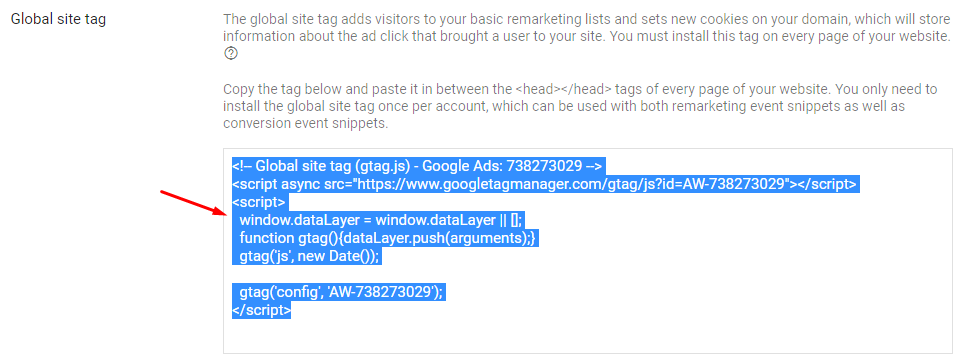
Step 1# Set up the Global site tag
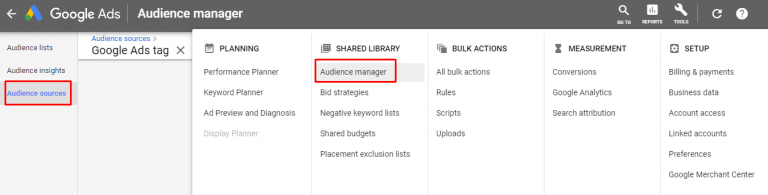
You need to add a Google site tag on every page of your website to track the ad click that brought a visitor to your website. It is a web tagging library for examining Google’s sites, tracking URL and the conversion, and remarketing products. So, here you have to select the “Audience manager” to build an audience to remarket with the product ads and select the “Audience source”.
After that, click on the google ads tag detail and there you’ll see the Global site tag you can copy and paste it on your website.
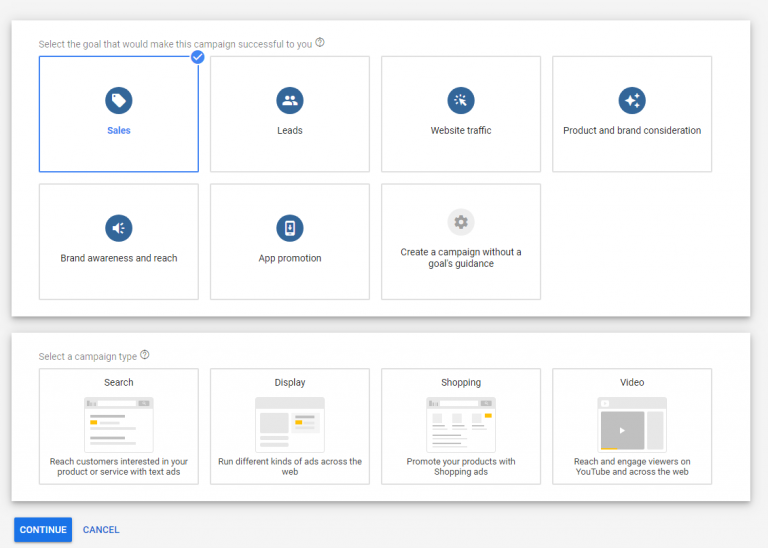
Step 2 # Create retargeting campaigns
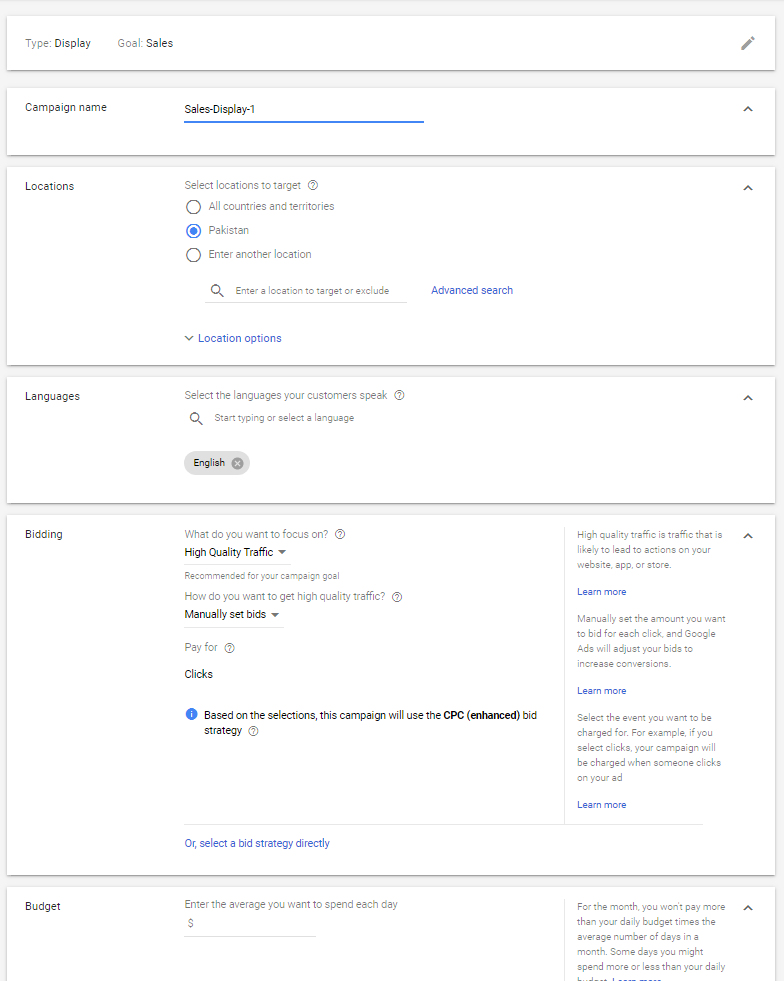
Adwords allows you to create a customized campaign under your own set of rules. While creating a campaign to retarget the audience; you need to set a goal that you’d like to achieve and select the campaign type according to your purpose of Google retargeting.
Moving forward, you are required to set the budget, choose your audience, create your ad group, etc. This guideline helps you to create the first campaign and understand a bunch of remarkable setup factors in detail.
You can carry out Google retargeting ads with the help of custom link shortener tools like Replug.io. For this, you need to find retargeting pixel id for Google AdWords before starting off with your campaign. Once your pixel is ready, you can easily shorten a link for free to track clicks, retarget visitors, and optimize your ad performance seamlessly.
Step #3 Link Google Analytics with Adwords
In order to find quality data about the traffic, lead, and websites from visitors. Google Analytics is one of the most well-founded tools to help you out. You need to link Google Analytics with Google Adwords to keep a record of the visitors who are retargeted with the product ads.
Linking these accounts will assist you to examine customers’ activities on your website after clicking on the ads. It gives the opportunity to fill the gaps by accumulating information about web traffic and the performance of the website or ads. These directions explain to you how you can link your Google Ads with Google Analytics.
Now, let’s take another step further, and delve into some of the most effective Google Retargeting strategies being used by people across the digital marketing arena
Step#4 Best AdWords retargeting strategies
Listed down are the Google Ads retargeting Strategies that work for almost everyone if done right:
1. Retargeting the existing customers
When it comes to advertising a new product or showing ads, then marketers should focus on existing customers because they have already purchased your product and also are aware of its quality. 70% of companies prefer to retain existing customers than acquire new ones.
Retargeting existing customers speed up the sales cycle by associating with the brand or product and also helps conquer the barriers the customers are facing while purchasing the product. So it’s a bold approach to spend money, time, effort on existing customers to give a better position to the business.
2. Dynamics remarketing
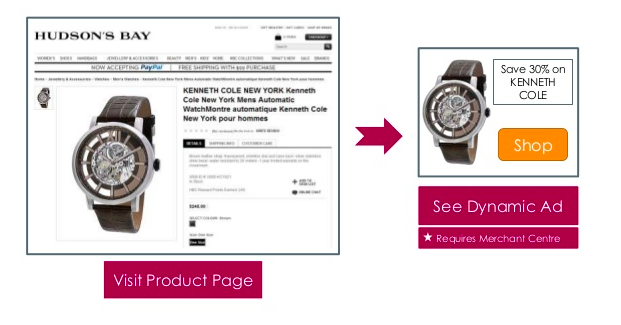
Dynamics remarketing is another captive strategy used in Adwords. It helps the marketers to show customized ads of a particular product to those visitors who have previously seen it. In other words, we can say it reminds people about the product they have last seen.
Let’s take an example here.
Let say, a visitor came to your website and viewed the product there. AdWords assist the marketers to manifest folks ads on the other websites that they’ve already seen, for promoting their product.
Starting with the dynamics remarketing; the marketer needs to insert product details, price, images and will be displayed on other websites to retarget the audience. As shown in the below image.
3. Segment your retarget audience
Perceiving the customer’s behavior is a critical aspect to reach the audience with the appropriate message and get the retargeting experience. Audience segmentation helps optimize the campaign for various web domains and leads to a massive no. of conversions.
If you genuinely want to be a successful marketer, then you have to segment the audience into a different group, based on different behavior such as preferences, interests, likes, or dislikes.
Keep in mind; every individual is different from others and unique in their own way.
Segmenting the audiences becomes an essential factor to target the right audience with the right ads at the right time for the conversion funnel.
Google Analytics helps you to create an audience from the segment to retarget the potential audience or existing audience with the Google ads campaign. It also supports marketers to think strategically and segment accordingly.
4. Use content remarketing
Google gives direction to the marketers to build retargeted ads using Google Adwords to get identified by the audience. After segmenting the audience, it would be so useful for the owner of the website to create the remarketing list to re-target the audience with a particular piece of content to get them back to the website.
You can also use an email marketing tool like Moosend to create opt-in forms to capture visitors. Then you can send them emails and convert them into customers.
Google presents several tools to remarket your ads, but the Google display network is an exceptional choice while targeting potential customers. To create a tailored advertisement for a particular segment, GDN allows the marketers to display text, add images, or video ads, related to the product or brand.
Content remarketing has the competency to make the visitors curious about the product, assure them to repeat purchases, and interact with the company.
5. Retarget for up-selling and cross-selling
You can target customers who have already purchased from your website complementary products and services. Create a custom audience set of your converted customers and create customize the ads based on the products they have already bought.
Use the data segments for products and services your customer has already viewed. Retarget those customers with other related products through customized ads. For Example, if you are selling gifts through your online store on Christmas, you can retarget customers with wrapping papers and greeting cards through retargeting and upselling campaigns.
6. Retarget with product categories for personalization
Before pandemic digital personalization was a choice, now it’s a necessity. Retargeting campaigns are the best opportunity to add the flavour of personalization for your users since now you know them better than before.
You can create data segments and audience sets and then advertise product categories accordingly. You can also create custom URLs for separate category names.
For example, if someone has browsed the Sales category, you can show them more products in the retargeting ad by showing them specific category ad and linking it with branded URL of Sale (e.g. replug.io/SALE)
7. Change your ads for a non-converting audience!
Does the Audience matter? The answer is Yes, knowing your audience matters more than ever. Because it allows you to figure out what piece of content, solution, or idea they are hunting for.
As we heard before, We can’t please everyone with the same content. So don’t try to.
If you are showing the same retargeting ads or irrelevant ads over and over again, then the visitors get burned out for sure.
So, creating a different segment of the audience and retargeting ads accordingly, will get more clicks and traffic towards your website.
Using Google AdWords, you can tailor Google retargeting ads for each segment and connect with them solely. Marketers could give a fair overlook to their ads to drive the attention of retargeted customers. They can add images, make visitors laugh, and offer varying incentives such as price discounts, free shipping, etc.
Have a look at this image:
How to create a dynamic remarketing App campaign?
Log in to your Google Ads account.
From the page menu, select Campaigns.
Open the drop-down menu after clicking the + button and select a new campaign.
Choose App marketing as your campaign objective.
Choose a campaign subtype and a platform for your mobile app.
Give your campaign a name, a bid strategy, a budget, start and end dates, and ad format.
Select Show advanced options.
Check the box next to “Attach a feed to improve targeting and enable ads that feature your feed items” in the “Data feed” section.
Choose between a dynamic ad feed and a Google Merchant Center feed.
Learn how to use feeds in your app marketing.
Continue by clicking Save.
Make your app advertisements. Learn how to create effective app campaign creative assets.
Final thoughts
Google Retargeting is a dominant technique to retarget those visitors who have enough interest in your product or brand and also a ridiculous way to move your business steadily and smoothly.
It’s not easy to persuade the audience to convert into loyal customers. Therefore marketers are required to spread the awareness of the brand or illustrate the brand’s active presence by showing ads repeatedly on the other websites which customers visit frequently.
Google Retargeting Faqs
What is Google Display Retargeting?
Google Display Retargeting is a digital advertising strategy that shows targeted ads to users who have previously visited a website, aiming to re-engage them across the Google Display Network.
What are the requirements for Google Retargeting?
To use Google Retargeting, you need a Google Ads account, the installation of the Google Ads remarketing tag on your website, and a list of site visitors for targeting.
How much does Google Retargeting cost?
Google Retargeting costs vary based on factors like bid strategy, audience size, and industry competition. It operates on a pay-per-click (PPC) model, and budgets are customizable.
Is Retargeting part of SEO?
No, retargeting is not part of SEO (Search Engine Optimization). Retargeting involves displaying ads to previous website visitors, while SEO focuses on optimizing a website’s visibility in search engine results organically.
What is Ad Targeting vs. Retargeting?
Ad targeting is a broader strategy to reach specific groups, while retargeting is a more specific approach aimed at reconnecting with users who have already interacted with a brand online.
What is Google’s Remarketing tag?
Google’s new Remarketing Tag makes it simple to develop remarketing lists by allowing you to use a single tag on all of your website’s pages. You can now target specific audiences with targeted messaging and easily tag your entire site.
Whether you’re familiar with it or not, chances are most of us have encountered different types of calls to action while browsing websites or social media platforms.
For instance,
You might have clicked on a “Learn More” button and ended up landing on a page containing more information related to that topic.
Or you might have clicked on a “Buy Now!” call to action button that takes you to a product page or a similar web-page.
Now why do they matter?
CTA buttons matter as they point users towards a desired action.
Hence, the name of the term is “Call to Action”.
What is a call to action button?
A call to action (CTA) button is a clickable button or link on a website, advertisement, or piece of content that encourages the audience to take a specific action.
A CTA can drive a variety of different actions depending on the content’s goal, such as generating leads, making a purchase, or subscribing to a newsletter.
CTAs are crucial to generating leads from a website, and can help motivate visitors into deeper engagement with a brand.
Why is a CTA button important?
CTA buttons are important because they act like helpful guides on your website, pointing visitors toward valuable content or actions that benefit both you and them. Here’s why:
Benefits for visitors:
Clarity: They tell visitors what to do next, eliminating confusion and helping them find what they’re looking for faster.
Convenience: They offer a one-click path to things like downloading resources, starting free trials, or contacting you.
Value: They highlight content or actions that can solve their problems or improve their experience.
Benefits for you:
Conversions: They encourage visitors to take specific actions, like signing up for a newsletter or making a purchase.
Engagement: They keep visitors actively interacting with your website and exploring what you offer.
Data: They provide valuable data about what actions users are most interested in, helping you make better decisions about your website content and marketing strategy.
Maximize marketing ROI
by transforming ordinary URLs into branded short links that convert.
Try Replug for free
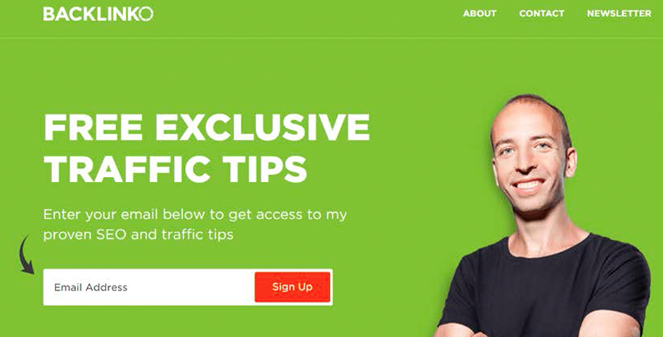
Different types of CTA buttons to boost your CTR
CTA buttons can vary in style and size depending on your goal conversion and website style. Each type has a specific purpose and works best in different situations.
Let’s explore some common ones:
1. Lead generation:
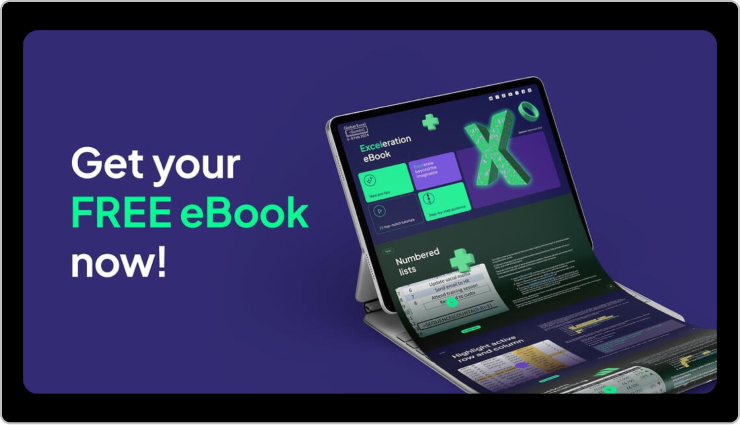
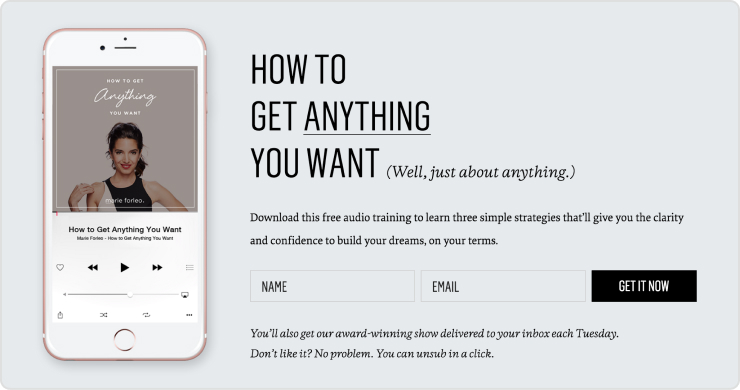
Imagine offering a free e-book in exchange for an email address. Your CTA button could be “Get Your Free E-book Now!” and placed prominently near the e-book description.
2. Form submission:
This CTA helps gather visitor information, like “Sign Up for Our Newsletter” on a blog or “Tell Us Your Needs” on a contact page.
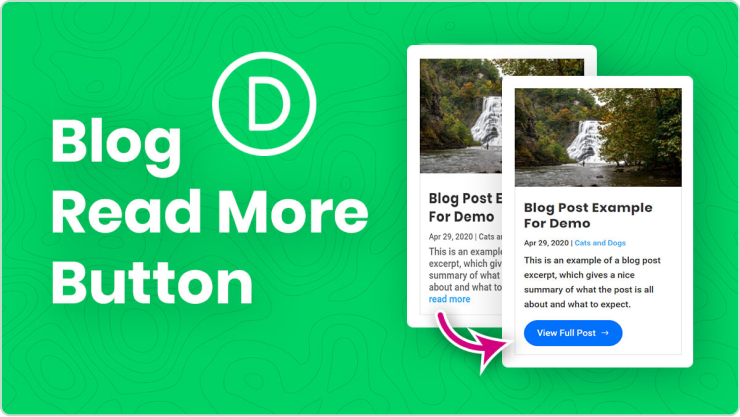
3. “Read More” button:
If you have snippets of longer content, this CTA encourages visitors to delve deeper, like “Read the Full Article” on a blog post preview.
This CTA leads visitors to explore your offerings, like “Browse Our Collections” on a clothing website or “Discover Our Services” on a marketing agency page.
5. Download now:
After someone signs up, a CTA like “Download Our Beginner’s Guide” keeps them engaged and learning more.
6. Purchase CTA button:
On product pages, a bold “Buy Now” or “Add to Cart” button prompts immediate purchase.
7. Demo/Trial CTA:
Let visitors try before they buy with CTAs like “Start Your Free Trial” or “Book Your Demo Today.”
8. Contact us:
Make it easy for people to reach out with a clear “Contact Us” or “Chat with Us Now” button.
8. Banner CTA
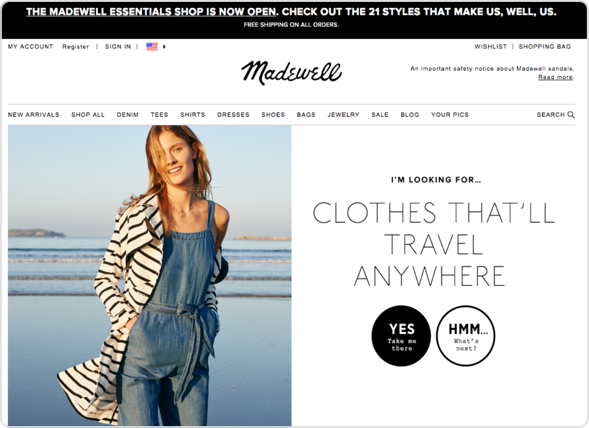
A Banner CTA, is a visually prominent element usually displayed at the top or within a webpage, often in the form of a banner or button. These banners are strategically designed to be eye-catching, fostering user engagement and interaction with the intended goal.
9. Social sharing CTA
Social sharing CTA, or Call to Action, is a prompt strategically placed on a website or social media platform to encourage users to share content, such as articles, images, or videos, with their network.
Best practices for designing an effective CTA button
Tell them what to do: Use strong verbs like “Download” or “Learn More.”
Highlight the benefit: What do they get by clicking? Free guide? Exclusive content?
Short and sweet: Keep the text easy to read.
Make it stand out: Use contrasting CTA button colors and good placement.
Mobile-friendly: Easy to tap on any device.
Remember, good CTAs guide users and improve their experience.
Bonus Tip:Replug.io is a tool that lets you design different types of CTAs like buttons, forms, and even pop-ups, without needing any coding skills. Plus, you can track how well your CTAs are performing to see what resonates with your audience. What’s best is that you can easily create short links to share your CTAs more efficiently and track their performance alongside your Replug campaigns.
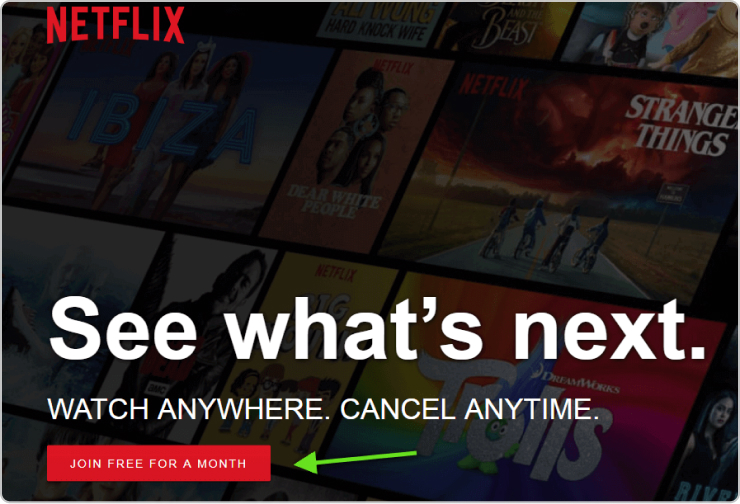
It is clear, concise, and gets straight to the point.
Because it’s:
Free: Who doesn’t love trying something new for free?
Limited: Only a month to explore, so dive in quick!
Easy: Joining = binge-watching heaven awaits.
No pressure: A month lets you try before you commit.
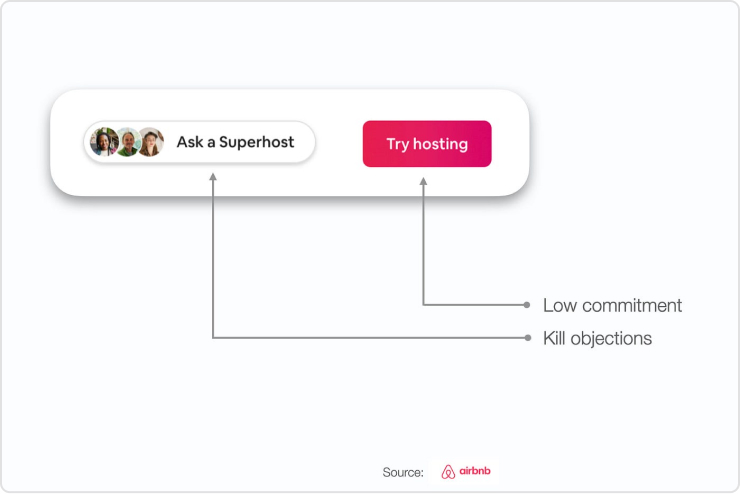
2. Airbnb: “Try Hosting”
This button taps into users’ curiosity and encourages exploration.
It is because;
Intriguing: “Try Hosting” piques curiosity without making a big commitment.
Open-ended: It invites users to explore the possibilities of hosting without pressure.
Low barrier to entry: “Try” suggests it’s easy to get started and see if hosting is right for them.
Overall, it’s a smart way to encourage people to consider being Airbnb hosts without feeling overwhelmed.
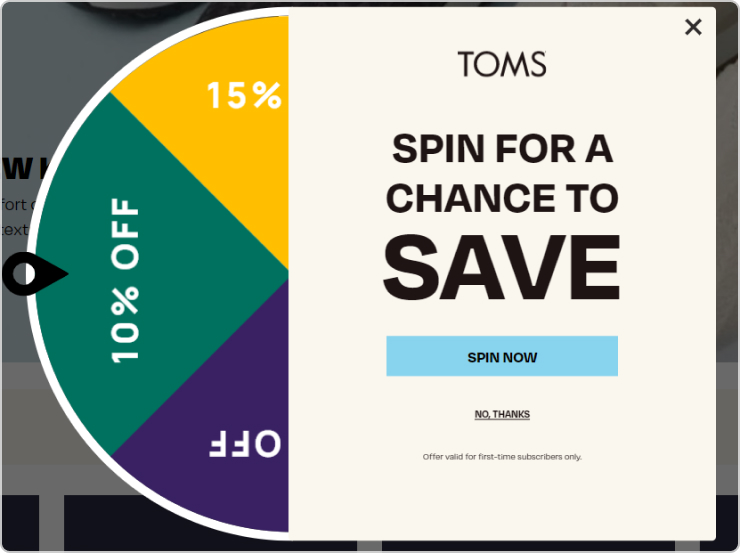
3. “SPIN FOR A CHANCE TO SAVE” – TOMS
The “Spin for a Chance to Save” technique used by TOMS can be an effective way to grab attention and spark interest, especially for younger audiences. Here’s why:
It is because;
Gamification: Spinning a wheel is a fun and interactive way to engage users, making them more likely to participate compared to just clicking a button.
Surprise and anticipation: The mystery of what someone might win adds excitement and keeps them invested in the process.
Potential reward: Even if the savings aren’t guaranteed, the chance to win something appealing can motivate people to try.
Remember, your CTA buttons are your website’s secret weapon. Craft them with care, and track your clicks (and conversions) soar!
FAQs
What is a call to action button behavior?
A Call to Action (CTA) button prompts users to take a specific action, such as making a purchase or signing up. Its behavior should be clear, compelling, and guide users toward the desired action.
What should a call to action button say?
CTA button text should be concise, action-oriented, and aligned with the desired action. Examples include “Buy Now,” “Sign Up,” or “Learn More.”
How do I create a CTA button?
Use this top-notch call to action generator to design and customize your button. Specify the action, craft compelling text, set the button link, define the target audience, and save and implement the CTA on your website.
Link management has been around for a while now. A powerful link management strategy that every marketer should know about is deep links.
All businesses and marketers know how important it is to drive the audience to the appropriate destination.
That’s why many professionals choose Replug, i.e., a robust link-management platform that simplifies deep links, app links and web redirects under one roof.
If you’re a tad bit curious about deep and universal links, then you’re at the right place. We’ll help you understand the difference so that you can use them for your maximum benefit.
Let’s get right into it!
What is deep linking?
Deep linking is a strategy that takes users directly to specific content within a website or mobile app.
It offers a more direct and efficient navigation experience. It speeds up the communication, data accessibility, and connectivity. Thus, it provides value to the end user.
For example, you receive a recommendation from an online store. You share the link with your friend that takes them directly to the product’s page. Instead of navigating through the app’s main menu or search function, they land on what you recommend.
Basic deep linking is a fundamental technique that directs users to specific pages or content within a mobile app. It improves in-app navigation by allowing users to bypass the app’s homepage and land directly on the intended content. This type of deep link is commonly used to streamline the user experience and guide users to targeted information or features within the app.
Deferred deep links:
Embracing flexibility, deferred deep links bridge the gap even if the app is missing. Clicking such a link first prompts the app download, then seamlessly launches the app and whisks the user to the intended destination upon installation. This smooth transition eliminates user friction and encourages app adoption.
Universal links (iOS):
Designed specifically for iOS, universal links seamlessly blend the web and app experience. These links work regardless of whether the app is installed, leading users to app content via the web browser. Upon downloading the app, future clicks automatically open the link within the app, creating a streamlined journey.
App links (Android):
For Android users, app links mirror their iOS counterparts, facilitating smooth transitions between web and app content on Android devices. In instances where the app is installed, the link seamlessly opens the desired content within the app. Conversely, if the app is absent, the link gracefully reverts to the web content, eliminating the requirement for redirection to the Play Store. This methodology is tailored to ensure a cohesive and trouble-free user experience on Android platforms.
A complete link management solution
for marketing professionals & agencies.
Try Replug for free
Basic deep links vs deferred deep links vs universal links vs app links?
Undoubtedly, deep links are a smart tech innovation that helps brands, organizations, bloggers, and influencers establish a strong connection with the end users. It’s vital to understand different types of deep links for more clarity.
The reason is that there are several types and each of them works differently, for instance, the traditional deep link would take the user to the specific section in the mobile app, but won’t work if the app isn’t installed.
On the other hand, the deferred deep link would take the user to the App Store and recommend the user install the respective mobile app. After the installation, it will still take the user to the intended content within the app.
While traditional and deferred deep links are more general terms, app links and universal links are platform-specific concepts tailored for Android and iOS, respectively, with a focus on providing a seamless transition between web and app content.
Comparison Table
You can see the difference in the table below:
Type
Deep Links
Deferred Deep Links
iOS Links (Universal Links)
Android Links (App Links)
Basic Functionality
Directs to specific app content.
Opens specific content on the mobile web, even if the app is installed later.
Seamlessly switches between web and app content, providing a smooth user experience.
Seamlessly switches between web and app content, providing a smooth user experience.
Fallback Behavior
May result in an error or prompt to install the app if not present.
Redirects to the app store if the app is not installed, then opens the content after installation.
Falls back to web content if the app is not installed, enhancing user experience.
Falls back to web content if the app is not installed, enhancing user experience.
User Scenario
Used for enhancing in-app navigation.
Useful for user on-boarding and re-engagement, allowing users to access specific content after app installation.
Provides seamless transition between web and app content, improving user experience.
Provides seamless transition between web and app content, improving user experience.
Now that the comparative differences are clear between deep links vs universal links and other links. If you haven’t had a chance to understand the benefits, let us elaborate on why you need to use deep links:
i. Enhance user experience:
User experience is an essential aspect of the customer acquisition journey and plays a key role in convincing prospects to convert into customers. Deep links boost user experience as they direct users to specific in-app content, minimizing navigation steps, and providing a smoother, more enjoyable experience for the end users.
ii. Streamline user on-boarding:
No one wants a complicated sign-up process that takes up so much time. Smart digital marketing experts and consultants use deep linking for a seamless on-boarding process and guide users directly to the specific in-app location or personalized content, ensuring a pleasant experience for the user.
iii. Optimize conversion rates:
Conversion rate optimization is crucial to every digital marketing campaign whether it’s based on organic growth or paid ads. Since deep links drive users to targeted pages, they increase the likelihood of conversions by eliminating unnecessary steps.
iv. Boost user engagement:
User engagement leads to generating more leads, downloads, or purchases – whatever the KPI is set for the campaign. Leveraging deep links enables precise targeting of content to cater to the audience, which fosters effective user engagement by delivering relevant information without wasting time.
v. Facilitate quick customer communication:
It’s clear that deep links provide a direct pathway for sharing specific content or updates, enabling quick communication with customers and prospects, and resulting in effective customer support.
Explore how LINE Music improved conversion rates with deep links
Objective: Boost subscriptions to the music streaming app.
Target audience: The focus was set on non-subscribers, aiming to convert casual listeners into dedicated music enthusiasts.
Creative strategy: Users encountered an ad designed to navigate them seamlessly to the subscription page, the virtual gateway facilitated by the strategic integration of deep linking.
Outcome: The outcome revealed a substantial uplift in conversion rates, with a remarkable increase of 63% for Android users and an impressive surge of 99% for iOS users. The strategic implementation of deep linking proved instrumental in optimizing the user journey, resulting in a significant boost in subscriptions to LINE Music.
Drive more clicks, conversions, and app installations by deep linking
to your favorite platforms.
Try deep links for free
Use cases & popular examples of deep link
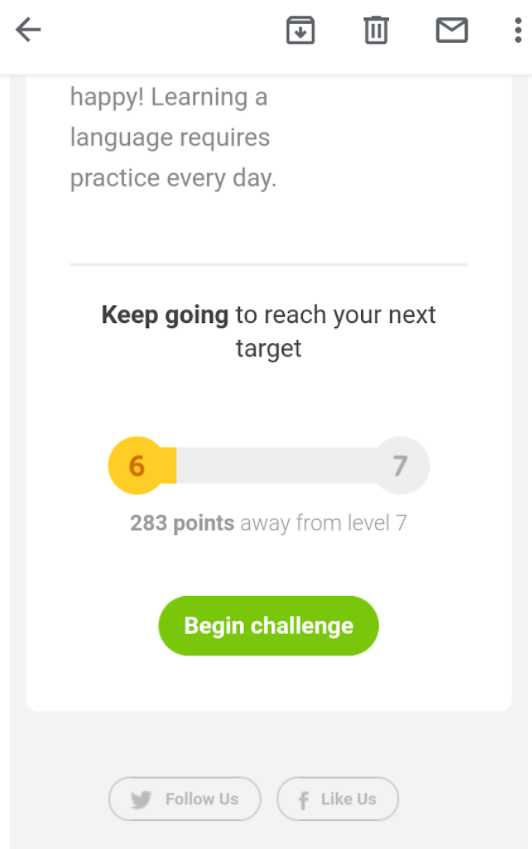
i. Duolingo takes the students back to the lesson
It’s an interactive, educational platform for learning new languages. Duolingo is available on both iOS and Android platforms. It also has a web version.
Duolingo platform uses deep linking to seamlessly bring users back to the stage where they left off or reached the last session.
When a user clicks a CTA link in an email, they can resume their progress from where they left off.
If you are their app user, then it will take the user to their app. Otherwise, the user is redirected to their website. Thus, this language learning platform is a great example of deep links.
ii. Netflix allows users to go to the title directly from the email newsletter
Netflix is one of the most successful online streaming services in the world and continues to innovate its marketing and engagement strategies.
Besides targeting prospects through social media engagement, this streaming service pays close attention to retaining and warming up the current user base through email marketing.
Moreover, Netflix uses deep links in their email newsletters, which allows them to bring users instantly back to their mobile app.
All you need is to click on the “play” CTA button in their email newsletter, and the title will instantly play in your Netflix app.
So, Netflix is a great deep linking use case and example for marketers to learn from, especially when establishing a consumer engagement strategy.
Let’s conclude: How deep linking helps in marketing
Deep links are a massively popular link management strategy for organizations, digital marketers, and SAAS businesses. They assist marketers in smoothing the user journey by providing quick, fast links for swift accessibility, reporting, and analysis.
Moreover, deep linking is crucial to improving the mobile app user experience as it improves the basic app accessibility and provides a long-lasting experience. Utilize a reliable deep link generator to reach more users and convert more.
And don’t forget that with Replug’s URL shortener, you can generate clean, branded links that work seamlessly across devices, whether you’re using deep links, universal links, or app links.
FAQs about deep linking
Let’s take a look at some of the questions to follow up on:
What is the difference between a link and a deep link?
A link is any URL that points the visitors to a specific page on the web server. However, the deep link is a special link that directs the visitors to a specific location on the mobile app. Deep links are used by SAAS tools, affiliate networks, and app-based startups to quickly take visitors from a URL to the in-app content.
What is an example of a universal link?
Here’s an example: go to Google and search for “iMovie” or simply open this link on your iPhone. It’s a link to the iMovie app for iPhone and iPad. The above-mentioned link will directly take you to the App Store to install the iMovie app.
However, if you try to access the link on an Android device, it won’t take you to the App Store app as there won’t be one to open on an Android device. It may open the URL in the mobile web browser. That’s an example of a universal link.
What is deep linking in iOS universal links?
Universal links are deep links for the iOS/Apple ecosystem. They are used to link directly to specific content within an iOS app, rather than just launching the app’s home screen. Universal links are a default deep linking solution from Apple and allow developers to associate web URLs with their iOS apps, enabling a seamless transition between web content and app content.
Why is deep linking good?
There are various reasons why brands and SAAS companies use deep linking, and some of these reasons are quick accessibility of content, faster engagement, easy delivery of information, and seamless transition. Undoubtedly, deep linking is good for content marketing and customer engagement.
Deep link vs. Hyperlink: Which one is better?
A deep link drives the visitor to the specific in-app location or a certain product page on the web, allowing easier and quicker engagement with a seamless transition. However, a hyperlink is just a regular URL pointing to a website page or web address.
How does deep linking affect SEO?
If deep linking is improving engagement, skyrocketing the CTR, and bringing more eyeballs around, then it’s worth a try. No wonder deep linking could increase content discoverability, making it convenient for search engine bots to discover, analyze, and index content for search traffic.
Curious about the perks of affiliate links and how to make them work for you? You’re in the right place. We’ll walk you through the basics, the benefits, and the nitty-gritty of crafting links that get results. Plus, we’re throwing in our top tips to help you amp up your website traffic and sales figures.
Let’s dive in and discover the simplicity behind using affiliate marketing to your advantage. Get ready to not only create killer links but also keep tabs on your affiliate results for a marketing strategy that packs a punch. Let’s get started!
What are affiliate links?
Affiliate links are like regular links, but with a special twist—they come equipped with a unique ID that lets you monitor the link’s performance. Picture it as a digital trail: every time someone clicks on the link, you capture that click. If the click ultimately translates into a sale, your analytics will spell it out for you, attributing the sale to that precise link.
This system is your compass for recognizing which affiliate deserves the credit for driving traffic or sealing the deal. In essence, affiliate links provide a transparent way to link actions to outcomes, ensuring credit lands where it’s due.
How to create affiliate links?
Creating affiliate links is a breeze, and here’s a simple step-by-step guide to get you started, with a bonus tip on making them even better using Replug.io:
Step 1: Choose your affiliate network
Select an affiliate network that suits your needs. Popular platforms include Rakuten, ShareASale, and ClickBank. Ensure the platform aligns with your goals and provides the features you require.
Step 2: Set up your affiliate program
Once inside your chosen affiliate network, establish an affiliate program. Define custom rules, outline promotions linked to your affiliate links, and specify the commissions affiliates will earn.
Step 3: Select affiliates
Browse through the available affiliates on the platform and add your preferred ones to your program.
Step 4: Generate unique affiliate links:
Using the affiliate dashboard, generate distinct affiliate links for each affiliate. This step ensures accurate tracking of their performance.
Step 5: Integrate Replug for enhancement
Sign up or log in to Replug, a link management service. Leverage Replug’s link management to create custom vanity URLs (available to Basic plan users and above). This replaces the standard “rplg.co” part of a shortened link with your custom-branded domain.
Step 6: Opt for descriptive links
Utilize Replug to customize the slug of your links as well. This transforms the affiliate link’s unique ID string into a more descriptive and attractive component. People are more likely to click on links that hint at their destination.
Setting up your affiliate program takes a bit of groundwork, but once in place, crafting and enhancing affiliate links through Replug becomes a matter of minutes. While optional, using custom domains and descriptive slugs not only boosts credibility but also increases the likelihood of clicks from your audience.
A complete link management solution
for marketing professionals & agencies.
Try Replug for free
Benefits of using affiliate links:
Affiliate links can offer several lucrative benefits. Here are a few:
1. Expand your brand reach with affiliate links:
The affiliate marketing industry’s significant growth is projected to reach $27.78 billion by 2027, and underscores the vast opportunities it offers.
By engaging in affiliate marketing, you tap into a network that extends beyond your immediate audience. Each affiliate brings their followers, creating a ripple effect that dramatically expands your brand’s reach and exposure.
2. Boost Sales: The affiliate marketing advantage
According to a survey by Digiday and Awin, 80% of marketers consider affiliate marketing a crucial revenue source. Unlike some marketing strategies focused on generating clicks, most affiliate programs are geared toward driving actual sales.
Affiliates actively market your products, directing potential buyers to your pages and maintaining high conversion rates to earn commissions. It’s a win-win situation, aligning their efforts with your sales goals.
3. Track success: Mastering affiliate link analytics
The unique identifiers embedded in affiliate links empower you with robust performance tracking and analytics. Unlike generic websites or social media analytics, affiliate marketing allows you to pinpoint the effectiveness of each link.
Dive into metrics to understand why certain links outperform others—whether it’s the affiliate’s chosen channels, audience reach, or content strategy. This granular insight enables you to optimize your approach for maximum impact.
4. More cost-effective advertising:
Affiliate marketing stands out as a cost-effective advertising method. Your primary investment includes the setup of an affiliate marketing platform and the establishment of partnerships, often requiring a modest monthly fee.
Unlike other digital marketing avenues that demand substantial investments in website development, brand visibility, or content marketing, affiliate marketing leverages the creativity and strategies of content creators—bloggers, influencers, email marketers—whose efforts align with your product promotions. This approach helps brands like CISIN naturally expand their reach by connecting with audiences through trusted and relatable voices. The result is an efficient and budget-friendly advertising strategy that delivers tangible results.
Ready to take your affiliate marketing game to the next level? Look no further than Replug.
We offer a robust toolkit that empowers you to craft captivating and effortlessly traceable affiliate links. Bid farewell to complicated URLs and embrace a world of simplicity and effectiveness with our powerful link shortener for affiliate marketers.
Craft clear, clickable links:
Shorten your links effortlessly and infuse them with custom branding for a unique and captivating touch.
Precise tracking & analytics:
Delve into Replug’s analytics to gain a profound understanding of link engagement and conversions. Use these insights to make strategic decisions.
Effortless A/B testing:
Experiment with different link variations effortlessly. Discover what resonates best with your audience, elevating your conversion rates.
Pro-level retargeting:
Ensure valuable leads don’t slip away. Replug’s retargeting feature lets you reconnect with potential customers, maximizing your marketing ROI.
Deep linking precision:
Guide users directly to relevant content, enhancing relevancy, customizing experiences, and increasing conversion chances.
Centralized promotion with bio links:
Effortlessly showcase multiple offers in one location. Customize your bio link to reflect your brand identity and gain insights into your top-performing offers.
Ready to amplify your affiliate game? Join the ranks of successful marketers who have embraced Replug’s power—increased click-through rates, boosted conversions, and maximized earnings are just a click away!
A complete link management solution
for marketing professionals & agencies.
Try Replug for free
FAQs
How do affiliate links work?
Affiliate links track clicks, and when someone purchases through the link, the affiliate earns a commission.
How to promote affiliate links?
Promote affiliate links through social media, blogs, and email marketing. Create engaging content and provide genuine recommendations.
How to use Amazon affiliate links?
Join the Amazon Associates program, generate links in your dashboard, and use them in your content to earn commissions on sales.
How much do affiliate links pay?
Affiliate link payments vary; they can be a percentage or a fixed amount. Research programs aligned with your niche for optimal results.
Have you ever wished your web address was shorter, catchier, or just fit your brand better?
Well, guess what? You can actually edit those links, just by following a couple of easy peasy steps!
This guide will show you how to easily edit URLs using Replug.io.
What’s Replug.io?
Replug.io is the ultimate solution for your link editing, branding, and retargeting needs. A feature rich URL editor to boost your online presence, just using links in multiple ways.
What’s a URL, and what does that mean?
A URL is basically the online address of any webpage or piece of content you see.
Ever wonder how you land on your favorite websites?
URLs are kind of like the addresses of things you find online, but instead of Google Maps, they use letters and numbers on the web.
They help locate what you are searching for, whether it’s a brand, social media platform or a blog.
So next time you click on a link or type something in the address bar, remember, you’re using a URL to navigate the vast world of the internet!
Here are some key things to remember about URLs:
They’re unique: Every webpage has its own special URL, like a fingerprint.
They can be long: Sometimes URLs can get a little messy with lots of codes and stuff, but that’s just them doing their job of being super precise.
They can be short: Some websites use special tools to make URLs shorter and easier to remember.
Reason to change or edit URL links
There are various reasons why you might find yourself needing to edit a URL.
There are lots of reasons to give your URLs a makeover! Maybe you want…
A shorter, snappier address: No one wants to type out a super long URL!
More flexibility: Regardless of the motive, the ability to edit URLs provides flexibility and control over your online presence.
A more descriptive name: Make it clear what people will find when they click.
Optimize it for search engines: Create a more user-friendly link, or align it with your branding strategy.
How to edit links?
One of the primary features Replug offers is the ability to edit the URL slug. The slug is the user-friendly part of the URL that comes after the domain name. With Replug, you can easily customize this part to make your URLs more SEO-friendly.
Log in to your Replug account.
Create a “Brand”.
Then, create a “Campaign.”
Next, create a short link by adding the original URL & click “Save Link”.
Now you’ll get a short link with the Replug domain i.e. replug.link/ your slug. You can edit this URL at this stage or any other time.
You can further edit your slug at any time of the campaign. Access the dashboard and click “Replug Links.”
Select the link you want to edit, and navigate to the “Edit” option.
By editing the slug, you can create URLs that not only convey the content but also contribute positively to your search engine rankings.
Did You Know?
You can add your branding to Replug with the White Label Solution. From a logo to your own branded domain, add personal branding with flexibility using Replug.
Maximize marketing ROI
by transforming ordinary URLs into branded short links that convert.
Try Replug for free
Edit URLs with your branded domain
Another noteworthy feature of Replug is the option to use a branded domain. This means you can replace generic URLs with a custom domain that reflects your brand identity.
Here’s how you can do it:
Go to the “Custom Domain” at the top right corner from the Replug Dashboard.
Next, click on the “Add Domain” button.
Add on the details for connecting “Custom Domain.”
Now, create a campaign by choosing the custom domain.
Now, you have to create a Replug link by using the “Custom Domain” campaign, which you created in the previous step.
Edit the URL link, you just created. Edit URL with your keyword connected to your domain name.
Now it has yourdomain.com/yourkeyword. Save link to complete the process.
By incorporating your brand into the URL, you not only enhance recognition, but also establish a sense of trust among your audience. Replug allows you to edit URL at any further time through “Replug Link” sections.
Start tracking, managing and editing links now with a 14 day free trial!
End note
Editing URLs can be fun and helpful, but be careful not to break any links or confuse your audience. With Replug and a little creativity, you can make your web addresses shorter, sweeter, and more unique!
Frequently asked questions
Can I edit any URLs?
Not all URLs can be edited, especially for websites you don’t own. But Replug works great for links you control, like your shortened link.
What’s a personalized URL?
A personalized URL can include your name or keywords related to your content. It’s like adding your own touch to the address.
Which URL shortener or link shortener is best for editing URLs?
Replug is probably the best link shortener because it’s easy to use, lets you edit slugs and use branded domains, and offers tracking tools to see how people are clicking your links.
How do I track my URL?
Replug shows you how many clicks your edited URL gets so you can see how well it’s working.