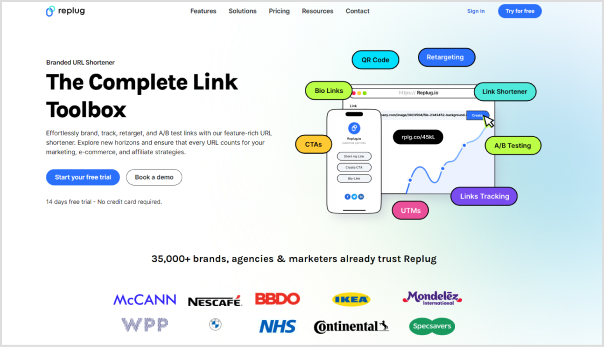
Follow our in-depth guide on TikTok retargeting using Replug. With easy-to-follow steps and expert insights, we’ll walk you through everything you need to know to reconnect with your audiences and convert more.
Replug is an all-in-one branded link management platform that allows you to manage your link with powerful features such as branded link shortening, link retargeting, deep linking etc., backed up by powerful link analytics.
It also offers an advanced URL shortener that helps you create branded, trackable links to boost engagement and measure performance effectively.
Before we dive into the topic, lets know how TikTok retargeting work, and some key retargeting facts & figures that you must know.
How does TikTok retargeting works?
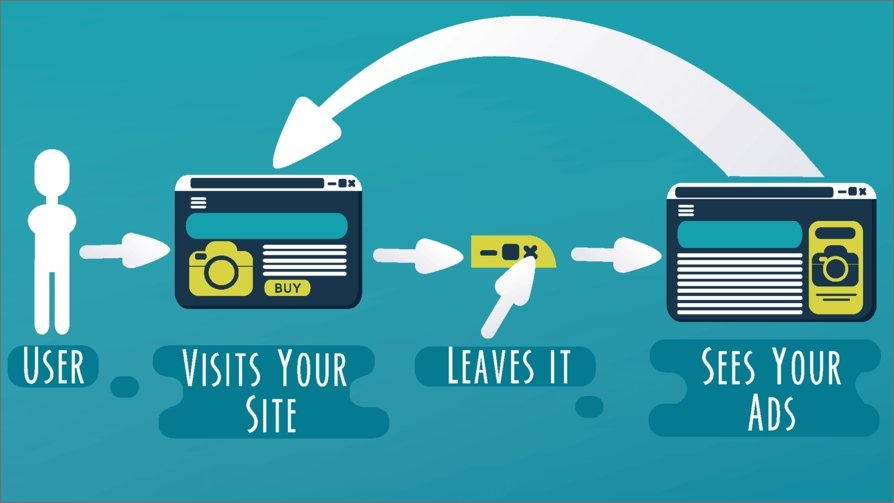
TikTok retargeting ads work by targeting users who have already interacted with your brand or website. These ads use pixel tracking to identify users who have visited your site or engaged with your content on TikTok.
Once identified, TikTok displays ads specifically tailored to these users, increasing the likelihood of conversion by reminding them of your brand or products. This method maximizes ad relevance and improves overall campaign performance.
Retargeted ads have a CTR 10 times higher than regular display ads
30% of consumers have a positive reaction to retargeted ads, leading to increased brand recall
Retargeting can lead to a 38% increase in revenue for e-commerce businesses
56% of marketers use retargeting to cross-sell to existing customers
Mobile retargeting ads perform 13 times better than desktop retargeting
The global retargeting market is expected to reach USD 4450.88 million by 2028, growing at a CAGR of 15.66%
A complete link management solution
for marketing professionals & agencies.
Try Replug for free
Step-by-step guide to TikTok retargeting
Let’s take a look at the key steps involved in the process using an efficient link retargeting tool:
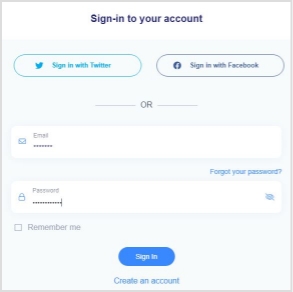
i. Log in to your Replug account
First things first, sign up for a Replug account. It offers a 14-day free trial. Once signed up, log in to your Replug account to get started with your retargeting campaign.
After the successful login, you’ll land on the Replug dashboard where you’ll see the menu with different options as well as account statistics.
ii. Create a retargeting campaign
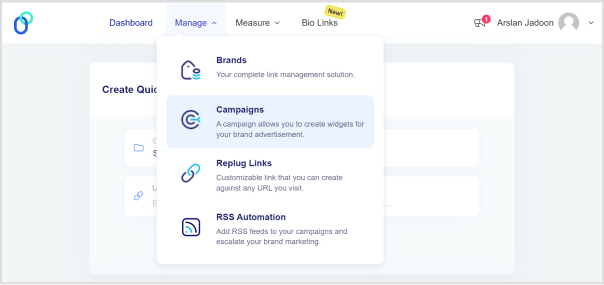
Go to the Manage option from the top menu. Click on the Campaigns option from the drop-down menu.
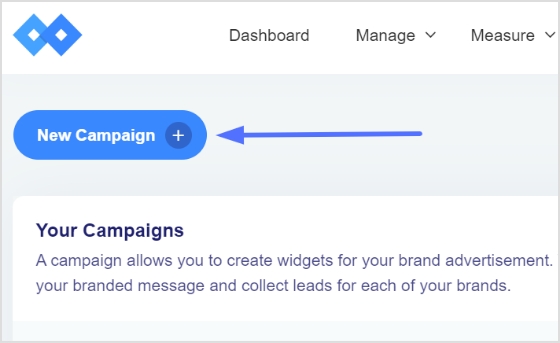
Now you’ll reach the Campaigns page. Click on the New Campaign option to create a new campaign for the retargeting project.
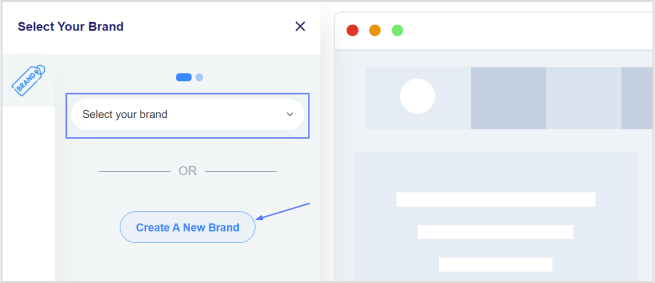
iii. Choose the brand
Before you create a new campaign, the next window about choosing the brand will appear. Choosing the brand is inevitable for creating a campaign in Replug.
So, choose the right brand for the campaign or create a new one if you want to. Once you choose the brand, go ahead.
iv. Select retargeting campaign type
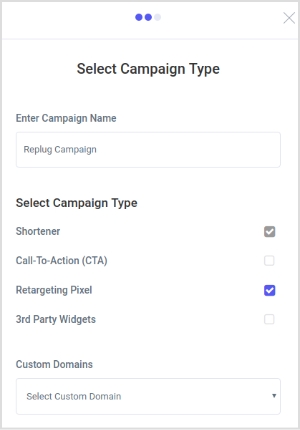
This is one of the important steps in the process because this is the part where you tell Replug to make this a retargeting campaign.
First of all, name your campaign, then choose the custom domain if you want to, and finally, select the campaign type. All you need to do is to select the Retargeting Pixel option. Just check the box in front of the retargeting pixel option.
Click on the Next button to proceed.
v. Add retargeting code
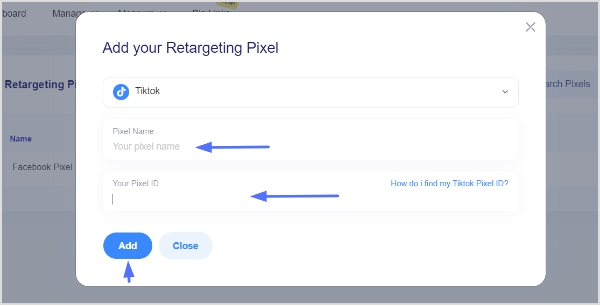
In the last step, you will have to select the retargeting platform. To do so, click on the drop-down menu and go through the social media network names.
Go to TikTok ads manager to setup TikTok retargeting
You can choose the already existing TikTok retargeting code you created before, or else you can create a new retargeting pixel from the button below.
If you want to create a different retargeting code, click on the button and choose the social media platform where you’d be retargeting the audience.
If you opt to create a new retargeting pixel, you’ll have to choose the platform, such as Facebook, Quora, or LinkedIn. And, then you would have to give your pixel a unique name, and then finally add the pixel ID from the same social network.
Save the campaign, and you’re all set.
TikTok retargeting best practices and important tips
For effective TikTok retargeting, consider these best practices and tips:
Define goals: Clearly define your retargeting goals, whether it’s driving conversions, increasing engagement, or building brand awareness.
Segment audiences: Segment your audience based on their interactions with your website or app to create tailored retargeting campaigns.
Personalization: Personalize your retargeting ads to resonate with your audience and encourage them to take action.
Frequency capping: Set frequency caps to avoid overwhelming users with too many retargeting ads, which can lead to ad fatigue.
A/B testing: Test different ad creatives, messaging, and targeting strategies to optimize performance and identify what resonates best with your audience.
Optimize landing pages: Ensure your landing pages are optimized for conversions to maximize the effectiveness of your retargeting campaigns.
Monitor & adjust: Regularly monitor the performance of your retargeting campaigns and make adjustments based on data insights to improve results over time.
FAQs on TikTok retargeting
Does TikTok have retargeting?
Yes, TikTok offers retargeting capabilities through pixel tracking, allowing advertisers to target users who have previously interacted with their brand or website.
What type of advertising does TikTok use?
TikTok supports various types of advertising formats, including in-feed ads, branded effects, hashtag challenges, and branded lenses, providing advertisers with diverse options to engage with users creatively.
Why is my TikTok CPM so high?
High TikTok CPM (Cost Per Mille) can be attributed to factors such as high demand for ad inventory, competition among advertisers, audience targeting specificity, and the quality of ad creative and messaging.
How are TikTok ads curated?
TikTok ads are curated based on the advertiser’s targeting preferences and campaign objectives, utilizing data insights and algorithms to deliver relevant and engaging content to users based on their interests and behaviors.
Have you ever wondered what these “http” and “https” mean in the URLs?
You’re about to learn what these are, why they matter in the URLs, and what you need to know about them.
We see QR code links on trucks, buses, billboards, outdoor hoardings, packaging, business cards, t-shirts, and almost everywhere.
While almost all of us come across URLs all the time, the majority don’t know the difference between http and https.
Well, we’ll break down each and everything you need to know about http and https.
Before we discuss the difference between http and https, it’s essential to explain what these terms refer to.
So, let’s understand what http and https are.
What is HTTP?
HTTP is an abbreviation for hypertext transfer protocol. HTTP is a baseline system for the World Wide Web to operate and is responsible for loading website pages using hypertext links.
It’s an application-layer protocol developed to play a key role in transferring information between networked devices. In other words, it’s a sophisticated protocol for transmitting hypermedia content, such as HTML pages.
How it works
HTTP requests are used to access the content on the web. When a web browser sends a request to the server to load the required web page, it uses the HTTP request method to get access to the desired page.
When an HTTP request is made, it sends a bunch of encoded data that carries crucial credentials about the sender and receiver of the request.
A standard HTTP request contains information, such as the URL, HTTP method, HTTP version type, and HTTP request headers.
Usually, two types of HTTP methods are used in the HTTP requests, which are “GET” and “POST”. A “GET” request is used when the information is expected to return, whereas the “POST” request indicates the end-user is submitting the information to the web server, for instance, username and password or contact form.
To have a better understanding of how HTTP works, it’s essential to go through some of the advantages and disadvantages of HTTP.
Here are the advantages of HTTP:
HTTP employs an advanced addressing pattern, ensuring recognizable names are given to the IP addresses for easy identification on the World Wide Web as compared to the traditional numerical IP address system.
It keeps the security intact by downloading each file from an independent connection and closing it afterward, minimizing the interception risk during transmission by transferring only one element of a webpage at a time.
It brings flexibility to the web, for instance, it allows for the addition of extra functionalities by downloading extensions or plugins as needed, enabling the user to take certain actions for a better experience.
It reduces latency by initiating the handshaking process only upon connection establishment, eliminating the need for handshaking after a request.
The HTTP pages are stored in internet caches known as page caches upon initial loading, facilitating quick content loading upon revisiting the page. It provides users with a fast and efficient web browsing experience.
One of the benefits of an HTTP connection is that it lowers CPU and memory usage due to the limited number of simultaneous actions.
Let’s take a look at the limitations of HTTP:
One of the major limitations of HTTP is the lack of encryption. As a result, the HTTP is susceptible to content alteration, making it insecure and prone to data integrity issues. E-commerce stores, web portals, SAAS tools, and social networks can’t afford data theft or loss as they handle user payments and other important data that require a secure environment.
User privacy is crucial to any online business, platform, or SAAS product. Privacy concerns arise in HTTP connections as hackers can intercept requests and access webpage content, including sensitive information like usernames and passwords.
Data accessibility can cause issues in the HTTP environment. HTTP clients often fail to close connections promptly, resulting in server unavailability during these periods.
Entertaining an HTTP request isn’t that simple. A lot of resources are allocated to fulfill a single request. Transmitting web pages via HTTP necessitates creating multiple connections, introducing administrative overhead to the connection.
HTTP’s resource-intensive nature results in increased power consumption, making it unsuitable for IoT devices, especially those equipped with wireless sensor networks. It makes the connection more complex than it should be.
A complete link management solution
for marketing professionals & agencies.
Try Replug for free
What is HTTPS?
HTTPS stands for hypertext transfer protocol secure. Since HTTP is the protocol used to send data between a web browser and the website, https is the secured version of HTTP.
The HTTPS version is encrypted which makes it secure for data transfer. Essentially, it provides a layer of security to sensitive information and important data when used, accessed, or shared on the web. The websites that deal with user information, such as banking info, credit/debit cards, username passwords, or other user data must be using the https version for data safety.
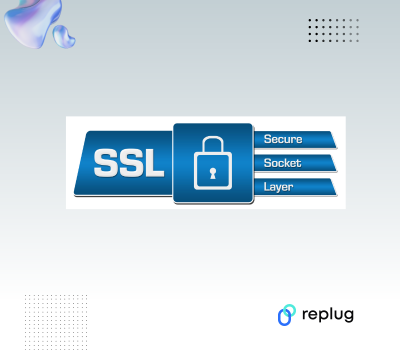
Google has been enforcing the use of HTTPS for the past few years, notifying Chrome browser users about unsecured websites. The unsecured websites mean the sites that aren’t using the SSL certificate. An SSL certificate is a security encryption that secures the connection and keeps the user data secured.
How it works
HTTPS utilizes an encryption protocol to secure communication or data transmission called transport layer security (TLS). The purpose of this protocol is to provide extensive security to the communication by using an asymmetric public key infrastructure.
Simply put, HTTPS is an extension of the hypertext transfer protocol (HTTP). However, it’s safer and more secure as compared to HTTP.
Boost ROI with branded URLs!
Enhance your marketing campaigns by creating shareable, trackable, and fully multi-purpose
customizable branded URLs.
Data encryption is a huge plus when it comes to HTTPS. The information being transmitted remains highly secure during its journey across the internet. Undoubtedly, this encryption adds a layer of protection, making it difficult for unauthorized access.
Protection against phishing attacks is an integral safety net in the digital marketing space. HTTPS offers a safeguard against such threats as user data being stored locally on the client system.
SEO is crucial to any company’s online marketing strategy. The implementation of HTTPS not only bolsters security, but also impacts a website’s visibility and ranking on search engines. Since it adds trustworthiness and authenticity to the domain, websites equipped with HTTPS certificates receive preferential treatment in search engine rankings compared to those lacking this encryption protocol. To stay competitive and maintain strong search performance, many marketers now rely on some of the best AI SEO tools to help with audits, monitor ranking factors, and make sure technical essentials like HTTPS are in place
Customers only want to buy from credible sellers. When it comes to online transactions, SSL plays a crucial role in ensuring their safety. As a rule of thumb, e-commerce stores with active SSL certificates are considered safe and secure for conducting financial transactions. Since HTTP reassures visitors that their sensitive information remains protected from potential threats, it has now become a benchmark safety protocol for online businesses.
HTTP does have benefits on the technical website security side. However, it does help a website from the optics standpoint. When website visitors look at the HTTPS or the green padlock sign next to the URL, they usually feel safe and comfortable with putting out their sensitive information there.
Website owners often hesitate to invest in SSL certificates due to their relatively high cost, resulting in many opting not to utilize them. Additionally, SSL certificates require periodic renewal to prevent deactivation.
HTTPS usage often leads to browser caching and server-side caching complications due to the encryption of content and information.
Redirecting URLs from HTTP to HTTPS poses significant challenges for website owners. Failure to redirect can lead to indexing of both versions, resulting in duplicate content issues and diminished search engine rankings.
SSL certification installation hassle is real if you aren’t tech-savvy or a website hosting expert. Most users have to reach out to the web hosting support and ask them to install the SSL certificate on the domain.
HTTPS is considered a little slower to load initially due to data encryption functions. However, a good web hosting server can easily cope with such speed challenges.
HTTP vs. HTTPS: What’s the difference?
HTTP vs. HTTPS is a debate that has been around for a while. However, the dust seems to have settled lately as search engines prefer websites with HTTPS instead of HTTP. Moreover, the Chrome browser notifies users when they try to access a website that doesn’t have an SSL certificate installed (meaning it’s an HTTP-based site).
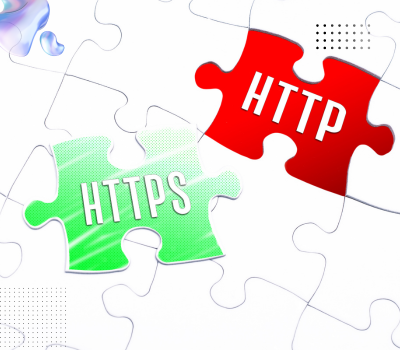
The primary difference between HTTP and HTTPS lies in how data is encrypted when users access content from an HTTPS-enabled domain. In other words, the data being transmitted is encrypted and more secure compared to HTTP.
For an extra layer of privacy, especially on public networks, it’s also worth considering a trusted security tool like a VPN. You can download a VPN to help keep your online activity private.
Before choosing a service, review Surfshark’s privacy tests from Cybernews, including checks for IP and DNS leaks and how its kill switch responds when the connection drops.
While having an SSL certificate ensures that the site is more secure as compared to a site without an SSL certificate, an SSL certificate has become more relevant from an SEO standpoint than ever.
Moreover, HTTPS works as a label of authenticity and credibility, as domain registrars keep the information of the domain owner for authentication purposes.
Sure, while HTTPS has some perks, it may have some downsides, such as URL redirection setup, installation technicalities, and others. However, it doesn’t stop domain owners from choosing HTTPS over HTTP.
Most digital marketers, bloggers, and agencies prefer HTTPS as installing an SSL certificate has now become a part of the standard operating procedure when setting up a new website on a domain.
SSL certificates types & validation
There are mostly three types of SSL certificates available on the market, which are:
i. Single domain
A single-domain SSL certificate is a type of SSL certificate issued to a single domain name and is usually used by individuals and small businesses.
ii. Multi-domain
A multi-domain SSL certificate is a type of SSL certificate that covers multiple domain names under the same SSL certificate. It works best for large organizations, agencies, and web entrepreneurs that run multiple online businesses.
iii. Wildcard
A wildcard domain SSL certificate allows domain owners to secure multiple subdomains under the same SSL certificate. However, the subdomains must be under the same base domain.
Are URL shorteners secure for creating short links?
A lot of marketers and brands are keen to use URL shorteners for sharing links on social media and other platforms.
Choose a reputable service that prioritizes security, offers customization options, and provides reliable performance.
Replug is a powerful URL shortening platform that offers secure redirection. This reliable free custom URL maker provides HTTPS protocol to encrypt the traffic between the user and the destination URL. Without HTTPS, there’s a risk of data interception or manipulation.
Types of SSL certificate validation levels
Here are three types of SSL certificate validation levels:
i. Domain (DV)
It’s the simplest SSL certificate validation that requires proof of ownership and is usually issued within a few minutes. It’s the most affordable yet easiest way to secure your domain name security.
ii. Organization (OV)
It’s a tad advanced type of SSL certificate with proper validation required before the issuance. The domain registrar may look into the organization and domain ownership details to authenticate the SSL certificate issuance.
iii. Extended (EV)
The extended (EV) SSL certificate validation is the top-tier validation level that requires a strict examination and the applicant goes through an analysis process before getting the extended SSL validation. Most of the top e-commerce businesses get this SSL validation to earn authentication, trustworthiness, and customer satisfaction.
HTTP vs. HTTPS: Which one is better for my website?
In this day and age, one must adopt every possible route that ensures customer safety, brand reputation, and Google’s EEAT.
When it comes to search engines and social media networks, these platforms are designed to use different algorithms that help them sense user behavior and adapt accordingly.
That’s how SEO-optimized content has a better chance of ranking than unoptimized content or the most entertaining video clip goes viral and the boring video doesn’t take off on social.
HTTPS has become a big deal lately, especially when Google started prioritizing sites that have SSL certificates installed on their domains. Moreover, now Chrome browser (which is owned by Google) alerts users when they’re trying to open a website without an SSL certificate.
Since HTTPS has better data encryption and security protocols, it’s understood that HTTPS is better than HTTP. No wonder HTTPS is trusted by users, social media platforms, and search engines. So, it’s safe to say that HTTPS is better for any website than HTTP.
You’re sending hundreds of emails on a daily basis, getting good open rates, still the conversion rate is less than your expectations. What could be the problem?
The problem is that you don’t know
Which email campaigns are doing the most for your brand?
How do different audience segments respond to your emails?
What is the bounce rate of your email campaigns?
Which emails are getting the highest click-through rate?
Which specific ad or link on a webpage is driving traffic?
Which marketing campaigns are working and which ones aren’t?
But don’t worry, we’ve got your back. The solution?
Add email UTM parameters to your links. They help you keep track of who’s clicking, where they’re coming from, and what’s working best.
If you don’t know “What’s a UTM parameter?” They are special codes you can add to the end of URLs to track visitors.
So, if you’re serious about fine-tuning your email game and getting better results, it’s time to get along with UTMs.
What is a UTM in email?
In simple terms, UTM codes or parameters in an email are unique tags added to the links within your email marketing campaigns. These tags are added to the end of URLs, providing valuable information to brands about the source, medium, campaign, and more.
Why do I need to use UTM parameters in email campaigns?
The use of email UTM parameters in email campaigns is really important if you want to get in-depth insights. Any email marketing platform will allow you to add UTM parameters since it is simply a change to the URL of each link you are adding in the email content. Take for example, if you add such parameters to your email links, you can accurately track metrics such as
Open rates
Total impressions
Click-through rates
Conversion rates
And overall engagement
And much more…
What are the benefits of UTM tracking?
UTM tracking offers several key benefits for email marketers as well as digital marketers.
Identify top-performing content
Let’s say you include a blog post link within your email campaign. UTM parameters can tell you which blog posts generate the most website traffic from your email blasts. This helps you understand what content resonates with your audience and prioritize future content creation efforts.
A/B testing optimization
UTM parameters are instrumental in A/B testing different elements of your email campaigns. You can create multiple email versions with different subject lines, calls to action, or content and use UTM tags to track which version performs better. This allows for data-driven decisions to improve your email marketing strategy.
Measure long-term impact
Know that email UTM tracking allows you to measure the long-term impact of your marketing campaigns. By analyzing UTM data over time, you can see how campaigns influence website traffic and conversions even after the initial email is sent. This helps you understand the full customer lifecycle and optimize campaigns for long-term success.
Measure ROI (Return on investment)
UTM parameters help you track the effectiveness of paid advertising campaigns. You can see which keywords or ad variations drive the most valuable traffic, allowing you to optimize your ad spend for maximum return.
Cross-channel measurement
Email UTM tracking is valuable for campaigns spanning multiple channels. You can track how users interact with your brand across different platforms, like clicking a social media ad and then subscribing to your email list.
Types of UTM parameters for email campaigns
There are so many email UTM parameters you can use to track your email campaigns, but some of them are particularly common:
utm_source
It showcases the exact source within the marketing channel. So, for an email campaign, you might use “newsletter” or a specific campaign name like “welcome-series.”
utm_medium
This one identifies the marketing channel that brought the visitor to your site. In the case of emails, this would always be “email.”
utm_campaign
This is where you can get specific about the exact campaign you’re running. You could use a name for a particular promotion “summer-sale” or a more general term for an ongoing campaign “customer-retention”.
utm_content
Used to differentiate between different versions of the same email, such as A/B testing variations.
utm_term
This parameter is typically used for tracking keywords in paid search campaigns but can also be repurposed for email campaigns to track specific elements like links or calls to action.
How do I set UTM parameters?
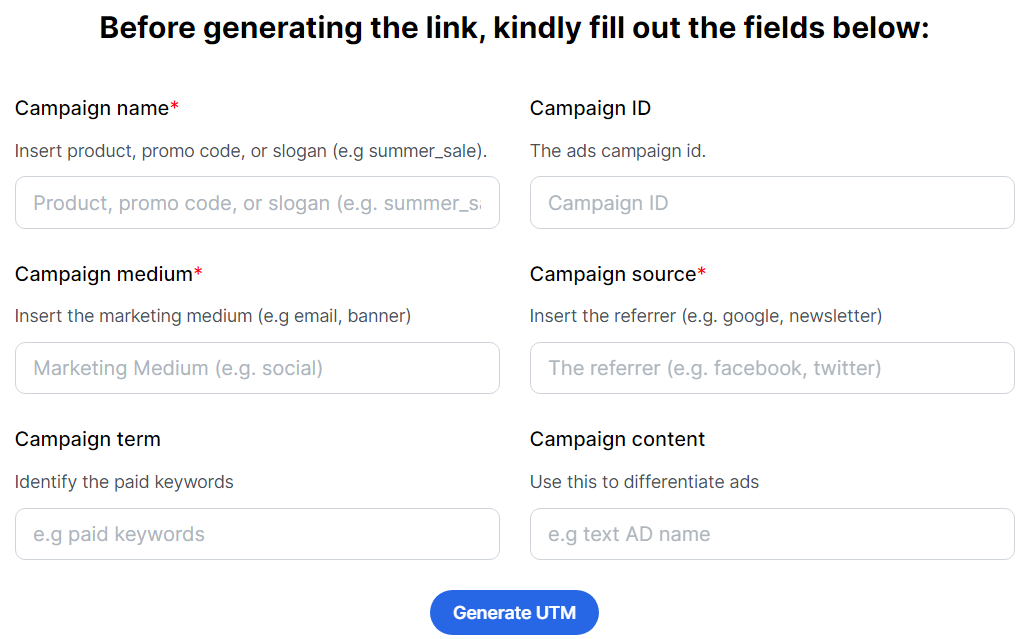
One can set up UTM parameters by using a free online UTM builder tool. Replug is an all-in-one tool that offers a user-friendly interface where you can easily input your URL and customize the UTM parameters according to your campaign goals.
Fill in the details for the UTM parameters you want to use for a specific link:
Campaign name: Assign a unique name for this particular marketing campaign.
Medium: Specify the marketing channel (always “email” for emails in this case).
Source: Add in the exact source within the channel (e.g., “newsletter,” “welcome-series”).
Content (Optional): Use this to differentiate clicks between different versions of the same link within your email (e.g., button text or a unique identifier).
Term (Optional): Less common for emails, but useful for tracking paid search ads within emails.
Campaign ID: It could be a unique identifier or code associated with the campaign.
Once you’ve entered the desired information, click “Create” to generate your link with the UTM parameters embedded.
Replug – A complete link management solution
A complete link management solution
for marketing professionals & agencies.
Try Replug for free
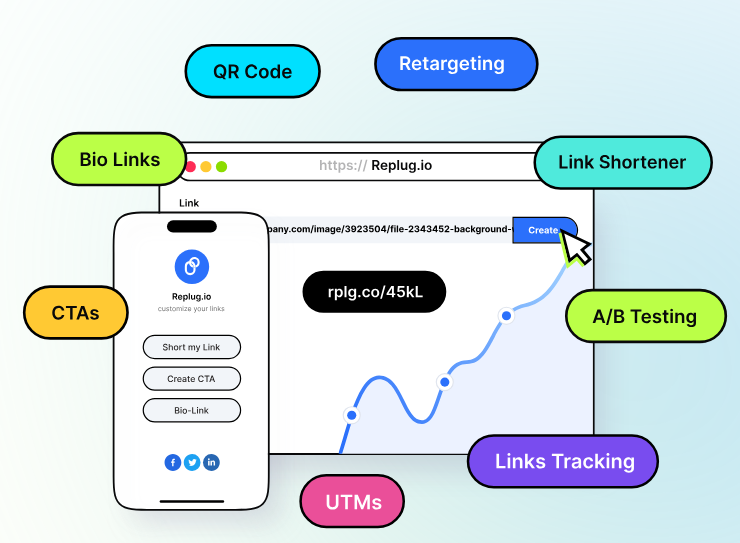
If you want more than just email UTM parameters, you can test out the Replug free trial to check out the complete range of advanced features including retargeting pixels, bio-links, link rotator, A/B testing, link analytics, QR codes, link shortening, and much more…
Here’s how you customize your UTM links with Replug.
After signing up to your Replug account go to the Dashboard.
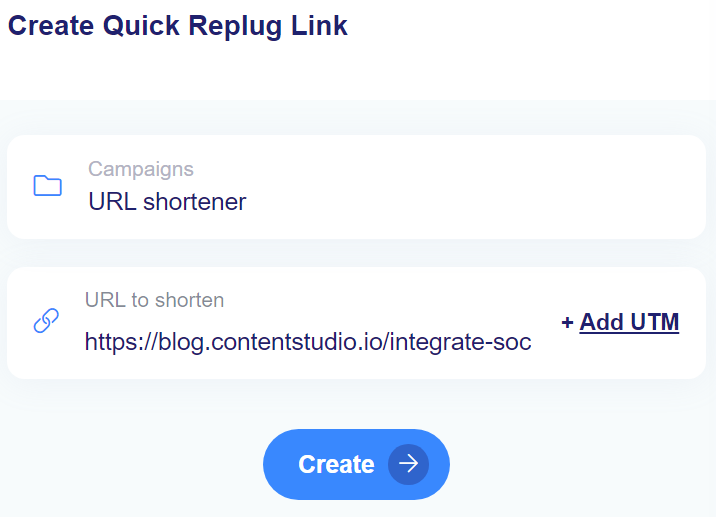
In the “Create Quick Replug Link” section, select your campaign
Afterward, add the link to which you want to customize.
In the same block, you’ll see an option labeled “+Add UTM” next to the URL field. Click on it.
A pop-up window will appear, allowing you to either choose a pre-saved UTM parameter set or create a new one.
If creating new UTM parameters, provide the necessary information such as source, medium, campaign, term, and content. Click “Apply” once completed.
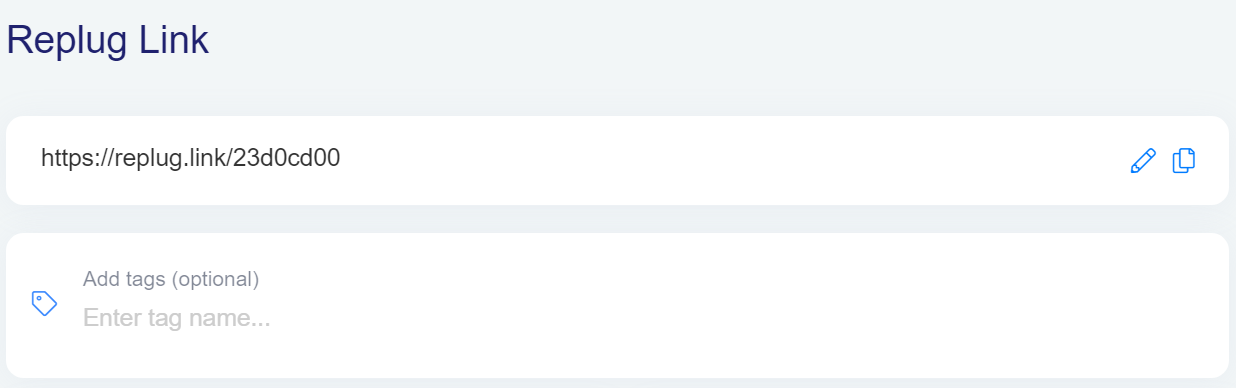
Click the “Create” button, and Replug will automatically generate a shortened URL with the added UTM parameters.
Next, if you want to customize the UTM URL, you can do so by clicking the edit icon.
After any edits, simply copy the URL with the UTM parameters and click the “Update” button to save your changes.
Also, check out our best free link shortener to easily shorten and track your links with just a few clicks!
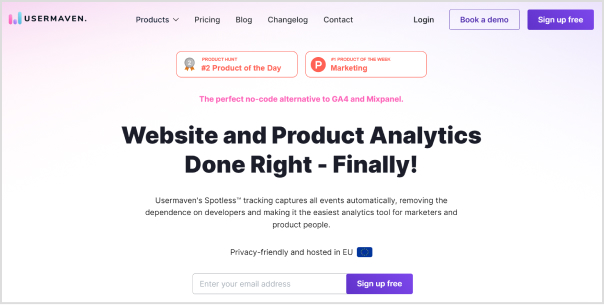
UTM tracking with Usermaven
Usermaven is a fantastic alternative to Google Analytics, providing detailed analytics for your website and app. It relies on UTM parameters to track important data like where your visitors are coming from, which pages they’re entering and exiting, and even their location down to the city level.
Sign up today and get a hold of the top
Channels / Sources
Mediums
Campaigns
Terms
Contents
In the top pages section, monitor both the entry and exit pages to understand your audience’s behavior effectively. Besides that, explore your customer base’s geographical distribution through detailed maps, countries, and city breakdowns. You can also see what devices and browsers most of your audience prefers.
Identify high-performing keywords effortlessly with Usermaven’s keyword tracking feature, displaying total clicks and impressions. Utilize this data to optimize email campaigns and content strategies for maximum traffic.
In easier words, by analyzing such parameters, you can make the most of Usermaven’s features to improve your campaigns and get better results.
Conclusion
Email UTM parameters are super useful for email marketers. They help you track how well your emails are doing, so you can make them even better.
But! Are you using UTMs in your email campaigns?
If you’re not using UTMs yet, it’s a great idea to start now. They’ll help you understand what’s working and what’s not, so you can get awesome results from your campaigns.
Frequently asked questions
What is the difference between UTM and GTM?
UTM tags are codes added to URLs for traffic source tracking, while GTM is a platform to manage various tracking codes on your website.
Is it illegal to track emails?
Tracking emails isn’t illegal, but regulations like GDPR limit data collection methods.
Which method is used to track emails?
UTM tracking is one of the most common ways to track email clicks and conversions.
What is email trace?
An email trace shows the path an email takes from sender to recipient, helping diagnose delivery issues.
It’s no surprise that brands and influencers are eager to find new ways to get eyeballs, grasp attention, and talk to people regardless of the platform.
There are a ton of channels of communication these days, such as social media, newsletters, online ads, TV commercials, billboards, and more.
Social media is a powerful avenue to build awareness, spread the word, and market a product. Statistics report that Facebook has above 3 billion monthly active users, while YouTube has over 2.4 billion, monthly active users – no wonder brands and agencies are trying to dominate social media.
One of the aspects of reaching out to prospects and connecting with the relevant audience is to use the retargeting technique through social media platforms.
Let’s dive deep into what retargeting is and how one can use social media platforms to do retargeting.
What is social media retargeting and its importance in the digital world?
Retargeting is a marketing strategy to remarket a product to the same audience that has previously shown some interest in it.
Have you ever had a chance to see the display ads about the website you visited the other day? It happens to all of us and some of us wonder how this happens – well, now you have the answer.
Social media retargeting is just the same retargeting concept applied to social media networks. Advertisers try to meet, engage, and convert the same visitors who visited them before using social media retargeting campaigns.
Here are the three reasons why it’s important in the digital world:
i. Global reach: Since these social media platforms allow marketers and brands to reach a global audience, social media retargeting has essentially become an important digital marketing tool to remarket a product or service worldwide.
ii. Effective targeting: One of the reasons why social media retargeting is crucial to any digital marketing campaign is that it’s quite effective when it comes to targeting the prospective audience. The ad campaigns without clear targeting are hit-and-miss.
iii. Faster results: Retargeting is essentially remarketing to the audience that has shown some interest in the product before. So, it’s a type of advertising campaign that usually brings quicker outcomes as compared to normal advertising campaigns.
It’s safe to say that social media retargeting is inevitable in today’s digital marketing realm where billions of users log in to multiple social media platforms daily to chit chat, get updates, and connect with loved ones.
How social media retargeting works?
Since everyone uses at least one major social media platform like Facebook, YouTube, or Instagram, it gets easier for brands to reconnect with prospective clients through social media retargeting.
Here’s how social media retargeting works:
Social media networks provide a piece of code called “pixel” that goes into your website or landing page code that collects data about the user’s behaviors, actions, and performance. Usually, the social media platform guides users on how to insert the pixel code and where to insert it in the website code.
It’s a very effective code for social media platforms to track user actions on the website and helps advertisers retarget those same users on the social media network.
However, it doesn’t collect any sensitive information or user data, such as credit card numbers or passwords. The only purpose of adding a pixel of a social media network is to help the advertiser/brand retarget the audience through a social media retargeting ad campaign.
Best tool for retargeting on social media platforms
Retargeting on social media with Replug
A complete link management solution
for marketing professionals & agencies.
Try Replug for free
Replug is an excellent link optimization platform that offers several link management services, such as URL shortening, deep links, bio links, retargeting, A/B testing, and QR codes.
When it comes to retargeting on social media, Replug’s link retargeting tool can come in quite handy. It helps users retarget their audiences across different social media networks, such as Facebook, Twitter, LinkedIn, Pinterest, TikTok, Quora, and Google. Besides, it also has a custom option for using a customized pixel.
Social media retargeting benefits with Replug
Social media retargeting offers several benefits for businesses looking to maximize their marketing efforts. While, Replug enhances the benefits of social media retargeting by providing robust tools and features to reach target audiences, drive conversions, and maximize marketing effectiveness.
1. Increased conversion rates:
Replug’s retargeting capabilities enable businesses to reconnect with users who have engaged with their shared links. By targeting these already interested users, businesses can boost conversion rates effectively.
2. Enhanced brand recall:
Reinforces brand awareness and recognition among potential customers with retargeting. This increases the likelihood of users remembering the brand when they are ready to make a purchase decision.
3. Personalized advertising:
Empower businesses to deliver personalized ads to users based on their previous link interactions. This personalized approach enhances engagement and conversion rates by catering to users’ specific interests and behaviors.
4. Cost-effective marketing:
Replug’s retargeting options optimize advertising spending by targeting users who are more likely to convert. This results in higher ROI and more efficient allocation of marketing budgets.
5. Reduced cart abandonment:
Many users abandon their carts before completing a purchase. Running retargeting campaigns with Replug can remind these users about the products they showed interest in, encouraging them to return to complete their purchase.
6. Cross-selling and up-selling opportunities:
Running retargeting campaigns can also be used to promote related or complementary products to users based on their previous purchases or browsing history. This presents opportunities to increase the average order value and maximize revenue.
7. Improved customer engagement:
By delivering relevant and timely ads, businesses can keep their brand top-of-mind and engage users throughout their customer journey. This ongoing interaction fosters stronger relationships with customers and encourages repeat purchases.
8. Measurable results:
Replug provides comprehensive analytics and tracking capabilities, allowing businesses to monitor the performance of their retargeting campaigns in real-time. This data-driven approach enables businesses to optimize their campaigns for better results.
Top 3 social media retargeting strategies
It’s always best to know the top priorities when it comes to the application of a marketing tactic. Here are the three social media retargeting strategies every marketer should know:
1. Target a specific audience
Creating an ad campaign tailored toward a specific audience is always better than shooting in the dark. One of the essential retargeting strategies a marketer can apply is to handpick a segment of the audience and serve them specific ads with a goal in mind.
Since retargeting does ensure that the ad shows to the specific audience, the offer must also be inclined toward the desire of the target audience.
For instance, if you’re retargeting the audience that has clicked on your accounting software page, you can create a limited-time discount offer on the very software for the specific audience to make a purchase. Now you can create a landing page for the offer and retarget the same audience to showcase the offer.
2. Retarget on multiple social media platforms
One of the easy wins when it comes to social media retargeting is that one should remarket across different social media platforms. If you’re using multiple social media platforms to share your content, interact with your followers, and build a community, then you must retarget the audience on all those platforms.
If you settle for just one social media platform like Facebook even when you have a decent number of followers on LinkedIn and Instagram, then you’d probably be missing out on a lot of sales and marketing opportunities.
3. Track campaign performance
Tracking is crucial to understanding user behavior, audience demographics, ad creative quality, and audience buying power. A reliable tracking system would enable advertisers to improve their campaigns going forward.
There can be different types of campaign tracking, such as URL tracking, heatmaps, conversion, etc – so, it’s up to the brand/advertiser that is launching the retargeting campaign.
For instance, if you’re tracking URL clickability, then you can use Replug to set up a branded short URL retargeting campaign using the method mentioned earlier in this article. The analytics section will keep you updated with all the statistics on the URLs in your retargeting campaign.
Remember that there is a whole heap of other retargeting strategies that can be implemented when running a social media retargeting campaign. However, the above-mentioned ones are the most fundamental yet meaningful.
Social media retargeting examples
Let’s take a look at a couple of social media retargeting examples that we came across:
1. OrangeHost is retargeting visitors on Instagram
OrangeHost is one of the most affordable web hosting services on the market. This hosting company uses a retargeting marketing strategy.
When a visitor lands on their website to go through the web hosting plans, the chances are that this person is going to see this Instagram ad at some point.
It’s a retargeting Instagram ad of OrangeHost – trying to convert their website visitors into paying customers.
Interesting, right?
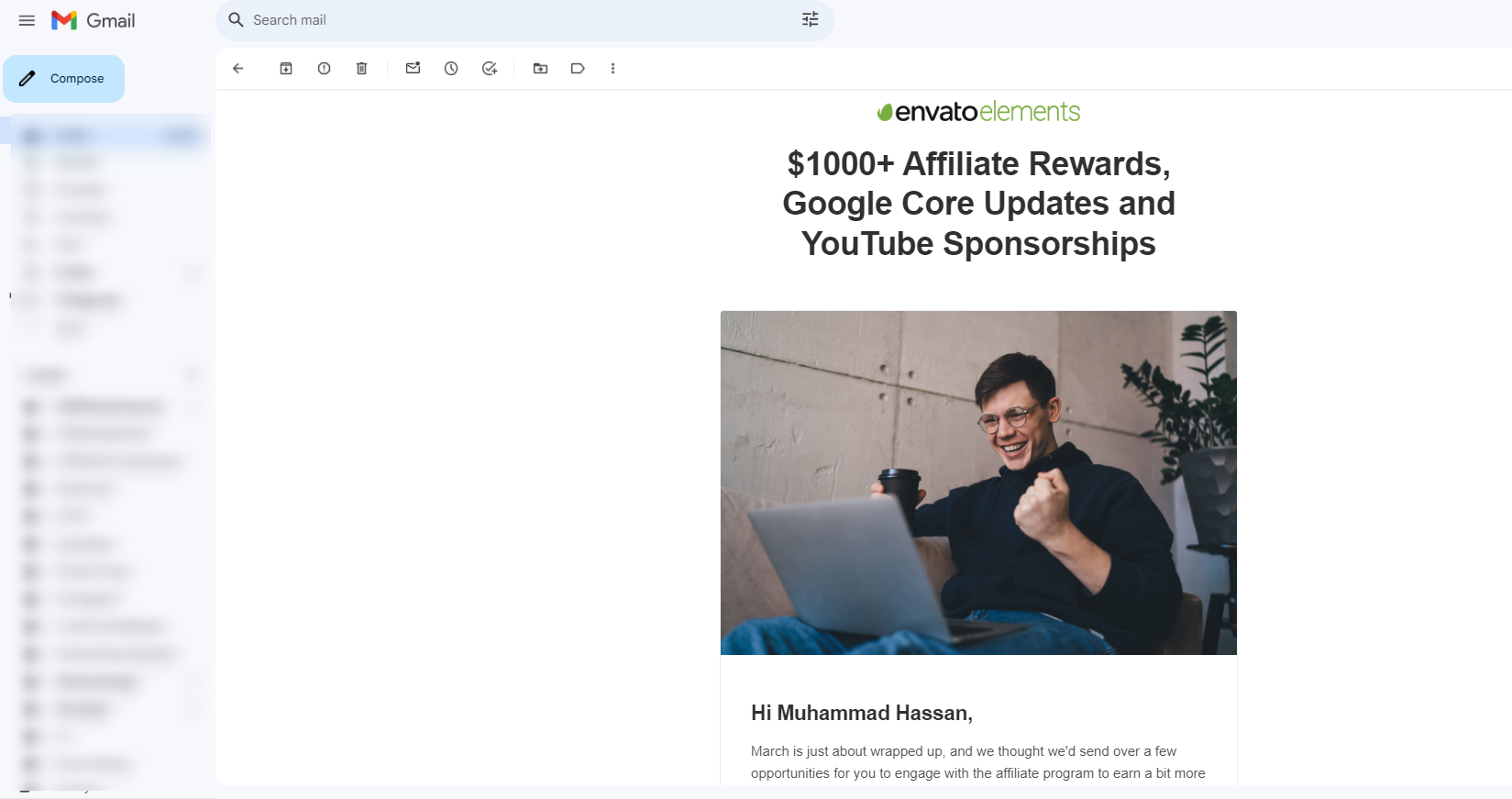
2. Envato Elements is remarketing the audience on YouTube
Envato Elements is a creative marketplace that provides designers and creators with stock videos, photos, elements, icons, and much more.
They also send out email newsletters to the members and affiliates. After opening one of their recent email newsletters, we now see their ads on YouTube.
It seems like there is a retargeting campaigns is in place.
Social media retargeting: Success stories
Here are the few social media retargeting success stories worth mentioning:
1. Vedia works with Criteo to increase sales
Vedia has successfully implemented a social media retargeting strategy by utilizing Criteo’s programmatic technology to expand its customer base on Facebook, resulting in a 15% increase in overall sales across various campaigns.
By leveraging Criteo’s extensive network of publishing partners and integrating with Facebook, Vedia gained insights into buyers’ entire journey, spanning from discovery to purchase.
It’s been learned that it not only widened Vedia’s reach along the purchase path but also reduced campaign cost per order (CPO) by nearly 20% and cost of sale (COS) by 7%.
2. Madewell customizes ads to convert the audience
Madewell is one of those advertisers that effectively utilizes Facebook retargeting to reconnect with website visitors and entice them to make purchases.
By tailoring remarketing ad campaigns on social media platforms and in-lining them with user’s behavior on their site, this company enhances the shopping experience for users, presenting them with a curated selection of items.
This retargeting advertising strategy moves the needle for Madewell, encouraging customers to make a purchase.
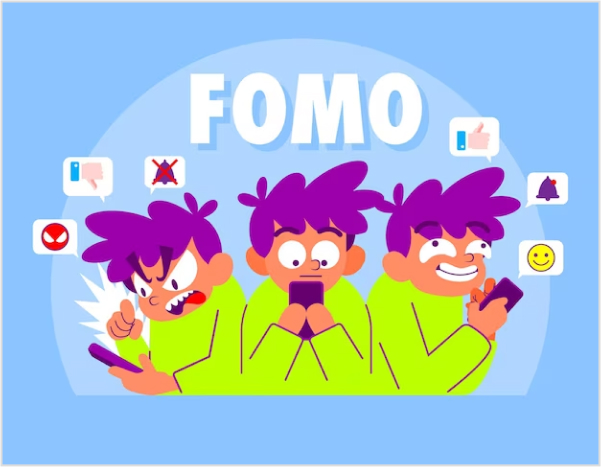
3. Expedia uses FOMO to push prospects to take action
Expedia is a top-tier travel and booking platform that operates in multiple countries and territories.
It’s been learned that they target the Facebook audience searching for destinations, flights, and smart hotel experience.
They smartly create Facebook ad campaigns around “last minute deals” and choose CTA phrases like “Book Now” to attract the audience that might be traveling soon.
Not only do they get a chance to meet the right audience for their product, but they also use the urgency factor to convert the prospects into customers.
There are hundreds of examples of brands that are successfully implementing social media retargeting campaigns on different social media platforms.
Let’s conclude: Ready to retarget visitors who click on your short links?
Social media marketing continues to evolve. The social media ad platforms are changing for the better. New social media monetization opportunities are popping up. More and more people are embracing social media. No wonder it’s an interesting time to be alive.
Since marketing is a crucial element of social media, brands, organizations, and agencies are trying to scratch the surface of social media platforms to create their dominance against competition.
Social media retargeting is a widely used engagement strategy by brands, influencers, and marketers. The purpose of discussing retargeting is to enlighten you with this opportunity to remarket your offer to prospects on social media.
Replug is used by thousands of users worldwide for URL shortening, so they must understand how valuable the clicks on their shortened URLs are.
Social media retargeting using the power of Replug allows users to re-engage the audience that clicked on your short URLs and present them with an offer they can’t refuse.
Moreover, the link analytics section gives you insights into your short URL performance. It’s safe to say that measuring clicks, unique clicks, total conversions, and conversion rates has never been this easy.
While it seems like Replug is just a free URL shortener, it does offer several features, such as bio links, deep links, and A/B testing – it’s a complete URL tracking package for marketers, businesses, influencers, and entrepreneurs. Try it for free!
FAQs about social media retargeting
Let’s answer some of the burning questions about social media retargeting:
What is the difference between targeting and retargeting?
The difference between targeting and retargeting is that when you’re targeting an audience, you’re trying to reach a new audience that hasn’t heard about you before. Whereas when you retarget, you’re trying to connect with the audience that has visited your website or landing page before.
Is retargeting an SEO technique?
Retargeting isn’t an SEO technique. Instead, it’s more of an online advertising technique used by advertisers and marketers to reach the audience that has shown some interest in the product or service before. So, the retargeting campaign ensures remarketing your product or service to the same audience and brings them on board with the conversion.
What is the first step of retargeting?
The first step of retargeting is to identify the target audience, meaning figuring out who your audience is and where they exist. Once identified, you can create a retargeting strategy to reach out to them and offer them something they might be interested in.
What are retargeted ads?
Retargeting ads are a type of ad campaign intended for the audience that has visited your website or landing page before but never took any action.
How to do retargeting ads on Instagram?
Retargeting ads on Instagram can be run through your Facebook ads account. All you need is to set up your Facebook Pixel on your website or landing page and then create a retargeting ad campaign through Facebook and choose the Instagram platform for targeting the audience.
Did you know that over 68% of shopping carts get abandoned online?
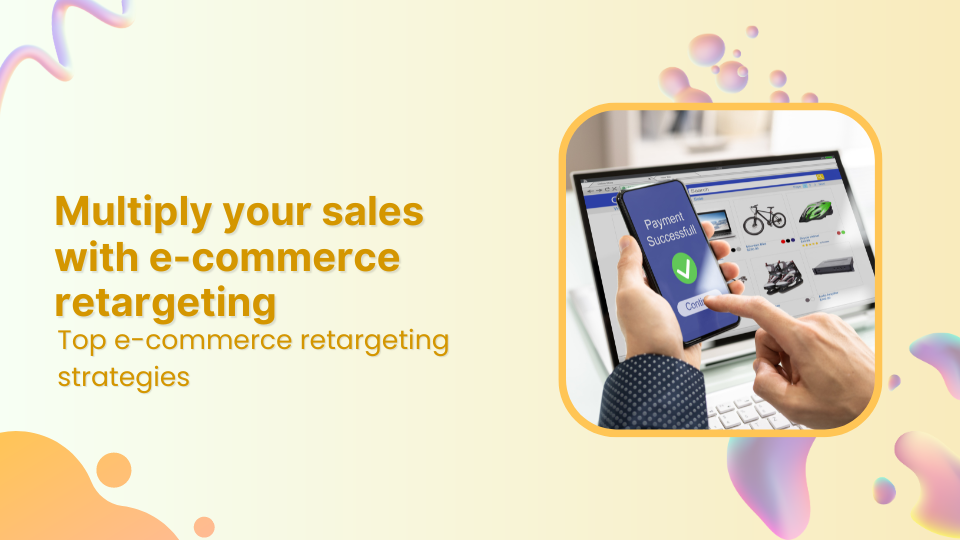
Don’t worry eCommerce retargeting can significantly improve those odds.
In this blog, we’re going to reveal some insider secrets that can help businesses of all sizes double their monthly sales.
What is retargeting?
Retargeting is a marketing strategy used by brands to reconnect with individuals who have previously interacted with their website, social media profiles, or other digital content. It involves displaying targeted advertisements to these individuals across various online platforms, to re-engage them and encourage them to take a specific action, such as making a purchase or signing up for a newsletter.
Here’s how retargeting typically works:
Key retargeting features
Description
Tracking
Whenever someone engages with your website, clicks on an advertisement, or uses your application, a small piece of code (such as a pixel) tracks their actions. This code doesn’t disclose any personal information but helps distinguish individual users.
Targeting
Using the collected tracking data, you can create specific groups of users based on their interactions with your brand.
Ad display
With these targeted user groups identified, you can display tailored ads across the social media platforms they frequent. These ads serve as reminders of your brand, offer enticing incentives, or highlight relevant products and services.
Cart abandonment: Target users who left items in their cart without purchasing.
Product page: Show ads for viewed products to encourage purchase.
Cross-sell/upsell: Promote related products after a purchase.
Discounts/promotions: Offer special deals to entice users to buy.
Reactivation: Re-engage users who haven’t visited or purchased recently.
Dynamic: Display personalized ads based on past interactions.
Email: Send targeted emails to remind users of their abandoned carts or showcase product recommendations.
What are the differences between retargeting and remarketing?
While retargeting and remarketing are often used interchangeably, there are subtle differences between the two.
Feature
Retargeting
Remarketing
Definition
Retargeting primarily focuses on reaching users who have visited a specific website or interacted with a brand in some way, and to reconnect with past visitors or customers.
Remarketing, on the other hand, encompasses strategies primarily through personalized email campaigns
Purpose
To re-engage users who have shown interest in the brand or its products but have yet to complete a desired action, such as making a purchase.
To reconnect with users who have previously interacted with the brand and encourage them to take a specific action, such as completing a purchase or signing up for a newsletter.
Target audience
Users who have visited a specific website, viewed products, or interacted with digital content.
Users who have previously engaged with a brand’s website, social media profiles, or other digital channels.
Tracking method
Typically, it uses cookies or pixels to track user behavior and activities on a website.
Often relies on email addresses or contact information provided by users during previous interactions with the brand.
Conversion rate
Generally higher conversion rates as it targets users who have already shown interest in the brand or its products.
Conversion rates can vary depending on the remarketing campaign’s effectiveness and the messaging’s relevance to the target audience.
Ad-display
Utilizes targeted ads displayed across various online platforms, such as social media, search engines, and websites.
Primarily involves personalized email campaigns, although ads may also be displayed on websites, search engines, and social media platforms.
A complete link management solution
for marketing professionals & agencies.
Try Replug for free
Top 9 eCommerce retargeting strategies to follow
1. Segment your audience
The first step is to identify key segments and customize your eCommerce retargeting campaigns to cater to the specific needs and interests of each segment.
For example, you might create separate ad campaigns targeting users who abandoned their carts versus users who browsed specific product categories but didn’t make a purchase.
2. Catchy ad copy
Eye-catching visuals are a must in eCommerce retargeting, but stunning images alone can’t seal the deal. Without a compelling message, your ads risk getting lost in the scroll.
Here’s where powerful copywriting takes center stage. Great copy grabs attention, ignites emotions, and motivates action. By incorporating these elements, your retargeting efforts won’t just reconnect with past visitors, they’ll turn them into authentic buyers.
3. Inject FOMO to boost last-minute sales
When done right, retargeting ads can lead to great conversion rates. But there’s always room for improvement. You can boost your conversion rates by adding a sense of urgency, like creating FOMO (fear of missing out).
This can be done with countdown timers, last-minute deals, or limited-time offers. When your audience sees that a popular product is available for a limited time, it triggers their impulse to buy. You can also customize your ads with countdown timers to make them feel more urgent.
4. Cross-sell new and existing products
This usually depends on the type of products you sell. However, there’s a good chance that some of your products will complement one another.
You can utilize both customer and sales data to come up with a list that targets particular purchases. Then, you’ll show your audience ads that might be a product that complements their purchase. Your ad should make the value of the purchase clear to their mind. Show them how these purchases will complement one another.
Offering relevant cross-sell suggestions demonstrates that you understand your customers’ needs and preferences. This personalized approach enhances the shopping experience, fostering customer satisfaction and loyalty.
5. Retarget based on the sensitivity of pricing
One of the main reasons people abandon their shopping carts is the high shipping costs and finding a better deal elsewhere via a competitor.
For instance, millennials are quite careful about spending on non-essentials and spending less than the generations before them. Now that you know you’re dealing with price-sensitive customers, you can win them over by targeting them based on less.
You can target those people who have left at a specific point in the checkout process. For instance, right before they pick out shipping options. You can then offer them free shipping or give them discounts to entice them to come back and make a purchase.
6. Adjust your retargeting ads’ frequency
Most people are quite receptive to eCommerce retargeting ads, just as long as you don’t overdo it. If some ads are frequently popping up, this can hurt the relationship between the brand and the customer. Up to the point where the customer ends up frustrated with these ads because you’re someone intruding into their lives, in an almost creepy way.
7. Keep your content updated
Repeatedly using the same ad copies in your eCommerce retargeting campaign can quickly diminish its effectiveness. When your customers encounter these ads everywhere, they eventually tune them out, similar to how we overlook billboards or road signs.
This phenomenon, known as advertising blindness or banner blindness, reduces the impact of your messaging. To maintain engagement and combat this, it’s essential to keep your approach fresh by regularly updating your ads to capture your audience’s attention effectively.
8. A/B testing for optimization
Another way to increase ecommerce sales is by exploring diverse ad creatives, copies, and strategies using A/B testing. Experiment with variations to pinpoint what connects most effectively with your audience. If needed, develop new retargeted ads tailored to your user base. Test various elements such as headlines, images, and calls to action to fine-tune your retargeting strategy and enhance overall performance.
9. Monitor and analyze results
Regularly monitor the performance of your retargeting campaigns and analyze metrics such as click-through rates, conversion rates, and return on ad spend (ROAS) to identify areas for improvement and optimization.
What is the best tool for retargeting?
The choice of the best tool for retargeting can vary depending on factors such as the specific needs of your business, budget constraints, and the platforms you wish to target.
However, one of the best retargeting platforms is Replug. It’s affordable and easy to use, and it goes beyond basic retargeting, offering functionalities like link cloaking, traffic routing, cross-platform conversion tracking, and much more.
A complete link management solution
for marketing professionals & agencies.
Try Replug for free
Replug allows you to create specific campaigns designed for retargeting. Within this campaign, you can define which retargeting pixels you want to use.
This top-notch link optimization platform integrates with so many popular social platforms, that you can simply add the relevant pixel to your links.
Once you’ve set up your retargeting campaign with pixels, you can create branded shortened links as usual with this short URL shortener. When someone clicks on your Replug link, the retargeting pixel fires in the background, adding that user to your retargeting audience.
Why eCommerce businesses should prioritize retargeting?
Ever lost a potential customer who browsed your website but left without buying anything? eCommerce retargeting can bring them back!
1. Cross-device retargeting
Shoppers often research across multiple devices – phones, laptops, tablets. Cross-device retargeting ensures your ads follow them easily, keeping your brand top-of-mind no matter which device they use.
2. Email remarketing
Email remarketing is a powerful strategy for eCommerce businesses to tackle one of their most common challenges: cart abandonment. By implementing follow-up pixels in their email campaigns and pairing them with crm software outlook integration, businesses can effectively reduce cart abandonment rates and increase conversions.
Highlight the abandoned products, offer targeted discounts to incentivize completion, and provide a clear path back to checkout for a seamless recovery experience.
3. Social media retargeting
Retargeting pixels placed on your website to track visitors and then display targeted ads on their social media feeds. These ads can feature products they browsed, similar items, or special promotions, increasing the chances of re-engagement and conversion.
Besides that here are some of the major benefits of retargeting:
Increased conversion rates: Retargeted ads have higher conversion rates compared to regular display ads since they target users with demonstrated interest.
Brand awareness: By maintaining a presence in front of potential customers, retargeting helps reinforce brand awareness and credibility.
Customization: eCommerce retargeting campaigns can be tailored based on users’ browsing behavior, ensuring relevant and timely messaging.
Cost-effectiveness: Retargeting ads increase brand search by1046%. This helps you maximize the impact of the advertising budget by focusing on a warm audience.
Best examples of eCommerce retargeting
Here are some of the best examples:
1. Amazon
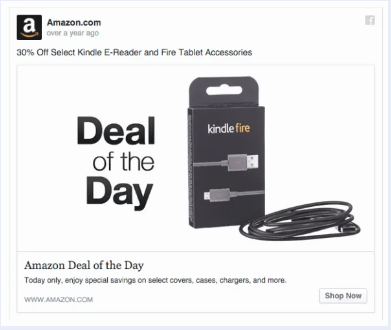
This Twitter retargeting ad example shows how brands can use Twitter’s native ad format to display relevant products or services in front of their targeted audience. The product being advertised here is for sale on Amazon, which means that those who visit this page can purchase it directly from Amazon without having to go through any other steps in between.
2. Udemy
The next in line is Udemy, If a user browses through Udemy’s course catalog but doesn’t enroll in any courses, Udemy may use browser retargeting to display targeted ads across other websites visited by the user.
These ads may showcase popular courses or highlight topics the user previously showed interest in, enticing them to return to Udemy and enroll in a course.
FAQs on eCommerce retargeting
How can businesses measure the success of their eCommerce retargeting efforts?
Businesses can measure the success of their eCommerce retargeting campaigns by tracking metrics such as click-through rates, conversion rates, return on ad spend (ROAS), and overall revenue generated from retargeted users.
What is the best tool for social media retargeting?
The choice of the best retargeting tool depends on factors such as business needs, budget, and targeted platforms. However, Replug is one of the top retargeting platforms in 2026, offering affordable pricing and advanced functionalities like link cloaking, traffic routing, and cross-platform conversion tracking.
What are some effective eCommerce retargeting strategies?
Some effective strategies include segmenting your audience, creating catchy ad copy, injecting FOMO (fear of missing out) to boost sales, cross-selling complementary products, retargeting based on pricing sensitivity, adjusting ad frequency, and much more…
Ow.ly, a link-shortening tool from the popular platform Hootsuite, has won over many users, but it’s not without its downsides. One big issue is that it’s tied exclusively to Hootsuite. So, if you’re not using Hootsuite for your social media or other tasks, Ow.ly won’t work for you.
That’s why it’s worth exploring ow.ly alternatives that offer more advanced link management features to meet the needs of today’s marketers and businesses.
One top alternative is Replug.
While Ow.ly covers the basics, Replug goes above and beyond with features like detailed analytics, customizable call-to-actions, white-label solutions, bio-links, retargeting pixels, and more.
Let’s take the next step and introduce you to Replug, where you can discover a whole new level of link management capabilities.
Replug.io
Replug.io is a comprehensive link management platform offering advanced features like detailed analytics, customizable call-to-actions, and white-label solutions, empowering marketers to optimize their campaigns effectively.
Ow.ly
Ow.ly is a link-shortening tool developed by Hootsuite, a popular social media management platform. It allows users to condense URLs into shorter, more manageable links, primarily for sharing on social media platforms. However, Ow.ly is exclusively tied to Hootsuite and lacks advanced features and flexibility compared to standalone link management alternatives.
Replug vs Ow.ly
A complete link management solution
for marketing professionals & agencies.
Try Replug for free
In this comparison, we’ll explore the key differences between Replug and Ow.ly to help you make an informed decision. While both platforms offer link-shortening capabilities, they differ in terms of features, integrations, and flexibility.
Link management capabilities
Let’s start with some of the most important link management feature comparisons to see what works best for your brand.
1. Advanced link shortening
First, we have link shortening. With Replug, users can enjoy advanced link-shortening features that not only condense URLs but also provide detailed analytics and customization options for each shortened link.
Whereas, Ow.ly offers standard link-shortening capabilities without the advanced analytics and customization features found in Replug.
If you’re looking to go beyond basic URL trimming, Replug’s advanced features make it the smarter way to shorten link while tracking and customizing every click.
2. Bio-links
Next, we have bio-links where Replug enables users to create bio-links, which serve as a centralized hub for multiple links, making it easier to share content across various platforms from a single location.
Ow.ly lacks the functionality to create bio-links, limiting users to sharing individual shortened links.
3. QR codes
Ow.ly does not offer QR code generation as part of its feature set. But in the case of Replug, users can generate QR codes for shortened links with Replug, making it convenient to share links offline or in print materials.
4. Deep links
Same as the QR codes, deep linking capabilities are not available within Ow.ly. Whereas with Replug marketers can create deep links, which enables direct access to specific sections or content within mobile apps, and enhance user experience and engagement.
5. Custom CTAs (call-to-actions)
When it comes to Replug, brands can use the free CTA generator to create custom call-to-actions associated with their shortened links, allowing for greater control over user interaction and conversion optimization.
Whereas, Hootsuite does offer AI content creation capabilities but still both the platforms lack advanced customization options for call-to-actions.
6. Retargeting pixels
Lastly, we have one of the most amazing features which is retargeting links. Here Ow.ly does not support retargeting pixel integration. However, users can integrate retargeting pixels with Replug’s shortened links, enabling targeted advertising campaigns and audience remarketing efforts.
White-label solution
Neither Ow.ly nor Hootsuite offers white-label boards. However, unlike these platforms, Replug provides an extensive range of branding options, including white-label boards. This feature allows you to create your personalized link management tool, allowing you to…
Replace Replug’s domain with your own for shortened links.
Customize the overall user interface to match your brand aesthetic.
Add your brand name, logo, favicon, title, meta image, description, and domain.
Design reports and emails sent to users with your branding.
Promote your brand with advanced characteristics such as retargeting links, catchy call-to-actions, traffic routing, and more.
Overall white-label service can help you scale up and meet the demands of launching new services without incurring additional costs.
Detailed link analytics comparison
Ow.ly
Being a more well-known service, Ow.ly likely offers a range of features, but in-depth link analytics might not be the main focus. Research-specific analytics offered by the platform include:
Total clicks on the link
Where the clicks came from (e.g., Facebook, Twitter, email)
Overall, keep in mind that Hootsuite is more focused on social media analytics. However, if you’re using Hootsuite, you can add tracking parameters to your Ow.ly links so that you can track them in an analytics tool like Usermaven.
Besides that the platform also allows you to filter your analytics to analyze data for specific brands you’re promoting. Or track the performance of individual marketing campaigns.
So my friends as you can see Replug is the clear winner.
A complete link management solution
for marketing professionals & agencies.
Try Replug for free
Integrations offered
Replug
Replug offers direct integrations with various social platforms, email marketing tools, social media management tools, and much more.
Whether it’s connecting with popular social media channels like Facebook, Twitter, or LinkedIn, or integrating with leading email marketing tools such as Mailchimp or Constant Contact, Replug allows users to optimize their outreach efforts and drive engagement effectively.
Additionally, Replug’s integrations with social media management tools like ContentStudio, and Social Bee streamline the process of content scheduling, creation, and publishing, as well as social media analytics tracking and much more..
With its comprehensive range of integrations, Replug excels as a solution for link management and marketing optimization.
Ow.ly
Ow.ly, being an integral part of the Hootsuite platform doesn’t have standalone integration capabilities. Instead, to integrate with other tools, users need to connect to Hootsuite itself.
“Handy Link Management Tool with URL shortener and more”
Says Alan N.
“Very convenient platform to create Branded Links with Marketing & Reporting”
Says Karen S.
Pricing comparison
Now, let’s talk about pricing. When choosing a link management tool, go for the one that meets your needs best. Here’s a quick pricing table for you:
Replug
Ow.ly
Basic = $19 /month
Professional plan = $99 per month
Professional = $49 /month
Team plan = $249 per month
Agency = $79 /month
Custom enterprise plan
Compare Replug’s features, functionality, and pricing against Ow.ly, and you’ll quickly see why it’s the clear winner.
With flexible pricing plans to suit every budget and requirement, Replug ensures that you get the most bang for your buck without compromising on quality or performance.
Conclusion
Considering the limitations of Ow.ly tied exclusively to Hootsuite, this article clearly explains why Replug is the best Ow.ly alternative. Enjoy advanced link management features, affordable pricing, top-notch customer support, and much more…
Faqs
What are social media management tools, and how do they differ from link management tools?
Social media management tools are platforms that help businesses schedule, publish, monitor, and analyze their social media content across various platforms like Facebook, Twitter, Instagram, and LinkedIn. While link management tools focus specifically on managing URLs and tracking link performance.
What are some key features to look for in link analytics tools?
When selecting a link analytics tool, consider features such as total clicks, click-through rate (CTR), demographics, referring sources, UTM parameters for campaign tracking, time series data, and customizable reports.
What’s the difference between Replug and Ow.ly?
Both Replug and Ow.ly offer link management solutions. Replug focuses on detailed link analytics and integrations with analytics tools, while Ow.ly emphasizes social media scheduling and team collaboration features.
Why is link management important?
Effective link management helps you:
– Improve SEO (Search Engine Optimization) ranking – Track the performance of your marketing campaigns – Analyze user behavior and content engagement – Maintain brand consistency – Shorten long URLs for better aesthetics and sharing
Are you ready to revolutionize your content marketing game and unleash its true potential?
Look no further!
Whether you’re a seasoned marketer or just starting, these invaluable content marketing tips will empower you with the knowledge and strategies needed to craft compelling content that resonates, engages, and converts.
Simply put, a well-planned content marketing strategy can help your brand reach its full potential. It holds the ultimate power to captivate your audience and earn their loyalty in the easiest way possible.
Get ready to create content that not only grabs attention but also leaves an ever-lasting impact on your audience, driving your brand’s success in the digital realm.
Before we dive in, let’s talk about the core of the matter.
What is content marketing?
Content marketing is a strategic marketing approach that focuses on creating and distributing valuable, relevant, and consistent content to attract and engage a specific target audience. It is a long-term strategy that aims to build trust, establish credibility, and foster relationships with potential customers.
Instead of using traditional advertising methods, content marketing seeks to provide informative, entertaining, or educational content that addresses the needs, interests, and pain points of the audience.
The content can take various forms, such as blog posts, articles, videos, podcasts, infographics, ebooks, case studies, and social media posts. The key principle behind content marketing is to deliver value to the audience, positioning the brand as a knowledgeable and trusted authority in its industry.
However, the following are characteristics for which content marketing is known.
Less expensive
Boosting sales
Loyal customers
Typically, the goal of content marketing is to increase traffic to the website you’re running. So these viewers can then be guided through the appropriate channels to become actual customers.
10 content marketing tips to drive conversions and build loyalty
1. Identifying the target audience – Clear buyer persona
The first step towards maximizing website traffic is to determine the target audience and create a detailed consumer persona. To create a clear buyer persona, you need to observe consumer trends closely.
The Golden rule of running a successful business is to constantly evaluate the market value and demand for your products. Reading the market is step one, and a Toronto creative studio like Bonus Track translates that insight into brand and campaign work that resonates.
A company’s first step in building a successful brand should be focusing on its target demographic. And figure out how to satisfy its users’ needs. Creating a comprehensive buyer persona is an essential step for effective content marketing. Understanding what drives your target audience and capturing those insights in structured persona templates can greatly enhance your ability to produce content that truly resonates with your audience’s needs. These tools serve as blueprints, helping marketers to tailor messages that engage and convert prospects efficiently.
Generally, there are two types of audiences;
Warm audience: People who value your content.
Cold audience: People who show no interest in your content.
However, targeting the niche audience demographically, based on different regions and other factors, is the hardest part. Any marketing company in Nashville or other areas may face this exact challenge when tailoring campaigns with distinct consumer preferences and regional buying behaviors.
Multiple tools, social platforms, and devices gather incoming data about the customer’s preferences, interests, needs, and more.
These tools enable marketers to identify the conversion rate and audience engagement, and create marketing automation campaigns that allow them to compose a message to the right prospects at the right time.
Moreover, industry challenges can be learned by marketers, and competitor strategies and their customers can be examined. Business owners should always remember: customers seek products or materials that will help them reach their goals or gain knowledge. Satisfying these needs is key to success.
Partnering with a managed services marketing agency can help turn these insights into targeted campaigns that consistently align with customer goals.
2. Sketch out your customer’s journey
The next technique is to map out your customer’s journey. One can use a framework for effectively carrying out marketing approaches. And collecting dependable information at each stage of the client journey.
Therefore, one must develop persuasive instructional content and update it regularly to reflect changes in the consumers’ demands and needs. As,
“Buyers control their journey through the buying cycle much more than today’s vendors control the selling cycle. In a recent survey, 74% of business buyers told Forrester they conduct more than half of their research online before making an offline purchase. This buyer dynamic changes the role of B2B marketing in a fundamental way.”
However, concise, easy-to-read, and audience-engaging content is essential. So, marketers should prioritize quality over quantity. Of course, it’s not as easy as it looks; wasting time trying to sway people’s attention with information they don’t like is more like writing content they don’t like.
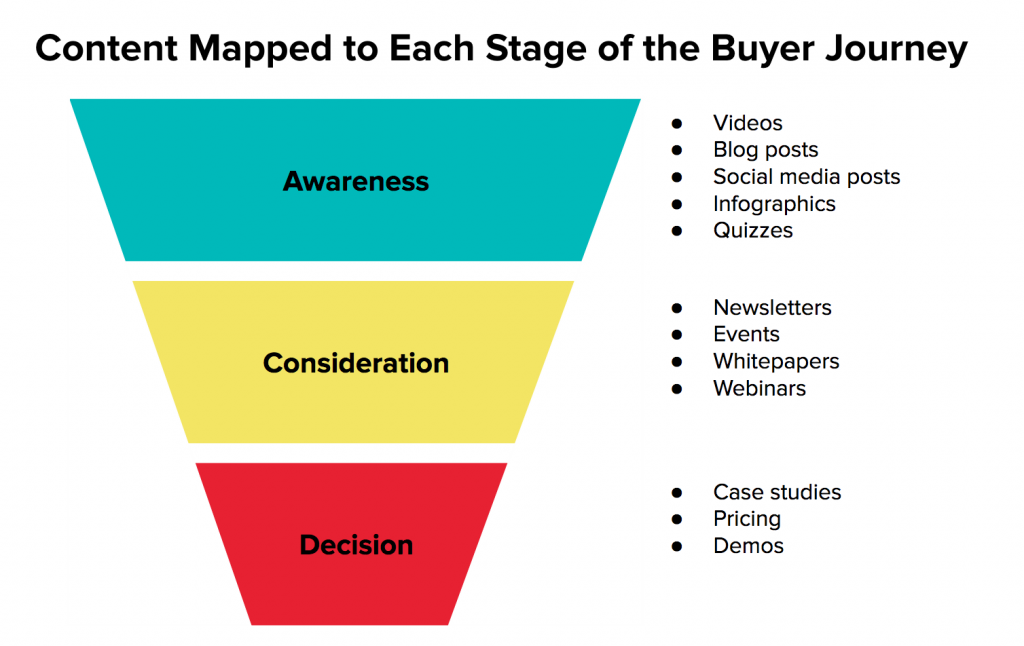
This is the TOFU (top of the funnel) stage, where you can make a larger audience recognize your product or service by addressing the public’s pain points in the content creation process. This will make them feel important and turn your possible customers into real buyers.
However, the below processes offer an opportunity for marketers to connect with their target audiences, get their attention, identify their pain points, and offer solutions or new perspectives.
E-books- infographics- white papers- educational content
Analyst reports- webcast- video–podcast– live interaction
One important thing that every business owner should remember is that customers are always looking for products or materials that Will help them get what they want or learn something new. Moreover, focusing on areas where customers spend more time and are interested is a great way for marketers to raise brand recognition and get known in the vast content marketing landscape.
Ingenious consideration
The second step is known as consideration, and during this stage, potential customers finally evaluate the solutions to their pain areas, While also searching for a variety of different choices.
In this stage, referred to as MOFU (in the middle of the funnel), marketers are required to provide informative content. That demonstrates to the audience why they should choose your product over the other options currently available on the market.
“The marketing and business process for creating and distributing relevant and valuable content to attract, acquire, and engage a clearly defined and understood target audience — to drive profitable customer action.”
Decision making
The term BOFU “bottom of the funnels” refers to the process of reinforcing certain offerings to improve or increase the conversion chances that are related to your brand.
Moreover, this gives customers the confidence that they have made the appropriate decision for their company or the solution to the issue. However, this includes live demos, case studies, and trial downloads.
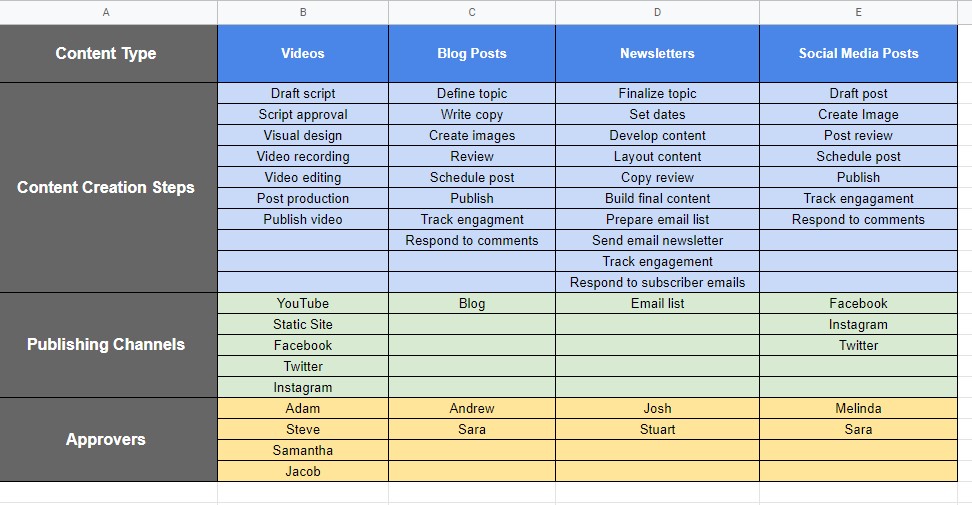
3. Set up an editorial content calendar
Content marketing is a long-term strategy that requires the use of marketing strategies, the creation of high-quality content, and the fine-tuning of promotional efforts. Therefore, it is challenging to deal with everything simultaneously.
The content editor’s calendar provides a platform for strategic marketing planning, work management, and content preparation. It serves as a road map to better marketing outcomes and helps the team stay focused on the company’s mission and objectives.
Without a content plan, it will be difficult to create leads from your website’s marketing efforts. A well-organized editorial calendaris essential for a successful content strategy. However, If you want to create magnificent content, you need to use editor calendar software that explains to marketers and their teams how they may best connect with and serve their target demographics.
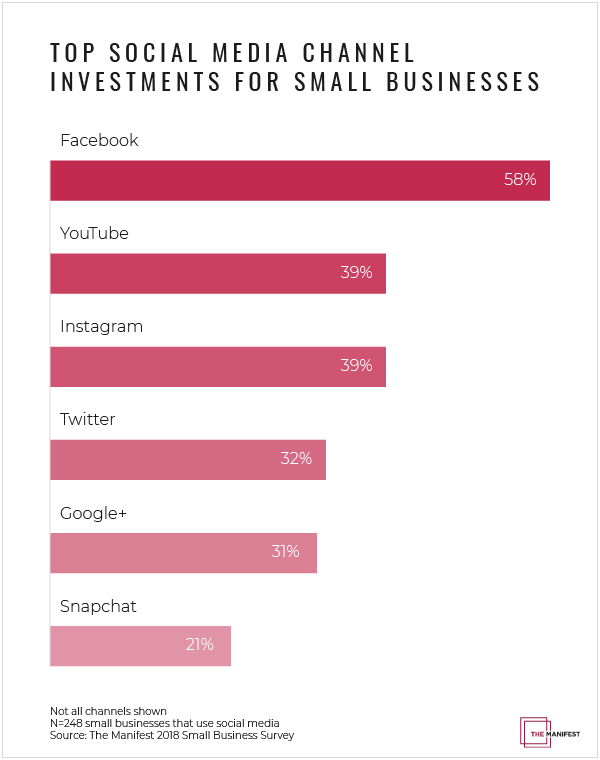
4. Identifying the right platforms for your audience – Leveraging social media channels
Identifying the best channels to reach your demographic and generate traffic to your site is another important consideration. An increasing number of people have turned to various social media sites to network with like-minded individuals, peruse blogs, and learn more about the companies whose offerings they adore.
To manage these interactions effectively at scale, businesses often rely on community management tools to monitor conversations, respond to users, and maintain consistent content engagement across platforms like Facebook, Twitter, Instagram, and Pinterest.
However, businesses can reach a wide audience and build brand awareness by using social media to convey intriguing stories about their products and brands. Channels like Facebook, Twitter, Instagram, and Pinterest play a monolithic role in increasing engagement and conversion rates.
Tools for analyzing statistics:
In 2026, there are a lot of great tools that can help you manage your daily, weekly, and monthly tasks, and keep track of your sales and conversions.
However, when analyzing performance metrics or creating data-driven campaigns, marketers should rely on the most accurate AI tools like GPTZero and a rank tracking tool for LLMs like Promptwatch to track how often your brand is mentioned in AI-powered responses, ensuring your insights are precise and trustworthy.
I’m going to give you a rundown of some of the most fascinating tools that can help you figure out the statistics of your marketing campaign on social channels. And you can also see how different marketing strategies affect your business with less time and money.
ContentStudio
ContentStudiois one of the best marketing tools because it lets you build a custom campaign to promote your product. You can use fancy filters to improve the content and share it on any of your social media networks to raise brand awareness.
It also lets you write your scheduled posts and customize them for your real and potential audiences, so you don’t have to post the same thing on all your social channels.
However, It’s so easy to see the big picture of all the marketing activities when they’re laid out in a calendar and a list. You can control and handle the posts you’ve set up to go out on your social media accounts at a certain time, and you can keep track of when the posts are due.
Replug
Replug lets you shorten URL for free with your brand’s name in them. This helps your brand stand out and gives you more trust in your custom domains.
It lets you make a brand for your business and run ads to get the word out about what you’re selling. It is an all-in-one link optimization platform that offers a lot of brilliant features, such as a URL shortener, custom domain, retargeting, link analytics, etc.
You can add RSS feedsto your campaigns. Every 30 minutes, the content from the RSS feed will be automatically retrieved and put on your shortened Replug link, which you can share with your audience.
However, Replug also lets business owners make an eye-catching call to actions to draw their audience to their website or retarget the audience with the same content to any page on the website. It also gives your email marketing efforts more power and makes your email reach wider.
5. Creating engaging and informative visuals
One versatile method of attracting clients’ attention to your business is using humorous clips that showcase your products or services in action.
For teams looking for efficient tools to create such content without a steep learning curve, exploring a Descript alternative for streamlined audio and video editing can be a game-changer.
Moreover, visual content is helpful for marketers since it provides in-depth knowledge of the product you have and opens the door to making a personal connection with your audience.
Know that with the developments in technology and increased access to the internet, things have continued to develop in the same manner they always have. The relevance of video marketing in this day and age is readily apparent to every one of us.
However, to achieve your goal of increasing the number of social media conversions, you should consistently focus your attention on the Audience, by placing sponsor advertising on Facebook, LinkedIn, Tiktok, and other social media platforms.
6. Craft captivating web-content
Your content represents you and tells consumers why your company exists and what problems you solve. Convince them to choose your product over competitors, and makes it easier for them to find you.
Moreover, research is one of the key elements of being a good content marketer if you want to keep people’s interest. It’s necessary for every business owner needs to dedicate some time and effort to studying the market.
Albert Szent-Gyorgyi said:
“Research is to see what everybody else has seen and to think what nobody else has thought”
Extensive marketing research is crucial for recognizing who your target audience is, what they want, and how to best serve them. After conducting research, you can develop a content process that details the steps you should take to identify your target audience and alert your readers.
That same process should account for off-page signals too, since pairing well-researched content with building high-authority backlinks from trusted sites gives your pages the credibility search engines reward.
Moreover, keywords can help marketers organize the issues about which their target audience has questions. Keywords boost the effectiveness of content marketing efforts and also help with search engine optimization. Using a Google SERP API can provide real-time insights into search results, competitor rankings, and keyword opportunities that make your content more discoverable.
However, when it comes to coming up with original ideas, brainstorming is one of the most widely used methods. It can help you come up with a better topic for your blog article if you use it correctly. In general, it’s all about coming up with original ideas, not putting them into practice.
You can also use the essay humanizer tool to make your written content sound more natural and improve readability before publishing.
7. Analyze results – data-driven content
Monitoring and analyzing the performance of your content is crucial for understanding what works and what doesn’t. By utilizing analytics tools, you can gather valuable data on metrics like page views, engagement, conversion rates, and audience behavior. Tools like real-time speech analytics can also provide actionable insights to improve customer satisfaction in live interactions.
This data-driven approach enables you to identify trends, refine your content strategy, and make informed decisions to continuously improve and optimize your content for better results.
Data-driven success with Usermaven: Your analytics solution
Usermaven is the game-changer for data-driven content marketing success. With comprehensive analytics, a streamlined workflow, privacy compliance, and tailored features, Usermaven empowers businesses to optimize content strategies, deliver personalized experiences, and gain a competitive edge.
Unlike Google Analytics, Usermaven offers no-code event tracking, a user-friendly interface, and a privacy-friendly approach.
Elevate your content marketing with Usermaven and unlock the power of analytics for remarkable results.
8. Enhance the user experience: A key priority in content marketing
When it comes to content marketing, prioritizing the user experience is paramount. No matter how well-crafted and informative your content may be, a subpar website experience can drive away readers and negatively impact your rankings. More importantly, it results in missed opportunities for conversions.
To ensure an optimal user experience, consider the following tips:
Optimize site performance: A fast-loading website is essential. Users expect quick access to content, especially on mobile devices. Make sure your site is optimized for speed by optimizing images, using caching techniques, and leveraging a reliable hosting provider.
Mobile responsiveness: With the increasing use of mobile devices, your website layout must be mobile-friendly. Responsive design ensures that your content adapts seamlessly to different screen sizes, providing a consistent and enjoyable experience for all users. A well-designed responsive layout ensures your content adapts seamlessly to different screen sizes, providing a consistent and enjoyable experience for all users
Enhance navigability: Make it easy for users to navigate through your content. Incorporate features such as a table of contents and a back-to-top button to facilitate smooth scrolling. Clear and consistent headings help users find relevant information quickly.
Readability and typography: Ensure that your content is easy to read across devices. Use a sans-serif typeface, maintain a reasonable font size, and create a visually pleasing layout. Consider readability for users with different visual abilities by optimizing for high contrast and adhering to accessibility standards.
Accessibility optimization: Cater to users with disabilities by optimizing your website for accessibility. Provide alternative text for images, include captions in videos, and ensure that your content can be read aloud by screen reader software. By prioritizing accessibility, you expand your reach and create an inclusive experience for all users.
9. Avoid fixating on word count for blogs
This situation arises from the misconception that longer articles automatically generate more organic traffic. However, Ahref’s analysis of 900 million pages reveals a moderate negative correlation between word count and organic traffic for posts exceeding 2,000 words.
In essence, a typical 10,000-word post receives less search traffic compared to an average 2,000-word post.
Therefore, it’s time to relinquish the fixation on word count. Readers aren’t enthusiastic about lengthy content. Instead, focus on covering the necessary information, omitting irrelevant details, and delivering concise, to-the-point content.
10. Re-engage your audience with remarketed content
By repurposing your existing content, you can transform a previously covered topic into a fresh format. However, the power lies in content remarketing to re-engage users who interacted with it but didn’t convert initially.
Numerous variables may work against us in capturing user attention. The timing might not align with their immediate need or financial situation. But by strategically remarketing your content to those who have already demonstrated interest, such as through targeted follow-ups from a cold email marketing agency, you increase the likelihood of capturing their attention at the right moment.
After all, that’s the essence of content marketing – delivering value when it matters most.
Our final verdict
These days, no marketing strategy can succeed without the perfect content marketing techniques, at its core. It is essential to have a firm grasp of the dynamics of marketing and the kind of content that will be the most effective for your company.
In my opinion, the most effective method of content marketing, however, is to conduct research into the barriers faced by your targeted audience. And coming up with a content strategy to address those challenges.
Leave a comment below, letting us know. Which content marketing strategies best match the growth goals you’ve set for your business?
We’d be thrilled to get some feedback from you. You have our deepest gratitude for staying with us to the very end. Your time and effort are very much appreciated.
FAQs on content marketing
What are the most common types of content marketing?
Some of the common types of content marketing can be done through social media marketing, Blog content marketing, infographic marketing, video content marketing, podcast content marketing, paid ad content marketing, etc.
Is content marketing strategies effective for small business?
Yes, building a content marketing strategy for a small business can be very effective for small business. However, it’s no different than large organizations.
What are the pillars of content marketing?
The pillars of content marketing conclude; creation, insights, audience, distribution, and experience.
What are the major benefits of content marketing?
Some of the major benefits of content marketing include audience engagement, building trust, and driving maximum conversions.
How to develop an effective content marketing strategy?
Content marketing is a crucial aspect of any successful digital marketing strategy. It involves creating and sharing valuable, relevant, and consistent content to attract and retain a clearly defined audience.
You pull out your phone, point it at a QR code, and… nothing. You try again, and still nothing. Frustrating, right?
A blurry or poorly generated QR code isn’t just annoying; it’s costing real opportunities. And given that nearly 99.5 million Americans scanned a QR code in 2025 and QR code usage grew by 323% between 2021 and 2025, this little square has become way too important to get wrong.
No matter if you’re a business owner, a marketer, or just someone who needs a working QR code, a blurry one can make people give up in seconds.
The good news? Fixing it is simpler than you’d think!
But before we jump into solutions, let’s make sure we’re all on the same page. So let’s quickly cover what a QR code actually is and how it works.
What is a QR code?
A QR code(short for “Quick Response code”) is a two-dimensional barcode that stores information like a website URL, contact details, or a payment prompt and can be instantly read by a smartphone camera.
Unlike the old barcodes you see on grocery items, a QR code holds way more data and works in any direction you scan it.
Its main purpose is simple:to bridge the gap between the physical and digital world in the fastest way possible.
How does it work?
When you create a QR code, the information you enter gets encoded into a pattern of black and white squares.
When someone scans it, their phone’s camera reads that pattern and decodes it back into the original information (opening a link, displaying text, or triggering an action).
Think of it like a secret visual language your phone can instantly translate. The whole thing happens in under a second, which is exactly why QR codes have become so popular.
Why is my QR code blurry?
Before you can fix a blurry QR code, it helps to know what’s causing it in the first place. There are actually quite a few reasons a QR code can become unscannable, and most of them are pretty easy to avoid once you know what to look out for.
Low resolution/pixelation
This is probably the most common culprit. When a QR code is created at a low resolution and then stretched or scaled up, the edges get pixelated, and the scanner simply can’t read it cleanly. Always generate your QR code at the highest resolution available.
Poor printing quality
Even a perfectly designed QR code can go bad in print. If your printer is low on ink, using poor-quality paper, or set to a low print quality mode, the fine details of the code get lost. This makes it blurry or patchy and hard to scan.
Insufficient color contrast
QR codes rely on a clear contrast between the dark modules and the light background to be readable. Using similar shades (like a dark grey code on a black background) confuses the scanner and makes the code practically useless.
Over-complication/customization
Adding too many design elements, heavy colors, or large logos right in the center of your QR code can interfere with the data embedded in it. A little customization is fine, but overdoing it often pushes the code past the point where it can still be scanned reliably.
Physical damage
A QR code on a printed flyer, product label, or sticker is vulnerable to real-world wear and tear. Scratches, moisture, fading, or even a bad fold across the code can damage enough of the pattern to make it unreadable.
Incorrect format
Saving or exporting your QR code in the wrong file format can seriously hurt its quality. Formats like JPEG compress image data and can introduce blurriness, while vector formats like SVG or high-resolution PNGs keep the code sharp and crisp at any size.
Too small QR code size
There’s a minimum size a QR code needs to be to work properly. If it’s printed or displayed too small, the individual squares within the code become too tiny for a camera to distinguish. This ultimately makes scanning nearly impossible, especially from any reasonable distance.
Enhance your QR codes with these useful tips & tricks
Now that you know what’s causing the blur, let’s talk about how to actually fix it. These tips are straightforward, practical, and easy to apply, whether you’re designing a QR code from scratch or trying to rescue an existing one.
Tip #01: Use high-resolution & vector formats
Always export your QR code as an SVG or high-resolution PNG rather than a JPEG. Vector formats scale to any size without losing sharpness, so your code stays crisp no matter if it’s on a business card or a billboard. This single change alone can make a huge difference.
Tip #02: Improve contrast
Stick to the classic dark module on a light background combo. It’s the most reliable for scanning. If you want to use custom colors, make sure there’s a strong enough contrast between the two. When in doubt, test your QR code on multiple devices before publishing it.
Tip #03: Adjust printer settings
Before hitting print, optimize your printer settings to the highest quality mode available. Also, make sure your ink levels are good. A half-empty cartridge often produces faded or uneven prints that can make a QR code blurry and completely unscannable.
Tip #04: Maintain a “quiet zone”
A quiet zone is the blank white border surrounding your QR code, and it’s not just for looks; it’s actually essential. Without enough white space around the edges, scanners struggle to identify where the code begins and ends. A quiet zone of at least four modules wide is generally recommended.
Tip #05: Check lighting & distance
Sometimes the issue isn’t the code itself, it’s the scanning conditions. Make sure the QR code is well-lit and that you’re holding your phone at a comfortable distance, not too close and not too far. Glare from glossy surfaces can also interfere, so consider a matte finish for printed codes.
Tip #06: Maintain proper size & design
As a general rule, your QR code size should be at least 2 x 2 cm for close-range scanning, and bigger if it’s meant to be scanned from a distance. Keep the design clean and avoid distorting the shape of the code. Even minor stretching can cast off the scanner.
Tip #07: Remove unnecessary clutter
Less is actually more when it comes to QR code design. Overlapping text, excessive design elements, or a logo that’s too large can all interfere with the embedded data. If you want to add a logo, keep it small and centered, and make sure it doesn’t cover more than 30% of the code.
Tip #08: Avoid poor printing materials
The surface you print on matters more than people realize. Thin or low-quality paper can cause ink to bleed, and shiny or textured surfaces can distort the pattern. For best results, use a smooth, matte, medium-weight paper or a professional-grade label material.
Tip #09: Use error correction
QR codes come with a built-in error correction feature that allows them to remain scannable even if part of the code is damaged or obscured. Setting your error correction level to “H” (High) means up to 30% of the code can be recovered. A real lifesaver for codes used in physical environments.
Generate clear, high-quality QR codes using Replug’s custom QR code generator
If you’re looking for a reliable tool to create clean, scannable QR codes without the hassle, Replug.io is worth checking out. It’s a free URL shortener and an all-in-one link management platform that does a whole lot more than just shorten links.
One of its standout features is the custom QR code generator, which lets you generate high-quality, fully customizable, dynamic QR codes in seconds.
Dynamic QR codes
for modern brands, marketers,
and creators.
You can tweak the colors, add your logo, and adjust the design, all while keeping the code sharp and perfectly scannable.
Whether you’re a marketer, a business owner, or just someone who needs a quick and reliable QR code, Replug makes the whole process effortless and clean from start to finish.
Wrapping up
A blurred QR code is honestly more of a fixable inconvenience than a real problem, and now you have everything you need to sort it out.
From using the right file formats and fixing contrast issues to choosing quality print materials and enabling error correction, the fixes are simple once you know what to look for.
The key is paying attention to the small details that most people overlook. And if you want to skip the guesswork entirely, a tool like Replug makes it easy to generate clean, high-quality QR codes right from the start.
Put these tips into practice, and you’ll never have to deal with an unscannable, blurry QR code again.
Frequently asked questions
What is the best QR code enhancer online?
There are several solid options out there, but the best QR code sharpener is one that lets you export in high-resolution or vector formats like SVG or PNG.
Tools like Replug, QR Code Generator, and QRTiger are popular choices that offer customization, dynamic codes, and clean, scannable outputs without much technical know-how required.
How do you fix a QR code that is too blurry?
Start by regenerating the QR code at a higher resolution instead of trying to fix the existing one. Make sure you’re exporting it as an SVG or high-res PNG, printing on quality material, and keeping enough white space around the edges.
In most cases, simply recreating it from scratch is faster and more reliable than trying to restore a blurry version.
How do I make my QR code clear?
Use a vector-based format, maintain strong color contrast, keep the design simple, and always test it on multiple devices before using it publicly. If you’re printing it, use a high-quality printer with fresh ink and a smooth paper surface.
These small steps go a long way in keeping your QR code consistently clear and scannable.
How to increase the quality of a QR code?
Generate your QR code at the highest resolution possible and export it in SVG or PNG format. Set the error correction level to “H” for maximum durability, avoid over-customizing the design, and make sure it’s sized appropriately for its intended use.
If you’re using any marketing automation software that includes QR code generation, check whether it supports high-resolution exports (not all of them do).
Is it possible to scan a partially blurry QR code?
Yes, sometimes, but it depends on how much of the code is damaged or blurry. QR codes have a built-in error correction feature that can recover up to 30% of the data even if part of the code is obscured or damaged.
So a slightly blurry or partially damaged code might still scan, but a heavily distorted one likely won’t.
Is it possible to edit a blurry QR code to make it scannable?
Not really, no! Once a QR code is blurry or corrupted, editing the image itself won’t restore the lost data.
Even AI productivity software with advanced image enhancement features can improve visual clarity to some extent, but it can’t fully recover a QR code that’s too far gone. Your best bet is always to regenerate the code from the original source.
How to sharpen a blurry QR code?
If the blurriness is minor, you can try running it through an image-sharpening tool to improve the edges slightly. However, for anything beyond a subtle blur, regenerating the QR code at a higher resolution is the most effective solution.
Make sure to export it in the right format, test it before deploying, and you should be good to go.
You’re running an e-commerce store with top-notch products, vibrant themes, detailed listings, and genuine reviews. Coupled with high-end SEO and social media marketing campaigns.
Everything seems in place, but your conversion rates need to hit the mark. Then what’s the missing piece? Let us clue you in – it’s the absence of an advanced call-to-action tool!
Using an advanced call-to-action tool can make all the difference by converting your website visitors into paying customers.
With strategic placement and catchy texts, CTAs compel users to take specific actions. Which ultimately helps you in boosting brand revenue potential.
Still confused? Don’t worry guys. In today’s blog, we’re covering everything from the finest CTA tips to the most cutting-edge CTA tools. Let us get you started.
What’s a CTA?
CTA stands for “Call to Action”. It’s an instruction that tells your audience what you want them to do next. These are commonly found in marketing and advertising but can be used anywhere you want to guide users toward a specific action.
What is a good call-to-action example?
A good example of a call-to-action is a clear and simple statement that tells users what to do next. For example, ContentStudio’s CTA “Try it for free” invites users to explore the tool without any commitments.
Best call-to-action tips to use
1. Try to use action verbs
Action verbs are the powerhouse behind persuasive CTAs. They prompt users to take immediate action, driving them toward the desired goal. Incorporate dynamic verbs like “discover,” “explore,” or “get” to instill a sense of urgency and motivation in your audience. Grab attention, Drive action!
Communicate the value proposition clearly in your CTAs. Highlight the benefits or rewards users will receive by clicking through, whether it’s accessing exclusive content, unlocking special discounts, or gaining valuable insights. The more value users perceive, the more likely they are to act.
3. Create FOMO
Creating a sense of FOMO (Fear of Missing Out) is a potent tactic to drive action. Hint at limited-time offers, exclusive deals, or upcoming events to instill urgency in your audience. By suggesting that time is running out, you motivate users to act quickly to seize the opportunity.
4. Use fancy graphics and colors
Visual appeal is key to capturing attention and enticing clicks. Incorporate eye-catching graphics, vibrant colors, and captivating imagery to make your CTAs stand out. Choose visuals that align with your brand identity and message while grabbing the user’s attention.
5. Catchy shapes or sizes
Experiment with unique shapes or sizes for your CTAs to make them visually appealing and memorable. Whether it’s a bold button, a playful icon, or a custom design element, think outside the box to create CTAs that stand out and invite interaction.
6. Keep the text brief
Keep your CTA text concise and to the point. Avoid overwhelming users with too much information. Instead, focus on conveying your message succinctly, highlighting the key action or benefit users should take.
7. A/B test multiple CTA’s
Don’t settle for the first iteration of your CTAs. Experiment with different variations, including text, design, placement, and color scheme, to identify what resonates best with your audience. A/B testing allows you to optimize your CTAs for maximum effectiveness and drive better results over time.
Top call to action tools to use
1. Replug
A complete link management solution
for marketing professionals & agencies.
Try Replug for free
Our top favorite is Replug – a powerful link management platform that allows users to create branded short links, track click data, and retarget audiences across various digital channels.
In terms of CTA generation, Replug enables users to embed CTA overlays or pop-ups on shared links, directing traffic to desired landing pages or offers.
You can obtain detailed information about your website traffic, including the country, browser, device, and date, giving you precise insights into your audience.
You can further streamline your campaigns by using this top-notch URL shortener to create branded, trackable links that complement your CTAs and enhance overall engagement.
2. Hubspot CTA
HubSpot’s CTA tool is part of its comprehensive marketing automation platform, designed to help businesses attract, engage, and delight customers. With its CTA tool, users can create visually appealing CTAs that seamlessly integrate with their website or email campaigns.
Moreover, these CTAs are strategically placed to prompt visitors to take desired actions, such as downloading a resource or requesting a demo.
3. Sniply
Sniply is a unique tool that allows users to add custom messages or CTAs to any web page they share, even if they don’t own the page.
Users can create branded Sniply links that drive traffic back to their own website or landing pages. This CTA generation method leverages shared content to capture leads and drive conversions.
Scalenut
Scalenut is an AI-powered content marketing platform that helps businesses create, distribute, and optimize content at scale.
The platform offers a free CTA generation tool. By understanding user intent and preferences, Scalenut assists in generating CTAs that resonate with target audiences.
Canva
Canva is a versatile design platform that empowers users to create stunning graphics, presentations, and marketing materials with ease.
While not a dedicated CTA tool, Canva provides users with the tools to design eye-catching CTAs that complement their branding and messaging. Users can create custom graphics or templates for CTAs to be used across various digital channels, from social media posts to website banners.
Things to consider when choosing your CTA tool
Here are some of the most important things to consider when choosing your CTA tool.
Consider your budget: Free options offer good basic functionality, while paid tools might have advanced features like A/B testing or performance analytics.
Think about your needs: Do you need a simple CTA builder or a tool with AI-powered suggestions? How important is customization for you?
Read reviews and comparisons: Researching user experiences can help you find a tool that works well for others in your situation.
Easy to Use: Replug doesn’t require coding knowledge. Get a free CTA builder specifically designed to craft compelling CTAs with customizable text, buttons, forms, and pop-ups.
Targeted CTAs: Replug allows you to define your target audience during CTA creation. This ensures the CTAs you build resonate with the specific user group you’re aiming for.
A/B Testing: Replug integrates A/B testing so you can track CTA performance and see which variations drive the most conversions. This data-driven approach helps you continually optimize your CTAs for maximum impact.
Retargeting capabilities: It enables users to maximize conversions by embedding CTAs directly within shared links, ensuring targeted audiences are directed to relevant landing pages or offers.
Overall, Replug’s combination of advanced features and ease of use makes it ideal for businesses looking to drive engagement and conversions effectively.
Frequently asked questions
What is an example of a call to action in AI?
AI can analyze vast amounts of data to understand user behavior, preferences, and context, allowing businesses to tailor their CTAs for maximum impact.
Some of the common examples include:
– Sign up today – Download now – See how it works – Join now
What is a strong CTA?
A strong CTA combines clarity, relevance, and urgency to compel users to take the desired action. It communicates the value proposition briefly and motivates users to act without hesitation.
What is a call to value instead of a call to action?
A call to value focuses on highlighting the benefits and value proposition offered to the user rather than explicitly instructing them to take action.
What is a secondary call to action?
A secondary call-to-action serves as an alternative action for users who may need more time to be ready to commit to the primary CTA. It provides additional options for engagement, such as downloading a resource, exploring related content, or joining a mailing list, catering to diverse user preferences and behaviors.
If you’ve ever wondered who’s tapping on the links in your Instagram bio, you’re not alone. It’s a common question among users looking to understand their audience better and fine-tune their content strategy.
In this guide, We’ll uncover what you can (and can’t) glean from Instagram’s native data insights, and we’ll introduce you to a handy third-party tool that can give you a deeper dive into bio link clicks.
Whether you’re an aspiring influencer, a savvy entrepreneur, or just someone who loves sharing cool stuff on Instagram, understanding how to track bio link clicks is key to making the most of your social media presence. So, let’s dive in and discover the secrets to optimizing your bio links for maximum impact!
Can you see who clicks on your Instagram bio link?
Instagram’s analytics tell you how many clicks your bio link gets and where they’re coming from, but it doesn’t tell you who exactly is clicking. You can see general info like age, gender, and location of the people clicking, but not their names or usernames.
So while you won’t know the specific individuals clicking on your link, you can still keep an eye on how well it’s doing overall and get a sense of who’s interested in your content based on the demographic info provided.
A complete link management solution
for marketing professionals & agencies.
Try Replug for free
How to use the Instagram insight feature and track link clicks?
Using Instagram insights can give you valuable insights into your account’s performance and your audience’s behavior.
Note: Make sure you have a business or creator account on Instagram. If you still need to set one up, you can learn how to do so.
Here’s how to make the most of this feature:
Step 1: Open the Instagram mobile app and go to your profile.
Step 2: Tap on the Insights action button. You can find this either by tapping directly on the Insights button or by going to the Menu in the upper right corner and selecting Insights from there.
Step 3: Once you’re in Insights, you’ll see various metrics under the Overview section, giving you a snapshot of your account’s performance. You can also dive deeper into specific content by tapping on it for a more detailed breakdown of its performance.
To check your bio link click on Instagram:
Step 4: Tap on the “Activity” tab in the Instagram insight.
Step 5: Scroll down to find the section that shows how many clicks your bio link received during the last week.
Step 6: You can compare this data with previous results to see how you’re doing over time. Similar to tracking the right time to post on TikTok, this helps you spot trends and adjust your strategy. This comparison also helps you track your progress and identify your audience’s behavior.
To understand how those audience patterns fit into the wider market, marketers can use Oxylabs, a data collection provider, to gather relevant public web data on competitor campaigns, customer sentiment, and emerging industry trends.
A complete link management solution
for marketing professionals & agencies.
Try Replug for free
Limitations of Instagram insights
While Instagram Insight offers valuable data on bio link performance, it does come with certain limitations worth noting:
Lack of individual click details: Instagram Insight only reveals the total number of clicks on your bio link, without specifying who clicked or providing any other individualized information.
Absence of click-through rates: Although you can see the total clicks, Instagram doesn’t show how many people saw the link and decided to click. This omission makes it challenging to calculate click-through rates or compare link performance effectively.
Limited demographic insights: While basic demographic data like age, gender, and location of link-clickers is available, it may not offer comprehensive insights into your target audience’s characteristics.
Weekly reporting: Instagram Insight provides data every week, restricting real-time tracking or comparisons across different periods. For instance, comparing this month’s link performance to last month’s isn’t feasible within Instagram’s analytics framework.
Exclusive to business accounts: Access to Instagram Insight for bio links is restricted to business accounts. This limitation may inconvenience individual users unwilling to switch or small businesses lacking the resources to manage a separate account. To elevate your social media strategy, leverage tools like the ImagineArt AI Video Generator, which enables you to create high-quality, engaging video content that boosts your Instagram profile and maximizes the effectiveness of your bio link.
Can I find out who clicks my link-in-bio?
Unfortunately, Instagram’s native analytics don’t provide detailed information about who clicks on your bio link, which can be frustrating for businesses and brands looking to track the effectiveness of their promotions.
When monitoring traffic and click analytics on desktop, it’s also important to stay mindful of data privacy. Using a Windows VPN helps protect your browsing data, keeps your analytics secure, and ensures your link tracking remains private when managing campaigns from a PC.
For deeper security assurance, many businesses also consult penetration testing companies to identify vulnerabilities and safeguard their data infrastructure.
For US-based businesses handling campaign analytics, customer data, or marketing attribution systems, regular penetration testing services can also help validate whether web assets, tracking flows, and connected dashboards are exposed to exploitable security weaknesses.
Try Replug for bio link management and tracking:
Replug.io emerges as a top-notch alternative to Instagram Insights, offering robust link management and bio-link tracking capabilities.
By using Replug, you not only gain detailed analytics on your shared links but also improve client management with insights into audience behavior and preferences. By generating a personalized shortened bio link through this brilliant link shortener and integrating it into your Instagram bio, you unlock a wealth of data, including click information, geographical details, and device usage.
Utilizing Replug’s bio-link analytics provides you with unparalleled insights into audience behavior. Armed with this valuable information, you can track key performance indicators, refine your marketing strategies as needed, and optimize your return on investment (ROI) effortlessly.
A complete link management solution
for marketing professionals & agencies.
Try Replug for free
FAQs
Can I see who clicks on my Instagram bio link?
Unfortunately, Instagram’s native analytics don’t provide individual click details. However, third-party tools like Replug offer detailed insights into link clicks, including information about the individuals clicking on them.
How can I track the effectiveness of my Instagram bio link?
While Instagram Insights offers basic metrics, such as total clicks, they lacks detailed analytics. To track the effectiveness of your bio link and gain insights into audience behavior, consider using third-party tools like Replug, which provide comprehensive analytics on link performance.
What information does Replug provide about link clicks?
Replug offers detailed analytics on link clicks, including data on click activity, geographical location, device information, and even insights into the individuals clicking on the links.
Do I need a business account to use Replug for Instagram bio links?
No, Replug can be used by individuals and businesses alike to manage and track bio links on Instagram. Whether you’re a small business owner or an influencer, Replug provides valuable insights into link performance.