Author: Muhammad Ahsan Jamal

  • Linktree QR code essentials: How to create and use such a QR code efficiently

    Linktree QR code essentials: How to create and use such a QR code efficiently

    Are you the one who thinks QR codes are just for restaurant menus? Think again!

    QR code usage has surged by over 323% between 2021 and 2025, and nearly 99.5 million smartphone users in the U.S. alone are expected to scan QR codes in 2025.

    People aren’t just scanning them; they’re using them to discover brands, make payments, and connect with creators instantly.

    If you’re a content creator or small business owner, that’s a huge opportunity sitting right in your pocket. 

    And when you combine the reach of Linktree (your all-in-one link hub) with the scan-and-go convenience of a QR code, you get a seriously powerful tool for driving traffic and growing your audience: both offline and online.

    But how exactly does it work, and how do you set one up?

    Let’s start with the basics!

    What is a Linktree QR code?

    A Linktree QR code is essentially a scannable shortcut to your Linktree profile page. Instead of asking someone to type out a URL, you give them a nice QR code they can scan with their phone camera easily. And boom, they land directly on your profile, where all your links are waiting for them.

    Its whole purpose is simple: make it easier for people to find you. Whether that’s your YouTube channel, online store, Instagram, or booking page, one scan gets them there.

    How does it work?

    It’s pretty straightforward. Linktree generates a unique QR code that’s tied directly to your personal Linktree URL. When someone scans it, it opens your Linktree page in their device browser instantly.

    You can then drop that QR code anywhere (a business card, flyer, product packaging, or even a slide in a presentation). Basically, anywhere people might see it in the real world. 

    It bridges the gap between the physical and digital world, making it incredibly easy for your audience to connect with you in just one scan.

    How to create Linktree QR code

    The whole process takes less than two to three minutes. Here’s exactly how to make a Linktree QR code, step-by-step:

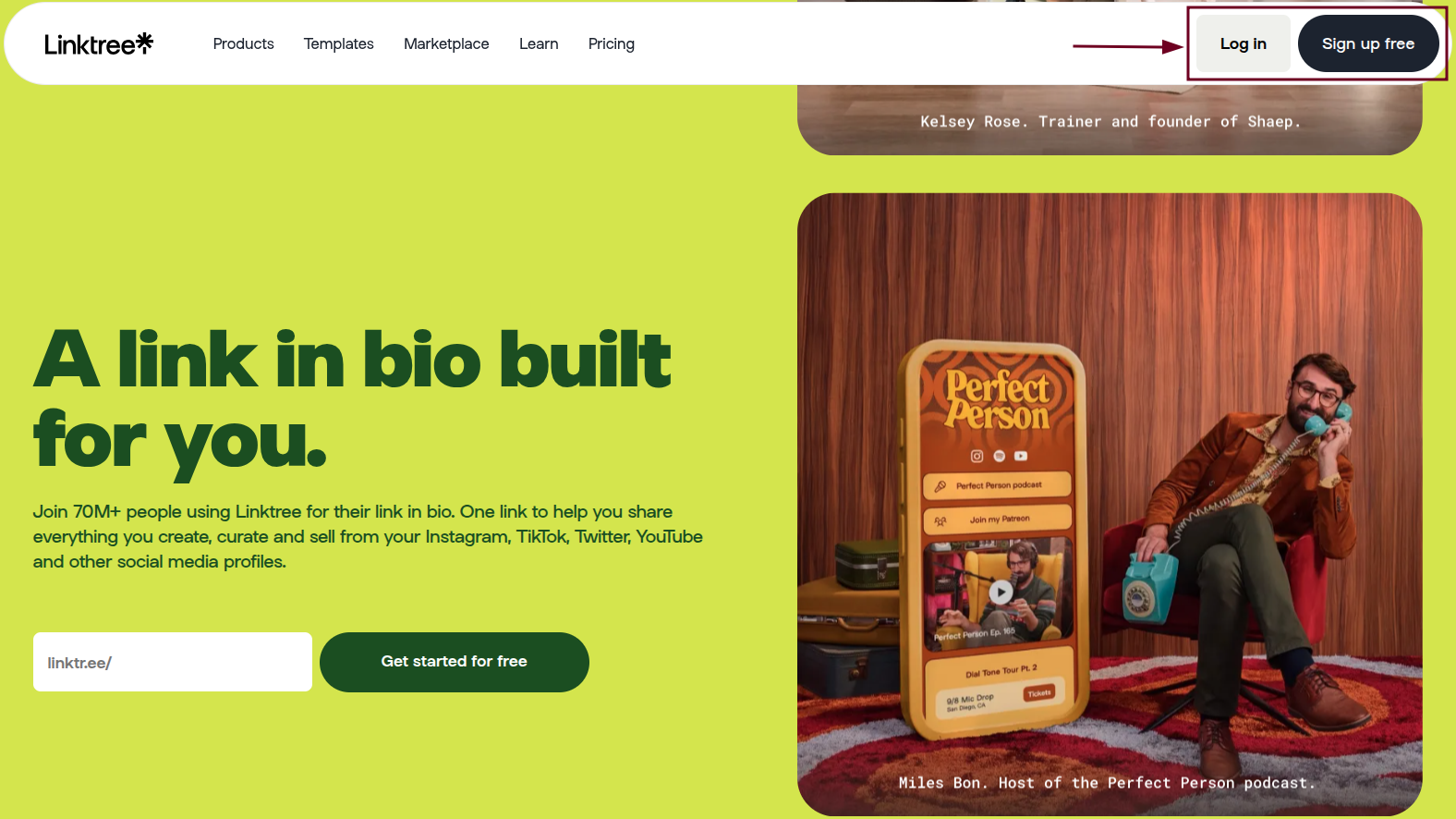
    Step #01: Log in to Linktree

    Head over to linktr.ee and sign in to your account. If you don’t have one yet, it’s free to sign up.

    Log in to Linktree

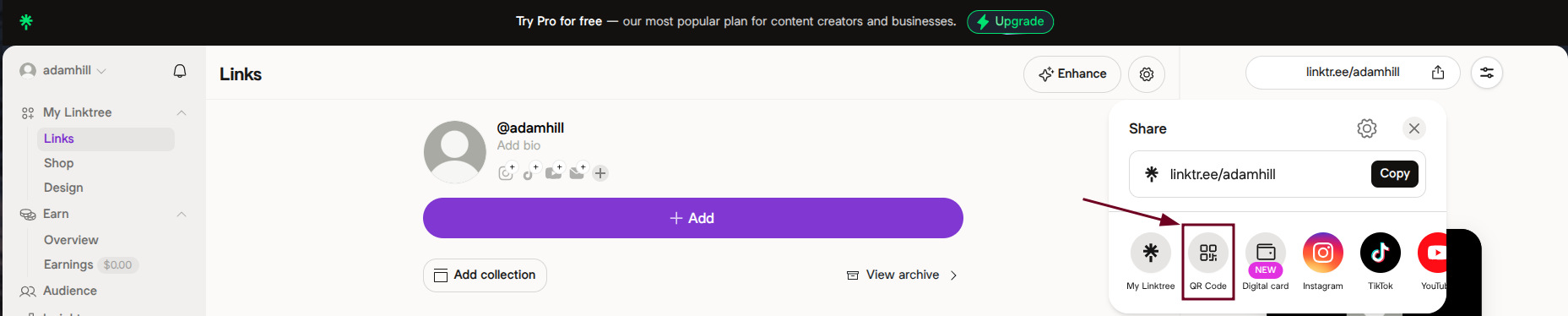
    Step #02: Locate “Share”

    Once you’re on your dashboard, look for the “Share” icon. You’ll find it near your profile link or at the top of the page.

    Share icon on Linktree dashboard

    Step #03: Generate QR code

    Click on the “Share” icon, and you’ll see your QR code already generated and ready to go.

    QR Code option under Share on Linktree dashboard

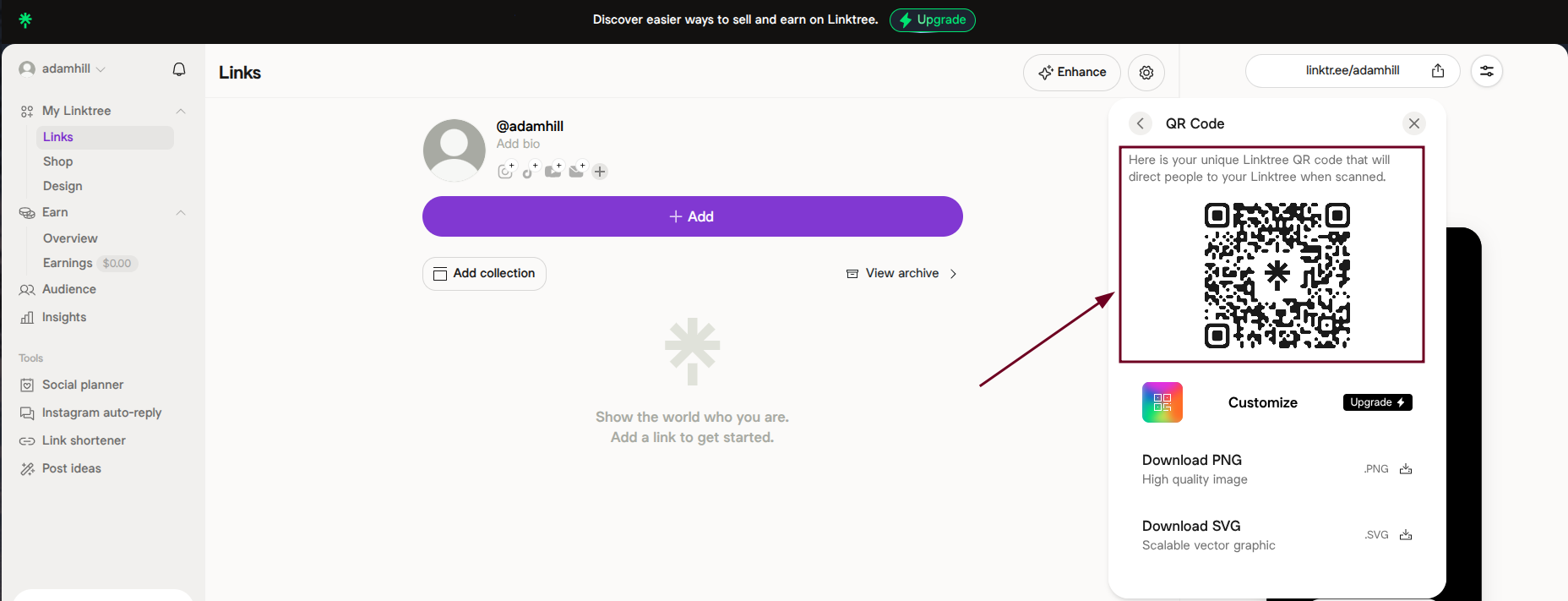
    Linktree automatically creates one linked to your unique Linktree URL.

    One's personal Linktree QR code

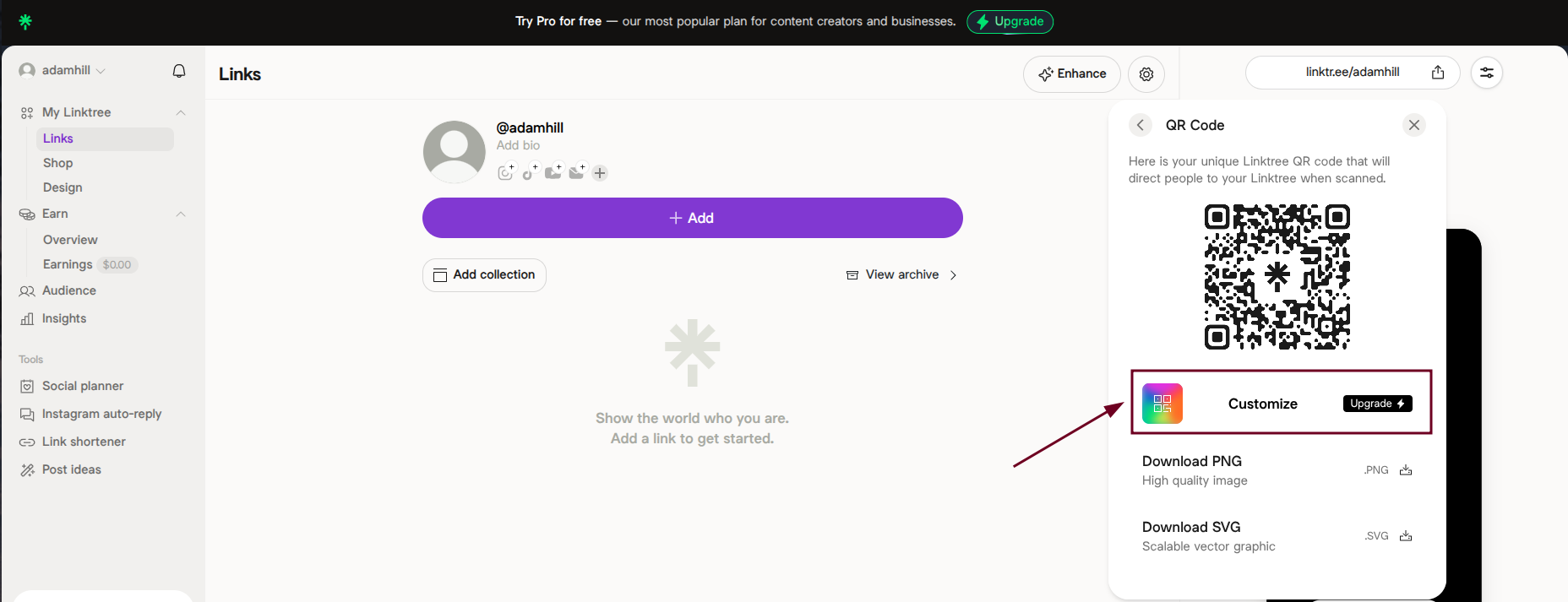
    Step #04: Customize (optional)

    If you’re on a paid plan, you can tweak the QR code’s colors and style to match your brand. A nice touch if you’re using it professionally.

    Customize the Linktree QR code

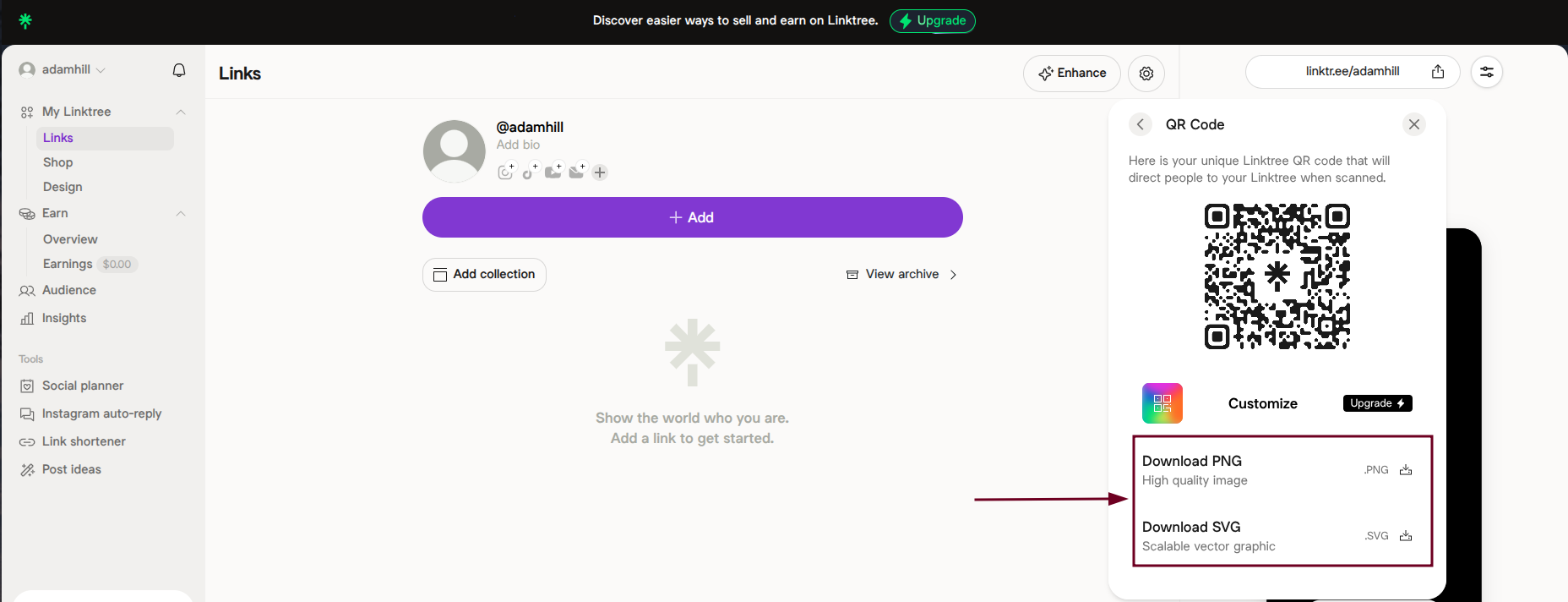
    Step #05: Download

    Hit the “Download PNG” or “Download SVG” option, save the QR code as an image file, and it’s yours to use wherever you need it.

    Download the Linktree QR code

    How to create a Linktree QR code with Replug

    Replug is a top-notch link management platform that also lets you create QR codes on the go. And it comes with some extra perks like tracking and retargeting as well.

    Here’s how to generate a Linktree QR code using Replug in no time:

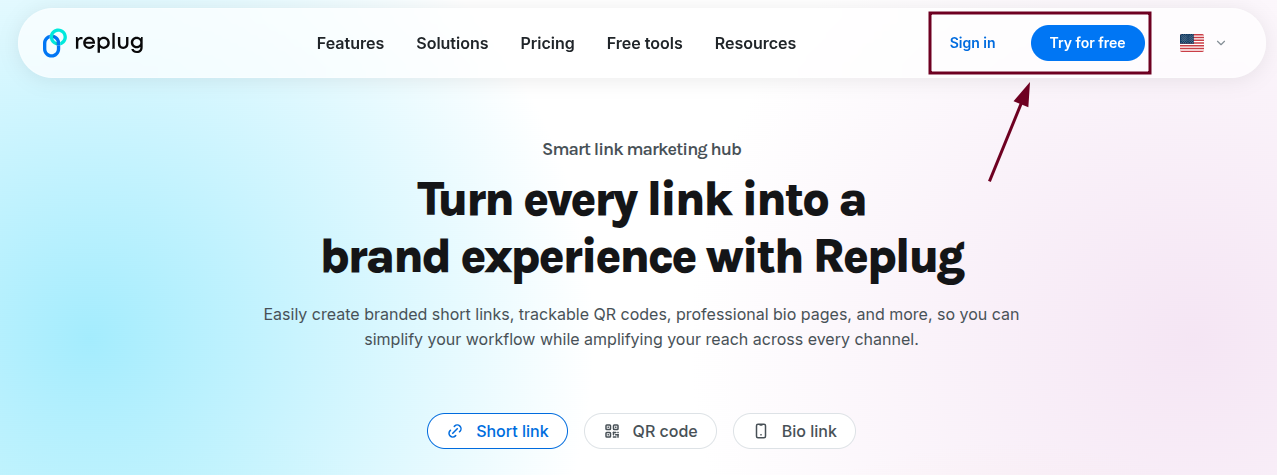
    Step #01: Log in to Replug

    Go to replug.io and sign in to your account. If you are new here, you can quickly create an account and get started.

    Log in to Replug

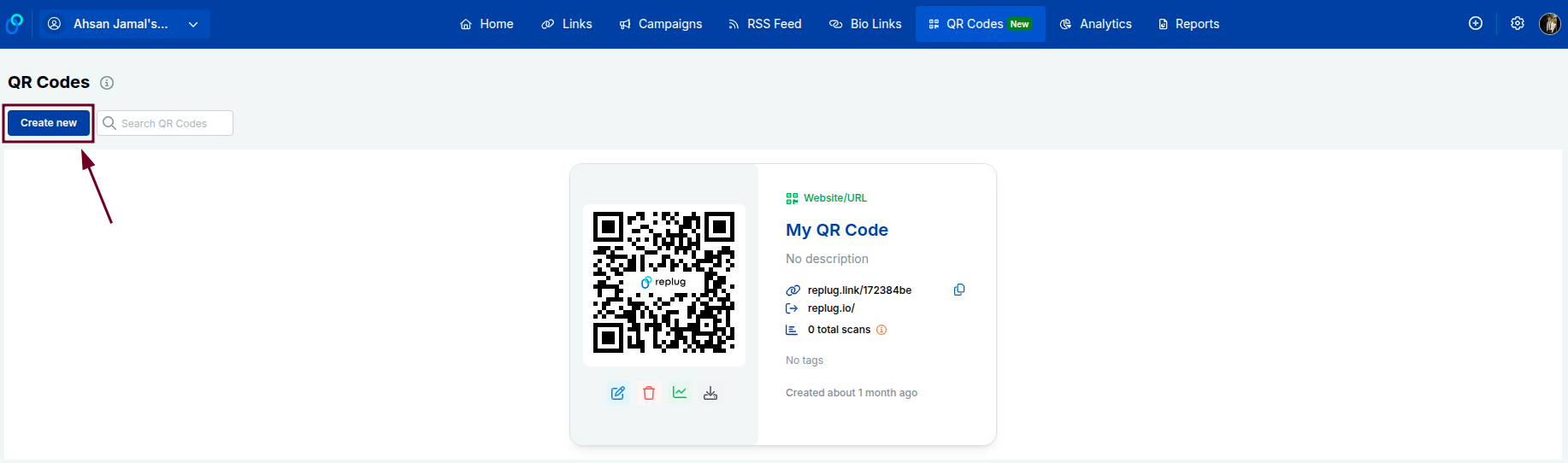
    Step #02: Click “QR Codes”

    From your Replug dashboard, find and click on the “QR Codes” option. It will be available in the top list of options.

    QR Codes option inside Replug dashboard

    Step #03: Click the “Create new” button

    You’ll see a “Create new” button on the QR Codes page. Go ahead and click it to start building your QR code.

    Create new QR code button inside Replug dashboard

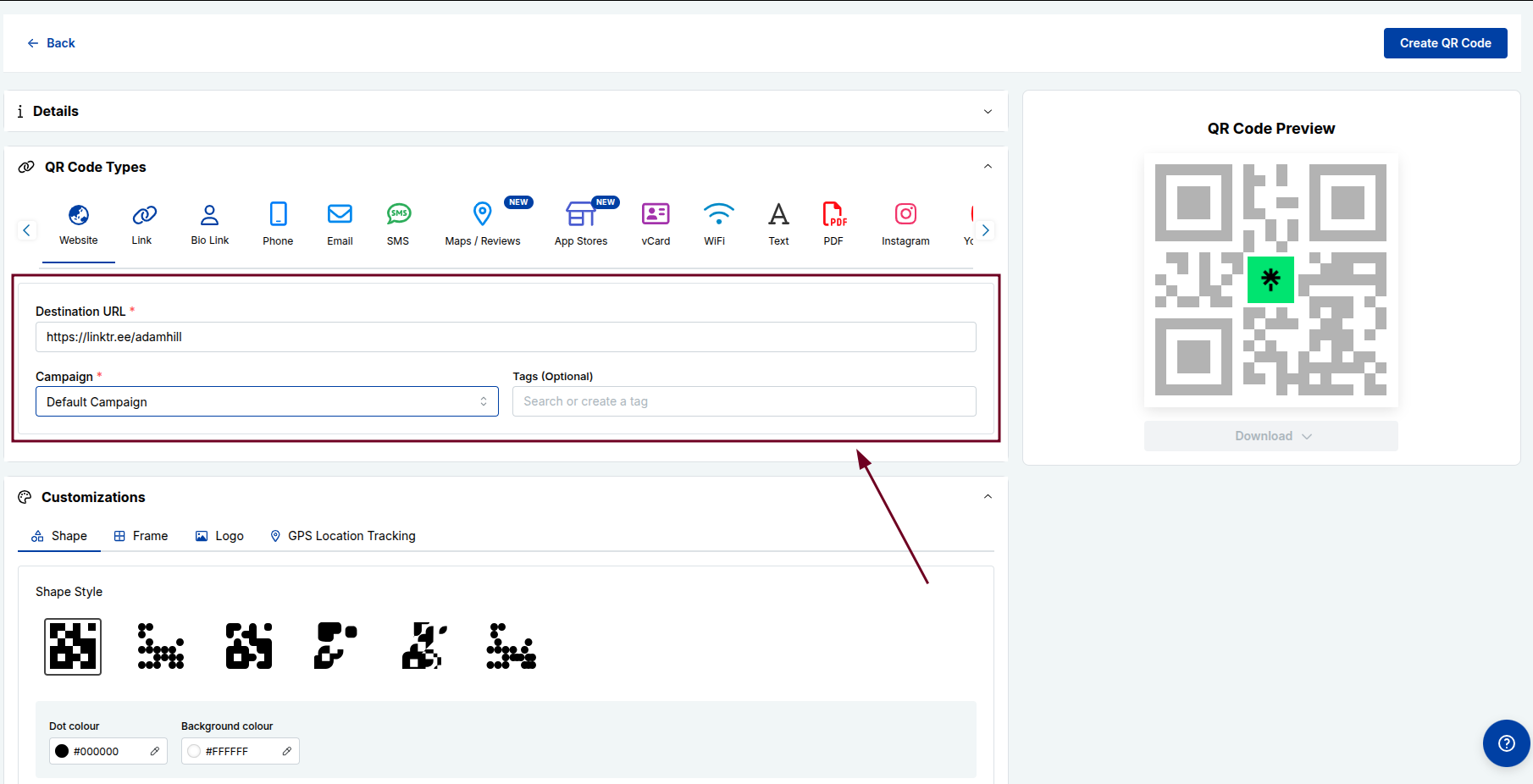
    Step #04: Enter details

    Paste your Linktree URL into the provided “Destination URL” field, and fill in any other required details. Also, customize the QR code the way you like.

    Enter details to create a QR code in Replug

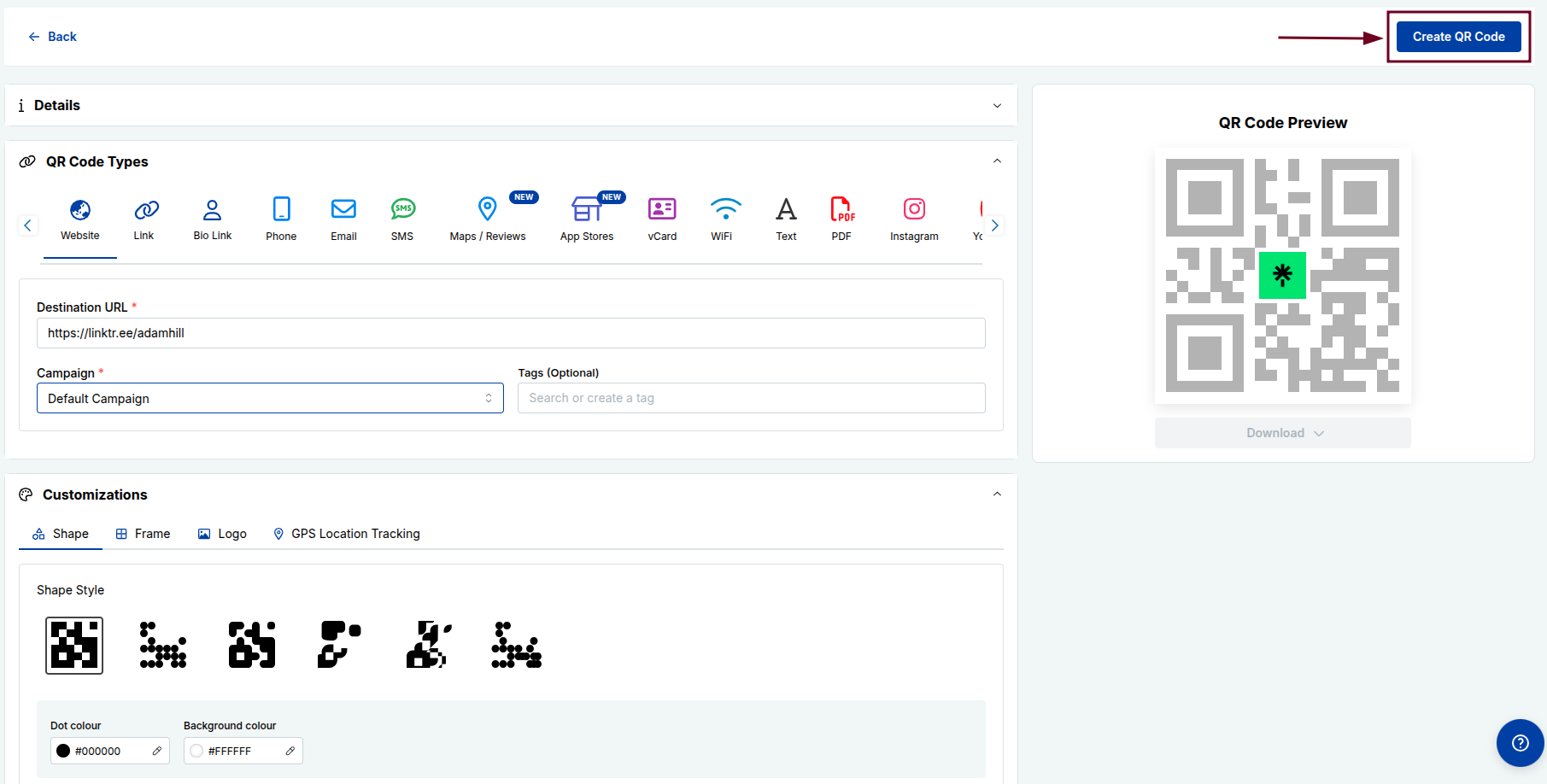
    Step #05: Click “Create QR Code”

    Once everything looks good, hit the “Create QR Code” button.

    Create QR Code button inside Replug

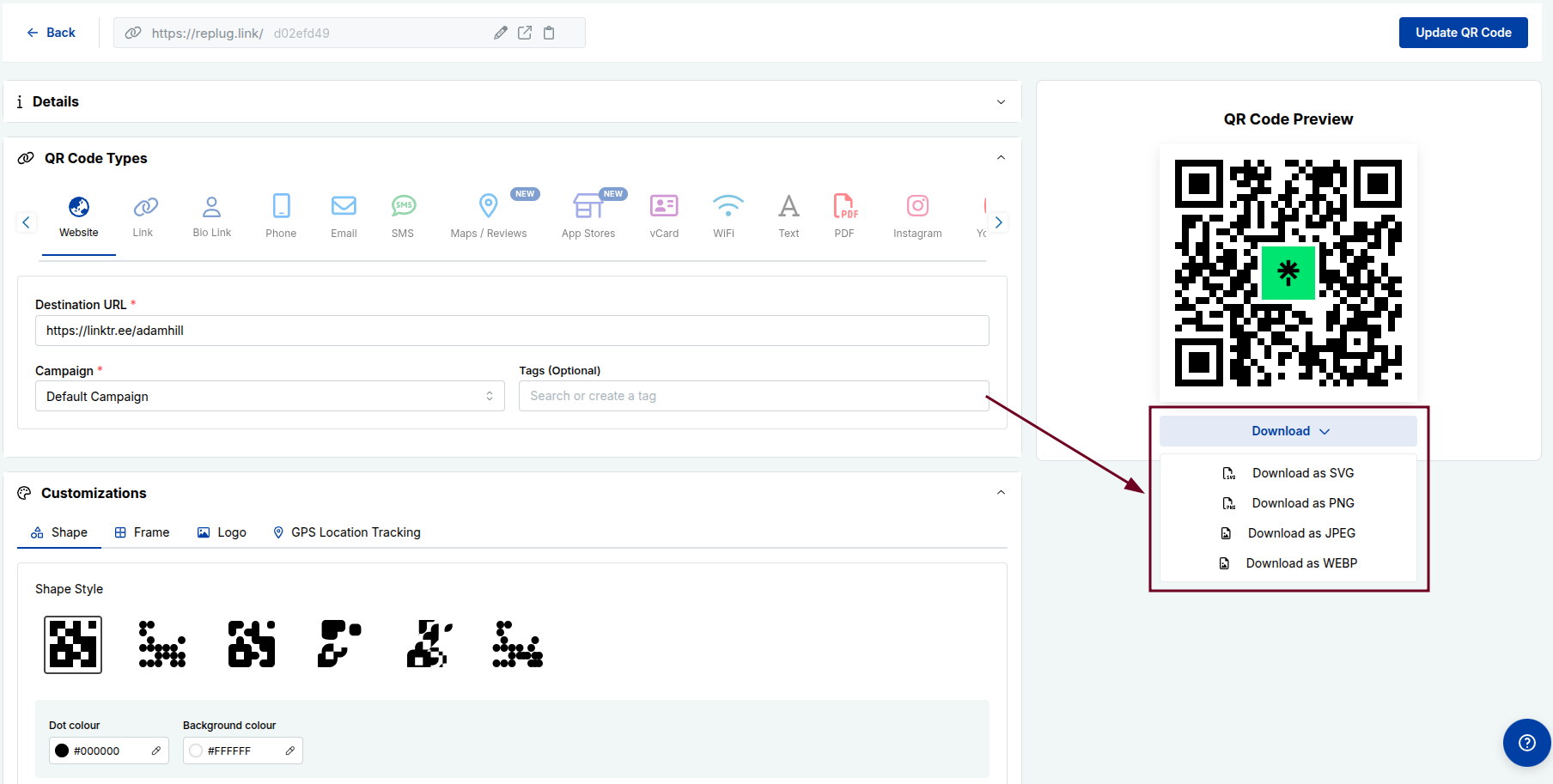
    Your QR code will be generated instantly and ready to download and use. You can download in any format you like (SVG, PNG, JPEG, or WEBP).

    Download the QR code in desired format

    You may also like: How to create a QR code for a URL?

    Key benefits of using Linktree QR codes

    Linktree QR codes aren’t just a cool-looking feature; they’re genuinely useful. No matter if you’re a creator, freelancer, or business owner, here’s why adding a QR code to your Linktree strategy just makes sense:

    • Instant access & convenience: No more typing out long URLs. People simply scan and land on your Linktree page within seconds, making the whole experience smoother for everyone.
    • Bridge physical & digital spaces: Add your QR code on a business card, poster, or product packaging and instantly connect your offline audience to your entire online presence.
    • Consolidation of multiple links: Instead of sharing five different links, one QR code scan takes people to your Linktree, where all your important links (social media, website, store, etc.) live in one place.
    • Real-time updates: Update your Linktree links anytime, and your QR code automatically reflects those changes. No need to reprint or regenerate anything.
    • Enhanced networking: At events, meetups, or conferences, sharing your QR code is way faster and more memorable than exchanging contact details the old-fashioned way.
    • Cost-effective marketing: Creating a Linktree QR code is free, and using it across print or digital materials saves you money compared to traditional marketing tools that do far less.

    Benefits of using Replug QR codes instead

    Linktree’s built-in QR code gets the job done, but Replug takes things a step further. If you’re serious about tracking performance and getting more out of every scan, here’s why Replug’s QR codes give you an edge:

    • Advanced retargeting: Replug lets you attach retargeting pixels to your QR codes, so you can re-engage people who scanned your code with targeted ads on Facebook, Google, and more.
    • Deep analytics & tracking: See exactly how many people scanned your code, when, and from where, giving you real data to understand what’s working and what’s not.
    • Personalized branding & custom domains: With Replug, you can use your own custom domain and brand your QR codes with your colors and logo, making everything look polished and professional.
    • Dynamic flexibility: Need to change the destination URL after printing? No problem. Replug’s dynamic QR codes let you update the link anytime without touching the QR code itself.
    • Efficient lead generation: Replug lets you add lead capture forms to your links, turning every QR code scan into a potential new subscriber or customer (something Linktree simply doesn’t offer).
    • Unlimited versatility: From marketing campaigns and product packaging to email signatures and event materials, Replug QR codes work seamlessly across virtually any channel or format.

    Best practices & tips for using Linktree QR codes efficiently

    Creating a QR code is easy, but making sure it actually works well and gets scanned is a different story. Follow these simple tips to get the most out of your Linktree QR codes:

    Tip #01: High contrast

    Always use dark colors on a light background. The stronger the contrast, the easier it is for phone cameras to scan your code quickly and accurately.

    Tip #02: Minimalist design

    Keep the design clean and simple. Overloading your QR code with too many colors or design elements can confuse scanners and cause read errors.

    Tip #03: Use proper formats

    Download your QR code as a high-resolution PNG or SVG file so it stays sharp and scannable, whether it’s printed small on a card or large on a banner.

    Tip #04: Avoid inversion

    Don’t flip your QR code to light-on-dark. Most scanners struggle with inverted codes, and it’s an easy way to kill your scan rate without realizing it.

    Tip #05: Add a call to action (CTA)

    Place a short CTA phrase like “Scan to see all my links” near your QR code. A slight nudge like this can significantly boost the number of people who actually scan it.

    Tip #06: Size matters

    Never print your QR code smaller than 2×2 cm. Anything smaller gets pretty difficult to scan, especially on low-quality prints or from a slight distance.

    Tip #07: Test multiple devices

    Before going live, test your QR code on both iOS and Android devices as well as PC screens and laptops to make sure it scans smoothly across different cameras and operating systems.

    Tip #08: Use dynamic codes

    Opt for dynamic QR codes over static ones so you can update your Linktree URL anytime without having to reprint or redistribute your materials.

    Tip #09: Optimal placement

    Put your QR code somewhere people can comfortably scan it (eye level works best). Also, avoid placing it on curved surfaces or in low-light areas where scanning becomes a hassle.

    Turn QR codes into your smartest marketing asset using Replug!

    If you want to do more than just generate a basic QR code, Replug is the tool you need in your corner. 

    It’s an all-in-one link management tool that helps you shorten links with its reliable link converter. Besides, it assists in tracking clicks, retarget audiences, and yes, creating stunning, fully personalized QR codes in seconds.

    With Replug’s custom QR code generator, you can build dynamic QR codes branded with your own colors, logo, and custom domain, no design skills needed. And since they’re dynamic, you can update the destination link anytime without reprinting a thing.

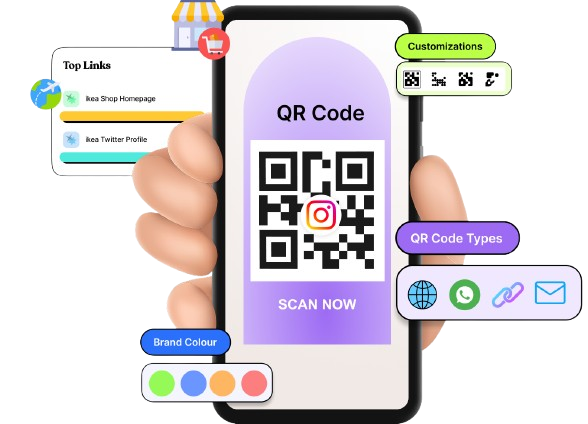
    Dynamic QR Codes
    Dynamic QR codes for modern brands, marketers,
    and creators.
    • Update content anytime without reprinting
    • Track scans to measure engagement
    Create QR codes for free

    No matter if you’re running a marketing campaign or just want smarter, trackable links, Replug turns every QR code scan into a real opportunity. It’s fast, intuitive, and built for people who mean business.

    Wrapping up

    QR codes have gone from a nice-to-have to a genuine marketing tool, and pairing them with your Linktree page makes them even more powerful. 

    Whether you’re sharing your links at an event, on a business card, or across printed materials, a Linktree QR code makes it effortless for people to find everything you offer in one tap. 

    And if you’re ready to take it up a notch with tracking, retargeting, and branded customization, Replug is the obvious next step. 

    The bottom line? 

    A well-designed, well-placed QR code can do a lot of the hard work for you — so why not let it?

    Frequently asked questions

    Does Linktree give a QR code?

    Yes, Linktree automatically generates a QR code for every account (free and paid alike). You don’t have to create one from scratch or use a third-party tool. It’s built right into the platform and linked directly to your Linktree profile URL.

    How do I get a QR code for my Linktree?

    If you’re wondering how to get your Linktree QR code, it’s really simple. Just log in to your Linktree account, hit the “Share” button on your dashboard, and your QR code will be right there waiting for you. From there, you can download it and start using it wherever you need it.

    Are Linktree QR codes permanent, or do they expire?

    A common question most people ask is: Does a Linktree QR code expire? The short answer is no. As long as your Linktree account remains active, your QR code stays valid and functional. It won’t suddenly stop working unless you delete your account or change your Linktree username, which would break the link the QR code points to.

    How to find my Linktree QR code on iPhone?

    Here’s how to find the Linktree QR code on iPhone: 

    1. Open Safari or any browser.
    2. Go to linktr.ee and log in to your account. 
    3. Once you’re on your dashboard, tap the “Share” button. The QR code option will appear on screen inside the box. 
    4. From there, you can download it directly to your iPhone’s camera roll for easy access anytime.

    Which people and businesses benefit from Linktree QR codes?

    Pretty much anyone with an online presence. Content creators, musicians, freelancers, coaches, restaurants, retail stores, event organizers, and small business owners all benefit from Linktree QR codes. If you have multiple links you want people to access quickly, it’s a no-brainer.

    What if my Linktree QR code doesn’t scan?

    First, check the contrast and size. Low contrast or too-small print is usually the culprit. Also, make sure the code isn’t distorted or pixelated. Try scanning it on a different device, and if it still doesn’t work, try regenerating the QR code altogether.

    Is my Linktree QR code safe to share online?

    Yes, it’s safe. Your Linktree QR code simply points to your public Linktree page, i.e., the same page you’d share as a regular link. Just make sure the links on your Linktree page itself are trustworthy and up to date.

    What can I use my Linktree QR code for?

    The possibilities are pretty wide: business cards, flyers, posters, product packaging, event booths, email signatures, YouTube video descriptions, Instagram bios, restaurant menus, and even merchandise. Anywhere you want people to quickly access your links works.

    Does the Linktree QR code work across all devices?

    Yes! Since most modern smartphones (both iOS and Android) have built-in QR code scanners in their camera apps, your Linktree QR code works seamlessly across virtually all devices without needing any extra app.

    How to resolve the Linktree QR code not working issue?

    Start by testing it on multiple devices. If it’s a print issue, reprint at a higher resolution. Moreover, if the link itself isn’t loading, log in to Linktree and make sure your profile is set to public and your links are active. Regenerating the QR code often fixes most issues.

    How to get the Linktree QR code on a business card?

    Download your Linktree QR code as a high-resolution PNG or SVG file. Then, upload it directly into your business card design, whether you’re using Canva, Adobe, or a print service like Vistaprint. Make sure it’s at least 2×2 cm for easy scanning. That’s it!

    How to download the Linktree QR code for free?

    Log in to your Linktree account and click the “Share” button on your dashboard. You’ll see your QR code ready to download completely free, no paid plan required. Just hit “Download PNG” or “Download SVG” and save it to your device.

    How to monitor Linktree QR code usage?

    On Linktree’s free plan, analytics are pretty limited. If you want detailed scan tracking, like how many people scanned, when, and from where, consider using the Starter, Pro, or Premium plan. You can also use a tool like Replug to monitor your QR code with full analytics built in.

    Provide some examples of Linktree QR codes?

    Here are a few real-world use cases:

    – A musician placing a QR code on their album cover linking to their Spotify, merch store, and tour dates; 
    – A food blogger adding one to their recipe cards linking to their YouTube and Instagram; 
    – A freelancer putting it on their business card linking to their portfolio, LinkedIn, and booking page; and 
    – A restaurant using it on table cards to link to their menu, reviews, and social pages.

    What are the important points to consider for basic Linktree QR codes?

    Keep these in mind:

    – Always use high contrast colors, 
    – Download in a high-resolution format, 
    – Never print it too small, 
    – Add a CTA near the code, 
    – Test it before printing in bulk, 
    – Keep your Linktree profile set to public, and 
    – Regularly check that all your linked pages are still active and working.

  • How to become an Amazon affiliate: Step by step guide for beginners

    How to become an Amazon affiliate: Step by step guide for beginners

    If you’re looking to monetize your online presence, affiliate marketing is one of the most effective ways to do so. And when it comes to affiliate marketing, Amazon offers one of the largest and most trusted programs: Amazon Associates.

    Amazon accounts for nearly half of the affiliate marketing industry, with more than 900,000 affiliate partners capitalizing on its vast marketplace. With millions of products available and a high consumer trust factor, Amazon makes it easy for affiliates to drive traffic and earn commissions.

    This guide will walk you through everything you need to know about becoming an Amazon affiliate, from signing up to maximizing your earnings.

    So, let’s get started!

    What is the Amazon Affiliate Program?

    The Amazon Affiliate (Associates) Program, similar to Replug’s affiliate program, is an affiliate marketing initiative that allows content creators, bloggers, publishers, and influencers to earn a commission by promoting Amazon products. When an affiliate shares an Amazon link and a visitor makes a purchase, the affiliate earns a percentage of the sale.

    How does Amazon’s affiliate program work?

    Here’s how it works:

    1. Sign up for the program.

    2. Choose products to promote that align with your niche.

    3. Share affiliate links on your blog, website, or social media.

    4. Earn a commission when a user purchases through your link.

      Amazon’s commission rates range from 1% to 10%, depending on the product category. Additionally, affiliates earn commissions not just on the promoted product but on all purchases made within 24 hours of clicking their link.

      Prerequisites to start with the Amazon affiliate program

      Before joining the Amazon Affiliate program, you should have a few basic things ready:

      • A content platform: A website, blog, YouTube channel, mobile app, or public social media page where you will share affiliate links.
      • Original content: Your platform should contain helpful, original posts related to the products you plan to promote.
      • An Amazon account: You need a regular Amazon account to register for the affiliate program.
      • Valid tax and payment details: Amazon requires tax information and a bank account to send commissions.
      • Compliance with Amazon policies: Your content must follow Amazon’s guidelines and should not include harmful, misleading, or restricted material.

      Once approved, you must generate at least three qualifying sales within 180 days to keep your affiliate account active.

      What are the requirements to be an Amazon affiliate?

      To join the Amazon Associates Program, you need to meet specific eligibility criteria. Here are some requirements for becoming an Amazon affiliate:

      General requirements to qualify

      RequirementDescription
      Website/blogMust have at least 10 original and recently published posts.
      Social mediaPlatforms like Facebook, Instagram, Twitter, YouTube, TikTok, and Twitch are eligible, provided you have at least 500 followers.
      Content qualityYour content should be engaging, informative, and original to attract users.
      Activity requirementYou must make at least three sales within the first 180 days to stay active
      Active audienceYour platform should have a real and engaged audience that regularly interacts with your content and clicks on the links you share.
      Disclosure requirementYou must clearly disclose that you earn commissions from affiliate links near your content or links.

      Common reasons for rejection

      If your application fails at some point in the process, these could be potential reasons:

      • Lack of sufficient content (empty or incomplete websites)
      • Insufficient traffic or engagement
      • Improper use of affiliate links
      • Failure to generate three qualifying sales in the first 180 days

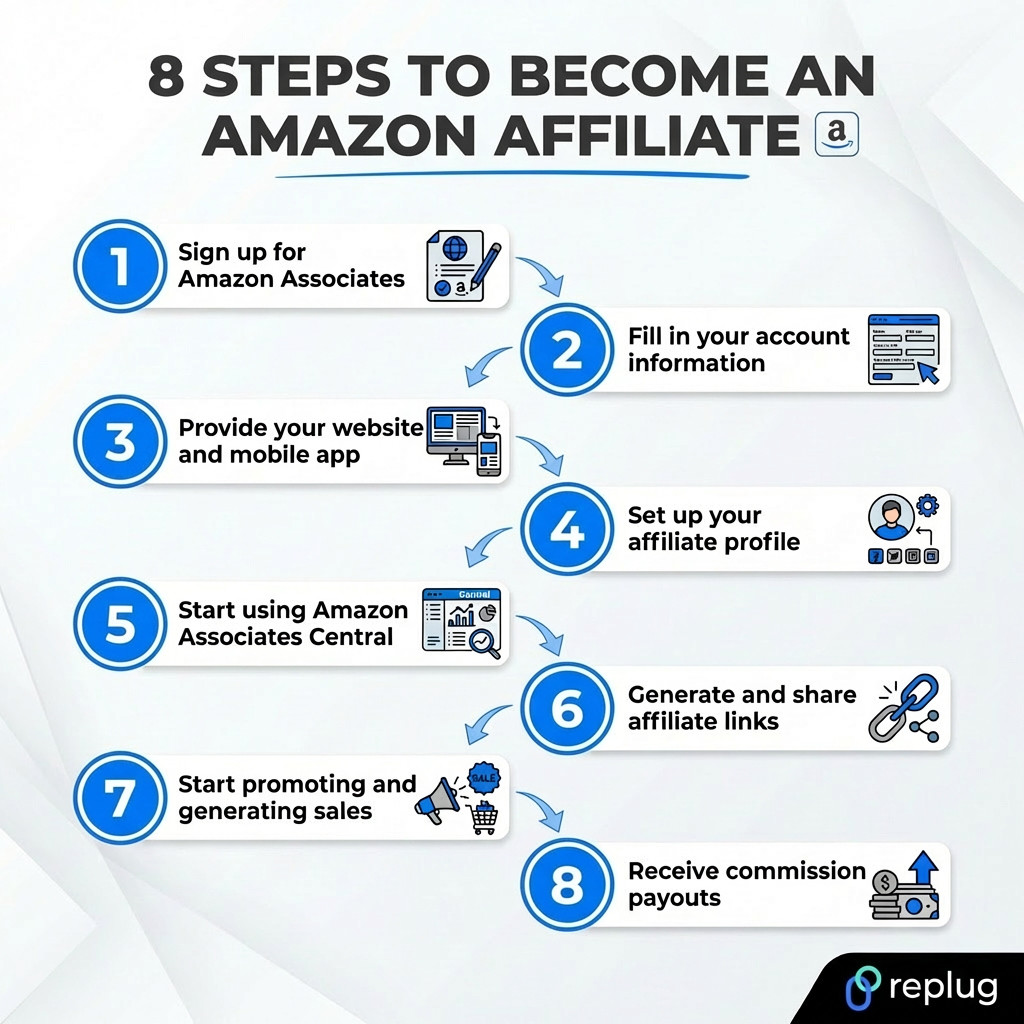
      How to become an Amazon affiliate: 8-step guide

      8 steps to become an Amazon affiliate

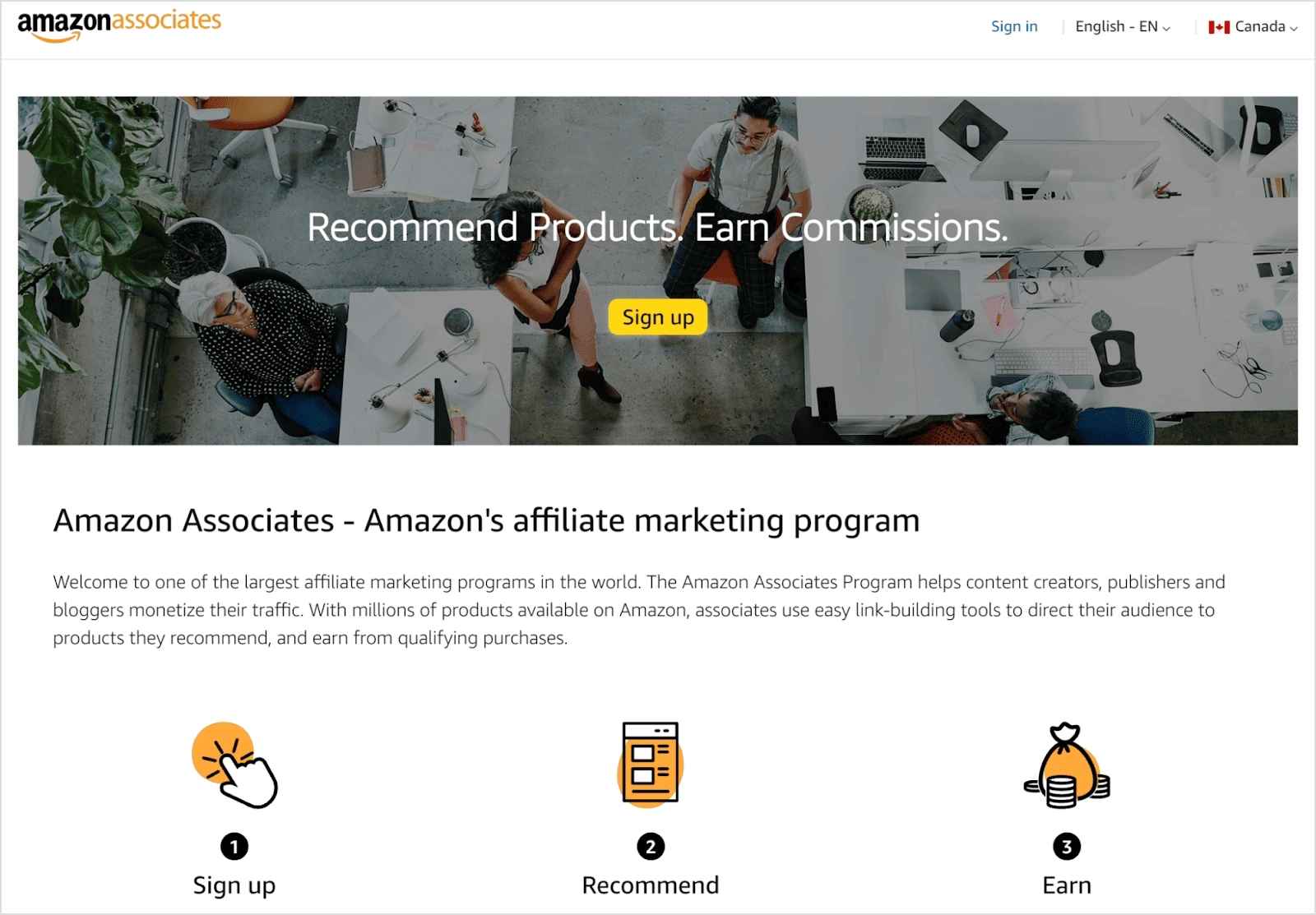
      Step #01. Sign up for Amazon Associates

      • Go to Amazon Associates.
      • Click Sign up and create a new account.
      Screenshot of Amazon Associates homepage

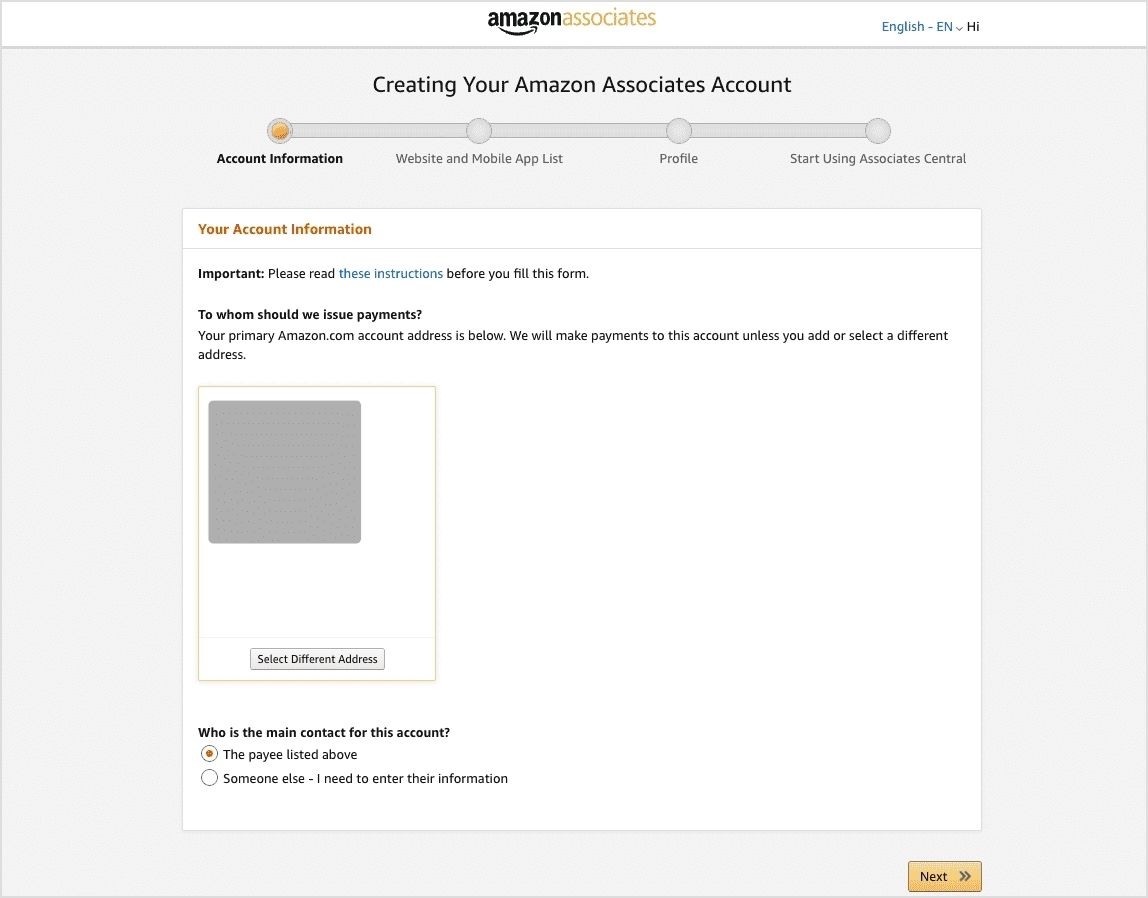
      Step #02. Fill in your account information

      • Provide personal information and details about your affiliate channel.
      • Select the main contact for the account.
      Fill in your account information for the Amazon affiliate program

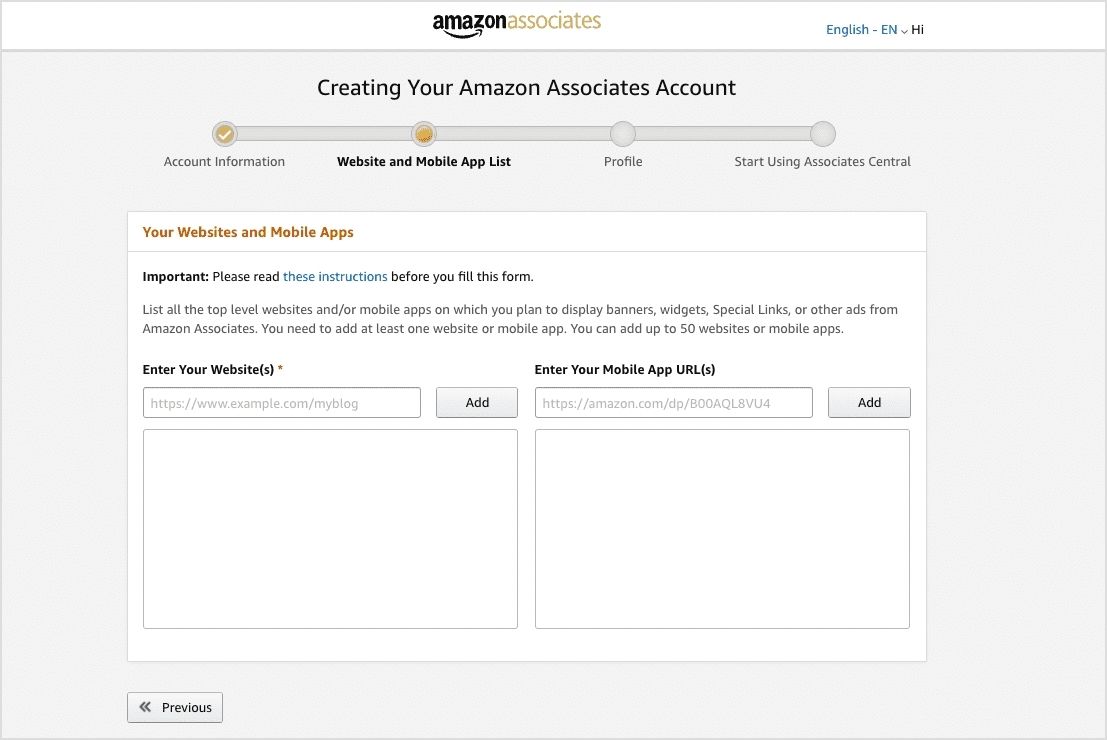
      Step #03. Provide your website or social media details and mobile app

      • Add the URL of your website(s), and mobile app(s).
      • You can add up to 50 websites or mobile apps.
      • If using social media, ensure it meets the 500-follower requirement.
      Provide your websites and mobile apps for becoming an Amazon affiliate

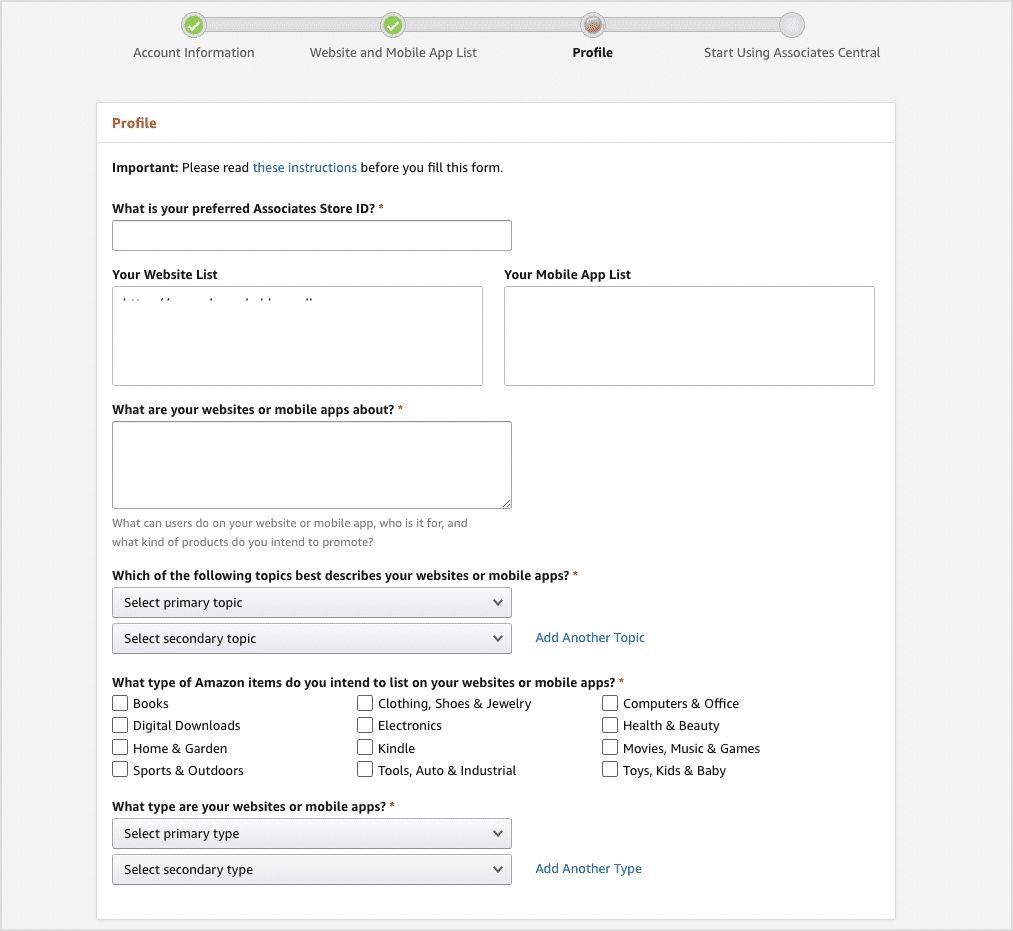
      Step #04. Set up your affiliate profile

      • Provide your store name and create a unique store ID.
      • Select topics and categories related to your niche.
      Set up your Amazon affiliate profile
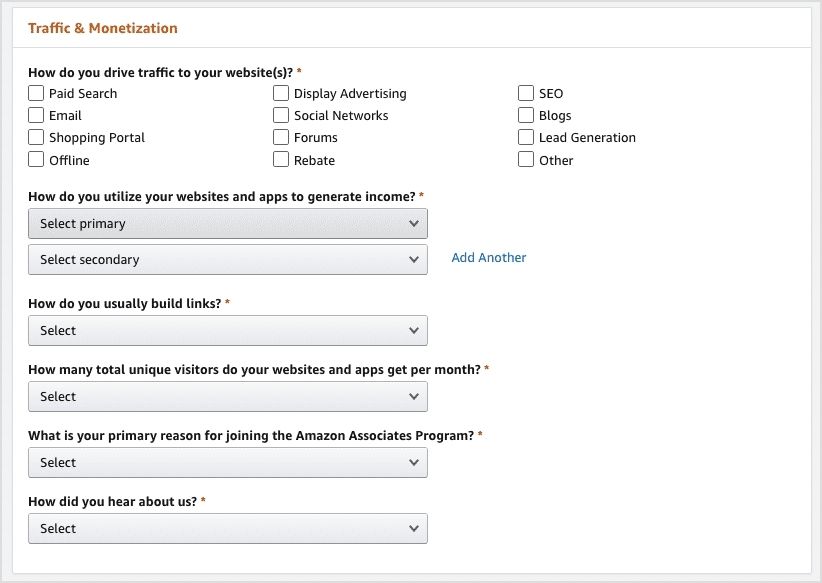
      • Explain how you drive traffic (SEO, social networks, email marketing, etc.).
      Enter methods to drive traffic to your website
      • Complete the security CAPTCHA and agree to the conditions.

      Step #05. Start using Amazon Associates Central

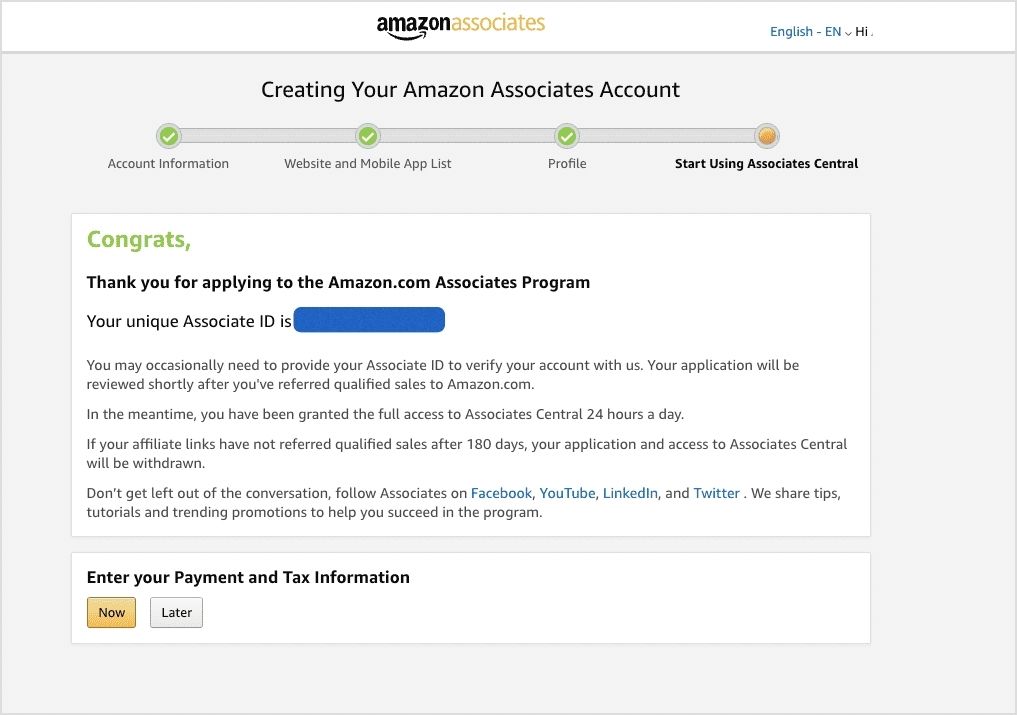
      • That’s all! You have successfully applied to the Amazon Associate Program.
      • Enter payment and tax information (now or later).
      • You will have several options for getting paid as an Amazon affiliate.
      • Complete tax forms (especially for non-US affiliates).
      Enter payment and tax information

      Step #06. Generate and share affiliate links

      • Log in to your Associate account. Now, all your links will be tagged with your unique Associate ID.
      • Go to the product linking menu in the Associates Central dashboard.
      • Search for Amazon products and create custom links containing your Associate ID.
      • Alternatively, you can use Amazon’s SiteStripe tool (for desktop) or GetLink (for mobile) to create affiliate links.
      • Embed your affiliate link in blog posts, videos, or social media captions, etc.

      Step #07. Start promoting and generating sales

      • Drive traffic using SEO, content marketing, and social media.
      • Track performance using Amazon’s dashboard.

      Step #08. Receive commission payouts

      • Amazon processes payouts monthly, with a minimum threshold of $10 (direct deposit) or $100 (check).
      • You’ll be paid monthly, 60 days after the end of the month you earned the money.

      If you’re looking into how to become an Amazon affiliate seller, following these steps will help you get started and succeed.

      Related: How to sell on Amazon: A complete guide for beginners

      Amazon affiliate (associates) program policies

      Before you start promoting products through the Amazon Associates program, it’s important to understand its policies. These rules explain how affiliates should promote products, earn commissions, and use Amazon’s content or trademarks properly. Following them helps you stay compliant and keep earning from the program.

      Below are the main policy areas you should know:

      • Participation requirements: Affiliates must follow Amazon’s operating agreement and ensure their website, app, or social media content is appropriate, legal, and not misleading. You also cannot misuse Amazon content or promote Amazon in unauthorized ways.
      • Commission income statement: This policy explains how affiliates earn commissions. You get paid when someone clicks your special affiliate link and makes a qualifying purchase within the session (usually within 24 hours of the click).
      • Product statement: It outlines which products qualify for commissions and the rules around promoting them, including exclusions or restrictions on certain digital items and categories.
      • Trademark guidelines: Affiliates must use Amazon trademarks, logos, and brand names only as permitted. Misusing Amazon branding or modifying trademarks can lead to account suspension.
      • IP license & usage requirements: Amazon gives affiliates a limited license to use its product images, text, APIs, and other program content only for promoting Amazon products according to program rules.
      • Mobile application policy: If you promote Amazon products through a mobile app, it must meet Amazon’s requirements and be properly registered in your affiliate account before using affiliate links.
      • Amazon influencer program policy: This policy applies to creators who promote products through social media and have an Amazon storefront. Influencers must meet eligibility requirements and follow the same operating agreement rules.
      • Amazon creator ads boost program policy: This program allows creators to boost or promote content that features Amazon products. Participants must follow advertising guidelines and program rules when promoting such content.

      In short, these policies ensure that affiliates promote Amazon products fairly, use Amazon’s resources properly, and maintain trust with customers.

      How to become an Amazon affiliate on different platforms in 2026

      How to become an Amazon affiliate on different platforms in 2026

      You don’t always need a website to promote Amazon products. Many affiliates today use social media platforms to share recommendations and earn commissions. 

      The idea is simple: create useful content, share your affiliate links, and guide people to products they may want to buy.

      Below are simple ways to get started on different platforms.

      How to become an Amazon affiliate on Facebook

      • Step #01: Create a Facebook page or public group around a niche (e.g., gadgets, home decor, fitness gear).
      • Step #02: Sign up for the Amazon Associates program and list your Facebook page URL during registration.
      • Step #03: Generate your affiliate links using the Amazon SiteStripe tool.
      • Step #04: Share helpful posts such as product reviews, recommendations, or “top picks.”
      • Step #05: Add your affiliate link in the post and include a short disclosure (e.g., “As an Amazon Associate, I earn from qualifying purchases”).
      • Step #06: Stay active by posting regularly and engaging with comments to build trust with your audience.

      How to become an Amazon affiliate on Instagram

      • Step #01: Create a niche-based Instagram account (tech products, beauty tools, home items, etc.).
      • Step #02: Apply to the Amazon Associates program and include your Instagram profile URL.
      • Step #03: Post product photos, reels, or short reviews showing how the product works.
      • Step #04: Add your affiliate link in your bio or use a link-in-bio tool.
      • Step #05: Mention the product in captions and guide users to the link in your bio.
      • Step #06: Always add a clear disclosure like #ad or #AmazonAssociate when sharing affiliate links.

      How to become an Amazon affiliate on Pinterest

      • Step #01: Create a Pinterest business account and choose a niche for your boards.
      • Step #02: Apply for the Amazon Associates program and list your Pinterest profile as your platform.
      • Step #03: Design eye-catching pins featuring product ideas, guides, or recommendations.
      • Step #04: Add your Amazon affiliate link to the pin destination URL.
      • Step #05: Write helpful pin descriptions so users understand what the product is about.
      • Step #06: Clearly disclose that the pin contains an affiliate link to stay transparent.

      How to become an Amazon affiliate on Reddit

      • Step #01: Join relevant subreddits related to your niche (for example, gadgets, home tools, or fitness gear).
      • Step #02: Spend time engaging with the community by answering questions and sharing useful insights.
      • Step #03: Provide genuine product recommendations when they are relevant to the discussion.
      • Step #04: Instead of spamming links, share helpful posts or guides that include your affiliate link when appropriate.
      • Step #05: Always follow each subreddit’s rules because many communities restrict direct promotional links.

      Note: Many Reddit users warn that excessive affiliate links can get posts removed or accounts flagged, so focusing on helpful advice works much better.

      In short, the process is similar across platforms: create useful content, build trust with your audience, and share affiliate links in a transparent way. When done consistently, social platforms can become a strong source of Amazon affiliate income.

      Pros and cons of the Amazon Affiliate Program

      While Amazon’s affiliate program offers several benefits, it also comes with some challenges. Here’s a breakdown to help you decide if it’s the right choice for you:

      ProsCons
      Access to millions of productsLow commission rates on some categories
      Trusted brand with high conversion ratesShort 24-hour cookie window
      Easy integration with websites & blogsCommissions get cancelled if products are returned
      Works with multiple content platformsPayouts can take up to 60 days

      How much do Amazon affiliates earn?

      Amazon affiliate earnings are highly variable, influenced by factors like:

      • audience size and engagement, 
      • niche selection, 
      • content quality, 
      • conversion rates, and 
      • Amazon’s commission structure

      Beginners with smaller audiences and developing strategies typically earn modestly at first. While top Amazon affiliates can earn substantial amounts, the range is broad. 

      Influencer Marketing Hub reports an average annual income of $55,434 for Amazon affiliates. However, some studies suggest affiliate marketers may earn less than $20,000 annually. According to ZipRecruiter, the national average annual salary for an Amazon affiliate is $77,893, with top earners making over $127,000 per year.

      Top performers, often with established online platforms like popular websites, influential blogs, and large, engaged audiences, can see monthly earnings ranging from thousands to hundreds of thousands of dollars. Pinpointing an exact starting income is difficult, but optimization is key to maximizing initial earnings.

      Here’s a rough estimate of earnings:

      Earning levelMonthly income range
      Beginner$50 – $300
      Intermediate$1,000 – $10,000
      Advanced$10,000 – $100,000+

      Advanced strategies to boost your Amazon affiliate income

      Once you’ve joined the Amazon Associates Program, implementing advanced strategies can help you increase your earnings. If you’re wondering how to make the most of the program, these strategies will help:

      1. Utilize email marketing

      You can use newsletters to drive traffic to blog posts containing affiliate links. This strategy helps build trust and long-term engagement with your audience while improving your chances of making sales as an Amazon affiliate marketer.

      2. Create video reviews

      YouTube is a powerful tool for affiliate marketing. High-quality, detailed video reviews often lead to better engagement and conversion rates than traditional blog posts. Many successful affiliates use video content to showcase products, making it a great approach for those learning how to become an Amazon affiliate seller.

      3. Run paid ads

      Consider running PPC (pay-per-click) campaigns on Google or Facebook to direct traffic to high-converting affiliate content. To boost your affiliate content’s reach, utilizing targeted ads can be a powerful strategy.

      Consider exploring a pay-per-click software to streamline and optimize your campaign management for maximum ROI. Paid ads can help you reach a wider audience and generate more commissions.

      4. Build an affiliate funnel

      Create a landing page that provides value (such as a free guide or checklist) in exchange for an email sign-up. Then, nurture leads through email marketing and direct them to your affiliate links over time.

      5. Optimize for voice search

      With the rise of smart assistants like Alexa and Google Home, optimizing content for voice search can help you attract additional organic traffic. Structuring content in a conversational, question-answer format improves its chances of appearing in voice search results. If you want to make money, voice search is highly beneficial.

      Related: High ticket affiliate marketing: A guide for beginners

      How Replug enhances Amazon affiliate marketing

      Replug.io is a powerful link management tool that enhances affiliate marketing by offering multiple features designed to increase conversions and track performance.

      Here’s how:

      1. Affiliate link cloaking and customization

      Amazon prohibits traditional link cloaking, but with Replug, you can create custom, branded short links that look cleaner and more professional. These links increase trust and click-through rates.

      2. Bio links for affiliates

      Replug enables affiliates to create a single bio link containing multiple Amazon affiliate links. This feature is useful for social media platforms like Instagram and TikTok, where users can only place one clickable link in their bio.

      3. QR codes for affiliate links

      Replug lets you generate dynamic QR codes linked to your affiliate URLs, making it easier for users to scan and visit product pages instantly. This is especially useful for physical marketing materials and events.

      4. Advanced link tracking

      With Replug, you can track real-time clicks and geotargeting statistics on your Amazon affiliate links. This data helps affiliates understand which products perform best and optimize their earnings by employing the best marketing strategies.

      5. Deep linking capabilities

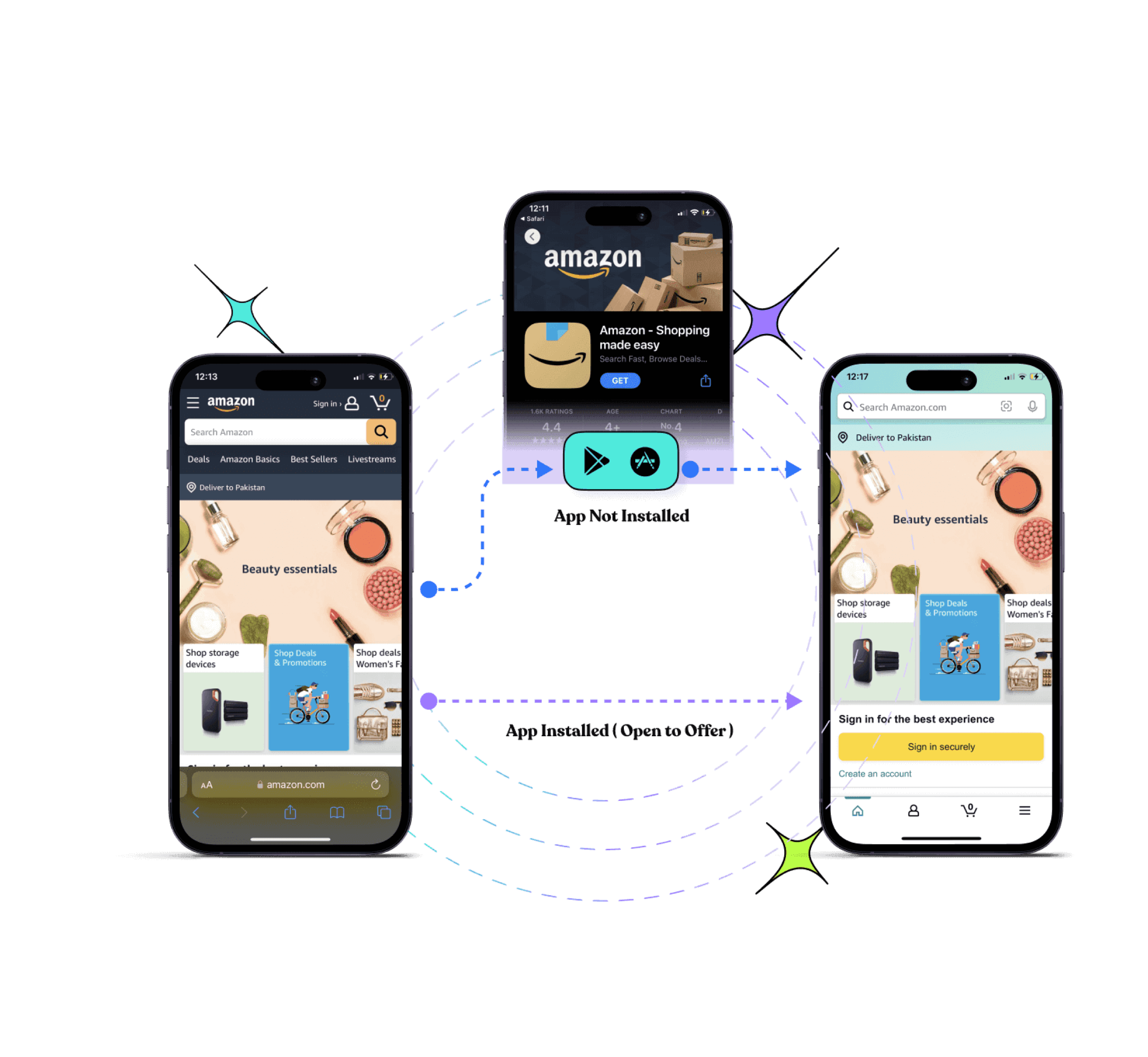
      Deep linking ensures that when users click your affiliate links, they are taken directly to the product page within the Amazon app (if installed). This improves user experience and increases conversion rates.

      6. SMS and email link sharing

      Replug allows affiliates to create short links that are SMS-friendly, enabling promotions via text messages and email campaigns without the risk of getting banned.

      7. Link expiration

      Affiliates promoting Amazon product sales or limited-time offers can use Replug to set up link expiration for their affiliate links, preventing broken pages and seamlessly redirecting users to active deals.

      8. Retargeting pixel integration

      Replug lets affiliates add retargeting pixels to their affiliate links. If a user clicks but does not complete a purchase, they can be retargeted with ads, increasing the likelihood of conversions.

      9. Bridge pages with custom CTAs

      Replug enables affiliates to create bridge pages with eye-catching call-to-action (CTA) buttons, warming up potential buyers before directing them to Amazon. Using Replug in conjunction with Amazon Associates enhances link performance, improves tracking accuracy, and maximizes affiliate revenue.

      10. Amazon link shortener for cleaner and more shareable URLs

      Replug’s Amazon link shortener allows affiliates to transform long, cluttered Amazon URLs into short, branded links that are easier to share across platforms. 

      Shortened links not only look more professional but also perform better in posts, messages, and ads, especially on character-limited platforms like Twitter or SMS. By using branded short links, affiliates can maintain trust with their audience while improving link clickability and engagement.

      If you’re serious and curious about how to become a pro Amazon affiliate marketer, integrating Replug into your strategy can provide better results.

      Replug Branded Short Links CTA
      A complete link management solution
      for marketing professionals & agencies.
      Try Replug for free

      Wrapping up

      The Amazon Associates Program is an excellent way to monetize your content and generate passive income. By learning how to become an affiliate on Amazon, you can take advantage of one of the most trusted affiliate programs.

      Utilizing tools like Replug, affiliates can boost conversions, track user engagement, and maximize earnings effortlessly. From custom short links to click tracking and retargeting, Replug offers powerful solutions for Amazon affiliates.

      Frequently asked questions

      Is it free to become an Amazon affiliate?

      Yes, joining the Amazon affiliate program (Amazon Associates) is completely free. There are no registration fees or monthly charges. You can create an account, generate affiliate links, and start promoting products without paying anything. However, you might spend money on things like a website, hosting, or affiliate marketing tools to grow your traffic.

      How to become an Amazon affiliate with no money?

      You can start the Amazon affiliate program without any investment. Here’s how to become an Amazon affiliate for free by following these steps:

      1. Create a free content platform (YouTube, TikTok, Instagram, or a free blog).
      2. Sign up for the Amazon Associates program.
      3. Add your platform details during registration.
      4. Generate affiliate links for relevant products.
      5. Share helpful content and include your links.

      You don’t need a website! Amazon allows affiliates to promote products through social media or content platforms.

      How long does it take to become an Amazon affiliate?

      Becoming an Amazon affiliate is quite fast. The signup process usually takes 30–45 minutes, and Amazon typically reviews applications within 24 hours to a few days (often 1–3 days). Once approved, you can start sharing affiliate links immediately. However, you must generate at least three qualifying sales within the first 180 days to keep your account active.

      How to sign up for the Amazon affiliate program without a website?

      You can join the Amazon Associates program without a website by using a public social media account or YouTube channel as your platform.

      Steps:

      1. Go to the Amazon Associates signup page.
      2. Create your account.
      3. When asked for a website, enter the URL of your YouTube channel or social media page (e.g., Instagram, Facebook, TikTok).
      4. Submit your application and wait for approval.
      5. After approval, generate affiliate links and share them in your content.

      Your account must be public, active, and contain original content for Amazon to approve the application.

      What are the best strategies to maximize profits from the Amazon affiliate program?

      Some effective ways to increase earnings include:

      – Choose a focused niche (tech, home gadgets, fitness, etc.).
      – Write honest product reviews and comparisons.
      – Target high-intent keywords like “best,” “review,” or “vs.”
      – Promote products with good demand and reasonable prices.
      – Use SEO and social media to bring consistent traffic.
      – Build trust with helpful, unbiased recommendations.

      These strategies help improve clicks and conversions over time.

      How to create Amazon affiliate links?

      Creating Amazon affiliate links is simple:

      1. Log in to your Amazon Associates dashboard.
      2. Find the product you want to promote on Amazon.
      3. Use the SiteStripe bar or “Get Link” option.
      4. Choose the link format (text, image, or short link).
      5. Copy the affiliate link and share it in your content.

      When someone clicks the link and makes a purchase, you earn a commission.

      How to earn $100 per day through the affiliate marketing program offered by Amazon?

      To reach around $100 per day, focus on consistent traffic and product selection:

      – Create content targeting buyer-intent keywords (e.g., “best laptop under $1000”).
      – Promote products with higher prices or better commission categories.
      – Publish multiple articles, videos, or posts targeting different products.
      – Use SEO, Pinterest, YouTube, or social media to drive traffic.
      – Build a library of content that generates sales daily.

      With steady traffic and well-placed affiliate links, reaching $100/day becomes achievable over time.

    1. What are URL parameters & how to use them effectively

      What are URL parameters & how to use them effectively

      You know when you click a link, and it suddenly ends with a string like ?utm_source=facebook&utm_campaign=fall_sale, it looks messy, right? 

      But here’s the problem! Many website owners treat those strings as annoying noise, when in reality, they’re quite powerful.

      Without adding meaningful URL parameters, businesses often end up blindly guessing where their traffic comes from, and that means wasted time and marketing dollars.

      What if you could instantly know which post, email, or ad brought in a visitor, in clear, actionable data? That’s where URL parameters become a game-changer. 

      With properly tagged links, your analytics tools can reveal exactly which sources bring the best results.

      In the next section, we’ll step into a brief summary of URL parameters (what they are and how they work), so you’ll understand why they deserve a spot in your digital toolkit.

      Let’s kick things off!

      URL parameters: A brief overview

      When you land on a web page, the main part of the link you clicked is the URL, i.e., the address that points you to a specific page on the web. But sometimes, that URL doesn’t give the full picture.

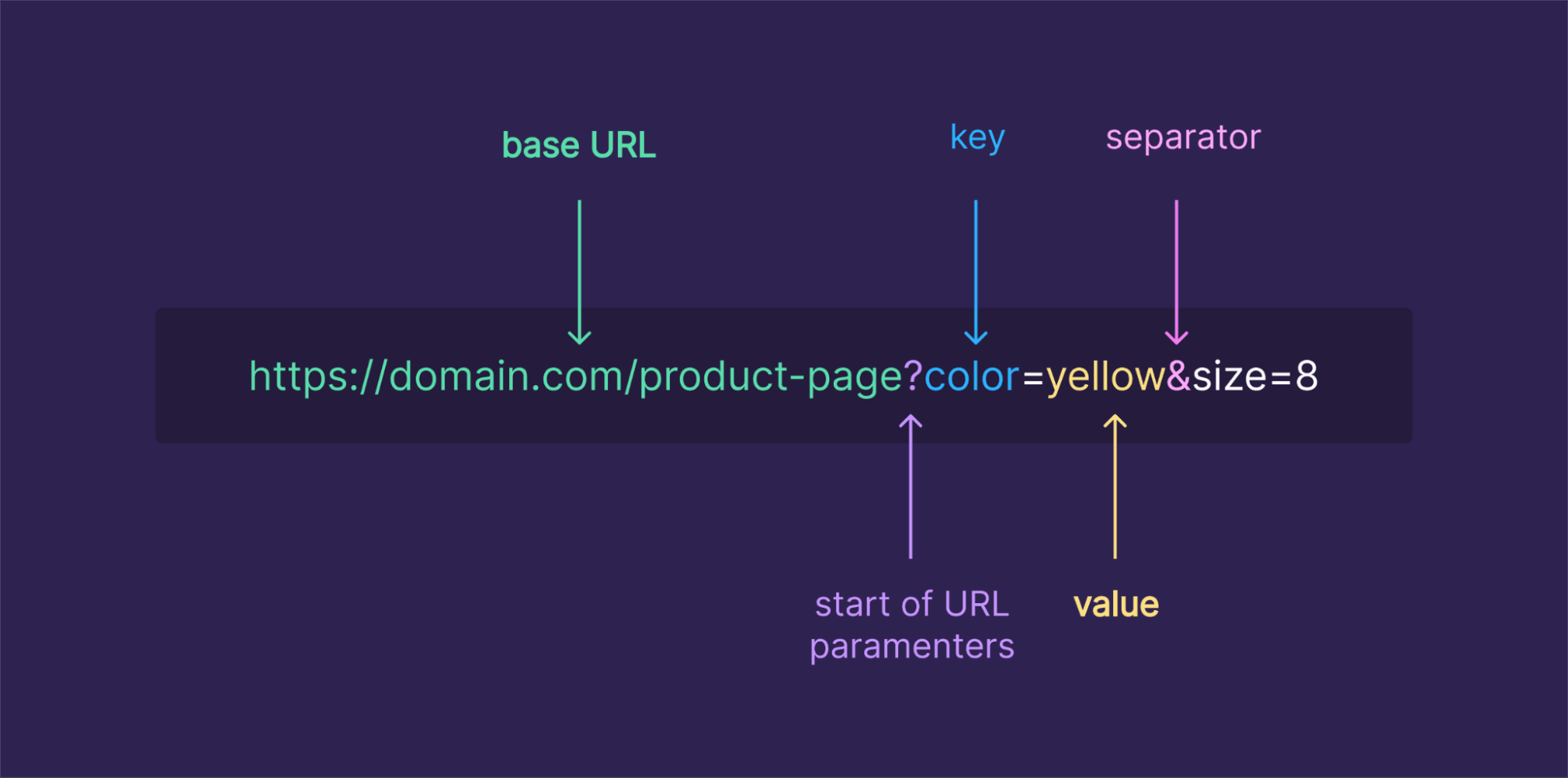
      That’s where URL parameters come in. They’re extra bits added to the end of a URL (after a ?) that pass additional information to the web server. Internally, they look like key=value pairs, and if there are more than one, they’re separated by &.

      URL parameters

      The main purpose of URL parameters is to tell the server, or your analytics tools, extra context about the user’s visit. They might control how content is displayed (like filtering a product list), or they might track how the user arrived, for example, which campaign or ad brought them there. 

      Now let’s look at a real-life example of a URL with parameters so you can see how it works in practice.

      URL parameters example

      Imagine you run an online store and want to show only blue shoes, sorted by price from low to high. A link to that filtered list might look like this:

      https://yourstore.com/products?category=shoes&color=blue&sort=price_asc

      • The base part, https://yourstore.com/products, defines the page resource.
      • The part after the ?, category=shoes&color=blue&sort=price_asc, are the URL parameters.
        • Here, category=shoes and color=blue tell the store what products you want to see, and sort=price_asc tells it how to order them.

      Or say you run a marketing campaign and want to track traffic coming from a newsletter. You might use a “long URL” like this:

      https://yourblog.com/landing-page?utm_source=newsletter&utm_medium=email&utm_campaign=november_promo

      In this URL:

      • utm_source=newsletter shows the traffic came from the newsletter,
      • utm_medium=email specifies the medium,
      • utm_campaign=november_promo names the campaign.

      When someone clicks this link, your analytics tool records exactly where they came from, making it way easier to measure campaigns.

      With these examples in mind, you can see how URL parameters turn a basic link into a powerful way to control content or track performance, especially when you’re dealing with long URLs or lots of traffic sources.

      Main types of URL parameters

      When it comes to URL parameters, most fall into one of two main types. They either alter what you see on the page or silently carry info in the background.

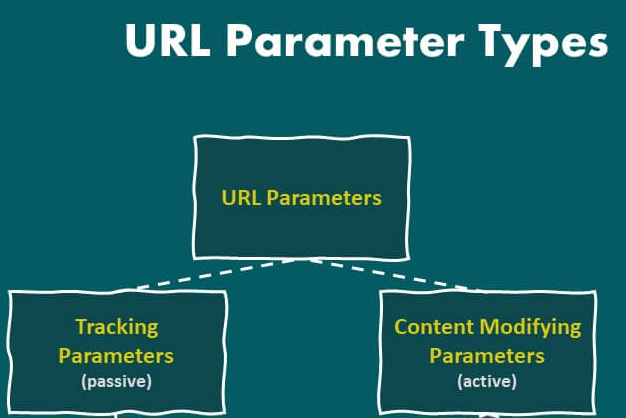
      URL parameters types

      Active URL parameters

      Active parameters, also called “content-modifying parameters”, actually change what the visitor sees when they open a link. 

      For example, if someone visits an online store, active parameters might filter products (?category=shoes&color=blue), sort them (?sort=price_asc), or load a specific page in a list (?page=2). 

      These parameters directly influence the content or layout of a page, so that the same base address can show totally different content, such as only “blue shoes” or results sorted from cheapest to most expensive.

      Passive URL parameters

      On the other hand, passive parameters don’t change what you see on the page. They’re used “behind the curtain”. These are mainly used for tracking, analytics, affiliate referrals, or session identifiers.

      For instance, when you append something like ?utm_source=newsletter&utm_medium=email&utm_campaign=spring_sale, the page content stays the same, but your analytics tool records where you came from. 

      Whether those parameters are present or not, visitors see identical content, but the website collects additional context about how the visit occurred.

      Understanding this difference, active vs passive parameters, is super helpful when you build links or track campaigns (or even worry about SEO).

      How URL parameters work

      URL parameters are the little helpers appended to a URL that tell the website or server extra info, often about what content to show, or data to track. 

      Below is how they’re structured and how that structure actually works under the hood.

      Structure & functionality

      • Base + query string: A URL starts with the base (like https://example.com/page), and if you want to add parameters, you append a question mark ?. That marks the start of the parameters section.
      • Key-value pairs: Each parameter is written as a key and a value separated by an equals sign =. For instance, page=2 or color=blue.
      • Multiple parameters: If you have more than one parameter, you separate them with an ampersand &. So after the first ?, every additional parameter is joined with &.
      • How the server uses them: When a web server receives a URL with parameters, it reads those key-value pairs and uses them to decide what to send back. This might mean filtering content (e.g., showing only certain items), sorting data, controlling pagination, or tracking things like where the user came from.
      • Optional & flexible: Parameters are optional. The URL works without them, but adding them gives extra instructions or context. That’s why you often see parameters used for search queries, page numbers, filters, UTMs for analytics, and more.

      With this structure in mind, you can now build URLs that do more than just point to a page. Next up, we’ll show you how to play around with a few handy use cases, like filtering a shop catalog or tracking where your visitors come from.

      What are URL parameters used for: Common uses discussed

      When you add URL parameters to a link, they open up a lot of useful powers. Instead of just pointing to a page, you can make the page behave differently or carry extra info behind the scenes. 

      Here are common uses of those parameters:

      Sorting

      You can use parameters to rearrange content order. For example, on a store or blog, you might let users see “price low → high,” “newest first,” or “alphabetical.” A URL like ?sort=price_asc tells the site how to order the items.

      Filtering

      Parameters help narrow down big lists to what the user cares about. For instance, showing only “red shirts,” “in-stock items,” or “size = M.” This means users instantly see relevant results without having to browse everything.

      Pagination

      For long lists (products, articles, search results), parameters like page=2 or page=5 tell the server to send a specific “slice” of the complete list. So instead of a single huge page, the content is broken into manageable sections or pages.

      Personalization

      Sometimes, parameters help deliver a tailored experience, for example, by remembering a preference or choosing a particular view. They let websites adapt what you see based on your choices or past behavior.

      Site search

      When users search on a website, the search term is often passed as a query parameter (e.g.,?q=shoes or ?search=keyword). That tells the server what content to look for and return.

      Translation (Language selection)

      For multilingual sites, parameters can indicate which language/version of the page to show (for instance, ?lang=fr for French). This lets a single base page serve multiple languages without a separate structure.

      Describing (Identifiers)

      At times, parameters carry identifiers or descriptive data, such as a product ID, SKU, or category ID. That helps the server know exactly which item or content version to serve.

      Tracking & analytics

      This is one of the most common uses of URL parameters, which lets marketers and site owners track where traffic comes from. With tags like utm_source, utm_medium, or utm_campaign, you can see whether a visitor came via a social post, email, ad, or other channel, hassle-free.

      Session management (State storage)

      In some web applications, parameters may carry session IDs or state information to help maintain continuity as a user navigates. This way, the server knows who’s making requests and what session they belong to.

      In short, URL parameters turn a simple link into a flexible instruction. They help the site tailor content, keep track of user behavior, let people search/filter easily, and manage complex site workflows seamlessly.

      The hidden SEO challenges of URL parameters

      URL parameters are super valuable and helpful, but if you don’t handle them carefully, they can bring some sneaky SEO problems. Here are the main issues to watch out for:

      SEO challenges of URL parameters

      Duplicate content

      When different parameter versions point to essentially the same page, search engines might treat them as separate pages. For example, page.com/shop?sort=price and page.com/shop?utm_source=facebook may have identical content but appear as different pages to bots.

      Wasted crawl budget

      Search engines only crawl a limited number of URLs per site in a given period. If bots chase dozens (or hundreds) of parameter-generated versions of the same content, they might waste time on those and miss more critical pages.

      Keyword cannibalization

      When multiple URL-parameter variants of a page target the exact keywords, they can end up competing against each other. Instead of one strong page ranking well, you get several weaker ones fighting for the same spot.

      Tracking issues

      Parameters used for analytics or tracking (such as UTM tags or session IDs) can cause the same content to appear under multiple URLs. Without proper handling, this can clutter search indexes and obscure which pages actually bring value.

      Dilution of page ranking signals

      Because links, shares, and other signals might point to different parameterized versions, your content’s overall “authority” gets split. That weakens its SEO potential compared to having a single, clean, SEO-friendly URL.

      Overall, these handy little parameters can quietly undermine your SEO if left unmanaged. In the next section, we’ll walk through best practices to avoid these pitfalls, so you get the benefits of parameters without the SEO downside.

      10 best SEO practices for using URL parameters

      When you use URL parameters on your site (for filters, tracking, sorting, etc.), doing it thoughtfully can help you avoid SEO headaches and keep your site’s health strong.

      Best SEO practices for using URL parameters

      Below are some smart practices to follow:

      1. Add canonical tags

      Use a <link rel=”canonical”> tag on parameterized pages to point back to the main “clean” URL version. This tells search engines which URL you want them to index and helps consolidate link equity and ranking signals.

      2. Block URLs containing parameters with “robots.txt”

      For parameter combinations that don’t add value (like tracking codes, session tokens, or specific filters), you can block crawlers via robots.txt. That helps avoid unnecessary crawling of low-value variants and protects your crawl budget.

      3. Avoid URL parameters for localization

      For things like language or region versions of your site, it’s often better to use clean, dedicated URLs (like /fr/ for French) instead of parameters. This keeps URLs intuitive and user-friendly, preventing confusion for search engines.

      4. Use consistent internal linking

      Always link internally to the canonical version of your pages instead of parameterized URLs. That reinforces search engines’ understanding of which version to favor and avoids spreading ranking power across multiple URL variants.

      5. Exclude parameterized URLs from audits

      When running site audits or SEO crawls, filter out or ignore parameterized URLs, so the audit focuses on your core content. This keeps reports clean and helps you prioritize what really matters.

      6. Optimize the sitemap

      Make sure your sitemap lists only the canonical, clean URLs, not every parameterized variant. That helps search engines find and index the right pages, and avoid unnecessary duplication.

      7. Use user-friendly URLs

      Where possible, favor uncluttered, readable URLs over those stuffed with too many parameters. Straightforward or static URLs tend to perform much better in search results and are easier for users to read.

      8. Monitor website on a regular basis

      Keep an eye on how parameterized URLs are being crawled or indexed. Regular checks help you catch issues like crawl waste, duplicate indexing, or parameter-related SEO problems early.

      9. Use meta tags carefully

      For pages that aren’t meant to be indexed (like filtered or tracking-parameter pages), consider using noindex (or canonical + robots strategy) rather than letting them be indexed accidentally. That reduces index bloat and preserves your site’s SEO clarity.

      10. Limit the use of URL parameters

      **Don’t overuse parameters,** only include them when necessary. Too many different parameter combinations can create a flood of URLs that hurt crawl efficiency, index quality, and overall SEO performance.

      URL parameters vs query parameters

      When you hear “URL parameters” or “query parameters,” people are often talking about the same thing, but there is a subtle difference worth knowing. 

      Below is a quick breakdown of how these two terms relate and when each is technically more correct.

      TermWhat it refers toTypical usage/meaning
      Query parametersThe entire bit of text in a URL after the ?, including all the parameters and separators (e.g.,?key1=value1&key2=value2).It represents the complete package of data being passed (the container for multiple parameters or instructions).
      URL parametersThe individual key=value pairs inside the query string (e.g., key1=value1, key2=value2).They specify the actual data or instructions (like filter, sort, tracking info) that the website/server should act on.

      Why are URL parameters important for marketers?

      Using URL parameters gives marketers a commanding way to make sense of how people get to their site, and whether marketing campaigns are working or not. 

      Here’s why they matter so much:

      • Accurate campaign attribution: By adding parameters (like utm_source, utm_medium, utm_campaign) to links, you can track exactly where a visitor came from, say an ad, an email, social media, or a blog post. This clarity helps you know which campaigns bring real traffic.
      • Better ROI & budget decisions: Since you can see which channels or ads drive visits and conversions, you can allocate your marketing budget more wisely. Investing more where return is highest and cutting under-performing campaigns.
      • Deeper insights into user behavior & audience segments: URL parameters help you understand which ad, email, or link led a user to your site, so you can see patterns in real-time. You can analyze which content formats or channels resonate more, or which audience group converts better.
      • Campaign performance tracking across channels: Whether you run paid ads, email newsletters, social posts, or influencer links, parameters let you track all of them under the same roof, giving a complete picture of how different channels contribute to traffic and conversions.
      • Support for testing & optimization: You can use URL parameters to run A/B tests or compare different creatives, landing pages, or message variations. By tagging links differently, you’ll know which version performs better.

      In a nutshell, URL parameters turn blind guesses into data-backed insights, helping marketers make smarter, evidence-based decisions about content, campaigns, and where to invest time or money.

      Are URL parameters damaging your website’s rankings?

      It’s pretty possible! If URL parameters aren’t handled carefully, they can quietly harm your site’s SEO. Here’s how using parameterized links might be doing more harm than good.

      When a page on your site is accessible under multiple URL versions, those variants often appear as distinct pages to search engines, even when the content is the same. 

      That raises several issues, such as:

      • Search engine bots may waste time crawling duplicate content instead of unique, essential pages.
      • Link signals (like backlinks or social shares) get spread out across many URLs rather than concentrated on a single “main” URL, and 
      • The confusion may lead to keyword cannibalization, where multiple variants compete against each other, weakening overall visibility.

      Moreover, if parameter-packed URLs get indexed, it can bloat your site’s index, dilute authority, and make it harder for your core pages to rank well. So, it’s better to neglect them, but you can use them if you are sure to manage them correctly.

      Summing up

      In the end, URL parameters are a powerful tool when used right. They help you tailor content, track campaigns, filter results, and understand precisely how visitors arrive at your site. 

      But if you’re careless with them, letting duplicate links build up, neglecting canonical tags, or overusing parameterized URLs, they can silently undermine your SEO efforts. 

      The key is balance! 

      Use parameters when needed, but keep your site structure clean, and always give search engines a “canonical” version to index.

      And, if you want to make sharing, tracking, and managing your links even easier, without messy, long URLs or jumbled analytics, why not give Replug.io (i.e., an all-in-one link optimization platform) a try?

      It’s a top‑notch custom URL shortener that can help tidy your links, add tracking, and boost your link game exceptionally!

      Frequently asked questions

      What is %20 in URL?

      %20 represents a space character in a URL. It’s a URL-encoded version of a space, as spaces are not allowed in URLs.

      What are the three types of URLs?

      The three types of URLs are:

      1. Absolute URL: Full URL including the protocol, domain, and path.
      2. Relative URL: A shortened URL that assumes the base domain or directory.
      3. Root-relative URL: Starts from the root directory and doesn’t include the domain.

      How to set params in URL?

      URL parameters are added after the base URL, following a question mark (?). Each parameter is in the format, key=value, and multiple parameters are separated by an ampersand (&).

      How to put & in a URL?

      The & symbol is reserved for separating multiple parameters. To include an ampersand in a parameter value, you should URL-encode it as %26.

      What is the difference between URL parameters and query strings?

      URL parameters and query strings are essentially the same. Both refer to the part of the URL that starts after the question mark (?), containing key-value pairs.

      Which is not a common use of URL parameters?

      An everyday use of URL parameters is to pass data between pages (e.g., search queries, form data). However, using these parameters for sensitive data, such as passwords, is not recommended.

      Provide the standard URL parameters list?

      There’s no official “standard” list, but a common URL parameters array includes:

      utm_source, utm_medium, utm_campaign (for tracking marketing efforts).
      id, page, sort, filter (for pagination or filtering data).

    2. Unique URLs: What they are and how to use them?

      Unique URLs: What they are and how to use them?

      Have you ever wondered what sets certain web addresses apart from the rest? Why do some URLs feel tailor-made to cater to your interests and preferences? 

      The answer lies within the domain of unique URLs. Unlike their conventional counterparts, these special links possess the ability to deliver customized experiences, guiding users to content that resonates with them on a deeper level.

      Follow along as we uncover the secrets behind creating and utilizing unique URLs and discover how they can uplift your online journey. 

      Get ready to unlock the potential of unique URLs and enhance your digital impact.

      What are unique URLs?

      Unique URLs are special web addresses that are customized and tailored to individual users or specific purposes. They go beyond the standard URLs you see on the web and add a personal touch. 

      These unique addresses can include elements like user identifiers, preferences, or customized URL parameters.

      The primary purpose of unique URLs is to enhance user experiences and provide personalized content. They allow businesses to deliver targeted information, track user behavior, and measure the effectiveness of their marketing efforts. 

      With unique URLs, website owners can create customized landing pages and provide a more personalized, engaging experience for their visitors. To plan those landing pages effectively, tools like Slickplan help map out site structure, sitemaps, and content flows before building.

      How to create unique URLs using Replug?

      When it comes to creating unique URLs, Replug.io offers a comprehensive suite of features that empowers businesses to take control of their online presence and deliver personalized experiences.

      What does Replug do?

      With Replug, you can add a call-to-action (CTA) to any link you share with your audience and drive traffic back to your site. You can collect leads by adding your own branded CTA to any page on the web. 

      Replug also provides analytics and insights, allowing you to track visits and conversions from the links you have shared.

      Replug Branded Short Links CTA
      A complete link management solution
      for marketing professionals & agencies.
      Try Replug for free

      Precisely, it is an efficient link shortener and a remarkable link-tracking platform that helps you build brand recognition and allows you to add eye-catching, branded call-to-actions or retargeting pixels to any page on the web.

      Additionally, Replug offers bio links that let you drive more traffic to your landing pages through platforms like Instagram and Twitter.

      Here’s how to get a unique URL with Replug

      Let’s explore how Replug simplifies creating unique URLs and releases their potential for your digital strategy.

      Step 1: Sign in to Replug or create a free account.

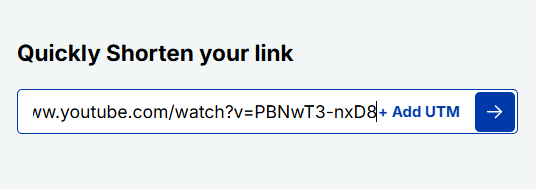
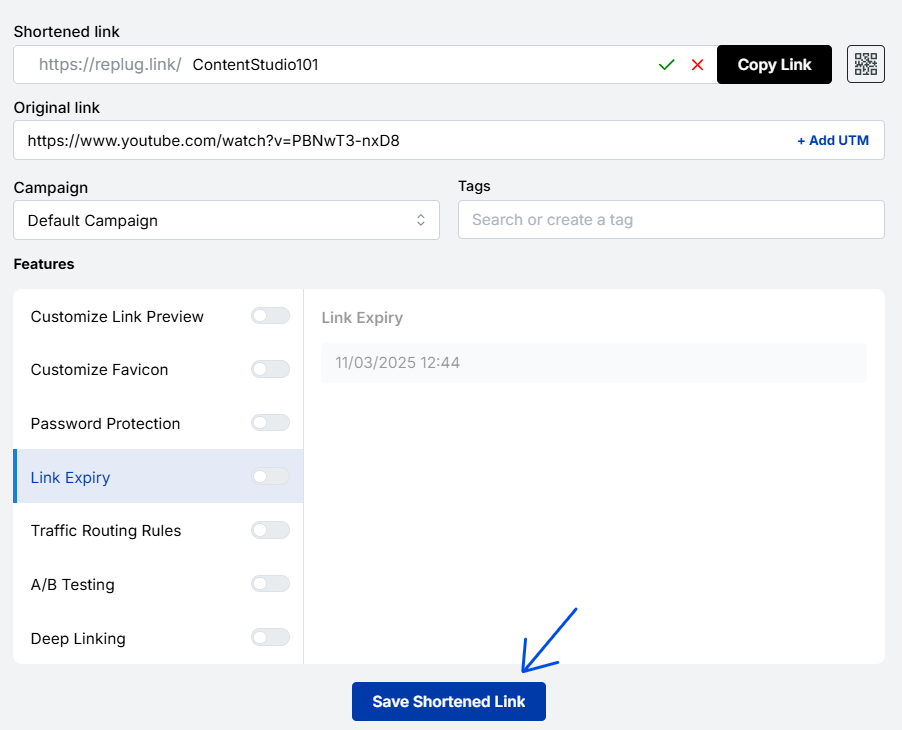
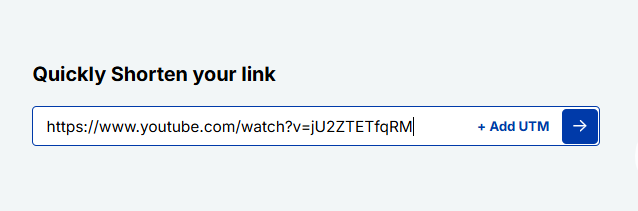
      Step 2: On the main home page, locate the “Quickly Shorten your link” bar in the top-left corner. Paste the URL you want to uniquely shorten, here.

      Replug's quickly shorten your link feature

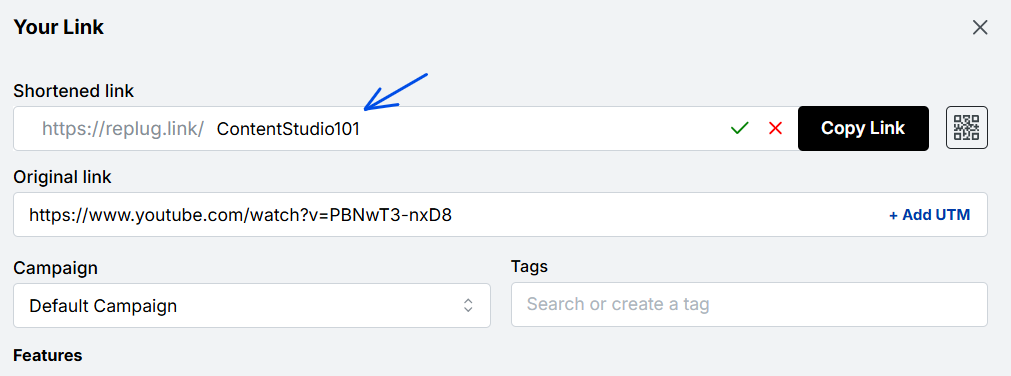
      Step 3: Press Enter. The following screen will appear.

      unique url

      Here, you’ll spot the “Campaign” option. Go with the default campaign, or choose one from your existing campaigns in the dropdown menu.

      choose yoru campaign

      Note: Creating a campaign takes only a few seconds. It can be the name of your project, allowing you to navigate it easily. For instance, if you’re creating a unique URL, your campaign can be titled “unique URL”.

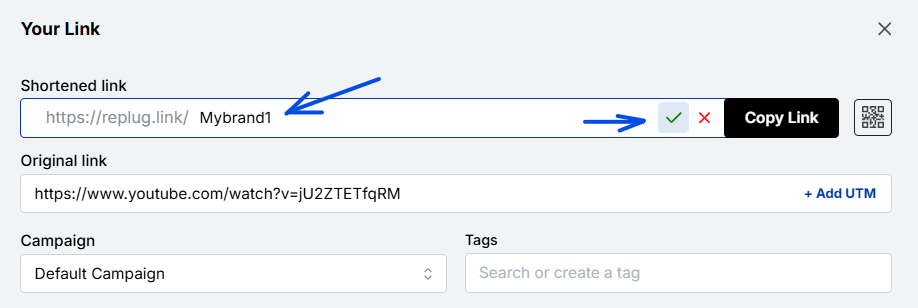
      Step 4: After that, customize your URL slug to make it unique. Once done, click the check mark to save the customization.

      customize your link

      Additional step:

      • You can also create a dynamic QR code for your link here.
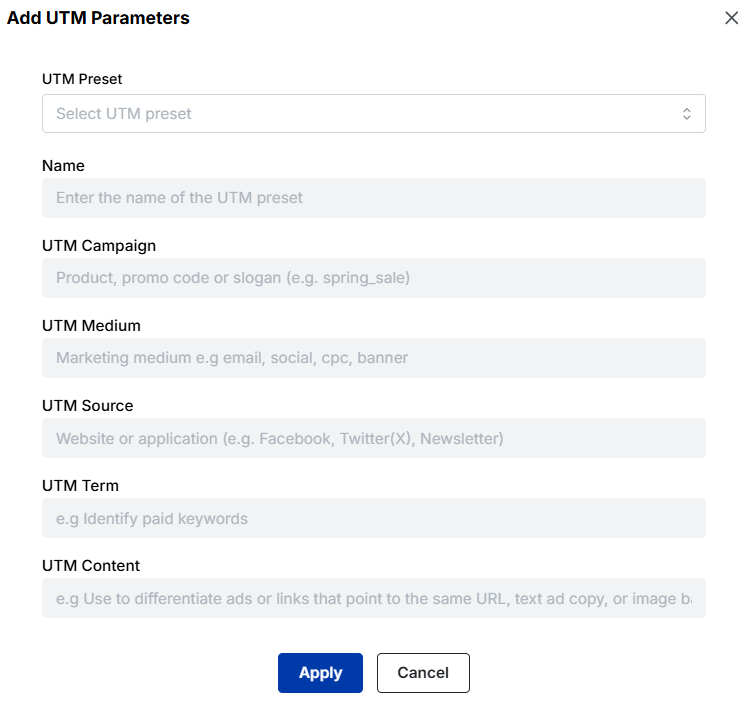
      • Besides, by clicking the “+ Add UTM” option, you can add UTM parameters to your link, if needed.
      add UTM parameters

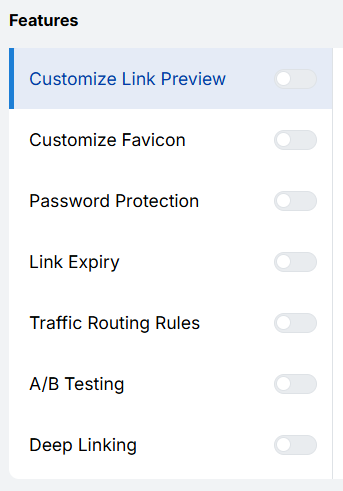
      Step 5: Now, in this step, you can add extra cool features to your URL, which include:

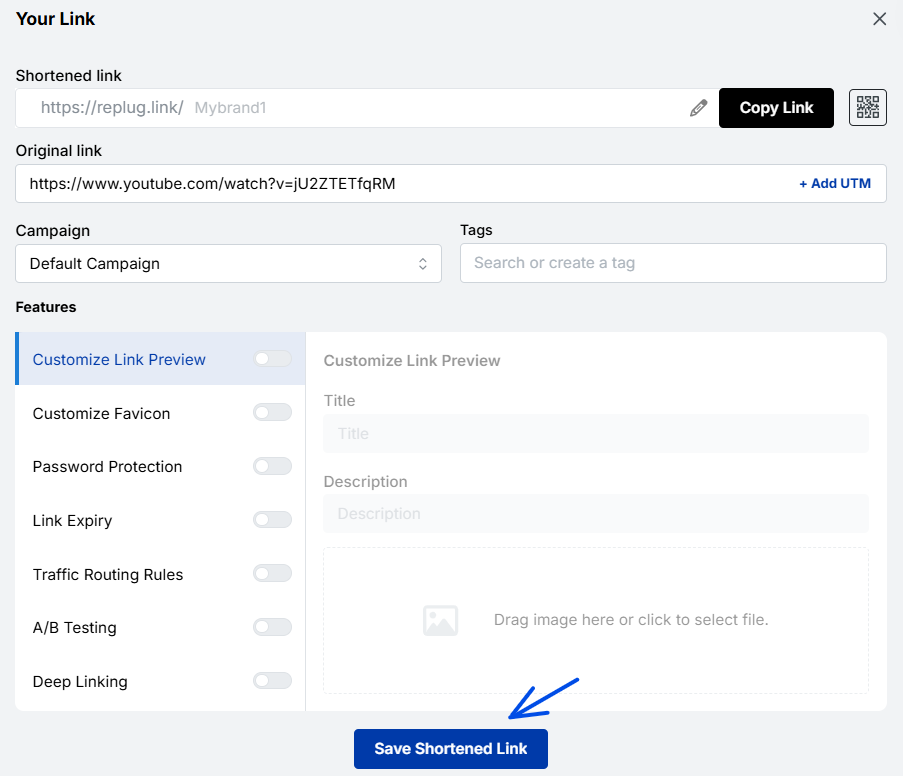
      Step 6: Once done, click the “Save Shortened Link” button.

      save your links

      And you’re done!

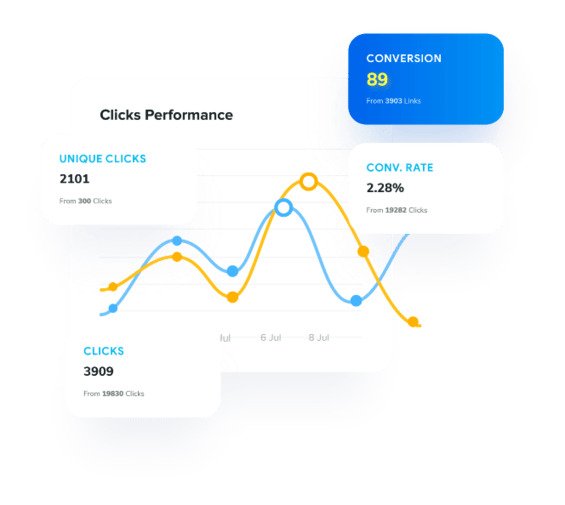
      Actionable link data: Replug’s analytics at your service

      unique urls analytics

      Replug not only provides powerful URL management capabilities but also offers rich analytics for each of your links. With Replug’s analytics feature, you can gain valuable insights into the performance and impact of your links, empowering you to make data-driven decisions and optimize your online strategies.

      By using this amazing feature, you can track key metrics such as click counts, traffic sources, and your audience’s geographic distribution. You can also dive deeper into user behavior by analyzing details like click times, devices used, and referring websites.

      Additionally, Replug lets you set up conversion tracking to measure the effectiveness of your campaigns and accurately assess the return on your marketing efforts.

      Other methods to generate unique URLs

      If you need to create distinct, trackable, or personalized URLs (rather than the same generic link everyone gets), there are some additional simple methods you can use. 

      These help with tracking, engagement, and giving users their own “space”, so you know exactly where traffic is coming from and who’s clicking what.

      Add campaign parameters

      One common way to make URLs unique and trackable is by adding tracking parameters (like UTM parameters) to the URL. 

      For example, you might append, 

      “?utm_source=facebook&utm_medium=social&utm_campaign=black_friday_sale” to the base link. 

      These parameters let you see where your visitors came from and which campaign drove them.

      Create personalized user links

      Another method is to generate links specific to each user, so that when “User A” clicks their link, it differs from “User B’s”

      These personalized URLs (sometimes called pURLs) can include a user-ID, name, or other unique identifier. They’re great for one-to-one campaigns, tracking individual engagement, or giving users their own landing space.

      Generate custom short links

      Instead of awkward long URLs, you can create short, branded vanity URLs that are easier to share and remember. These custom short links are not only cleaner visually but also offer analytics so you can track clicks, changes, or destinations.

      Customize a user profile URL

      Finally, when you have user profiles (on a site or network), you can allow each user to have a unique, customized URL (such as example.com/username) rather than something generic like example.com/profile/12345. This makes the link memorable, improves user experience, and can even help with SEO in some cases.

      Also Read: How to generate SEO-friendly URLs that rank higher & attract clicks

      Some top-notch unique URL examples

      Here are some great real-world examples of unique URLs to help inspire you.

      A clean example of a link tagged for a Facebook campaign

      https://www.example.com/?utm_source=facebook&utm_medium=social&utm_campaign=spring_sale

      URL showing how you can use custom tracking parameters

      https://example.com/?mtm_campaign=product_launch&mtm_source=twitter&mtm_medium=social&mtm_content=tweet

      Note: Here, “mtm_” instead of “utm_” to identify which social channel and what content type triggered the click.

      A link used in an email newsletter to track how many clicks came through that specific channel

      https://www.yourwebsite.com/landing-page?utm_source=newsletter&utm_medium=email&utm_campaign=monthly_update

      An example of using tracking parameters for print/offline campaigns by redirecting to a tagged URL

      http://www.domain.com/?utm_source=magazine&utm_medium=Magazine-A&utm_campaign=fall-2016-product-line&utm_content=full-page-ad

      Best use cases for unique URLs

      Unique URLs are special links you create so each recipient, source, or situation leads to a slightly different web address. This small tweak unlocks a lot of value.

      Check out the top scenarios for using unique URLs.

      Marketing & analytics

      You can use unique URLs (for instance, links with tracking codes) to see exactly where your traffic is coming from and how people behave once they land. 

      Using parameters like “utm_source” or “utm_medium” helps you measure campaign performance in tools like Google Analytics and Usermaven.  It also means you can compare which channels or messages are working best, and optimize accordingly.

      Branding & sharing

      When you give someone a link tailored for them (or their group), it feels more personal and thoughtful. People still click more when the link seems custom. 

      Also, unique URLs can help partner pages, influencer referrals, or social sharing be tracked and attributed back to your brand more cleanly.

      User personalization

      Finally, unique URLs allow you to customize what the user sees once they click. For example, the link might include a user ID or segment code, so the landing page shows their name, preferred product category, local currency, or language. This makes the experience feel relevant and boosts engagement.

      Make your links truly yours: Introducing Replug’s white-label feature

      Replug’s white-label solution empowers users to customize their experience like never before. With the ability to add their own branding elements to URLs, emails, reports, logos, and favicons, users can create a seamless brand identity.

      By rebranding Replug, users can make it appear as if they developed the product or service themselves without investing extensive time and resources in its creation. 

      White-labeling becomes the go-to choice for companies looking to expand their offerings and reach new customers without the expense of building new products from scratch.

      Unlocking the power of this top-notch feature allows users to establish a consistent and credible brand presence. By incorporating their own branding elements into Replug, they can deliver a personalized experience that captivates their audience and builds trust.

      With Replug’s white-label solution, users can maximize their brand’s impact, extend their reach, and conquer new markets. It’s a fantastic opportunity to customize Replug and effortlessly advance their brand to new heights.

      How to set up Replug’s white-label feature?

      how-to-create-white-label

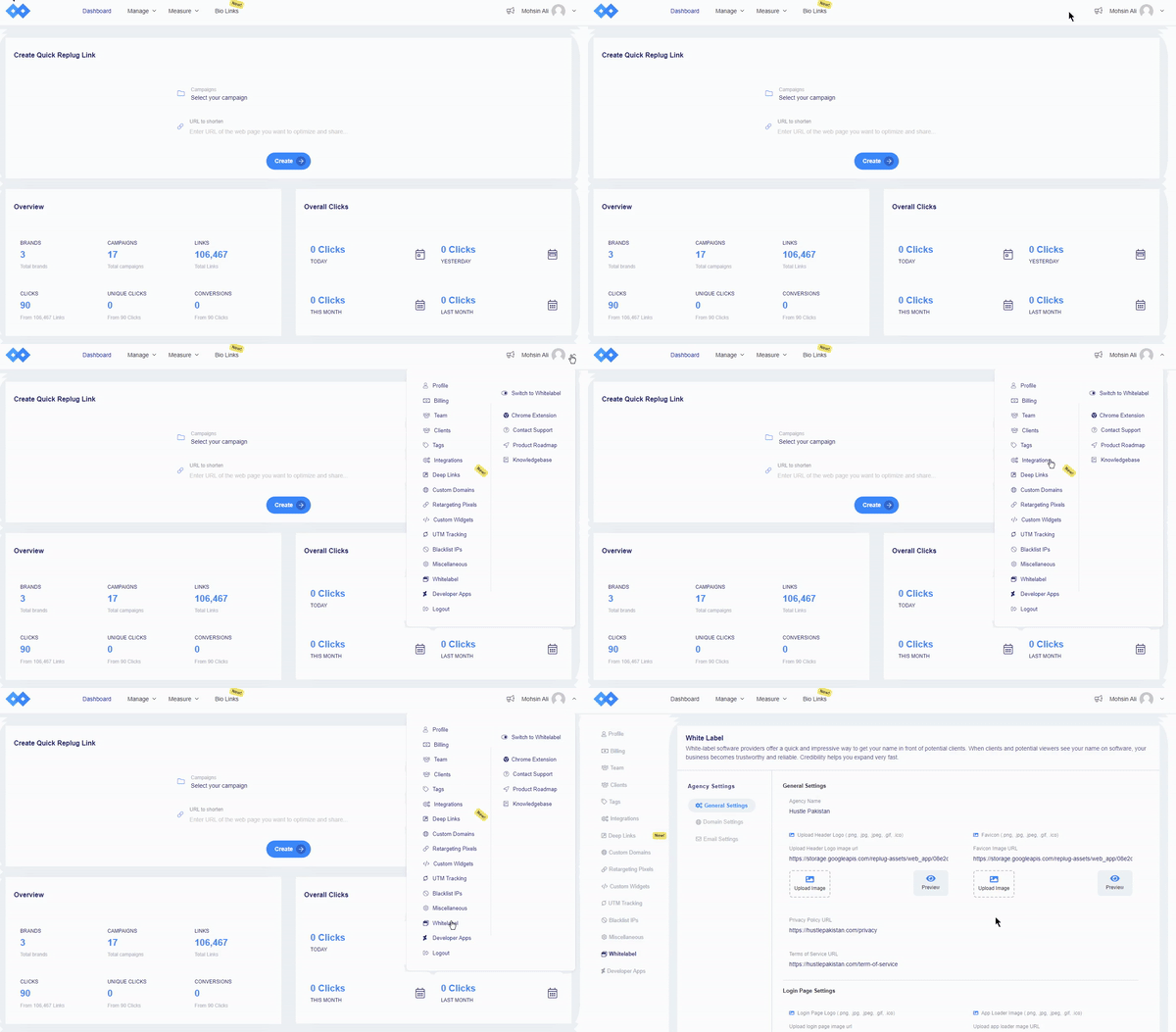
      Navigate to Replug settings and click on the “white-label” option. You need to fill in the given field settings to set up your custom white-label URL shortener. The given field settings are:

      • General Settings
      • Domain Settings
      • Email Settings

      Note: Read this setup guide for a complete know-how!

      Once you have filled the required fields, switch to white-label. To do that, just click your profile name or icon in the top-right corner.

      FAQs on unique URLs

      What are the benefits of using unique URLs for tracking and analytics?

      Using unique URLs for tracking and analytics offers numerous benefits, including understanding user behavior, measuring engagement, and optimizing your marketing campaigns for better results.

      What role do unique URLs play in improving user experience?

      Unique URLs improve user experience by ensuring visitors are directed to relevant content, reducing the risk of broken or outdated links, and allowing for more accurate tracking and analytics.

      Can unique URLs be used for A/B testing and conversion rate optimization?

      Yes, unique URLs can be used for A/B testing and conversion rate optimization. By creating different variations of a URL and measuring their performance, you can identify the most effective elements and optimize your campaigns accordingly.

      Which is the best unique URL shortener online in 2026?

      For a top-tier unique URL shortener in 2026, go with Replug. It excels as a unique URL generator offering full link management, retargeting, custom domains, and robust analytics. Two other popular choices to consider are:

      Bitly, renowned for being a widely used, unique URL builder with strong tracking, and
      Rebrandly, which focuses intensely on branded short links and gives you a premium, unique URL link experience.

      What is Replug’s white label feature?

      Replug’s white-label feature lets users customize Replug with their branding elements. It helps businesses create a consistent brand experience without developing new products.

    3. 300+ best Twitter bio ideas for inspiration: Stand out on X in 2026!

      300+ best Twitter bio ideas for inspiration: Stand out on X in 2026!

      With over 600 million users worldwide and nearly 350,000 tweets posted every minute, standing out on X (formerly Twitter) isn’t just nice; it’s necessary. 

      Your bio is the first thing people notice, and in a platform where attention spans are short, you’ve got just a few seconds to make it count. 

      Whether you’re building a personal brand, growing a business, or just want to look cool online, the right bio can instantly boost your profile’s appeal.

      That’s exactly why we’ve curated 300+ Twitter bio ideas to spark inspiration and help you craft something unforgettable. 

      But before you step in, let’s quickly understand the basics, starting with what a Twitter bio actually is and why it matters.

      What is a Twitter bio?

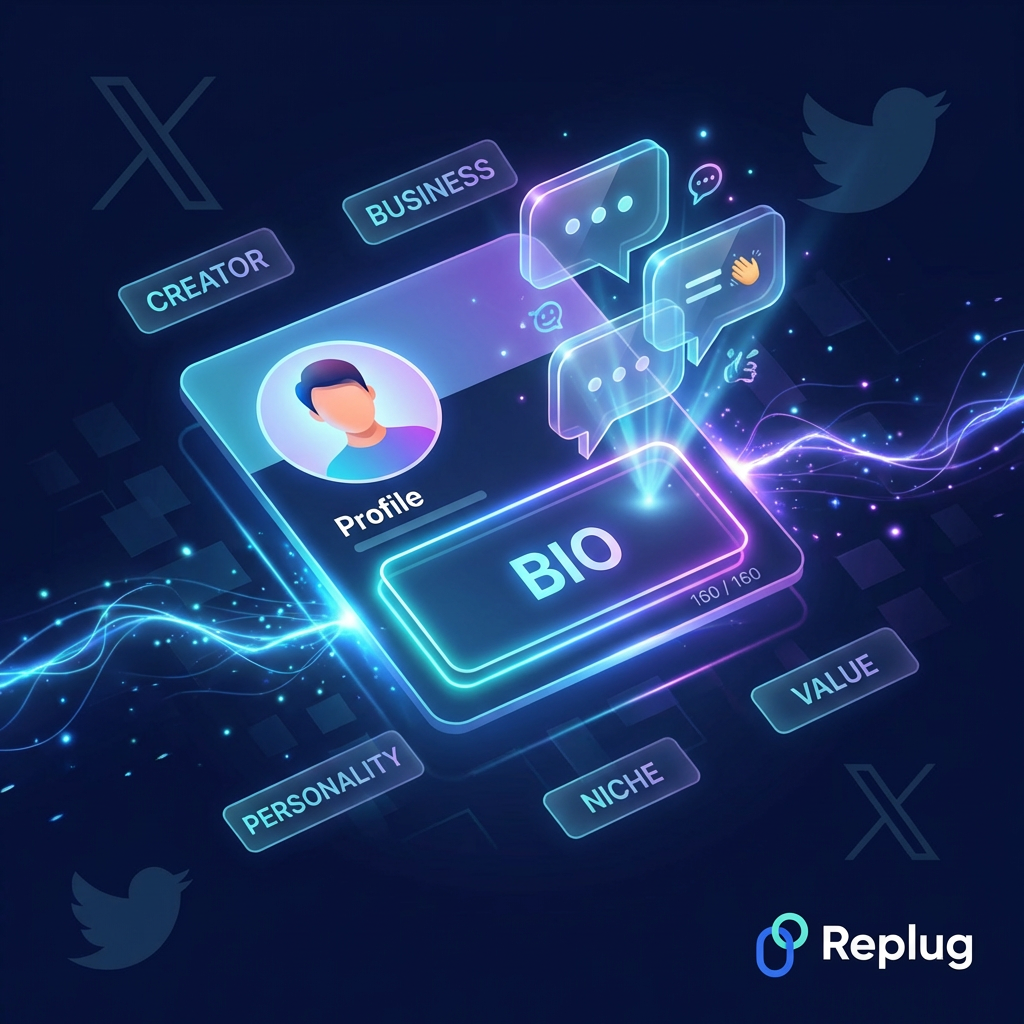
      A Twitter bio is the short description that appears right under your Twitter profile name and handle (now on X). It’s limited to 160 characters, so you’ve got a small space to tell people who you are, what you do, and why they should care.

      What is a Twitter bio

      Think of it as your digital introduction; quick, clear, and straight to the point. Whether you’re a creator, a business, or just someone sharing thoughts online, your bio gives visitors an instant snapshot of your personality, niche, and value. 

      And since most people decide within a few seconds whether to follow you or not, this tiny section plays a much bigger role than it looks.

      Importance of a Twitter bio

      Now, let’s break down why this small piece of text actually matters so much.

      • Creates a strong first impression: It’s often the first thing people notice when they visit your profile.
      • Helps people understand you quickly: Your bio explains who you are and what kind of content you share.
      • Influences follow decisions: Users typically decide within seconds whether to follow or leave.
      • Builds trust & credibility: A clear, well-written professional bio makes your profile look more legit and active.
      • Improves discoverability: Using relevant keywords can help your profile show up in searches.
      • Showcases your personality or brand voice: It gives people a feel for your tone (professional, funny, minimal, or bold).

      In short, your Twitter bio isn’t just a description; it’s your chance to turn profile visitors into followers.

      A complete list of excellent Twitter bio ideas

      Your Twitter (X) bio may be just 160 characters long, but it can say a lot about you if done right. To make things easy, here are different styles of bio ideas you can pick from depending on your vibe.

      A complete list of excellent Twitter bio ideas

      Short Twitter bio ideas

      • Just positive vibes.
      • Living, learning, tweeting.
      • Less talk, more action.
      • Here for a good time.
      • Simplicity always wins.
      • Making ideas happen.
      • Stay real. Stay you.
      • Work. Chill. Repeat.
      • Keep it simple. Best policy.
      • Small bio, big dreams.

      Credible Twitter bio ideas

      • Sharing insights on marketing & growth.
      • Helping brands grow online.
      • Building things on the internet.
      • Data-driven decisions, always.
      • Founder | Marketer | Creator
      • Writing about business & tech.
      • Turning ideas into real results.
      • Passionate about startups & scaling.
      • Digital strategist | Growth mindset
      • Learning and sharing every day.

      Creative Twitter bio ideas

      • Powered by coffee and ideas ☕
      • Creating my own sunshine ☀️
      • Dreams in progress 🚀
      • Pixels, words, and imagination
      • Building a life I don’t need a vacation from
      • Creativity is my superpower
      • Messy ideas → beautiful outcomes
      • Living life in drafts
      • Making ordinary things interesting
      • A little chaos, a lot of creativity

      Clever Twitter bio ideas

      • I write bios better than tweets
      • Professional overthinker
      • Fluent in sarcasm
      • I came. I saw. I tweeted.
      • Not famous, just well-known to myself
      • Tweets > sleep
      • 50% human, 50% AI
      • Thinking about snacks only 24/7
      • I make tweets people scroll past
      • Running on caffeine & bad decisions

      Cute Twitter bio ideas

      • Just a human with big dreams 💫
      • Smiles, sunshine, and good vibes 🌸
      • Collecting moments, not things
      • Soft heart, strong mind
      • Living my little happy life
      • Sprinkle kindness everywhere ✨
      • Cute, but a little chaotic
      • Dream big, stay focused with a smile on your face
      • Sunshine mixed with a little sass ☀️
      • Making life sweeter one day at a time

      Cool Twitter bio ideas

      • Too chill to stress 😎
      • Calm mind, loud dreams
      • Not trying, just vibing
      • Cool, calm, slightly chaotic
      • Low-key doing big things
      • Silence speaks louder at times
      • Less drama, more focus 💯
      • Built different, staying real
      • Note: Energy speaks before words
      • Smooth moves, no noise

      Professional Twitter bio ideas

      • Growth-focused marketer | Results matter
      • Building brands that people trust
      • Product thinker | Problem solver
      • Helping businesses scale smarter
      • Content strategist | Story-driven
      • Turning ideas into measurable impact
      • Tech enthusiast | Always learning
      • Focused on value, not money
      • Strategy first, execution next
      • Crafting solutions that actually work

      Personal Twitter bio ideas

      • Just figuring life out one day at a time
      • Sharing random thoughts & real moments
      • Find a little bit of everything here
      • Life lately, in tweets
      • Not perfect, just honest 🤝
      • This is my little corner of the internet
      • Thoughts, moods, and everything in between
      • Growing, evolving, & always learning
      • Documenting life as it happens
      • Just being me, nothing extra

      Private Twitter bio ideas

      • Private account, public thoughts
      • Here for myself, not the crowd
      • Follow if you know me
      • Keeping things low-key
      • Not accepting random requests
      • My space, my rules
      • Personal tweets, close circle only
      • If you’re here, you’re trusted
      • No strangers, just us vibes
      • Limited access, unlimited thoughts

      Quirky Twitter bio ideas

      • Powered by energy drinks and bad ideas 😈
      • Slightly weird, fully original
      • A brain full of random thoughts
      • Normal is overrated anyway
      • Ultimate chaos, but make it fun
      • I make sense… sometimes
      • Part-time genius, full-time mess
      • Living proof that weird works
      • 99% curiosity, 1% logic
      • Glitching through life like a pro

      Also check out: 200+ Facebook bio ideas: How to write a perfect Facebook bio?

      Punchy Twitter bio ideas

      • Say less. Do more. 🚀
      • Built to stand out
      • No excuses, just sheer outcomes
      • Small words. Big energy 🔥
      • In a make-it-happen period.
      • Focused. Fearless. Forward.
      • Hustle now, shine later
      • Straight to the point
      • Dreams → plans → reality
      • Expect bold moves only

      Witty Twitter bio ideas

      • I put the “pro” in procrastinate
      • Mentally on vacation 🏝️
      • My hobbies include starting things I won’t finish
      • I tweet like anyone’s watching (no one is) 😂
      • Too smart to be this lazy
      • My brain has too many tabs open
      • I’m not late, I’m on my own timeline
      • If overthinking burned calories, I’d be fit 💪
      • Just enough logic to be dangerous
      • Life’s short—refresh your feed daily

      Hilarious Twitter bio ideas

      • CEO of absolutely wrong decisions 😂
      • I came for memes and stayed for snacks
      • Running on 1% battery and hope
      • Life update: still confused
      • I whisper “what am I doing” at least 100 times a day
      • I’d agree with you, but then we’d both be wrong 😛
      • Born to scroll, forced to work
      • My life is a series of “I’ll start tomorrow”
      • Official member of the “just one more episode” club
      • I laugh at my own tweets… someone has to

      Inspirational Twitter bio ideas

      • Start where you are and just keep going ✨
      • Progress over perfection
      • Building a better version of me
      • Dream big, and work for it
      • One step closer every day
      • Stay patient. Stay consistent.
      • Growth is the primary goal 🌱
      • Turn setbacks into comebacks
      • Believe, then build with audacity
      • Your dreamed future starts today

      Mission-driven Twitter bio ideas

      • Helping people grow online, one step at a time
      • On a mission to simplify the weight loss journey
      • Making knowledge accessible for everyone 📚
      • Empowering creators to build better
      • Focused on impact, not just income
      • Building tools that actually help
      • Spreading ideas that make a difference 💡
      • Helping brands connect with real people
      • Creating value, not just content
      • Driven by purpose, powered by action

      3-line Twitter bio ideas

      • Dream big
        Work hard 💻
        Stay humble
      • Coffee first ☕
        Notions next 💡
        Hustle always
      • Just a human
        Building something
        Worth remembering 🔥
      • Learn 📚
        Build 🛠️
        Repeat 🔁
      • Small steps
        Big goals
        No excuses ⚡
      • Think deeply 🧠
        Act boldly
        Stay consistent
      • Create art 🎨
        Ignore stress
        Enjoy life
      • Start messy
        Stay focused
        Finish strong 💯
      • Calm mind
        Loud dreams
        Real growth 📈
      • Work smart
        Stay kind
        Keep going 💪

      Stan’s Twitter bio ideas

      • Full-time Madrid fan, part-time human 💫
      • Stanning hard, no regrets
      • Here for the idols, staying for the vibes
      • My personality = my faves
      • Fan account. Respect that.
      • Supporting legends, one tweet at a time
      • If it’s about loved ones, I’m in
      • Timeline dedicated to my faves 💖
      • Just a stan with good taste
      • Living life through comeback eras

      BTS Twitter bio ideas

      • BTS paved the way 💜
      • Living for BTS moments
      • BTS Army forever, no matter what 💜
      • 7 kings, one heart
      • My playlist = BTS only 🎵
      • Dancing in the moonlight with BTS 💜
      • In my BTS era (forever)
      • Music, love, BTS 💫
      • OT7 or nothing
      • Born to stan BTS

      Anime Twitter bio ideas

      • Living in an anime world 🎌
      • Powered by anime and ramen 🍜
      • Anime >>> reality
      • Titan level energy ⚡
      • Just one more episode…
      • Trapped between anime arcs
      • My life needs subtitles
      • Otaku mode: Always on
      • Plot twists and anime nights 👌
      • Fictional worlds feel real here

      You may also like: 100+ Discord bio ideas: cool, funny, aesthetic, and more

      Twitter bio ideas aesthetic

      • Soft thoughts & quiet dreams 💫
      • Moonlight, calm vibes, and a ☕ of coffee 
      • Lost in my own little world 🌙
      • Finding peace in nature 🕊️🤍
      • Poetry in motion, always 🍂
      • Golden hours & gentle chaos 🌅
      • Simple life, deep thoughts
      • Calm & +ve energy only 🟢
      • Living life as if I own it
      • Just kind vibes and pretty moments

      Twitter bio ideas funny

      • I followed my dreams… they led me back to bed 😴
      • Not lazy, just in energy-saving mode
      • I talk to myself because I need expert advice
      • Currently avoiding responsibilities
      • My hobbies include eating and overthinking
      • I’d be rich if sarcasm paid bills 😎
      • Life’s a joke, I’m just the punchline
      • I put the “why” in “why am I like this?”
      • Too tired to function, too awake to sleep
      • If stress burned calories, I’d be ripped like Ronaldo

      Twitter bio ideas K-pop

      • K-pop runs in my veins more than a playlist 🎧
      • Living in the K-pop music era only
      • Streaming, voting, repeating 🔁
      • K-pop is not a phase; it’s eternal
      • My mood depends on K-pop songs
      • K-pop fan heart, global vibes 🌍
      • Bias today, bias forever for K-pop music 💖
      • Dancing through life with K-pop beats
      • From Seoul to my playlist
      • Multistan life chose me

      Twitter bio ideas copy and paste

      • Dream big. Start small. Stay consistent. ✨
      • Just here to share and grow
      • Creating my own path 🚀
      • Simple mind. Big vision.
      • Progress every single day
      • Focused on what matters
      • Thoughts → actions → results
      • Keep going, no matter what 💪
      • Building something meaningful
      • Real vibes only

      Twitter bio ideas for girls

      • Just a girl with high goals and good energy 🌸
      • Soft heart, strong mindset 💖
      • Confidence looks good on me
      • Building my own story silently
      • Classy, sassy, and a little smart 💃🏻
      • Not perfect, just working my way out
      • Beauty with brains and ambition
      • Creating my own kind of magic 🔮
      • Strong girls don’t wait for tomorrow
      • A girl with a pure 💎 heart

      Twitter bio ideas for boys

      • Focused on growth every single day
      • Built from hustle and patience 💪
      • Calm mind, sharp vision
      • Making moves in silence
      • Discipline over everything
      • Just a guy chasing big goals 🚀
      • Work hard, stay grounded
      • Turning plans into reality
      • No shortcuts, just real progress
      • Quiet grind, loud results 🔥

      Twitter bio ideas for friends

      • Friends who tweet together, stay together 💯
      • Endless chaos, laughs, and inside jokes
      • Just two humans, one perfect vibe 👌
      • Friendship built on memes and memories 😂
      • Friendship > everything on 🌍
      • Partners in fun and nonsense
      • Good vibes, great company ❤️
      • Tagging each other forever
      • Same energy, different personalities
      • Real friends, real moments

      Twitter bio ideas for students

      • Bookworm mode: Always on 📚
      • Learning today, winning tomorrow
      • Books, deadlines, and some dreams to achieve
      • Study now, shine later ✨
      • Bright future in progress 🤞
      • Studying late; exams on the horizon
      • Hustling through assignments
      • Education first, everything else later
      • Building knowledge step by step
      • Student life, best life: Make it productive 🎯

      Twitter bio ideas for athletes

      • Train hard. Win easily. 🏆
      • Discipline always beats talent
      • Built by sweat and consistency
      • Play like it’s your last chance
      • Strong mind. Strong body. 💪
      • Practice like a pro, play like a champ
      • The game ain’t over till the final whistle ⚡
      • Hustle, hit, repeat 💯
      • Focused on the next win
      • Maybe they hate me, because I am too good 🔥

      Twitter bio ideas for couples

      • Two hearts, one timeline ❤️
      • Better together, always
      • Love, laughter, and a little chaos
      • Us together > everything else
      • Partners in love and memes 💕
      • Built on trust, powered by love
      • My favorite notification 💬
      • Love story in progress 🔜
      • Together is our favorite place
      • Just us, doing life together

      Twitter bio ideas with hashtags

      • Building one step at a time #Growth #Mindset
      • Dreaming big #Hustle #Success
      • Sharing innovative ideas #ContentCreator
      • Living fully the way I desire #Life #Vibes
      • Tech lover #AI #Innovation
      • Working hard to stay consistent #Discipline #Focus
      • Learning nonstop #StudentLife #Goals
      • Good energy only #PositiveVibes
      • Creating immense value #Marketing #Branding
      • Just positive vibes #Chill #Life

      Twitter bio ideas with emojis

      • Dreamer ✨ | Architect 🛠️ | Learner 📚
      • Coffee ☕ + Ideas 💡 = Me
      • Creating 🎨 | Growing 🌱 | Winning 🏆
      • Thoughts 💭 → Action 🚀
      • Focus 💻 | Grind 💪 | Repeat 🔁
      • Travelling 🌍 | Learning 📖 | Evolving ⭐️
      • Work hard 💼 Play harder 🎯
      • Ideas 💡 turned into reality 🚀
      • Stay calm 🧠 Hustle strong 💪
      • Smiles 😊 Goals 🎯 Growth 📈

      Related: TikTok bio ideas & hacks to drive traffic

      How to write the perfect Twitter (X) bio: Useful tips & tricks!

      Writing a great Twitter bio isn’t about being clever; it’s more about being clear, concise, and real. You only get 160 characters, so every word should earn its place and help people quickly understand who you really are.

      How to write the perfect Twitter (X) bio

      Tip #01: Be concise & don’t overthink

      You don’t need to fill all 160 characters; just say what matters the most. In fact, shorter bios (around 90–100 characters) often perform better because they’re easier to read and scan.

      Tip #02: Incorporate relevant industry keywords

      Think of your bio like search-friendly text. Adding keywords like “marketer,” “creator,” or “developer” helps people find you both on X and even on Google. Just keep it natural, no keyword stuffing.

      Tip #03: Include a touch of personality

      Always keep in mind, people don’t follow robots; they follow genuine people. Add a small personal touch (your tone, interests, or style) so your profile feels human and relatable.

      Tip #04: Be genuine & use humor

      You don’t have to sound perfect; just sound real. A bit of humor or honesty can make your bio more memorable and help you stand out in a crowded feed.

      Tip #05: Showcase your expertise & value

      Don’t just say what you do, show what you bring to the table. A strong bio quickly answers: How can you help or add value to others? That’s what makes people hit the follow button.

      Tip #06: Highlight awards & recognitions

      If you’ve got achievements, mention them briefly, like “Award-winning designer” or “Featured in XYZ.” These small proof points build instant credibility.

      Tip #07: Use emojis & hashtags (but sparingly)

      Emojis can make your bio easier to scan, but don’t overdo it. The same is the case with hashtags. Too many can look messy, and studies show they don’t always help in bios.

      Tip #08: Mention your current location

      If your work or content is location-based, adding your city or region can help people relate to you and even discover you locally.

      Tip #09: Leverage your link

      Your bio isn’t just about mere text; your Twitter link in bio matters significantly too. Use it to drive traffic to your website, portfolio, or latest project and make it worth the click.

      Tip #10: Include a clear call to action (CTA)

      Tell people what to do next, whether it’s “Follow for tips,” “Check the link below,” or “DM for collabs.” A simple call to action can turn most visitors into potential followers.

      Keep these tips in mind, and your Twitter bio won’t just look good; it’ll actually work for you.

      Use Replug to generate your Twitter bio in seconds!

      If you don’t want to overthink your bio, tools like Replug make the whole process quick and easy. 

      It works as a smart Twitter bio generator alongside being a full link management platform, so you’re not just writing a bio, you’re building a complete profile experience. 

      You can create clean, branded links using its free link shortener, and even set up bio link pages via its free link in bio tool that holds all your important content in one place.

      That means your bio isn’t just text; it becomes a gateway to your website, socials, or offers. Plus, with built-in tracking and customization, you can actually see what works and improve over time.

      Boost ROI with branded URLs - Replug dashboard showing performance metrics and branded URL creation

      Go beyond generic link pages!

      Create custom bio links that truly fit your brand

      With Replug, you can create bio links that are unique, engaging, and built to convert.

      Start free trial

      Wrapping up

      To sum it all up, your Twitter (X) bio may be just a few characters long, but it carries a lot of weight when it comes to first impressions and profile growth. 

      From short and creative ideas to niche-specific bios and practical writing tips, you now have everything you need to craft something that truly reflects your personality. 

      The key is to keep it simple, real, and aligned with your goals. And if you ever feel stuck, tools like Replug can make the process even easier. 

      Now it’s your turn; pick an idea, tweak it your way, and make your bio stand out.

      Frequently asked questions

      What is a good bio example?

      A good bio example is short, clear, and shows personality + purpose in one line

      For example:

      “Helping brands grow online | Content strategist | Sharing daily tips 🚀”

      It quickly tells people who you are and what they can expect.

      What is a good bio for Twitter?

      A good Twitter bio clearly explains who you are, what you do, and why someone should follow you, all within a few words. It should feel natural, include a bit of personality, and ideally hint at the value you provide.

      What is a good Twitter bio template?

      A simple and effective template is:

      [What you do] | [Who you help] | [Personality or niche] | [CTA]

      Example: “Digital marketer | Helping startups grow | Sharing real strategies | Follow for tips”

      What is an attractive bio line for a girl on X?

      A good example would be:

      “Soft heart, strong mindset ✨ 
      Building my dreams one step at a time.”

      The key is to keep it confident, simple, and a little personal, something that reflects both personality and ambition.

      What are the common mistakes to avoid while crafting your Twitter bio?

      Here are some of the most common mistakes people make, and you’ll want to steer clear of these if you want your bio to actually work:

      Being vague or lacking clarity: Bios like “Just living life” don’t tell people anything useful. Be clear about who you are and what you do.
      Using overused buzzwords, jargon, and clichés: Words like “guru,” “ninja,” or “thought leader” feel generic and don’t add real value. Keep it simple and specific instead.
      Improper use of formatting and content: Overloading your bio with emojis, hashtags, or messy formatting can make it hard to read and look unprofessional.
      Lacking personality or strategy: A bio without personality feels dull, and one without purpose won’t convert visitors into followers. You need a perfect blend of both!
      Negative or overly personal tone: Being too negative or sharing too much personal detail can turn people away. Keep it positive, balanced, and audience-friendly.

      Avoiding these simple mistakes can instantly make your Twitter bio cleaner, clearer, and way more effective.

      What is the ideal Twitter bio character limit?

      The official Twitter (X) bio limit is 160 characters, including spaces and emojis. For best results, many experts suggest keeping it slightly shorter (around 100–150 characters) so it’s easy to read at a glance.

    4. Top 5 paid URL shorteners worth paying for in 2026

      Top 5 paid URL shorteners worth paying for in 2026

      Free URL shorteners are great and all, but let’s be real: paid URL shorteners take things to the next level.

      When you’re paying for something, you expect to get more out of it, right? And with URL shorteners, that “more” includes some seriously cool features. But here’s the real question: 

      Which paid URL shortener actually gives you the most value for your money?

      Any online link shortener can clean up a long, messy link. But the good ones let you brand and customize your links, turning that long and disorganized string of text into something sleek and professional.

      They also give you tracking insights to see who’s clicking your links, and even help you figure out which marketing campaigns are actually working.

      So, if you’re ready to upgrade your links, here are the top 5 paid URL shorteners that bring value, functionality, and style to the table.

      5 Top-rated paid URL shorteners online

      With countless options out there, finding the right tool can be tricky. To make it easier, we’ve narrowed it down to the top 5 URL shorteners you should consider.

      Let’s start with the first one:

      1. Replug

      Replug.io - The ultimate link management tool

      Replug.io is a powerful link management tool that allows you to create unlimited branded short links, giving you the flexibility to streamline your link-sharing process. 

      With in-depth analytics and top-notch link tracking capabilities, it offers valuable insights into your audience’s behavior and engagement.

      What sets Replug apart is its URL shortener tool, which is by far the best free link shortener online, offering you a seamless way to create branded, short links that stand out. 

      With its intuitive dashboard and real-time tracking features, it not only simplifies your link-sharing but also provides powerful insights to boost your marketing strategy. 

      Unlike other tools that provide only one or two of these elements, Replug combines them all into a single, rich platform.

      Key features

      With Replug, you get access to an all-in-one platform with exceptional attributes. Here’s what’s in store:

      • Link management: Manage all your links through a simple and clean dashboard, alongside advanced features such as link preview, link expiry, password protection, and much more.
      • Link shortening: Shorten unlimited links, create vanity URLs, and customize link previews with branded links and favicons.
      • Link analytics: Access detailed analytics, including total and unique clicks segmented by location, referral, device, and browser.
      • Bio links: Create customizable bio link pages with social links, blocks, RSS feeds, and retargeting pixels.
      • Call-to-action generation: Create eye-catching CTA campaigns for your links to boost conversions and sales.
      • White-label solution: Customize the dashboard, logos, domain, reports, and more, which is ideal for agencies wanting to brand their services.
      • Retargeting pixels: Add retargeting pixels to your links to track users and re-engage them with targeted ads on multiple digital platforms.
      • Deep linking: Direct users to specific pages within your app or website for a personalized, seamless experience.
      • A/B testing: Test up to 10 URLs simultaneously, with percentage-based traffic distribution to optimize link performance.
      • Link rotation: Set up to 10 traffic rules for short links, directing users to different destinations based on conditions. A default link ensures users are always redirected.
      • QR code generation: Generate customizable QR codes with trackable performance, editable colors, and PNG or SVG download options.
      • Team management: Collaborate efficiently by inviting team members and assigning roles, ensuring streamlined workflows for link management and campaigns.

      2. Rebrandly

      Rebrandly

      Rebrandly is one of the most popular tools for creating branded links. It allows you to customize URLs with your own domain, making every link you share look polished and trustworthy. 

      With features like custom slugs, advanced analytics, and traffic routing, it’s pretty beneficial for businesses that want their links to double as a brand asset.

      Key features

      • Custom domains & links: Get a domain of your choice and create and manage branded links hassle-free.
      • Advanced analytics: Track detailed link performance with this URL shortener tool.
      • Traffic routing: Direct clicks to specific pages based on conditions.
      • Bio links (Link Gallery) & QR codes: Build bio link pages and generate trackable QR codes seamlessly.

      3. Bitly

      Bitly

      Bitly is one of the most recognized names in the URL shortener space, known for its simplicity, reliability, and wide adoption. It offers branded links, link tracking, and basic analytics, making it a go-to choice for businesses that need a straightforward link management solution.

      However, most of Bitly’s advanced analytics and customization options are locked behind paid plans. While it works well for large businesses managing high volumes of links, it’s becoming less appealing for small businesses and individual users who just want to shorten links and track basic performance without committing to higher costs.

      Key features

      • Branded links: Customize URLs with your own domain for brand consistency.
      • Analytics & reporting: Track clicks, referral sources, and geographic data without any trouble.
      • Retargeting pixels: Add tracking pixels for remarketing campaigns easily.
      • Integrations: Connect with tools like Zapier and enterprise platforms.

      Related: Top 10 Bitly alternatives and competitors in 2026

      4. Dub

      Dub.co

      Dub is a modern URL shortener built for marketers and teams that want deeper insights into their campaigns. Unlike basic shorteners, this tool doesn’t just tell you how many people clicked your links; it helps you connect the dots between clicks, leads, and conversions. 

      Moreover, with advanced analytics, you can actually see how your shortened links contribute to sales and customer acquisition.

      Dub is also developer-friendly, offering an API-first approach for businesses that need to integrate link management into their existing systems. 

      Whether you’re running email campaigns, paid ads, or influencer marketing, this brilliant platform gives you the flexibility to create branded links, set up traffic rules, and analyze real ROI.

      Key features

      • Detailed analytics: Track clicks, leads, and sales tied to your shortened URLs to further improve your marketing strategy.
      • API-first design: Build Dub into your own workflows and marketing stack, without any complex process.

      5. Sniply

      Sniply.io

      When you talk about URL shorteners available online, Sniply always makes the list. It is unique in that it allows you to add a custom call-to-action (CTA) overlay to your shared links. This can drive traffic back to your website or encourage specific actions while sharing valuable content.

      Alongside its signature CTA feature, Sniply also provides essentials like QR codes, UTM parameters, detailed analytics, and custom domains. 

      While its analytics aren’t as advanced as some other tools, it does track conversions from click to purchase, giving you a clear picture of how your links contribute to revenue.

      Key features

      • CTA overlays: Add CTAs to any link you share.
      • Link analytics: Track clicks, conversions, and much more.
      • Retargeting & A/B testing: Re-engage users and test different strategies.
      • Team management: Share links with your team members the way you like.

      Also read: How to shorten a link using a URL shortener?

      Pricing at a glance

      Here’s a quick breakdown of each tool’s pricing plans to help you make an informed decision:

      ToolBasic PlanPro PlanPremium Plan
      Replug$19/month$39/month$99/month
      Rebrandly$14/month$39/month$119/month
      Bitly$10/month$29/month$199/month
      Dub$30/month$90/month$300/month
      Sniply$9/month$29/month$59/month

      Best use cases for paid URL shorteners

      Paid URL shorteners are versatile tools that cater to diverse industries and professionals. Here’s how different types of businesses and users can benefit from them:

      • E-commerce: Track customer behavior with detailed analytics. Use branded links for a polished, trustworthy shopping experience, and boost conversions with deep linking to specific product pages.
      • Content creators: Customize bio links for platforms like Instagram or TikTok. Promote specific content with branded URLs, and monitor audience engagement to refine your strategy.
      • Affiliate marketers: Use A/B testing to experiment with different campaigns, retarget users who clicked your links, and analyze traffic performance to maximize commission opportunities.
      • Agencies: Use white-label solutions to add your branding, collaborate with team members on client accounts, and utilize advanced analytics to demonstrate campaign success to clients.
      • Freelancers: Create professional-looking links to promote your portfolio or services. Use bio links to consolidate your online presence, and track link engagement to identify your most effective outreach strategies.
      • Event planners: Share event registration links, directing attendees to specific event pages, and track sign-up trends to plan better for future events.
      • Nonprofits and NGOs: Share donation links with branded URLs, track donor engagement, and run A/B tests on different campaigns to see what drives more contributions.
      • Music artists: Promote new releases, concert tickets, and merch with branded links. Converge links to your streaming platforms and social media using bio links, and track fan engagement to identify your top-performing campaigns.
      • Social media managers: Optimize link performance for multiple social platforms. Create branded short links that align with your brand identity, and analyze clicks to see which platforms socials drive the most engagement.
      • Mobile app developers: Use app deep linking to guide users directly to specific app features, track user acquisition campaigns, and personalize experiences with advanced analytics.

      By tailoring the use of paid URL shorteners to your niche, you’ll unlock new levels of efficiency and engagement in your marketing strategies.

      See Also: Benefits of URL shorteners: Top reasons why one must use these tools

      What to look for in a paid URL shortener: Key points & considerations

      When choosing a paid URL shortener, it’s important to keep these things in mind:

      • Custom domains: A good shortener should let you use your own branded domain, helping build trust and recognition with every link you share.
      • Branding: The ability to add your logo, custom slugs, and design elements ensures that every link reflects your brand identity.
      • Detailed analytics: Access to real-time data on clicks, locations, devices, and user behavior is crucial for measuring campaign performance and ROI.
      • Link management: Look for a dashboard that makes it easy to organize, edit, archive, or tag your links for better control and efficiency.
      • Audience segmentation: Advanced shorteners allow you to segment your audience based on demographics or behavior, enabling more targeted and effective marketing.
      • Retargeting & tracking: Integrated retargeting pixels and tracking tools help you stay connected with users even after they click, boosting conversions and ad effectiveness.

      Final verdict: Which is the most trusted URL shortener?

      At this point, you are familiar with the benefits of using link management tools. Moreover, we have also mentioned the top-paid URL shorteners.

      However, when it comes to which URL shortener is an all-rounder, Replug truly shines as the all-in-one, customizable, and scalable solution. It is undoubtedly the most trustworthy option for marketers, agencies, and businesses looking to level up their link-sharing game. 

      With features like branded URLs, detailed analytics, bio links, retargeting, and more, Replug has everything you need to create powerful, performance-driven links.

      All signs point to one thing: if you want a shortener that goes beyond just links and actually helps you grow, retarget, and optimize every campaign, Replug is the smartest investment.

      Frequently asked questions

      What is a URL shortener tool?

      A URL shortener tool is an online service that converts long, complex web addresses into shorter, more manageable links while preserving the original destination. Popular examples include Replug, Bitly, TinyURL, and Rebrandly, which are widely used for social media, marketing, and email campaigns. As of 2026, these tools often integrate with analytics platforms to track clicks and user engagement.

      How do URL shorteners work?

      URL shorteners work by mapping a lengthy original URL to a unique, abbreviated alias stored in a database. When the short link is clicked, the service performs an HTTP redirect to the full address. This process involves generating a hash or key for the short version, ensuring quick resolution without altering the target page. Modern shorteners also employ security checks to prevent malicious redirects and provide real-time performance data.

      How do URL shorteners make money?

      URL shorteners generate revenue primarily through tiered subscription plans for advanced features like custom branding, detailed analytics, and API access, as seen with services like Short.io and BL.INK. They also monetize through data insights from click demographics, resold to marketers, and, in some cases, through intermediary ads during redirects. 

      For user-focused platforms, ShrinkEarn and Linkvertise earn by displaying ads on shortened links, paying users up to $20 per 1,000 views (ShrinkEarn) or $70 per 1,000 (Linkvertise) while retaining ad revenue shares.

      Why use a paid URL shortening service?

      Paid URL shortening services offer advanced features like custom branded domains, detailed analytics on click demographics, and enhanced security against spam or phishing, which free versions often lack. They ensure higher reliability with uptime guarantees, API integrations for automation, and compliance with data privacy regulations like GDPR. In 2026, options like Replug Scale or Rebrandly Pro provide scalable solutions for businesses, justifying the cost through improved ROI on marketing efforts.

    5. How to scan a QR code on any device in seconds: Fast & easy methods explained!

      How to scan a QR code on any device in seconds: Fast & easy methods explained!

      QR codes are those little black-and-white squares that are seemingly everywhere now (on menus, packaging, ads, and even TV screens). Knowing how to scan a QR code quickly can save a lot of time, especially when you run campaigns or track engagement across channels.

      Recent reports estimate that more than 6 billion people use smartphones worldwide, and almost all modern phones ship with a built-in QR code reader in the camera. That means every printed code can turn into a tap or visit within seconds.

      This guide walks through how to read a QR code on Android, iPhone, Mac, and Windows, as well as from screenshots and gallery images. Before moving into step-by-step QR code scanning methods, it helps to understand what a QR code actually is.

      What is a QR code: A brief overview

      A “QR code (Quick Response code)” is a two‑dimensional barcode made of tiny black and white squares arranged in a grid. When a camera scans a pattern, software converts it into data, such as a URL, text, contact card, Wi‑Fi login, or payment info.

      What is a QR code: A brief overview

      QR codes were first created in the 1990s by Denso Wave, a Japanese company, to track car parts in factories. Because they hold far more data than traditional barcodes and can be scanned from any angle, they are spreading from manufacturing to marketing, payments, tickets, and more.

      Their main goal is simple: Move someone from offline to online content with a single scan.

      There are two common types of QR codes:

      • Static QR codes, which always point to the same data once printed.
      • Dynamic QR codes, which point to a short link that can redirect to different pages and record analytics.

      Dynamic codes are helpful when you want to update campaigns without reprinting and see how many people scanned each code.

      Why QR codes matter so much

      QR codes may seem simple, but they carry significant value, especially for today’s marketers and content creators.

      • They make it effortless to move people from print or physical spaces to links, landing pages, apps, and social profiles with a single scan rather than a long URL. This reduces friction and leads to more visits, sign‑ups, and actions from the same campaign assets.
      • They are easily trackable when linked to analytics or short URLs, so every scan can show where, when, and on what device someone engaged. That turns posters, packaging, and flyers into measurable channels rather than guesswork.
      • They work across many use cases, from menus and payments to event check‑ins, affiliate links, and lead magnets. A single code snippet can support many campaign goals, making it a very efficient tool for marketing professionals.
      • They are also low-cost to generate and print, so you can test QR campaigns on posters, product inserts, or receipts before investing in larger placements.

      How to scan a QR code on Android

      Most modern Android phones can seamlessly scan QR codes without a dedicated QR code reader app. You can use the camera, Quick Settings, Google Lens, or even scan from an image already saved on your phone.

      How to scan a QR code on Android

      Android Camera app

      The default “Camera app” is the fastest way to scan a QR code on an Android phone.

      1. Open the Camera app from your home screen, app drawer, or lock‑screen shortcut.

      2. Point the rear camera at the QR code and make sure the whole code is inside the viewfinder.

      3. Hold the phone steady for a second so the camera can focus and detect the code.

      4. When a link or prompt appears on the screen, tap it to open the website, app, payment page, or other action.

      Note: If nothing happens, check your camera settings for an option like “Scan QR codes” and turn it on.

      QR code scanner

      Many Android phones have a dedicated QR scanner shortcut in the “Quick Settings” panel.

      1. Swipe down from the top of the screen to open your notifications and Quick Settings.

      2. Look for a tile called “Scan QR code,” “QR scanner,” or similar. If you do not see it, tap the edit icon and add it to the panel.

      3. Tap the scanner tile to open a simple scanning screen without photo controls in the way.

      4. Point your camera at the code and wait for the link or prompt, then tap to open it.

      This method is handy when scanning many codes during a workday or event.

      Google Lens or Circle to Search

      Google Lens and Circle to Search are powerful QR code-scanning features on newer Android devices.

      1. Open the Google app or the Camera app.

      2. You’ll see the Lens icon. Tap it.

      3. Point the camera at the QR code and wait while Lens detects it.

      4. The link or action will appear at the bottom of the screen. Tap it to continue.

      On supported phones, Circle to Search lets you scan QR codes already on your screen. Long‑press the home button or navigation bar, circle the QR code with your finger, and tap the result that appears.

      Scanning from a saved image (screenshot or photo) via Google Photos

      You might need to scan a QR code in a screenshot, email, or social post at times. So, here is how to do it:

      1. Save or screenshot the QR code, so it appears in your Gallery or Google Photos library.

      2. Open the Google Photos app and tap the image that contains the code.

      3. Tap the Lens icon at the bottom of the screen to start analysis.

      4. Google Photos will detect the QR code and show the link or data, which you can then open or copy easily.

      How to scan a QR code on an iPhone

      On an iPhone, scanning a QR code is just as simple. The Camera app, Control Center tools, and Photos all include built‑in support, so extra apps are rarely needed.

      How to scan a QR code on an iPhone

      iPhone Camera app

      1. Open the Camera app from the Home Screen, Lock Screen, or Control Center.

      2. Switch to the rear camera and point it at the QR code so the whole code fits on the screen.

      3. Hold still for a moment. A yellow frame may appear around the code when it is detected.

      4. A banner will show at the top of the screen with the link or action. Tap it to open Safari or the related app.

      Note: If scanning does not work, go to Settings → Camera and make sure “Scan QR Codes” is turned on.

      QR code scanner

      iOS also includes a dedicated code scanner shortcut in Control Center.

      1. Open Settings and tap “Control Center.”

      2. In the list of controls, find “Code Scanner” and tap the green plus button to add it.

      3. Swipe down from the top‑right corner (or up from the bottom on older models) to open Control Center.

      4. Tap the Code Scanner icon to open a clean scanning screen. Point it at the QR code and tap the prompt that appears.

      This is slightly faster than opening the full Camera app, especially if you often scan during campaigns or events.

      Live Text (iOS 15 & later)

      Live Text lets your iPhone recognize text and QR codes in photos or in the camera view.

      1. Open the Camera app and point it at a QR code on a screen or printed page.

      2. Look for the small Live Text icon in the corner of the viewfinder. That shows iOS has detected content.

      3. Tap the Live Text icon or tap directly on the QR code area.

      4. A link or action card will appear. Tap it to visit the page or run the action.

      This is helpful when a QR code sits next to important text you also want to copy or translate.

      Scanning from a saved image (screenshot or photo) via the Apple Photos app

      To scan a QR code stored in your Photos library:

      1. Take a screenshot or save the image that includes the QR code.

      2. Open the Photos app and tap the image.

      3. Press and hold on the QR code area inside the photo.

      4. A small menu or link preview will appear. Tap the link or action text to open it in Safari or the related app.

      How to scan a QR code on a MacBook

      MacBooks cannot scan codes on their own, but it is still easy to read QR codes with a mix of third‑party apps, Safari tools, and the built‑in camera.

      How to scan a QR code on a MacBook

          Third-party apps (QR Capture or QR Journal)

          Apps like QR Capture or QR Journal let your MacBook scan codes with just a few clicks.

          1. Download a QR reader app such as QR Capture or QR Journal from the Mac App Store.

          2. Open the app and grant camera access when asked.

          3. Hold a printed QR code in front of your MacBook’s webcam, or drag an image file with a QR code into the app window.

          4. The app will display the decoded link or data so you can open it in your browser or copy it.

          Safari right-click option

          When a QR code appears as an image in Safari, you might not need a separate reader.

          1. Right‑click (or Control‑click) directly on the QR code image in Safari.

          2. If Safari detects a link inside the code, you will see options such as “Open Link” or “Open Link in New Tab.”

          3. Click the option you prefer, and Safari will open the URL encoded in the QR code.

          This works best for clear, high‑quality QR images on websites.

          MacBook’s webcam

          Some web‑based tools can scan QR codes using your MacBook’s webcam.

          1. Search for a trusted site that lets you scan a QR code online using the camera.

          2. Open the site in Safari or Chrome, and allow camera access when prompted.

          3. Hold the printed QR code in front of your MacBook’s webcam so the full code stays in frame.

          4. Wait for the site to read the code and show the result. Then click to open or copy.

          iPhone/iPad camera

          Occasionally, the simplest way to scan a QR code on your Mac’s screen is with your iPhone or iPad.

          1. When a QR code appears on your MacBook screen, grab your iPhone/iPad.

          2. Open the Camera app and point it at the code on your Mac’s display.

          3. Tap the banner that appears on your iOS device to open the link.

          4. If you want to continue on Mac, use Handoff or simply copy the URL and paste it into a Mac browser.

          This is quick when you already have your phone in hand.

          Photo Booth app

          Photo Booth can help when you need to turn a physical code into an image for later scanning.

          1. Open the Photo Booth app on your MacBook.

          2. Hold the printed QR code in front of the webcam and take a clear photo.

          3. Save the photo, then open a trusted online QR reader in your browser.

          4. Upload the Photo Booth image to that site so it can scan and display the link or data.

          How to scan a QR code on a computer (Windows PC)

          On Windows, there are several ways to read QR codes, from browser tools to the built‑in Camera app and online scanners.

          How to scan a QR code on a computer

                    Google Chrome

                    Google Chrome offers handy support for QR codes, especially when you already have an image at hand.

                    1. Right‑click an image of a QR code and choose an option like “Search image with Google” if available.

                    2. On the results page, Google may detect the QR code content and display the URL so you can open it.

                    3. If that is not enough, install a trusted Chrome extension described as a QR code reader/scanner app and follow its instructions.

                    4. Use the extension’s button to scan images on a page or upload files containing QR codes.

                    Windows Camera app

                    You can also scan a printed QR code using your PC’s webcam.

                    1. Open the Start menu and search for “Camera,” then open the Camera app.

                    2. If your version includes a dedicated “Scan QR code” or “Barcode” mode, switch to that mode.

                    3. Hold the QR code in front of your webcam so it fills most of the preview window.

                    4. When the app recognizes the code, it will show the decoded text or URL, which you can copy into your browser.

                    If your Camera app does not support QR codes, use an online scanner with webcam access instead.

                    Online QR scanner (webcam or file)

                    Online tools are a simple, hassle-free way to scan a QR code on Windows.

                    1. Open a reputable QR scanning website that supports camera and file uploads.

                    2. Choose whether to scan with your webcam or by uploading an image file.

                    3. If you use the webcam, allow camera access, and hold the code in front of your PC.

                    4. If you upload, pick the screenshot or photo with the QR code embedded. The site will read it and show the result within seconds.

                    Screenshot & scan (best for screen-based codes)

                    For QR codes that sit on your monitor, a screenshot is often the cleanest option.

                    1. Take a screenshot of the QR code using tools like Snipping Tool, Snip & Sketch, or the Print Screen key.

                    2. Save the screenshot as an image file.

                    3. Go to an online QR scanner or use a desktop app that accepts image uploads.

                    4. Upload the screenshot so the tool can read and display the link or content behind the code.

                    iCloud Passwords extension

                    iCloud Passwords on Windows can help with codes used for two‑factor authentication.

                    1. Install iCloud for Windows and the iCloud Passwords browser extension for Chrome or Edge.

                    2. When a website displays a QR code to set up an authentication app, open the iCloud Passwords app.

                    3. Add or edit the login, then choose the option to add a verification code.

                    4. Follow the prompts to use the QR image shown in your browser, either by scanning it with a paired Apple device or entering the key, so your logins stay synced.

                    How to scan a QR code on your phone’s gallery

                    At times, the QR code is already on your phone, inside a screenshot, email, or saved photo instead of on paper. In that case, you do not need a second device to scan it.

                    How to scan a QR code on your phone's gallery

                              Long-press on gallery images

                              On both Android and iOS, you can scan many QR codes directly from the gallery.

                              1. Open your Gallery or Photos app and tap the image that contains the QR code.

                              2. On iPhone, press and hold the code. On many Android phones, tap the Lens or similar icon.

                              3. Wait for the system to detect the QR and show a link preview or action.

                              4. Tap the link to open it in your browser, or copy it for later.

                              You may also like: How to scan QR code from screenshot or photo: A practical guide for iPhone & Android users

                              Tips for scanning a QR code

                              Even when someone knows how to scan a QR code, a few habits make scanning faster and safer across all devices.

                              Tips for scanning a QR code

                                Inspect for tampering

                                Before scanning, take a quick look at the physical QR code for any damage or other issues. If it looks like a sticker placed over another code or part of a sign, it might be fake. In those cases, skip the scan or confirm with staff before using it.

                                Preview the URL

                                Most cameras show a link preview before opening it. Read the domain name carefully and watch for odd spellings or strange characters. If the URL looks suspicious or unrelated to the context, avoid tapping it.

                                Avoid sensitive actions

                                Be careful when a QR code leads directly to pages that ask for login credentials, card details, or personal data. Instead of entering details right away, open the brand’s website manually in a new tab. This small step helps avoid phishing and fake payment pages.

                                Beware of unknown sources

                                Random QR codes on poles, parking meters, or flyers with no clear brand are risky. When there is no logo, explanation, or context, the safer choice is to simply ignore the code. Focus scans on codes from brands, venues, or partners that you trust.

                                Use the native camera

                                For basic scanning, the built‑in camera on Android or iPhone is usually the safest option. It has no ads and better system‑level protections than many third‑party apps. Only install extra apps when you truly need advanced features.

                                Good lighting & focus

                                Cameras need light and clarity to read tiny squares. Move closer to a window or turn on your phone’s flashlight when the code is in a dark place. Wait until the image looks sharp on screen before expecting a successful scan.

                                Distance & stability

                                If you stand too close or too far, the code becomes blurry. Adjust your distance so the code fills most of the frame without cutting off the edges. Moreover, hold your hands steady for a second to give the camera time to focus.

                                Optimal angle

                                Try to keep your camera as straight as possible in front of the QR code. Strong angles or curved surfaces can distort the pattern. A small tilt is fine, but a near‑front view will give the best chance of a quick scan.

                                How QR code technology works: The future of QR codes!

                                QR codes store data in a grid of black and white squares. When a camera looks at the code, the software finds the large squares in the three corners, uses them for alignment, and then reads the smaller modules as a string of bits. That data maps to content such as a URL, text, Wi‑Fi settings, or a contact card, which the device then opens or runs.

                                How QR code technology works: The future of QR codes!

                                Behind the scenes, QR codes also use error correction, which lets scanners read the code even if part of it is smudged, scratched, or covered by a small logo. Different “versions” of QR codes hold more or less data depending on how dense the grid is, which is why some codes look more crowded than others.

                                For marketers, this means every print asset can have a direct, measurable digital action behind it. As phones get smarter, QR experiences will keep improving with features such as on‑screen scanning, deeper analytics, and stronger security checks. Expect QR codes to remain central to payments, ticketing, and campaigns, where a single scan can trigger a full-funnel experience.

                                Create your custom QR code today with Replug!

                                Knowing how to scan a QR code is only half the game. To run real campaigns, teams also need QR codes that are on‑brand, trackable, and easy to update. That is where Replug comes in!

                                Replug is an all‑in‑one link management platform featuring a top-notch custom QR code generator built for marketers, creators, growth teams, etc.

                                You can create dynamic QR codes for branded short links, files, social profiles, and landing pages, then change the destination later without reprinting anything. Design options let you add your logo, pick colors, and match your brand so people feel safe scanning.

                                Dynamic QR Codes
                                Dynamic QR codes for modern brands, marketers,
                                and creators.
                                • Update content anytime without reprinting
                                • Track scans to measure engagement
                                Create QR codes for free

                                Every scan feeds into a real‑time analytics dashboard with data on devices, locations, and referral sources. You can add retargeting pixels, A/B test different URLs behind the same code, and send traffic to different pages based on device or country. That turns a simple square into a smart entry point for your entire campaign.

                                Wrapping up

                                QR codes turn any surface into a clickable call to action, as long as people know how to scan them quickly and safely.

                                With the built‑in tools on Android, iPhone, Mac, and Windows, plus gallery and screenshot tricks, there is rarely a need for extra hardware.

                                Combine these scanning habits with safe‑browsing tips, and every code becomes a smooth step into your content, funnel, or offer.

                                When you are ready to go beyond basic codes and run trackable, branded campaigns, Replug can help you generate and manage them from one clean dashboard.

                                Frequently asked questions

                                How to scan a QR code without a scanner app?

                                Most modern phones scan QR codes with the default camera, so no extra app is needed.

                                – On Android, open the Camera or Quick Settings scanner, then point it at the code.
                                – On iPhone, use the Camera or the Code Scanner in Control Center. Wait for the banner to appear and tap it.

                                How do I scan a QR code inside my phone without using another phone?

                                Use your gallery and built‑in tools. Save or screenshot the image with the QR code, then open it in Google Photos or Apple Photos. Tap the Lens icon on Android or long‑press the code on iPhone, and the system will detect and open the link without needing a second device.

                                How to scan a QR code on the camera from Google?

                                Open the Google app and tap the camera or Lens icon next to the search bar. Point the camera at the QR code and hold it steady. Google Lens will recognize the code and show the embedded link or action, which you can tap to open.

                                How to scan a QR code without the camera app?

                                – On phones, you can use Control Center’s Code Scanner on iOS or the QR scanner tile in Android’s Quick Settings.
                                – On desktops, you can scan a QR code online by uploading an image or using your webcam in a browser tool.

                                Many social and payment apps also include built‑in scanners.

                                What types of QR codes can I scan with an online QR code scanner?

                                Most online scanners can read standard QR codes that contain URLs, plain text, contact cards, Wi‑Fi details, or payment links. When you upload a clear image or use your webcam, the site reads the content and shows the text or link. From there, you can copy it into your browser or app of choice.

                                What are the issues associated with QR code scanning? Provide troubleshooting tips as well.

                                Common issues include poor lighting, blurry focus, damaged codes, or blocked camera permissions. Try moving to a brighter area or turning on your flashlight, then hold the phone steady and adjust the distance. Clean the camera lens and make sure QR scanning is turned on in settings. If a code is torn or low‑quality, look for another copy or type the URL manually if visible.

                                How to scan a QR code online for free?

                                Search for a well‑reviewed free QR scanner website that supports both camera and file uploads. Open the site, allow camera access, or upload your QR image, and it will read the content at no cost. Rather than naming a single “best” tool, focus on sites that use https, avoid aggressive ads, and have strong user reviews.

                                What are the ways to scan a QR code on your Galaxy phone or tablet?

                                On Samsung Galaxy devices, you can scan directly from the Camera app or using the Quick Settings panel with the built‑in QR scanner tile. Some models also let you scan codes inside the Gallery app using Bixby Vision. When moving to a new Galaxy device with Smart Switch, you may see QR codes that help link devices and Wi‑Fi. Just point your old or new phone’s camera at those codes as prompted.

                                What to do after scanning a QR code successfully?

                                Once the QR code is scanned, review the link or action shown on your screen. If it looks safe and matches the context, tap to continue to the landing page, payment screen, app store, or contact card. From there, complete the desired action, such as signing up, following, paying, or saving the details for later.

                              1. T2M vs Replug: Choosing the best URL shortener

                                T2M vs Replug: Choosing the best URL shortener

                                Today, we’re putting two popular URL shorteners head-to-head: T2M and Replug. Both tools have a lot to offer, with features and pricing that make this a close race. 

                                But let’s be honest, there’s always one that stands out and “rises above the rest.” We think that in the case of T2M alternatives, Replug truly takes the lead.

                                You should know beforehand that picking the right URL shortener isn’t just about making links shorter; it’s about finding a tool that genuinely works for you.

                                Maybe you want to track your links’ performance, make your brand look more polished, or get the most out of your ad campaigns. The right choice can save you time, boost your results, and make life a whole lot easier.

                                In this blog, we’ll break it all down for you. From comparing features and pricing to user reviews and practical tips, we’ll help you figure out which tool is the better choice. 

                                Whether you’re looking for simplicity or advanced functionality, we’ve got you covered. 

                                Let’s get started!

                                T2MReplug
                                Description T2M is a reliable URL shortener that offers essential link management features, including custom short links, detailed analytics, and QR code generation.Replug is a dynamic short link generator designed for marketers and businesses of all sizes. It not only offers advanced link shortening and analytics, but also features link retargeting and full customization. This enables users to drive more traffic and conversions through their links.
                                Pricing starts from For individuals $5/month
                                For business $45/month
                                $19/month
                                Best forSmall businesses Agencies and marketers 
                                T2M vs Replug

                                Feature-by-feature analysis: T2M vs. Replug

                                Features T2MReplug
                                Link management 
                                URL branding, customization & labelingYes Yes 
                                URL cloakingYes Yes 
                                Branded vanity URLsYes Yes 
                                Link previewNo Yes 
                                URL expiration & password protectionYesYes 
                                Link dashboardYesYes 
                                Custom-branded domainsYes Yes
                                Bulk actionsYes Yes 
                                Tags & campaignsYesYes 
                                Zapier & browser extensionsYes Yes 
                                Multiple short URLsYes Yes 
                                Link tags Yes Yes 
                                Analytics and reports 
                                Dashboard reportingYes Yes 
                                Clicks data historyYes Yes 
                                Unique & repeated clicksYes Yes 
                                Real-time analytics YesYes
                                Download analytics reportsYes Yes 
                                Geo/Country targetingYes Yes 
                                UTM builderYes Yes 
                                Custom analytics No Yes
                                Custom & public analytical reportsYes Yes 
                                Export analytics per campaignYes Yes 
                                Bulk import into campaignsYes Yes 
                                Filtering optionsYes Yes 
                                API accessYes Yes 
                                404 redirectYes Yes 
                                301 HTTP redirectsYesYes 
                                QR codes
                                QR code branding Yes Yes 
                                Dynamic QR codeYes Yes 
                                Custom colors Yes Yes 
                                Bio links 
                                Branded bio links No Yes 
                                Bio link dashboardNo Yes 
                                Custom theme, text, and font No Yes 
                                RSS feed No Yes 
                                Social links, Images/Videos No Yes 
                                Text cards No Yes 
                                Bio-links previewNo Yes 
                                Editable alias No Yes 
                                CTA campaign
                                Custom CTAsNo Yes 
                                3rd-party/ Custom widgetsNo Yes 
                                Exit-Intent pop-upsNo Yes 
                                Summary pageNo Yes
                                Retargeting campaign
                                Retargeting pixels No Yes 
                                A/B testingYes Yes 
                                Mobile targeting Yes Yes 
                                Traffic rotation as per Country, Device, Browser, OS, Date, Days of week, IPNo Yes 
                                Deep-linkingNo Yes 
                                White-label 
                                White label dashboardsOnly available in the custom planYes 
                                Personalized domain URLYes Yes 
                                Branded URLYes Yes 
                                Personalized favicons, colors, and domainYes Yes 
                                Feature volume 
                                Branded custom domains (BSD)Up to 10 in the highest available plan Up to 100 in the highest available plan 
                                Short URLs per monthUp to 100,000 in the highest available plan Unlimited 
                                Bio landing pagesUp to 500 pages in the highest plan 
                                Maximum active short URLsUp to 1,500,000 in the highest available planUnlimited 
                                Clicks/redirects per monthUp to 250,000 in the highest available plan Unlimited 
                                Clicks data historyUp to 24 months in the highest available plan Unlimited 
                                Total no. of tags allowedUp to 100 Unlimited 
                                Max no. of pages permitted for A/B testingUp to 2 Up to 10
                                Bulk import URLs1000 URLs/CSV in the highest plan Unlimited
                                Bulk update URLs1000 URLs/CSVUnlimited –
                                Workspaces Unavailable Up to 100 workspaces in the highest plan
                                Teammates (user seats)Only available in add-onsUp to 100 team members in the highest plan 
                                Privacy and support
                                GDPR privacyYes Yes 
                                Onboarding & setupYes Yes 

                                A detailed comparison of T2M vs. Replug

                                Discover how T2M and T2M’s alternative Replug stack up in this detailed comparison of their features, pricing, and usability. Find out which tool is the ultimate choice for your link management and marketing needs!

                                T2M vs. Replug: Link shortening and management

                                T2M link management

                                T2M stands out as a straightforward yet effective link-shortening tool, perfect for users who value simplicity in link management. It offers key features like customizable links, bulk shortening, link tags, and link expiration settings, ensuring ease of use for basic link management needs.

                                However, its limitations include a cap of 5,000 links in the standard plan, support for only 250 URLs per CSV in bulk imports, and the allowance of just one custom domain. 

                                Additionally, it lacks advanced features like link previews, favicon customization, and deep linking, which may be a dealbreaker for users seeking more comprehensive link management tools. 

                                While it’s a solid option for no-frills link management, these restrictions may not suit users with higher demands.

                                Replug link management

                                Replug takes link shortening a step further by offering comprehensive link management tools. It goes beyond basic tools, offering branded short links, vanity URLs, and tagging alongside link cloaking, bulk link import, and export.

                                Its standout features include deep linking, customizable link previews, favicon addition, and link grouping for streamlined organization.

                                Replug Branded Short Links CTA
                                Maximize marketing ROI
                                by transforming ordinary URLs into
                                branded short links that convert.
                                Try Replug for free

                                Deep links are particularly valuable for directing users to specific in-app content, enhancing user experience, and boosting conversion rates.

                                When it comes to volume, you get unlimited links even in the most basic plan, alongside five campaigns, unlimited bulk link shortening, and much more.

                                Replug’s user interface is intuitive, making it easier for marketers to manage their campaigns efficiently.

                                You may also like: Best Cuttly alternative – Cuttly vs. Replug

                                T2M vs. Replug: Advanced analytics

                                T2M link analytics

                                T2M’s dashboard provides a straightforward overview of link performance, offering essential metrics such as click analytics, geo-location, and referrer information, features that the platform recently introduced.

                                However, it lacks advanced filtering and segmentation options that seasoned marketers might require.

                                Compared to other short link generators, T2M’s analytics are less comprehensive. The highest plan provides you with a total of 250,000 Clicks/redirects per month, which isn’t enough if you’re a large-scale agency or business. 

                                However, if you’re considering the basic or standard plan, keep in mind that they only include Level 1 and Level 2 analytics. These plans also exclude the analytics report feature, which might fall short of meeting advanced statistical needs.

                                Replug link analytics

                                Replug continues to impress with its top-notch link tracking and analytics capabilities, giving marketers a complete picture of their performance. From clicks and engagement metrics to user demographics, UTM tracking, device usage, and geographic data, Replug leaves no stone unturned.

                                Also read: How to use UTM parameters for traffic attribution?

                                Replug – the top T2M alternative also allows users to segment data for more granular insights, helping marketers refine their strategies. 

                                But here’s where Replug truly outshines T2M: it offers QR scan tracking, unlimited clicks per month, custom date range history, campaign tracking, and automated reports, all designed to make your marketing smarter and more efficient.

                                Replug Branded Short Links CTA
                                Drive more clicks, conversions, and app installations by deep linking
                                to your favorite platforms.
                                Try deep links for free

                                T2M vs. Replug: QR codes

                                T2M QR codes

                                We love how the platform offers dynamic QR codes starting from the standard plan, allowing users to update the URL on the backend without regenerating the QR code, a true time-saver.

                                What truly sets it apart is its comprehensive QR code branding options, including customizable colors, logos, sizes, margins, and more. However, one drawback is the lack of QR scan tracking data, limiting its analytics potential.

                                But overall, this level of customization lets you create visually striking and highly personalized QR codes, earning T2M a well-deserved point in this area.

                                Dynmaic QR codes

                                Replug QR codes

                                Replug’s QR codes are integrated with its analytics suite. This allows users to track detailed insights, such as the number of QR scans, scan locations, devices used, and more—making it a powerful tool for data-driven campaigns.

                                With Replug, you can generate dynamic QR codes for every shortened link, even on the most basic plan. The platform offers extensive customization options, including changing the background and foreground colors and downloading the QR code in your preferred format.

                                Whether you’re running print ads, digital campaigns, or both, Replug ensures your QR codes are functional, visually appealing, and fully trackable.

                                Also read:QR Advertising: Your gateway to consumer engagement

                                T2M vs. Replug: Bio link campaigns

                                T2M link in bio

                                The platform does not provide the option to create customizable bio-link pages to consolidate multiple links, unlike its competitors, such as Replug or Bitly.

                                Replug link in bio

                                Replug excels in bio links, offering a fully customizable bio link page that allows users to organize and display multiple professionally branded links. 

                                bio landing page example

                                With an integrated RSS feed, you can automatically display your latest blog posts or updates on your bio-link page. Or add a tracking pixel to your bio-links to monitor audience engagement with your bio-links.

                                Also read: Top 15 link in bio examples, pages & tools

                                Replug’s bio link page supports the addition of CTAs, social media links, and product promotions, making it a more comprehensive solution for businesses and marketers looking to manage their online presence and drive conversions.

                                Boost ROI with branded URLs - Replug dashboard showing performance metrics and branded URL creation
                                Turn your bio links into click-boosting machines
                                Check

                                Drive up to more clicks than plain URLs

                                Check

                                Share multiple destinations with one link

                                Create bio links free

                                T2M vs. Replug: Retargeting pixels

                                T2M retargeting pixels

                                Unlike Replug, T2M does not offer the option to add retargeting pixels to your links. While it provides link tracking and analytics, it falls short in enabling users to retarget audiences based on their link interactions.

                                Replug retargeting pixels

                                Replug stands out with its retargeting capabilities. Users can add retargeting pixels to their shortened links, allowing them to target visitors with tailored ads across various platforms like Facebook and Google.

                                T2M vs. Replug: A/B testing

                                T2M A/B testing

                                Similarly, A/B testing functionality is limited, as you can only test up to 2 pages at a time, making it less suitable for marketers focused on these advanced strategies.

                                Replug 

                                Replug also offers A/B testing for links, enabling marketers to test up to 10 different versions of their links and optimize performance based on real-time results.

                                T2M vs. Replug: Call-to-action campaigns 

                                T2M CTA campaigns

                                T2M does not provide the option for its users to create call-to-action campaigns.

                                Replug

                                Replug excels at creating call-to-action campaigns. Users can customize their CTA buttons, directing visitors to specific landing pages, forms, or promotions. 

                                The platform supports multiple CTA types, including buttons, pop-ups, and banners, all of which can be tested and optimized through Replug’s A/B testing features.

                                Boost ROI with branded URLs - Replug dashboard showing performance metrics and branded URL creation
                                Boost your conversion rates with irresistable CTAs with

                                for your marketing campaigns.

                                Check

                                Higher clicks

                                Check

                                More leads

                                Check

                                Better ROI

                                Generate free CTAs

                                What’s even better is that Replug allows you to track detailed analytics for each CTA, including click-through rates and engagement metrics, helping you refine your strategy. This makes Replug a stronger choice for driving conversions and maximizing campaign performance.

                                T2M vs. Replug: Link rotation

                                T2M link rotation

                                T2M offers basic traffic redirection features, allowing users to route visitors based on their mobile operating systems, such as iOS or Android, or redirect them to location-specific links using IP-based detection.

                                While this is helpful for directing users to the right app stores or region-specific pages, it lacks the flexibility needed for more sophisticated targeting.

                                For example, T2M does not support redirection based on device type, Windows OS, or other key criteria that could help marketers fine-tune their campaigns.

                                link rotation

                                Replug link rotation

                                Replug offers advanced traffic routing capabilities, enabling users to direct audiences based on criteria such as location, device type, browser, and operating system. This link rotator allows marketers to create highly targeted campaigns that ensure users land on the most relevant pages or platforms.

                                On the analytics side, Replug provides in-depth insights into traffic routing performance. Users can track metrics like the number of redirects, audience breakdown by routing criteria, and engagement patterns, helping fine-tune strategies for better results.

                                You may also like: Top Linkly alternative of 2026: Linkly vs. Replug

                                T2M vs. Replug: White-label dashboards

                                T2M white-label dashboards

                                The lack of detailed documentation on T2M’s white-labeling features leaves potential users with questions about its full capabilities. While the option to customize logos, colors, and domains is a plus, it’s unclear how extensive the branding options are or if additional tools like analytics sharing or sub-user management are included.

                                For businesses looking to provide a fully branded experience, T2M’s white-label offering might work well, but only if paired with the higher-tier custom plan. 

                                Unfortunately, the limited transparency on these features may make it harder for users to evaluate their true value compared to other platforms like Replug (The T2M alternative), which offers detailed white labeling and customization options with more clarity.

                                white label dashboard

                                Replug white-label dashboards

                                Replug takes white labeling to the next level with various customizable options. It enables users to design a fully branded dashboard for their team or clients, complete with logos, color schemes, and custom URLs.

                                Use custom domains for links and bio pages, creating a consistent and professional brand experience. Generate white-labeled reports for clients, ensuring all analytics and insights are presented with your branding.

                                Tailor retargeting links, CTA campaigns,  and bio link campaigns with your brand identity, giving your audience a cohesive experience across all campaigns.

                                You may also like: Bitly vs Linktree vs Replug: Which is better?

                                Pros and cons showdown: Is T2M or Replug the better choice?

                                T2MReplug
                                Pros – Powerful dashboard
                                – Dynamic QR codes 
                                – Detailed geo-location analytics
                                – Vast link management features 
                                – Feature worth the price 
                                – Unlimited feature volume in most plans
                                – Offer a 14-day free trial  
                                Cons – Outdated interface
                                – Basic features in lower pricing plans
                                – Custom branding restrictions in lower pricing plans
                                – No free plan available for
                                now 

                                T2M vs. Replug: Quick summary of key features

                                T2MReplug 
                                Tool summary A straightforward link shortener, ideal for basic link management needs.A powerful link shortener perfect for full customization and advanced link management needs.
                                User interface It’s a bit outdated and lacks advanced features for power users.It is simple and user-friendly, even for first-time users.
                                Custom support Excellent support with fast response times and proactive help.Excellent support with fast response times and proactive help.
                                Available support channels – Email support 
                                – API docs
                                – Help center
                                – FAQs
                                – Dedicated support only in custom plans
                                – Live-chat 
                                – Email support
                                – Changelog 
                                – Knowledge base 
                                – Glossary 
                                – API docs
                                – Help center
                                – FAQs
                                – Dedicated support
                                – Onboarding & call support
                                Replug Branded Short Links CTA
                                A complete link management solution
                                for marketing professionals & agencies.
                                Try Replug for free

                                Straight from the users: Honest feedback on T2M vs. Replug

                                T2MReplug 
                                Reviews “Smooth and Reliable Experience with T2M”
                                Lewi V.
                                “Powerful URL shortener with advanced features”
                                Carlos T.
                                “Great support!”
                                George Mavrodontis
                                “Handy Link Management Tool with URL shortener and more”
                                Alan N.
                                “The basic plan is a great budget option; it has all the basic tools, all one needs.”
                                Marcelo
                                “One of the best URL Shorteners with Deep linking”
                                Verified user
                                “Great service and fast response”
                                Richie D.
                                “User of 3 years, I approve of it!”
                                Raymond P.

                                Read Also: Replug vs Bitly vs TinyURL: Which URL shortener is best for marketers in 2026

                                Our verdict

                                Throughout this comparison, we’ve seen that T2M delivers a solid, no-frills solution for users who simply need basic link shortening, QR codes, and straightforward analytics. It’s reliable, affordable, and a decent fit for individuals or small businesses with limited needs.

                                On the other hand, Replug clearly rises as the best T2M alternative for modern marketers, agencies, and businesses that want more than just short links. With advanced analytics, bio link pages, retargeting pixels, CTA campaigns, A/B testing, and white-label dashboards, it transforms link management into a full-fledged marketing powerhouse.

                                At the end of the day, the choice depends on your goals:

                                • If you want simplicity and a budget-friendly tool → go with T2M.
                                • If you want scalability, advanced marketing features, and unlimited growth potential → Replug is the clear winner.

                                For marketers who want their links to do more than just redirect, Replug isn’t just an option; it’s the smarter investment.

                                Frequently asked questions

                                Which tool is better for advanced analytics?

                                Replug stands out with its detailed analytics dashboard, providing insights into audience demographics, device usage, and more. T2M offers basic analytics but lacks the depth that Replug provides.

                                Can I create branded links with both tools?

                                Yes, both T2M and Replug allow you to create branded links. However, Replug offers more advanced customization options, including branded dashboards and white-label reports.

                                Do both platforms support QR code generation?

                                Yes, both platforms generate QR codes. T2M, however, offers more customization for QR code designs, including branding and styling options.

                                Which platform is better for retargeting ads?

                                Replug is the clear choice for retargeting, allowing users to add tracking pixels to their links. T2M does not support retargeting features.

                              2. How to generate SEO-friendly URLs that rank higher & attract clicks

                                How to generate SEO-friendly URLs that rank higher & attract clicks

                                Imagine this: your website’s link lands in the search results. Isn’t that a good start? 

                                But then you notice it reads like a random string of nonsense, full of messy parameters and no clues about what the page is about. 

                                That’s the problem with non-optimized URLs. With around 13.7 billion searches happening on Google every single day, each URL becomes a tiny battleground for clicks and visibility.

                                Now here’s where it gets even worse. A confusing, long URL won’t just annoy visitors; it can drag down your search ranking and click-through rate, spoiling your chances even before users arrive. 

                                The perfect solution?

                                Crafting SEO-friendly URLs that both search engines and real humans love. In the following sections, we’ll discuss exactly what an SEO-friendly URL looks like and why it matters so much.

                                So, let’s get started!

                                What is an SEO-friendly URL?

                                An SEO-friendly URL is simply a web address that’s easy to read, meaningful to both people and search engines, and gives a quick clue about what the page is all about. 

                                According to experts, “such URLs are unique URLs or links designed to meet the high standards of Google search engines and users”.

                                Key characteristics of SEO-friendly URLs:

                                • Descriptive: It clearly describes the content of the page, so someone taking a quick look at it can guess what it’s about.
                                • Keyword-rich: It includes the page’s main topic or keyword, not in a spammy way, but naturally.
                                • Human-readable: It treats humans in a really nice way. No strings full of code, numbers, or random characters.
                                • Short & precise: It doesn’t carry on forever. The shorter and more to the point it is, the easier it is to remember and share.
                                • Lowercase letters: Using all lowercase letters avoids confusion and problems with case-sensitive systems.
                                • Static (not dynamic): It avoids long query strings, lots of URL parameters, and IDs, keeping the link stable and meaningful.
                                • Use hyphens: Words are separated by hyphens (“-”) rather than underscores (“_”) or no separators, because search engines treat hyphens as word breaks.

                                By sticking to these attributes, your URLs become far more user-friendly, shareable, and better understood by both search engines and humans.

                                Example of an SEO-friendly URL (bad one):

                                Example of an SEO-friendly URL (bad one)

                                Example of an SEO-friendly URL (good one):

                                Example of an SEO-friendly URL (good one)

                                Why SEO-friendly URLs are important

                                Your URL is more than a link. It’s a sneak peek into your content! 

                                When your URLs speak the same language as your audience and search engines, you win on multiple fronts — more clicks, better rankings, greater trust, and ease of use.

                                Here’s why SEO-friendly URLs matter:

                                • Improves search engine rankings: A clean, descriptive URL gives search engines helpful context about your page. Even if it’s a moderate factor, it adds up.
                                • Enhances click-through rates: When users see a URL that makes sense and reflects the content, they’re more likely to click. Descriptive URLs like “exampledotcom/best-coffee-recipes” attract more clicks than generic ones like “exampledotcom/page123”.
                                • Better user experience: Easy-to-read URLs help users understand what a page is about before they click, which builds confidence.
                                • Enhances user trust & avoids confusion: A cluttered or disorganized URL full of parameters and random numbers looks inadequate; a clean and readable one feels trustworthy and credible.
                                • Make search results more meaningful: When the URL itself contains readable words relevant to the content, search results become more transparent and aligned with user intent.
                                • Enhances crawlability & indexing: Search engines prefer logical, structured URLs. They’re quite easier to crawl and index.
                                • Optimizes link sharing: Clean, short URLs are easier to copy, paste, and share on social media and other sites, boosting visibility.
                                • Simplifies site navigation: A well-organized URL structure helps users and crawlers understand your site’s hierarchy and navigate more intuitively.
                                • Supports a long-term SEO strategy: Rather than quick fixes, an SEO-friendly URL structure lays the foundation for scalable, maintainable SEO over time. This helps in fewer redirects, no broken links, and less confusion.

                                20 best practices for creating SEO-friendly URLs

                                Crafting SEO-friendly URLs isn’t just about adding keywords; it’s about building clear, meaningful links that both users and search engines can easily understand.

                                To help you get it right every time, here’s a quick breakdown of the essential do’s and don’ts. Simple rules you can follow to make every link count.

                                Do’sDon’ts
                                Use descriptive keywords: Include primary keywords relevant to the content.Avoid keyword stuffing: Repeating the same keyword excessively.
                                Keep it short and simple: Aim for concise and easy-to-read URLs.Avoid long URLs: Don’t include unnecessary words or parameters.
                                Use hyphens to separate words: Makes URLs more readable for both users and search engines.Avoid underscores or spaces: These can confuse search engines and users.
                                Ensure the URL structure matches the site hierarchy: Helps users navigate more easily.Avoid complex structures: URLs with excessive parameters or IDs are harder to read and rank lower in search results.
                                Use lowercase letters: Prevents duplicate content issues.Avoid mixed-case URLs: They can cause confusion and potential errors.
                                Make it evergreen: Use URLs that remain relevant even as content updates.Avoid dates in URLs: Limits the perceived freshness of content.
                                Optimize for mobile users: Ensure URLs are user-friendly on mobile devices.Avoid unintuitive URLs: Random strings of letters and numbers are off-putting.
                                Use secure URLs: Always use HTTPS to build trust and boost rankings.Avoid HTTP: Non-secure links can harm rankings and trust.
                                Test URLs periodically: Ensure they lead to the correct pages and load properly.Avoid broken links: Damages SEO and user experience.
                                Incorporate branding when possible: Branded URLs boost recognition.Avoid generic URLs: URLs like “page1.html” lack context.

                                Let’s take a closer look!

                                1. Optimize the URL slug

                                The URL slug is the part of the URL after the domain name, such as:

                                URL slug example

                                Keep it relevant and descriptive, clearly signaling the webpage’s content.

                                Take out non-essential words in the slug, such as random characters, special symbols, and numbers that don’t contribute to clarity.

                                Helpful Tip: If you’re updating content, avoid changing the slug unless necessary, to retain backlinks and traffic.

                                2. Choose a top-level domain (TLD)

                                Your domain extension (e.g., .com, .edu, .net, .org) influences user trust. While TLDs don’t directly affect SEO, “.com” is widely recognized and preferred by users, which creates a sense of credibility and reliability.

                                3. Keep the URL short & precise

                                Short links, or URLs, perform better in search engines and are easier to remember and share. Aim for a URL length of under 60 characters. While Google doesn’t penalize long URLs, shorter URLs contribute to a better user experience and higher click-through rates.

                                Replug Branded Short Links CTA
                                Maximize marketing ROI
                                by transforming ordinary URLs into
                                branded short links that convert.
                                Try Replug for free

                                4. Avoid using the full blog title as the URL

                                Don’t use complete blog titles as your URL slug, as they can use up unnecessary characters. Long blog titles result in lengthy URLs.

                                Optimize your URL by choosing a relevant focus keyword related to that web page. The aim should be to create descriptive URLs, so users are not confused about the particular page’s content.

                                5. Remove punctuation marks

                                Punctuation can unnecessarily complicate URLs, making them harder to handle efficiently. By eliminating them, you can create clean, user-friendly URLs that are easy for both visitors and search engines to interpret.

                                6. Incorporate the primary keyword (must)

                                Including the primary keyword in your URL contributes to improved SEO. This practice reinforces the topic of your page, increasing its likelihood of matching search queries and ranking higher in search results. 

                                For instance, if you’re offering SEO services in a specific region or state, using a URL that emphasizes “SEO services in California” helps signal both the service and location to search engines. Pairing this approach with a local citations service further strengthens local signals, improving search rankings and attracting users specifically looking for SEO services in California.

                                7. Use lowercase letters

                                Some servers treat uppercase and lowercase URLs differently, potentially causing duplicate content issues. Stick to lowercase to avoid complications and ensure SEO-friendly URLs.

                                Note: WordPress users shouldn’t worry, as it automatically puts URLs in lowercase and adds hyphens.

                                WordPress lowercase URL

                                8. Use hyphens, not underscores

                                Google treats hyphens as spaces, making it easier to analyze your links. Underscores, however, can obscure your meaning. 

                                For example:

                                • Good: seo-friendly-url
                                • Bad: seo_friendly_url

                                Using hyphens makes it easier for Google’s web crawlers to understand and estimate the information on your website, helping in generating steady results.

                                9. Incorporate keywords strategically

                                Keywords in URLs can boost SEO and enhance user understanding. But it is a good practice to avoid keyword stuffing. 

                                1–2 keywords are enough. You must never repeat a keyword in a URL. Google will never reward you for using the same keyword in a URL more than once.

                                For instance:

                                • Good practice: 
                                Keyword optimized URL
                                • Bad practice: 
                                Keyword stuffed URL

                                10. Limit folders & subfolders in the URL structure

                                Keep URLs short and straightforward by minimizing the use of folders and subfolders. This practice improves readability and user experience, as excessively nested subfolders can make navigation complex for visitors and search engines.

                                11. Use canonical tags for duplicate content

                                If the same content exists on multiple URLs, canonical tags tell search engines which version is the original. This prevents duplicate content issues and ensures proper indexing. 

                                Look at the figure below to know how canonical tags work:

                                Canonical tags process

                                12. Prefer static over dynamic URLs

                                Static URLs are more straightforward, easier to read, and more SEO-friendly. Dynamic URLs, on the other hand, are less search-engine-friendly, include UTM parameters, and are complex to understand.

                                Dynamic vs static URL

                                Pro Tip: Using a first-rate, SEO friendly short URL generator gives you more control over your links through customization and tracking.

                                Read also: Dynamic URLs vs. Static URLs

                                13. Avoid redirect loops & broken links

                                Minimizing redirect loops improves site speed and user experience. While redirects are sometimes necessary, excessive use can lead to issues with search engine crawlers. When needed, opt for 301 redirects for better SEO results.

                                Besides, regularly check for and fix broken links, as they can harm your site’s credibility, disrupt user journeys, and negatively impact your SEO performance.

                                14. Utilize futureproof URLs

                                Refrain from incorporating dates in URLs to prevent content from becoming outdated. Futureproofing URLs by excluding time-sensitive information enables content updates without altering the URL structure.

                                15. Hide “www” and HTTPS prefixes

                                Modern browsers already indicate secure connections with a lock icon, so hiding prefixes like “www” or “https” can streamline your URLs.

                                For instance:

                                Hiding URL prefix

                                Related: HTTP vs. HTTPS: Which one to choose & what’s the difference?

                                16. Employ sub-domains when necessary

                                Sub-domains can help organize content for specific markets or purposes. Anyhow, use them conservatively to avoid diluting your website’s authority. 

                                These domains improve navigation and organize your website. The end goal of SEO is to improve user experience, and sub-domains just do that.

                                17. Eliminate stop words

                                Words like “the,” “is,” or “of” are often unnecessary in URLs. Removing them reduces URL length while retaining clarity.

                                For example:

                                • Before (👎):
                                URL example with stop words
                                • After (👍):
                                URL example without stop words

                                18. Use “safe” characters

                                Stick to alphanumeric characters and hyphens in your URLs. Avoid spaces, &, %, #, and other special symbols that require encoding and may confuse both users and search engines.

                                19. Prioritize readability

                                Your URL should clearly convey what the page is about. Use meaningful words, separate them with hyphens, and keep it easy to read so both users and crawlers understand it at a glance.

                                20. Avoid over-optimization

                                Don’t force keywords into the URL or make it unnaturally long. Overloaded, spammy URLs harm user trust and may reduce SEO value even if technically allowed.

                                Make every link count: Build SEO-friendly URLs with Replug!

                                And there you have it! 

                                Everything you need to know about creating SEO-friendly URLs that rank higher, attract clicks, and keep your visitors coming back. 

                                Remember, a clean, clear URL isn’t just suitable for search engines; it’s a trust signal for real people, too. So, take a few minutes to clean up your links, and you’ll see the difference in your traffic and engagement.

                                Ready to take things up a notch? Give Replug a try today! It’s one of the best tools out there for generating short, branded, and truly SEO-friendly URLs!

                                Frequently asked questions

                                Which URL is best for SEO?

                                A vanity URL”, like “yourbrand.com/seo-guide”, is ideal because it’s short, easy to remember, and clearly communicates the page’s topic. That kind of clean address helps both users and search engines alike.

                                How to check SEO-friendly URL?

                                Use a tool like an SEO-friendly URL checker to evaluate whether your URL is readable, descriptive, uses hyphens, and avoids unnecessary parameters.

                                Should a URL include keywords?

                                Yes, including one relevant keyword helps users and gives a minor context signal to search engines. However, just don’t stuff in multiple keywords redundantly.

                                Which is the best example of a SEO-friendly URL?

                                Something like this:

                                example.com/how-to-create-seo-friendly-urls

                                Human-readable, descriptive, hyphen-separated, lowercase, and no weird characters or long query strings.

                                How long can a URL be for SEO?

                                There’s no strict character limit for SEO. Aim for ~60–70 characters or fewer to keep it clean and share-friendly, but readability and clarity matter more than exact length.

                                Are long URLs bad for SEO?

                                Not necessarily bad, but longer, cluttered URLs can hurt readability and user trust. They might cut off in search results or be harder to share.

                                How to use SEO-friendly URLs in your site?

                                Make sure when you publish or edit content, you:

                                – use lowercase letters
                                – hyphen-separate words
                                – keep the slug short & meaningful
                                – avoid dynamic parameters and session IDs
                                – maintain a logical folder structure

                                Give me some SEO-friendly URL examples?


                                – yourbrand.com/vegan-dog-food-guidelines
                                – yourbrand.com/blog/increase-click-through-rate
                                – yourbrand.com/products/womens-leather-jacket

                                These URLs are descriptive, keyword-rich (but not over‐stuffed), use hyphens, and stay readable.

                              3. 250 best call to action phrases for boosting conversions [2026’s updated list]

                                250 best call to action phrases for boosting conversions [2026’s updated list]

                                Your words are actually doing more work than you think. That tiny “Click here” button or “Learn more” link? It could be costing you hundreds of conversions every month, or driving them through the roof, depending on what it says.

                                Here’s the thing: a specific, clear CTA can increase conversion rates by ~161%, and personalized CTAs perform 202% better than generic, one-size-fits-all ones. Yet most businesses are still punching a lazy “Submit” button on their pages and wondering why people aren’t converting.

                                The right phrase at the right moment is genuinely powerful, and that’s exactly what this list is built for. No matter if you’re writing for landing pages, emails, or social ads, we’ve got 250 ready-to-use CTA phrases to help you stop losing important clicks.

                                But first, what exactly is a call to action phrase, and why does the wording matter so much? Let’s break it down.

                                What are call to action phrases?

                                A call to action (CTA) phrase is a short, direct line of text or a button that tells your audience exactly what to do next. Think “Start your free trial,” “Download the guide,” or “Shop the sale.” It’s that one little nudge that moves someone from just browsing to actually doing something.

                                What are call to action phrases

                                In simpler terms, a CTA phrase bridges the gap between your content and the action you want people to take. Without it, even the most well-written page kind of just… trails off. Visitors read, maybe nod along, and then leave, with no clear next step pulling them in.

                                CTAs show up everywhere: landing pages, email campaigns, social media ads, pop-ups, product pages, you name it. And while they might seem like a small piece of the puzzle, the right phrase at the right moment can be the difference between a bounce and a conversion.

                                Importance of a good CTA phrase

                                You might be thinking, “It’s just a few words, how much can it really matter?” 

                                A lot, actually!

                                Here’s why getting your CTA phrase right is worth your full attention:

                                • It directly drives conversions: A specific, clear CTA can increase conversion rates by a huge number. The wording alone carries that much weight.
                                • Personalization makes a massive difference: Personalized CTAs outperform generic ones, meaning a phrase tailored to your audience will almost always crush a one-size-fits-all CTA button.
                                • Action words do the heavy lifting: Using action-oriented language in CTAs can boost conversion rates by 122%. Swapping “Submit” for something like “Get my free guide” is a small change that pays off big.
                                • Urgency gets people off the fence: Adding urgency to your CTA, like a limited-time offer, can push conversion rates significantly. People respond to the fear of missing out.
                                • Even small tweaks matter: Switching from “Start your free trial” to “Start my free trial” can increase click-through rates by up to 90% just by making it feel more personal.
                                • It guides users so they don’t get lost: Without a clear CTA, visitors have no direction. A well-placed phrase removes the guesswork and tells them exactly what their next step is.
                                • It reflects your brand’s tone: A good CTA isn’t just functional; it sounds like you. Whether your brand is fun and casual or professional and polished, your CTA should match that energy.

                                A complete catalogue of the most effective call to action phrases

                                Not all CTAs are built the same. Depending on your audience, your product, and the vibe you’re going for, the right phrase can look very different. Below, we’ve broken down the best ones by style, so you can pick what fits your brand and run with it.

                                A complete catalogue of the most effective call to action phrases

                                Irresistible call to action phrases

                                • “Claim your free spot before it’s gone”
                                • “Get instant access — no credit card needed”
                                • “Yes, I want in!”
                                • “Unlock your exclusive offer now”
                                • “See why 50,000+ people love this”
                                • “Try it free for 14 days — cancel anytime”
                                • “Get the guide that’s changing the game”
                                • “Start saving today — it’s completely free”
                                • “Join thousands already seeing results”
                                • “Grab your free copy right now”

                                Relatable call to action phrases

                                • “Tired of wasting time? Let’s fix that”
                                • “Stop guessing — get answers that actually work”
                                • “Been there. Here’s what helped.”
                                • “Finally, a solution that makes sense”
                                • “You’ve got questions. We’ve got answers.”
                                • “Say goodbye to doing it the hard way”
                                • “Because you deserve better than ‘good enough’”
                                • “We get it — let us make this easier”
                                • “No fluff, no jargon — just real results”
                                • “Start where you are. We’ll handle the rest.”

                                Highly persuasive call to action phrases

                                • “Limited spots available — secure yours now”
                                • “Don’t miss out — offer ends at midnight”
                                • “This deal won’t last. Act now!”
                                • “Only 3 left in stock — order today”
                                • “Your competitors are already using this”
                                • “Every day you wait is money left on the table”
                                • “Get ahead now before the price goes up”
                                • “Thousands have already made the switch — will you?”
                                • “The sooner you start, the sooner you see results”
                                • “One click stands between you and a better outcome”

                                Funny call to action phrases

                                • “Fine, I’ll stop procrastinating — let’s do this”
                                • “My cat approves this message. Click away.”
                                • “Hurry up — don’t be the last one on the list, like always”
                                • “Click here before my boss finds out I wrote this”
                                • “Okay fine, you got me — I’m in”
                                • “No, I don’t want to save money”
                                • “Let’s do this before I change my mind”
                                • “Warning: clicking this may cause excessive happiness”
                                • “Adulting is hard. This part isn’t — click here.”
                                • “I’ll take the free thing, thanks”

                                Blunt call to action phrases

                                • “Buy now”
                                • “Sign up. It’s free.”
                                • “Get it.”
                                • “Book your call.”
                                • “Download now”
                                • “Hire us.”
                                • “Start today.”
                                • “Just try it.”
                                • “See the price”
                                • “In or out? Click to decide.”

                                Subtle but smart call to action phrases

                                • “See how it works”
                                • “Take a closer look”
                                • “Explore what’s possible”
                                • “Curious? Here’s your answer.”
                                • “There’s more to this than you think — find out”
                                • “Worth a look, at least”
                                • “Let the results speak for themselves”
                                • “Peek inside — no commitment needed”
                                • “Something good is waiting on the other side”
                                • “You might like what you find”

                                Direct & action-oriented call to action phrases

                                • “Schedule your free call now”
                                • “Send me the free checklist”
                                • “Add to cart”
                                • “Reserve my seat”
                                • “Activate my account”
                                • “Apply now — takes less than 2 minutes”
                                • “Request a free quote today”
                                • “Watch the demo”
                                • “Pick your plan and get started”
                                • “Submit your application”

                                Value-driven & free trial call to action phrases

                                • “Start your free 30-day trial — no strings attached”
                                • “Get full access free for 7 days”
                                • “Try before you buy — no risk, no hassle”
                                • “See the value for yourself — free for 14 days”
                                • “Get premium features, completely free to start”
                                • “Zero cost. Full access. Cancel whenever.”
                                • “Your first month is on us”
                                • “Unlock everything — free for the first week”
                                • “Experience the difference at no cost”
                                • “Start free, upgrade only if you love it”

                                Personalized/possessive call to action phrases

                                • “Send me my free report”
                                • “Start my free trial”
                                • “Show me my results”
                                • “Build my custom plan”
                                • “Give me 100% access”
                                • “Take me to my dashboard”
                                • “Find my perfect match”
                                • “Unlock my discount”
                                • “Get me started”
                                • “Claim my free spot”

                                Reverse psychology call to action phrases

                                • “Don’t click this if you’re happy wasting money”
                                • “You probably don’t need this. (But just in case…)
                                • “Skip this if better results don’t interest you”
                                • “This isn’t for everyone — only click if you’re serious”
                                • “Feel free to ignore this offer entirely”
                                • “Close this tab. (We dare you!)
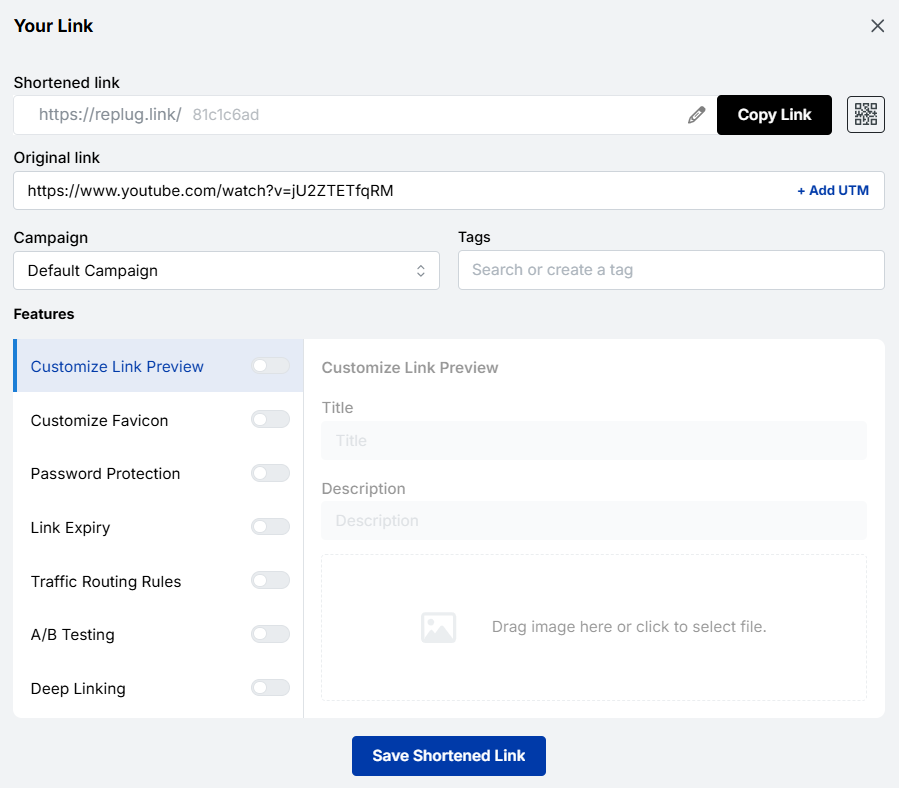
                                • “Don’t sign up unless you actually want to grow”
                                • “Nah, you don’t want 50% off. Or do you?”
                                • “Only for people who are done settling for average”
                                • “If you’re fine with the status quo, move along”

                                Good call to action phrases for business

                                • “Let’s talk about what we can do for you”
                                • “Book a free strategy session”
                                • “See our prototype — then decide for yourself”
                                • “Partner with us today”
                                • “Request a custom proposal”
                                • “Get a solution built around your needs”
                                • “Schedule a quick 15-minute intro call”
                                • “Explore our services — no pressure”
                                • “Let’s build something great together”
                                • “Find out how we’ve helped businesses like yours”

                                Top call to action phrases for driving sales

                                • “Order now and get free shipping”
                                • “Today only — save 30% on your first order”
                                • “Add to cart before stock runs out”
                                • “Grab this deal while it lasts”
                                • “Shop now, pay later — zero interest”
                                • “Unlock your member-only discount”
                                • “Buy 2, get 1 free — today only”
                                • “Flash sale ends in 2 hours — shop now”
                                • “Get the best price guaranteed — order today”
                                • “Don’t pay full price — use your offer now”

                                Winning call to action phrases for social media

                                • “Drop a 🔥 if this hits home”
                                • “Tag a friend who needs to see this”
                                • “Save this post. You’ll thank yourself later”
                                • “Follow for more tips like this every week”
                                • “Comment ‘YES’ and we’ll send you the details”
                                • “Share this with someone who needs the reminder”
                                • “Hit the link in bio — you won’t regret it”
                                • “Which one are you? Tell us in the comments”
                                • “Like this if you agree — let’s see the numbers”
                                • “Push the bell icon so you never miss a beat”

                                Powerful call-to-action phrases for Instagram

                                • “Link in bio for the full breakdown”
                                • “Send this to a friend who needs to see it ASAP!”
                                • “Double tap if this is your kinda vibe”
                                • “Comment below and get a chance to win a brand new iPhone 17”
                                • “Head to our bio link to grab your special offer”
                                • “Share to your IG stories if this resonated”
                                • “Follow us for daily tips that actually help”
                                • “DM us the word ‘INFO’ and we’ll send it over within 24h”
                                • “Which would you choose? A or B — comment now”
                                • “New post every Friday. Hit follow, so you don’t miss it”

                                Short & sweet call to action phrases for your IG stories

                                • “Swipe up 👆”
                                • “Tap the link!”
                                • “Grab it now →”
                                • “Don’t sleep on this”
                                • “Last chance — opt now”
                                • “Want one? Tap here.”
                                • “Tap to see more 👀”
                                • “This ends tonight ⏳”
                                • “It’s free — just a single tap away”
                                • “Yes or no? Vote below!”

                                Call to action phrases for promoting lead magnets

                                • “Download the free guide — no email clutter, just value”
                                • “Get the free checklist delivered straight to your inbox”
                                • “Grab your free template and start today”
                                • “Access the toolkit — 100% free (no hidden charges)
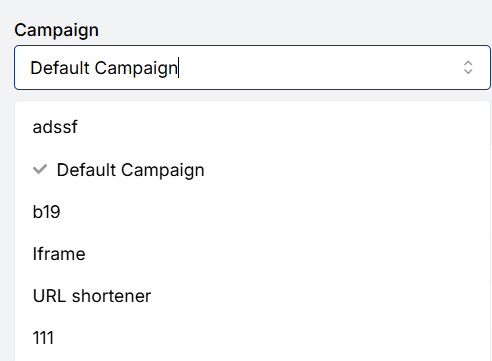
                                • “Download your copy for free, before this offer expires”
                                • “Get instant access to the free resource library”
                                • “Yes, I want the free [eBook/guide/checklist]!”
                                • “Send me the free swipe file”
                                • “Get the step-by-step playbook — completely free”
                                • “Steal our exact strategy — grab the free guide”

                                Call to action phrases for encouraging sign-ups

                                • “Join the community! It’s free to sign up”
                                • “Create your free account in under 60 seconds”
                                • “Sign up and get your welcome gift instantly”
                                • “Be the first to know — join the list”
                                • “Get weekly tips straight to your inbox. Sign up for free”
                                • “Join 10,000+ readers who actually look forward to Mondays”
                                • “Reserve your free seat before registration closes. Register today!”
                                • “Sign up now — unsubscribe anytime, no hard feelings”
                                • “Get in early. Founding members get exclusive perks”
                                • “One quick sign-up. A whole lot of value.”

                                Sample call to action phrases for selling a service

                                • “Book your free consultation — zero obligation”
                                • “Let’s map out a plan that actually works for you”
                                • “See exactly how we’d approach your project”
                                • “Work with us — here’s how it works”
                                • “Ready for exceptional results? Let’s get started.”
                                • “Hire us and stop figuring it out alone”
                                • “Tell us about your project. First chat is on us!”
                                • “See what we’ve done for others, then decide”
                                • “Get a custom quote — no guesswork, no hidden surprises”
                                • “Let’s solve this together. Book your call today”

                                Call to action phrases for promoting a discount

                                • “Use code SAVE20 at checkout. Offer ends this Sunday”
                                • “Your 30% discount is waiting. Claim it now!”
                                • “Don’t pay full price. Your deal is one click away”
                                • “Limited-time offer: save big before it’s gone”
                                • “Grab the discount before midnight tonight”
                                • “Price drops back up in 24 hours — act now”
                                • “Shop the sale! Up to 40% off, today only”
                                • “Your exclusive discount expires at 11:59 PM”
                                • “Get [X]% off your first order (no code needed)
                                • “This is the lowest price we’ll ever offer. Shop now!”

                                Call to action phrases for when you have a launch coming up

                                • “Get on the waitlist. Be the first one in line”
                                • “Join the early access list and save 20% at launch”
                                • “Something big is coming — secure your spot now”
                                • “Be a founding member. Spots are extremely limited!”
                                • “We launch [date] — don’t miss the early bird deal”
                                • “Get notified the moment we go live”
                                • “Early birds get the best price — lock it in now”
                                • “Tell me when it’s live — add me to the list”
                                • “Pre-launch pricing won’t last! Grab it while you can”
                                • “Reserve your spot before the public rush hits”

                                Great calls to action phrases for your website’s buttons

                                • “Get Started”
                                • “See Pricing”
                                • “Book a Demo”
                                • “Try for Free”
                                • “Talk to Us”
                                • “View Our Work”
                                • “Get Your Quote”
                                • “Learn How It Works”
                                • “Meet Our Team of Experts”
                                • “Find Your Ideal Plan”

                                On-point call to action phrases that create a sense of urgency & scarcity

                                • “Only 5 spots left! Grab yours before they’re gone”
                                • “Offer closes in 3 hours ⏳ Don’t miss it!”
                                • “We’re almost sold out — Order Now”
                                • “This price disappears at midnight — lock it in”
                                • “Seats are filling up fast. Reserve yours right now”
                                • “Last 24 hours to get this one-of-a-kind deal”
                                • “Once it’s gone, it’s gone! Shop while stocks last”
                                • “Enrollment closes Friday — don’t get locked out”
                                • “This offer will not come around again. Act today!”
                                • “You’re one of the last people to see this offer”

                                Strong call to action phrases that imply value & exclusivity

                                • “Join our inner circle — membership is by invitation only”
                                • “Get VIP access before we open to the public”
                                • “This offer is only for our loyal customers. Claim it!”
                                • “Members-only pricing. Log in to unlock”
                                • “You’ve been handpicked for premium feature access”
                                • “You won’t find it elsewhere. Get it here for 50% off”
                                • “Exclusive to subscribers. Grab your perk, now!”
                                • “Only 100 spots available — applications now open”
                                • “This isn’t for everyone, but it might be for you”
                                • “Get the insider advantage. Join today”

                                Catchy call to action phrases that raise interest level

                                • “Wait! Have you seen what’s inside?”
                                • “There’s something here you haven’t heard before”
                                • “This for sure changes how you think about [topic]”
                                • “Most people get this completely wrong. Find out why”
                                • “What nobody tells you about [topic] until now. Find the answer here!”
                                • “You won’t believe what happened when we tried this”
                                • “Here’s the part everyone skips — don’t be that person”
                                • “The results surprised even us. Take a look yourself”
                                • “One thing separates top performers from the rest. See it here”
                                • “We tried it so you don’t have to. Here’s what we found”

                                Bold call to action phrases to get clicks & make someone save your posts

                                • “Bookmark this — you’ll need it later”
                                • “Screenshot this and thank us later”
                                • “Save this post before you forget”
                                • “This is the one post worth keeping. Save it now!”
                                • “Read it once, save it forever — Go ahead”
                                • “Click, read, and honestly save it”
                                • “Pin this. Share this. You’ll come back to it.”
                                • “Don’t just scroll past — this one’s worth saving”
                                • “The kind of content you save at 2 am. Here it is!”
                                • “Share it with one person who needs to hear this today”

                                Best tips for using call to action phrases to maximize conversions & success

                                Having a solid list of CTA phrases is great, but knowing how to use them is what actually moves the needle. Here are ten practical tips to help you get the most out of every CTA you write.

                                Best tips for using call to action phrases to maximize conversions & success

                                Tip #01: Use strong action verbs

                                Start your CTA with a verb that tells people exactly what to do, such as “Get,” “Download,” “Start,” “Grab,” “Join,” “Claim,” etc. 

                                Action verbs create momentum and make your CTA feel energetic rather than passive. A phrase like “Access your free report” will almost always outperform a vague “Learn more.”

                                Tip #02: Be specific & clear

                                The more specific your CTA, the better it converts, because people know exactly what they’re clicking on and what they’ll get.

                                “Download the free 10-step checklist” is always going to beat “Click here” because it removes the guesswork and tells readers precisely what’s waiting for them on the other side.

                                Tip #03: Leverage first-person phrasing

                                Swapping “your” for “my” in a CTA is a tiny tweak that makes a surprisingly big difference.

                                Phrases like “Start my free trial” or “Send me the guide” feel more personal and ownership-driven. It is like the reader is already claiming something that belongs to them, which naturally nudges them to follow through.

                                Tip #04: Focus on value over commitment

                                Nobody wants to feel like they’re signing their life away. Instead of putting the spotlight on what someone has to do, shift it to what they’re going to get. 

                                So rather than “Sign up for our newsletter,” try “Get weekly tips that actually help.” Lead with the reward, not the ask!

                                Tip #05: Create genuine urgency (FOMO)

                                A little urgency goes a long way, but it has to be real. Fake countdown timers and made-up “limited spots” kill trust the moment people catch on. 

                                When your deadline or scarcity is genuine, though, phrases like “Offer ends tonight” or “Only 5 spots left” tap right into the fear of missing out. It pushes people to act now instead of maybe later.

                                Tip #06: Reduce friction & risk

                                One of the biggest reasons people don’t click is fear (fear of being locked in, spammed, or charged without warning).

                                Adding a short reassurance alongside your CTA, like “No credit card required” or “Cancel anytime — no questions asked,” lowers the barrier and makes clicking feel completely safe.

                                Tip #07: Use social proof

                                People follow fellow beings; it’s just how we’re wired. Weaving social proof into your CTA makes it instantly more convincing.

                                Something like “Join 25,000+ business owners already growing with us” or “See why 10,000+ customers gave us ⭐⭐⭐⭐⭐” gives hesitant readers the confidence that others have already taken the leap and it worked out.

                                Tip #08: Prioritize one primary action

                                If you give someone multiple CTAs at once, there’s a good chance they’ll click none of them. It’s called decision paralysis (too many options lead to no action at all).

                                Stick to one clear, primary CTA per page or section, and make it obvious what the single next step is that you want your reader to take.

                                Tip #09: Match CTA to user intent

                                A cold visitor who just landed on your blog for the first time isn’t ready to buy, for sure. However, they might be ready to download a free resource or read another post. 

                                Your CTA should match where someone is in their journey. Push soft commitments early on and save the “Buy now” energy for when your audience is already warmed up and close to a decision.

                                Tip #10: Make it visually distinct

                                Even the best-written CTA will get ignored if it blends into the page. Your button or CTA text needs to visually stand out (through color contrast, white space, font size, or placement). 

                                A CTA that catches the eye before someone even reads it has already done half the job of getting that click.

                                All in all, put these ten tips together and you’re not just writing CTAs; you’re building little conversion machines that actually do what they’re supposed to do.

                                Generate catchy call to action phrases using Replug!

                                If you want to take your CTAs to the next level without spending hours brainstorming, Replug.io is worth checking out. 

                                It comes with a built-in call to action generator that helps you craft compelling phrases in seconds (no creative block, no guesswork).

                                But it doesn’t stop there!

                                Replug also lets you add call to action overlays on any content you share, so even when you’re linking out to a third-party article or resource, your CTA stays front and center.

                                Boost ROI with branded URLs - Replug dashboard showing performance metrics and branded URL creation
                                Boost your conversion rates with irresistable CTAs with

                                for your marketing campaigns.

                                Check

                                Higher clicks

                                Check

                                More leads

                                Check

                                Better ROI

                                Generate free CTAs

                                And with its powerful URL shortener, every link you share becomes a branded, trackable asset that works harder for your conversions. 

                                It’s honestly one of those tools that makes the whole process a lot smoother, from creating the CTA phrase to actually getting people to act on it. Give it a try today!

                                Summing up

                                And that’s a wrap!

                                You now have 200+ call to action phrases sitting right at your fingertips, ready to copy, tweak, and put to work across your website, emails, social media, and beyond.

                                The truth is, a great CTA doesn’t have to be complicated. It just needs to be clear, relevant, and written with your audience in mind. Whether you go bold, funny, subtle, or straight to the point, the right phrase at the right moment genuinely makes all the difference. 

                                So stop settling for boring “Click here” buttons and start testing phrases that actually connect with people. Your conversions will thank you for it. 

                                Now go put this list to good use!

                                Frequently asked questions

                                What is a good example of a call to action sentence?

                                A good CTA sentence is clear, action-driven, and tells the reader exactly what they’ll get. For example:

                                “Start your free 14-day trial — no credit card required” 

                                works really well. It leads with an action, highlights the value (free trial), removes risk (no credit card), and gives a specific timeframe. It’s simple, honest, and gives the reader zero reasons to hesitate. 

                                You can also check out these effective call to action examples.

                                What are the 15 most powerful call to action words examples in advertising?

                                These are the words that have consistently proven to drive clicks, signups, and sales across industries:

                                1. Free
                                2. Now
                                3. Get
                                4. Exclusive
                                5. Guaranteed
                                6. Limited
                                7. Save
                                8. New
                                9. Instantly
                                10. Join
                                11. Discover
                                12. Claim
                                13. Unlock
                                14. Try
                                15. Start

                                These words work because they trigger emotion, urgency, or curiosity (often all three at once).

                                Provide the top 10 call to action words list?

                                Here are the top 10 CTA words you should be using regularly:

                                1. Get
                                2. Try
                                3. Start
                                4. Join
                                5. Claim
                                6. Download
                                7. Book
                                8. Save
                                9. Explore
                                10. Unlock

                                Each of these is action-oriented, easy to understand, and works across almost every platform and industry.

                                How can I ensure clarity in my call to action phrases?

                                Here are a few quick ways to keep things crystal clear:
                                 
                                – use one strong action verb to start, 
                                – tell people exactly what they’re getting, 
                                – avoid vague phrases like “Click here” or “Learn more,” and
                                – keep the whole thing short enough to read in under three seconds

                                When in doubt, read it out loud. If it sounds natural and makes immediate sense, you’re good to go.

                                How long should a call to action phrase be?

                                Ideally, two to seven words for CTA buttons, and no more than one to two sentences for longer, supporting CTAs. The shorter and more direct, the better, especially for website buttons, social media, and ads, where attention spans are tight.

                                If you’re writing a CTA with a supporting line underneath (like a subheading below a button), you have a little more room. But still keep it punchy and to the point.

                                What are the key elements that make up a good call to action phrase for audience conversion?

                                A solid, converting CTA usually checks these boxes:

                                Clear action verb: Tells people exactly what to do
                                Specific value: Makes it obvious what they’re getting out of it
                                Low perceived risk: Removes hesitation with reassurances like “free” or “cancel anytime”
                                Urgency or relevance: Gives them a reason to act now rather than later
                                Audience match: Speaks directly to where the reader is in their journey
                                Concise wording: Short enough to read and understand at a glance

                                Nail these six things and your CTA is already ahead of most of what’s out there.