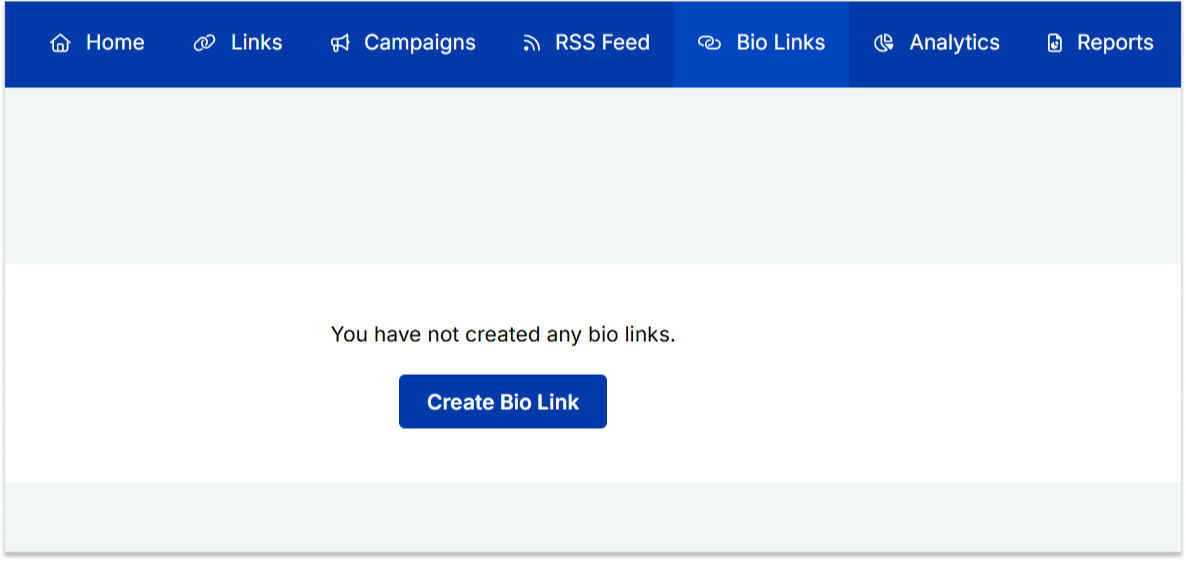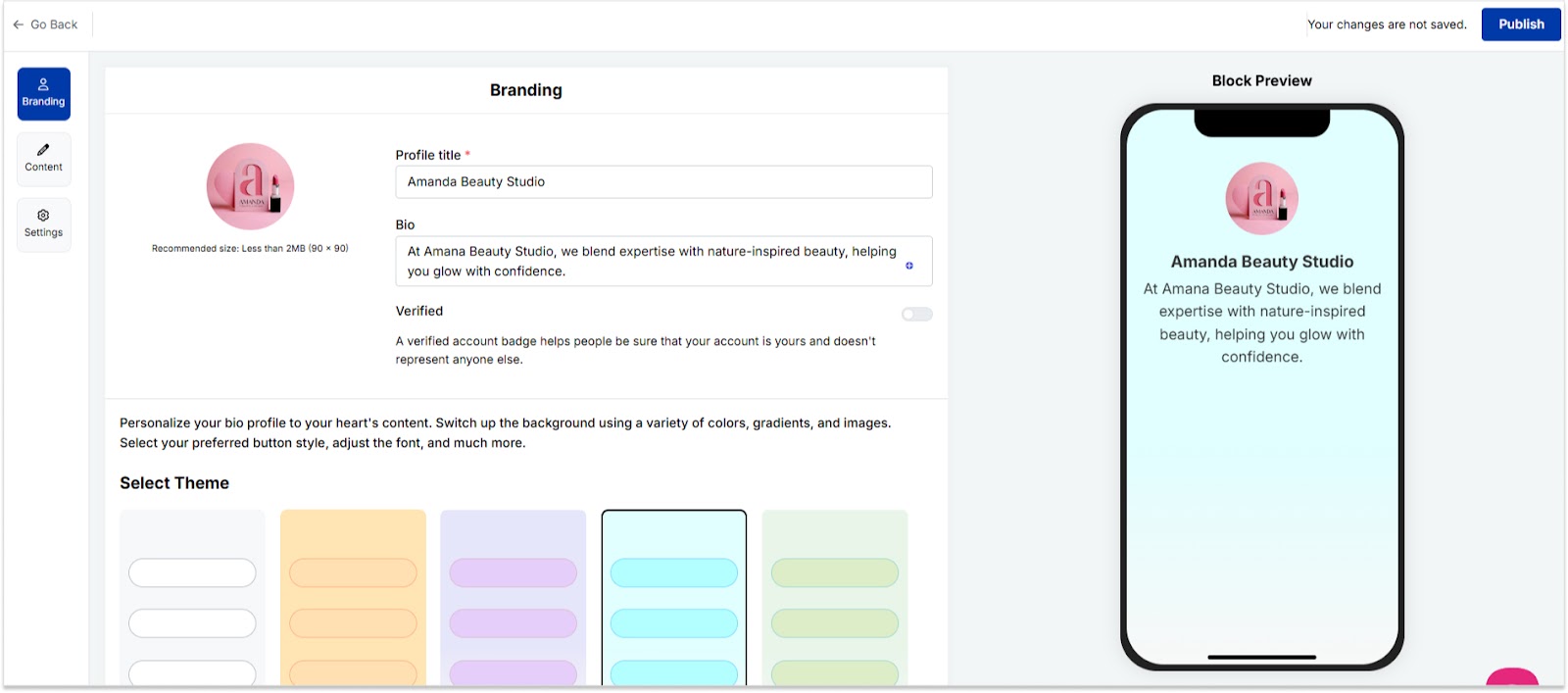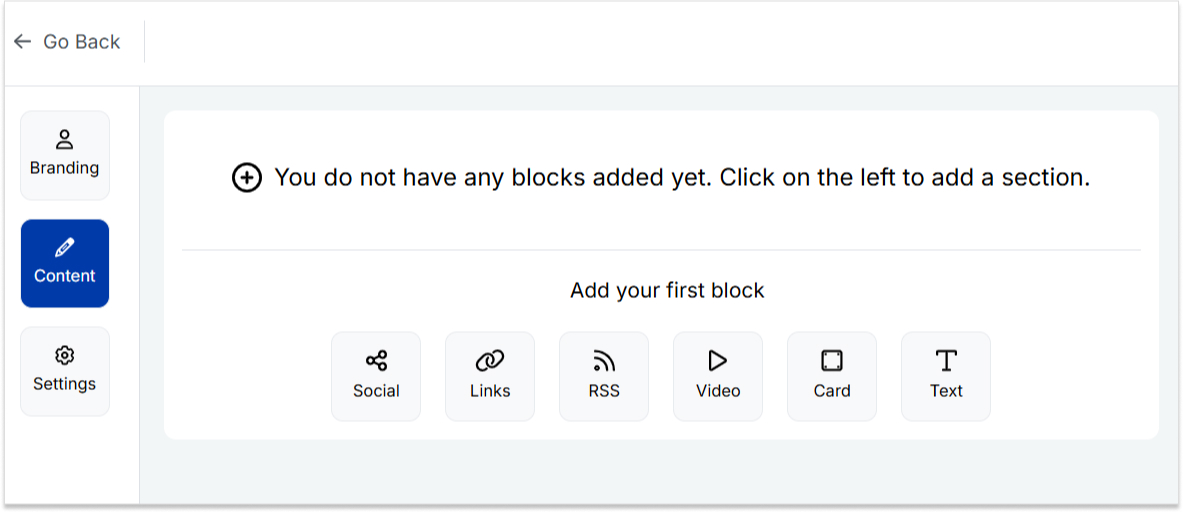
Blog

  • How to add a Twitter (X) link to Instagram bio?

    How to add a Twitter (X) link to Instagram bio?

    Important note: Throughout this guide, we will refer to Twitter as “X”.

    Looking to expand your social media presence and connect with a wider audience? If you’re already active on Instagram, adding an X link to your bio can be a game-changer. 

    Not only does it allow you to cross-promote your content and reach new followers, but it also opens up a world of new possibilities for networking, sharing your thoughts and ideas, and building your personal brand. 

    Adding an X link to your Instagram bio is a smart move for many reasons, and this guide explores how to make the most of it. So, let’s dive in and discover how to add an X link to an Instagram bio!

    Why add an X link to your Instagram bio?

    Adding an X link to your Instagram bio can be a smart move for several reasons:

    Cross-promotion: By linking your Instagram and X profiles, you can reach a wider audience and drive traffic to both platforms. This means more visibility for your content and potentially more followers.

    Networking: X is a powerful networking tool. By linking it to your Instagram account, you can make it easier for people to find and connect with you. This can be especially useful if you’re looking to build relationships with influencers or other industry professionals.

    Sharing your thoughts: While Instagram thrives on visuals, X is all about the power of words. By linking to your X account, you can share your thoughts, opinions, and ideas with your followers in a way that’s not possible on Instagram.

    Building your personal brand: By maintaining an active presence on both Instagram and X, you can build a strong personal brand that resonates with your target audience. Linking the two accounts creates a cohesive online identity that helps you stand out from the crowd.

    Also read: Top 29 personal branding tools to upscale your marketing efforts

    How to add an X link to your Instagram bio?

    On a mobile device:

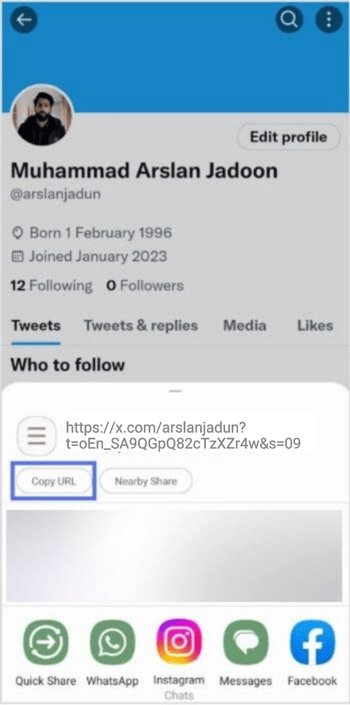
    Step 1: Open the X app on your mobile phone and tap the profile icon in the top left corner to open your profile. 

    Open X App

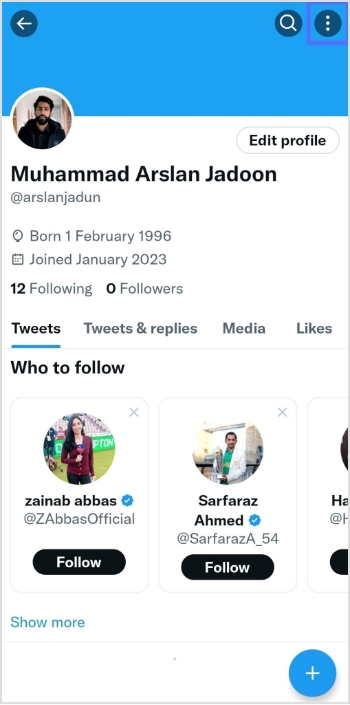
    Step 2: Tap “three dots” in the top right corner. 

    Tap 3 dots

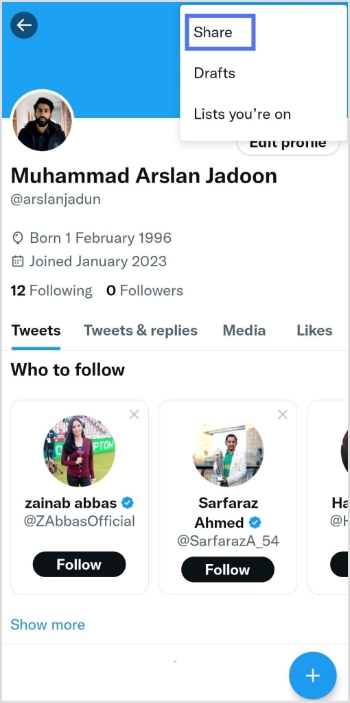
    Step 3: Tap “share”

    Tap share

    Step 4: Tap “copy URL” 

    Copy URL

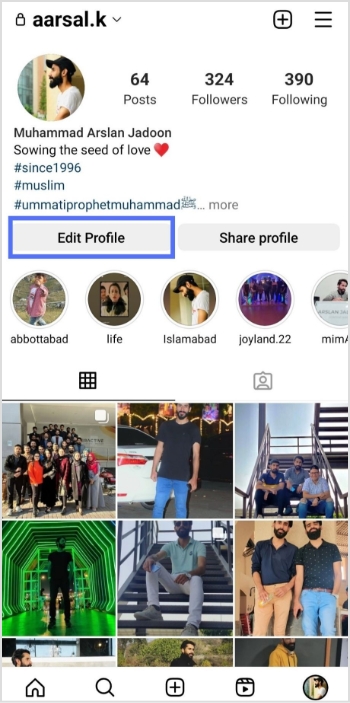
    Step 5: Open the Instagram app and tap your profile icon in the bottom right corner. 

    Instagram-profile-icon

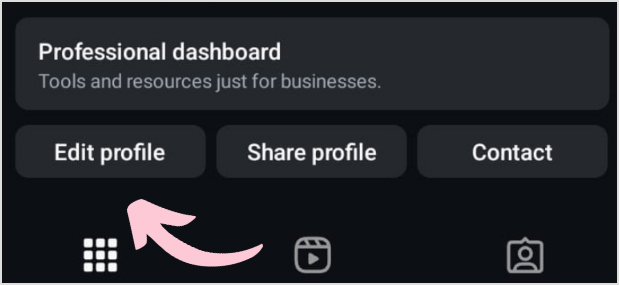
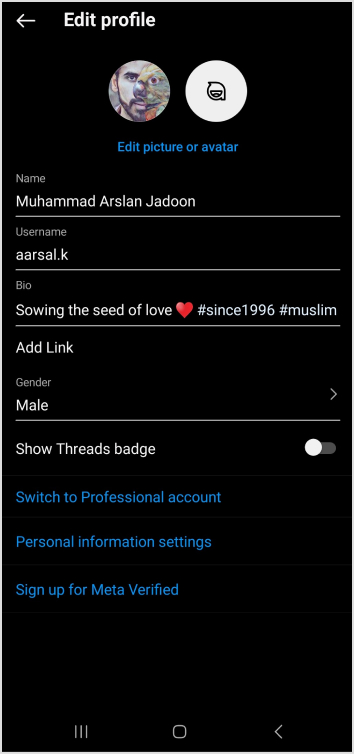
    Step 6: Tap “edit profile”.

    edit profile

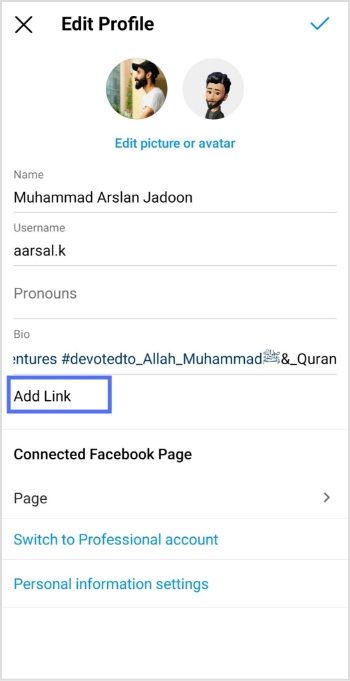
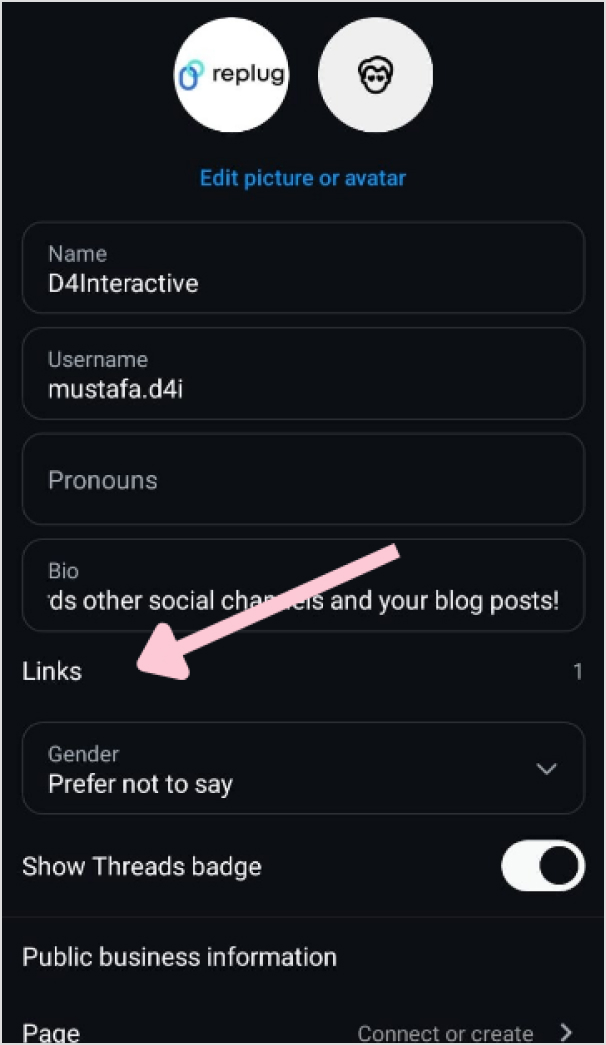
    Step 7: Tap “add link”

    Add link

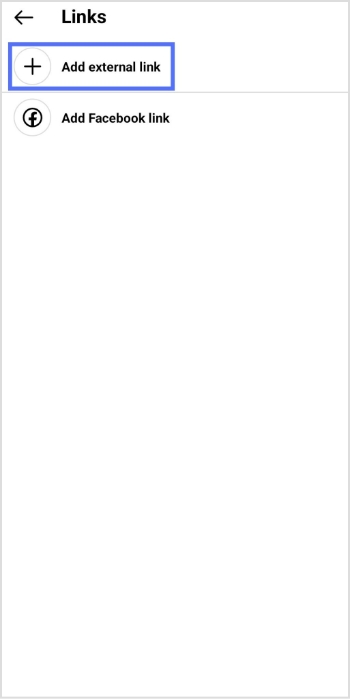
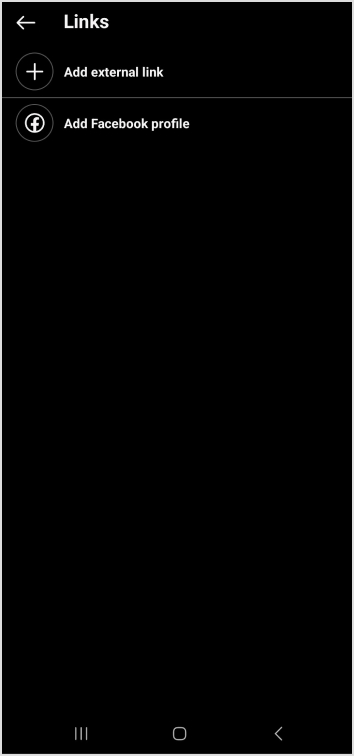
    Step 8: Tap “add external link”

    Add external link

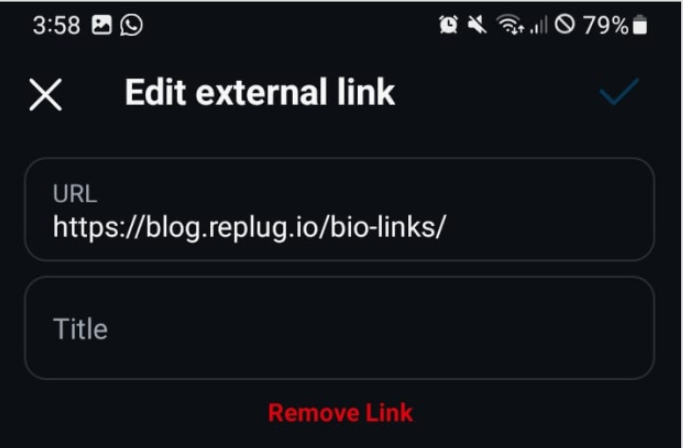
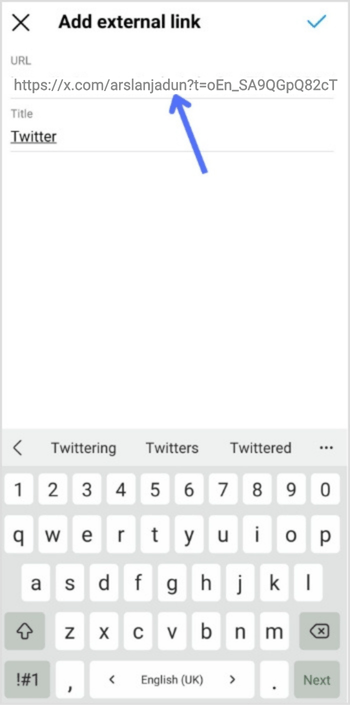
    Step 9: Paste the X URL in the URL field, enter the title and you’re done.

    Add external link

    Also read: How to add Amazon link to Instagram bio?

    On a Computer device:

    Step 1: Log in to X on your computer or laptop. 

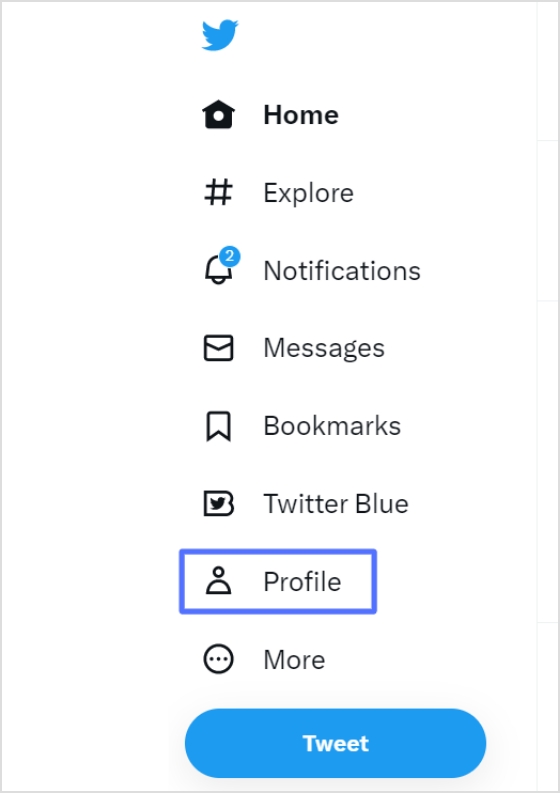
    Step 2: Click “profile” on the left side of the menu. 

    Twitter-profile

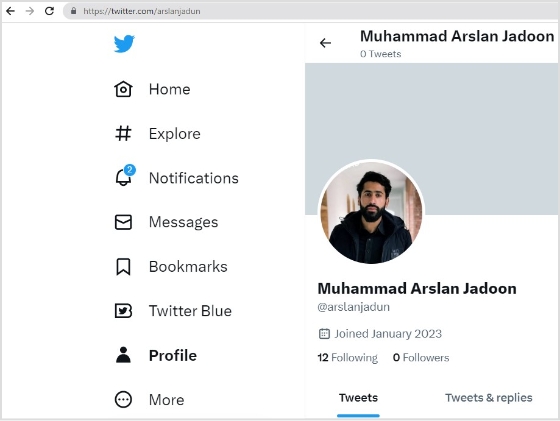
    Step 3: From the URL bar, copy the URL. That’s your profile URL. 

    copy-url

    For a cleaner look in your Instagram bio, especially with character limits, a free link shortener can transform that lengthy “X” URL into something concise and branded. Tools like Replug, a powerful link optimization platform, make this effortless by not only shortening links but also adding tracking and customization options to boost your cross-platform engagement.

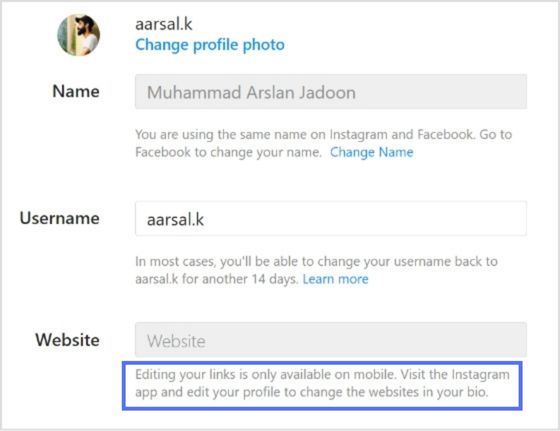
    Note: You can only edit your links on mobile devices. Visit the Instagram app and follow the steps above to edit your bio and add the X link.

    edit-bio-problem

    Also read: How to find my Twitter URL on mobile and desktop?

    FAQs about how to add a Twitter (X) link to Instagram bio?

    How to link Instagram and X for auto-tweeting photo links?

    To link your Instagram account to X and automatically tweet links to your photos, follow these steps:
    1. Open the Instagram app on your mobile device and go to your profile.
    2. Tap the three horizontal lines in the upper right-hand corner of your screen.
    3. Select “Settings” from the menu that appears.
    4. Tap “Account” and then “sharing to other apps.”
    5. Tap “X” and enter your X login information when prompted.
    6. Once you’ve linked your accounts, toggle on “Share your posts to X” to automatically share your Instagram posts on X.
    7. To customize what gets shared on X, you can toggle on or off the options for sharing your Instagram photo, caption, or location.
    That’s it! Now every time you post a photo on Instagram, it will automatically be shared as a link on your X account.

    Can I choose which Instagram posts get shared on X?

    Yes, you can customize what gets shared on X by toggling the options for sharing your Instagram photo, caption, or location on or off.

    Can I still share my Instagram posts on X if I didn’t link my accounts during the initial setup?

    Yes, you can manually share your Instagram posts on X by copying the link to your Instagram post and pasting it into a tweet on X. However, automatic sharing can only be enabled if you link your accounts.

    Trending:

    How to add YouTube link to Instagram bio?

    How to Rename Links Using Replug: 5 Simple Steps

    How to create a temporary URL: Set up link expiration

    How to add multiple links to Instagram bio using Replug?

  • 250 best call to action phrases for boosting conversions [2026’s updated list]

    250 best call to action phrases for boosting conversions [2026’s updated list]

    Your words are actually doing more work than you think. That tiny “Click here” button or “Learn more” link? It could be costing you hundreds of conversions every month, or driving them through the roof, depending on what it says.

    Here’s the thing: a specific, clear CTA can increase conversion rates by ~161%, and personalized CTAs perform 202% better than generic, one-size-fits-all ones. Yet most businesses are still punching a lazy “Submit” button on their pages and wondering why people aren’t converting.

    The right phrase at the right moment is genuinely powerful, and that’s exactly what this list is built for. No matter if you’re writing for landing pages, emails, or social ads, we’ve got 250 ready-to-use CTA phrases to help you stop losing important clicks.

    But first, what exactly is a call to action phrase, and why does the wording matter so much? Let’s break it down.

    What are call to action phrases?

    A call to action (CTA) phrase is a short, direct line of text or a button that tells your audience exactly what to do next. Think “Start your free trial,” “Download the guide,” or “Shop the sale.” It’s that one little nudge that moves someone from just browsing to actually doing something.

    What are call to action phrases

    In simpler terms, a CTA phrase bridges the gap between your content and the action you want people to take. Without it, even the most well-written page kind of just… trails off. Visitors read, maybe nod along, and then leave, with no clear next step pulling them in.

    CTAs show up everywhere: landing pages, email campaigns, social media ads, pop-ups, product pages, you name it. And while they might seem like a small piece of the puzzle, the right phrase at the right moment can be the difference between a bounce and a conversion.

    Importance of a good CTA phrase

    You might be thinking, “It’s just a few words, how much can it really matter?” 

    A lot, actually!

    Here’s why getting your CTA phrase right is worth your full attention:

    • It directly drives conversions: A specific, clear CTA can increase conversion rates by a huge number. The wording alone carries that much weight.
    • Personalization makes a massive difference: Personalized CTAs outperform generic ones, meaning a phrase tailored to your audience will almost always crush a one-size-fits-all CTA button.
    • Action words do the heavy lifting: Using action-oriented language in CTAs can boost conversion rates by 122%. Swapping “Submit” for something like “Get my free guide” is a small change that pays off big.
    • Urgency gets people off the fence: Adding urgency to your CTA, like a limited-time offer, can push conversion rates significantly. People respond to the fear of missing out.
    • Even small tweaks matter: Switching from “Start your free trial” to “Start my free trial” can increase click-through rates by up to 90% just by making it feel more personal.
    • It guides users so they don’t get lost: Without a clear CTA, visitors have no direction. A well-placed phrase removes the guesswork and tells them exactly what their next step is.
    • It reflects your brand’s tone: A good CTA isn’t just functional; it sounds like you. Whether your brand is fun and casual or professional and polished, your CTA should match that energy.

    A complete catalogue of the most effective call to action phrases

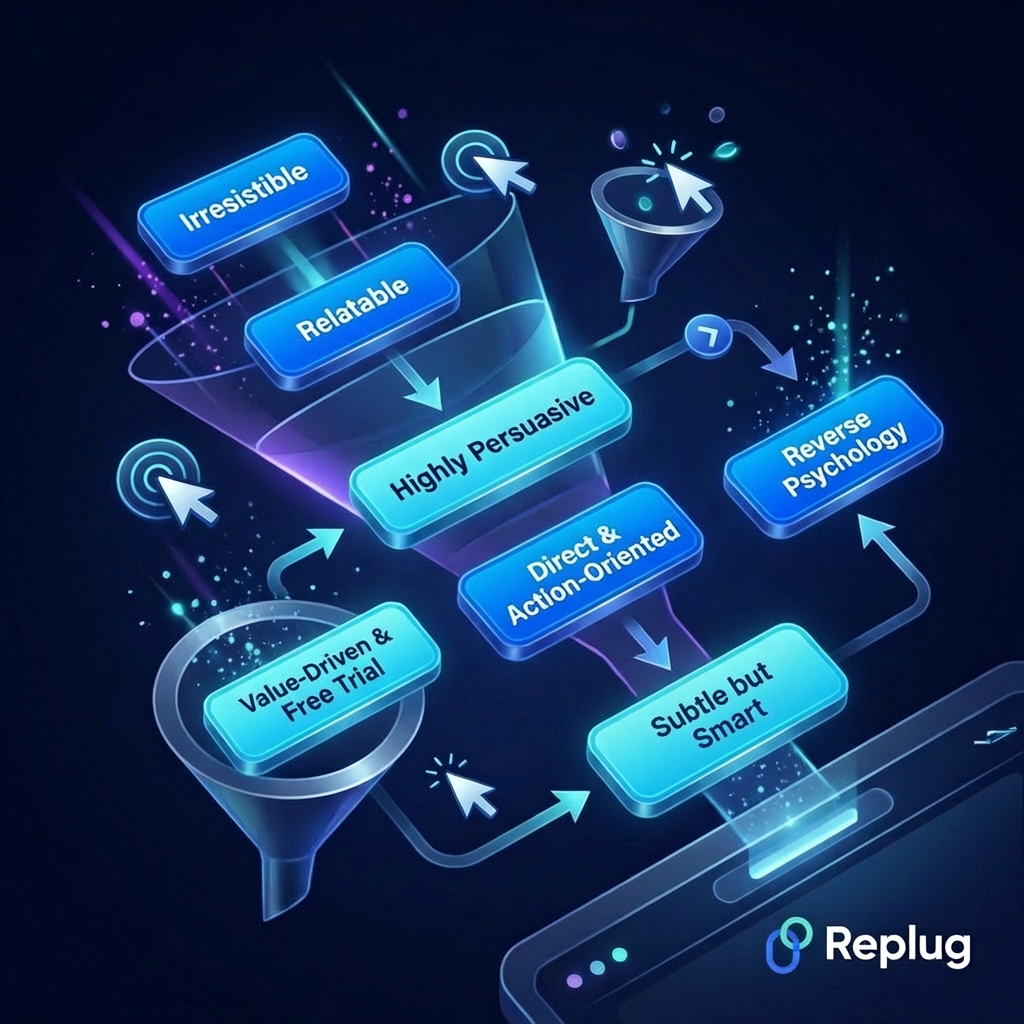
    Not all CTAs are built the same. Depending on your audience, your product, and the vibe you’re going for, the right phrase can look very different. Below, we’ve broken down the best ones by style, so you can pick what fits your brand and run with it.

    A complete catalogue of the most effective call to action phrases

    Irresistible call to action phrases

    • “Claim your free spot before it’s gone”
    • “Get instant access — no credit card needed”
    • “Yes, I want in!”
    • “Unlock your exclusive offer now”
    • “See why 50,000+ people love this”
    • “Try it free for 14 days — cancel anytime”
    • “Get the guide that’s changing the game”
    • “Start saving today — it’s completely free”
    • “Join thousands already seeing results”
    • “Grab your free copy right now”

    Relatable call to action phrases

    • “Tired of wasting time? Let’s fix that”
    • “Stop guessing — get answers that actually work”
    • “Been there. Here’s what helped.”
    • “Finally, a solution that makes sense”
    • “You’ve got questions. We’ve got answers.”
    • “Say goodbye to doing it the hard way”
    • “Because you deserve better than ‘good enough’”
    • “We get it — let us make this easier”
    • “No fluff, no jargon — just real results”
    • “Start where you are. We’ll handle the rest.”

    Highly persuasive call to action phrases

    • “Limited spots available — secure yours now”
    • “Don’t miss out — offer ends at midnight”
    • “This deal won’t last. Act now!”
    • “Only 3 left in stock — order today”
    • “Your competitors are already using this”
    • “Every day you wait is money left on the table”
    • “Get ahead now before the price goes up”
    • “Thousands have already made the switch — will you?”
    • “The sooner you start, the sooner you see results”
    • “One click stands between you and a better outcome”

    Funny call to action phrases

    • “Fine, I’ll stop procrastinating — let’s do this”
    • “My cat approves this message. Click away.”
    • “Hurry up — don’t be the last one on the list, like always”
    • “Click here before my boss finds out I wrote this”
    • “Okay fine, you got me — I’m in”
    • “No, I don’t want to save money”
    • “Let’s do this before I change my mind”
    • “Warning: clicking this may cause excessive happiness”
    • “Adulting is hard. This part isn’t — click here.”
    • “I’ll take the free thing, thanks”

    Blunt call to action phrases

    • “Buy now”
    • “Sign up. It’s free.”
    • “Get it.”
    • “Book your call.”
    • “Download now”
    • “Hire us.”
    • “Start today.”
    • “Just try it.”
    • “See the price”
    • “In or out? Click to decide.”

    Subtle but smart call to action phrases

    • “See how it works”
    • “Take a closer look”
    • “Explore what’s possible”
    • “Curious? Here’s your answer.”
    • “There’s more to this than you think — find out”
    • “Worth a look, at least”
    • “Let the results speak for themselves”
    • “Peek inside — no commitment needed”
    • “Something good is waiting on the other side”
    • “You might like what you find”

    Direct & action-oriented call to action phrases

    • “Schedule your free call now”
    • “Send me the free checklist”
    • “Add to cart”
    • “Reserve my seat”
    • “Activate my account”
    • “Apply now — takes less than 2 minutes”
    • “Request a free quote today”
    • “Watch the demo”
    • “Pick your plan and get started”
    • “Submit your application”

    Value-driven & free trial call to action phrases

    • “Start your free 30-day trial — no strings attached”
    • “Get full access free for 7 days”
    • “Try before you buy — no risk, no hassle”
    • “See the value for yourself — free for 14 days”
    • “Get premium features, completely free to start”
    • “Zero cost. Full access. Cancel whenever.”
    • “Your first month is on us”
    • “Unlock everything — free for the first week”
    • “Experience the difference at no cost”
    • “Start free, upgrade only if you love it”

    Personalized/possessive call to action phrases

    • “Send me my free report”
    • “Start my free trial”
    • “Show me my results”
    • “Build my custom plan”
    • “Give me 100% access”
    • “Take me to my dashboard”
    • “Find my perfect match”
    • “Unlock my discount”
    • “Get me started”
    • “Claim my free spot”

    Reverse psychology call to action phrases

    • “Don’t click this if you’re happy wasting money”
    • “You probably don’t need this. (But just in case…)
    • “Skip this if better results don’t interest you”
    • “This isn’t for everyone — only click if you’re serious”
    • “Feel free to ignore this offer entirely”
    • “Close this tab. (We dare you!)
    • “Don’t sign up unless you actually want to grow”
    • “Nah, you don’t want 50% off. Or do you?”
    • “Only for people who are done settling for average”
    • “If you’re fine with the status quo, move along”

    Good call to action phrases for business

    • “Let’s talk about what we can do for you”
    • “Book a free strategy session”
    • “See our prototype — then decide for yourself”
    • “Partner with us today”
    • “Request a custom proposal”
    • “Get a solution built around your needs”
    • “Schedule a quick 15-minute intro call”
    • “Explore our services — no pressure”
    • “Let’s build something great together”
    • “Find out how we’ve helped businesses like yours”

    Top call to action phrases for driving sales

    • “Order now and get free shipping”
    • “Today only — save 30% on your first order”
    • “Add to cart before stock runs out”
    • “Grab this deal while it lasts”
    • “Shop now, pay later — zero interest”
    • “Unlock your member-only discount”
    • “Buy 2, get 1 free — today only”
    • “Flash sale ends in 2 hours — shop now”
    • “Get the best price guaranteed — order today”
    • “Don’t pay full price — use your offer now”

    Winning call to action phrases for social media

    • “Drop a 🔥 if this hits home”
    • “Tag a friend who needs to see this”
    • “Save this post. You’ll thank yourself later”
    • “Follow for more tips like this every week”
    • “Comment ‘YES’ and we’ll send you the details”
    • “Share this with someone who needs the reminder”
    • “Hit the link in bio — you won’t regret it”
    • “Which one are you? Tell us in the comments”
    • “Like this if you agree — let’s see the numbers”
    • “Push the bell icon so you never miss a beat”

    Powerful call-to-action phrases for Instagram

    • “Link in bio for the full breakdown”
    • “Send this to a friend who needs to see it ASAP!”
    • “Double tap if this is your kinda vibe”
    • “Comment below and get a chance to win a brand new iPhone 17”
    • “Head to our bio link to grab your special offer”
    • “Share to your IG stories if this resonated”
    • “Follow us for daily tips that actually help”
    • “DM us the word ‘INFO’ and we’ll send it over within 24h”
    • “Which would you choose? A or B — comment now”
    • “New post every Friday. Hit follow, so you don’t miss it”

    Short & sweet call to action phrases for your IG stories

    • “Swipe up 👆”
    • “Tap the link!”
    • “Grab it now →”
    • “Don’t sleep on this”
    • “Last chance — opt now”
    • “Want one? Tap here.”
    • “Tap to see more 👀”
    • “This ends tonight ⏳”
    • “It’s free — just a single tap away”
    • “Yes or no? Vote below!”

    Call to action phrases for promoting lead magnets

    • “Download the free guide — no email clutter, just value”
    • “Get the free checklist delivered straight to your inbox”
    • “Grab your free template and start today”
    • “Access the toolkit — 100% free (no hidden charges)
    • “Download your copy for free, before this offer expires”
    • “Get instant access to the free resource library”
    • “Yes, I want the free [eBook/guide/checklist]!”
    • “Send me the free swipe file”
    • “Get the step-by-step playbook — completely free”
    • “Steal our exact strategy — grab the free guide”

    Call to action phrases for encouraging sign-ups

    • “Join the community! It’s free to sign up”
    • “Create your free account in under 60 seconds”
    • “Sign up and get your welcome gift instantly”
    • “Be the first to know — join the list”
    • “Get weekly tips straight to your inbox. Sign up for free”
    • “Join 10,000+ readers who actually look forward to Mondays”
    • “Reserve your free seat before registration closes. Register today!”
    • “Sign up now — unsubscribe anytime, no hard feelings”
    • “Get in early. Founding members get exclusive perks”
    • “One quick sign-up. A whole lot of value.”

    Sample call to action phrases for selling a service

    • “Book your free consultation — zero obligation”
    • “Let’s map out a plan that actually works for you”
    • “See exactly how we’d approach your project”
    • “Work with us — here’s how it works”
    • “Ready for exceptional results? Let’s get started.”
    • “Hire us and stop figuring it out alone”
    • “Tell us about your project. First chat is on us!”
    • “See what we’ve done for others, then decide”
    • “Get a custom quote — no guesswork, no hidden surprises”
    • “Let’s solve this together. Book your call today”

    Call to action phrases for promoting a discount

    • “Use code SAVE20 at checkout. Offer ends this Sunday”
    • “Your 30% discount is waiting. Claim it now!”
    • “Don’t pay full price. Your deal is one click away”
    • “Limited-time offer: save big before it’s gone”
    • “Grab the discount before midnight tonight”
    • “Price drops back up in 24 hours — act now”
    • “Shop the sale! Up to 40% off, today only”
    • “Your exclusive discount expires at 11:59 PM”
    • “Get [X]% off your first order (no code needed)
    • “This is the lowest price we’ll ever offer. Shop now!”

    Call to action phrases for when you have a launch coming up

    • “Get on the waitlist. Be the first one in line”
    • “Join the early access list and save 20% at launch”
    • “Something big is coming — secure your spot now”
    • “Be a founding member. Spots are extremely limited!”
    • “We launch [date] — don’t miss the early bird deal”
    • “Get notified the moment we go live”
    • “Early birds get the best price — lock it in now”
    • “Tell me when it’s live — add me to the list”
    • “Pre-launch pricing won’t last! Grab it while you can”
    • “Reserve your spot before the public rush hits”

    Great calls to action phrases for your website’s buttons

    • “Get Started”
    • “See Pricing”
    • “Book a Demo”
    • “Try for Free”
    • “Talk to Us”
    • “View Our Work”
    • “Get Your Quote”
    • “Learn How It Works”
    • “Meet Our Team of Experts”
    • “Find Your Ideal Plan”

    On-point call to action phrases that create a sense of urgency & scarcity

    • “Only 5 spots left! Grab yours before they’re gone”
    • “Offer closes in 3 hours ⏳ Don’t miss it!”
    • “We’re almost sold out — Order Now”
    • “This price disappears at midnight — lock it in”
    • “Seats are filling up fast. Reserve yours right now”
    • “Last 24 hours to get this one-of-a-kind deal”
    • “Once it’s gone, it’s gone! Shop while stocks last”
    • “Enrollment closes Friday — don’t get locked out”
    • “This offer will not come around again. Act today!”
    • “You’re one of the last people to see this offer”

    Strong call to action phrases that imply value & exclusivity

    • “Join our inner circle — membership is by invitation only”
    • “Get VIP access before we open to the public”
    • “This offer is only for our loyal customers. Claim it!”
    • “Members-only pricing. Log in to unlock”
    • “You’ve been handpicked for premium feature access”
    • “You won’t find it elsewhere. Get it here for 50% off”
    • “Exclusive to subscribers. Grab your perk, now!”
    • “Only 100 spots available — applications now open”
    • “This isn’t for everyone, but it might be for you”
    • “Get the insider advantage. Join today”

    Catchy call to action phrases that raise interest level

    • “Wait! Have you seen what’s inside?”
    • “There’s something here you haven’t heard before”
    • “This for sure changes how you think about [topic]”
    • “Most people get this completely wrong. Find out why”
    • “What nobody tells you about [topic] until now. Find the answer here!”
    • “You won’t believe what happened when we tried this”
    • “Here’s the part everyone skips — don’t be that person”
    • “The results surprised even us. Take a look yourself”
    • “One thing separates top performers from the rest. See it here”
    • “We tried it so you don’t have to. Here’s what we found”

    Bold call to action phrases to get clicks & make someone save your posts

    • “Bookmark this — you’ll need it later”
    • “Screenshot this and thank us later”
    • “Save this post before you forget”
    • “This is the one post worth keeping. Save it now!”
    • “Read it once, save it forever — Go ahead”
    • “Click, read, and honestly save it”
    • “Pin this. Share this. You’ll come back to it.”
    • “Don’t just scroll past — this one’s worth saving”
    • “The kind of content you save at 2 am. Here it is!”
    • “Share it with one person who needs to hear this today”

    Best tips for using call to action phrases to maximize conversions & success

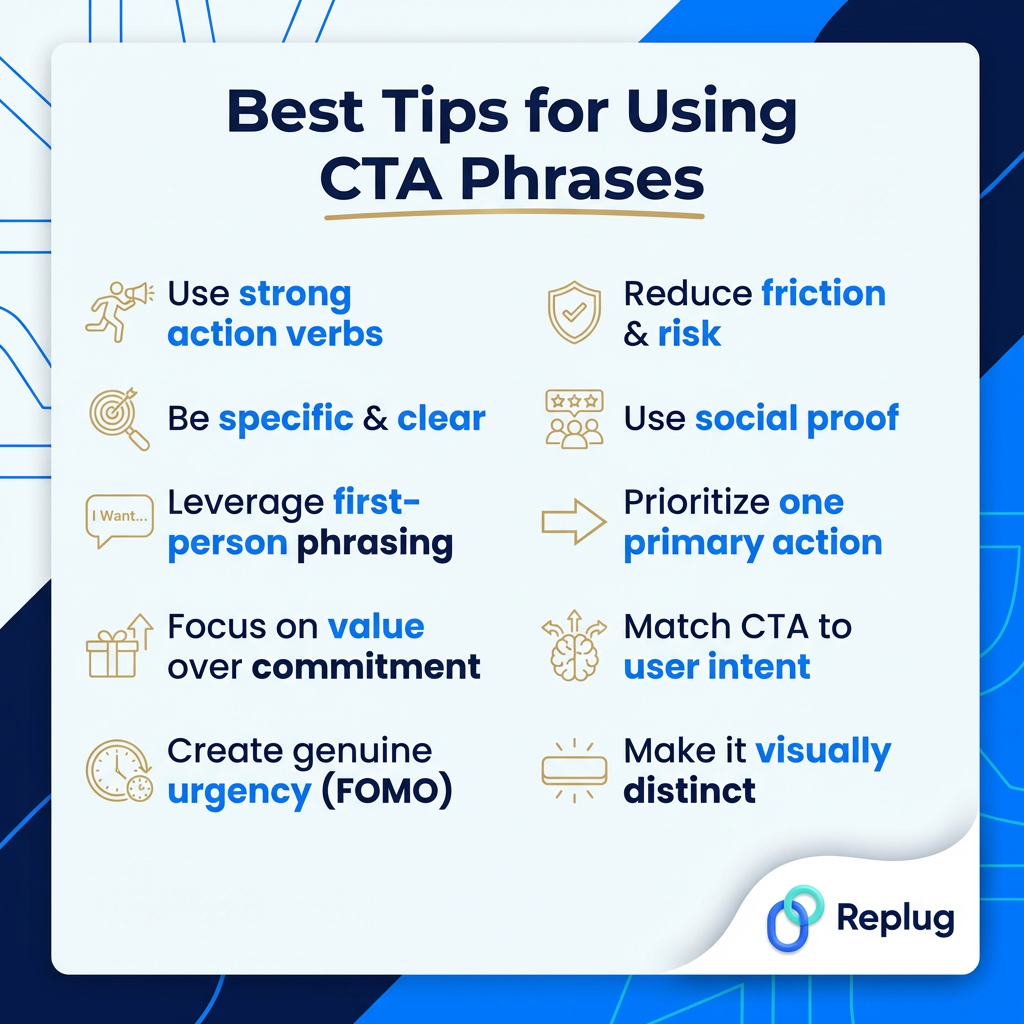
    Having a solid list of CTA phrases is great, but knowing how to use them is what actually moves the needle. Here are ten practical tips to help you get the most out of every CTA you write.

    Best tips for using call to action phrases to maximize conversions & success

    Tip #01: Use strong action verbs

    Start your CTA with a verb that tells people exactly what to do, such as “Get,” “Download,” “Start,” “Grab,” “Join,” “Claim,” etc. 

    Action verbs create momentum and make your CTA feel energetic rather than passive. A phrase like “Access your free report” will almost always outperform a vague “Learn more.”

    Tip #02: Be specific & clear

    The more specific your CTA, the better it converts, because people know exactly what they’re clicking on and what they’ll get.

    “Download the free 10-step checklist” is always going to beat “Click here” because it removes the guesswork and tells readers precisely what’s waiting for them on the other side.

    Tip #03: Leverage first-person phrasing

    Swapping “your” for “my” in a CTA is a tiny tweak that makes a surprisingly big difference.

    Phrases like “Start my free trial” or “Send me the guide” feel more personal and ownership-driven. It is like the reader is already claiming something that belongs to them, which naturally nudges them to follow through.

    Tip #04: Focus on value over commitment

    Nobody wants to feel like they’re signing their life away. Instead of putting the spotlight on what someone has to do, shift it to what they’re going to get. 

    So rather than “Sign up for our newsletter,” try “Get weekly tips that actually help.” Lead with the reward, not the ask!

    Tip #05: Create genuine urgency (FOMO)

    A little urgency goes a long way, but it has to be real. Fake countdown timers and made-up “limited spots” kill trust the moment people catch on. 

    When your deadline or scarcity is genuine, though, phrases like “Offer ends tonight” or “Only 5 spots left” tap right into the fear of missing out. It pushes people to act now instead of maybe later.

    Tip #06: Reduce friction & risk

    One of the biggest reasons people don’t click is fear (fear of being locked in, spammed, or charged without warning).

    Adding a short reassurance alongside your CTA, like “No credit card required” or “Cancel anytime — no questions asked,” lowers the barrier and makes clicking feel completely safe.

    Tip #07: Use social proof

    People follow fellow beings; it’s just how we’re wired. Weaving social proof into your CTA makes it instantly more convincing.

    Something like “Join 25,000+ business owners already growing with us” or “See why 10,000+ customers gave us ⭐⭐⭐⭐⭐” gives hesitant readers the confidence that others have already taken the leap and it worked out.

    Tip #08: Prioritize one primary action

    If you give someone multiple CTAs at once, there’s a good chance they’ll click none of them. It’s called decision paralysis (too many options lead to no action at all).

    Stick to one clear, primary CTA per page or section, and make it obvious what the single next step is that you want your reader to take.

    Tip #09: Match CTA to user intent

    A cold visitor who just landed on your blog for the first time isn’t ready to buy, for sure. However, they might be ready to download a free resource or read another post. 

    Your CTA should match where someone is in their journey. Push soft commitments early on and save the “Buy now” energy for when your audience is already warmed up and close to a decision.

    Tip #10: Make it visually distinct

    Even the best-written CTA will get ignored if it blends into the page. Your button or CTA text needs to visually stand out (through color contrast, white space, font size, or placement). 

    A CTA that catches the eye before someone even reads it has already done half the job of getting that click.

    All in all, put these ten tips together and you’re not just writing CTAs; you’re building little conversion machines that actually do what they’re supposed to do.

    Generate catchy call to action phrases using Replug!

    If you want to take your CTAs to the next level without spending hours brainstorming, Replug.io is worth checking out. 

    It comes with a built-in call to action generator that helps you craft compelling phrases in seconds (no creative block, no guesswork).

    But it doesn’t stop there!

    Replug also lets you add call to action overlays on any content you share, so even when you’re linking out to a third-party article or resource, your CTA stays front and center.

    Boost ROI with branded URLs - Replug dashboard showing performance metrics and branded URL creation
    Boost your conversion rates with irresistable CTAs with

    for your marketing campaigns.

    Check

    Higher clicks

    Check

    More leads

    Check

    Better ROI

    Generate free CTAs

    And with its powerful URL shortener, every link you share becomes a branded, trackable asset that works harder for your conversions. 

    It’s honestly one of those tools that makes the whole process a lot smoother, from creating the CTA phrase to actually getting people to act on it. Give it a try today!

    Summing up

    And that’s a wrap!

    You now have 200+ call to action phrases sitting right at your fingertips, ready to copy, tweak, and put to work across your website, emails, social media, and beyond.

    The truth is, a great CTA doesn’t have to be complicated. It just needs to be clear, relevant, and written with your audience in mind. Whether you go bold, funny, subtle, or straight to the point, the right phrase at the right moment genuinely makes all the difference. 

    So stop settling for boring “Click here” buttons and start testing phrases that actually connect with people. Your conversions will thank you for it. 

    Now go put this list to good use!

    Frequently asked questions

    What is a good example of a call to action sentence?

    A good CTA sentence is clear, action-driven, and tells the reader exactly what they’ll get. For example:

    “Start your free 14-day trial — no credit card required” 

    works really well. It leads with an action, highlights the value (free trial), removes risk (no credit card), and gives a specific timeframe. It’s simple, honest, and gives the reader zero reasons to hesitate. 

    You can also check out these effective call to action examples.

    What are the 15 most powerful call to action words examples in advertising?

    These are the words that have consistently proven to drive clicks, signups, and sales across industries:

    1. Free
    2. Now
    3. Get
    4. Exclusive
    5. Guaranteed
    6. Limited
    7. Save
    8. New
    9. Instantly
    10. Join
    11. Discover
    12. Claim
    13. Unlock
    14. Try
    15. Start

    These words work because they trigger emotion, urgency, or curiosity (often all three at once).

    Provide the top 10 call to action words list?

    Here are the top 10 CTA words you should be using regularly:

    1. Get
    2. Try
    3. Start
    4. Join
    5. Claim
    6. Download
    7. Book
    8. Save
    9. Explore
    10. Unlock

    Each of these is action-oriented, easy to understand, and works across almost every platform and industry.

    How can I ensure clarity in my call to action phrases?

    Here are a few quick ways to keep things crystal clear:
     
    – use one strong action verb to start, 
    – tell people exactly what they’re getting, 
    – avoid vague phrases like “Click here” or “Learn more,” and
    – keep the whole thing short enough to read in under three seconds

    When in doubt, read it out loud. If it sounds natural and makes immediate sense, you’re good to go.

    How long should a call to action phrase be?

    Ideally, two to seven words for CTA buttons, and no more than one to two sentences for longer, supporting CTAs. The shorter and more direct, the better, especially for website buttons, social media, and ads, where attention spans are tight.

    If you’re writing a CTA with a supporting line underneath (like a subheading below a button), you have a little more room. But still keep it punchy and to the point.

    What are the key elements that make up a good call to action phrase for audience conversion?

    A solid, converting CTA usually checks these boxes:

    Clear action verb: Tells people exactly what to do
    Specific value: Makes it obvious what they’re getting out of it
    Low perceived risk: Removes hesitation with reassurances like “free” or “cancel anytime”
    Urgency or relevance: Gives them a reason to act now rather than later
    Audience match: Speaks directly to where the reader is in their journey
    Concise wording: Short enough to read and understand at a glance

    Nail these six things and your CTA is already ahead of most of what’s out there.

  • How to remove link from Instagram bio?

    How to remove link from Instagram bio?

    Your Instagram bio is your brands first impression, and it matters. It’s more than just a few lines of text. It’s a powerful tool to establish your brand identity and drive traffic to your brand. 

    Brands lose potential leads and drop conversion rates instantly as they’re not familiar with the platform’s algorithm or best practices. Some of the most important pointers to maximize your Instagram profile’s bio is knowing 

    • How to remove link from Instagram bio?
    • How to maximize the limited space in your bio?
    • How to rename your Instagram bio link?

    When crafting your Instagram bio, consider including some of the following:

    • A short description of your brand
    • A branded call-to-action (CTA)
    • A bio-link
    • Your website link
    • A microsite link

    Don’t forget that the URL in your bio channels your followers to an external website, a new landing page, a microsite, or other relevant destinations, expanding your influence beyond Instagram.

    Let’s optimize it together.

    Boost ROI with branded URLs - Replug dashboard showing performance metrics and branded URL creation
    Turn your bio links into click-boosting machines
    Check

    Drive up to more clicks than plain URLs

    Check

    Share multiple destinations with one link

    Create bio links free

    Why I can’t remove the link from my Instagram bio?

    There are a few potential reasons why you might be unable to remove a link from your Instagram bio:

    1. Instagram glitch: Sometimes, Instagram experiences temporary glitches. Try closing the app completely and reopening it. This might resolve the issue.
    2. Link shortener or third-party app: If you’re using a link shortener or a third-party app to manage your bio link, you might need to remove the link from that service first.
    3. Outdated app: Ensure you’re using the latest version of the Instagram app. Outdated apps can sometimes cause issues.
    4. Cache issues: Clear your app’s cache or use a different device to see if the issue persists. Cached data can sometimes cause unexpected behavior.
    5. Account issues: Verify that your account hasn’t been flagged or restricted in any way, which might affect your ability to make changes.

    Additional troubleshooting steps:

    1. Check internet connection: A poor internet connection can interfere with app functions.
    2. Try a different device: If possible, log in to Instagram from a different device to see if the issue persists.
    3. Wait it out: Sometimes, Instagram experiences temporary server issues. Waiting a few hours might resolve the problem.

    If you’ve tried these steps and still can’t remove the link, contact Instagram support directly for further assistance.

    How to remove a link from your Instagram bio?

    Removing a link from your Instagram bio is a quick and easy process. Follow these steps to update your bio:

    Step 1: Open the Instagram app on your device.

    Feedpage of Instagram

    Step 2: Go to your profile

    Tap on your profile picture in the bottom right corner of the screen to go to your profile page.

    Personal Instagram Profile

    Step 3: Edit your profile

    On your profile page, tap the “Edit Profile” button. This is usually located directly below your profile picture and bio.

    Edit Profile

    Step 4: Update the website field

    In the “Edit Profile” screen, look for the “Link” field. This is where your current link is located.

    Link in your Instagram bio

    Step 5: Remove the link

    Tap on the “Link” field to edit it. Delete the existing link or text from the field.

    Remove link

    Step 6: Save your changes

    Once you’ve removed the link, tap “Done” (iOS) or the checkmark (Android) in the top right corner to save your changes.

    Refresh your profile: Go back to your profile page and refresh it to ensure that the link has been successfully removed.

    And that’s it! You’ve successfully removed or updated the link from your Instagram bio. 

    Boost ROI with branded URLs - Replug dashboard showing performance metrics and branded URL creation

    Go beyond generic link pages!

    Create custom bio links that truly fit your brand

    With Replug, you can create bio links that are unique, engaging, and built to convert.

    Start free trial

    How to rename a link on Instagram bio?

    Renaming a link on Instagram involves using link shortener tools that not only condense your URL but also allow customization of the link text to make it more appealing and memorable.

    One of the best options is Replug. It is a top-notch, free link shortener tool that offers customization features.

    Introducing Replug.io

    Replug.io is a link management platform that simplifies URL sharing by creating branded short links and provides in-depth click tracking for performance optimization.

    Steps to rename bio links on Instagram using Replug

    Take the first step towards using Replug by creating an account.

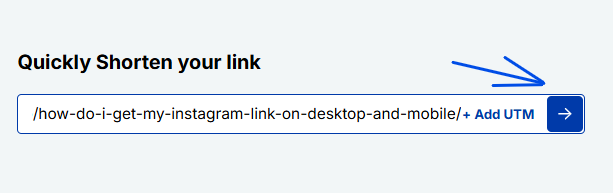
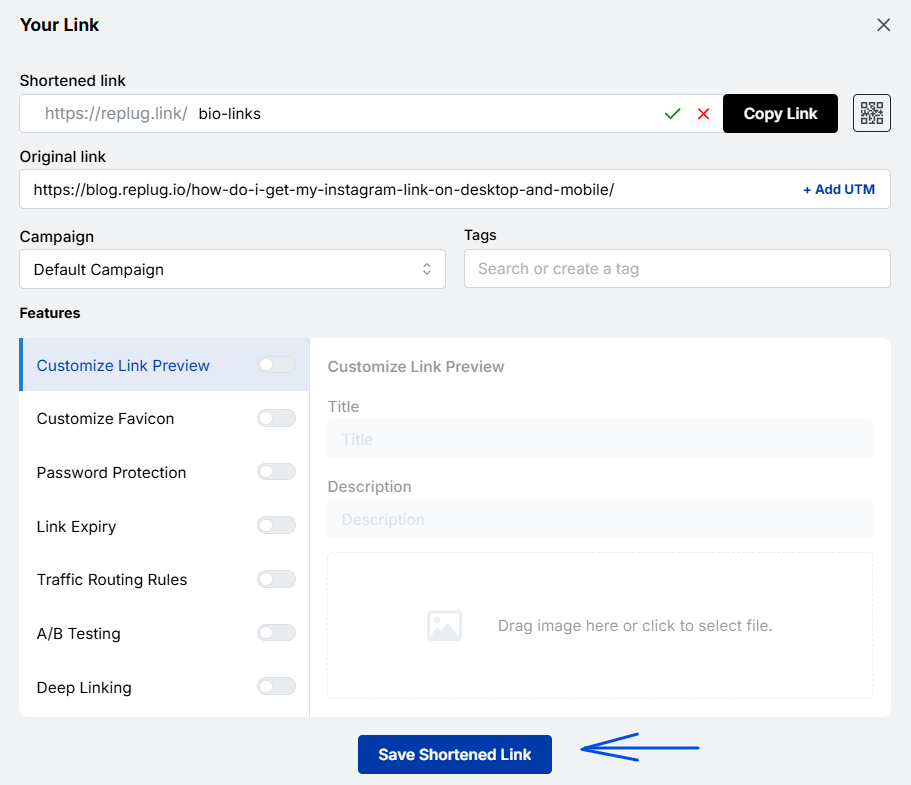
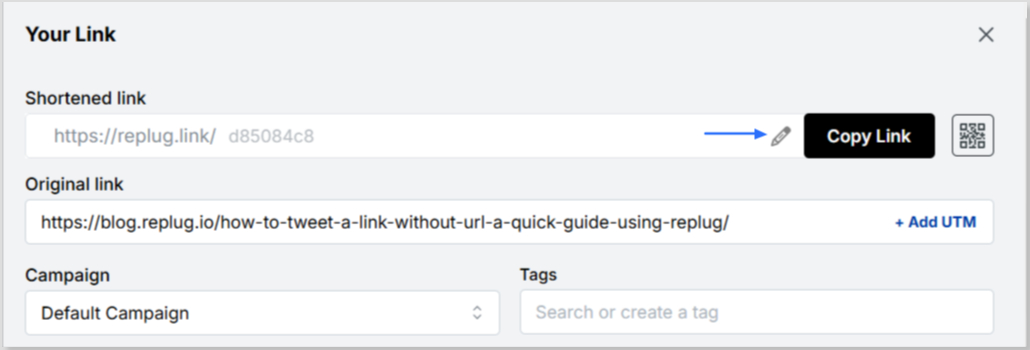
    Step 1: In the top-left corner, paste the link you want to shorten into the input bar. Then, click the arrow icon next to it to proceed.

    shorten your link

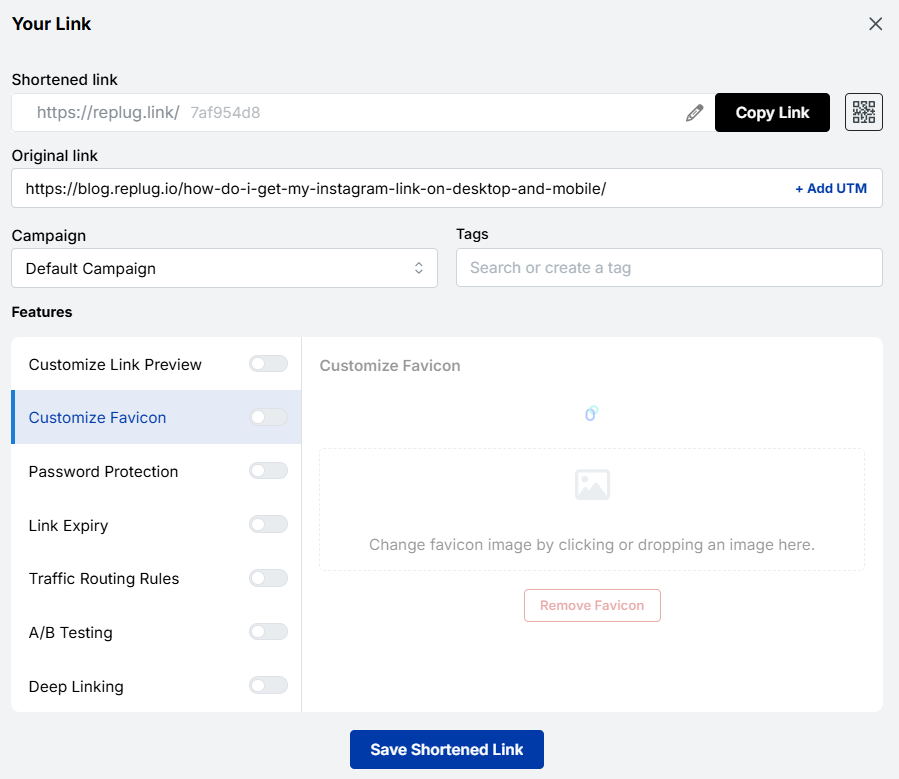
    Step 2: You’ll be redirected to this page

    chaneg link name

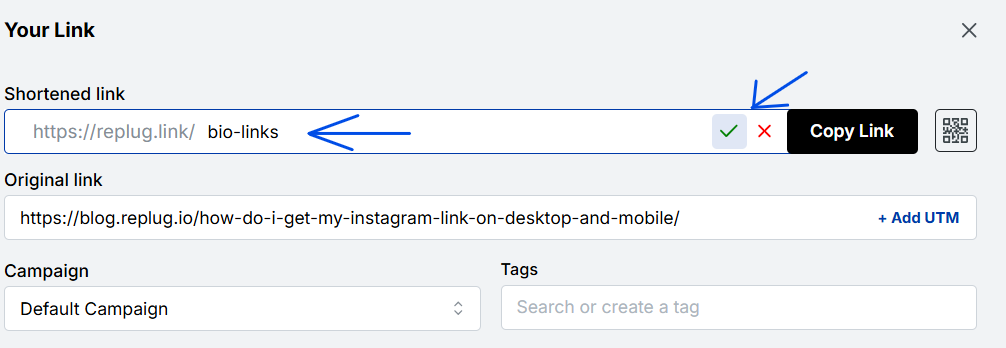
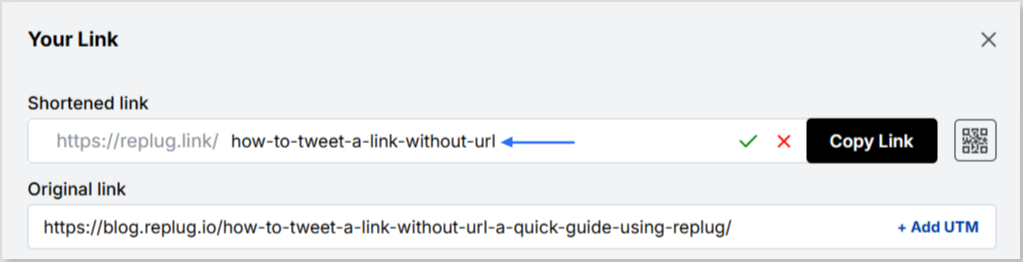
    Click the pencil icon in the top bar to rename or customize your link.

    cahnge link name

    After editing, click the green checkmark to confirm the changes.

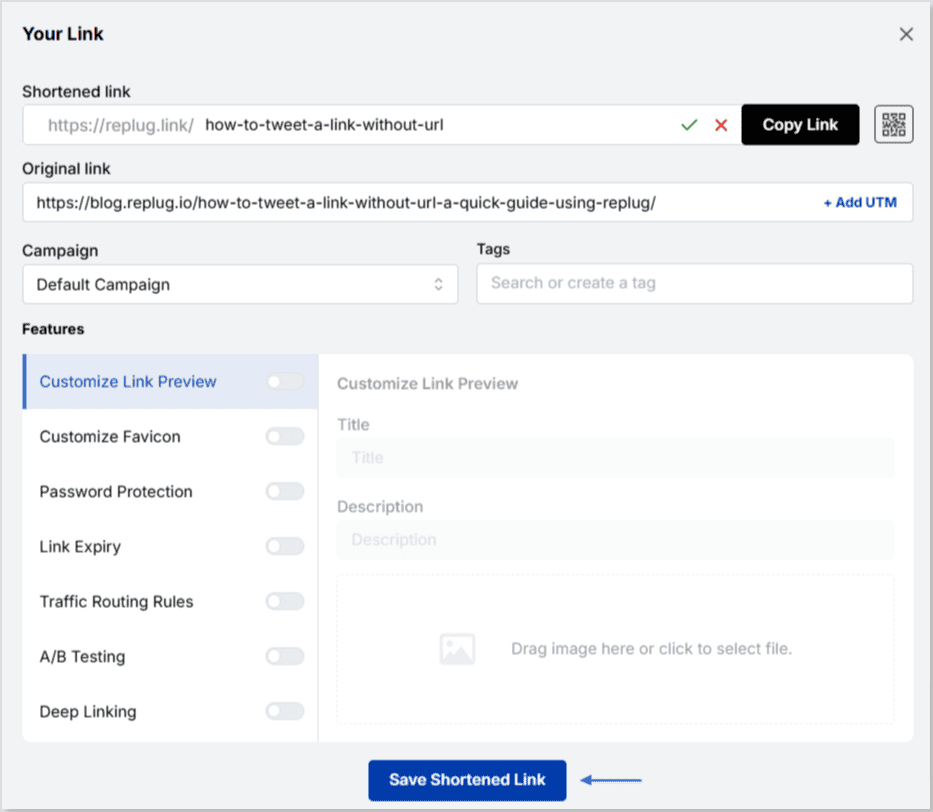
    Step 3: Once you’ve finalized your changes, click the “Save Shortened Link” button at the bottom to complete the process.

    save new link

    Viola! Your link is renamed.

    Step 4: Update your Instagram bio

    1. Open Instagram and go to your profile.
    2. Tap on “Edit profile”.
    3. Find the “Website” field and paste your customized short link.
    4. Save your changes.
    1. Double-check your profile or wherever the link is used to ensure that the new name is correctly reflected and that the link still functions properly.

    Replug Branded Short Links CTA
    Maximize marketing ROI
    by transforming ordinary URLs into
    branded short links that convert.
    Try Replug for free

    For more info: How to rename a link on Instagram bio?

    Replug: Link-in-bio feature

    bio-links-social-profiles

    You can achieve this effortlessly with the Replug’s top-notch link in bio maker. This tool lets you consolidate all your important content and links into a single, accessible location for your audience.

    Here are amazing features of Replug’s link in bio tool

    1. Add your favorite content in one place

    Bring your brand to life with social media icons, essential links, the recent blog with an RSS feed, audio clips, important text, and cards for stunning images.

    add links

    2. With Replug, you don’t just get a link in bio – you get to own it by renaming your links.

    Also, customize their appearance and match your landing page blocks from colors to favicons to your brand’s vibe. 

    3. Track bio link performance

    With performance tracking features, you can monitor the total number of clicks, conversion rates, and other valuable metrics. The best part is that you can view your analytics in both a summary list view and a detailed view.

    Boost ROI with branded URLs - Replug dashboard showing performance metrics and branded URL creation

    Go beyond generic link pages!

    Create custom bio links that truly fit your brand

    With Replug, you can create bio links that are unique, engaging, and built to convert.

    Start free trial

    Top tips to maximize the limited space in your bio:

    Quick tips Maximize your impact
    Less is moreAdd a short description about your brand or page. 
    Try adding a bio landing pageConclude your website link, portfolio, contact information etc.
    Identify your unique selling point (USP)Clearly communicate what sets you apart.
    Include a clear call to action (CTA)Tell people what you want them to do next.
    Keep on experimentingTry different stuff. See what clicks. You might surprise yourself!

    Conclusion

    Removing a link from your Instagram bio is a simple process that can be done in a few steps through the app’s profile settings. By keeping your bio updated and free of outdated or broken links, you ensure a professional and effective presence on the platform. This helps maintain a clear and engaging profile, optimizing your brand’s impact and user experience. 

    So that was it for today’s guide. If you have more questions regarding link name changers, link removers, or the best link in bio tools, feel free to visit our website. 

    FAQs related to Instagram bio-link 

    How do I make my Instagram bio catchy?

    1. Clearly state what your business does.
    2. Use relevant keywords to improve searchability.
    3. Include contact information and a call to action.
    4. Utilize Instagram’s business features like adding a category, contact options, and action buttons (e.g., “Book Now” or “Shop”).

    How do I add a website link to my Instagram bio?

    Edit your profile and paste the URL into the “Website” field.

    How often should I update my Instagram bio?

    Update your bio whenever there are significant changes to your brand, achievements, or contact information.

    Can I use hashtags in my Instagram bio?

    Yes, you can use hashtags in your Instagram bio to make your profile more discoverable and to highlight key interests or topics.

  • How to add a location to your Instagram bio?

    How to add a location to your Instagram bio?

    Imagine this: you’ve just opened your store in a lively new neighborhood. Now, picture potential customers on Instagram, craving a nearby spot. They stumble upon a post about a cozy local cafe close by. Intrigued, they visit, and bam – you’ve become their new favorite.

    This magic is possible when businesses, like yours, add a custom location to their Instagram bio. It’s not just a digital tag; it’s a smart way to connect with locals, boost visibility, and amp up sales.

    Ready to try it yourself? Here’s a quick guide on adding a location to your Instagram link in bio – an easy trick to effortlessly connect with your audience and boost your digital presence.

    Here’s how to add a location to your Instagram bio:

    Whether you’re using a personal or business account, adding a location to your Instagram bio is a breeze. Just a heads up, you can only do this on your mobile, not your computer. Stick around, and we’ll show you how in a moment.

    Choose a location on Google Maps on your phone:

    Step 1: Open Google Maps on your phone and search for the specific location you want to add. Type the address into the search bar if needed.

    Step 2: Once you find the right spot on Google Maps, tap “Share,” then select “Copy.” This action copies the link to that exact location.

    Step 3: Close Google Maps and open Instagram. Go to your profile by tapping your profile picture at the bottom right of the app’s home screen.

    Step 4: Tap “Edit Profile.”

    Step 5: Under the “Links” section, select “Add Link.”

    Step 6: On the next screen, choose “Add External Link” and paste the link you copied from Google Maps. You can also give it a title, like your business name.

    Step 7: Hit “Done” and go back to your profile.

    Refresh the page by pulling the screen down, and there you have it! You’ve successfully added a location to your Instagram bio.

    Also read: How to Sell on Instagram: Top 10 Strategies for Success

    Boost ROI with branded URLs - Replug dashboard showing performance metrics and branded URL creation

    Go beyond generic link pages!

    Create custom bio links that truly fit your brand

    With Replug, you can create bio links that are unique, engaging, and built to convert.

    Start free trial

    How to add multiple links to your Instagram bio?

    Expand your Instagram profile’s impact using Replug to add multiple links to your bio. Overcome Instagram’s single-link constraint, by using our Instagram link in bio tool to create a single bio link page offering followers easy access to diverse content and destinations.

    Replug also serves as a comprehensive link management platform, helping you organize, track, and optimize all your links from one convenient dashboard. Streamline engagement and maximize your online presence with this dynamic and efficient link in bio tool.

    Here’s how to add multiple links to your Instagram bio using Replug:

    Step 1: Sign in to Replug or create a free account.

    sign in to replug

    Step 2: Locate the “Bio Links” feature in the top banner. The bio link dashboard will appear in front of you. 

    bio link

    Step 3: Click the “New Bio Link” button to start setting up your Tumblr bio. You’ll be directed to a new page where you’ll find three main categories: branding, content, and settings.

    create a new bio link

    Step 4: In the branding section, add a brand title and description, select themes, and choose button styles to match your aesthetic.

    bio link branding

    Once you’re done, click “Publish” in the upper right corner to save your changes.

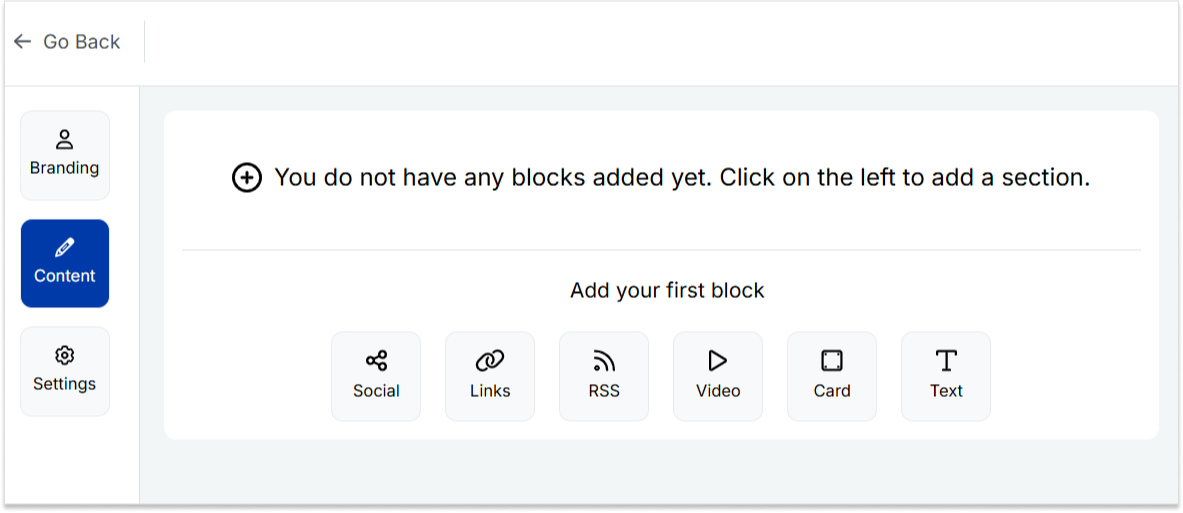
    Step 5: Head to the content category. Here, you can add social icons, links, RSS feeds, videos, cards, text, and more. 

    bio link content

    For example:

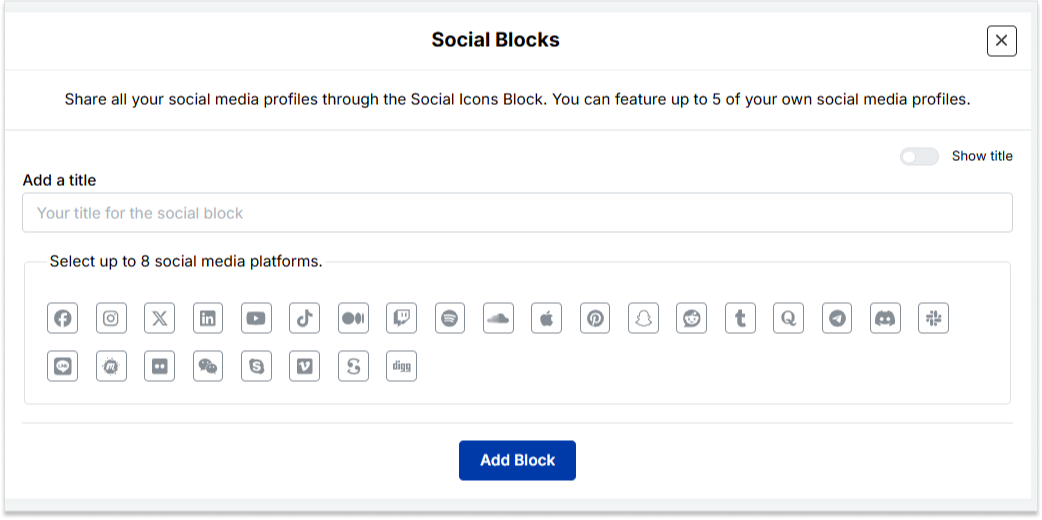
    • Social icons: Add up to 8 platforms, customize colors, and link to your profiles.
    add up to 8 social icons
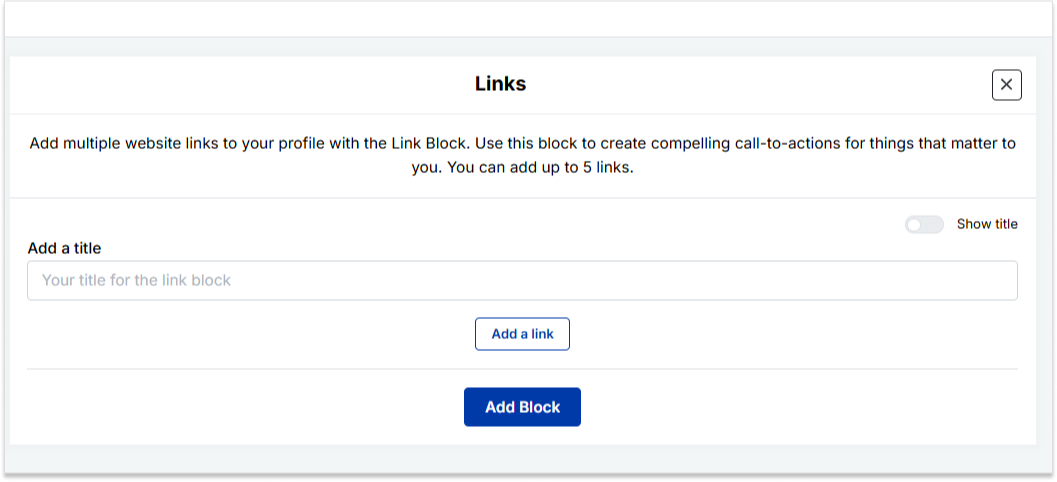
    • Links block: To include website links, use the “links” block. Add titles and URLs for each link.
    add up to 5 links

    Step 6: Once you’ve added the necessary blocks, click “update” to save each one.

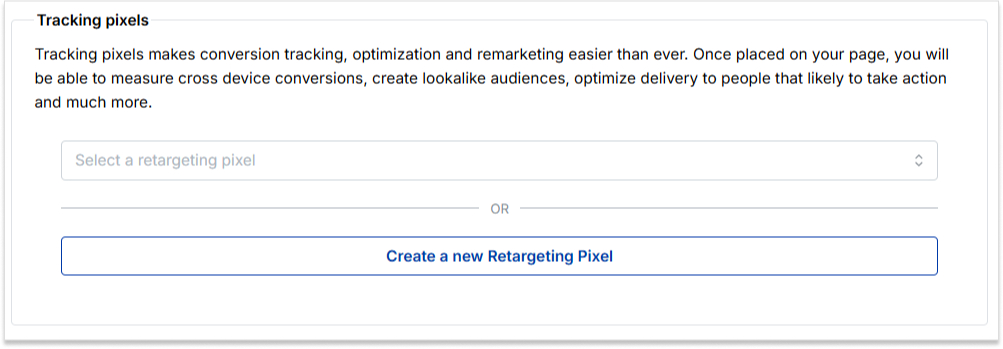
    Step 7: Go to the settings section to further customize your bio link’s SEO and social media preview. Add a title, description, favicon image, and even retargeting pixels if desired.

    add retargeting pixel

    Now you can add this bio link to your Instagram bio following the steps mentioned above and you’re done. 

    Also read: How to put your VSCO link in your Instagram bio?

    Boost ROI with branded URLs - Replug dashboard showing performance metrics and branded URL creation

    Go beyond generic link pages!

    Create custom bio links that truly fit your brand

    With Replug, you can create bio links that are unique, engaging, and built to convert.

    Start free trial

    FAQs on Instagram bio

    How do I change my location on my Instagram business account?

    Update your location by tapping “Edit Profile” on your Instagram profile and adjusting it under the “Public Business Information” section.

    Can I add multiple locations to my Instagram bio?

    No, Instagram allows only one location link, but you can use services like Replug to create a bio link with multiple links, including locations.

    Additionally, you can simplify and track your links effortlessly using this URL shortener free tool, making your shared URLs more manageable and professional.

    Why can’t I add a location to my Instagram bio on my computer?

    Editing Instagram bio links, including locations, is a mobile-only feature. You can make these changes using the Instagram app on your smartphone.

    Is it possible to remove a location from my Instagram bio later?

    Absolutely, to remove a location from your Instagram bio, go to “Edit Profile,” click on the location link, and either delete or replace it with a new one.

  • 9 best alternatives of Rebrandly for agencies 

    9 best alternatives of Rebrandly for agencies 

    Rebrandly has been a popular choice for many. 

    But at the same time, it’s expensive and offers fewer features and other link-shortening tools. 

    If you’re facing the same problem and seeking alternatives to Rebrandly, you’re in the right place. 

    This article will explore the best alternatives to help you level up your branding game and enhance your online reach.

    Best toolsKey – featureAgency/ Premium plan Limitations
    Replug.ioComplete link management solutionStarts $79 /moNo freemium pan available
    BitlyFree URL shortener
    branded QR codes
    $300/moNo retargeting
    No traffic routing
    No Custom CTAs
    TinyURLURL shortener
    campaign Tracking
    Starts $129/moLow value for money
    No additional features
    BL. INKBranded short links
    QR-codes
    $599/moExpensive
    Limited features
    LinklyLink tracking and retargeting$499/moNo bio-links
    Expensive
    Cutt.lyLink tracking$149 /moComplex interface
    No CTA
    Short.ioBranded link shortener
    Link tracking and management
    $148 /moNo bio-links
    No CTA
    SniplyCall to actions$59 /moNo deep links
    No QR codes
    ShorbyLink tracking & analytics$99 /moLimited features

    What is Rebrandly?

    Rebrandly is a user-friendly tool for creating custom-branded short links, as well as shorter and more visually appealing versions of long URLs.

    It’s commonly used in digital marketing to share links on social media and email campaigns.

    Moreover, Rebrandly also offers detailed link tracking and analytics, helping users understand how their links are performing and where their audience is coming from.

    Why consider Rebrandly alternatives?

    Before we dive into the alternatives, let’s briefly touch on why agencies might be looking beyond Rebrandly. While Rebrandly offers solid link-management capabilities, it may fall short in some areas:

    1. Feature limitations: Some agencies require more advanced features that Rebrandly doesn’t offer.
    2. No hidden fees: Some Rebrandly alternatives might offer clearer, more transparent pricing with no surprise charges.
    3. Integration needs: Certain agencies require seamless integration with specific tools that Rebrandly doesn’t support.
    4. Faster support response: Some alternatives provide quicker and more efficient customer service, helping you resolve issues without delay.

    Considering these factors, let’s explore the top alternatives that address these concerns and offer unique agency advantages.

    Best Rebrandly alternatives: Pros, cons, and key features

    1. Replug.io

    Why Replug: Our top choice as the best Rebrandly alternative is Replug. This tool offers a comprehensive link management suite with link shortening, tracking, and retargeting features.

    Replug Branded Short Links CTA
    A complete link management solution
    for marketing professionals & agencies.
    Try Replug for free

    Also, Replug stands out for features like white-label, A/B testing, deep linking, and analytics. Overall, it’s a powerful tool for marketing campaigns.

    Replug-Link Management tool. Best URL shortner

    Explore Replug’s features in-depth

    Pros:

    Cons:

    • Currently, no freemium plan is available.

    2. Bitly

    Why Bitly: Bitly is a household name in link shortening, known for its simplicity and analytics. Bitly as an alternative to Rebrandly can be a great choice because it offers high-end link tracking performance which helps in enhancing user engagement.

    Bitly-customize your links and make them a little bit shorter

    Pros:

    • Simplicity and user-friendly interface
    • Powerful link tracking and analytics
    • Easy-to-use browser extension
    • Customizable short links

    Cons:

    • Limited features in the free version
    • Advanced analytics require a premium subscription
    • No link retargeting, CTAs, and A/B testing.

    3. TinyURL

    tinyurl

    Why TinyURL: TinyURL is your friend if you need a no-fuss solution. It’s straightforward and user-friendly, ideal for quick link shortening.

    Pros:

    • Straightforward and no-fuss link shortening
    • Quick and easy to use
    • No registration required

    Cons:

    • Lacks advanced features
    • Limited link-tracking capabilities
    Boost ROI with branded URLs - Replug dashboard showing performance metrics and branded URL creation
    Boost ROI with
    branded URLs!

    Enhance your marketing campaigns by creating shareable, trackable, and fully multi-purpose customizable branded URLs.

    Try Replug for free

    4. BL. INK

    Why BL.INK: BL.INK is a versatile URL shortener with advanced features like QR code generation and analytics. Perfect for marketing and tracking campaigns.

    BL.INK - Link shotener-QR code generator and analytics

    Pros:

    • All-round URL shortener
    • QR code generation
    • Analytics for link tracking
    • Custom branded domains

    Cons:

    • Pricing may not suit budget-conscious users
    • Lacks many features, such as link retargeting and bio links that Rebrandly offers

    Also read: Uses of QR Codes: Marketing, Sustainability & Convenience

    5. Linkly

    linkly

    Why Linkly: It’s a powerful link management tool that helps you optimize your online presence and marketing strategies. It allows you to create, customize, and track links, providing in-depth insights into audience engagement.
    Pros:

    • Link customization
    • UTM parameters
    • Scheduled links
    • Password protection

    Cons:

    • Learning curve (for new users)
    • Premium features may be pricey for some

    6. Cutt.ly

    Why Cutt.ly: It’s an advanced link management tool specializing in link shortening and tracking. It simplifies creating custom-branded short links and offers comprehensive analytics to help you understand link performance.

    Cutt.ly- user friendly link tracking and link shortening tool

    Pros:

    • In-depth link tracking and analytics.
    • Custom-branded links for a professional appearance.
    • Suitable for businesses of all sizes.

    Cons:

    • Limited customization options for free users.
    • Analytics not as robust as some competitors

    7. Short.io

    short.io

    Why Short.io: Short.io offers custom-branded links and link tracking, making it an excellent choice for businesses and marketers.

    Pros:

    • Custom-branded links
    • Link tracking and analytics
    • User-friendly interface

    Cons:

    • Some users report occasional reliability issues

    8. Sniply

    Why Sniply: Sniply combines link shortening with lead generation. It allows you to add call-to-actions to shared links, making it a powerful tool for marketers.

    sinply- link shortening and lead generation tool

    Pros:

    • Combines link shortening with lead generation
    • Allows call-to-action on short links
    • Great for marketers and brand promotion with CTAs

    Cons:

    • Lacks in several important features.
    • Some features are reserved for premium users

    9. Shorby

    Why Shorby: Shorby focuses on enhancing social media profiles through link shortening and online branding. If you’re active on social media, it’s worth a look.

    Pros:

    • Enhances social media profiles through link branding
    • Ideal for social media enthusiasts
    • Simplifies link sharing on social platforms

    Cons:

    • May not be suitable for users with broader link management needs
    • Some features are specific to social media management

    Why choose Replug over Rebrandly?

    It’s a valid question. Replug offers features that set it apart from Rebrandly:

    1. Link retargeting: Replug allows you to create short links and add retargeting pixels to them, helping you reach users who have engaged with your links before.
    2. A/B testing: Test different versions of your links to determine which performs better, ensuring optimal user engagement.
    3. Custom branded domains: Create links that match your brand for a consistent and professional appearance.
    4. White-label branding: Take complete control of your agency’s branding by adding your branded custom domain, logos, interface, and more.
    1. Comprehensive analytics: Gain insights into your link performance, making data-driven decisions for your campaigns.
    2. Call-to-action (CTA): Include call-to-action messages on shared links, driving user action and lead generation.

    Boost ROI with branded URLs - Replug dashboard showing performance metrics and branded URL creation
    Boost your conversion rates with irresistable CTAs with

    for your marketing campaigns.

    Check

    Higher clicks

    Check

    More leads

    Check

    Better ROI

    Generate free CTAs

    Conclusion

    In conclusion, the world of link management offers a wide array of alternatives to Rebrandly. Each of these Rebrandly alternatives has pros and cons, catering to diverse needs. 

    Whether you’re looking for simplicity, analytics, branding, or lead generation, consider the options mentioned here and choose the one that aligns with your specific goals and preferences. 

    Happy link management!

    FAQs on Rebrandly alternatives

    Why Look for Rebrandly Alternatives?

    Rebrandly has been a popular choice for link shortening and management, but it’s essential to have options that suit your unique needs. Whether you want more features, a different pricing structure, or a fresh interface, these Rebrandly alternatives are something for everyone.

    Which Rebrandly alternative is best for marketing campaigns?

    Replug is an excellent choice for marketing campaigns, offering various features for link management and user engagement.

    Are these alternatives suitable for businesses and marketers?

    Yes, many of these alternatives, such as Replug and BL.INK, offers advanced features and analytics, making them excellent choices for businesses and marketers.

    Which link-shortening tool is similar to Rebrandly?

    Replug is a link management tool similar to Rebrandly, offering custom-branded short links and robust analytics.

    You may also like:

  • How to Tweet a link without URL on X: A quick guide

    How to Tweet a link without URL on X: A quick guide

    In the vast landscape of social media, X (formerly Twitter) is a prominent platform connecting people from all walks of life. In this guide, we’ll uncover the secrets of tweeting links with finesse.
    Ready? Let’s get tweeting!

    How to tweet a link without a URL?

    When crafting a tweet on X, the URL you include will be initially visible within the tweet text. However, upon posting the tweet, Twitter automatically generates a preview for certain URLs (not all), transforming the appearance of the tweet. 

    This preview showcases essential details from the linked page, such as a headline, description, and often an accompanying image. 

    As a result, the full URL is no longer prominently displayed in the tweet, offering a cleaner and more engaging presentation for users.

    Here’s how to tweet a link without URL:

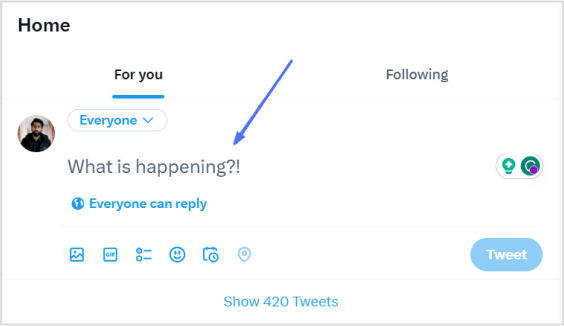
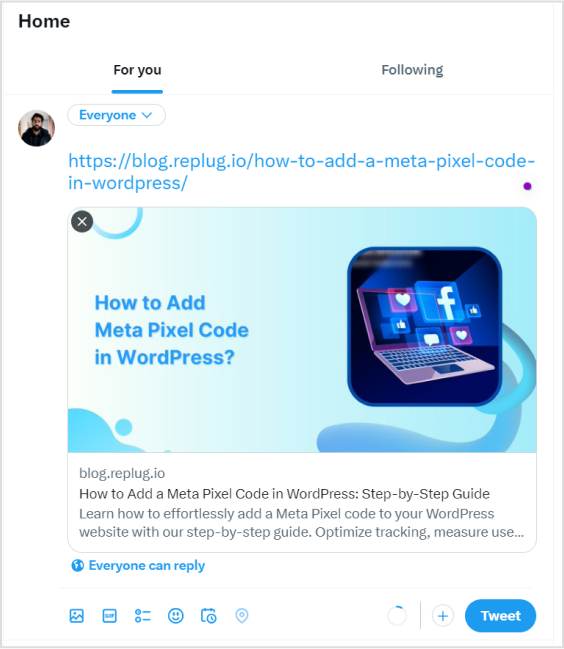
    Step 1: Log in to X and paste your link into the compose box at the top of your Home timeline. 

    how-to-tweet-a-link-without-url

    Also read: How to find my Twitter URL on mobile and desktop?

    Step 2: Twitter will automatically generate a preview of your pasted link. Hit the Tweet button and Twitter will share the link without showing the URL.

    how-to-tweet-a-link-without-url

    That’s it! You’ve your link tweeted without the URL!

    Important note: 

    • Not all URLs will trigger a preview; some links, such as specific file types or websites with restricted access, may still display the full URL in the tweet. In addition, you only have 280 characters to use in a tweet. In this situation, you could:
    • Use a URL shortener service 
    • Describe the link in your tweet.

    And guess what? We have a solution for your long X URL problem!

    Introducing Replug: Your solution for shortening X URLs

    With Replug, you can transform lengthy URLs into concise links for your tweets. Say goodbye to character count woes and hello to engaging, impactful content. 

    Let’s dive into the simple process of Replug’s URL shortening and bring your X sharing to the next level!

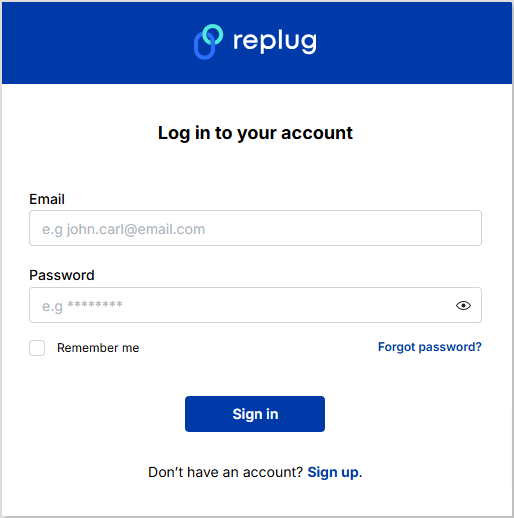
    Step 1: Sign in to Replug or create an account for free. 

    Replug-signup

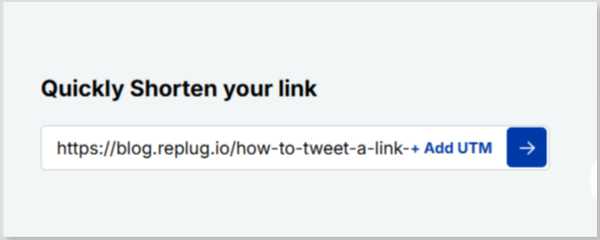
    Step 2: Next, you’ll be led to the main dashboard. To shorten your URL, enter the desired URL you want to track in the bar under “Quickly Shorten your link”:

    link-shortening

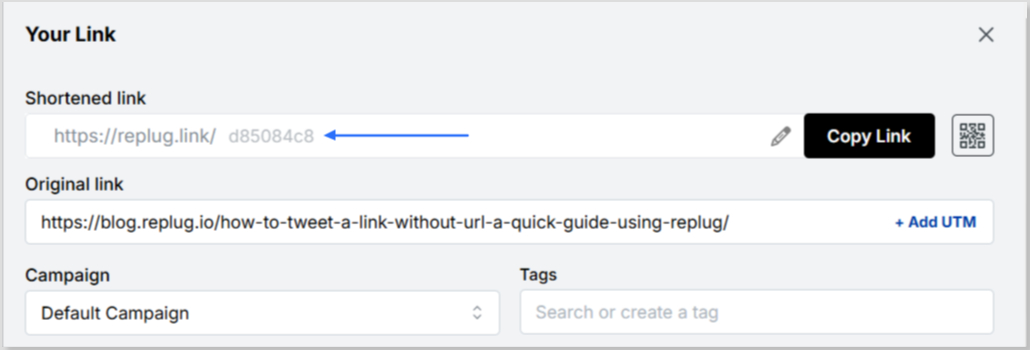
    Step 3: After entering your URL and clicking on the blue arrow button, Replug will automatically generate a shortened link that you can copy:

    short-link

    Step 4: You can also customize the URL with the slug of your choice by clicking on the pencil icon:

    custom-url
    custom-url

    Step 5: Simply save your URL and you’re done! Share away, whenever, wherever.

    save-short-link

    Replug Analytics: Measure link success

    Are your X links making the impact you desire? 

    With Replug Analytics, you can dive deep into your link performance and discover the key to boosting engagement, maximizing reach, and achieving your Twitter goals like never before!

    Replug’s Analytics feature empowers you to make data-driven decisions and revolutionize your link-sharing strategy.

    Learn more about the Replug analytics here!

    url-tracking-analytics

    FAQs about how to tweet a link without URL on X

    Can you embed an image in a tweet?

    Yes, you can embed an image in a tweet by directly uploading it to x (formerly Twitter). When composing your tweet, upload the image, and it will be hosted on X’s servers, appearing within the tweet’s content for all users to see.

    What are the benefits of using shortened links on Twitter?

    Shortened links offer cleaner tweets, free up character space, and encourage more user interactions.

    Are there any character limits for links on Twitter?

    Yes, the X character limit is 280, and sharing lengthy URLs can consume valuable space. A reliable short URL generator helps keep tweets concise and engaging.

  • 7 best URL shorteners available online in 2026 – Features, pricing, reviews & more

    7 best URL shorteners available online in 2026 – Features, pricing, reviews & more

    The URL shortener market is expanding and growing rapidly, valued at USD 360.4 million in 2024 and projected to exceed USD 1,020 million by 2033. 

    The rising demand for personalized user experiences has made URL shorteners a must-have tool for brands, agencies, and content creators. Once seen as a simple link shortening tool, it has now transformed into a full-fledged marketing platform.

    And here’s the exciting part. In 2026, link shorteners aren’t just about making complex and lengthy links shorter. They’ve leveled up into powerful tools loaded with features like advanced analytics, retargeting pixels, branded domains, QR codes, and even bio link pages. As a result, they are providing businesses more ways than ever to increase engagement and track performance.

    So, which ones are the good URL shorteners that are worth your time (and money)?

    We’ve rounded up the top URL shorteners of 2026, complete with features, pricing, and reviews, to help you find the ideal tool to supercharge your links.

    What are URL shorteners?

    URL shorteners are online tools or services that convert long, complex web addresses into shorter, more manageable links without changing the destination page. 

    These shortened URLs are easier to share on social media, emails, and other digital platforms where space is limited or readability matters. Popular examples include: Replug, Bitly, TinyURL, and Rebrandly. 

    Beyond just shortening links, modern URL shorteners often provide additional features such as click tracking, analytics, custom aliases, and branded domains. This allows businesses and individuals to monitor engagement and enhance their marketing strategies. 

    By simplifying lengthy URLs, these tools improve user experience, link aesthetics, and shareability across platforms.

    How does a URL shortener work?

    A URL shortener works by creating a unique, compact identifier that redirects users to the original long URL. 

    When a user inputs a long web address into a shortening service, the system stores that URL in its database and generates a short, unique code, usually a random string of letters and numbers. 

    This code is appended to the shortener’s domain (e.g., replug.io/abc123). When someone clicks the shortened link, the shortener’s server looks up the corresponding original URL and instantly redirects the user to that destination using an HTTP 301 or 302 redirect response. This process happens in milliseconds. 

    Advanced URL shorteners also track user interactions, such as click count, location, device type, and time of access, providing valuable insights for analytics and digital marketing optimization.

    See Also:How do URL shorteners work: A practical guide for digital marketers

    Best URL shorteners at a glance

    In recent years, URL-shortening tools have seen significant growth. After detailed research, we have identified the following 7 link shorteners as the best. 

    This is because they are comprehensive link management tools and offer ideal and optimal solutions in terms of pricing, features, user-friendliness, and customer reviews.

    Tool nameBest forPremium plan
    ReplugComplete link management (all-in-one)$99/month
    RebrandlyBranded links & customization$119/month
    BitlyPowerful & detailed analytics$300/month
    DubScalability & developer-friendliness$300/month
    BL.INKData-driven marketing$599/month
    TinyURLSimplicity & reliability$129/month
    Short.ioGeo-targeted campaigns & teams$148/month

    7 Best URL shorteners for marketing professionals [2026]

    Choosing the right URL shortener can significantly enhance your marketing efforts by improving link tracking, branding, and audience engagement. 

    Below, we’ve rounded up the top tools that offer powerful analytics, customization options, and seamless integration to supercharge your campaigns.

    Let’s start with Replug.

    1. Replug

    Replug.io - The ultimate link management tool

    The first on our list and the most top-notch custom URL shortener is Replug. It is an all-in-one link management tool for agencies and marketing pros with cost-effective pricing. 

    With this handy and easy link shortener tool, users can shorten branded URLs, do A/B testing, create link previews, set up link expiry, build bio-links, and much more.

    Some of the most significant features of this best all-around URL shortener are:

    • Hassle-free link management: Easily organize, edit, and monitor all your links from one intuitive dashboard.
    • Top-notch white-label solution: Customize links with your own domain and branding for a professional, trustworthy look.
    • Advanced link tracking: Get real-time insights into clicks, audience behavior, and campaign performance.
    • Smart retargeting pixels: Reconnect with users who’ve interacted with your links to boost conversions.
    • Custom call-to-action (CTA): Add personalized messages or buttons to links to drive more engagement.
    • Built-in QR code generator: Create shareable QR codes instantly for offline and online campaigns.
    • Link rotation feature: Distribute traffic across multiple URLs for A/B testing or marketing experiments.
    • Deep linking capabilities: Send users directly to specific pages or app sections for a seamless experience.
    • All-in-one bio-link tool: Create a single, branded page that houses all your important links for social media.

    Unlike its competitors, Replug also has a dedicated Chrome extension and a user-friendly web app. It also provides additional benefits such as link retargeting, link history, high-end customer support, tracking individual links, bulk link creation, and viewing related analytics on a dashboard.

    With Replug.io, you can even track the performance of specific marketing campaigns in particular locations. All in all, it’s the perfect fit for businesses of all sizes and industries.

    Pricing plans

    • Free: $0/month
    • Essentials: $19/month 
    • Scale: $39/month
    • Agency: $99/month
    ProsCons
    ✅ Advanced analytics for in-depth insights.❌ Certain analytics privacy concerns.
    ✅ Link retargeting options.
    ✅ Customizable short links.
    ✅ Complete link management solution.
    ✅ User-friendly interface.

    Customer Reviews

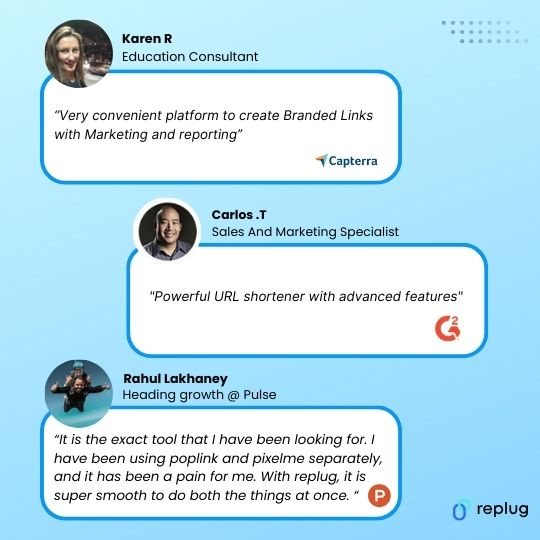
    Replug customer reviews
    Replug Branded Short Links CTA
    A complete link management solution
    for marketing professionals & agencies.
    Try Replug for free

    Also read: How to shorten a link using a URL shortener?

    2. Rebrandly

    Rebrandly

    Rebrandly is a state-of-the-art URL-shortening solution with a host of features. With this digital tool, you can craft custom, branded, and concise links that are memorable and easily shareable across various social media platforms.

    It is preferred for team collaboration and allows you to set up multiple workspaces and invite team members, making it an excellent choice for team-based URL-shortening needs. 

    Additionally, it offers advanced features such as link retargeting support, making it a well-rounded and versatile solution.

    Pricing plans

    • Free: $0/month
    • Essentials: $14/month
    • Professional: $39/month
    • Growth: $119/month
    ProsCons
    ✅ Focus on link branding and customization.❌ It may not have as strong analytics as others.
    ✅ A1 branded short links.❌ Price may be higher for branding features.
    ✅ Enhances brand visibility.
    ✅ Suitable for businesses of various sizes.

    Customer Reviews

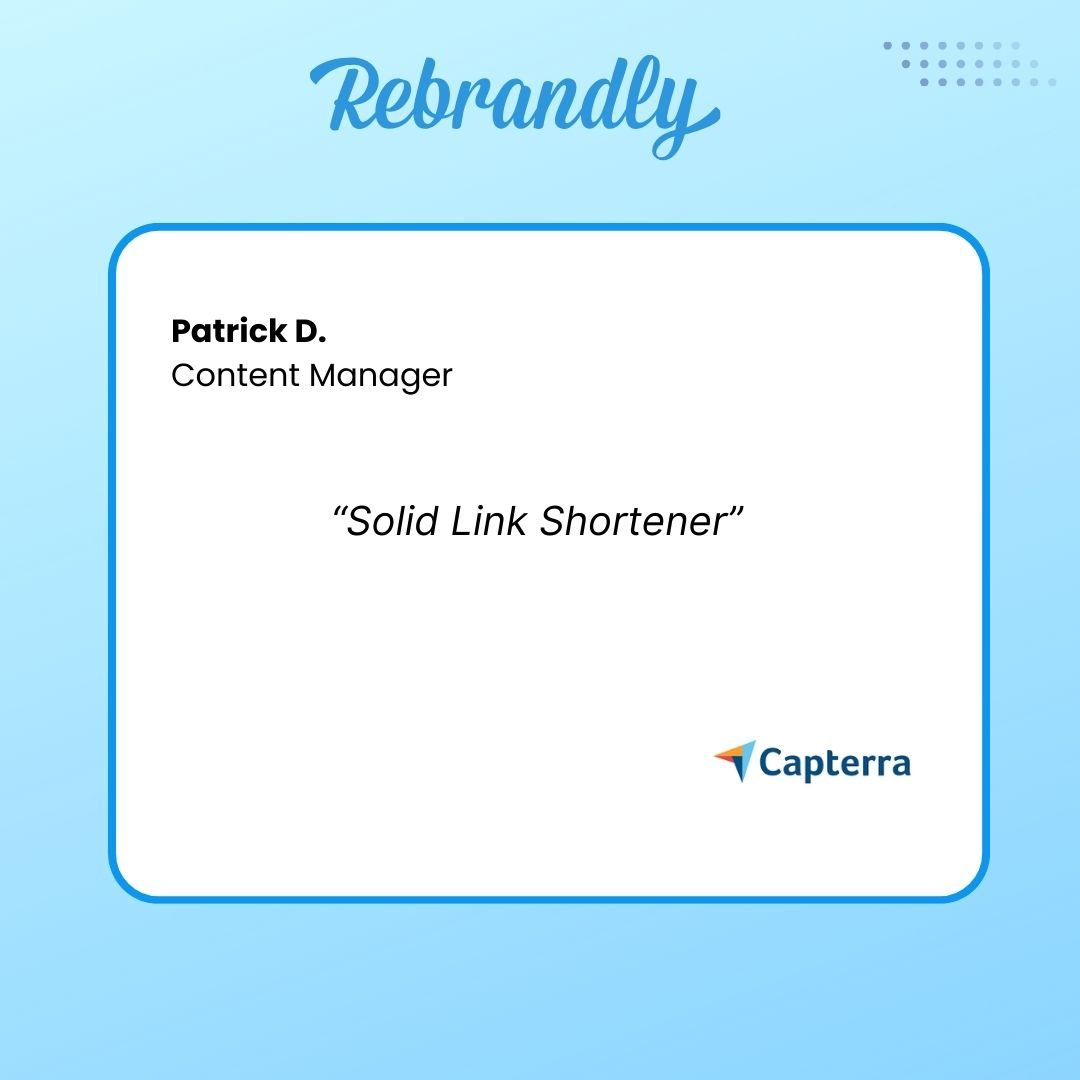
    Rebrandly customer reviews

    Related: 9 best alternatives of Rebrandly for agencies

    3. Bitly

    Bitly

    Bitly is a widely used tool to shorten URLs, making them more manageable. Alongside URL shortening, it includes a QR code generator, which is commonly preferred by social media influencers and businesses. 

    While these basic features are available for free, they come with Bitly branding on the shortened links.

    For users seeking more advanced capabilities, the paid version of Bitly offers additional features. This includes link retargeting, access to detailed link history, priority customer support, and a user-friendly dashboard to track and analyze link performance easily.

    Pricing plans

    • Free: $0/month 
    • Core: Annual plan only
    • Growth: $35/month
    • Premium: $300/month
    ProsCons
    ✅ Enhanced shareability for enterprise businesses.❌ Does not offer as many advanced features as some competitors.
    ✅ Detailed link analytics.❌ Limited customization options.
    ✅ Flexibility and redirection control.

    Customer Reviews

    Bitly customer reviews

    4. Dub

    Dub.co

    Dub is an open-source modern URL shortener built for flexibility, speed, and scalability. It’s especially popular among startups, developers, and businesses that want more control over their link management. 

    With Dub, you can shorten branded links, track analytics in real time, and much more.

    Pricing plans

    • Pro: $30/month
    • Business: $90/month
    • Advanced: $300/month
    • Enterprise: Custom
    ProsCons
    ✅ Advanced feature set.❌ Technical setup required for advanced use.
    ✅ Custom domains to brand your links for higher trust.❌ No free plan for users.

    5. BL.INK

    BL.INK

    BL.INK is an all-in-one platform that manages links, tracks them, and gauges their performance exceptionally. It shows how links perform, either through reports or by collaborating with tools like Google and Adobe. 

    Plus, it effortlessly combines with other systems using its open API. It is suitable for businesses of all sizes, ensuring security with top-notch features and customizable user access.

    Pricing plans

    • Expert+: $48/month
    • SMB: $99/month
    • Team: $299/month
    • Business: $599/month
    • Enterprise: Custom
    ProsCons
    ✅ Feature-rich URL-shortening tool.❌ A bit costly, compared to competitors.
    ✅ Pretty easy to use.❌ It can be a bit buggy at times.
    ✅ Suitable for data-driven marketing.

    Customer Reviews

    BL.INK customer reviews

    6. TinyURL

    TinyURL

    TinyURL is one of the oldest and most reliable URL shorteners, trusted for its simplicity and ease of use. While initially just a quick way to shorten long links, it now offers branded domains, link tracking, and link expiry, making it a solid option for personal and small business use. It is one of the best tools for getting free, fast, and anonymous short URLs.

    Pricing plans

    • Free: $0.00/month
    • Pro: $12.99/month
    • Bulk 100K: $129.00/month
    • Enterprise: Custom
    ProsCons
    ✅ Very beginner-friendly.❌ Website is a bit outdated.
    ✅ Detailed tracking and analytics.❌ Limited feature set in comparison to others.

    7. Short.io

    Short.io

    Short.io is a full-featured, best URL shortener free tool designed for businesses and marketing teams. It allows branded short links, advanced analytics, and team collaboration, along with geo-targeting and device-based redirects, making it perfect for global campaigns.

    Pricing plans

    • Free: $0/month
    • Hobby: $5/month
    • Pro: $18/month
    • Team: $48/month
    • Enterprise: $148/month
    ProsCons
    ✅ Excellent geo-targeting options.❌ Dependence on third-party services.
    ✅ Strong team collaboration features.❌ Lack of transparency.

    What is the best URL shortener service in 2026?

    The best URL shortening service is Replug, an all-rounder link management tool for shortening URLs, adding pixels for retargeting, embedding call-to-action, and building bio-links for social media.

    With white-label options, highly affordable pricing, and other rich features, Replug is the best platform for brand marketing and promotion using shortened, branded URLs.

    It stands out not only for its versatility but also for its focus on helping marketers build stronger connections through every shared link. Moreover, its intuitive dashboard, in-depth analytics, and automation features empower businesses to track performance, boost engagement, and maximize ROI effortlessly.

    In short, Replug is more than just a URL shortener. It’s a complete link management powerhouse designed to elevate brand visibility and marketing efficiency.

    Boost ROI with branded URLs - Replug dashboard showing performance metrics and branded URL creation
    Boost ROI with
    branded URLs!

    Enhance your marketing campaigns by creating shareable, trackable, and fully multi-purpose customizable branded URLs.

    Try Replug for free

    Other link shorteners available on the web

    We’ve highlighted some of the top and widely used URL shorteners above. However, if you’re seeking alternative options, consider the following ones listed below:

    Here’s the list:

    Sr.Other link shortener alternatives
    1.Sniply
    2.Hopp.co
    3.Cuttly
    4.Capsulink 
    5.ClickMeter
    6.Joturl
    7.T2M
    8.Linkly
    9.ow.ly
    10.Polr
    11.RocketLink
    12.Tiny.cc
    13.YOURLS
    14.URL shortener by Zapier
    15.Linkish

    Major reasons to use a URL shortener tool

    Using a URL shortener offers numerous advantages across different areas, making it a valuable asset for anyone.

    Here’s why it’s the ultimate advantage for your specific needs.

    • Tracks the number of impressions, clicks & conversions.
    • Condenses complex URLs into more recognizable ones, thus improving web traffic, CTR, and conversion rates.
    • Offers custom short links, boosts brand promotion, and enhances brand reach.
    • Short branded URLs generated by this tool take up less character space, making them ideal for SMS & social bios.
    • Branded links produced are easier to share and remember, which means enhanced brand recalls.
    • Improves user experience through smooth navigation.
    • Enrich SEO efforts by optimizing messy, long URLs with branded keywords.
    • Provides data in the form of reports, helping content creators and businesses make informed decisions.
    • Aids in rotating links to preferred link destinations on a specific date, time, or location.
    • Feature-rich URL shorteners provide multiple options for utilizing a short link. Create personalized bio landing pages, generate QR codes of any shortened link, A/B test performance of multiple URLs, etc.

    Read Also: Benefits of URL shorteners: Top reasons why one must use these tools

    Points to keep in mind when choosing a URL shortener

    Picking the right URL shortener can be tough with so many options out there, each with its own perks. To make the best choice, it’s important to consider the following points when checking out URL shorteners.

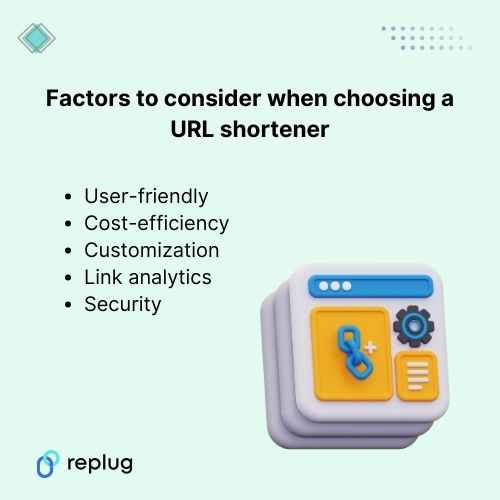
    Factors to consider when choosing a URL shortener

    1. User-friendly

    One of the primary considerations when selecting a URL shortener is its user interface. A streamlined interface that simplifies shortening links enhances the overall user experience.

    The interface design and functionality should prioritize ease of use, allowing users to generate shortened URLs quickly and effortlessly. 

    However, the integrations with other tools and platforms you’re already using, along with compatibility across devices and browsers, further add to its usability.

    2. Cost efficiency

    Pricing is also a key factor when picking a URL shortener tool. Be sure to evaluate the cost of each service and consider what features are most important to you when making your decision.

    While free options are fascinating, they might come with constraints that limit their utility. This makes premium versions with additional features more appealing for businesses or advanced users.

    Also read: Top 5 paid URL shorteners worth paying for in 2026

    3. Customization options

    Customization or personalized options are essential because they allow you to tailor your shortened URLs to your liking. Keep in mind that adding branded domains or specific keywords to your links reinforces brand identity. 

    However, this can be particularly useful if you’re using them for branding, specific campaigns, or content categories, as it allows you to make your links more recognizable and memorable.

    4. Link analytics

    Link analytics is a critical feature when deciding on a URL shortener. The ability to track clicks, conversions, and other key metrics can help you understand the performance of your campaigns and make data-driven decisions about your marketing efforts.

    5. Security

    Privacy and security are vital points that play a significant role when choosing a URL shortener. A reliable URL shortener should prioritize link safety and protection against malicious activities. 

    Encryption, expiration features, and measures to prevent link manipulation ensure the integrity and safety of shared links.

    Moreover, privacy considerations, such as the handling of user data and adherence to data protection regulations, are essential for individuals and businesses concerned about confidentiality.

    Conclusion

    In this blog, we covered some of the best URL shorteners for 2026, including tools like Bitly, Rebrandly, and TinyURL. While each has its strengths, if you’re looking for an all-in-one solution with advanced analytics, retargeting, customizable bio links, branded domains, and team collaboration, Replug stands out as the top choice.

    If you want a link shortener that goes beyond shortening and actually helps you boost traffic, track performance, and grow your business, Replug is the tool to bet on in 2026.

    Frequently asked questions

    Why should I use a URL shortener for my links?

    URL shorteners make lengthy URLs more concise and visually appealing. These links are easier to share, track, and manage across various platforms, especially in limited-character settings like social media posts.

    Are URL shorteners safe to use for sharing links?

    Most URL shorteners include security measures to protect links from malicious activities. They often use encryption and other security protocols to ensure the safety and integrity of shared links.

    How can I measure the performance of shortened links?

    URL shorteners typically provide analytics tools that track click-through rates, user engagement, geographic data, and conversion rates to assess the effectiveness of shortened links.

    Can I customize shortened URLs to match my brand?

    Yes, many URL shorteners allow customization, enabling users to create branded and memorable short links by using custom domains or adding specific keywords.

    What are the best URL shorteners to make money online?

    The top URL shorteners for earning money online in 2026 are:

    ShrinkMe.io, offering up to $22 per 1,000 views with instant PayPal payouts and global reach, 
    Linkvertise, for its ad-based monetization allowing earnings per click without minimum thresholds, and 
    Shrinkearn, which provides the highest CPM rates for publishers and quick payments via multiple methods.

    These platforms reward users for shortened link traffic, making them ideal for affiliate marketers and content creators.

    What are the best URL shorteners for Facebook?

    For Facebook, the best URL shorteners include:

    Replug for its seamless integration, detailed analytics on shares and clicks, and branded links that boost engagement. 
    Rebrandly for custom domains that align with your brand and avoid platform restrictions, and 
    PicSee, optimized for enhancing link previews and performance on Facebook feeds and groups.

    These tools ensure links aren’t flagged as spam while providing tracking for social campaigns.

    Which ones are the best URL shorteners for Instagram?

    The leading URL shorteners for Instagram in 2026 are:

    Replug, with built-in bio link tools for creating shoppable profiles and retargeting pixels for ads, 
    Bitly for precise tracking of story swipes and post clicks with custom branding, and 
    Short.io, offering dynamic routing to direct users based on location or device for personalized experiences.

    They enhance visibility in bios, stories, and reels without violating Instagram’s guidelines.

    What is the safest link shortener available at present?

    As of 2026, Replug.io stands out as the safest URL shortener, featuring enterprise-grade security with SSL encryption, GDPR/CCPA compliance, and real-time threat detection to block malicious redirects. 

    It also includes two-factor authentication and data privacy controls, making it reliable for businesses handling sensitive links. For ultimate control, self-hosted options like “Shlink” offer privacy through custom domains and no third-party data sharing.

    What makes the best URL shortener?

    The best URL shortener excels with advanced analytics for tracking engagement and conversions, custom domain support for branding and trust-building, and seamless integrations with tools like Zapier or Hootsuite. 

    It should also prioritize security features like encryption and threat protection, high uptime for reliability, and additional perks such as QR codes or retargeting to maximize marketing impact.

  • How to add multiple links in one link: 5 easy methods explained!

    How to add multiple links in one link: 5 easy methods explained!

    How much easier would hitting big growth goals feel if one simple link could guide people to every offer, video, and signup page at once?

    Many brands push more content and ads while ignoring this quiet traffic leak. Clicks slip away because followers cannot find what they actually came for.

    If you have ever searched for how to add multiple links in one link, you already know this pain.

    Are you tired of swapping the single link in your Instagram or TikTok bio every time you launch something new? Long strings of URLs stuffed into captions make posts look messy and hard to follow.

    The good news is that there is a smarter way!

    By creating one master link that points to a clean landing page, you can send people to all your important links with a single tap.

    In this guide, you will see five clear methods, from beginner-friendly options like Google Docs and Canva to professional link-in-bio tools with analytics and customization, so you can pick the right setup for your goals.

    So, without any further ado, let’s get started!

    What does it mean to add multiple links in one link?

    Adding “multiple links in one link” means you share a single URL that points to a landing page containing many different destinations.

    Instead of posting separate URLs for a website, shop, YouTube channel, and lead magnet, you give people one gateway link. When someone taps this master link, they land on a simple page that lists buttons or cards for every place you want to send them.

    Add multiple links in one link

    This approach is often called a link-in-bio, link hub, or link aggregation. It is very different from dropping several URLs in a caption, which can look cluttered and hard to click, especially on mobile.

    A well-built bio link page is mobile-first, fast to scan, and easy to tap with a thumb. For platforms that limit bios to one clickable link, this is the cleanest way to turn that single spot into a full link menu.

    For example, your master link might sit in your Instagram bio and open a page that lists your latest video, online store, newsletter, and contact form in one place.

    Why you need to consolidate multiple links into one

    Most social platforms allow you to add only one clickable link to your profile. Instagram and TikTok bios allow a single website field, and even on X or LinkedIn, character limits make long lists of URLs painful. When you need to promote many things at once, that rule blocks traffic and slows growth.

    A single master link creates a central hub for your entire online presence. It looks professional, keeps your branding consistent, and prevents captions from becoming walls of links. Visitors see a focused set of clear buttons, which makes it easier to move from curious scrolling to clicking to action.

    Consolidate multiple links

    There is also a strong performance benefit. With the right multi-link tool, you can:

    • Track clicks on each button and see what people care about most
    • Update every destination from one dashboard without editing bios all the time
    • Test new offers faster and keep only the ones that perform
    • Support monetization through affiliate links, product pages, and email opt-ins
    • Use QR codes and branded URLs across both online and offline channels

    Over time, those improvements give you better data and smoother workflows, instead of guessing which links matter.

    Various methods to add multiple links in one link

    There is more than one way to group many URLs together under a single click. Some options are quick workarounds using tools you already know, while others are built specifically for marketers and creators who want tracking and branding.

    The methods below move from link-in-bio tools to practical hacks with Google Drive, Google Docs, Canva, and advanced URL shorteners.

    Method #01: Using a link-in-bio tool for social media/general use

    Using a reliable link-in-biotool is the fastest, most flexible answer when you want one link for many URLs on different social platforms.

    Replug's bio link feature

    1. Choose a service or tool

    Start with a multi-link tool that goes beyond basic link lists. Replug.iostands out by combining bio link pages, branded short links, deep links, and analytics in one place. You can visit the website and create an account in a few minutes.

    Compared with simple bio link generators available online, Replug also offers A/B testing, link rotator feature, and retargeting pixels, which matter when campaigns scale.

    2. Create your landing page

    Inside your dashboard, set up a new bio link page that will serve as your master link hub. Add buttons for everything you want to promote, such as social profiles, shop categories, recent videos, affiliate offers, and email signup forms.

    Each item simply needs a clear title and the destination URL. Within a short time, you have one page that turns a single click into many paths.

    3. Customize

    Design matters when followers move from your profile to your bio link page. Replug lets you match your brand colors, upload a logo or profile image, and pick themes and button styles that feel like an extension of your content.

    You can group links under simple headings, highlight time-limited links for launches, and add custom calls to action that appear on top of your shared content to drive more signups or sales.

    4. Share

    Once your bio link page looks right, Replug gives you one short URL that works everywhere. Add it to your Instagram, TikTok, YouTube, and X bios, and include it in email signatures or podcast descriptions.

    You can also generate a QR code from inside Replug, so people at live events, on print flyers, or from product packaging can reach the same multi-link page with a quick scan. From that point on, you update links only in your Replug dashboard, and the master link remains the same.

    Method #02: Using a Google Drive add-on for file collections & sharing

    If your main objective is to share collections of files, such as media kits, client folders, or course materials, Google Drive can serve as a simple multi-link hub.

    By using an add-on or extension, you can turn several Drive items into one shareable entry point. This keeps file sharing tidy without sending long lists of separate links.

    Google Drive Direct Download Link Generator

    1. Use an add-on or extension

    Look for a Google Workspace add-on that lets you combine multiple Drive files or folders into a single share page. These tools often read the contents of a specific folder and then produce a simple index page that lists each item.

    You can decide which files or subfolders to include and which to hide. This keeps sensitive content private while still giving clients or team members one clean link.

    2. Generate links

    Once the add-on (Google Drive Direct Download Link Generator) knows which files to include, you can generate a master URL that people can visit in any browser. When they open it, they will see a list of all the included Drive items, each with a clear name that matches your file titles.

    This works well for asset packs, onboarding documents, or lesson libraries where people need everything in one place. You only need to update the underlying folder when you add or remove content.

    3. Shorten (optional)

    The auto-generated link from Google Drive or an add-on can be long and hard to remember. But don’t worry, you can easily shorten a link and turn it into a branded link that is easy to share and track with Replug.

    This gives you analytics for every click on that shared Drive hub, lets you add retargeting pixels, and makes it simple to swap in a new target if you reorganize your folders later without changing the short link.

    Method #03: Using online URL shorteners

    Online tools, including both free and paid URL shorteners, can also help when you want to add or put multiple links into one link, especially for campaigns and testing.

    Basic shorteners only replace a long URL with a shorter one, but advanced platforms such as Replug go further with even more advanced features.

    Best online URL shorteners

    When building your link-in-bio page, using a trustworthy link shortener tool lets you create branded, memorable short links that are easier to share and track.

    Custom short links not only look more professional but also give you valuable analytics on which links your audience clicks most. This data helps you optimize your link-in-bio strategy and understand what content resonates with your followers.

    Method #04: Using Google Docs

    Google Docs can act as a simple, no-design multi-link page when you need something fast. It is not as polished as a dedicated bio link page, but it works well for internal lists, quick resource sheets, or temporary campaigns.

    Google Docs

    1. Create & format your document

    Open a new Google Doc and start with a short heading that explains what the document covers, such as weekly promos or client resources. Under that, list the items you want to share in a clear order, for example, newest at the top.

    Turn each line of text into a hyperlink by highlighting it, using the link option (🔗) in the toolbar, and pasting your URL. You can use bold text or simple dividers to group links into sections.

    2. Set sharing permissions

    Once your document looks organized, click the “Share” button and adjust the settings. For broad audiences, choose the option that lets anyone with the link view the document without signing in.

    For private or paid content, restrict access to specific email addresses or domains so only approved people can open it. Always double-check permissions to avoid exposing internal files by mistake.

    3. Share or shorten your Doc link

    Copy the shareable Google Docs URL and test it in a private browser window to confirm that it loads as a read-only page.

    If the link looks too long and messy, shorten it to a branded URL that reflects your brand name. This makes your simple Doc feel more professional, lets you track how many people click it, and allows you to improve the title and preview that appear when you post it on social media.

    Finally, share this link wherever you want!

    Method #05: Using Canva

    Canva is a smart choice that lets you build a visual page with your branding, images, and buttons, then share it via a single URL. This is perfect for creators and small brands that care a lot about visuals.

    Canva

    1. Design a one-page layout

    In Canva, start with a blank design sized for a phone screen or pick one of the simple website templates. Add your logo, a short intro, and a clear headline that tells visitors what they can expect to find.

    Then drop in buttons or text boxes for each place you want to send people, such as Shop, Newsletter, Latest Video, and Contact. Keep the layout clean with enough white space so each tap target is easy to hit on mobile.

    2. Add hyperlinks to elements

    Select each button or text block and use Canva’s link option to attach the correct URL. Test carefully by clicking through in Canva’s preview so you know every button goes to the right destination.

    You can use colors and size to highlight the most important link, such as a current launch or lead magnet. If your brand uses a certain palette or font, apply those styles so this page matches your existing content.

    3. Publish & share your Canva link

    When your design is ready, you will receive a single URL using Canva’s share options that loads your design in a browser like a landing page.

    Now your Canva design works just like a bio link page, and you can place or share that one link wherever your audience meets you.

    Read also: How to add multiple links to Instagram bio using Replug?

    Wrapping up

    Social networks give you precious little space to share links, which makes it hard to promote more than one thing at a time.

    Learning how to add multiple links in one link turns that tight limit into a central hub that sends people to every profile, product, and piece of content that matters. Instead of messy captions full of URLs, you offer a single clean tap that feels professional and easy to use.

    Across this guide, you saw five ways to do that, from full-featured link-in-bio tools to handy workarounds with Google Drive, Google Docs, and Canva.

    The next move is simple!

    Decide which method fits your current stage, then build your first multi-link page and share the master URL across your profiles.

    If you want professional features and room to grow, start with Replug today. Set up your bio link page, and watch how much smoother your link sharing becomes. One well-planned link can support every launch, partnership, and piece of content you create from now on.

    Boost ROI with branded URLs - Replug dashboard showing performance metrics and branded URL creation

    Go beyond generic link pages!

    Create custom bio links that truly fit your brand

    With Replug, you can create bio links that are unique, engaging, and built to convert.

    Start free trial

    Frequently asked questions

    How do I put multiple links in one link?

    The most practical way is to create a small landing page that lists all your important URLs, then share a single link to that page. A modern link-in-bio generator, such as Replug, makes this quite simple.

    You just add buttons for each destination and receive a single master URL. You can then place that master link in your social bios, emails, or QR codes, etc.

    How to add multiple links in one link on iPhone?

    On an iPhone, you follow almost the same steps as on a desktop, just on a smaller screen. Open Safari or your browser of choice, sign up for a link-in-bio tool, and create your bio link page with titles and URLs. Once it looks right, copy the master link from your dashboard.

    Then open Instagram, TikTok, or another social app, edit your profile, and paste the master link into the website field so every mobile visitor reaches your full list of links, hassle-free.

    How to put multiple links in one Excel cell?

    Excel supports only one standard hyperlink per cell, so you cannot include multiple clickable URLs in a single cell using standard methods. As a workaround, you can place several short labels in nearby cells, each with its own hyperlink, and style them so they look like a group.

    Another way is to add a single link in a cell, then press Ctrl + Enter or Alt + Enter. This lets you add another URL or link, and, following the same process, you can add as many links as you want in a single cell. But this is too frustrating if you have a very long list of links at hand.

    One more option is to insert shapes or text boxes on top of a cell, then assign each shape its own link. For most people, it is easier to move the link list to a small web page or document and then share one master link to that page.

    What is the best tool to add multiple links in one link?

    The best tool depends on your goals, but for most marketers, creators, and agencies, Replug is a strong choice. It covers both sides of the problem, giving you bio link pages for visual link hubs and powerful branded short links for campaigns.

    Can I create a multi-link page for free?

    Yes, you can build a multi-link page without spending much, and in some cases with no direct cost. Simple options include using Google Docs or Google Sites to list your URLs, then sharing that single link.

    Many bio link tools also offer entry-level plans that let you build one basic page with a limited set of links and features. However, as your needs grow and you want extras such as branded short links, A/B testing, and advanced analytics, paid tools become a solid investment.

    Can you put multiple links in one LinkedIn post?

    LinkedIn lets you paste several URLs into a single post, and they will be clickable once the post is published. That said, too many separate links can look cluttered and may distract people from your main call to action.

    A cleaner approach is to use a single master link that leads to a well-organized bio link page, and explain in the post that all resources are available on that page. This keeps your post focused while still giving followers access to everything you want to share.

  • How do I get my Instagram link on Desktop and Mobile?

    How do I get my Instagram link on Desktop and Mobile?

    Social networks like Instagram are mobile-friendly. However, because Instagram is mobile-first, tracking down your Instagram URL can sometimes be tricky because it works differently than a traditional website.

    This guide will show you how to quickly grab URLs on both mobile and computer devices, including your Instagram links, in just a few simple steps.

    Let’s get searching!

    How to get an Instagram link on a computer device:

    Step 1: Go to Instagram and type in your login credentials.

    Login to Instagram

    Step 2: Click on your username at the top-right of the screen.

    click username

    Alternatively, you can click the profile icon in the left menu.

    click profile

    Step 3: Your Instagram link will appear in the search bar. Copy the link, and you’ll have a ready-to-use Instagram link.

    copy url

    How to get an Instagram link on a mobile device:

    Step 1: Open the Instagram app on your iPhone or Android and log in. 

    Step 2: Tap on your profile in the bottom right-hand corner of the menu.

    tap profile

    Step 3: You will find your Instagram username at the top of your profile page. 

    Note: Instagram URLs consist of two components: Instagram’s website address and your Instagram username. The URL format is generally instagram.com/username. So, the Instagram username for the case is aarsal.k. To get this link, just type Instagram.com/aarsal.k. You can do the same for your iPhone or Android device.

    Your Instagram link is now ready to go!

    note username


    Read also: How to get an image URL: Get the URL of a photo on different devices & platforms within seconds!

    How to change Instagram URL using Replug?

    You can easily change your Instagram URL in seconds with Replug.io by following the next mentioned simple and easy steps. 

    Then simply paste that link into this top-notch short URL shortener to get a tidy, share-friendly version ready for your social bio.

    Step 1: Follow the above steps to get your Instagram link on mobile or desktop.

    Step 2: Go to any browser on your desktop and type app.replug.io. You will be redirected to the login page, where you can sign in or create an account if you don’t already have one.

    Step 3: You will see the Replug dashboard once you are signed in.

    Step 4: Paste or type your Instagram URL in the box under “Quick Shorten your link” to customize it:

     Step 5: Now you have your updated URL, which will look like the one below in the picture. 

    You can customize the URL slug to let people know exactly what you’re sharing. Click the edit button at the end of the URL bar and type the URL slug you want.

    For example:

    Now save your shortened link and get sharing! It’s that easy.

    Note: Find your newly created Instagram link by going to Main Dashboard > Manage > Replug links. 

    Related topics:

    How to see who clicks on your Instagram link?

    How to Rename Links Using Replug: 5 Simple Steps

  • How to create a temporary URL: Set up link expiration

    How to create a temporary URL: Set up link expiration

    Ever needed to share content with a time limit? We get it—managing when and how long something is accessible can be tricky. But don’t worry! A temporary URL is all that you’ll need to resolve this problem. These genius links let you set an expiration time or click limits, automatically redirecting users to a new destination once the link is no longer relevant.

    In this guide, we’ll explain how to create temporary URLs in simple, easy-to-follow steps. So, let’s get started!

    What is a temporary URL?

    A temporary URL, also known as an expiring link, is a web link that is only valid for a limited period. It allows you to share content such as documents, files, or web pages with others while ensuring that access to that content expires after a specific duration. 

    This temporary access helps maintain control over who can view the content and for how long, making it particularly useful for securely sharing sensitive or time-sensitive information. Once the expiration has passed, the URL becomes invalid, preventing further access to the shared content. 

    Temporary URLs are commonly used in various scenarios, including sharing confidential documents, distributing promotional materials for a limited time, and granting temporary access to private web pages or resources.

    How do you create a temporary URL with Replug?

    Replug simplifies link management, allowing you to quickly create short links and track their performance. With powerful features like real-time analytics and optimized link performance, Replug helps you streamline your marketing strategy, boost engagement, and drive better results—all in one seamless platform.

    Replug.io provides extensive features like password protection, expiring links, and custom link previews. Additionally, it allows you to personalize favicons, establish traffic routing rules, conduct A/B testing, facilitate deep linking, and much more, enabling you to optimize and customize your links precisely.

    Replug Branded Short Links CTA
    A complete link management solution
    for marketing professionals & agencies.
    Try Replug for free

    Here’s how to create a temporary URL in Replug

    Step 1: Sign in to Replug or create a free account.

    Replug-login

    Step 2: Once you’ve signed in, enter the link you want to shorten under the “Quickly Shorten your link” box:

    Link-shortening

    Step 3: Simply toggle the “Link Expiry” button and set your desired expiry date for the link.

    Link-expiry

    Step 4 (Optional): Set up password protection to add an extra layer of security. This is useful when you want only the intended recipients to have access to your content. It also reduces the risk of unauthorized access to links.

    Password-protection

    Step 5: Save the shortened link. Your temporary link will be live and ready to share!

    Link tracking and analytics with Replug

    Utilize Replug’s robust tracking and analytics features to gain valuable insights into the performance of your shortened URLs. Here’s how:

    • Track metrics such as click-through rates, geographic location of clicks, and referral sources to gain insights into audience engagement.
    • Analyze data trends over time to refine your marketing strategies and optimize link-sharing efforts.
    • Access detailed reports and metrics directly from the Replug dashboard to inform decision-making and measure campaign effectiveness.

    By utilizing Replug’s tracking and analytics features, you can better understand your audience, refine your marketing strategies, and drive better business results.

    Replug Branded Short Links CTA
    A complete link management solution
    for marketing professionals & agencies.
    Try Replug for free

    FAQs

    How do I create a temporary URL?

    You can use a URL-shortening service like Replug to create a temporary URL. Simply sign in or create an account, paste the long URL you want to shorten, set the expiry date and time, customize the link if desired, and save it.

    How long will the temporary URL be active?

    The duration of a temporary URL’s validity depends on the settings you choose during the creation process. You can set the link to expire after hours, days, weeks, or even months.

    Can I customize the temporary URL?

    Yes! Many URL shortening services, including Replug, allow you to customize the temporary URL to reflect your brand or campaign. You can often add a custom URL slug or edit the link to make it more memorable and relevant to your audience.

    What happens when the temporary URL expires?

    Once the specified expiry date and time are reached, the temporary URL will no longer be accessible. Users attempting to access the link after expiration will typically be redirected to a designated landing page or receive an error message.

    Can I track the performance of my temporary URL?

    Yes, most URL shortening services offer tracking and analytics features that allow you to monitor the performance of your temporary URL. You can track metrics such as click-through rates, geographic location of clicks, and referral sources to gain insights into audience engagement.