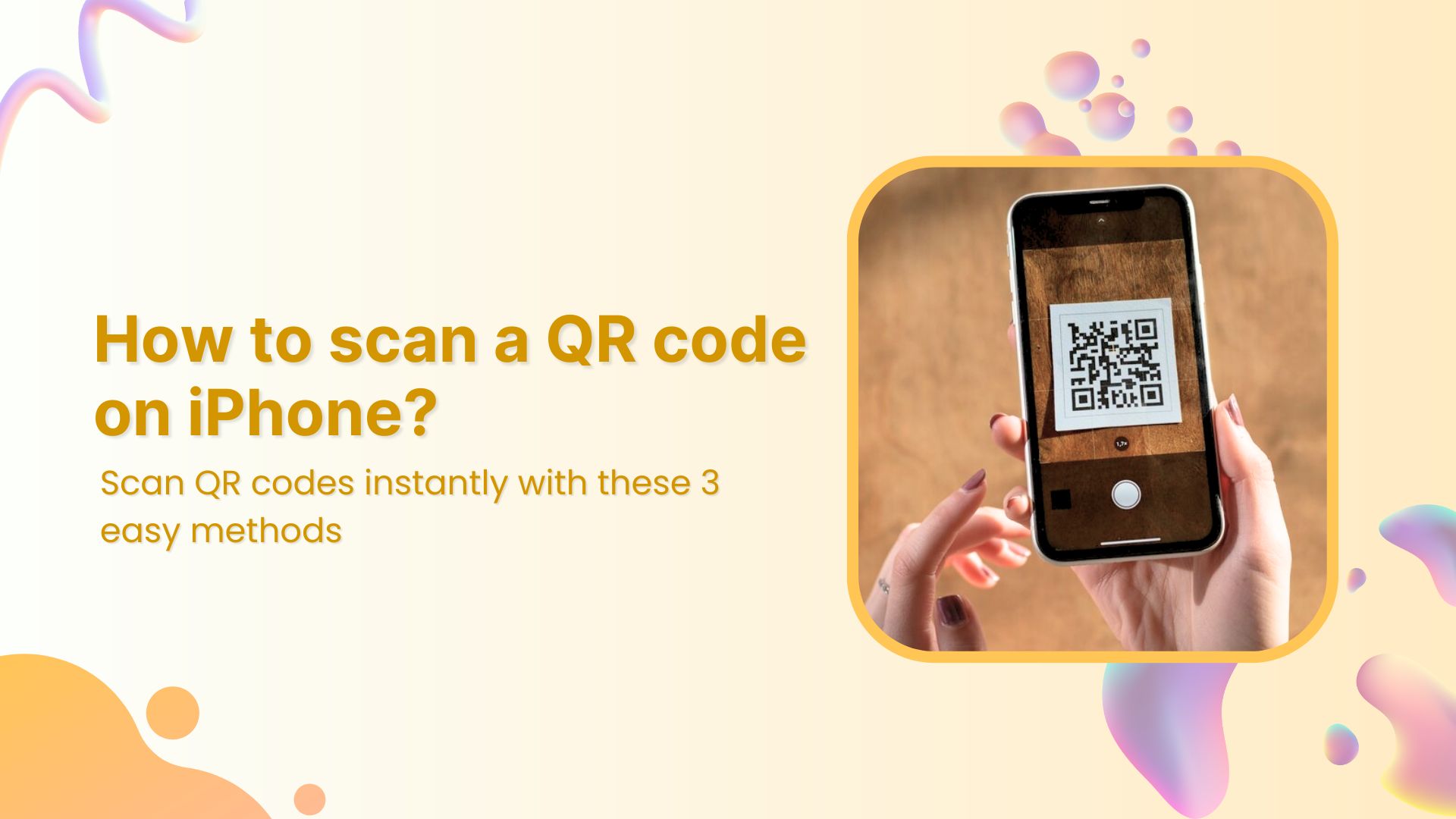
QR codes make accessing links, menus, and information effortless. Whether you’re on the go or browsing a menu, QR codes simplify the process. If you’re using an Apple device, scanning a QR code on your iPhone is a breeze, thanks to the built-in scanner in the Camera app.
Below, we’ve outlined three simple methods to scan a QR code using your iPhone’s camera.
3 methods to scan a QR code on an iPhone
Method 1: Using the Camera app to scan QR Codes
Apple has made QR scanning a breeze. Just follow these steps:
Open the Camera app.
Point your camera at the QR code, ensuring it’s within the frame.
Hold still for a moment—your device will recognize the code and display a notification banner at the top.
Tap the banner to open the link or perform the action associated with the QR code.
Note: If your camera doesn’t pick up the code immediately, try adjusting the distance or ensuring there’s good lighting.
Activating QR Code scanning in settings
In rare cases, QR scanning might not work right away. If that happens, make sure the feature is turned on:
Open the Settings app.
Scroll down and select Camera.
Toggle Scan QR Codes on.
Want to test it out? Try scanning this QR code we generated using Replug!
Replug not only helps generate QR codes but also tracks clicks and engagement, making it an excellent free link shortener online for businesses and marketers.
Method 2: Using the QR Scanner in the Control Center
For quicker access, you can add a QR scanner shortcut to your Control Center:
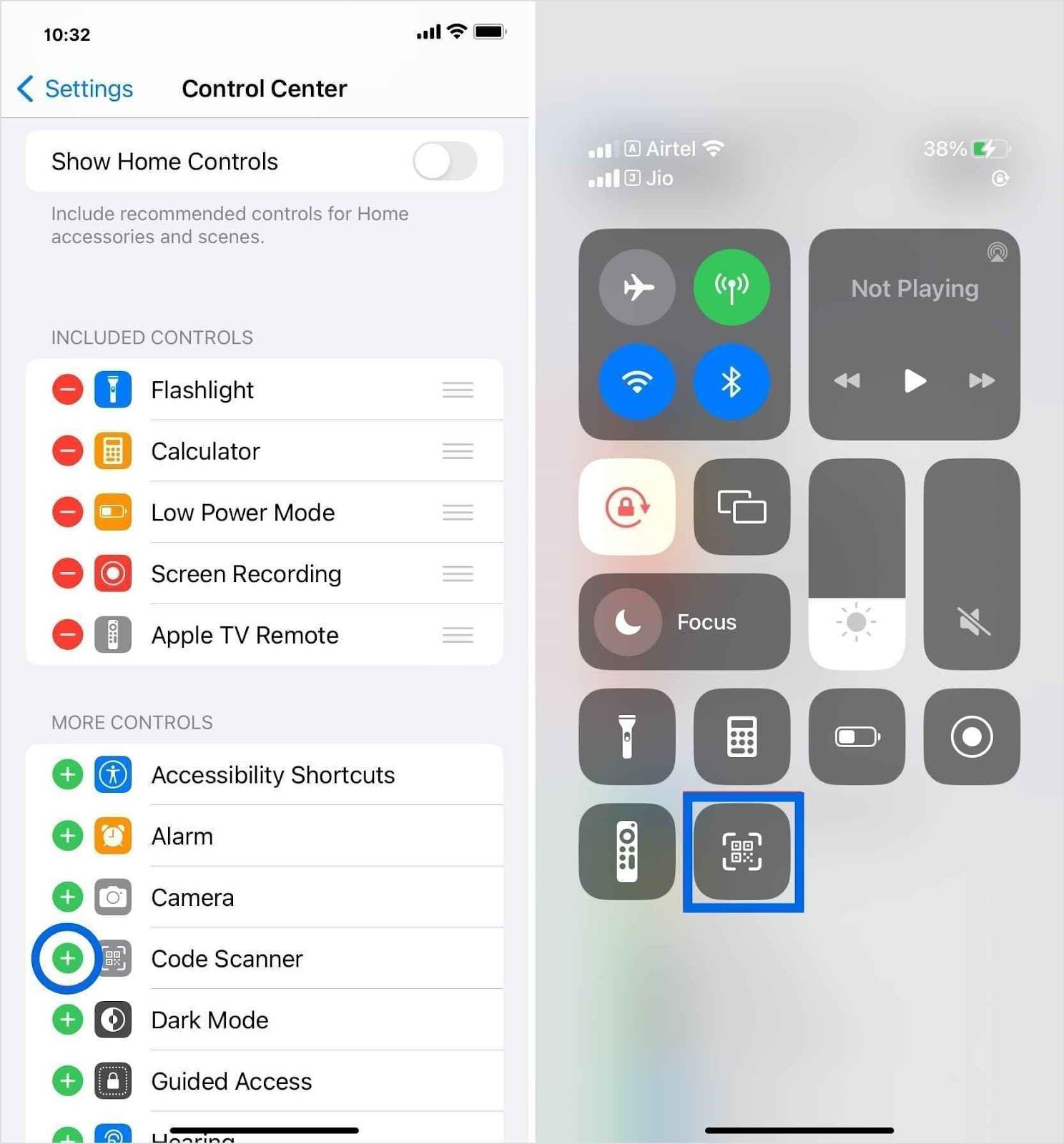
Go to Settings > Control Center.
Tap the green plus icon next to the Code Scanner.
Open Control Center by swiping down from the top-right corner (on newer iOS models) or up from the bottom (on older models).
Tap the QR scanner icon and point your camera at the code.
Method 3: Scanning QR Codes from photos or screenshots
Received a QR code in a message or saved an image with one? No problem! Here’s how you can scan it directly from your gallery:
Open the Photos app and select the image with the QR code.
Touch and hold the QR code on your screen.
A pop-up will appear with the option to open the link or take action.
Note: If your device doesn’t support QR scanning through the camera, you can always download a third-party QR scanner app from the App Store.
Similarly, you can explore other productivity tools, like Call Recorder for iPhone, to safely record and manage your phone conversation.
Scan, track, and optimize Your QR Codes with Replug
QR codes are more than just a way to share links—they’re a powerful marketing tool when used strategically. With Replug’s custom QR code generator, you can go beyond basic QR generation and track every scan, analyze performance, and optimize your campaigns for better results.
Track every scan in real-time
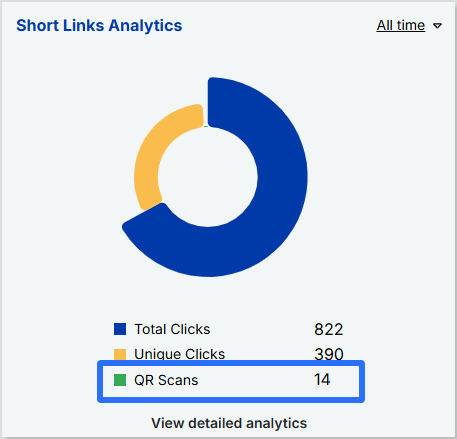
Monitor QR scans, unique clicks, and total interactions.
Get insights into scan locations, devices, and referral sources.
View QR graph charts to analyze trends and optimize performance.
Optimize for maximum impact
Create dynamic QR codes that allow you to update the destination URL without reprinting the code.
Add UTM parameters to track campaign effectiveness across different marketing channels.
Download your QR codes in multiple formats (PNG, SVG) for high-quality use.
Final thoughts
Scanning QR codes on an iPhone is incredibly easy, whether through the Camera app, Control Center, or even from saved images. For businesses and marketers, using tools like Replug can take QR code functionality to the next level by providing tracking, analytics, and customization options.
FAQs for how to scan a QR code on your iPhone
How can you scan a QR code on an iPhone without a camera?
If your camera isn’t working or you prefer an alternative method, you can use the Code Scanner in the Control Center or a third-party QR scanner to scan codes directly from images or files.
How do I scan a QR code inside my phone without using another phone?
You can scan a QR code from an image stored on your iPhone by using the Live Text feature in the Photos app or a third-party QR scanning app that allows you to upload and scan codes effortlessly.
Can I customize my QR code’s appearance?
Yes! While iPhones can scan basic QR codes, tools like Replug let you customize colors, add logos, and even create branded QR codes to match your business identity.
How to scan QR code iPhone from a photo?
1. Open the Photos app and select the image containing the QR code. 2. Tap and hold the QR code until a pop-up appears. 3. Select the option to open the link or take action.
How to scan a QR code on your screen?
If you come across a QR code while browsing online, take a screenshot and follow the steps to scan a QR code.
How can I track the number of times my QR code has been scanned?
Apple’s default scanner doesn’t track scans, but Replug lets you monitor scan activity, view analytics, and measure engagement in real-time.
Managing all your links, such as your blog, social media profiles, online store, or YouTube channel, can quickly turn into a game of “Where’s that link again?”. It’s easy for things to get scattered, and for your audience, tracking down what they’re looking for can be a bit of a hassle. That’s where a bio site comes in handy.
Instead of sharing a bunch of different links, you can bring everything together in one place, making it super easy for your audience to find exactly what they need with just one click.
In this guide, we’ll walk you through what a bio site is and how to create one using Replug.io in just 6 easy steps.
What is a bio site?
A bio site (also known as a microsite or landing page) is essentially a one-page website where you can collect all your important links and share them in a way that’s clean and easy to navigate.
It’s basically like your online hub where visitors can click on one link and instantly access your blog, social media accounts, e-commerce store, latest YouTube videos, or even your favorite Spotify playlist. You can also view some bio link examples to get a better understanding of how they work. It’s a quick, convenient way to share everything without bombarding your audience with a long list of URLs.
Now, you might be thinking, “Can’t I just add my website link to my social bio?” Sure, but a bio site offers way more flexibility. There are countless benefits of bio links, but to name a few, here’s why you need a bio site:
Saves time: No need to constantly update your link in bio. Get a know-how of what is link in bio in detail. Then, go on and just update your bio site, and everything stays fresh with a single link.
Boosts engagement: An organized bio site makes it easier for followers to find what they’re interested in, increasing their engagement with your content.
Branding control: Customize your bio site with your colors, fonts, and buttons so it reflects your personal style or brand effortlessly.
Great for marketing: Use call-to-action buttons, embed videos, and track link performance, all in one place to improve your marketing strategy.
Perfect for social media: A bio site solves the one-link limit on platforms like Instagram, TikTok, and X (Twitter), giving you room to share everything.
Better user experience: Your followers won’t have to search for your content. Everything they need is organized in one simple URL.
How to create a bio site in 6 easy steps using Replug
Setting up a bio site is easier than you think, and Replug makes it even simpler. Just follow these steps through our link in bio builder, and you’ll have a fully functional bio site in minutes.
1. Choose the right bio site app
There are plenty of bio site apps out there, but Replug stands out because it’s easy to use, allows for advanced bio site customization, and is packed with powerful analytics. Whether you want a minimal look or a fully branded page, Replug gives you the tools to make it happen.
2. Sign in or create a new account
Head over to Replug and create your account. If you already have an account, you can just log in to your account and get started with the bio site creation.
3. Go to “Bio Links”
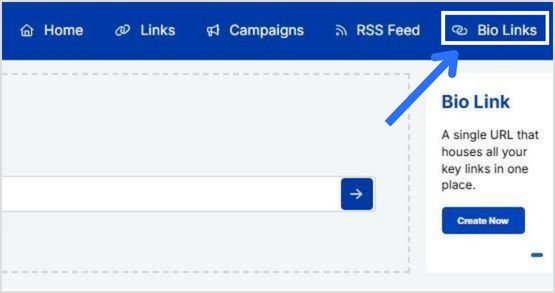
Once you’re logged in, click “bio links” on your dashboard.
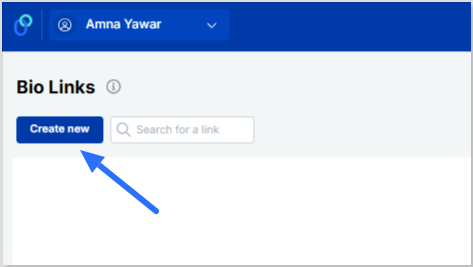
From there, simply click “Create new” to get started.
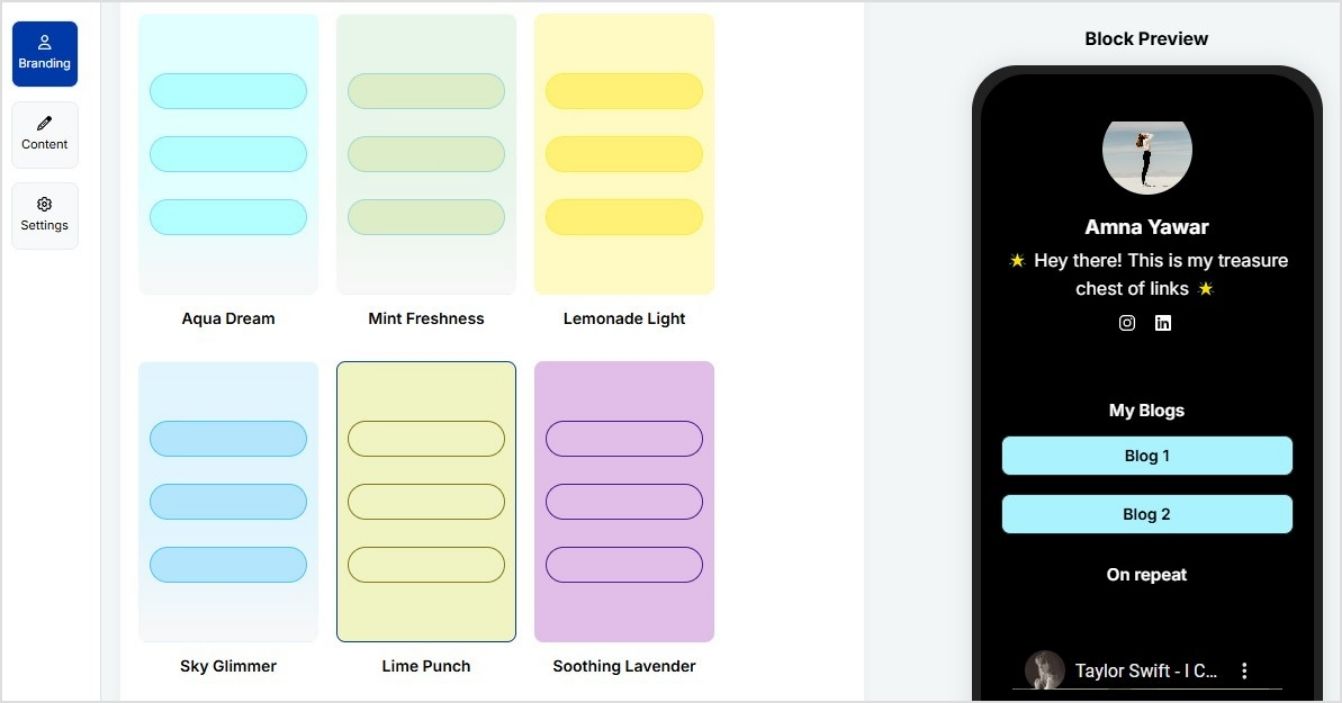
4. Pick a template or customize your design
You can now select from a variety of templates, adjust your color scheme, and even add your logo.
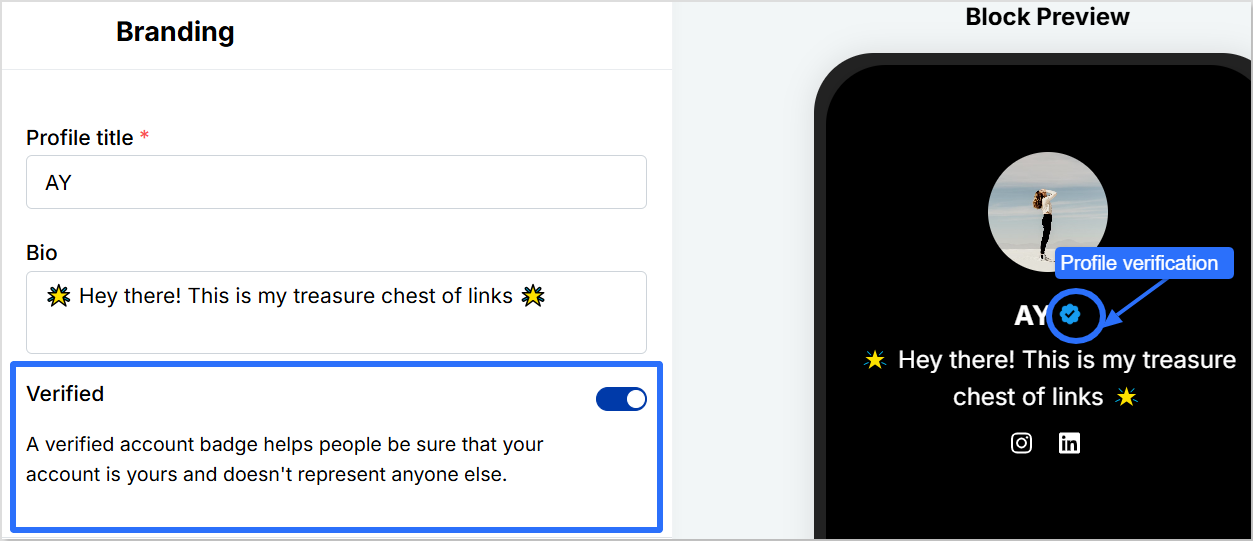
Pro tip: Add a verification button to your profile using Replug to increase bio link clicks and gain trust.
5. Optimize for engagement and SEO
Here’s where you can make your bio site really work for you:
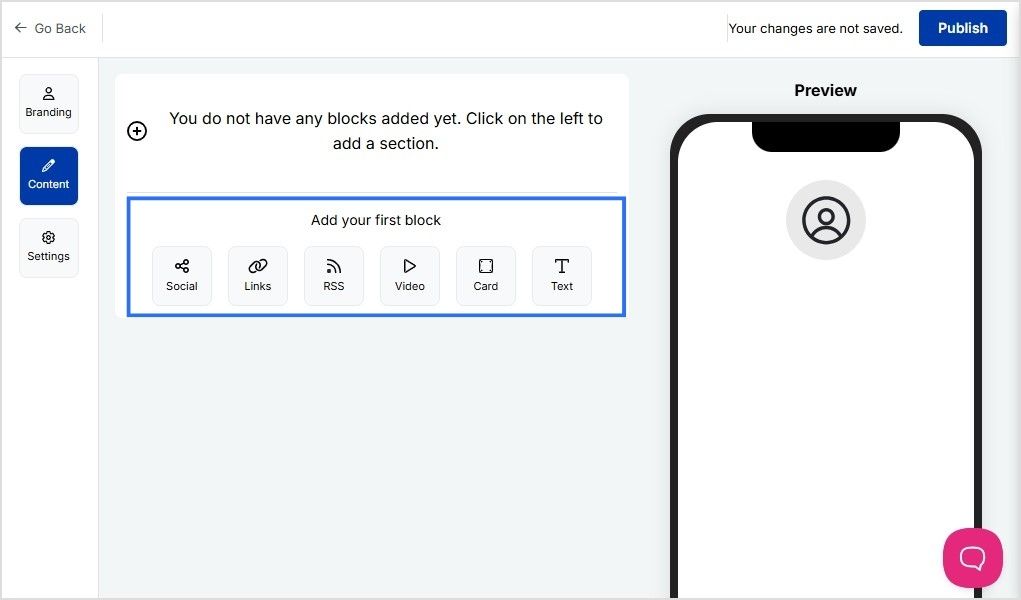
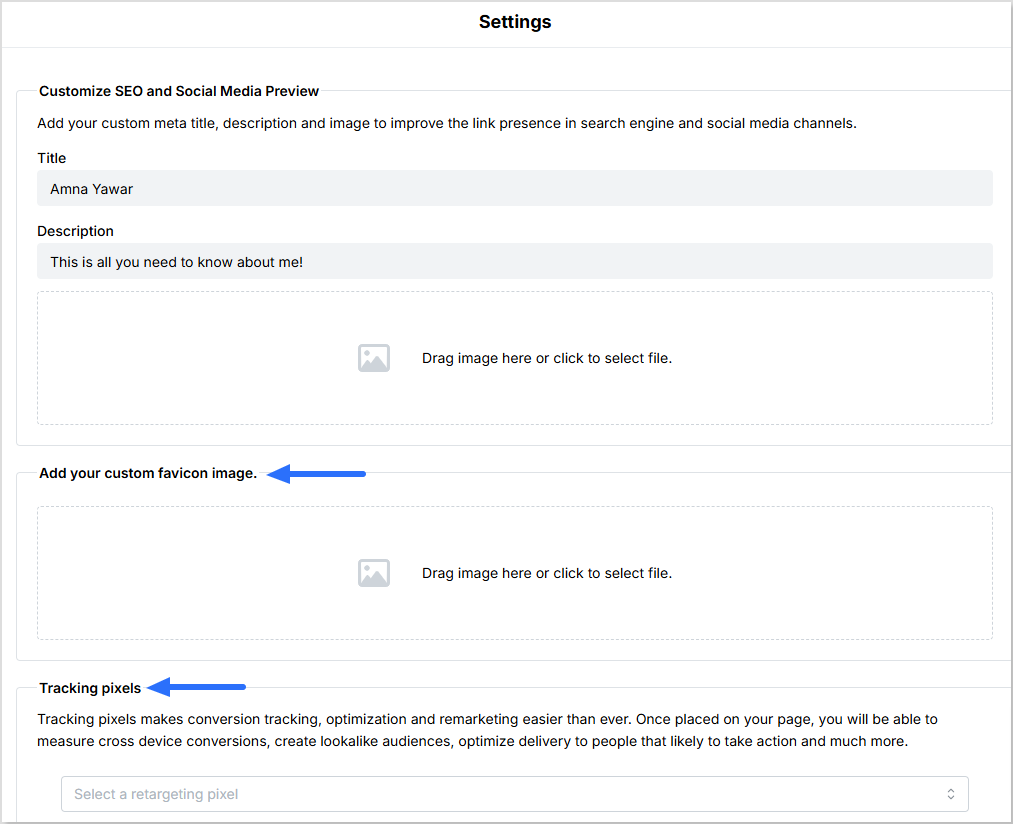
You can customize your meta title, description, and image to enhance your link’s visibility on search engines and social media platforms.
Add a custom favicon image to your bio site.
Add tracking pixels to measure cross-device conversions, create lookalike audiences, and optimize delivery to users most likely to take action.
Want to make updates? No problem! Replug lets you edit your bio site easily anytime, so you can tweak things as you go.
6. Publish and share your bio site
Once your bio site is ready, hit publish! Now, copy the link and add it to your social media bios, email signatures, and anywhere else your audience can find you.
One cool and advanced feature of Replug is that you can create a vanity URL for your bio links. Upon seeing your bio link, your followers will know exactly what your bio site is about.
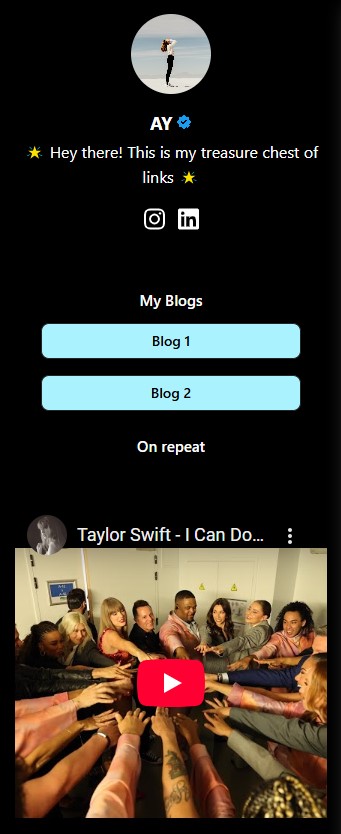
Here’s what the final page for your bio site looks like:
Conclusion
Creating a bio site doesn’t have to be complicated. With the right tool like Replug, you can set up a professional, fully customized bio site in just a few minutes. Instead of juggling multiple links, you’ll have one clean, organized hub for all your content. Follow the best bio link practices to ensure best results.
Whether you’re a creator, entrepreneur, or business, a well-optimized bio site boosts engagement, improves branding, and simplifies the way you share links.
You can further enhance your bio site’s performance by using this best free URL shortener to track clicks, optimize links, and manage all your URLs seamlessly.
Go beyond generic link pages!
Create custom bio links that truly fit your brand
With Replug, you can create bio links that are unique, engaging, and built to convert.
Yes! Once your bio site is live, you can edit links, design, and content anytime without changing the URL. This means you can keep your page fresh with new updates without losing traffic.
How do I track clicks and engagement?
Many bio site platforms, including Replug, offer built-in analytics. You can monitor link clicks, visitor behavior, and engagement rates to understand what’s working and optimize your page accordingly.
Can I use my own domain for my bio site?
Advanced link management platforms like Replug allow custom domains or vanity URLs, which help with branding and credibility. Instead of a generic link, you can have a personalized web address that makes your bio site look more professional.
What’s the best way to drive traffic to my bio site?
Add it to your social media bios, email signatures, and even business cards. You can also share it in posts, newsletters, or link it in YouTube descriptions to make it easily accessible.
Will my bio site help with SEO?
Yes! A well-optimized bio site with a custom meta title, description, and relevant keywords can improve search visibility. Plus, using high-quality content and links can enhance your online presence.
Your Discord bio is your chance to make a solid first impression. Whether you’re gaming, chatting with friends, or connecting with fellow creators, it’s the perfect spot to let your personality shine. But we get it; it can be tough coming up with the right bio.
So, how do you sum yourself up in just a few words?
Don’t worry; we’ve got you covered!
We’ve compiled 100+ Discord bio ideas to help you nail it. From cool and aesthetic vibes to funny and witty one-liners, we’ve got something for everyone. No matter what vibe you’re going for, you’ll find the perfect bio ideas here to boost engagement on your Discord profile.
Ready to make your Discord profile pop? Let’s get started!
Discord bio basics: everything you need to know
Before we get into the juicy stuff, let’s quickly go over the basics of how to write a winning, professional bio. After all, a solid understanding of Discord’s bio setup will make your ideas pop even more.
Bio length: Regular users can write up to 190 characters, while Discord Nitro subscribers get a bonus of 280 characters. However, if you want a customized bio with quick bio links, consider Replug’s link in bio tool, since it will keep it neat and make the most of your space.
Where it appears: Your bio shows up on your profile card when someone clicks your username. It appears fully expanded on a desktop, while mobile users see a condensed version.
Profile picture synergy: Your bio and profile picture should vibe together. If your avatar screams “gamer,” your bio should have that same energy. And if you’re leveraging more advanced personal branding techniques say, automating parts of your online persona, consider skilling up in AI Agent implementation so that your server presence, status updates and voice-chats can reflect a more dynamic, high-tech you. For a professional or creative vibe, like showcasing custom printed pins, make sure your bio matches your tone.
Custom status integration: Pair your bio with a custom status! This tells people exactly what you’re up to, whether in a game, taking a break, or working on something important.
Emoji usage: Emojis are your best friend! They break up text, highlight key info, and add personality. But remember, emojis count toward your character limit, so use them wisely!
Go beyond generic link pages!
Create custom bio links that truly fit your brand
With Replug, you can create bio links that are unique, engaging, and built to convert.
Want to keep it cool and effortless? Here are some cool Discord bio ideas to show off your laid-back yet stylish side:
“Running on caffeine and good vibes.”
“Master of memes, keeper of chaos.”
“Currently in a relationship with sleep.”
“I’m not a robot… but I might be after the next update.”
“The only time I’m a morning person is when the sun is setting.”
“Living life one playlist at a time.”
“Just a small fish in a big pond.”
“Be yourself—everyone else is taken.”
“I’m on a seafood diet. I see food and I eat it.”
“On a quest for world domination. One meme at a time.”
“I’m not arguing, I’m just explaining why I’m right.”
“My hobbies include sleeping, eating, and avoiding responsibilities.”
“Fluent in sarcasm.”
“Do more things that make you forget to check your phone.”
“Stay hydrated and stay woke.”
“I’m a professional overthinker.”
“Currently fighting the urge to be productive.”
“Rolling through life like a smooth playlist.”
“In a complicated relationship with my bed.”
“Too cool for school, too tired for anything else.”
“A work in progress.”
“Searching for Wi-Fi in a world of no connection.”
“Work hard, nap harder.”
“Netflix and sleep.”
Funny Discord bio ideas
Who doesn’t love a good laugh? Here are some funny Discord bio ideas that’ll make everyone do a double-take:
“I’m not lazy, I’m just on energy-saving mode.”
“I’m not short, I’m concentrated awesome.”
“Life is short. So am I.”
“I put the ‘pro’ in procrastination.”
“If I were any cooler, I’d be frozen.”
“Warning: I’m an acquired taste. If you don’t like me, acquire some taste.”
“I would agree with you, but then we’d both be wrong.”
“My life is a meme, and I’m the punchline.”
“I’m like a software update: takes forever, but I’m worth the wait.”
“I’m not arguing, I’m just explaining why I’m right.”
“Life is 10% what happens to me and 90% how I react to it—except in the case of traffic.”
“I don’t suffer from insanity—I enjoy every minute of it.”
“I’m on a diet, I only eat cake now.”
“Call me a fireman because I’m always putting out fires (usually my own).”
“If you don’t like me, that’s okay. I’m not a fan of you either.”
“My bed is a magical place where I suddenly remember everything I forgot to do.”
“I can’t hear you over the sound of how awesome I am.”
“I’m not late, I’m just early for tomorrow.”
“You had me at ‘Hello.’ You lost me at ‘Here’s the plan.’”
“I’m like a sloth on a bad day.”
“If I had a dollar for every time I got distracted, I’d probably be rich by now.”
Aesthetic Discord bio ideas
For those looking to make their profile a little more artsy, here are some aesthetic Discord bio ideas:
“🌙 Chasing the stars, one night at a time.”
“☁️ Living in my daydreams.”
“🌿 Plant enthusiast | 🌱 Grow your own way.”
“🎧 Music is my therapy.”
“🌸 Serenity in simplicity.”
“🌻 A soul that roams free.”
“☾ Moonlight whispers.”
“⚡ Let the vibes flow.”
“🍃 Lost in the beauty of the moment.”
“🌸 I am a work in progress.”
“🌾 Wild at heart.”
“🍂 Autumn leaves & cozy nights.”
“💫 Dream big, sparkle more.”
“🌺 Keep blooming.”
“🌙 Stargazing under the city lights.”
“🌱 Growth is beautiful.”
“☁️ Floating through life.”
“🍃 Catching my breath between moments.”
“🌷 Living the dream, quietly.”
“🌻 Sometimes the stars align.”
“🦋 Finding peace in the chaos.”
“🌼 Peaceful and grounded.”
“🌴 Stay wild, moon child.”
“🌸 Simplicity is the ultimate sophistication.”
“🍃 Always in a state of becoming.”
Cute Discord bio ideas
Ready to show off your adorable side? These cute Discord bio ideas are perfect for you:
“🌸 Here to spread some sunshine.”
“🐾 Paws-itively the best at being cute.”
“💖 Powered by love and hugs.”
“🎀 Small but fierce.”
“🍭 Sweet as candy.”
“🐱 Cat cuddles over everything.”
“🌼 Soft vibes only.”
“🦄 I believe in magic.”
“🍓 Cutie with a sprinkle of sass.”
“🌸 Be the reason someone smiles today.”
“💫 Dreaming big, looking cute.”
“🌼 Here for the cuddles.”
“💖 Sweetheart, through and through.”
“🐇 Hoppy days ahead!”
“🍀 Just a little bundle of joy.”
“🌸 Don’t mind me, just spreading kindness.”
“🐾 I’m fluffy, not fluffy-headed.”
“🍬 Candy and kindness, that’s me.”
“🍃 I’m a soft soul, gentle and kind.”
“🌟 Shy but cute.”
“💗 A little bit of sparkle, a little bit of magic.”
“🎀 Soft as a cloud, fierce as a lion.”
“🐾 You had me at ‘hello.’”
“🦄 Magic lives within me.”
“🌸 A gentle soul in a wild world.”
Witty Discord bio ideas
Ready to add some sass to your bio? Here are some witty Discord bio ideas for those who want to stand out with a little humor and charm:
“I’m not lazy, I’m just on energy-saving mode.”
“I’m not short, I’m concentrated awesome.”
“Life is short. So am I.”
“I put the ‘pro’ in procrastination.”
“If I were any cooler, I’d be frozen.”
“Warning: I’m an acquired taste. If you don’t like me, acquire some taste.”
“I would agree with you, but then we’d both be wrong.”
“I’m on a seafood diet. I see food and I eat it.”
“My life is a meme, and I’m the punchline.”
“I’m like a software update: takes forever, but I’m worth the wait.”
“I’ve got 99 problems, but being boring isn’t one of them.”
“I speak fluent sarcasm.”
“You had me at ‘Hello.’ You lost me at ‘Here’s the plan.’”
“If I had a dollar for every time I got distracted, I’d probably be rich by now.”
“I’m not arguing, I’m just passionately explaining my point.”
“I’m not weird. I’m just a limited edition.”
“You can’t scare me—I’ve been inside my head for years.”
“Not all who wander are lost. Some of us are just avoiding responsibilities.”
“My hobbies include sleeping, eating, and avoiding responsibilities.”
“I’m a professional overthinker.”
“I don’t need an inspirational quote, I need coffee.”
“Brains are awesome. I wish everybody had one.”
“Sometimes I’m a morning person. Just not today.”
“Being an adult is like folding a fitted sheet.”
“My sense of humor is an acquired taste. Hope you like sarcasm.”
Still looking for inspiration? How about copy-paste templates that make your bio look fun? Check out our blog post on Discord bio templates for templates with emojis you can copy and paste into your bio.
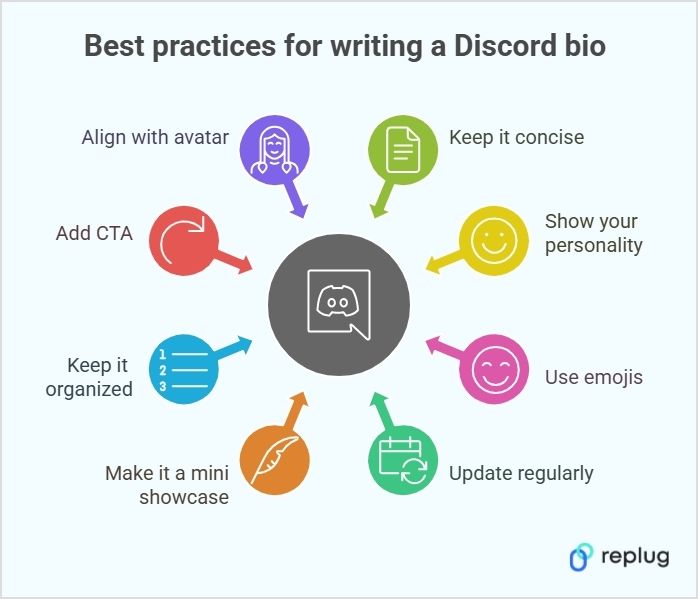
Before we spill some of the best Discord bio ideas, let’s talk about best practices to make sure your bio is both engaging and clear:
1. Show your personality
Your bio is your chance to show who you are. Whether you’re funny, creative, or chill, make sure your bio reflects your vibe. Keep it real, and don’t overthink it!
Example: “Just here to share memes and procrastinate. 👀”
2. Use emojis (but don’t go overboard)
Emojis can bring your bio to life. Use them to add personality, break up text, or highlight key points. Just remember to keep it balanced and not cluttered.
Your interests and activities change, and so should your bio. Keep it fresh by updating it to reflect what you’re into at the moment. Whether you’re obsessed with a new game or project, your bio should show it.
Example: “Currently obsessed with Cyberpunk 2077 🚗💥”
4. Make your bio a mini showcase
Your bio isn’t just about you—it’s an opportunity to highlight what you’re working on. Whether you’re a gamer, artist, or streamer, share a backlink to your content or projects.
Example:
“🎮 Streamer | 🎧 Musician | 👾 Check out my channels”
5. Keep it organized
Formatting is key! Use line breaks, bullet points, or simple organization to make sure your bio is easy to scan. This way, people can quickly understand who you are without having to read through a long paragraph.
Example:
🎮 Gamer | Developer 🎧 Music Enthusiast | Meme King 📺 Currently watching: Stranger Things
6. Align your bio with your avatar
Your profile picture and bio should complement each other. If your avatar is gaming-related, your bio should match that vibe. Keep it cohesive and true to your style for a polished look.
Enhance your Discord bio: Go beyond the basics with Replug
1. Create a short link
You don’t have much space, so make every character count! Make sure your bio is impactful, concise, and easy to read.
If you can’t fit everything about yourself in your Discord bio, you can use Replug’s free URL shortener with no sign up to create a short link that leads to a more detailed profile, portfolio, or social page. This way, people can learn more about you without cluttering your bio with too much text.
2. Create a Bio Link
Using Replug, i.e., a top-notch link optimization platform, you can create a link in your bio page that includes all your socials, streams, or other important links in one place without cluttering your bio.
With Replug, you can track where your audience is from, what browser and device they’re using, their referral source, geotargeting data, and more. This detailed bio link analytics data helps you understand your community’s behavior so you can tailor your content and strategies for better engagement.
4.Add Retargeting pixels to your Discord bio links
Add retargeting pixels to your Discord bio links using Replug to re-engage users to click on your link. This allows you to run targeted ads, bringing them back to your server or encouraging them to take action on promotions like discounts or giveaways. You can share these offers through channels, pinned messages, or a linktree that directs them to a landing page, boosting engagement and conversions.
5. Add a call-to-action (CTA)
The perfect CTA can direct people to take action. Want them to join your server or check out your stream? Be clear about what you want them to do, and include a direct link to make it easy.
Example: “Wanna team up? DM me! ⬇️”
Want an easy way to add a CTA? Use Replug’s free CTA generator to create a clickable link that directs people to your social media, stream, or other platforms.
When it comes to your Discord bio, there are a few things you should keep in mind to make it stand out in the best way.
Do’s
Don’ts
Be yourself and let your personality shine
Overdo it with too many emojis or text
Keep it concise and impactful
Use generic or boring phrases
Use emojis to add personality
Include offensive or inappropriate content
Make your bio relevant to your activities
Overload your bio with unnecessary info
Update it regularly
Forget that your bio and profile picture should match
Game over: You’ve mastered the art of Discord bios!
And there you have it: 100+ Discord bio ideas for all kinds of vibes! Whether you’re going for cool, funny, aesthetic, or witty, you’re all set to stand out on the platform. Just remember, your bio is a reflection of who you are, so make it count!
Now, go ahead and update your profile with one of these creative bio ideas!
P.S. Just between us… You can totally copy-paste these Discord bio ideas. We won’t tell.
Frequently asked questions
Can my Discord bio be invisible?
Yes! You can use special invisible characters (like Unicode blank spaces) to make it look empty while still technically having a bio.
Can I use fancy fonts in my Discord bio?
Yes, you can copy-paste stylized text from font generator websites, but some may not display correctly on all devices.
Can I add links to my Discord bio?
Discord bios don’t support clickable links, but you can add a shortened, readable link with Replug to make it look clean and shareable.
Can I add line breaks to my Discord bio?
No, Discord bios don’t support line breaks, but you can use symbols like “|” or “•” to separate sections.
What happens if my bio has banned words?
Discord may block or censor certain words in your bio. If you can’t save it, try tweaking the wording.
We all know that a link-in-bio tool lets you share multiple links through a single URL. And we’ve already talked about how Replug stacks up against other options.
But here’s a question: do you know what a “linktree” actually is?
Most people assume it’s just the name of a tool. But in reality, a linktree refers to any landing page that gathers multiple links in one spot, making it easier for people to access your content, shop, or connect with you.
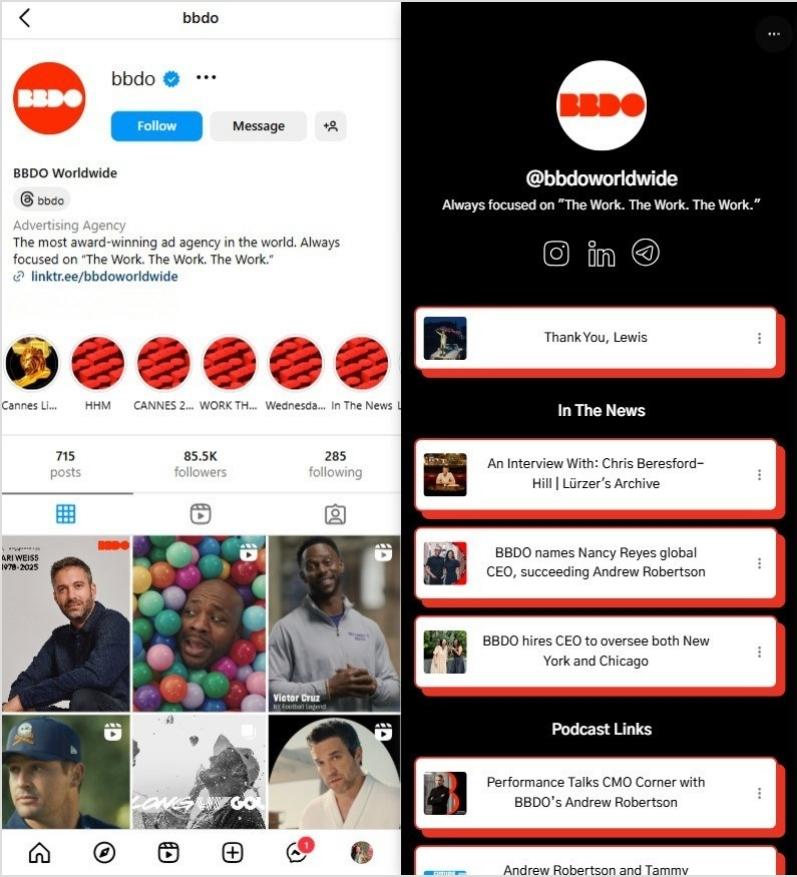
So, if you’ve clicked on an Instagram or TikTok bio and landed on a page full of links, that’s a linktree. But how does it actually work? And how can you use it to your advantage?
In this guide, we’ll break it down, keeping it light, easy to follow, and packed with useful insights. Whether you’re a social media pro or just getting started, you’ll walk away knowing exactly how to make the most of your linktree.
What is a Linktree?
A common question heard nowadays is, ” What is bio link or a Linktree?” Here’s the answer!
A linktree (also called a link-in-bio or bio link page) is a landing page that holds multiple links in one place.
Instead of being stuck with just one clickable link in your social media profile, you can create a hub with buttons that lead to different pages—your latest blog, YouTube video, online store, or anything else you want people to check out.
A well-structured linktreeboosts clicks and engagement since it helps visitors find exactly what they need without extra searching.
Linktree setups are simple to create and work on Instagram, TikTok, X (Twitter), and other platforms. When someone taps your linktree URL, they land on a clean, easy-to-navigate page with all your important links. Whether you’re promoting a podcast, selling products, or driving traffic to multiple platforms, a linktree makes sure everything is just one tap away.
For many creators and brands, Instagram is the go-to place for a linktree since the platform only allows one link in the bio. Instead of constantly swapping links in and out, a linktree keeps everything in one place—making life easier for both you and your audience.
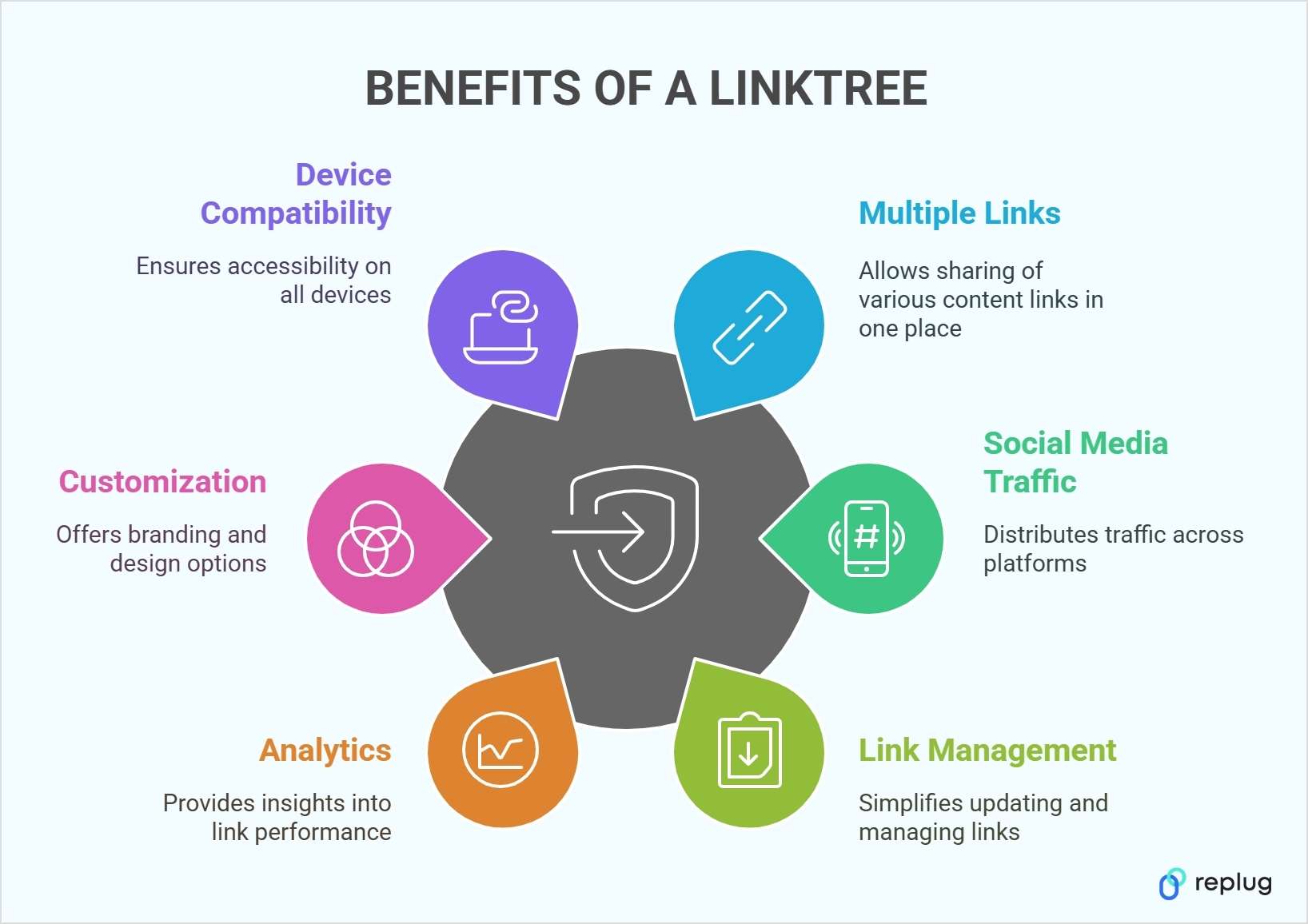
You can share multiple links: A linktree lifts lets you add as many links as you’d like in your social media bios. That can mean product pages, sign-up forms, blog posts, or any other relevant content.
Maximize social media traffic: A single linktree can drive visitors to multiple platforms, helping you distribute traffic across various channels.
Simplify link management: No need to update your bio link constantly. Instead of replacing links every time, you can simply update your linktree dashboard, making the process seamless and efficient.
Analytics and insights: A linktree can collect data on how many views and clicks each link receives. Tracking these numbers can reveal which pieces of content resonate most with your audience.
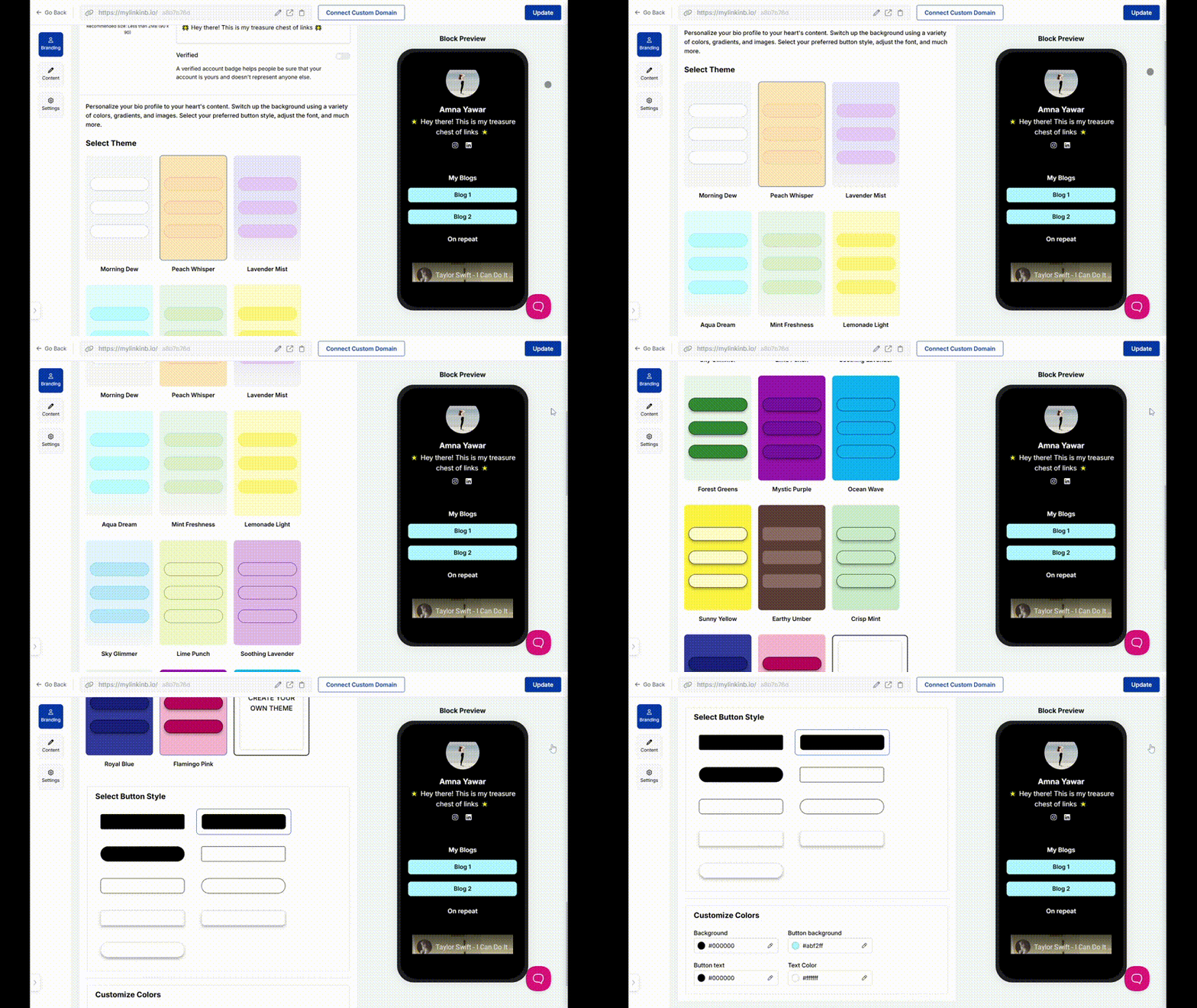
Customization options: Some tools allow deeper customization, including custom background images, color palettes, and even the ability to add your branded domain.
Designed for mobile and desktop: Linktree pages are responsive, ensuring they look neat and readable on any device.
Various integrations: A reliable bio link tool supports integrations seamlessly, like embedding videos or adding an email sign-up form straight onto your page.
Consistent branding: Matching your Linktree’s landing page look to the rest of your brand identity can make your channels feel more unified.
Save time and effort: Managing all your important links in one place reduces hassle and streamlines the user experience.
Now let’s discuss how to create a stunning Linktree using Replug:
Create your account: Instead of settling for a basic linktree tool, choose a platform that gives you more control. Create an account on Replug to create a branded linktree experience with built-in tracking and retargeting options.
Set up your profile: Once inside your Replug dashboard, upload your profile image, add a compelling bio, and customize your landing page to reflect your brand.
Unlike traditional linktree tools, Replug offers custom domain options, ensuring your link-in-bio matches your brand identity.
Add and organize your links: Replug allows you to add multiple links, but with a twist. You can track clicks, analyze engagement, and even A/B test your links to maximize conversions.
Share your link: Copy your Replug bio link and place it in your social media bios across Instagram, TikTok, X (Twitter), Pinterest, LinkedIn, and more. With Replug’s analytics, you can track which platform drives the most traffic to your links.
Experiment with advanced features: While basic linktree tools offer simple customization, Replug goes beyond by enabling retargeting and deeper branding options. Whether you want to add a call-to-action pop-up or integrate remarketing pixels, Replug ensures your bio link works harder for your business.
Best practices for link management
Managing your linktree effectively ensures your audience finds what they need without confusion. Here are some key best practices:
Keep your links fresh: Regularly update your linktree to reflect new products, blog posts, or announcements. A stale link page can lead to missed opportunities.
Use clear and engaging text: Instead of generic phrases like “Click here,” use compelling, action-driven labels such as “Get 20% off” or “Watch my latest video.”
Prioritize your most important links: Place your most valuable links at the top so they’re seen first. Whether it’s a new launch, a limited-time offer, or an event registration, make sure it stands out.
Keep it clean and organized: Avoid overwhelming visitors with too many links. If you have a long list, rotate them based on priority or group them strategically.
Leverage mobile tools: Need to make quick updates? Some link-in-bio tools offer mobile apps for easy link management on the go.
By following these best practices, you ensure your linktree remains effective, user-friendly, and optimized for engagement.
If you need more than link sharing, like retargeting, A/B testing, or advanced analytics, Replug goes beyond just creating a linktree. It offers short links, conversion tracking, and remarketing pixels, making it a powerful choice for marketers and businesses.
YouTube channels, blogs, and social feeds can be shared in one neat menu. This approach is easier than asking followers to dig through different links themselves.
If you have special discounts, new product collections, or various sales channels, linktree can showcase them all side by side. This setup helps shoppers decide where to go next.
Portfolios, rate sheets, and client testimonials can be grouped together on one landing page. This setup helps clients access the full scope of your services.
Linktree offers a stress-free way to centralize your links. Instead of juggling different URLs across platforms, you can direct people to one well-organized menu. Whether you’re a business, content creator, or marketer, this approach saves time and keeps things clear for visitors.
As the concept of link management grows, it’s worth an advanced tool like Replug for creating a linktree. It includes link shortening, retargeting features, and detailed performance metrics. Exploring which tool fits your needs best can save you trouble and keep your promotional efforts running smoothly.
A complete link management solution
for marketing professionals & agencies.
Try Replug for free
FAQs on Linktree
What is the difference between a linktree and a link-in-bio page?
A linktree is a specific tool that provides a link-in-bio landing page, but the term “linktree” is also used generically to describe any page that consolidates multiple links into one.
Does using a linktree impact SEO?
While most link-in-bio tools do not directly improve SEO, using a custom domain can enhance brand authority. Additionally, analytics tools can help you optimize which links get the most engagement.
How many links can I add to my linktree?
Most link-in-bio tools allow unlimited links, but the number may depend on your plan. With Replug, you can add multiple links while tracking clicks and engagement to optimize your strategy.
Can I customize my linktree page?
Yes! Many platforms offer customization, including background colors, fonts, and button styles. Replug allows even deeper branding, such as adding a custom domain and link analytics.
Where can I use my linktree link?
You can place your linktree URL in social media bios (Instagram, TikTok, Twitter, LinkedIn, etc.), email signatures, business cards (via Linktree QR codes), and even YouTube video descriptions.
Sharing videos shouldn’t be a struggle. No one likes huge files, slow uploads, or email limits.
So, what’s the solution? Convert your video into a simple, shareable link! It makes sharing easier, keeps things organized, and makes your content accessible on any device.
In this guide, we’ll walk you through how to convert a video to a link in a few easy steps. Plus, we’ll show you how Replug can help you enhance your video-sharing experience with branded links, analytics, and more.
Whether you need to convert a video to a URL online or you’re looking for free methods, we’ve got you covered.
Why convert a video to a link?
Let’s be real: Sending large video files is a hassle.
Attachments take forever to upload, emails have size limits, and some messaging apps compress videos into a blurry mess.
But you don’t have to worry about that anymore. Converting a video to a link solves all these problems. Here’s why it’s a game-changer:
Easy sharing: A simple link lets anyone access your video instantly.
Saves storage: No need to clog up your device with massive files.
No quality loss: Unlike compressed videos, links keep the quality intact.
Better accessibility: Anyone with the link can view it without downloading.
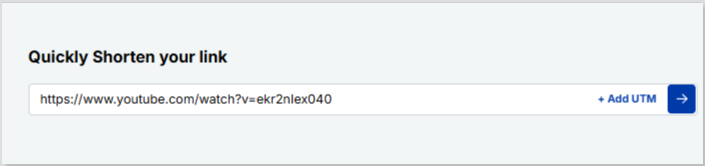
Step 3: Shorten the video link (optional, but recommended)
A long URL can look messy, especially if you’re sharing it on social media or in marketing campaigns. Using a high-quality link shortener makes it clean and clickable.
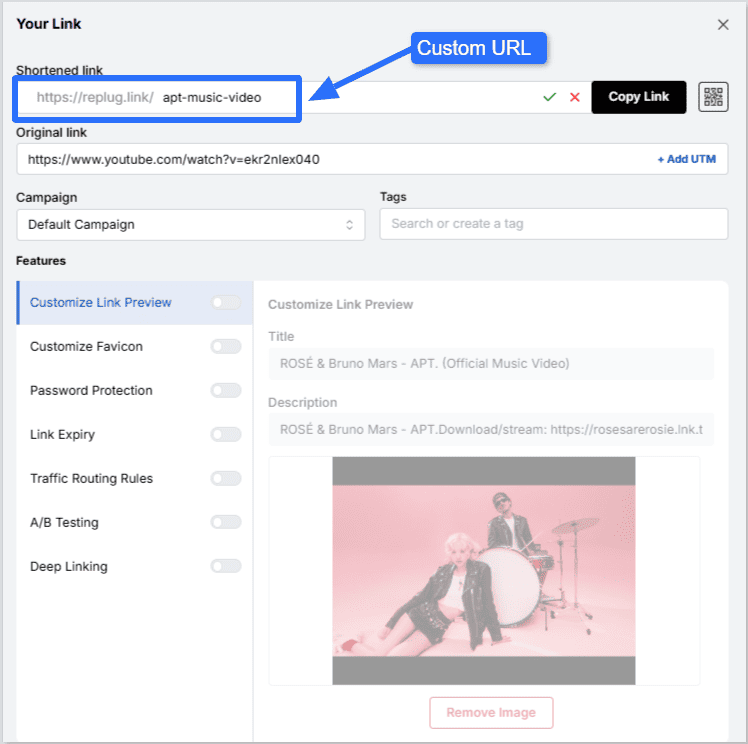
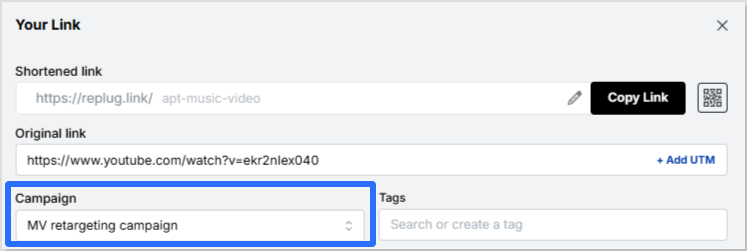
Here’s how to shorten your video link with Replug:
Create a custom URL if you want. This will give your video link a more branded look and feel. Here, we decided to shorten the YouTube music video link for APT. by Rosé and Bruno Mars.
Copy your shortened link and share it anywhere!
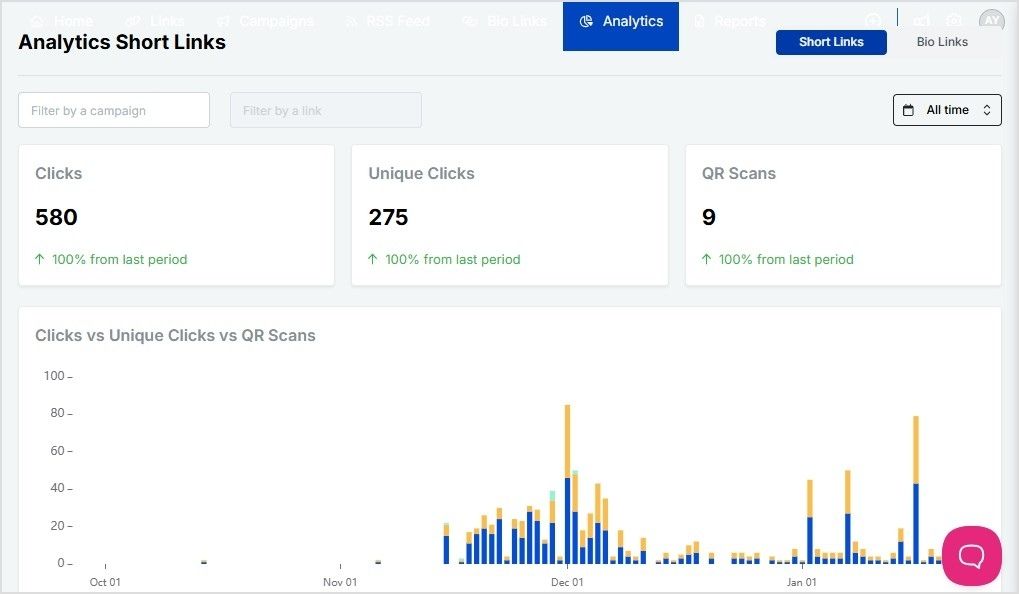
With Replug, you can also track link clicks, engagement, and performance, making it a great tool and a top-notch link optimization platform for marketers, content creators, and businesses.
These tools work well if you need a quick, free way to convert a video to a URL link online.
How to share your video link
Now that you have your link, you can share it anywhere! Here are a few ways:
Social media: Post it on Facebook, Twitter, LinkedIn, or Instagram.
Emails: Add it to your newsletters or personal messages.
WhatsApp & Messenger: Send it directly in a chat.
Websites & blogs: Embed the link in your content.
Enhance your video links with Replug
If you’re using Replug, you’re not just sharing a video—you’re optimizing it for maximum reach, engagement, and conversions. Here’s how you can do it:
Re-engage viewers with retargeting pixels: Add tracking pixels to your video links to retarget users across platforms like Facebook, Google, and LinkedIn.
Track performance with advanced analytics: See who’s clicking, where they’re coming from, and how they interact with your video with Replug’s link analytics.
Create branded, short video links: Replace long, clunky URLs with branded short links that look professional and boost credibility.
Maximize marketing ROI
by transforming ordinary URLs into branded short links that convert.
Try Replug for free
Enhance visibility with a bio link page: Add your video link to a Replug bio link page, giving your audience a single destination to access all your content.
Leverage deep linking for seamless navigation: Guide users straight to the right platform or app where your video is hosted with deep links. No extra clicks, no confusion.
Generate scannable QR codes: Convert your video link into a QR code that people can scan to watch instantly. This is perfect for business cards, posters, and in-person events.
Replug turns your video into a powerful marketing asset that drives results.
Final thoughts
Converting a video to a link is the easiest way to share content without dealing with large files or quality loss. Whether you use Google Drive, YouTube, or a free online tool, the process is quick and simple. If you want a professional touch, don’t forget to shorten your link with Replug for better branding, tracking, and engagement analytics.
Ready to make video sharing effortless? Convert your videos to links today and simplify your workflow!
Frequently asked questions
Can I convert a video to a link without uploading it?
No, the video must be uploaded somewhere to generate a link. However, you can use temporary file-sharing services like WeTransfer if you don’t want long-term hosting.
What’s the best free platform to convert a video to a URL link online?
Google Drive and YouTube are the best free options. If you want a quick, no-login solution, try Streamable or File.io.
Will my video lose quality when I convert it to a link?
Not necessarily. If you upload it to platforms like Google Drive or Dropbox, it retains the original quality. YouTube and other social platforms may compress the video slightly.
How long will my video link be available?
It depends on the platform. Google Drive and Dropbox links stay active as long as the file exists, while WeTransfer and File.io links may expire after a set period.
Can I make my video link private?
Yes! Google Drive, Dropbox, and Vimeo allow you to set privacy controls, so only certain people can access your video.
How can I track video link performance?
Using a link management tool like Replug, you can track clicks, engagement, and audience insights to see how your video is performing.
Which video format is best for online sharing?
MP4 is the best format for online sharing due to its balance of quality and compatibility across most platforms.
If you’re looking to monetize your online presence, affiliate marketing is one of the most effective ways to do so. And when it comes to affiliate marketing, Amazon offers one of the largest and most trusted programs: Amazon Associates.
Amazon accounts for nearly half of the affiliate marketing industry, with more than 900,000 affiliate partners capitalizing on its vast marketplace. With millions of products available and a high consumer trust factor, Amazon makes it easy for affiliates to drive traffic and earn commissions.
This guide will walk you through everything you need to know about becoming an Amazon affiliate, from signing up to maximizing your earnings.
So, let’s get started!
What is the Amazon Affiliate Program?
The Amazon Affiliate (Associates) Program, similar to Replug’s affiliate program, is an affiliate marketing initiative that allows content creators, bloggers, publishers, and influencers to earn a commission by promoting Amazon products. When an affiliate shares an Amazon link and a visitor makes a purchase, the affiliate earns a percentage of the sale.
How does Amazon’s affiliate program work?
Here’s how it works:
1. Sign up for the program.
2. Choose products to promote that align with your niche.
3. Share affiliate links on your blog, website, or social media.
4. Earn a commission when a user purchases through your link.
Amazon’s commission rates range from 1% to 10%, depending on the product category. Additionally, affiliates earn commissions not just on the promoted product but on all purchases made within 24 hours of clicking their link.
Prerequisites to start with the Amazon affiliate program
Before joining the Amazon Affiliate program, you should have a few basic things ready:
A content platform: A website, blog, YouTube channel, mobile app, or public social media page where you will share affiliate links.
Original content: Your platform should contain helpful, original posts related to the products you plan to promote.
An Amazon account: You need a regular Amazon account to register for the affiliate program.
Valid tax and payment details: Amazon requires tax information and a bank account to send commissions.
Compliance with Amazon policies: Your content must follow Amazon’s guidelines and should not include harmful, misleading, or restricted material.
Once approved, you must generate at least three qualifying sales within 180 days to keep your affiliate account active.
What are the requirements to be an Amazon affiliate?
To join the Amazon Associates Program, you need to meet specific eligibility criteria. Here are some requirements for becoming an Amazon affiliate:
General requirements to qualify
Requirement
Description
Website/blog
Must have at least 10 original and recently published posts.
Social media
Platforms like Facebook, Instagram, Twitter, YouTube, TikTok, and Twitch are eligible, provided you have at least 500 followers.
Content quality
Your content should be engaging, informative, and original to attract users.
Activity requirement
You must make at least three sales within the first 180 days to stay active
Active audience
Your platform should have a real and engaged audience that regularly interacts with your content and clicks on the links you share.
Disclosure requirement
You must clearly disclose that you earn commissions from affiliate links near your content or links.
Common reasons for rejection
If your application fails at some point in the process, these could be potential reasons:
Lack of sufficient content (empty or incomplete websites)
Insufficient traffic or engagement
Improper use of affiliate links
Failure to generate three qualifying sales in the first 180 days
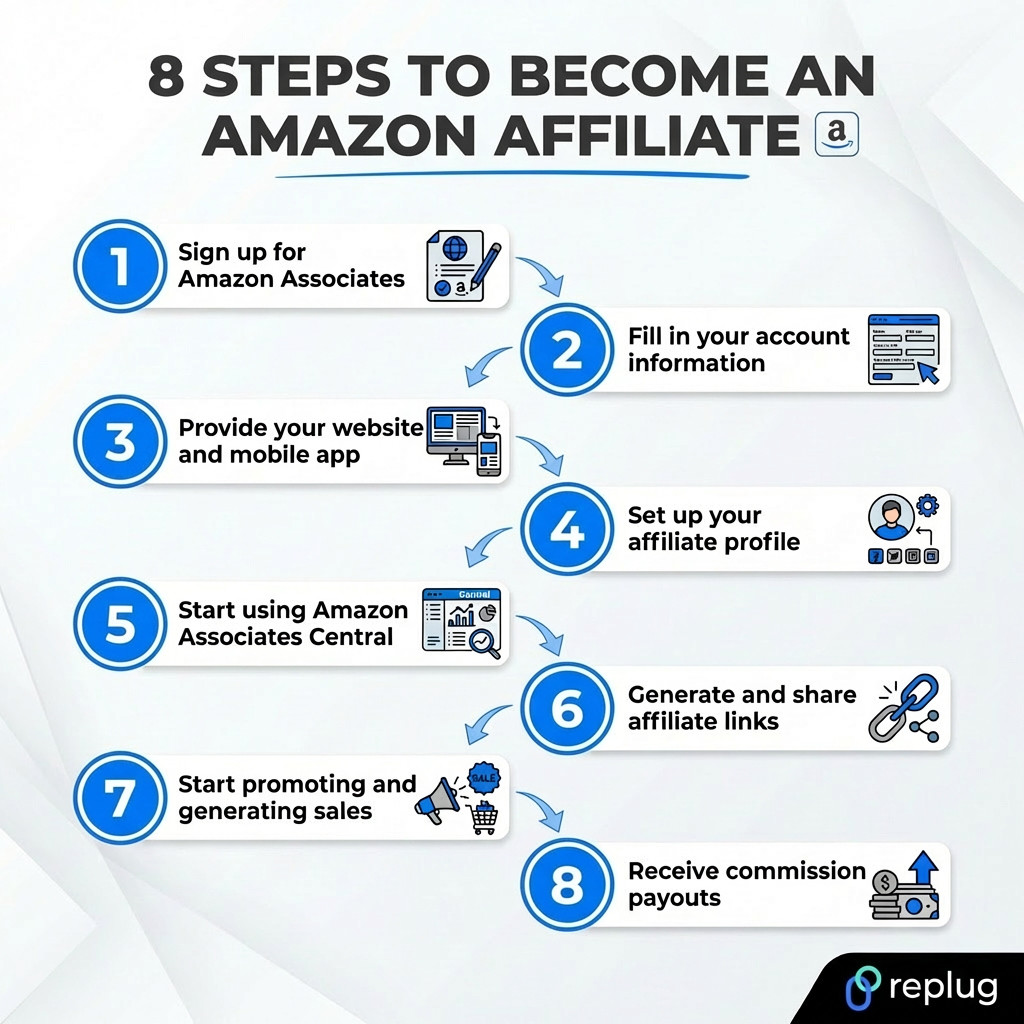
How to become an Amazon affiliate: 8-step guide
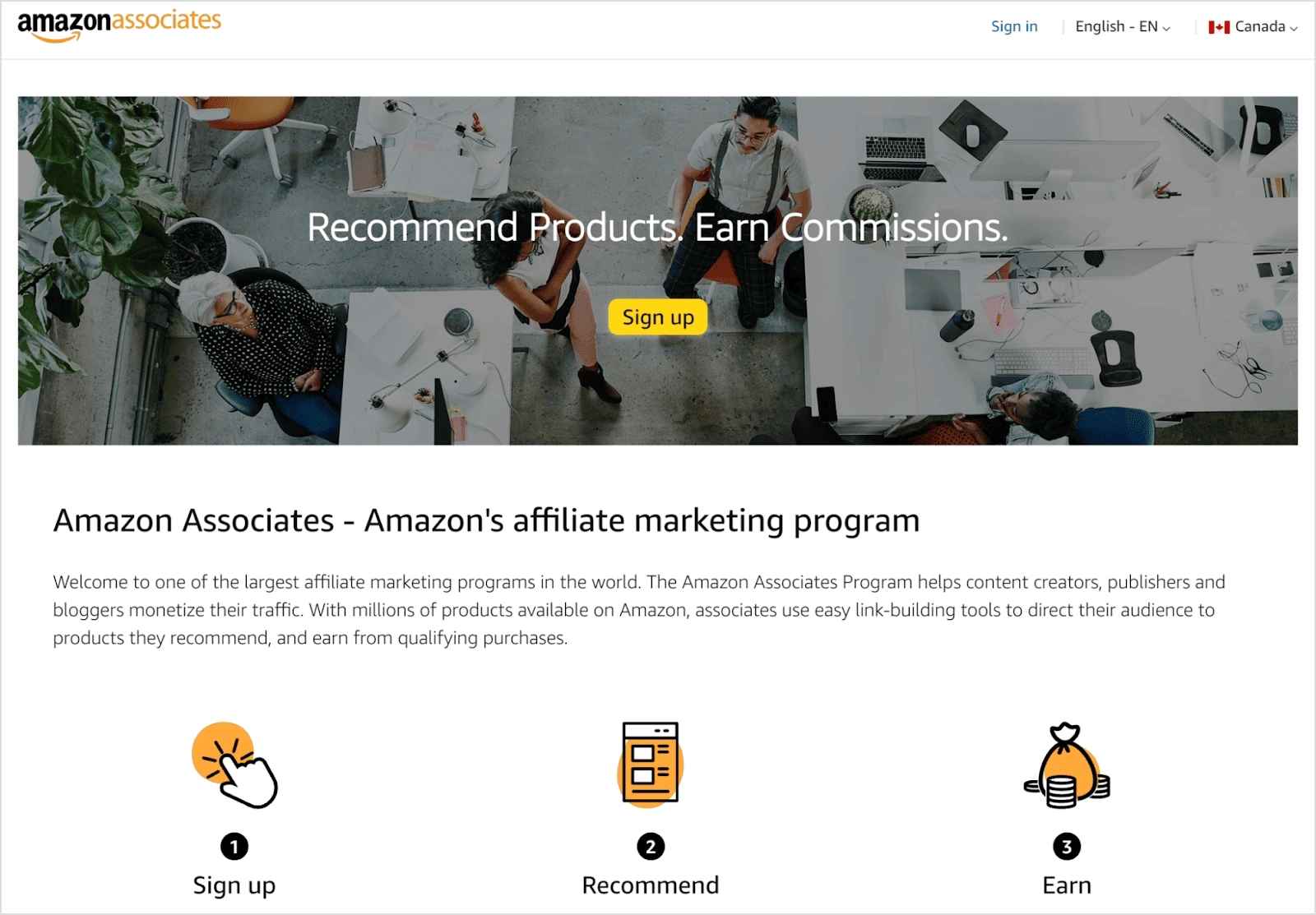
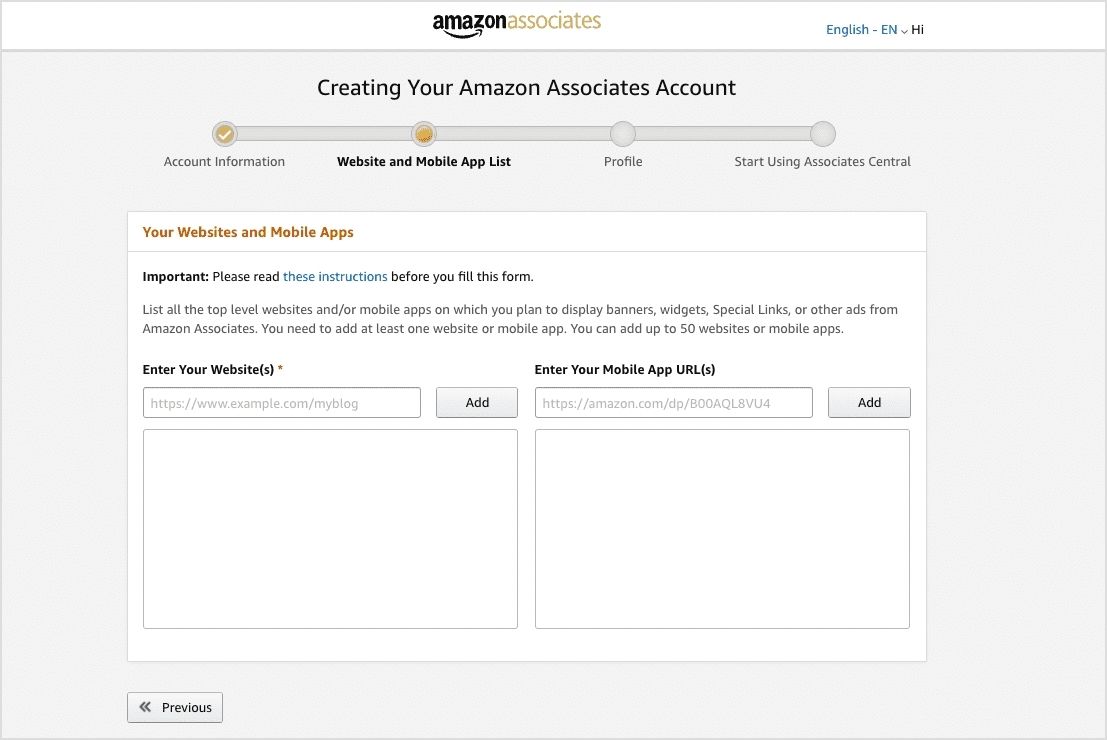
Step #01. Sign up for Amazon Associates
Go to Amazon Associates.
Click Sign up and create a new account.
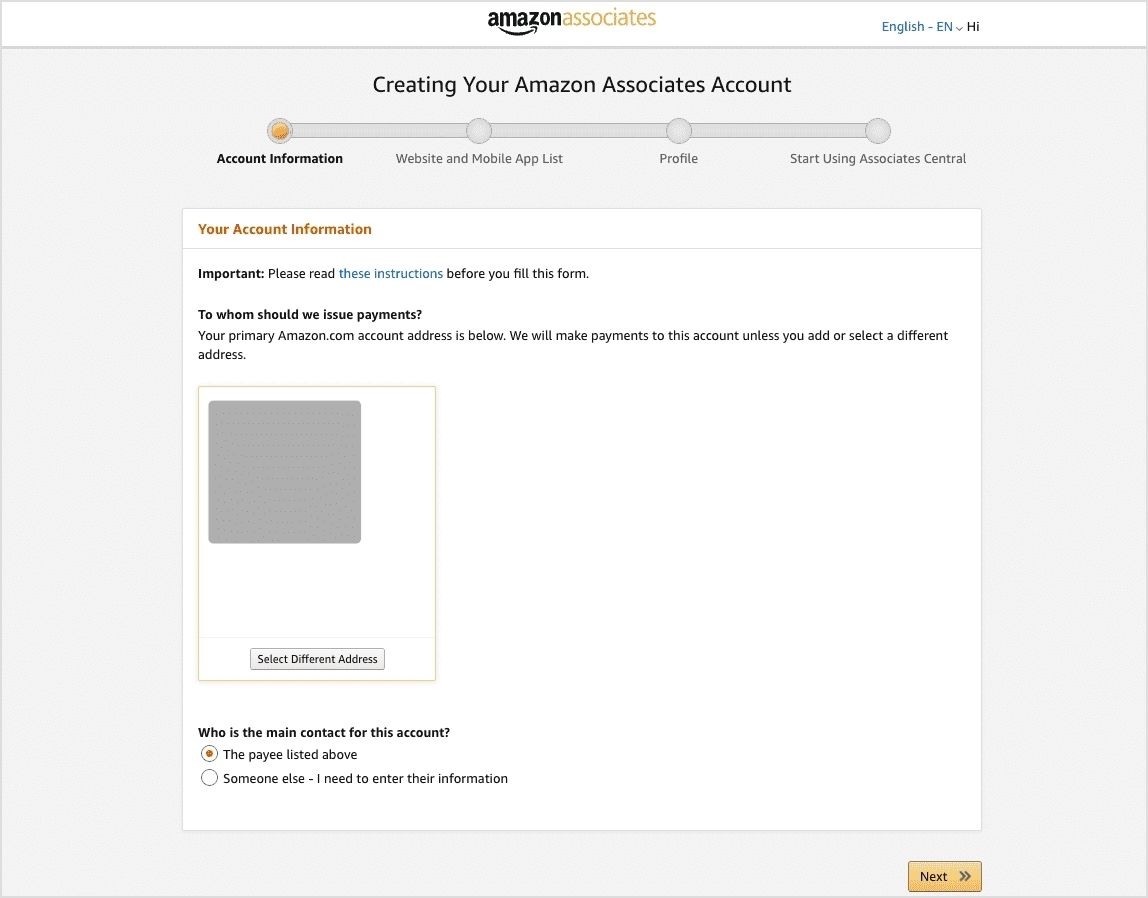
Step #02. Fill in your account information
Provide personal information and details about your affiliate channel.
Select the main contact for the account.
Step #03. Provide your website or social media details and mobile app
Add the URL of your website(s), and mobile app(s).
You can add up to 50 websites or mobile apps.
If using social media, ensure it meets the 500-follower requirement.
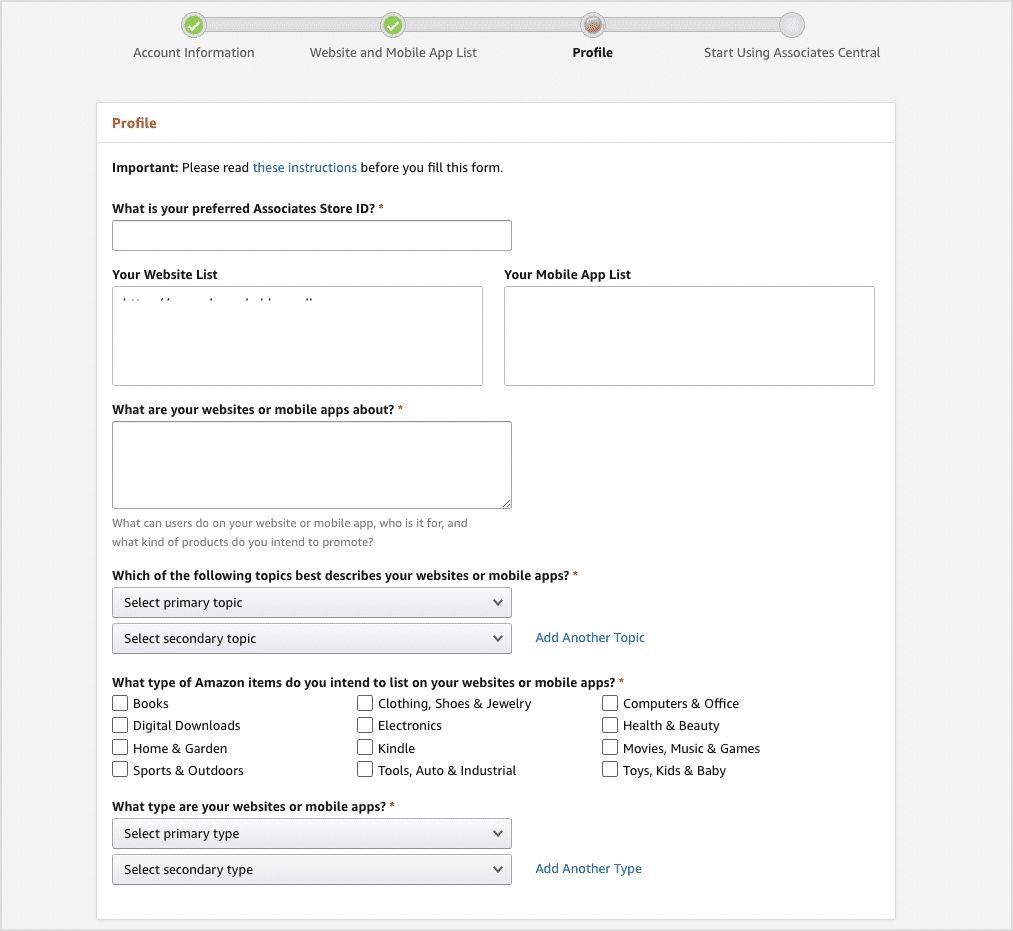
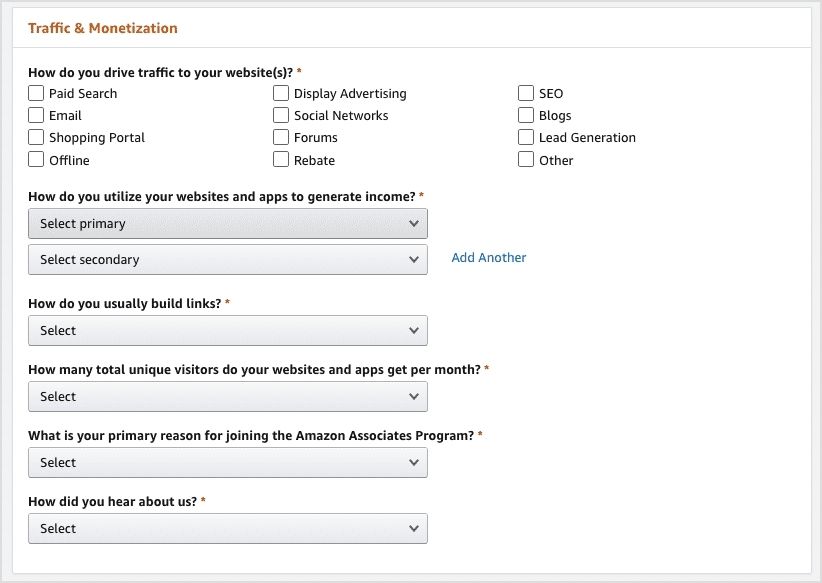
Step #04. Set up your affiliate profile
Provide your store name and create a unique store ID.
Select topics and categories related to your niche.
Explain how you drive traffic (SEO, social networks, email marketing, etc.).
Complete the security CAPTCHA and agree to the conditions.
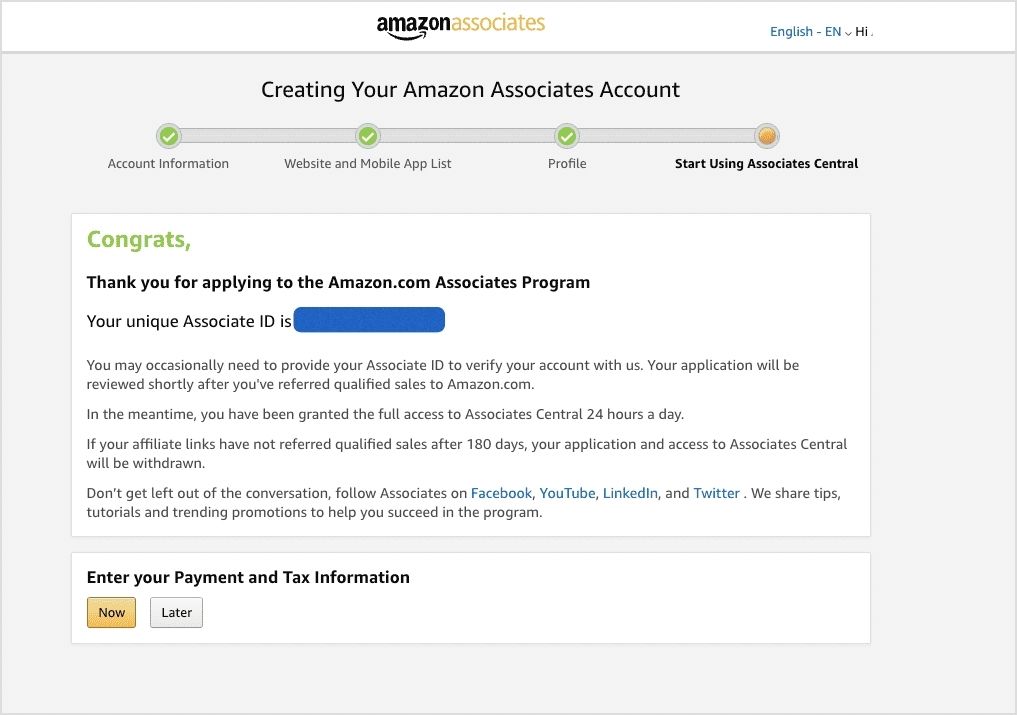
Step #05. Start using Amazon Associates Central
That’s all! You have successfully applied to the Amazon Associate Program.
Enter payment and tax information (now or later).
You will have several options for getting paid as an Amazon affiliate.
Complete tax forms (especially for non-US affiliates).
Step #06. Generate and share affiliate links
Log in to your Associate account. Now, all your links will be tagged with your unique Associate ID.
Go to the product linking menu in the Associates Central dashboard.
Search for Amazon products and create custom links containing your Associate ID.
Alternatively, you can use Amazon’s SiteStripe tool (for desktop) or GetLink (for mobile) to create affiliate links.
Embed your affiliate link in blog posts, videos, or social media captions, etc.
Before you start promoting products through the Amazon Associates program, it’s important to understand its policies. These rules explain how affiliates should promote products, earn commissions, and use Amazon’s content or trademarks properly. Following them helps you stay compliant and keep earning from the program.
Below are the main policy areas you should know:
Participation requirements: Affiliates must follow Amazon’s operating agreement and ensure their website, app, or social media content is appropriate, legal, and not misleading. You also cannot misuse Amazon content or promote Amazon in unauthorized ways.
Commission income statement: This policy explains how affiliates earn commissions. You get paid when someone clicks your special affiliate link and makes a qualifying purchase within the session (usually within 24 hours of the click).
Product statement: It outlines which products qualify for commissions and the rules around promoting them, including exclusions or restrictions on certain digital items and categories.
Trademark guidelines: Affiliates must use Amazon trademarks, logos, and brand names only as permitted. Misusing Amazon branding or modifying trademarks can lead to account suspension.
IP license & usage requirements: Amazon gives affiliates a limited license to use its product images, text, APIs, and other program content only for promoting Amazon products according to program rules.
Mobile application policy: If you promote Amazon products through a mobile app, it must meet Amazon’s requirements and be properly registered in your affiliate account before using affiliate links.
Amazon influencer program policy: This policy applies to creators who promote products through social media and have an Amazon storefront. Influencers must meet eligibility requirements and follow the same operating agreement rules.
Amazon creator ads boost program policy: This program allows creators to boost or promote content that features Amazon products. Participants must follow advertising guidelines and program rules when promoting such content.
In short, these policies ensure that affiliates promote Amazon products fairly, use Amazon’s resources properly, and maintain trust with customers.
How to become an Amazon affiliate on different platforms in 2026
You don’t always need a website to promote Amazon products. Many affiliates today use social media platforms to share recommendations and earn commissions.
The idea is simple: create useful content, share your affiliate links, and guide people to products they may want to buy.
Below are simple ways to get started on different platforms.
How to become an Amazon affiliate on Facebook
Step #01: Create a Facebook page or public group around a niche (e.g., gadgets, home decor, fitness gear).
Step #02: Sign up for the Amazon Associates program and list your Facebook page URL during registration.
Step #03: Generate your affiliate links using the Amazon SiteStripe tool.
Step #04: Share helpful posts such as product reviews, recommendations, or “top picks.”
Step #05: Add your affiliate link in the post and include a short disclosure (e.g., “As an Amazon Associate, I earn from qualifying purchases”).
Step #06: Stay active by posting regularly and engaging with comments to build trust with your audience.
How to become an Amazon affiliate on Instagram
Step #01: Create a niche-based Instagram account (tech products, beauty tools, home items, etc.).
Step #02: Apply to the Amazon Associates program and include your Instagram profile URL.
Step #03: Post product photos, reels, or short reviews showing how the product works.
Step #04: Add your affiliate link in your bio or use a link-in-bio tool.
Step #05: Mention the product in captions and guide users to the link in your bio.
Step #06: Always add a clear disclosure like #ador #AmazonAssociate when sharing affiliate links.
How to become an Amazon affiliate on Pinterest
Step #01: Create a Pinterest business account and choose a niche for your boards.
Step #02: Apply for the Amazon Associates program and list your Pinterest profile as your platform.
Step #04: Add your Amazon affiliate link to the pin destination URL.
Step #05: Write helpful pin descriptions so users understand what the product is about.
Step #06: Clearly disclose that the pin contains an affiliate link to stay transparent.
How to become an Amazon affiliate on Reddit
Step #01: Join relevant subreddits related to your niche (for example, gadgets, home tools, or fitness gear).
Step #02: Spend time engaging with the community by answering questions and sharing useful insights.
Step #03: Provide genuine product recommendations when they are relevant to the discussion.
Step #04: Instead of spamming links, share helpful posts or guides that include your affiliate link when appropriate.
Step #05: Always follow each subreddit’s rules because many communities restrict direct promotional links.
Note: Many Reddit users warn that excessive affiliate links can get posts removed or accounts flagged, so focusing on helpful advice works much better.
In short, the process is similar across platforms: create useful content, build trust with your audience, and share affiliate links in a transparent way. When done consistently, social platforms can become a strong source of Amazon affiliate income.
Pros and cons of the Amazon Affiliate Program
While Amazon’s affiliate program offers several benefits, it also comes with some challenges. Here’s a breakdown to help you decide if it’s the right choice for you:
Pros
Cons
Access to millions of products
Low commission rates on some categories
Trusted brand with high conversion rates
Short 24-hour cookie window
Easy integration with websites & blogs
Commissions get cancelled if products are returned
Works with multiple content platforms
Payouts can take up to 60 days
How much do Amazon affiliates earn?
Amazon affiliate earnings are highly variable, influenced by factors like:
audience size and engagement,
niche selection,
content quality,
conversion rates, and
Amazon’s commission structure
Beginners with smaller audiences and developing strategies typically earn modestly at first. While top Amazon affiliates can earn substantial amounts, the range is broad.
Influencer Marketing Hub reports an average annual income of $55,434 for Amazon affiliates. However, some studies suggest affiliate marketers may earn less than $20,000 annually. According to ZipRecruiter, the national average annual salary for an Amazon affiliate is $77,893, with top earners making over $127,000 per year.
Top performers, often with established online platforms like popular websites, influential blogs, and large, engaged audiences, can see monthly earnings ranging from thousands to hundreds of thousands of dollars. Pinpointing an exact starting income is difficult, but optimization is key to maximizing initial earnings.
Here’s a rough estimate of earnings:
Earning level
Monthly income range
Beginner
$50 – $300
Intermediate
$1,000 – $10,000
Advanced
$10,000 – $100,000+
Advanced strategies to boost your Amazon affiliate income
Once you’ve joined the Amazon Associates Program, implementing advanced strategies can help you increase your earnings. If you’re wondering how to make the most of the program, these strategies will help:
1. Utilize email marketing
You can use newsletters to drive traffic to blog posts containing affiliate links. This strategy helps build trust and long-term engagement with your audience while improving your chances of making sales as an Amazon affiliate marketer.
2. Create video reviews
YouTube is a powerful tool for affiliate marketing. High-quality, detailed video reviews often lead to better engagement and conversion rates than traditional blog posts. Many successful affiliates use video content to showcase products, making it a great approach for those learning how to become an Amazon affiliate seller.
3. Run paid ads
Consider running PPC (pay-per-click) campaigns on Google or Facebook to direct traffic to high-converting affiliate content. To boost your affiliate content’s reach, utilizing targeted ads can be a powerful strategy.
Consider exploring a pay-per-click software to streamline and optimize your campaign management for maximum ROI. Paid ads can help you reach a wider audience and generate more commissions.
4. Build an affiliate funnel
Create a landing page that provides value (such as a free guide or checklist) in exchange for an email sign-up. Then, nurture leads through email marketing and direct them to your affiliate links over time.
5. Optimize for voice search
With the rise of smart assistants like Alexa and Google Home, optimizing content for voice search can help you attract additional organic traffic. Structuring content in a conversational, question-answer format improves its chances of appearing in voice search results. If you want to make money, voice search is highly beneficial.
Replug.io is a powerful link management tool that enhances affiliate marketing by offering multiple features designed to increase conversions and track performance.
Here’s how:
1. Affiliate link cloaking and customization
Amazon prohibits traditional link cloaking, but with Replug, you can create custom, branded short links that look cleaner and more professional. These links increase trust and click-through rates.
2. Bio links for affiliates
Replug enables affiliates to create a single bio link containing multiple Amazon affiliate links. This feature is useful for social media platforms like Instagram and TikTok, where users can only place one clickable link in their bio.
3. QR codes for affiliate links
Replug lets you generate dynamic QR codes linked to your affiliate URLs, making it easier for users to scan and visit product pages instantly. This is especially useful for physical marketing materials and events.
4. Advanced link tracking
With Replug, you can track real-time clicks and geotargeting statistics on your Amazon affiliate links. This data helps affiliates understand which products perform best and optimize their earnings by employing the best marketing strategies.
5. Deep linking capabilities
Deep linking ensures that when users click your affiliate links, they are taken directly to the product page within the Amazon app (if installed). This improves user experience and increases conversion rates.
Affiliates promoting Amazon product sales or limited-time offers can use Replug to set up link expiration for their affiliate links, preventing broken pages and seamlessly redirecting users to active deals.
8. Retargeting pixel integration
Replug lets affiliates add retargeting pixels to their affiliate links. If a user clicks but does not complete a purchase, they can be retargeted with ads, increasing the likelihood of conversions.
9. Bridge pages with custom CTAs
Replug enables affiliates to create bridge pages with eye-catching call-to-action (CTA) buttons, warming up potential buyers before directing them to Amazon. Using Replug in conjunction with Amazon Associates enhances link performance, improves tracking accuracy, and maximizes affiliate revenue.
10. Amazon link shortener for cleaner and more shareable URLs
Replug’s Amazon link shortener allows affiliates to transform long, cluttered Amazon URLs into short, branded links that are easier to share across platforms.
Shortened links not only look more professional but also perform better in posts, messages, and ads, especially on character-limited platforms like Twitter or SMS. By using branded short links, affiliates can maintain trust with their audience while improving link clickability and engagement.
If you’re serious and curious about how to become a pro Amazon affiliate marketer, integrating Replug into your strategy can provide better results.
A complete link management solution
for marketing professionals & agencies.
Try Replug for free
Wrapping up
The Amazon Associates Program is an excellent way to monetize your content and generate passive income. By learning how to become an affiliate on Amazon, you can take advantage of one of the most trusted affiliate programs.
Utilizing tools like Replug, affiliates can boost conversions, track user engagement, and maximize earnings effortlessly. From custom short links to click tracking and retargeting, Replug offers powerful solutions for Amazon affiliates.
Frequently asked questions
Is it free to become an Amazon affiliate?
Yes, joining the Amazon affiliate program (Amazon Associates) is completely free. There are no registration fees or monthly charges. You can create an account, generate affiliate links, and start promoting products without paying anything. However, you might spend money on things like a website, hosting, or affiliate marketing tools to grow your traffic.
How to become an Amazon affiliate with no money?
You can start the Amazon affiliate program without any investment. Here’s how to become an Amazon affiliate for free by following these steps:
1. Create a free content platform (YouTube, TikTok, Instagram, or a free blog). 2. Sign up for the Amazon Associates program. 3. Add your platform details during registration. 4. Generate affiliate links for relevant products. 5. Share helpful content and include your links.
You don’t need a website! Amazon allows affiliates to promote products through social media or content platforms.
How long does it take to become an Amazon affiliate?
Becoming an Amazon affiliate is quite fast. The signup process usually takes 30–45 minutes, and Amazon typically reviews applications within 24 hours to a few days (often 1–3 days). Once approved, you can start sharing affiliate links immediately. However, you must generate at least three qualifying sales within the first 180 days to keep your account active.
How to sign up for the Amazon affiliate program without a website?
You can join the Amazon Associates program without a website by using a public social media account or YouTube channel as your platform.
Steps:
1. Go to the Amazon Associates signup page. 2. Create your account. 3. When asked for a website, enter the URL of your YouTube channel or social media page (e.g., Instagram, Facebook, TikTok). 4. Submit your application and wait for approval. 5. After approval, generate affiliate links and share them in your content.
Your account must be public, active, and contain original content for Amazon to approve the application.
What are the best strategies to maximize profits from the Amazon affiliate program?
Some effective ways to increase earnings include:
– Choose a focused niche (tech, home gadgets, fitness, etc.). – Write honest product reviews and comparisons. – Target high-intent keywords like “best,” “review,” or “vs.” – Promote products with good demand and reasonable prices. – Use SEO and social media to bring consistent traffic. – Build trust with helpful, unbiased recommendations.
These strategies help improve clicks and conversions over time.
1. Log in to your Amazon Associates dashboard. 2. Find the product you want to promote on Amazon. 3. Use the SiteStripe bar or “Get Link” option. 4. Choose the link format (text, image, or short link). 5. Copy the affiliate link and share it in your content.
When someone clicks the link and makes a purchase, you earn a commission.
How to earn $100 per day through the affiliate marketing program offered by Amazon?
To reach around $100 per day, focus on consistent traffic and product selection:
– Create content targeting buyer-intent keywords (e.g., “best laptop under $1000”). – Promote products with higher prices or better commission categories. – Publish multiple articles, videos, or posts targeting different products. – Use SEO, Pinterest, YouTube, or social media to drive traffic. – Build a library of content that generates sales daily.
With steady traffic and well-placed affiliate links, reaching $100/day becomes achievable over time.
Running a global sale on your brand? Imagine this: a customer in New York sees prices in USD, a shopper in London gets prices in GBP, and someone in Paris enjoys a promo tailored just for them. Sounds like a marketer’s dream, right? That’s the power of geotargeting – and it’s easier to achieve than you think.
We know it doesn’t exactly sound “easy,” but since technology improves rapidly every day, there are tools that make this process as smooth as butter. With the right tech, you can set up automatic price and promo adjustments based on where your customers are located, no sweat.
Geotargeting isn’t just a cool feature; it’s a game-changer for global sales. In fact, according to a report by Factual, 89% of marketers experience higher sales by implementing this strategy. You’re not just offering a one-size-fits-all deal; you’re offering a localized experience that builds loyalty, increases conversion rates, and makes customers more likely to hit “buy now.”
In this guide, we’ll break down what geotargeting is, how it works, and why it’s a must-have for modern marketing. We’ll also discuss how Replug’s geo-analytics can drive conversions through its effective marketing features. Let’s get started!
What is geotargeting?
Geotargeting is a sophisticated digital marketing strategy that leverages advanced analytics such as users’ geographic location and more to run targeted campaigns.
This technique can utilize a user’s current location (determined via GPS, IP address, or Wi-Fi) or their past location history to provide contextually relevant marketing messages. When combined with behavioral data (such as browsing habits, purchase history, or app usage) and demographic information (like age, gender, or income level), geotargeting enables businesses to craft highly personalized and effective marketing campaigns.
The 5 major types of geotargeting
Geotargeting lets you reach the right audience based on their location, ensuring your ads and content are relevant. Whether you’re targeting an entire country or a specific neighborhood, this strategy helps boost engagement and conversions.
We’ve narrowed down five significant types of geotargeting:
Country targeting: The broadest form of geotargeting, allowing brands to tailor ads by country. This is ideal for global campaigns that require different languages or localized messaging.
Regional targeting: Targets specific areas within a country, such as states, provinces, or cities. This is useful for businesses that operate in multiple regions but want to customize messaging.
Location radius targeting: Focuses on a defined radius around a specific location, ideal for brick-and-mortar businesses.
Audience targeting: Segments consumers based on demographics, interests, and past behavior, ensuring ads reach the most relevant audience.
Weather targeting: Adjusts advertising based on current weather conditions to influence purchasing decisions.
Using a combination of these geotargeting strategies helps brands reach the right audience at the right time, leading to higher engagement, better customer experiences, and increased sales.
How does geotargeting work?
Geotargeting works by using a combination of technologies and data sources to determine a user’s geographic location and deliver tailored content or advertisements based on that information. Here’s a step-by-step breakdown of how geotargeting works:
Step 1: Collect location data Location data is gathered through GPS, IP addresses, Wi-Fi, Bluetooth, and cell tower triangulation.
Step 2: Integrate & analyze data This data is combined with behavioral, demographic, and contextual information to create detailed user profiles for targeted marketing.
Step 3: Customize content & ads Content and ads are tailored based on user location, promoting relevant products or offers through display ads, push notifications, and social media.
Step 4: Deliver in real- time Geotargeting delivers content at the most relevant moment, ensuring users receive timely and useful information.
Step 5: Measure and optimize Track campaign performance with metrics like CTR and ROI. Tools like Replug can help analyze how shortened links perform, offering insights to optimize future campaigns.
Note: Many link management tools like Replug also allow businesses and agencies to apply geotargeting to their links, making the process of directing users to the right content effortless and efficient.
A complete link management solution
for marketing professionals & agencies.
Try Replug for free
Effective ways to run a geotargeting marketing campaign
To optimize your geotargeting marketing campaigns, consider these strategies:
Leverage a link management tool: Use an advanced link management platform to shorten, brand, track, and manage your URLs effectively. These tools also provide insights into how your links perform across regions, helping you fine-tune your approach.
Use analytics to gain valuable insights: Powerful analytics tools help you track how your links are performing across various locations. By tracking metrics such as UTMS, total clicks and unique clicks by country, city, or region, you can adjust your content or offers to create custom campaigns and track better leads.
Rotate links for location-specific content: Instead of creating multiple links, use a single link to redirect users based on their location. For example, a U.S. customer can see discounts in USD, while a UK visitor sees GBP offers, all from a single link.
For example, suppose you have a Black Friday sale. With Replug, U.S. visitors can see discounts in USD, UK visitors see GBP, and European visitors get a localized promo, all from a single short link. Here’s how you can effectively rotate your links using Replug:
Add retargeting pixels to reduce cart abandonment: By adding retargeting pixels to your Replug links, you can reduce bounce rate, track users across different locations, and serve them follow-up ads based on their behavior.
A/B test your campaigns to optimize performance: Replug allows you to A/B test up to 10 different versions of your links to see which performs best in different locations. By continually testing and refining your campaigns, you ensure that your marketing efforts are always aligned with your audience’s preferences.
Apply deep linking: Replug’s geotargeting and deep links work together to personalize user experiences. Geotargeting displays location-specific content, while deep links direct users straight to relevant pages.
Create custom CTAs for maximum conversions: With Replug, you can add custom CTAs to your links, tailoring engagement for different regions. For example, users in one area may see a “Get 20% off now!” CTA, while another region gets a different offer.
Boost your conversion rates with irresistable CTAs with
These techniques allow you to effectively engage your audience, deliver tailored content, and maximize conversions, all while tracking your results to improve future campaigns.
Why geotargeting is important for marketers
Geotargeting helps marketers deliver hyper-relevant content based on users’ locations. Whether optimizing ads, creating content, improving local SEO, or refining user experiences, geotargeting ensures your message reaches the right people at the right time.
In the U.S., 81% of people own a smartphone, and among millennials, that number jumps to 94%. With so many consumers glued to their mobile devices, location-based marketing naturally drives better results.
Research from MarTech Series shows that 83% of marketers see more success when using location data. It’s not just about visibility—geotargeting helps businesses boost engagement, increase online and foot traffic, and strengthen customer relationships. In fact, campaigns that use location data are 80% more effective, making it easier to reach the right audience at the right time.
Best practices for geotargeting success
To maximize the impact of your geotargeting campaigns, consider these strategies:
Localized landing pages: Create region-specific pages with local testimonials, cultural references, and targeted offers to resonate with your audience and drive conversions.
Precision in SEM: Use platforms like Google Ads to target users by location, ensuring your ads reach the right people without wasting budget on irrelevant audiences.
Hyper-relevant content: Develop content, such as blogs and webinars, that addresses location-specific pain points, helping you establish authority and build stronger connections with custom audiences.
Social media ad targeting: Utilize platforms like Facebook, LinkedIn, and Instagram to push content to specific cities or neighborhoods, enhancing ad relevance and boosting click-through rates.
SMS marketing: Use SMS marketing to deliver location-based offers directly to users with high open rates, ensuring your messages get seen quickly.
Utilize geofencing: Set up virtual boundaries around key locations like competitor stores or landmarks to trigger timely promotions and location-based discounts.
Optimize for mobile: Ensure your geotargeting strategies are mobile-friendly, as a large portion of web traffic comes from mobile devices.
Test, analyze, and adapt: Continuously test and adapt your strategy based on real-time data to optimize targeting.
Ensure compliance: Follow regulations like GDPR and CCPA to protect user privacy and maintain trust.
By incorporating these best practices into your geotargeting strategy, you can better engage your audience, increase conversions, and optimize your campaign performance.
Who benefits most from geotargeting?
Geotargeting isn’t just for big brands; it’s for anyone looking to optimize audience engagement. Here’s how different industries use it:
Industry
How Geotargeting Helps
E-commerce stores
Show location-specific prices, product availability, and shipping options.
Affiliate marketers
Redirect users to country-specific merchant pages.
Content creators & influencers
Share localized landing pages for events, sign-ups, or downloads.
Event organizers & ticketing platforms
Adjust event details to match time zones and local languages.
Recruitment & job portals
Display job openings, salaries, and hiring details relevant to the user’s location.
SaaS companies
Provide region-specific pricing, support options, and language preferences.
Digital advertisers & marketers
Serve hyper-targeted ads based on a user’s region.
Hospitality & travel
Show region-specific hotel deals, flight options, and travel guides.
Healthcare & telemedicine
Direct patients to the right regional medical services, appointment booking pages, or language-specific healthcare content.
Education & E-learning
Promote location-based course offerings, tuition fees, or scholarship details.
Finance & banking
Offer location-based promotions on bank accounts, credit cards, and financial services.
Salesforce, one of the leading cloud-based software companies, uses geotargeting marketing.
Here’s an example of what their sign-up page looks like if you’re in the UK versus if you’re in the U.S. The description, tone, contact number, and price differ for each country.
FoodPanda is one of Asia’s leading online food and grocery delivery platforms.
In the example below of Foodpanda’s Singapore and Thailand landing pages, you can see that they are entirely personalized – from their pictures to descriptions, they’ve used geotargeting to cater to their custom audiences.
Adidas also offers a personalized experience using geotargeting. Below are examples of Adidas’s checkout page for “SAMBA OG shoes” for women in the UK and U.S.
At first glance, you might only notice that there’s a change in the currency, but that’s not the case. In the UK, they are focusing more on “free personalisation” whereas, in the U.S., this pair of shoes is one of their best sellers.
Geotargeting is a powerful way to enhance marketing campaigns, improve user experience, and drive higher conversions. By using location-based targeting, brands can connect with their audience more effectively than ever. With Replug’s link rotation feature, implementing geotargeting is simple, scalable, and incredibly efficient.
Ready to boost engagement and conversions? Try Replug today!
FAQs about geotargeting
How accurate is geotargeting?
Geotargeting accuracy depends on the method used. GPS and browser location services offer precise targeting, while IP-based geotargeting provides general location data.
Can geotargeting be used for organic content?
Yes! Many businesses use geotargeting for blog content, personalized landing pages, and localized product recommendations.
Is geotargeting legal?
Yes, but businesses must comply with privacy laws like GDPR and CCPA when collecting and using location data.
How does Replug help with geotargeting?
Replug’s link rotation feature allows you to create a single short link that redirects users to different destinations based on their location.
Does geotargeting work for mobile users?
Yes! Mobile geotargeting is highly effective, using GPS, Wi-Fi, and cell tower data to deliver precise location-based content.
Ever wondered how influencers, bloggers, and even everyday people turn their online presence into a steady income stream? Say hello to affiliate marketing.
Here’s how it works: You promote products you love, and every time someone makes a purchase through your unique link, you earn a commission. No need to create your own product or handle customer service—just share what excites you!
Affiliate marketing can be a game-changer whether you’re a blogger, YouTuber, or a newbie. To back this up, according to research, the average affiliate marketer earns around $8,038 per month, proving just how lucrative this side hustle can be!
Hence, we’ve broken down how to become an affiliate marketer into five simple steps, from choosing your niche to optimizing your links so you can start earning in no time.
By the end of this blog, you’ll have everything you need to kickstart your affiliate marketing journey. So, grab a cup of coffee, and let’s get to it!
What is affiliate marketing?
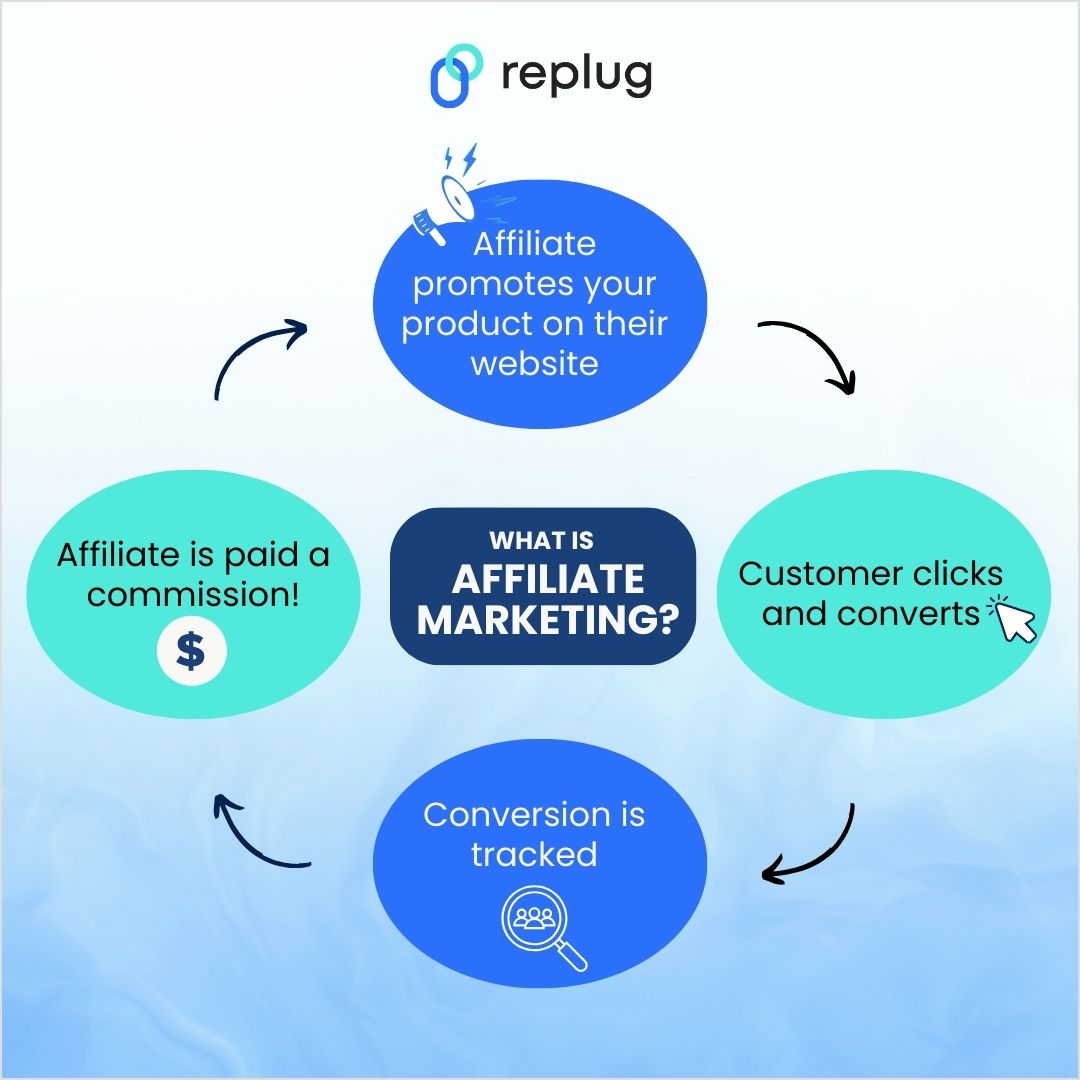
Affiliate marketing is a performance-based marketing model where you, as an affiliate, promote someone else’s products or services. In return, you earn a commission when people take specific actions (usually a sale or a lead) through your marketing efforts.
What is affiliate marketing?
It’s one of the most accessible and low-risk ways to start making money online because you don’t need to create products or manage inventory; you just need to focus on promotion.
The win-win?
It’s a mutually beneficial arrangement. As a marketing professional, you’re helping businesses expand their reach while being rewarded for your promotional efforts.
Where to find affiliate programs?
There are three main ways to find affiliate programs.
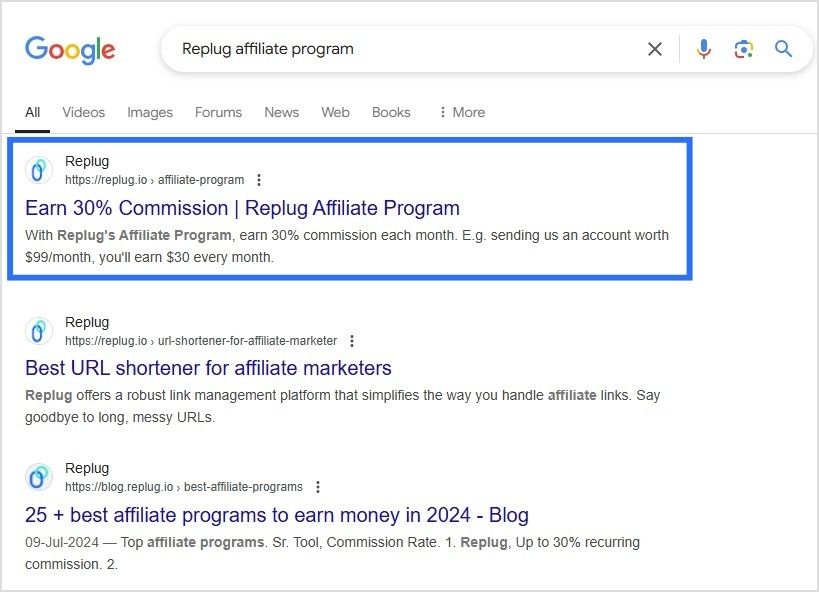
Process: Search for “[company name] affiliate program” to find their sign-up page. Example: Quick search for “Replug affiliate program” will direct you to their page, where you can easily apply.
Direct outreach
Process: Call the company’s customer service or marketing team and pitch your idea to promote their products for a commission. Example: Small businesses may be open to starting an affiliate program if they see the potential benefits.
Here’s a screenshot of what searching “Replug affiliate program” on Google search engine looks like:
5 steps to become an affiliate marketer
To succeed in affiliate marketing, it’s important to understand that it’s not just about sharing affiliate links. Building a solid foundation will set you up for long-term success. Here are five crucial steps to guide you in the right direction:
Step 1: Choose your niche and target audience
Choosing a niche is the first and most critical step in your affiliate marketing journey. Your niche defines what products you will promote and who your target audience is. A niche is a focused market, like tech gadgets, beauty, health, fitness, or travel. The more specific your niche, the more you can tailor your content to meet your audience’s needs.
For example, instead of just promoting general fitness products, you could focus on a specific sub-niche like home workout equipment for busy professionals or vegan supplements for athletes. A well-defined niche helps you stand out and build a dedicated audience that trusts your recommendations.
Here’s how Justice Buys, a leading Amazon content creator and affiliate marketer, earns a commission by promoting products to Amazon buyers:
How to choose the right niche:
Identify your passions or areas of interest.
Assess the demand and profitability of the niche (use tools like Google Trends).
Evaluate the competition—make sure there’s space for your voice.
Once you’ve picked your niche, it’s time to identify your target audience. Are they beginners or experienced? What are their pain points, and what solutions are they looking for?
Step 2: Analyze the competition
Understanding the competition helps you position yourself strategically. Look at other affiliate marketers in your niche. What are they doing well? What’s missing from their content? Are there areas where you can improve?
Check out popular blogs, social media accounts, and YouTube channels that cover your niche. What affiliate products are they promoting? What content formats are they using? This research helps you understand how you can differentiate yourself and bring something fresh to the table.
Choosing the right affiliate programs can make or break your success. You don’t want to promote products you don’t believe in, or that don’t resonate with your audience. Ideally, your affiliate products should align with your niche and audience’s needs.
Some key factors to consider when selecting affiliate programs:
Commission rate: How much will you earn per sale? Some affiliate programs offer a one-time payment, while others offer recurring commissions (which are great for long-term income).
Cookie duration: This refers to how long you’ll receive a commission after a customer clicks on your affiliate link. A longer cookie duration is preferable.
Product quality: Make sure the products you promote are high quality, as your reputation as a trusted marketer is on the line.
Popular affiliate programs include:
Amazon Associates (great for a wide range of products)
ShareASale (offers diverse merchants across multiple industries)
ClickBank (digital products with high commissions)
Mind-blowing fact (and stat): Around 75,659 companies are using the Amazon Associates affiliate program!
It’s that’s not your cue to become an affiliate marketer… why, just why?
Step 4: Build your marketing platform
Your marketing platform is the space where you’ll share your affiliate content. Whether it’s a blog, YouTube channel, podcast, or social media account, you need a platform to connect with your audience and deliver value. You don’t need to be everywhere; focus on the platforms your audience frequents most.
Ways to build your platform:
Start a blog: A blog gives you control over your content and audience. Create long-form posts, product reviews, tutorials, and guides. Use SEO to rank your content and attract organic traffic.
YouTube: Create video content with affiliate links in the description. Videos work great for product demonstrations, reviews, and tutorials.
Here’s an example of how Nikki La Rose, a famous beauty YouTuber influencer. She writes down multiple affiliate links to the products she uses in her YouTube videos.
Social Media: Instagram, Facebook, TikTok, and Pinterest are visual platforms where you can promote affiliate products using affiliate links in your bio or story swipe-ups.
Check out how El Peterson, a popular content creator and affiliate marketer, links her Instagram bio with her Amazon Storefront.
Now comes the fun part—creating content! Affiliate marketing is all about providing value through content that informs, educates, and entertains. Whether you’re writing blog posts, creating videos, or sharing social media updates, always prioritize quality content that meets your audience’s needs.
For instance, let’s say you’re promoting fitness products. Instead of simply adding an affiliate link in a post saying “Buy this product,” create content that helps your audience solve a problem.
Content should always feel authentic and trustworthy. People are more likely to click on your affiliate links if they feel they can trust your recommendations.
How to become an affiliate marketer with Replug
Now that you know the basics of affiliate marketing, let’s talk about how you can streamline your process using Replug for shortening and managing your affiliate links.
Steps to get started with Replug:
Go to Replug’s website and click on “Affiliate marketing program” in the Resources dropdown.
Access the affiliate program page and click on “Become a Replug affiliate” button.
Register for an account or sign in if you already have an account.
Complete the application form
Add in all the necessary information and click “Update”.
Access your affiliate dashboard and add in the payout method.
Link shortening: Make your affiliate links clean and more appealing with this top-notch custom URL shortener, improving click-through rates.
Link cloaking: Protect your affiliate links from looking spammy, increasing click-through rates.
Custom branding: Reinforce your brand’s identity by customizing your links with branded domains.
Analytics: Get detailed performance tracking, such as click tracking and geotargeting, giving you insights into which links perform the best.
Bio links: Share multiple affiliate offers on a single landing page and direct your audience there via a simple bio link.
QR codes: Quickly generate a custom QR code for your affiliate links. This way, your followers can quickly scan your code, and upon making a purchase, you earn a commission.
Cross-platform integration: Integrate with social media, email campaigns, and other platforms so your links perform better everywhere.
Branded links: Turn generic affiliate links into branded links that are more clickable and trustworthy.
Link retargeting: Retarget users who clicked on your affiliate links but didn’t convert, driving them back to your offers.
Boost ROI with branded URLs!
Enhance your marketing campaigns by creating shareable, trackable, and fully multi-purpose
customizable branded URLs.
Tracking and optimization are key to affiliate marketing success. Replug’s powerful analytics allow you to monitor every aspect of your links’ performance. You can see which pages, social media posts, or marketing strategies are driving the most traffic.
Here’s how you can track and optimize your affiliate links effectively:
A/B testing: Replug allows you to test different versions of your affiliate links to determine which one performs better.
Click tracking: See which links get the most clicks and optimize your content strategy to focus on high-converting links.
Optimize for SEO: Replug’s custom URL features also help improve your SEO by ensuring your affiliate links are clean, readable, and keyword-optimized.
UTM builder: You can add UTM parameters to your affiliate links using Replug. This way, you can track the performance of your affiliate campaign depending on the UTM medium that you choose.
Conclusion
Affiliate marketing is a great way to earn passive income by promoting products you love and believe in. With the right approach, it can be a lucrative and sustainable business model. By following the steps in this guide, choosing the right affiliate programs, and optimizing your efforts using tools like Replug, you can maximize your affiliate marketing success.
A complete link management solution
for marketing professionals & agencies.
Try Replug for free
FAQs on how to become an affiliate marketer
How long does it take to make money with affiliate marketing?
It typically takes a few months to start seeing substantial income from affiliate marketing. It depends on factors such as your niche, marketing efforts, and audience engagement.
How do I find affiliate programs?
You can find affiliate programs through networks like Amazon Associates, CJ Affiliate, ShareASale, or directly on the websites of brands you admire.
How do I track the performance of my affiliate links?
Replug offers detailed analytics that help you track clicks, geographical data, and more. You can use this data to optimize your affiliate links and boost performance.
You know when you click a link, and it suddenly ends with a string like ?utm_source=facebook&utm_campaign=fall_sale, it looks messy, right?
But here’s the problem! Many website owners treat those strings as annoying noise, when in reality, they’re quite powerful.
Without adding meaningful URL parameters, businesses often end up blindly guessing where their traffic comes from, and that means wasted time and marketing dollars.
What if you could instantly know which post, email, or ad brought in a visitor, in clear, actionable data? That’s where URL parameters become a game-changer.
With properly tagged links, your analytics tools can reveal exactly which sources bring the best results.
In the next section, we’ll step into a brief summary of URL parameters (what they are and how they work), so you’ll understand why they deserve a spot in your digital toolkit.
Let’s kick things off!
URL parameters: A brief overview
When you land on a web page, the main part of the link you clicked is the URL, i.e., the address that points you to a specific page on the web. But sometimes, that URL doesn’t give the full picture.
That’s where URL parameters come in. They’re extra bits added to the end of a URL (after a ?) that pass additional information to the web server. Internally, they look like key=value pairs, and if there are more than one, they’re separated by &.
The main purpose of URL parameters is to tell the server, or your analytics tools, extra context about the user’s visit. They might control how content is displayed (like filtering a product list), or they might track how the user arrived, for example, which campaign or ad brought them there.
Now let’s look at a real-life example of a URL with parameters so you can see how it works in practice.
URL parameters example
Imagine you run an online store and want to show only blue shoes, sorted by price from low to high. A link to that filtered list might look like this:
utm_source=newsletter shows the traffic came from the newsletter,
utm_medium=email specifies the medium,
utm_campaign=november_promo names the campaign.
When someone clicks this link, your analytics tool records exactly where they came from, making it way easier to measure campaigns.
With these examples in mind, you can see how URL parameters turn a basic link into a powerful way to control content or track performance, especially when you’re dealing with long URLs or lots of traffic sources.
Main types of URL parameters
When it comes to URL parameters, most fall into one of two main types. They either alter what you see on the page or silently carry info in the background.
Active URL parameters
Active parameters, also called “content-modifying parameters”, actually change what the visitor sees when they open a link.
For example, if someone visits an online store, active parameters might filter products (?category=shoes&color=blue), sort them (?sort=price_asc), or load a specific page in a list (?page=2).
These parameters directly influence the content or layout of a page, so that the same base address can show totally different content, such as only “blue shoes” or results sorted from cheapest to most expensive.
Passive URL parameters
On the other hand, passive parameters don’t change what you see on the page. They’re used “behind the curtain”. These are mainly used for tracking, analytics, affiliate referrals, or session identifiers.
For instance, when you append something like ?utm_source=newsletter&utm_medium=email&utm_campaign=spring_sale, the page content stays the same, but your analytics tool records where you came from.
Whether those parameters are present or not, visitors see identical content, but the website collects additional context about how the visit occurred.
Understanding this difference, active vs passive parameters, is super helpful when you build links or track campaigns (or even worry about SEO).
How URL parameters work
URL parameters are the little helpers appended to a URL that tell the website or server extra info, often about what content to show, or data to track.
Below is how they’re structured and how that structure actually works under the hood.
Structure & functionality
Base + query string: A URL starts with the base (like https://example.com/page), and if you want to add parameters, you append a question mark ?. That marks the start of the parameters section.
Key-value pairs: Each parameter is written as a key and a value separated by an equals sign =. For instance, page=2 or color=blue.
Multiple parameters: If you have more than one parameter, you separate them with an ampersand &. So after the first ?, every additional parameter is joined with &.
How the server uses them: When a web server receives a URL with parameters, it reads those key-value pairs and uses them to decide what to send back. This might mean filtering content (e.g., showing only certain items), sorting data, controlling pagination, or tracking things like where the user came from.
Optional & flexible: Parameters are optional. The URL works without them, but adding them gives extra instructions or context. That’s why you often see parameters used for search queries, page numbers, filters, UTMs for analytics, and more.
With this structure in mind, you can now build URLs that do more than just point to a page. Next up, we’ll show you how to play around with a few handy use cases, like filtering a shop catalog or tracking where your visitors come from.
What are URL parameters used for: Common uses discussed
When you add URL parameters to a link, they open up a lot of useful powers. Instead of just pointing to a page, you can make the page behave differently or carry extra info behind the scenes.
Here are common uses of those parameters:
Sorting
You can use parameters to rearrange content order. For example, on a store or blog, you might let users see “price low → high,” “newest first,” or “alphabetical.” A URL like ?sort=price_asc tells the site how to order the items.
Filtering
Parameters help narrow down big lists to what the user cares about. For instance, showing only “red shirts,” “in-stock items,” or “size = M.” This means users instantly see relevant results without having to browse everything.
Pagination
For long lists (products, articles, search results), parameters like page=2 or page=5 tell the server to send a specific “slice” of the complete list. So instead of a single huge page, the content is broken into manageable sections or pages.
Personalization
Sometimes, parameters help deliver a tailored experience, for example, by remembering a preference or choosing a particular view. They let websites adapt what you see based on your choices or past behavior.
Site search
When users search on a website, the search term is often passed as a query parameter (e.g.,?q=shoes or ?search=keyword). That tells the server what content to look for and return.
Translation (Language selection)
For multilingual sites, parameters can indicate which language/version of the page to show (for instance, ?lang=fr for French). This lets a single base page serve multiple languages without a separate structure.
Describing (Identifiers)
At times, parameters carry identifiers or descriptive data, such as a product ID, SKU, or category ID. That helps the server know exactly which item or content version to serve.
Tracking & analytics
This is one of the most common uses of URL parameters, which lets marketers and site owners track where traffic comes from. With tags like utm_source, utm_medium, or utm_campaign, you can see whether a visitor came via a social post, email, ad, or other channel, hassle-free.
Session management (State storage)
In some web applications, parameters may carry session IDs or state information to help maintain continuity as a user navigates. This way, the server knows who’s making requests and what session they belong to.
In short, URL parameters turn a simple link into a flexible instruction. They help the site tailor content, keep track of user behavior, let people search/filter easily, and manage complex site workflows seamlessly.
The hidden SEO challenges of URL parameters
URL parameters are super valuable and helpful, but if you don’t handle them carefully, they can bring some sneaky SEO problems. Here are the main issues to watch out for:
Duplicate content
When different parameter versions point to essentially the same page, search engines might treat them as separate pages. For example, page.com/shop?sort=price and page.com/shop?utm_source=facebook may have identical content but appear as different pages to bots.
Wasted crawl budget
Search engines only crawl a limited number of URLs per site in a given period. If bots chase dozens (or hundreds) of parameter-generated versions of the same content, they might waste time on those and miss more critical pages.
Keyword cannibalization
When multiple URL-parameter variants of a page target the exact keywords, they can end up competing against each other. Instead of one strong page ranking well, you get several weaker ones fighting for the same spot.
Tracking issues
Parameters used for analytics or tracking (such as UTM tags or session IDs) can cause the same content to appear under multiple URLs. Without proper handling, this can clutter search indexes and obscure which pages actually bring value.
Dilution of page ranking signals
Because links, shares, and other signals might point to different parameterized versions, your content’s overall “authority” gets split. That weakens its SEO potential compared to having a single, clean, SEO-friendly URL.
Overall, these handy little parameters can quietly undermine your SEO if left unmanaged. In the next section, we’ll walk through best practices to avoid these pitfalls, so you get the benefits of parameters without the SEO downside.
10 best SEO practices for using URL parameters
When you use URL parameters on your site (for filters, tracking, sorting, etc.), doing it thoughtfully can help you avoid SEO headaches and keep your site’s health strong.
Below are some smart practices to follow:
1. Add canonical tags
Use a <link rel=”canonical”> tag on parameterized pages to point back to the main “clean” URL version. This tells search engines which URL you want them to index and helps consolidate link equity and ranking signals.
2. Block URLs containing parameters with “robots.txt”
For parameter combinations that don’t add value (like tracking codes, session tokens, or specific filters), you can block crawlers via robots.txt. That helps avoid unnecessary crawling of low-value variants and protects your crawl budget.
3. Avoid URL parameters for localization
For things like language or region versions of your site, it’s often better to use clean, dedicated URLs (like /fr/ for French) instead of parameters. This keeps URLs intuitive and user-friendly, preventing confusion for search engines.
4. Use consistent internal linking
Always link internally to the canonical version of your pages instead of parameterized URLs. That reinforces search engines’ understanding of which version to favor and avoids spreading ranking power across multiple URL variants.
5. Exclude parameterized URLs from audits
When running site audits or SEO crawls, filter out or ignore parameterized URLs, so the audit focuses on your core content. This keeps reports clean and helps you prioritize what really matters.
6. Optimize the sitemap
Make sure your sitemap lists only the canonical, clean URLs, not every parameterized variant. That helps search engines find and index the right pages, and avoid unnecessary duplication.
7. Use user-friendly URLs
Where possible, favor uncluttered, readable URLs over those stuffed with too many parameters. Straightforward or static URLs tend to perform much better in search results and are easier for users to read.
8. Monitor website on a regular basis
Keep an eye on how parameterized URLs are being crawled or indexed. Regular checks help you catch issues like crawl waste, duplicate indexing, or parameter-related SEO problems early.
9. Use meta tags carefully
For pages that aren’t meant to be indexed (like filtered or tracking-parameter pages), consider using noindex (or canonical + robots strategy) rather than letting them be indexed accidentally. That reduces index bloat and preserves your site’s SEO clarity.
10. Limit the use of URL parameters
**Don’t overuse parameters,** only include them when necessary. Too many different parameter combinations can create a flood of URLs that hurt crawl efficiency, index quality, and overall SEO performance.
URL parameters vs query parameters
When you hear “URL parameters” or “query parameters,” people are often talking about the same thing, but there is a subtle difference worth knowing.
Below is a quick breakdown of how these two terms relate and when each is technically more correct.
Term
What it refers to
Typical usage/meaning
Query parameters
The entire bit of text in a URL after the ?, including all the parameters and separators (e.g.,?key1=value1&key2=value2).
It represents the complete package of data being passed (the container for multiple parameters or instructions).
URL parameters
The individual key=value pairs inside the query string (e.g., key1=value1, key2=value2).
They specify the actual data or instructions (like filter, sort, tracking info) that the website/server should act on.
Why are URL parameters important for marketers?
Using URL parameters gives marketers a commanding way to make sense of how people get to their site, and whether marketing campaigns are working or not.
Here’s why they matter so much:
Accurate campaign attribution: By adding parameters (like utm_source, utm_medium, utm_campaign) to links, you can track exactly where a visitor came from, say an ad, an email, social media, or a blog post. This clarity helps you know which campaigns bring real traffic.
Better ROI & budget decisions: Since you can see which channels or ads drive visits and conversions, you can allocate your marketing budget more wisely. Investing more where return is highest and cutting under-performing campaigns.
Deeper insights into user behavior & audience segments: URL parameters help you understand which ad, email, or link led a user to your site, so you can see patterns in real-time. You can analyze which content formats or channels resonate more, or which audience group converts better.
Campaign performance tracking across channels: Whether you run paid ads, email newsletters, social posts, or influencer links, parameters let you track all of them under the same roof, giving a complete picture of how different channels contribute to traffic and conversions.
Support for testing & optimization: You can use URL parameters to run A/B tests or compare different creatives, landing pages, or message variations. By tagging links differently, you’ll know which version performs better.
In a nutshell, URL parameters turn blind guesses into data-backed insights, helping marketers make smarter, evidence-based decisions about content, campaigns, and where to invest time or money.
Are URL parameters damaging your website’s rankings?
It’s pretty possible! If URL parameters aren’t handled carefully, they can quietly harm your site’s SEO. Here’s how using parameterized links might be doing more harm than good.
When a page on your site is accessible under multiple URL versions, those variants often appear as distinct pages to search engines, even when the content is the same.
That raises several issues, such as:
Search engine bots may waste time crawling duplicate content instead of unique, essential pages.
Link signals (like backlinks or social shares) get spread out across many URLs rather than concentrated on a single “main” URL, and
The confusion may lead to keyword cannibalization, where multiple variants compete against each other, weakening overall visibility.
Moreover, if parameter-packed URLs get indexed, it can bloat your site’s index, dilute authority, and make it harder for your core pages to rank well. So, it’s better to neglect them, but you can use them if you are sure to manage them correctly.
Summing up
In the end, URL parameters are a powerful tool when used right. They help you tailor content, track campaigns, filter results, and understand precisely how visitors arrive at your site.
But if you’re careless with them, letting duplicate links build up, neglecting canonical tags, or overusing parameterized URLs, they can silently undermine your SEO efforts.
The key is balance!
Use parameters when needed, but keep your site structure clean, and always give search engines a “canonical” version to index.
And, if you want to make sharing, tracking, and managing your links even easier, without messy, long URLs or jumbled analytics, why not give Replug.io (i.e., an all-in-one link optimization platform) a try?
It’s a top‑notch custom URL shortener that can help tidy your links, add tracking, and boost your link game exceptionally!
Frequently asked questions
What is %20 in URL?
%20 represents a space character in a URL. It’s a URL-encoded version of a space, as spaces are not allowed in URLs.
What are the three types of URLs?
The three types of URLs are:
1. Absolute URL: Full URL including the protocol, domain, and path. 2. Relative URL: A shortened URL that assumes the base domain or directory. 3. Root-relative URL: Starts from the root directory and doesn’t include the domain.
How to set params in URL?
URL parameters are added after the base URL, following a question mark (?). Each parameter is in the format, key=value, and multiple parameters are separated by an ampersand (&).
How to put & in a URL?
The & symbol is reserved for separating multiple parameters. To include an ampersand in a parameter value, you should URL-encode it as %26.
What is the difference between URL parameters and query strings?
URL parameters and query strings are essentially the same. Both refer to the part of the URL that starts after the question mark (?), containing key-value pairs.
Which is not a common use of URL parameters?
An everyday use of URL parameters is to pass data between pages (e.g., search queries, form data). However, using these parameters for sensitive data, such as passwords, is not recommended.
Provide the standard URL parameters list?
There’s no official “standard” list, but a common URL parameters array includes:
Amazon is the world’s largest online marketplace, and learning how to sell on Amazon can open up endless opportunities for entrepreneurs and established businesses alike. Whether you’re looking to start a side hustle, expand your existing business, or dive into e-commerce for the first time, Amazon provides a vast customer base and a streamlined selling process. However, with approximately 1.9 million sellers actively competing for attention, success requires strategy, research, and the right approach.
In this guide, we’ll break down the steps to help you start selling on Amazon, from setting up your account to marketing your products effectively.
Let’s get started!
The algorithm has changed
Imagine launching your Amazon store, excited to see sales rolling in, only to find your product buried on page seven of search results.
Ouch!
That’s because Amazon’s A10 algorithm doesn’t work like it used to. Gone are the days when you could simply throw money at PPC ads and expect to rank.
Previously, the A9 algorithm prioritized PPC sales, meaning you could run ads, generate sales, and climb the rankings quickly. A10 focuses more on relevance, customer satisfaction, and organic sales. Today, organic ranking, customer engagement, and external traffic play a much bigger role in your success.
What’s new?
Organic sales matter more: The algorithm favors products that sell well without paid ads.
External traffic is king: Amazon rewards sellers who bring traffic from Google, blogs, or social media.
PPC ads have less impact: You still need ads, but PPC sales don’t boost rankings like before.
Customer engagement counts: Good reviews, seller ratings, and response time affect ranking.
So, how do you win with A10? Let’s break it down.
Understanding Amazon seller accounts and costs
Before we begin, it’s wise to learn how Amazon structures its selling options. The platform offers two main selling plans: Individual and Professional. Both plans connect through Amazon Seller Central. Whether you aim to sell on Amazon for free or build a large-scale business, understanding these plans helps you pick the right path.
Individual vs. professional selling plans
Individual sellers
Pay a per-item fee of $0.99 whenever they sell a product.
Have no monthly subscription fee.
Rely on basic tools for selling on Amazon.
Often allows listing fewer than 40 items per month.
Professional sellers
Pay a monthly subscription fee of $39.99.
Don’t pay that extra $0.99 fee per item.
Can access advanced selling features, such as bulk listing tools and reports.
Sell in certain restricted categories that aren’t open to individual sellers.
Think about how many products you plan to list each month. If you expect higher sales, the Professional plan typically offers better value. However, the Individual plan is a solid choice if you’re selling fewer than 40 items per month.
Fees you should expect
One of the most common questions is: How much does it cost to sell on Amazon? Beyond your selling plan charges, here are additional fees to keep in mind when increasing sales on Amazon:
Referral fees: Amazon takes a percentage (often 8–15%) of each sale. This varies by product category.
Fulfillment fees: Using Amazon FBA requires payment for storage and shipping services.
Closing fees: These are charged on certain media categories (books, DVDs, and so on).
Setting up your seller account
Wondering how to become an Amazon seller and set up your account?
You’ll need the following:
A valid email address or Amazon customer account.
A credit card that Amazon can charge.
Government-issued ID for verification.
Tax details (depending on your country).
Phone number for verification.
Bank account to receive earnings.
Once you gather these items, you can register through Amazon Seller Central. Be sure to read and agree to Amazon’s terms of service.
After your account is live, you can start exploring how to sell products on Amazon, manage listings, and monitor performance. Let’s begin:
To list a product on Amazon, you have two options:
Existing products: If the product is already being sold on Amazon, it has an Amazon Standard Identification Number (ASIN). Your listing will be merged with the existing product page, showing all sellers offering that item.
New products (Private label): If you’re introducing a product that’s not yet on Amazon, like your exclusive line of eco-friendly water bottles, you’ll create a brand new listing.
Suppose you’re selling eco-friendly water bottles that you sourced from a supplier, and an existing listing is already on Amazon for the same product.
Start by copying the ASIN from the “product details” section of the current listing.
Log into Seller Central, click Catalog, and select Add Products. Paste the ASIN into the search bar to find the listing.
Choose the condition of your item (New, Used, etc.) from the dropdown and select Sell this product.
Set your price, select your fulfillment option (FBM or FBA), and follow the prompts.
You can create your SKU by clicking Save and Finish. The listing will be added to your Manage Inventory page in Seller Central.
Now, let’s look at adding a completely new product, for instance, “BrewNest Coffee Dripper”:
From Seller Central, click Add a product, then select I’m adding a product not sold on Amazon.
Select your product category and fill in all necessary details (title, price, description, photos, and fulfillment method).
Once everything is filled out, click Save and Finish. Your product will be submitted for approval.
After approval, Amazon will assign an ASIN and list it for sale. You can manage it through your Manage Inventory page.
When your product page goes live, customers can find it by searching Amazon. With the right marketing and a quality product, your orders should start coming in.
A well-defined plan makes all the difference when figuring out what to sell on Amazon. Whether you’re interested in private label items, retail arbitrage, or something else, assessing each model and performing thorough product research is highly recommended. If you’re exploring print-on-demand, Podbase is a helpful platform that simplifies product creation and order fulfillment, making it easier to test and scale custom product ideas.
Various selling methods
Private label: You work with a supplier to manufacture goods under your own brand. This approach can yield notable margins but typically requires more upfront costs. Shops like Alibaba can help you find private-label products.
White labeling: You sell generic products with your own brand name or logo. No manufacturing or design experience is needed.
Wholesale: You buy existing branded items in bulk and resell them. It’s a stable method but can involve heavier competition.
Retail arbitrage: You look for discounted items in retail stores and resell them on Amazon at a markup. This model can have minimal startup costs but takes time to hunt for bargains. Places like BestBuy, Target, and Walmart are useful examples to start with.
Dropshipping: You connect buyers with a supplier who ships products directly. This can cut down on inventory management, though you might have less control over product quality.
Product research tactics
Effective product research answers the question, “Where to buy products to sell on Amazon in a profitable way?” Here are several strategies:
Check for Amazon’s Best Sellers list. Popular product categories may have fierce competition, so look for underserved niches to boost your brand awareness.
Study customer reviews and ratings. Gain insights into what aspects of the product customers appreciate or dislike. This feedback can help you improve your listings, address potential issues, and align your offerings with customer expectations.
Do keyword research. Use tools like Helium 10 or Jungle Scout to find high-volume, relevant keywords that potential customers are searching for. This will help improve your product’s visibility and increase sales.
Review Amazon’s product restrictions. Before selling, thoroughly go through Amazon’s product restrictions to ensure compliance. Some items, like fine art and surveillance equipment, are prohibited, while others require pre-approval.
Keep seasonality in mind. Consider how seasonality affects your cash flow. There might be a possibility that an item booms in the summer but slumps in the winter.
What makes a good product?
Wondering if your product is good enough to sell on Amazon? Here are some things to keep in mind if you want your product to sell like hotcakes:
Profit margins: After subtracting Amazon fees, shipping, and any production costs, does your item still turn a strong profit?
Moderate competition: Look for subcategories or specialized areas where you can differentiate your offering.
Manageable size: Heavier or larger goods can mean bigger shipping expenses.
Durability: Fragile items have a higher risk of returns and negative reviews.
Year-round demand: Some products sell steadily all year round, while others are tied to holiday seasons or trends.
When asking yourself, “How to sell my product on Amazon so it stands out?” focus on finding an item that balances demand, profitability, and strong branding opportunities.
Boost ROI with branded URLs!
Enhance your marketing campaigns by creating shareable, trackable, and fully multi-purpose
customizable branded URLs.
The best way to attract Amazon shoppers is through well-crafted product listings. You need to ensure that your product listing is clear and has engaging content so you don’t risk falling behind in Amazon search results.
Essential elements of a winning listing
Title: Include your main keyword—maybe “Bluetooth Headphones” or “Organic Dog Treats.” Keep titles concise (under 200 characters) and add main details (brand, model, color, size).
Images: Crisp, high-resolution photos from different angles can make or break a sale. Lifestyle images that show your product in use help buyers visualize how they’ll benefit.
Bullet points: Highlight key features or benefits in short statements. Use easy-to-read language and sprinkle in relevant keywords naturally, like “Amazon product reviews” or “Amazon bestsellers rank” when appropriate.
Product description: Give more in-depth information and address common buyer questions. Break text into paragraphs to make it inviting and easy to scan.
Here’s an example of Adidas:
Choosing the right keywords
Think about what a shopper would type when looking for your product. Conducting keyword research can involve the following:
Using Amazon’s autocomplete option to see common search terms.
Reviewing top-performing competitor listings for keyword ideas.
Checking specialized keyword research platforms like Semrush or Ahrefs to pinpoint relevant words with strong search volume.
Place your most important keyword phrases in your listing title and bullet points. Spread secondary terms naturally throughout the product description.
Tips for ongoing optimization
Update visuals as you receive better photography or user-generated images.
Adjust bullet points based on frequently asked questions.
Test different versions of your title, bullet points, or images to see what increases your conversion rate.
Monitor comments and star ratings to see if product improvements or listing tweaks are needed.
Regularly refresh product visuals and optimize listings to maximize sales potential.
Storing, packing, and shipping goods might be the biggest challenge for new sellers. That’s where the debate begins: Fulfillment by Amazon (FBA) vs. Fulfillment by Merchant (FBM).
Amazon FBA (Fulfillment by Amazon):
Amazon handles storage, packing, and shipping.
Eligible for Prime shipping, increasing sales potential.
Amazon provides customer service & returns.
Higher fees for storage and fulfillment.
Amazon FBM (Fulfillment by Merchant):
You store and ship products yourself, reducing fees.
More control over inventory and order processing.
No Prime eligibility, meaning fewer conversions.
So, which method is right for you? It often depends on how quickly you expect to increase sales, your product’s size, and your margin. Some sellers even use both approaches to optimize costs, known as multi-channel fulfillment.y.
5. Marketing and promoting your products
With millions of items on Amazon, standing out takes strategy. Don’t skip marketing if you’re launching your first item or expanding a popular brand. Here are ways to market your Amazon products for higher sales:
Leverage external Traffic (Amazon loves this!)
Social media ads: Promote your products on Instagram, TikTok, and Facebook.
Google ads: Amazon rewards listings that receive traffic from Google.
Influencer marketing: Work with micro-influencers to create product buzz.
Promotions and deals
Here are some ways to drive an upswing in sales:
Lightning deals that appear on Amazon’s deals page.
Coupons that buyers can “clip” and see during checkout.
Prime-exclusive discounts reward Prime members with lower prices.
Run Amazon PPC campaigns (but smartly!)
Sponsored products:Appear in search results for targeted keywords.
Sponsored brands: Showcase multiple products under your brand.
Sponsored display: Retarget potential buyers.
Tip: PPC is still useful but should complement an organic ranking strategy rather than being the main driver of sales.
Track your campaigns regularly using campaign tracking. If a keyword isn’t converting, reduce the bid or add it to negative keywords.
That said, a well-structured campaign built by an experienced Amazon PPC agency can still accelerate early traction. It just needs to work alongside your organic and external traffic efforts, not replace them.
Building brand awareness
Register your brand on Amazon Seller Central if you meet the trademark requirements. You’ll gain access to extra branding tools.
Building your brand image outside of Amazon can push more visitors to your listing and help you boost e-commerce sales. Here are some ways you can do it with Replug:
Link management Easily shorten long and cluttered Amazon links into clean, custom URLs with this reliable URL shortener. With Replug, you can also generate link previews, add custom favicons, create password-protected short links for Amazon, A/B test multiple links, and set up link rotation. Our Amazon URL shortener is a one link destination for all your link management needs.
Affiliate link cloaking Messy and intimidating Amazon affiliate links can turn potential buyers away. Replug allows affiliates to cloak long URLs, making them cleaner, safer, and more appealing for clicks.
Deep links Direct users to specific product pages within the Amazon app instead of a generic web page using Replug’s deep linking feature. This improves user experience and boosts conversion rates by reducing unnecessary redirects.
Bio links
Turn your single bio link into a high-converting landing page. Showcase multiple Amazon products, deals and discounts, new finds and launches, and more with Replug’s bio link feature. It’s perfect for influencers, content creators, and businesses looking to drive traffic from Instagram, TikTok, and other social platforms.
Retargeting Enhance your Amazon ad performance by embedding retargeting pixels into your short links. This enables you to cross-promote across different platforms, re-engage lost customers, and drive more traffic to your Amazon storefront.
White-label branding Create a customized white-label dashboard with Replug in just a few minutes and build a branded experience for your clients. With Replug’s white-label solution, you can add your own logos, colors, and domain, making it look like an extension of your brand rather than a third-party tool.
Advanced analytics Replug provides in-depth analytics that goes beyond Amazon’s default URL shortener. Gain insights into total clicks, unique clicks, referral sources, and geographic data. Plus, you can add UTM parameters to your links for precise tracking across various channels.
QR codes Easily generate QR codes for your Amazon links and share them across different marketing channels. Customers can simply scan the code to access your Amazon storefront, streamlining the shopping experience and increasing conversions.
A complete link management solution
for marketing professionals & agencies.
Try Replug for free
Conclusion
You’ve now seen the major steps for how to sell on Amazon for beginners, from setting up a Seller Central account to planning your product lineup and using thoughtful keywords. Selling on Amazon can feel like a real adventure, but a well-researched approach helps you stay on track.
Think of each sale as a stepping stone. Keep testing different product ideas, gather feedback from buyer reviews, and tweak your listings often. For off-Amazon marketing, remember to simplify your links and measure click performance with tools like Replug so you can make smart decisions about your campaigns.
Ready to take the next step? Launch a small batch of products, learn from the process, and keep evolving. With consistent effort and an eye on what customers value, you can build a successful Amazon seller account that grows in ways you never imagined.
FAQs on how to sell on Amazon
How much does it cost to start selling on Amazon?
Costs differ by the type of products you sell and how you fulfill orders. If you pick the Individual plan, you’ll pay $0.99 per sale instead of a flat monthly fee. You’ll also face referral fees (8–15%, depending on the category) and optional FBA fees.
Do I need a business license to sell on Amazon?
Some sellers start without an official license. Still, it’s wise to consult local rules, especially if you plan to scale fast. Certain regions or product categories may require tax registrations or formal business structures.
What are the best products to sell on Amazon?
Many new sellers look to categories like home and kitchen, electronics, or beauty. Others focus on niche items that solve specific problems. The best products often have good profit margins, consistent demand, and moderate competition.
Can I use Replug to create deep links for Amazon?
Yes! Deep linking allows users to open Amazon product pages directly in the Amazon app, improving conversions.
How long does it take to start making money on Amazon?
Some see their first sale within days, while others might wait weeks. It depends on your item’s appeal, strategy around Amazon PPC, and how you optimize listings.
Can I sell on Amazon without inventory?
Yes. Dropshipping and FBA are two ways to avoid storing items in your own space. With dropshipping, your supplier ships directly to the buyer. With FBA, Amazon stores and fulfills your inventory.