As a Twitter user, having a URL for your profile is helpful for several reasons.
First, you can share your URL with friends and gain new followers by promoting it on other social media platforms, including email, business cards, company pamphlets, or restaurant menus. The more your URL is shared, the more likely you attract new followers.
Second, you can include your URL in the social media sections on other websites, allowing you to embed links to other profiles. This can help you grow your following as people search for more of your content on different platforms.
Additionally, having a distinct and solid brand identity across all your social media accounts will help you attract and retain followers.
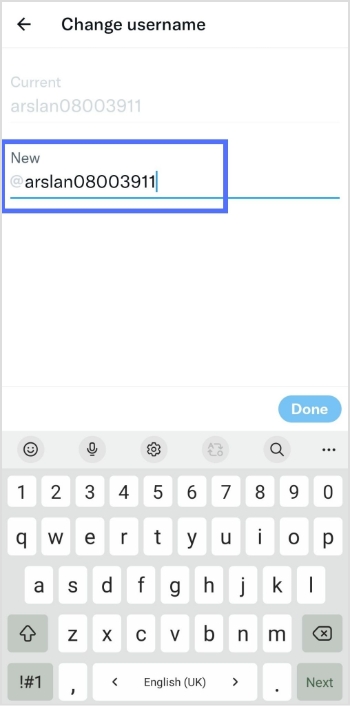
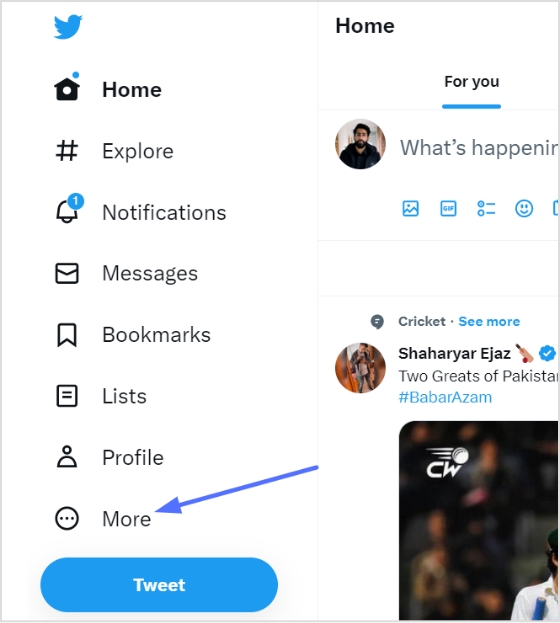
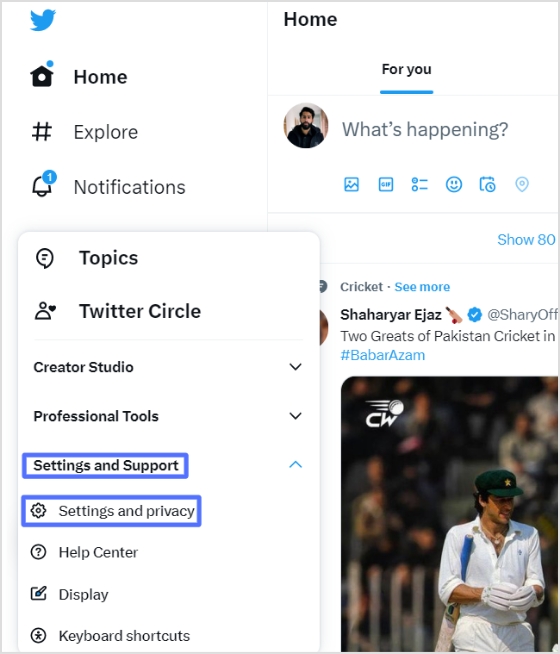
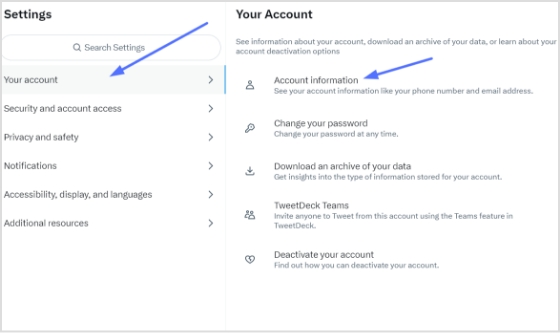
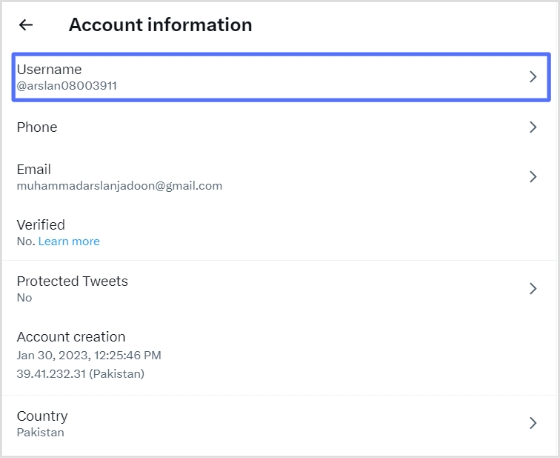
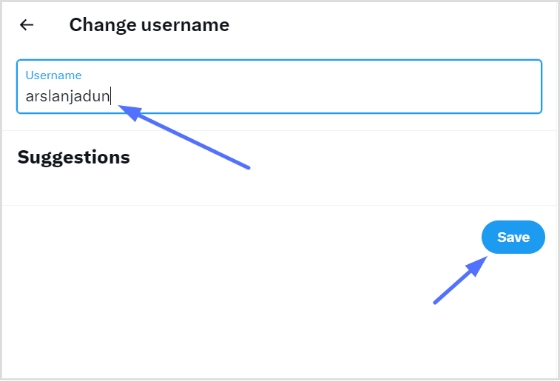
Here’s how to find your Twitter URL:
How to find my Twitter URL on a mobile phone?
Follow these steps on your iOS or Android mobile device to find your Twitter URL:
Step 1: Open the Twitter app on your mobile device.
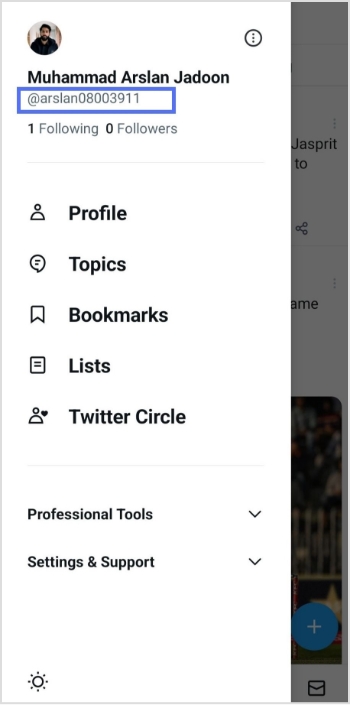
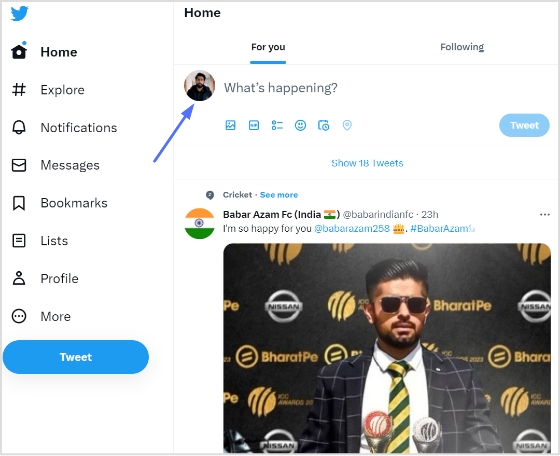
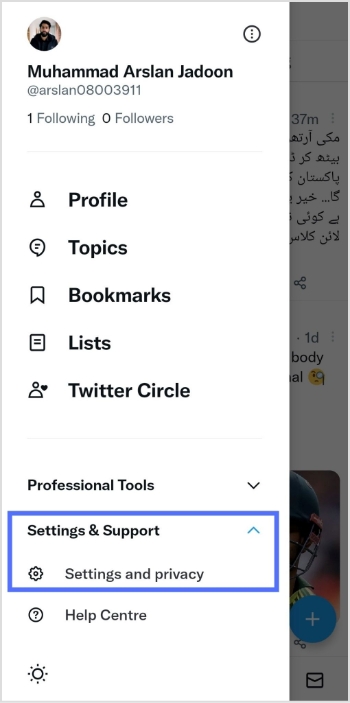
Step 2: Tap the profile icon in the top left corner.
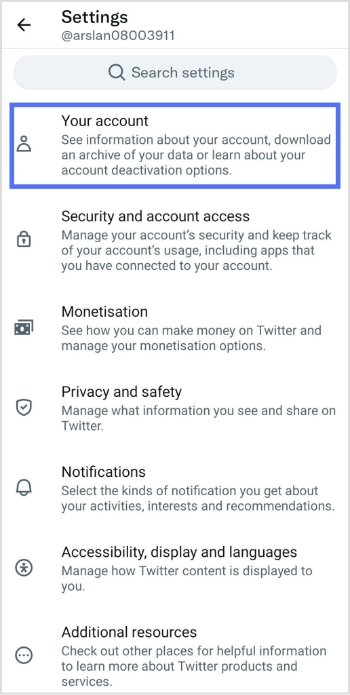
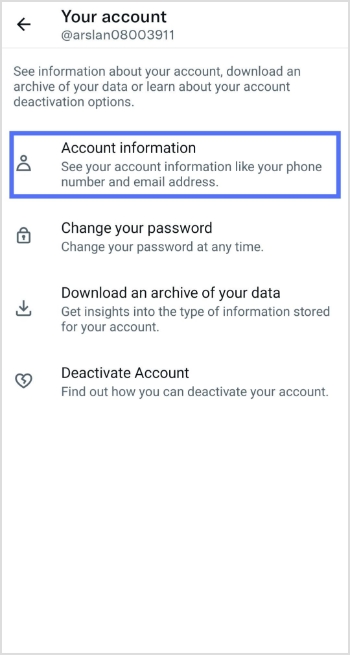
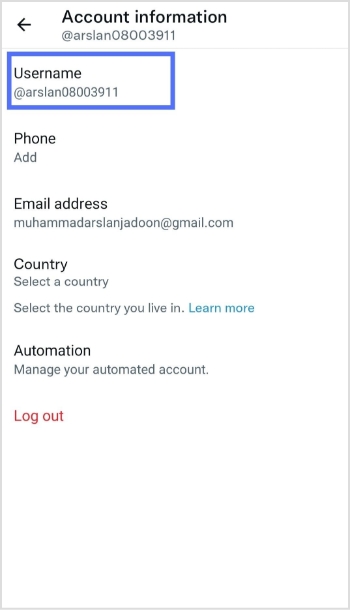
Step 3: You will now see your user name in the sidebar below your name.
Looking for a Better Way to Manage Social Media URLs?
Managing multiple social media accounts is time-consuming, and keeping track of all the links to articles can be challenging. To streamline campaigns, it is recommended to use a tool such as Replug to keep all the links in one place.
It serves as a reliable link management platform that simplifies tracking, organizing, and optimizing your URLs.
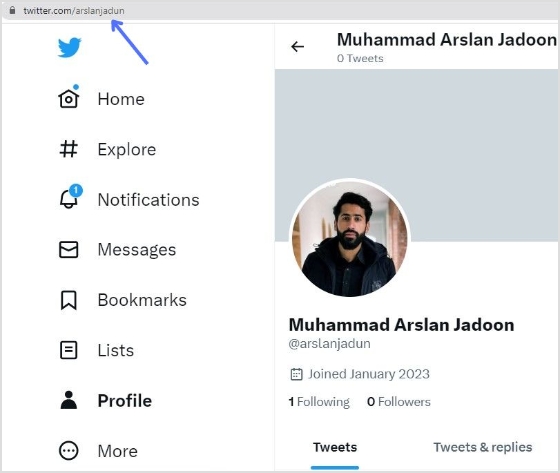
However, deciding what links to include in the Replug can be confusing. For Twitter, the best link to start with is the URL of the entire profile, which can be easily shared and is always in the format of “twitter.com/username.”
The ultimate solution for managing all your social media links
Our link management tool provides you with a dashboard to manage all your shortened links, including the ability to track clicks and see analytics on the usage of each link. This can help you understand how your social media profiles are being used and accessed.
Replug provides several benefits when handling all your social media URLs:
Create a consistent brand across all profiles
A consistent brand across all your social media profiles is important for building a recognizable and professional image. Using the same URL shortener for all your profiles, such as Replug, ensures that your profiles are all linked together under one recognizable brand. This makes it easier for people to find and remember your profiles and creates a consistent image for your brand.
Replug provides analytics and click tracking on your links, so you can see how many people are clicking on your social media profile links, where they are coming from, and which ones are most popular.
Shortened Replug URLs are easier to remember and share than individual social media profiles’ long, complex URLs. You can enhance brand recognition and improve your profile’s accessibility by shortening your social media URLs with Replug.
Provide Cross-platform compatibility
Handling all your social media URLs through Replug provides cross-platform compatibility, making it easier for people to access your profiles from any device or browser. Replug links are designed to work seamlessly across all platforms, including desktops, laptops, smartphones, and tablets, ensuring that your profiles are accessible to everyone, regardless of their device.
Think about this for a second; there are over 5.42 billion active social media users in the world right now. That’s more than half the planet scrolling, liking, and engaging every single day. And yet, so many businesses are still leaving a goldmine of leads untouched on these platforms.
Here’s the thing: Social media isn’t just for brand awareness anymore. It now drives leads for 68% of marketers, and when paired with a solid content marketing strategy, the results can be staggering. Content marketing alone generates 3X more leads than traditional outbound (at 62% lower cost).
So whether you’re a startup trying to build a pipeline from scratch or an established brand looking to scale, social media lead generation is something you simply can’t ignore in 2026.
But before we jump into the tactics, let’s make sure we’re on the same page, i.e., what exactly is social media lead generation?
What is social media lead generation?
Simply put, social media lead generation is the process of using social media platforms to attract potential customers and collect their information.
This could be things like their name, email address, or phone number, so you can follow up with them and eventually turn them into paying customers.
The primary objective here is pretty straightforward: move people from just “following” your brand to actually showing interest in what you offer. It’s about sparking that initial conversation and guiding people down your sales funnel.
Now, this isn’t just about posting pretty pictures or going viral. It’s a deliberate part of your broader social media marketing strategy, one where every piece of content, every ad, and every interaction is designed with a goal in mind. And that major goal is:
Getting the right people to raise their hand and say, “Yes, I’m interested.”
Significance of social media lead generation
Here’s why social media lead generation is so important:
Massive reach & audience targeting
Social media gives you access to billions of potential customers, and the targeting tools available today let you zero in on exactly the right target audience. It is based on their age, interests, location, job title, and more. You’re not shouting into the void; you’re speaking directly to people who are most likely to care about what you offer.
Cost-effective marketing
Compared to traditional advertising like TV spots or print ads, social media lead generation is incredibly budget-friendly. Even with a modest spend, you can run highly targeted campaigns that consistently bring in quality leads without burning through your entire marketing budget.
Enhanced engagement & trust
Social media lets you have real, two-way conversations with your audience, and that builds trust faster than any billboard ever could. When people see you responding to comments, sharing helpful content, and showing up consistently, they start to feel like they actually know your brand.
Valuable data & insights
Every like, click, comment, and share tells you something useful about your audience. Social platforms give you a steady stream of data that helps you understand what’s resonating, what’s not, and where to focus your efforts for better results.
Reduced friction with lead magnets
Features like LinkedIn Lead Gen Forms or Facebook instant forms let people sign up or express interest without ever leaving the app. That means fewer steps between “I’m curious” and “Here’s my contact info,” which makes a big difference in how many leads you actually capture.
Improved conversion rates & ROI
When you consistently attract the right audience and nurture them with relevant content, your chances of converting them into potential customers go up significantly. Social media lead generation, done well, doesn’t just bring in more leads; it brings in better ones, which means a stronger return on every dollar you invest.
How can you generate leads with social media: Proven tactics & strategies to follow!
There’s no shortage of social media lead generation strategies out there, but not all of them actually move the needle. The key is knowing which tactics are worth your time and how to execute them properly.
Here are some proven ones to get you started!
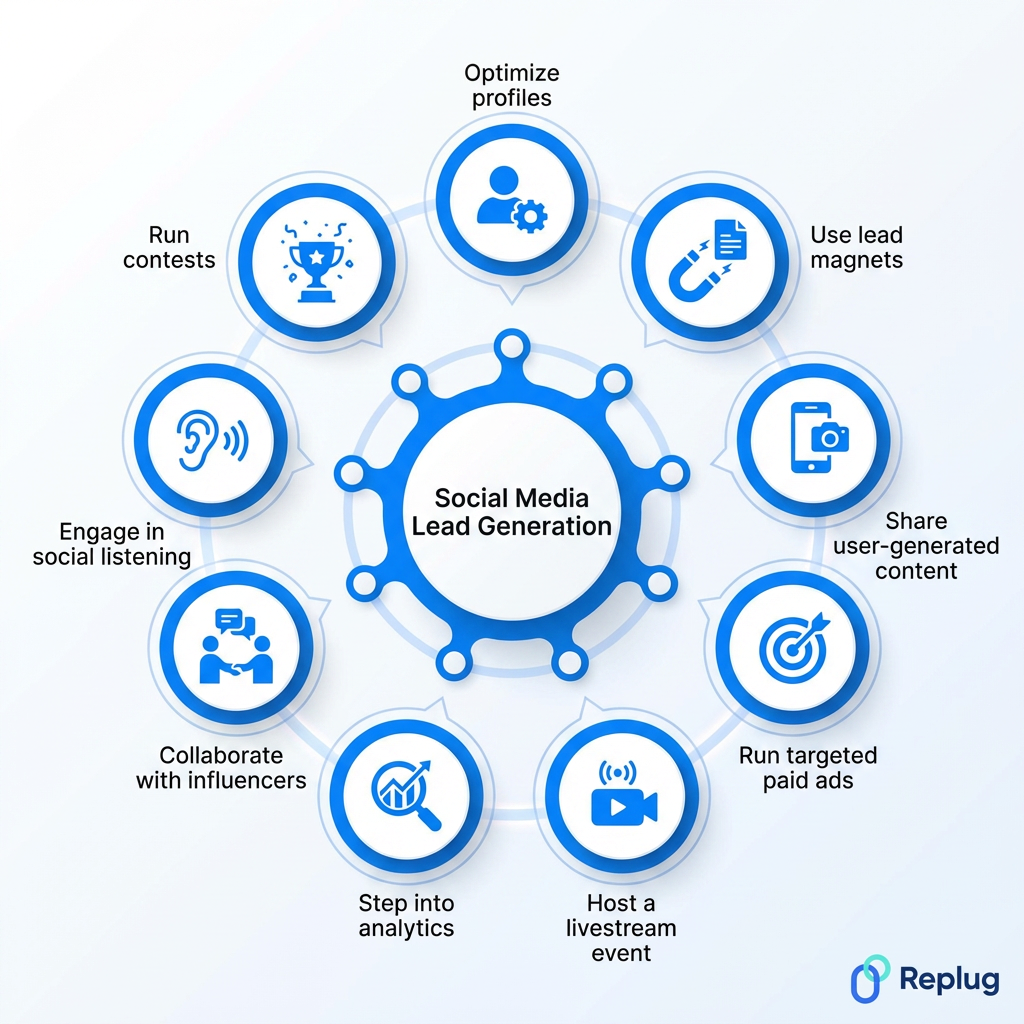
Tactic #01: Optimize profiles with clear calls-to-action (CTAs)
Your social media profile is often the first thing a potential lead sees, so make it count. Make sure your bio clearly tells people what you do, who you help, and what they should do next.
Add a strong CTA phrase like “Book a free call,” “Download our guide,” or “Visit our website” with a direct link. A well-optimized profile quietly works as a lead generation machine 24/7.
Tactic #02: Share valuable content (use lead magnets like ebooks or webinars)
People won’t hand over their contact info for nothing; you need to give them a reason to. That’s where lead magnets come in.
Offer something genuinely useful, like a free ebook, checklist, webinar, or mini-course in exchange for their email. Share these across your social channels regularly, and make sure whatever you’re offering actually solves a real problem your target audience faces.
Tactic #03: Use relevant keywords & high-quality images
Social platforms are increasingly being used as search engines, especially Instagram, LinkedIn, and TikTok. Using the right keywords in your captions, bios, and hashtags helps the right people find you organically.
Pair that with high-quality, eye-catching visuals, and you’ve got content that not only gets discovered but also stops people mid-scroll long enough to actually engage.
Tactic #04: Design a top-notch content calendar
Posting randomly whenever you feel like it won’t be of much benefit. A solid content calendar keeps you consistent, organized, and strategic.
Plan out your posts in advance. Mix educational content, promotional posts, engagement-driven questions, and lead magnet promotions. Consistency builds familiarity, and familiarity builds the kind of trust that eventually turns followers into leads.
Tactic #05: Leverage strategic posting
It’s not just what you post online; it’s when and where you post it that matters too. Study your platform analytics to figure out when your audience is most active and schedule your posts accordingly.
Also, think about which platform makes the most sense for your audience. A B2B brand will get more traction posting on LinkedIn at 9 AM on a Tuesday than on Instagram at midnight.
Tactic #06: Share user-generated content (UGC)
Nothing builds trust faster than real people vouching for your brand. Encourage your existing customers to share their experiences, tag your brand, or leave reviews. Then repost that content on your own channels.
UGC acts as social proof, and when potential leads see real customers talking positively about you, it removes a lot of the hesitation they might have about reaching out.
Tactic #07: Personalize your pitch
Nobody likes getting a copy-paste DM that was clearly sent to 500 other people. When you’re reaching out to potential leads directly, take a moment to personalize your message.
Reference something specific about their business, content, or a challenge they’ve mentioned. It takes an extra couple of minutes, but it makes a world of difference in whether they respond or ignore you entirely.
Tactic #08: Run contests & giveaways
A well-run contest can generate a serious spike in engagement and leads in a short amount of time. Ask people to enter by submitting their email, tagging a friend, or answering a question.
The key is to make sure the prize is relevant to your target audience (not just a generic gift card), so the leads you collect are actually people who’d be interested in your product or service.
Tactic #09: Run targeted paid ads
Organic reach is great, but paid ads let you put your offer in front of a very specific audience almost instantly. Platforms like Facebook, Instagram, and LinkedIn have incredibly detailed targeting options. You can filter by job title, industry, interests, location, and more.
Even a small budget, when spent wisely on a targeted campaign, can bring in a steady stream of qualified leads.
Tactic #10: Run social lead ads
Social lead ads(like Facebook Lead Ads or LinkedIn Lead Gen Forms) are specifically designed to capture leads without making people leave the platform. The forms auto-fill with the user’s information, which makes the whole process super quick and frictionless.
Since there’s less effort involved for the user, conversion rates on these tend to be significantly higher than driving traffic to an external landing page.
Tactic #11: Use click-to-experience (CTX) ads
CTX ads take things a step further than regular ads by dropping users into an immersive, full-screen experience right inside the platform (no redirects, no waiting for a page to load). Think interactive product demos, mini-quizzes, or instant storefronts.
Because everything happens in-app, people stay engaged longer, and that increased engagement naturally leads to more conversions and captured leads.
Tactic #12: Use retargeting ads
Most people won’t convert the first time they come across your brand, and that’s completely normal. Retargeting ads let you re-engage people who’ve already visited your website, watched your videos, or interacted with your content.
Since these folks already know who you are, they’re much warmer leads. A well-timed retargeting ad can be just the nudge they need to finally take action.
Tactic #13: Run Meta ads
Meta’s ad platform (covering both Facebook and Instagram) is still one of the most powerful tools for lead generation. With over 3 billion monthly active users on Facebook alone, the reach is massive.
What makes Meta ads really shine is the targeting. You can get incredibly specific about who sees your ads, which means you’re spending your budget on people who are genuinely likely to be interested.
Tactic #14: Host a livestream event/session
Livestreams are one of the most underused lead generation tools out there. Hosting a live Q&A, product demo, or educational session gets people to show up in real time and actively engage with your brand.
You can collect leads by requiring registration beforehand or by promoting a lead magnet during the stream. Plus, the real-time interaction builds a level of trust that pre-recorded content just can’t match.
Tactic #15: Engage in social listening
Social listening means keeping an eye on what people are saying about your brand, your competitors, and your industry across social platforms. When someone tweets about a problem your product solves, that’s a lead opportunity sitting right there.
Tools like Sprout Social or Hootsuite make this easy. It’s one of those tactics that doesn’t feel like lead generation, but when done right, it absolutely is.
Tactic #16: Conduct Q&A and encourage audience conversation
Hosting a Q&A, no matter through Instagram Stories, a LinkedIn post, or a live session, gets your audience talking and signals to potential leads that you’re approachable and knowledgeable.
When people ask questions, they’re telling you exactly what they need help with. That’s golden information. Answer genuinely, keep the conversation going, and you’ll naturally draw in people who are ready to take the next step with you.
Tactic #17: Leverage social proof (in customer testimonials & posts)
People trust other people way more than they trust brands; it’s just pure human nature. Sharing real customer testimonials, success stories, before-and-after results, or even screenshots of positive feedback on your social channels goes a long way.
It shows potential leads that your product or service actually delivers. Make it a habit to regularly feature your happy customers, and let their words do the selling for you.
Tactic #18: Connect & collaborate with influencers
Partnering with the right influencers puts your brand in front of an already engaged, already trusting audience. You don’t need mega-celebrities for this. Micro-influencers with smaller but highly engaged followings often drive better lead quality.
Find someone whose audience matches your ideal customer, collaborate on content or a promotion, and watch how quickly the right kind of attention starts coming your way.
Tactic #19: Create clickable content
Clickable content is anything that makes someone stop, think “I need to see more of this,” and actually take action. That could be a bold stat in a carousel post, a curiosity-driven caption, a compelling thumbnail, or a strong CTA at the end of a video.
The goal is to create content that doesn’t just get seen but gets clicked, because clicks are what move people further down your funnel.
Tactic #20: Perform personalized outreach
Personalized outreach is about reaching out to potential leads in a way that feels human, not automated. Do a little research before you hit send. Understand their business, their pain points, and how you can genuinely help.
Whether it’s a LinkedIn DM or a comment on their latest post, make it specific to them. A message that shows you’ve actually paid attention almost always outperforms a generic template.
Tactic #21: Always remember retargeting
Retargeting deserves a second mention because, honestly, most businesses set it up once and forget about it. Keep refreshing your retargeting audiences, update your ad creatives regularly, and segment your audiences based on where they dropped off.
Someone who watched 75% of your product video needs a different message than someone who just visited your homepage once. Stay intentional with it!
Tactic #22: Share & promote links to gated content
Gated content is basically valuable material (think in-depth guides, research reports, templates, or whitepapers) that people can only access after filling out a short form. Share these links consistently across your social channels with a compelling reason to click.
When your gated content genuinely solves a problem, people won’t mind handing over their email address to get it. That’s a lead captured right there!
A great offer can do the hard work for you. No matter if it’s a free trial, a limited-time discount, a free consultation, or an exclusive bonus, people respond to value. The trick is making your offer feel urgent and relevant.
If someone’s been on the fence about trying your product, a well-timed incentive can be exactly what pushes them to finally say “yes” and engage with your brand.
Tactic #24: Respond to messages & comments swiftly
This one sounds simple, but it’s something a lot of brands genuinely fail to act on. When someone comments on your post or slides into your DMs with a question, respond quickly.
Studies show that responding within the first hour dramatically increases the chances of converting that interaction into a lead. People want to feel heard, and a fast, genuine response tells them your brand actually cares.
Tactic #25: Sponsor content creators
Sponsoring content creators is different from a full influencer collaboration. It’s more targeted and often more affordable. You pay a creator to feature your product or service naturally within their content, reaching their specific audience in a way that feels organic rather than salesy.
Pick creators whose followers match your ideal customer profile, and make sure the sponsorship adds genuine value to their content rather than disrupting it.
Tactic #26: Utilize social media AI chatbots
AI chatbots on platforms like Facebook Messenger or Instagram DMs can engage with potential leads around the clock (even when your team is offline). They can answer common questions, qualify leads, recommend products, and even collect contact information automatically.
The technology has come a long way, and today’s chatbots feel a lot more conversational than the awkward ones from a few years ago. Don’t sleep on this one!
Tactic #27: Design a referral program
Your existing customers are one of your most underused lead generation assets. A referral program motivates them to spread the word, offering them a discount, cashback, or a freebie every time they bring in a new customer.
People trust recommendations from friends and family far more than ads, so leads that come through referrals tend to convert faster and stick around longer. It’s a win-win for everyone involved.
Tactic #28: Utilize lead forms
Native lead forms available on platforms like LinkedIn, Facebook, and TikTok make it incredibly easy for people to express interest without leaving the app. The forms typically auto-populate with the user’s information, so there’s almost zero friction involved.
Use them for webinar sign-ups, free trial requests, newsletter subscriptions, or consultation bookings. The lower the effort required, the higher your chances of actually capturing that lead.
Tactic #29: Create user-friendly landing pages
When you do direct people off social media to a landing page, make sure that page is clean, fast, and focused. One clear message, one clear CTA; that’s it. No clutter, no distractions, no slow load times.
A confusing or sluggish landing page will kill your conversion rate, no matter how good your social media content is. Think of your landing page as the closer (it needs to seal the deal).
Tactic #30: Step into analytics
You can’t improve what you’re not measuring in the first place. Dig into your social media analytics regularly to see which content is driving the most clicks, which ads are bringing in leads, and where people are dropping off.
Platforms like Meta Business Suite, LinkedIn Analytics, and third-party tools like Sprout Social give you all the data you need. Let the numbers guide your decisions instead of just going with your gut.
Major benefits of social media lead generation
Social media lead generation isn’t just about collecting contact info; it brings a whole range of benefits that impact your business well beyond the sales funnel.
When done consistently and strategically, it can genuinely transform how your brand grows and connects with the right people.
Here’s a quick look at the key benefits you can expect.
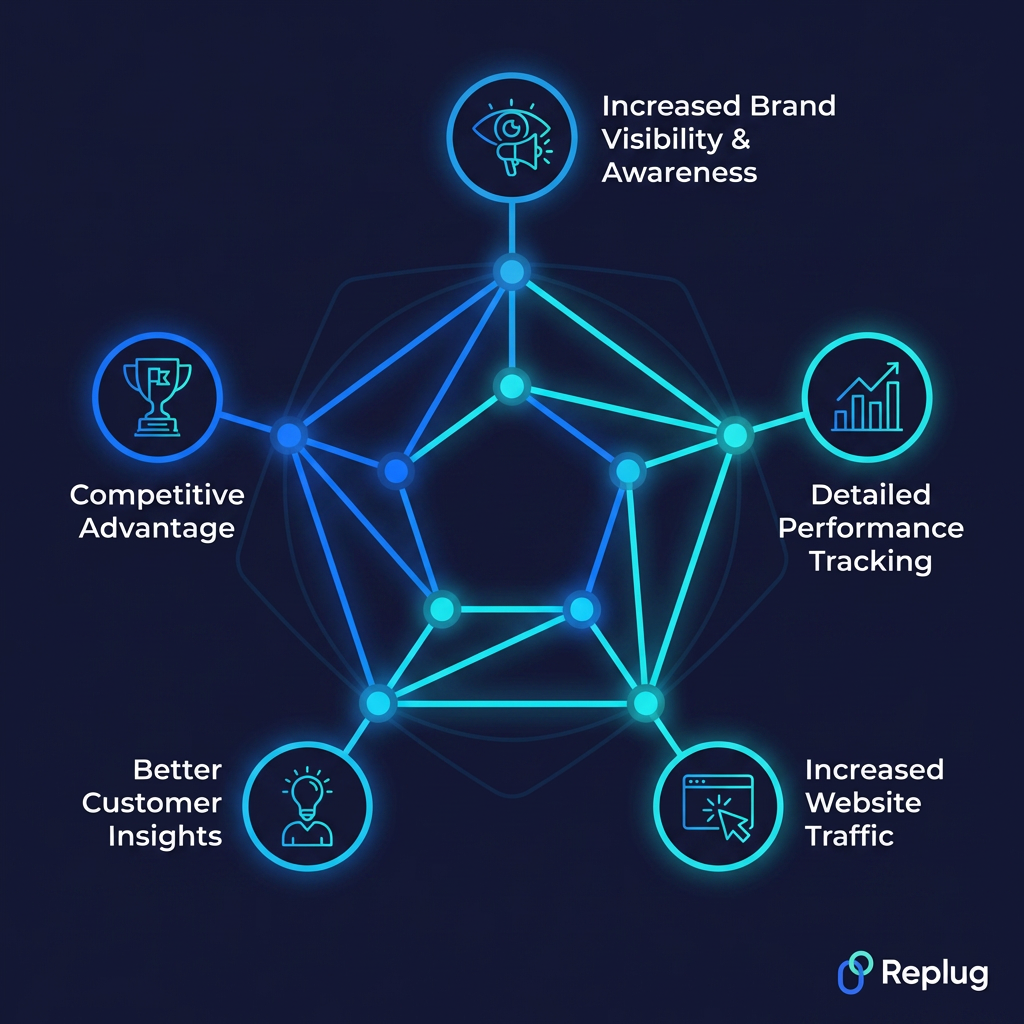
Increased brand visibility & awareness
Every post, ad, comment, and share puts your brand in front of more eyes. As your content gets engagement and circulates across platforms, more people become aware of who you are and what you offer (even if they’re not ready to buy just yet).
Over time, that visibility compounds, and your brand becomes the first name people think of when they need what you provide.
Detailed performance tracking
One of the biggest advantages of social media lead generation over traditional marketing is that everything is measurable. You can track exactly how many people clicked your ad, filled out your form, visited your page, or dropped off mid-funnel.
This level of detail means you’re never guessing; you always know what’s working, what isn’t, and where to put your energy next.
Increased website traffic
Social media is one of the most reliable ways to consistently drive people to your website. Every link you share (whether it’s a blog post, a landing page, or a product page) is an opportunity to pull someone out of their social feed and into your own space.
More targeted traffic means more chances to convert visitors into leads and eventually into paying customers.
Better customer insights
Social media gives you a front-row seat to what your audience actually thinks, feels, and cares about. Through comments, polls, DMs, and engagement patterns, you get real feedback that no survey could fully replicate.
These insights help you fine-tune your messaging, improve your offers, and create content that genuinely resonates, making your entire lead generation effort more effective over time.
Competitive advantage
Brands that actively use social media for lead generation are simply ahead of those that don’t. You get to build relationships, stay top-of-mind, and engage potential customers long before your competitors even enter the picture.
The more consistently you show up and deliver value, the harder it becomes for a competitor to swoop in and steal the leads you’ve already been nurturing.
Convert online traffic into leads with a top-notch social media lead generation agency
All 30 tactics we’ve covered are powerful, but let’s be honest, executing them consistently while running an entire business is a lot to handle on your own. That’s where having the right tools and support makes all the difference.
This is where Replug comes in!
It is an all-in-one link optimization platform designed to help businesses turn their social media traffic into actual, measurable leads. From bio links to branded short URLs, it gives you everything you need to make every click count.
A complete link management solution
for marketing professionals & agencies.
Try Replug for free
With Replug’s custom URL shortener, you get a shorten link that looks professional and builds trust with your audience. No more messy, long URLs cluttering your captions.
And if you’re ever stuck on what to post, the built-in free AI social caption generator helps you craft engaging captions in seconds, saving you time without sacrificing quality.
If you’re serious about turning your social media presence into a lead generation machine, Replug is honestly worth exploring. Give it a try today!
Frequently asked questions
What is lead generation?
Lead generation meaning is simply the process of attracting strangers and getting them interested in your product or service. In lead generation marketing, the goal is to collect contact information from potential customers (like their email or phone number) so you can nurture them toward eventually making a purchase.
What is AI social media lead generation?
It’s using artificial intelligence tools to automate and improve how you find and capture leads on social media. Think AI chatbots that qualify leads, tools that analyze audience behavior, or platforms that auto-personalize your outreach. It makes the whole process faster, smarter, and a lot more scalable than doing everything manually.
How to generate leads with social media automation?
Use tools like ContentStudio, ManyChat, HubSpot, or Hootsuite to automate DMs, schedule posts, run drip campaigns, and follow up with leads automatically. Set up triggered responses when someone comments or clicks a link. Automation handles the repetitive stuff so you can focus on strategy and building genuine relationships with high-quality prospects.
What role does social media play in lead generation?
Social media acts as the bridge between your brand and potential customers. It’s where people discover you, engage with your content, and decide whether they trust you enough to share their information. It creates awareness, builds credibility, and gives you multiple touchpoints to guide someone from a casual scroller to an actual lead.
What is a lead generation format?
A lead generation format is basically the type of content or ad you use to capture leads. Common formats include lead gen forms, gated content like ebooks, webinar registrations, contests, chatbot flows, and landing pages. The best format depends on your platform, your audience, and what kind of value exchange makes sense for your offer.
Which social media platform is best for lead generation?
It depends on your target audience.
– LinkedIn is the clear winner for B2B lead generation. – Facebook and Instagram work best for B2C brands; thanks to Meta’s powerful ad targeting. – YouTube is great for long-form content that builds trust over time. – TikTok is growing fast, especially for reaching younger audiences with short-form video content.
What are the social media lead generation & privacy laws one must be aware of?
A few key ones to know:
– GDPR(Europe) requires clear consent before collecting data. – CCPA(California) gives users the right to know what data you’re collecting. – CAN-SPAM governs email follow-ups.
Always be transparent about how you’ll use someone’s information, include an opt-out option, and never buy contact lists. It’s both risky and ineffective.
Provide some of the best social media lead generation examples?
A few solid real-world examples:
– HubSpot regularly offers free tools and gated reports on LinkedIn to capture B2B leads. – Shopify runs Facebook Lead Ads targeting small business owners. – Netflix uses retargeting ads to re-engage lapsed users. – Adobe hosts webinars promoted via social media to pull in creative professionals.
All simple, strategic, and highly effective!
What are the social media lead generation companies to look out for in 2026?
Some of the top names to know include:
– Cognism – Operatix – Attrock, and – Blackorange
Leadriver is also worth considering, especially for B2B tech companies needing rapid sales scaling. Callbox is another strong option, known for its multi-channel approach combining email, social, chat, and phone outreach. Each has different strengths, so pick based on your budget and goals.
Provide a list of the top social media lead generation tools available online?
Here are some of the best tools worth checking out in 2026:
– HubSpot: An all-in-one platform covering CRM, email marketing, and lead capture forms, great for managing your entire funnel in one place. – Replug: A powerful link optimization platform for turning every shared link into a trackable, branded lead generation touchpoint. – Hootsuite: Goes beyond scheduling with social listening features that help you identify and engage prospects actively discussing your industry. – Sprout Social: Excellent for teams that need deep analytics and CRM integration to track and convert leads more effectively. – ContentStudio: Simple, reliable, and great for maintaining consistent posting, which builds the authority that drives people to your lead magnets. – LinkedIn Sales Navigator: The go-to tool for B2B prospecting, helping you pinpoint decision-makers and reach them at scale. – Mailchimp: A solid choice for nurturing leads through automated email drip campaigns once you’ve captured them from social. – ManyChat: A widely used chatbot tool for automating DMs and lead capture on Instagram and Facebook Messenger.
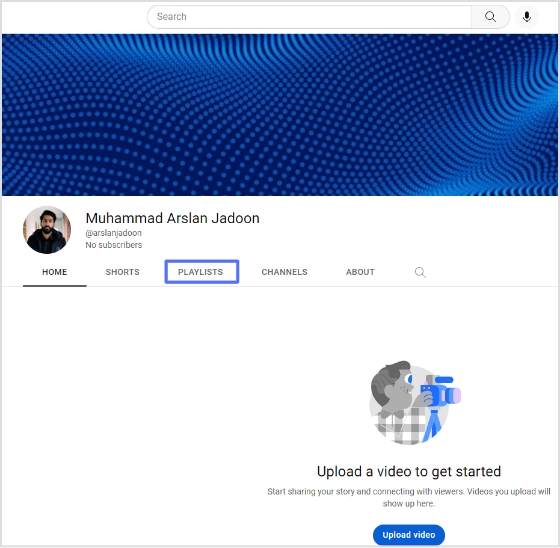
YouTube playlists are a feature that allows users to organize and view a series of videos together. Users can create their playlists or add videos to existing playlists created by other users. Videos in a playlist can be rearranged, edited, or removed at anytime.
Deep links directly link to specific content within an app rather than simply linking to the app’s home page.
Using a deep link to share a YouTube playlist allows the recipient to immediately access and view the playlist without having to search for it within the app. Also, deep links can contain information about the content, such as the specific video or playlist, so recipients know what they click on and why it is relevant.
Using deep links to share YouTube playlists can also help increase the app’s engagement and retention. As a result, recipients are more likely to continue using the app after being directed to the specific content they are interested in.
Here’s how to share YouTube playlists on mobile and computer devices:
How to share Youtube playlist with deep links on a mobile device?
Follow the steps below:
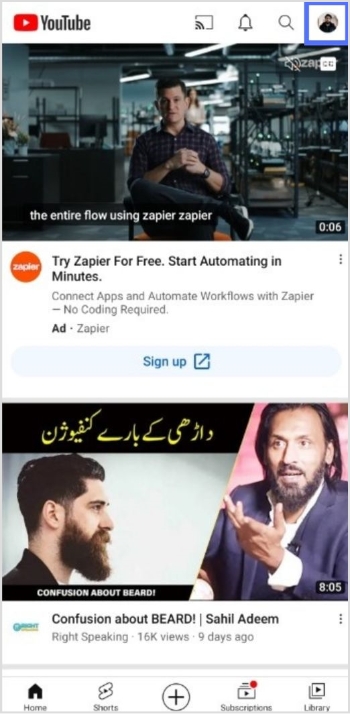
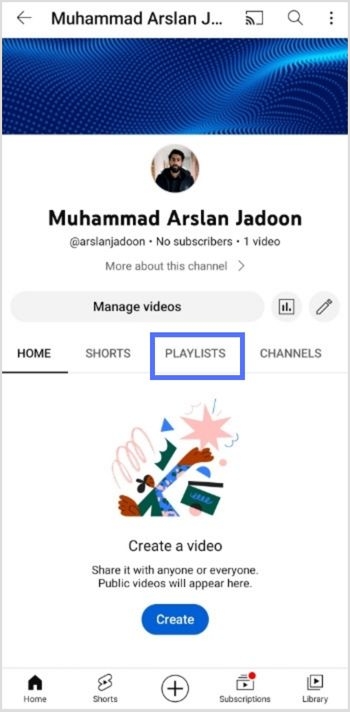
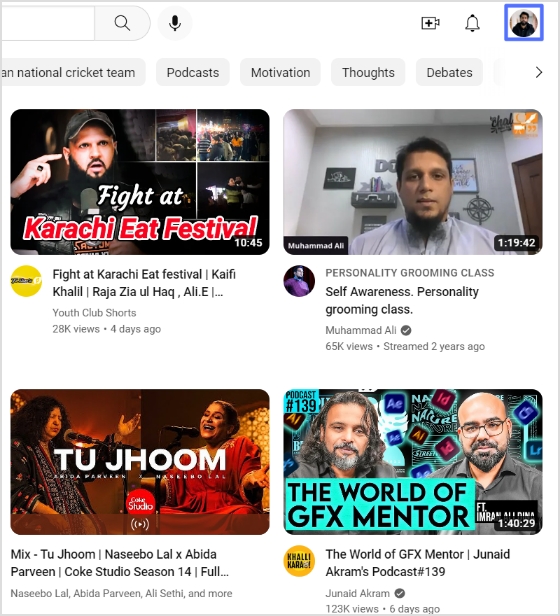
Step 1: Open YouTube on your mobile phone and tap the profile icon in the top right corner.
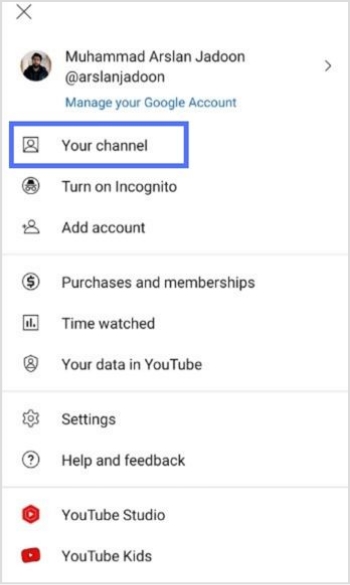
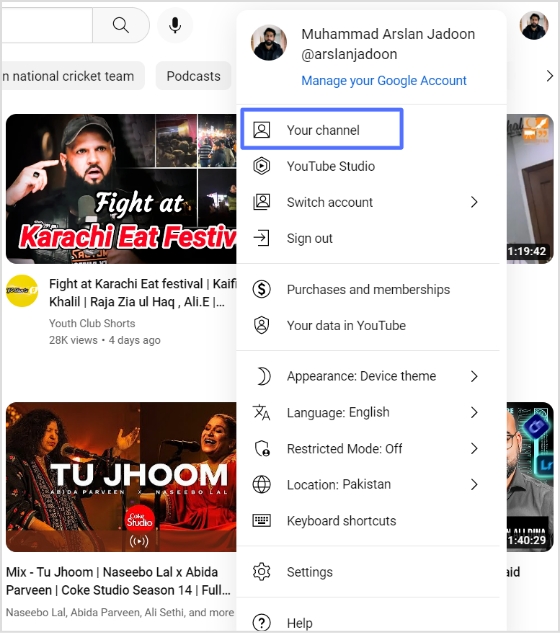
Step 2: Tap “your channel” from the drop-down menu.
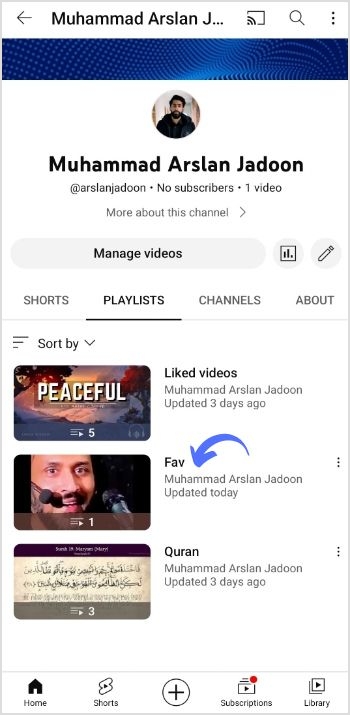
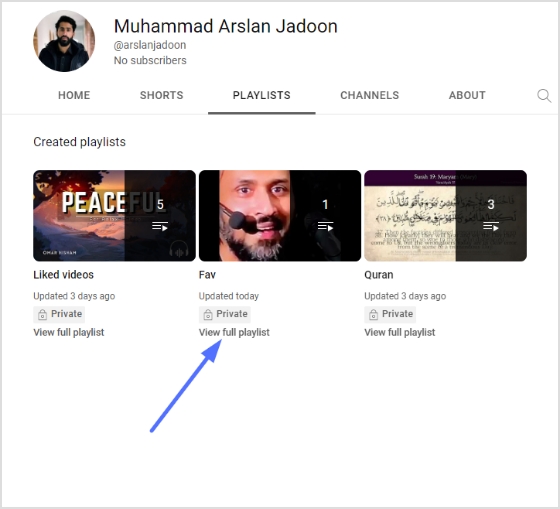
Step 3: Tap “playlist” on your mobile screen.
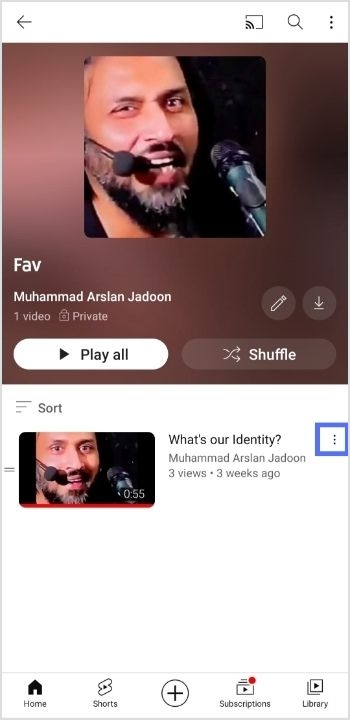
Step 4: Open the playlist you want to share.
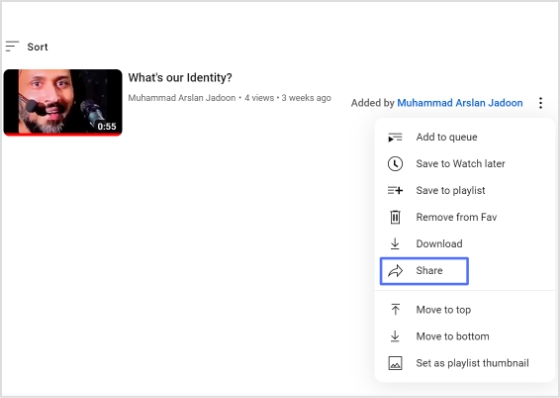
Step 5: Tap three dots alongside the playlist.
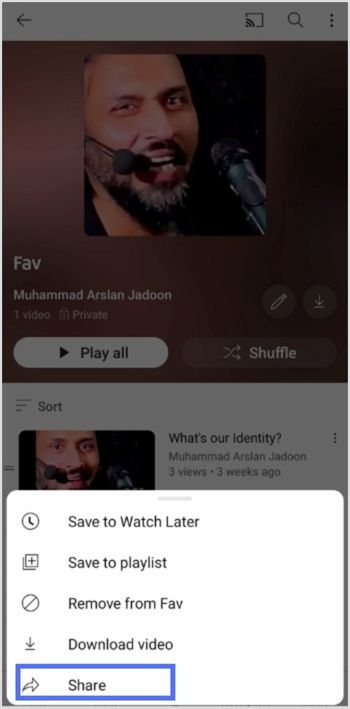
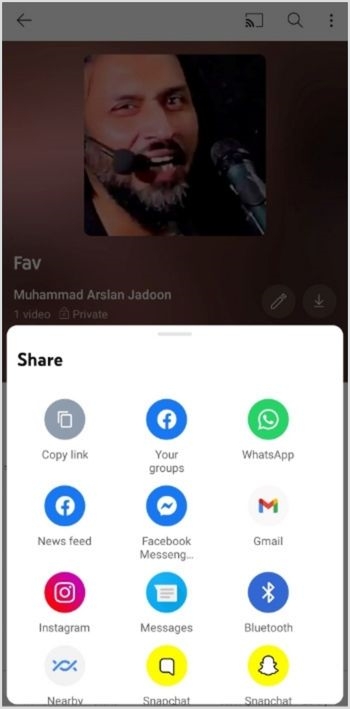
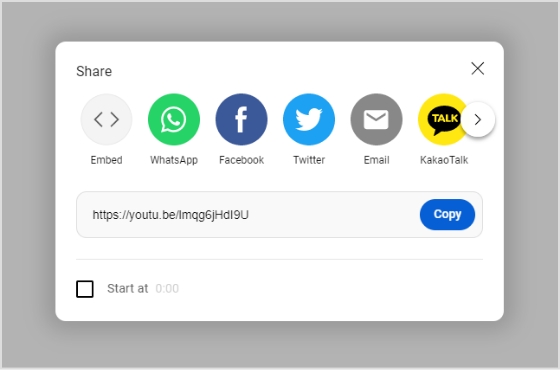
Step 6: Tap share to share the playlist.
Step 7: Tap Copy link to copy the link and create a deep link for your YouTube playlist.
Maximize marketing ROI
by transforming ordinary URLs into branded short links that convert.
Try Replug for free
Create a deep link for YouTube Mobile Playlist:
Step 8:Go to Replug and sign in or create an account for free.
Step 9: Select the desired campaign on the main dashboard or create a new campaign.
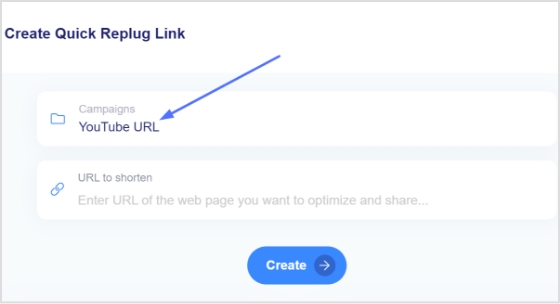
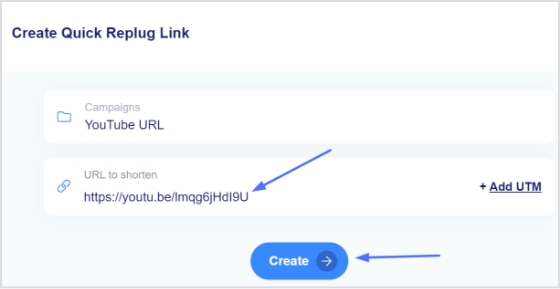
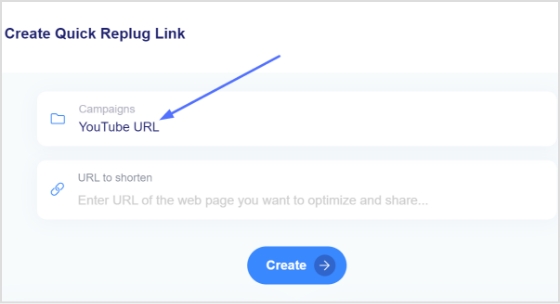
Step 10: Enter the YouTube playlist link in the “URL to shorten” section under the campaigns section, and click create.
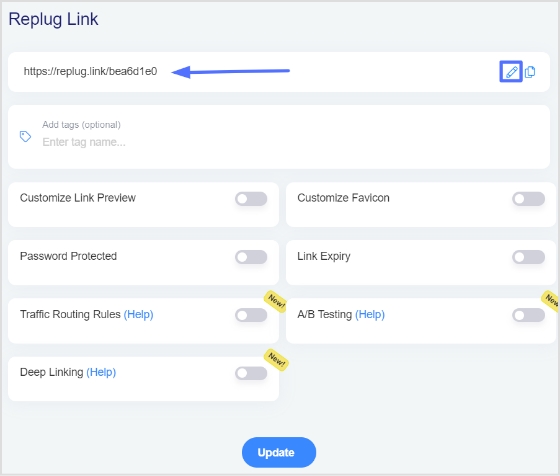
Step 11: You’ve your newly created Replug link. Click the edit icon to customize the link.
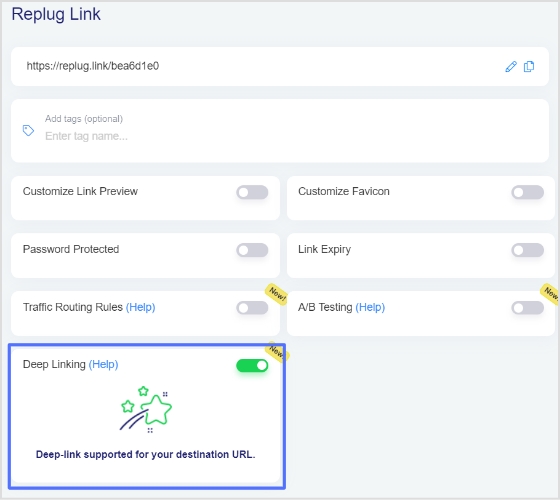
Step 12: Turn on the Deep link button and verify that deep links are allowed for the link.
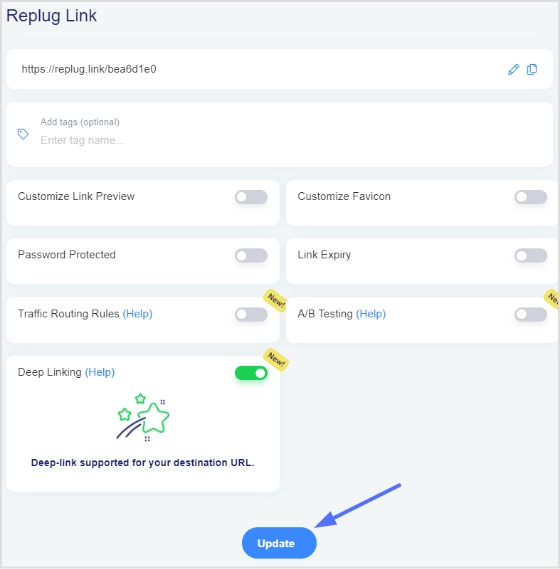
Step 13: Click the update button to create a deep link for your YouTube playlist.
Note: To find the deep link, Go to the manage section on the main dashboard > Click Replug links.
Create a deep link for a YouTube computer playlist:
Step 8:Sign in to Replug or create an account for free.
Step 9: Select the desired campaign on the main dashboard or create a new campaign.
Step 10: Enter the YouTube playlist link in the “URL to shorten” section under the campaigns section, and click create.
Step 11: You’ve your newly created Replug link. Click the edit icon to customize the link.
Step 12: Turn on the Deep link button and verify that deep links are allowed for the link.
Step 13: Click the update button to create a deep link for your YouTube playlist.
Note: To find the deep link, Go to the manage section on the main dashboard > Click Replug links.
Once you have the playlist link, you can create a branded short URL using Replug to make sharing cleaner and more memorable.
FAQs
How to share a YouTube playlist on WhatsApp?
To share a YouTube playlist on WhatsApp:
1. Open the YouTube app on your mobile device and sign in to your account. 2. Find the playlist you want to share and tap on it. 3. Tap the “Share” button, usually represented by an icon of two arrows pointing in opposite directions. 4. Select “Share on WhatsApp”. 5. Select the contact you want to share the playlist with. 6. Your contact will receive a message with a link to the playlist.
Alternatively, you can share the link by copying it and then sharing it on WhatsApp by creating a new message or pasting it into an existing conversation.
Please note that the person you share the link with needs to have the YouTube app installed on their device to view the playlist.
Adding a YouTube link to an Instagram story allows the user to share a video from YouTube on their Instagram story. This allows their followers to view the video directly from the Instagram story without leaving the app and going to YouTube.
It can also help direct more traffic to the YouTube video, increasing its visibility and gaining more views and engagement.
Here’s how to add YouTube links to the Instagram stories:
Step 1: Go to the YouTube app and play the video you want to share in Instagram Story.
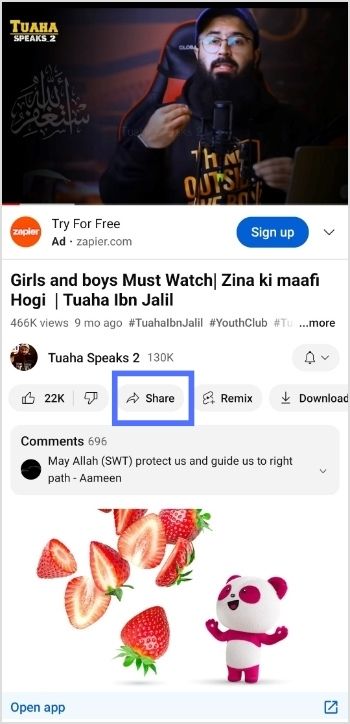
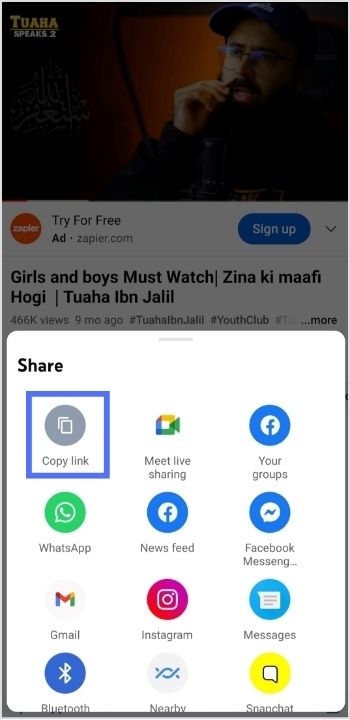
Step 2: Tap “share” right below the YouTube video.
Step 3: Tap “copy link” to copy the link you want to share in the Instagram story.
Note: Before pasting the URL into your Instagram story’s link sticker, you might want to shorten a link first for a cleaner, more shareable URL that looks better in your story and is easier for followers to click. Replug is the reliable link optimization platform to perform this task in the best possible manner.
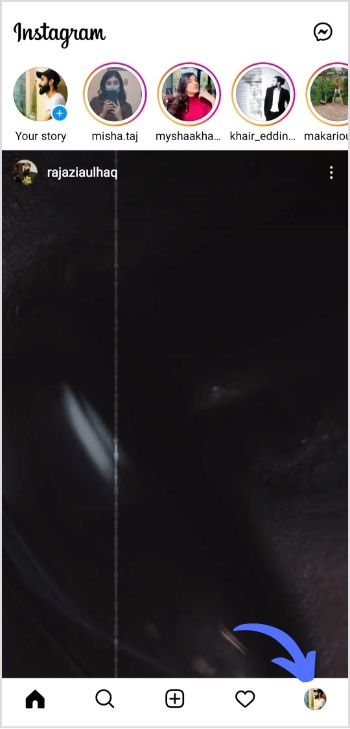
Step 4: Now open the Instagram app and tap the “profile icon’’ in the bottom right corner.
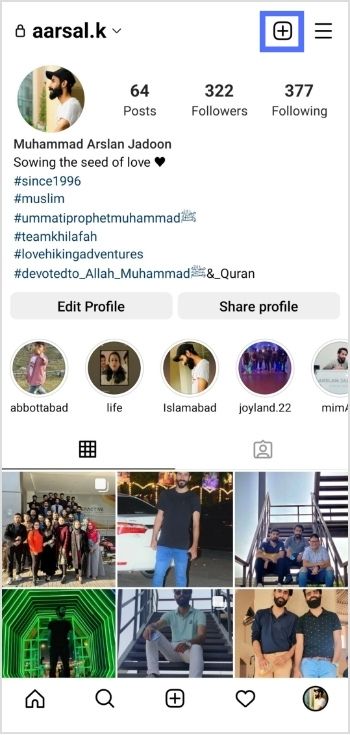
Step 5: Tap the “add (+)’’ sign in the top right corner.
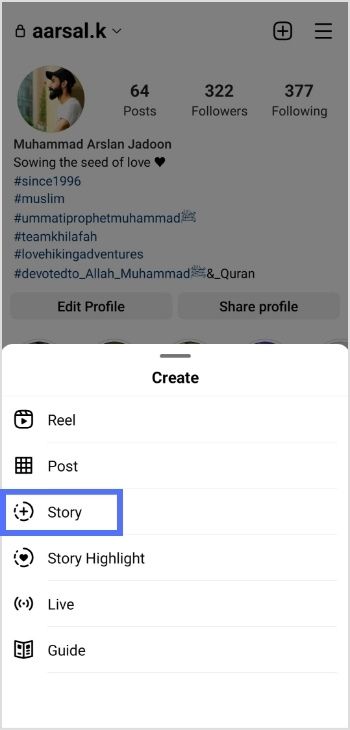
Step 6: Tap “story” to add a new story.
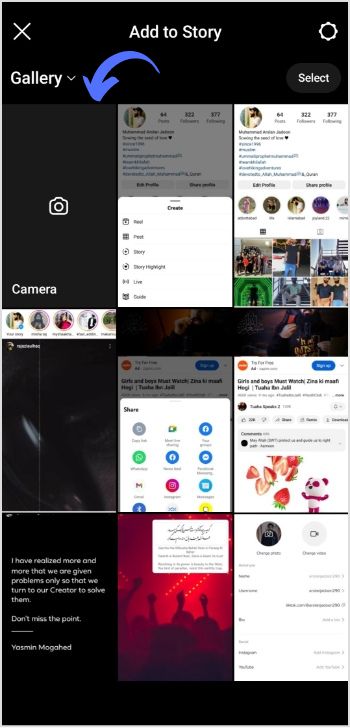
Step 7: Tap the “camera” from different gallery options.
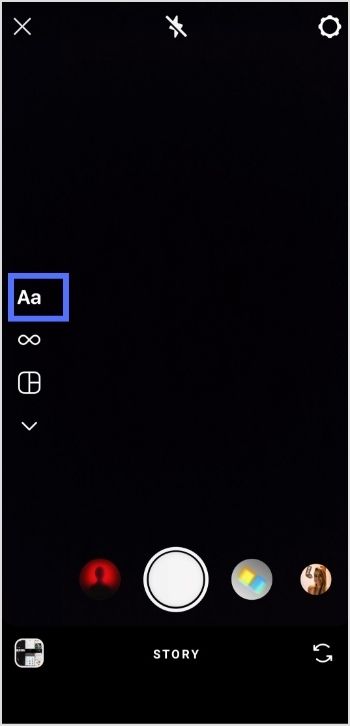
Step 8: Tap “create or Aa” for a new story.
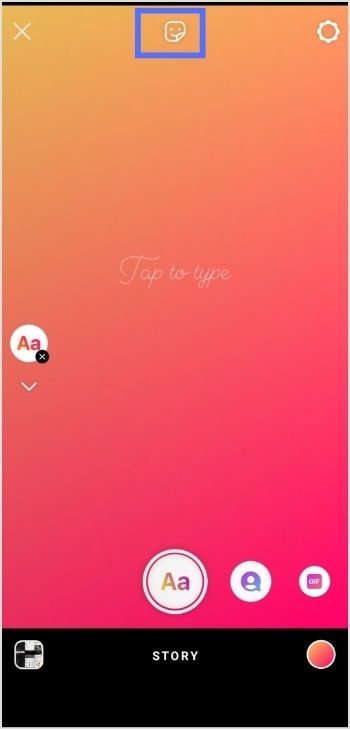
Step 9: Tap the “sticker icon” from the screen’s top.
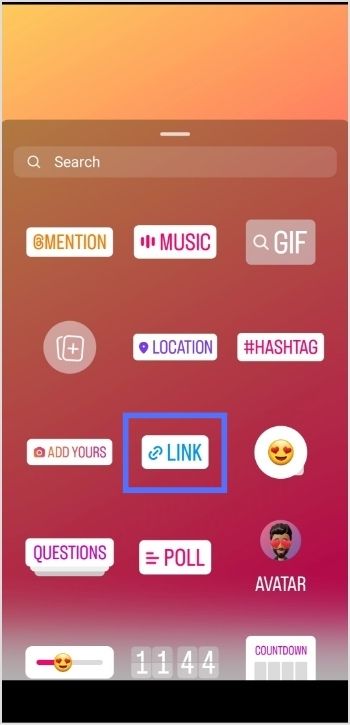
Step 10: Tap the “link sticker” from the options.
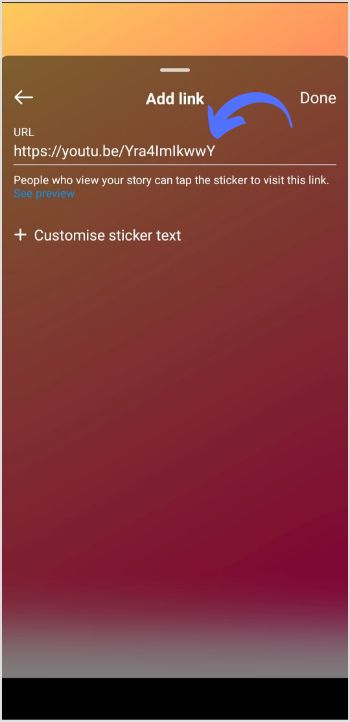
Step 11: Add link screen will open. Paste the YouTube video URL in the URL field and tap done.
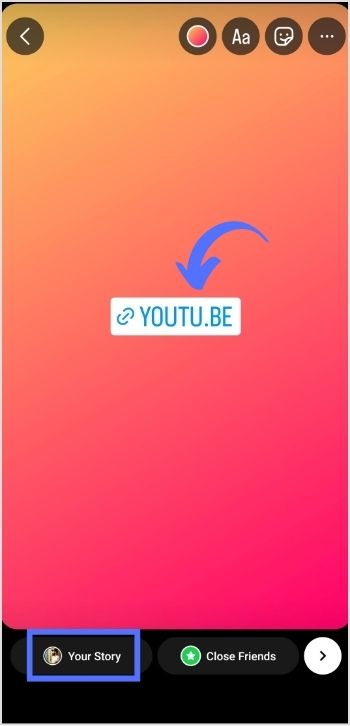
Step 12: Tap “your story,” and your YouTube video link will be posted in your Instagram stories.
Point to note:
Adding YouTube links to Instagram stories can increase the visibility and reach of YouTube content and drive more traffic to a YouTube channel. This can benefit creators looking to grow their audience and expand their brand. Additionally, it allows viewers to access and watch YouTube videos directly from the Instagram app, making the viewing experience more seamless and convenient. Adding YouTube links to Instagram stories can be a valuable strategy for growing a YouTube channel and engaging with viewers on both platforms.
Frequently asked questions
How To Put Youtube Link In Instagram Bio?
To add a YouTube link to your Instagram bio, you need to have a YouTube account. Also, the link to the YouTube video or channel you want to share. Once you have that, follow these steps:
1. Open the Instagram app and go to your profile. 2. Tap the “Edit Profile” button. 3. In the “Website” section, enter the link to the specific YouTube video or channel you want to share. 4. Tap “Done” to save the changes to your profile. 5. Return to your profile and see the YouTube link in the bio section.
Creating a TikTok account can offer a number of benefits depending on your goals and interests. It’s a great way to discover and view the latest and trendiest videos, from funny memes to lip-syncs to dance challenges.
Additionally, TikTok provides a platform for users to showcase their creative talents and share their own videos with a wide audience. It can also be a great way to connect with others who share similar interests and hobbies.
Businesses and brands can also benefit from TikTok by connecting with their target audience. Thus, creating effective marketing campaigns and allowing users to purchase products directly from the app.
It can also be used for personal brand building by consistently creating and sharing engaging content. In addition, you can build a following and establish yourself as an expert in your field.
Overall, having a TikTok account can be a great way to connect with others, and grow your personal or professional brand.
How to create a TikTok account?
Step 1: Download the TikTok app from the App Store (iOS) or Google Play Store (Android).
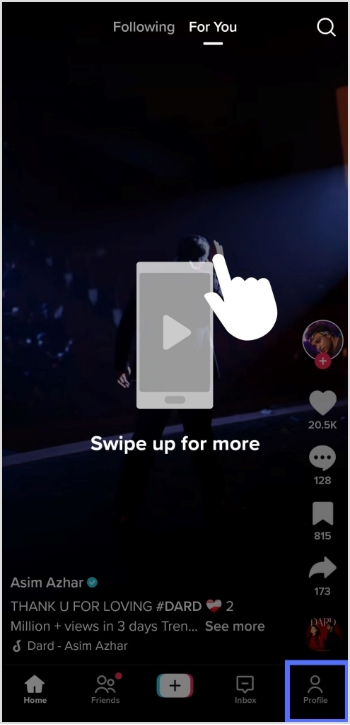
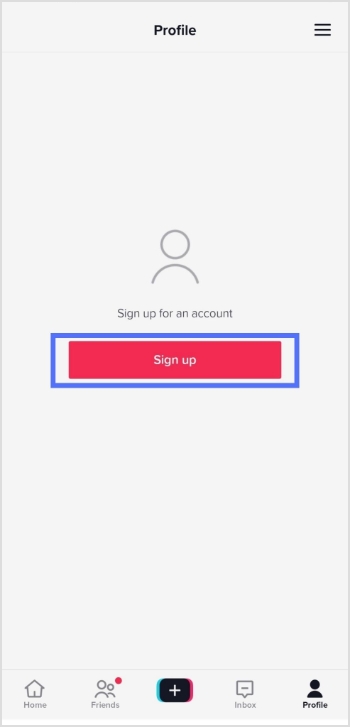
Step 2: Open the app and tap the profile icon in the bottom right corner.
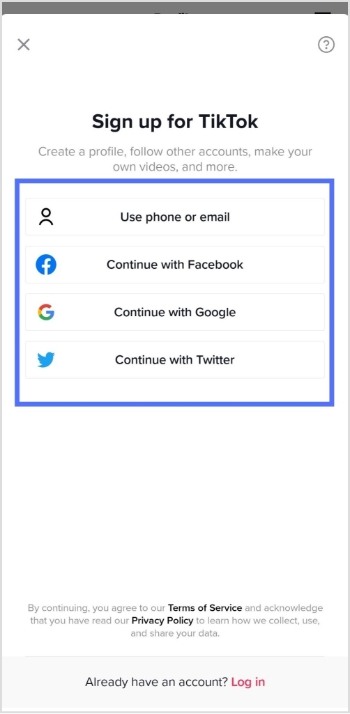
Step 3: Tap the sign-up button and choose how you like to sign up.
Step 4: Select how you want to create your account, either by using a phone number, or email address, or through a third-party account (such as Facebook or Google).
Step 5: Fill in the required information, including your name, birthday, and phone number.
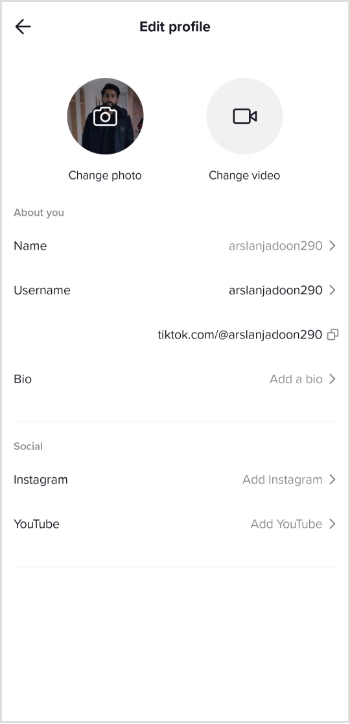
Step 6: Once your account is created, you will be prompted to fill in your profile information.
Step 7: You can also customize your account by selecting your preferred privacy settings, and connecting your other social media accounts.
Once you’ve finished customizing your account, you can start browsing and creating TikTok videos.
Note: You must be at least 13 years old to create a TikTok account.
For those of you who are into managing multiple links, whether for social accounts, content hubs, or marketing campaigns, Replug makes it much easier to organize, track, and optimize every URL from a single dashboard.
FAQs
Is making a TikTok account free?
Yes, making a TikTok account is free. Users can create an account using their email address, or phone number, or by connecting to their Google or Facebook account.
Does TikTok pay you?
TikTok has a monetization program called the TikTok Creator Fund that pays creators based on their engagement and the number of views they receive on the platform. To be eligible for the Creator Fund, a user must have a minimum of 1,000 followers and meet other requirements set by TikTok. Additionally, TikTok also allows creators to monetize their content through brand partnerships and sponsored posts.
Many people share YouTube videos to introduce others to new music, movies, or other content they have discovered and enjoyed. Sharing YouTube videos can be a great way to connect with others and share your interests and passions.
Deep links allow you to share a specific point in a YouTube video rather than just the video’s main link. This can be useful if you want to share a specific video section, such as a specific song or scene.
Additionally, deep links can allow users to bypass ads or other content at the beginning of a video.
You can share YouTube videos with deep links from your mobile device or computer. Follow the steps below to get started:
How to share YouTube videos with Deep links on mobile phones:
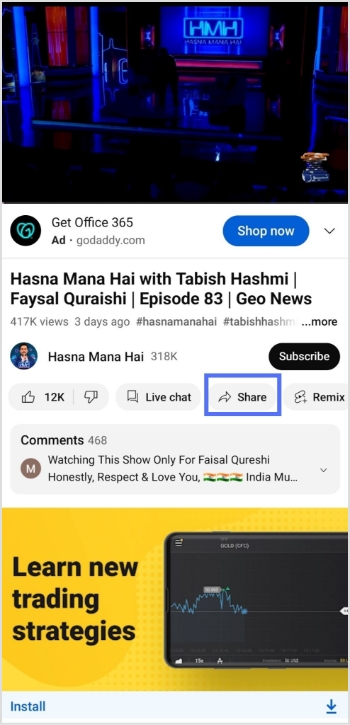
Step 1: Open Youtube from your mobile phone and play the video you want to share.
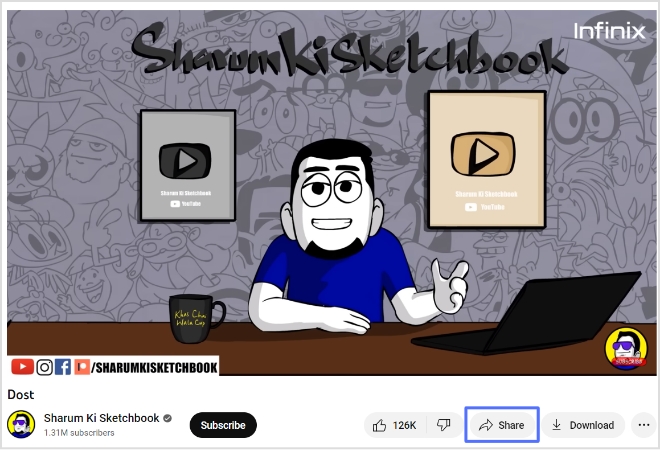
Step 2: Tap the share button below the video you played.
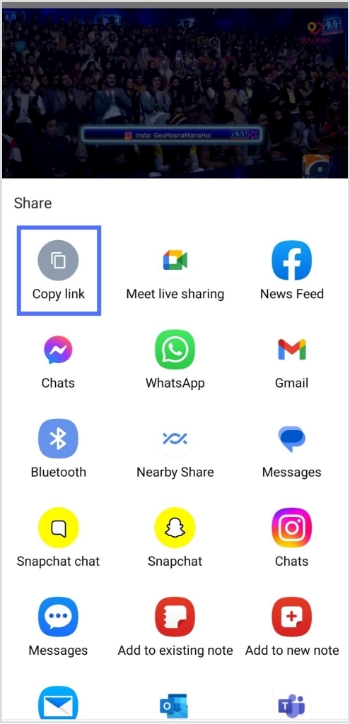
Step 3: Tap copy link to copy the link and add a deep link feature to your link.
Maximize marketing ROI
by transforming ordinary URLs into branded short links that convert.
Try Replug for free
Step 4: Go to Replug.io. Sign in or create an account.
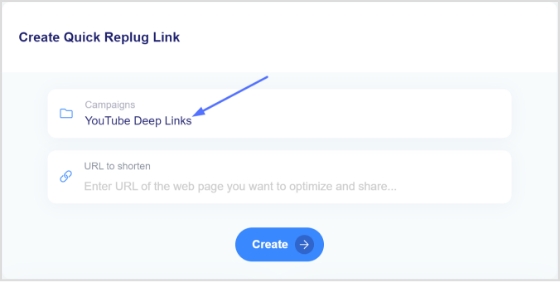
Step 5: Choose the desired campaign on the main dashboard or if you’re new, create a new campaign in just a few seconds.
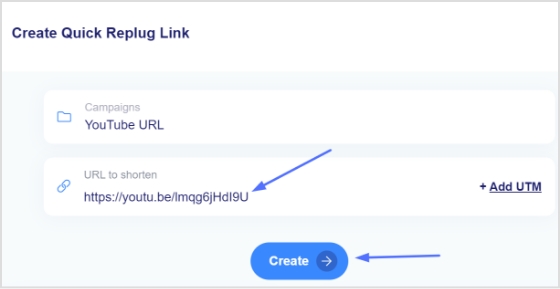
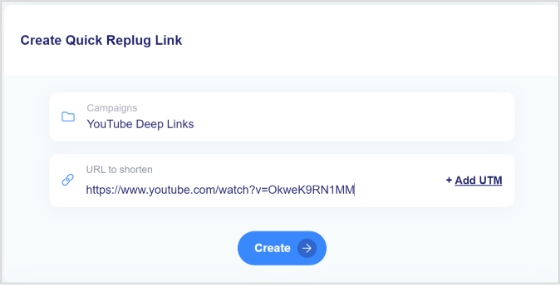
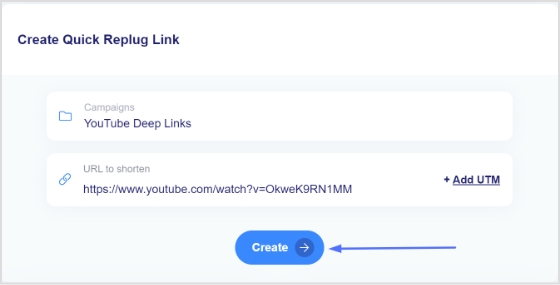
Step 6: Once selected the campaign, paste the YouTube video link in the “URL to shorten” section below the campaign section. Using Replug’s YouTube link shortener, you can create a clean, branded, and trackable link for your video.
Note:You can quickly shorten link to make it cleaner, easier to share and track. Here, you can add UTM parameters to your video link.
Step 7: Click the create button to create a new link.
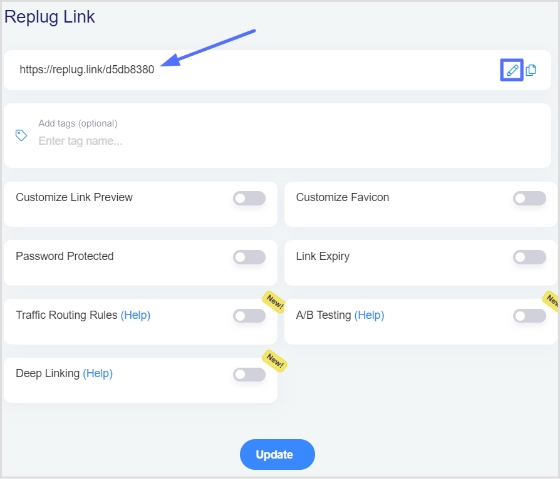
Step 8: Click the edit icon and customize your link.
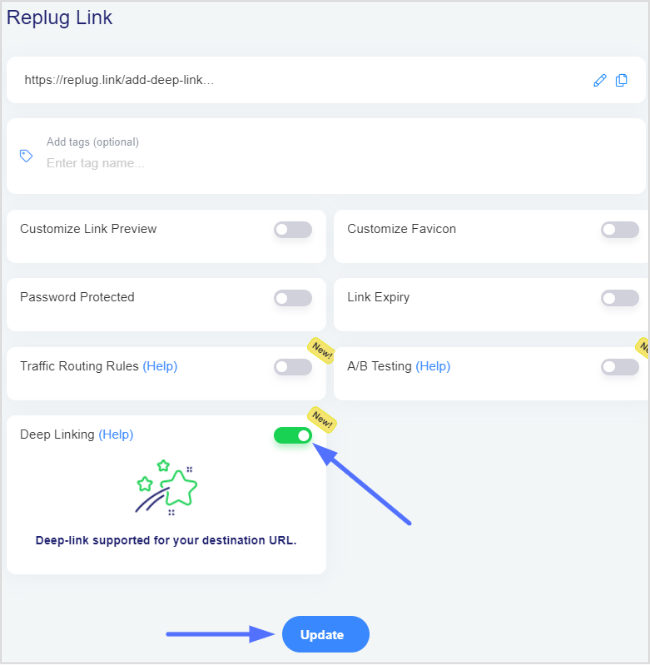
Step 9:Turn on the deep link button and click update. Your YouTube video link now has deep link enabled.
Note: To find your newly created Replug link, go to manage on the main dashboard and click Replug links.
How to share YouTube videos with Deep links on computer devices:
Step 1: Open YouTube on your computer and play the video you want to share.
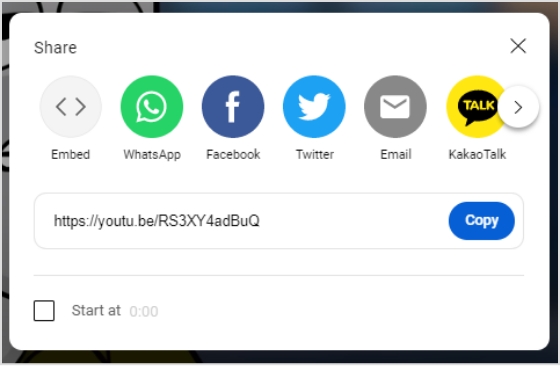
Step 2: Click share below the video you just played.
Step 3: Click copy to share the video link or to create a deep link for your video.
Step 4:Sign in to Replug or create an account.
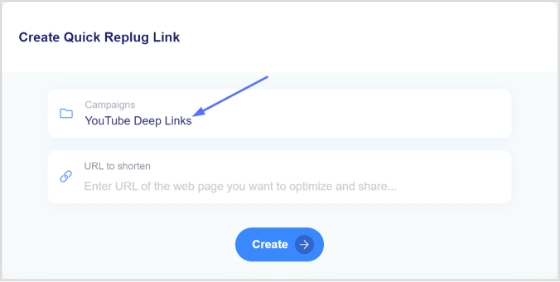
Step 5: Choose the desired campaign on the main dashboard or if you’re new, create a new campaign in just a few seconds.
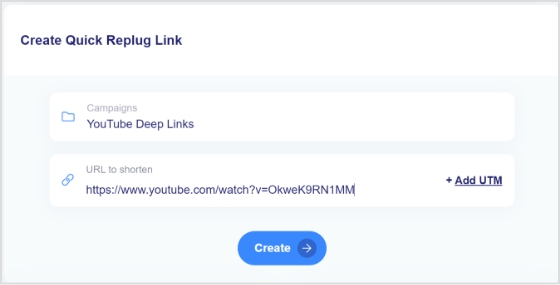
Step 6: Once selected the campaign, paste the YouTube video link in the “URL to shorten” section below the campaign section.
Step 7: Click the create button to create a new link.
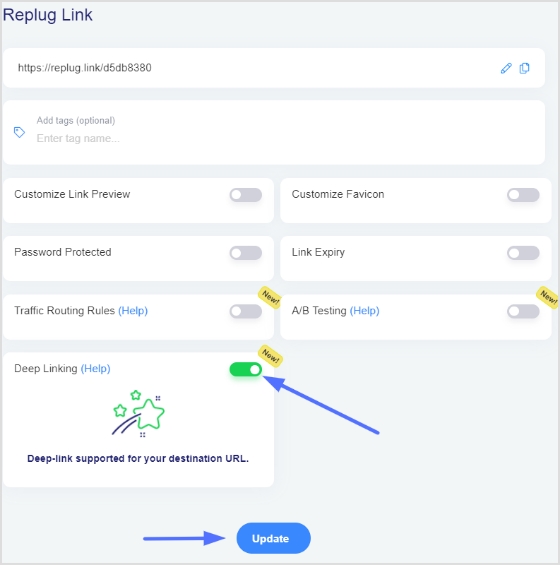
Step 8: Click the edit icon and customize your link.
Step 9: Turn on the deep link button and click update. Your YouTube video link now has deep link enabled.
Note: To find your newly created Replug link, go to manage on the main dashboard and click Replug links.
FAQs
What is YouTube deep linking?
YouTube deep linking refers to a specific video or playlist on the YouTube platform rather than the YouTube homepage or channel. This allows users to easily access the desired content without searching for it or navigating through a channel. It can be done by using the unique URL of a video or playlist.
What is the difference between deep links and dynamic links?
Deep links and dynamic links are both types of links that can be used to redirect users to specific content within an app or website. However, there are some key differences between the two.
Deep links take users directly to a specific location within an app or website. They typically provide direct access to specific content, such as a product page or website section. Deep links can also trigger specific actions within an app, such as opening a page or performing a specific task.
Dynamic links, however, can change depending on the context in which they are used. These links can redirect users to different locations or content based on factors such as the device they are using, the platform they are on, or the time of day. Dynamic links can also redirect users to different versions of an app or website depending on their devices, such as a mobile app or a web-based version.
With nearly 2 billion active users worldwide, TikTok is one of the biggest social media platforms on the planet right now. It’s easier than ever to create a TikTok account and jump into the fun, but walking away? That’s a whole different story!
No matter if you’re cutting back on screen time, protecting your privacy, or just done with the endless scroll, deleting your account isn’t always as straightforward as people expect.
The good news?
We’ve got you covered with a simple, up-to-date guide for both mobile and desktop. But before you hit that delete button, there are a few important things you’ll want to know first.
What to know before deleting your TikTok account: Important points to consider!
Before you go ahead and delete your account, hold on for just a second. There are a few things worth checking off your list first. Skipping these could mean losing your data, money, or content that you can’t get back.
What to consider before deleting:
Download your data
TikTok lets you download a full copy of your data (videos, messages, watch history, and more) before you leave. Head to your profile settings and download your data, or request your file. Think of it as your personal TikTok downloader that saves everything locally before it’s gone for good.
Sent messages & stitches
Once your account is deleted, all your direct messages (DMs) will disappear permanently, and any “Stitches” you’ve created will vanish from the platform too. If there’s a conversation or a piece of content you want to hold onto, screenshot or save it before pulling the trigger.
Active subscriptions
If you’re subscribed to any “TikTok LIVE” creators or have an active “TikTok Series” subscription, deleting your account won’t automatically cancel or refund those. Make sure to cancel any active subscriptions manually beforehand to avoid being charged after you’re already gone.
Deactivation vs. Deletion
Not ready to fully commit?
TikTok gives you a 30-day deactivation window after you request deletion. During this period, your account is hidden but not yet permanently removed. If you log back in within those 30 days, everything gets restored, so it’s basically a safety net if you change your mind.
How to delete TikTok account (mobile)
Deleting TikTok on mobile is pretty simple once you know where to look. Just follow these steps carefully, and you’ll have your account deletion request submitted in just a few minutes.
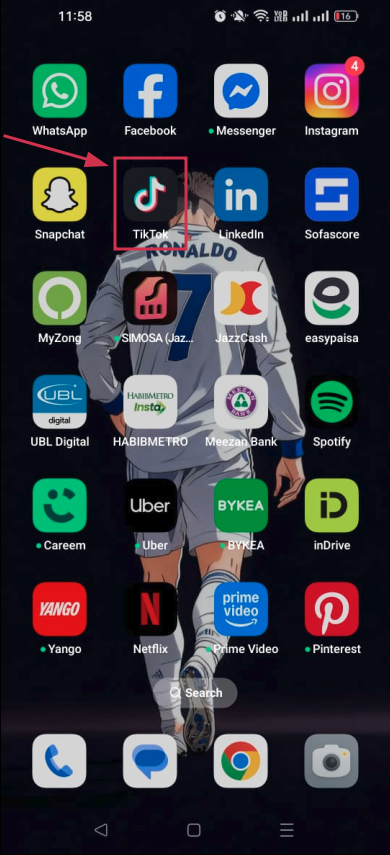
Step#01: Open the TikTok app
Launch the TikTok app on your phone and make sure you’re logged into the account you want to delete.
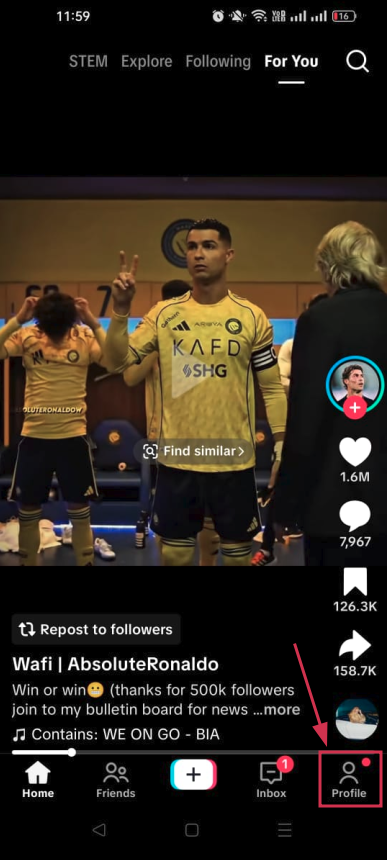
Step#02: Tap “Profile”
Hit the “Profile” icon at the bottom right corner of your screen to go to your account page.
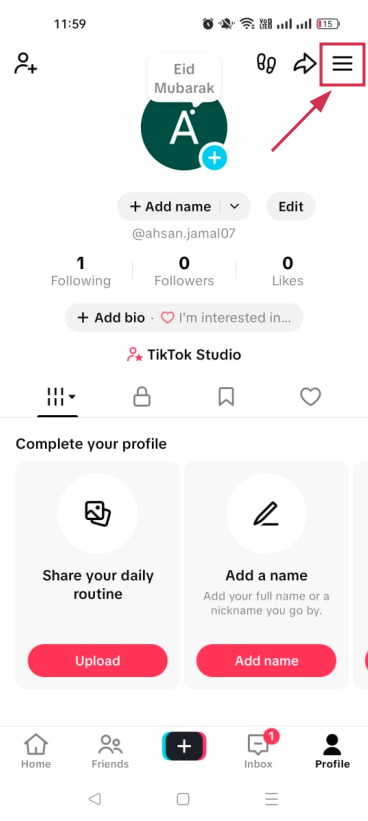
Step#03: Tap the menu (☰) icon
Look for the three horizontal lines (☰) in the top right corner and tap on them to open the side menu.
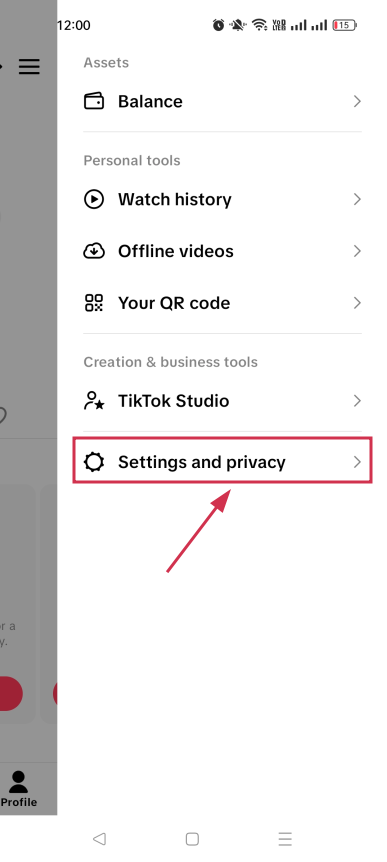
Step#04: Select “Settings and privacy”
From the menu that appears, tap “Settings and privacy” to access your account settings.
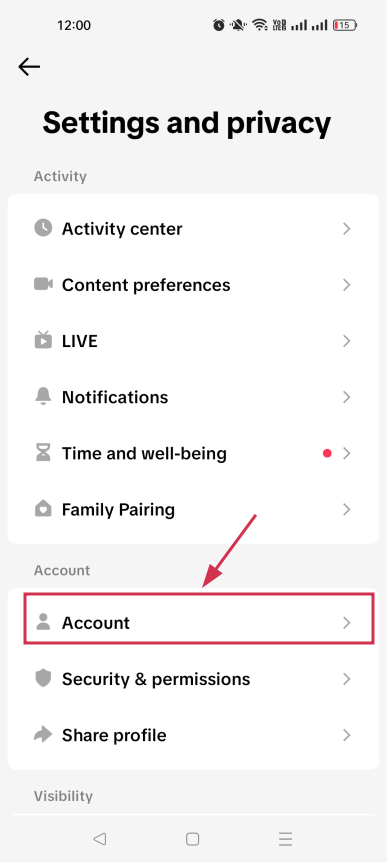
Step#05: Tap “Account”
Inside settings, tap on “Account”. This is where all your core account management options live.
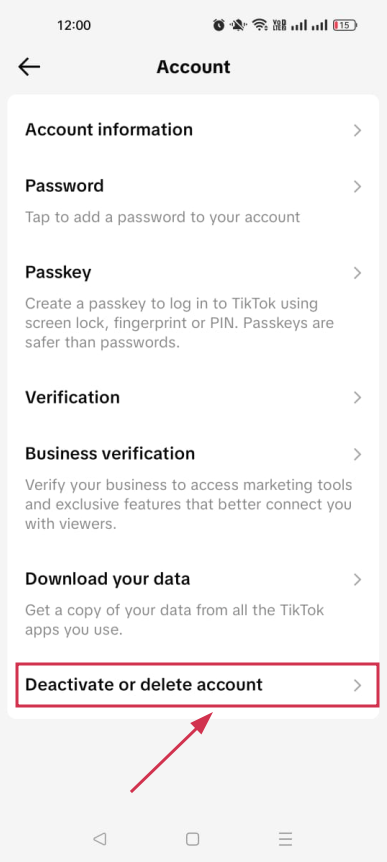
Step#06: Select “Deactivate or delete account”
Scroll down and tap “Deactivate or delete account” to begin the process of removing your TikTok account.
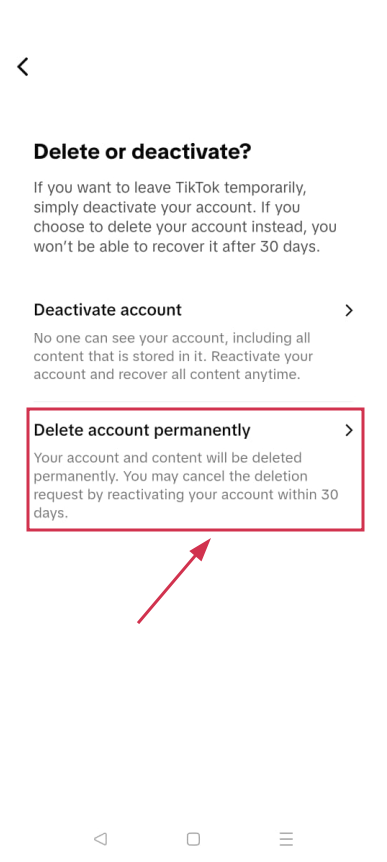
Step#07: Tap “Delete account permanently”
TikTok will show you two options. Choose “Delete account permanently” to proceed with full deletion.
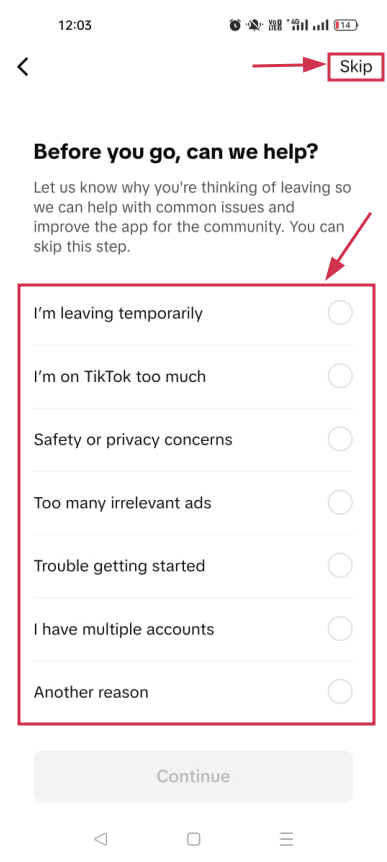
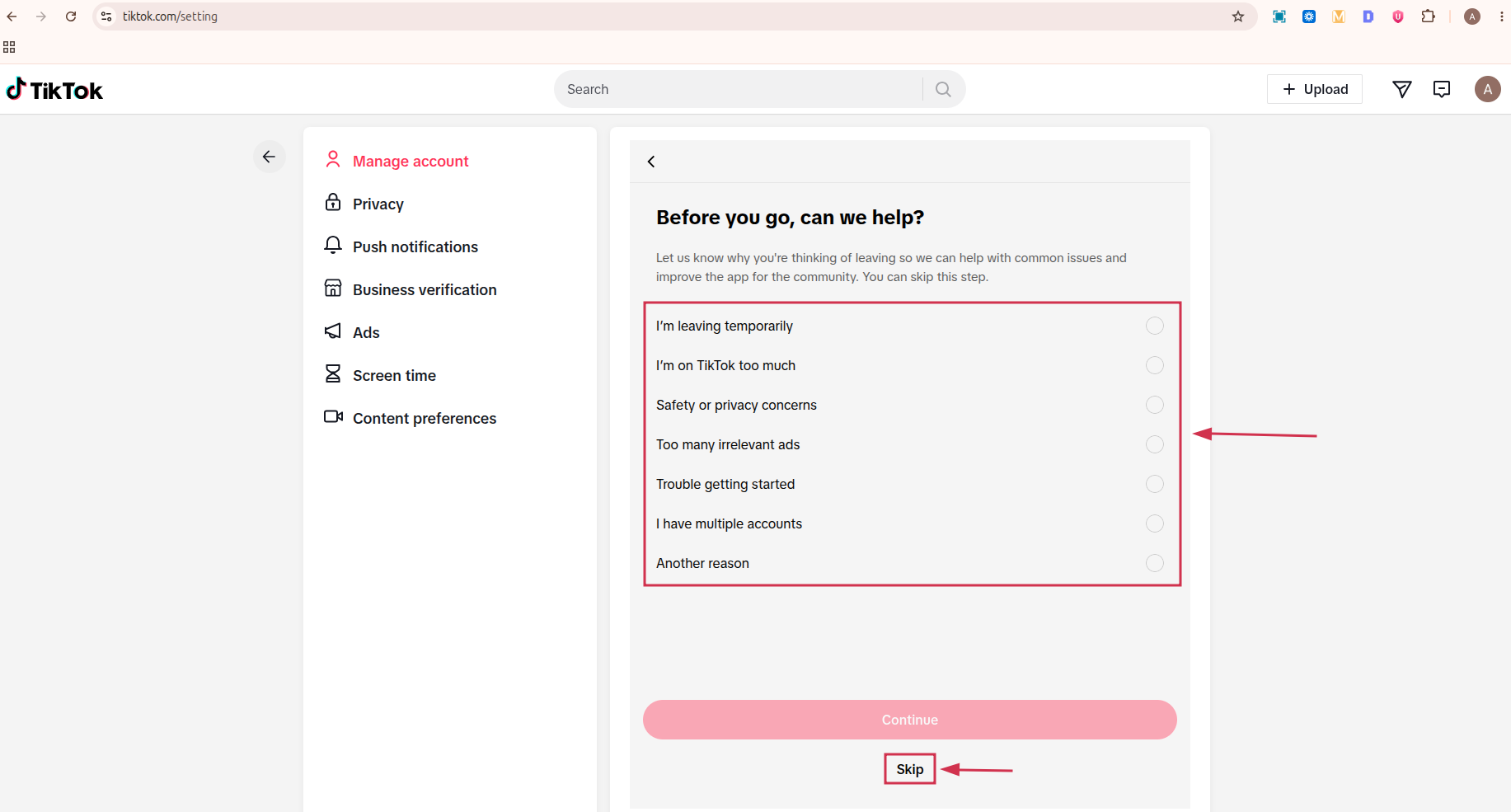
Step#08: Provide a reason for leaving or tap “Skip”
TikTok may ask why you’re leaving. You can select a reason from the list or simply tap “Skip” in the top right-hand corner if you’d rather not share.
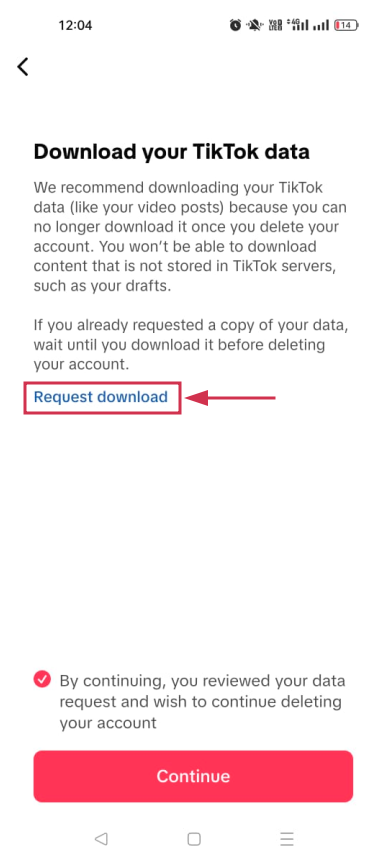
Step#09: You may be prompted to “Download your TikTok data”
TikTok will remind you to save your data before leaving. It’s worth doing; tap the “Request download” option to download if you haven’t already.
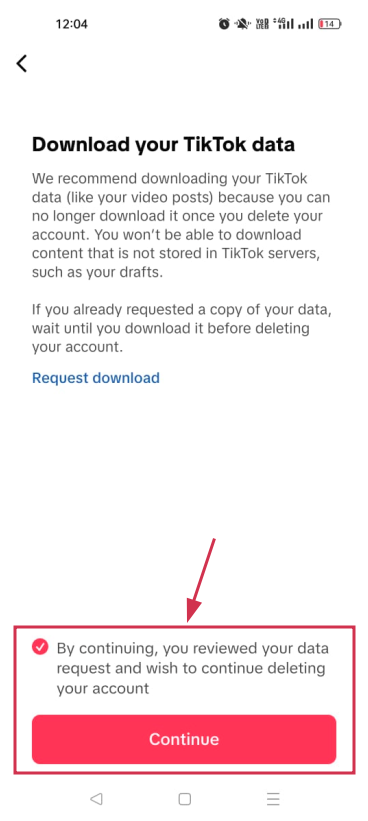
Step#10: Once acknowledged, tap “Continue”
After reviewing or dismissing the data download prompt, tap “Continue” to move to the next step.
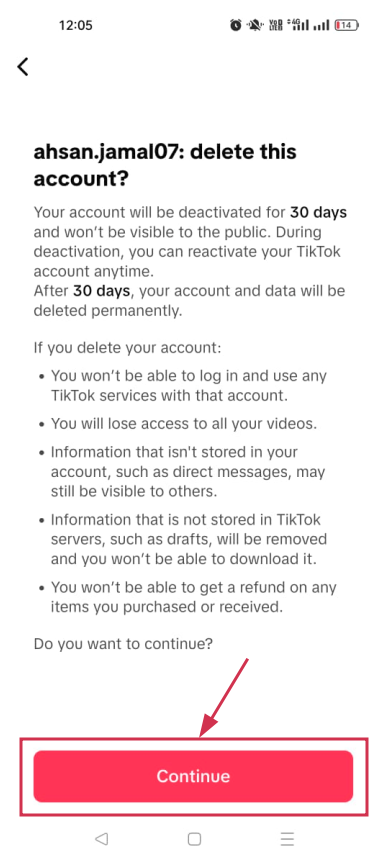
Step#11: Tap “Continue” once again
TikTok will show you one more confirmation screen. Tap “Continue” again to confirm you’re ready to proceed.
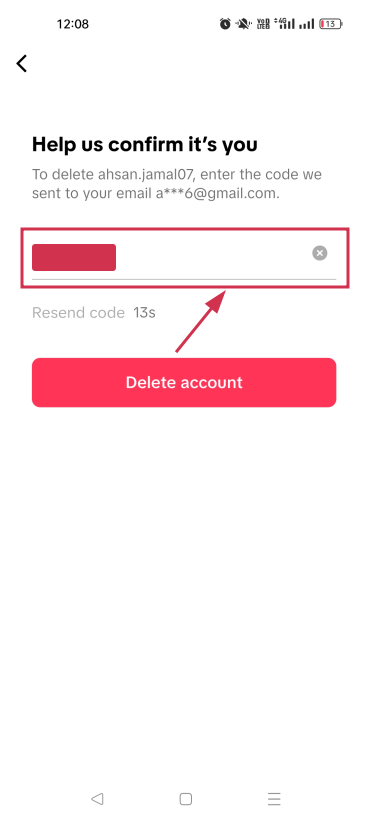
Step#12: Enter the verification code
TikTok will send a verification code to your registered email or phone number. Enter it in the field provided to verify your identity.
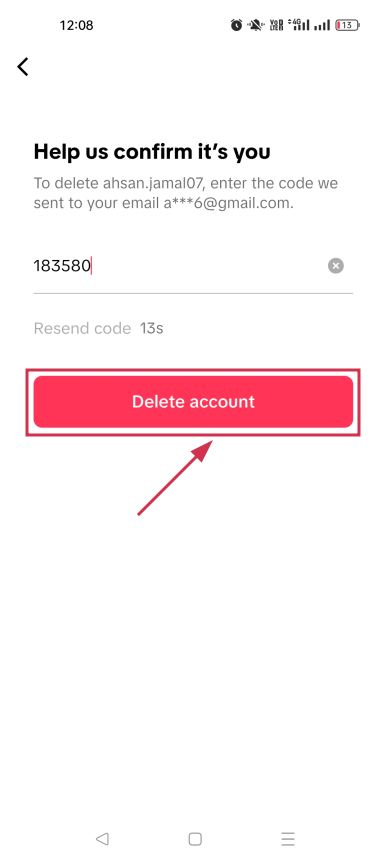
Step#13: Tap “Delete account”
Once your identity is verified, tap “Delete account” to officially submit your deletion request.
TikTok will ask for one final confirmation. Tap “Delete” to complete the process. Your account will now enter the 30-day deactivation window before permanent deletion.
How to delete TikTok account (desktop)
Prefer doing things on a bigger screen?
You can delete your TikTok account from a desktop browser just as easily. The steps are a little fewer compared to mobile, but the end result is exactly the same.
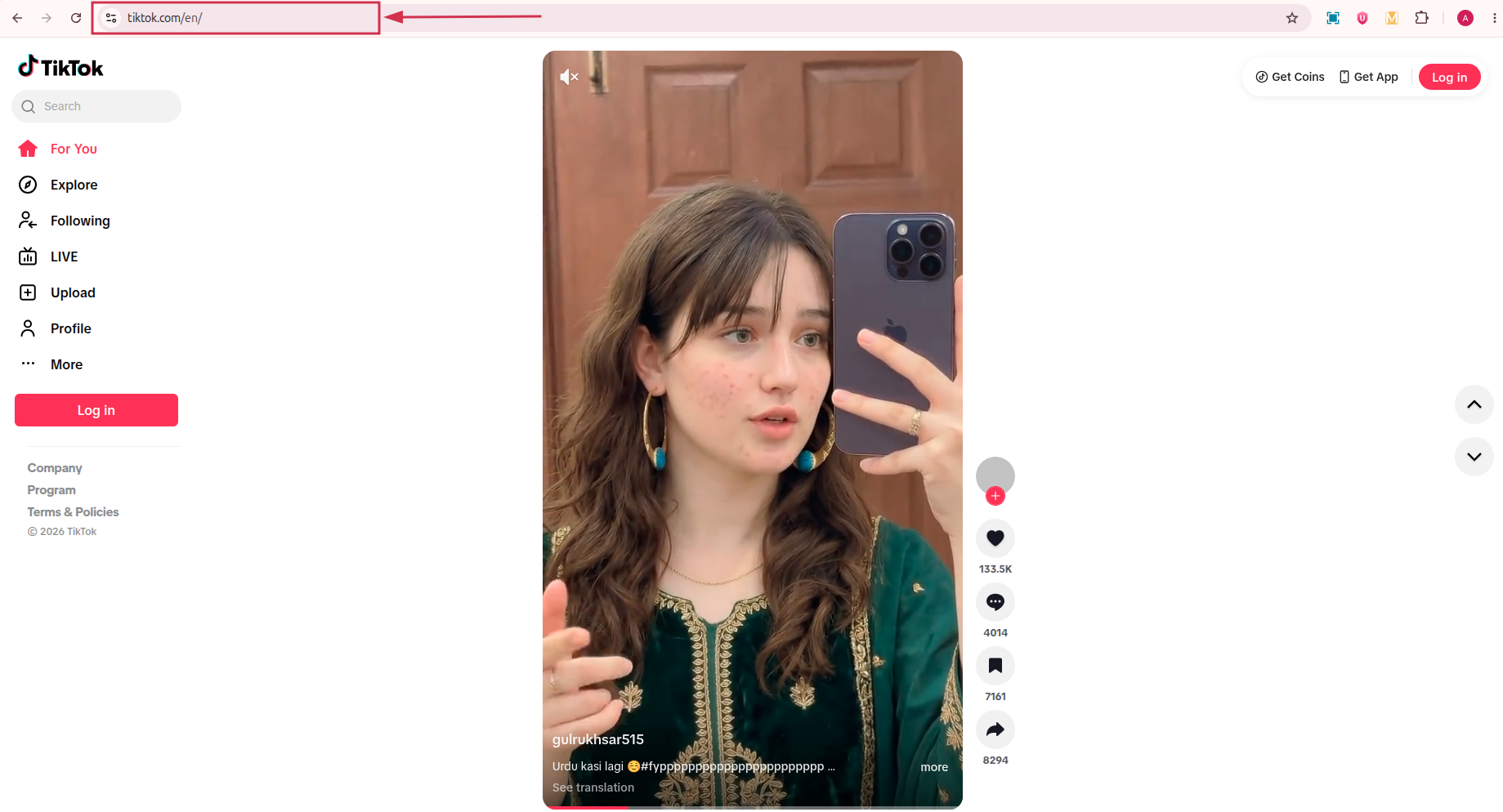
Step#01: Go to the TikTok website
Open your preferred browser and head over to https://www.tiktok.com/en/ to get started.
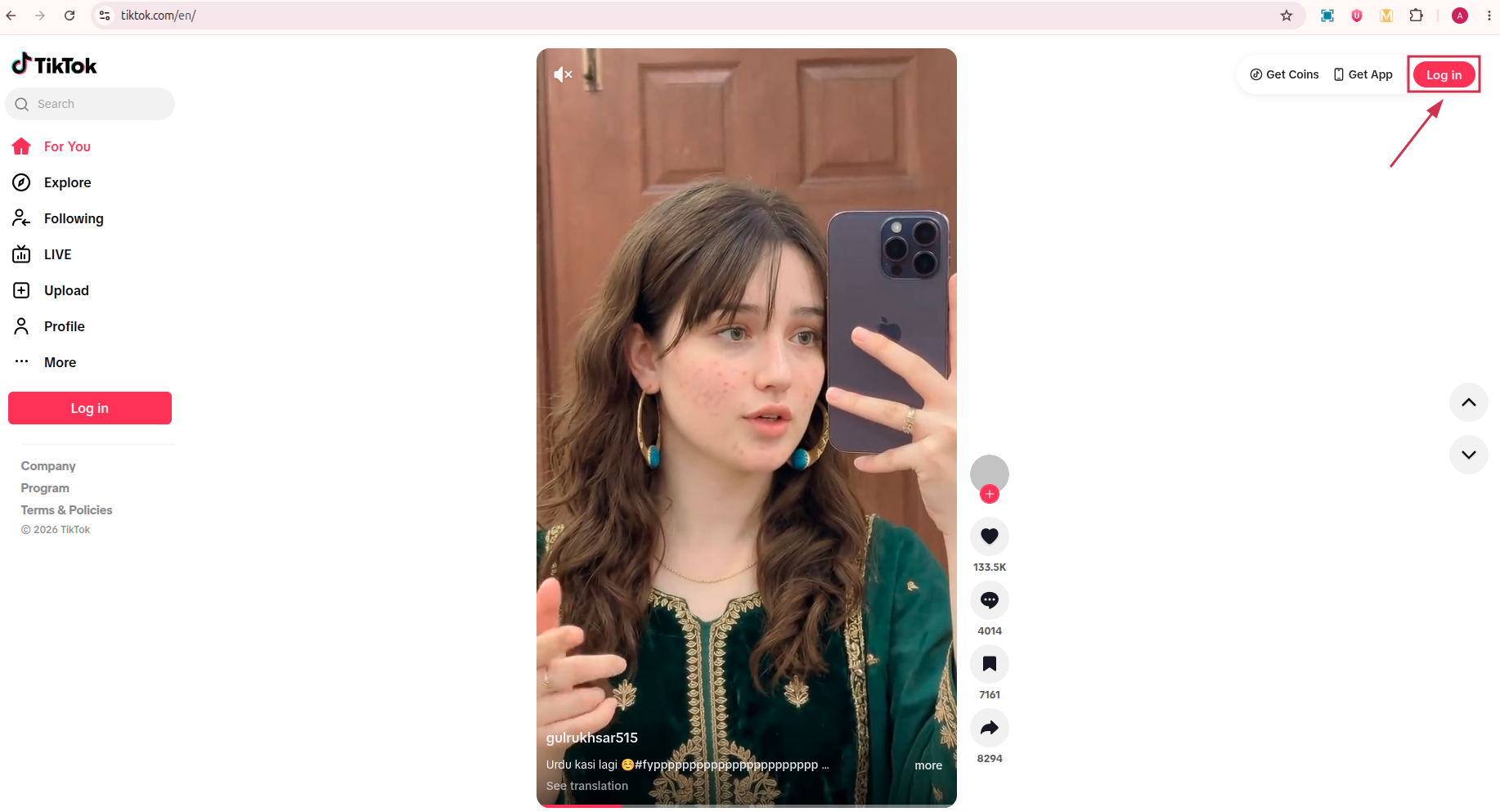
Step#02: Log into your account
Sign in with the credentials of the account you want to delete. Make sure it’s the right one before moving forward.
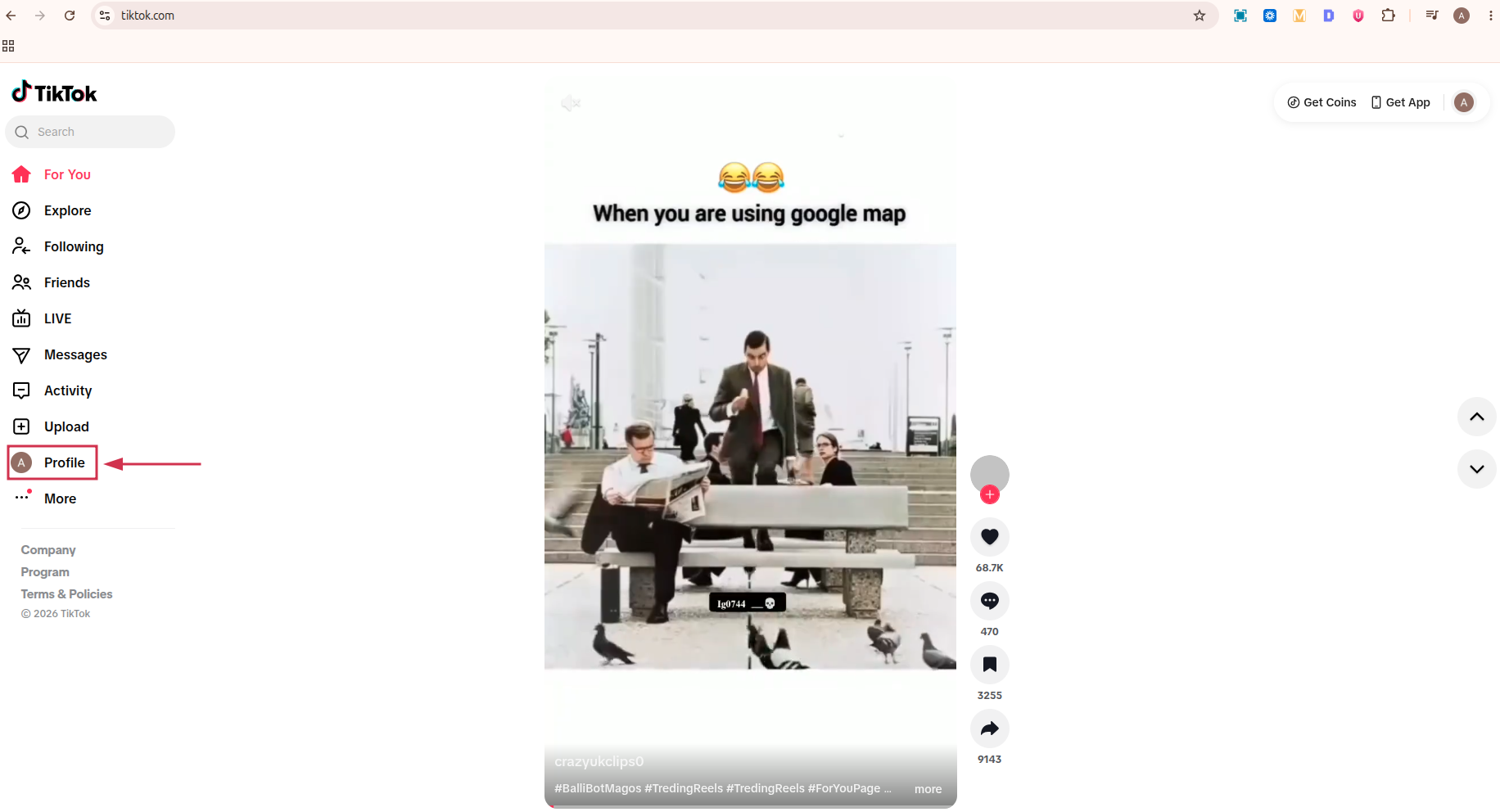
Step#03: Click “Profile” from the left-hand menu
Once logged in, look at the left-hand sidebar and click on “Profile” to navigate to your account page.
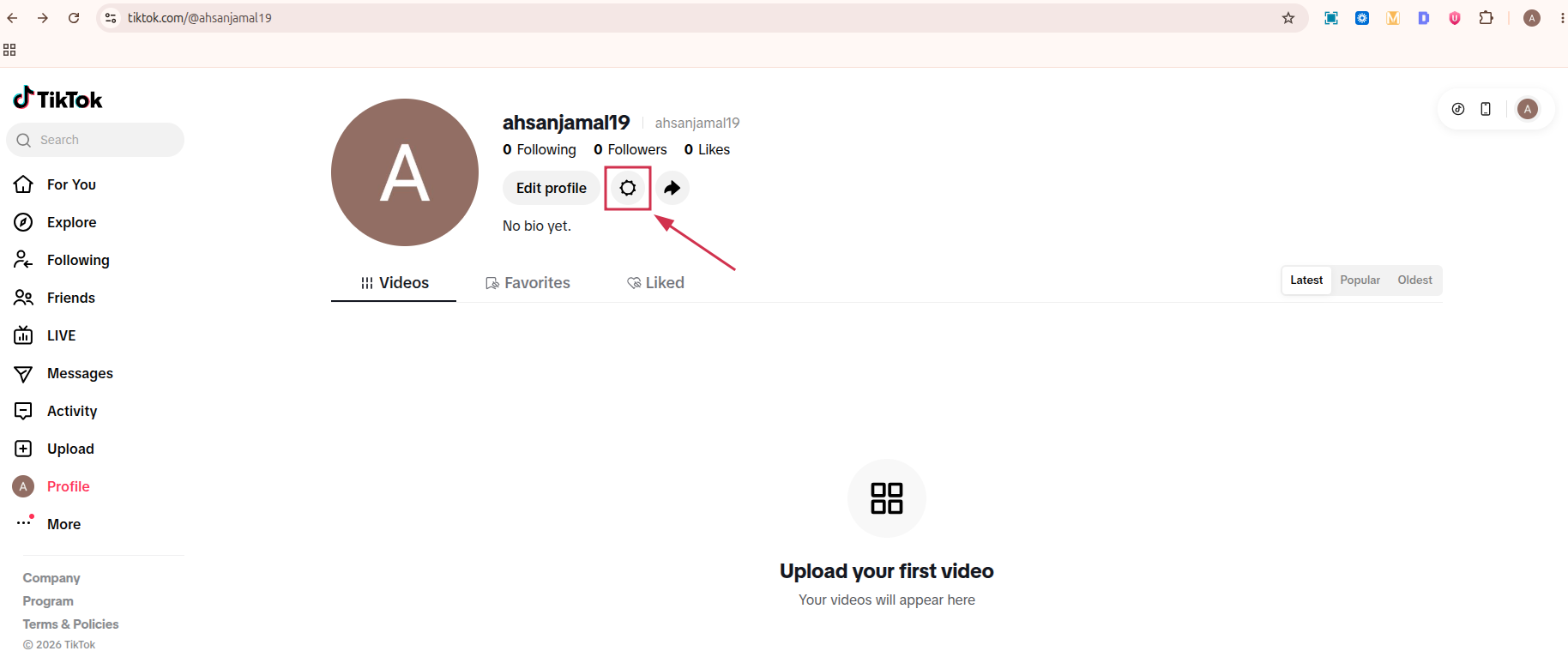
Step#04: Click the “Settings” icon
On your profile page, locate and click the “Settings” icon to open your account settings. It looks like a gear icon, right next to the “Edit profile” option.
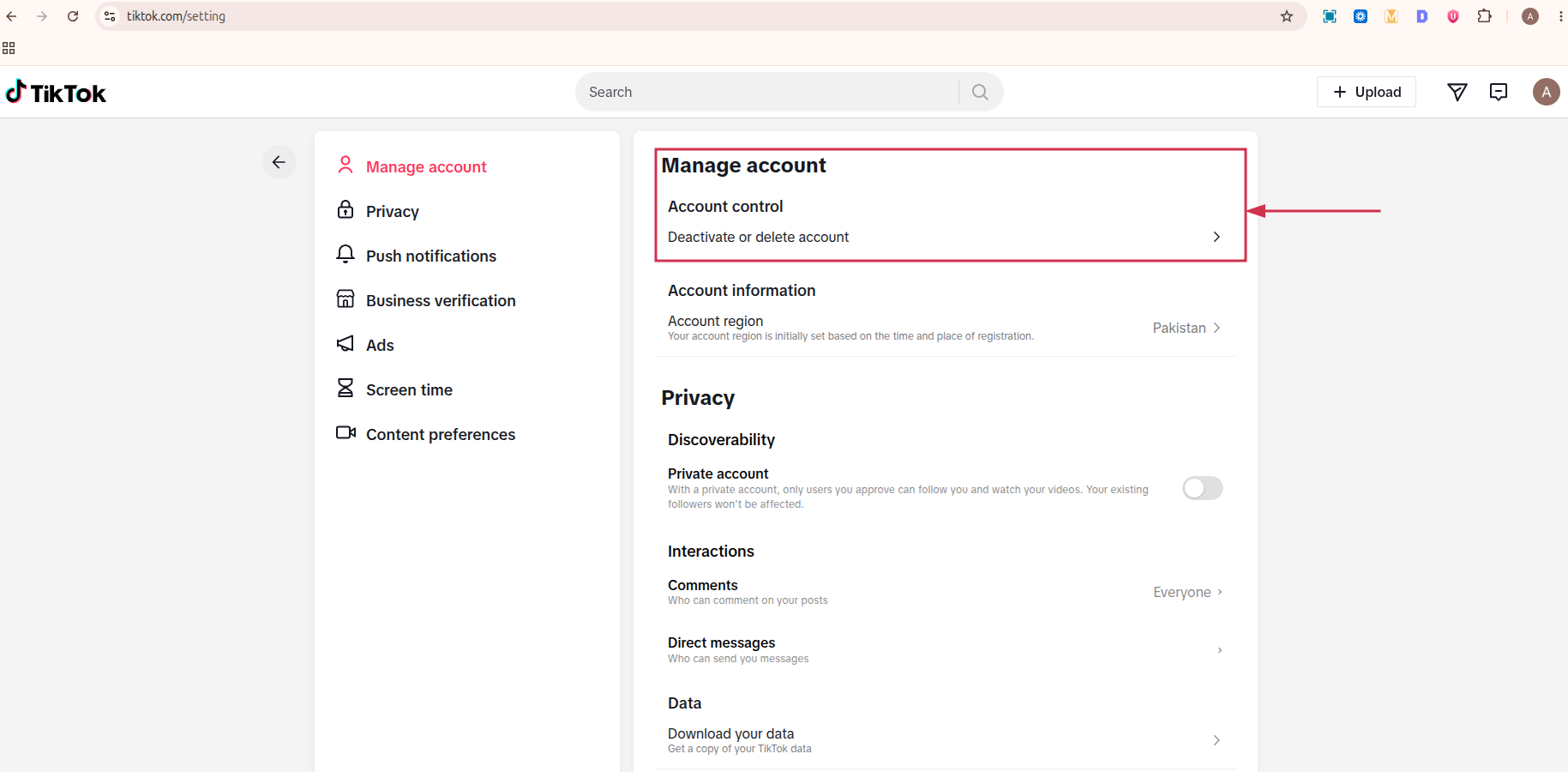
Step#05: Click “Deactivate or delete account”
Inside settings, under the “Manage account” section, find and click “Deactivate or delete account” to begin the deletion process.
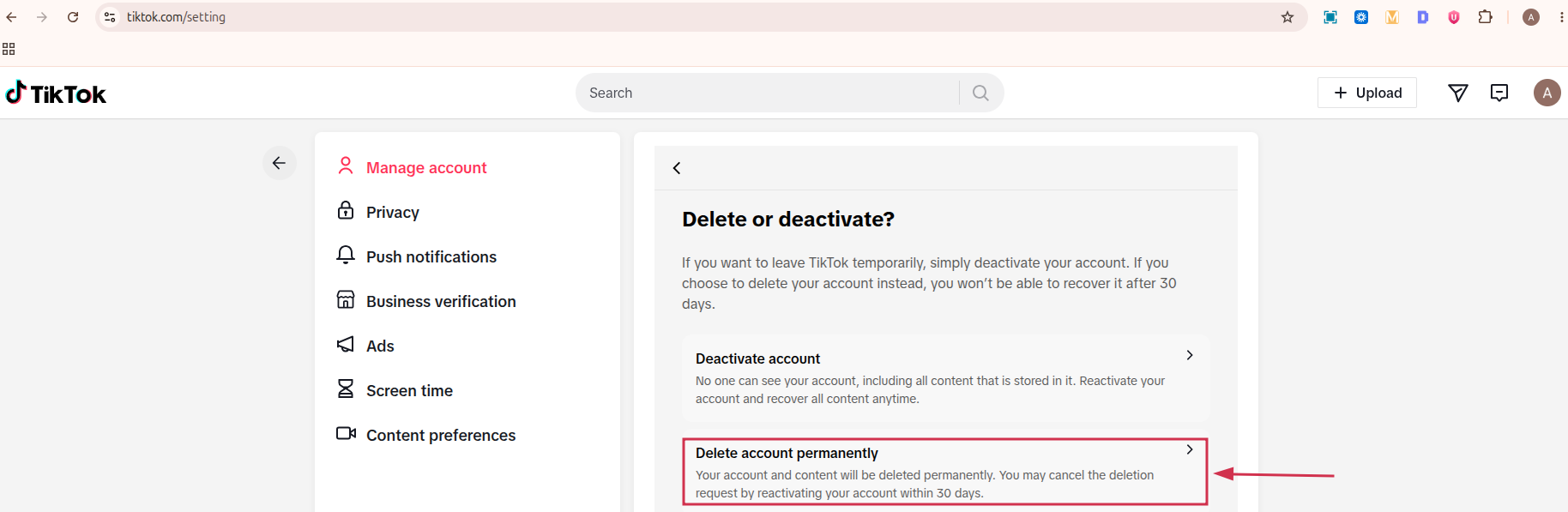
Step#06: Click “Delete account permanently”
TikTok will present you with two options. Select “Delete account permanently” to proceed with full removal.
Step#07: Provide a reason or click “Skip”
You’ll be asked to select a reason for leaving. Feel free to pick one or just click “Skip” to move on without answering.
Step#08: Follow the on-screen prompts
From here, TikTok will walk you through the remaining steps, including a verification check. Just follow each prompt until the deletion request is fully submitted.
How to deactivate TikTok account temporarily
Not completely sure about leaving?
Deactivating is a softer option. Your account goes hidden for up to 30 days, and you can restore it anytime simply by logging back in.
Here’s how to do it:
Step#01: Open the TikTok app
Launch TikTok on your phone and make sure you’re signed into the account you want to deactivate.
Step#02: Tap “Profile”
Tap the “Profile” icon at the bottom right of your screen to land on your account page.
Step#03: Tap the menu icon (☰)
Tap the three horizontal lines (☰) in the top right corner to open the side menu.
Step#04: Select “Settings and privacy”
From the menu, tap “Settings and privacy” to head into your account settings.
Step#05: Tap “Account”
Inside settings, tap “Account” to access the options related to your account management.
Step#06: Select “Deactivate or delete account”
Scroll down and tap “Deactivate or delete account”. This is where both the deactivation and deletion options are housed.
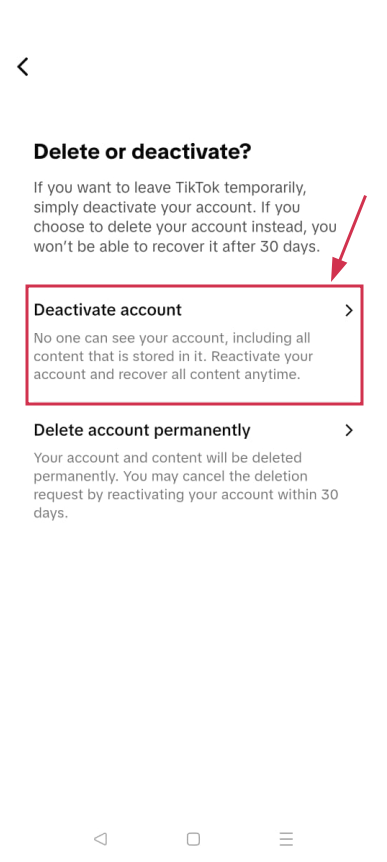
Step#07: Tap “Deactivate account”
This time, choose “Deactivate account” instead of the permanent deletion option to keep things reversible.
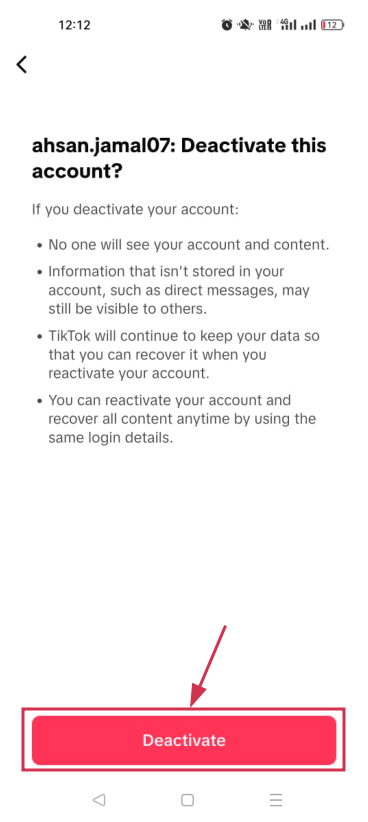
Step#08: Tap “Deactivate”
TikTok will show you a confirmation screen explaining what happens if you deactivate your account. Tap “Deactivate” to move forward.
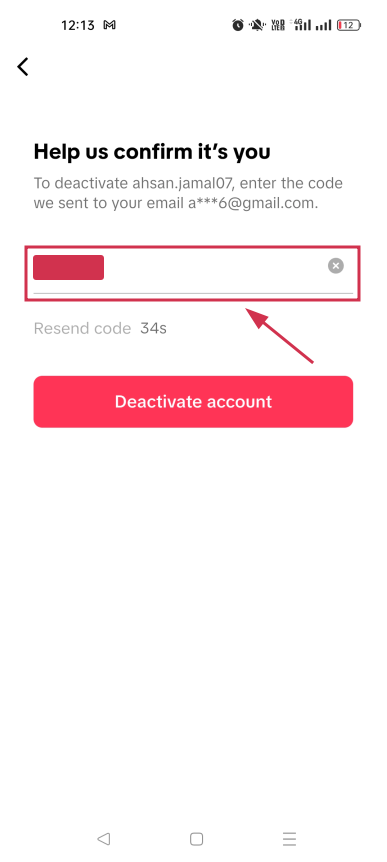
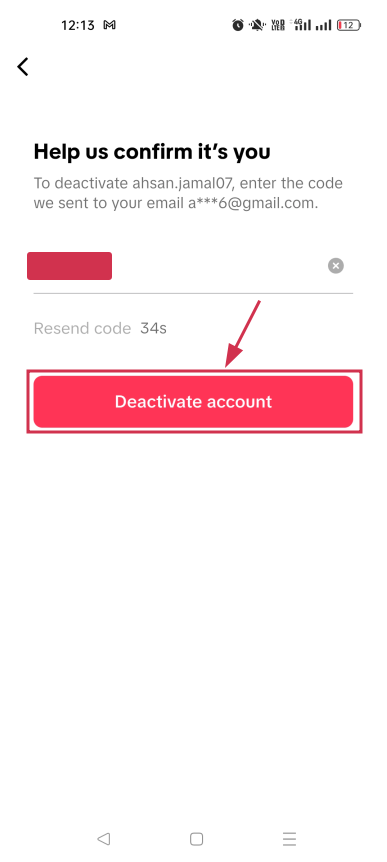
Step#09: Enter verification code
A verification code will be sent to your registered email or phone number. Enter it in the field provided to confirm it’s really you.
Step#10: Tap “Deactivate account”
Hit “Deactivate account” one final time to complete the process. Your account will now be hidden until you decide to log back in.
Primary reasons to delete or deactivate your TikTok account
People leave TikTok for all kinds of reasons, and honestly, most of them are pretty valid. Whether it’s about mental health, privacy, or just needing a break, understanding why others make this call can help you feel more confident about your own decision.
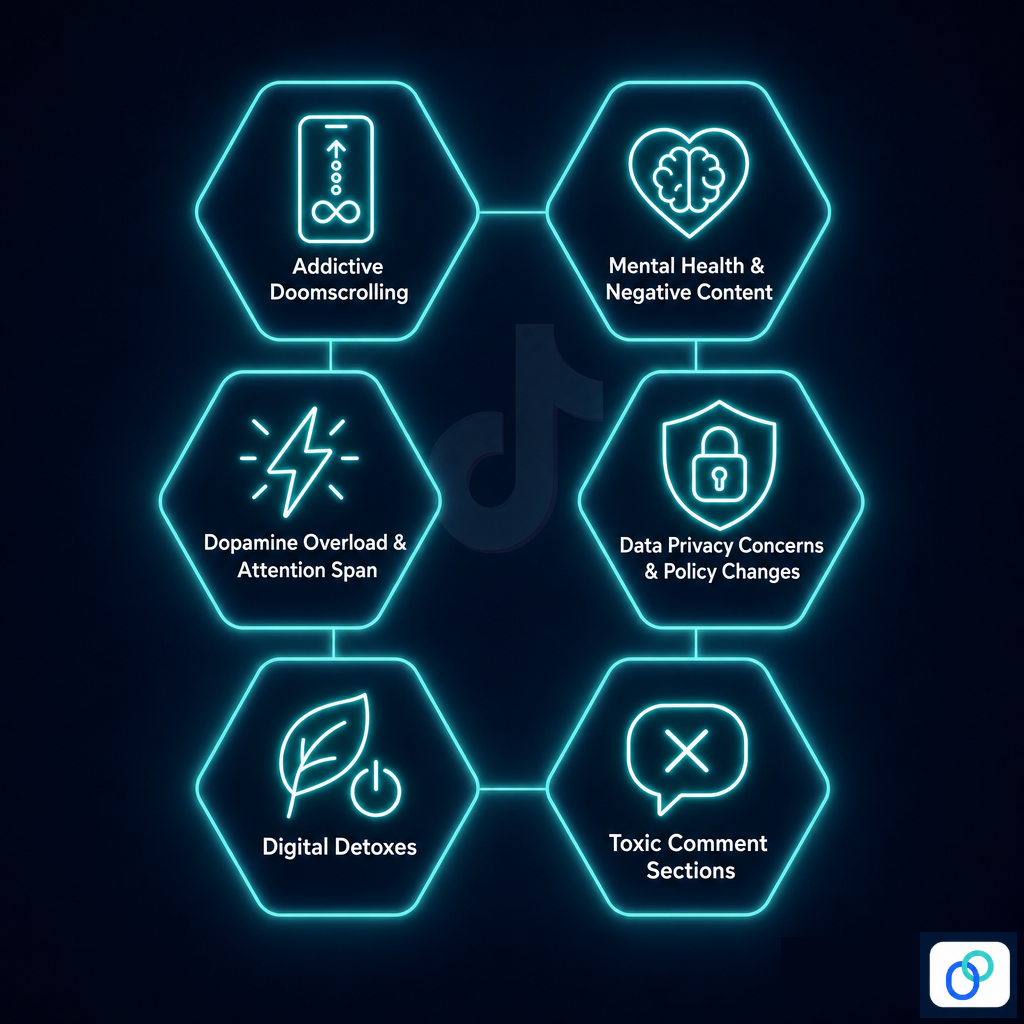
To escape the platform’s addictive doomscrolling
TikTok’s algorithm is literally designed to keep you watching. One video leads to another, and suddenly an hour has disappeared.
This endless loop of content, often called doomscrolling, can seriously eat into your productivity and sleep. Many users delete their accounts simply to break free from a cycle they feel they can’t control otherwise.
Improve mental health & avoid negative content
Constant exposure to highlight reels, unrealistic beauty standards, and emotionally charged content can quietly take a toll on how you feel about yourself.
Studies have linked heavy social media use to increased anxiety, low self-esteem, and feelings of inadequacy. Stepping away from TikTok gives your mind the breathing room it genuinely needs.
Avoid dopamine overload & attention span issues
Every like, comment, and viral video triggers a small dopamine hit, and over time, your brain starts craving that constant stimulation.
This can make it harder to focus on slower, deeper tasks like reading, studying, or working. Deleting TikTok is one way people are actively trying to reclaim their attention span.
Address strict data privacy concerns & policy changes
TikTok has faced ongoing scrutiny over how it collects and handles user data, with concerns raised by governments across the US, EU, and beyond.
If you’re uncomfortable with how much the platform knows about you (your location, behavior, device info), that’s a completely legitimate reason to leave. Deleting your account cuts off that data collection at the source.
To take temporary digital detoxes
Sometimes you don’t want to quit forever; you just need a real break from the noise.
A temporary deactivation lets you step away without losing your account, giving you space to reset without the pressure of constant content. Many users find that even a short digital detox does wonders for their focus and overall mood.
To escape toxic comment sections
TikTok’s comment sections can get pretty brutal, from unsolicited criticism to full-blown harassment; the negativity can be overwhelming.
Even if you’re not the target, constantly reading hostile exchanges can affect your mood more than you’d expect. For many users, removing themselves from that environment entirely is the healthiest choice they can make.
Issues faced when deleting a TikTok account & their solutions
The deletion process isn’t always perfectly smooth. A few common hiccups can leave you stuck or second-guessing whether it actually worked.
Here’s a quick rundown of the most frequent issues users run into and exactly how to fix them:
Just deleted the app instead of the account
Remember, uninstalling the TikTok app does not delete your account. It just removes the app from your device while your profile, data, and content remain fully intact on TikTok’s servers.
If this were you, simply reinstall the app or visit tiktok.com on a browser and follow the proper account deletion steps. The account stays alive until you officially go through the in-app or desktop deletion process.
The “Delete account” button is missing or unresponsive
This usually happens when the app is outdated or running into a temporary glitch. Try updating TikTok to the latest version, clearing your app cache, or switching to a different browser if you’re on desktop.
If the issue persists, logging out and back in, or restarting your device, tends to do the trick.
Verification code not arriving in time
If the verification code isn’t showing up, first check your spam or junk folder if it’s being sent to your email. Make sure your registered phone number or email address is still active and accessible.
If it’s not, you may need to update it before proceeding. You can also try requesting the code again after a short wait, as delays sometimes happen on TikTok’s end.
Account locked during deactivation (30-day grace period)
Once you submit a deletion request, TikTok enters a 30-day grace period where your account is essentially locked and hidden from public view. This is completely normal; it’s not a glitch.
If you didn’t mean to initiate deletion, simply log back in within those 30 days, and your account will be fully restored.
Unable to delete due to third-party logins
If you signed up using Google, Apple, or Facebook, TikTok may require you to first set a standalone password before allowing account deletion.
Head to Settings → Account → Password to create one, and then proceed with the deletion steps as normal. This is a quick fix that most users aren’t aware of until they hit this wall.
Best alternatives to deleting your TikTok account
Deleting your account is a big, permanent step, and it’s not the only option on the table. If you’re on the fence, these alternatives let you take back control without losing everything you’ve built on the platform.
Temporary deactivation
As covered earlier, TikTok’s built-in deactivation option hides your account for up to 30 days without permanently removing it. It’s a great middle ground if you’re feeling overburdened but aren’t 100% sure you want to leave for good.
Just log back in anytime within that window, and your account bounces right back to normal.
App-level screen time limits
Both iOS and Android let you set daily time limits on specific apps directly from your phone’s settings (no willpower required).
On iPhone, you can use “Screen Time” under Settings, while Android users can find it under “Digital Wellbeing”. Setting a hard daily cap on TikTok usage is often enough to break the doomscrolling habit without having to delete anything.
Account privatization
Switching your account to private means only approved followers can see your content, which significantly cuts down on unwanted interactions and toxic comment sections.
It’s a solid option if your main concern is harassment, strangers, or just feeling too exposed online. You can toggle this on instantly under Settings and privacy → Visibility → Private account.
Optimize the algorithm (starting fresh)
If your “For You Page” feels like a rabbit hole of negativity, you don’t necessarily need to wipe out your account. You just need to retrain the algorithm.
Clear your watch history, use the “Not interested” option aggressively, and start engaging only with content that actually adds value to your day. Within a week or two, TikTok’s algorithm will shift to reflect your updated preferences, making the whole experience feel a lot healthier.
Wrapping up
And that’s really everything you need to know about deleting or deactivating your TikTok account in 2026.
No matter if you’re leaving for good, taking a short break, or simply tightening up your privacy, the most important thing is that you’re making a deliberate choice about how you spend your time and attention online.
Just remember to download your data, cancel any active subscriptions, and weigh your alternatives before making a final decision.
And if you’re a creator or marketer still active on TikTok, keeping your links clean and trackable matters. That’s where Replug.io comes in handy.
Its link shortener feature makes generating shortened TikTok links effortless. Must give it a try!
Maximize marketing ROI
by transforming ordinary URLs into branded short links that convert.
Try Replug for free
Frequently asked questions
How long does it take to delete a TikTok account?
When you delete TikTok account online or through the app, the process isn’t instant. TikTok gives you a 30-day grace period after submitting your deletion request. During this time, your account is hidden but not yet permanently removed.
If you don’t log back in within those 30 days, your account and all associated data will be permanently deleted from TikTok’s servers.
How to permanently delete a TikTok account?
Here’s how to delete a TikTok account permanently:
Open the TikTok app → tap Profile → tap the (☰) icon → go to Settings and privacy → Account → Deactivate or delete account, and select Delete account permanently.
Follow the on-screen steps, verify your identity with the code sent to your email or phone, and confirm the deletion. After the 30-day grace period passes without logging back in, your account is gone for good.
How to delete a TikTok account without logging in?
To delete a TikTok account without logging in, you can email TikTok Support at support@tiktok.com. Request account deletion and include your username, the email address, the phone number, and your birthday to verify ownership.
If you’ve forgotten your password, use the Forgot Password option on the login screen to reset it via your email or phone number, and then proceed with the deletion steps once you’re back in.
How to delete a TikTok account without email?
If you don’t have access to your registered email, you can still recover your account using your phone number instead. TikTok allows verification through either.
Go to the login screen, tap Forgot Password, and select the phone number option to reset access. Once you’re logged in, follow the standard deletion steps to remove your account.
How to delete a TikTok account without password?
If you can’t remember your password, tap Forgot Password on the login screen and reset it using your registered email or phone number.
Alternatively, if you originally signed up through Google, Apple, or Facebook, you can log in using that same third-party option without needing a password at all. Once inside, head to Settings and privacy → Account → Deactivate or delete account to proceed.
How to reactivate TikTok account?
If you’ve deactivated or recently submitted a deletion request, you can reactivate your account simply by logging back in within the 30-day grace period.
Just open the app or visit tiktok.com, sign in with your credentials, and your account will be fully restored (posts, followers, and all). After the 30 days are up, however, the account is permanently deleted and cannot be recovered.
Downloading your TikTok videos without the watermark can be challenging, as there is no straightforward method. This can be an issue if you create videos within the TikTok app and later want to share them on another social media platform, as the TikTok watermark will appear on the downloaded version of the video.
TikTok does not offer native tools for downloading videos without watermarks, but third-party apps and websites do. These apps and websites are created by independent developers and are not affiliated with TikTok. They can be used to download videos from TikTok with the watermark removed.
Most of these third-party tools are relatively straightforward, making downloading videos from TikTok as quick and easy as using the platform’s native tools. So, let’s get started and explore a reliable TikTok video downloader to simplify the process!
Save TikTok videos without watermarks with these free tools:
The process is quite simple to save a TikTok video without a watermark. All you need to do is copy the link of the video that you wish to download. This link can typically be found by clicking the “Share” button beneath the video on the TikTok app or website. Once you have copied the link, you can proceed to one of the tools mentioned.
Once you are on the website or application, you will likely see an input field where you can paste the video link you have copied. After you paste the link, you will be prompted to hit a download button or process. The tool will process the link, and the video will be ready for download in a few seconds without the watermark.
It’s important to note that saving a video without a watermark may not comply with the terms and conditions of TikTok and the content creator. So users should be careful while using these kinds of tools and take necessary precautions.
TikSave.io allows you to download TikTok videos without watermarks or user IDs. This means that when you download a video from TikTok using TikSave.io, the video will not have any overlaid text or logos that indicate the original creator of the video. Additionally, the video will not include any information about the user who uploaded it, such as their user ID.
To use TikSave.io, you must copy the link to the TikTok video you want to download and paste it into the input box on the website. Once you have done this, you can download the video in the format and quality you prefer. Downloading videos from TikTok using TikSave.io is simple and does not require special software or technical knowledge.
Overall this allows the user to download any TikTok video of their choice and save it to their device without any watermarks or UserID linked to it, making it an easy process.
SnapTik allows users to download TikTok videos without watermarks, which are then overlaid text or logos that indicate the original creator of the video. By using SnapTik.App, you can download TikTok videos in their original form without any branding or identification of the creator.
One of the main advantages of SnapTik is that it does not require users to install any software on their computers or mobile phones to use it. All you need is the link to the TikTok video you want to download, and you can use the website to download the video with just one click. The processing of the video is done on the SnapTik.App’s side and the user must just paste the link and download it.
This makes downloading TikTok videos simple and easy for the user, with no need for additional downloads or technical know-how. So SnapTik can be considered a user-friendly and efficient TikTok downloader.
TTDL (tiktokdownload) is a tool that can save as many videos as you want without limitations or restrictions. In addition, you can download videos without any watermarks, which means that the videos will not have any overlaid text or logos that indicate the original creator of the video. This allows you to have a clean and unbranded version of the videos.
SSSTik.io is one of the most popular TikTok story downloaders. It allows users to save videos without any watermarks, which are overlaid text or logos that indicate the original creator of the video.
One of the main advantages of SSSTik.io is that users don’t have to install any additional apps or software to use the service. All that is needed is a web browser and the link to the TikTok story you want to download. You simply paste the link into the input field on the website, and it processes the link and allows you to download the story without any watermarks.
TikMate is another excellent tool for downloading TikTok videos without a watermark. The process is the same as for the above-explained tools. First, open the TikTok app and find the video you want to download. Next, click the “Share” button on the video to “Copy the Link.” Then paste the video link into the TikMate website or application. After that, click the “Download” button and the “Download Without Watermark” button to download the video in Mp4 format without the watermark. Eventually, You’ll have your TikTok video downloaded without the watermark.
Note: If you’re interested in more than just watermark-free downloads, such as managing and optimizing all your shared links across social platforms, this all-in-one link optimization platform offers tools to help you do that efficiently.
Frequently asked questions
Do I have to pay to download TikTok videos without watermarks?
No, you don’t need to pay a single penny to download a TikTok video without a watermark. All you need to do is to visit one of the downloaders we discussed above, and you’ll have your video in just a few minutes.
Do I need to install the extension to download TikTok videos without a watermark?
No, you don’t need any extension to remove watermarks from the videos. Just paste the link to the video into any of the downloaders mentioned above, and you’ll have the video downloaded.
Vanish mode is a feature in Instagram that allows users to send messages that disappear as soon as they are read by the recipient. This feature is only available in Instagram Direct conversations, and both the sender and recipient must have vanish mode enabled to use it.
When vanish mode is enabled, all messages sent in the chat will disappear after they are read. The sender will also have the option to delete any messages they have sent in the chat, even if they have not been read yet.
Vanish mode is useful for sending temporary or ephemeral messages, such as quick notes or reminders, that do not need to be saved or archived. It can also be used to have more private or casual conversations with friends and family.
How To Turn On Vanish Mode On Instagram?
First, let’s see how to turn on vanish mode on Instagram. Follow the steps below:
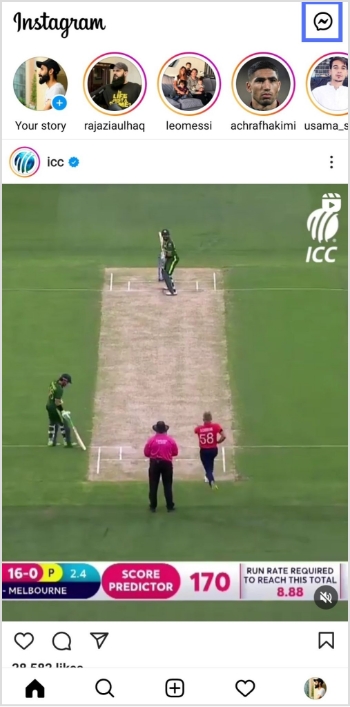
Step 1: Open the Instagram app on your device and tap the message icon in the top right corner.
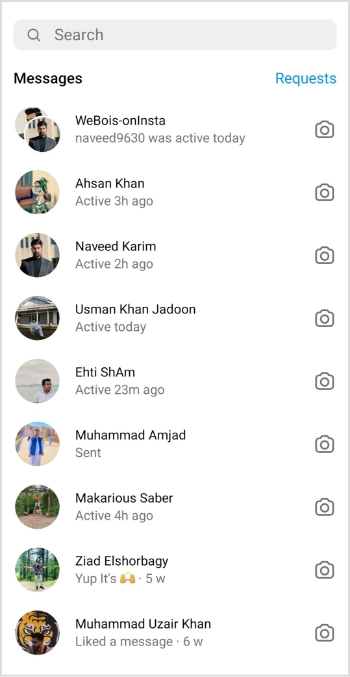
Step 2: Start a new chat or go to an existing conversation.
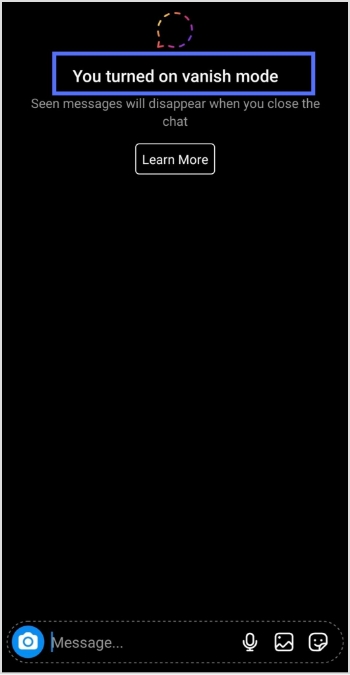
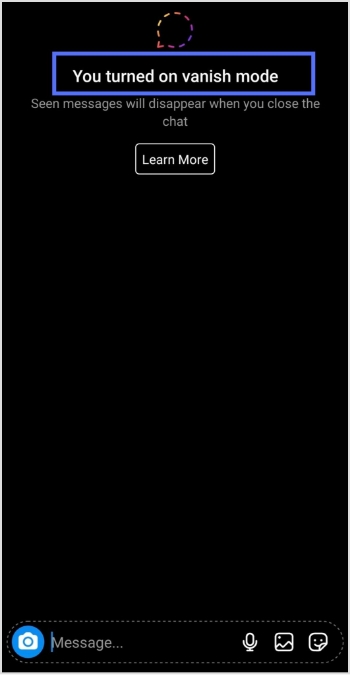
Step 3: Swipe up from the bottom of the screen to access the vanish mode.
Note: Once you’re in vanish mode, you’ll be able to send messages that will disappear as soon as they are read by the recipient.
Maximize marketing ROI
by transforming ordinary URLs into branded short links that convert.
Try Replug for free
To turn off vanish mode on Instagram, follow these steps:
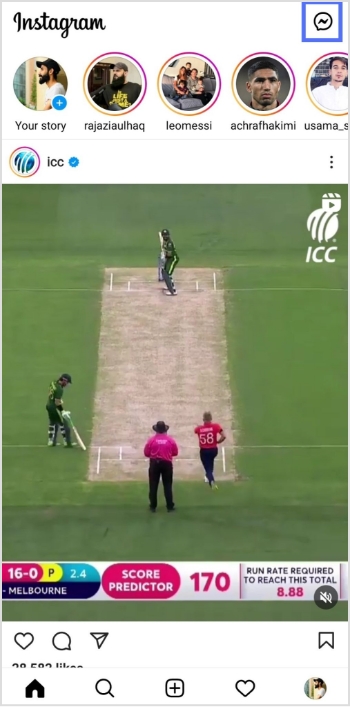
Step 1: Open the Instagram app on your device and tap the message icon in the top right corner.
Step 2: Go to the chat or conversation where vanish mode is enabled.
Step 3: Swipe up on the screen to exit vanish mode.
You should keep in mind the following:
Disappearing messages cannot be copied, saved, or forwarded.
Only accounts you have connected with previously can send you message requests in vanish mode.
Vanish mode can only be used in a chat with another Instagram account, not in group chats or with Messenger or Facebook accounts.
Some professional accounts may not be able to receive messages in vanish mode.
Only use vanish mode with people you trust, as it is possible for someone to take a screenshot or screen recording of a message in vanish mode before it disappears. You will be notified if this occurs. It is also possible for someone to take a photo of a disappearing message with a camera or other device before it disappears.
If you manage multiple social-media links or share content frequently across platforms, Replug.io can help you organize, shorten and track all your links from one centralized dashboard.
Frequently asked questions
How does vanish mode work on Instagram?
On Instagram, Vanish mode allows you to send messages that disappear after they are read. To use Vanish mode on Instagram, you must have the latest app version, and the feature turned on in your settings.
Note that Vanish mode only works in one-on-one conversations. It is also important to be aware that while the messages you send in Vanish mode will disappear from the recipient’s device, they may still be able to take a screenshot or capture the message in some other way. As with any sensitive information, it is important to use caution and consider whether Vanish mode is appropriate for your needs.
Why should you use vanish mode?
Vanish mode feature can be useful in several different situations, such as:
– Sending sensitive or personal information you don’t want to be saved or shared. – Having casual conversations with friends that you don’t want to be documented on your Instagram account. – Make plans or arrangements with people you don’t want to clutter up your main chat thread. – Sending fun or silly messages to friends without worrying about them being saved or shared.
Vanish mode can be a useful tool for maintaining privacy and control over your conversations on Instagram.
With around 1.9 billion monthly active users and roughly 23 million videos uploaded every single day, TikTok is basically the internet’s busiest social media platform right now.
That’s a lot of content, and honestly, not every video deserves a permanent spot on your profile. Maybe it’s an old cringe post, a trend you jumped on too early, or a video that just didn’t land the way you hoped.
Whatever the reason, knowing how to clean up your profile or build a solid TikTok archive before hitting delete is a skill every creator needs.
Ready to take control of your content? Let’s walk you through exactly how to delete a TikTok video, step-by-step.
How to delete a TikTok video
No matter if you’re doing a quick profile cleanup or just removing one awkward post, deleting a TikTok video is super straightforward. Just follow these simple steps, and that video will be gone in seconds.
Here’s how to delete a video on TikTok (step-by-step):
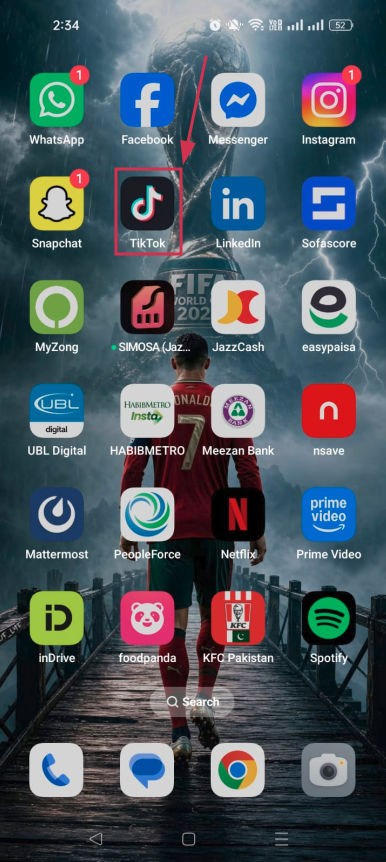
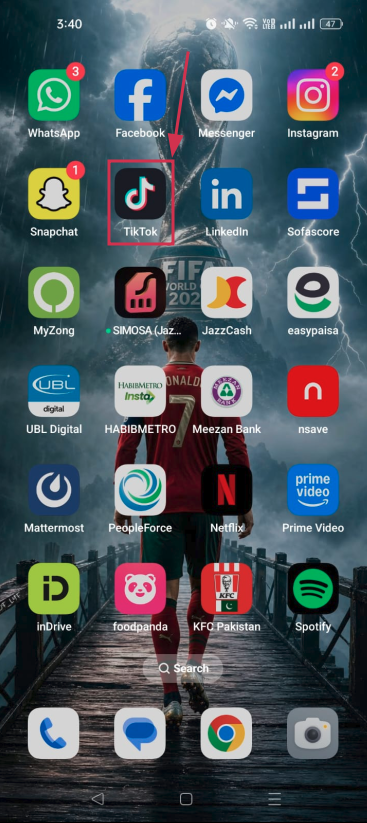
Step#01: Open the TikTok app
Launch TikTok on your phone and make sure you’re logged into the right account.
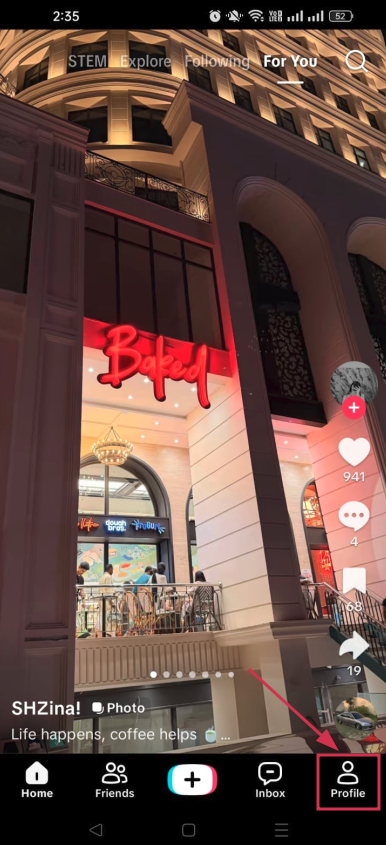
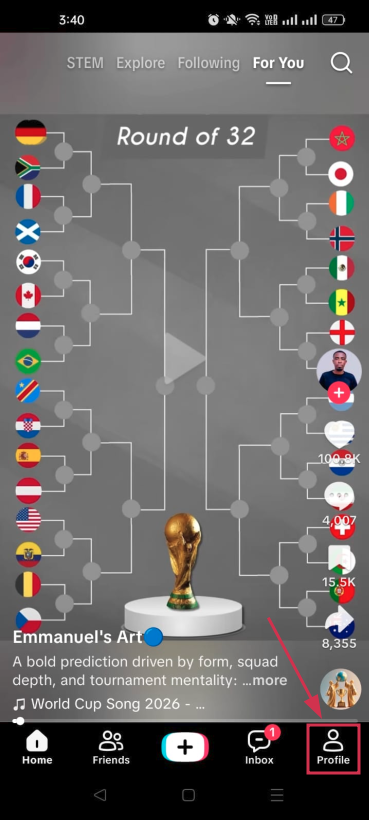
Step#02: Tap “Profile”
Hit the “Profile” icon at the bottom right corner of your screen to head over to your personal profile page.
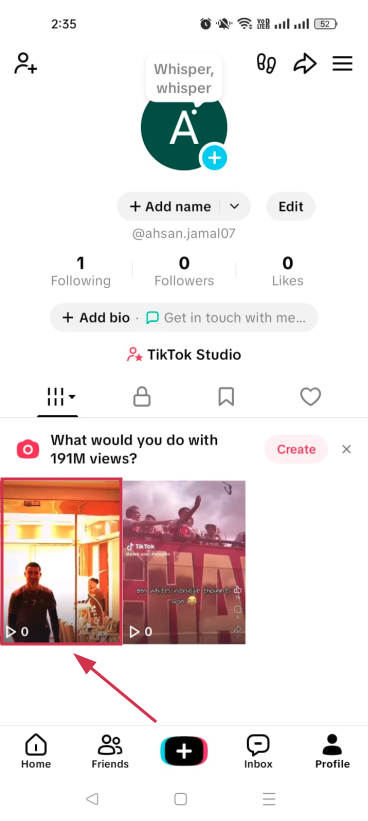
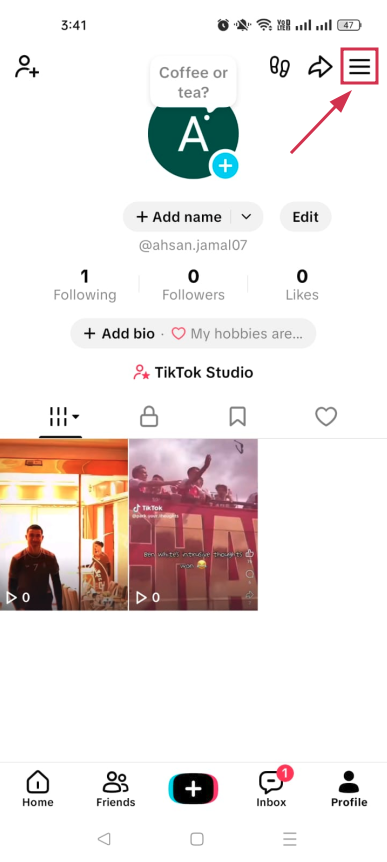
Step#03: Tap on the specific video
Scroll through your posted videos and tap on the one you want to delete.
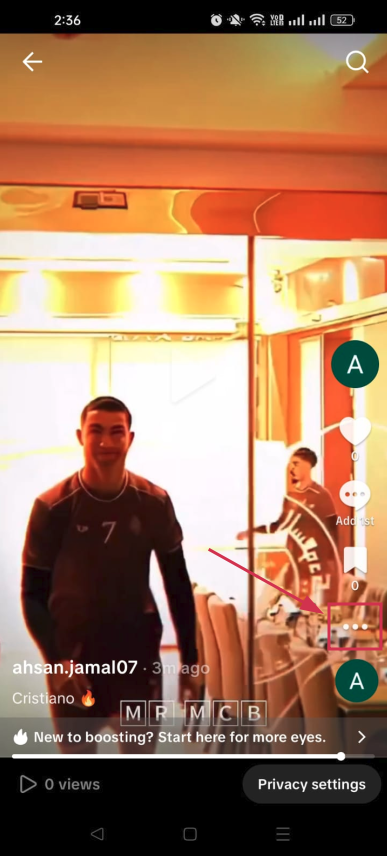
Step#04: Tap the three dots icon (⋯)
Once the video is playing, look for the three dots icon (⋯) on the right side of the screen and tap it to open more options.
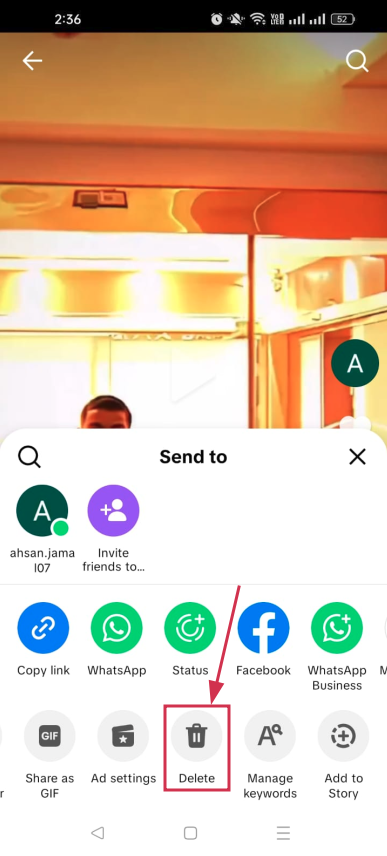
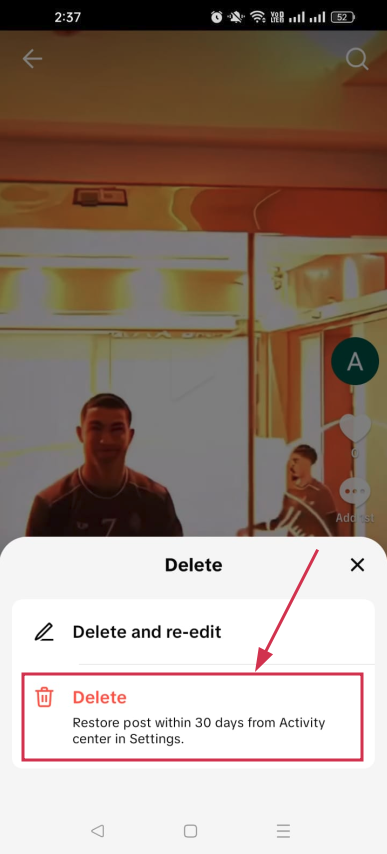
Step#05: Tap the “Delete” icon
A menu will pop up at the bottom. Scroll through the options and tap the “Delete” icon. It looks like a trash can.
Step#06: Tap “Delete”
A confirmation prompt will appear. Tap “Delete” one final time, and your video will be removed from your profile. That’s it!
Note: If you need to make minor edits to a video you’ve recently uploaded, TikTok offers a “Delete and re-edit” feature. This option removes the post from your profile while preserving your original footage, audio, and caption, allowing you to update the video without starting from scratch.
How to delete videos on TikTok
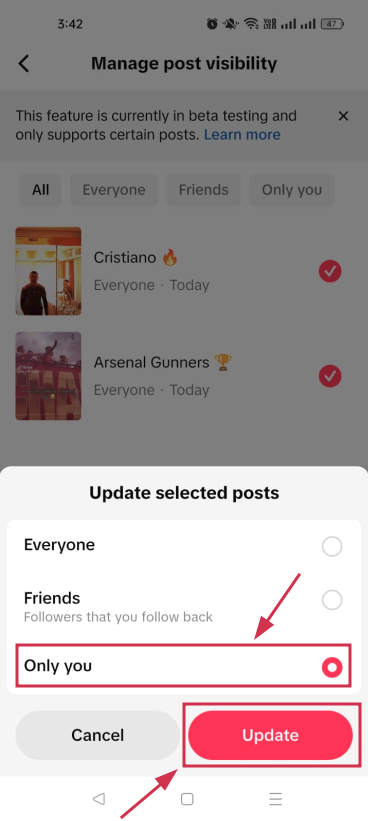
TikTok currently doesn’t offer a feature that lets users delete all of their posts at once. As an alternative, you can use the “Activity Center” to make up to 50 videos private in a single action.
This removes them from public view, leaving them visible only to you, which can serve as a practical alternative to deletion.
To bulk-privatize your videos, follow the steps below:
Step#01: Launch the TikTok app
Open TikTok on your iPhone or Android device and make sure you’re signed into your account.
Step#02: Tap “Profile”
Tap the “Profile” icon in the bottom right corner to navigate to your personal TikTok profile page.
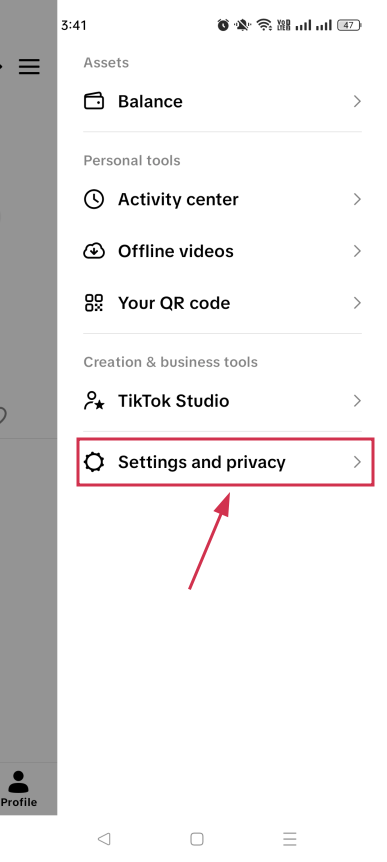
Step#03: Tap the “Menu” icon (☰)
Look for the three horizontal lines (☰) in the top right corner of your profile and tap on it.
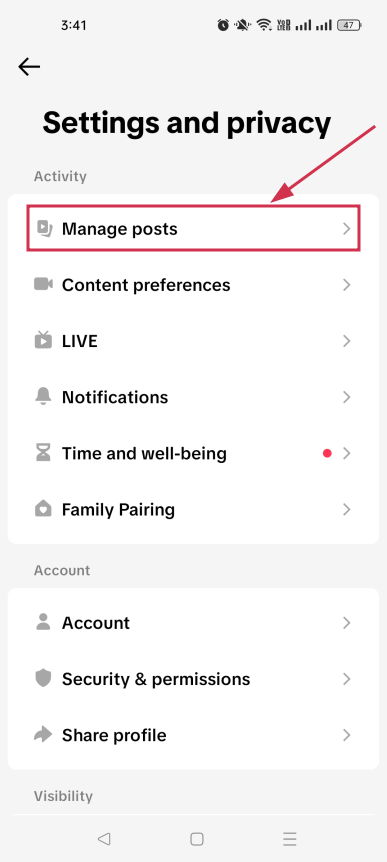
Step#04: Tap “Settings and privacy”
From the menu that slides open, tap “Settings and privacy” to access your account settings.
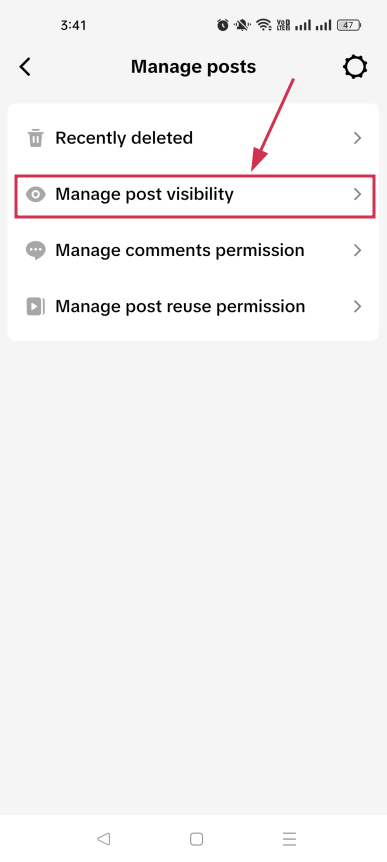
Step#05: Tap “Manage posts”
Under the Activity section, find the “Manage posts” option and tap on it to see your content management options.
Step#06: Tap “Manage post visibility”
Tap on the “Manage post visibility” option. This is where you can control who sees your videos all in one place.
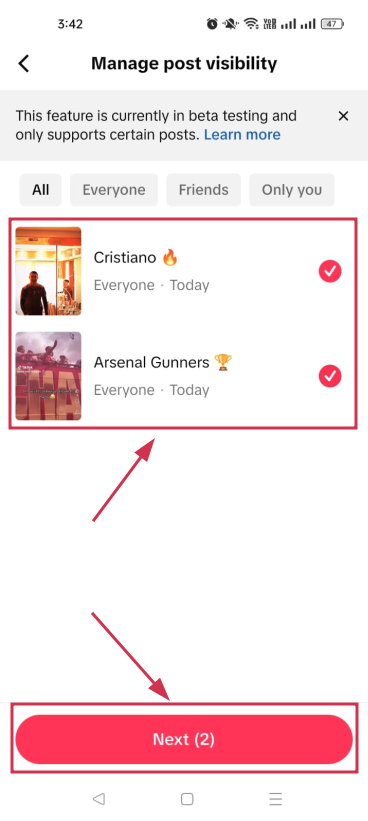
Step#07: Select the videos and tap “Next”
Select all the videos you want to hide from your profile, then tap the “Next” button to move forward.
Step#08: Tap “Only you”, and hit “Update”
Select “Only you” from the prompted options to make the selected videos private. Then tap the “Update” button to save the changes instantly.
Note: Keep in mind that if your goal is to permanently remove videos from your account, TikTok requires each video to be deleted manually, one at a time.
Whether you’re deleting a single video or quietly hiding a bunch of old posts, TikTok gives you simple ways to keep your profile looking exactly how you want it.
While you’re tidying things up, it’s also worth thinking about how you share your content going forward. Tools like Replug can genuinely level up your TikTok game!
Its custom URL shortener lets you turn messy links into clean, branded ones you can actually track. Plus, if you ever want to save a video before deleting it, Replug’s free TikTok downloader has you covered.
Give it a try; it’s free and takes seconds to get started!
Frequently asked questions
How to delete TikTok video after posting?
Yes, you can absolutely delete a TikTok video after it’s already been posted. Simply go to your profile, tap on the video you want to remove, hit the three dots icon (⋯), and select “Delete”. Confirm it one more time, and it’s gone for good.
Just keep in mind that once deleted, all the likes, comments, and shares on that video disappear along with it. So make sure you actually want it gone before tapping that final button.
How to mass delete TikTok videos?
TikTok doesn’t have a built-in feature that lets you delete all TikTok videos at once. You’d have to go through each one manually, which can take forever if you have a lot of posts.
The good news is there are free third-party tools (e.g., ClearTok or Redact) that make this much easier, or you can simply privatize the videos you don’t want to show up on your profile.
How to delete a TikTok video without the three dots?
If the three dots icon isn’t showing up on your video, don’t panic. You can also try going to your profile, tapping on the video, and then tapping the “Share” button instead.
It will open a list of options, inside which you will also find the “Delete” option. Tap it, and your video will be deleted right away.
Note: Deleted videos aren’t permanently gone immediately. They remain in your account’s Activity Center for 30 days before being fully erased.
How to recover a deleted TikTok video?
To recover deleted TikTok videos, you have 30 days to restore them directly from the app’s Activity Center. After 30 days, videos are permanently removed from the platform.
Open TikTok → go to your profile → tap the menu (three-line) icon → go to “Settings and privacy” → tap “Activity Center” → look for “Recently Deleted”.
Now, tap the video you want to recover, followed by tapping the “Restore” button to confirm.
How to delete TikTok story?
TikTok Stories automatically disappear after 24 hours, but if you want to remove one before that, it’s easy.
Open the TikTok app and go to your profile. Tap your active story to open it, then swipe up on your story to open the full options menu. Tap “Delete”, and confirm by tapping “Delete” again. Your story will be removed instantly.
Alternatively, you can tap the three dots (•••) at the bottom-right of the story screen and select “Delete” from there.