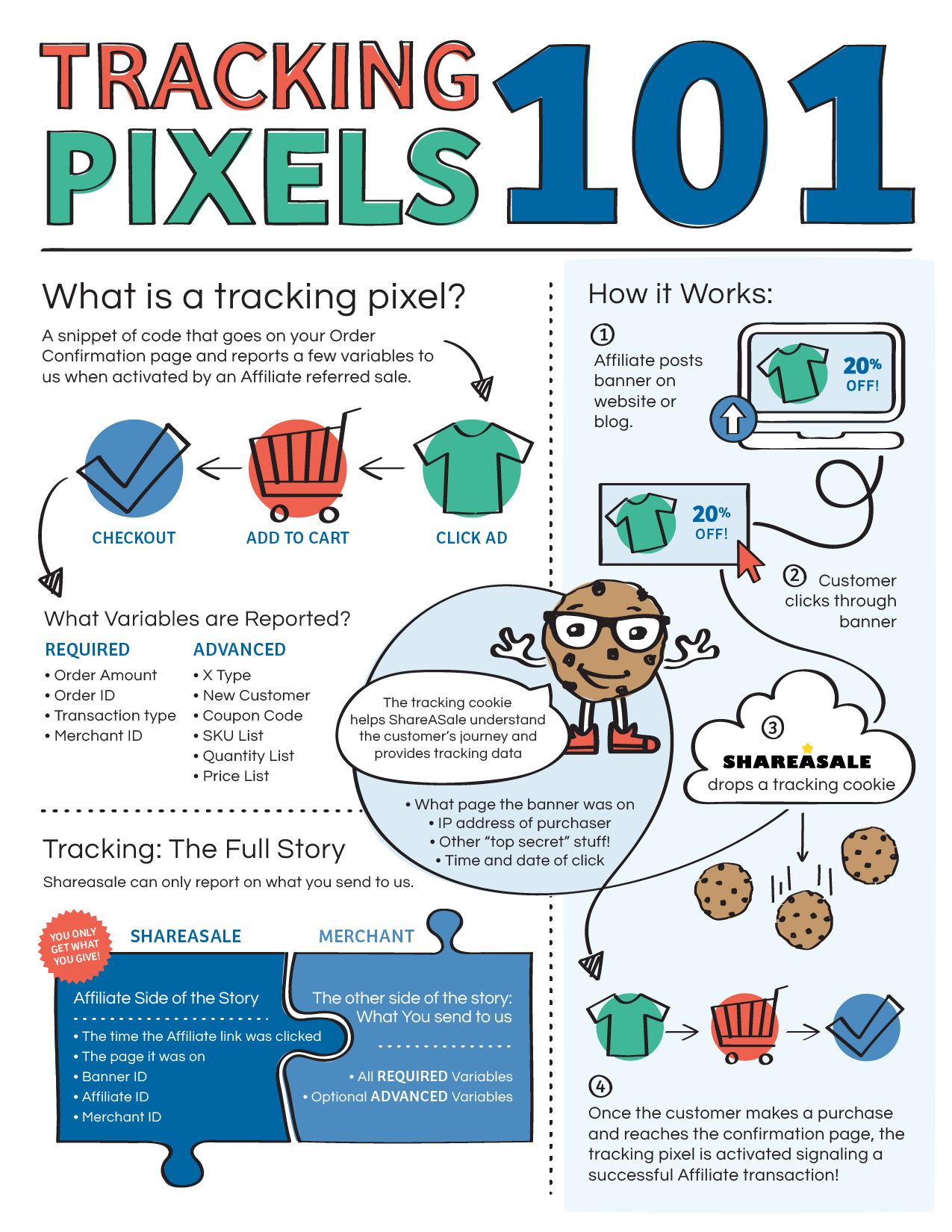
A tracking pixel is a pixel tag or code snippet that triggers the tracking system when a visitor lands on a website page after clicking on a specific link or CTA.
A tracking pixel works by placing it on a website or in an email and tracking the data that helps the marketer or advertiser analyze and track the campaign performance.
Have you ever noticed how quickly you land on a “thank you” page when you finish the checkout process on an e-commerce site?
Do you know that the largest websites, such as e-commerce platforms, social media platforms, and web portals, track their website visitors?
Websites and apps track their users because it helps them navigate in the right direction or understand what they need to accomplish.
In some cases, a tiny image file is added to the website or app, which usually goes unnoticed by the naked eye. While in some instances, a tracking pixel could also be a piece of code that goes into the website page URL and helps marketers track performance through clickability.
Adding a tracking pixel on any web or app property is to collect user data to understand their behaviors, actions, and choices.
Furthermore, it is used to track the activity of users on a website or email campaign to determine the success of the campaign.
Tracking performance is the essence of any marketing campaign, as it helps marketers understand how their marketing efforts will pan out.
Here are four areas where tracking pixels comes in handy:
i. Analyzing website traffic: Tracking pixels can gather data on how users interact with a website. This can help website owners understand which pages are most popular, how users navigate through the site, and where they are coming from.
ii. Measuring the effectiveness of online advertising: Tracking pixels can measure the success of online advertising campaigns by tracking how many users click on an advertisement and then go on to make a purchase or complete some other desired action.
iii.Targeting users with relevant advertisements: Tracking pixels can be used to track user behavior and interests, which can be used to show targeted advertisements to users that are more likely to be interested in them.
iv, Email marketing campaign: Tracking pixels can be used to track the success of email marketing campaigns by measuring how many users open the email and click on links within it.
No doubt, tracking pixels are important for businesses and marketers, as they allow them to gather data on how users interact with their websites and emails regardless of the platform.
Moreover, it enables marketers and advertisers to use this information to improve their marketing efforts and relaunch their advertising campaigns more effectively.
What are the different types of tracking pixels?
There are two main types of tracking pixels used in digital marketing:
Conversion Pixels
Conversion pixels play a vital role in tracking conversions on websites and apps. For example, you may have seen “thank you” or “also check these” pages while buying products online. Such pages trigger or direct visitors to specific pages when they notice a conversion. And conversion pixels help perform this action.
Now a product sale isn’t the only conversion. In fact, a generated lead or downloaded file is also a conversion. It depends on the campaign type and what the marketer or advertiser wants from the audience.
Retargeting Pixels
One of the most popular tracking pixels is the retargeting pixels. It’s used in retargeting campaigns in the digital marketing field. Retargeting is a marketing strategy of targeting the audience that has visited their website or landing page to convert visitors into subscribers or paid users.
Retargeting is usually done through paid advertising. However, the targeting process begins earlier by adding a tracking parameter to the URL or the website code. Hence, the retargeting pixel collects visitor data and helps marketers reach the same audience through paid ads.
How does tracking pixels work?
Tracking pixels are used to track the users’ online behavior, such as the pages they visit, the links they click on, and the products they purchase.
A tracking pixel is a piece of code that embeds into the website code or URL to track the performance of the page or link.
In some cases, tracking pixels are tiny, transparent images placed on web pages or emails to track user behavior.
Advertisers often use tracking pixels to track the effectiveness of their online advertising campaigns. They can also be used by website owners to track the traffic to their sites and to understand the demographics of their users.
The way tracking pixels works is that they are often placed in the HTML code of a web page or in the body of an email. They can be implemented using JavaScript or iFrame.
Example: Suppose a user visits a website or opens an email that contains a tracking pixel; the pixel sends a request to the server that hosts the pixel.
This request includes information about the user’s browser, such as the user’s IP address, the type of device they are using, and the type of browser they are using.
The server then records this information and stores it in a database. This information can be used by the webmaster or by the sender of the email to analyze the user’s behavior and tailor their marketing efforts.
How to Set Up a Tracking Pixel Using Replug?
Replug is a powerful free link shortener tool that allows brands and marketers to create short, branded URLs for marketing, such as for social media, email marketing, and online advertising.
As Replug records data of the users’ behavior on the short links, it makes it possible for marketers and brands to retarget those people through different advertising channels.
Replug plays an anchor role in setting up a retargeting campaign for brands and advertisers using pixel tracking.
Here’s how you can set up tracking pixels using Replug:
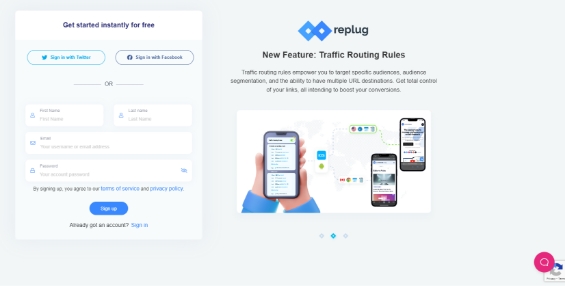
Step #1: Create a Replug account
To get started with Replug, you must first create a Replug account. Then, you just need to visit the Replug website and sign-up for a free trial account to start the process.
Once you’ve created your Replug account, log in to your account to explore the features this URL-shortening tool has to offer.
After the successful login to your Replug account, you’ll see the Replug dashboard, where the process begins.
Pay close attention to all the steps for setting up a tracking pixel using Replug before jumping the gun. And more importantly, don’t create a short link right after landing on the dashboard area because you’d have missed out on a few steps.
Step: #2: Setup your brand in the Replug account
All the steps are crucial to setting up the retargeting pixel using Replug. Now select the appropriate brand or create a new one, just in case.
Creating a brand on Replug would only take a few seconds. It’s highly unlikely that most readers have already set up their brands on Replug since most would be new users.
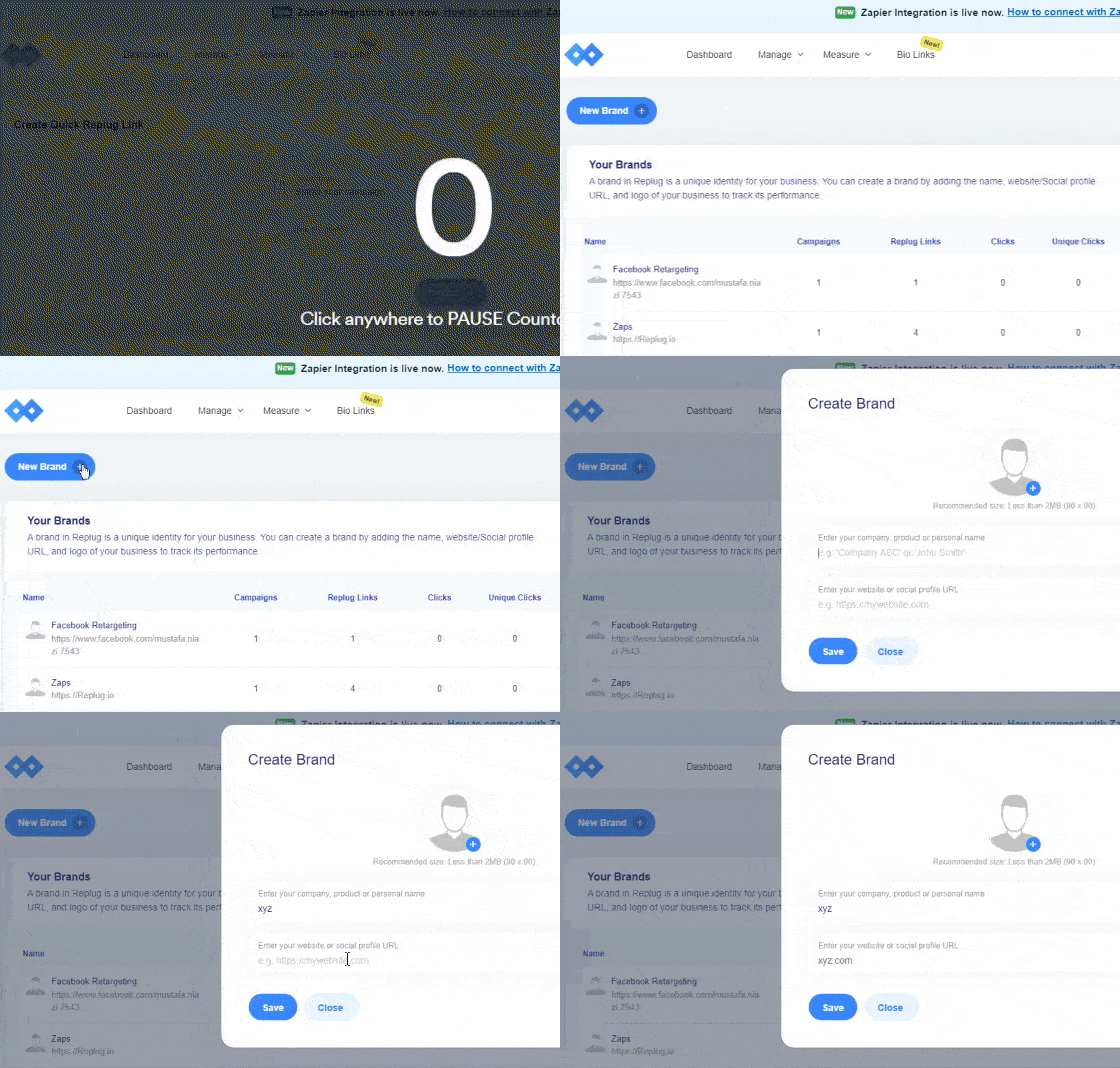
To create a brand:
Go to the “Manage” page from the dashboard header menu and click “Brands.”
Option.”
Click on the “Add Brand” button to get started with creating a brand.
Once it’s done, click the “next” button to proceed.
Step #3: Make a new campaign
The next up is creating a new Replug campaign in line with your retargeting campaign. But first, ensure you’ve set up the brand on Replug properly.
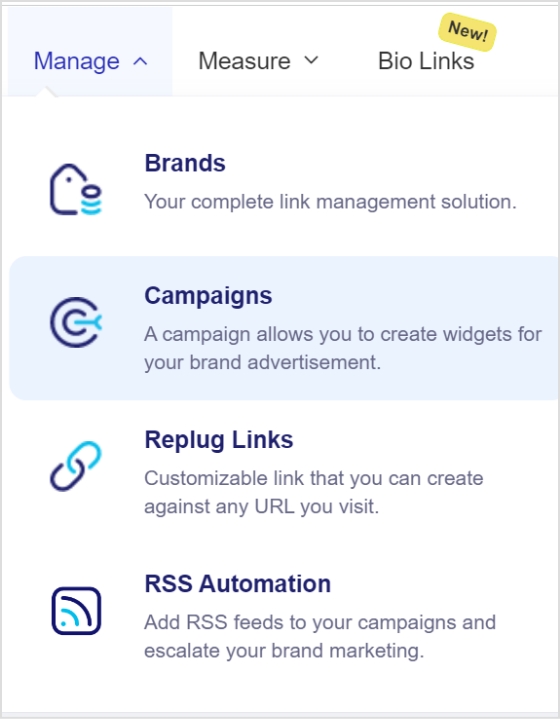
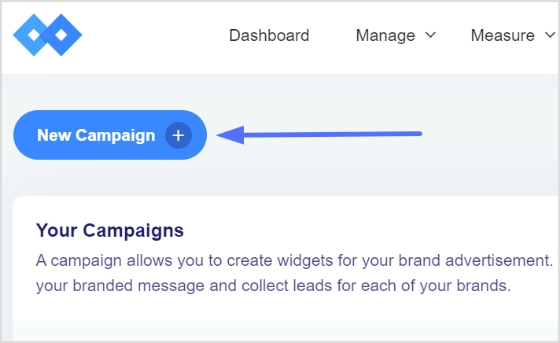
Now go to the “Manage” drop-down from the top menu and click on the “Campaigns” button, and then select “New Campaign” to get started.
At this point, you’d have to select an already existing brand or create a new brand. Since you have just created a new brand, continue with the created brand in the Replug account.
Step #4: Select retargeting as the campaign type
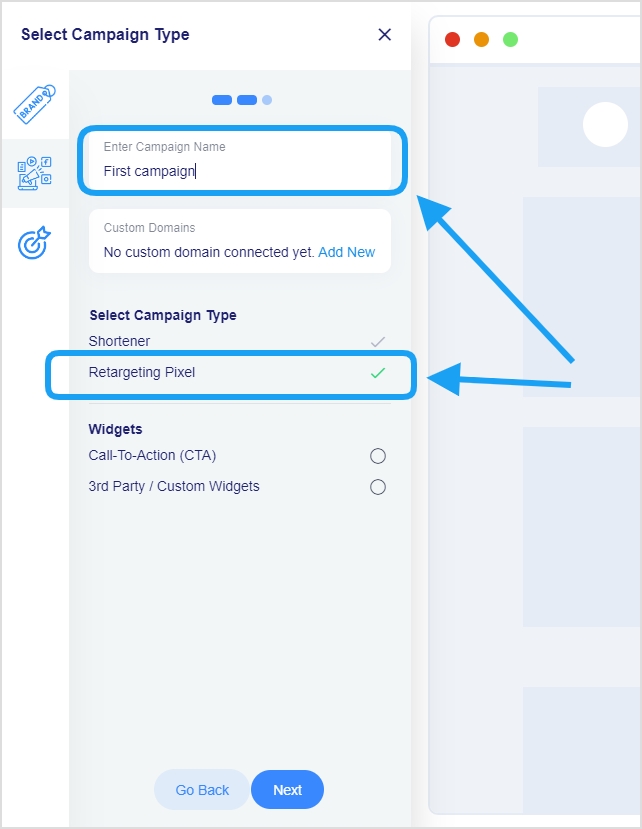
It’s one of the most important steps in the retargeting campaign because it sets the direction of the campaign. This is the part where you name your campaign and choose its type.
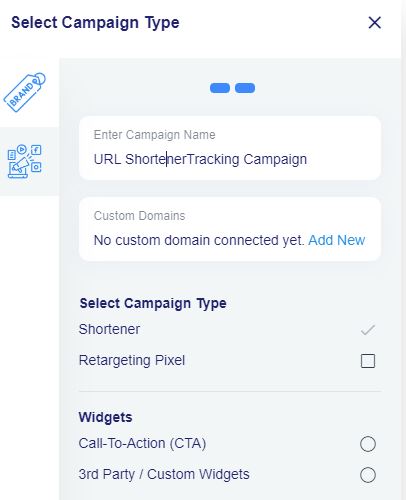
Provide a name for your campaign and select the custom domain if required in the campaign. Otherwise, you can skip the custom domain section.
However, make sure that you check the retargeting pixel option before moving on to the next step. Once you choose the retargeting pixel, it becomes crystal clear to the Replug platform that it’s a retargeting campaign.
Step #5: Add your retargeting code
Everything seems quite easy until this point, and I’ll ensure the last step goes as smoothly as possible.
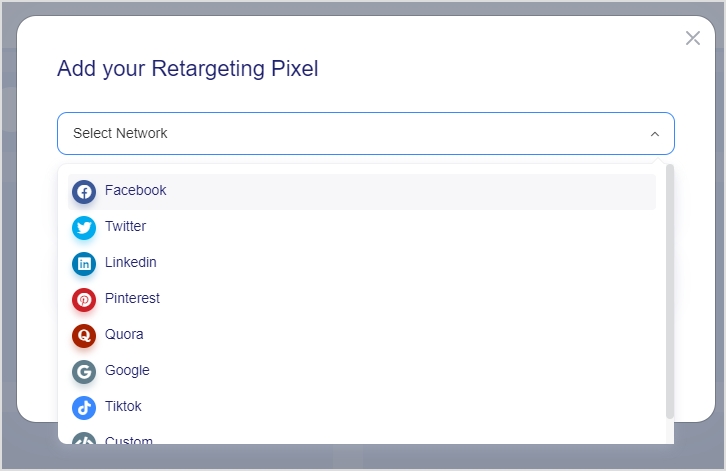
Now, this is the part where you select the social media platform to run your retargeting ad campaign.
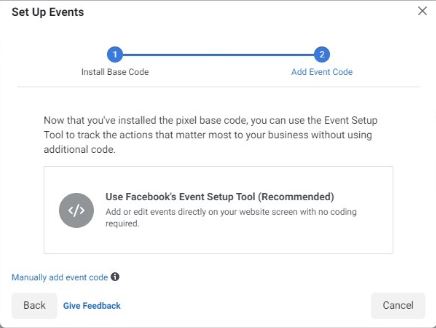
The way it works is that marketers choose the social media platform, give the pixel a name, and finally enter the pixel ID from the respective social media platform such as Facebook pixel id.
Once everything is done, you’re all set to launch your retargeting campaign using Replug.
What are the key differences between a pixel and cookie?
A pixel is a small piece of code placed on a website or in an email. It is often used to track a user’s activity on the website or email and to send this information back to the company or organization that placed the pixel.
Pixels are typically used to track website visitors and to understand how they interact with the website.
A cookie is a tiny chunk of data that is stored on the visitor’s computer by a website. It is used to remember certain information about the user, such as their preferences or login information. In addition, cookies are often used to personalize the user experience and to track a user’s activity on a website.
There are some key differences between pixels and cookies:
Purpose/Goal: Pixels are primarily used for tracking and analytics, while cookies are used for personalization and tracking.
Placement: Pixels are placed on websites or in emails, while cookies are stored on a user’s computer.
Size: Pixels are typically very small (a few hundred bytes), while cookies can be larger (up to 4KB).
Duration: Pixels are usually short-lived and expire after a certain period. At the same time, cookies can persist for extended periods, depending on how they are configured.
Privacy: Pixels can be used to track users across different websites and devices, which has raised privacy concerns. Cookies are generally less controversial, but they can also be used to track users and their activity.
Tracking pixels are legal as long as they comply with relevant laws and regulations, such as the General Data Protection Regulation (GDPR) in the European Union. Therefore, once the users comply with all the legal requirements, there shouldn’t be any problem regarding using tracking pixels.
Is a tracking pixel a cookie?
A tracking pixel is a small, transparent image file that is placed on a website or in an email. It is often used for tracking and analysis purposes. A tracking pixel is not the same as a cookie, a small piece of data stored on a user’s device and used for tracking and personalization targeting.
Does pixel track steps?
A tracking pixel does not track steps, but it can be used to track a user’s actions on a website or in an email. For example, a tracking pixel can be used to track how many people opened an email or clicked on a link.
Is tracking pixel free?
Tracking pixels may or may not be free to use. Some tracking pixels are provided by third-party vendors and may require a subscription or fee to use. However, social media platforms provide pixels for retargeting purposes that are free to use for advertisers.
How to block tracking pixels?
You can use a browser extension that blocks tracking systems set by websites to block tracking pixels. Furthermore, you can also adjust your browser settings to block or limit the use of cookies.
Will users know if I’m using a tracking pixel?
In most cases, users will not know if a tracking pixel is being used on a website or in an email. This is because tracking pixels are typically small and transparent, and they do not interact with the user in any way. However, as described above, users can use tools to detect and block tracking pixels.
Looking for a way to connect with your customers and boost engagement without getting lost in crowded inboxes? SMS marketing is the accurate answer. It provides a direct, effective, and highly engaging way to reach your audience instantly.
But why stop there? By incorporating branded short links into your SMS campaigns, you can save valuable character space while gaining powerful insights into how your audience interacts with your messages.
Whether you’re a small business owner aiming to expand your reach or a marketer looking to supercharge your campaigns, SMS links can help you achieve your goals pretty well.
Let’s explore how these branded short links can transform your SMS strategy and drive measurable results!
What are short links for SMS?
Short links for SMS are shortened URLs used in SMS marketing messages to conserve valuable character space and enhance tracking and analytics.
These links function by redirecting users to the intended landing page or website while tracking data, including clicks, time spent on the page, and conversion rates.
When sending SMS messages, businesses often have a limited number of characters to work with. By using short links, they can include more information in their messages while still maintaining a clear and concise message.
Short links also allow firms to track click-through rates and other valuable data that can be used to optimize their SMS marketing campaigns.
How to create a branded shortened link for SMS marketing
Getting started with crafting short links for SMS marketing is pretty straightforward. All you need is a reliable custom link shortener, and you’re ready to optimize your campaigns.
Here’s a step-by-step guide to help you set things up the right way:
Step #1: Use a dedicated SMS platform
Before you start shortening and sending links, it’s essential to have a dedicated SMS marketing platform in place.
These platforms are specifically designed for managing large-scale SMS campaigns. They offer features like audience segmentation, automation, compliance with SMS regulations, and message scheduling.
A good SMS platform ensures your messages are delivered efficiently and at the right time, helping you maximize engagement and ROI.
Tools like Replug and Twilio integrate seamlessly with link shorteners, providing a solid foundation for your campaigns.
Step #2: Choose a link-shortening tool
Once your SMS platform is ready, the next step is to pick and configure a link-shortening tool.
Replug is a top-tier option that goes beyond basic shortening, offering powerful features such as click tracking, branded domains, retargeting, and in-depth analytics.
These capabilities help you monitor link performance, build trust with custom URLs, and ultimately drive better results from your SMS campaigns.
Don’t settle for less when it comes to SMS marketing. Sign up for Replug today and start seeing results!
Step #3: Create your shortened link
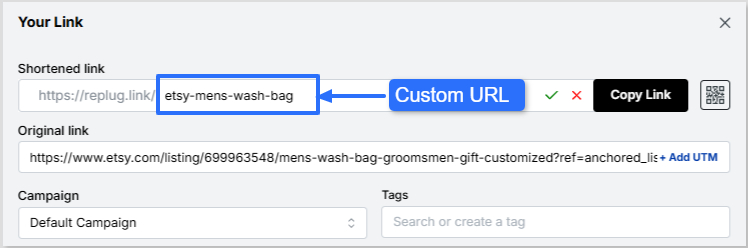
Let’s say you select Replug as your link-shortening tool. You can create a shortened link for your SMS campaign by simply pasting your original URL into Replug’s “Shortened link” box and generating a new, shortened link within seconds.
Step #4: Use a custom domain
To strengthen brand consistency and recognition, personalize your short link with a custom domain. Instead of using a generic shortener domain, your SMS messages can include your brand name in the slug. This not only looks professional but also builds credibility with your audience. So, add accordingly!
Step #5: Add link preview
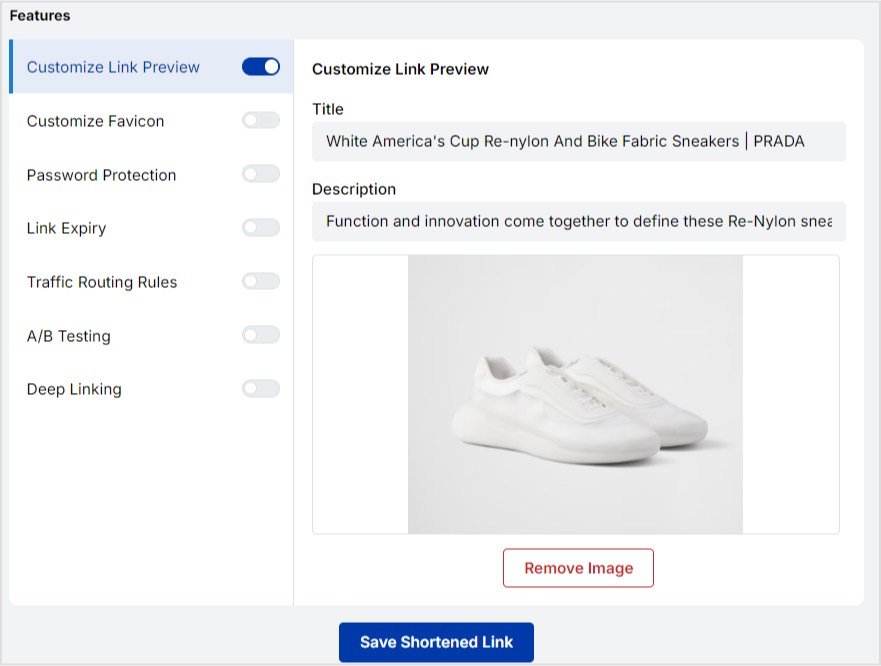
Some devices display a small link preview when a shortened link is shared. With Replug, you can customize its appearance hassle-free, adding a title, description, or image that makes your link more attractive and clickable.
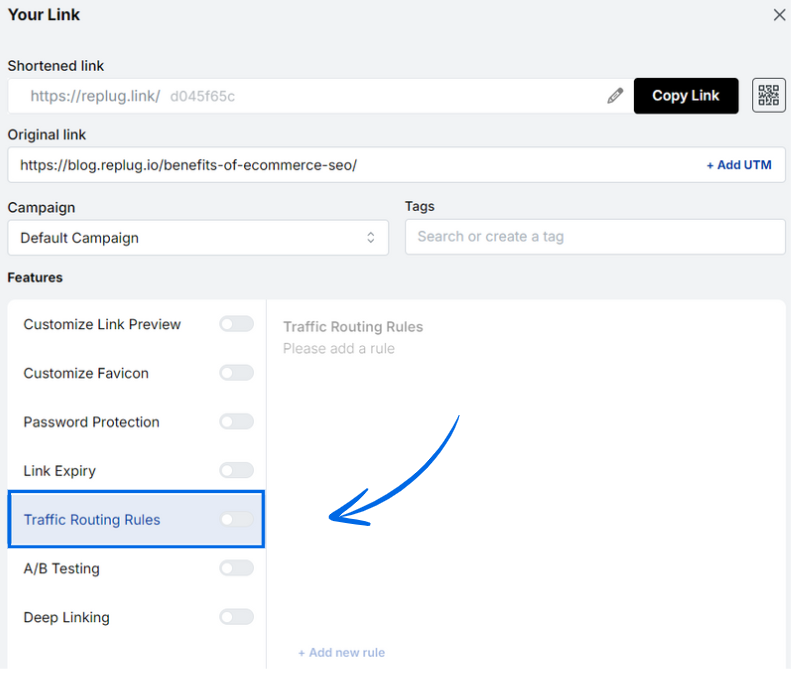
Step #6: Route links
Advanced tools like Replug let you set up link routing. This means you can send different users to different destinations based on factors like location, device type, or campaign variations. It’s quite beneficial for A/B testing or running multi-location promotions.
Add traffic routing rules
Step #7: Include a strong call to action (CTA)
To encourage customers to click on your shortened link, include a clear call-to-action in your SMS message. For example, you could say “Click here to try our new pizza flavor!” with the shortened link included in the message.
Step #8: Add deep links
Deep links allow you to send users directly to a specific page within your app or website, rather than just the homepage. This saves customers valuable time and increases conversions. For instance, an e-commerce brand can send shoppers straight to a product checkout page.
By following the steps outlined above, you can easily create a branded shortened link tailored for SMS marketing that promotes trust, engagement, and CTR.
Why use short links in SMS marketing?
Short links are a must-have tool for businesses seeking to upgrade their SMS marketing strategy. Here are some convincing reasons why you must utilize short links for SMS marketing.
To save space (character count limits)
SMS messages have a 160-character limit, so every character counts. Shortened links take up less space, giving businesses more room to communicate their message effectively.
For example, a retailer can send a message with a shortened link to a product page, allowing them to provide a brief description and the link in one message.
For click tracking & analytics
Shortened links can be used to track clicks and engagement, giving enterprises valuable data on the effectiveness of their campaigns.
For instance, a charity can send an SMS message with a shortened link to a donation page. By tracking clicks on the link, they can determine the success of the campaign and adjust future ones accordingly.
For an optimized mobile experience
Most people access SMS messages on their mobile devices, and shortened links can lead to a better user experience on these gadgets.
For example, an airline can send an SMS message with a shortened link to a mobile boarding pass. This makes it much easier for passengers to access and use the pass on their smartphones.
To increase brand recognition
Shortened links can be customized with branded domains, helping to increase brand recognition and trust.
For instance, a fashion brand can send an SMS message with a shortened link to a new collection, using a branded domain.
For seamless A/B testing
Shortened links can be used for A/B testing and optimization of SMS campaigns.
For example, an online retailer can send two different SMS messages with different shortened links to a product page and track which link receives more clicks. They can then optimize future campaigns for increased engagement.
To enhance trust & click-through rates (CTR)
Branded shortened links look cleaner and more trustworthy than long, generic URLs. When recipients see a familiar brand name in the link, they’re more likely to click, leading to higher engagement and conversions.
For instance, a fitness app can send an SMS with a branded short link, such as “fitco.app/joinnow”, which appears more reliable than a random string of characters.
For better deliverability
SMS messages containing long or suspicious-looking links may get flagged by carriers or filtered as spam. Short, clean links reduce the risk of this happening, ensuring your message reaches the recipient’s inbox without interruption.
For example, a financial service can use a shortened, verified link to send account update notifications, reducing the chances of carrier rejection or message filtering.
For additional data points
Shortened links can capture additional data, such as device type, location, and time of click, providing deeper insights into audience behavior and preferences. This ultimately helps to refine future campaigns.
For instance, a restaurant chain can use shortened links in SMS campaigns to track which city or time slot gets the most reservations, tailoring promotions based on that data.
How brands use short links for SMS marketing: Check out the examples
Here are a few ways renowned brands are utilizing short links in their SMS marketing efforts.
Dunkin’ Donuts
Dunkin’ Donuts uses SMS marketing to send exclusive deals and promotions to its customers.
To track the success of their campaigns, they use shortened links that lead customers to a landing page with the offer.
This enables Dunkin’ Donuts to measure engagement and optimize its campaigns for improved results.
Subway
Subway uses SMS marketing to send coupons and special offers to its consumers.
To provide a better user experience, they use shortened links that lead customers to a mobile-friendly coupon page. This allows them to redeem the offer on their mobile devices easily.
Coca-Cola
Coca-Cola uses this technique to promote new products and events to its customers.
To increase brand recognition, they use custom domains for their shortened links. For example, they might use a link like “www.coke.com/newproduct” to promote a new product launch.
Nordstrom
Nordstrom utilizes SMS marketing to send personalized recommendations to its clients.
To track engagement and improve their recommendations, they use shortened links that lead customers to a product page with more information about the recommended item.
Zara
Zara uses this marketing strategy to promote new collections and limited-time offers to its customers.
To increase engagement and drive sales, they use shortened links that direct customers to a product page featuring the collection or offer.
These are just a few examples of how brands are using short links for SMS marketing to enhance their campaigns and achieve their marketing goals.
Example of a good and bad SMS with shortened links
The way you incorporate shortened links in SMS marketing can significantly impact your campaign’s effectiveness. A well-crafted message with a shortened link should be clear, relevant, and aligned with your brand, encouraging trust and clicks.
On the other hand, a poorly written SMS with an unbranded or unclear link can confuse recipients, lower click-through rates, and even trigger spam filters.
Below is a precise example to illustrate the right and wrong ways to use shortened links in your SMS campaigns.
Good SMS Example:
Hi Sarah! Our Fall Sale is now live 🍁 — enjoy 30% off all items this week only! Shop now: brandshop.co/fall30
Why it’s good:
Personalized greeting
Clear offer and urgency
Branded short link (adds trust)
Friendly, concise tone
Bad SMS Example:
SALE NOW ON! Click here for 30% off: bit.ly/3xY2zZq
Why it’s bad:
All caps feel forceful
No personalization
Vague message
Generic, unbranded link (may seem suspicious)
Wrapping Up
In conclusion, branded short links are a powerful tool for SMS marketing, offering enhanced brand recognition, improved click-through rates, and valuable analytics.
By creating concise, trustworthy, and trackable links, brands can optimize their campaigns and drive engagement effectively.
As shown through examples, well-crafted SMS with branded links resonate with audiences, while poorly designed ones risk losing trust.
By following the steps outlined to create and implement these links, businesses can strengthen their SMS marketing strategy. This ensures messages are impactful, professional, and aligned with their brand identity, ultimately facilitating stronger connections with customers in a competitive digital landscape.
Frequently asked questions
Why SMS Marketing matters for digital marketers?
SMS marketing is essential for digital marketers in 2026 due to its 98% open rate and rapid 90% read-within-3-minute delivery. It enables direct, immediate customer engagement that far surpasses email.
With 66% of businesses adopting SMS software and increasing budgets, it drives high ROI through personalization and AI integration in omnichannel strategies.
How effective is an SMS campaign including short URLs?
SMS campaigns with short URLs achieve 98% open rates and 36% click-through rates, with 28% of recipients clicking links for enhanced tracking and conversions.
Short URLs optimize message length, boost readability, and support 45% response rates, making them 30% more cost-effective than traditional methods.
What are the best link shorteners for SMS marketing in 2026?
– Replug stands out for SMS marketing with its all-in-one link management, retargeting, and bio tools tailored for marketers. –Bitly offers trusted, simple shortening with strong analytics and brand recognition for reliable campaign tracking. –Klaviyo integrates AI-driven SMS with short link support for personalization, while –Twilio enables programmable SMS workflows incorporating shortened URLs for scalable engagement.
How can I optimize my SMS marketing campaigns using short links?
Use branded short links to enhance trust, reduce character count, and lower SMS costs while maintaining clear, concise messaging. Draw click tracking and analytics from shorteners to measure engagement, A/B test variations, and direct to mobile-optimized landing pages for higher conversions.
Campaign tracking is a process of monitoring the performance of the URLs with tracking parameters for marketing campaigns. Marketers use campaign tracking as a tool to evaluate the success of their efforts. It comprises gathering data from several sources, such as website analytics, email campaigns, and social media posts. And then analyzing it to assess the campaign’s effectiveness.
Digital marketers and SEO experts track campaigns to analyze the quality of the marketing channels, traffic sources, and content strategies.
Conversion optimization is a vast area to manage and campaign tracking is an important part of it. To track marketing campaigns, most marketers use URL shortening tools with URL tracking and analytics features.
Why should a company set up campaign tracking?
Campaign tracking is a vital analytics tool. It allows marketers to see which campaigns are performing well and which ones need improvement. Without campaign tracking, it would be difficult to know which marketing strategies are working and which ones are not. There are several aspects of campaign tracking to consider when tracking URLs that an average Joe doesn’t come across every day. Campaign tracking is a URL tracking system to analyze marketing efforts by keeping an eye on the website traffic through specific URLs. Here are the reasons why a company should set up campaign tracking:
To track the clickability and conversion rate of a marketing campaign. When brands and marketers run ad campaigns, they usually add a UTM parameter to the call-to-action button to track clickability and conversion from the specific campaign.
To measure the effectiveness of the channel, meaning campaign tracking comes in handy when the user wants to analyze the performance of a traffic medium, for instance, a banner ad on a popular blog.
To A/B split test two marketing channels. A/B Testing is crucial to finding the best solution in digital marketing. Therefore, marketers compare different tactics to see what works best for them.
To assess the ROI of the marketing campaign, it’s vital to have campaign tracking. It gives brands a deep dive into the quality of the traffic sources.
What are campaign parameters?
Campaign parameters are URL slugs that add to the website page URL to track, identify, and analyze the traffic sources and campaign performance.
A lot of brands start advertising and promotions during the holiday season. Most of these brands use campaign tracking to see where most buyers are coming from during the campaign.
These campaign parameters help them figure out:
The impact of the marketing campaign
What are the number of visitors that the campaign brought?
How engaged those visitors were?
How many visitors converted into paying customers?
Why are campaign tracking parameters important?
Most first-timers wonder why campaign parameters are important when they’re setting up a retargeting campaign or an ad campaign on social media.
The answer is that campaign parameters provide marketers with crucial campaign information that helps them make important decisions going forward.
Brands usually track their CTAs on the landing pages or short URLs shared on social media to see what’s working for them.
Here are four reasons why campaign tracking is important in digital marketing:
Help track campaign results – whether it’s a social media post that contains a short URL with a slug or an online ad, campaign parameters are included to track campaign results.
Separate multiple campaigns and make them identifiable. Otherwise, it won’t be possible to differentiate multiple campaigns in a dashboard.
Gather clicks and conversion data, which is crucial to the campaign analysis. It’s impossible to figure out whether or not the campaign was successful if there are clicks and conversion data available.
Make performance reporting possible for brands and marketers. A lot of experts use URL shorteners to generate short URLs for social media to ensure that performance reporting becomes possible. Replug offers a powerful free link shortener and tracker for creating, managing, and tracking vanity URLs for social media, online advertising, and email newsletters.
Replug.io is an all-in-one link management tool for marketers, social media experts, influencers, and bloggers. It helps users with URL shortening, branded short links, UTM tracking, bio links, retargeting, and lead generation. You can track various campaigns using it, i.e. :
URL campaign tracking
UTM tracking
CTA campaign tracking
Retargeting pixel campaign tracking
Here’s how you can create a tracking URL with Replug:
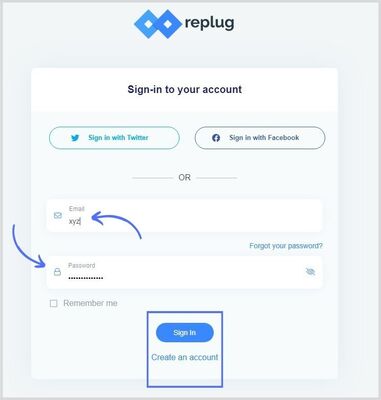
Step #1: Log in to your Replug account
Go to the Replug website and log in to your account. If you haven’t created your Replug account, sign-up for a free trial account and see how this tool works.
Step #3: Create a short branded URL Paste the URL, you want to shorten afterward and click on the create button.
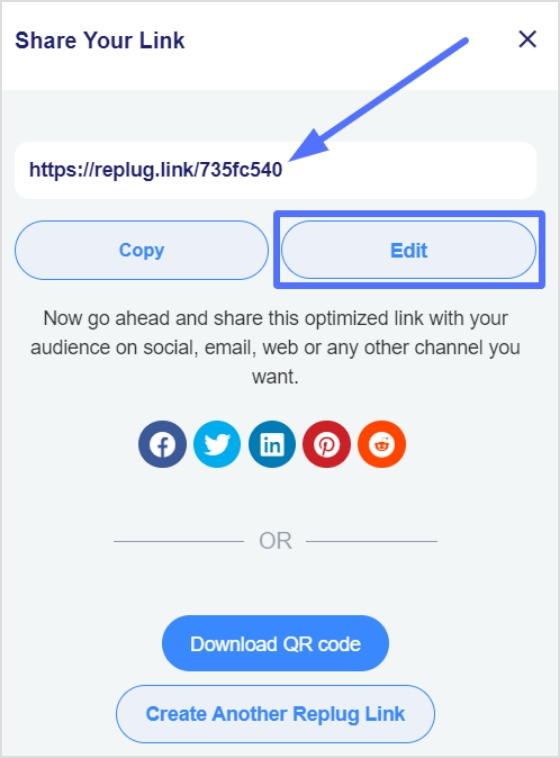
A new window will open where you can edit your URL slug and save the link.
Step #4: Track URL performance in Replug Analytics
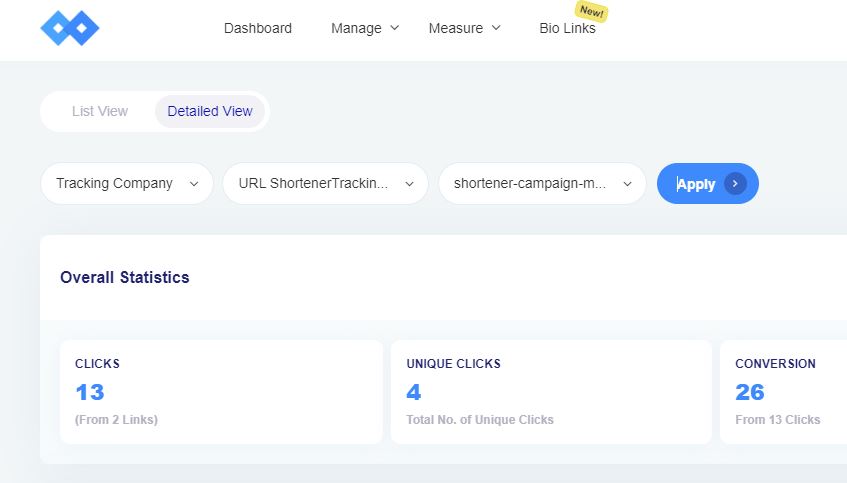
Creating a short URL is incomplete with tracking it. Replug allows users to generate and track short URLs.To track your short URLs, go to the Measure section from your Replug dashboard and click on the Analytics option.
Select the Replug links and click on the appropriate campaign to find your link analytics. Or you can also click on detail analytics to get a detailed view. For a detailed overview, you need to select the brand, campaign and replug link. Detail view highlights click and conversion performance. Furthermore, it shows visitors by country, operating systems, browsers and source. You won’t see the metrics such as clicks, conversion, and conversion rate right away since the link is brand new.
Campaign tracking in Usermaven
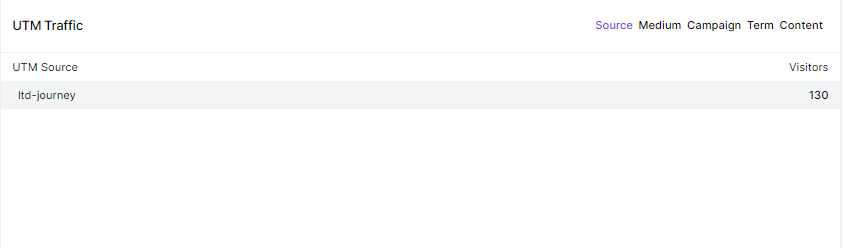
Marketing campaigns are only beneficial when they are producing the results you aimed for. With Usermaven’s campaign tracking, you can stop guessing your campaigns’ performance and start analyzing it through data to increase ROI. All you have to do is use UTM tags to analyze which source, content or campaign is producing results and then tweak your marketing campaigns to increase conversion and reach your business goals. Here’s a preview UTM traffic in Usermaven
What are Google UTM campaign tracking parameters?
Google has provided advertisers and publishers with loads of information on running ads and monetizing websites.
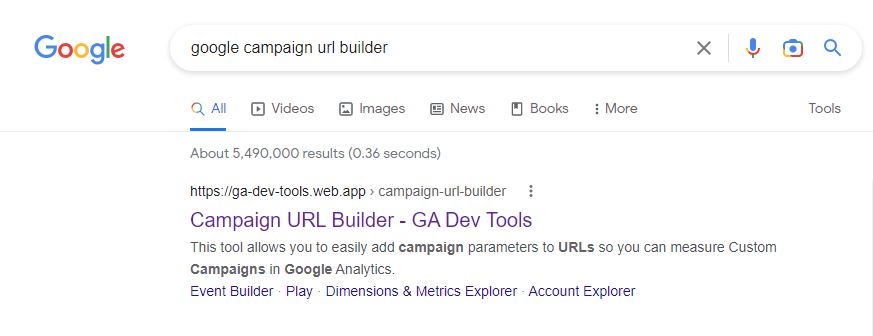
As far as campaign tracking is concerned, Google recommends a tool called Google Analytics Campaign URL Builder. You can also check out Google’s support thread on this topic.
The benefit of using this tool is that users can add campaign parameters to URLs and measure custom campaigns in Google Analytics.
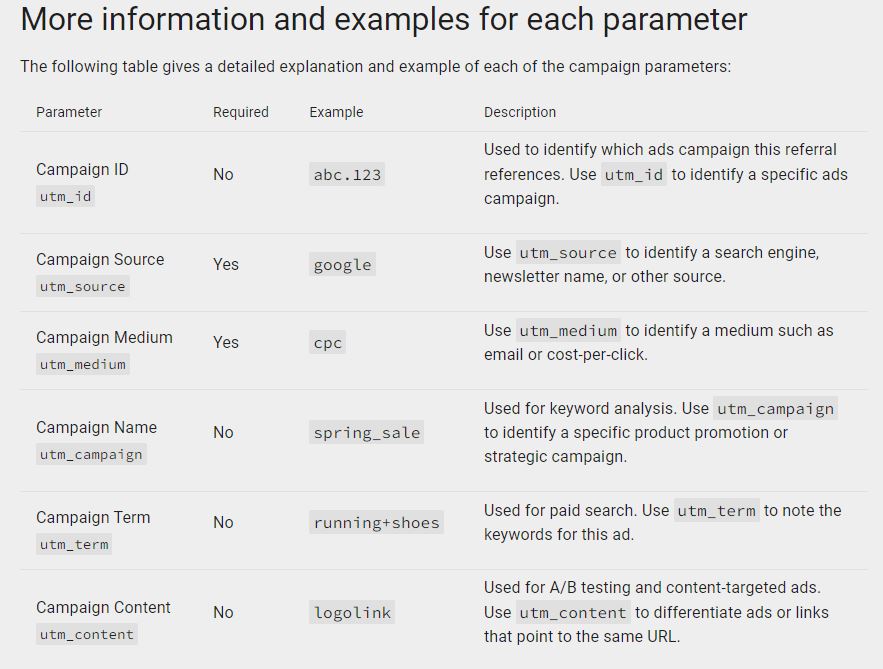
The following are the parameters to be entered to generate a campaign tracking URL:
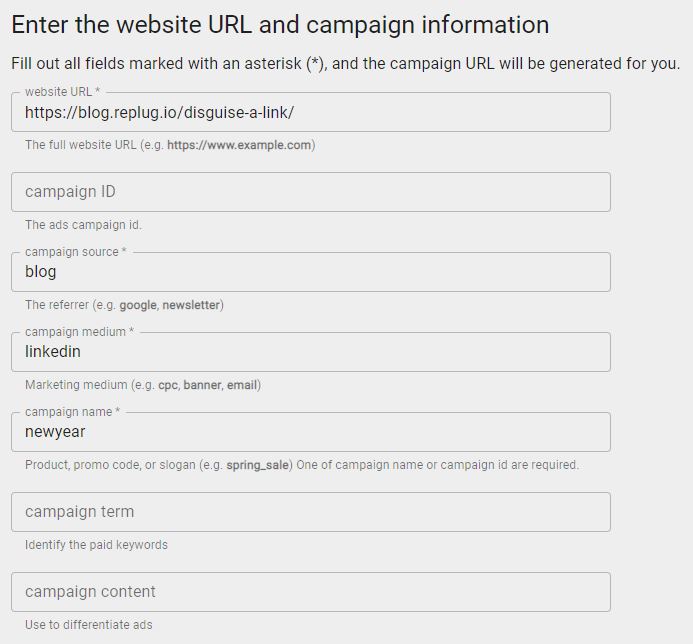
Website URL: The website or page URL that needs to be tracked. Provide the full URL address including HTTPS.
Campaign ID: This is where the ad campaign ID goes. Most ad networks provide advertisers with campaign IDs to track or identify certain campaigns.
Campaign source: Enter the referral platform, such as a Facebook ad or newsletter.
Campaign medium: Provide the campaign medium, meaning what the marketing medium is for the campaign, for instance, direct ad, sponsored email, or PPC ads.
Campaign name: Give your campaign a name for identification purposes, for instance, holiday-sales or Christmas-offer, etc.
Campaign term: Mostly used for paid search.
Campaign content: It’s used for A/B testing and content-targeted ads.
Let’s look at the steps involved in tracking a custom campaign through Google Analytics.
How to track a custom campaign using the Campaign Builder tool?
Go to the campaign URL builder Access the Campaign URL builder to generate the campaign tracking URL. Make sure you have selected the web version instead of the play. Don’t panic if you haven’t done this before because it’s quite a simple process.
Opt for the GA4
Toggle from UA or GA4 using the button on the (left) sidebar. Don’t opt for UA (older Google Analytics edition) will no longer be available after July 2023.
Fill in the campaign builder form
Fill out the form. Go through the explanation of the parameters written in the previous sub-heading of this very article.
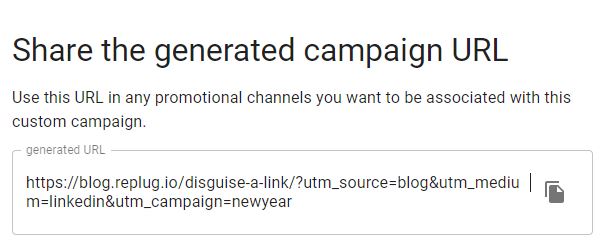
Grab the generated URL
When you fill up the form, the custom campaign tracking URL will be ready to use. You could also shorten the URL using the shortener button at the bottom.
Track via Google Analytics
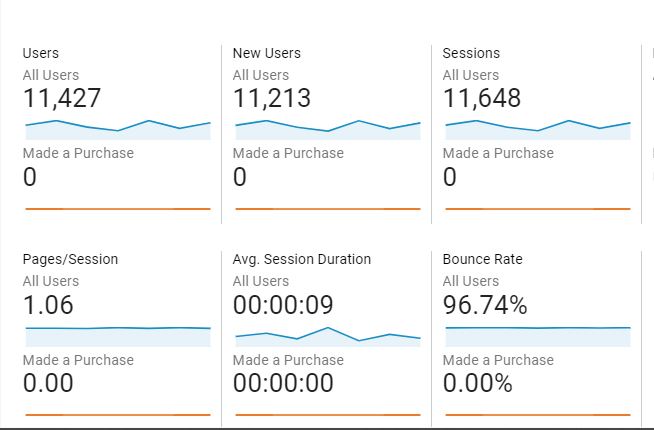
The last step is to track the campaign URL in Google Analytics. Start with logging in to your Google Analytics account. Go to the Reports > Acquisition > Traffic Acquisition > Source/Medium.
A screen like this would appear:
Now you should look out for the campaign after selecting the session source/medium. The campaign source would be a referral, since the traffic would be clicking on your campaign URL and landing on the website.
How to view your URL campaigns in Google Analytics?
Creating any link or CTA is worthless if there is no tracking available to find out the number of clicks and the conversion.
No wonder all major URL shorteners or email marketing services have analytics sections for users to analyze the data.
If you have been playing around with custom short URLs, then you must have thought about viewing the URL campaigns in Google Analytics at some point.
There is a possibility that some marketers have no idea how to capitalize on URL tracking. Therefore, it’s our duty to put some light on every aspect of short-link management and campaign tracking.
Here are the steps involved in retrieving the URL campaigns in Google Analytics to see how they’re doing: Log in to your Google Analytics account
First things first, log in to your Google Analytics account to get started with the viewing process. Make sure that you’re logging in to the correct Google Analytics account.
Go to the reports section
Once you’ve logged in, go to the reports section. It is the area where you see the site performance through reports. If you can’t find the reports option, hover your cursor on the left sidebar or click on the second option from the left – you’ll find the report button.
Open the acquisition area
Go to the Acquisition section from the reports area in the Google Analytics dashboard. It’s the section that provides users with all the information about how a site acquires visitors. The next step will further explain the process.
Access the traffic acquisition
After clicking on the Acquisition option, look out for the Traffic Acquisition option underneath the Acquisition option. It’s the third one under the Acquisition.
Select the campaign source
The source selection is crucial to the whole process. Click on the session drop-down menu right above the data table on the Traffic Acquisition page and choose source/medium.
Search the campaign URL
Provide the campaign URL in the search section right above the session drop-down menu. Once you paste the campaign URL, hit enter and let Google Analytics process your request. It’ll only take a couple of seconds to retrieve the data.
This is how you can view campaign URLs in your Google Analytics account.
This article is written around the importance of campaign tracking, which is essential in digital marketing.
If you haven’t had a chance to learn about campaign tracking, then here’s a quick recap for you: it’s a process of analyzing the performance of the URLs using the tracking parameters that are added to the URLs.
UTM tracking system plays a vital role in tracking URL performance. Replug is a URL shortener and my go-to tool for link tracking along with generating short URLs.
Furthermore, this article goes deep into converting website or blog post URLs into traceable URLs using Campaign URL builder. Plus, I also covered how you can track those campaign URLs using Google Analytics.
Moreover, I cracked open how you can utilize Replug to create tracking URLs for your marketing campaigns. The step-by-step process of creating tracking URLs using Replug would help many readers, especially the beginners.
Digital marketers, social media experts, and content marketers rely heavily on organic traffic, email marketing, and social media marketing.
Therefore, it is essential for them to track campaigns to figure out what is working for them.
Campaign tracking could be a game-changer for gurus and experts trying to understand which medium is getting the most attention. That is why campaign tracking is crucial to the conversion optimization process.
Frequently asked questions
How do you track campaign performance?
Tracking campaign performance involves monitoring and analyzing the key performance indicators (KPIs) that are relevant to the specific campaign goals.
What are campaign tracking codes?
Campaign tracking codes, also known as UTM parameters or tags, are snippets of code that you add to the end of a URL to help you track the performance of a specific marketing campaign. These codes can provide you with information about where your traffic is coming from, which campaigns are driving the most clicks or conversions,
What is UTM campaign term?
UTM (Urchin Tracking Module) campaign term is one of the parameters used in UTM tracking codes to identify the specific keywords or terms associated with a marketing campaign.
Think about this for a second; there are over 5.42 billion active social media users in the world right now. That’s more than half the planet scrolling, liking, and engaging every single day. And yet, so many businesses are still leaving a goldmine of leads untouched on these platforms.
Here’s the thing: Social media isn’t just for brand awareness anymore. It now drives leads for 68% of marketers, and when paired with a solid content marketing strategy, the results can be staggering. Content marketing alone generates 3X more leads than traditional outbound (at 62% lower cost).
So whether you’re a startup trying to build a pipeline from scratch or an established brand looking to scale, social media lead generation is something you simply can’t ignore in 2026.
But before we jump into the tactics, let’s make sure we’re on the same page, i.e., what exactly is social media lead generation?
What is social media lead generation?
Simply put, social media lead generation is the process of using social media platforms to attract potential customers and collect their information.
This could be things like their name, email address, or phone number, so you can follow up with them and eventually turn them into paying customers.
The primary objective here is pretty straightforward: move people from just “following” your brand to actually showing interest in what you offer. It’s about sparking that initial conversation and guiding people down your sales funnel.
Now, this isn’t just about posting pretty pictures or going viral. It’s a deliberate part of your broader social media marketing strategy, one where every piece of content, every ad, and every interaction is designed with a goal in mind. And that major goal is:
Getting the right people to raise their hand and say, “Yes, I’m interested.”
Significance of social media lead generation
Here’s why social media lead generation is so important:
Massive reach & audience targeting
Social media gives you access to billions of potential customers, and the targeting tools available today let you zero in on exactly the right target audience. It is based on their age, interests, location, job title, and more. You’re not shouting into the void; you’re speaking directly to people who are most likely to care about what you offer.
Cost-effective marketing
Compared to traditional advertising like TV spots or print ads, social media lead generation is incredibly budget-friendly. Even with a modest spend, you can run highly targeted campaigns that consistently bring in quality leads without burning through your entire marketing budget.
Enhanced engagement & trust
Social media lets you have real, two-way conversations with your audience, and that builds trust faster than any billboard ever could. When people see you responding to comments, sharing helpful content, and showing up consistently, they start to feel like they actually know your brand.
Valuable data & insights
Every like, click, comment, and share tells you something useful about your audience. Social platforms give you a steady stream of data that helps you understand what’s resonating, what’s not, and where to focus your efforts for better results.
Reduced friction with lead magnets
Features like LinkedIn Lead Gen Forms or Facebook instant forms let people sign up or express interest without ever leaving the app. That means fewer steps between “I’m curious” and “Here’s my contact info,” which makes a big difference in how many leads you actually capture.
Improved conversion rates & ROI
When you consistently attract the right audience and nurture them with relevant content, your chances of converting them into potential customers go up significantly. Social media lead generation, done well, doesn’t just bring in more leads; it brings in better ones, which means a stronger return on every dollar you invest.
How can you generate leads with social media: Proven tactics & strategies to follow!
There’s no shortage of social media lead generation strategies out there, but not all of them actually move the needle. The key is knowing which tactics are worth your time and how to execute them properly.
Here are some proven ones to get you started!
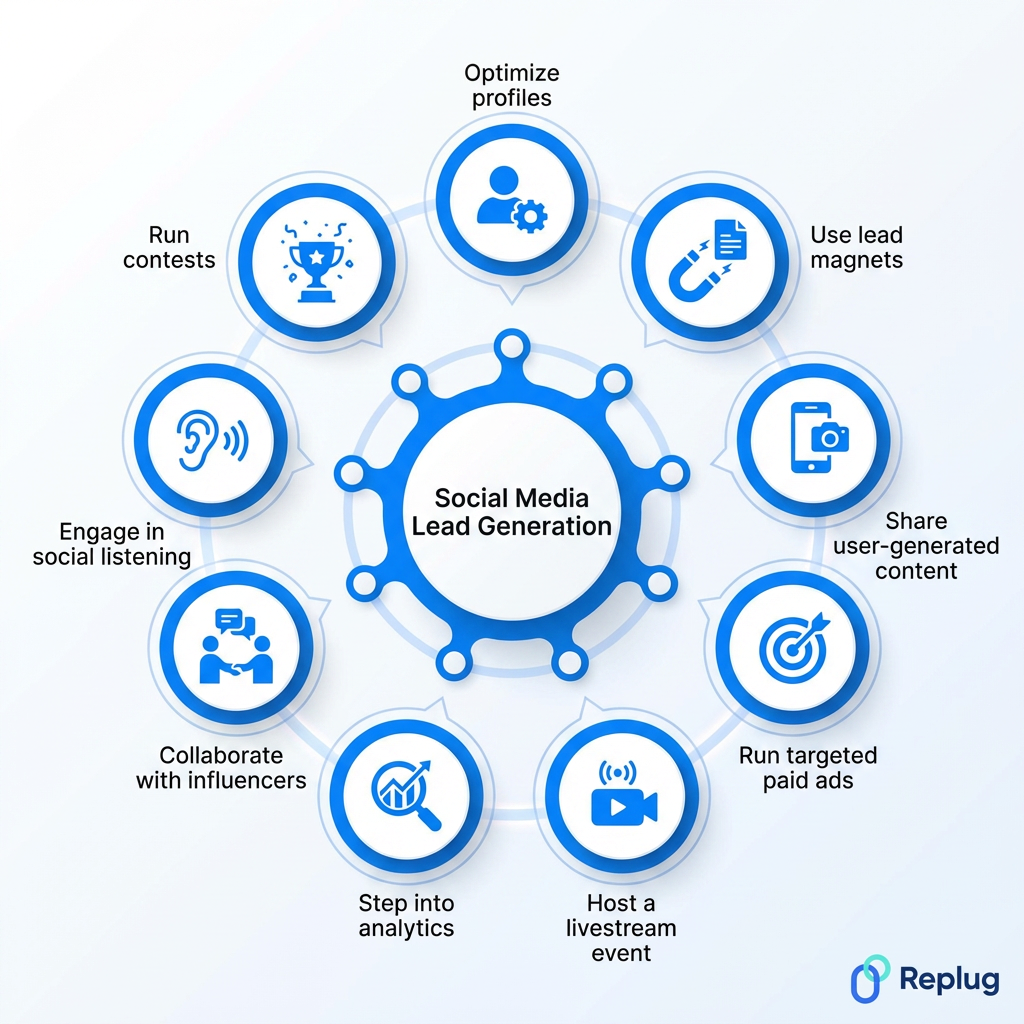
Tactic #01: Optimize profiles with clear calls-to-action (CTAs)
Your social media profile is often the first thing a potential lead sees, so make it count. Make sure your bio clearly tells people what you do, who you help, and what they should do next.
Add a strong CTA phrase like “Book a free call,” “Download our guide,” or “Visit our website” with a direct link. A well-optimized profile quietly works as a lead generation machine 24/7.
Tactic #02: Share valuable content (use lead magnets like ebooks or webinars)
People won’t hand over their contact info for nothing; you need to give them a reason to. That’s where lead magnets come in.
Offer something genuinely useful, like a free ebook, checklist, webinar, or mini-course in exchange for their email. Share these across your social channels regularly, and make sure whatever you’re offering actually solves a real problem your target audience faces.
Tactic #03: Use relevant keywords & high-quality images
Social platforms are increasingly being used as search engines, especially Instagram, LinkedIn, and TikTok. Using the right keywords in your captions, bios, and hashtags helps the right people find you organically.
Pair that with high-quality, eye-catching visuals, and you’ve got content that not only gets discovered but also stops people mid-scroll long enough to actually engage.
Tactic #04: Design a top-notch content calendar
Posting randomly whenever you feel like it won’t be of much benefit. A solid content calendar keeps you consistent, organized, and strategic.
Plan out your posts in advance. Mix educational content, promotional posts, engagement-driven questions, and lead magnet promotions. Consistency builds familiarity, and familiarity builds the kind of trust that eventually turns followers into leads.
Tactic #05: Leverage strategic posting
It’s not just what you post online; it’s when and where you post it that matters too. Study your platform analytics to figure out when your audience is most active and schedule your posts accordingly.
Also, think about which platform makes the most sense for your audience. A B2B brand will get more traction posting on LinkedIn at 9 AM on a Tuesday than on Instagram at midnight.
Tactic #06: Share user-generated content (UGC)
Nothing builds trust faster than real people vouching for your brand. Encourage your existing customers to share their experiences, tag your brand, or leave reviews. Then repost that content on your own channels.
UGC acts as social proof, and when potential leads see real customers talking positively about you, it removes a lot of the hesitation they might have about reaching out.
Tactic #07: Personalize your pitch
Nobody likes getting a copy-paste DM that was clearly sent to 500 other people. When you’re reaching out to potential leads directly, take a moment to personalize your message.
Reference something specific about their business, content, or a challenge they’ve mentioned. It takes an extra couple of minutes, but it makes a world of difference in whether they respond or ignore you entirely.
Tactic #08: Run contests & giveaways
A well-run contest can generate a serious spike in engagement and leads in a short amount of time. Ask people to enter by submitting their email, tagging a friend, or answering a question.
The key is to make sure the prize is relevant to your target audience (not just a generic gift card), so the leads you collect are actually people who’d be interested in your product or service.
Tactic #09: Run targeted paid ads
Organic reach is great, but paid ads let you put your offer in front of a very specific audience almost instantly. Platforms like Facebook, Instagram, and LinkedIn have incredibly detailed targeting options. You can filter by job title, industry, interests, location, and more.
Even a small budget, when spent wisely on a targeted campaign, can bring in a steady stream of qualified leads.
Tactic #10: Run social lead ads
Social lead ads(like Facebook Lead Ads or LinkedIn Lead Gen Forms) are specifically designed to capture leads without making people leave the platform. The forms auto-fill with the user’s information, which makes the whole process super quick and frictionless.
Since there’s less effort involved for the user, conversion rates on these tend to be significantly higher than driving traffic to an external landing page.
Tactic #11: Use click-to-experience (CTX) ads
CTX ads take things a step further than regular ads by dropping users into an immersive, full-screen experience right inside the platform (no redirects, no waiting for a page to load). Think interactive product demos, mini-quizzes, or instant storefronts.
Because everything happens in-app, people stay engaged longer, and that increased engagement naturally leads to more conversions and captured leads.
Tactic #12: Use retargeting ads
Most people won’t convert the first time they come across your brand, and that’s completely normal. Retargeting ads let you re-engage people who’ve already visited your website, watched your videos, or interacted with your content.
Since these folks already know who you are, they’re much warmer leads. A well-timed retargeting ad can be just the nudge they need to finally take action.
Tactic #13: Run Meta ads
Meta’s ad platform (covering both Facebook and Instagram) is still one of the most powerful tools for lead generation. With over 3 billion monthly active users on Facebook alone, the reach is massive.
What makes Meta ads really shine is the targeting. You can get incredibly specific about who sees your ads, which means you’re spending your budget on people who are genuinely likely to be interested.
Tactic #14: Host a livestream event/session
Livestreams are one of the most underused lead generation tools out there. Hosting a live Q&A, product demo, or educational session gets people to show up in real time and actively engage with your brand.
You can collect leads by requiring registration beforehand or by promoting a lead magnet during the stream. Plus, the real-time interaction builds a level of trust that pre-recorded content just can’t match.
Tactic #15: Engage in social listening
Social listening means keeping an eye on what people are saying about your brand, your competitors, and your industry across social platforms. When someone tweets about a problem your product solves, that’s a lead opportunity sitting right there.
Tools like Sprout Social or Hootsuite make this easy. It’s one of those tactics that doesn’t feel like lead generation, but when done right, it absolutely is.
Tactic #16: Conduct Q&A and encourage audience conversation
Hosting a Q&A, no matter through Instagram Stories, a LinkedIn post, or a live session, gets your audience talking and signals to potential leads that you’re approachable and knowledgeable.
When people ask questions, they’re telling you exactly what they need help with. That’s golden information. Answer genuinely, keep the conversation going, and you’ll naturally draw in people who are ready to take the next step with you.
Tactic #17: Leverage social proof (in customer testimonials & posts)
People trust other people way more than they trust brands; it’s just pure human nature. Sharing real customer testimonials, success stories, before-and-after results, or even screenshots of positive feedback on your social channels goes a long way.
It shows potential leads that your product or service actually delivers. Make it a habit to regularly feature your happy customers, and let their words do the selling for you.
Tactic #18: Connect & collaborate with influencers
Partnering with the right influencers puts your brand in front of an already engaged, already trusting audience. You don’t need mega-celebrities for this. Micro-influencers with smaller but highly engaged followings often drive better lead quality.
Find someone whose audience matches your ideal customer, collaborate on content or a promotion, and watch how quickly the right kind of attention starts coming your way.
Tactic #19: Create clickable content
Clickable content is anything that makes someone stop, think “I need to see more of this,” and actually take action. That could be a bold stat in a carousel post, a curiosity-driven caption, a compelling thumbnail, or a strong CTA at the end of a video.
The goal is to create content that doesn’t just get seen but gets clicked, because clicks are what move people further down your funnel.
Tactic #20: Perform personalized outreach
Personalized outreach is about reaching out to potential leads in a way that feels human, not automated. Do a little research before you hit send. Understand their business, their pain points, and how you can genuinely help.
Whether it’s a LinkedIn DM or a comment on their latest post, make it specific to them. A message that shows you’ve actually paid attention almost always outperforms a generic template.
Tactic #21: Always remember retargeting
Retargeting deserves a second mention because, honestly, most businesses set it up once and forget about it. Keep refreshing your retargeting audiences, update your ad creatives regularly, and segment your audiences based on where they dropped off.
Someone who watched 75% of your product video needs a different message than someone who just visited your homepage once. Stay intentional with it!
Tactic #22: Share & promote links to gated content
Gated content is basically valuable material (think in-depth guides, research reports, templates, or whitepapers) that people can only access after filling out a short form. Share these links consistently across your social channels with a compelling reason to click.
When your gated content genuinely solves a problem, people won’t mind handing over their email address to get it. That’s a lead captured right there!
A great offer can do the hard work for you. No matter if it’s a free trial, a limited-time discount, a free consultation, or an exclusive bonus, people respond to value. The trick is making your offer feel urgent and relevant.
If someone’s been on the fence about trying your product, a well-timed incentive can be exactly what pushes them to finally say “yes” and engage with your brand.
Tactic #24: Respond to messages & comments swiftly
This one sounds simple, but it’s something a lot of brands genuinely fail to act on. When someone comments on your post or slides into your DMs with a question, respond quickly.
Studies show that responding within the first hour dramatically increases the chances of converting that interaction into a lead. People want to feel heard, and a fast, genuine response tells them your brand actually cares.
Tactic #25: Sponsor content creators
Sponsoring content creators is different from a full influencer collaboration. It’s more targeted and often more affordable. You pay a creator to feature your product or service naturally within their content, reaching their specific audience in a way that feels organic rather than salesy.
Pick creators whose followers match your ideal customer profile, and make sure the sponsorship adds genuine value to their content rather than disrupting it.
Tactic #26: Utilize social media AI chatbots
AI chatbots on platforms like Facebook Messenger or Instagram DMs can engage with potential leads around the clock (even when your team is offline). They can answer common questions, qualify leads, recommend products, and even collect contact information automatically.
The technology has come a long way, and today’s chatbots feel a lot more conversational than the awkward ones from a few years ago. Don’t sleep on this one!
Tactic #27: Design a referral program
Your existing customers are one of your most underused lead generation assets. A referral program motivates them to spread the word, offering them a discount, cashback, or a freebie every time they bring in a new customer.
People trust recommendations from friends and family far more than ads, so leads that come through referrals tend to convert faster and stick around longer. It’s a win-win for everyone involved.
Tactic #28: Utilize lead forms
Native lead forms available on platforms like LinkedIn, Facebook, and TikTok make it incredibly easy for people to express interest without leaving the app. The forms typically auto-populate with the user’s information, so there’s almost zero friction involved.
Use them for webinar sign-ups, free trial requests, newsletter subscriptions, or consultation bookings. The lower the effort required, the higher your chances of actually capturing that lead.
Tactic #29: Create user-friendly landing pages
When you do direct people off social media to a landing page, make sure that page is clean, fast, and focused. One clear message, one clear CTA; that’s it. No clutter, no distractions, no slow load times.
A confusing or sluggish landing page will kill your conversion rate, no matter how good your social media content is. Think of your landing page as the closer (it needs to seal the deal).
Tactic #30: Step into analytics
You can’t improve what you’re not measuring in the first place. Dig into your social media analytics regularly to see which content is driving the most clicks, which ads are bringing in leads, and where people are dropping off.
Platforms like Meta Business Suite, LinkedIn Analytics, and third-party tools like Sprout Social give you all the data you need. Let the numbers guide your decisions instead of just going with your gut.
Major benefits of social media lead generation
Social media lead generation isn’t just about collecting contact info; it brings a whole range of benefits that impact your business well beyond the sales funnel.
When done consistently and strategically, it can genuinely transform how your brand grows and connects with the right people.
Here’s a quick look at the key benefits you can expect.
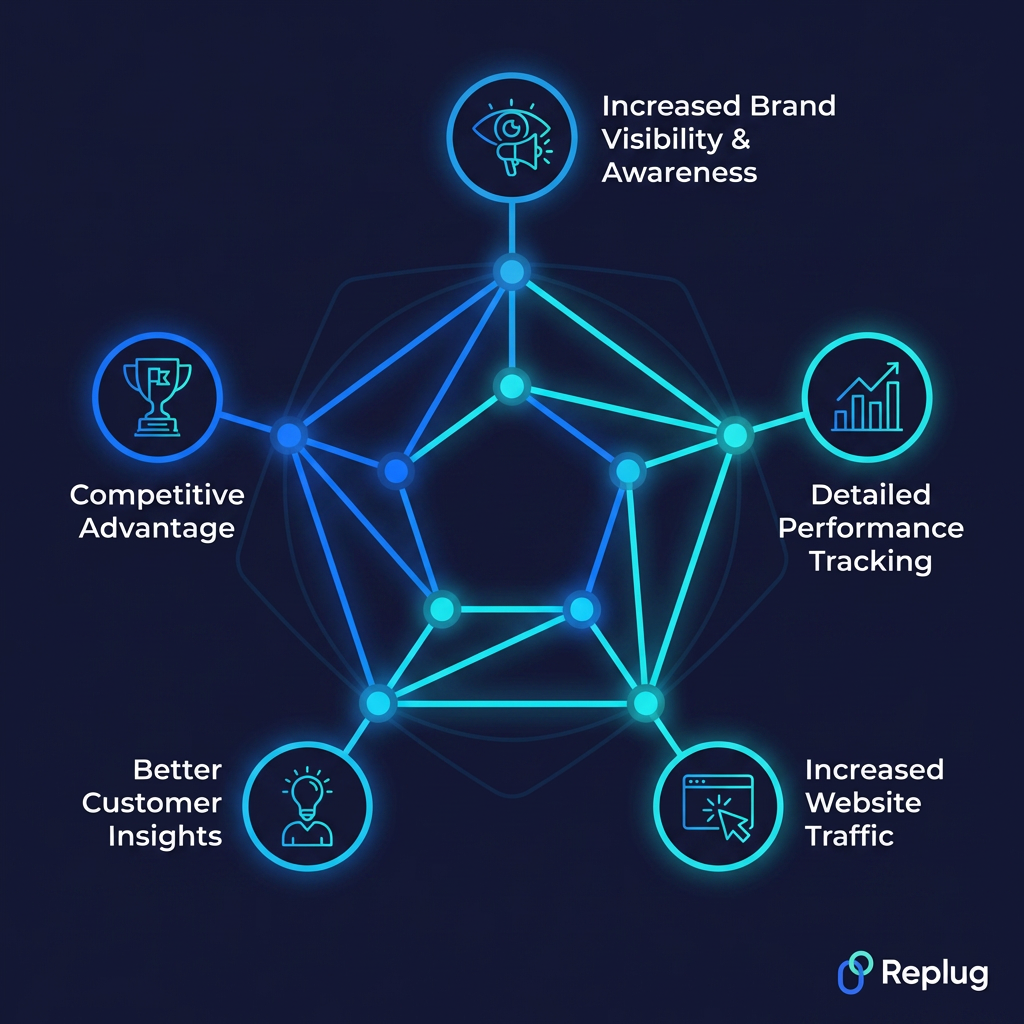
Increased brand visibility & awareness
Every post, ad, comment, and share puts your brand in front of more eyes. As your content gets engagement and circulates across platforms, more people become aware of who you are and what you offer (even if they’re not ready to buy just yet).
Over time, that visibility compounds, and your brand becomes the first name people think of when they need what you provide.
Detailed performance tracking
One of the biggest advantages of social media lead generation over traditional marketing is that everything is measurable. You can track exactly how many people clicked your ad, filled out your form, visited your page, or dropped off mid-funnel.
This level of detail means you’re never guessing; you always know what’s working, what isn’t, and where to put your energy next.
Increased website traffic
Social media is one of the most reliable ways to consistently drive people to your website. Every link you share (whether it’s a blog post, a landing page, or a product page) is an opportunity to pull someone out of their social feed and into your own space.
More targeted traffic means more chances to convert visitors into leads and eventually into paying customers.
Better customer insights
Social media gives you a front-row seat to what your audience actually thinks, feels, and cares about. Through comments, polls, DMs, and engagement patterns, you get real feedback that no survey could fully replicate.
These insights help you fine-tune your messaging, improve your offers, and create content that genuinely resonates, making your entire lead generation effort more effective over time.
Competitive advantage
Brands that actively use social media for lead generation are simply ahead of those that don’t. You get to build relationships, stay top-of-mind, and engage potential customers long before your competitors even enter the picture.
The more consistently you show up and deliver value, the harder it becomes for a competitor to swoop in and steal the leads you’ve already been nurturing.
Convert online traffic into leads with a top-notch social media lead generation agency
All 30 tactics we’ve covered are powerful, but let’s be honest, executing them consistently while running an entire business is a lot to handle on your own. That’s where having the right tools and support makes all the difference.
This is where Replug comes in!
It is an all-in-one link optimization platform designed to help businesses turn their social media traffic into actual, measurable leads. From bio links to branded short URLs, it gives you everything you need to make every click count.
A complete link management solution
for marketing professionals & agencies.
Try Replug for free
With Replug’s custom URL shortener, you get a shorten link that looks professional and builds trust with your audience. No more messy, long URLs cluttering your captions.
And if you’re ever stuck on what to post, the built-in free AI social caption generator helps you craft engaging captions in seconds, saving you time without sacrificing quality.
If you’re serious about turning your social media presence into a lead generation machine, Replug is honestly worth exploring. Give it a try today!
Frequently asked questions
What is lead generation?
Lead generation meaning is simply the process of attracting strangers and getting them interested in your product or service. In lead generation marketing, the goal is to collect contact information from potential customers (like their email or phone number) so you can nurture them toward eventually making a purchase.
What is AI social media lead generation?
It’s using artificial intelligence tools to automate and improve how you find and capture leads on social media. Think AI chatbots that qualify leads, tools that analyze audience behavior, or platforms that auto-personalize your outreach. It makes the whole process faster, smarter, and a lot more scalable than doing everything manually.
How to generate leads with social media automation?
Use tools like ContentStudio, ManyChat, HubSpot, or Hootsuite to automate DMs, schedule posts, run drip campaigns, and follow up with leads automatically. Set up triggered responses when someone comments or clicks a link. Automation handles the repetitive stuff so you can focus on strategy and building genuine relationships with high-quality prospects.
What role does social media play in lead generation?
Social media acts as the bridge between your brand and potential customers. It’s where people discover you, engage with your content, and decide whether they trust you enough to share their information. It creates awareness, builds credibility, and gives you multiple touchpoints to guide someone from a casual scroller to an actual lead.
What is a lead generation format?
A lead generation format is basically the type of content or ad you use to capture leads. Common formats include lead gen forms, gated content like ebooks, webinar registrations, contests, chatbot flows, and landing pages. The best format depends on your platform, your audience, and what kind of value exchange makes sense for your offer.
Which social media platform is best for lead generation?
It depends on your target audience.
– LinkedIn is the clear winner for B2B lead generation. – Facebook and Instagram work best for B2C brands; thanks to Meta’s powerful ad targeting. – YouTube is great for long-form content that builds trust over time. – TikTok is growing fast, especially for reaching younger audiences with short-form video content.
What are the social media lead generation & privacy laws one must be aware of?
A few key ones to know:
– GDPR(Europe) requires clear consent before collecting data. – CCPA(California) gives users the right to know what data you’re collecting. – CAN-SPAM governs email follow-ups.
Always be transparent about how you’ll use someone’s information, include an opt-out option, and never buy contact lists. It’s both risky and ineffective.
Provide some of the best social media lead generation examples?
A few solid real-world examples:
– HubSpot regularly offers free tools and gated reports on LinkedIn to capture B2B leads. – Shopify runs Facebook Lead Ads targeting small business owners. – Netflix uses retargeting ads to re-engage lapsed users. – Adobe hosts webinars promoted via social media to pull in creative professionals.
All simple, strategic, and highly effective!
What are the social media lead generation companies to look out for in 2026?
Some of the top names to know include:
– Cognism – Operatix – Attrock, and – Blackorange
Leadriver is also worth considering, especially for B2B tech companies needing rapid sales scaling. Callbox is another strong option, known for its multi-channel approach combining email, social, chat, and phone outreach. Each has different strengths, so pick based on your budget and goals.
Provide a list of the top social media lead generation tools available online?
Here are some of the best tools worth checking out in 2026:
– HubSpot: An all-in-one platform covering CRM, email marketing, and lead capture forms, great for managing your entire funnel in one place. – Replug: A powerful link optimization platform for turning every shared link into a trackable, branded lead generation touchpoint. – Hootsuite: Goes beyond scheduling with social listening features that help you identify and engage prospects actively discussing your industry. – Sprout Social: Excellent for teams that need deep analytics and CRM integration to track and convert leads more effectively. – ContentStudio: Simple, reliable, and great for maintaining consistent posting, which builds the authority that drives people to your lead magnets. – LinkedIn Sales Navigator: The go-to tool for B2B prospecting, helping you pinpoint decision-makers and reach them at scale. – Mailchimp: A solid choice for nurturing leads through automated email drip campaigns once you’ve captured them from social. – ManyChat: A widely used chatbot tool for automating DMs and lead capture on Instagram and Facebook Messenger.
Your TikTok bio has roughly 2-3 seconds to convince a stranger to hit follow, so it better be good.
With nearly 1.9 billion monthly active users on TikTok as of early 2026, the competition for attention has never been more proactive. Everyone’s scrolling fast, and your bio is often the first (and last) thing someone reads before deciding whether you’re worth their time.
The major problem?
Most people patch together a random quote, a few emojis, and call it a day. Then they wonder why their follower count is stuck.
A great bio doesn’t just describe you; it tells visitors exactly who you are, what you offer, and why they should stick around. That one tiny text box can genuinely make or break your growth.
So no matter if you’re a brand, a creator, or just getting started, we’ve got you covered with 500+ bio ideas for TikTok you can simply copy, paste, and make your own.
But first, what exactly is a TikTok bio, and why is it so significant?
What is a TikTok bio?
A TikTok bio is the short description that sits right below your profile picture and username on TikTok. You’ve got 80 characters to work with, that’s it. But don’t let the size fool you.
It’s basically your elevator pitch to every single person who lands on your profile. Its main job is simple: tell people who you are, what kind of content you make, and give them a solid reason to follow you.
Why is your TikTok bio important?
Here are the key reasons your TikTok bio is crucial and matters so much:
Acts as your first impression: Most people decide whether to follow you within seconds of visiting your profile. A clear, compelling bio makes that decision quite easy for them.
Enhances searchability (SEO): Using the right keywords in your bio helps TikTok understand your niche and makes your profile easier to find in search results.
Defines your brand & niche: It instantly tells people what you’re about, so the intended audience knows they’re in the right place.
Drives traffic: Your bio is the only spot on TikTok where you can drop a clickable link, making it a direct gateway to your website, store, or other platforms.
Increases conversions: A well-written bio with a clear call to action nudges visitors to follow, click, or buy, turning profile visitors into actual followers or customers.
Establishes credibility: A polished, focused bio signals that you’re serious about what you do, which naturally builds trust with new visitors.
A complete catalog of good TikTok bio ideas for every kind of profile!
No matter what your vibe is or what kind of content you create, there’s a perfect bio out there for you. Here’s a big collection of ideas broken down by style. Just pick what feels like you and run with it.
Short TikTok bio ideas
Sometimes less really is more. These bios say a lot without saying too much. Perfect if you want to keep it punchy and straight to the point.
Creating content that hits different 🎯
Just here to make you smile
Living my best life, one video at a time 🎬
Storyteller | Creator | Dreamer
Good vibes only 🔥 Scroll and stay a while!
Minimalist TikTok bio ideas
Less clutter, more personality! Minimalist bios work because they’re clean, confident, and let your content do the talking.
Creating | Growing | Evolving 🤍
▸ coffee + gym + sleep: on repeat
Quiet ambition; Loud results 🖤
Just a person with a camera and a vision
✦ here. present. making things.
Simple TikTok bio ideas
You don’t need to be clever or witty at all times. Sometimes a simple, clear bio is all it takes to connect with the right people.
👋 Hey! I make short video clips about everyday life and things I love
Sharing simple tips on food, fitness, and feeling good 💪
Book lover 📚 Sharing honest reviews and reading recommendations
Home decor ideas for people on a real budget 🏠
🎵 fan posting covers, playlists, and everything in between
Effective TikTok bio ideas
These bios are built with the purpose of converting visitors to followers. They’re clear about what you offer, who it’s for, and what someone should do next.
Helping small business owners grow online | New video every week | Free guide below 👇
🏋️ Fitness coach sharing workouts you can actually stick to | DMs open | Start here 👇
📈 Marketing tips for beginners | No fluff, just what works | Follow for weekly strategies
👩🍳 Easy recipes for busy people | 5 ingredients or less | New video every Tuesday 🍴
💸 Personal finance made simple | Saving tips + money hacks | Check the link below 👇
Funny TikTok bio ideas
A good laugh goes a long way. If humor is your thing, let your bio set the tone before people even watch a single video.
Professional overthinker. Part-time human 😂
Here for the comments and the snacks 🍕
My therapist said I need a hobby — so here we are😅
Warning: Following me may cause uncontrollable snorting 🤣
I put the “pro” in procrastination 😎
Sad TikTok bio ideas
Sometimes you just want your bio to reflect exactly how you’re feeling (raw, real, and honest). These bios hit that emotional note without being overdramatic.
Smiling on the outside, figuring it out on the inside 🌧️
Not every story has a happy ending — and that’s okay 🖤
Healing slowly 🌑 Some days are harder than others.
Tired eyes, full heart, empty hands 💔
Still blooming, even on the darkest days 🥀
Cute TikTok bio ideas
Adorable, warm, and instantly likeable, these bios give off the best kind of energy and make people want to stick around.
Spreading good vibes and soft energy, one smile at a time 🌸
Sweet, simple, and full of good stuff — just like my content
🐾 Dog mom | Snack enthusiast | Here to make your day a little brighter 🌈
Just a girl/guy who loves cozy days, good food, and happy moments ✨
Soft heart. Big dreams. Even bigger smile 🌻
Cool TikTok bio ideas
These bios have that effortlessly confident energy, the kind that makes people think okay, I need to follow this person.
Not trying to fit in. Never have, never will 😏
Creating my own lane — no GPS needed 🕶️
Built different | Moving different |Staying different ⚡
Too focused to be distracted. Too driven to stop 🔥
The cool you didn’t know you were looking for — until now 🖤
Creative TikTok bio ideas
Perfect for artists, designers, writers, and anyone who sees the world a little differently. These bios show off that imaginative side right away.
Turning ideas into visuals & feelings into content 🎨
Part-time artist and storyteller ✏️ | Full-time dreamer 💭
My mind never stops creating — and neither does my feed 🌀
Finding beauty in the ordinary, one frame at a time 📷
Stitching together creativity, color, and chaos 🧵 — Welcome to my 🌍
Attitude TikTok bio ideas
For those who walk into every room as if they own it. These bios carry confidence, boldness, and zero apologies.
Unbothered | Moisturized | Thriving 💅
Not everyone’s cup of tea — and I’m perfectly fine with that 👑
I don’t follow trends. I set them 🔱
Worked hard for this physique. I’ve earned it 😤
Underestimate me. That’ll be fun to watch ⚔️
Swag TikTok bio ideas
Dripping in sheer confidence and unique style. These bios are for the ones who know their worth and aren’t afraid to show it.
Drip too hard to be ignored 💎
Designer mindset. Hustle mentality. Zero excuses. 🥂
Fresh fits 👗 | Super fresh content
Born to stand out 🏆 — blending in was never the plan
Main character energy. Always and forever 💫
Savage TikTok bio ideas
No filter, no apologies! These bios are sharp, bold, and say exactly what needs to be said without sugarcoating a thing.
My vibe ain’t for everyone, honestly 😈
I don’t burn bridges. I just stop crossing them 🔥
Too real for fake people 💀 | Too smart for nonsense
Maybe they hate me, because I am too good ⚡
Sweet? Sometimes. Savage? Always.
Beautiful TikTok bio ideas
Elegant, warm, and genuinely heartfelt, these bios radiate beauty from the inside out and leave a lasting impression.
Beauty isn’t a look — it’s the energy you bring to the room 🌷
Glowing, growing, and grateful every single day ✨
Grace in every step. Light in every video clip 🕊️
Pretty on the outside, kinder on the inside 🌸
Blooming at my own pace — and loving every moment of it 💐
Nature TikTok bio ideas
For the outdoor lovers, earth souls, and anyone who feels most alive when they’re surrounded by trees, water, or open skies.
Chasing trails, sunsets, and fresh air — follow along 🌲
🌊 Ocean heart | Wild mind | Free spirit
Happiest when I’m off the grid and under the stars 🏔️
Living slow, breathing deep, and soaking up every bit of nature 🌿
Just a human who belongs in the woods more than the city 🦋
Impressive TikTok bio ideas
These bios instantly command respect and attention. Perfect if you want people to land on your profile and think this person means business.
Turning passion into purpose, one video at a time — Join the journey 📌
Helping people level up their mindset, money, and lifestyle 🎯 | Follow for weekly value
Big ideas. Real talk. Zero fluff — you’re in the right place 💯
From 0 to 5K+ followers, and still climbing 🚀 | New content every week
Building something real in public | Entrepreneur | Creator | Let’s grow together 🤝
Dance TikTok bio ideas
For the ones who let their body do the talking, these bios are full of rhythm, passion, and that contagious love for movement.
Born to 💃, forced to do everything else
If there’s 🎶, my feet are already moving — come dance with me
Turning every floor into a stage since day one 🕺
Dance is my love language — and I’ve got a lot to say 🥂
Not a backup dancer | Never the understudy | Always the main act 😎
Lyric-based TikTok bio ideas
Song lyrics hit different when they perfectly describe who you are. These bio ideas borrow that poetic energy to say what words alone sometimes can’t.
“Against the odds, I’d bet on myself ❤️🔥”
“Sunshine mixed with a little hurricane 🌪️”
“Somewhere over the rainbow 🌈, that’s where you’ll find me”
“Time isn’t healing, time is revealing ⏳”
“Nothing can stop me, I’m all the way up 🔥”
Fashion TikTok bio ideas
Style is self-expression, and these bios make that clear at first glance. Ideal for fashion creators, outfit posters, and trendsetters.
Your daily dose of outfit inspiration — no stylist required 👗
Fashion is my mood board, and my content is the proof 😉
Affordable style for real people 🛍️ | Outfit ideas that won’t break the bank
Dressing up is self-care — and I take my self-care very seriously 👠
Helping you find your style before you spend a single 💲
Stylish TikTok bio ideas
Cool, polished, and effortlessly put together, these bios give off that “I woke up like this” energy without trying too hard.
Style isn’t what you wear — it’s how you carry it 🖤
Minimal wardrobe | Maximum impact | Always intentional
Curating a feed as clean and sharp as my fits 🕶️
Less trend-chasing, more timeless — that’s the whole vibe here ✨
Every outfit tells a story — here’s mine 🪡
Personal TikTok bio ideas
Real, relatable, and genuinely you. These bios feel like a proper introduction, the kind you’d give to someone you actually want to connect with.
Just a regular person sharing the good, the bad, and the in-between 👋
☕ Coffee addict | 🐶 Dog parent | Figuring life out one day at a time
✈️ Traveler | 😋 Foodie | 🤔 Overthinker | Welcome to my little corner of TikTok
Living a simple life and documenting the parts worth remembering 📖
Not an influencer — just someone with a phone, a story, and a lot of feelings 🙋
Professional TikTok bio ideas
Whether you’re building a personal brand or growing a business, these bios strike the right balance between polished and approachable, because professional doesn’t have to mean boring.
These bios are perfect for educators, experts, and anyone whose content is all about teaching, explaining, or breaking things down in a way that actually makes sense.
🧠 Making complicated topics simple — one short video at a time.
Your go-to source for bite-sized facts, tips, and things worth knowing 📚
Science lover explaining the world around us in plain, everyday language 🔬
💡 Daily tips on health, wealth, and everything in between — follow to stay informed 🔔
Breaking down the news and current events so they actually make sense to you 🗞️
Inspirational TikTok bio ideas
For the creators who want to lift people up, spark something inside them, and remind their audience that better days are always possible.
Every day is a fresh start — your reminder to keep going lives here 🌅
Sharing stories, lessons, and moments that remind you how far you’ve come 💛
From rock bottom to rebuilding — sharing every honest step of the journey 🦋
Growth isn’t always visible, but it’s always happening | Stay the course 🌱
Helping you believe in yourself on the days it feels impossible to do so 🕊️
Motivational TikTok bio ideas
High energy, no excuses, and straight to the point! These bios are built to fire people up and keep them coming back for that daily push they didn’t know they needed.
Remember, discipline will carry you when motivation quits 🔥
Showing up every single day so you remember that you can too 💪
Hard work | Consistency | Results: That’s the only formula you need ⚡
Your daily reminder that the only competition that matters is yesterday’s version of you 🏆
Stop waiting for the right moment — this is it | Let’s get to work 🚀
Memorable TikTok bio ideas
These bios stick with you long after you’ve left the profile. Clever, punchy, and just unique enough to make someone stop scrolling and think okay, I like this person.
Plot twist: The best content on your feed is about to be mine 🎲
I can’t promise to change your life — but I’ll definitely make it more interesting 🌀
You came for the content. You’ll stay for the amazing, unmatched vibe 🤎
Something about this page just feels different — stick around, and you’ll see why 🪄
Professionally unforgettable | Accidentally hilarious | Always worth the follow
Thematic TikTok bio ideas
These bios are built around a central theme or concept. They give your profile a cohesive identity that instantly tells visitors what world they’re stepping into.
🎓 Dark academia enthusiast | Books, coffee, and candlelight | Welcome to my corner
🏰 Cottagecore living | Slow mornings, wildflowers, and homemade everything | Stay a while
🎃 Horror lover | Spooky content year round — not just in October | Enter if you dare
🌆 City life chronicles | Documenting the chaos, beauty, and everything in between
🚀 Sci-fi nerd | Space, technology, and the future | Come explore what’s possible
Niche-focused TikTok bio ideas
When you know exactly who you’re talking to, your bio should reflect that. These bios are laser-focused and speak directly to a specific target audience.
🐾 Pet nutrition tips for dog parents who want the best for their fur babies | Follow along
🎮 Gaming content for players who take their craft seriously | Reviews, tips & live streams
🧘 Yoga and mindfulness for beginners | No experience needed | Just show up and breathe
📸 Photography tutorials for hobbyists who want pro-level shots on a beginner budget
🌱 Sustainable living tips for people who want to go green without going broke
Christian TikTok bio ideas
Faith-filled, genuine, and grounded, these bios are ideal for creators who want their profile to reflect their relationship with GOD and their desire to spread positivity.
✝️ Living for something greater | Faith, grace, and daily reminders of God’s goodness
🙏 Sharing scriptures, prayers, and real talk about walking with God every day
📖 Bible study made simple | Growing in faith one verse at a time | Join the journey
🕊️ Saved by grace | Sharing my faith journey — the struggles, the blessings, all of it
💛 God first, always | Spreading love, light, and a little scripture to brighten your day
TikTok bio ideas aesthetic
Aesthetic bios are all about the look and feel. They use formatting, symbols, and carefully chosen words to create a visual mood before anyone even watches your content.
✿ coziness ✿ creativity ✿ calm ✿ come stay a while
·˚ ༘ wandering soul ♡ chasing light ₊˚
TikTok bio ideas copy and paste
Ready to use, zero effort required! Just pick the one that fits, copy it, paste it, and you’re good to go.
Content creator | Good vibes only | New videos weekly | Follow & stay a while 👇
Just a human sharing real moments, honest thoughts, and things that make life better ✨
Tips, tricks & real talk — Follow if you want content that actually adds value to your day 💡
Living simply | Creating intentionally | Grateful always | Welcome to my little 🌏
New here? Hit follow — you won’t regret it | Fresh content dropping every single week 🔥
TikTok bio ideas with emoji
Emojis aren’t just decoration; they add personality, break up text, and make your bio pop on a small screen. These bios use them in just the right way.
🎬 Creator by passion | 📜 Storyteller by nature | ☕ Coffee addict by choice | Follow along 👇
🌍 Traveler | 💼 Entrepreneur | 📚 Lifelong learner | Sharing the journey one post at a time 🚀
Music is life 🎧 | Covers, playlists & good vibes only 🌊 | New content dropping weekly 🔔
Fitness 💪🏋️ | Nutrition 🥗 | Real progress 📈 | No filters, no shortcuts — just honest results ✅💯
Spreading positivity one video at a time 🌸😊 | Good energy is contagious 💛 | Come get some ✨
Famous quotes TikTok bio ideas
A well-placed quote can say everything about you without using a single word of your own. These bios borrow wisdom from the greats and make it feel personal.
“Be yourself — everyone else is already taken.” | Just here doing exactly that!
“She believed she could, so she did.” — living proof that this one’s true ✨
“Work hard in silence. Let success make the noise.” That’s the whole plan 🔥
“In the middle of every difficulty lies an opportunity 🌱” | Einstein knew what he was talking about.
“Create the things you wish existed.” That’s exactly what I’m doing here every day 🌞
Entrepreneurial TikTok bio ideas
For the builders, the hustlers, and the ones betting on themselves every single day. These bios mean business, literally.
Building a brand from scratch | The wins, the losses, all of it | Follow the journey
Entrepreneur sharing real talk about startups, money, and making it work on your own terms 💼
📈 Went from 9-5 to full-time founder | Sharing everything, so you can do it faster
🔑 Business tips for people who are serious about turning their idea into actual income
Side hustle to main hustle 🚀 | Documenting the grind so you know it’s possible
TikTok bio ideas for boys
Confident, real, and straight to the point, these bios are built for guys who want their profile to reflect exactly who they are without overcomplicating it.
Just a random guy chasing goals, lifting heavy, and figuring the rest out along the way 🎯💪
🏀 Hoops | Hustle | Good times | Living life on my own terms and loving every second ❤️
🎮 Gamer | 🎬 Creator | 🍕 Lover | Come hang — the content’s actually worth your time
No excuses, no shortcuts | Just a guy putting in the work and documenting the results 🔥
🤙 Laid back but locked in | 🪂 Adventure seeker | Always down for something new | Let’s go!
TikTok bio ideas for girls
Fun, expressive, and full of personality, these bios are perfect for girls who want their profile to feel like a warm, genuine introduction.
Girl boss in the making 👩🏻💻 | Coffee in hand, goals in mind, good vibes always ✨
Beauty, fashion & real talk | Keeping it honest since the internet needs more of that 😇
Just a girl figuring it all out, and sharing every messy, beautiful part of the journey 🦋
Chasing dreams, building habits, and making memories worth posting about 📸🌻
💅 Confident, kind, and completely unbothered | Living my best life 🥂
TikTok bio ideas for men
Grounded, confident, and no-nonsense, these bios are for men who know what they’re about and want their profile to reflect that energy right away.
Husband | Father | Grinder | Building a better life every single day ✨
Sharing lessons on mindset, money, and becoming a better version of yourself 📝
⚙️ Engineer by day | ✍ Writer by night | Documenting the grind b/w both worlds 📲
🏕️ Outdoors | 🏋🏻💪🏻 Fitness | 👥 Real talk | Just a man who loves the simple things
Focused, disciplined, & moving forward 🎯 | Tips on career, health & life | Follow for weekly value
TikTok bio ideas for women
Empowering, authentic, and full of heart, these bios celebrate what it means to be a woman owning her story and building her life on her own terms.
Boss. Dreamer. Work in progress ⏳ | Sharing the real side of building something from nothing
Empowering women to show up fully, live boldly, & stop shrinking for anyone 🌺 | Join me!
💛 Wife | 💻 Entrepreneur | 🌿 Wellness lover | Sharing real life moments
A woman supporting women 🤝🏻 | Career tips, life advice & honest conversations | Pull up a seat
Not the one I was last year — and it’s just the beginning | Follow the glow-up 💫
TikTok bio ideas for moms
Real, relatable, and refreshingly honest, these bios are for the lovely moms who are managing everything and still somehow showing up every single day.
👶 Mama of three | Sharing the chaos, the cuddles & everything in between 🤗
🤱🏻 Stay-at-home mom keeping it real | No perfect parenting here — just pure love 🫶🏻
Mom life content for mommies who need a laugh, or a tip 💛
Motherhood is messy & magical 🌸 | Filming all of it so we can figure this out together 👉
👩🏻💻 Working mom | 👸🏻 Meal prep queen | 🎬 Nap time content creator
TikTok bio ideas for dads
Funny, warm, and proudly all about the dad life. These bios are for the fathers who are present, proud, and not afraid to show it.
👨🏻🍼 Girl dad | Loving every second of it ♥️
Dad of two little angels 🪽 | 💪 Fitness freak
🏈 Sports dad | 🍖 BBQ enthusiast | Having a great time in 🇺🇸
Professional dad joke supplier 😂 | Father of two 🧒👧 | Chief household snack officer 🍕
🛠️ Hands-on dad | DIY projects | Showing up for my kids every single day 💙
TikTok bio ideas for couples
Cute, fun, and totally couple goals, these bios are perfect for duos who create content together and want their profile to feel like an invitation into their world.
Two people. One adventure. Zero filters 💑 | Follow our story as it unfolds 🌍
He makes her laugh. She keeps him sane 👫 | Sharing our life, love & a lot of good moments 🥰🫶
Dating since [year] 🥂 | Traveling, cooking & figuring out life together ❤️
Just two people wildly in love and documenting every beautiful, messy moment of it 💞
Building a life, a home & a TikTok worth following | Couples content that keeps it real 💛🏠
TikTok bio ideas for baddies
Unapologetically bold, dripping in confidence, and owning every single inch of it. These bios are for the ones who walk differently from the rest and actually know it.
Dangerous in heels 👠 | Deadly with a vision 🧐 | Unstoppable by default 🔥
I’m not a handful — I’m a whole experience 🖤 Come find out why 😏
Bad vibes get rewarded 😈 | Good energy gets blocked 🚫 | Pick your side wisely
Flawless isn’t something I try to be — it’s in my blood by birth ❤️🔥
Too hot to be ignored | Too focused to be distracted | Too real to be replaced
TikTok bio ideas for LGBTQ+
Proud, vibrant, and beautifully authentic, these bios celebrate identity, community, and the courage it takes to show up exactly as you are.
🏳️🌈 Queer creator | Sharing my story, my truth & my community | Pride every single day
💜 Living out loud and loving it | LGBTQ+ content rooted in joy, realness & representation
🌈 Gay | Proud | Unbothered | Creating space for the community to feel seen and celebrated
✨ Trans and thriving | Documenting my journey so others know they’re never alone
🏳️⚧️ Queer joy is resistance | Spreading love, visibility & good vibes to everyone who needs it
TikTok bio ideas for influencers
Top-notch ideas for the creators who’ve built an audience and want their bio to reflect both their personality and their professional value in the same breath.
📲 Content creator & brand partner | Helping brands connect with real people | For collabs 👇
🏃 Pro Runner | Wellness advocate | Sharing the journey from couch to consistent
💚 Holistic health coach | Mind, body & gut health tips that actually fit into real everyday life
TikTok bio ideas for real estate agents
Professional yet personable, these bios help real estate agents build instant trust and show potential clients exactly why they should reach out.
Licensed real estate agent helping buyers find their perfect home 🏡 | Let’s make it happen 👇
Selling homes & simplifying the buying process 🔑 | Real estate tips you actually need to know
Your local property expert 🏘️ | Market updates, home tours & honest real estate advice | DMs open 📩
Helping first-time buyers navigate the market without the stress 📊 | Free consult available 👇
Real estate made simple 🏠 | From listing to closing, I’ll walk you through every single step
TikTok bio ideas for business professionals
Sharp, credible, and straight to the point, these bios are perfect for professionals who want to grow their personal brand while keeping things polished.
For the ones whose eyes light up at a menu and whose phone eats first, these bios are warm, delicious, and impossible not to love.
Food lover recording every incredible bite 🍜 | Restaurant reviews + home recipes
Home cook sharing easy, budget-friendly meals that taste like you spent hours in the kitchen 👨🍳
On a lifelong mission to find the best tacos on earth 🌮 | Come eat your way around the world with me
Pastry obsessed 🍰 | Baking tutorials for beginners who want impressive results
Foodie 🍽️ | Recipe developer 👩🏻🍳 | Honest restaurant reviewer | Your next favorite meal starts here 👇
TikTok bio ideas for chefs
For the culinary creatives who live in the kitchen and want their bio to taste just as good as their food looks on camera.
Professional chef sharing restaurant-quality recipes you can actually make at home | Cook with me 👨🍳
Classically trained, creatively driven 🔪 | Breaking down techniques so anyone can cook like a pro.
Bold flavors. Simple methods. Zero boring meals 🌶️ | New recipe dropping every single week 🍳
Private chef turned content creator 🍱 | Behind the scenes of real kitchens, real food, real passion
BBQ & grill master 🥩 | Teaching you how to nail every cook from weeknight dinners to weekend feasts
TikTok bio ideas for artists/art lovers
Whether you paint, sketch, sculpt, or simply appreciate the beauty in everything, these bios let that creative soul shine through instantly.
Visual artist sharing the full process | The sketches, the mistakes & the finished pieces too 🎨
Painting my way through life one canvas at a time 🖌️ | Art tutorials for all skill levels welcome
Illustrator & doodler ✏️ | Turning blank pages into entire worlds | Watch it happen here daily
Art lover & gallery enthusiast 🖼️ | Sharing pieces, artists & movements that deserve way more eyes
Where creativity has no rules and every imperfection is part of the art 🎭 | Come create with me
TikTok bio ideas for gamers
Amazing ideas for the players who live for the next level, the clutch moments, and the community that makes gaming so much more than just a hobby.
Full-time console gamer 🎮 | Walkthroughs, reviews & hot takes on everything dropping in the gaming world
🕹️ Casual gamer, serious opinions | Keeping it real about every game I play
RPG lover & strategy nerd ⚔️ | Deep dives, lore breakdowns & gameplay you’ll actually learn from
Competitive gamer chasing rank 🏆 | Follow the grind — wins, losses & everything the game throws at me
Retro gaming meets modern commentary here 👾 | Old school games deserve new school attention | Press start ▶
TikTok bio ideas for pop culture
Actually, for the ones who always know what’s trending, what’s dropping, and what everyone’s going to be talking about before they even know it themselves.
Your go-to source for pop culture news, hot takes & everything the internet is obsessing over 📺
🎬 Film & TV fanatic | Reviews, recaps & opinions delivered fresh before you’ve finished your coffee ☕
🎤 Music | 🎥 Movies | 📸 Moments | Covering the culture as it happens — no delay, no filter
🌐 Pop culture commentator keeping up so you don’t have to | Daily updates on everything worth knowing
Celebrity news, trending moments & cultural deep dives ⭐ | If the internet is talking, we’re covering it
TikTok bio ideas for travel/tourism
For the wanderers, explorers, and adventure seekers who see the whole world as their content and want to bring their audience along for every mile.
Adventure seeker documenting every destination, detour & unexpected moment along the way 🗺️
Beach chaser 🏝️ | City explorer 🏙️ | Mountain lover ⛰️ | Helping you plan trips you’ll never forget 👇
Solo traveler sharing real experiences 🎒 | The highlights, the hiccups & the lessons in between
Travel creator 🌏 | Affordable adventures for people who want to see the world without going broke
TikTok bio ideas for the best first impressions
You’ve got one shot to make someone stop and hit follow. These bios are crafted to do exactly that from the very first word.
👋 You just found your new favorite creator | Welcome, stick around & hit that follow button 🔔
Not sure what made you click on my profile — but now that you’re here, you won’t regret staying ✨
This is the part where you follow me and wonder why you didn’t do it sooner | Come on in 🙌
First impressions matter — so here’s mine: real content, real value & zero wasted scrolling time 💯
Welcome to the best decision you’ve made on TikTok today 🌟 | New content weekly | Let’s go 👇
TikTok bio ideas to grow your account followers
These bios are strategically written to turn profile visitors into followers by giving them a clear reason to hit that “Follow” button right now.
New video every Tuesday & Friday | Follow so you never miss what’s coming next 🔔 | See you there!
Thousands already following for a reason 📲 | Join them & find out what you’ve been missing
💡 Follow for daily [your niche] tips that actually make a difference | New here? Start below 👇
Growing together one post at a time 📈 | Hit follow & become part of a community that shows up
🎁 Free value. Every single week. No catch | Just follow, watch & take what helps you most 👇
TikTok bio ideas to boost engagement
Engagement doesn’t happen by accident. These bios invite interaction, spark curiosity, and give visitors a reason to comment, share, and come back for more.
Drop a comment on my latest video 💬. I read and reply to every single one | Let’s talk 📩
Share this page with someone who needs this content 🔁 | Let’s build something together in 2️⃣0️⃣2️⃣6️⃣
I post what my audience wishes for 🗳️ | Tell me in the comments what you need & I’ll make it happen 🪄
This is a community, not just a page 🤝 | Follow, engage & let’s grow something real together
Got a question about [your niche]? Drop it below 👇🏻 Your next answer might be my next video 🎬
How to write the perfect TikTok bio: Craft a creative & unique bio for your TikTok profile!
Writing a great TikTok bio isn’t rocket science, but it does take a little thought. You’ve got limited space, a short attention span to work with, and one shot to make someone hit follow.
Here’s exactly how to make every character count!
Keep it under 80 characters
TikTok gives you exactly 80 characters for your bio, so make every single one count. Skip the fluff, get straight to the point, and say more with less.
Include relevant keywords
Just like Google, TikTok’s search function picks up on keywords in your bio. Use words your target audience is actually searching for, like “fitness coach,” “recipe creator,” or “travel tips,” to make your profile easier to find.
Show off your personality
Your bio should sound like you, not a corporate tagline. No matter if you’re funny, warm, bold, or inspirational, let that come through so the right people instantly feel connected to your vibe.
Highlight your unique selling point (USP)
What makes you different from the other thousand creators in your niche? Spell it out clearly! Maybe it’s your approach, your experience, or your specific audience. Whatever sets you apart, lead with it.
Keep your target audience in mind
Write your bio for the people you actually want to attract, not just anyone scrolling by. When your ideal follower lands on your profile, they should immediately think, “this is made for me.”
Use the “why watch” approach
Give visitors a concrete reason to follow you before they’ve even watched a video. Think of it as a one-line pitch: what will they get from following you that they won’t get anywhere else?
Use emojis & symbols
Emojis break up text, add visual personality, and make your bio easier to scan in seconds. Use them to replace words where it makes sense, but don’t go overboard. Two to four well-placed emojis are usually the sweet spot.
Include a link in bio
Your bio is the only place on TikTok where you can drop a clickable link, so use it wisely. Whether it’s your website, a product page, a newsletter, or a Linktree, make sure it’s there and relevant.
Add a call to action (CTA)
Tell people exactly what you want them to do next (follow, click the link, watch your latest video, or DM you). A simple, direct CTA can make a surprisingly big difference in how many people actually take action.
Hash it up
Adding one or two relevant hashtags directly in your bio can improve your discoverability and signal to TikTok’s algorithm exactly what your content is about. Keep them niche-specific and genuinely relevant, not just trending for the sake of it.
Optimize your TikTok profile using Replug!
Once your bio is written, the next step is making sure the link inside it is actually working hard for you, and that’s exactly where Replug.io comes in.
Replug is a powerful free link shortener that does a whole lot more than just shorten URLs. Its standout feature is the link in bio tool, which lets you create a clean, branded landing page that lives behind your single TikTok link in bio.
Instead of sending followers to just one destination, you can direct them to multiple links at once (your website, latest content, store, newsletter, and more), all from one place.
Go beyond generic link pages!
Create custom bio links that truly fit your brand
With Replug, you can create bio links that are unique, engaging, and built to convert.
You can also use Replug to track clicks, monitor your TikTok status in real time, and see exactly how your audience is engaging with your links.
It’s genuinely one of the best link in bio free options out there for creators and businesses who want to turn profile visitors into actual customers.
It’s simple, effective, and completely worth adding to your TikTok setup!
Wrapping up
Your TikTok bio is one of the smallest things on your profile, but it carries some of the biggest weight.
No matter if you’re a content creator, a business owner, a fitness coach, or just someone building their personal brand, the right bio can genuinely change how fast your account grows.
With 500+ ideas covered across every style, niche, and personality type, you’ve now got everything you need to craft something that truly represents you.
Pick what fits, make it your own, and don’t forget to back it up with a solid link in bio tool like Replug.
Now go update that bio; Your next follower is already on their way. 🚀
Frequently asked questions
What is a good bio for my TikTok?
A good TikTok bio clearly tells visitors who you are, what kind of content you make, and why they should follow you (all within 80 characters). It should reflect your personality, include a relevant keyword or two, and ideally end with a simple call to action. The best bios feel natural, not forced.
What is a 3-line bio for TikTok?
A 3-line TikTok bio is a short, structured format that covers three quick things about you, usually who you are, what you do, and what someone should do next. Here’s a simple example:
Content creator & storyteller 🎬📜 Practical tips on marketing & growth 💡 Free resources — check the link below 👇
How to add a link to TikTok bio?
Adding a link to your TikTok bio is straightforward:
1. Open the TikTok app. 2. Go to your profile. 3. Tap “Edit Profile”. 4. Scroll down to the “Website” field. 5. Paste your link. 6. Hit “Save”.
Keep in mind that clickable links in bios are currently only available to business accounts and creators who meet TikTok’s eligibility requirements (at least 1,000 followers).
How to edit your TikTok bio?
To edit your TikTok bio, open the app, tap the “Profile” icon (bottom right), select “Edit profile,” and click on the “Bio” field to input your new text (up to 80 characters). Once finished, click “Save” to update your bio immediately.
Where is the TikTok bio located on the TikTok app?
Your TikTok bio sits right on your profile page, just below your profile picture and display name. It’s one of the first things anyone sees when they visit your profile, which is exactly why getting it right matters so much.
Why can’t I add a clickable link to my TikTok bio?
TikTok only allows clickable links in bios for business accounts and creators who meet certain eligibility thresholds. If you’re on a personal account or haven’t yet met the requirements, the link field may not be available to you. Switching to a business or creator account in your settings is usually the quickest fix.
What is the ideal TikTok bio length?
TikTok allows a maximum of 80 characters in your bio, which includes letters, spaces, emojis, and symbols. While you don’t have to use all 80, aim to use enough to clearly communicate who you are and what you offer. Short, punchy, and purposeful is always the way to go.
Are hashtags allowed in TikTok bio?
Yes, you can add hashtags to your TikTok bio, and they are clickable, meaning anyone who taps them will be taken to that hashtag’s feed. Using one or two niche-relevant hashtags in your bio can improve your discoverability and help TikTok understand what your content is about.
How often should I update my TikTok bio?
There’s no hard rule, but a good practice is to review your bio every one to three months or whenever something significant changes (like your content focus, a new offer, a fresh CTA, or a new link). Keeping it current ensures it always reflects exactly where you are and what you’re offering right now.
Provide a list of the 10 best TikTok bio quotes?
Here are ten quotes that work brilliantly in a TikTok bio:
1. 💡 Create the things you wish existed. — Unknown 2. 🔥 Work hard in silence. Let success make the noise. — Unknown 3. 🌱 Grow through what you go through. — Unknown 4. 👑 Be a voice, not an echo. — Albert Einstein 5. ✨ She believed she could, so she did. — R.S. Grey 6. 🎯 Done is better than perfect. — Sheryl Sandberg 7. 💪 Push yourself because no one else is going to do it for you. — Unknown 8. 🚀 Start before you’re ready. — Steven Pressfield 9. 🌊 Be yourself — everyone else is already taken. — Oscar Wilde 10. 🧠 The secret of getting ahead is getting started. — Mark Twain
How many times have you heard the buzzword “deep links” and thought about googling it?
Deep linking has been around for a while, and if you’re a developer working in the tech industry or you have been doing affiliate marketing to make money, then you may know about this.
However, the rest of the readers might not be exactly sure what deep linking is and why they need to learn about it.
Replug users and blog readers are online marketers, affiliate bloggers, digital marketing gurus, web developers, and social media experts.
So, we need to discuss a vital topic in the link management industry to make sure that you don’t miss out on any user engagement opportunities.
Well, this article is going to help you explain what deep linking is and your brand can benefit from deep linking.
So buckle up because you might want to pick a few nuggets from the sections below.
Drive more clicks, conversions, and app installations by deep linking
to your favorite platforms.
Try deep links for free
What is deep linking?
A deep link is a pathway that drives users directly to a specific page or section of the website or mobile app without having to launch the app or open the website from the home page.
In simple words, deep links are administered by marketers or app developers to direct the users to a specific in-app location or website URL before the user decides to take off.
A brief history of deep linking
The concept of deep linking has been around since the early days of the web, but it wasn’t until the widespread adoption of smartphones and apps that deep linking really took off.
Deep linking went mainstream when social media platforms took over the internet marketing realm. In a nutshell, the convenience of linking to specific content or section within an app, rather than just launching the app from the home screen turned things around for this marketing tactic.
Imagine opening an app and going across different sections to reach a specific section within the app. It would surely take a while to do that. Therefore, deep linking is immediately adopted by digital marketers and app developers to improve engagement and conversion.
Importance of deep links
Brands now understand the power of quick user engagement. Therefore, they try to squeeze every marketing channel to attract, engage, and convert the audience.
No doubt, such engagement tactics do wonders for social media marketing along the way. Not only does a deep link improve user engagement, but it also positively impacts the conversion rate.
In 2026, deep links are specifically linked to mobile apps and social media platforms. However, deep linking has been around for a long time.
Pro-bloggers and veteran affiliate marketing would know that many affiliate networks offer a deep linking tool for affiliate marketers to generate deep links to advertisers’/brands’ product pages.
So affiliate marketers copy and paste the landing pages or specific product pages of brands/advertisers into the deep link tools to generate their custom affiliate URLs for their campaign.
Several affiliate networks offer the facility to create a deep link for the specific page of the advertiser’s website. Usually, it’s the landing page or a product page that affiliate marketers want to promote.
Impact Radius is a popular affiliate network that provides a deep linking tool for affiliate marketers. Take a look at the screenshot below:
Similarly, ShareASale is another well-known affiliate network that offers a custom link generator, which does the same thing. Here’s the screenshot:
How Does a Deep Link Work?
The way deep links work is that such links are created using a specific URL format that includes the full path to the specific page or content within the website or app.
Suppose a website that has a page with information about a particular product. The URL for the homepage of this website might be “http://www.examplewebsite123.com”, while the URL for the product page might be “http://www.examplewebsite123.com/products/product-name”.
In this case, when the deep link to the product page would be created, the web browser or app will open and navigate visitors directly to the specific product page using the deep link system.
Moreover, in the case of a mobile app, the app may need to be installed on the user’s device in order for the deep link to work properly.
Deep links can be created and used in a variety of contexts, including in emails, social media posts, advertising campaigns, and more. However, they’re widely used in the social media industry mostly by top-tier social media and communication apps.
Why deep linking is so critical in building great mobile journeys?
Deep linking helps brands and influencers create a seo friendly and effective engagement experience that facilities the overall user experience of the prospects and customers.
A great mobile journey is a term that describes how easy and quick the accessibility of a tool or app is for the target audience.
It’s the era of smart devices and mobile communication, so brands might not want to comprise the mobile-first user experience. No wonder companies pay close attention to building responsive websites these days.
Since deep linking assists businesses in providing customers with quick access to resources, it directly influences the conversion rate.
To understand why deep linking is crucial to building a great mobile journey for the audience, it’s important to dive deep into the key reasons to use deep linking for better mobile journeys:
Seamless integration
Deep linking allows for more seamless integration of mobile apps into the overall user experience, as it enables developers to create links that take users directly to specific pages or features within an app, rather than just the home screen. This can help to improve the overall flow and continuity of the user journey.
Intuitive user experience
By allowing developers to link directly to specific content or features within an app, deep linking can help to create a more intuitive user experience, as it makes it easier for users to find and access the information or functionality that they are looking for.
Conversion optimization
Deep linking can be used to optimize the conversion process by allowing developers to create links that take users directly to the pages or features within an app that are most relevant to their needs or interests. This can help to increase the chances of a successful conversion by making it easier for users to find and engage with the content or functionality that they are looking for.
Fast communication
Deep linking can help to facilitate fast communication between apps and websites, as it allows developers to create links that can be used to quickly open specific pages or features within an app. This can help to improve the overall speed and efficiency of the user journey.
User engagement
Deep linking can be used to drive user engagement by allowing developers to create links that take users directly to specific sections or features within an app that are likely to be of interest to them. This can help to increase the amount of time that users spend within an app, and can help to improve the overall user experience.
Customer retention
Deep linking can be used to improve customer retention by allowing developers to create links that take users directly to the features or content within an app that are most relevant to their needs or interests. This can help to keep users engaged with an app and can help to increase the likelihood of them returning to the app in the future.
Deep linking has essentially become more useful to social media platforms and mobile applications after the vast adoption of mobile devices globally. The concept seems more like an engagement strategy for mobile users, let’s dive deep into the benefits of deep linking in mobile apps:
Access to location-based content
Deep linking allows you to link directly to a specific location-based page within an app, which can be useful if you want to direct users to content that is relevant to their current location.
Often companies have different versions of the apps or websites, so deep linking helps them navigate the users to the appropriate app or website version based on their country or city.
Personalized user experience
It can be used to provide a more personalized user experience by linking users directly to the content that is most relevant to them or the app version designed for them.
This can be especially useful for e-commerce websites where deep linking can be used to direct users to a specific homepage based on their IP address or other location-detecting parameters.
Target a specific audience segment
Brands and entrepreneurs try to segment their audience whether they’re doing email marketing or social media advertising. Once they successfully do that, it makes it easier for them to reach out to a specific segment of the audience.
This is where deep linking comes in handy when companies and experts can generate specialized deep links based on the credentials of the specific segment.
Speed up the communication
No doubt that deep linking can speed up the communication process by allowing users to access specific content within an app quickly and easily. This can be especially useful in situations where users need to access information quickly, such as when they are trying to make a purchase decision.
Improve conversion rate
By providing a more personalized and relevant user experience, deep linking can help to improve the conversion rate for an app or website. This can be especially important for e-commerce apps, where deep linking can be used to direct users to specific product pages and increase the likelihood of a sale.
You must have noticed that sometimes when you visit a rather big e-commerce store, it automatically detects your country or sometimes directs you to your country-specific online store version.
Improves search engine discoverability
One of the key benefits of deep linking is that it also allows search engines to easily index and rank specific pages or content within a website or app, which can lead to better search engine optimization (SEO) and improved discoverability.
One of the top-notch features of Replug is a deep link generator. I’ll use the TikTok example, meaning I’ll create a deep link for a TikTok video just to showcase how it’s done.
If everything goes perfectly, the short URL will be created as a deep link and it would open the same TikTok video in the TikTok app on clicking on that short link.
Let me walk you through how you can create deep links using Replug:
Step1: Log in to your Replug account
To create a deep link using Replug, log in to your account. Create an account if you haven’t signed up yet. Replug has a 14-day free trial offer.
Step 2: Create brand & a shortener campaign (skip if it’s already created)
In the next step, you have to create a brand. Navigate to manage and click on Brands.
Once you have landed on the brand’s webpage. Click on the New Brand tab and create your custom brand.
Now create a shortener campaign. Navigate to Manage and click on the Campaigns tab.
Go ahead and create a campaign. Provide an appropriate campaign name.
Note: Remember you need to create a link-shortening campaign. Don’t check any other boxes such as retargeting or call-to-action, etc.
Step 3 : Go to the deep links section
Once you successfully create your campaign in the Replug account, go to the deep links area.
To access the deep links section, click on the profile icon from the top left of the dashboard and then click on the “deep links” option.
Step 4: Choose the platform
This is the step where you’d have to choose the platform for the deep link campaign. After landing on the deep links section page, there will be dozens of options across different categories.
Click on the icon of the platform you want to create your deep link for, for instance, TikTok or Pinterest. Once you click on the platform icon, a popup window would appear.
Step 5: Adjust the formatting
The popup window as shown in the above image would be a deep link integration area where you get a chance to adjust the formatting of the deep link.
Moreover, this integration area would also showcase different available deep link formats/options for each platform.
Once everything looks okay, just click on the “create deep link” button to go ahead.
Step 6: Create a deep link-enabled short URL
The last step is also crucial to the whole deep link creation process. It’s the section where you input the associated URL as well as choose the appropriate campaign.
When everything goes smoothly, there shouldn’t be a problem. Turn on the deep link option for the link using the toggle, just in case.
Also, makes sure that the deep link is supported for the URL. Fix the URL formatting if the deep link is displaying an error.
Once everything seems okay, go ahead and save the link. Now you have created a deep link for your favorite social media platform.
As I said earlier that if everything works out fine, the short link would be used as a deep link and it would open the TikTok video in the TikTok app. I tested this short URL and it did open the TikTok video in the TikTok app.
Try it yourself: https://replug.link/CS2titok
FAQs about deep links
What happens when the user is deep linked into an app they don’t have installed?
When a user clicks on a deep link but doesn’t have the relevant app installed, then there are two possibilities that could happen depending on the platform or app. The deep linking system would either open the web version of the app or take you to the relevant app store to install the specific app.
Deep link vs. hyperlink – what is the difference?
A deep link is a mobile link that directs the user toward the relevant app instead of the website. Whereas the hyperlink is a link that sends the website visitor to the specific page or website it’s linking to using a web browser regardless of the device.
What is the biggest benefit of deep linking?
The most important one is that it provides end-users with quick access to the content within the app or website.
YouTube isn’t just that video app anymore; it’s a digital powerhouse shaping what we watch, how we learn, and how creators connect with the world.
In 2026, YouTube proudly owns over 2.5 billion monthly active users, meaning roughly one in every four people online visits the platform regularly. That’s more than almost any other site on Earth, WOW!!!
Every single day, hundreds of millions of people are watching, uploading, and sharing content, from cooking tips to trending music videos, news clips to killer tutorials.
No matter if you’re a hobbyist YouTuber looking to share your first clip or a seasoned creator building your brand, knowing how to grab and share a YouTube URL link is a foundational skill you must possess. And we’re about to break it down step by step!
Now, let’s start with the basics: What is a URL on YouTube?
What is the YouTube URL link?
Think of URLs as the web addresses that take you exactly where you want to go online, kind of like entering a street address into Google Maps to find a friend’s house.
A “YouTube URL link” is just that: a specific web address that points directly to something on YouTube, whether that’s a video, playlist, or channel.
The URL stands for Uniform Resource Locator, and it’s essentially the address that loads a specific piece of YouTube content when entered into a browser or tapped in a message.
The main objective of a YouTube URL is simple, i.e., to direct viewers straight to the content you want them to watch or explore. Without it, you’d be guessing around the platform trying to find that one video, playlist, or creator you intended to share.
An example of a YouTube URL link
Here’s a classic example of a YouTube video URL link that takes you straight to a specific video:
https://www.youtube.com/watch?v=ysCh-ikzOC1
Here, everything after watch?v= is the unique ID YouTube uses to find that exact video.
This same idea applies to channel or playlist links. Just a slightly different URL structure that still points you right where you want to go.
How to get YouTube URL on phone
Getting a YouTube URL on your phone is something almost every user does, no matter if you’re sharing a funny clip with a friend or linking your latest vlog in a message.
On both iPhone and Android, the YouTube app makes it quick and easy to grab the link you need so you can paste it anywhere you want, hassle-free.
How to get YouTube URL on iPhone
Here’s a friendly step-by-step guide for iPhone users:
1. Open the YouTube app on your iPhone.
2. Find the video you want the URL for and tap it to open it.
3. Look for the “Share” icon (it’s usually an arrow pointing right, available below the video).
4. Tap “Share,” then tap “Copy link.” iOS will put that URL into your clipboard.
Now you can paste the copied link into Messages, Notes, email, social media, or wherever you need it.
How to get YouTube URL on Android
Here’s how to get a YouTube URL from the app on an Android smartphone:
1. Launch the YouTube app on your Android device.
2. Search for and open the video you want to share.
3. Tap the “Share” button(an arrow pointing right) under the video player.
4. From the share menu, select “Copy link.” This copies the full YouTube URL.
5. Paste that link wherever you need it, e.g., chat, apps, posts, etc.
Whether you’re on an iPhone or an Android device, it’s usually just a few taps to grab a YouTube URL and get your content out into the world.
Grabbing a YouTube URL on your iPad is super simple! It’s just a couple of taps, no matter if you’re using the official YouTube app or the Safari browser.
This lets you copy the link to share with friends, post on social media, or save for later.
Step-by-step guide (iPad):
1. Open the YouTube app (or visit youtube.com in Safari) on your iPad.
2. Find the video you want to get the URL for. Scroll, search, or open it from your subscriptions.
3. Tap the “Share” button. It’s usually an arrow pointing right just below the video player. You can also tap the URL address bar at the top of the browser to select the URL, and then copy it.
4. In the share options that pop up, look for “Copy link” and tap it. That URL is now copied to your iPad’s clipboard.
5. Paste the link wherever you want by tapping and holding the text field and selecting “Paste.”
That’s it!
A few taps and you’ve got the exact web address (URL) for the YouTube video ready to share or save for later.
Note: If you ever want to copy playlist or channel URLs, the process is similar. Just open the playlist or channel page → tap the three dots (More) in the top right → tap Share → tap Copy link.
How to get YouTube URL on PC/Desktop
Getting a YouTube URL on PC is one of the easiest things you’ll do online, whether you’re sharing a video with friends, linking to a playlist, or embedding content on your blog.
On a computer, all you really need to do is open YouTube in your browser and copy the link from the right place.
Step-by-step guide (PC):
1. Open your web browser and go to “youtube.com.”
2. Find and click the video you want to get the URL for. The video page will open in your browser.
3. Look at the address bar at the top of your browser window. This shows the full YouTube URL. It usually looks like: https://www.youtube.com/watch?v=VIDEO_ID.
4. Click inside the address bar to highlight the whole link, then press “Ctrl + C”(Windows) or “Cmd + C”(Mac)to copy it.
5. Paste the link(Ctrl/Cmd + V) wherever you need it, in an email, message, social post, or document.
Useful tip: You can also click the “Share” button under the video player and choose “Copy link.” That usually gives you a shorter youtu.be version of the URL that works just as well. One more way is to right-click the video and choose “Copy link address.”
Pro tip: Enhance shares with the YouTube Hashtag Generator. Add generated tags to descriptions for better SEO when sharing your URL.
How to find URL for your YouTube channel (Desktop)
Finding your YouTube channel URL on a desktop is super useful, no matter if you’re linking your channel on your website, sharing it with friends, or promoting it on social media.
On a computer, it’s pretty straightforward: you just navigate to your channel page and grab the address from your browser.
Step-by-step guide (Desktop):
1. Sign in to YouTube: Open your web browser (like Chrome, Safari, or Firefox) and go to youtube.com. Make sure you’re logged into the Google account that owns the channel.
2. Go to your channel: In the top right corner, click your profile picture. From the dropdown that appears, select “View your channel.” This will take you to your public channel page.
3. Look at the address bar: Once your channel page is open, look at the URL in your browser’s address bar. That’s your channel’s link! It might look like:
https://www.youtube.com/channel/UCabcdef123456…
Or, if you have a custom handle: https://www.youtube.com/@YourHandle
Both are valid and take people straight to your channel.
4. Copy the URL: Click inside the address bar to highlight the link, then copy it using Ctrl + C (Windows) or Cmd + C (Mac).
Now you can paste that link (Ctrl/Cmd + V) anywhere you’d like without hesitation!
How to find URL for your YouTube channel (Mobile App)
Getting your YouTube channel URL right from the YouTube mobile app is handy when you want to share your channel with friends, add it to your Instagram bio, or send it in a message. And yes, you can do it directly from your phone without needing a desktop.
Here’s how to get the URL from the YouTube app for your YT channel:
1. Open the YouTube app on your phone and make sure you’re signed into the account that owns the channel.
2. Tap your profile picture in the bottom-right corner to open the account profile.
3. From the screen, tap “View channel.” This will take you to your channel’s home page.
4. On your channel page, tap the three dots (⋮) or the “More” icon in the top-right corner.
5. Choose “Share” from the listed options. A share sheet will appear with several choices.
6. Tap “Copy link.” That’s your YouTube channel URL. It’s now saved to your clipboard and ready to paste anywhere you want.
Once copied, you can paste your channel link into text messages, social apps, or email by long-pressing any text field and selecting “Paste.”
That’s all there is to it! Quick, simple, and perfect for sharing your channel on the go!
To sum up, learning how to find and share YouTube URLs (whether it’s a video, your channel, playlist, or a link on mobile or PC) makes sharing your content way easier and more professional.
We’ve covered everything from grabbing links on iPhone, Android, iPad, and desktop to finding your own channel’s URL so you can share it anywhere you want without the guesswork.
You now have all the steps you need to confidently navigate YouTube links like a pro!
Before you go, here’s a tip!
If you’re tired of messy, long URLs and want to make your YouTube links cleaner and more clickable, give Replug.io a try!
Replug is an all-in-one link management platform that doubles as a URL shortener. It lets you generate branded short links in seconds and easily shorten long, cluttered YouTube URLs.
Maximize marketing ROI
by transforming ordinary URLs into branded short links that convert.
Try Replug for free
Whether you’re sharing videos, promoting your channel, or running a campaign, Replug gives you clean, trackable links that look great and perform even better.
Frequently asked questions
How can I copy a YouTube URL?
To copy any YouTube URL (video, playlist, channel, or profile), open it in the YouTube app or in your browser.
– On mobile, tap the “Share” button under the video or on the channel page and select “Copy link.” – On desktop, simply highlight the URL in the address bar and copy it (Ctrl/Cmd + C).
For a channel URL or personal profile URL, go to the channel or profile page first. Then use the share/copy option or copy the address from your browser. This gets you the proper link you can paste anywhere you need.
How do I get my own profile YouTube URL?
Open YouTube and sign in, then visit your profile page.
– On desktop, copy the URL from your browser’s address bar. It will look like youtube.com/channel/… or a handle like youtube.com/@YourHandle. – On mobile, tap your profile icon → go to your channel → then use the Share > Copy link option. That’s your personal channel URL you can share.
How to get a YouTube URL from YouTube in 2026?
In 2026, getting a YouTube URL is still super simple. Just open the video or channel on YouTube, click or tap the “Share” button, and select “Copy link.” On a desktop, you can also copy the link directly from the browser’s address bar. Both methods give you a working URL you can paste anywhere.
How to get the YouTube URL on the app?
Here’s how to do it:
1. Open the YouTube app. 2. Play the video (or open a channel). 3. Tap the “Share” icon below the video. 4. From the options, tap “Copy link,” and the URL is saved to your clipboard.
You can now paste it in messages, social apps, or anywhere else.
How to get YouTube URL and stream key?
To get your YouTube stream key and URL for live streaming, open YouTube Studio (studio.youtube.com), click “Go live”, then select the streaming software option.
Under “Stream settings,” you’ll see both the “Stream/Server URL” and the “Stream Key” with buttons to copy them. You use these in streaming software like OBS to connect to your channel’s live feed.
Always remember to never share your stream key publicly. Treat it like a password!
How to get YouTube URL for Roblox?
If you want to paste your YouTube link into Roblox social fields, use your standard channel URL (from the share/copy link method above) rather than just using your handle URL. Some platforms, including Roblox, may reject new handle formats, so using the regular channel link (with /channel/) often works better.
How to get the YouTube URL for a video?
Here’s how to get the YouTube video URL link:
Open the video, then either copy the link from the browser’s address bar or tap the “Share” button and hit “Copy link.” The copied link may be a full URL (youtube.com/watch?v=…) or a shorter version (youtu.be/…). However, there is no need to worry, because both work the same.
How to get a short URL for a YouTube video?
To get a short URL for a YouTube video, simply copy the video link and use YouTube’s built-in “youtu.be” format by replacing youtube.com/watch?v= with youtu.be/. For enhanced tracking and custom branding, you can also use a link management tool like Replug to create a branded short URL that monitors clicks and engagement.
How to get YouTube channel URL after suspension?
If your channel is suspended, you typically can’t sign in to access the usual dashboard and copy the link from within YouTube Studio.
What you can do is find its public URL by searching the channel name on YouTube or via cached pages, but if it’s fully removed, you may not be able to retrieve it directly.
If you need the URL for an appeal, check your email notifications from YouTube (it often includes the channel link) or contact YouTube support for help during the appeal process.
What is YouTube URL for shortcut?
A YouTube shortcut URL usually refers to a shorter, more direct link format that takes you to specific YouTube content fast.
– For videos, this is often the shortened youtu.be/VIDEO_ID link. It’s cleaner and easier to share than the long watch?v= version. – For channels, YouTube provides handle URLs like youtube.com/@YourHandle, which act like shortcut links to a channel’s homepage.
All of these formats get people straight to the content with minimal characters.
What is the URL of YouTube app?
The basic YouTube app URL isn’t a web page link; it’s a mobile app scheme (like youtube://) that can open the YouTube app directly from other apps or shortcuts, though support can vary by device.
For general purposes, most people use standard links (e.g., https://www.youtube.com/…) and rely on their phone to open them in the YouTube app or browser.
Note: There isn’t a single URL for the YouTube app because it uses standard web URLs like youtube.com or m.youtube.com, and it automatically redirects users to the app on devices with it installed.
How to find your YouTube embed code?
To get a YouTube embed code for a video, open the video in a browser, click the “Share” button below it, and then tap “Embed (< >)”.
You’ll see a small box with HTML iframe code (it starts with <iframe … src=”https://www.youtube.com/embed/…”>). Copy that code and paste it into your website or blog to embed the video easily.
How to find your YouTube Music Artist URL?
If you’re an artist on YouTube Music, open your artist profile on music.youtube.com, click the three dots next to your name or profile, choose “Share,” and then “Copy.” That gives you your YouTube Music Artist URL (a web address you can share so fans can find your music page easily).
How to find your YouTube handle URL, channel URL (ID-based), custom URL, and legacy username URL?
YouTube channels can have different link formats that lead to the same page:
– Handle URL:youtube.com/@YourHandle — your current friendly link format. – Channel ID URL:youtube.com/channel/UC… — the standard permanent link with your unique ID. – Custom URL: if you have one from before handles rolled out, like youtube.com/c/CustomName. – Legacy username URL: older formats like youtube.com/user/OldName, still valid but no longer newly created.
All of these URLs point to your channel, but the handle and channel ID links are the most common today.
Marketers use link rotation tools to understand the website visitors or audience response towards the provided URL links, so to speak. So if you share your website or actively share content on social media then use short URLs on social media to drive traffic to your website pages, blog posts or fan pages. Adding link rotation to your marketing repertoire can be a good way to convert more audience.
URL shortening is a popular link management tactic. However, the story doesn’t end withutilizing short links on social media. This is why we decided to shed some light on the concept of link rotation .
For those who are curiously waiting to find out where exactly we could use link rotators, this section is written for them. There are several occasions when you could use link rotators. Let’s find out:
Link rotators could come in handy when you want to run A/B split testing campaigns with your links. Digital marketing may have a million ways to market your product or content, but the end goal of every strategy ortactic is to attract the audience to take action. Therefore, embrace the link management strategies.
Most top-notch URL shorteners have a link rotator feature for A/B testing. A/B testing is a testing strategy of creating two options for comparison. Usually, marketers test out two ad designs or ad headlines to do a comparison between them.
Since link rotators allow users to split the traffic to two different destinations, it helps them understand which one performed better. It could be two sales pages or separate websites.
2. Promoting products in affiliate marketing
Affiliate marketing is a monetization model that allows marketers to earn commissions on sales. Affiliate marketers – whether they’re bloggers, YouTubers, or Instagram influencers – the majority of themuse short links for their affiliate links.
Plus, short URLs are used for almost all the outbound links that they need to track. There are short URL WordPress plugins that most of them use for shortening their URLs.
Link rotation could be used in affiliate marketing by setting up two different links to see which drives more visitors or which one attracts more eyeballs. It could quite be an experiment, because affiliate marketing depends on link clickability. One can’t earn a living with affiliate marketing if links aren’t being clicked.
59%of companies use A/B testing on their email marketing campaigns.
(QY Research)
Email marketing is a digital marketing strategy that allows brands, businesses, and marketers to reach out to their subscribers via email. The subscribers must opt-in to receive the email newsletters.
Email marketers use their email content to convey their message and insert links to drive traffic to their websites or landing pages.
Link rotators could be infused into anemail marketing campaign by adding two or more links with different anchor texts across multiple emails to see which one works best. However, one has to make sure that all the links are pointing to the same page.
Social media is a powerful source of website traffic. Marketers heavily rely on social media platforms such as Pinterest, YouTube, Quora, andFacebook to get website traffic. A small portion of that social media website traffic couldconvert into paying customers.
Link rotation could be used on social media when driving website traffic. Since link rotation helps you understand how theaudience behavestowards your links, it gets easier to understand the acceptability of a specific URL or website page.
5. Running ad campaigns
Online ad campaignsare incomplete without providing the destination URLs. Advertisers usuallydrive traffic through their online ads to the landing/sales pages or product pages on the website.
Link rotation could help advertisers with creating multiple links for their pages to analyze how those users receive those links.
So these were a few of the use cases of link rotators in digital marketing, but I’m sure there are plenty of other areas where link rotators could help marketers.
6. Link Rotators and SEO
“We find that content marketing is by far one of the highest performing channels over the long-term. On average, our clients see that people who subscribe to their blog are 50% more likely to become paying customers than non-subscribers. That’s a big difference,”
Jenna Alburger, Digital Marketing Strategist @ Outlier Creative (Data Box)
Link management is a vast domain and doesn’t only cover URL shortening. You must have learned so far that link rotation is a vital feature of URL-shortening tools.
Link rotators could come in handy in SEO for many reasons. One of those reasons is that link rotators go hand-in-hand with A/B testing and SEO experts split tests with landing pages, CTAs, navigation, content, and other stuff all the time .
Link rotators assist marketers and conversion specialists with driving traffic to specific pages or rotating some visitors for testing purposes. The reason behind pivoting some of the website visitors could be bringing some attention to the specific offer or landing page.
Similarly, the clickability on the CTAs or banners could also be analyzed by using the link rotation technology.
7. Rotate multiple links
One of the reasons why you should be trying out the link rotating feature is to rotate multiple links for testing purposes. You might want to see which one works best for you. For instance, if you have a dedicated domain registered for your short URLs, you could test out the link shortening with the custom domain and the regular domain to see the difference.
8. Alter destination URLs
Altering or rotating destination URLs is one of the features that most URL rotators offer . It allows marketers and bloggers to test the outcome if they switched the destination URLs, meaning if the traffic lands on a different destination page.
9. Add a link weight
Adding a link weight is the ability to tell the link rotator about the importance of two or more links by setting a certain percentage for each link. Replug allows users to set the weight while A/B tests the URLs.
In conclusion, link rotators provide a number of benefits for online marketers and businesses. They allow for easy tracking and analysis of traffic, enabling users to see which links are performing well and which are not. They also offer the ability to rotate multiple links, providing a way to test different campaigns and marketing strategies. Overall, link rotators offer a powerful tool for optimizing online marketing efforts and are an essential part of any online business strategy.
To further enhance and uplift your marketing campaigns, consider using Replug’s top-notch URL shortener with custom name to create branded, trackable links that complement your link rotator strategy.
In 2026, standing out on YouTube isn’t just about great content; it’s about being easily found.
With over 2 billion+ logged-in monthly users and millions of new channels launching every year, discoverability is more competitive than ever.
One simple yet powerful way to boost your channel’s visibility and memorability is by optimizing your YouTube URL. Turning that long, auto-generated link into something sleek, branded, and easy to share.
According to creator insights, channels with branded URLs see significantly higher engagement and clickthrough compared to generic ones, making it a small tweak that delivers a big impact.
Whether you’re building a personal brand or scaling your business on YouTube, conquering your URL is a practical step every creator must know.
So, without any further ado, let’s get started!
What is the YouTube URL name?
When we talk about URL names on YouTube, we’re simply referring to the web addresses that take people straight to your content, i.e., a specific video, a playlist, or your entire channel.
A URL is the address you type in the browser bar to reach something online, like:
https://www.youtube.com/watch?v=…for a video or
https://www.youtube.com/@YourHandle for a channel.
On YouTube, every piece of content has its own unique URL. The primary purpose of these links is to make it easy for viewers to find, share, and come back to what you’ve created.
For channels, YouTube used to let creators set a custom URL (like /c/YourChannel), but now handles (starting with @) effectively act as your channel’s branded URL.
In short, your YouTube URL name (or handle) is the human-friendly web address people use to find your channel or videos, and choosing a clear one helps with branding and sharing.
Can I change my YouTube channel URL name?
Yes, but with one important twist (and it’s different from how it worked in the old days).
You can’t directly edit an old custom URL once it’s been set, but you can change your YouTube channel’s address by updating your handle.
Handles now act as your official channel URL (e.g., youtube.com/@YourHandle), so picking a new handle effectively gives you a new URL.
Here’s the latest update on this:
📌 Custom URLs you set in the past can’t be changed now. They’ll still work, but you can’t edit them.
🔁 You can change your YouTube handle, which updates the newer handle-based URL format.
This means yes, you can change how your channel link looks. You just do it by picking a new handle in YouTube Studio. Feel free to tweak your handle until it feels right for your brand!
Note: You can edit/update your handle twice every 2 weeks (14 days). However, keep in mind that changing your channel name may remove your verification badge.
How to change the YouTube channel URL name?
Changing your YouTube channel’s URL name today means updating your YouTube handle, because that’s what creates your branded address like youtube.com/@YourHandle.
Once you pick a new handle, YouTube automatically updates your channel URL to match it, as long as the handle is available.
Here’s a simple step-by-step guide you can follow:
1. Sign in to YouTube Studio: Log in to your YouTube account and go to YouTube Studio.
2. Go to “Customization”: From the left menu, click “Customization,” then “Basic info.”
3. Edit your handle: Under the “Handle” section, click the text box to edit the current handle.
4. Choose a new handle: Type your new @handle (like @YourBrand) and check if it’s available.
5. Publish your changes: Once you’re happy with it, click “Publish” to save and update your channel URL.
That’s all there is to it!
After this, your channel URL will work with the new handle. And, please don’t forget to update any old links you’ve shared elsewhere online!
How to change URL name on YouTube on phone?
Updating your YouTube URL name on your phone is all about changing your handle in the YouTube app, since that’s what now determines your channel’s web address.
Handles are free to update and show up everywhere on the platform once saved.
Here’s how to change link name on YouTube on phone, step-by-step:
1. Open the YouTube app on your phone and sign in to your account.
2. Tap your profile photo in the bottom-right corner to open your account menu.
3. Tap View Channel to go to your channel page.
4. Tap the Edit Channel (pencil) button right below your channel name/handle.
5. Find the Handle field. It shows your current @username. Tap the pencil icon next to it.
6. Type your new handle. Make sure it’s unique and available.
7. Save your changes by tapping the “Save” button or the check mark.
Once saved, YouTube updates your channel URL to use the new handle instantly!
Changing your name on the YouTube website is quick and simple, and it updates how your profile/channel appears to viewers across YouTube. It’s done through YouTube Studio in your browser.
Here’s how to change it, step-by-step:
1. Sign in to YouTube: Open your browser, go to youtube.com, and log in to your account.
2. Go to YouTube Studio: Click your profile icon in the top-right corner, then select YouTube Studio from the dropdown.
3. Open Customization: In the left sidebar, click“Customization.”
4. Edit your channel name: Click the text box titled “Name,” type your new one, and click the Publish button to save.
5. Update your handle (optional): If you want your URL to reflect the new name, edit the Handle (@username) field and publish it, as well.
That’s it! Your updated name (and handle, if changed) will go live and show across YouTube soon.
Shorten your YouTube URLs with Replug!
If you’re sharing YouTube content across social media, email, or anywhere online, sometimes those long YouTube links just don’t cut it. That’s where Replug comes in!
It is a brilliant link optimization platform that helps you shorten a link and turn it into something clean, branded, and professional before you share it with your audience.
A complete link management solution
for marketing professionals & agencies.
Try Replug for free
Replug goes beyond just shortening URLs by giving you full control over link tracking, branding, analytics, and more.
Here’s why using Replug for your YouTube URLs is worth it:
🔗 Create short, branded URLs: Transform messy YouTube links into sleek ones that are easier to share and remember.
📊 Track link performance: See clicks, sources, and engagement data to understand what’s working.
👥 Perfect for creators & marketers: Replug helps you boost visibility, improve engagement, and make your URLs look more professional.
Using this trustworthy platform makes your YouTube links more effective and user-friendly, so every share gets noticed!
Wrapping up
All in all, changing your YouTube URL name in 2026 is easier and more effective than ever, not just for branding, but for helping your audience find and remember you.
We walked through what URLs are on YouTube, how to update them via handles on desktop and mobile, and why keeping everything consistent matters.
And if you’re sharing links beyond YouTube, this reliable YouTube link shortener makes any long video or channel URL clean, memorable, and trackable before you post it anywhere.
With tools like this, you’re in control of how your content looks and performs across platforms. A simple change that can make a big difference for your growth.
Feel free to go ahead and apply these steps with confidence!
Frequently asked questions
How do I change my YouTube URL name?
YouTube no longer lets you edit old legacy custom URLs directly. Instead, YouTube uses handles (your @name) as part of your public URL (like youtube.com/@yourhandle).
Here’s how to change your YouTube URL name:
Go to YouTube Studio → Customization → Basic Info → Handle. Once you pick, edit, and publish a new handle, your channel URL will update to youtube.com/@newhandle.
How do I change my @name in YouTube?
Here’s how to change it:
1. Open YouTube Studio(on a browser or app). 2. Go to Customization → Basic Info. 3. Under Handle (@name), click the text box to edit. 4. Type your new @name and Publish/Save.
Your handle will update your public URL too! Remember, you can change your handle up to 2 times in 14 days.
How to change YouTube URL on phone (Android)?
You can’t change the URL directly from the main YouTube app. But you can change your handle (which updates your URL):
– Open the YouTube app → Your profile → Your channel → Edit channel → Handle (if shown). – If not visible in the YouTube app, open the YouTube Studio app, go to Customization → Basic Info, then edit your Handle and save.
Once changed, your URL becomes youtube.com/@newhandle.
How to change YouTube URL on iPhone?
Use the YouTube Studio app (best method) → Customization → Basic Info → Edit Handle → Publish. If trying the YouTube app directly, look under Your channel → Edit channel for Handle options. Changing the handle updates your URL automatically.
How to change URL on YouTube channel?
Today, YouTube channels use handles instead of old custom URLs. So to change your channel’s URL, you must update your handle in YouTube Studio. Once saved, your new channel URL will reflect that handle (like youtube.com/@yourhandle).
How do I edit a YouTube URL?
You can’t edit an old custom URL if you already set one. YouTube doesn’t let you change it anymore. Instead, you can change your YouTube handle (your @name), which will update the link people share (like youtube.com/@yourhandle).
How do I rename the URL link?
You rename your link by changing your handle. Go to YouTube Studio → Customization → Basic Info → Handle, type your new handle, and save. That new handle becomes your new visible URL (like youtube.com/@newhandle).
How to create a YouTube URL link?
Any channel always has a unique URL. Right now, if you want a clean, easy-to-remember URL, you pick a handle. YouTube then makes your link like youtube.com/@yourhandle. Default links like youtube.com/channel/UC… still work too.
Can the URL of YouTube app be changed?
You can’t change the raw app’s link that shows in the browser bar while watching videos. But you can change your channel’s public URL (handle link) through YouTube Studio, and that works on both phone and desktop.
If you’re active on both Instagram and TikTok, and let’s be real, who isn’t these days, you already know the struggle of sending followers from one platform to the other.
TikTok now has nearly 2 billion monthly active users worldwide, and its engagement rate sits at 3.70%, almost eight times higher than Instagram’s. That’s a massive, highly engaged audience you could be funneling straight to your Instagram page.
No matter if you’re a content creator, a small business, or just someone building a personal brand, connecting these two platforms is a no-brainer move. But how exactly do you do it?
Let’s start with the most common question people ask first: Is it even possible to add an Instagram link to your TikTok profile?
Is it possible to add an Instagram link to TikTok?
Yes, absolutely!
TikTok lets you link your Instagram account directly from your profile. You just head to “Edit Profile,” and tap “Add Instagram” under the “Social” section. Follow the prompts, and once connected, a clickable Instagram icon shows up right on your TikTok profile page.
Pretty neat, right?
Now, there’s one small catch. You can link social platforms like Instagram without needing to hit any follower threshold, unlike website links, which require at least 1,000 followers for personal accounts.
So whether you’re just starting out or already growing, this feature is available to you!
How to link Instagram to TikTok account
Linking your Instagram to TikTok is honestly super simple and takes less than two minutes. There are two ways to do it:
The direct method (recommended) through TikTok’s built-in social linking feature, or
An alternative manual method using Instagram’s “Share Profile” option.
Let’s walk through both!
Here’s how to add Instagram link to TikTok profile, step-by-step:
Step #01: Open the TikTok app
Grab your smartphone and launch the TikTok app. Make sure you’re logged into the account you want to link your Instagram to.
Step #02: Go to your profile
Tap the profile icon at the bottom right corner of your screen to open your TikTok profile page.
Step #03: Tap the “Edit profile” button
You’ll see the “Edit profile” button right next to your TikTok handle or just below your bio. Go ahead and tap it!
Step #04: Scroll down to the “Social” section
Once you’re inside the “Edit profile” screen, scroll down a little until you spot the “Social” section. That’s where all the magic happens.
Step #05: Select “Add Instagram”
Tap on “Add Instagram,” and TikTok will prompt you to connect your account. You can choose from available platforms, including Instagram, YouTube, or Lemon8.
Step #06: Follow the login prompts
Simply log into your Instagram account when asked, hit “Authorize,” and you’re done!
Once connected, your Instagram icon will appear right beneath your TikTok bio for anyone to tap.
Alternative method:
Step #01: Open the Instagram app
Head over to Instagram and make sure you’re logged into the account you want to share.
Step #02: Go to your profile
Tap your profile picture at the bottom right to open your Instagram profile.
Step #03: Tap on “Share profile”
Hit the “Share profile” option. You’ll usually find it on your profile page, either as a button or through the menu.
Step #04: Tap on “Copy link”
Once the share options pop up, tap “Copy link” to copy your Instagram profile URL to your clipboard.
Step #05: Go to the TikTok app
Switch over to TikTok. Your copied link is ready to paste.
Step #06: Tap on your profile icon
Hit the profile icon at the bottom right corner of TikTok to land on your profile page.
Step #07: Tap “Edit”
Just like before, tap the “Edit” button to open your profile settings.
Step #08: Paste the copied link into the “Bio” or “Website” field
Paste your Instagram link into the “Bio” field for a quick and easy fix, and tap the “Save” option. And that’s all there is to it!
👉 Note that the “Website” field is only available for business accounts or personal accounts with at least 1,000 followers, so if you don’t see it, the “Bio” field works just fine as a workaround!
The process for a TikTok Business account is almost identical to what we covered above. You follow the same steps:
Go to your TikTok profile → tap “Edit profile” → scroll to the “Social” section → and connect your Instagram.
The difference is that business accounts unlock the website link field right away (no follower count needed).
Just make sure both apps are fully updated and linked to the same email or phone number to avoid any authentication hiccups.
👉 One trade-off to keep in mind: Business accounts lose access to certain trending sounds and copyrighted music, so factor that in before switching!
Why linking Instagram to TikTok is worth it!
If you’re still uncertain about connecting your accounts, let us give you a few solid reasons to just go for it.
Linking Instagram to TikTok isn’t just a convenience thing at present. It’s actually a smart move for growing your presence and making your content work harder for you across both platforms.
Audience conversion
Think about it: Someone comes across your TikTok, loves your content, and wants to see more of it. If your Instagram is right there on your profile, that curiosity instantly turns into a follow.
TikTok is where your content gets discovered and explodes overnight, while Instagram is your home base for building a more curated brand and nurturing a loyal community. Linking the two makes that journey seamless.
Enhanced monetization
Having a strong presence on both platforms opens up way more doors when it comes to brand deals, sponsorships, and collaborations.
Brands love working with creators who have a cross-platform audience because it means more eyes on their product. The bigger and more connected your following looks across TikTok and Instagram, the more attractive you become to potential partners (and that directly impacts what you can charge).
Improved content reach
Not everyone is present on both platforms, so linking your accounts helps you tap into two completely different audiences at once.
TikTok pulls in over 60% of users aged 16–34 who are chasing trends and rapid discovery. Whereas Instagram reaches an 18–44 age group with higher income brackets who expect more polished, longer-form content.
Bridging the two means your content gets in front of a much wider and more diverse crowd.
Simplified workflow
When your accounts are linked, managing your online presence becomes a whole lot easier. You can repurpose content across both platforms without the hassle of manually directing people from one app to the other.
Cross-posting and repurposing videos becomes easier, and guiding your audience from one platform to the next feels natural, saving you both time and effort in the long run.
Why won’t TikTok let me link my Instagram?
Running into issues while trying to link your Instagram to TikTok? Don’t worry, you’re not alone; it’s actually pretty common.
Most of the time, it comes down to one of these four reasons, and the good news is they’re all pretty easy to fix.
App updates issue
This one catches a lot of people off guard.
Both apps need to be fully updated to avoid authentication errors during the linking process. If either your TikTok or Instagram app is running on an older version, the connection simply won’t go through.
Head to your app store, check for any pending updates, and try linking again. That usually does the trick.
Incorrect Instagram credentials
If you’re getting an error during the login step, double-check that you’re entering the right Instagram username and password. It sounds obvious, but it’s one of the most common reasons the linking fails.
Also, if you have two-factor authentication enabled on Instagram, it can block TikTok’s linking request. Temporarily disabling 2FA, completing the connection, and then re-enabling it usually fixes this.
Country/region restrictions
This one’s a bit frustrating because it’s out of your hands.
TikTok is rolling out the Instagram linking feature gradually across different countries, with North America, Europe, and parts of Asia typically getting access first, while other regions follow weeks or even months later.
If the “Add Instagram” option simply isn’t showing up on your profile, chances are the feature just hasn’t reached your region yet.
Technical problem or bug
Sometimes it’s not you; it’s just a random glitch. Apps have bugs, and TikTok is no exception.
If you’re facing issues, try updating both apps, double-checking your login credentials, or checking your account type and region settings.
Logging out and back into TikTok, restarting your phone, or even switching from Wi-Fi to mobile data can also clear things up surprisingly fast.
What if my Instagram link isn’t showing on TikTok: Learn the troubleshooting steps!
So you’ve followed all the steps, but your Instagram link still isn’t showing up on TikTok? Super annoying, but totally fixable!
Here’s what you should try:
Update both apps: Make sure TikTok and Instagram are both running on their latest versions before attempting to re-link.
Log out and back in: Sometimes simply signing out of TikTok and logging back in refreshes everything and makes the link appear.
Switch to mobile data: Wi-Fi networks, especially managed or public ones, can block app authentication. Try switching to mobile data and linking again.
Check your account type: If you recently switched to a business account, TikTok may prioritize the website URL field over the Instagram icon. Double-check your profile settings.
Re-link your account: Go back to “Edit Profile,” remove the existing Instagram connection, and add it again.
Restart your phone: Sounds simple, but a quick restart clears out minor bugs that might be causing the display issue.
If none of these work, give it a day or two. It could just be a temporary glitch on TikTok’s end!
Convert Instagram & TikTok traffic into valuable leads with Replug!
Once your Instagram and TikTok are linked up, the next step is making sure that traffic actually works for you, and that’s where Replug comes in.
Whether you’re a solo creator or running a full business account, Replug helps you turn every click into a real opportunity. Worth checking out!
Summing up
And that’s a wrap!
Linking your Instagram to TikTok really is one of the simplest yet smartest moves you can make as a creator or business owner. It takes less than two minutes, helps you grow across both platforms, and makes your overall social media presence feel way more connected and intentional.
No matter if you followed the direct method or the alternative route, the result is the same: more visibility, better audience flow, and more opportunities to grow.
And if you ever run into any problem, you now know exactly how to troubleshoot it. So go ahead, link those accounts, and start making your content work harder for you!
Frequently asked questions
How to link Instagram to TikTok on PC?
Here’s how to link Instagram to TikTok on desktop:
1. Open a web browser like Google Chrome or Microsoft Edge and head to Instagram’s official website. 2. Sign in to your Instagram account and copy the link from the address bar. It’s the link to your Instagram profile. 3. Now, head over to TikTok’s official webpage and log in to your account. 4. Then, click on the “Edit profile” button. 5. After that, paste the copied link inside the “Bio” section and hit the “Save” button.
That’s all!
However, keep in mind that it will be displayed as text and not as a clickable link.
How to link Instagram to TikTok bio?
Here’s how to add Instagram link to TikTok bio, step-by-step:
1. Open the Instagram app and head over to your profile. 2. Tap on the “Share profile” option, followed by tapping on “Copy link”. 3. Now, open the TikTok app and tap the “Profile” option in the bottom right-hand corner. 4. From the opened page, tap on “Edit”. 5. After that, from the “Edit profile” screen, tap on the option labelled “Bio”. 6. Here, paste the copied link and tap the “Save” option.
Congratulations, you have successfully linked your Instagram profile inside the Tiktok bio.
How to link Instagram to TikTok if it is not working?
If the linking isn’t going through, start by updating both apps to their latest versions. Then check that you’re using the correct Instagram login credentials.
If you have two-factor authentication on, temporarily turn it off, complete the linking, then switch it back on.
Still not working? Try switching from Wi-Fi to mobile data, or log out of TikTok and back in. The email or phone number used for both Instagram and TikTok must also match.
If the option isn’t showing up at all, it may not be available in your region yet.
How to unlink Instagram from TikTok?
Pretty straightforward process!
1. Open the TikTok app and go to your profile. 2. Tap “Edit profile” and scroll down to the “Social” section where your Instagram is connected. 3. Tap on your Instagram username and select “Unlink” or “Remove” to confirm your decision.
The Instagram icon will disappear from your TikTok profile instantly. Although keep in mind that some background permissions on Instagram’s end may still need to be manually removed through Instagram’s app settings.
How to link TikTok to Instagram?
Here’s how to add TikTok link to Instagram bio:
1. Copy your TikTok profile URL from the TikTok app (“Share profile” → “Copy link”). 2. Simply go to your Instagram profile, tap “Edit profile,” and select “Add link.” 3. From there, paste your copied TikTok profile URL into the URL field and add a title. 4. Save it by tapping the (✔) icon in the top right-hand corner of the screen.
Your TikTok link will now be visible and clickable on your Instagram profile, making it easy for your Instagram audience to find and follow your TikTok content too.
How to add link to TikTok bio?
Knowing how to add a link to TikTok bio is simple once your account meets the requirements. Personal accounts need at least 1,000 followers to unlock the clickable website field, while business accounts get immediate access.
Once eligible, go to “Edit Profile,” → tap the “Website” field → paste your link → and hit “Save.”
If you’re not eligible yet, you can still paste a plain text URL in your bio description as a temporary workaround.
How to add your TikTok link to Instagram Story?
Here is how to add your TikTok link to an Instagram Story:
Copy your TikTok video or profile link → open the Instagram story composer → tap the sticker icon → select link → and paste the URL.
Your followers can simply tap the sticker to land straight on your TikTok profile. It’s a quick and effective way to drive your Instagram audience over to your TikTok content.
Why is it beneficial to cross-post between TikTok and Instagram?
Cross-posting saves you a ton of time since you’re creating one piece of content and putting it to work on two platforms at once.
It also helps you reach completely different audiences. TikTok skews toward trend-driven users, while Instagram reaches a broader demographic with higher purchasing power.
More reach, more engagement, and more chances to grow your following without doubling your workload. It’s honestly one of the easiest wins in content marketing.