Tag: link management

  • What is A/B testing: A beginner’s guide

    What is A/B testing: A beginner’s guide

    A/B testing is a popular digital marketing strategy used by conversion specialists when trying to improve website conversion. This test involves a side-by-side test of two or more options to find which one performs better than the rest.

    Let’s understand A/B testing, its types, benefits, and examples to ensure every beginner who hasn’t tried A/B testing can get off to a good start.

    What is A/B testing?
    A/b testing replug

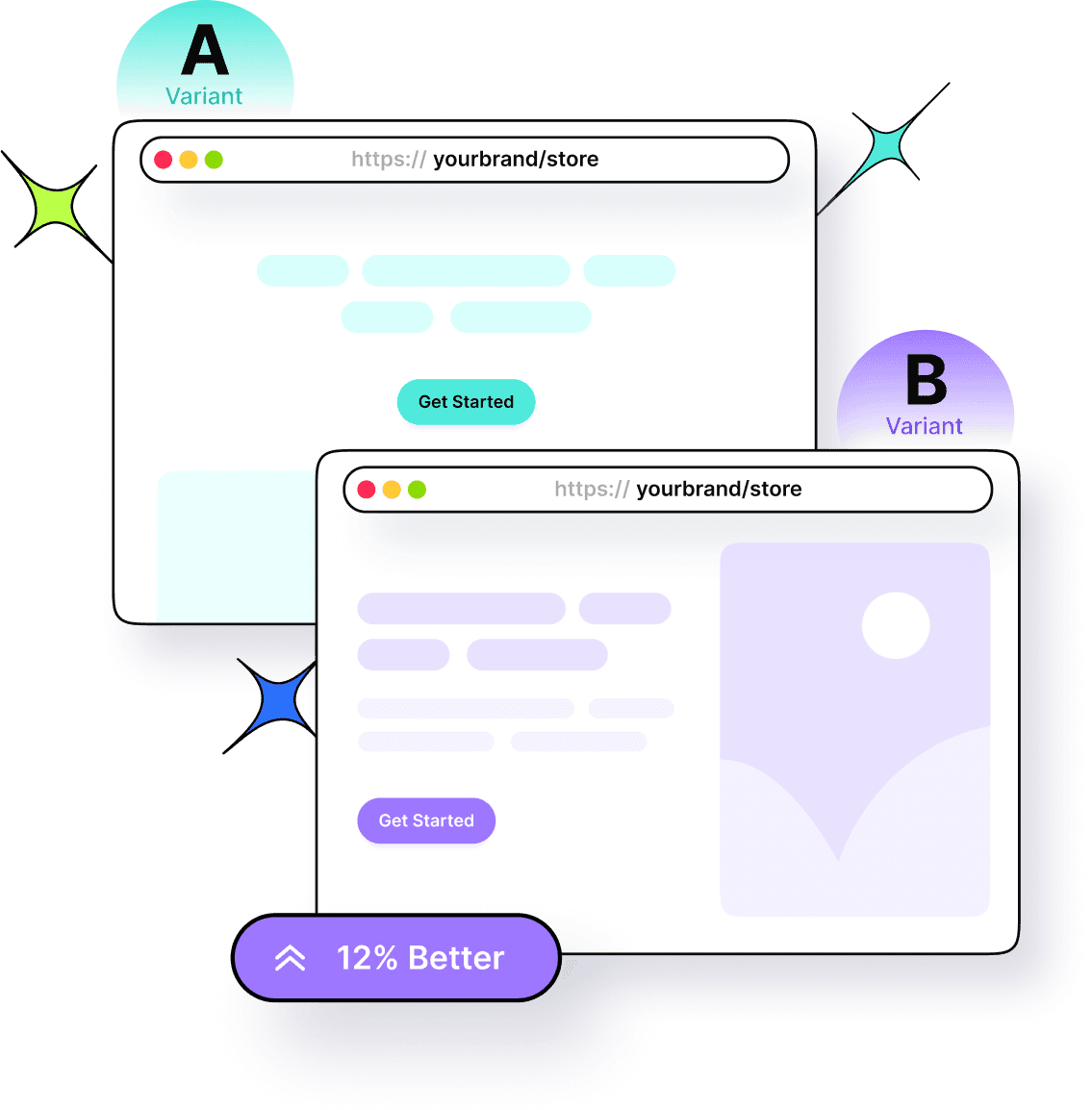
    The A/B testing is a comparison of two or more cases only to find out which works better than the other one. The purpose of an A/B testing campaign is to uncover the better-performing option out of all.

    It’s a powerful analysis strategy used in online advertising, email marketing, social media publishing, website conversion, and several other areas.

    The goal of an A/B testing campaign is to see which option outperforms the other one.

    For instance, a brand does side-by-side testing of two Facebook ad units under the same ad set. It can see which ad unit performs better than the other one by comparing the ad results.


    Replug Branded Short Links CTA
    A complete link management solution
    for marketing professionals & agencies.
    Try Replug for free

    Types of A/B tests

    Three types of A/B testing are widely popular in the digital marketing space:

    1. Split testing

    Split testing is a type of A/B testing in which a user creates a new version of an existing landing page, logo, or banner ad and compares it to the original to determine which one achieves better performance metrics. It works best when the user wants to overhaul the entire design of a landing page without altering the current version.

    2. Multivariate testing

    Multivariate testing is yet another useful A/B testing type that allows marketers to examine multiple variables simultaneously to identify the most effective combination of elements on a page. Unlike A/B testing, which focuses on testing one version against another, MVT involves creating numerous variant pages where different elements, such as headlines, images, buttons, and text) are altered. This A/B testing type is more complex and data-intensive as compared to the previous one.

    3. Multi-page testing

    Multi-page testing plays around with specific elements, such as the call-to-action button, and analyzes their impact across several pages within a user journey. It comes in handy when users want to understand how modifications to a consistent element affect user interactions and conversions throughout the entire funnel.

    Role of A/B testing in marketing

    Let’s understand the role of A/B testing in marketing and find out what difference it can make along the way:

    • A major role of A/B testing is to provide undeniable evidence based on the data to make marketing or branding decisions. The process enhances user experience and optimizes marketing strategies. For instance, businesses can test different headlines, images, call-to-action buttons, or overall layouts to see which elements resonate most with their audience.
    • 58% of companies use A/B testing for optimizing their conversion, whereas 35% of companies plan to use A/B testing for conversion optimization. Furthermore, 60% of the brands believe A/B testing is crucial to conversion optimization.
    • One of the important roles of A/B testing in digital marketing is risk mitigation. Before implementing broad changes across an entire user base, companies can test on a smaller scale to ensure the modifications will have the desired positive impact. This approach minimizes potential negative effects on user engagement and conversion rates.
    • A/B testing also fosters continuous improvement on the website or application. By regularly conducting such tests and performance testing, businesses can keep up with evolving user preferences and market trends, thereby maintaining a competitive edge. This iterative process helps in fine-tuning engagement strategies on the website or app to incrementally boost performance over time.
    • It’s crucial for personalizing user experiences. By analyzing which versions work best for different audience segments, marketers and conversion experts can tailor their content and offerings to meet specific needs and preferences, resulting in a better response from the target audience.

    Benefits of A/B testing

    A/B testing strategy has been around for years. There are numerous benefits of applying the A/B testing strategy that have helped brands and marketers increase attention and sales over the years. Here are the six of many benefits of A/B testing:

    1. Get more user engagement

    User engagement means how long users stick around when they visit a website or open an app. The longer the users stay, the higher the chances of sales. One of the benefits of A/B testing is that it can significantly improve the user engagement of a company.

    A/B testing ensures that the business gets to choose the better versions of the website or app layout, color scheme, CTA color and text, landing page copy, and other elements.

    2. Skyrocket conversion rate

    Marketers and conversion experts always A/B test different sections of the website or landing page. Their ultimate goal is to increase the conversion rate of the business. Therefore, they make all necessary changes to test things out until they find the best combination.

    The website or app elements that play a vital role in improving the conversion rate are call-to-action, website copy, headlines, colors, fonts, layout/design, etc. Undoubtedly, A/B testing is crucial to increasing conversion rates regardless of the industry.

    3. Decline in the bounce rate

    Bounce rate is the percentage of visitors that quickly leave the website or page without taking any noticeable action on the platform. No wonder digital marketers strive to reduce the bounce rates of their sales pages at any cost. Therefore, they tweak all sorts of things, for instance, the sales page design, layout colors, website fonts, CTA text, etc.

    The purpose is to stop people from bouncing off the site without engaging with the site or app. A/B testing helps them figure out which combination of CTAs, colors, page designs, and website copy performs better than the others.

    4. Low cart abandonment

    Cart abandonment is a pain point for many e-commerce businesses and online retailers. Businesses use different engagement and remarketing tactics to reduce cart abandonment.

    One of the perks of A/B testing is that it could impact the conversion process and eventually reduce cart abandonment. Businesses can A/B test the pricing model, UI/UX, CTA buttons, color scheme, and website copy just to see how this experiment works out for them.

    Related: Abandoned Cart Emails That Actually Convert

    4. Test URL performance

    Influencers and brands create and manage URLs very carefully. They know that URLs have a huge role to play in the SEO and social media marketing. Marketers, influencers, and brands A/B test two or more versions of the same URL to see how the audience responds to those URLs.

    Replug Branded Short Links CTA
    A complete link management solution
    for marketing professionals & agencies.
    Try Replug for free

    Replug.io is an all-in-one URL management tool that allows marketers and brands to A/B test their URLs. Ultimately, it helps brands and experts understand URL performance across different platforms.

    5. Understand user behavior

    A/B testing isn’t just about picking up the better website copy, CTA buttons, and website design. Instead, it goes beyond the basic website structure. User behavior is a vital engagement metric that showcases the effectiveness of the website or app design philosophy.

    Understanding user behavior on the website or landing and making changes can save time, effort, money, and energy. A/B testing provides businesses a chance to understand user behavior better than ever.

    Read more: Benefits of A/B testing

    What elements can you A/B test?

    Several website or app elements can be analyzed with A/B testing. Let’s take a look:

    1. Website or app layout

    The layout design is an integral part of the UI/UX. Testing different layout designs and applying changes to the elements’ arrangement can reveal which layout maximizes user engagement and conversion.

    You may also like: How to create high-converting landing pages

    2. Email subject line

    Email marketing is an essential part of the digital marketing campaign. A/B testing different email subject lines to find out which one has the highest open rate can be extremely helpful. Understanding what wording resonates most with your audience and increases email engagement can improve the overall performance of the campaign.

    3. Banner ad design

    Banner ad design is a vital element when A/B testing different elements of the marketing campaign. Creating and testing different variations of design elements such as images, text, and layout in banner ads can determine which version attracts more clicks and conversions. Optimizing the visual appearance can improve the effectiveness of the advertising.

    4. Call-to-action buttons

    Boost ROI with branded URLs - Replug dashboard showing performance metrics and branded URL creation
    Boost your conversion rates with irresistable CTAs with

    for your marketing campaigns.

    Check

    Higher clicks

    Check

    More leads

    Check

    Better ROI

    Generate free CTAs

    Call-to-actions can shape the outcome of the marketing campaign, especially when all other elements are up to the mark. It’s recommended to test different texts, sizes, colors, and placements of call-to-action buttons. A/B testing multiple CTA buttons can help determine the winning combination.

    Try Replug’s Free CTA Generator to get the best results.

    5. Color scheme

    One of the elements to test out when A/B testing is the color scheme regardless of the product. Try out different color schemes to see which one enhances user experience and improves engagement. Not only does it impact the design and aesthetics of a website or app, but it also influences the user’s behavior toward the web or app.

    When to run A/B tests

    Here are some of the situations when running A/B tests are extremely helpful:

    • Striving to improve conversion rate: A/B testing can be pretty useful when you’re struggling with conversion rate. The course of action in this case is to make alterations on the website or landing page to make your offer more impactful. To see how these changes work out, you have to A/B test and see how things turn out.
    • Trying to increase CTA clickability: Call-to-actions are important for sales, lead generation, and sign-ups no matter what industry or niche you work in. A/B test in your CTA buttons to see what difference it makes. Always experiment with the CTA size, text, colors, and shape for better results.
    • Comparing URL performance: URLs are an essential part of the digital marketing strategy. A/B testing comes in handy when you want to compare two or more URLs leading to the same destination.
    • Optimizing landing pages for more engagement: A/B testing is crucial to the landing page optimization process. Since the purpose of optimization is to improve page performance, A/B testing elevates landing page outcomes by providing data-backed results. So, brands should run A/B testing when they want more traction, engagement, and conversion on their online real estate.

    Therefore, don’t shy away from trying A/B tests if you’re trying to achieve any of the above-mentioned marketing goals.

    A/B testing examples with outcomes

    WorkZone boosts leads by 34% through testimonials page

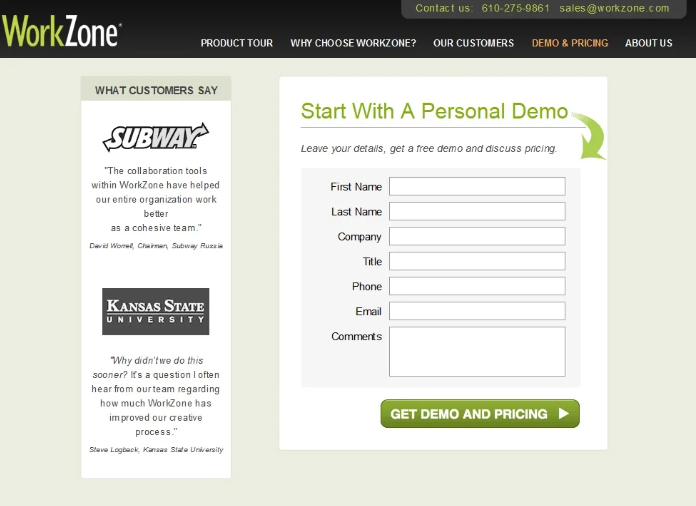
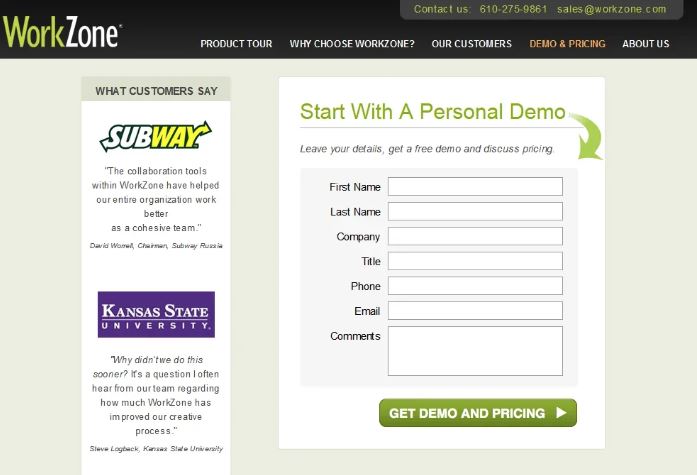
    WorkZone, a US-based software company specializing in project management solutions and documentation collaboration tools, aims to maximize conversions. To enhance brand reputation, they added a customer review section beside the demo request form on their lead generation page. However, the colorful testimonial logos distracted visitors from filling out the form.

    Variant A
    Workzone-variant A

    Variant B

    Workzone-Variant B

    To address this, WorkZone changed the testimonial logos to black and white and tested the impact. After 22 days, the results showed a 34% increase in form submissions, with a 99% statistical significance, demonstrating the success of this adjustment.

    Thrive Themes increases sales by 13% through sales page optimization
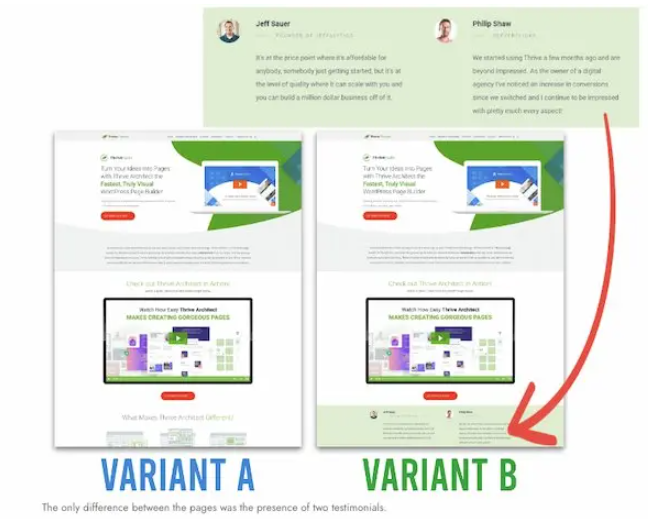
    Thrive-Themes- A/B testing

    Thrive Themes decided to test a new feature on its landing pages—customer testimonials. Previously, their control page featured a banner highlighting product features without customer feedback. The team conducted a 6-week A/B test, comparing the control with an updated page including testimonials. The result was a 13% increase in sales, with the conversion rate rising from 2.2% to 2.75%.

    Obama campaign boosts sign-ups by 40.6% through A/B testing

    One of the popular A/B testing examples is from Obama’s campaign for the presidency. Dan Siroker was the Director of Analytics for the Obama campaign. He went on to perform different A/B tests on the campaign landing page to see what increases sign-up and donation rates.

    The original landing page has had the following properties:
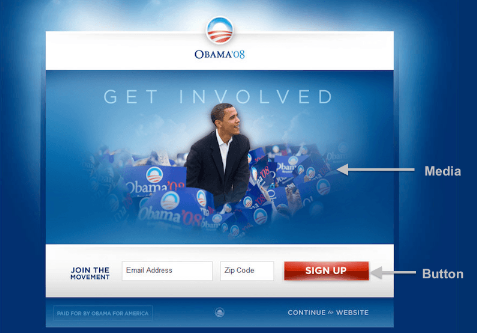
    get-involved
    • Sign up as a CTA button
    • Solo picture of Obama, associated CTA media, and copy that says, “GET INVOLVED”

    Then, the team started A/B testing and came up with a new landing page design. It consisted of the following properties:
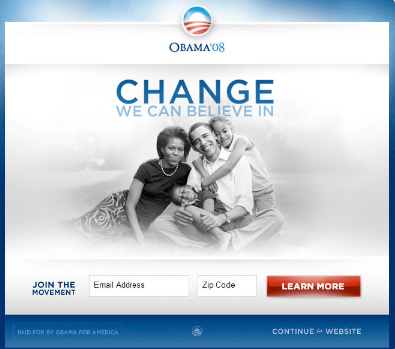
    change-we-believe-in
    • Learn More as a CTA button text
    • Obama family picture and the associated CTA media and copy that says, “Change We Can Believe In”

    The results of these changes were astonishing. It was reported that the highlighted changes brought in a 40.6% increase in email sign-ups and an additional $60 million in donations.

    Do’s & Don’ts when running an A/B test

    A/B testing requires time, money, and resources, so brands and experts try to avoid any mistakes during the process. Understanding the dos and don’ts of running an A/B test can significantly reduce the chances of any expected upheaval during the experiment.

    Here are the important do’s and don’ts to remember when getting started with A/B testing:

    Do’sDon’ts
    Define clear goals:Changing test parameters halfway through
    Segment your audienceIgnore the importance of randomization
    Run tests simultaneouslyTest multiple variables simultaneously
    Use sufficient sample sizeRelying on short-term data
    Test one variable at a timeOverlooking external factors

    Also read: SEO Split Test Your Way To Higher Search Engine Ranking

    Do’s When Running an A/B Test

    Here we go:

    • Define clear goals: Establish specific, measurable objectives before starting the A/B test to ensure meaningful results and start on the right foot.
    • Segment your audience: Properly segment your audience to ensure that the test groups are representative and comparable.
    • Run tests simultaneously: Conduct the tests at the same time to avoid seasonal or time-based biases. Otherwise, the results might not be accurate.
    • Use sufficient sample size: Ensure your sample size is large enough to yield statistically significant results. No one wants to make their A/B look irrelevant.
    • Test one variable at a time: Focus on a single element (e.g., headline, CTA) to accurately attribute changes in performance. It will also help you portray the results more clearly.

    Don’ts of running an A/B Test

    • Changing test parameters halfway through: Avoid altering the test setup or criteria once the test has started to maintain integrity. Any alteration, delay, or pause during the process might ruin the gist of the A/B test.
    • Ignore the importance of randomization: Ensure random assignment of participants to eliminate selection bias. Ignoring randomization would be a huge mistake.
    • Relying on short-term data: Avoid making decisions based on data collected over too short a period; let the test run its course.
    • Testing multiple variables simultaneously: Testing several changes at once makes it difficult to determine which one caused the effect.
    • Overlooking external factors: Consider external influences like holidays or market trends that might skew results.
    Replug Branded Short Links CTA
    A complete link management solution
    for marketing professionals & agencies.
    Try Replug for free

    A/B test with Replug

    Replug is a top gun when it comes to URL tracking and link management. You can easily shorten link with it’s powerful link shortener tool to track, manage, and optimize your URLs effortlessly.

    One of the most top-notch features of this amazing link management platform is A/B testing. Let’s learn how to use Replug for A/B testing, here.

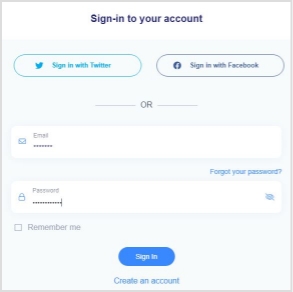
    Step 1: Sign up for a Replug account if you haven’t already.

    Once it’s done, log in to your Replug account to get started.
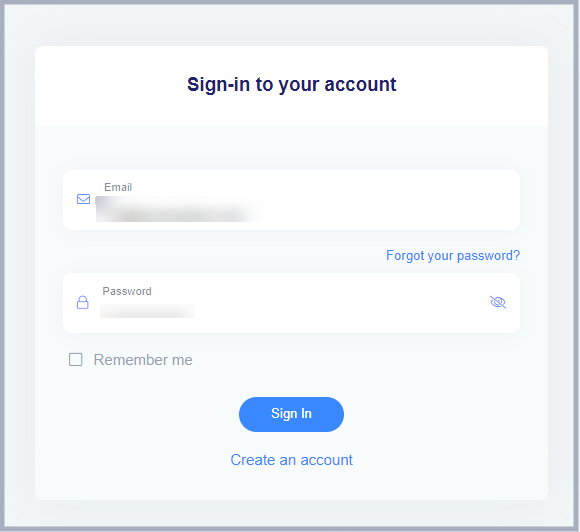
    sign-in-to-Replug

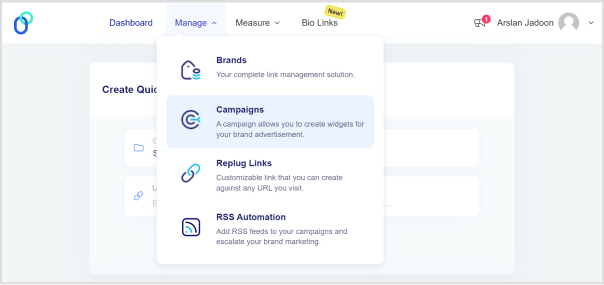
    Step 2: After logging in to your account, you’ll land on the Replug dashboard.

    Go to the Manage drop-down menu from the top and choose the Campaign section.
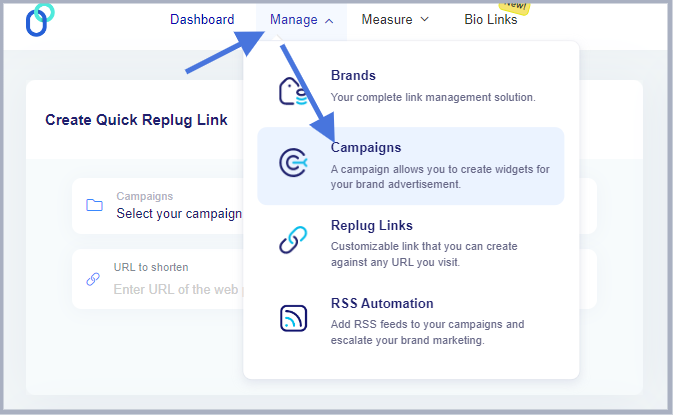
    Go to campaigns

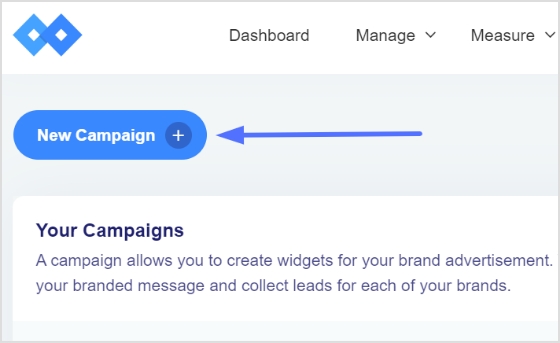
    Now, click the New Campaign button to create a new campaign (if it’s your first time).
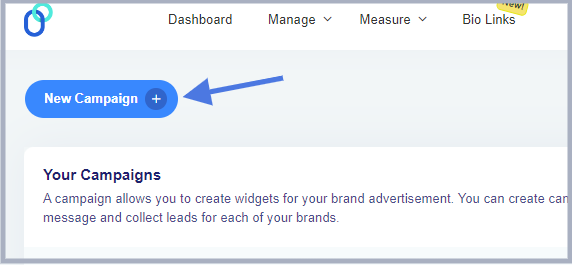
    Create -new-campaign- replug

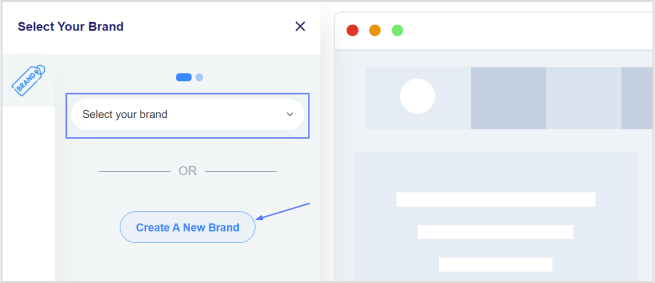
    Step 3: Go to the dashboard; you’ll see the “Create Quick Replug Link” option. This is where you can start creating the short link to track and A/B test.
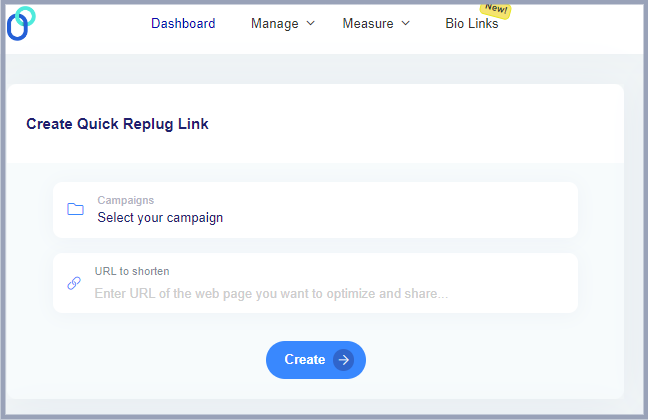
    Select your campaign

    Select the campaign you have already created, and provide the link to the A/B test. Go ahead and create the short link.
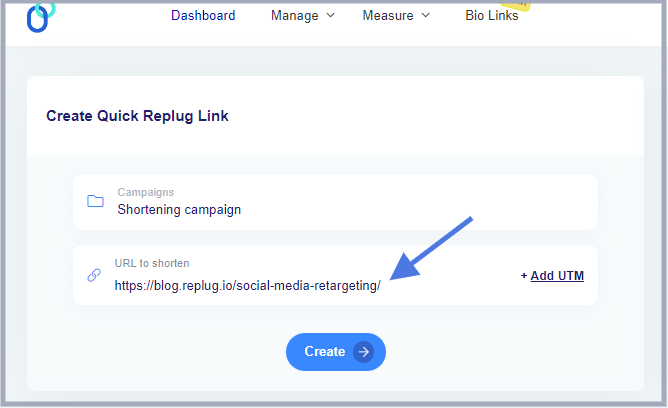
    create-quick-replug-link

    Step 4: Once the short link is created, a popup window will appear with the settings for the very short link.

    Now, enable A/B testing by toggling the AB testing button before saving the link. This process will set the default destination URL as the first A/B test link with 100% weightage.
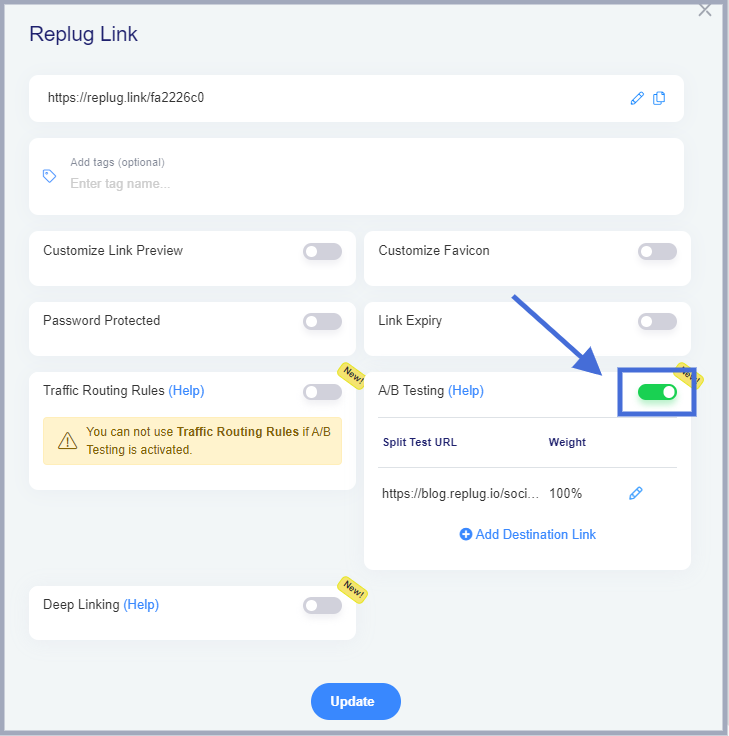
    toggle-ab-testing-button

    Add more destination links by clicking on the Add Destination Link.
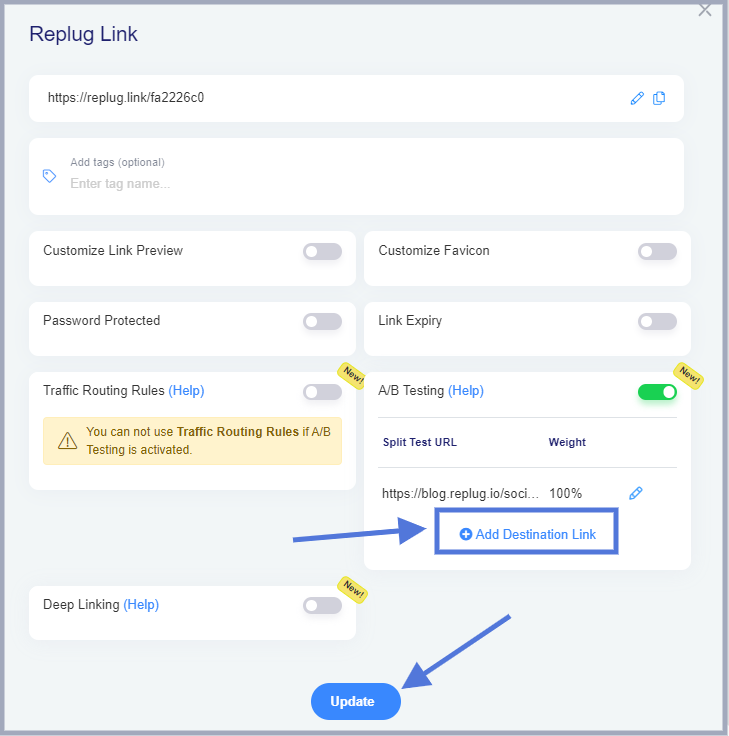
    add-destination-url

    Note: Allocate the weightage to the A/B test links. You can equally distribute it or allocate different weightage to the specific links.

    Once you’re done, press the update button and you’re all set to start A/B testing with Replug.

    Related: How to Do A/B Testing the Easy Way: Step-by-Step Guide

    FAQs about A/B testing

    Let’s answer some of the frequently asked questions about A/B testing:

    How many ab tests are successful?

    There is no definite answer to this question. However, there are hundreds of thousands of examples of very successful A/B test experiments that vouch for the effectiveness of this strategy.

    Why is it called AB testing?

    It’s a strategy in which a user generally tests option A against option B to find out which performs better than the other one. That’s why it’s called A/B testing (also known as split testing or bucket testing).

    What is the future of AB testing?

    The future of A/B testing seems extremely bright. A/B are testing SAAS tools available that take this testing and analysis tactic to the next level. It’s safe to say that A/B testing is getting bigger and bigger with time.

    Does AB testing affect SEO?

    A/B testing can have a significant effect on the SEO. Since A/B testing impacts UI/UX, engagement, conversion, and CTR, it could affect SEO. Whoever knows SEO also knows that SEO isn’t just about keywords. It involves design, speed, engagement, links, clickability, and much more.

    When not to use ab testing?

    A/B testing shouldn’t be used when external factors, such as the holiday season or certain market trends, are making tides. Plus, other signals tell us that it’s not the right time for A/B testing. Refer to the “Don’ts When Running an A/B Test” section of this article.

    Can you run multiple ab tests?

    Running multiple A/B tests seems like a mistake because it is hard to determine which specific change affected the outcome of the campaign.
  • White label vs Private label: Which to choose?

    White label vs Private label: Which to choose?

    Ready to launch your own brand, But short on time? 

    We’ve got you covered with two great options: white labeling and private labeling. Both can help your brand grow in unique ways, but which one is the right fit for you?

    In this blog, we’ll break down everything you need to know about white label vs. private label. We’ll explore their similarities, drawbacks, benefits, and real-world examples. 

    By the end, you’ll have a clear understanding of which strategy will help your brand thrive. Let’s get started!

    What is white labeling?

    White labeling means rebranding products or services developed by another company and selling them under your company’s name.

    You’ve probably come across many white-labeled products without even knowing it because they were rebranded so smoothly. This makes it hard for most people to tell the difference.

    White labeling is common in many industries, like food and beverages, electronics, and software. It helps businesses expand their product lines without needing to invest in research, development, or manufacturing.

    Here are a few examples:

    White-label example no.1: Replug – A SaaS white-label solution

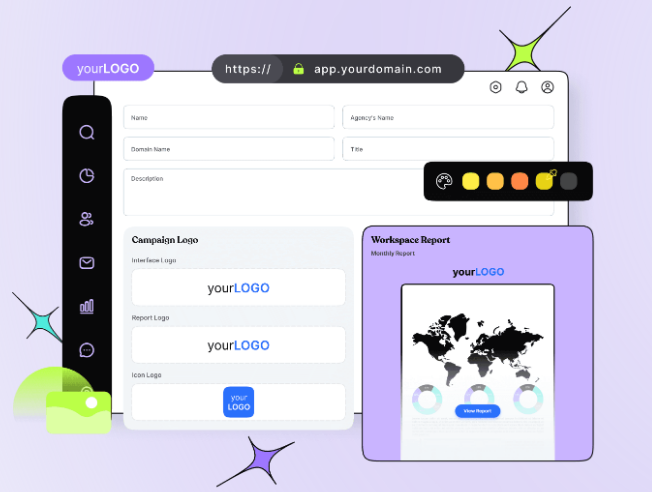
    One perfect example of white-label solution is Replug. It’s a powerful link management tool packed with advanced features. With Replug.io, you can fully customize the dashboard with your brand’s colors, favicons, and logos, making it feel like your own.

    White label solution: Replug

    Replug is an efficient link shortener that offers fantastic link management features, like retargeting pixels, bio-links, deep links, and the ability to create custom CTAs. This is a classic example of white labeling, ideal for businesses looking to boost their marketing while keeping everything aligned with their brand.

    Replug Branded Short Links CTA
    A complete link management solution
    for marketing professionals & agencies.
    Try Replug for free

    White-label example no. 02: Printful

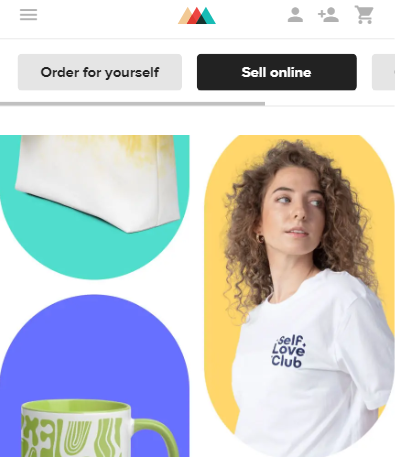
    White label example: Printful

    Printful is a print-on-demand company that lets businesses create and sell custom products like t-shirts, posters, and accessories without dealing with inventory or production. Companies can design their own graphics and logos, which Printful prints and ships under the company’s brand. This allows businesses to offer customized products easily and quickly without needing their own manufacturing facilities.

    White-Label example no.03: Printify

    Printify is a print-on-demand platform. It allows users to design and sell custom products online without needing to maintain an inventory. Printify connects its users with a vast network of print providers worldwide, offering a wide range of custom-printed products. Printify plays a significant role in the white-label market, particularly in the print-on-demand (POD) space. Through Printify, businesses can create white-label products like custom apparel, accessories, home goods, and more. Users can integrate Printify with major e-commerce platforms like Shopify, Etsy, WooCommerce, and others, making it easy to automate the sales and fulfillment process.

    Top benefits of white labeling

    Until now, you must have understood that white-label products are pre-manufactured items for you that are completely ready to be shipped with your brand logo. Here are some of the most prominent benefits of white-labeling. 

    • Lower initial investment: White label products are often cheaper than private label because you’re not customizing them from scratch.
    • Faster turnaround time: Since the product already exists, you can get it to market quickly.
    • Less risk: You don’t have to worry about the product failing to meet quality standards or market demands.
    • Scalability: Easy to scale up or down production based on demand.

    Read more: 14 Best white label marketing tools for agencies in 2026

    Drawbacks of white labeling

    Now that you have gone through the similarities, it’s time to go through the drawbacks.

    • No customization: The product itself is typically not customized for each purchaser; it remains the same for all buyers.
    • Brand differentiation: Your product might be similar to offerings from other brands.
    • Profit margins: Profit margins can be lower due to competition from other white-labeled versions.

    What is private labeling?

    Private labeling is a business strategy where a retailer or company contracts with a manufacturer to produce a product under their own brand name. The retailer essentially “outsources” the manufacturing process while controlling the branding and marketing of the final product.

    Private label example no 01: Heyday

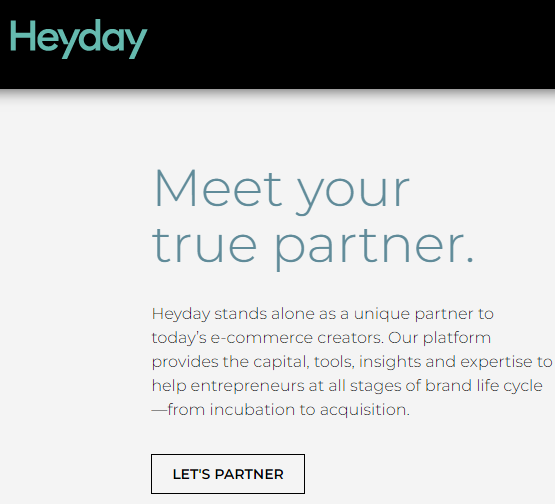
    Private label example Heyday

    Heyday, a brand specializing in consumer electronics, follows this model. Although they don’t handle manufacturing directly, they supervise the process and affix their label to top-quality electronics manufactured by partnering companies. This allows them to offer customers products that reflect their brand identity.

    Private label example no. 02: Stone & Beam

    Private label example Stone & Beam

    It’s one of the most successful private-label brands. Stone & Beam, known for its furniture line, utilizes private labeling. They partner with manufacturers to produce furniture items under their brand name. By overseeing manufacturing standards and design elements, they ensure that the products meet their quality standards and resonate with their customers.

    Benefits of private labeling

    White label vs Private label
    • Be your own brand boss:  From product to packaging, make it all your own. Partner with a trusted packaging labels manufacturer to give your customers a brand experience they’ll remember!
    • More profit for you: Private labeling often allows for more control over production costs. By bypassing some middlemen, you can potentially increase your profit margins compared to selling established brands.
    • Customer loyalty: Create products people love under your brand. Watch them come back for more! Use a product roadmap tool to plan future releases and improvements, keeping your customers engaged and excited.
    • Solve specific needs: See a gap in the market? Private labeling lets you create the perfect product to fill it!

    Drawbacks of private labeling

    • Higher costs: Development and minimum order quantities can be expensive.

    Helpful tip

    “We would advise you to get quotes from multiple manufacturers and negotiate for the best price based on volume and order frequency.”

    • Longer lead time: Customization takes time, delaying product launch.
    • Minimum order quantities: Manufacturers often have minimum order quantities (MOQs) for private-label products. This can be a barrier for smaller businesses starting out.
    • Risk of failure: If the product doesn’t resonate with consumers, you’re stuck with it.

    However, keep in mind that just because a product has your label doesn’t mean customers will automatically recognize it. You’ll still need to invest in marketing and building brand awareness for your private-label line.

    Similarities between white label vs private label

    SimiliarityDescription
    Product originBoth utilize a product manufactured by a third party.
    Branding controlThe retailer or company has complete control over the branding, including logo, packaging, and marketing materials.
    Sales and distributionThe retailer or company is responsible for selling and distributing the final product through their own channels.
    Replug Branded Short Links CTA
    A complete link management solution
    for marketing professionals & agencies.
    Try Replug for free

    Difference between white label vs private label

    DifferencesWhite-labelPrivate-label 
    Level of customizationLower Higher 
    Branding focusGeneric (may have minimal branding options)Strong focus on creating a unique brand identity
    Product developmentLittle to no control over product developmentMore involvement in product development, potentially including formula tweaks or feature adjustments
    Minimum order quantities (MOQs)Typically lowerMay have higher minimum order quantities due to the potential for more customization
    Cost Generally lowerGenerally higher

    When to choose the white label or private label?

    In white label vs private label, the best option for you depends on your business goals and resources. Here’s a quick guide:

    • Choose white label if: You need a product quickly, like a custom hat, have limited resources, and want to test the market before investing heavily in branding.
    • Choose a private label if: You have a clear brand vision, want a unique product offering, and are willing to invest time and money upfront.

    Ultimately, both white-label vs private-label strategies can be successful. You can choose the path that propels your business forward by carefully considering your needs and limitations.

    FAQs on white-label

    What is white label vs private label?

    Both white-label and private label involve customizing a pre-made product, but white-label offers less customization (think generic packaging with your logo)  while private label gives you more control over design and features (like a store-brand cereal with a unique recipe).

    Is private labels cheaper than national brands? 

    Private-label products can be cheaper for retailers to purchase, which can translate to lower prices for consumers. However, only sometimes.

    What are some examples of white-label products?

    White-label products can be anything from clothing and electronics to software and supplements.

    Is private labeling a good business strategy? 

    Private labeling can be a good strategy for businesses looking to build brand loyalty and higher profit margins. However, it requires careful planning and execution.

  • 14 Best white label marketing tools for agencies in 2026

    14 Best white label marketing tools for agencies in 2026

    White-label marketing tools cover a wide range of needs, each with its own specialty—whether it’s custom branding, social media management, SEO, or CMS services. 

    That’s why we’ve put together this guide to simplify your selection process. 

    Stick with us as we break down the options and help you find the perfect fit for your needs.

    What is a white-label tool?

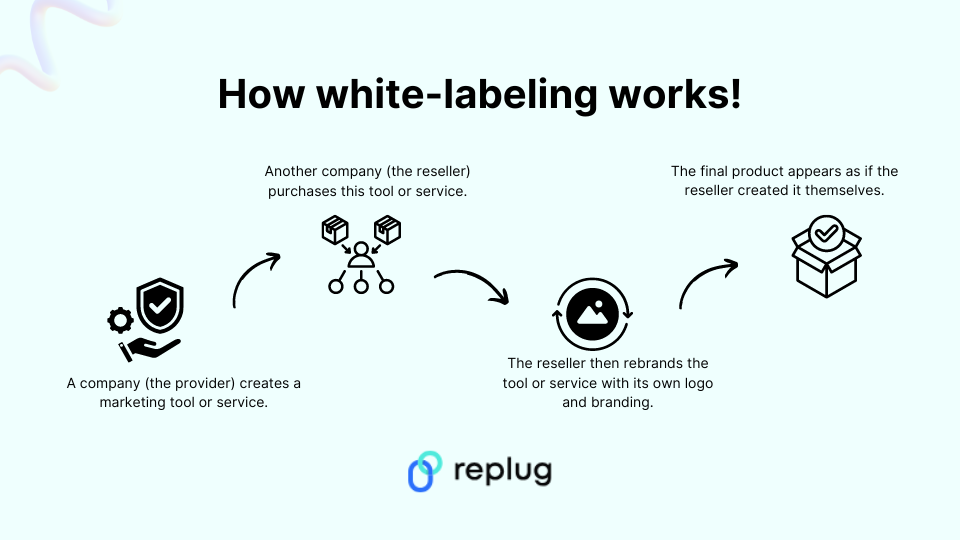
    A white-label tool is a pre-built software application or service that can be customized with your own branding elements.

    Here’s a breakdown of the concept:

    The core product: A developer creates a software tool with all the essential features but without any specific branding.

    Customization: You, the business owner, purchase this tool and personalize it with your brand identity. This could include:

    • Adding your logo and color scheme.
    • Modifying the user interface (UI) elements to match your brand style.
    • Customizing the content and messaging within the tool.
    • And much more…

    The final product: You then offer the white-labeled tool to your customers or clients under your own brand name. This way they got a branded experience as if the tool was built specifically by your company.

    Related: All about white label & why it can be a game changer for you!

    How does white-labeling work in business?

    How white labeling works

    White labeling can be applied to various aspects of a business. Some of the common include the following:

    CategoryDescription
    SoftwareSoftware companies can white-label software applications and resell them as their own. This allows them to offer branded solutions without the cost and time investment of developing software from scratch.
    Marketing toolsMarketing and other types of agencies can white-label email marketing platforms, link management tools, or social media management tools to offer these services to their clients under their own brand.
    WebsitesWebsite builders can provide white-label solutions, allowing clients to create custom websites without any branding from the builder.

    14 best SAAS white-label tools for agencies

    1. Replug – White-label link management tool

    At the top of our list is Replug, an all-in-one link management tool packed with advanced branding features. With Replug’s white-labeling, you can customize everything to match your brand—from logos and favicons to titles, meta images, descriptions, agency names, domains, branded reports, and emails.

    Replug - Custom branding tool

    Replug makes it easy to generate optimized short URLs and unique slugs that represent your brand perfectly. You can also track click-through and conversion rates to see how well your links are performing.

    Need to shorten a lot of links at once? No problem—Replug lets you import files for bulk link shortening. Plus, you can turn visitors into customers by adding retargeting pixels to your links or creating branded microsites for your clients using the bio link feature.

    White-label

    Safety is a top priority for Replug. The platform scans and checks links in real time, blocks malicious URLs and uses phishing detection algorithms to keep everything secure. The best part? Replug offers affordable and scalable pricing, so it can grow with your brand or agency’s needs.

    Here’s what you get with the Replug white-label solution:

    • URL shortening 
    • White-label dashboards
    • Link rotator
    • QR codes
    • SMS links
    • Custom CTA’s
    • Deep links 
    • Bio-links
    • Link analytics
    • Retargeting pixels

    Pricing of Replug

    Replug’s pricing is both affordable and flexible, allowing you to scale your plan as your brand or agency grows. The white-label pricing plans start at $79 per month (with a free trial) and include a host of advanced features. 

    Replug Branded Short Links CTA
    Maximize marketing ROI
    by transforming ordinary URLs into
    branded short links that convert.
    Try Replug for free

    2. Short.io – White-label domain

    Short.io is a user-friendly tool that helps you create branded short links, making long URLs shorter and easier to share. It’s perfect for social media, emails, and text messages.

    While it doesn’t offer a white-label dashboard like Replug, you can still white-label your links with your custom domain. Additionally, you can track clicks and user behavior on your links, providing valuable insights for your marketing campaigns and website optimization efforts.

    Pricing of ShortIo

    Regarding its pricing, there’s no specific mention of white-label links, although the platform does reference this on the homepage. Most of the tool’s advanced features are included in the enterprise plan, which costs $148 per month.

    3. ContentStudio – White-label social media software

    ContentStudio is your go-to solution for managing social media effectively. It helps you discover trending topics and curate engaging content to keep your audience glued.

    ContentStudio- Social media white label tool

    Besides that measure metrics such as total engagement, audience growth, top-performing posts, and many more.

    One of its standout features is the ability to white-label files or reports. This white-labeling feature is beneficial because it allows you to present your content as if it were created entirely by your own team, strengthening brand recognition and creating a smooth user experience.

    These white-label reports are like tailor-made suits, perfectly fitting the needs and preferences of every client.

    Other popular features:

    • Content planning
    • Content curation
    • Influencer search
    • Content discovery
    • AI caption generator
    • Content automation
    • RSS feed reader
    • Content calendar

    Pricing of ContentStudio

    The tool offers three different pricing plans. The mid-tier plan starts at $49 per month and includes white-label reports along with many other advanced features.

    Related: How to Measure Social Media Engagement: 12 Crucial Metrics

    4. SE Ranking – White-label SEO tool

    SE Ranking offers a self-hosted, white-label, cloud-based tool, along with a customized, performance-based invoicing platform that easily integrates into your service offerings.

    SE Ranking - SEO tool

    With SE Ranking, you can automate reporting, create comprehensive marketing plans, check keyword rankings, monitor backlinks, and much more. The platform is user-friendly and serves as your ultimate support for excelling in search engine results pages (SERPs).

    The white-label services allow you to make the platform uniquely yours by configuring your personalized domain name and removing any references to SE Ranking. Impress your clients with professional, branded SEO reports that can be automatically sent from your corporate email or manually dispatched as needed.

    Pricing of SE Ranking

    The platform currently offers three pricing plans, with white-label services available starting from the Pro plan at $109.00 per month.

    You may also like: How to create an SEO-friendly URL: Ultimate tips

    5. HubSpot – White-label email marketing software

    Say goodbye to generic email marketing campaigns and hello to personalized, engaging content that drives results. HubSpot marketing automation platform puts the power of automation and analytics at your fingertips, allowing you to deliver the right message to the right person at the right time.

    Hubspot

    The platform allows you to fully white-label their product, replacing their branding with your own or your client’s logo across the platform, including the interface, email campaigns, notifications, and reports.

    With automated white-label email campaigns featuring personalized messaging, you can guide prospects toward conversion, nurturing them through the purchasing process until they’re ready to buy. This is particularly advantageous for B2B businesses with extended sales cycles.

    Pricing of Hubspot

    Starts from $45/user/month if billed annually for small to medium-sized businesses. 

    Related: How to track emails using UTM parameters?

    6. DashThis- White-label project management software

    DashThis is a marketing reporting tool designed to simplify creating data visualizations and reports. It excels at combining data from various sources like SEO, social media, and analytics platforms into a single, informative dashboard.

    The white-label feature allows you to remove all references to DashThis and customize your analytics dashboards to reflect your own branding effortlessly. Additionally, you can start with preset report templates that include all the essential KPIs.

    Pricing of DashThis

    Dash offers up to four pricing plans, starting at just $149/month for the complete white-label dashboard. You can upgrade your plan as needed.

    You may also like: A Complete Guide to Building a Brand Marketing Strategy

    7. Domo – White-label reporting tool

    Domo’s advanced analytics and visualization capabilities give you the tools you need to uncover insights, spot trends, and make smarter decisions.

    Domo

    Besides that domo ensures your client’s data remains secure within their environment while still allowing for comprehensive analysis. With its white label, you can completely customize the look and feel of the analytics reports platform to match your brand.

    Pricing of Domo

    To obtain pricing information, please contact the platform’s sales team.

    8. WordPress – White-label CMS Tool

    WordPress offers a white-label option ideal for agencies and web developers who build websites for clients. Building a professional website doesn’t have to be complicated. With WordPress, you can create a stunning online presence that reflects your brand identity and engages your audience.

    Remove all WordPress branding from the admin panel and public-facing website. This make sure your client’s brand takes center stage, fostering a professional image.

    Pricing of WordPress

    The platform offers various pricing plans and provides custom quotes for large enterprises. For more details, we recommend visiting the website.

    You may also like: How to Create Highly Shareable Content?

    9. Drupal – White-label CMS Tool

    Need a CMS service that can handle complex websites and digital experiences? Look no further than Drupal. Drupal is a free and open-source content management system (CMS) used by millions to build and manage websites.

    Drupal- White label CMS

    It allows users to personalize their profiles with their logo and preferred color scheme. It then automatically adds a white-label token to all outgoing URLs, ensuring email links and other links direct recipients to the user’s custom-branded website.

    Pricing of Drupal

    The basic Drupal modules are free, but there are no pricing details on the Drupal website. We recommend contacting the customer support team for specific information about your needs.

    You may also like: Online Branding: The Roadmap to Stand Out and Succeed Online

    10. Asana – White-label project management software

    Create dedicated workspaces for each client, allowing you to organize projects, tasks, and communication under a specific client brand. While full white labeling isn’t available, you can utilize custom fields and integrations to incorporate your agency’s branding within the Asana interface. Or provide clients with a streamlined view of their projects without exposing them to the full Asana platform. This can be achieved through custom integrations or dedicated dashboards.

    Pricing of Asana

    The platform offers pricing plans for individuals, small teams, and large teams. Custom branding features are available starting from the advanced pricing plan at $24.99.

    Related: Abandoned Cart Email Examples & Tips That Actually Convert

    11. Invoice Ninja- White-label payment platform

    Invoice Ninja is a free invoicing and expense management software ideal for freelancers and small businesses.  It simplifies sending professional invoices, tracking time and projects, and managing client communication.  With its user-friendly interface, you can create branded invoices, accept online payments, and automate recurring bills.  

     Plus, for a professional touch, Invoice Ninja offers a white-label option that removes their branding, allowing you to completely customize the software with your own logo and colors.

    Pricing of Invoice Ninja

    Invoice Ninja doesn’t list the white-label pricing on their main pricing page, but the enterprise plan allows you to remove platform branding for $16 per month.

    12. DashClicks – CRM

    Scale your business and automate your marketing efforts with DashClicks. Its white-label CRM and marketing automation solutions help you to manage leads, strengthen relationships, and track ROI – all from one intuitive platform.

    Pricing of DashClicks 

    There are no such details mentioned about pricing on the website.

    You may also like: Replug click analytics: Turn clicks into conversions

    13. Simvoly – Website building tool

    Create stunning websites and online stores without writing a single line of code with Simvoly. Its drag-and-drop builder and white-label options make it easy to bring your vision to life and showcase your brand to the world. 

    Whether you’re a freelancer, agency, or entrepreneur, Simvoly gives you the tools you need to succeed online.

    Pricing of Simvoly 

    Starts from $59/month and goes up to $199/month

    14. BlockSurvey – White-label survey tool

    BlockSurvey is a privacy-focused survey tool that offers full white-label capabilities, making it ideal for businesses and agencies that prioritize data security. BlockSurvey ensures that your surveys are completely anonymous and encrypted, providing an additional layer of trust for your clients.

    Pricing of BlockSurvey

    BlockSurvey’s pricing is flexible, with a white-label option available with a team plan starting at $55 per month. It’s an affordable solution for agencies looking to provide branded, secure surveys to their clients without sacrificing data privacy.

    10 Things to look for in your white label tool 

    Replug Branded Short Links CTA
    A complete link management solution
    for marketing professionals & agencies.
    Try Replug for free

    When choosing a SaaS white-label tool, it’s important to consider some of the following factors:

    1. Branding

    Can you easily add your logo, color scheme, and fonts throughout the tool? Does it allow customization of login screens, email templates, and other branding elements?

    2. Custom functionalities 

    Does the tool offer the level of control you need to tailor features and functionalities specific to your client’s needs? Can you disable unused features or create custom user roles?

    3. Existing systems

    Does the white-label tool integrate with your existing CRM, marketing automation platform, or other software you use?

    4. Data security

    How does the white-label provider ensure the security of your client data? Look for features like data encryption, access controls, and compliance with relevant security standards.

    5. Uptime and reliability

    Is the white-label tool hosted on a reliable platform with a high uptime guarantee? Ensure minimal downtime to avoid disruptions for your clients.

    6. Scalability

    Can the tool handle your growing client base and data volume? Choose a solution that scales with your business needs.

    7. Support

    Does the white-label provider offer adequate technical support to address any issues you or your clients encounter? Consider the availability and response times of their support team.

    8. Pricing

    Review the pricing structure of the white-label tool. Does it offer a model that aligns with your budget and client pricing strategies (e.g., per-user, tiered pricing)?

    9. Ease of use

    Is the white-labeled tool user-friendly for both you and your clients? Look for intuitive interfaces and available training resources.

    10. Free trial or demo

    Many white-label tool providers offer free trials or demos. Take advantage of these to assess the tool’s functionality and user experience before committing.

    By carefully considering these factors, you can select a white-label SaaS tool that empowers your business to offer exceptional branded solutions to your clients while streamlining your operations and ensuring a positive user experience.

    Related: Top 29 personal branding tools to upscale your marketing efforts

    Conclusion

    Remember, the ideal white-label tool allows you to deliver exceptional branded solutions to clients, streamline operations, and ensure a positive user experience. By carefully considering the factors outlined in this guide, you can make an informed decision that propels your agency’s success.

    FAQs on White-label tools

    I’m concerned about data security with white-label tools. What should I look for?

    Data security is crucial. When choosing a white-label tool, ensure they offer features like data encryption, access controls, and compliance with relevant security standards. Don’t hesitate to inquire about their data security protocols to ensure your clients’ information remains protected.

    What are some popular white-label marketing tools for social media management?

    The guide highlights two excellent options: PromoRepublic and ContentStudio. Both offer advanced collaboration features and customizable white-labeling, allowing you to seamlessly manage social media for your clients under your own brand.

    Can I use white-label tools for email marketing as well?

    Absolutely! The guide explores two popular choices – HubSpot and Brevo. While HubSpot offers full white-labeling, Brevo focuses on user-friendly campaign creation and tracking with white-labeling capabilities. Consider your specific needs and budget when choosing an email marketing tool.

  • How to create a Facebook deep link: A step-by-step guide

    How to create a Facebook deep link: A step-by-step guide

    Deep linking on Facebook allows users to be directed straight to specific content within your app or website from a Facebook ad, post, or message. This can significantly improve user engagement and conversion rates by providing a seamless and targeted user experience. 

    Here’s a comprehensive guide to creating Facebook deep links.

    Understand Facebook deep linking

    Facebook deep linking involves creating URLs that link directly to specific pages or content within your mobile app. There are two main types of deep links:

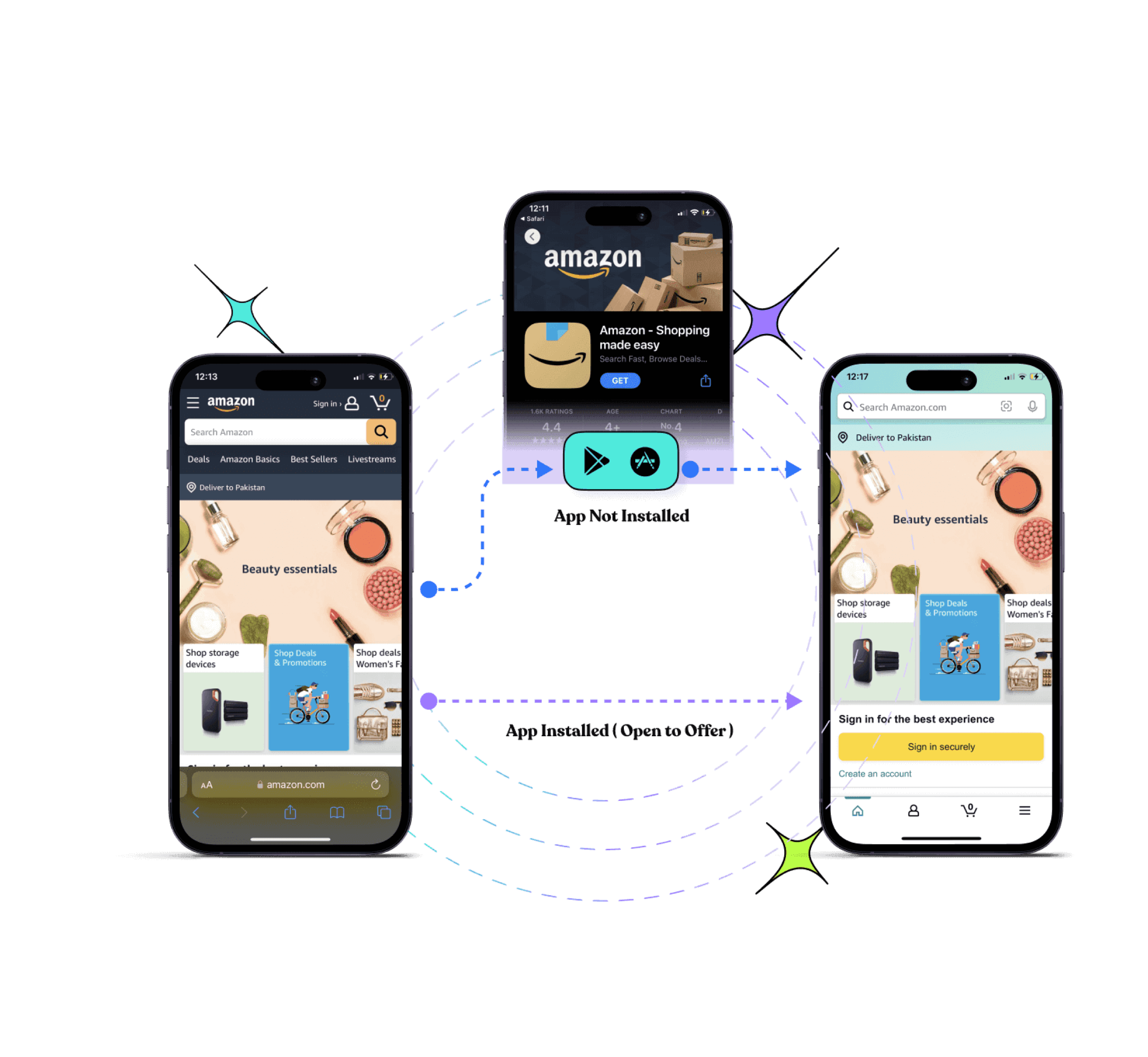
    • Deferred deep links: These links work even if the app is not installed at the time the link is clicked. The user is directed to the app store to download the app, and once installed, they are taken to the intended content.
    • Regular deep links: These links only work if the app is already installed on the user’s device. If the app is not installed, the link usually fails.
    Replug Branded Short Links CTA
    Drive more clicks, conversions, and app installations by deep linking
    to your favorite platforms.
    Try deep links for free

    Why are Facebook deep links important?

    Enhanced user experience 

    Facebook deep links streamline the user journey by taking users directly to specific content within an app or website, reducing steps and creating a smoother, more efficient experience.

    Improved engagement

    By guiding users straight to relevant content from Facebook ads, posts, or messages, deep links can significantly boost engagement rates. Users are more likely to interact with content that is immediately accessible and relevant to their interests.

    Higher conversion rates

    Deep links in Facebook marketing campaigns can drive conversions by directing users to specific product pages or offers, increasing the likelihood of a purchase.

    Personalized user journeys 

    Deep links enable personalized marketing on Facebook by directing users to content tailored to their preferences and past behavior, enhancing satisfaction and loyalty.

    Efficient onboarding

    For new users, Facebook deep links can simplify the onboarding process by taking them directly to the relevant section of an app after installation. This is particularly effective with deferred deep links, which function even if the app isn’t installed at the time the link is clicked.

    Cross-platform consistency 

    Facebook deep links ensure a consistent user experience across different platforms and devices, directing users to the same specific content within an app or website whether they are on desktop or mobile.

    Data and analytics

    Facebook deep links provide valuable data and insights into user behavior and preferences. Tracking how users interact with deep links helps businesses optimize their content and marketing strategies.

    Also read: How to Create an Instagram Deep Link: Step-by-Step Guide

    Applications of Facebook deep links

    • Marketing campaigns: Enhance the effectiveness of Facebook ads, posts, and messages by directing users to targeted content.
    • User retargeting: Use deep links in Facebook retargeting ads to bring users back to specific content they previously interacted with.
    • Content sharing: Allow users to share specific app content through Facebook, improving content discoverability and virality.
    • Customer support: Direct users from Facebook to specific support articles or app sections to quickly resolve issues.
    Replug Branded Short Links CTA
    Drive more clicks, conversions, and app installations by deep linking
    to your favorite platforms.
    Try deep links for free

    Also read: What are app deep links? Here’s why marketers love them!

    How to create a Facebook deep link using Replug?

    Replug.io is a powerful tool for creating deep links that enhance user engagement by directing them to specific pages, sections, or content within a website or mobile application. Follow the step-by-step process below:

    Step 1: Sign in or sign up for Replug

    If you don’t already have a Replug account, visit the Replug app and sign up for a free account.

    deep-link-generator

    Step 2: Navigate to deep links

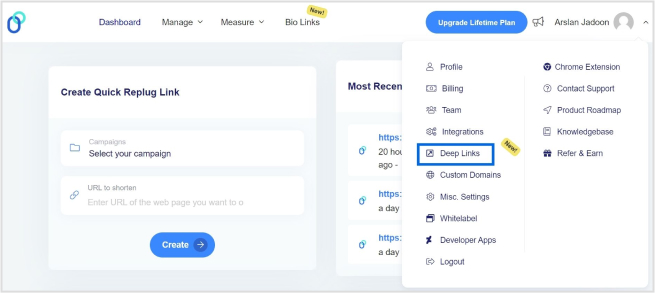
    Once logged in, go to your Replug dashboard. Locate the “drop-down icon” in the top right corner and select “Deep Links”.

    facebook-deep-link

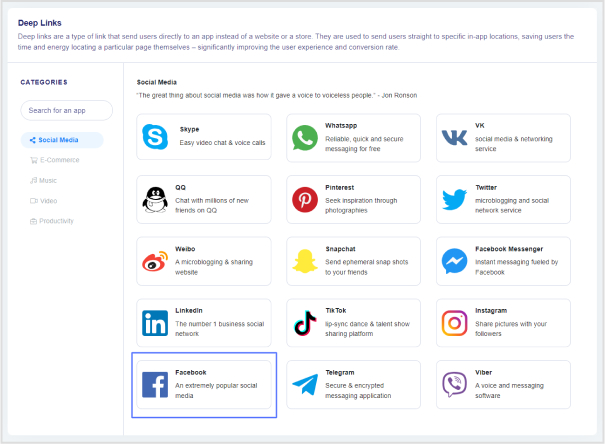
    Step 3: Select the social media category

    Select “Facebook” as the platform for your deep link.

    facebook-deep-link

    Step 5: Generate the deep link

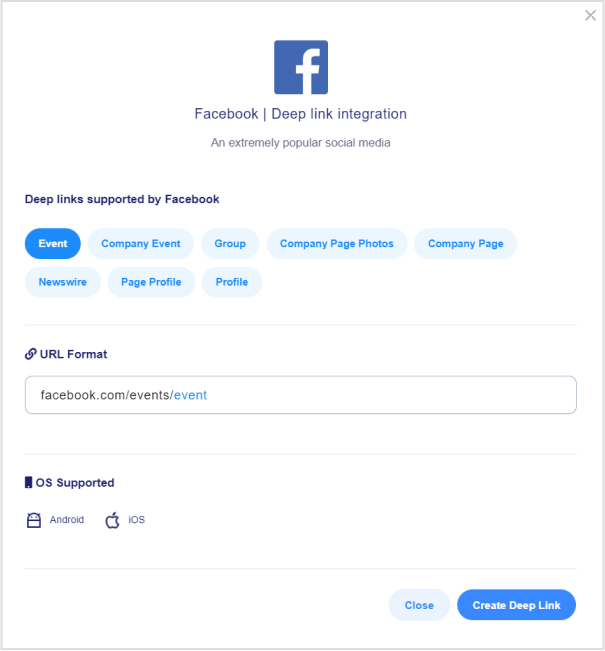
    Choose the type of Instagram link you want to create. Options include:

    • Event
    • Company event
    • Group
    • Company page photos
    • Company page
    • Newswire
    • Page profile
    • Profile
    facebook-deep-link

    Click “Create Deep Link” to generate your link.

    Also read: How to share Videos using Deep Links?

    Step 6: Customize the deep link URL

    Select the campaign you want to associate with this deep link and customize the deep link URL to make it more user-friendly or branded.

    facebook-deep-link

    Step 7: Enable deep links

    Toggle the switch to enable Deep Links. An indicator will confirm if the destination URL can be used as a deep link.

    facebook-deep-link

    Step 8: Save the deep link

    Click the “Save Link” button to save your deep link with the deep linking feature enabled.

    Step 9: Implement in Facebook ads or posts

    When setting up your ad or post on Facebook, use the Replug-generated deep link URL in the destination URL field.

    Step 10: Track performance 

    Use Replug’s analytics dashboard to monitor the performance of your deep links. Analyze click-through rates, user engagement, and conversion metrics to optimize your campaigns.

    facebook-deep-link-tracking

    Why use Replug for Facebook deep links?

    Replug is a versatile deep link generator tool that allows you to create branded short links, add retargeting pixels, and track link performance. Using Replug for your Facebook deep links provides several advantages:

    1. Ease of use: Replug’s intuitive interface makes it easy to create and manage deep links without needing advanced technical skills.
    2. Custom branding: Create branded short links with Replug’s top-notch Facebook link shortener to improve click-through rates and build trust with your audience.
    3. Comprehensive analytics: Track the performance of your links with detailed analytics, helping you to optimize your marketing strategies.
    4. Retargeting capabilities: Add retargeting pixels to your links to capture and retarget users across different platforms.
    Replug Branded Short Links CTA
    Drive more clicks, conversions, and app installations by deep linking
    to your favorite platforms.
    Try deep links for free

    Conclusion

    Using Replug for creating Facebook deep links simplifies the process and enhances your marketing efforts. Following the steps outlined in this guide, you can efficiently create and manage deep links that direct users to specific content within your app or website. 

    Replug’s features, such as branded short links, comprehensive analytics, and retargeting capabilities, provide you with the tools needed to maximize the effectiveness of your Facebook marketing campaigns. Ensure thorough testing and continuous optimization to achieve the best results.

    FAQs

    What are Facebook deep links?

    Facebook deep links are URLs that direct users to specific content within a mobile app or website from Facebook ads, posts, or messages, enhancing the user experience by minimizing the steps needed to reach the desired content.

    Are Facebook deep links compatible with both iOS and Android?

    Yes, Facebook deep links are compatible with both iOS and Android. Ensure you configure URL schemes for iOS and intent filters for Android, and include the necessary App Links metadata.

    What data can I track with Facebook deep links?

    If you create Facebook deep links through Replug, you will be able to track click-through rates, user engagement, conversion rates, and other valuable marketing metrics.

  • TikTok UTM builder: How to create UTMs for TikTok ads?

    TikTok UTM builder: How to create UTMs for TikTok ads?

    TikTok’s skyrocketing popularity has opened up exciting new opportunities for businesses to reach fresh audiences and measure the success of their campaigns. One of the best ways to track your marketing efforts on TikTok is by using UTM tags.

    But let’s be honest—creating UTMs isn’t always straightforward. Many people end up using clunky methods like Google Sheets to manage their UTMs. That’s where we come in. At Replug, we designed a free UTM builder to simplify the process and help you get the most out of your TikTok ads.

    In this guide, we’ll show you how to create UTMs for TikTok ads effortlessly. By the end, you’ll be able to track your campaigns with precision and make data-driven decisions to boost your marketing success.

    What are UTM parameters?

    UTM parameters, also known as UTM tags or UTM codes, are snippets of text appended to a URL to track the source, medium, campaign, term, and content of a marketing link. These parameters help marketers understand where their website traffic is coming from and how users interact with their marketing campaigns.

    Here’s a breakdown of the five UTM parameters:

    • Source (utm_source): This parameter identifies the specific source of the traffic, such as the platform or website where the link was clicked. For example, if you’re running ads on TikTok, the source would be “tiktok”.
    • Medium (utm_medium): The medium parameter describes the marketing medium or type of traffic, such as email, social, or CPC (cost-per-click) advertising. For TikTok ads, the medium could be “cpc” (cost-per-click).
    • Campaign (utm_campaign): This parameter specifies the name of the marketing campaign associated with the link. It helps differentiate between different campaigns running simultaneously. For example, if you’re running a summer sale campaign on TikTok, the campaign name could be “summer_sale”.
    • Term (utm_term): This parameter is typically used for paid search campaigns to identify the keywords associated with the ad. However, for TikTok ads, it may not be as relevant unless you’re running keyword-targeted campaigns.
    • Content (utm_content): The content parameter allows you to differentiate between different elements within the same campaign. For example, if you’re testing two different ad creatives for your TikTok summer sale campaign, you could use “video_ad1” and “video_ad2” as content identifiers.
    Why should you use UTM tags on TikTok?

    Using UTM tags on TikTok offers several important benefits for marketers:

    Track campaign performance: 

    UTM tags enable you to track the effectiveness of your TikTok campaigns accurately. By appending UTMs to your ad URLs, you can monitor metrics such as clicks, conversions, and engagement specific to each campaign, source, and medium.

    Identify traffic sources: 

    With UTM tags, you can pinpoint the exact sources driving traffic to your website from TikTok. Whether it’s from organic posts, paid ads, or influencer collaborations, UTMs help you understand which channels are delivering the most value.

    Measure ROI: 

    By tracking the performance of your TikTok campaigns using UTMs, you can calculate the return on investment (ROI) more precisely. This data allows you to assess the cost-effectiveness of your marketing efforts and allocate your budget more effectively in the future.

    Optimize campaigns: 

    UTM-tagged URLs provide valuable insights into user behavior and preferences. By analyzing UTM data, you can identify trends, determine which content resonates best with your audience, and optimize your TikTok campaigns for better results.

    Enhance reporting: 

    UTM parameters make it easier to generate detailed reports on your TikTok marketing activities. Whether you’re reporting to clients, stakeholders, or your team, UTMs provide clear and granular data that can support your analysis and decision-making.

    Facilitate A/B testing: 

    UTMs allow you to conduct A/B tests effectively by tracking different variations of your TikTok ads or content. By comparing the performance of URLs with different UTM parameters, you can identify which strategies yield the highest conversion rates and refine your approach accordingly.

    How to create UTMs for TikTok ads using Replug?

    Replug is a top-notch link management platform that allows you to create and manage custom short links with UTM parameters for tracking purposes. Here’s a step-by-step guide to creating UTMs for TikTok ads using this one of a kind short URL generator free.

    Step 1: Sign in to Replug

    Visit the Replug app and sign in to your account. If you don’t have an account, you can sign up for free.

    url-shortener

    Step 2:  Enter campaign and URL details

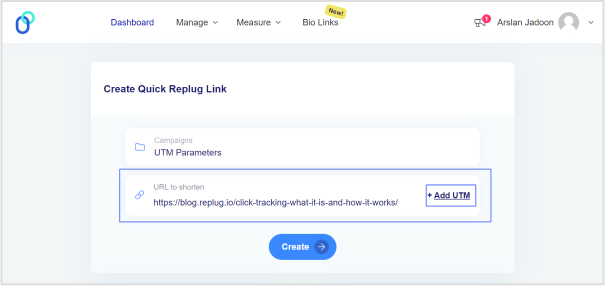
    Once logged in, simply choose a campaign on your dashboard (create a new campaign if you’re a new user) and enter the TikTok campaign URL in the “URL to shorten” field. 

    tiktok-utm-builder

    Step 3: Configure UTM parameters

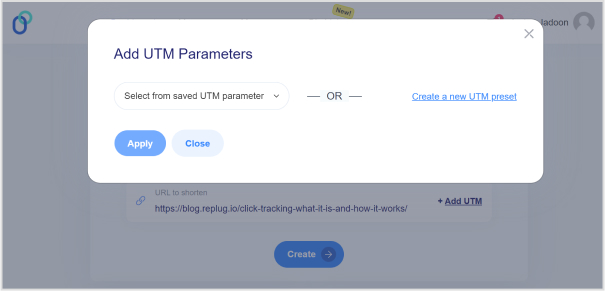
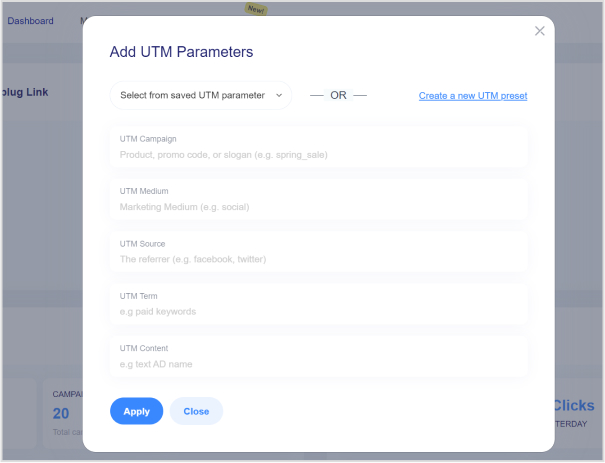
    In the campaign creation process, you’ll have the option to add UTM parameters to your links. Specify the UTM parameters according to your campaign requirements. This typically includes parameters like source, medium, campaign, term, and content.

    tiktok-utm-builder

    Note: For TikTok ads, ensure that you set the source as “tiktok” and the medium as “cpc” (cost-per-click), or any other relevant medium depending on your campaign goals.

    tiktok-utm-builder

    Step 4: Generate short link

    After configuring the UTM parameters, click the “Create” button and proceed to generate a short link for your TikTok ad. Replug will automatically create a shortened URL with the specified UTM parameters appended to it.

    Step 5: Customize the URL slug

    Replug allows you to customize the shortened URL. You can choose a unique identifier or keyword to make the link more memorable or reflect your content.

    customize-shortened-link

    Step 6: Use shortened URL in the TikTok ad

    Copy the shortened URL generated by Replug. Paste this URL as the destination URL in your TikTok ad setup when creating or editing your ad campaign.
    Step 7: Track performance

    Once your TikTok ad campaign is live, Replug will track the performance of the shortened URL with UTMs. You view analytics and track metrics such as clicks, conversions, and engagement for your TikTok ad campaign.
    Note: Remember to analyze the data provided by Replug to optimize your TikTok ad strategy and maximize your marketing efforts. Happy tracking!

    Final Note

    UTM tags are invaluable tools for marketers looking to optimize their TikTok ad campaigns and maximize their ROI. By leveraging Replug’s UTM builder, you can easily create custom short links with UTMs, track the performance of your campaigns, and make data-driven decisions to achieve your marketing objectives.

    FAQs

    Is the TikTok UTM Builder compatible with all types of TikTok ad campaigns?

    Yes, the TikTok UTM Builder is compatible with all TikTok ad campaigns, including video ads, sponsored hashtag challenges, branded effects, and influencer partnerships.

    How do I track the performance of my TikTok ad campaigns with UTMs?

    Replug automatically tracks the performance of the shortened URLs with UTMs. You can log in to your Replug account to access analytics and track metrics like clicks, conversions, and engagement for your TikTok ad campaigns.

    Does Replug provide real-time analytics for TikTok ad campaigns?

    Yes, Replug offers real-time analytics, allowing you to monitor the performance of your TikTok ad campaigns as they unfold. You can track clicks, conversions, and other engagement metrics in real-time to make timely adjustments and optimizations.

  • Conversion tracking: Best tools, tips, and tricks

    Conversion tracking: Best tools, tips, and tricks

    What good is all the effort you put into creating engaging content and driving traffic to your website if it doesn’t result in meaningful actions?

    Therefore, having a powerful tool at your disposal can help you not only boost your conversion rates but also understand exactly how and why your audience is taking action.

    And if you’re not using those advanced conversion tracking tools or not following the smart tips you’re probably missing out on a lot of revenue.

    That’s why we are here with a quick guide just for you guys. So you can get your hands on some of the top-notch conversion tracking tools, tips, and much more… 

    Conversion tracking tools at a glance

    ToolDescriptionPricing
    Branded link management & analytics
    ReplugAll in one branded link management solution, from custom short links to conversion tracking to link retargeting to A/B testing and more.Pricing starts from $19 / month
    LinklyLinkly simplifies link tracking, allowing users to monitor click activity on specific links. Utilize your own domain to generate custom branded short-links and promote your business with every click, making it an ideal tool for conversion tracking and marketing.Pricing starts from $29 / month
    SniplySniply is a powerful marketing tool that allows users to add custom CTAs to any link they share. With Sniply, you can drive traffic back to your own website or landing pages.Pricing plan of Sniply starts from $9 / month
    Website & product analytics
    UsermavenBest for detailed link analytics and capture UTM parameters, setting up conversion goals, analyzing user journeys, UTM attributions etc. It gives you 100% data ownership, ensuring full control over your analytics data.Pricing plan starts from $14 / month
    MixpanelMixpanel provides powerful conversion tracking tools for businesses, enabling better decision-making and growth monitoring. With Mixpanel, you can track user engagement and compare current trends to past performance, helping you optimize conversions and drive business success.Pricing starts from $20 / month
    KissmetricsKissmetrics provides powerful conversion tracking tools for businesses. With its advanced analytics platform, businesses can track customer behavior across their websites and campaigns, allowing for targeted optimization and increased conversions.Pricing starts from $25.99 / month
    MatomoMatomo is a comprehensive conversion tracking tool that offers detailed insights into user behavior and website performance.Pricing starts from 22EUR / month
    Social media analytics
    ContentStudioMonitor and analyze performance of your social media channels with multi-channel social analysis.Pricing starts at $25 /month
    SprinklrSprinklr offers advanced conversion tracking featuires to optimize your social media presence. Monitor and enhance performance across platforms for improved engagement and increased conversions.Pricing starts at $249 per seat / month

    Let’s get going. So if you’re new and don’t know

    What is conversion tracking?

    Conversion tracking is the process of monitoring specific actions users take on your website, app, or elsewhere, signifying that they’ve interacted with your brand in a way that’s valuable to your business.

    But conversions go beyond just sales. They bring in a variety of valuable actions, such as:

    • Purchases (of course!)
    • Email signups
    • Phone call initiates
    • Live chat engagements
    • Social media engagements
    • Form submissions (e.g., contact forms, download requests)
    • App downloads (if you have an app)
    • And much more…

    Importance of conversion tracking

    By tracking conversions, you gain valuable insights into how well your marketing campaigns are performing and where you can optimize for better results.

    Today, conversion tracking is not just a luxury but a necessity for any business looking to thrive in the competitive online landscape.

    According to a study, conversion rate is the 4th most important metric for marketers. These numbers highlight the pivotal role that conversion tracking plays in modern marketing strategies. It’s not just about tracking sales; it’s about understanding customer behavior, optimizing campaigns, and maximizing ROI.

    What are the benefits of conversion tracking?

    url-tracking- analytics

    When you start keeping track of your conversions, you open up a world of benefits. Here are some of the best ones:

    1. Improved return on investment (ROI) – By understanding what’s working and what’s not, you can allocate your resources more effectively and maximize your return on investment (ROI).
    2. Making smarter choices with data – Conversion tracking provides you with valuable data that you can use to make data-driven decisions about your marketing strategy. This data can help you identify trends, understand your target audience better, and create more effective marketing campaigns.
    3. Fine-tuning your website and landing pages – Identify areas on your website or landing pages that are hindering conversions.
    4. List out top content – You can use conversion tracking data to see which pieces of content are most effective at driving conversions. This information can be used to create more content that is likely to convert visitors into leads or customers.
    5. Seeing which campaigns do the most – See which campaigns (paid ads, social media posts, email marketing) are driving the most conversions, allowing you to focus your budget and efforts on the most successful ones.
    6. Gain customer insights – Conversion tracking data can reveal valuable insights into your customer behavior, helping you tailor your marketing messages and offerings to better meet their needs.
    7. Smarter budget allocation – With conversion data in hand, you can allocate your marketing budget more effectively. You can invest more in the channels that are driving the most conversions and less in the channels that are not performing well.

    Best conversion tracking tools

    1. Replug

    Replug Branded Short Links CTA
    A complete link management solution
    for marketing professionals & agencies.
    Try Replug for free

    Replug is a complete link management platform that allows brands to track a multitude of URL parameters such as clicks, conversions, and unique visitors to make informed decisions on doubling down on profitable streams.

    With this conversion rate optimization tool, you can set goals for your campaigns to track and analyze how many conversions you have achieved for certain campaigns. Examine traffic parameters such as device type, browser, country, and IP to create targeted campaigns.

    Real-time Analytics

    In easier words, Replug’s click analytics help you track where users click on your website or within links you’ve shortened. This provides insights into user behavior, such as which buttons or CTAs (calls to action) are most effective and where users navigate after clicking a link.

    Pricing starts from $19 / month

    2. Linkly

    Linkly conversion analytics tool

    Linkly is another link management tool for marketers, as the platform provides shortened and branded links. With features like A/B testing and retargeting, it also helps one to optimize link performance. Besides that Linkly does help in conversion tracking. It provides insights into how many clicks on your links lead to desired actions, such as purchases or sign-ups. Depending on your needs, Linkly’s pricing might not be the most competitive. It’s always best to compare pricing plans of different tools before making a decision.

    Pricing starts from $29 / month

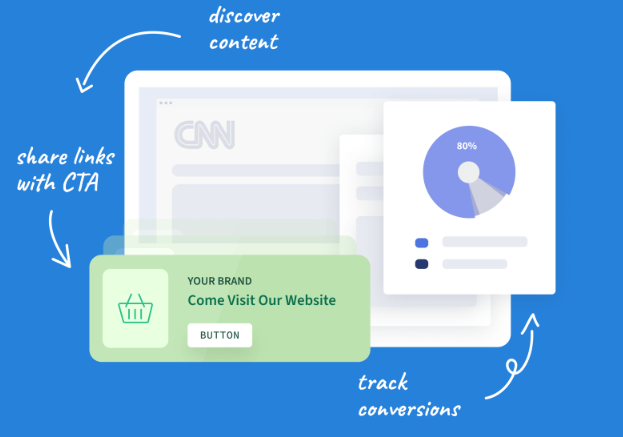
    3. Sniply

    Sniply stands out for its unparalleled ability to track and analyze user behavior, empowering marketers to refine their content curation strategies based on genuine audience engagement.

    Sniply conversion tracking

    While monitoring click-through rates on your call-to-action (CTA) provides valuable insights into the effectiveness of your content curation efforts, Sniply goes further.

    Sniply CTA conversion tracking tool

    It’s essential to recognize that while Sniply offers robust analytics features, its primary function remains centered around content marketing and enhancing engagement through strategically placed CTAs.

    Pricing plan of Sniply starts from $9 / month

    4. Usermaven

    An affordable yet advanced alternative to Google Analytics. It automatically captures most user actions on your website or app without any developer dependency. 

    Some of the key metrics you will see on the web analytics dashboard include total visitors, page views, covered events, bounce rate, scroll depth, time spent on the page, top traffic channels/sources, devices, locations, and top-performing keywords, etc.

    Besides that with the multi-touch attribution feature, one can even capture UTM parameters (tags used to track campaign performance) and backfill data even if a user signs up later.

    Or segment users based on various criteria like demographics or behavior. This lets you analyze conversion rates for specific user groups. You can also visualize conversion funnels to pinpoint drop-off points where users abandon the conversion process. 

    Pricing plan starts from $14 / month

    5. Mixpanel

    Now let’s get back to our traditional analytics tools. Just like Usermaven, this powerful analytics platform allows you to track user behavior across platforms and devices. 

    conversion analytics tool

    Mixpanel excels at creating custom funnels and reports, enabling you to analyze the entire conversion journey and identify bottlenecks. By understanding user behavior, you can identify areas for improvement and optimize your product or website to drive engagement and conversions. Other than that the platform offers clear visualizations and insightful reports, which allows you to make data-driven decisions to achieve your marketing goals.

    However, keep in mind that setting up and configuring Mixpanel can require some technical knowledge, especially for complex tracking needs. 

    Pricing starts from $20 / month

    6. Kissmetrics

    Another user behavior analytics platform with a focus on customer journey analysis, Kissmetrics helps you understand the “why” behind user actions. By analyzing user behavior patterns, you can identify drop-off points to personalize the experience and improve conversion rates. 

    conversion analytics tool

    However, there are some drawbacks to using kissmetrics as well. Take for example the platform lacks a free tier and has a starting price point that might be steep for small businesses or startups.

    Besides that when compared to some competitors, the conversion tracking platform platform might have fewer out-of-the-box integrations with other platforms. This might require additional development work for certain setups. 

    Pricing starts from $25.99 / month

    7. Matomo

    Matomo prioritizes privacy and data ownership. Unlike some analytics tools, it keeps your website visitor data on your own server, giving you complete control. You can customize what data is collected and avoid relying on third-party servers. 

    Matomo analytics

    However, this self-hosted approach requires some technical setup compared to hosted solutions. Additionally, the user interface might feel less intuitive for beginners, and some advanced features require paid plans. Despite these drawbacks, Matomo’s focus on privacy and data security makes it a strong choice for businesses prioritizing user data control.

    Pricing starts from 22EUR / month

    8. ContentStudio

    ContentStudio-Scheduling

    ContentStudio helps you manage your social media campaigns all in one place. This lets you see how different pieces of content are performing within a campaign, which can help you identify what types of content are most effective at bringing in conversions.

    social media analytics

    Overall, this all-in-one content marketing platform offers built-in conversion tracking functionalities. For example, you might create a campaign to promote a new product launch. By tracking the performance of different social media posts within that campaign in CS you can see which posts are generating the most interest and conversions.

    social analytics

    Pricing starts at $25 /month

    9. Sprinklr

    Sprinklr

    Sprinklr is a comprehensive social media management platform used by businesses worldwide. It offers tools for scheduling posts, engaging with audiences, and analyzing performance across various social media channels. Its advanced analytics provide valuable insights into audience behavior and campaign effectiveness, conversion tracking helping brands make data-driven decisions.

    Pricing starts at $249 per seat / month

    Best conversion tracking tool

    Our top pick as the best conversion tracking tool is a high-end analytics tool known as Usermaven.

    Brands can gain a deeper understanding of user behavior throughout the conversion funnel by utilizing Usermaven. 

    Key features of Usermaven

    • UTM campaign and event tracking
    • User journey insights
    • Advanced segmentation
    • AI assistant
    • Pixel white-label
    • Session recording 
    • Actionable insights
    • Activity heatmaps 
    • Data retention
    • Funnel analysis

    While if you require a tool that can do more than analytics then Replug should be your first choice.

    Key features of Replug

    • Link analytics 
    • Retargeting pixels 
    • A/B testing
    • Custom CTA
    • Trackable shortened links
    • Deep links 
    • Bio links

    Top tips for effective conversion tracking

    Replug Branded Short Links CTA
    A complete link management solution
    for marketing professionals & agencies.
    Try Replug for free
    • Define clear conversion goals: What actions do you want users to take on your website or app? Be specific and measurable.
    • Set up conversion tracking correctly: Ensure your tracking code is implemented accurately to capture all conversion data.
    • Track multiple conversion points: Don’t just focus on sales; track other valuable actions like sign-ups, downloads, or video views.
    • Segment your data: Analyze your conversion data by different segments (e.g., traffic source, device type) to gain deeper insights.
    • Regularly review and optimize: Monitor your conversion data and make adjustments to your marketing campaigns and website based on your findings.

    As we wrap up, it’s clear that conversion tracking isn’t just a trend—it’s a necessity for businesses aiming to thrive in the digital age. By utilizing the right tools and following smart tips, businesses can gain valuable insights, optimize their marketing efforts, and ultimately drive more revenue.

    FAQs about conversion tracking

    Why do I need conversion tracking?

    Conversion tracking shows how well your marketing efforts drive sales or desired actions (sign-ups, downloads). Optimize campaigns to get more results for your investment.

    How do you track customer conversion?

    Use website tags, and UTM codes, or track specific actions like purchases or form submissions to see how customers convert.

    What is the goal of conversion tracking?

    To understand which channels (social media, email) bring in the most valuable customers by tracking conversions.

    What is conversion rate tracking?

    Conversion rate tracking calculates the percentage of visitors who take a desired action (e.g., buy something).

    What is conversion tracking protocol?

    Conversion tracking protocols ensure consistent and accurate data collection across different platforms.

    How do you keep track of the conversion rate?

    Divide the number of conversions by total visitors and multiply by 100% to find your conversion rate.

    What is the recommended way to track conversions?

    Use conversion tracking tools like Replug for simplified setup, tracking, and analysis of your conversion data.

    What is the difference between a micro conversion and a macro conversion?

    Micro: Smaller actions like adding items to a cart.

    Macro: Bigger goals like completing a purchase or signing up for a service.

    Are tracking pixels illegal?

    Tracking pixels is not illegal, but respecting user privacy and getting consent for data collection is crucial.

    Who uses pixel tracking?

    Marketers or product owners use pixel tracking to understand ad performance and website visitor behavior.

    What is the difference between tracking pixels and cookies?

    Pixel: Tiny image that sends data when loaded, works even with cookie blocking.

    Cookie: Small data file stored on the user’s device, privacy concerns exist.

  • A step-by-step guide on Tiktok retargeting using Replug

    A step-by-step guide on Tiktok retargeting using Replug

    Follow our in-depth guide on TikTok retargeting using Replug. With easy-to-follow steps and expert insights, we’ll walk you through everything you need to know to reconnect with your audiences and convert more.

    Replug is an all-in-one branded link management platform that allows you to manage your link with powerful features such as branded link shortening, link retargeting, deep linking etc., backed up by powerful link analytics.

    It also offers an advanced URL shortener that helps you create branded, trackable links to boost engagement and measure performance effectively.

    Before we dive into the topic, lets know how TikTok retargeting work, and some key retargeting facts & figures that you must know.

    How does TikTok retargeting works?

    TikTok retargeting ads work by targeting users who have already interacted with your brand or website. These ads use pixel tracking to identify users who have visited your site or engaged with your content on TikTok.

    Once identified, TikTok displays ads specifically tailored to these users, increasing the likelihood of conversion by reminding them of your brand or products. This method maximizes ad relevance and improves overall campaign performance.

    You may also like: How LinkedIn retargeting works?

    Eye-opening retargeting statistics

    Retargeting facts & figures
    Retargeted ads increase conversions by 147%
    Businesses report a 10x increase in ROI with retargeting
    Retargeting reduces cart abandonment rates by 26%
    Retargeted ads have a CTR 10 times higher than regular display ads
    30% of consumers have a positive reaction to retargeted ads, leading to increased brand recall
    Retargeting can lead to a 38% increase in revenue for e-commerce businesses
    56% of marketers use retargeting to cross-sell to existing customers
    Mobile retargeting ads perform 13 times better than desktop retargeting
    The global retargeting market is expected to reach USD 4450.88 million by 2028, growing at a CAGR of 15.66%
    Replug Branded Short Links CTA
    A complete link management solution
    for marketing professionals & agencies.
    Try Replug for free

    Step by step guide to TikTok retargeting

    Let’s take a look at the key steps involved in the process:

    i. Log in to your Replug account

    First things first, sign up for a Replug account. It offers a 14-day free trial. Once signed up, log in to your Replug account to get started with your retargeting campaign.
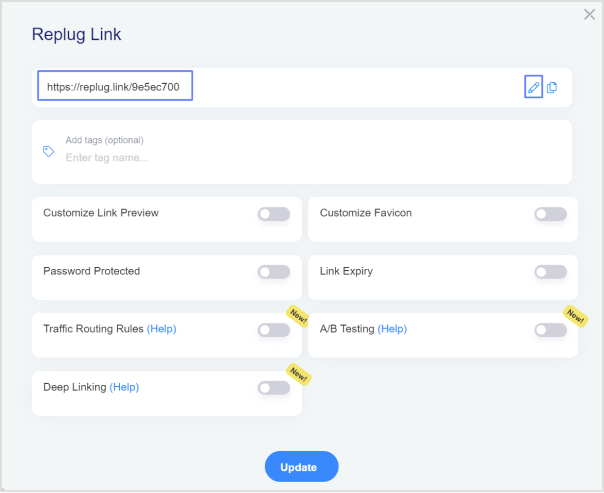
    Replug-log-in

    After the successful login, you’ll land on the Replug dashboard where you’ll see the menu with different options as well as account statistics.

    ii. Create a retargeting campaign

    campaigns-2

    Go to the Manage option from the top menu. Click on the Campaigns option from the drop-down menu.

    new campaign

    Now you’ll reach the Campaigns page. Click on the New Campaign option to create a new campaign for the retargeting project.

    You may also like: How LinkedIn Retargeting Ads Work – A Complete Guide

    iii. Choose the brand

    Before you create a new campaign, the next window about choosing the brand will appear. Choosing the brand is inevitable for creating a campaign in Replug.

    select-your-brand-1

    So, choose the right brand for the campaign or create a new one if you want to. Once you choose the brand, go ahead.

    iv. Select retargeting campaign type

    This is one of the important steps in the process because this is the part where you tell Replug to make this a retargeting campaign.
    Retargeting-Pixel-Replug-

    First of all, name your campaign, then choose the custom domain if you want to, and finally, select the campaign type. All you need to do is to select the Retargeting Pixel option. Just check the box in front of the retargeting pixel option.

    Click on the Next button to proceed.

    v. Add retargeting code

    In the last step, you will have to select the retargeting platform. To do so, click on the drop-down menu and go through the social media network names.

    Go to TikTok ads manager to setup TikTok retargeting

    add-retargeting-pixel

    You can choose the already existing TikTok retargeting code you created before, or else you can create a new retargeting pixel from the button below.

    If you want to create a different retargeting code, click on the button and choose the social media platform where you’d be retargeting the audience.

    If you opt to create a new retargeting pixel, you’ll have to choose the platform, such as Facebook, Quora, or LinkedIn. And, then you would have to give your pixel a unique name, and then finally add the pixel ID from the same social network.

    Save the campaign, and you’re all set.

    TikTok retargeting best practices and important tips

    For effective TikTok retargeting, consider these best practices and tips:

    1. Pixel installation: Ensure proper installation of the TikTok pixel on your website to track user activity accurately.
    2. Define goals: Clearly define your retargeting goals, whether it’s driving conversions, increasing engagement, or building brand awareness.
    3. Segment audiences: Segment your audience based on their interactions with your website or app to create tailored retargeting campaigns.
    4. Personalization: Personalize your retargeting ads to resonate with your audience and encourage them to take action.
    5. Frequency capping: Set frequency caps to avoid overwhelming users with too many retargeting ads, which can lead to ad fatigue.
    6. A/B testing: Test different ad creatives, messaging, and targeting strategies to optimize performance and identify what resonates best with your audience.
    7. Optimize landing pages: Ensure your landing pages are optimized for conversions to maximize the effectiveness of your retargeting campaigns.
    8. Monitor & adjust: Regularly monitor the performance of your retargeting campaigns and make adjustments based on data insights to improve results over time.

    You may also like: Winning retargeting strategies, factors, KPIs & more

    FAQs on TikTok retargeting

    Does TikTok have retargeting?

    Yes, TikTok offers retargeting capabilities through pixel tracking, allowing advertisers to target users who have previously interacted with their brand or website.

    What type of advertising does TikTok use?

    TikTok supports various types of advertising formats, including in-feed ads, branded effects, hashtag challenges, and branded lenses, providing advertisers with diverse options to engage with users creatively.

    Why is my TikTok CPM so high?

    High TikTok CPM (Cost Per Mille) can be attributed to factors such as high demand for ad inventory, competition among advertisers, audience targeting specificity, and the quality of ad creative and messaging.

    How are TikTok ads curated?

    TikTok ads are curated based on the advertiser’s targeting preferences and campaign objectives, utilizing data insights and algorithms to deliver relevant and engaging content to users based on their interests and behaviors.

  • Social media retargeting: What is it & how it works?

    Social media retargeting: What is it & how it works?

    It’s no surprise that brands and influencers are eager to find new ways to get eyeballs, grasp attention, and talk to people regardless of the platform.

    There are a ton of channels of communication these days, such as social media, newsletters, online ads, TV commercials, billboards, and more.

    Social media is a powerful avenue to build awareness, spread the word, and market a product. Statistics report that Facebook has above 3 billion monthly active users, while YouTube has over 2.4 billion, monthly active users – no wonder brands and agencies are trying to dominate social media.

    One of the aspects of reaching out to prospects and connecting with the relevant audience is to use the retargeting technique through social media platforms.

    Let’s dive deep into what retargeting is and how one can use social media platforms to do retargeting.

    What is social media retargeting and its importance in the digital world?

    Retargeting is a marketing strategy to remarket a product to the same audience that has previously shown some interest in it.

    Have you ever had a chance to see the display ads about the website you visited the other day? It happens to all of us and some of us wonder how this happens – well, now you have the answer.

    Social media retargeting is just the same retargeting concept applied to social media networks. Advertisers try to meet, engage, and convert the same visitors who visited them before using social media retargeting campaigns.

    Advertisers use retargeting ads on Facebook, Quora, YouTube, and other major social media ad platforms.

    Here are the three reasons why it’s important in the digital world:

    i. Global reach: Since these social media platforms allow marketers and brands to reach a global audience, social media retargeting has essentially become an important digital marketing tool to remarket a product or service worldwide.

    ii. Effective targeting: One of the reasons why social media retargeting is crucial to any digital marketing campaign is that it’s quite effective when it comes to targeting the prospective audience. The ad campaigns without clear targeting are hit-and-miss.

    iii. Faster results: Retargeting is essentially remarketing to the audience that has shown some interest in the product before. So, it’s a type of advertising campaign that usually brings quicker outcomes as compared to normal advertising campaigns.

    It’s safe to say that social media retargeting is inevitable in today’s digital marketing realm where billions of users log in to multiple social media platforms daily to chit chat, get updates, and connect with loved ones.

    How social media retargeting works?

    Since everyone uses at least one major social media platform like Facebook, YouTube, or Instagram, it gets easier for brands to reconnect with prospective clients through social media retargeting.

    Here’s how social media retargeting works:

    Retargeting-Pixels

    Social media networks provide a piece of code called “pixel” that goes into your website or landing page code that collects data about the user’s behaviors, actions, and performance. Usually, the social media platform guides users on how to insert the pixel code and where to insert it in the website code.

    It’s a very effective code for social media platforms to track user actions on the website and helps advertisers retarget those same users on the social media network.

    However, it doesn’t collect any sensitive information or user data, such as credit card numbers or passwords. The only purpose of adding a pixel of a social media network is to help the advertiser/brand retarget the audience through a social media retargeting ad campaign.
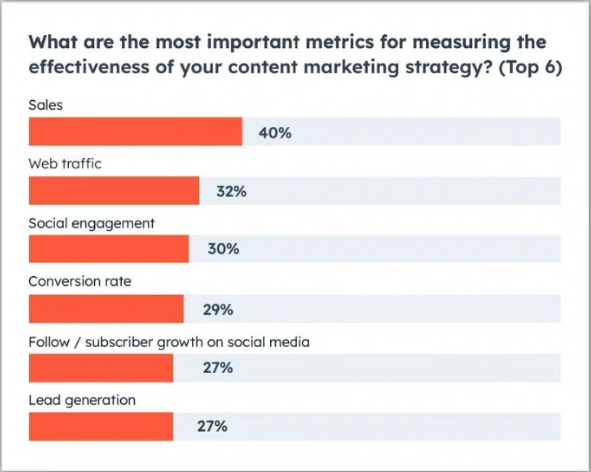
    Best tool for retargeting on social media platforms

    Retargeting on social media with Replug

    Replug Branded Short Links CTA
    A complete link management solution
    for marketing professionals & agencies.
    Try Replug for free

    Replug is an excellent link optimization platform that offers several link management services, such as URL shortening, deep links, bio links, retargeting, A/B testing, and QR codes.

    When it comes to retargeting on social media, Replug can come in handy. It helps users retarget their audiences across different social media networks, such as Facebook, Twitter, LinkedIn, Pinterest, TikTok, Quora, and Google. Besides, it also has a custom option for using a customized pixel.

    Social media retargeting benefits with Replug

    Link-Management

    Social media retargeting offers several benefits for businesses looking to maximize their marketing efforts. While, Replug enhances the benefits of social media retargeting by providing robust tools and features to reach target audiences, drive conversions, and maximize marketing effectiveness.

    1. Increased conversion rates:

    Replug’s retargeting capabilities enable businesses to reconnect with users who have engaged with their shared links. By targeting these already interested users, businesses can boost conversion rates effectively.

    2. Enhanced brand recall:

    Reinforces brand awareness and recognition among potential customers with retargeting. This increases the likelihood of users remembering the brand when they are ready to make a purchase decision.

    3. Personalized advertising:

    Empower businesses to deliver personalized ads to users based on their previous link interactions. This personalized approach enhances engagement and conversion rates by catering to users’ specific interests and behaviors.

    4. Cost-effective marketing:

    Replug’s retargeting options optimize advertising spending by targeting users who are more likely to convert. This results in higher ROI and more efficient allocation of marketing budgets.

    5. Reduced cart abandonment:

    Many users abandon their carts before completing a purchase. Running retargeting campaigns with Replug can remind these users about the products they showed interest in, encouraging them to return to complete their purchase.

    6. Cross-selling and up-selling opportunities:

    Running retargeting campaigns can also be used to promote related or complementary products to users based on their previous purchases or browsing history. This presents opportunities to increase the average order value and maximize revenue.

    7. Improved customer engagement:

    By delivering relevant and timely ads, businesses can keep their brand top-of-mind and engage users throughout their customer journey. This ongoing interaction fosters stronger relationships with customers and encourages repeat purchases.

    8. Measurable results:

    Replug provides comprehensive analytics and tracking capabilities, allowing businesses to monitor the performance of their retargeting campaigns in real-time. This data-driven approach enables businesses to optimize their campaigns for better results.

    Top 3 social media retargeting strategies

    Retargeting

    It’s always best to know the top priorities when it comes to the application of a marketing tactic. Here are the three social media retargeting strategies every marketer should know:

    1. Target a specific audience

    Creating an ad campaign tailored toward a specific audience is always better than shooting in the dark. One of the essential retargeting strategies a marketer can apply is to handpick a segment of the audience and serve them specific ads with a goal in mind.

    Since retargeting does ensure that the ad shows to the specific audience, the offer must also be inclined toward the desire of the target audience.

    For instance, if you’re retargeting the audience that has clicked on your accounting software page, you can create a limited-time discount offer on the very software for the specific audience to make a purchase. Now you can create a landing page for the offer and retarget the same audience to showcase the offer.

    2. Retarget on multiple social media platforms

    One of the easy wins when it comes to social media retargeting is that one should remarket across different social media platforms. If you’re using multiple social media platforms to share your content, interact with your followers, and build a community, then you must retarget the audience on all those platforms.

    If you settle for just one social media platform like Facebook even when you have a decent number of followers on LinkedIn and Instagram, then you’d probably be missing out on a lot of sales and marketing opportunities.

    3. Track campaign performance

    Tracking is crucial to understanding user behavior, audience demographics, ad creative quality, and audience buying power. A reliable tracking system would enable advertisers to improve their campaigns going forward.

    There can be different types of campaign tracking, such as URL tracking, heatmaps, conversion, etc – so, it’s up to the brand/advertiser that is launching the retargeting campaign.
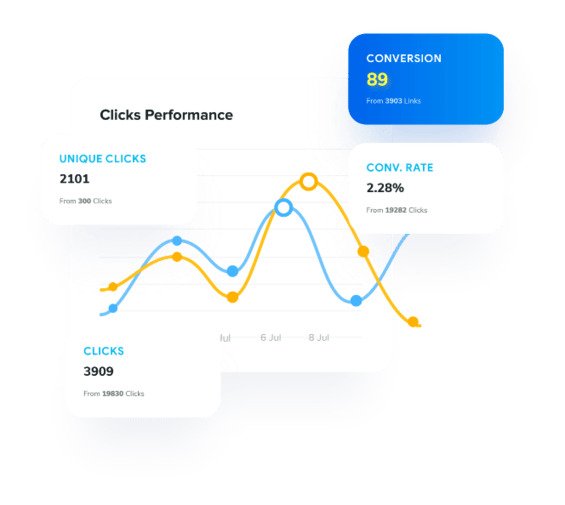
    For instance, if you’re tracking URL clickability, then you can use Replug to set up a branded short URL retargeting campaign using the method mentioned earlier in this article. The analytics section will keep you updated with all the statistics on the URLs in your retargeting campaign.
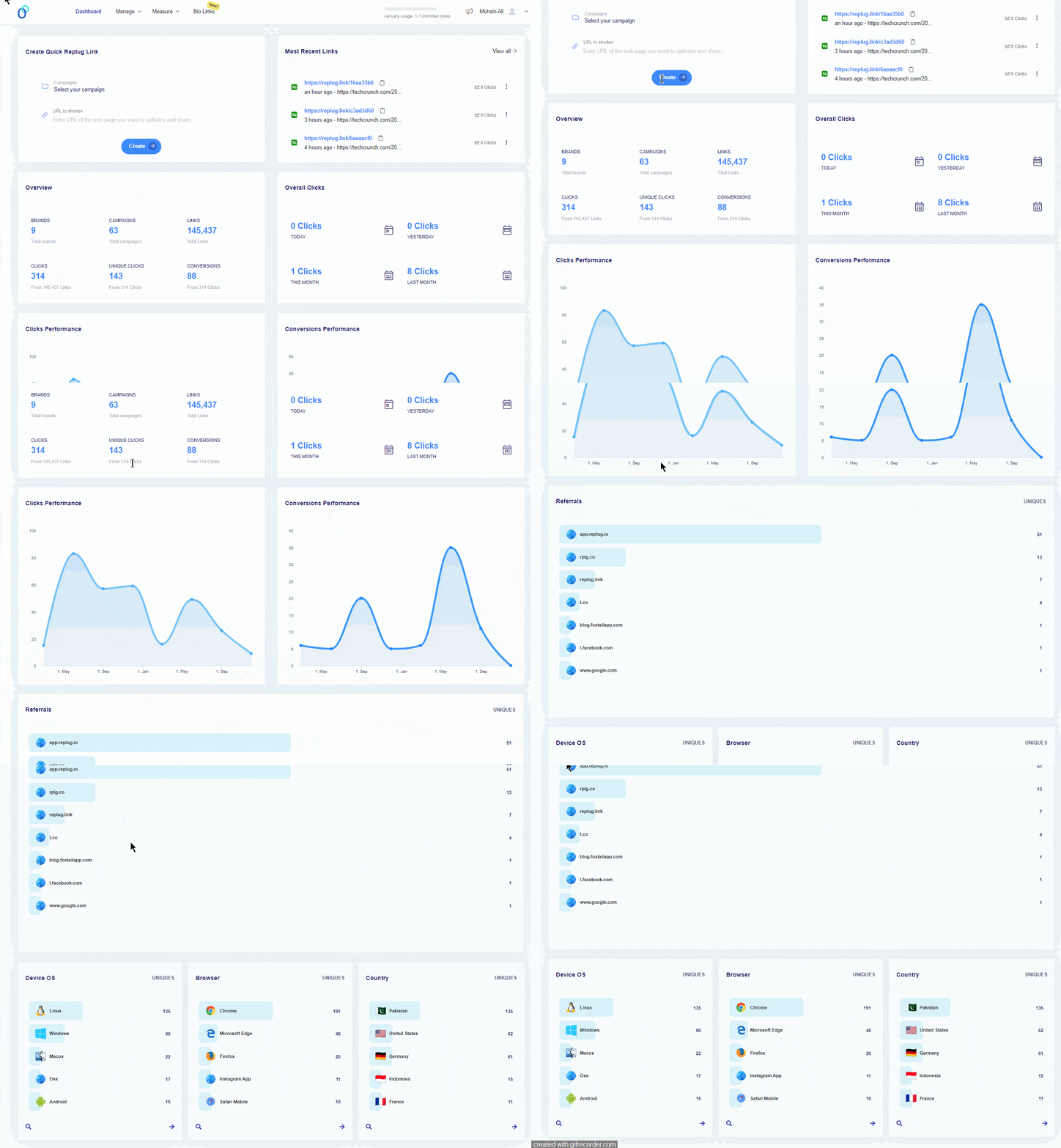
    Remember that there is a whole heap of other retargeting strategies that can be implemented when running a social media retargeting campaign. However, the above-mentioned ones are the most fundamental yet meaningful.
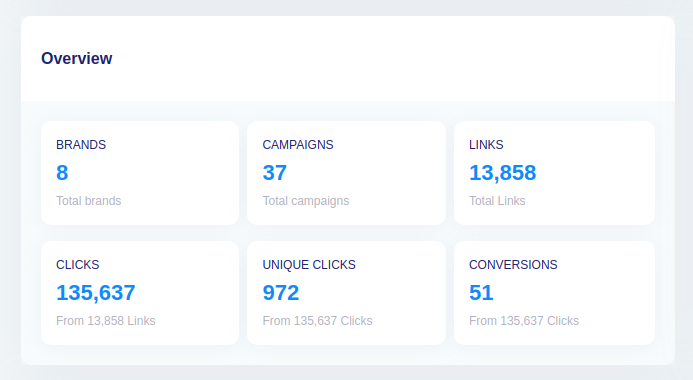
    Social media retargeting examples

    Let’s take a look at a couple of social media retargeting examples that we came across:

    1. OrangeHost is retargeting visitors on Instagram

    OrangeHost is one of the most affordable web hosting services on the market. This hosting company uses a retargeting marketing strategy.

    Orange host

    When a visitor lands on their website to go through the web hosting plans, the chances are that this person is going to see this Instagram ad at some point.

    Orange host- Instagram Retargeting

    It’s a retargeting Instagram ad of OrangeHost – trying to convert their website visitors into paying customers.

    Interesting, right?

    2. Envato Elements is remarketing the audience on YouTube

    Envato Elements is a creative marketplace that provides designers and creators with stock videos, photos, elements, icons, and much more.

    Envato -Remarketing

    They also send out email newsletters to the members and affiliates. After opening one of their recent email newsletters, we now see their ads on YouTube.

    Envato elements- social media  retargeting

    It seems like there is a retargeting campaigns is in place.

    Social media retargeting: Success stories

    Here are the few social media retargeting success stories worth mentioning:

    1. Vedia works with Criteo to increase sales

    Vedia has successfully implemented a social media retargeting strategy by utilizing Criteo’s programmatic technology to expand its customer base on Facebook, resulting in a 15% increase in overall sales across various campaigns.

    By leveraging Criteo’s extensive network of publishing partners and integrating with Facebook, Vedia gained insights into buyers’ entire journey, spanning from discovery to purchase.

    It’s been learned that it not only widened Vedia’s reach along the purchase path but also reduced campaign cost per order (CPO) by nearly 20% and cost of sale (COS) by 7%.

    2. Madewell customizes ads to convert the audience

    Madewell is one of those advertisers that effectively utilizes Facebook retargeting to reconnect with website visitors and entice them to make purchases.

    By tailoring remarketing ad campaigns on social media platforms and in-lining them with user’s behavior on their site, this company enhances the shopping experience for users, presenting them with a curated selection of items.

    This retargeting advertising strategy moves the needle for Madewell, encouraging customers to make a purchase.

    3. Expedia uses FOMO to push prospects to take action

    Expedia is a top-tier travel and booking platform that operates in multiple countries and territories.

    It’s been learned that they target the Facebook audience searching for destinations, flights, and smart hotel experience.

    They smartly create Facebook ad campaigns around “last minute deals” and choose CTA phrases like “Book Now” to attract the audience that might be traveling soon.
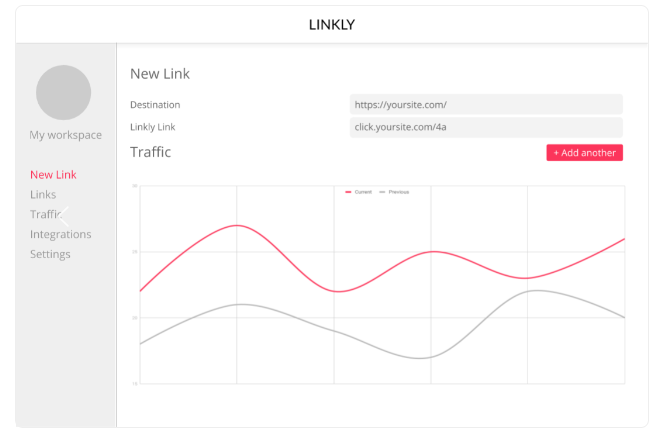
    Not only do they get a chance to meet the right audience for their product, but they also use the urgency factor to convert the prospects into customers.
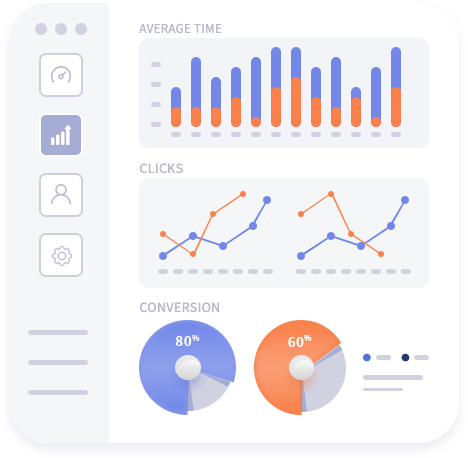
    There are hundreds of examples of brands that are successfully implementing social media retargeting campaigns on different social media platforms.

    Let’s conclude: Ready to retarget visitors who click on your short links?

    Social media marketing continues to evolve. The social media ad platforms are changing for the better. New social media monetization opportunities are popping up. More and more people are embracing social media. No wonder it’s an interesting time to be alive.

    Since marketing is a crucial element of social media, brands, organizations, and agencies are trying to scratch the surface of social media platforms to create their dominance against competition.

    Social media retargeting is a widely used engagement strategy by brands, influencers, and marketers. The purpose of discussing retargeting is to enlighten you with this opportunity to remarket your offer to prospects on social media.

    Replug is used by thousands of users worldwide for URL shortening, so they must understand how valuable the clicks on their shortened URLs are.

    Social media retargeting using the power of Replug allows users to re-engage the audience that clicked on your short URLs and present them with an offer they can’t refuse.

    Moreover, the link analytics section gives you insights into your short URL performance. It’s safe to say that measuring clicks, unique clicks, total conversions, and conversion rates has never been this easy.

    While it seems like Replug is just a free URL shortener, it does offer several features, such as bio links, deep links, and A/B testing – it’s a complete URL tracking package for marketers, businesses, influencers, and entrepreneurs. Try it for free!

    FAQs about social media retargeting

    Let’s answer some of the burning questions about social media retargeting:

    What is the difference between targeting and retargeting?

    The difference between targeting and retargeting is that when you’re targeting an audience, you’re trying to reach a new audience that hasn’t heard about you before. Whereas when you retarget, you’re trying to connect with the audience that has visited your website or landing page before.

    Is retargeting an SEO technique?

    Retargeting isn’t an SEO technique. Instead, it’s more of an online advertising technique used by advertisers and marketers to reach the audience that has shown some interest in the product or service before. So, the retargeting campaign ensures remarketing your product or service to the same audience and brings them on board with the conversion.

    What is the first step of retargeting?

    The first step of retargeting is to identify the target audience, meaning figuring out who your audience is and where they exist. Once identified, you can create a retargeting strategy to reach out to them and offer them something they might be interested in.

    What are retargeted ads?

    Retargeting ads are a type of ad campaign intended for the audience that has visited your website or landing page before but never took any action.

    How to do retargeting ads on Instagram?

    Retargeting ads on Instagram can be run through your Facebook ads account. All you need is to set up your Facebook Pixel on your website or landing page and then create a retargeting ad campaign through Facebook and choose the Instagram platform for targeting the audience.

  • 9 ways to multiply your sales with eCommerce retargeting

    9 ways to multiply your sales with eCommerce retargeting

    Did you know that over 68% of shopping carts get abandoned online?

    Don’t worry eCommerce retargeting can significantly improve those odds.

    In this blog, we’re going to reveal some insider secrets that can help businesses of all sizes double their monthly sales.

    What is retargeting?

    Retargeting is a marketing strategy used by brands to reconnect with individuals who have previously interacted with their website, social media profiles, or other digital content. It involves displaying targeted advertisements to these individuals across various online platforms, to re-engage them and encourage them to take a specific action, such as making a purchase or signing up for a newsletter.

    Here’s how retargeting typically works:

    Key retargeting featuresDescription

    Tracking

    Whenever someone engages with your website, clicks on an advertisement, or uses your application, a small piece of code (such as a pixel) tracks their actions. This code doesn’t disclose any personal information but helps distinguish individual users.

    Targeting

    Using the collected tracking data, you can create specific groups of users based on their interactions with your brand.

    Ad display 

    With these targeted user groups identified, you can display tailored ads across the social media platforms they frequent. These ads serve as reminders of your brand, offer enticing incentives, or highlight relevant products and services.

    Also read: 7 Retargeting Best Practices Every Marketer Should Follow

    Types of eCommerce retargeting:

    Here are some types of e-commerce retargeting:

    • Cart abandonment: Target users who left items in their cart without purchasing.
    • Product page: Show ads for viewed products to encourage purchase.
    • Cross-sell/upsell: Promote related products after a purchase.
    • Discounts/promotions: Offer special deals to entice users to buy.
    • Reactivation: Re-engage users who haven’t visited or purchased recently.
    • Dynamic: Display personalized ads based on past interactions.
    • Email: Send targeted emails to remind users of their abandoned carts or showcase product recommendations.

    What are the differences between retargeting and remarketing?

    While retargeting and remarketing are often used interchangeably, there are subtle differences between the two.

    Feature

    Retargeting

    Remarketing

    Definition

    Retargeting primarily focuses on reaching users who have visited a specific website or interacted with a brand in some way, and to reconnect with past visitors or customers.

    Remarketing, on the other hand, encompasses strategies primarily through personalized email campaigns

    Purpose

    To re-engage users who have shown interest in the brand or its products but have yet to complete a desired action, such as making a purchase.

    To reconnect with users who have previously interacted with the brand and encourage them to take a specific action, such as completing a purchase or signing up for a newsletter.

    Target audience

    Users who have visited a specific website, viewed products, or interacted with digital content.

    Users who have previously engaged with a brand’s website, social media profiles, or other digital channels.

    Tracking method

    Typically, it uses cookies or pixels to track user behavior and activities on a website.

    Often relies on email addresses or contact information provided by users during previous interactions with the brand.

    Conversion rate

    Generally higher conversion rates as it targets users who have already shown interest in the brand or its products.

    Conversion rates can vary depending on the remarketing campaign’s effectiveness and the messaging’s relevance to the target audience.

    Ad-display

    Utilizes targeted ads displayed across various online platforms, such as social media, search engines, and websites.

    Primarily involves personalized email campaigns, although ads may also be displayed on websites, search engines, and social media platforms.

    Replug Branded Short Links CTA
    A complete link management solution
    for marketing professionals & agencies.
    Try Replug for free

    Top 9 eCommerce retargeting strategies to follow

    1. Segment your audience

    The first step is to identify key segments and customize your eCommerce retargeting campaigns to cater to the specific needs and interests of each segment.

    For example, you might create separate ad campaigns targeting users who abandoned their carts versus users who browsed specific product categories but didn’t make a purchase.

    2. Catchy ad copy

    Eye-catching visuals are a must in eCommerce retargeting, but stunning images alone can’t seal the deal. Without a compelling message, your ads risk getting lost in the scroll.

    Here’s where powerful copywriting takes center stage. Great copy grabs attention, ignites emotions, and motivates action. By incorporating these elements, your retargeting efforts won’t just reconnect with past visitors, they’ll turn them into authentic buyers.

    3. Inject FOMO to boost last-minute sales

    FOMO- eCommerce retargeting strategy

    When done right, retargeting ads can lead to great conversion rates. But there’s always room for improvement. You can boost your conversion rates by adding a sense of urgency, like creating FOMO (fear of missing out). 

    This can be done with countdown timers, last-minute deals, or limited-time offers. When your audience sees that a popular product is available for a limited time, it triggers their impulse to buy. You can also customize your ads with countdown timers to make them feel more urgent.

    4. Cross-sell new and existing products

    This usually depends on the type of products you sell. However, there’s a good chance that some of your products will complement one another.

    You can utilize both customer and sales data to come up with a list that targets particular purchases. Then, you’ll show your audience ads that might be a product that complements their purchase. Your ad should make the value of the purchase clear to their mind. Show them how these purchases will complement one another.

    Offering relevant cross-sell suggestions demonstrates that you understand your customers’ needs and preferences. This personalized approach enhances the shopping experience, fostering customer satisfaction and loyalty.

    5. Retarget based on the sensitivity of pricing

    One of the main reasons people abandon their shopping carts is the high shipping costs and finding a better deal elsewhere via a competitor.

    For instance, millennials are quite careful about spending on non-essentials and spending less than the generations before them. Now that you know you’re dealing with price-sensitive customers, you can win them over by targeting them based on less.

    Free shipping- eCommerce retargeting

    You can target those people who have left at a specific point in the checkout process. For instance, right before they pick out shipping options. You can then offer them free shipping or give them discounts to entice them to come back and make a purchase.

    6. Adjust your retargeting ads’ frequency

    Most people are quite receptive to eCommerce retargeting ads, just as long as you don’t overdo it. If some ads are frequently popping up, this can hurt the relationship between the brand and the customer.
    Up to the point where the customer ends up frustrated with these ads because you’re someone intruding into their lives, in an almost creepy way.

    7. Keep your content updated

    Repeatedly using the same ad copies in your eCommerce retargeting campaign can quickly diminish its effectiveness. When your customers encounter these ads everywhere, they eventually tune them out, similar to how we overlook billboards or road signs.

    This phenomenon, known as advertising blindness or banner blindness, reduces the impact of your messaging. To maintain engagement and combat this, it’s essential to keep your approach fresh by regularly updating your ads to capture your audience’s attention effectively.

    8. A/B testing for optimization

    Another way to increase eCommerce sales is by exploring diverse ad creatives, copies, and strategies using A/B testing. Experiment with variations to pinpoint what connects most effectively with your audience. If needed, develop new retargeted ads tailored to your user base. Test various elements such as headlines, images, and calls to action to fine-tune your retargeting strategy and enhance overall performance.

    9. Monitor and analyze results

    Regularly monitor the performance of your retargeting campaigns and analyze metrics such as click-through rates, conversion rates, and return on ad spend (ROAS) to identify areas for improvement and optimization.

    What is the best tool for retargeting?

    The choice of the best tool for retargeting can vary depending on factors such as the specific needs of your business, budget constraints, and the platforms you wish to target.

    However, one of the best retargeting platforms is Replug. It’s affordable and easy to use, and it goes beyond basic retargeting, offering functionalities like link cloaking, traffic routing, cross-platform conversion tracking, and much more.

    Replug Branded Short Links CTA
    A complete link management solution
    for marketing professionals & agencies.
    Try Replug for free
    • Replug allows you to create specific campaigns designed for retargeting. Within this campaign, you can define which retargeting pixels you want to use.
    • This top-notch link optimization platform integrates with so many popular social platforms, that you can simply add the relevant pixel to your links.
    • Once you’ve set up your retargeting campaign with pixels, you can create branded shortened links as usual with this short URL shortener. When someone clicks on your Replug link, the retargeting pixel fires in the background, adding that user to your retargeting audience.

    Why eCommerce businesses should prioritize retargeting?

    Ever lost a potential customer who browsed your website but left without buying anything? eCommerce retargeting can bring them back!

    1. Cross-device retargeting

    Shoppers often research across multiple devices – phones, laptops, tablets. Cross-device retargeting ensures your ads follow them easily, keeping your brand top-of-mind no matter which device they use.

    2. Email remarketing

    Email remarketing is a powerful strategy for eCommerce businesses to tackle one of their most common challenges: cart abandonment. By implementing follow-up pixels in their email campaigns and pairing them with crm software outlook integration, businesses can effectively reduce cart abandonment rates and increase conversions.

    Highlight the abandoned products, offer targeted discounts to incentivize completion, and provide a clear path back to checkout for a seamless recovery experience.

    3. Social media retargeting

    Retargeting pixels placed on your website to track visitors and then display targeted ads on their social media feeds. These ads can feature products they browsed, similar items, or special promotions, increasing the chances of re-engagement and conversion.

    Besides that here are some of the major benefits of retargeting: 

    • Increased conversion rates: Retargeted ads have higher conversion rates compared to regular display ads since they target users with demonstrated interest.
    • Brand awareness: By maintaining a presence in front of potential customers, retargeting helps reinforce brand awareness and credibility.
    • Customization: eCommerce retargeting campaigns can be tailored based on users’ browsing behavior, ensuring relevant and timely messaging.
    • Cost-effectiveness: Retargeting ads increase brand search by 1046%. This helps you maximize the impact of the advertising budget by focusing on a warm audience.

    Best examples of eCommerce retargeting

    Here are some of the best examples:

    1. Amazon

    Amazon-eCommerce Retargeting

    This Twitter retargeting ad example shows how brands can use Twitter’s native ad format to display relevant products or services in front of their targeted audience. The product being advertised here is for sale on Amazon, which means that those who visit this page can purchase it directly from Amazon without having to go through any other steps in between.

    2. Udemy

    The next in line is Udemy,  If a user browses through Udemy’s course catalog but doesn’t enroll in any courses, Udemy may use browser retargeting to display targeted ads across other websites visited by the user. 

    Udemy-Retargeting Example

    These ads may showcase popular courses or highlight topics the user previously showed interest in, enticing them to return to Udemy and enroll in a course.

    FAQs on eCommerce retargeting

    How can businesses measure the success of their eCommerce retargeting efforts?

    Businesses can measure the success of their eCommerce retargeting campaigns by tracking metrics such as click-through rates, conversion rates, return on ad spend (ROAS), and overall revenue generated from retargeted users.

    What is the best tool for social media retargeting?

    The choice of the best retargeting tool depends on factors such as business needs, budget, and targeted platforms. However, Replug is one of the top retargeting platforms in 2026, offering affordable pricing and advanced functionalities like link cloaking, traffic routing, and cross-platform conversion tracking.

    What are some effective eCommerce retargeting strategies?

    Some effective strategies include segmenting your audience, creating catchy ad copy, injecting FOMO (fear of missing out) to boost sales, cross-selling complementary products, retargeting based on pricing sensitivity, adjusting ad frequency, and much more…

  • Why is Replug the best Ow.ly alternative?

    Why is Replug the best Ow.ly alternative?

    Ow.ly, a link-shortening tool from the popular platform Hootsuite, has won over many users, but it’s not without its downsides. One big issue is that it’s tied exclusively to Hootsuite. So, if you’re not using Hootsuite for your social media or other tasks, Ow.ly won’t work for you.

    That’s why it’s worth exploring ow.ly alternatives that offer more advanced link management features to meet the needs of today’s marketers and businesses.

    One top alternative is Replug. 

    Replug-Owly Alternative

    While Ow.ly covers the basics, Replug goes above and beyond with features like detailed analytics, customizable call-to-actions, white-label solutions, bio-links, retargeting pixels, and more.

    Let’s take the next step and introduce you to Replug, where you can discover a whole new level of link management capabilities.

    Replug.io
    Replug.io is a comprehensive link management platform offering advanced features like detailed analytics, customizable call-to-actions, and white-label solutions, empowering marketers to optimize their campaigns effectively.
    Ow.ly
    Ow.ly is a link-shortening tool developed by Hootsuite, a popular social media management platform. It allows users to condense URLs into shorter, more manageable links, primarily for sharing on social media platforms. However, Ow.ly is exclusively tied to Hootsuite and lacks advanced features and flexibility compared to standalone link management alternatives.

    Replug vs Ow.ly

    Replug Branded Short Links CTA
    A complete link management solution
    for marketing professionals & agencies.
    Try Replug for free

    In this comparison, we’ll explore the key differences between Replug and Ow.ly to help you make an informed decision. While both platforms offer link-shortening capabilities, they differ in terms of features, integrations, and flexibility. 

    Link management capabilities

    Let’s start with some of the most important link management feature comparisons to see what works best for your brand.

    1. Advanced link shortening

    First, we have link shortening. With Replug, users can enjoy advanced link-shortening features that not only condense URLs but also provide detailed analytics and customization options for each shortened link.

    Whereas, Ow.ly offers standard link-shortening capabilities without the advanced analytics and customization features found in Replug.

    If you’re looking to go beyond basic URL trimming, Replug’s advanced features make it the smarter way to shorten link
    while tracking and customizing every click.

    2. Bio-links

    Next, we have bio-links where Replug enables users to create bio-links, which serve as a centralized hub for multiple links, making it easier to share content across various platforms from a single location.

    Ow.ly lacks the functionality to create bio-links, limiting users to sharing individual shortened links.

    Replug- best ow.ly alternative

    3. QR codes

    Ow.ly does not offer QR code generation as part of its feature set. But in the case of  Replug, users can generate QR codes for shortened links with Replug, making it convenient to share links offline or in print materials.

    4. Deep links

    Same as the QR codes, deep linking capabilities are not available within Ow.ly. Whereas with Replug marketers can create deep links, which enables direct access to specific sections or content within mobile apps, and enhance user experience and engagement.

    deep linking- Replug

    5. Custom CTAs (call-to-actions)

    When it comes to Replug, brands can use the free CTA generator to create custom call-to-actions associated with their shortened links, allowing for greater control over user interaction and conversion optimization.

    Whereas, Hootsuite does offer AI content creation capabilities but still both the platforms lack advanced customization options for call-to-actions.

    6. Retargeting pixels

    Lastly, we have one of the most amazing features which is retargeting links. Here Ow.ly does not support retargeting pixel integration. However, users can integrate retargeting pixels with Replug’s shortened links, enabling targeted advertising campaigns and audience remarketing efforts.

    White-label solution

    White-Label_ Ow.ly alternative

    Neither Ow.ly nor Hootsuite offers white-label boards. However, unlike these platforms, Replug provides an extensive range of branding options, including white-label boards. This feature allows you to create your personalized link management tool, allowing you to…

    • Replace Replug’s domain with your own for shortened links.
    • Customize the overall user interface to match your brand aesthetic.
    • Add your brand name, logo, favicon, title, meta image, description, and domain.
    • Design reports and emails sent to users with your branding.
    • Promote your brand with advanced characteristics such as retargeting links, catchy call-to-actions, traffic routing, and more.

    Overall white-label service can help you scale up and meet the demands of launching new services without incurring additional costs. 

    Detailed link analytics comparison

    Replug - Link analytics

    Ow.ly

    Being a more well-known service, Ow.ly likely offers a range of features, but in-depth link analytics might not be the main focus. Research-specific analytics offered by the platform include:

    • Total clicks on the link
    • Where the clicks came from (e.g., Facebook, Twitter, email)

    Overall, keep in mind that Hootsuite is more focused on social media analytics. However, if you’re using Hootsuite, you can add tracking parameters to your Ow.ly links so that you can track them in an analytics tool like Usermaven.

    Besides that the platform also allows you to filter your analytics to analyze data for specific brands you’re promoting. Or track the performance of individual marketing campaigns.

    So my friends as you can see Replug is the clear winner.

    Replug Branded Short Links CTA
    A complete link management solution
    for marketing professionals & agencies.
    Try Replug for free

    Integrations offered

    Replug

    Replug offers direct integrations with various social platforms, email marketing tools, social media management tools, and much more. 

    Whether it’s connecting with popular social media channels like Facebook, Twitter, or LinkedIn, or integrating with leading email marketing tools such as Mailchimp or Constant Contact, Replug allows users to optimize their outreach efforts and drive engagement effectively. 

    Additionally, Replug’s integrations with social media management tools like ContentStudio, and Social Bee streamline the process of content scheduling, creation, and publishing, as well as social media analytics tracking and much more.. 

    With its comprehensive range of integrations, Replug excels as a solution for link management and marketing optimization.

    Ow.ly

    Ow.ly, being an integral part of the Hootsuite platform doesn’t have standalone integration capabilities. Instead, to integrate with other tools, users need to connect to Hootsuite itself. 

    Here are some of the Replug reviews

    “Handy Link Management Tool with URL shortener and more”

    Says Alan N.

    “Very convenient platform to create Branded Links with Marketing & Reporting”

    Says Karen S.

    Pricing comparison

    Now, let’s talk about pricing. When choosing a link management tool, go for the one that meets your needs best. Here’s a quick pricing table for you:

    Replug Ow.ly
    Basic = $19 /monthProfessional plan = $99 per month
    Professional = $49 /monthTeam plan = $249 per month
    Agency = $79 /monthCustom enterprise plan

    Compare Replug’s features, functionality, and pricing against Ow.ly, and you’ll quickly see why it’s the clear winner. 

    With flexible pricing plans to suit every budget and requirement, Replug ensures that you get the most bang for your buck without compromising on quality or performance.

    Conclusion

    Considering the limitations of Ow.ly tied exclusively to Hootsuite, this article clearly explains why Replug is the best Ow.ly alternative. Enjoy advanced link management features, affordable pricing, top-notch customer support, and much more…

    Faqs

    What are social media management tools, and how do they differ from link management tools?

    Social media management tools are platforms that help businesses schedule, publish, monitor, and analyze their social media content across various platforms like Facebook, Twitter, Instagram, and LinkedIn. While link management tools focus specifically on managing URLs and tracking link performance.

    What are some key features to look for in link analytics tools?

    When selecting a link analytics tool, consider features such as total clicks, click-through rate (CTR), demographics, referring sources, UTM parameters for campaign tracking, time series data, and customizable reports.

    What’s the difference between Replug and Ow.ly? 

    Both Replug and Ow.ly offer link management solutions. Replug focuses on detailed link analytics and integrations with analytics tools, while Ow.ly emphasizes social media scheduling and team collaboration features.

    Why is link management important?

    Effective link management helps you:

    – Improve SEO (Search Engine Optimization) ranking
    – Track the performance of your marketing campaigns
    – Analyze user behavior and content engagement
    – Maintain brand consistency
    – Shorten long URLs for better aesthetics and sharing