Have you ever wished your web address was shorter, catchier, or just fit your brand better?
Well, guess what? You can actually edit those links, just by following a couple of easy peasy steps!
This guide will show you how to easily edit URLs using Replug.io.
What’s Replug.io?
Replug.io is the ultimate solution for your link editing, branding, and retargeting needs. A feature rich URL editor to boost your online presence, just using links in multiple ways.
What’s a URL, and what does that mean?
A URL is basically the online address of any webpage or piece of content you see.
Ever wonder how you land on your favorite websites?
URLs are kind of like the addresses of things you find online, but instead of Google Maps, they use letters and numbers on the web.
They help locate what you are searching for, whether it’s a brand, social media platform or a blog.
So next time you click on a link or type something in the address bar, remember, you’re using a URL to navigate the vast world of the internet!
Here are some key things to remember about URLs:
They’re unique: Every webpage has its own special URL, like a fingerprint.
They can be long: Sometimes URLs can get a little messy with lots of codes and stuff, but that’s just them doing their job of being super precise.
They can be short: Some websites use special tools to make URLs shorter and easier to remember.
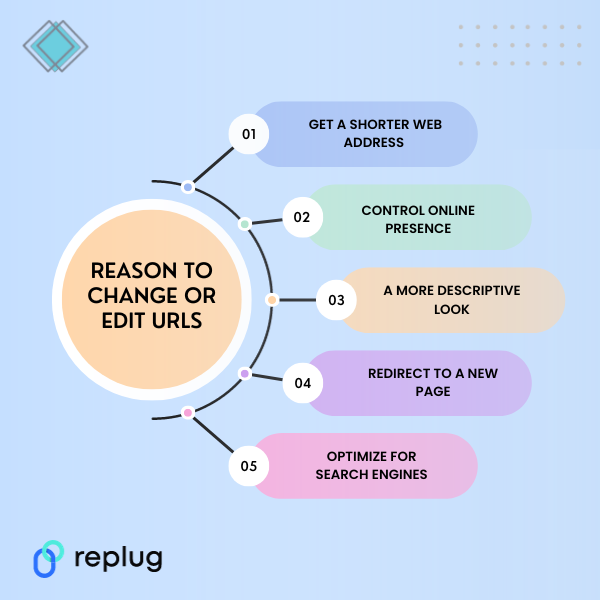
Reason to change or edit URL links
There are various reasons why you might find yourself needing to edit a URL.
There are lots of reasons to give your URLs a makeover! Maybe you want…
A shorter, snappier address: No one wants to type out a super long URL!
More flexibility: Regardless of the motive, the ability to edit URLs provides flexibility and control over your online presence.
A more descriptive name: Make it clear what people will find when they click.
Optimize it for search engines: Create a more user-friendly link, or align it with your branding strategy.
How to edit links?
One of the primary features Replug offers is the ability to edit the URL slug. The slug is the user-friendly part of the URL that comes after the domain name. With Replug, you can easily customize this part to make your URLs more SEO-friendly.
Log in to your Replug account.
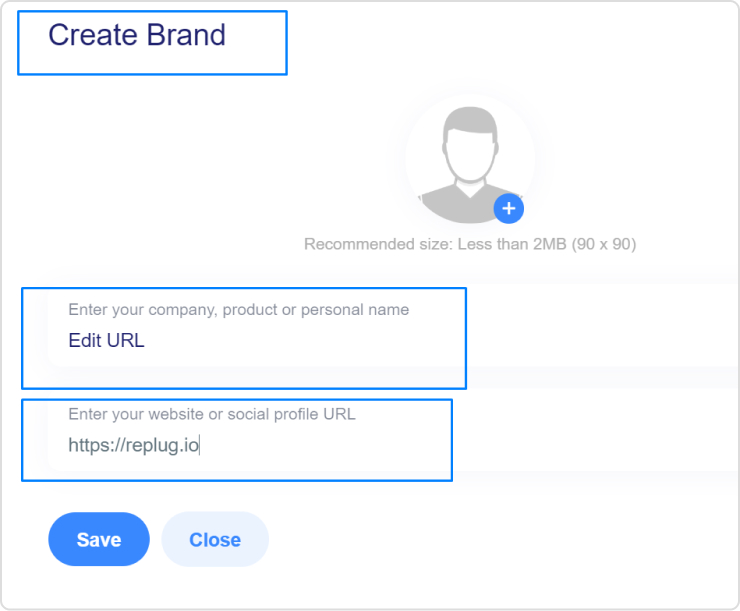
Create a “Brand”.
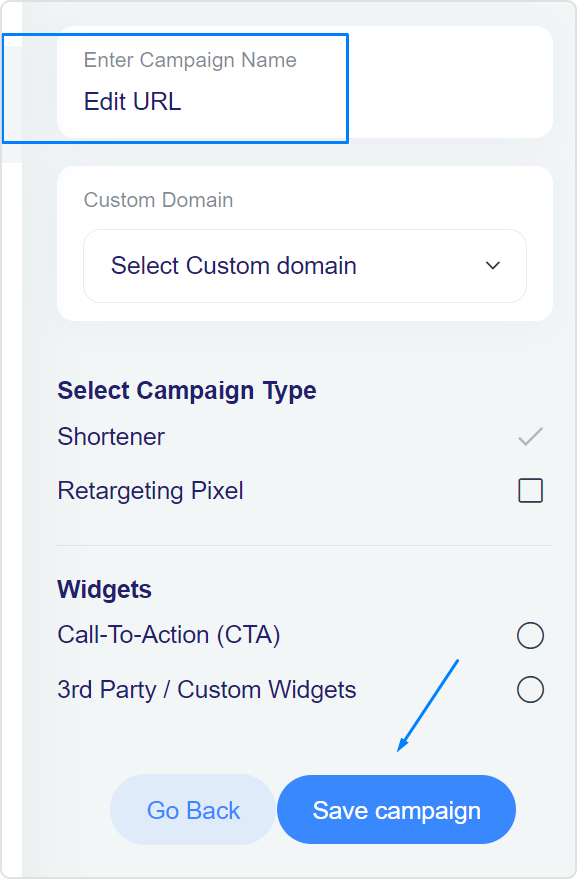
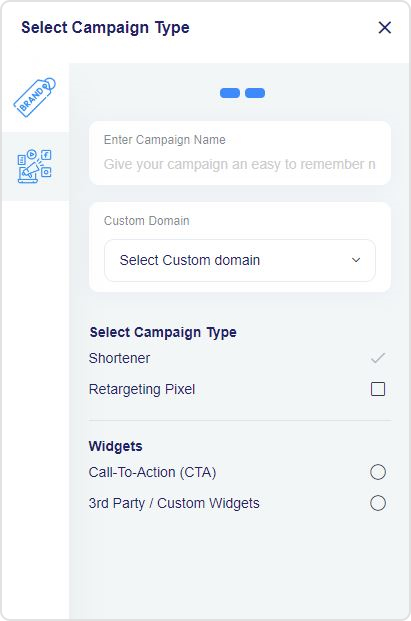
Then, create a “Campaign.”
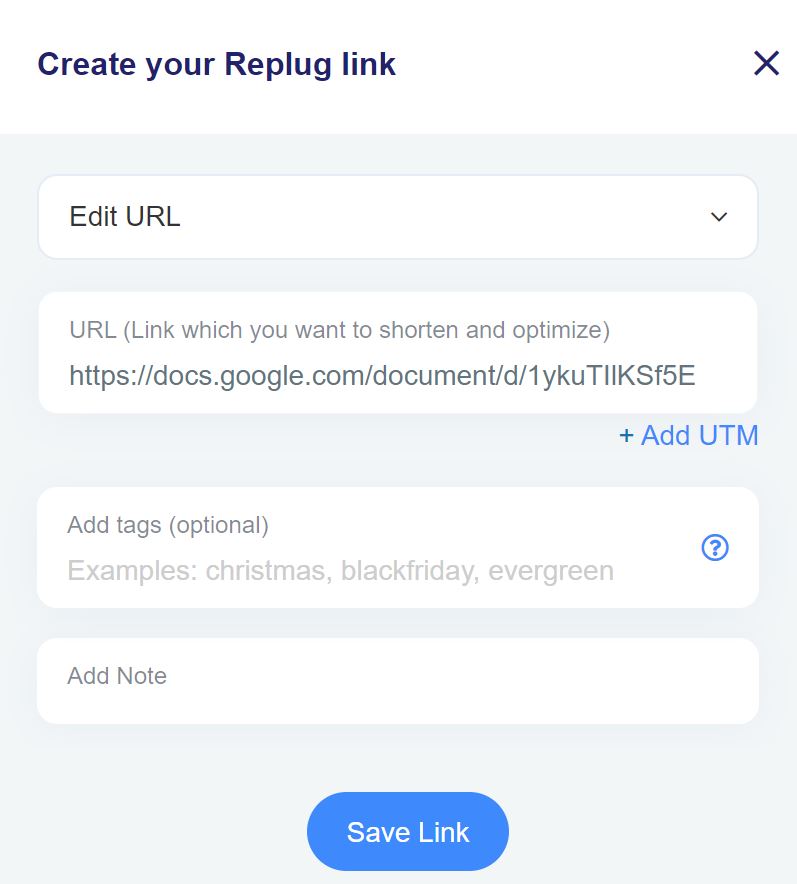
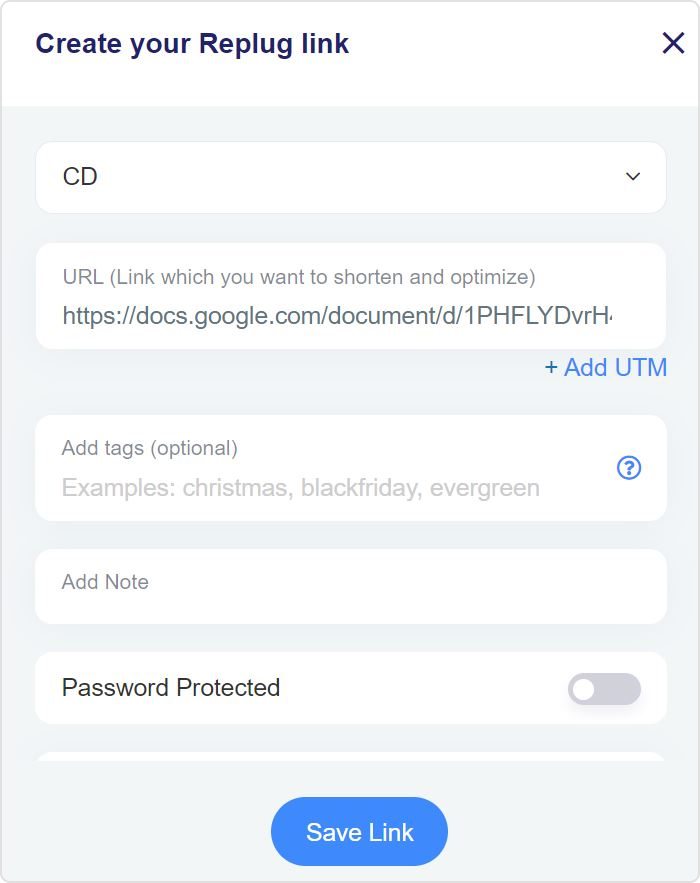
Next, create a short link by adding the original URL & click “Save Link”.
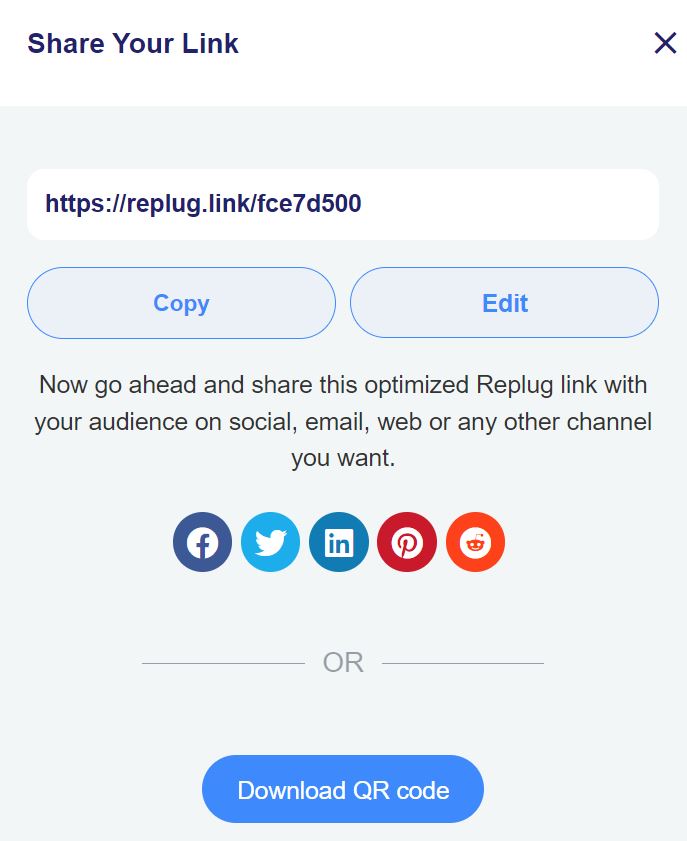
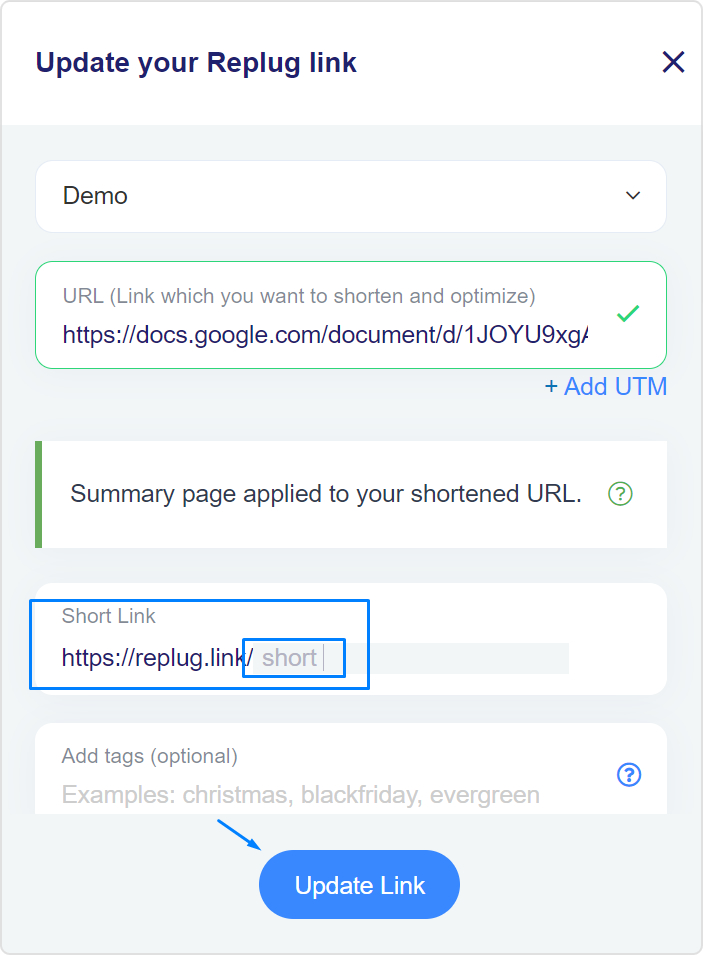
Now you’ll get a short link with the Replug domain i.e. replug.link/ your slug. You can edit this URL at this stage or any other time.
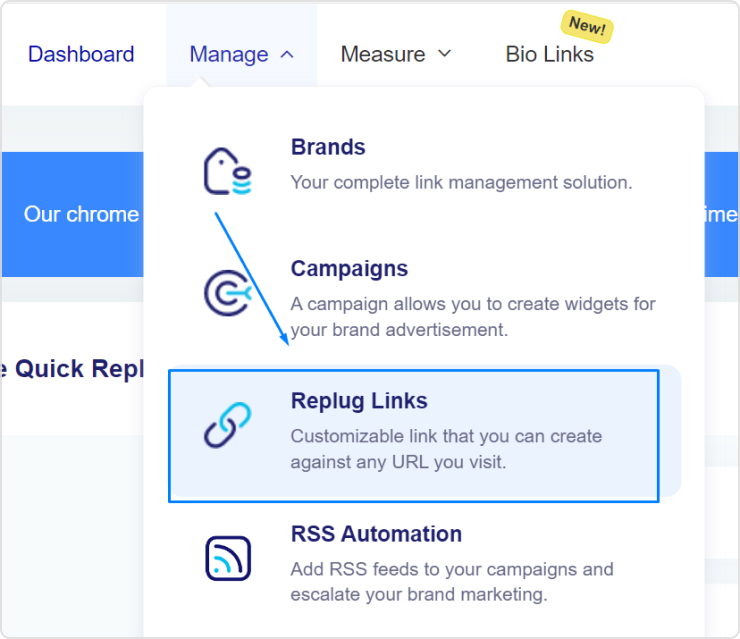
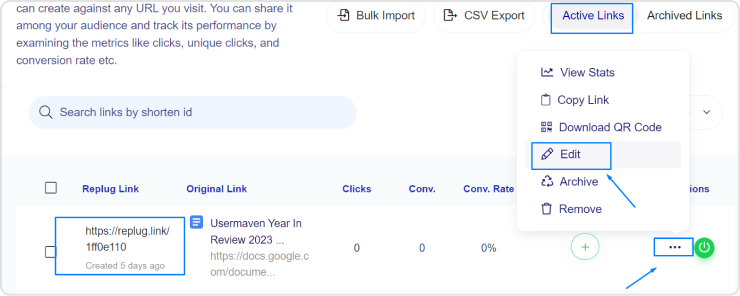
You can further edit your slug at any time of the campaign. Access the dashboard and click “Replug Links.”
Select the link you want to edit, and navigate to the “Edit” option.
By editing the slug, you can create URLs that not only convey the content but also contribute positively to your search engine rankings.
Did You Know?
You can add your branding to Replug with the White Label Solution. From a logo to your own branded domain, add personal branding with flexibility using Replug.
Maximize marketing ROI
by transforming ordinary URLs into branded short links that convert.
Try Replug for free
Edit URLs with your branded domain
Another noteworthy feature of Replug is the option to use a branded domain. This means you can replace generic URLs with a custom domain that reflects your brand identity.
Here’s how you can do it:
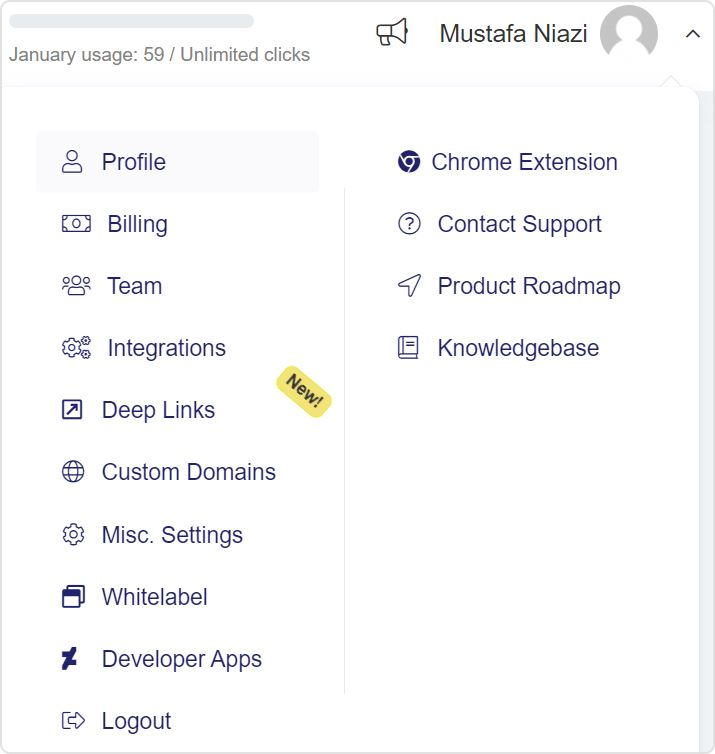
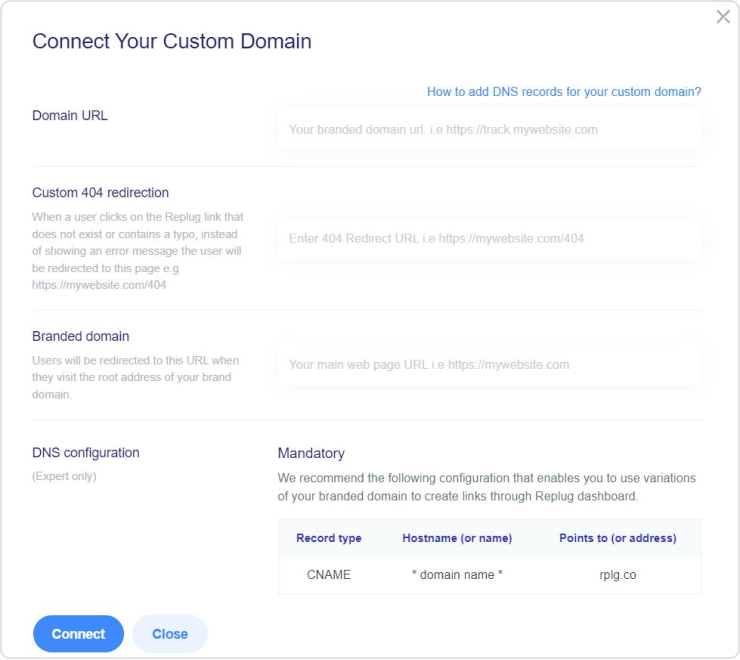
Go to the “Custom Domain” at the top right corner from the Replug Dashboard.
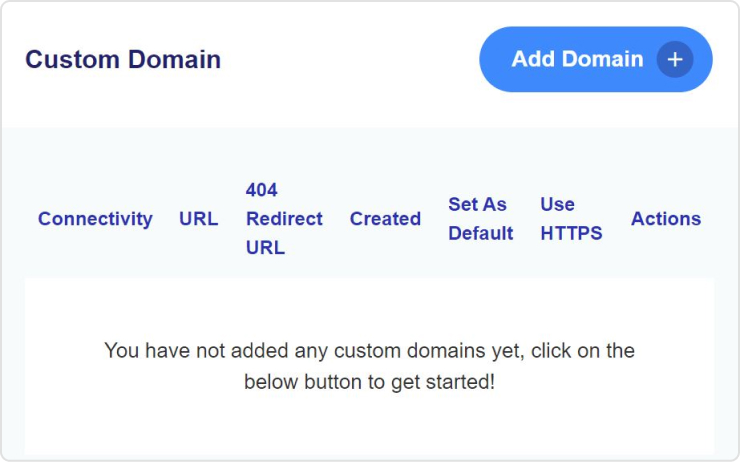
Next, click on the “Add Domain” button.
Add on the details for connecting “Custom Domain.”
Now, create a campaign by choosing the custom domain.
Now, you have to create a Replug link by using the “Custom Domain” campaign, which you created in the previous step.
Edit the URL link, you just created. Edit URL with your keyword connected to your domain name.
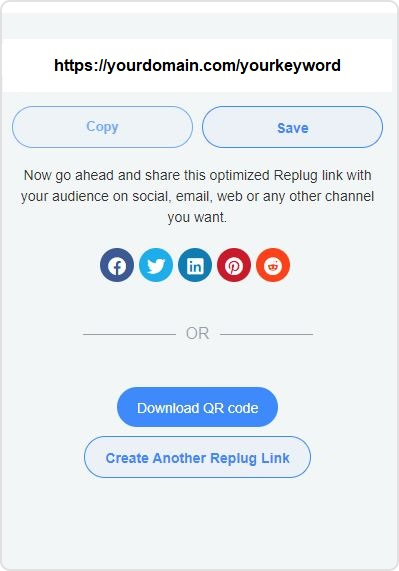
Now it has yourdomain.com/yourkeyword. Save link to complete the process.
By incorporating your brand into the URL, you not only enhance recognition, but also establish a sense of trust among your audience. Replug allows you to edit URL at any further time through “Replug Link” sections.
Start tracking, managing and editing links now with a 14 day free trial!
End note
Editing URLs can be fun and helpful, but be careful not to break any links or confuse your audience. With Replug and a little creativity, you can make your web addresses shorter, sweeter, and more unique!
Frequently asked questions
Can I edit any URLs?
Not all URLs can be edited, especially for websites you don’t own. But Replug works great for links you control, like your shortened link.
What’s a personalized URL?
A personalized URL can include your name or keywords related to your content. It’s like adding your own touch to the address.
Which URL shortener or link shortener is best for editing URLs?
Replug is probably the best link shortener because it’s easy to use, lets you edit slugs and use branded domains, and offers tracking tools to see how people are clicking your links.
How do I track my URL?
Replug shows you how many clicks your edited URL gets so you can see how well it’s working.
LinkedIn isn’t just a social network; it’s your digital passport to the professional world, connecting you with like-minded individuals across diverse industries. Your LinkedIn profile is your virtual business card, offering a snapshot of your identity and capabilities.
Elevating your LinkedIn presence goes beyond mere self-promotion – it’s about forging meaningful connections, fostering engagement, and creating growth opportunities.
If you’re eager to take your LinkedIn game to the next level, buckle up as we discuss nine practical tips to amplify your profile and skyrocket your post views for unparalleled engagement.
1. Craft compelling content
Create valuable content
Elevate your LinkedIn game by crafting content that speaks directly to your target audience. Identify your audience’s needs and interests, and deliver tangible benefits, immediate results, or fascinating insights. Remember, it’s not about you; it’s about what your readers want.
Utilize a mix of text, infographics, gifs, and videos to keep your content diverse and engaging. Employ writing techniques such as short sentences, line spacing, emojis, storytelling, and visuals to enhance readability.
Republish Content
Unlock the potential of your content by republishing it strategically. According to research, not everyone visits LinkedIn multiple times a day, so reposting content (with a 10-day gap) can increase reach and engagement. Focus on delivering unique insights with each repost, ensuring each post feels fresh and valuable to your audience.
2. Complete your profile
Your LinkedIn profile is your professional identity. Make sure to complete it. Ensure you have a standout header image, use your professional name, invest in a professional photo, and craft a compelling summary showcasing your talents.
Keep your work experience, education, certifications, and specializations up-to-date. Growing your network to at least 500 connections significantly boosts visibility.
3. Shorten the links you share
Long, unwieldy URLs can detract from the professionalism of your content. Replug’s link shortener not only cleans up your links but also provides valuable tracking metrics. It’s about more than just character count reduction – crafting connections that resonate with your audience.
With our LinkedIn link shortener, you can share concise, branded URLs that stand out in professional posts and messages. This helps boost credibility, improve engagement, and make every LinkedIn share more impactful.
Maximize marketing ROI
by transforming ordinary URLs into branded short links that convert.
Try Replug for free
You can also use a LinkedIn QR code generator to make your profile scannable on business cards or event materials, giving offline audiences a direct path to your LinkedIn
4. Maximize Engagement
Respond to comments
Engage with your audience by responding to comments on your posts. This not only pushes your content back to the top of feeds but also establishes a connection with your audience. Thoughtful responses create a sense of community and encourage future engagements.
Re-share other people’s content
Expand your network and visibility by re-sharing content from other LinkedIn members. This not only puts you on their radar but can also make you visible to their network. Use this strategy to build on others’ insights, reinforcing your thought leadership.
Get your employees and executives involved
Harness the power of employee advocacy by encouraging your team to engage and share company content. Employee posts can reach over 5X further than official company posts. Use eNPS questions to identify highly engaged employees who can serve as strong advocates. Implement processes to notify the team about content creation and leverage employee advocacy platforms for streamlined content sharing.
Leverage the power of tagging to drive attention to your posts. Tagging influential individuals or relevant pages can not only attract their attention but also increase visibility to their networks. Use tagging strategically as part of a team-wide strategy to amplify your reach.
6. Use hashtags
Utilize the potential of hashtags to increase the visibility of your posts. Choose relevant and trending hashtags, but keep it limited to around 5 per post. Aligning your content with popular hashtags can connect you with individuals and groups interested in similar topics.
7. Diversify your content
Diversify your content to keep your profile fresh and appealing to different audiences. From text and image posts to engaging videos, document carousels, and interactive polls – incorporating variety adds depth to your profile and resonates with a broader audience.
8. Consistent posting
Posting regularly sets a rhythm for your audience and benefits the LinkedIn algorithm. It’s not just about frequency; it’s about establishing reliability. Consistency builds anticipation for your insights, updates, or industry thoughts, encouraging views and engagement.
Embrace the power of video content on LinkedIn, focusing on native videos for a better user experience. Use captions for accessibility and convenience. Simplify video sharing across your team using platforms like ContentStudio.
Post regularly
Consistency is key to maintaining a vibrant LinkedIn presence. Post updates regularly, aiming for at least 2-3 times a week. Test different posting days and times to align with your network’s online activity. Use social media scheduling tools to manage regular posting without overwhelming your team.
Enhance your LinkedIn journey with Replug
Professional, accessible linking is the secret sauce of a successful LinkedIn strategy. Replug.io is not just a link shortener; it’s your tool to craft connections, engage authentically, and grow confidently.
Invest time in understanding Replug’s analytics. It’s not just about shortening links; it’s about understanding your audience’s behavior.
Ready to take your LinkedIn game to new heights? Explore Replug’s pricing plans and elevate your LinkedIn profile with style.
A complete link management solution
for marketing professionals & agencies.
Try Replug for free
FAQs
Why craft engaging content on LinkedIn?
Crafting engaging content on LinkedIn is crucial for boosting profile visibility, expanding your network, and creating valuable connections.
How does Replug enhance URLs on LinkedIn?
Replug’s link shortener improves the appearance of URLs on LinkedIn by making them cleaner, more professional, and trackable, enhancing overall content presentation.
Why is posting consistently essential on LinkedIn?
Posting consistently on LinkedIn is vital for building audience trust, staying relevant in feeds, and maximizing the algorithm’s benefits, resulting in increased visibility.
What is the role of scheduling tools in LinkedIn marketing?
A social media scheduling tool plays a crucial role in LinkedIn marketing by enabling users to plan and automate posts, ensuring consistent posting frequency and optimal audience engagement.
How do scheduling tools help manage multiple LinkedIn accounts efficiently?
Scheduling tools streamline the management of multiple LinkedIn accounts by coordinating posts, ensuring consistency, and optimizing content delivery for efficient social media marketing.
Gone are the days of mundane Spotify links. Introducing smart links for music – your all-in-one ticket to global music domination.
Imagine sharing your songs, albums, and playlists seamlessly across platforms with just one link! It’s not just convenient for your fans; it’s a vibe! But here’s the magic – it’s not just about sharing; it’s about understanding.
Dive into the analytics playground! Discover where your fans are grooving, and what beats they vibe with, and turn those insights into your superpower. It’s not just music; it’s a connection that spans continents. Don’t just share your music; make it an experience!
Make smart links part of your promotional strategy; it’s what will convert listeners into lifelong fans. Let’s make your music journey unforgettable!
What is a smart music link?
A smart link for music is a single, easy-to-share link that directs listeners to your music on different streaming platforms like Spotify, Apple Music, YouTube, etc. It’s like a virtual business card for musicians. Instead of sharing multiple links, you share one smart link, and it automatically takes your fans to the right platform based on their location and device.
This becomes even more powerful when promoting tracks created or enhanced with tools like minimax music, helping artists distribute and market their AI-powered productions more efficiently.
Services like Replug, Linkfire, Linktree, and others help musicians create these links, making them convenient for fans and providing analytics and marketing tools for artists. A comprehensive music industry directory can further enhance these resources by connecting musicians with additional promotional opportunities and industry contacts. It’s a neat way to promote and share your music hassle-free!
Boost your conversion rates with irresistable CTAs with
Musicians can elevate their online presence by effortlessly creating smart music links using Replug’s innovative bio links feature. This bio link acts as a centralized hub, providing your audience with a seamless experience to explore and enjoy your music across platforms like Spotify, Apple Music, and YouTube.
Here’s how to create a smart link for music using Replug:
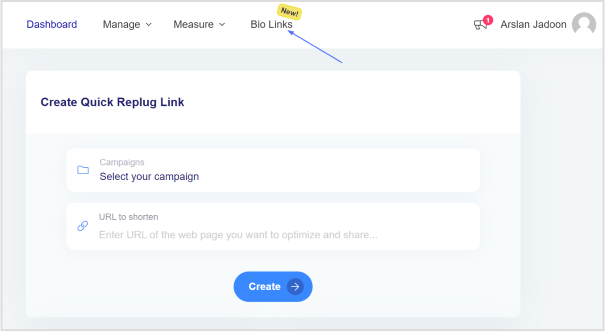
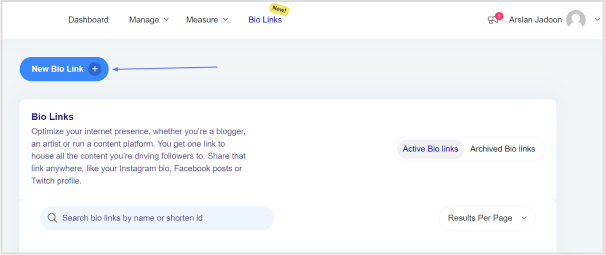
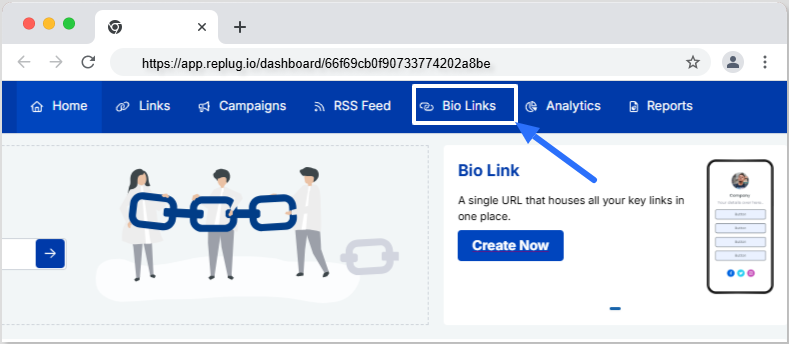
Step 2: Once logged into your Replug account, head to the Replug dashboard and locate the “Bio Links” feature.
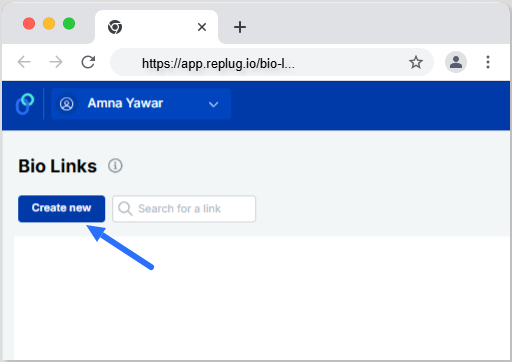
Step 3: Initiate the bio link creation process by clicking on the “New Bio Link” button.
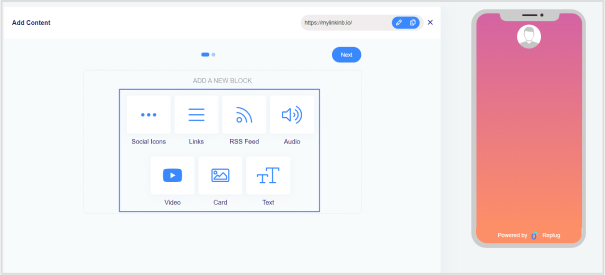
Step 4: Opt for the content block that aligns with your needs from Replug’s diverse options, such as social icons, links, RSS feeds, audio, video, text, or cards. In the case of music links, you can choose from links, audio, and social icons.
Step 5: Once all desired content blocks are added, proceed by clicking “Next.”
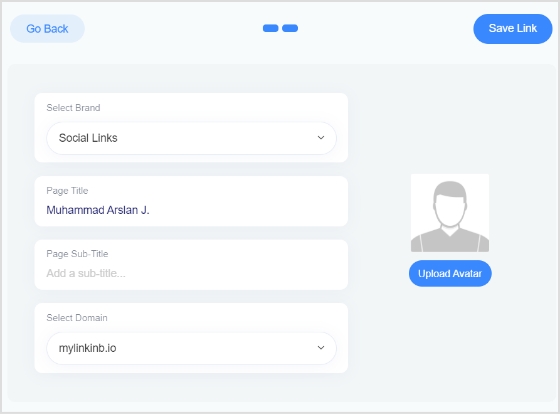
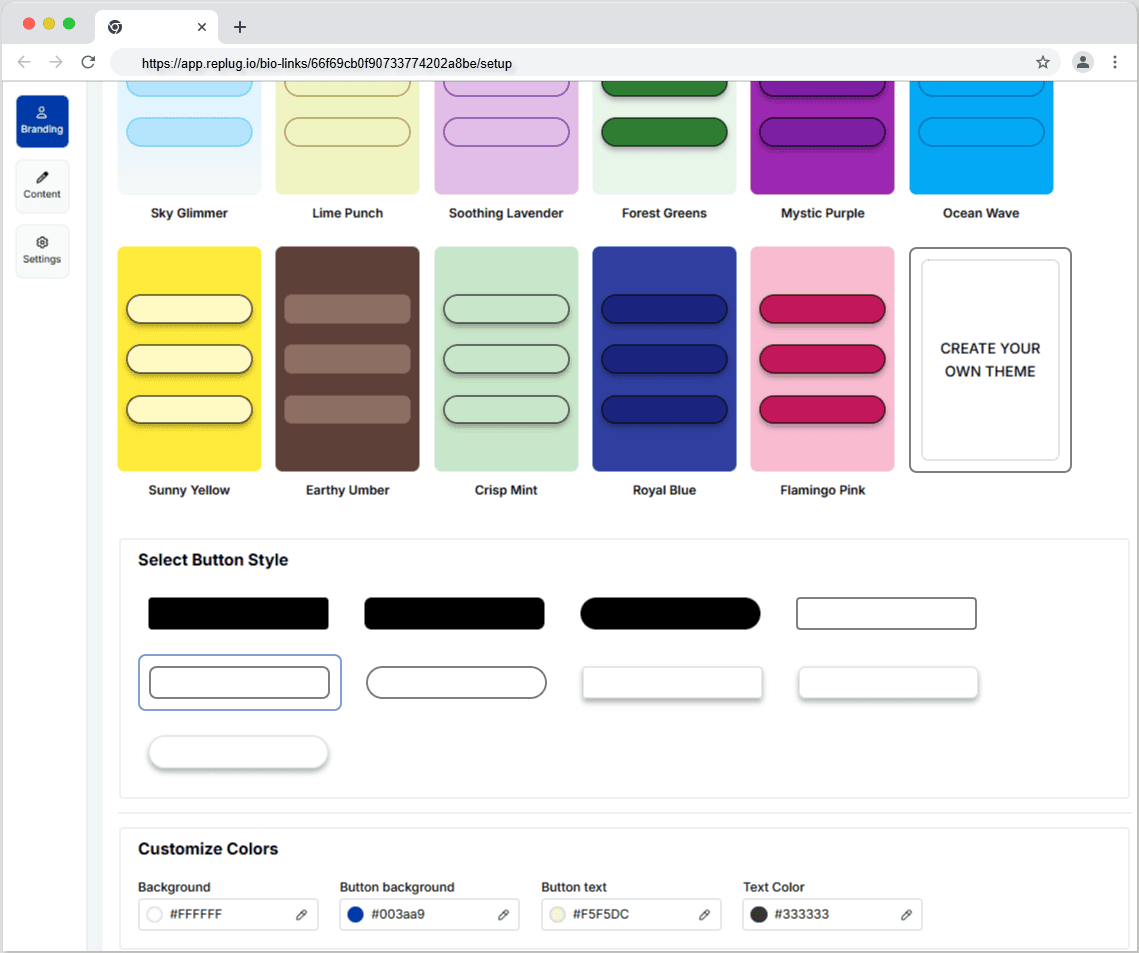
Step 6: Further personalize your bio link page by specifying your brand name, uploading an avatar, and adding a title and subtitle that aptly represent your content or brand.
Step 7: Review your bio link page during the creation process to ensure it aligns with your intentions.
Step 8: In the final step, enhance your bio link’s appeal and effectiveness by considering additional features or marketing elements.
Step 9: Save your bio link, and it will be ready to integrate into your bio.
With the bio link generated by Replug, effortlessly share diverse links and content with your audience, making it an invaluable tool for content promotion and marketing on the platform.
Boost your conversion rates with irresistable CTAs with
Using a smart music link with Replug offers numerous benefits for musicians and content creators:
Streamlined promotion: Smart music links consolidate multiple streaming platform URLs into a single shareable link, simplifying the promotion process. This ensures that audiences can access your music effortlessly, regardless of their preferred platform.
Enhanced accessibility: With a Replug smart music link, your audience can seamlessly switch between platforms like Spotify, Apple Music, and YouTube, catering to diverse listener preferences. This accessibility increases the likelihood of engagement and plays.
Centralized hub: Replug’s bio link feature serves as a centralized hub for your music and other content. It provides a cohesive and organized space where your audience can discover and explore various links, creating a unified online presence.
Customization options: Tailor your bio link page to reflect your brand identity. With features such as customizable colors, profile pictures, and content blocks, Replug allows you to create a visually appealing and personalized experience for your audience.
Analytics insights: Gain valuable insights into audience behavior through Replug’s analytics tools. Understand where your audience is engaging, and which platforms are most popular, and use this data to refine your promotional strategies and content.
Consistent branding: Maintain consistent branding across platforms by customizing your bio link page. This ensures that your audience recognizes and associates your brand identity with every interaction.
FAQs
What is a smart music link, and how does it benefit musicians?
A smart music link is a consolidated link that directs users to music on multiple streaming platforms. It benefits musicians by simplifying promotion, providing analytics insights, and enhancing accessibility for fans across various platforms.
How can I create a smart music link?
To create a smart music link with Replug, login, access the “Bio Links” feature, click “New Bio-Link,” add content blocks like social icons or links, customize, and save. Replug’s user-friendly interface streamlines the process.
Can I customize the appearance of my bio link page on Replug?
Absolutely! Replug allows extensive customization, including profile pictures, brand names, avatars, color schemes, and short links, ensuring your bio link page aligns with your brand identity perfectly.
What analytics insights does Replug provide for smart music links?
Replug’s analytics offer valuable insights into audience behavior, including engagement locations and popular platforms. This data empowers users to refine their promotional strategies.
Links serve as vital assets that connect your brand with the digital world, so having full control over them is essential. Branded Link management empowers you to safeguard your brand, optimize your marketing, and efficiently handle the many links your company generates.
Therefore, a central link management tool is essential to enhanced collaboration, accurate tracking, and brand protection. It can also help to increase brand awareness and streamline link sharing between colleagues.
Here’s what branded link management is and why it’s crucial for your company’s online success.
What is branded link management?
Branded link management, often referred to as branded link shortening is a specialized facet of link management that focuses on shortening, customizing, and optimizing links, particularly for branding and marketing purposes.
Branded links are shorter and more user-friendly versions of URLs, and they often feature a custom domain that aligns with a brand or campaign.
Key aspects of branded link management:
Customization: Branded links allow you to tailor URLs to match your brand, campaign, or content. For example, a complex and long URL can be transformed into a concise and branded link.
Branding: By using branded links, you reinforce your brand identity in every link you share. This consistency can boost brand recognition and trust among your audience.
Tracking and analytics: Branded link management tools often offer robust tracking and analytics features. This data helps you measure the performance of your branded links, enabling data-driven marketing decisions.
Link security: Branded link management platforms often include security features that protect your links from malicious activities, ensuring the integrity of your brand’s online presence.
User experience: Branded links are user-friendly and can enhance the overall user experience, as they are easier to remember and share.
A complete link management solution
for marketing professionals & agencies.
Try Replug for free
Branded link management: why do you need it?
Companies, particularly those engaged in e-commerce, affiliate marketing, and social media marketing, benefit from using a link management tool for several compelling reasons:
URL shortening:
A branded link management tool shortens long and cumbersome URLs, making them more user-friendly and aesthetically pleasing. This is particularly useful for sharing links on social media, in email marketing campaigns, and within content.
Tracking and analytics:
Link management tools offer robust tracking and analytics features, allowing companies to monitor the performance of their links. This includes tracking click-through rates, conversion rates, and other essential metrics to assess the effectiveness of marketing campaigns.
Conversion analysis:
Companies can analyze the conversion rates associated with specific links. This insight helps in optimizing marketing efforts and understanding which links are driving the most conversions and sales.
Branding:
Branded links provide consistency and reinforce a company’s brand identity with every link shared. This consistency can boost brand recognition and trust among the audience.
Efficiency:
Link management tools streamline the process of creating and managing links, saving time and reducing the risk of errors. This is especially valuable for companies that deal with a large number of links.
Social media traffic:
Many link management tools offer features like bio links, which are crucial for social media marketers. These tools help drive social media traffic to the company’s website by providing a simple and appealing way to share links on platforms with character limits or visual constraints.
Lead generation and retargeting:
Some link management tools go beyond shortening links and offer lead generation and retargeting capabilities, enabling companies to capture leads and re-engage with potential customers who clicked on their links.
A complete link management solution
for marketing professionals & agencies.
Try Replug for free
Brand and manage your links with Replug
A powerful link management tool can be the difference between success and obscurity. Replug.io is not just another option; it’s the best choice, and here’s why:
Branded short links:
Replug’s link shortener transforms lengthy URLs into concise, branded short links. Now, you can create short links in no time at all. Your audience will remember and trust these links, and you can even use your custom domain for that extra touch of professionalism.
Link analytics:
Replug provides in-depth link tracking, so you’re never in the dark about your link performance. UTM tracking allows you to monitor metrics at your fingertips, enabling data-driven decisions.
Bio links:
Say goodbye to juggling multiple links. With Replug, you can consolidate all your branding needs into a single, sleek bio link. It’s a one-stop landing page to engage your audience effectively.
Retargeting pixel:
Lost sales don’t have to stay lost. Replug’s retargeting pixel enables you to re-engage potential customers across multiple networks, increasing your chances of conversion.
QR code:
Create dynamic marketing interactions with QR codes. They’re versatile tools that can bridge the gap between the digital and physical worlds.
A/B testing:
Experiment with up to 10 variations of your URLs to find the winning formula. Replug’s A/B testing feature helps you optimize your links for the best results.
Deep links:
Guide your audience through smooth in-app experiences with deep links. These links enable users to navigate seamlessly within mobile apps, enhancing the customer journey.
Link rotator:
Optimize user experiences by intelligently routing traffic based on user preferences. It’s a powerful tool for keeping your audience engaged and interested.
SMS links:
Improve your SMS marketing efforts with bulk short links and insights provided by Replug. Enhance your messaging strategy and drive more conversions.
Call to action generator:
Simplify your calls to action (CTAs) to increase engagement and conversions. Replug makes it easy to create effective CTAs that drive results.
Maximize marketing ROI
by transforming ordinary URLs into branded short links that convert.
Try Replug for free
Replug’s white label solution: Your brand, your link management
For businesses, agencies, and professionals looking to maintain brand consistency and provide top-tier link management services, Replug’s White Label Solution is the game-changer you’ve been waiting for. Here’s why it’s the ultimate choice:
In-house link management: Replug’s White Label Solution allows you to have your very own, in-house link management tool. It’s an extension of your brand, ensuring a seamless user experience for your clients.
Branded experience: Every interaction with your link management tool is a branded experience. Your clients see your branding, reinforcing your identity and building trust.
Client control: With your white-label solution, you maintain full control over your client’s experience, ensuring that it aligns perfectly with your brand’s values and message.
Streamlined workflow: Replug’s white-label tool streamlines the link management process, saving you time and reducing the risk of errors. It’s all about optimizing your workflow to be more efficient and productive.
Data insights: Comprehensive data insights are at your fingertips. Understand how your clients are using the tool and gain insights to guide your services.
Agency growth: As an agency, offering a white-label solution positions you as a full-service provider and strengthens your brand as a leader in your industry.
Final verdict:
Replug is not just a link management tool; it’s a comprehensive solution that empowers your brand, streamlines your digital efforts, and positions you for success in a competitive online landscape.
Whether it’s enhancing brand visibility with branded short links, providing a white-label solution for your agency, or offering a range of powerful features, Replug is the ultimate choice for those who aspire to stand out, make every click count, and unlock their brand’s full potential in the digital world.
FAQs
What is branded link management?
Branded link management combines link shortening with customization using your branded domain, creating links that reinforce your brand’s identity.
Can I track the performance of branded links with analytics?
Yes, our link management tool offers robust analytics, enabling you to monitor click-through rates, conversion rates, and other essential metrics for branded links.
Can branded link management be used by agencies for their clients?
Yes, agencies can benefit from white-label branded link management solutions like Replug to provide branded link management services to their clients.
What tools are available for effective link management?
Numerous tools and platforms are available, including Replug, which offers branded link management, analytics, custom domains, bio links and more.
Marketing can be complex, but measuring its effectiveness doesn’t have to be. UTM codes are your answer to understanding what’s working and what’s not in your campaigns and, more importantly, to pinpoint which campaigns are doing the heavy lifting. This is where UTM codes come into play, offering a simple solution to the challenge of marketing success. So, let’s break it down:
What are UTM codes?
UTM codes are essentially strings of text that are added to URLs. These strings contain specific parameters that provide invaluable information about the source, medium, and campaign that led a user to a particular webpage. In other words, UTM codes act as data markers, offering a clearer view of the user’s journey, from the initial interaction to conversion.
Here’s a breakdown of the key UTM parameters:
Source:
This parameter specifies the origin of your traffic. Is it coming from an email, a social media platform, a search engine, or another source? Accurately tagging the source helps you identify which channels are driving the most traffic.
Medium:
The medium parameter describes the type of marketing medium used. It could be an email, social, organic search, paid search, or any other medium relevant to your campaign. Categorizing your traffic in this way allows you to determine which marketing avenues are the most effective.
Campaign:
The campaign parameter enables you to track a specific marketing campaign or initiative. Whether it’s a product launch, a seasonal promotion, or an event, this parameter helps you differentiate between different efforts within the same source and medium.
Term (optional):
This parameter is often used for paid search campaigns to identify the keywords that triggered the ad click. It’s an optional parameter and is mainly relevant to search engine advertising.
Content (optional):
Another optional parameter, content can be used to differentiate between different elements of your marketing efforts, such as different ad variations or links within the same campaign.
Understand with an example:
Let’s create an example URL with UTM parameters added.
Original URL:
https://www.example.com/product-page
Now, let’s add UTM parameters to track the source, medium, and campaign:
Source: Let’s say the traffic is coming from an email newsletter.
Medium: The marketing medium is email.
Campaign: It’s part of a campaign called “SummerPromo.”
With these UTM parameters added, you can track that anyone who clicks on this URL is coming from the source “email,” through the medium “email,” and as part of the “SummerPromo” campaign. This allows you to monitor the performance of this specific link in your marketing efforts.
How to create UTM tracking codes?
Creating UTM tracking codes is a pivotal part of monitoring the performance of your online marketing efforts. While it’s technically possible to manually create these codes by adding specific strings to your URLs, it can be complex and time-consuming, especially when you have to manage them at scale. This is where UTM code generators come into play, making the process much more efficient.
Google Analytics URL builder:
Google Analytics offers a straightforward UTM code generator, which has become the go-to choice for many businesses. Here’s how you can use it:
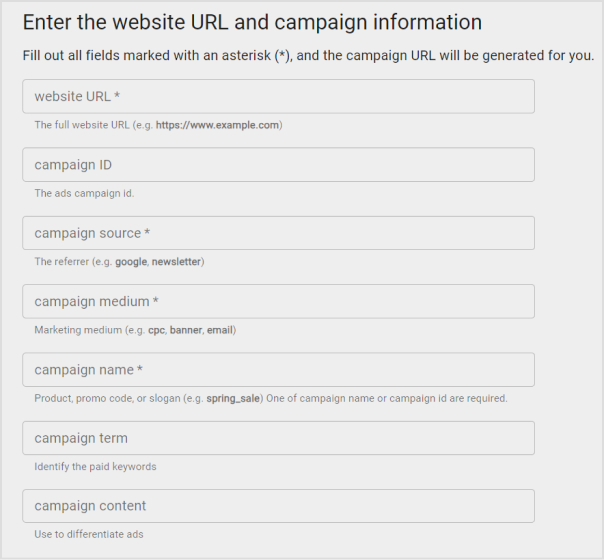
Fill in the required fields for your campaign: the URL of the landing page, source, medium, campaign, term (optional), and content (optional).
Click “Generate URL,” and Google will create the UTM-coded URL for you.
Replug – A convenient alternative:
Replug.io is another powerful tool for UTM code creation, and here’s why it’s worth considering:
Automatic UTM code generation:
Replug automates the UTM code creation process, saving you the trouble of manual entry. This means you can gather valuable analytics data as soon as your campaign goes live.
Shortened and customized URLs:
UTM-coded URLs can become quite lengthy, which can be a problem on platforms like Instagram or when users need to copy and paste links. Replug’s URL shortener free tool shortens and customizes these URLs, making them more elegant and user-friendly.
For example, a long UTM-coded URL might look like this:
While UTM codes are a solid foundation for analyzing marketing performance, they have limitations. Replug offers an enhanced solution called Campaigns, providing in-depth insights and a more hassle-free tracking experience, especially when managing multiple campaigns across various marketing channels.
A complete link management solution
for marketing professionals & agencies.
Try Replug for free
UTM codes are a fundamental tool for tracking the success of your brand campaigns, links, and platforms. They provide valuable data, but those unwieldy, lengthy links can be a drawback. As your marketing endeavors become more intricate, it’s essential to adopt a system that offers both enhanced power and efficiency.
This is where Replug’s UTM builder steps in as the ideal solution. Replug not only helps you track traffic effectively, even in the most complex marketing landscapes, but it also simplifies the process. With Replug, you obtain concise, stylish links that seamlessly fit into any context. Moreover, it offers an analytics tool that’s user-friendly and excels at managing multichannel marketing campaigns.
In essence, Replug empowers you to elevate your brand’s performance, making tracking and managing your marketing efforts a smoother, more efficient, and ultimately more successful process.
Frequently asked questions
What are UTM codes?
UTM codes are tracking parameters added to URLs to measure marketing performance. They’re vital for data-driven decision-making and proving campaign success.
How do I create UTM codes for my campaigns?
You can create UTM codes manually, but it’s easier and error-free to use online UTM code generators like Google’s Campaign URL Builder or Replug’s UTM code builder.
What is Replug, and how does it work for link tracking?
Bitly is a URL shortening and link management platform that not only shortens links for sharing but also provides link tracking and analytics to measure click-through rates and engagement.
Creating UTM links is a straightforward process that helps you track the effectiveness of your marketing campaigns and understand where your website traffic is coming from. UTM parameters are tags added to your URLs to provide more information about the source of a click.
Here’s a quick and effective approach to creating UTM links:
Understand UTM Parameters:
UTM parameters are tags added to the end of a URL to provide more information about the source of a click. They are essential for tracking and analyzing the performance of your campaigns, allowing you to make data-driven decisions and optimize your marketing strategies.
Here’s a breakdown of the key UTM parameters and their purposes:
utm_source:
Purpose: Identifies the specific source of the traffic, such as a website, platform, or publication.
Replug is a feature-rich link management platform that excels in simplifying UTM tracking while offering robust link management capabilities. Its versatility, customization options, and detailed analytics make it a compelling choice for marketers.
Additionally, Replug provides precise link shortening via a brilliant URL shortener free tool, efficient campaign organization, and seamless integration possibilities, making it an attractive option for businesses of all sizes.
Here’s how to add UTM codes to your URLs using Replug:
Step 1: Sign in or create an account
Begin by signing in to your Replug account. If you don’t have one yet, you can easily create a free account.
Step 2: Select your campaign
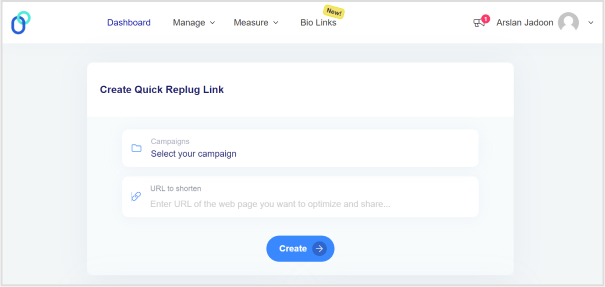
Once you’re logged in, click “Select your campaign” on the main dashboard or create a new campaign.
Step 3: Paste the URL
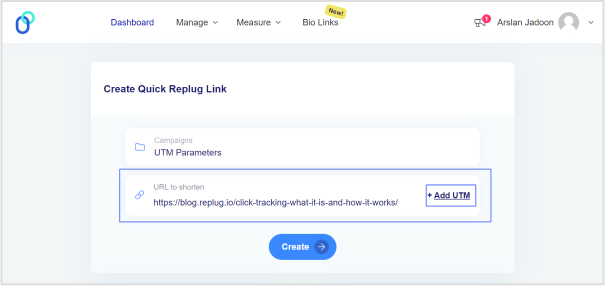
Locate the “URL to shorten” section below “Select your campaign”, and paste the URL to which you want to add UTM parameters.
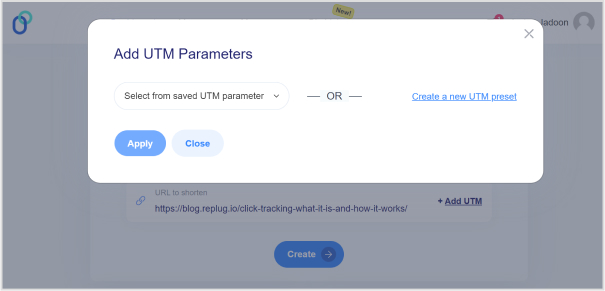
Step 4: Add UTM tag
At the end of the “URL to shorten” section, you’ll see an “add UTM” tag. Click on it to proceed.
Step 5: Choose UTM parameters
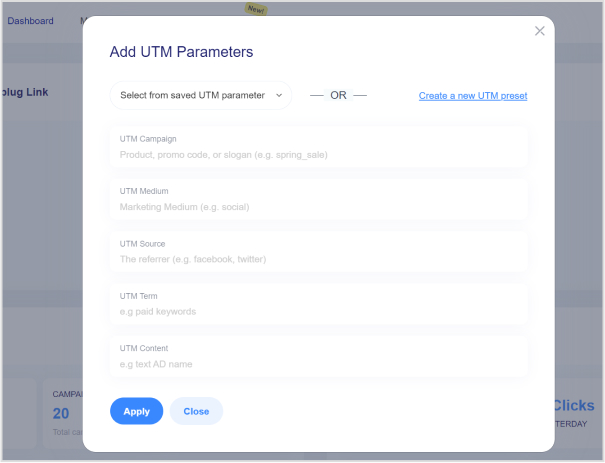
You have the option to either “select from saved UTM parameters” if you’ve used these before or “create a new UTM parameter.”
Step 6: Fill in UTM parameters
If you decide to create a new UTM parameter, provide the necessary information such as the source, medium, campaign, term, and content. Once you’ve completed this, click “Apply.”
Step 7: Create the URL
Click the “create” button, and Replug will automatically generate a shortened URL with the added UTM parameters.
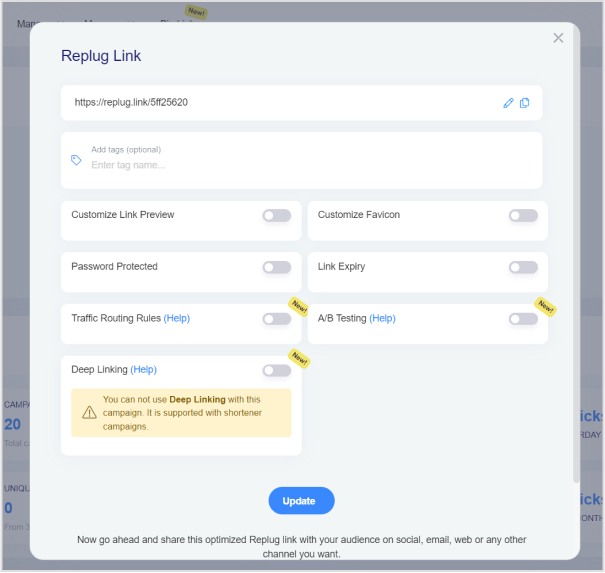
Step 8: Edit UTM code (optional)
If you wish to further customize the URL, you can do so by clicking the edit icon.
Step 9: Copy and update
After any edits (if necessary), simply copy the URL with the UTM parameters and click the “update” button to save your changes.
Step 10: Access your URL
To access and manage the URL you’ve just created with UTM parameters, navigate to the “Manage” section in Replug and click on “Replug links.”
By following these steps, you can harness the full potential of Replug to seamlessly integrate UTM codes into your URLs, improving the accuracy and effectiveness of your marketing campaign tracking and analysis.
A complete link management solution
for marketing professionals & agencies.
Try Replug for free
Frequently asked questions
What are UTM parameters?
UTM parameters are tags added to URLs to track the source and performance of your marketing links. They’re essential for understanding where your traffic comes from and how effective your campaigns are.
How do I create UTM links for my marketing campaigns?
Use Replug’s free online UTM builder or manually add UTM parameters to your URLs to create UTM links. For efficiency, it’s better to use a tool.
What are the common mistakes to avoid when using UTM parameters?
Avoid using spaces or special characters in your UTM parameters, and make sure they are applied consistently. Be careful with sensitive data like user information in UTM parameters.
Ever felt frustrated by Instagram’s link limit? You’re not alone! While Instagram now allows up to five links in your bio, that might not be enough if you have multiple websites, social media accounts, or affiliate links to share.
That’s where Replug comes in. It lets you create a single, sleek bio link page where you can add unlimited links, making it easier for your audience to find everything in one place.
Let’s dive into how you can set up multiple links in your Instagram bio using this top-notch URL shortener!
Why add a Replug link to your Instagram bio?
Before we discuss the how, let’s know the why.
Why should you even consider integrating a Replug link into your Instagram bio?
Beyond the obvious advantage of offering an in-depth view of your presence, here are some compelling reasons:
Boost your follower base: Direct your Instagram followers to explore your other platforms, encouraging them to follow you on those as well. You can also add links to your Instagram in the bios of your other accounts to drive cross-platform engagement and get leads from social media.
Monetize your audience: Replug helps you turn Instagram followers into customers by linking to your e-commerce store, Etsy shop, or other products. Direct users to your purchasable content, turning your followers into potential buyers and boosting sales for Instagram business accounts.
Monitor analytics: Replug provides insights into user engagement, tracking clicks, views, and click-through rates (CTR). For influencers, this data is essential for refining your content strategy, helping you optimize performance and improve audience engagement across platforms.
Offline connection: Share your Instagram QR code with followers to connect them to your other platforms. Whether it’s for a restaurant menu or event info, the offline-to-online connection creates an easy way for users to engage with your content anytime, anywhere.
Customizable landing pages: Build a personalized landing page with Replug that reflects your brand’s style and identity. Customize everything from layout to colors to create an on-brand experience for your audience.
Unlimited links: Replug allows you to share an unlimited number of links through its bio link feature. From your website and blog posts to products and affiliate content, it gives you a simple place to drive traffic and keep your audience engaged.
Retargeting pixel support: Improve your ad campaigns with retargeting by tracking visitors who clicked your links. This feature helps you stay connected with your audience and drive conversions by reaching users who have shown interest.
Mobile-friendly and fast: Replug ensures that your landing pages and links work seamlessly on all devices, offering a fast and smooth experience for users accessing your content from smartphones, tablets, or desktops.
Step 2: Access the “bio links” feature on the Replug dashboard.
Step 3: Click the “New Bio Link” button to create a new bio link specifically for your Instagram bio.
Step 4: Personalize your bio profile to your heart’s content. With Replug, you can add a profile picture, profile title, bio description, and even a verification badge!
Now comes the creative and fun part. You choose from stunning pre-designed templates or create your own. You can also customize colours, select from button styles, and customize colours.
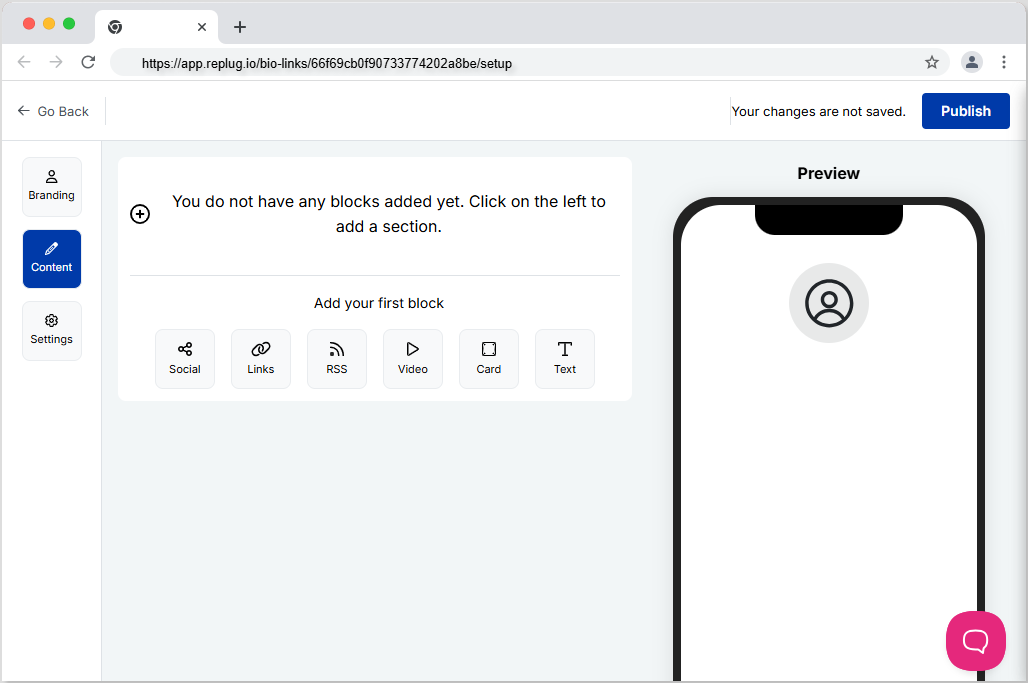
Step 5: Now customize the content you want on your bio link landing page. You can choose from multiple blocks, including social, links, RSS, video, card, and text. This is a great way to add all your links inside a single and clean landing page. It prevents your bio from looking cluttered and messy because of multiple links.
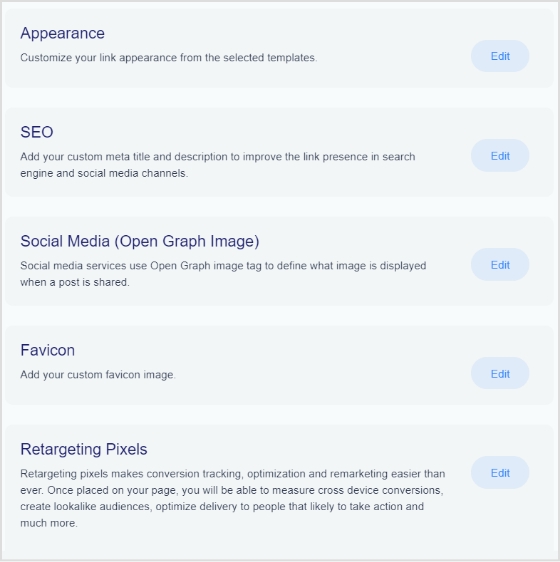
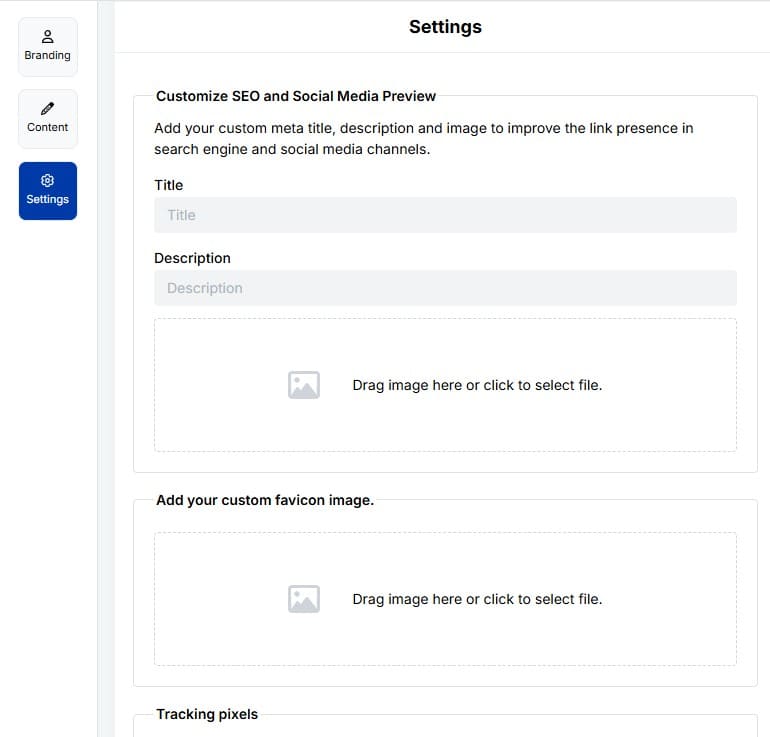
Step6: The final step is to customize SEO and social media preview. Here, you’ll have the option to add your custom meta title, description, custom favicon image, and retargeting pixel to improve the link presence in search engines and social media channels.
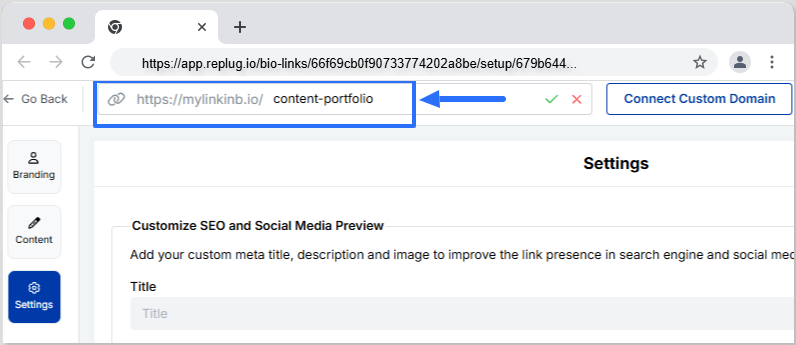
Step 7: Customize your bio link slug for a personalized touch.
Step 8: Update your bio link and preview it for final touches.
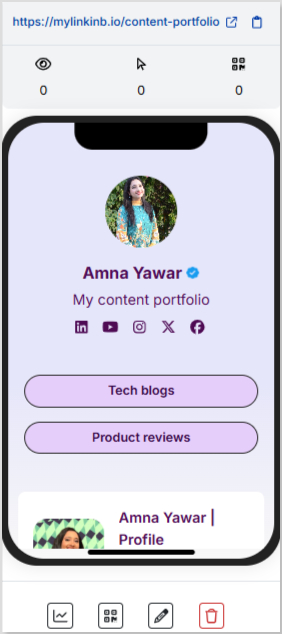
Step 9: Go back to your bio link dashboard. You will now see that your bio link has been generated and is live.
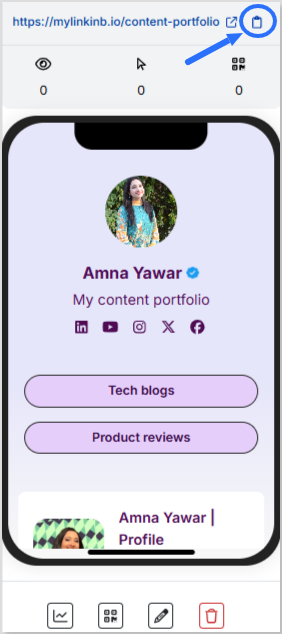
You can now copy your bio link URL, view your bio link analytics, download the QR for easy sharing, edit your bio link if required, or delete it permanently.
Add bio link URL to Instagram bio:
Step 1: Copy your bio link URL from Replug.
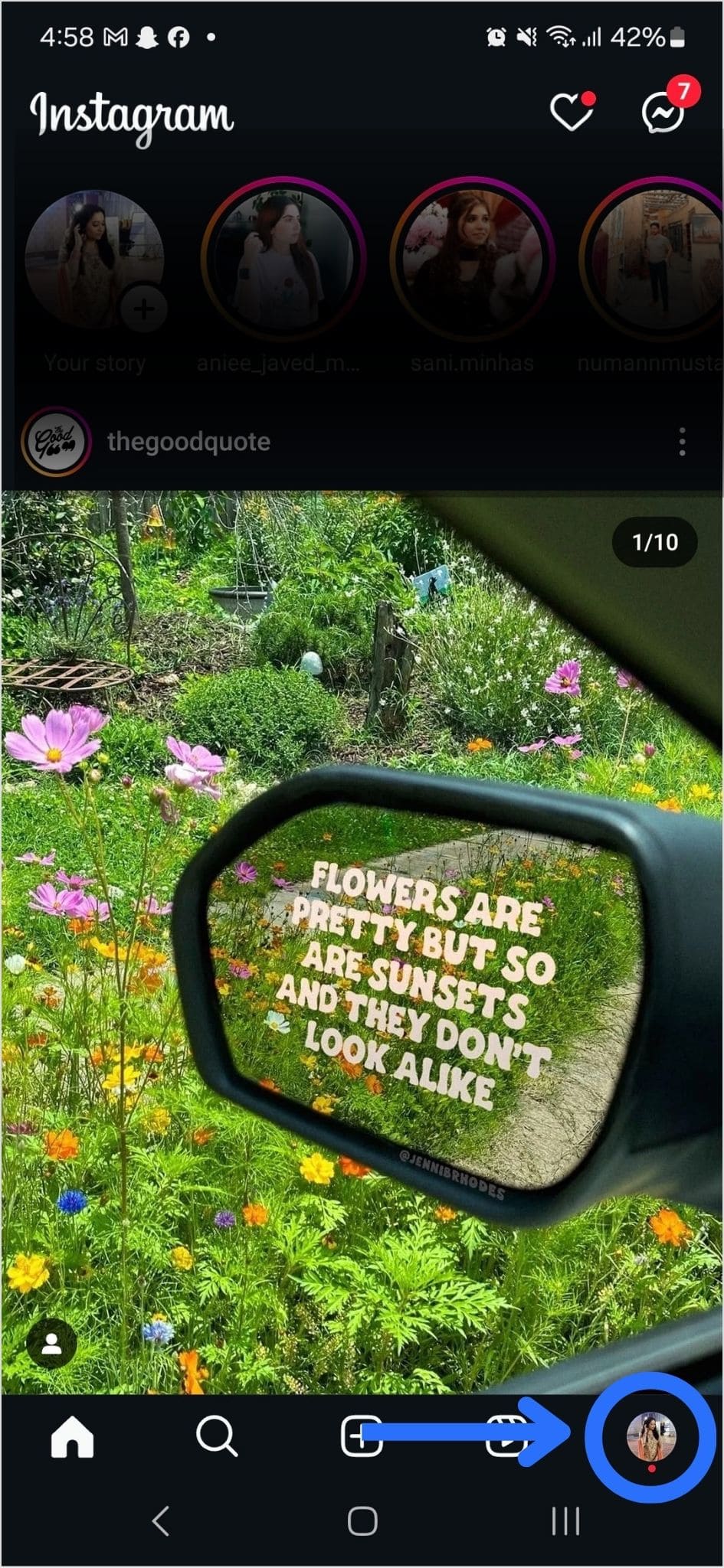
Step 2: Open Instagram on your mobile and tap your profile icon in the bottom right corner.
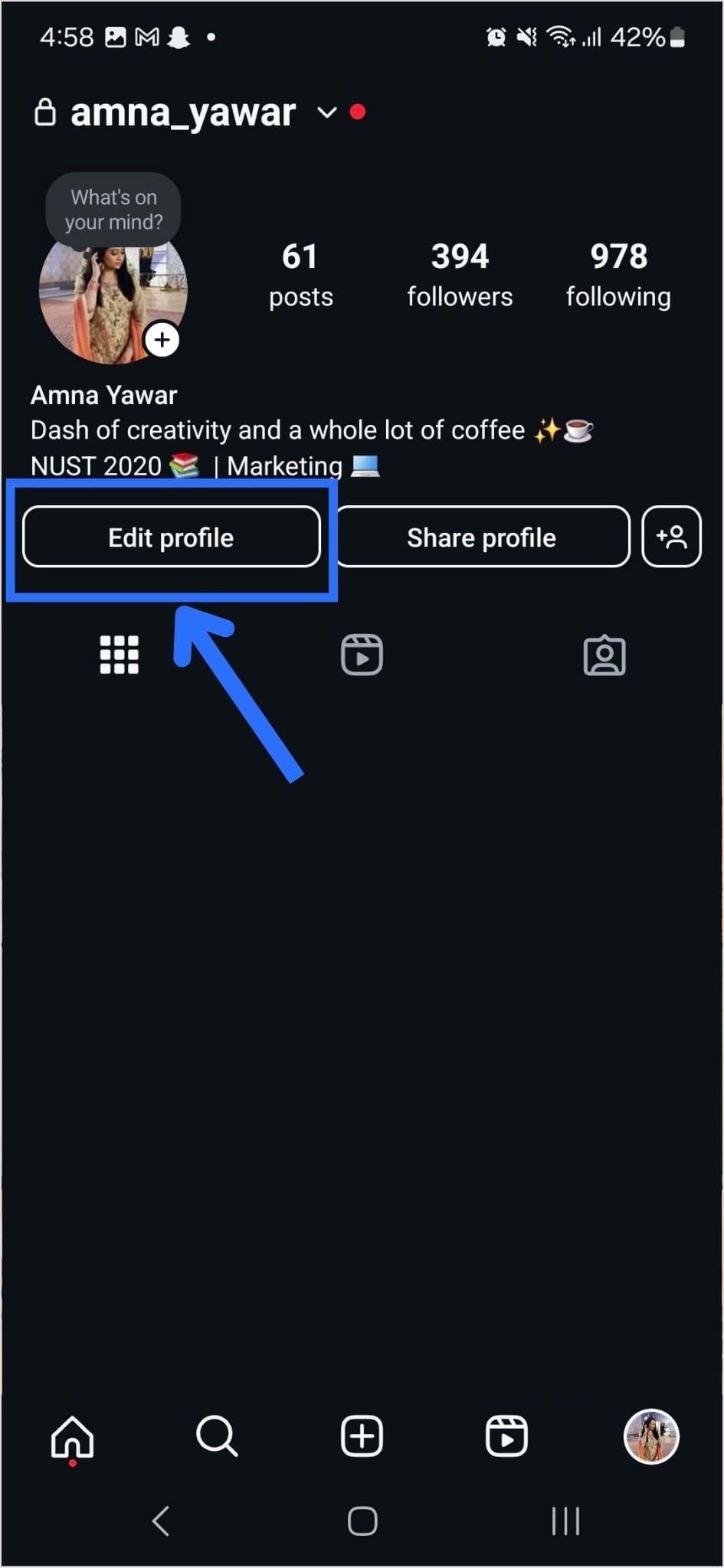
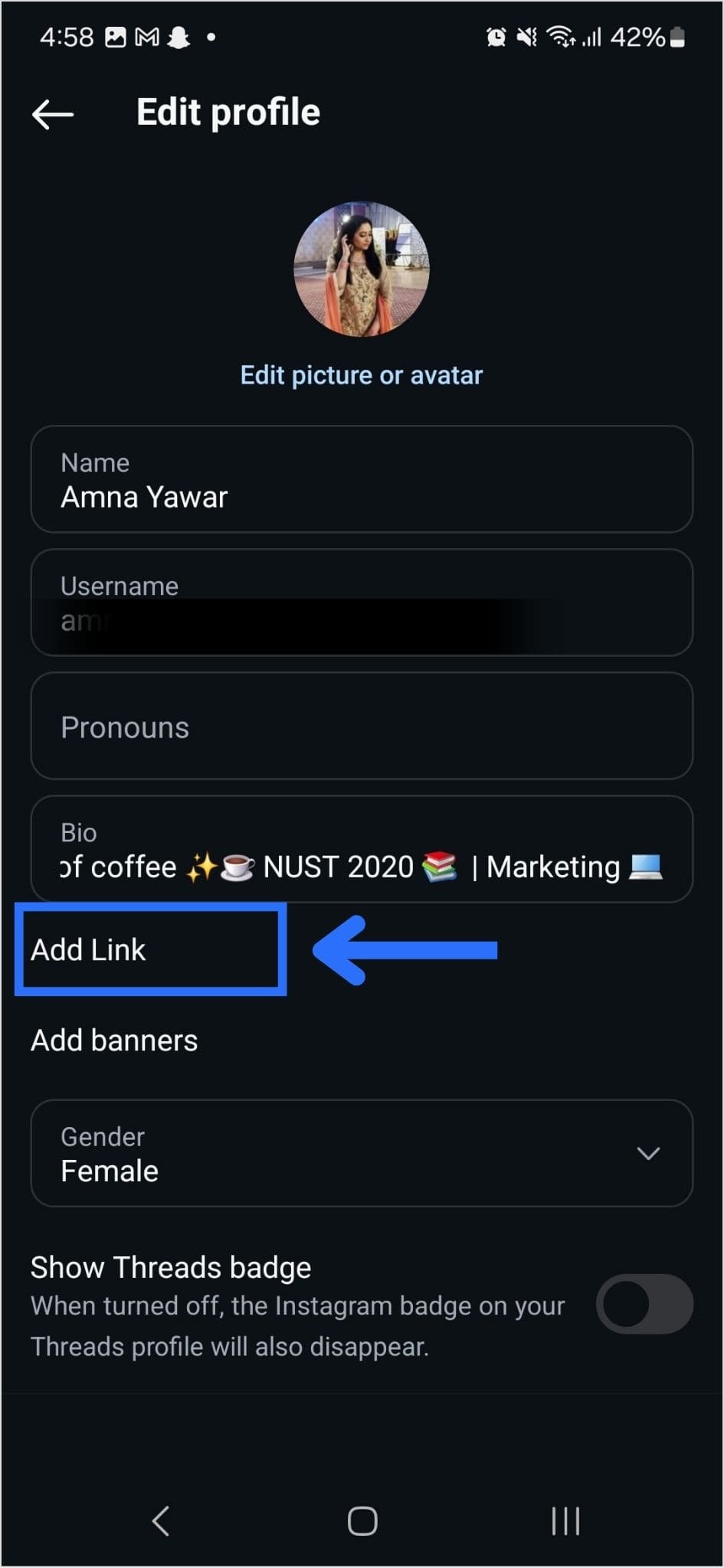
Step 3: Tap on the edit profile button on your profile page.
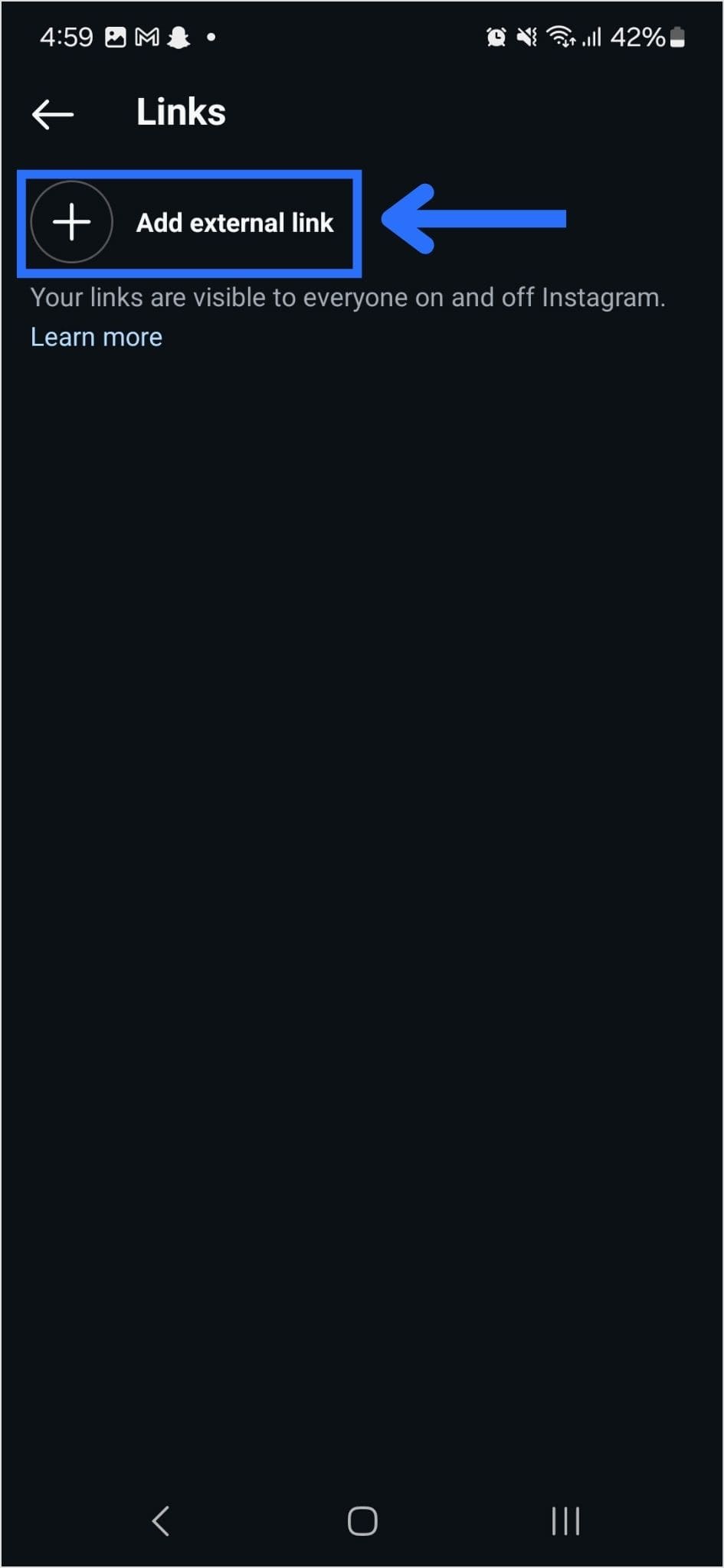
Step 4: Now, you will see the add link section on your mobile screen. Tap on it.
Step 5: Tap the add external link section to add your website address.
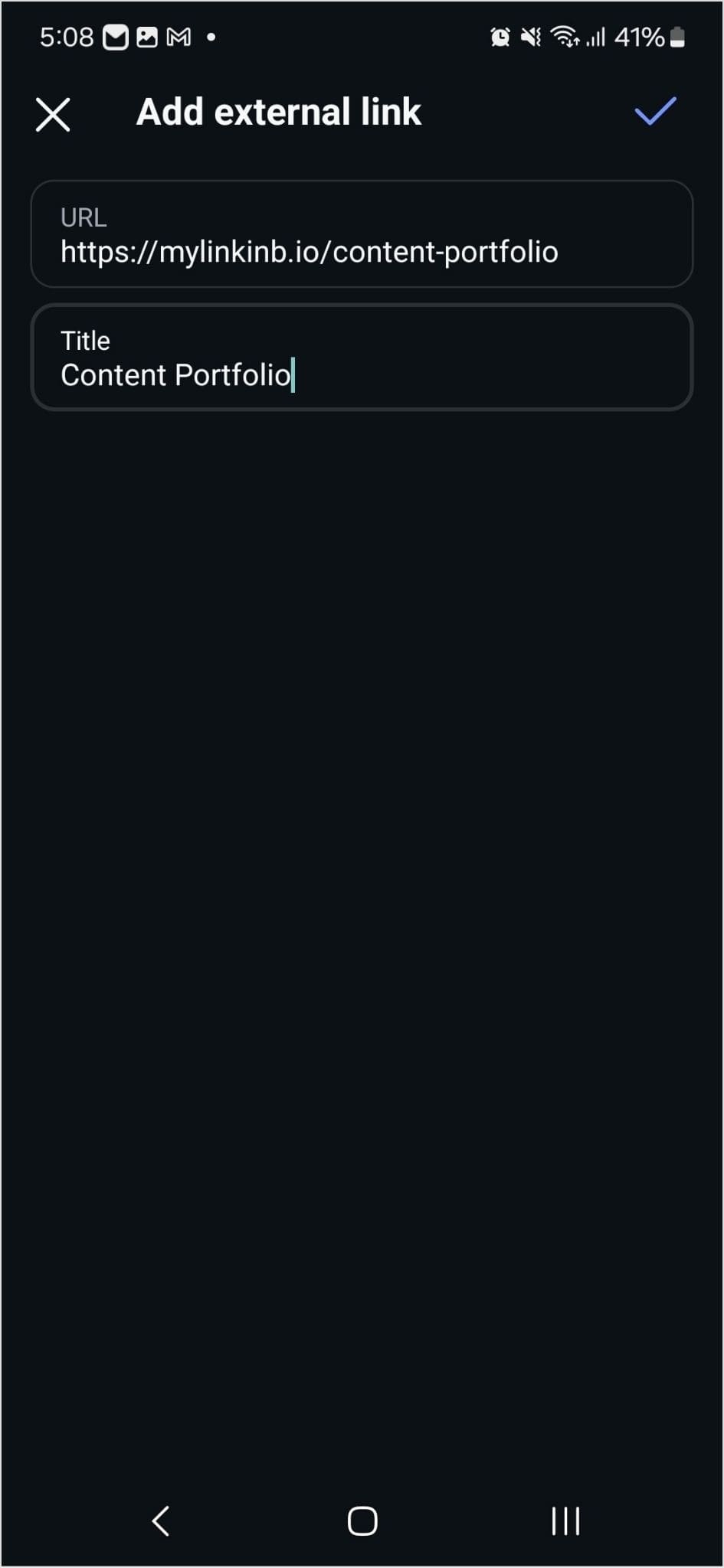
Step 6: Paste the bio link URL in the URL section and add a title in the title section.
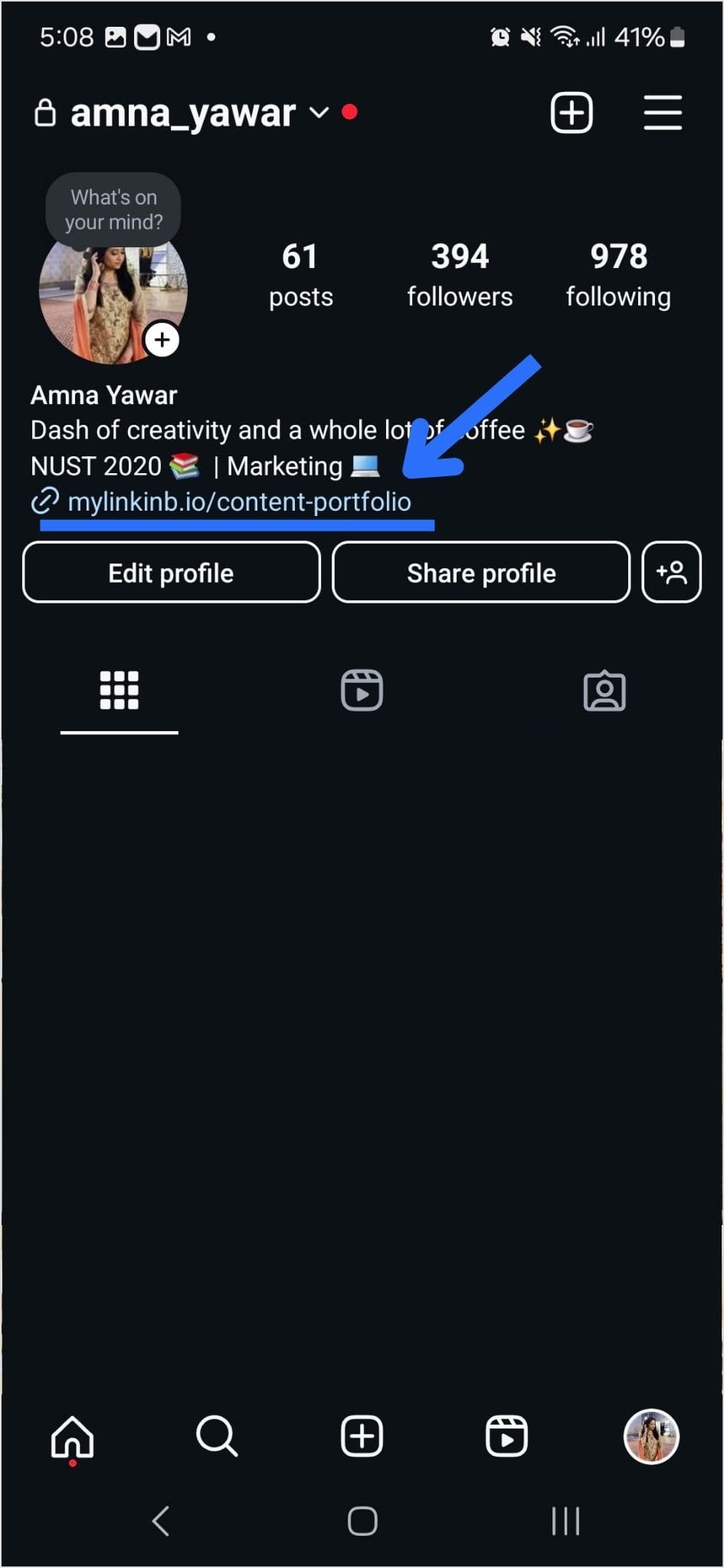
Step 7: Your link in the bio will now appear in your profile.
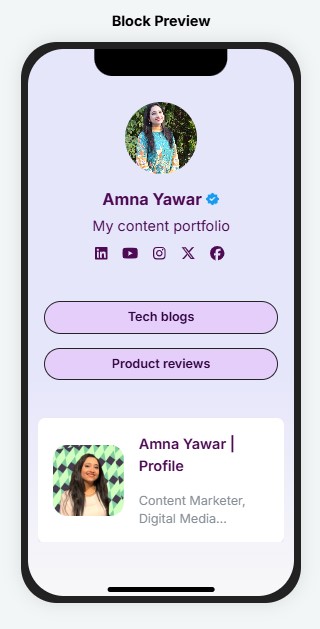
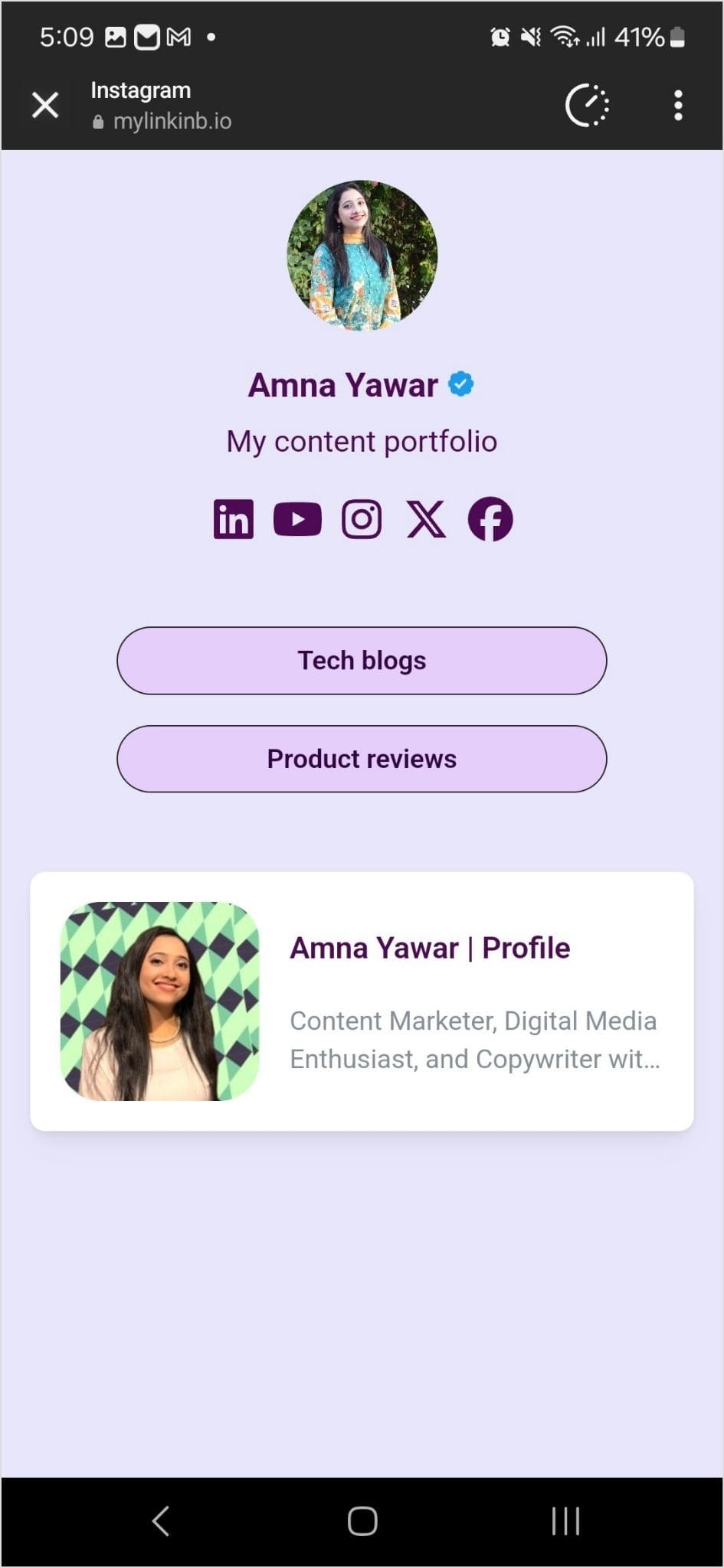
Step 8: Your Instagram profile now has multiple links in the bio. The bio link URL is now clickable. Here’s what the landing page looks like in our example:
Adding multiple links to your Instagram bio can enhance your profile’s functionality and engagement. By using services like Replug and following the steps mentioned earlier, you can efficiently manage and share multiple links within your Instagram bio.
Keep your audience informed and connected with your content. Explore the possibilities and make the most of your Instagram presence!
Have you ever shared an interesting post, recommended a funny video, or perhaps even critiqued an article that missed the mark? We’ve all been there.
However, what you may not realize is that the way you share these online treasures can have a significant impact on your brand identity.
If you’ve been using plain, generic short links to share content, it’s time to take a closer look. By doing so, you may unknowingly promote other brands instead of your own.
We’ll get straight to the point and discuss the difference between branded links vs. short links inside this blog. We’ll help you understand the implications of your choice and how it can affect your brand’s online presence.
So, let’s get straight to it!
What is a short link?
A short link, also known as a “short URL” or a “generic short link”, uses a public domain from a third-party service to compress a long version of a web address or URL.
Short links are created to simplify lengthy URLs, making them easier to share, remember, and use. They play a key role, especially in contexts where character limits are a concern, such as social media or printed materials.
Generic short links typically redirect users to the original, longer URL when clicked.
Check out this example of a short link:
👉 Example: bit.ly/3XyZ9aL
This type of link uses a generic shortening domain and a random string of characters. It’s quick to create and works across any platform, but doesn’t reflect your brand identity.
What makes short links so practical & powerful
Higher click-through rates (CTRs): Short links are clean, simple, and visually appealing, encouraging users to click more often compared to long, cluttered URLs.
Enhanced recognition: Even generic short links can reflect consistency and professionalism, helping users associate your content with reliability and trust.
Data-driven insights: These links provide measurable analytics, such as click counts, location, and device type, enabling you to optimize your campaigns with actionable data.
Seamless user experience: Shortened links load quickly, look better across platforms, and make sharing effortless, improving the overall experience for your audience.
Major use cases for short links
SMS marketing: Short links save character space in text messages while tracking engagement, making them perfect for concise, measurable mobile campaigns.
Social media: Generic short links appear clean, fit better within character limits, and enable consistent tracking across platforms like X, Instagram, and LinkedIn.
Email campaigns: Using short links keeps your emails neat and improves click tracking, helping marketers measure the effectiveness of each link more accurately.
QR codes: Short links integrate seamlessly with QR codes, ensuring faster scans, shorter URLs, and flexible tracking of offline-to-online traffic.
Organic sharing: These links make content easier to share across blogs, forums, and emails, increasing reach without cluttering the message.
Offline marketing materials: Placing short links on posters, flyers, or packaging makes it easy for users to type or scan, bridging the gap between offline and online engagement.
Customer support & feedback: Support teams use such links to quickly direct users to FAQs, surveys, or troubleshooting pages without confusing them with long URLs.
A branded link, also known as a “custom short link” or a “vanity URL”, is a type of shortened URL that includes a brand’s or organization’s name or a custom keyword as part of the link.
Unlike generic short links that use a random combination of characters and numbers, branded links are customized to reflect the brand’s identity, making them more recognizable and trustworthy to users.
3 key elements of a branded link are:
Domain – The custom name that represents your brand (e.g., go.yourbrand.com), helping build recognition and trust.
TLD (top-level domain) – The extension that follows the domain (e.g., .com, .io, .link), which can be chosen to align with your brand’s identity or industry.
URL slug – The customizable part after the slash (e.g., /summer-sale), used to describe the content or campaign clearly and memorably.
Example of a branded link:
👉 Example: go.yourbrand.com/offer
A branded link uses a custom domain (e.g., go.yourbrand.com, link.apple.com, etc.). It reinforces brand recognition, looks more trustworthy, and still provides all the tracking and analytics benefits of a short link.
What makes branded links so practical & powerful
Stronger brand identity: Branded links carry your custom domain, reinforcing your brand’s identity every time someone shares or clicks your link.
Increased trust & credibility: Users are more likely to click links that clearly display a recognizable brand name, making them appear legitimate and secure.
Easy to remember & share: Simple, descriptive branded links are easier to recall and share, helping your campaigns gain more organic traction.
Enhanced brand awareness: Every branded link acts as a micro touchpoint, spreading your brand name across social media, email, and digital channels.
Actionable insights & control: You can track clicks, sources, and audience behavior in detail, allowing you to optimize your campaigns with data-driven precision.
Clean & consistent link appearance: Branded links look professional and tidy across all platforms, maintaining consistency in tone and presentation.
Improved SEO & discoverability: Descriptive, keyword-rich branded links can enhance search visibility, helping both users and search engines better understand your content.
Major use cases for branded links
Marketing campaigns: Use branded links to track and analyze engagement across multiple campaigns, improving ROI measurement.
Social media marketing: Create short, on-brand links for platforms like X, Instagram, and LinkedIn to increase clicks and maintain brand consistency.
Affiliate marketing: Provide affiliates with custom-branded URLs to ensure trust, improve conversions, and monitor performance.
Email marketing: Include branded links in newsletters or promotional emails to increase click-through rates and minimize the risk of being filtered as spam.
Influencer collaborations: Give influencers branded links to share, securing brand visibility and accurate tracking of their impact.
Paid advertising: Use branded short links in PPC ads or sponsored content to make URLs look cleaner and more credible.
Event promotion: Share memorable branded links for event registrations, webinars, or launches to simplify access and tracking.
Offline & print media: Utilize branded URLs in flyers, posters, or business cards for easy recall and consistent branding.
Product launches or updates: Direct audiences to specific landing pages for new products or announcements with clear, branded links.
Branded links offer several advantages, particularly in strengthening your brand identity and enhancing user trust. They are valuable for businesses and individuals seeking to establish a cohesive online presence and improve user engagement.
Short links, on the other hand, are helpful in cases where you need a precise link to share with friends or family members, without worrying about online presence.
Feature
Branded Links
Short Links
Domain
Uses a custom, brand-specific domain (e.g., brand.co/link).
Uses a third-party domain (e.g., bit.ly, tinyurl.com).
Branding
Reinforces brand visibility and consistency in every link.
Offers no brand identity or recognition.
Credibility & Trust
Instantly recognizable and trusted due to brand association.
It may appear suspicious or spammy to users.
Click-Through Rate
Higher CTR because branded links look professional and secure.
Typically lower, as users hesitate to click on unfamiliar links.
Use Case
Ideal for marketing, promotions, and professional brand communication.
Suitable for quick personal sharing or temporary links.
Best For
Businesses, marketers, and organizations focused on brand growth and analytics.
Individuals or small-scale, non-branded usage.
The choice depends on your priorities
The choice between branded links and short links eventually depends on your specific goals and the context in which you plan to use them.
Branded links: If strengthening your brand identity, increasing trust, and improving user recognition are important to you, branded links are an excellent choice. They excel in marketing campaigns and content sharing where branding matters.
Short links: If brevity and saving space are crucial, short links are suitable. They are especially dominant in platforms with character constraints. They also make shared URLs look easier to remember, improving overall user experience.
How to create a branded short link using Replug
Are you ready to start using branded links for your own brand? Replug, a powerful free link shortener and branding tool, simplifies the process of creating custom, branded short links.
Let’s walk through the steps to create these links and amplify your brand’s reach.
Step 1: Add your custom domain
The first step in creating branded links with Replug.io is to incorporate your custom domain.
While Replug provides a default shortener domain (rplg.co), using your custom domain strengthens your brand identity and reputation.
Open your Replug dashboard and navigate to “Settings.” Then select “Custom Domains” from the dropdown menu.
Click on “Add Domain” to begin setting up your custom short URL.
On the next screen, provide the essential details, including your custom domain and settings such as the 404 redirect URL and branded domain.
Click “Connect” to add your custom domain to your Replug account.
After successfully connecting your custom domain, you can manage it within your Replug account. Check connectivity status, edit domain settings, or delete domains as needed.
With your custom domain integrated into Replug, you’re now ready to create your custom-branded link. Here’s how:
Paste your long URL in the bar under “Quickly shorten your link”.
Next, click on the blue arrow. Replug will automatically generate a short link for your long URL.
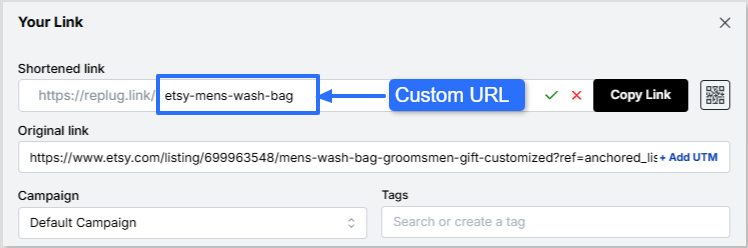
You can rename the link easily. All you need to do is change the slug of your short link.
Finally, save your shortened link. Now your link is ready to share anywhere on Instagram, Discord, or in an email campaign.
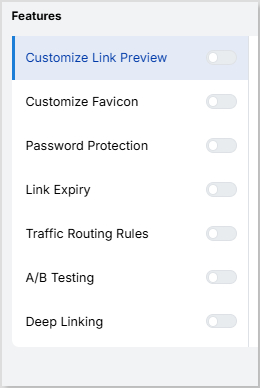
Note: You can add some amazing Replug features to your generated link, like customizing your link preview, adding custom favicons, A/B test your links, and more! You can also add retargeting pixels or custom CTAs to your link-shortening campaigns.
Leading brands & businesses prefer branded short links
Let’s take a look at how some of the most popular brands use branded links to their advantage:
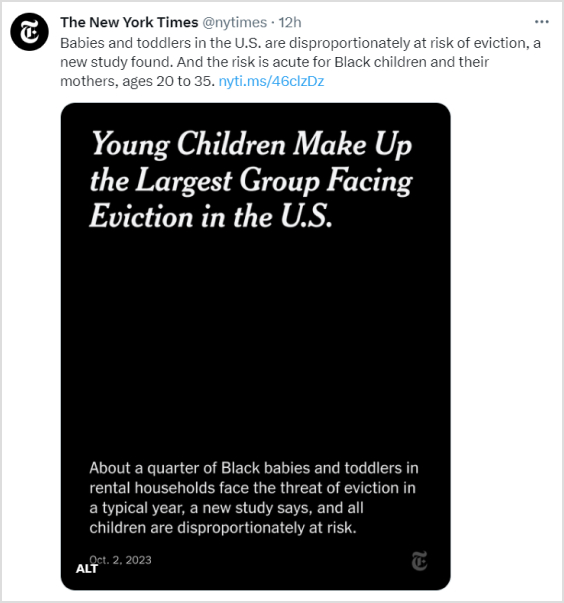
The New York Times – nyti.ms
The renowned newspaper, “The New York Times”, simplifies sharing long article URLs on social media and beyond by using the branded link nyti.ms. This branded link not only shortens the URL but also reinforces the brand’s identity with every click.
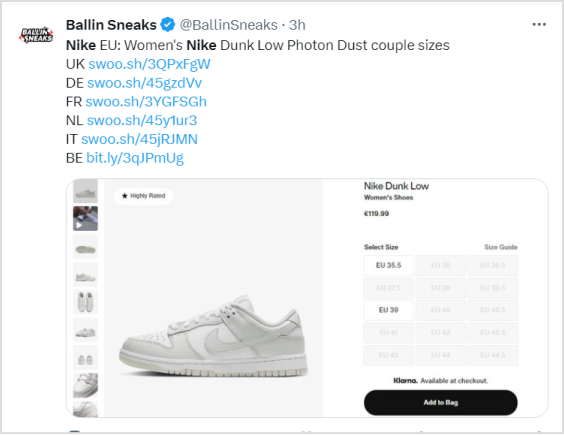
Nike – swoo.sh
When it comes to sports and lifestyle, Nike is a standout name. They utilize the branded link swoo.sh to create a memorable link for their products and promotions. This reinforces the Nike brand with every shared link.
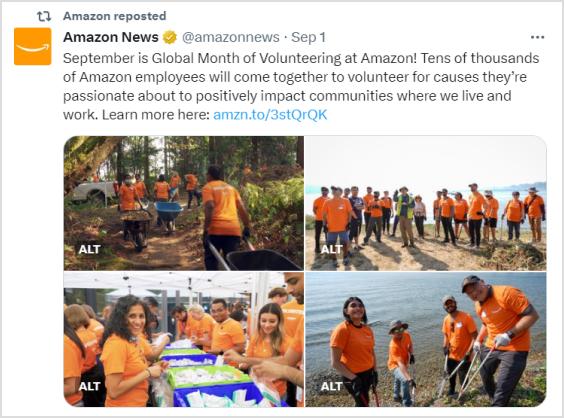
Amazon – amzn.to
E-commerce giant “Amazon” opts for the branded link amzn.to, to shorten product URLs. This not only saves space in printed materials but also keeps the focus on their products rather than the URL itself.
Coca-Cola – cokeurl.com
Coca-Cola, a global beverage icon, maintains brand consistency by using branded links, such as cokeurl.com. This approach guarantees that every link shared aligns with their brand image.
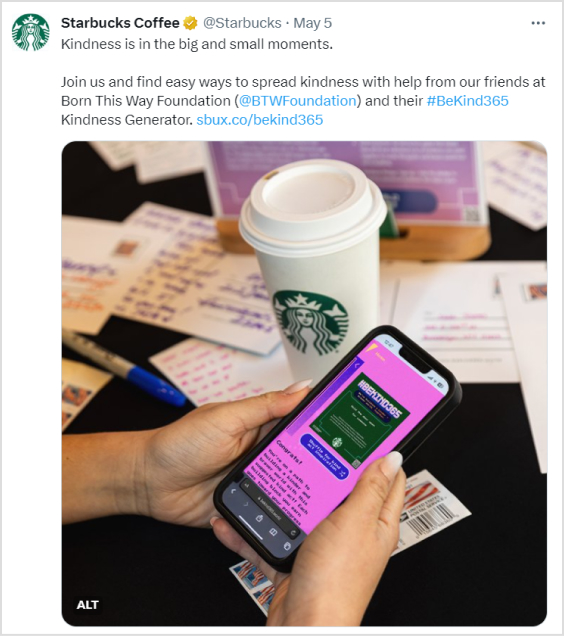
Starbucks – sbux.co
Starbucks is a renowned global coffee chain that utilizes branded links with the domain sbux.co to simplify the sharing of promotional content. This reinforces their brand identity and keeps their links looking clean and professional.
Conclusion
At the end of the day, the choice between branded links and generic short links comes down to your goals.
Short links are ideal when you need something quick, simple, and space-saving. But if you want to strengthen brand identity, build trust, and boost engagement, branded links clearly stand out. That’s why brands like Nike, Amazon, and Starbucks rely on them.
It’s not just about shortening a URL, it’s about making every click count.
With tools like Replug, you don’t have to choose between convenience and branding; you can get both. Whether you’re sharing on social media, in emails, or even offline, branded links let you stay consistent, professional, and memorable.
So instead of sending traffic through someone else’s domain, take control of your links and make them work harder for your brand.
Frequently asked questions
Why should I consider using branded links for my brand or business?
Branded links, which use your custom domain (e.g., yourbrand.ly/link), enhance brand visibility and recognition with every share, fostering customer loyalty. They improve click-through rates by up to 34% compared to generic links, as they appear more professional and trustworthy. Additionally, they protect against link hijacking and provide valuable analytics to refine marketing strategies.
Are branded links more trustworthy than short links?
Yes, branded links are generally more trustworthy because they incorporate your recognizable domain, signaling legitimacy and reducing user hesitation from unknown shorteners. Studies show they can boost trust by 25-30%, minimizing phishing concerns. In contrast, generic short links often hide the destination, potentially alarming users in an era of heightened cybersecurity awareness.
Can I track the performance of branded links?
Absolutely, most branded link services, such as Replug or Rebrandly, offer rich analytics, including click counts, geographic data, referral sources, and device types. This enables real-time monitoring and A/B testing to optimize campaigns for maximum effectiveness. Integration with tools like Google Analytics further enhances tracking, providing insights into user behavior and ROI.
Why should short links be a part of every marketer’s strategy?
Short links condense lengthy URLs, making them ideal for character-limited platforms like X (Twitter) and improving shareability across social media. They enable precise tracking of engagement metrics, helping marketers measure campaign effectiveness and audience preferences. Moreover, they enhance aesthetics in emails and ads, potentially increasing click rates by 20-40% while supporting retargeting efforts.
When to use short links and branded links?
Use generic short links for quick, internal, or low-stakes sharing where branding isn’t crucial, such as casual social posts or temporary redirects. Opt for branded links in marketing campaigns, email newsletters, or affiliate programs to reinforce brand identity and build trust. Branded links excel in professional contexts, such as ads or content syndication, while short links are sufficient for everyday use.
Provide some valuable tips when using short links?
When using short links:
– Make sure they’re concise yet recognizable to build trust, avoiding overly cryptic formats. – Maintain consistency across your organization by using a unified link structure or platform to reinforce branding and simplify tracking. – Incorporate UTM parameters in destination URLs to effectively monitor traffic sources and campaign performance in analytics tools.
Instagram has made it easier than ever to share valuable resources and information with your followers. You can now add links to your Instagram Stories, regardless of your account size. Whether you’re a business, creator, or an individual, this feature empowers you to connect with your audience in new ways.
In this guide, we’ll show you how to add a link to your Instagram story, enabling you to share what matters most to you. Let’s get started.
Why do you need to add a link to your Instagram story?
Adding a link to your Instagram story serves several important purposes:
Share resources: You can direct your followers to external websites, articles, or resources related to the content of your story. This is valuable for sharing information, promoting products or services, or providing additional context.
Drive traffic: If you have a website, blog, or online store, adding a link to your story can help drive traffic to your site. This is essential for businesses and content creators looking to expand their online presence.
Enhance engagement: Links in stories can prompt user interaction. When viewers tap on the link, it provides a way for them to engage further with your content, whether it’s to learn more, shop, or explore related content.
Promote events: If you’re hosting an event, webinar, or live stream, you can use links in stories to invite your audience and provide event details or registration links.
Support causes: Advocates and change-makers can use links to share information about social causes, fundraisers, or petitions, helping raise awareness and drive action.
Connect with your audience: Adding links enables you to offer your followers valuable resources, making your content more relevant and engaging.
Ensure you have the Instagram app installed on your mobile device. Log in to your Instagram account if you’re not already logged in.
Step 2: Access your story creator
Tap your profile picture or swipe right from your home feed to access the story creator.
Step 3: Capture or upload content
At the bottom of the screen, you’ll see options to capture a photo or record a video using your device’s camera. Alternatively, you can swipe up or tap on the gallery icon to upload existing content from your camera roll. Choose the content you want to add to your story.
Step 4: Access the sticker tool
After capturing or uploading your content, you can enhance your story with various stickers and features. To add a link to your story, tap the “Sticker” icon from the top navigation bar.
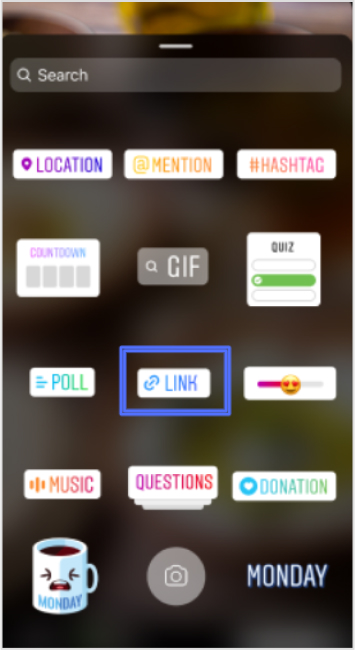
In the sticker options, locate and tap on the “Link” sticker. This sticker is used to add the link you want to share with your followers.
Step 6: Enter your desired link
A pop-up window will appear, allowing you to enter the web link you want to share. Type or paste the URL into the provided space.
Step 7: Confirm and customize
After entering the link, tap “Done” to confirm. You can also customize the appearance of the Link sticker by tapping on it, which may allow you to choose from different color variations or styles, depending on Instagram’s features at the time.
Step 8: Place the sticker on your story
Now, you can place the Link sticker on your story. Simply drag and drop it onto your image or video, just like you would with other stickers.
Once you’re satisfied with how your story looks with the added link, you can proceed to share it with your followers. Tap the “Your Story” button at the bottom of the screen to post your story.
Step 10: Viewers interact with the link
When someone views your story and taps on the Link sticker, they will be redirected to the web page you’ve shared.
Important Note: Instagram has certain safety measures in place. New accounts and accounts that repeatedly share harmful content or violate community guidelines may not have access to the Link sticker feature. Be sure to follow Instagram’s guidelines and policies to maintain access to this and other features.
Replug: Simplify your social media link management
Managing links on social media platforms like Instagram can be a crucial part of your online strategy. Replug is a comprehensive link management platform and bio-link tool designed to simplify this process.
With Replug’s efficient short URL generator, you can create shortened, trackable links that are perfect for Instagram bio links or sharing in your stories. This Instagram link shortener provides valuable analytics to help you measure the performance of your links, including click-through rates and audience engagement data.
Whether you’re a marketer, business owner, or content creator, Replug can enhance your social media marketing efforts by making link management effortless and effective.
Try Replug today and take control of your links to maximize your online presence.
A complete link management solution
for marketing professionals & agencies.
Try Replug for free
FAQs on adding a link to Instagram Story
Can I add links to any type of Instagram Story, including photos and videos?
Yes, you can add links to both photos and videos in your Instagram Stories.
Is there a limit to the number of links I can add to a single Instagram Story?
You can typically add one link per Instagram Story. If you want to share multiple links, consider creating multiple stories or using the link in the bio feature.
Who can add links to their Instagram Stories?
Instagram has expanded access to this feature, so now, users of all account sizes, including businesses, creators, and individuals, can add links to their stories.
Are there any restrictions on the types of links I can share in my Instagram Story?
Instagram has guidelines in place and links that violate their Community Guidelines may be restricted. It’s important to ensure your content adheres to Instagram’s policies.
Can I track how many people clicked on the link in my Instagram Story?
Yes, Instagram provides insights on the number of clicks your link receives. You can view this data by swiping up your story.
Tired of guesswork in SEO? Embrace the science of SEO split testing!
Discover how small changes to your website’s structure, keywords, and content can have a big impact on search rankings, organic traffic, and user engagement.
Let’s supercharge your website’s organic search results with our SEO split testing guide.
What is SEO Split Testing?
SEO split testing is the process of comparing different versions of web pages to measure their impact on search engine rankings. It’s like a controlled experiment, where you have a variant page with changes and a control page. By tracking the performance of each variant, you can identify the best performing webpage and enhance your website’s visibility in search engines.
The benefits of SEO split testing
Data-driven decision-making: You can make informed decisions based on empirical evidence on the effectiveness of different variations.
Improved user experience: Testing different elements can lead to a better user experience, resulting in higher engagement and improved rankings.
Increased organic traffic: You can attract more organic traffic from search engines by optimizing your website based on test results.
Better conversion rates: Split testing helps identify the most effective strategies to drive conversions.
Adaptation to algorithm changes: It allows you to adjust your SEO strategies in response to algorithm updates.
Stakeholder buy-in: A/B Split test results provide tangible evidence of the impact of SEO efforts.
Below are the benefits of split testing the SEO strategy that might convince you to invest your time in them:
1. Improve Conversion Rates:
Conversion rate optimization (CRO) and SEO are closely related concepts. By split testing your SEO campaign, you can increase traffic and conversion rates. You can fine-tune your SEO strategy to enhance user experience and boost conversions by testing various iterations of landing pages and calls-to-action buttons.
2. Optimize SEO Efforts:
By using split-testing, you can compare various iterations of your SEO strategy, including :
Keyword usage
Meta tags/descriptions
On-page optimization
Content organization
This practice allows you to identify which tactic produces the best outcomes. It assists you in determining the best strategies to raise your search engine rankings and increase organic traffic.
3. Keeping up with algorithm changes:
Search engine algorithms are always changing, so what works today might not work tomorrow. Split-testing enables you to modify and polish your SEO approach to conform to algorithm updates. You can make sure your website maintains its search engine optimization and visibility in the constantly shifting environment by being proactive and conducting ongoing testing.
4. Convince stakeholders and quatify Impact:
The impact of SEO can be quantified by measuring key metrics both before and after changes by performing an SEO Split test. This data-driven strategy offers verifiable proof of the efficacy of your SEO strategy, enabling you to convince stakeholders of the value of your optimizations and make wise resource allocation choices.
5. Refine user experience:
Split-testing SEO components can help you improve your website’s overall user experience. By testing various layouts, navigation structures, page load times, and mobile responsiveness, you can find changes that make your website more user-friendly
Factors to consider before performing the SEO Split test?
These several factors must be considered before performing an SEO split test.
Clear objectives: Define clear objectives for your test. What specific aspect of your SEO strategy are you testing?
Testing scope: Determine the scope of your test. Decide whether you’ll be testing a single webpage or multiple pages.
Sample size: Strive for a sample size that provides meaningful insights without being too resource-intensive.
Test duration: Determine the appropriate duration for your test within the time frame of changing dynamics.
Statistical significance: Establish the level of statistical significance you require for your results to be reliable. This helps determine the confidence level you need to make decisions based on the test data.
Choosing the right testing tool: Use a reliable, user-friendly A/B split testing tool with a solid track record.
Consistency in testing conditions: Make sure the testing conditions, such as the user demographics, devices, browsers, and traffic sources, are constant throughout the test.
Segmentation and personalization: Depending on user characteristics, decide whether you want to segment your audience or personalize the variations.
Data collection and analysis: Establish a clear plan for data collection and analysis to derive actionable conclusions.
Documentation and reporting: Document your test process, including the variations tested, metrics measured, and results obtained. This documentation will be valuable for future reference
How do you know if an SEO test is successful?
Keyword rankings:
When it comes to evaluating your SEO results, one important aspect to consider is monitoring your keyword rankings on search engine results pages (SERPs). While rankings should not be the sole focus of your SEO campaign, they provide valuable insights into the performance and effectiveness of your targeted keywords. By regularly checking your rankings, you can track whether they are improving, declining, or remaining stagnant over time. If you find out that you are not ranking for the keywords you targeted, reevaluate whether it is worth continuing to focus on those keywords or considering alternative options.
Organic traffic:
Another way to see whether your SEO test was successful is by analyzing your website’s organic traffic. There are comprehensive tools like Content Studio that help you look for trends and changes in traffic volume, sources, and user behavior. Compare the data before and after implementing SEO strategies to identify any positive impact on organic traffic.
An increase in organic traffic serves as a strong indicator of the effectiveness of your SEO efforts. However, do keep in mind that organic traffic data is more important than overall traffic. It is because factors outside of SEO can influence overall traffic numbers. Conversely, a decrease in organic traffic suggests that your SEO tests are not working.
Backlinks:
Evaluate the quantity and quality of backlinks to your website. Backlinks from reputable and relevant sources can improve your website’s authority and search rankings. When implementing effective SEO practices, it is natural to witness an increase in backlinks. You need to assess whether the number of links and unique domains they originate from is growing, declining, or stagnant. However, quantity alone is not sufficient; the quality of backlinks also holds great importance. Low-quality backlinks can be detrimental to your website’s reputation, similar to having no links at all. Boost your business visibility in local search with professional services from Copify.
Check impressions:
Impressions refer to the number of times your website appears in search results without receiving any clicks. It serves as an initial metric to consider. This is because, when you begin optimizing for keywords, it’s unlikely that you’ll immediately land on the first page of search results.
Starting from lower pages means that even if your website appears in searches, there is a lower chance that it will be clicked. Knowing that you have begun ranking for those keywords will help you keep working toward the top of the page. You can use ‘Social Media Analytics’ by Content Studio to check your organic impressions. If it shows an increase in the number of organic impressions, your SEO tests are working if not better perform the tests again.
Bounce rate:
Another important aspect to consider when evaluating your SEO performance is analyzing the bounce rate of your website. The bounce rate refers to the percentage of visitors who leave your site after viewing only one page. By examining this metric, you can gain insights into how well your SEO tests are working. You should aim to have a lower bounce rate. This means that visitors find value in your content and are more likely to explore multiple pages on your website.
To improve your bounce rate, focus on creating high-quality content that is relevant, informative, and engaging. Ensure that your website is user-friendly, with clear navigation and intuitive design. Additionally, optimize your landing pages to align with the search intent of your target audience, delivering the information or solution they are seeking.
Conversion rates:
Tracking the number of conversions is one technique you can use to gauge the effectiveness of your SEO strategy. Start with form submissions, purchases, sign-ups, and any other desired actions on your website. A rise in conversion rates indicates that your SEO tactics are effectively attracting visitors who are genuinely interested in your offerings. It signifies that your website’s content, user experience, and overall SEO optimization are aligned with the needs and expectations of your target audience.
Note: To calculate the conversion rate, divide the number of conversions by the total number of visitors and multiply it by 100 to get the percentage.
This metric provides a clear indication of how well your website is performing in terms of converting visitors into customers or achieving your desired goals.
A/B Split Testing using Replug
Replug is a comprehensive platform for URL shortening and tracking. It provides many features to help you manage links and improve your marketing.
Users can shorten and customize URLs with Replug’s trustworhty URL shortener, track link performance, and enhance the overall link shortening experience.
It allows split A/B testing of various URL variations. By doing this you can determine their effect on click-through rates and overall performance.
Follow the steps given below using Replug’s A/B testing tool and perform A/B split tests efficiently in no time at all!
Step 1
To access the Replug application, begin by logging in to your account.
Once logged in, navigate to the Replug Links page.
Locate and click on the New Link button to initiate the process of creating a new link. Follow the subsequent steps provided to complete the link creation procedure.
Step 2
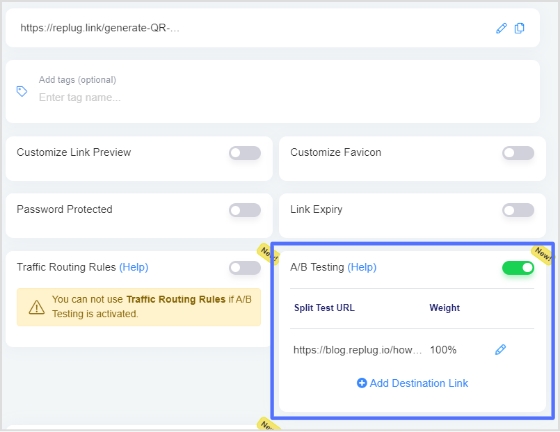
Before saving the link, activate the A/B Split testing feature by switching on the toggle button. This action will automatically set your destination URL as the initial A/B Testing Link with a weightage of 100%.
To include additional URLs for testing, simply click on the “Add Destination Link” button.
Step 3
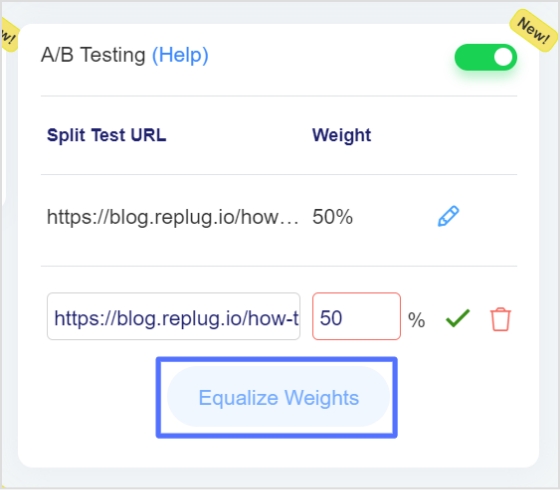
You have the flexibility to assign different weights to each URL, as long as the total weightage adds up to 100%.
To simplify the process, you can utilize the “Equalize Weights” button, which automatically distributes the weightage equally among the URLs.
This allows for easy adjustment and optimization of the weight distribution for your A/B testing purposes.
Step 4
After enabling the A/B Testing feature, you are ready to save your branded link. Start engaging your audience by sharing your Replug Link
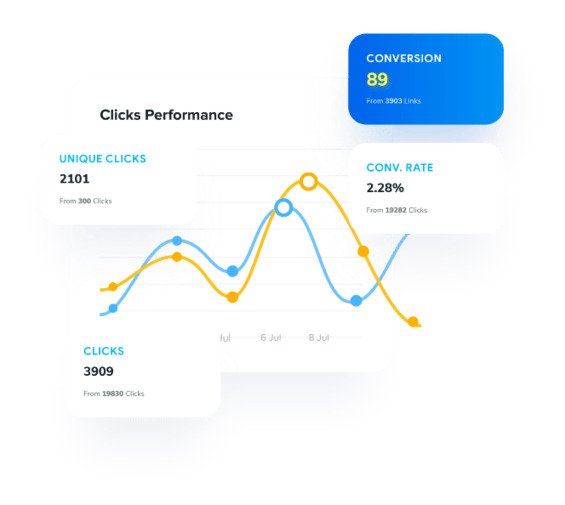
Now analyze link performance and keep using the best performing one.
Note: It’s important to note that the weightage assigned to each URL is not influenced by previous visits and does not have strict constraints.Whenever the short link is accessed, the final destination URL is selected based on the defined weightage, ensuring a dynamic and varied user experience. However, it’s worth mentioning that if your campaign type is CTA (Call-to-Action) and the specified link does not support iframe functionality, the link cannot be saved for A/B Testing. This limitation is due to the requirement of displaying web page content within another website using an iframe. If the source website does not permit iframe inclusion, Replug displays a warning when creating CTA Campaigns.
FAQs
What is A/B testing?
A/B testing is a method used to compare two versions of a webpage, advertisement, email, or marketing campaign to determine which one performs better.
When discussing “what is A/B testing” in detail, it refers to showing different variations to separate audience groups and analyzing user behavior to identify the most effective option for improving conversions and engagement.
Does A/B Testing hurt SEO?
A/B testing itself does not hurt SEO. It can be a valuable strategy to optimize your website for better search engine rankings. When running A/B tests, it’s important to ensure that the changes you make align with SEO best practices and guidelines provided by search engines. By running tests you can improve your search engine ranking in Google search results.
Most common mistakes to avoid while running SEO split tests
– No clear goals/ objectives – Simultaneous testing of multiple variations – Not collecting and analyzing enough data to draw statistically significant conclusions. – Not giving the test enough time to run and produce valid data. – Not documenting and tracking the modifications that were made and their impact on SEO performance. – Ignoring additional outside elements that could affect the test results.
What SEO elements can I test using split testing?
You can test various SEO elements to improve your website’s performance. Some elements you can consider testing include:
– Page titles – Meta descriptions – Keyword usage and optimization – Headings and subheadings (H1, H2, etc.) – Content length and formatting – Navigation and site architecture – Calls-to-action – Linking strategies – Image optimization – Mobile responsiveness – URL structure – Site speed
What’s the difference between conducting a split test and an A/B test
A split test and an A/B test are two different terms used to refer to the same type of experiment. However, the term “split test” is a broader term that encompasses any test where different versions are compared including A/B tests. In other words, it refers to dividing the traffic between multiple variations to measure their impact on key metrics. Whereas an A/B test specifically refers to comparing two versions: a control version (A) and a variant version (B).