In affiliate marketing, the success of your campaigns relies heavily on your URLs. If they look unprofessional, take up too much space, and can even break in emails or messages.
So, what’s the solution? Shortening those affiliate links not only makes them more visually appealing but also boosts your click-through rates and improves your user experience.In this guide, we’ll walk you through the process of shortening any affiliate link, no matter which network or affiliate program you’re using. So let’s get started.
Why shorten affiliate links?
Shortening affiliate links isn’t just about looks; it brings real, practical benefits that make your promotions more effective.
Here’s how shortened affiliate links can give you an edge:
Optimizes link length for platforms with character limitations
Platforms like X, SMS, and emails have strict character limits, and long affiliate links eat up valuable space. Short links fit neatly, look cleaner, and leave room for persuasive copy that encourages clicks.
Greater brand reach and conversions
A branded short link puts your identity front and center instead of a messy string of characters. This added professionalism builds trust, improves recognition, and often results in higher conversions.
Gives you powerful tracking insights
A shortener gives you more than just cleaner links, it tracks clicks, devices, geos, and traffic sources. With these insights, you can refine campaigns, focus on what works, and boost affiliate revenue.
Improves SEO and user experience
Clean, keyword-rich URLs are easier for search engines to crawl and for users to remember. Short links also work better in places like podcasts, webinars, or print ads, where sharing needs to be simple.
Protects commissions
Some people strip or edit visible affiliate IDs from long links. Shortened links mask those details, reducing the risk of commission loss.
What is the best way to shorten affiliate links?
The best way to shorten an affiliate link is by using an efficient link shortener.
Many affiliate programs offer built-in shorteners. For example:
Amazon Associates → amzn.to
ShareASale → shrsl.com
However, these tools are typically convenient and lack essential features. For example, you can’t create custom branded links, conduct A/B testing, or track the performance of your affiliate links in-depth.
For greater control and flexibility, it’s best to use an advanced link optimization platform, i.e., Replug.
Maximize marketing ROI
by transforming ordinary URLs into branded short links that convert.
Try Replug for free
Here’s how you can shorten an affiliate link using Replug
Replug is an all-star link management tool for marketers with branded links, link previews, traffic routing, UTM parameters, link analytics, custom CTA’s, bulk link shortening, and more.
Follow this simple 5-step guide to shorten your affiliate links effectively.
Step 1: Log in to Replug
Go to Replug and log in to your account. If you don’t have an account, sign up for free.
Step 2: Paste your affiliate link
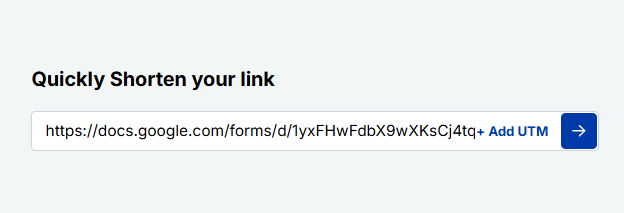
On the Replug dashboard, locate the “Quickly shorten your URL” field. And paste your affiliate link into the box.
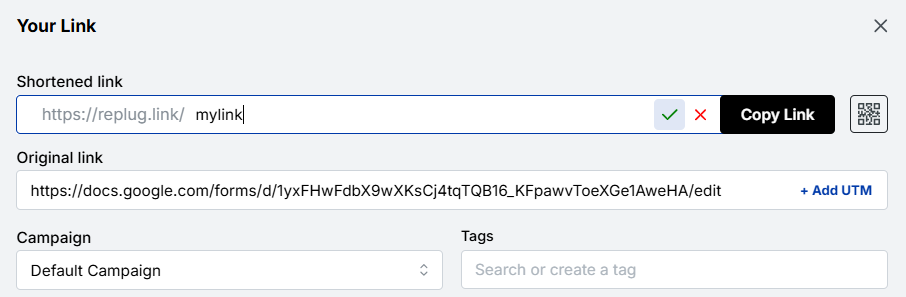
Press Enter, and a pop-up window will appear.
Step 3: Customize your affiliate link
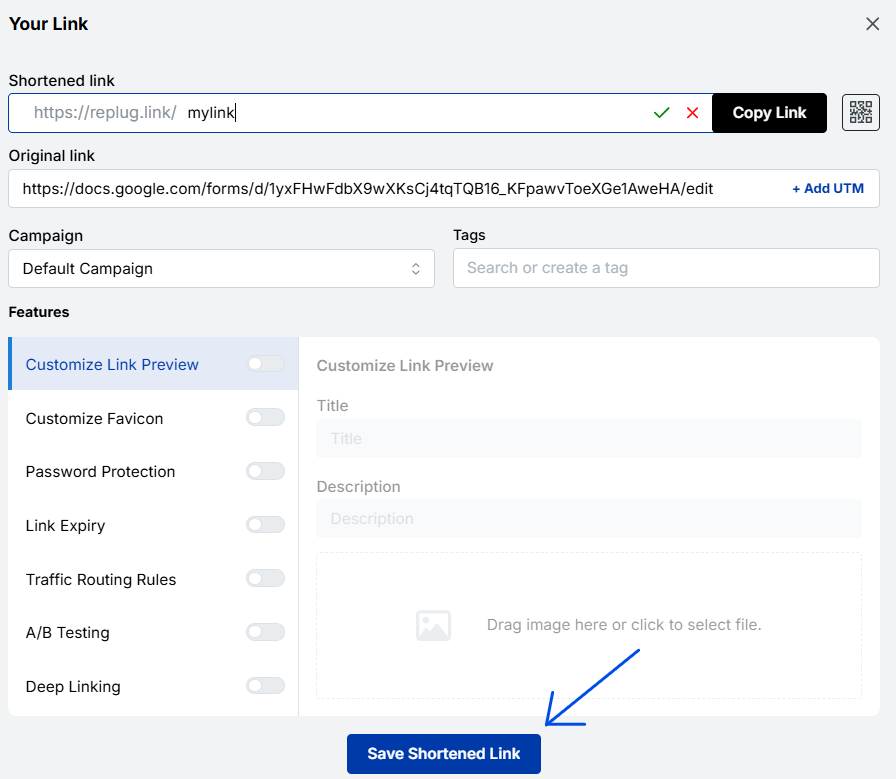
Here, you can customize the link to create a branded and recognizable URL.
Click the “Checkmark” to generate your shortened Replug link.
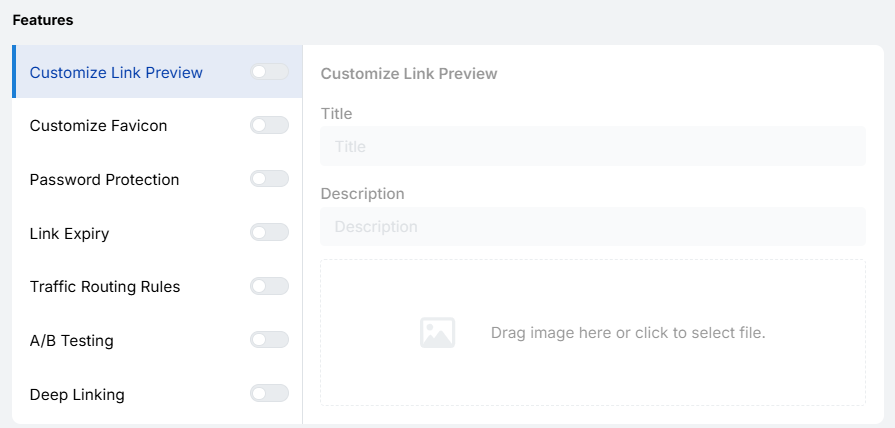
Step 4: Use Replug’s advanced features (Additional step)
Replug offers powerful tools to help you maximize your affiliate earnings:
A/B testing to find the most effective link variations
Traffic routing rules to control where visitors go
Step 5: Save your affiliate link
Once you’re satisfied with the customization and settings, click “Save shortened link”, and your optimized affiliate link is ready to share!
Essential tools and tips for optimizing your affiliate links
To get the most out of your affiliate marketing efforts, consider using these advanced tools:
A/B test links
A/B test with different versions of your affiliate links to see which performs best and drives more conversions.
Create QR code campaigns
Bridge your online and offline audience by generating QR codes for flyers, posters, packaging, or events, while tracking every scan.
Bio link page
Bundle multiple affiliate links into a single, mobile-optimized bio link page for easy sharing in social media bios or campaigns.
Custom links using your own domain
Enhance brand recognition and trust by creating memorable, branded URLs that reflect your business or personal brand.
Maximize marketing ROI
by transforming ordinary URLs into branded short links that convert.
Try Replug for free
Retargeting pixels
Add retargeting pixels to your affiliate links to re-engage visitors later with personalized ads, increasing the chances of conversions.
Custom CTAs
Include call-to-action buttons on your links or landing pages to guide users toward specific actions, such as signing up, purchasing, or learning more.
Traffic routing rules
Direct visitors based on location, device, or other conditions to the most relevant landing page or offer, improving user experience and conversions.
UTM parameters for detailed tracking
Track campaigns accurately across multiple channels and analyze which links are driving the best results by using UTM parameters.
Conclusion
Shortening your affiliate links isn’t just about making them look neat, it’s about making your campaigns smarter, easier to track, and more effective.
In this guide, we covered why clean links matter, how to shorten them using tools like Replug, and tips to boost clicks and conversions with advanced tools.Ready to turn your long, messy affiliate links into professional, clickable, and trackable links? Try Replug today and start optimizing your affiliate strategy effortlessly!
Frequently asked questions
What are some common tips to optimize affiliate links?
Here are some of the most common tips to optimize affiliate links. – Test all links before sharing. Make sure every link works and directs users correctly. – Create memorable links. Use branding or relevant keywords for easy recall. – Use descriptive keywords in URLs. Keep URLs clear and meaningful. – Keep a spreadsheet of links. Track original and shortened URLs for organization. – Disclose affiliate relationships. Always be transparent about commissions.
Why is my Amazon affiliate link so long?
Amazon affiliate links are typically long because they include tracking parameters, product IDs, and tags that help Amazon attribute sales to your account. While these details are essential for tracking commissions, they can make links look messy and unappealing. To fix this, you can easily shorten your Amazon affiliate links using reliable URL shortening tools.
Why should I shorten my affiliate links?
Shortened affiliate links look cleaner, are easier to share, improve click-through rates, and allow for better tracking of performance.
How long does your Amazon affiliate link last?
By default, Amazon affiliate cookies last for 24 hours after a user clicks your link. This means you’ll earn a commission if they make a purchase within that timeframe. However, if the user adds a product to their cart during that 24-hour window, the cookie duration extends up to 90 days, giving you more chances to earn commission.
Can I track the performance of my affiliate links?
Yes, using tools like Replug, you can track detailed click analytics such as click-through rates, user locations, and device types.
What’s the best tool for shortening affiliate links?
The best tool for shortening affiliate links is Replug. Unlike default affiliate program shorteners, Replug goes beyond just making links look neat. It lets you brand your links, track detailed performance analytics, and fully customize URLs to boost clicks and trust. For affiliates, this means cleaner links, stronger branding, and better conversion insights, all in one tool.
What to look for in an affiliate link shortener?
Choose a tool that offers branded links, detailed analytics, link customization, A/B testing, and tracking features to maximize your affiliate performance. It should be easy to use, reliable, and compatible with multiple campaigns and platforms.
If you’ve ever tried sharing a long Amazon link, you know how messy and overwhelming it can look. Not only are these URLs hard to read, but they can also feel unprofessional when shared on social media, in emails, or across marketing campaigns.
That’s why marketers often trim Amazon links or even abbreviate Amazon links to make them cleaner and more professional
By turning bulky Amazon links into clean, user-friendly URLs, you make them easier to share, track, and remember. The most effective way to do this is with a dedicated URL shortener.
It doesn’t just tidy up links; it lets you customize them with your branding, add UTM parameters for tracking, and organize them for better campaign management.
In this blog, we’ll walk you through how to quickly shorten your Amazon links. You’ll also get to know how a tool like Replug makes the process seamless, professional, and marketing-friendly.
Maximize marketing ROI
by transforming ordinary URLs into branded short links that convert.
Try Replug for free
Step-by-step guide to shorten Amazon links
Start by logging into your Replug account. If you don’t have an account yet, you can easily sign up and enjoy a 14-day free trial.
Step 01: Add your Amazon URL
Copy the Amazon link you want to shorten.
Go to your Replug dashboard and paste it into the “Quickly Shorten your link” bar.
Click the Checkmark icon or press Enter to move forward.
Use the search function to quickly find specific links
Is there any way I can track my Amazon links?
Yes, absolutely!
You can easily track your Amazon links by using a link management tool. It not only shortens your links but also provides in-depth link analytics to help you monitor their performance.
View geographic data to see where your audience is coming from.
Analyze device and browser types used by your visitors.
Measure engagement metrics like click-through rates.
Add UTM parameters to understand traffic sources and campaign effectiveness better.
When you share short Amazon links on platforms like TikTok, Instagram, or email, tracking helps you understand audience behavior in real time.
Conclusion
Amazon links don’t have to be long, messy, or untrackable. By using a dedicated URL shortener like Replug, you can turn bulky links into branded, user-friendly short URLs that look professional, boost clicks, and improve audience engagement.
With features like custom domains, UTM tracking, retargeting, and link organization, Replug goes beyond simple shortening: it gives you full control over how your Amazon links perform across campaigns.
If you want to make your links work harder for your brand, start shortening and tracking your Amazon links today!
Maximize marketing ROI
by transforming ordinary URLs into branded short links that convert.
Try Replug for free
Frequently asked questions
Why should I shorten Amazon links?
Shortening Amazon links makes them cleaner, easier to share, and more professional. It also helps track engagement and improve click-through rates across different marketing channels.
Is it possible to track the performance of my shortened Amazon links?
Absolutely. Replug provides detailed analytics like total clicks, geographic data, device information, and browser stats to help you measure your link performance.
Is Amazon’s built-in short link enough?
Amazon does provide a basic “short link” when you use the share button on product pages. However, it lacks advanced features like branding, customization, tracking, and retargeting. That’s why marketers prefer using tools like Replug for professional link management.
How to send short Amazon links?
You can send short Amazon links by using a URL shortener like Replug. Just copy your long Amazon product link, shorten it, and share the clean version across social media, SMS, or emails.
Does AWS have a URL shortener?
Yes, AWS offers a URL shortener solution, but it’s designed for developers and requires setting up services like Lambda and API Gateway. For marketers or businesses who want quick, branded, and trackable links without coding, Replug is a much easier and more powerful choice.
How to customize an Amazon link?
Amazon’s own short links are very limited. If you want full customization, Replug allows you to use a custom domain, set your own slug, add UTM parameters for tracking, and even insert retargeting pixels.
How to share Amazon link on TikTok?
To share an Amazon link on TikTok, first shorten it with Replug. TikTok prefers clean and short links, so this makes your content look professional and boosts clicks.
How do I rename an Amazon link?
You can easily rename your links using Replug. Just paste your Amazon URL into Replug, customize the slug or title, and share a clean, branded link instead of the long default one.
Steam has redefined the gaming world since its launch in 2003. With over 132 million active users and a vast catalog of 100,000+ games, it’s no surprise that it’s the go-to platform for gamers. However, when it comes to sharing your Steam profile, a long URL can become hard to manage.
So, if you’re looking to make your Steam profile link more user-friendly and shareable, Replug is surely the way to go. Luckily, this process is quick and easy, and in this guide, we’ll walk you through how to do it step by step.
Let’s get shortening!
How can you shorten a Steam URL using Replug?
Using a reliable custom URL shortener, you can quickly transform your long Steam URL into a neat, trackable, and short link. Let’s walk through the step-by-step process.
Here’s how you can shorten a Steam URL using Replug.
Maximize marketing ROI
by transforming ordinary URLs into branded short links that convert.
Try Replug for free
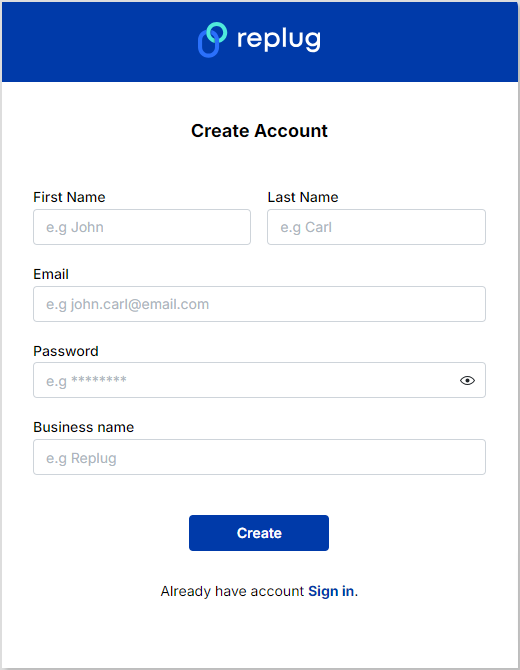
Step 1: Log in or create an account on Replug
Go to the Replug app and log in to your account. If you don’t already have an account, create one.
Step 2: Shorten Your Steam URL
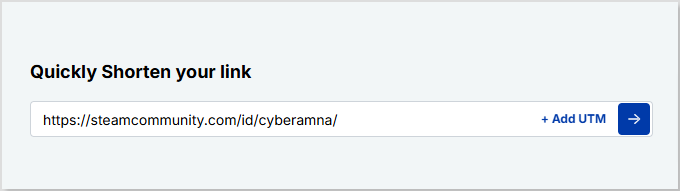
Access your Replug dashboard and paste your Steam profile URL in the “Quickly shorten your link” bar.
Step 3: Save and share
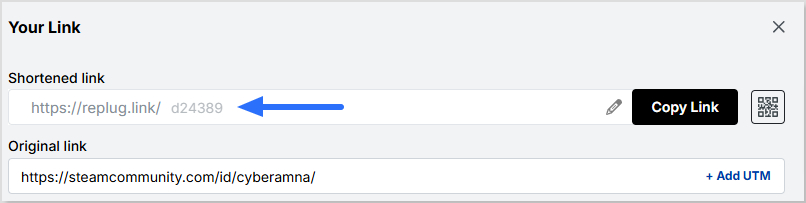
Once done, click on the blue next button. You’ll have an auto-generated Replug short URL.
You can now save your short Steam URL and share it across multiple platforms!
Replug does more than just shorten your Steam URL. Here’s what you can do with it:
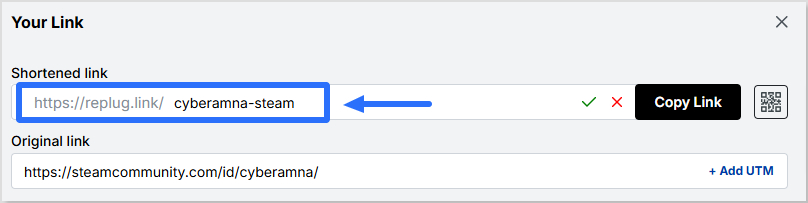
Create a custom URL
With Replug, you can personalize your Steam URL, making it short, memorable, and branded.
This custom URL makes your profile link more professional and easier to share across platforms.
Generate a QR code
Easily create a dynamic QR code for your Steam URL with Replug. You can easily edit and update this QR code even after creating it. You can also customize the look of your QR code.
This QR code can now be shared anywhere, allowing your circle to scan it and access your Steam profile in a heartbeat.
This QR code can now be shared anywhere, allowing your circle to scan it and access your Steam profile in a heartbeat.
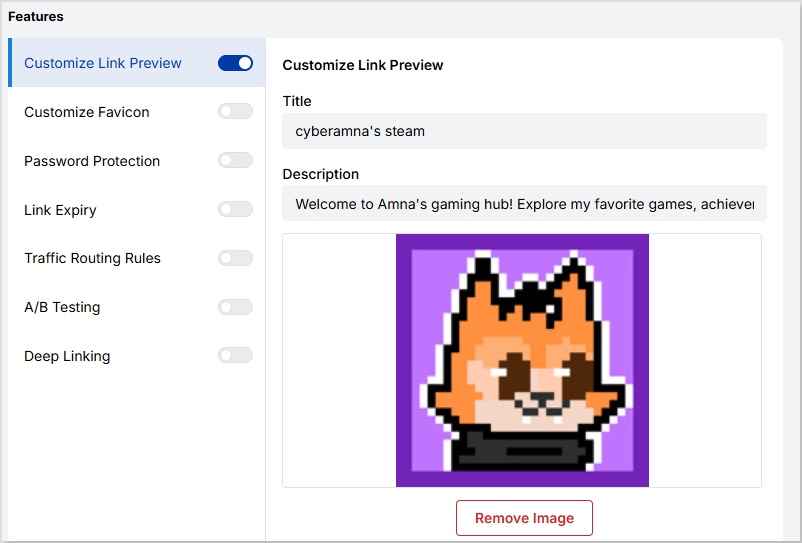
Customize the link preview
Customize the title, description, and image that appear when sharing your Steam URL.
Creating a custom link preview using Replug makes your link look more authentic, engaging, and tailored to your Steam profile or content.
Track and monitor analytics
Replug provides in-depth analytics for your Steam link, including clicks, locations, and devices. You can also add UTM parameters to track the performance of your link.
A/B testing
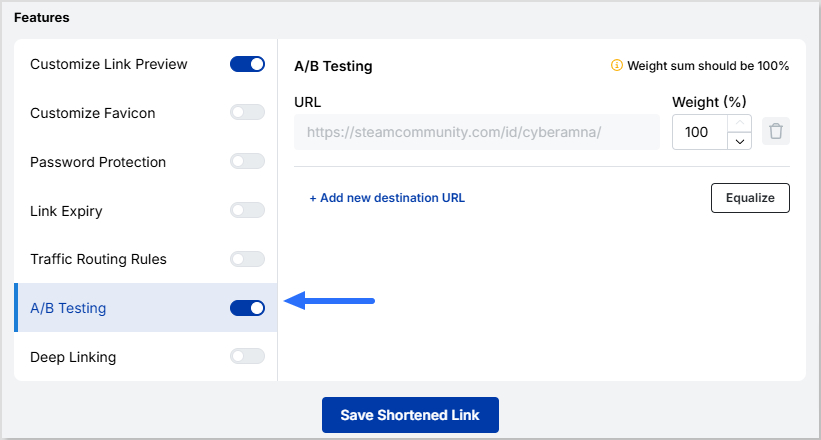
Replug lets you A/B test up to 10 different URLs to see which one performs best.
Compare various versions of your Steam profile URL to optimize your link’s engagement and traffic.
Maximize marketing ROI
by transforming ordinary URLs into branded short links that convert.
Try Replug for free
Why does your Steam URL matter?
Your Steam URL plays a key role in how easily others can find, access, and engage with your profile.
Easier sharing of your Steam profile with friends, communities, or social media followers
Professional appearance with a branded or shortened URL that looks polished for gaming streams or content promotion
Improved accessibility, making short URLs easier to type, remember, and access across all devices
Trackable engagement through a link shortener like Replug, allowing you to monitor clicks, locations, and device types for better insights
Enhanced security and control, ensuring custom URLs reduce the risk of broken links or mistyped addresses, so your profile is always reachable
Conclusion
We know how long and complicated Steam URLs can make sharing your profile frustrating. With a custom link shortener like Replug, you don’t just shorten your Steam URL; you create a shortened Steam profile link online that is cleaner, branded, and trackable.
Take action today: shorten your Steam profile link with Replug, brand it, and share it with confidence! With the Replug Steam URL shortener, your Steam profile becomes more professional, engaging, and easier to share across platforms.
Frequently asked questions
Why should I shorten my Steam URL?
To shorten links in Steam, copy your Steam profile URL and use a website link shortener like Replug to create a clean, branded, and shareable link.
How to send a link to your Steam profile?
Copy your Steam profile URL from your profile page, then paste it into a chat, email, or social media message to share. For a cleaner, branded link, use a website link shortener like Replug.
Can I create a custom Steam URL?
Yes! Link management tools like Replug allow you to customize your Steam URL, making it more branded and memorable.
What kind of analytics does Replug provide?
Replug tracks clicks, locations, devices, and even lets you add UTM parameters to measure link performance.
Can I shorten URLs for other platforms with Replug?
Absolutely! Replug can shorten and customize links for various platforms, not just Steam.
Can I edit my shortened Steam URL after creating it?
Yes! With Replug, you can edit your custom URL, update the destination link, and modify the link preview anytime.
Long Google Drive links can be frustrating to share. They look messy in emails, often break in chat messages, and feel unprofessional on social media.
Many of us face this issue daily when sharing documents, folders, or images through Google Drive. These links not only take up space but also reduce click-throughs when used in marketing campaigns.
Here’s the good news: you don’t need to settle for clunky links!
With a custom URL shortener like Replug, you can shorten Google Drive links online and even manage them in bulk. Whether you’re looking for a Google Drive link shortener free option or a more advanced paid plan, Replug gives you clean, trackable, and branded links.
Let’s get started!
What is a Google Drive link?
A Google Drive link is a unique URL generated to share files or folders stored in Google Drive. Depending on the sharing settings, the link can be public (anyone with the link can access it) or private (restricted to selected people).
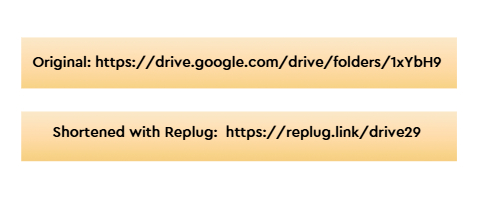
While useful, these links are often long and complex. For example:
The shortened version is neat, easy to share, and less likely to break across platforms.
How to shorten a Google Drive link?
The easiest way to shorten a Google Drive link is by using a URL shortener. There are plenty of options available in the market, both free and paid.
Google also had its very own URL shortener, goo.gl, which was quite popular for shortening Drive links and sharing them easily across platforms.
However, Google’s official shortener goo.gl was discontinued in March 2019, which is why most people now rely on Google URL shortener alternatives like Replug.
Maximize marketing ROI
by transforming ordinary URLs into branded short links that convert.
Try Replug for free
Replug is an advanced custom URL maker free that offers both free and paid plans. Beyond just creating short links, it provides powerful features like vanity domains, custom slugs, link expiry, and password protected links, making it an ideal choice for marketers, businesses, and anyone who frequently shares files online.
How to shorten a Google Drive link using Replug (Step-by-step)
Follow these steps to shorten your Google Drive link:
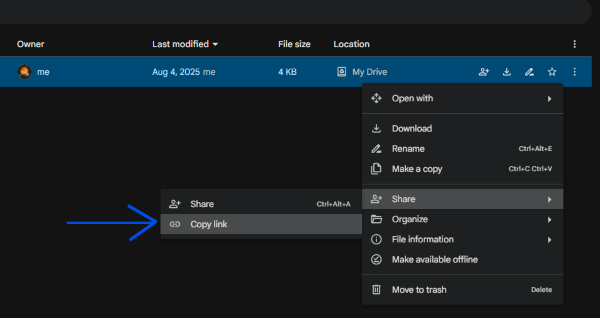
Step 1: Copy your Google Drive link
Open Google Drive and right-click the file or folder. Click Copy link.
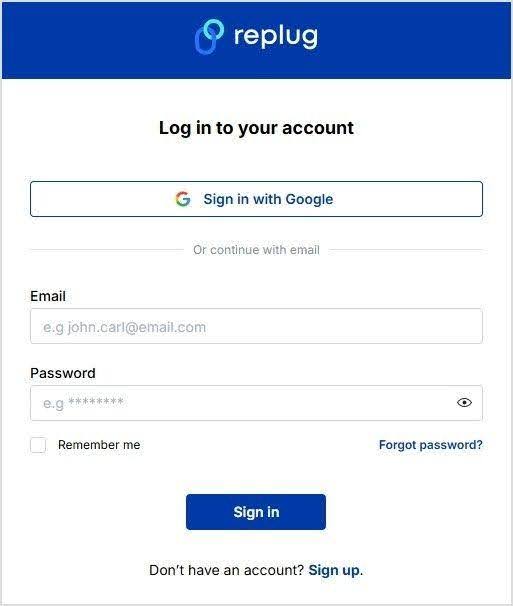
Already have an account? Simply log in to your dashboard.
Step 3: Paste your long URL
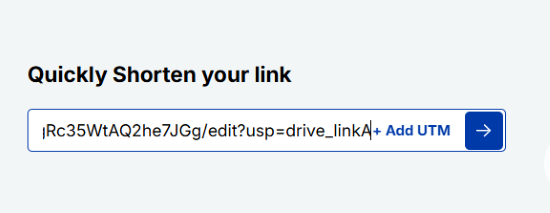
In the dashboard, paste your Google Drive link into the field under “Quickly shorten your link.” Replug will instantly generate a short link for you.
Alt text: Paste your drive link – replug.io
Step 4: Create a custom URL (optional)
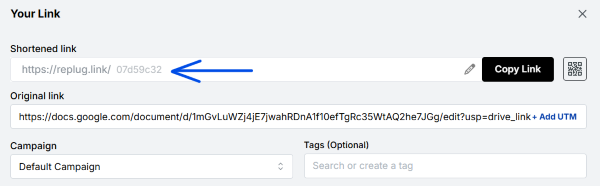
By default, Replug gives you a short link with a random slug.
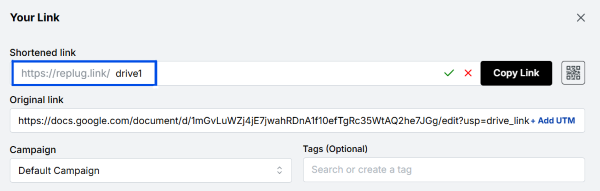
You can customize this slug to something more professional and recognizable.
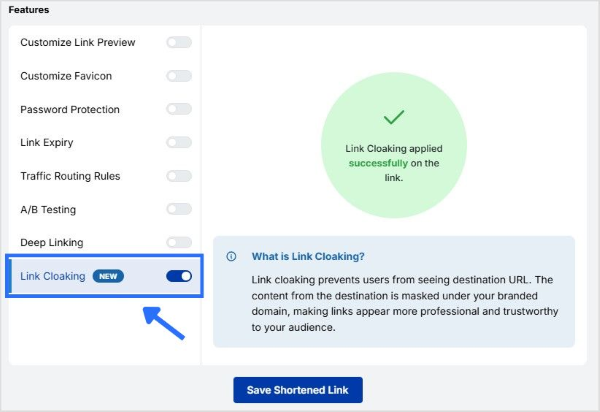
Step 5: Enable link cloaking (optional)
Replug lets you cloak your links so the shortened URL appears as a vanity link in the browser. This is especially useful for affiliates and content marketers who want a more branded and trustworthy link.
What are the benefits of shortening Google Drive links?
Here are some prominent benefits of shortening your Google Drive links:
Easier sharing
Long Google Drive links can look messy and confusing. A shortened link is simple, clean, and easy to share in emails, chats, or social media posts without cluttering your message.
More professional
Short links give your content a polished look. When customized with your own branded slug, they not only look trustworthy but also help reinforce your brand identity.
Perfect for marketing
Whether you’re adding links to ads, posts, or printed materials, shorter links fit in neatly and make a stronger impression. They’re more clickable and user-friendly than long strings of characters.
Branded and cloaked links
Instead of a generic Google URL, you can cloak a link under your own branded domain. This makes the link look like it belongs to your business, boosting trust and recognition.
We’ve all seen how long Google Drive links can be frustrating to share; they break in chats, and look unprofessional on social media. In this guide, we explored how to shorten those Google Drive links step by step with Replug.
Maximize marketing ROI
by transforming ordinary URLs into branded short links that convert.
Try Replug for free
By using Replug, you don’t just get shorter links; you also unlock benefits like branded domains, custom slugs, link cloaking, and performance tracking. These features make your links cleaner, more professional, and marketing-ready.
👉 Take control of your Google Drive links today with Replug.io, and simplify the way you share.
Frequently asked questions
Does Google have a URL shortener?
No, Google discontinued its URL shortener (goo.gl). You’ll need to use alternatives like Replug to shorten your links.
How do I compress a Google Drive link?
Copy your Google Drive link, paste it into Replug, and generate a short, trackable URL instantly.
What is the best URL shortener for Google Drive links?
Replug is the best option because it not only shortens your Google Drive links but also lets you brand them with custom domains. Plus, it offers tracking, analytics, and retargeting features to maximize link performance.
Can I create branded short URLs for my Drive links?
Absolutely. With Replug, you can add your own domain and customize slugs to create branded short links.
Can I set link expiration for Drive links?
Yes. Replug lets you set expiry dates so your shortened Drive links automatically disable when needed.
Sharing your favorite songs, playlists, or albums should be as fun as listening to them. Long Spotify links can be clunky and hard to share, but short links make it easy to spread your music with friends, fans, or followers. It’s the perfect way to share your music with friends and family, plus it’s a great way to promote your music or podcast.
In this guide, we’ll show you how to create short, snappy links through a Spotify link shortener, that keep the vibe alive and effortless to share.
What can you use Spotify links for?
Spotify links are versatile and can be used for multiple purposes:
Sharing playlists: Easily share your favorite playlists with friends, family, or followers.
Promoting new music: Musicians and podcasters can promote new releases directly to their audience.
Embedding music in blogs or websites: Add Spotify songs, albums, or playlists to your website content for enhanced engagement.
Event promotion: Share event-specific playlists or theme songs with attendees to enhance the experience.
Collaborative projects: Share playlists with team members, collaborators, or friends for joint curation.
Marketing campaigns: Use Spotify links in campaigns to increase engagement and create branded experiences.
A complete link management solution
for marketing professionals & agencies.
Try Replug for free
5 simple steps to create a Spotify short link using Replug
To get a short Spotify link, use this efficient URL shortener. It transforms long URLs into sleek, custom links that reinforce your brand. By default, Replug uses the domain replug.link, but you can set up a custom domain to enhance branding and use links in campaigns, ads, or emails.
With Replug, sharing your favorite Spotify tracks becomes simple and professional, helping your links stand out.
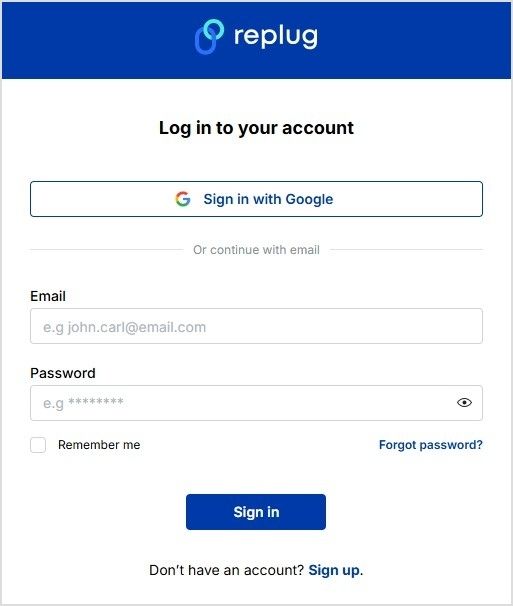
Step 1: Copy the Spotify link
Copy the URL of the song, album, artist, or playlist you want to shorten.
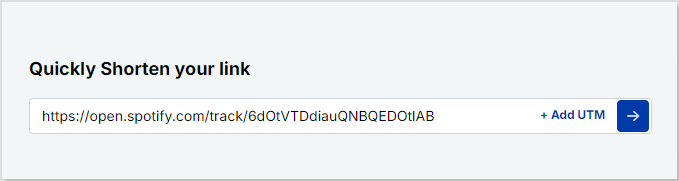
Paste the copied link in the “Quickly shorten your URL” bar.
Step 4: Generate your short link
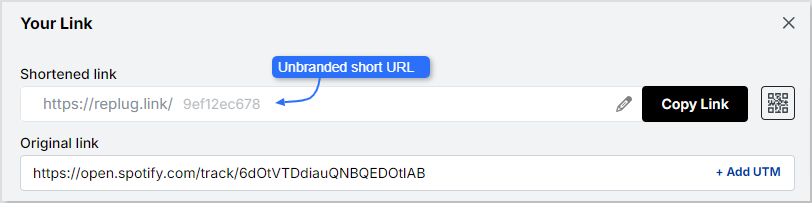
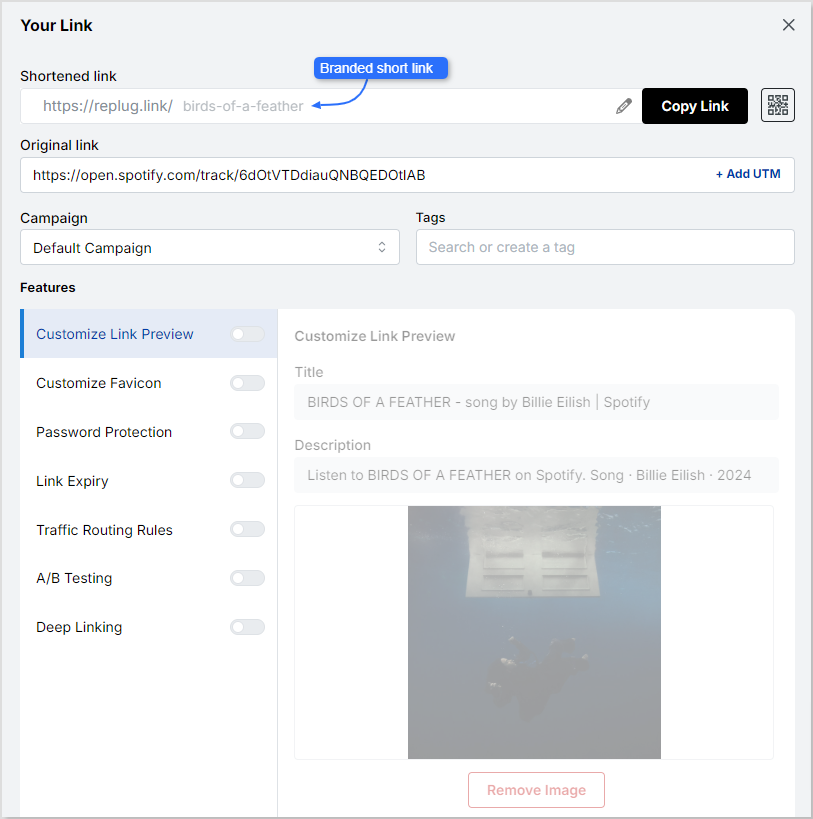
Replug automatically generates a short URL. Customize it for branding and clarity.
Here’s what your Spotify URL would look like after you’ve customized it:
The great part about Replug is that it also allows you to customize the link preview! Now you can easily let people know that you’ve shared BIRDS OF A FEATHER by Billie Eilish at first glance.
Talk about a time-saver!
Once customized, copy your short URL. Share it on social media, emails, websites, or any platform to direct users to your Spotify content.
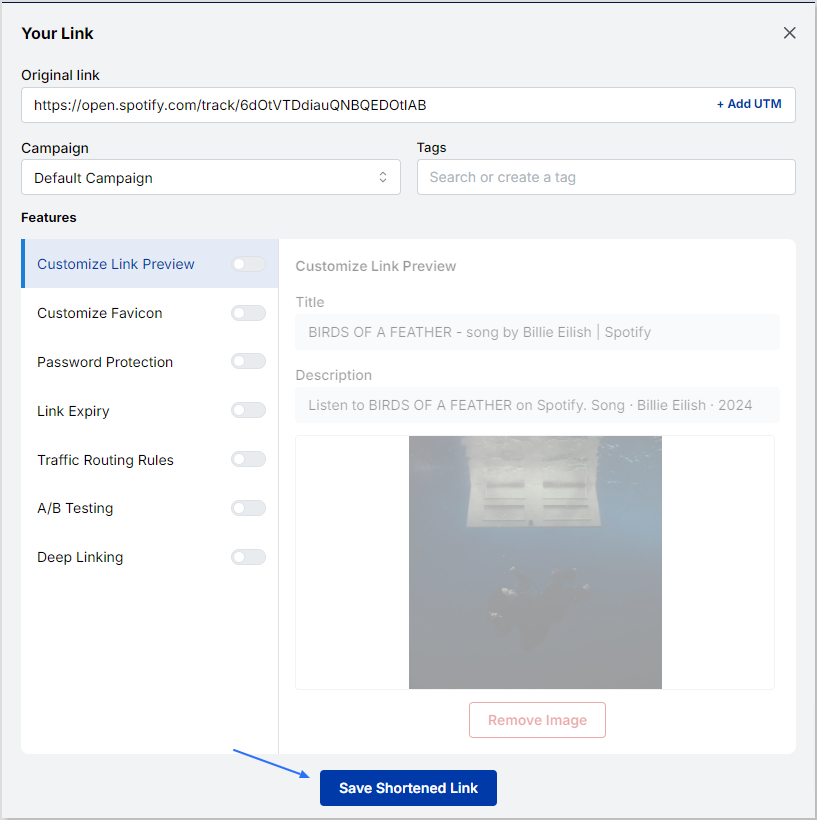
Step 5: Save and share your link
Hit “Save Shortened Link” to finalize:
Why choose Replug for Spotify link management?
Managing your links with this amazing link management platform brings a host of advantages, enhancing your digital marketing game and online visibility:
Gain valuable insights into link performance, tracking clicks, geographic locations, and other data to inform data-driven decisions.
Engaging call-to-action overlays
Amplify audience engagement by adding customizable call-to-action overlays, directing users to specific actions.
Social media retargeting
Harness the power of social media retargeting by adding retargeting pixels to your links, and building custom audiences for effective remarketing.
Efficient link management and organization
Organize links into campaigns for tracking and overseeing multiple marketing initiatives through a centralized dashboard. This allows for streamlined management.
UTM parameter support
Implement UTM parameters for detailed campaign tracking, offering insights into traffic sources and marketing effectiveness.
Bio-link feature
Simplify link sharing with Replug’s bio link feature. Create a customizable landing page housing multiple links for a convenient one-stop destination.
Go beyond generic link pages!
Create custom bio links that truly fit your brand
With Replug, you can create bio links that are unique, engaging, and built to convert.
In this guide, we covered everything you need to know about getting short Spotify links. You learned how long URLs can be simplified for easy sharing. We also discussed why short links are useful for playlists, albums, songs, events, collaborations, and marketing campaigns.
With Replug, you can create branded, trackable, and shareable Spotify links in just a few steps.
Customize your links, monitor performance, and boost engagement, all while keeping your music sharing professional and effortless. Whether you’re a musician, podcaster, marketer, or music enthusiast, short Spotify links make sharing your favorite tracks easier and more effective than ever.
Frequently asked questions
Why should I shorten my Spotify links?
Shortened Spotify links are easier to share on social media, messaging apps, or emails. They look cleaner, take up less space, and give a professional touch.
Can I customize my shortened Spotify link?
Yes! Replug lets you customize your link with a unique identifier, keyword, or branded domain to reflect your style or brand.
How do I track my shortened Spotify links?
Replug provides an analytics dashboard showing clicks, locations, and other performance metrics. Just log in to view detailed insights for each link.
Who should use a Spotify URL shortener?
Musicians, podcasters, marketers, and anyone sharing Spotify content online can benefit. Short links make sharing easy, professional, and trackable.
Managing long URLs in an RSS feed can be hefty and unattractive. Many users look for ways to shorten URLs in an RSS feed automatically.
This problem is common for bloggers, marketers, and content curators who share feeds on different platforms. Long links may break or look spammy, causing reduced click-through rates.
In this blog, we’ll show you the easiest way to automatically shorten URLs inside your RSS feed using Replug. Let’s simplify your feed links efficiently.
RSS feed URL: What does it mean?
An RSS feed URL is a web address that provides a continuous stream of updates from a website’s content, like blogs or news articles. RSS stands for Really Simple Syndication, allowing users or apps to receive the latest content automatically.
This URL points to an XML file containing the full or summarized content with links directing readers back to the original website.
Maximize marketing ROI
by transforming ordinary URLs into branded short links that convert.
Try Replug for free
4 quick steps to shorten URLs in RSS feed
Using a reliable short URL generator for your RSS feed makes sharing cleaner, easier, and more professional.
Platforms like Replug.io let you automatically shorten URLs in your feed, add branded calls-to-action, and track clicks. This ensures every link you share is concise, branded, and optimized for engagement, helping your content reach the right audience effectively.
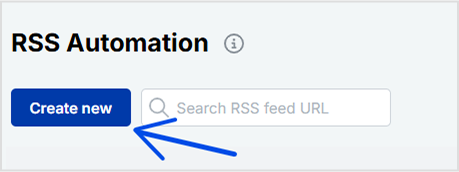
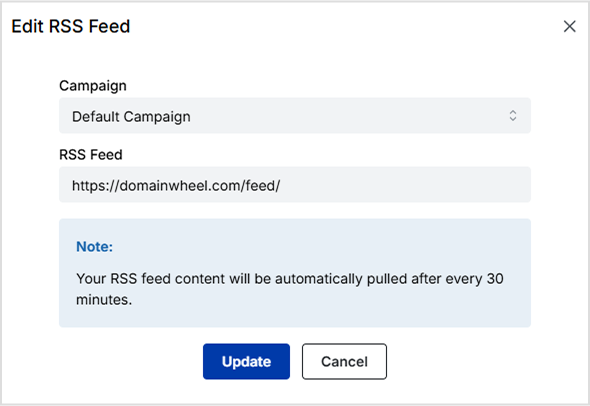
Here’s how you can shorten RSS feed URLs automatically using Replug:
Maximize marketing ROI
by transforming ordinary URLs into branded short links that convert.
Try Replug for free
Manage your RSS feed efficiently
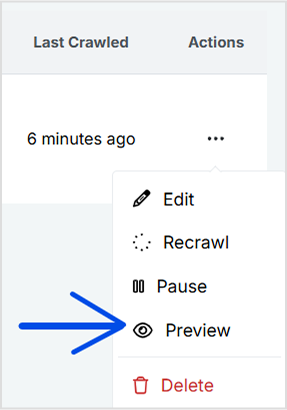
You can perform the following actions with your created RSS feeds:
Edit: You can update/change your RSS feed whenever you want.
Re-crawl: To re-crawl your entire RSS feed, click on the re-crawl button. It will be re-crawled instantly to fetch any new links that have been added for the RSS feed.
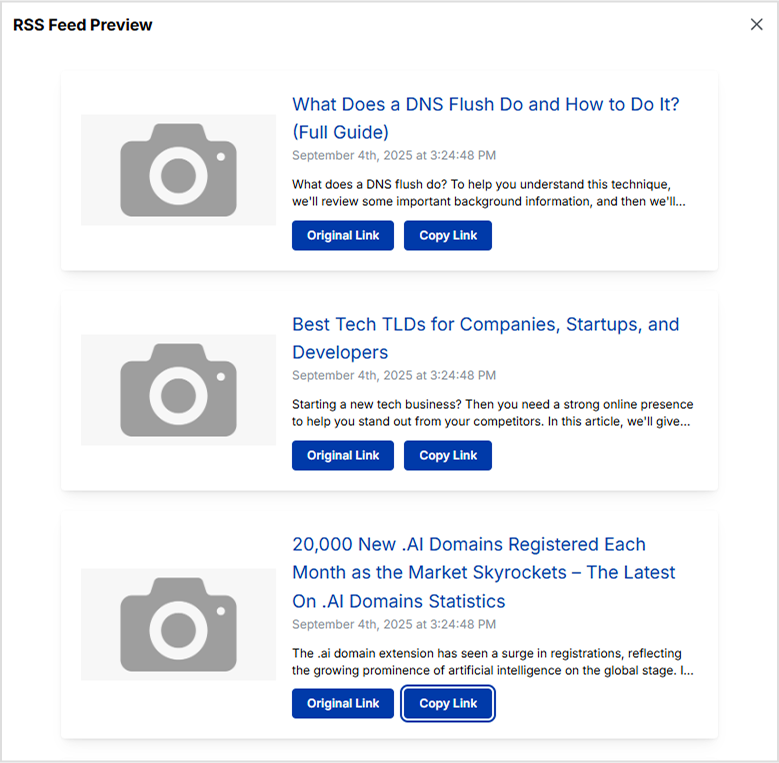
Preview: You can preview the list of posts from RSS feeds that are converted.
Remove: You can remove your RSS feed and create a new one or anything else.
Top RSS feeds platforms for podcasts
The Apology Line Podcast
The Daily by The New York Times
The Bible in a Year Podcast
Crime Junkie Podcast
The Experiment Podcast
The Dan Bongino Show
Unraveled: Long Island Serial Killer
Morbid: A True Crime Podcast
Dateline NBC
The Lincoln Project
Top RSS feeds platforms for news
CNN
New York Times
Huffington Post
Fox News
USA Today
LifeHacker
Reuters
Politico
Yahoo News
NPR
Los Angeles Times
Conclusion
Automatically shortening URLs in your RSS feed improves link aesthetics, tracking, and click-through rates. By using tools like Replug, you can automate this entire process without technical hassles.
This guide covers the effective method to shorten URLs in an RSS feed automatically. For anyone managing content feeds, this approach saves time and enhances link management.
Explore Replug today to make your RSS feed links short, branded, and efficient.
Frequently asked questions
Why should I shorten URLs in RSS feeds?
Shortened URLs look cleaner, prevent link breakage, improve click tracking, and enhance user experience on different platforms.
Is it difficult to set up automatic URL shortening for RSS feeds?
No, most tools like Replug enable automatic shortening with simple feed addition and configuration steps, no coding required.
Can I track clicks on my shortened URLs inside the RSS feed?
Yes, Replug and similar services provide detailed analytics to track engagement for each shortened link.
Is RSS feed obsolete?
No, RSS feeds are not obsolete. While their popularity has declined with the rise of social media, they are still widely used by marketers, publishers, and professionals to syndicate content and automate sharing.
Are RSS feeds illegal?
No, RSS feeds are not illegal. They are simply a web format for delivering content updates. However, redistributing copyrighted content without permission through RSS feeds can raise legal issues.
Ever copy-pasted a URL so long it wrapped across multiple lines? Yeah, we’ve all been there, and it’s not a great look, especially when you’re sharing links in an email, a bio, or a social media post.
Here’s the thing: link shortening isn’t just about aesthetics. It’s become a serious part of how marketers and creators manage and track their content online.
Over 70% of businesses now use shortened links to boost engagement, and the URL shortener market was valued at $360.4 million in 2024. So clearly, people are catching on.
The good news? You don’t need to spend a dime to get started. Replug’s free link shortener makes the whole process dead simple.
But before we jump into the step-by-step walkthrough, let’s quickly cover what link shortening actually is, and why it matters more than you might think.
What is link shortening and why is it important?
Let’s be real, nobody wants to share (or click) a link that looks like this:
Link shortening is the process of taking a messy, long URL and converting it into a short, clean, and manageable one, something like replug.io/black-friday-sale. Simple, right?
The primary objective is to make links easier to share, remember, and act on, without losing any of the functionality of the original URL.
Whether you’re a marketer, content creator, or small business owner, shortened links just make your life easier.
Significance of link shortening (why it matters so much):
Improved user experience & aesthetics: A clean, short link simply looks better and feels more trustworthy. Nobody hesitates before clicking replug.it/offer the way they might before clicking a 200-character monster URL.
Enhanced shareability & character limits: Platforms like X (formerly Twitter) still count every character, so a shorter link saves precious space and leaves room for what actually matters (your message).
Performance tracking & analytics: Most link shorteners let you see exactly how many people clicked your link, where they came from, and what device they used. Critical data you’d never get from a raw URL.
Customization & branding: Instead of a random string of letters and numbers, you can create branded links like yourbrand.com/sale that instantly communicate who you are and build trust with your audience.
Optimal for marketing & print: Imagine printing a full-length URL on a flyer or billboard. Yeah, definitely not ideal. Short links are a lifesaver for offline marketing materials where space is limited and typing-friendliness matters.
SEO benefits: While the shortened link itself isn’t a direct ranking factor, using branded and descriptive short links can improve click-through rates. What’s best is that higher CTR sends positive signals to search engines.
Why consider shortening links?
If you’re still sharing raw, unedited URLs, you’re honestly leaving a lot on the table. Shortened links don’t just look better, they actively improve how your audience interacts with your content, help you stay organized, and even open doors to smarter marketing.
Here’s why making the switch is a no-brainer:
Cleanliness & organization: Long URLs cluttered with tracking parameters are a nightmare to manage, especially at scale. Short links keep everything tidy and make your link library far easier to sort, label, and find later.
Increased click-through rates (CTR): Studies show that shortened, branded links can increase CTR by up to 39% compared to long raw URLs. This is because people are simply more likely to click something that looks clean and credible.
Internal efficiency: No matter if you’re a solo creator or part of a team, short links make it faster to share resources internally, update destinations without resharing, and keep campaigns neatly organized in one place.
Optimal social media sharing: Social platforms have character limits and cluttered feeds. A short, punchy link fits right in without eating up your caption space or making your post look messy.
Retargeting capabilities: Many paid link shorteners online let you attach retargeting pixels to your short links, so anyone who clicks gets added to your ad audience. A super smart way to re-engage warm leads later.
Monetization: Some link shortening tools let you monetize your shortened links directly. This means every click can generate revenue, which is a great passive income option for bloggers and content creators.
How to shorten a link using Replug: A simple 5-step guide!
Shortening a link with Replug is genuinely one of the quickest things you’ll do today. No technical skills needed, no complicated setup, just a few clicks and you’re done.
Here’s exactly how it works:
Step #01: Sign up or log in to Replug
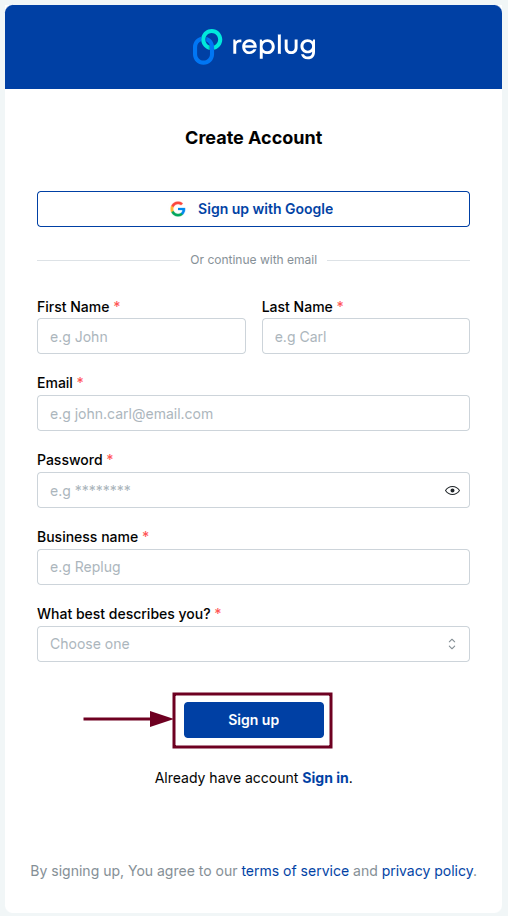
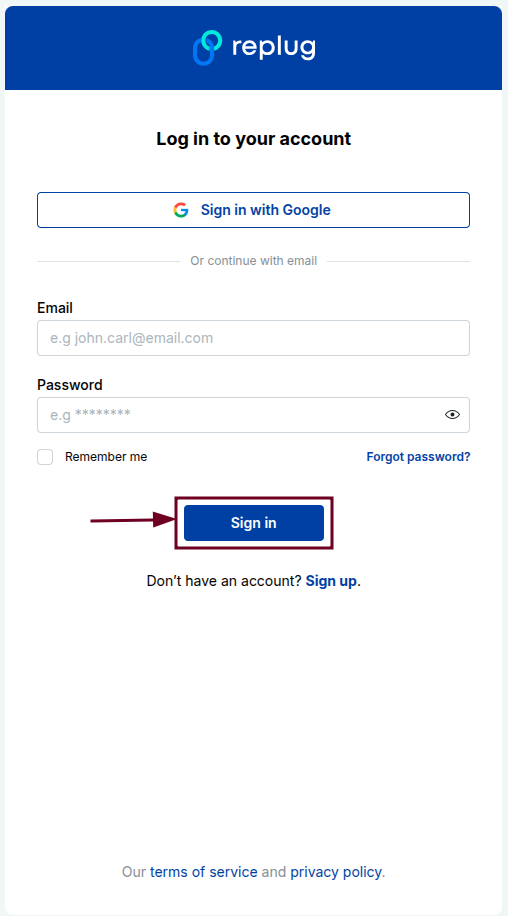
Head over to Replug.io and create a free account if you haven’t already (it only takes a minute). If you’re an existing user, simply log in, and you’re good to go.
Step #02: Type in or paste your full link
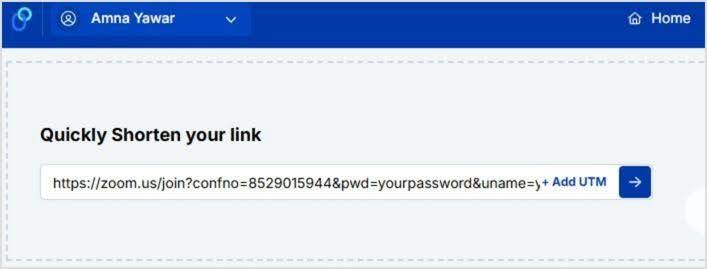
Once you’re logged in successfully, you’ll spot a “Quickly Shorten your link” bar right on the dashboard. Paste your long URL into the field and hit the blue arrow button to generate your shortened link instantly.
Step #03: Get the shortened link
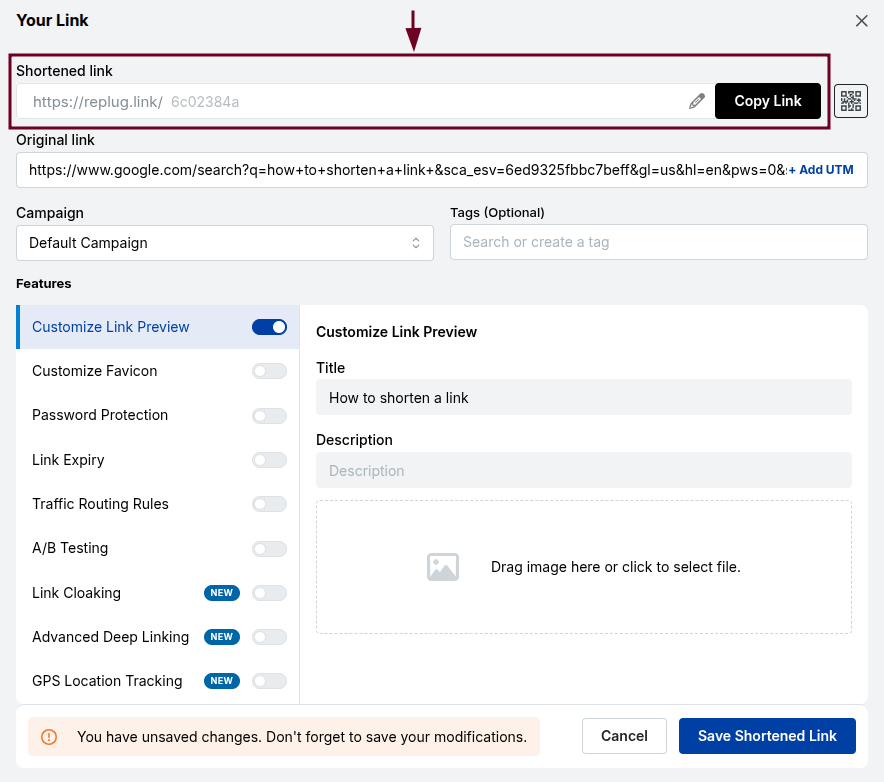
Replug will immediately generate a short, clean link for you. You can copy it right away and start using it as-is (no extra steps needed if you’re in a hurry).
Step #04: Customize the slug
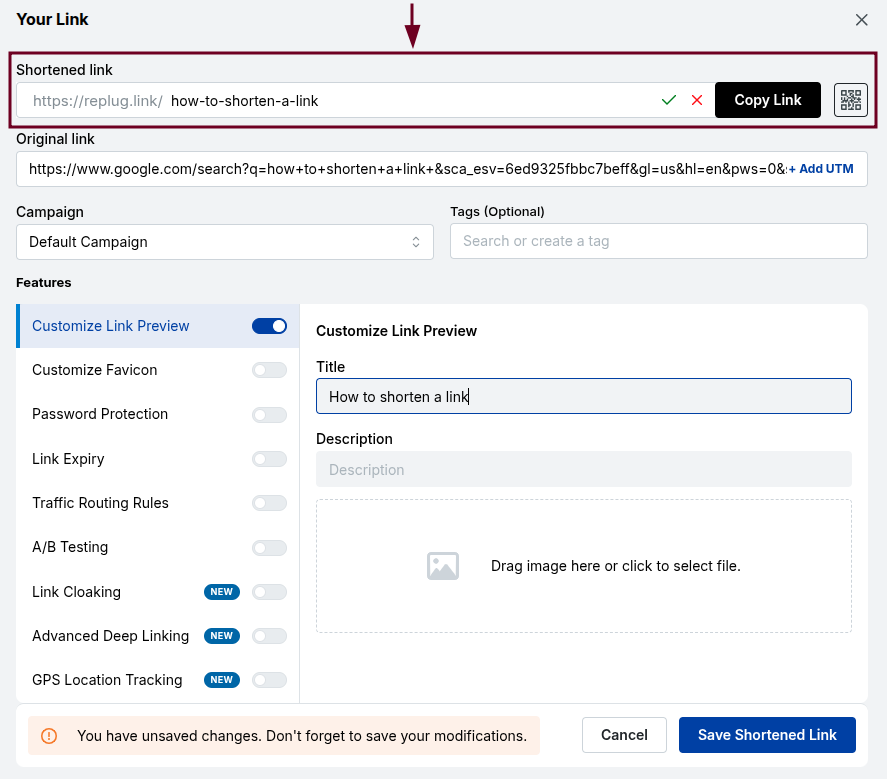
Want something more on-brand? You can edit the slug(by clicking the pencil icon) and replace the auto-generated characters with something meaningful, like /how-to-shorten-a-link. This is where your link goes from generic to professional.
Step #05: Save & share
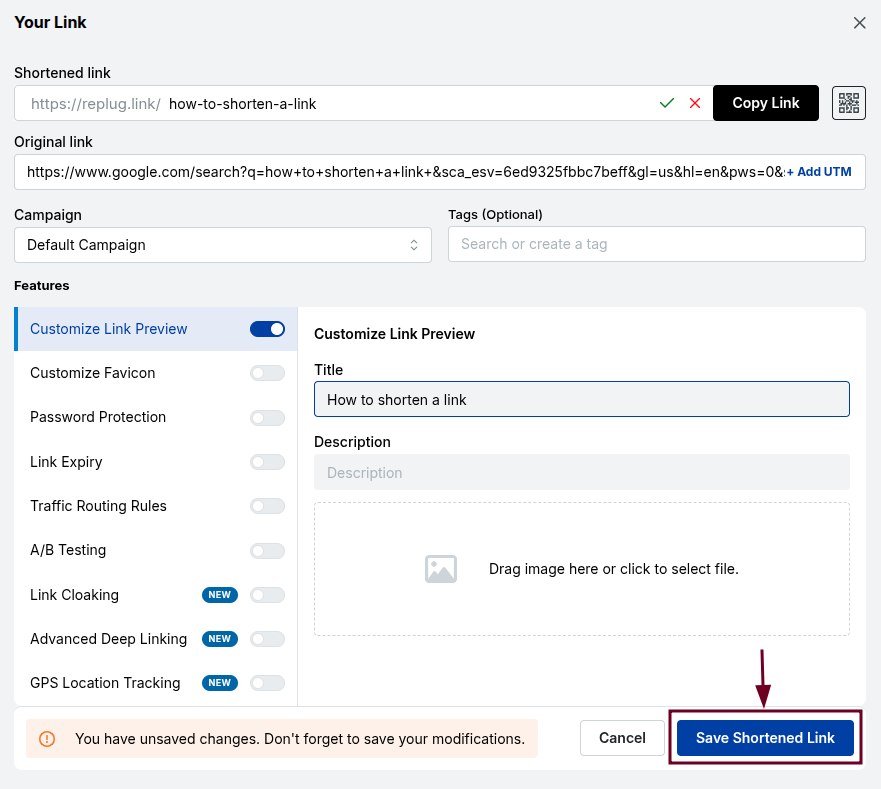
Click “Save Shortened Link,”and your shortened link is ready to go! Share it on social media, drop it in an email, print it on a flyer wherever your audience is; your clean new link is ready to follow.
👉 And that’s it! Five simple steps and your link is shortened, branded, and ready to perform. Easy, right?
Why shorten links with Replug’s custom URL shortener?
Sure, there are plenty of free link shorteners out there, but Replug brings a lot more to the table than just making your URLs shorter.
It’s a full-on link management tool built for marketers, creators, and businesses who want more control, more insights, and more results from every single link they share.
A complete link management solution
for marketing professionals & agencies.
Try Replug for free
Branding & trust: With Replug, you can use your own custom domain to create branded short links. So instead of a generic URL, your audience sees your brand name every time they click, which instantly builds credibility and trust.
Detailed link analytics: Replug gives you a clear picture of how your links are performing, from total clicks and geographic data to device types and referral sources. You always know what’s working and what’s not.
Retargeting pixels: You can embed Facebook, Google, or other retargeting pixels directly into your short links. This means anyone who clicks automatically gets added to your ad audience for future campaigns.
Call-to-action (CTA) pop-ups: Replug lets you display a custom CTA banner when someone visits a link you’ve shared. A clever way to drive traffic back to your own site, even when you’re sharing third-party content.
Bio links for social media: Instead of crowding multiple links into your Instagram or TikTok bio, Replug lets you create one clean bio link page that houses all your important links in a single, shareable URL.
Link management & customization: You can organize all your shortened links into campaigns, hassle-free with Replug. Plus, this amazing link shortening tool allows you to edit destination URLs anytime without resharing and customize slugs, making large-scale link management actually manageable.
QR code generator: Every shortened link in Replug comes with an auto-generated QR code, making it super easy to bridge your online and offline marketing without needing a separate tool.
Enhanced sharing: Replug’s deep link support and clean, branded URLs make sharing smoother across every platform, whether it’s social media, email, SMS, or print materials.
What are the benefits of using a short link?
Short links aren’t just a nice-to-have; they’re a small change that can make a pretty big difference in how your content performs.
Whether you’re sharing aproduct page, a blog post, or a campaign landing page, the way your link looks and functions actually matters more than most people realize.
Here’s a quick breakdown of the key benefits:
Easy sharing & memorability: A short, clean link is way easier to type, say out loud, and remember. This means your audience is more likely to actually visit it, no matter if they saw it online or heard it in a podcast.
Space-saving constraints: When you’re working within tight character limits (think social media captions, SMS messages, or even printed materials), a short link saves space without sacrificing the destination.
Link management & flexibility: Short links give you the ability to update the destination URL anytime without changing the link itself. Super handy when you need to swap out a page without resharing everything from scratch.
Enhanced security: Reputable link shorteners mask the original URL, which helps protect your links from being tampered with and gives users a cleaner, less suspicious-looking link to click on.
Improved marketing efficiency: From tracking click data to running A/B tests on different links, short links give marketers the insights and flexibility they need to fine-tune campaigns and get better results over time.
Types & examples of shortened links
Not all short links are created equal, and depending on your goal, one type might work a lot better than another. Some are quick and auto-generated, while others are carefully crafted to reflect your brand or campaign.
Here’s a quick look at the three main types:
Generic shortened links (randomized)
These are the most basic type, auto-generated by the link shortener tool with a random string of characters at the end. They get the job done quickly but don’t say much about the brand or destination.
Examples:
replug.io/aX3kP
short.io/3mQzR9
tinyurl.com/y7wbx2k
Customized/branded shortened links
These links use a custom domain and a manually chosen slug, making them instantly recognizable and on-brand. They look more professional and tend to perform better because people trust them more.
Examples:
nike.com/summer-sale
apple.co/iphone15
yourbrand.io/free-trial
Context-specific shortened links
These are tailored to a specific campaign, platform, or audience, making the link feel relevant and intentional rather than generic. They’re great for tracking performance across different channels.
Examples:
replug.io/email-promo (for an email campaign)
yourbrand.io/ig-bio (for an Instagram bio link)
yourbrand.co/webinar-reg (for a webinar registration page)
Top link shortening use cases
Short links aren’t just for making URLs look pretty. They’re genuinely useful across a wide range of marketing channels and strategies.
No matter what kind of content you’re putting out or how you’re reaching your audience, there’s a good chance short links can make that process smoother and smarter.
Here’s where they shine the most:
Social media marketing: Short, clean links fit perfectly in social captions and bios, where space is tight and first impressions matter. Plus, they’re much more clickable than a long, cluttered URL.
SMS marketing: Text messages have a 160-character limit, so a short link is practically a necessity here. It saves space, looks cleaner, and keeps your message focused.
Email marketing: Shortened branded links in emails look more polished and trustworthy, and the built-in tracking lets you see exactly which subscribers are clicking and on what.
Affiliate marketing: Short links help mask lengthy affiliate URLs, making them look cleaner and less spammy. This can make a real difference in whether someone actually clicks or not.
Content marketing: When promoting blog posts, videos, or resources across multiple channels, short links make it easy to track which platform is driving the most traffic to your content.
Influencer marketing: Giving each influencer a unique short link makes it dead simple to track who’s driving clicks and conversions. No guesswork, just clean attribution data.
QR code marketing & tracking: Short links generate cleaner, less complex QR codes that are easier to scan. Also, since you can update the destination anytime, your printed materials never go out of date.
Campaign tracking & analytics: By creating exclusive short links for each campaign, you can monitor performance in real time and make data-driven decisions without relying on complicated UTM setups.
App marketing & deep linking: Short links can be set up to direct mobile users straight to a specific page inside your app, skipping the homepage entirely and delivering a much smoother user experience.
Automated workflows: When integrated with tools like Zapier or Make, short links can be auto-generated and distributed as part of larger marketing workflows. This saves time and keeps everything consistent.
Generic vs. branded link shorteners: Which link shortener makes sense for you!
Choosing between a generic and a branded link shortener really comes down to your major goals. Are you just sharing a quick link, or are you trying to build a recognizable, trustworthy presence?
Here’s a side-by-side breakdown to help you decide:
Generic link shortener
Branded link shortener
Brand authority & awareness
No brand visibility. Links show a third-party domain (e.g., short.ly/xYz9)
Every link reinforces your brand name, making it instantly recognizable
Trust & security
Can feel unfamiliar or spammy to some users since the brand isn’t visible
Builds immediate trust. People know exactly where the link is coming from
Cost & setup
Usually free with zero setup required
May require a small investment for a custom domain, but setup is still straightforward
Analytics & control
Basic click data at best. Limited insights and no ownership
Full analytics dashboard with clicks, locations, devices, referrers, and more
CTR opportunity
Lower CTR potential since generic links feel less credible
Quick, one-off sharing where branding doesn’t matter
Any professional, marketing, or business use where trust and tracking matter
👉 If you’re just sharing a link with a friend, a generic shortener works fine. But if you’re running campaigns, building an audience, or representing a brand, a branded shortener like Replug is absolutely the smarter move.
Summing up
And that’s a wrap! Shortening links might seem like a small thing, but as we’ve covered throughout this guide, it can genuinely level up how you share, track, and manage your content across every channel.
From cleaner URLs and better click-through rates to retargeting, branding, and real-time analytics, the right link shortener does a lot more heavy lifting than most people give it credit for.
Replug makes all of this incredibly easy, even on the free plan. So why keep sharing those long, messy URLs when you don’t have to? Give Replug’s free link shortener a try today and see the difference for yourself!
Maximize marketing ROI
by transforming ordinary URLs into branded short links that convert.
Try Replug for free
Frequently asked questions
What is a URL shortener, and how does it work?
A URL shortener is a tool that takes a long web address and converts it into a short, compact link that redirects to the same destination. When someone clicks the short link, they’re automatically redirected to the original URL. It all happens in a split second without any extra steps for the user.
How do I shorten a URL link for free?
It’s pretty simple! Just head over to Replug.io, paste your long URL into the link shortener bar on the dashboard, and hit the blue arrow button. Your shortened link is generated instantly, and you can start using it right away at zero cost.
Does Replug offer a free link shortener?
Yes, it does! Replug offers a free link shortening tool that lets you shorten URLs quickly without needing a paid plan. You can also customize your slug and access basic features without spending a single penny. However, for more detailed and advanced feature access, you need to upgrade your plan.
Do shortened links expire after some time?
It depends on the tool you’re using. Many free generic shorteners expire links after a certain period of inactivity. With Replug, your shortened links remain active as long as your account is in good standing, so you don’t have to worry about broken links catching you off guard.
Can I track clicks on my shortened links using Replug?
Absolutely! Replug comes with a built-in analytics dashboard where you can monitor clicks, track geographic locations, see what devices people are using, and identify your top referral sources, all in real time.
Are shortened links safe to use?
Generally, yes; especially when you’re using a reputable tool like Replug. Branded short links are actually safer and more trustworthy than generic ones because users can see the brand name in the URL. That said, it’s always a good habit to only click short links from sources you trust.
How to shorten a link without a website?
You don’t need a website at all! Just sign up for a free Replug account, paste your long URL into the “Quickly Shorten your link” bar, and your short link is ready to go. You can share it anywhere (social media, email, SMS, or even in print) seamlessly, no website required.
How to shorten a LinkedIn URL easily?
LinkedIn URLs can get pretty long, especially for company pages or post links. Here’s how to shorten LinkedIn URL using Replug:
Simply copy your LinkedIn profile URL → head over to Replug’s free link shortener →paste it into the bar → and hit the arrow button.
You’ll get a clean, short link in seconds that you can drop anywhere (your email signature, business card, or bio).
How can I shorten the link to my Google Form?
Google Form links are questionably long and messy, which makes them awkward to share in emails or social posts. While Google URL Shortener was once a go-to option, it was discontinued back in 2019, so Replug is a great alternative to get the job done today.
Just copy your Google Form’s link → Paste it into Replug’s URL shortener box →Click the arrow button → Customize the slug if you’d like → and hit Save Shortened Link.
That’s it! Your Google Form link is now clean, short, and ready to share.
How do I edit a hyperlink to make it shorter?
If you’re working in a document, email, or webpage, you can display any text as a clickable hyperlink, which visually hides the long URL entirely. But if you need an actually shorter link that works everywhere, here’s how to shorten a hyperlink using Replug:
Paste your long URL into Replug’s free link shortener →Customize the slug to something relevant → and save it.
You’ll have a short, clean link that you can use as a hyperlink anywhere you need it.
Ever tried to paste a Zoom invite into an email or social post only to end up with an unwieldy, messy URL? It’s a small annoyance, but one that can make your invitation look unprofessional and cluttered.
Many people face this issue daily. Long links not only take up space but also reduce click-throughs and overall engagement.
The easiest fix? Shorten Zoom links into clean, branded, and user-friendly versions. In this guide, you’ll learn step-by-step how to shorten a Zoom link using an online link shortener, why it matters for your communication, and the best practices to make them effective across email, social platforms, and events.
Let’s jump in and give your Zoom invites a polished, professional touch.
What is a Zoom link shortener?
A Zoom link shortener is a tool that condenses lengthy Zoom meeting URLs into shorter, more manageable links. These shortened links are easier to share and remember, making them particularly useful for invitations, social media posts, and promotional materials.
By using a trustworthy URL shortener, you can transform a long, complex URL into a neat and concise one, enhancing the overall user experience and improving the aesthetics of your communications.
Link shorteners not only simplify URLs but also offer additional benefits, such as tracking link clicks, customizing the link with branded domains, and ensuring secure sharing.
Maximize marketing ROI
by transforming ordinary URLs into branded short links that convert.
Try Replug for free
How to shorten Zoom links using Replug?
Here’s a step-by-step guide to help you shorten your Zoom links effectively:
Step 1:Copy your Zoom invite link
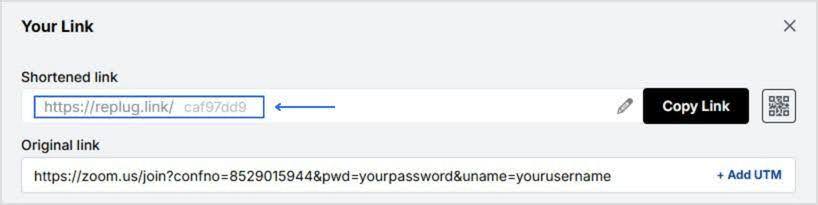
First, you need to have your Zoom meeting invite link ready. Copy the full URL of your Zoom meeting. This link usually looks something like this:
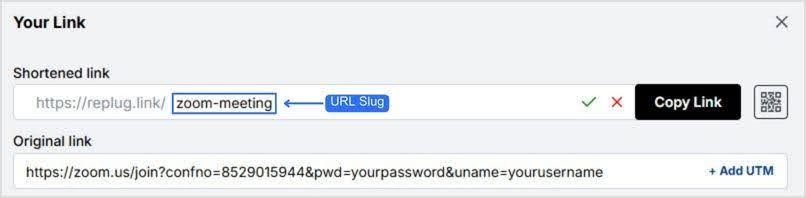
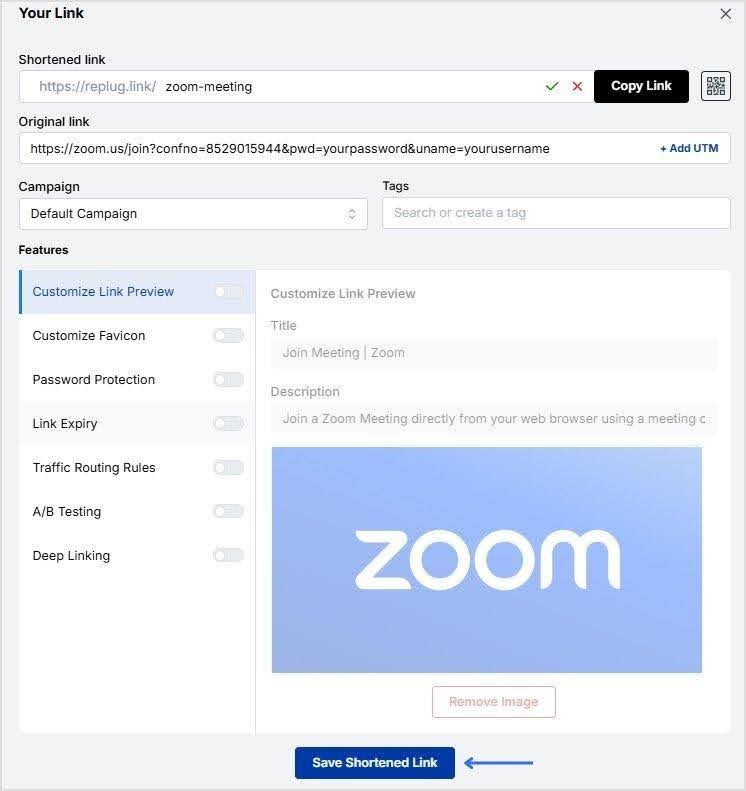
Once you’ve customized your URL, click on “Save Shortened Link,” and your short Zoom link is ready to be shared!
Track your links’ performance
Replug is an all-in-one link management platform that offers powerful URL tracking capabilities. Monitor your link’s click-through rates, geographic data, and other metrics to optimize your marketing strategies effectively.
By using Replug to shorten your Zoom links, you can create professional, easy-to-share URLs while gaining valuable insights into your link performance.
Shortening Zoom links offers several advantages, making it a practical choice for anyone who frequently shares meeting invites.
Here are some key reasons to shorten your Zoom links:
Enhanced aesthetics and professionalism: Long Zoom links can look cluttered and unprofessional, especially when shared in emails, social media posts, or printed materials. Shortened links are cleaner and more visually appealing, enhancing the overall look of your communications.
Easier to share and remember: Shortened links are easier to share and remember, making them more user-friendly. This is particularly useful when sharing links verbally, over the phone, or in presentations.
Improved click-through rates: Neater and more concise links can lead to higherclick-through rates. Users are more likely to click on a short, clear link compared to a long, complex URL that might appear suspicious or confusing.
Better tracking and analytics: Many link-shortening services offer tracking and analytics features, allowing you to monitor how many times your link has been clicked, where the clicks are coming from, and other valuable insights. This data can help you measure the effectiveness of your communication and marketing efforts.
Customization and branding: With our link shortener, you can customize your shortened URLs to include your brand name or a relevant keyword. This not only reinforces your brand identity but also makes the link more meaningful and memorable.
Maximize marketing ROI
by transforming ordinary URLs into branded short links that convert.
Try Replug for free
Additional tips
Use branded links: If you’re using a service that allows branded links (like Replug’s custom domain), take advantage of this feature to reinforce your brand identity.
Check security options: Replug offers additional security features, such as link expiration dates and password protection, which can be useful for sensitive meetings.
Maximize marketing ROI
by transforming ordinary URLs into branded short links that convert.
Try Replug for free
Frequently asked questions
Is it safe to use a Zoom link shortener?
Yes, using a reputable Zoom link shortener like Replug is safe. It can even enhance security by allowing you to track and manage your links effectively.
Can I track the performance of my shortened Zoom links?
Yes, many link shorteners, including Replug, offer tracking features that allow you to monitor click-through rates, geographic data, and other performance metrics.
Do shortened Zoom links expire?
It depends on the link shortener service. Some services allow you to set expiration dates for links, while others keep them active indefinitely.
Can I shorten Zoom links for free?
Yes, many link-shortening services offer free plans with basic features. Replug provides a free 14-day trial that includes essential link-shortening capabilities.
Google Forms are perfect for collecting feedback, running surveys, or managing event registrations. But here’s the catch:the default links they generate are long, messy, and hard to share.
Not only do these cluttered URLs look unprofessional, but they’re also difficult to remember, tricky to fit into social media bios, and almost impossible to use on printed material.
The good news? You can shorten your Google Forms link in just a few clicks. In this guide, we’ll walk you through:
How to shorten a Google Forms link using Google’s built-in option
Why shortening links matters (aesthetics, user experience, branding, security, analytics)
How to take it further with Replug: for branded links, click tracking, QR codes, and more
By the end, you’ll know not only how to create a short, neat link for your form but also how to maximize its impact for sharing, branding, and conversions.
A complete link management solution
for marketing professionals & agencies.
Try Replug for free
Why shorten Google Forms links?
Before we get into the steps, let’s answer the big question: why bother shortening at all?
Here are the top five reasons:
Visual appeal: Shortened links look cleaner and more professional, especially when shared in emails, on social media, or in presentations.
User experience: A short link is easier to type, remember, and share. It improves overall accessibility.
Branding & trust:Branded links increase CTR, look professional, build trust, and are far more memorable than random strings of characters.
Character limitations: Platforms like X (formerly Twitter), SMS, and messaging apps often have word or character limits. A long Google Forms link can get cut off or even break.
Tracking & analytics: While Google’s built-in shortener only makes the URL shorter, a custom link shortener gives you click tracking, engagement insights, and campaign performance plus detailed analytics.
How to shorten Google Forms link (built-in method)
Google Forms actually includes a simple option to shorten your link. Here’s how:
Open your Google Form.
Click the Send button in the top-right corner.
Select the link icon (the chain symbol).
Tick the Shorten URL checkbox.
Click Copy to grab your new, shorter link.
That’s it! In seconds, you’ll have a cleaner link that’s easier to share.
👉 Limitation: This method only shortens the link. You can’t rename it, brand it, or track performance.
How to shorten and customize Google Forms Link with Replug in 5 easy steps
If you want more than just a cleaner link, this is where Replug.io comes in.
Here’s how to shorten your Google Forms link with this leading link shortener, and brand it using advanced customization features:
Step 1: Copy your Google Forms link
Open your Google Forms link and copy it (via Send → Link icon → Copy).
For your ease, we’ve put together a quick comparison table between Google Forms Shortener and Replug. This way, you can see at a glance what each tool offers and decide which fits your needs best.
Feature
Google Forms
Replug
Shortens link
✅
✅
Customize link slug
❌
✅
Use branded domain
❌
✅
Track clicks & analytics
❌
✅
Generate QR codes
❌
✅
Retargeting pixels
❌
✅
A/B testing
❌
✅
Expiration dates
❌
✅
Conclusion
In this blog, we talked about why shortening Google Forms links isn’t just about saving space; it’s about creating links that are easy to share, trustworthy, and professional. While Google’s default option does the job, it falls short when it comes to branding, insights, and overall impact.
That’s where Replug steps in. With branded links, detailed analytics, retargeting, and A/B testing, it transforms a simple form link into a tool that drives engagement and optimizes conversions rate.
Ready to turn your Google Form links into growth engines? Try Replug today!
Frequently asked questions
How to get an editing link for Google Forms?
When you create a Google Form, the editing link is automatically tied to your account. You don’t need to generate it separately. Just copy the URL in your browser while editing. If you want to share the form with collaborators, click the “Add collaborators” option and grant them editing access.
Can I customize a Google Form link?
Google itself doesn’t allow much customization beyond shortening it to a generic forms.gle link. But if you want a clean, branded, and memorable link, you can use a tool like Replug. It not only shortens links but also lets you customize and brand them for a professional touch.
Does editing a Google Form change the link?
Nope! If you edit the questions or design of your Google Form, the link stays the same. The only time it changes is if you create a brand-new form. But here’s a tip: if you’re worried about keeping your links future-proof, shorten them with Replug. That way, even if you update or swap out the form later, you can redirect the same short link without resending a new one.
Where is the Google URL shortener?
Google’s official URL shortener (goo.gl) was discontinued in 2019. However, you can use alternatives like Replug to shorten links, brand them, and track performance.
Will Google shortened links stop working next year?
Yes, Google has already phased out support for goo.gl links. While existing ones may still work for a while, they’re not guaranteed forever. The safer option is to move to a reliable URL shortener like Replug. It ensures your links remain live, branded, and under your control, without worrying about sudden shutdowns.
Readers don’t care about the full hyperlink; they care about where it leads them. But long, exposed URLs? They clutter the page, disrupt readability, and make your content harder to trust.
The solution is simple: shorten the hyperlink to make it more trustworthy.
Instead of linking to a long, clunky URL, you can use a short, branded link that looks neat and is easy to manage. In this blog, we’ll explain what a hyperlink is, how to shorten a hyperlink with Replug, and the benefits of doing so.
Let’s start with the basics before we move on to the process.
Maximize marketing ROI
by transforming ordinary URLs into branded short links that convert.
Try Replug for free
What is a hyperlink?
A hyperlink is a clickable element in a document, web page, or email that takes the reader to another location. It could open a new page, lead to a section within the same file, or direct someone to external content like a video, image, or resource.
Hyperlinks usually appear as text, phrases, or buttons. For example:
In a blog: “Click here to learn more”
In a document: a word like “Download” might point to a file link
In an email: a phrase like “Shop now” could take readers to a landing page
Behind the hyperlink is a URL. If that URL is long, you can create a short link so the hyperlink remains clean and reliable.
Why shorten a hyperlink?
Shortening hyperlinks has clear benefits for both presentation and performance:
Cleaner look: no distracting or broken lines in documents or blogs.
Professional branding: links can carry your brand name with Replug.
Improved trust: readers are more likely to click short, branded links.
Analytics and tracking: shortened links allow us to monitor clicks.
Flexibility: edit or update the destination without changing the hyperlink text.
In short, shortening makes hyperlinks smarter and more useful.
How to shorten a hyperlink with Replug
Here’s the step-by-step process on how to shorten a hyperlink using this user-friendly link optimization platform.
Step 1: Sign in or sign up
Go to Replug and sign up for a free 14-day trial (no credit card needed). If you already have an account, log in to the dashboard.
Step 2: Paste your long URL
On the dashboard, paste the original long link into the bar under “Quickly shorten your link”. This creates a shortened version instantly.
Step 3: Create a branded URL (optional)
At first, Replug generates a short URL with an alphanumeric slug. For example:
You can customize the URL slug to make it look more recognizable and professional:
This not only looks professional but also improves recognition.
Step 4: Enable link cloaking (optional)
Replug also offers link cloaking. If you want the shortened URL to appear as a vanity link in the browser (helpful for affiliates or content marketers), you can enable this option while setting up your link.
Step 5: Save and copy the short URL
Once ready, click on “Save Shortened Link” and copy your short link.
Step 6: Add it to your hyperlink
Now, go back to your document, blog editor, or email tool. Highlight the text you want to hyperlink (for example, Learn more). Insert your Replug short link instead of the original long URL.
Now, when readers click the hyperlink, they’ll be directed to the shortened link, which then forwards them to the intended destination.
Benefits of using Replug for shortened hyperlinks
Replug lets you shorten a link while turning it into a complete marketing asset. Here are the benefits that it offers:
Custom branded links: build trust and align links with your brand.
Maximize marketing ROI
by transforming ordinary URLs into branded short links that convert.
Try Replug for free
Who actually benefits from shortening hyperlinks?
Shortened hyperlinks can be applied across multiple scenarios:
Digital marketing: Short hyperlinks help brands maintain consistent messaging across platforms. They’re easy to share in emails, ads, and campaigns while keeping everything clean and trackable. Marketers can also run A/B tests with different links to see which strategies bring better results.
Social media marketing: Short hyperlinks keep posts neat, boost engagement, and encourage sharing. A branded link also feels more trustworthy, making users more likely to click.
Vanity links: Custom, keyword-based links are easier for people to remember and type. With a high-quality link shortener, creating vanity links becomes simple, giving businesses a professional, user-friendly way to share content.
Affiliate marketing: Replug helps cloak affiliate links into branded hyperlinks that look clean, trustworthy, and click-worthy. Plus, with advanced affiliate link tracking, affiliates can see which campaigns are driving real conversions.
Campaign analytics: Every click on a hyperlink tells a story. Marketers gain insights into click-through rates, demographics, and user behavior, which helps optimize campaigns and allocate resources more effectively.
QR codes: Pairing QR codes with short hyperlinks is a powerful way to reach audiences across touchpoints. With dynamic QR codes, you can update the destination anytime without changing the code itself, keeping campaigns flexible and future-proof.
Conclusion
Long hyperlinks not only look messy but also reduce trust and harm readability. By shortening them, you can keep links clean, branded, and easy to share while unlocking analytics and flexibility.
With Replug, hyperlinks go beyond shortening. You can create custom branded links, cloak affiliate URLs, track campaign performance, and even generate QR codes. Whether it’s for digital marketing, social media, or affiliate promotions, Replug turns every hyperlink into a smart marketing asset.
If you want hyperlinks that people are irresistibly clickable, it’s time to shorten and manage them with Replug!
Frequently asked questions
How do I reduce the length of a hyperlink?
Shortening the length of a hyperlink is simple: Copy the long link from your website or social media, paste it into Replug, click to create, and save your new short link.
How do I rename or shorten a hyperlink?
If you just want to rename it, most platforms (Word, Google Docs, emails, websites, etc.) let you edit the display text of the link. Instead of showing the full URL, you can replace it with cleaner text like “Read more” or “Visit here”. If you want to shorten the actual link itself, you can use a URL shortener like Replug. Just paste your long URL, generate a short one, and use that wherever you share it.
How to shorten a URL safely?
Use a reliable URL shortener, opt for branded links, and avoid suspicious third-party tools. Always preview and test shortened links before sharing to ensure they’re safe and trustworthy.
How do I edit a hyperlink to make it shorter in Word?
Right-click the link, select Edit Hyperlink, then choose ScreenTip (top-right of the dialog box) and type in your preferred text.












![link analytics dashboard - replug.io]](https://internal-blog.replug.io/wp-content/uploads/2024/12/replug-analytics-dashboard.gif)