Blog

  • 30+ great SaaS tools in the market today

    30+ great SaaS tools in the market today

    SAAS solutions are no longer just a trend; they are a necessity. With top-notch flexibility and power, businesses operate more efficiently than ever before.

    These tools are revolutionizing the way we work, from managing social media to handling complex projects. But with so many options available, how do you choose the best ones for your needs? 

    Don’t worry, fellas! We’ve done the hard work for you. Running a business means we’re always looking for the best tools to help us stay efficient. We’ve tested many tools, considering reviews, costs, and user interfaces, and put together the top 30 essential SaaS tools for any modern business.

    Our top 3 Saas picks of 2026

    ToolsWhy choose them?
    Replug.ioSupercharge your links with this powerful link management toolbox.
    ContentStudioCrush it on social media with this handy scheduler, content curator and automation tool.
    UsermavenGet an in-depth scoop on your audience with privacy friendly Usermaven product insights and web analytics.

    What are SaaS tools?

    SaaS tools are cloud-based web and mobile applications that provide businesses with essential software solutions. 

    It includes tools like applicant tracking systems to hire employees, backlink software to build and monitor links, project management tools for efficiently managing tasks, etc.

    Unlike traditional software that requires installation and maintenance, SaaS tools are accessible via the Internet, making them easy to deploy and scale according to business needs. Implementing platforms like Scalo can enhance operational efficiency by streamlining management tasks and improving team collaboration across various business functions. Lastly, It’s also important to keep an eye on how much space iCloud should take to avoid using too much storage and slowing down your computer.

    Boost ROI with branded URLs - Replug dashboard showing performance metrics and branded URL creation
    Boost ROI with
    branded URLs!

    Enhance your marketing campaigns by creating shareable, trackable, and fully multi-purpose customizable branded URLs.

    Try Replug for free

    Best tools for business in 2026

    Following are some of the best SaaS tools for increasing sales.

    Tool Major functionality
    ReplugComplete link management capabilities
    RocketLinkRetargeting pixel integration
    ContentStudioSocial media automation
    FreePikImage library
    TailwindOptimized scheduling
    UsermavenProduct and website analytics
    Google AnalyticsComprehensive data tracking
    HubSpotAll-in-one growth platform
    SalesforceHighly customizable CRM
    ZendeskRobust ticketing system
    Constant ContactCustomizable templates
    MailchimpRobust automation tools
    CampaignerAdvanced automation features
    CanvaExtensive template library
    Adobe Creative CloudIndustry-standard tools
    FigmaReal-time collaboration
    WordPressHighly customizable
    JoomlaVersatile CMS
    DrupalStrong security features
    AhrefsExtensive backlink analysis
    SemrushComprehensive SEO features
    AsanaCustomizable workflows
    BasecampAll-in-one solution
    SlackReal-time messaging
    MirrorFlySecure communication
    ShopifyExtensive app ecosystem
    WixDrag-and-drop builder
    ZoomHigh-quality video and audio
    Google MeetEasy integration with Google Workspace
    QuickBooksComprehensive accounting features
    XeroCloud-based, easy to use
    VenngageAI infographic Creator
    TagembedSocial media aggregator

    You may also like: 14 Best white label marketing tools for agencies in 2026

    Link management tools

    1. Replug

    Replug

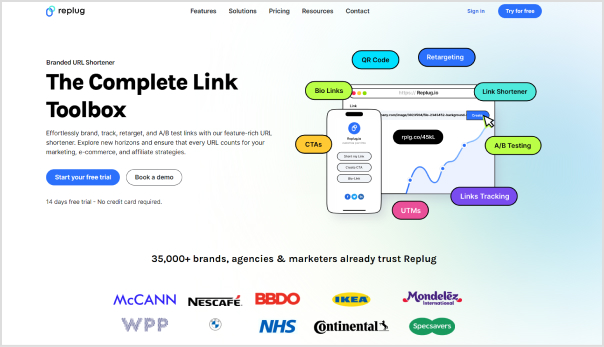
    Replug is a fantastic link management tool that makes it easy for brands and digital marketers to handle their important links. 

    Whether you’re sharing on email, social media, at the end of blog articles, through affiliate campaigns, or on landing pages, Replug has you covered. 

    It’s affordable, super easy to use, and even offers a free trial. Plus, it comes with a ton of great features that make managing your links a breeze.

    Replug Branded Short Links CTA
    A complete link management solution
    for marketing professionals & agencies.
    Try Replug for free

    Key features:

    • Retargeting capabilities: Re-engage visitors by targeting them with tailored ads based on their behavior.
    • Create white-label dashboards: Design customizable dashboards under your brand for client presentations.
    • Detailed link analytics: Track every click and engagement detail with comprehensive link analytics.
    • Custom branded URLs: Enhance your brand visibility with personalized, branded short links generated from this top-notch link shortener.
    • Bio-links: Centralize your social media presence with a single link that directs users to your branded landing page.
    • Deep links: Direct users to specific content within apps or websites, bypassing the signup process.
    • A/B testing: Optimize performance by testing different versions of your links to see what works best.
    • Link rotators: Distribute traffic evenly among multiple destinations with automated link rotation.
    • QR codes: Bridge the physical and digital worlds with scannable codes that direct users to your online content.
    • SMS links: Easily share and track links through text messages for improved engagement and accessibility.
    • Custom CTAs: Drive conversions with personalized call-to-action buttons that fit your campaign needs.
    PricingProsCons
    Free trial (up to 14 days) 
    Basic – $19/mo
    Professional – $49/mo
    Agency – $79
    User friendly
    Offers a vast set of features
    Affordable
    No freemium plan available

    2. RocketLink

    RocketLink is designed for marketers to shorten URLs and add retargeting pixels, helping in lead generation and improving ad efficiency.

    PricingProsCons
    Liftoff – $19 / month
    Space – $ 29 / month
    Galaxy – $69 / month
    Retargeting pixel integration
    Custom domain support 
    Higher price point
    Limited support options

    Social media management tools 

    3. ContentStudio

    ContentStudio

    ContentStudio ranks as the premier social media management tool due to its ability to connect with 25 social media platforms and 10 blogging platforms, offering a comprehensive suite of features. Its versatile capabilities, including content discovery, scheduling, detailed analytics, automation, and an AI-powered content generator, make it an excellent choice for complete social media management.

    Key features: 

    • Content discovery: Helps find trending topics and popular content relevant to your audience.
    • Social media automation: Schedules and automatically posts content across multiple social media platforms.
    • Social media content composer: Allows you to create and format engaging social media posts.
    • Content calendar: Organizes and plan your content publishing schedule to ensure consistent posting.
    • Content marketing: Develops and executes strategies to create, distribute, and promote content to attract and engage your target audience.
    • Content research & insights: Provides data and analysis on content performance and audience preferences.
    • Influencer search: Identifies and connects with influencers who align with your brand and target audience.
    • AI-caption generator: Generates creative and relevant captions for social media posts using artificial intelligence.
    PricingProsCons
    Starter – $25/mo
    Pro – $49/mo
    Agency plans $99/mo
    Content discovery and curation
    Automated publishing
    Comprehensive analytics
    Limited integrations

    4. Tailwind

    Tailwind is a social media scheduling tool focused on Pinterest and Instagram, offering features like post scheduling, analytics, and hashtag suggestions.

    PricingProsCons
    Pro – $24.99 /mo
    Advanced -$49.99 /mo
    Max – $99.99 /mo
    Optimized scheduling
    Hashtag recommendations
    Detailed analytics
    Limited to Pinterest and Instagram
    Some features require additional payment

    5. Deonde

    Deonde is a white-label SaaS platform that allows businesses to launch their own branded online ordering and delivery system — without any custom development. Whether you run a restaurant, grocery store, pharmacy, bakery, cloud kitchen, courier service, or flower shop, Deonde gives you everything needed to accept orders and manage deliveries under your own brand.

    Key features:

    • White-label apps: Launch fully branded iOS & Android ordering apps for your business.
    • Multi-channel ordering: Accept orders via website, mobile app, WhatsApp, Instagram, Facebook, Google, and QR code.
    • Delivery management: Handle drivers, delivery zones, real-time tracking, and driver settlements from one place.
    • Marketing tools: Run loyalty programs, coupons, promo codes, and push notifications to retain customers.
    • Analytics & reports: Get deep insights into orders, revenue, customers, and business performance.
    • Multiple business verticals: Supports restaurants, grocery, pharmacy, bakery, tiffin, meat, liquor, courier, fuel delivery, and more.
    PricingProsCons
    Subscription-based plans (Visit deonde.co/pricing)Supports multiple industries beyond food; fast to launch; rich built-in features for ordering, delivery & marketingLimited customization options

    Digital analytics tools 

    6. Usermaven

    Usermaven - SAAS tool for analytics

    Usermaven is a top-tier, privacy-friendly product and web analytics tool designed for marketers and enterprises of all sizes. It provides comprehensive insights, robust data privacy, and seamless integration with multiple platforms, empowering you to make data-driven decisions with confidence and precision.

    Key features:

    • Automated event tracking: Simplify your workflow with automated tracking of user activities within your app.
    • Multi-touch attribution: Identify the most effective marketing channels driving conversions with precision.
    • Cross-domain tracking: Monitor user journeys seamlessly across multiple websites within your domain.
    • Conversion funnel visualization: Discover where users disengage in your sales process with intuitive funnel visualizations.
    • Custom event tracking: Capture specific user interactions tailored to your business objectives.
    • Feature adoption reports: Gain clear insights into the utilization of new features by your users.
    • Segmentation: Analyze and interpret data for distinct, targeted user groups.
    PricingProsCons
    Pro – $14/mo
    Premium-  $24/mo
    Customize as per the number of events
    User-friendly interface
    Real-time analytics
    Customizable dashboards
    Limited integrations for now

    7. Google Analytics

    As a powerful digital analytics tool, Google Analytics dissects website traffic, uncovering visitor demographics, behavior patterns, and content engagement. By gleaning these insights, you can refine your website to attract your target audience and maximize your online impact.

    PricingProsCons
    Google Analytics 360 starts at US$ 50,000 per year.Comprehensive data tracking
    Integration with Google services
    Free for most features
    The steep learning curve
    Limited customer support

    Customer relationship management tools

    8. HubSpot

    Hubspot- SaaS tool

    HubSpot is an all-in-one growth platform for businesses. It unifies marketing, sales, and customer service tools with a focus on inbound strategies. This means attracting website visitors, converting them into leads, and nurturing them into loyal customers – all within a single platform. Many SaaS development companies leverage HubSpot to streamline their operations, enhance customer relationships, and optimize their marketing efforts.

    PricingProsCons
    Different pricing for each solution. (Visit Website)Multiple features under one platformExpensive advanced plans can be overwhelming for small businesses

    9. Salesforce

    Salesforce is a powerful cloud-based CRM (Customer Relationship Management) platform. It allows businesses to manage leads, contacts, opportunities, and customer relationships all in one place.

    Also check: Top 10 Salesforce alternatives and competitors, with their various Salesforce clouds tailored to specific business needs.

    PricingProsCons
    Different pricing for each product. (Visit Website)Highly customizable
    Extensive integrations
    Scalable for businesses of all sizes
    High cost
    Steep learning 

    10. Zendesk

    Zendesk - SaaS tool

    Zendesk is a customer service-oriented CRM platform that provides tools for ticketing, live chat, and customer support management. It helps businesses deliver efficient and effective customer service experiences. It allows businesses to deliver efficient, best Knowledge Bases and effective customer service experiences

    PricingProsCons
    Starts at $19Multi-channel support
    Robust ticketing system
    Good for customer service teams
    Expensive
    Requires training to use effectively

    Boost ROI with branded URLs - Replug dashboard showing performance metrics and branded URL creation
    Boost your conversion rates with irresistable CTAs with

    for your marketing campaigns.

    Check

    Higher clicks

    Check

    More leads

    Check

    Better ROI

    Generate free CTAs

    Email marketing tools

    11. Constant Contact

    Constant Contact is an email marketing platform that offers customizable templates, contact management, and performance tracking. It helps small businesses create and manage effective email campaigns while integrating some of the best market research tools to enhance audience targeting and campaign success.

    PricingProsCons
    Premium – $80/month
    Standard – $35/month
    Lite – $12/month
    User-friendly interface
    Extensive templates
    Good customer support
    Limited automation features
    Price increases with subscribers

    12. Mailchimp 

    Mailchimp - SaaS tool

    Mailchimp is a comprehensive email marketing tool that offers features such as campaign creation, audience segmentation, and detailed analytics. It also integrates with various e-commerce and CRM platforms.

    PricingProsCons
    Starts at $15/monthGenerous free plan
    Easy to use
    Robust automation tools
    Limited support on free plan
    Advanced features require higher tiers

    13. Campaigner

    Campaigner is an email marketing solution that provides advanced automation, segmentation, and reporting tools. It helps businesses create personalized and effective email campaigns to engage their audience.

    PricingProsCons
    Starter – $59/ mo
    Essential – $179/ mo
    eCommerce – $79.95/ mo
    Advanced – $649/ mo
    Advanced automation features
    A/B testing
    Good deliverability rates
    Expensive for small businesses
    Complex interface

    Designing tools 

    14. Canva 

    Canva - SaaS tool for designing

    Canva is a user-friendly graphic design tool that offers a wide range of templates, images, and design elements. It enables users to create professional-quality visuals for digital and print media without needing advanced design skills.

    PricingProsCons
    Canva Free – $ 0
    Canva teams- $5
    Canva pro – $6.50
    User-friendly
    Extensive template library
    Affordable pricing
    Limited features on free plan
    Less powerful for professional designers

    15. Adobe Creative Cloud 

    Adobe Creative Cloud is a suite of professional design software, including Photoshop, Illustrator, and InDesign. It provides powerful tools for photo editing, graphic design, and layout creation, catering to creative professionals.

    PricingProsCons
    Visit website for pricing details.Industry-standard tool
    Comprehensive feature set
    Regular updates
    Expensive
    Steep learning curve

    16. Figma

    Figma -  SaaS tool

    Figma is a collaborative design tool supporting real-time interface design and prototyping collaboration. It allows teams to work together on design projects, making it ideal for UI/UX designers.

    PricingProsCons
    Professional Team$15/full seat/mo
    Organization -$45/full seat/mo
    Enterprise – $75/full seat/mo
    Real-time collaboration
    Browser-based
    Strong prototyping features
    Limited offline functionality
    It can be expensive for large teams

    17. FreePik

    FreePik

    Freepik is a popular online platform that provides a vast library of high-quality graphics, including vector images, AI images, photos, and icons. Freepik is an excellent tool for designers who need quick access to a wide array of graphic resources but may require a premium subscription for those who want to avoid attribution or need exclusive content.

    PricingProsCons
    Free plan available
    Premium plan: Starts at $9.99 per month
    Extensive library
    Strong prototyping features
    Limited exclusivity
    Attribution required

    Content management systems

    18. WordPress

    WordPress is a popular content management system that powers millions of websites. It offers extensive customization through themes and plugins, making it suitable for blogs, business sites, and e-commerce stores.

    For business owners managing payroll or freelancers needing quick documentation, integrating a specialized paystubs generator into their workflow is a practical way to handle essential administrative tasks alongside their website management.

    PricingProsCons
    Starter – $4Explorer – $8Creator – $25Entrepreneur – $45Highly customizable, extensive plugin ecosystem, free to startIt can be complex for beginners, and requires regular maintenance

    19. Joomla 

    Joomla -   SaaS tool

    Joomla is a flexible CMS that combines ease of use with powerful features. It supports a variety of extensions and templates, making it a versatile choice for different types of websites, from simple blogs to complex portals.

    PricingProsCons
    Visit the website for pricing details.Fast, lightweight and easy to installFewer plugins than WordPress
    Old and unintuitive

    Drupal is a powerful CMS known for its scalability and security. It is ideal for complex, large-scale websites, offering extensive customization and functionality through its modular architecture.

    20. Drupal

    PricingProsCons
    Visit website.Highly flexible
    Strong security features
    Good for complex sites
    Steep learning curve
    Requires technical knowledge

    SEO Tools

    21. Ahrefs 

    Aherefs -   SaaS tool

    Ahrefs is an all-in-one SEO toolset that provides insights into website performance, backlinks, and competitor analysis. It helps users improve their search engine rankings through comprehensive keyword research and site audits.

    PricingProsCons
    Lite – $ 4 
    Standard – $ 249 /mo
    Advanced –  $ 449 /mo
    Enterprise – $ 14,990 /yr
    Extensive analysis
    Powerful keyword research
    Detailed site audits
    Expensive

    22. Semrush 

    Semrush is a leading SEO and marketing tool that offers keyword research, site audits, and competitive analysis. It helps businesses enhance their online visibility and optimize their digital marketing strategies.

    PricingProsCons
    Pro- $139.95/monthly
    Guru- $249 .95/monthly
    Business – $499.95/monthly
    Comprehensive SEO features
    PPC and social media tools
    In-depth analytics
    High cost
    It can be overwhelming for new users

    Project management tools

    23. ONES.com

    ONES.com is an all-in-one project management tool designed to help teams streamline everything from requirements and tasks to sprints, testing, documentation, and reporting. An in-depth ONES.com review highlights features like customizable workflows, Gantt charts, sprint management, collaborative docs, and software development integrations, showing how it helps teams manage complex projects with greater visibility and control.

    PricingProsCons
    Free – US$0 (up to 30 seats)Comprehensive all-in-one platformLimited language support
    Standard – US$7/seat/monthStrong support for software development teamsSome advanced capabilities are only available in higher-tier plans
    Business – US$16/seat/monthHighly customizable workflowsEnterprise/on-premises features require contact sales
    Enterprise – Contact SalesScalable for both small and large teams

    24. Asana 

    Asana- Saas tool

    Asana is a project management tool that enables teams to organize, track, and manage their work. An in-depth Asana review highlights features like task assignments, project timelines, and progress tracking, showing how it helps teams stay productive and on schedule.

    PricingProsCons
    Starter US$10.99
    Advanced- US$24.99
    User-friendly
    Customizable workflows
    Limited features on free plan
    It can be expensive for larger teams

    25. Basecamp

    Basecamp is a project management and collaboration tool that centralizes tasks, files, and communication. Its user-friendly interface and integrated tools simplify project workflows and enhance team collaboration.

    PricingProsCons
    Visit website All-in-one solution,
    Flat pricing
    Easy to use
    Lacks advanced features
    It can be overkill for small team
    Replug Branded Short Links CTA
    A complete link management solution
    for marketing professionals & agencies.
    Try Replug for free

    Communication and collaboration tools

    26. Krisp.ai

    Krisp.ai is a voice and audio enhancement SaaS. It strips away background noise like barking dogs or busy keyboards, creating crystal-clear audio for webinars, call-center workflows, or recording on the go. It also offers real-time transcription, AI-powered meeting note-taking, summaries, and speaker analytics, all powered locally to preserve privacy. Compatible with Windows, macOS, iOS, Android, and major conferencing apps like Zoom, Teams, and Meet.

    PricingProsCons
    Free plan – $0/mo
    Pro plan – $8/mo
    Teams plan – $10/user/mo
    Enterprise – Custom

    AI noise cancellation
    Transcription
    Meeting notes
    Collaboration features
    centralized billing
    Analytics
    Limited free version

    27. Slack 

    Slack -   SaaS tool

    Slack is a messaging platform designed for team communication and collaboration. It supports channels, direct messaging, file sharing, and integrations with other tools, making it a central hub for workplace communication.

    PricingProsCons
    Pro – $8.75
    $4.38 /mo for 3 months 
    Business plus- $15/mo
    Real-time messaging
    Integrations
    Easy to use
    Limited features on free plan
    It can be distracting

    28. MirrorFly

    MirrorFly is a customizable communication solution offering functionalities such as messaging, voice, and video call. It supports real-time collaboration and integrates with various platforms, enhancing team connectivity.

    PricingProsCons
    Essentials- $399
    Premium- $999
    Highly customizable
    Secure communication
    Supports chat
    Voice, and video
    Custom pricing can be expensive
    Requires technical setup

    E-commerce Tools

    29. Shopify

    Shopify -   SaaS tool

    Shopify is a leading e-commerce platform that allows businesses to create and manage online stores. It offers a range of customizable templates, payment processing, and marketing tools to support e-commerce operations.

    PricingProsCons
    Basic – $25 USD/month
    For small teams- $65USD /month 
    Advanced -$399 USD/month
    Plus- $2,300 USD/month
    User-friendly, extensive app ecosystem, excellent customer supportTransaction fees, can be expensive with add-ons

    30. Wix

    Wix is a website builder that also offers robust e-commerce capabilities. The tool provides customizable templates, drag-and-drop design, and integrated payment options, making it easy to create and manage an online store.

    PricingProsCons
    Light – $17
    Core – $29Business – $36 Business elite – $159
    Drag-and-drop builder, affordable pricing, good for small businessesLimited advanced e-commerce features, c

    Video conferencing tools

    31. Zoom 

    Zoom -   SaaS tool for video conference

    Zoom is a widely-used video conferencing tool that offers high-quality video and audio, screen sharing, and recording capabilities. It supports meetings, webinars, and virtual events, making it ideal for remote communication.

    PricingProsCons
    Visit the website for pricing detailsHigh-quality video and audio, easy to use, extensive featuresSecurity concerns, can be expensive for large teams

    32. Google Meet

    Google Meet is a video conferencing service that integrates with Google Workspace. It provides secure, high-quality video meetings with features like screen sharing, live captions, and real-time collaboration.

    PricingProsCons
    $0 to $18 per month, per user (plus custom-priced Enterprise option)Easy integration with Google Workspace, reliable performance, free for Google usersLimited features compared to Zoom, requires Google account

    Accounting and finance tools

    33. QuickBooks 

    Quickbooks -  SaaS tool

    QuickBooks is an accounting software designed for small to medium-sized businesses. It offers features for invoicing, expense tracking, payroll, and financial reporting, helping businesses manage their finances efficiently.

    SaaS businesses processing payments via Stripe can further streamline their workflow by connecting Stripe to QuickBooks to automatically sync transaction data without manual entry.

    With QuickBooks desktop hosting, businesses get the power of Desktop software with cloud flexibility, enabling multi-user access, enhanced data security, and seamless collaboration.

    PricingProsCons
    Simple Start -$18 /mo
    US $1 for 6 months 

    Essentials – $27 /mo
    US$2 for 6 months
    Plus – $38/moUS$3 for 6 months
    Advanced – $76/mo 
    Comprehensive accounting features, user-friendly interface, good customer supportCan be expensive, and occasional performance issues

    34. Xero

    Xero is a cloud-based accounting software that provides tools for invoicing, bank reconciliation, inventory management, and financial reporting. It is known for its user-friendly interface and integration capabilities.

    PricingProsCons
    Starter: Usually $29Now $14.50 /mo
    Save $87 over 6 months
    Standard: Usually $46Now $23/ mo
    Save $138 over 6 months
    Premium: Usually $62
    Now $31/ mo
    Save $186 over 6 months
    Cloud-based, easy to use, integrates with many appsLimited customer support can be expensive for advanced plans

    35. Venngage

    Venngage is an infographic tool with a huge template library. It has a free AI infographic generator tool that helps to create highly engaging and customizable infographics by just writing an AI prompt in any style or tone.

    Pricing ProsCons
    FreeUser-friendly      Limited features
    Premium PlanAccess to 10,000 templatesSlightly pricey

    36. DesignWiz


    DesignWiz is a simple and affordable tool for businesses and individuals to create professional flyers effortlessly. It offers a user-friendly platform with high-quality templates and customization features.

    Pricing ProsCons

    Basic Free – $0

    Easy-to-use interface

    Advanced features available in the Pro plan

    Pro – $9.99/month

    Wide range of customizable templates

    37. Tagembed

    Tagembed

    Tagembed is a social media aggregator that allows businesses to collect, curate, and embed social media feeds on websites. It supports multiple platforms, helping brands enhance engagement and showcase user-generated content.

    PricingProsCons
    Free Plan Available,Easy integrationReal-time updates take some time
    Basic – $19/month
    Supports multiple social platforms

    Customization options may require technical knowledge.
    Pro – $29/month

    38. Venturz

    Venturz is an all-in-one platform built to help businesses launch, manage, and grow from a single place. It combines website building, lead management, CRM, sales, subscriptions, and marketing automation into one simple system. You can create branded websites and landing pages, capture leads, manage customer relationships, run email campaigns, and even handle payments – without switching between multiple tools. Venturz is ideal for startups, creators, and growing businesses that want everything in one clean and easy-to-use platform.

    Pricing

    Free plan available. Paid plans start from $29/month.

    Pros

    • All-in-one platform for website, CRM, sales, and marketing
    • Built-in subscriptions and payment management
    • Simple and easy to use for growing teams

    Cons

    May have fewer third-party integrations compared to older CRM tools

    Other commonly used tools 

    • AI Tools
    • Online survey tools
    • HR tools
    • Document management tools
    • Demo booking automation tools 

    How do you buy SAAS tools?

    Here are some important steps you need to keep in mind when buying a SaaS tool.

    • Identify needs & budget: Clearly define the problem you’re trying to solve and the features you need. Set a realistic budget for the tool.
    • Research & shortlist: Explore different SaaS options in your chosen category. Reviews, software comparison websites, and demos from vendors can be helpful.
    • Free trials & demos: Take advantage of free trials and demos offered by most SaaS companies. This lets you test the tool’s functionality and user interface.
    • Read reviews & ratings: Look for user reviews and expert ratings to get insights into the tool’s strengths, weaknesses, and real-world experiences.
    • Negotiate pricing (Optional): For some SaaS, especially with annual Subscriptions, there might be room for negotiation on pricing, especially for larger teams or longer contracts.
    • Consider security & integrations: Make sure the tool offers secure data storage and integrates well with any existing software you use.
    • Training & support: Check if the vendor offers training resources and reliable customer support to help you get the most out of the tool.
    • Start small & scale up: If you’re unsure, start with a basic plan and upgrade as your needs evolve.

    Replug Branded Short Links CTA
    Maximize marketing ROI
    by transforming ordinary URLs into
    branded short links that convert.
    Try Replug for free

    Conclusion

    Choosing the right SaaS tools can be overwhelming. This blog post has provided an overview of 30 essential tools across various business functions. Remember to carefully evaluate your specific needs, budget, and team size when making your selections. 

    FAQs related to the SaaS tool

    Are SaaS tools secure?

    Most SaaS providers implement robust security measures, including encryption, regular security audits, and compliance with industry standards. However, it’s essential to review each provider’s security protocols to ensure they meet your requirements.

    How do I choose the right SaaS tool for my business?

    Identify your specific needs, budget, and team size. Research different options, read reviews, and consider free trials or demos. Evaluate features, pricing, and customer support before making a decision.

    Are there any free SaaS tools available?


    Yes, many SaaS providers offer free plans or limited free versions of their tools. Some popular options include:

    – Google Analytics
    – Canva
    – Asana
    – Mailchimp
    – Trello

    What are the benefits of using SaaS tools?

    SaaS tools offer several advantages, including:

    – Cost-effective: No upfront costs, typically subscription-based.
    – Accessibility: Accessible from anywhere with an internet connection.
    – Scalability: Easily adjust plans based on business growth.
    – Automatic updates: Software is regularly updated with new features.

    How can I integrate different SaaS tools?


    Many SaaS tools offer integrations with other platforms. You can use integration platforms or APIs to connect different tools and streamline workflows. Additionally, some tools offer built-in integration capabilities.

  • How to sign up for the Replug affiliate program?

    How to sign up for the Replug affiliate program?

    You’re creating amazing content every day, but the solid financial rewards just aren’t there. We get it—it’s frustrating to see all that hard work not translating into the income you deserve.

    But what if we tell you that you could turn your passion for sharing great products into a reliable income stream?

    Yes, you heard us right. Say hello to affiliate marketing, where your genuine recommendations can earn you countless commissions.

    In this guide, we’ll cover everything you need to know about affiliate marketing, from the key benefits for brands to marketers. And introduce you to the Replug affiliate program, providing you with a clear, step-by-step process to get started and succeed.

    Ready to turn your content into cash? Let’s get you started!

    What are affiliate programs?

    Affiliate programs are a type of performance-based marketing strategy where businesses reward affiliates (individuals or businesses) for promoting their products or services.

    Affiliates typically earn a commission when a customer clicks their unique affiliate link and completes a desired action, such as making a purchase or signing up for a free trial.

    These programs offer a wealth of advantages for both businesses and affiliates. 

    Boost ROI with branded URLs - Replug dashboard showing performance metrics and branded URL creation
    Boost ROI with
    branded URLs!

    Enhance your marketing campaigns by creating shareable, trackable, and fully multi-purpose customizable branded URLs.

    Try Replug for free

    Key benefits for businesses 

    Top perks for brands, agencies, companies
    Continuous promotionUnlike one-time ads, affiliates continually promote your products, ensuring consistent visibility and sustained marketing efforts.
    Low cost & riskSpend wisely by paying affiliates only when they bring in sales or leads, keeping your investment low and secure.
    SEO boostGain backlinks from affiliate sites, which can improve your search engine rankings and organic traffic.
    Test out products Affiliates allow you to test new products or marketing strategies with minimal financial risk.
    Rapid market entryAffiliates can help you quickly enter new markets and regions without the need for extensive local marketing campaigns.

    Also read: A Quick Guide on Affiliate Decloaking 

    05 key benefits for marketers

    Top perks for content creators, brand managers & influencers etc
    Monetization opportunityTurn your content into cash by promoting affiliate products and earning commissions on sales through your unique links.
    Increased organic trafficCapture email addresses through affiliate links, creating a valuable asset for future marketing campaigns.
    Content longevityCreate evergreen content with affiliate links that continue to generate income long after they are published.
    Building relationships with brandsDevelop long-term partnerships with brands, opening doors to future collaborations and exclusive deals.
    Passive income streamEnjoy the potential for passive income as well-placed affiliate links continue to generate commissions over time.

    Top 3 affiliate programs of 2026

    1. Replug

    Replug Affiliate program

    Transform your links into powerful marketing tools with Replug’s affiliate program, offering high commissions and excellent support. 

    Maximize your earnings by promoting a tool that boosts engagement and tracks performance effortlessly.

    2. ContentStudio 

    ContentStudio Affiliate program

    Earn generous commissions by promoting ContentStudio, an all-in-one content marketing and social media management platform. Help businesses streamline their content strategy and social media presence while benefiting from a lucrative affiliate program.

    Also read: The 10 best social media management tools in 2026

    3. Usermaven

    Usermaven Affiliate program

    Join Usermaven’s affiliate program and capitalize on promoting this top-tier product analytics tool. Earn commissions by helping businesses understand their user behavior and improve their product offerings with comprehensive analytics.

    Also Read: 25+ best affiliate programs to earn money in 2026

    How to sign up for the Replugs affiliate program?

    Step 1: Visit the Replug website

    • Open your web browser and go to the official website: Replug.io.
    • Navigate to the bottom of the homepage and look for the “Affiliate Program” link. This is typically found in the footer or under the “Company” or “Partnership” sections.
    Look for Affiliate Program page

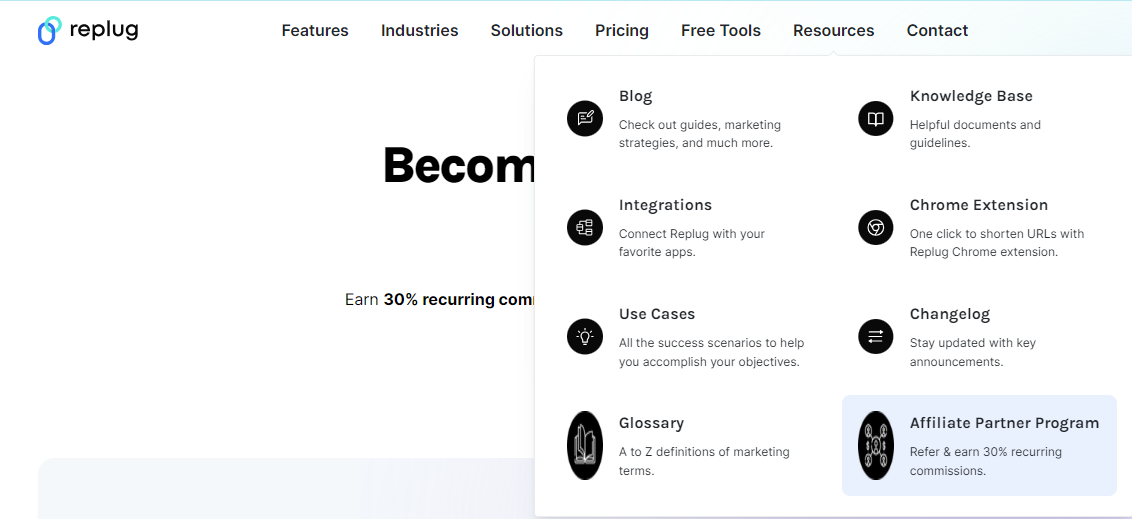
    Or you can also access this link from the resources section of the header menu.

    Resources section affiliate program

    Step 2: Access the affiliate program page

    • Click on the “Affiliate Program” link. You will be redirected to a page with information about the affiliate program, including benefits, commission rates, and sign-up instructions.
    Become a Replug Affiliate
    • Review the details to ensure the program aligns with your goals and expectations.

    Step 3: Register for an Account

    • On the Affiliate Program page, look for the “Sign Up” or “Join Now” button. Click on it to start the registration process.
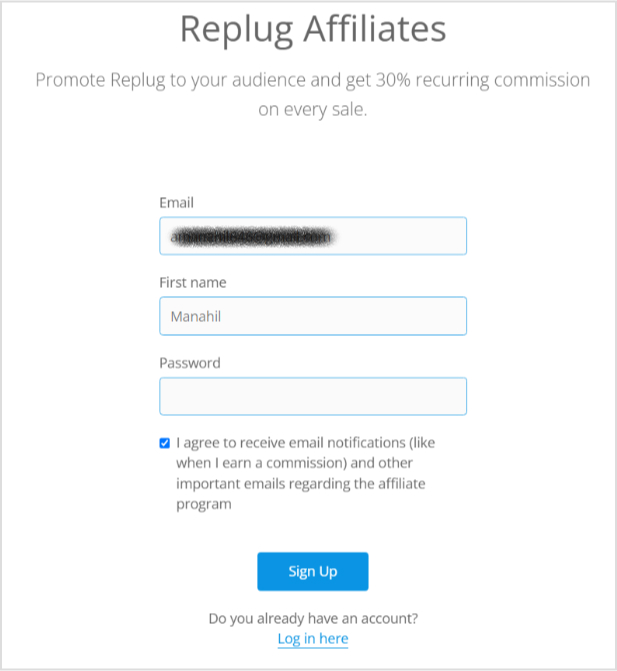
    • You will be prompted to enter your personal details, which typically include your name, email address, and password.
    Replug Affiliate program- Sign up form

    Step 4: Complete the application form

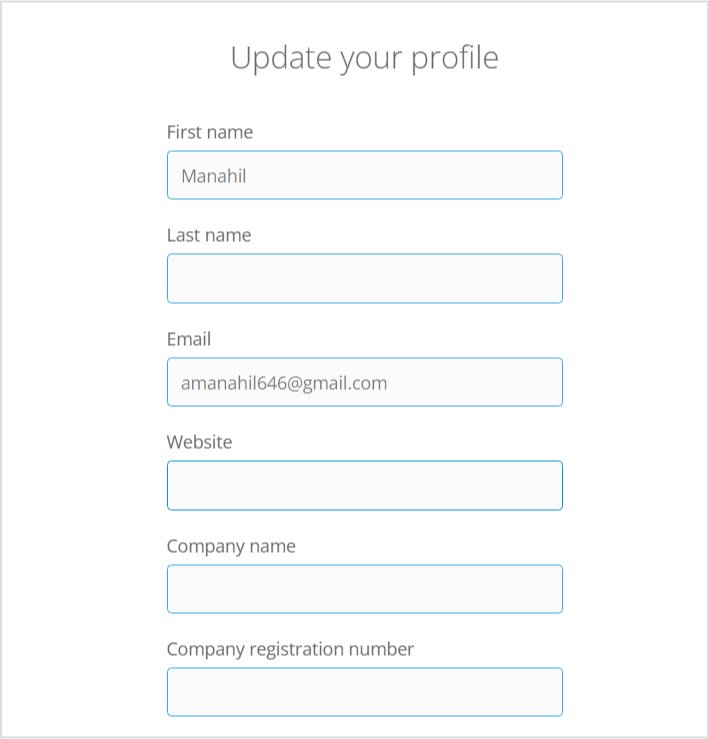
    • After signing up, you’ll be redirected to the dashboard. 
    Replug Affiliate program dashboard
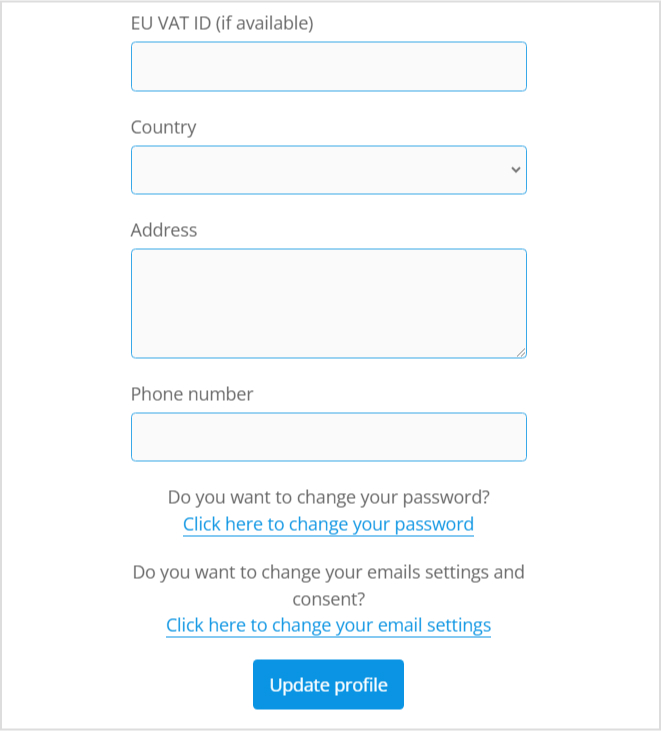
    • Fill out the application form here with accurate and up-to-date information. 
    Update profile
    • Add in all the necessary information and click “Update”. 
    Replug Affiliate program- form

    Step 5: Access your affiliate dashboard

    • Explore the dashboard to familiarize yourself with available tools, tracking features, and marketing materials.
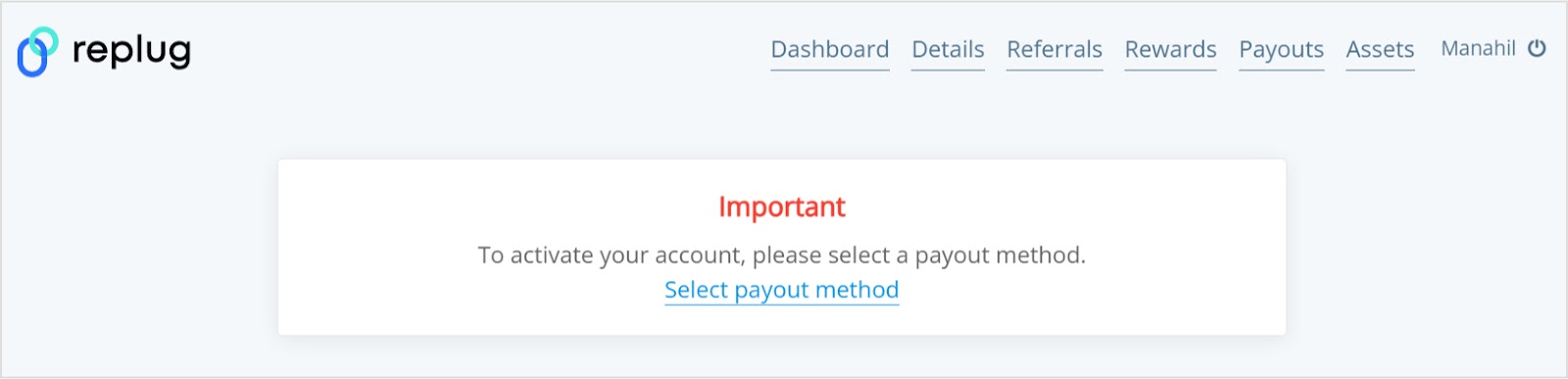
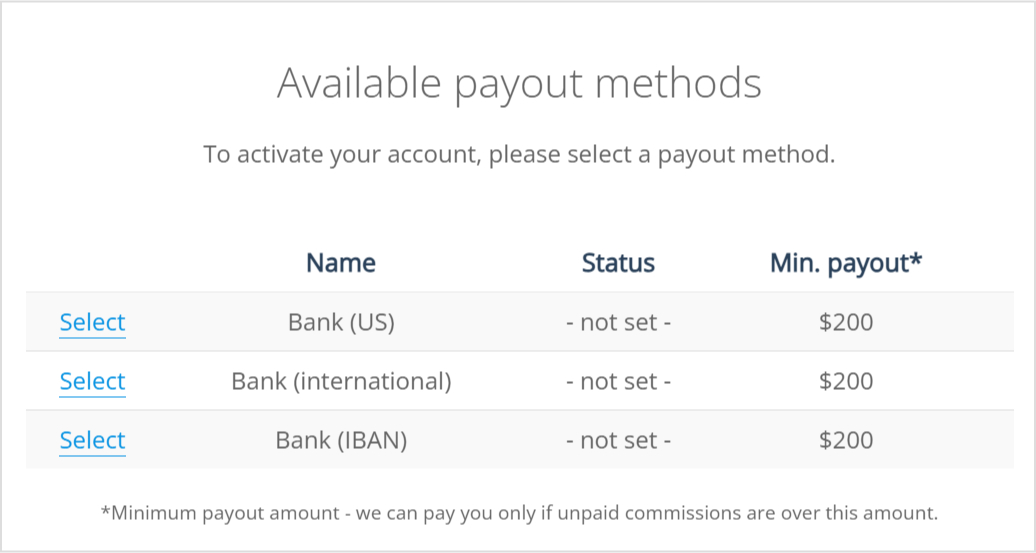
    • Then, add in the payout method.
    Replug Affiliate program -Payout methods

    Step 8: Track your performance 

    • Track your performance through the affiliate dashboard to monitor clicks, conversions, and commissions earned.
    Track performance

    Related: Affiliate Link Tracking To Optimize Your Earnings

    Step 9: Get paid

    • Replug will handle payments based on their commission structure. Ensure you have set up your payment details correctly in the affiliate dashboard.
    Replug Affiliate program- Payout terms
    • Payments are usually processed on a regular schedule (e.g., monthly). Check the payment terms and conditions for specifics on how and when you will receive your earnings.

    Conclusion

    Signing up for the Replug affiliate program is a straightforward process that can lead to substantial earnings if you effectively promote their services. 

    By following the steps outlined in this guide, you’ll be on your way to becoming a Replug affiliate and earning commissions through your promotional efforts.

    That wraps up our quick guide for today. If you have any questions or need further assistance, don’t hesitate to reach out. Our customer support team is here to help and will get back to you promptly.

    Replug Branded Short Links CTA
    A complete link management solution
    for marketing professionals & agencies.
    Try Replug for free
     

    FAQs related to affiliate programs

    How does the Replug affiliate program work?

    The Replug affiliate program allows you to earn commissions by promoting Replug’s link management and engagement tools, such as its top-notch short URL shortener. You share your unique affiliate links, and when users sign up or make a purchase through your link, you earn a commission.

    What are the benefits of joining the Replug affiliate program?

    As a Replug affiliate, you gain access to high commissions, excellent support, and a platform that helps you maximize your earnings by boosting engagement and tracking performance effectively.

    Who can join the Replug affiliate program?

    Anyone with an audience, including marketers, content creators, bloggers, and influencers, can join the Replug affiliate program to monetize their content and drive revenue.

    How do I sign up for the Replug affiliate program?

    Visit the Replug website, navigate to the “Affiliate Program” link, and follow the registration steps. You’ll need to fill out an application form and set up your affiliate dashboard.

  • 21 Instagram Story hacks to boost your engagement

    21 Instagram Story hacks to boost your engagement

    As of the tail-end of 2025, Instagram had over 1.4 billion monthly active users. 70% of Instagram users watch stories daily, and 86.6% of Instagram users post stories. That’s a massive number.

    From the introduction of Stories and Reels to the rollout of shopping and creator tools, Instagram has demonstrated a keen understanding of what its users want and need.

    Therefore, we have conducted in-depth research to give you the best list of hacks for Instagram stories that will boost your Instagram engagement and increase your audience. We have divided these 21 hacks into 5 groups to make it easier to understand

    5 types of Instagram story hacks
    Instagram Story Designing Hacks
    Instagram Story Video And Image Hacks
    Instagram Story Management Hacks
    Instagram Story Sticker Hacks
    Creative Instagram Story Hacks

    Instagram story designing hacks

    1. Create story with a patterned backdrop

    If you want your Story posts to be the talk of the town, then it’s time to get funky with your backgrounds. Trust me, the more patterns you throw in there, the more excitement you’ll inject into your stories. 

    Here is an example by Benefitcosmetics:

    Sephora makeup brand instagram story with patterned background.

    Here’s how you can do this:

    1. To share a post from your feed in your stories, simply take a snapshot and crop it so that only the post is visible.
    2. Select “Add post to your Story” from the original feed post by clicking the “share” symbol.
    3. Make the feed post full-screen by increasing its width. Following this procedure, your completed Instagram Story will feature a clickable link to the original post.
    4. Select a picture or pattern from your library as a background.
    5. Next, insert the portion of the screenshot you cut out in Step 1.
    6. Put the story online.

    Set up something eye-catching, but make sure not too flashy to distract your audience from the message you’re trying to convey. 

    2. Create visual art with texts or emojis

    The design of your Instagram Story is like the ultimate fashion statement. It will either make you the trendsetter of the century or leave you looking like a fashion disaster. So, choose wisely, my friends.

    Here’s an example by Starbucks:

    Starbucks instagram story with pastel shades text and font.

    To start typing on your Instagram story:

    • Tap the “Aa” icon on the top-left corner or click anywhere on the screen to activate the text field.
    • Change the text font, adjust the size, or change the color.
    • Apply effects like shadows, outlines, and different background colors to change your text to your brand colors.

    On the other hand, adding emoticons to your Instagram story is a simple and effective method. Take, for example, Rhode, which included a cute strawberry emoji in its story to promote its new product, strawberry gazing lip gloss.

    Rhode makeup brand instagram represeting a product witrh rleevant emojis.

    Here’s how you can do the same: 

    • Tap the “square smiley face icon” To open the emoji selection screen. Or directly add from your keyboard. 
    • Tap on the ones you want to add to your story. 
    • Add multiple emojis to your story by tapping the emoji icon again and selecting additional emojis.
    • Rearrange, resize, and adjust them until you’re satisfied with the composition.

    Also, you can Pinch or expand with two fingers to resize the emoji or text. Or layer emojis, text, and other elements by adding them one after the other. 

    3. Add filters and translucent colors

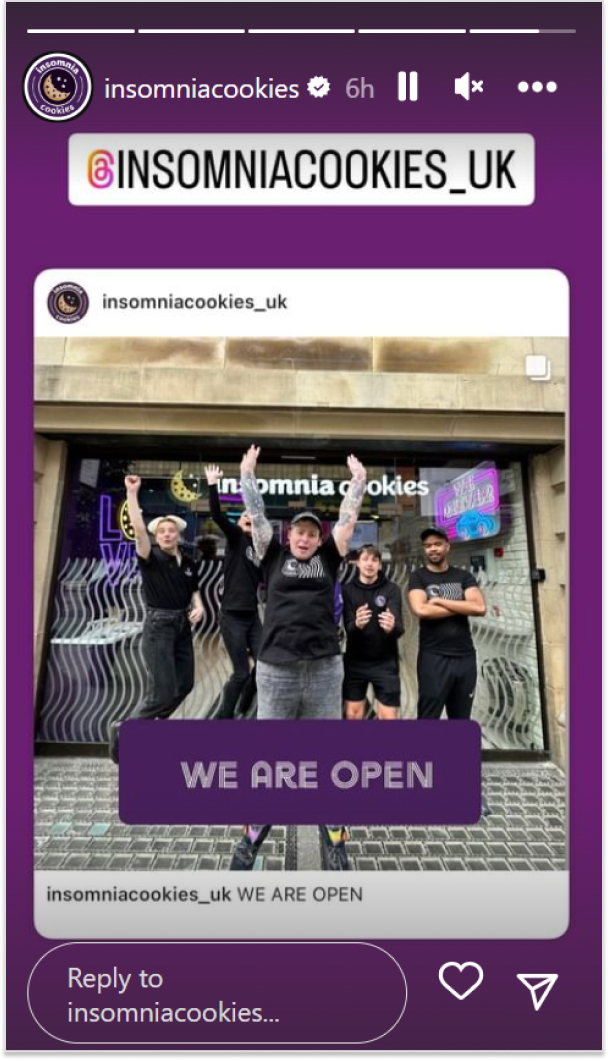
    With so many tones, color grades, and effects, finding a filter that fits your brand is very easy. Use transparent overlays to add a customized color tint to your images or videos. 

    Just like this Instagram story by Insomiacookies:  

    insomiacookies on instagram shared a story with tinted backdrop.

    Follow these steps to create a catchy overlay:

    • Upload the photo or video to your Story.
    • Open the Story and tap the three dots in the upper right corner. 
    • Select “Draw,” then select the desired font color.
    • To make an overlay, click and hold your finger on the screen until the overlay covers your photo or video.

    Such overlays let you cover up important information or products while alerting users that something is going on, and keep your audience waiting for the big reveal.

    To apply an effect to your Instagram Story. Open your camera and swipe to the end to select “Browse Effects.” Scroll, and you’ll find hundreds of options.

    4. Use the eraser tool for dramatic reveals & cool effects

    If you want to impress your Instagram followers, we have a super cool hack for you. All you need is a little bit of creativity! Use the eraser or doodle feature to create all sorts of cool effects!

    This lets you create Instagram Stories to cover a new story for a dramatic reveal, as shown in the image below. 

    Fellas, you can wow your Instagram followers with this simple hack with some creativity. 

    Instagram story video & image hacks 

    5. Use the boomerang feature

    If you’re an Instagram user, you should use the Boomerang feature on your feed. It’s a quick and fun way to save memories, and easy to do. Just click the camera icon, record a short video, and click “Boomerang.” 

    You’ll get a preview of your video with the boomerang effect in the upper left corner. Click “Save” to save your boomerang as a photo or video. When you post it again, it will play back in reverse.

    Related: 15 Best Instagram Marketing Tools To Use

    6. Add some green screen tech fun

    Now, let’s not sugarcoat this. As your travel options are severely curtailed due to the busy workload, you’ll have to make do with people-watching in Turks and Caicos this summer.

    But, with the help of some cutting-edge green screen technology, you may get your viewers there in no time. And you won’t even need to invest in any special tools. 

    To access Search Filters, open your stories, swipe to the end of the filters, and you see the green screen option.

    Add green screen

    Also, you may use the search bar to look for “green screen” by tapping on that. Many other green-screen effects will be available to you.

    7. Multi-Image stories in one go

    Oh, this feature is super useful when you want to share a story! It’s actually one of the main reasons why people love using Instagram stories. If you upload one story at a time and you have active users, they might lose interest because their experience could become confusing.

    But if you publish multiple snapshots in your story at once, you’ll be able to keep your audience engaged. You can also display Instagram feed on website to showcase your Stories and posts, helping visitors stay connected and boosting overall engagement.

    A multi image Instagram story example.

    Besides that, ensure that you use the correct Instagram story dimensions. The minimum dimension is 1.91:1, and the maximum is 9:16. The recommended aspect ratio is 9:16, with a size of 1080px by 1920px.

    Interesting read: How to Use Instagram Threads: Discover Hidden Gems!

    What else can I do to make my stories more engaging?

    Another way to engage your audience is to create and fill out a template. Then share the same template unfilled, and ask your followers to take a screenshot and fill the template. They will share it on their Instagram stories and increase your account’s visibility.

    The template will, of course, be branded, so your name will already be there, giving you visibility in new circles.

    Also, you will find multiple templates on Canva, ready-made. You can easily edit them too.

    Instagram story management hacks

    8. Schedule your stories in advance

    Everyone knows that consistency is key. In order to maintain engagement levels, it is important to consistently post content. Additionally, this will enable you to prepare your content in advance and plan everything accordingly. This is important because there may be times when you are unavailable to publish a post.

    Additionally, by understanding the peak engagement time on your account, you can strategically schedule your stories to maximize views.

    ContentStudio-Scheduling

    How can stories be scheduled? Instagram does have a scheduling tool called Insta Planner. But that isn’t enough. Instead, we recommend use a highly effective Instagram management tool that takes care of all aspects, including composing posts and monitoring performance.

    9. Use Instagram story analytics

    Instagram’s story analytics provide a comprehensive range of data and insights. They can provide you with valuable insights into the types of stories that were successful and those that were not. 

    Using this method will assist you in developing a content calendar that has a greater impact. Additionally, you have the option to utilize the Instagram analytics tool, which provides a comprehensive analysis of your content strategy.

    To access various engagement metrics in Insights, simply tap on the Content tab. Here, you will find metrics such as reach, impressions, follows, link clicks, and more.

    To check the analytics of a specific story, simply open the story and then swipe up. Next, tap on the bars to access the analytics. This way you can analyse which types of stories work best for you and focus on creating similar content to increase engagement.

    Related read: A Comprehensive Guide to Generate Leads With Social Media

    10. Add & hide mentions & hashtags

    Mention stickers are the best way to tag other users while sharing shoutouts or promoting the partner brand. The mention sticker includes the following features:

    Encouraging your followers to post their own stories in return for a mention, which in turn promotes your event.
    Tag the people appearing at your upcoming events to promote them.
    Mention stickers, on the other hand, can boost the visibility of your stories.
    Location stickers increase the chances of appearing on public feeds and reaching people who do not follow you.
    Location stickers increase the chances of appearing on public feeds and reaching people who do not follow you.
    Countdown stickers are also handy when launching a product or a specific event.

    One way to go about it is to add all the hashtags and mentions on the story and then hit the stickers option. Choose to ‘add a photo from camera’ and layer the image that you want to put up on the base.

    Another way to go about it is to open the text box and add as many hashtags and mentions as you want. Then from the color tool, select the dropper and pick a color from the image to turn the text into. This will camouflage the text in the background.

    Which hashtags to add?

    If you don’t know which hashtags to add, the composer feature in ContentStudio is a lifesaver. You can create a pool of hashtags from which you can pick and choose every time you put something up, or create a pre-set to go with every post.

    Interesting read: Effective Risk Management Strategies to Manage Social Media Risks

    11. Do story hops

    A story hop is an excellent way to keep your audience engaged. It can also be used to bring in more followers. So, what really is a story hop? It is when you collaborate with multiple, similar Instagram accounts and decide on an activity to do together. 

    You can also share their stories on your feed or story. So, just like your followers are likely to hop on to the stories of influencers you referred to, followers from other accounts will reach your stories as well

    Instagram story sticker hacks

    12. Add a link sticker to your story

    Capture the attention of your audience by directing them to a webpage. If you are selling something, make sure to connect your story to the corresponding page.

    Here we spotted Madewell on Instagram doing the same.

    Madewell on instagram shared a story with a captivating CTA stickier.

    However, if you don’t have too many follower then we’d prefer you to add an Instagram bio link in the meantime. It is preferable if you put up branded short links using an efficient short URL shortener, because you can track the link clicks through its built-in UTM builder. Replug is an all-in-one link optimization platform, offering such top-nocth features at hand!

    How to create Shoppable Stories?

    • Create your Instagram Story
    • Go to Stickers
    • Select the product sticker and add the item
    • Customize and match it with your brand.

    How do we add a link to the Instagram story?

    Use the Link sticker to include a link in your Instagram story. Tap on the sticker to be redirected.

    To put on a Link sticker, do the following:

    • Capture or upload content to include in your Insta story.
    • Select the sticker tool from the upper navigation bar.
    • Hit the “Link” sticker to insert your desired link, then tap “Done.”
    • Tap to check color variations after placing the sticker on your narrative, just like the other stickers

    Related: How to add a link in bio to your Instagram profile?

    13. Including entertaining GIFs

    Using GIFs on Instagram is like adding a dash of pizzazz to your story. It’s the secret ingredient that can make your viewers go, 

    “Whoa, that’s fancy!” 

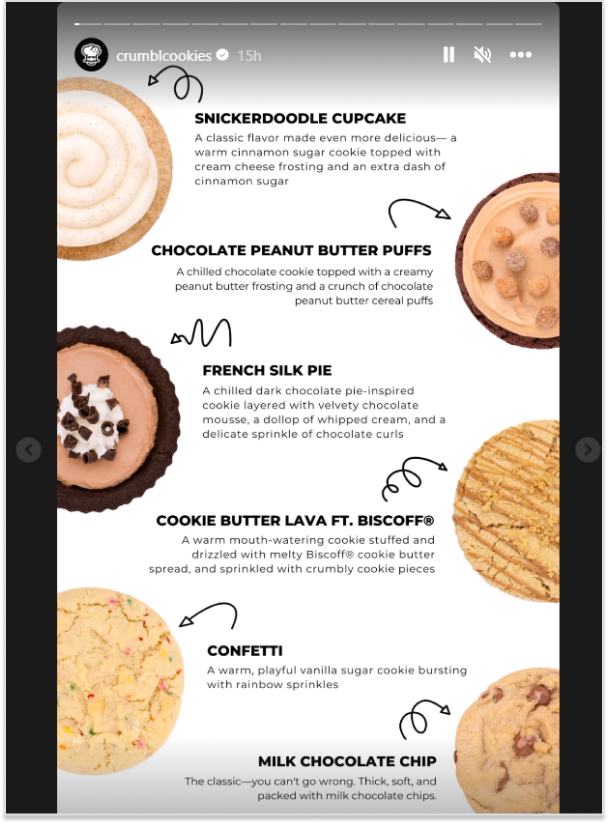
    Here we spotted crumble cookies using gifs in its Instagram story.

    Crumble cookies on Instagram shared a story with entertaining gifs.

    Here’s how you can do it:

    • Simply go to the “create mode”
    • Scroll to the GIF tab to add thousands of GIFs. 
    • Use GIFs as the background for your Instagram stories. 
    • Or create GIFs using editing apps like ImgPlay etc.

    14. Ask a question

    It doesn’t matter what kind of business you have. Your audience will always have questions for you, and you can also ask your followers questions. It’s a great way to keep your audience engaged. 

    For instance, you can ask your audience what’s going on questions just like Topgear did: 

    Topgear on instagram shared a story with an engaging question

    To ask a question, click on add story and go to Instagram elements. You’ll find questions there.

    Creative Instagram story hacks

    15. Polls at Play

    Why not try putting up a poll to get people engaged? It’s a great way to get everyone involved! 

    You can make it as easy as just asking your audience what they think about a social issue or a fashion choice. You have endless possibilities!

    • What do you like more? X/Y
    • Do you think this is right? Yes/No
    • Should we launch this next? Yes/No

    These are just some examples of polls you can put up. 

    However, if your business, like Victoria’s Secret, is product-based. You can create a poll asking your audience to choose between two product types.

    Victoria secret on instagram shared a poll story

    16. Add music to your stories

    Let’s all agree that music has an instant impact on the listener. So, when you’re putting up a new story or a post, put up a popular song that people are likely to recognize. 

    This way, a lot of people will keep on watching your stories just for the song, increasing your account engagement.

    Here’s how you can do it: 

    • Open the stickers options and click on music.
    • It will take you to a library of songs you can choose from.

    Here we spotted Astonmartin using an intriguing sound in its highlights. 

    Aston martin story using sound in story

    17. Host a contest or do giveaways

    This is one of the easiest ways to boost engagement. You can host a giveaway in collaboration with someone or on your own. Or do a giveaway of your product or a service voucher. Just make sure that whatever you pick is something your audience will want.

    There are different types of contests. Some ask you to just tag a few of your friends, others require you to ensure your tagged friends follow the account as well. Then some giveaways ask you to answer a question and the best answer wins.

    Though, some giveaways or contests also involve participants sharing your post or story within theirs. This gives an instant boost to your account and deeper penetration into similar audiences.

    18. The shorter, the better

    Here’s another trick to help you quickly skim through stories. So if you summarize what you’re saying in each post, people are more likely to read your whole storyline. Well, the reason is that it actually takes people less time to go through your stories. 

    Just focus on the main point of your story, keeping it short and sweet. Just like this Instagram story by Mcdonalds:

    Mcdonalds shared a instagram story with coincise text.

    Aim for 10-15 words so viewers can read it in 15 seconds. If they have to tap on a story to hold, it’s going to mess with the whole experience. And you don’t want that, do you?

    19. Promote your stories

    Like feed posts, you can promote your stories to reach a bigger audience, too. Since stories are more interactive and relatable, their promotion success rate is greater in getting more followers and engagement than feed posts.

    20. Do an Instagram Live session

    First and foremost, do an Instagram Live to earn the first spot in stories. Second, Instagram notifies all your followers when you go live. Also, live stories are favored by Instagram’s algorithm. Over 82% of people prefer Instagram Live to feed posts.

    There are multiple ways you can go about Instagram Live. For instance, if you are a digital marketer, you can invite another marketing expert so the audience can ask questions. The trick is to call someone relevant to your niche. To further ensure your replay content is optimized for different platforms afterward, consider using a video transcoder to convert the recording into the right formats.

    Just like Alex Cattoni-copyposse did on instagram:

    Alex cattoni-copypoose shared an instagram story with details of her live session with another markter.

    Finally, Instagram Live allows you to build stronger bonds with your followers. Taking all of this into account, Instagram Live has become increasingly popular.

    Related: 7 Powerful Ways to Boost Your Website Traffic Through Social Media

    21. Repost feed posts on Instagram stories

    In contrast to the post feed, where Instagram’s algorithm mostly determines exposure, your followers are more likely to see your story. Because of this, it’s a good idea to promote your feed post within your stories.

    Do it in a way that inspires curiosity and begs the viewer to tap into the story. Just like this Instagram story by Destineecosmeticss:

    destineecosmetics shared a story on instagram showcasing one of it's feed posts.

    An interesting tip to put feed posts up on Instagram stories is to hide what the post is about. 

    FAQs for Instagram Story hacks

    Can I share stories with selected people?

    We don’t always want everyone to see our story. The “Close Friends” option on Instagram allows you to exclude people from your Instagram story. This hack can assist the brand in providing VIP treatment to specific members and groups of customers.

    How do I make my Instagram stories attractive?

    – Take Boomerangs
    – Creative Fonts & Stickers
    – Custom Backgrounds
    – Adding Filters
    – Adding Music
    – Adding GIFs and Memes
    – Create Dramatic Reveals
    – Put Attractive Templates

    Does Instagram notify you when you screenshot a story?

    Instagram does not send screenshot notifications for stories, posts, reels, permanent DMs, or any other content on the app. Instagram will only notify you if someone takes a screenshot of a disappearing photo or video sent in a private DM thread.

  • 9 best product analytics tools: A comparative analysis

    9 best product analytics tools: A comparative analysis

    Mixpanel, Usermaven, Amplitude, Heap, Kissmetrics, and the list of product analytics tools go on…

    Can’t decide where to stop your search? Well, this blog might end your search for the best product analytics tool. We’ve got you covered with comprehensive discussions on all aspects of analytics software.

    To ensure we recommend the best fit for you, we evaluated the product analytics platforms mentioned below through a multi-step process.

    First, we analyzed user reviews and satisfaction scores on G2, a trusted platform for software reviews.  

    We then conducted hands-on testing, exploring features and user interfaces to assess their suitability for different needs and technical skill sets. 

    Finally, we created a detailed feature comparison to identify which tool excelled in areas like automated tracking, funnel analysis, and data visualization

    Key Takeaways:

    • Factors to consider:
      • User interface, budget, scalability, customizable dashboards, free trials, reviews, integrations, and privacy.
    • Top choice: Usermaven
      • Usermaven stands out with its advanced features, ease of use, affordable pricing, and strong data privacy compliance.

    Best product analytics platforms – comparative analysis 

    • Usermaven vs Mixpanel:
      • Usermaven offers AI insights, no-code event tracking, and better data privacy.
    • Usermaven vs Amplitude:
      • Usermaven provides real-time data, personalized support, and affordable pricing.
    • Usermaven vs Heap:
      • Usermaven is beginner-friendly and more affordable, especially for small businesses.
    • Usermaven vs Kissmetrics:
      • Usermaven excels in data retention, advanced features, and customer support.
    • Usermaven vs Pendo:
      • Usermaven offers a broader set of features and focuses on real-time data and AI insights.
    • Usermaven vs Posthog:
      • Usermaven is easier to use and excels in real-time data visualization.
    • Usermaven vs Quantum Metrics:
      • Usermaven offers detailed user journey mapping and other analytics.
    • Usermaven vs Woopra:
      • Usermaven provides AI-powered insights and lower costs, making it accessible for wider team participation.

    8 benefits of using product analytic tools

    The above part was just a drop in the bucket. Now we’ll talk ‘business’. We’ll show you some of the best benefits of using product analytics tools. 

    • By utilizing this product analytics tool, product owners and managers, UX designers, product engineers, and marketers can significantly reduce the time required for their tasks.
    • Real-time data measurement allows for precise ROI calculations.
    • Strengthens the connection with your customers, building a more solid relationship.
    • See where users abandon your product and optimize your funnel to improve conversion rates and increase revenue.
    • Use historical data to predict user behavior and identify potential churn risks. 
    • Gain actionable insights from live data and make data-driven decisions that boost your bottom line. To make these insights even more powerful, integrate product analytics with cloud management platforms or a robust link management platform to enable smoother data handling, URL tracking, and scalability, especially for campaign performance.

    For instance, using a simple custom URL maker free online can shorten and customize your URLs, making it easier to embed trackable links across channels and feed cleaner data directly into your analytics dashboard.

    • Try out fresh features and assess feature adoption metrics to pinpoint the most optimal features for your product.
    • Maintain a high user retention rate by taking proactive steps to keep them engaged and happy.

    9 best product analytics tools of 2026

    Tools G2 RatingsLimitations Standout features
    Usermaven 4.9/5Limited features in free-trial Advanced features set overall & provide 100% data control
    Mixpanel 4.6/5No data privacy Custom event tracking & quick reports
    Amplitude 4.5/5 Requires high-end technical expertiseIn-depth behavioral insights & customizable dashboards
    Heap 4.4/5Limited historical data analysis Complete user journey mapping & retroactive analysis
    Kissmetrics 4.1/5Complex integrations processFocus on improving user retention & conversion (funnel reports & cohort analysis)
    Posthog 4.4/5No scalability for large teamsSelf-hosted or cloud-hosted option & full data control
    Pendo 4.4/5Less comprehensive for broader product analytics needsFocus on user onboarding, engagement & collecting user feedback (in-app surveys & walkthroughs)
    Quantum metrics 4.6/5Limited customization options Rapid product iteration with AI focus (automatic error monitoring & journey analysis)
    Woopra 4.5/5Data export limitationsReal-time customer analytics & powerful funnels & journeys

    1. Usermaven – A powerful product analytics tool

    Packed with a multitude of features, Usermaven is the ultimate product analytics platform that surpasses other tools. Get a fast and user-friendly interface, scalable pricing based on events, exceptional customer support, etc., and thank us later.

    And if privacy is your top priority, then this platform is just perfect for you. It excels in this aspect by fully complying with GDPR & CCPA and ensuring the protection of user data.

    What’s in it for you?

    There’s a lot in it for you… Let’s start with the key features.

    • Convenient dashboard

    Gain instant clarity into key metrics with a user-friendly interface, allowing you to focus on what matters most. It pulls together all the key stats, like user acquisition by channel, DAU/MAU, feature usage, most engaged users, and much more.

    • Automated event tracking

    Automated event tracking makes life easier by automatically keeping track of what users are doing in your app. No need to manually set up tracking for every click or page view—it’s all handled for you.  

    • Funnel analysis
    Funnel analysis - Usermaven

    Usermaven’s funnel analysis breaks down the steps your users take to achieve a goal, like making a purchase or signing up. You can get a hold of conversion rate, average time spent, drop-off rate, etc. 

    • Granular attribution analysis
    Attribution analysis - Usermaven

    Multi-touch attribution helps you pinpoint which marketing channels are driving the most conversions. You can analyze data using the following attribution models.

    First touchThis credits the very first channel a user interacted with on their conversion journey.
    Last touchThis assigns credit to the last channel a user interacted with before converting.
    LinearThis acknowledges that users often interact with multiple channels before converting and assigns equal credit across those touchpoints.
    U ShapedThis model gives 40% weightage to the first and last channel involved in conversions during the customer journey.
    Time DecayThis model assigns more weight to touch points closer to the conversion and gradually reduces credit for earlier interactions. 
    First touch non-directThis is just like the first touch attribution model, but it excludes the direct traffic channel if it occurs at the first touch.
    Last touch non-directThis is just like the last touch attribution model, but it excludes the direct traffic channel if it occurs at the last touch.

    • Cohort analysis
    Cohort Analysis - Usermaven

    Compare the behavior of different user groups acquired at different times. This helps you understand user trends and measure the long-term impact of product changes.

    • Feature adoption reports
    feature adoption reports Usermaven

    Feature adoption reports give you a clear picture of how new features are being used. They show you which features are hitting the mark and which ones need tweaking. With these insights, you can make informed decisions about future developments. 

    • Visualize the user journey.
    User Journey - Usermaven

    Visualizing the user journey is like mapping out the path users take through your product. It shows you the common routes they follow and highlights any spots where they might get confused or stuck. 

    Seeing this journey laid out visually helps you understand how users interact with your product and where you can make changes to create a smoother, more enjoyable experience for them.

    • Retention data
    Usermaven - Data retention

    Retention data tracks how many users continue to use your product over time. It helps you understand the stickiness of your product and identify patterns in user behavior. By analyzing retention rates, you can determine what keeps users coming back and address issues causing churn. 

    • Engagement data
    Usermaven - Product engagement

    Engagement rate measures how actively users interact with your product. It includes metrics like session frequency, duration, and feature usage. This information helps you gauge user interest and identify which aspects of your product are most engaging.

    You may also like: How to Measure Social Media Engagement: 12 Crucial Metrics

    • Smart AI insights

    Go beyond basic data with Usermaven’s Maven AI tool, an intelligent data assistant. It provides actionable recommendations to optimize your SaaS analytics. Simply ask questions using natural language, and Maven AI delivers precise answers.

    Product anlaytics
    What else?
    Forget fumbling with multiple tools – Usermaven is your one-stop shop for understanding how users interact with your product and website. See which marketing campaigns bring in the most visitors by tracking UTM parameters. Or set and conversion track goals for key actions like sign-ups, purchases, and downloads, so you know what’s working. Besides that, enjoy features like content tracking, bounce rate, first-party pixel connection, total sessions, total events, heatmaps, audience demographics, referral sources, and mobile vs. Desktop analytics.

    Let’s go through the pricing of Usermaven:

    Pro planStarts at $14 /month (100K events) – Can be upgraded as per the number of events
    Premium plan Starts at 24 /month (100K events)  – Can be upgraded as per the number of events
    Enterprise planCustom – Contact the sales team

     Here’s what users say about Usermaven

    “This is one of the best tracking tools out there”David K.CEO
    “Usermaven is 100 times easier than GA4!”Ferdinand M.Founder
    “Uncomplicated Analytics Magic for Real-Time Insights!”Lori V.

    2. Mixpanel

    Best for: Teams who prefer features like custom dashboards, custom event tracking, and quick reports.

    Mixpanel - product analytics tool

    Why choose this product analytics tool?

    Mixpanel helps app creators understand the why of analytics! By tracking how users tap, swipe, and click, Mixpanel exposes what works and what flops and creates a product that your users will love. 

    • Custom event tracking: This allows you to set up custom events within your app to monitor specific user actions.
    • User group targeting: Group users based on their behavior and tailor your app experience to keep them happy.
    • Fast onboarding insights: See how well users navigate that initial app setup. Identify any onboarding roadblocks and smooth the way for new users.
    • Feature adoption reports: Track how users engage with new features. This helps you see what’s working, what flops, and where to improve.

    Remember that Mixpanel may not offer full control over your data privacy and lacks auto-capture event tracking. Moreover, its custom pricing structure, particularly for larger companies, could lead you to explore Mixpanel alternatives.

    User reviews of Mixpanel

    Users think that it’s great for startups:

    “Great for startup product analytics”

    Users think that the tool has data privacy issues.  

    “ The only downside is that there are data privacy concerns”

    Mixpanel vs Usermaven summary

    FeaturesMixpanelUsermaven 
    Product analyticsYes Yes 
    Funnel analysis Yes Yes 
    AI funnel insightsNo Yes 
    100% data controlNo Yes 
    Advance feature analysis Yes Yes 
    Onboarding reports Yes Yes 
    Data retention Up to 6 months 2 years to forever
    No-code event trackingNo Yes 
    Cohort analysis Yes Yes 
    Power users reportNo  Yes 
    User-friendly interfaceYes Yes 
    Live chat supportAdd-on ( with extra fee)Yes 
    Pricing transparency Yes Yes 

      Mixpanel vs Usermaven: Pricing comparison

    MixpanelUsermaven 
    Free plan at $0 with extremely basic featuresYou get a 30-day free trial
    Growth plan starts at $28/ monthPremium plan starts at $24 /month
    Offers custom enterprise plan Offers custom enterprise plan 
    Mixpanel alternative

    3. Amplitude 

    Best for: Large teams and enterprises needing in-depth behavioral insights.

    Amplitude- product analytics tool

    Why choose this product analytics tool?

    Amplitude, an event-based analytics platform founded in 2012, stands out as a premier choice for businesses looking to deeply understand user behavior and optimize their digital products.

    • Customizable dashboards and reports: With Amplitude, users can create customized dashboards and reports that suit their specific needs. The intuitive interface allows for easy visualization of key metrics, making it simple to track performance and share insights with stakeholders.
    • Wide integration capabilities: The platform integrates seamlessly with a variety of other tools and platforms, such as Slack, Salesforce, and Google Analytics. 
    • Pathfinder reports: Pathfinder reports provide detailed insights into user behavior, helping businesses uncover hidden patterns and opportunities for improvement.
    • Retention analysis: By analyzing retention data, product managers can identify which actions or behaviors lead to long-term engagement and customer loyalty.

    User reviews of Amplitude

    “Great tool for understanding user’s experiences”
    Amelia S. (Product Analyst)

    “I like amplitude because it helps to make the dashboard easy and fast”

    Eduard V. (Product Manager)

    Usermaven vs Amplitude summary

    FeaturesAmplitudeUsermaven 
    Product analytics Yes Yes
    User journeysYes Yes 
    Auto-capture events Through plugin Yes 
    On-boarding reports Yes Yes 
    Share dashboards externallyYes Yes 
    Custom events Yes Yes 
    Slipping away user reports No Yes 
    Unsampled data No Yes 
    100% data control No Yes
    Value for money No Yes 
    Live chat support Limited Yes 

     Usermaven vs Amplitude: Pricing comparison

    Amplitude Usermaven 
    Plus from $61/moYou get a 30-day free trial
    Growth plan most likely to start around $995/monthPremium plan starts at $24 /month
    Enterprise plan likely to start at $2,000+/monthFor enterprise plans contact the sales team

    4. Heap

    Best for: Teams looking for a detailed user journey mapping.

    product analytics tool -heap

    Why choose this product analytics tool?

    Heap, a cloud-based data analytics platform known for its high-end feature set and customization capabilities. It provides real-time analytics by tracking every user interaction on the web or app, highlighting the user’s digital journey which businesses can use to improve customer retention. Here are some important points:

    • Complete user behavior visibility: Unlike traditional analytics tools that require predefined event tracking, Heap provides retroactive analysis. This means you can explore and analyze user behavior even if you didn’t set up tracking beforehand.
    • Segmentation and personalization: It enables segmentation based on user attributes and behaviors, empowering you to personalize user experiences and target specific user groups.
    • Collaboration and sharing: Heap facilitates collaboration by allowing team members to easily share insights and reports, fostering a data-driven culture across your organization.

    Despite its strengths, Heap has some notable drawbacks. It has a steep learning curve, limited segmentation capabilities, poor customer support, high pricing, and complex integration processes. These issues may lead businesses to consider alternative analytics tools.

    User reviews of Heap

    “Heap is a great analytics tool”

    Tyler J. (Small-Business-Owner)

    “Great self-service user metrics tool”

    Verified User in Real Estate Mid-Market

    Usermaven vs Heap summary

    FeaturesHeapUsermaven 
    Product analyticsYes Yes 
    100% data control No Yes 
    Feature adoptionYes Yes 
    Funnel analytics Yes Yes 
    Cookie less trackingNo Yes 
    Product engagement reportYes Yes 
    Data retention12 months or more available as an add-on2 years to forever
    Custom channel mapping N/AYes 
    Easy user interface No Yes 
    Retention report Yes Yes 
    Complete data control No Yes 
    Dashboard sharing Yes Yes 
    Dedicated support specialist Yes Yes 

    Usermaven vs Heap: Pricing comparison

    Heap Usermaven 
    Contact sales for exact pricingYou get a 30-day free trial
    Premium plan starts at $24 /month
    For enterprise plans contact the sales team

    5. Kissmetrics

    Best for: Businesses focused on improving user retention and conversion.

    product analytics tool - Kissmetrics

    Why choose this product analytics tool?

    Kissmetrics, another well-known name in the product tool industry, was initially developed by Neil Patel and Hiten Shah, particularly for e-commerce businesses. Kissmetrics offers a range of features including: 

    • Funnel reports: With Kissmetrics, you can create and analyze conversion funnels to track user journeys through various stages of your sales or conversion process.
    • Cohort analysis: It offers powerful cohort analysis capabilities, allowing you to group users based on shared characteristics or behaviors and track how these cohorts perform over time. 
    • Customer lifetime value (LTV) analysis: Kissmetrics helps businesses calculate and analyze the lifetime value of their customers. 
    • Wide integration capabilities: It offers integrations with a wide range of third-party tools and platforms, including CRM systems, email marketing software, and customer support platforms. 

    While Kissmetrics provides many useful features, it comes at a higher price point than some of its competitors. This can be a barrier for small businesses or startups with limited budgets.

    User reviews of Kissmetrics 

    “A metrics and analytics solution to drive growth for any organization”

    Brian E. (Senior Human Resources Generalist)

    “Helped us to increase our conversions”

    Nicholas D. (Marketing Professional)

    Usermaven vs Kissmetrics summary

    FeaturesKissmetricsUsermaven 
    Product analytics Yes Yes 
    Automated event trackingNoYes 
    SegmentationYes Yes 
    Funnel reportsYes Yes 
    Simplified UINo Yes 
    Analytics dashboard Yes Yes 
    Custom reports Yes Coming soon 
    AI funnel insights No Yes 
    Cohort reportsYes Yes
    Affordable pricing No Yes 
    Detailed documentation No Yes 
    Data retention36 Months2 years to forever
    Good customer supportYes Yes 

    Usermaven vs Kissmetrics: Pricing comparison

    Kissmetrics Usermaven 
    Pay as you go plan starts at $25 per month  You get a 30-day free trial
    Silver plan starts at $199/moPremium plan starts at $24 /month
    Gold plan starts at $499/mo  For enterprise plans contact the sales team
    Custom plan

    6. Posthog

    Best for: Teams needing full data control and customization.

    PostHog- product analytics tool

    Why choose this product analytics tool?

    The next on our list is Posthog, an analytics tool that gives a strong challenge to Usermaven as both tools offer a comprehensive suite of features. Posthog is ideal for teams who need in-depth user insights and the ability to run experiments for optimization. Besides that, it also allows integrations with popular marketing and analytics platforms. 

    • Self-hosted or cloud-hosted options: PostHog gives you the flexibility to deploy it either on your infrastructure (self-hosted) or use their cloud-hosted service, depending on your preferences and requirements.
    • Feature flags and A/B testing: It includes feature flags and A/B testing capabilities, allowing you to safely roll out new features and experiment with different variations to optimize user experience and conversions.
    • API and integrations: It provides API and supports integrations with various third-party tools and platforms, allowing you to centralize your data and extend PostHog’s functionality as needed.

    User reviews of PostHog

    “As a young startup founder, Potshog Analytics has helped me improve my product a ton!”

    Tristan M. (CEO, Founder)

    “So much better than Google Analytics”

    Donald L. (FunnelHacker)

    Posthog vs Usermaven: Summary

    FeaturesPostHog Usermaven 
    Product analytics YesYes
    Dashboard YesYes
    Funnel reports YesYes 
    Track custom eventsYes Yes 
    User paths Yes Yes 
    Data retention 1 – 7 years2 years to forever
    Advance segmentation No Yes 
    Customization capabilities No Yes 
    Drag-and-drop functionalitiesNo Yes 
    High-end customer supportNo Yes
    Real-time reportingNo Yes 
    Predictive insightsNo Yes 
    Best for non-technical usersNo Yes 

    Posthog vs Usermaven: Pricing comparison

    Posthog Usermaven 
    Does offer a free trialYou get a 30-day free trial
    Custom pricing onlyPremium plan starts at $24 /month
    Custom pricing onlyFor enterprise plans contact the sales team
    Replug Branded Short Links CTA
    Maximize marketing ROI
    by transforming ordinary URLs into
    branded short links that convert.
    Try Replug for free

    7. Pendo

    Best for: Teams focused on user onboarding, engagement, and collecting user feedback.

    product analytics tool - Pendo

    Why choose this product analytics tool?

    Pendo offers a well-rounded product analytics suite with a strong focus on user onboarding, engagement, and feature adoption. In easier words, it excels at guiding users through product features with walkthroughs and tooltips and provides insights into feature usage. 

    • In-app surveys: Gather real-time feedback directly from users through customizable in-app surveys. Trigger surveys based on user behavior to collect targeted, relevant feedback.
    • In-app guidance and messaging: Create step-by-step walkthroughs, tooltips, and banners to help users navigate your product. Enhance user experience and reduce support requests with proactive guidance.
    • Feature adoption reports: Understand how users interact with your product’s features through detailed adoption reports. Identify popular features and areas needing improvement or additional guidance.

    User reviews of Pendo

    “Sadly not very customer-centric, multiple product glued together and missing a lot of features”

    Pierre. (Head of Product)

    “Scalable product insights and user guidence”

    Robert R. (Vice President Product)

    Pendo vs Usermaven: Summary

    FeaturesPendo Usermaven 
    Product analytics Yes Yes 
    Feature adoption Yes Yes 
    Auto event tracking Yes Yes 
    Filter by cohortYes Yes 
    Quick and easy to useNo  Yes
    Heatmaps YesYes
    User stickiness metrics YesYes
    Advance reporting capabilities No Yes 
    Custom eventsYes Yes 
    No dependency on engineering resourcesNo Yes 
    Feature overlappingYes No 
    Funnel analysisYesYes 
    Data retention 7 years2 years to forever
    Extensive integration No Yes 
    Value for money No Yes 

    Pendo vs Usermaven: Pricing comparison

    Pendo Usermaven 
    Custom pricing onlyYou get a 30-day free trial
    Premium plan starts at $24 /month
    For enterprise plans contact the sales team

    You may also like: Replug click analytics: The prime solution for turning clicks into conversions

    8. Quantum Metrics

    Best for: Teams focused on rapid product iteration and improvement.

    Quantum Metrics- product analytics tool

    Why choose this product analytics tool?

    Quantum Metrics is a user analytics platform geared towards businesses with a large user base and development teams. It utilizes artificial intelligence to analyze vast amounts of user data, automatically pinpointing areas where users encounter friction or frustration. This focus on automation allows for quick identification of conversion roadblocks and usability issues. 

    Some of its prominent features include:

    • Revenue attribution: Understand how different user groups and behaviors contribute to revenue. 
    • Error monitoring: Automatically detect and monitor errors that users encounter on your site or app. Quickly address and resolve issues to improve user experience and reduce frustration.
    • Journey analysis: Visualize and analyze user journeys to understand the paths users take through your site or app. 
    • Session replay: Watch recordings of user sessions to see exactly how users interact with your site or app. This helps in understanding user behavior and identifying pain points.

    User reviews of Quantum Metrics

    “Gives great insights, but set up is cumbersome”

    Vikas M. (Product Manager)

    “Opportunities for improvement but overall a great experience”

    Verified User in Insurance

    Quantum Metrics vs Usermaven: Summary

    FeaturesQuantum MetricUsermaven 
    Product analytics dashboard YesYes 
    In-depth user journey BasicYes 
    AI insights Yes Yes 
    Detailed documentationNo Yes 
    Behavioral metricsYes Yes 
    Segmentation Yes Yes 
    Customer churn Yes Yes 
    Heatmaps Yes Yes 
    Easy for non-technical users No Yes 
    Advanced reporting capabilities No Yes 
    Affordable pricing plans No Yes 

    Quantum Metrics vs Usermaven: Pricing comparison

    Quantum metrics Usermaven 
    Custom pricing onlyYou get a 30-day free trial
    Premium plan starts at $24 /month
    For enterprise plans contact the sales team
    Replug Branded Short Links CTA
    A complete link management solution
    for marketing professionals & agencies.
    Try Replug for free

    9. Woopra

    Best for: Organizations seeking to analyze user behavior across all digital channels to optimize customer experiences and drive growth.

    Woopra- product analytics tool

    Why choose this product analytics tool?

    Lastly, we have Woopra renowned for its real-time customer analytics, enabling businesses to track and analyze user behavior as it happens.

    • Real-time reporting: Get insights into user behavior as it happens. This allows you to identify and address any issues immediately, optimizing your product for maximum impact.
    • Powerful funnels & journeys: Identify drop-off points within your sales or onboarding funnels. Woopra’s journey mapping helps you visualize the complete customer path and identify areas for improvement.

    However, Usermaven provides so much more alongside AI-powered insights, and potentially lower cost (depending on usage) could be advantageous for businesses seeking a comprehensive analytics platform that doesn’t require constant monitoring.

    Woopra vs Usermaven: Summary

    FeaturesWoopraUsermaven 
    Product analytics dashboardYes Yes 
    Custom event tracking  Yes Yes 
    Funnel reportingYes Yes 
    Cookieless tracking No Yes 
    HeatmapsNo Yes 
    Attribution reportsYes Yes 
    User journey trackingYes Yes 
    Customization capabilities No Yes 
    Cohort analysis Yes Yes 
    Real-time reporting Yes Yes 
    Easy to use No Yes 
    Data retention 2 years to forever 24+ Months
    Affordable pricing plans No Yes 

    User reviews of Woopra 

    “Very useful insight”

    Verified User in Professional Training & Coaching

    “Very strong CDP platform that could help our company have more critical market insight”

    Verified User in Media Production

      Woopra vs Usermaven: Pricing comparison

    WoopraUsermaven 
    The core plan is freeYou get a 30-day free trial
    Pro plan $ 999/ monthPremium plan starts at $24 /month
    For enterprise plans contact the sales teamFor enterprise plans contact the sales team

    Bonus: Enterpret – Customer Insights from Your Product Analytics

    While traditional product analytics tools focus on tracking user behavior, Enterpret takes things further by enabling you to analyze your product analytics alongside customer feedback, helping you understand the why behind user actions.

    Enterpret

    Key benefits:

    • Detect trends in feature usage and user sentiment.
    • Identify friction points and areas for improvement.
    • Combine quantitative analytics with qualitative insights for smarter decisions.

    Think of Enterpret as a bridge between product analytics and customer experience, providing actionable insights that complement tools like Usermaven or Mixpanel.

    What is the best product analytics platform?

    You might have heard that there isn’t one “best” product analytics platform since the perfect choice varies depending on your requirements and priorities. 

    However, we don’t think the same. Through extensive research and testing of analytics tools, we have concluded that Usermaven (a digital analytics tool offering website and product data) is undoubtedly a top choice among other analytics software.

    Product analytics tool

    Must-have factors to look out for in product analytics tools

    With a wide range of product analytics tools available, choosing the right one can be overwhelming. A well-structured product management checklist can help simplify this decision by outlining essential features and requirements. Here are some of the most important things to keep in mind.

    Key factors to consider Description 
    User interface Opt for an intuitive interface that makes it easy to explore and understand your data. A user-friendly design streamlines decision-making and analysis.
    Budget and scalability Consider your budget and growth plans. Choose a tool with transparent pricing and scalable features that can grow with your business needs.
    Customizable dashboards Find a tool that lets you create dashboards tailored to your specific metrics and reporting needs. This way, you can focus on what matters most to your business.
    Free trails or demos Take advantage of free trial periods to test the tool’s functionalities firsthand. Free trials allow you to assess compatibility with your business needs and evaluate ease of use before making a commitment.
    Reviews and ratings Research user reviews and expert ratings to gauge the tool’s performance, reliability, and customer support. Insights from other users provide valuable perspectives on real-world usability and satisfaction.
    Integrations Make sure the tool integrates smoothly with other platforms you use, such as CRM or marketing automation software.
    Privacy focusedPrioritize tools that uphold robust data privacy and security measures. Look for compliance with industry standards (e.g., GDPR, CCPA) to safeguard sensitive information and build trust with users.

    Conclusion 

    So grab a coffee, ditch the stress, and let’s find your analytics bestie!

    As this comprehensive guide cuts through the confusion to reveal the ultimate solution for your needs. We’ve meticulously analyzed and compared top contenders, and guess what? There’s a clear winner!

    Usermaven stands out for its comprehensive features, ease of use, and affordability. Its advanced analytics, AI-powered insights, and strong data privacy compliance make it an excellent choice for businesses of all sizes. 

    Whether you’re a startup or a large enterprise, investing in a tool like Usermaven can greatly enhance your ability to make informed decisions.

    Here are a few more that didn’t make the top list but are worth your consideration as an analytics tool.

    • GA4
    • Hotjar
    • FullStory
    • Indicative
    • Userpilot 
    • LogRocket 
    • Simple analytics 
    • Baremetrics

    FAQs related to product analytics

    What are product analytics tools & how do they work?

    Product analytics tools are used to collect, analyze, and visually represent data associated with a product. In simple words, product teams and marketers can see how users interact with their digital products. 

    Your product analytics tool should answer these questions.
    – What are the most common user flows within the product? 
    – Which features are users engaging with the most?
    – Are there any features with low usage that could be improved or removed?
    – At what points do users most commonly disengage or abandon their tasks within the product?

    And much more because the possibilities for analysis are endless.

    What are product metrics?

    Product metrics are quantifiable data points that measure various aspects of a product’s performance, usage, and user behavior.

    Who uses product analytics tools?

    Product managers, UX designers, marketers, and data analysts commonly use product analytics tools. These tools help them make informed decisions based on user behavior and product performance data.

    How user-friendly are product analytics tools for non-technical users?

    Many product analytics tools offer intuitive interfaces and no-code features, making them accessible to non-technical users. User-friendly designs and AI assistants further simplify data analysis for broader team participation.

    How do these tools handle data privacy and GDPR compliance?

    Product analytics tools typically include features to ensure data privacy and GDPR compliance, such as data anonymization, user consent management, and secure data storage. They often provide documentation and support to help businesses maintain compliance.

    Can these tools track user engagement across different devices?

    Yes, many SaaS analytics platforms, can track user engagement across multiple devices. They provide a unified view of user interactions to help businesses understand cross-device behavior.

    When to invest in a product analytics tool?

    Invest in a product analytics tool when you need detailed insights into user behavior, want to optimize product performance, and aim to drive data-driven decision-making across your team. It’s especially valuable during product growth or transformation phases

  • Exit intent popups: examples & tips that convert

    Exit intent popups: examples & tips that convert

    Stop losing leads! Create exit-intent popups that convert. 

    Unsure what they are?

    These are pop-ups triggered when a user is about to leave your website. Like 

    “Wait! Don’t Miss Out on This Exclusive Offer!”

    “Leaving So Soon? Get 20% Off Your Next Purchase!”

    The last-minute deal or incentive can encourage users to take action, whether it’s making a purchase, signing up for a newsletter, or downloading a resource. 

    That’s what exit intent pop-ups do. 

    Wanna know more? Let’s explore this detailed guide together:

    What are exit popups & how do they work?

    Exit-intent

    Exit popups, also known as exit-intent popups, are website overlays displayed right before a user appears to be leaving the page. 

    They use advanced technology to track user behavior and trigger the popup when someone moves their cursor toward the “X” to close the tab or scroll up to the browser bar.

    Boost ROI with branded URLs - Replug dashboard showing performance metrics and branded URL creation
    Boost your conversion rates with irresistable CTAs with

    for your marketing campaigns.

    Check

    Higher clicks

    Check

    More leads

    Check

    Better ROI

    Generate free CTAs

    Are exit popups effective?

    Exit popups can be highly effective when used strategically. Studies show they can:

    • Cut down bounce rates: By offering a last-minute incentive or addressing potential concerns, exit popups can convince visitors to stay and explore further.
    • Quick conversion boost: Regain the attention of indecisive shoppers and nudge them towards completing a purchase.
    • Upsell or cross-sell opportunities: Based on a visitor’s browsing behavior, exit-intent popups can suggest complementary products or services. This can increase your average order value and boost overall revenue.

    However, poorly designed pop-ups can be intrusive and backfire. The key is to use them thoughtfully and provide a genuine benefit to the user.

    Must-do practices for successful exit-intent popups

    • Headline: Create an attention-grabbing headline that addresses a specific pain point or offers a compelling incentive.
    • Copy: Keep your message short and sweet, highlighting the benefit or value of your offer.
    • CTA: Make your call-to-action (CTA) button clear and enticing so visitors know exactly what to do next.
    • Catchy visuals: Use appealing visuals, like a shopping cart picture and a discount badge, to make your popup more attractive.
    • Brand-specific colors:  Stick to your brand colors but use a bold color for the CTA button to make it pop.
    • Set duration: Trigger the popup to appear just as the user is about to leave to catch their attention at the perfect moment.

    If you’re looking to simplify your pop-up creation process, opt for a no-code pop-up maker. With no-code tools, you can effortlessly design, customize, and launch pop-ups — no developers or designers needed.

    Some exit-intent pop-up examples that caught our eye

    Here are some of the most engaging pop-ups that caught our eye so far;

    1. ContentStudio

    At the forefront is ContentStudio, a premium social media management tool packed with advanced features. In a thoughtful move, the brand offers its users an exclusive AI powered marketing tool. Highlighting the key points in bold catches user attention. Given that the audience largely consists of social media professionals and content creators, this strategy is likely to attract significant interest and engagement.

    Best exit Intent Popup Example - ContentStudio

    2. Scarlettos

    We came across a fantastic exit intent example from Scarlettos, a shoe store. They remind shoppers about the items still in their cart and offer a 20% discount on their exit popup, but only for first-time buyers.

    Exit Intent popup example of Scarlettos

    3. Yesplshealth

    Yesplshealth uses a vibrant and eye-catching exit-intent pop-up that offers 10% off on the first purchase for users who provide their email addresses.

    Exit Intent popup- Yesplshealth

    4. Stylerunner 

    Here’s another thoughtful touch: users love freebies. So, alongside offering 10% off in exchange for an email address, you’re giving them a gift they can’t resist.

    Stylerunner - Exit Intent popup

    5. Zendesk

    Zendesk’s exit-intent pop-up combines a sleek design with a compelling message. By offering a free trial or demo of its customer service software, Zendesk appeals to the immediate needs of its audience.

    Exit Intent popup example of Zendesk

    6. Le Creuset   

    Free shipping is another excellent tactic most e-commerce businesses use to capture users’ attention. By offering free shipping, you remove a common barrier to purchase, making it easier for customers to complete their orders and increasing overall conversion rates.

    Exit Intent popup example of Le Creuset   

    Related: 100+ call-to-action phrases you NEED to use [+ best examples]

    Replug Branded Short Links CTA
    A complete link management solution
    for marketing professionals & agencies.
    Try Replug for free

    05 common benefits of exit-intent popups

    Exit-intent popups can be a game-changer for your website.

    Here’s a look at how they can help you keep visitors engaged and boost your conversions.

    1. Grow your email list

    Capture valuable leads by offering something of value (e.g., discount code, free guide) in exchange for an email address.

    Email list

    This can significantly increase your email sign-ups, giving you a larger audience to nurture and convert over time.

    2. Promote special offers & events

    Got a special promotion or a new product launch? Use exit-intent popups to make sure visitors don’t miss it. 

    Highlighting special offers or important updates in a popup can drive more engagement and conversions, especially if the offer is time-sensitive.

    3. Save abandoned carts

    If you run an e-commerce site, abandoned carts are a big deal.

    Abandoned carts

    Exit-intent popups can help you recover lost sales by offering a discount or reminding customers of the items they’ve left behind. This gentle reminder can be just what they need to complete their purchase.

    Related: Abandoned Cart Email Examples & Tips

    4. Get valuable feedback

    Ever wonder why people are leaving your site? Exit-intent popups can ask visitors for feedback just before they go. 

    A simple question like, “Why are you leaving today?” can provide you with insights into what’s not working on your site and what you can improve.

    5. Better user experience

    When done right, exit-intent popups can actually improve the user experience.

    They provide timely and relevant information just when the visitor is about to leave, making their interaction with your site more engaging and valuable.

    Replug Branded Short Links CTA
    A complete link management solution
    for marketing professionals & agencies.
    Try Replug for free

    Some secret exit intent hacks no one told you about

    1. Speed up your pop-ups for instant impact

    Boost the effectiveness of your pop-ups by ensuring they load quickly and seamlessly. Fast-loading pop-ups grab attention before visitors get distracted, leading to higher engagement and more conversions.

    2. Send personalized messages to different user groups

    url-tracking- analytics

    Segment your audience based on the analytics of your pop-up. Then send personalized content that speaks directly to users’ interests and needs, enhancing engagement and fostering stronger connections.

    3. Respect visitor preferences with easy opt-outs

    Show your visitors you value their choices by providing simple opt-out options for pop-ups and notifications. Easy opt-outs build trust and create a more positive user experience, which can lead to greater loyalty.

    4. Prioritize mobile-friendly experiences

    Ensure your pop-ups are as effective on mobile devices as they are on desktops. Mobile-friendly designs cater to the growing number of smartphone users, providing a seamless and engaging experience on all screens.

    5. Add a strong call to action (CTA)

    obvi-example

    Guide your visitors toward the desired action with a compelling call to action. A strong exit intent pop-up can drive more sign-ups, downloads, or purchases, enhancing your conversion rates.

    6. Match your website’s design

    Keep your branding consistent by aligning your pop-ups with your website’s design. Matching fonts, colors, and styles creates a cohesive user experience, making your pop-ups feel like a natural part of your site.

    7. Test and learn with A/B testing

    A/B testing different pop-up designs, messages, and triggers allows you to determine what works best for your audience. By continuously experimenting and analyzing results, you can optimize your pop-ups for maximum impact and improve overall site performance.

    Boost ROI with branded URLs - Replug dashboard showing performance metrics and branded URL creation
    Boost your conversion rates with irresistable CTAs with

    for your marketing campaigns.

    Check

    Higher clicks

    Check

    More leads

    Check

    Better ROI

    Generate free CTAs

    How do i make an exit-intent pop-up?

    If you run marketing campaigns using links, ads or personalized webpages then one of the best options out there is Replug. It’s a versatile tool that does more than just exit intent pop-ups. It offers multiple types of CTA’s e.g. banner CTA, form CTA etc.

    With Replug, you can easily adjust colors, images, and layouts to create visually appealing and highly effective pop-ups. 

    The platform also provides advanced targeting options, so you can set your pop-ups to appear at the precise moment a user is about to leave your site.

    Here’s how you can create an exit-intent pop-up with Replug. 

    Step 1: Sign up and login to Replug

    Sign Up to Replug

    Step 2: Create a new brand

    Create a Brand

    Step 3: Create a CTA campaign

    Enter the campaign name and choose the CTA campaign.

    Select Call to action campaign

    Note: You can also add your domain instead of using Replug’s shortened domain.

    Step 4: Select CTA Type

    Add a button, link, or form to your CTA campaign. We have selected the “button CTA” and “exit intent popup” CTA type.

    Select CTA type

    Once you have selected the exit intent popup CTA, then add your CTA image that you wish to display on your CTA link.

    Step 5: Add your CTA message

    Then add a headline, body, and actual CTA of your exit intent pop-up.

    Exit intent popup - Call to Action Message

    Helpful tip: UTM tracking

    Add UTM parameters to your pop-up to track the effectiveness of your campaigns. By including specific UTM tags like source, medium, and campaign in your popup URLs, you can easily identify which channels and messages are driving the most conversions. This data allows you to refine your marketing strategies and optimize future campaigns for better results.

    Step 6: Customize your exit Intent popup template

    The next step is to add background colors to your text and button. Also, add a background image, ensuring your CTA image and text is clearly visible.

    CTA customization

    Step 7: Select “On Exit-intent”

    In the next step, choose when your CTA should appear. We are creating an exit intent CTA so we will select “On Exit-intent”.

    Step: Preview & publish the exit intent popup

    Lastly, preview your exit intent pop-up CTA and “Save campaign” to publish your CTA on the live link.

    Check this exit intent popup yourself. Move the cursor on the address bar, and it will appear.

    Replug is a complete link management tool

    Apart from CTA’s, the core function of the tool is to optimize and personalize your URLs with the help of its top-notch URL shortener. With Replug, you can add retargeting pixels to your CTA links and generate QR codes for them.

    Set various filters to route & rotate traffic on your CTA shortened links based on time, date, region, etc. Moreover, enhance the user experience using deep linking for your CTA links for seamless navigation. Lastly, track clicks and conversions for each CTA campaign you create.

    Wait! there’s more you can do with Replug.

    • Create custom bio links
    • Add your custom domain replacing Replug domain
    • White label your dashboard
    • Create temperory links
    • Add password to your links
    • Add UTMs
    • And more…

    Other tools you can use to create exit-intent popups

    • OptinMonster: Known for its user-friendly interface and powerful features, OptinMonster allows you to create and customize exit-intent pop-ups with ease. It also offers advanced targeting options and A/B testing.
    • Sumo: Sumo provides a range of tools for creating exit-intent pop-ups, including customizable templates and detailed analytics to track your pop-up’s performance.
    • Privy: Privy offers a simple setup process and robust customization options. It’s particularly popular among e-commerce businesses for its ability to reduce cart abandonment and boost sales.
    Boost ROI with branded URLs - Replug dashboard showing performance metrics and branded URL creation
    Boost your conversion rates with irresistable CTAs with

    for your marketing campaigns.

    Check

    Higher clicks

    Check

    More leads

    Check

    Better ROI

    Generate free CTAs

    Conclusion:

    Continuously monitor the performance of your pop-ups and be ready to make adjustments based on what works best for your audience. 

    All in all, by using these tools and following these best practices, you can create effective exit-intent pop-ups that help reduce bounce rates and convert visitors into customers or subscribers.

    FAQs

    Are exit popups good?

    Yes, exit popups can be effective in capturing the attention of users about to leave, potentially converting them into leads or customers with timely offers or messages.

    What is the exit-intent form?

    An exit-intent form is a pop-up that encourages users to add their email in exchange for an offer, discount, or other relevant content to retain their interest.

    What is a pop-up strategy?

    A pop-up strategy involves the planned use of pop-ups on a website to engage visitors, capture leads, and drive conversions through targeted and timely messages.

    Do exit popups work on mobile?

    Yes, exit popups can work on mobile devices by detecting user behaviors, such as swiping away or tapping the back button, to trigger the pop-up.

    Do pop-ups affect SEO?

    Excessive or intrusive pop-ups can negatively affect SEO by impacting user experience and page load times, potentially leading to lower search engine rankings.

    When not to use a popup?

    Avoid using pop-ups when they disrupt the user experience, such as during critical navigation moments or on pages where users are highly engaged with content.

  • 15 best affiliate programs for beginners in 2026: High-paying programs you must join!

    15 best affiliate programs for beginners in 2026: High-paying programs you must join!

    What if you could earn money while you sleep without creating a product, handling shipping, or dealing with customer service? 

    That’s exactly what affiliate marketing makes possible, and right now is one of the best times to get started.

    The numbers speak for themselves. The global affiliate marketing industry is projected to surpass $17 billion in 2026, with U.S. spending alone expected to hit $13 billion (nearly double what it was just a few years ago). And it’s not slowing down.

    Over 80% of advertisers already leverage affiliate marketing, meaning brands are actively looking for people like you to promote their products.

    The best part? You don’t need experience or a huge audience to start. You just need the right programs. And that’s exactly what this guide is about.

    But first, let’s make sure we’re on the same page. What actually is an affiliate program, and how does it work?

    What is an affiliate program?

    An affiliate program is basically a partnership between a business and a promoter (that’s you). It is where you earn a commission every time someone buys a product or signs up for a service through your unique referral link.

    Here’s how it works in simple terms:

    1. A company gives you a special tracking link.

    2. You then share it with your audience through a blog, YouTube channel, social media, email, or wherever you hang out online

    3. When someone clicks that link and makes a purchase, you get paid a percentage of that sale.

    That’s it! No inventory, no customer support, no headaches.

    The business gets more sales, the customer gets a product they wanted, and you get a commission. Everyone wins!

    Key features of an effective affiliate program

    Not all affiliate programs are created equal. The good ones share a few things in common:

    • Attractive commission structure: This is what you’re earning per sale or referral, so it matters a lot. A good program offers competitive rates, whether that’s a flat fee or a percentage. That actually makes your effort worth it.
    • Reliable tracking & attribution: When someone clicks your link and buys, you need to get credit for it. A solid program uses dependable tracking technology to make sure every sale is properly linked back to you (no lost commissions).
    • Automated payouts & transparent reporting: Nobody wants to chase down their earnings. Good programs pay you automatically on a set schedule and give you a clear dashboard so you can see exactly what you’ve earned, when, and from where.
    • Cookie duration: A cookie is a small file that remembers that a visitor came through your link. Longer cookie durations (say 30, 60, or even 90 days) mean you still earn a commission even if the person doesn’t buy right away.
    • High-quality marketing assets: The best programs hand you ready-made banners, product images, email templates, and other creative materials. This saves you time and makes promoting their products a whole lot easier.
    • Onboarding & support: A program that actually helps you succeed is a green flag. Look for ones that walk you through the setup process and have a 24/7 responsive support team you can reach out to when you’re stuck.
    • Fraud prevention: This one protects both you and the brand identity. Programs with solid fraud detection make sure fake clicks or shady activity don’t mess with your stats or get your account flagged unfairly.

    Types of affiliate marketing programs

    Not every affiliate program works the same way, and that’s actually a good thing. Depending on your niche, audience, and content style, different types of programs will suit you better than others. 

    Here’s a quick breakdown of the main ones you’ll come across:

    SaaS & recurring programs

    These are programs offered by software companies where you earn a commission (often monthly) for as long as your referred customer stays subscribed. 

    Tools like email marketing platforms, SEO software, and project management apps fall into this category. 

    The recurring commission model is what makes these so attractive. One referral can pay you for months or even years.

    E-commerce retail programs

    These are your classic programs tied to online stores (think Amazon, Walmart, or niche online shops). You promote physical or digital products and earn a percentage of each sale. 

    They’re beginner-friendly and easy to get into, though commission rates tend to be lower compared to SaaS or high-ticket programs.

    High-ticket programs

    These programs let you earn big commissions, sometimes hundreds or even thousands of dollars per single sale. 

    They usually involve premium products or services like online courses, luxury goods, or high-end software. 

    The conversions are harder to get, but one good referral can make a huge difference to your income.

    Niche-specific programs

    These are programs built around a specific industry or interest, e.g., finance, health & wellness, travel, or pet care. 

    They tend to convert really well because the audience is already highly targeted and genuinely interested in what’s being promoted. 

    If you’ve got a focused niche blog or channel, these can be a perfect fit.

    Influencer/content affiliate partnerships

    These programs are designed specifically for creators such as bloggers, YouTubers, podcasters, and social media influencers. 

    Brands partner with content creators to reach their engaged audiences, usually offering custom discount codes or referral links to share. 

    If you already create content and have an audience (even a small one), this type of program is a natural starting point.

    Best affiliate programs to make money

    Alright, this is the part you’ve been waiting for. There are thousands of affiliate programs out there, but let’s be honest, not all of them are worth your time. 

    The ones on this list have been picked based on commission rates, reliability, cookie duration, and overall earning potential, so you’re only looking at programs that can actually move the needle for you.

    ProgramCommission rateCookie durationPayoutBest forProsCons
    Contentpen.ai30% recurring (up to 12 months)60 daysMonthly (after 45-day hold)Bloggers & SEO content creatorsAI-powered tool with growing demand; Ready-made promo kit included; Free to join with instant dashboard accessMinimum 2 paying referrals needed before first payout
    Replug30% recurring (lifetime)30 daysMonthly (after 45-day hold)Marketers & link management enthusiastsTrusted by 350,000+ users making it easy to promote; Lifetime recurring commissions; Multiple payout methods (PayPal & bank wire)High $200 minimum payout threshold
    Amazon AssociatesUp to 10% (varies by category)24 hours~60 days after month endLifestyle, tech & product review bloggersMillions of products to promote across every niche; Trusted brand with very high conversion rates; Earn on anything in the buyer’s cartVery short 24-hour cookie window
    ContentStudio30% recurring (up to 12 months)30 daysMonthly (after 45-day hold)Social media marketers & agenciesNo ContentStudio account needed to join; Ready-made promo assets provided; Supports multiple promotional channels$200 minimum payout threshold
    Usermaven20% recurring (lifetime)14 daysMonthly (after 45-day hold)Marketers & analytics consultantsLifetime recurring commissions; Privacy-friendly product with strong appeal; Rated 4.9/5 across major review platformsShortest cookie window on this list at just 14 days
    Semrush$50–$300 per sale + $10 per trial120 daysMonthly via Impact.comSEO bloggers, marketers & agenciesOne of the longest cookie windows at 120 days; Earn on free trial sign-ups too; Tiered loyalty program with bonuses up to $1,500/quarterRequires at least 1,000 monthly visitors to qualify
    HubSpot30% recurring (up to 12 months)180 daysMonthly via Impact.comB2B content creators & SaaS reviewersIndustry-leading 180-day cookie duration; Multiple tier levels with growing rewards; No minimum sales required to start earningApplication requires email outreach — no instant self-signup
    PostNitro20% recurring (lifetime)30 daysMonthly (after 60-day hold)Social media creators & content marketersLifetime recurring commissions with no earnings cap; No approval process — anyone can join instantly; Dashboard built into the app, no separate login neededHigh 60-day hold period before commissions are released
    ClickBankUp to 90% (varies by product)Varies by offerWeekly or bi-weeklyBeginners across all nichesSome of the highest commission rates available anywhere; Massive marketplace with 4,000+ products to choose from; Has never missed a payment in 25+ yearsProduct quality varies widely — vetting is necessary
    Etsy4% per qualifying sale30 daysMonthly via AwinLifestyle, gifting & wedding bloggersMassive and trusted brand that converts well; You earn on anything the buyer purchases — not just the linked item; Earn across millions of unique handmade & vintage productsLow 4% commission rate requires high traffic to earn well
    ShopifyUp to $150 per referral30 days (400 days for free trials)Bi-weekly or monthly via Impact.comE-commerce & entrepreneurship creatorsNo earnings cap whatsoever; Applications reviewed within 24 hours; Referrals tracked up to 400 days if they start a free trialRequires an active website and established audience for approval
    ActiveCampaign30% recurring (up to 12 months)Not publicly specifiedMonthly via PartnerStackEmail marketing & automation bloggersAverage commission of $1,350 per referral; Available in 170 countries — huge global market; Strong product retention means longer commission streamsCommission runs for 12 months only, not lifetime
    Leadpages10–50% recurring90 daysMonthly (after 30-day hold)Marketing & small business bloggersPerformance-based tiers reward top affiliates with up to 50% commission; Generous 90-day cookie window; Recurring commissions for as long as the customer staysBase commission starts at just 10% until you hit minimum sales
    LiveChat20–22% recurring (lifetime)120 daysMonthly via PayPalCustomer service & SaaS bloggersPromote 4 products under one program; Lifetime recurring commissions; Long 120-day cookie windowMinimum $50 payout threshold required before withdrawal
    Kit50% for 12 months + 10–20% lifetimeNot publicly specifiedMonthly via PartnerStackCreator economy & newsletter bloggersMarket-leading 50% commission for the first year; Lifetime recurring commissions once Bronze status is reached; Tiered system rewards consistent referrers with higher long-term ratesRecurring commissions beyond 12 months require maintaining Bronze status (10+ referrals/year)

      Let’s step into the best of the best, starting with one of the most popular choices for beginners and seasoned affiliates alike.

      1. Contentpen.ai

      Contentpen.ai affiliate program

      Contentpen.ai is an AI-powered content creation tool that takes a blog post from keyword research all the way to a fully published, SEO-optimized article. 

      It’s a great fit for bloggers, freelancers, agencies, and anyone who wants to grow organic traffic without spending hours writing.

      Its affiliate program runs on a simple recurring model. You share your unique link, someone subscribes within 60 days, and you earn 30% commission every month for up to 12 months. 

      To qualify for a payout, you just need at least 2 paying referrals and a valid payment method set up in your dashboard.

      Signing up is free and takes under 5 minutes. Head over to contentpen.firstpromoter.com and apply. You’ll get instant access to your dashboard, tracking link, and a full marketing kit with banners, email templates, and social media copy ready to go.

      2. Replug

      Replug affiliate program

      Replug is a link management platform trusted by 350,000+ brands, marketers, and agencies worldwide. It lets you generate a branded short link in no time. 

      Plus, you can easily track links, add retargeting pixels, CTAs, bio links, QR codes, and a whole lot more. It’s basically a one-stop platform for anyone who shares links online.

      The affiliate program offered by Replug works on a recurring commission model. Every time someone signs up through your link and becomes a paying customer, you earn 30% of their subscription fee for as long as they stay subscribed. 

      To qualify for a payout, you need to hit a minimum threshold of $200 in commissions, and payouts are released 45 days after the sale.

      Signing up is free and takes just a few minutes. Head over to replug.firstpromoter.com, create your affiliate account, grab your unique link, and start promoting across your blog, social media, YouTube, or email list. 

      Also, the 30-day cookie window means you still get credit if someone buys within a month of clicking your link.

      3. Amazon Associates

      Amazon Associates - Amazon affiliate program

      Amazon Associates is one of the largest and most well-known affiliate programs in the world (and for good reason). With millions of products across virtually every category imaginable, it’s one of the easiest programs to start promoting, no matter what your niche is.

      This Amazon affiliate program works pretty straightforwardly. You pick products from Amazon, grab your unique affiliate links using their built-in linking tools, share them with your audience, and earn a commission on every qualifying purchase made through your link.

      The cookie lasts 24 hours, and you even earn on other items the buyer adds to their cart during that window.

      To qualify, you need a website, blog, or mobile app with original content. Sign up at affiliate-program.amazon.com, submit your application, and Amazon will review it before approving your account.

      Commissions vary by product category and can go up to 10%, with payments sent approximately 60 days after the month your earnings were made.

      4. ContentStudio

      ContentStudio affiliate program

      ContentStudio is a social media management tool that lets you plan, schedule, publish, and analyze content across all your social channels from one place. All this is done efficiently with an AI assistant built right in. 

      It’s used by solo creators, agencies, and marketing teams who want to stay consistent on social without spending hours on it every day.

      The affiliate program is open to everyone. You don’t even need a ContentStudio account to join. If you have an audience interested in social media or content marketing, you’re already a good fit. 

      Simply head over to contentstudio.firstpromoter.com, sign up for free, grab your unique referral link, and start promoting through your blog, social media, email list, or YouTube channel.

      You earn a 30% recurring commission for every paying customer you refer, for up to 12 months. Payouts are released 45 days after the month the sale was made, with a minimum payout threshold of $200.

      5. Usermaven

      Usermaven affiliate program

      Usermaven is a privacy-friendly website and product analytics tool. Think of it as a cleaner, easier alternative to Google Analytics 4. 

      It’s built for marketers, product teams, and agencies who want clear data insights without the usual complexity, and it’s rated 4.9/5 stars across major review platforms.

      Its affiliate program is open to digital marketers, analytics consultants, influencers, and really anyone with an audience that could benefit from a solid analytics tool. And, what’s the best part? You don’t even need a Usermaven account to join.

      Signing up is free and straightforward. Go to usermaven.firstpromoter.com, create your affiliate account, and you’ll get your unique referral link plus access to brand assets and an earnings dashboard right away.

      You earn a 20% recurring commission for every paying customer you refer, for as long as they stay subscribed. Payouts are made via bank transfer once you hit the $200 minimum threshold, with commissions released 45 days after the month of sale.

      6. Semrush

      Semrush affiliate program

      Semrush is one of the most well-known SEO and digital marketing platforms out there, trusted by millions of marketers worldwide. It covers everything from keyword research and site audits to social media, content, and competitor analysis, all under one roof.

      To qualify for the Semrush Affiliate Program, you need an active online presence. Ideally, a website with at least 1,000 monthly visitors, or a social channel with a solid organic following. Coupon sites, unfinished websites, and purely paid-traffic-based channels generally don’t get approved, so having genuine content is key.

      To get started, please ensure that you meet the program requirements. Sign up through impact.com, fill in your application with your website and promotional channels, and you’ll hear back within about 2-4 business days.

      Commission-wise, you can earn anywhere from $50 to $300 per sale, depending on which Semrush product is purchased, plus $10 for every free trial activation. The cookie lasts 120 days, which is one of the most generous windows you’ll find in any affiliate program.

      7. HubSpot

      HubSpot affiliate program

      HubSpot is one of the biggest names in the marketing and business software world. It’s an all-in-one platform covering CRM, marketing automation, sales, content, and customer service. It’s used by businesses of all sizes, which makes it incredibly easy to recommend to almost any audience.

      The affiliate program offered by HubSpot is a great fit for content publishers, SaaS reviewers, course creators, and B2B marketers. You don’t need to be a HubSpot customer to join, and there are no minimum sales requirements to start earning.

      To sign up, simply email affiliates@hubspot.com with your website and a quick outline of how you plan to promote HubSpot. The team reviews applications within 2–3 business days, and if you’re a good fit, they’ll get you set up on their affiliate platform.

      You earn 30% recurring commission for up to one year per customer you refer, with a very generous 180-day cookie window. Payouts are made via direct deposit or PayPal once you hit a $10 minimum balance.

      8. PostNitro

      PostNitro affiliate program

      PostNitro is an AI-powered carousel maker that turns any topic or piece of text into scroll-stopping carousel posts for Instagram, LinkedIn, TikTok, and more, in under 60 seconds. It’s a tool that pretty much sells itself once people see it in action.

      The best part about its affiliate program? There’s no approval process and no minimum traffic requirements. 

      Anyone can join for free and start sharing their referral link immediately. Whether you’re a blogger, YouTuber, newsletter writer, or social media creator, you’re a good fit.

      To sign up, head over to postnitro.affonso.io, create your affiliate account, and you’ll get instant access to a dashboard built right into your PostNitro account. No separate login needed.

      You earn a 20% recurring commission for life on every paying referral, as long as they stay subscribed. Payouts are monthly via PayPal, bank transfer, or Wise, after a 60-day hold period and once you hit the $200 minimum threshold.

      9. ClickBank

      ClickBank affiliate program

      ClickBank is one of the oldest and most well-established affiliate marketplaces in the world. It’s been around since 1999 and has paid out over $7 billion in commissions without ever missing a payment. 

      With 4,000+ products across categories like health, self-help, e-business, and more, there’s something to promote for almost every niche.

      Unlike most programs, ClickBank doesn’t promote a single product; it’s a marketplace. You browse thousands of listed offers, pick the ones that fit your audience, grab your affiliate link, and start promoting. 

      You can earn through revenue share (a percentage of each sale) or CPA (a fixed amount per action), depending on the offer.

      There are no strict qualification requirements. Anyone can create a free ClickBank account at clickbank.com/affiliates and start browsing products right away, making it one of the most beginner-friendly platforms out there.

      Commissions vary by product but can go up to 90% on some offers, and payments are sent reliably on a set schedule via check, direct deposit, or wire transfer.

      10. Etsy

      Etsy affiliate program

      Etsy is a global marketplace for handmade, vintage, and one-of-a-kind products, from custom jewelry and home décor to wedding supplies and digital downloads. 

      It’s a platform people already love and trust, which makes it a genuinely easy sell if your audience is into lifestyle, gifting, or creative niches.

      The affiliate program is managed through the Awin affiliate network, so to sign up, you’ll need to create an Awin account first. There’s a small, refundable $5 deposit to join. 

      Once approved, you get access to your affiliate dashboard, tracking links, banner ads, and other promotional materials to start sharing right away.

      Etsy actually offers two options: the standard Affiliate Program for bloggers and publishers, and the Creator Collective for social media content creators. Pick whichever fits how you create content.

      You earn a commission on each qualifying sale, with a 30-day cookie window. 4% for standard publisher referrals, with payouts processed monthly or bi-weekly via bank transfer or ACH.

      11. Shopify

      Shopify affiliate program

      Shopify is one of the most trusted e-commerce platforms in the world, powering millions of businesses across 175+ countries. 

      No matter if someone wants to sell physical products, digital downloads, or even in-person at a pop-up, Shopify makes it incredibly easy to get started. This ultimately makes it a super-easy platform to promote.

      To qualify for its affiliate program, you ideally need an active website or established audience, and your content should be focused on e-commerce, entrepreneurship, or business. 

      It’s not the most beginner-friendly in terms of approval (they do review applications), but if your content fits, getting in isn’t too hard.

      Signing up is completely free. Apply via the Shopify affiliate page, and most applications are reviewed within 5 business days. Once approved, you get a personal dashboard with your referral links, ready-made banners, playbooks, and resources.

      You earn up to $150 per qualified referral when someone signs up for a paid Shopify plan through your link. 

      Also, there’s no earnings cap, referrals are tracked for up to 30 days, and payouts are made via direct deposit or PayPal once you hit a $10 minimum balance.

      12. ActiveCampaign

      ActiveCampaign affiliate program

      ActiveCampaign is a top-rated marketing automation platform that combines email marketing, CRM, and AI-powered automation in one place. 

      It’s used by businesses in 170 countries and has over 14,000+ reviews on G2, so it’s a product people already trust and stick with, which is great news for your commissions.

      The affiliate program is open to content creators, influencers, and publishers, and you don’t need to be an ActiveCampaign customer to join. As long as you have an audience interested in marketing, e-commerce, or business growth, you’re a solid fit.

      To sign up, head to activecampaign.partnerstack.com and submit your application. Once approved, you’ll get your unique referral link and access to ready-made banners, copy templates, and a full promotional kit managed through PartnerStack.

      You earn 30% recurring commission for up to 12 months per paying customer you refer, with commissions averaging around $1,350 per referral. The more referrals you bring in that stick around, the more your monthly income grows.

      13. Leadpages

      Leadpages affiliate program

      Leadpages is a popular landing page and website builder designed specifically to help small businesses capture leads and convert visitors into customers (without needing to know how to code)

      It’s a well-known tool in the marketing space, which makes it a genuinely easy product to recommend to the right audience.

      Its affiliate program is open to everyone, such as bloggers, content creators, marketers, and course creators. 

      You don’t even need to be a Leadpages customer to join. Though partners who actually use the tool tend to earn about twice as much on average, so it helps if you do.

      To sign up, head to ap.leadpages.com, click “Become an Affiliate,” and fill out a short application through PartnerStack. 

      Applications are typically reviewed within two business days, and once approved, you get your referral link, swipe copy, and promotional assets right away.

      You earn commissions ranging from $100 to $400 per referral, with a very generous 90-day cookie window. The more new customers you bring in, the higher your commission tier climbs.

      14. LiveChat

      LiveChat affiliate program

      LiveChat is a customer messaging and support platform used by 40,000+ companies across 150 countries, including big names like PayPal, Huawei, and IKEA. 

      Through its affiliate program, you can actually promote four products: LiveChat, ChatBot, HelpDesk, and the Text App, giving you more ways to earn from a single program.

      The program is completely open to everyone. Bloggers, review site owners, marketers, and content creators are all welcome. 

      There’s no application approval process to stress over, no fees, and no complicated requirements to meet.

      Signing up takes just a couple of minutes at the Partner App. Once you’re in, you get instant access to your unique affiliate link, a full partner dashboard, ready-made banners, content samples, and a campaign builder tool.

      You start earning 20% recurring commission for the lifetime of every paying subscription you refer. And, once you bring in 5 paying customers, your rate bumps up to 22%. 

      The cookie lasts 120 days, and payouts are made via PayPal once you hit the $50 minimum threshold.

      15. Kit

      Kit affiliate program

      Kit (formerly ConvertKit) is an email marketing and creator platform built specifically for bloggers, podcasters, course creators, authors, YouTubers, and anyone growing an online audience. It covers emails, landing pages, automations, paid newsletters, and digital product sales, all in one place.

      Kit’s affiliate program is open to anyone who creates content or has an audience of creators. You apply through PartnerStack at dash.partnerstack.com

      Just fill out a short form, and you’re good to go. There’s no complicated entry bar, though the more active you are as a referrer, the more you unlock.

      Once approved, you get access to Kit’s Affiliate Promotion Hub, packed with ready-made graphics, copy, and campaign materials to make sharing easy.

      The commission structure is genuinely one of the best out there. You earn 50% for the first 12 months of every paying customer you refer. 

      Beyond 12 months, you also unlock 10–20% recurring commissions for the lifetime of each customer, depending on your tier (Bronze, Silver, or Gold).

      Read also: 11 Best Affiliate Marketing Tools of 2026 – Features, Reviews, Pricing, and More

      Why do businesses offer affiliate programs?

      Ever wonder why so many companies, from small startups to Fortune 500 brands, are jumping on the affiliate marketing bandwagon? 

      It’s not just a trend! 

      There are some really solid business reasons behind it, and understanding them can actually help you pitch yourself better as an affiliate partner.

      Key reasons for running an affiliate program include:

      Cost-effective marketing

      Instead of spending a fixed budget on ads that may or may not convert, businesses only pay when a sale actually happens. This makes affiliate marketing one of the lowest-risk marketing channels out there.

      Performance-based ROI

      Every dollar spent is tied to a real result. Businesses can track exactly which affiliates are driving sales and double down on what’s working, making it incredibly easy to measure return on investment.

      Expanded reach & brand awareness

      Affiliates bring their own audiences to the table. These are people that businesses would otherwise have to spend a lot of money to reach through paid advertising alone.

      Increased credibility & trust

      When a renowned blogger, creator, or influencer recommends a product, their audience listens (for sure). That kind of word-of-mouth recommendation carries far more weight than a traditional ad.

      Improved SEO

      Affiliate content, such as reviews, comparisons, and tutorials, naturally generates backlinks and keyword-rich content that helps businesses rank higher in search engines over time.

      Low-maintenance marketing

      Once the program is set up and affiliates are on board, the machine basically runs itself. Businesses don’t need to manage day-to-day campaigns. Instead, affiliates do the primary job.

      Competitive advantage

      Having an army of affiliates actively promoting your product keeps your brand visible in places your competitors might not be. This offers you a real edge in crowded markets.

      How to choose an affiliate program: What points to look for!

      With thousands of affiliate programs out there, picking the right one can feel quite challenging, especially when you’re just starting out. 

      But here’s the thing: not every high-paying program is the right fit for you, and not every beginner-friendly program is worth your time.

      Here’s what to actually look at before you sign up.

      Commission structure & rates

      Look beyond just the percentage. Understand whether it’s a one-time payment or recurring commission, because a 20% recurring rate can easily outperform a 50% one-time payout over time.

      Cookie duration (referral period)

      The longer the cookie window, the better your chances of getting credit for a sale. A 90-day cookie is far more forgiving than a 24-hour one, especially if your audience takes time to make decisions.

      Cookie tracking method

      Most programs use browser cookies, but some use more reliable methods like account-based tracking. Knowing how your referrals are tracked helps you understand how accurately your commissions are being recorded.

      Brand relevance

      Promoting a brand your audience has never heard of (or doesn’t trust) is a great battle. Stick with the ones that are already well-known or respected in your niche for easier conversions.

      Program quality & reputation

      Do a quick Google search before joining. Read reviews from other affiliates, check forums, and make sure the program actually pays on time and treats its partners fairly.

      Market demand & competition

      A product with strong demand but not too many affiliates already promoting it is a sweet spot. Too much competition can make it hard to stand out, especially if you’re new.

      High conversion rates & EPC

      EPC (earnings per click) tells you how much affiliates are earning on average per click. It’s one of the best indicators of how well a program actually converts traffic into sales. Must consider this metric!

      Payout terms & thresholds

      Check how often they pay, what the minimum payout threshold is, and which payment methods they support. A $500 minimum payout with monthly-only payments isn’t that ideal if you’re just starting out.

      Align with niche & audience

      Even the best program in the world won’t work if it doesn’t match what your audience actually needs. Always ask yourself: would my readers genuinely find this useful?

      Support & marketing resources

      Good programs give you banners, email templates, swipe copy, and a support team to help you succeed without hassle. If a program leaves you completely on your own, that’s usually a red flag.
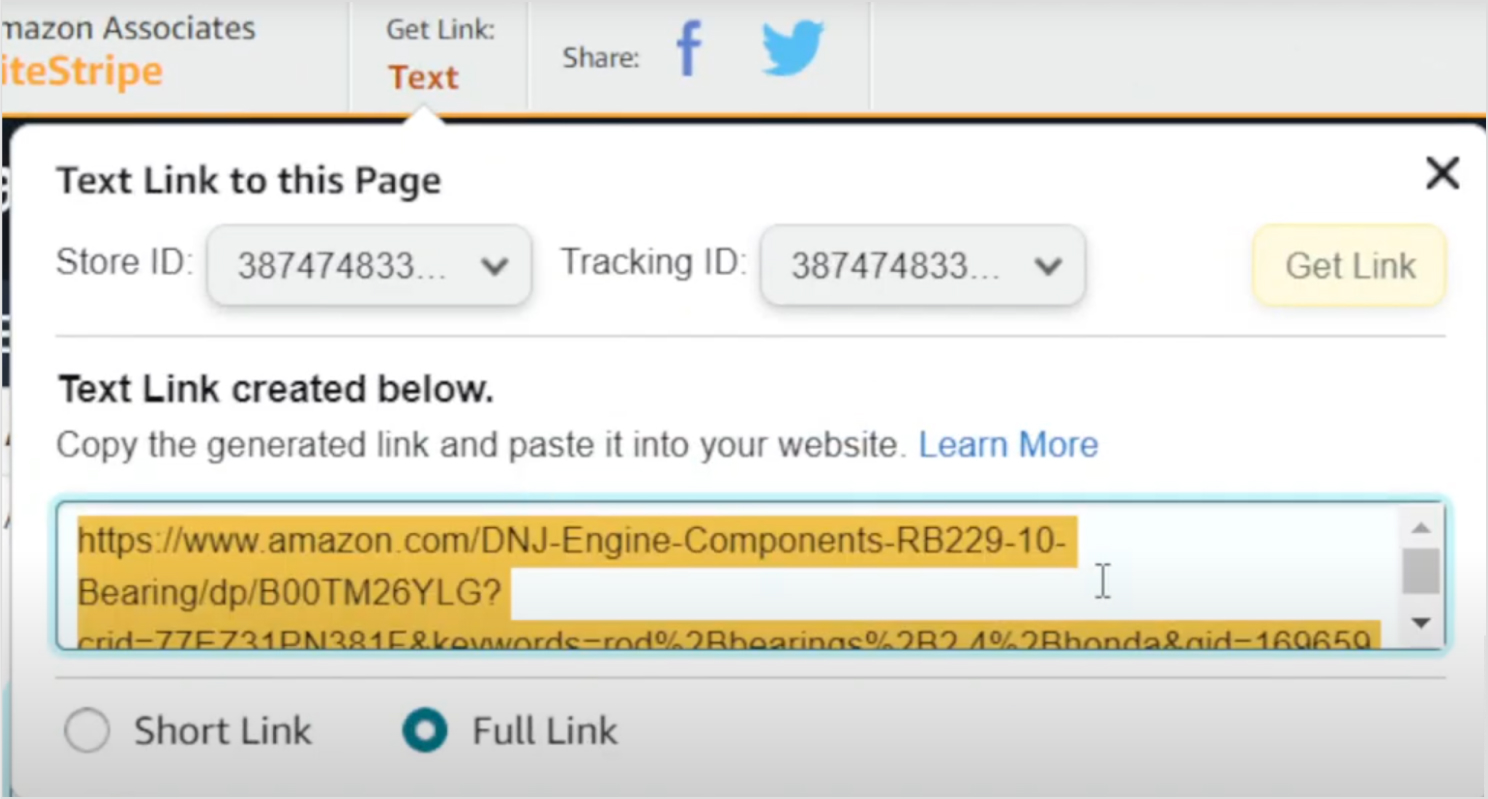
      How to find & join the best affiliate programs for free online?

      Finding great affiliate programs doesn’t have to be complicated. The easiest way is to start with what you already know.

      Think about the tools, products, or platforms you use and love, then simply Google “[product name] + affiliate program” to see if they have one. 

      You can also browse affiliate marketplaces like ShareASale, Impact, PartnerStack, and Awin, which host hundreds of programs all in one place. 

      Another solid approach is checking what other bloggers or creators in your niche are promoting. If it’s working for them, it might work for you, too. 
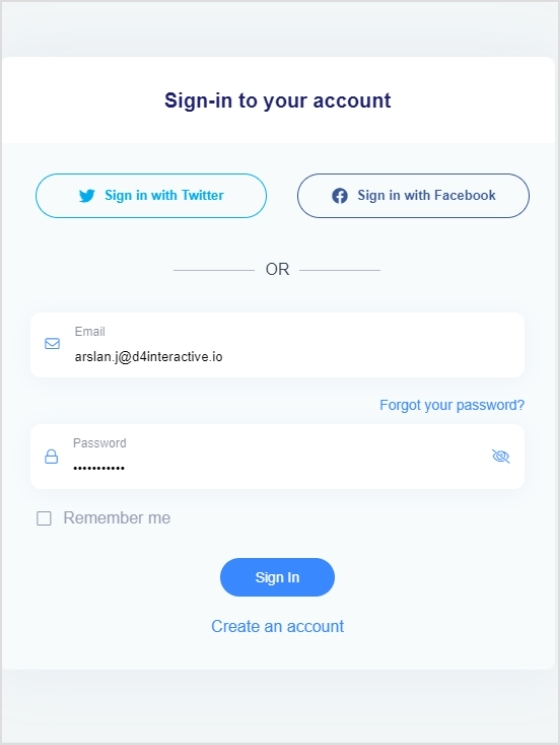
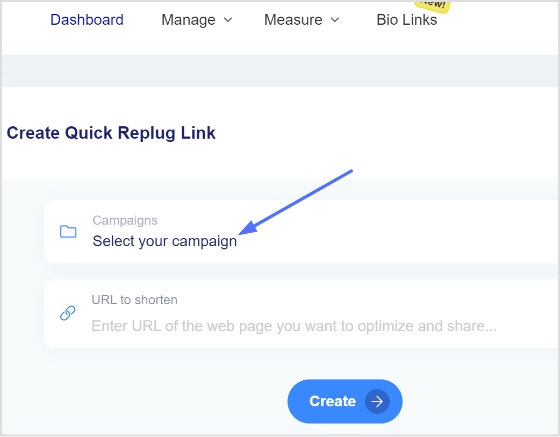
      Most programs are completely free to join, so don’t be afraid to apply to a few and test what resonates best with your audience.

      How to actually make money with affiliate marketing programs?

      A lot of people sign up for affiliate programs and then wonder why they’re not making any money. The truth is, it’s not just about dropping links everywhere. There’s a simple process that actually works.

      How to actually make money with affiliate marketing programs

      Follow these steps, and you’ll be miles ahead of most beginners.

      Step #01: Pick a specific niche & focus

      Don’t try to promote everything to everyone. Select one focused area you’re genuinely interested in, no matter if that’s personal finance, SaaS tools, fitness, or travel, and stick to it. A focused niche builds a more loyal audience that actually trusts your recommendations.

      Step #02: Build a platform

      You need somewhere to send people, e.g., a blog, a YouTube channel, a newsletter, or even a social media account. The key is having a consistent place where your audience can find you and engage with your content regularly.

      Step #03: Join affiliate programs

      Once you have a platform and a niche, start applying to programs that are a genuine fit for your audience. Start with two or three programs at max. Trying to promote too many at once as a beginner usually leads to spreading yourself too thin.

      Step #04: Create valuable content

      This is where most of the actual work happens. Write reviews, tutorials, comparisons, or how-to guides that genuinely help your audience make informed decisions. Content that solves a real problem is what drives clicks and conversions, not just promotional posts.

      Step #05: Insert unique, trackable affiliate links

      Place your unique affiliate links naturally within your content inside relevant sentences, comparison tables, or call-to-action buttons, rather than just throwing them at the bottom. Always make sure you’re using your correct unique tracking link so every sale gets credited to you.

      Step #06: Drive traffic & conversions

      Great content means nothing if nobody sees it. Focus on SEO, social media sharing, email marketing, or even Pinterest to get consistent eyes on your content. More targeted traffic equals more clicks, and more clicks equals more commissions.

      Why you should become an affiliate marketer in 2026?

      If you’ve been uncertain about affiliate marketing, 2026 might just be the best time to finally jump in. The industry is growing fast, the tools are better than ever, and the barriers to entry have never been lower. Here’s why right now is actually a great time to get started.

      Key reasons to become an affiliate marketer in 2026:

      AI-powered efficiency

      AI tools today make it significantly easier and faster to create content, research keywords, and optimize campaigns. This means you can build and scale your affiliate business with far less time and effort than it would’ve taken a few years ago.

      High market growth & demand

      The global affiliate marketing industry is projected to surpass $20 billion in 2026 and is growing at a steady double-digit rate annually. It means more brands are actively looking for affiliates to partner with, and more money is being put on the table.

      Low barrier to entry

      You don’t need a professional degree, a big budget, or years of experience to get started. Most affiliate programs are free to join, and all you really need is a platform and a willingness to learn.

      Shift to authentic content

      Consumers are increasingly tuning out traditional ads and trusting real recommendations from real people. This shift puts affiliate marketers who build genuine relationships with their audiences in a very strong position.

      High-income potential in specialized niches

      Niche-focused affiliates who build authority in a specific space can earn significantly more than generalists, with some top performers pulling in six or even seven figures annually.

      Final words

      There you have it! 

      15 of the best affiliate programs for beginners in 2026, along with everything you need to actually get started and succeed. 

      Whether you’re drawn to high-ticket programs, recurring SaaS commissions, or beginner-friendly marketplaces like Amazon and ClickBank, there’s genuinely something on this list for every type of creator.

      The most important thing is to stop overthinking and just start. Pick one or two programs that align with your niche, create honest and helpful content around them, and stay consistent.

      Affiliate marketing isn’t a get-rich-quick scheme, but with the right programs and a bit of patience, it can absolutely become a real and reliable income stream for you.

      Frequently asked questions

      Which affiliate program is the best for beginners?

      Amazon Associates is widely considered the best starting point for beginners because it’s easy to join, covers millions of products, and your audience is already familiar with the brand. 

      That said, if you create content around software or online tools, programs like Contentpen.ai, Replug, or ContentStudio are excellent choices. They offer recurring commissions and are just as easy to get started with.

      What are the best affiliate programs for beginners without a website?

      You don’t necessarily need a website to get started. Programs like Kit, PostNitro, and ClickBank allow you to promote through social media, YouTube, email newsletters, or even TikTok. Etsy’s Creator Collective is also specifically designed for social media creators. 

      The key is having some kind of active platform. Even a decent Instagram or YouTube channel qualifies for most programs.

      What are the highest-paying affiliate programs?

      When it comes to pure earning potential, Semrush (up to $300 per sale), HubSpot (up to $1,000+ per sale), Kit (50% commission for the first 12 months), and ActiveCampaign (averaging $1,350 per referral) are among the highest-paying programs on this list. 

      High-ticket and SaaS programs generally pay the most because subscription prices are higher and customers tend to stick around for a long time.

      What are the best affiliate programs for influencers in 2026?

      Influencers do really well with programs that have broad audience appeal and strong brand recognition. HubSpot, Shopify, Semrush, and Amazon Associates are all solid picks for influencers with business or lifestyle audiences. 

      For content creators specifically, Kit and PostNitro are great fits since their products are built for the creator community and practically sell themselves to the right audience.

      What is the best affiliate program that works worldwide and that is not fraudulent?

      Amazon Associates, HubSpot, Semrush, Shopify, and ClickBank all operate globally and have long-standing reputations for paying affiliates reliably and on time. LiveChat and ContentStudio also support affiliates from 150+ countries. 

      Sticking to programs managed through trusted platforms like Impact, PartnerStack, or Awin adds an extra layer of security. This is because these networks have strict fraud prevention and transparent payment systems in place.

      What are the best affiliate marketing programs for earning passive income?

      Recurring commission programs are your best friend for passive income. Once you refer a customer, you keep earning every month without doing anything extra. 

      The best ones for this are Replug (lifetime recurring), LiveChat (lifetime recurring), PostNitro (lifetime recurring), Contentpen.ai (12 months recurring), and ActiveCampaign (12 months recurring)

      The idea is simple: refer once, earn for months or years.

      Can you make $100 a day with affiliate marketing programs?

      Yes, absolutely! But it takes time and consistent effort to get there. To make $100 a day, you could refer just a handful of customers to a high-paying recurring program, or build up a larger volume of referrals on lower-ticket programs. 

      Most affiliates who hit that level have been consistently creating content and growing their audience for at least 6–12 months, so be patient and stay consistent.

      How can I start an affiliate program?

      If you’re a business looking to start your own affiliate program, the easiest way is to use a platform like PartnerStack, Impact, or ShareASale to manage tracking, payouts, and affiliate recruitment. 

      You’ll need to decide on your commission structure, set cookie duration, create promotional materials for affiliates, and define your payout terms. 

      Starting with a competitive commission rate and being genuinely helpful to your affiliates from day one goes a long way in attracting quality partners.

      What is the difference between affiliate programs and referral programs?

      The main difference comes down to who’s doing the promoting. 
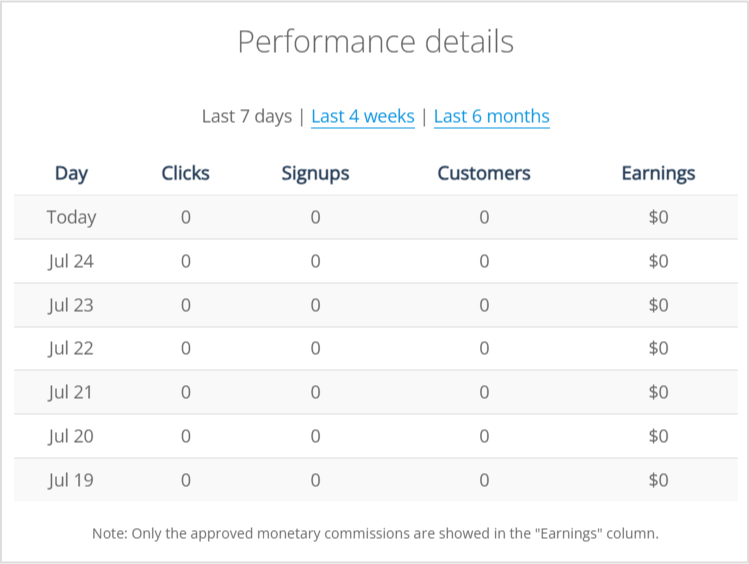
      Affiliate programs are designed for public marketers, bloggers, and creators. These are people who may have never used the product but promote it to earn a commission. 
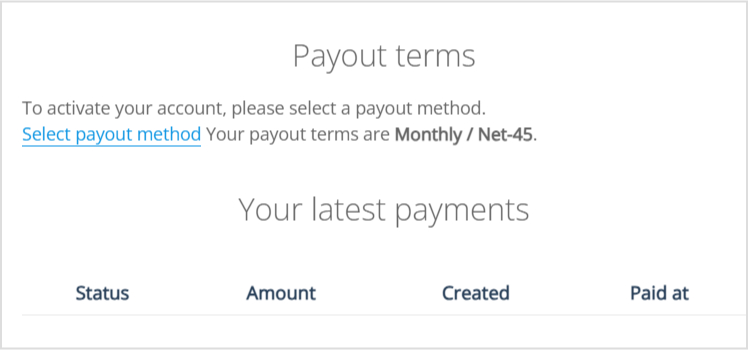
      Referral programs, on the other hand, are typically aimed at existing customers who recommend the product to friends and family in exchange for a discount or small reward.

      Affiliate programs are generally more structured and scalable, while referral programs are more personal and community-driven.

      How to optimize your affiliate earnings effectively?

      A few things make a big difference here:

      – First, focus on SEO so your content gets found organically over time. 
      – Second, always place your affiliate links contextually inside helpful content rather than random placements. 
      – Third, regularly check your analytics to see which content and which programs are actually converting, and double down on those. 

      Building an email list is also one of the most underrated ways to boost affiliate earnings, since you can promote relevant offers directly to people who already trust you.

    1. 12 best web analytics tools for 2026

      12 best web analytics tools for 2026

      Web analytics tools act as a cornerstone for marketers, but with so many options, it can be hard to choose the right one.

      No more confusion!

      This blog will tell you all about the best web analytics tools available in 2026. We’ll compare features, user ratings, and pricing to help you choose the perfect web analytics tool and unlock website growth.

      If you keep reading this blog further, in the next few minutes, you’ll have the knowledge to make an informed decision and maximize the value of your website traffic data.

      For marketers who want a unified solution for link management and analytics, Replug.io offers a powerful platform that complements the tools discussed below.

      Additionally, incorporating Free SEO Tools into your strategy can further enhance your ability to optimize your site, offering cost-effective solutions that improve your search rankings without straining your budget.

      Quick overview:
      Which is the best web analytics tool?
      Usermaven cuts through website analytics confusion. Get real-time insights, prioritize privacy, and transform data into actions—all with a user-friendly setup and budget-friendly pricing.
      Boost conversions, improve user experience, and drive online success.
      Book your demo now!

      Must-have features of web analytics tools

      Here’s a concise list of the must-have features for web analytics tools:

      • Real-time tracking: Gain insights into user behavior as it happens.
      • User behavior analysis: Understand why users act the way they do.
      • Conversion funnel visualization: Identify where users drop off in your sales process.
      • Custom event tracking: Track specific user interactions relevant to your goals.
      • Segmentation: Analyze data for targeted user groups.
      • Traffic source analysis: See where your website traffic originates.
      • Goal setting & tracking: Define and measure progress towards website objectives.
      • Mobile analytics: Understand how users interact on mobile devices.
      • E-commerce tracking: Optimize your online store with key metrics.
      • Heatmaps & session recordings: Visually see how users interact with your site.
      • A/B testing: Test and optimize your website for better conversions.
      • Cross-domain tracking: Track user journeys across multiple websites in your domain.
      • Auto-captured events: Gain insights from pre-defined user interactions without manual setup.
      • Annotations & notes: Add context to your data for deeper analysis and collaboration.
      • Integrations: Connect web analytics with other marketing tools.
      • Data visualization & reporting: Get clear, actionable insights from your data.
      • Customizable dashboards: Track key metrics at a glance.
      • Data export options: Analyze data further with other tools.

      Whether you’re running marketing campaigns, sending out newsletters, or sharing content on social platforms, understanding how users interact with your links is just as important as tracking website analytics.

      That’s why many marketers prefer to combine their analytics setup with a trusted link shortener, to not only shorten URLs for cleaner sharing but also track clicks, conversions, and user behaviour on every link they distribute.

      Top 12 web analytics tools

      Here are the top 12 web analytics tools we’ll be examining in detail:

      1. Usermaven
      2. GA4 (Google Analytics 4)
      3. Matomo
      4. Piwik PRO
      5. Plausible
      6. Simple Analytics
      7. Clicky
      8. Fathom Analytics
      9. Chartbeat
      10. Tiny Analytics
      11. Statcounter
      12. Open Web Analytics

      Each of these website analytics tools offers unique features and benefits to help businesses understand and optimize their website performance. We’ll dive into each specifics in the following sections. First, let’s see their ratings;

      The G2 ratings and Product Hunt ratings for the specified web analytics tools are as follows;

      ToolG2 RatingProduct Hunt Rating
      Usermaven4.94.9
      GA4 (Google Analytics 4)4.5
      Matomo4.24.7
      Piwik PRO4.65
      Plausible5.04.8
      Simple Analytics4.44.9 
      Clicky4.5
      Fathom Analytics4.64.9 
      Chartbeat4.4
      Tiny Analytics– 
      StatCounter4.35
      Open Web Analytics4.5

      1. Usermaven

      Usermaven logo

      “From data to decisions: Usermaven – Your perfect website analytics partner.”

      Usermaven, a solid privacy friendly product and web analytics tool for marketers and enterprises of all sizes. When it comes to website analytics, Usermaven provides a comprehensive suite of features necessary in a web analytics tool for understanding and optimizing website performance.

      Key features of Usermaven

      Here are the key features relevant to web analytics:

      • Website metrics: Usermaven tracks the number of unique visitors, total pageviews, number of sessions, average visit duration, and bounce rate to provide insights into website performance and user engagement.
      Usermaven Metrics
      • Events: Tracks specific user actions (e.g, clicks, form submissions, video plays) to understand how users interact with different elements of your website. Usermaven shows auto-captured events; you can pin events of your choice and create custom events as well. 
      Usermaven Autocapture events
      • Top Channels/Sources: Identifies the most effective marketing channels and traffic sources (e.g., organic search, social media, referrals) driving visitors to your site.
      Usermaven Traffic sources
      • UTM traffic: Analyzes traffic from UTM-tagged campaigns, allowing you to measure the effectiveness of specific marketing efforts and adjust strategies accordingly.
      Usermaven UTM feature
      • Conversion goals: Sets and track specific conversion goals (e.g., form completions, purchases) to measure the success of your marketing efforts and website performance.
      Usermaven conversion goals
      • Device location: Provides data on the geographical locations of your visitors, helping you understand your audience’s distribution and target regions more effectively.
      Usermaven device location feature
      • Funnels: Funnel analysis enable you to visualize the steps users take to complete a goal (e.g., checkout process), identifying drop-off points and opportunities to optimize the user journey for higher conversions.
      Usermaven Funnel analysis
      • Attribution: Track every customer touchpoint across multiple channels to understand the true impact of your marketing efforts. Usermaven offers seven attribution models, including Linear, First Touch, Last Touch, Position Decay, Time Decay (new), First Touch Non-Direct (new), and Last Touch Non-Direct (new), enabling data-driven decision-making.
      Usermaven attribution analysis
      • User journey tracking: Visualize and analyze user paths through your product using Usermaven to identify friction points and improvement opportunities.
      User Journey tracking feature
      • Maven AI: Leverage AI-driven insights and recommendations with Usermaven to optimize product performance and user experience.
      Maven AI feature
      • Comprehensive reports: With the recent overhaul of the Reports feature, you can now schedule reports to be sent daily, weekly, or monthly and specify the exact hour for delivery.
      Reports

      Pricing plan of Usermaven

      Usermaven offers several pricing tiers to cater to different business needs and those who are looking for an ideal web analytics tool:

      • Pro: ($14/month) is ideal for businesses and agencies and includes unlimited websites, workspaces, and users, 2 years of data history, website analytics, and more.
      • Premium: ($24/month) includes everything in Pro plus unlimited data history, SaaS product analytics, multi-touch attribution, etc.
      • Enterprise: (custom pricing) is designed for businesses with custom requirements and includes everything in Premium.

      Reviews

      Sr.What people like about itWhat people dislike about it
      1.Like: User-friendly interface and intuitive design.Dislike: Advanced features require a paid plan.
      2.Like: Excellent customer support and onboarding assistance.
      3.Like: Automated insights and actionable recommendations.

      Note: These reviews of web analytics tools are synthesized from various sources such as G2, Capterra, Product Hunt, TrustRadius, Software Advice, and customer testimonials.

      Free-AI-Tools

       2. Google Analytics 4 (GA4)

      Google Analytics 4 (GA4) is the latest version of Google’s popular web analytics tool, designed to provide comprehensive insights into user behavior across websites and apps. With enhanced machine learning capabilities and privacy-centric features, GA4 offers a more robust and flexible approach to tracking and analyzing user interactions.

      Key features of GA4

      • Event-based tracking: GA4 focuses on events, allowing for detailed tracking of user interactions beyond just page views.
      • Cross-platform tracking: It enables tracking of user activity across the web and app, providing a unified view of customer journeys.
      • Enhanced measurement: Automatic tracking of common events like scrolls, outbound clicks, site searches, and file downloads.
      • Machine learning insights: Predictive analytics and insights powered by machine learning to identify trends and opportunities.
      • Debugging and testing: Integrated debugging and testing tools to streamline setup and ensure accurate data collection.
      • Flexible reporting: Customizable reporting and analysis tools to create tailored insights.
      • Audience building: Advanced audience segmentation capabilities for targeted marketing efforts.
      • Integration with Google products: Seamless integration with Google Ads, BigQuery, and other Google products.
      • User-centric measurement: Focus on user-centric data, enabling a better understanding of individual user journeys.

      Pricing plan of GA4

      Google Analytics 4 offers two main pricing plans:

      1. Free tier: This plan provides basic features and is suitable for small to medium-sized businesses.
      2. Google Analytics 360: Pricing for GA360 is customized based on business needs.

      Reviews

      Sr.What people like about itWhat people dislike about it
      1Like: Advanced tracking capabilities and event-based models.Dislike: Steeper learning curve compared to Universal Analytics. 
      2Like: Integration with other Google services.Dislike: Privacy concerns (non-GDPR compliant)
      3Like: Predictive analytics powered by machine learning.Dislike: Limited customer support in the free version.

      3. Matomo

      Matomo- web analytics tool

      Matomo is a versatile web analytics tool that offers complete control over data, providing in-depth insights into user behavior and website performance. Matomo emphasizes privacy, data ownership, and customization to meet the unique needs of businesses and organizations.

      Key features of Matomo

      • Open source: Matomo is open-source, giving users complete control over their data and the ability to customize the platform to their needs.
      • Data ownership: Users own 100% of their data, ensuring privacy and compliance with data protection laws like GDPR.
      • No data sampling: Provides accurate reports without data sampling, even for large datasets.
      • Privacy features: Enhanced privacy features, including anonymizing IP addresses and managing user consent.
      • Customizable dashboards: Users can create custom dashboards and reports tailored to specific business needs.
      • E-commerce tracking: Comprehensive e-commerce tracking capabilities to monitor sales, conversion rates, and product performance.
      • Integration with various platforms: Integrates with various CMS, e-commerce, and marketing platforms.
      • Performance metrics: Detailed insights into website performance, including page load times and server response times.

      Pricing plan of Matomo

      Matomo offers several pricing plans:

      1. Free on-premise version: Users can download and host Matomo on their own servers at no cost.
      2. Cloud hosting: Starting at €22 per month, this plan includes automatic updates, backups, and customer support.

      Reviews

      Sr.What people like about itWhat people dislike about it
      1Like: Full data ownership and privacy compliance.Dislike: Initial setup can be complex. 
      2Like: Comprehensive e-commerce tracking.<br>- Visual tools like heatmaps and session Dislike: Requires technical knowledge to fully utilize features.
      3Like: Extensive integration options.Dislike: User interface is less intuitive compared to competitors.

      4. PiwikPro

      Piwik Pro- Website analytics tool

      Piwik PRO is a comprehensive web analytics tool tailored for enterprises that prioritize data privacy and regulatory compliance. Offering powerful analytics capabilities, Piwik PRO enables organizations to track user behavior while ensuring strict adherence to privacy laws such as GDPR and HIPAA.

      Key features of PiwikPro

      • Data privacy compliance: PiwikPro is known for its strong focus on data privacy, ensuring compliance with GDPR, HIPAA, and other regulations.
      • User-friendly interface: Offers a clean and intuitive interface, making it easy for users to navigate and extract insights.
      • Customizable reports: Provides extensive customization options for reports, enabling users to tailor the data to their specific needs.
      • Comprehensive analytics: Includes features such as session recording, heatmaps, and funnel analytics to provide a deep understanding of user behavior.
      • Data ownership: Users have complete ownership and control over their data, with options for on-premises or cloud hosting.
      • Seamless integrations: Easily integrates with various third-party tools and platforms, enhancing its functionality.
      • Tag management system: Includes a high-powered tag management system for efficient data collection and tracking.
      • Support and training: Offers excellent customer support and training resources to help users maximize the platform’s potential.

      Pricing plans of PiwikPro

      PiwikPro offers a range of pricing plans tailored to different business needs. However, detailed pricing information is generally provided upon request. Commonly, they offer:

      1. Core Plan: Free plan suitable for small websites with limited features.
      2. Enterprise Plan: Comprehensive plan for large enterprises, with full access to all features and dedicated support. Pricing starts from €10,995 /year.

      Reviews

      Sr.What people like about itWhat people dislike about it
      1Like: Users appreciate the strong focus on data privacy and compliance with regulations like GDPR.Dislike: Some users find the initial setup process to be complex and time-consuming.
      2Like: The customizable reports and extensive analytics capabilities are highly valued.Dislike: Pricing is really high as compared to other options. 
      3Like: Excellent customer support and comprehensive training resources receive positive feedback.Dislike: The user interface, while functional, can be seen as less modern compared to competitors.

      Replug Branded Short Links CTA
      A complete link management solution
      for marketing professionals & agencies.
      Try Replug for free

      5. Plausible

      Plausible- Web analytics tool

      Plausible is a lightweight and privacy-focused web analytics tool designed to provide essential insights without compromising user privacy. It offers a simple and intuitive interface, delivering key metrics and real-time data to help website owners understand their audience and optimize their online presence.

      Key features of Plausible

      • Privacy-focused analytics: Plausible emphasizes user privacy, offering analytics without the use of cookies and ensuring compliance with privacy regulations.
      • Simplified dashboard: Provides a clean and easy-to-use dashboard with essential metrics like visitors, page views, and bounce rates.
      • Real-time analytics: Offers real-time data updates, allowing users to monitor website performance instantly.
      • Goal tracking: Includes goal tracking features to measure specific actions and conversions on websites.
      • Customizable reports: Allows users to create custom reports and filter data based on various parameters.
      • Performance metrics: Provides insights into site speed, device types, and traffic sources to optimize performance.
      • Integration capabilities: Integrates seamlessly with popular platforms like WordPress, Shopify, and more.
      • Open source: Being open-source, Plausible offers transparency and allows for community contributions and customization.

      Pricing plans of Plausible

      Plausible offers transparent pricing plans based on the number of page views per month. As of the latest updates:

      1. Growth: Starts from $9/month. 
      2. Business: Starts from $19/month. 
      3. Enterprise: Offers custom pricing. 

      Reviews

      Sr.What people like about itWhat people dislike about it
      1Like: Users appreciate the simplicity and clarity of the dashboard. Dislike: Some users find the customization options for reports and analytics to be somewhat limited compared to more complex tools.
      2Like: The focus on privacy and the ability to track goals and conversions without invasive tracking methods receive positive feedback.Dislike: Users have reported occasional issues with integration and data accuracy, especially with certain CMS platforms.
      3Like: The open-source nature of Plausible is highly valued for its transparency and community-driven development.Dislike: Pricing can become expensive as website traffic grows, which may not be cost-effective for very high-traffic sites.

      6. Simple Analytics

      Simple Analytics is a privacy-friendly web analytics tool that delivers essential website metrics without tracking personal data. An easy-to-use interface provides clear insights to help website owners make informed decisions while ensuring compliance with privacy regulations.

      Key features of Simple Analytics

      • Privacy-focused analytics: Similar to Plausible, Simple Analytics emphasizes privacy by providing analytics without the use of cookies or tracking personal data.
      • Real-time dashboard: Offers a real-time dashboard that updates instantly, displaying essential metrics like visitors, page views, and referrers.
      • User-friendly interface: Provides a clean and intuitive interface, making it easy for users to navigate and understand their website analytics.
      • No ads or tracking: Ensures that the analytics tool itself does not track users or display ads, focusing solely on providing accurate data insights.
      • Goal tracking: Allows users to set and track goals, such as conversions or specific user actions, to measure website performance effectively.
      • Customizable reports: Offers customizable reports and filtering options to analyze data based on different parameters and time frames.
      • Integration capabilities: Integrates smoothly with various platforms and CMSs, simplifying setup and data collection processes.

      Pricing plans of Simple Analytics

      Simple Analytics offers straightforward pricing based on the number of page views per month:

      1. Free: Ideal for personal websites or blogs.
      2. Personal: Starts from $10/month. 
      3. Team: Starts from $40/month. 
      4. Enterprise: Contact sales. 

      Reviews

      Sr.What people like about itWhat people dislike about it
      1Like: Users appreciate the simplicity and ease of use, especially the real-time dashboard and privacy-focused approach.Dislike: Some users find the reporting capabilities to be basic compared to more feature-rich analytics tools.
      2Like: The commitment to privacy and no ads/tracking policy receives positive feedback.Dislike: Integration with some specific platforms or custom setups may require additional configuration or support.
      3Like: Customer support is praised for being responsive and helpful.Dislike: Pricing might be seen as slightly higher compared to competitors offering similar features.

      7. Clicky

      Clicky- web analytics tool

      Clicky is a real-time web analytics tool that offers detailed insights into website traffic and user behavior. With features like heatmaps, uptime monitoring, and customizable dashboards, Clicky provides comprehensive data to help website owners optimize their online performance and user engagement.

      Key features of Clicky

      • Real-time analytics: Provides real-time data updates, allowing users to monitor website traffic and activity instantly.
      • Detailed visitor information: Offers detailed insights into visitor behavior, including heatmaps, session details, and individual visitor tracking.
      • Goals and conversion tracking: Allows users to set goals and track conversions, providing insights into website performance and marketing campaigns.
      • Customizable dashboards: Provides customizable dashboards and reports to tailor analytics data according to user preferences.
      • Heatmaps: Offers heatmaps to visualize user interaction and engagement on web pages.
      • Uptime monitoring: Provides uptime monitoring to alert users of website downtime or performance issues.
      • API access: Offers API access for integration with other applications and services.

      Pricing Plans of Clicky

      Clicky offers pricing plans based on the number of websites and page views tracked:

      1. Free Plan: Includes basic features with limited data retention and website tracking.
      2. Pro Plan: Starts from $9.99/month. 
      3. Pro Plus: Starts from $14.99/month.
      4. Pro Platinum: $19.99/month.
      5. Custom: varied pricing. 

      Reviews

      Sr.What people like about itWhat people dislike about it
      1Like: Users like the real-time analytics and detailed visitor information, including heatmaps and individual visitor tracking.Dislike: Some users find the user interface to be less intuitive compared to other analytics tools.
      2Like: The goals and conversion tracking features receive positive feedback for their effectiveness in monitoring website performance.Dislike: Pricing for higher traffic volumes may be perceived as expensive compared to competitors offering similar features.
      3Like: The “Spy” feature is praised for its real-time tracking capabilities and detailed insights into user behavior.Dislike: Customer support responsiveness can vary, with occasional delays in resolving technical issues reported by some users.

      8. Fathom Analytics

      Fathom - A website analytics tool

      Fathom Analytics is a privacy-focused web analytics tool that provides straightforward and actionable insights without tracking personal data. It offers a clean, user-friendly interface, enabling website owners to understand their audience and improve their online presence while respecting user privacy.

      Key features of Fathom Analytics

      • Privacy-focused analytics: Fathom Analytics prioritizes user privacy by offering analytics that is GDPR, CCPA, and PECR compliant without the use of cookies.
      • Real-time analytics: Provides real-time data updates and insights into website traffic and visitor behavior.
      • Simple dashboard: Offers a clean and intuitive dashboard for easy navigation and understanding of analytics data.
      • Goal tracking: Allows users to set goals and track conversions to measure the effectiveness of marketing campaigns and website performance.Incorporating free time tracking software can help you monitor the time spent on each campaign phase, ensuring that your efforts are both efficient and well-documented.
      • Website performance monitoring: Provides insights into website performance metrics such as page load times and bounce rates.
      • Customizable reports: Offers customizable reports and data filters to analyze website traffic based on various parameters.
      • Integration capabilities: Integrates with various platforms and content management systems (CMS) for seamless setup and data collection.
      • No ads or tracking: Ensures that the analytics tool itself does not track users or display ads, focusing solely on providing accurate and privacy-conscious data.

      Pricing plans of Fathom Analytics

      Fathom Analytics offers straightforward pricing plans based on the number of websites and page views tracked:

      Up to 100,000 data points: $15 per month

      Up to 1,000,000 data points: $60 per month

      Up to 25,000,000 data points: $470 per month

      Over 25,000,000 data points: Contact Fathom Analytics for a quote

      Reviews

      Sr.What people like about itWhat people dislike about it
      1Like: Users appreciate the privacy-focused approach and compliance with data protection regulations like GDPR.Dislike: Some users find the feature set to be limited compared to more comprehensive analytics tools.
      2Like: The simplicity and ease of use of the dashboard receive positive feedback for making analytics accessible to all users.Dislike: Pricing may be considered higher compared to other similar privacy-focused analytics solutions.
      3Like: The real-time analytics and customizable reports are praised for providing valuable insights into website performance.Dislike: Integration with certain platforms or custom setups may require additional configuration or support.
      Replug Branded Short Links CTA
      Maximize marketing ROI
      by transforming ordinary URLs into
      branded short links that convert.
      Try Replug for free

      9. Chartbeat

      Chartbeat-website analytics tools

      Chartbeat is a real-time web analytics tool tailored for content creators and publishers, offering in-depth insights into audience engagement and content performance. With features like real-time dashboards, headline testing, and in-depth reporting, Chartbeat helps optimize content strategy and maximize reader engagement.

      Key features of Chartbeat

      • Real-time analytics: Provides real-time data updates on website traffic, engagement metrics, and content performance.
      • Audience insights: Offers detailed audience segmentation and insights to understand visitor behavior and demographics.
      • Content optimization: Helps optimize content strategy with insights into popular content, engagement levels, and reader retention.
      • Engagement metrics: Measures user engagement metrics such as scroll depth, time on page, and social sharing.
      • Traffic sources: Tracks and analyzes traffic sources to identify where visitors are coming from and their behavior patterns.
      • Video analytics: Provides analytics for video content, including views, completion rates, and engagement metrics.
      • Mobile analytics: Offers mobile-specific analytics to monitor and optimize performance across mobile devices.
      • Integration capabilities: Integrates with various CMS platforms, advertising networks, and marketing tools for comprehensive data collection and analysis.

      You may also like: How to Build Custom Audiences through Replug URL Tracking

      Pricing plans of Chartbeat

      Chartbeat typically offers customized pricing plans based on specific business needs, website traffic, and additional features required. Detailed pricing information is usually provided upon request or through direct consultation with their sales team.

      Reviews

      Sr.What people like about ItWhat people dislike about it
      1Like: Users appreciate the detailed real-time analytics and audience insights that help them understand visitor behavior.Dislike: Some users find the interface to be complex and overwhelming, especially for new users.
      2Like: The content optimization tools and engagement metrics receive positive feedback for improving content strategy and performance.Dislike: Pricing may be considered high, especially for smaller businesses or websites with lower traffic volumes.
      3Like: The integration capabilities and support for various platforms are praised for enhancing functionality and data collection.Dislike: Customer support responsiveness can vary, with occasional delays reported when resolving technical issues.

      10. Tiny Analytics

      Tinyanalytics- Web analytics tool

      Next on our best web analytics tools list is Tiny Analytics. It is a minimalist web analytics tool that focuses on delivering essential insights without overwhelming complexity. Designed for simplicity and ease of use, it provides key metrics to help website owners understand their audience and improve their online performance.

      Key features of Tiny Analytics

      • Simple and lightweight: Tiny Analytics focuses on simplicity and minimalism, providing essential analytics metrics without unnecessary complexity.
      • Real-time data updates: Offers real-time updates on website traffic, visitor behavior, and engagement metrics.
      • User-friendly interface: Provides a clean and intuitive interface for easy navigation and data visualization.
      • Privacy-conscious: Ensures user privacy with minimal data collection and no use of cookies or tracking mechanisms.
      • Customizable dashboards: Allows users to customize dashboards and reports according to their specific needs and preferences.
      • Goal tracking: Includes goal tracking features to monitor and measure conversions or specific actions on websites.
      • Mobile-friendly: Optimized for mobile devices, providing analytics on mobile traffic and performance.
      • Integration capabilities: Integrates smoothly with various platforms and content management systems (CMS) for seamless setup and data integration.

      Pricing plan of Tiny Analytics

      Free plan: $0/month.

      Basic plan: Starts from $49/month.

      Advanced: $129/month. 

      Reviews

      Sr.What people like about itWhat people dislike about it
      1Like: Users like the simplicity and lightweight nature of Tiny Analytics, making it easy to use and understand analytics data.Dislike: Some users may find the feature set limited compared to more comprehensive analytics tools.
      2Like: The real-time data updates and user-friendly interface receive positive feedback for providing instant insights and ease of use.Dislike: Customization options for reports and dashboards may be perceived as limited for advanced users or specific needs.

      11. Statcounter

      Statcounter is a comprehensive web analytics tool that provides detailed statistics on website traffic and visitor behavior. With features like real-time data tracking, customizable reports, and user-friendly dashboards, StatCounter helps website owners and marketers optimize their online presence and improve user engagement.

      Key features of Stat Counter

      • Website traffic analysis: Provides detailed insights into website traffic, including visitor trends, page views, and visitor locations.
      • Visitor behavior: Tracks visitor behavior such as entry pages, exit pages, bounce rates, and session durations.
      • Keyword analysis: Offers keyword analysis to understand how visitors find the website through search engines.
      • Customizable alerts: Allows users to set up customizable alerts for traffic spikes, visitor trends, or specific events.
      • User-friendly interface: Provides a straightforward and easy-to-use interface for navigating analytics data.
      • Geolocation tracking: Provides geolocation tracking to see where visitors are located globally.
      • Mobile analytics: Offers analytics for mobile website traffic and performance.
      • Customizable reports: Allows users to create customized reports and export data for further analysis.

      Pricing plan of Stat Counter

      Stat Counter offers various pricing plans tailored to different needs:

      1. Basic plan: It is free of cost. 
      2. Premium plan: €16/month. 
      3. Premium plus: €28/month. 

      Reviews

      Sr.What people like about itWhat people dislike about it
      1Like: Users appreciate the detailed website traffic analysis and visitor behavior tracking features.Dislike: Some users find the interface outdated compared to more modern analytics tools.
      2Like: The customizable alerts and geolocation tracking receive positive feedback for providing actionable insights.Dislike: Customer support response times can vary, with occasional delays reported when resolving issues.

      12. Open Web Analytics

      Web analytics tools

      Open Web Analytics (OWA) is an open-source web analytics software that offers extensive tracking and reporting capabilities. It allows website owners to monitor visitor behavior, track conversions, and analyze traffic sources using customizable dashboards and reports. OWA provides flexibility and control over data, making it a suitable choice for businesses seeking a customizable analytics solution.

      Key features of Open Web Analytics

      • Open source: Open Web Analytics is an open-source web analytics platform that allows for transparency, customization, and community contributions.
      • Real-time analytics: Provides real-time data updates on website traffic, visitor behavior, and engagement metrics.
      • Customizable dashboards: Offers customizable dashboards and reports to tailor analytics data according to user preferences.
      • Goal tracking: Allows users to set goals and track conversions to measure the effectiveness of marketing campaigns and website performance.
      • Event tracking: Provides event tracking capabilities to monitor specific user interactions and actions on websites.
      • User-friendly interface: Offers a user-friendly interface for easy navigation and data visualization.
      • Integration capabilities: Integrates with various platforms and content management systems (CMS) for seamless setup and data integration.
      • Privacy-conscious: Ensures user privacy by allowing users to host their analytics data and control data collection practices.

      Pricing plan of Open Web Analytics

      Open Web Analytics is typically free to use as it is open-source software. Users can download and install it on their own servers or hosting environments without cost.

      Reviews

      Sr.What people like about itWhat people dislike about it
      1Like: Users appreciate that Open Web Analytics is open-source, providing transparency, customization options, and community support.Dislike: Setting up and configuring Open Web Analytics may require technical expertise and effort.
      2Like: The real-time analytics capabilities and customizable dashboards receive positive feedback for their usefulness in monitoring website performance.Dislike: Documentation and support resources may be limited compared to commercial analytics solutions, requiring self-help or community assistance.

      Why choose Usermaven over other website analytics tools

      What if there was a solution that prioritized both user privacy and actionable insights, delivered with a user-friendly interface?

      Look no further than Usermaven. Here’s how Usermaven stands out from the crowd:

      Privacy champion:

      • User trust matters: Unlike GA4, Clicky, and many others, Usermaven is 100% GDPR and CCPA-compliant. We prioritize user privacy, never tracking personal data or selling your information.
      • Peace of mind: Focus on your website, not privacy regulations. Usermaven simplifies compliance compared to the complexities of self-hosting solutions like Open Web Analytics.

      Effortless setup:

      • No coding required: Get started in minutes with our intuitive interface. Leave the coding headaches behind with Piwik Pro’s steeper learning curve.
      • Fast implementation: Unlike tools with delayed onboarding processes (Matomo), Usermaven empowers you to unlock insights quickly.

      Actionable insights in real-time:

      • See it now act now: Witness user behavior unfold before your eyes. Usermaven provides real-time data, unlike delayed reporting in Stat Counter and Simple Analytics.
      • Go beyond the surface: Ditch vanity metrics. Usermaven dives deep, revealing user journeys, conversion funnels, and engagement patterns, offering more value than basic tools like Plausible and Tiny Analytics.

      Cost-effective champion:

      • Value without the burden: Unlock powerful insights for less. Usermaven offers a free trial and flexible pricing plans, making it accessible to all businesses. This is a stark contrast to often-expensive solutions like Chartbeat and Fathom Analytics.

      User reviews:

      • Hear from satisfied users: Usermaven boasts positive reviews praising its user-friendliness and privacy focus. 
      Usermaven - Reviews
      Replug Branded Short Links CTA
      A complete link management solution
      for marketing professionals & agencies.
      Try Replug for free

      Final verdict: The best web analytics tool 

      After carefully considering its distinctive features, stellar ratings, and competitive pricing, Usermaven emerges as the top choice for businesses seeking a web analytics tool that balances power with affordability.

      Usermaven empowers you to understand, optimize, and convert your website visitors with unparalleled ease and complete user privacy. It’s the perfect solution for businesses and agencies seeking a powerful yet approachable website analytics tool.

      Stop settling for the status quo. Try Usermaven today!


      Frequently asked questions 

      What are web analytics tools?

      Website analytics tools track and analyze user behavior on websites, providing insights into visitor interactions, traffic sources, and more.

      How do I choose a web analytics tool?

      Choose a web analytics tool based on your specific needs, such as features like real-time data, user privacy options, ease of use, and pricing that fits your budget.

      What web analytics tool is better than Google Analytics?

      Usermaven surpasses Google Analytics with its advanced features, intuitive interface, and stringent privacy controls, making it the superior choice for businesses seeking a comprehensive web analytics tool.

    2. How to increase app downloads: 16 strategies you need to know

      How to increase app downloads: 16 strategies you need to know

      Getting your app noticed and downloaded is more challenging than ever. With an average of 1,019 apps released every day, you need more than a good idea—you need a strategic marketing plan.

      App success isn’t just about making your app available; it’s about making it discoverable, engaging, and essential for users. As the digital world changes, leveraging app store optimization, social media trends, and user experience improvements becomes crucial.

      In this guide, we will show you how to increase app downloads on Google Play and Apple App Stores. Follow these steps to increase your app’s installs and secure its place in users’ daily lives.

      Let’s get started!

      Replug Branded Short Links CTA
      Drive more clicks, conversions, and app installations by deep linking
      to your favorite platforms.
      Try deep links for free

      Top 16 strategies to increase app downloads

      1. App store optimization (ASO)

      App Store Optimization is essential for making your app more visible in app stores like Google Play and the Apple App Store. This involves:

      • Title and keywords: Select a unique, relevant title and strong keywords that potential users might search for. For example, if your app is a fitness tracker, use keywords like “fitness,” “workout,” and “health tracker.”
      • Description: Craft a compelling description that clearly explains what your app does, its unique features, and the benefits it offers. Use bullet points for key features and a call to action, encouraging users to download the app.
      • Visuals: High-quality icons, screenshots, and preview videos are crucial. These should visually represent the app’s interface and key functionalities, giving users a clear idea of what to expect.
      how-to-increase-app-downloads

      2. Deep linking

      Deep linking involves using URLs to direct users to specific pages or content within your app.

      If they don’t have the app, they’ll be directed to the app store to download it. This creates a seamless experience and avoids users getting lost on your mobile website trying to find what they were looking for in the first place.

      Note: To manage and optimize all your sharing and deep-link workflows, consider using Replug, a tool that helps drive more clicks, conversions, and app installations seamlessly.

      Replug Branded Short Links CTA
      Drive more clicks, conversions, and app installations by deep linking
      to your favorite platforms.
      Try deep links for free

      Let’s see what other benefits you get with deep linking.

      • Personalize onboarding: Deep linking allows for personalized onboarding experiences. Imagine someone clicks on a social media ad for your app that uses a deep link. This link could include a special discount or bonus content they can access upon downloading and signing up. This personalized touch can make the app more attractive and encourage users to complete the download process.
      • Enhanced user experience: Provide a seamless user experience by taking users directly to the content they are interested in. For example, a deep link can take users straight to a specific workout routine in a fitness app.
      • Marketing campaigns: Use deep links in email campaigns, social media posts, and advertisements to drive targeted traffic to your app. This can increase engagement and conversion rates.
      • Retention: Improve user retention by making it easy for users to find and access specific app features or content. Deep links can also be used in push notifications to re-engage users.

      Also read: How Does Deferred Deep Linking Work: A Complete Guide

      how-to-increase-app-installs

      Also read: How to share Videos using Deep Links?

      3. Positive reviews and ratings

      Positive reviews and high ratings can significantly influence a potential user’s decision to download your app. Strategies to encourage positive feedback include:

      • Prompting users: Request reviews at moments when users are likely to be satisfied, such as after completing a task or achieving a milestone within the app.
      • Responding to feedback: Engage with users by thanking them for positive reviews and addressing any issues raised in negative reviews. This shows that you value their feedback and are committed to improving the app.
      how-to-increase-app-downloads

      Also read: 11 Best Affiliate Marketing Tools of 2026 – Features, Reviews, Pricing, and More

      4. Engaging app description

      Your app’s description should be engaging and informative, capturing users’ attention quickly:

      • Clear and concise: Clearly explain what your app does, its key features, and its benefits. Use simple language and short sentences.
      • Bullet points: Highlight the most important features using bullet points for easy readability.
      • Call to action: Include a call to action that encourages users to download the app, such as “Download now to start tracking your workouts!”

      5. Social media marketing

      Social media platforms can be powerful tools for promoting your app:

      • Engaging content: Share posts, videos, and stories that highlight your app’s features, updates, and user testimonials. Use visually appealing graphics and interactive content like polls and quizzes.
      • Campaigns: Run targeted ad campaigns on platforms like Facebook, Instagram, Twitter, and LinkedIn to reach a broader audience. Use specific targeting options to reach users who are most likely to be interested in your app.
      • User engagement: Respond to comments and messages, run contests, and encourage user-generated content to build a community around your app.
      how-to-increase-app-downloads

      Also read: How to Measure Social Media Engagement: 12 Crucial Metrics

      6. Influencer marketing

      Influencer marketing can help you reach a larger and more engaged audience:

      • Partner with influencers: Identify influencers whose followers match your target demographic. Work with them to create authentic content showcasing your app.
      • Content creation: Have influencers create reviews, tutorials, or demonstrations of your app. Their endorsement can significantly boost your app’s credibility and downloads.
      how-to-increase-app-installs

      Also read: Success Guide To Tiktok Influencer Marketing

      7. Content marketing

      Content marketing involves creating valuable, relevant content to attract and engage your target audience:

      • Blog posts: Write articles addressing common problems your app solves. For example, if your app is a productivity tracker, write about tips for managing time effectively and how your app can help.
      • Videos: Create tutorial videos, demos, and user testimonials to visually demonstrate how your app works and its benefits.
      • Guest posts: Contribute articles to popular blogs and websites in your niche to reach a wider audience and drive traffic to your app’s landing page.
      how-to-increase-app-installs

      Also read: 9 hottest content marketing platforms to look for in 2026

      8. App install ads

      App install ads are paid advertisements specifically designed to drive app downloads:

      • Compelling ads: Design ads with strong visuals, clear messages, and a compelling call to action. Highlight your app’s unique selling points.
      • Targeted advertising: Use demographic and interest-based targeting to reach users who are likely to be interested in your app.
      • Performance monitoring: Continuously analyze and optimize your ads for better results. Use A/B testing to determine which ad creatives and messages perform best.
      how-to-increase-app-installs

      Also read: 10 Best A/B Testing Tools For Click & Conversion Analytics

      9. Referral programs

      Referral programs can incentivize existing users to invite new users to download your app:

      • Incentives: Offer rewards such as discounts, free features, or other perks for successful referrals. Ensure the rewards are valuable enough to motivate users to participate.
      • Simple process: Make the referral process easy and straightforward. Provide users with unique referral links or codes they can share with friends and family.
      how-to-increase-app-installs

      10. Email marketing

      Email marketing can effectively promote your app to a targeted audience:

      • Newsletters: Regularly update your email subscribers about new features, updates, and special offers related to your app.
      • Personalized emails: Send targeted emails based on user behavior and preferences. For example, if a user has shown interest in a particular feature, send them an email highlighting that feature.
      • Call to action: Include clear and compelling calls to action encouraging recipients to download your app.
      how-to-increase-app-installs

      Also read: How to track emails using UTM parameters?

      11. Landing page optimization

      A dedicated landing page for your app can drive traffic and conversions:

      • Design: Ensure the landing page is visually appealing and easy to navigate. Use clear headings, subheadings, and bullet points to present information.
      • Content: Include details about your app’s features, benefits, and user testimonials. Provide clear download links or buttons.
      • SEO: Optimize the landing page for search engines to drive organic traffic. Use relevant keywords and meta descriptions.
      how-to-increase-app-installs

      Also read: How to create high-converting landing pages [Pro tips & examples included]

      12. App localization

      Localizing your app for different languages and regions can help you reach a global audience:

      • Translation: Translate your app’s interface, description, and marketing materials into multiple languages.
      • Cultural adaptation: Adjust content to be culturally relevant for different regions. This includes adapting images, colors, and messaging to suit local preferences and customs.

      13. Regular updates

      Regular updates can keep your app fresh and engaging for users:

      • Bug fixes: Regularly fix bugs and technical issues to improve user experience.
      • New features: Introduce new features and enhancements to keep users engaged and attract new ones.
      • User feedback: Incorporate user feedback into your updates to meet their needs and preferences. Announce updates through in-app notifications and other communication channels.

      Also read: Pinterest affiliate marketing for beginners

      14. Free trials and freemium models

      Offering free trials or a freemium model can attract users who are hesitant to commit:

      • Free trials: Provide limited-time access to premium features, allowing users to experience the full value of your app before purchasing.
      • Freemium model: Offer a basic version of your app for free, with optional paid upgrades for advanced features. This allows users to try the app and decide if they want to invest in premium features.

      Also read: How to increase online sales: 17 Proven tips & hacks

      15. Partnerships and collaborations

      Partnering with other apps or businesses can expand your reach:

      • Cross-promotion: Collaborate with complementary apps to promote each other’s offerings. For example, if you have a fitness app, partner with a health food app for cross-promotion.
      • Co-branded campaigns: Run joint marketing campaigns to reach a broader audience. This could include co-branded content, social media campaigns, or bundled offers.

      16. High-quality app icons and screenshots

      Your app icon is the first thing users see, so it should be attractive and memorable. Screenshots should highlight the app’s most important and visually appealing features. Consider these tips:

      • App icon: Use simple yet bold designs with contrasting colors to stand out. Ensure the icon represents the app’s purpose.
      • Screenshots: Display the app’s main features and benefits in action. Add captions or annotations to explain what users are seeing. For instance, show a screenshot of your fitness app tracking a run, with annotations highlighting speed, distance, and calories burned.
      how-to-increase-app-downloads
      Replug Branded Short Links CTA
      Drive more clicks, conversions, and app installations by deep linking
      to your favorite platforms.
      Try deep links for free

      Final note

      Increasing app downloads is a multifaceted process that requires a combination of strategic planning, targeted marketing, and continuous improvement. Each of the strategies outlined above plays a crucial role in enhancing your app’s visibility, appeal, and user engagement.

      By optimizing your app store presence through ASO, creating compelling visuals and descriptions, leveraging social media and influencer marketing, and utilizing deep linking, you can attract and retain a larger user base. Additionally, encouraging positive reviews, providing regular updates, and offering free trials or referral programs can further drive downloads and user loyalty.

      Remember, the digital landscape is ever-evolving, so staying updated with the latest trends and continually refining your strategies based on user feedback and performance metrics is essential. With dedication and a user-centric approach, you can significantly boost your app’s install rates and secure its place in the daily lives of users.

      Replug Branded Short Links CTA
      Drive more clicks, conversions, and app installations by deep linking
      to your favorite platforms.
      Try deep links for free

      FAQs on how to increase app downloads

      What is App Store Optimization (ASO)?

      App Store Optimization (ASO) involves optimizing your app’s listing to improve its visibility and ranking in app store search results. 

      How can I make my app icon and screenshots more appealing?

      To make your app icon and screenshots more appealing, use high-quality, visually attractive designs. This helps attract more users and increase app downloads.

      What are the best practices for writing an engaging app description?

      An engaging app description should be clear, and concise, and highlight the app’s unique features and benefits. An effective description can significantly increase app installs.

      How do positive reviews and ratings impact app downloads?

      Positive reviews and high ratings build trust and credibility, influencing potential users to download your app.

      What is deep linking and how can it improve app download rates?

      Deep linking involves using URLs to direct users to specific pages or content within your app. This provides a seamless user experience and can be used in marketing campaigns to drive targeted traffic. Effective use of deep linking can improve user engagement and increase app downloads.

    3. How to increase sales on Amazon: Understanding A10 [Updated]

      How to increase sales on Amazon: Understanding A10 [Updated]

      In 2024, Amazon witnessed a record-breaking $575 billion in sales, proving its power as a selling platform.

      But with such a massive opportunity comes intense competition!

      Increasing sales on Amazon demands more than just listing your products; it requires a strategic approach. And to help you out we created this guide.

      This guide isn’t just another “how-to” – it’s the only roadmap you’ll ever need to master top sales tips and tricks in Amazon’s vast market.

      So let’s get started:

      The A10 Algorithm: What Amazon wants from sellers

      According to Maacro Trends, Amazon invested $85.6 billion in research and development from March 31, 2023, to March 31, 2024, marking an 8.6% increase from the previous year. Before we get to the tips and tricks, let us give you a quick overview of Amazon’s algorithm. Amazon’s algorithm, currently called A10 (though some sources still reference A9), focuses on delivering the most relevant products to users based on their search queries.

      Here’s what you need to know:

      • The A10 algorithm favors products with positive customer reviews, high ratings, and low return rates.
      • Boost your listings by using Amazon links across your website, blog, social media, and other platforms. This external engagement shows Amazon that your product has a broader appeal.
      • Sponsored links and PPC campaigns are less effective under A10 compared to A9. Instead, prioritize organic traffic and authentic customer engagement for better results.
      • Products with a strong sales history are given priority. Consistent sales signal to Amazon that the product is popular and reliable.
      Amazon logo

      Related: 9 ways to multiply your sales with eCommerce retargeting

      Insider tips and tricks for ranking and on Amazon

      Here’s a detailed breakdown of some of the best strategies:

      1. Optimizing your listings for maximum visibility

      On Amazon, where millions of products compete in order to stay on the top. Standing out requires strategic optimization of product titles, descriptions, and keywords to align with customer search behaviors.

      Manually researching and selecting the perfect product category can be a tedious task. The Product Classifier automates this process, saving you valuable time and effort.  It uses the most up-to-date information to specify your product type, add your brand name, and compelling selling points directly into the title.

      The best part is that it automatically updates its suggestions based on trends so your listings stay relevant and discoverable even as Amazon’s catalog grows and adapts.

      2. Use customer-centric keywords 

      Put yourself in your customer’s shoes. What terms would they use to search for your product? Understanding your customer’s perspective is key to optimizing your product listings on Amazon.

      • Research is Key: Use Amazon scraping and keyword research tools like Smartminded’s free Amazon Keyword Tool or conduct manual searches on Amazon to identify high-traffic, low-competition keywords relevant to your product.
      We have short-listed top keyword research tools, so you don’t have to: Helium 10 Jungle Scout  SellerApp  AMZScout
      • Long-tail advantage: Don’t just focus on broad, generic keywords. Target long-tail keywords – more specific phrases that shoppers will likely use later in their buying journey. For example, instead of just “blender,” consider “high-performance countertop blender.”
      • Strategic Integration: Weave your target keywords naturally throughout your listing. Include them in your title, description, backend search terms, and even in product variations (e.g., color options).

      It’s important to have relevant keywords that closely relate to what the person is searching for.

      Amazon wants your title to be short, descriptive and to the point, they do allow for between 150-250 characters

      3. Visual appeal: Why high-quality content matters

      Great images and videos grab attention in a flash. They make your content pop, not just look pretty. Cool charts and clear pictures can explain things way faster than words alone. This keeps people hooked, turning them from scrollers into viewers who get your message.

      Here are some of the factors you should know:

      • The main image should have a white background, 85% product fill, and no text/logos/watermarks.
      • Images should be clear, and free from blurriness, pixelation, or jagged edges.
      • Number of Images: 7 recommended, avoid overwhelming with too many.
      • For videos, amazon suggests a minimum resolution of 1280 x 720 pixels (HD).

      An easy way is to use the Amazon A+ Content tool which allows you to enhance your product detail pages with videos, customized text placements, shoppable product-comparison charts, and more, effectively showcasing your products and telling your brand’s story.

      Important note: Make sure that all visuals are optimized for mobile viewing. With a significant number of consumers shopping on mobile devices, your images and videos should be responsive and load quickly on smaller screens without compromising quality.

      Related: Content Marketing Best Practices

      4. Mask your affiliate links

      If you’re an affiliate marketer this is the most important tip for you. Rather than using raw Amazon affiliate links, opt for a branded link shortener.

      Affiliate links

      One popular link shortener is Replug.io, which not only makes your links appear more professional and trustworthy but also provides valuable analytics and tracking capabilities.

      Here are some other major advantages of using an Amazon link shortener;

      • Cross-platform consistency: Branded link shorteners allow you to maintain consistent branding across different platforms and channels.
      • Aesthetic appeal: Shortened and branded links are often more appealing to users, leading to higher click-through rates compared to long, complex URLs. This can result in increased Amazon sales and traffic to your affiliate products.
      • Easy management: Using a branded link shortener centralizes the management of your affiliate links. You can easily edit, update, or redirect links as needed without having to change the URLs embedded in your content, saving time and effort.
      • Commission protection: Masking your affiliate links helps protect your commissions from link manipulation or hijacking.

      Also Read: A Quick Guide on Affiliate Decloaking 

      5. Win back customers with multi-channel retargeting

      While Amazon offers a massive audience, relying solely on it can limit your earning potential. To expand your reach effectively, strategically place advertisements on social media, search engines, email newsletters, and other platforms where your target demographic is active.

      multi-channel retargeting

      A highly effective approach involves incorporating retargeting pixels. Retargeting is a significant move for the retailers to bring the customers towards your website repeatedly. Use retargeting ads on platforms like Facebook and Instagram to re-engage potential customers who have shown interest in your products.

      Pro tip: Sellers! Don’t let valuable audience data slip through your fingers. Go beyond basic retargeting by utilizing demographic and interest-based targeting options.

      6. Get more positive reviews

      Did you know that over 95% of online shoppers read reviews before deciding to buy something? On Amazon, having lots of positive reviews not only boosts your product’s search visibility with their A10 algorithm but also enhances its perceived quality.

      Customers are often willing to pay more for products that have received good reviews. After your product has been delivered and they’ve had a chance to use it, sending a follow-up email asking for a review can be really effective.

      If they haven’t left a review after your first request, a friendly reminder a week or two later can often nudge them to share their thoughts. It’s a great way to build trust and attract more buyers to your listing.

      7. Win the Buy Box

      The Buy Box is prime real estate on Amazon, and securing it translates to increased Amazon sales and brand visibility.  To become the top contender, optimize your product listings with high-quality images, detailed descriptions, and relevant keywords.

      Additionally, prioritize account health by maintaining a competitive price, exceptional fulfillment speed, and a stellar customer service record.

      8. Provide excellent customer service

      Excellent customer service

      Prioritize providing prompt, helpful, and friendly customer service to build trust and loyalty.  Respond to inquiries quickly and efficiently, address issues with empathy and understanding, and go the extra mile to exceed expectations.

      Positive customer experiences translate to positive reviews, which can further strengthen your Buy Box position.

      9. Make sure you have a competitive pricing strategy.

      Start by analyzing the prices of similar products, identifying your main competitors, and understanding the average price range in the market.

      Setting your price too low might make customers question the quality, while pricing too high could discourage potential buyers. Set competitive yet profitable prices that attract buyers while considering factors like shipping costs and Amazon fees.

      You can use tools like Amazon’s pricing analytics or third-party options such as Helium 10’s Market Tracker and Insights Dashboard.

      Another option is to automate your pricing strategy with tools like RepricerExpress or Feedvisor, which can help you stay competitive and save time.

      10. Outsource your tasks

      Start by identifying tasks that can be outsourced. Common tasks for Amazon sellers to outsource include

      • Customer service
      • Product photography
      • Order processing
      • Product Listing
      • Inventory management
      • Marketing campaigns
      • Complete store management

      Choose reliable partners or freelancers with expertise in Amazon operations to streamline processes, improve efficiency, and maintain a high level of service and productivity.

      11. Test campaigns, ads, images, etc.

      Testing campaigns, advertisements, product images, and descriptions on Amazon allows you to optimize performance and identify what resonates best with your target audience.

      A/B test product pages, images and more

      Conduct A/B testing to compare different elements and strategies, such as ad copy variations, image styles, and campaign settings, to improve engagement, click-through rates, and ultimately, conversion rates.

      12. Offer multiple payment methods

      By catering to a wider range of payment preferences, you remove potential barriers to purchase and encourage more customers to complete transactions.

      Accept all major credit and debit cards like Visa (including the Amazon Rewards Visa Signature Card), Mastercard/EuroCard, Discover Network, American Express, JCB, and China UnionPay (credit card only).

      Also Read: How to increase online sales: 17 Proven tips & hacks

      13. Track your performance and analyze data

      Regularly monitor your Amazon Seller Central account to track your sales performance, identify top-selling products, and analyze amazon customer reviews. Utilize the data to identify areas for improvement and optimize your strategies for better results.

      Analytics

      Key customer metrics to track:

      MetricsDescription
      Sales performanceTotal revenue generated over specific periods (daily, weekly, monthly) to assess growth trends.
      Conversion ratePercentage of visitors who make a purchase, indicating listing effectiveness and customer interest.
      Customer lifetime value (CLV)Projected revenue from a customer over their entire relationship with your business.
      Average order value (AOV)The average amount spent per customer order, guiding pricing, and promotion strategies.
      Conversion ratePercentage of visitors who make a purchase, indicating listing effectiveness and customer interest.
      Advertising performanceMetrics like CTR, CPC, and ROAS to evaluate ad effectiveness and return on investment.
      Buy Box percentagePercentage of time your product wins the Buy Box, impacting visibility and sales.
      Return ratePercentage of orders returned, indicating product quality and customer satisfaction.
      Inventory levelsMonitoring stock levels and avoiding stock-outs to maintain sales continuity.

      You may also likeAffiliate Link Tracking To Optimize Your Earnings

      14. Engaging with Amazon live

      Show off your products in real time, answer customer questions live, and build a connection with viewers.

      Demonstrate your products in action, offer exclusive deals during your live stream, and run fun polls or quizzes to keep people engaged. Limited-time offers or free gifts with purchases can create a sense of urgency and encourage customers to take action.

      Besides that, this is a fantastic way to put a face to your brand and connect with potential customers on a personal level. You can even partner with relevant Amazon Live personalities to reach a wider audience.

      Also Read: How to Create Affiliate Links and Keep Track of Affiliate Results?

      • Offer discounts: If you want to increase sales, then offering discounts is a very effective strategy to draw customers into your stores.
      • Competitor analysis: It’s imperative to analyze your competitors. Before offering a product or service to the target market, you need to find the gaps in the competitor’s marketing strategies and try to fill up.
      • Stay up-to-date with Amazon policy changes: Amazon’s policies and procedures can change frequently. Stay informed by regularly reviewing Amazon Seller Central announcements and updates to ensure you’re adhering to the latest guidelines.
      • Boost Amazon sales by incorporating bio links: Increase Amazon sales using bio links in your social media profiles, directing traffic to your product listings. Leverage platforms like Instagram and TikTok to engage followers with compelling content and seamless access to purchase options through these links.

      Conclusion:

      Remember, success on Amazon is not a one-time achievement but an ongoing journey of adaptation and optimization.

      Stay tuned in to policy updates, keep an eye on how you’re doing, and always be ready to tweak your approach based on what the data tells you.

      With each step, you’ll navigate Amazon’s ever-changing terrain with a sense of assurance and purpose.

      FAQs on increasing sales on Amazon

      How can I improve my product’s visibility on Amazon?

      To improve product visibility on Amazon, focus on keyword optimization, high-quality images, compelling product descriptions, and utilizing Amazon advertising options.

      What strategies can I use to win the Buy Box?

      Winning the Amazon buy box requires competitive pricing, positive seller feedback, fast shipping, and maintaining stock availability.

      How do I effectively manage pricing to stay competitive on Amazon?

      Manage pricing effectively by utilizing repricing tools, monitoring competitors’ prices, offering competitive pricing, and adjusting prices strategically based on demand and market trends.

      What are the benefits of using Fulfillment by Amazon (FBA)?

      Fulfillment by Amazon (FBA) streamlines order fulfillment, storage, shipping, and customer service, thus saving time.

    4. Top 11 benefits of eCommerce SEO

      Top 11 benefits of eCommerce SEO

      If you own an eCommerce business, you need to make sure people can find you online. And eCommerce SEO is the key strategy that can help your online store gain visibility and attract more customers.

      But what exactly is eCommerce SEO, and how can it benefit your business? Let’s break it down.

      What is eCommerce Search Engine Optimization (SEO)?

      eCommerce SEO, or eCommerce search engine optimization, is all about optimizing your online store to rank higher in search engine results pages (SERPs). Unlike traditional SEO, eCommerce SEO focuses on product pages, category pages, and other elements specific to online stores. The aim is simple: attract more organic traffic, enhance the user experience, and boost sales and revenue.

      11 benefits of eCommerce SEO

      1. Enhanced branding

      Ecommerce Branding

      One of the biggest perks of eCommerce SEO is enhanced branding. When your store consistently pops up at the top of search results, your brand gains more visibility and recognition. This repeated exposure builds familiarity and trust with potential customers, which is essential for long-term success.

      2. More traffic & sale

      With effective eCommerce SEO, you can significantly increase your website’s organic traffic. Higher visibility in search results means more visitors to your site. And with the right SEO strategies, these visitors are more likely to become paying customers, leading to more sales and revenue.

      3. Increased conversion rate

      Boost Conversions Using Replug Analytics

      Optimizing your eCommerce site for search engines also means optimizing it for users. SEO best practices involve optimizing URLs, improving site speed, making your site mobile-friendly, and enhancing overall usability. A better user experience leads to higher conversion rates, as customers find it easier to navigate your site and make purchases.

      Replug Branded Short Links CTA
      A complete link management solution
      for marketing professionals & agencies.
      Try Replug for free

      4. Improved credibility

      Websites that rank higher in search engine results are often seen as more credible and trustworthy. By implementing effective eCommerce SEO strategies, you can boost your site’s credibility, making potential customers more likely to choose your products over your competitors.

      5. Better search rankings

      One of the most obvious benefits of eCommerce SEO is better search rankings. Appearing on the first page of search results for relevant keywords increases your chances of being found by potential customers. Higher rankings not only drive more traffic but also enhance your brand’s authority in your niche.

      Fact: Research shows that the first organic result in Google search gets 28.5% of clicks, while the second result gets only 15%.

      6. Increased customer engagement

      Engaging content is a key part of eCommerce SEO. By creating high-quality, informative content, you can keep visitors on your site longer, reducing bounce rates and increasing content engagement. Implementing an effective content marketing strategy can lead to higher conversion rates and more loyal customers, as it helps deliver the right messages to your audience at the right time.

      7. Improved user experience

      SEO best practices often align with user experience improvements. For example, optimizing site speed, ensuring mobile compatibility, and creating easy-to-navigate site structures all contribute to a better user experience.

      By using strategies like internal links, you can enhance navigation, making it easier for users to find relevant content. Satisfied users are more likely to return and recommend your site to others.Satisfied users are more likely to return and recommend your site to others.

      Fact: 57% of users say they won’t recommend a business with a poorly designed mobile site.

      8. Reduced customer acquisition cost

      eCommerce SEO is a cost-effective marketing strategy. While paid advertising requires ongoing investment, the benefits of eCommerce SEO can be long-lasting. Once your site ranks well, you can maintain a steady flow of organic traffic without the continuous costs associated with paid ads.

      9. Improved PPC efficiency

      Combining SEO with PPC (Pay-Per-Click) advertising can boost your overall digital marketing strategy. High organic rankings can improve your Quality Score in PPC campaigns, leading to lower costs per click and more effective ad spending.

      10. Gain competitive advantage

      eCommerce SEO gives you a competitive edge over businesses that neglect it. By ranking higher in search results, you can attract more customers and establish your brand as a leader in your industry.

      Fact: 61% of marketers say improving SEO and growing their organic presence is their top inbound marketing priority.

      11. Measurable results

      -pageviews-usermaven

      One of the great things about eCommerce SEO is that you can measure the results accurately. Tools like Usermaven and Search Console provide detailed insights into your site’s performance, allowing you to track click traffic, conversions, and other key metrics. For more advanced reporting at scale, a scraper API can help you programmatically collect SERP and competitor data to benchmark performance over time. This data helps you refine your SEO strategies for even better results.

      Replug Branded Short Links CTA
      A complete link management solution
      for marketing professionals & agencies.
      Try Replug for free

      5 benefits of using Replug for eCommerce SEO?

      replug-1

      1. Boost brand visibility:

      Coca-Cola-branded-links-Strategy

      Replug allows you to create branded links that include your company’s name or a specific keyword. Branded links are more recognizable and trustworthy, which can increase click-through rates and improve user experience.

      2. Slug optimization: 

      SEO SLUG Example

      Customize the slugs (the part of the URL after the domain) of your shortened links to include relevant keywords. This can reinforce the relevance of the linked page to search engines and potentially benefit your SEO efforts

      Replug Branded Short Links CTA
      Maximize marketing ROI
      by transforming ordinary URLs into
      branded short links that convert.
      Try Replug for free

      3. Higher conversion rates with link retargeting:

      link-retargeting-pixels_multi-platform-retargeting

      Replug enables you to retarget users who click on your generated short URL. You can create retargeting campaigns on platforms like Facebook, Google, and LinkedIn to re-engage these users with relevant ads, increasing the chances of conversions.

      4. Make data-driven decisions

      Replug’s link tracking & analytics provides details on performance of your links, including click-through rates, geographic data, device information, and referral sources. This data helps you understand your audience’s behavior and optimize your marketing strategies.

      conversion tracking analytics

      Use the insights from Replug’s analytics to make informed decisions about your SEO and marketing efforts. Identify what’s working and what needs improvement to continually refine your strategy.

      5. UTM parameter tracking

      Free-UTM-builder

      Replug allows you to add UTM parameters to your shortened links, enabling you to track the performance of specific campaigns. Tracking the effectiveness of different campaigns helps you allocate your marketing budget more effectively and focus on strategies that deliver the best results.

      Try Replug’s free UTM builder & measure the success of your marketing campaigns!

      Best eCommerce SEO practices

      SEO friendly url

      1. Keyword research and optimization

      Effective keyword research is the foundation of eCommerce SEO. Use tools like Google Keyword Planner and SEMrush to find relevant keywords with high search volume and low competition. Incorporate these keywords naturally into your product titles, descriptions, meta tags, and content.

      2. Optimize your product pages: 

      Ensure each product page is optimized for its target keywords. Pay attention to adopt best practices for URLs, title tags, meta descriptions, product descriptions, and images.

      Boost ROI with branded URLs - Replug dashboard showing performance metrics and branded URL creation
      Boost ROI with
      branded URLs!

      Enhance your marketing campaigns by creating shareable, trackable, and fully multi-purpose customizable branded URLs.

      Try Replug for free

      3. High-quality content creation

      Creating valuable and informative content is crucial for engaging visitors and improving search rankings. Write detailed product descriptions, publish blog posts related to your products, and create how-to guides and tutorials. Quality content not only attracts visitors but also encourages them to spend more time on your site.

      Fact: Blogging businesses experience 126% higher lead growth

      4. Technical SEO

      Ensure your website is technically sound by optimizing site speed, ensuring mobile-friendliness, and fixing any broken links or errors. Use tools like Google Search Console to monitor your site’s health and performance. A technically optimized site provides a better user experience and improves search engine rankings.

      Fact: A one-second delay in page load time can reduce conversions by 7%.

      5. On-page SEO

      On-page SEO involves optimizing individual pages to rank higher and earn more relevant traffic. This includes optimizing title tags, meta descriptions, headers, and URLs. Make sure each page on your site is unique and targets specific keywords relevant to the content on that page.

      6. Link building

      Building high-quality backlinks from reputable websites is essential for improving your site’s authority and search rankings. Quality backlinks serve as critical endorsements that demonstrate your website’s credibility to search engines.To get the best results, many businesses turn to professional link building services, which help secure placements on relevant and authoritative websites. Reach out to industry influencers, guest post on relevant blogs, and create shareable content that others will want to link to. Quality backlinks signal to search engines that your site is trustworthy and valuable.

      7. Local SEO

      For eCommerce businesses with physical locations or those targeting specific regions, local SEO is crucial. Optimize your site for local search by including location-specific keywords, creating Google My Business listings, and getting reviews from local customers. Local SEO helps attract customers in your area and enhances your overall search visibility.

      Fact: 46% of all Google searches are seeking local information.

      8. Conduct regular site audits: 

      Use tools like Google Search Console and Ahrefs to conduct a thorough audit of your website. Identify areas that need improvement and prioritize them based on their potential impact. Monitor your site’s performance and track your rankings. Continuously adjust your strategies based on data and feedback.

      Wrapping up the benefits of eCommerce SEO

      The benefits of eCommerce SEO are vast and impactful. From increased visibility and traffic to improved user experience and reduced customer acquisition costs, eCommerce SEO can significantly enhance your online store’s success. By implementing best practices and consistently optimizing your site, you can achieve higher search rankings, attract more customers, and enjoy measurable results that contribute to your business’s long-term growth. Start leveraging the power of eCommerce SEO today and watch your online presence thrive.

      FAQs on the benefits of eCommerce SEO

      How is eCommerce SEO Different from Normal SEO?

      eCommerce SEO focuses specifically on optimizing online stores, including product pages, category pages, and transactional keywords. It involves unique strategies tailored to Best eCommerce platforms for seo, such as optimizing product descriptions and images, which are not typically the focus in normal SEO.

      Why is SEO Important for eCommerce?

      SEO is essential for eCommerce because it increases organic visibility, drives targeted traffic, and improves user experience. Higher search rankings lead to more visitors and potential customers, which can significantly boost sales and revenue.

      How Long Does It Take to See Results from eCommerce SEO?

      SEO is a long-term strategy, and it can take several months to see significant results. The timeframe can vary based on factors like competition, keyword difficulty, and the effectiveness of your SEO efforts. Consistency and patience are key to achieving lasting results. A well-planned SEO strategy for eCommerce can streamline these efforts, ensuring you focus on impactful optimizations that align with your business goals.

      Is SEO Worth It for Small eCommerce Businesses?

      Yes, SEO is worth it for small eCommerce businesses. It provides a cost-effective way to compete with larger companies and attract organic traffic without relying solely on paid advertising. With the right strategies, small businesses can achieve high rankings and significant growth. Partnering with top-featured SEO agencies can further enhance your efforts and deliver better results.

      What are the Benefits of Local SEO?

      Local SEO helps eCommerce businesses attract customers in specific geographic areas. This is particularly beneficial for businesses with physical locations or those targeting local markets. Local SEO can increase foot traffic, improve brand visibility in local searches, and enhance customer trust.

      Which eCommerce Platform is Best for SEO?

      Platforms like Shopify, WooCommerce, and Magento are considered SEO-friendly due to their customizable features and built-in SEO tools. The best platform for you depends on your specific needs, technical expertise, and budget. Each platform offers unique advantages that can support your eCommerce SEO efforts.