Instagram stands out as a powerhouse with over one billion monthly active users. By understanding Instagram analytics, you can make more informed decisions and optimize your content strategy for better results.
Analytical feedback allows you to improve your approach and engage your audience better continuously. Our comprehensive guide to Instagram analytics demystifies the process while empowering you with the knowledge to leverage your data for better audience understanding. Let’s get started!
What is Instagram analytics?
Instagram analytics, often called Instagram Insights, is an invaluable in-app tool designed to provide a wealth of statistics about your account and content performance. Beyond the realms of likes and comments, this tool delves into the intricacies of reach, engagement, and follower growth.
Social media professionals and businesses turn to Instagram Insights to dissect, analyze, and refine content strategies, elevating their presence on this visually-driven platform.
Key takeaways on Instagram analytics:
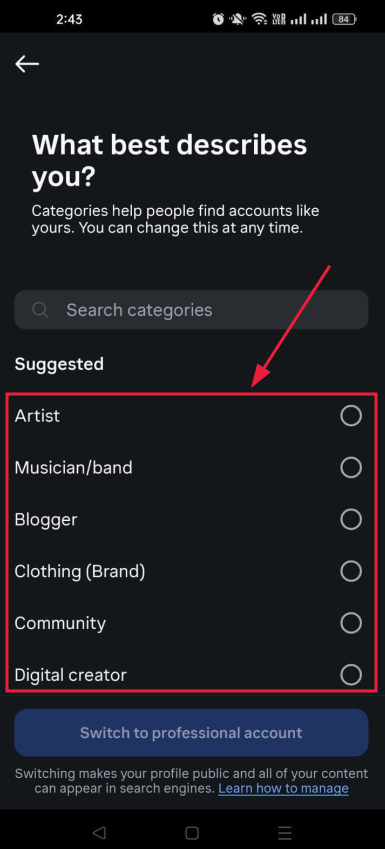
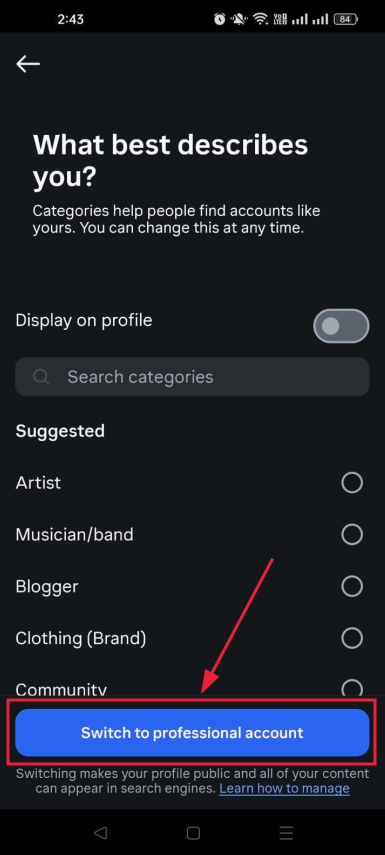
Instagram Insights, or analytics, is exclusive to Business and Creator accounts. To unlock this feature, you must switch from a personal account to one of these professional account types.
It may take up to 24 hours for Instagram to populate your account with analytics data after you’ve converted to a Business or Creator account.
To access information about your audience, you need to have a minimum of 100 followers on your Instagram account.
You can analyze data for any custom time frame within the past 90 days, allowing flexibility in assessing your Instagram performance.
On average, business accounts achieve approximately a 2% engagement rate on Instagram. This metric reflects the level of interaction and interest your content generates among your audience.
A complete link management solution
for marketing professionals & agencies.
Try Replug for free
How to switch to a business or creator account on Instagram?
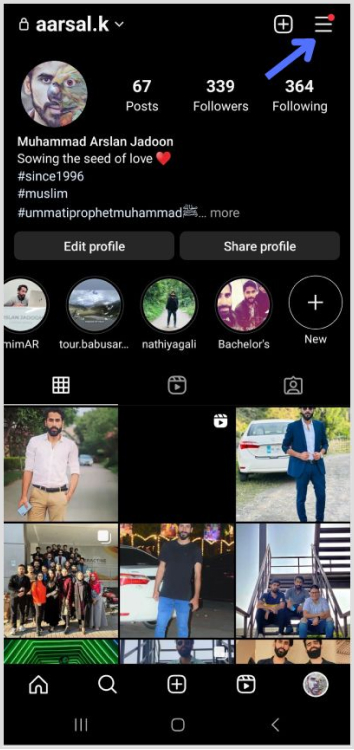
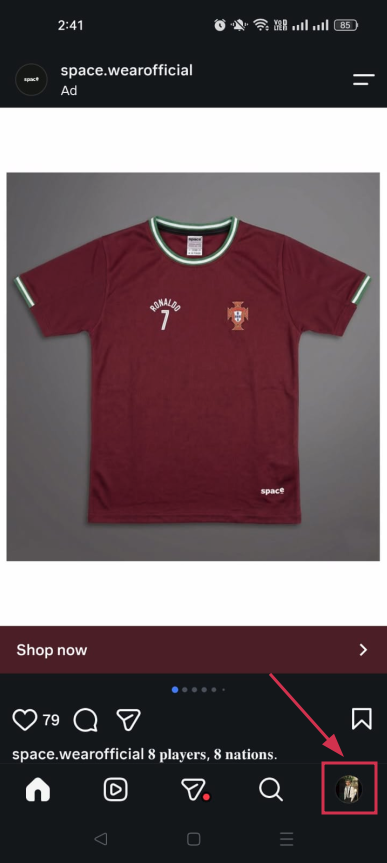
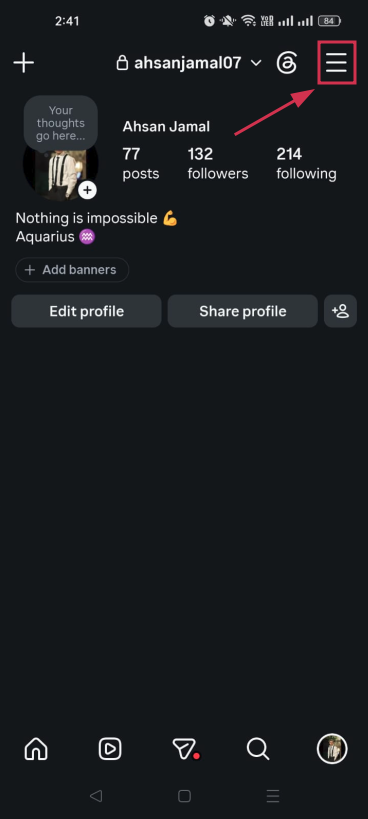
Open the Instagram app and navigate to your user profile.
Tap the hamburger icon located in the top right corner of your profile page. This icon typically consists of three horizontal lines.
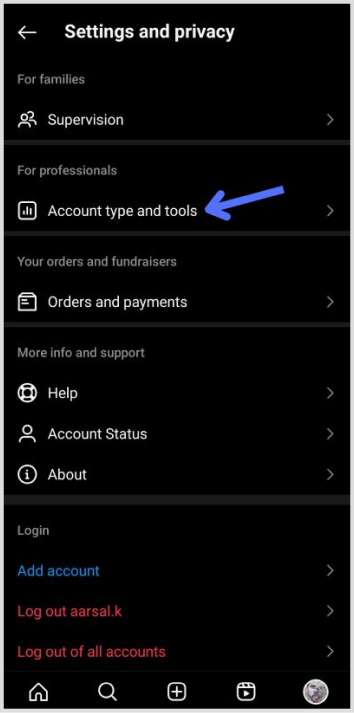
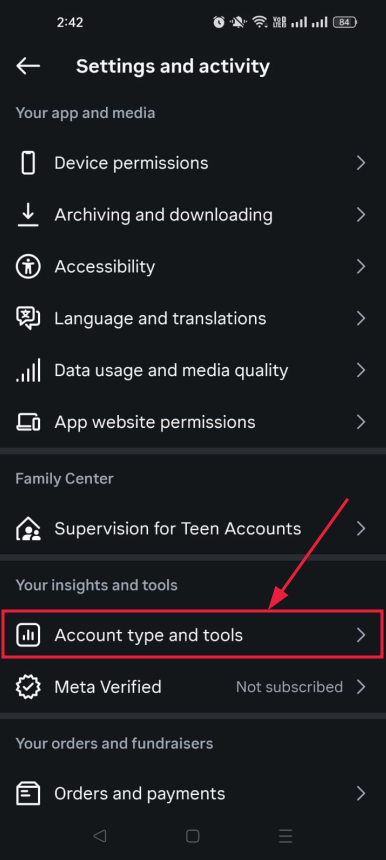
3. Within the Settings menu, tap on “Setting and Privacy” to access your account-related options.
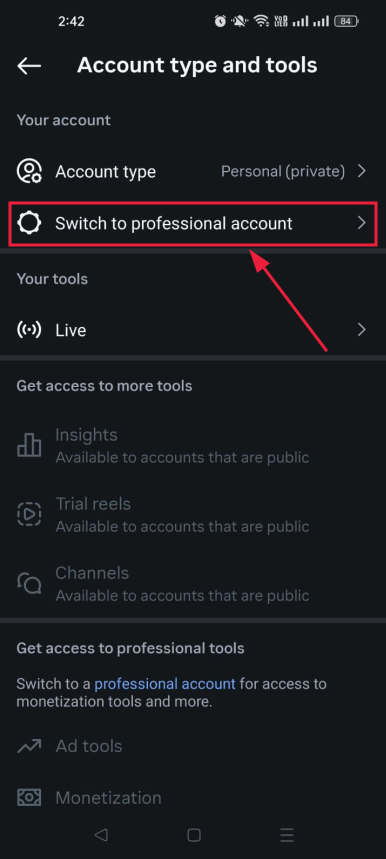
4. Scroll down to the bottom of the “Settings and Privacy” screen and find the option labeled “Account type and tools” then tap on “Switch to professional account.”
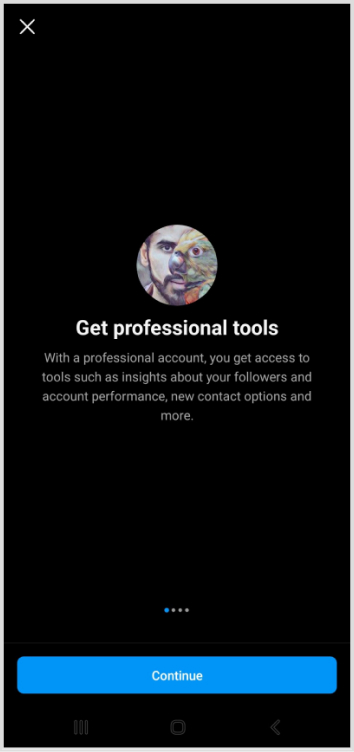
5. Instagram will present a series of prompts explaining the features of professional accounts. Tap “Continue” to proceed with the switch.
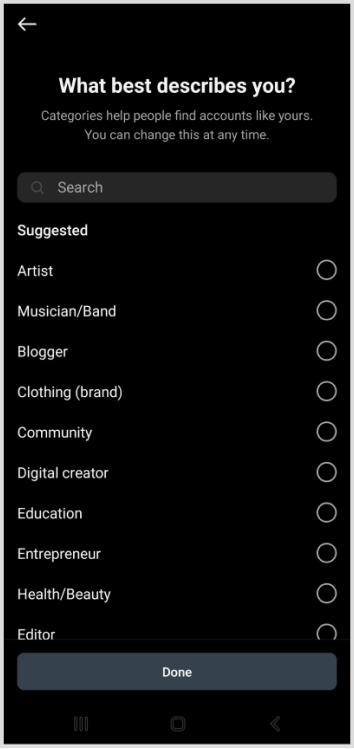
6. Instagram will ask you to choose a category that best describes you from its provided list. Once you’ve made your selection, tap “Done” to confirm.
7. After successfully switching your account type, Instagram requires a 24-hour waiting period for the analytics page to be populated with relevant data. During this time, you won’t immediately see insights from your previous posts.
Note that you will only see insights on posts shared after you switch to a business or creator account. Analytics for previous posts will not be available.
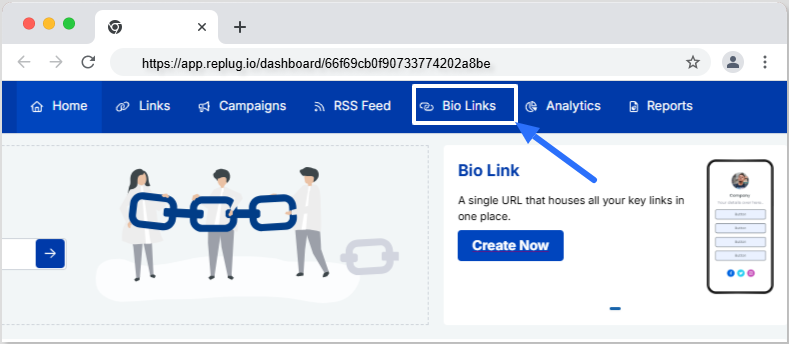
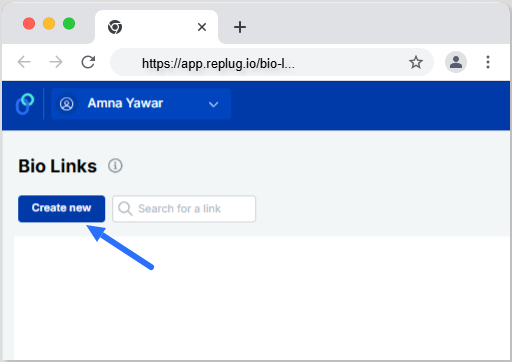
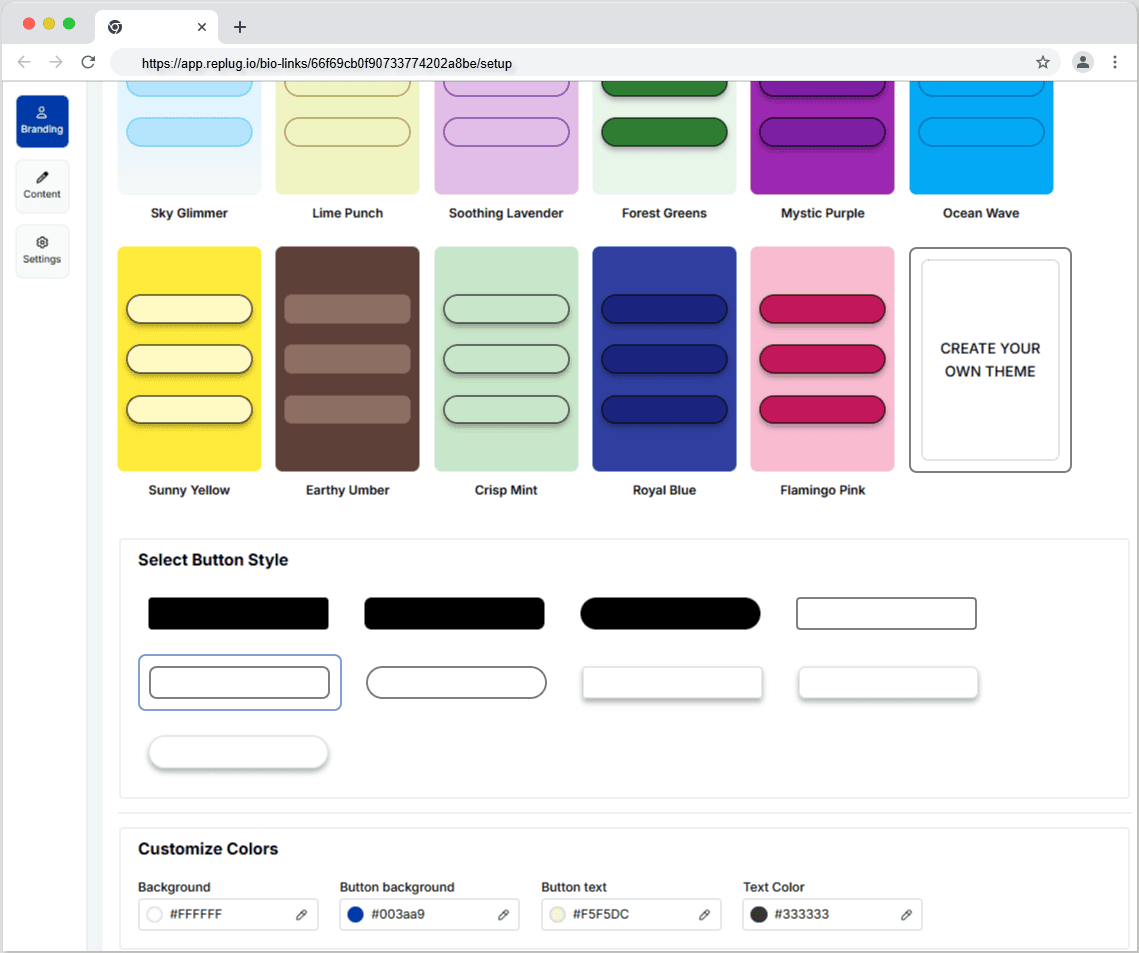
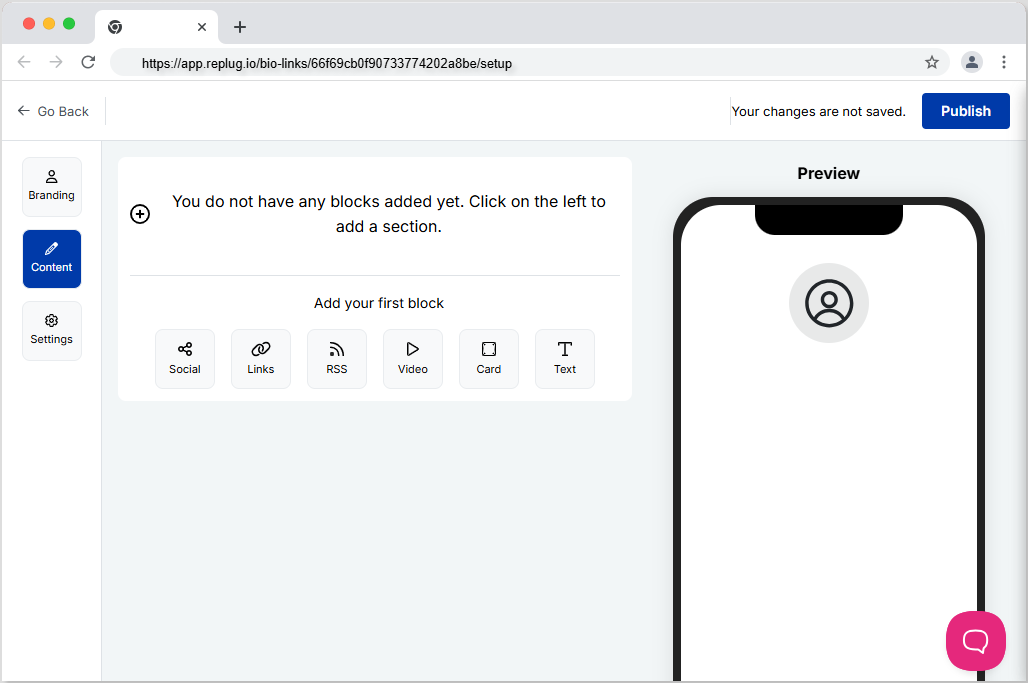
Go beyond generic link pages!
Create custom bio links that truly fit your brand
With Replug, you can create bio links that are unique, engaging, and built to convert.
To access your Instagram analytics swiftly, start by opening your profile in the Instagram app. Locate and tap on the Insights button, represented by a bar graph icon. This action takes you to an overview of your overall account analytics.
For specific content insights, choose the content type you want to analyze, like posts or stories, and tap the right arrow. This simple process empowers you with valuable data, helping you refine your content strategy based on engagement and performance metrics.
Consistently monitor your analytics to track growth and identify opportunities. Social media consultant McKiever recommends checking monthly or even more frequently.
2. Be organized with spreadsheets:
Utilize spreadsheets to organize monthly metrics. The CEO of Influencer Marketing Factory, Bogliari, suggests using Instagram Insights as part of a consistent optimization loop for content testing and improvement.
3. Leverage Instagram’s “Sort” feature:
Instagram’s sorting feature allows you to arrange posts based on interaction metrics. McKiever suggests sorting by follows to identify posts that gained the most followers, helping you create similar content for faster growth.
How to use Instagram analytics to grow your business:
1. Understand your audience:
Use analytics to identify what your target audience enjoys. Tailor your content marketing to meet their preferences, satisfying existing customers, and attracting new ones.
2. Benchmarking strategies:
Internal benchmarking:
Compare analytics of your content. Analyze both strong and weak-performing posts to identify common themes that resonate with your audience.
Metrics to prioritize:
For overall account analysis, emphasize total followers, accounts reached, and top posts, stories, and reels. For individual posts, prioritize follows, profile visits, website taps, and reach.
External benchmarking:
Compare your content to competitors to gain insights for business growth.
A complete link management solution
for marketing professionals & agencies.
Try Replug for free
Enhance social media tracking with Replug analytics:
Replug stands out as an invaluable tool for enhancing your content and boosting your brand’s online presence. With its ability to create unique, trackable links embedded with UTMs, Replug offers a straightforward solution for understanding customer journeys.
Replug is more than a URL shortener; it’s your strategic ally in navigating platforms like Instagram seamlessly. It provides a comprehensive toolkit for building brand connections, managing links and QR codes, and connecting effortlessly with your audience.
For streamlined curation and top-notch link tracking across social channels, Replug is the ultimate answer. Take control, optimize your strategy, and ensure your brand emerges victorious in the competitive landscape. Elevate your social media game with Replug—a true ally for maximizing insights and fostering stronger connections with your audience.
Frequently asked questions
What are Instagram analytics?
Instagram analytics, or Instagram Insights, provides statistics about account and content performance, including reach, engagement, and follower growth.
How to see analytics on Instagram?
To access Instagram analytics, go to your profile, tap “Insights,” and review overall account analytics. Select specific content types for detailed stats.
How to see Instagram story analytics?
To view Instagram story analytics, open Insights, tap “Content,” and select “Stories” to see metrics like follows, profile visits, taps, impressions, and more.
How to view Instagram analytics on desktop?
Unfortunately, Instagram analytics is primarily available on the mobile app. However, some third-party tools may offer desktop analytics features.
How to view post analytics on Instagram?
Open Instagram Insights, tap “Content,” and select “Posts” to access detailed analytics for each post, including reach, impressions, interactions, and more.
How does Replug enhance social media tracking, especially on Instagram?
Replug enhances social media tracking on Instagram by creating unique, trackable links with embedded UTMs, providing precise analytics for link performance.
How does Replug help in optimizing social media investments and improving ROI?
Replug helps optimize social media investments by providing insights into link performance, allowing businesses to refine strategies and improve return on investment.
Can I use Replug for tracking links on platforms other than Instagram?
Yes, Replug is versatile and can be used for tracking URLs on various platforms beyond Instagram, including TikTok, Facebook, Twitter, and more.
LinkedIn isn’t just a social network; it’s your digital passport to the professional world, connecting you with like-minded individuals across diverse industries. Your LinkedIn profile is your virtual business card, offering a snapshot of your identity and capabilities.
Elevating your LinkedIn presence goes beyond mere self-promotion – it’s about forging meaningful connections, fostering engagement, and creating growth opportunities.
If you’re eager to take your LinkedIn game to the next level, buckle up as we discuss nine practical tips to amplify your profile and skyrocket your post views for unparalleled engagement.
1. Craft compelling content
Create valuable content
Elevate your LinkedIn game by crafting content that speaks directly to your target audience. Identify your audience’s needs and interests, and deliver tangible benefits, immediate results, or fascinating insights. Remember, it’s not about you; it’s about what your readers want.
Utilize a mix of text, infographics, gifs, and videos to keep your content diverse and engaging. Employ writing techniques such as short sentences, line spacing, emojis, storytelling, and visuals to enhance readability.
Republish Content
Unlock the potential of your content by republishing it strategically. According to research, not everyone visits LinkedIn multiple times a day, so reposting content (with a 10-day gap) can increase reach and engagement. Focus on delivering unique insights with each repost, ensuring each post feels fresh and valuable to your audience.
2. Complete your profile
Your LinkedIn profile is your professional identity. Make sure to complete it. Ensure you have a standout header image, use your professional name, invest in a professional photo, and craft a compelling summary showcasing your talents.
Keep your work experience, education, certifications, and specializations up-to-date. Growing your network to at least 500 connections significantly boosts visibility.
3. Shorten the links you share
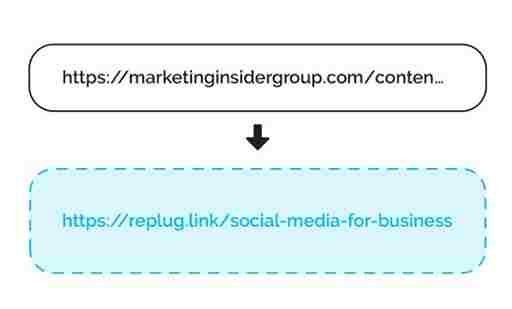
Long, unwieldy URLs can detract from the professionalism of your content. Replug’s link shortener not only cleans up your links but also provides valuable tracking metrics. It’s about more than just character count reduction – crafting connections that resonate with your audience.
With our LinkedIn link shortener, you can share concise, branded URLs that stand out in professional posts and messages. This helps boost credibility, improve engagement, and make every LinkedIn share more impactful.
Maximize marketing ROI
by transforming ordinary URLs into branded short links that convert.
Try Replug for free
You can also use a LinkedIn QR code generator to make your profile scannable on business cards or event materials, giving offline audiences a direct path to your LinkedIn
4. Maximize Engagement
Respond to comments
Engage with your audience by responding to comments on your posts. This not only pushes your content back to the top of feeds but also establishes a connection with your audience. Thoughtful responses create a sense of community and encourage future engagements.
Re-share other people’s content
Expand your network and visibility by re-sharing content from other LinkedIn members. This not only puts you on their radar but can also make you visible to their network. Use this strategy to build on others’ insights, reinforcing your thought leadership.
Get your employees and executives involved
Harness the power of employee advocacy by encouraging your team to engage and share company content. Employee posts can reach over 5X further than official company posts. Use eNPS questions to identify highly engaged employees who can serve as strong advocates. Implement processes to notify the team about content creation and leverage employee advocacy platforms for streamlined content sharing.
Leverage the power of tagging to drive attention to your posts. Tagging influential individuals or relevant pages can not only attract their attention but also increase visibility to their networks. Use tagging strategically as part of a team-wide strategy to amplify your reach.
6. Use hashtags
Utilize the potential of hashtags to increase the visibility of your posts. Choose relevant and trending hashtags, but keep it limited to around 5 per post. Aligning your content with popular hashtags can connect you with individuals and groups interested in similar topics.
7. Diversify your content
Diversify your content to keep your profile fresh and appealing to different audiences. From text and image posts to engaging videos, document carousels, and interactive polls – incorporating variety adds depth to your profile and resonates with a broader audience.
8. Consistent posting
Posting regularly sets a rhythm for your audience and benefits the LinkedIn algorithm. It’s not just about frequency; it’s about establishing reliability. Consistency builds anticipation for your insights, updates, or industry thoughts, encouraging views and engagement.
Embrace the power of video content on LinkedIn, focusing on native videos for a better user experience. Use captions for accessibility and convenience. Simplify video sharing across your team using platforms like ContentStudio.
Post regularly
Consistency is key to maintaining a vibrant LinkedIn presence. Post updates regularly, aiming for at least 2-3 times a week. Test different posting days and times to align with your network’s online activity. Use social media scheduling tools to manage regular posting without overwhelming your team.
Enhance your LinkedIn journey with Replug
Professional, accessible linking is the secret sauce of a successful LinkedIn strategy. Replug.io is not just a link shortener; it’s your tool to craft connections, engage authentically, and grow confidently.
Invest time in understanding Replug’s analytics. It’s not just about shortening links; it’s about understanding your audience’s behavior.
Ready to take your LinkedIn game to new heights? Explore Replug’s pricing plans and elevate your LinkedIn profile with style.
A complete link management solution
for marketing professionals & agencies.
Try Replug for free
FAQs
Why craft engaging content on LinkedIn?
Crafting engaging content on LinkedIn is crucial for boosting profile visibility, expanding your network, and creating valuable connections.
How does Replug enhance URLs on LinkedIn?
Replug’s link shortener improves the appearance of URLs on LinkedIn by making them cleaner, more professional, and trackable, enhancing overall content presentation.
Why is posting consistently essential on LinkedIn?
Posting consistently on LinkedIn is vital for building audience trust, staying relevant in feeds, and maximizing the algorithm’s benefits, resulting in increased visibility.
What is the role of scheduling tools in LinkedIn marketing?
A social media scheduling tool plays a crucial role in LinkedIn marketing by enabling users to plan and automate posts, ensuring consistent posting frequency and optimal audience engagement.
How do scheduling tools help manage multiple LinkedIn accounts efficiently?
Scheduling tools streamline the management of multiple LinkedIn accounts by coordinating posts, ensuring consistency, and optimizing content delivery for efficient social media marketing.
It’s unbelievable how LinkedIn went from an ordinary job platform to a flourishing social network with more than 930 million members.
Over time, it has become a top choice for businesses, freelancers, digital marketers, and many other online professionals in the industry.
If you often share links, like blog posts, case studies or resources, and want a simple way to manage, track, and brand them all in one place, Replug can help you keep your URLs organized and professional.
But you know what’s the interesting part? Users of LinkedIn are going out of their way to keep the readers hooked, now-a-days.
It’s pretty cool. If you also want to build a super-engaged audience on LinkedIn, you’ve landed in the right spot.
There are times when one might run out of post ideas. But worry not! We’ve got your back with many unique and captivating LinkedIn post ideas to help you overcome such conditions.
What to post on LinkedIn?
Long-form content
Native document posts (PDFs)
Carousels post
LinkedIn Live
Posts containing polls or stats
Native Video Posts
Posts including hashtags and emojis
Consistently posting valuable content can lead to more profile views, connection requests, and, ultimately, more opportunities for career growth or business expansion.
Below are the best LinkedIn post ideas with examples. Making these ideas part of your LinkedIn strategy, and start getting more likes and impressions on your LinkedIn posts.
1. Share how-to guides, tips, or growth hacks
Sharing little tips, ideas, or hacks is the best method to attract a broad audience and keep them involved in your content. Linkedin users enjoy methods, secrets, and techniques. But the key lies in understanding what sets your content apart.
You can share the following type of content:
List the dos and don’ts of your job
Guide on how to enhance a specific skill
Recommend valuable or productive tools
Hacks to increase platform engagement
Favorite book or online course
Tips for creating engaging Linkedin content
Share any personal experience
Personal branding tips
Updates in your industry
Views on any upcoming update
Best websites for working remotely
Tips on LinkedIn profile optimization
Advice on communication with clients
Networking tips
Any financial advice
What unique perspective or expertise do you bring to the table? Is there a fresh take on a popular topic or a hidden gem to be discovered? By pointing out these differences, you can create a sense of suspense, enticing the viewers to explore your content further.
2. Native visuals posts
Regarding LinkedIn, where professionals strive to showcase their expertise or brand, content acts as the backbone.
Images featuring catchy text
A native image post generates 2x comment rate than a post without images. So craft a compelling image that perfectly aligns with your message. The key lesson here is to utilize the image + text strategy on LinkedIn.
You can also use carousels, an updated style that lets you add multiple pictures and videos to a single post, giving your audience a visually appealing experience.
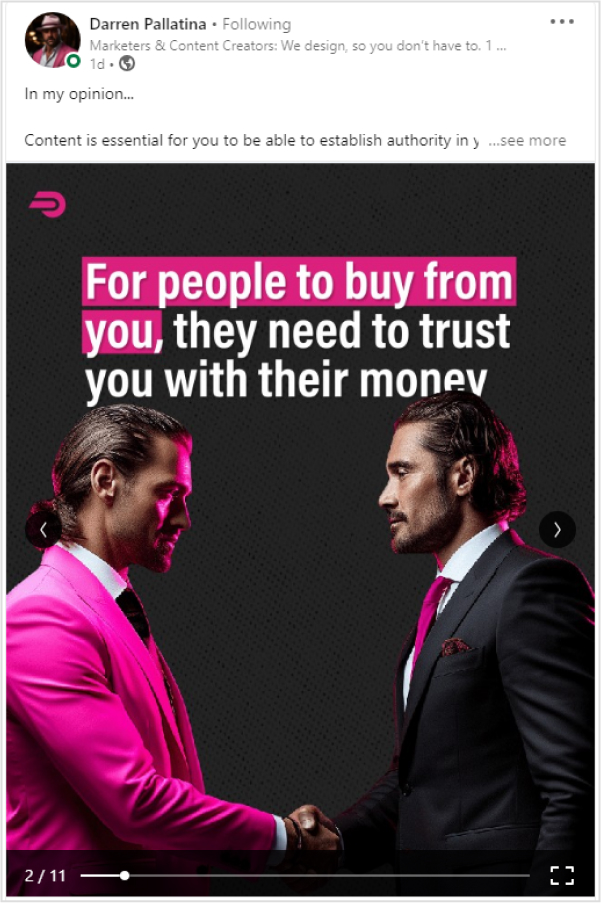
Just like this carousel by Darren Pallatina regarding lead-generation marketing content.
With carousels, it’s easy to tell a behind-the-scenes story, like a step-by-step strategy, how a product is made and launched, shortcuts or processes, etc.
Native video posts
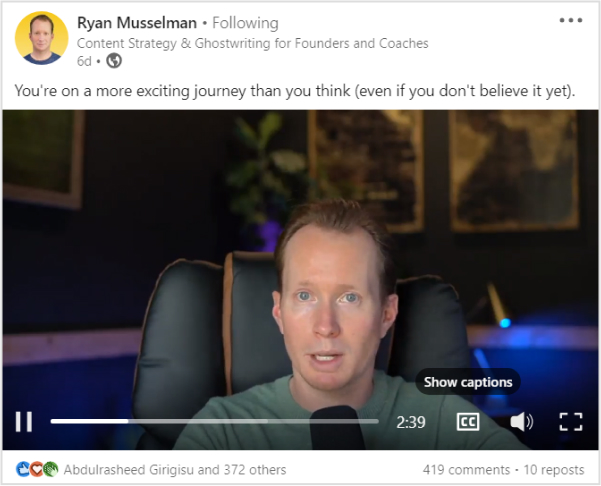
Posting videos on LinkedIn has a 5x higher engagement rate than plain text posts. Whether it’s a thought-provoking industry insight, a behind-the-scenes glimpse of your work, or a captivating story, videos can captivate and engage your connections like never before.
Here we spotted Ryan Musselman sharing a video post on Linkedin.
Add in some video teasers
Speaking of visual content, putting video teasers on LinkedIn can warm up the audience before the actual LinkedIn video post emerges. It creates curiosity, and it helps you reach a new audience. You could upload the full version later on your LinkedIn profile.
And when you need to download your LinkedIn videos for repurposing, consider using a LinkedIn video downloader to make the process hassle-free.
3. Share long-form content
Let’s say you haven’t designed any LinkedIn visual posts. Now what on earth should you post? Where to start? What else to publish for now? You can post long-form content, such as text-only posts, PDFs, articles, etc.
Here’s how
Long text-only LinkedIn posts
It doesn’t matter if you write a concise two-liner or a 600-word text post; the length of the text has no significant effect on the value of your message. You’re good to go if it hits the bull’s eye.
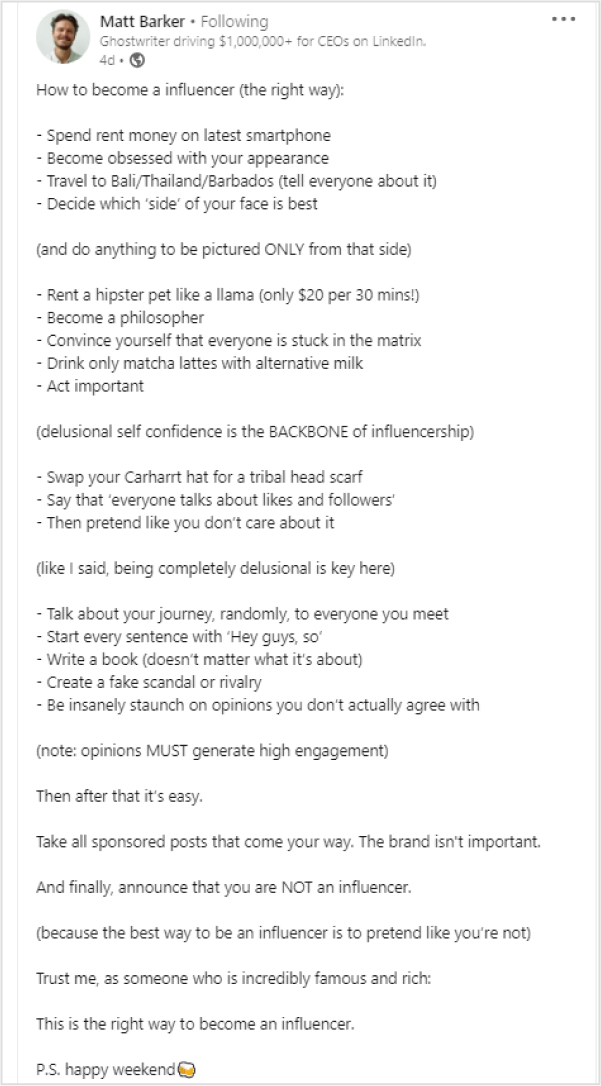
Let’s look at Matt Barker’s post, a top LinkedIn content creator sharing his views on how to become an influencer (the right way) through a long text-based post.
Though long texts can be boring sometimes, try adding emojis, relevant hashtags, give value, be helpful, personalizing your posts, and be controversial, this will make your posts more engaging.
Linkedin article
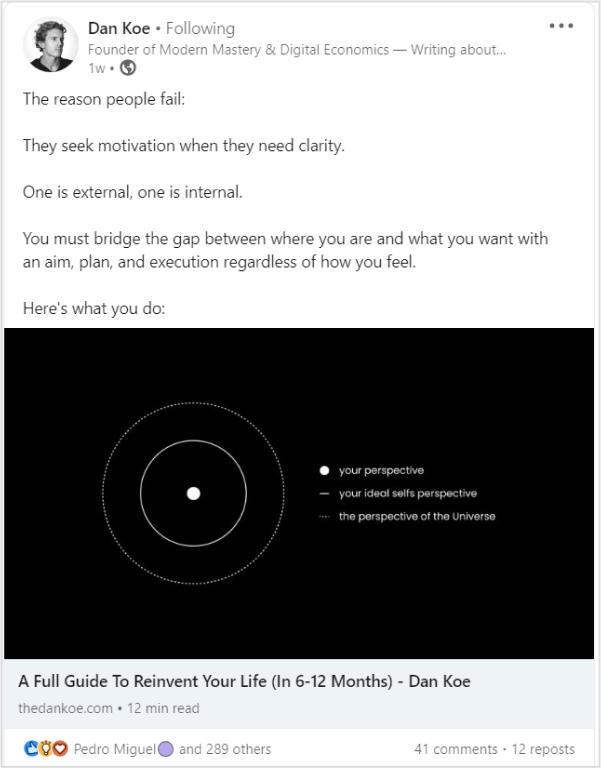
LinkedIn also allows users to share blogs and articles. Your posts may include links to external articles. And if you’re at a loss for words, turn any old video from YouTube or PDF file into an article and publish it. Also, this allows you to utilize existing material and present it in a different format for your audience.
Here Dan Koe on LinkedIn shared an article in his post.
The biggest perk of this tactic is that you post on LinkedIn more often. What else do you need?
Share native documents
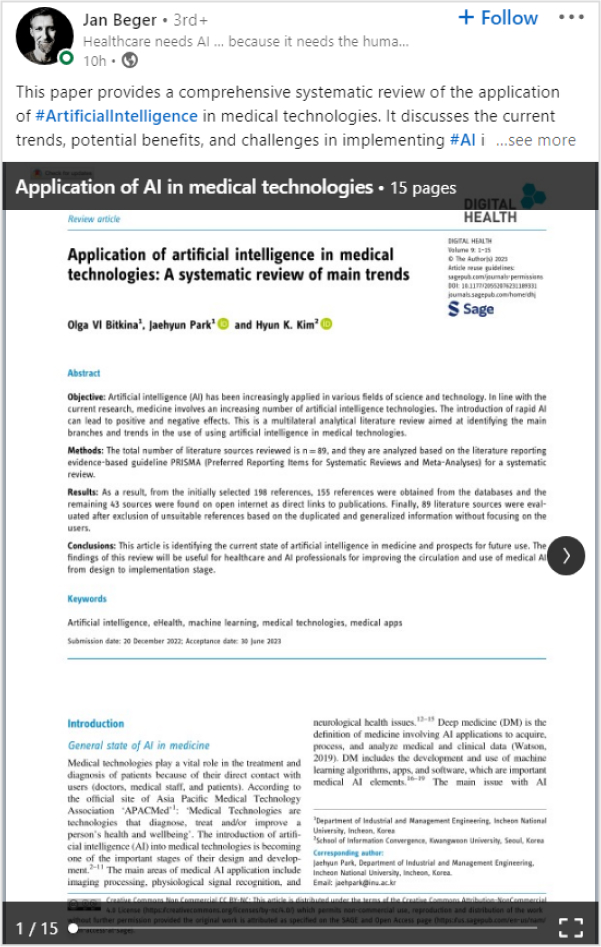
Sharing LinkedIn documents while writing posts gives your audience a more comprehensive perception. Make a lasting impression and seize the attention of your LinkedIn network by sharing PPT or PPTx slides, PDF, Doc, and Docx, just like Jan Beger shared a PDF file on LinkedIn regarding how healthcare needs AI.
The deck has 15 pages, but the post is providing value and relevance in each slide. It will encourage the creators dedicated audience to explore his content further.
4. Post reviews & opinions
Whether it’s a new gadget, a trendy fashion item, or even a restaurant, you recently dined at, writing a review allows you to express your opinions and provide valuable insights to your audience.
You can share reviews about
Top AI tools
New software in your particular industry
Future of any specific skill
Success secrets of any well-known brand
New books
Reactions towards a myth.
Replying to FAQs
Try keeping up with what’s popular online by responding to current trends and events. Anything that has to do with your business can be a great way to keep up with the latest trends.
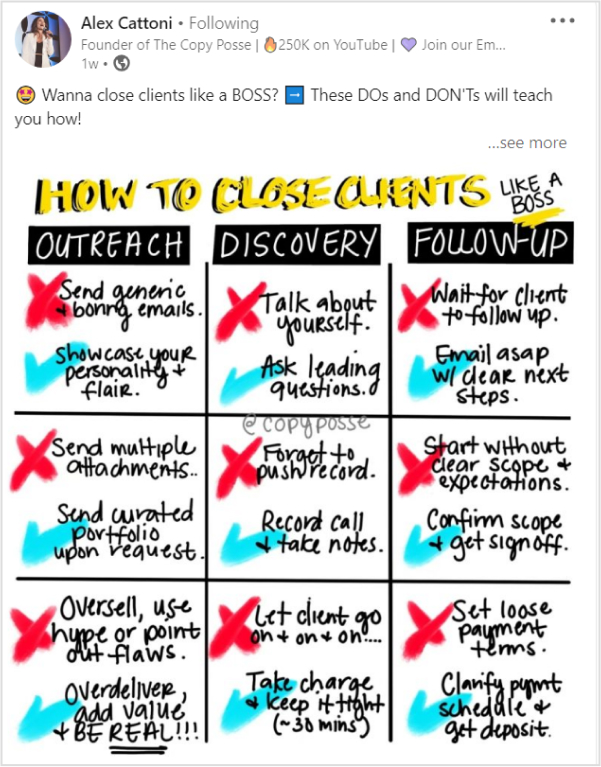
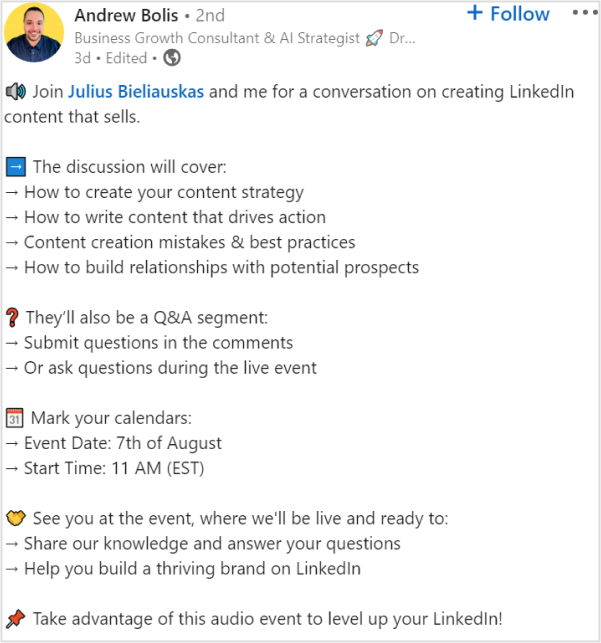
Just like Alex Cattonion LinkedIn shared a post regarding the hyped-up Barbie movie marketing campaigns. How copywriters, marketers, and business owners can grow from studying the Barbie Movie pre-launch campaign.
By doing so, you can connect with your audience on a more personalized level and stay on top of the trends.
5. Quiz your audience or throw infographics
It’s readily apparent that people get bored when constantly bombarded with the same type of content. Therefore, trying out new things and deviating from the usual content-posting approach is beneficial.
Linkedin polls and quizzes
Quizzing your audience or conducting polls on LinkedIn are some compelling ways to catch the users’ attention.
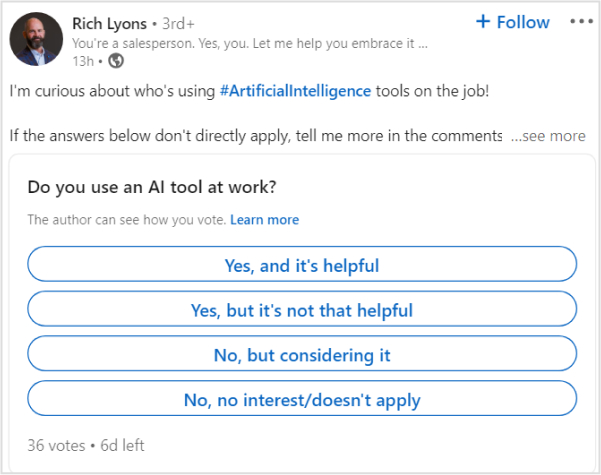
LinkedIn has a poll feature you can try out alongside other LinkedIn posts and see how it works. Let’s take a good example of a Rich Lyons LinkedIn poll post.
Now, Lyons has conducted an AI-related poll that is quite interesting and also relevant to his niche. Make sure you’re not asking your followers about something they don’t know or care barely about.
LinkedIn stats posts
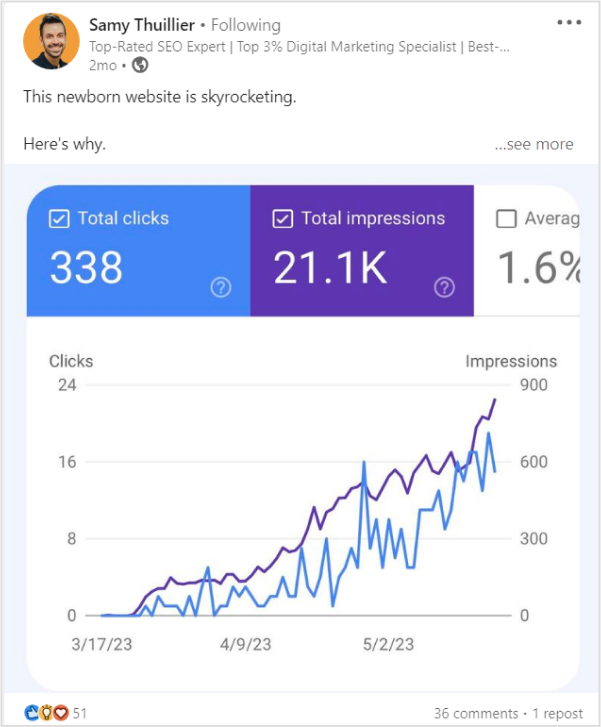
Sharing statistics related to your industry, business milestones, or helpful data can be an effective strategy to initiate meaningful discussions and engage with people.
Just like Samy Thuillier shared his new website traffic stats on his LinkedIn profile.
6. Share industry news
If you run out of new LinkedIn post ideas, just keep an eye out for news and changes in your field and share them with your readers.
Just like: influencers and experts often share news related to their fields and get many responses through likes, comments, and shares.
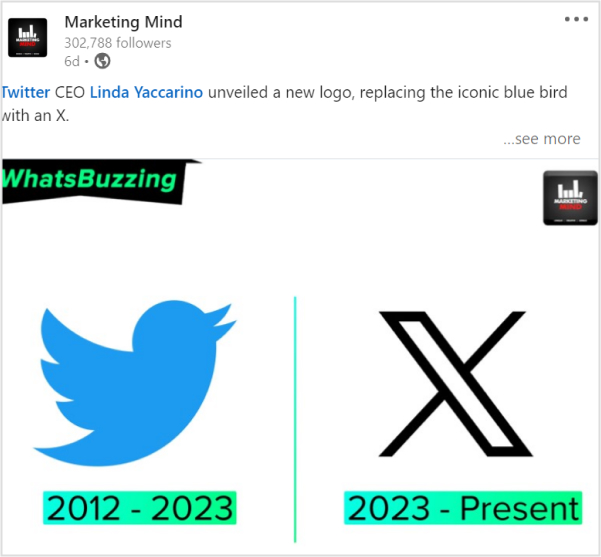
Still confused? Here’s one example:
Marketing Mind shares news relevant to its niche, which is social media and digital marketing. They posted news about Twitter. How it went from being called Twitter to X.
7. Add short-form content
Listen here, LinkedIn rockstars. You are mistaken if you believe only long-form content and native PDFs can help you succeed on LinkedIn. The ideal LinkedIn profile ought to balance lengthy and concise content.
Let’s look at the best types of short-form content.
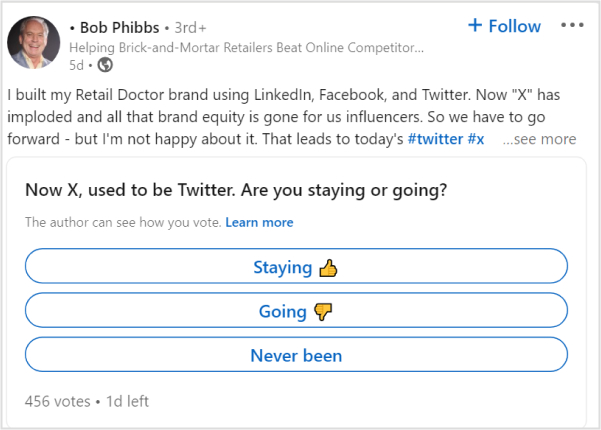
Ask questions from your audience
LinkedIn is the perfect platform to connect, learn, and have a little fun along the way. So go forth, my fellow LinkedIn friends, and let those questions fly! Ask questions from your audience just like famous LinkedIn content creator Bob Phibbs did so:
Add funny posts
People love content they can relate to. So try adding humor to your content. Thus, you can effectively convey your message and engage your audience.
Share job openings
From job posts shared by companies to recruitment updates from industry leaders, there’s always something new and exciting happening on LinkedIn. So, if you’re looking to stay in the loop or share some great job opportunities with your network.
Share something from a book
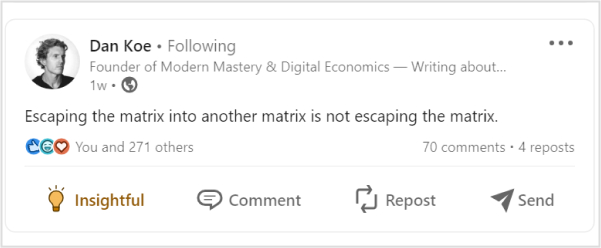
As avid readers, we all know that feeling when a particular quote or excerpt from a book resonates with us on a deep level. It acts like a little nugget of wisdom that we want to share with the world. Just like this insightful quote by Dan Koe.
Event reminders
Responding to ongoing trends and events can help you keep up with trends online. You can share new updates, event reminders, upcoming launches, and anything trendy.
8. Share snippets of communication & add hashtags
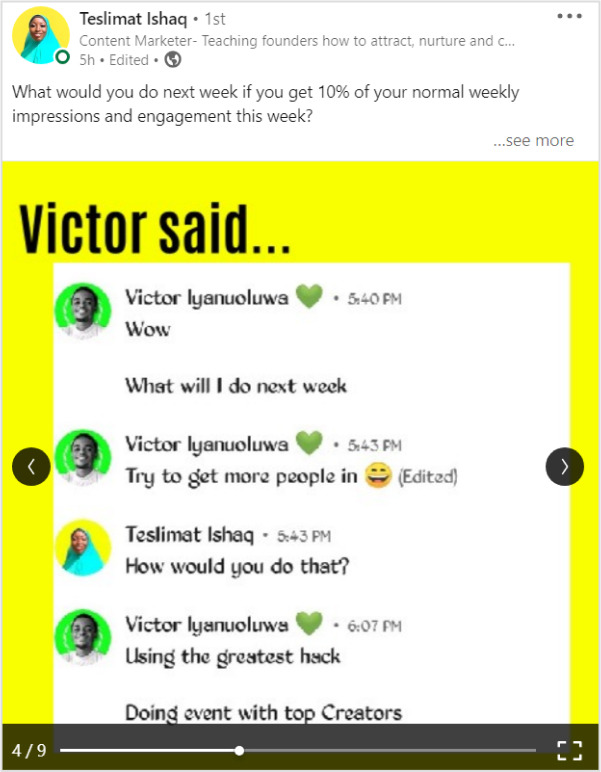
You can share funny, valuable, informational, or any other general snippets on your LinkedIn posts. These can be with a conversation between you and your friend, any top-content creator, a general meme, etc. It will create a deeper, more personal connection between you and your audience.
Here we spotted Teslimat Ishaq sharing a chat snippet with one of her friends on LinkedIn.
Add hashtags
Adding relevant hashtags to your LinkedIn posts can ultimately bring up your posts. It’s a crucial part of LinkedIn SEO. So, if you want to stay at the top, add useful, popular hashtags to your posts. Though the most trending hashtag on LinkedIn right now is #strategy – 5,064,006 followers,
#culture – 4,728,967 followers
#fashion – 4,215,758 followers
#business – 3,663,739 followers
#networking – 3,566,063 followers
#hiring – 2,443,907 followers
#health – 2,270,357 followers
#inspiration – 1,145,015 followers
9. Share inspiring stories
Have you ever found yourself in a situation where you don’t feel like creating unique, new LinkedIn posts? We’ve all been there. Whether it’s a lack of inspiration, a busy schedule, or simply feeling unmotivated, it’s completely normal to experience a temporary slump in your social media activity.
Here’s a genius yet creative idea. Share inspiring yet motivational stories on LinkedIn. It can be your personal story (User Generated Content) or someone else story.
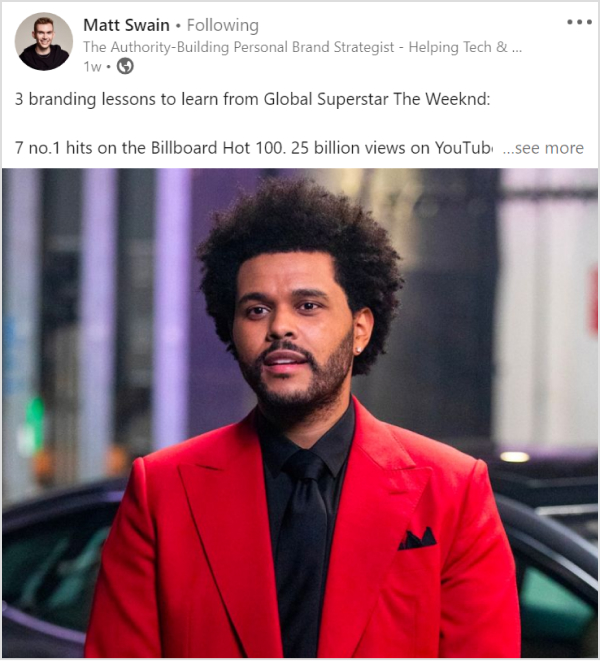
We loved how Matt Swin on LinkedIn shared a post inspired by the global superstar Weekend’s life:
Matt shared 3 branding lessons to learn from Global Superstar The Weeknd. How the artist is making serious waves in the industry. Guinness World Records declared that “The Weeknd is officially the world’s most popular artist.”
10. Make bold predictions
Let’s say you notice that everyone is following the same trend. And you also wanna pull up something regarding that trend but with a sense of spice and curiosity.
You can always share your opinion on future industry trends or make a bold prediction related to market changes.
Still confused? Check out this post by Tim Stoddart
How Tim shared a short-form content-making prediction regarding AI. However, the best thing about making predictions is that you are neither right nor wrong.
11. Try LinkedIn live
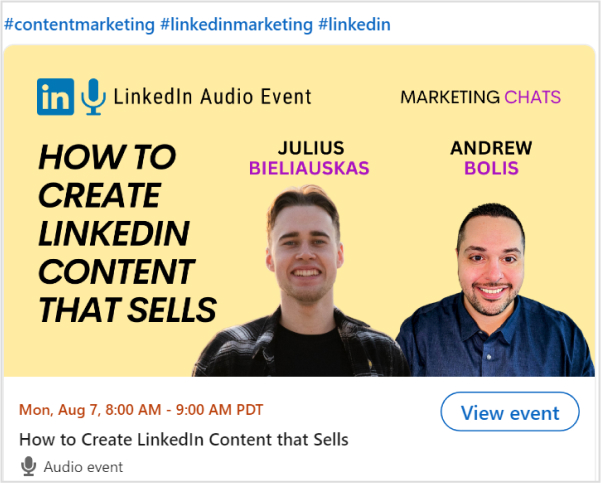
Live videos have a massive 24x engagement rate and 7x more reactions. So if you want high engagement on your profile, share live content in unique ways. For example,
As a result, both creators will grab high engagement and high-quality leads, as they will be assisting people with their LinkedIn branding tips and relevant content.
12.Create appreciation or celebration posts
When facing writer’s block or running out of ideas, remind yourself of Newton’s law “every action has a reaction.” Similarly, this goes for LinkedIn content strategy as well.
You can create engaging posts through feedback or a response. It could be a praise, a celebration, a myth, or a frequently asked question. You can even look back to a milestone that you achieved or something you regret.
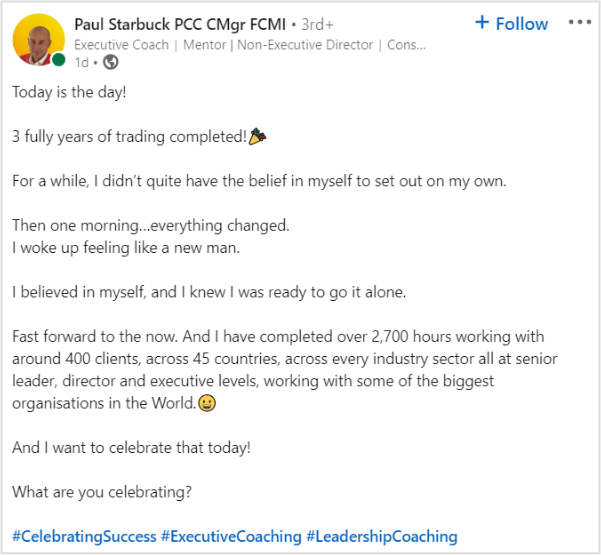
Still confused? Have a look at Paul Starbuck’s celebration post on LinkedIn.
Do you want to take full advantage of your marketing efforts? Posting on LinkedIn should be a crucial part of your LinkedIn content strategy. As 92% of B2B marketers use LinkedIn to find quality content.
That said, it’s no secret that content fuels your social media marketing engine. So put out helpful content to engage the readers. Here are a few tips for a perfect LinkedIn content strategy.
Connecting with the right audience
Statistics showed that most LinkedIn users worldwide are between 25-34 age groups. So in order to maximize your brand content ROI. It’s necessary to take the right audience in the loop.
Engaging with people
You can boost your LinkedIn engagement rates using these tips.
Keep your profile updated to keep things fresh
Showcase your work on LinkedIn with engaging descriptions
A great profile photo and cover increase engagement
Helping others with no expectations
Post regularly and be active on LinkedIn
Put out the best content
Listen up, folks! The secret to social media success is as simple as sparking conversations with your amazing content. It doesn’t matter what you’re into, just get those chats rolling and watch the magic happen. Once people notice a healthy discussion, they start jumping on the bandwagon. And that’s how most brands win attention on social media.
Use Branded Links& QR Codes
LinkedIn is the best source to generate leads, as it is more effective compared to Facebook and Twitter. Rich leads can be grabbed by sharing branded URLs within your posts.
Branded short links and CTA’s have proven successful for specific marketing campaigns. They are good for company branding and for analyzing your campaigns.
Note: By using a custom URL shortener, you can turn long resource links into clean, branded URLs that look neat in your posts and are easier for your audience to click and remember. For offline touchpoints like events or printed materials, you can also generate a QR code for your LinkedIn profile to make connecting instant and frictionless
So, that’s it, guys! We appreciate the dedication to reading to the conclusion. Your time and effort are very much appreciated.
Frequently asked questions
What is a good first LinkedIn post?
A good first LinkedIn post introduces you professionally, showcases skills, and expresses passion for your field. Keep it concise, engaging, and include a professional photo. Share goals or recent achievements for a positive impression and networking opportunities.
What is the best time to post on LinkedIn?
– Post during business hours – Posting on Tuesdays and Wednesdays
What is a viral LinkedIn post?
Any posts above 100 thousand impressions and 500+ likes is considered as a viral post.
What is an impression on LinkedIn?
An impression on LinkedIn refers to the number of times a post or content is displayed on users’ feeds or profiles. It represents the potential reach and visibility of the content, indicating how many users have been exposed to the post, regardless of whether they engaged with it.
Instagram isn’t just a photo-sharing app anymore; it’s a full-blown marketplace!
Over 200 million users tap on a shopping post or business profile every single day, and Instagram commerce generated around $37.2 billion in revenue in 2024 alone.
Whether you’re a small business owner, a creator, or someone just getting started, the opportunity here is massive. And the best part? You don’t need a big budget to get in on it.
Plenty of brands are figuring out how to sell on Instagram for free and are actually making it work. This guide breaks down everything step-by-step, from setting up your storefront to closing real sales.
But before we get into strategies, let’s start with the foundation: What exactly is Instagram Shopping?
What is Instagram Shopping?
Instagram Shopping is a built-in feature that lets businesses and creators tag products directly in their posts, Reels, and Stories, turning regular content into a mini storefront.
Instead of telling your followers to “check the link in bio,” they can tap on a product, see the details, and buy it right then and there.
The whole point is to make the buying experience as smooth and seamless as possible, without ever leaving the app. Think of it as your online shop, but living right inside Instagram.
How to sell products on Instagram (step-by-step)
Selling on Instagram sounds exciting, but jumping in without a full-fledged plan can cost you time and results. Here’s a clear, step-by-step breakdown to get your Instagram store set up properly and actually start making sales.
Step #01: Comply with Instagram selling policies
Before anything else, make sure your business actually qualifies to sell on Instagram. To sell through Instagram Shop, you need to meet Meta’s commerce eligibility requirements.
That includes:
complying with their policies,
representing your business and domain accurately,
being in a supported country, and
having a professional Instagram account.
On the product side, Instagram Shopping is designed for physical goods (think apparel, beauty products, home goods, and electronics). Digital products, services, subscriptions, and regulated items like weapons or adult products are not allowed.
It’s worth reading through Meta’s Commerce Policies before you get started, because violations can result in your shopping access being permanently removed. Not the most fun step, but skipping it can cost you everything later.
Step #02: Set up your account
Once you’re clear on eligibility, the next thing to do is switch your Instagram account to a “Business or Creator” account.
Here’s how to create an Instagram business account:
1. Open the Instagram app and go to your profile.
2. Here, tap the menu icon (≡) in the top right-hand corner.
3. From the list of options, tap on “Account type and tools”.
4. Now, tap on “Switch to professional account”.
5. Pick a category that best describes your business (e.g., Clothing Brand, Restaurant, Digital Creator).
6. Finally, tap on the “Switch to professional account” button.
Note: All your photos, videos, and followers stay exactly the same after the switch. You won’t lose anything you’ve built.
After that, it’s time to optimize your Instagram bio. Your profile is often the first touchpoint for potential customers, so getting it right is critical.
Use a high-quality, recognizable profile photo like your logo, and add a website link or landing page to direct traffic and drive conversions.
Keep your bio tight and benefit-focused. Tell people what you do and why they should care, and always include a clear call to action phrase like “Shop Now” or “Check the link below”.
If you’re not sure how to craft the perfect bio, an Instagram bio generator can be a handy tool to help you put together something clean and compelling without spending too much time on it. Just make sure you personalize whatever it spits out. Your bio should sound like you, not a template.
To unlock Instagram Shopping features, you need to connect your Instagram account to a Facebook Page.
Here’s how to do it:
1. Open the Instagram app on your smartphone.
2. Tap on your profile icon in the bottom right-hand corner.
3. Tap the “Edit profile” button located right under your bio.
4. Scroll down to the “Public Business Information” section and tap “Page”.
5. Tap “Connect” or “Create” and then continue.
6. Tap “Log in to Facebook” and follow the prompts to sign in.
7. Finally, select the specific Facebook Page you want to connect.
Note: Make sure the Facebook Page is published and publicly visible, and that it matches your Instagram business branding (same name, same look).
Your catalog is essentially where all your product information lives. Connect your Instagram Business account to a catalog to enable tagging products in your posts. You can do this through Meta’s Commerce Manager.
If you’re on Shopify, WooCommerce, or BigCommerce, even better. You can install the Facebook and Instagram Sales Channel on your platform, which gives you one shared product catalog for Facebook Shop, Instagram Shopping, and Facebook Marketing. This way, your products sync automatically, and you manage everything from one place.
Step #04: Set up Instagram Shopping
Once your catalog is ready and your pages are connected, it’s time to turn on Instagram Shopping.
1. Head to your Instagram “Settings”.
2. Tap “Business”.
3. Then select “Shopping” and choose your catalog.
4. After selecting your catalog, submit your account for review.
Once your shop is submitted, Meta will review your account before enabling product tagging and shopping features. Meta’s review process can take anywhere from a few hours to a few days, so don’t panic if it doesn’t go live immediately.
Once you’re approved, you’ll be able to tag products directly in your content, and a “Shopping” tab will appear on your profile.
One important update to know: As of September 2025, Shops on Facebook and Instagram now use website checkout, so customers are redirected to your website to complete their purchase rather than buying inside the app. Make sure your website checkout is fully functional before you go live.
Step #05: Create shoppable content
This is where things get really fun. Once your shop is approved, you can start tagging products directly in your posts.
For a single-image post, tag the obvious hero product. Don’t clutter the image with every possible item in frame; keep it focused on what the post is actually about.
For carousels, you can tag different products across slides, which works especially well for fashion, beauty, and home décor brands.
Stories use interactive sticker-based tagging (up to 5 per Story), perfect for flash sales, new arrivals, and behind-the-scenes product reveals.
The 24-hour lifespan creates urgency, since users know the content will disappear, which psychologically accelerates purchase decisions. Just keep stickers neatly placed; don’t cover the product itself.
Reels with product tags convert 61% better than untagged ones, and product tags in Reels generate 37% more clicks to product pages than the same tags placed on static feed posts.
One important heads-up: In many regions, you can’t add product tags to a Reel after it’s already published, so always tag before you hit share.
Step #06: Link to your official website
Instagram only gives you one clickable link in your bio, so use it well. Point it to your website, a specific product page, or a landing page that drives conversions.
Since over a quarter of social users turn to Instagram to find their next purchase, having a smooth path from your profile to your website makes a real difference.
If you want to share multiple links (like a new collection, a blog post, and a contact page), tools like Replugor Linktree let you create a simple landing page with multiple destinations.
Also, since mid-2025, public posts from professional accounts can appear in Google search results, so a well-linked, keyword-rich profile now helps you get discovered beyond the app, too.
Step #07: Build an engaged audience & following
Having a shop on Instagram means nothing if no one’s watching. Building a real, engaged audience is what actually moves the needle.
Start with consistency! Accounts that post 3 to 5 times per week grow followers twice as fast and see 12% more reach per post, according to Buffer’s State of Social Engagement report.
Beyond posting regularly, focus on actually engaging.
Reply to comments,
Respond to DMs, and
Jump into conversations in your niche.
Replying to comments alone boosts engagement by 21%, which signals to the algorithm that your content is worth pushing further.
And skip the shortcuts: Buying followers or using follow-unfollow tactics attracts low-quality accounts that never buy anything, and Instagram may flag the behavior altogether.
Step #08: Promote your products directly on Instagram
Organic reach is great, but combining it with paid promotion can really speed things up. You can run several types of Instagram ads through Meta Ads Manager (feed ads, Story ads, Explore ads, and Reels ads).
Reels ads are the most popular, with more than half of 2025 Instagram ads running as Reels. If you have a post that’s already performing well organically, boosting it is a quick and affordable way to get it in front of more people.
You can also use Meta’s targeting options to reach people by interest, age, location, and behavior, or even build lookalike audiences based on your existing customers.
Note: Meta suggests starting with a minimum of $5 and running your campaign for at least 6 days to see the best results.
Step #09: Drive traffic & engage
Random posting won’t get you far. Clear content pillars help you stay consistent without guessing what to post.
Pick three to five themes that support your brand (think education, storytelling, behind-the-scenes, testimonials, or product highlights), then brainstorm content ideas under each one. This keeps your feed focused and makes content planning a lot less stressful.
Driving traffic isn’t just about posting more; it’s about sparking real conversation. Use polls, question boxes, and countdowns in Stories to get people interacting.
Spend 10 to 15 minutes a day engaging with your ideal customers, commenting thoughtfully, responding to Stories, and nurturing real conversations.
The more people interact with your content, the more Instagram pushes it to new audiences, which means more eyes on your products.
Step #10: Measure outcomes
If you’re not tracking what’s working, you’re just mere guessing. Instagram’s built-in analytics, available on every Professional account, give you a clear picture of how your content and shop are performing.
Focus on engagement metrics like:
Shares and saves, which are better indicators of value than likes.
Reach and impressions, which show how far your content travels.
Reel analytics, like watch time and retention rates, to refine your editing.
For a deeper look, Meta Business Suite and third-party tools like ContentStudio or Iconosquare can give you more granular data. Review your numbers at least once a week, spot the patterns, and double down on what’s actually converting.
How to sell on Instagram marketplace: Vital tips to follow!
Setting up your shop is just the first part. What actually drives consistent sales is how you show up every day (your profile, your content, your conversations, and your strategy).
Here are ten practical tips to help you sell better on Instagram:
Tip #01: Optimize your profile for sales
Think of your profile as your storefront; if it looks messy or unclear, people bounce.
First, switch to a “Professional” or “Business” account to unlock analytics, ads, and shopping tools.
Then craft a benefit-driven bio that leads with what you do and why it matters to your buyer.
Finally, make your one clickable bio link count. Send people to a product page, a landing page, or a link-in-bio tool with multiple destinations.
Tip #02: Leverage Instagram shopping & product tags
Setting up an Instagram Shop is completely free; there’s no fee to get started. Once your shop is live, tag products directly in your posts, Reels, and Stories so people can tap and shop without extra friction.
Keep in mind that as of mid-2025, Meta dismissed native in-app checkout for most businesses. Purchases now complete on your own website, so make sure your checkout page is clean and fully functional.
Tip #03: Sell directly through direct messages (DMs)
DMs are one of the most underrated sales channels on Instagram. Use them to answer product questions, share links, and close sales in a real conversation.
You can automate responses to common questions using tools like ManyChat, so no lead falls through the cracks while you’re busy. But don’t let automation do all the work; jump in personally when someone’s genuinely interested.
Always remember, real conversations build trust, and trust is what gets people to actually buy.
Tip #04: Create high-converting content
Reels with product tags convert 61% better than untagged ones, so:
lead with your product early,
keep it under 30 seconds for quick hits, and
always tag before you post
For Stories, use “Highlights” to keep your best-converting content alive beyond 24 hours. Organize them by product category, FAQs, or customer reviews so new visitors can find everything they need without having to dig deep.
Tip #05: Show your followers you care
People don’t buy from brands they feel ignored by. Reply to comments, respond to DMs, acknowledge people who tag you in their posts, and genuinely engage with your community.
Simply replying to comments boosts engagement by 21%, which tells the algorithm your content is worth showing to more people. Small gestures like a thoughtful reply or a quick “thank you” go a long way in building loyalty that actually translates into repeat purchases.
Tip #06: Establish partnerships with Instagram influencers
Keep in mind, you don’t need to go after mega-influencers with massive followings. Micro- and nano-influencers deliver higher engagement because of their niche, closely connected audiences.
Find creators whose followers match your ideal customer, and collaborate on content that feels natural, not scripted. A genuine product recommendation from a trusted voice in your niche will almost always outperform a polished ad from a brand nobody’s heard of.
Tip #07: Offer Instagram-exclusive offers & run giveaways
Give people a solid reason to follow you and actually buy. Limited-time discount codes, flash sales, or “Instagram-only” offers create urgency and reward your most engaged followers.
Giveaways are also a great way to grow your audience fast. Ask people to follow, like, and tag a friend to enter. Just make sure to add a compliance note like “This giveaway is not endorsed by Instagram” to keep things above board.
Tip #08: Sell through IGTV & Instagram Reels
Longer-form IGTV content is great for detailed product demos, tutorials, or behind-the-scenes looks that build purchase confidence.
Reels, on the other hand, are your ultimate reach engine. They reach twice as many non-followers as static posts, making them perfect for product discovery.
Note: Use Reels to grab attention and IGTV to go deeper. Together, they cover both ends of the buyer journey, i.e., awareness and consideration.
Tip #09: Curate UGC & use Instagram SEO
User-generated content (photos and videos from real customers using your products) builds trust faster than any advertisement. Repost it, feature it in your Stories, and encourage it by creating a branded hashtag.
On the SEO side, since mid-2025, public posts from professional Instagram accounts can appear in Google search results, so treat your captions like searchable content. Use relevant keywords naturally, add descriptive alt text to your images, and write captions that actually say what the post is about.
Note: If writing winning captions feels like a challenge, let a top-tier Instagram caption generator do the hard work for you, coming up with engaging, keyword-rich copy tailored for maximum impact.
Tip #10: Join the Instagram creator marketplace
If you’re a creator or influencer, the “Instagram Creator Marketplace” connects you directly with brands looking for partnerships.
Through Meta’s affiliate commerce infrastructure, eligible creators can tag products from a brand’s verified Meta Commerce catalog directly within Reels, earning commissions when those tags lead to purchases.
It’s a solid way to monetize your audience without having to build and manage your own product catalog. You just create content you’d make anyway and earn from the sales you drive.
Why sell on Instagram in 2026?
Honestly, the numbers speak for themselves!
Instagram now has 3 billion monthly active users, and social commerce sales on the platform totaled $42.8 billion in 2025.
Roughly 200 million users tap on a shopping post or business profile every single day, and 81% of Instagram users use the app to research new products or brands. This means your potential customers are already on here, actively looking for things to buy.
US social commerce sales are expected to reach $100 billion in 2026, and Instagram sits right at the center of that growth. Add to that the fact that it’s completely free to set up a shop, and there’s really no reason not to be selling here.
No matter if you’re a solo creator or a small business owner, Instagram gives you a massive, ready-to-buy audience without the high cost of traditional retail.
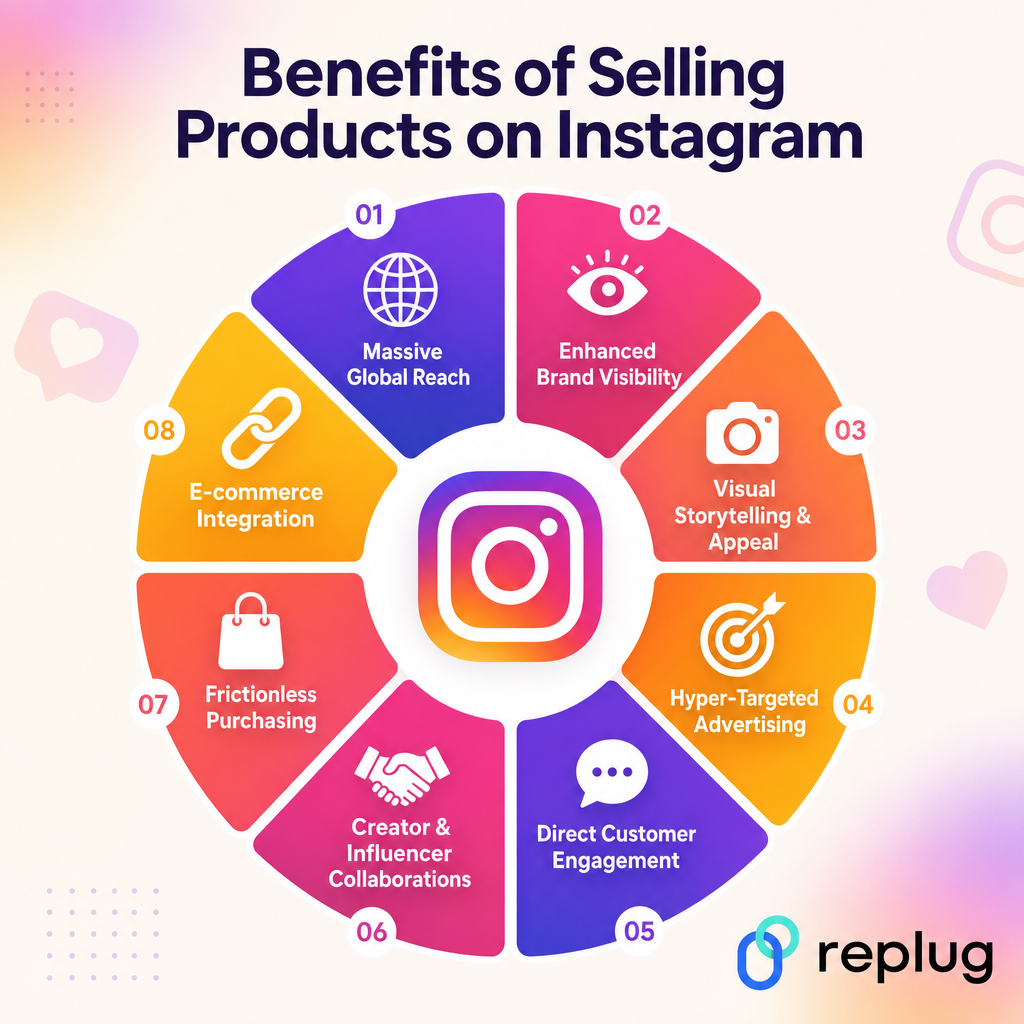
Benefits of selling products on Instagram
Selling on Instagram isn’t just a trend anymore. It comes with some real, tangible advantages that most other platforms simply can’t match.
Here’s a quick look at what you’re actually getting when you set up shop here:
Massive global reach
With 3 billion monthly active users, Instagram gives you access to an audience that almost no other platform can offer. Whether you’re a local business or a brand trying to go global, your products can reach people across countries and time zones without spending a dime on traditional advertising.
Enhanced brand visibility
90% of Instagram users follow at least one business account, which means people are genuinely open to discovering and engaging with brands here. Consistent posting keeps you top of mind, and a well-optimized profile with a clear bio, quality visuals, and even a branded short URL in your bio link helps turn casual visitors into actual customers.
Visual storytelling & appeal
Instagram was built for visuals, which makes it the perfect place to show off your products in a way that plain text or listings simply can’t. A well-shot photo, a quick Reel, or a Story can communicate your product’s value far more effectively than a product description ever could.
Hyper-targeted advertising
Instagram’s ad platform (powered by Meta) lets you get incredibly specific about who sees your products. You can target by age, location, interests, behaviors, and even build lookalike audiences based on your existing customers, which means your ad budget goes toward the people most likely to actually buy.
Direct customer engagement
Instagram makes it easy to talk to your customers in real time through comments, DMs, Stories replies, and polls. That kind of direct back-and-forth builds trust, helps you understand what your audience wants, and turns one-time buyers into loyal, repeat customers.
Creator & influencer collaborations
Instagram’s creator ecosystem is massive, and partnering with the right influencer can put your product in front of a highly engaged, niche audience overnight. Micro- and nano-influencers especially tend to drive strong results because their followers trust their recommendations more than traditional ads.
Frictionless purchasing
Instagram Shopping lets users tap on a product tag and move toward purchase without ever leaving the app. That shorter path from discovery to checkout reduces drop-off and makes impulse buying a lot easier, which is exactly what you want when someone stumbles across your product mid-scroll.
E-commerce integration
Instagram connects seamlessly with major e-commerce platforms like Shopify, WooCommerce, and BigCommerce, so your product catalog syncs automatically and you manage everything from one place. Your Instagram shop essentially becomes an extension of your existing store; no need to rebuild anything from scratch.
Wrapping up
Selling on Instagram in 2026 is one of the smartest moves you can make for your business, and hopefully this guide has shown you exactly how to do it.
From setting up your shop and creating shoppable content to building a loyal audience and running targeted promotions, every step we’ve covered is designed to help you turn your Instagram presence into a real revenue stream.
The platform has billions of active users, the tools are mostly free, and the opportunity is genuinely massive. So stop waiting for the “perfect moment” and start taking action today.
Set up your profile, tag your products, and let Instagram do what it does best, i.e., connect the right people with the right products.
Frequently asked questions
Is it free to sell things on Instagram?
Yes, completely! There’s no fee to set up an Instagram Shop or tag products in your posts, Reels, and Stories. You can start selling without spending anything; though if you want to speed up your growth, you can invest in paid ads. But the core selling features? Totally free!
Can I sell directly on Instagram?
Yes, you can! Instagram Shopping lets you tag products in your content so people can tap and view product details right away. However, as of September 2025, Meta moved away from in-app checkout for most businesses. So, the actual purchase is completed on your own website rather than inside the app.
Is it legal to sell on Instagram?
Absolutely, as long as you follow Meta’s Commerce Policies and sell eligible products. Physical goods like clothing, beauty products, and home décor are fair game. What’s not allowed includes digital products, services, weapons, and adult content. Stick to the guidelines, and you’re completely within the rules.
Do you need a business license to sell on Instagram?
Instagram itself doesn’t require a business license to set up a shop. However, depending on your country or state, local laws may require you to have one to legally operate a business and collect taxes. It’s always a good idea to check your local regulations before you start selling.
How to sell on Instagram without a website?
Here’s how to sell things on Instagram without a website (you have a few options here):
You can take orders directly through DMs, use a free link-in-bio tool like Replug to point followers to a third-party store like Etsy or Gumroad, or use Meta Commerce Manager to set up a shop manually. It’s not the smoothest experience without a website, but it’s definitely doable.
How to sell on Instagram shop?
Start by switching to a professional account, then connect your Instagram to a Facebook Page and set up a product catalog in Meta Commerce Manager.
Once your catalog is ready, go to Settings → tap Business → then Shopping → select your catalog, and submit for review. After approval (which can take a few days), you can start tagging products in your posts, Reels, and Stories.
How to use Instagram for business in 2026?
Here’s how:
– Switch to a Business or Creator account to unlock analytics, ads, and shopping tools. – Optimize your bio with a clear value proposition and a strong call to action. – Post consistently across Reels, Stories, and feed posts. – Focus on engagement over vanity metrics. – Use Instagram Shopping to turn your content into a storefront. – Run targeted ads when you’re ready to scale, and track your performance through Instagram Insights to keep refining your approach.
Understanding how to measure engagement on social media is important in today’s dynamic world in which every click, share, and comment shapes your brand’s online presence.
This guide is critical for those interested in tracking social media engagement. It will highlight essential metrics and introduce the capabilities of Replug in this context. So, let’s get started!
Why tracking social media engagement matter?
Social media platforms are not just virtual spaces; they serve as storefronts, customer service hubs, and stages for your brand’s performance. Partnering with a social media agency in NYC can further amplify these efforts, ensuring your strategy aligns with audience expectations. The engagement levels indicate whether your brand’s narrative resonates and if your virtual audience is genuinely interested.
Choosing the right metrics is crucial to avoid misleading data for your team or Facebook ad agency to interpret. The right metrics provide both quantitative data and qualitative insights, offering a comprehensive understanding of audience interaction. Regular social media reporting helps track these metrics effectively and make data-driven decisions for future strategies.
12 essential social media engagement metrics:
Let’s break down the 12 social media engagement metrics and provide explanations for each.
Likes, comments, reactions, shares, etc.
Likes:
Indicates how well your audience receives your content. The more likes, the higher the positive reception.
Comments:
Reflects deeper engagement. Comments often signify that your content has sparked curiosity, agreement, or even disagreement.
Shares:
Equivalent to a digital word-of-mouth recommendation. When users share your content, it demonstrates that they find it compelling and worth sharing with their circles.
Brand Mentions
Captures instances where users talk about your brand, providing insights into brand sentiment, context, and organic reach.
Video views and video completion rate
Video views:
Indicates the reach and initial interest in your video content. Platforms like Facebook count a view when a user watches for more than three seconds.
Video completion rate:
Measures the percentage of viewers who watched the video till the end. A high completion rate indicates engaging content.
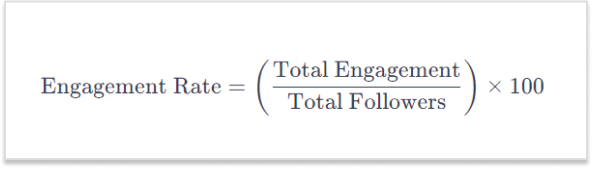
Engagement rate
Offers a holistic view of content performance by combining likes, comments, and shares. It helps understand engagement relative to the number of followers.
Amplification rate
Reflects how share-worthy your audience finds your content. It is determined by the ratio of shares per post to the total number of followers.
Represents the total number of people who have seen your post. It focuses on how many people have been exposed to your content.
Impressions
Total number of times your content has been shown on someone’s screen, regardless of clicks. It indicates how often your content is being seen.
Share of voice (SOV)
Measures how much attention your brand gets compared to competitors. A high SOV means your brand is dominating the conversation in the industry.
Audience growth rate
Measures how fast a brand’s following increases over a specific period. It reflects the brand’s popularity and appeal.
Conversion metrics
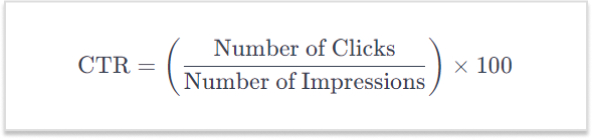
Click-through rate (CTR)
Represents the percentage of users who click on a link in your post. It measures how effective your content is in compelling users to take the next step.
Pertains to visitors landing on your website through direct links from social networks. It reveals how well social media channels drive users to your main platform.
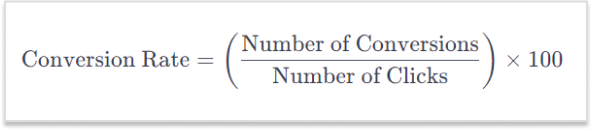
Conversion rate
Measures the percentage of users who take a desired action after interacting with your content, such as signing up or making a purchase.
A complete link management solution
for marketing professionals & agencies.
Try Replug for free
Replug: Your toolkit for social media engagement
Enter Replug.io, a powerful link management tool designed for comprehensive social media performance metrics. Beyond URL shortening, Replug offers a range of features:
Deep dive analytics:
Replug’s analytics transcend mere click tracking. Gain a comprehensive view of user interactions, including their origin, the timing of clicks, and the devices used. This detailed insight empowers brands to refine their social media marketing strategy based on the specific moments when their audience is most engaged.
Branded links:
Move beyond generic links. Replug empowers brands to create short links that are customized and branded according to their preference. These not only enhance brand recognition but also boost click-through rates, as users are more inclined to click on links they trust.
Link-in-bio tool:
Maximizes engagement opportunities within a single trackable link, perfect for platforms like Instagram.
Real-time data:
Things move fast in the digital realm, and Replug ensures you stay ahead. Real-time analytics allow brands to pivot on the fly. If a particular post is gaining traction, you’ll know instantly, enabling you to allocate resources strategically and capitalize on emerging opportunities.
A complete link management solution
for marketing professionals & agencies.
Try Replug for free
Conclusion:
Understanding and measuring these metrics empowers you to assess the impact of your social media efforts, refine your strategy, and build genuine connections with your audience. Each metric plays a unique role in providing insights into different aspects of your social media engagement.
Effective measurement of social media engagement is simplified with Replug’s intuitive features. Beyond mere numbers, Replug provides insights that ensure your connection with your audience is genuine, informed, and impactful.
FAQs
What is social media engagement?
Social media engagement refers to the interaction and participation of users with your content on social platforms. This includes likes, comments, shares, and other actions that indicate audience interest and involvement.
Why is social engagement important?
Social engagement is crucial for building brand awareness, fostering customer loyalty, and driving online visibility. It enhances your connection with the audience, influencing how your brand is perceived in the digital space.
With a staggering 5.04 billion users worldwide, social media has become an omnipresent force, shaping the way individuals connect, share, and engage in the digital era.
What makes URL-shortening tools effective for social media?
URL-shortening tools enhance the user experience by creating concise links and improving aesthetic appeal and character usage. They are particularly effective on platforms with character limits, ensuring a clean and user-friendly presentation.
Why use branded links to improve click-through rates?
Branded links build trust and recognition, encouraging users to click. They convey authenticity and are more likely to be clicked compared to generic links, ultimately boosting click-through rates and enhancing overall engagement.
Is Replug suitable for businesses of all sizes?
Yes, Replug is designed to cater to businesses of all sizes. Its versatile features and scalability make it adaptable to the needs of small businesses, startups, and large enterprises alike, offering a comprehensive solution for social media engagement.
Facebook, like any other website, can also benefit from SEO practices. This can be done by covering these key elements of Facebook SEO.
Optimizing your page’s profile information, such as the page name, description, and keywords.
Posting high-quality and relevant content optimized for social platforms and search engines.
Building a strong network of followers and engaging with them regularly.
Encouraging people to share and interact with your content.
Making sure your page is publicly accessible to search engines.
Utilize social management and optimization tools to improve branding.
What is Facebook SEO?
Facebook SEO is the process of optimizing a Facebook page to increase its visibility in search results on the Facebook platform and other search engines like Google. This can be done by improving the page’s profile information, posts, photos, and followers. By optimizing your Facebook page, you can make it more likely that people will find your page when they search for related topics or keywords on Facebook or other search engines.
15 techniques for Facebook SEO
Here are several ways to optimize your Facebook information for better visibility and accessibility in search results:
1. Know your audience
Understand who your target audience is and what kind of content they are interested in. Tailor your content to their interests and needs.
2. Optimize your page’s profile
Make sure that your page’s profile is fully filled out and includes relevant information about your business, such as your website URL and contact information.
Use a descriptive and keyword-rich page name: Your page name should accurately reflect the products or services you offer, and include keywords that people might use when searching for your business.
Write a compelling page description: Your page’s description should be a brief summary of what your business is all about, and should also include keywords.
Set your page’s privacy settings to “Public”: Go to your page’s settings and make sure that the “Who can see your future posts?” option is set to “Public.” This will allow search engines to crawl and index your page’s content.
Add contact information: Adding contact information like your business address, phone number and email address can also help people find your business more easily.
Use categories: Assign your page to one or more categories that best describe your business.
3. Claim unofficial pages
When advertising on Facebook, it’s important to claim and manage any unofficial pages that may be created by the platform or users. These pages may contain incorrect information and can negatively impact your brand’s reputation. Proper management of your main Facebook page and all other associated pages is essential for building a strong presence on the platform.
It’s important to note that claiming an unofficial page does not guarantee that it will be removed, but it will give you control over the page’s content and messaging. Also, it’s important to keep the page updated with relevant and accurate information in order to provide value to the audience.
4. Add keywords in your page’s “About & Bio”
Use keywords that are relevant to your business in the “About & Bio” sections of your page as it will help search engines understand the context of your pages.
5. Use friendly URLs for your Facebook Page:
Build brand consistency by creating SEO-friendly URL’s. These are custom links that can be created for a Facebook page to make it more memorable and easier for people to find. It can improve SEO by making it easier for users to remember and share the link. Utilize personal branding tools to increasing overall brand awareness.
6. Add your website link to the page
Adding your website link to your page can help search engines understand that your website and your Facebook page are related.
Posting high-quality and relevant content that provides value to your followers. This will encourage them to engage with your content and share it with others.
Use interactive content: Use interactive content such as polls, quizzes, and surveys to increase engagement and encourage people to share your post.
Post regularly: Posting regularly will help you to keep your page active and relevant and will increase the chances of your post appearing in the news feed of your followers.
Share someone else’s post: Sharing post of others will create a community feel and will help you to increase your visibility in search results.
Share your page: Sharing your Facebook page with your friends, family, and colleagues and ask them to share it with their network can also help drive more followers.
8. Optimize your posts
Using keywords in your post’s title, caption, and text that are relevant to your business and what people might use when searching for your business.
Use hashtags: Use relevant hashtags to make your post more discoverable and increase its visibility in search results. It will help search engines understand the context of your post and make it more discoverable.
9. Post on the best time
By posting during peak activity times, your posts are more likely to be seen by a larger audience, which can increase engagement and participation. Use analytics tools to track the activity on your page and identify the best times to post.
According toContentStudio’s study, Thursday is the best day to get most engagement on Facebook. Whereas, Tuesday, Wednesday and Fridays are also good days to post.
10. Run Facebook Ads
Use Facebook ads to reach a larger audience and increase your page’s visibility.
Use Facebook targeting: Facebook’s targeting options allows users to reach people who are more likely to be interested in your business.
Run retargeting Ads:Retargeting is a form of online advertising that allows you to show ads to users who have previously interacted with your website or content.
Collaborate with other pages: Collaborate with other pages in your industry to reach a larger audience and increase your page’s visibility.
Explore Meta partnership ads: Meta’s partnership ads scale creator content across Facebook, from feeds to reels.
Engage with your followers: Respond to comments and messages, and actively engage with your followers. This will encourage them to continue following your page.
Host contests and giveaways: Hosting contests and giveaways can help you to increase your followers and engagement on your page.
Use influencer marketing: Reach out to social media influencers in your niche and ask them to share your page with their followers.
Get external links pointing to your Facebook page from other websites.
13. Create compelling CTAs
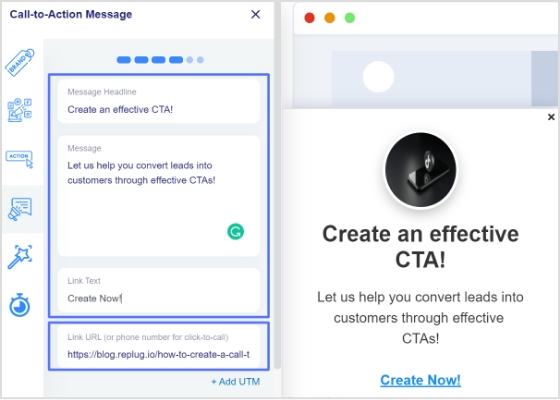
Call-to-Action (CTA) ads can be an effective way to guide potential customers through the sales process and encourage them to take a specific action. To create a successful CTA ad, make sure the language is clear and concise, and addresses the needs and pain points of your target audience. Use a sense of urgency but avoid making unrealistic or aggressive claims. This can help increase your reach and audience by promoting your solution to potential customers.
AI-powered Facebook Messenger Chatbots can be a valuable tool for businesses looking to improve their customer service, lead generation, and marketing efforts.
Customer service: Chatbots can provide 24/7 customer service by answering frequently asked questions, troubleshooting issues, and directing customers to the appropriate resources or human agents.
Lead generation:Chatbots can be programmed to ask qualifying questions and collect contact information from potential leads, which can then be passed on to the sales team.
Marketing: Chatbots can be used to deliver personalized and targeted promotions, content, and offers to customers based on their preferences and behavior.
15. Use Facebook management & optimization tools
URL link management tool
It’s also important to note that using a vanity URL can also be a great way to make a link more memorable and shareable.
How to create vanity links?
URL Shorteners!
URL shorteners can be used to improve SEO on Facebook by creating shorter, more manageable links that are more likely to be shared. These shortened disguised links improve the visibility of the link on Facebook and are more likely to be clicked on.
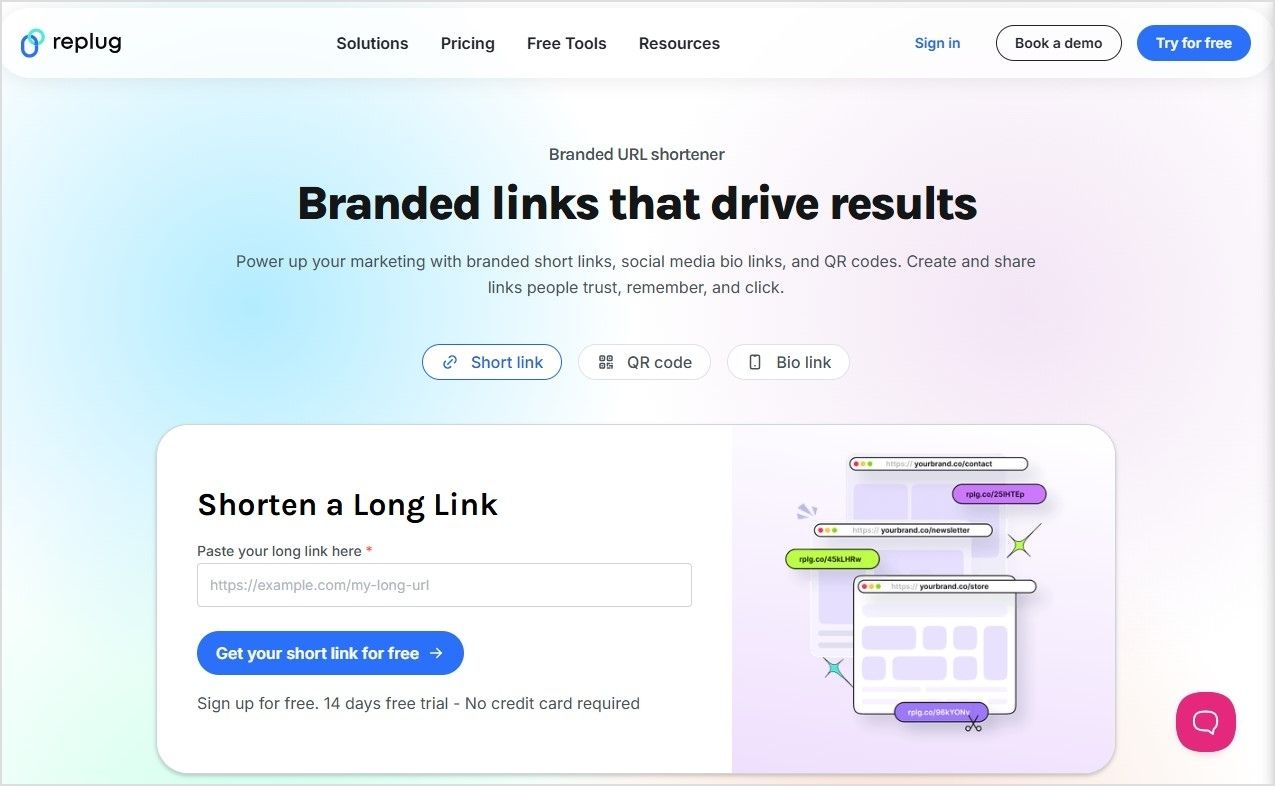
Use Replug’s custom URL maker free online to create a branded short link for the webpage you want to share on Facebook.
With Replug you can not only shorten links but it also assists in several other ways explained below. It is an all-in-one link management platform for businesses and agencies.
Deep linking improves engagement
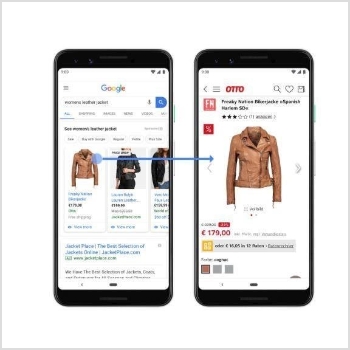
Deep links can improve brand engagement by allowing users to directly access specific pages or content within an app or website, rather than just the homepage. This can help to increase the chances of users finding the content they are looking for and engaging with it, which can lead to increased shares, likes, and comments.
Google and Facebook recommend the use of deep linking for mobile apps for a better user experience, if the app is installed it will open the content within the app, otherwise it will direct to the website.
In summary, using deep links can improve engagement and Facebook SEO by making it easier for users to find and engage with specific content, and by making advertisements more effective.
Increase online visibility using bio links
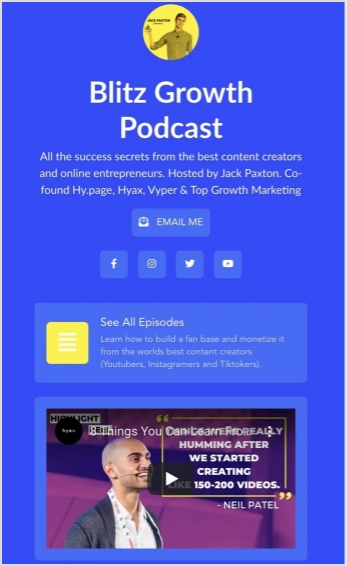
Having a bio link on a Facebook page gives you a great opportunity to connect online users to your other accounts. A bio link allows users to access all important information related to you or your brand through a custom designed web page. Most platforms have a restricted space, i.e. mostly only allow to place a single link in profile. But with bio links you can add multiple links and add other key information as well.
Create clear and compelling call-to-actions
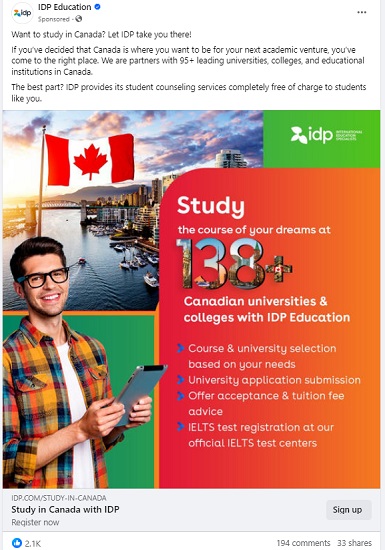
Using clear and compelling call-to-action phrases such as “Learn more” or “Sign up now” encourage users to click on the link.It becomes easier for users to find and engage with specific content, and makes advertisements more effective. Here’s an example.
Track clicks and conversions
URL shorteners come with built-in analytics that allow you to track the number of clicks on the link, which can help you understand how well your content is performing on the social platform.
Retargeting
By targeting users with personalized ads that have already visited your website, you can increase the chances of them returning to your website or engaging with your content. Retargeting can be done by using Meta Pixel, a small piece of code that can be placed on your website, it allows you to track the actions of users who visit your site and then use that information to create targeted ads.
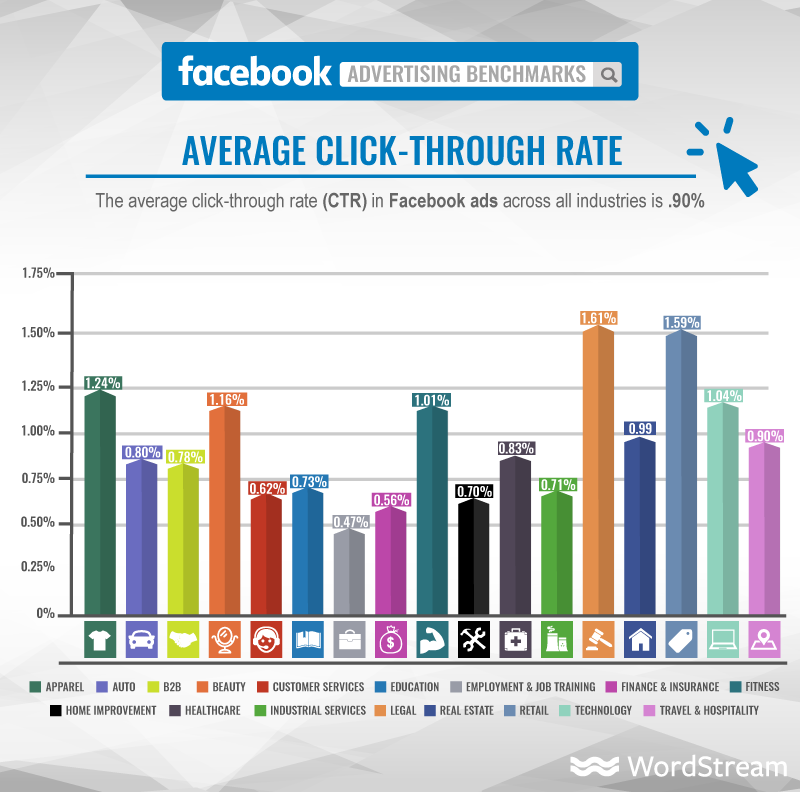
Additionally, retargeting can also improve the click-through rate (CTR) of your ads, which is a key metric used by Facebook’s algorithm to determine the relevance and quality of your content. This can lead to improved visibility and engagement of your content and advertisements on the platform, which ultimately can help to improve your Facebook SEO.
Facebook management tool
Social media management tools can improve Facebook SEO by helping businesses to:
Create and schedule optimized posts:
Social media management tools can help businesses create and schedule posts that are optimized for Facebook’s algorithm, using keywords and other best practices for SEO.
Track and analyze performance
Social media management tools can provide businesses with detailed analytics on their Facebook page’s performance, including metrics such as engagement, reach, and click-through rate. This data can be used to inform and improve SEO efforts.
Monitor and respond to comments and messages
Social media management tools can help businesses keep track of comments and messages on their Facebook page, and respond to them in a timely and professional manner, which can help improve engagement and build trust with customers.
Identify and engage with influencers
Social media management tools can help businesses identify and engage with influencers in their industry, which can help to increase brand awareness and attract more backlinks to their website.
Automate repetitive tasks:
Social media management tools can help businesses automate repetitive tasks such as scheduling posts, sending direct messages, and tracking analytics, which can save time and improve efficiency.
Monitor competitors
Social media management tools can help businesses keep an eye on competitors and industry trends, which can help inform their own strategy and stay ahead of the curve.
It’s worth noting that these tools are just one aspect of a comprehensive SEO strategy, but they can be very helpful in improving a Facebook page’s visibility, engagement and performance, which can help in improving the overall SEO of the website.
FAQs for Facebook SEO techniques
Do Facebook ads improve SEO?
Facebook ads can help improve SEO in a few ways:
– Drive more traffic to the webpage – Increase brand awareness, – Improve website’s visibility and searchability – Collect data on your target audience
Do Facebook posts count as backlinks?
While Facebook posts themselves are indirectly counted as backlinks. Social media platforms, like Twitter, Instagram, and LinkedIn, and it could be a way to drive more organic traffic to your website.
What are the 5 stages of SEO?
There are four stages of SEO: keyword research, title optimization, url optimization, content optimization and backlink building.
What are the 4 types of SEO?
– Technical SEO: This type of SEO focuses on the technical aspects of a website, such as its architecture, code, and site structure, to make it more easily crawlable and indexable by search engines. – On-Page SEO: This type of SEO focuses on optimizing individual web pages in order to rank higher and earn more relevant traffic in search engine results. This includes optimizing the content and meta data of the page. – Off-Page SEO: This type of SEO focuses on increasing the authority and trustworthiness of a website, typically through link-building efforts and contextual backlinks service. – Content SEO: This type of SEO focuses on creating and optimizing content in order to rank higher in search engine results. This includes researching keywords, creating high-quality content, and optimizing the content for search engines.
Note that these types of SEO often overlap and work together in a comprehensive SEO strategy.
What is the golden rule of SEO?
The Golden Rule of SEO is to create valuable and relevant content for users.
Have you ever heard of the dark posts in your social media management journey?
Most of you haven’t heard about it until recently. Even though dark posts have been around for over a decade, it’s a concept still new to most of us.
If you’d like to get started with link management and ad-campaign tracking, head to Replug and explore our full platform.
And, if you have been paying attention to social media marketing recently, then it’s worth going deeper and figuring out how to use dark posts on social media going forward.
So let’s cut to the chase!
Origin of dark posts
The concept of dark posts was introduced by Facebook in 2012. It was later adopted by all major social media platforms, such as Twitter, LinkedIn, Pinterest, and YouTube.
The dark posts are targeted ads that are tailored toward a specific segment of the audience and these posts don’t appear on the timeline for everyone.
Moreover, the posts don’t have the sponsored post or promoted post attribution, which makes this type of post quite unique.
Advertisers and digital marketers publish dark posts across all major social media platforms mostly to A/B test the performance between dark posts and regular ads.
Example of a dark post
You already know that a dark post doesn’t appear on the page’s feed. Instead, it appears on the timeline to a select group of users.
The purpose of a dark post across all social media platforms is to target the specific audience who hasn’t followed the brand just yet.
So after understanding the concept behind this type of social media post, it wasn’t difficult to spot a dark post.
Here’s an example of a dark post on Facebook:
It seems like Intuit QuickBooks is using dark posts on Facebook to reach out to the targeted audience that has probably heard about them before but hasn’t engaged with them properly.
It was a Facebook ad that appeared on the home feed. In fact, you won’t find that very post anywhere on their Facebook page.
Why use Facebook dark posts?
Some of you might be wondering why we need to use Facebook dark posts. Well, there is a reason why a social media platform provides users with a feature – Facebook’s dark posts feature is no different.
There are a handful of reasons why you should be at least testing out this Facebook ad strategy.
Let’s take a look at some of them:
1. Precise targeting
Precise targeting is the mark of a perfect social media ad campaign. Facebook dark posts offer unparalleled precision in audience targeting, which makes them special.
Unlike regular Facebook page posts that are visible to most followers, dark posts hit the bullseye as they aren’t intended to reach everyone. Instead, they’re tailored to reach a specific group of audiences based on the given demographics, interests, and behaviors.
2. Avoid timeline clutter
Big brands and organizations run multiple Facebook ad campaigns. Since showcasing multiple ads to the same audience could be overwhelming for the audience, dark posts come to the rescue as they don’t clutter your brand’s timeline.
Moreover, dark posts remain invisible to your followers as they’re targeting the prospective audience. This way brands avoid timeline clutter by opting for Facebook dark posts.
3. Split test Facebook ads
Dark posts make split testing easier than ever. Advertisers can create multiple variations of the same ad and test them on different target audiences without overwhelming their followers.
The advertisers would learn which combination of the ad copy, ad design, and target audience works best. As a result, it would immensely refine the brand’s social media advertising strategy.
4. Optimized Ad spend
Ad spending could go out of control if you don’t know what you’re doing, especially when you’re running ads with a tight budget. One of the reasons why dark posts work is that they appear only to the intended audience.
Moreover, advertisers can optimize the ad spend by improving the targeting, behaviors, and interests of the prospective audience.
5. Tailored engagement
Every marketer dreams of getting a ton of engagement on both social media ads and organic posts. Dark posts are a great way to get traction by crafting relevant and thought-provoking ads for a specific audience.
It massively increases the relevance of your ads, making them more impactful to get the desired results.
6. Unobtrusive advertising
Dark posts make it easier for brands and experts to target a select group of audiences without bombarding the same offer to the broad audience base. This subtlety can make a lot of difference in the outcome of the Facebook ad campaign.
How does dark posting work?
Dark posting on social media platforms is not rocket science. Users can dark post on almost all major social media platforms like Facebook, Twitter, LinkedIn, and TikTok.
The way it works is quite simple. Dark posting is an advertising strategy that allows advertisers to publish ads targeting a certain segment without shoving the offer down the throats of existing followers.
Dark posts are also known as “unpublished posts” on Facebook. The reason is that such posts are used as ads only. However, Facebook provides users with an option to publish the dark post later on the page like a regular Facebook page post.
To ensure the proper publishing of a dark post, make sure you opt for the “only use this post for an ad” option while creating your Facebook ad.
We’ll dig deep into the benefits of dark posting on social media platforms later in the article. Just make sure that you have understood the fundamental idea of how dark posting works.
How to identify a dark post social media ad?
Digital marketers and online advertisers may spot a dark post from miles away. It’s essentially an ad just like any sponsored post or boosted post, but it isn’t necessarily intended for the existing customers.
Moreover, experts identify a dark post by looking at the offering as well as visiting the brand’s page to see whether or not the post exists on the timeline.
Here’s an example:
IDP Education is an education and visa consultancy service that helps students with studying abroad, admissions, and visa services.
They published a dark post on their Facebook page which wasn’t available on the Facebook page’s feed. So that’s how it was easily stood out.
Here are four ways to quickly identify a dark post on social media :
1. They don’t show up on your page’s timeline
One of the ways to identify a dark post is that it doesn’t show up on the page’s timeline. One can spot a dark post by looking through the brand’s page that whether or not the same ad is posted as a normal post. Usually, a sponsored or boosted post can be seen on the page’s timeline, but it’s not the case with dark posts.
2. They don’t appear on your followers’ feed
Just like they don’t show up on the page’s timeline, these posts don’t appear on the followers’ feeds. This is the difference between a regular ad and a dark post. A normal ad might be appearing to the current followers depending on the audience targeting, interests, and behaviors. However, the dark posts won’t do that.
3. These posts are only displayed to the targeted audience
Since dark posts don’t appear to the existing followers, these posts are used to target a specific segment of the crowd that hasn’t been following you on social media. Each brand has a buyer persona when trying to reach out to new audiences, and that’s where dark posts come in handy.
4. They are mostly discount or coupon offers
Brands, agencies, and companies use dark posts to get traction using discount offers, coupon codes, and other enticing offers. The purpose is to engage the new faces and bring them into the marketing loop. So dark posts could be used to reach new audiences by offering discounts and coupon codes.
Facebook dark post ads benefits
We’ve discussed how these types of social media ads work and how to spot these ads across different social media platforms. Let’s shed some light on the benefits that they provide to the advertisers:
1. Easier to target a specific audience
Dark posts are paid posts that don’t target your existing audience on social. In fact, these posts target the new users who haven’t followed you or your business page just yet. These posts help brands and entrepreneurs put their products and services in front of new audiences.
2. No bombardment of sponsored posts on the feed
Since dark posts don’t show up on the feeds of the existing followers, these types of posts don’t clutter followers’ home feeds with sponsored posts. Nobody wants to see the sponsored posts from the brands or experts they’re already following.
3. Test out new ad strategies without disturbing the existing followers
Dark posts provide a segue into testing out different ad strategies without making a mess. One of the fears of online advertisers is that they don’t want to disturb the existing customers or followers in any way.
For instance, offering the same product to customers who have already bought the same product would be a bad move.
4. Experiment with new content trends
Experimenting is the key to winning on social media. Don’t shy away from testing out different types of content formats, styles, patterns, and tactics.
Social media trends change over time, so it’s necessary to keep up with the new trends and capitalize on them when they’re in the trend. Dark posts could be a fantastic way to test out new content trends to see how people react to them.
5. No appearance on the timeline
One of the benefits of dark posts is that they don’t appear on the timeline of the advertiser’s page, which means the followers don’t have to see every offer the business is creating for new or unpaid customers.
The dark posts only appear to the audience it is intended to reach out to on the social media platform.
How to create dark posts on Facebook?
Dark posts are paid ads, but they don’t show up to the existing customers. If you’re curious about how to start experimenting with dark posts on Facebook, then allow me to share my two cents on the process.
Let’s head over to the few simple steps to understand how to create this type of Facebook post:
Step 1: Navigate to Ads manager
To create a dark post on Facebook, go to the Facebook Ads Manager, which serves as the central hub for managing your Facebook ads campaigns.
Now click on the drop-down menu located at the top left corner and choose the “Page Posts” option under the “Create & Manage” section.
Once you find this option, move on to the next step and carry on the rest of the process.
Step 2: Create the dark post
Find the “Create Unpublished Page Post” option at the top and click on it to initiate the creation of a new dark post.
Provide your ad details, ensuring that it reaches the right audience. Moreover, when specifying how to utilize the post, opt for “Only use this post for an ad.” Doing so ensures that the post remains hidden from public eyes and would only reach a select group of the audience.
Step 3: Select target audiences
Target audience is one of the fundamentals of any type of digital ad. Advertisers can utilize preexisting segmented ad sets if they’ve created ads previously. However, if you’re new to this, you’ll need to establish audience segments while creating a new ad.
Advertisers have the option to specify their audience’s demographics such as age, gender, location, language, behaviors, and interests to make the ad campaign more authentic and helpful.
Step 4: Check & balance on the dark post performance
It’s vital to keep a check-and-balance on the dark posts’ performance. Don’t hesitate to A/B test different ad types, formats, and styles to see which works better for your brand.
You can conduct a split test on your dark post and based on the results optimize your post accordingly. Moreover, you can modify your audience parameters as needed.
How to analyze the Facebook dark posts?
To analyze the Facebook dark posts, you would have to look at different numbers, graphs, and data. However, it’s not as tricky as it may sound like. Anyone with a little bit of Facebook ads experience can analyze the dark posts’ performance.
Here’s how to do it:
1. Compare the performance with regular ads
Start with comparing the Facebook dark posts’ performance with regular ads or sponsored posts. These regular Facebook ads would appear on the page’s timeline. Plus, they might be showing up to some of the current followers as well.
The idea is to run both types of Facebook ad campaigns and see if there is a difference in the outcome of the regular ads and dark posts. This will give you an idea of how well or badly your dark posts were performing.
2. Split-test different dark posts
Once you’re done comparing dark posts with regular Facebook ads, try split-testing the dark posts with one another. It means you’ll be running multiple dark posts on the same subject and see how they perform.
You can further analyze the winner’s dark post to see what was the differentiator that put the winner’s dark post ahead of others. Harness the power of A/B split testing by comparing different dark posts and trying to find the reasons behind this.
3. Check the ROI of the dark posts
ROI is a popular metric used in digital marketing to analyze the effectiveness of any marketing tactics or strategy. One of the ways to analyze Facebook’s dark posts is to see the return on the investment.
These are essentially paid posts on social media platforms, so there is no harm in analyzing the ROI of one type of paid post to another type of paid post.
4. Keep an eye on the niche preference
Some dark posts may outperform other dark posts from a performance standpoint. Sure, there might be technical differences, which might make the comparison irrelevant. However, there will be some cases where this won’t be an issue.
Keeping an eye on the niche preference means in some niches dark posts or advertising on social media in general would perform better than the others.
It’s necessary to figure out whether or not the dark posts make sense in this niche. Otherwise, you might end up wasting your time and money.
FAQs about dark posts
Are dark posts paid?
Yes, the dark posts are paid posts. However, they are slightly different from the regular paid posts from the targeting standpoint.
Why is it called dark post?
Dark posts are dark posts or unpublished posts because they don’t appear to the current followers. Instead, they only show up to the new audiences.
What is the difference between a dark post and an organic post?
The main difference between a dark post and an organic post is that the dark post reaches the audience through paid advertising. Whereas the organic post reaches the audience naturally through content popularity or recommendation.
Ever felt frustrated by Instagram’s link limit? You’re not alone! While Instagram now allows up to five links in your bio, that might not be enough if you have multiple websites, social media accounts, or affiliate links to share.
That’s where Replug comes in. It lets you create a single, sleek bio link page where you can add unlimited links, making it easier for your audience to find everything in one place.
Let’s dive into how you can set up multiple links in your Instagram bio using this top-notch URL shortener!
Why add a Replug link to your Instagram bio?
Before we discuss the how, let’s know the why.
Why should you even consider integrating a Replug link into your Instagram bio?
Beyond the obvious advantage of offering an in-depth view of your presence, here are some compelling reasons:
Boost your follower base: Direct your Instagram followers to explore your other platforms, encouraging them to follow you on those as well. You can also add links to your Instagram in the bios of your other accounts to drive cross-platform engagement and get leads from social media.
Monetize your audience: Replug helps you turn Instagram followers into customers by linking to your e-commerce store, Etsy shop, or other products. Direct users to your purchasable content, turning your followers into potential buyers and boosting sales for Instagram business accounts.
Monitor analytics: Replug provides insights into user engagement, tracking clicks, views, and click-through rates (CTR). For influencers, this data is essential for refining your content strategy, helping you optimize performance and improve audience engagement across platforms.
Offline connection: Share your Instagram QR code with followers to connect them to your other platforms. Whether it’s for a restaurant menu or event info, the offline-to-online connection creates an easy way for users to engage with your content anytime, anywhere.
Customizable landing pages: Build a personalized landing page with Replug that reflects your brand’s style and identity. Customize everything from layout to colors to create an on-brand experience for your audience.
Unlimited links: Replug allows you to share an unlimited number of links through its bio link feature. From your website and blog posts to products and affiliate content, it gives you a simple place to drive traffic and keep your audience engaged.
Retargeting pixel support: Improve your ad campaigns with retargeting by tracking visitors who clicked your links. This feature helps you stay connected with your audience and drive conversions by reaching users who have shown interest.
Mobile-friendly and fast: Replug ensures that your landing pages and links work seamlessly on all devices, offering a fast and smooth experience for users accessing your content from smartphones, tablets, or desktops.
Step 2: Access the “bio links” feature on the Replug dashboard.
Step 3: Click the “New Bio Link” button to create a new bio link specifically for your Instagram bio.
Step 4: Personalize your bio profile to your heart’s content. With Replug, you can add a profile picture, profile title, bio description, and even a verification badge!
Now comes the creative and fun part. You choose from stunning pre-designed templates or create your own. You can also customize colours, select from button styles, and customize colours.
Step 5: Now customize the content you want on your bio link landing page. You can choose from multiple blocks, including social, links, RSS, video, card, and text. This is a great way to add all your links inside a single and clean landing page. It prevents your bio from looking cluttered and messy because of multiple links.
Step6: The final step is to customize SEO and social media preview. Here, you’ll have the option to add your custom meta title, description, custom favicon image, and retargeting pixel to improve the link presence in search engines and social media channels.
Step 7: Customize your bio link slug for a personalized touch.
Step 8: Update your bio link and preview it for final touches.
Step 9: Go back to your bio link dashboard. You will now see that your bio link has been generated and is live.
You can now copy your bio link URL, view your bio link analytics, download the QR for easy sharing, edit your bio link if required, or delete it permanently.
Add bio link URL to Instagram bio:
Step 1: Copy your bio link URL from Replug.
Step 2: Open Instagram on your mobile and tap your profile icon in the bottom right corner.
Step 3: Tap on the edit profile button on your profile page.
Step 4: Now, you will see the add link section on your mobile screen. Tap on it.
Step 5: Tap the add external link section to add your website address.
Step 6: Paste the bio link URL in the URL section and add a title in the title section.
Step 7: Your link in the bio will now appear in your profile.
Step 8: Your Instagram profile now has multiple links in the bio. The bio link URL is now clickable. Here’s what the landing page looks like in our example:
Adding multiple links to your Instagram bio can enhance your profile’s functionality and engagement. By using services like Replug and following the steps mentioned earlier, you can efficiently manage and share multiple links within your Instagram bio.
Keep your audience informed and connected with your content. Explore the possibilities and make the most of your Instagram presence!
Instagram has made it easier than ever to share valuable resources and information with your followers. You can now add links to your Instagram Stories, regardless of your account size. Whether you’re a business, creator, or an individual, this feature empowers you to connect with your audience in new ways.
In this guide, we’ll show you how to add a link to your Instagram story, enabling you to share what matters most to you. Let’s get started.
Why do you need to add a link to your Instagram story?
Adding a link to your Instagram story serves several important purposes:
Share resources: You can direct your followers to external websites, articles, or resources related to the content of your story. This is valuable for sharing information, promoting products or services, or providing additional context.
Drive traffic: If you have a website, blog, or online store, adding a link to your story can help drive traffic to your site. This is essential for businesses and content creators looking to expand their online presence.
Enhance engagement: Links in stories can prompt user interaction. When viewers tap on the link, it provides a way for them to engage further with your content, whether it’s to learn more, shop, or explore related content.
Promote events: If you’re hosting an event, webinar, or live stream, you can use links in stories to invite your audience and provide event details or registration links.
Support causes: Advocates and change-makers can use links to share information about social causes, fundraisers, or petitions, helping raise awareness and drive action.
Connect with your audience: Adding links enables you to offer your followers valuable resources, making your content more relevant and engaging.
Ensure you have the Instagram app installed on your mobile device. Log in to your Instagram account if you’re not already logged in.
Step 2: Access your story creator
Tap your profile picture or swipe right from your home feed to access the story creator.
Step 3: Capture or upload content
At the bottom of the screen, you’ll see options to capture a photo or record a video using your device’s camera. Alternatively, you can swipe up or tap on the gallery icon to upload existing content from your camera roll. Choose the content you want to add to your story.
Step 4: Access the sticker tool
After capturing or uploading your content, you can enhance your story with various stickers and features. To add a link to your story, tap the “Sticker” icon from the top navigation bar.
In the sticker options, locate and tap on the “Link” sticker. This sticker is used to add the link you want to share with your followers.
Step 6: Enter your desired link
A pop-up window will appear, allowing you to enter the web link you want to share. Type or paste the URL into the provided space.
Step 7: Confirm and customize
After entering the link, tap “Done” to confirm. You can also customize the appearance of the Link sticker by tapping on it, which may allow you to choose from different color variations or styles, depending on Instagram’s features at the time.
Step 8: Place the sticker on your story
Now, you can place the Link sticker on your story. Simply drag and drop it onto your image or video, just like you would with other stickers.
Once you’re satisfied with how your story looks with the added link, you can proceed to share it with your followers. Tap the “Your Story” button at the bottom of the screen to post your story.
Step 10: Viewers interact with the link
When someone views your story and taps on the Link sticker, they will be redirected to the web page you’ve shared.
Important Note: Instagram has certain safety measures in place. New accounts and accounts that repeatedly share harmful content or violate community guidelines may not have access to the Link sticker feature. Be sure to follow Instagram’s guidelines and policies to maintain access to this and other features.
Replug: Simplify your social media link management
Managing links on social media platforms like Instagram can be a crucial part of your online strategy. Replug is a comprehensive link management platform and bio-link tool designed to simplify this process.
With Replug’s efficient short URL generator, you can create shortened, trackable links that are perfect for Instagram bio links or sharing in your stories. This Instagram link shortener provides valuable analytics to help you measure the performance of your links, including click-through rates and audience engagement data.
Whether you’re a marketer, business owner, or content creator, Replug can enhance your social media marketing efforts by making link management effortless and effective.
Try Replug today and take control of your links to maximize your online presence.
A complete link management solution
for marketing professionals & agencies.
Try Replug for free
FAQs on adding a link to Instagram Story
Can I add links to any type of Instagram Story, including photos and videos?
Yes, you can add links to both photos and videos in your Instagram Stories.
Is there a limit to the number of links I can add to a single Instagram Story?
You can typically add one link per Instagram Story. If you want to share multiple links, consider creating multiple stories or using the link in the bio feature.
Who can add links to their Instagram Stories?
Instagram has expanded access to this feature, so now, users of all account sizes, including businesses, creators, and individuals, can add links to their stories.
Are there any restrictions on the types of links I can share in my Instagram Story?
Instagram has guidelines in place and links that violate their Community Guidelines may be restricted. It’s important to ensure your content adheres to Instagram’s policies.
Can I track how many people clicked on the link in my Instagram Story?
Yes, Instagram provides insights on the number of clicks your link receives. You can view this data by swiping up your story.
We all love pizza or some kind of fast food. But what if your favorite fast food brand’s workers uploaded an unsettling video violating the health codes on social media – (there goes all your branding efforts down the hill)
Would you still be up to try that brand? I don’t think so. The least you would do is stop going to that specific franchise.
Similar happened in the case of Domino’s where two workers uploaded a video on Youtube from Domino’s kitchen while preparing pizza and violating the health standards. The video went viral, and the company faced strong backlash over it.
With the right crisis response Domino’s averted serious consequences (more to the story).
While the advantages of social media are obvious, there are also some social media risks to be aware of. When something goes wrong, brands risk losing their reputations.
Companies must be cautious about what they publish online, and they must have a plan to address any issues that develop.
For teams managing multiple campaigns, monitoring brand mentions, or sharing content across social channels, using Replug.io can help streamline link management and make content sharing more secure and trackable.
In this blog, we will make sure that you stay on top of your social media game with proper risk mitigation techniques, and maintain engagement with your audience and increase your sales effectively.
What is social media risk management for brands?
The key to effective social media risk management for brands consists of proactive monitoring, rapid response to negative content, clear social media guidelines, employee training, and crisis communication plans.
To maintain a positive brand image and minimize potential reputation damage, businesses need to understand how social media managers drive brand engagement and stay sharp at all times.
Did You Know! “Report finds 164% increase in cyber threats targeting brands” (ZeroFox)
Benefits of a social media risk management
Here are the key benefits of social media risk management strategies.
If you don’t have the right risk response strategy, then you can end up like United Airlines, where the passenger Dave Caroll’s guitar was damaged. When he took his case up to the airline, it refused to fix or replace his guitar.
In response, Dave wrote a song “United you broke my guitar”. The song got over 9 million views, and more importantly, United Airlines investors lost $180 million as the stock price dropped by 10% after the incident.
However, before moving to the risk management strategies, it’s important to know what kind of social media risks brands are open to.
Major social media risks for brands
It’s necessary for every brand, social media manager, community manager, customer services etc, to have knowledge of the risks that brands can face.
1. Social media security risks
Social security risks can harm your info and identity. Avoid sharing too much, weak passwords, or strange links. Stay safe with strong passwords, cautious sharing, and distrust of unknown emails. Just like locking your door, secure your online stuff!
When you must share URLs on social media or in campaigns, using a trustworthy link shortener ensures your links are clean, branded, and less likely to trigger suspicion, which can help protect both brand reputation and user trust.
Here are different kinds of social security risks for brands, you must be aware of:
Reputation damage: Negative comments, reviews, or misinformation can harm a brand’s image.
Data breaches: Hackers gaining access to customer or employee data can lead to trust loss. Beyond the breach itself, exposed personal details may also appear on people search websites and data broker platforms. Taking steps toward removing personal information from the internet can reduce its ongoing public visibility.
Phishing attacks: Employees might unknowingly reveal sensitive info to fake emails.
Social engineering: Scammers might manipulate employees for confidential data.
Account hijacking: Hackers taking control of a brand’s social media accounts can spread false information.
Inappropriate content: Sharing or being associated with offensive or inappropriate content.
Intellectual property theft: Competitors or others stealing a brand’s ideas or content.
Crisis mishandling: Poorly managed crises can worsen public perception.
Lack of control: Employees’ personal posts reflecting poorly on the brand.
Miscommunication: Messages being misinterpreted can lead to PR issues.
Did you know! “Up to 40% of social media users are estimated to have experienced some form of social engineering or phishing attack.” (GITNUX)
The CNN hacking case
In 2014, the official Twitter and Facebook accounts of CNN were compromised by a hacktivist group, the Syrian Electronic Army (SEA). The hackers posted false information, which spread rapidly, damaging CNN’s credibility and potentially influencing the public.
CNN’s response
CNN’s initial response was somewhat delayed and lacked coordination, allowing the false information to gain traction. However, they swiftly regained control of their accounts, deleted the false posts, and issued clarifications.
What could have been done?
To enhance crisis management, CNN could have benefited from faster response times, clear communication strategies, and pre-established protocols for social media account security. This case underscores the need for organizations to proactively prepare for digital threats and have effective crisis communication strategies in place.
2. Legal risks
Social media legal risks encompass potential legal problems arising from online activities, such as copyright infringement, defamation, and privacy violations.
Here are different kinds of social media risks brands need to be aware of:
Copyright infringement: Sharing content without proper authorization can lead to copyright claims.
Defamation: Posting false or damaging statements about individuals or businesses can result in defamation claims.
Privacy violations: Sharing personal information without consent might lead to privacy lawsuits.
Trademark violations: Unauthorized use of trademarks can result in legal action.
Advertising regulations: Violating advertising laws or not disclosing sponsorships can lead to penalties.
Data protection Laws: Mishandling customer data may breach data protection regulations.
Contractual Issues: Breaching contracts with influencers or partners can result in legal disputes.
Employment matters: Employee social media usage can lead to HR and legal challenges.
Regulatory compliance: Not adhering to industry-specific regulations can lead to fines.
Misleading content: Sharing false or misleading information might breach consumer protection laws.
Managing social media risks effectively is crucial to mitigate these potential financial impacts and maintain a positive brand image, customer trust, and business growth.
Here are some major financial impact on brands that occur due to weak social media risk management:
Customer loss:
Poorly managed social media risks can lead to a loss of existing customers and difficulty in attracting new ones due to negative perceptions. This is why it’s crucial to keep track of TikTok analytics and analyze interactions on Instagram, Twitter, and other platforms to prevent this from happening.
Legal expenses:
Violations such as copyright infringement or privacy breaches can result in legal fees, fines, and settlements, draining financial resources.
Crisis management costs:
Dealing with social media crises requires resources for crisis communication, PR efforts, and reputation repair, leading to additional expenses.
Difficulty in ROI measurement:
Relying on misleading social media metrics can lead to misguided decisions and ineffective strategies. Measuring the actual return on investment from social media efforts can be challenging.
The British Petroleum Gulf oil spill: A risk management debacle
The BP oil spill in the Gulf of Mexico is widely known, and social media has played a crucial role in magnifying and uniting public anger over BP’s management of the crisis in that region.
BP’s brand value has taken a hit of more than $1 billion as a consequence of the situation. Notably, the “Boycott BP” Facebook page has garnered the support of over 750,000 individuals.
Moreover, discussions surrounding “BP” have surfaced across various online platforms, including more than 9,000 blogs and over 23,000 tweets. Impressively, these discussions on Twitter have collectively generated approximately 49.5 million impressions.
4. Competitor risk
Social media risks related to competition involve potential negative impacts that arise from interactions and activities on social media platforms involving competitors. These risks can impact a business’s reputation, customer perception, and overall competitive standing.
Here are some social media risks related to competition:
Comparative marketing gone wrong:
While comparative marketing can be effective, it can backfire if not executed carefully, leading to legal issues or public backlash.
Customer poaching:
Competitors might target your customers with enticing offers or campaigns, attempting to shift their loyalty away from your brand.
Competitors might spread false rumors or disinformation about your products or services, impacting customer trust and potentially causing financial harm.
5. Innovation risk
While social media can be a powerful tool for innovation, it also comes with certain risks. Here are some innovation-related social media risks to be aware of:
Premature exposure:
Sharing innovative ideas or products too early on social media can lead to competitors gaining insight and potentially launching similar initiatives before you do.
Copycat competition:
Competitors might quickly replicate or modify your innovative concepts after seeing them on social media, reducing your competitive advantage.
Expectation management:
Overhyping an innovation on social media can lead to unrealistic customer expectations, making it challenging to meet those expectations in reality.
Critique and negative feedback:
Innovative ideas can attract critique and negative feedback on social media platforms, potentially discouraging further development or affecting your brand perception.
One of the best examples and case studies of crisis management that brands highlight is the Johnson and Johnson’s Tylenol incident.
In 1982, Johnson & Johnson faced a crisis when seven people in the United States died after consuming Tylenol capsules that had been tampered with and laced with cyanide. The company swiftly responded by recalling 31 million bottles of Tylenol, worth around $100 million. They cooperated fully with law enforcement and established a hotline to inform the public about the situation.
Johnson & Johnson also introduced tamper-evident packaging, which later became an industry standard. Their transparent and responsible crisis management approach is often cited as a model for effectively handling product-related emergencies.
Below are more details on this story and crisis management in this video of Retro Report.
Here’s a social media risk management plan tailored for brands for effective crisis management.
1. Risk identification:
Identify potential social media risks, such as reputation damage, data breaches, legal compliance issues, and crisis events.
2. Risk assessment:
Evaluate the potential impact and likelihood of each risk to prioritize them effectively.
3. Prevention and guidelines:
Establish clear social media usage guidelines for employees, including appropriate content and engagement practices.
Enforce strong password policies and enable two-factor authentication for all brand accounts.
4. Monitoring and alerts:
Utilize social media monitoring tools to track brand mentions, sentiment, and potential threats.
Set up real-time alerts for unusual activity or security breaches.
5. Data protection:
Implement stringent data protection measures, including encryption, secure data storage, and regular security audits.
6. Crisis response plan:
Develop a comprehensive crisis management plan with predefined actions for addressing negative events.
Assign specific roles and responsibilities for crisis communication and resolution.
7. Legal compliance:
Stay informed about relevant laws and regulations related to social media usage and advertising.
Ensure all social media content and activities comply with legal requirements.
8. Third-party app evaluation:
Thoroughly vet and monitor third-party apps or tools used for social media management.
Ensure these tools adhere to strict security and privacy standards.
9. Incident handling:
Establish a well-defined incident response process to swiftly address social media-related incidents.
10. Communication strategy:
Develop a clear communication plan for addressing stakeholders, customers, and the public during a crisis. – Prioritize transparency and timely updates.
11. Regular audits:
Conduct regular audits of social media accounts, content, permissions, and security settings.
12. Employee training:
Provide ongoing training to employees about responsible social media practices, data security, and crisis communication. Use Plus AI to create engaging presentations to support these efforts.
13. Continuous improvement:
Regularly review and update the risk management plan to adapt to evolving social media trends and emerging risks.
FAQs about social media risk
What is the biggest risk in using social media for a business?
Biggest risk in using social media for business is reputation damage.
What are the main risks of social media?
Main risks in using social media for brands are reputation, data breaches, legal compliance & misinformation.
What is risk management in social media?
Planning to identify, assess, mitigate, and monitor social media risks.
What are the risks of social media to an organization?
5 types of risk management are strategic, financial, operational, compliance and reputational risks.
What are the 5 types of risk management?
5 types of risk management are strategic, financial, operational, compliance and reputational risk management.
How can you reduce the risk of using social media?
Reduce risk of using social media to educate employees, follow privacy guidelines, use strong passwords, and monitor activities.