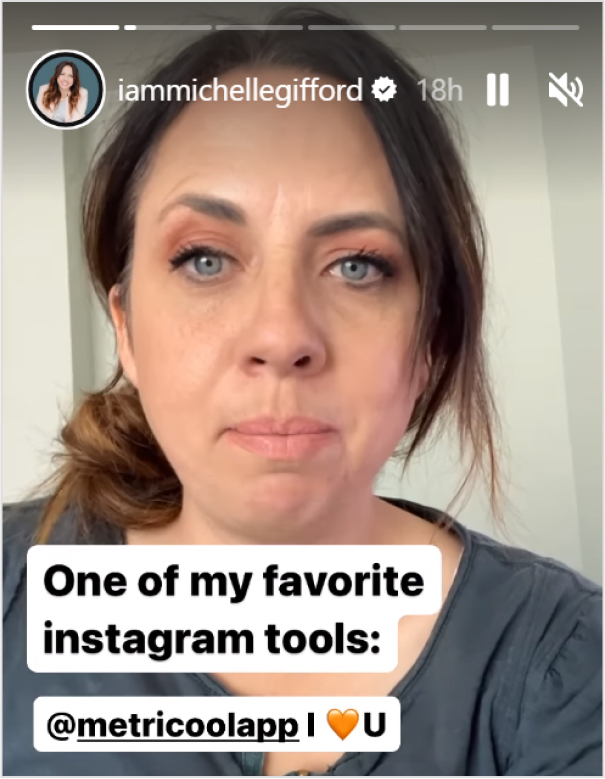
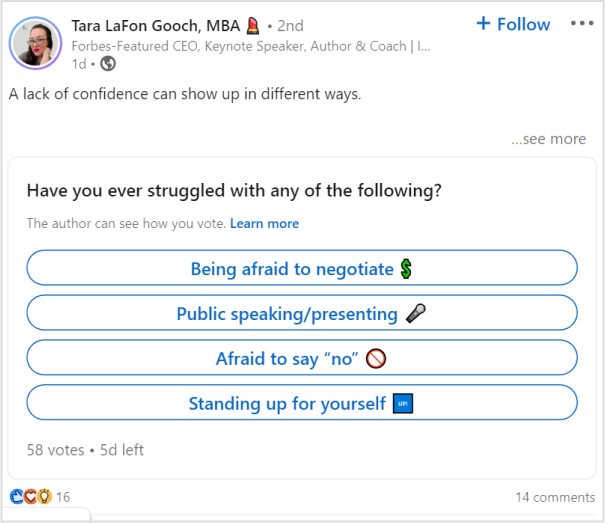
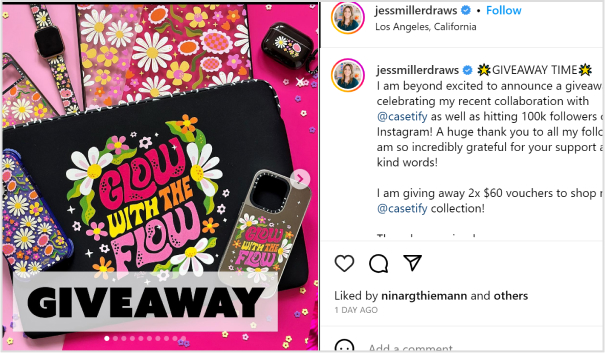
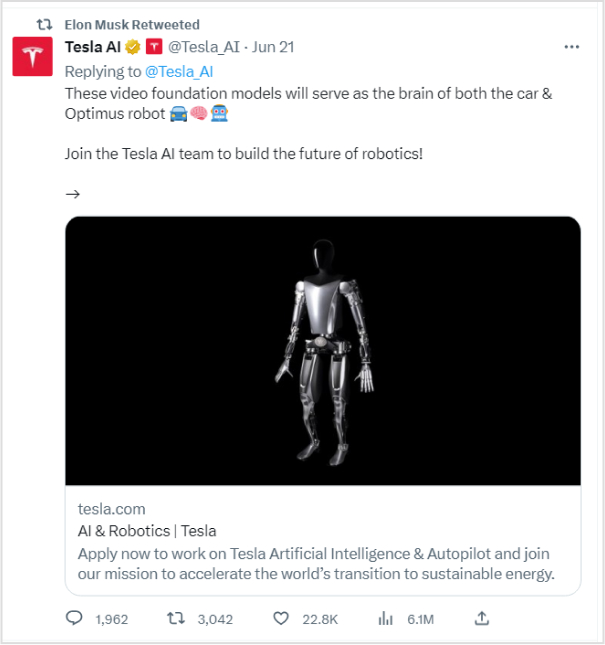
Understanding how to measure engagement on social media is important in today’s dynamic world in which every click, share, and comment shapes your brand’s online presence.
This guide is critical for those interested in tracking social media engagement. It will highlight essential metrics and introduce the capabilities of Replug in this context. So, let’s get started!
Why tracking social media engagement matter?
Social media platforms are not just virtual spaces; they serve as storefronts, customer service hubs, and stages for your brand’s performance. The engagement levels indicate whether your brand’s narrative resonates and if your virtual audience is genuinely interested.
Choosing the right metrics is crucial to avoid misleading data for your team or Facebook ad agency to interpret. The right metrics provide both quantitative data and qualitative insights, offering a comprehensive understanding of audience interaction. Regular social media reporting helps track these metrics effectively and make data-driven decisions for future strategies.
12 essential social media engagement metrics:
Let’s break down the 12 social media engagement metrics and provide explanations for each.
Likes, comments, reactions, shares, etc.
Likes:
Indicates how well your audience receives your content. The more likes, the higher the positive reception.
Comments:
Reflects deeper engagement. Comments often signify that your content has sparked curiosity, agreement, or even disagreement.
Shares:
Equivalent to a digital word-of-mouth recommendation. When users share your content, it demonstrates that they find it compelling and worth sharing with their circles.
Brand Mentions
Captures instances where users talk about your brand, providing insights into brand sentiment, context, and organic reach.
Video views and video completion rate
Video views:
Indicates the reach and initial interest in your video content. Platforms like Facebook count a view when a user watches for more than three seconds.
Video completion rate:
Measures the percentage of viewers who watched the video till the end. A high completion rate indicates engaging content.
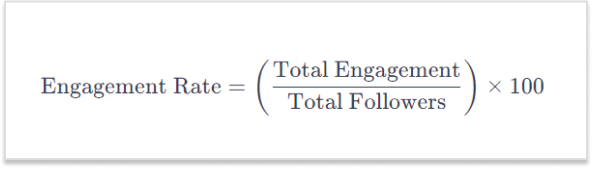
Engagement rate
Offers a holistic view of content performance by combining likes, comments, and shares. It helps understand engagement relative to the number of followers.
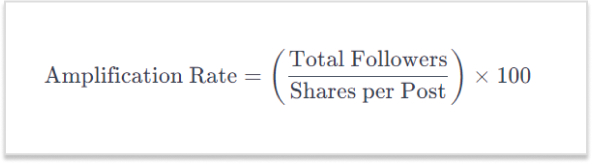
Amplification rate
Reflects how share-worthy your audience finds your content. It is determined by the ratio of shares per post to the total number of followers.
Represents the total number of people who have seen your post. It focuses on how many people have been exposed to your content.
Impressions
Total number of times your content has been shown on someone’s screen, regardless of clicks. It indicates how often your content is being seen.
Share of voice (SOV)
Measures how much attention your brand gets compared to competitors. A high SOV means your brand is dominating the conversation in the industry.
Audience growth rate
Measures how fast a brand’s following increases over a specific period. It reflects the brand’s popularity and appeal.
Conversion metrics
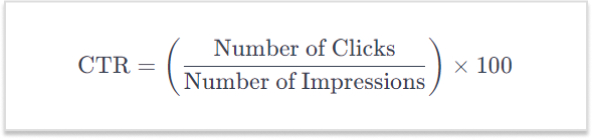
Click-through rate (CTR)
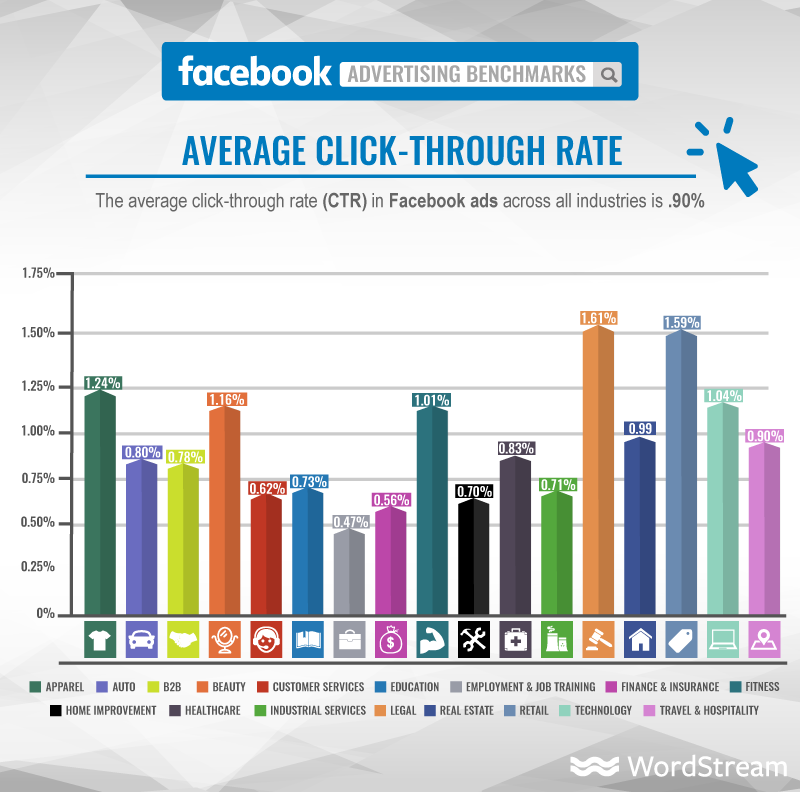
Represents the percentage of users who click on a link in your post. It measures how effective your content is in compelling users to take the next step.
Pertains to visitors landing on your website through direct links from social networks. It reveals how well social media channels drive users to your main platform.
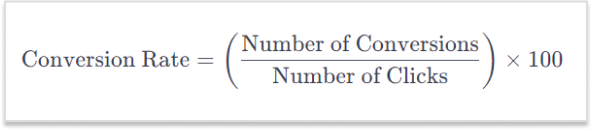
Conversion rate
Measures the percentage of users who take a desired action after interacting with your content, such as signing up or making a purchase.
A complete link management solution
for marketing professionals & agencies.
Try Replug for free
Replug: Your toolkit for social media engagement
Enter Replug.io, a powerful link management tool designed for comprehensive social media performance metrics. Beyond URL shortening, Replug offers a range of features:
Deep dive analytics:
Replug’s analytics transcend mere click tracking. Gain a comprehensive view of user interactions, including their origin, the timing of clicks, and the devices used. This detailed insight empowers brands to refine their social media marketing strategy based on the specific moments when their audience is most engaged.
Branded links:
Move beyond generic links. Replug empowers brands to create short links that are customized and branded according to their preference. These not only enhance brand recognition but also boost click-through rates, as users are more inclined to click on links they trust.
Link-in-bio tool:
Maximizes engagement opportunities within a single trackable link, perfect for platforms like Instagram.
Real-time data:
Things move fast in the digital realm, and Replug ensures you stay ahead. Real-time analytics allow brands to pivot on the fly. If a particular post is gaining traction, you’ll know instantly, enabling you to allocate resources strategically and capitalize on emerging opportunities.
A complete link management solution
for marketing professionals & agencies.
Try Replug for free
Conclusion:
Understanding and measuring these metrics empowers you to assess the impact of your social media efforts, refine your strategy, and build genuine connections with your audience. Each metric plays a unique role in providing insights into different aspects of your social media engagement.
Effective measurement of social media engagement is simplified with Replug’s intuitive features. Beyond mere numbers, Replug provides insights that ensure your connection with your audience is genuine, informed, and impactful.
FAQs
What is social media engagement?
Social media engagement refers to the interaction and participation of users with your content on social platforms. This includes likes, comments, shares, and other actions that indicate audience interest and involvement.
Why is social engagement important?
Social engagement is crucial for building brand awareness, fostering customer loyalty, and driving online visibility. It enhances your connection with the audience, influencing how your brand is perceived in the digital space.
With a staggering 5.04 billion users worldwide, social media has become an omnipresent force, shaping the way individuals connect, share, and engage in the digital era.
What makes URL-shortening tools effective for social media?
URL-shortening tools enhance the user experience by creating concise links and improving aesthetic appeal and character usage. They are particularly effective on platforms with character limits, ensuring a clean and user-friendly presentation.
Why use branded links to improve click-through rates?
Branded links build trust and recognition, encouraging users to click. They convey authenticity and are more likely to be clicked compared to generic links, ultimately boosting click-through rates and enhancing overall engagement.
Is Replug suitable for businesses of all sizes?
Yes, Replug is designed to cater to businesses of all sizes. Its versatile features and scalability make it adaptable to the needs of small businesses, startups, and large enterprises alike, offering a comprehensive solution for social media engagement.
Facebook, like any other website, can also benefit from SEO practices. This can be done by covering these key elements of Facebook SEO.
Optimizing your page’s profile information, such as the page name, description, and keywords.
Posting high-quality and relevant content optimized for social platforms and search engines.
Building a strong network of followers and engaging with them regularly.
Encouraging people to share and interact with your content.
Making sure your page is publicly accessible to search engines.
Utilize social management and optimization tools to improve branding.
What is Facebook SEO?
Facebook SEO is the process of optimizing a Facebook page to increase its visibility in search results on the Facebook platform and other search engines like Google. This can be done by improving the page’s profile information, posts, photos, and followers. By optimizing your Facebook page, you can make it more likely that people will find your page when they search for related topics or keywords on Facebook or other search engines.
15 techniques for Facebook SEO
Here are several ways to optimize your Facebook information for better visibility and accessibility in search results:
1. Know your audience
Understand who your target audience is and what kind of content they are interested in. Tailor your content to their interests and needs.
2. Optimize your page’s profile
Make sure that your page’s profile is fully filled out and includes relevant information about your business, such as your website URL and contact information.
Use a descriptive and keyword-rich page name: Your page name should accurately reflect the products or services you offer, and include keywords that people might use when searching for your business.
Write a compelling page description: Your page’s description should be a brief summary of what your business is all about, and should also include keywords.
Set your page’s privacy settings to “Public”: Go to your page’s settings and make sure that the “Who can see your future posts?” option is set to “Public.” This will allow search engines to crawl and index your page’s content.
Add contact information: Adding contact information like your business address, phone number and email address can also help people find your business more easily.
Use categories: Assign your page to one or more categories that best describe your business.
3. Claim unofficial pages
When advertising on Facebook, it’s important to claim and manage any unofficial pages that may be created by the platform or users. These pages may contain incorrect information and can negatively impact your brand’s reputation. Proper management of your main Facebook page and all other associated pages is essential for building a strong presence on the platform.
It’s important to note that claiming an unofficial page does not guarantee that it will be removed, but it will give you control over the page’s content and messaging. Also, it’s important to keep the page updated with relevant and accurate information in order to provide value to the audience.
4. Add keywords in your page’s “About & Bio”
Use keywords that are relevant to your business in the “About & Bio” sections of your page as it will help search engines understand the context of your pages.
5. Use friendly URLs for your Facebook Page:
Build brand consistency by creating SEO-friendly URL’s. These are custom links that can be created for a Facebook page to make it more memorable and easier for people to find. It can improve SEO by making it easier for users to remember and share the link. Utilize personal branding tools to increasing overall brand awareness.
6. Add your website link to the page
Adding your website link to your page can help search engines understand that your website and your Facebook page are related.
Posting high-quality and relevant content that provides value to your followers. This will encourage them to engage with your content and share it with others.
Use interactive content: Use interactive content such as polls, quizzes, and surveys to increase engagement and encourage people to share your post.
Post regularly: Posting regularly will help you to keep your page active and relevant and will increase the chances of your post appearing in the news feed of your followers.
Share someone else’s post: Sharing post of others will create a community feel and will help you to increase your visibility in search results.
Share your page: Sharing your Facebook page with your friends, family, and colleagues and ask them to share it with their network can also help drive more followers.
8. Optimize your posts
Using keywords in your post’s title, caption, and text that are relevant to your business and what people might use when searching for your business.
Use hashtags: Use relevant hashtags to make your post more discoverable and increase its visibility in search results. It will help search engines understand the context of your post and make it more discoverable.
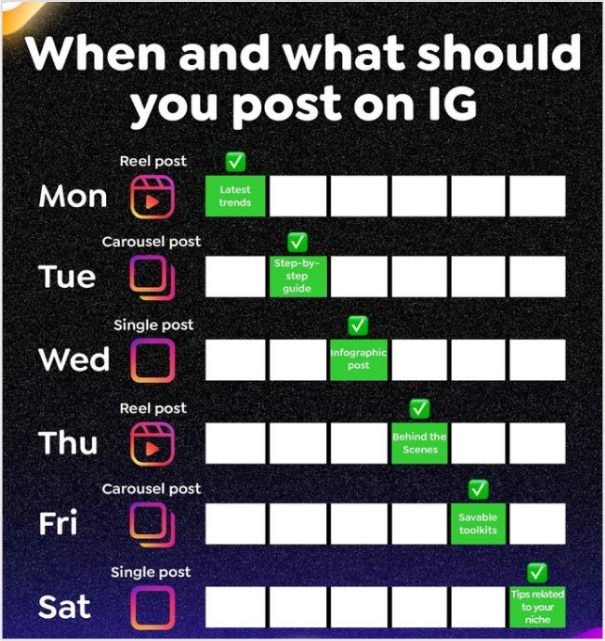
9. Post on the best time
By posting during peak activity times, your posts are more likely to be seen by a larger audience, which can increase engagement and participation. Use analytics tools to track the activity on your page and identify the best times to post.
According toContentStudio’s study, Thursday is the best day to get most engagement on Facebook. Whereas, Tuesday, Wednesday and Fridays are also good days to post.
10. Run Facebook Ads
Use Facebook ads to reach a larger audience and increase your page’s visibility.
Use Facebook targeting: Facebook’s targeting options allows users to reach people who are more likely to be interested in your business.
Run retargeting Ads:Retargeting is a form of online advertising that allows you to show ads to users who have previously interacted with your website or content.
Collaborate with other pages: Collaborate with other pages in your industry to reach a larger audience and increase your page’s visibility.
Explore Meta partnership ads: Meta’s partnership ads scale creator content across Facebook, from feeds to reels.
Engage with your followers: Respond to comments and messages, and actively engage with your followers. This will encourage them to continue following your page.
Host contests and giveaways: Hosting contests and giveaways can help you to increase your followers and engagement on your page.
Use influencer marketing: Reach out to social media influencers in your niche and ask them to share your page with their followers.
Get external links pointing to your Facebook page from other websites.
13. Create compelling CTAs
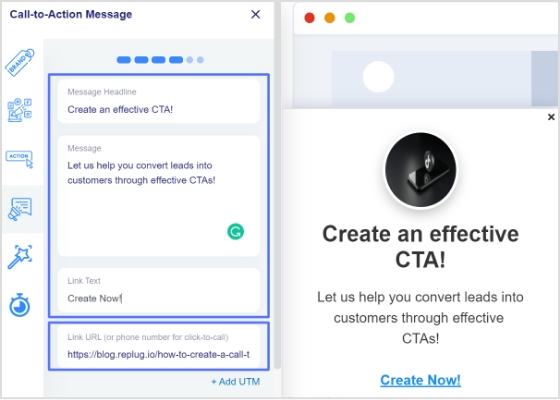
Call-to-Action (CTA) ads can be an effective way to guide potential customers through the sales process and encourage them to take a specific action. To create a successful CTA ad, make sure the language is clear and concise, and addresses the needs and pain points of your target audience. Use a sense of urgency but avoid making unrealistic or aggressive claims. This can help increase your reach and audience by promoting your solution to potential customers.
AI-powered Facebook Messenger Chatbots can be a valuable tool for businesses looking to improve their customer service, lead generation, and marketing efforts.
Customer service: Chatbots can provide 24/7 customer service by answering frequently asked questions, troubleshooting issues, and directing customers to the appropriate resources or human agents.
Lead generation:Chatbots can be programmed to ask qualifying questions and collect contact information from potential leads, which can then be passed on to the sales team.
Marketing: Chatbots can be used to deliver personalized and targeted promotions, content, and offers to customers based on their preferences and behavior.
15. Use Facebook management & optimization tools
URL link management tool
It’s also important to note that using a vanity URL can also be a great way to make a link more memorable and shareable.
How to create vanity links?
URL Shorteners!
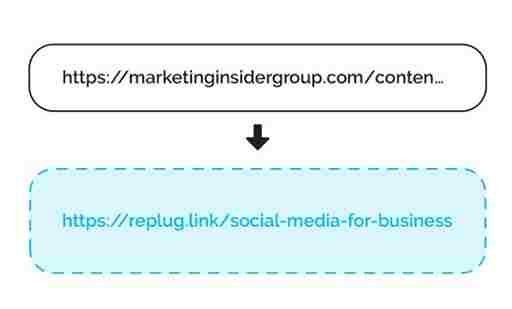
URL shorteners can be used to improve SEO on Facebook by creating shorter, more manageable links that are more likely to be shared. These shortened disguised links improve the visibility of the link on Facebook and are more likely to be clicked on.
Use Replug’s custom URL maker free online to create a branded short link for the webpage you want to share on Facebook.
With Replug you can not only shorten links but it also assists in several other ways explained below. It is an all-in-one link management platform for businesses and agencies.
Deep linking improves engagement
Deep links can improve brand engagement by allowing users to directly access specific pages or content within an app or website, rather than just the homepage. This can help to increase the chances of users finding the content they are looking for and engaging with it, which can lead to increased shares, likes, and comments.
Google and Facebook recommend the use of deep linking for mobile apps for a better user experience, if the app is installed it will open the content within the app, otherwise it will direct to the website.
In summary, using deep links can improve engagement and Facebook SEO by making it easier for users to find and engage with specific content, and by making advertisements more effective.
Increase online visibility using bio links
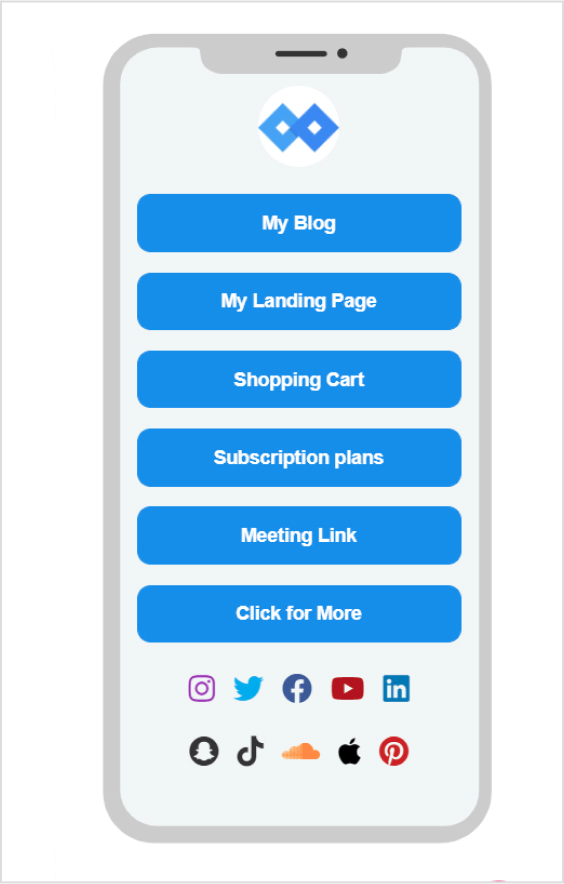
Having a bio link on a Facebook page gives you a great opportunity to connect online users to your other accounts. A bio link allows users to access all important information related to you or your brand through a custom designed web page. Most platforms have a restricted space, i.e. mostly only allow to place a single link in profile. But with bio links you can add multiple links and add other key information as well.
Create clear and compelling call-to-actions
Using clear and compelling call-to-action phrases such as “Learn more” or “Sign up now” encourage users to click on the link.It becomes easier for users to find and engage with specific content, and makes advertisements more effective. Here’s an example.
Track clicks and conversions
URL shorteners come with built-in analytics that allow you to track the number of clicks on the link, which can help you understand how well your content is performing on the social platform.
Retargeting
By targeting users with personalized ads that have already visited your website, you can increase the chances of them returning to your website or engaging with your content. Retargeting can be done by using Meta Pixel, a small piece of code that can be placed on your website, it allows you to track the actions of users who visit your site and then use that information to create targeted ads.
Additionally, retargeting can also improve the click-through rate (CTR) of your ads, which is a key metric used by Facebook’s algorithm to determine the relevance and quality of your content. This can lead to improved visibility and engagement of your content and advertisements on the platform, which ultimately can help to improve your Facebook SEO.
Facebook management tool
Social media management tools can improve Facebook SEO by helping businesses to:
Create and schedule optimized posts:
Social media management tools can help businesses create and schedule posts that are optimized for Facebook’s algorithm, using keywords and other best practices for SEO.
Track and analyze performance
Social media management tools can provide businesses with detailed analytics on their Facebook page’s performance, including metrics such as engagement, reach, and click-through rate. This data can be used to inform and improve SEO efforts.
Monitor and respond to comments and messages
Social media management tools can help businesses keep track of comments and messages on their Facebook page, and respond to them in a timely and professional manner, which can help improve engagement and build trust with customers.
Identify and engage with influencers
Social media management tools can help businesses identify and engage with influencers in their industry, which can help to increase brand awareness and attract more backlinks to their website.
Automate repetitive tasks:
Social media management tools can help businesses automate repetitive tasks such as scheduling posts, sending direct messages, and tracking analytics, which can save time and improve efficiency.
Monitor competitors
Social media management tools can help businesses keep an eye on competitors and industry trends, which can help inform their own strategy and stay ahead of the curve.
It’s worth noting that these tools are just one aspect of a comprehensive SEO strategy, but they can be very helpful in improving a Facebook page’s visibility, engagement and performance, which can help in improving the overall SEO of the website.
FAQs for Facebook SEO techniques
Do Facebook ads improve SEO?
Facebook ads can help improve SEO in a few ways:
– Drive more traffic to the webpage – Increase brand awareness, – Improve website’s visibility and searchability – Collect data on your target audience
Do Facebook posts count as backlinks?
While Facebook posts themselves are indirectly counted as backlinks. Social media platforms, like Twitter, Instagram, and LinkedIn, and it could be a way to drive more organic traffic to your website.
What are the 5 stages of SEO?
There are four stages of SEO: keyword research, title optimization, url optimization, content optimization and backlink building.
What are the 4 types of SEO?
– Technical SEO: This type of SEO focuses on the technical aspects of a website, such as its architecture, code, and site structure, to make it more easily crawlable and indexable by search engines. – On-Page SEO: This type of SEO focuses on optimizing individual web pages in order to rank higher and earn more relevant traffic in search engine results. This includes optimizing the content and meta data of the page. – Off-Page SEO: This type of SEO focuses on increasing the authority and trustworthiness of a website, typically through link-building efforts and contextual backlinks service. – Content SEO: This type of SEO focuses on creating and optimizing content in order to rank higher in search engine results. This includes researching keywords, creating high-quality content, and optimizing the content for search engines.
Note that these types of SEO often overlap and work together in a comprehensive SEO strategy.
What is the golden rule of SEO?
The Golden Rule of SEO is to create valuable and relevant content for users.
Have you ever heard of the dark posts in your social media management journey?
Most of you haven’t heard about it until recently. Even though dark posts have been around for over a decade, it’s a concept still new to most of us.
If you’d like to get started with link management and ad-campaign tracking, head to Replug and explore our full platform.
And, if you have been paying attention to social media marketing recently, then it’s worth going deeper and figuring out how to use dark posts on social media going forward.
So let’s cut to the chase!
Origin of dark posts
The concept of dark posts was introduced by Facebook in 2012. It was later adopted by all major social media platforms, such as Twitter, LinkedIn, Pinterest, and YouTube.
The dark posts are targeted ads that are tailored toward a specific segment of the audience and these posts don’t appear on the timeline for everyone.
Moreover, the posts don’t have the sponsored post or promoted post attribution, which makes this type of post quite unique.
Advertisers and digital marketers publish dark posts across all major social media platforms mostly to A/B test the performance between dark posts and regular ads.
Example of a dark post
You already know that a dark post doesn’t appear on the page’s feed. Instead, it appears on the timeline to a select group of users.
The purpose of a dark post across all social media platforms is to target the specific audience who hasn’t followed the brand just yet.
So after understanding the concept behind this type of social media post, it wasn’t difficult to spot a dark post.
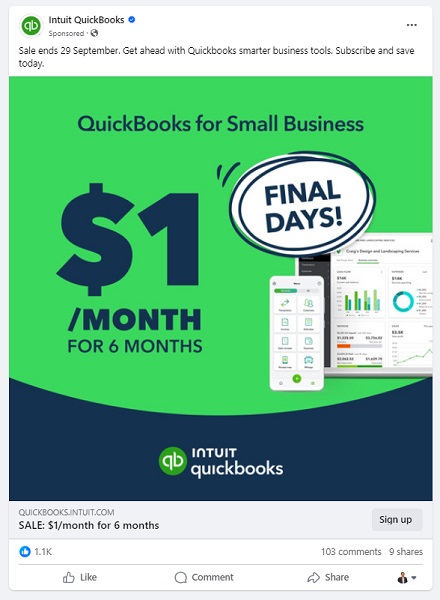
Here’s an example of a dark post on Facebook:
It seems like Intuit QuickBooks is using dark posts on Facebook to reach out to the targeted audience that has probably heard about them before but hasn’t engaged with them properly.
It was a Facebook ad that appeared on the home feed. In fact, you won’t find that very post anywhere on their Facebook page.
Why use Facebook dark posts?
Some of you might be wondering why we need to use Facebook dark posts. Well, there is a reason why a social media platform provides users with a feature – Facebook’s dark posts feature is no different.
There are a handful of reasons why you should be at least testing out this Facebook ad strategy.
Let’s take a look at some of them:
1. Precise targeting
Precise targeting is the mark of a perfect social media ad campaign. Facebook dark posts offer unparalleled precision in audience targeting, which makes them special.
Unlike regular Facebook page posts that are visible to most followers, dark posts hit the bullseye as they aren’t intended to reach everyone. Instead, they’re tailored to reach a specific group of audiences based on the given demographics, interests, and behaviors.
2. Avoid timeline clutter
Big brands and organizations run multiple Facebook ad campaigns. Since showcasing multiple ads to the same audience could be overwhelming for the audience, dark posts come to the rescue as they don’t clutter your brand’s timeline.
Moreover, dark posts remain invisible to your followers as they’re targeting the prospective audience. This way brands avoid timeline clutter by opting for Facebook dark posts.
3. Split test Facebook ads
Dark posts make split testing easier than ever. Advertisers can create multiple variations of the same ad and test them on different target audiences without overwhelming their followers.
The advertisers would learn which combination of the ad copy, ad design, and target audience works best. As a result, it would immensely refine the brand’s social media advertising strategy.
4. Optimized Ad spend
Ad spending could go out of control if you don’t know what you’re doing, especially when you’re running ads with a tight budget. One of the reasons why dark posts work is that they appear only to the intended audience.
Moreover, advertisers can optimize the ad spend by improving the targeting, behaviors, and interests of the prospective audience.
5. Tailored engagement
Every marketer dreams of getting a ton of engagement on both social media ads and organic posts. Dark posts are a great way to get traction by crafting relevant and thought-provoking ads for a specific audience.
It massively increases the relevance of your ads, making them more impactful to get the desired results.
6. Unobtrusive advertising
Dark posts make it easier for brands and experts to target a select group of audiences without bombarding the same offer to the broad audience base. This subtlety can make a lot of difference in the outcome of the Facebook ad campaign.
How does dark posting work?
Dark posting on social media platforms is not rocket science. Users can dark post on almost all major social media platforms like Facebook, Twitter, LinkedIn, and TikTok.
The way it works is quite simple. Dark posting is an advertising strategy that allows advertisers to publish ads targeting a certain segment without shoving the offer down the throats of existing followers.
Dark posts are also known as “unpublished posts” on Facebook. The reason is that such posts are used as ads only. However, Facebook provides users with an option to publish the dark post later on the page like a regular Facebook page post.
To ensure the proper publishing of a dark post, make sure you opt for the “only use this post for an ad” option while creating your Facebook ad.
We’ll dig deep into the benefits of dark posting on social media platforms later in the article. Just make sure that you have understood the fundamental idea of how dark posting works.
How to identify a dark post social media ad?
Digital marketers and online advertisers may spot a dark post from miles away. It’s essentially an ad just like any sponsored post or boosted post, but it isn’t necessarily intended for the existing customers.
Moreover, experts identify a dark post by looking at the offering as well as visiting the brand’s page to see whether or not the post exists on the timeline.
Here’s an example:
IDP Education is an education and visa consultancy service that helps students with studying abroad, admissions, and visa services.
They published a dark post on their Facebook page which wasn’t available on the Facebook page’s feed. So that’s how it was easily stood out.
Here are four ways to quickly identify a dark post on social media :
1. They don’t show up on your page’s timeline
One of the ways to identify a dark post is that it doesn’t show up on the page’s timeline. One can spot a dark post by looking through the brand’s page that whether or not the same ad is posted as a normal post. Usually, a sponsored or boosted post can be seen on the page’s timeline, but it’s not the case with dark posts.
2. They don’t appear on your followers’ feed
Just like they don’t show up on the page’s timeline, these posts don’t appear on the followers’ feeds. This is the difference between a regular ad and a dark post. A normal ad might be appearing to the current followers depending on the audience targeting, interests, and behaviors. However, the dark posts won’t do that.
3. These posts are only displayed to the targeted audience
Since dark posts don’t appear to the existing followers, these posts are used to target a specific segment of the crowd that hasn’t been following you on social media. Each brand has a buyer persona when trying to reach out to new audiences, and that’s where dark posts come in handy.
4. They are mostly discount or coupon offers
Brands, agencies, and companies use dark posts to get traction using discount offers, coupon codes, and other enticing offers. The purpose is to engage the new faces and bring them into the marketing loop. So dark posts could be used to reach new audiences by offering discounts and coupon codes.
Facebook dark post ads benefits
We’ve discussed how these types of social media ads work and how to spot these ads across different social media platforms. Let’s shed some light on the benefits that they provide to the advertisers:
1. Easier to target a specific audience
Dark posts are paid posts that don’t target your existing audience on social. In fact, these posts target the new users who haven’t followed you or your business page just yet. These posts help brands and entrepreneurs put their products and services in front of new audiences.
2. No bombardment of sponsored posts on the feed
Since dark posts don’t show up on the feeds of the existing followers, these types of posts don’t clutter followers’ home feeds with sponsored posts. Nobody wants to see the sponsored posts from the brands or experts they’re already following.
3. Test out new ad strategies without disturbing the existing followers
Dark posts provide a segue into testing out different ad strategies without making a mess. One of the fears of online advertisers is that they don’t want to disturb the existing customers or followers in any way.
For instance, offering the same product to customers who have already bought the same product would be a bad move.
4. Experiment with new content trends
Experimenting is the key to winning on social media. Don’t shy away from testing out different types of content formats, styles, patterns, and tactics.
Social media trends change over time, so it’s necessary to keep up with the new trends and capitalize on them when they’re in the trend. Dark posts could be a fantastic way to test out new content trends to see how people react to them.
5. No appearance on the timeline
One of the benefits of dark posts is that they don’t appear on the timeline of the advertiser’s page, which means the followers don’t have to see every offer the business is creating for new or unpaid customers.
The dark posts only appear to the audience it is intended to reach out to on the social media platform.
How to create dark posts on Facebook?
Dark posts are paid ads, but they don’t show up to the existing customers. If you’re curious about how to start experimenting with dark posts on Facebook, then allow me to share my two cents on the process.
Let’s head over to the few simple steps to understand how to create this type of Facebook post:
Step 1: Navigate to Ads manager
To create a dark post on Facebook, go to the Facebook Ads Manager, which serves as the central hub for managing your Facebook ads campaigns.
Now click on the drop-down menu located at the top left corner and choose the “Page Posts” option under the “Create & Manage” section.
Once you find this option, move on to the next step and carry on the rest of the process.
Step 2: Create the dark post
Find the “Create Unpublished Page Post” option at the top and click on it to initiate the creation of a new dark post.
Provide your ad details, ensuring that it reaches the right audience. Moreover, when specifying how to utilize the post, opt for “Only use this post for an ad.” Doing so ensures that the post remains hidden from public eyes and would only reach a select group of the audience.
Step 3: Select target audiences
Target audience is one of the fundamentals of any type of digital ad. Advertisers can utilize preexisting segmented ad sets if they’ve created ads previously. However, if you’re new to this, you’ll need to establish audience segments while creating a new ad.
Advertisers have the option to specify their audience’s demographics such as age, gender, location, language, behaviors, and interests to make the ad campaign more authentic and helpful.
Step 4: Check & balance on the dark post performance
It’s vital to keep a check-and-balance on the dark posts’ performance. Don’t hesitate to A/B test different ad types, formats, and styles to see which works better for your brand.
You can conduct a split test on your dark post and based on the results optimize your post accordingly. Moreover, you can modify your audience parameters as needed.
How to analyze the Facebook dark posts?
To analyze the Facebook dark posts, you would have to look at different numbers, graphs, and data. However, it’s not as tricky as it may sound like. Anyone with a little bit of Facebook ads experience can analyze the dark posts’ performance.
Here’s how to do it:
1. Compare the performance with regular ads
Start with comparing the Facebook dark posts’ performance with regular ads or sponsored posts. These regular Facebook ads would appear on the page’s timeline. Plus, they might be showing up to some of the current followers as well.
The idea is to run both types of Facebook ad campaigns and see if there is a difference in the outcome of the regular ads and dark posts. This will give you an idea of how well or badly your dark posts were performing.
2. Split-test different dark posts
Once you’re done comparing dark posts with regular Facebook ads, try split-testing the dark posts with one another. It means you’ll be running multiple dark posts on the same subject and see how they perform.
You can further analyze the winner’s dark post to see what was the differentiator that put the winner’s dark post ahead of others. Harness the power of A/B split testing by comparing different dark posts and trying to find the reasons behind this.
3. Check the ROI of the dark posts
ROI is a popular metric used in digital marketing to analyze the effectiveness of any marketing tactics or strategy. One of the ways to analyze Facebook’s dark posts is to see the return on the investment.
These are essentially paid posts on social media platforms, so there is no harm in analyzing the ROI of one type of paid post to another type of paid post.
4. Keep an eye on the niche preference
Some dark posts may outperform other dark posts from a performance standpoint. Sure, there might be technical differences, which might make the comparison irrelevant. However, there will be some cases where this won’t be an issue.
Keeping an eye on the niche preference means in some niches dark posts or advertising on social media in general would perform better than the others.
It’s necessary to figure out whether or not the dark posts make sense in this niche. Otherwise, you might end up wasting your time and money.
FAQs about dark posts
Are dark posts paid?
Yes, the dark posts are paid posts. However, they are slightly different from the regular paid posts from the targeting standpoint.
Why is it called dark post?
Dark posts are dark posts or unpublished posts because they don’t appear to the current followers. Instead, they only show up to the new audiences.
What is the difference between a dark post and an organic post?
The main difference between a dark post and an organic post is that the dark post reaches the audience through paid advertising. Whereas the organic post reaches the audience naturally through content popularity or recommendation.
Ever felt frustrated by Instagram’s link limit? You’re not alone! While Instagram now allows up to five links in your bio, that might not be enough if you have multiple websites, social media accounts, or affiliate links to share.
That’s where Replug comes in. It lets you create a single, sleek bio link page where you can add unlimited links, making it easier for your audience to find everything in one place.
Let’s dive into how you can set up multiple links in your Instagram bio using this top-notch URL shortener!
Why add a Replug link to your Instagram bio?
Before we discuss the how, let’s know the why.
Why should you even consider integrating a Replug link into your Instagram bio?
Beyond the obvious advantage of offering an in-depth view of your presence, here are some compelling reasons:
Boost your follower base: Direct your Instagram followers to explore your other platforms, encouraging them to follow you on those as well. You can also add links to your Instagram in the bios of your other accounts to drive cross-platform engagement and get leads from social media.
Monetize your audience: Replug helps you turn Instagram followers into customers by linking to your e-commerce store, Etsy shop, or other products. Direct users to your purchasable content, turning your followers into potential buyers and boosting sales for Instagram business accounts.
Monitor analytics: Replug provides insights into user engagement, tracking clicks, views, and click-through rates (CTR). For influencers, this data is essential for refining your content strategy, helping you optimize performance and improve audience engagement across platforms.
Offline connection: Share your Instagram QR code with followers to connect them to your other platforms. Whether it’s for a restaurant menu or event info, the offline-to-online connection creates an easy way for users to engage with your content anytime, anywhere.
Customizable landing pages: Build a personalized landing page with Replug that reflects your brand’s style and identity. Customize everything from layout to colors to create an on-brand experience for your audience.
Unlimited links: Replug allows you to share an unlimited number of links through its bio link feature. From your website and blog posts to products and affiliate content, it gives you a simple place to drive traffic and keep your audience engaged.
Retargeting pixel support: Improve your ad campaigns with retargeting by tracking visitors who clicked your links. This feature helps you stay connected with your audience and drive conversions by reaching users who have shown interest.
Mobile-friendly and fast: Replug ensures that your landing pages and links work seamlessly on all devices, offering a fast and smooth experience for users accessing your content from smartphones, tablets, or desktops.
Step 2: Access the “bio links” feature on the Replug dashboard.
Step 3: Click the “New Bio Link” button to create a new bio link specifically for your Instagram bio.
Step 4: Personalize your bio profile to your heart’s content. With Replug, you can add a profile picture, profile title, bio description, and even a verification badge!
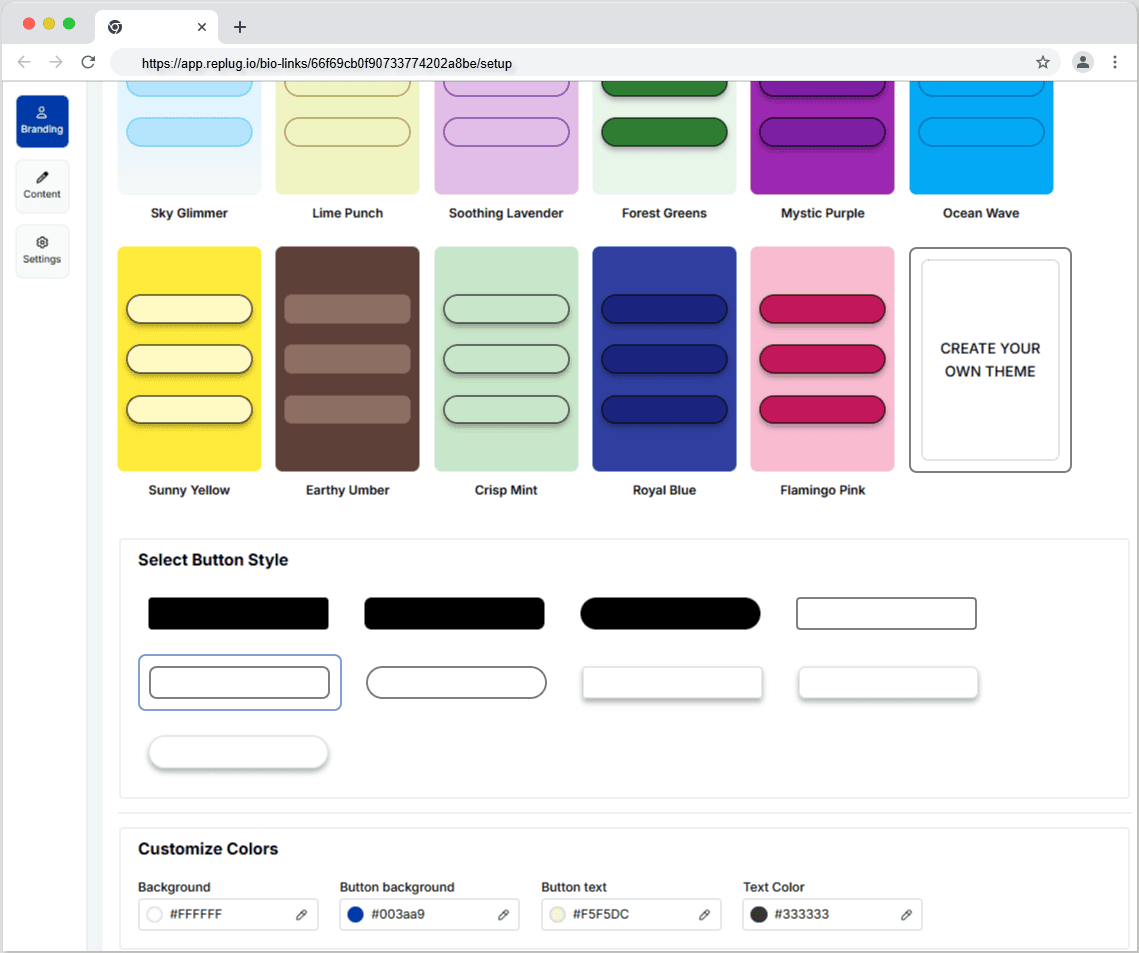
Now comes the creative and fun part. You choose from stunning pre-designed templates or create your own. You can also customize colours, select from button styles, and customize colours.
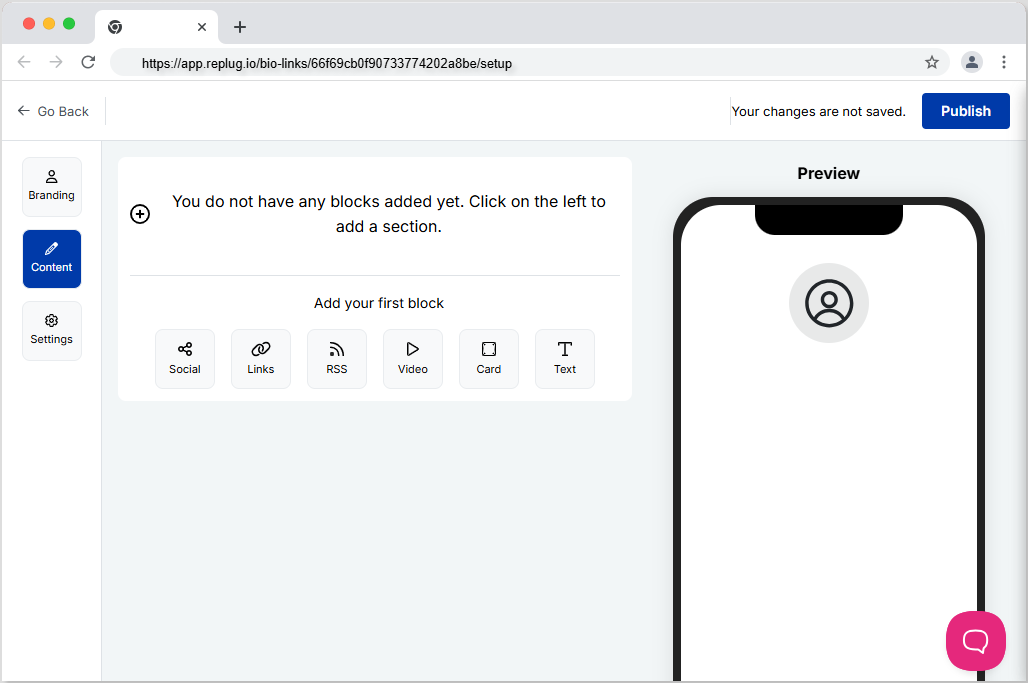
Step 5: Now customize the content you want on your bio link landing page. You can choose from multiple blocks, including social, links, RSS, video, card, and text. This is a great way to add all your links inside a single and clean landing page. It prevents your bio from looking cluttered and messy because of multiple links.
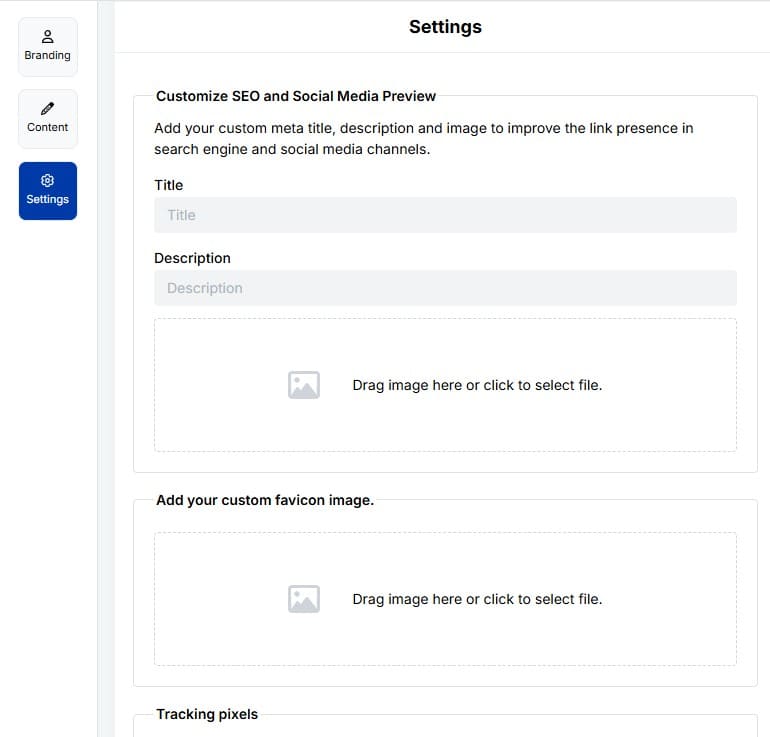
Step6: The final step is to customize SEO and social media preview. Here, you’ll have the option to add your custom meta title, description, custom favicon image, and retargeting pixel to improve the link presence in search engines and social media channels.
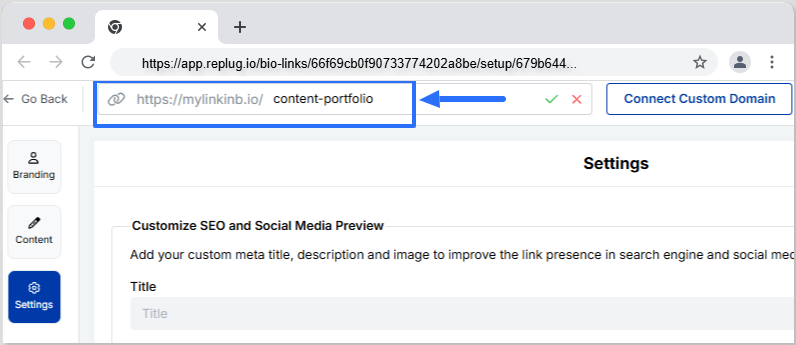
Step 7: Customize your bio link slug for a personalized touch.
Step 8: Update your bio link and preview it for final touches.
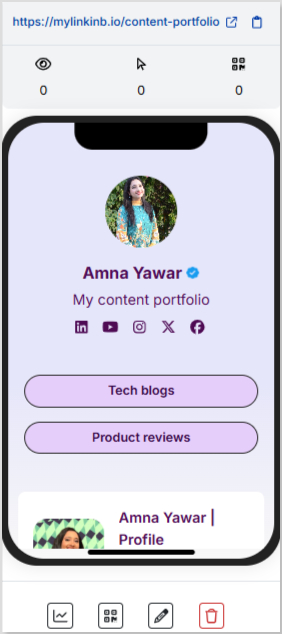
Step 9: Go back to your bio link dashboard. You will now see that your bio link has been generated and is live.
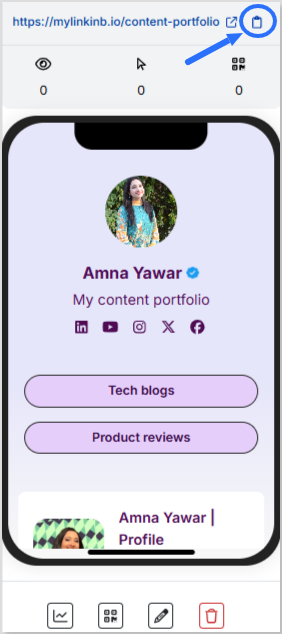
You can now copy your bio link URL, view your bio link analytics, download the QR for easy sharing, edit your bio link if required, or delete it permanently.
Add bio link URL to Instagram bio:
Step 1: Copy your bio link URL from Replug.
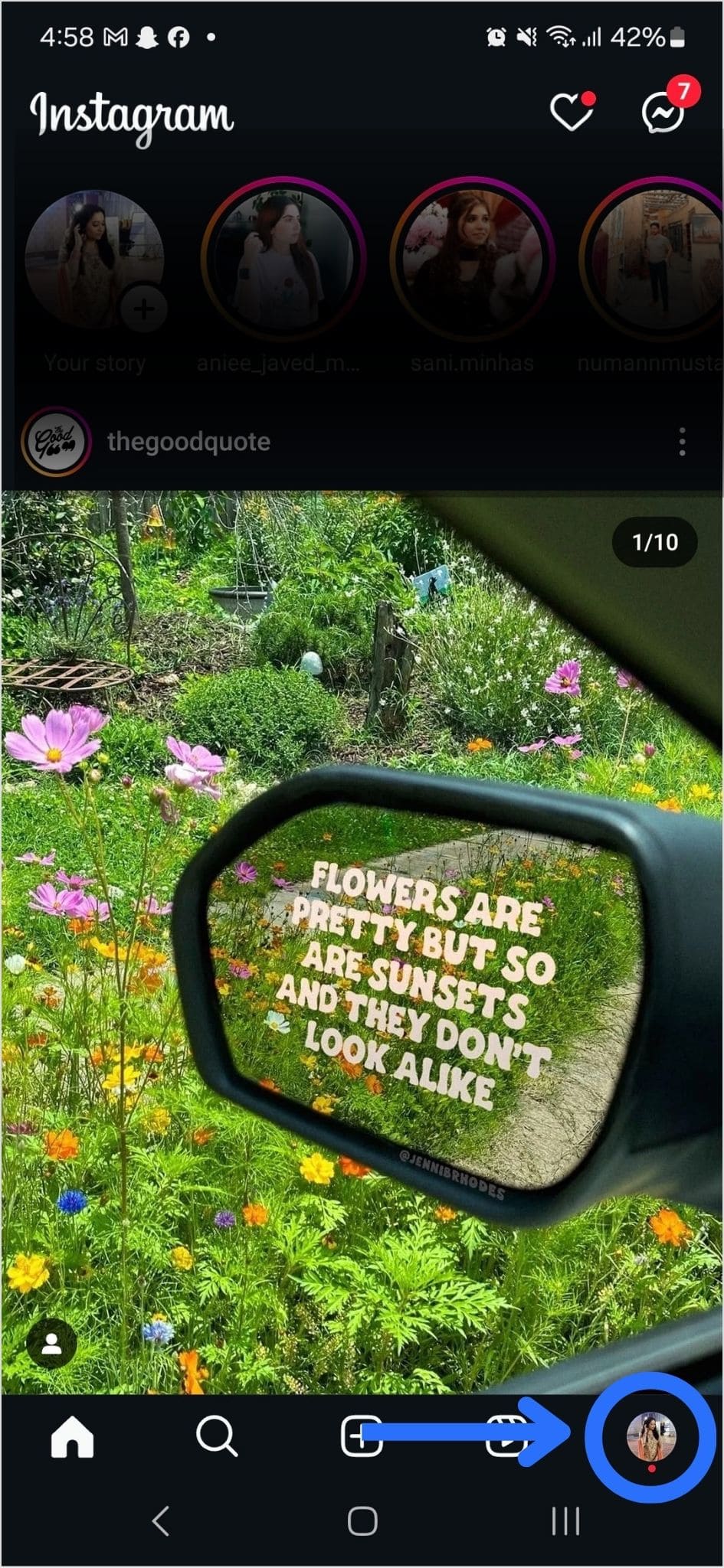
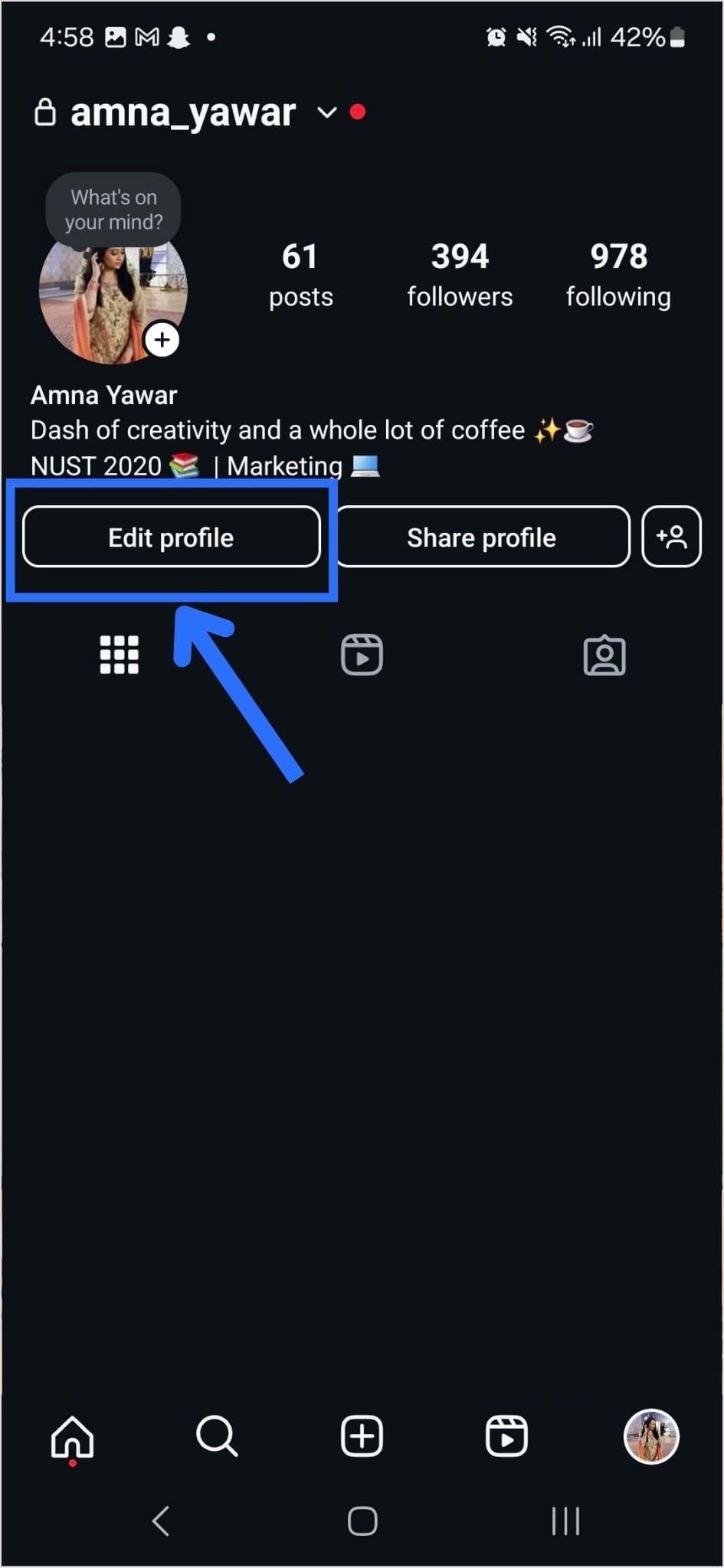
Step 2: Open Instagram on your mobile and tap your profile icon in the bottom right corner.
Step 3: Tap on the edit profile button on your profile page.
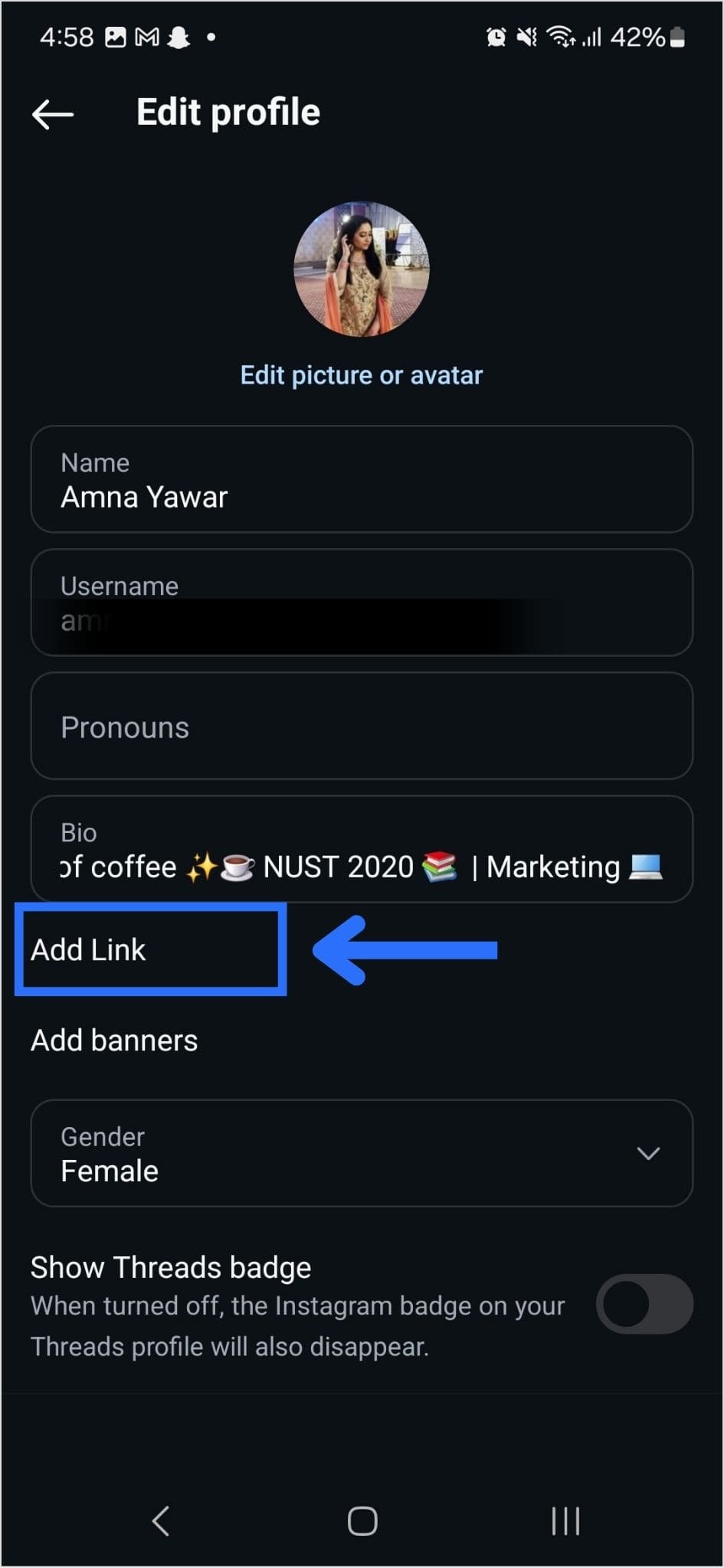
Step 4: Now, you will see the add link section on your mobile screen. Tap on it.
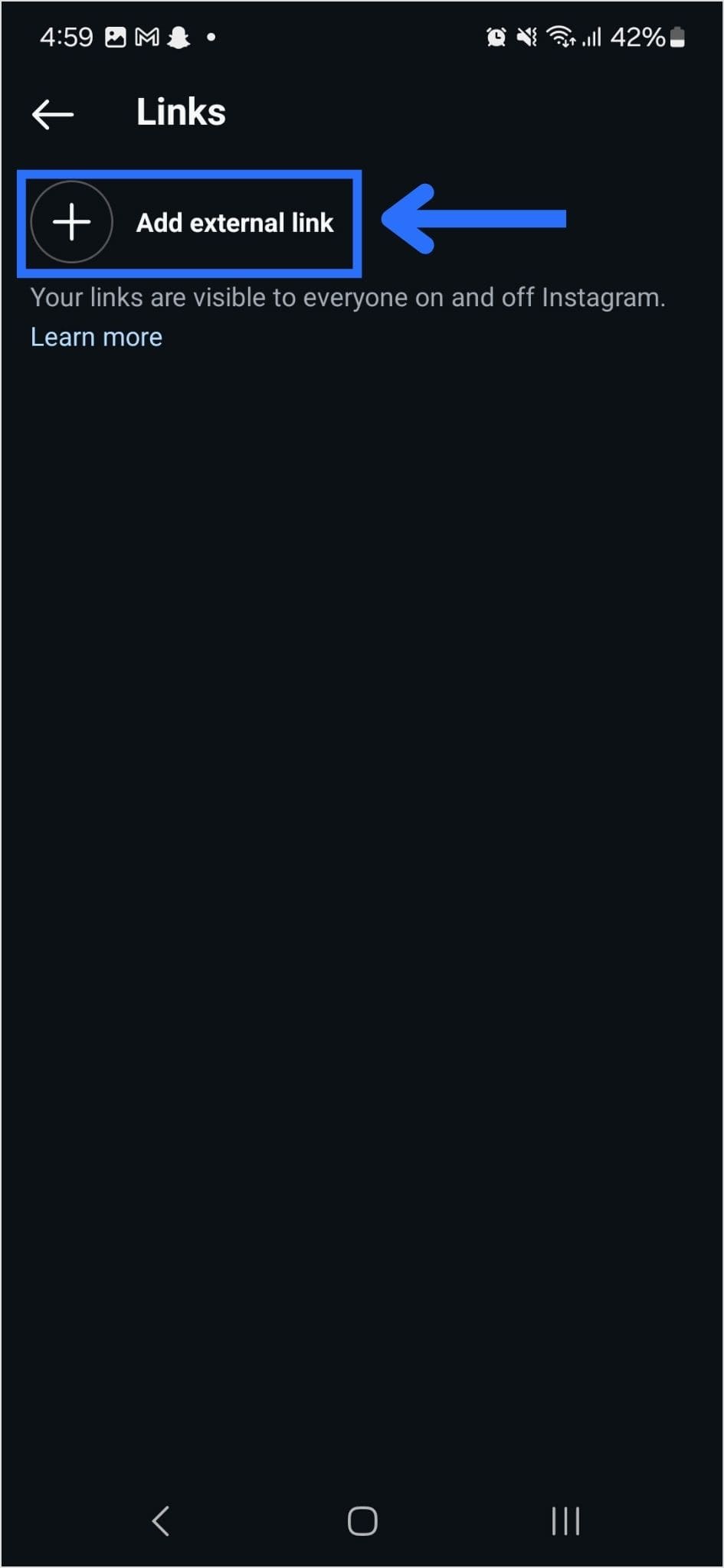
Step 5: Tap the add external link section to add your website address.
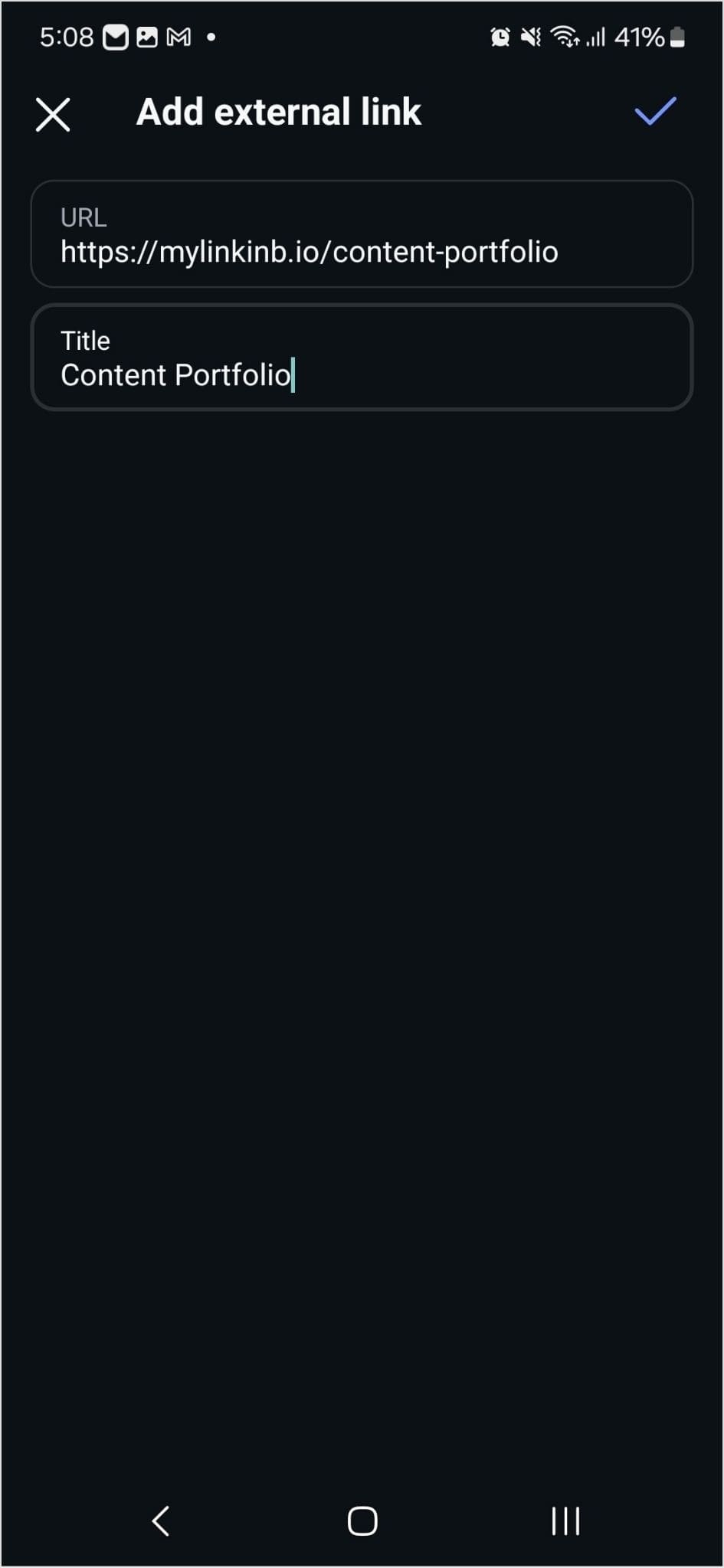
Step 6: Paste the bio link URL in the URL section and add a title in the title section.
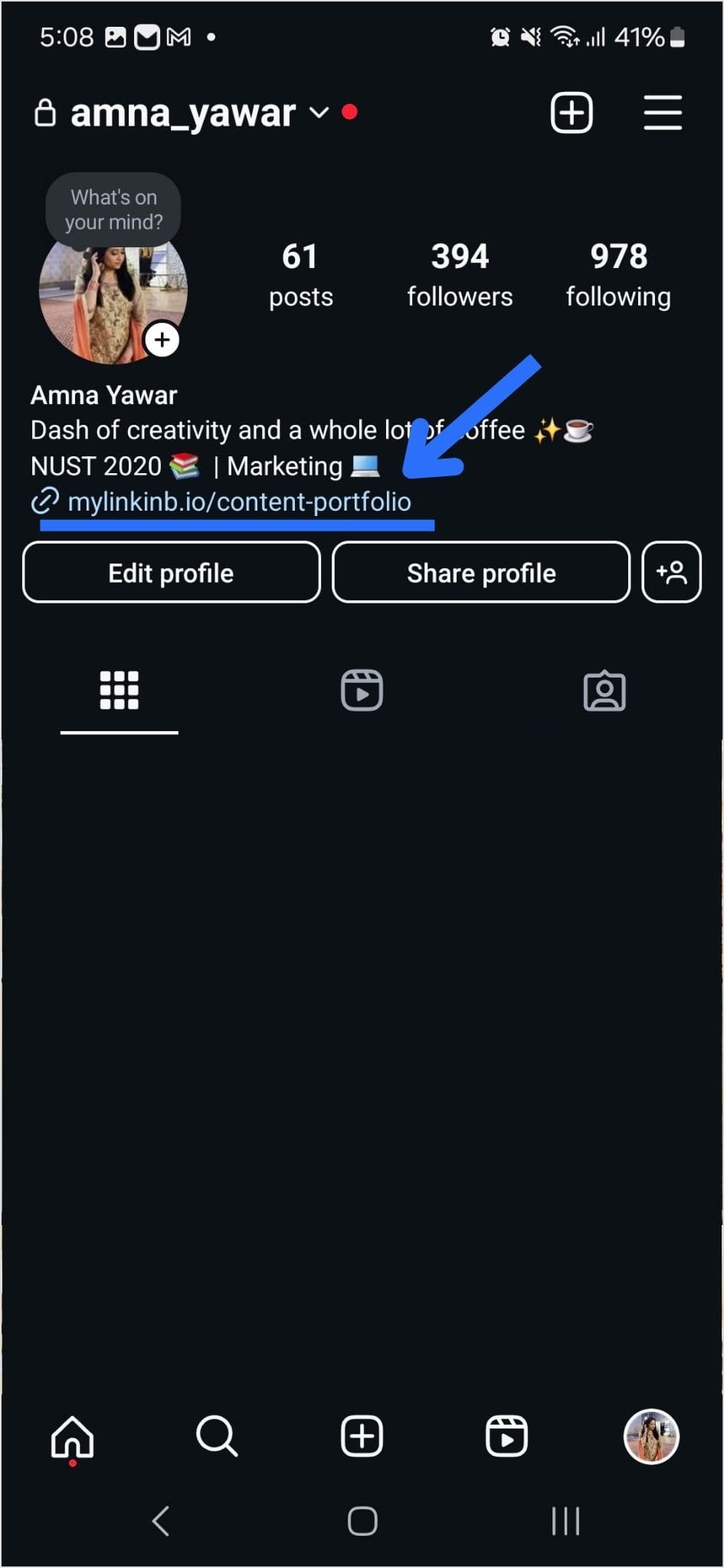
Step 7: Your link in the bio will now appear in your profile.
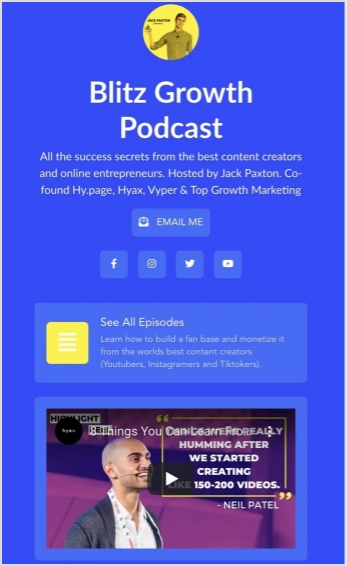
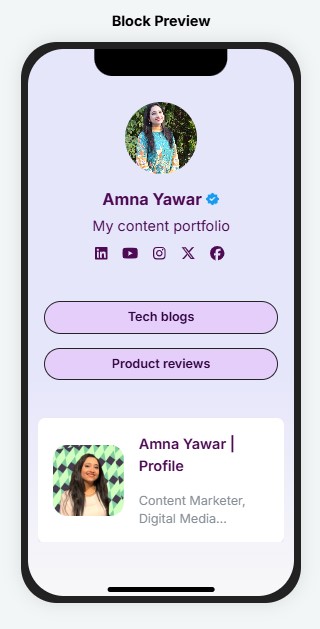
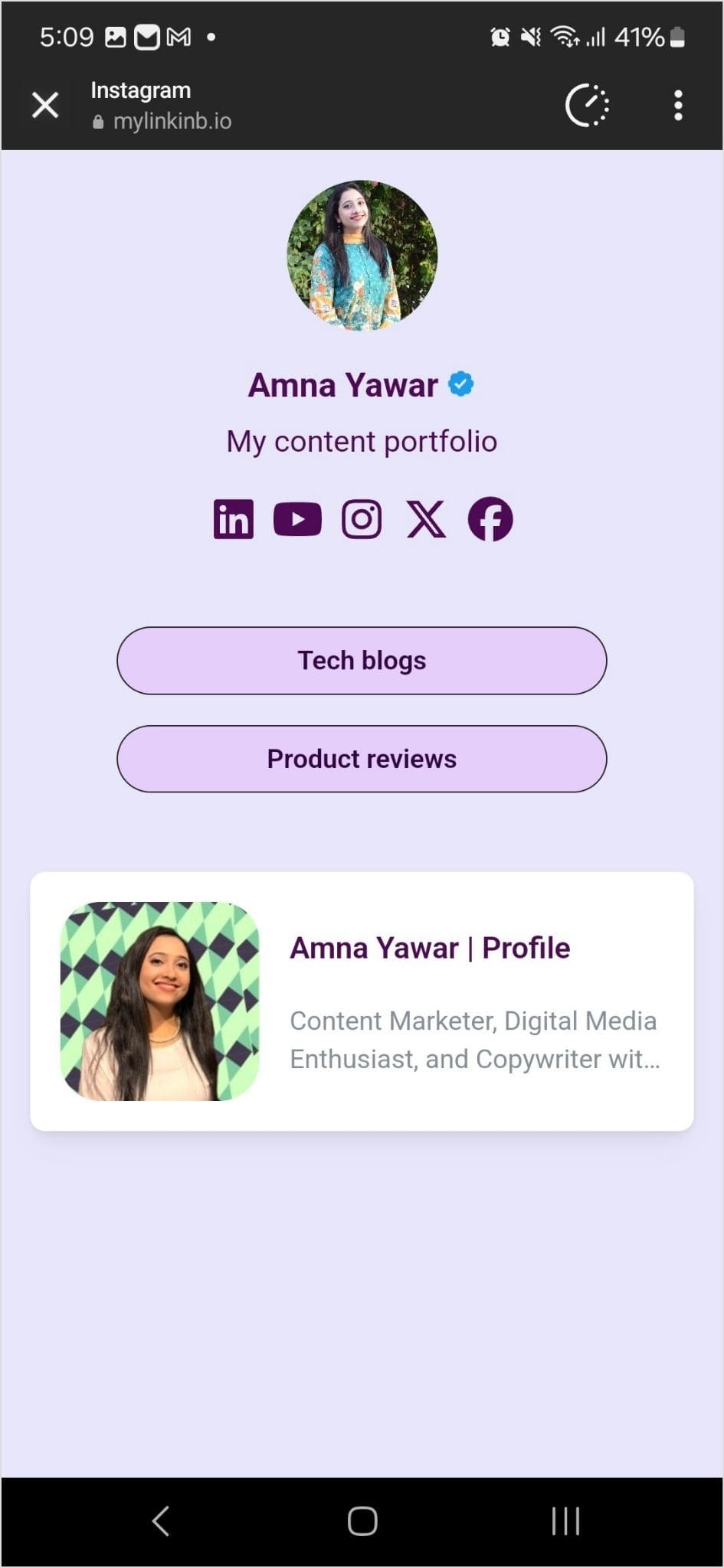
Step 8: Your Instagram profile now has multiple links in the bio. The bio link URL is now clickable. Here’s what the landing page looks like in our example:
Adding multiple links to your Instagram bio can enhance your profile’s functionality and engagement. By using services like Replug and following the steps mentioned earlier, you can efficiently manage and share multiple links within your Instagram bio.
Keep your audience informed and connected with your content. Explore the possibilities and make the most of your Instagram presence!
Instagram has made it easier than ever to share valuable resources and information with your followers. You can now add links to your Instagram Stories, regardless of your account size. Whether you’re a business, creator, or an individual, this feature empowers you to connect with your audience in new ways.
In this guide, we’ll show you how to add a link to your Instagram story, enabling you to share what matters most to you. Let’s get started.
Why do you need to add a link to your Instagram story?
Adding a link to your Instagram story serves several important purposes:
Share resources: You can direct your followers to external websites, articles, or resources related to the content of your story. This is valuable for sharing information, promoting products or services, or providing additional context.
Drive traffic: If you have a website, blog, or online store, adding a link to your story can help drive traffic to your site. This is essential for businesses and content creators looking to expand their online presence.
Enhance engagement: Links in stories can prompt user interaction. When viewers tap on the link, it provides a way for them to engage further with your content, whether it’s to learn more, shop, or explore related content.
Promote events: If you’re hosting an event, webinar, or live stream, you can use links in stories to invite your audience and provide event details or registration links.
Support causes: Advocates and change-makers can use links to share information about social causes, fundraisers, or petitions, helping raise awareness and drive action.
Connect with your audience: Adding links enables you to offer your followers valuable resources, making your content more relevant and engaging.
Ensure you have the Instagram app installed on your mobile device. Log in to your Instagram account if you’re not already logged in.
Step 2: Access your story creator
Tap your profile picture or swipe right from your home feed to access the story creator.
Step 3: Capture or upload content
At the bottom of the screen, you’ll see options to capture a photo or record a video using your device’s camera. Alternatively, you can swipe up or tap on the gallery icon to upload existing content from your camera roll. Choose the content you want to add to your story.
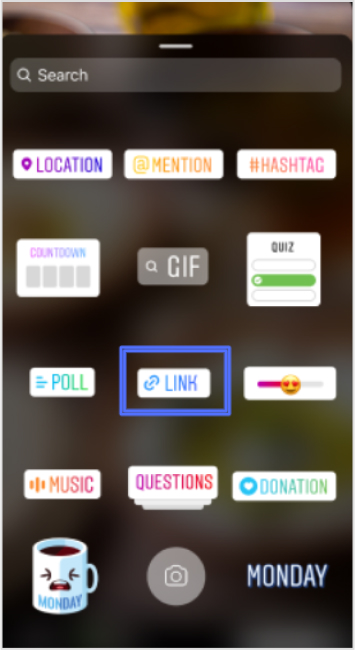
Step 4: Access the sticker tool
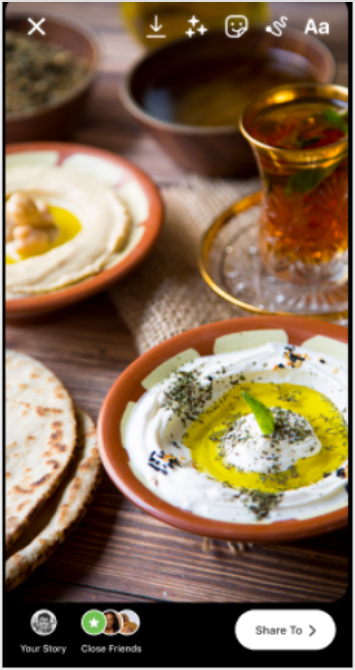
After capturing or uploading your content, you can enhance your story with various stickers and features. To add a link to your story, tap the “Sticker” icon from the top navigation bar.
In the sticker options, locate and tap on the “Link” sticker. This sticker is used to add the link you want to share with your followers.
Step 6: Enter your desired link
A pop-up window will appear, allowing you to enter the web link you want to share. Type or paste the URL into the provided space.
Step 7: Confirm and customize
After entering the link, tap “Done” to confirm. You can also customize the appearance of the Link sticker by tapping on it, which may allow you to choose from different color variations or styles, depending on Instagram’s features at the time.
Step 8: Place the sticker on your story
Now, you can place the Link sticker on your story. Simply drag and drop it onto your image or video, just like you would with other stickers.
Once you’re satisfied with how your story looks with the added link, you can proceed to share it with your followers. Tap the “Your Story” button at the bottom of the screen to post your story.
Step 10: Viewers interact with the link
When someone views your story and taps on the Link sticker, they will be redirected to the web page you’ve shared.
Important Note: Instagram has certain safety measures in place. New accounts and accounts that repeatedly share harmful content or violate community guidelines may not have access to the Link sticker feature. Be sure to follow Instagram’s guidelines and policies to maintain access to this and other features.
Replug: Simplify your social media link management
Managing links on social media platforms like Instagram can be a crucial part of your online strategy. Replug is a comprehensive link management platform and bio-link tool designed to simplify this process.
With Replug’s efficient short URL generator, you can create shortened, trackable links that are perfect for Instagram bio links or sharing in your stories. This Instagram link shortener provides valuable analytics to help you measure the performance of your links, including click-through rates and audience engagement data.
Whether you’re a marketer, business owner, or content creator, Replug can enhance your social media marketing efforts by making link management effortless and effective.
Try Replug today and take control of your links to maximize your online presence.
A complete link management solution
for marketing professionals & agencies.
Try Replug for free
FAQs on adding a link to Instagram Story
Can I add links to any type of Instagram Story, including photos and videos?
Yes, you can add links to both photos and videos in your Instagram Stories.
Is there a limit to the number of links I can add to a single Instagram Story?
You can typically add one link per Instagram Story. If you want to share multiple links, consider creating multiple stories or using the link in the bio feature.
Who can add links to their Instagram Stories?
Instagram has expanded access to this feature, so now, users of all account sizes, including businesses, creators, and individuals, can add links to their stories.
Are there any restrictions on the types of links I can share in my Instagram Story?
Instagram has guidelines in place and links that violate their Community Guidelines may be restricted. It’s important to ensure your content adheres to Instagram’s policies.
Can I track how many people clicked on the link in my Instagram Story?
Yes, Instagram provides insights on the number of clicks your link receives. You can view this data by swiping up your story.
We all love pizza or some kind of fast food. But what if your favorite fast food brand’s workers uploaded an unsettling video violating the health codes on social media – (there goes all your branding efforts down the hill)
Would you still be up to try that brand? I don’t think so. The least you would do is stop going to that specific franchise.
Similar happened in the case of Domino’s where two workers uploaded a video on Youtube from Domino’s kitchen while preparing pizza and violating the health standards. The video went viral, and the company faced strong backlash over it.
With the right crisis response Domino’s averted serious consequences (more to the story).
While the advantages of social media are obvious, there are also some social media risks to be aware of. When something goes wrong, brands risk losing their reputations.
Companies must be cautious about what they publish online, and they must have a plan to address any issues that develop.
For teams managing multiple campaigns, monitoring brand mentions, or sharing content across social channels, using Replug.io can help streamline link management and make content sharing more secure and trackable.
In this blog, we will make sure that you stay on top of your social media game with proper risk mitigation techniques, and maintain engagement with your audience and increase your sales effectively.
What is social media risk management for brands?
The key to effective social media risk management for brands consists of proactive monitoring, rapid response to negative content, clear social media guidelines, employee training, and crisis communication plans.
To maintain a positive brand image and minimize potential reputation damage, businesses need to understand how social media managers drive brand engagement and stay sharp at all times.
Did You Know! “Report finds 164% increase in cyber threats targeting brands” (ZeroFox)
Benefits of a social media risk management
Here are the key benefits of social media risk management strategies.
If you don’t have the right risk response strategy, then you can end up like United Airlines, where the passenger Dave Caroll’s guitar was damaged. When he took his case up to the airline, it refused to fix or replace his guitar.
In response, Dave wrote a song “United you broke my guitar”. The song got over 9 million views, and more importantly, United Airlines investors lost $180 million as the stock price dropped by 10% after the incident.
However, before moving to the risk management strategies, it’s important to know what kind of social media risks brands are open to.
Major social media risks for brands
It’s necessary for every brand, social media manager, community manager, customer services etc, to have knowledge of the risks that brands can face.
1. Social media security risks
Social security risks can harm your info and identity. Avoid sharing too much, weak passwords, or strange links. Stay safe with strong passwords, cautious sharing, and distrust of unknown emails. Just like locking your door, secure your online stuff!
When you must share URLs on social media or in campaigns, using a trustworthy link shortener ensures your links are clean, branded, and less likely to trigger suspicion, which can help protect both brand reputation and user trust.
Here are different kinds of social security risks for brands, you must be aware of:
Reputation damage: Negative comments, reviews, or misinformation can harm a brand’s image.
Data breaches: Hackers gaining access to customer or employee data can lead to trust loss.
Phishing attacks: Employees might unknowingly reveal sensitive info to fake emails.
Social engineering: Scammers might manipulate employees for confidential data.
Account hijacking: Hackers taking control of a brand’s social media accounts can spread false information.
Inappropriate content: Sharing or being associated with offensive or inappropriate content.
Intellectual property theft: Competitors or others stealing a brand’s ideas or content.
Crisis mishandling: Poorly managed crises can worsen public perception.
Lack of control: Employees’ personal posts reflecting poorly on the brand.
Miscommunication: Messages being misinterpreted can lead to PR issues.
Did you know! “Up to 40% of social media users are estimated to have experienced some form of social engineering or phishing attack.” (GITNUX)
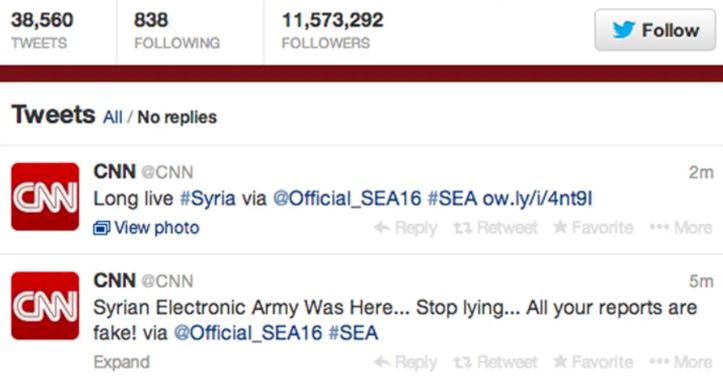
The CNN hacking case
In 2014, the official Twitter and Facebook accounts of CNN were compromised by a hacktivist group, the Syrian Electronic Army (SEA). The hackers posted false information, which spread rapidly, damaging CNN’s credibility and potentially influencing the public.
CNN’s response
CNN’s initial response was somewhat delayed and lacked coordination, allowing the false information to gain traction. However, they swiftly regained control of their accounts, deleted the false posts, and issued clarifications.
What could have been done?
To enhance crisis management, CNN could have benefited from faster response times, clear communication strategies, and pre-established protocols for social media account security. This case underscores the need for organizations to proactively prepare for digital threats and have effective crisis communication strategies in place.
2. Legal risks
Social media legal risks encompass potential legal problems arising from online activities, such as copyright infringement, defamation, and privacy violations.
Here are different kinds of social media risks brands need to be aware of:
Copyright infringement: Sharing content without proper authorization can lead to copyright claims.
Defamation: Posting false or damaging statements about individuals or businesses can result in defamation claims.
Privacy violations: Sharing personal information without consent might lead to privacy lawsuits.
Trademark violations: Unauthorized use of trademarks can result in legal action.
Advertising regulations: Violating advertising laws or not disclosing sponsorships can lead to penalties.
Data protection Laws: Mishandling customer data may breach data protection regulations.
Contractual Issues: Breaching contracts with influencers or partners can result in legal disputes.
Employment matters: Employee social media usage can lead to HR and legal challenges.
Regulatory compliance: Not adhering to industry-specific regulations can lead to fines.
Misleading content: Sharing false or misleading information might breach consumer protection laws.
Managing social media risks effectively is crucial to mitigate these potential financial impacts and maintain a positive brand image, customer trust, and business growth.
Here are some major financial impact on brands that occur due to weak social media risk management:
Customer loss:
Poorly managed social media risks can lead to a loss of existing customers and difficulty in attracting new ones due to negative perceptions. This is why it’s crucial to keep track of TikTok analytics and analyze interactions on Instagram, Twitter, and other platforms to prevent this from happening.
Legal expenses:
Violations such as copyright infringement or privacy breaches can result in legal fees, fines, and settlements, draining financial resources.
Crisis management costs:
Dealing with social media crises requires resources for crisis communication, PR efforts, and reputation repair, leading to additional expenses.
Difficulty in ROI measurement:
Relying on misleading social media metrics can lead to misguided decisions and ineffective strategies. Measuring the actual return on investment from social media efforts can be challenging.
The British Petroleum Gulf oil spill: A risk management debacle
The BP oil spill in the Gulf of Mexico is widely known, and social media has played a crucial role in magnifying and uniting public anger over BP’s management of the crisis in that region.
BP’s brand value has taken a hit of more than $1 billion as a consequence of the situation. Notably, the “Boycott BP” Facebook page has garnered the support of over 750,000 individuals.
Moreover, discussions surrounding “BP” have surfaced across various online platforms, including more than 9,000 blogs and over 23,000 tweets. Impressively, these discussions on Twitter have collectively generated approximately 49.5 million impressions.
4. Competitor risk
Social media risks related to competition involve potential negative impacts that arise from interactions and activities on social media platforms involving competitors. These risks can impact a business’s reputation, customer perception, and overall competitive standing.
Here are some social media risks related to competition:
Comparative marketing gone wrong:
While comparative marketing can be effective, it can backfire if not executed carefully, leading to legal issues or public backlash.
Customer poaching:
Competitors might target your customers with enticing offers or campaigns, attempting to shift their loyalty away from your brand.
Competitors might spread false rumors or disinformation about your products or services, impacting customer trust and potentially causing financial harm.
5. Innovation risk
While social media can be a powerful tool for innovation, it also comes with certain risks. Here are some innovation-related social media risks to be aware of:
Premature exposure:
Sharing innovative ideas or products too early on social media can lead to competitors gaining insight and potentially launching similar initiatives before you do.
Copycat competition:
Competitors might quickly replicate or modify your innovative concepts after seeing them on social media, reducing your competitive advantage.
Expectation management:
Overhyping an innovation on social media can lead to unrealistic customer expectations, making it challenging to meet those expectations in reality.
Critique and negative feedback:
Innovative ideas can attract critique and negative feedback on social media platforms, potentially discouraging further development or affecting your brand perception.
One of the best examples and case studies of crisis management that brands highlight is the Johnson and Johnson’s Tylenol incident.
In 1982, Johnson & Johnson faced a crisis when seven people in the United States died after consuming Tylenol capsules that had been tampered with and laced with cyanide. The company swiftly responded by recalling 31 million bottles of Tylenol, worth around $100 million. They cooperated fully with law enforcement and established a hotline to inform the public about the situation.
Johnson & Johnson also introduced tamper-evident packaging, which later became an industry standard. Their transparent and responsible crisis management approach is often cited as a model for effectively handling product-related emergencies.
Below are more details on this story and crisis management in this video of Retro Report.
Here’s a social media risk management plan tailored for brands for effective crisis management.
1. Risk identification:
Identify potential social media risks, such as reputation damage, data breaches, legal compliance issues, and crisis events.
2. Risk assessment:
Evaluate the potential impact and likelihood of each risk to prioritize them effectively.
3. Prevention and guidelines:
Establish clear social media usage guidelines for employees, including appropriate content and engagement practices.
Enforce strong password policies and enable two-factor authentication for all brand accounts.
4. Monitoring and alerts:
Utilize social media monitoring tools to track brand mentions, sentiment, and potential threats.
Set up real-time alerts for unusual activity or security breaches.
5. Data protection:
Implement stringent data protection measures, including encryption, secure data storage, and regular security audits.
6. Crisis response plan:
Develop a comprehensive crisis management plan with predefined actions for addressing negative events.
Assign specific roles and responsibilities for crisis communication and resolution.
7. Legal compliance:
Stay informed about relevant laws and regulations related to social media usage and advertising.
Ensure all social media content and activities comply with legal requirements.
8. Third-party app evaluation:
Thoroughly vet and monitor third-party apps or tools used for social media management.
Ensure these tools adhere to strict security and privacy standards.
9. Incident handling:
Establish a well-defined incident response process to swiftly address social media-related incidents.
10. Communication strategy:
Develop a clear communication plan for addressing stakeholders, customers, and the public during a crisis. – Prioritize transparency and timely updates.
11. Regular audits:
Conduct regular audits of social media accounts, content, permissions, and security settings.
12. Employee training:
Provide ongoing training to employees about responsible social media practices, data security, and crisis communication. Use Plus AI to create engaging presentations to support these efforts.
13. Continuous improvement:
Regularly review and update the risk management plan to adapt to evolving social media trends and emerging risks.
FAQs about social media risk
What is the biggest risk in using social media for a business?
Biggest risk in using social media for business is reputation damage.
What are the main risks of social media?
Main risks in using social media for brands are reputation, data breaches, legal compliance & misinformation.
What is risk management in social media?
Planning to identify, assess, mitigate, and monitor social media risks.
What are the risks of social media to an organization?
5 types of risk management are strategic, financial, operational, compliance and reputational risks.
What are the 5 types of risk management?
5 types of risk management are strategic, financial, operational, compliance and reputational risk management.
How can you reduce the risk of using social media?
Reduce risk of using social media to educate employees, follow privacy guidelines, use strong passwords, and monitor activities.
Bring your ideas to life and share them with the world effortlessly… All of that in just a few clicks.
Use TikTok, where creativity knows no bounds. Create and share any type of visual content with its easy-to-use interface filled with endless possibilities.
Whether you’re a brand owner, a content creator, or simply want to be a part of this rising community- Tiktok is the answer. So far, it has captured the attention of millions of people worldwide.
The majority of famous Titok content creators are influencers. When you collaborate with influencers and share hundreds of links (to products, landing pages, or campaigns), trust Replug to manage, brand, and track them like many marketers already do. This will keep your outreach professional and results measurable.
Brands collaborate with well-known influencers to promote and advertise their products or services. It’s the perfect blend of marketing and entertainment and will make your audience say,
“Wait, was that a sponsored post?!”
Gone are the days when traditional advertising methods ruled the industry because influencer marketing has transformed the industry in a modern way.
Come with us and explore the perks and standard techniques used in Tiktok influencer marketing.
What is Tiktok influencer marketing?
TikTok influencer marketing refers to brands collaborating with popular users on the Tiktok platform, known as influencers, to promote their products or services.
By leveraging the influencer’s credibility and connection with their audience, brands can tap into a ready-made community. Creating a win-win situation – the brand gets exposure to a large, engaged audience, and the influencer gets paid for promoting the product. Plus, the influencer’s followers get to see cool new stuff and learn about products they might not have known otherwise.
Why Tiktok and not any other social platform?
With 1 billion monthly active users, TikTok has a massive audience just waiting to be captivated by your brand. Moreover, if your goal is to attract a younger audience, TikTok is the best social platform for you, as the majority of TikTok users are aged 18 to 24.
Below are some unique features that differentiate TikTok from other social media platforms.
Reasons to use TikTok for influencer marketing
1. Built on user interest
2. Creative content possibilities
3. Highly popular
4. Low-cost advertising
5. Best source for memes and funny content
6. Get quick results
7. Only social platform with family safety mode:
9. No need to read through long lists of words
Built on user interest: TikTok’s foundation lies in its unique algorithm that tailors content to individual preferences, creating a personalized feed based on users’ interests and behaviors.
Creative content possibilities: TikTok offers an expansive canvas for creativity, where users can craft everything from hilarious skits to heartwarming stories, unleashing their imagination within short, captivating videos.
Very popular: TikTok has become a global trend, a hub where millions of people from all over the world come together to create, discover, and discuss content from all walks of life.
Best sources for memes and funny content: TikTok is a great place to find jokes and funny videos. It’s a hub where humor thrives, and laughter is just a swipe away.
Low-cost advertising: Benefit from cost-effective advertising solutions within the platform. With TikTok ads, your brand’s budget will thank you, and your rivals might even cry.
Get quick results: The dynamic platform speeds up the success of marketing campaigns, providing quick and powerful results that leave competitors in the dust.
Only social platform with family safety mode: Tiktok requires users to be at least 13 years old to join the app. Furthermore, family safety mode allows you to control your children’s TikTok accounts.
No need to read through long lists of words: Save time with TikTok’s bite-sized brilliance, where concise videos replace the need for slogging through lengthy text.
Step-by-step guide to Tiktok Influencer Marketing
Before you jump into creating an influencer marketing campaign, it’s essential to take a moment to consider a few key factors that will ultimately determine the success of your campaign.
Step #1: Plan your influencer marketing campaign
Step #2: Find the right influencers for your brand
Step #3: Types of Influencer Marketing Campaigns
Step #4: Measure your TikTok influencer marketing campaigns
So let’s dive in and explore what you must remember to ensure your campaign reaches its full potential.
Proper planning and strategizing can make all the difference in the world of influencer marketing.
1. Analyze
2. Set goals
3. Determine the budget
1. Analyze your brand needs:
This analysis serves as a guiding light, helping you make informed decisions and ensuring that your influencer marketing efforts yield the desired results.
2. Set your campaign goals:
Set clear goals of what you want to achieve with a specific campaign. i.e., increasing brand awareness, driving traffic, increasing sales or conversions.
3. Set up a budget:
Put a cap on your brand’s expenses, taking into account the needs of your brand and the outcomes you want to achieve with it.
Step #2: Find the right influencers for your brand
Let’s explore some tried-and-true methods to help you identify the right influencers for your brand.
How to find the right influencers?
1. Tiktok creator marketplace
2. Google search
3. Leverage social media platforms
4. Influencer marketing platforms
1. Tiktok creator marketplace:
Jump on the Tiktok analytics bandwagon and sign up for an account. Once you get the green light, start hunting for influencers.
2. Google search:
Just hop on the Google train and search for your brand’s relevant keyword or hashtag. Keep your eyes open for the cream of the crop, the best in the industry.3.
3. Leverage social media platforms:
Conduct a thorough search on platforms like Instagram, YouTube, Facebook, etc. Check out current trends to look for professionals in your industry.
4. Influencer marketing platforms:
Using an influencer marketing platform like X (Formerly Twitter) makes it simple to locate and engage with influencers across all channels and track their performance.
Before sliding into the DMs of influencers, make sure to do undercover detective work to see if their content, followers, and reputation fulfill your brand needs.
Influencer Tiers
Nano-influencers: 1,000–10,000 followers
Micro-influencers: 10,000–50,000 followers
Mid-tier influencers: 50,000–500,000 followers
Macro-influencers: 500,000–1,000,000 followers
Mega-influencers: 1,000,000+ followers
Are they a good fit for your brand in terms of engagements and parameters? If yes, reach out to those influencers, brief them about your campaign, and let the show begin.
Step #3: Types of influencer marketing campaigns to run
Now comes the most crucial step- deciding what content you want from your collaborating influencers.
1
Dance trends
2
Hashtag challenges
3
Duet collaborations
4
In-Feed advertisements
5
Product reviews
6
Storytelling
7
Community challenges
8
Meme and comical content
9
How to content
10
Run discount campaigns
11
Unboxing and first impressions
12
Live streaming
1. Challenges and trends
Collaborate with influencers to create branded dance videos on trending sounds, showcasing your brand’s products or messages.
Here’s an example:
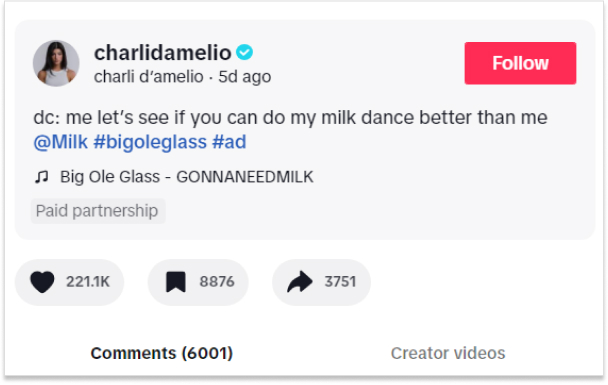
Charlidamelio, a well-known content creator on Tiktok, recently uploaded a dance video advertising the Milk Brand.
Moreover, the most frequent videos on TikTok FYPs (For You Page) are based on trends.
Brands can run hashtag challenges where people are encouraged to generate content using a specific hashtag connected to the brand or a campaign.
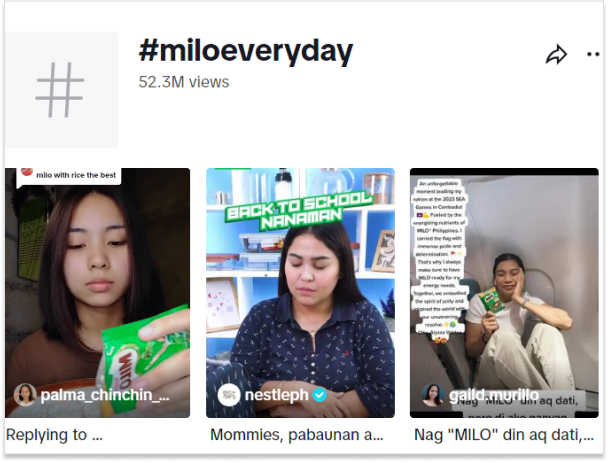
Here’s a trending NestlePH hashtag on Titok nowadays: #MILOEveryday, with over 52.3 million views.
3. Duet collaborations
TikTok allows users to create “duet” videos where they interact and collaborate with another user’s video.
4. In-Feed advertisements
These are traditional video ads that appear in users’ TikTok feeds. Brands can collaborate with influencers to create engaging UGC video content that seamlessly blends into users’ feeds.
5. Product showcases and reviews
According to a study by Ad Week, over half of all TikTok users purchase after seeing an ad, promotion, or review for a brand on the app.
Influencers can create short videos that align with a brand’s values or messaging. These videos can be emotionally resonant and capture the audience’s attention.
7. Community challenges
TikTok influencers create these challenges based on a viral new TikTok trend. Community challenges are organic and aren’t linked to a specific brand. However, many creators give shoutouts to brands in their skits.
8. Meme and comedy content
Influencers can create humorous content or memes that align with the brand’s image if appropriate for the brand.
9. Educational and how-to content
Influencers can use TikTok’s short-form video format to provide quick tutorials or tips about a brand’s products or services.
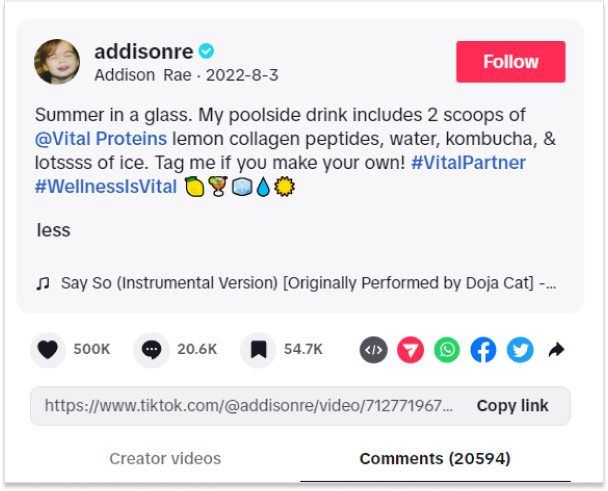
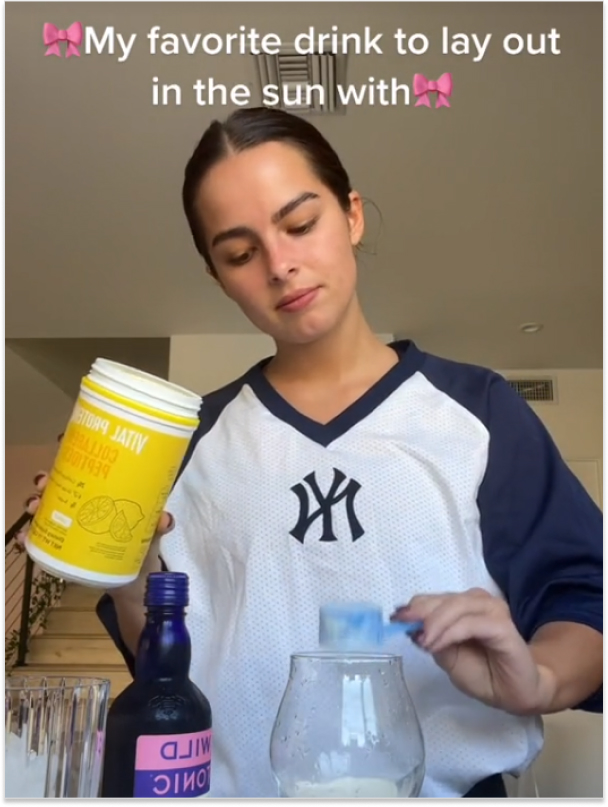
Just like Addisonre on Tiktok shared the recipe of her favorite summer drink brand Vital Proteins.
10. Flash sales and discounts
Influencers can promote limited-time offers, flash sales, or exclusive discounts to create a sense of rush and FOMO (fear of missing out) among the audience.
11. Unboxing and first impressions
The unpacking experience of a brand’s product can be shared by influencers, just like on other platforms, along with the creator’s initial impressions and reactions.
12. Live streaming
TikTok allows live streaming, where influencers can interact with their followers in real time. Brands can partner with influencers for live product launches, Q&A sessions, or demonstrations.
Step #4: Measure your TikTok influencer marketing campaign’s success
The next step in Influencer marketing campaigns on TikTok is usually measuring metrics and KPIs to see their effectiveness and impact.
However, we would recommend you utilize TikTok’s built-in analytics, as well as third-party tracking tools, such as ContentStudio to gather data on engagement, reach, and other relevant metrics.
Useful facts: TikTok influencer marketing in figures
According to IZEA, the average cost per TikTok, depending on the influencer level, is as follows:
Nano influencers (1,000 – 10,000 followers): $800 per post.
Micro-influencers (10,000 – 50,000 followers): $1,500 per post.
Medium influencers (50,000 – 500,000 followers): $3,000 per post.
Macro influencers (500,000 – 1,000,000 followers): $5,000 per post.
Mega influencers (1,000,000+ followers): $7,000+ per post.
What makes TikTok marketing so special?
For starters, it offers a unique and highly engaging platform for brands to connect with their target audience. The app’s short-form video format allows for quick and captivating content that captures the attention of users scrolling through their feeds.
But it’s not just about the format. TikTok’s algorithm is designed to promote content that resonates with users, making it easier for brands to capture conversions on a large scale. Moreover, TikTok marketing is considered one of the best types of social media marketing.
That was all for today’s blog. Give us your thoughts on TikTok influencer marketing? We’d love to hear what you think!
Note: You can use a simple, efficient URL shortener to turn long campaign links into clean, brandable URLs. Perfect for influencer bios or video descriptions when promoting your products!
Frequently asked questions
Who are the main TikTok users?
The main TikTok users are primarily Gen Z and Millennials, with a diverse audience enjoying short-form videos across various interests.
What types of content do well on TikTok?
Entertaining, creative, and authentic content such as challenges, dances, tutorials, and humor perform well on TikTok due to its dynamic and engaging nature.
Why should you use TikTok for influencer marketing?
TikTok offers a massive user base, high engagement rates, and a chance to connect with younger audiences, making it a valuable platform for influencer marketing.
How do brands market on TikTok?
Brands market on TikTok by partnering with influencers to create branded content, leveraging challenges and trends, and using paid advertising to reach and engage their target audience.
How can I switch my profile to a business account?
Go to ‘Settings and Privacy’ and Select ‘Manage account.’ Under ‘Account Control,’ select ‘Switch to Business Account’
Are you a music lover looking to share your favorite tunes on TikTok? Adding a Spotify link to your bio is a great way to let your followers know what you’re listening to and discover new tracks. However, the process of adding a Spotify link to your TikTok bio may seem confusing at first.
Don’t worry, though – in this guide, we’ll show you exactly how to do it in just a few simple steps. Whether you’re a seasoned TikTok user or just starting out, you’ll be able to share your musical taste with the world in no time!
What is a TikTok link in bio?
A TikTok link in bio is a clickable hyperlink that can be added to your TikTok profile page. This link appears in the “Bio” section of your profile and can be used to direct your followers to external websites, social media profiles, or any other online destination you want to promote
By default, TikTok only allows users to add one link to their bio. However, there are third-party tools like Replug that can be used to add multiple links to your bio section. This feature is especially useful for content creators, small business owners, and anyone else looking to promote their online presence to a wider audience.
How to add Spotify link to TikTok bio?
Adding a link to your TikTok bio is a great way to share more information with your followers and drive traffic to your website or other social media profiles. Here’s how to add a Spotify link to the TikTok bio:
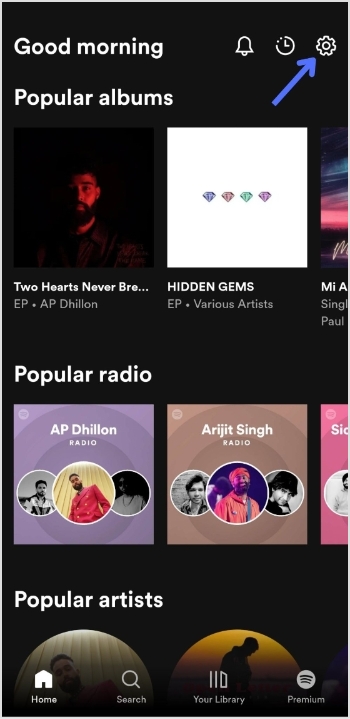
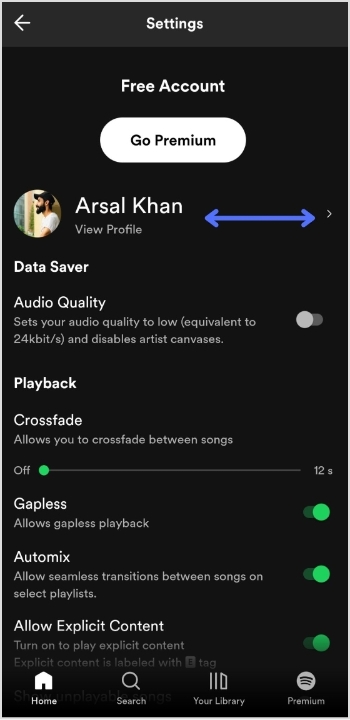
Step 1: Open Spotify on your device and log in to your account.
Step 2: Tap the “setting icon” in the top right of the screen.
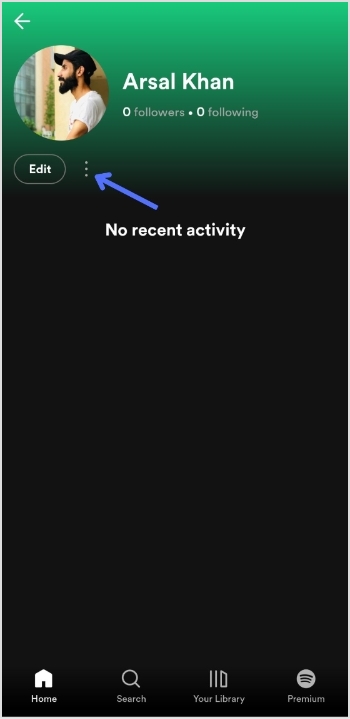
Step 3: Tap “view profile” under your profile name to open your profile.
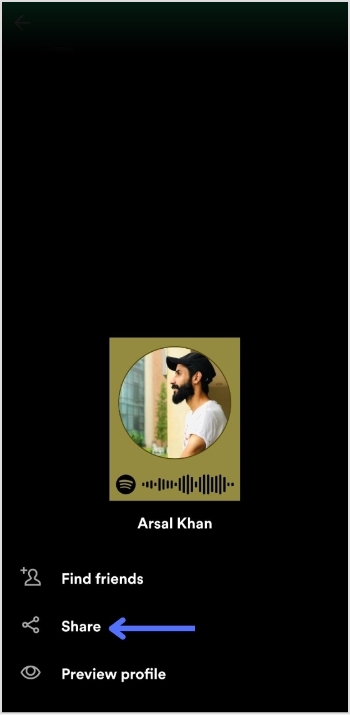
Step 4: Tap 3 “vertical dots” on your profile page.
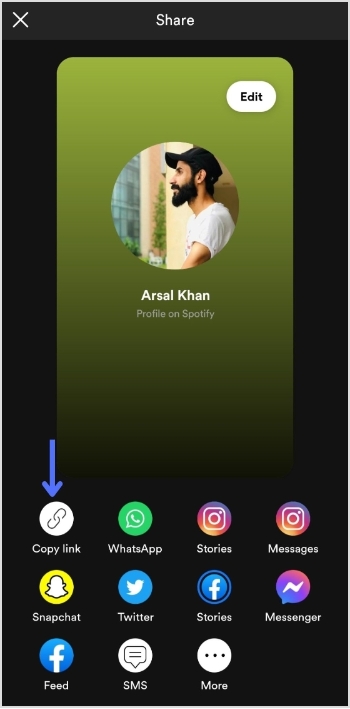
Step 5: Tap “share”.
Step 6: Tap “copy link”.
Add this link to your TikTok bio:
Step 1: Open TikTok on your mobile device and tap the “profile icon” in the bottom right corner.
Step 2: Tap “edit profile”.
Step 3: Tap “add a bio” to open the bio section.
Step 4: Paste your Spotify link, tap “save” and you’re done.
Do you have more than one link you want to add to your TikTok bio?
Perhaps you want to share your social media profiles or promote your website alongside your Spotify account. Luckily, there’s an easy solution: Replug.
It offers a top-notch “bio links” feature that allows you to add multiple links to your TikTok bio, helping you to increase your reach and engagement on the platform.
With this efficient link optimization platform, you can create a single link that directs users to a landing page containing all of your important links. This means that you can easily promote your online presence in one convenient location.
Here’s a video showing you how to add multiple links to your TikTok bio using Replug.
FAQs
Can I add multiple links to my TikTok bio?
By default, TikTok only allows you to add one link to your bio. However, third-party tools like Replug can be used to add multiple links to your TikTok bio.
Is it free to use Replug to add multiple links to my TikTok bio?
Replug is a free link shortener with limited features inside its free plan. However, it also offers paid plans with more advanced functionality for its subscribed users.
How do I use Replug to add multiple links to my TikTok bio?
To use Replug to add multiple links to your TikTok bio, sign up for an account and create a branded landing page with your desired links. Then, copy the Replug landing page URL and paste it into the “Website” field in your TikTok bio.
Can I track clicks on my TikTok bio links with Replug?
Yes, Replug offers advanced analytics that allows you to track clicks and engagement on your TikTok bio links and other links across your online presence.
If you think the clash between Musk and Zuckerberg has cooled down, you’re wrong, as the show has just begun with the launch of Instagram Threads.
Now, we’re guessing you’re here because exploring Threads has left you exhausted. Or you may be curious to discover its hidden features!
If you manage multiple social-media profiles, share content across platforms, or distribute many links, Replug can help you organize and optimize all your URLs in one dashboard, keeping link management simple as you explore new apps like Threads.
And no need to worry anymore! We wrote this handy guide to help you get started. Discover new features, and develop your Threads account in no time.
First, let’s begin by defining Threads, discovering its hidden characteristics, its future, and comparing it with Twitter.
So, let’s get started!
What is Threads?
Threads is a text-based social app launched by Mark Zuckerberg in integration with Instagram on the 5th of July, 2023.
Over 100 million people have signed up on the app so far. However, the total number of active users is undefined yet. With Threads, users can create, share or repost multiple types of content, such as short-term texts, images, videos, URLs, etc.
Moreover, the new app is tied to Instagram, so users can automatically be able to connect with all the people they follow on Instagram.
Note: When sharing external links on Threads (or elsewhere), using a trusted short URL generator helps turn long or messy links into clean, easy-to-share URLs that look tidy in posts and are more user-friendly.
How to use Instagram Threads?
Threads offer a variety of popular features that are currently trending in the realm of social media. And have a very user-friendly interface.
However, some of you may be experiencing challenges when trying to sign up for your Threads accounts or when attempting to post a Thread.
Allow me to assist you here.
How do I sign up?
You can sign up directly from your Instagram account. The software will automatically fetch all your data from Instagram, such as your name, username, login credentials, block lists, followers, etc. Additionally, the app can be downloaded for free on iOS and Android devices in over a hundred nations.
Is Threads linked with Instagram?
Yes, Threads is fully integrated with Instagram. It’s like having a mini social network within Instagram.
I don’t have an Instagram account; can I still use Threads?
Currently, the only way to join Threads is through your Instagram account. So, if you want to sign up on the app, you must have an Instagram account first.
Is it safe to use Instagram threads?
One of the most important aspects of any social media platform is privacy, and Threads doesn’t disappoint in this regard. Just like Instagram, this app offers a range of privacy features that allow you to have control over your interactions. For instance, you have the power to block or report any user who may be causing you discomfort or violating your privacy.
How can I create a Thread?
It’s so simple.
Just tap on the new thread icon at the bottom of your screen.
Add your content, such as text (up to 500 characters), video, or image (up to 10 visual items), and press Done.
And your thread will be shared on your profile and feed right away.
You may have seen standard thread features like sharing text-based messages, images, video visuals, or reposting your threads post. But below are some hidden features on threads you may not know;
1. Managing replies
When you post a thread, a dialogue box will appear on your keyboard in the reply section. When you press that button, a menu with three choices will appear. Choose the one which suits you.
2. Modified shortcut
If you press return three times, a new thread shortcut will be created immediately, just below the last thread you posted.
3. Fast open the search bar
If you long-press the search icon. It brings up the search bar and pulls up the keyboard alongside. Or you can double-tap on the search tab to search.
4. Quick account following
To quickly follow an account, simply tap the Profile Icon on the user’s profile.
5. Mute a profile without unfollowing
If you don’t want to see threads from a specific user again. You can mute the user profile by tapping the three dots on the extreme right section of the profile that you want to mute.
Now just tap Mute and the selected user will be muted
Note: You’d still be following the user, but none of their Threads will show up in your feed until you unmute him.
6. Time limits option
Go to your profile by tapping the Profile icon at the bottom corner of the Threads feed
On the top right corner, tap on the right horizontal bars similar to the Hamburger Icon to navigate to the settings menu
Tap on Account
Tap on Take a break
Set the reminder as per your necessity, i.e. from every 10 minutes to 30 minutes
Now the app will remind you to take a break every 10 to 30 minutes after use.
Note: The earlier issues with the app have been resolved. The app now runs smoothly on iOS 17. Also, users can facepile, pill polish, expand pictures on profiles, make extra tall photos that are now fully viewable, trim the binary size, etc. However, Meta is still working on new features, such as following feeds, hashtags, editing posts, post search, web presence, like lists, translations, and many more.
Limitations in the Threads app
But even with all these perks, users are experiencing some limitations listed below.
If someone replies to your thread and you delete the Thread later on, that person’s reply will not be removed.
You can only post a thread text of up to 500 characters.
You won’t be able to view a response to your thread if it comes from a private profile you don’t follow.
Thread feeds show you a mix of posts from people you follow and posts suggested by AI.
You cannot send direct messages to other users.
Currently, no web version of the Threads service is available.
You can only post up to 10 media items (visuals such as images, videos, gifs, etc).
What does Adam Mosseri have to say about Instagram Threads?
There are a lot of rumors and chatter of forthcoming modifications going about the app right now. Such as how Meta will modify Threads. What will happen to Twitter? Is Threads for politics and business? etc.
Adam Mosseri says Threads is for public conversation, not business or politics.
He says in a statement that
“Politics and hard news are important, I don’t want to imply otherwise,”
Further, he says,
“But my take is, from a platform’s perspective, any incremental engagement or revenue they might drive is not at all worth the scrutiny, negativity (let’s be honest), or integrity risks that come along with them.”
After that, users were confused about what to put on Threads and how to develop a network on that platform.
In response to this, Mosseri said…
What are the key differences between Twitter and Threads?
Below are the key differences between Twitter and Threads;
You won’t hear anyone calling Instagram Threads the “Twitter Killer” other than Twitter itself.
In contrast to Twitter’s public, real-time, and open character, Threads provides a platform for private chatting and exchanging information with close pals.
Twitter is widely used because of its general nature, rapid news publication, and accessibility. So, both systems can coexist, with users taking advantage of each for interaction and content creation.
Elon’s rage against Instagram Threads
Musk has threatened to file a lawsuit against the platform(Threads), accusing it of recruiting former employees to work on a ‘copycat’ software to compete with Musk’s original company.
Musk tweeted,
“Competition is fine, cheating is not.”
Twitter lawyer Alex Spiro wrote in a letter:
‘Twitter has serious concerns that Meta Platforms (Threads’) has engaged in systematic, willful, and unlawful misappropriation of Twitter’s trade secrets and other intellectual property.
However, Meta has denied the claims, stating that no current or former Twitter workers are working within the Threads team.
“very optimistic about how the Threads community is coming together.
Competition between the two has become fierce. With Elon Musk rebranding Twitter’s bird logo with “X”. Musk has also repurchased its”X.com” domain (i.e. now redirected to Twitter’s original domain). This shows the intensity will only rise between the two platforms going forward.
The Threads app has already seen 70% decline in its daily active users. While many of the Twitter (now X) users are hating the rebranding of the Twitter app. However, Threads is in its new stages, while Twitter is going through some drastic branding changes, so only time will tell who is going to win this battle.
Frequently asked questions
How do you delete your Threads account?
You can delete your account on Threads; however, to do so, you will also need to erase your account on Instagram. After getting complaints from end-users over this issue, Mosseri announced that the organization is “looking into a way to delete your Threads account separately.“
What is the difference between Threads and Instagram?
Threads is a social media app primarily using texts, while Instagram focuses on multimedia content, particularly visuals.
What can you do on Instagram Threads?
You can actively share images, videos, and text updates on Instagram Threads and effortlessly share real-time updates with your close contacts.
Are there any well-known people posting on the Threads?
On Threads, there are a lot of well-known names, like Selena Gomez, who has more than 5.1 million followers. Kim Kardashian has more than 5 million followers; Mr. Beast has more than 4.6 million followers; and many other famous people.
What if I tell you that you can 3X your brand growth and become a millionaire overnight?
Ha! Just kidding, I can’t promise that. But I can promise you something that will knock your socks off!
Here’s how, in recent years, social media has taken the world by storm, becoming a hot topic for businesses of all sizes. A powerful approach toward social media platforms can help you enhance your brand’s online presence, generate more leads, and expand your customer base.
By using some effectivesocial media hacks, you can achieve much more than you ever thought possible.
Today, I’m here to talk about some bombastic social media hacks. And some do’s and don’ts that you should keep in mind on your social success journey.
Let’s start!
Things to do
Things not to do
Precise marketing strategy
Buying fake traffic
User-friendly content
Following no trends
Utilizing bio-links
No brand awareness
Scheduling content editorials
Less eye-catching content
Share trendy content
No use of using management tools
Cross-promote content
Generate no buzz
Search-friendly username
Not upcycling content
Use brand-specific hashtags
No storytelling
Analyzing content statistics
Buying Likes/Comments
Collaborating with social media influencers
Providing no monetary value to your business
Note: If you want to make your social-media link handling smarter and more trackable, and upgrade your overall social media game, Replug offers an easy way to manage all your links, from bio links to campaign URLs, under one roof.
1. Create trendy content
Content is king! It’s the backbone of your online presence. Without quality content, your social media game will fall flat. So you must keep up with the Kardashians…I mean, the latest events and upcoming stories.
Stay in the loop. Otherwise, you’ll be as lost as a penguin in the Sahara.
Here are a few tips on how to create trendy content.
Humorous content:
If you loved me, you’d take me to Singapore this summer.
Just saying.
Don’t worry, I didn’t say that, but Tripadvisor did.
Just like that sharing memes and humorous stories are all great ways to keep your followers engaged and increase your account’s visibility.
Trendy content
Whether it’s through reading the news, following social media accounts, or subscribing to newsletters, staying up-to-date and utilizing trendy content is a must.
Here Argentine footballerLionel Messi, one of the greatest football players of all time, shared a photo that quickly became a fan favorite.
User-generated content:
Share informational user-generated content like reviews, events, or bite-sized pockets of information.
Moreover, keeping an eye on your fellow competitors can also help you steal followers and the latest trends. By incorporating such trends into your content strategy, you can stay ahead of the game and keep your audience coming back for more.
2. Engagement with comments and stories
Believe it or not, interacting with your followers on social media is like giving your brand a shot of espresso –it’ll perk up in no time!
Your audience craves genuine human interaction from you. Don’t leave them hanging! And do try stuff like;
Using the comments box to interact with readers.
Put some emotion into your messages by using emoticons.
Going live on Instagram or Facebook stories.
Sharing useful tips and techniques in your stories/posts.
Sharing personal experiences and opinions with your audience.
Set up polls and questionnaires to identify your audience’s interests.
Sharing customer reviews about your brand/business.
If you’re getting started with social media hacks, it can be difficult to focus on every platform. That’s why I highly recommend prioritizing a specific social channel that aligns with your brand’s goals and target audience.
By honing in on one platform, you can dedicate your time and resources to creating quality content and engaging with your followers, whether it’s Facebook, Instagram, Threads, Twitter, Youtube, LinkedIn, and Pinterest.
Note that the content strategies for each of these platforms are different from each other. So, you must ensure your content is SEO optimized per the channel.
Pinterest is like the runway for your business’s fashion show. You can create fancy pins about your product, add a link to your website, provide a small amount of information on the pin itself as per your product, and so on. The type of pins includes
With LinkedIn’s diverse features, it has become a go-to platform for professionals looking to connect with their peers and share their expertise. LinkedIn is mainly preferred for
LinkedIn newsletters
LinkedIn polls
Engaging videos
Carousels
Engaging one-liners
User-generated posts
4. Using relevant hashtags
Let me tell you one of the biggest secrets behind these top-ranking social media accounts nowadays. To cut to the chase, it’s all about playing the hashtag game in your social media profiles.
Adding your brand name or a relevant keyword to your profile creates a sense of professionalism and authenticity. This personalized social media hack helps users recognize and remember your brand.
Just like wondersofmaldives sharing relevant hashtags on itsInstagram post.
Use ContentStudio’s AI Writer ✍️trending section to find the most popular niche-specific hashtags. Another valuable social media hack is replicating the hashtags used by the leading influencers in your field.
5. Include visual aids
Visuals can help break up large blocks of text and make the content more visible. Recent reports showed that approximately 84% of social media users favor visual content over text-based content. As you may have heard the phrase:
Pictures speak louder than words, just like this post by digitalwallahon Instagram:
How visual content helps in brand growth?
Visual content has been proven to have a higher click rate and conversion rate than general text-based content. Also, it can boost your online presence and increase your audience’s engagement.
How can I create catchy visuals?
Various AI image generation tools are available for creating and editing visuals. Two popular options are Canvaand Adobe. Whether you want to design graphics for social media or enhance your website’s visuals, these tools can help you achieve your goals.
6. Use exit pop-ups and CTAs
You’re browsing through an online shop, and just as you’re about to click that dreaded “X” button, a pop-up captures your attention.
This, my friends, is what we call an exit intent popup.
Whenever a user’s cursor moves towards that exit button, the exit intent popup swoops in and grabs their attention. It’s a social media hack website owners use to engage with their visitors and reduce bounce rates.
Here’s an example of popup CTA.
By strategically timing the appearance of these pop-ups, brands offer you a special discount, invite you to subscribe to their newsletter, or simply provide more information about their products or services.
How does CTA help in brand growth?
Getting creative with your CTAs can also be a helpful social media hack. They provide the user with a clear direction on what they need to do next, making it easier for them to take action. CTA’s can also help to increase conversions, as users have an immediate call-to-action that they can follow.
Here’s a CTA by Foodpanda;
7. Cross-promote content using bio-links
Generating traffic to your social media channels can be challenging. Despite your best efforts, your content may not be reaching the audience you had hoped for.
In this case, cross-promoting content using bio links may work for you. As it’s one of the most effective social media hacks that can help you to increase your brand’s visibility and much more.
Now you must be wondering what’s a social Bio-link. Well, let me tell you. It’s a clickable URL in any social profile description with an organization and product info. Such as links to the brand’s website, YouTube, or other social channels, etc.
However, modern link management tools allow you to create bio-links with loads of customization options.
Note: By using a branded URL shortener, you can turn long or messy URLs into clean, memorable links suitable for bio-link pages, making it easier for audiences to click and remember your brand.
What are some best ways to cross-promote my content?
The best way to cross-promote your content is to set your Cross Promotion goals. Follow these points when cross-promoting content:
Choose the right social platform to go along with, like LinkedIn and Facebook
Set out offers and discounts
Screenshot of the association on the previous platform when starting your brand on a different platform.
Add links to other social contests
Use Instagram as a content source for other accounts.
Take advantage of Instagram as a content origin for other platforms.
Share your Blog URL in your LinkedIn post.
Bio link example;
Say hello to Replug’s revolutionary bio links feature, the game-changer that will transform your social media game from average to extraordinary.
Experience the simplicity and effectiveness of our exciting creation for yourself – a bio link page designed to maximize the potential of every link.
Add videos, images, links, social icons and more within a few clicks to create your own custom landing page. And use that one link to promote your online business on all socials.
See it in action by taking a look at the screenshot below:
When it comes to establishing your brand and making a lasting impression on your target audience, influencer marketing has proven to be one of the most effective strategies.
Influencers’ reach and engagement on social media platforms cannot be ignored. With millions of followers eagerly awaiting their every post, their ability to generate buzz and create a viral effect is unparalleled.
How can collaborating with content creators enhance your brand growth?
Content creators create engaging visuals for brands that draw attention to their products or services, further helping to increase brand growth and visibility. They provide valuable insights into the latest trends in the industry, assisting brands to stay up to date on relevant topics and content. Additionally, working with content creators can help differentiate your brand from competitors by providing a unique perspective on topics related to your brand.
For start-ups and smaller businesses, harnessing the power of social media hacks can be a game-changer. One practical approach that has been gaining traction is collaborating with niche-specific micro-influencers.
Micro-influencers, with their smaller but highly engaged following, can make a significant impact on a brand’s visibility and reach. Unlike macro-influencers who have millions of followers, micro-influencers have a more targeted audience that aligns with specific niches or interests.
Managing multiple social media platforms can often feel overwhelming as we encounter challenges and obstacles that make us question our abilities and the path we have chosen.
Thankfully, there are several popular and useful AI tools available that can make this task much more manageable. These tools include ChatGpt, Google Bard, ContentStudio, FeedHive, Usermaven, and Canva.
Whether it’s content creation, scheduling, or analytics, these tools cater to your needs. Consider giving them a spin, and in the realm of content creation, explore the capabilities of a social caption generator for crafting captivating captions with ease. Additionally, enhance your content strategy with an AI video generator to create stunning video content effortlessly. Discover how these tools can supercharge your social media efforts!
Discover how these tools can supercharge your social media efforts!
10. Social media monitoring
Here comes the last champ-social media monitoring. This social media hackconcludes platform analysis, campaign analysis, as well as reporting.
But you can’t do all this by yourself. So you’d need a social media analytics tool to help you spy on your social media accounts, like ContentStudio– a secret clubhouse for creative geniuses.
Also, you can plan, make, and schedule posts that are interesting and will be sent to the right channels at the right time.
With ContentStudio, You can plan, control, and organize your social content with the help of content calendars.
Additionally, you can also get back and forth to eliminate approval with immediate feedback from clients and the team. Overall, it keeps an eye on your brand’s social media strategy and helps you make it better by analyzing usage data.
Our take:
In today’s digital world, having a strong online presence is essential for both individuals and businesses. The importance of social media hackscannot be overstated. One effective method is to actively engage potential followers and direct them to your social media pages. You can establish a consistent flow of traffic and, as a result, improve your internet presence.
With a well-crafted approach, you can tap into the vast network of individuals waiting to discover what you have to offer.
Make your mark and let your voice be heard.
Frequently asked questions
What are some effective hacks to get more social media followers?
Create engaging content, use relevant hashtags, collaborate with influencers, engage with your audience, run contests, cross-promote on different platforms, and post consistently.
Should I buy followers or use automated services to increase my follower count?
It’s not recommended. Focus on organic strategies to attract genuine followers interested in your content.
How can I engage with my followers and build a community?
Respond promptly, ask questions, share user-generated content, organize live sessions, encourage discussions, and use storytelling.
How long does it take to see significant growth in social media followers?
It varies, but building a substantial following takes time, consistency, and providing value to your audience. Be patient and persistent.