Category: Social media

Browse blogs on social media strategies, content, and trends. Stay ahead with tips to grow engagement and reach.

  • What is geotargeting and why is it important for marketers?

    What is geotargeting and why is it important for marketers?

    Running a global sale on your brand? Imagine this: a customer in New York sees prices in USD, a shopper in London gets prices in GBP, and someone in Paris enjoys a promo tailored just for them. Sounds like a marketer’s dream, right? That’s the power of geotargeting – and it’s easier to achieve than you think.

    We know it doesn’t exactly sound “easy,” but since technology improves rapidly every day, there are tools that make this process as smooth as butter. With the right tech, you can set up automatic price and promo adjustments based on where your customers are located, no sweat.

    Geotargeting isn’t just a cool feature; it’s a game-changer for global sales. In fact, according to a report by Factual, 89% of marketers experience higher sales by implementing this strategy. You’re not just offering a one-size-fits-all deal; you’re offering a localized experience that builds loyalty, increases conversion rates, and makes customers more likely to hit “buy now.” 

    In this guide, we’ll break down what geotargeting is, how it works, and why it’s a must-have for modern marketing. We’ll also discuss how Replug’s geo-analytics can drive conversions through its effective marketing features. Let’s get started!

    What is geotargeting?

    Geotargeting is a sophisticated digital marketing strategy that leverages advanced analytics such as users’ geographic location and more to run targeted campaigns.

    This technique can utilize a user’s current location (determined via GPS, IP address, or Wi-Fi) or their past location history to provide contextually relevant marketing messages. When combined with behavioral data (such as browsing habits, purchase history, or app usage) and demographic information (like age, gender, or income level), geotargeting enables businesses to craft highly personalized and effective marketing campaigns.

    The 5 major types of geotargeting

    Geotargeting lets you reach the right audience based on their location, ensuring your ads and content are relevant. Whether you’re targeting an entire country or a specific neighborhood, this strategy helps boost engagement and conversions.

    We’ve narrowed down five significant types of geotargeting:

    1. Country targeting: The broadest form of geotargeting, allowing brands to tailor ads by country. This is ideal for global campaigns that require different languages or localized messaging. 
    2. Regional targeting: Targets specific areas within a country, such as states, provinces, or cities. This is useful for businesses that operate in multiple regions but want to customize messaging. 
    3. Location radius targeting: Focuses on a defined radius around a specific location, ideal for brick-and-mortar businesses.
    4. Audience targeting: Segments consumers based on demographics, interests, and past behavior, ensuring ads reach the most relevant audience.
    5. Weather targeting: Adjusts advertising based on current weather conditions to influence purchasing decisions. 

    Using a combination of these geotargeting strategies helps brands reach the right audience at the right time, leading to higher engagement, better customer experiences, and increased sales.

    How does geotargeting work?

    Geotargeting works by using a combination of technologies and data sources to determine a user’s geographic location and deliver tailored content or advertisements based on that information. Here’s a step-by-step breakdown of how geotargeting works: 

    Geotargeting steps

    Step 1: Collect location data
    Location data is gathered through GPS, IP addresses, Wi-Fi, Bluetooth, and cell tower triangulation.

    Step 2: Integrate & analyze data
    This data is combined with behavioral, demographic, and contextual information to create detailed user profiles for targeted marketing.

    Step 3: Customize content & ads
    Content and ads are tailored based on user location, promoting relevant products or offers through display ads, push notifications, and social media.

    Step 4: Deliver in real- time
    Geotargeting delivers content at the most relevant moment, ensuring users receive timely and useful information.

    Step 5: Measure and optimize
    Track campaign performance with metrics like CTR and ROI. Tools like Replug can help analyze how shortened links perform, offering insights to optimize future campaigns.

    Note: Many link management tools like Replug also allow businesses and agencies to apply geotargeting to their links, making the process of directing users to the right content effortless and efficient.
    Replug Branded Short Links CTA
    A complete link management solution
    for marketing professionals & agencies.
    Try Replug for free

    Effective ways to run a geotargeting marketing campaign

    To optimize your geotargeting marketing campaigns, consider these strategies:

    • Leverage a link management tool: Use an advanced link management platform to shorten, brand, track, and manage your URLs effectively. These tools also provide insights into how your links perform across regions, helping you fine-tune your approach.
    • Use analytics to gain valuable insights: Powerful analytics tools help you track how your links are performing across various locations. By tracking metrics such as UTMS, total clicks and unique clicks by country, city, or region, you can adjust your content or offers to create custom campaigns and track better leads.
    • Rotate links for location-specific content: Instead of creating multiple links, use a single link to redirect users based on their location. For example, a U.S. customer can see discounts in USD, while a UK visitor sees GBP offers, all from a single link.

    For example, suppose you have a Black Friday sale. With Replug, U.S. visitors can see discounts in USD, UK visitors see GBP, and European visitors get a localized promo, all from a single short link. Here’s how you can effectively rotate your links using Replug:

    Apply traffic routing in Replug
    Edit routing rule in Replug

    Related: 5 top link rotators: Convert more with traffic routing

    • Add retargeting pixels to reduce cart abandonment: By adding retargeting pixels to your Replug links, you can reduce bounce rate, track users across different locations, and serve them follow-up ads based on their behavior. 
    • A/B test your campaigns to optimize performance: Replug allows you to A/B test up to 10 different versions of your links to see which performs best in different locations. By continually testing and refining your campaigns, you ensure that your marketing efforts are always aligned with your audience’s preferences.
    • Apply deep linking: Replug’s geotargeting and deep links work together to personalize user experiences. Geotargeting displays location-specific content, while deep links direct users straight to relevant pages.
    • Create custom CTAs for maximum conversions: With Replug, you can add custom CTAs to your links, tailoring engagement for different regions. For example, users in one area may see a “Get 20% off now!” CTA, while another region gets a different offer. 

    Boost ROI with branded URLs - Replug dashboard showing performance metrics and branded URL creation
    Boost your conversion rates with irresistable CTAs with

    for your marketing campaigns.

    Check

    Higher clicks

    Check

    More leads

    Check

    Better ROI

    Generate free CTAs

    These techniques allow you to effectively engage your audience, deliver tailored content, and maximize conversions, all while tracking your results to improve future campaigns.

    Why geotargeting is important for marketers

    Geotargeting helps marketers deliver hyper-relevant content based on users’ locations. Whether optimizing ads, creating content, improving local SEO, or refining user experiences, geotargeting ensures your message reaches the right people at the right time.

    In the U.S., 81% of people own a smartphone, and among millennials, that number jumps to 94%. With so many consumers glued to their mobile devices, location-based marketing naturally drives better results.

    Research from MarTech Series shows that 83% of marketers see more success when using location data. It’s not just about visibility—geotargeting helps businesses boost engagement, increase online and foot traffic, and strengthen customer relationships. In fact, campaigns that use location data are 80% more effective, making it easier to reach the right audience at the right time.

    Best practices for geotargeting success

    To maximize the impact of your geotargeting campaigns, consider these strategies:

    • Localized landing pages: Create region-specific pages with local testimonials, cultural references, and targeted offers to resonate with your audience and drive conversions.
    • Precision in SEM: Use platforms like Google Ads to target users by location, ensuring your ads reach the right people without wasting budget on irrelevant audiences.
    • Hyper-relevant content: Develop content, such as blogs and webinars, that addresses location-specific pain points, helping you establish authority and build stronger connections with custom audiences.
    • Social media ad targeting: Utilize platforms like Facebook, LinkedIn, and Instagram to push content to specific cities or neighborhoods, enhancing ad relevance and boosting click-through rates.
    • SMS marketing: Use SMS marketing to deliver location-based offers directly to users with high open rates, ensuring your messages get seen quickly.
    • Utilize geofencing: Set up virtual boundaries around key locations like competitor stores or landmarks to trigger timely promotions and location-based discounts.
    • Optimize for mobile: Ensure your geotargeting strategies are mobile-friendly, as a large portion of web traffic comes from mobile devices.
    • Test, analyze, and adapt: Continuously test and adapt your strategy based on real-time data to optimize targeting.
    • Ensure compliance: Follow regulations like GDPR and CCPA to protect user privacy and maintain trust.

    By incorporating these best practices into your geotargeting strategy, you can better engage your audience, increase conversions, and optimize your campaign performance.

    Who benefits most from geotargeting?

    Geotargeting isn’t just for big brands; it’s for anyone looking to optimize audience engagement. Here’s how different industries use it:

    IndustryHow Geotargeting Helps
    E-commerce storesShow location-specific prices, product availability, and shipping options.
    Affiliate marketersRedirect users to country-specific merchant pages.
    Content creators & influencersShare localized landing pages for events, sign-ups, or downloads.
    Event organizers & ticketing platformsAdjust event details to match time zones and local languages.
    Recruitment & job portalsDisplay job openings, salaries, and hiring details relevant to the user’s location.
    SaaS companiesProvide region-specific pricing, support options, and language preferences.
    Digital advertisers & marketersServe hyper-targeted ads based on a user’s region.
    Hospitality & travelShow region-specific hotel deals, flight options, and travel guides.
    Healthcare & telemedicineDirect patients to the right regional medical services, appointment booking pages, or language-specific healthcare content.
    Education & E-learningPromote location-based course offerings, tuition fees, or scholarship details.
    Finance & bankingOffer location-based promotions on bank accounts, credit cards, and financial services.

    Related: Basics of e-commerce marketing, key strategies and more

    4 best geotargeting examples

    Here are some examples of how some brands are putting geotargeting in action:

    1. Sephora

    Sephora operates in multiple locations and depending on the country that you are in, it delivers a personalized experience.

    For instance, the implementation of geotargeting leads to displaying different deals on landing page if you’re in Denmark versus if you’re in Mexico:

    Geotargeting example of Sephora Denmark
    Sephora Denmark
    Geotargeting example of Sephora Mexico
    Sephora Mexico

    2. SalesForce

    Salesforce, one of the leading cloud-based software companies, uses geotargeting marketing.

    Here’s an example of what their sign-up page looks like if you’re in the UK versus if you’re in the U.S. The description, tone, contact number, and price differ for each country.

    Geotargeting example of Salesforce UK
    Salesforce UK
    Geotargeting example of Salesforce U.S.
    Salesforce U.S.

    3. Foodpanda

    FoodPanda is one of Asia’s leading online food and grocery delivery platforms. 

    In the example below of Foodpanda’s Singapore and Thailand landing pages, you can see that they are entirely personalized – from their pictures to descriptions, they’ve used geotargeting to cater to their custom audiences.

    Geotargeting example of Foodpanda Singapore
    Foodpanda Singapore
    Geotargeting example of Foodpanda Thailand
    Foodpanda Thailand

    4. Adidas

    Adidas also offers a personalized experience using geotargeting. Below are examples of Adidas’s checkout page for “SAMBA OG shoes” for women in the UK and U.S. 

    At first glance, you might only notice that there’s a change in the currency, but that’s not the case. In the UK, they are focusing more on “free personalisation” whereas, in the U.S., this pair of shoes is one of their best sellers.

    Geotargeting example of Adidas UK
    Adidas UK
    Geotargeting example of Adidas U.S.
    Adidas U.S.

    Conclusion

    Geotargeting is a powerful way to enhance marketing campaigns, improve user experience, and drive higher conversions. By using location-based targeting, brands can connect with their audience more effectively than ever. With Replug’s link rotation feature, implementing geotargeting is simple, scalable, and incredibly efficient.

    Ready to boost engagement and conversions? Try Replug today!

    FAQs about geotargeting

    How accurate is geotargeting?

    Geotargeting accuracy depends on the method used. GPS and browser location services offer precise targeting, while IP-based geotargeting provides general location data.

    Can geotargeting be used for organic content?

    Yes! Many businesses use geotargeting for blog content, personalized landing pages, and localized product recommendations.

    Is geotargeting legal?

    Yes, but businesses must comply with privacy laws like GDPR and CCPA when collecting and using location data.

    How does Replug help with geotargeting?

    Replug’s link rotation feature allows you to create a single short link that redirects users to different destinations based on their location.

    Does geotargeting work for mobile users?

    Yes! Mobile geotargeting is highly effective, using GPS, Wi-Fi, and cell tower data to deliver precise location-based content.
  • How to put your VSCO link in your Instagram bio?

    How to put your VSCO link in your Instagram bio?

    Instagram and VSCO go hand in hand. While Instagram is all about sharing curated content, VSCO is where creators showcase their raw, aesthetic side. If you’re an avid VSCO user, it’s crucial to know how to put your VSCO link to your Instagram bio so that you can drive traffic to your profile and share your creative portfolio with your followers.

    However, simply adding a VSCO link isn’t always enough. To make your bio more effective, using Replug to shorten and customize your link can enhance both its appearance and functionality. Plus, if you want to share multiple links, whether it’s for your VSCO, personal website, blog, or other social profiles, you can also use Replug’s link in bio builder to organize them all in one place.

    Ready to know how? Let’s get started!

    Adding your VSCO link to your Instagram profile can easily lead your followers to your stunning VSCO portfolio without them having to hunt for it. After all, Instagram has a staggering 500 million daily users.

    So, what’s more to think about? Let us guide you on how to add your VSCO link to your Instagram bio in a few easy steps:

    Step 1: Copy your VSCO profile link

    Before you can shorten your VSCO link, you need to find it.

    1. Open your VSCO app.
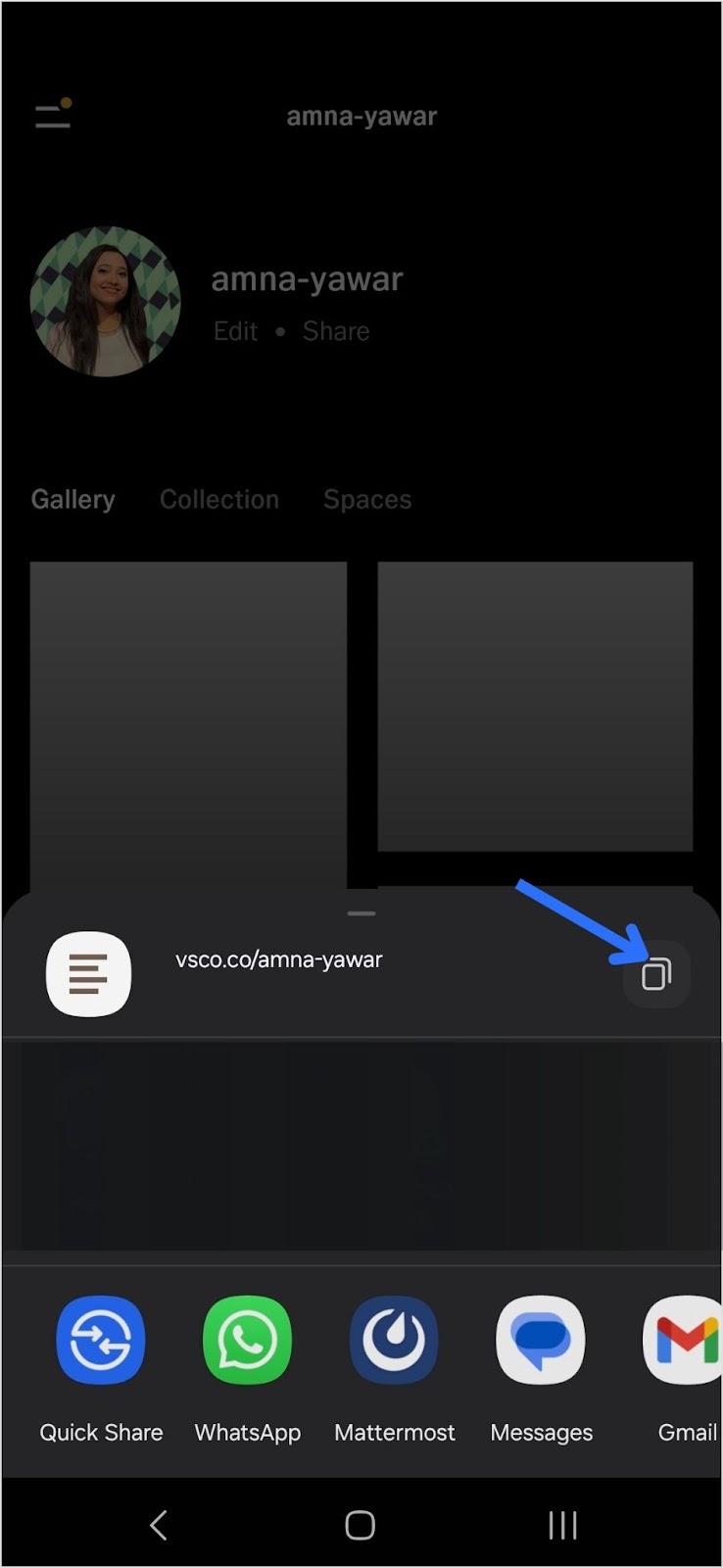
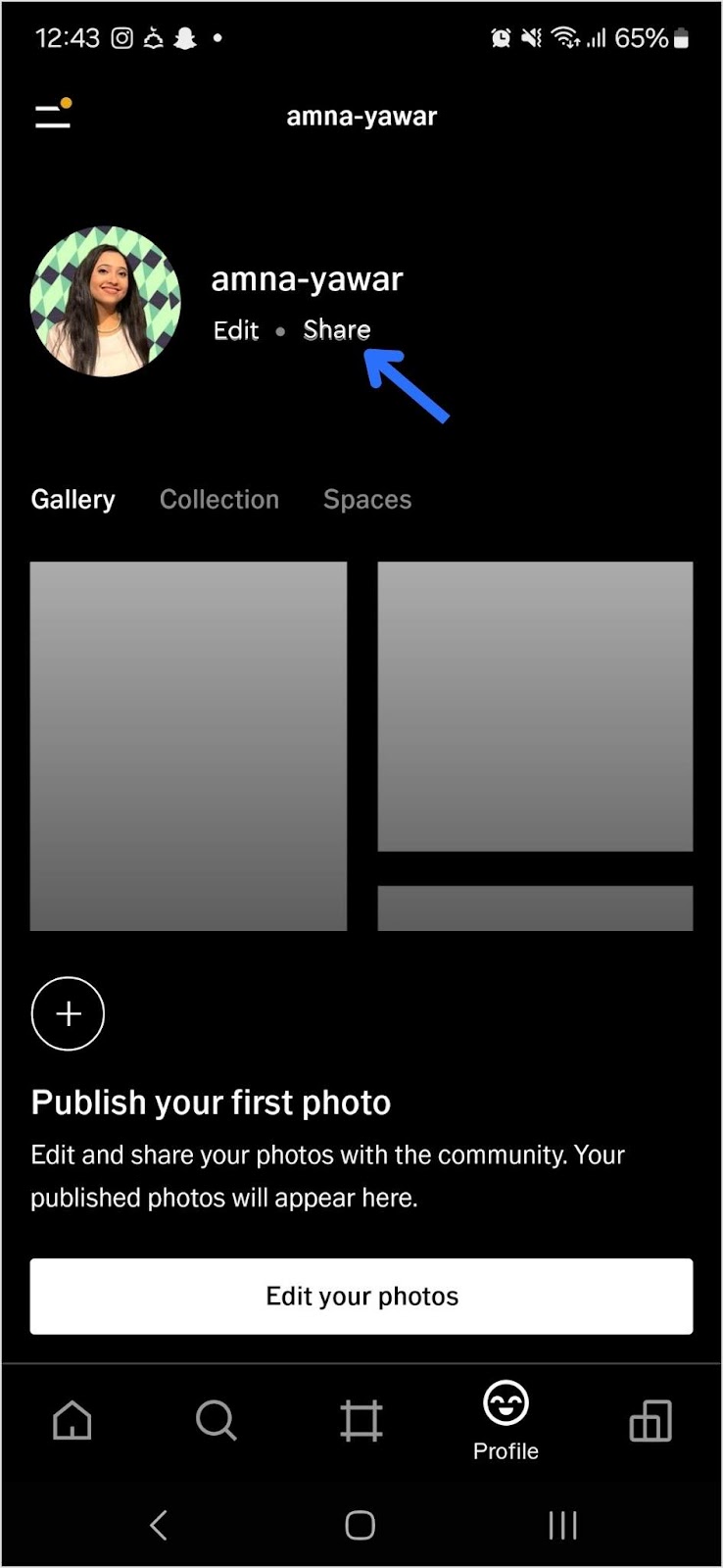
    2. Navigate to your profile and tap “Share”:
    Share your VSCO link
    1. Copy your VSCO link:
    Copy your VSCO link

    Step 2: Add your VSCO link to your Instagram bio

    Now that you have your short VSCO link, follow these steps to add it to your Instagram bio:

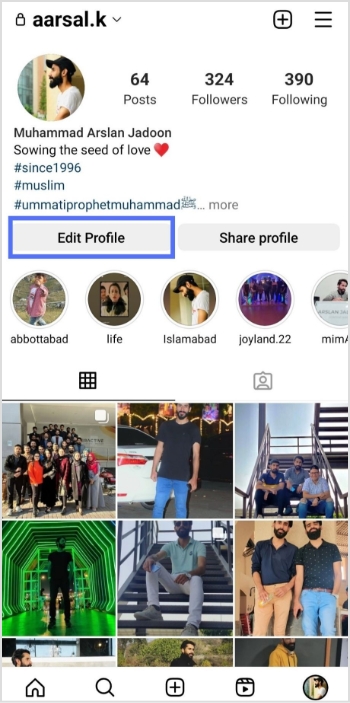
    1. Open Instagram and go to your profile.
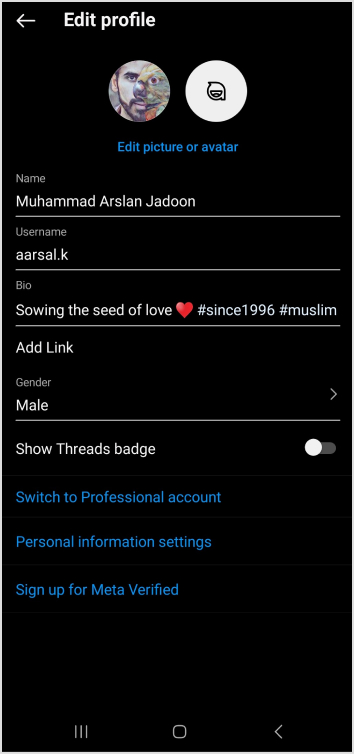
    2. Tap “Edit Profile.”
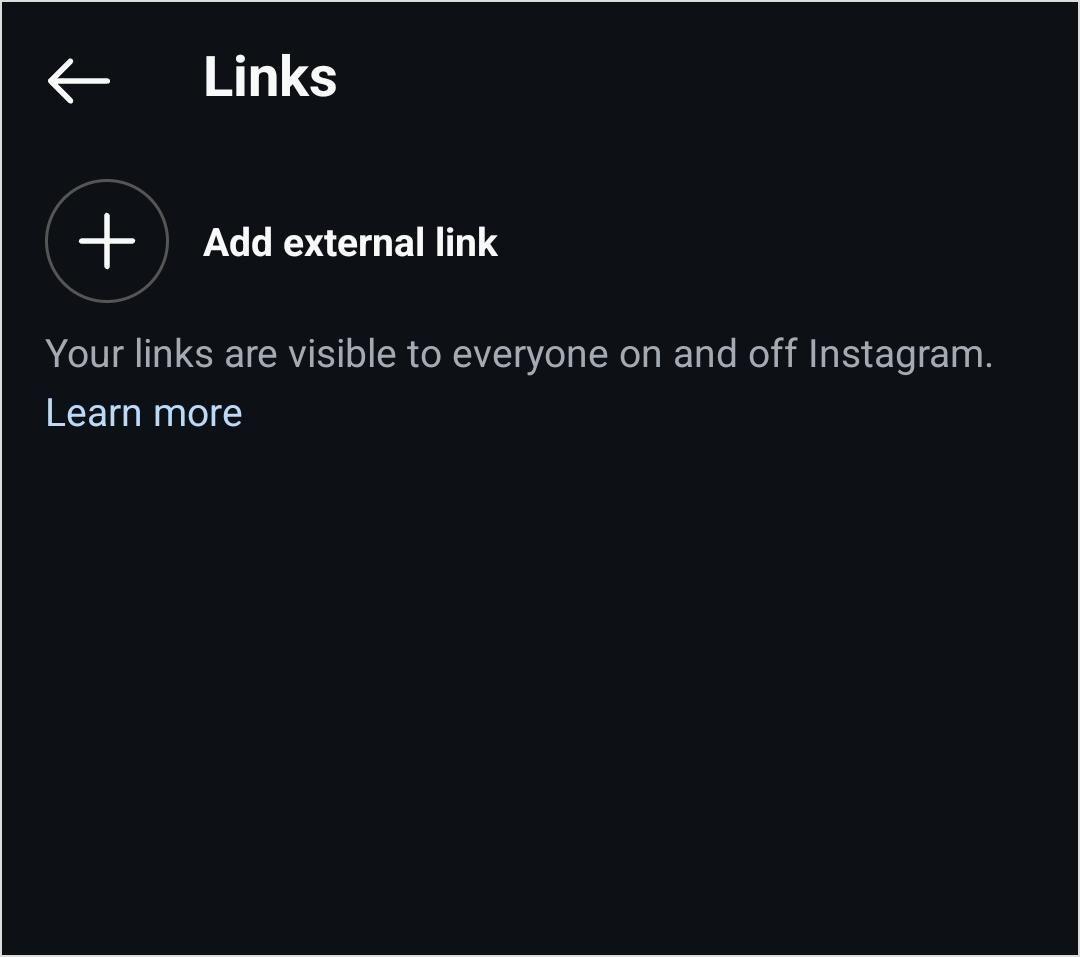
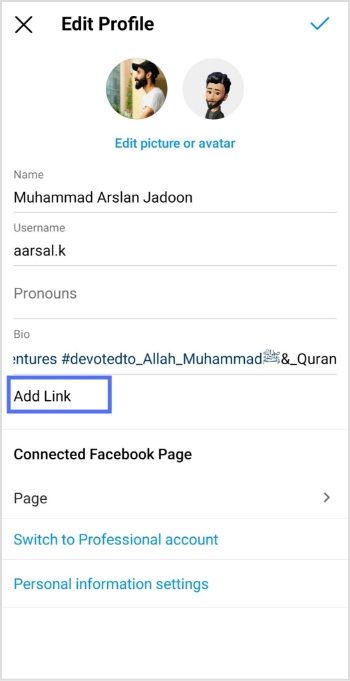
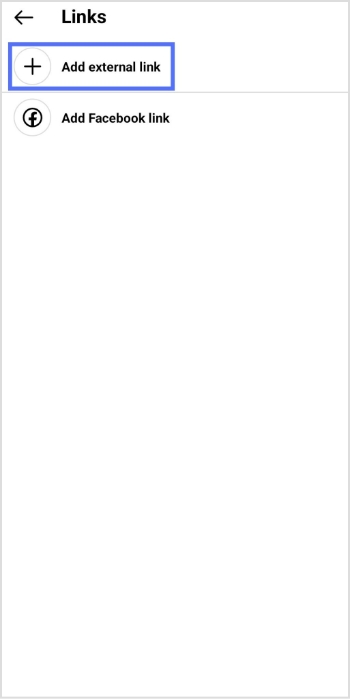
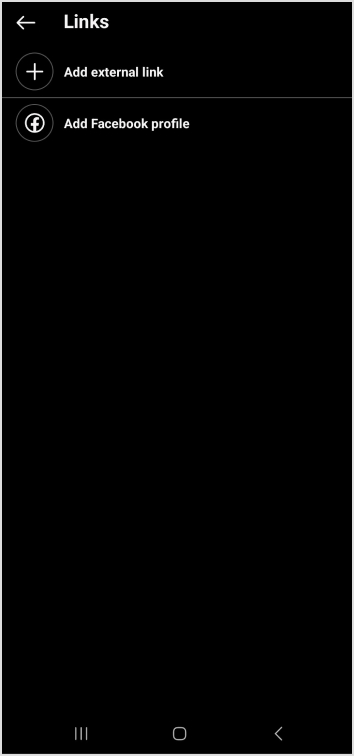
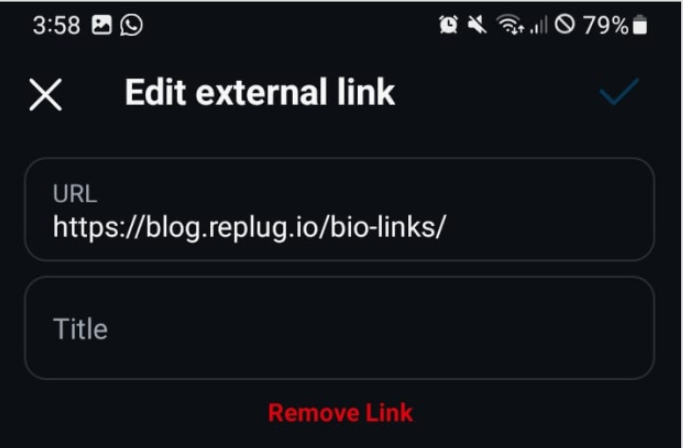
    3. Find the “Add Link” field and click on “Add external link”
    Add external link on Instagram

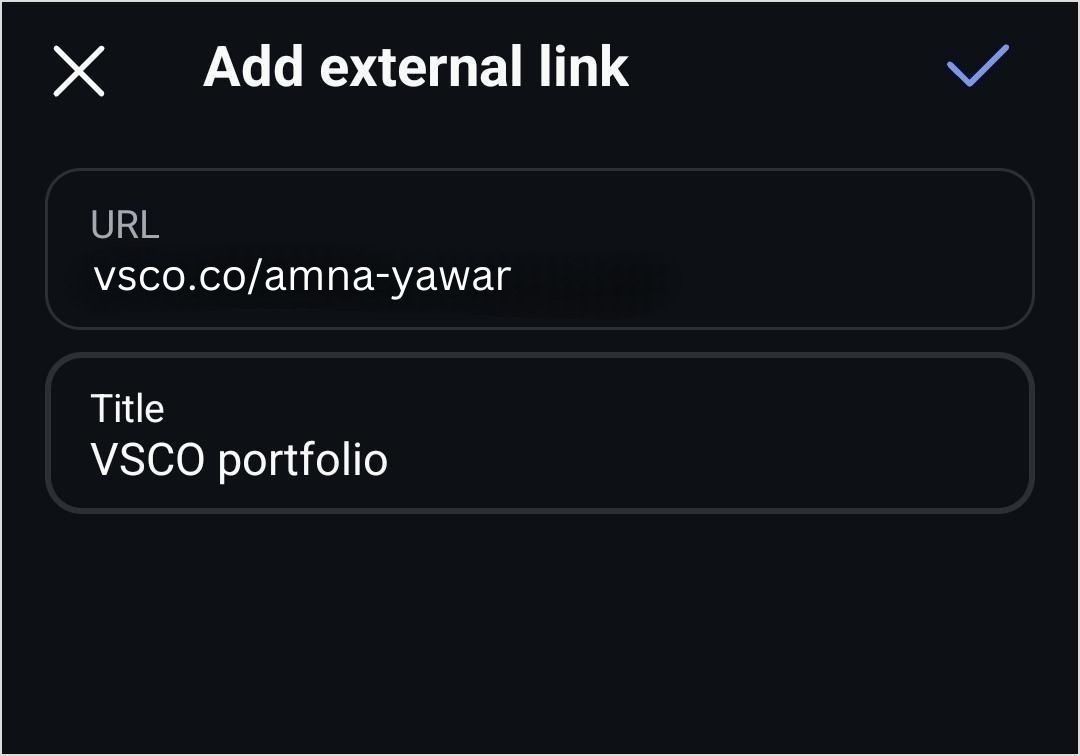
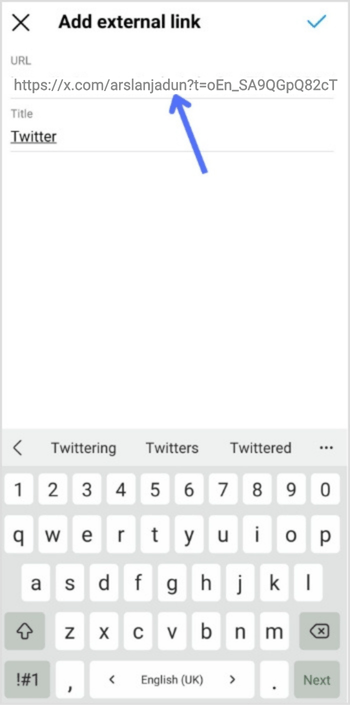
    4. Add your VSCO link and click on the blue tick to save it. 

    Add VSCO link in Instagram bio

    Your followers will now be able to see your VSCO profile in your bio!

    Shorten your VSCO link with Replug

    Now, let’s make your link more presentable, branded, and optimized using Replug’s custom link shortener free:

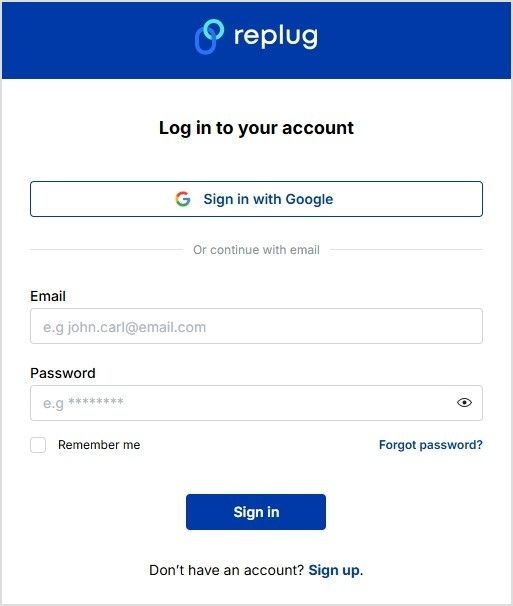
    1. Sign in to your Replug account or create an account if you don’t already have one:
    Sign in or create an account on Replug
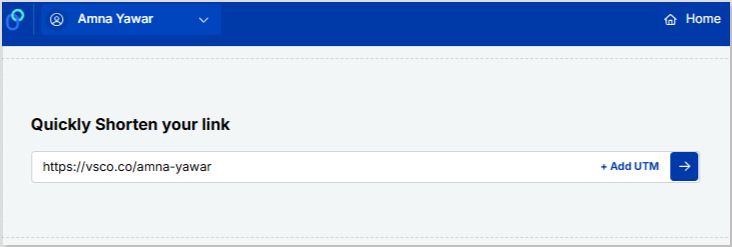
    1. Paste your VSCO profile under “Quickly Shorten your link”
    Shorten your VSCO link
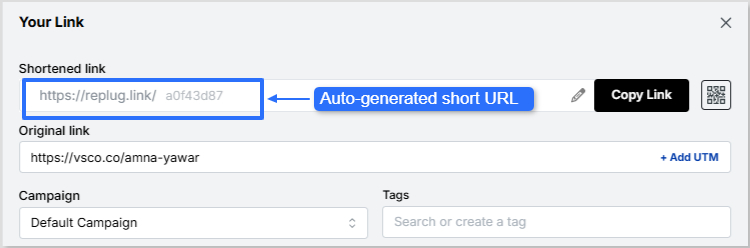
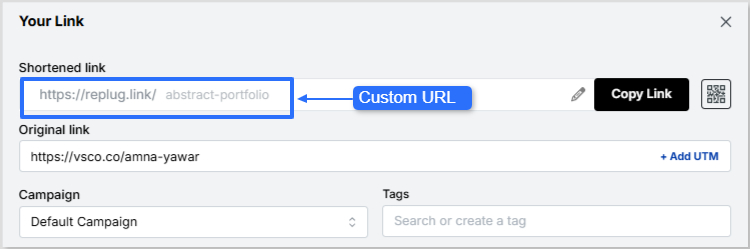
    1. Customize the shortened link with a branded or neat alias:

    Now it’s time to give your VSCO short link a glow-up! You can easily create a custom URL by simply optimizing the slug. This will let your audience know exactly where your short link will lead them.

    Auto-generated short URL:

    Auto-generated Replug VSCO short link

    Custom URL:

    Custom VSCO URL
    Replug Branded Short Links CTA
    Maximize marketing ROI
    by transforming ordinary URLs into
    branded short links that convert.
    Try Replug for free
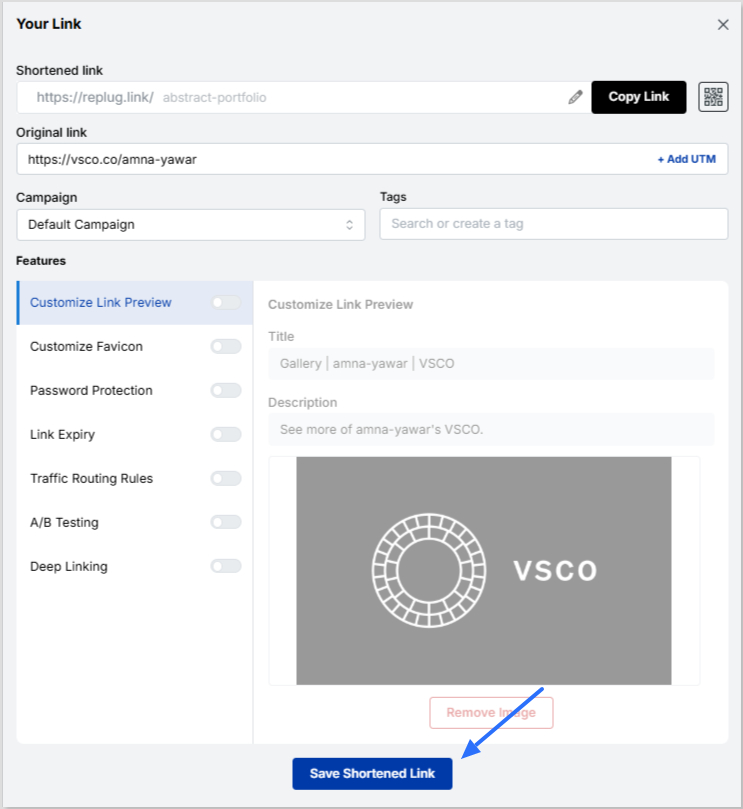
    • Save your custom URL. Now it’s ready to be shared!
    Save short VSCO link

    Replug offers a bio link feature if you want to share more than just your VSCO link. This allows you to create a single, customizable landing page containing multiple links. Instead of being restricted to just your VSCO, you can include:

    • Your VSCO profile
    • Your Instagram, Twitter, TikTok, and other social links
    • Your website or blog
    • Your latest projects or portfolio
    • Any other relevant links

    Learn how: How to add multiple links to Instagram bio using Replug?

    Boost ROI with branded URLs - Replug dashboard showing performance metrics and branded URL creation
    Turn your bio links into click-boosting machines
    Check

    Drive up to more clicks than plain URLs

    Check

    Share multiple destinations with one link

    Create bio links free

    Why use Replug for your Instagram bio?

    1. Neat and professional links: Even if your VSCO link looks fine, using Replug ensures that your bio remains visually clean while giving you a customizable and trackable link.

    2. Track link performance: Want to know how many people are clicking your VSCO link? Replug provides detailed analytics so you can track engagement and optimize your links for better performance.

    3. Share multiple links: Beyond just VSCO, you can share links to all your social profiles, including Instagram, with Replug’s Instagram link in bio free tool.

    4. Custom branding: Unlike generic link shorteners, Replug allows you to customize your shortened links and bio link page with brand colors, themes, and even a custom domain.

    5. Better user experience: Instead of constantly changing your Instagram bio link, you can set up your Replug page once and update it anytime without modifying your Instagram profile.

    Replug Branded Short Links CTA
    A complete link management solution
    for marketing professionals & agencies.
    Try Replug for free

    You may also like: How to add Amazon link to Instagram bio?

    Final thoughts

    Adding a VSCO link to your Instagram bio is great, but making it look neat and professional is even better. Replug helps you shorten your VSCO link for a cleaner appearance while also offering a bio link feature for those who want to share multiple links in one place. Whether you’re a photographer, influencer, or content creator, Replug makes your Instagram bio more effective and aesthetically pleasing.

    Ready to clean up your Instagram bio? Sign up for Replug and start shortening your links today! 

    FAQs on how to put VSCO link in your Instagram bio

    Can I make my VSCO link look more aesthetic in my Instagram bio?

    Absolutely! Using Replug, you can create a clean, custom-branded short link that fits your aesthetic and keeps your bio clutter-free.

    Will my Instagram followers know my VSCO link is legit?

    A customized, branded short link reassures your audience that your VSCO profile is safe to click, unlike long, messy URLs that may look suspicious.

    What if I want to share more than just my VSCO link?

    No problem! Replug’s bio link feature lets you showcase multiple links, whether it’s your VSCO, website, TikTok, or latest projects—all in one place.

    Can I see how many people are clicking my VSCO link?

    Yes! With Replug’s analytics, you’ll get real-time insights on link clicks, helping you understand how well your bio is driving traffic.

    Do I have to update my Instagram bio every time I change my VSCO link?

    Not if you use Replug! Simply update your link inside Replug’s dashboard, and your Instagram bio link stays the same.

  • How to add long links within TikTok character limits?

    How to add long links within TikTok character limits?

    TikTok character limits have revolutionized digital marketing, but its character limits can present challenges when sharing long links. 

    Whether you’re running a digital marketing agency, managing an e-commerce business, creating content, or handling social media accounts, mastering these constraints is essential for successful campaigns. 

    Let’s explore effective strategies to incorporate long links within TikTok’s character limits and maximize your content’s impact!

    Understanding TikTok’s character limits and link restrictions

    TikTok has come a long way in how creators can express themselves in captions. It enforces various character limits and character restrictions across its platform to maintain a clean, user-friendly interface. 

    Initially, TikTok video captions were limited to just 300 characters, offering minimal space for creativity or detailed storytelling. Over time, this cap expanded significantly to 2,200 characters, yet creators still felt the need for more flexibility. So, what’s the current character limit?

    Here’s a quick breakdown of TikTok’s latest character limits:

    • Video captions: 4,000 characters
    • Comments: 150 characters
    • Bio: 80 characters
    • Username: 30 characters

    These limits are designed to keep content concise and boost TikTok views, aligning with TikTok’s fast-paced, visually-driven nature. 

    Why are TikTok character limits important for content creators?

    The TikTok character limits help content creators stay concise and focused, ensuring their message is clear and impactful. It also encourages creativity, prompting them to deliver high-quality content within a limited space.

    1. Express more about your content
      Gone are the days of struggling to fit everything into one concise line. With 4,000 characters, you can now share behind-the-scenes details, fun facts, or a backstory for your video without compromising clarity.
    2. Describe your video like never before
      Give your audience a detailed snapshot of what they can expect. Whether you’re sharing tutorials, product showcases, or entertainment content, you can outline the key points or even share step-by-step instructions directly in the caption.
    3. Get closer to your audience
      Captions offer a way to connect deeply. Use the extra space to ask questions, share personal anecdotes, or even spark meaningful conversations! The more relatable and engaging your caption, the more your audience will likely interact with your post.
    4. Make your content SEO-friendly
      With SEO becoming a more prominent feature on TikTok, the extended character limit allows for better keyword integration. You can now include multiple keywords naturally, enhancing your video’s discoverability without making it feel forced or cluttered.
    5. Encourage longer engagement
      Thoughtful, well-written captions can keep your audience reading longer, complementing their time watching your video. This increased engagement can signal to TikTok’s algorithm that your content is valuable, potentially boosting its reach.
    6. Offer value beyond the video
      Some creators use captions as mini-blog posts, offering insights, tips, or even educational snippets that viewers can take away after watching the video. This approach adds a layer of value that keeps audiences coming back for more.

    However, the TikTok character limit can pose challenges when you need to share lengthy URLs or detailed information. For marketers and creators, the main hurdle lies in fitting promotional links within these constraints, especially in captions and bios. Long URLs can quickly consume valuable character space, leaving little room for descriptive text or calls to action. 

    Read on to know how you can easily share long links on TikTok.

    Strategies to share long links on TikTok

    1. Using URL shorteners

    Link management tools are indispensable tools for condensing long links into manageable sizes. They create compact, redirecting URLs that occupy minimal space in your TikTok content. While several options are available, Replug stands out as a comprehensive solution for professional link management.
    Replug offers several advantages for TikTok marketers:

    1. Branded short links: Create custom short URLs that reinforce your brand identity.
    2. Advanced analytics: Track link performance to optimize your TikTok marketing strategy.
    3. Centralized management: Organize and update your links from a user-friendly dashboard.
    Replug Branded Short Links CTA
    Maximize marketing ROI
    by transforming ordinary URLs into
    branded short links that convert.
    Try Replug for free

    How to create a branded short link with Replug:

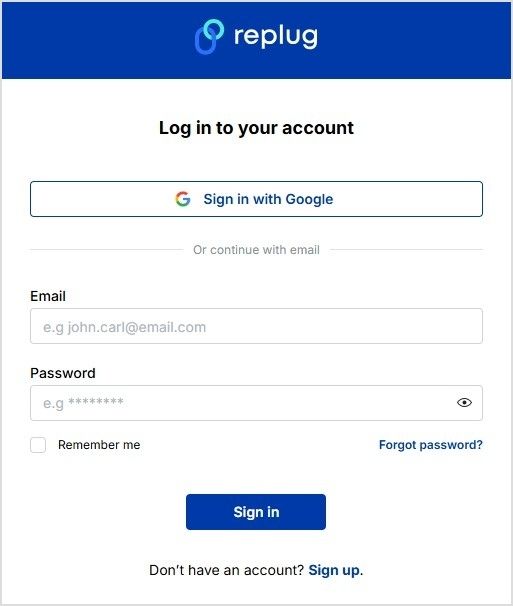
    Replug login or sign up
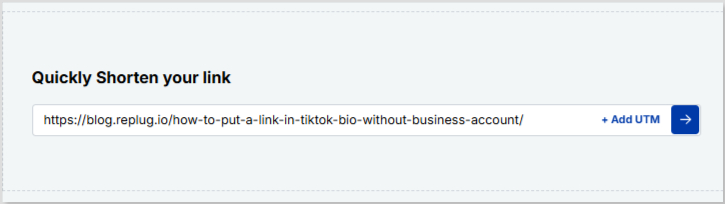
    • Paste your long URL in the bar under “Quickly Shorten your link”
    Shorten TikTok link
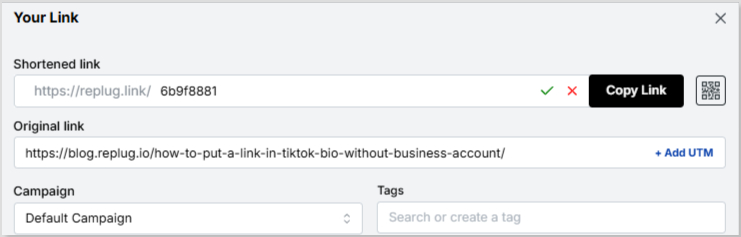
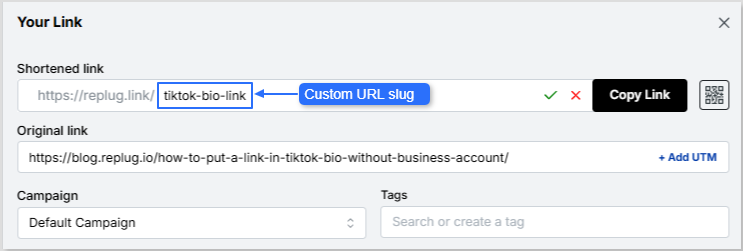
    • Proceed next and customize the URL slug if you want
    Shortened TikTok link

    Custom URL slug:

    Custom URL slug
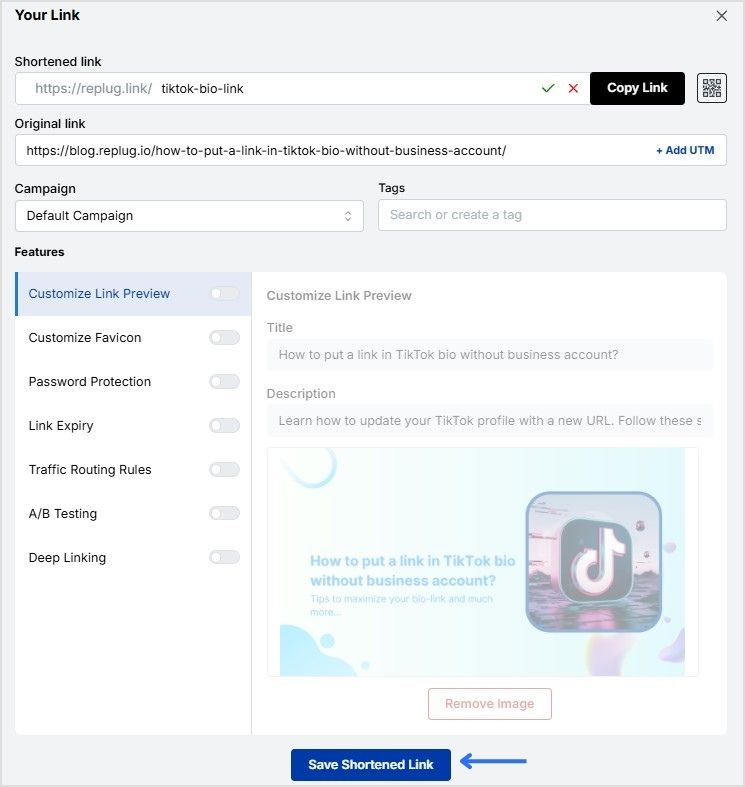
    • Save the shortened link and copy it. Now you can use your new, branded short link in your TikTok content!
    Save shortened link

    2. Make your bio stand out

    Your TikTok bio is prime real estate for sharing important links. With an 80-character limit, it’s crucial to use this space wisely:

    • Use a shortened, branded link created with Replug
    • Keep your bio text concise and compelling
    • Update your bio regularly to promote current campaigns or content

    3. Utilizing bio link tools

    Bio link tools allow you to share multiple links through a single URL in your bio. These tools create a landing page with buttons leading to various destinations.

    Replug offers this feature with added benefits:

    1. Customizable landing page design to match your brand
    2. Analytics for each link on your page
    3. Easy updates and management within the Replug dashboard

    Maximizing TikTok’s 4,000-character caption limit

    With TikTok’s expanded 4,000-character caption limit, you have more room to work with when sharing links. Here’s how to make the most of it:

    1. Strategic link placement

    • Place your most important link at the beginning or end of the caption for visibility
    • Use line breaks to separate your link from other text
    • Consider using emojis or special characters to draw attention to your link

    2. Caption optimization techniques

    • Keywords: Incorporate relevant keywords to improve discoverability
    • Call-to-action: Craft a compelling call-to-action that encourages clicks
    • Context: Provide context for your link to increase its value to viewers
    • Hashtags: Use hashtags, balancing visibility with character conservation

    Remember, while you have more space, it’s still important to keep your captions engaging and scannable. Use short paragraphs and bullet points for readability.

    Advanced link-sharing strategies for different TikTok features

    If you have a TikTok Business account for marketing, you have access to additional link-sharing options:

    • Website link in profile: Add a clickable website link to your profile page
    • Call-to-action buttons: Include buttons like “Shop Now” or “Learn More” in your videos
    • Product links: Tag products directly in your videos to increase online sales

    To make the most of these features, ensure your links lead to mobile-optimized landing pages for a seamless user experience.

    Cross-platform link sharing

    Leverage TikTok’s integration with other platforms to expand your link reach:

    • Share your TikTok content and social media links on Instagram, X (Twitter), Facebook etc.
    • Use Replug to create unique shortened links for each platform. You can also retarget your TikTok audience and track cross-platform performance.
    • Implement a consistent link strategy across all your social media profiles.

    Tips to track and optimize link performance

    Marketer analyzing TikTok link performance data

    To ensure your link-sharing efforts and click tracking are effective, it’s crucial to track and optimize performance:

    • Use Replug’s link analytics to monitor click-through rates and engagement
    • A/B test: A/B test different link placements and caption styles
    • Content drive: Analyze which types of content drives the most link clicks
    • Strategy: Adjust your strategy based on performance data
    Replug Branded Short Links CTA
    A complete link management solution
    for marketing professionals & agencies.
    Try Replug for free

    By consistently analyzing your results, you can refine your approach and improve the effectiveness of your TikTok marketing campaigns.

    The best (& FREE) TikTok caption generator

    Want captions that pop? Replug’s free TikTok caption generator makes creating engaging captions effortless. Follow these simple steps to get captions tailored to your needs:

    1. Enter your prompt: Briefly describe your TikTok content.
    2. Adjust word count: Choose the length that fits your style.
    3. Define the tone: Whether casual or professional, select the tone that aligns with your message.
    4. Toggle hashtags & emojis: Add hashtags and emojis or keep them minimal.
    5. Select variations: Decide how many caption options you need.
    6. Click ‘Generate’: Let Replug’s AI create your captions instantly.

    It’s fast, it’s easy, and it’s free. Try Replug’s free TikTok caption generator and get captions that work!

    Conclusion

    Navigating TikTok’s character limits when sharing long links doesn’t have to be a roadblock for your marketing efforts. By utilizing tools like Replug for branded link shortening and analytics, strategically placing links in your content, and leveraging TikTok’s various features, you can effectively drive traffic and engagement from your TikTok audience.

    Remember to keep your content authentic and valuable, using links to enhance rather than overshadow your message. With these strategies in place, you’ll be well-equipped to make the most of TikTok’s platform while maintaining your brand’s professionalism and impact.

    FAQs for TikTok character limits

    Can I add multiple links in one TikTok post?

    While you can include multiple links in a caption, it’s generally more effective to focus on one primary link per post. Use link-in-bio tools or Replug’s landing page feature for sharing multiple links.

    Are shortened links secure for TikTok?

    Reputable URL shorteners offer secure links. Look for tools that provide HTTPS encryption to stay safe while adhering to TikTok character limits.

    How do I make my links more clickable?

    Use clear calls-to-action, place links strategically in your captions, and consider using emojis or special characters to draw attention to them. Branded short links can also increase trust and clickability.

    What’s the best way to track link performance on TikTok?

    Utilize Replug’s analytics features to track click-through rates, engagement, and other key metrics for your shared links. This data will help you optimize your TikTok marketing strategy over time.

    Are there any restrictions on the types of links I can share?

    TikTok has community guidelines that prohibit sharing links to harmful or inappropriate content. Always ensure your links comply with TikTok’s policies to avoid potential account restrictions.
  • How to add a Twitter (X) link to Instagram bio?

    How to add a Twitter (X) link to Instagram bio?

    Important note: Throughout this guide, we will refer to Twitter as “X”.

    Looking to expand your social media presence and connect with a wider audience? If you’re already active on Instagram, adding an X link to your bio can be a game-changer. 

    Not only does it allow you to cross-promote your content and reach new followers, but it also opens up a world of new possibilities for networking, sharing your thoughts and ideas, and building your personal brand. 

    Adding an X link to your Instagram bio is a smart move for many reasons, and this guide explores how to make the most of it. So, let’s dive in and discover how to add an X link to an Instagram bio!

    Why add an X link to your Instagram bio?

    Adding an X link to your Instagram bio can be a smart move for several reasons:

    Cross-promotion: By linking your Instagram and X profiles, you can reach a wider audience and drive traffic to both platforms. This means more visibility for your content and potentially more followers.

    Networking: X is a powerful networking tool. By linking it to your Instagram account, you can make it easier for people to find and connect with you. This can be especially useful if you’re looking to build relationships with influencers or other industry professionals.

    Sharing your thoughts: While Instagram thrives on visuals, X is all about the power of words. By linking to your X account, you can share your thoughts, opinions, and ideas with your followers in a way that’s not possible on Instagram.

    Building your personal brand: By maintaining an active presence on both Instagram and X, you can build a strong personal brand that resonates with your target audience. Linking the two accounts creates a cohesive online identity that helps you stand out from the crowd.

    Also read: Top 29 personal branding tools to upscale your marketing efforts

    How to add an X link to your Instagram bio?

    On a mobile device:

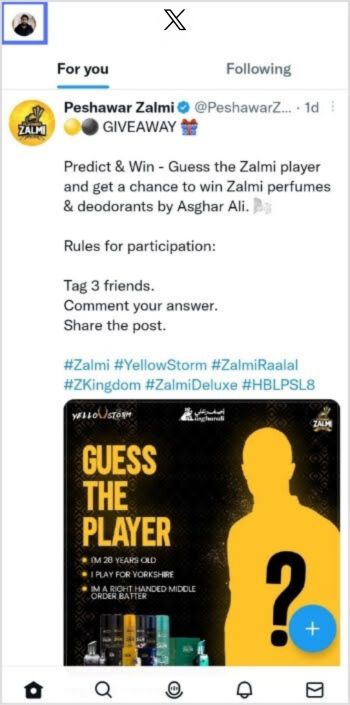
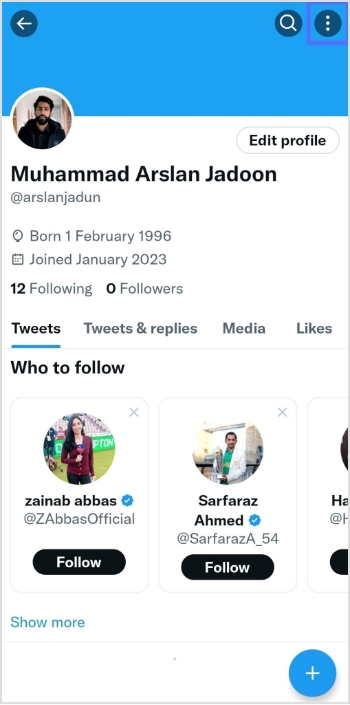
    Step 1: Open the X app on your mobile phone and tap the profile icon in the top left corner to open your profile. 

    Open X App

    Step 2: Tap “three dots” in the top right corner. 

    Tap 3 dots

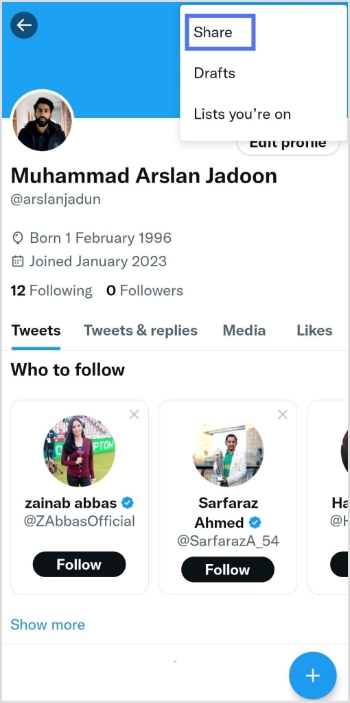
    Step 3: Tap “share”

    Tap share

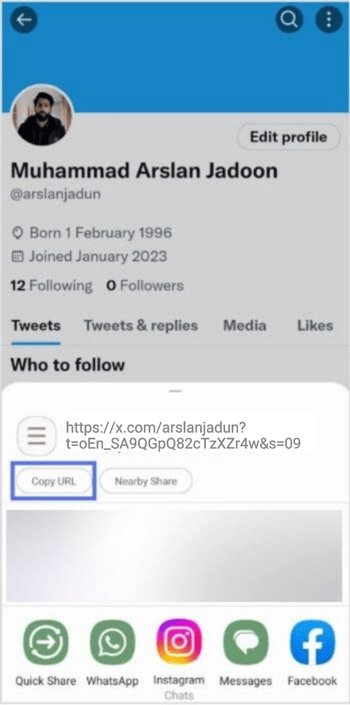
    Step 4: Tap “copy URL” 

    Copy URL

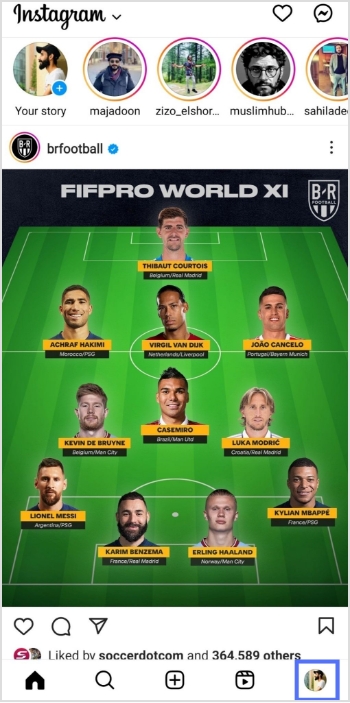
    Step 5: Open the Instagram app and tap your profile icon in the bottom right corner. 

    Instagram-profile-icon

    Step 6: Tap “edit profile”.

    edit profile

    Step 7: Tap “add link”

    Add link

    Step 8: Tap “add external link”

    Add external link

    Step 9: Paste the X URL in the URL field, enter the title and you’re done.

    Add external link

    Also read: How to add Amazon link to Instagram bio?

    On a Computer device:

    Step 1: Log in to X on your computer or laptop. 

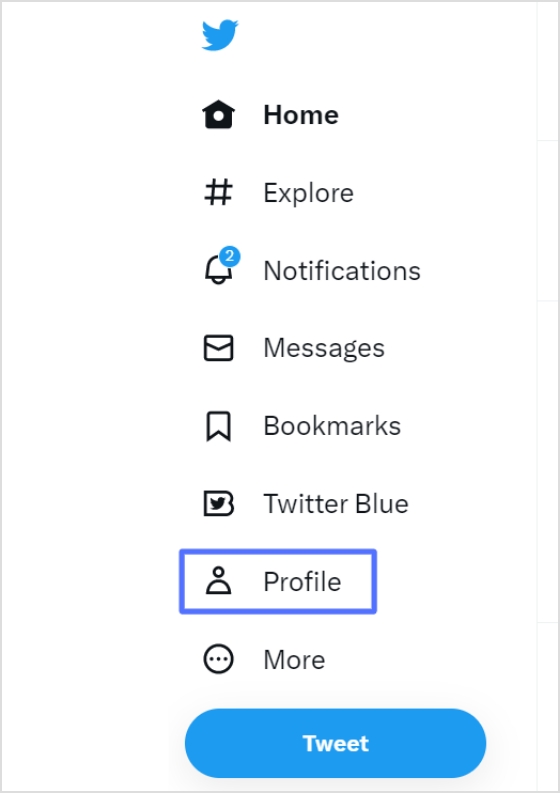
    Step 2: Click “profile” on the left side of the menu. 

    Twitter-profile

    Step 3: From the URL bar, copy the URL. That’s your profile URL. 

    copy-url

    For a cleaner look in your Instagram bio, especially with character limits, a free link shortener can transform that lengthy “X” URL into something concise and branded. Tools like Replug, a powerful link optimization platform, make this effortless by not only shortening links but also adding tracking and customization options to boost your cross-platform engagement.

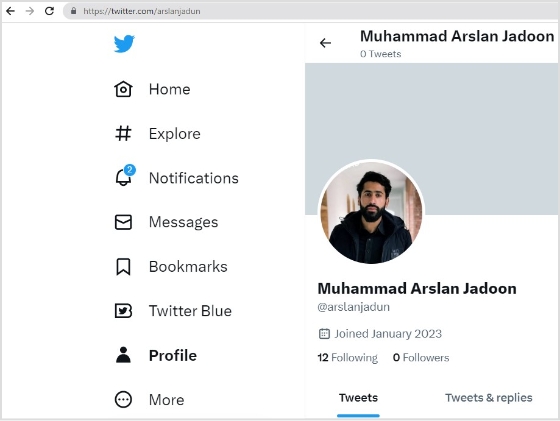
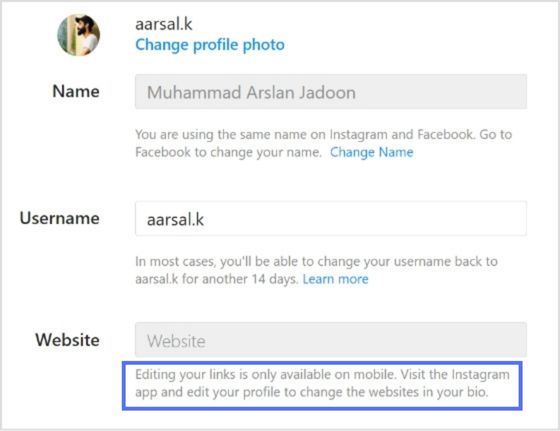
    Note: You can only edit your links on mobile devices. Visit the Instagram app and follow the steps above to edit your bio and add the X link.

    edit-bio-problem

    Also read: How to find my Twitter URL on mobile and desktop?

    FAQs about how to add a Twitter (X) link to Instagram bio?

    How to link Instagram and X for auto-tweeting photo links?

    To link your Instagram account to X and automatically tweet links to your photos, follow these steps:
    1. Open the Instagram app on your mobile device and go to your profile.
    2. Tap the three horizontal lines in the upper right-hand corner of your screen.
    3. Select “Settings” from the menu that appears.
    4. Tap “Account” and then “sharing to other apps.”
    5. Tap “X” and enter your X login information when prompted.
    6. Once you’ve linked your accounts, toggle on “Share your posts to X” to automatically share your Instagram posts on X.
    7. To customize what gets shared on X, you can toggle on or off the options for sharing your Instagram photo, caption, or location.
    That’s it! Now every time you post a photo on Instagram, it will automatically be shared as a link on your X account.

    Can I choose which Instagram posts get shared on X?

    Yes, you can customize what gets shared on X by toggling the options for sharing your Instagram photo, caption, or location on or off.

    Can I still share my Instagram posts on X if I didn’t link my accounts during the initial setup?

    Yes, you can manually share your Instagram posts on X by copying the link to your Instagram post and pasting it into a tweet on X. However, automatic sharing can only be enabled if you link your accounts.

    Trending:

    How to add YouTube link to Instagram bio?

    How to Rename Links Using Replug: 5 Simple Steps

    How to create a temporary URL: Set up link expiration

    How to add multiple links to Instagram bio using Replug?

  • How to remove link from Instagram bio?

    How to remove link from Instagram bio?

    Your Instagram bio is your brands first impression, and it matters. It’s more than just a few lines of text. It’s a powerful tool to establish your brand identity and drive traffic to your brand. 

    Brands lose potential leads and drop conversion rates instantly as they’re not familiar with the platform’s algorithm or best practices. Some of the most important pointers to maximize your Instagram profile’s bio is knowing 

    • How to remove link from Instagram bio?
    • How to maximize the limited space in your bio?
    • How to rename your Instagram bio link?

    When crafting your Instagram bio, consider including some of the following:

    • A short description of your brand
    • A branded call-to-action (CTA)
    • A bio-link
    • Your website link
    • A microsite link

    Don’t forget that the URL in your bio channels your followers to an external website, a new landing page, a microsite, or other relevant destinations, expanding your influence beyond Instagram.

    Let’s optimize it together.

    Boost ROI with branded URLs - Replug dashboard showing performance metrics and branded URL creation
    Turn your bio links into click-boosting machines
    Check

    Drive up to more clicks than plain URLs

    Check

    Share multiple destinations with one link

    Create bio links free

    Why I can’t remove the link from my Instagram bio?

    There are a few potential reasons why you might be unable to remove a link from your Instagram bio:

    1. Instagram glitch: Sometimes, Instagram experiences temporary glitches. Try closing the app completely and reopening it. This might resolve the issue.
    2. Link shortener or third-party app: If you’re using a link shortener or a third-party app to manage your bio link, you might need to remove the link from that service first.
    3. Outdated app: Ensure you’re using the latest version of the Instagram app. Outdated apps can sometimes cause issues.
    4. Cache issues: Clear your app’s cache or use a different device to see if the issue persists. Cached data can sometimes cause unexpected behavior.
    5. Account issues: Verify that your account hasn’t been flagged or restricted in any way, which might affect your ability to make changes.

    Additional troubleshooting steps:

    1. Check internet connection: A poor internet connection can interfere with app functions.
    2. Try a different device: If possible, log in to Instagram from a different device to see if the issue persists.
    3. Wait it out: Sometimes, Instagram experiences temporary server issues. Waiting a few hours might resolve the problem.

    If you’ve tried these steps and still can’t remove the link, contact Instagram support directly for further assistance.

    How to remove a link from your Instagram bio?

    Removing a link from your Instagram bio is a quick and easy process. Follow these steps to update your bio:

    Step 1: Open the Instagram app on your device.

    Feedpage of Instagram

    Step 2: Go to your profile

    Tap on your profile picture in the bottom right corner of the screen to go to your profile page.

    Personal Instagram Profile

    Step 3: Edit your profile

    On your profile page, tap the “Edit Profile” button. This is usually located directly below your profile picture and bio.

    Edit Profile

    Step 4: Update the website field

    In the “Edit Profile” screen, look for the “Link” field. This is where your current link is located.

    Link in your Instagram bio

    Step 5: Remove the link

    Tap on the “Link” field to edit it. Delete the existing link or text from the field.

    Remove link

    Step 6: Save your changes

    Once you’ve removed the link, tap “Done” (iOS) or the checkmark (Android) in the top right corner to save your changes.

    Refresh your profile: Go back to your profile page and refresh it to ensure that the link has been successfully removed.

    And that’s it! You’ve successfully removed or updated the link from your Instagram bio. 

    Boost ROI with branded URLs - Replug dashboard showing performance metrics and branded URL creation

    Go beyond generic link pages!

    Create custom bio links that truly fit your brand

    With Replug, you can create bio links that are unique, engaging, and built to convert.

    Start free trial

    How to rename a link on Instagram bio?

    Renaming a link on Instagram involves using link shortener tools that not only condense your URL but also allow customization of the link text to make it more appealing and memorable.

    One of the best options is Replug. It is a top-notch, free link shortener tool that offers customization features.

    Introducing Replug.io

    Replug.io is a link management platform that simplifies URL sharing by creating branded short links and provides in-depth click tracking for performance optimization.

    Steps to rename bio links on Instagram using Replug

    Take the first step towards using Replug by creating an account.

    Step 1: In the top-left corner, paste the link you want to shorten into the input bar. Then, click the arrow icon next to it to proceed.

    shorten your link

    Step 2: You’ll be redirected to this page

    chaneg link name

    Click the pencil icon in the top bar to rename or customize your link.

    cahnge link name

    After editing, click the green checkmark to confirm the changes.

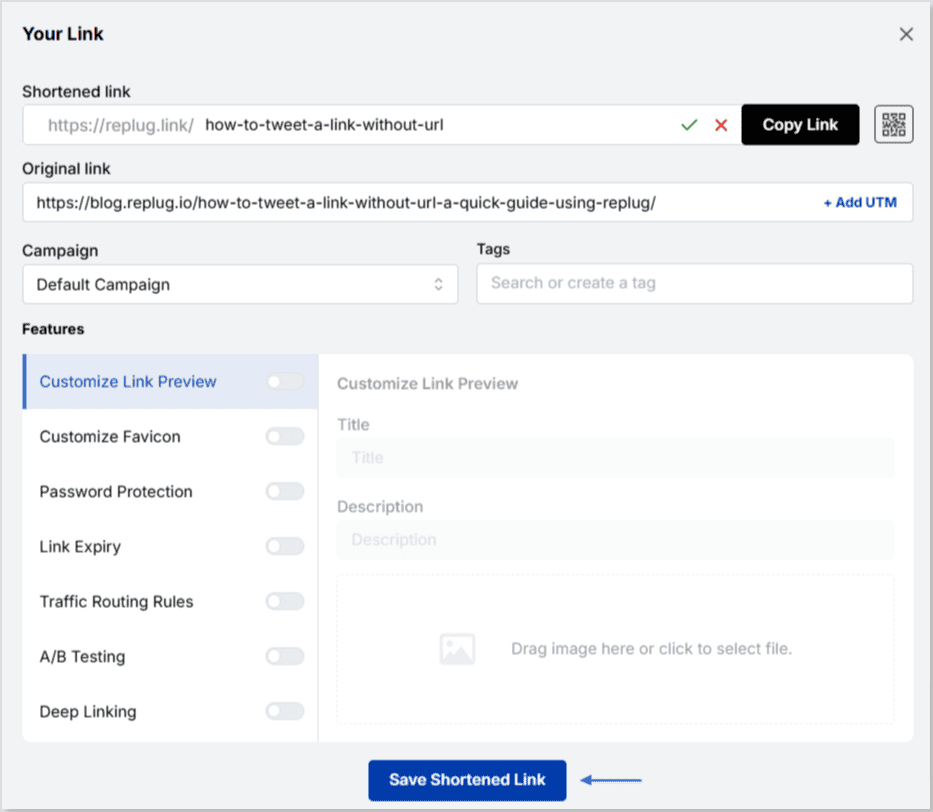
    Step 3: Once you’ve finalized your changes, click the “Save Shortened Link” button at the bottom to complete the process.

    save new link

    Viola! Your link is renamed.

    Step 4: Update your Instagram bio

    1. Open Instagram and go to your profile.
    2. Tap on “Edit profile”.
    3. Find the “Website” field and paste your customized short link.
    4. Save your changes.
    1. Double-check your profile or wherever the link is used to ensure that the new name is correctly reflected and that the link still functions properly.

    Replug Branded Short Links CTA
    Maximize marketing ROI
    by transforming ordinary URLs into
    branded short links that convert.
    Try Replug for free

    For more info: How to rename a link on Instagram bio?

    Replug: Link-in-bio feature

    bio-links-social-profiles

    You can achieve this effortlessly with the Replug’s top-notch link in bio maker. This tool lets you consolidate all your important content and links into a single, accessible location for your audience.

    Here are amazing features of Replug’s link in bio tool

    1. Add your favorite content in one place

    Bring your brand to life with social media icons, essential links, the recent blog with an RSS feed, audio clips, important text, and cards for stunning images.

    add links

    2. With Replug, you don’t just get a link in bio – you get to own it by renaming your links.

    Also, customize their appearance and match your landing page blocks from colors to favicons to your brand’s vibe. 

    3. Track bio link performance

    With performance tracking features, you can monitor the total number of clicks, conversion rates, and other valuable metrics. The best part is that you can view your analytics in both a summary list view and a detailed view.

    Boost ROI with branded URLs - Replug dashboard showing performance metrics and branded URL creation

    Go beyond generic link pages!

    Create custom bio links that truly fit your brand

    With Replug, you can create bio links that are unique, engaging, and built to convert.

    Start free trial

    Top tips to maximize the limited space in your bio:

    Quick tips Maximize your impact
    Less is moreAdd a short description about your brand or page. 
    Try adding a bio landing pageConclude your website link, portfolio, contact information etc.
    Identify your unique selling point (USP)Clearly communicate what sets you apart.
    Include a clear call to action (CTA)Tell people what you want them to do next.
    Keep on experimentingTry different stuff. See what clicks. You might surprise yourself!

    Conclusion

    Removing a link from your Instagram bio is a simple process that can be done in a few steps through the app’s profile settings. By keeping your bio updated and free of outdated or broken links, you ensure a professional and effective presence on the platform. This helps maintain a clear and engaging profile, optimizing your brand’s impact and user experience. 

    So that was it for today’s guide. If you have more questions regarding link name changers, link removers, or the best link in bio tools, feel free to visit our website. 

    FAQs related to Instagram bio-link 

    How do I make my Instagram bio catchy?

    1. Clearly state what your business does.
    2. Use relevant keywords to improve searchability.
    3. Include contact information and a call to action.
    4. Utilize Instagram’s business features like adding a category, contact options, and action buttons (e.g., “Book Now” or “Shop”).

    How do I add a website link to my Instagram bio?

    Edit your profile and paste the URL into the “Website” field.

    How often should I update my Instagram bio?

    Update your bio whenever there are significant changes to your brand, achievements, or contact information.

    Can I use hashtags in my Instagram bio?

    Yes, you can use hashtags in your Instagram bio to make your profile more discoverable and to highlight key interests or topics.

  • How to add a location to your Instagram bio?

    How to add a location to your Instagram bio?

    Imagine this: you’ve just opened your store in a lively new neighborhood. Now, picture potential customers on Instagram, craving a nearby spot. They stumble upon a post about a cozy local cafe close by. Intrigued, they visit, and bam – you’ve become their new favorite.

    This magic is possible when businesses, like yours, add a custom location to their Instagram bio. It’s not just a digital tag; it’s a smart way to connect with locals, boost visibility, and amp up sales.

    Ready to try it yourself? Here’s a quick guide on adding a location to your Instagram link in bio – an easy trick to effortlessly connect with your audience and boost your digital presence.

    Here’s how to add a location to your Instagram bio:

    Whether you’re using a personal or business account, adding a location to your Instagram bio is a breeze. Just a heads up, you can only do this on your mobile, not your computer. Stick around, and we’ll show you how in a moment.

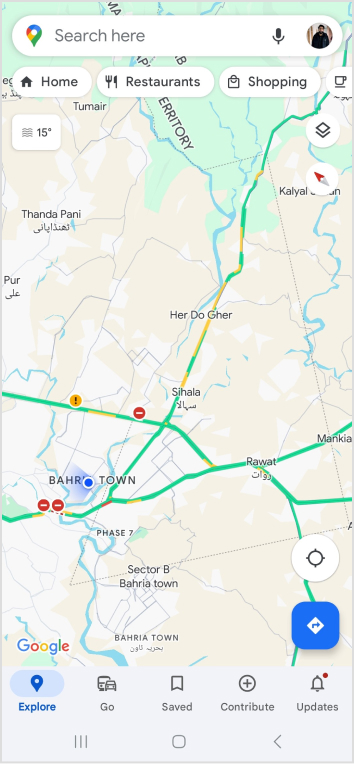
    Choose a location on Google Maps on your phone:

    Step 1: Open Google Maps on your phone and search for the specific location you want to add. Type the address into the search bar if needed.

    Step 2: Once you find the right spot on Google Maps, tap “Share,” then select “Copy.” This action copies the link to that exact location.

    Step 3: Close Google Maps and open Instagram. Go to your profile by tapping your profile picture at the bottom right of the app’s home screen.

    Step 4: Tap “Edit Profile.”

    Step 5: Under the “Links” section, select “Add Link.”

    Step 6: On the next screen, choose “Add External Link” and paste the link you copied from Google Maps. You can also give it a title, like your business name.

    Step 7: Hit “Done” and go back to your profile.

    Refresh the page by pulling the screen down, and there you have it! You’ve successfully added a location to your Instagram bio.

    Also read: How to Sell on Instagram: Top 10 Strategies for Success

    Boost ROI with branded URLs - Replug dashboard showing performance metrics and branded URL creation

    Go beyond generic link pages!

    Create custom bio links that truly fit your brand

    With Replug, you can create bio links that are unique, engaging, and built to convert.

    Start free trial

    How to add multiple links to your Instagram bio?

    Expand your Instagram profile’s impact using Replug to add multiple links to your bio. Overcome Instagram’s single-link constraint, by using our Instagram link in bio tool to create a single bio link page offering followers easy access to diverse content and destinations.

    Replug also serves as a comprehensive link management platform, helping you organize, track, and optimize all your links from one convenient dashboard. Streamline engagement and maximize your online presence with this dynamic and efficient link in bio tool.

    Here’s how to add multiple links to your Instagram bio using Replug:

    Step 1: Sign in to Replug or create a free account.

    sign in to replug

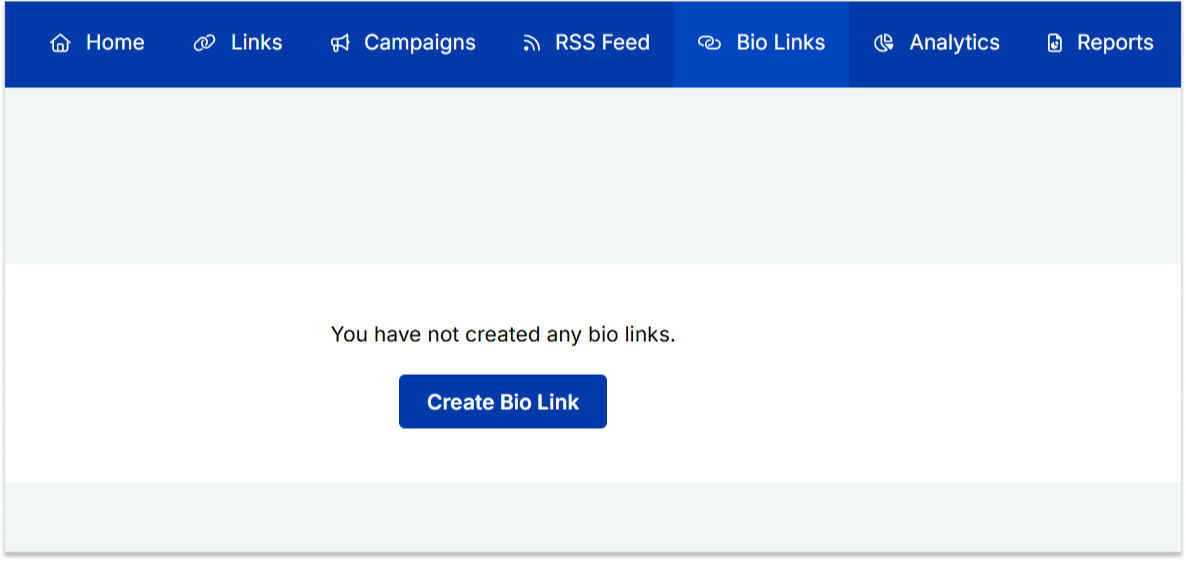
    Step 2: Locate the “Bio Links” feature in the top banner. The bio link dashboard will appear in front of you. 

    bio link

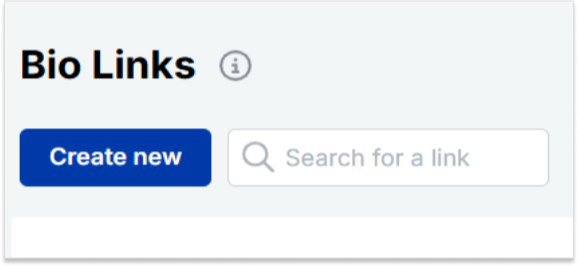
    Step 3: Click the “New Bio Link” button to start setting up your Tumblr bio. You’ll be directed to a new page where you’ll find three main categories: branding, content, and settings.

    create a new bio link

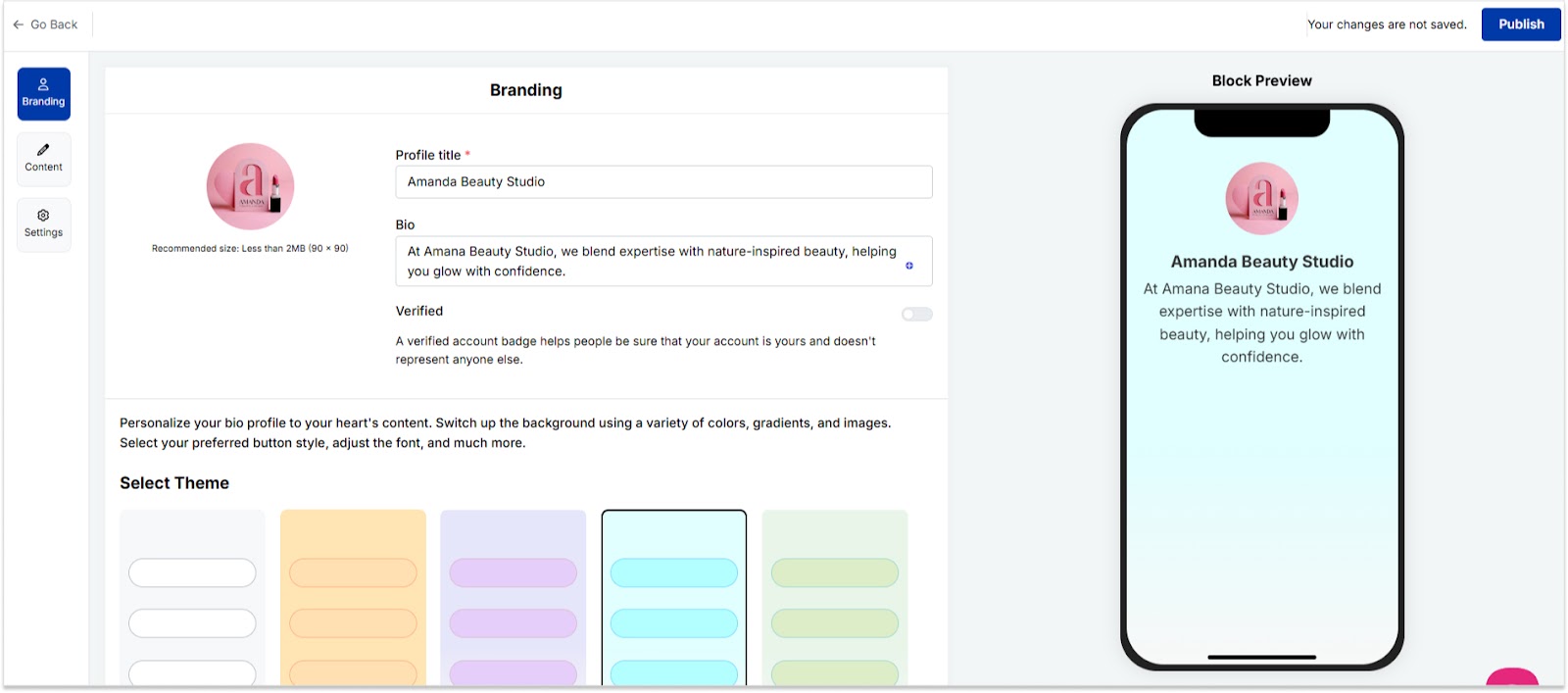
    Step 4: In the branding section, add a brand title and description, select themes, and choose button styles to match your aesthetic.

    bio link branding

    Once you’re done, click “Publish” in the upper right corner to save your changes.

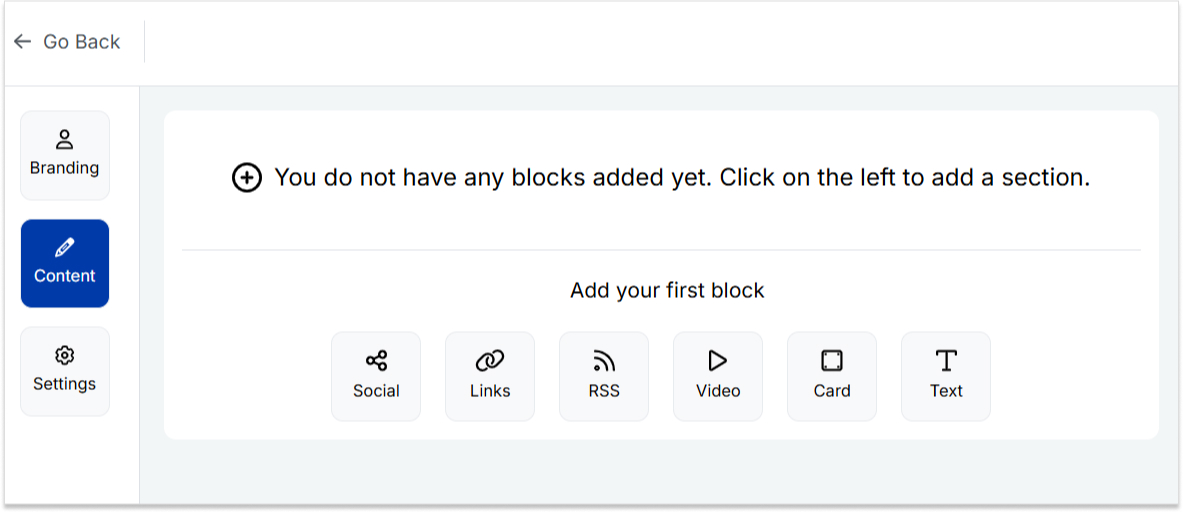
    Step 5: Head to the content category. Here, you can add social icons, links, RSS feeds, videos, cards, text, and more. 

    bio link content

    For example:

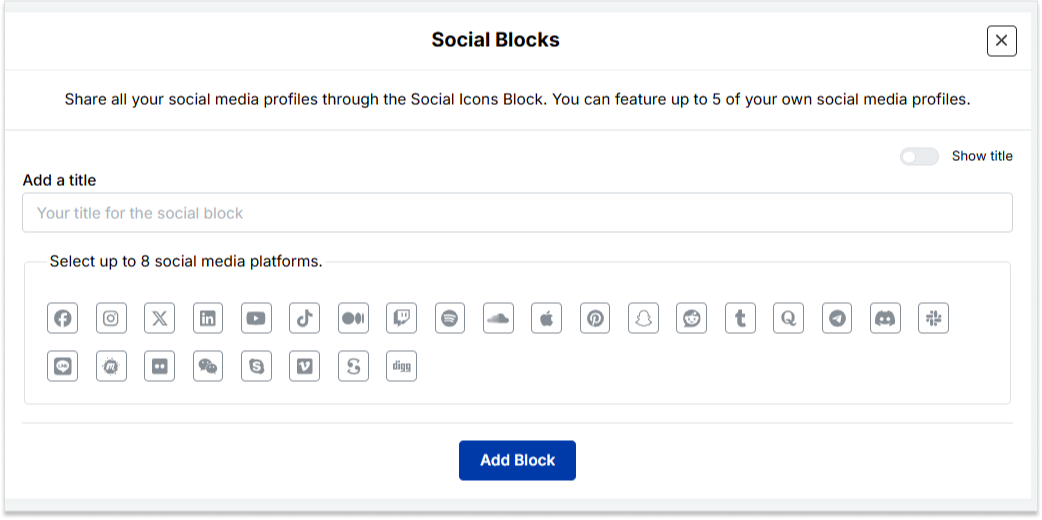
    • Social icons: Add up to 8 platforms, customize colors, and link to your profiles.
    add up to 8 social icons
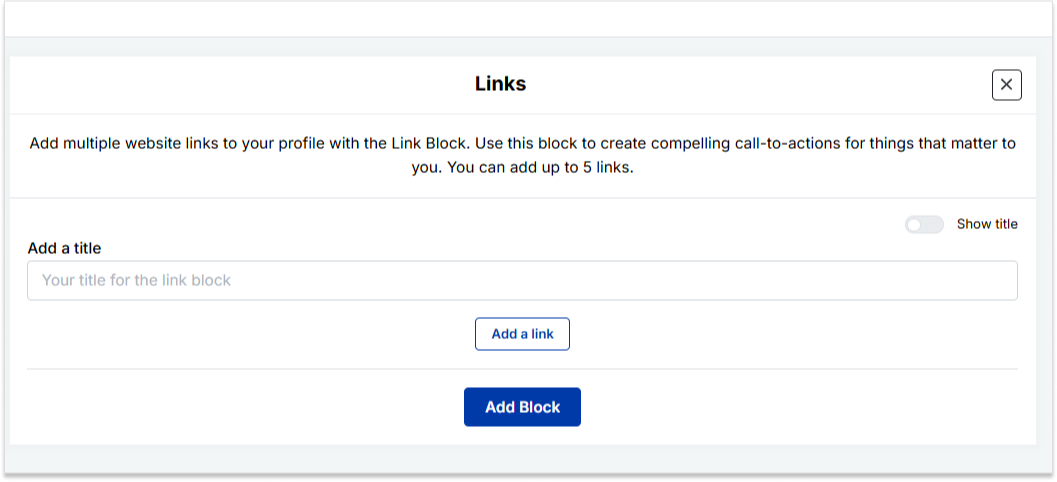
    • Links block: To include website links, use the “links” block. Add titles and URLs for each link.
    add up to 5 links

    Step 6: Once you’ve added the necessary blocks, click “update” to save each one.

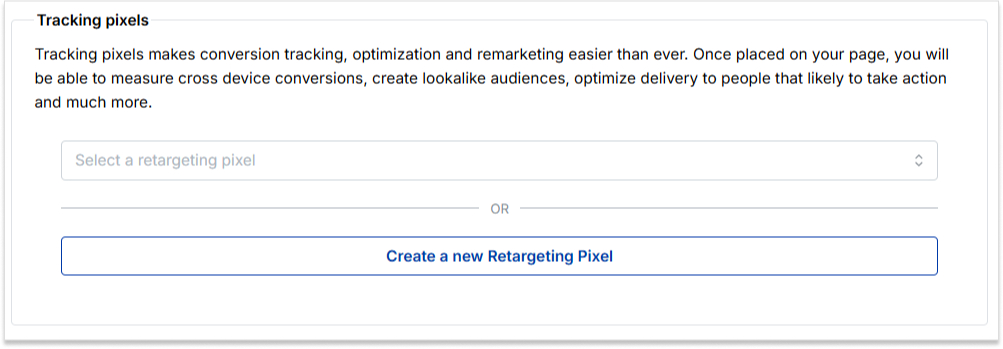
    Step 7: Go to the settings section to further customize your bio link’s SEO and social media preview. Add a title, description, favicon image, and even retargeting pixels if desired.

    add retargeting pixel

    Now you can add this bio link to your Instagram bio following the steps mentioned above and you’re done. 

    Also read: How to put your VSCO link in your Instagram bio?

    Boost ROI with branded URLs - Replug dashboard showing performance metrics and branded URL creation

    Go beyond generic link pages!

    Create custom bio links that truly fit your brand

    With Replug, you can create bio links that are unique, engaging, and built to convert.

    Start free trial

    FAQs on Instagram bio

    How do I change my location on my Instagram business account?

    Update your location by tapping “Edit Profile” on your Instagram profile and adjusting it under the “Public Business Information” section.

    Can I add multiple locations to my Instagram bio?

    No, Instagram allows only one location link, but you can use services like Replug to create a bio link with multiple links, including locations.

    Additionally, you can simplify and track your links effortlessly using this URL shortener free tool, making your shared URLs more manageable and professional.

    Why can’t I add a location to my Instagram bio on my computer?

    Editing Instagram bio links, including locations, is a mobile-only feature. You can make these changes using the Instagram app on your smartphone.

    Is it possible to remove a location from my Instagram bio later?

    Absolutely, to remove a location from your Instagram bio, go to “Edit Profile,” click on the location link, and either delete or replace it with a new one.

  • How to Tweet a link without URL on X: A quick guide

    How to Tweet a link without URL on X: A quick guide

    In the vast landscape of social media, X (formerly Twitter) is a prominent platform connecting people from all walks of life. In this guide, we’ll uncover the secrets of tweeting links with finesse.

    Ready? Let’s get tweeting!

    How to tweet a link without a URL?

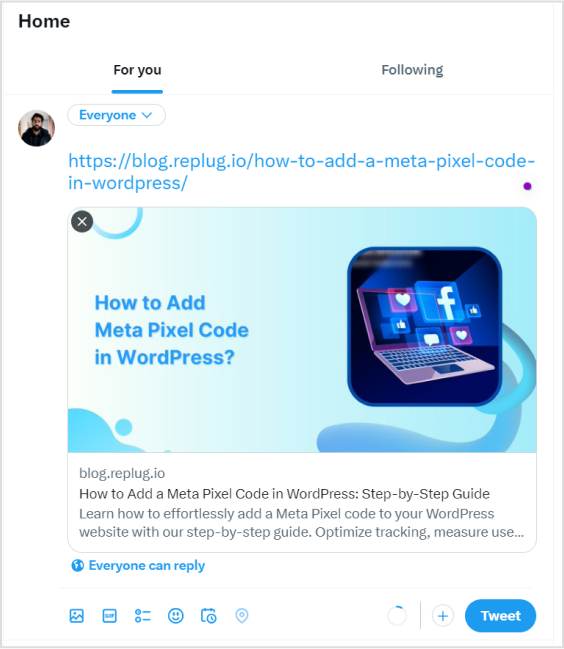
    When crafting a tweet on X, the URL you include will be initially visible within the tweet text. However, upon posting the tweet, Twitter automatically generates a preview for certain URLs (not all), transforming the appearance of the tweet. 

    This preview showcases essential details from the linked page, such as a headline, description, and often an accompanying image. 

    As a result, the full URL is no longer prominently displayed in the tweet, offering a cleaner and more engaging presentation for users.

    Here’s how to tweet a link without URL:

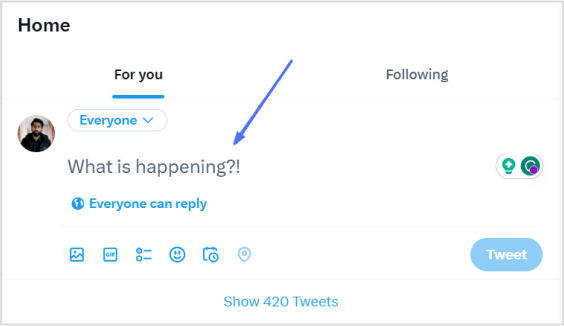
    Step 1: Log in to X and paste your link into the compose box at the top of your Home timeline. 

    how-to-tweet-a-link-without-url

    Also read: How to find my Twitter URL on mobile and desktop?

    Step 2: Twitter will automatically generate a preview of your pasted link. Hit the Tweet button and Twitter will share the link without showing the URL.

    how-to-tweet-a-link-without-url

    That’s it! You’ve your link tweeted without the URL!

    Important note: 

    • Not all URLs will trigger a preview; some links, such as specific file types or websites with restricted access, may still display the full URL in the tweet. In addition, you only have 280 characters to use in a tweet. In this situation, you could:
    • Use a URL shortener service 
    • Describe the link in your tweet.

    And guess what? We have a solution for your long X URL problem!

    Introducing Replug: Your solution for shortening X URLs

    With Replug, you can transform lengthy URLs into concise links for your tweets. Say goodbye to character count woes and hello to engaging, impactful content. 
    Let’s dive into the simple process of Replug’s URL shortening and bring your X sharing to the next level!

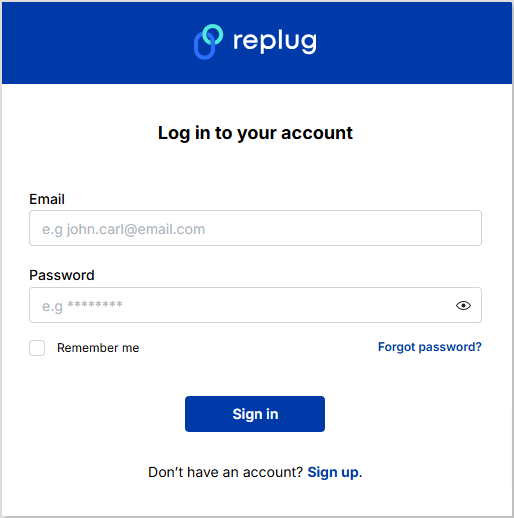
    Step 1: Sign in to Replug or create an account for free. 

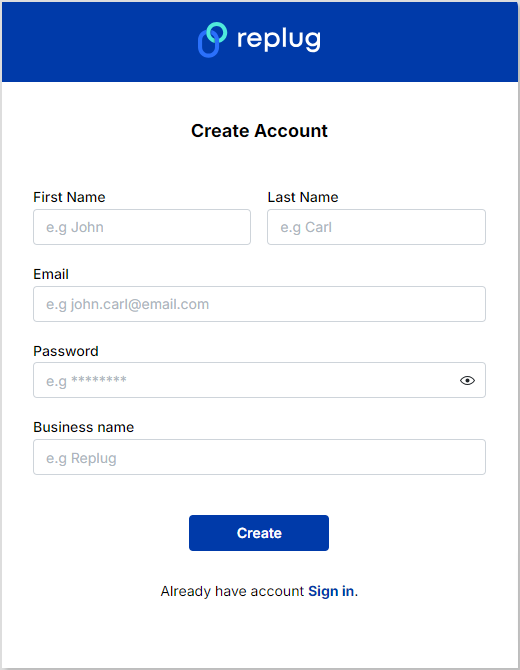
    Replug-signup

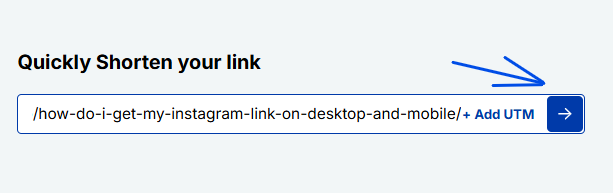
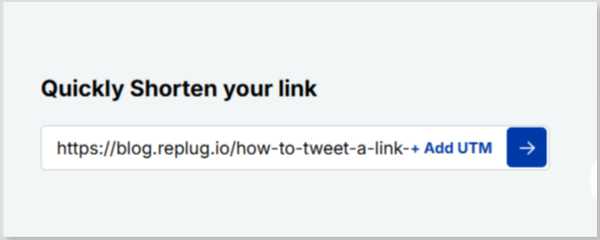
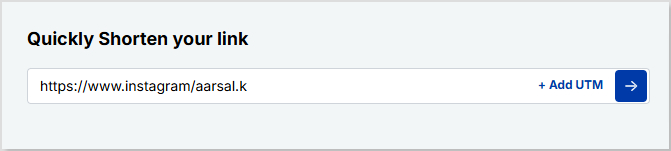
    Step 2: Next, you’ll be led to the main dashboard. To shorten your URL, enter the desired URL you want to track in the bar under “Quickly Shorten your link”:

    link-shortening

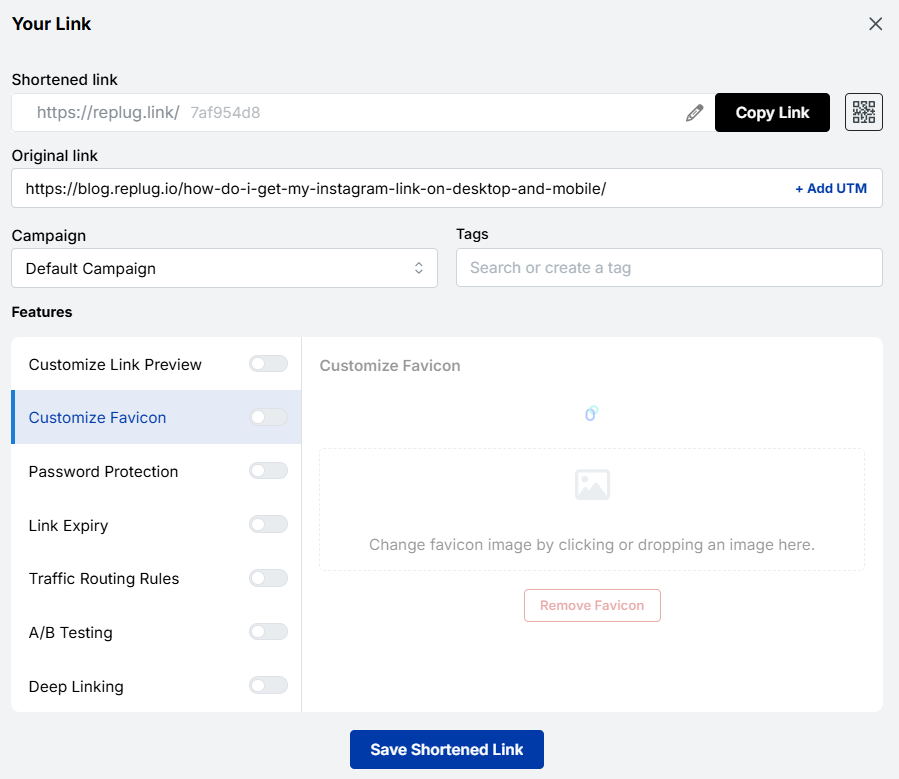
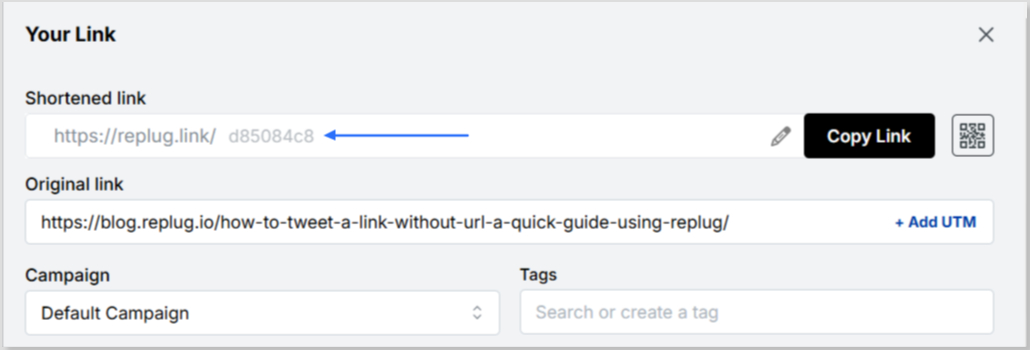
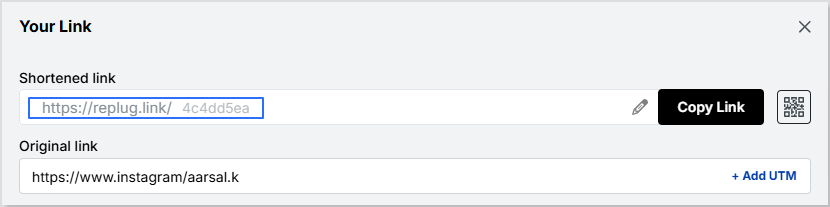
    Step 3: After entering your URL and clicking on the blue arrow button, Replug will automatically generate a shortened link that you can copy:

    short-link

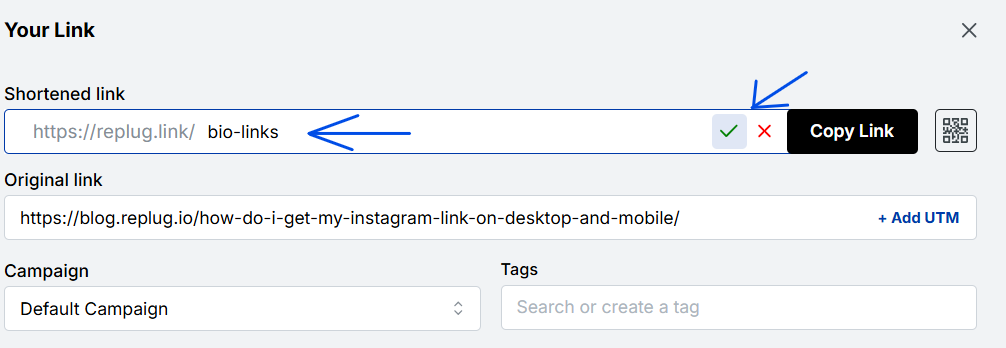
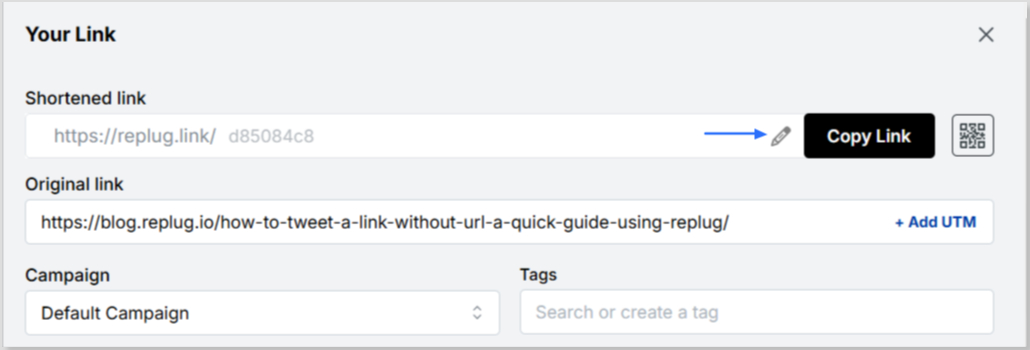
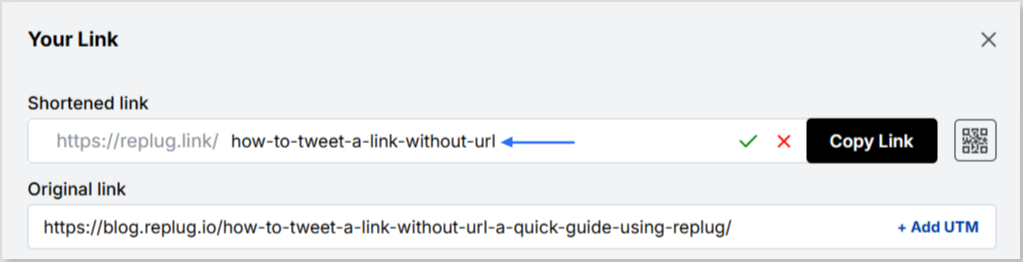
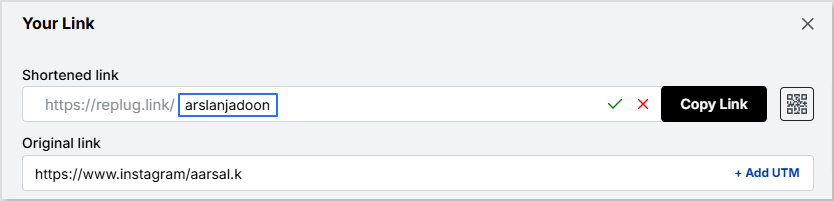
    Step 4: You can also customize the URL with the slug of your choice by clicking on the pencil icon:

    custom-url
    custom-url

    Step 5: Simply save your URL and you’re done! Share away, whenever, wherever.

    save-short-link

    Replug Analytics: Measure link success

    Are your X links making the impact you desire? 

    With Replug Analytics, you can dive deep into your link performance and discover the key to boosting engagement, maximizing reach, and achieving your Twitter goals like never before!

    Replug’s Analytics feature empowers you to make data-driven decisions and revolutionize your link-sharing strategy.

    Learn more about the Replug analytics here!

    url-tracking-analytics

    FAQs about how to tweet a link without URL on X

    Can you embed an image in a tweet?

    Yes, you can embed an image in a tweet by directly uploading it to x (formerly Twitter). When composing your tweet, upload the image, and it will be hosted on X’s servers, appearing within the tweet’s content for all users to see.

    What are the benefits of using shortened links on Twitter?

    Shortened links offer cleaner tweets, free up character space, and encourage more user interactions.

    Are there any character limits for links on Twitter?

    Yes, the X character limit is 280, and sharing lengthy URLs can consume valuable space. A reliable short URL generator helps keep tweets concise and engaging.

  • How do I get my Instagram link on Desktop and Mobile?

    How do I get my Instagram link on Desktop and Mobile?

    Social networks like Instagram are mobile-friendly. However, because Instagram is mobile-first, tracking down your Instagram URL can sometimes be tricky because it works differently than a traditional website.

    This guide will show you how to quickly grab URLs on both mobile and computer devices, including your Instagram links, in just a few simple steps.

    Let’s get searching!

    How to get an Instagram link on a computer device:

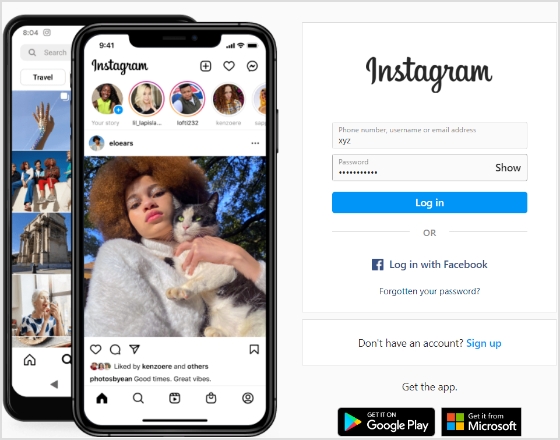
    Step 1: Go to Instagram and type in your login credentials.

    Login to Instagram

    Step 2: Click on your username at the top-right of the screen.

    click username

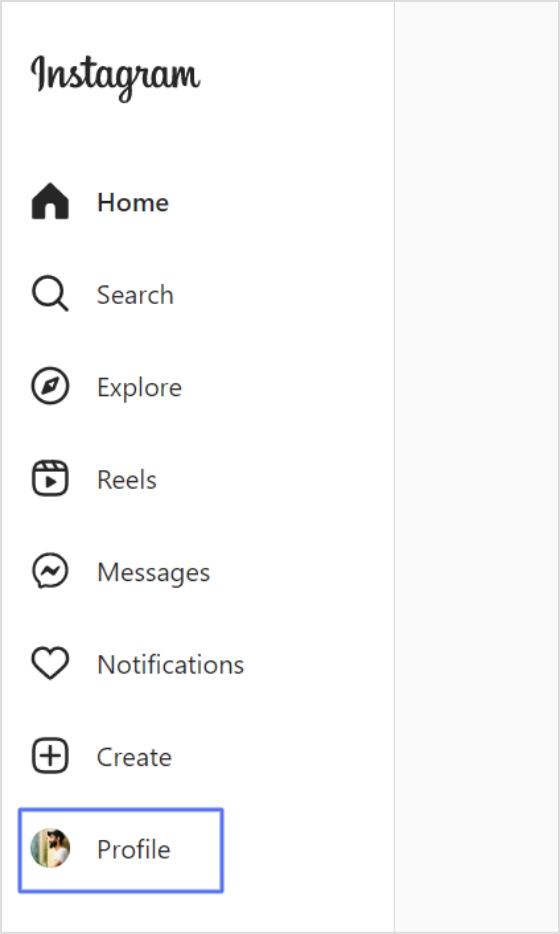
    Alternatively, you can click the profile icon in the left menu.

    click profile

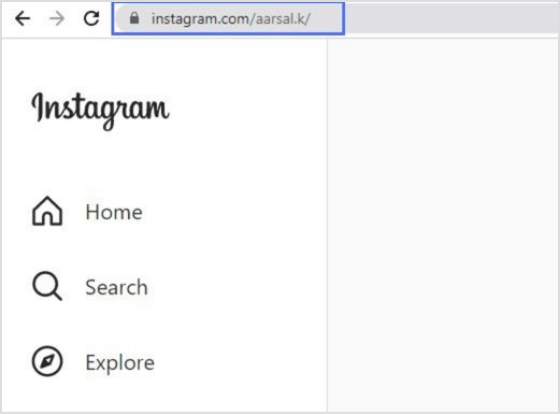
    Step 3: Your Instagram link will appear in the search bar. Copy the link, and you’ll have a ready-to-use Instagram link.

    copy url

    How to get an Instagram link on a mobile device:

    Step 1: Open the Instagram app on your iPhone or Android and log in. 

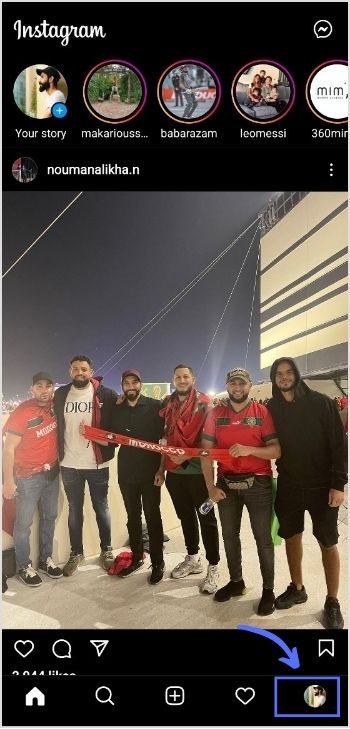
    Step 2: Tap on your profile in the bottom right-hand corner of the menu.

    tap profile

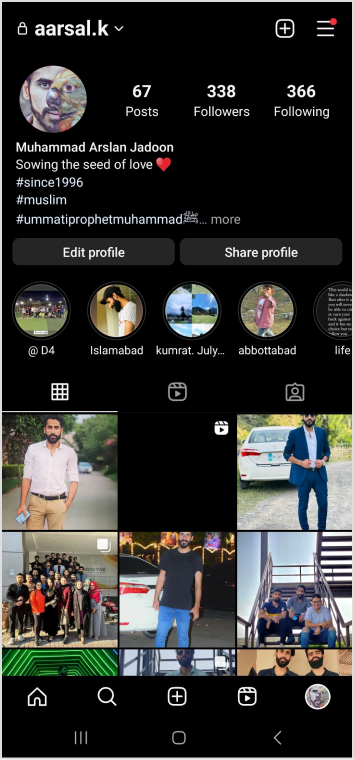
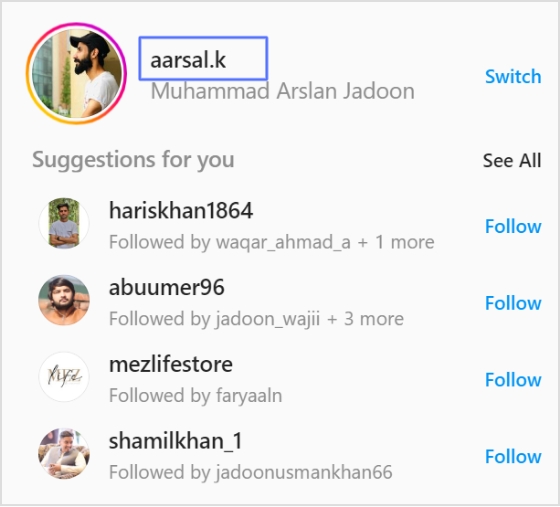
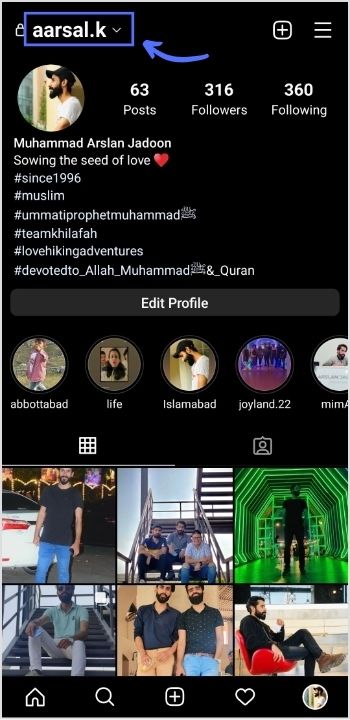
    Step 3: You will find your Instagram username at the top of your profile page. 

    Note: Instagram URLs consist of two components: Instagram’s website address and your Instagram username. The URL format is generally instagram.com/username. So, the Instagram username for the case is aarsal.k. To get this link, just type Instagram.com/aarsal.k. You can do the same for your iPhone or Android device.

    Your Instagram link is now ready to go!

    note username


    Read also: How to get an image URL: Get the URL of a photo on different devices & platforms within seconds!

    How to change Instagram URL using Replug?

    You can easily change your Instagram URL in seconds with Replug.io by following the next mentioned simple and easy steps. 

    Then simply paste that link into this top-notch short URL shortener to get a tidy, share-friendly version ready for your social bio.

    Step 1: Follow the above steps to get your Instagram link on mobile or desktop.

    Step 2: Go to any browser on your desktop and type app.replug.io. You will be redirected to the login page, where you can sign in or create an account if you don’t already have one.

    Step 3: You will see the Replug dashboard once you are signed in.

    Step 4: Paste or type your Instagram URL in the box under “Quick Shorten your link” to customize it:

     Step 5: Now you have your updated URL, which will look like the one below in the picture. 

    You can customize the URL slug to let people know exactly what you’re sharing. Click the edit button at the end of the URL bar and type the URL slug you want.

    For example:

    Now save your shortened link and get sharing! It’s that easy.

    Note: Find your newly created Instagram link by going to Main Dashboard > Manage > Replug links. 

    Related topics:

    How to see who clicks on your Instagram link?

    How to Rename Links Using Replug: 5 Simple Steps

  • How to add links to Tumblr bio: Step-by-step guide

    How to add links to Tumblr bio: Step-by-step guide

    Welcome to Tumblr, the go-to spot for sharing your creativity through photos, text, videos, and more. Whether you’re an artist, writer, or love expressing yourself, Tumblr’s got you covered.

    How do you add links to your Tumblr bio? 

    It’s not as obvious as you’d think, but fear not – it’s surprisingly easy once you know the trick. Stay with us, and we’ll show you how to effortlessly upgrade your Tumblr experience. By adding links to your bio, you’ll make it easy for your online world to connect with you.

    Let’s dive in!

    Adding links to your Tumblr bio: What you need to know

    Before you start linking up your Tumblr bio, here’s the lowdown:

    • You’ll need to use some basic HTML code for this. No worries, it’s simple.
    • Tumblr doesn’t have a fancy button for adding links. You’ll have to do a bit of copy-paste action with the HTML code.
    • Adding a link in bio is a cool way to connect your visitors to your other social media or special works. It makes your Tumblr world a bit more interactive.

    Don’t worry if it sounds a bit technical, we’ll keep it super simple. All you need to do is view HTML code, copy and paste a little code. No need to stress; let’s make your Tumblr bio awesome together!

    Also read: 7 hidden best bio link practices no one talks about

    Boost ROI with branded URLs - Replug dashboard showing performance metrics and branded URL creation

    Go beyond generic link pages!

    Create custom bio links that truly fit your brand

    With Replug, you can create bio links that are unique, engaging, and built to convert.

    Start free trial

    How to add links to Tumblr bio?

    Follow these steps to add links to your Tumblr bio:

    Step 1: Go to the Tumblr website and log in to your account using your credentials.

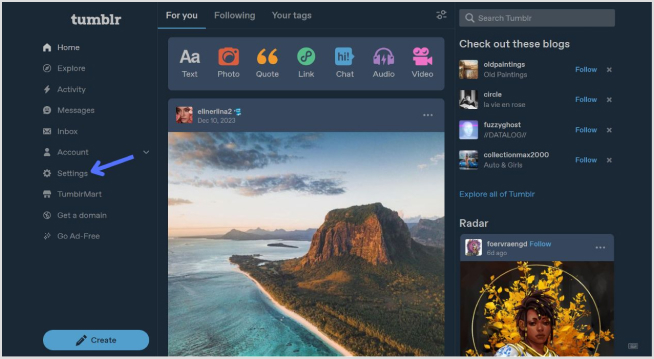
    Step 2: Click on “Setting” in the left-side menu.

    tumblr setting

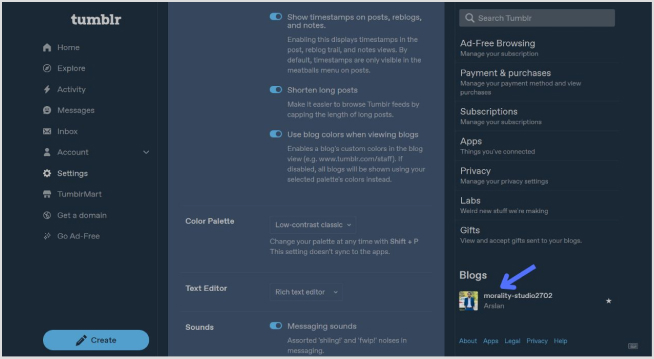
    Step 3: Look for the “Blogs” section at the bottom of the right-side menu and click it.

    open the blog section

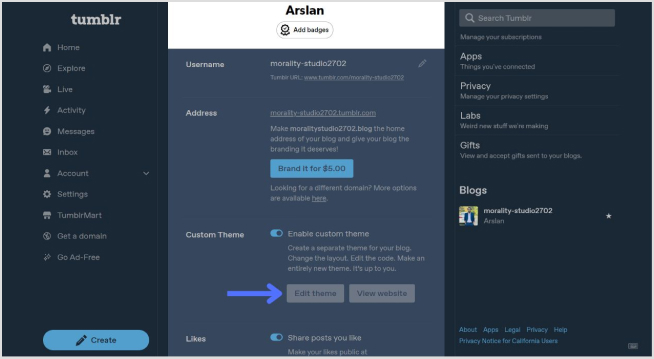
    Step 4: In the blog setting, click on the “Edit Theme” button. 

    edit theme

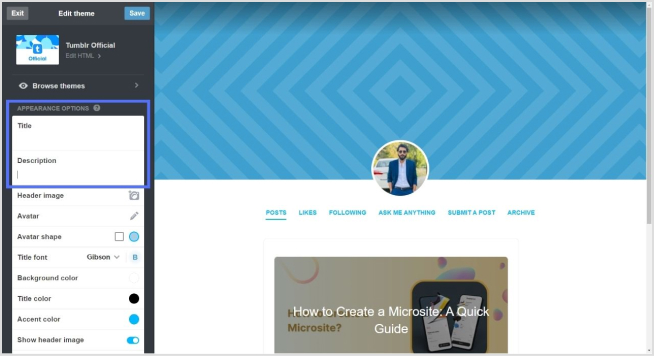
    Step 5: Look for a section called “Title” and “Description”. This is where you can input information about yourself.

    add bio

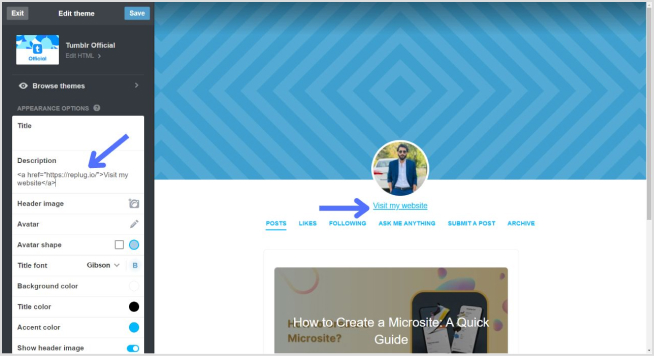
    Step 6: To add a link, use standard HTML anchor tags. The format is as follows:

    <a href="URL">Link Text</a>

    Replace “URL” with the actual link and “Link Text” with the text you want to display for the link.

    For example:

    <a href="https://replug.io/">Visit my website</a>

    Add this in the description section.

    Step 7: After adding your link, save the changes. It should appear in your Tumblr bio.

    tumblr bio

    Simply confirm that the link looks right by visiting your Tumblr blog. Check your bio, and if everything is as expected, your link is good to go! Your Tumblr bio now features the link, allowing visitors to click and explore the connected website hassle-free.

    How to add multiple links to the Tumblr bio?

    Tumblr allows only one clickable link directly in the bio. However, you can use Replug’s “bio links” feature to overcome this limitation and showcase multiple links.

    With Replug, you can easily showcase multiple links, drive traffic efficiently, and optimize your bio for enhanced engagement.

    Note: You can also leverage Replug’s advanced link tracking features to gain insights into link performance, click-through rates, and audience engagement. Enhance your bio links and track their success effortlessly with Replug.

    Boost ROI with branded URLs - Replug dashboard showing performance metrics and branded URL creation

    Go beyond generic link pages!

    Create custom bio links that truly fit your brand

    With Replug, you can create bio links that are unique, engaging, and built to convert.

    Start free trial

    Here’s how to add multiple links to your Tumblr bio using Replug:

    Step 1: Sign in to Replug or create a free account.

    sign in to replug

    Step 2: Locate the “Bio Links” feature in the top banner. The bio link dashboard will appear in front of you. 

    bio link

    Step 3: Click the “New Bio Link” button to start setting up your Tumblr bio. You’ll be directed to a new page where you’ll find three main categories: branding, content, and settings.

    create a new bio link

    Step 4: In the branding section, add a brand title and description, select themes, and choose button styles to match your aesthetic.

    bio link branding

    Once you’re done, click “Publish” in the upper right corner to save your changes.

    Step 5: Head to the content category. Here, you can add social icons, links, RSS feeds, videos, cards, text, and more. 

    bio link content

    For example:

    • Social icons: Add up to 8 platforms, customize colors, and link to your profiles.
    add up to 8 social icons
    • Links block: To include website links, use the “links” block. Add titles and URLs for each link.
    add up to 5 links

    Step 6: Once you’ve added the necessary blocks, click “update” to save each one.

    Step 7: Go to the settings section to further customize your bio link’s SEO and social media preview. Add a title, description, favicon image, and even a retargeting pixel if desired.

    add retargeting pixel

    Step 8: Once everything is set, save your Replug-generated bio link and use it to showcase multiple links on Tumblr.

    Note: For a more streamlined sharing experience, use Replug’s URL shortener free tool to create branded, trackable links. It not only keeps your Tumblr bio neat but also helps you measure link performance and audience engagement effectively.

    Boost ROI with branded URLs - Replug dashboard showing performance metrics and branded URL creation

    Go beyond generic link pages!

    Create custom bio links that truly fit your brand

    With Replug, you can create bio links that are unique, engaging, and built to convert.

    Start free trial

    FAQs on Tumblr bio

    What is the character limit for a Tumblr bio?

    Tumblr allows up to 512 characters for your bio.

    Can I add multiple links to my Tumblr bio?

    Typically, Tumblr allows only one clickable link directly in the bio. However, you can use Replug’s “Link in Bio” feature to mention additional links in your bio description.

    Do links in my Tumblr bio impact my blog’s visibility?

    While links in your bio won’t directly impact visibility on Tumblr, they can enhance user engagement and provide more ways for visitors to connect with your content.
    How can I make my Tumblr bio stand out?

    To make your Tumblr bio stand out, use a clear profile picture, write a concise and engaging bio, include relevant keywords, add links to other platforms, use visual elements like emojis, and regularly update to reflect current activities.

    You may also like:
    How To Add A Instagram Link In Bio?

    How to Add Multiple Links to Instagram Bio Using Replug?

    How to Craft a Killer Pinterest Bio for Maximum Reach?

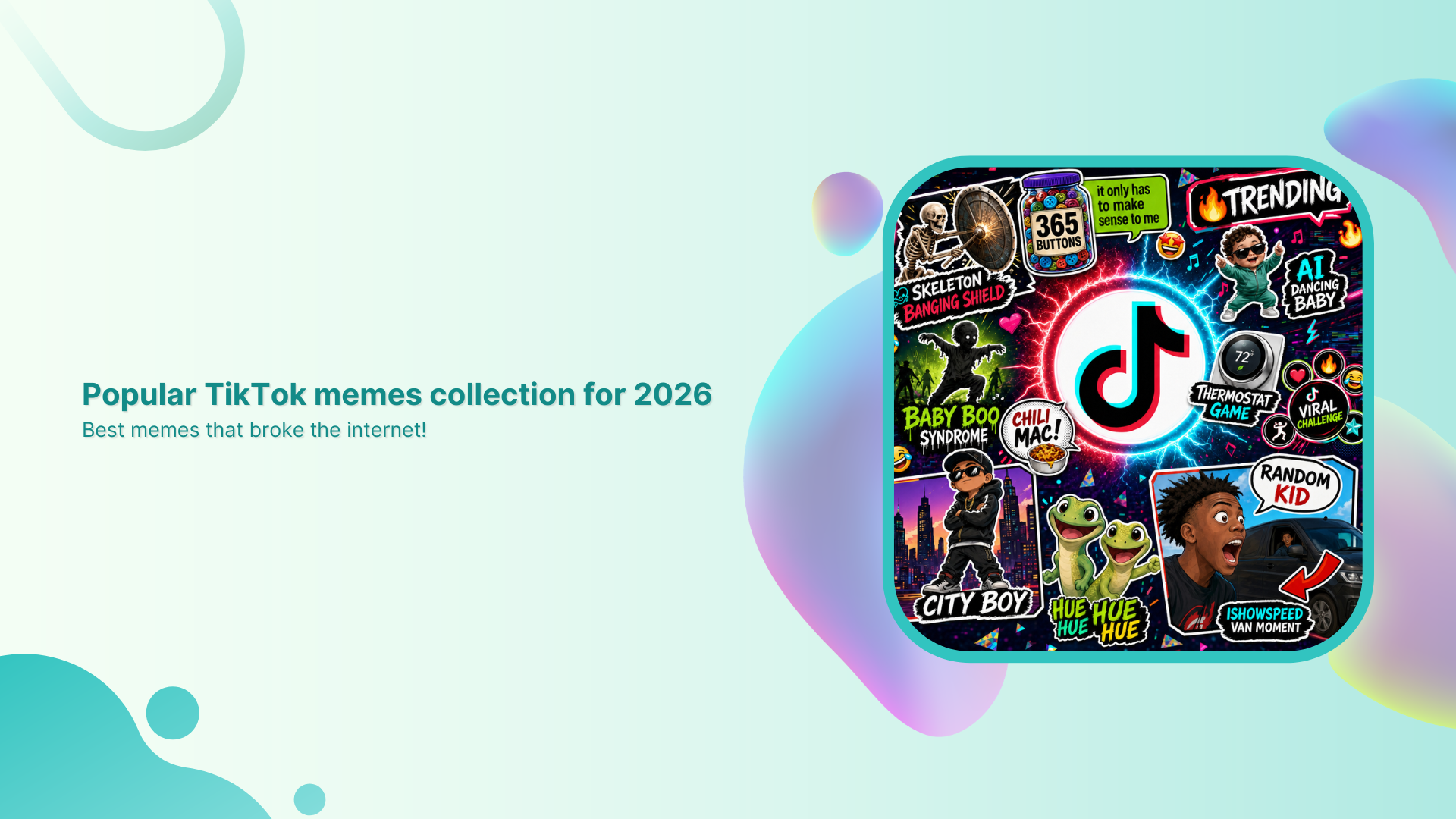
  • Popular TikTok memes collection for 2026: Best memes that broke the internet!

    Popular TikTok memes collection for 2026: Best memes that broke the internet!

    Let’s be honest, TikTok isn’t just an ordinary app anymore. It’s basically where culture happens.

    With nearly 1.9 billion people on the platform and users uploading 16K+ videos every single minute, it’s no surprise that memes are born, go viral, and die on TikTok faster than anywhere else on the internet.

    What’s wild is that people are spending around 55 minutes a day on TikTok. That’s almost an hour of scroll time, laughs, and oddly relatable content.
    And 2026 has already been a goldmine for memes that made the whole internet stop and say, “Wait, what?”

    If you’re ready to catch up on everything that had people cackling, reposting, and dueting non-stop, here’s the ultimate list.

    Best TikTok memes list for the year

    TikTok memes don’t just make you laugh; they become a whole language of their own. Whether it’s a random comment thread, a reaction clip, or a sound that takes over everyone’s FYP, these trends spread like wildfire, and somehow, everyone just gets it.

    Here’s a look at the memes that basically ran the internet this year, starting with the ones living rent-free in the comments section.

    TikTok comment memes

    Looking for the best memes to spice up your replies?

    These TikTok memes for comments are perfect for adding chaotic energy, inside jokes, and viral humor to any post.

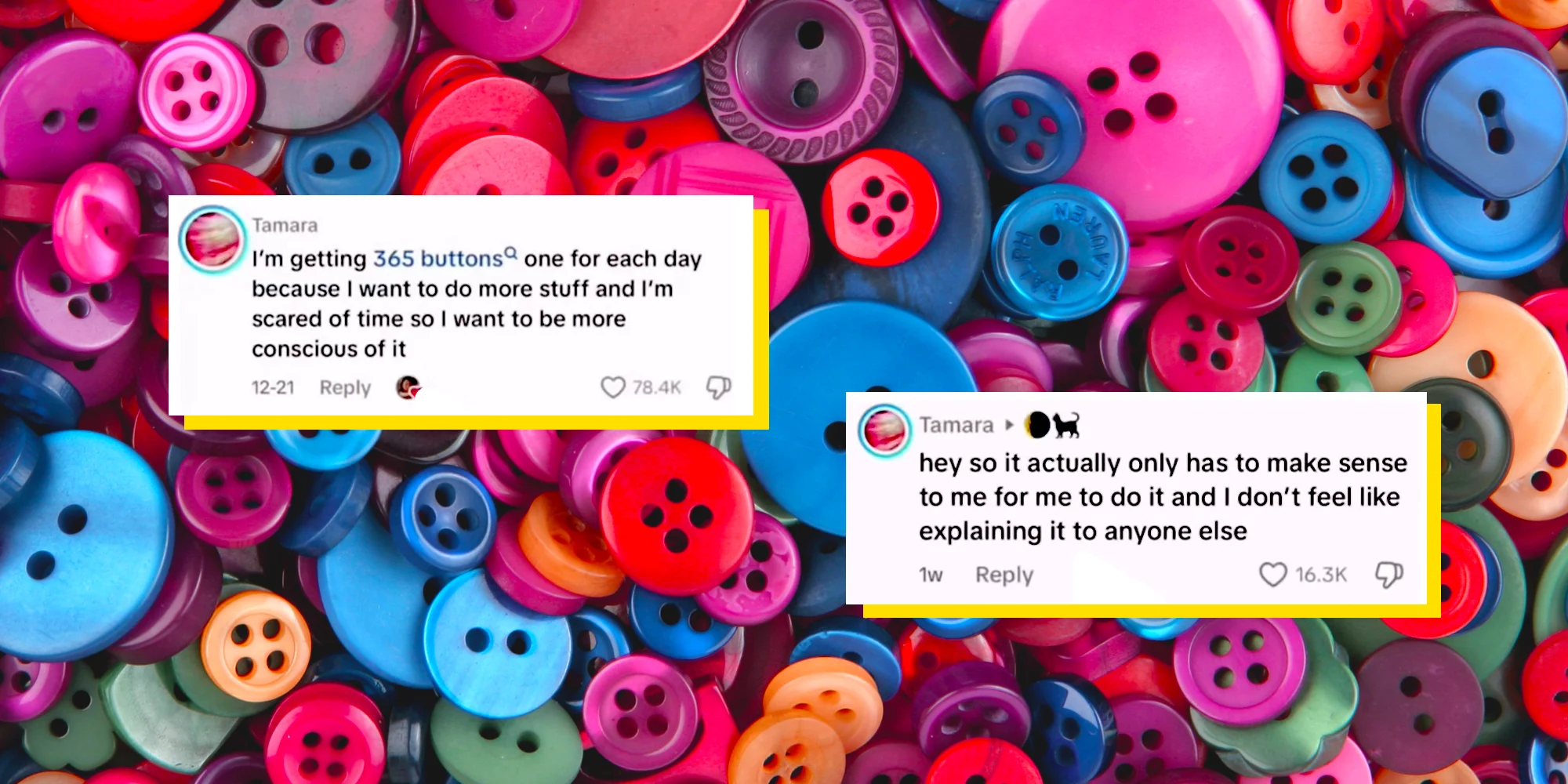
    • The “365 Buttons” meme

    This one started with a TikToker named Tamara, who left a comment saying she was going to collect 365 buttons in 2026 (one for each day of the year). This is because she was “scared of time” and wanted to be more conscious of it.

    When people asked what exactly she planned to do with them, Tamara hit back with “it actually only has to make sense to me for me to do it, and I don’t feel like explaining it to anyone else”.

    And honestly, that response became a whole meme on its own. It’s basically 2026’s “mind your business” anthem.

    The “365 Buttons” meme
    • “Calling Yo Uber” meme

    This one’s short, sweet, and straight to the point. If someone is doing something you don’t like, being annoying, or you just want them to leave, you simply say “Call your Uber”, basically the modern way of saying “get out”.
    It’s Gen Alpha slang at its finest, and it’s been spreading fast in TikTok comment sections and everyday conversations.

    “Calling Yo Uber” meme
    • Holding chest meme

    You know that moment when something hits so hard you physically have to grab your chest? That’s exactly this meme!

    Rooted in IShowSpeed’s iconic over-the-top reactions while gaming, creators started using his explosive energy as a meme template for “when things go unexpectedly wrong” moments. If a comment made you gasp, this is the reaction.

    https://tenor.com/search/clutching-chest-gifs
    • Triangle chin meme

    This one blew up on the art and anime side of TikTok before spilling into the main feed. It pokes fun at a very specific drawing style where characters end up with an oddly sharp, pointy chin, almost like a perfect triangle stuck at the bottom of their face. 

    Artists started calling themselves out for it, and the comment sections turned into a whole roast session of everyone’s early art phases. Relatable, funny, and way too real!

    Triangle chin meme
    • “City Boy” meme

    This meme comes from a scene in the animated show Gravity Falls, where Deputy Durland mockingly yells “City boy! City boy!” at the character Dipper. It originally went viral on TikTok in 2022 and made a big comeback in early 2026. 

    In slang terms, a “city boy” refers to a man who prioritizes his success and goals over relationships, and the clip gets dropped in comments whenever someone does something bold or unbothered in that spirit.
    “City Boy” meme
    • “I am done explaining myself” meme

    This one actually ties back to the “365 Buttons” moment. Tamara’s blunt refusal to clarify her button plans quickly became a widespread “if you know, you know” joke all over TikTok, and people started using it as a response to anything they didn’t want to justify.

    No matter if it’s your life choices, your snack habits, or your entire personality, this meme basically permits everyone to just stop explaining themselves.

    “I am done explaining myself” meme

    TikTok memes pictures

    If you’ve ever dropped a picture in someone’s TikTok comments instead of a reply, you already know what this is about. 

    Picture memes on TikTok are a whole language of their own. One image says more than a paragraph ever could.

    Let’s have a closer look at some of the top-notch TikTok comment pictures memes!

    • Holding in laugh meme

    This meme features a man visibly struggling to hold in his laughter. It has become widely used across TikTok, Instagram, Facebook, and Reddit, where users have dropped it in all kinds of funny and relatable scenarios.

    It’s basically the go-to reaction image when something is so funny you physically cannot handle it.

    Holding in laugh meme
    • Side-eye meme

    The “side eye” is a reaction image used online to express a specific emotion. A sideways glance that conveys doubt, scorn, annoyance, or silent judgment, all without saying a single word.

    Whether it’s the classic “Side-Eyeing Chloe” or the “Bombastic Side Eye” version, this one never gets old and fits literally every situation where you just can’t believe what you’re reading.

    Side-eye meme
    • Robot reaction meme

    This one comes from the Will Smith movie “I, Robot,” where the Sonny robot gives a blank, unblinking stare that’s somehow deeply relatable.

    TikTokers started using it as a green screen reaction template for “me staring at my screen after reading something wild” moments, and it took off fast as a comment image drop.

    Robot reaction meme
    • Kevin James shrug meme

    This meme comes from an old CBS promotional photoshoot for “The King of Queens”. It is where Kevin James is pictured with his hands in his pockets, a sheepish smirk on his face, and his shoulders raised in a playful shrug.

    People plop it in comments for that exact “I did it, and I’m not sorry” energy. Innocent guilt at its finest!

    Kevin James shrug meme
    • Anime-inspired face trend meme

    This one’s for all the weeb TikTokers (and even the ones who aren’t). The trend involves people recreating exaggerated anime facial expressions (wide eyes, dramatic gasps, or that classic “shocked but make it cute” face). 

    It’s basically bringing anime energy into real life, and the comment sections absolutely lost it every single time someone nailed the expression.

    Anime-inspired face trend meme
    • Slideshow meme

    TikTok’s photo slideshow feature, officially called “Photo Mode”, allows users to compile a series of images with background music into a carousel format. It’s been heavily used to share memes ever since it was officially reintroduced in October 2022.

    The slideshow meme format specifically became a thing where creators string together increasingly funny or unhinged images, and dropping one in the comments became a whole reaction move.

    Slideshow meme
    • Finger claps meme

    The finger clap, also known as “clock it,” is a small gesture where you tap your fingers together in a tiny clapping motion, used to signal that someone said exactly the right thing or totally nailed it. 

    Hailey Bieber’s version of the finger clap went viral and became one of the most recognized versions of the gesture on TikTok, with the image and GIF being dropped constantly in comment sections as the ultimate “you said that” stamp of approval.

    https://tenor.com/search/hailey-baldwin-gifs

    TikTok reaction memes

    Reaction memes are basically TikTok’s way of saying “words aren’t enough; watch this clip instead.” 

    These are the ones people keep recycling in comment sections and duets because they perfectly sum up a feeling without needing a single explanation.

    • “Say wallahi” reaction

    This meme comes from a clip of IShowSpeed tearfully yelling “Say wallahi bro” after accidentally buying a Shrek-face Roblox T-shirt for 18 million Robux, which worked out to roughly $225,000 at the time.

    The clip went viral again in early 2026, with people using the audio over images of absurd products, especially items from the generic Canadian brand “No Name”. This is to express extreme shock or complete disbelief at something existing.

    “Say wallahi” reaction
    • “I’m so f***ing scared” reaction (Squid Game)

    This is a reaction image from a TikTok edit of “Squid Game Season 1,” showing the character Ali Abdul crying with the all-caps caption “I’m so f***ing scared” over his face. 

    It became a semi-ironic reaction image in 2025, used across social media to express fear or honestly to be dramatic about anything even mildly stressful.

    “I'm so f***ing scared” reaction (Squid Game)
    • Nene Leakes reactions

    Nene Leakes from the “Real Housewives of Atlanta” has practically built a whole meme library over the years. She somehow manages to drop multiple iconic reaction moments in a single clip.

    Her eye rolls, dramatic expressions, and quotable one-liners have been living rent-free in comment sections for years. Plus, TikTok keeps rediscovering them and using them for everything from petty moments to full-on drag sessions.

    Nene Leakes reactions
    • “Down boy” art meme

    This meme is a redraw trend based on a panel from Archie Comics, showing Veronica Lodge pointing down and yelling “Down boy!!” at Archie Andrews, who obeys. 

    Artists across TikTok took off with it in early 2025, redrawing the format using their own characters and fandoms (with one Dog Man redraw gaining over 2.1 million views in a single day).

    “Down boy” art meme
    • IShowSpeed’s reactions

    IShowSpeed’s reaction clips have basically become their own genre of meme at this point. 

    No matter if it’s his chest-grabbing shock face, his screaming-at-the-screen moments, or his explosive gaming rage, creators use his over-the-top energy as meme templates. 

    They purposefully do this for reaction edits, gaming fail moments, and “when it all goes wrong” humor that perfectly captures the feeling of things going sideways fast.

    IShowSpeed’s reactions
    • Frank Ocean’s reaction

    This one’s for the true music fans!

    A popular TikTok meme shows young creator Dabo reacting emotionally to Frank Ocean’s music, despite claiming beforehand that he would never cry to a Frank Ocean song. But then completely breaking down in tears, like a baby.

    It became the go-to reaction template for “I said I wouldn’t care, but I absolutely do” moments. People use it constantly to pair with something they tried (and failed) to stay unbothered about.

    Frank Ocean's reaction
    • Alex Consani’s reactions

    Alex Consani is a 22-year-old model from Sonoma County, California, who became one of TikTok’s most magnetic presences. Thanks to her unfiltered humor and natural love for being on camera. 

    Her reaction to the brief TikTok ban in January 2025, when the app went dark and came back within hours, became one of the most iconic meme moments of the year. 

    Besides, clips of her chaotic, over-the-top responses are being used as reaction content for all kinds of “wait, what just happened?” scenarios.

    Alex Consani's reactions

    Funny TikTok memes

    If your “For You” page has been full of random sounds, chaotic edits, and oddly relatable jokes lately, you’re not alone. 

    These TikTok memes funny enough to spread everywhere, are exactly why internet culture moves so fast. One weird clip suddenly becomes everyone’s inside joke.

    • “Going Analogue” trend

    This trend is all about people jokingly “escaping technology” by doing offline hobbies like journaling, reading, or using old-school gadgets. The humor comes from treating simple offline activities like a dramatic lifestyle transformation.

    “Going Analogue” trend
    • Owl impressions (international)

    TikTok users started pretending to be owls from different countries, cities, or even celebrities by changing the way they say “hoo”. The fun part is hearing wildly accurate accents and impressions from such a simple joke.

    Owl impressions (international)
    • Skeleton banging shield

    This meme uses a loud skeleton animation from the video game “The Elder Scrolls V: Skyrim” paired with chaotic yelling sounds to represent overreactions, panic, or extreme excitement. It became one of TikTok’s biggest absurd humor trends.

    Skeleton banging shield
    • Dr Pepper baby is good and nice

    Creator Romeo Bingham’s catchy and intentionally goofy jingle about Dr Pepper turned into a viral meme because people couldn’t stop repeating the line. The randomness and overly wholesome tone made it endlessly remixable.

    Dr Pepper baby is good and nice
    • Weetabix dunkables

    This food meme boomed after creators started coating Weetabix in chocolate and dipping them like cookies. TikTok loved how oddly satisfying and surprisingly tasty the snack looked.

    Weetabix dunkables
    • Japanese cheesecake hack

    This viral food hack showed people making a quick “Japanese cheesecake-style” dessert using biscuits and Greek yogurt. It spread fast because it looked easy, cheap, and surprisingly delicious for such a simple recipe.

    Japanese cheesecake hack

    Current TikTok memes

    The internet moves swiftly, and these are some of the TikTok memes rn taking over “For You Pages” with chaotic humor, random catchphrases, and relatable edits. Most of them make almost no sense at first, which is exactly why people keep sharing them.

    • “Ouuu shi” (fym ouuu shi)

    This viral catchphrase comes from an older YouTube clip that resurfaced on TikTok in 2026. People now use “fym ouuu shi” in reaction videos, comment sections, and edits whenever something unexpected or ridiculous happens.

    “Ouuu shi” (fym ouuu shi)
    • Hantavirus paranoia/Roblox dance battles

    TikTok users started joking about the recent hantavirus news by making dramatic “end of the world” videos and pairing them with over-the-top humor.

    Around the same time, Roblox dance battle clips also made a comeback because of their hilarious trash-talk energy and chaotic animations.

    Roblox dance battles
    • “Reali-tea” (unfiltered content)

    This trend is all about people posting raw, honest, and less polished videos while spilling “the tea” about real-life situations. The meme plays on the words “reality” and “tea,” making everyday struggles feel funny and relatable.

    “Reali-tea” (unfiltered content)
    • Map day/Tomodachi style

    Inspired by the quirky look of the Nintendo game Tomodachi Life, creators started turning themselves and their friends into goofy Mii-style characters. 

    The trend exploded because the awkward expressions and random storylines perfectly match TikTok’s weird sense of humor.

    Tomodachi style

    You may also like: 40+ funny work from home memes

    New TikTok memes 2026

    TikTok in 2026 has been full of chaotic humor, oddly emotional edits, and trends that somehow become massive overnight. 

    These newer memes are spreading fast because they mix irony, randomness, and just enough relatability to keep people reposting them.

    • “Scientology speedrun”

    This trend involves creators jokingly “speedrunning” Scientology buildings by seeing how far they can get before security stops them. It skyrocketed because the videos feel like real-life video game missions, though the trend has also sparked criticism and legal concerns.

    “Scientology speedrun”
    • Unfiltered “realism” trend

    More users are moving away from heavily edited content and posting messy, awkward, or brutally honest videos instead. The joke is that people are finally showing “real life” without trying to make everything look perfect.

    Unfiltered “realism” trend
    • Yearning guy meme

    This meme usually shows someone staring dramatically into the distance like they’ve lost the love of their life, only for the next slide to reveal something silly. It could be something like a gaming setup, a fast food order, or a random achievement. The overdramatic editing is what makes it funny.

    Yearning guy meme
    • “Indomitable human spirit” aesthetic

    This trend mixes emotional speeches, motivational music, and dramatic clips of people pushing through struggles (sometimes seriously, sometimes completely ironically). TikTok users love using it for both inspiring moments and ridiculous everyday situations.

    “Indomitable human spirit” aesthetic

    Old TikTok memes 2025

    TikTok in 2025 gave us some of the most random yet unforgettable meme trends online. From weird debates to strange catchphrases and dramatic edits, these memes completely took over comment sections and For You pages for months.

    • 100 men vs. a gorilla

    This viral debate asked one simple question: could 100 unarmed men beat one silverback gorilla in a fight? 

    The internet became obsessed with arguing about it, and TikTok filled up with fake battle plans, simulations, and hilarious reactions.

    100 men vs. a gorilla
    • Diddy Blud on the calculator

    This meme came from people jokingly typing random numbers into calculator apps and acting shocked when the results somehow connected to conspiracy-style theories involving Sean “Diddy” Combs. The humor mostly came from how absurd and unserious the “evidence” looked.

    Diddy Blud on the calculator
    • We are Charlie Kirk

    This trend used edited clips and dramatic audio to jokingly turn regular people into mini versions of political commentator Charlie Kirk. TikTok users mainly used it for satire and exaggerated reaction videos.

    We are Charlie Kirk
    • Early stream speed

    This meme mocked people who join livestreams super early and immediately spam comments before anything even happens. Creators started making skits showing overly dedicated viewers racing to be “first” in every stream chat.

    Early stream speed
    • Tough baby

    Videos of babies acting weirdly serious, angry, or overly confident became a huge meme format in 2025. People paired the clips with hard-hitting music or dramatic captions to make toddlers look intimidating for no reason.

    Tough baby
    • “6-7” & “god’s country”

    These phrases became viral TikTok audio jokes used in edits, memes, and ironic motivational posts. Users repeated them in random contexts until they turned into internet catchphrases that people quoted even outside TikTok.

    “God's country” meme

    TikTok memes GIF

    GIF-style memes are still everywhere on TikTok because they’re quick, chaotic, and perfect for reaction edits. A lot of these older internet memes came back through short looping clips, meme compilations, and ironic TikTok reposts.

    • Harambe and Big Chungus

    Harambe and Big Chungus became legendary internet memes long before TikTok, but users still recycle them in GIF edits and “nostalgia meme” videos. Big Chungus, the oversized Bugs Bunny joke, especially became popular again through ironic humor.

    • Uganda knuckles and the trollface

    Ugandan Knuckles exploded online from VRChat videos and the famous “Do you know the way?” catchphrase, while Trollface remains one of the internet’s classic trolling reaction memes. TikTok users still use both in old-school meme compilations and absurd edits.

    https://tenor.com/search/ugandan-knuckles-gifs
    https://giphy.com/explore/know-your-meme
    • Slow-mo walk reaction GIF

    These memes usually show someone dramatically walking in slow motion with intense music after the smallest achievement or argument. They’re popular because they turn completely normal moments into fake movie scenes.

    https://tenor.com/search/walking-in-slow-motion-gifs
    • Tung Tung angel

    This meme comes from bizarre AI-style audio edits and random “brainrot” humor trends on TikTok. People use the phrase in chaotic GIF edits and nonsensical videos that are funny mainly because they make zero sense.

    • Blue shirt kid sturdy

    The “blue shirt kid” became popular after clips of him confidently doing the sturdy dance started spreading online. TikTok users turned the dance into reaction GIFs, edits, and meme remixes because of his unexpectedly smooth moves.

    TikTok memes quotes

    TikTok meme quotes usually go viral because they’re weirdly catchy, dramatic, or completely random out of context. People reuse these lines in reaction videos, edits, comment sections, and skits until they basically become part of internet language.

    • “Today’s f***ing affirmation”

    This quote is used before someone says an aggressively funny or chaotic motivational statement. 

    For example: “Today’s f**ing affirmation: I am not defined by my circumstances. I am bigger than my struggles, and I have the power to protect my inner peace and create a life I love.”

    • “The 2026 great meme reset”

    This phrase comes from the viral joke about bringing back old-school internet memes and deleting modern “brainrot” humor. 

    For example:“January 1st, 2026… the great meme reset begins.”

    • “Fuck it, I’m a flower”

    This quote is usually paired with people giving up on stress and choosing peace in the funniest way possible. 

    For example: Someone lying in the grass with the caption, “Bills due tomorrow? Fuck it, I’m a flower.”

    • “Less talk, more action”

    TikTok users mostly use this line before doing something dumb, chaotic, or overconfident, e.g., “Less talk, more action,” right before attempting a failed backflip.

    • “Cus we’re playing bendy”

    This line blew up from an old FGTeeV song that resurfaced on TikTok through looping edits and lip-sync videos. 

    For example: Users dramatically repeating “Cus we’re playing bendy” for no reason during gaming clips.

    • “Homer dropped his donut d’oh”

    This quote comes from the viral AI-generated “D’Oh Anthem” song about Homer Simpson ruining his day. For instance, creators use it over minor inconveniences like dropping food or spilling drinks.

    • “You ain’t nothing but a hound dog”

    TikTok brought this classic Elvis Presley lyric back through ironic remixes, sped-up edits, and meme audio. For instance, users dramatically lip-sync the line during pet videos or goofy reaction edits.

    TikTok memes stickers

    TikTok meme stickers are basically internet jokes turned into little reaction images people paste on laptops, phones, water bottles, and even videos. 

    Most of them go viral because they’re random, relatable, and instantly recognizable to anyone who spends too much time online.

    • “Wait I’m goated” cat

    This sticker usually shows a confused or proud-looking cat with the caption “Wait I’m goated.” It became popular through ironic TikTok humor where people jokingly realize they’re actually amazing at something.

    “Wait I'm goated” cat
    • “I want a perfect body” (sunset)

    This sticker comes from emotional TikTok edits using dreamy sunset backgrounds and dramatic music lyrics. People use it ironically for late-night overthinking posts and aesthetic mood edits.

    “I want a perfect body” (sunset)
    • Lizard/gecko memes

    Random gecko and lizard stickers raged because of their awkward expressions and chaotic captions. TikTok users love using them as reaction memes for confusion, panic, or “no thoughts, head empty” energy.

    Lizard or gecko memes
    • “Today I am BLT”

    This meme sticker uses random sandwich humor in the most unserious way possible. The joke is that people post it with zero context, which somehow makes it even funnier.

    “Today I am BLT”
    • Marcus the worm

    Marcus the worm became a small but popular TikTok meme because of his oddly cute and awkward appearance. Stickers of him are usually used in wholesome or painfully relatable posts.

    Marcus the worm
    • Funny Jesus meme

    These stickers usually feature edited images of Jesus with funny captions or reaction faces. TikTok users mostly share them as harmless absurd humor and over-the-top reaction memes.

    Funny Jesus meme
    • “Quackin’ in my boots” duck

    This duck meme sticker is used when someone is pretending to be scared or nervous in an exaggeratedly funny way. The phrase became popular because it sounds ridiculous but somehow fits every awkward situation.

    “Quackin' in my boots” duck
    • Nostalgic Y2K

    Y2K-style stickers with glitter, flip phones, old emojis, and retro fonts became huge again, thanks to TikTok’s obsession with early 2000s aesthetics. They’re everywhere in edits, journals, and phone customization videos.

    Nostalgic Y2K
    • Mexican humor stickers

    These stickers usually feature exaggerated reaction faces, classic Latino internet humor, or chaotic captions that spread heavily through Spanish-speaking TikTok communities. A lot of them become viral reaction images across multiple platforms.

    Mexican humor stickers
    • “Please don’t tailgate me”

    This meme sticker is popular on TikTok car videos and joke posts. People use it to sarcastically complain about aggressive drivers while making the message sound overly dramatic or weirdly polite.

    “Please don't tailgate me”

    Also check out: TikTok trends for businesses, brands, and others

    Download your favorite memes with Replug’s free TikTok downloader within seconds!

    If you’ve been saving hilarious memes throughout this blog, now’s the perfect time to keep them forever with Replug

    Replug is an all-in-one link management platform packed with powerful tools, especially its easy-to-use link shortener. It helps you create custom branded short links in seconds for cleaner sharing and better tracking.

    Replug Branded Short Links CTA
    Maximize marketing ROI
    by transforming ordinary URLs into
    branded short links that convert.
    Try Replug for free

    On top of that, Replug also offers a free TikTok downloader that makes TikTok memes download quick and hassle-free. Just paste the TikTok link, hit download, and save your favorite meme videos without wasting time.

    From viral quotes and GIFs to chaotic trends and sticker memes, this blog covered some of the biggest TikTok memes taking over the internet right now. Give Replug’s top-notch downloader a try and start saving your favorite memes instantly!

    Frequently asked questions

    How do I get memes for TikTok?

    You can get memes from the app’s For You Page, meme pages, trending sounds, Reddit communities, and GIF websites. A lot of creators also save viral clips using TikTok downloaders and remix them into their own content. To boost engagement and TikTok views, it’s best to jump on trends while they’re still fresh.


    What is the adult-only option on TikTok?

    TikTok has a feature called “Content Levels” that helps limit mature or age-restricted content for younger users. While there isn’t a full “adult-only mode,” some livestreams and videos may be restricted to users who are 18+ based on TikTok’s community guidelines and account age settings.

    What are the top 5 most viewed TikToks?

    Top 5 most viewed TikToks (as of early 2026):

    1. Lassie – Blank Screen (~3.6-3.7 billion views): A 10-second clip of a black screen.
    2. Zach King – Harry Potter Broomstick Illusion (~2.2-2.3 billion views): Zach King pretending to fly on a broomstick.
    3. James Charles – Christmas Party Transition (~1.7 billion views): A transition video.
    4. Zach King – Hiding Spot Illusion (~1.1 billion views): An illusion video.
    5. Leah Halton – Inverted Lip-Sync (~959 million+ views): A popular face-focused lip-sync video.

    Who is #1 on TikTok?

    As of 2026, Khaby Lame is still the most-followed creator on TikTok with more than 160 million followers. He became famous for his silent reaction videos that make fun of overly complicated life hacks. His simple humor and expressive reactions helped him become TikTok’s biggest star.