Picture this: a big campaign is due next week, there are ten tabs open with link tools, and the Rebrandly pricing page is right in front of you.
The features sound promising, but the mix of limits, add-ons, and per‑plan perks makes it hard to see what you would really pay as your clicks grow. One wrong call here can squeeze your budget or slow your team’s progress later.
Rebrandly has earned a strong name in branded link management. It offers custom domains, detailed analytics, and enterprise‑grade security, so it often appears on shortlists for marketing teams, agencies, and SaaS companies.
The hard part is not the feature list, though. The real question is how Rebrandly pricing lines up with what a team gets at each tier.
This guide walks through every Rebrandly plan, then weighs the pros and cons in plain language. From there, it compares Rebrandly pricing against Replug, a link management and marketing platform that often delivers more firepower for less spend.
By the end, it should be much easier to decide if Rebrandly is worth the cost for your situation or whether Replug is a better fit.
All Rebrandly pricing plans
Rebrandly uses a five‑tier structure aimed at everyone from solo creators to large enterprises. At the time of writing, the lineup includes Free, Essentials, Professional, Growth, and Enterprise.
All paid plans include a 14‑day free trial with no credit card and an annual billing option that can cut costs by around 18%. When comparing Rebrandly pricing, it helps to see the tiers side by side first.
Plan
Rebrandly pricing per month
Rebrandly pricing annually
Free
$0
$0
Essentials
$14/month
$11/month
Professional
$39/month
$32/month
Growth
$119/month
$99/month
Enterprise
Custom
Custom
Here is what each tier actually includes in practice.
Key features of the Rebrandly Free plan
Up to 10 branded links and 10 QR codes per month
1 free rebrand.ly domain
1 custom .bio domain
Custom back halves
1 link gallery
This tier works as a small test bed or for very light use. With only 10 new links each month and no collaboration, it breaks down fast for active campaigns or busy social feeds.
Key features of the Rebrandly Essentials plan
250 links and 250 QR codes per month
Support for 2 custom domains
10 link destination edits per month
Up to 3 link galleries
Analytics for up to 10,000 clicks each month
Good AI scheduling suggestions
Top-notch branding controls
The Essentials plan is the first paid step and is designed for creators, consultants, and small businesses that need more volume without team access. Rebrandly pricing at this level is still friendly, but collaboration features are not included.
Key features of the Rebrandly Professional plan
1,500 links and QR codes per month
3 custom domains
4 link galleries
Traffic routing rules
50 link destination edits
2 teammates and 2 workspaces
50 password‑protected links and link expiration
Analytics for up to 25,000 clicks per month, plus custom reports
This is the most popular (recommended) tier, and where Rebrandly starts to feel like a true team tool. It is the first real fit for small marketing teams or agencies that need shared workspaces and stronger control over each link.
Key features of the Rebrandly Growth plan
3,500 links and QR codes per month
Up to 10 custom domains
150 destination edits
11 link galleries
Mobile deep linking
Advanced role permissions
150 password-protected links
5 workspaces with 5 teammates
Analytics on up to 150,000 clicks per month
The Growth plan suits scaling businesses that manage many brands or have higher traffic. It adds more link-management power and capacity but comes with a clear jump in Rebrandly pricing.
Key features of the Rebrandly Enterprise plan
Unlimited links, domains, QR codes, workspaces & teammates
Custom deployment options, including dedicated infrastructure
Compliance with HIPAA, GDPR, and SOC II Type 2
Role-based access & workspace-level controls
High‑volume API access and priority support
Dedicated customer success manager
Single Sign‑On (SSO) (SAML)
White glove support
99.99% uptime
The Enterprise tier is fully custom. For Essentials, Professional, and Growth customers, Rebrandly pricing can increase further through add‑ons such as:
Extra custom domains
Additional link edits
More teammates and workspaces
Higher analytics and API data caps
This structure makes it easy to understand where you sit, but it also means costs can rise quickly when you need just one or two features from the next tier.
Rebrandly pricing: Pros, cons, and where it falls short
Once the tiers are clear, the next step is to assess how fair Rebrandly’s pricing feels for what a team actually receives.
What Rebrandly gets right
The Free plan is more generous than many rivals because it allows a custom-branded domain, even if it is a .bio one.
All plans share strong security standards, including HTTPS, two‑factor authentication, and major compliance badges.
The interface is friendly, the learning curve is short, and onboarding new teammates is simple.
Developers often praise the API for its speed and clear documentation.
A 14‑day free trial on paid plans gives teams a low‑risk way to test features before paying.
Where Rebrandly pricing feels limiting
The jump from Essentials at $11 per month to Professional at $32 per month is steep, especially if you only need one or two of the added features.
Ten links per month on Free and 250 on Essentials restrict how far smaller teams can go without upgrading.
Features many businesses view as basic, such as link expiration, password protection, and collaboration, all sit behind the Professional paywall.
There is no usage‑based Rebrandly pricing. If a team slightly exceeds its limits, the only path is an upgrade to the next full tier.
Some users mention gaps in native integrations with common social scheduling or marketing tools, which can push you toward extra middleware costs.
For teams that want marketing‑grade features like retargeting, testing, and custom call‑to‑action experiences, the feature set feels focused more on branding than on performance.
This is where it makes sense to compare Rebrandly with a more marketing‑focused platform like Replug, which bakes those extras into its core plans.
Replug: A smarter, more affordable alternative to Rebrandly
Rebrandly deserves credit for strong branding features and solid security, and for many teams, that may be enough. Still, when you line up Rebrandly pricing against what you get from Replug, a pattern appears.
Replug is built not only for link shortening and branding, but also for turning every click into a measurable marketing opportunity.
Here is a quick look at how plan costs compare:
Plan
Rebrandly pricing
Replug pricing
Free
$0/month
$0/month
Essentials
$14/month
$19/month
Professional/Scale
$39/month
$39/month
Growth/Agency
$119/month
$99/month
How those plans fit different teams:
Replug Essentials: Great for solo marketers and small teams that want branded links, bio pages, analytics, and QR codes in one place.
Replug Scale: Stands out because it offers many agency‑level features for about the same price as Rebrandly’s Professional tier.
Replug Agency: Adds white‑label options for client work while still undercutting high‑end Rebrandly pricing for similar or better volumes.
Where Replug really pulls ahead is in its marketing features. On top of link shortening and branding, Replug includes:
Retargeting pixels for platforms such as Facebook, Twitter, and Quora directly on your links, so every shared article or video helps build warm audiences.
Custom call‑to‑action overlays on any link, sending visitors to an email list, free trial, or store, even when the content lives on someone else’s site.
Built‑in A/B testing that lets you route traffic across up to 10 URLs in a campaign so you can see which content performs best.
Agency‑grade white‑label branding across domain, dashboard, emails, and analytics, so client reporting looks fully on‑brand.
Branded links created through Replug are reported to raise click‑through rates by up to 39% compared with generic links. You still get a 14‑day free trial, so teams can measure these gains before they pay.
To make the feature gap clearer, compare Replug Scale and Rebrandly Professional:
Feature
Replug Scale ($23/month)
Rebrandly Professional ($32/month)
Branded short links
Yes (unlimited)
Yes (1500/month)
Custom domains
Yes (15 in total)
Yes (3 in total)
Retargeting pixels
Yes
No
Custom CTAs
Yes
No
A/B testing
Yes
No
Bio links
Yes (unlimited)
Yes
Link rotation/routing
Yes
Yes
White‑label (agency)
Yes
No
For teams that care about performance marketing as much as they do about clean branding, this balance of features and pricing makes Replug a very strong alternative to Rebrandly. You spend closer to what you would pay for mid‑tier Rebrandly pricing, but gain tools that help you build audiences, test offers, and drive conversions from every click.
Is Rebrandly really worth it? Make the right choice for your money & business
Rebrandly is a capable link management tool, especially for teams that want clean branded links, good analytics, and serious security in one place. Its free tier is handy for testing, and the higher plans serve brands that care a lot about compliance and uptime.
The challenge comes when Rebrandly pricing rises quickly as a team starts to need link controls, collaboration, and more advanced use cases.
A simple way to think about the choice:
Rebrandly is a good fit if you:
Need reliable branded short links and basic analytics
Work in fields where compliance badges and SLAs are non‑negotiable
Do not need retargeting, custom CTAs, or agency‑style features
Replug is a better fit if you:
Want retargeting pixels attached to every shared link
Care about A/B testing and performance‑driven campaigns
Run an agency or manage multiple brands and need white‑label options
Prefer getting more marketing power at a lower or similar price point
If all you need is steady, compliant link shortening, Rebrandly can still be a solid pick. For marketers, agencies, and SaaS teams that also want retargeting, custom CTAs, A/B testing, and white‑label options at a stronger price point, Replug offers more marketing value per dollar.
Start your free 14‑day trial with Replug and see what every link can do when it works harder for your business.
Frequently asked questions
Does Rebrandly offer a free plan?
Yes! Rebrandly has a Free plan that costs nothing and lets you create up to 10 branded links and 10 QR codes each month. You can use one free rebrand.ly domain and one custom .bio domain, and you get a single link gallery page. Click tracking is basic and capped at 100 tracked clicks per month, and your QR codes and link gallery show a Rebrandly watermark. There is no link destination editing, password protection, or team access on this tier, so it works best as a trial or for very light use.
What is the alternative to Rebrandly?
A leading alternative to Rebrandly is Replug. It covers branded links, QR codes, and bio pages, but also adds marketing features such as:
– Retargeting pixels – Call‑to‑action overlays – A/B testing – Link rotation and routing rules
Replug’s pricing is designed to deliver greater marketing power at a lower or comparable cost, especially at the Scale and Agency levels. If you want your link tool to help with growth as well as branding, Replug is a strong option to test.
How long do Rebrandly links last?
By default, Rebrandly links stay active as long as your account and connected domain remain active. On Professional plans and above, you can set an expiration date for a link so it stops working after a campaign ends. Links can also stop working if you delete them, change or remove the domain, or close the account. If no manual expiry is set and your setup stays active, Rebrandly links do not have a built‑in time limit.
Is Rebrandly safe to use?
Rebrandly is generally considered safe to use for link shortening and branding. All links use HTTPS, and the platform offers options such as two‑factor authentication to protect accounts. Across its plans, Rebrandly adheres to major standards such as SOC 2 Type 2, HIPAA, GDPR, and CCPA, which are important for teams in regulated fields. As with any link tool, users should still avoid shortening harmful or suspicious URLs and keep account access limited to trusted teammates.
Most marketing teams carry more subscriptions than they can list off the top of their head. A few dollars here and there for a bio link tool or URL shortener feels harmless, yet it all adds up, especially when the return is not clear. That is where a closer look at Linktree pricing becomes important.
Linktree is one of the best‑known names in the link‑in‑bio space. Many users move from the free tier to a paid one almost on autopilot. The real question is whether the current Linktree pricing model aligns with what marketers and organizations actually need, especially once transaction fees are factored in.
This blog post breaks down every Linktree plan, what each tier delivers, and how the seller fees work. It also looks at where the tool falls short for serious marketing teams and compares it with Replug, a link management platform built for conversion and tracking.
By the end, you will know if Linktree pricing fits your goals or whether a tool like Replug gives you better long‑term value. So, let’s get started!
How the Linktree pricing model is structured
Linktree uses a tiered pricing model with five levels, ranging from casual creators to agencies. You can pay month to month or yearly, and the annual option gives a saving of up to about 20%.
Before judging value, it helps to see the full picture of Linktree pricing in one place.
Plan
Linktree pricing per month
Linktree pricing annually
Free
$0 (Free, forever)
$0 (Free, forever)
Starter
$8 USD/month
$6 USD/month
Pro
$15 USD/month
$12 USD/month
Premium
$35 USD/month
$30 USD/month
Agency/Enterprise
Custom pricing
Custom pricing
The “Free” plan suits simple personal use, while “Starter” and “Pro” add more advanced marketing features without requiring enterprise spend. “Premium” sits at the top of the public Linktree pricing tier and is aimed at brands with significant digital product revenue. Whereas “Agency or Enterprise” plans are custom and are shared only after a sales call.
There is also a seven‑day free trial on the Pro plan, which is handy if you want to test paid features with low risk. However, the right plan depends heavily on whether you need richer analytics, stronger monetization, or team collaboration rather than just a neat profile page.
What you actually get at each Linktree plan level
Linktree offers four main plans (Free, Starter, Pro, and Premium), each designed for different levels of creators, brands, and businesses. As you move up the pricing tiers, you unlock more customization options, advanced analytics, monetization tools, and automation features.
Here’s a breakdown of what you actually get with each plan level.
Linktree Free plan
On the Free plan, you can:
Add unlimited links
See simple analytics
Generate a unique QR code
Get social icons, videos & embeds
Pick from basic, SEO optimized, high-converting themes
You can even sell digital products and courses, but every sale carries a 12% Linktree transaction fee, which cuts deeply into small orders.
Linktree Starter plan
The Starter plan keeps everything from Free and adds:
Custom color palettes and extra themes so your page looks more on-brand
Redirect links to send all traffic to one place during a launch or promo
On‑page collection of email addresses and phone numbers
Auto social media scheduling and publishing of posts
The seller fee drops to 9%, so more revenue stays in your business.
Linktree Pro plan
The Pro plan is the tier Linktree pushes hardest, and it is easy to see why. You can:
Remove Linktree branding and add your own branded logo
Use richer backgrounds so the page feels like part of your site
Showcase what matters most with visually striking featured and animated links
Discover which links perform best and optimize your content strategy for growth
Drive more interaction and sales using automated replies to Instagram comments and messages
Build custom branded short URLs that automatically include UTM tags for better campaign tracking
Connect your Linktree audience to Mailchimp, Kit, Klaviyo, or Google Sheets for automatic syncing
The Linktree transaction fee for digital items stays at 9% here.
Linktree Premium plan
Premium includes everything in Pro but is aimed at heavy sellers and busy brands:
Seller fee drops to 0%, so you keep all earnings from digital products and affiliate deals, aside from normal payment processor charges (100% commission guaranteed)
Social scheduling becomes unlimited across up to three brands
Analytics cover the full lifetime of the account
Concierge onboarding and richer admin controls help larger teams get moving fast
Maximize engagement via unlimited auto-replies with built-in typo detection
Real-time team collaboration with chat and structured approval workflows
Is Linktree really worth the spend in 2026: Where does it fall short?
There is real value in Linktree for the right use case. Setup is fast and needs no coding, so creators can publish a working bio page in minutes.
The Free plan gives non‑profits and small teams a way to centralize links without touching their budget. On Pro, Meta Pixel support and UTM tracking bring real marketing value, and Premium’s 0% seller fee is attractive for businesses selling many digital products through their bio links.
For marketing teams, however, several gaps show up once campaigns become more advanced:
Analytics focus mostly on clicks and views of the bio page, not on deeper behavior or what happens after visitors click through
Meta is the only native retargeting pixel, so there is no direct support for networks such as LinkedIn, TikTok, X, or Google Ads
There is no A/B testing for different link orders or calls to action
You cannot use a branded short domain for cleaner, on‑brand URLs
The page acts as a tidy directory, but there are no lead capture overlays or on‑page widgets that push visitors toward sign‑ups or trials
That idea matters here! Many marketers need more than a simple list of links; they want a measurable path from click to conversion.
That leads to a key idea for anyone reviewing Linktree pricing as of 2026. The product is built first for creators who want a simple link hub, not for performance‑driven marketers. If you are a digital marketer, is a link directory really enough?
Replug: A smarter Linktree alternative for marketers who need more efficient features
Before stepping into features, it helps to see how Replug and Linktree compare at a high-level in terms of focus and pricing. Both tools handle bio links, but only one is built from the ground up for campaigns that live and die by data.
Paid plans with a 14‑day free trial; Scale plan at $23/month with unlimited bio links
Free plan (No credit card required)
14‑day free trial on paid plans
Linktree
Simple link‑in‑bio pages for creators
Free tier, paid plans from $8 to $35/month on public plans
Yes, free forever plan
Pro tier has a seven‑day trial
Linktree pricing makes sense when all you want is a clean page of links, and that is a fair starting point. For more advanced marketing teams, Replug turns that same idea into a full conversion hub that fits neatly into your wider campaigns.
Mix content blocks such as links, video, RSS feeds, text, and social icons
Customize meta titles, descriptions, and favicons
That way, your bio link feels like a real brand asset, not a generic profile.
Replug also includes branded URL shortening and vanity URLs, so every shared link carries your name instead of someone else’s. You can add retargeting pixels for Facebook, Twitter, LinkedIn, Pinterest, TikTok, Quora, Google, and even custom platforms, with no hard cap on how many you use.
On top of that, customizable call‑to‑action widgets and lead-capture overlays turn passive clicks into email sign‑ups, trials, and demos in a way that Linktree cannot match at any price.
Testing and data are also backed by Replug. You can run A/B tests on up to 10 different URLs from a single short link and control how traffic splits between them in real time. Detailed analytics show click‑through rates, locations, devices, behavior, and conversion data, all tied to clear UTM tracking.
This goes far deeper than the click counts and simple charts that underpin most Linktree pricing tiers. It makes Replug stand out strongly among Linktree free alternatives, even though Replug itself uses a trial‑plus‑paid model rather than a permanent free plan.
For marketers who live in their analytics dashboard, the mix of tracking, branding, and conversion tools can make far more sense than stretching Linktree pricing to its top tiers.
Linktree earns its place as a popular bio link tool, but for performance‑minded marketers, though, the picture is different.
As needs grow to include multi‑network retargeting, branded short URLs, A/B testing, and on‑page lead capture, Linktree starts to feel more like a starting point than a long‑term home. The price gap between tiers does not close that feature gap.
If you want your bio link and short URLs to drive real conversions rather than just clicks, Replug is worth a serious look. Try the 14‑day free trial, connect it to your existing campaigns, and see how it compares with your current Linktree pricing in terms of data, branding, and actual results.
Frequently asked questions
Is Linktree totally free?
Linktree offers a Free plan that you can use without any time limit. This tier gives you unlimited links, basic themes, simple analytics, and some light social tools. However, many advanced features, such as deeper customization and better integrations, are available only with paid plans.
If you sell digital products or accept payments through Linktree on the free tier, you also pay a higher seller fee on each transaction. So the platform is free to start, but not every use case stays free.
How much does Linktree cost?
Public Linktree pricing ranges from $0 to $35 per month on standard plans.
– The Free plan costs $0, – The Starter plan costs $8 monthly, – The Pro plan costs $15 monthly, and – The Premium plan costs $35 monthly
If you choose annual billing, those same tiers drop to $6, $12, and $30 per month for Starter, Pro, and Premium.
There are also Agency/Enterprise plans with custom pricing that Linktree shares only after a sales call. Pro includes a short free trial so you can test paid features before you pay.
What is Linktree nonprofit pricing?
As of 2026, Linktree does not clearly list a special nonprofit discount on its main pricing page. Many nonprofits use the Free plan because it gives them a simple way to share key links without adding another bill. Larger organizations that need paid features usually pick from the same Starter, Pro, or Premium tiers as other customers.
From time to time, Linktree may run campaigns or offer custom deals, so it is worth reaching out to their support team if you manage a large nonprofit program. Always check Linktree’s official site for the latest details before you budget.
Why did people stop using Linktree?
Some users move away from Linktree once their needs grow beyond a simple bio page. As campaigns become more advanced, teams often want branded short domains, multi‑network retargeting pixels, deeper analytics, and on‑page lead capture, which Linktree does not fully provide.
Others prefer to keep users on domains they own for brand and tracking reasons. In those cases, they switch to tools that combine bio links, URL shortening, and conversion features in one place.
What’s a free alternative to Linktree?
There are other bio link tools on the market that offer free plans, and a quick search will turn up several options. That said, many of those tools share the same limitations as the Linktree Free tier and primarily focus on listing links.
If you care more about advanced marketing features, Replug is a better fit, even though it does not have a forever‑free plan. Replug gives you a 14‑day free trial so you can test bio links, branded URLs, pixels, and A/B testing before you commit. This makes it a strong option when you want more than a basic free page.
What are the transaction and processing fees on Linktree?
When you sell digital products or accept payments through Linktree, the platform takes a seller fee on top of normal payment processor charges.
On the Free plan, this Linktree transaction fee is 12% of each sale, while Starter and Pro reduce it to 9%. Premium brings the seller fee down to 0%, so your only costs are standard processing fees from providers such as Stripe or PayPal.
Those payment processor fees vary by region but are usually a small percentage plus a fixed amount per transaction. If you expect high sales volume, it is important to factor both Linktree pricing and these fees into your choice of plan.
Remember when link shorteners felt like tiny side tools, not real budget items? Now, a link platform can cost hundreds or even thousands of dollars per year, making Bitly’s pricing hard to ignore in 2026. A few clicks and QR codes can quietly turn into a serious spend.
Bitly is one of the most recognized link management platforms on the internet, used by solo creators, agencies, and global brands. It handles short links, QR codes, and basic analytics that many teams lean on every day. The open question is whether the current Bitly plans still offer fair value for the price.
This guide walks through every Bitly plan, from Free to Enterprise, and shows how much each level costs, what you get, and where the limits hit. It also explains how Bitly’s monthly pricing compares with annual billing, and where that spend starts to feel heavy.
Along the way, there is a clear comparison with Replug, making it easier to decide if Bitly is enough or if a marketing‑focused alternative fits better.
All Bitly plans covered
Bitly breaks its offer into five tiers that climb in both features and cost. The lineup is Free, Core, Growth, Premium, and Enterprise, as outlined on Bitly’s pricing page.
Each level adds more links, QR codes, and data, and the “Growth” plan is where Bitly starts to act like a real business tool. To judge whether Bitly pricing is fair, it helps to see both Bitly pricing per month and Bitly pricing annually in one place.
Plan
Bitly pricing per month
Bitly pricing annually
Free
$0/month
$0/month
Core
Annual plan only
$120/year ($10/month billed annually)
Growth
$35/month
$348/year ($29/month billed annually)
Premium
$300/month
$2,388/year ($199/month billed annually)
Enterprise
Custom pricing
Custom pricing
Now, a closer look at what those plans really mean day to day.
Bitly Free plan features
5 new short links per month with unlimited clicks
2 QR codes per month and 2 custom landing pages included
3 custom back halves available per month
Unlimited QR code scans
Bitly Core pricing plan features
Raises the cap to 100 links, 5 QR codes, and 5 custom landing pages per month
Includes 30 days of click and scan data
Comes with a UTM builder and basic dashboards
Advanced QR code customizations
Link & QR code redirects
Bitly Growth pricing plan features
Includes a custom domain for branded short links
Offers 500 links, 10 QR codes, and 10 custom landing pages per month
Bulk link creation and QR code exports are available
Data history extends to approximately four months
Bitly Premium pricing plan features
3,000 links, 200 QR codes, and 20 landing pages per month
City‑level and device-type data for more in-depth insights
Mobile deep linking support is available
One full year of analytics history
Stronger, more advanced campaign management features
Bitly Enterprise pricing plan features
Limits on links, QR codes, and landing pages are set on a case-by-case basis
Support for multiple custom domains and multiple user and group permissions management
Includes advanced performance tracking, customized onboarding & priority support, at-scale link & QR code generation, a dedicated customer success manager, and high-volume API & webhook access.
Offers 99.9% SLA uptime and SSO logins
How Replug compares with Bitly: Get more value for your money with Replug!
Bitly is a serious, well-known tool, and for basic shortening and QR codes, it does the job. The catch is that many marketers now want more than raw clicks and simple reports.
When comparing Bitly vs. Replug, the real difference is not only price but also the level of help each platform provides with conversions, retargeting, and brand control.
Replug is a full link management platform built for professionals and agencies who live inside campaigns all day. Here is how Replug stacks up against Bitly at the levels most teams care about:
Plan
Bitly Pricing
Replug Pricing
Free
$0/month
$0/month
Core/Essentials
$10/month
$9/month
Growth/Scale
$29/month
$23/month
Premium/Agency
$199/month
$79/month
Replug’s Free plan vs. Bitly’s Free plan
Both Replug and Bitly offer free plans for shortening and managing links, but their capabilities differ significantly.
While Bitly provides basic link-shortening and tracking features, Replug’s free plan includes a broader set of marketing and analytics tools designed to help users manage campaigns, track performance, and optimize links more effectively. Have a look:
Replug’s Essentials plan vs. Bitly’s Core plan
When comparing the paid entry-level plans, Replug’s Essentials plan ($9/month) delivers significantly more value than Bitly’s Core plan ($10/month).
Replug offers higher limits, including 1000 short links, 100 smart QR codes, 10 bio links, 10,000 monthly clicks, 5 campaigns, and 5 custom domains. In addition, powerful marketing features such as retargeting pixels, CTAs, customizable link previews, and automated analytics reports are also available.
In contrast, Bitly’s Core plan focuses primarily on basic link management, with 100 short links, 5 QR codes, and limited retention of analytics data. For a clearer comparison of the features and limits, take a closer look at the image below.
Replug’s Scale plan vs. Bitly’s Growth plan
When comparing Replug’s Scale plan with Bitly’s Growth plan, Replug offers significantly more value at a lower price.
For just $23/month, Replug provides unlimited short links, bio links, campaigns, smart QR codes, and up to 50,000 monthly clicks, along with advanced features like A/B testing, geo-targeting, link cloaking, and retargeting pixels.
In contrast, Bitly’s $29/month Growth plan limits users to 500 short links, 10 QR codes and landing pages, and restricted data retention. Overall, Replug delivers broader functionality and scalability for teams and marketers.
Replug’s Agency plan vs. Bitly’s Premium plan
When comparing Replug’s Agency plan with Bitly’s Premium plan, Replug delivers far greater scalability and value for agencies and growing teams.
At $79/month, Replug offers unlimited short links, bio links, smart QR codes, campaigns, and retargeting pixels, along with 250,000 monthly clicks. Besides,50 custom domainsand advanced capabilities like white-labeling, API access, webhooks, custom integrations, and dedicated support are also included.
On the other hand, Bitly’s $199/month Premium plan limits users to 3,000 short links and 200 QR codes with fewer branding and automation options. For a clearer side-by-side comparison, please see the image below.
Where Bitly pricing starts to feel like a gamble
On paper, Bitly has a clear tiered structure. In practice, there is a point where the math starts to feel shaky, especially once you step above the “Growth” plan. The core job of branded links is already solved here, which makes the jump to higher tiers harder to justify for many teams.
Some key pressure points stand out:
The most obvious issue is the step from “Growth” at around $29/month on annual billing to “Premium” at $199/month. That is a rise of about 585%, yet the main brand use case remains the same. You gain deeper analytics, more volume, and mobile deep linking, which are helpful but not always a must‑have. Many mid‑sized teams can live without city‑level data, so that extra spend can feel like a roll of the dice.
Another major pain point is the lack of retargeting support across any Bitly plan. When someone clicks a Bitly link, you cannot add them to a remarketing audience directly from that click. For performance marketers, that missing link between traffic and ads often leads to a lower return on ad spend. It also means you still need yet another tool to handle remarketing.
There is also no link rotation or A/B testing built into Bitly. You cannot send traffic to different landing pages from the same short link to see which one converts better. That blocks simple experiments that can raise conversion rates with small tweaks. Again, you end up piecing together extra tools and scripts.
Agencies feel the lack of white-label features across the entire Bitly range. You cannot brand the dashboard, reports, or system emails as your own, even at “Premium.” That is a problem if you sell link services or report to clients. It forces you to either display Bitly branding or switch to a different platform.
Team use is another sore spot, because rich user and group management lives only in “Enterprise.” If you want fine‑grained roles, permissions, and SSO, you move straight into a custom, high‑priced contract. On top of that, there are no CTA tools or lead capture overlays in any plan, so link clicks do not directly feed your sales funnel.
Is Bitly really worth it?
Whether Bitly is worth the spend comes down to how deep your needs go. There is no single right answer, but there are clear patterns that can guide the decision. Thinking in terms of goals instead of only budget makes the choice much easier.
However, Bitly may not be worth it if your marketing model relies on retargeting, call‑to‑action overlays, or direct lead capture from shared content:
These are not offered on any Bitly plan, even at the highest prices, so you still have to pay for other tools.
Teams that want collaboration features without an enterprise‑style contract may also find the jump to the “Enterprise” plan hard to accept.
In those cases, the total cost for Bitly plus add‑ons can be far higher than it looks at first glance.
Consider Replug if you want branded short links along with retargeting, flexible CTAs, white-label options, and deep analytics in a single platform. In many comparisons, Replug lets a team cut both tool count and spend while gaining more direct control over conversions.
The right choice depends on whether you care more about clicks alone or about what happens after those clicks reach a page.
Replug: The most cost-effective alternative to Bitly
Bitly is a solid platform, and its pricing is clear on paper. The trouble starts when a team needs more than shortened URLs and basic reports.
The higher tiers offered require a large spend without adding core marketing features such as retargeting, CTAs, and white-label control. Paying more does not always mean you get features that match modern campaign work.
Replug takes a different path by focusing on the full click‑to‑conversion flow and offering a budget-friendly price. It includes branded short links and dynamic QR codes, but it also lets you:
Use link rotation, expiry, and password protection for controlled experiments
Detailed click analytics give you solid reporting without stacking extra tools. When you compare Bitly pricing annually with what Replug offers at competitive rates, the value per feature often favors Replug.
For teams that want their link platform to pull its weight in revenue terms, Replug is a smart option to explore. It helps marketers turn every shared link into a chance to collect leads, grow audiences, and improve ad performance. If Bitly feels like a high‑cost tracker, Replug feels more like a growth partner.
Frequently asked questions
How much does Bitly cost?
Bitly has a “Free” plan at $0, which includes a very small number of new links per month. The “Core” plan is about $10 per month, billed annually at $120. “Growth” costs $29 per month on an annual billing plan. “Premium” jumps to $199 per month. Annual charge of $2,388. “Enterprise” pricing is custom.
It is best to check the current price on Bitly’s site, as offers and limits can change.
Is Bitly really free to use?
Yes, Bitly offers a free plan that anyone can use without a credit card. That plan lets you create up to 5 new short links per month with unlimited clicks, plus a couple of QR codes and basic landing pages. It is fine for testing or very light use.
However, there is no custom domain, no click history, and no advanced analytics, so most businesses quickly outgrow it. To use Bitly at scale, you will almost always need a paid plan.
What are the risks of using Bitly?
Any public link shortener hides the final destination, which means some users and spam filters may treat those links with caution. If you rely solely on the default bit.ly domain, another person’s bad behavior can affect trust in your links.
There is also the normal platform risk that comes with any third‑party tool, since you depend on their uptime and policies. For stronger trust and control, a branded domain and a platform that gives full insight into click behavior, such as Replug, are usually safer.
How much does Bitly pay per 1000 views?
Bitly does not pay anything per thousand views or clicks. It is not a pay‑per‑click or ad-revenue network, but a link-management and analytics tool. If someone promises earnings from Bitly links, that offer is not coming from Bitly itself. Marketers who want to earn from traffic typically do that through their personalized products, affiliate programs, or ad platforms, not through Bitly.
What are the popular alternatives to Bitly in 2026?
Several tools compete with Bitly, each with a slightly different focus:
– Replug is a leading alternative for marketers seeking branded links, retargeting, CTAs, white-label options, and deep analytics in one place. – Other options on the market include services such as Rebrandly, Short.io, and TinyURL, which handle shortening and branding with different feature sets.
For teams that care about conversion features and agency‑ready controls, Replug tends to stand out.
Every time you type a web address into your browser, a lot more is happening behind the scenes than you might think.
Today, the internet hosts over 1.4 billion websites, and roughly 252,000 new sites are created every single day. With such massive scale, the web relies on precise systems to identify and locate resources quickly, and that’s where terms like URI and URL come into play.
Most people use these terms interchangeably, but they’re not exactly the same. In fact, a URL is actually a type of URI, designed specifically to locate a resource on the web. Understanding this subtle difference can help developers, SEO specialists, and tech enthusiasts better grasp how web addressing truly works.
So before you assume they mean the same thing, let’s break down the key distinctions between URI vs URL.
URI vs URL: Key differences that you must know!
People often say “URI” and “URL” as if they are interchangeable. In reality, a URL is one specific type of URI, and each serves a slightly different job. The table below highlights the core differences so the URI vs URL debate finally makes sense.
Aspect
URI
URL
Purpose
Identify a resource by name, location, or both.
Identify a resource and show where and how to access it.
Scope
Broad category that includes URLs and URNs.
Narrower group that always acts as a locator.
Persistence
Can be long term, especially when used as stable names.
Often changes when domains, servers, or paths change.
Relationship
Every URL is a URI, but not every URI is a URL.
A URL is a specific kind of URI.
Syntax
General form scheme:[//authority]path[?query][#fragment].
Follows URI syntax but implies a network access method.
Web pages, APIs over HTTP, marketing links, file downloads.
When to use
When speaking broadly about identifiers or standards.
When you mean a clickable web address or tracking link.
What is a URI?
A Uniform Resource Identifier (URI) is a string that identifies a resource. That resource might be a web page, an image, a phone number, or even a book in a catalog. URI is the big umbrella in the URI vs URL discussion: URLs and URNs both sit under it.
The main job of a URI is “identification.” It may also show how to reach the resource, but it does not have to. That is why every URL is a URI, while not every URI is a URL.
Syntax of a URI
The URI syntax or structure follows a shared pattern, even though different schemes use it in different ways. A common generic form looks like this:
scheme:[//authority]path[?query][#fragment]
Each part has a specific role:
Scheme: Tells the client what kind of identifier it is, such as https, mailto, tel, or urn.
Authority: Often holds the host name and sometimes user info and port, such as www.example.com or app.replug.io.
Path: Points to a more specific resource under that authority, like /blog/uri-vs-url.
Query: Adds extra data, such as ?utm_source=email, often used for tracking or filtering.
Fragment: Jumps to a specific part of the resource, such as #pricing on a long page.
Not every URI needs every part, but they all follow this overall pattern.
URI examples
URIs show up all around daily browsing and app use, not just as website addresses. Some look like classic web links, while others look more like commands.
Here are clear examples of URIs:
https://replug.io (a URI that is also a URL to Replug’s homepage)
mailto:support@replug.io (a URI that starts an email to that address)
tel:+1-800-555-1234 (a URI that can start a call on a phone)
urn:isbn:978-3-16-148410-0 (names a book by its ISBN without saying where it lives)
ftp://files.example.com/data.csv (points toward a file on an FTP server)
Real-world use cases of URI
URIs appear anywhere software requires a consistent way to point at something, even when there is no browser window in sight.
App launchers and handlers (URI schemes)use custom schemes so links can open apps hassle-free. For instance, a link like myapp://profile/123 can open a profile screen inside a mobile app rather than a web page. This is still a URI, even though it does not use HTTP.
Web resources are the URIs that people see the most. https://replug.io/blog/uri-vs-url is both a URL and a URI, because it identifies a resource and describes how to reach it over HTTPS.
API resource identification uses URIs to mark data objects. In a REST API, /users/42 under https://api.example.com acts as the identifier for a specific user, and teams often refer to it as a resource URI.
Unique identifiers for dataappear in systems like RDF or XML namespaces, where URIs act like global names. They might look like URLs but are used mainly as stable identifiers inside data.
Data URIs for embeddinglet developers include small files directly in HTML or CSS using a data: scheme. A single URI can hold an image in base64 format, which removes the need for a separate file request.
What is a URL?
A Uniform Resource Locator (URL)is the kind of URI almost everyone knows as a web address. It both identifies a resource and explains how to reach it over a network. This is the “locator” side of the URI vs URL comparison.
Every time someone types https://replug.io into a browser or taps a short link in a campaign, they are using a URL. It has a clear protocol, a domain, and often a path and extra parameters.
Syntax of a URL
A typical URL follows a more specific pattern than the general URI form. It must include a scheme that defines a network protocol, and it often includes an authority and path.
Common parts of a URL are:
Scheme (protocol): Usually http or https, which defines how the browser talks to the server.
Domain name: For example replug.io or blog.replug.io, which points to the server that will answer the request.
Port: May appear when a non-default one is needed, such as :8080.
Path: Shows which resource to fetch, such as /features/url-shortener.
Query parameters: Like ?utm_source=twitter&utm_medium=social, which add tracking or filters. Marketing professionals work with these all the time in campaigns.
Fragment (anchor): Like #pricing, which tells the browser to scroll to a specific section on the page.
Together, these pieces describe both what to fetch and how to reach it.
URL examples
URLs are everywhere, from simple homepages to complex tracking links. All of the following are URLs and, by definition, also URIs:
https://replug.io (loads the main Replug site over HTTPS)
https://replug.io/blog/uri-vs-url (goes straight to a specific blog article on URI vs URL)
https://app.replug.io/login?next=/dashboard (a login page that also passes a next-step path as a query)
https://yourbrand.link/summer-sale (can be a branded short link that redirects to a longer destination)
ftp://downloads.example.com/manual.pdf (uses FTP instead of HTTP to fetch a PDF file)
Real-world use cases of URL
URLs power almost every web and app experience, especially for marketers and tech teams who care about traffic and tracking.
Web browsing and information accessrely on URLs for every page view. When someone types a domain or clicks a link in search results, the browser uses the full URL to request the right HTML, CSS, images, and scripts.
APIs and web servicesuse URLs as endpoints for requests, such as https://api.example.com/v1/users. Each endpoint URL maps to a specific action, making it easy for teams to document and test interfaces.
Marketing and trackingcenter on URLs with UTM tags and redirects. With Replug, marketers can shorten long campaign URLs, keep brand domains in front of users, and track every click on channels like social, email, and SMS from one dashboard.
Deep linking and app functionality use special URLs to open specific screens inside apps. These links can send a user straight from a campaign into a product page or cart screen seamlessly.
SEO and site structuredepend on clear, readable URLs. Clean paths like /blog/uri-vs-url signal topic focus to search engines and make it easier for humans to understand where a link leads.
Object/blob URLsappear when browsers create temporary links to in-memory files, such as blob:https://example.com/.... These URLs never leave the local browser, but they still follow URL standard rules.
System workflow and documentationoften list URLs to admin panels, dashboards, or webhooks. Clear naming and consistent URL patterns help teams understand how different parts of a system connect.
When to use URI vs URL
Both terms are correct, but they fit different conversations more properly. Knowing when to say URI vs URL keeps specs, docs, and meetings clear.
Use URI when talking about identifiers in standards, architecture diagrams, or low-level API design. In these contexts, people may work with URLs and URNs together, so the broader term makes more sense. It signals that you care about the idea of identification, not just web addresses.
Use URL when you mean a real, clickable web address. That includes landing pages, tracking links, deep links, and API endpoints built on HTTP or HTTPS. For marketers and social media managers, saying URL is almost always the clearest choice when planning campaigns.
Use both terms together when you want to be precise, for example, in technical documentation: “This API exposes three resource URIs, all of which are available as HTTPS URLs.”
How are URIs and URLs related?
The URI vs URL confusion mostly comes from their close relationship. A URI is the general idea of “an identifier string,” and a URL is one specialized form that includes location and access method.
The table below shows how these two line up without lunging into heavy theory.
Aspect
URI
URL
Definition
Any formatted identifier for a resource.
A URI that also acts as a network locator.
Subset relationship
Big set that includes URLs and URNs.
Smaller set that fits entirely inside the URI group.
Analogy
“Animal” in a biology chart.
“Dog” inside the animal group.
Types
Includes URLs, URNs, and other scheme-based identifiers.
Mostly HTTP, HTTPS, FTP, and similar network locators.
Components
May use scheme, authority, path, query, and fragment.
Uses the same pieces but always has a real access scheme.
Difference between URI vs URL vs URN
So far, URI vs URL has been the main focus, but URN is part of the picture too. A URN is a URI that acts like a long-lasting name, without any built-in location.
This table lines up all three so the roles are crystal clear.
Aspect
URI
URL
URN
Stands for
Uniform Resource Identifier
Uniform Resource Locator
Uniform Resource Name
Definition
General string that identifies a resource.
URI that identifies and locates a resource on a network.
URI that names a resource in a stable way.
Purpose/Function
Provide a standard way to refer to resources.
Tell clients where the resource is and how to get it.
Give a long-term, location-free label for a resource.
Relationship
Superset that contains URLs and URNs.
Subset of URIs focused on location.
Subset of URIs focused on naming.
Persistence
Varies by use.
Can change with hosting or routing changes.
Designed to stay the same even if the resource moves.
Key feature
Flexible and scheme-based.
Includes protocol and usually a domain or IP.
Uses the urn: scheme with a namespace and specific string.
Example
mailto:info@example.com.
https://replug.io/blog/uri-vs-url-vs-urn.
urn:isbn:978-3-16-148410-0.
If you need to remember only one thing, just remember this formula: URI is the family name, and URL and URN are two members of that family.
Wrapping up
Knowing the actual difference between URI and URL turns vague tech jargon into clear signals about how web addresses work.
URIs are the broad idea of identifiers,
URLs are the web-ready locators everyone clicks, and
URNs are stable names in more specialized systems.
When those URLs start feeding real visitors into campaigns, a tool like Replug becomes very helpful.
Replug is an all-in-one link management platform that turns long URLs into clean, branded short links, adds tracking, supports deep linking, and centralizes analytics. Its URL shortener sits at the center of that stack, helping teams share smarter links across social media, email, SMS, and more.
Boost ROI with branded URLs!
Enhance your marketing campaigns by creating shareable, trackable, and fully multi-purpose
customizable branded URLs.
If your team works with a lot of marketing links or campaigns, trying Replug for your link management and reporting can make daily work much easier. Give it a try today!
Frequently asked questions
Is URI the same as URL?
No! A URL is one type of URI, but not every URI is a URL. URI is the broad term for identifiers, while a URL always shows where the resource lives and how to reach it.
What is URI vs URL vs endpoint?
A URI is any formatted identifier, and a URL is a URI that also acts as a locator. An endpoint is a specific URL in an API where requests are sent, such as https://api.example.com/v1/users. In short, every endpoint is a URL, and every URL is a URI.
What is URI vs URL vs path?
A URI is the general identifier, and a URL is the locator-style URI. The path is only one part of a URL or URI, usually the part after the domain, like /products/123. You cannot send a request with a bare path alone. It needs a full URL.
Can a URI be an IP address?
A plain IP address by itself is not a URI. When used inside something like http://192.0.2.1/home, the full string becomes a URL, which also counts as a URI. The scheme and structure are what make it a URI. IP addresses are commonly used in the authority section of a URI to specify the location of a server, often replacing a domain name.
Are URIs or URLs more commonly used?
In everyday language, people say URL much more frequently. However, in technical specs and formal documents, writers typically use URI because it covers both URLs and URNs. So, URI vs URL is mostly a question of audience and context.
Which one should I use, a URI or a URL?
For marketing, SEO, and most business chats, use a URL. That word clearly points to clickable web addresses and tracking links. Use URI when writing technical docs or API specs that might include URLs and other identifier types together.
How to convert a URL to a URI?
You do not need to convert anything, because every URL is already a URI. If someone asks for a resource URI, you can safely provide the same string you use as the URL.
Why is it important to know the difference between URI vs URL?
Clear URI vs URL usage helps teams avoid confusion in docs, code, and meetings. It also makes API contracts, SEO plans, and tracking setups easier to read and maintain. Small clarity gains here can prevent bugs and miscommunication later.
Can a URI be both a URL and a URN?
In practice, no! A given string is treated either as a URL, which locates a resource, or as a URN, which only names it. Both sit inside the larger URI group, but they play different roles.
What are absolute vs relative URIs and URLs?
An absolute URI or URL includes everything needed to reach a resource, such as https://replug.io/blog. A relative one depends on a base, for example, /blog when the browser already knows the current domain. Developers often use relative paths inside sites and absolute URLs in emails, ads, and social posts.
Picture this: A customer picks up a “store brand” product, never thinking about who actually made it. In the U.S., store and house brands now account for roughly one out of every five items in grocery carts, and that share keeps climbing. Research shows that 72% of consumers are buying private-label products without even realizing it.
Behind many of those items are white label products. One company handles production, another adds branding, pricing, and marketing, and then sells it under its brand. The same pattern now powers everything from cosmetics and supplements to SaaS dashboards and link management tools.
For agencies, ecommerce brands, SaaS companies, and even offline retailers, white label products offer a low-risk way to add new revenue.
Keep reading to learn what white-label products mean, how the model works, which products sell well in 2026, and how platforms like Replug help you build a strong, scalable brand.
What are white label products?
White label products are goods or services made by one company and sold under another company’s name.
In plain terms:
One company (the manufacturer or software provider) creates and maintains the product.
Another company (the reseller) puts its brand on that product and sells it as if it were its own.
This model works because:
White label products let a specialist handle manufacturing or software development while the reseller focuses on brand, pricing, and customer relationships. This split gives each side clear responsibilities. In practice, that makes growth easier and less stressful.
They help brands launch faster than building from scratch. There is no need to design formulas, engineer software, or set up factories. This saves time and cash while still giving room for strong branding and smart white label marketing.
They matter because they lower the risk. Smaller businesses can compete with larger brands, test ideas, and expand a white label products list without betting everything on one product or huge upfront costs.
White label deals differ from franchises or licensing. You control your own brand, pricing, and customer experience, even though the underlying product comes from a partner.
How does a white label product work?
The white label model is pretty simple once broken into stages. A white label products manufacturer builds the product. Another business “rents” that product, adds its own brand and offer, then sells it to customers. Here is how that flow usually looks.
1. Manufacturing
A specialist company produces a generic product or service at scale. That might be collagen powder, face cream, or a SaaS tool such as playout software, link management, or a white label website builder. Their focus is quality, safety, and reliable output, not branding.
2. Purchase
A reseller decides to add this item to its catalog. It buys units in bulk, signs a license, or pays a monthly fee for digital white label products. Sometimes this happens through wholesale deals, sometimes through a simple online dashboard.
3. Customization
Next comes the branding step. The reseller adds its unique logo, brand colors, and packaging. With software that can include a custom domain, white-label products website, emails, and client reports that look fully “in-house.”
This approach is especially valuable for businesses such as a healthcare marketing agency, which can present third-party tools and services as part of a seamless branded experience for clients.
4. Sale
Now the reseller markets and sells the product under its own name. It sets pricing, manages customer support, and runs campaigns. In some cases, a dropshipping or white label products dropship model means the manufacturer ships directly to the buyer while staying invisible.
Step-by-step guide to create white label products
Launching a white label line is less about luck and more about clear steps. Whether it is a supplement, a hoodie, or a SaaS dashboard, the setup path is almost similar.
1. Identify a niche and research demand
Start with a clear niche. Look at search data, marketplaces, and social trends to see what shoppers already buy and where gaps exist. Aim for products people buy more than once, like skincare or marketing tools.
Useful data sources include:
Search volumes and keyword trends
Marketplace best-seller lists and reviews
Social media comments and community discussions in your niche
2. Find a white label manufacturer
Search for a white label products manufacturer that already makes what you want to sell. Compare quality standards, certifications, and minimum order sizes. For software, check the product’s maturity and whether it includes embedded integration options or APIs that fit your tech stack.
3. Request and test samples
Never skip samples. Order several units from your shortlist and test them the way a real customer would. For digital tools, this means running campaigns, checking analytics, and seeing how the platform holds up under daily use. Take notes on packaging, instructions, and any support you receive.
4. Negotiate terms
Once you pick a partner, talk through pricing, order sizes, support, and exclusivity. Ask how costs change at higher volumes and what happens if you pause or scale down. With SaaS, ask about user limits, white label support, and roadmap plans, so you know the product will keep improving.
5. Customize branding and packaging
Now make the product feel like part of your brand. Define your name, logo usage, colors, and tone of voice across labels, inserts, and your white label products website. For software, match the dashboard to your existing website design and development style so the experience feels seamless.
6. Handle legalities
Check that your partner follows local rules and regulations for that category, especially for food, supplements, cosmetics, CBD, or health tools like white label telemedicine platforms. Make sure the contracts cover data privacy, returns, and ownership of content. If needed, involve a lawyer to review key documents.
Organizations that collect customer information across websites or digital services can also benefit from implementing a consent management platform to document user permissions and support privacy compliance.
7. Set up logistics and fulfillment
Plan how products move from the warehouse to the customer. Decide between in-house shipping, third-party logistics, or dropship from the factory. For SaaS, map out onboarding, billing, and how clients get support under your brand, including clear reporting paths to the underlying provider if something fails.
8. Launch and market the product
Create launch campaigns, content, and ads that speak to your target buyer. Use email, social, and paid search to send traffic to your product pages. Track results so you can double down on winners and quietly drop poor performers. Simple dashboards that monitor sales, returns, and reviews are especially helpful here.
Best white label products to sell online in 2026
Health, beauty, sustainability, and remote work still drive a lot of spending in 2026. Think of this section as a focused white label products list built around those trends.
Collagen powders
Collagen supports skin and joint health, and many shoppers now mix it into coffee or smoothies. White label collagen powders are a perfect fit for beauty, fitness, and wellness brands. However, make sure your supplier can provide clean sourcing and lab test results.
Supplements & vitamins
From multivitamins to magnesium, supplements stay in demand year-round. A strong label design and clear dosing guide help your bottles stand out on crowded shelves. Seek partners that follow good manufacturing practices and provide certificates of analysis.
Functional beverages
Think energy drinks with clean ingredients, focus shots, or sleep-support drinks. These fit well as white label products wholesale for gyms, studios, and online shops. Taste, sugar content, and branding all matter a lot here.
Skincare serums
Serums for hydration, brightening, or anti-aging are high-margin and gift-friendly, and the broader white label cosmetics market is projected to expand significantly through 2030, making this a well-timed category to enter. Customers care about ingredients, so list key actives and benefits in simple language. Great photos and honest claims can move plenty of units.
Face creams
Daily moisturizers and night creams keep buyers coming back after a short span. Offer formulas for dry, oily, and sensitive skin so people can pick their ideal match. Matching scent, texture, and packaging gives the line a polished feel.
Eco-friendly packaged cosmetics
Shoppers notice packaging almost as much as the original formula. Try refillable cases, glass jars, or recycled cardboard for outer boxes. Position your brand around minimal waste rather than only low prices.
Branded t-shirts & hoodies
Tees and hoodies are classics for creators, brands, and agencies. With print-on-demand platforms like Printful, you can test designs without holding inventory and create products such as custom embroidered hoodies without upfront manufacturing costs. Strong, simple designs often sell better than loud graphics.
Reusable water bottles
Steel and BPA-free plastic bottles fit wellness, sports, and corporate gifting. Add your logo and maybe a small message or graphic. White label bottles also pair well with fitness apps or wellness SaaS as merch.
Sustainable cleaning products
Plant-based sprays, soaps, and concentrates attract eco-conscious families. Concentrates ship lighter, which cuts shipping costs and waste. Clear labels and safe-for-home messaging work well in this space.
Custom apparel
Beyond basics, think leggings, sports bras, caps, or workwear. Brands can use platforms like Printify to create and sell custom clothing with unique designs, premium materials, and personalized styles without managing large inventories. Custom cuts and fabrics can set your brand apart, even if you start from a white label base. Offer limited drops to test styles before going deep on stock.
Tote bags
Totes work as both products and walking ads. They fit bookstores, coffee shops, agencies, and SaaS companies that attend events. Look for sturdy stitching and comfortable straps so people actually use them daily.
Air purifiers
People care very much about indoor air quality in homes and offices. Compact, sound-free (quiet) purifiers are easier to ship and store. Good filters, safety marks, and a clean design all help with trust.
Organic pet food
Pet owners treat pets like family and spend accordingly. Organic or limited-ingredient recipes speak to that concern. Be sure the labels match local pet food rules to avoid regulatory trouble.
Massage guns
Nowadays, massage guns have moved from pro athletes’ training rooms to living rooms. A simple set of speeds and heads usually beats complex menus. Strong safety testing and quiet motors are key talking points.
Phone accessories
Cases, grips, and chargers often need to be replaced as you buy a new smartphone. Slim, protective cases with simple designs keep selling year after year. Bundles, such as a case plus a screen protector, can further increase order value.
Blue-light glasses
People still spend long hours in front of screens. Affordable blue-light glasses pair well with productivity brands and coworking spaces. Offer a few frame shapes and sizes instead of dozens of options.
AI-powered tools
White-label AI products, like chatbots, content helpers, or analytics copilots, are perfect for tech and marketing agencies. You resell the tool while branding the dashboard as your own. Clear onboarding and use cases matter more than fancy names.
Web & e-commerce builders
A white label website builder lets agencies sell full sites without writing a single line of code. Clients log in to a portal that looks like their personal product. Add website design and development services on top for higher retainers.
Agency & operational tools
Think project management, reporting dashboards, or playout software for media teams. Agencies can bundle these into retainers as “their” platform. Check that the vendor offers stable uptime and responsive support.
Marketing & CRM
White label marketing tools and CRM tools or platforms help agencies centralize campaigns, contacts, and reports. You keep full brand control while the vendor maintains the tech. Replug, for example, lets agencies resell branded link management as if it were their own tool.
Popular white label products examples
Seeing white label products in the wild makes the model feel real. Here are simple examples across physical goods and software.
Organic white label products example
A regional grocery chain offers its own line of organic pasta and sauces. Shoppers see the store logo and trust the price and quality. Behind the scenes, a specialist food producer creates the recipes and fills every jar.
Digital white label products example
A marketing agency wants to add analytics dashboards without building software. It signs up with a platform that allows full rebranding, custom domains, and branded reports. Clients log in and believe they are using the agency’s own tool.
CBD white label products example
A wellness brand sells CBD oils and gummies under its name. A certified CBD manufacturer handles extraction, testing, and bottling. The brand designs labels, creates educational content, and speaks directly with customers.
Software (SaaS) white label products example
A social media agency wants link tracking, retargeting, and bio pages. Instead of hiring a development team, it uses a platform like Replug, applies its logo and domain, and sells access as part of its monthly package. The end client never sees the original provider.
Barber white label products example
A barbershop offers “house” pomade, beard oil, and shampoo on the counter, whereas a cosmetic lab formulates, bottles, and conducts safety tests. The shop chooses scents, label design, and pricing that match its style.
Businesses that use white label products: Common white label product categories
White label products are not just for big-box stores. Many types of companies, from tiny ecommerce brands to global SaaS firms, use them to round out their offers.
Retailers
Old-fashioned stores and online retailers use white label products wholesale to boost margins. Store-brand basics like paper goods, snacks, or cables can be cheaper to source and more profitable to sell. Retailers control placement and promotion, which makes house brands hard to miss.
Skincare & cosmetics brands
New beauty brands often start with white label serums, creams, and masks, a trend supported by the Private Label & Brand global outlook from NIQ. It highlights rising consumer acceptance of private labels across personal care categories. They focus on brand story, social proof, and clear ingredient lists instead of building labs. Spas and salons also create house lines so clients take the brand home.
Supplements & vitamins (health/wellness brands)
Gyms, coaches, and health influencers sell private label or white label supplements. They rely on certified partners for safe formulas and testing. A strong brand voice and educational content help buyers trust what they are ingesting.
Food & beverage brands
From coffee beans to brewed beverages, many food brands start with an experienced co-packer. That partner handles recipes, bottling, and shelf-life testing. The brand wraps the product in its own identity and packaging.
Home goods & tech accessories brands
Home decor shops and gadget brands often source white label blankets, lamps, or phone chargers. They pick styles and finishes that fit their targeted audience. This keeps catalogs fresh without constant product design work.
Clothing & apparel brands
Streetwear labels, creators, and corporate merch teams use blanks from apparel factories. They add prints, embroidery, and custom neck labels. This model keeps design flexible while production stays consistent.
SaaS companies & brands
Tech firms resell white label products such as link management, chat, billing tools, or a design editor (like VistaCreate) instead of building every feature. They might even act as a nearshore outsourcing service company for clients while using white label SaaS behind the scenes. This lets them move faster and stay focused on their main product.
Service companies & brands
Agencies, consultants, and IT firms add white label services like SEO, PPC management, or app maintenance. They may work with a custom software development company or MVP development company behind the curtain. Clients have one main point of contact while several partners handle the work.
Key benefits of white label products
White label products offer much more than a new logo on a box. They can change how fast a company grows and how wide its catalog becomes.
Faster time-to-market
In actuality, product development often takes months or years. However, white label products let you launch in weeks because the base product already exists. This speed helps you catch trends before they fade.
Lower costs
Starting with white label items cuts research, development, and tooling expenses. You usually pay for finished goods or access to a live platform. That frees up a budget for marketing, content, and support.
Expanded product lines
You can quickly add new SKUs or even full categories around a theme. For example, a wellness brand might add teas, supplements, and functional drinks from the same network of white label partners. More offers mean more chances to cross-sell.
Focus on core competencies
Instead of juggling factories or dev teams, you focus on selling and serving customers. Your energy goes into offers, funnels, and content, not lab tests or server tuning. This helps small teams produce outsized results.
Increased revenue potential
Each extra product line creates a new way to earn. Bundles, upsells, and subscriptions become easier when you control more of the catalog. The same audience can buy from you many times a year.
High-quality products
Experienced white label manufacturers live or die by quality. They already have processes, audits, and compliance checks in place. By picking the right partners, even a young brand can offer products that feel premium.
Common drawbacks of white label products
White label products are powerful, but they aren’t magic. There are real risks to plan around before you go all in.
Copycatting
If many brands use the same base product, packaging can start to look very similar. That makes it challenging to stand out and may cause legal trouble if designs are too close to a major brand. Aim for clear, original branding and honest messaging, and avoid imitating famous labels.
Monopsony
In some categories, one giant buyer controls most orders from a factory. Smaller brands might get worse pricing or lower priority. It is wise to avoid suppliers that depend too heavily on a single massive client and to ask directly how they handle smaller accounts.
Barriers to entry
Certain products need high minimum orders or strict licenses. That can keep newer entrepreneurs out or tie up too much cash in stock. Software can have barriers too, like steep monthly minimums for white label access. Start with categories that match your budget and experience.
Quality control
You trust another company with your reputation every time a product ships. Without regular checks, quality can be compromised over time. Ask for updated certificates, monitor reviews, and order sample runs now and then so you catch problems early.
Market saturation
If everyone jumps into the same hot niche, margins shrink fast. Think of fidget spinners or certain trendy supplements. Data and real research help you look past short-term trends and toward steady, long-term demand.
Dependence on suppliers
Relying on one partner for key products is risky. Factory shutdowns, price hikes, or policy changes can hurt your brand overnight. Having backup suppliers or backup software options adds safety.
Common use cases of white label products
Because the model is so flexible, there are many ways to apply it. Here are common white label use cases across industries.
SaaS & software
Agencies, B2B platforms, and resellers use white label SaaS to add features without coding them individually. Think link management, analytics, chat, or billing tools. The interface carries your logo while the vendor runs the code.
App development
Some firms resell app builders or template-based app systems under their brand. Instead of coding from scratch, they configure modules and publish on app stores. This works well for local businesses that want simple apps fast.
Marketing & services
Agencies expand offers by partnering with white label SEO, ads, or content teams. The client sees one agency brand and one invoice. Behind the scenes, several specialists share the workload.
Retail & e-commerce
Online stores and marketplaces bundle white label products into themed collections. Dropship options keep inventory risk low while you test demand. If a product proves strong, you can move to deeper wholesale deals.
Finance & payments
Banks, fintechs, and retailers use white label card issuing, wallets, and payment gateways. A large financial partner handles risk checks and processing. The brand focuses on rewards, app design, and support.
Beauty & skincare
Salons, spas, and influencers sell branded skincare that starts as white label stock. They may adjust the scent, packaging, or a few ingredients. Educational content and routines help these lines feel trusted.
Health & wellness
White label telemedicine platforms, coaching apps, and wearables allow clinics and coaches to offer digital care. Supplements and devices can be included alongside services in packages. This blend of physical and digital products can drive higher lifetime value.
Food & beverage
Cafes might sell their own beans, while bars sell house mixers. In many cases, a roaster or beverage co-packer produces the goods. The venue adds the story and experience around each item.
White label vs. private label products: What’s the difference?
White label and private label products sound similar, but they serve slightly different goals. Knowing the difference helps you choose the right path for your brand.
Point
White label products
Private label products
Definition
Standard product or software sold to many brands that rebrand it as their own.
Product made for a single brand with custom specs or recipes.
Pros
Fast launch, lower cost, less product development work, and easy to test markets.
Stronger product control, harder for rivals to copy, deep brand fit.
Cons
Less control over formula or features, more direct competitors, and harder to stand out.
Higher setup costs, longer timelines, and deeper commitment to a single product.
Example
A link management platform like Replug, offered as a white label service to agencies.
A supermarket’s house coffee line, roasted only for that chain.
When to choose
You want speed, lower risk, and a broad catalog that can change often.
You want strong product control and plan to back one line for years.
Best for
Agencies, SaaS resellers, and e-commerce brands testing new categories.
Larger retailers and brands with clear long-term product plans.
How to choose the perfect white-label product: Common mistakes to avoid!
Picking the right product matters more than picking a fancy logo. Here is how to make a smart choice and avoid painful surprises.
Validate demand
Look for real proof that people already buy similar items. Check search data, marketplace rankings, and reviews instead of guessing. Talk with existing customers to see what they wish they could buy from you.
You can:
Review current customer emails and support tickets for product ideas
Compare price points and review counts of competing products
Check seasonality so you know when demand rises or dips
Order samples
Never rely on photos or spec sheets alone. Order and use samples the way your customers would. Share them with a few trusted people and gather honest feedback.
Check supplier reliability
Research your supplier’s track record for on-time shipping and handling issues. Ask about backup factories, support channels, and how they deal with recalls. For SaaS, review uptime history and support response times.
Identify niche gaps
Instead of copying top sellers exactly, look for small gaps or angles. That might be flavor, size, bundle, or a slightly different audience. A clear reason to exist helps a new product get traction.
Focus on branding
Even with the same base formula, branding makes a huge difference. Invest in names, visuals, and copy that speak clearly to your market. Think about how the product fits your wider brand story.
Now, checkout the common mistakes to avoid when picking white label products:
Price-driven selection
Choosing the cheapest offer often leads to thin margins and poor quality. Buyers notice fragile items and will not return. Aim for solid value, not the lowest quote.
Ignoring compliance
Skipping safety and legal checks can trigger fines or bans. This risk is high with supplements, CBD, kids’ items, and anything health-related. Work only with partners who understand and follow local rules.
Neglecting hidden costs
Look past the base unit price. Add shipping, packaging, storage, payment fees, and returns. Only then can you see your true margin and decide whether a product makes sense.
Product complexity
Extremely complex devices or multi-part kits can cause support headaches. Returns and broken parts eat profit quickly. Starting with simpler products keeps operations smoother.
Poor packaging design
Even great products can sit unsold in dull or confusing packaging. Use clear names, readable fonts, and honest claims. Match packaging to the price point so buyers feel confident.
Get the perfect white label solution for your business or agency with Replug!
For agencies, SaaS resellers, and brands that live online, links are everywhere. Every ad, social post, and email depends on them. This is where a strong white label solution for link management can quietly support your whole business.
Replug.io is an all-in-one link management and tracking platform that you can fully brand as your own. You can use your own custom domain, colors, logo, and wording so clients feel they are logging into your product, not a third-party tool.
A complete link management solution
for marketing professionals & agencies.
Try Replug for free
Because Replug is already built and battle-tested, you avoid the cost and delay of hiring a custom software development company just to track clicks. You focus on selling and running campaigns, while Replug powers the white label engine behind the scenes.
Wrapping up
White label products turn finished goods and mature software into building blocks for brands of any size. Instead of starting from a blank page, you stand on top of tested formulas, code, and supply chains.
When you pick the right niche, vet suppliers, and build clear branding, white label items can widen your catalog, raise margins, and deepen customer loyalty. The model works across supplements, skincare, apparel, pet products, SaaS, and more.
Add in a strong white label tech stack, such as Replug for link management, and you can offer pro-grade tools under your name without long development cycles. Start small, measure carefully, and grow into the categories and channels that prove themselves.
Frequently asked questions
How do you white label a product?
To white label a product, you partner with a manufacturer or provider that offers white label access. Then, you agree on pricing, branding options, and terms, and apply your logo, domain, and packaging. After that, you market and sell the product as part of your own catalog.
What is an example of a white label product?
A simple example is a store-brand shampoo made by a third-party factory. Another example is a marketing agency that resells a white label link management platform like Replug under its own brand. In both cases, the buyer sees only the reseller’s name.
How to find white label products online in 2026?
Use trusted B2B marketplaces, trade sites, and industry directories to search by category. Look for “white label products manufacturer” or “white label products wholesale” plus your niche. For software, search for white label SaaS in areas like CRM, analytics, and link management.
How can I find white label product suppliers?
Start with online directories, trade shows, and referrals from other business owners. Join industry groups where people share supplier experiences. Always shortlist a few partners, then check reviews, request documents, and order samples before you sign anything.
How to tell if a product is white labeled or not?
It is not always obvious from the outside. Many store and house brands are white labeled, especially when the packaging looks simple and generic. Inside software, clues include “powered by” notes, shared layouts across different brands, or the option to add custom domains.
What are the costs involved in white labeling products?
Costs usually include product or license fees, packaging, shipping, and any setup charges. For physical goods, add storage, returns, and product photos. For SaaS, factor in user seats, branding fees, and any add-ons you want to resell.
How to start your own white label products brand or business?
Choose a clear niche, research demand, and list possible products. Find and vet suppliers, test samples, and decide on pricing and terms. Then build your white label products website, set up payment and shipping, launch your first offers, and refine based on data.
What is white labeling in e-commerce?
In e-commerce, white labeling means selling products made by another company under your own brand in your online store. You focus on storefront design, customer support, and marketing. The manufacturer stays mostly invisible to shoppers.
Is white labeling legal or illegal?
White labeling is legal as long as you obey all relevant laws. That means honest labeling, no trademark or copyright violations, and proper safety and compliance steps for your category. Problems arise only when brands copy designs or hide important information.
Is white labeling profitable?
White labeling can be very profitable when you pick strong products, manage costs, and build a trusted brand. Margins often beat simple reselling because you control pricing and branding. Like any business model, profit depends on research, execution, and ongoing optimization.
Your CTA might be the smallest element on the page, but it often drives the biggest results.
In fact, personalized CTAs can convert up to 202% better than generic ones, and many marketers report 10%+ conversion gains just from optimizing their calls to action. That’s huge for something that usually takes just a few words and a button.
If you want more clicks, leads, and sales in 2026, your CTA strategy needs to work quite smartly. This guide packs 150+ high-converting call to action examples you can swipe and use right away.
But first, let’s quickly cover the basics, starting with what a call to action actually is!
What is a call to action (CTA)?
A “call to action (CTA)” is a short instruction in your marketing content that tells people exactly what step to take next, like “Buy now,” “Sign up,” or “Learn more.” Its job is simple but pretty powerful: move someone from passive interest to meaningful action.
In digital marketing, CTAs usually appear as buttons, links, or short lines of persuasive copy. They act as the bridge between your message and your goal, whether that’s getting more clicks, leads, or sales.
Without a clear call to action, visitors often hesitate or leave without doing anything. In fact, studies show many users exit websites when no obvious next step is presented.
Primary objective or purpose of a CTA:
Guide users toward the next step in the conversion journey
Reduce confusion about what to do next
Turn interest into measurable action (clicks, signups, purchases)
Why does a good CTA matter so much: Importance of a strong call to action!
A strong CTA isn’t just nice to have; it can make or break your conversions. Here’s why it matters:
Drives real action: CTAs are designed to prompt immediate responses and move users from browsing to engaging.
Clarifies the next step: A clear CTA removes guesswork so visitors know exactly what to do next.
Boosts conversion rates: Personalized CTAs convert far better than generic ones.
Prevents lost traffic: Many visitors leave without taking action when no clear CTA is visible.
Improves user experience: Well-placed CTAs reduce friction and make navigation feel effortless.
Creates urgency & motivation: Action-focused language encourages users to act sooner rather than later.
Up next, let’s explore the different examples of CTAs you can use to maximize results!
The ultimate list of proven call to action examples
Looking for CTAs that actually get clicks?
Below is a curated list of powerful CTA examples across different use cases, so you can quickly find inspiration that fits your goal and audience.
Good call to action examples
These are versatile, high-performing, good CTAs you can use almost anywhere (emails, blogs, ads, or popups).
“Get your free guide now”: Used at the end of a blog post offering a downloadable checklist.
“Start your free trial”: Placed on a homepage hero section to encourage sign-ups.
“See how it works”: Used on a product page for visitors who are still researching.
“Join thousands of happy users”: Added under social proof to build trust.
“Claim your offer today”: Used in a limited-time promo banner to create urgency.
E-commerce call to action examples
In online stores, your CTA must push shoppers toward purchase without dissent. Here are strong call to action examples for e-commerce in action:
“Add to cart”: On a product page, when a shopper selects size and color.
“Buy now — only 3 left!”: Used during low-stock situations to trigger urgency.
“Unlock 20% off”: Appears in an exit-intent popup for abandoning visitors.
“Shop the collection”: Featured on a category banner for browsing shoppers.
“Get yours before it’s gone”: Used in flash sale emails.
Marketing call to action examples
A strong CTA in marketing campaigns helps move leads smoothly through the funnel.
“Download the full report”: Used in a LinkedIn lead-gen campaign.
“Book your free consultation”: Placed on a service business landing page.
“Reserve your spot”: Used in webinar promotion emails.
“Get the marketing playbook”: Featured in a lead magnet pop-up.
“Talk to an expert”: Used on B2B service pages for high-intent visitors.
SaaS call to action examples
For software companies, CTAs should reduce friction and quickly highlight value. These examples do exactly that:
“Start free — no credit card required”: Used on SaaS homepages to lower risk.
“Try the demo”: Placed near product feature sections.
“Create your account now”: Used after explaining core benefits.
“Upgrade when you’re ready”: Used inside freemium dashboards.
Social & engagement call to action examples
These CTAs focus more on interaction, shares, and community growth rather than immediate sales.
“Follow us for daily tips”: Used at the end of social posts.
“Drop a comment below”: Encourages engagement on Instagram or LinkedIn.
“Share this with a friend”: Used in viral content posts.
“Tap the ❤️ if you agree”: Common in short-form social content.
“Join the conversation”: Used in community-focused posts.
Website call to action examples
Always remember, your site needs clear direction points. These CTA examples for a website guide visitors smoothly.
“Explore features”: Used in the main navigation hero section.
“View pricing”: Placed for comparison-ready visitors.
“Get started today”: Featured prominently above the fold.
“Browse resources”: Used in knowledge hub sections.
“Contact our team”: Positioned on service pages.
Landing page call to action examples
Landing pages live or die by their CTA. These CTA examples for landing pages are specifically built for conversions.
“Yes — I want the free checklist”: Used on lead capture pages.
“Show me the results”: Placed after benefit-driven copy.
“Start my free trial”: Featured as the primary button.
“Get instant access”: Used for gated content offers.
“Claim my spot now”: Perfect for limited-seat webinars or events.
Social media call to action examples
These call to action examples for social media are designed to spark quick engagement, shares, and clicks across platforms.
“Save this post so you don’t miss it later”: Used at the end of an educational carousel to boost saves.
“Tag someone who needs this”: Added to a relatable meme to increase reach.
“Vote in the poll and tell us why”: Used in Stories to drive interaction.
“Swipe to see the full transformation”: Perfect for before-and-after posts.
“Turn on notifications for daily tips”: Used by creators who post frequently.
Instagram call to action examples
These top-notch call to action examples for Instagram work especially well with captions, Stories, and Reels.
“Double-tap if this helped you”: Used on quick tip Reels to boost engagement signals.
“Link in bio for the full tutorial”: Common in educational or how-to posts.
“Save this Reel for your next workout”: Used by fitness creators.
“DM us ‘START’ to get the details”: Great for lead generation via DMs.
“Comment ‘GUIDE’ and we’ll send it”: Used in growth-focused posts.
Facebook call to action examples
Facebook CTAs often work best when they feel community-driven and conversational.
“Click ‘Learn More’ to see the full story”: Used in inspired posts.
“Join our free Facebook group today”: Common for community building.
“Mark yourself as ‘Going’ to save your seat”: Used on event pages.
“Send us a message to get your quote”: Effective for service businesses.
“Share this with your friends who’d love it”: Used to expand organic reach.
YouTube call to action examples
On YouTube, timing and clarity matter a lot. These CTAs help turn viewers into subscribers and leads.
“Hit subscribe for weekly tutorials”: Delivered verbally near the intro or outro.
“Watch the next video on your screen now”: Used with end screens.
“Check the link in the description for the free resource”: Common in educational videos.
“Comment your biggest challenge below”: Encourages engagement signals.
“Turn on the bell icon so you don’t miss the next upload”: Used to boost notifications.
TikTok call to action examples
Short, punchy CTAs work best on TikTok. These high-quality call to action examples for TikTok match the platform’s fast pace, the best.
“Follow for part 2”: Perfect for storytelling or series content.
“Watch till the end for the surprise”: Helps increase retention.
“Try this and tag us”: Great for challenges or product demos.
“Drop a 🔥 if you agree”: Simple engagement booster.
“Check our bio for the full guide”: Used to drive off-platform traffic.
WhatsApp call to action examples
WhatsApp CTAs should feel personal and low-pressure since the platform is more intimate.
“Tap here to chat with us on WhatsApp”: Used on websites for instant support.
“Reply YES to confirm your booking”: Common in appointment reminders.
“Message us to get today’s price list”: Used by local businesses.
“Join our WhatsApp updates list”: For broadcast or community growth.
“Send your order details here”: Used in conversational commerce flows.
Email call to action examples
Email CTAs should be clear, benefit-focused, and easy to click on both desktop and mobile.
“View your personalized recommendations”: Used in product recommendation emails.
“Confirm your email to get started”: Sent right after account creation.
“Access your free resource”: Placed in lead magnet delivery emails.
“Update your preferences”: Used in re-engagement campaigns.
“Finish your order in two clicks”: Added to abandoned cart emails.
Newsletters call to action examples
Newsletter CTAs should encourage readers to go more in-depth after scanning the email.
“Read the full article”: Used after a short content teaser.
“See this week’s top picks”: Great for curated newsletters.
“Explore the full roundup”: Used in industry digest emails.
“Catch up on what you missed”: Perfect for weekly recaps.
“Discover more insights”: Used in thought-leadership newsletters.
Google ads call to action examples
Strong CTAs in Google Ads help capture high-intent search traffic quickly. Must use them wisely!
“Get pricing instantly”: Used in search ads for service businesses.
“Compare plans today”: Works well for SaaS and subscription offers.
“Find your perfect match”: Used in product comparison ads.
“Request your free quote”: Common in local service ads.
“Order online in minutes”: Used for fast-checkout products.
Display ads call to action examples
Display ad CTAs must be short, punchy, and visually clear since attention is quite limited.
“Reveal the deal”: Used in animated banner ads.
“Grab the limited time offer”: Perfect for seasonal promos.
“See what’s new”: Used in product launch banners.
“Unlock member pricing”: Works well for loyalty programs.
“Upgrade your setup”: Used in tech or software display ads.
Sign-ups & subscriptions call to action examples
These CTAs focus on reducing dissent and making commitment feel easy.
“Create my free account”: Used on registration pages.
“Join the insider list”: Common for email subscriptions.
“Start my membership”: Used on paid community pages.
“Get weekly tips in your inbox”: Great for blog subscriptions.
“Become a member today”: Used on gated content sites.
Free trial call to action examples
Free trial CTAs work best when they remove risk and highlight immediate value.
“Test drive the platform”: Used on SaaS feature pages.
“Try it free for 14 days”: Placed near pricing tables.
“Start exploring for free”: Used for freemium tools.
“Experience premium features”: Used in upgrade prompts.
“Begin your risk-free trial”: Featured on high-intent landing pages.
Membership call to action examples
Membership CTAs should highlight exclusivity and ongoing value to encourage commitment.
“Unlock member-only perks”: Used on a pricing page for premium access.
“Join the VIP community”: Featured on creator or brand websites.
“Become a premium insider”: Used for paid content platforms.
“Access exclusive benefits”: Placed near the membership comparison table.
“Upgrade to premium access”: Used inside free user dashboards.
Digital product call to action examples
When selling digital goods, your CTA should emphasize instant value and easy access.
“Download your copy instantly”: Used on an ebook sales page.
“Get the template bundle”: Featured on a creator storefront.
“Access the full course now”: Used on online course landing pages.
“Unlock the complete toolkit”: Placed under product previews.
“Grab the digital pack”: Used in limited-time creator promos.
App downloads call to action examples
App CTAs work best when they promise speed, convenience, or immediate benefit.
“Download the app and get started”: Used on mobile-focused landing pages.
“Install in seconds”: Featured in mobile ads.
“Get the app for smarter tracking”: Used by productivity tools.
“Open in the app for full features”: Used on mobile web prompts.
“Take it with you — download now”: Used in cross-device campaigns.
Survey call to action examples
Survey CTAs should feel swift, low-effort, and valuable to the user.
“Share your feedback with us”: Used in post-purchase emails.
“Tell us what you think”: Placed in customer experience surveys.
“Take the quick survey”: Used in in-app prompts.
“Help us improve your experience”: Featured after support interactions.
“Rate your experience today”: Used in service follow-ups.
Referral call to action examples
Referral CTAs should clearly communicate the reward and make sharing as easy as possible.
“Invite friends and earn rewards”: Used in referral dashboards.
“Give $20, get $10 back”: Featured in customer loyalty emails.
“Share your link to start earning”: Used in affiliate programs.
“Refer a friend today”: Placed in post-purchase flows.
“Send an invite in one click”: Used in app referral screens.
Urgency-based call to action examples
Urgency CTAs create momentum by encouraging users to act right now.
“Claim your bonus before midnight”: Used in limited-time promos.
“Secure your spot today”: Featured in event registrations.
“Don’t miss this drop”: Used in product launch campaigns.
“Last chance to save”: Placed in countdown emails.
“Act now — offer ending soon”: Used in retargeting ads.
Upsell call to action examples
Upsell CTAs should feel helpful (not pushy) by clearly showing the added value of upgrading.
“Add premium features to your plan”: Used inside the checkout flow.
“Upgrade for more power/features”: Placed in freemium dashboards.
“Complete your setup with this add-on”: Used on post-purchase pages.
“Go Pro for advanced tools”: Featured in feature-locked areas.
“Enhance your order in one click”: Used in cart upsell popups.
Webinar call to action examples
Webinar CTAs should highlight learning value and time sensitivity perfectly.
“Save my seat”: Used on webinar registration pages.
“Register for the live training”: Featured in promo emails.
“Join the free masterclass”: Used in social promotions.
“Reserve your webinar spot”: Placed on landing pages.
“Attend the live session”: Used in reminder campaigns.
Lead generation/content call to action examples
These CTAs focus on capturing leads by offering helpful content in return.
“Get your free checklist”: Used in blog content upgrades.
“Download the case study”: Featured on B2B pages.
“Unlock the full guide”: Used in gated resource hubs.
“Send me the PDF”: Used in inline blog forms.
“Access the resource library”: Placed on content hubs.
Call to action examples for business
These versatile CTA examples for business help companies drive inquiries, sales, and engagement seamlessly.
“Request a custom quote”: Used on service business websites.
“Schedule your consultation”: Featured on professional service pages.
“Work with our team”: Used on agency homepages.
“Check availability now”: Common for booking-based businesses.
“Start your project with us”: Used on creative agency sites.
Call to action examples in conversion optimization
In CRO, CTAs are tested and refined to remove friction and maximize clicks.
“Show me my results”: Used after interactive tools or quizzes.
“Continue to secure checkout”: Used in optimized cart flows.
“Reveal my savings”: Used in pricing calculators.
“See personalized pricing”: Featured after user input.
“Complete my setup”: Used in onboarding flows.
Call to action examples to encourage action
These CTAs are built solely to drive immediate action.
“Take the next step”: Used at the end of educational content.
“Make your move today”: Featured in motivational campaigns.
“Start making progress”: Used in productivity tools.
“Jump in and explore”: Used on interactive platforms.
“Let’s get you started”: Used in welcome screens.
Types of CTAs with examples
A call to action, or in simple words, a CTA, guides users toward the next step you want them to take intentionally.
Different types of CTAs serve different goals. Some drive sales, others build engagement or collect leads, etc.
Primary CTAs
Primary CTAs are your main drivers of conversion. They highlight the single most important action you want users to take on a page, so they’re usually bold and highly visible.
Example: 👉 “Start your free trial” on a SaaS homepage.
Secondary CTAs
Secondary CTAs support the primary one by offering a softer or alternative action. They’re helpful for visitors who aren’t ready to commit yet.
Example: 👉 “Learn more” placed next to a primary “Buy now” button.
Direct-action CTAs
Direct-action CTAs prompt users to take an immediate, specific step. They use strong action verbs and create a sense of urgency.
Example: 👉 “Download the guide now” on a resource landing page.
Informational CTAs
Informational CTAs help users explore and learn more before making a decision. They’re common in blog posts and educational content.
Example: 👉 “Read the full case study” at the end of an article.
Social sharing CTAs
Social sharing CTAs encourage users to share your content on social media, helping you expand reach and visibility organically.
Example: 👉 “Share this post on LinkedIn” below a blog article.
Personalized CTAs
Personalized CTAs are tailored based on user behavior, location, or preferences. They feel more relevant and often convert better.
Example: 👉 “Welcome back! Continue your course” for returning users.
Lead nurturing CTAs
Lead nurturing CTAs move prospects further down the funnel without pushing for an immediate sale. They focus on building trust and relationships.
Example: 👉 “Get our weekly marketing tips” on a newsletter signup form.
Purchase/sales CTAs
Sales CTAs are designed solely to drive revenue. They appear when users are close to making a purchase and clearly signal the buy action.
Example: 👉 “Add to cart” on an e-commerce product page.
Event/promotion CTAs
Event or promotional CTAs highlight time-sensitive offers, launches, or special campaigns. They often include urgency words.
Example: 👉 “Register for the webinar, limited seats only!” or “Claim your 30% discount today.”
Feedback/support CTAs
Feedback or support CTAs invite users to share their opinion or get instant help. They improve the customer experience and show that support is readily available.
Example: 👉 “Contact support” in a help center or “Rate your experience” after a purchase.
How to write an effective CTA: Useful tips to keep in mind
If you’re wondering how to create a call to action that actually gets clicks, it all comes down to clarity, value, and smart placement.
Below are practical tips you can use right away to make your CTAs more compelling and effective.
Tip #01: Use action-oriented, clear language
Your CTA should clearly tell people exactly what to do (no guessing required). Strong verbs make your message feel direct and easy to follow.
Avoid vague phrases that leave users confused. Keep it short, specific, and focused on one action.
Quick example:
👉 “Download your free checklist” (clear and action-driven)
❌ “Click here” (too generic)
Tip #02: Focus on value & benefit
People don’t click buttons; they click benefits. Instead of describing the action, highlight what the user actually gains. This makes your CTA feel helpful rather than pushy.
Think from the reader’s perspective: What’s in it for me?
Quick examples:
👉 “Get 20% discount on your first order.”
👉 “Refer a friend and get 5% additional bonus!”
These work better because the benefit is pretty obvious!
Tip #03: Create urgency & scarcity
When users feel they might miss out (FOMO), they’re more likely to act quickly. Adding urgency or limited availability can significantly improve conversions, but keep it honest and realistic.
Use time limits, limited spots, or countdown-style wording.
Quick examples:
👉 “Claim your spot now — only 5 seats left.”
👉 “Offer valid till midnight. Avail now!”
Just don’t overdo it, since fake urgency can seriously hurt trust!
Tip #04: Optimize design & placement
Even the best wording won’t work if your CTA is hard to find. Your button or link should stand out visually and appear exactly where users expect it.
Key things to watch:
Use contrasting colors
Make the button large enough to notice
Add enough white space around it
Place CTAs above the fold and at natural stopping points
Quick example:
👉 A bright, high-contrast button (e.g., “Buy Now!”) right after product benefits usually performs better than a small text link seeded at the bottom.
Tip #05: Personalize & test
There’s no single perfect CTA. What works for one audience may flop for another. However, personalization and regular testing help you continuously improve performance.
Try:
Using the user’s stage or behavior
Segment-based messaging
A/B testing different wording, colors, or placements
Quick example:
👉 New visitors: “Explore features.”
👉 Returning users: “Continue where you left off.”
Small tweaks can lead to surprisingly big gains over time!
Best practices for high-converting CTAs
If you want more clicks and conversions, your CTA needs more than just a nice button. These proven, most promising practices will help you create calls to action that actually get people to act.
Keep it simple & concise
Your CTA should be instantly clear. If someone has to think about what happens next, you’ve already lost momentum. Short, direct wording works best!
Example:
Instead of: “Click here to proceed with your free trial registration process” Use: “Start Free Trial”
Use high-contrast design
Your CTA must stand out visually from the rest of the page. High-contrast colors and ample white space help users spot the button quickly.
Example:
If your page is mostly white and blue, use a bold orange or green button with text like: “Get Started”
Use action verbs
Strong action verbs create a steady flow and tell users exactly what to do. Weak or passive language reduces clicks.
Example:
Instead of: “More information” Use: “Download the Guide”
Align with intent
Match your CTA with where the user is in their journey. Someone reading a blog post isn’t always ready to buy, and that’s okay.
Example:
Top of funnel: “Read the Full Guide”
Mid funnel: “Compare Plans”
Bottom of funnel: “Buy Now”
Build trust (use social proof)
Most people hesitate when they’re unsure about something. Adding proof near your CTA reduces conflict and uplifts confidence.
Example:
CTA button: “Register Now” Under it: “Trusted by 50,000+ marketers.”
Make it irresistible
Give users a clear reason to click your CTA. Highlight what they gain, not just what they do.
Example:
Instead of: “Sign up” Use: “Get Your Free Marketing Toolkit”
Why it works: Because it feels personal and benefit-driven.
Create urgency
Urgency pushes people to act now rather than later (often meaning never). Honesty use time limits or limited availability.
Example:
“Claim Your 30% Discount — Offer Ends Tonight”
Highlight value
Your CTA should answer the user’s silent question: “What’s in it for me?” Make the benefit quite obvious.
Too many CTAs on one screen create decision fatigue. Guide users toward one primary action whenever possible. Its the best practice!
Example:
Good: One main button, like “Start Free Trial” Not ideal: Five competing buttons in the same section.
Strategic placement matters
Even the best CTA can fail if it’s placed incorrectly. Position CTAs where users naturally decide to take action.
High-performing placements:
Above the fold
After key benefits
At the end of the blog posts
Inside sticky headers or popups (used carefully)
Example:
After explaining product benefits, place: “Try It Risk-Free”
Generate compelling CTAs with Replug today!
If you wish to create CTAs that actually get clicks, Replug makes the process simple and effective.
It’s an all-in-one link management platform designed to help marketers, creators, and businesses optimize their links, track performance, and boost conversions from a single dashboard.
With Replug, you’re not just shortening URLs, you’re turning every link into a conversion opportunity. The platform offers powerful features like branded short links, bio-link pages, retargeting pixels, and detailed analytics to help you understand what’s working and what’s not.
What really stands out is Replug’s built-in call to action generator. It can quickly create multiple CTA variations that match your brand voice, saving you time and creative effort.
Boost your conversion rates with irresistable CTAs with
You can also customize CTA buttons, banners, or pop-ups, control their placement, and even run A/B tests to find your best-performing message.
In short, if you’re serious about improving clicks, leads, and ROI, Replug gives you everything you need in one place. This includes one of the most practical and easy-to-use call to action generators available today!
Summing up
A strong CTA isn’t just a button; it’s the ultimate bridge between your content and real results.
From understanding different CTA types to learning numerous examples, proven tips, and best practices, you now know what it takes to write CTAs that actually get clicks and conversions. The key is to keep things clear, value-driven, and aligned with what your audience wants.
If you want to speed things up, using a smart free CTA generator can make the process much easier. Tools like Replug help you create, test, and optimize CTAs without the guesswork.
Start experimenting, keep testing what works for your audience, and you’ll see your conversions move in the right direction. 🚀
Frequently asked questions
What is an inspiring call to action?
An inspiring call to action (CTA) is a short prompt that motivates people to take the next step by appealing to their emotions or aspirations. It goes beyond simple commands and connects to value, like “Start your journey today” or “Unlock your potential now.” An inspiring CTA feels more like encouragement than a sales pitch.
What is a good call to action sentence?
A good CTA sentence is short, specific, and tells the reader exactly what to do and what they get.
For example:
–“Download your free guide today” –“Start your free trial now” –“Join thousands of learners and grow your skills.”
These use action verbs and promise immense value!
When and how to use a call to action?
Use a CTA whenever you want someone to take a clear next step, like signing up, buying, downloading, subscribing, or sharing. Place it at a point where users are ready to act (after useful information, at the end of an article, in an email, on a landing page). Use action verbs, keep the message clear, and explicitly explain the benefit.
Where should I place my CTAs on my website?
Your CTAs should be easy to see, and in places users naturally look:
– Above the fold(first thing people see) – Homepage hero section – Within the content(after key points in articles) – End of pages(after engagement) – Navigation bar or footer for consistent access
You can repeat CTAs on long pages, but make sure not to clutter the page.
What are calls to action for social media?
On social media, CTAs are short prompts encouraging specific actions, such as:
–“Follow for more tips” –“Like and share this post” –“Comment your thoughts” –“Save this for later”
They should fit the platform style and audience behaviour optimally.
How to write an effective CTA for social media in 2026?
To write effective social media CTAs in 2026:
1. Start with a strong action verb like Get, Try, Share, or Save. 2. Include a clear benefit so people know what they gain. 3. Keep it short and natural for the platform and audience. 4. Add urgency only when real (“Limited time only”). 5. Match the CTA to the content so it feels relevant and helpful.
Example:“Save this tip and follow for more daily strategies!”
Provide a list of CTA examples that combine strong copy with good design?
Examples where the words and visuals work together to drive action:
–“Fill your calendar with appointments ➜ Get my free planner”: Clear value + strong visual cue. –“Take the test in 30s ➜ Start now”: Communicates speed and invites action. –“Shop best-sellers ➜ View collection”: Direct invite with clear purpose. –“Try Dwell+ for FREE ➜ Start your trial”: Big benefit + contrasting design. –“Get Free CRM ➜ Start using today”: Simple benefit + standout button color.
These examples show strong action words matched with visible, contrast-boosting design.
What are some of the best CTA examples that use the rule of threes?
The rule of threes means the CTA follows a structure like action + benefit + urgency.
Examples:
–“Start Free Trial + No Credit Card + Limited Seats”: Action, benefit, urgency. –“Get Your Free Guide + Instant Access + Today Only”: Direct benefits + time-based prompt. –“Join the Community + Learn More + Sign Up Now”: Action + value + prompt to act.
This structure helps messages stick and gives clarity on next steps.
Why CTA buttons matter so much and how to use them effectively?
CTA buttons matter a lot because they’re where users take the action you want, such as signing up, buying, or subscribing, etc. If they blend in or are unclear, users simply won’t click.
To use them effectively, focus on the call-to-action button’s color and contrast so it clearly stands out from the page background. Plus, use clear, benefit-focused words, and place them where users naturally stop and decide.
Strong CTA buttons that are visible, in a contrasting color, and paired with compelling copy drive significantly more clicks and conversions.
Provide CTA design best practices & tips?
Quick, practical design tips:
– Use contrast: The button’s color should stand out clearly from background elements so users notice it right away. – Solid buttons are better: Filled buttons usually convert more than outline-only “ghost” buttons. – Give breathing room: Surround CTAs with whitespace to prevent them from getting lost in the layout. – Size matters: Bigger (but not overwhelming) buttons are easier to spot and click. – Use hover effects: Small changes when hovering can draw attention and signal interactivity.
These practices make the CTA both noticeable and inviting.
What are the common mistakes to avoid when writing your CTA?
Sidestep these common mistakes:
– Generic text: Words like “Click Here” or “Submit” don’t tell users why they should act. – Misaligned messaging: If the CTA doesn’t match the content or offer, users drop off. – Poor placement: Hidden or low-visibility CTAs get ignored. – No urgency or benefit: Weak language fails to inspire action. – Too many CTAs: Too many buttons in one place confuse users and reduce focus.
Avoiding these pitfalls helps your CTAs convert better.
How can I measure my CTAs performance?
To measure your CTAs performance, track key metrics that show how users engage with them. Start by monitoring click-through rates (the number of people who clicked your CTA relative to views) and conversion rates (the number of people who completed the desired action after clicking).
You can use tools like Google Analytics, Usermaven, heatmaps, and built-in analytics in marketing platforms to test the effectiveness of your CTAs. A/B test different versions and compare clicks, placements, designs, and wording to see which converts best. These metrics give you clear insight into what’s working and where to improve.
What is a CTA click rate, and how to measure it?
A CTA click rate(often called click-through rate or CTR) is the percentage of people who click on your call to action after seeing it. You calculate it by dividing the number of clicks by the number of times the CTA was viewed, then multiplying by 100.
For example, if 1,000 people saw a button and 50 clicked it, the click rate is 5%.
You can also measure it using analytics tools or call-to-action tools(such as analytics dashboards or conversion-tracking features) that record how often your CTAs are shown and clicked.
Why are CTAs important in marketing?
CTAs are important in marketing because they guide your audience toward specific actions and make your marketing efforts measurable. A good CTA turns passive viewers into active participants, whether signing up, buying, or downloading content.
In a CTA campaign, compelling call to actions help clarify what you want users to do next, improve conversion rates, and give you clear data (like clicks and conversions) to judge how well your campaign is performing. Without CTAs, users might enjoy your content but never take the step you actually want them to take.
How does a call to action influence consumer behavior?
A call to action influences consumer behavior by giving people a clear next step and reducing uncertainty about what to do.
CTAs can create urgency (e.g., “Limited offer”), highlight benefits (e.g., discounts or freebies), and tap into psychological triggers such as the fear of missing out. This makes people more likely to act quickly rather than delay decisions.
They simplify decision-making and guide consumers toward conversion by focusing their attention on a specific action.
How to decide which type of call-to-action phrase to use?
Determining which type of call-to-action phrase to use depends on a few key deciding factors:
– Your specific goal (buy, sign up, learn), – Where your audience is in the buying journey, and – What outcome do you want?
If your audience is still exploring, softer call-to-action phrases like “Learn More” may work better. If they’re ready to commit, stronger phrases like “Buy Now” or “Start Free Trial” make sense.
You also want to match the CTA phrase to the benefit you’re offering and keep it clear, direct, and relevant to the user’s intent. Testing different call-to-action phrases in your content will help you find what resonates best!
With the passage of time, QR codes went from a small black‑and‑white square on packaging to a daily habit.
Recent surveys indicate that billions of scans happen every year across payments, menus, tickets, and ads. For marketers and creators, knowing the different types of QR codes is now as basic as knowing ad formats or social post types.
Some codes are simple “scan and forget,” while others can be edited, tracked, routed, and branded. Use the wrong one, and you lock yourself into a bad link or lose valuable data. However, if you pick the right one, you can turn any surface into a smart, trackable entry point.
This guide breaks down 50+ QR code types with clear examples and use cases, so picking the right format feels easy. Before we go deep, it helps to get on the same page about one thing: What exactly is a QR code?
What is a QR code?
A “QR code (Quick Response code)” is a two‑dimensional barcode made of tiny squares arranged in a grid (specific pattern). It can store much more information than a regular barcode and is readable by almost every smartphone camera or a QR code scanner.
Its main job is to connect the physical world to digital actions in one scan.
Flexible data types: QR codes can store many types of data, including website links, contact cards, Wi‑Fi details, files, and payment info.
Fast and forgiving: They scan quickly from any angle and can still work even if part of the code is scratched, dirty, or covered by a small logo.
Low‑cost and trackable: They are easy to create, cheap to print, and, when used with dynamic links, can provide analytics on scans, devices, and locations, hassle-free.
Brief history of QR codes
QR codes were invented in 1994 by Denso Wave, a Japanese automotive company. They needed a better way to track parts than standard barcodes, which held limited data. The new square code stored far more information and could be scanned fast on assembly lines.
Over time, smartphones gained built‑in QR readers, and marketing pros realized they could use the same technology for websites, apps, tickets, and payments. That shift turned QR codes into a standard tool for both brands and everyday users.
How many types of QR codes are there?
There is no fixed number, because “types” can mean different structures, content formats, or actions.
On the technical side, there are a handful of core standards and variants. Once you look at real‑world usage, though, there are dozens of different QR code types based on what happens after the scan.
All types of QR codes and their uses + examples
This section covers the technical and functional types of QR codes that sit behind most marketing use cases. These determine factors such as editability, error correction, and how much data you can store.
Once you understand these, the application types later will make a lot more sense.
Static QR codes
A static QR code stores the final data directly in its pattern, such as a full URL or a block of text. Once created and printed, that information can’t be changed.
Static codes are best for details that stay the same for a long time, like Wi‑Fi passwords in an office or a permanent support page. For instance, a café might print a static QR code on a sign that always opens their Google Maps listing.
Dynamic QR codes
A dynamic QR code stores a short redirected link rather than the final URL or content. That link is managed by a platform like Replug, so you can seamlessly change where scans go without reprinting the code.
Dynamic codes also support:
Scan analytics (time, location, device)
Device targeting (different pages for iOS vs. Android)
A brand might print a dynamic code on product packaging and later update it from a holiday offer page to a tutorial video using their dashboard.
QR Code Model 1 & 2
Model 1 and Model 2 refer to the original QR standards from Denso Wave:
Model 1 was the first version, with lower capacity and no alignment patterns, and is rarely used now.
Model 2 is what almost every modern QR code uses, including the ones created in QR tools and apps today.
When you generate any normal QR code, you are almost always working with a Model 2 symbol.
Secure QR code (SQRC)
A Secure QR code (SQRC) looks like a regular code but has both public and private data areas. The private part is encrypted and only readable by authorized scanners that hold the key.
This format is helpful wherever sensitive data lives alongside public information. A hospital, for example, might use SQRC on patient wristbands so nurses can see basic details with standard scanners, while specialized devices reveal full medical records.
Rectangular Micro QR (rMQR)
Rectangular Micro QR (rMQR) is a slim, rectangular version of a QR‑style code. It was designed for tight, narrow spaces where a square code would not fit nicely.
You often see this style on the edges of labels, small electronic parts, or thin product packaging. A cosmetics brand could print an rMQR along the side of a lipstick box to link to ingredient details without covering the front design.
High Capacity Colored 2D Code (HCC2D)
The High Capacity Colored 2D Code (HCC2D) is an experimental format that uses multiple colors instead of just black and white. By encoding data with colors, it can store far more information in the same area.
Currently, it is still in research and not a mainstream marketing option. In theory, though, a future campaign could use an HCC2D symbol on a poster to deliver large offline data files without needing an internet connection.
Accessible QR (AQR)
Accessible QR (AQR) is designed to help people who are blind or have low vision. It pairs a standard QR pattern with a tactile dot‑dash border so users can find it by touch.
When scanned with a compatible app, the code reads out structured product information using screen reader features. A supermarket could add AQR codes to store‑brand packaging so shoppers can hear ingredient lists, allergy warnings, and cooking instructions.
FrameQR
FrameQR adds a decorative “frame” to the QR code’s structure, leaving a central area for images, logos, or text. Unlike simply placing a logo over a standard code, FrameQR rearranges the data so the design remains reliably scannable.
This makes it great for brand‑heavy use, like on posters, flyers, and product labels. A clothing brand might use FrameQR on hang tags, with its logo centered within the code, linking to a lookbook or style guide.
iQR code
The iQR code is a high‑density code that can be square or rectangular and packs more data into less space than a regular QR code. It also supports an additional error‑correction level, making it very tolerant of damage.
Because it has been tied to proprietary tools, it appears mostly in industrial and logistical contexts. For instance, a manufacturer might print small iQR codes on parts to store long serial numbers and production data.
tQR
The term tQR is used by some providers to refer to tracking‑focused QR implementations built on top of standard models. In practice, these work much like dynamic QR codes with rich analytics features.
They are used where detailed performance data matters more than the underlying format. A marketer might run a nationwide poster campaign with tQR codes to compare scan performance by region, creative, and channel in one reporting view.
Other types of QR codes
Now, let’s look at the application‑based types of QR codes. Most of these are still Model 2 codes under the hood. What changes is the content and action triggered after the scan, which is where the real marketing strategy comes in.
Website URL QR code
A website URL QR code opens a specific web page immediately after scanning. It is the classic choice for sending people to homepages, product pages, or blog posts from print or packaging.
For instance, a local gym can print a website QR code on street posters that links directly to its membership page.
Multi-URL QR code
A multi‑URL QR code can send different people to different links based on rules such as device type, language, location, or scan time. It is usually implemented as a dynamic code with smart routing.
An event organizer could use a single multi‑URL code across all flyers and route mobile users to a ticketing page, while desktop users see the full event site.
Link QR code
A link QR code is a simple code that opens a single hyperlink, which might be a short URL managed in a link management platform. This is the base type behind many other use cases.
For example, a podcaster might print a link QR code on merchandise that leads to their show’s main website.
Biolink QR code
A biolink QR code opens a “link‑in‑bio” style page that aggregates multiple links on a single screen. It is perfect when a single QR placement needs to promote several channels at once.
A creator at a conference could use a biolink QR code on their banner so visitors can easily choose between newsletter signup, course page, and social profiles, etc.
Landing page QR code
A landing page QR code links to a focused, mobile‑friendly page built specifically for a single campaign. The page can live on a website or be hosted by a QR platform.
Think of a restaurant using a landing page QR in table tents that shows a seasonal promo, images, and a clear “Book now” button.
Phone QR code
A phone QR code triggers the dialer on the user’s device, pre-filling a contact number. The user just taps call to connect. This is handy anywhere you want quick phone contact without manual typing.
For example, a roadside assistance company might place a QR code on car stickers so drivers can call support quickly (especially in emergency situations).
Scan-to-call QR code
A scan‑to‑call QR code is very similar to a phone QR code but is often branded with a clearer call‑to‑action, such as “Scan to call support.” The intent is purely immediate voice contact.
A doctor’s office could add this type of QR code to appointment cards so patients can reach the front desk in one step.
Email QR code
An email QR code opens the default email app with the address, subject, and optional message already filled in. This removes friction for support, feedback, or sales outreach.
For instance, a SaaS company might add an email QR code at the end of a printed setup guide so customers can contact support with a single scan.
Outlook QR code
An Outlook QR code is optimized so that, when scanned, it opens a new message in Microsoft Outlook with fields pre‑filled. It is especially helpful in corporate settings where Outlook is the main email client.
An internal IT team might print a QR code of this nature on help posters so staff can report issues directly to the right inbox.
Form/Survey QR code
A form or survey QR code opens an online form built in tools like Google Forms, Typeform, or a custom page. It lowers the barrier to collecting feedback or data.
A hotel can place survey QR codes on receipts so guests share their stay rating while the experience is still fresh.
SMS QR code
An SMS QR code opens the messaging app with a phone number and a pre‑written text message. The user only needs to tap the send button. Brands often use this for opt‑ins, quick confirmations, or support.
A radio station, for example, might use an SMS QR on posters to let listeners text in song requests.
vCard QR code
A vCard QR code stores contact details in digital business card format. Scanning it lets the user save a full contact to their phone without having to type every single digit manually. This is perfect for printed business cards or conference badges.
A consultant could share their vCard QR instead of handing out stacks of physical cards. It is both cost-effective and pretty user-friendly.
Wi-Fi QR code
A Wi‑Fi QR code contains the network name, password, and encryption type. Scanning it lets devices automatically join the wireless network within seconds.
Cafés, coworking spaces, and hotels often print Wi‑Fi QR codes on signs or keycards so guests can connect without asking staff for passwords.
Text QR code
A text QR code simply displays a block of text after scanning, without opening a browser. It is good for short instructions, coupon codes, or internal notes.
For example, a warehouse might use a text QR on equipment to display safety reminders directly on screen.
PDF QR code
A PDF QR code links to a dedicated PDF file stored online. This works well for manuals, catalogs, menus, or longer documents that would otherwise clutter a small print piece.
A furniture brand could place a PDF QR on product tags that opens a full assembly guide, making the process hassle-free for the buyers.
Image QR code
An image QR code often opens a single image or a complete gallery. It is helpful for visual content, where photos explain more than text alone.
A real estate agent might put an image QR on a yard sign that links to additional property photos beyond what fits on printed flyers.
Video QR code
A video QR code sends the audience straight to a hosted video, such as YouTube, Vimeo, or a landing page with an embedded player. Video is ideal for demos, explainers, and tours.
A museum could place video QR codes next to exhibits so visitors can watch short curator clips on their phones effortlessly.
Audio QR code
An audio QR code opens an audio file or streaming link, such as a podcast episode or MP3. This works well for guided tours, music promotion, or audio lessons.
A language school might add audio QR codes in workbooks so students hear native pronunciation for each unit.
Social media QR codes
Social media QR codes connect scans to profiles, pages, or a hub of social links. They make it easy to grow followers from print assets, packaging, or in‑person events.
A brand could print one social QR code on receipts that leads to a social hub where users can seamlessly pick their favorite platform.
Instagram QR code
An Instagram QR code opens an Insta profile, hashtag, or specific Reel or post when scanned. It is handy on posters, flyers, and product packaging that aim to grow followers or engagement.
A café might use an Instagram QR on cups to promote their feed of daily specials.
YouTube QR code
A YouTube QR code leads directly to a YouTube channel, playlist, or single video. It helps move offline viewers into long‑form video content.
A software company could print a YouTube QR on product boxes that opens a setup tutorial playlist.
TikTok QR code
A TikTok QR code opens a creator profile or a chosen TikTok video. It is great for short, fun content and audience building, especially for beginners.
Streetwear brands might add TikTok QR codes to tags so buyers can watch styling clips and make up their mind to purchase the item.
Facebook QR code
A Facebook QR code links to a particular FB page, group, or event. It supports things like community building or RSVPs from print pieces.
A nonprofit might place a Facebook QR on flyers that opens their event page for easy “Interested” or “Going” clicks.
WhatsApp QR code
A WhatsApp QR code starts a chat with a specific number or business account. It helps brands offer one‑to‑one support without sharing long numbers.
Small shops can display a WhatsApp QR at the counter so customers can easily scan and message about orders or reservations on the go.
Twitter (X) QR code
A Twitter (X) QR code points to a specific Twitter profile or tweet. It works well for sharing live updates or commentary.
Speakers at events might add an X QR code to slides so attendees can follow them instantly, without any hesitation.
Threads QR code
A Threads QR code leads to a Threads profile or post, helping creators grow audiences on Meta’s text‑focused platform.
Writers could use a Threads QR in newsletters so readers can follow their real‑time thoughts.
LinkedIn QR code
A LinkedIn QR code links to a personal profile or a company page. It is a strong fit for networking and B2B marketing.
At a trade show, sales reps can display LinkedIn QR codes on lanyards to quickly connect with leads.
Discord QR code
A Discord QR code invites people to join a Discord server or channel. It is perfect for building private or semi‑private communities.
A game studio might use a Discord QR on posters so fans can join their official server without any difficulty.
Bluesky QR code
A Bluesky QR code opens a Bluesky profile for followers on the decentralized social platform. Early‑adopter brands and creators can use it to connect experimental audiences.
For example, a tech newsletter could add a Bluesky QR at the end of print zines (or magazines) to grow that channel.
Spotify QR code
A Spotify QR code sends users to a track, playlist, album, or artist page. It is ideal for music promotion or branded playlists.
A gym might put a Spotify QR on wall art that opens its official workout playlist.
Payment QR codes
Payment QR codes trigger or pre‑fill a payment within a specific app or system. They are central to contactless payments, tipping, and peer‑to‑peer transfers.
You will often see them on checkout counters, in invoices, in donation boxes, and in print ads that invite quick contributions.
Zelle QR code
A Zelle QR code opens the Zelle flow with the recipient pre‑selected, making transfers much faster. The user just chooses the amount and confirms.
Local service providers can print Zelle QR codes on invoices to receive bank transfers without sharing account details verbally.
Venmo QR code
A Venmo QR code opens a Venmo profile or business page, so the payer can send money or follow the page if he/she desires.
Food trucks often display Venmo QR codes on their windows so customers can pay or tip in seconds.
PayPal QR code
A PayPal QR code starts a PayPal payment to a specific account or checkout. It is common in both online‑first and brick‑and‑mortar businesses.
A charity might place PayPal QR codes on posters so supporters can donate on the spot just by scanning the code with their smartphone.
App QR code
An app QR code opens an installed app using a deep link or sends the user to the most relevant in‑app screen. This can guide users to specific features rather than just the home screen.
For example, a bank may use an app QR inside brochures that opens the “Open account” section in their mobile app.
App Store QR code
An App Store QR code takes users directly to an app listing on Apple’s App Store or Google Play. Smarter versions auto‑detect the device type.
A startup can print these QR codes on flyers handed out at events to boost installs with minimal effort.
Product QR code
A product QR code connects a physical product to online information or experiences. It might show specs, tutorials, reviews, or warranties.
A skincare brand could add product QR codes to bottles that explain ingredients, usage tips, and cross‑sell related items.
Business card QR code
A business card QR code is a scannable contact point placed on a traditional card. It usually stores a vCard or a link to a more detailed profile.
This lets recipients save contact details with one scan while still having a physical card for reference.
Business page QR code
A business page QR code opens a branded landing page about the company or organization, not just a single contact. It can include an address, a map, services, social links, and calls to action.
A local agency might place a business page QR on window decals so passersby quickly understand what they offer.
Online booking QR code
An online booking QR code sends users right to a scheduling page in tools like Calendly, Fresha, or a built‑in booking system.
Hair salons, clinics, and studios often use these on posters and cards so clients can pick time slots without calling.
EMS teams can also use QR codes to connect staff with EMS scheduling software, helping them access shift details quickly from shared materials.
Event QR code
An event QR code contains event details or links to registration and ticketing pages. It can also be encoded as a calendar entry.
A conference might put event QR codes on invite cards so guests can register or add the event to their calendars in seconds.
Calendar QR code
A calendar QR code stores event information in a format that phone calendars can easily understand. After scanning, users get an option to add the event directly.
This is great for classes, webinars, or local meetups that rely on good attendance.
Menu QR code
A menu QR code opens a dedicated menu with a list of options or a restaurant or café menu in the browser or as a PDF. It became common during the pandemic and has stayed because it is easy to update.
Restaurants can update prices, items, or specials via a dynamic menu QR code without reprinting table tents.
A coupon QR code, once scanned, delivers a discount code or promotional page to the user’s phone. It can display rules, expiry dates, and redemption instructions.
Retailers might add coupon QR codes to print ads or receipts so buyers can claim limited‑time offers seamlessly.
Map/Geolocation QR code
A map or geolocation QR code opens a map app (e.g., Google Maps) with coordinates or an address pre‑filled. It is very helpful for venues that are otherwise difficult to find.
Wedding invitations, for instance, can include map QR codes so guests get driving directions with a single scan.
Alphanumeric QR code
An alphanumeric QR code uses the alphanumeric encoding mode of the QR standard. It is more efficient for strings that mix digits and capital letters. This matters when you pack codes, IDs, or short messages into small symbols.
A factory might encode batch IDs like “AB3F21” in alphanumeric mode to save space.
Binary QR code
A binary QR code uses byte or binary mode to store arbitrary data as raw bytes. It can hold any character in supported sets, not just letters and numbers.
Developers might use binary QR codes to share configuration files, encrypted blobs, or small data packets offline.
Smart rules QR code
A smart rules QR code uses conditions such as device, location, language, or time to decide where to send each scan. It is always dynamic and rule‑driven.
With Replug, for example, you can point one smart rules QR to different sales pages by region, or show different offers before and after a launch date. Smart rules and analytics turn QR codes into measurable campaign hooks rather than blind links.
Structured append QR code
Structured append QR codes split large datasets into multiple QR symbols that work together in harmony. When scanned in sequence, the reader reassembles the full content.
This is rarely needed for marketing but is helpful in technical or archival contexts where big data chunks must be printed across several codes.
Screenshot QR code
A screenshot QR code is any QR designed mainly for use on screens rather than print. The idea is that people screenshot it and scan from their gallery or another device, hassle-free.
Creators often add screenshot‑friendly QR codes to videos or livestreams so viewers can quickly grab the code and visit links later.
Kanji QR code
A Kanji QR code uses the special Kanji encoding mode optimized for Japanese characters. This packs Japanese text more compactly than basic byte mode.
Businesses targeting Japanese speakers can use this type of QR code to store messages, addresses, or product names in a much smaller space.
Types of 2D QR codes
When people talk about “2D QR codes,” they often group quick response codes with other matrix and stacked symbols. They are not all technically QR, but they solve similar problems.
Knowing these options helps when picking a code type for packaging, tickets, or industry systems.
Standard QR code
The standard QR code is the square, three‑cornered symbol most people generally know. It supports multiple encoding modes, four error‑correction levels, and 40 size versions.
This is what most online QR code generators create by default for marketing, menus, and payments, etc.
Micro QR code
Micro QR code is a compact version of QR with just one corner finder pattern. It is designed for small items such as circuit boards, cables, or small labels.
Where space is tight, and only a few characters are needed, Micro QR is a much better fit than a full symbol.
DataMatrix QR code
Data Matrix is another 2D code format, not a true QR code, but often discussed in the same breath. It uses a square or rectangular grid with a solid L‑shaped border.
You see it widely in the pharmaceutical and electronics industries, where small, high‑density marks are needed on parts.
GS1 DataMatrix
GS1 DataMatrix applies GS1 standards to the Data Matrix format to encode things such as GTIN, lot numbers, and expiry dates. It supports traceability across supply chains.
Pharma packaging, medical devices, and regulated products commonly use GS1 DataMatrix for compliance and recall management.
PDF417
PDF417 is a stacked barcode made of several linear rows. It can store large amounts of data, including photos and long text.
Boarding passes, ID cards, and shipping labels often rely on PDF417, where big payloads are required in one single code.
QR Code Model 2
QR Code Model 2 is the modern standard for QR symbols, defined in ISO/IEC 18004. It includes alignment patterns, strong error correction, and broad reader support.
If your QR code gets easily scanned with a smartphone camera today, it is almost certainly Model 2.
MaxiCode
MaxiCode is a circular 2D code with a bullseye pattern in the center. It was initially created for high‑speed sorting and routing.
Parcel firms such as UPS have used MaxiCode on shipping labels to guide packages through conveyor systems.
DotCode
DotCode uses small dots instead of squares and is tailored for high‑speed printing on curved or uneven surfaces.
It appears on cigarette packs, beverage cans, and other items that are marked by continuous inkjet printers at very high speed.
Han Xin
Han Xin code is a 2D symbol designed in China, optimized for Chinese characters but capable of storing other data as well. It supports a wide range of sizes and capacities in the best possible fashion.
It is used in some regional payment and identification systems, where its text support and high capacity prove helpful.
Aztec Code
Aztec Code has a central point and data rings around it, allowing it to work well even when printed small or with minimal quiet zones.
Transport tickets, such as train or boarding passes in some countries, often use Aztec because it scans reliably on screens and paper.
How to pick the right QR code type: Key points to consider!
With so many types of QR codes, the best option depends on what you want the scan to do, how often the content might change, and where the code will live. A little planning here saves reprints and headaches later.
Dynamic vs. static
The first choice is whether the content should ever change. If the link needs updates, tracking, or targeting at a later stage, dynamic QR codes are usually the right option.
Static codes are fine for:
Permanent details
Plain text notes or instructions
Simple maps or addresses that rarely change
For campaigns, product packaging, and paid media, dynamic QR codes give you the safety net to fix links, run A/B tests, and read scan data.
Content type
Next, match the QR code to the content or action.
For example:
If you want traffic to a website, a URL or a landing page QR code might be the best option.
For rich contact sharing, vCard or business page QR codes make more sense.
For bookings, payments, or feedback, use online booking, payment, or survey QR codes designed for that flow.
Start with your end action, then choose the format that gets users there with the fewest taps.
Design & usability guidelines
Design matters as much as function.
Keep these basics in mind:
Maintain a strong contrast between code and background.
Avoid very light colors or busy patterns behind the code.
Leave enough white space (quiet zone) around the code.
Make the printed size large enough for comfortable scanning at expected distances.
Add clear microcopy, such as “Scan for menu” or “Scan to pay,” so people know what will happen.
Note: Before going live, test your QR codes on multiple devices, both printed and on screens, under different lighting conditions.
Applications of QR codes
The real power lies in the various uses of QR codes across everyday touchpoints. From payments to packaging, they quietly connect offline experiences to digital actions. Here are some of the most common ways industries rely on them.
Payments & finance
Banks, wallets, and fintech apps use QR codes for payments and instant transfers. They cut down on card terminals and cash handling while still giving clear records.
Street vendors, small shops, and freelancers can also accept digital payments just by printing a code and linking it to their personal wallet.
Marketing & advertising
In marketing, QR codes turn posters, print ads, out‑of‑home placements, and packaging into clickable media. They pull people into websites, videos, and social feeds without manual typing.
By using dynamic QR codes with analytics, marketers can see which designs, placements, or channels drive the most scans and conversions. They can then adjust settings or offers based on real data.
Product information (smart packaging)
Brands place QR codes on boxes and labels to share rich product stories: origin, ingredients, user guides, and sustainability details. This keeps the packaging clean while still providing detailed information.
Smart packaging codes also help drive post‑purchase engagement, such as tutorials, care tips, feedback forms, and loyalty programs.
Hospitality & dining
Restaurants and hotels rely on QR codes for menus, room information, and ordering flows. Menus can change daily behind one stable code, saving on reprints.
Resorts use QR codes for Wi‑Fi access, spa bookings, or local guides, available right from room cards or lobby signs, reducing pressure on front‑desk staff.
Logistics & inventory
In logistics, QR and related 2D codes help track items through warehouses, trucks, and stores. They carry serial numbers, lot codes, and dates in a compact form.
Teams scan codes to:
Update stock levels
Confirm deliveries
Trace goods for quality checks or recalls
This makes audits and recalls faster and more accurate.
Authentication & information sharing
QR codes support anti‑counterfeiting and secure data sharing. Serialized codes let customers verify a product’s authenticity via a branded page.
Secure formats like SQRC can hold private data visible only to authorized scanners, which is useful for healthcare, access control, or employee IDs.
Personal utility
On the personal side, people use QR codes on resumes, portfolios, wedding invites, or personal cards. They connect printed materials to online profiles, maps, or playlists.
Content creators and freelancers often share a single biolink QR that bundles their portfolio, social handles, and booking links.
How to create a QR code for your business with Replug’s QR code generator!
Replug is an all‑in‑one link management platform with a built-in, powerful dynamic QR code generator. You can create branded, trackable QR codes that update any time without touching the printed code.
Here is a simple way to get started!
1. Decide what you want people to do after scanning
Clarify the main goal first, such as visiting a sales page, watching a video, joining your email list, or booking a call. A clear action makes it easier to pick the right QR type and landing experience.
2. Sign up or log in to Replug
Create an account on Replug, or if you already have one, sign in and open the dashboard. You will manage your QR codes and analytics from this central place.
3. Go to the QR codes section
Inside the header, you will see various options. Here, click the one labeled “QR Codes.”
4. Generate your QR code
Now, click the button “Create QR Code.” Subsequently, fill in the required field, i.e., “Title,” with a name of your choice that best represents the QR code. Moreover, select the type of QR code you want, and enter the required details.
5. Customize the design to match your brand
Adjust the “Shape,” “Frame,” “Logo,” and “GPS Location Tracking” options while keeping a clear, quiet zone.
6. Download in the right format and test
Now click the “Create QR Code” button in the top-right corner. Export the QR code in high‑resolution SVG, PNG, JPEG, or WEBP, depending on where you will use it. Print a sample or place it in your design, then scan it with multiple phones to make sure it works smoothly.
7. Track performance and improve campaigns
Back in Replug, watch total scan counts and detailed stats. Use this data to tweak your pages, offers, or placements, and update the QR destination whenever your campaign needs a change.
QR codes and traditional barcodes both store data for machines to read, but they do it in very different ways. That leads to significant differences in capacity, use cases, and user experience.
Feature
QR code
Barcode (1D)
Shape
Square matrix of small modules
Horizontal lines of varying widths
Data direction
Two‑dimensional, across rows and columns
One‑dimensional, along a single line
Data capacity
Thousands of characters are possible
Usually 20–25 characters at most
Typical content
URLs, text, contacts, Wi‑Fi, payments, more
Product IDs for price lookup
Error handling
Built‑in error correction; can read when partly damaged
Very sensitive to damage or distortion
Scanning devices
Readable by smartphone cameras and 2D scanners
Needs laser barcode scanners or special apps
Space efficiency
Stores lots of data in a small area
Needs more width as data grows
Editability
Dynamic codes let you change destinations later
The encoded value is fixed once printed
User interaction
Acts as a bridge to websites, apps, and media
Designed mainly for internal inventory systems
Static QR code vs. dynamic QR code: Which one works best!
Static and dynamic QR codes look almost identical, but behave very differently once people start scanning. Knowing when to use each one will save you from broken campaigns and reprints.
Static codes are fine for long‑term, stable information, such as Wi‑Fi details in a small office or a simple contact label. Dynamic codes, on the other hand, are better for almost every marketing use, from flyers and posters to smart packaging and menus. With a platform like Replug, dynamic QR codes give you control, data, and flexibility without changing the physical print.
Wrapping up
QR codes started as a tool for tracking car parts and grew into a simple way to connect anything printed with anything online.
Once you understand the main types of QR codes, from static and dynamic to payment, social, and smart rules, it becomes much easier to design flows that feel smooth for users and useful for teams.
Creators, marketers, and businesses can now turn every card, label, poster, and package into a trackable entry point. With a dynamic QR code generator like Replug, you keep control even after the ink is dry, updating destinations and reading real‑time scan data.
Dynamic QR codes
for modern brands, marketers,
and creators.
The next time you plan a campaign or redesign packaging, think first about the action you want from a scan. Then pick the QR type that gets you there with the fewest steps!
Frequently asked questions
What is the most common QR code?
The most common format is the standard Model 2 QR code used as a website URL or landing page code. Almost every code you see on menus, posters, or packaging falls into this category. It is widely supported by phone cameras and QR apps.
Which is better for QR codes, SVG or PNG?
For print, SVG is usually better because it is a vector file that stays sharp at any size. PNG is fine for web use, slides, and social posts where you do not need massive scaling. Many tools, including Replug, let you download both formats.
Are there different types of QR codes?
Yes, there are many different QR code types and variants.
– On the technical side, you have static, dynamic, Micro QR, and secure versions, among others. – On the practical side, there are QR codes for links, Wi‑Fi, payments, files, and more.
How many different QR codes can there be?
The QR standard supports an enormous number of possible patterns. Thanks to different versions, encoding modes, and data combinations. In simple terms, there are far more possible codes than we will ever use in real life. For marketing, what matters most is picking the right type, not the raw number.
How do I know what type of QR code I have?
Scan the code and see what happens:
– If it always goes to the same URL and you cannot change it in a dashboard, it is probably static. – If you created it in a platform like Replug and can edit the destination or see analytics, it is a dynamic QR code.
What are the two types of QR codes most common in 2026?
The two most common categories are static QR codes and dynamic QR codes. Static codes handle fixed tasks, such as Wi‑Fi access or plain text, while dynamic codes power most campaigns, menus, and packaging because they are editable and trackable.
Can two QR codes be the same?
Yes, two QR codes can encode the same data and therefore look identical. In practice, though, most dynamic QR tools generate different short URLs, so the codes differ even if they lead to similar pages. For tracking, it is usually better to give each placement its own specific code.
Is it possible to edit my QR code after it’s created?
You can edit a dynamic QR code by changing the destination or rules inside your platform. The printed graphic stays the same while the behavior changes. Static QR codes cannot be edited; you must create and use a new one.
Why do marketing professionals pick QR codes over barcodes?
Marketers prefer QR codes because they hold richer data and work with standard smartphone cameras. They can open websites, apps, videos, or forms in one scan, which is ideal for engagement. Barcodes are still useful for inventory, but are less friendly for consumer interactions.
What are the risks and limitations associated with QR codes?
– Risks include malicious code that leads to phishing sites, fake payment pages, or unsafe apps. There are also privacy concerns if scan data is collected without notice.
– Limitations include the need for internet access for most actions, plus scan issues when codes are too small, low‑contrast, or badly placed.
What are the different types of QR code images available?
Common image formats for QR codes are PNG, JPEG, SVG, PDF, and WEBP.
– PNG and JPEG work well for screens and simple print jobs. – SVG, WEBP, and PDF are ideal for designers and printers who need sharp graphics at any size.
List the various types of scan codes?
Scan codes include:
– 1D barcodes: UPC, EAN, Code 39, Code 128 – 2D codes: QR, Data Matrix, Aztec, PDF417, MaxiCode, Han Xin
Each type suits different industries and data sizes.
What are the most common types of QR barcodes?
The most common types are standard Model 2 QR codes, Micro QR codes for small items, and dynamic QR codes for marketing. Data Matrix and GS1 DataMatrix are also very common in packaging and healthcare, even though they are technically different symbologies.
Provide a list of the different types of QR code generators available online?
Online QR tools range from simple, free generators to full marketing platforms:
– Basic sites that create static code only – Mid‑tier tools that make a limited number of dynamic codes – Advanced platforms like Replug that combine short links, dynamic QR, smart rules, and analytics
Many of them also provide a built‑in QR code scanner in their mobile apps.
Can I use different QR code formats or variants for my business?
Yes, you can mix formats based on your needs.
For example, you might use:
– Standard dynamic QR codes for campaigns – Wi‑Fi QR codes on premises – Payment QR codes at checkout
The key is to keep everything organized in one system, so you always know what each code does and how it performs.
Email might feel old-school compared to flashy social platforms, but the numbers tell a different story.
Recent email marketing statistics show that email continues to deliver one of the highest returns in digital marketing, generating roughly $36–$43 for every $1 spent.
With over 5 billion email users expected globally and hundreds of billions of emails sent daily, email remains a powerful and widely used communication channel for businesses and consumers alike.
Modern email marketing trends also highlight the rise of AI, automation, and personalization, with automated, targeted campaigns driving significantly higher conversion rates and engagement.
So, why does email marketing continue to dominate despite constant changes in the digital landscape?
To fully understand its impact and evolution, let’s begin by defining email marketing and tracing its development over time.
What is email marketing: A brief overview & history
“Email marketing” is a digital marketing strategy in which businesses send promotional, informational, or relationship-building messages to people via email.
Its primary objective is to:
connect with audiences,
promote products or services,
nurture customer relationships, and
encourage repeat purchases or engagement.
In simple terms, it helps brands stay in touch with their audience in a direct and personal way.
The roots of email marketing go back to 1978, when marketing executive Gary Thuerk sent the first mass promotional email to around 400 users on ARPANET. It generated significant sales and proved the significant potential of email marketing.
Over the 1990s and 2000s, the rise of webmail, HTML emails, and automation tools made campaigns more visually appealing and targeted.
Today, email marketing uses personalization, AI, and analytics to deliver smarter and more engaging campaigns.
Now that you know where it started, let’s explore the fundamental components of email marketing.
Key components of email marketing
Email marketing works best when several important elements come together. These components help businesses send the right messages to the right people while staying effective and compliant.
Permission-based subscriber list
This means sending emails only to people who have agreed to receive them (also called opt-in subscribers). Permission-based lists usually deliver better engagement, fewer spam complaints, and stronger ROI because the audience actually wants to hear from you.
Segmenting audiences for relevance
Segmentation means dividing subscribers into smaller groups based on factors like demographics, interests, behavior, or purchase history. This helps marketers send more personalized and relevant messages instead of generic emails.
Engaging content with strong subject lines
The subject line is the first thing people see in their inbox and plays a big role in whether they open the email. Clear, curiosity-driven, and relevant subject lines improve open rates and overall engagement.
Email platform
An email platform, or Email Service Provider (ESP), is a tool that helps businesses create, send, and track email campaigns. It usually offers templates, automation, list management, segmentation, and performance tracking features.
Privacy laws compliance
Email marketers must comply with privacy and anti-spam laws such as GDPR and CAN-SPAM. These rules require honest subject lines, valid sender details, and easy unsubscribe options to protect users and prevent spam.
Email visuals & design
Good design makes emails easier to read and more appealing. Mobile-friendly layouts, clear structure, consistent branding, and strong call-to-action buttons colors improve user experience and engagement.
When planning visual elements for promotions or seasonal messaging, it can also help to review email signature banner examples to understand how compact, attention-grabbing visuals can be added without overwhelming the message.
Drip campaigns
Drip campaigns are automated email sequences sent over time based on user actions or timelines. They help nurture leads, onboard customers, and guide subscribers through their journey.
Important metrics tracking
Tracking metrics like open rate, click-through rate, conversions, bounce rate, and unsubscribe rate helps marketers understand what’s working and where improvements are needed.
How to get started with email marketing
Getting started with email marketing may seem stressful at first, but it becomes simple when you follow a clear, step-by-step process. Let’s break down the key steps you should focus on.
Here’s how to do email marketing:
1. Build an email list
Start by collecting email addresses from people who genuinely want to hear from you. You can use sign-up forms, landing pages, or free resources like ebooks or discounts to encourage subscriptions. A quality list is more valuable than a large but uninterested audience.
2. Pick the right platform/software
Choose a reliable ESP that helps you create, send, automate, and analyze campaigns hassle-free. Good platforms usually offer automation, segmentation, mobile-friendly templates, and reporting features to simplify your workflow.
3. Set primary goals & objectives
Before sending emails, decide what you want to achieve. Your goals might include increasing sales, growing your subscriber list, generating leads, or boosting engagement. Clear goals help you measure success and plan better campaigns.
4. Segment audience
Divide your subscribers into smaller groups based on interests, behavior, demographics, or purchase history. Segmentation helps you send more personalized emails, which usually leads to better engagement and stronger customer relationships.
5. Design & create campaign content
Create emails that provide immense value to your audience. Focus on clear subject lines, helpful content, on-point call-to-action phrases, and mobile-friendly design. The more relevant and engaging your content is, the better your results will be.
6. Optimize the email campaign
Test different subject lines, layouts, send times, and content styles to see what works best. A/B testing helps you improve performance and understand what your audience prefers over time.
7. Track critical metrics
Tracking performance helps you understand how your campaigns are doing. Important metrics include open rate, CTR, conversion rate, bounce rate, and unsubscribe rate, which show how recipients interact with your emails and whether your campaigns are driving results.
Different types of email marketing campaigns
Email marketing isn’t just about sending one type of message. Businesses use different types of email campaigns depending on their goals, audience stage, and purpose.
Here’s a simple breakdown of the most common types.
Email campaign type
Explanation
Welcome emails
These are the first emails sent to new subscribers or customers. They introduce your brand, set expectations, and help start the relationship on the right note.
Email newsletters
Regular emails that share updates, blogs, company news, or helpful content to keep subscribers informed and engaged.
Promotional emails
Emails designed to promote products, services, discounts, or special offers to encourage purchases.
Informational emails
These focus on educating subscribers by sharing guides, tips, updates, and product knowledge rather than direct selling.
Lead nurturing/automated emails
A series of automated emails sent over time to guide potential customers through the buying journey and build trust.
Transactional emails
Automated emails triggered by user actions like purchases, password resets, or account updates, mainly to provide important information.
Confirmation emails
Sent to confirm specific actions like subscriptions, bookings, or purchases to reassure customers that the process is complete.
Dedicated emails
Emails focused on a single message, product, or offer. Usually sent to a specific audience group.
Invite emails
Emails used to invite subscribers to webinars, product launches, or special events.
Interactive emails
Emails that include clickable elements like polls, quizzes, or image sliders to boost engagement.
Feedback/Survey emails
Emails sent to collect customer opinions, reviews, or satisfaction feedback to improve products or services.
Retention emails
Emails designed to keep existing customers engaged and loyal by offeringvalue, updates, or exclusive offers.
Relational emails
Emails focused on building long-term relationships by sharing helpful resources, stories, or personalized content.
Milestone emails
Emails celebrating birthdays, anniversaries, or customer achievements to create a personal connection.
Re-engagement/Winback emails
Emails sent to inactive subscribers to encourage them to reconnect with your brand.
Seasonal marketing emails
Emails sent during special seasons like summer sales or back-to-school campaigns to promote relevant offers.
Cart abandonment emails
Automated emails reminding users about items left in their shopping cart and encouraging them to complete the purchase.
Announcement emails
Emails used to announce product launches, company updates, or new features.
Event emails
Emails that promote, remind about, or follow up on events such as webinars, conferences, or workshops.
Cold emails
Emails sent to potential customers who haven’t interacted with your brand yet. Usually for outreach or lead generation.
Holiday emails
Campaigns built around holidays like the New Year, Christmas, or Black Friday to promote festive deals and engagement.
Post-purchase follow-up emails
Emails sent after a purchase to thank customers, provide product guidance, or encourage repeat buying.
Key benefits of email marketing
If you’re wondering why use email marketing, the answer lies in the wide range of benefits it offers. From building strong customer relationships to driving measurable business results, email remains one of the most reliable marketing channels available today.
Advantages of email marketing:
Direct communication
Email allows you to reach people directly in their inboxes without relying on social media algorithms. This makes it easier to deliver messages, updates, and offers in a more personal and consistent way.
Targeted & scalable
Email marketing works for both small and large businesses. You can start with a small list and gradually scale your campaigns as your audience grows, while still maintaining relevance.
Segmentation & personalization
Modern email tools let you segment subscribers based on behavior, preferences, or demographics. Personalized or customized emails can significantly boost engagement and conversions by delivering content that feels relevant to each user.
Relationship building
Regular, valuable emails help you stay connected with subscribers and build trust over time. This long-term connection often turns subscribers into loyal customers.
Measurable results & insights
Email marketing provides clear performance data such as open rates, click-through rates, and conversions. These insights help marketers understand audience behavior and improve and further optimize future campaigns.
Automation & efficiency
Automation allows you to send welcome emails, follow-ups, and reminders automatically. Automated campaigns can generate significantly more revenue compared to manual campaigns, making marketing more efficient.
Offers more control
Unlike social media platforms, your email list is an owned asset. You control how and when you communicate with your audience, which makes your strategy more stable and reliable.
Drive traffic (clicks) & sales (conversions)
Email campaigns encourage users to visit websites, explore products, and complete purchases. Many businesses rely on email as a major or ultimate driver of traffic and sales.
Enhanced brand awareness
Consistent emails keep your brand identity fresh in subscribers’ minds. Even if recipients don’t buy immediately, regular exposure helps increase brand recognition.
Strengthen customer loyalty
By sharing useful content, exclusive deals, and personalized messages, email helps build long-term customer loyalty and repeat business.
Cost-effective & High ROI
One of the biggest reasons why modern businesses use email marketing is its impressive return on investment. On average, businesses earn $36–$43 for every $1 spent, making email one of the most cost-effective marketing channels.
Key challenges of email marketing
Email marketing is pretty effective, but it’s not always smooth sailing. Businesses often face several hurdles that can affect campaign performance, engagement, and overall ROI. Understanding these challenges helps marketers create smarter strategies and get better results.
Disadvantages of email marketing:
Deliverability issue
One of the most significant challenges in email marketing is ensuring your emails actually reach your audience’s inboxes rather than being blocked or bounced.
Deliverability can be affected by:
Poor sender reputation,
Outdated email lists,
Low engagement rates, or
Improper authentication settings
If emails don’t reach inboxes, even the best campaigns won’t perform. Maintaining clean email lists, using verified domains, and following email marketing best practicescan significantly improve deliverability.
Spam filters
Spam filters are designed to protect users from unwanted or harmful emails, but they can sometimes block legitimate marketing emails too.
Overusing promotional language,
Adding too many links,
Sending bulk emails without permission, or
Lacking proper email authentication
can trigger spam filters.
To avoid this, marketers should focus on sending permission-based emails, writing genuine subject lines, and maintaining consistent sending patterns.
Competitive email competition
Most users receive dozens of marketing emails daily, which creates intense competition for attention. Your emails are competing with newsletters, promotions, and updates from other brands. If your emails don’t stand out, they may be ignored or deleted.
Creating personalized, relevant, and valuable content helps brands stay competitive and encourages recipients to open and engage with emails.
Content overload
People are constantly exposed to digital content across multiple platforms, and email is no exception. When subscribers receive too many messages or overly long emails, they may lose interest quickly.
To tackle content overload, marketers should keep emails concise, structured, and focused on delivering clear value rather than overburdening readers with too much information.
Attention span
Nowadays, audiences have shorter attention spans, especially when scrolling through emails on mobile devices. If your email doesn’t capture concentration within a few seconds, readers are likely to move on.
Strong subject lines, clear headlines, and easy-to-scan content can help grab and maintain attention for a longer period.
Design challenges
Creating visually appealing, responsive emails can be quite tricky. Emails must display properly across different devices, screen sizes, and email clients. Poor formatting, broken layouts, or slow-loading visuals can hurt user experience and reduce engagement.
Using mobile-friendly designs, simple layouts, and tested email marketing templates helps overcome these design challenges.
Email fatigue
When subscribers receive too many emails from the same brand, they may feel frustrated or annoyed, which can lead to lower engagement or unsubscribes.
Finding the right sending frequency and offering meaningful content is essential to avoid email fatigue and maintain a positive relationship with subscribers.
Cost considerations
While email marketing is often more cost-effective than other marketing channels, expenses can still add up.
Businesses may need to invest in email marketing tools, automation software, design resources, and list management services. Additionally, poor targeting or low engagement can reduce the return on investment.
Proper planning and data-driven strategies help businesses maximize value while controlling costs.
How to write a marketing email (step-by-step)
Writing a marketing email isn’t just about typing a message and hitting send. It’s about planning, structuring, and crafting content that speaks directly to your audience while guiding them toward a clear action.
Let’s break down the process step-by-step!
Step #01: Map out your email marketing strategy
Before you start writing, you need a clear plan. Ask yourself “why you’re sending the email” and “what you want readers to do” after reading it. It could be promoting a product, sharing updates, or nurturing leads.
Start by identifying your target audience and segmenting them based on their interests, behavior, or purchase history.
Then, decide your goal, such as increasing sales, driving website traffic, or improving engagement.
Also, plan your email frequency and messaging tone so your communication stays consistent.
When you have a strong strategy in place, writing the actual email becomes much easier and more focused.
Step #02: Structure your marketing email
A well-structured email keeps readers engaged and helps them quickly understand your message.
Most effective marketing emails follow a simple flow:
Header & branding: This includes your logo or brand name so readers instantly recognize you.
Introduction: A short opening that connects with readers and sets the context.
Main content: This is where you explain your offer, message, or value.
Call-to-action (CTA): Clearly tell readers what to do next, like signing up, buying, or visiting a page.
Footer: Add contact details, social links, and unsubscribe options.
Keeping your email organized makes it easier to read and increases the chances of getting responses.
Step #03: Use pre-designed, customizable email templates
Instead of designing emails from scratch every time, use ready-made email marketing templates. Templates save time and ensure your emails look professional and consistent with your brand.
Most email marketing platforms offer customizable templates where you can adjust colors, fonts, layouts, and images. Choose mobile-friendly templates since many people check emails on their phones.
Note: Templates help maintain design balance, ensuring your content looks clean and easy to scan. Use them to your advantage!
Step #04: Fine-tune your subject line, preheader, & preview text
These three elements decide whether someone opens your email or ignores it.
Subject line: Keep it short, clear, and interesting. Focus on value or curiosity!
Preheader text: This supports your subject line by giving extra context or highlighting benefits. It must be a good one!
Preview text: This is the short snippet users see before opening the email, so make it relevant and engaging.
Note: Avoid misleading clickbait or overly salesy language. Instead, focus on delivering genuine value and clarity to build trust with readers.
Step #05: Develop clear & engaging email copy
Your email copy should feel natural, simple, and helpful. Talk to your readers like you’re having a friendly conversation. Focus on benefits rather than just listing features.
Keep paragraphs short and easy to scan.
Use bullet points when needed to highlight key information.
Personalization, such as using the reader’s name or referencing their interests, can make your email feel more relatable.
Most importantly, include a strong and clear CTA so readers know exactly what step to take next.
Top email marketing examples
Great email campaigns are more than just promotions. They show how brands connect, engage, and convert their audience using smart strategies.
Below are some real-world examples that highlight how different brands use email marketing effectively.
Little Sleepies’ community-focused welcome email
Little Sleepies is known for sending warm welcome emails that introduce new subscribers to the brand story, product benefits, and community vibe. These emails often include helpful resources, social proof, and a gentle first-purchase incentive to build trust and encourage early engagement.
Taylor Stitch’s browse abandonment automation
Taylor Stitch uses automated emails that remind customers about products they viewed but didn’t buy. Browse abandonment emails re-engage shoppers by showing product images, benefits, and sometimes special offers, helping recover lost sales opportunities.
Birchbox’s curiosity-driven promotions
Birchbox grabs attention through curiosity-based subject lines and teaser-style content. Their emails often hint at exclusive beauty tips or product discoveries, encouraging readers to click and explore more.
Chamberlain Coffee flash sale email
Chamberlain Coffee frequently uses time-limited flash sale emails to create urgency. Clear CTAs, bold headlines, and countdown-style messaging push customers to act quickly.
100% Pure FOMO (fear of missing out) campaigns
100% Pure uses scarcity tactics like limited-stock alerts and deadline-driven offers. These emails motivate subscribers to purchase before products sell out or deals expire.
Brightland’s founder-signed thank-you note
Brightland strengthens emotional connection by sending personalized emails signed by the founder. This adds authenticity and makes customers feel valued after their purchase or subscription.
July’s personalized Black Friday offers
July tailors holiday promotions based on customer preferences and browsing behavior. Personalized discounts and product recommendations make these emails highly relevant and conversion-friendly.
Made In’s expert-led email content
Made In focuses on educational content, including cooking tips, product usage guides, and expert insights. This builds authority while subtly promoting their cookware products.
Pulp & Press’s targeted email automation
Pulp & Press uses automation to send tailored messages based on customer activity, such as product interest or previous purchases. This improves engagement and helps guide customers through the buying journey.
Cuyana’s minimalist email design
Cuyana keeps emails clean and visually simple. Minimal text, high-quality imagery, and a strong product focus create a premium feel and improve readability, often boosting engagement rates.
Email marketing best practices
Email marketing works best when it’s done thoughtfully and with your audience in mind. Following proven best practices helps improve engagement, boost deliverability, and keep your brand trustworthy and compliant with modern email standards.
Follow proper email etiquette
Treat emails like real conversations, not sales blasts. Use a clear sender name, keep the tone friendly, avoid misleading subject lines, and respect your subscribers’ time by sharing useful and relevant information.
Never buy email lists
Buying email lists may seem like a quick shortcut, but it usually leads to poor engagement and higher spam complaints. Purchased lists often contain outdated or fake addresses, which can damage the sender’s reputation and reduce deliverability.
Ensure compliance with regulations (GDPR & CAN-SPAM)
Modern privacy laws require businesses to collect consent before sending marketing emails and allow users to unsubscribe easily. Regulations like GDPR and CAN-SPAM focus on transparency, consent, and protecting subscriber data, which helps build long-term trust.
Use double opt-in signup forms
Double opt-in asks subscribers to confirm their email after signing up. This ensures that the address is valid and that the person truly wants to hear from you, helping improve engagement rates and reducing spam complaints.
Use compelling email marketing subject lines
Your subject line decides if someone opens your email or ignores it. Keep it short, relevant, and honest. Adding urgency, curiosity, or personalization can increase open rates when used naturally.
Ensure emails are optimized for mobile devices
A large portion of emails today are opened on smartphones on the go. Mobile-friendly designs with readable text, responsive layouts, and clear call-to-action buttons help improve user experience and engagement.
Only send when you really need to
Sending emails too frequently can annoy subscribers and increase unsubscribe rates. Focus on quality over quantity and send emails only when you have something valuable or relevant to share.
Segment your mailing list
Not every subscriber has the same interests. Segmenting your list based on demographics, behavior, or preferences allows you to send more targeted messages that resonate better with each group.
Personalize your marketing emails
Using subscriber names, purchase history, or browsing behavior makes emails feel more relevant. Personalized emails typically improve engagement because they address the subscriber’s specific needs or interests.
A/B test your email marketing content
A/B testing helps you compare different subject lines, designs, or calls to action to see which performs better. Testing small changes over time can lead to big improvements in engagement and conversions.
Optimize email deliverability
To ensure emails land in inboxes instead of spam folders, maintain a strong sender reputation, authenticate your emails, and avoid spam-trigger words or misleading messaging.
Clean your email list regularly
Removing inactive or invalid email addresses improves deliverability and guarantees your campaigns reach engaged subscribers. Regular list cleaning also helps you maintain accurate performance metrics.
Make unsubscribing easy
Providing a clear unsubscribe option is both a legal requirement and a trust-building practice. It allows uninterested users to leave gracefully, reducing spam complaints and protecting your brand reputation.
Measure your success with email marketing metrics
Tracking metrics like open rates, click-through rates, bounce rates, and conversions helps you understand what’s working and what needs improvement. These insights allow you to refine future campaigns in a much better way.
Scale with email automation
Automation allows businesses to send timely emails, such as welcome sequences, reminders, and follow-ups, without manual effort. Automated workflows save time while maintaining consistent, streamlined communication.
Acquire & engage new subscribers
Growing your subscriber list should be a continuous effort. Offering valuable content, exclusive deals, or helpful resources encourages users to subscribe and stay engaged with your brand.
Connect email campaigns to other channels
Email works best when combined with other marketing channels, such as social media, SMS, content marketing, or conversational marketing with bots. Multi-channel strategies help reinforce your message and improve overall marketing performance.
10 best email marketing platforms online at present
Choosing the right email marketing software can make your campaigns easier to manage, automate, and scale. Below are some of the best email marketing tools, including a few free options, that marketers commonly use today.
Email marketing platform
Brief overview
Pros
Cons
Brevo email marketing
Brevo is an all-in-one platform offering email, SMS, and automation features, making it great for small to mid-sized businesses.
– Free plan available – Strong automation – Supports multichannel marketing
– Limited advanced analytics compared to premium tools – The interface can feel basic for large enterprises
Mailchimp email marketing
Mailchimp is one of the most popular email marketing tools, known for its beginner-friendly dashboard and design templates.
– Easy to use – Offers automation – Free plan for small lists – Strong integrations
– Pricing rises quickly as your list grows – Automation features are limited on lower tiers
ActiveCampaign email marketing
ActiveCampaign focuses heavily on advanced automation and CRM integration, making it ideal for targeted email campaigns.
– Pricing increases with advanced features – Some integrations require setup effort
These platforms cover a wide range of needs, from beginners looking for free email marketing tools to businesses searching for advanced email marketing software with automation and personalization. The best choice really depends on your goals, budget, and technical comfort level.
How to do email marketing for a small business?
Email marketing is one of the most cost-effective ways for small businesses to build relationships, drive sales, and stay top of mind. The key is to keep it simple, targeted, and consistent.
1. Build a quality email list
Create lead magnets: Offer something valuable (discounts, free guides, checklists) to encourage sign-ups.
Use clear sign-up forms: Place forms on your website, blog, and checkout pages so people can easily subscribe.
Enable double opt-in: Ask subscribers to confirm their email after signing up. This keeps your list clean and improves engagement.
Focus on quality over quantity: A smaller, interested list performs better than a huge uninterested one.
2. Choose the right email service provider (ESP)
Look for beginner-friendly tools: Pick an ESP that’s easy to use and fits your budget.
Check automation features: Make sure it supports welcome emails, drip campaigns, and basic workflows.
Prioritize deliverability: A good ESP helps your emails land in the inbox, not spam.
Ensure analytics are included: You must be able to track opens, clicks, and conversions at any time to easily assess performance.
3. Segment & automate
Segment your audience: Group subscribers by behavior, interests, or purchase history so emails feel relevant.
Use behavioral triggers: Send emails based on actions (sign-up, purchase, abandoned cart).
Set up basic automations:Welcome series, post-purchase emails, and re-engagement campaigns save time.
Avoid over-automation: Keep messages human and helpful, not totally sounding robotic!
4. Create compelling content
Balance value & sales: Mix helpful tips, updates, and offers. Don’t just sell in every email.
Write strong subject lines: Keep them clear, benefit-driven, and to the point, so people actually open your emails.
Keep it personal: Use names, simple language, and speak like a real person. Personalized emails drive higher engagement.
Design mobile-first emails: Most people read emails on phones, so use short paragraphs and responsive layouts.
Include one clear CTA: Tell readers exactly what action to take or what to do next.
5. Best practices for success
Clean your list regularly: Remove inactive or invalid emails to protect deliverability.
Ensure deliverability: Set up authentication (SPF, DKIM, DMARC) and avoid spammy language.
Analyze performance: Track open rates, click rates, and conversions to see what’s working.
Test & improve: A/B test subject lines, send times, and content, and optimize accordingly.
Stay consistent: Send emails on a predictable schedule so subscribers know what to expect.
Legit email marketing jobs worldwide (with salary range)
Email marketing offers solid career paths, from entry-level roles to senior leadership. Below is a simple breakdown of common roles and the typical global email marketing salary. Have a look!
Email marketing coordinator
This is usually an entry-level role focused on assisting with campaign execution and managing email lists.
Handles campaign setup, scheduling, and basic reporting
Assists with templates and subscriber management
Works closely with marketing teams
Best for beginners with 0–2 years of experience
Email marketing salary range for this role: About $49,000–$72,500/year
Email marketing specialist
A specialist takes more ownership of strategy, testing, and performance optimization.
Builds and optimizes email campaigns
Runs A/B tests and improves open/click rates
Manages segmentation and basic automation
Mid-level role (2–5 years experience)
Email marketing salary range for this role: Around $69,500 to $81,000/year
Email marketing manager
Managers oversee the full email program and often lead a team to get the job done.
Plans email strategy and campaign calendar
Manages budgets and revenue tracking
Supervises specialists and coordinators
Senior-level position (5+ years experience)
Email marketing salary range for this role: Roughly $87,000 to $121,000/year
Email marketing strategist
Strategists focus more on high-level planning and customer lifecycle growth.
Designs long-term email and lifecycle strategy
Aligns email with overall marketing goals
Analyzes customer journeys and funnels
Works cross-channel with paid, CRM, and content teams
Ideal for experienced marketers who enjoy big-picture planning
Email marketing salary range for this role: Commonly falls in the $72,000 to $91,000/year range (varies by company and seniority)
Email marketing automation/CRM manager
This is a technical, high-demand role focused on advanced automation and customer data.
Builds complex workflows and customer journeys
Manages CRM platforms and integrations
Handles personalization and behavioral triggers
Ensures data hygiene and reporting accuracy
Strong demand in SaaS tools and e-commerce companies
Email marketing salary range for this role: About $87,000 to $120,000/year
Email marketing freelance/contractor
Freelancers work with multiple clients and can scale their income based on their skills and reputation.
Creates campaigns for different brands
Sets up automations and audits accounts
Often paid hourly or per project
Great for remote work and flexible schedules
Email marketing salary range for this role: About $20 to $120/hour
Email marketing glossary: Terms every email marketer must know!
If you’re getting into email marketing, you’ll keep seeing the same technical terms everywhere. Here’s a simple, no-nonsense glossary to help you understand what each one really means.
Term
What it means (in simple words)
Acceptance rate
The percentage of emails accepted by the recipient’s server (not bounced). It shows how many of your emails successfully reached the mail system.
A/B testing
Sending two versions of an email (like different subject lines) to see which one performs better.
Automation
Emails that are sent automatically based on triggers (for example, welcome emails after signup).
Bounce rate
The percentage of emails that failed to deliver due to invalid addresses or server issues.
Campaign
A planned set of marketing emails sent with a specific goal (promotion, newsletter, launch, etc.).
Conversion rate
The percentage of recipients who completed the desired action (purchase, signup, download).
Call to action (CTA)
The button or link that tells readers what to do next (e.g., “Buy now,” “Download”).
Click-through rate (CTR)
The percentage of recipients who clicked a link in your email (a key engagement metric).
Delivery rate
The percentage of emails that were successfully delivered (sent minus bounces).
Email list
Your collection of subscriber email addresses who agreed to hear from you.
IP warming
Gradually increasing email volume from a new IP address to build sender reputation and avoid spam filters.
Lead magnet
A free resource (ebook, checklist, discount, etc.) offered in exchange for someone’s email address.
Nurture sequences
A series of automated emails designed to build trust and guide subscribers toward a purchase.
Open rate
The percentage of delivered emails that recipients opened. Often used to judge the performance of subject lines.
Opt-in/opt-out
Opt-in = someone agrees to receive emails. Opt-out = someone unsubscribes or withdraws consent.
Opt-in form
The signup form on your site where people enter their email to subscribe.
Personalization
Customizing emails using subscriber data (like name, location, or behavior).
Subject line
The main headline of your email! It is the foremost thing people see before opening.
Subscriber
A person who has given permission to receive your emails.
Segmentation
Dividing your email list into smaller groups based on behavior, interests, or demographics.
Unsubscribe rate
The percentage of recipients who choose to stop receiving your emails.
How effective is email marketing: Why is it so important in 2026?
Email marketing is still one of the most reliable ways to reach and convert customers in 2026. Despite new channels popping up, email continues to deliver strong engagement, ownership, and ROI for businesses of all sizes.
Outstanding ROI: Email marketing still returns about $36–$43 for every $1 spent, making it one of the most profitable digital channels.
Massive global reach: There are over 5 billion email users worldwide, so your audience is almost guaranteed to be there.
Better conversions than social: Email campaigns typically achieve around 2.4%–3% conversion rates, often outperforming many social media efforts.
High engagement when done right: Average open rates typically range from 26%–34%, showing people still actively check their inboxes.
Owned audience advantage: Unlike social platforms, your email list is yours. No algorithm changes can suddenly cut your reach.
Automation boosts revenue: Automated email flows can generate significantly more revenue than one-off campaigns, especially when personalized.
Bottom line: In 2026, email marketing remains essential because it’s cost-effective, measurable, and gives you direct access to your audience, something very few channels can match.
Why trust Replug for your next email marketing campaign
If you want your email links to look clean, trustworthy, and trackable, Replug is worth a serious look. It’s an all-in-one link management platform built to help marketers turn ordinary URLs into branded, high-performing assets.
A complete link management solution
for marketing professionals & agencies.
Try Replug for free
Replug lets you create short, memorable branded links using your own domain, which instantly makes your email campaigns look more professional and trustworthy. On top of that, you get detailed analytics to track clicks, conversions, and audience behavior, so you always know what’s working.
What makes it especially useful for email marketing is the built-in A/B testing, retargeting pixels, custom CTAs, and QR code support, including an Outlook QR code generator to make your email address instantly scannable — all designed to boost engagement and conversions.” Zero rewrite required, just an expansion of the existing QR mention. You can even manage bio links and campaigns from one dashboard, which keeps your workflow simple.
In short, if you want a reliable online link shortener that helps you create branded short links and optimize email performance, Replug is a smart, marketer-friendly choice.
Summing up
To wrap things up, email marketing is still one of the smartest ways to connect with your audience and drive real results in 2026.
From understanding the basics and campaign types to mastering best practices, tools, and career paths, you now have a clear roadmap to succeed. With returns often averaging around $36 for every $1 spent, it’s easy to see why businesses continue to prioritize it.
Stay updated with the latest email marketing news, keep testing what works for your audience, and focus on building genuine relationships; that’s where the real growth happens.
And when it comes to tracking and optimizing your links, tools like Replug can give your campaigns that extra edge!
Frequently asked questions
What does email marketing do?
Email marketing helps businesses send targeted messages directly to people’s inboxes to build relationships, promote products, and drive sales. It’s popular because it delivers strong returns. On average, brands earn about $36 for every $1 spent. In short, it keeps your audience engaged and moves them toward buying.
How much is a 1000 email list worth?
The value of an email marketing list with 1,000 subscribers varies widely. A healthy, engaged list in a good niche can be anywhere from$100 to $1,000+, depending on quality, engagement, and industry. What really matters is list quality, not just size. A small active list often outperforms a large inactive one!
What is the 3 3 3 rule in marketing?
The 3-3-3 rule is a simple attention framework. It suggests you have:
– 3 seconds to grab attention (subject line or hook) – 30 seconds to keep interest (email content) – 3 minutes to drive action (offer or CTA)
Marketers use it to keep messages clear, quick, and focused on conversions.
How do I become an email marketer?
To become an email marketer:
– Start by learning the basics (copywriting, automation, and analytics). – Then practice with different online email marketing tools. Build sample campaigns, get certifications, and create a small portfolio.
Many beginners join or work with an email marketing agency first to gain real client experience before freelancing or going in-house.
How important is the email subject line?
It’s extremely important! The subject line often decides whether your email gets opened or ignored. Around 47% of recipients open emails based on the subject line alone, and many mark emails as spam because of it. A clear, relevant, and curiosity-driven subject line can dramatically improve open rates and overall campaign results.
How much does email marketing cost?
Email marketing is relatively affordable compared to many channels. Most small businesses spend $0–$300/month using entry-level tools, while growing brands and agencies may pay $300–$1,000+/month depending on list size and features. Many platforms offer free tiers for beginners, so you can start small and scale as your list grows.
How to get emails for email marketing?
The best way is to collect emails ethically with permission. Offer lead magnets (discounts, free guides, webinars), add sign-up forms to your website, and promote your newsletter on social media. Avoid buying lists, since they hurt deliverability and often violate privacy rules. Focus on attracting people who actually want to hear from you.
How to build your contact lists for email marketing?
To grow strong contact lists for email marketing:
– Add opt-in forms on key pages (homepage, blog, checkout) – Use pop-ups or exit-intent forms – Offer valuable freebies or exclusive deals – Collect emails during events or webinars – Use double opt-in to keep the list clean
Consistency and value are what steadily grow a quality list.
When is the best time to send a marketing email?
The best time and day to send your emails generally falls between Tuesday and Thursday mornings (around 9 a.m. and 12 p.m.) in the recipient’s local time. Studies show mid-week emails often get higher engagement. That said, always test with your own audience. Timing can vary by industry and region.
How can I make money through email marketing?
You can earn through email by promoting and selling email marketing products like your own services, digital downloads, courses, or physical goods. Other common methods include affiliate marketing, sponsored emails, and upselling to existing customers. The key is to build trust first, then send relevant offers that genuinely help your subscribers.
Is it legal to do email marketing?
Yes, email marketing is legal as long as you comply with major laws such as CAN-SPAM(US) and GDPR (EU), and similar rules worldwide.
The key requirements are:
– getting clear consent, – identifying yourself, and – including an unsubscribe link
One of the biggest email marketing mistakes is sending emails without permission or hiding the opt-out option, which can lead to penalties and poor deliverability.
What is email automation?
“Email automation” is the process of sending emails automatically based on user actions or schedules (such as welcome emails or abandoned-cart reminders). The main email marketing automation benefits include saving time, improving personalization, increasing conversions, and maintaining consistent communication without manual effort.
How do I build and then segment an email list effectively?
Start by collecting emails through opt-in forms, lead magnets, and website sign-ups. Once your list grows, segment it based on behavior (clicks, purchases), demographics, or interests. Good segmentation lets you send more relevant emails, which usually leads to higher open rates, click-through rates, and sales.
How to use email and SMS marketing together to expand your reach?
Use email for detailed content (newsletters, promotions) and SMS for short, urgent messages (flash sales, reminders). A smart approach is to collect both email and phone numbers, then coordinate campaigns. For example, send the full offer by email and a quick SMS reminder later. This multi-channel strategy improves visibility and response rates!
What is an email marketing strategy, and why does it matter?
An “email marketing strategy” is your overall plan for how you collect subscribers, what you send them, and how often you communicate. It matters because it keeps your messaging consistent, targeted, and measurable. Without a clear strategy, campaigns become random, and results usually suffer.
What are the key components of successful marketing emails?
Strong marketing emails usually include:
– a clear subject line, – a personalized greeting, – valuable content, and – a single, focused call to action.
Mobile-friendly design, clean formatting, and proper segmentation also matter. When these pieces work together, emails are more likely to be opened, read, and acted on.
How do I measure the ROI of my email marketing campaign?
To calculate ROI, compare the revenue generated from your campaign to the total cost of running it.
The basic formula is:
[(Revenue − Cost) ÷ Cost] × 100.
For instance:
If, revenue = $5000, andcost = $1000
Then, 400% ROI.
How to reach your email marketing goals in 2026?
Focus on list quality over size, use smart segmentation, and lean into automation. In 2026, privacy, personalization, and mobile optimization matter more than ever. Set clear KPIs, test regularly, and keep your messaging helpful rather than overly salesy. That’s what consistently drives results.
– A/B test subject lines and send times – Segment your audience for relevance – Keep emails mobile-friendly – Clean inactive subscribers regularly – Use one clear CTA per email
Small, consistent improvements usually lead to better open rates and conversions.
What impact have marketing automation and AI had on email marketing?
Automation and AI have made email marketing faster and more personalized. Modern AI features for email marketing can predict send times, generate subject lines, recommend products, and automatically trigger behavior-based emails. The result is better targeting, higher engagement, and less manual work for marketers.
Think of a Discord profile like a tiny billboard. People click your name, have a look at your About Me section for nearly two seconds, and decide whether to add, message, or ignore. A boring line like “Hi lol” does not help much, but a smart Discord bio template can do the work for you.
A good bio shows personality, hints at what you care about, and sets ground rules in a few characters. With the right templates, that little box can make you look fun, creative, or professional instead of random or empty.
This guide pulls together 300+ copy‑and‑paste templates, grouped by style so you can scroll, grab one, and customize it in seconds. You will see aesthetic layouts, clean minimalist lines, gamer cards, music “now playing” styles, role-play sheets, and much more.
Plus, you will also learn simple tips to write better bios and how to use Replug to turn one tiny link in your bio into a full, trackable hub for your content.
So, let’s get started!
What is a Discord bio, and why does it matter?
The Discord bio lives in the “About Me” section of your profile. Anyone who clicks your name in a server, DM, or friends list can see it, so it serves as both a quick intro and a status page.
There is a hard limit of around 190 characters, so every word, emoji, and symbol counts. In that tiny space, you might share:
your name or nickname
pronouns and age range
favorite fandoms, hobbies, or current mood
whether DMs are open, your time zone, or a link to more socials
For gamers, artists, streamers, and community managers, this small box helps with personal branding. It tells others what to expect from you, how to talk to you, and if you are there to hang out, play, or promote content.
Note: You can even set different bios per server with Server Profiles, so your text fits each community while your main User Profile stays more general.
List of the best Discord bio templates | copy and paste
Here comes the big part: A huge list of Discord bio templates you can copy, paste, and edit, including collections that cover every style imaginable. Each section has a short intro plus example templates that match that style. Swap {name}, {age}, {pronouns}, and other placeholders to make them truly yours.
Aesthetic Discord bio templates
These are soft, dreamy layouts packed with stars, sparkles, and gentle vibes. They work well if you like pastel themes, moodboards, and artsy profiles.
Template #01:
⋆。˚☁︎˚。⋆ {name}
✧ {pronouns} • {age}
soft chaos • art • late night talks
ʚ♡ɞ dms {open/closed}
Template #02:
﹒✦ stargazer ✦﹒
{name} • {pronouns}
collecting sunsets, playlists, and unfinished drafts
꒰💌꒱ link: {your short link}
Template #03:
。˚✩ ☾ {name} ☾ ✩˚。
{pronouns} • coffee fueled
living between playlists and scribbled notes
☆彡 status: {online / afk / lurking}
Template #04:
ʚ ₊˚ cloud brain • warm heart ɞ
{name} ⋆ {age} ⋆ {pronouns}
painting feelings with words and pixels
Template #05:
✧・゚: *✧ {name} ✧* :・゚✧
half asleep • half in daydreams
favorites: stars, rain, and comfy calls
Simple Discord bio templates
Sometimes, clean and clear works best. These templates are precise, readable, and straight to the point.
Template #06:
{name} | {pronouns}
{age} • {country}
here to chat, game, and vibe
Template #07:
@{username}
{pronouns} • {timezone}
typing more than talking
Template #08:
{name}
student • gamer • music addict
dms {open/ask first}
Template #09:
{pronouns} | {age}
likes: games, memes, sleep
ping if needed
Template #10:
{name} ({nickname})
quiet but friendly
send memes, not drama
Creative Discord bio templates
These add little in the way of story hooks or clever layouts. Great if you enjoy writing or want your Discord bio to feel like a tiny concept.
These Discord bio templates fit masc-coded profiles, but anyone can use them freely.
Template #156:
{name} • he/him
games, gym, group calls
that is the schedule
Template #157:
just a guy, his pc, and too many tabs
Template #158:
controller in one hand
snack in the other
life is balanced
Template #159:
trying to be the fun friend,
not the loud one
Template #160:
yes, i will fix the tech issue
no, i will not read the manual
Bio templates for Discord profile
These are all-rounder templates you can drop into almost any server.
Template #161:
hey, i am {name}
{pronouns} • {age} • {region}
i like games, football, and calm chats
Template #162:
{username}
student • content creator • sleep lover
status: doing my best
Template #163:
{name} | {pronouns}
here to relax, laugh, and sometimes work
Template #164:
introvert online
extrovert in vc with the right people
Template #165:
central hub: {short link}
find my streams, socials, and projects there
Template #166:
currently:
overthinking, queueing, and forgetting to drink water
Template #167:
my hobbies:
starting shows, planning games, finishing snacks
Template #168:
if i did not reply,
i read it and smiled in silence
Template #169:
part-time clown, full-time friend
Template #170:
this bio changes as fast as my sleep schedule
check back later
Still need more ideas? Visit our blogs with 100+ Discord bio ideas to get quotes, taglines, and more.
Useful tips to craft a winning Discord bio: Time to level up your Discord profile!
Templates are great, but a strong Discord bio starts with knowing what you want it to say. Think about your main goal first: finding teammates, showing off content, or just giving people a quick idea of your vibe. Once you know that, picking or editing a bio template becomes much easier.
When you write your own Discord bio, keep these tips in mind to quickly create a professional-looking one:
Keep the wording simple & readable. Avoid walls of symbols or lines that are hard to scan on mobile. A helpful rule is to mix one pretty line with one clear phrase so the style does not obscure the actual information.
Make the basics easy to find. Your name or nickname, pronouns (if you want to share them), and what you enjoy doing should stand out at a glance. Use line breaks so those details do not get buried.
Show personality with small details. One or two emojis that match your interests do more than ten random ones. Mention a favorite game, type of music, or inside joke to hint at your vibe without writing a full paragraph.
Match your style to each server. Use a more formal bio for work servers, something funny for gaming servers, and something soft or artsy for close friends. Server Profiles make per‑server bios easy to manage.
Test & refresh your bio regularly. Check it on both desktop and phone to see if anything looks broken or cut off. Update it when your interests change, when you start streaming, or when you launch a new project. When your About Me matches who you are right now, it works a lot smarter for you.
How Replug optimizes Discord bio links for creators
Discord gives you space for text and links, but it does not help those links look clean or track their performance. Long URLs or messy invite and tracking links can clutter even the nicest Discord bio template. That is where Replug steps in for creators, streamers, and community managers.
With this all-in-one link management platform, you can turn any long Discord invite or social URL into a short, branded link that matches your name or channel. Instead of random letters, your link looks professional and easy to remember.
You can also build a fully customized bio link page that brings all your important platforms together in one place (Twitch, YouTube, TikTok, Instagram, merch, and your main Discord server). Then, simply drop just one clean link into your bio.
Go beyond generic link pages!
Create custom bio links that truly fit your brand
With Replug, you can create bio links that are unique, engaging, and built to convert.
2. Add the destinations you care about most, such as your Discord server, main socials, and shop.
3. Customize the URL slug to match your name or brand.
4. Copy the generated Replug link and paste it into your Discord “About Me” section or custom status.
Behind that link, Replug gives you detailed analytics. You can see when people click, where they came from, and which links they choose, something Discord does not provide on its own.
You can add UTM tags to track which servers send the most traffic. Besides, use custom QR codes for quick joins, add call-to-action overlays on pages you share, and even set retargeting pixels so you can reach clickers again with ads.
In short, Discord handles the chat, whereas Replug makes every link in that chat look on-brand, trackable, and ready to work for your content.
Summing up
A Discord bio is itself a small section, but it says a lot. It introduces you, sets the mood, and quietly tells people whether to join your game, your server, or your community.
With more than 300 Discord bio templates in this guide, you now have plenty of options to copy, paste, and shape into something that feels like you.
Do not be afraid to experiment. Swap symbols, change lines, and rotate bios as seasons, games, or projects change. Treat it like a tiny billboard you can repaint any time.
Pick one template that stood out, tweak the placeholders, and update your profile right after reading this. A few lines in that About Me box can make it easier for the right people to find you, support you, and stick around.
Frequently asked questions
What is the standard Discord bio character limit?
The standard Discord bio field allows around 190 characters. That count includes letters, numbers, spaces, emojis, and symbols. Because of this limit, it helps to keep your bio tight and focused. If a layout feels too long, remove extra dividers, shorten phrases, or cut one line of text so it fits cleanly without getting cut off.
How to set up or create your Discord bio on mobile and desktop?
– On a desktop, click the gear icon next to your name and select User Profile. In that view, find the About Me box, paste or type your bio, then press Save Changes.
– On mobile, go to your profile, tap Edit Profile, and look for the same About Me field. Paste your chosen text, check how it looks, and Save. It will show on your profile card across all servers.
Can you use formatting like bold or italics in Discord bios?
Discord chat supports bold and italics with simple markdown, but the bio section handles formatting differently. Some markdown may not render the way it does in messages, or it might show the raw symbols instead. Because of that, most people rely on Unicode symbols, emojis, and text art instead of markdown for style. Test a short Discord bio template first to see how it looks before committing.
Is it possible to add colored text to the Discord bio?
Real colored text is not officially supported in Discord bios. Tricks that use code blocks and syntax highlighting work only in chat, not in the About Me field. If you see “colored” text in a profile, it is usually just fancy Unicode characters that look a bit different from standard fonts. You can copy those from a trusted fancy text generator, paste them in, and see if the style fits your bio.
How do I copy special characters and symbols for my Discord bio?
You can grab symbols and emojis from websites, character pickers, or even from this article’s templates. Highlight the character, copy it, and paste it into your bio field. Most modern devices and browsers handle Unicode well, but it is still smart to double-check on mobile and desktop. If a symbol appears as a blank box or question mark, choose a different one that renders correctly.
How to find and use Discord bio templates effectively in 2026?
In 2026, the easiest way is to bookmark a fresh guide like this one and scroll by style (cute, goth, gamer, minimalist, and more). When you find a Discord bio template you like, copy it, paste it into your profile, and replace placeholders like {name} and {pronouns} with your info. Trim or rearrange lines to match the 190-character limit, then update your bio whenever your mood or main game changes.
Can I include clickable links in my Discord bio?
Yes, you can put URLs in your Discord bio, and Discord will usually make them clickable. However, long links can look messy and confusing. Using a branded short link or a bio link page keeps your profile clean and lets you track clicks. That way, a single short link in your bio can direct people to your main server, socials, shop, or anything else you want to share. Replug is the perfect tool for this task!
What are the most common Discord bio mistakes to avoid?
Common mistakes include:
– stuffing the bio with too many symbols – writing long paragraphs that are hard to read – sharing personal data like a full address or phone number
Overusing inside jokes that no one understands can also make your profile feel closed off. A better approach is to keep one or two stylish lines, share clear basics, and use a short, safe link for anything extra you want people to see.
In an age where inboxes are overflowing and attention spans are shorter than ever, text message marketing still cuts through the noise.
In 2026, SMS campaigns boast open rates as high as 90–98%, surpassing email’s average and making it one of the most reliable ways to reach customers quickly.
SMS messages are read within minutes (often within three of delivery) and generate response rates around 45% or more, far above most digital channels.
What’s more, consumers actively opt in to receive these messages, with many preferring SMS for urgent updates and exclusive offers.
Ready to unpack why SMS marketing is such a powerhouse for businesses?
Let’s jump into the key benefits that make it essential in 2026!
What are the benefits of SMS marketing?
SMS marketing isn’t just another buzzword; it’s one of the most effective ways businesses connect with customers at present.
Because people carry their phones everywhere and check messages constantly, text campaigns cut straight through the clutter and drive real engagement that other channels struggle to match.
Instant global reach & communication
One of SMS’s biggest strengths is how fast and reliably it gets delivered. Texts land directly on people’s smartphones, with most being read within minutes of arrival.
That makes SMS perfect for time-sensitive alerts, flash offers, order updates, or appointment reminders that need immediate attention.
Extremely high engagement & open rate
Nothing else comes close to SMS when it comes to visibility. The average open rate hovers around 98%, compared with roughly 20–30% for emails.
And because texts are short and personal, response rates are often much higher, meaning more people actually read and interact with your messages.
Versatile, cost-effective, permission-based tool
SMS isn’t just powerful; it’s also pretty affordable and multifaceted!
Sending texts doesn’t require big ad budgets or expensive creative assets, and messages only go to people who have opted in to hear from you. That means you’re talking to a willing audience, keeping costs low and relevance high.
High conversion rates
Because texts get read quickly and feel personal, they also drive action. Many brands see conversion rates well above those of other digital channels, with a significant portion of recipients taking the next step (whether that’s buying, booking, or signing up).
Incredibly fast delivery rate
SMS works in real time! Messages reach cell phones almost instantly, and many people respond within minutes of delivery. That speed makes it ideal for promotions with tight deadlines or updates that customers need right now.
Improved customer loyalty & trust
Text messaging helps build stronger relationships by keeping your customers informed and appreciated without overpowering them. When people receive timely updates, such as order confirmations, delivery notifications, or exclusive perks, they feel valued and more connected to your brand.
High open and response rates also mean customers are actually engaging with what you send, which naturally boosts trust and loyalty over time.
No internet required
One massive perk of SMS is that it doesn’t need Wi-Fi or mobile data to work. The message travels over your customer’s basic cellular network. That means even people without smartphones or reliable internet can still receive your texts.
It’s especially helpful in regions or situations with non-uniform internet access, ensuring your communication gets through seamlessly every time.
Reliable two-way communication
SMS isn’t just a one-way broadcast; customers can reply directly to messages. That makes it a great channel for real conversations, quick feedback, appointment confirmations, or customer service check-ins.
Two-way texting makes your brand feel more reachable and responsive, which builds confidence and keeps customers engaged.
Personalization & segmentation
Sending a generic message is one thing, whereas sending texts tailored to what your customers care about is another. With SMS marketing tools, you can segment your audience and personalize messages based on behavior, purchase history, location, and more.
Personalized texts perform much better. They get higher engagement and revenue than generic campaigns because people feel the message is meant just for them.
Measurable results
One of the smartest things about SMS marketing is how easily trackable it is. You can see who received your messages, who opened them, who clicked through, and even how many opted out.
This real-time data helps you understand what’s working (and what isn’t) so you can tweak future campaigns, measure ROI, and make smarter decisions, all without guesswork.
Automation capabilities
Modern text message marketing tools let you automate whole campaigns instead of sending texts manually one by one. Nearly half of marketers already use automated SMS workflows, such as birthday offers, welcome series, or abandoned-cart alerts, to save time and ensure messages always go out on schedule.
Automation not only frees you up from repetitive tasks but also helps deliver the right message at the right moment without lifting a finger.
Boosts brand awareness
Consistent SMS outreach keeps your brand top of mind because texts go straight to people’s phones and are often read within minutes.
Using regular updates or promotions via SMS helps customers remember your brand and what you offer, in a way that more crowded channels (like social or email) often can’t match.
Get quick feedback from customers
SMS is great for 2-way communication. You can ask a simple question and get responses fast, like “Did you enjoy your purchase? Reply YES or NO.”
Because people are already comfortable texting, replies come in quickly, giving you honest feedback and insights you can act on right away.
Hassle-free implementation
Getting an SMS campaign up and running doesn’t require fancy design, heavy coding, or a huge budget. Most platforms are plug-and-play:
Choose your audience → Write a clear, short message → Schedule it
That simplicity makes SMS one of the least intimidating channels for any business to adopt, no matter if you’re a solo shop owner or part of a big team.
No spam issues
Unlike email marketing, where messages often end up in spam folders and go unread, SMS messages go directly into the recipient’s inbox (no filters, no clutter).
That means your texts are almost always seen, which encourages visibility and engagement without the headache of spam-related deliverability issues.
As SMS marketing grows in popularity, customers are becoming increasingly cautious about unknown numbers due to the rise in spam risk call alerts, making it essential for legitimate businesses to use branded short links and verified sender IDs to build trust and ensure their messages are opened rather than ignored or blocked.
Zero-party data & data friendly
SMS marketing gives you zero-party data, i.e., information customers willingly share, like their phone number and preferences, which is gold for personalization.
Unlike third-party tracking that’s disappearing due to privacy changes, this direct data source lets you tailor messages based on what your audience actually wants to hear. That means more relevant texts and better results without sacrificing consumer trust.
Builds a targeted subscribers list
With SMS, you grow a list of people who chose to hear from you (not random folks). That permission-based list tends to be highly engaged because subscribers are already interested in your brand, offers, or updates.
You can segment this list (loyal buyers, new leads, VIPs, etc.) and send more relevant messages that get real responses.
Integrates seamlessly with other marketing efforts
SMS doesn’t work in a silo; it plays well with email, social media, and other tools you’re already using. You can send a text to remind customers about an email you sent, highlight a social post, or drive traffic back to your website.
Platforms even let you sync SMS with your automation stack so everything speaks the same language.
Complements other marketing channels
Instead of replacing email or social, text messages uplift them. Think of SMS as the “quick nudge” channel. Short texts prompt action right away, while emails deliver deeper content.
When used together, you create a consistent brand experience that gets noticed more often and drives better overall engagement.
Works for nearly every industry/niche
One of the coolest things about SMS marketing? It isn’t limited to one type of business.
Retail stores, service providers, real estate agents, healthcare practices, gyms, events, and almost every niche can use text messages to promote offers, confirm appointments, send reminders, or share news. This broad applicability makes SMS a flexible tool in any marketer’s toolkit.
What are the benefits of bulk SMS marketing?
Bulk SMS marketing is one of the simplest yet most effective ways to reach your audience fast and get real results.
Because text messages go straight to people’s phones and nearly everyone reads them quickly, it’s become a go-to channel for businesses that want speed, engagement, and measurable impact without a massive budget.
Extremely high open & response rates
Bulk SMS really shines in visibility. On average, about 98% of messages are opened, and many are opened within minutes of delivery.
That beats email by a long shot and means your audience actually sees what you’re sending. Plus, response rates are much higher than email, so more people take action after reading your message.
Budget-friendly & high ROI
Sending text messages in bulk is much more cost-effective than paid ads or direct mail. Because costs per message are low (especially when buying in volume) and engagement is high, many businesses see an excellent return on investment from SMS campaigns.
Instant delivery & time-sensitive
SMS is about as fast as it gets! Messages usually reach customers instantly and are read right away. That makes bulk SMS ideal for time-sensitive alerts like flash sales, limited-time offers, and urgent updates.
Direct & personal communication
Text messages land straight in someone’s personal phone inbox, making SMS feel more direct and personal than most digital channels. That personal touch helps messages resonate more and builds a sense of connection that feels natural to recipients.
Easy to integrate & track
Innovative bulk SMS tools let you see delivery stats, open rates, clicks, and even conversions in real time. You can also plug or integrate SMS with your other marketing systems (such as CRM or email platforms) so everything works together and you can measure performance accurately without approximation.
Exceptional conversion rates
Because most text messages are opened and read within a matter of minutes, bulk SMS often drives strong conversion rates. This means a higher percentage of people take the action you want, whether buying, signing up, or clicking a link.
Broad reach (no internet needed)
One of SMS’s biggest advantages is that it doesn’t require an internet connection. It works on any mobile phone, including basic phones and smartphones. That means you can reach customers who might not be online at all times, making your campaigns more inclusive.
Short & concise messaging
Texts are naturally brief, which is a big plus (max 160 characters). People don’t want long reads on their phones. Short, clear messages with a direct call to action perform best, making it easier for your audience to understand and respond right away.
SMS marketing consistently outperforms many other digital channels in engagement, speed, and real business results. Because text messages go straight to people’s phones and get seen almost right away, they deliver a measurable impact that’s hard to ignore in 2026.
Why it works so well:
Sky-high visibility: Around 95-98% of SMS messages are opened, far more than email.
Fast engagement: Many texts are read within minutes, making SMS great for urgent offers or updates.
Strong interaction: SMS response rates are often much higher than email response rates, sometimes around 45%.
Better conversions: Many campaigns lead to real action, with conversion rates often 20–30% or more.
Excellent ROI: Businesses can make tens of dollars (even around $71) for every dollar spent.
In short, SMS isn’t just effective, it’s one of the most reliable ways to get your message seen and acted on!
Why strategic SMS marketing matters the most at present?
In today’s jam-packed digital world, just sending tons of texts isn’t enough. You need a thoughtful SMS strategy to make sure your messages actually connect with your audience.
Strategic SMS marketing helps brands cut through the noise, drive real results, and build stronger customer relationships.
Here’s why strategy matters:
High consumer adoption: Around 71% of people have opted in to receive business texts, showing a real appetite for this channel when done right.
Better engagement: A good strategy ensures messages are personal, relevant, and valuable, which keeps unsubscribes low and trust high.
Greater profit: SMS continues to outperform many channels in response and conversion rates, especially when automated and targeted.
All in all, strategic planning turns simple texts into powerful business tools that deliver real results.
Get help for your next SMS marketing campaign with Replug!
If you’re planning your forthcoming SMS marketing campaign, Replug.io can make your life a whole lot easier. It is a smart link management tool that goes beyond basic URL shortening.
It helps you create short, branded, trackable links perfect for SMS marketing so your messages stay clean, effective, and easy to click.
With Replug’s SMS links feature, you can shrink long URLs to fit within character-limited text messages. Besides, you can build trust by using your own brand domain, track every click in real time, and even retarget users across ads on platforms like Facebook and Google.
Get
short links for SMS
more character space
for efficient SMS marketing.
Try Replug for free
Because these links are mobile-friendly and analytics-ready, Replug helps you boost engagement and measure campaign success with minimal effort.
Whether you’re running promotions, alerts, or updates, this top-notch tool makes your SMS links work harder for your marketing goals.
As we’ve seen throughout this post, SMS marketing stats clearly back up what savvy marketers already know: text messaging remains one of the most powerful tools in your digital toolkit.
With open rates that nearly hit 98%, fast response times, high conversion numbers, and exceptional ROI, SMS helps you reach customers in a way other channels can’t.
More importantly, when you use a strategic approach, like segmenting your audience, adding automation, and using tools such as Replug, you turn a simple text into real engagement, sales, and stronger relationships.
No matter if it’s for alerts, offers, or meaningful two-way conversations, SMS stands out as both cost-efficient and effective.
So if you’re not already using text marketing seriously, now’s the time to tap into its potential and see the impact for yourself.
Frequently asked questions
What are the advantages and disadvantages of SMS marketing for small businesses?
Advantages:
– Very high open and response rates. – Quick delivery and immediate visibility. – Easy to personalize and target specific customer segments. – Works on all phones (no internet required). – Simple, low-cost messaging with clear tracking.
Disadvantages:
– Very limited space (about 160 characters). – Messages can feel intrusive or annoying if overused. – Strict legal compliance is needed. – Harder to include rich media (images/videos). – Cost per message can add up at scale.
What are the benefits of text message marketing for e-commerce?
Mentioned are the benefits:
– Higher open and click-through rates. – Great for time-sensitive offers, such as flash sales or coupon codes. – Can boost loyalty programme engagement. – Easy integration with e-commerce tools (order updates, cart reminders). – Direct, personal channel that increases conversions and retention.
What are the benefits of SMS messaging over calling?
Here are the amazing benefits:
– Faster and more reliable delivery. – Doesn’t require phones to be answered in real time. – Less intrusive than calls for simple updates or reminders. – Lower cost (one text often replaces a time-consuming call).
What makes SMS such a powerful marketing medium?
Here’s what makes text messages such a powerful marketing medium:
– Extremely high visibility and engagement because most people check texts immediately. – Direct access to customers’ mobile phones (no algorithms, no spam folders). – Works globally on any mobile device. – SMS lists are opt-in, meaning recipients have already opted in to receive your messages. – Great for quick calls to action and timely offers.
What is the main advantage of SMS text notifications?
The biggest advantage is speed and reliability. Messages are delivered straight to the inbox and are usually read within minutes, making them ideal for urgent alerts, reminders, and updates.
What are the common SMS marketing challenges, and how to solve them effectively?
SMS marketing challenges & solutions:
– Character limits: Keep messages concise; use links for details. – Customer annoyance: Limit frequency and send only relevant offers. – Compliance hurdles: Build consent/opt-out into signup flows. – Delivery issues: Maintain clean contact lists and use quality SMS platforms. – Spam perception: Personalize and segment messages; avoid mass blasts without context.
Are there any laws and regulations for SMS marketing?
Yes! SMS marketing is regulated in most countries and requires strict consent and compliance:
– Express opt-in/consent must be obtained before sending promotional SMS. – Opt-out/unsubscribe options must be clear and honoured. – In the U.S., the TCPA mandates written consent and strict rules around messaging. – In the EU/UK, GDPR and related laws require clear consent and data protection. – Other regions (Canada’s CASL, Australia’s Spam Act, etc.) also enforce consent, content, and timing rules.
Failing to follow these can lead to fines or strict legal action.
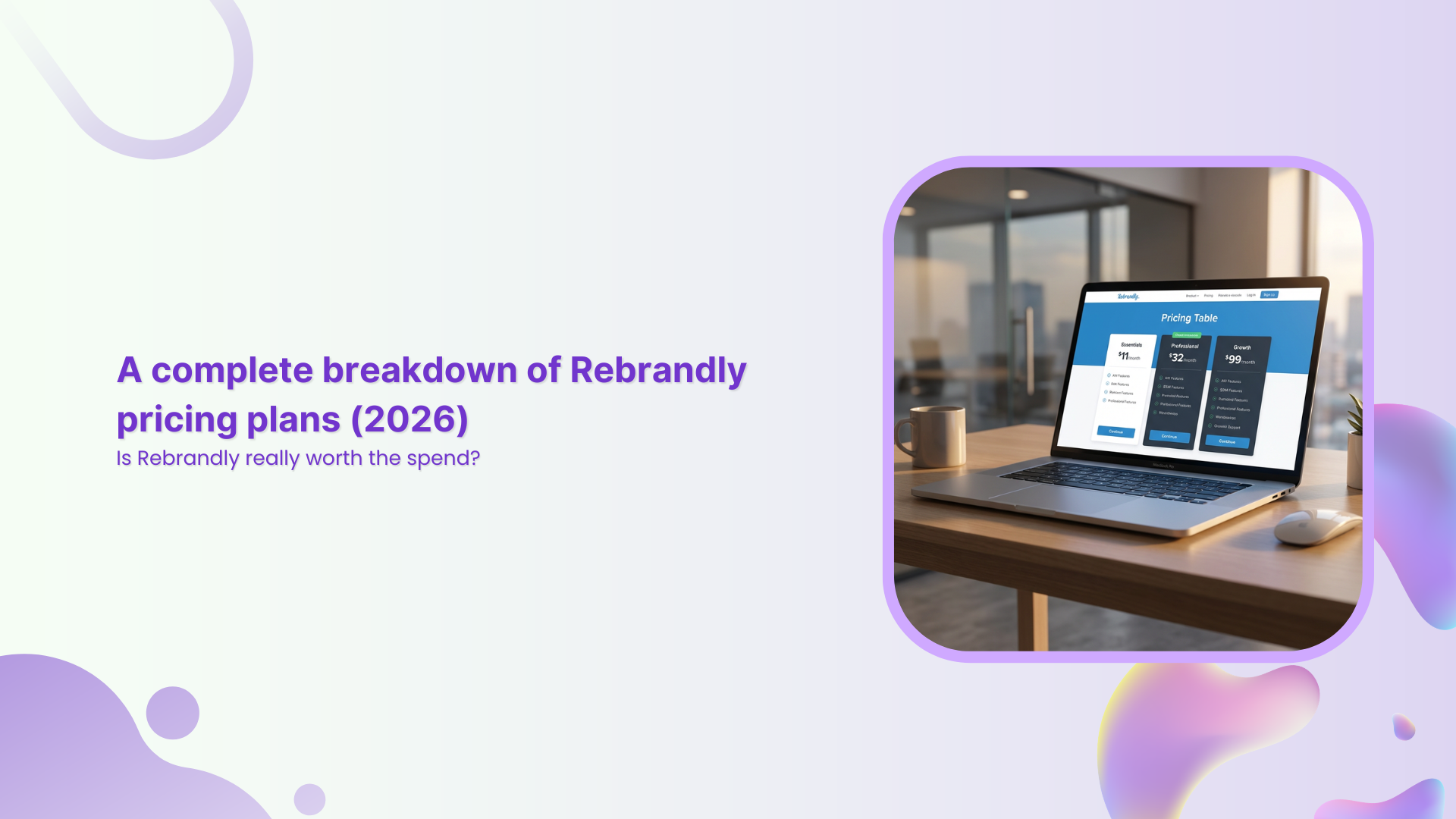
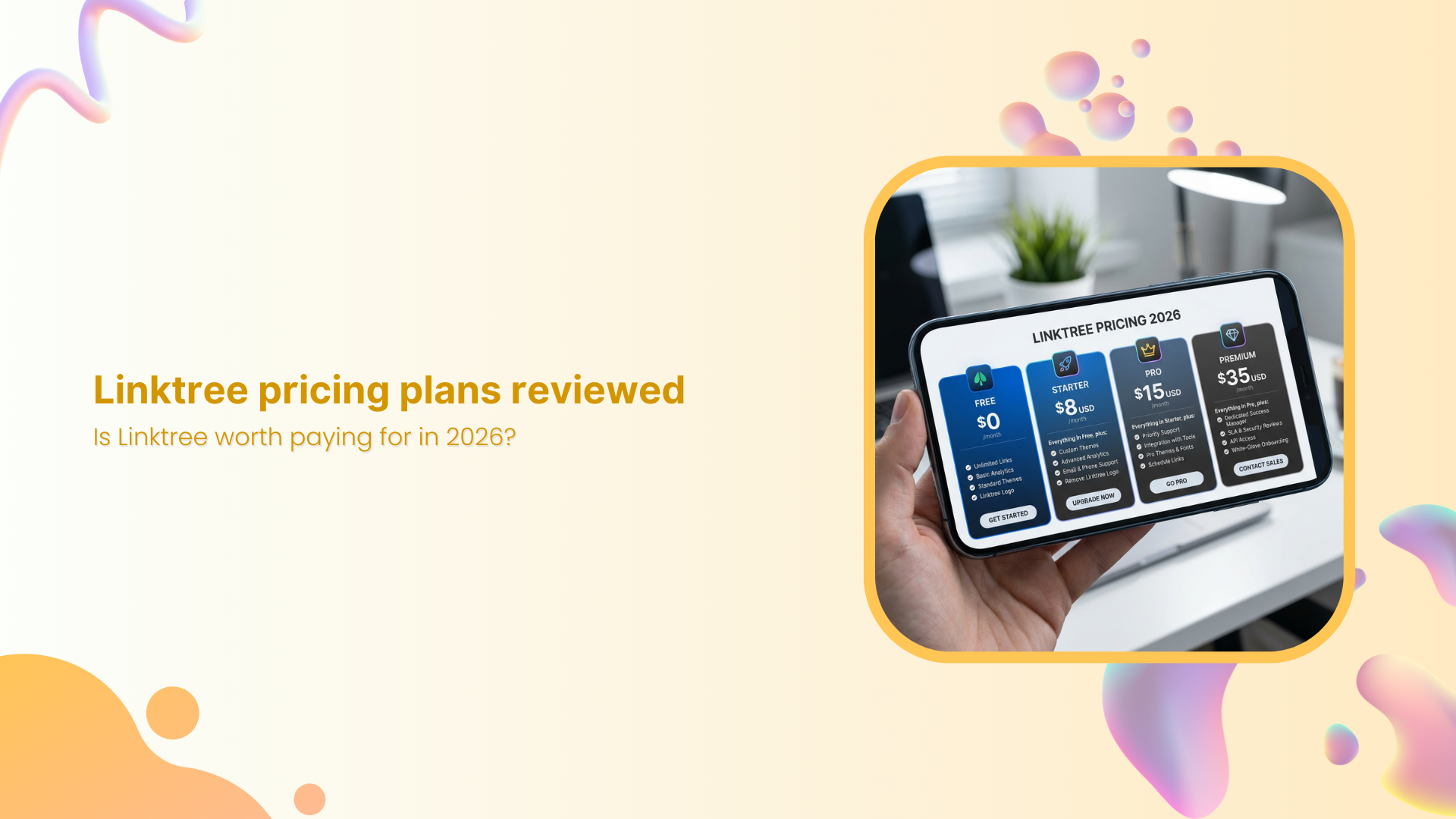
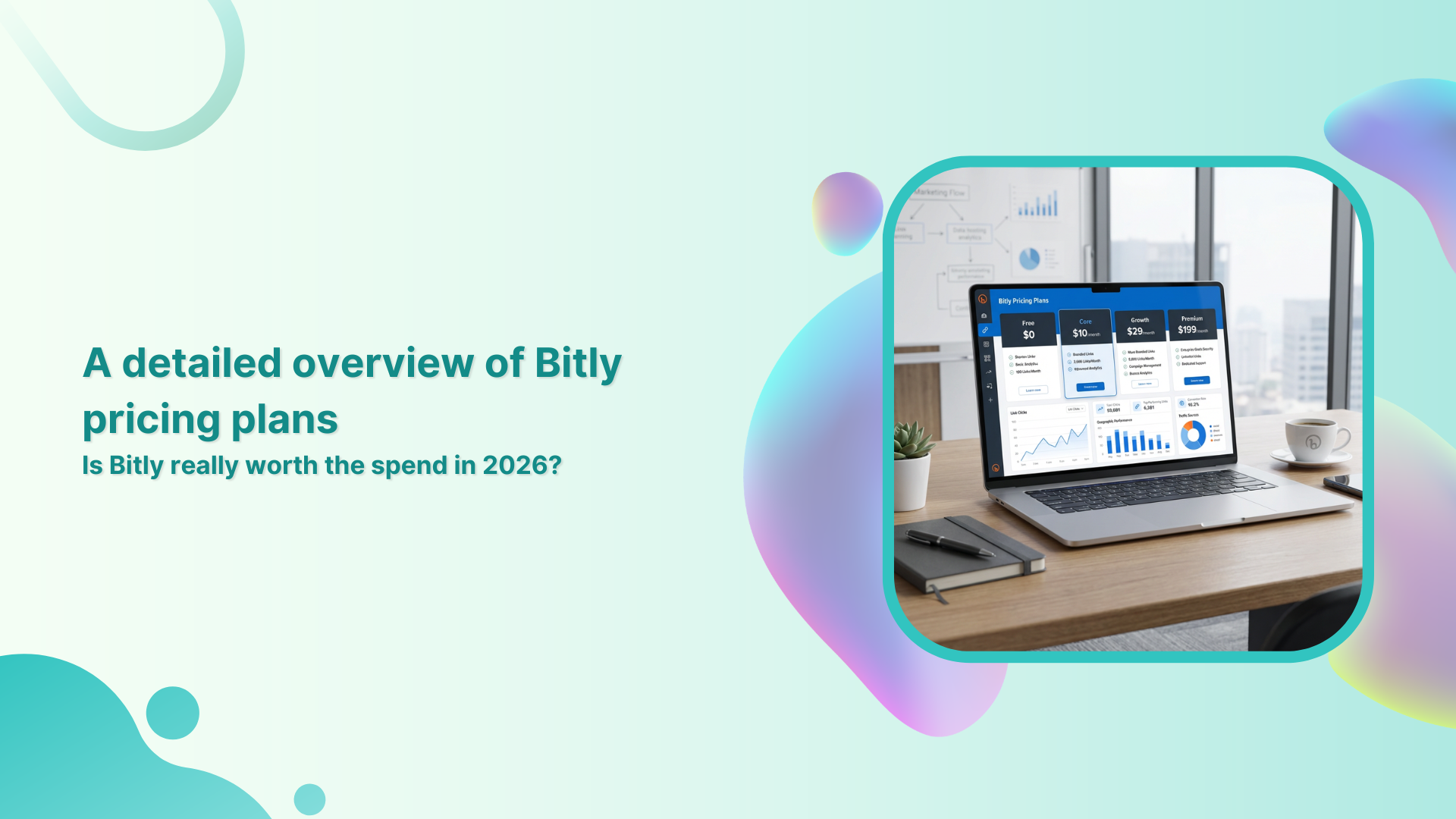
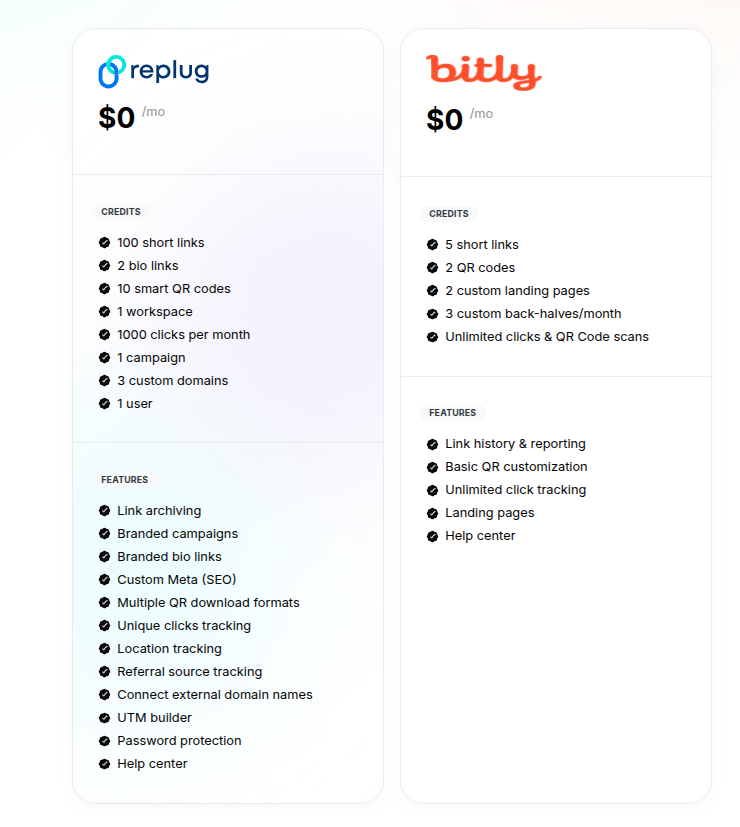
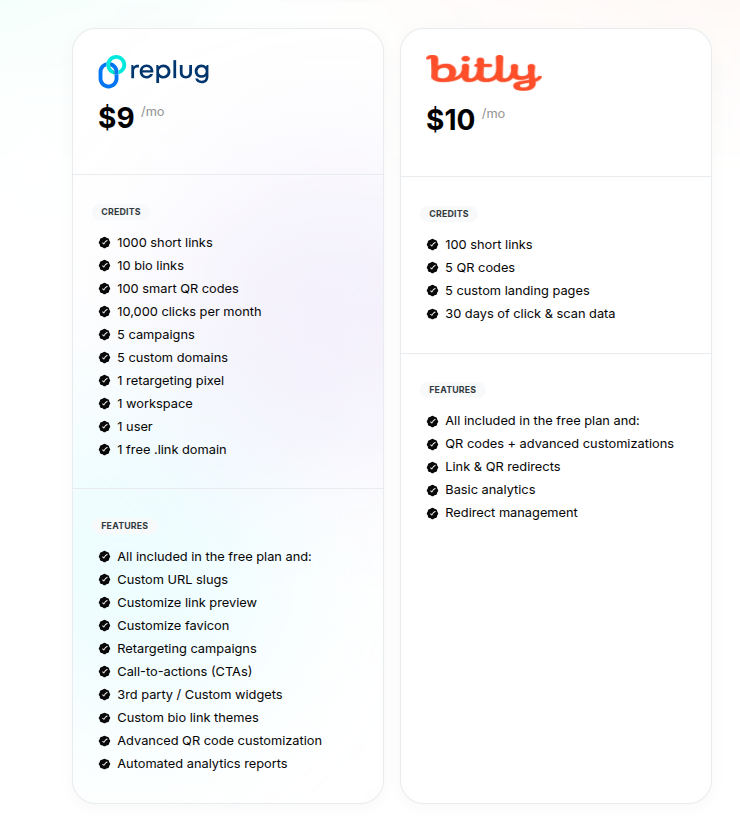
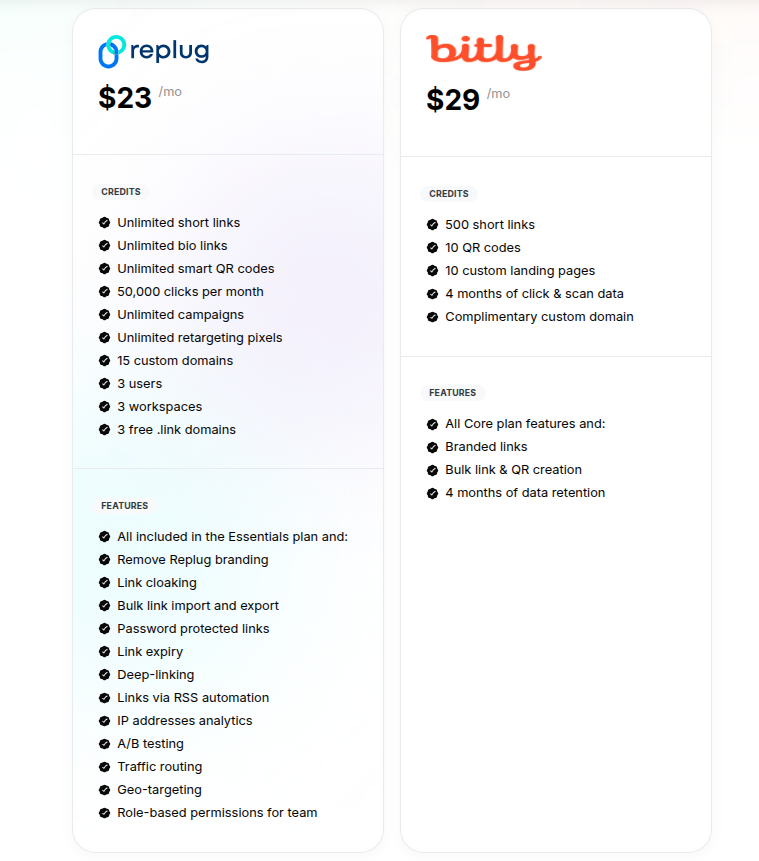
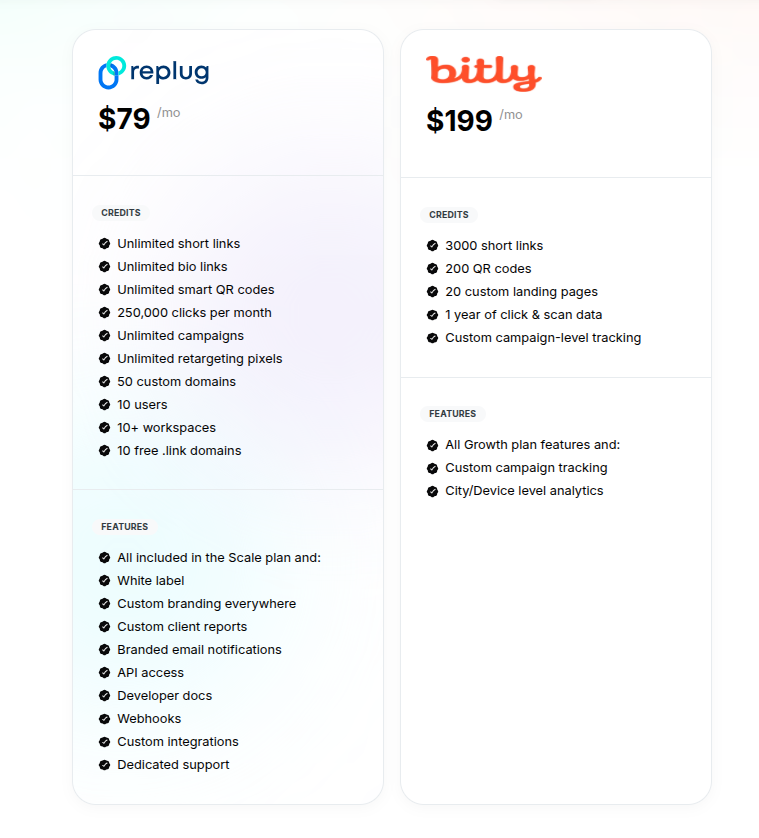
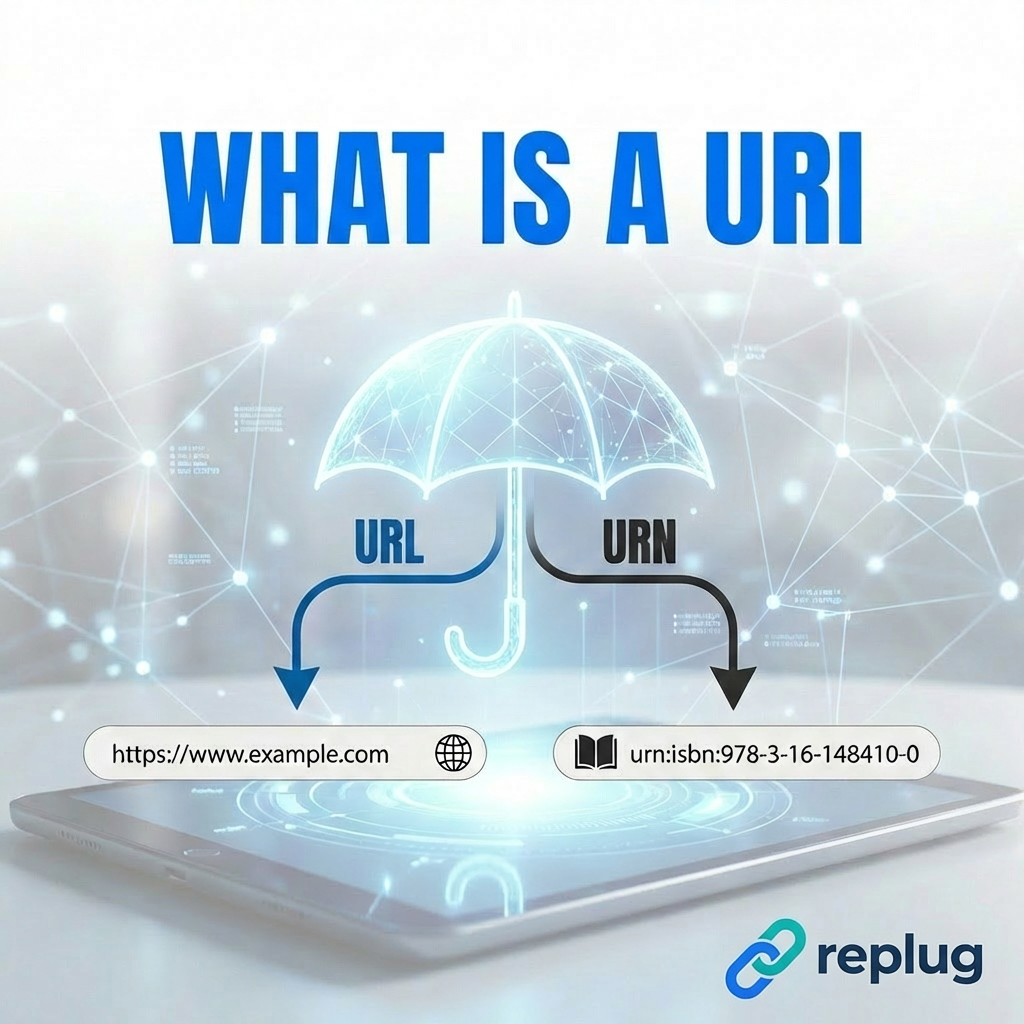
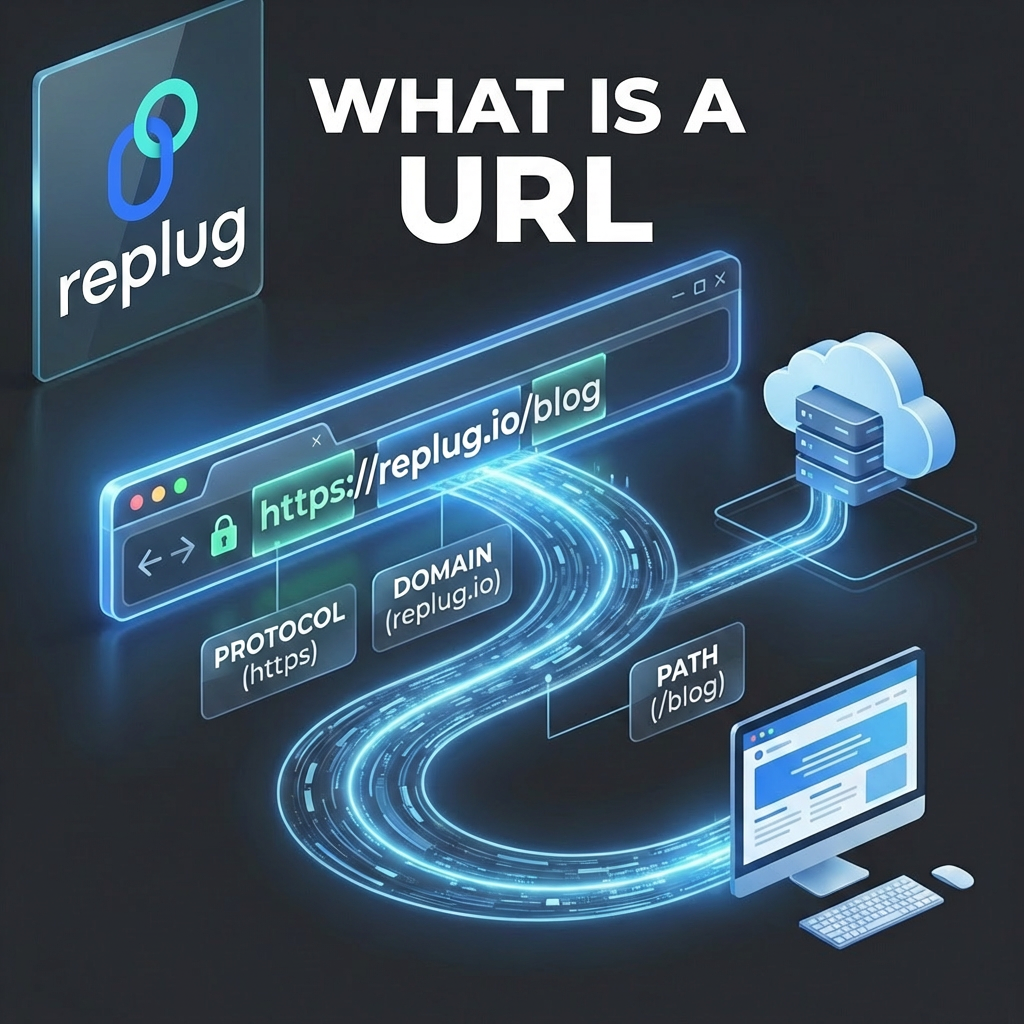


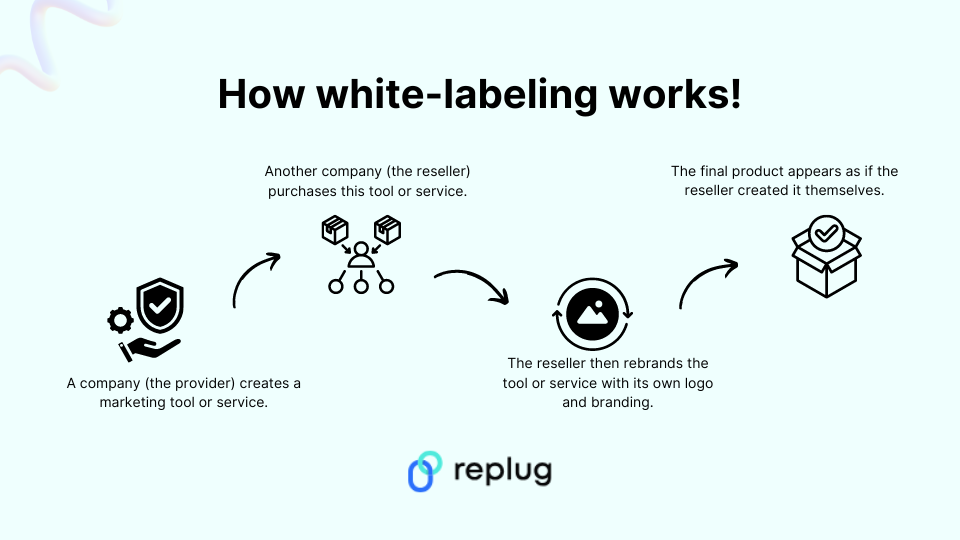



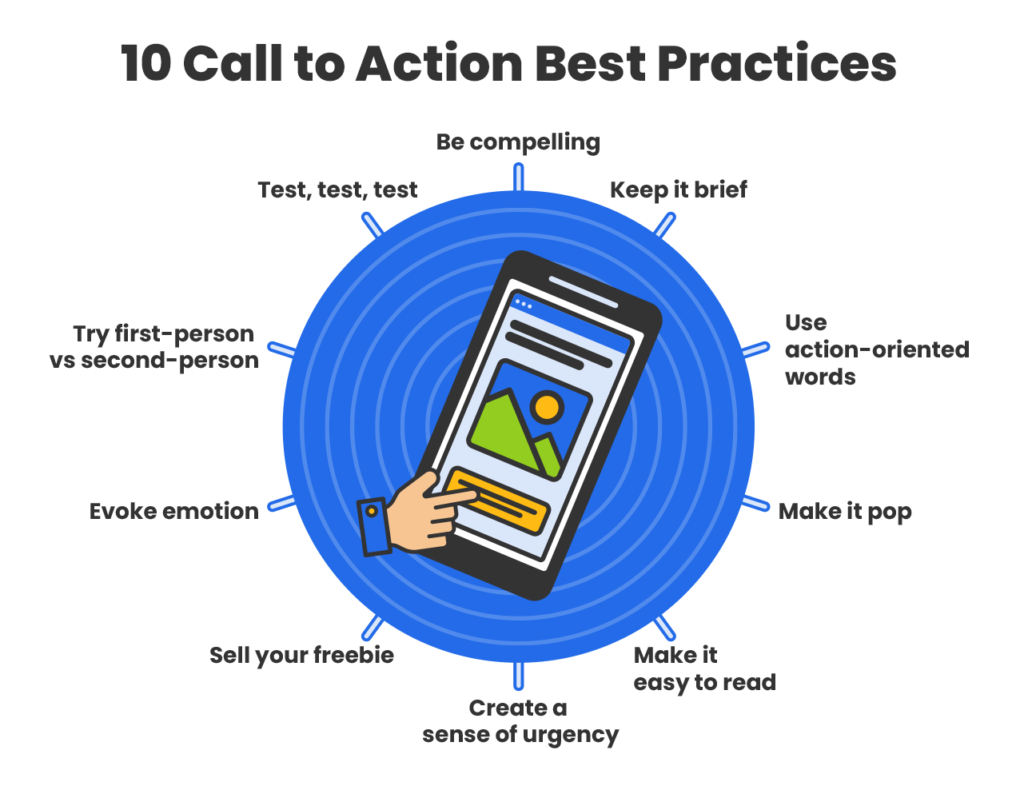


![50+ different types of QR codes with examples & use cases [2026]](https://internal-blog.replug.io/wp-content/uploads/2026/02/50-different-types-of-QR-codes-with-examples-use-cases-2026.png)