Category: Help guides

Read Replug’s help guides blog for expert tips, insights, and resources on link management, tracking, branded URLs, QR codes, and audience growth.

  • How to Craft a Killer Pinterest Bio for Maximum Reach?

    How to Craft a Killer Pinterest Bio for Maximum Reach?

    In a sea of pins and boards, a compelling Pinterest bio is your chance to stand out and leave a lasting impression. It encourages users to explore, follow, and engage with your brand. An optimized bio is more than just a collection of words; it’s a strategy that establishes credibility, fosters connection, and ultimately drives engagement. 

    Learn to create a compelling, professional bio that attracts the right audience and boosts your followers. Dive into proven strategies for growing your business on this visual search engine and marketing powerhouse.

    Let’s get started!

    What is a Pinterest bio?

    A Pinterest bio is a concise yet impactful “About You” section on your profile that encapsulates your brand identity and offerings for your target audience. It serves as the initial point of contact for Pinterest users, influencing their perception of your brand. 

    This brief introduction is a pivotal element in making a lasting first impression, as it highlights your values, uniqueness, and the essence of your content. 

    A well-crafted Pinterest bio is not only an introduction but a strategic tool that attracts the right audience, encouraging them to engage, follow, and explore more of what your brand has to offer on the platform.

    How to write a Pinterest bio: 6 steps to success

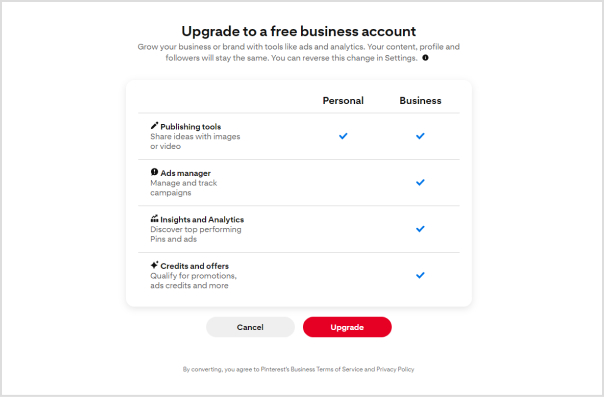
    1. Switch to a business account

    Ensure your Pinterest account is set up as a business account. This unlocks essential tools for setting up your shop, analyzing performance, and staying informed about trends. These resources empower you to make the most of the platform and enhance your overall experience.
    Pin6terest-bio

    2. Change your profile picture

    Select a profile picture that strikes a balance between brand friendliness and visual appeal. For individual content creators or influencers, opt for a professional photograph that showcases your unique personality. Authenticity is key, as audiences seek genuine connections. If you represent a business, use your brand logo to enhance brand recall.

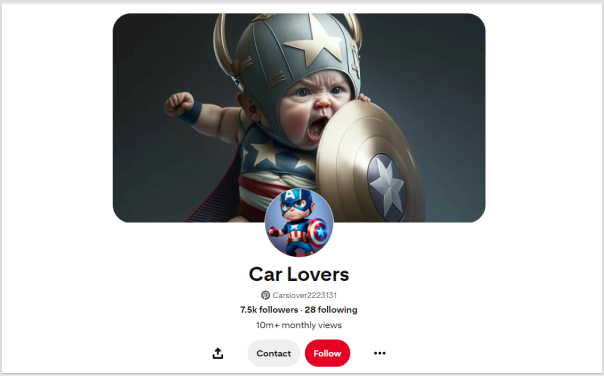
    3. Customize your banner

    Maximize the visual impact of your Pinterest cover by customizing it to entice new followers. Consider incorporating an irresistible lead magnet, such as a masterclass or free cheat sheet, to capture audience interest. Including a Replug QR Code on your banner allows followers to easily access additional offerings, providing them with a taste of the value your profile delivers.
    Pin6terest-bio

    4. Add your business name and keywords

    Recognize that Pinterest users often search for specific topics rather than individual names. Enhance your discoverability by incorporating relevant keywords alongside your business name. Identify the pain points of your target audience and position your brand as a trusted solution.

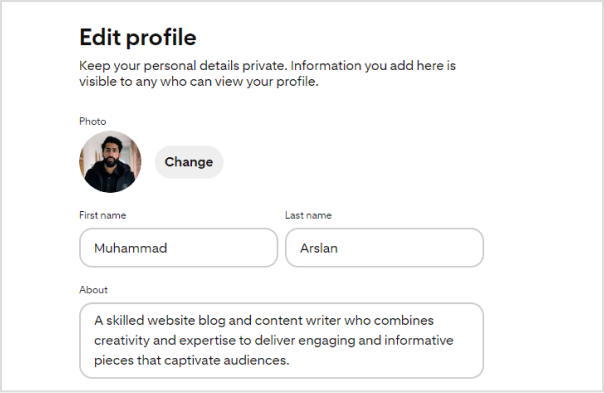
    5. Write your bio under “About”

    Focus your bio on your target audience rather than solely on yourself. Leverage a Pinterest keyword tool to identify what your audience is actively searching for and integrate relevant keywords into your bio. Remember that Pinterest operates as a visual search engine, so a keyword-rich bio enhances your chances of being found when users enter relevant searches.
    Pin6terest-bio

    6. Add Replug link-in-bio on the website field

    While Pinterest allows only one link in your bio, you can maximize this space with a personalized Pinterest link in bio. This dynamic link directs followers to a microsite of links, including your website, social media links, and more.

    By creating a centralized hub, you make your content more accessible, boost brand visibility, and drive engagement.

    Replug.io enables you to track each action, providing insights into the links that resonate most with your audience and empowering you to redirect traffic strategically.

    To further streamline your link-sharing strategy, use a free link shortener to create clean, trackable URLs and enhance the performance of every link you share.

    Boost ROI with branded URLs - Replug dashboard showing performance metrics and branded URL creation

    Go beyond generic link pages!

    Create custom bio links that truly fit your brand

    With Replug, you can create bio links that are unique, engaging, and built to convert.

    Start free trial

    Also read: What Does Link In Bio Mean: All You Need To Know

    How to add a Replug Link-in-bio to your Pinterest bio?

    Here’s how to add a Replug Link-in-Bio to your Pinterest bio:

    Step 1: Log in to your Replug account or create one if you’re new to the platform.
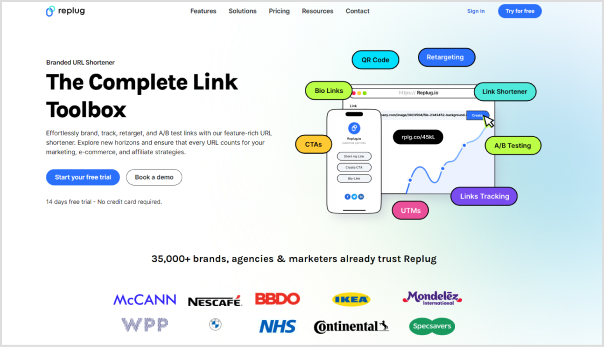
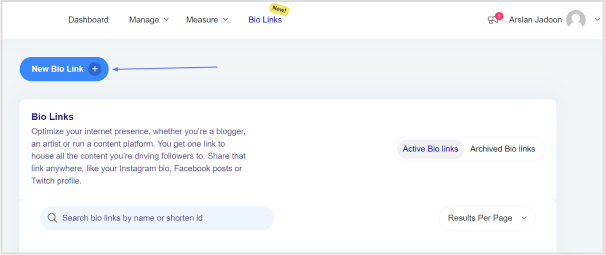
    Step 2: Once logged in, head to the Replug dashboard and find the Bio linksfeature.

    Pinterest-bio-ideas

    Step 3: Click on “New Bio Link” to initiate the creation of a new bio link.
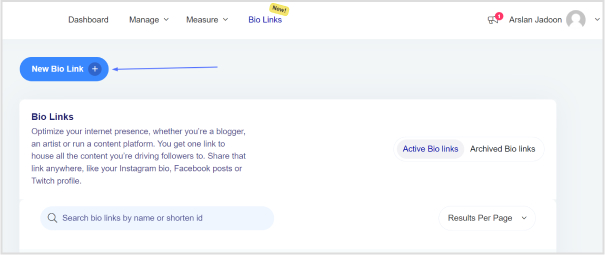
    Pinterest-bio-ideas

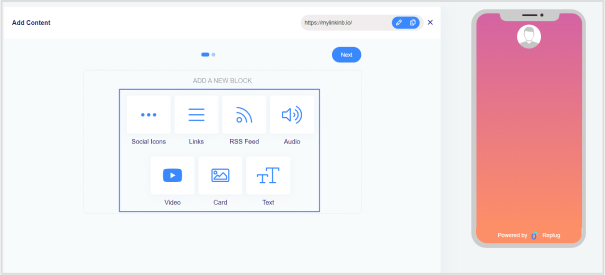
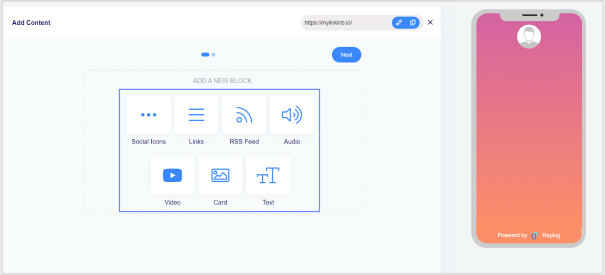
    Step 4: Choose the type of content block you want to include on your bio link page. Replug provides various options such as social icons, links, RSS feeds, audio, video, text, and cards. Select the one that aligns with your needs. For instance, you can start with the “Social Icons” block.
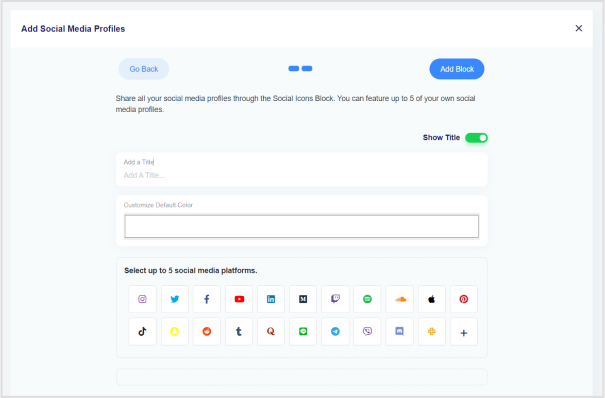
    Step 5: Pick up to five social media platforms you wish to display on your bio link page. Customize the colors of the social icons, provide titles for each platform, and insert the respective links. Click “Add Block” to include each platform.
    Step 6: Incorporate additional content blocks as necessary. For example, if you want to feature website links, opt for the “Links” block. Enter titles for the content blocks, as well as titles and URLs for the websites. Multiple website links can be added within this block.

    Step 7: Once all desired content blocks are added, proceed by clicking “Next.”

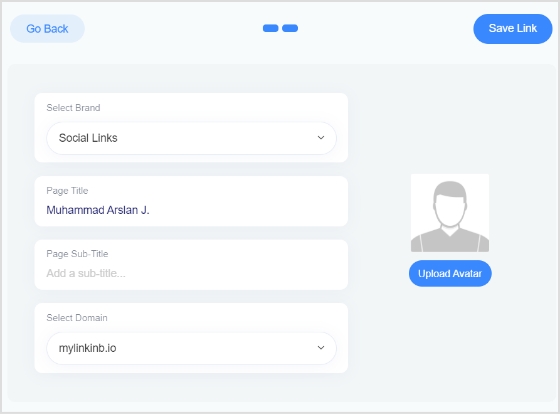
    Step 8: Further personalize your bio link page by specifying your brand name, uploading an avatar, and adding a title and subtitle that best represents your content or brand.
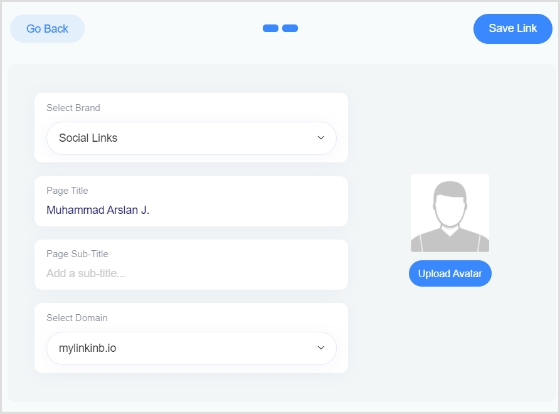
    Step 9: Review your bio link page during the creation process to ensure it looks and functions as intended. 

    Step 10: Save your bio link, and it will be ready to be seamlessly integrated into your Pinterest bio.

    Boost ROI with branded URLs - Replug dashboard showing performance metrics and branded URL creation

    Go beyond generic link pages!

    Create custom bio links that truly fit your brand

    With Replug, you can create bio links that are unique, engaging, and built to convert.

    Start free trial

    Add this link to your Pinterest bio:

    Step 11: Open your Pinterest profile and navigate to the “Edit Profile” section.
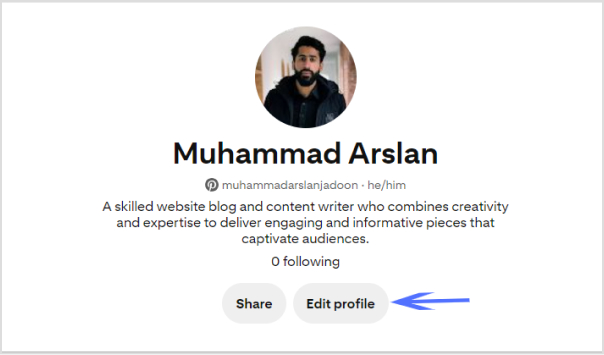
    Pinterest-bio-ideas

    Step 12: In the “Website” field, paste the Replug Link-in-Bio URL that you’ve created.
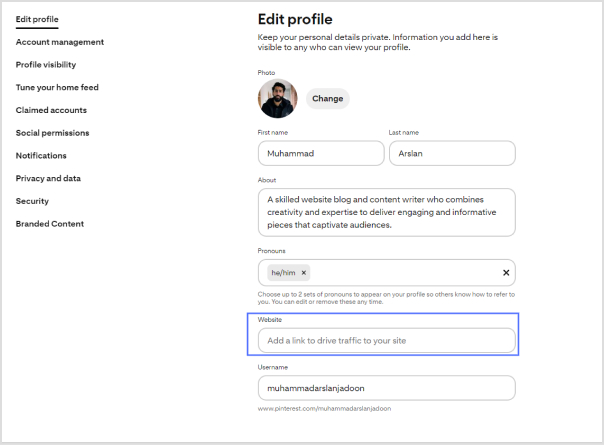
    Pinterest-bio-ideas

    Step 13: Save the changes to update your Pinterest profile with the newly added Replug Link-in-Bio.

    Boost ROI with branded URLs - Replug dashboard showing performance metrics and branded URL creation

    Go beyond generic link pages!

    Create custom bio links that truly fit your brand

    With Replug, you can create bio links that are unique, engaging, and built to convert.

    Start free trial

    Frequently asked questions 

    How do I switch my Pinterest account to a business account?

    Visit your Pinterest account settings, and there should be an option to convert your account into a business account. Follow the prompts to set up your business profile.

    What type of profile picture should I use on Pinterest?

    Choose a profile picture that is visually appealing and aligns with your brand. For individuals, a professional photograph is recommended, while businesses may opt for their logo.

    Can I customize my Pinterest cover/banner?

    Yes, you can customize your Pinterest cover by adding a personalized touch to make it visually appealing. This is a great opportunity to showcase your brand or capture user interest.

    How many links can I add to my Pinterest bio?

    Pinterest allows only one link in the bio. Make sure to use this space wisely by including a link that directs followers to a relevant destination, such as your website or a specific landing page.

    Should I include keywords in my Pinterest bio?

    Yes, incorporating relevant keywords in your bio can improve discoverability. Think about what your target audience is searching for on Pinterest and include those keywords naturally and engagingly.

    What is the importance of a call to action (CTA) in my Pinterest bio?

    A well-crafted CTA encourages your audience to take action. For example, prompting them to click on a link for more information can enhance engagement and drive traffic to your intended destination.

    You may also like:
    How to Find Pinterest URL?

    TikTok bio ideas & hacks to drive traffic

  • How to Add a QR Code to a Flyer: Use Cases and Tips

    How to Add a QR Code to a Flyer: Use Cases and Tips

    Are your flyers due for a modern makeover? Enter QR codes—the quick, straightforward solution to elevate your print game. 

    In this guide, we get straight to it, showing you how to seamlessly integrate QR codes for a straightforward, tech-savvy boost. Follow this guide, and transform your flyers into interactive powerhouses. Time to make your prints work smarter, not harder. Let’s get started!

    What are QR codes on flyers?

    QR Codes on flyers refer to Quick Response Codes incorporated into print materials, typically paper-based promotional items. These matrix barcodes, when scanned using a smartphone or QR code reader, direct users to a designated URL. 

    This integration serves as a bridge between traditional print marketing and the digital realm, offering opportunities for enhanced engagement, in-store traffic generation, and data-driven campaign optimization.

    Why add a QR code to your flyer? 

    1. Boosts audience engagement:

    Blend the best of traditional and digital marketing. QR Codes on flyers create an interactive experience, ensuring your audience not only notices but engages with your content.

    2. ROI tracking made easy:

    Measure your marketing success with precision. QR Codes enable you to track user engagement, providing insights like scan numbers, operating systems used, and user locations. Understand the impact of your print ad and determine its worth.

    3. Mobile-friendly magic:

    Cater to the mobile-savvy crowd. Modern smartphones come equipped with built-in QR code scanners, making information readily accessible. Bridge the physical and digital realms, ensuring your audience can connect with your online content effortlessly.

    4. Always accessible info:

    Avoid the risk of lost flyers. A QR Code synchronizes your physical and digital content, allowing your audience to access crucial information even if they misplace the flyer. Forge instant connections and stand out with this seamless mobile advantage.

    Replug Branded Short Links CTA
    A complete link management solution
    for marketing professionals & agencies.
    Try Replug for free

    How to add a QR code to a flyer using Replug?

    Replug.io allows you to create QR codes simply. Here are the steps you need to follow with this top-notch QR code generator tool:

    Important note: A longer URL makes your QR code more complex and difficult to scan. Use our URL shortener tool to create short links and download them as QR codes. By doing so, your content will be easier to scan and access.

    Step 1: Sign in to your Replug account or create a free account if you’re new.

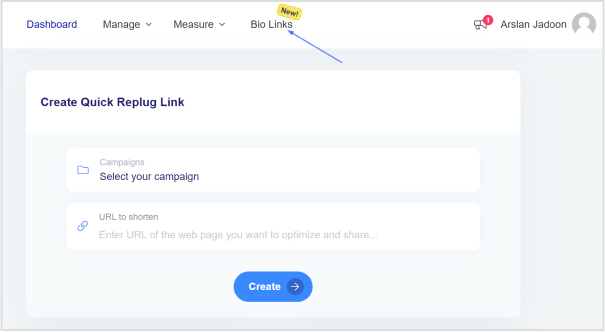
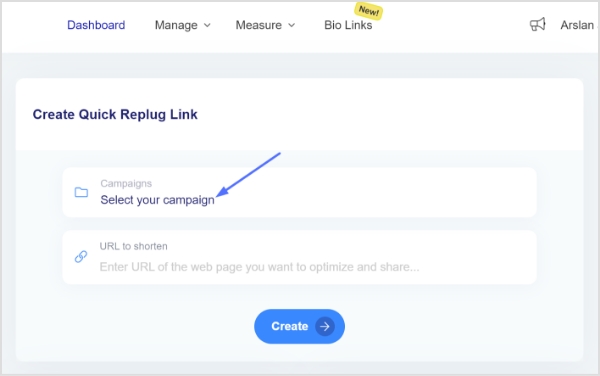
    Step 2: On the main dashboard, click “Select your campaign” or swiftly create a new campaign.

    select-campaign

    Step 3: Under “Select your campaign,” enter the destination URL you want to link to your flyer QR code and click “Create.”

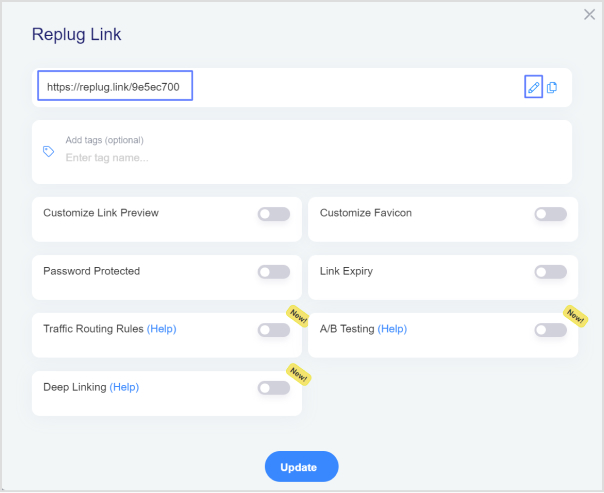
    Step 4: Customize your shortened URL by adjusting the URL slug to align with your brand or campaign.

    Step 5: Copy the shortened URL and click “update.”

    Download your destination URL as a QR code:

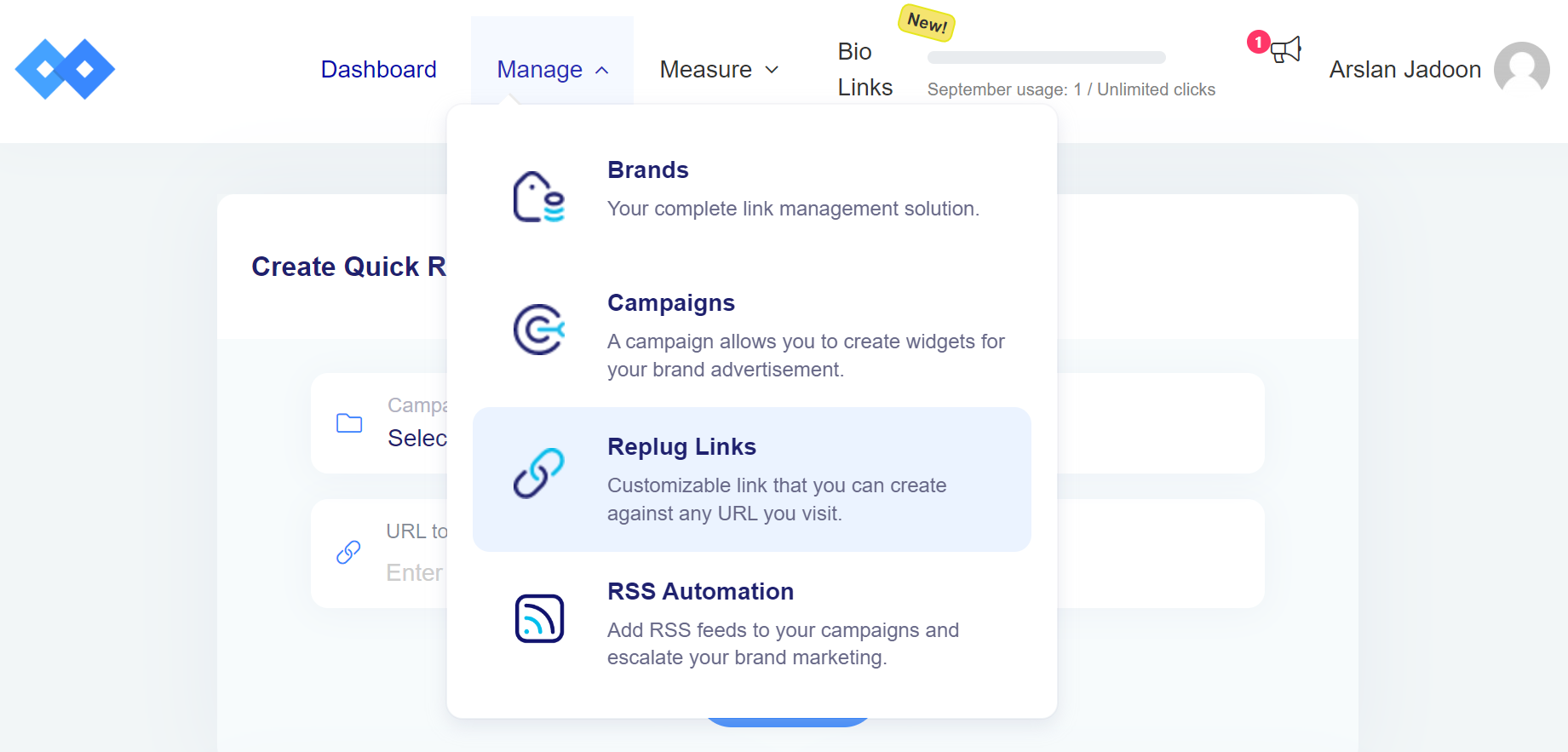
    Step 6: Navigate back to the main dashboard, click “manage,” then select “Replug links.”

    Step 7: Locate your newly created short URL in the list.

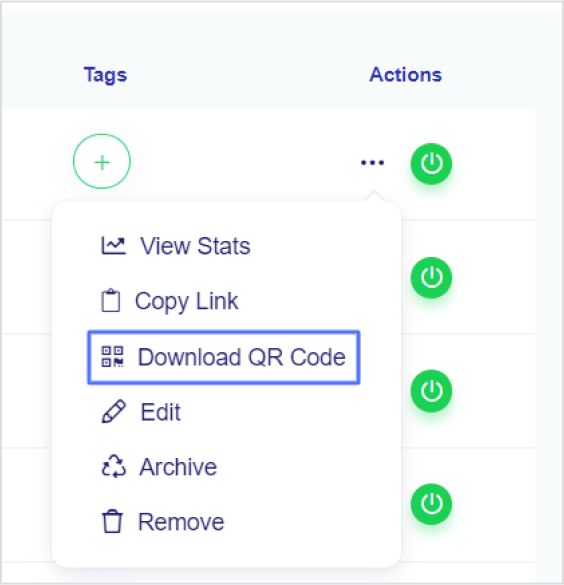
    Step 8: Click on the three dots under “Actions,” then choose “Download QR code.” 

    download-QR-code

    Also read: QR Advertising: Your gateway to consumer engagement

    Adding QR code to Your Flyer:

    • Place the QR code strategically on your flyer, ensuring it’s easily visible and scannable.
    • Accompany the QR code with a brief call-to-action, prompting users to scan for exclusive content or additional information.
    • Test the QR code with various devices to ensure compatibility and seamless user experience.

    Pro Tip: Replug provides detailed analytics, helping you monitor the performance of your QR codes. Track metrics such as click-through rates and geographical data to refine your marketing strategy. Elevate your flyer by seamlessly integrating dynamic QR codes—bridging the gap between your print material and the digital realm!

    Best practices for using QR codes on flyers:

    Use colors that pop:

    Move beyond black and white. Use vibrant colors that align with your brand’s palette. Enhance brand recognition by ensuring your QR Code is consistent with your overall design scheme. Keep it visually appealing and on-brand.

    Incorporate your brand’s identity:

    Make space not just for colors but also for your brand’s logo. Whether you’re a small business or a content creator, adding a logo adds a personal touch and boosts brand recognition. It’s a professional move that sets your marketing materials apart.

    Opt for dynamic QR codes:

    Choose dynamic over static for printed materials. Dynamic QR Codes allow easy content modification without reprinting. Whether it’s a link update or a change in information, dynamic QR Codes offer flexibility, saving both time and money. Additionally, they provide valuable scan data for tracking and analysis.

    Ensure design consistency:

    Maintain a consistent design across your marketing collateral. Your QR Code should seamlessly blend with the overall aesthetics of your flyer. Cohesiveness in design enhances professionalism and ensures that your QR Code doesn’t feel out of place.

    Replug Branded Short Links CTA
    A complete link management solution
    for marketing professionals & agencies.
    Try Replug for free

    Frequently asked questions

    What is a QR Code and how does it work on flyers?

    A QR Code, or Quick Response Code, is a two-dimensional barcode that stores information. On flyers, it works by encoding a link or information, allowing users to scan it with their smartphones to access the encoded content.

    Why should I use QR Codes on my promotional flyers?

    QR Codes on flyers enhance interactivity, bridge the gap between print and digital, and offer a convenient way for users to access additional information, promotions, or websites.

    What are the best practices for placing QR Codes on flyers?

    Use vibrant colors, incorporate your brand’s identity, opt for dynamic QR Codes for flexibility, and ensure design consistency with your flyer’s overall aesthetics.

    How can I track the performance of QR Codes on my flyers?

    Use QR Code analytics tools like Replug to track metrics such as the number of scans, geographical data, and other valuable insights to measure the effectiveness of your campaign.

  • How to View Instagram Analytics: All You Need to Know

    How to View Instagram Analytics: All You Need to Know

    Instagram stands out as a powerhouse with over one billion monthly active users. By understanding Instagram analytics, you can make more informed decisions and optimize your content strategy for better results. 

    Analytical feedback allows you to improve your approach and engage your audience better continuously. Our comprehensive guide to Instagram analytics demystifies the process while empowering you with the knowledge to leverage your data for better audience understanding. Let’s get started!

    What is Instagram analytics?

    Instagram analytics, often called Instagram Insights, is an invaluable in-app tool designed to provide a wealth of statistics about your account and content performance. Beyond the realms of likes and comments, this tool delves into the intricacies of reach, engagement, and follower growth. 

    Social media professionals and businesses turn to Instagram Insights to dissect, analyze, and refine content strategies, elevating their presence on this visually-driven platform.

    Key takeaways on Instagram analytics:

    • Instagram Insights, or analytics, is exclusive to Business and Creator accounts. To unlock this feature, you must switch from a personal account to one of these professional account types.
    • It may take up to 24 hours for Instagram to populate your account with analytics data after you’ve converted to a Business or Creator account.
    • To access information about your audience, you need to have a minimum of 100 followers on your Instagram account.
    • You can analyze data for any custom time frame within the past 90 days, allowing flexibility in assessing your Instagram performance.
    • On average, business accounts achieve approximately a 2% engagement rate on Instagram. This metric reflects the level of interaction and interest your content generates among your audience.
    Replug Branded Short Links CTA
    A complete link management solution
    for marketing professionals & agencies.
    Try Replug for free

    How to switch to a business or creator account on Instagram?

    1. Open the Instagram app and navigate to your user profile.
    2. Tap the hamburger icon located in the top right corner of your profile page. This icon typically consists of three horizontal lines.
    how-to-view-instagram-analytics

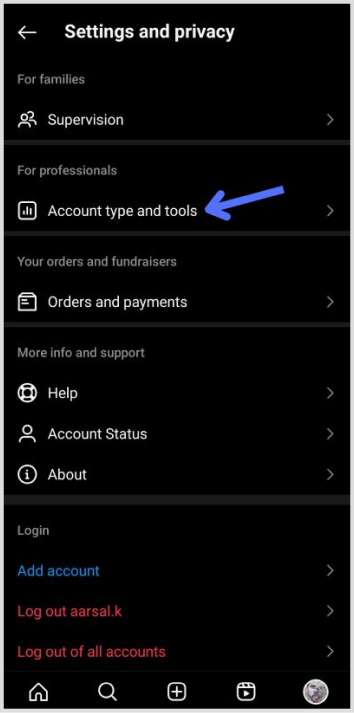
    3. Within the Settings menu, tap on “Setting and Privacy” to access your account-related options.

    4. Scroll down to the bottom of the “Settings and Privacy” screen and find the option labeled “Account type and tools” then tap on “Switch to professional account.” 

    how-to-view-instagram-analytics

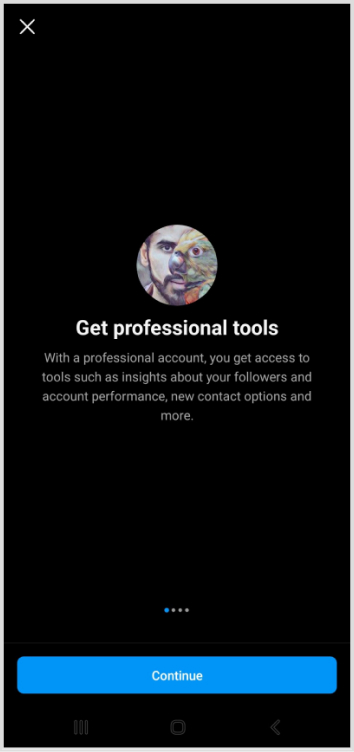
    5. Instagram will present a series of prompts explaining the features of professional accounts. Tap “Continue” to proceed with the switch.

    how-to-view-instagram-analytics

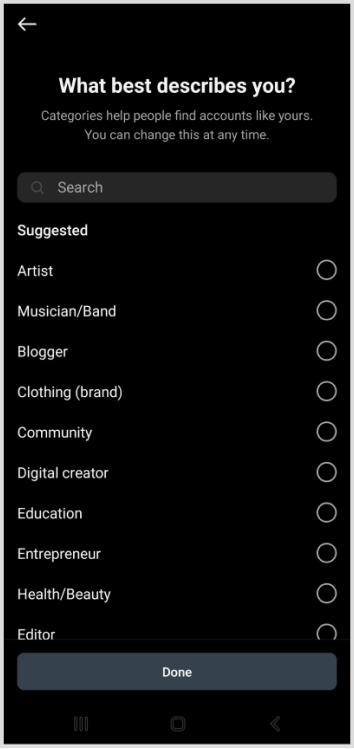
    6. Instagram will ask you to choose a category that best describes you from its provided list. Once you’ve made your selection, tap “Done” to confirm.

    how-to-view-instagram-analytics

    7. After successfully switching your account type, Instagram requires a 24-hour waiting period for the analytics page to be populated with relevant data. During this time, you won’t immediately see insights from your previous posts.

    Note that you will only see insights on posts shared after you switch to a business or creator account. Analytics for previous posts will not be available.

    Boost ROI with branded URLs - Replug dashboard showing performance metrics and branded URL creation

    Go beyond generic link pages!

    Create custom bio links that truly fit your brand

    With Replug, you can create bio links that are unique, engaging, and built to convert.

    Start free trial

    How to view Instagram Analytics?

    To access your Instagram analytics swiftly, start by opening your profile in the Instagram app. Locate and tap on the Insights button, represented by a bar graph icon. This action takes you to an overview of your overall account analytics. 

    For specific content insights, choose the content type you want to analyze, like posts or stories, and tap the right arrow. This simple process empowers you with valuable data, helping you refine your content strategy based on engagement and performance metrics.

    You may also like: How to check analytics on TikTok?

    Types of Instagram analytics:

    1. Overview analytics:

    Provides a comprehensive account-level perspective, including:

    • Accounts reached: Unique accounts that have seen your content.
    • Accounts engaged: Interaction metrics (likes, saves, comments, shares, etc.).
    • Total followers: Net change in follower count.
    • Content you shared: Statistics on the total content shared since the switch.

    2. Instagram profile insights:

    Offers insights into how your audience interacts with your profile, including:

    • Profile visits: Number of times users visited your profile.

    3. Instagram audience analytics:

    Provides data about your followers, including:

    • Follower growth: Accounts gained and lost.
    • Top locations: Geographic distribution of followers.
    • Age range: Demographics based on age.
    • Gender: Breakdown of followers by gender.
    • Most active times: Peak times when your followers are active.

    4. Instagram post analytics:

    Includes metrics for individual posts, such as:

    • Reach: Unique accounts that saw the post.
    • Impressions: Total times the post appeared.
    • Post interactions: Likes, comments, shares, saves.
    • Profile activity: User visits and follows triggered by the post.

    5. Instagram stories analytics:

    Focuses on metrics specific to Instagram Stories:

    • Follows: Accounts that followed after viewing a story.
    • Profile visits: Times users visited your profile.
    • Taps: Actions taken after viewing the story.

    6. Instagram reels analytics:

    Examines metrics for short video clips:

    • Reach: Unique users who saw the Reel.
    • Plays: Number of times the Reel was played.
    • Reel interactions: Likes, comments, shares, saves.

    7. Instagram video analytics:

    Covers metrics related to Instagram videos:

    • Average Percentage of Video Watched.
    • Video views: Total times the video was viewed.
    • Video interactions: Likes, comments, shares, saves.

    8. Instagram shopping analytics:

    Available for accounts with Instagram Shopping enabled:

    • Product views: Taps on product tags to view details.
    • Product button clicks: Clicks on the purchase button.

    9. Instagram live analytics:

    Provides insights for Instagram Live videos:

    • Accounts reached: Total users who viewed the live stream.
    • Peak concurrent viewers: Highest number of viewers at one time.
    Boost ROI with branded URLs - Replug dashboard showing performance metrics and branded URL creation

    Go beyond generic link pages!

    Create custom bio links that truly fit your brand

    With Replug, you can create bio links that are unique, engaging, and built to convert.

    Start free trial

    Instagram analytics best practices:

    1. Regularly check analytics:

    Consistently monitor your analytics to track growth and identify opportunities. Social media consultant McKiever recommends checking monthly or even more frequently.

    2. Be organized with spreadsheets:

    Utilize spreadsheets to organize monthly metrics. The CEO of Influencer Marketing Factory, Bogliari, suggests using Instagram Insights as part of a consistent optimization loop for content testing and improvement.

    3. Leverage Instagram’s “Sort” feature:

    Instagram’s sorting feature allows you to arrange posts based on interaction metrics. McKiever suggests sorting by follows to identify posts that gained the most followers, helping you create similar content for faster growth.

    Also read: How to Add a Link to Your Instagram Story?

    How to use Instagram analytics to grow your business:

    1. Understand your audience:

    Use analytics to identify what your target audience enjoys. Tailor your content marketing to meet their preferences, satisfying existing customers, and attracting new ones.

    2. Benchmarking strategies:

    • Internal benchmarking:

    Compare analytics of your content. Analyze both strong and weak-performing posts to identify common themes that resonate with your audience.

    • Metrics to prioritize:

    For overall account analysis, emphasize total followers, accounts reached, and top posts, stories, and reels. For individual posts, prioritize follows, profile visits, website taps, and reach.

    • External benchmarking:

    Compare your content to competitors to gain insights for business growth.

    Replug Branded Short Links CTA
    A complete link management solution
    for marketing professionals & agencies.
    Try Replug for free

    Enhance social media tracking with Replug analytics:

    Replug stands out as an invaluable tool for enhancing your content and boosting your brand’s online presence. With its ability to create unique, trackable links embedded with UTMs, Replug offers a straightforward solution for understanding customer journeys.

    Replug is more than a URL shortener; it’s your strategic ally in navigating platforms like Instagram seamlessly. It provides a comprehensive toolkit for building brand connections, managing links and QR codes, and connecting effortlessly with your audience.

    For streamlined curation and top-notch link tracking across social channels, Replug is the ultimate answer. Take control, optimize your strategy, and ensure your brand emerges victorious in the competitive landscape. Elevate your social media game with Replug—a true ally for maximizing insights and fostering stronger connections with your audience.

    Frequently asked questions 

    What are Instagram analytics?

    Instagram analytics, or Instagram Insights, provides statistics about account and content performance, including reach, engagement, and follower growth.

    How to see analytics on Instagram?

    To access Instagram analytics, go to your profile, tap “Insights,” and review overall account analytics. Select specific content types for detailed stats.

    How to see Instagram story analytics?

    To view Instagram story analytics, open Insights, tap “Content,” and select “Stories” to see metrics like follows, profile visits, taps, impressions, and more.

    How to view Instagram analytics on desktop?

    Unfortunately, Instagram analytics is primarily available on the mobile app. However, some third-party tools may offer desktop analytics features.

    How to view post analytics on Instagram?

    Open Instagram Insights, tap “Content,” and select “Posts” to access detailed analytics for each post, including reach, impressions, interactions, and more.

    How does Replug enhance social media tracking, especially on Instagram?

    Replug enhances social media tracking on Instagram by creating unique, trackable links with embedded UTMs, providing precise analytics for link performance.

    How does Replug help in optimizing social media investments and improving ROI?

    Replug helps optimize social media investments by providing insights into link performance, allowing businesses to refine strategies and improve return on investment.

    Can I use Replug for tracking links on platforms other than Instagram?

    Yes, Replug is versatile and can be used for tracking URLs on various platforms beyond Instagram, including TikTok, Facebook, Twitter, and more.

  • How to Get More Views on LinkedIn: 9 Proven Ways

    How to Get More Views on LinkedIn: 9 Proven Ways

    LinkedIn isn’t just a social network; it’s your digital passport to the professional world, connecting you with like-minded individuals across diverse industries. Your LinkedIn profile is your virtual business card, offering a snapshot of your identity and capabilities.

    Elevating your LinkedIn presence goes beyond mere self-promotion – it’s about forging meaningful connections, fostering engagement, and creating growth opportunities. 

    If you’re eager to take your LinkedIn game to the next level, buckle up as we discuss nine practical tips to amplify your profile and skyrocket your post views for unparalleled engagement.

    1. Craft compelling content

    • Create valuable content

    Elevate your LinkedIn game by crafting content that speaks directly to your target audience. Identify your audience’s needs and interests, and deliver tangible benefits, immediate results, or fascinating insights. Remember, it’s not about you; it’s about what your readers want. 

    Utilize a mix of text, infographics, gifs, and videos to keep your content diverse and engaging. Employ writing techniques such as short sentences, line spacing, emojis, storytelling, and visuals to enhance readability.

    • Republish Content

    Unlock the potential of your content by republishing it strategically. According to research, not everyone visits LinkedIn multiple times a day, so reposting content (with a 10-day gap) can increase reach and engagement. Focus on delivering unique insights with each repost, ensuring each post feels fresh and valuable to your audience.

    2. Complete your profile

    Your LinkedIn profile is your professional identity. Make sure to complete it. Ensure you have a standout header image, use your professional name, invest in a professional photo, and craft a compelling summary showcasing your talents. 

    Keep your work experience, education, certifications, and specializations up-to-date. Growing your network to at least 500 connections significantly boosts visibility.

    3. Shorten the links you share

    Long, unwieldy URLs can detract from the professionalism of your content. Replug’s link shortener not only cleans up your links but also provides valuable tracking metrics. It’s about more than just character count reduction – crafting connections that resonate with your audience.

    With our LinkedIn link shortener, you can share concise, branded URLs that stand out in professional posts and messages. This helps boost credibility, improve engagement, and make every LinkedIn share more impactful.

    Replug Branded Short Links CTA
    Maximize marketing ROI
    by transforming ordinary URLs into
    branded short links that convert.
    Try Replug for free

    You can also use a LinkedIn QR code generator to make your profile scannable on business cards or event materials, giving offline audiences a direct path to your LinkedIn

    4. Maximize Engagement

    • Respond to comments

    Engage with your audience by responding to comments on your posts. This not only pushes your content back to the top of feeds but also establishes a connection with your audience. Thoughtful responses create a sense of community and encourage future engagements.

    • Re-share other people’s content

    Expand your network and visibility by re-sharing content from other LinkedIn members. This not only puts you on their radar but can also make you visible to their network. Use this strategy to build on others’ insights, reinforcing your thought leadership.

    • Get your employees and executives involved

    Harness the power of employee advocacy by encouraging your team to engage and share company content. Employee posts can reach over 5X further than official company posts. Use eNPS questions to identify highly engaged employees who can serve as strong advocates. Implement processes to notify the team about content creation and leverage employee advocacy platforms for streamlined content sharing.

    Also read: 12 Unique LinkedIn Post Ideas

    Boost ROI with branded URLs - Replug dashboard showing performance metrics and branded URL creation
    Boost ROI with
    branded URLs!

    Enhance your marketing campaigns by creating shareable, trackable, and fully multi-purpose customizable branded URLs.

    Try Replug for free

    5. Tag people and pages

    Leverage the power of tagging to drive attention to your posts. Tagging influential individuals or relevant pages can not only attract their attention but also increase visibility to their networks. Use tagging strategically as part of a team-wide strategy to amplify your reach.

    6. Use hashtags

    Utilize the potential of hashtags to increase the visibility of your posts. Choose relevant and trending hashtags, but keep it limited to around 5 per post. Aligning your content with popular hashtags can connect you with individuals and groups interested in similar topics.

    7. Diversify your content

    Diversify your content to keep your profile fresh and appealing to different audiences. From text and image posts to engaging videos, document carousels, and interactive polls – incorporating variety adds depth to your profile and resonates with a broader audience.

    8. Consistent posting

    Posting regularly sets a rhythm for your audience and benefits the LinkedIn algorithm. It’s not just about frequency; it’s about establishing reliability. Consistency builds anticipation for your insights, updates, or industry thoughts, encouraging views and engagement.

    Also read: How to change your LinkedIn URL (Step-by-step guide)

    9. Visual content

    • Try native LinkedIn videos

    Embrace the power of video content on LinkedIn, focusing on native videos for a better user experience. Use captions for accessibility and convenience. Simplify video sharing across your team using platforms like ContentStudio.

    • Post regularly

    Consistency is key to maintaining a vibrant LinkedIn presence. Post updates regularly, aiming for at least 2-3 times a week. Test different posting days and times to align with your network’s online activity. Use social media scheduling tools to manage regular posting without overwhelming your team.

    Enhance your LinkedIn journey with Replug

    Professional, accessible linking is the secret sauce of a successful LinkedIn strategy. Replug.io is not just a link shortener; it’s your tool to craft connections, engage authentically, and grow confidently.

    Invest time in understanding Replug’s analytics. It’s not just about shortening links; it’s about understanding your audience’s behavior.

    Ready to take your LinkedIn game to new heights? Explore Replug’s pricing plans and elevate your LinkedIn profile with style.

    Replug Branded Short Links CTA
    A complete link management solution
    for marketing professionals & agencies.
    Try Replug for free

    FAQs

    Why craft engaging content on LinkedIn?

    Crafting engaging content on LinkedIn is crucial for boosting profile visibility, expanding your network, and creating valuable connections.

    How does Replug enhance URLs on LinkedIn?

    Replug’s link shortener improves the appearance of URLs on LinkedIn by making them cleaner, more professional, and trackable, enhancing overall content presentation.

    Why is posting consistently essential on LinkedIn?

    Posting consistently on LinkedIn is vital for building audience trust, staying relevant in feeds, and maximizing the algorithm’s benefits, resulting in increased visibility.

    What is the role of scheduling tools in LinkedIn marketing?

    A social media scheduling tool plays a crucial role in LinkedIn marketing by enabling users to plan and automate posts, ensuring consistent posting frequency and optimal audience engagement.

    How do scheduling tools help manage multiple LinkedIn accounts efficiently?

    Scheduling tools streamline the management of multiple LinkedIn accounts by coordinating posts, ensuring consistency, and optimizing content delivery for efficient social media marketing.

  • How to Create a Brand Identity: A Quick Guide

    How to Create a Brand Identity: A Quick Guide

    Your brand identity is the heartbeat of your business, the visual and emotional essence that sets you apart in a crowded market. 

    In this short guide, we’ll outline actionable steps that go beyond aesthetics, ensuring your brand not only stands out but becomes a memorable and trusted presence in the minds of your audience. So, let’s get started!

    What is brand identity and why is it crucial?

    Brand identity is the visual and conceptual representation of a brand. It encompasses various elements that communicate the brand’s personality, values, and characteristics to its audience.

    This identity serves as the face of the brand, creating a distinctive and memorable image in the minds of consumers.

    Key components of brand identity:

    • Logo: A unique visual symbol that represents the brand.
    • Color palette: A consistent set of colors associated with the brand.
    • Typography: Specific fonts used in brand communications.
    • Visual style: The overall aesthetic, including imagery and design elements.
    • Brand voice: The tone and style of language used in communication.
    • Tagline or slogan: A concise phrase that encapsulates the brand’s essence.

    Why brand identity is crucial?

    Your brand identity is more than just a logo or a color scheme; it’s the heartbeat of your online persona. It encapsulates the essence of your brand, conveying its personality, values, and promises. Beyond the visual elements, a robust brand identity is the key to unlocking several critical objectives in the digital realm.

    Key objectives:

    • Memorability: A strong brand identity helps a brand stand out and be remembered in a crowded market. Consistent visuals and messaging create a lasting impression. 
    • Differentiation: In competitive industries, a distinctive brand identity sets a brand apart from competitors, making it easily recognizable. 
    • Authority and Trust: A well-crafted brand identity communicates professionalism and builds trust. It establishes the brand as an authority in its industry. 
    • Consistency: Brand identity acts as a guide for maintaining consistency across all marketing channels. Consistency reinforces brand recognition and credibility.
    • Scalability: A flexible brand identity can adapt and evolve with the brand’s growth. It remains relevant across various stages of business development.
    Replug Branded Short Links CTA
    A complete link management solution
    for marketing professionals & agencies.
    Try Replug for free

    How to create a brand identity: 5 essential steps

    1. Define your brand purpose:

    Mission and values: 

    • Clearly articulate why your brand exists, the values it stands for, and the problems it aims to solve.

    Differentiation: 

    • Identify what sets your brand apart from competitors.

    2. Research the competition:

    Competitive analysis: 

    • Study competitors’ brand strategies to understand the market landscape.

    Identify gaps: 

    • Look for opportunities to differentiate your brand from others.

    Also read: Top 29 Personal Branding Tools To Upscale Your Marketing

    3. Research your target audience:

    Detailed personas: 

    • Develop detailed profiles of your target audience, including their preferences, behaviors, and expectations.

    Appeal to your audience: 

    • Tailor your brand identity to resonate with your specific audience.

    4. Develop your brand voice and personality:

    Define brand persona: 

    • Decide on your brand’s personality traits (e.g., friendly, professional, innovative).

    Consistent communication: 

    • Develop a unique brand voice and maintain consistency across all communication channels.

    5. Develop your visual identity:

    Design a memorable logo:

    • Create a visually striking logo that encapsulates your brand essence.
    • Ensure simplicity and scalability for various applications. If you’re exploring concepts early on, an AI logo maker can help generate visual directions and inspiration before refining a final brand identity.

    Consider symbolism:

    • Leverage symbols and visual elements that reinforce your brand message.
    • Explore the psychological impact of colors and fonts.

    Choose a color palette and typography:

    • Establish a cohesive color palette that aligns with your brand personality.
    • Select fonts that convey the right tone for your brand.

    Also read: Branded Link Management: Your Key to Online Success

    Replug Branded Short Links CTA
    A complete link management solution
    for marketing professionals & agencies.
    Try Replug for free

    Integrating your brand identity: A strategic imperative for business success

    Creating a compelling brand identity is a pivotal step toward establishing a distinctive presence in the market. However, the true power of a brand identity lies in its seamless integration into various facets of your business. This integration ensures that your brand is not just a visual entity but a cohesive and recognizable force that extends across all touchpoints. 

    Let’s explore how you can effectively integrate your brand identity into different aspects of your business for maximum impact.

    1. Website integration:

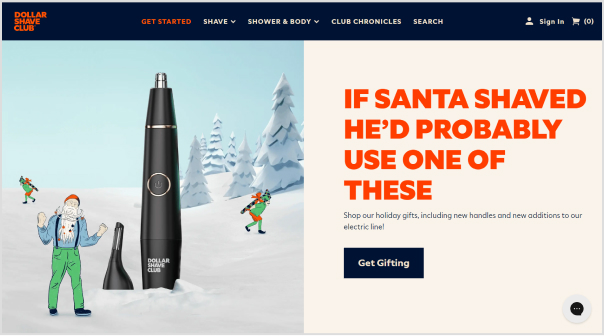
    Your website is the digital storefront of your brand. Ensure that your brand identity is reflected in every pixel. From logo placement to color schemes and typography, the website should be a consistent extension of your brand personality. Effective logo design is crucial for ensuring brand identity is communicated seamlessly across all digital platforms.

    Take cues from successful brands like Dollar Shave Club, whose website design perfectly complements its bold and irreverent brand identity.

    how-to-create-a-brand-identity
    1. Physical storefronts and packaging:

    Even in the era of digital dominance, physical touchpoints matter. Extend your brand identity to your physical locations and product packaging. Whether it’s the layout of your store, the design of your storefront, or the packaging of your products, ensure a uniform visual experience. 

    Apple exemplifies this by translating its minimalist and sleek brand identity seamlessly into its physical stores and product packaging.

    how-to-create-a-brand-identity
    1. Social media presence:

    Social media is a dynamic platform for engaging with your audience. Align your brand identity across all social media channels. Consistent use of visuals, language, and tone reinforces brand recognition. 

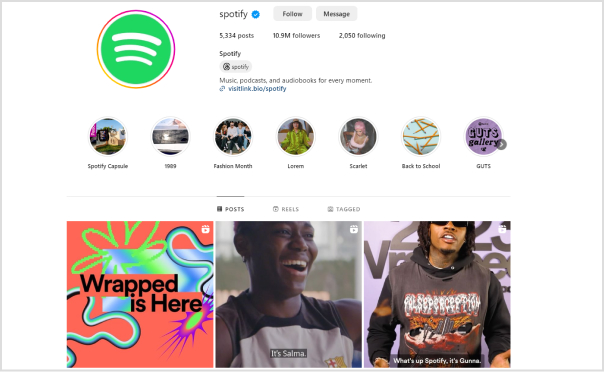
    For inspiration, look at how Spotify maintains a vibrant and music-centric brand identity across its social media platforms.

    how-to-create-a-brand-identity
    1. Content marketing efforts:

    Your content is a direct reflection of your brand voice. Whether it’s blog posts, videos, or infographics, infuse your brand identity into every piece of content. This not only enhances brand consistency but also creates a unique and memorable brand narrative. 

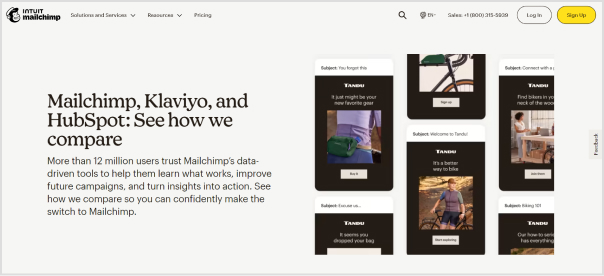
    Mailchimp maintains a friendly and consistent brand voice across various content channels.

    brand-identity
    1. Packaging and presentation:

    The way you present your products or services speaks volumes about your brand. Ensure that your packaging aligns with your brand identity. Whether it’s the color scheme, logos, or overall design, packaging should reinforce your brand’s visual language. 

    Think about how Coca-Cola’s iconic red and white branding extends seamlessly to its packaging, creating a strong and consistent visual impact.

    brand-identity
    1. Utilizing a custom URL shortener:

    In the digital age, even your online links contribute to your brand identity. Leverage a custom URL changer to create branded short links. By doing so, you not only enhance brand visibility but also build link trust. 

    This small yet impactful step allows you to put your brand on every link you share, increasing brand awareness in every digital interaction.

    To take full control of your branded links, explore Replug, i.e., an all in one link management platform designed to streamline and optimize your link-sharing strategy.

    how-to-create-a-brand-identity

    Closing note:

    Integrating your brand identity into various aspects of your business is not just a choice; it’s a strategic imperative. Consistency across digital and physical touchpoints not only strengthens your brand’s recognition but also builds trust and loyalty among your audience. 

    Regularly reassess and refine your brand integration strategies to stay in sync with evolving market trends and consumer expectations.

    Replug Branded Short Links CTA
    Maximize marketing ROI
    by transforming ordinary URLs into
    branded short links that convert.
    Try Replug for free

    FAQs

    What are the key elements of a successful brand identity?

    The key elements include a distinctive logo, a cohesive color palette, consistent typography, a unique visual style, a defined brand voice, and a memorable tagline or slogan.

    How can I develop a memorable and distinctive logo for my brand?

    To create a memorable logo, focus on simplicity, scalability, and symbolism. Ensure it aligns with your brand’s personality and values, making it instantly recognizable.

    How can I integrate my brand identity into my website effectively?

    Integrate brand identity into your website by aligning colors, typography, and logos with your brand. Ensure a consistent tone in content and imagery to create a unified online presence.

  • How to Measure Social Media Engagement: 12 Crucial Metrics

    How to Measure Social Media Engagement: 12 Crucial Metrics

    Understanding how to measure engagement on social media is important in today’s dynamic world in which every click, share, and comment shapes your brand’s online presence.

    This guide is critical for those interested in tracking social media engagement. It will highlight essential metrics and introduce the capabilities of Replug in this context. So, let’s get started!

    Why tracking social media engagement matter?

    Social media platforms are not just virtual spaces; they serve as storefronts, customer service hubs, and stages for your brand’s performance. Partnering with a social media agency in NYC can further amplify these efforts, ensuring your strategy aligns with audience expectations. The engagement levels indicate whether your brand’s narrative resonates and if your virtual audience is genuinely interested.

    Choosing the right metrics is crucial to avoid misleading data for your team or Facebook ad agency to interpret. The right metrics provide both quantitative data and qualitative insights, offering a comprehensive understanding of audience interaction. Regular social media reporting helps track these metrics effectively and make data-driven decisions for future strategies.

    12 essential social media engagement metrics:

    Let’s break down the 12 social media engagement metrics and provide explanations for each.

    1. Likes, comments, reactions, shares, etc.

    Likes:

    Indicates how well your audience receives your content. The more likes, the higher the positive reception.

    Comments:

    Reflects deeper engagement. Comments often signify that your content has sparked curiosity, agreement, or even disagreement.

    Shares:

    Equivalent to a digital word-of-mouth recommendation. When users share your content, it demonstrates that they find it compelling and worth sharing with their circles.

    1. Brand Mentions

    Captures instances where users talk about your brand, providing insights into brand sentiment, context, and organic reach.

    1. Video views and video completion rate

    Video views:

    Indicates the reach and initial interest in your video content. Platforms like Facebook count a view when a user watches for more than three seconds.

    Video completion rate:

    Measures the percentage of viewers who watched the video till the end. A high completion rate indicates engaging content.

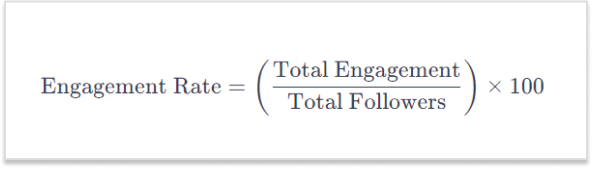
    1. Engagement rate

    Offers a holistic view of content performance by combining likes, comments, and shares. It helps understand engagement relative to the number of followers.

    how-to-measure-social-media-engagement
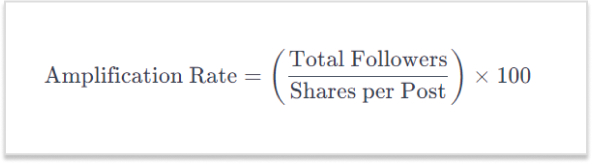
    1. Amplification rate

    Reflects how share-worthy your audience finds your content. It is determined by the ratio of shares per post to the total number of followers.

    how-to-measure-social-media-engagement

    Also read: Top 10 Social Media Hacks to 3X Your Brand Growth

    Brand awareness metrics

    1. Reach

    Represents the total number of people who have seen your post. It focuses on how many people have been exposed to your content.

    1. Impressions

    Total number of times your content has been shown on someone’s screen, regardless of clicks. It indicates how often your content is being seen.

    1. Share of voice (SOV)

    Measures how much attention your brand gets compared to competitors. A high SOV means your brand is dominating the conversation in the industry.

    social-media-engagement-metrics
    1. Audience growth rate

    Measures how fast a brand’s following increases over a specific period. It reflects the brand’s popularity and appeal.

    measure-social-media-engagement

    Conversion metrics

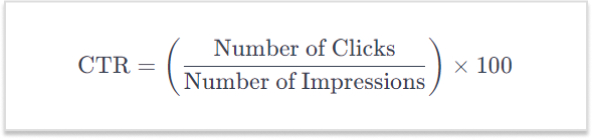
    1. Click-through rate (CTR)

    Represents the percentage of users who click on a link in your post. It measures how effective your content is in compelling users to take the next step.

    measure-social-media-engagement

    Also read: Click Tracking: What It Is and How It Works?

    1. Referral traffic

    Pertains to visitors landing on your website through direct links from social networks. It reveals how well social media channels drive users to your main platform.

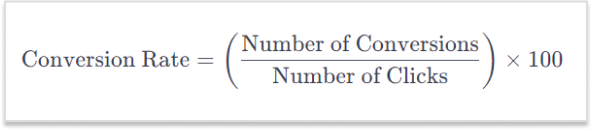
    1. Conversion rate

    Measures the percentage of users who take a desired action after interacting with your content, such as signing up or making a purchase.

    social-media-engagement-metrics
    Replug Branded Short Links CTA
    A complete link management solution
    for marketing professionals & agencies.
    Try Replug for free

    Replug: Your toolkit for social media engagement

    Enter Replug.io, a powerful link management tool designed for comprehensive social media performance metrics. Beyond URL shortening, Replug offers a range of features:

    • Deep dive analytics: 

    Replug’s analytics transcend mere click tracking. Gain a comprehensive view of user interactions, including their origin, the timing of clicks, and the devices used. This detailed insight empowers brands to refine their social media marketing strategy based on the specific moments when their audience is most engaged.

    • Branded links: 

    Move beyond generic links. Replug empowers brands to create short links that are customized and branded according to their preference. These not only enhance brand recognition but also boost click-through rates, as users are more inclined to click on links they trust.

    • Link-in-bio tool: 

    Maximizes engagement opportunities within a single trackable link, perfect for platforms like Instagram.

    • Real-time data: 

    Things move fast in the digital realm, and Replug ensures you stay ahead. Real-time analytics allow brands to pivot on the fly. If a particular post is gaining traction, you’ll know instantly, enabling you to allocate resources strategically and capitalize on emerging opportunities.

    Replug Branded Short Links CTA
    A complete link management solution
    for marketing professionals & agencies.
    Try Replug for free

    Conclusion:

    Understanding and measuring these metrics empowers you to assess the impact of your social media efforts, refine your strategy, and build genuine connections with your audience. Each metric plays a unique role in providing insights into different aspects of your social media engagement.

    Effective measurement of social media engagement is simplified with Replug’s intuitive features. Beyond mere numbers, Replug provides insights that ensure your connection with your audience is genuine, informed, and impactful.

    FAQs

    What is social media engagement?

    Social media engagement refers to the interaction and participation of users with your content on social platforms. This includes likes, comments, shares, and other actions that indicate audience interest and involvement.

    Why is social engagement important?

    Social engagement is crucial for building brand awareness, fostering customer loyalty, and driving online visibility. It enhances your connection with the audience, influencing how your brand is perceived in the digital space.

    With a staggering 5.04 billion users worldwide, social media has become an omnipresent force, shaping the way individuals connect, share, and engage in the digital era.

    What makes URL-shortening tools effective for social media?

    URL-shortening tools enhance the user experience by creating concise links and improving aesthetic appeal and character usage. They are particularly effective on platforms with character limits, ensuring a clean and user-friendly presentation.

    Why use branded links to improve click-through rates?

    Branded links build trust and recognition, encouraging users to click. They convey authenticity and are more likely to be clicked compared to generic links, ultimately boosting click-through rates and enhancing overall engagement.

    Is Replug suitable for businesses of all sizes?

    Yes, Replug is designed to cater to businesses of all sizes. Its versatile features and scalability make it adaptable to the needs of small businesses, startups, and large enterprises alike, offering a comprehensive solution for social media engagement.

    You may also like:
    How To Boost Social Media Conversion: 10 Proven Tricks

    From Likes to Love: Comprehensive Social Media Engagement Guide

    Call To Action For Social Media : 15 Best Examples

  • Elevate Your Bio: Smart Links for Music Artists

    Elevate Your Bio: Smart Links for Music Artists

    Gone are the days of mundane Spotify links. Introducing smart links for music – your all-in-one ticket to global music domination.

    Imagine sharing your songs, albums, and playlists seamlessly across platforms with just one link! It’s not just convenient for your fans; it’s a vibe! But here’s the magic – it’s not just about sharing; it’s about understanding.

    Dive into the analytics playground! Discover where your fans are grooving, and what beats they vibe with, and turn those insights into your superpower. It’s not just music; it’s a connection that spans continents. Don’t just share your music; make it an experience! 

    Make smart links part of your promotional strategy; it’s what will convert listeners into lifelong fans. Let’s make your music journey unforgettable!

    What is a smart music link?

    A smart link for music is a single, easy-to-share link that directs listeners to your music on different streaming platforms like Spotify, Apple Music, YouTube, etc. It’s like a virtual business card for musicians. Instead of sharing multiple links, you share one smart link, and it automatically takes your fans to the right platform based on their location and device. 

    This becomes even more powerful when promoting tracks created or enhanced with tools like minimax music, helping artists distribute and market their AI-powered productions more efficiently.

    Services like Replug, Linkfire, Linktree, and others help musicians create these links, making them convenient for fans and providing analytics and marketing tools for artists. A comprehensive music industry directory can further enhance these resources by connecting musicians with additional promotional opportunities and industry contacts. It’s a neat way to promote and share your music hassle-free!

    Boost ROI with branded URLs - Replug dashboard showing performance metrics and branded URL creation
    Boost your conversion rates with irresistable CTAs with

    for your marketing campaigns.

    Check

    Higher clicks

    Check

    More leads

    Check

    Better ROI

    Generate free CTAs

    How to create a smart music link in Replug?

    Musicians can elevate their online presence by effortlessly creating smart music links using Replug’s innovative bio links feature. This bio link acts as a centralized hub, providing your audience with a seamless experience to explore and enjoy your music across platforms like Spotify, Apple Music, and YouTube.

    Here’s how to create a smart link for music using Replug:

    Step 1: Create a Replug account and log in to your dashboard.

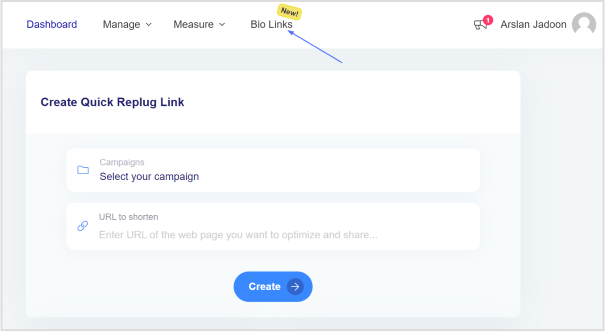
    Step 2: Once logged into your Replug account, head to the Replug dashboard and locate the “Bio Links” feature.

    smart-link-for-music

    Step 3: Initiate the bio link creation process by clicking on the “New Bio Link” button.

    Step 4: Opt for the content block that aligns with your needs from Replug’s diverse options, such as social icons, links, RSS feeds, audio, video, text, or cards. In the case of music links, you can choose from links, audio, and social icons.

    smart-link-for-music

    Step 5: Once all desired content blocks are added, proceed by clicking “Next.”

    Step 6: Further personalize your bio link page by specifying your brand name, uploading an avatar, and adding a title and subtitle that aptly represent your content or brand.

    smart-link-for-music

    Step 7: Review your bio link page during the creation process to ensure it aligns with your intentions.

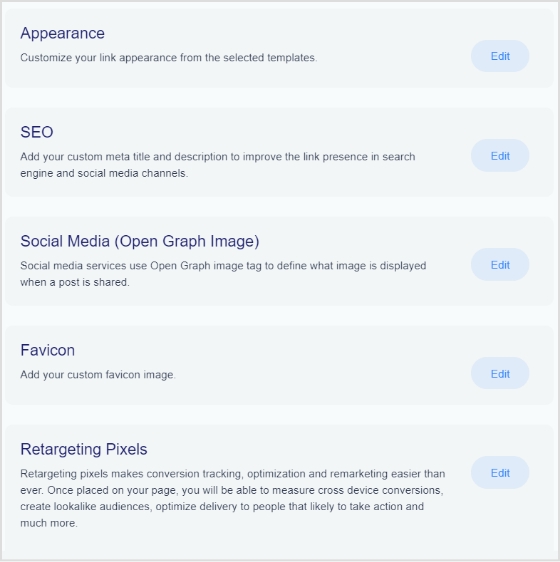
    Step 8: In the final step, enhance your bio link’s appeal and effectiveness by considering additional features or marketing elements.

    smart-link-for-music

    Also read: How to Add Multiple Links to Instagram Bio Using Replug?

    Step 9: Save your bio link, and it will be ready to integrate into your bio.

    With the bio link generated by Replug, effortlessly share diverse links and content with your audience, making it an invaluable tool for content promotion and marketing on the platform.

    Boost ROI with branded URLs - Replug dashboard showing performance metrics and branded URL creation
    Boost your conversion rates with irresistable CTAs with

    for your marketing campaigns.

    Check

    Higher clicks

    Check

    More leads

    Check

    Better ROI

    Generate free CTAs

    Benefits of using Replug for smart music links:

    Using a smart music link with Replug offers numerous benefits for musicians and content creators:

    1. Streamlined promotion: Smart music links consolidate multiple streaming platform URLs into a single shareable link, simplifying the promotion process. This ensures that audiences can access your music effortlessly, regardless of their preferred platform.
    2. Enhanced accessibility: With a Replug smart music link, your audience can seamlessly switch between platforms like Spotify, Apple Music, and YouTube, catering to diverse listener preferences. This accessibility increases the likelihood of engagement and plays.
    3. Centralized hub: Replug’s bio link feature serves as a centralized hub for your music and other content. It provides a cohesive and organized space where your audience can discover and explore various links, creating a unified online presence.
    4. Customization options: Tailor your bio link page to reflect your brand identity. With features such as customizable colors, profile pictures, and content blocks, Replug allows you to create a visually appealing and personalized experience for your audience.
    5. Analytics insights: Gain valuable insights into audience behavior through Replug’s analytics tools. Understand where your audience is engaging, and which platforms are most popular, and use this data to refine your promotional strategies and content.
    6. Consistent branding: Maintain consistent branding across platforms by customizing your bio link page. This ensures that your audience recognizes and associates your brand identity with every interaction.

    FAQs

    What is a smart music link, and how does it benefit musicians?

    A smart music link is a consolidated link that directs users to music on multiple streaming platforms. It benefits musicians by simplifying promotion, providing analytics insights, and enhancing accessibility for fans across various platforms.

    How can I create a smart music link?

    To create a smart music link with Replug, login, access the “Bio Links” feature, click “New Bio-Link,” add content blocks like social icons or links, customize, and save. Replug’s user-friendly interface streamlines the process.

    Can I customize the appearance of my bio link page on Replug?

    Absolutely! Replug allows extensive customization, including profile pictures, brand names, avatars, color schemes, and short links, ensuring your bio link page aligns with your brand identity perfectly.

    What analytics insights does Replug provide for smart music links?

    Replug’s analytics offer valuable insights into audience behavior, including engagement locations and popular platforms. This data empowers users to refine their promotional strategies.

  • Branded Link Management: Your Key to Online Success

    Branded Link Management: Your Key to Online Success

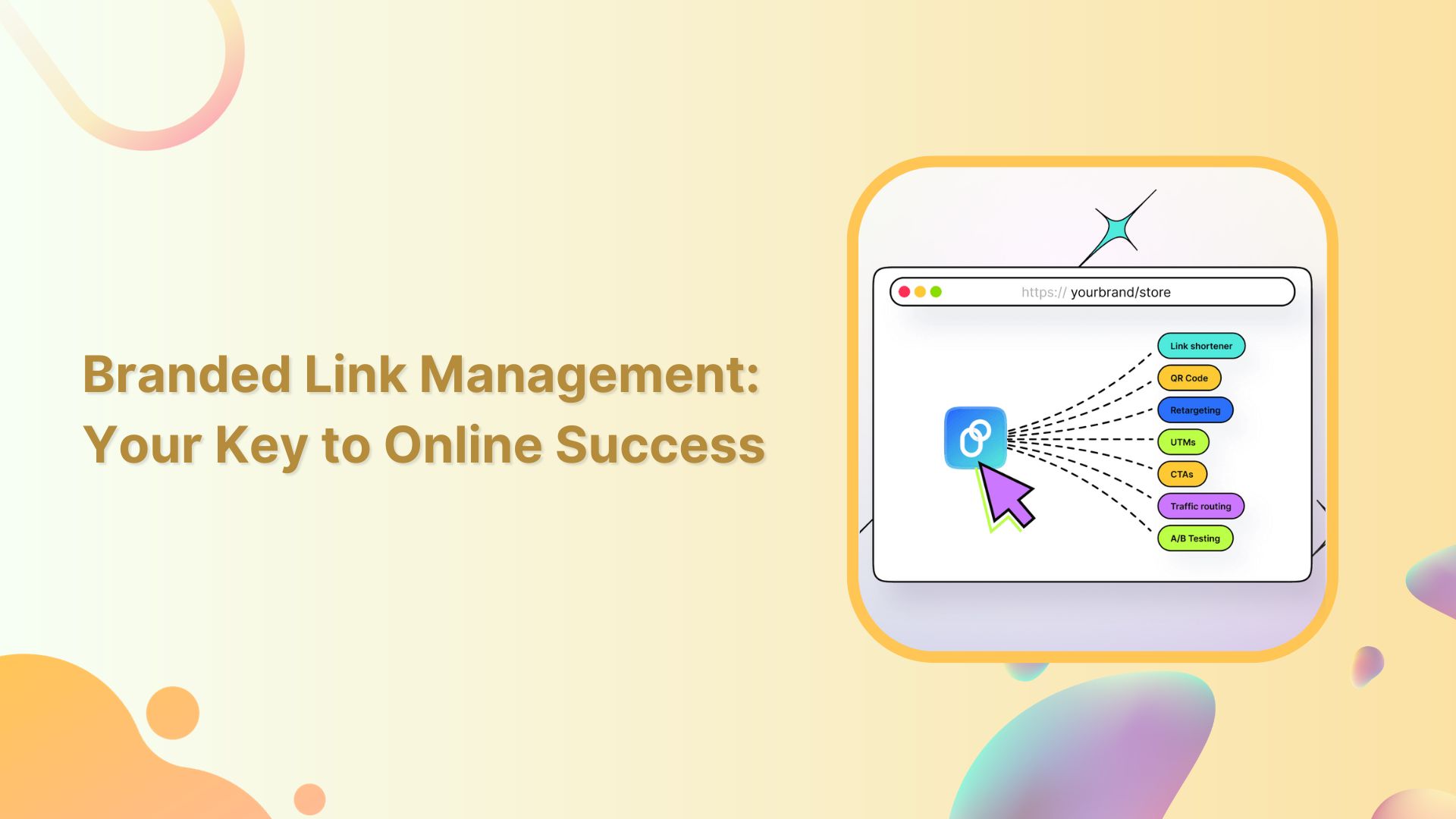
    Links serve as vital assets that connect your brand with the digital world, so having full control over them is essential. Branded Link management empowers you to safeguard your brand, optimize your marketing, and efficiently handle the many links your company generates. 

    Therefore, a central link management tool is essential to enhanced collaboration, accurate tracking, and brand protection.  It can also help to increase brand awareness and streamline link sharing between colleagues.

    Here’s what branded link management is and why it’s crucial for your company’s online success.

    What is branded link management?

    Branded link management, often referred to as branded link shortening is a specialized facet of link management that focuses on shortening, customizing, and optimizing links, particularly for branding and marketing purposes. 

    Branded links are shorter and more user-friendly versions of URLs, and they often feature a custom domain that aligns with a brand or campaign.

    Key aspects of branded link management:

    • Customization: Branded links allow you to tailor URLs to match your brand, campaign, or content. For example, a complex and long URL can be transformed into a concise and branded link.
    • Branding: By using branded links, you reinforce your brand identity in every link you share. This consistency can boost brand recognition and trust among your audience.
    • Tracking and analytics: Branded link management tools often offer robust tracking and analytics features. This data helps you measure the performance of your branded links, enabling data-driven marketing decisions.
    • Link security: Branded link management platforms often include security features that protect your links from malicious activities, ensuring the integrity of your brand’s online presence.
    • User experience: Branded links are user-friendly and can enhance the overall user experience, as they are easier to remember and share.
    Replug Branded Short Links CTA
    A complete link management solution
    for marketing professionals & agencies.
    Try Replug for free

    Branded link management: why do you need it?

    Companies, particularly those engaged in e-commerce, affiliate marketing, and social media marketing, benefit from using a link management tool for several compelling reasons:

    1. URL shortening: 

    A branded link management tool shortens long and cumbersome URLs, making them more user-friendly and aesthetically pleasing. This is particularly useful for sharing links on social media, in email marketing campaigns, and within content.

    1. Tracking and analytics: 

    Link management tools offer robust tracking and analytics features, allowing companies to monitor the performance of their links. This includes tracking click-through rates, conversion rates, and other essential metrics to assess the effectiveness of marketing campaigns.

    1. Conversion analysis: 

    Companies can analyze the conversion rates associated with specific links. This insight helps in optimizing marketing efforts and understanding which links are driving the most conversions and sales.

    1. Branding: 

    Branded links provide consistency and reinforce a company’s brand identity with every link shared. This consistency can boost brand recognition and trust among the audience.

    1. Efficiency: 

    Link management tools streamline the process of creating and managing links, saving time and reducing the risk of errors. This is especially valuable for companies that deal with a large number of links.

    1. Social media traffic: 

    Many link management tools offer features like bio links, which are crucial for social media marketers. These tools help drive social media traffic to the company’s website by providing a simple and appealing way to share links on platforms with character limits or visual constraints.

    1. Lead generation and retargeting: 

    Some link management tools go beyond shortening links and offer lead generation and retargeting capabilities, enabling companies to capture leads and re-engage with potential customers who clicked on their links.

    Replug Branded Short Links CTA
    A complete link management solution
    for marketing professionals & agencies.
    Try Replug for free

    Brand and manage your links with Replug

    A powerful link management tool can be the difference between success and obscurity. Replug.io is not just another option; it’s the best choice, and here’s why:

    Branded short links: 

    Replug’s link shortener transforms lengthy URLs into concise, branded short links. Now, you can create short links in no time at all. Your audience will remember and trust these links, and you can even use your custom domain for that extra touch of professionalism.

    Link analytics: 

    Replug provides in-depth link tracking, so you’re never in the dark about your link performance. UTM tracking allows you to monitor metrics at your fingertips, enabling data-driven decisions.

    Bio links: 

    Say goodbye to juggling multiple links. With Replug, you can consolidate all your branding needs into a single, sleek bio link. It’s a one-stop landing page to engage your audience effectively.

    Retargeting pixel: 

    Lost sales don’t have to stay lost. Replug’s retargeting pixel enables you to re-engage potential customers across multiple networks, increasing your chances of conversion.

    QR code: 

    Create dynamic marketing interactions with QR codes. They’re versatile tools that can bridge the gap between the digital and physical worlds.

    A/B testing: 

    Experiment with up to 10 variations of your URLs to find the winning formula. Replug’s A/B testing feature helps you optimize your links for the best results.

    Deep links: 

    Guide your audience through smooth in-app experiences with deep links. These links enable users to navigate seamlessly within mobile apps, enhancing the customer journey.

    Link rotator: 

    Optimize user experiences by intelligently routing traffic based on user preferences. It’s a powerful tool for keeping your audience engaged and interested.

    SMS links: 

    Improve your SMS marketing efforts with bulk short links and insights provided by Replug. Enhance your messaging strategy and drive more conversions.

    Call to action generator: 

    Simplify your calls to action (CTAs) to increase engagement and conversions. Replug makes it easy to create effective CTAs that drive results.

    Replug Branded Short Links CTA
    Maximize marketing ROI
    by transforming ordinary URLs into
    branded short links that convert.
    Try Replug for free

    Replug’s white label solution: Your brand, your link management

    For businesses, agencies, and professionals looking to maintain brand consistency and provide top-tier link management services, Replug’s White Label Solution is the game-changer you’ve been waiting for. Here’s why it’s the ultimate choice:

    • In-house link management: Replug’s White Label Solution allows you to have your very own, in-house link management tool. It’s an extension of your brand, ensuring a seamless user experience for your clients.
    • Branded experience: Every interaction with your link management tool is a branded experience. Your clients see your branding, reinforcing your identity and building trust.
    • Client control: With your white-label solution, you maintain full control over your client’s experience, ensuring that it aligns perfectly with your brand’s values and message.
    • Streamlined workflow: Replug’s white-label tool streamlines the link management process, saving you time and reducing the risk of errors. It’s all about optimizing your workflow to be more efficient and productive.
    • Data insights: Comprehensive data insights are at your fingertips. Understand how your clients are using the tool and gain insights to guide your services.
    • Agency growth: As an agency, offering a white-label solution positions you as a full-service provider and strengthens your brand as a leader in your industry.

    Final verdict:

    Replug is not just a link management tool; it’s a comprehensive solution that empowers your brand, streamlines your digital efforts, and positions you for success in a competitive online landscape. 

    Whether it’s enhancing brand visibility with branded short links, providing a white-label solution for your agency, or offering a range of powerful features, Replug is the ultimate choice for those who aspire to stand out, make every click count, and unlock their brand’s full potential in the digital world. 

    FAQs

    What is branded link management?

    Branded link management combines link shortening with customization using your branded domain, creating links that reinforce your brand’s identity.

    Can I track the performance of branded links with analytics?

    Yes, our link management tool offers robust analytics, enabling you to monitor click-through rates, conversion rates, and other essential metrics for branded links.

    Can branded link management be used by agencies for their clients?

    Yes, agencies can benefit from white-label branded link management solutions like Replug to provide branded link management services to their clients.

    What tools are available for effective link management?

    Numerous tools and platforms are available, including Replug, which offers branded link management, analytics, custom domains, bio links and more. 

  • What are UTM Codes and How Do They Work?

    What are UTM Codes and How Do They Work?

    Marketing can be complex, but measuring its effectiveness doesn’t have to be. UTM codes are your answer to understanding what’s working and what’s not in your campaigns and, more importantly, to pinpoint which campaigns are doing the heavy lifting. This is where UTM codes come into play, offering a simple solution to the challenge of marketing success. So, let’s break it down:

    What are UTM codes?

    UTM codes are essentially strings of text that are added to URLs. These strings contain specific parameters that provide invaluable information about the source, medium, and campaign that led a user to a particular webpage. In other words, UTM codes act as data markers, offering a clearer view of the user’s journey, from the initial interaction to conversion.

    Here’s a breakdown of the key UTM parameters:

    1. Source: 

    This parameter specifies the origin of your traffic. Is it coming from an email, a social media platform, a search engine, or another source? Accurately tagging the source helps you identify which channels are driving the most traffic.

    1. Medium: 

    The medium parameter describes the type of marketing medium used. It could be an email, social, organic search, paid search, or any other medium relevant to your campaign. Categorizing your traffic in this way allows you to determine which marketing avenues are the most effective.

    1. Campaign: 

    The campaign parameter enables you to track a specific marketing campaign or initiative. Whether it’s a product launch, a seasonal promotion, or an event, this parameter helps you differentiate between different efforts within the same source and medium.

    1. Term (optional): 

    This parameter is often used for paid search campaigns to identify the keywords that triggered the ad click. It’s an optional parameter and is mainly relevant to search engine advertising.

    1. Content (optional): 

    Another optional parameter, content can be used to differentiate between different elements of your marketing efforts, such as different ad variations or links within the same campaign.

    Understand with an example:

    Let’s create an example URL with UTM parameters added.

    Original URL:

    https://www.example.com/product-page

    Now, let’s add UTM parameters to track the source, medium, and campaign:

    • Source: Let’s say the traffic is coming from an email newsletter.
    • Medium: The marketing medium is email.
    • Campaign: It’s part of a campaign called “SummerPromo.”

    Now, we’ll add these UTM parameters to the URL:

    https://www.example.com/product-page?utm_source=email&utm_medium=email&utm_campaign=SummerPromo

    With these UTM parameters added, you can track that anyone who clicks on this URL is coming from the source “email,” through the medium “email,” and as part of the “SummerPromo” campaign. This allows you to monitor the performance of this specific link in your marketing efforts.

    How to create UTM tracking codes?

    Creating UTM tracking codes is a pivotal part of monitoring the performance of your online marketing efforts. While it’s technically possible to manually create these codes by adding specific strings to your URLs, it can be complex and time-consuming, especially when you have to manage them at scale. This is where UTM code generators come into play, making the process much more efficient.

    Google Analytics URL builder:

    Google Analytics offers a straightforward UTM code generator, which has become the go-to choice for many businesses. Here’s how you can use it:

    1. Visit Google’s URL Builder tool.
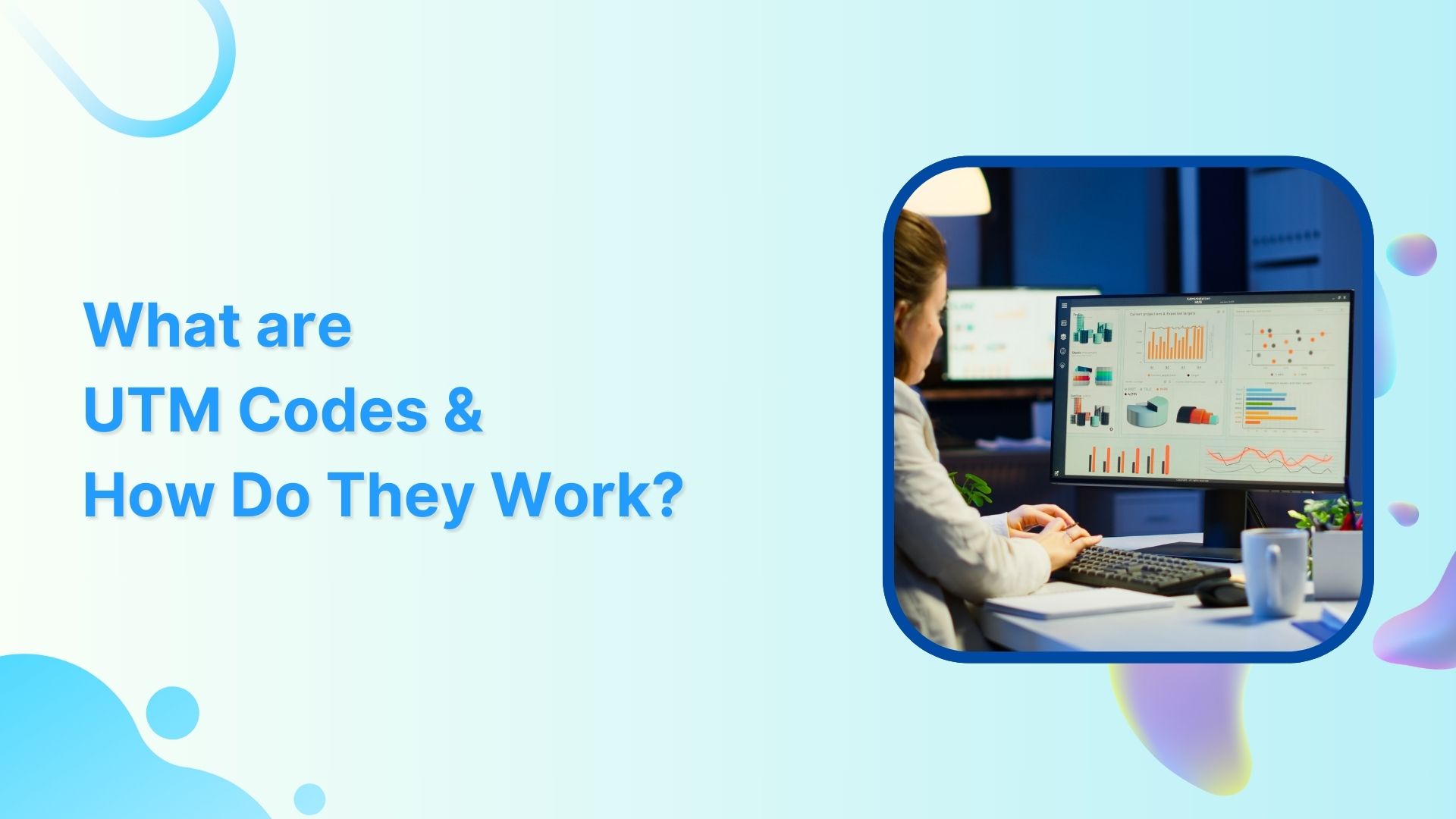
    2. Fill in the required fields for your campaign: the URL of the landing page, source, medium, campaign, term (optional), and content (optional).
    3. Click “Generate URL,” and Google will create the UTM-coded URL for you.
    how-to-create-utm-parameters-url

    Replug – A convenient alternative:

    Replug.io is another powerful tool for UTM code creation, and here’s why it’s worth considering:

    • Automatic UTM code generation: 

    Replug automates the UTM code creation process, saving you the trouble of manual entry. This means you can gather valuable analytics data as soon as your campaign goes live.

    • Shortened and customized URLs: 

    UTM-coded URLs can become quite lengthy, which can be a problem on platforms like Instagram or when users need to copy and paste links. Replug’s URL shortener free tool shortens and customizes these URLs, making them more elegant and user-friendly.

    For example, a long UTM-coded URL might look like this:

    https://replug.io/pages/resources/blogs/influencermarketing?&utm_source=contentdigest&utm_medium=email&utm_campaign=ebook-influencer-marketing&leadchannel=email&leadchanneldetail=contentdigest

    With Replug, it could be as sleek as this: 

    https://rplg.co/Influencer02

    While preserving all the essential UTM data.

    • Advanced tracking and analytics: 

    While UTM codes are a solid foundation for analyzing marketing performance, they have limitations. Replug offers an enhanced solution called Campaigns, providing in-depth insights and a more hassle-free tracking experience, especially when managing multiple campaigns across various marketing channels.

    Replug Branded Short Links CTA
    A complete link management solution
    for marketing professionals & agencies.
    Try Replug for free

    You may also like: How to Create UTM Links: A Step-by-Step Guide
    Elevate Your Brand Performance with Replug

    UTM codes are a fundamental tool for tracking the success of your brand campaigns, links, and platforms. They provide valuable data, but those unwieldy, lengthy links can be a drawback. As your marketing endeavors become more intricate, it’s essential to adopt a system that offers both enhanced power and efficiency.

    This is where Replug’s UTM builder steps in as the ideal solution. Replug not only helps you track traffic effectively, even in the most complex marketing landscapes, but it also simplifies the process. With Replug, you obtain concise, stylish links that seamlessly fit into any context. Moreover, it offers an analytics tool that’s user-friendly and excels at managing multichannel marketing campaigns.

    In essence, Replug empowers you to elevate your brand’s performance, making tracking and managing your marketing efforts a smoother, more efficient, and ultimately more successful process.

    Frequently asked questions

    What are UTM codes?

    UTM codes are tracking parameters added to URLs to measure marketing performance. They’re vital for data-driven decision-making and proving campaign success.

    How do I create UTM codes for my campaigns?

    You can create UTM codes manually, but it’s easier and error-free to use online UTM code generators like Google’s Campaign URL Builder or Replug’s UTM code builder.

    What is Replug, and how does it work for link tracking?

    Bitly is a URL shortening and link management platform that not only shortens links for sharing but also provides link tracking and analytics to measure click-through rates and engagement.

  • How to Create UTM Links: A Step-by-Step Guide

    How to Create UTM Links: A Step-by-Step Guide

    Creating UTM links is a straightforward process that helps you track the effectiveness of your marketing campaigns and understand where your website traffic is coming from. UTM parameters are tags added to your URLs to provide more information about the source of a click. 

    Here’s a quick and effective approach to creating UTM links:

    Understand UTM Parameters:

    UTM parameters are tags added to the end of a URL to provide more information about the source of a click. They are essential for tracking and analyzing the performance of your campaigns, allowing you to make data-driven decisions and optimize your marketing strategies. 

    Here’s a breakdown of the key UTM parameters and their purposes:

    utm_source:
    • Purpose: Identifies the specific source of the traffic, such as a website, platform, or publication.
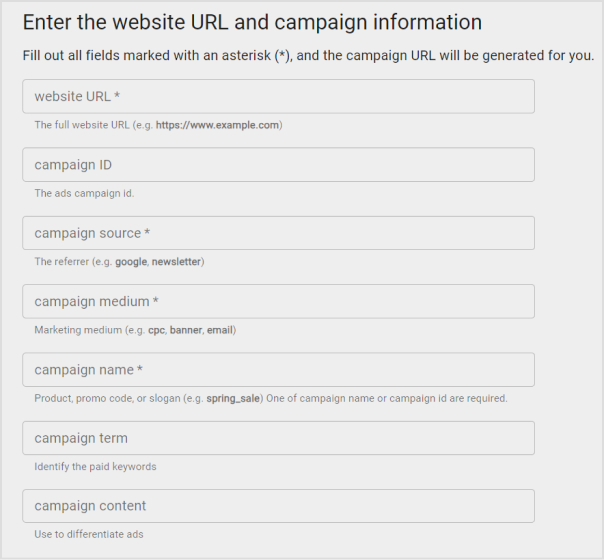
    • Examples: “facebook,” “google,” “newsletter,” “twitter.”

    utm_medium:

    • Purpose: Specify the medium or channel through which the link was shared or clicked.
    • Examples: “cpc” (cost-per-click), “social” (social media), “email,” “organic.”

    utm_campaign:

    • Purpose: Names the marketing campaign or effort where the link is used.
    • Examples: “spring_sale,” “product_launch,” “holiday_promotion.”

    utm_term:

    • Purpose: Typically used in paid search campaigns to specify the keywords associated with the ad.
    • Examples: “running+shoes,” “digital+camera,” “best+smartphone.”

    utm_content:

    • Purpose: Differentiates between variations of the same link within a campaign, such as different ad creatives or locations.
    • Examples: “banner_ad,” “sidebar_button,” “top_menu_link.”

    Here’s an example of a URL with UTM parameters:

    https://www.example.com/page?.utm_source=facebook&utm_medium=social&utm_campaign=spring_sale&utm_term=shoes&utm_content=banner_ad

    How to create UTM links using Replug?

    Replug is a feature-rich link management platform that excels in simplifying UTM tracking while offering robust link management capabilities. Its versatility, customization options, and detailed analytics make it a compelling choice for marketers. 

    Additionally, Replug provides precise link shortening via a brilliant URL shortener free tool, efficient campaign organization, and seamless integration possibilities, making it an attractive option for businesses of all sizes.

    Here’s how to add UTM codes to your URLs using Replug:

    Step 1: Sign in or create an account

    Begin by signing in to your Replug account. If you don’t have one yet, you can easily create a free account.

    Step 2: Select your campaign

    Once you’re logged in, click “Select your campaign” on the main dashboard or create a new campaign.

    how-to-create-utm-links

    Step 3: Paste the URL

    Locate the “URL to shorten” section below “Select your campaign”, and paste the URL to which you want to add UTM parameters.

    Step 4: Add UTM tag

    At the end of the “URL to shorten” section, you’ll see an “add UTM” tag. Click on it to proceed.

    how-to-create-utm-links

    Step 5: Choose UTM parameters

    You have the option to either “select from saved UTM parameters” if you’ve used these before or “create a new UTM parameter.”

    how-to-create-utm-links

    Step 6: Fill in UTM parameters

    If you decide to create a new UTM parameter, provide the necessary information such as the source, medium, campaign, term, and content. Once you’ve completed this, click “Apply.”

    how-to-create-utm-links

    Step 7: Create the URL

    Click the “create” button, and Replug will automatically generate a shortened URL with the added UTM parameters.

    Step 8: Edit UTM code (optional)

    If you wish to further customize the URL, you can do so by clicking the edit icon.

    how-to-create-utm-links

    Step 9: Copy and update

    After any edits (if necessary), simply copy the URL with the UTM parameters and click the “update” button to save your changes.

    Step 10: Access your URL

    To access and manage the URL you’ve just created with UTM parameters, navigate to the “Manage” section in Replug and click on “Replug links.”

    By following these steps, you can harness the full potential of Replug to seamlessly integrate UTM codes into your URLs, improving the accuracy and effectiveness of your marketing campaign tracking and analysis.

    Replug Branded Short Links CTA
    A complete link management solution
    for marketing professionals & agencies.
    Try Replug for free

    Frequently asked questions 

    What are UTM parameters?

    UTM parameters are tags added to URLs to track the source and performance of your marketing links. They’re essential for understanding where your traffic comes from and how effective your campaigns are.

    How do I create UTM links for my marketing campaigns?

    Use Replug’s free online UTM builder or manually add UTM parameters to your URLs to create UTM links. For efficiency, it’s better to use a tool.

    What are the common mistakes to avoid when using UTM parameters?

    Avoid using spaces or special characters in your UTM parameters, and make sure they are applied consistently. Be careful with sensitive data like user information in UTM parameters.