So you’ve just shared an intriguing link on Twitter (X), and the preview doesn’t do justice to the content you’re promoting.
What if you could make that boring preview into an eye-catching image that grabs attention?
Meet Replug: a top-notch short URL shortener tool that not only makes your links look clean, but also allows you to fully customize how they appear on platforms like Twitter (X).
In this guide, you’ll learn how to take control of your link previews using Replug, ensuring your content always stands out.
Boost ROI with branded URLs!
Enhance your marketing campaigns by creating shareable, trackable, and fully multi-purpose
customizable branded URLs.
How to customize the Twitter (X) link preview using Replug?
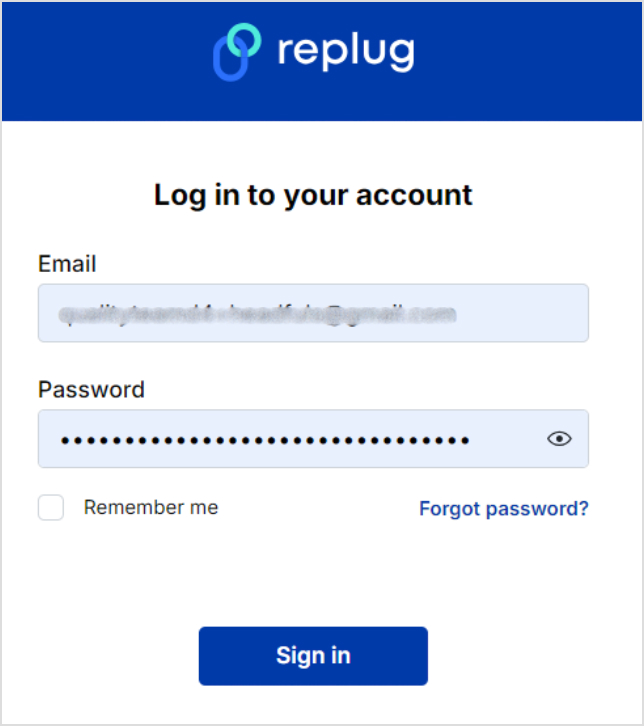
Log in to your Replug account. Sign up if you haven’t already. Replug offers a 14-day free trial – no credit card is required to try out.
Step no 01:
Once you’ve logged into your Replug account, set up your workspace.
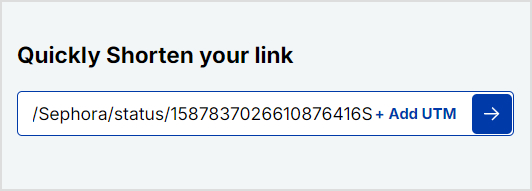
Then, go to your Home and locate the “Quickly shorten your link” bar. Paste the URL you want to share on Twitter (X) and press Enter.
Step no 02:
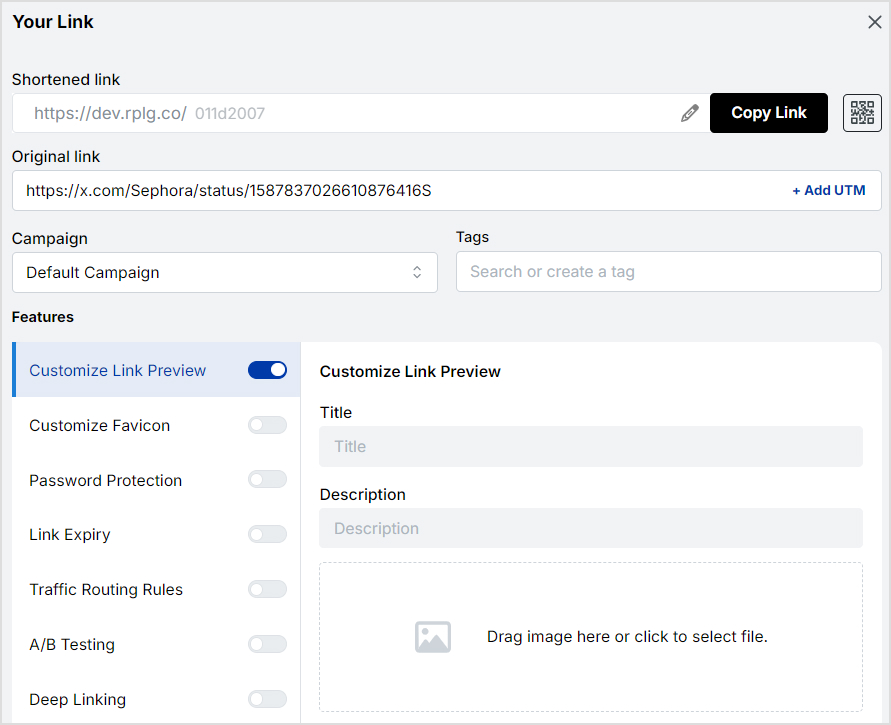
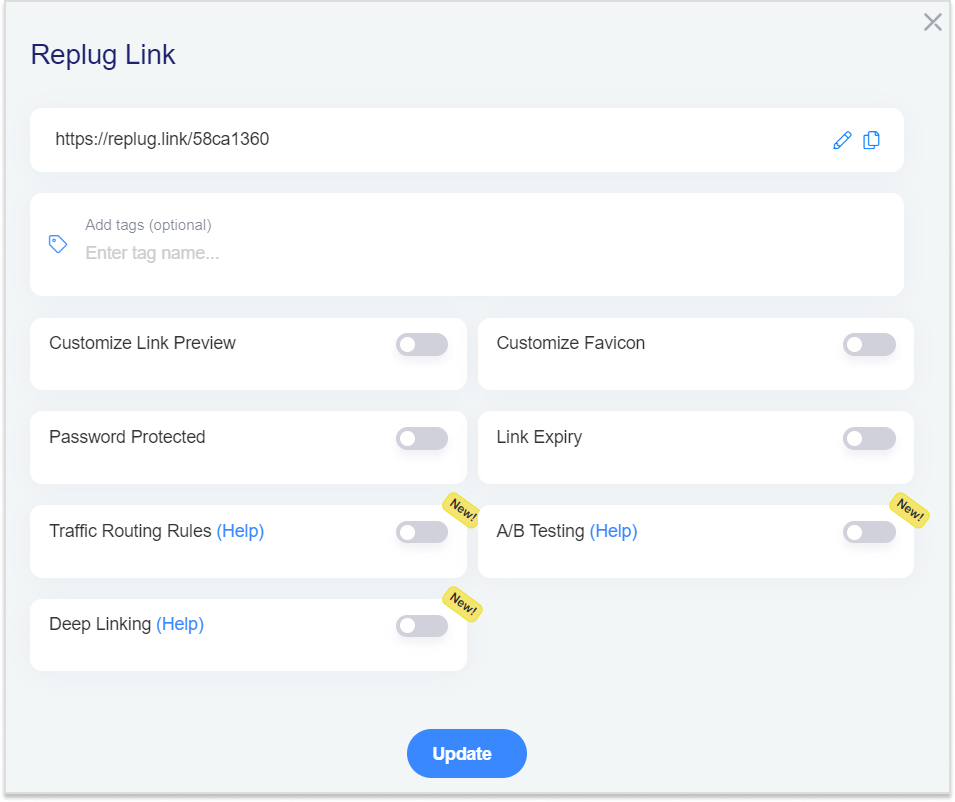
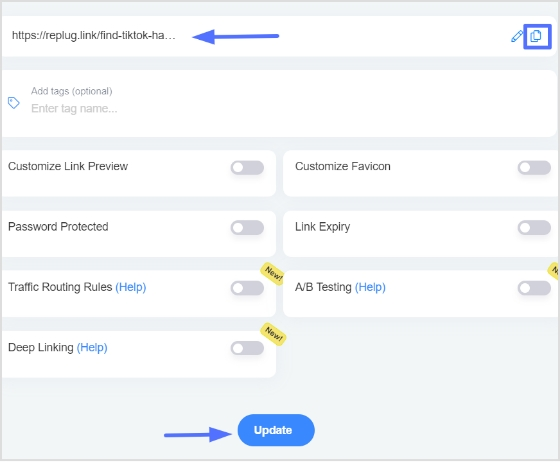
You’ll be redirected to a page where you can customize your URL. Here, you can adjust various settings like favicons and link expiry dates.
Maximize marketing ROI
by transforming ordinary URLs into branded short links that convert.
Try Replug for free
Step no 03:
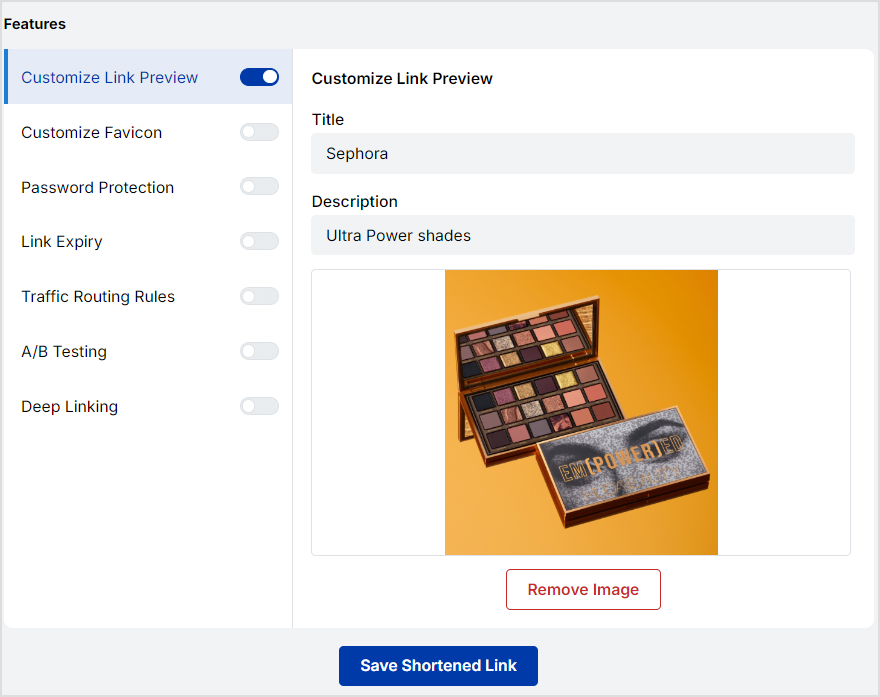
Now, this is where the magic happens! Replug allows you to customize the link preview that Twitter (X) users will see. Here’s what you can adjust:
Title: Craft a compelling headline that grabs attention.
Description: Write a brief summary that entices people to click.
Image: Upload an eye-catching image relevant to your content. This could be a product image, infographic, or branded visual.
After customizing the title, description, and image, click “Save.”
Replug will generate a shortened version of your link with the updated preview.
Step no 04:
Now that you have your customized link head over to Twitter (X) and paste the shortened URL into your tweet. The new preview will appear automatically and be complete with your custom image, title, and description.
So, try out Replug’s Twitter link shortener to create clean, branded URLs that not only look professional but also let you track clicks and engagement directly from your Replug dashboard.
If you’re looking for even more control over your Twitter (X) link previews, Replug’s premium plans offer advanced features:
A complete link management solution
for marketing professionals & agencies.
Try Replug for free
Advanced analytics: Gain high-end link insights into user demographics, referral sources, and more.
White-label options: Completely remove Replug branding and replace it with your own, offering a seamless experience for your audience.
Bio-link: A bio-link consolidates multiple URLs into one, providing a single, customizable link for social media profiles. This makes it easier for users to direct their audience to various online destinations from a single location.
Retargeting pixel: This allows advertisers to display targeted ads to users who have previously interacted with their site, enhancing ad relevance and engagement.
Deep links:Deep links direct users to specific pages or content within an app or website rather than just the homepage.
Conclusion
Replug.io offers an easy and effective way to take control of how your links appear on social media, including Twitter (X).
Customizing link previews allows you to align your content with your branding, boost engagement, and make a lasting impression.
Try it and see the difference a custom link preview can make.
FAQs on Twitter(X) link preview
Can I customize the preview for specific pages on my website?
Absolutely! Replug allows you to create custom previews for individual pages or categories.
Can I change link preview image on Twitter(X) through Replug?
Yes, you can customize the link preview image on Twitter (X) using Replug.
How long does it take for changes to take effect?
Usually, changes made to your preview will be reflected on Twitter within a few minutes.
What is the best free tool for changing link preview title on Twitter(X)?
Replug is the best free tool for changing the link preview title on Twitter (X).
Can I use Replug with other social media platforms?
Yes, you can use Replug with other social media platforms too.
Is there a limit to the number of links I can customize?
The number of links you can customize may depend on your pricing plan.
It’s no surprise that every website visitor who lands on the sales page or browses product pages doesn’t purchase the items right away – some of them convert later, and many of them don’t.
What if we told you that there is a way to re-engage the audience that has shown some interest in your product and left the website without taking any action?
Well, retargeting is the solution to this problem.
No idea what it is?
Stick around to learn what it is and how to use it to grow your business.
Unlike new ad campaigns that often miss the mark, retargeting focuses on those who have already shown interest, making it a preferred tactic for expert advertisers. To help you out, we have curated this guide. It will help you understand remarketing its benefits alongside a step-by-step guide on how to retarget on Twitter(X) using Replug.
Remarketing on Twitter(X)
X (formerly Twitter) is one of the top social media platforms with over 600 million monthly active users. Any major e-commerce, lifestyle, healthcare, and tech brand can’t design its social media marketing strategy without including this platform.
Remarketing on Twitter is inevitable if your social followers or customer base exists on this platform. It’s way easier to convert a prospective user who has shown interest in the product than a random user on social media.
How does retargeting work on X (Twitter)?
Retargeting campaigns on X work the same way they work on other social media platforms – the advertiser decides to reach out to an existing audience and provides the source of the audience to target.
To set up a retargeting campaign on X, the advertiser must create custom audiences. Custom audiences help businesses specify groups of users for retargeting.
It’s vital to create a custom audience to set up the retargeting campaign on X (Twitter). Therefore, X offers three custom audience generation methods to the advertisers:
Website visitors: It’s a group of visitors that have visited your website and you want to reach back through a Twitter retargeting campaign using the power of X Pixel. However, the data file being uploaded for retargeting must contain the Twitter handles of the target audience.
App users: It’s a group of people who have downloaded or taken a specific action on the app and can be reached via a retargeting campaign based on the tracking data provided by the tracking tool.
List members: List members can be yet another way of setting up a custom audience. Advertisers can upload email subscribers’ lists or a list of Twitter handles that match the actual active users on the platform.
So, that’s an overview of the retargeting methods on X (Twitter). The next step is to access and install the X Pixel.
Maximize marketing ROI
by transforming ordinary URLs into branded short links that convert.
Try Replug for free
How do I find my Twitter Pixel ID?
Finding the X (Twitter) Pixel ID might be overwhelming if you’re just getting started with social media advertising. Here’s how you can find it:
Step 01: Log in to your X account
First things first, log in to your X (Twitter) account.
Step 02: Go to the Ads section
Ads section is where all your advertising activities are managed, including setting up the X Pixel.
Once logged in, navigate to the Ads section, click on the “More” button from the left sidebar and the new options will appear including “Ads.”
Click on the “Ads” button.
Step 03: Head over to the “Events Manager”
Within the Ads section, locate the Tools drop-down menu. You’ll see the “Events Manager” in the drop-down menu.
Events Manager is an essential tool for tracking conversions and managing event data linked to your X Pixel, providing insights into user interactions.
You’ll find the X Pixel in the next step.
Step 04: Add an “Event Source”
In the Events Manager, you’ll need to create or add an Event Source. It involves selecting your website or app as the source, where the Pixel will track and record visitors’ specific actions.
So, click on the “Add event source” button on the top right side of the screen and agree to the terms.
Step 05: Install the Pixel
After generating the Pixel code, the next step is to install the Pixel in the source code of your website, landing page, or app. All you need to do is follow the installation instructions provided by X.
This typically involves adding the (Pixel) code snippet to your website’s header or using a tag manager to ensure it’s correctly implemented and starts collecting data.
How to retarget on Twitter(X) using Replug?
Replug is an excellent URL management tool and link optimization platform that provides several facilities, such as URL shortening, URL tracking, deep linking, A/B testing, bio links, and retargeting.
A complete link management solution
for marketing professionals & agencies.
Try Replug for free
Here’s the step-by-step guide on how to retarget on Twitter using Replug’s link retargeting tool:
Step 01: Log in to your Replug account. Sign up if you haven’t already. Replug offers a 14-day free trial – no credit card is required to try out.
Once you’re logged in to your Replug account, you’ll see the main dashboard area where you can access the menus, profiles, campaigns, and statistics.
Step 02: The next step is to set up the brand and campaign to get started with retargeting on Twitter.
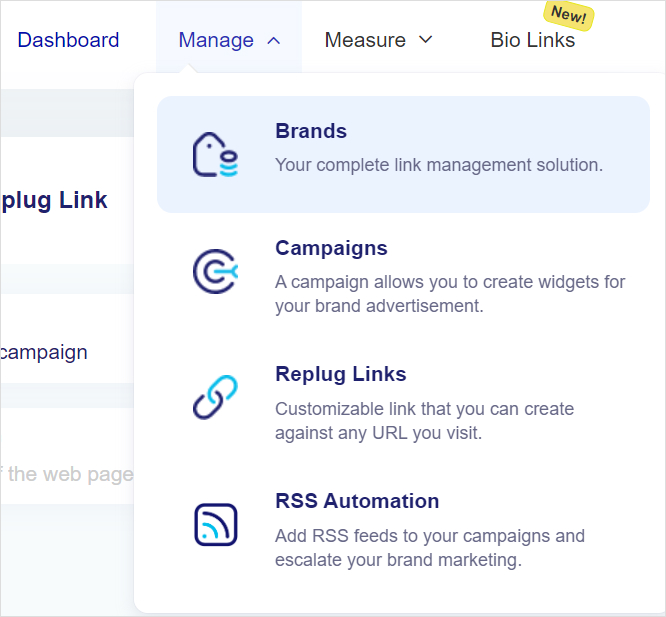
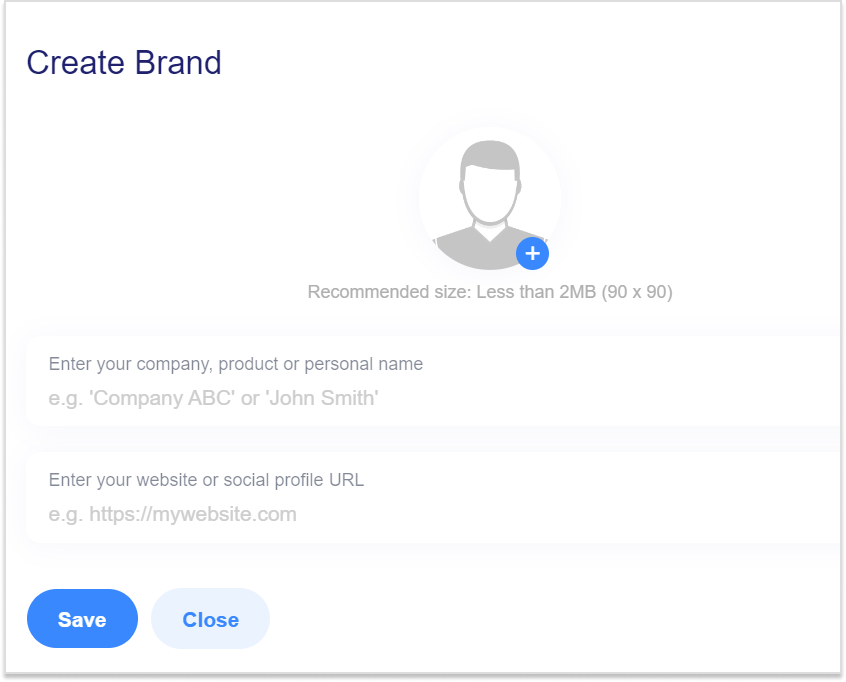
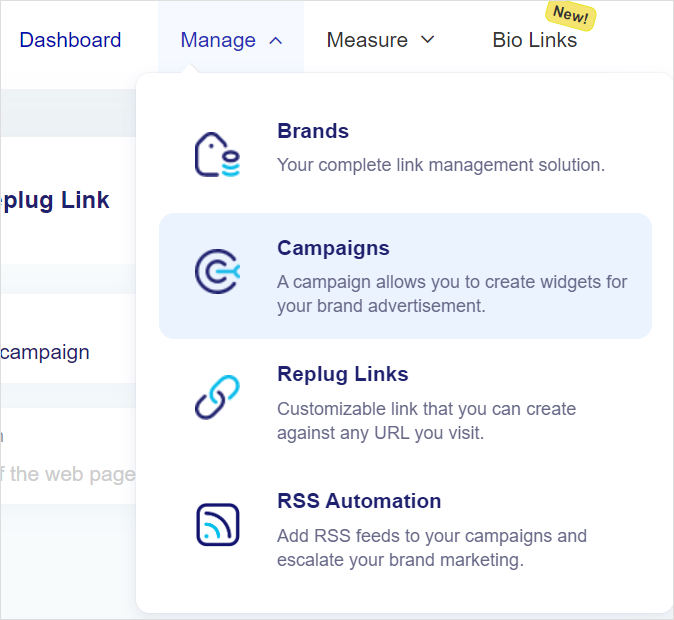
Start with the brand setup. Go to the Manage section and click the Brands option from the menu.
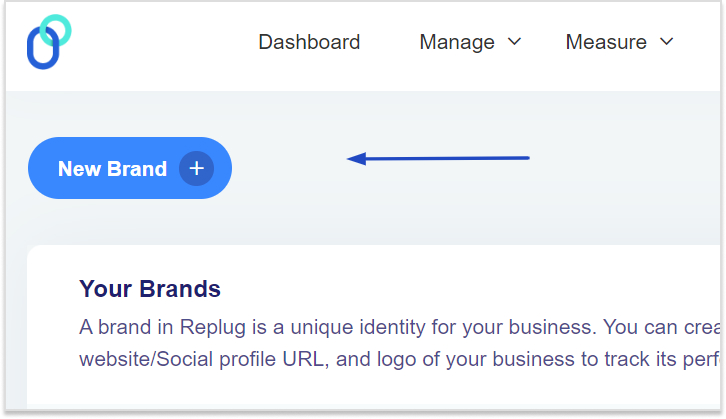
Then, click the New Brand button from the top and get ready to set up your brand.
Go ahead and fill up the form; provide the necessary details, such as brand name and URL.
Note: It’s necessary to set up a brand, especially if you’re running retargeting campaigns for multiple brands.
Once the brand is created, head over to the Manage section again and now click on the Campaigns option from the drop-down menu to create a campaign.
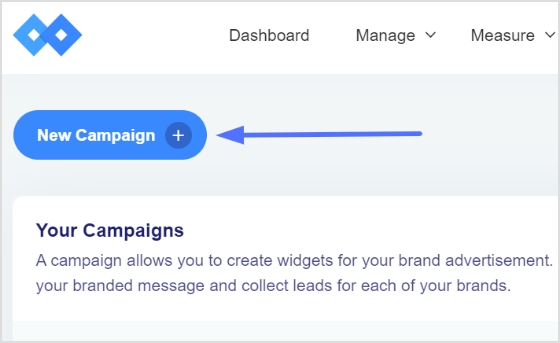
Once the Campaign page shows up, click on the New Campaign button to start creating the campaign.
Select the brand you just created for this campaign.
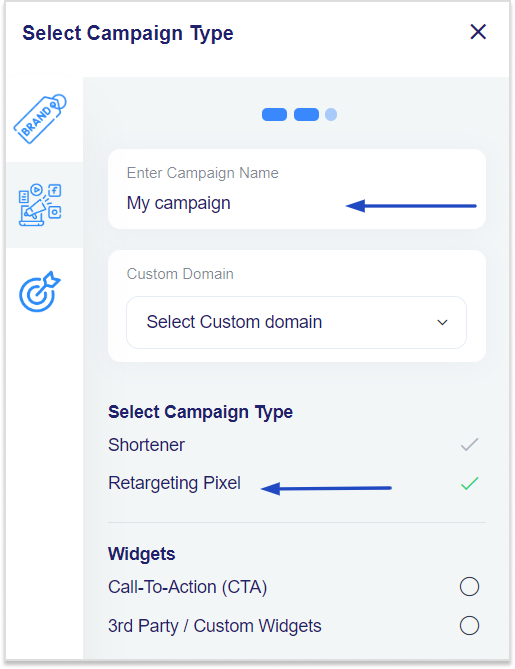
The next section will be the part where you have to select the campaign type.
Provide the essential details, such as the campaign name, custom domain (optional), and then finally, select the campaign’s type – it’s a crucial step for the whole retargeting campaign.
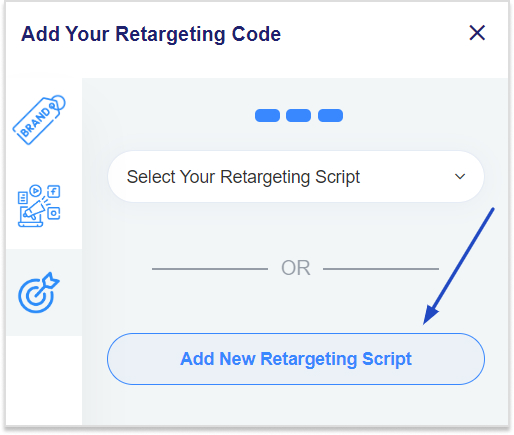
Step 03: In the next step, add your retargeting pixel.
Choose from the drop-down menu if you have already created one. Otherwise, create a fresh one for Twitter retargeting.
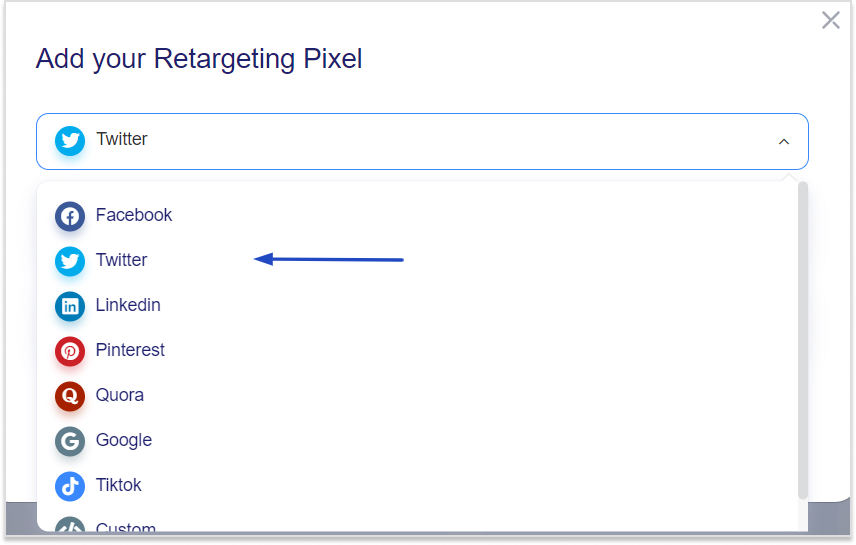
Click on the “Add New Retargeting Script” button to proceed. A popup window will appear; select Twitter from the Social Networks drop-down menu.
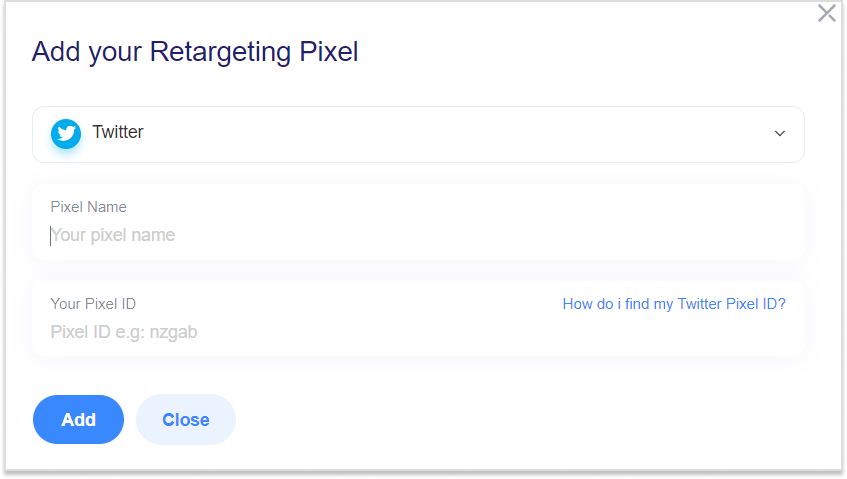
Name your Twitter Pixel and provide the Twitter Pixel ID that you got from Twitter.
Once it’s done, press the Add button to complete the step.
That wraps it up! But if you’re looking to customize your URL, here’s how you can do it:
It’s time to create short URLs under this campaign.
Using Replug’s Twitter link shortener, you can generate branded, trackable links that make your posts look professional while automatically adding your retargeting pixel for smarter audience targeting. Share these URLs on Twitter to start building your retargeting audience.
Spo, head over to the Replug’s main dashboard to start creating short URLs.
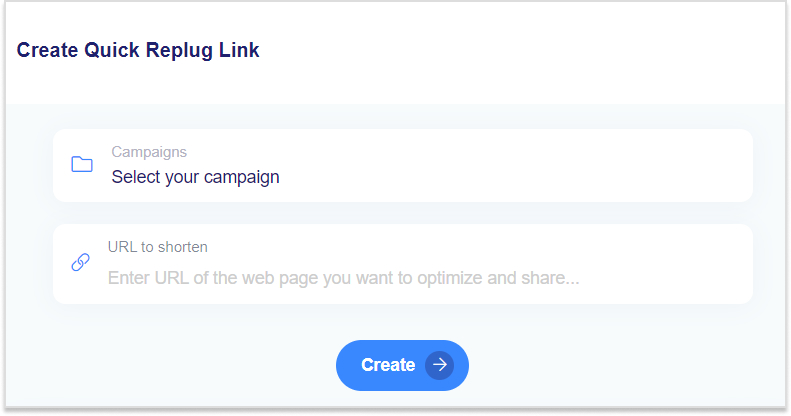
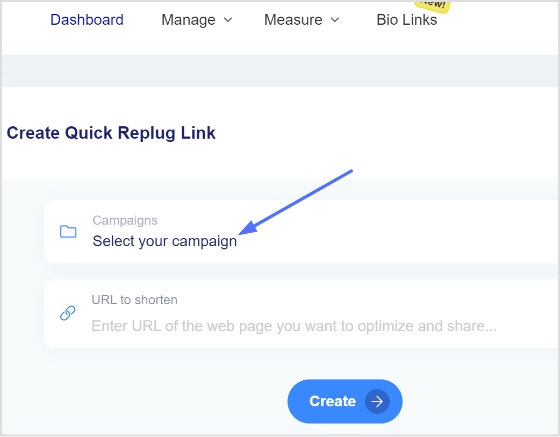
You’ll see the Create Quick Replug Links at the top of the dashboard. Choose the campaign and provide the long and clunky link to shorten it.
Now press the Create button to shorten your link. Keep shortening the URLs and sharing across social media, especially Twitter.
Lastly, retarget the custom audience that you created using the power of Replug short URLs.
However, give your Twitter retargeting campaign some time before you start retargeting the users who clicked on the short URLs.
It’s always a good idea to comprehend both the good and bad of a marketing strategy. Like any other social media marketing strategy, Twitter (X) retargeting also has a fair share of weak points that must be discussed. So, here we go:
Pros of Twitter retargeting
Cons of Twitter retargeting
Twitter provides higher engagement rates than other platforms. Users are generally active, leading to potentially higher interaction rates.
Twitter’s character limit and ad space can restrict message delivery, which can also affect the Twitter ads’ performance.
Custom audience is a useful feature in Twitter ads. Advertisers can create highly specific audience segments for precise targeting.
Twitter ad costs can fluctuate significantly, making budgeting a challenge for inexperienced digital marketers.
Brand positioning has never been this easier. Twitter ads help brands continuously engage with users who’ve interacted with the brand.
Don’t be too pushy with your Twitter retargeting campaign. Frequent or continuous retargeting may lead to ad fatigue, causing users to ignore or block your ads.
It integrates very well with other platforms for a cohesive retargeting strategy. For instance, users can retarget the audience on Twitter using Replug.
Twitter offers solid analytics to measure ad performance and adjust advertising strategy accordingly.
Brand positioning has never been this easy. Twitter ads help brands continuously engage with users who’ve interacted with the brand.
7 best Twitter (X) retargeting practices to follow
Hold your horses. Before you head over to the Twitter ads section for starting a Twitter retargeting campaign, read the following best practices for running Twitter retargeting campaigns:
1. Utilize a high-end retargeting tool
Retargeting tools automate the process of identifying and engaging with these potential customers, allowing you to reach them more efficiently and effectively.
This not only reduces the amount of time spent manually tracking and targeting audiences but also increases your return on investment by converting warm leads into customers at a fraction of the cost of traditional advertising methods.
Maximize marketing ROI
by transforming ordinary URLs into branded short links that convert.
Try Replug for free
2. Start retargeting with one retargeting platform
Starting your retargeting efforts with a single platform simplifies your strategy and enhances efficiency. By focusing on one retargeting platform, you streamline your campaigns, ensuring that all your resources are concentrated in one place. This approach allows for more precise targeting, easier management, and a clearer understanding of your campaign performance. It also reduces the complexity of juggling multiple tools and integrations, helping you optimize your retargeting efforts and achieve better results with less effort.
3. Segment your audience and target the right one
Segmentation does wonders in digital marketing. Break down your audience into specific segments based on factors like user behavior, interests, demographics, or previous interactions with your brand. It ensures that the advertiser delivers highly personalized and relevant ads that resonate with the prospects rather quickly.
4. Use compelling yet meaningful words in the ad copy
Besides paying attention to designing ad creatives, advertisers must also learn how to write compelling words through their ad campaign. Use strong visuals, concise messaging, and clear calls-to-action (CTAs) to help businesses and individuals capture attention and drive engagement.
5. Optimize ad frequency to avoid ad bombardment
It’s necessary to keep an eye on the ad frequency for the target audience. Setting frequency caps on your ads can avoid ad overexposure. The same ads bombardment often leads to ad fatigue and lower engagement rates. Advertisers must try to strike a balance between maintaining visibility and avoiding the irritation from frequent or continuous ads.
6. Test multiple ad formats
Don’t stick with just one type of ad. Instead, experiment with various ad formats, like video, carousel, or image ads, to determine which format performs best with your retargeted audience. Each ad format has unique properties, and testing helps you find the most effective way to deliver your message and put your brand out there.
7. Adjust your bidding strategy from time to time
Try to understand how the bidding strategy works and be ready to adjust as needed. Regularly monitoring bids and running campaigns will help you optimize your campaign. As a result, you get the most out of your ad spend without overpaying for impressions.
Conclusion
In conclusion, mastering retargeting on X (formerly Twitter) with Replug can significantly enhance your marketing strategy by re-engaging interested users and driving conversions.
By following the step-by-step process outlined, you can effectively reach your audience, maximize ROI, and stay ahead in the competitive digital landscape. Start leveraging the power of retargeting today to turn missed opportunities into successful conversions.
On top of that, enhance your retargeting campaigns using this efficient link shortener to create branded, trackable links that improve engagement and conversion tracking.
FAQs about retargeting on Twitter(X)
Can you do retargeting on Twitter(X)?
Yes, you can do retargeting on Twitter. There are a ton of resources on our blog to figure out how to do retargeting across different social media platforms.
What type of ads work best on Twitter(X)?
There is no right or wrong answer to this question. It depends on the niche, industry, and territory. In some cases, a video ad does well, whereas sometimes, a text-based ad outperforms others.
Are Twitter ads better than Facebook?
Both ad platforms are great for online advertising. Brands use both these advertising platforms. However, it comes down to where your audience exists. This perception may not be true, but Twitter ads are better than Facebook ads.
What is the minimum spend on Twitter(X) ads?
There is no minimum spend limit on Twitter ads. However, keep in mind that, on average, Twitter ads cost $0.26 to $0.50 per first action, so be prepared when budgeting for your Twitter ad campaign.
Want to know the secret to creating text links that people can’t resist clicking? Read on to discover the strategies that work.
This article will explore strategies for creating high-performing text links that deliver tangible results for your business.
Here you will find tools to create text links, tips, benefits, and much more regarding text links. Let’s not waste any more time and get you started.
What are text links?
Text links are interactive text elements that take users to a different destination or resource when clicked, which can be within the same page or on another page.
Besides that, these links are often highlighted and underlined to make their clickable nature obvious.
A complete link management solution
for marketing professionals & agencies.
Try Replug for free
Why are text links important?
Below are some of the major benefits that highlight the importance of text links;
Helps you get more traffic: Text links guide visitors to different parts of your site, potentially increasing the number of people who find and explore your content.
Highlights popular content: Monitoring which links get clicked helps you understand what interests your audience most.
SEO benefits: Search engines crawl and index pages using text links, influencing your site’s ranking.
User experience: Thoughtfully placed text links make it easier for users to navigate and find valuable content.
Build trust: Backlinks from other trusted websites can make your website look more reliable. Knowing how to find backlinks and tracking them is crucial for improving your website’s credibility and authority, as sometimes you can get backlinks from low-quality website as well.
Common text link errors to avoid for better engagement and SEO
Avoid these pitfalls to optimize your website’s performance:
Mistake
Description
Ignoring anchor text
Descriptive anchor text improves search visibility and user understanding. Don’t use generic terms like “click here.”
Over-optimizing anchor text
Keyword stuffing in anchor text can harm your rankings. Maintain a natural balance.
Neglecting internal linking
Connect related content within your website for better navigation and SEO benefits.
Broken links
Broken links frustrate users and damage your website’s credibility. Regularly check and fix them.
Poor link placement
Consider where you place links. A call-to-action should be prominent, while informational links can be less conspicuous.
How can I create and track a text link?
The easiest way to create and manage text links is by using a URL shortener free tool.
Replugstands out with its comprehensive link management features, which allow users to shorten and customize links easily.
We recommend Replug, particularly for brands, agencies, and marketers, as it offers high-end features for customization, link tracking, and insights—all in one platform. It’s an excellent tool for creating professional links and understanding their effectiveness.
Here’s how you can generate and track a text link with Replug:
Choose or create a campaign: On your dashboard, select an existing campaign or set up a new one.
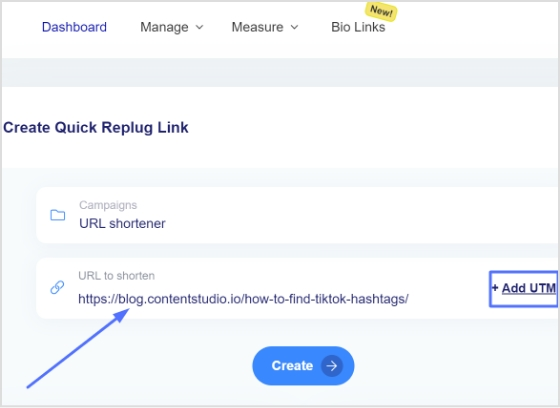
Shorten your URL: Enter the URL you want to shorten in the “URL to shorten” section under your chosen campaign, and click “Create.”
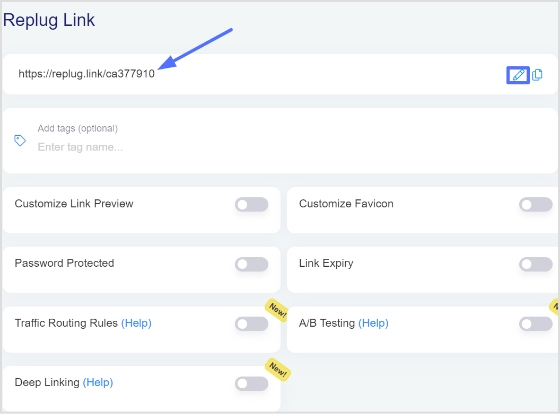
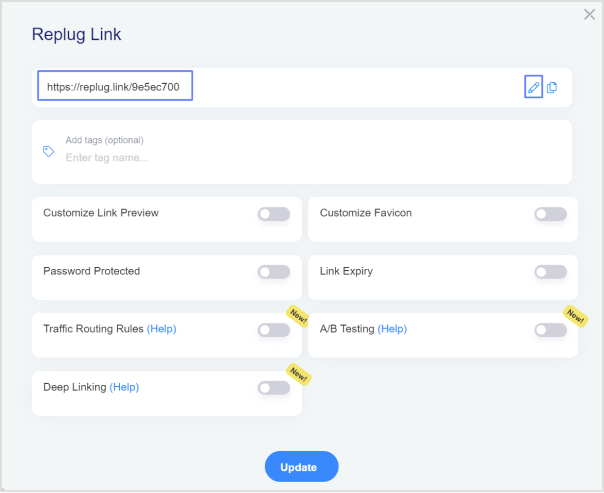
Customize your link: After shortening, you can add a custom alias by clicking the edit icon. This makes your link more memorable and shareable.
Copy and use: Copy the newly generated link, hit the update button to save changes, and you’re all set.
Note: In HTML, Use the shortened URL as the ` href ` value within an ` <a> ` tag, and specify the anchor text.
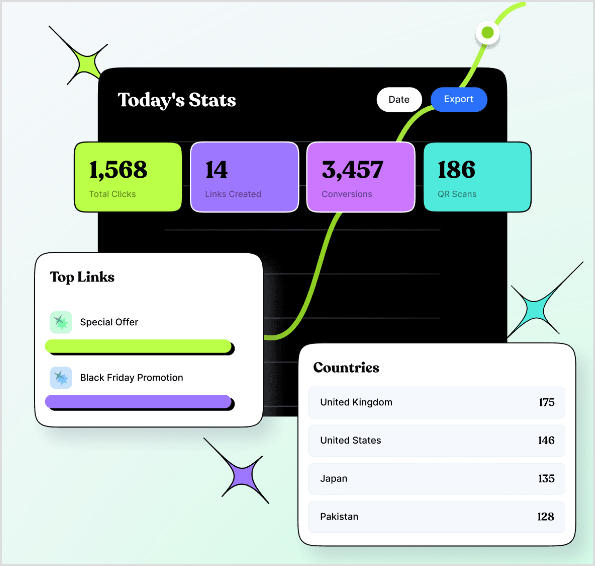
Track performance: Return to your Replug dashboard to monitor your link’s performance, including click-through rates and other useful analytics.
In summary, while Replug focuses on shortening and managing your URLs, adding hypertext is done through the context where you’re using the URL, such as in HTML code or within content editors.
Maximize marketing ROI
by transforming ordinary URLs into branded short links that convert.
Try Replug for free
Clear and relevant anchor text: The text used for the link should accurately describe the destination page. For instance, “Learn more about our products” is better than “Click here.”
Keyword optimization: Incorporate relevant keywords into your anchor text to improve search engine visibility. However, avoid keyword stuffing.
Link placement: Consider where the link is placed within your content. A call-to-action link should be prominent, while links for additional information might be less conspicuous.
Link appearance: Customize the link’s appearance (color, font, underline) to match your website’s design and make it stand out.
Regularly monitor and analyze data: Identify trends and optimize your links accordingly.
Experiment with different anchor texts and link placements: To find what works best for your audience.
Additional tips
Internal linking: Link to relevant pages within your website to improve navigation and SEO.
External linking: Link to authoritative external sources to establish credibility.
Mobile optimization: Ensure your links are easy to click on mobile devices.
Link attribution: Accurately attribute link clicks to the correct marketing channels.
Conclusion
Creating effective hyperlinks and tracking links is a cornerstone of successful online marketing. By following the strategies outlined in this guide, you can enhance user experience, boost SEO, and drive conversions. Remember, the key to success lies in crafting clear, relevant, and visually appealing links that align with your audience’s needs. Continuously monitor and analyze your text link performance to refine your approach and maximize results.
FAQs on text links
Can I use too many text links on a page?
Yes, excessive use of text links can distract users and negatively impact readability. Aim for a balance that enhances content without overwhelming visitors.
How often should I update my text links?
Review your links regularly to ensure they remain accurate and relevant. Update broken links promptly, and consider refreshing anchor text for better SEO.
How can I add an anchor link to my URL?
Add an anchor by including an id attribute in the target element, and then use #id in your hyperlink. For example: Go to Section 1.
What are the three types of hyperlinks?
The three types are hyperlinks, internal links (to the same site), external links (to other sites), and anchor links (to specific sections within the same page).
What is the ideal length for anchor text?
There’s no strict rule for anchor text length. Focus on clarity and relevance. Generally, concise anchor text is preferred.
Should I use the same anchor text for multiple links?
While it’s not harmful to occasionally use the same anchor text, varying it can improve SEO and user experience.
Getting your app noticed and downloaded is more challenging than ever. With an average of 1,019 apps released every day, you need more than a good idea—you need a strategic marketing plan.
App success isn’t just about making your app available; it’s about making it discoverable, engaging, and essential for users. As the digital world changes, leveraging app store optimization, social media trends, and user experience improvements becomes crucial.
In this guide, we will show you how to increase app downloads on Google Play and Apple App Stores. Follow these steps to increase your app’s installs and secure its place in users’ daily lives.
Let’s get started!
Drive more clicks, conversions, and app installations by deep linking
to your favorite platforms.
Try deep links for free
Top 16 strategies to increase app downloads
1. App store optimization (ASO)
App Store Optimization is essential for making your app more visible in app stores like Google Play and the Apple App Store. This involves:
Title and keywords: Select a unique, relevant title and strong keywords that potential users might search for. For example, if your app is a fitness tracker, use keywords like “fitness,”“workout,” and “health tracker.”
Description:Craft a compelling description that clearly explains what your app does, its unique features, and the benefits it offers. Use bullet points for key features and a call to action, encouraging users to download the app.
Visuals: High-quality icons, screenshots, and preview videos are crucial. These should visually represent the app’s interface and key functionalities, giving users a clear idea of what to expect.
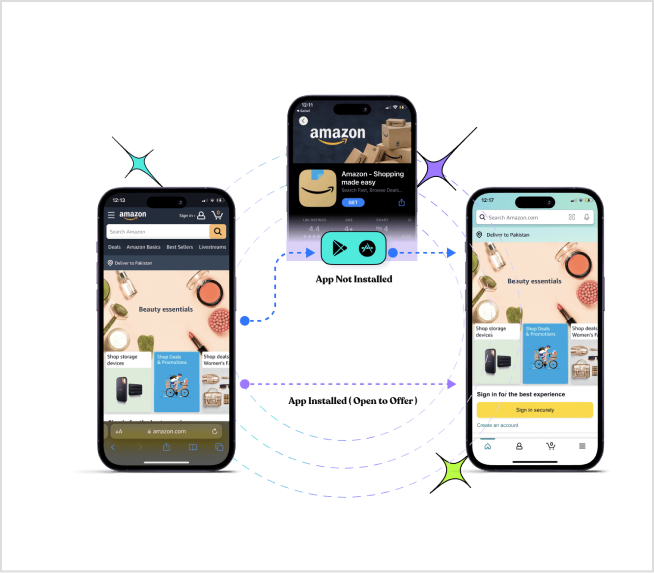
2. Deep linking
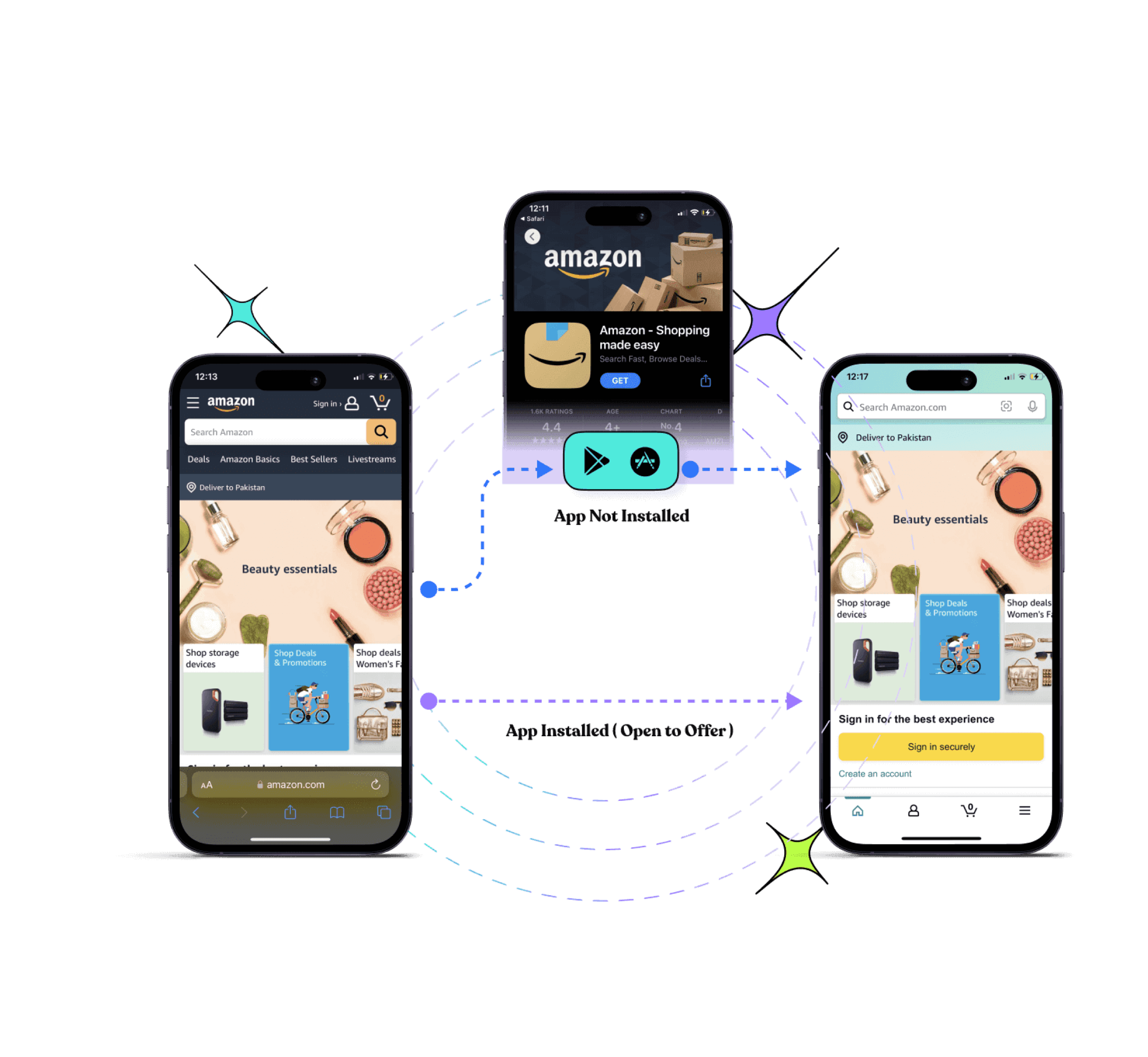
Deep linking involves using URLs to direct users to specific pages or content within your app.
If they don’t have the app, they’ll be directed to the app store to download it. This creates a seamless experience and avoids users getting lost on your mobile website trying to find what they were looking for in the first place.
Note: To manage and optimize all your sharing and deep-link workflows, consider using Replug, a tool that helps drive more clicks, conversions, and app installations seamlessly.
Drive more clicks, conversions, and app installations by deep linking
to your favorite platforms.
Try deep links for free
Let’s see what other benefits you get with deep linking.
Personalize onboarding: Deep linking allows for personalized onboarding experiences. Imagine someone clicks on a social media ad for your app that uses a deep link. This link could include a special discount or bonus content they can access upon downloading and signing up. This personalized touch can make the app more attractive and encourage users to complete the download process.
Enhanced user experience: Provide a seamless user experience by taking users directly to the content they are interested in. For example, a deep link can take users straight to a specific workout routine in a fitness app.
Marketing campaigns: Use deep links in email campaigns, social media posts, and advertisements to drive targeted traffic to your app. This can increase engagement and conversion rates.
Retention: Improve user retention by making it easy for users to find and access specific app features or content. Deep links can also be used in push notifications to re-engage users.
Positive reviews and high ratings can significantly influence a potential user’s decision to download your app. Strategies to encourage positive feedback include:
Prompting users: Request reviews at moments when users are likely to be satisfied, such as after completing a task or achieving a milestone within the app.
Responding to feedback: Engage with users by thanking them for positive reviews and addressing any issues raised in negative reviews. This shows that you value their feedback and are committed to improving the app.
Your app’s description should be engaging and informative, capturing users’ attention quickly:
Clear and concise: Clearly explain what your app does, its key features, and its benefits. Use simple language and short sentences.
Bullet points: Highlight the most important features using bullet points for easy readability.
Call to action: Include a call to action that encourages users to download the app, such as “Download now to start tracking your workouts!”
5. Social media marketing
Social media platforms can be powerful tools for promoting your app:
Engaging content: Share posts, videos, and stories that highlight your app’s features, updates, and user testimonials. Use visually appealing graphics and interactive content like polls and quizzes.
Campaigns: Run targeted ad campaigns on platforms like Facebook, Instagram, Twitter, and LinkedIn to reach a broader audience. Use specific targeting options to reach users who are most likely to be interested in your app.
User engagement: Respond to comments and messages, run contests, and encourage user-generated content to build a community around your app.
Influencer marketing can help you reach a larger and more engaged audience:
Partner with influencers: Identify influencers whose followers match your target demographic. Work with them to create authentic content showcasing your app.
Content creation: Have influencers create reviews, tutorials, or demonstrations of your app. Their endorsement can significantly boost your app’s credibility and downloads.
Content marketing involves creating valuable, relevant content to attract and engage your target audience:
Blog posts: Write articles addressing common problems your app solves. For example, if your app is a productivity tracker, write about tips for managing time effectively and how your app can help.
Videos: Create tutorial videos, demos, and user testimonials to visually demonstrate how your app works and its benefits.
Guest posts: Contribute articles to popular blogs and websites in your niche to reach a wider audience and drive traffic to your app’s landing page.
App install ads are paid advertisements specifically designed to drive app downloads:
Compelling ads: Design ads with strong visuals, clear messages, and a compelling call to action. Highlight your app’s unique selling points.
Targeted advertising: Use demographic and interest-based targeting to reach users who are likely to be interested in your app.
Performance monitoring: Continuously analyze and optimize your ads for better results. Use A/B testing to determine which ad creatives and messages perform best.
Referral programs can incentivize existing users to invite new users to download your app:
Incentives: Offer rewards such as discounts, free features, or other perks for successful referrals. Ensure the rewards are valuable enough to motivate users to participate.
Simple process: Make the referral process easy and straightforward. Provide users with unique referral links or codes they can share with friends and family.
10. Email marketing
Email marketing can effectively promote your app to a targeted audience:
Newsletters: Regularly update your email subscribers about new features, updates, and special offers related to your app.
Personalized emails: Send targeted emails based on user behavior and preferences. For example, if a user has shown interest in a particular feature, send them an email highlighting that feature.
Call to action: Include clear and compelling calls to action encouraging recipients to download your app.
Localizing your app for different languages and regions can help you reach a global audience:
Translation: Translate your app’s interface, description, and marketing materials into multiple languages.
Cultural adaptation: Adjust content to be culturally relevant for different regions. This includes adapting images, colors, and messaging to suit local preferences and customs.
13. Regular updates
Regular updates can keep your app fresh and engaging for users:
Bug fixes: Regularly fix bugs and technical issues to improve user experience.
New features: Introduce new features and enhancements to keep users engaged and attract new ones.
User feedback: Incorporate user feedback into your updates to meet their needs and preferences. Announce updates through in-app notifications and other communication channels.
Offering free trials or a freemium model can attract users who are hesitant to commit:
Free trials: Provide limited-time access to premium features, allowing users to experience the full value of your app before purchasing.
Freemium model: Offer a basic version of your app for free, with optional paid upgrades for advanced features. This allows users to try the app and decide if they want to invest in premium features.
Partnering with other apps or businesses can expand your reach:
Cross-promotion: Collaborate with complementary apps to promote each other’s offerings. For example, if you have a fitness app, partner with a health food app for cross-promotion.
Co-branded campaigns: Run joint marketing campaigns to reach a broader audience. This could include co-branded content, social media campaigns, or bundled offers.
16. High-quality app icons and screenshots
Your app icon is the first thing users see, so it should be attractive and memorable. Screenshots should highlight the app’s most important and visually appealing features. Consider these tips:
App icon: Use simple yet bold designs with contrasting colors to stand out. Ensure the icon represents the app’s purpose.
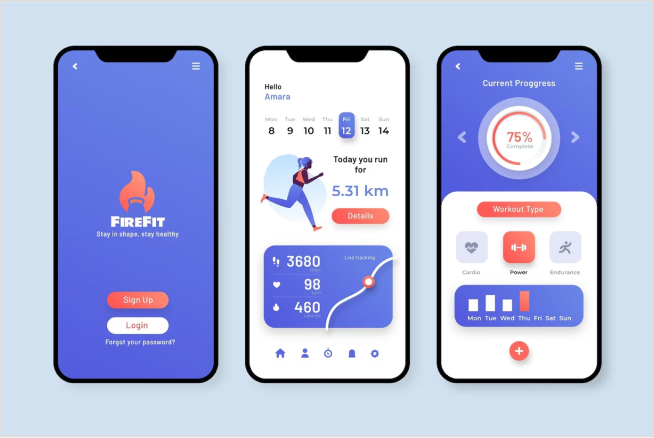
Screenshots: Display the app’s main features and benefits in action. Add captions or annotations to explain what users are seeing. For instance, show a screenshot of your fitness app tracking a run, with annotations highlighting speed, distance, and calories burned.
Drive more clicks, conversions, and app installations by deep linking
to your favorite platforms.
Try deep links for free
Final note
Increasing app downloads is a multifaceted process that requires a combination of strategic planning, targeted marketing, and continuous improvement. Each of the strategies outlined above plays a crucial role in enhancing your app’s visibility, appeal, and user engagement.
By optimizing your app store presence through ASO, creating compelling visuals and descriptions, leveraging social media and influencer marketing, and utilizing deep linking, you can attract and retain a larger user base. Additionally, encouraging positive reviews, providing regular updates, and offering free trials or referral programs can further drive downloads and user loyalty.
Remember, the digital landscape is ever-evolving, so staying updated with the latest trends and continually refining your strategies based on user feedback and performance metrics is essential. With dedication and a user-centric approach, you can significantly boost your app’s install rates and secure its place in the daily lives of users.
Drive more clicks, conversions, and app installations by deep linking
to your favorite platforms.
Try deep links for free
FAQs on how to increase app downloads
What is App Store Optimization (ASO)?
App Store Optimization (ASO) involves optimizing your app’s listing to improve its visibility and ranking in app store search results.
How can I make my app icon and screenshots more appealing?
To make your app icon and screenshots more appealing, use high-quality, visually attractive designs. This helps attract more users and increase app downloads.
What are the best practices for writing an engaging app description?
An engaging app description should be clear, and concise, and highlight the app’s unique features and benefits. An effective description can significantly increase app installs.
How do positive reviews and ratings impact app downloads?
Positive reviews and high ratings build trust and credibility, influencing potential users to download your app.
What is deep linking and how can it improve app download rates?
Deep linking involves using URLs to direct users to specific pages or content within your app. This provides a seamless user experience and can be used in marketing campaigns to drive targeted traffic. Effective use of deep linking can improve user engagement and increase app downloads.
Ready to launch your own brand, But short on time?
We’ve got you covered with two great options: white labeling and private labeling. Both can help your brand grow in unique ways, but which one is the right fit for you?
In this blog, we’ll break down everything you need to know about white label vs. private label. We’ll explore their similarities, drawbacks, benefits, and real-world examples.
By the end, you’ll have a clear understanding of which strategy will help your brand thrive. Let’s get started!
What is white labeling?
White labeling means rebranding products or services developed by another company and selling them under your company’s name.
You’ve probably come across many white-labeled products without even knowing it because they were rebranded so smoothly. This makes it hard for most people to tell the difference.
White labeling is common in many industries, like food and beverages, electronics, and software. It helps businesses expand their product lines without needing to invest in research, development, or manufacturing.
Here are a few examples:
White-label example no.1: Replug – A SaaS white-label solution
One perfect example of white-label solution is Replug. It’s a powerful link management tool packed with advanced features. With Replug.io, you can fully customize the dashboard with your brand’s colors, favicons, and logos, making it feel like your own.
Replug is an efficient link shortener that offers fantastic link management features, like retargeting pixels, bio-links, deep links, and the ability to create custom CTAs. This is a classic example of white labeling, ideal for businesses looking to boost their marketing while keeping everything aligned with their brand.
A complete link management solution
for marketing professionals & agencies.
Try Replug for free
White-label example no. 02: Printful
Printful is a print-on-demand company that lets businesses create and sell custom products like t-shirts, posters, and accessories without dealing with inventory or production. Companies can design their own graphics and logos, which Printful prints and ships under the company’s brand. This allows businesses to offer customized products easily and quickly without needing their own manufacturing facilities.
White-Label example no.03: Printify
Printify is a print-on-demand platform. It allows users to design and sell custom products online without needing to maintain an inventory. Printify connects its users with a vast network of print providers worldwide, offering a wide range of custom-printed products. Printify plays a significant role in the white-label market, particularly in the print-on-demand (POD) space. Through Printify, businesses can create white-label products like custom apparel, accessories, home goods, and more. Users can integrate Printify with major e-commerce platforms like Shopify, Etsy, WooCommerce, and others, making it easy to automate the sales and fulfillment process.
Top benefits of white labeling
Until now, you must have understood that white-label products are pre-manufactured items for you that are completely ready to be shipped with your brand logo. Here are some of the most prominent benefits of white-labeling.
Lower initial investment: White label products are often cheaper than private label because you’re not customizing them from scratch.
Faster turnaround time: Since the product already exists, you can get it to market quickly.
Less risk: You don’t have to worry about the product failing to meet quality standards or market demands.
Scalability: Easy to scale up or down production based on demand.
Now that you have gone through the similarities, it’s time to go through the drawbacks.
No customization: The product itself is typically not customized for each purchaser; it remains the same for all buyers.
Brand differentiation: Your product might be similar to offerings from other brands.
Profit margins: Profit margins can be lower due to competition from other white-labeled versions.
What is private labeling?
Private labeling is a business strategy where a retailer or company contracts with a manufacturer to produce a product under their own brand name. The retailer essentially “outsources” the manufacturing process while controlling the branding and marketing of the final product.
Private label example no 01: Heyday
Heyday, a brand specializing in consumer electronics, follows this model. Although they don’t handle manufacturing directly, they supervise the process and affix their label to top-quality electronics manufactured by partnering companies. This allows them to offer customers products that reflect their brand identity.
Private label example no. 02: Stone & Beam
It’s one of the most successful private-label brands. Stone & Beam, known for its furniture line, utilizes private labeling. They partner with manufacturers to produce furniture items under their brand name. By overseeing manufacturing standards and design elements, they ensure that the products meet their quality standards and resonate with their customers.
Benefits of private labeling
Be your own brand boss: From product to packaging, make it all your own. Partner with a trusted packaging labels manufacturer to give your customers a brand experience they’ll remember!
More profit for you: Private labeling often allows for more control over production costs. By bypassing some middlemen, you can potentially increase your profit margins compared to selling established brands.
Customer loyalty: Create products people love under your brand. Watch them come back for more! Use a product roadmap tool to plan future releases and improvements, keeping your customers engaged and excited.
Solve specific needs: See a gap in the market? Private labeling lets you create the perfect product to fill it!
Drawbacks of private labeling
Higher costs: Development and minimum order quantities can be expensive.
Helpful tip
“We would advise you to get quotes from multiple manufacturers and negotiate for the best price based on volume and order frequency.”
Longer lead time: Customization takes time, delaying product launch.
Minimum order quantities: Manufacturers often have minimum order quantities (MOQs) for private-label products. This can be a barrier for smaller businesses starting out.
Risk of failure: If the product doesn’t resonate with consumers, you’re stuck with it.
However, keep in mind that just because a product has your label doesn’t mean customers will automatically recognize it. You’ll still need to invest in marketing and building brand awareness for your private-label line.
Similarities between white label vs private label
Similiarity
Description
Product origin
Both utilize a product manufactured by a third party.
Branding control
The retailer or company has complete control over the branding, including logo, packaging, and marketing materials.
Sales and distribution
The retailer or company is responsible for selling and distributing the final product through their own channels.
A complete link management solution
for marketing professionals & agencies.
Try Replug for free
Difference between white label vs private label
Differences
White-label
Private-label
Level of customization
Lower
Higher
Branding focus
Generic (may have minimal branding options)
Strong focus on creating a unique brand identity
Product development
Little to no control over product development
More involvement in product development, potentially including formula tweaks or feature adjustments
Minimum order quantities (MOQs)
Typically lower
May have higher minimum order quantities due to the potential for more customization
Cost
Generally lower
Generally higher
When to choose the white label or private label?
In white label vs private label, the best option for you depends on your business goals and resources. Here’s a quick guide:
Choose white label if: You need a product quickly, like a custom hat, have limited resources, and want to test the market before investing heavily in branding.
Choose a private label if: You have a clear brand vision, want a unique product offering, and are willing to invest time and money upfront.
Ultimately, both white-label vs private-label strategies can be successful. You can choose the path that propels your business forward by carefully considering your needs and limitations.
FAQs on white-label
What is white label vs private label?
Both white-label and private label involve customizing a pre-made product, but white-label offers less customization (think generic packaging with your logo) while private label gives you more control over design and features (like a store-brand cereal with a unique recipe).
Is private labels cheaper than national brands?
Private-label products can be cheaper for retailers to purchase, which can translate to lower prices for consumers. However, only sometimes.
What are some examples of white-label products?
White-label products can be anything from clothing and electronics to software and supplements.
Is private labeling a good business strategy?
Private labeling can be a good strategy for businesses looking to build brand loyalty and higher profit margins. However, it requires careful planning and execution.
Ever wondered why everybody wants to increase online sales fast?
Obviously, more sales means more revenue, and more revenue means you become richer.
Platforms like Meta, Amazon, Google Ads and Shopify, to name a few, provide a variety of tools and features designed to increase online sales. These platforms have massively contributed to the growth and success of businesses by enhancing customer engagement, streamlining operations, and optimizing marketing strategies.
This not only shows how boosting online sales have gradually, but surely, become the backbone of almost all businesses. This surge in online sales has a huge impact on global online sales as well. Statista reports thatglobal eCommerce sales revenueis expected to grow at a CAGR rate of 9.47% (2024-2029).
If you are struggling to turn those website visits into actual sales?
Fear not, fellow marketers! This guide is your cheat sheet to increase your online sales game. Let’s keep going.
17 amazing tips to increase online sales
We have compiled 17 tips with pro hacks that can help multiply your sales and some can even save the costs for your business as well.
1. Target the right audience
The first and most important tip is to target the right audience. You can conduct thorough market research to identify your ideal customer’s demographics, preferences, and pain points. Tailor your marketing efforts to resonate with their needs and interests, increasing the likelihood of conversion.
When selling B2B, comparing outbound sales software across data coverage, sequencing, CRM sync, and intent signals helps choose top platforms for 2026 and drives more precise prospecting and conversions.
2. Stay ahead with advanced SEO strategies
Organic traffic is gold. Stay ahead of the curve with advanced SEO strategies to ensure your website ranks high in search engine results pages (SERPs). Focus on keyword research, on-page optimization, and high-quality content creation to improve your website’s visibility.
With the majority of online traffic coming from mobile devices, optimizing your website or app for mobile responsiveness is non-negotiable. Make sure your website has fast loading times and intuitive user interfaces across all devices. A mobile-friendly experience enhances user satisfaction and encourages mobile shoppers to complete their purchases.
Pro hack: Optimize website navigation for easy access to products and information, allowing a smooth and intuitive browsing experience that keeps customers engaged.
3. Utilize user-generated content more often
Encourage satisfied customers to share their experiences through reviews, testimonials, and social media posts. UGC serves as authentic endorsements of your products or services, influencing potential buyers’ purchasing decisions to increase online sales.
4. Use high-quality visuals and themes
Invest in high-quality imagery, videos, and graphics that showcase your products or services in the best light. Make the best of tools for seamless AI video generation to create engaging, professional-quality videos quickly and efficiently. Ensure your website design and branding elements align with your target audience’s preferences, creating a visually appealing and cohesive online presence.
5. Run online ads
If you are not running ads in this digital era, then don’t expect to increase online sales.
Online ads are like direct bridges to reach potential customers, instantly enhancing brand visibility. Compared to many other marketing methods, running online ads is remarkably faster. Through precise targeting based on demographics and online behavior, ads ensure reaching the most relevant audience.
Moreover, you can simply use these statistics to tailor your next campaign to target them. Since the data you receive is in real-time, there’s a higher probability of achieving high social media engagement.
6. Set up killer social media campaigns
Map out, design, and set up visually appealing posts tailored for specific platforms and suggested posting times. To simplify this process, use automation tools to schedule posts, monitor their effectiveness, and optimize your social media workflow for greater efficiency.
We would suggest you consider ContentStudio, a comprehensive social media tool designed for agencies, brands, and marketers. With its user-friendly interface and powerful features agencies, brands, and marketers can stay organized and accomplish more in less time, streamlining social media management tasks.
7. Deliver exceptional customer support every time
Providing exceptional customer support is essential for long-term relationships and driving repeat business. Positive experiences lead to satisfied customers who are more likely to become loyal advocates for your brand.
Using an AI virtual assistant helps you deliver that consistency at scale, answering common questions instantly, handling routine requests around the clock, and freeing your team to focus on the conversations that need a human touch.
Tip: Implement live chat and consider investing in the best business phone systems or an AI chatbot like Crisp (a leading Freshdesk alternative) to provide immediate assistance and support, address concerns, and facilitate the buying process in real time.
A complete link management solution
for marketing professionals & agencies.
Try Replug for free
8. Giveaways or discounts
Everyone loves a good deal, so consider running giveaways or offering discounts to incentivize purchases and attract new customers. Promote exclusive offers through email marketing, social media, and website banners to create excitement and urgency. More importantly, it helps to increase online sales.
Pro hack: Offer complimentary items or samples with purchases to catch customers’ attention and boost sales.
9. Team up for a win-win
Collaboration is key! Partner with complementary brands or influencers to reach new audiences, leverage each other’s networks, and boost your online sales.
Explore opportunities for cross-promotion through co-branded campaigns, guest blogging, or social media takeovers.
10. Make your checkout process smooth
Don’t let a clunky checkout process affect your sales. Simplify the steps to purchase, minimize form fields, and offer multiple secure payment options to cater to diverse customer preferences.
Running everything through Commerce helps unify payments and order data so the experience stays smooth from cart to confirmation.
Guest checkout and clear shipping/return policies further enhance the user experience and build trust.
Lower the risk of purchasing with money-back guarantees or hassle-free returns to alleviate customer concerns and boost confidence in making a purchase.
Disable account registration requirements at checkout and simplify the checkout process. Reduce friction and abandonment rates, while still offering the option for customers to create an account for future purchases.
Businesses comparing clickfunnels alternatives can also benefit from optimizing their checkout flow to improve conversions and customer experience.
Pro hack: Recommend complementary or upgraded products during the checkout process, maximizing the value of each transaction and increasing overall revenue.
11. Retarget your visitors
Not everyone buys right away. Retargeting pixels allow you to re-engage visitors who have previously interacted with your website or products. Install retargeting pixels on your links to track user behavior and serve targeted ads to visitors across various online platforms.
By staying top-of-mind with potential customers, you can encourage them to revisit your site and complete their purchase. Thus, retargeting your visitors with more personalized ad experiences can increase online sales for you.
The best way is to use a link retargeting tool like Replug. It is an all-in-one link management platform that allows you to create and manage retargeting campaigns across various platforms and channels, helping you reach potential customers who have previously interacted with your brand.
Moreover, with this top-notch URL shortener you can add CTAs, track audience, route traffic, A/B test your campaigns and much more.
12. Put what’s popular in the spotlight
Boost your conversion rates with irresistable CTAs with
The next tip in our list for increasing online sales is to capture visitor attention.
Let me explain..
A compelling offer presented with a call to action pop-up, encourages visitors to subscribe or make a purchase.
Use your CTAs to display customer reviews and testimonials to build credibility and reassure hesitant buyers of the value and quality of your products. Furthermore, showcasing best-selling products prominently to leverage social proof and inspire trust in potential buyers.
All of the above can potentially help you to increase online sales.
13. Craft personalized email campaigns for impact
Email remarketing remains one of the most effective tools for nurturing leads and driving conversions. Segment your email list based on user preferences, behavior, and purchase history to deliver personalized content and offers. Tailor your email campaigns to address specific customer needs and pain points, increasing engagement and driving online sales.
Pro hack: Run abandoned cart email campaigns to remind customers of items left in their cart, prompting them to complete their purchase.
14. Map your customer’s journey
Understanding the customer journey is essential for providing seamless online experiences and guiding users towards conversion. Map out the various touchpoints and interactions users have with your brand, from initial discovery to post-purchase support.
At many of these touchpoints, an AI voicebot can handle real-time conversations, answering questions and guiding users forward instantly, so the experience stays smooth even at the moments when a human agent isn’t available.
Identify potential pain points or friction areas and optimize each stage of the user journey to enhance satisfaction and drive online sales.
15. Refine strategies through A/B testing
Don’t just guess what works – test and refine your approach to find what converts best. A/B testing lets you compare different versions of your website, emails, and product offerings to see what clicks with your audience. By constantly iterating based on data, you’ll ensure your sales strategy is firing on all cylinders.
16. Data is your friend
Numbers don’t lie! Learn how to use analytics tools to track website traffic, user engagement, and sales. Analyze these key metrics to identify trends, find areas for improvement, and make data-driven decisions that fuel growth and profitability.
For this, you can any advanced yet affordable analytics tool such as Usermaven. By tracking metrics such as page views, time spent on the site, and click-through rates, you can gain valuable insights into what resonates with your audience and what doesn’t.
Besides that, automating data collection and analysis processes help you streamline your operations and free up valuable time and resources.
17. Limiting choices
Carefully curate a selected range of products, reducing decision fatigue, and guiding customers towards quicker purchasing decisions.
Mistakes to avoid when trying to increase online sales:
Here’s a table outlining common mistakes to avoid when trying to increase online sales:
#
Mistake
Description
Solution
1
Poor Website Navigation
Complicated navigation can frustrate customers.
Simplify site structure and ensure intuitive, user-friendly navigation.
2
Lack of Mobile Optimization
A website not optimized for mobile can lead to lost sales.
Ensure your site is fully responsive and functions well on all mobile devices.
3
Ignoring SEO
Low search engine visibility can decrease traffic.
Invest in SEO strategies to improve your site’s ranking on search engines.
4
Unclear Value Proposition
Customers may not understand why they should buy from you.
Clearly communicate the unique benefits and value of your products or services.
5
Complicated Checkout Process
A lengthy or complex checkout can cause cart abandonment.
Streamline the checkout process with fewer steps and multiple payment options.
6
Lack of Trust Signals
Customers may hesitate to buy without trust indicators.
Include customer reviews, security badges, and clear return policies to build trust.
7
Inadequate Customer Service
Poor customer support can lead to negative reviews and lost sales.
Provide excellent customer service through various channels like chat, email, and phone.
8
Ignoring Customer Feedback
Not addressing customer complaints can harm your reputation.
Actively seek and respond to customer feedback to improve your offerings and service.
9
Poor Product Descriptions
Vague or generic descriptions can fail to engage customers.
Write detailed, compelling product descriptions highlighting key features and benefits.
10
Neglecting Email Marketing
Missing out on this channel can reduce repeat business.
Implement targeted email marketing campaigns to engage customers and drive repeat purchases.
11
Slow Website Load Times
Slow pages can lead to high bounce rates.
Optimize website speed by compressing images, using a CDN, and minimizing code.
12
Ineffective Social Media Use
Not leveraging social media can limit your reach.
Use social media strategically to engage with your audience and promote your products.
13
Lack of Personalization
Generic experiences can reduce customer engagement.
Use data and analytics to personalize the shopping experience for each customer.
14
Ignoring Market Trends
Failing to adapt to new trends can make your offerings outdated.
Stay informed about industry trends and adapt your products and marketing strategies accordingly.
15
Overcomplicating Product Pages
Too much information or clutter can overwhelm customers.
Keep product pages clean and focus on key information with clear, high-quality images.
16
Ignoring Cart Abandonment
Not addressing cart abandonment can lead to lost sales.
Implement abandoned cart recovery strategies like email reminders and exit-intent pop-ups.
17
Neglecting Local SEO
Failing to optimize for local search can miss out on nearby customers.
Use local SEO tactics such as Google My Business and localized keywords.
18
Underutilizing Video Content
Not using videos can miss an opportunity to engage customers.
Create product videos, tutorials, and customer testimonials to increase engagement.
19
Inconsistent Branding
Inconsistent branding can confuse customers and dilute your message.
Maintain a consistent brand voice, design, and messaging across all platforms.
20
Poor Quality Images
Low-quality images can deter customers from making a purchase.
Use high-resolution images that accurately represent your products from multiple angles.
21
Ignoring Seasonal Trends
Not capitalizing on seasonal trends can result in missed sales opportunities.
Plan promotions and stock inventory based on seasonal trends and holidays.
22
Lack of Social Proof
Not showcasing social proof can reduce trust and credibility.
Display customer reviews, ratings, and user-generated content prominently on your site.
23
Complex Return Policies
Complicated return policies can deter potential buyers.
Offer clear, simple, and fair return policies to increase customer confidence.
24
Insufficient Payment Options
Limited payment options can lead to cart abandonment.
Provide multiple payment methods, including credit cards, PayPal, and digital wallets.
25
Overlooking Site Security
Inadequate security measures can compromise customer trust and data.
Implement strong security protocols, including SSL certificates and secure payment gateways.
26
Lack of A/B Testing
Not testing different strategies can lead to missed optimization opportunities.
Regularly conduct A/B tests on various site elements to find what works best for your audience.
27
Ignoring Customer Journey
Not understanding the customer journey can lead to missed engagement points.
Map out the customer journey and tailor your marketing efforts to each stage of the buying process.
28
Underestimating Shipping Costs
Unexpected high shipping costs can lead to cart abandonment.
Offer clear shipping options and consider free or discounted shipping to reduce cart abandonment.
Conclusion
Social media has upgraded e-commerce many a fold over the past few decades. In order to survive in the competitive market, you need to come up with cautious strategies.
For your business to soar, you need customers to invest in you. I have discussed a few practices for you to elevate your sales game.
The first and the foremost step is to gain your clients’ trust. Deal with your clients honestly and do not wreck your credibility by making the promises you can’t keep.
Devotedly serve your targeted audience and make the best of your time and resources.
Reciprocate with your customers and incline them towards loyalty.
Work with the latest technologies and make them believe that they’re in best hands.
Use scroll maps and heat maps to improve your awebsite thereby improving the quality of business with your customers.
Engage with your customers via Live Chats, Emails and other social platforms.
The most crucial thing to worry about is consistency. Consistently working towards betterment will improve you in every field of life.
FAQs on how to increase online sales
What are the benefits of selling online?
Selling online brands can boost conversions, lower overheads, 24/7 store availability, convenience for customers, and much more…
How do i write effective product descriptions?
You can write effective product descriptions by highlighting the features & benefits of your brand or product etc. Try using related keywords based on search queries.
What payment methods should i offer?
You should offer credit cards or other secure payment gateways.
What are the challenges of selling online?
One has to face market competition, challenges in online marketing, managing inventory, etc.
How do i run effective online sales campaigns?
You can offer discounts, and promotions, or run customized email marketing campaigns for this.
TikTok’s skyrocketing popularity has opened up exciting new opportunities for businesses to reach fresh audiences and measure the success of their campaigns. One of the best ways to track your marketing efforts on TikTok is by using UTM tags.
But let’s be honest—creating UTMs isn’t always straightforward. Many people end up using clunky methods like Google Sheets to manage their UTMs. That’s where we come in. At Replug, we designed a free UTM builder to simplify the process and help you get the most out of your TikTok ads.
In this guide, we’ll show you how to create UTMs for TikTok ads effortlessly. By the end, you’ll be able to track your campaigns with precision and make data-driven decisions to boost your marketing success.
What are UTM parameters?
UTM parameters, also known as UTM tags or UTM codes, are snippets of text appended to a URL to track the source, medium, campaign, term, and content of a marketing link. These parameters help marketers understand where their website traffic is coming from and how users interact with their marketing campaigns.
Here’s a breakdown of the five UTM parameters:
Source (utm_source): This parameter identifies the specific source of the traffic, such as the platform or website where the link was clicked. For example, if you’re running ads on TikTok, the source would be “tiktok”.
Medium (utm_medium): The medium parameter describes the marketing medium or type of traffic, such as email, social, or CPC (cost-per-click) advertising. For TikTok ads, the medium could be “cpc” (cost-per-click).
Campaign (utm_campaign): This parameter specifies the name of the marketing campaign associated with the link. It helps differentiate between different campaigns running simultaneously. For example, if you’re running a summer sale campaign on TikTok, the campaign name could be “summer_sale”.
Term (utm_term): This parameter is typically used for paid search campaigns to identify the keywords associated with the ad. However, for TikTok ads, it may not be as relevant unless you’re running keyword-targeted campaigns.
Content (utm_content): The content parameter allows you to differentiate between different elements within the same campaign. For example, if you’re testing two different ad creatives for your TikTok summer sale campaign, you could use “video_ad1” and “video_ad2” as content identifiers.
Why should you use UTM tags on TikTok?
Using UTM tags on TikTok offers several important benefits for marketers:
Track campaign performance:
UTM tags enable you to track the effectiveness of your TikTok campaigns accurately. By appending UTMs to your ad URLs, you can monitor metrics such as clicks, conversions, and engagement specific to each campaign, source, and medium.
Identify traffic sources:
With UTM tags, you can pinpoint the exact sources driving traffic to your website from TikTok. Whether it’s from organic posts, paid ads, or influencer collaborations, UTMs help you understand which channels are delivering the most value.
Measure ROI:
By tracking the performance of your TikTok campaigns using UTMs, you can calculate the return on investment (ROI) more precisely. This data allows you to assess the cost-effectiveness of your marketing efforts and allocate your budget more effectively in the future.
Optimize campaigns:
UTM-tagged URLs provide valuable insights into user behavior and preferences. By analyzing UTM data, you can identify trends, determine which content resonates best with your audience, and optimize your TikTok campaigns for better results.
Enhance reporting:
UTM parameters make it easier to generate detailed reports on your TikTok marketing activities. Whether you’re reporting to clients, stakeholders, or your team, UTMs provide clear and granular data that can support your analysis and decision-making.
Facilitate A/B testing:
UTMs allow you to conduct A/B tests effectively by tracking different variations of your TikTok ads or content. By comparing the performance of URLs with different UTM parameters, you can identify which strategies yield the highest conversion rates and refine your approach accordingly.
How to create UTMs for TikTok ads using Replug?
Replug is a top-notch link management platform that allows you to create and manage custom short links with UTM parameters for tracking purposes. Here’s a step-by-step guide to creating UTMs for TikTok ads using this one of a kind short URL generator free.
Step 1: Sign in to Replug
Visit the Replug app and sign in to your account. If you don’t have an account, you can sign up for free.
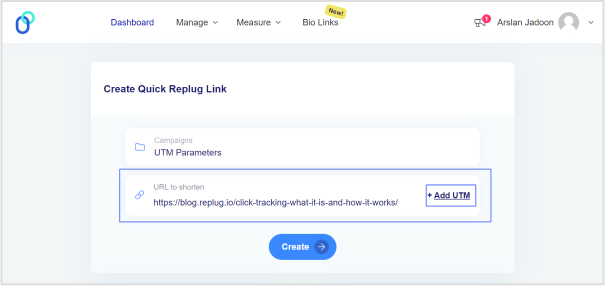
Step 2: Enter campaign and URL details
Once logged in, simply choose a campaign on your dashboard (create a new campaign if you’re a new user) and enter the TikTok campaign URL in the “URL to shorten” field.
Step 3: Configure UTM parameters
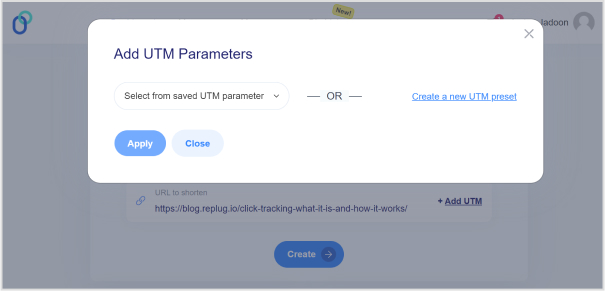
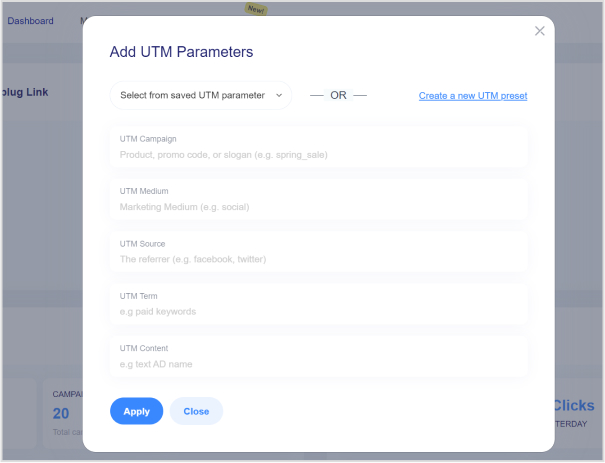
In the campaign creation process, you’ll have the option to add UTM parameters to your links. Specify the UTM parameters according to your campaign requirements. This typically includes parameters like source, medium, campaign, term, and content.
Note: For TikTok ads, ensure that you set the source as “tiktok” and the medium as “cpc” (cost-per-click), or any other relevant medium depending on your campaign goals.
Step 4: Generate short link
After configuring the UTM parameters, click the “Create” button and proceed to generate a short link for your TikTok ad. Replug will automatically create a shortened URL with the specified UTM parameters appended to it.
Step 5: Customize the URL slug
Replug allows you to customize the shortened URL. You can choose a unique identifier or keyword to make the link more memorable or reflect your content.
Step 6: Use shortened URL in the TikTok ad
Copy the shortened URL generated by Replug. Paste this URL as the destination URL in your TikTok ad setup when creating or editing your ad campaign.
Step 7: Track performance
Once your TikTok ad campaign is live, Replug will track the performance of the shortened URL with UTMs. You view analytics and track metrics such as clicks, conversions, and engagement for your TikTok ad campaign.
Note: Remember to analyze the data provided by Replug to optimize your TikTok ad strategy and maximize your marketing efforts. Happy tracking!
Final Note
UTM tags are invaluable tools for marketers looking to optimize their TikTok ad campaigns and maximize their ROI. By leveraging Replug’s UTM builder, you can easily create custom short links with UTMs, track the performance of your campaigns, and make data-driven decisions to achieve your marketing objectives.
FAQs
Is the TikTok UTM Builder compatible with all types of TikTok ad campaigns?
Yes, the TikTok UTM Builder is compatible with all TikTok ad campaigns, including video ads, sponsored hashtag challenges, branded effects, and influencer partnerships.
How do I track the performance of my TikTok ad campaigns with UTMs?
Replug automatically tracks the performance of the shortened URLs with UTMs. You can log in to your Replug account to access analytics and track metrics like clicks, conversions, and engagement for your TikTok ad campaigns.
Does Replug provide real-time analytics for TikTok ad campaigns?
Yes, Replug offers real-time analytics, allowing you to monitor the performance of your TikTok ad campaigns as they unfold. You can track clicks, conversions, and other engagement metrics in real-time to make timely adjustments and optimizations.
Have you ever wondered what these “http” and “https” mean in the URLs?
You’re about to learn what these are, why they matter in the URLs, and what you need to know about them.
We see QR code links on trucks, buses, billboards, outdoor hoardings, packaging, business cards, t-shirts, and almost everywhere.
While almost all of us come across URLs all the time, the majority don’t know the difference between http and https.
Well, we’ll break down each and everything you need to know about http and https.
Before we discuss the difference between http and https, it’s essential to explain what these terms refer to.
So, let’s understand what http and https are.
What is HTTP?
HTTP is an abbreviation for hypertext transfer protocol. HTTP is a baseline system for the World Wide Web to operate and is responsible for loading website pages using hypertext links.
It’s an application-layer protocol developed to play a key role in transferring information between networked devices. In other words, it’s a sophisticated protocol for transmitting hypermedia content, such as HTML pages.
How it works
HTTP requests are used to access the content on the web. When a web browser sends a request to the server to load the required web page, it uses the HTTP request method to get access to the desired page.
When an HTTP request is made, it sends a bunch of encoded data that carries crucial credentials about the sender and receiver of the request.
A standard HTTP request contains information, such as the URL, HTTP method, HTTP version type, and HTTP request headers.
Usually, two types of HTTP methods are used in the HTTP requests, which are “GET” and “POST”. A “GET” request is used when the information is expected to return, whereas the “POST” request indicates the end-user is submitting the information to the web server, for instance, username and password or contact form.
To have a better understanding of how HTTP works, it’s essential to go through some of the advantages and disadvantages of HTTP.
Here are the advantages of HTTP:
HTTP employs an advanced addressing pattern, ensuring recognizable names are given to the IP addresses for easy identification on the World Wide Web as compared to the traditional numerical IP address system.
It keeps the security intact by downloading each file from an independent connection and closing it afterward, minimizing the interception risk during transmission by transferring only one element of a webpage at a time.
It brings flexibility to the web, for instance, it allows for the addition of extra functionalities by downloading extensions or plugins as needed, enabling the user to take certain actions for a better experience.
It reduces latency by initiating the handshaking process only upon connection establishment, eliminating the need for handshaking after a request.
The HTTP pages are stored in internet caches known as page caches upon initial loading, facilitating quick content loading upon revisiting the page. It provides users with a fast and efficient web browsing experience.
One of the benefits of an HTTP connection is that it lowers CPU and memory usage due to the limited number of simultaneous actions.
Let’s take a look at the limitations of HTTP:
One of the major limitations of HTTP is the lack of encryption. As a result, the HTTP is susceptible to content alteration, making it insecure and prone to data integrity issues. E-commerce stores, web portals, SAAS tools, and social networks can’t afford data theft or loss as they handle user payments and other important data that require a secure environment.
User privacy is crucial to any online business, platform, or SAAS product. Privacy concerns arise in HTTP connections as hackers can intercept requests and access webpage content, including sensitive information like usernames and passwords.
Data accessibility can cause issues in the HTTP environment. HTTP clients often fail to close connections promptly, resulting in server unavailability during these periods.
Entertaining an HTTP request isn’t that simple. A lot of resources are allocated to fulfill a single request. Transmitting web pages via HTTP necessitates creating multiple connections, introducing administrative overhead to the connection.
HTTP’s resource-intensive nature results in increased power consumption, making it unsuitable for IoT devices, especially those equipped with wireless sensor networks. It makes the connection more complex than it should be.
A complete link management solution
for marketing professionals & agencies.
Try Replug for free
What is HTTPS?
HTTPS stands for hypertext transfer protocol secure. Since HTTP is the protocol used to send data between a web browser and the website, https is the secured version of HTTP.
The HTTPS version is encrypted which makes it secure for data transfer. Essentially, it provides a layer of security to sensitive information and important data when used, accessed, or shared on the web. The websites that deal with user information, such as banking info, credit/debit cards, username passwords, or other user data must be using the https version for data safety.
Google has been enforcing the use of HTTPS for the past few years, notifying Chrome browser users about unsecured websites. The unsecured websites mean the sites that aren’t using the SSL certificate. An SSL certificate is a security encryption that secures the connection and keeps the user data secured.
How it works
HTTPS utilizes an encryption protocol to secure communication or data transmission called transport layer security (TLS). The purpose of this protocol is to provide extensive security to the communication by using an asymmetric public key infrastructure.
Simply put, HTTPS is an extension of the hypertext transfer protocol (HTTP). However, it’s safer and more secure as compared to HTTP.
Boost ROI with branded URLs!
Enhance your marketing campaigns by creating shareable, trackable, and fully multi-purpose
customizable branded URLs.
Data encryption is a huge plus when it comes to HTTPS. The information being transmitted remains highly secure during its journey across the internet. Undoubtedly, this encryption adds a layer of protection, making it difficult for unauthorized access.
Protection against phishing attacks is an integral safety net in the digital marketing space. HTTPS offers a safeguard against such threats as user data being stored locally on the client system.
SEO is crucial to any company’s online marketing strategy. The implementation of HTTPS not only bolsters security, but also impacts a website’s visibility and ranking on search engines. Since it adds trustworthiness and authenticity to the domain, websites equipped with HTTPS certificates receive preferential treatment in search engine rankings compared to those lacking this encryption protocol. To stay competitive and maintain strong search performance, many marketers now rely on some of the best AI SEO tools to help with audits, monitor ranking factors, and make sure technical essentials like HTTPS are in place
Customers only want to buy from credible sellers. When it comes to online transactions, SSL plays a crucial role in ensuring their safety. As a rule of thumb, e-commerce stores with active SSL certificates are considered safe and secure for conducting financial transactions. Since HTTP reassures visitors that their sensitive information remains protected from potential threats, it has now become a benchmark safety protocol for online businesses.
HTTP does have benefits on the technical website security side. However, it does help a website from the optics standpoint. When website visitors look at the HTTPS or the green padlock sign next to the URL, they usually feel safe and comfortable with putting out their sensitive information there.
Website owners often hesitate to invest in SSL certificates due to their relatively high cost, resulting in many opting not to utilize them. Additionally, SSL certificates require periodic renewal to prevent deactivation.
HTTPS usage often leads to browser caching and server-side caching complications due to the encryption of content and information.
Redirecting URLs from HTTP to HTTPS poses significant challenges for website owners. Failure to redirect can lead to indexing of both versions, resulting in duplicate content issues and diminished search engine rankings.
SSL certification installation hassle is real if you aren’t tech-savvy or a website hosting expert. Most users have to reach out to the web hosting support and ask them to install the SSL certificate on the domain.
HTTPS is considered a little slower to load initially due to data encryption functions. However, a good web hosting server can easily cope with such speed challenges.
HTTP vs. HTTPS: What’s the difference?
HTTP vs. HTTPS is a debate that has been around for a while. However, the dust seems to have settled lately as search engines prefer websites with HTTPS instead of HTTP. Moreover, the Chrome browser notifies users when they try to access a website that doesn’t have an SSL certificate installed (meaning it’s an HTTP-based site).
The primary difference between HTTP and HTTPS lies in how data is encrypted when users access content from an HTTPS-enabled domain. In other words, the data being transmitted is encrypted and more secure compared to HTTP. For an extra layer of privacy, especially on public networks, it’s also worth considering a trusted security tool like a VPN. You can download a VPN to help keep your online activity private.
While having an SSL certificate ensures that that site is more secure as compared to a site without an SSL certificate, now an SSL certificate has become more relevant from an SEO standpoint than ever.
Moreover, HTTPS works as a label of authenticity and credibility as domain registrars keep the information of the domain owner for authentication purposes.
Sure, where HTTPS has some perks, it may have some downsides, such as URL redirection setup, installation technicalities, and others. However, it doesn’t stop domain owners from choosing HTTPS over HTTP.
Most digital marketers, bloggers, and agencies prefer HTTPS as installing an SSL certificate has now become a part of the standard operating procedure when setting up a new website on a domain.
SSL certificates types & validation
There are mostly three types of SSL certificates available on the market, which are:
i. Single domain
A single-domain SSL certificate is a type of SSL certificate issued to a single domain name and is usually used by individuals and small businesses.
ii. Multi-domain
A multi-domain SSL certificate is a type of SSL certificate that covers multiple domain names under the same SSL certificate. It works best for large organizations, agencies, and web entrepreneurs that run multiple online businesses.
iii. Wildcard
A wildcard domain SSL certificate allows domain owners to secure multiple subdomains under the same SSL certificate. However, the subdomains must be under the same base domain.
Are URL shorteners secure for creating short links?
A lot of marketers and brands are keen to use URL shorteners for sharing links on social media and other platforms.
Choose a reputable service that prioritizes security, offers customization options, and provides reliable performance.
Replug is a powerful URL shortening platform that offers secure redirection. This reliable free custom URL maker provides HTTPS protocol to encrypt the traffic between the user and the destination URL. Without HTTPS, there’s a risk of data interception or manipulation.
Types of SSL certificate validation levels
Here are three types of SSL certificate validation levels:
i. Domain (DV)
It’s the simplest SSL certificate validation that requires proof of ownership and is usually issued within a few minutes. It’s the most affordable yet easiest way to secure your domain name security.
ii. Organization (OV)
It’s a tad advanced type of SSL certificate with proper validation required before the issuance. The domain registrar may look into the organization and domain ownership details to authenticate the SSL certificate issuance.
iii. Extended (EV)
The extended (EV) SSL certificate validation is the top-tier validation level that requires a strict examination and the applicant goes through an analysis process before getting the extended SSL validation. Most of the top e-commerce businesses get this SSL validation to earn authentication, trustworthiness, and customer satisfaction.
HTTP vs. HTTPS: Which one is better for my website?
In this day and age, one must adopt every possible route that ensures customer safety, brand reputation, and Google’s EEAT.
When it comes to search engines and social media networks, these platforms are designed to use different algorithms that help them sense user behavior and adapt accordingly.
That’s how SEO-optimized content has a better chance of ranking than unoptimized content or the most entertaining video clip goes viral and the boring video doesn’t take off on social.
HTTPS has become a big deal lately, especially when Google started prioritizing sites that have SSL certificates installed on their domains. Moreover, now Chrome browser (which is owned by Google) alerts users when they’re trying to open a website without an SSL certificate.
Since HTTPS has better data encryption and security protocols, it’s understood that HTTPS is better than HTTP. No wonder HTTPS is trusted by users, social media platforms, and search engines. So, it’s safe to say that HTTPS is better for any website than HTTP.
If you’ve ever wondered who’s tapping on the links in your Instagram bio, you’re not alone. It’s a common question among users looking to understand their audience better and fine-tune their content strategy.
In this guide, We’ll uncover what you can (and can’t) glean from Instagram’s native data insights, and we’ll introduce you to a handy third-party tool that can give you a deeper dive into bio link clicks.
Whether you’re an aspiring influencer, a savvy entrepreneur, or just someone who loves sharing cool stuff on Instagram, understanding how to track bio link clicks is key to making the most of your social media presence. So, let’s dive in and discover the secrets to optimizing your bio links for maximum impact!
Can you see who clicks on your Instagram bio link?
Instagram’s analytics tell you how many clicks your bio link gets and where they’re coming from, but it doesn’t tell you who exactly is clicking. You can see general info like age, gender, and location of the people clicking, but not their names or usernames.
So while you won’t know the specific individuals clicking on your link, you can still keep an eye on how well it’s doing overall and get a sense of who’s interested in your content based on the demographic info provided.
A complete link management solution
for marketing professionals & agencies.
Try Replug for free
How to use the Instagram insight feature and track link clicks?
Using Instagram insights can give you valuable insights into your account’s performance and your audience’s behavior.
Note: Make sure you have a business or creator account on Instagram. If you still need to set one up, you can learn how to do so.
Here’s how to make the most of this feature:
Step 1: Open the Instagram mobile app and go to your profile.
Step 2: Tap on the Insights action button. You can find this either by tapping directly on the Insights button or by going to the Menu in the upper right corner and selecting Insights from there.
Step 3: Once you’re in Insights, you’ll see various metrics under the Overview section, giving you a snapshot of your account’s performance. You can also dive deeper into specific content by tapping on it for a more detailed breakdown of its performance.
To check your bio link click on Instagram:
Step 4: Tap on the “Activity” tab in the Instagram insight.
Step 5: Scroll down to find the section that shows how many clicks your bio link received during the last week.
Step 6: You can compare this data with previous results to see how you’re doing over time. Similar to tracking the right time to post on TikTok, this helps you spot trends and adjust your strategy. This comparison also helps you track your progress and identify your audience’s behavior.
To understand how those audience patterns fit into the wider market, marketers can use Oxylabs, a data collection provider, to gather relevant public web data on competitor campaigns, customer sentiment, and emerging industry trends.
A complete link management solution
for marketing professionals & agencies.
Try Replug for free
Limitations of Instagram insights
While Instagram Insight offers valuable data on bio link performance, it does come with certain limitations worth noting:
Lack of individual click details: Instagram Insight only reveals the total number of clicks on your bio link, without specifying who clicked or providing any other individualized information.
Absence of click-through rates: Although you can see the total clicks, Instagram doesn’t show how many people saw the link and decided to click. This omission makes it challenging to calculate click-through rates or compare link performance effectively.
Limited demographic insights: While basic demographic data like age, gender, and location of link-clickers is available, it may not offer comprehensive insights into your target audience’s characteristics.
Weekly reporting: Instagram Insight provides data every week, restricting real-time tracking or comparisons across different periods. For instance, comparing this month’s link performance to last month’s isn’t feasible within Instagram’s analytics framework.
Exclusive to business accounts: Access to Instagram Insight for bio links is restricted to business accounts. This limitation may inconvenience individual users unwilling to switch or small businesses lacking the resources to manage a separate account. To elevate your social media strategy, leverage tools like the ImagineArt AI Video Generator, which enables you to create high-quality, engaging video content that boosts your Instagram profile and maximizes the effectiveness of your bio link.
Can I find out who clicks my link-in-bio?
Unfortunately, Instagram’s native analytics don’t provide detailed information about who clicks on your bio link, which can be frustrating for businesses and brands looking to track the effectiveness of their promotions.
When monitoring traffic and click analytics on desktop, it’s also important to stay mindful of data privacy. Using a Windows VPN helps protect your browsing data, keeps your analytics secure, and ensures your link tracking remains private when managing campaigns from a PC.
For deeper security assurance, many businesses also consult penetration testing companies to identify vulnerabilities and safeguard their data infrastructure.
For US-based businesses handling campaign analytics, customer data, or marketing attribution systems, regular penetration testing services can also help validate whether web assets, tracking flows, and connected dashboards are exposed to exploitable security weaknesses.
Try Replug for bio link management and tracking:
Replug.io emerges as a top-notch alternative to Instagram Insights, offering robust link management and bio-link tracking capabilities.
By using Replug, you not only gain detailed analytics on your shared links but also improve client management with insights into audience behavior and preferences. By generating a personalized shortened bio link through this brilliant link shortener and integrating it into your Instagram bio, you unlock a wealth of data, including click information, geographical details, and device usage.
Utilizing Replug’s bio-link analytics provides you with unparalleled insights into audience behavior. Armed with this valuable information, you can track key performance indicators, refine your marketing strategies as needed, and optimize your return on investment (ROI) effortlessly.
A complete link management solution
for marketing professionals & agencies.
Try Replug for free
FAQs
Can I see who clicks on my Instagram bio link?
Unfortunately, Instagram’s native analytics don’t provide individual click details. However, third-party tools like Replug offer detailed insights into link clicks, including information about the individuals clicking on them.
How can I track the effectiveness of my Instagram bio link?
While Instagram Insights offers basic metrics, such as total clicks, they lacks detailed analytics. To track the effectiveness of your bio link and gain insights into audience behavior, consider using third-party tools like Replug, which provide comprehensive analytics on link performance.
What information does Replug provide about link clicks?
Replug offers detailed analytics on link clicks, including data on click activity, geographical location, device information, and even insights into the individuals clicking on the links.
Do I need a business account to use Replug for Instagram bio links?
No, Replug can be used by individuals and businesses alike to manage and track bio links on Instagram. Whether you’re a small business owner or an influencer, Replug provides valuable insights into link performance.
In digital marketing, understanding where your website traffic originates is like having a compass in a vast sea—essential for navigating your way to success. This is where UTM parameters step in. These simple tags, added to your URLs, hold the key to unlocking valuable insights into the performance of your online campaigns, facilitating accurate traffic attribution.
In this guide, we’ll break down UTM parameters in straightforward terms. We’ll explain why they matter, how they’re structured, and, most importantly, how you can use them to track the effectiveness of your marketing efforts. Whether you’re new to the digital marketing game or seeking to fine-tune your strategies, this guide will empower you to leverage UTM parameters effectively, helping you make informed decisions and steer your campaigns toward greater success.
What are UTM parameters?
This question often takes the center stage: “What are UTM codes or parameters?”
UTM parameters, short for Urchin Tracking Module parameters, are tags added to the end of a URL to track and analyze the effectiveness of marketing campaigns. They provide valuable information about the source, medium, campaign, term, and content associated with a particular link.
Here’s a breakdown of the key components of UTM parameters:
Source (utm_source): This parameter specifies the origin of your traffic, such as a search engine, social media platform, or website. For example, utm_source=google indicates traffic coming from Google.
Medium (utm_medium): This parameter defines the type of traffic, such as organic search, paid search, social media, email, or referral. For instance, utm_medium=cpc denotes traffic from a cost-per-click advertising campaign.
Campaign (utm_campaign): This parameter identifies the specific marketing campaign associated with the link. It allows you to differentiate between different campaigns or promotions. For instance, utm_campaign=spring_sale distinguishes traffic generated by a spring sale campaign.
Term (utm_term): This parameter is typically used for tracking keywords in paid search campaigns. It specifies the search term that triggered the ad click. For example, utm_term=running+shoes indicates the keyword associated with a paid search ad for running shoes.
Content (utm_content): This parameter is used to differentiate between different elements within the same campaign, such as different ad creatives or links within an email. It helps marketers identify which specific content is driving traffic. For example, utm_content=sidebar_ad identifies traffic from a sidebar advertisement.
What is traffic attribution?
Traffic attribution refers to identifying and assigning credit to the various channels, campaigns, or sources that contribute to website traffic or conversions. In other words, it involves determining where your website visitors are coming from and understanding the paths they take before completing a desired action, such as making a purchase, signing up for a newsletter, or filling out a contact form.
The goal of traffic attribution is to attribute the appropriate value to each touchpoint along the customer journey, allowing marketers to understand the effectiveness of their marketing efforts and allocate resources accordingly.
By accurately attributing traffic, marketers can answer questions such as:
Which marketing channels or campaigns are driving the most traffic to my website?
What is the impact of each marketing touchpoint on conversions?
How do customers interact with multiple channels before converting?
How can I optimize my marketing strategy to improve performance and ROI?
A complete link management solution
for marketing professionals & agencies.
Try Replug for free
Benefits of using UTMs for traffic attribution:
Using UTM parameters for traffic attribution offers several benefits that empower marketers to make informed decisions and optimize their marketing strategies effectively:
Granular insight into traffic sources
UTM tags offer a microscopic view of where your website traffic originates, allowing you to pinpoint the exact sources and campaigns driving visitors to your site with unparalleled accuracy.
Strategic resource allocation
With UTM parameters, you can identify high-performing marketing channels and campaigns, enabling you to allocate your resources—whether time, budget, or creative efforts—strategically toward the channels that deliver the best results.
Quantifiable campaign impact
By associating unique parameters with each campaign, UTM parameters provide measurable data on the performance of your marketing efforts. This data-driven approach empowers you to measure the effectiveness of your campaigns objectively and refine your strategies accordingly.
Insightful user journey analysis
UTM parameters allow you to trace users’ paths to reach your website, shedding light on their journey and interactions with your brand. This deep understanding of user behavior informs personalized marketing tactics and website optimizations, enhancing the overall user experience.
A complete link management solution
for marketing professionals & agencies.
Try Replug for free
How to use UTM parameters for traffic attribution?
Using UTM parameters for traffic attribution involves a straightforward process. Here’s a step-by-step guide:
Step 1: Identify your campaigns
Determine the marketing campaigns or initiatives you want to track. This could include email newsletters, social media posts, PPC ads, or any other promotional efforts.
Step 2: Create unique UTM parameters
Generate UTM parameters for each campaign using Replug’s UTM Builder or any other UTM parameter generator tool. The key parameters include:
utm_source: The referrer of the traffic (e.g., google, newsletter, facebook).
utm_medium: The marketing medium (e.g., cpc, email, social).
utm_campaign: The specific campaign name or identifier.
Additional optional parameters:
utm_term: Keywords associated with the ad or link.
utm_content: Differentiate between variations of the same ad or link.
Step 3: Append UTM parameters to URLs
Once you have created the UTM parameters, append them to the URLs of your marketing assets. For example:
Step 4: Track incoming traffic
Monitor your website analytics platform (e.g., Usermaven) to track incoming traffic with UTM parameters. You can view the data under the “Attribution” or “Acquisition” sections, depending on your analytics tool.
Step 5: Analyze and interpret data
Use the data collected through UTM parameters to analyze the performance of your campaigns. Identify which campaigns, channels, or sources drive the most traffic and conversions. Evaluate the effectiveness of your marketing efforts and make data-driven decisions to optimize future campaigns.
Step 6: Refine and iterate
Continuously refine your UTM parameters and tracking methods based on the insights gained. Test different variations, channels, or messaging to improve performance and maximize ROI over time.
A complete link management solution
for marketing professionals & agencies.
Try Replug for free
Best practices for using UTM parameters:
1. Establish clear naming conventions:
Develop a standardized naming convention for UTM parameters to maintain consistency and clarity across all campaigns. Consistent naming conventions make it easier to track and analyze data accurately.
2. Include relevant information:
Ensure that UTM parameters contain relevant information about the source, medium, campaign, and content. This information should accurately reflect the purpose and context of each campaign or promotional activity.
3. Be selective with parameters:
Avoid using unnecessary UTM parameters that don’t contribute meaningful insights. Focus on the essential parameters that help you track and analyze the performance of your campaigns effectively.
4. Use URL shorteners:
Long URLs with UTM parameters can be cumbersome and visually unappealing. Consider using our best free link shortener to create cleaner, more user-friendly links while still incorporating parameters for UTM tracking purposes.
5. Regularly review and update:
Periodically review your UTM parameters to ensure they align with your current marketing objectives and strategies. Update or refine them as needed to maintain relevance and accuracy over time.
6. Educate your team:
Provide training and guidance to your marketing team on the proper use of UTM parameters. Ensure everyone understands the importance of consistent implementation and follows best practices to avoid errors or inconsistencies.
7. Document your UTM strategy:
Keep detailed documentation of your UTM parameters, including naming conventions, usage guidelines, and tracking procedures. This documentation serves as a reference for your team and helps maintain consistency across campaigns.
8. Test and validate:
Before launching campaigns with UTM parameters, test and validate your tracking setup to ensure everything is functioning correctly. Verify that data is being captured accurately in your analytics platform and troubleshoot any issues before going live.
Optimize your UTM parameters with Replug
For marketers seeking a streamlined solution to manage UTM parameters and track link performance, Replug offers a robust suite of tools designed to simplify the process.
With Replug’s free UTM builder, you can effortlessly create custom UTM parameters for your marketing campaigns. Whether you’re running social media ads, email campaigns, or affiliate promotions, Replug’s intuitive interface allows you to generate UTM tags with ease.
But that’s not all. Replug goes beyond UTM parameters, offering comprehensive link management capabilities to optimize your marketing efforts further.
Create branded short links: Enhance your brand’s visibility and trust by creating custom short links that reflect your brand identity.
Track clicks and conversions: Gain real-time insights into link performance with advanced analytics. Monitor clicks, conversions, and engagement metrics to measure the effectiveness of your campaigns.
Retarget website visitors: Maximize the impact of your campaigns by retargeting website visitors with custom CTAs and overlays. Replug’s retargeting feature lets you capture leads, drive conversions, and maximize ROI.
Whether you’re a solopreneur, small business owner, or marketing agency, Replug empowers you to optimize your marketing efforts and drive results.
A complete link management solution
for marketing professionals & agencies.
Try Replug for free
Frequently asked questions
Why are UTM parameters important for traffic attribution?
UTM parameters are crucial for accurately attributing website traffic to specific marketing campaigns or channels. They provide detailed insights into the effectiveness of various marketing efforts, helping marketers identify which campaigns drive the most traffic and conversions. By analyzing UTM data, marketers can make informed decisions about resource allocation, campaign optimization, and overall marketing strategy.
How do I create UTM parameters for my marketing campaigns?
You can create UTM parameters using Google’s Campaign URL Builder tool or any other UTM parameter generator. Simply enter the relevant information for each parameter (e.g., source, medium, campaign) and the tool will generate a unique URL with the appended UTM parameters.
What are the best practices for using UTM parameters?
Best practices for using UTM parameters include establishing consistent naming conventions, tracking campaigns across all platforms, avoiding common mistakes like typos and inconsistent capitalization, regularly reviewing and analyzing data, and educating your team on proper implementation.
How do UTM parameters help in tracking traffic sources?
UTM parameters help track traffic sources by providing detailed information about the origin of website traffic. By appending UTM parameters to your URLs, you can identify which campaigns, channels, or sources are driving visitors to your website, allowing for accurate attribution and analysis.