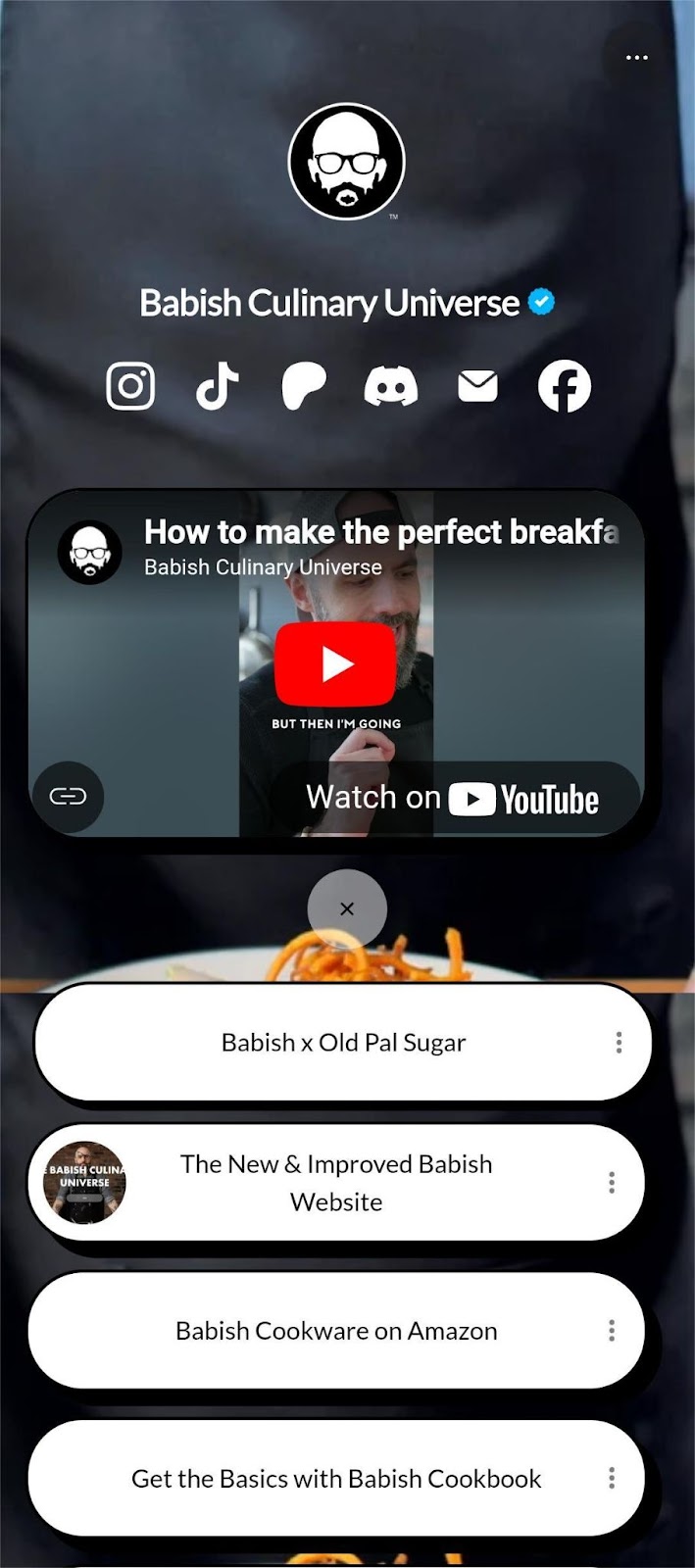
Category: Bio links

Browse blogs about bio links – tools, design, and strategies. Learn how to optimize bio links for traffic and conversions.

  • How to write a bio about yourself: A practical guide with examples + key tips for success

    How to write a bio about yourself: A practical guide with examples + key tips for success

    Imagine opening your profile page and instead of confidence, feeling a little “meh”. That tiny box for “About me” feels like a pressure cooker, especially when a single glance might decide if someone keeps reading. 

    Studies show recruiters often spend only 6–8 seconds on that first scan before moving on. Suddenly, not getting noticed doesn’t feel like your fault, but a flaw in the way you’ve presented yourself.

    The good news?

    A sharp, honest, well-written bio can turn those few seconds into something powerful, a reason for someone to pause, care, and want to learn more.

    In this post, you’ll get easy-to-follow guidance and real examples to help you write a bio that makes people stop scrolling.

    Now, let’s begin by asking: what exactly counts as a “bio”?

    What is a bio?

    A “bio”, short for “biography” or “personal bio”, is a concise summary of who you are: your background, what you do, and what makes you different.

    In practice, a bio gives readers (whether employers, clients, or new contacts) a quick but meaningful snapshot of your life and professional identity.
    What is a bio

    The main objective of a bio is to build a strong first impression and to communicate your skills, values, and personality quickly, so someone reading it immediately understands who you are and why you matter.

    A good bio matters because in our fast-scrolling digital world, people often decide within seconds whether to keep reading or move on. A sharp, great bio helps you stand out and feel real, not just another name among many. 

    Remember, a bio isn’t just about listing credentials; it’s about making a connection, showcasing your uniqueness, and inviting further engagement.

    With that in mind, let’s look at the four essential elements that make a bio work, and how you can structure yours to hit all the right notes.

    What are the four elements of a bio?

    When you sit down to write your bio, make sure it touches on these core elements:

    1. What you do: Describe your role or what you currently do (job, business, creative work, whatever applies).
    2. Your “why”: Share what drives you: your purpose, your motivation, or what you hope to achieve.
    3. Your qualifications: Mention relevant credentials, experience, skills, or achievements that show you’ve got what it takes.
    4. Personal details about yourself: Add a little personal flavor: hobbies, interests, background, or anything that shows you’re human and relatable.

    With those in place, your bio can be clear, compelling, and memorable!

    Two primary types of bios

    When you go to write a bio about yourself, it usually falls into one of two main types, i.e., the “personal bio” or the “professional bio”. Each serves a slightly different purpose depending on who you’re talking to and what you want to communicate.

    Personal bio

    A personal bio is a more relaxed, informal snapshot of who you are as a person, not just what you do professionally, but what makes you, actually you. It’s often used on social media profiles, personal websites, or anywhere you want to share a bit of your personality.

    What it typically includes:

    • A personal touch: Your voice, maybe a little humor or warmth.
    • Personal background info: Where you’re from, what you care about, what shapes you, etc.
    • Accomplishments & hobbies/interests: Things you’re proud of, hobbies, passions, side-projects, etc.
    • A sense of your personal brand/profile and your “value proposition”: What kind of person you are, what you stand for, what makes you unique or relatable.

    Personal bio example:

    “Hi — I’m Sara, a freelance writer based in Los Angeles who’s passionate about storytelling and cozy cafés. When I’m not typing away, you’ll catch me wandering through bookstores, scribbling poetry on the back of receipts, or experimenting with recipes I found on old family recipe cards. I believe everyone has a story worth telling.”

    This kind of bio doesn’t aim to list every credential. Instead, it aims to give a sense of you as a human being, to make someone feel like they already know you a little.

    Professional bio

    A professional bio is a more formal, polished introduction of your professional identity. It is designed for work contexts, portfolios, LinkedIn profiles, job applications, or anywhere you want to present yourself in a “business-ready” light. It focuses on what you do, what you’ve done, and what you bring to the table.

    What it typically includes:

    • Your current role or job title (or area of expertise, if freelancing or self-employed).
    • A professional profile: A brief statement summarizing who you are professionally and what your main strengths or specializations are.
    • Your core competencies & skills: Things you excel at, tools you use, domains you’re familiar with.
    • Academic background (if relevant): Degrees, certifications, or other credentials that support your expertise.
    • Professional affiliations or past employers (when relevant): To give context to your experience.
    • Contact information: Especially useful if the bio is on a portfolio site or a freelance profile, so that people can reach out easily.

    Professional bio example:

    “James Archer is a Software Engineer specializing in front-end development based in New York, USA. With a B.Sc. in Computer Science from Stanford University and over five years of experience building responsive web applications, he has helped startups and small businesses bring their ideas to life online. His core skills include JavaScript, React.js, and UI/UX design. In his free time, James mentors junior developers and contributes to open-source projects. If you’d like to collaborate or learn more, he’s reachable at james.archer@example.com.”

    This kind of bio aims to quickly convey credibility, competence, and professionalism, giving someone a clear sense of who you are in your work life.

    Note: Choosing between a personal bio and a professional bio (or having both) depends on the context and audience. If you want to make a human connection, go personal. And, if you want to highlight your career and what you have to offer, go professional.

    Also read: How to write a professional bio: best tips and tools

    How to write a bio about yourself template

    When you sit down to write a bio, having a simple “template” helps you get all the key pieces in place so you don’t overthink it. 

    Below are two go-to templates, one for a formal context (professional bio) and one for a more personal or social-media context (personal bio).

    Professional bio template (3rd person)

    [Full Name] is a [current role/job title] at/in [company or organization, or area of work]. With [number] years of experience in [field or domain], [Last Name] has [mention one or two key accomplishments or strengths, relevant skills, or core competencies]. [He/She/They] holds a [degree or qualification, if relevant] from [institution/university], and is skilled in [list of relevant skills/areas of expertise]. Outside work, [Last Name] enjoys [a personal interest or hobby] — a touch that brings balance to [his/her/their] professional life.

    Why it works:

    • Uses third-person, which makes it feel objective and polished.
    • Starts with name + role, a quick clarity for readers.
    • Gives credentials, strengths, and a hint of personality for relatability.

    Personal/social media bio template (1st person)

    I’m [first name, last name], a [your job/title or main passion] based in [city or region]. I love [mention what you enjoy doing — passions or hobbies]. By day, I [short summary of what you do or what you’re focused on professionally or personally]. Recently, I [one accomplishment or highlight]. When I’m not working, you’ll usually find me [something you enjoy — hobby/interest].

    Why it works:

    • First-person feels warm and direct, as if you’re talking to a friend.
    • Keeps it short and focused; just enough info to show who you are.
    • Makes space for both what you do and who you are, your passions, your voice.

    6 key steps to write a bio about yourself that gets everyone’s attention

    Here’s a simple yet solid roadmap you can follow to write a bio that feels real, captures attention, and does what you want it to do.

    Steps to write a bio about yourself

    Step #01: Know your audience & purpose

    Before writing a bio, figure out who will read it and why you’re writing it. Are you sharing a personal story on social media? Or writing a professional bio for LinkedIn or a portfolio? The tone, length, and details you include will change depending on your audience and objective.

    Step #02: Start with the essentials

    Begin with the important basics, i.e., your name (or identity), what you do (role/profession/main focus), and if relevant, where you are based or what field you specialize in. This gives readers clarity right away about who you are.

    Step #03: Highlight relevant achievements

    Share a few of your most meaningful accomplishments, such as major projects, successes, awards, or milestones. This shows you’re capable and gives credibility. But don’t overload with every detail; pick what’s most relevant to the context.

    Step #04: Add a personal touch

    Let a bit of your personality shine through! Mention hobbies, passions, values, or something that reveals “who you are beyond your work”. This helps make you relatable and often memorable.

    Step #05: Include a call-to-action (CTA)

    Especially if your bio serves a professional or public purpose, end with a clear invitation or CTA: maybe a link to your portfolio, your contact info, or an encouragement to connect or follow. This guides readers on what to do next.

    Step #06: Proofread & refine

    Finally, check everything. Make sure grammar and spelling are correct, the structure flows, and the tone matches your goal. You can also use an online grammar checker for even more precise and accurate outcomes.

    A clean, polished text reflects well on you; sloppy mistakes can undermine even a great bio. So, be very careful!

    By following these steps, you’re much more likely to write a bio that not only gets attention but also makes people want to connect or learn more about you.

    “How to write a bio about yourself” examples for different contexts

    Writing a bio isn’t one-size-fits-all. What works for a job application might not suit a dating app, a conference, or a website. 

    Below are example-focused approaches for different scenarios, useful as inspiration depending on where your bio will appear.

    How to write a bio about yourself for work

    When your bio appears on a company profile page, internal directory, or team page, keep it professional yet approachable. Mention your role, what you bring to the table, and a little personality.

    Example:

    John Adams is a Senior Software Engineer at TechNova Solutions, where he leads web-app development using React and Node.js. With over six years of experience building scalable applications for fintech startups, John has helped launch three successful products serving thousands of users. He holds a B.Sc. in Computer Science from Harvard University and enjoys mentoring junior developers in his spare time. Outside work, he’s an avid runner and book lover.

    How to write a bio about yourself for a new job

    For a new job, your bio should clearly introduce you (your background, what you’ll do, and what you aim to bring to your new role). Please, keep it concise and forward-looking.

    Example:

    I’m Anna Thomas, the new Marketing Associate at BrightWave Digital. Over the last three years, I’ve helped two small e-commerce brands grow their social media presence by 50% through content strategy and targeted ads. I’m passionate about storytelling with data and excited to help BrightWave reach wider audiences. Outside work, I love exploring local cafés and photography.

    How to write a bio about yourself for a conference

    For a conference bio, the aim is credibility and relevance. Focus on your expertise, role, and what you bring to the talk or event, usually in a short, sharp paragraph.

    Example:

    Dr. Nadia Rahman is a public-health researcher specializing in maternal care in South Asia. As lead researcher at HealthBridge Institute, she oversaw a 2024 study on community-based prenatal programs, influencing policy reforms in rural districts. Dr. Rahman holds an MPH from Aga Khan University and has published in peer-reviewed journals. She will speak on “Community Health: Challenges & Innovations in 2025.”

    How to write a bio about yourself for a presentation

    A presentation bio is similar to a conference bio but slightly more personal, enough to introduce yourself and build rapport, while still professional and relevant to the topic.

    Example:

    Hi, I’m Ashley Cole — a Marketing Manager at VisionTech. I specialize in digital campaigns and have helped increase brand engagement by 35% across social platforms. With a degree in Business Administration from the University of Michigan, I combine data-driven strategy with creative thinking. When I’m not brainstorming campaigns, you’ll find me sketching landscape art or playing tennis.

    How to write a bio about yourself for an award

    If you’re writing a bio for an award (for a nomination, announcement, program, or press release), highlight your achievements, impact, and credentials clearly and proudly, while staying humble and factual.

    Example:

    Aisha Malik is a civil rights advocate awarded the 2025 Humanitarian Impact Award for her work with Refugee Aid Foundation. Over the past five years, she has supported over 2,000 displaced families, coordinated legal aid projects, and raised public awareness through workshops and campaigns. Aisha holds an LL.M. in Human Rights Law from Karachi University. She continues to dedicate herself to social justice and community development.

    How to write a bio about yourself for social media

    For social media, brevity and tone matter the most. Whether you use first-person or third-person, keep it friendly, concise, and reflective of how you want to be perceived.

    Example (first-person, Twitter/Instagram style):

    I’m Zara — freelance graphic designer & cat mom 🐾 | I help small businesses stand out with bold visuals | Lover of coffee, travel & vintage vinyl

    How to write a bio about yourself for a website

    On a personal website, you have more space and flexibility. Combine your professional identity, background, values, and personal story to give readers a fuller sense of who you really are.

    Example:

    Hi, I’m Rachel — a UI/UX designer based in Texas. For over 7 years, I’ve designed intuitive mobile apps for fintech and ed-tech companies, with a focus on accessibility and user-centered design. I hold a B.Des. from California College of the Arts and have led design teams across four major projects. I believe great design empowers people — and in my free time, I love sketching, cycling, and exploring local history.

    How to write a bio about yourself for a dating app

    A dating-app bio should be short, genuine, and show a bit of personality. Mention your interests, what you care about, maybe a light hint of what you’re looking for, all in a friendly tone.

    Example:

    Beckham, 28 — AI engineer by day, foodie & weekend-hiker by heart. I try new recipes, love exploring Oregon’s street food spots, and spend Sunday mornings with a good book. Looking for someone who loves laughter, honest talks & adventure.

    Essential tips for writing a successful bio about yourself

    Writing a bio can seem simple, but a few smart habits can make the difference between a bio that feels generic and one that truly stands out. 

    Here are some friendly, useful guidelines to keep in mind as you craft your own!

    Tip #01: Don’t overthink it

    Overthinking often leads to overloading your bio (too many details, too much fluff). Start simple, and jot down what’s most important; then refine it. A clear, straightforward bio often speaks louder than one weighed down with too many ideas.

    Tip #02: Understand the fundamentals

    Before you write, know what your bio needs: who you are, what you do, and why someone should care. Having that foundation ensures your bio stays focused and meaningful, rather than wandering off into unrelated info.

    Tip #03: Be honest (no sugar-coating)

    Always keep in mind that authenticity builds trust to the highest degree. Use your real achievements and true interests, and don’t wrap exaggerations in fancy words. People appreciate honesty more than overselling.

    Tip #04: Avoid exaggerating experience

    Claiming you’re more experienced or qualified than you really are can backfire at times. Overstating credentials may catch up with you later. It’s better to be realistic, clear, and modest, because credibility matters, guys!

    Tip #05: Be concise & brief

    Brevity is exceptionally helpful when writing a bio. Many readers skim, so make sure every sentence counts. A tight, to-the-point bio (ideally a few sentences or a short paragraph) often works best.

    Tip #06: Don’t underestimate yourself

    If you possess real skills, have genuine achievements or interests, include them for sure. Never downplay what you’ve done honestly. Your unique experiences and strengths are part of what makes you interesting.

    Tip #07: When hesitant, acquire help from a professional

    If you’re struggling, maybe your thoughts feel jumbled, or you’re unsure how to express something, getting help from a peer, mentor, or professional writer can give clarity. A fresh perspective can turn a rough draft into something polished and influential.

    Tip #08: Review & update your bio periodically

    Since your life, skills, and goals evolve with the passage of time, your bio should too. Make it a habit to revisit and update it whenever something important changes (new job, new skills, new interests), so it always reflects what you’re doing at present.

    Note: Putting these tips into practice helps you write a bio that’s honest, sharp, and reflective of who you really are!

    Read also: How to write a short bio: Great short bio examples + useful tips

    Wrapping up

    Writing a solid bio about yourself doesn’t have to feel confusing anymore. Once you understand the basics (keeping it honest, transparent, and trustworthy to who you are), the process becomes much easier. 

    No matter if it’s for work, social media, a conference, or even a dating app, the goal is the same: show people who you are in a simple, genuine way. With a bit of practice and regular updates, your bio can become one of your strongest personal tools.

    If you want to take things a step further, give Replug.io a try today. It now offers a bio link generator to help you build clean, custom bio pages that connect everything you want to share hassle-free!

    Frequently asked questions

    How do I write about myself?

    Start by thinking about the key things you want people to know: who you are, what you do, and what makes you “you”. Then put those into a few simple sentences. That’s all!

    How do you write a killer bio?

    Focus on clarity and honesty. Say what you do, why you do it, or what you care about, and maybe a standout detail about you. Keep it short but strong!

    How to start writing a personal bio?

    Begin with a simple introduction: your name, your role or primary interest, and perhaps one quick detail about what drives you or what you care about. Then build from there.

    How long should my bio be?

    As a rule of thumb, short bios work best for social media (1–2 sentences or ~50–100 words), whereas more extended bios are well-suited for websites or detailed profiles (around 100–250 words).

    What’s the best way to write a bio and short description about myself?

    Use plain, clear language, mention the essentials (role, skills, what you care about), and add a slight personal touch. Edit to stay concise and make sure it fits the platform and audience.

    Should I use first or third person when writing a bio about myself?

    It depends on context: 

    – First person (“I …”) feels friendly and personal. Suitable for social media or personal sites.
    – Third person (“She/He/They …” or name) feels more formal. Better option for official or professional profiles.

    How can I make my bio sound more like ‘me’ without seeming unprofessional?

    Add a small personal detail like a hobby, a passion, or a value, after the main professional info. That subtle human touch keeps it honest, yet still professional.

    How can I create a strong bio without significant achievements or awards to list?

    Focus instead on your values, passions, what you enjoy or believe in, and any skills or qualities you have. A genuine story can matter more than titles or awards, believe it.

    How frequently should I update my bio, and what’s the simplest way to keep it up‑to‑date?

    Check your bio whenever something changes such as new job, skills, projects or major life shifts. As a rule, review it every 2–3 months so it stays up-to-date and accurate.
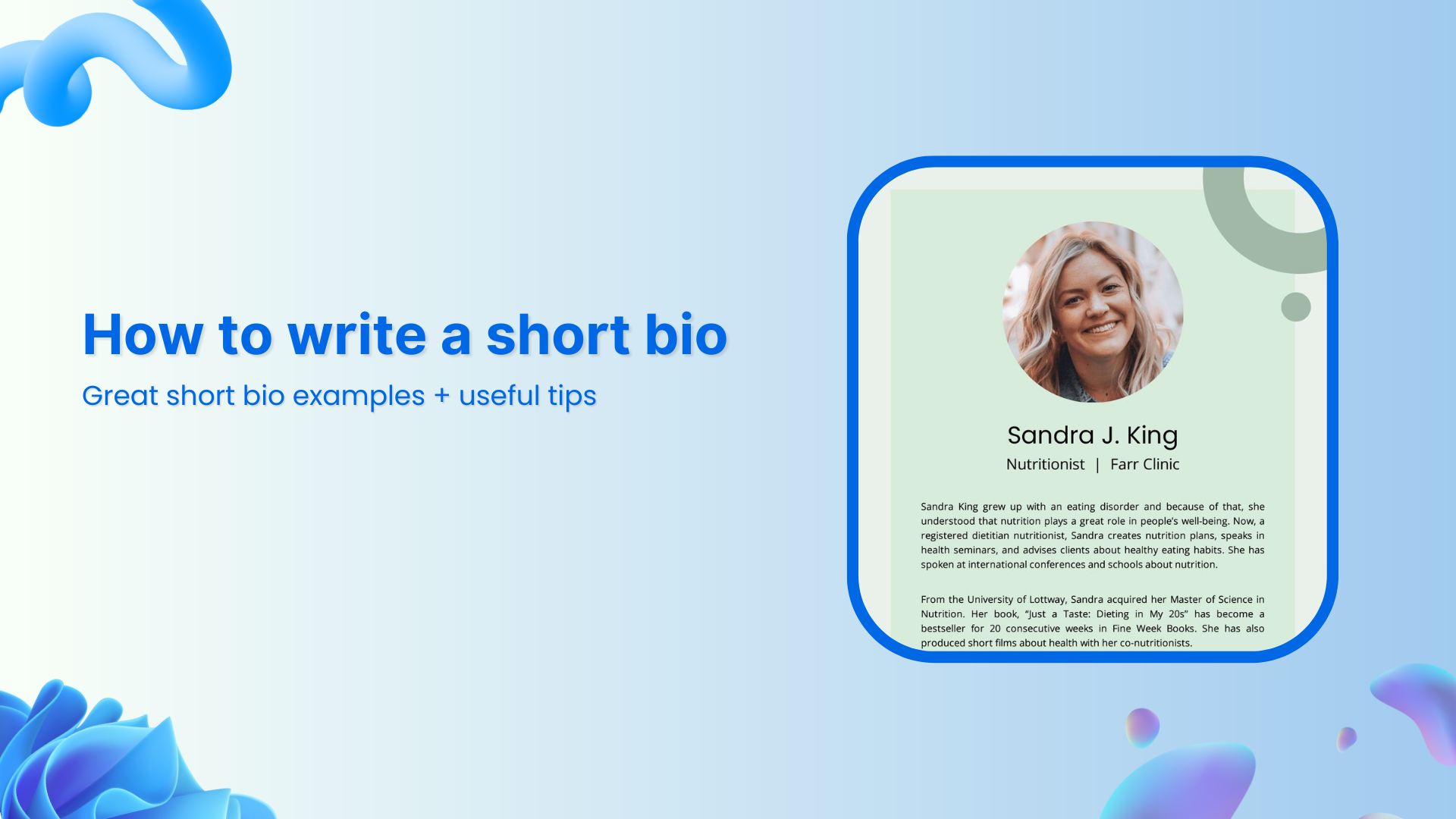
  • How to write a short bio: Great short bio examples + useful tips

    How to write a short bio: Great short bio examples + useful tips

    Do you ever stare at a blank screen, trying to write just a few lines about yourself, and end up deleting more than you type? That’s a super common problem. 

    In fact, many people struggle to craft a bio that feels genuine and packs a punch. The madness is quite real. A weak or vague bio can make you sound forgettable, costing you clicks, connections, or even job offers.

    But here’s the good news!

    With a little strategy, you can write a short bio that boosts your credibility, showcases your personality, and holds attention. 

    In this post, we’ll guide you step by step through great short bio examples and actionable tips. First up, let’s take a brief overview of what exactly a short bio is.

    So, let’s get started!

    What is a short bio?

    A short bio is a tight, focused summary of who you are, what you do, and why it matters. Unlike a complete resume or CV, it tells your story in just a few sentences, typically in the first or third person.

    Its main goal is to introduce you in the most memorable and relevant way quickly. You might see it on personal websites, LinkedIn profiles, author bylines, or event speaker pages.

    What is a short bio

    A well-crafted short bio isn’t just a list of facts. It humanizes you, highlights your strengths, and gives readers a reason to connect with you. 

    As personal branding grows ever more critical, especially when 70% of employers check social media profiles before hiring, your bio becomes a tiny but powerful part of your professional identity.

    When do you need a short bio

    You’ll want a short bio in a bunch of everyday situations:

    • On your website or portfolio: To welcome visitors and give them a glimpse of who you are and what you do.
    • LinkedIn, social media, or networking profiles: It’s your digital handshake.
    • At events: Whether you’re speaking, contributing, or just being featured, you’ll often need a bio to introduce yourself.
    • In content bylines or guest posts: When you write for someone else’s blog or publication, a short bio shows readers why they should trust and follow you.

    What should be included in a short bio: Key elements discussed

    A strong short bio hits all the right notes, giving a quick, well-rounded snapshot of who you are, what you do, and why it matters. 

    Here are the essential pieces to include:

    • Your name: Start by clearly stating who you are. That’s your identity and the foundation of everything else.
    • Job title or workplace: Add your current role or company to ground your bio in your professional life.
    • University degree & other qualifications: Mention your education or certifications to highlight your background and expertise.
    • Hometown or city of residence: A small detail like where you’re from adds a human touch and context for your audience.
    • Personal or professional goals: Include what you’re aiming for. This shows direction and ambition.
    • Mission statement & values: What drives you? A brief line on your core beliefs or purpose makes your bio more meaningful.
    • A relevant professional achievement, milestone, or accomplishment: Highlight something concrete. It can be a project, an award, or a result you’re proud of.
    • Skills & area of expertise: Be specific about what you’re good at. This helps people understand where you excel.
    • Personal interests & hobbies: Sprinkle in a hobby or passion. It makes you more relatable and shows there’s more to you than just work.
    • Your LinkedIn profile, social media accounts, or other contact information: Finally, give people a way to reach out or connect, so your bio doesn’t just end; it opens doors.

    Each of these pieces helps build a bio that’s professional, personal, and memorable, without feeling like a resume stuffed into a paragraph.

    How do you write a good short bio?

    Writing a great or compelling short bio is really about finding the right balance. You want it to be professional, but also feel like you.
    How do you write a good short bio

    Here’s how to do that, step by step! Check out the key components:

    1. Choose a voice: First, decide whether you’ll write in first person (“I am …”) or third person (“Jane Doe is …”). This choice sets the tone for everything that follows.
    2. Introduce yourself: Begin with a quick, brief line that states your name and gives a sense of who you are.
    3. State your company or brand name: If you work for or run a company, mention it. It adds context and credibility.
    4. Explain your current professional role: Describe what you do in your job or business, so people immediately understand your value.
    5. State your philosophy: Share the mission, values, or work philosophy that motivates you. It helps people connect with why you do what you do.
    6. Highlight professional achievements, skills, & expertise. Include one or two standout wins or key strengths that set you apart, without turning into a resume dump.
    7. Discuss your passions & core values: Let readers in on what matters to you personally and professionally. This is what makes your bio meaningful.
    8. Mention your personal interests & goals. A line about what you love doing outside of work, or where you’re headed, makes your bio feel human.
    9. Add a personal touch: No matter if it’s an odd hobby, a fun fact, or a short anecdote, this makes you memorable.
    10. Include a call to action: Wrap up by inviting people to connect. Link to LinkedIn, your website, or encourage them to reach out.

    Putting these together will give you a short bio that’s polished and professional, yet warm, honest, and very you.

    Read also: What does link in bio mean: All you need to know

    General short bio template

    Here’s a simple, basic, and flexible template you can alter effortlessly. Use the “blanks” as guides, and just fill in your personal details to make it your own.

    [Your Name] is a [Your Job Title/Role] at [Your Company/Organization]. [He/She/They] specializes in [Your Key Skill/Area of Expertise] and has achieved [Your Most Notable Achievement]. In [his/her/their] spare time, [he/she/they] enjoys [A personal hobby or interest]. You can connect with[him/her/them] via [Contact Information/Link].

    Short bio template for students

    [First Name, Last Name] is a current [year] student studying [major] at [university]. [He/She/They] is actively involved in [campus activity or club], where [brief description of role or achievement]. During a recent internship at [organization], [he/she/they] worked on [project or task], gaining experience in [skill or area]. [He/She/They] hopes to build a career in [industry or field] and is passionate about [personal interest or goal]. In [his/her/their] free time, [he/she/they] enjoys [hobby] and connecting with others on [LinkedIn or other social media platforms].

    Short bio template for working professionals

    [First Name, Last Name] is a [job title] at [company name], with [number] years of experience in [industry or specialty]. [He/She/They] focus on [core responsibility or niche], and have helped [type of clients or audience] by [key achievement or frequent value delivered]. [His/Her/Their] philosophy is [brief mission or value statement], and [he/she/they] brings strengths in [skill 1], [skill 2], and [skill 3]. Outside work, [he/she/they] is passionate about [interest or cause], and you can reach [him/her/them] via [LinkedIn, website, or email].

    Short bio template for a gap in employment

    [First Name, Last Name] is a [previous job title or role] with [number] years of experience in [industry]. After taking time off to [brief reason for gap — e.g., upskill, care for family, personal development], [he/she/they] focused on [what you did during the gap, like courses, volunteering, projects]. During this period, [he/she/they] strengthened [his/her/their] skills in [skill or area] and completed [relevant achievement or learning]. Now, [he/she/they] is excited to return to [industry/role] and bring [his/her/their] unique perspective and experience to [type of role or organization]. Feel free to connect with [him/her/them] on [LinkedIn or other contact].

    10+ top-notch “how to write a short bio” examples

    Writing a short bio might seem tricky at first, but it’s a great way to highlight your achievements and personality in a concise, effective way. 

    Doesn’t matter if you’re writing one for yourself, someone else, or a professional context, the goal is to keep it relevant, engaging, and to the point. 

    Here’s how to approach writing short bios for different scenarios.

    How to write a short bio about yourself

    When writing a short bio about yourself, focus on the essentials: who you are, what you do, and what makes you unique. 

    You don’t need to write your life story; just a brief summary that showcases your expertise, interests, or accomplishments. A good format to follow is:

    • Your name and current role or major project
    • One or two sentences about your professional background, key skills, or current focus
    • A personal touch, such as hobbies or passions

    Example:

    “Hi, I’m Sarah Lee, a digital marketing strategist with over 5 years of experience helping brands grow online. I specialize in social media campaigns and SEO. Outside of work, I love hiking and exploring new coffee shops.”

    How to write a short biography about myself

    A short biography about yourself is slightly more formal than a casual bio, often focusing on your professional history and key achievements. Here, you want to balance humility with confidence. 

    Keep it brief but impactful, summarizing the highlights of your career, education, or other noteworthy accomplishments.

    Example:

    “I’m John Smith, an award-winning journalist with a passion for investigative reporting. Over the past decade, I’ve worked for major publications like The New York Times and BBC News. I hold a degree in Journalism from Columbia University, and my work focuses on political analysis and social justice.”

    How to write a short biography about someone

    When writing a bio about someone else, your job is to capture their professional essence and achievements without over-elaborating. Keep the tone respectful, and focus on their key milestones, what they do, and why they stand out.

    Example:

     “Dr. Emily Zhang is a renowned environmental scientist known for her groundbreaking research on renewable energy solutions. With a PhD from MIT and over 15 years of experience, she has authored several influential papers and currently leads a research team at GreenTech Innovations.”

    How to write a short bio for social media

    Social media bios need to be quick, catchy, and aligned with your personal brand. It’s all about making a strong first impression in a limited space. 

    For platforms like Twitter or Instagram, you may want to include a mix of professional titles, personal interests, and a hint of humor or personality.

    Example:

     “Marketing pro | Coffee addict | Lover of good books & bad puns | Helping brands tell their story | Always up for a challenge.”

    How to write a short bio for work

    Work bios are typically found on company websites or in team directories, so they should be professional but approachable. Highlight your role, skills, and what you bring to the team, without going overboard with personal details.

    Example:

     “Jane Davis is a Senior Product Manager at TechSoft, where she leads product development for the company’s flagship software. With a background in engineering and a passion for innovation, Jane works closely with cross-functional teams to deliver solutions that meet customer needs.”

    How to write a short bio for a new job

    When starting a new job, a bio helps introduce you to colleagues, clients, or customers. Focus on your previous experiences that are relevant to the role you’re stepping into, and mention what excites you about your new position.

    Example:

     “Alex Carter has recently joined TechLink as a Software Engineer, bringing with him 3 years of experience in full-stack development. He is eager to collaborate with the talented team at TechLink and contribute to building innovative web applications.”

    How to write a short bio for a presentation

    For a presentation, your bio should quickly establish your credibility on the topic at hand. Keep it short, but highlight relevant qualifications or experience that make you an expert on the subject.

    Example:

     “Maria Gonzalez is a cybersecurity expert with over 10 years of experience helping businesses secure their digital assets. She has consulted for Fortune 500 companies and is a regular speaker at cybersecurity conferences worldwide.

    How to write a short bio for a conference

    Conference bios should be concise but informative, highlighting your expertise in the field and any notable accomplishments. Since attendees want to know why you’re speaking at the event, mention key achievements that are relevant to the audience.

    Example:

    “Dr. Brian Lee is a leading AI researcher at GlobalTech Labs and a keynote speaker at this year’s AI Innovation Conference. With a PhD in Machine Learning from Stanford, his work focuses on the ethical implications of AI in healthcare.”

    How to write a short bio for a company

    When writing a bio for a company, focus on the company’s core values and your specific role or contribution to its success. It’s a good place to mention any leadership roles or initiatives you’re involved in.

    Example:

     “Susan Mitchell is the Chief Marketing Officer at GreenCo, where she oversees global marketing strategies. Her leadership has been instrumental in expanding GreenCo’s brand presence, driving record growth in the past two years.”

    How to write a short bio for a personal website

    A short bio on your personal website should feel a bit more personal, reflecting both your professional and personal sides. It’s an opportunity to showcase your personality and explain what drives you in your work or life.

    Example:

    “Hi, I’m Michael Brown, a freelance graphic designer passionate about creating impactful visual identities. I work with startups to help them tell their story through design. When I’m not designing, you’ll find me playing guitar or traveling to new places.”

    How to write a short bio for a marketing professional

    A marketing professional’s bio should highlight relevant industry experience, skills, and achievements. Emphasize your role in growing businesses or developing successful campaigns, and don’t forget to mention any certifications or expertise in specific areas of marketing.

    Example:

     “Rachel Thomas is a digital marketing strategist with 7 years of experience helping businesses scale through data-driven campaigns. She specializes in content marketing, SEO, and analytics, and has helped over 50 brands increase their online presence.”

    How to write a short bio for an executive

    Executive bios should be more formal and reflect the leadership role the person holds within the organization. Focus on their career trajectory, key accomplishments, and how they’ve contributed to the company’s growth.

    Example:

     “John Roberts is the CEO of InnovateTech, where he has led the company through significant growth, expanding into international markets and increasing revenue by 200% over the past 5 years. With over 20 years of leadership experience, John is a passionate advocate for innovation in the tech industry.”

    Writing a short bio doesn’t have to be complicated. No matter if it’s for a social media profile, a professional context, or a personal website, just focus on the essentials and be authentic. With the right balance of information and personality, you’ll have a bio that truly represents you!

    Short bio vs. professional bio: Major differences

    Here’s a quick breakdown of how a short bio differs from a professional bio so that you can pick the right style for your needs:

    AspectShort bioProfessional bio
    LengthVery brief, usually 50–150 words or 3–5 sentences.More detailed, often 150–300 words, though full versions can go up to 500+.
    Purpose
    A quick snapshot to introduce yourself in limited-space contexts (e.g., social media, conference programs, author bylines).
    A fuller narrative of your career. Ideal for personal websites, company “About” pages, or professional portfolios.
    Content focusFocuses on key points: your name, current role, core expertise, and a highlight or two.
    Goes deeper: includes past experience, major achievements, philosophy, and sometimes personal details.
    ToneShort, punchy, and often conversational.More formal, though still friendly, especially if it’s for your brand or company.
    UsageGreat for bios on LinkedIn headings, email signatures, social media, or speaking slides.
    Used in professional settings like company “Team” pages, press releases, or detailed “About Me” sections.

    In short: Use a short bio when you need to introduce yourself fast and leave a strong first impression. Whereas, use a professional bio when you want to tell more of your story, highlight achievements, and show your personality in a richer way.

    Also read: How to write a professional bio: best tips and tools

    Why writing a short bio feels hard: What to do to make it easier

    Crafting a short bio often feels tougher than it looks, because you’re trying to sum up your whole story in just a few lines, and that can make you overthink what to include or leave out.

    Common challenges:

    • You’re too close to yourself, so it’s hard to know what parts of your journey actually matter.
    • It’s a delicate balance: You want to sound capable and professional, but also approachable, and that tone trip can be tricky.
    • Figuring out your audience: If your bio is everywhere (LinkedIn, your website, a conference), you risk writing something too generic that doesn’t truly speak to anyone.
    • Editing can be brutal: Trimming language, removing filler, and still keeping meaning is exhausting.

    How to make it easier:

    • Start with perspective: Try writing your bio about someone else as if it’s your colleague. This can help you detach and pick the most important bits.
    • Be clear on your goal: Ask yourself why this bio exists. Do you want to connect with clients, impress hiring managers, or just show your personality? That clarity helps you pick what to highlight.
    • Focus on what matters: Choose the most substantial achievements and keep personal touches, but don’t overload. Remember, the best bios are concise and relevant.
    • Use your real voice: Ditch the buzzwords and write like you speak. That makes your bio feel genuine and authentic.
    • Get feedback & edit: Write a draft, take a break, then come back to alter. Ask a friend or colleague to read it, since fresh eyes catch what you might miss.
    • Update after a period: Your bio isn’t set in stone. As things change, such as new roles, big wins, and new passions, come back and tweak it.

    That said, you don’t have to get it perfect on the first try. A short bio is a living, breathing thing. Write something, test it out, and improve it as you grow.

    Quick tips for writing a short bio: Best practices to follow

    Writing a sharp, memorable short bio doesn’t have to be a headache. Here are some friendly, practical tips to keep it effective and real.

    • Start by keeping it brief & concise. Every word counts, so cut the fluff and get to the point.
    • Be authentic & honest about who you are. People connect more when you don’t overinflate things.
    • Always review any guidelines (e.g., character limits or tone) for the platform where your bio will appear. This keeps you on track. 
    • Tailor your content accordingly to match that platform. For instance, LinkedIn might need a different feel than Instagram.
    • Think about your target audience as you write. What do they want to know, and what kind of tone will resonate with them?
    • Pick a point of view. Many prefer writing in the third person for professionalism, especially in formal settings.
    • Look at examples for inspiration, but don’t copy as it is; make it yours. 
    • Focus on clarity over creativity. Being understood is more important than being jazzy.
    • Add humor when it feels natural, but don’t force jokes. A small personal line can make you human.
    • Always include a link to your website or portfolio, so people can learn more about you easily. 
    • Adapt your bio for different platforms. Don’t just copy-paste the exact text everywhere. It can give a monotonous feel.
    • Mention relevant hobbies so you come across as well-rounded, but don’t go overboard.
    • Consider using a template if you’re stuck. It can help you structure things neatly. 
    • Use SEO smartly. Naturally, incorporate 1–2 relevant keywords that match your field.
    • Consider ending with a CTA. Invite people to connect or check your site.
    • And finally, proofread & edit thoroughly. Typos or awkward phrasing can pull people out of your story.

    Note: Following these points will help you craft a bio that’s polished, personal, and ideally suited for your goals.

    Wrapping up!

    Writing a short bio doesn’t have to feel like a tedious task anymore! 

    Once you know what to include, how to structure it, and how to keep things clear and honest, it becomes a simple way to introduce yourself with confidence. 

    Whether you’re a student, a pro, or someone rebuilding their career story, the right bio helps people understand who you are and what you bring to the table. 

    So take your time, follow the steps, and craft something that actually sounds like you!

    And suppose you want to level up your online presence, give Replug a try now. It’s one of the best custom URL shorteners for creating branded short links, and it even offers a bio links feature to help you build clean, custom bio pages that connect all your content and offers.

    Frequently asked questions

    What is a small bio or a mini bio?

    A mini bio is an ultra-compact introduction, usually one or two sentences, that sums up who you are, what you do, and why it matters. It’s perfect for social media profiles or bylines.

    What is a 3-line bio?

    A 3-line bio typically covers your name and role, your mission or philosophy, and a key achievement, allowing you to present a quick yet complete snapshot.

    Here’s a clean, 3-line bio example:

    “I’m Ashley Cole, a product designer passionate about creating intuitive user experiences. My mission is to make complex tools simple and accessible for everyone. I helped design the XYZ app, which now serves over 200,000 users monthly.”

    What makes a great short bio?

    A great short bio is transparent, authentic, and focused. It highlights your role or value, touches on your personality or mission, and makes people want to learn more.

    How do I write a short bio about myself?

    Here’s how to do it:

    1. Start with your name and role,
    2. Then, mention one or two strengths or achievements, 
    3. Finally, add a personal note or value to humanize it.

    Which one to use, first-person or third-person, while writing a short bio?

    First-person (“I”) works well on personal sites or social media for a conversational tone. Third-person (“She/He/They”) feels more formal and objective, so it’s often used in speaker profiles or press pages.

    What are the dos and don’ts of crafting a short bio?

    Do’s:

    Be authentic: Write in your own voice and don’t pretend to be someone you’re not.
    Highlight your current role and what you do: Give readers a clear idea of your professional identity.
    Share what drives you: Include your mission, values, or philosophy to give your bio purpose.
    Add a personal touch: Mention a hobby or detail that reveals who you are beyond your work.
    Proofread carefully: Check for typos, grammar mistakes, and clarity.

    Don’ts:

    Don’t exaggerate or lie: Stick to real, verifiable facts.
    Don’t make it too formal or stiff: Your bio should be professional, but not robotic.
    Don’t overload with details: Avoid listing every accomplishment; focus on the most relevant ones.
    Don’t use overused buzzwords: Words like “innovative” or “disruptive” without context don’t add real value.

  • How to use linktree to promote your social media presence

    How to use linktree to promote your social media presence

    It only takes a few seconds for someone to decide if they’ll click your link or not. 

    Social platforms like Instagram and TikTok limit the number of links you have in your bio; but what if you have multiple offers, pages, or products to share? This is where knowing how to use a linktree (bio link or link in bio) on your social media profile, becomes essential.

    Done right, your linktree becomes a mini home page that drives clicks, engagement, and even sales, all in one place. In this guide, we’ll cover what a linktree is, why it matters for social media, its benefits, how to set it up effectively, and how tools like Replug can take your link management and marketing to the next level.

    Boost ROI with branded URLs - Replug dashboard showing performance metrics and branded URL creation
    Turn your bio links into click-boosting machines
    Check

    Drive up to more clicks than plain URLs

    Check

    Share multiple destinations with one link

    Create bio links free

    What is a linktree and why it matters for social media presence

    A linktree or “link in bio” tool allows you to create a simple, mobile-friendly landing page that houses multiple links. Instead of swapping out your single bio URL for every new campaign, you use one permanent link that directs followers to a list of all your important destinations.

    This solves the “one link” problem by creating a centralized hub for your audience. Whether they want to visit your website, read your latest blog, shop your store, or connect on other platforms, they can find everything in one organized space. This makes it easy for followers to find everything from your website and blog to online stores and affiliate links, all accessible from your Instagram link in bio or TikTok profile.

    Benefits of using a linktree for social media

    Using a linktree offers numerous benefits that can transform your social media presence from simply having followers to actively engaging and converting them into customers or fans. 

    Here’s why investing time in setting up and optimizing your bio link is so powerful:

    1. Centralizes your content and simplifies user experience

    A linktree creates a centralized hub where all your important URLs live together. This means followers don’t have to guess where to find your website, blog, store, or affiliate links. Everything is organized and accessible in one clean place.

    Here’s an example of Lilly Singh, a popular YouTube content creator. Her linktree page has a list of all her important links; from her Spotify Playlist to Amazon Storefronts:

    Lilly Singh linktree example

    2. Improves follower engagement and click-through rates

    When followers have multiple relevant options to explore, they’re more likely to engage with at least one of your links. This increases your overall click-through rate (CTR) compared to a single generic link.

    Take an online artist who links to their portfolio, commission page, and Behance. Fans who may not be ready to commission can still visit the portfolio or support on Behance, increasing total engagement. Here’s an example of Pascal Blanche:

    Pascal Blanche linktree example

    3. Boosts conversions and drives sales

    A linktree enables you to direct followers toward specific calls to action such as buying products, signing up for newsletters, or downloading resources. By placing your highest priority links at the top, you funnel your audience toward conversions more efficiently.

    Meow Meow Tweet, an ecommerce shop, placed a strong and unique call-to-action button as the first link, driving direct traffic and purchases.

    Meow Meow Tweet linktree example

    4. Builds brand consistency and professionalism

    Customizing your link-in-bio page with your brand’s colors, fonts, and logos reinforces your identity and professionalism. This consistency builds trust and encourages followers to engage with your links confidently.

    Brands that neglect this risk appearing generic or untrustworthy, which can reduce click rates. Here’s an example of the famous clothing brand Gap and how they use pastel blue throughout their branding:

    Gap linktree example

    5. Offers detailed tracking and data-driven insights

    Unlike static links, a bio link set up provides valuable analytics showing which links get the most clicks, the time of day followers engage, and where your traffic comes from. This data lets you understand your audience better and refine your social media and marketing strategies.

    For example, Walgreens, an online store, might discover that their “Weekly Deals” link gets more clicks in the evenings, prompting them to schedule product announcements or Instagram Stories for that time to maximize engagement.

    Walgreens linktree example

    6. Enables easy updates and real-time campaign management

    A linktree lets you update and reorder your links anytime without changing your bio URL. This flexibility means you can respond quickly to new product launches, promotions, or seasonal campaigns without confusing your followers with new URLs.

    For instance, a musician promoting a new album release, upcoming tour dates, and merch drops can update their linktree instantly to match the current focus. Here’s an example of Katy Perry’s bio link page. She can easily edit her tour dates without changing her bio link:

    Katy Perry linktree example

    7. Enhances cross-platform promotion and reach

    Your followers are spread across multiple platforms like Instagram, TikTok, X (Twitter), and even LinkedIn. Using a single linktree URL across all profiles creates a consistent user experience and maximizes your reach.

    A fitness coach, Alexia Clark, for instance, uses the same linktree URL on Instagram and TikTok, helping fans from both channels access workouts, nutrition plans, and coaching services seamlessly.

    Alexia Clark linktree example

    8. Supports affiliate marketing and influencer partnerships

    A linktree is ideal for affiliate marketers and influencers who want to share multiple product links without cluttering their captions or bios; especially useful for Amazon products. A clear, well-organized bio link page makes it easier for followers to shop and supports higher affiliate commissions.

    For example, Erica Taylor, a beauty influencer, places all their favorite product affiliate links on their linktree page, simplifying shopping for followers.

    Erica Taylor linktree example

    9. Reduces friction and builds trust with followers

    When followers see a neat, branded bio link page, it reduces doubts about clicking links. Using branded short URLs and customizing your page increases perceived legitimacy; especially important on platforms like Instagram, where phishing attempts can be common.

    Taylor Swift uses a branded bio link in her Instagram bio:

    Taylor Swift linktree example
    Boost ROI with branded URLs - Replug dashboard showing performance metrics and branded URL creation

    Go beyond generic link pages!

    Create custom bio links that truly fit your brand

    With Replug, you can create bio links that are unique, engaging, and built to convert.

    Start free trial

    Why Replug is the best choice to boost your linktree and social media presence

    While linktree setups help you organize your bio links, Replug takes it a step further by integrating advanced marketing features designed to maximize engagement, conversions, and brand growth.

    Branded short URLs for credibility and recall

    Replug allows you to create custom branded short URLs that match your business name or brand identity. This not only builds trust with your audience but also makes your links memorable and professional-looking, a crucial factor when promoting on platforms like Instagram and TikTok.

    Retargeting pixels to reconnect with your audience

    One of Replug’s standout features is the ability to add retargeting pixels (from facebook, google, linkedin, etc.) to your shortened links. This means you can continue marketing to users who clicked your bio link but didn’t convert immediately, turning casual visitors into loyal customers over time.

    In-depth analytics to optimize your strategy

    Understanding which links get the most clicks and from which platform is key to refining your social media marketing. Replug’s click analytics dashboard gives you detailed reports on click-through rates, geographic data, devices used, and referral sources so you can make data-driven decisions to improve your linktree effectiveness.

    Seamless integration with your favorite platforms

    Whether you’re driving traffic from Instagram stories, TikTok videos, or Amazon affiliate marketing posts, Replug integrates smoothly with your existing tools and campaigns. This ensures your bio link strategy is unified and easy to manage across all channels.

    Easy customization for brand consistency

    Replug lets you customize your linktree landing pages with your brand colors, logos, and fonts, creating a consistent and polished look that builds follower trust. A cohesive brand experience across your social profiles increases the likelihood that users will click through and take action.

    Also read: How to Create a Brand Identity: A Quick Guide

    Dynamic link management for real-time updates

    Keep your linktree fresh by adding, removing, or rearranging links in real time without changing the bio link URL. Replug’s intuitive dashboard makes managing multiple campaigns, affiliate links, and promotions effortless.

    Support for affiliate marketing and e-commerce

    If you’re using linktree for Amazon affiliate marketing or selling products directly, Replug’s advanced tracking and retargeting tools can boost your affiliate commissions and sales. Segment your audience and target them with personalized ads based on their interaction with your bio links.

    Boosts SEO with valuable backlinks
    Including a link in your bio can also provide important SEO benefits. Each bio link acts as a backlink to your website, helping to establish your site as a credible resource. This can improve your search engine rankings and drive more organic traffic over time.

    Also read: How to create an SEO-friendly URL: Ultimate tips

    Offers customization and flexibility to keep content fresh
    Replug’s linktree pages are flexible and editable. You can include multiple types of links, such as social profiles, booking systems, product pages, and more, all in one place. This makes it easy to keep your content fresh and relevant by adding or updating links as needed.

    Enhances call-to-action effectiveness
    Strong, clear calls to action in your social posts and on your bio link page encourage followers to click and engage. Phrases like “head to the link in our bio to learn more” or “Shop now” help direct followers and increase conversions.

    How to use Replug to get the most out of your linktree presence

    Follow these steps to optimize your bio link strategy:

    1. Set up your replug profile
      Choose a clear profile name and add your brand’s logo. write a compelling description that invites users to explore your links.
    2. Organize and customize your links

    Arrange your top offers first, followed by secondary links, while customizing the page with Replug’s branding tools, images, and videos to keep it engaging and on-brand.

    1. Analyze link performance regularly
      Check Replug’s analytics to see what’s working. A/B test your bio link page for different calls to action and link arrangements to maximize clicks.
    2. Update links frequently
      Keep your page dynamic by refreshing links to reflect current promotions, seasonal campaigns, or trending content. This encourages repeat visits.
    3. Create a custom URL

    Connect your custom domain and customize the slug of your bio link. This strengthens brand identity and improves visibility.

    Replug Branded Short Links CTA
    Maximize marketing ROI
    by transforming ordinary URLs into
    branded short links that convert.
    Try Replug for free

    Best practices for maximizing linktree’s impact

    Here are some simple strategies to ensure your bio link drives results:

    • Keep it simple: Limit your linktree to 3–7 focused, high-value links. Too many options can overwhelm visitors and reduce clicks.
    • Use branded short URLs: Swap out long, cluttered links for clean, branded short URLs. This builds trust and boosts professionalism. This is where link management tools like Replug come in handy.
    • Add clear, action-oriented CTAs: Use compelling CTAs like “Shop now,” “Download free guide,” or “Watch the tutorial.” Clear calls to action guide your audience and increase clicks.
    • Show social proof: Include testimonials, user reviews, or follower counts to enhance credibility and encourage more conversions on your linktree.
    • Monitor analytics regularly: Track link performance closely. With Replug, you’ll get a dedicated bio link dashboard where you can track all how many clicks your linktree got according to location, browser, referral sources, and OS.
    • Promote your Linktree everywhere: Share your linktree across Instagram stories, reels, posts, and other channels to maximize reach and engagement.

    Common mistakes to avoid when using linktree

    Avoid these pitfalls for a smooth and effective bio link:

    • Linking to outdated or irrelevant pages
    • Overloading your page with too many links
    • Using generic, long URLs instead of branded ones
    • Neglecting analytics and performance tracking
    • Forgetting to update your links for new campaigns
    • Ignoring mobile optimization since majority users come from mobile

    Conclusion

    Mastering how to use a linktree effectively is key to boosting your social media presence. It centralizes your links, engages followers, and drives conversions from Instagram, TikTok, and beyond. By following best practices and leveraging tools like Replug, you can transform that one bio link into a powerful growth engine for your brand.

    Boost ROI with branded URLs - Replug dashboard showing performance metrics and branded URL creation
    Turn your bio links into click-boosting machines
    Check

    Drive up to more clicks than plain URLs

    Check

    Share multiple destinations with one link

    Create bio links free

    FAQs on using a linktree for social media

    What is linktree and how do you use it?

    Linktree (also known as bio link or link in bio) is a digital service that lets you create a single page containing multiple links, making it easy to share all your important content from one URL. You simply add your links, customize the layout, and share your linktree on platforms like Instagram, TikTok, or in your email signature.

    Is it free to create a linktree?

    Yes, you can create a free linktree with Replug’s 14-day trial. After that, you can choose and pay for the plan of your choice.

    Do I need a website if I have a linktree?

    No, you don’t necessarily need a website if you have a linktree. However, having both can work well together. Your linktree can serve as a quick-access hub, while your website can provide more detailed information.

    Can I track how many people click my linktree?

    Yes, you can track your linktree analytics with Replug. You can see how many people clicked your links, where your audience is from, and which links perform best. This helps you make data-driven decisions.

    What’s the best tool for creating a linktree?

    Replug is one of the best tools for creating a linktree (bio link or link in bio). It offers advanced features such as branded short URLs, retargeting pixels, and in-depth analytics that can help you drive more traffic and conversions. If you want both style and performance, Replug is a great choice.

    Can I change the links in my linktree?

    Yes, you can edit your linktree at any time; adding, removing, or rearranging links as needed. Changes update instantly, so your audience always sees the most current version.

  • How to create a bio landing page for Amazon products

    How to create a bio landing page for Amazon products

    Selling products on Amazon sounds simple at first. But as your list grows with best selling products, affiliate offers, digital downloads, Kindle ebooks, and more, it can quickly feel overwhelming.

    Most platforms only give you limited space to share these links. Updating them across bios, emails, and videos takes time, and your audience might miss your best offers.

    A landing page for Amazon products keeps everything in one place. With Replug, you can create a bio site that holds all your links in one place. It’s easy to update anytime, so your followers always see your latest products and deals without extra effort.

    In this guide, you’ll learn how to build that landing page step by step and keep your promotions fresh and organized.

    Replug Branded Short Links CTA
    Maximize marketing ROI
    by transforming ordinary URLs into
    branded short links that convert.
    Try Replug for free

    Why create a bio landing page

    When you’re sharing multiple offers, it doesn’t take long before you hit the limit:

    • Promoting best selling products on Amazon alongside your latest blog or video
    • Launching a new ebook or course
    • Running limited‑time affiliate marketing campaigns

    Updating all those links separately can be time‑consuming, and your audience might miss something great.

    If you also sell digital products on Amazon or run affiliate marketing campaigns, flexibility matters even more. Plus, since Amazon requires sellers to notify purchasers of hazardous products and issue refunds, you might need to update or remove product links quickly to protect your audience and your reputation.

    A single link in bio or a landing page for Amazon products fixes this. You update your product list in one place, and your bio link stays the same. This is one of the countless benefits of bio link pages.

    Also read: 13 best ways to share affiliate links

    Step‑by‑step: How to create a landing page for Amazon products in Replug

    Here’s how you can use our top-notch “bio links” feature to set up your Amazon landing page in no time at all!

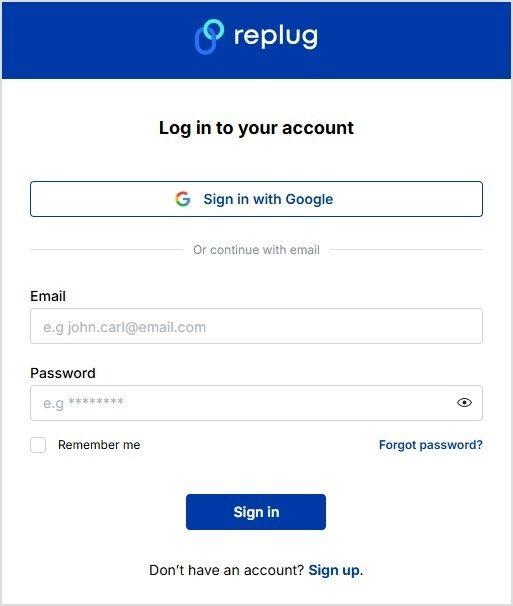
    Step 1: Sign up or log in

    Go to the Replug app and sign in to your account, or sign up for a free 14-day trial with full features.

    Step 2: Create a new bio landing page

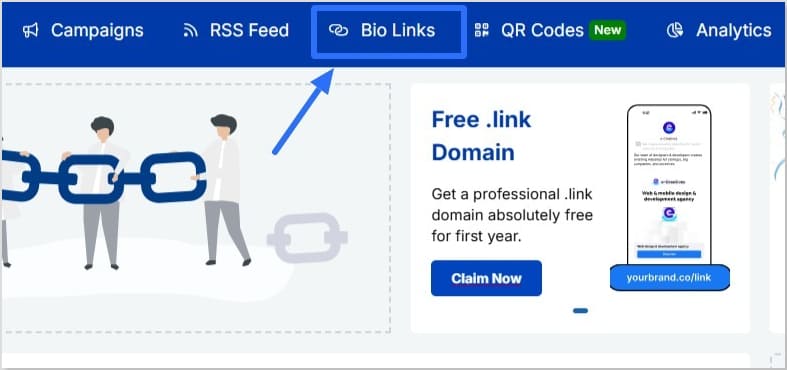
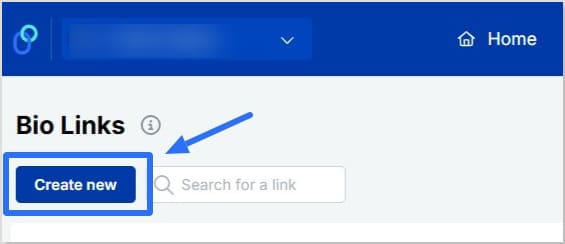
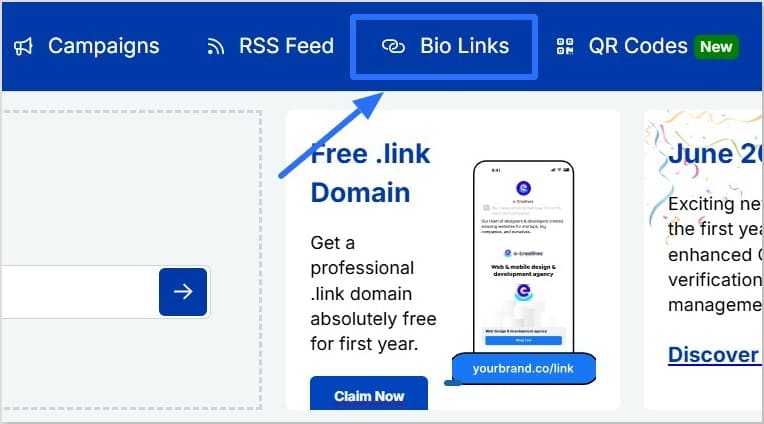
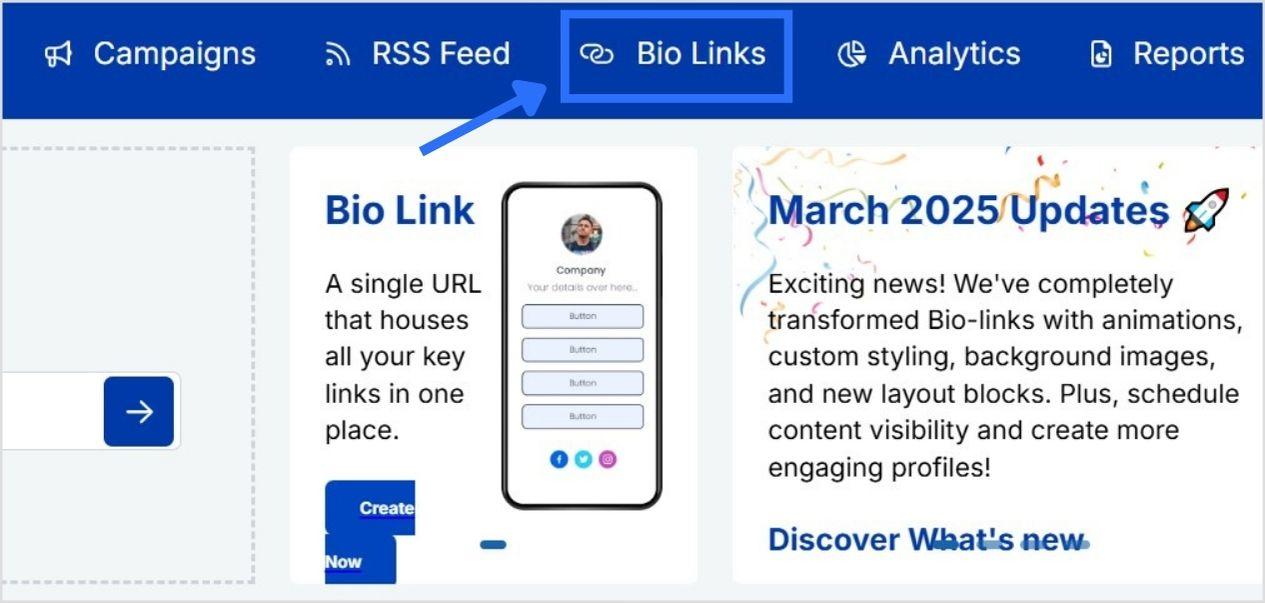
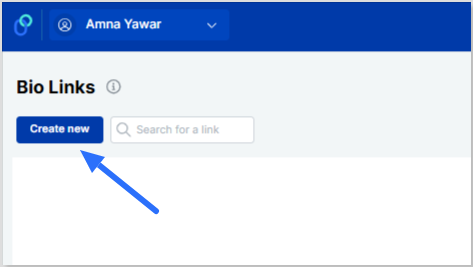
    • In your dashboard, click “Bio Links”, then “Create new”
    Click on Bio Links
    Click on Create new button
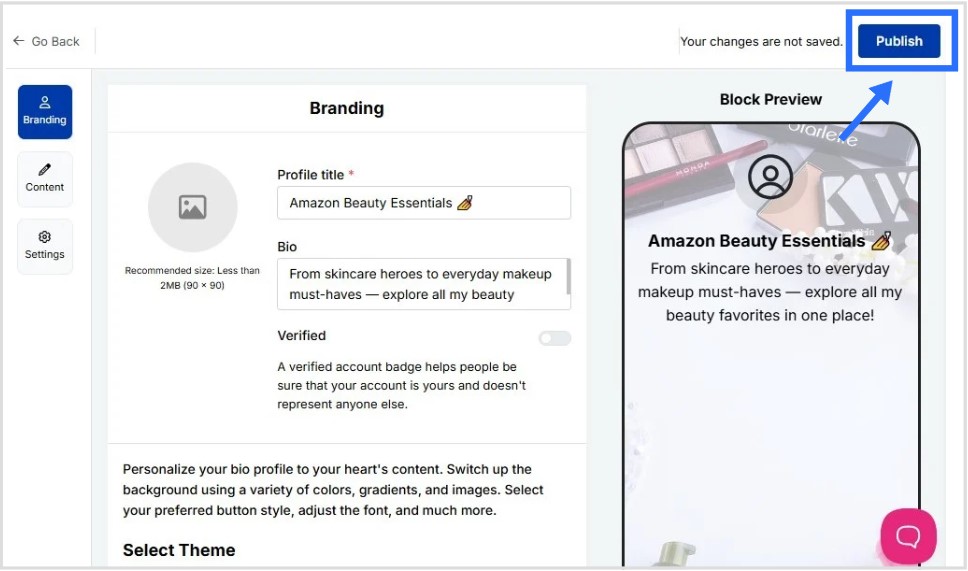
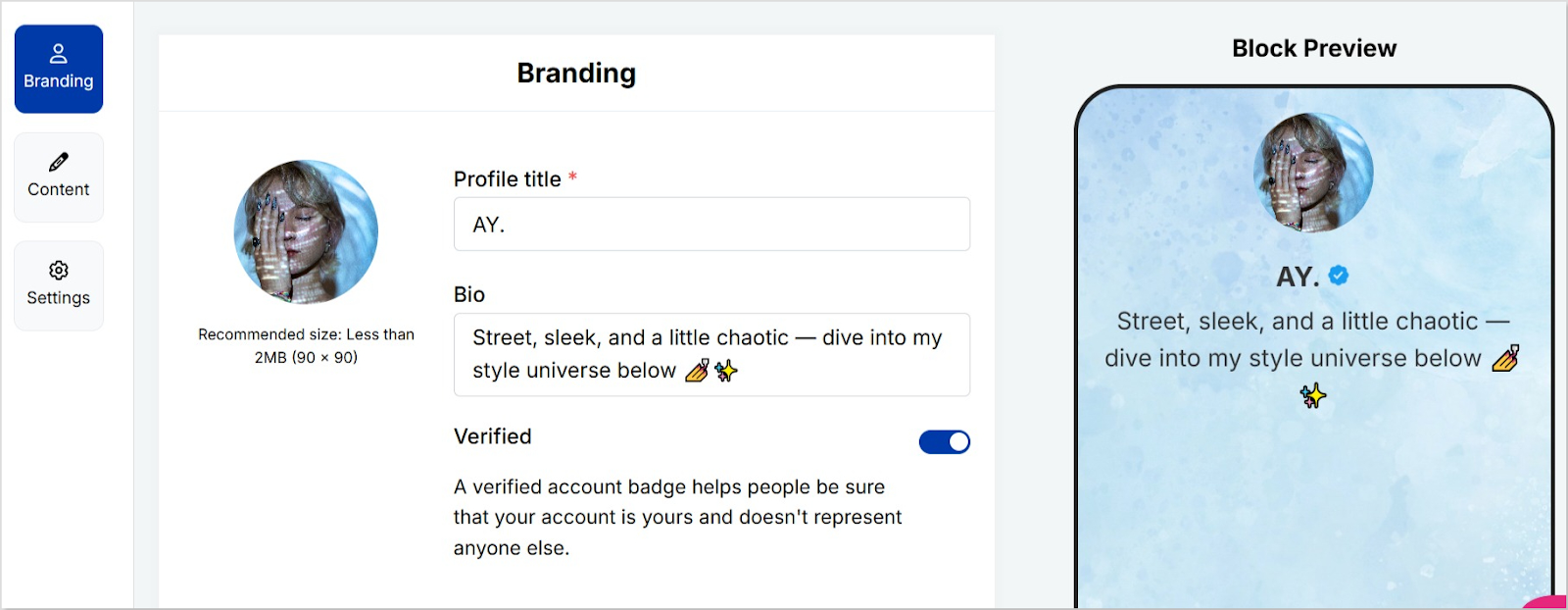
    • In the “Branding” category, add your profile picture, title, description, and enable the verified page if applicable
    • Pick a template or build your own
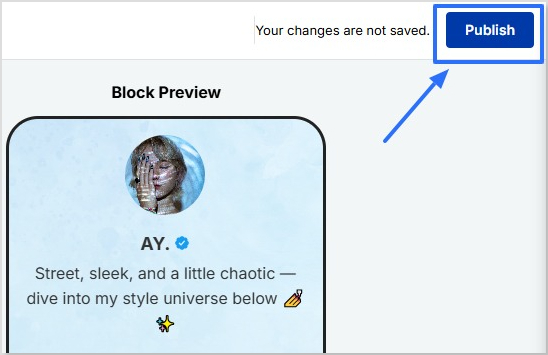
    • Once done, click “Publish”
    Click on the Publish button
    Boost ROI with branded URLs - Replug dashboard showing performance metrics and branded URL creation

    Go beyond generic link pages!

    Create custom bio links that truly fit your brand

    With Replug, you can create bio links that are unique, engaging, and built to convert.

    Start free trial

    Step 3: Add your Amazon product links

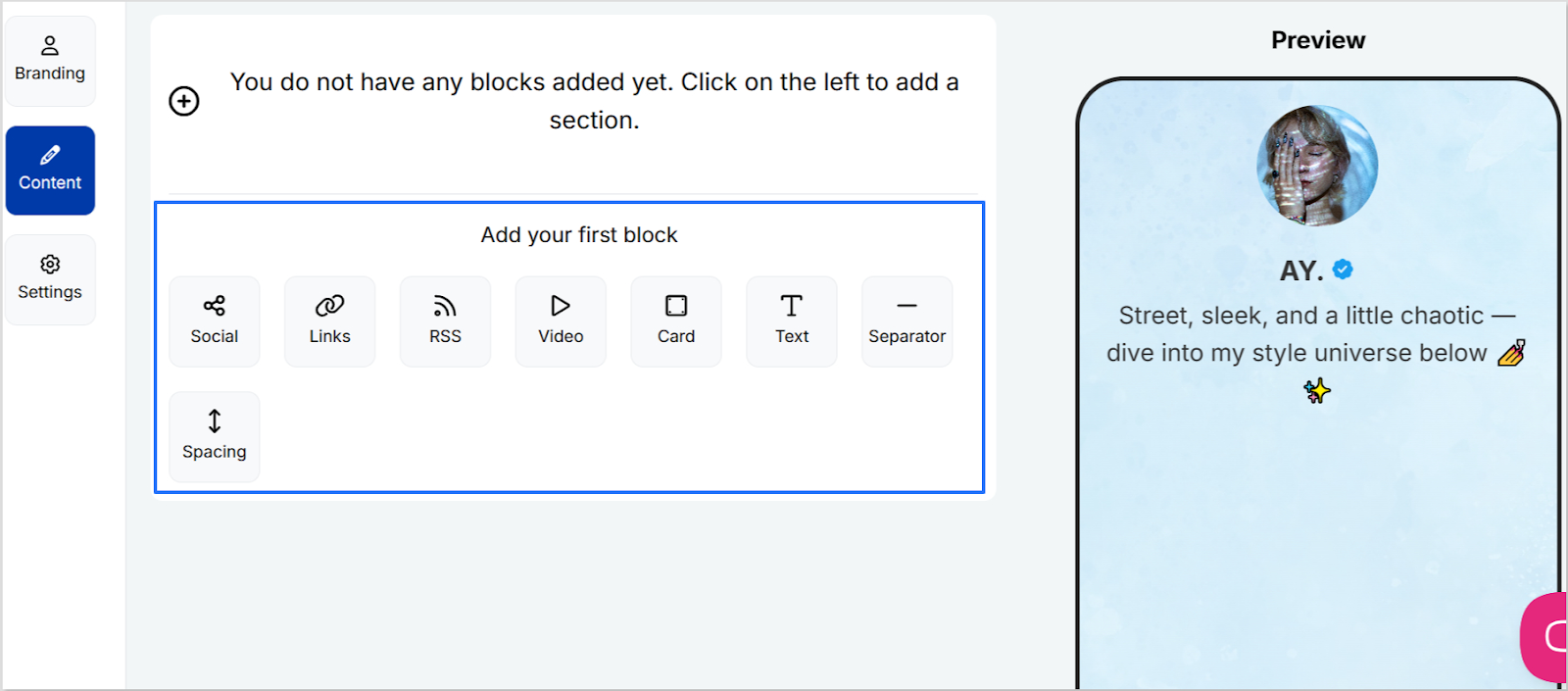
    • In the “Content” category, you’ll have the option to add your content blocks
    • Click on “Links” and paste links to your Amazon product pages, affiliate offers, or digital downloads
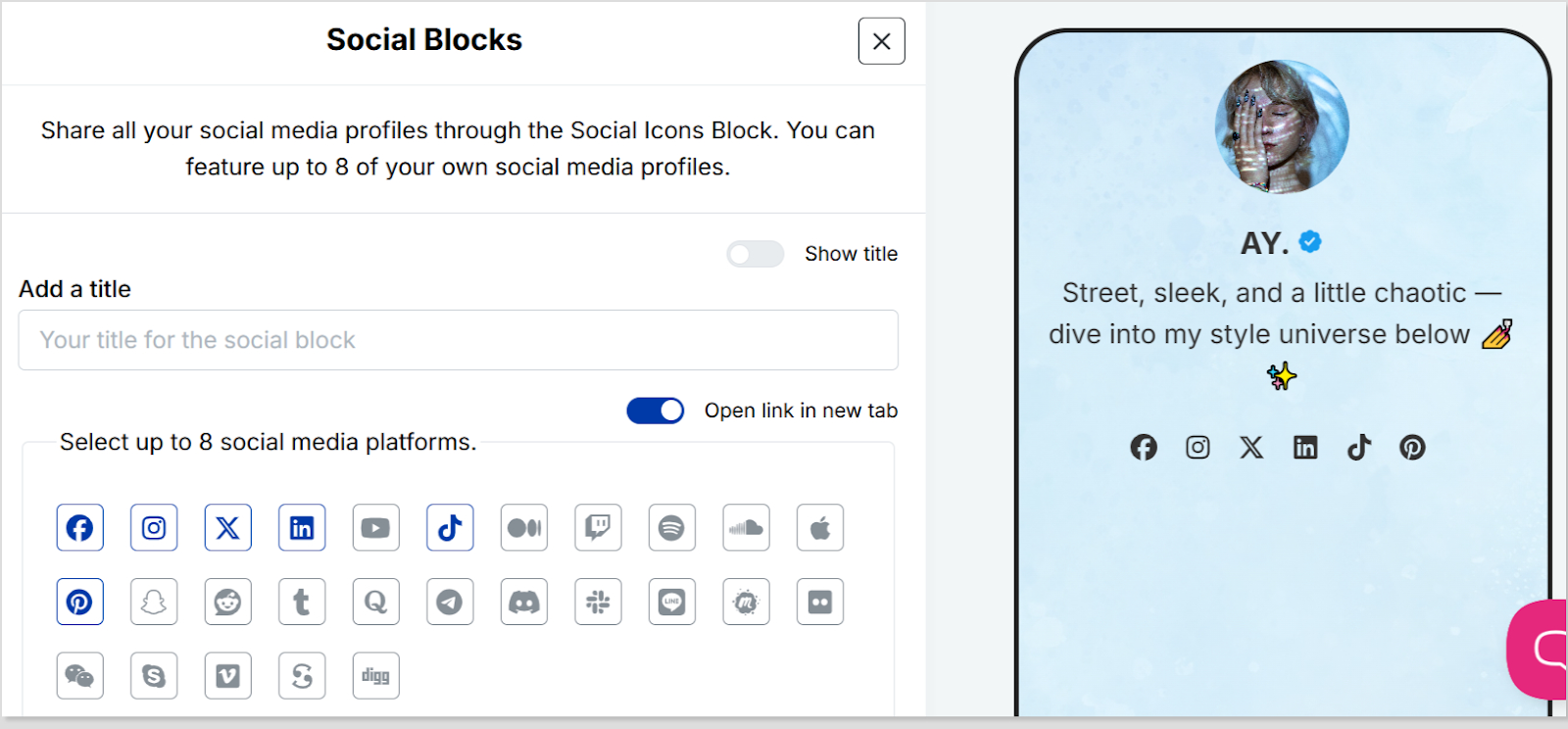
    • You can add more content block types if required; such as cards, socials, separator, etc
    • Keep updating as you go by clicking “Update” on the top right to save your progress
    Add block to your bio landing page

    If you’re exploring how to make money on Amazon without selling physical products, affiliate marketing is your answer. You share Amazon links and earn a commission when someone buys. To maximize these conversions, a product description generator can help you craft unique, persuasive captions for the items you promote.

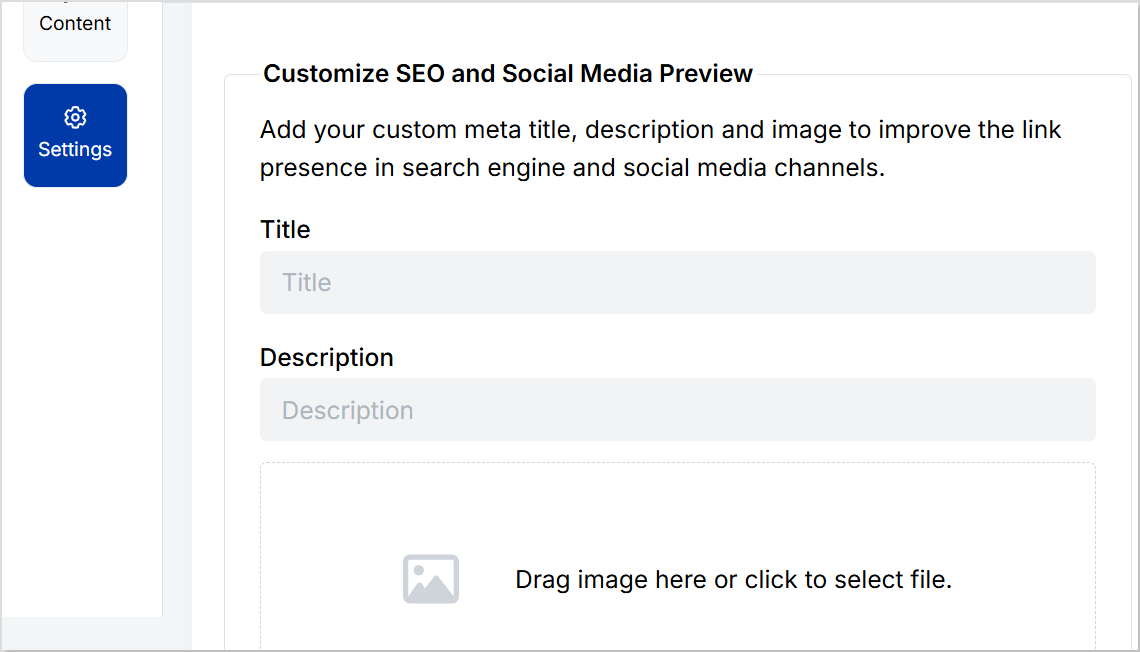
    Step 4: Customize SEO and social media preview

    • Go to the “Settings” category
    • Add a custom meta title and description to improve how your landing page for Amazon products appears in search results
    • Upload a preview image that looks great when your page is shared on social media
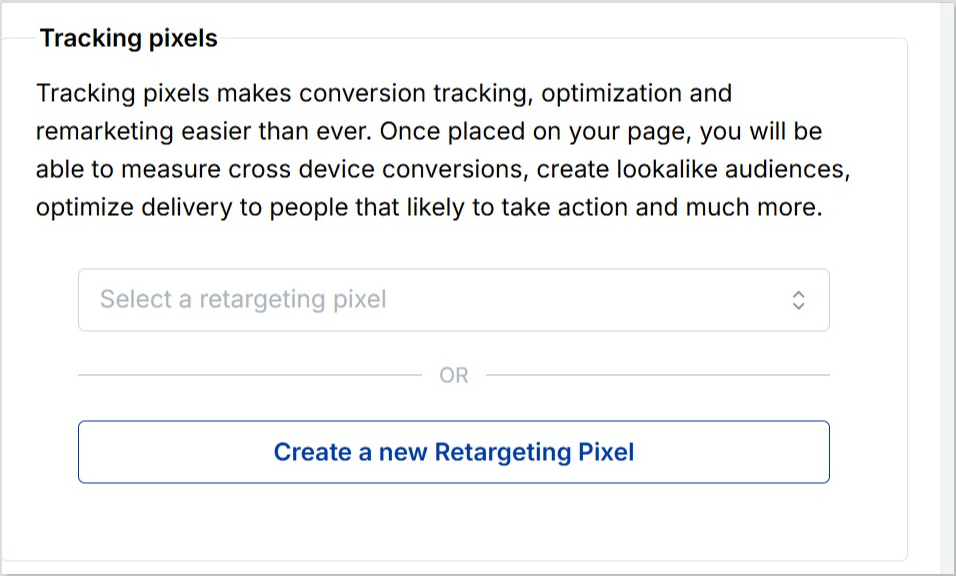
    • Add retargeting pixels to track visitors and run targeted ads later (optional but highly recommended)

    Step 5 (optional): Create a custom URL for your bio link

    • Personalize your landing page link to match your brand or product name
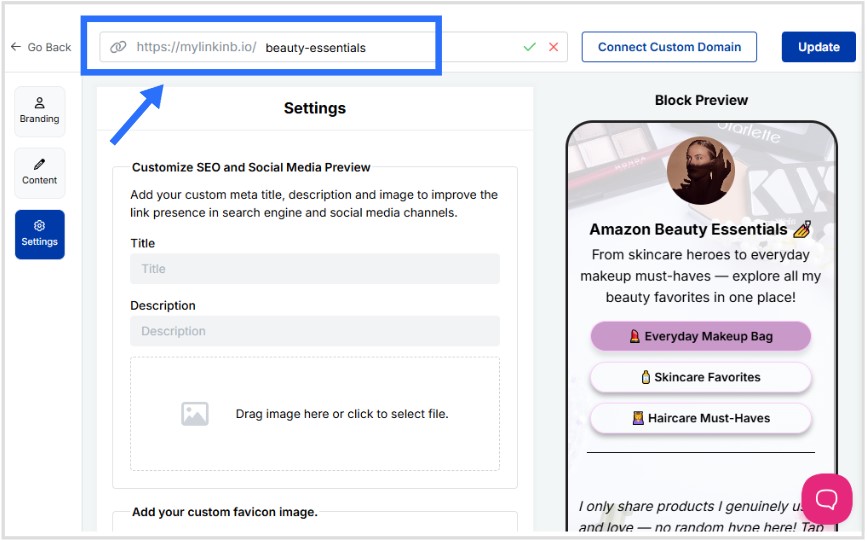
    • Create a custom URL by changing the slug of your bio landing page
    Create a custom URL

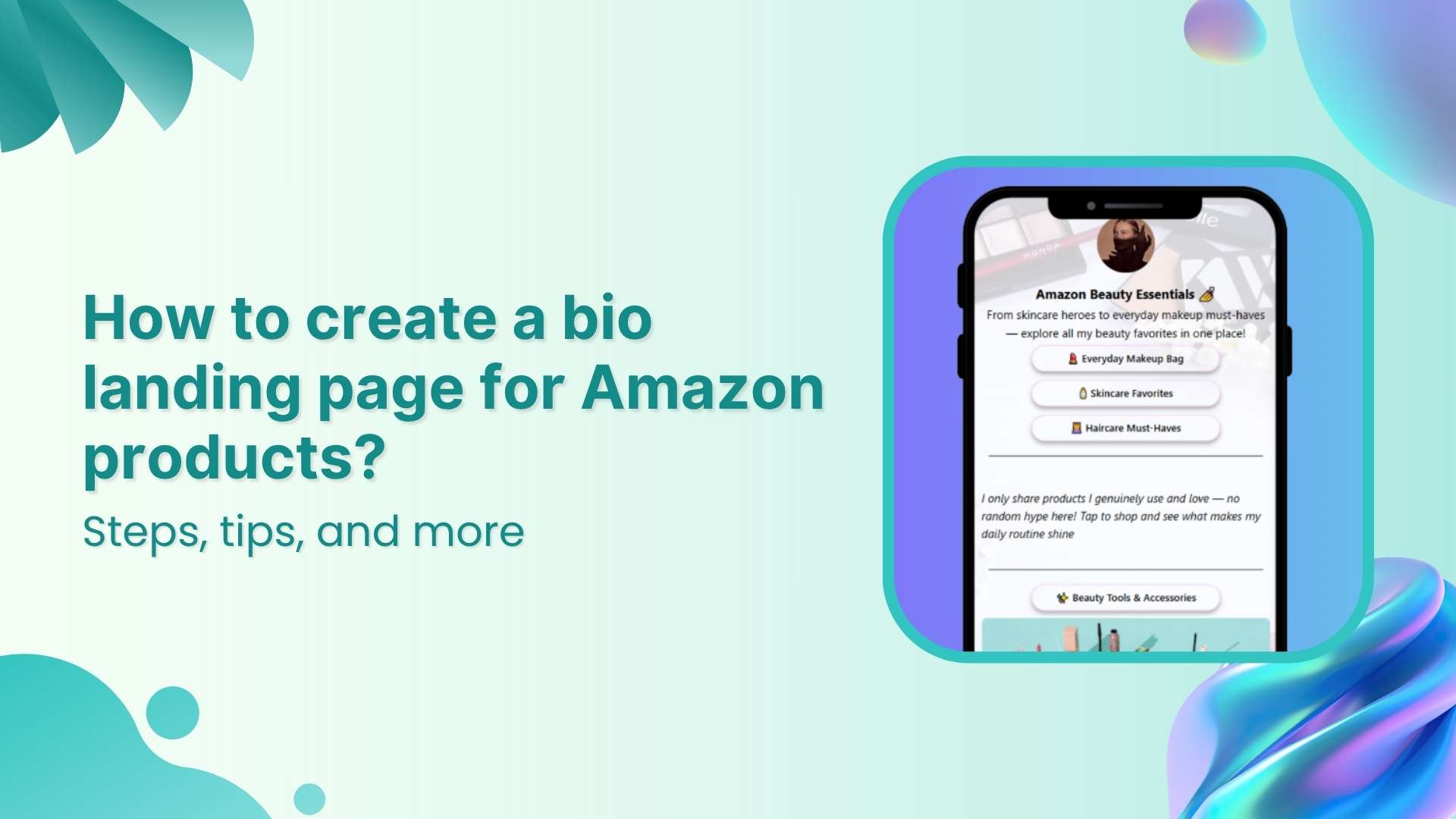
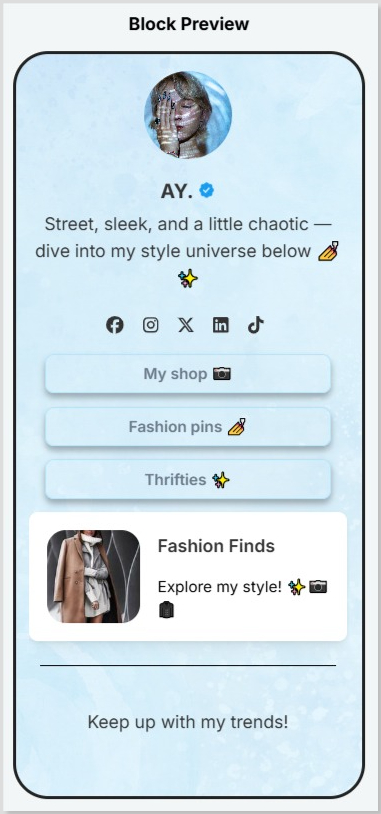
    This is how your final bio landing for Amazon products looks like:

    Preview of landing page for Amazon products

    Step 6: Share your landing page everywhere

    Once your landing page for Amazon products is ready, share it across every channel where your audience hangs out. Add it to your Instagram and TikTok bio, YouTube description, Pinterest profile, email signature, blog sidebar, and even on printed materials with a QR code.

    The more places you share your link, the more clicks and sales you can drive from people who discover you on different platforms. Make sure you follow the best bio link practices to ensure maximum conversions from your landing page.

    Tips for your bio landing page for Amazon products

    Creating a landing page is just one part of learning how to sell on Amazon effectively. To get even better results, try these extra tips that can help you drive more clicks and keep your page fresh:

    • Place your best selling products on Amazon at the top so they get more attention
    • Use direct titles like “Shop My Top Picks” instead of generic labels
    • Add UTM parameters to track which platform sends the most visitors
    • Highlight promotions and discounts on your Amazon products to catch attention
    • Add retargeting pixels so you can reach visitors again with targeted ads
    • Create a QR code for your bio landing page directly in Replug and share it on packaging, flyers, or emails
    • Mix in digital products like ebooks and audiobooks published through Amazon’s Kindle Direct Publishing platform to diversify what you offer
    • Track detailed bio link analytics to see which links get the most traffic and refine your strategy over time
    • Create a catchy call-to-action to encourage visitors to click and shop your Amazon products For example, try something like “See what I’m loving this month” or “Shop my current Amazon must-haves”
    • Keep your product list updated, especially if there are recalls or notice of hazardous products and issue refunds
    Boost ROI with branded URLs - Replug dashboard showing performance metrics and branded URL creation
    Turn your bio links into click-boosting machines
    Check

    Drive up to more clicks than plain URLs

    Check

    Share multiple destinations with one link

    Create bio links free

    Conclusion

    A landing page for Amazon products isn’t just about adding more links, it’s about making your bio work smarter. Instead of juggling updates across multiple platforms, you control everything from one branded page.

    Whether you’re promoting best selling products on Amazon, sharing digital downloads, or exploring how to make money on Amazon without selling physical items, this approach keeps your content organized and your audience engaged.

    With tools like Replug, it’s simple to build, track, and update your landing page whenever you need, so your bio always stays up to date and your visitors always find your best offers.

    For complete control over your links and campaigns, try this all-in-one link management platform that helps you organize, analyze, and optimize every click effortlessly.

    Frequently asked questions

    What is a landing page on Amazon?

    A landing page on Amazon typically refers to a dedicated page that showcases a collection of your products or offers. In this guide, we’re talking about creating a landing page for Amazon products outside Amazon itself, like in Replug, so you can share multiple product links, affiliate offers, and digital content all in one branded link.

    How to make an Amazon product page?

    On Amazon, you create a product page by listing your product through Seller Central. You’ll add product details, images, pricing, and shipping information. If you want to promote several products together, a separate landing page (like the one you build in Replug) can help organize and share those links easily.

    How to get traffic to your Amazon product?

    Promote your landing page for Amazon products across social media, emails, blogs, and videos. Use engaging calls to action, share limited-time deals, and add UTM parameters to track which channels bring in the most clicks.

    How to make up to $10,000 per month on Amazon without selling physical products? 

    Many affiliates are able to do this by joining the Amazon Associate Program. By sharing affiliate links to best selling products on Amazon, ebooks from Amazon’s Kindle Direct Publishing platform, or other digital content on your landing page, you can earn commissions on purchases without holding inventory.

    Can I sell products directly through my landing page?

    No. The landing page itself doesn’t process transactions. Instead, it links visitors to your product pages on Amazon, digital downloads, or affiliate offers where they complete their purchase.

    What if an Amazon link breaks or a product is removed?

    That’s one of the advantages of using Replug’s free link shortener. You only need to update the broken or outdated link on your landing page, and it automatically updates everywhere you’ve shared your bio link.

  • How to track link in bio analytics?

    How to track link in bio analytics?

    You’ve got that one link in bio carrying your shop, your latest drop, or your best video, all in a single click. But do you really know what happens after someone taps it? Are people exploring your links, or dropping off after the first click?

    That’s where link in bio analytics comes in. It shows which links get the most love, where your audience is coming from, and when they’re most active. And with tools like Replug, checking it all is as simple as open, tap, scroll.

    Let’s break down how to use these insights to get real results.

    Replug Branded Short Links CTA
    Maximize marketing ROI
    by transforming ordinary URLs into
    branded short links that convert.
    Try Replug for free

    What is the best way to track link in bio analytics?

    The most effective way to track link in bio analytics is by combining detailed tracking with the best bio link tools that help you act on what you learn easily.

    Replug makes this simple. It shows how many clicks your link in bio is getting, where your audience is coming from, and when engagement peaks, all in real time. Beyond numbers, it helps you create branded short links that build trust and boost click-through rates with the help of its efficient URL shortener free tool.

    By adding UTM parameters, you can track the performance of your link in bio, all within Replug’s dashboard. This way, you get a clear view of what’s working and can refine your strategy as you go. Together, these features turn your link in bio from a basic list of links into a powerful, data-driven marketing asset.

    Let’s discuss the two easy ways to track your link in bio analytics using Replug.

    How to track your link in bio analytics (two easy ways)

    First things first: make sure you’re signed into your Replug account.

    Haven’t signed up yet? You can start with a 14-day free trial and get full access to your link in bio analytics.

    Now, here are two quick ways to see what’s really happening behind your bio links:

    Method 1: Quick check from the bio links tab

    • Go to “Bio Links” in your Replug dashboard.
    Go to bio links
    • Find the bio link you want to check.
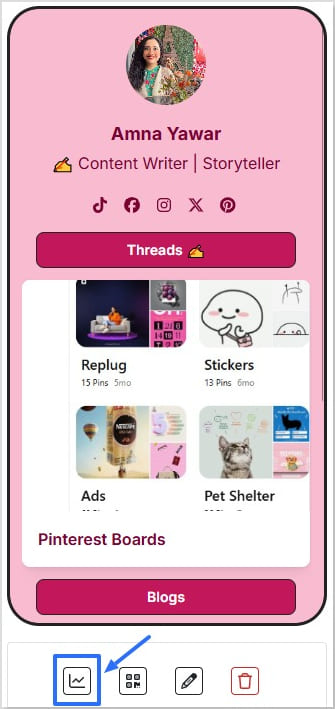
    • Click the small line chart icon right under it.
    Click on the analytics icon for your bio link

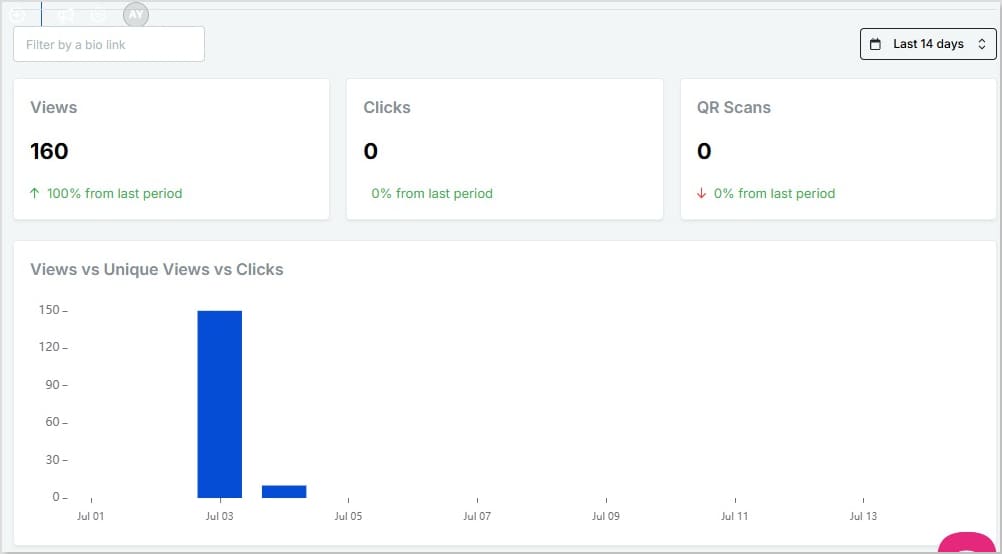
    This opens up your analytics for that specific bio link, showing:

    • Views, unique views, clicks, and QR scans
    • A bar chart comparing views vs. unique views vs. clicks
    • Geotargeting filters so you can see data by referral source, location, browser, and operating system
    • Real-time stats and custom date ranges (check today, last month, or all time — no limits)
    Boost ROI with branded URLs - Replug dashboard showing performance metrics and branded URL creation
    Turn your bio links into click-boosting machines
    Check

    Drive up to more clicks than plain URLs

    Check

    Share multiple destinations with one link

    Create bio links free

    Ideal for: When you just want a quick pulse on how one bio link is doing.

    Method 2: Full view from the Analytics dashboard

    If you want to dig deeper or track multiple bio links together:

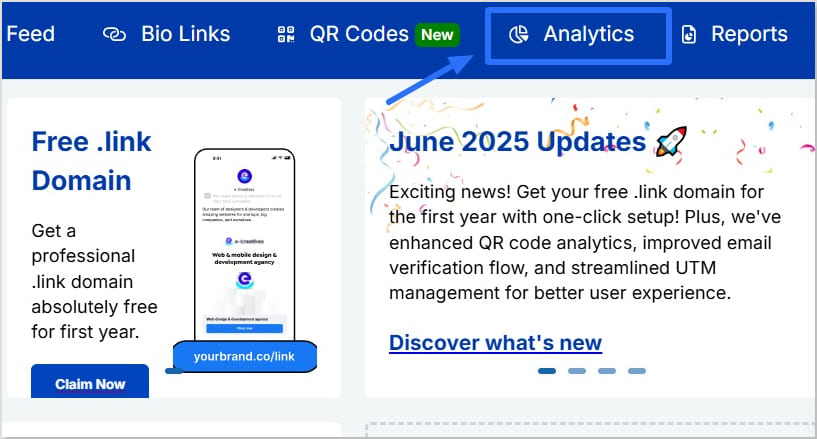
    • Go to Analytics inside Replug
    Click on analytics
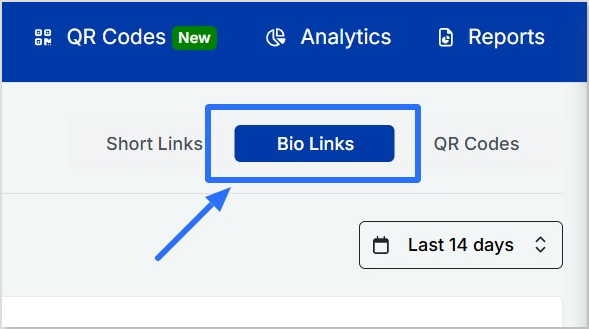
    • Click “Bio Links
    Click on bio links

    Here, you’ll get:

    • A detailed overview of all your bio links (or filter by just one)
    • Top links and top socials to see what people click most
    • Traffic sources so you know where visitors come from
    • Locations, browsers, and devices
    • Real-time numbers and flexible date filters
    link in bio analytics dashboard

    Ideal for: Managing several bio links, running campaigns, or seeing the bigger picture.

    Also read: How to measure campaign performance in Replug?

    What those numbers actually tell you

    Once you’ve opened your analytics, here’s what the data really means:

    • Views: Total times people opened your bio page
    • Unique views: Each visitor only counted once, even if they come back
    • Clicks: How many times someone tapped a link inside your bio page
    • Top links: Shows which links get the most action
    • Top socials: Tracks which social icons get the most taps
    • Traffic sources: See where your visitors came from (Instagram stories, reels, direct, etc.)
    • Locations: Know where your audience lives and what time zones they’re in

    Quick tip: Use UTM parameters for even deeper insights

    Want to know exactly which post, story, or campaign drives the clicks?

    Add UTM parameters to your links.

    They’re little tags you add to the end of a URL so tools like Replug can track where each click came from.

    For example:

    • Share the same link in a reel and a story
    • Add utm_medium=reel to one and utm_medium=story to the other

    Now you’ll know which actually brings traffic, and which just looks good. Inside Replug, you can create and manage UTM-tagged links easily, so you can track smarter without extra hassle.

    Boost ROI with branded URLs - Replug dashboard showing performance metrics and branded URL creation
    Turn your bio links into click-boosting machines
    Check

    Drive up to more clicks than plain URLs

    Check

    Share multiple destinations with one link

    Create bio links free

    Another handy tip: Create a QR code for your bio link

    Replug also lets you create a QR code for any of your bio links. So, if you share your link in bio offline on posters, packaging, slides, business cards, or anywhere else; you’re still not flying blind.

    You can track:

    • How many times your QR code was scanned
    • Where and when those scans happened
    • How QR scans compare to regular link clicks

    Also read: What is QR Code tracking? A beginner’s guide to how it works

    What to do next?

    Data is great, but action is what makes it matter:

    • Move your best-performing links higher up
    • Swap out links that aren’t getting clicks
    • Post when your audience is most active
    • Test different headlines, emojis, or thumbnails to see what bumps up clicks
    • Focus promotion on platforms that actually send traffic

    Conclusion

    Your bio link shouldn’t just look pretty. It should work. Clicks, sign-ups, sales, traffic – whatever your real goal is.

    And the good news? It’s simpler than you think.

    With Replug’s link in bio analytics, you can see what’s working, what’s getting ignored, and where your audience is coming from, all in a few clicks.

    Add UTM parameters to track which posts drive traffic, and use QR codes to bring in offline scans too. Then adjust: move your best links up, drop the ones that flop, and post when your audience is most active.

    Your link in bio is more than a link. It’s your quiet traffic driver and digital storefront.

    Now you know how to use link in bio analytics to make it deliver.

    Frequently asked questions

    What are links in bio?

    A link in bio is the clickable URL on your Instagram, TikTok, or other profiles. Since most platforms allow only one, tools like Replug let you turn it into a mini landing page with multiple links to your shop, videos, or content.

    What is a tracking link?

    A tracking (or trackable) link has extra tags, like UTM codes, that show where your clicks come from and what drives traffic. Tools like Replug can create these automatically.

    How to track link in bio analytics on Instagram?

    In Replug’s analytics dashboard, you can see referral sources, so you’ll know how much traffic is coming from Instagram.

    How to track link in bio analytics on TikTok?

    In Replug’s analytics dashboard, you can check referral sources to see how many visitors came from TikTok.

  • How to A/B test your bio link page?

    How to A/B test your bio link page?

    You’ve got one link. And a hundred things to promote.

    Your newsletter. Your best-selling product. That one video that always gets you leads.

    So, you create a link in bio for your social media profiles, throw everything on a single landing page, and hope for the best.

    But here’s the thing: if you’re not testing what actually works, you’re not just leaving clicks behind; you’re leaving conversions, email signups, and sales on the table. That’s where learning how to A/B test your bio link page comes in. It’s the key to understanding what really drives results.

    With Replug.io, you don’t have to guess. You can A/B test up to 10 different versions of your bio link page, at the same time. Let’s break down how to actually do it, why it matters, and how to make your bio link a conversion machine.

    What is A/B testing?

    A/B testing, sometimes called split testing, is a method of comparing two or more versions of a webpage, ad, email, or even a URL to see which performs better.

    Instead of relying on assumptions or personal preferences, you let real data show what your audience actually prefers.

    For example, you might test:

    • “Get Fit in 10 Minutes a Day!” against “Your New Fitness Habit Starts Here”

    Whichever option drives more clicks or sign-ups becomes the clear winner. This helps you make decisions based on measurable results rather than guesswork.

    Where can you apply A/B testing?

    A/B testing isn’t just for landing pages or ads. You can apply it to almost every part of your digital presence, including:

    • Web pages: Test different headlines, call-to-action buttons, or layouts to find what keeps visitors engaged.
    • Email campaigns: Experiment with subject lines, design formats, or send times to boost open and click rates.
    • Digital ads: See which creative, copy, or audience targeting generates better results.
    • Short URLs and bio links: Tools like Replug let you generate short branded links with the help of its top-notch link shortener online within seconds. You can also test different versions of the short links you place in your Instagram or TikTok bio (and other platforms) to see which attracts more clicks, hassle-free.

    By running these small experiments across channels, you turn each part of the user journey into an opportunity for improvement.

    Boost ROI with branded URLs - Replug dashboard showing performance metrics and branded URL creation
    Turn your bio links into click-boosting machines
    Check

    Drive up to more clicks than plain URLs

    Check

    Share multiple destinations with one link

    Create bio links free

    Why bother A/B testing your bio link page?

    Because not all layouts, CTAs, or headlines work equally well, your audience might respond better to a video at the top instead of an image. Or maybe “Download your free guide” outperforms “Grab it now.”

    You won’t know until you test. And when you do test? You’ll find small tweaks that lead to major improvements: more clicks, higher engagement, and actual conversions.

    A/B testing your bio link is like putting your content under a microscope. It shows you what’s actually clicking with your audience (and what’s just taking up space).

    A practical example of bio link A/B testing

    Let’s say you run an online coffee store. You could test two product page headlines:

    • “Brew Barista-Level Coffee at Home”
    • “Make Every Morning Better with Fresh Coffee”

    Or, using Replug, you could test two different short URLs leading to the same product:

    Next, let’s explore why A/B testing your bio links is worth the effort, and how it can help maximize engagement and clicks from your most visible online spaces.

    How to A/B test your bio link page?

    Here’s how to A/B test your bio link page effectively:

    1. Choose what to test: Decide on the elements you want to compare. This could be the headline at the top of your bio page, call-to-action text like “Shop Now” vs. “Discover More,” the order of your featured links, or even two different branded short URLs using a tool like Replug.

    Also read: 100+ call-to-action phrases you NEED to use [+ best examples]

    2. Create your variations: Build two or more versions of your bio link page (or two short URLs) that lead to the same destination. Make sure each variation has only one main difference so your results stay clear.

    Boost ROI with branded URLs - Replug dashboard showing performance metrics and branded URL creation

    Go beyond generic link pages!

    Create custom bio links that truly fit your brand

    With Replug, you can create bio links that are unique, engaging, and built to convert.

    Start free trial

    3. Track key metrics: Monitor which version drives more clicks, higher click-through rates on your branded links, or more conversions such as sign-ups or sales.

    4. Analyze and act: See which version performs better based on your primary goal, then update your bio link page to use the winning elements.

    5. Keep testing: Your audience and content change over time. Regular A/B testing helps keep your bio link page fresh and optimized for better results.

    By treating your bio link page like any landing page, you turn it from a static profile link into an active tool for increasing engagement and conversions.

    How to A/B test your bio link page in Replug?

    Here’s the step-by-step guide:

    Step 1: Sign in or create an account

    To begin with, go to the Replug app and sign in to your account. If you don’t have account, you can easily create one in minutes and get access to a 14-day free trial with all features.

    Step 2: Apply A/B testing in Replug

    Replug allows you to split test up to 10 different bio link URLs at the same time. Here’s how to set it up:

    • Paste your main bio link into Replug.
    Shorten your bio link URL
    • Toggle the A/B testing option.
    Toggle A/B testing
    • Click “+ Add new destination URL” to add your alternate versions, not exceeding 10 URLs.
    Add new destination URL
    • Distribute the weight evenly (or manually). Just make sure the total adds up to 100%, or the test won’t work.
    Equalize weight of URLs
    • Save your shortened link, and that’s it! Replug will automatically split traffic across your selected pages.
    Sabe shortened link

    What’s next?

    A test is only as good as the traffic it gets. If no one’s clicking, there’s nothing to measure. Here’s what you should do after you’re done applying an A/B test to your bio link:

    1. Drive traffic to your bio link

    Make sure your bio link is front and center:

    • Add it to your Instagram bio with a clear CTA in your posts/stories: “Grab it from the link in bio!”
    • On TikTok, mention it in your videos: “Free guide in my TikTok bio—go check it!”
    • Pin a tweet or X post with your link
    • Add it to your YouTube channel banner or description
    • Mention it in your email signature
    • Drop it in your podcast intro/outro

    And don’t just say “link in bio.” Tell people why they should click. What’s waiting for them?

    2. Let the test run

    Now comes the hardest part: patience.

    Let each variation run for at least 1–2 weeks, depending on how much traffic you’re getting. The more people who see it, the more accurate your data will be.

    Avoid the urge to tweak things daily. A/B testing is about consistency. Change too much too fast, and you won’t know what actually made a difference.

    You may also like: A/B Testing Benefits, Examples & Other Factors To Consider

    3. Check the right metrics

    Once your variations have had time to run, dive into Replug’s link analytics.

    Here’s what to look for:

    • Clicks and unique clicks: See which links are getting the most traction, and how many of those are from new visitors. It’s the difference between buzz and actual reach.
    • Click-Through Rate (CTR): Find out which version of your bio link layout or design drives the most engagement. The higher the CTR, the closer you are to a winning formula.
    Replug Branded Short Links CTA
    Maximize marketing ROI
    by transforming ordinary URLs into
    branded short links that convert.
    Try Replug for free
    • Geo location data: Want to know who’s actually clicking? You’ll get traffic insights broken down by browser, OS, country, city, region, and even where they came from, so you’re not just guessing who’s tuning in, you know.
    • Comparison graph: See clicks vs. unique clicks side by side to spot which versions are catching attention vs. actually converting.

    Use this data to identify patterns. Maybe one layout gets more clicks, but another one drives more bookings.

    7. Pick a winner (then test again)

    Once you find a top-performing version, make it your default, or use it as your new starting point.

    But don’t stop there.

    A/B testing is an ongoing process. Your audience evolves, trends shift, and content fatigue is real.

    Use what you learn to keep iterating:

    • Swap the headline again
    • Change your lead magnet offer
    • Add new content to the top
    • Try seasonal CTAs

    The more you test, the more you learn. And the more you learn, the better your link in bio performs.

    Why A/B testing your bio link page actually works?

    A/B testing turns your bio link from a guessing game into a data-backed conversion engine, helping you unlock the full benefits of bio links by showing what actually drives clicks, signups, and sales. Here’s what you really get:

    • Real insight into what works: Test layouts, CTAs, headlines, and visuals to find out what actually drives clicks and conversions.
    • Higher engagement, not just traffic: Compare versions to see which design keeps people clicking, scrolling, and buying.
    • Smarter decisions, less guesswork: Instead of relying on hunches, you get clear data on what resonates with your audience.
    • Optimize in real time: Swap out underperforming versions and double down on what’s converting, all without changing your main link.
    • Test messaging variations: A subtle CTA change like “Grab it now” versus “Download your freebie” can make a huge difference. Now, you’ll know which one wins.
    • Up to 10 variations at once: Test multiple versions side by side instead of constantly updating one live page and hoping for the best.
    • Data that actually leads to growth: With CTRs, click comparisons, and traffic breakdowns, your bio link becomes a mini analytics dashboard.

    Conclusion

    Your link in bio shouldn’t be a static page. It should be a smart, optimized experience that grows with your audience.

    With Replug, you don’t have to guess what works, you can test everything. From layout to language, you’ve got the power to experiment, analyze, and grow.

    So whether you’re optimizing your link in bio for Instagram or figuring out how to add a link to your TikTok bio, don’t stop at adding the link. Make it work smarter.

    Ready to see what clicks?

    Start A/B testing your Replug bio link today!

  • What does link in bio mean: All you need to know

    What does link in bio mean: All you need to know

    “Link in Bio” is all about breaking the limits of a single link. It’s a way to share multiple links, content, and products, making it an essential tool for individuals, businesses, and influencers. 

    In this guide, we’ll explore the basics, the role it plays in personal branding and marketing, and how it’s revolutionizing the way we navigate the online world. Whether you’re a social media pro or a newbie, link in bio is your shortcut to success in today’s fast paced world.

    Here’s what you need to know.

    What does “link in bio” mean?

    Link in bio refers to a clickable URL appearing in your profile description, often on platforms like Instagram, TikTok, and Twitter. This link allows users to direct their audience to external websites, content, products, or any other online destinations. 

    Since many social media platforms limit the number of links or direct clickable links in posts and comments, the link in bio or “bio link” serves as a workaround, enabling users to share multiple links or promote specific content more effectively by directing their followers to their bio section, where they can find and click on the desired link. 

    It has become a valuable strategy for personal branding, content promotion, and marketing.

    Boost ROI with branded URLs - Replug dashboard showing performance metrics and branded URL creation
    Turn your bio links into click-boosting machines
    Check

    Drive up to more clicks than plain URLs

    Check

    Share multiple destinations with one link

    Create bio links free

    What’s the purpose of creating a link in bio?

    If you’re active on social media, you’ve probably run into the dreaded “limited links” problem. Instagram gives you five spots (generous…ish), but TikTok? Just one lonely link. Not exactly the dream when you’ve got a podcast, a blog, a product launch, and a playlist to share. That’s where a link in bio saves the day,  turning that single space into a mini hub for everything you want your audience to click on. 

    Here’s why you should create a link in bio:

    • One link, many destinations: Social media platforms limit you to just adding a few links in your bio. A link in bio helps you make it count by leading visitors to multiple pages.
    • Showcase everything: Whether it’s your website, shop, blog, videos, or sign-up forms, you can share it all in one neat place. 

    Here’s an example of the famous American Cook, Andrew Rea’s link in bio page for his series “Babish Culinary Universe”:

    Example of link in bio
    • Make navigation easy: No more “link in latest post” confusion. Your audience knows exactly where to go.
    • Stay organized: Keep your important links tidy, clickable, and easy to update whenever you need.
    • Boost engagement: Get more clicks, views, leads, and conversions by directing people to the right content at the right time.

    Top benefits of link in bio

    A link in bio does more than hold a single URL; it helps you organize, optimize, and amplify your online presence. Here’s a quick look at why it’s a must-have for anyone growing their brand:

    1. Combines all your important links into one

    Instead of juggling multiple URLs, your link in bio leads followers to everything you want them to see, whether it’s your latest YouTube video, blog post, or product drop.

    1. Simplifies the path to purchase or action

    A link in bio lets you turn browsers into buyers by placing shop links, discount codes, or sign-ups just one tap away, all in one neatly organized spot.

    1. Lets you retarget everyone who clicks

    With tools like Replug, your link in bio becomes retargetable so that every click can feed into future ad campaigns and bring people back to your page.

    1. Shows what content your audience loves

    You can track clicks on your link in bio from one single dashboard using a top-notch link management platform. This tells you what’s resonating—so you can do more of what works.

    1. Lets you create a fully branded mini landing page

    Instead of a plain list of links, your link in bio can become a branded microsite that matches your aesthetic and makes your profile look polished and pro.

    1. Automatically updates with your latest content

    Add an RSS feed to your link in bio to keep it fresh, so whenever you post a new video, blog, or podcast, it shows up without you lifting a finger.

    1. Boosts visibility through SEO-friendly design

    An optimized, custom link in bio page can be indexed by search engines, giving your most important content extra visibility beyond just social clicks.

    💡 Who benefits from a link in bio? 
    Creators, brands, freelancers, agencies; anyone using social media to drive traffic, grow followers, or sell online.

    Want real examples and smart tips? Read the full blog: The top 7 benefits of using a link in bio or view bio link examples to get inspiration for your own bio link page.

    Boost ROI with branded URLs - Replug dashboard showing performance metrics and branded URL creation

    Go beyond generic link pages!

    Create custom bio links that truly fit your brand

    With Replug, you can create bio links that are unique, engaging, and built to convert.

    Start free trial

    How to create a link in bio using Replug?

    To create a winning link in bio using Replug’s bio links feature, you can follow these steps:

    Step 1: Access your Replug account

    Sign in to your Replug account,  or create one to start your 14-day free trial if you’re new to the platform.

    Log in to Replug

    Step 2: Click on “Bio Links”

    Once you’re logged in, go to the Replug dashboard and click on “Bio Links” from the navigation bar to get started.

    Go to bio links

    Step 3: Start creating a new link in bio

    This will take you to the “Bio Links dashboard. From here, click on the “Create new” button to start creating a new bio link.

    Create new bio link

    Replug lets you easily manage your bio profile with three main categories: Branding, Content, and Settings.

    • Branding: Customize the look and feel of your profile with themes, colors, fonts, and button styles.
    • Content: Add and organize different blocks like links, videos, images, and more to showcase your content.
    • Settings: Adjust SEO settings, control how your profile appears in social media previews, and add tracking pixels.

    Step 4: Brand your link in bio

    Customize your bio profile to match your personal style or brand. Upload a profile image, add your title and bio, and choose from a variety of themes, button styles, and colors. 

    You can also enable a background image and adjust its opacity for a more personalized look. If your account is verified, a badge will appear to help others recognize it’s officially you.

    Brand your bio link
    • Click on the “Publish” button on the top right to start customizing your bio link further. If you don’t, you won’t be able to save changes in real-time.
    Publish bio link

    Step 5: Choose content blocks

    • Choose the type of content blocks you want to add to your bio link page. 
    • Replug offers various content block options, including social icons, links, RSS feeds, audio, video, text, cards, separator, and spacing. Select the ones that best suit your needs. 
    Choose content blocks
    • As an example, let’s start with adding social icons. For that, click on the “Social” block button.
    Add social blocks
    • Provide titles for each platform, customize the colors for the social icons, and paste the corresponding links. To add each platform, click the “Add Block” button. 
    • You can also schedule, animate, or customize the appearance of your blocks.

    Step 6: Go to Settings and Customize SEO and Social Media Preview

    Go to “Settings” to customize your bio link page further by adding a custom meta title, description, image, favicon image.

    Customize SEO and social media preview
    • Furthermore, you can also add tracking pixels for conversion tracking, optimization, and remarketing.
    Add tracking pixels

    Step 7: Review link in bio page

    Review your link in bio page as you create it to ensure it looks and functions as you intended. Take advantage of the preview feature to see how it will appear.

    Preview of link in bio page

    Step 8: Update and create a custom URL for your bio link

    • Update your bio link to save changes.
    • Create a custom URL by changing the slug of your bio link. You can also connect your custom domain if you have one.

    Note: Replug now lets you add a free custom domain if you’re a paying user.

    With your Replug-generated bio link, you can effectively share multiple links and content with your audience, making it a valuable tool for content promotion and marketing on the platform.

    Enhance this even further by using this custom URL shortener free to create branded, trackable links that boost engagement.

    Boost ROI with branded URLs - Replug dashboard showing performance metrics and branded URL creation

    Go beyond generic link pages!

    Create custom bio links that truly fit your brand

    With Replug, you can create bio links that are unique, engaging, and built to convert.

    Start free trial

    Tips to improve your “Link In Bio ”

    Here are some additional tips for creating a great bio link:

    • Make sure your bio link is short and easy to remember.
    • Use a clear and concise title for your bio link.
    • Add a description that tells people what they can expect to find on your bio link.
    • Use an eye-catching image for your bio link.
    • Share your bio link across your social profiles and include it in your emails. An email signature generator makes it easy to add your link professionally, so every message subtly drives traffic to your content.
    • Promote your bio link in your email signature and on your website.

    Frequently asked questions 

    What is a “Link in Bio”?

    A “Link in Bio” is a clickable hyperlink placed in the bio or profile description of a social media account, allowing users to direct their audience to external websites, content, or products.

    Why use a “Bio Link”?

    Users employ “Bio Link” to overcome limitations on the number of links in social media posts, making it easier to share multiple links, promote content, and enhance user experience.

    How can I add a “Link in Bio” on Instagram?

    To add a “Link in Bio” on Instagram, go to your profile, click on “Edit Profile,” and enter your desired link in the website field. This link becomes your “Bio Link.”

    Are there tools or services to manage “Link in Bio”?

    Yes, there are third-party bio link tools and services like Replug that provide features to create and manage “Link in Bio” pages with multiple links.

    Can I customize my “Link in Bio” page?

    Yes, many “Link in Bio” services allow users to customize the appearance of their bio link page by adding branding elements, titles, and descriptions.

    You may also like:

    How to Add Spotify Link to TikTok Bio?

    How To Put A Link In TikTok Bio?

    How to put YouTube link in Instagram bio?

  • How to rename a link on Instagram bio?

    How to rename a link on Instagram bio?

    Instagram lets you add up to 5 links in your bio now, but that doesn’t mean they’re all going to convert. When it comes to personal branding or promoting a business on Instagram, every detail matters, including the link in your bio. 

    Your Instagram bio is one of the first things visitors notice, and it’s a powerful tool to drive traffic to your website, blog, or other social media profiles. If you’re pasting a long, messy URL straight into your profile, you’re missing the point. Instead, rename it using a branded short link.

    Let’s walk through how to rename your Instagram bio link, and how to stretch its potential using Replug.

    So, let’s get started!

    Boost ROI with branded URLs - Replug dashboard showing performance metrics and branded URL creation
    Turn your bio links into click-boosting machines
    Check

    Drive up to more clicks than plain URLs

    Check

    Share multiple destinations with one link

    Create bio links free

    How to rename a link in your Instagram bio?

    To rename a link in your Instagram bio, follow these easy steps:

    Step 1: Make sure you’re logged in so you can access your profile settings.

    Step 2: Tap the “profile icon” in the bottom-right corner of your screen to go to your Instagram profile.

    Tap Instagram profile icon

    Also read: How to Add a Location to Your Instagram Bio?

    Step 3: Once on your profile, tap the “Edit Profile” button. You’ll find it just below your profile picture and bio.

    Edit Instagram profile

    Also read: How to see who clicks on your Instagram link?

    Step 4: Click on “Links”. Choose the one you want to rename.

    Step 5: Change link name on Instagram by simply typing in your desired Title for the link you selected.

    Also read: Elevate Your Bio: Smart Links for Music Artists

    Step 6: Tap the save icon in the top-right corner to apply your changes. Your renamed link will now appear in your bio.

    What is a “link in bio” on Instagram?

    A “link in bio” on Instagram refers to the clickable URL that users can include in their profile’s bio section. Since Instagram does not allow clickable links in individual posts, the link in bio is a valuable method for directing followers to external content, such as websites, blog posts, online stores, or other social media profiles. 

    Why it’s important:

    • Traffic and conversion: The link in bio is a direct avenue to convert Instagram engagement into website traffic, sales, or other conversions. It’s an essential part of any Instagram marketing strategy.
    • Branding: A well-curated link and description contribute to a cohesive brand experience on Instagram, helping users quickly understand what to expect when they click the link.
    Boost ROI with branded URLs - Replug dashboard showing performance metrics and branded URL creation
    Turn your bio links into click-boosting machines
    Check

    Drive up to more clicks than plain URLs

    Check

    Share multiple destinations with one link

    Create bio links free

    How to make the most of your single Instagram bio link?

    Renaming your Instagram link might seem like a small tweak, but it plays a big role in shaping user expectations, strengthening your branding, and increasing click-throughs. And if you’re managing multiple destinations? Users can use Replug’s link-in-bio tool, to overcome this limitation, which allows multiple links to be hosted on a single landing page.

    Here’s how Replug can enhance your Instagram bio link:

    • Customizable landing page: Customize your branding by adding a profile name, description, profile image, cover photo, and brand colors.
      Additional tip: Enhance your visuals with a photo editor to give your bio link page a personal touch.
    • Multiple links: Share links to your latest blog posts, online store, social media channels, promotional offers, and more in one place.
    • Analytics: Track link performance to see which links are getting the most clicks, allowing you to optimize your content strategy based on data.
    Boost ROI with branded URLs - Replug dashboard showing performance metrics and branded URL creation
    Turn your bio links into click-boosting machines
    Check

    Drive up to more clicks than plain URLs

    Check

    Share multiple destinations with one link

    Create bio links free

    Quick tips to make your Instagram bio link count

    • Add a relevant CTA: When it makes sense, add a call-to-action (CTA) to your link title like “Shop Now,” “Learn More,” or “Subscribe.” CTAs give your audience clear direction and can increase both clicks and conversions from your bio link.
    • Use custom, branded URLs: Custom URLs do more than save space’ they make your bio look cleaner and more intentional. Using tools like Replug’s URL shortener free tool, you can create branded links that match your style, improve trust, and keep your Instagram profile looking sharp.
    Boost ROI with branded URLs - Replug dashboard showing performance metrics and branded URL creation
    Boost ROI with
    branded URLs!

    Enhance your marketing campaigns by creating shareable, trackable, and fully multi-purpose customizable branded URLs.

    Try Replug for free
    • Keep it short: Long or cluttered titles can be overwhelming and easy to skip. A short, punchy title is more scannable, looks better in your bio, and makes it easier for followers to know exactly what to expect when they click.
    • Keep it clean: Avoid clutter in your link titles. Skip unnecessary punctuation, symbols, or random emojis. A clean, straightforward title is easier to read and looks more polished in your bio.
    • Match your brand voice: Your link title should reflect your brand’s tone, whether that’s casual, bold, or professional. Brand consistency helps build trust and makes your profile feel more intentional.

    Final thoughts

    By utilizing an efficient link management platform, and implementing effective strategies, you can transform your single Instagram bio link into a powerful driver of traffic and engagement. Regular updates, strong CTAs, and a well-structured landing page can significantly enhance the user experience and help you achieve your marketing goals.

    FAQs for how to rename a link on Instagram bio

    Why can you only have one link in your Instagram bio?

    Instagram limits users to one link in their bio to keep profiles concise and avoid spammy behavior. This restriction encourages users to choose the most relevant link for their audience.

    How can I add multiple links to my Instagram bio?

    You can add multiple links by using our link-in-bio tool, Replug. It helps you create a landing page that hosts multiple links accessible through a single URL in your bio.

    What is a link-in-bio tool?

    A link-in-bio tool is a service that allows you to create a customizable landing page with multiple links.

    Can I track the performance of my Instagram bio link?

    Yes, Replug offers analytics features that allow you to track the number of clicks and other engagement metrics, helping you optimize your content strategy.

    How often should I update my Instagram bio link?

    You should update your Instagram bio link regularly to reflect your latest content, promotions, or events. Keeping the link current ensures it aligns with your marketing goals and provides value to your followers.

    Can I use a custom domain for my Instagram bio link?

    Yes, Replug allows you to use a custom domain, which can enhance brand recognition and trust among your audience.

  • How to write a professional bio: best tips and tools

    How to write a professional bio: best tips and tools

    A professional bio is more than just a quick intro; it’s your chance to show who you are, what you do, and why you matter.

    Whether you’re trying to impress recruiters, attract clients, or build authority in your field, a killer bio can make or break the deal. But here’s the twist: writing about yourself is hard.

    In this guide, we’ll walk you through the best bio link tools and tips for writing a strong bio and share real examples to help you get it just right.

    Boost ROI with branded URLs - Replug dashboard showing performance metrics and branded URL creation

    Go beyond generic link pages!

    Create custom bio links that truly fit your brand

    With Replug, you can create bio links that are unique, engaging, and built to convert.

    Start free trial

    Why does a professional bio matter?

    Your bio isn’t just a summary of your job title and experience – it’s your story. A well-crafted bio:

    • Builds trust and credibility
    • Showcases your value and expertise
    • Boosts visibility across platforms
    • Drives traffic to your work, portfolio, or offers

    Step-by-step: How to write a professional bio?

    1. Start with your name and role

    Introduce yourself clearly and confidently. Include your current position or what you’re best known for.

    2. Highlight your key accomplishments 

    Add 2–3 strong achievements, metrics, or projects that reflect your expertise.

    3. Add a clear call-to-action (CTA)

    Guide readers on what to do next – visit your portfolio, follow your social profiles, or book a call.

    4. Add a bio link page

    Here comes the all-in-one solution, a bio link page that includes all the important links such as social profiles, portfolio, contact form, and more – so you never miss a chance to connect.

    Boost ROI with branded URLs - Replug dashboard showing performance metrics and branded URL creation

    Go beyond generic link pages!

    Create custom bio links that truly fit your brand

    With Replug, you can create bio links that are unique, engaging, and built to convert.

    Start free trial

    How to create a bio link page?

    To create a bio link page, you need to use Replug’s “bio-links” feature.

    It lets you build a customized landing page where you can add multiple links, videos, social icons, and other content – all accessible from a single URL.

    Here’s how to set it up:

    Step 1: Create a new bio link page

    • Log in to your Replug account. If you don’t have one, sign up for a free trial. Afterwards, navigate to the bio-link dashboard and click on “Create new.”
    Create new link
    • You’ll be redirected to a setup window with three customization categories.
    three categories

    Step 2: Branding & profile setup

    • Start by adding your profile details in the branding section. Such as profile title, bio description, verification button and more. 
    branding
    • From here you can choose you required theme or create your own alongside selecting your button and text color for the whole bio link page.
    • Besides that, changes are auto-saved, so you can proceed without hassle.

    Also read: What is a microsite: A complete guide 

    Step 3: Add content & links

    This is the most crucial step, where you can add elements like:

    • Social media buttons (up to 8)
    • Website links
    • Videos
    • RSS feeds
    • Custom cards
    add link, add cards
    • To add website links, select the “Links” block and enter a title, URL title, and respective link.
    • You can add multiple content blocks as needed.
    • Once you’re done adding blocks, click publish in the upper left corner. And you’re done.

    Also read: 200+ Facebook bio ideas: How to write a perfect Facebook bio?

    Boost your bio with smart linking: Enter Replug 

    Once your bio is ready, it’s time to make it work harder. Replug is the smart link management tool that helps professionals turn bios into conversion machines. Here’s how:

    Boost ROI with branded URLs - Replug dashboard showing performance metrics and branded URL creation

    Go beyond generic link pages!

    Create custom bio links that truly fit your brand

    With Replug, you can create bio links that are unique, engaging, and built to convert.

    Start free trial
    • Add retargeting pixels

    Want to run ads to people who clicked your bio link? Replug lets you add retargeting pixels (Meta, X, Google, LinkedIn, etc.) to shorten links and track traffic.

    • Measure clicks and engagement

    Track your bio’s performance with detailed link in bio analytics. See how many people clicked, from where, and on which links.

    • Customize & brand your links

    With custom-branded URLs from Replug’s URL shortener free app, you control how your bio links look and feel – no more messy links. It builds trust and keeps your branding consistent.

    07 mistakes to avoid when writing a bio

    • Being too vague or generic

    Phrases like “I’m passionate about helping people” sound nice but don’t tell us what you actually do. Be specific about your value.

    ❌ “Hardworking professional.”
    ✅ “Email marketer helping coaches grow their list 5x.”

    • Overloading with jargon

    Using buzzwords or industry slang that your audience might not understand can push them away. Keep it clear and simple.

    • Skipping the call-to-action (CTA)

    If you don’t guide people on what to do next, they won’t do anything. Always include a CTA like “Watch now,” “Book a call,” or “Shop here.”

    Also read: Top 15 link in bio examples, pages & tools

    • Writing a bio that’s too long

    This isn’t your life story. Stick to 2–3 lines max. People skim bios, don’t make them work to understand you.

    • Leaving your bio link empty or messy

    If you say “Check the link below” and it leads nowhere (or to a cluttered, outdated page), it kills trust. Use a clean, organized bio link tool like Replug.

    • Forgetting to show personality

    A bio that’s too stiff or robotic makes you forgettable. Add a little personal touch, emojis, humor, or a fun fact go a long way.

    • Never updating your bio

    If your offers, job, or focus changes, your bio should too. Outdated info confuses or misleads your audience.

    Replug Branded Short Links CTA
    A complete link management solution
    for marketing professionals & agencies.
    Try Replug for free

    Quick bio templates by profession

    Use these ready-made bios to spark ideas and save time. Just tweak them to fit your tone and audience:

    1. Freelancer bio

    Hi, I’m Sara, a freelance UX designer with 6+ years of experience creating user-first websites and apps. I’ve worked with startups and global brands to boost engagement by up to 40%. Let’s create something amazing, check out my portfolio.

    Also read: 400+ best Instagram bio examples to stand out in 2026

    2. Marketing specialist bio

    I’m James, a digital marketer specializing in SEO and paid ads. I’ve helped brands rank #1 on Google and scale their revenue with targeted campaigns. Reach out for a data-driven growth strategy.

    3. Real estate agent bio

    Hi, I’m Lina, your local real estate expert in Austin. With over 10 years in the market, I help clients buy, sell, and invest with confidence. Let’s connect and find your dream property.

    4. Coach or consultant bio

    I’m Alex, a certified life and business coach helping entrepreneurs break through burnout and build sustainable success. Book a free strategy call today.

    5. E-commerce brand bio

    Welcome to LuxeGlow! We craft cruelty-free skincare powered by nature and science. Join 10k+ customers glowing with confidence. Tap the link to shop bestsellers and get 10% off.

    Also read: 7 benefits of bio links you need to know

    Final tips

    A professional bio is more than a few lines; it’s your digital handshake. It shows off your skills, builds trust, and opens doors.

    From writing compelling lines to adding a bio link page with Replug, you now have everything you need to level up your online presence.

    Just keep it real, relevant, and updated.

    Frequently asked questions

    How long should a professional bio be?

    Short bios (1–2 sentences) work best for social media, while a full bio can be 150–300 words for your website or LinkedIn.

    What should I avoid in a professional bio?

    Avoid jargon, outdated info, and humblebrags. Keep it clean, focused, and honest.

    How often should I update my bio?

    Update it every 3–6 months or whenever your role, focus, or major achievements change.

    Where should I add my bio link page?

    Add it to all your social media bios (Instagram, Twitter/X, TikTok, LinkedIn), your email signature, and your personal website.

    Can I track clicks on my bio link?

    Yes! With Replug, you can measure every click, view location-based analytics, and even run retargeting ads to people who clicked.

  • How to add a Twitch link to Instagram bio: 2 easy ways

    How to add a Twitch link to Instagram bio: 2 easy ways

    Want your Instagram followers to find your Twitch channel without digging through your stories or DMs?

    With over 240 million monthly active users, Twitch is massive, and that’s a lot of potential viewers you don’t want to miss out on. So, adding your Twitch link to your Instagram bio is the way to go, and yes, there’s more than one way to do it.

    Let’s walk you through two solid methods, including one that gives you total control and creative freedom using Replug.

    Method 1: Use Instagram’s native links tool (quick & basic)

    Instagram now lets you add multiple external links to your profile, up to five, to be exact. It’s simple and gets the job done.

    Here’s how:

    1. Open the Instagram app and head to your profile.
    2. Tap Edit Profile.
    3. Tap Links, then hit Add external link.
    4. Paste your Twitch URL.
    5. Add a title (e.g., “Watch me stream 🎮”) and hit the checkmark to save.
    Add external link

    Boom. Your Twitch link is live in your bio. But before you call it a day…

    The downsides?

    • Your links show up as plain text; no visuals, no custom branding.
    • You’re limited to 5 links max.
      No click tracking or engagement insights.
    • And let’s be honest… a boring bio doesn’t drive traffic.
    Very bland very boring GIF

    If you want your Twitch profile to stand out and convert viewers into regulars, there’s a smarter option.

    Method 2: The Replug way (smart, branded, and click-worthy)

    If you’re a Twitch streamer trying to boost your visibility on Instagram, simply pasting your Twitch link in your bio might feel… underwhelming.

    Sure, people can tap it but, will they?
    Will they want to?

    Instagram’s built-in link feature lets you add up to five links, but it has limitations. No branding, no visuals, no storytelling. Just plain, boring URLs. And let’s be real, that’s not enough for today’s attention-challenged, scroll-happy audience.

    If you’re serious about building a streaming brand that’s easy to discover and hard to forget, you need an Instagram bio link that does more. That’s where Replug.io comes in.

    Why just dropping a Twitch link isn’t enough

    A single Twitch URL in your bio might say “Watch me live,” but it doesn’t give people a reason to.

    It doesn’t tell them:

    • What kind of content you stream
    • When you go live
    • Why your stream is worth watching

    You’re asking your audience to do all the work and most won’t. That’s where you lose them.

    To truly capture attention, your bio link should act like a mini landing page: visually appealing, clickable, and custom-tailored to your content. 

    Replug’s Bio Link feature can turn that one Instagram bio link into a custom landing page, complete with clickable buttons, visuals, branding, and analytics.

    Boost ROI with branded URLs - Replug dashboard showing performance metrics and branded URL creation

    Go beyond generic link pages!

    Create custom bio links that truly fit your brand

    With Replug, you can create bio links that are unique, engaging, and built to convert.

    Start free trial

    No more “just another link.” You’re now giving people a reason to click.

    How to add your Twitch link using Replug

    Step 1: Log in to Replug

    Go to the Replug app and log into your account. Don’t have one? Signing up takes just a minute!

    Step 2: Go to “Bio Links”

    On the dashboard, click “Bio Links” from the navigation.

    Go to bio links

    Then hit “Create New” to start building your custom bio link page.

    Create new bio link

    Step 3: Customize and publish your bio link page

    • Give your bio link a name and a description. It should match your Twitch vibe.
    • Customize your bio link page with different colours, layouts, background, buttons, and more.
    • Hit the Publish button.
    Customize and publish our bio link page
    Boost ROI with branded URLs - Replug dashboard showing performance metrics and branded URL creation
    Turn your bio links into click-boosting machines
    Check

    Drive up to more clicks than plain URLs

    Check

    Share multiple destinations with one link

    Create bio links free

    Step 4: Add content blocks

    Click on “Content” in the left panel and start adding your Twitch blocks.

    Click on content

    Social block:

    Add Twitch social block

    Link blocks:

    Add Twitch link blocks

    Card block:

    Add Twitch card block

    Important note: Update your blocks as you go otherwise you will lose your progress.

    Update your blocks

    You can also:

    • Customize the title (e.g., “Watch me Live!” or “Stream Schedule Here”).
    • Schedule the blocks
    • Customize the shape, size, and colours
    • Add a separator block or spacing block 
    • Add other platforms (YouTube, Discord, Reddit, etc.).
    • Add more blocks if you want.
    • Arrange the blocks however you want.

    Step 4: SEO optimization (additional step)

    Before you copy your new link, take a minute to polish it up for search engines and social media via this amazing link shortener.

    Here’s what you can do inside Replug:

    • Customize the URL slug
      Instead of a random string, go with a custom URL. Something like this:
    Create a custom URL

    Boost ROI with branded URLs - Replug dashboard showing performance metrics and branded URL creation
    Boost ROI with
    branded URLs!

    Enhance your marketing campaigns by creating shareable, trackable, and fully multi-purpose customizable branded URLs.

    Try Replug for free

    • Add a custom meta title and description
      These show up when someone shares your link on social platforms or when it appears in search engine results. Use a clear headline and a short, engaging description that tells people why they should click.
    • Upload a custom preview image
      A branded or eye-catching thumbnail makes your link pop on Instagram DMs, Twitter, Discord, or wherever it’s shared.
    • Set a custom favicon
      Tiny detail, big impact. This helps your page look more legit and on-brand.
    • Add tracking pixels
      Want to retarget your audience with ads later? Replug lets you add retargeting pixels so you can build custom audiences and improve ad performance.
    Optimize for SEO

    These tweaks might seem small, but they go a long way in boosting visibility, brand consistency, and click-through rates.

    Step 5: Add Your Replug link to Instagram

    • Click “Update”, then copy your new Replug bio link.
    Update your bio link

    This is what the final bio link landing page looks like:

    • Now, go back on Instagram:
    1. Go to your profile
    2. Tap Edit Profile → Links
    3. Tap “Add external link”
    4. Paste your Replug bio link URL
    5. Tap Done
    Replug Branded Short Links CTA
    A complete link management solution
    for marketing professionals & agencies.
    Try Replug for free

    Now your Instagram bio doesn’t just point to Twitch; it becomes a hub for your entire creator world.

    So… which method should you choose?

    FeatureNative Instagram linkReplug bio link
    Add multiple links
    Branded design
    Visual elements
    Analytics & click tracking
    Custom CTAs
    Dynamic QR codes

    If you just need to get your Twitch link out there fast, the native Instagram method is fine.

    But if you want a bio that actually helps you grow, engage, and convert?

    Go with Replug.

    No more AFK bios: Stream smarter, link better

    Your Twitch content deserves more than a plain link. It deserves a spotlight.

    Instagram gives you a bio. Replug turns it into a branded, clickable, conversion-ready landing page.

    So the next time someone checks your profile, they won’t just see your Twitch, they’ll be excited to click.

    Ready to upgrade your Twitch visibility?

    Create your free Replug bio link now!

    FAQs for how to add Twitch link to Instagram

    Can I add a clickable Twitch link to my Instagram bio?

    Yes, Instagram allows you to add up to five external links in your bio. You can easily paste your Twitch URL using the Edit Profile → Links → Add external link option.

    Why should I use a bio link tool like Replug instead of Instagram’s built-in feature?

    Instagram’s native link option is limited. It only shows plain text with no customization, branding, or analytics. Replug lets you build a branded landing page with multiple clickable blocks (including Twitch), visual content, and link tracking, giving your audience more reasons to click.

    How do I get my Twitch link?

    Just go to your Twitch profile in a browser and copy the URL.

    Can I customize how my Twitch link looks on Instagram?

    Not directly through Instagram. But with an advanced link management tool, you can customize how your Twitch link appears, add custom labels, visuals, buttons, and even feature your stream schedule, all from a single bio link.

    Will using Replug affect my Twitch traffic or viewers?

    Not at all. In fact, it can increase traffic. A well-designed bio link makes it easier for your Instagram audience to find your stream, boosting your chances of gaining new viewers and followers.

    Do I need technical skills to set this up?

    No. Both Instagram’s native method and Replug are user-friendly. Replug’s bio link builder makes customizing your bio link page a breeze, no coding needed.