Tag: url shortener

  • Bitly vs Rebrandly vs Replug: Which is the best link management tool?

    Bitly vs Rebrandly vs Replug: Which is the best link management tool?

    Today we’re here with another comparison of three of your favorite tools Bitly, Replug, and Rebrandly. As you may know, all these tools provide vast features. But with that, there come some pros and cons as well. That is why we came up with this detailed blog comparing three industry titans: Bitly vs Rebrandly vs Replug, alongside feature explanations, use cases, benefits, and more to help you pick the perfect fit for your needs.

    A quick overview

    Replug.ioBitlyRebrandly
    Replug is an all-star link management tool for marketers with features such as branded link shortening, traffic routing, QR codes, A/B testing, and link retargeting pixels, deep linking, and much more.Bitly is a URL-shortening service that allows users to create shortened versions of long URLs, making them easier to share, manage, and track. Also, it can be integrated with various platforms, social media tools, and applications.Rebrandly allows users to create, share, and manage branded links. With Rebrandly, users can also track the performance of their branded links through analytics tools provided by the service.

    Here’s a pricing comparison

    Pricing Plan DescriptionReplug Bitly Rebrandly
    Basic / Essential$19 /month$8/month(Only available in annual plan)$14 /month
    Pro / Growth / Professional$49 /month$35 /month$39 /month
    Agency / Bulk / Enterprise$79 /month$300 /month$399 /month

    Things to look for in your link management tool

    Before we get to the feature comparison of Bitly vs Rebrandly vs Replug. Let us give you a quick rundown of some of the major things one should look for in a link management tool.

    1. Customization options: First thing first make sure the tool allows you to customize your shortened links with your own branded domain name, helping to maintain brand consistency and credibility.
    2. Analytics and reporting: Look for advanced analytics features that provide insights into link performance, including metrics such as click-through rates, geographic location of users, and referral sources.
    3. Link tracking: Make sure the tool offers comprehensive link-tracking capabilities, allowing you to monitor the performance of individual links and campaigns in real-time.
    4. Integration capabilities: Choose a tool that easily integrates with other platforms and tools you use, such as social media management tools, CRM systems, or marketing automation platforms.
    5. Link management features: Look for features that streamline link management tasks, such as bulk link creation, link editing, and link expiration settings.
    6. Security: Ensure the tool prioritizes link security, protecting against malicious activities such as link spoofing or phishing attempts.
    7. Pricing and scalability: Consider the pricing plans offered by the tool and whether they align with your budget and scalability needs as your link management requirements grow over time.

    Bitly vs Rebrandly vs Replug – Feature analysis

    Above we have discussed some of the common things to look for in your link management tools alongside a quick pricing comparison of your favorite tools. Now let’s have a look at the detailed comparison in terms of features. 

    1. Branded short links

    The first and most important feature is branded short links. These are shortened URLs customized with your brand’s domain name, enhancing brand visibility and recognition in every link you share online.

    Benefits

    • Marketers can generate branded URLs to promote each product, enabling consumers to access additional product information and tutorials.
    • Agencies operating in multiple regions can use a reliable link shortener with geotargeting capabilities to create region-specific short links.
    • Companies can create short links to FAQs, troubleshooting guides, or support ticket submission forms. When customers encounter issues or have questions, they can quickly access relevant resources without having to navigate through lengthy URLs.
    Tool Agency / Enterprise / Premium
    Replug Yes 
    Bitly Yes 
    Rebrandly Yes 

    Verdict: Replug

    Each of these tools provides branded short links, yet Replug gains a competitive advantage by offering the flexibility to generate unlimited number of branded links and connect multiple domains within both of its plans.

    2. White-label board

    A customizable dashboard for showcasing branded short links without mentioning the link management tool provider, perfect for professional presentations, reports, and embedding on websites.

    Benefits

    • Agencies can manage multiple client projects, customize project templates, and showcase their work under their own branding, enhancing client relationships and streamlining project management.
    • Contributes to significant cost savings, as businesses avoid the expenses associated with developing and maintaining, freeing up resources for other strategic investments.
    • Develop a white-label board feature within your SaaS platform for clients to collaborate with their teams and external stakeholders.
    Tool Agency / Enterprise / Premium
    Replug Yes 
    Bitly Does not offer 
    Rebrandly Does not offer

    Verdict: Replug

    Replug stands out with its white-label solution, surpassing Bitly and Rebrandly, both of which lack this feature

    3. Advanced link tracking

    This is another important feature, as advanced link tracking includes metrics like click-through rates, geographical data, and referral sources, enabling precise monitoring and optimization of marketing campaigns and website traffic.

    Benefits

    • Generate customized reports with key metrics and analytics data to evaluate the effectiveness of your strategies.
    • Agencies involved in affiliate marketing can utilize branded URLs to track clicks, conversions, and sales generated through affiliate links.
    • Utilize advanced link tracking to monitor the performance of various marketing campaigns across different channels.
    Tool Agency / Enterprise / Premium
    Replug Yes 
    Bitly Yes
    Rebrandly Yes 

    Verdict: Draw

    All three platforms provide advanced link tracking, consider attributes like data history and more in your link tracking software to choose one as per your needs.

    4. Retargeting pixel

    This helps brands track visitor behavior and serve targeted ads to them on other platforms, increasing engagement and conversions by re-engaging interested prospects.

    Benefits

    • Add a retargeting pixel on product pages to track user behavior and target ads to visitors who have shown interest but still need to complete a purchase, increasing conversion rates.
    • Utilize a retargeting pixel on blog posts or content pages to retarget visitors with related content or offers.
    • Add this feature to encourage visitors to sign up for newsletters, webinars, or other lead magnets.
    Tool Agency / Enterprise / Premium
    Replug Yes
    Bitly Does not offer
    Rebrandly Yes

    Verdict: Replug & Rebrandly

    Both Replug and Rebrandly stand out by providing retargeting pixels. 

    5. Deep links

    These are URLs that direct users to specific content within mobile apps, enhancing user experience and engagement by minimizing navigation steps.

    Benefits

    • Implement deep links to direct users to specific content or features within a mobile app, enhancing user experience and increasing engagement.
    • Utilize deep links to drive users directly to product pages or shopping carts within a mobile app, simplifying the purchasing process and reducing friction.
    • Use deep links to create personalized user journeys based on user preferences or past interactions.
    Tool Agency / Enterprise / Premium
    Replug Yes  
    Bitly Yes 
    Rebrandly Yes 

    Verdict: Draw

    All three of the tools provide deep linking, consider additional features like A/B testing and pricing to make an informed decision. 

    6. Bio-links

    A single link that serves as a micro landing page which includes social media profiles, blog posts, or product pages, providing a centralized hub for all your online content.

    Benefits

    • Content creators, bloggers, and media outlets can curate and showcase their latest articles, videos, podcasts, or other content formats in bio-links,
    • Empower influencers and social media marketers with shortened URLs that fit character limits in tweets and posts.
    • Clothing stores can create custom bio-links for promoting their new collection, sale offers, or limited collection details.
    Tool Agency / Enterprise / Premium
    ReplugYes (50 bio links)
    BitlyYes ( 5 Link-in-bio pages )
    RebrandlyYes 

    Verdict: Replug

    All three of the tools provide bio-links, though the Replug bio-link tool stands out by providing the most numbers of bio-links in its agency plans. 

    7. QR codes

    Scannable codes that, when scanned with a smartphone camera, redirect users to a specific URL, facilitating easy access to digital content from physical marketing materials and enhancing user engagement in offline environments.

    Benefits

    • Incorporate QR codes on restaurant menus to enable customers to view detailed descriptions, nutritional information, or special offers for menu items.
    • Display QR codes on event signage or banners to facilitate easy access to event schedules, maps, or registration pages, improving attendee experience and engagement.
    • Use QR codes generated from shortened links for print materials to go paperless.
    Tool Agency / Enterprise / Premium
    Replug Yes ( Unlimited )
    Bitly Yes ( 200 ) 
    Rebrandly Yes 

    Verdict: Bitly

    All three platforms provide QR code generation, Though Bitly QR code generator takes the lead by providing branded QR codes.

    8. CTA generation

    Well-crafted CTAs can help users make decisions by presenting them with clear options and guiding them toward the desired outcome. 

    Benefits

    • Encourage users to try out your product or service by including a “Start Your Free Trial” CTA button on your website or landing pages.
    • Prompt interested prospects to schedule a personalized demo of your product or service with a “Request a Demo” CTA button or form.
    • Offer exclusive discounts or promotions to email subscribers with a compelling “Claim Your Discount” CTA.
    Tool Agency / Enterprise / Premium
    Replug Yes 
    Bitly Does not offer 
    Rebrandly Does not offer 

    Verdict: Replug

    Looks like we have a clear winner here. Which is Replug. As both the other competitors do not provide the option to custom create CTA’s.

    9. Link rotator

    This allows you to direct visitors to multiple landing pages using a single link, implementing predefined filters such as country, time, date, and more for precise traffic distribution tailored to your strategic goals

    Benefits

    • Real estate agents or property managers working for multi-platform property management companies operating globally or locally, like Airbnb management Sydney, can use link rotators to showcase multiple property listings.
    • Allows brands to capitalize on all potential leads with audience-specific ad and retargeting campaigns.
    • By implementing filters such as department, job role, or skill level within the link rotator, organizations can create customized learning paths for employees. 
    Tool Agency / Enterprise / Premium
    Replug Yes 
    Bitly No 
    Rebrandly Yes 

    Verdict: Replug & Rebrandly

    While both Replug and Rebrandly offer advanced traffic routing capabilities, Bitly falls short in providing some essential features in comparison.

    Who’s the winner?

    That was all in today’s blog of Bitly vs Rebrandly vs Replug.

    Now is the time for the winner. Considering all the major details Replug stands out as the winner, it’s the ultimate Bitly alternative, offering a wide range of features, affordable pricing, and excellent customer support, making it the top choice for everyone. 

    Here’s how:

    Marketing and optimization tools 

    Replug caters to marketers by offering features like QR code generation for offline access, A/B testing to identify high-performing links, and retargeting pixel integration for targeted advertising. You can also create deep links for in-app experiences, bio links to consolidate all your connections, and calls to action to drive conversions.

    Security and white-labeling

    Replug prioritizes link security with features like real-time link scanning, malicious URL blocking, and phishing detection. Additionally, agencies can leverage white-label solutions to manage client links seamlessly under their own branding.

    Branded shortening & customization 

    Replug allows you to create short, memorable links that incorporate your brand name. This enhances brand recognition and trust compared to generic shorteners.

    Detailed analytics

    Unlike Bitly and Rebrandly, Track the performance of your links with in-depth click data, conversions, and other metrics. Use these insights to optimize your link strategy and maximize results.

    FAQs

    What is the best URL shortener?

    The best URL shortener of 2026 is none other than Replug. It is the best Rebrahndly alternative, both in terms of features and pricing. 

    Is Replug expensive?

    No, Replug is not expensive at all. Considering the amount of advanced features it offers the perfect pricing pans for businesses of all tiers. 

    Does Replug offer a free trial?

    Yes, Replug offers a free trial for users to test its features.

    What are the benefits of using a branded short link?

    Some of the most common benefits of using a branded short link include improved brand visibility and recognition, increased click-through rates, and enhanced trust and credibility with your audience.
  • Replug vs Bitly vs TinyURL: Which URL shortener is best for marketers in 2026

    Replug vs Bitly vs TinyURL: Which URL shortener is best for marketers in 2026

    Long, messy URLs can be a massive nightmare for marketers. They are hard to share, look unprofessional, and are impossible to track properly. That frustration grows more when you’re trying to manage campaigns and need clear data insights on what’s actually working.

    With numerous tools available, determining how to shorten a link without compromising valuable tracking and branding power is a pretty challenging task.

    But don’t worry, we’ve got some good news for you!

    Here we’ll compare the top 3 URL shorteners, i.e., Replug, Bitly, and TinyURL, to see which one truly fits today’s marketers’ needs.

    Let’s break it down, starting with Replug.

    Feature / AspectReplugBitlyTinyURL
    Free / Entry Plan100 short links,
    1,000 clicks/month,
    3 custom domains,
    10 smart QR codes,
    2 bio links,
    1 campaign
    Free plan with limited features (very restricted link count)Free plan available with basic shortening & limited analytics
    Paid / Premium PlansEssentials: $9/month,
    Scale: $23/month,
    Agency: $79/month,
    Enterprise: custom
    Core: $10/month,
    Growth: $29/month,
    Premium: $199/month,
    Enterprise: custom
    Pro: $9.99/month, Bulk 100K: $99/month,
    Enterprise: custom
    Branded / Custom DomainsSupported (multiple custom domains depending on plan)Available on paid plans (Growth and up)Available in Pro / paid plans
    Analytics & ReportingFull analytics, click behavior, and built-in campaign metricsReal-time click stats, device & geography breakdowns on higher tiersDetailed analytics in subscription plans (clicks, referrers, geography)
    Bulk Link ShorteningSupported in higher plans / Agency levelsSupported in “Growth” and aboveBulk 100K plan allows bulk shortening
    Link Destination Redirecting / EditingYes, you can change the target URL or rotate linksSome redirect/edit capabilityYes, in paid plans, you can edit link destinations
    QR Code SupportSupported (smart QR codes)Built-in QR code features includedLimited or no advanced QR code design support (basic QR)
    White-Label / Agency FeaturesOffers white-label, team & workspace management in higher tiersAvailable in Enterprise / higher tiers with team featuresMore basic; doesn’t emphasize white-label capabilities
    Ease & SpeedVery polished UI and mature product. Generates branded short links in secondsSlight learning curve for advanced features, but user-friendly for everyday useExtremely quick for basic link shortening

    Replug: Most recommended custom URL shortener

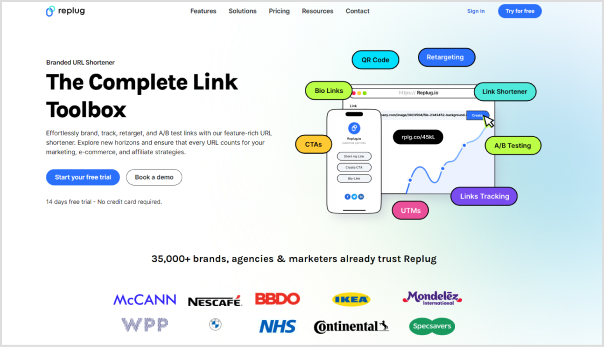
    Replug - Best custom URL shortener

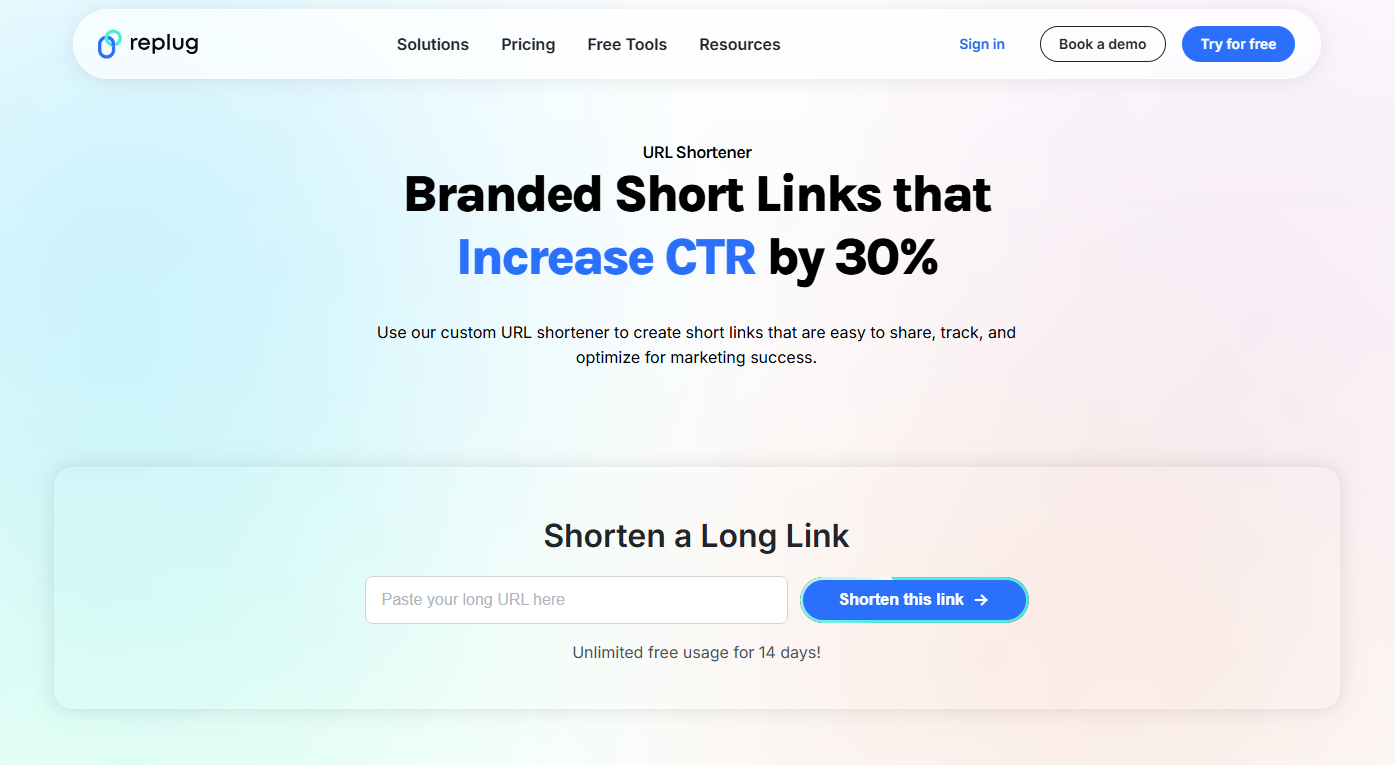
    When it comes to shortening links, Replug’s URL shortener goes beyond the basics. Instead of just turning a lengthy, disorganized URL into a short one, it gives marketers the power to brand their links, track performance, and even drive conversions through added features.

    No matter if you’re running ad campaigns, sharing links on social media, or managing multiple clients, Replug makes the process smooth and hassle-free. It also ensures that everything aligns with your brand identity in the best possible manner.

    Key features

    • Custom link shortener: Instantly transforms generic links into branded URLs with personalized slugs.
    • Branded links everywhere: Creates professional-looking links that you can use across all social media marketing channels to strengthen recognition of your brand.
    • Beyond simple URL shortening: Offers adding custom CTAs, retargeting pixels, third-party widgets, and tracking elements directly to your short links seamlessly.
    • White-label ready: Agencies and organizations can fully brand the platform, making it look like their own solution.
    • In-depth analytics in real time: Provides tracking link clicks, engagement, and conversions with detailed performance reports.
    • UTM tracking component: You can easily monitor campaign effectiveness with built-in UTM parameter support.
    • Fine-tuned link management: Keep all your shortened links organized under one roof for maximum efficiency.

    Final thoughts

    If you’re very serious and concerned about link management, Replug is hands-down the best choice out there. 

    From agencies and large enterprises to digital marketers and online businesses, it offers everything you need to create branded links, track results, and promote your campaigns. 

    It’s not just a link shortener, it’s a complete marketing toolkit built around your URLs.

    Replug Branded Short Links CTA
    Maximize marketing ROI
    by transforming ordinary URLs into
    branded short links that convert.
    Try Replug for free

    Bitly: A powerful URL shortener for brand strategists

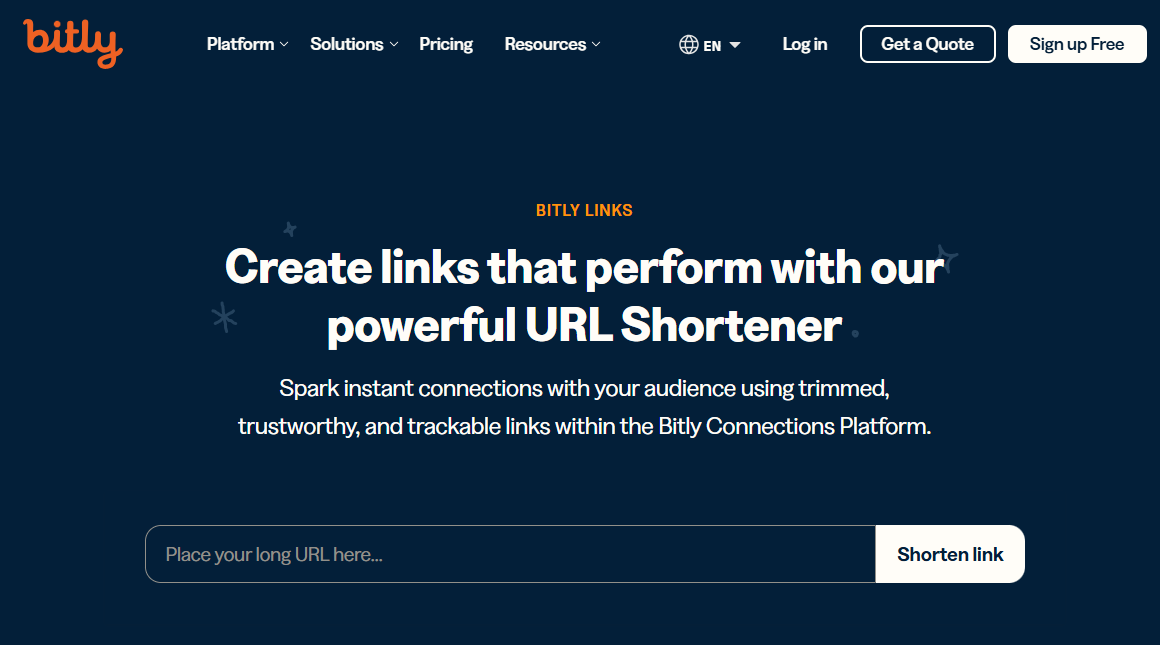
    Bitly - A powerful URL shortener

    Bitly has been around for years and is still one of the most trusted names in link shortening. It doesn’t just give you a short, neat link, but makes it easy to brand your URLs, track performance, and manage campaigns at scale. 

    For content marketers and brand strategists, Bitly provides a reliable way to keep links professional and data-driven, while making them easy to share across various platforms.

    Key features

    • Branded short links: Turns long URLs into short, clean, and branded links that build trust.
    • Top-level domains: Provides custom domains to establish a stronger brand presence for your links.
    • Clicks & engagement data: Access real-time stats on clicks and audience behavior effortlessly.
    • Campaign comparison: Easily monitor and measure performance across multiple campaigns.
    • Flexible link management: Change link destinations at any time without breaking the original link.
    • Bulk link shortening: Shorten and manage multiple links at once, saving valuable time.

    Final thoughts

    Bitly is, without a doubt, one of the most reliable URL shorteners, especially for brands and agencies that value trust and data. It packs all the essentials plus advanced features for campaign tracking and branded links. 

    However, the downside is its pricing plans. It’s a bit on the higher side compared to other tools available online. So, while it’s an excellent choice for businesses that can afford it, smaller teams or startups may want to consider budget-friendly alternatives.

    See Also: Replug – The Best Bitly Alternative

    TinyURL: A highly-rated online URL shortener

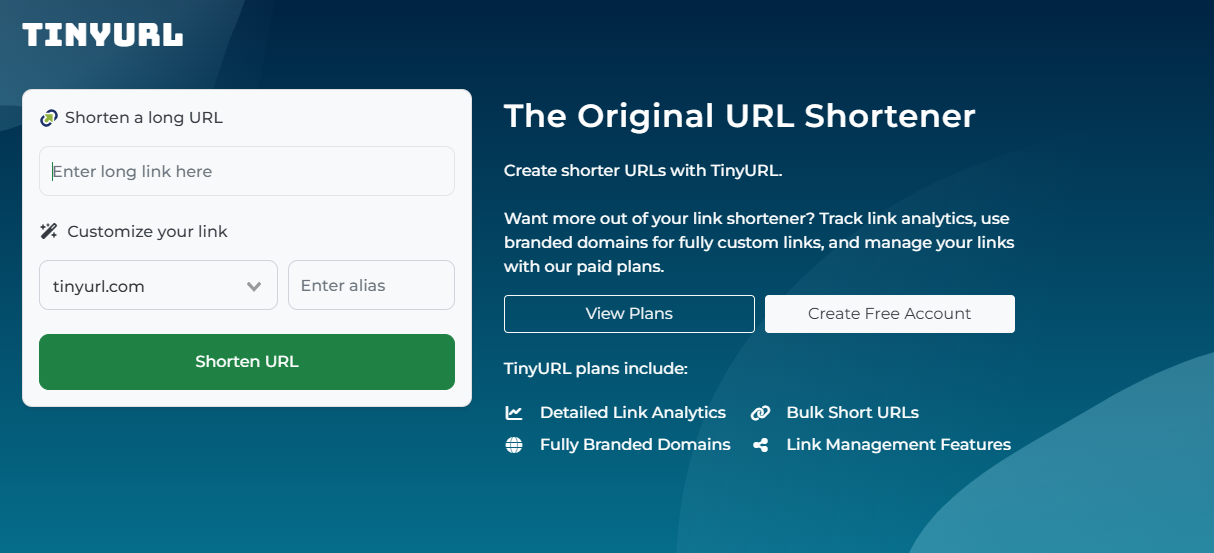
    TinyURL - A highly-rated online URL shortener

    TinyURL is one of the oldest and most recognizable link shorteners on the internet. Over the years, it has evolved from being a simple URL trimming tool to offering more advanced link management features. 

    For marketing professionals, business owners, or even casual users, TinyURL makes it easy to create shorter, cleaner links. It also provides the option to track performance and manage links in bulk.

    Key features

    • Original URL shortener: Known as one of the pioneers in the space, offering precise and simple link shortening.
    • Detailed analytics at hand: Get insights into link performance with tracking and reporting tools.
    • Bulk link shortening: Shorten multiple URLs at once to save time and effort.
    • Full-scale link management: Access features that help you organize and manage your links effectively.

    Final thoughts

    TinyURL remains a trustworthy choice for anyone looking for a straightforward link shortener with added analytics and bulk management options. 

    It does the job well, but there’s a catch! It may take a little longer to generate results, and you’ll need to sign up for an account to access its full features. Still, for those who don’t mind these small trade-offs, TinyURL is a solid option worth considering.

    Related: Replug – An Advanced TinyURL Alternative

    Which one should you use

    Selecting the right URL shortener ultimately depends on your specific needs as a marketer. If you’re looking for something simple and straightforward for basic link shortening, TinyURL still does the job with minimal fuss. 

    Bitly, on the other hand, offers a more powerful feature set for general analytics and branding. This makes it a solid choice for businesses that want a balance of usability and insight without going too deep into customization or advanced marketing features.

    However, if you’re aiming to go beyond just shortening links and want to fully optimize your marketing campaigns, Replug delivers a more comprehensive toolset. Its ability to add retargeting pixels, create branded links, use bio link pages, and even display call-to-actions on shared content gives marketers an edge in tracking, conversion, and engagement. 

    While all three tools serve the core purpose of link shortening, Replug stands out for those who want to integrate their links more strategically into their broader marketing funnel.

    Significant benefits of URL shorteners

    URL shorteners aren’t just about snipping down long links. They bring a bunch of practical advantages for marketers, businesses, and even typical users.

    Let’s take a quick look at why they’re so handy:

    • Saves character space: Short links are ideal for social media platforms like X (Twitter), where every character counts.
    • Improves aesthetics and readability: Clean, simple URLs look much more professional than messy, string-filled ones.
    • Offers tracking & analytics: Get valuable insights into clicks, traffic sources, and audience behavior.
    • Enables branding and customization: Turn generic links into branded ones that boost recognition and trust.
    • Centralized link management: Keep all your links organized in one place for easy access and control.
    • Easier to share and remember: Shorter URLs are far simpler to recall and share with others, compared to longer ones. 
    • SEO benefits: Branded, keyword-rich links can give your campaigns a slight edge in search visibility.
    • Easy link redirection: Update or change your destination link without creating a brand-new one.
    • QR code generation: Many shorteners now create dynamic QR codes for quick offline-to-online access.

    How to pick the right URL shortener

    With so many top-rated and best URL shorteners out there, choosing the right one really comes down to what you need for your business or campaigns. 

    Here are a few essential factors worth keeping in mind before making your decision:

    • Customization needs: If branding is important, go for a link shortener that lets you create custom domains and unique slugs.
    • Analytics & reporting: Look for detailed tracking features so you can measure clicks, conversions, and audience engagement without any hassle.
    • Scalability: Make sure the tool can handle your growth, whether you’re running a small campaign today or managing thousands of links later.
    • Cost & budget: Pricing varies a lot, so weigh the features against what you’re willing to spend.
    • Integrations: Check if the URL shortener works smoothly with your existing tools, like CRMs, ad platforms, or email marketing software.

    See Also: Top 5 paid URL shorteners worth paying for in 2026

    Wrapping Up

    At the end of the day, URL shorteners are more than just tools to shrink links. They’re powerful assets for branding, tracking, and managing campaigns. 

    We compared Replug, Bitly, and TinyURL, and while each has its own strengths, Replug clearly stands out with its customization, analytics, and all-in-one link management features. 

    If you want to boost clicks and build stronger brand visibility, give Replug a try today. You won’t be disappointed!

    Frequently asked questions

    Which is the best URL shortener?

    There’s no one-size-fits-all answer. It depends on your priorities (branding, analytics, budget, ease of use, etc.). But overall, tools like Replug tend to lead for marketers and agencies. Thanks to their balance of customization, tracking, and reliability.

    What is the most trusted URL shortener?

    Bitly remains a go-to trusted option in many industries. Years of uptime, brand recognition, and integrations help it rank high in credibility.

    Is there a free URL shortener?

    Yes, many services offer free plans, but with limited features. You can shorten links for free, though advanced features usually require a subscription to the paid plans.

    Are shortened URLs bad for SEO?

    Not necessarily! If the URL shortener uses proper redirects (like 301) and a reputable provider, you won’t lose SEO value.

    Is Google shutting down URL shortener?

    Yes, Google’s old “goo.gl shortener” is being phased out. Links showing warning messages or inactivity will stop working, though active ones may still be preserved.

  • How to Rename Links Using Replug: 5 Simple Steps

    How to Rename Links Using Replug: 5 Simple Steps

    Are you looking to enhance the effectiveness and branding of your shared links? 

    Learn how to make your links more descriptive, memorable, and on-brand to boost engagement and drive results. Whether you’re a marketer aiming to boost click-through rates or a content creator seeking to strengthen your online presence, using Replug to rename a link can transform your digital strategy.

    Let’s find out how to rename links in no time!

    Rename your link: What does it mean?

    “Rename your link” refers to the action of changing the default or original URL of a webpage to a more personalized and descriptive one. This process involves customizing the link’s text to better reflect its content, purpose, or target audience. 

    By renaming a link, you make it more informative, engaging, and relevant to those who come across it. This can lead to higher click-through rates, improved user experience, and enhanced branding for your content or website.

    In essence, renaming your link is about optimizing its visibility and impact in the digital landscape.

    How to rename links using Replug?

    Replug.io is a comprehensive link management and tracking platform designed to empower marketers, content creators, and businesses to maximize the effectiveness of their shared links. With it, you can create, customize, and track the performance of your links across various channels.

    Here’s how to rename links using Replug:

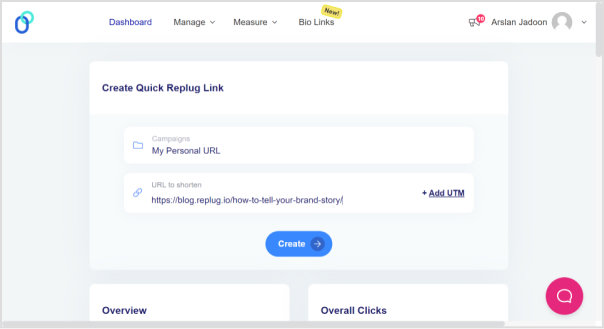
    Step 1: Sign in to Replug if you already have an account, or create one if you’re new to Replug.

    replug-1

    Step 2: Select the campaign you want to associate your link with or create a new campaign if needed.

    Step 3: Enter the link in the “URL to shorten” section below “Select your campaign” and click “Create”. Optionally, add UTM parameters to track link performance.

    how-to-rename-links

    Also read: How to shorten a link?

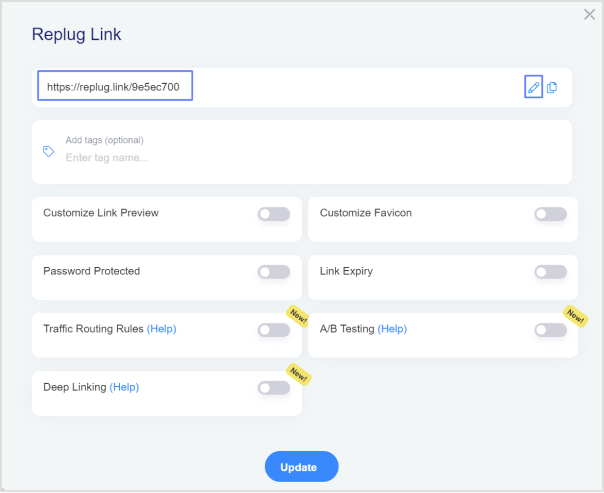
    Step 4: Your link will be shortened. Click the edit icon and type the URL slug you want to use in the link.

    how-to-rename-links

    Step 5: Once you’ve customized the link, copy the new shortened URL and click “Update”. Your renamed link is now ready to be shared.

    Replug Branded Short Links CTA
    A complete link management solution
    for marketing professionals & agencies.
    Try Replug for free

    How to rename links in Google Docs?

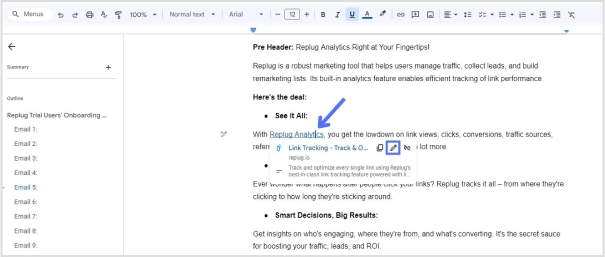
    Step 1: To begin, open your document and navigate to the link you want to rename. Simply click on the link to reveal the link options.

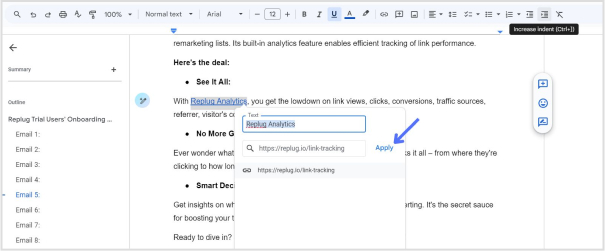
    Step 2: After clicking on the link, a menu with options such as Copy link, Edit link, and Remove link will appear, along with a preview of the linked webpage or document. To rename the link, locate and click on the “Pencil” icon.

    how-to-rename-links

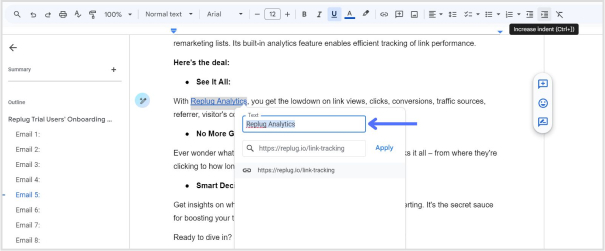
    Step 3: In the editing menu, you’ll see three fields: the text field, the URL field, and the clickable URL. Click on the “Text” field to access the text editing mode.

    how-to-rename-links

    Step 4: Once you’ve clicked on the “Text” field, you can edit the text of the link. Use the backspace key to delete the existing text and type in the new text to rename the link according to your preference.

    Step 5: After you’ve renamed the link, click on the “Apply” button to confirm the changes. Your link will now be updated with the new text, and the changes will take effect in your Google Docs document.

    how-to-rename-links

    Also read: How to edit URL links with Replug?

    Use Replug to manage your links:

    Using Replug to manage your links offers several advantages:

    • Link optimization: Replug offers a top-notch tool to create short link with absolute precision. Besides, it provides various options to customize and optimize your links, including link shortening, branding, and tracking features. This helps to make your links more visually appealing, recognizable, and effective in driving engagement.
    • Branding: With Replug, you can create custom-branded links that reflect your brand identity, increasing brand visibility and credibility when sharing content across different channels.
    • Performance tracking: Replug offers detailed analytics and insights into link performance, allowing you to monitor metrics such as click-through rates, geographic location of clicks, and conversion rates. This data enables you to assess the effectiveness of your link-sharing efforts and make informed decisions to optimize your strategy.
    • Call-to-action integration: Replug allows you to add customizable call-to-action overlays to your shared links, directing traffic to specific actions or landing pages. This feature enhances the effectiveness of your links in driving conversions and achieving your marketing goals.
    • Link rotation: Replug’s link rotation feature distributes traffic evenly among multiple destination URLs, enabling you to conduct A/B testing or distribute traffic to different landing pages based on predefined rules.
    Replug Branded Short Links CTA
    A complete link management solution
    for marketing professionals & agencies.
    Try Replug for free

    Frequently asked questions 

    Why should I rename my links?

    Renaming links can make them more descriptive, memorable, and aligned with your brand. This can improve click-through rates, enhance branding, and provide a better user experience.

    Can I track the performance of renamed links?

    Yes, Replug provides detailed analytics and insights into the performance of your renamed links, including click-through rates, geographic location of clicks, and more.

    Can I use Replug to rename links in bulk?

    Yes, Replug offers features for bulk link management, including renaming multiple links simultaneously, making it efficient for larger-scale projects or campaigns.

  • What are UTM Codes and How Do They Work?

    What are UTM Codes and How Do They Work?

    Marketing can be complex, but measuring its effectiveness doesn’t have to be. UTM codes are your answer to understanding what’s working and what’s not in your campaigns and, more importantly, to pinpoint which campaigns are doing the heavy lifting. This is where UTM codes come into play, offering a simple solution to the challenge of marketing success. So, let’s break it down:

    What are UTM codes?

    UTM codes are essentially strings of text that are added to URLs. These strings contain specific parameters that provide invaluable information about the source, medium, and campaign that led a user to a particular webpage. In other words, UTM codes act as data markers, offering a clearer view of the user’s journey, from the initial interaction to conversion.

    Here’s a breakdown of the key UTM parameters:

    1. Source: 

    This parameter specifies the origin of your traffic. Is it coming from an email, a social media platform, a search engine, or another source? Accurately tagging the source helps you identify which channels are driving the most traffic.

    1. Medium: 

    The medium parameter describes the type of marketing medium used. It could be an email, social, organic search, paid search, or any other medium relevant to your campaign. Categorizing your traffic in this way allows you to determine which marketing avenues are the most effective.

    1. Campaign: 

    The campaign parameter enables you to track a specific marketing campaign or initiative. Whether it’s a product launch, a seasonal promotion, or an event, this parameter helps you differentiate between different efforts within the same source and medium.

    1. Term (optional): 

    This parameter is often used for paid search campaigns to identify the keywords that triggered the ad click. It’s an optional parameter and is mainly relevant to search engine advertising.

    1. Content (optional): 

    Another optional parameter, content can be used to differentiate between different elements of your marketing efforts, such as different ad variations or links within the same campaign.

    Understand with an example:

    Let’s create an example URL with UTM parameters added.

    Original URL:

    https://www.example.com/product-page

    Now, let’s add UTM parameters to track the source, medium, and campaign:

    • Source: Let’s say the traffic is coming from an email newsletter.
    • Medium: The marketing medium is email.
    • Campaign: It’s part of a campaign called “SummerPromo.”

    Now, we’ll add these UTM parameters to the URL:

    https://www.example.com/product-page?utm_source=email&utm_medium=email&utm_campaign=SummerPromo

    With these UTM parameters added, you can track that anyone who clicks on this URL is coming from the source “email,” through the medium “email,” and as part of the “SummerPromo” campaign. This allows you to monitor the performance of this specific link in your marketing efforts.

    How to create UTM tracking codes?

    Creating UTM tracking codes is a pivotal part of monitoring the performance of your online marketing efforts. While it’s technically possible to manually create these codes by adding specific strings to your URLs, it can be complex and time-consuming, especially when you have to manage them at scale. This is where UTM code generators come into play, making the process much more efficient.

    Google Analytics URL builder:

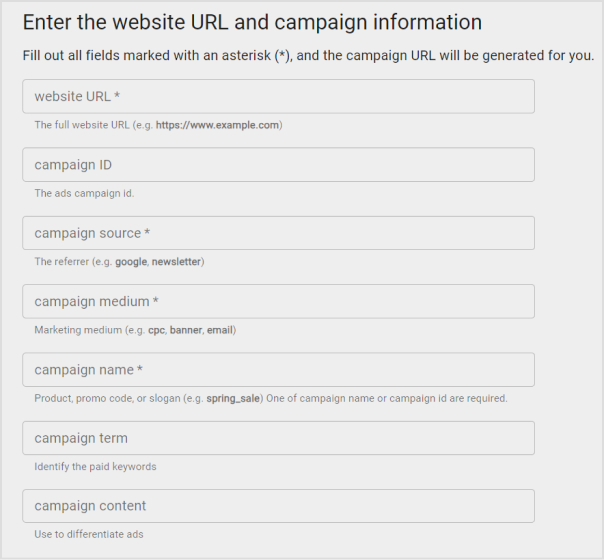
    Google Analytics offers a straightforward UTM code generator, which has become the go-to choice for many businesses. Here’s how you can use it:

    1. Visit Google’s URL Builder tool.
    2. Fill in the required fields for your campaign: the URL of the landing page, source, medium, campaign, term (optional), and content (optional).
    3. Click “Generate URL,” and Google will create the UTM-coded URL for you.
    how-to-create-utm-parameters-url

    Replug – A convenient alternative:

    Replug.io is another powerful tool for UTM code creation, and here’s why it’s worth considering:

    • Automatic UTM code generation: 

    Replug automates the UTM code creation process, saving you the trouble of manual entry. This means you can gather valuable analytics data as soon as your campaign goes live.

    • Shortened and customized URLs: 

    UTM-coded URLs can become quite lengthy, which can be a problem on platforms like Instagram or when users need to copy and paste links. Replug’s URL shortener free tool shortens and customizes these URLs, making them more elegant and user-friendly.

    For example, a long UTM-coded URL might look like this:

    https://replug.io/pages/resources/blogs/influencermarketing?&utm_source=contentdigest&utm_medium=email&utm_campaign=ebook-influencer-marketing&leadchannel=email&leadchanneldetail=contentdigest

    With Replug, it could be as sleek as this: 

    https://rplg.co/Influencer02

    While preserving all the essential UTM data.

    Also read: How to Create UTM Links: A Step-by-Step Guide

    • Advanced tracking and analytics: 

    While UTM codes are a solid foundation for analyzing marketing performance, they have limitations. Replug offers an enhanced solution called Campaigns, providing in-depth insights and a more hassle-free tracking experience, especially when managing multiple campaigns across various marketing channels.

    Replug Branded Short Links CTA
    A complete link management solution
    for marketing professionals & agencies.
    Try Replug for free

    Elevate Your Brand Performance with Replug

    UTM codes are a fundamental tool for tracking the success of your brand campaigns, links, and platforms. They provide valuable data, but those unwieldy, lengthy links can be a drawback. As your marketing endeavors become more intricate, it’s essential to adopt a system that offers both enhanced power and efficiency.

    This is where Replug steps in as the ideal solution. Replug not only helps you track traffic effectively, even in the most complex marketing landscapes, but it also simplifies the process. With Replug, you obtain concise, stylish links that seamlessly fit into any context. Moreover, it offers an analytics tool that’s user-friendly and excels at managing multichannel marketing campaigns.

    In essence, Replug empowers you to elevate your brand’s performance, making tracking and managing your marketing efforts a smoother, more efficient, and ultimately more successful process.

    Frequently asked questions

    What are UTM codes?

    UTM codes are tracking parameters added to URLs to measure marketing performance. They’re vital for data-driven decision-making and proving campaign success.

    How do I create UTM codes for my campaigns?

    You can create UTM codes manually, but it’s easier and error-free to use online UTM code generators like Google’s Campaign URL Builder or Replug’s UTM code builder.

    What is Replug, and how does it work for link tracking?

    Bitly is a URL shortening and link management platform that not only shortens links for sharing but also provides link tracking and analytics to measure click-through rates and engagement.

    You may also like:

    Click Tracking: What It Is and How It Works?

    How to Add Multiple Links to Instagram Bio Using Replug?

    How to Shorten a link using a URL shortener?

  • How to Create UTM Links: A Step-by-Step Guide

    How to Create UTM Links: A Step-by-Step Guide

    Creating UTM links is a straightforward process that helps you track the effectiveness of your marketing campaigns and understand where your website traffic is coming from. UTM parameters are tags added to your URLs to provide more information about the source of a click. 

    Here’s a quick and effective approach to creating UTM links:

    Understand UTM Parameters:

    UTM parameters are tags added to the end of a URL to provide more information about the source of a click. They are essential for tracking and analyzing the performance of your campaigns, allowing you to make data-driven decisions and optimize your marketing strategies. 

    Here’s a breakdown of the key UTM parameters and their purposes:

    utm_source:

    • Purpose: Identifies the specific source of the traffic, such as a website, platform, or publication.
    • Examples: “facebook,” “google,” “newsletter,” “twitter.”

    utm_medium:

    • Purpose: Specify the medium or channel through which the link was shared or clicked.
    • Examples: “cpc” (cost-per-click), “social” (social media), “email,” “organic.”

    utm_campaign:

    • Purpose: Names the marketing campaign or effort where the link is used.
    • Examples: “spring_sale,” “product_launch,” “holiday_promotion.”

    utm_term:

    • Purpose: Typically used in paid search campaigns to specify the keywords associated with the ad.
    • Examples: “running+shoes,” “digital+camera,” “best+smartphone.”

    utm_content:

    • Purpose: Differentiates between variations of the same link within a campaign, such as different ad creatives or locations.
    • Examples: “banner_ad,” “sidebar_button,” “top_menu_link.”

    Here’s an example of a URL with UTM parameters:

    https://www.example.com/page?.utm_source=facebook&utm_medium=social&utm_campaign=spring_sale&utm_term=shoes&utm_content=banner_ad

    How to create UTM links using Replug?

    Replug is a feature-rich link management platform that excels in simplifying UTM tracking while offering robust link management capabilities. Its versatility, customization options, and detailed analytics make it a compelling choice for marketers. 

    Additionally, Replug provides precise link shortening via a brilliant URL shortener free tool, efficient campaign organization, and seamless integration possibilities, making it an attractive option for businesses of all sizes.

    Here’s how to add UTM codes to your URLs using Replug:

    Step 1: Sign in or create an account

    Begin by signing in to your Replug account. If you don’t have one yet, you can easily create a free account.

    Step 2: Select your campaign

    Once you’re logged in, click “Select your campaign” on the main dashboard or create a new campaign.

    how-to-create-utm-links

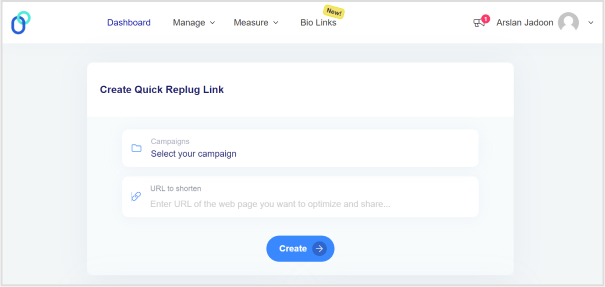
    Step 3: Paste the URL

    Locate the “URL to shorten” section below “Select your campaign”, and paste the URL to which you want to add UTM parameters.

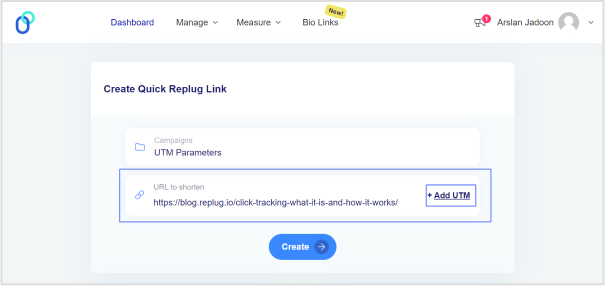
    Step 4: Add UTM tag

    At the end of the “URL to shorten” section, you’ll see an “add UTM” tag. Click on it to proceed.

    how-to-create-utm-links

    Also read: Click Tracking: What It Is and How It Works?

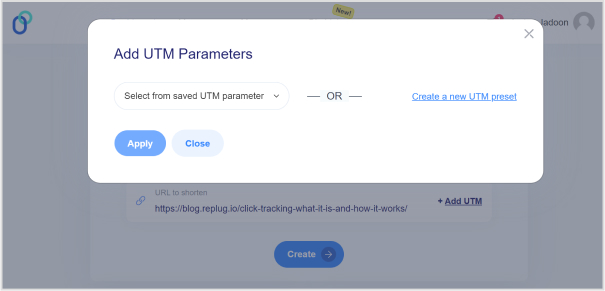
    Step 5: Choose UTM parameters

    You have the option to either “select from saved UTM parameters” if you’ve used these before or “create a new UTM parameter.”

    how-to-create-utm-links

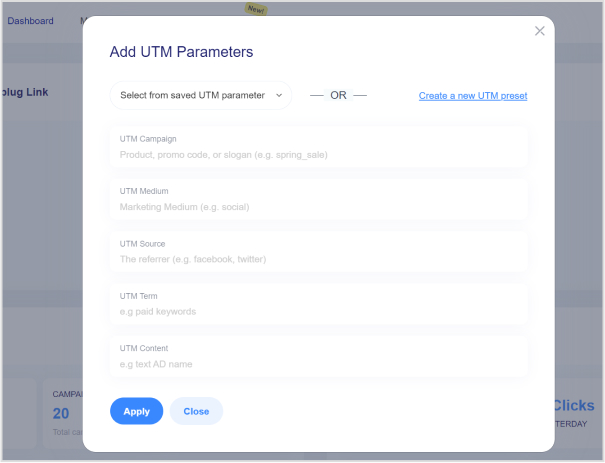
    Step 6: Fill in UTM parameters

    If you decide to create a new UTM parameter, provide the necessary information such as the source, medium, campaign, term, and content. Once you’ve completed this, click “Apply.”

    how-to-create-utm-links

    Step 7: Create the URL

    Click the “create” button, and Replug will automatically generate a shortened URL with the added UTM parameters.

    Step 8: Edit UTM code (optional)

    If you wish to further customize the URL, you can do so by clicking the edit icon.

    how-to-create-utm-links

    Also read: How to Create a Trackable Link: A Step-by-Step Guide

    Step 9: Copy and update

    After any edits (if necessary), simply copy the URL with the UTM parameters and click the “update” button to save your changes.

    Step 10: Access your URL

    To access and manage the URL you’ve just created with UTM parameters, navigate to the “Manage” section in Replug and click on “Replug links.”

    By following these steps, you can harness the full potential of Replug to seamlessly integrate UTM parameters into your URLs, improving the accuracy and effectiveness of your marketing campaign tracking and analysis.

    Replug Branded Short Links CTA
    A complete link management solution
    for marketing professionals & agencies.
    Try Replug for free

    Frequently asked questions 

    What are UTM parameters?

    UTM parameters are tags added to URLs to track the source and performance of your marketing links. They’re essential for understanding where your traffic comes from and how effective your campaigns are.

    How do I create UTM links for my marketing campaigns?

    Use an online UTM builder like Replug or manually add UTM parameters to your URLs to create UTM links.

    What are the common mistakes to avoid when using UTM parameters?

    Avoid using spaces or special characters in your UTM parameters, and make sure they are applied consistently. Be careful with sensitive data like user information in UTM parameters.

    You may also like:

    How to shorten link using a URL shortener?

    How to Add Multiple Links to Instagram Bio Using Replug?

  • Branded links vs. short links: Which is right for your brand?

    Branded links vs. short links: Which is right for your brand?

    Have you ever shared an interesting post, recommended a funny video, or perhaps even critiqued an article that missed the mark? We’ve all been there. 

    However, what you may not realize is that the way you share these online treasures can have a significant impact on your brand identity.

    If you’ve been using plain, generic short links to share content, it’s time to take a closer look. By doing so, you may unknowingly promote other brands instead of your own.

    We’ll get straight to the point and discuss the difference between branded links vs. short links inside this blog. We’ll help you understand the implications of your choice and how it can affect your brand’s online presence.

    So, let’s get straight to it!

    What is a short link?

    A short link, also known as a “short URL” or a “generic short link”, uses a public domain from a third-party service to compress a long version of a web address or URL.

    Short links are created to simplify lengthy URLs, making them easier to share, remember, and use. They play a key role, especially in contexts where character limits are a concern, such as social media or printed materials.

    Generic short links typically redirect users to the original, longer URL when clicked.

    Check out this example of a short link:

    👉 Example: bit.ly/3XyZ9aL

    This type of link uses a generic shortening domain and a random string of characters. It’s quick to create and works across any platform, but doesn’t reflect your brand identity.

    What makes short links so practical & powerful

    • Higher click-through rates (CTRs): Short links are clean, simple, and visually appealing, encouraging users to click more often compared to long, cluttered URLs.
    • Enhanced recognition: Even generic short links can reflect consistency and professionalism, helping users associate your content with reliability and trust.
    • Data-driven insights: These links provide measurable analytics, such as click counts, location, and device type, enabling you to optimize your campaigns with actionable data.
    • Seamless user experience: Shortened links load quickly, look better across platforms, and make sharing effortless, improving the overall experience for your audience.
    Major use cases for short links

    • SMS marketing: Short links save character space in text messages while tracking engagement, making them perfect for concise, measurable mobile campaigns.
    • Social media: Generic short links appear clean, fit better within character limits, and enable consistent tracking across platforms like X, Instagram, and LinkedIn.
    • Email campaigns: Using short links keeps your emails neat and improves click tracking, helping marketers measure the effectiveness of each link more accurately.
    • QR codes: Short links integrate seamlessly with QR codes, ensuring faster scans, shorter URLs, and flexible tracking of offline-to-online traffic.
    • Organic sharing: These links make content easier to share across blogs, forums, and emails, increasing reach without cluttering the message.
    • Offline marketing materials: Placing short links on posters, flyers, or packaging makes it easy for users to type or scan, bridging the gap between offline and online engagement.
    • Customer support & feedback: Support teams use such links to quickly direct users to FAQs, surveys, or troubleshooting pages without confusing them with long URLs.

    Read Also: How to shorten a link using a URL shortener?

    What is a branded link?

    A branded link, also known as a “custom short link” or a vanity URL, is a type of shortened URL that includes a brand’s or organization’s name or a custom keyword as part of the link.

    Unlike generic short links that use a random combination of characters and numbers, branded links are customized to reflect the brand’s identity, making them more recognizable and trustworthy to users.

    3 key elements of a branded link are:

    1. Domain – The custom name that represents your brand (e.g., go.yourbrand.com), helping build recognition and trust.
    2. TLD (top-level domain) – The extension that follows the domain (e.g., .com, .io, .link), which can be chosen to align with your brand’s identity or industry.
    3. URL slug – The customizable part after the slash (e.g., /summer-sale), used to describe the content or campaign clearly and memorably.

    Example of a branded link:

    👉 Example: go.yourbrand.com/offer

    A branded link uses a custom domain (e.g., go.yourbrand.com, link.apple.com, etc.). It reinforces brand recognition, looks more trustworthy, and still provides all the tracking and analytics benefits of a short link.

    What makes branded links so practical & powerful

    • Stronger brand identity: Branded links carry your custom domain, reinforcing your brand’s identity every time someone shares or clicks your link.
    • Increased trust & credibility: Users are more likely to click links that clearly display a recognizable brand name, making them appear legitimate and secure.
    • Easy to remember & share: Simple, descriptive branded links are easier to recall and share, helping your campaigns gain more organic traction.
    • Enhanced brand awareness: Every branded link acts as a micro touchpoint, spreading your brand name across social media, email, and digital channels.
    • Actionable insights & control: You can track clicks, sources, and audience behavior in detail, allowing you to optimize your campaigns with data-driven precision.
    • Clean & consistent link appearance: Branded links look professional and tidy across all platforms, maintaining consistency in tone and presentation.
    • Improved SEO & discoverability: Descriptive, keyword-rich branded links can enhance search visibility, helping both users and search engines better understand your content.

    Major use cases for branded links

    • Marketing campaigns: Use branded links to track and analyze engagement across multiple campaigns, improving ROI measurement.
    • Social media marketing: Create short, on-brand links for platforms like X, Instagram, and LinkedIn to increase clicks and maintain brand consistency.
    • Affiliate marketing: Provide affiliates with custom-branded URLs to ensure trust, improve conversions, and monitor performance.
    • Email marketing: Include branded links in newsletters or promotional emails to increase click-through rates and minimize the risk of being filtered as spam.
    • Influencer collaborations: Give influencers branded links to share, securing brand visibility and accurate tracking of their impact.
    • Paid advertising: Use branded short links in PPC ads or sponsored content to make URLs look cleaner and more credible.
    • Event promotion: Share memorable branded links for event registrations, webinars, or launches to simplify access and tracking.
    • Offline & print media: Utilize branded URLs in flyers, posters, or business cards for easy recall and consistent branding.
    • Product launches or updates: Direct audiences to specific landing pages for new products or announcements with clear, branded links.

    See Also: Link shortening vs link cloaking: What’s the difference?

    Branded links vs. short links: Which is better?

    Branded links offer several advantages, particularly in strengthening your brand identity and enhancing user trust. They are valuable for businesses and individuals seeking to establish a cohesive online presence and improve user engagement.

    Short links, on the other hand, are helpful in cases where you need a precise link to share with friends or family members, without worrying about online presence.

    FeatureBranded LinksShort Links
    DomainUses a custom, brand-specific domain (e.g., brand.co/link).Uses a third-party domain (e.g., bit.ly, tinyurl.com).
    BrandingReinforces brand visibility and consistency in every link.Offers no brand identity or recognition.
    Credibility & TrustInstantly recognizable and trusted due to brand association.It may appear suspicious or spammy to users.
    Click-Through RateHigher CTR because branded links look professional and secure.Typically lower, as users hesitate to click on unfamiliar links.
    Use CaseIdeal for marketing, promotions, and professional brand communication.Suitable for quick personal sharing or temporary links.
    Best ForBusinesses, marketers, and organizations focused on brand growth and analytics.Individuals or small-scale, non-branded usage.

    The choice depends on your priorities

    The choice between branded links and short links eventually depends on your specific goals and the context in which you plan to use them.

    Branded links: If strengthening your brand identity, increasing trust, and improving user recognition are important to you, branded links are an excellent choice. They excel in marketing campaigns and content sharing where branding matters.

    Short links: If brevity and saving space are crucial, short links are suitable. They are especially dominant in platforms with character constraints. They also make shared URLs look easier to remember, improving overall user experience.

    How to create a branded short link using Replug

    Are you ready to start using branded links for your own brand? Replug, a powerful free link shortener and branding tool, simplifies the process of creating custom, branded short links. 

    Let’s walk through the steps to create these links and amplify your brand’s reach.

    Step 1: Add your custom domain

    The first step in creating branded links with Replug.io is to incorporate your custom domain.

    While Replug provides a default shortener domain (rplg.co), using your custom domain strengthens your brand identity and reputation.

    • Open your Replug dashboard and navigate to “Settings.” Then select “Custom Domains” from the dropdown menu.
    • Click on “Add Domain” to begin setting up your custom short URL.
    • On the next screen, provide the essential details, including your custom domain and settings such as the 404 redirect URL and branded domain.
    • Click “Connect” to add your custom domain to your Replug account.
    • After successfully connecting your custom domain, you can manage it within your Replug account. Check connectivity status, edit domain settings, or delete domains as needed.

    With your custom domain integrated into Replug, you’re now ready to create your custom-branded link. Here’s how:

    Step 2: Create a branded short link

    • Sign in to Replug, or create an account for free.
    • Paste your long URL in the bar under “Quickly shorten your link”.
    • Next, click on the blue arrow. Replug will automatically generate a short link for your long URL.
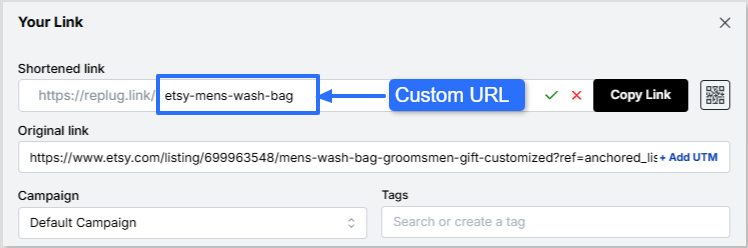
    • You can rename the link easily. All you need to do is change the slug of your short link.
    Change URL slug
    • Finally, save your shortened link. Now your link is ready to share anywhere on Instagram, Discord, or in an email campaign.

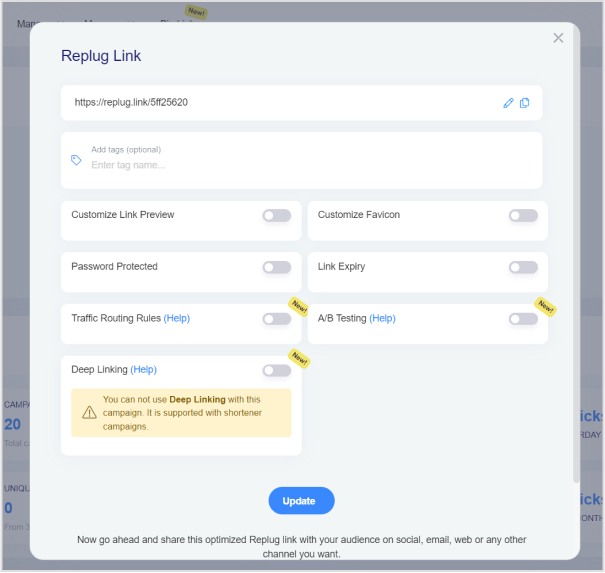
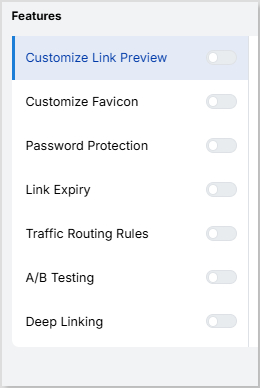
    Note: You can add some amazing Replug features to your generated link, like customizing your link preview, adding custom favicons, A/B test your links, and more! You can also add retargeting pixels or custom CTAs to your link-shortening campaigns.

    Replug’s additional link management features

    Leading brands & businesses prefer branded short links

    Let’s take a look at how some of the most popular brands use branded links to their advantage:

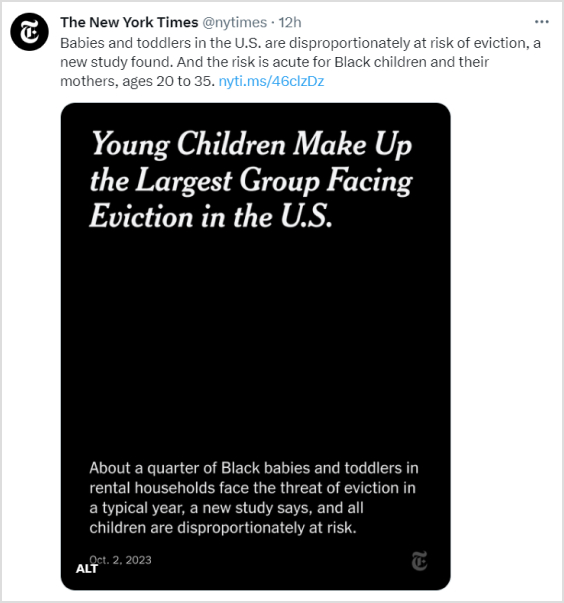
    The New York Times – nyti.ms

    The renowned newspaper, “The New York Times”, simplifies sharing long article URLs on social media and beyond by using the branded link nyti.ms. This branded link not only shortens the URL but also reinforces the brand’s identity with every click.

    The New York Times branded short link

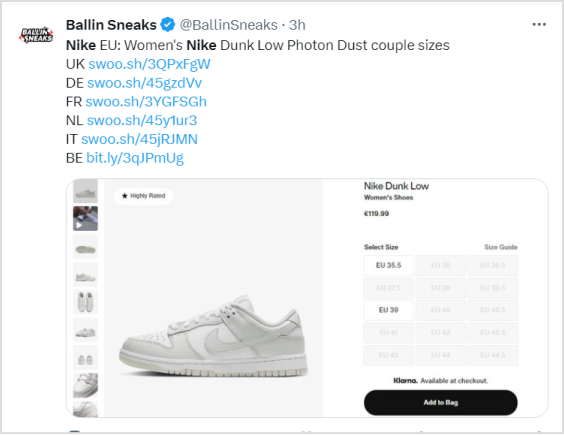
    Nike – swoo.sh

    When it comes to sports and lifestyle, Nike is a standout name. They utilize the branded link swoo.sh to create a memorable link for their products and promotions. This reinforces the Nike brand with every shared link.

    Nike’s branded short link

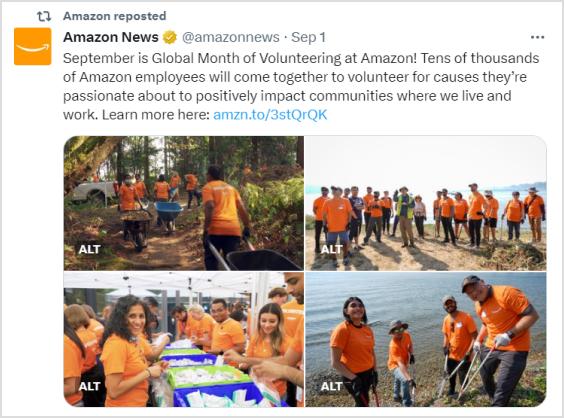
    Amazon – amzn.to

    E-commerce giant “Amazon” opts for the branded link amzn.to, to shorten product URLs. This not only saves space in printed materials but also keeps the focus on their products rather than the URL itself.

    Amazon’s branded short link

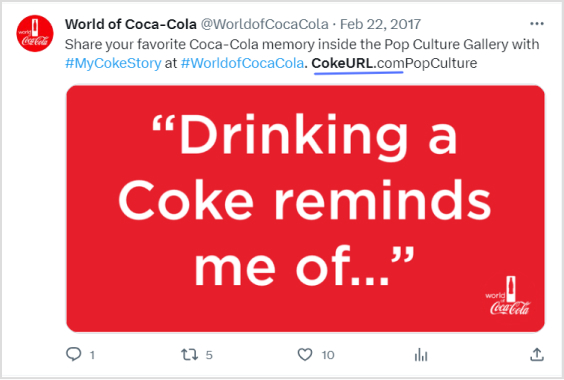
    Coca-Cola – cokeurl.com

    Coca-Cola, a global beverage icon, maintains brand consistency by using branded links, such as cokeurl.com. This approach guarantees that every link shared aligns with their brand image.

    Coca-Cola’s custom domain

    Starbucks – sbux.co

    Starbucks is a renowned global coffee chain that utilizes branded links with the domain sbux.co to simplify the sharing of promotional content. This reinforces their brand identity and keeps their links looking clean and professional.

    Starbucks branded short link

    Conclusion

    At the end of the day, the choice between branded links and generic short links comes down to your goals. 

    Short links are ideal when you need something quick, simple, and space-saving. But if you want to strengthen brand identity, build trust, and boost engagement, branded links clearly stand out. That’s why brands like Nike, Amazon, and Starbucks rely on them. 

    It’s not just about shortening a URL, it’s about making every click count.

    With tools like Replug, you don’t have to choose between convenience and branding; you can get both. Whether you’re sharing on social media, in emails, or even offline, branded links let you stay consistent, professional, and memorable.

    So instead of sending traffic through someone else’s domain, take control of your links and make them work harder for your brand.

    Frequently asked questions

    Why should I consider using branded links for my brand or business?

    Branded links, which use your custom domain (e.g., yourbrand.ly/link), enhance brand visibility and recognition with every share, fostering customer loyalty. They improve click-through rates by up to 34% compared to generic links, as they appear more professional and trustworthy. Additionally, they protect against link hijacking and provide valuable analytics to refine marketing strategies.

    Are branded links more trustworthy than short links?

    Yes, branded links are generally more trustworthy because they incorporate your recognizable domain, signaling legitimacy and reducing user hesitation from unknown shorteners. Studies show they can boost trust by 25-30%, minimizing phishing concerns. In contrast, generic short links often hide the destination, potentially alarming users in an era of heightened cybersecurity awareness.

    Can I track the performance of branded links?

    Absolutely, most branded link services, such as Replug or Rebrandly, offer rich analytics, including click counts, geographic data, referral sources, and device types. This enables real-time monitoring and A/B testing to optimize campaigns for maximum effectiveness. Integration with tools like Google Analytics further enhances tracking, providing insights into user behavior and ROI.

    Why should short links be a part of every marketer’s strategy?

    Short links condense lengthy URLs, making them ideal for character-limited platforms like X (Twitter) and improving shareability across social media. They enable precise tracking of engagement metrics, helping marketers measure campaign effectiveness and audience preferences. Moreover, they enhance aesthetics in emails and ads, potentially increasing click rates by 20-40% while supporting retargeting efforts.

    When to use short links and branded links?

    Use generic short links for quick, internal, or low-stakes sharing where branding isn’t crucial, such as casual social posts or temporary redirects. Opt for branded links in marketing campaigns, email newsletters, or affiliate programs to reinforce brand identity and build trust. Branded links excel in professional contexts, such as ads or content syndication, while short links are sufficient for everyday use.

    Provide some valuable tips when using short links?

    When using short links:

    – Make sure they’re concise yet recognizable to build trust, avoiding overly cryptic formats. 
    – Maintain consistency across your organization by using a unified link structure or platform to reinforce branding and simplify tracking. 
    – Incorporate UTM parameters in destination URLs to effectively monitor traffic sources and campaign performance in analytics tools.

  • Effective Risk Management Strategies to Manage Social Media Risks

    Effective Risk Management Strategies to Manage Social Media Risks

    We all love pizza or some kind of fast food. But what if your favorite fast food brand’s workers uploaded an unsettling video violating the health codes on social media – (there goes all your branding efforts down the hill)

    Would you still be up to try that brand? I don’t think so. The least you would do is stop going to that specific franchise.

    Similar happened in the case of Domino’s where two workers uploaded a video on Youtube from Domino’s kitchen while preparing pizza and violating the health standards. The video went viral, and the company faced strong backlash over it.

    With the right crisis response Domino’s averted serious consequences (more to the story).

    While the advantages of social media are obvious, there are also some social media risks to be aware of. When something goes wrong, brands risk losing their reputations.

    Companies must be cautious about what they publish online, and they must have a plan to address any issues that develop.

    For teams managing multiple campaigns, monitoring brand mentions, or sharing content across social channels, using Replug.io can help streamline link management and make content sharing more secure and trackable.

    In this blog, we will make sure that you stay on top of your social media game with proper risk mitigation techniques, and maintain engagement with your audience and increase your sales effectively.

    What is social media risk management for brands?

    The key to effective social media risk management for brands consists of proactive monitoring, rapid response to negative content, clear social media guidelines, employee training, and crisis communication plans.

    To maintain a positive brand image and minimize potential reputation damage, businesses need to understand how social media managers drive brand engagement and stay sharp at all times.

    Did You Know!
    “Report finds 164% increase in cyber threats targeting brands” (ZeroFox)

    Benefits of a social media risk management

    Here are the key benefits of social media risk management strategies.

    • Safeguards brand reputation
    • Enhances data security
    • Brand growth and engagement
    • Mitigates legal risks
    • Customer trust: 
    • Proactive crisis management

    If you don’t have the right risk response strategy, then you can end up like United Airlines, where the passenger Dave Caroll’s guitar was damaged. When he took his case up to the airline, it refused to fix or replace his guitar.

    In response, Dave wrote a song “United you broke my guitar”. The song got over 9 million views, and more importantly, United Airlines investors lost $180 million as the stock price dropped by 10% after the incident.

    However, before moving to the risk management strategies, it’s important to know what kind of social media risks brands are open to.

    Major social media risks for brands 

    It’s necessary for every brand, social media manager, community manager, customer services etc, to have knowledge of the risks that brands can face.

    1.  Social media security risks

    Social security risks can harm your info and identity. Avoid sharing too much, weak passwords, or strange links. Stay safe with strong passwords, cautious sharing, and distrust of unknown emails. Just like locking your door, secure your online stuff!

    When you must share URLs on social media or in campaigns, using a trustworthy link shortener ensures your links are clean, branded, and less likely to trigger suspicion, which can help protect both brand reputation and user trust.

    Here are different kinds of social security risks for brands, you must be aware of:

    • Reputation damage:
      Negative comments, reviews, or misinformation can harm a brand’s image.
    • Data breaches:
      Hackers gaining access to customer or employee data can lead to trust loss.
    • Phishing attacks:
      Employees might unknowingly reveal sensitive info to fake emails.
    • Social engineering:
      Scammers might manipulate employees for confidential data.
    • Account hijacking:
      Hackers taking control of a brand’s social media accounts can spread false information.
    • Inappropriate content:
      Sharing or being associated with offensive or inappropriate content.
    • Intellectual property theft:
      Competitors or others stealing a brand’s ideas or content.
    • Crisis mishandling:
      Poorly managed crises can worsen public perception.
    • Lack of control:
      Employees’ personal posts reflecting poorly on the brand.
    • Miscommunication:
      Messages being misinterpreted can lead to PR issues.

    Did you know!
    “Up to 40% of social media users are estimated to have experienced some form of social engineering or phishing attack.” (GITNUX)

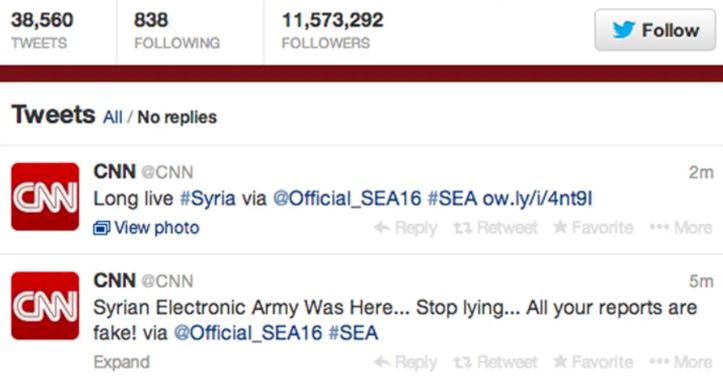
    The CNN hacking case

    Social media risk example of CNN social accounts hacking

    In 2014, the official Twitter and Facebook accounts of CNN were compromised by a hacktivist group, the Syrian Electronic Army (SEA). The hackers posted false information, which spread rapidly, damaging CNN’s credibility and potentially influencing the public.

    CNN’s response

    CNN’s initial response was somewhat delayed and lacked coordination, allowing the false information to gain traction. However, they swiftly regained control of their accounts, deleted the false posts, and issued clarifications.

    What could have been done?

    To enhance crisis management, CNN could have benefited from faster response times, clear communication strategies, and pre-established protocols for social media account security. This case underscores the need for organizations to proactively prepare for digital threats and have effective crisis communication strategies in place.

    2.  Legal risks

    Social media legal risks encompass potential legal problems arising from online activities, such as copyright infringement, defamation, and privacy violations.

    Here are different kinds of social media risks brands need to be aware of:

    • Copyright infringement: Sharing content without proper authorization can lead to copyright claims.
    • Defamation: Posting false or damaging statements about individuals or businesses can result in defamation claims.
    • Privacy violations: Sharing personal information without consent might lead to privacy lawsuits.
    • Trademark violations: Unauthorized use of trademarks can result in legal action.
    • Advertising regulations: Violating advertising laws or not disclosing sponsorships can lead to penalties.
    • Data protection Laws: Mishandling customer data may breach data protection regulations.
    • Contractual Issues: Breaching contracts with influencers or partners can result in legal disputes.
    • Employment matters: Employee social media usage can lead to HR and legal challenges.
    • Regulatory compliance: Not adhering to industry-specific regulations can lead to fines.
    • Misleading content: Sharing false or misleading information might breach consumer protection laws.

    Interesting read: How to Understand and Maximize Your Reach on Any Social Network

    3.  Financial risks

    Managing social media risks effectively is crucial to mitigate these potential financial impacts and maintain a positive brand image, customer trust, and business growth.

    Here are some major financial impact on brands that occur due to weak social media risk management:

    • Customer loss:

    Poorly managed social media risks can lead to a loss of existing customers and difficulty in attracting new ones due to negative perceptions. This is why it’s crucial to keep track of TikTok analytics and analyze interactions on Instagram, Twitter, and other platforms to prevent this from happening.

    • Legal expenses:

    Violations such as copyright infringement or privacy breaches can result in legal fees, fines, and settlements, draining financial resources.

    • Crisis management costs:

    Dealing with social media crises requires resources for crisis communication, PR efforts, and reputation repair, leading to additional expenses.

    • Difficulty in ROI measurement:

    Relying on misleading social media metrics can lead to misguided decisions and ineffective strategies. Measuring the actual return on investment from social media efforts can be challenging.

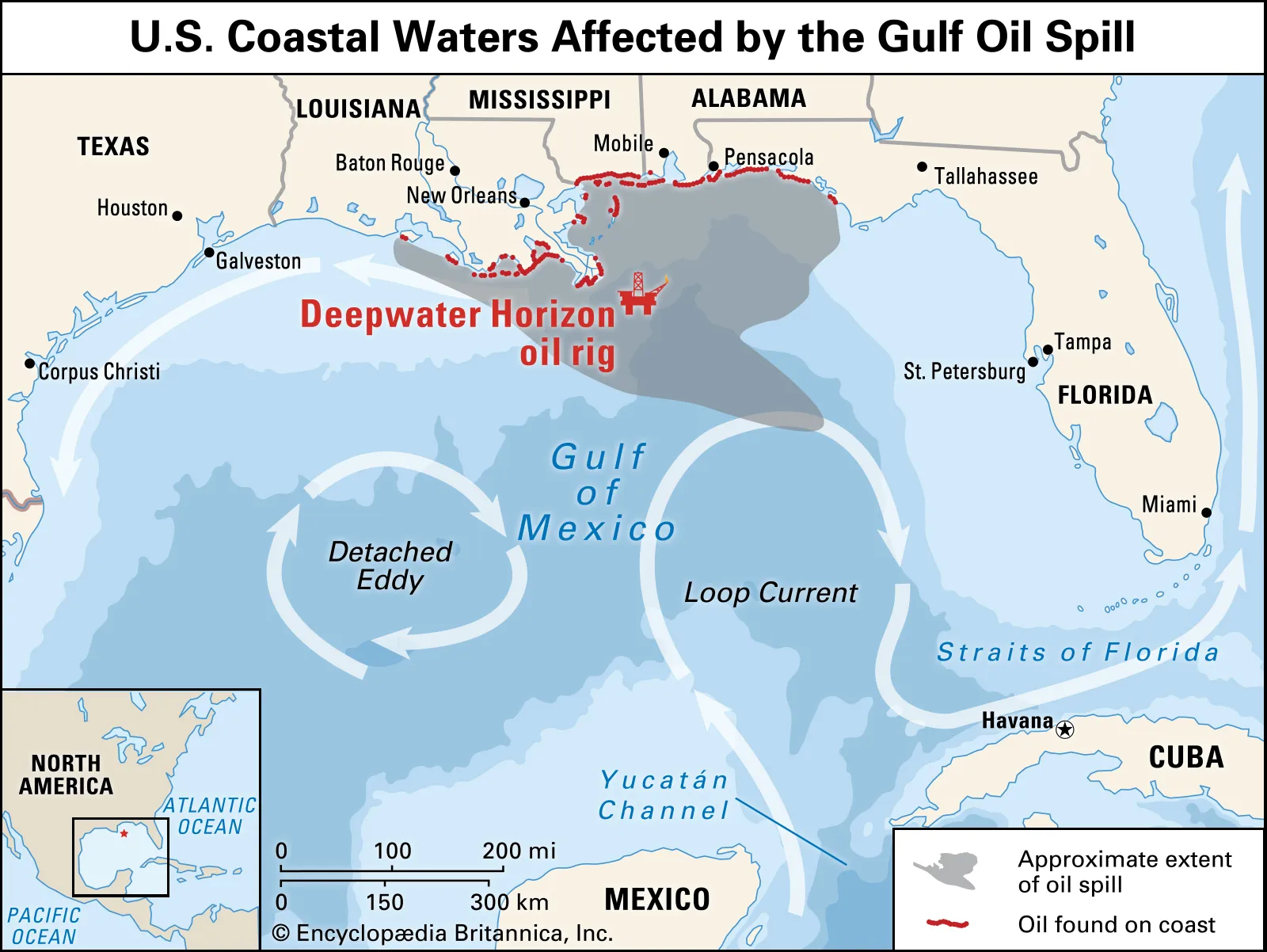
    The British Petroleum Gulf oil spill: A risk management debacle

    Social Media Risk Example of BP Oil Spill

    The BP oil spill in the Gulf of Mexico is widely known, and social media has played a crucial role in magnifying and uniting public anger over BP’s management of the crisis in that region.

    BP’s brand value has taken a hit of more than $1 billion as a consequence of the situation. Notably, the “Boycott BP” Facebook page has garnered the support of over 750,000 individuals.

    Moreover, discussions surrounding “BP” have surfaced across various online platforms, including more than 9,000 blogs and over 23,000 tweets. Impressively, these discussions on Twitter have collectively generated approximately 49.5 million impressions.

    4.  Competitor risk

    Social media risks related to competition involve potential negative impacts that arise from interactions and activities on social media platforms involving competitors. These risks can impact a business’s reputation, customer perception, and overall competitive standing.

    Here are some social media risks related to competition:

    • Comparative marketing gone wrong:

    While comparative marketing can be effective, it can backfire if not executed carefully, leading to legal issues or public backlash.

    • Customer poaching:

    Competitors might target your customers with enticing offers or campaigns, attempting to shift their loyalty away from your brand.

    • Stolen strategies:

    Your rivals might closely monitor and replicate your successful social media strategies, diminishing your unique competitive advantage.

    • Disinformation or rumors:

    Competitors might spread false rumors or disinformation about your products or services, impacting customer trust and potentially causing financial harm.

    5.  Innovation risk

    While social media can be a powerful tool for innovation, it also comes with certain risks. Here are some innovation-related social media risks to be aware of:

    • Premature exposure:

    Sharing innovative ideas or products too early on social media can lead to competitors gaining insight and potentially launching similar initiatives before you do.

    • Copycat competition:

    Competitors might quickly replicate or modify your innovative concepts after seeing them on social media, reducing your competitive advantage.

    • Expectation management:

    Overhyping an innovation on social media can lead to unrealistic customer expectations, making it challenging to meet those expectations in reality.

    • Critique and negative feedback:

    Innovative ideas can attract critique and negative feedback on social media platforms, potentially discouraging further development or affecting your brand perception.

    Interesting read: A Complete Guide to Building a Brand Marketing Strategy

    Social media risk management plan for brands

    One of the best examples and case studies of crisis management that brands highlight is the Johnson and Johnson’s Tylenol incident.

    In 1982, Johnson & Johnson faced a crisis when seven people in the United States died after consuming Tylenol capsules that had been tampered with and laced with cyanide. The company swiftly responded by recalling 31 million bottles of Tylenol, worth around $100 million. They cooperated fully with law enforcement and established a hotline to inform the public about the situation.

    Johnson & Johnson also introduced tamper-evident packaging, which later became an industry standard. Their transparent and responsible crisis management approach is often cited as a model for effectively handling product-related emergencies.

    Below are more details on this story and crisis management in this video of Retro Report.

    Here’s a social media risk management plan tailored for brands for effective crisis management.

    1. Risk identification:

    • Identify potential social media risks, such as reputation damage, data breaches, legal compliance issues, and crisis events.

    2. Risk assessment:

    • Evaluate the potential impact and likelihood of each risk to prioritize them effectively.

    3. Prevention and guidelines:

    • Establish clear social media usage guidelines for employees, including appropriate content and engagement practices.
    • Enforce strong password policies and enable two-factor authentication for all brand accounts.

    4. Monitoring and alerts:

    • Utilize social media monitoring tools to track brand mentions, sentiment, and potential threats.
    • Set up real-time alerts for unusual activity or security breaches.

    5. Data protection:

    • Implement stringent data protection measures, including encryption, secure data storage, and regular security audits.

    6. Crisis response plan:

    • Develop a comprehensive crisis management plan with predefined actions for addressing negative events.
    • Assign specific roles and responsibilities for crisis communication and resolution.

    7. Legal compliance:

    • Stay informed about relevant laws and regulations related to social media usage and advertising.
    • Ensure all social media content and activities comply with legal requirements.

    8. Third-party app evaluation:

    • Thoroughly vet and monitor third-party apps or tools used for social media management.
    • Ensure these tools adhere to strict security and privacy standards.

    9. Incident handling:

    • Establish a well-defined incident response process to swiftly address social media-related incidents.

    10. Communication strategy:

    • Develop a clear communication plan for addressing stakeholders, customers, and the public during a crisis. – Prioritize transparency and timely updates.

    11. Regular audits:

    • Conduct regular audits of social media accounts, content, permissions, and security settings.

    12. Employee training:

    Provide ongoing training to employees about responsible social media practices, data security, and crisis communication. Use Plus AI to create engaging presentations to support these efforts.

    13. Continuous improvement:

    • Regularly review and update the risk management plan to adapt to evolving social media trends and emerging risks.

    FAQs about social media risk

    What is the biggest risk in using social media for a business?

    Biggest risk in using social media for business is reputation damage.

    What are the main risks of social media? 

    Main risks in using social media for brands are reputation, data breaches, legal compliance & misinformation.

    What is risk management in social media?

    Planning to identify, assess, mitigate, and monitor social media risks.

    What are the risks of social media to an organization?

    5 types of risk management are strategic, financial, operational, compliance and reputational risks.

    What are the 5 types of risk management?

    5 types of risk management are strategic, financial, operational, compliance and reputational risk management.

    How can you reduce the risk of using social media?

    Reduce risk of using social media to educate employees, follow privacy guidelines, use strong passwords, and monitor activities.

  • SEO split testing: Test your way to higher search engine ranking

    SEO split testing: Test your way to higher search engine ranking

    Tired of guesswork in SEO? Embrace the science of SEO split testing!

    Discover how small changes to your website’s structure, keywords, and content can have a big impact on search rankings, organic traffic, and user engagement.

    Let’s supercharge your website’s organic search results with our SEO split testing guide.

    What is SEO Split Testing?

    SEO split testing is the process of comparing different versions of web pages to measure their impact on search engine rankings. It’s like a controlled experiment, where you have a variant page with changes and a control page. By tracking the performance of each variant, you can identify the best performing webpage and enhance your website’s visibility in search engines.

    The benefits of SEO split testing

    • Data-driven decision-making: You can make informed decisions based on empirical evidence on the effectiveness of different variations.
    • Improved user experience: Testing different elements can lead to a better user experience, resulting in higher engagement and improved rankings.
    • Increased organic traffic:  You can attract more organic traffic from search engines by optimizing your website based on test results.
    • Better conversion rates: Split testing helps identify the most effective strategies to drive conversions.
    • Adaptation to algorithm changes: It allows you to adjust your SEO strategies in response to algorithm updates.
    • Stakeholder buy-in: A/B Split test results provide tangible evidence of the impact of SEO efforts.

    Why should I split test my SEO strategy?

    SEO

    Below are the benefits of split testing the SEO strategy that might convince you to invest your time in them:

    1. Improve Conversion Rates:

    Conversion rate optimization (CRO) and SEO are closely related concepts. By split testing your SEO campaign you can increase traffic and conversion rates. You can fine-tune your SEO strategy to enhance user experience and boost conversions by testing various iterations of landing pages and calls-to-action buttons.

    2. Optimize SEO Efforts:

    By using split-testing, you can compare various iterations of your SEO strategy, including : 

    • Keyword usage
    • Meta tags/descriptions
    • On-page optimization
    • Content organization

    This practice allows you to identify which tactic produces the best outcomes. It assists you in determining the best strategies to raise your search engine rankings and increase organic traffic.

    3. Keeping up with algorithm changes:

    Search engine algorithms are always changing, so what works today might not work tomorrow. Split-testing enables you to modify and polish your SEO approach to conform to algorithm updates. You can make sure your website maintains its search engine optimization and visibility in the constantly shifting environment by being proactive and conducting ongoing testing.

    4. Convince stakeholders and quatify Impact:

    The impact of SEO can be quantified by measuring key metrics both before and after changes by performing an SEO Split test. This data-driven strategy offers verifiable proof of the efficacy of your SEO strategy, enabling you to convince stakeholders of the value of your optimizations and make wise resource allocation choices.

    5. Refine user experience:

    Split-testing SEO components can help you improve your website’s overall user experience. By testing various layouts, navigation structures, page load times, and mobile responsiveness, you can find changes that make your website more user-friendly

    Factors to consider before performing the SEO Split test?

    Split-test_

    These several factors must be considered before performing an SEO split test.

    1. Clear objectives: Define clear objectives for your test. What specific aspect of your SEO strategy are you testing? 
    2. Testing scope: Determine the scope of your test. Decide whether you’ll be testing a single webpage or multiple pages.
    3. Sample size:  Strive for a sample size that provides meaningful insights without being too resource-intensive.
    4. Test duration: Determine the appropriate duration for your test within the time frame of changing dynamics.
    5. Statistical significance: Establish the level of statistical significance you require for your results to be reliable. This helps determine the confidence level you need to make decisions based on the test data. 
    6. Choosing the right testing tool: Use a reliable, user-friendly A/B split testing tool with a solid track record.
    7. Consistency in testing conditions: Make sure the testing conditions, such as the user demographics, devices, browsers, and traffic sources, are constant throughout the test.
    8. Segmentation and personalization: Depending on user characteristics, decide whether you want to segment your audience or personalize the variations. 
    9. Data collection and analysis: Establish a clear plan for data collection and analysis to derive actionable conclusions.
    10. Documentation and reporting: Document your test process, including the variations tested, metrics measured, and results obtained. This documentation will be valuable for future reference

    How do you know if an SEO test is successful?

    Keyword rankings:

    When it comes to evaluating your SEO results, one important aspect to consider is monitoring your keyword rankings on search engine results pages (SERPs). While rankings should not be the sole focus of your SEO campaign, they provide valuable insights into the performance and effectiveness of your targeted keywords. By regularly checking your rankings, you can track whether they are improving, declining, or remaining stagnant over time. If you find out that you are not ranking for the keywords you targeted, reevaluate whether it is worth continuing to focus on those keywords or considering alternative options.

    Organic traffic:

    Another way to see whether your SEO test was successful is by analyzing your website’s organic traffic. There are comprehensive tools like Content Studio that help you look for trends and changes in traffic volume, sources, and user behavior. Compare the data before and after implementing SEO strategies to identify any positive impact on organic traffic. 

    An increase in organic traffic serves as a strong indicator of the effectiveness of your SEO efforts. However, do keep in mind that organic traffic data is more important than overall traffic. It is because factors outside of SEO can influence overall traffic numbers. Conversely, a decrease in organic traffic suggests that your SEO tests are not working.

    Backlinks: 

    Evaluate the quantity and quality of backlinks to your website. Backlinks from reputable and relevant sources can improve your website’s authority and search rankings. When implementing effective SEO practices, it is natural to witness an increase in backlinks. You need to assess whether the number of links and unique domains they originate from is growing, declining, or stagnant. However, quantity alone is not sufficient; the quality of backlinks also holds great importance. Low-quality backlinks can be detrimental to your website’s reputation, similar to having no links at all. Boost your business visibility in local search with professional services from Copify.

    Check impressions:

    Impressions refer to the number of times your website appears in search results without receiving any clicks. It serves as an initial metric to consider. This is because, when you begin optimizing for keywords, it’s unlikely that you’ll immediately land on the first page of search results.

    Starting from lower pages means that even if your website appears in searches, there is a lower chance that it will be clicked. Knowing that you have begun ranking for those keywords will help you keep working toward the top of the page. You can use ‘Social Media Analytics’ by Content Studio to check your organic impressions. If it shows an increase in the number of organic impressions, your SEO tests are working if not better perform the tests again.

    Bounce rate:

    Another important aspect to consider when evaluating your SEO performance is analyzing the bounce rate of your website. The bounce rate refers to the percentage of visitors who leave your site after viewing only one page. By examining this metric, you can gain insights into how well your SEO tests are working. You should aim to have a lower bounce rate. This means that visitors find value in your content and are more likely to explore multiple pages on your website. 

    To improve your bounce rate, focus on creating high-quality content that is relevant, informative, and engaging. Ensure that your website is user-friendly, with clear navigation and intuitive design. Additionally, optimize your landing pages to align with the search intent of your target audience, delivering the information or solution they are seeking.

    Conversion rates:

    Tracking the number of conversions is one technique you can use to gauge the effectiveness of your SEO strategy. Start with form submissions, purchases, sign-ups, and any other desired actions on your website. A rise in conversion rates indicates that your SEO tactics are effectively attracting visitors who are genuinely interested in your offerings. It signifies that your website’s content, user experience, and overall SEO optimization are aligned with the needs and expectations of your target audience.
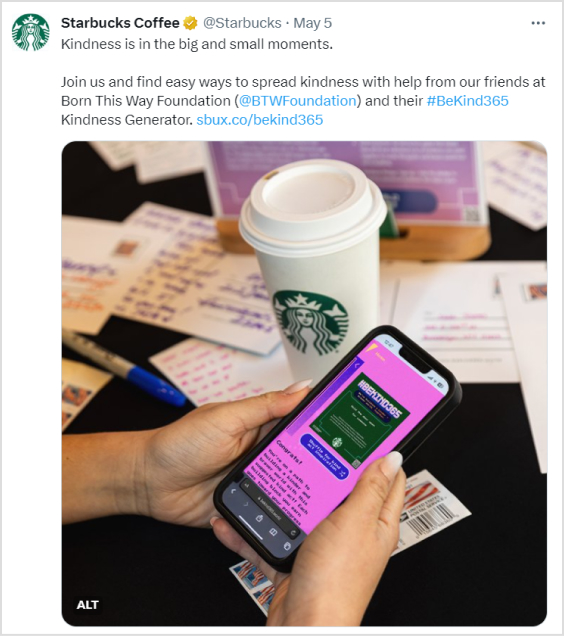
    Note: To calculate the conversion rate, divide the number of conversions by the total number of visitors and multiply it by 100 to get the percentage.

    This metric provides a clear indication of how well your website is performing in terms of converting visitors into customers or achieving your desired goals.

    A/B Split Testing using Replug

    Replug is a comprehensive platform for URL shortening and tracking. It provides many features to help you manage links and improve your marketing.

    Users can shorten and customize URLs with Replug’s trustworhty URL shortener, track link performance, and enhance the overall link shortening experience.
    It allows split A/B testing of various URL variations. By doing this you can determine their effect on click-through rates and overall performance.

    Follow the steps given below using Replug and perform A/B split tests.

    Step 1

    To access the Replug application, begin by logging in to your account.

    signin or create account

    Once logged in, navigate to the Replug Links page.

    Locate and click on the New Link button to initiate the process of creating a new link. Follow the subsequent steps provided to complete the link creation procedure.

    Step 2

    Before saving the link, activate the A/B Split testing feature by switching on the toggle button. This action will automatically set your destination URL as the initial A/B Testing Link with a weightage of 100%.

    enable AB testing

    To include additional URLs for testing, simply click on the “Add Destination Link” button.

    Step 3

    You have the flexibility to assign different weights to each URL, as long as the total weightage adds up to 100%.

    equalize waight

    To simplify the process, you can utilize the “Equalize Weights” button, which automatically distributes the weightage equally among the URLs.

    This allows for easy adjustment and optimization of the weight distribution for your A/B testing purposes.

    Step 4

    After enabling the A/B Testing feature, you are ready to save your branded link. Start engaging your audience by sharing your Replug Link

    Replug-A/B-testing-Tool

    Now analyze link performance and keep using the best performing one.

    Note: It’s important to note that the weightage assigned to each URL is not influenced by previous visits and does not have strict constraints.Whenever the short link is accessed, the final destination URL is selected based on the defined weightage, ensuring a dynamic and varied user experience. However, it’s worth mentioning that if your campaign type is CTA (Call-to-Action) and the specified link does not support iframe functionality, the link cannot be saved for A/B Testing. This limitation is due to the requirement of displaying web page content within another website using iframe. If the source website does not permit iframe inclusion, Replug displays a warning when creating CTA Campaigns.
    FAQs

    Does A/B Testing hurt SEO?

    A/B testing itself does not hurt SEO. It can be a valuable strategy to optimize your website for better search engine rankings. When running A/B tests, it’s important to ensure that the changes you make align with SEO best practices and guidelines provided by search engines. By running tests you can improve your search engine ranking in Google search results.

    Most common mistakes to avoid while running SEO split tests

    – No clear goals/ objectives
    – Simultaneous testing of multiple variations 
    – Not collecting and analyzing enough data to draw statistically significant conclusions.
    – Not giving the test enough time to run and produce valid data.
    – Not documenting and tracking the modifications that were made and their impact on SEO performance.

    – Ignoring additional outside elements that could affect the test results.

    What SEO elements can I test using split testing?

    You can test various SEO elements to improve your website’s performance. Some elements you can consider testing include:
    – Page titles 
    – Meta descriptions
    – Keyword usage and optimization
    – Headings and subheadings (H1, H2, etc.)
    – Content length and formatting
    – Navigation and site architecture
    – Calls-to-action
    – Linking strategies
    – Image optimization 
    – Mobile responsiveness 
    – URL structure
    – Site speed

    What’s the difference between conducting a split test and an A/B test

    A split test and an A/B test are two different terms used to refer to the same type of experiment. However,  the term “split test” is a broader term that encompasses any test where different versions are compared including A/B tests. In other words, it refers to dividing the traffic between multiple variations to measure their impact on key metrics. Whereas an A/B test specifically refers to comparing two versions: a control version (A) and a variant version (B).

    Other popular blogs

    A/B Testing Benefits, Examples & Other Factors To Consider

    5 Top Link Rotators: Convert More With Traffic Routing & A/B Testing

    How to Create an SEO Friendly URL: Ultimate Tips

    What Is a Permalink? How Does It Impact SEO Ranking?

  • What is URL masking: A practical guide mentioning methods for masking a URL & much more!

    What is URL masking: A practical guide mentioning methods for masking a URL & much more!

    Imagine you share a link and expect it to simply guide someone to your latest blog or product page, yet behind it might be a tangled mess of tech, misrouting, or even malice. 
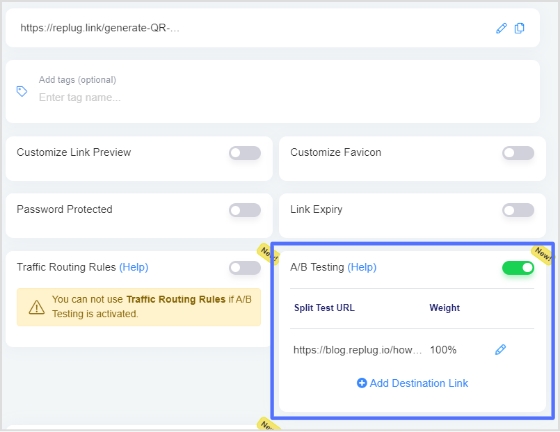
    In fact, over 3.4 billion phishing-related emails are sent every day, many revolving around cleverly disguised URLs.
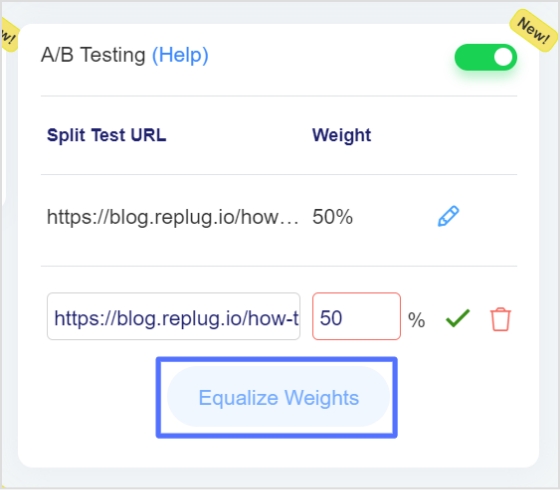
    The problem? 

    Ordinary web addresses can betray you badly. They expose internal systems, confuse users, or open doors you never intended. That’s when frustration sets in; when clicks go astray, trust fades, and suddenly your neat link strategy becomes a liability.

    The solution lies in learning the technique of URL masking. It is a simple yet powerful method that helps you shape how URLs appear, function, and are perceived.

    In the next section, we’ll take a quick look at what URL masking actually is, before moving on to methods, best practices, and additional details.

    So, let’s get started!

    What is URL masking: A brief overview

    Think of URL masking as giving your links a stylish mask or camouflage. Simply put, URL masking (also called link masking or link cloaking) is a technique that displays one web address in the browser’s address bar while the content actually comes from a different address behind the scenes.

    URL masking

    The primary objective of URL masking is to maintain a clean, branded, or memorable URL for users while hiding the complexity, tracking parameters, or alternate domain that actually serves the content. This can help protect your brand’s appearance, simplify link sharing, and make the experience smoother for visitors.

    Now that we’ve got a solid handle on what URL masking means and why it’s used, let’s roll into a concrete example to clarify how it looks in practice.

    URL masking example

    Here’s a friendly example at hand:

    Imagine you have a messy, long URL like:

    https://yourwebsite.com/products/item123?ref=affiliateID&utm_campaign=summer

    And you’d prefer it to look short, simpler, and more branded like:

    https://yourbrand.com/great-deal

    With URL masking, you could set things up so that users see yourbrand.com/great-deal” in their browser, but behind the scenes, they are served the original long URL’s content.

    Another scenario: Your company hosts content on a subsidiary domain like subdomain.partner-host.com/page”, but you want users to browse while seeing www.yourbrand.com” in the address bar. URL masking allows this kind of setup.

    In either case, the visitor experience is smoother, the URL looks nicer, and you retain control over how your link appears.

    Different techniques & types of URL masking

    Here are several of the most common ways to mask or “cloak” links, each with its quirks, benefits, and trade-offs.

    Domain masking

    This technique means that you point a domain (or subdomain) to another target URL, but the user’s browser still shows your original domain in the address bar. Users think they’re on, say, “yourbrand.com”, while the content is being pulled from somewhere else. 

    Note: It’s great for branding and cleaner links, but keep in mind it can cause SEO issues if search engines see duplicate content at two different domains.

    Frame masking

    Here, you essentially load another site (or page) inside an <iframe> or similar frame while keeping your domain visible in the browser bar. The user stays on your domain visually, even if the content “behind the scenes” lives elsewhere.

    Note: While this provides a seamless user experience, it may limit navigation and bookmarking, and it may also pose search engine optimization or security complications.

    Proxy masking

    With proxy masking, a proxy server fetches content from a destination site and presents it under your domain. The user hits “yourbrand.com/welcome”, the proxy pulls “otherdomain.com/page”, and you serve that content, but the address bar remains “yourbrand.com/welcome”.

    Note: This method gives you more control and flexibility, but it’s more complex to set up and maintain (and you need to think about performance, caching, SSL, etc.).

    Server-side scripting

    Here, your server script (PHP, ASP.NET, Python, etc.) handles requests for a friendly URL and fetches content from another URL or service, while keeping the visible URL unchanged.

    Note: This is a flexible approach if you’re comfortable with backend logic. You can use conditional logic, content transforms, etc., but you’ll still need to watch for SEO fallouts and ensure it’s transparent to users.

    URL rewriting

    This is more subtle; your server internally maps a user-friendly URL (or masked URL) to the “real” destination URL without changing what appears in the browser bar. 

    Think of rewriting “yourbrand.com/special-offer” to internally show content from “yourbrand.com/page.php?id=12345”. 

    Note: It’s commonly used for cleaner, SEO-friendly URLs and better user experience, and often plays nicely with search engine results if done well, because the visible URL corresponds with actual content.

    JavaScript redirection

    With JavaScript, you can on page load run something like window.location.replace(…) to redirect the user to the destination. However, cleverly, you might keep showing the original URL or manipulate history so it appears masked.

    Note: This is relatively easy to implement but less reliable (some users block JS, and search bots may not execute it entirely), and it can feel less perfect.

    Meta refresh

    This is the simplest HTML trick: a <meta http-equiv=”refresh” content=”0; url=https://destination.com”> tag refreshes the page to the target URL after a short delay. The initial URL stays visible briefly.

    Note: It works, but many experts consider it a bit of a legacy approach. It is not very SEO-friendly and is not always regarded as good practice for user experience.

    Up next, we’ll explore the different techniques and practices for masking URLs, step by step.

    How to do URL masking: Various methods for masking a URL

    There are several practical ways to mask a URL, depending on how much control you have over your hosting setup and how fancy you want to get. 

    Let’s walk through three common approaches.

    Server-level (e.g., .htaccess)

    This method uses your web server’s configuration, specifically the .htaccess file on Apache servers, to internally map or proxy a visible URL to another destination while keeping the visible link unchanged.

    It’s a “behind-the-scenes” technique in which you edit or add rules to the .htaccess file in your web root, and the visitor sees your chosen URL, but the content comes from somewhere else.

    How it works:

    1. Access your site’s root directory (often public_html or www) and locate or create the .htaccess file.

    2. Make sure the server has mod_rewrite enabled (on Apache) so you can use RewriteEngine On, and other rules.

    3. Add a rewrite rule such as:

    RewriteEngine On 

    RewriteRule ^custom-url/?$ /actual/folder/or/page [L]

    This means when someone visits yourdomain.com/custom-url, the browser address bar shows that, but the server fetches content from /actual/folder/or/page.

    4. Test your setup by opening the masked URL and verifying the content shows, but the visible URL remains your custom one.

    Important note: This method can create duplicate content or SEO issues if used across different domains without caution.

    Using a third-party service or tool

    This method uses an external online service (think “URL masking tool online”) that lets you enter a destination URL and handles the redirect/masking for you.

    You don’t need to dig into server configuration yourself. Instead, you use a dashboard or a simple interface to get the job done. 
    For instance, many link management or cloaking services let you easily mask affiliate links or vanity URLs without hassle.

    How it works:

    1. Sign up (if needed) with the service and go to the “create new link” or “mask URL” section.
    2. Enter the original long, cluttered URL as the destination.
    3. Choose a custom display URL or alias if the service allows it. Some services will say “cloak” or “hide” the destination.
    4. Generate the link. The service returns a new link that shows your chosen alias but forwards to the real URL (behind the scenes).
    5. Share the link. Users click the alias, see your branded, simplified, and unique URL, and are taken to the destination while your custom URL remains in the address bar (or at least appears so).
    6. Finally, monitor performance (clicks, traffic) if the service offers analytics. Some services warn that frames or iframes may not work if the destination blocks them (due to security headers such as X-Frame-Options).

    Important note: The “free URL masking online” services and tool versions often have click limits or analytics restrictions.

    Using a URL shortener

    A URL shortener creates a slim “short link” from a longer URL, which is ideal for sharing and looks much cleaner. Many modern URL shorteners available online let you brand the link, track clicks, and even perform “custom URL masking”.

    Among these, tools such as Replug (an all-in-one link management platform and probably the best URL shortener online) offer advanced features, including branded short links, custom domains, link retargeting, link analytics, and more.

    Replug Branded Short Links CTA
    Maximize marketing ROI
    by transforming ordinary URLs into
    branded short links that convert.
    Try Replug for free

    How it works:

    1. Pick a URL shortener and create an account if required. We recommend using Replug for this task.
    2. Paste your long destination URL into the platform’s “shorten link” field.
    3. Customize the slug (the part after the slash) to get something memorable or brandable.
    4. Use options (if available) for “custom URL masking,” which may let you replace the domain with a custom one you own, making the short link look like go.yourbrand.com/offer instead of a generic domain.
    5. Generate the short link. Now, when someone clicks it, they see your shortened link in the address bar, click through, and land on the long destination. The user experience is cleaner, and tracking is built in.
    6. Share this link seamlessly. Because you’re using a short, clean URL, it’s easier to include in social media, emails, print, etc.

    Important note: A short link doesn’t always “mask” in the most rigid technical sense (it redirects to the destination, and users might spot that). But when paired with a custom domain and branding, it functions effectively for many masking/clean-link use cases.

    Also read:What is URL filtering: How it works, key benefits, common use cases, & more

    Benefits of URL masking

    Using URL masking can bring a bunch of advantages when done thoughtfully. So let’s cover what it can do for you.

    Benefits

    Enhances user experience

    Masking a URL helps make links simpler, cleaner, and easier to remember. Rather than a long string full of tracking codes or weird characters, visitors see something tidy and on-brand, which makes it more likely they’ll click and feel comfortable.

    Protects your brand’s reputation

    When links look messy or appear to be affiliate-based, some users hesitate to click them. Masking URLs lets you hide cumbersome links or affiliate identifiers behind a more trusted domain or format. This helps your audience feel the link is legitimate and that your brand is looking after them.

    Boosts brand visibility

    Every time someone sees your domain (rather than some random partner domain or long URL), the brand imprint grows. A nicely masked link reinforces your brand name, keeps things consistent, and helps users associate the link with you.

    Preserves privacy & security

    Sometimes the actual URL contains sensitive parameters (trackers, IDs, internal paths) you’d rather keep hidden from view. Masking helps protect those bits and gives you more control over what the user sees, thereby improving perceived security.

    Assists in domain parking

    If you own multiple domains (or plan to), URL masking lets you forward a domain, so the visible address stays your branded one (even if the content lives elsewhere). This is handy when you’re dealing with domain portfolios or when you want to ensure visitors always see “yourbrand.com” even during transition.

    Risks of URL masking

    While masking a URL may seem like a handy shortcut, there are real risks involved. It’s good to be aware of them upfront so you can make smarter decisions.

    Risks

    SEO risks

    When you mask a URL, you might unintentionally create problems for search engine bots. They could struggle to crawl or index the content correctly. 

    When the visible URL doesn’t clearly point to the actual content, you could end up with duplicate content issues or diluted authority. Over time, that can hurt your SEO ranking, which is the absolute opposite of what you want.

    Loss of credibility

    If visitors click a link that appears to lead to one place but actually behaves differently, or if your domain is masking something behind the scenes, you risk making users feel misled. That loss of trust can stick, hurting repeat visits, shares, or referrals.

    Violates Google’s guidelines

    Techniques that hide or misrepresent where a user or search engine bot is being sent can run afoul of major search engine rules. 

    For example, practices that resemble “cloaking” are flagged by Google as violations. If you’re seen to be deliberately disguising URLs in a way that misleads bots or users, you risk being penalized or removed from search results.

    Requires technical setup

    URL masking isn’t always plug-and-play. It might involve server settings, frames, proxies, or rewriting rules. 

    If you’re not comfortable with the tech side, you might set something up that breaks links, causes slow load times, or behaves inconsistently. This will ultimately result in spending time troubleshooting instead of benefiting.

    Doesn’t always display correctly

    Not all browsers, user setups, or crawlers will interpret masked URLs the way you expect. Sometimes, the original URL behind the scenes might pop into view, or sharing the link will show the weird internal address instead of your masked one. That kind of inconsistency can confuse users or lead to broken navigation or functionality.

    URL masking vs. URL forwarding: Key differences mentioned!

    Here’s a friendly look at the primary distinctions between URL masking and URL forwarding, so you can decide which works best for your goals.

    AspectURL forwarding (Redirect)URL masking (Cloaking)
    What the user sees in the address barThe browser’s address bar changes to the destination URL after the redirect.The original domain remains visible, even though the content comes from a different URL.
    Technical implementationTypically done via HTTP status codes (301 or 302) or simple DNS/domain-forwarding settings.Often uses frames (iFrames), proxy servers, or rewriting so the underlying destination remains hidden.
    Impact on SEO & indexingGenerally considered SEO-friendly if done with proper redirects (especially 301).Can cause SEO issues (duplicate content, indexing confusion) because the actual URL is hidden.
    Branding & user trustTransparent — users see the destination URL, which might be less branded.Strong branding — original domain stays visible, boosting the appearance of consistency.
    Use casesWhen you’re permanently moving a site, uniting domains, or want clean redirects.When you want to retain the appearance of your domain while pulling content from elsewhere.
    Potential downsidesLess control over the visible domain; might lose branding opportunity.May confuse users, interfere with bookmarking/sharing, and pose technical or UX issues.

    In short: If you’re going for maximum clarity, SEO safety, and ease of setup, URL forwarding is usually your best companion. On the other hand, if you’re focused on keeping your brand in the spotlight and are okay with managing a little extra complexity, URL masking might be a good fit, but you’ll want to weigh its drawbacks.

    Read also: What is URL hijacking: Different forms of typosquatting, consequences, & prevention techniques

    Common use cases of URL masking

    Here are some of the most common ways people use this technique. It helps to see them side by side so you can spot which might make sense for your own site.

    • Affiliate marketing & link sharing: Masking is often used when you’re promoting someone else’s product or a referral link. Instead of sending users to a long, clunky URL with trackers, you show a clean, branded link and hide the real destination behind the scenes.
    • Branding & aesthetic cleanup: Sometimes you’ve got a link that looks quite messy: lots of parameters, partner domains, or subdomains you don’t want your users to see. Masking lets you present a friendly URL instead.
    • Embedding third-party content under your domain: If you use a platform or external service but want users to feel like they’re still on your site (your domain in the address bar), masking helps achieve that consistent user experience.
    • Domain parking or forwarding with your brand domain: You own several domains, or you want old domains to point to your new site without showing the old link. Masking lets visitors see your primary domain even if they typed in one of the other addresses.
    • Campaign or microsite links: For short-term promotions or specific landing pages, you might mask a long URL. Hence, it’s easier to remember, share on social media, or print on marketing material. The cleaner link also reinforces its origin brilliantly.

    Best practices for effective URL masking

    When you decide to mask a URL, it’s not just about hiding the real address. It’s about doing it in a way that keeps your users happy, protects your brand, and avoids getting penalized by search engines. 

    Here are the top things to keep in mind:

    • Be transparent and build trust: Make sure users aren’t tricked into clicking something unexpected. Masking should clean up or brand a link, not deceive. Transparency helps maintain your credibility and avoids confusing or annoying your visitors.
    • Think about SEO implications: Masking can introduce SEO risks like duplicate content, indexing issues, or loss of link equity. Always weigh whether a clean redirect or a branded short link might serve you better.
    • Keep an eye on functionality and test regularly: Test your masked links across browsers, devices, and platforms. Ensure they work properly and don’t break features like login, forms, or share links. Monitoring catches surprises before your users do.
    • Maintain consistent branding and clarity: Use a URL that aligns with your brand and is easy to remember. Avoid overly long or weird masked URLs, because if users are puzzled, you’ve lost half the benefit.
    • Use masking only when it adds real value: Masking isn’t necessary in every situation. If a simple redirect or branded short link covers your needs without the extra complexity, go that route instead.

    By following these conventions, you’ll ensure you’re using URL masking for the right reasons and doing it in a way that looks professional and doesn’t backfire.

    Alternatives to URL masking

    If you’re not sure about masking URLs, there are other smart and innovative ways to achieve many of the same goals without the same risks. 

    Here are some alternatives worth considering:

    • URL forwarding (redirects): Instead of hiding the real address behind another one, URL forwarding sends users from one link to the destination and updates the browser’s address bar accordingly. It’s more straightforward, more transparent, and usually more friendly to SEO.
    • URL rewriting / pretty URLs: With this approach, you keep the real destination visible but clean it up: your site rewrites something like “site.com/index.php?page=123” into site.com/news/latest” using server rules. It maintains transparency while giving users nicer links.
    • URL shortening & branded short links: Instead of full masking, you shorten a long URL into something like yourbrand.co/offer”, often via a link management tool or custom domain. It doesn’t completely hide the destination like masking might, but it gives you clean, shareable links and retains trust.
    • Custom domain or subdomain setup for branding: If the main goal is branding, you can use a custom domain or subdomain (e.g.,go.yourbrand.com”) pointing directly to your content or site. This avoids hiding content entirely but keeps things consistent and branded.
    • Canonical URLs and self-explanatory paths: Specifically for SEO, focus on drafting URLs that clearly reflect the content (e.g., “yourbrand.com/blog/what-is-url-masking”). Using canonical tags helps avoid duplicate content issues while being honest about the destination.

    Wrapping up

    To sum up, URL masking can be handy when you want cleaner, more professional-looking links, but it’s not always the best long-term solution. 

    While it helps with branding and user experience, it also comes with a few risks, like SEO drawbacks and technical complexities. 

    The key is knowing when and how to use it responsibly, or exploring better alternatives like branded short links or redirects. 

    And if you’re serious about taking control of your links the smart way, give Replug.io a try today! It’s one of the best custom URL shorteners out there, built to help you create, manage, and track every short link with ease.

    Frequently asked questions

    What does it mean to mask a URL?

    Masking a URL means displaying one web address in the browser’s address bar while secretly loading another page behind it. It’s often used to make long or complex URLs look cleaner and more branded.

    Is there a way to hide a URL?

    Yes! You can hide a URL using methods like iframe embedding, meta refresh, or server-side redirects. These techniques let you show a custom link while hiding the actual destination.

    How to see masked URL?

    To reveal a masked URL, right-click the page and select “View Page Source,” or inspect the link in the browser’s developer tools. The real destination URL will usually appear in the iframe or meta tag code.

    How to mask a URL in Chrome?

    You can’t directly mask a URL in Chrome itself, but you can use a third-party URL masking tool online or a custom redirect through your hosting or domain provider to display a different address.

    What is the difference between URL masking and encryption?

    URL masking hides the actual address, while encryption protects the data transmitted between your browser and the website using HTTPS. Masking doesn’t secure information; encryption does.

    Does URL masking affect SEO?

    Yes, it can. Masking hides the real source URL, which can confuse search engines, impact indexing, and even lower your rankings if not done correctly.

    How to enable and remove URL masking on a website?

    You can enable masking by setting it up in your domain’s control panel (using an iframe or redirect settings). To remove it, disable the masking or switch to a standard 301 redirect instead.

    How to request URL masking?

    Most domain registrars or hosting providers let you request URL masking through their dashboard or support team. You just need to provide the original URL and the one you want displayed.

    How to detect and prevent URL masking attacks?

    Use reliable security tools and keep your browser up to date. Avoid clicking suspicious links, and implement SSL certificates and anti-phishing filters to stay protected.

    How is URL masking different from URL redirection?

    In URL masking, the original link stays visible in the browser’s address bar. In contrast, URL redirection automatically redirects the user to the new destination (by changing or updating the visible link).

  • How to add a clickable link in YouTube description (2026 update)

    How to add a clickable link in YouTube description (2026 update)

    Want more clicks, more traffic, and maybe even more sales from your YouTube videos? It all starts with one simple thing: a clickable link in your description.

    With over 2.7 billion monthly active users on YouTube and more than 1 billion hours of video watched every day, even a small tweak like adding the right link can make a huge difference.

    But here’s the catch: many creators still get it wrong or miss out on easy opportunities. In this guide, we’ll show you exactly how to do it the right way in 2026, step by step.

    First, let’s quickly understand the basics, starting with what a YouTube video description actually is.

    What is a YouTube video description?

    A YouTube video description is the text section you see right below a video. It explains what the video is about, gives extra context, and helps both viewers and YouTube understand your content. In simple terms, it’s like a mini guide for your video.

    Its main purpose is twofold: to help people quickly decide if your video is worth watching and to help YouTube rank your video in search results. When written properly, it can improve discoverability, boost clicks, and even drive traffic to your links.

    Core elements of a YouTube video description

    Here are the key elements:

    • The hook (an engaging, keyword-rich opening line): The first 1–2 lines grab attention and include your main keyword since this part is visible before clicking “show more.”
    • Detailed description/summary of the content: A clear, simple summary that tells viewers exactly what they’ll learn or get from the video.
    • Clickable timestamps/chapters for navigation: Time-based links that let viewers jump to specific parts of the video easily.
    • A clear call to action (CTA): A direct prompt telling viewers what to do next, like subscribe, click a link, or watch another video.
    • Relevant links & resources: Useful URLs (website, products, references) that add extra value beyond the video.
    • Social media handles & hashtags: Your social links and hashtags help people connect with you and improve content reach.
    • Channel bio/disclaimer: A short intro about your channel or any necessary disclaimer (like affiliate links or sponsorships).

    How to add a clickable link in YouTube video description (step by step)

    Adding a clickable link in your YouTube description is actually very simple. You just need to paste the right type of URL in the right place. 

    Once done correctly, YouTube automatically turns it into a clickable link that viewers can tap or click, hassle-free.

    Let’s break it down step by step for both phone and desktop so you can follow along easily 👇

    How to add a clickable link in YouTube description on phone

    Here’s how to do it on mobile:

    1. Open the YouTube Studio app.

    YouTube Studio mobile app

    2. Select the video you want to edit.

    Select a video inside YouTube Studio app

    3. Tap the pencil (edit) icon at the top of the screen.

    Pencil (edit) icon inside YouTube Studio app

    4. Tap on the Description section.

    Video description section inside YouTube Studio app

    5. In the description box, paste your link (make sure it starts with https://).

    Clickable link inside the video description section on YouTube Studio app

    6. Tap Save.

    Save button inside the YouTube Studio app

    That’s it! YouTube will automatically make the link clickable once the video is updated.

    How to add a clickable link in YouTube description on desktop

    Here’s how to do it on PC:

    1. Go to YouTube Studio and log in.

    YouTube Studio web app

    2. Click on Content from the left menu.

    Content option inside YouTube Studio web app

    3. Find your video and click the edit (pencil) icon.

    Edit (pencil) icon inside YouTube Studio web app

    4. Scroll to the Description field, and paste your link with https:// at the start.

    Clickable link inside the video description section on YouTube Studio web app

    5. Click the Save button.

    Save button inside the YouTube Studio web app

    Once saved, your link becomes clickable in the description.

    💡 Quick tip: If your link isn’t clickable, it’s usually because it doesn’t include “https://”, so always double-check that part.

    How to add a clickable link in YouTube Shorts description

    Before you jump in, here’s something important to know 👇

    YouTube works a bit differently for Shorts. In most cases, links placed directly in Shorts descriptions are NOT clickable. They show as plain text to reduce spam and scams.

    So while you can add a link in the description, it won’t behave like regular video links. Instead, YouTube gives you a few alternative ways to share clickable links (like related videos or other features).

    Step-by-step guide:

    1. Open YouTube Studio (app or desktop).

    2. Go to Content and select your Short.

    3. Click the edit (pencil) icon.

    4. In the description box, paste your link (make sure it includes https://).

    5. Click Save.

    Your link will appear in the description, but keep in mind, viewers won’t be able to click it directly.

    💡 Better (working) ways to add clickable links in Shorts

    Since description links aren’t clickable, here are smarter options you should use:

    • Add a “Related Video” link: You can link your Short to one of your long videos, which viewers can easily click.
    • Use channel profile links: Add your website or important links in your channel bio. These are clickable.
    • Mention links in comments or CTA: Guide viewers to your bio or a full video where clickable links are available.

    In short, you can add links in Shorts descriptions, but for optimized results, use YouTube’s built-in linking features instead.

    How to add a clickable link in the YouTube channel description

    Adding links to your YouTube channel description (the “About” section) is a great way to guide viewers to your website or social profiles. To make links clickable on your channel, you need to use YouTube’s channel profile links (banner links) feature.

    Step-by-step guide:

    1. Go to YouTube Studio and log in to your account.

    2. From the left menu, click on Customization.

    3. Open the Basic Info or Profile tab.

    4. Scroll down to the Links section.

    5. Click + Add Link.

    6. Enter your link title (e.g., “My Website” or “Instagram”).

    7. Paste your full URL (make sure it starts with https://).

    8. Click Publish in the top right-hand corner.

    Once saved, these links (up to the first 14) will show up on your channel banner and are fully clickable for viewers.

    Why add a clickable link in the YouTube video description

    Adding a clickable link isn’t just a small detail; it’s one of the easiest ways to turn viewers into action-takers. Whether you want traffic, sales, or engagement, that single link can make a real difference.

    • Monetization & marketing: You can promote products, services, or affiliate offers, directly turning views into real income opportunities.
    • Engagement & traffic: Links help drive viewers to your website or other content, increasing traffic and interaction beyond YouTube.
    • Improved user experience: You give viewers quick access to helpful resources, making your content more useful and easy to explore.
    • SEO boost: Descriptions help YouTube understand your content better, improving visibility in search and recommendations.
    • Lead generation: A well-placed link can capture leads by directing viewers to sign-up pages, offers, or landing pages.

    Importance of a good YouTube video description in 2026

    At present, a YouTube description is more than just a summary. It’s a key part of how your video gets discovered and how viewers interact with it. A well-written description helps both the algorithm and your audience understand your content better.

    • Boosts searchability: Using the right keywords helps YouTube understand your video and improves its chances of showing up in search results.
    • Enhances viewer experience: A clear description, links, and timestamps make it easier for viewers to navigate and get value quickly.
    • Increases engagement: When viewers know what to expect, they’re more likely to watch longer, click links, and interact.
    • Builds loyalty & revenue: Good descriptions guide users to subscribe, explore more content, or check out your offers.
    • Strategic optimization: Descriptions are a core part of YouTube SEO along with titles and tags, helping your content perform better.
    • Context for AI: With AI-driven search growing, descriptions help systems understand and recommend your content accurately.

    Create short clickable links for your YouTube description with Replug!

    If you’ve ever pasted a long, messy URL in your YouTube description, you already know that it doesn’t look great. That’s where Replug comes in!

    It’s a powerful link shortener that helps you turn long, cluttered links into clean, professional, and clickable ones. Plus, it does a lot more than just shortening links.

    Replug Branded Short Links CTA
    Maximize marketing ROI
    by transforming ordinary URLs into
    branded short links that convert.
    Try Replug for free

    Replug is an all-in-one link optimization platform that lets you brand and track your links, so you can see how they perform and improve your results over time.

    Here’s why it’s worth using for YouTube:

    • Clean & short links: Turn long URLs into simple, easy-to-click links that look better in descriptions.
    • Branded links: Use your own custom domain to make links look more trustworthy and professional.
    • Click tracking & analytics: See how many people are clicking your links and where they’re coming from.
    • Add call-to-actions (CTAs): You can attach small messages or buttons to boost clicks and conversions.
    • Campaign optimization: Test and improve your links using A/B testing and smart routing features.

    In short, Replug doesn’t just shorten your links; it helps you turn every link into a small marketing tool.

    Summing up

    To wrap things up, adding clickable links to your YouTube description might seem like a small step, but it can seriously level up your results. 

    From driving traffic and boosting engagement to helping with SEO and lead generation, it all adds up. 

    And the best part? It only takes a few seconds. Just paste your link with “https://,” and you’re good to go. 

    If you really want to take things further, tools like Replug can help you create clean, trackable links that actually convert.

    👉 Before you go, give Replug’s free YouTube title generator a try as well. It’s a quick, efficient way to make your videos stand out even more!

    Frequently asked questions

    How do I put a clickable link in a YouTube description?

    Just paste your full URL (with https://) into the description box while editing your video, and YouTube will automatically turn it into a clickable link.

    Should you put links in a YouTube description in 2026?

    Yes, absolutely! Links help drive traffic, promote products, and improve engagement. Still a key strategy for content creators in 2026.

    Where is the link in the description on YouTube?

    It appears just below the video. On mobile, it’s under “Show more,” and on desktop, it’s visible directly under the title (or after expanding).

    Why is my link not clickable in the YouTube description?

    The most common reason for this is that the link doesn’t start with https://. Without it, YouTube won’t recognize it as clickable.

    How to add social media links in YouTube description?

    Simply copy your Instagram, Facebook, or other profile link and paste it into the description with https://, and it will become clickable instantly.

    How to put links in YouTube description without verification?

    You can still paste links without advanced verification, but some features (like external linking tools) may require channel verification. You must include the full URL starting with https://

    Can you hyperlink text in YouTube description?

    No, YouTube doesn’t support custom anchor text. You must paste the full URL; no “click here” style hyperlinks.

    How to add a hyperlink to the YouTube description?

    Same process: paste the full https:// link inside the description box. YouTube automatically converts it into a clickable hyperlink.

    How do I add a link to a YouTube description on my iPhone?

    Open the YouTube app → tap on your profile icon → go to your desired video → tap Edit → paste your link in the description box → save.

    How to add a clickable link in the YouTube video comments section?

    Paste your full URL in the comment. In regular videos, it becomes clickable, but avoid spammy posting to stay within YouTube rules.

    How to add a clickable Instagram link in the YouTube description?

    Copy your Instagram profile link (e.g., https://instagram.com/username) and paste it in the description box. It will be clickable like any other link.

    How to add a clickable link to a YouTube video using end screen & card?

    Go to YouTube Studio → Content → select video → Cards or End Screen → Add link → Save. These appear during or at the end of the video and are fully clickable.