Want a cleaner, more professional LinkedIn profile? It starts with a custom URL!
Your LinkedIn profile is more than just a resume; it’s your digital first impression. It’s where opportunities land, clients browse, and collaborators connect.
Whether you’re a marketer promoting your work, an agency showcasing team profiles, or simply someone wanting a polished presence, customizing your LinkedIn URL is a subtle but smart move.
You can shorten your LinkedIn URL in two ways:
Directly on LinkedIn via a browser (note: not available on the mobile app).
This step-by-step guide will show you how to shorten your LinkedIn URL and take it further using Replug to create branded, trackable links that maximize your profile’s impact.
Maximize marketing ROI
by transforming ordinary URLs into branded short links that convert.
Try Replug for free
What is a LinkedIn URL?
Your LinkedIn URL is the web address that leads directly to your public profile. LinkedIn gives you one by default, but it’s not always pretty.
Here’s what it might look like:
Now, here’s a cleaned-up version:
Much easier on the eyes, right?
How to find and change your LinkedIn URL inside the app
Follow these steps to see how to modify the LinkedIn URL directly on your profile.
Replug.io is a top-notch URL shortener that not only shortens your LinkedIn link but also offers advanced link management features such as link preview, click performance, password protection, A/B testing, link cloaking, vanity URLs, and much more.
Follow these steps to upgrade your LinkedIn link using Replug:
Step 1: Log in to your Replug account
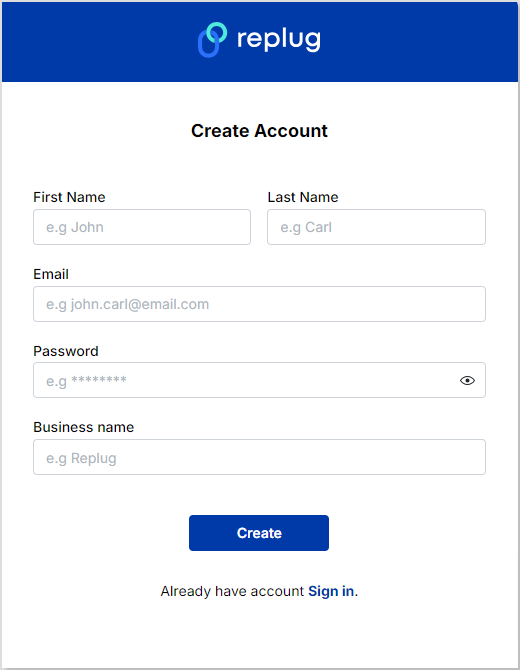
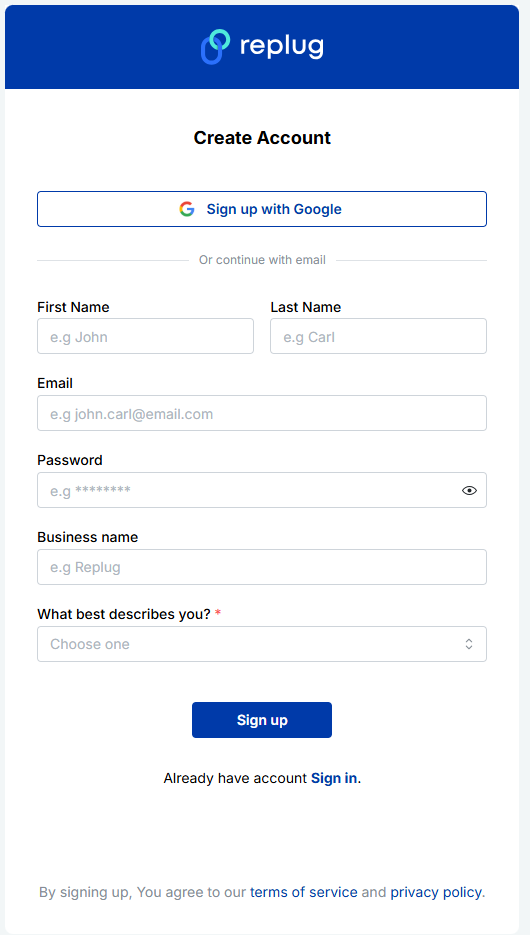
Go to the Replug app and sign in. If you don’t have an account, create one.
Step 2: Copy your LinkedIn URL
Open your LinkedIn profile, click “View profile,” and copy the link from your browser bar.
Step 3: Create your custom LinkedIn URL
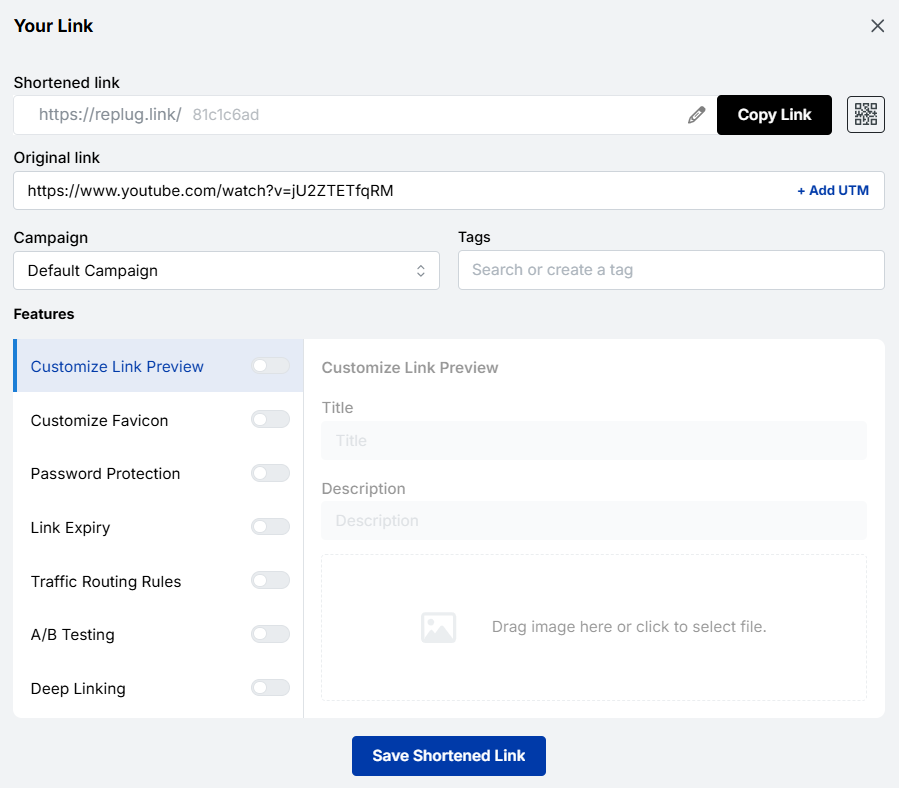
Paste the URL into Replug’s “Quickly Shorten your link” bar.
Then, optimize the slug to match your brand or name.
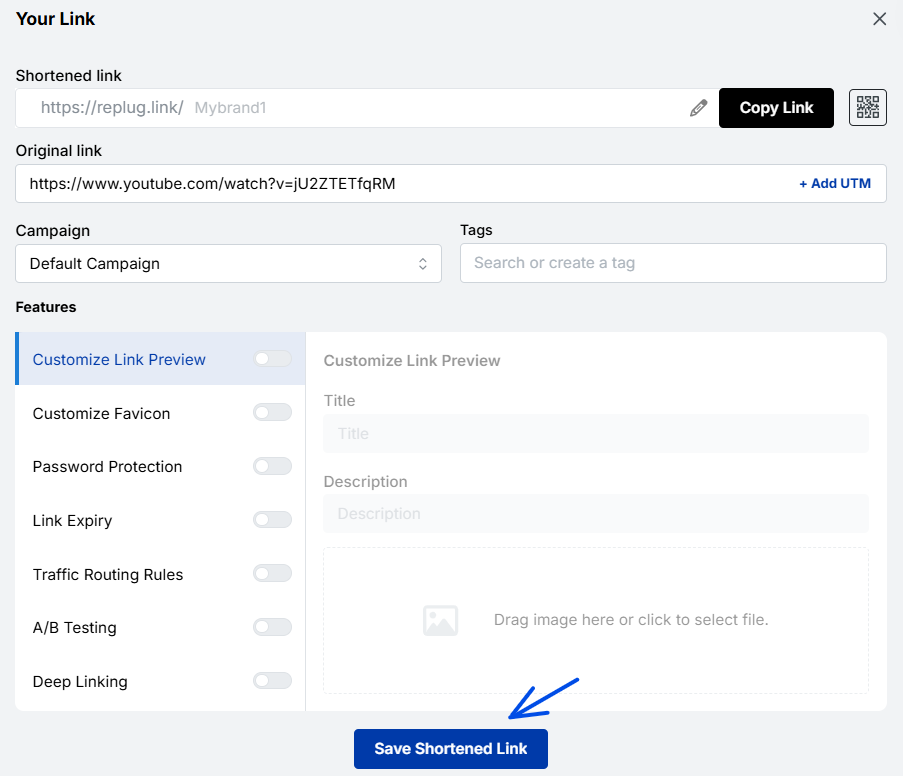
Step 4: Save and share your branded URL
Click the ” Save Shortened link” and you’re good to go. You’ve now created a custom LinkedIn URL that’s short, clean, and powerful!
Maximize marketing ROI
by transforming ordinary URLs into branded short links that convert.
Try Replug for free
Why does a personalized LinkedIn URL matter?
Having a personalized LinkedIn URL goes beyond aesthetics; it enhances your professional presence and makes networking more effective.
Here’s why it’s important:
More professional
A personalized LinkedIn URL looks clean and polished on business cards, resumes, and email signatures, instantly making a strong impression.
Easier to remember
Custom URLs are simple and easy to recall. This comes in handy at networking events, presentations, or meetings when you need to share your profile quickly.
Better for branding
A custom LinkedIn URL strengthens your brand identity and credibility, showing that you pay attention to detail and care about your professional image.
Simpler to share
Short, customized URLs are convenient to include in email signatures, social media bios, portfolio sites, or printed materials, making it easier for others to connect with you.
Improves search visibility
Personalized URLs are more likely to appear in search results when someone looks for your name online, making you more discoverable to recruiters and potential clients.
Consistency across platforms
Aligning your LinkedIn URL with other social media handles or your personal website creates a cohesive digital identity, reinforcing your professional presence.
Builds trust
A clean, branded URL signals professionalism and attention to detail, helping you stand out in competitive industries.
Benefits of using Replug to change your LinkedIn URL
Changing your LinkedIn URL inside the platform is useful. Still, Replug unlocks a full toolbox of branding and performance features that are especially valuable for marketers, agencies, and professionals who live online.
Branded, trackable links under your domain
With Replug, you can create short URLs using your own branded domain. Instead of a generic short URL, you’ll get something like:
or
Control link previews for better storytelling
When someone shares your LinkedIn link, the default preview may not do you justice. Replug lets you tweak the title, image, and description, making sure what people see aligns with how you want to be seen.
Why it matters for marketers and agencies: Want to highlight a recent campaign, show off a rebrand, or tailor messaging to a specific audience? Preview control = messaging control.
Add a custom favicon
Instead of showing the default LinkedIn favicon, you can add your own logo to match your brand. It’s a small detail that reinforces brand consistency, especially when sharing multiple links across client materials or public-facing channels.
Why agencies care: It keeps all your links aligned with the brand story you’re telling, internally and externally.
Advanced analytics to track engagement
Replug provides a full dashboard where you can track link analytics such as:
Replug offers a unique feature that allows you to test up to 10 different LinkedIn URLs simultaneously, making it easy to figure out which resonates most with your audience.
Great for: LinkedIn influencers, personal brands, recruiters, or agencies running experiments for clients. Make decisions based on data, not instinct.
Dynamic QR codes for offline sharing
LinkedIn gives you a static QR code, whereas Replug gives you dynamic LinkedIn QR codes. That means you can change the destination anytime without reprinting materials or updating displays.
Perfect for: Agencies attending events, speakers sharing portfolios, or marketers running lead-gen campaigns at conferences.
Update the destination URL anytime
Want to temporarily direct clicks to your blog, event signup page, or another team member’s profile? With Replug, you can change the destination behind your short link at any time.
Conclusion
Shortening your LinkedIn URL is a simple yet powerful way to make your profile look more professional, easier to share, and memorable. In this blog, we covered what a LinkedIn URL is and why having a personalized, clean URL matters.
We also walked you through step-by-step instructions to change your LinkedIn URL directly on LinkedIn and shared how to use a URL shortener like Replug to shorten links in no time and create branded, trackable, and dynamic links hassle-free. Take a few minutes to implement these tips and share your LinkedIn link confidently across all your professional channels.
Frequently asked questions
What should I include in my LinkedIn URL?
Keep it short and relevant. Add your name, your business name, or a clean version of your personal brand. Avoid using numbers unless needed.
Can I change my LinkedIn URL more than once?
Yes, you can change it multiple times if the new URL is available.
Can I change my LinkedIn URL on mobile?
Yes. Open the app, go to your profile > Settings > Edit Public Profile & URL, and follow the same steps.
Where can I find my LinkedIn URL on the app?
To find your LinkedIn URL on the mobile app, follow these steps: Open the LinkedIn app. Go to your profile by tapping your profile icon. Tap the “Edit” button on your profile. Under the “Contact Info” section, you’ll see your LinkedIn URL listed. Tap to copy it, and you’re all set!
What if my preferred URL is taken?
Try adding a keyword or slight variation to your LinkedIn URL, such as including your professional title, industry-related term, or a nickname that resonates with your target audience.
Can I track the performance of my LinkedIn URL once it’s customized?
Yes! Replug allows you to track the performance of your LinkedIn URL with detailed analytics, such as unique clicks, total clicks, geotargeting data, and more.
Long Google Drive links can be frustrating to share. They look messy in emails, often break in chat messages, and feel unprofessional on social media.
Many of us face this issue daily when sharing documents, folders, or images through Google Drive. These links not only take up space but also reduce click-throughs when used in marketing campaigns.
Here’s the good news: you don’t need to settle for clunky links!
With a custom URL shortener like Replug, you can shorten Google Drive links online and even manage them in bulk. Whether you’re looking for a Google Drive link shortener free option or a more advanced paid plan, Replug gives you clean, trackable, and branded links.
Let’s get started!
What is a Google Drive link?
A Google Drive link is a unique URL generated to share files or folders stored in Google Drive. Depending on the sharing settings, the link can be public (anyone with the link can access it) or private (restricted to selected people).
While useful, these links are often long and complex. For example:
The shortened version is neat, easy to share, and less likely to break across platforms.
How to shorten a Google Drive link?
The easiest way to shorten a Google Drive link is by using a URL shortener. There are plenty of options available in the market, both free and paid.
Google also had its very own URL shortener, goo.gl, which was quite popular for shortening Drive links and sharing them easily across platforms.
However, Google’s official shortener goo.gl was discontinued in March 2019, which is why most people now rely on Google URL shortener alternatives like Replug.
Maximize marketing ROI
by transforming ordinary URLs into branded short links that convert.
Try Replug for free
Replug is an advanced custom URL maker free that offers both free and paid plans. Beyond just creating short links, it provides powerful features like vanity domains, custom slugs, link expiry, and password protected links, making it an ideal choice for marketers, businesses, and anyone who frequently shares files online.
How to shorten a Google Drive link using Replug (Step-by-step)
Follow these steps to shorten your Google Drive link:
Step 1: Copy your Google Drive link
Open Google Drive and right-click the file or folder. Click Copy link.
Already have an account? Simply log in to your dashboard.
Step 3: Paste your long URL
In the dashboard, paste your Google Drive link into the field under “Quickly shorten your link.” Replug will instantly generate a short link for you.
Alt text: Paste your drive link – replug.io
Step 4: Create a custom URL (optional)
By default, Replug gives you a short link with a random slug.
You can customize this slug to something more professional and recognizable.
Step 5: Enable link cloaking (optional)
Replug lets you cloak your links so the shortened URL appears as a vanity link in the browser. This is especially useful for affiliates and content marketers who want a more branded and trustworthy link.
What are the benefits of shortening Google Drive links?
Here are some prominent benefits of shortening your Google Drive links:
Easier sharing
Long Google Drive links can look messy and confusing. A shortened link is simple, clean, and easy to share in emails, chats, or social media posts without cluttering your message.
More professional
Short links give your content a polished look. When customized with your own branded slug, they not only look trustworthy but also help reinforce your brand identity.
Perfect for marketing
Whether you’re adding links to ads, posts, or printed materials, shorter links fit in neatly and make a stronger impression. They’re more clickable and user-friendly than long strings of characters.
Branded and cloaked links
Instead of a generic Google URL, you can cloak a link under your own branded domain. This makes the link look like it belongs to your business, boosting trust and recognition.
We’ve all seen how long Google Drive links can be frustrating to share; they break in chats, and look unprofessional on social media. In this guide, we explored how to shorten those Google Drive links step by step with Replug.
Maximize marketing ROI
by transforming ordinary URLs into branded short links that convert.
Try Replug for free
By using Replug, you don’t just get shorter links; you also unlock benefits like branded domains, custom slugs, link cloaking, and performance tracking. These features make your links cleaner, more professional, and marketing-ready.
👉 Take control of your Google Drive links today with Replug.io, and simplify the way you share.
Frequently asked questions
Does Google have a URL shortener?
No, Google discontinued its URL shortener (goo.gl). You’ll need to use alternatives like Replug to shorten your links.
How do I compress a Google Drive link?
Copy your Google Drive link, paste it into Replug, and generate a short, trackable URL instantly.
What is the best URL shortener for Google Drive links?
Replug is the best option because it not only shortens your Google Drive links but also lets you brand them with custom domains. Plus, it offers tracking, analytics, and retargeting features to maximize link performance.
Can I create branded short URLs for my Drive links?
Absolutely. With Replug, you can add your own domain and customize slugs to create branded short links.
Can I set link expiration for Drive links?
Yes. Replug lets you set expiry dates so your shortened Drive links automatically disable when needed.
Managing long URLs in an RSS feed can be hefty and unattractive. Many users look for ways to shorten URLs in an RSS feed automatically.
This problem is common for bloggers, marketers, and content curators who share feeds on different platforms. Long links may break or look spammy, causing reduced click-through rates.
In this blog, we’ll show you the easiest way to automatically shorten URLs inside your RSS feed using Replug. Let’s simplify your feed links efficiently.
RSS feed URL: What does it mean?
An RSS feed URL is a web address that provides a continuous stream of updates from a website’s content, like blogs or news articles. RSS stands for Really Simple Syndication, allowing users or apps to receive the latest content automatically.
This URL points to an XML file containing the full or summarized content with links directing readers back to the original website.
Maximize marketing ROI
by transforming ordinary URLs into branded short links that convert.
Try Replug for free
4 quick steps to shorten URLs in RSS feed
Using a reliable short URL generator for your RSS feed makes sharing cleaner, easier, and more professional.
Platforms like Replug.io let you automatically shorten URLs in your feed, add branded calls-to-action, and track clicks. This ensures every link you share is concise, branded, and optimized for engagement, helping your content reach the right audience effectively.
Here’s how you can shorten RSS feed URLs automatically using Replug:
Maximize marketing ROI
by transforming ordinary URLs into branded short links that convert.
Try Replug for free
Manage your RSS feed efficiently
You can perform the following actions with your created RSS feeds:
Edit: You can update/change your RSS feed whenever you want.
Re-crawl: To re-crawl your entire RSS feed, click on the re-crawl button. It will be re-crawled instantly to fetch any new links that have been added for the RSS feed.
Preview: You can preview the list of posts from RSS feeds that are converted.
Remove: You can remove your RSS feed and create a new one or anything else.
Top RSS feeds platforms for podcasts
The Apology Line Podcast
The Daily by The New York Times
The Bible in a Year Podcast
Crime Junkie Podcast
The Experiment Podcast
The Dan Bongino Show
Unraveled: Long Island Serial Killer
Morbid: A True Crime Podcast
Dateline NBC
The Lincoln Project
Top RSS feeds platforms for news
CNN
New York Times
Huffington Post
Fox News
USA Today
LifeHacker
Reuters
Politico
Yahoo News
NPR
Los Angeles Times
Conclusion
Automatically shortening URLs in your RSS feed improves link aesthetics, tracking, and click-through rates. By using tools like Replug, you can automate this entire process without technical hassles.
This guide covers the effective method to shorten URLs in an RSS feed automatically. For anyone managing content feeds, this approach saves time and enhances link management.
Explore Replug today to make your RSS feed links short, branded, and efficient.
Frequently asked questions
Why should I shorten URLs in RSS feeds?
Shortened URLs look cleaner, prevent link breakage, improve click tracking, and enhance user experience on different platforms.
Is it difficult to set up automatic URL shortening for RSS feeds?
No, most tools like Replug enable automatic shortening with simple feed addition and configuration steps, no coding required.
Can I track clicks on my shortened URLs inside the RSS feed?
Yes, Replug and similar services provide detailed analytics to track engagement for each shortened link.
Is RSS feed obsolete?
No, RSS feeds are not obsolete. While their popularity has declined with the rise of social media, they are still widely used by marketers, publishers, and professionals to syndicate content and automate sharing.
Are RSS feeds illegal?
No, RSS feeds are not illegal. They are simply a web format for delivering content updates. However, redistributing copyrighted content without permission through RSS feeds can raise legal issues.
Long and messy URLs not only look unprofessional but are also hard to share. On platforms like Twitter (X), Instagram, or SMS campaigns, every character counts, and bulky links can reduce engagement.
That’s where a top-notch short URL shortener comes in handy. It helps you create clean, trackable, and branded links that are easy to share and manage. Plus, advanced tools like Replug go beyond shortening, offering analytics, CTAs, and retargeting features.
Let’s explore what URL shortening is, how it works, its benefits, and a step-by-step guide to shortening a link using Replug.
What is URL shortening and why is it important?
URL shortening is the practice of taking a long URL and transforming it into a shorter, cleaner version. Instead of sharing a link filled with random characters and numbers, a link shortener gives you a polished, easy-to-read URL that looks professional and is far more shareable.
But it’s not just about looks. Shortened links save space on platforms with strict character limits, make your content easier to promote across emails and social media, and increase the chances of people clicking through.
Key benefits of URL shortening
Professional appearance: Short, branded links look polished on resumes, business cards, and social media.
Higher engagement: Clean links are more clickable and less likely to be ignored or skipped.
Space-saving: Essential for platforms with strict character limits like X, SMS, or WhatsApp.
Consistent branding: Custom slugs and domains reinforce your brand identity.
Actionable insights:Track clicks, devices, and geolocation data to refine campaigns.
Flexibility: Update or redirect shortened links anytime without breaking the original share.
Maximize marketing ROI
by transforming ordinary URLs into branded short links that convert.
Try Replug for free
Replug.io – The best URL shortener to simplify and track links
Replug.io is a reliable all-in-one link management platform built for marketers, agencies, and businesses. It goes beyond basic shortening by letting you create branded URLs, run A/B tests, add custom CTAs, set up white-label dashboards, and manage bio-links, all from a single place.
How to shorten a link using Replug in 5 simple steps
Shortening a link with Replug is quick and beginner-friendly. Whether you’re creating a branded URL or just cleaning up a long, messy link, the process takes only a few clicks.
Paste your long URL in the bar under “Quickly Shorten your link”
Step 3: Generate short URL
Click on the blue next arrow. Replug will automatically generate a short link for your long URL:
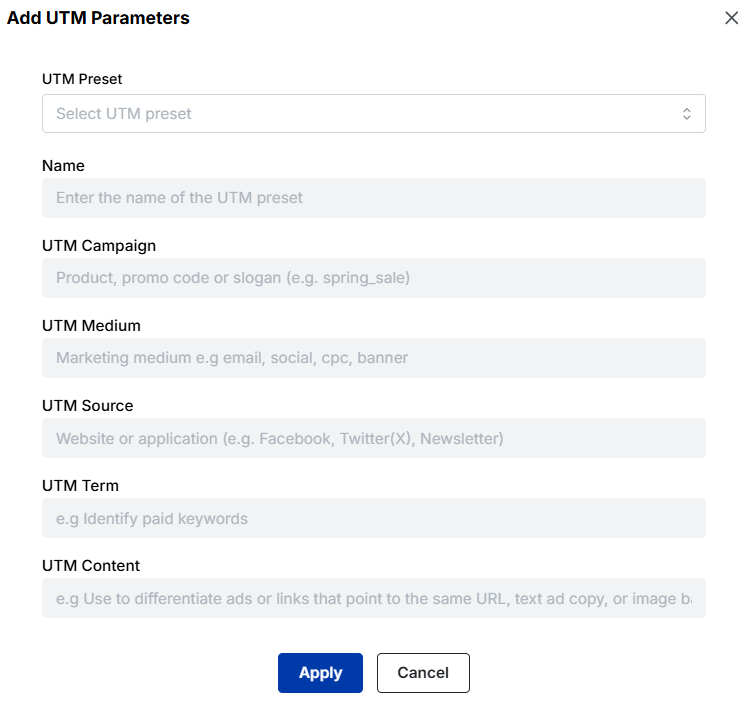
Note: Here, you can also add UTM parameters to your link to track the performance of that link.
Step 4: Customize slug
You can also change your link name using Replug. All you need to do is change the slug of your short link.
Step 5: Save and share
Save your shortened link. Now your link is ready to share anywhere, whether you need to shorten a link to share on Instagram, Discord, or in an email campaign.
Note: You can add some amazing Replug features to your link. You can customize your link preview, add custom favicons, A/B test your links, and more! You can also add retargeting pixels or custom CTAs to your link-shortening campaigns.
How to shorten a link in Word?
If you’re working on a document and want to make long URLs look neat, you can turn them into clickable text.
Open your Word document.
Highlight the text where you want the link to appear (e.g., Click here).
Right-click and select Link (or press Ctrl + K).
Paste your long URL in the box and hit OK.
Now, your document shows clean text instead of a messy URL.
How to shorten a link in Excel?
Excel also allows you to hide long URLs behind clean text or labels.
Select the cell where you want the link.
Right-click and choose Link (or press Ctrl + K).
Enter the text you want displayed (e.g., Product Page) in the Text to display field.
Paste your long URL into the Address field and click OK.
This way, your spreadsheet stays clean and professional while still linking to the right page.
Another option is to use a URL shortener.
Go to Replug and sign up for a free plan.
Paste your long URL into the box under “Quickly Shorten your link.”
Click Enter, and your link will be shortened instantly.
Copy the shortened link and return to your Word or Excel document. Use the same Insert Hyperlink feature (as explained earlier) to add the clean, shortened URL.
Is link shortening for you?
It’s time to find out. Here are some powerful use cases to give you a clear picture.
Shorten social media URLs
Shortened links help maintain clean and concise posts on platforms like X (Twitter) and Instagram, where character limits are strict. They improve readability and encourage more engagement from followers.
Mask affiliate & e-commerce links
By shortening affiliate links and e-commerce URLs, marketers can hide complex links, making them more appealing and trustworthy to users. This practice also helps maintain brand integrity across different channels.
Shorten links for SMS campaigns
Shortened URLs are crucial in SMS marketing, where space is limited. Shorten Amazon URLs to enhance campaign effectiveness. Or offer promotions, surveys, or special offers without exceeding character restrictions.
Create QR codes for your offline audience
Create shortened links and instantly generate and download QR codes for it. This way, you can connect customers of every genre, such as tourism, retail, e-commerce, sports, etc., to your digital space.
Shortened URLs can be used to retarget users who have clicked on specific links. By embedding retargeting pixels within shortened links, marketers can track user interactions and deliver personalized ads based on their browsing behavior, thus maximizing conversions.
Track campaign performance
Most shorteners provide real-time analytics, allowing you to measure clicks, referral sources, and audience geography. This makes it easier to optimize ads, social campaigns, and influencer collaborations.
Manage multiple marketing campaigns
For agencies and teams, link shorteners double as link management hubs. You can organize, update, or disable links anytime without breaking them, perfect for dynamic campaigns.
Maximize marketing ROI
by transforming ordinary URLs into branded short links that convert.
Try Replug for free
Final words
We’ve walked through everything you need to know about shortening links, its benefits, and even how to make your links look clean in Word and Excel. From tidying up long URLs to powering social media campaigns, affiliate promotions, SMS marketing, and even QR codes, link shortening is a small step that makes a big difference.
And if you want more than just shorter links, Replug has you covered. Start shortening your links with Replug today and take full control of your clicks.
Frequently asked questions
What is the best URL shortener?
Replug is among the best thanks to its analytics, branding, and affordability. A great alternative to Bitly and Rebrandly.
Yes, URL shorteners are safe when used through trusted services like Replug. While risks such as hidden destinations or link rot exist, using branded domains, HTTPS encryption, and link previews ensures both security and trust.
How do I edit a hyperlink to make it shorter?
You can edit hyperlinks in tools like Word or Excel by replacing long URLs with clean display text (e.g., “Click here”). Alternatively, use a URL shortener like Replug to create a concise link, then insert it using the hyperlink feature.
How do I shorten a Google Form link?
Copy your Google Form link and paste it into a URL shortener like Replug. It will generate a shorter, more shareable version of your form link, which you can customize with your brand name or keywords.
Ever tried to paste a Zoom invite into an email or social post only to end up with an unwieldy, messy URL? It’s a small annoyance, but one that can make your invitation look unprofessional and cluttered.
Many people face this issue daily. Long links not only take up space but also reduce click-throughs and overall engagement.
The easiest fix? Shorten Zoom links into clean, branded, and user-friendly versions. In this guide, you’ll learn step-by-step how to shorten a Zoom link using an online link shortener, why it matters for your communication, and the best practices to make them effective across email, social platforms, and events.
Let’s jump in and give your Zoom invites a polished, professional touch.
What is a Zoom link shortener?
A Zoom link shortener is a tool that condenses lengthy Zoom meeting URLs into shorter, more manageable links. These shortened links are easier to share and remember, making them particularly useful for invitations, social media posts, and promotional materials.
By using a trustworthy URL shortener, you can transform a long, complex URL into a neat and concise one, enhancing the overall user experience and improving the aesthetics of your communications.
Link shorteners not only simplify URLs but also offer additional benefits, such as tracking link clicks, customizing the link with branded domains, and ensuring secure sharing.
Maximize marketing ROI
by transforming ordinary URLs into branded short links that convert.
Try Replug for free
How to shorten Zoom links using Replug?
Here’s a step-by-step guide to help you shorten your Zoom links effectively:
Step 1:Copy your Zoom invite link
First, you need to have your Zoom meeting invite link ready. Copy the full URL of your Zoom meeting. This link usually looks something like this:
Once you’ve customized your URL, click on “Save Shortened Link,” and your short Zoom link is ready to be shared!
Track your links’ performance
Replug is an all-in-one link management platform that offers powerful URL tracking capabilities. Monitor your link’s click-through rates, geographic data, and other metrics to optimize your marketing strategies effectively.
By using Replug to shorten your Zoom links, you can create professional, easy-to-share URLs while gaining valuable insights into your link performance.
Shortening Zoom links offers several advantages, making it a practical choice for anyone who frequently shares meeting invites.
Here are some key reasons to shorten your Zoom links:
Enhanced aesthetics and professionalism: Long Zoom links can look cluttered and unprofessional, especially when shared in emails, social media posts, or printed materials. Shortened links are cleaner and more visually appealing, enhancing the overall look of your communications.
Easier to share and remember: Shortened links are easier to share and remember, making them more user-friendly. This is particularly useful when sharing links verbally, over the phone, or in presentations.
Improved click-through rates: Neater and more concise links can lead to higherclick-through rates. Users are more likely to click on a short, clear link compared to a long, complex URL that might appear suspicious or confusing.
Better tracking and analytics: Many link-shortening services offer tracking and analytics features, allowing you to monitor how many times your link has been clicked, where the clicks are coming from, and other valuable insights. This data can help you measure the effectiveness of your communication and marketing efforts.
Customization and branding: With our link shortener, you can customize your shortened URLs to include your brand name or a relevant keyword. This not only reinforces your brand identity but also makes the link more meaningful and memorable.
Maximize marketing ROI
by transforming ordinary URLs into branded short links that convert.
Try Replug for free
Additional tips
Use branded links: If you’re using a service that allows branded links (like Replug’s custom domain), take advantage of this feature to reinforce your brand identity.
Check security options: Replug offers additional security features, such as link expiration dates and password protection, which can be useful for sensitive meetings.
Maximize marketing ROI
by transforming ordinary URLs into branded short links that convert.
Try Replug for free
Frequently asked questions
Is it safe to use a Zoom link shortener?
Yes, using a reputable Zoom link shortener like Replug is safe. It can even enhance security by allowing you to track and manage your links effectively.
Can I track the performance of my shortened Zoom links?
Yes, many link shorteners, including Replug, offer tracking features that allow you to monitor click-through rates, geographic data, and other performance metrics.
Do shortened Zoom links expire?
It depends on the link shortener service. Some services allow you to set expiration dates for links, while others keep them active indefinitely.
Can I shorten Zoom links for free?
Yes, many link-shortening services offer free plans with basic features. Replug provides a free 14-day trial that includes essential link-shortening capabilities.
Readers don’t care about the full hyperlink; they care about where it leads them. But long, exposed URLs? They clutter the page, disrupt readability, and make your content harder to trust.
The solution is simple: shorten the hyperlink to make it more trustworthy.
Instead of linking to a long, clunky URL, you can use a short, branded link that looks neat and is easy to manage. In this blog, we’ll explain what a hyperlink is, how to shorten a hyperlink with Replug, and the benefits of doing so.
Let’s start with the basics before we move on to the process.
Maximize marketing ROI
by transforming ordinary URLs into branded short links that convert.
Try Replug for free
What is a hyperlink?
A hyperlink is a clickable element in a document, web page, or email that takes the reader to another location. It could open a new page, lead to a section within the same file, or direct someone to external content like a video, image, or resource.
Hyperlinks usually appear as text, phrases, or buttons. For example:
In a blog: “Click here to learn more”
In a document: a word like “Download” might point to a file link
In an email: a phrase like “Shop now” could take readers to a landing page
Behind the hyperlink is a URL. If that URL is long, you can create a short link so the hyperlink remains clean and reliable.
Why shorten a hyperlink?
Shortening hyperlinks has clear benefits for both presentation and performance:
Cleaner look: no distracting or broken lines in documents or blogs.
Professional branding: links can carry your brand name with Replug.
Improved trust: readers are more likely to click short, branded links.
Analytics and tracking: shortened links allow us to monitor clicks.
Flexibility: edit or update the destination without changing the hyperlink text.
In short, shortening makes hyperlinks smarter and more useful.
How to shorten a hyperlink with Replug
Here’s the step-by-step process on how to shorten a hyperlink using this user-friendly link optimization platform.
Step 1: Sign in or sign up
Go to Replug and sign up for a free 14-day trial (no credit card needed). If you already have an account, log in to the dashboard.
Step 2: Paste your long URL
On the dashboard, paste the original long link into the bar under “Quickly shorten your link”. This creates a shortened version instantly.
Step 3: Create a branded URL (optional)
At first, Replug generates a short URL with an alphanumeric slug. For example:
You can customize the URL slug to make it look more recognizable and professional:
This not only looks professional but also improves recognition.
Step 4: Enable link cloaking (optional)
Replug also offers link cloaking. If you want the shortened URL to appear as a vanity link in the browser (helpful for affiliates or content marketers), you can enable this option while setting up your link.
Step 5: Save and copy the short URL
Once ready, click on “Save Shortened Link” and copy your short link.
Step 6: Add it to your hyperlink
Now, go back to your document, blog editor, or email tool. Highlight the text you want to hyperlink (for example, Learn more). Insert your Replug short link instead of the original long URL.
Now, when readers click the hyperlink, they’ll be directed to the shortened link, which then forwards them to the intended destination.
Benefits of using Replug for shortened hyperlinks
Replug lets you shorten a link while turning it into a complete marketing asset. Here are the benefits that it offers:
Custom branded links: build trust and align links with your brand.
Maximize marketing ROI
by transforming ordinary URLs into branded short links that convert.
Try Replug for free
Who actually benefits from shortening hyperlinks?
Shortened hyperlinks can be applied across multiple scenarios:
Digital marketing: Short hyperlinks help brands maintain consistent messaging across platforms. They’re easy to share in emails, ads, and campaigns while keeping everything clean and trackable. Marketers can also run A/B tests with different links to see which strategies bring better results.
Social media marketing: Short hyperlinks keep posts neat, boost engagement, and encourage sharing. A branded link also feels more trustworthy, making users more likely to click.
Vanity links: Custom, keyword-based links are easier for people to remember and type. With a high-quality link shortener, creating vanity links becomes simple, giving businesses a professional, user-friendly way to share content.
Affiliate marketing: Replug helps cloak affiliate links into branded hyperlinks that look clean, trustworthy, and click-worthy. Plus, with advanced affiliate link tracking, affiliates can see which campaigns are driving real conversions.
Campaign analytics: Every click on a hyperlink tells a story. Marketers gain insights into click-through rates, demographics, and user behavior, which helps optimize campaigns and allocate resources more effectively.
QR codes: Pairing QR codes with short hyperlinks is a powerful way to reach audiences across touchpoints. With dynamic QR codes, you can update the destination anytime without changing the code itself, keeping campaigns flexible and future-proof.
Conclusion
Long hyperlinks not only look messy but also reduce trust and harm readability. By shortening them, you can keep links clean, branded, and easy to share while unlocking analytics and flexibility.
With Replug, hyperlinks go beyond shortening. You can create custom branded links, cloak affiliate URLs, track campaign performance, and even generate QR codes. Whether it’s for digital marketing, social media, or affiliate promotions, Replug turns every hyperlink into a smart marketing asset.
If you want hyperlinks that people are irresistibly clickable, it’s time to shorten and manage them with Replug!
Frequently asked questions
How do I reduce the length of a hyperlink?
Shortening the length of a hyperlink is simple: Copy the long link from your website or social media, paste it into Replug, click to create, and save your new short link.
How do I rename or shorten a hyperlink?
If you just want to rename it, most platforms (Word, Google Docs, emails, websites, etc.) let you edit the display text of the link. Instead of showing the full URL, you can replace it with cleaner text like “Read more” or “Visit here”. If you want to shorten the actual link itself, you can use a URL shortener like Replug. Just paste your long URL, generate a short one, and use that wherever you share it.
How to shorten a URL safely?
Use a reliable URL shortener, opt for branded links, and avoid suspicious third-party tools. Always preview and test shortened links before sharing to ensure they’re safe and trustworthy.
How do I edit a hyperlink to make it shorter in Word?
Right-click the link, select Edit Hyperlink, then choose ScreenTip (top-right of the dialog box) and type in your preferred text.
Driving traffic to your content is essential for success in the digital age. Whether you’re sharing content on social media, in emails, or through advertisements, your click-through rate (CTR) is a critical metric that directly impacts your online presence.
While there’s plenty of advice on improving CTR through content optimization, one often overlooked factor is the link itself. In fact, one of the most effective yet underused strategies to increase CTR using branded links is by turning generic, forgettable URLs into clear, trustworthy ones that reflect your brand identity.
In this article, we’ll explore how branded links can significantly enhance your CTR and why they deserve a place in your marketing toolkit.
Maximize marketing ROI
by transforming ordinary URLs into branded short links that convert.
Try Replug for free
Understanding CTR
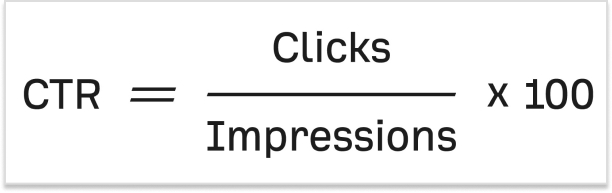
Before diving into the world of branded links, let’s establish a clear understanding of CTR. Click-through rate (CTR) is a vital metric in online marketing, expressed as a percentage. It’s the number of times a link is clicked divided by the number of times it’s viewed. Simply put, if your link gets ten views and one click, your CTR is 10%. Now, let’s delve into why CTR is so crucial.
Let’s say you crafted a groundbreaking piece of content that has the potential to change lives, but no one reads it. Bummer, isn’t it?
The quality of your content will only matter if it reaches your target audience. And the first step? Getting them to click.
Your link is the bridge between you and your reader, making CTR a make-or-break factor for your content’s success.
What are branded links?
Branded links, also known as vanity URLs or custom short links, are URLs that have been customized to include a specific brand’s name or a relevant keyword. Unlike generic, lengthy, or complex URLs, branded links are shorter, more descriptive, and often feature the brand’s domain name or a recognizable keyword, making them more user-friendly and visually appealing.
Now that we have a grip on the concept of CTR and branded links, let’s discuss how the way you use them can make or break your results. A well-crafted branded link can boost trust, clicks, and conversions; while a poorly executed one can do the opposite.
In the next section, we’ll dive into the best ways to increase CTR using branded links, so you can use them to their full potential.
7 best ways to increase CTR using branded links
Let’s explore how you can leverage branded links to optimize your CTR.
Include your brand name in the link:
The domain is the first element of your link, and it’s imperative to include your brand name. Many people use link-shortening tools for brevity, but this often obscures the brand name. Branded links, also known as vanity URLs, remedy this by showcasing your brand, increasing trust, and building brand awareness.
Use a unique top-level domain (TLD):
After your domain, the choice of Top-Level Domain (TLD) can impact CTR. New TLDs can help your link stand out and convey relevance. For instance, using “.tech” for tech-related content or “.store” for online retail adds clarity and can attract more clicks.
Include a keyword:
The URL slug, the part that comes after the slash, is an essential component of SEO. Branded links allow you to choose your keywords, ensuring your link’s relevance and SEO-friendliness. This customization can set you apart from generic shorteners that offer limited options.
Consider link length:
Long URLs can hinder readability and may be truncated on social media. Short, concise links are more appealing to users. They are simple to maintain and encourage clicks. Use this best custom link shortener to generate short branded links in a matter of seconds.
Use “https://” for secure links:
‘Https://’ before a URL signifies a secure connection with SSL certification, which builds trust in your brand’s links. Additionally, Google favors ‘https://’ sites in its search rankings, giving you an SEO boost.
Not sure how HTTPS differs from HTTP? Here’s a helpful guide that explains the difference between the two.
Make sure you keep your word:
Your branded link should match the content it leads to. Consistency builds trust, and trust drives clicks. The best way to do this is by adding a custom link preview when sharing links on social media channels with proper metadata (title, description, thumbnail).
Make them memorable:
Branded links are easier to remember, and that makes them more shareable across channels, even offline. When your audience can recall your links, they’re more likely to revisit and click. Keep tracking performance and optimizing your branded URLs regularly to boost results over time.
Maximize your CTR with Replug’s branded link solution
At Replug, we understand the importance of CTR in driving the success of your marketing campaigns. That’s why we’ve developed a comprehensive Branded link solution that takes your CTR optimization to the next level.
Our platform combines the power of branded links with advanced features designed to supercharge your CTR:
Branding and trust: Replug’s branded links prominently display your brand name, building trust and credibility with your audience.
Customization: Tailor your branded links to fit your brand’s style and messaging, ensuring every link you share is aligned with your marketing goals.
Tracking and analytics: Gain real-time insights into link performance and user engagement, allowing you to make data-driven decisions for maximum CTR.
A/B testing: Don’t just set and forget. A/B test different slugs or CTAs in your branded links. Even small tweaks can lead to noticeable CTR improvements.
Custom QR Codes: QR codes make your branded links scannable on physical materials like posters, packaging, or brochures. Replugs help bridge offline and online traffic through custom QR codes to boost engagement.
SMS links: Pair SMS marketing with branded links to increase trust and open rate. Clean, recognizable URLs in messages look more credible and drive higher CTR from your audience’s inbox.
Simplicity and memorability: Our user-friendly platform ensures that your links are not only effective but also easy to remember and share.
Maximize marketing ROI
by transforming ordinary URLs into branded short links that convert.
Try Replug for free
End note
Optimizing your CTR is crucial for the success of your online content. By understanding the importance of CTR and utilizing branded links, you can significantly increase the chances of your audience engaging with your content. These seven strategies are simple to implement and can yield substantial benefits.
Start using branded links today and watch your CTR soar, bringing your content to a wider audience and achieving the impact it deserves.
Maximize marketing ROI
by transforming ordinary URLs into branded short links that convert.
Try Replug for free
FAQs About branded links and CTR
What is a good CTR (Click-Through Rate)?
A “good” CTR can vary depending on the industry and platform, but generally, a CTR between 2% to 5% is considered average across most channels.
Are branded links better for SEO?
Yes. Branded links often include keywords and relevant slugs, making them more descriptive and SEO-friendly. Plus, when paired with https://, they signal trust and security to both users and search engines.
Can I use branded links outside of social media?
Absolutely! Branded links can be used in emails, SMS campaigns, printed materials, presentations, QR codes, and even podcasts. They’re memorable and easy to type, making them versatile for both online and offline channels.
What tools can I use to create and track branded links?
Replug is a great option. It lets you create custom, branded links and provides detailed analytics, including total clicks, unique clicks, geotargeting data, device info, browser, OS, and referral sources, to help you measure and improve performance.
How do branded QR codes help increase CTR?
By turning branded links into QR codes, you give users a quick and seamless way to access your content, especially in offline settings like events, packaging, or signage. A familiar brand in the URL builds trust and boosts the likelihood of a scan and click.
Link disguising is all about hiding a link so that it looks like another link. Though the term itself might sound dubious, it is very useful in the digital world. People generally mask links to shorten them and brand them.
Disguising a link means concealing the bad parts or random characters of the URL to make it look clean, and here’s where URL shorteners come in handy for turning these messy and random links into something meaningful and useful.
In this article, you’ll learn how to disguise a link effectively and how to rename a link with the help of tools like Replug. If you’re thinking about changing a URL to improve branding, user trust, or click-through rates, you’re in the right place.
A disguised link (also called a cloaked URL or masked URL) hides the original URL and redirects traffic to the original destination URL without damaging the user experience.
Advanced URL shorteners make disguising a URL easy and allow you to quickly create a customized URL (or vanity URL/branded link) that appears to the users when you share with them.
Now the real question arises. Why do people use disguised links?
Why disguise a link?
Creates a great first impression: A URL is something that people see at first sight when you share a profile, video link, company website, or even when promoting your website builder software. So, if it looks suspicious, no one is going to click.
Increases your sales: Disguising a link can significantly improve e-commerce sales, brand engagement, and user experience since users are more likely to click a link that looks branded and clean.
Tracks link performance: URL tracking tools not only disguise links but also allow track performance by creating custom links.
They are easy to create: With the right tools, learning how to disguise a link takes just a few steps. So, why not go for a branded URL rather than one that looks like a jumble of random characters?
Boost ROI with branded URLs!
Enhance your marketing campaigns by creating shareable, trackable, and fully multi-purpose
customizable branded URLs.
Affiliate marketers often rely on link disguising for a cleaner presentation and to protect their affiliate IDs from theft or malware. Using Replug or similar tools, they can:
A URL shortener is your secret weapon to transform any clunky link into a sleek, hidden gem. But that’s just the beginning. You can also track performance, analyze click data, and enhance your links with CTAs, bio links, retargeting pixels, and more!
Let’s say that you are promoting a new line of Columbia whole coffee beans that you just launched.
Here’s how you can use Replug to disguise your link:
Step 1: Sign in or create an account
Sign in to your Replug account. You will get a 14-day free trial if you’re a new user.
Step 2: Enter the URL you want to disguise
Step 3: Disguise your URL
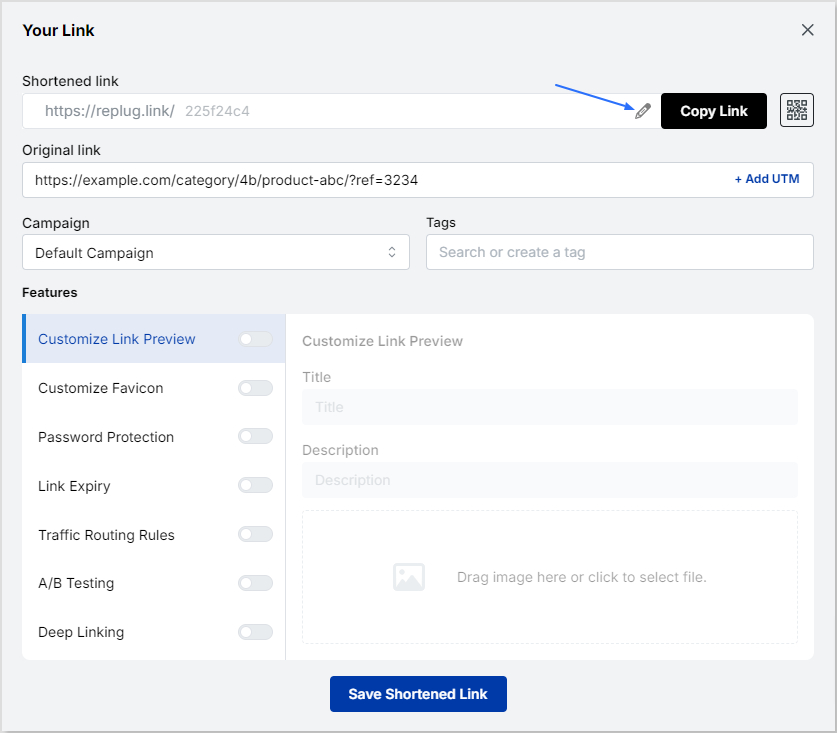
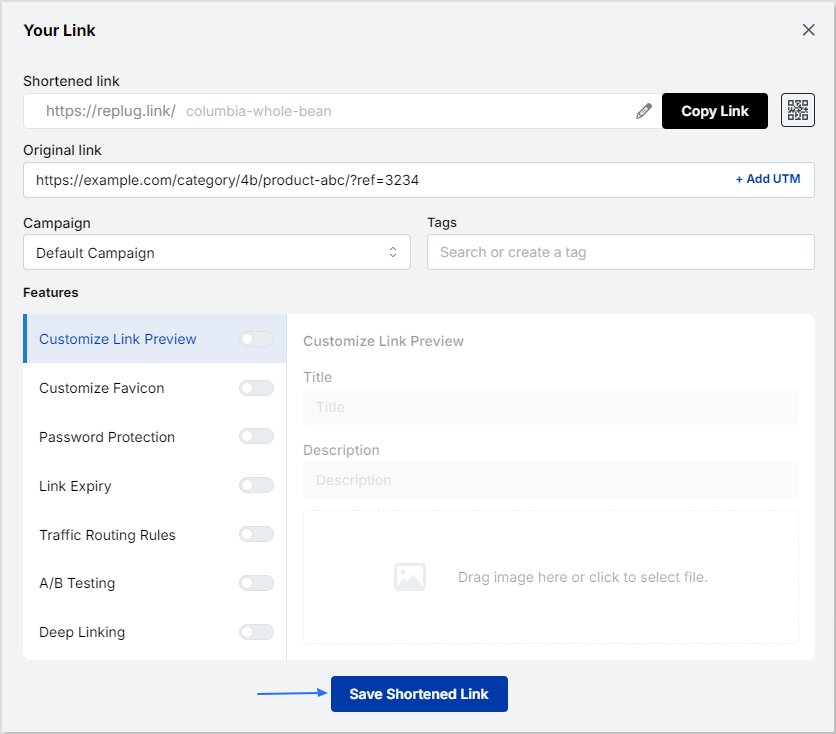
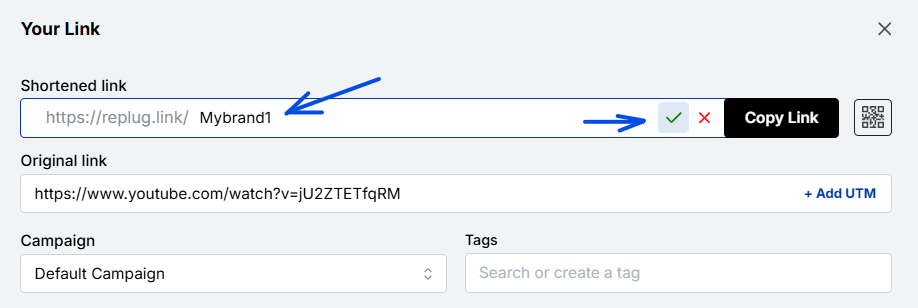
After you click on the blue next button, you’ll be led to a popup. From there, you can change the URL slug, thereby masking your URL so that it doesn’t look spammy.
From here you can also set additional parameters that you want for your campaign, such as customized favicon, deep linking, A/B testing, etc. You can also add a UTM parameter to track your links’ performance.
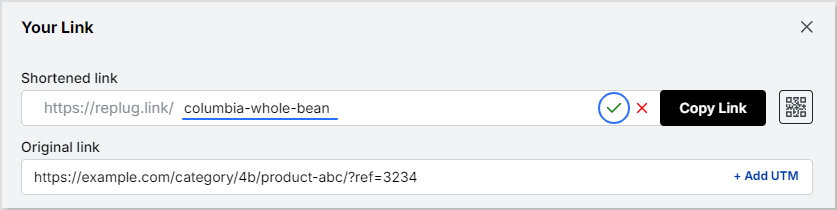
Now just type the slug (in our example “/columbia-whole-bean”) and click on the green tickmark icon to save your disguised URL.
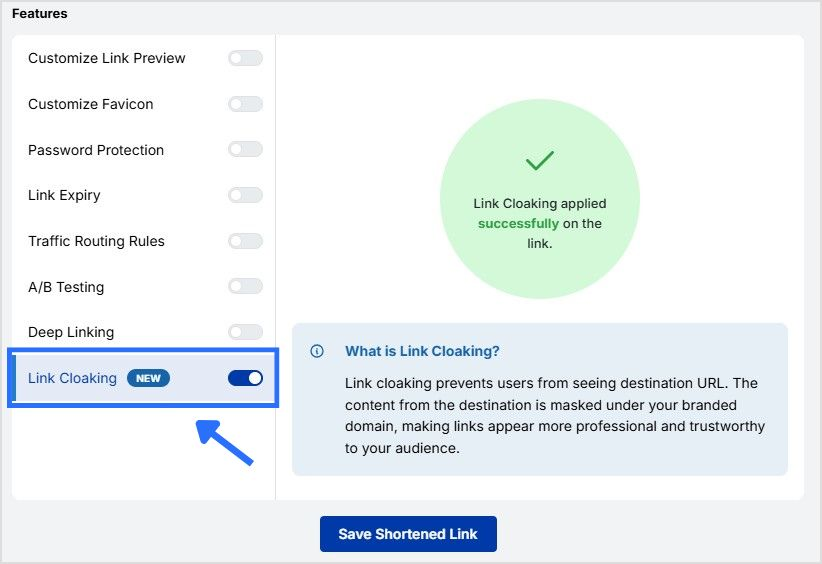
Step 4: Enable link cloaking
Enable link cloaking in Replug to display only your custom, branded link in the browser’s address bar, thereby disguising the original URL. This keeps your link clean, professional, and more trustworthy.
Step 5: Save and share!
Once done, just click on the “Save Shortened Link” button and share it with your audience, whenever, wherever!
Maximize marketing ROI
by transforming ordinary URLs into branded short links that convert.
Try Replug for free
Replug key features
Link management
Multiple link shortening tools are available in the market, but Replug is among the few best link shorteners that offers link disguising, tracking & optimization as well as a catchy calls to action.
Replug is an easy URL shortening and tracking platform that allows you to:
Create eye-catching branded URLs.
Generate social media bio links
Add URL tracking with custom URL UTM parameters, and tags
Add retargeting pixels with powerful analytics and branded links.
A complete link management solution
for marketing professionals & agencies.
Try Replug for free
Replug Chrome extension
Replug’s chrome extension makes it easier to create disguise links. You can download the Google Chrome extension and log into your Replug account by entering your login credentials.
Once completed, you’ll have full control of using Replug features in no time.
Link analytics
Replug stands higher among all link management tools when it comes to link analytics. You can make a profitable brand strategy by keeping an eye on link analytics.
Below are some great click analytics you can track using Replug:
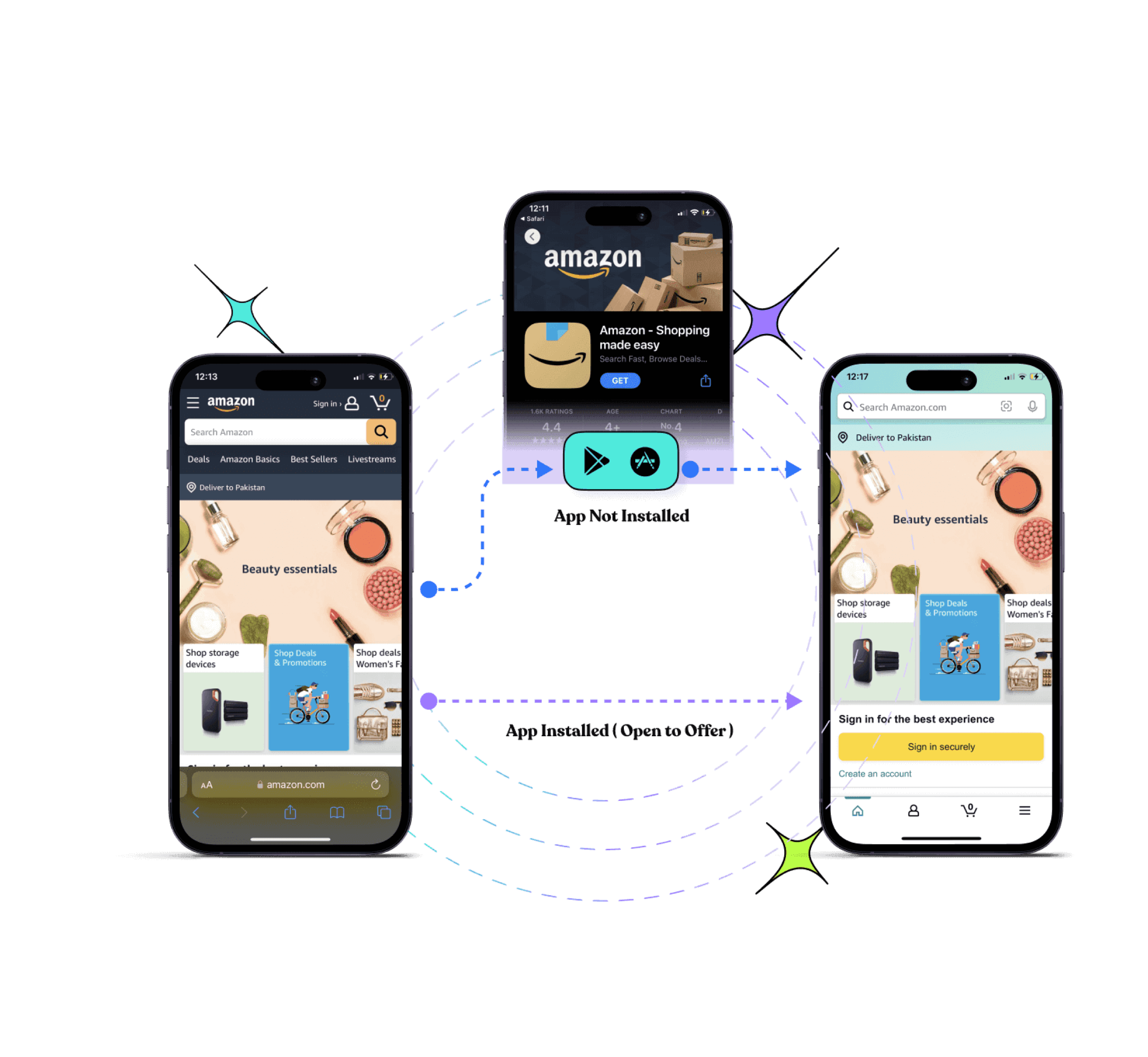
Deep links let users go to the specific application rather than going through the hassle of visiting irrelevant web pages. These powerful links increase overall engagement and conversion rates.
Drive more clicks, conversions, and app installations by deep linking
to your favorite platforms.
Try deep links for free
Link rotation
With the help of Replug’s link rotation (or traffic routing) feature, you can reach your target audience by setting multiple filters such as geography, browser, and device. You can also select the IP address, dates, and time. Hence, link rotation allows you to redirect users and deliver a unique experience on the base of these filters.
QR codes
Replug allows you to create custom, dynamic QR codes. After you you’ve disguised your URL, you can quickly create a branded QR code by changing the customizing the colours, adding a frame, and incorporating your logo. This allows for seamless sharing across all platforms, and also makes your link look cleaner and quicker to access.
Retargeting pixels
Every branded URL can include retargeting pixels to help you retarget website visitors who bounced before buying. This is especially useful for e-commerce brands looking to reduce cart abandonment, re-engage lost leads, and improve return on ad spend. One clean link can bring customers back right when it matters most.
A/B testing
A/B testing features allow you to redirect links to several destinations. With Replug, you can efficiently distribute the weightage and start testing up to 10 links simultaneously.
Final words
Using a URL shortener to disguise a link is not only for the people of the e-commerce world. In fact, URL shorteners are way much more than just a shortening tool.
You can create bio links, test landing pages via A/B testing, add CTA’s for special offers and discounts, route and redirect traffic etc. And this is just the tip of the iceberg.
Ready to disguise and hide your links like a pro? Try Replug today!
Frequently asked questions
What is a disguised link, and why is it useful?
A disguised link (or cloaked URL) hides the original URL, making it cleaner and more trustworthy. It improves click-through rates, builds trust, and is commonly used in affiliate marketing and e-commerce.
How can I track the performance of my disguised links?
Advanced link management tools provide metrics like click-through rates, locations, and conversions. You can also add UTM parameters to gain deeper insights.
How to disguise a link in text?
To disguise a link in text, hyperlink a word or phrase instead of displaying the full URL. For example, use anchor text like “read more” or “visit now”. This improves readability, builds trust, and boosts click-through rates. Use a URL shortener like Replug to create a clean, branded link before embedding it.
What is the best tool for disguising links?
One of the best tools for disguising links is Replug. It offers easy link customization, tracking, and branding features to enhance link performance.
Imagine sending a link that not only directs people where you want, but actually makes them more likely to click it.
That’s the power of vanity URLs; those clean, branded web addresses that turn long, tangled links into a memorable call-to-action.
In an age where attention spans are short and trust is everything, studies show that branded links can lift click-through rates by ~34–39% compared to generic URLs. This is simply because they look more credible and meaningful to users.
Whether you’re promoting a campaign on social media, printing a URL on a flyer, or boosting email engagement, vanity URLs help your brand stick in people’s minds.
Ready to get started? Let’s kick things off with the basics, i.e., what exactly is a vanity URL?
What is a vanity URL?
A “vanity URL” is a custom, easy-to-remember web address that’s built to reflect your brand or the content you’re promoting instead of a messy, long URL or a link full of numbers and random characters.
Unlike generic URLs that can be hard to read and forgettable, vanity URLs are short, descriptive, and often branded, making them far more user-friendly and trustworthy for your audience.
Every vanity URL is made up of three key parts:
Brand name: The recognizable name or domain that ties the link to your business or content.
TLD (Top-Level Domain): The extension, like “.com”, “.org”, or “.net” that follows your brand name.
URL slug: The part after the slash that describes the specific page or offer (e.g., /summer-sale).
Put together, these elements create a link that’s not just functional but memorable and meaningful.
Key characteristics of a vanity URL:
Memorable & short: Easy for people to recall without effort.
Branded: Includes your brand name for instant recognition.
Contextual: Gives users a clue about what they’ll see.
Descriptive: The slug tells you the purpose of the link.
Trustworthy: Looks safe and familiar, encouraging clicks.
Quite easier to use: Simple to type, share, and promote.
What is the purpose of a vanity URL?
The major purpose of a vanity URL is to turn a long, awkward link into a short, branded, easy-to-remember web address that improves how people perceive, trust, and interact with your content.
By including your brand name or relevant keywords, vanity URLs make links more memorable and shareable, whether you’re posting on social media, sending emails, or using print ads.
This clarity boosts click-through rates, gives users confidence about where they’re headed, and helps you track engagement and strengthen your marketing message across channels.
Why use a vanity URL?
If you want your links to work harder for your brand and your marketing, using a vanity URL makes a big difference.
Here are the key reasons people use them:
Build stronger brand recognition: Vanity URLs put your brand name front and center every time someone sees or clicks a link, reinforcing your brand identity.
Boost trust & credibility: Clean, branded URLs look professional and reassuring, making users more likely to click than long, confusing links.
Increase click-through rates: Studies show branded links often get higher engagement than generic or long URLs because users know what they’re clicking.
Make sharing easier: Short, memorable links are simple to type, remember, and share across social media, email, ads, and print.
Improve tracking & analytics: You can create unique vanity URLs for different campaigns and measure exactly which channels drive the most traffic.
Support SEO indirectly: Clean, keyword-rich URLs can help with visibility and give search engines and users a clearer context.
In short, vanity URLs are more than just pretty links. They help you connect better with your audience and get more value from every campaign.
How a vanity URL works?
A vanity URL works in a simple but clever way. It gives you a clean, branded address that redirects to the real page you want people to visit.
Instead of sharing a long, messy link with tracking codes or confusing paths, you create a short, human-friendly URL that people can type, remember, and trust on the go.
When someone enters that vanity URL in their browser or clicks it, the web server or link service automatically redirects them to the actual destination page, usually via a redirect (e.g., a 301 permanent redirect). This sends the user seamlessly to the actual content without changing anything on their end.
Note: This redirection happens behind the scenes, so from the visitor’s perspective, the experience feels smooth and direct. Vanity URLs also help with branding and can improve trust and engagement because users know where they’re being taken before they click.
Why do you need a vanity URL?
You might wonder at times why anyone needs a vanity URL when regular links also get the job done. The difference lies in clarity, trust, and results.
A vanity URL free service or tool lets you create a custom, branded link without paying, which is great for beginners or small businesses trying to level up their online presence.
Branded URLs like “yourbrand.com/deal” are easier for people to remember and type than long, cluttered links, so they’re more likely to click and engage with what you’re sharing.
That simple tweak can boost click-through rates and give your campaigns a professional look, no matter if you’re posting on social media, sending emails, or printing a URL on a flyer.
Plus, these clean links build credibility because users instantly see something familiar instead of random characters, making them feel confident about where the link leads.
How to create a vanity URL: 6 simple steps to get one easily using Replug!
Creating a vanity URL helps you turn long, unorganized links into clean, branded, and memorable URLs. With Replug.io, the process is quick and beginner-friendly (no technical skills required).
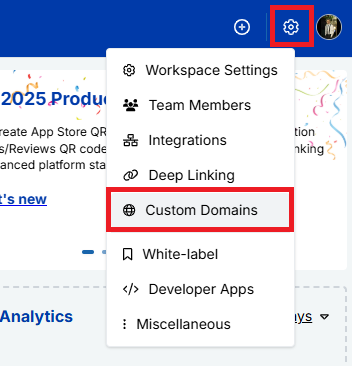
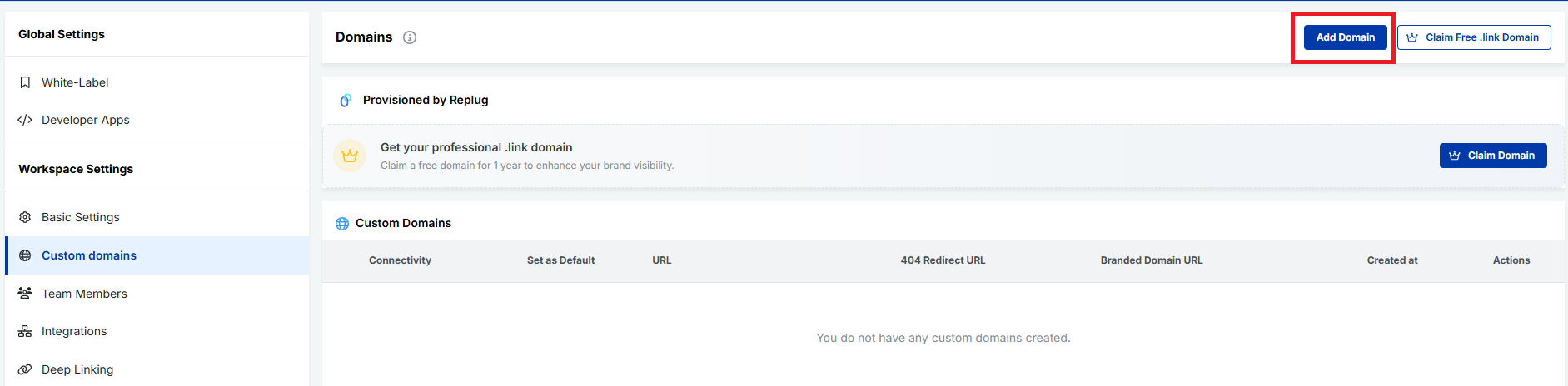
Next,navigate to “Workspace Settings” and, from the dropdown menu, click “Custom Domains”.
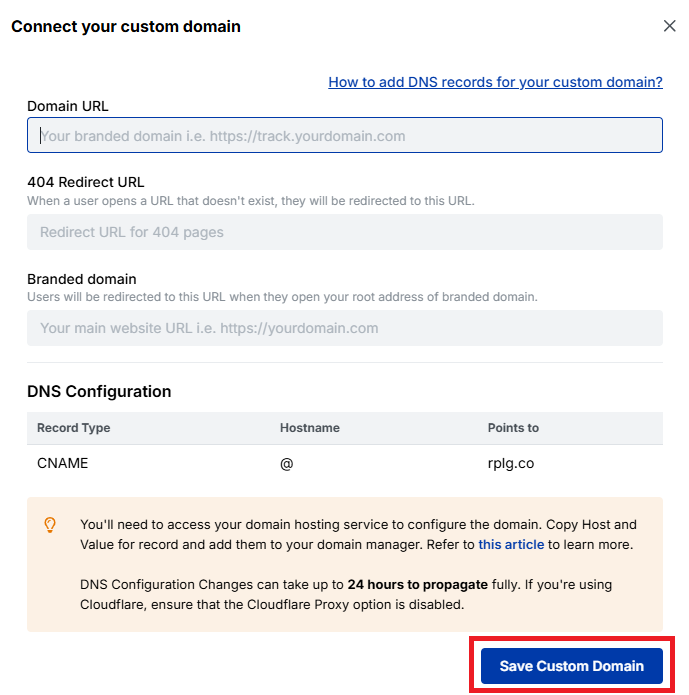
After that, connect your custom domain to use it as your vanity URL base. Follow the next snippets!
Fill the fields carefully, and click on the button labeled “Save Custom Domain”.
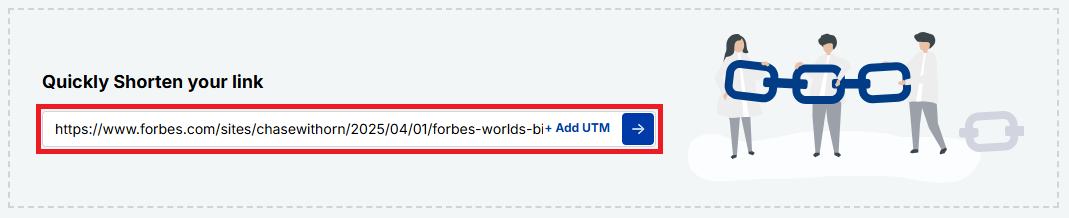
Step #3: Create a new short link
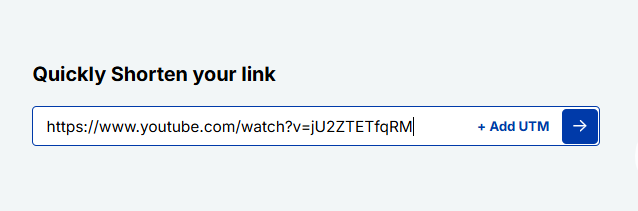
Now, paste your original long URL into the input field under “Quickly Shorten your link”. Then click the blue arrow button to generate your vanity URL automatically.
Step #4: Customize the URL slug
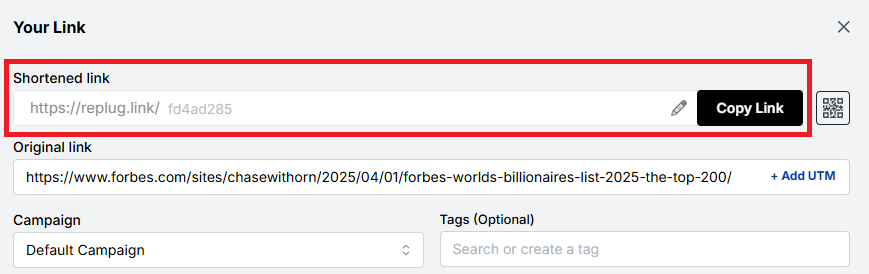
Your vanity URL will be generated within seconds.
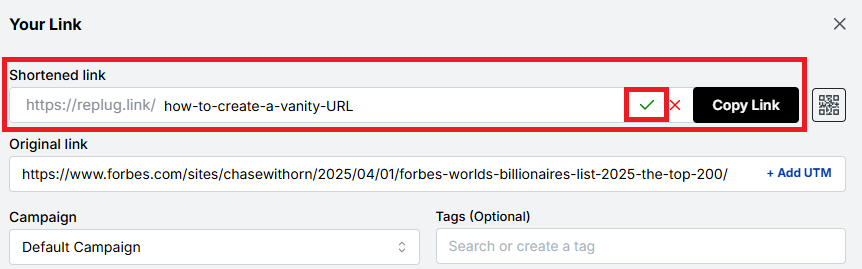
You can customize the URL slug using the “edit/pencil” icon to fit your needs. Edit the back-half of the link to make it branded, readable, and relevant to your content or campaign. Once done, click on the “tick” symbol.
Step #5: Save, test, & share your vanity URL
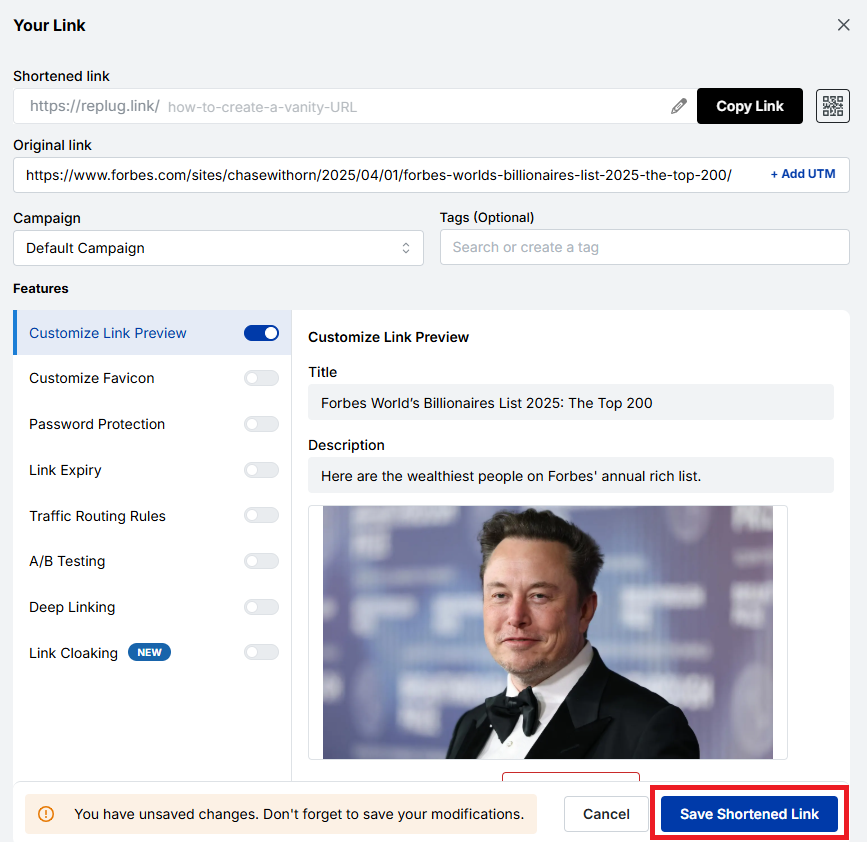
Save the link by clicking the button “Save Shortened Link”. Test it to ensure it works correctly, and start sharing it across your marketing channels.
Step #6: Access your vanity URL hassle-free
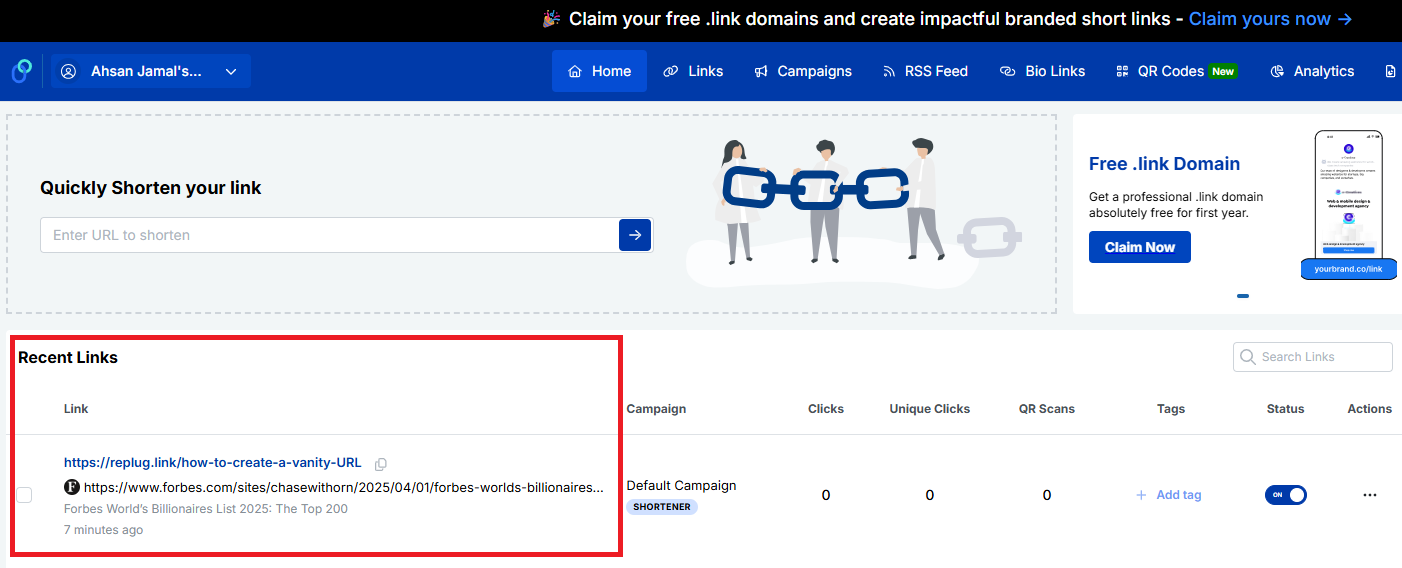
Once saved, your vanity URL will appear in the “Recent Links” section of your Replug dashboard. From here, you can easily copy the link at any time and view detailed analytics to track its performance.
That’s all there is to it!
Note: Using Replug to create a vanity URL is a simple yet powerful way to strengthen your brand and improve link trust. In just a few steps, you can transform ordinary links into polished, professional URLs that stand out.
Common uses for vanity URLs
Vanity URLs are more than just pretty links; they make it easier for people to find, remember, and trust what you’re sharing. Because they’re short and branded, businesses and creators use them in lots of places where clarity and engagement matter.
Marketing campaigns
Vanity URLs help tie your campaign message to a memorable link, allowing your audience to quickly recognize what the offer or message is about and revisit the offer.
Print campaigns
On flyers, posters, brochures, or billboards, short branded links are much easier to read and type, unlike long, complex URLs.
Social media posts
Clean URLs look better in bios and posts than generic long links, improving engagement and click-through rates on platforms where space and clarity matter the most.
Digital ads
Using vanity URLs in your ads (such as display or banner ads) looks professional, builds credibility, and improves brand recall, while still making the destination clear and trustworthy to users.
Emails
Including a neat vanity link in your email content (newsletters or promos) makes messages feel more authentic and more likely to be clicked by recipients. This often results in higher open and click-through rates.
SMS marketing
Branded short links are essential for SMS marketing, where character limits are paramount and readability matters. These links feel more legitimate than prolonged, unbranded URLs.
Event promotions
From webinar registrations to live events, a specific vanity URL helps people remember and find event pages easily across channels, or learn more.
Influencer & affiliate marketing
Influencers and affiliates can use vanity URLs to share personalized, easy-to-read links that still track traffic source and support attribution. Custom-branded URLs assist the best in this situation.
Internal systems
Within a company or organization, vanity URLs can point employees to frequently used tools, pages, or internal resources without messy addresses, improving efficiency and productivity.
Lead magnets
If you’re offering freebies like e-books, checklists, guides, or downloads, a vanity URL makes it clear what people are signing up for and reduces friction when accessing or sharing the content.
Customer/Client support
Customer support pages or help articles are easier to share and remember when tied to short, branded URLs rather than long system links.
These everyday uses show how vanity URLs work across both digital and offline channels, helping you connect with your audience wherever they are easily.
Major benefits of vanity URLs
Vanity URLs deliver real benefits that improve how your links work across branding, marketing, and user experience. From being easier to remember to providing valuable data, here’s how they help.
Easy to remember, type, recall, & share
Because vanity URLs are short and precise, people find them easier to recall, type into a browser, and share with others (whether online or in person) compared with long, complicated links. This makes them more likely to stick in your audience’s mind.
Shows what works & what doesn’t
With branded links, you can track performance more clearly, seeing which campaigns or channels are driving traffic and which aren’t. Good link analytics help you double down on winners!
Strengthens brand trust & recognition
Seeing your brand name in the URL builds familiarity and trust. Users are more comfortable clicking links that look professional and recognizable, which also strengthens brand awareness over time.
Improves SEO & link visibility
Including relevant keywords in your vanity URL can give search engines extra context, potentially helping visibility in search results and making your content easier to find.
Enhances user experience & click-through rates (CTR)
Clean, descriptive links communicate what to expect, making people more likely to click, which often leads to higher CTR compared with generic URLs.
Empowers online & offline sharing
Vanity URLs work great everywhere, from social media and emails to print ads and business cards, because they’re easy to remember and look pleasing in any format.
Enables verbal sharing seamlessly
When you’re speaking at an event, on a podcast, or on video, a simple branded URL is much easier to say (and remember) than a messy link full of characters.
Assists with link retargeting & link management
Many vanity URL tools let you add UTM tracking or retarget users who click your links, letting you re-engage visitors and fine-tune campaigns hassle-free.
Offers tracking benefits
Beyond clicks, you can track where traffic comes from, what devices users use, and how campaigns perform, giving you data-driven insight to improve future marketing.
Together, these benefits make vanity URLs a smart choice for any brand or marketer looking to enhance performance and connect with audiences more effectively.
Real-world vanity URL examples
Vanity URLs aren’t just a mere theory; you see them every day on big sites and platforms where brands and individuals replace long, disorganized links with clean, easy-to-remember ones.
These real-world examples show how familiar names use custom URLs that help with branding, trust, and recall exceptionally.
Vanity URL YouTube
Creators and brands often get a custom YouTube vanity URL like youtube.com/@BrandName, making it way simpler to share and remember than the default long link your channel starts with.
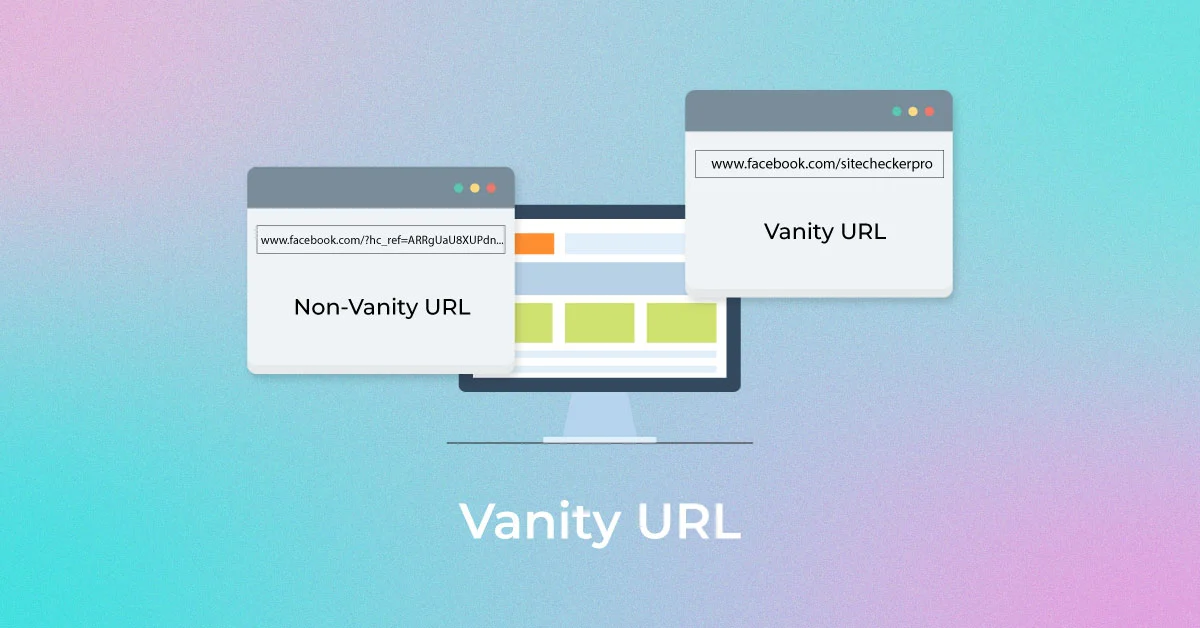
Vanity URL Facebook
Instead of a numeric profile URL, you can claim a Facebook vanity URL, such as facebook.com/YourBusiness, which looks cleaner and more professional.
Vanity URL LinkedIn
LinkedIn lets you customize your public profile to something like linkedin.com/in/JohnDoe, perfect for sharing in resumes or email signatures.
Vanity URL Zoom
Companies can set up custom Zoom vanity URLs or Zoom domains, such as yourcompany.zoom.us, that reflect their brand when users log in or join meetings.
Vanity URL Steam
Steam community profiles often use a Steam vanity URL like steamcommunity.com/id/YourName, an easier-to-share version compared with auto-generated numbers (a form of custom profile URL).
Vanity URL Discord
Discord lets users customize invite links or server invites (e.g., discord.gg/YourServerTag), which are much nicer than random code links.
Vanity URL Dropbox
High-profile brands like Dropbox use clean URLs, such as dropbox.com/backup, or social-profile links, such as facebook.com/dropbox, for ease of use.
Vanity URL Slack
Slack’s site and its pages often use simple branded URLs like slack.com/get-started, making it easy to understand where the link goes.
Vanity URL AEM
While not as universally “profile-style”, platforms built with Adobe Experience Manager (AEM) usually employ neat custom URLs like example.com/campaign-page for specific campaigns.
Vanity URL Oracle
Oracle’s cloud services and docs use branded paths such as oracle.com/cloud/what-is-cloud, which is cleaner than deep-nested URLs.
Vanity URL Airbnb
Airbnb uses simple, descriptive paths like airbnb.com/host or airbnb.com/contact that clearly explain what the page is about.
These realistic examples show how vanity URLs make it easy for people to recognize, trust, and remember links, no matter if it’s for social profiles, services, or product pages.
Vanity URLs vs. generic URLs vs. domain URLs
Understanding the difference between vanity URLs, generic URLs, and domain URLs can make it much easier to choose the right type of link for your audience or campaign.
Below is a simple breakdown showing how these three compare in terms of branding, memorability, trust, and use cases, written in a friendly, easy-to-digest way.
Type of URL
What it is
Branding
Memorability
Best for
Vanity URL
A custom, branded web address that’s short and meaningful, like yourbrand.com/sale, designed to be easy to remember and share.
✔️ High: includes brand name or message
✔️ Very easy to remember
Marketing, campaigns, social shares
Generic URL
A standard link that might be long or autogenerated, like example.com/page?id=12345.
❌ Low: usually no brand visible
❌ Harder to recall or type
Technical references, deep site pages
Domain URL
A base domain name itself (e.g., example.com). It is the main web address for a site.
✔️ Represents your entire brand
✔️ Easy at the top level
Homepage, business identity
Note: Vanity URLs give you customized, friendly links that make people feel confident clicking and remembering what they saw. Generic URLs do the job, but don’t do much for your brand or recall. Meanwhile, domain URLs are simply the core web address of a site, strong for broad identity, but not always as user-friendly for specific campaigns or pages. Overall, vanity URLs sit in the sweet spot between branding and usability.
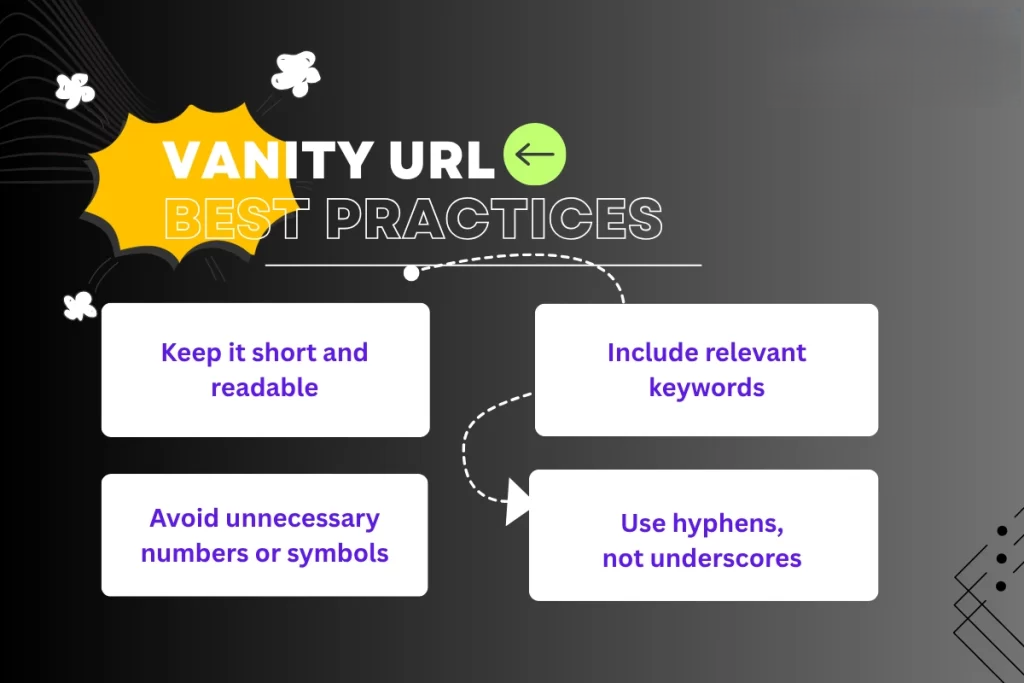
Vanity URL best practices
Before you start creating vanity URLs, it’s good to follow a few simple rules that make them actually effective and helpful for both users and your marketing goals.
Here are the most promising conventions to keep in mind. Have a look!
Keep it short, clear, & memorable
Short URLs are easier for people to remember, type, and share, especially when spoken aloud or printed on marketing materials. Avoid long, complicated slugs and stick to a concise structure.
Make it descriptive & natural
Your vanity URL should give users a clear idea of what they’ll see when they click. A simple phrase like /summer-sale or /get-ebook helps set expectations and builds trust.
Prioritize contextual use
Think about where the link will be used (social media, email, print ads, or spoken mentions), and tailor your vanity URL so it feels natural in that context. This makes the link more effective and user-friendly.
Make it intuitive & use lowercase
Stick to lowercase letters, avoid spaces, and keep the wording intuitive so that users won’t mistype or misunderstand the link. Lowercase also helps prevent confusion, since URLs are case-sensitive in practice.
Use keywords strategically
Including one or two relevant keywords that reflect your content or campaign can improve clarity and indirectly support SEO and recognizability. However, just don’t overstuff or make it awkward.
Reflect your brand identity
Use your brand name or a distinctive abbreviation in your vanity URLs to reinforce your brand and make the link feel familiar and trustworthy.
Use 301 redirects to preserve SEO
When you set up a vanity URL that points to another page, use a 301 permanent redirect so search engines know the page has moved and that any SEO value is passed along properly.
Use a vanity URL, only when required
Don’t force a custom URL everywhere! If a standard link already works well and is clear, there’s no need to reinvent it. Vanity URLs are most useful when they add real value for users or branding.
Note: Following these tips helps ensure your vanity URLs do what they’re supposed to: make links easier to use, more on-brand, and more effective in your campaigns.
How to choose the right vanity URL
Selecting the correct vanity URL might seem small, but it plays a significant role in how people remember and click your links. A good vanity URL makes your brand look professional!
Here’s how to pick one:
Keep it short & relevant
Short URLs are easier to read, type, and share, especially on social media or in messages. Keep in mind, if your URL is clear and to the point, people are more likely to trust and click it.
Work on keywords (related to your brand or campaign)
Including a keyword that matches your brand, product, or campaign helps the audience instantly understand what the link is about. This also makes your URL more searchable and meaningful.
Avoid special characters, such as dashes & underscores
Special characters can make a URL look messy or confusing. They’re harder to read and can even lead to typos, so keeping things simple and clean is usually better.
Must be consistent with your branding
Your vanity URL should reflect your brand’s identity in the best possible manner (think tone, style, and words you usually use). This builds familiarity and trust with your audience brilliantly.
Should clearly indicate the destination
People should know what they’re clicking on just by looking at the link. If your URL gives a good hint of where it leads, users feel more comfortable and less likely to hesitate.
Always check for possible errors
Before you finalize, double-check spelling, grammar, and meaning. A tiny mistake can change the whole impression or lead users to the wrong place, and that’s not at all good for your brand!
The advantages of using Replug for your vanity URLs
Using Replug for your vanity URLs makes managing and sharing links way easier and more effective than just dropping URLs everywhere.
Replug isn’t just a reliable link shortener; it acts as a powerful vanity URL generator that lets you create custom, branded links that are easy to remember and look more professional when you post them on social media, in emails, or on your website.
Maximize marketing ROI
by transforming ordinary URLs into branded short links that convert.
Try Replug for free
With this all-in-one link management platform, you can track how your links perform, add retargeting pixels or UTM tags for better marketing insights, and even boost engagement by turning every shared link into something that feels personal and trustworthy.
All of this helps your brand stand out, drive more clicks, and give you valuable data to improve your campaigns, without any tech headache.
Wrapping up
As you’ve seen, vanity URLs aren’t just a neat trick; they’re a smart way to make your links easier to remember, more trustworthy, and much more effective in connecting with your audience.
From boosting brand recognition and improving click-through rates to helping you track what works and what doesn’t, vanity URLs bring real value to your online presence.
Whether you’re running campaigns, sharing links on social media, or promoting events, the right custom URL can make a huge difference.
And if you want a simple, powerful tool to create branded short links, track performance, and even add CTAs or retargeting, you should give Replug a try today. It’s quick to set up and can really level up your link game!
Frequently asked questions
What is a good example of a vanity URL?
A good vanity URL is short, branded, and descriptive. For example, instead of a long tracking link like example.com/page?id=4321&utm=xyz, you could use something like brandname.com/sale, which is easy to remember and tells users what to expect.
What is a vanity URL slug?
A vanity URL slug is the part of a vanity URL that comes after the domain name and describes the specific page or campaign. For example, in brand.com/summer-sale, the slug is summer-sale. It should be short, meaningful, and help users know what the link points to.
What are the common use cases of a vanity URL?
Vanity URLs are widely used across marketing channels:
– Social media posts, – Email campaigns, – Print materials like flyers or billboards, – Product promotions, – Affiliate links, – Event pages, – Landing pages, and – Paid ads
They make links more memorable and build trust!
Is a vanity URL case-sensitive?
The domain part of a vanity URL is not case-sensitive, but the slug portion usually is. This means brand.com/Sale and brand.com/sale will be treated differently. Most people use lowercase for consistency and simplicity (it’s the best practice).
Is it possible to alter or redirect a vanity URL?
Yes, vanity URLs can be changed or redirected. Just update the redirect settings in your link management tool or DNS, and you’ll point that vanity URL to a new destination. This helps when campaigns change, or you want to reuse the same branded link.
What is the difference between a vanity URL, vanity domain, vanity page, and a custom URL?
– Vanity URL: A short branded web link that redirects to another page. – Vanity domain: A custom domain name used specifically for branding (e.g., go.brand.com). – Vanity page: A dedicated landing page created for a campaign or audience. – Custom URL: Any user-defined URL path or slug, often part of a vanity URL.
Each serves a slightly different purpose, but all aim to improve branding and clarity.
What is the difference between a vanity URL and a domain?
A vanity URL is a specific custom link (often on your domain) created for clarity or branding, like brand.com/offers. A domain, on the other hand, refers to the entire web address that identifies a site, like brand.com itself. The vanity URL sits under that domain and points to a particular page.
What is the difference between a vanity URL and a redirect?
A vanity URL is the clean link you share with users, while a redirect is the behind-the-scenes mechanism that takes visitors from that vanity URL to the actual destination (often a longer, complex web address). The redirect makes the vanity URL work.
What are the standard guidelines and requirements for vanity URL requests?
Requirements vary by platform, but generally:
– Pick a short, relevant slug – Avoid special characters or offensive terms – Follow brand naming rules, and – Ensure the URL isn’t already taken
Some services also require verification or minimum follower counts (e.g., social profiles) before you can claim a vanity URL.
What is a branded short domain, and how does it differ from a vanity URL?
A branded short domain is your own custom domain (like nyti.ms), often used with a vanity URL slug (nyti.ms/news). Whereas a vanity URL uses that domain plus extra path text. The branded short domain gives complete control and branding across all custom links.
How to get your Google+ vanity URL?
Google+ was discontinued in 2019, so vanity URLs for that platform are no longer obtainable. This applies even if some help pages still exist online. No current applicable process available!
How to change an existing vanity URL?
To change a vanity URL, go to the platform’s settings where it’s managed (e.g., social profile or link tool dashboard), edit the URL name or slug, and save. Some platforms may have limits on how often you can change it or minimum requirements before allowing edits.
How to customize branding for your vanity URL?
Branding your vanity URL means using your brand domain, keeping slugs relevant, and avoiding generic or vague names. Use your brand’s name or campaign words, so the link feels familiar and trustworthy. Ensure you use HTTPS and a consistent brand tone everywhere the URL appears.
How to request a subdomain or vanity URL?
If you control your domain, add a subdomain (like go.brand.com) in your DNS settings and point it with a redirect to the page you want. If you’re on a platform (e.g., a social network), follow that platform’s specific “custom URL” or “username” request page.
How do vanity URLs impact marketing?
Vanity URLs boost brand recognition, user trust, and click-through rates because they’re clear, branded, and shareable. They also help with tracking which campaigns or channels perform best.
What is a vanity URL in search engine optimization? Does SEO suffer from it?
A vanity URL in SEO is a short, custom-branded web address that redirects to a longer or more complex URL, making it easier for users to remember and share while reinforcing your brand or keywords.
A vanity URL doesn’t directly improve or hurt SEO because search engines index the destination content. However, it can indirectly boost SEO by increasing click-through rates and engagement, which signal relevance. As long as it uses proper redirects (like 301s), SEO shouldn’t suffer.
How to create SEO-friendly vanity URLs?
SEO-friendly URLs are all about making them easy for both people and search engines to understand. Here’s how to do it:
1. Keep them short, simple, and clean so people can easily remember and type them without mistakes. 2. Use a structure that makes sense and flows well when read (like yourbrand.com/sale-offer) rather than long, confusing strings. 3. Always set up permanent 301 redirects from your vanity URL to the actual page. This tells search engines that the page moved permanently and helps preserve SEO value over time.
How to create vanity URLs for your social media ads?
Use a custom link tool or your own branded domain to build short, relevant URLs (e.g., brand.com/black-friday). Then place these in your ad copy or CTA buttons to make the links more appealing and track their performance separately with analytics.
How to set up a vanity URL for your website?
Choose a short, branded path or subdomain on your domain, then set up a redirect (ideally a 301 permanent redirect) to the full destination page. Use a link management tool such as Replug or your site’s hosting/DNS settings. And remember, always test the link before sharing.
How to set up a vanity URL with a branded short domain?
To set up a vanity URL with a branded short domain:
1. Start by choosing a unique, memorable name that goes well with your brand and is easy to recall. 2. Then check domain availability and register it if it’s free. 3. Next, use a reliable link shortening tool or a custom domain tool (like Replug or similar) to connect your domain and create the short links. 4. After that, set up a 301 redirect from your short branded URL to your primary destination so that browsers and search engines know where it should go. 5. At the end, test your vanity URL to make sure it works properly, and then share or promote it wherever you need.
How to track a vanity URL performance efficiently?
Use analytics, either from your link-shortening tool or platforms like Google Analytics or Usermaven, to monitor clicks, referrers, device types, and conversion data. Adding UTM parameters behind the scenes can help you attribute which campaigns bring traffic.
How does a vanity URL white-label emails and links to the Microsite?
A vanity URL can serve as a white-label domain, so that both links and email addresses appear to come from your brand (e.g., pics.brand.com and noreply@brand.com). This keeps the entire experience consistent and credible when sending messages or linking to a microsite.
Have you ever wondered what sets certain web addresses apart from the rest? Why do some URLs feel tailor-made to cater to your interests and preferences?
The answer lies within the domain of unique URLs. Unlike their conventional counterparts, these special links possess the ability to deliver customized experiences, guiding users to content that resonates with them on a deeper level.
Follow along as we uncover the secrets behind creating and utilizing unique URLs and discover how they can uplift your online journey.
Get ready to unlock the potential of unique URLs and enhance your digital impact.
What are unique URLs?
Unique URLs are special web addresses that are customized and tailored to individual users or specific purposes. They go beyond the standard URLs you see on the web and add a personal touch.
These unique addresses can include elements like user identifiers, preferences, or customized URL parameters.
The primary purpose of unique URLs is to enhance user experiences and provide personalized content. They allow businesses to deliver targeted information, track user behavior, and measure the effectiveness of their marketing efforts.
With unique URLs, website owners can create customized landing pages and provide a more personalized, engaging experience for their visitors.
How to create unique URLs using Replug?
When it comes to creating unique URLs, Replug.io offers a comprehensive suite of features that empowers businesses to take control of their online presence and deliver personalized experiences.
What does Replug do?
With Replug, you can add a call-to-action (CTA) to any link you share with your audience and drive traffic back to your site. You can collect leads by adding your own branded CTA to any page on the web.
Replug also provides analytics and insights, allowing you to track visits and conversions from the links you have shared.
A complete link management solution
for marketing professionals & agencies.
Try Replug for free
Precisely, it is an efficient link shortener and a remarkable link-tracking platform that helps you build brand recognition and allows you to add eye-catching, branded call-to-actions or retargeting pixels to any page on the web.
Additionally, Replug offers bio links that let you drive more traffic to your landing pages through platforms like Instagram and Twitter.
Here’s how to get a unique URL with Replug
Let’s explore how Replug simplifies creating unique URLs and releases their potential for your digital strategy.
Step 2: On the main home page, locate the “Quickly Shorten your link” bar in the top-left corner. Paste the URL you want to uniquely shorten, here.
Step 3: Press Enter. The following screen will appear.
Here, you’ll spot the “Campaign” option. Go with the default campaign, or choose one from your existing campaigns in the dropdown menu.
Note: Creating a campaign takes only a few seconds. It can be the name of your project, allowing you to navigate it easily. For instance, if you’re creating a unique URL, your campaign can be titled “unique URL”.
Step 4: After that, customize your URL slug to make it unique. Once done, click the check mark to save the customization.
Step 6: Once done, click the “Save Shortened Link” button.
And you’re done!
Actionable link data: Replug’s analytics at your service
Replug not only provides powerful URL management capabilities but also offers rich analytics for each of your links. With Replug’s analytics feature, you can gain valuable insights into the performance and impact of your links, empowering you to make data-driven decisions and optimize your online strategies.
By using this amazing feature, you can track key metrics such as click counts, traffic sources, and your audience’s geographic distribution. You can also dive deeper into user behavior by analyzing details like click times, devices used, and referring websites.
Additionally, Replug lets you set up conversion tracking to measure the effectiveness of your campaigns and accurately assess the return on your marketing efforts.
Other methods to generate unique URLs
If you need to create distinct, trackable, or personalized URLs (rather than the same generic link everyone gets), there are some additional simple methods you can use.
These help with tracking, engagement, and giving users their own “space”, so you know exactly where traffic is coming from and who’s clicking what.
Add campaign parameters
One common way to make URLs unique and trackable is by adding tracking parameters (like UTM parameters) to the URL.
For example, you might append,
“?utm_source=facebook&utm_medium=social&utm_campaign=black_friday_sale” to the base link.
These parameters let you see where your visitors came from and which campaign drove them.
Create personalized user links
Another method is to generate links specific to each user, so that when “User A” clicks their link, it differs from “User B’s”.
These personalized URLs (sometimes called pURLs) can include a user-ID, name, or other unique identifier. They’re great for one-to-one campaigns, tracking individual engagement, or giving users their own landing space.
Generate custom short links
Instead of awkward long URLs, you can create short, branded vanity URLs that are easier to share and remember. These custom short links are not only cleaner visually but also offer analytics so you can track clicks, changes, or destinations.
Customize a user profile URL
Finally, when you have user profiles (on a site or network), you can allow each user to have a unique, customized URL (such as example.com/username) rather than something generic like example.com/profile/12345. This makes the link memorable, improves user experience, and can even help with SEO in some cases.
Unique URLs are special links you create so each recipient, source, or situation leads to a slightly different web address. This small tweak unlocks a lot of value.
Check out the top scenarios for using unique URLs.
Marketing & analytics
You can use unique URLs (for instance, links with tracking codes) to see exactly where your traffic is coming from and how people behave once they land.
Using parameters like “utm_source” or “utm_medium” helps you measure campaign performance in tools like Google Analytics and Usermaven. It also means you can compare which channels or messages are working best, and optimize accordingly.
Branding & sharing
When you give someone a link tailored for them (or their group), it feels more personal and thoughtful. People still click more when the link seems custom.
Also, unique URLs can help partner pages, influencer referrals, or social sharing be tracked and attributed back to your brand more cleanly.
User personalization
Finally, unique URLs allow you to customize what the user sees once they click. For example, the link might include a user ID or segment code, so the landing page shows their name, preferred product category, local currency, or language. This makes the experience feel relevant and boosts engagement.
Make your links truly yours: Introducing Replug’s white-label feature
Replug’s white-label solution empowers users to customize their experience like never before. With the ability to add their own branding elements to URLs, emails, reports, logos, and favicons, users can create a seamless brand identity.
By rebranding Replug, users can make it appear as if they developed the product or service themselves without investing extensive time and resources in its creation.
White-labeling becomes the go-to choice for companies looking to expand their offerings and reach new customers without the expense of building new products from scratch.
Unlocking the power of this top-notch feature allows users to establish a consistent and credible brand presence. By incorporating their own branding elements into Replug, they can deliver a personalized experience that captivates their audience and builds trust.
With Replug’s white-label solution, users can maximize their brand’s impact, extend their reach, and conquer new markets. It’s a fantastic opportunity to customize Replug and effortlessly advance their brand to new heights.
How to set up Replug’s white-label feature?
Navigate to Replug settings and click on the “white-label” option. You need to fill in the given field settings to set up your custom white-label URL shortener. The given field settings are:
General Settings
Domain Settings
Email Settings
Note: Read this setup guide for a complete know-how!
Once you have filled the required fields, switch to white-label. To do that, just click your profile name or icon in the top-right corner.
FAQs on unique URLs
What are the benefits of using unique URLs for tracking and analytics?
Using unique URLs for tracking and analytics offers numerous benefits, including understanding user behavior, measuring engagement, and optimizing your marketing campaigns for better results.
What role do unique URLs play in improving user experience?
Unique URLs improve user experience by ensuring visitors are directed to relevant content, reducing the risk of broken or outdated links, and allowing for more accurate tracking and analytics.
Can unique URLs be used for A/B testing and conversion rate optimization?
Yes, unique URLs can be used for A/B testing and conversion rate optimization. By creating different variations of a URL and measuring their performance, you can identify the most effective elements and optimize your campaigns accordingly.
Which is the best unique URL shortener online in 2026?
For a top-tier unique URL shortener in 2026, go with Replug. It excels as a unique URL generator offering full link management, retargeting, custom domains, and robust analytics. Two other popular choices to consider are:
– Bitly, renowned for being a widely used, unique URL builder with strong tracking, and –Rebrandly, which focuses intensely on branded short links and gives you a premium, unique URL link experience.
What is Replug’s white label feature?
Replug’s white-label feature lets users customize Replug with their branding elements. It helps businesses create a consistent brand experience without developing new products.



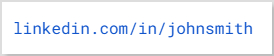
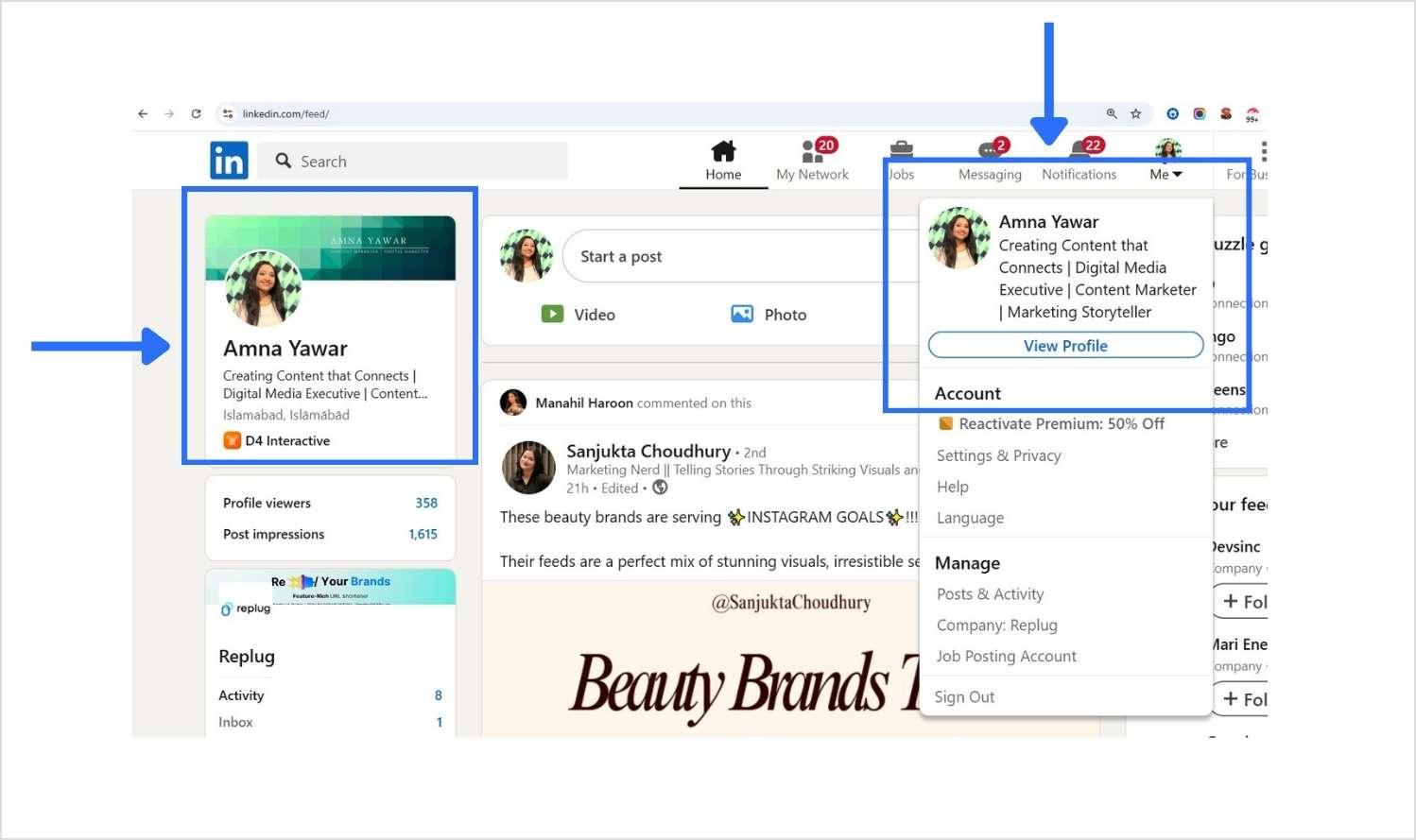
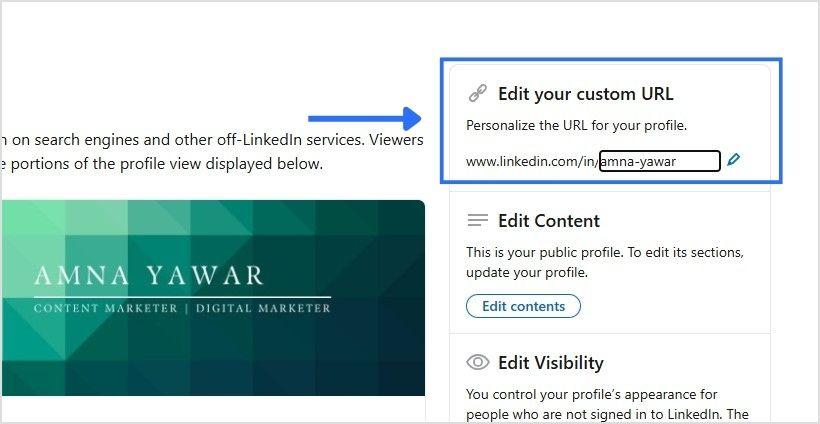
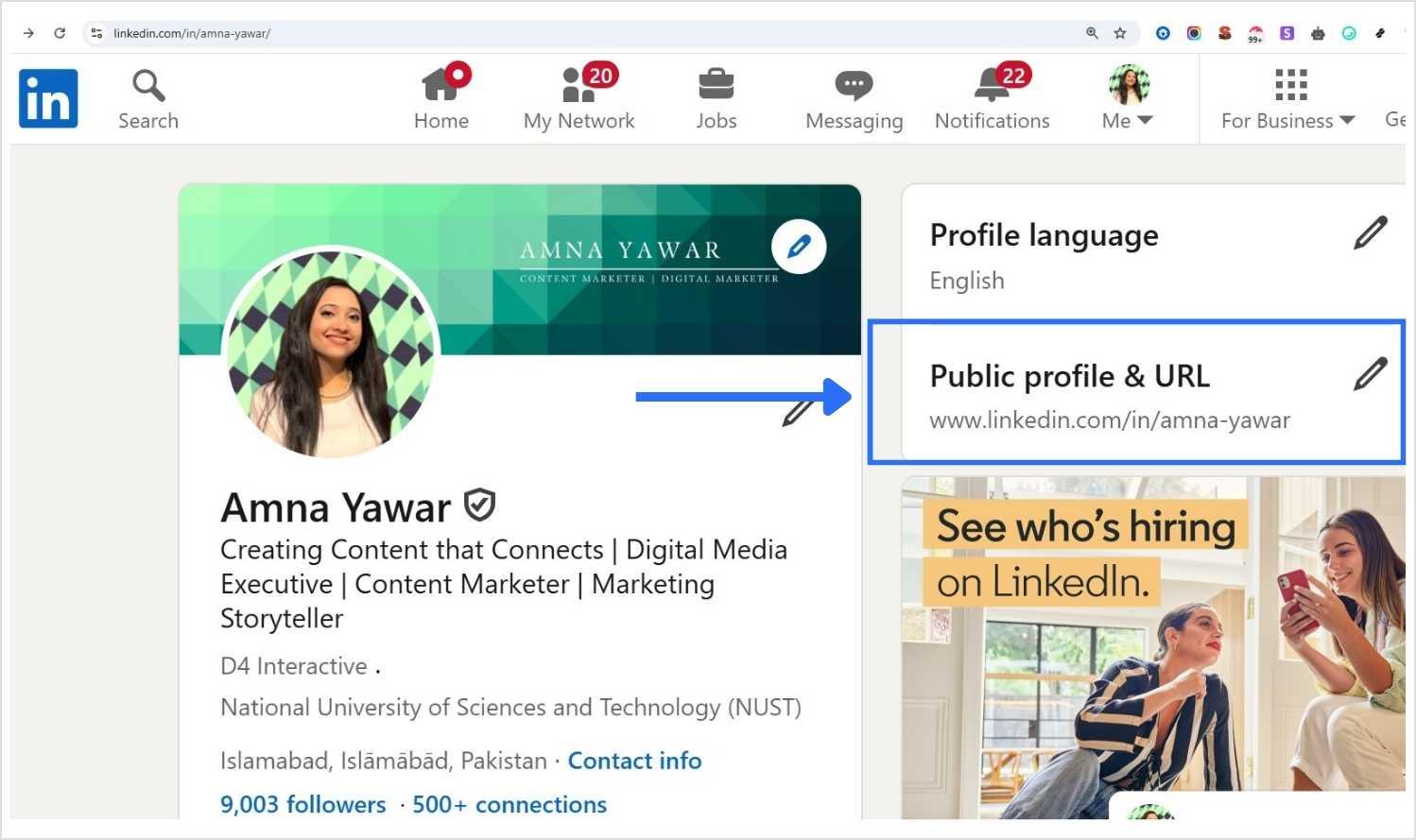
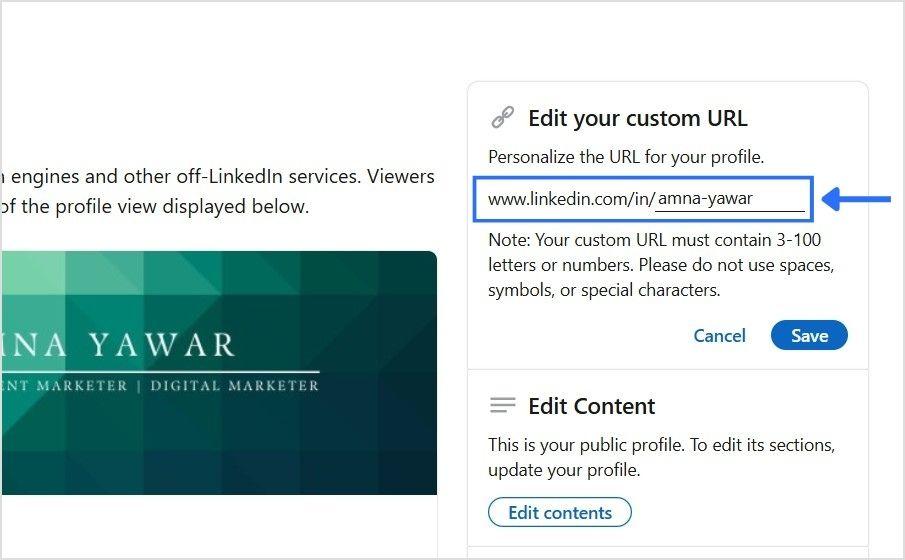
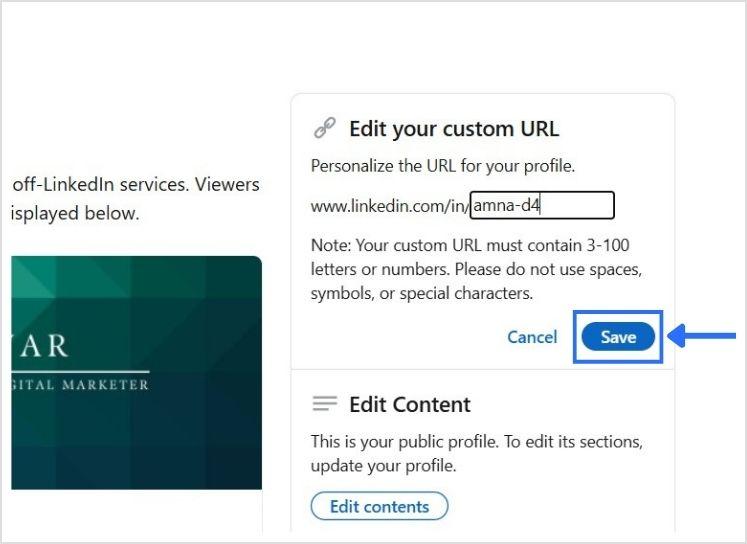
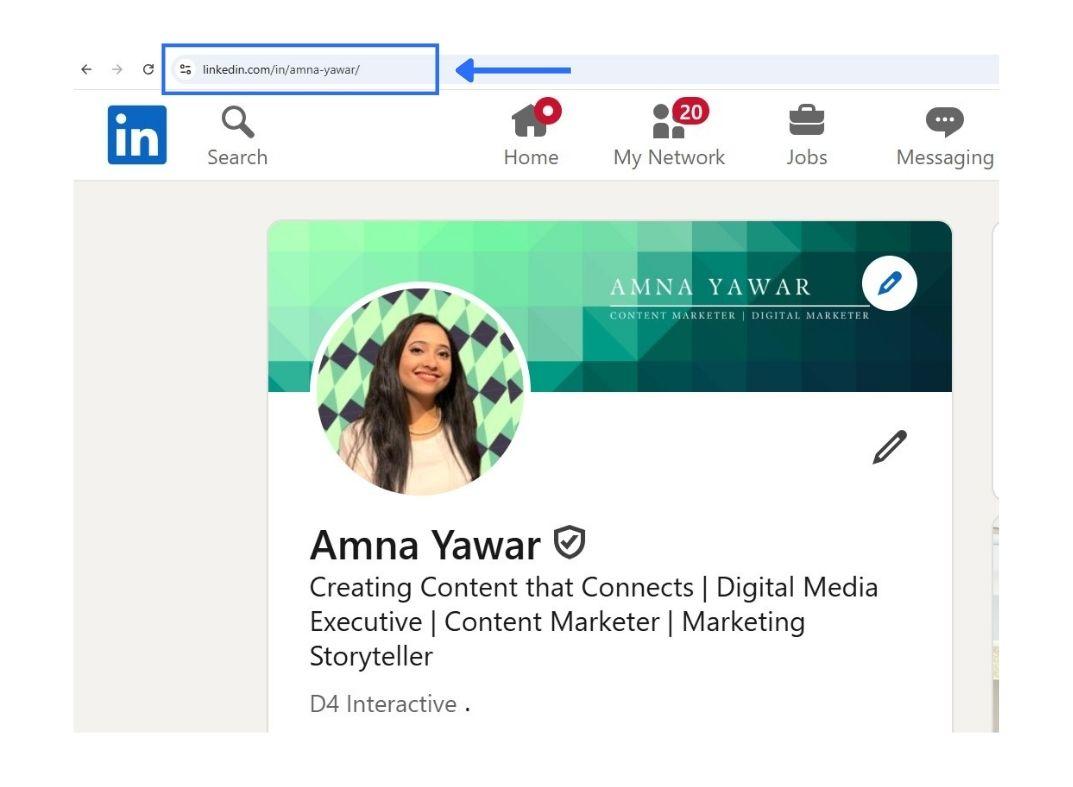
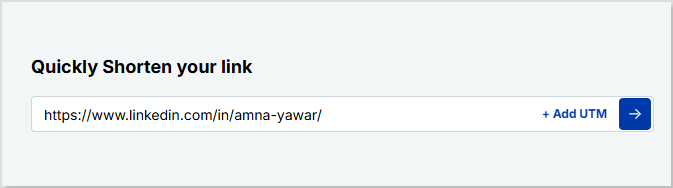
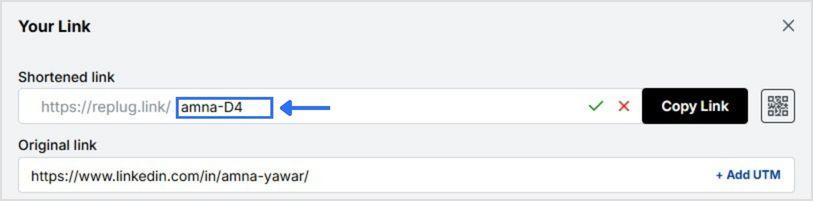


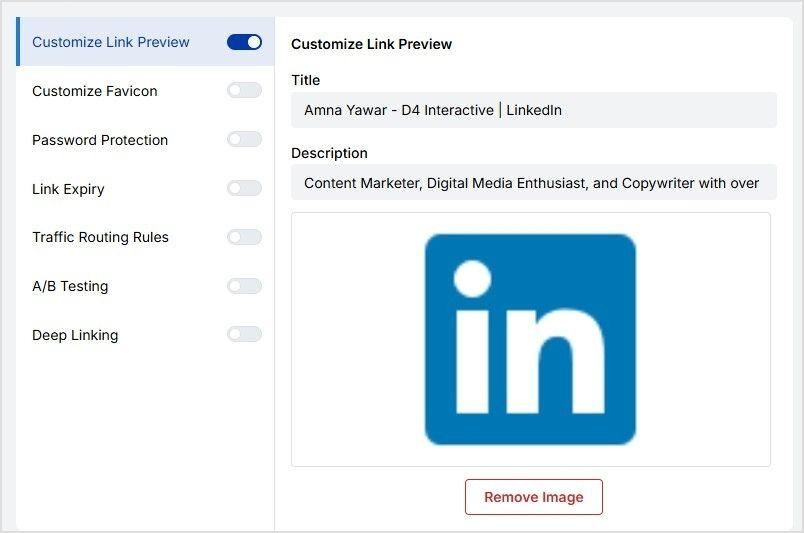
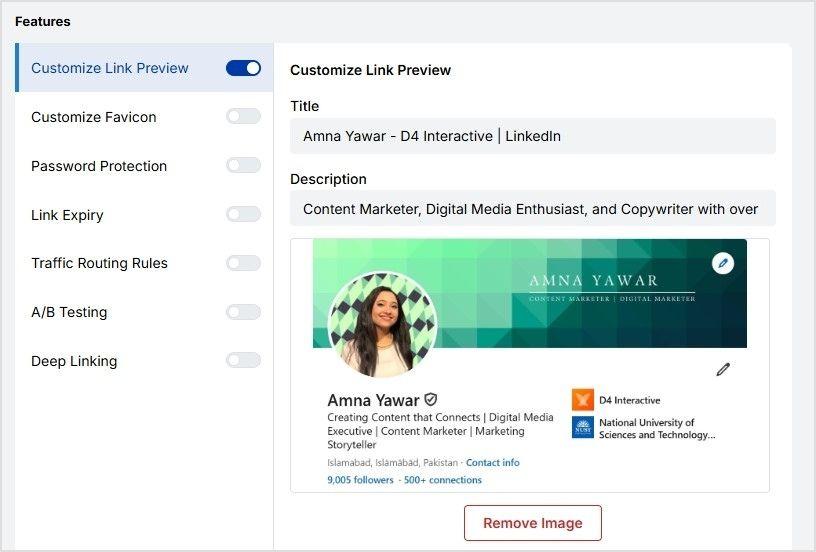
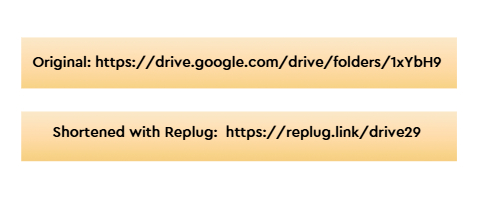
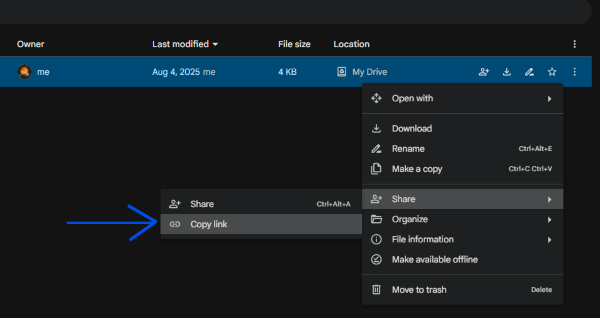
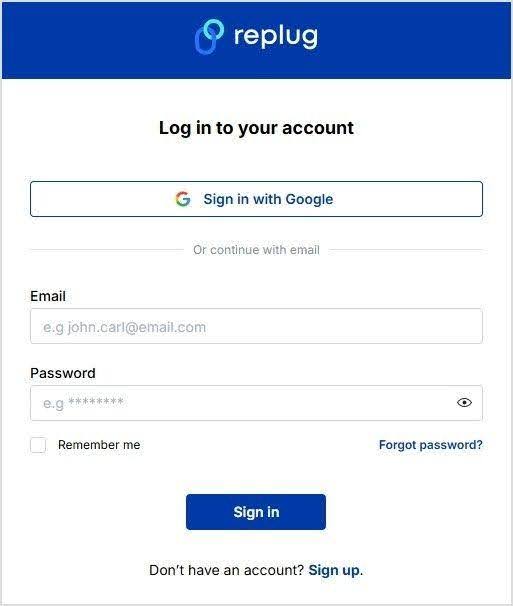
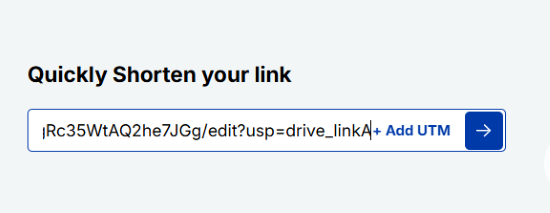
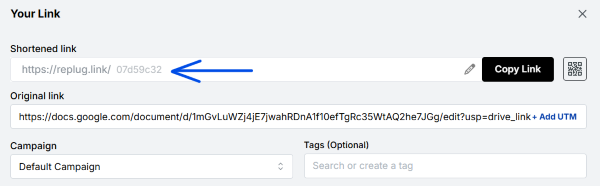
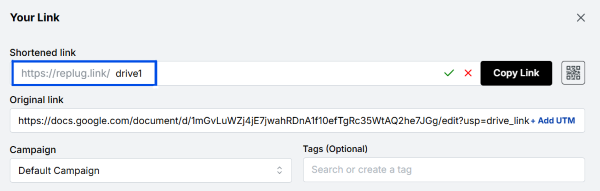
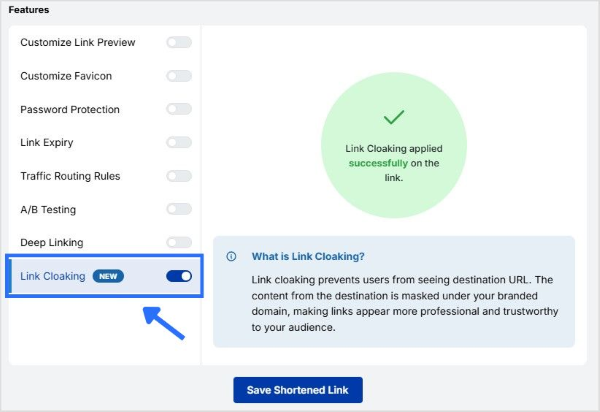
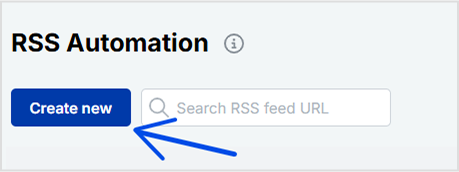
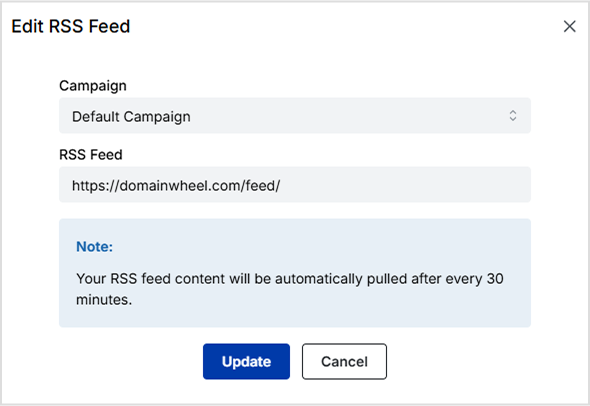
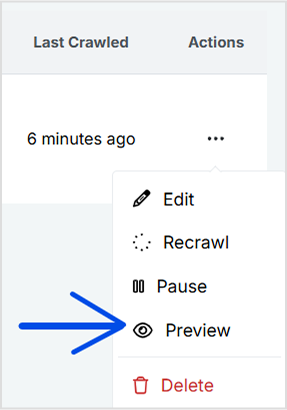
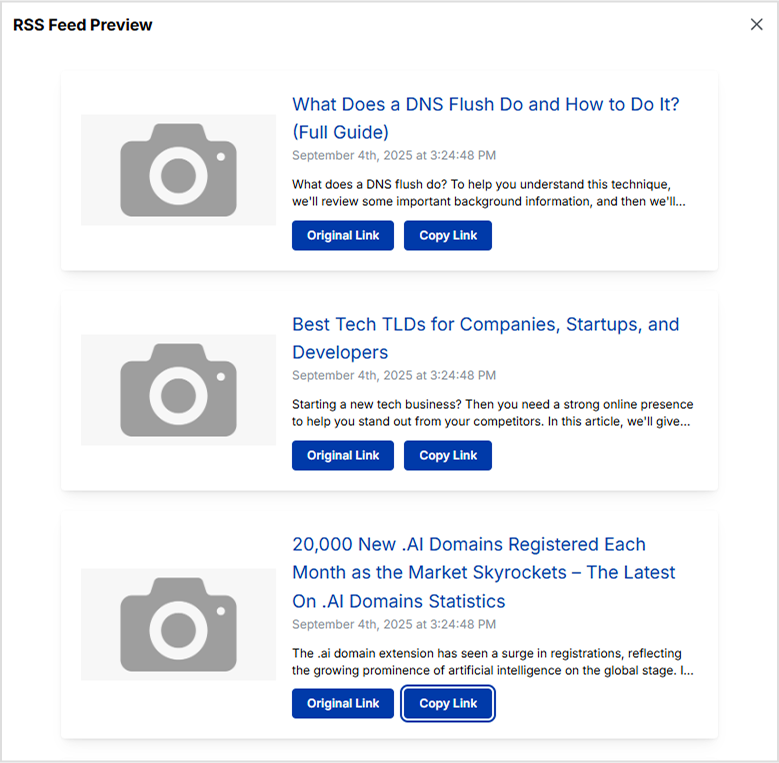
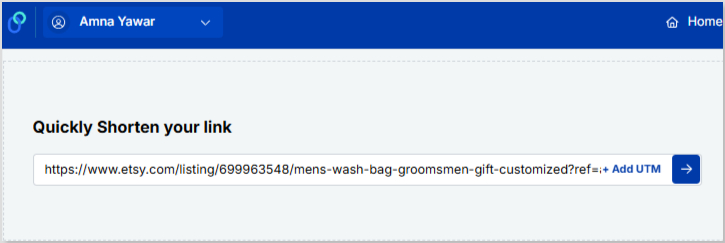
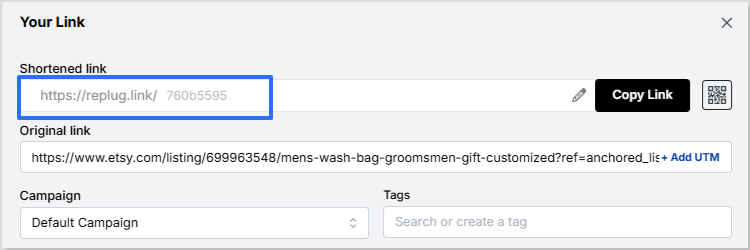
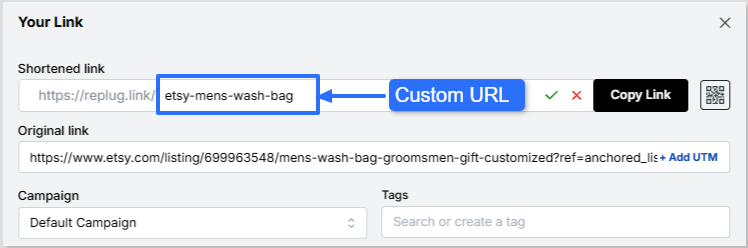
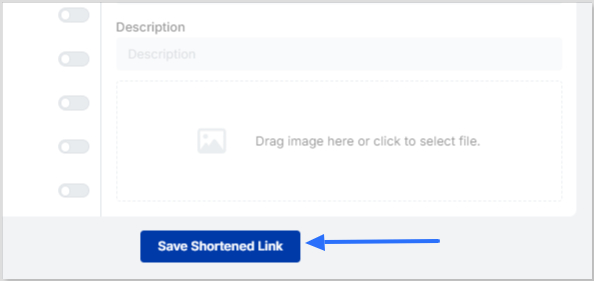
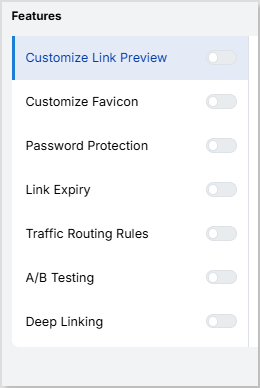

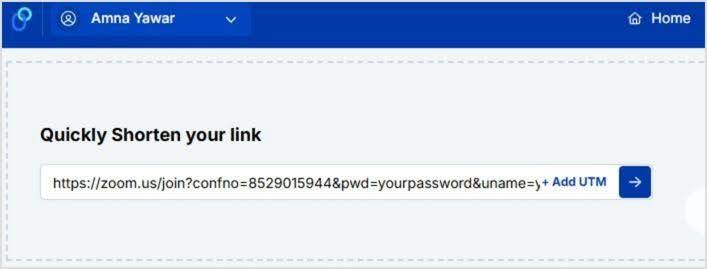
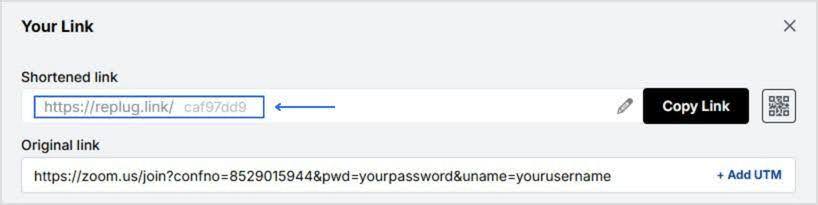
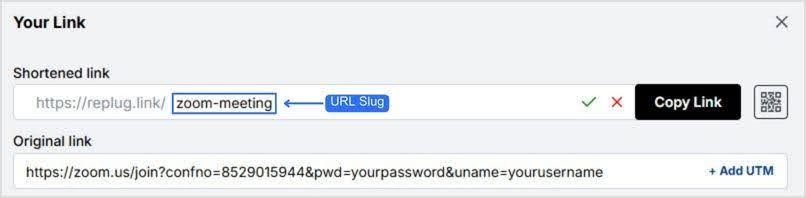
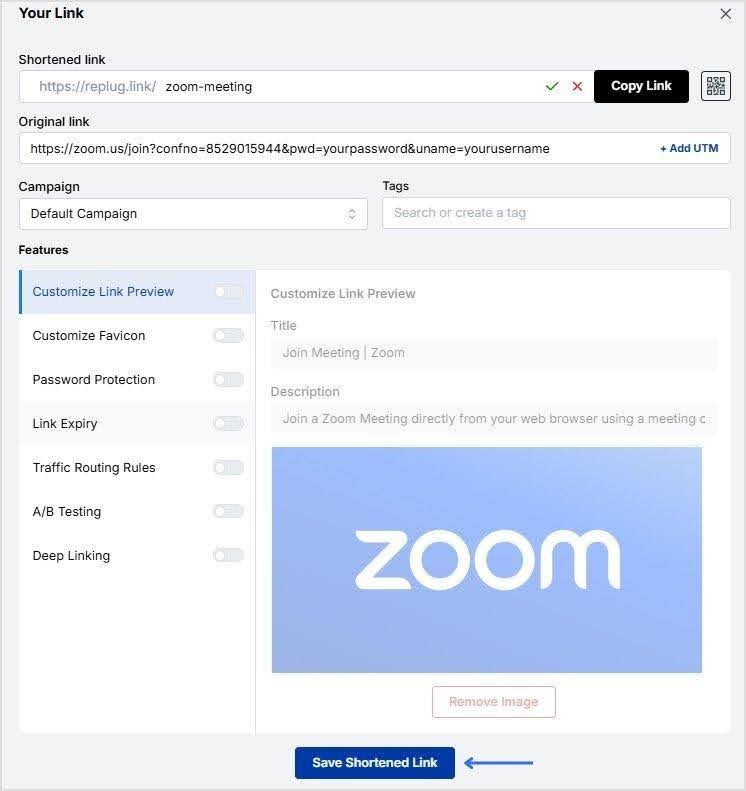
![link analytics dashboard - replug.io]](https://internal-blog.replug.io/wp-content/uploads/2024/12/replug-analytics-dashboard.gif)