Long Google Drive links can be frustrating to share. They look messy in emails, often break in chat messages, and feel unprofessional on social media.
Many of us face this issue daily when sharing documents, folders, or images through Google Drive. These links not only take up space but also reduce click-throughs when used in marketing campaigns.
Here’s the good news: you don’t need to settle for clunky links!
With a custom URL shortener like Replug, you can shorten Google Drive links online and even manage them in bulk. Whether you’re looking for a Google Drive link shortener free option or a more advanced paid plan, Replug gives you clean, trackable, and branded links.
Let’s get started!
What is a Google Drive link?
A Google Drive link is a unique URL generated to share files or folders stored in Google Drive. Depending on the sharing settings, the link can be public (anyone with the link can access it) or private (restricted to selected people).
While useful, these links are often long and complex. For example:
The shortened version is neat, easy to share, and less likely to break across platforms.
How to shorten a Google Drive link?
The easiest way to shorten a Google Drive link is by using a URL shortener. There are plenty of options available in the market, both free and paid.
Google also had its very own URL shortener, goo.gl, which was quite popular for shortening Drive links and sharing them easily across platforms.
However, Google’s official shortener goo.gl was discontinued in March 2019, which is why most people now rely on Google URL shortener alternatives like Replug.
Maximize marketing ROI
by transforming ordinary URLs into branded short links that convert.
Try Replug for free
Replug is an advanced custom URL maker free that offers both free and paid plans. Beyond just creating short links, it provides powerful features like vanity domains, custom slugs, link expiry, and password protected links, making it an ideal choice for marketers, businesses, and anyone who frequently shares files online.
How to shorten a Google Drive link using Replug (Step-by-step)
Follow these steps to shorten your Google Drive link:
Step 1: Copy your Google Drive link
Open Google Drive and right-click the file or folder. Click Copy link.
Already have an account? Simply log in to your dashboard.
Step 3: Paste your long URL
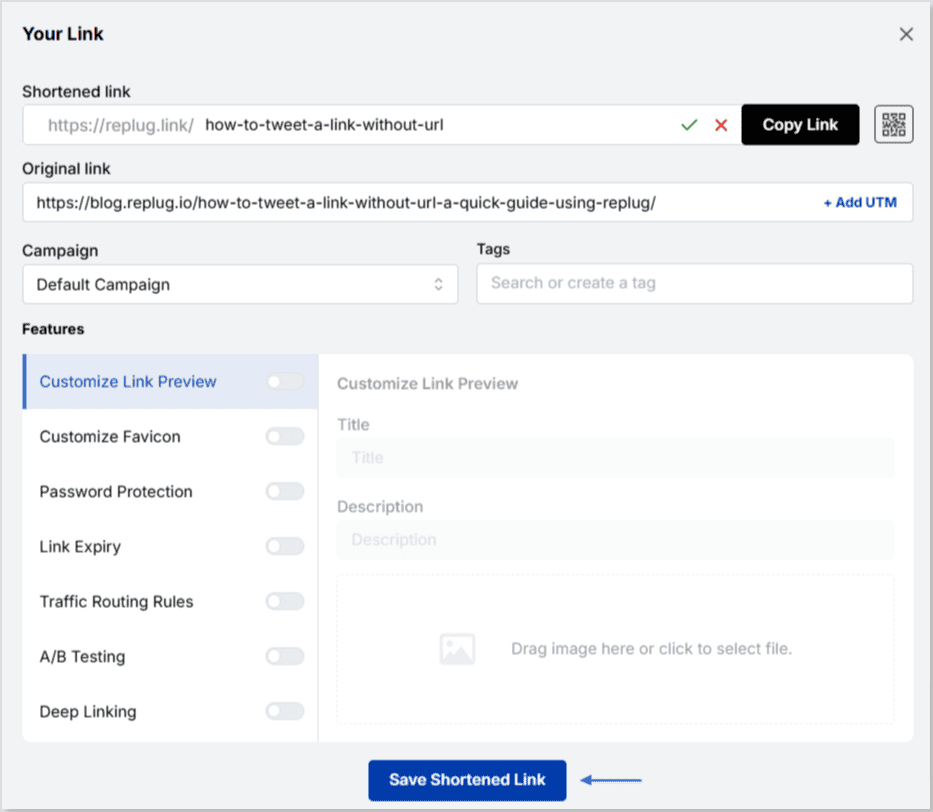
In the dashboard, paste your Google Drive link into the field under “Quickly shorten your link.” Replug will instantly generate a short link for you.
Alt text: Paste your drive link – replug.io
Step 4: Create a custom URL (optional)
By default, Replug gives you a short link with a random slug.
You can customize this slug to something more professional and recognizable.
Step 5: Enable link cloaking (optional)
Replug lets you cloak your links so the shortened URL appears as a vanity link in the browser. This is especially useful for affiliates and content marketers who want a more branded and trustworthy link.
What are the benefits of shortening Google Drive links?
Here are some prominent benefits of shortening your Google Drive links:
Easier sharing
Long Google Drive links can look messy and confusing. A shortened link is simple, clean, and easy to share in emails, chats, or social media posts without cluttering your message.
More professional
Short links give your content a polished look. When customized with your own branded slug, they not only look trustworthy but also help reinforce your brand identity.
Perfect for marketing
Whether you’re adding links to ads, posts, or printed materials, shorter links fit in neatly and make a stronger impression. They’re more clickable and user-friendly than long strings of characters.
Branded and cloaked links
Instead of a generic Google URL, you can cloak a link under your own branded domain. This makes the link look like it belongs to your business, boosting trust and recognition.
We’ve all seen how long Google Drive links can be frustrating to share; they break in chats, and look unprofessional on social media. In this guide, we explored how to shorten those Google Drive links step by step with Replug.
Maximize marketing ROI
by transforming ordinary URLs into branded short links that convert.
Try Replug for free
By using Replug, you don’t just get shorter links; you also unlock benefits like branded domains, custom slugs, link cloaking, and performance tracking. These features make your links cleaner, more professional, and marketing-ready.
👉 Take control of your Google Drive links today with Replug.io, and simplify the way you share.
Frequently asked questions
Does Google have a URL shortener?
No, Google discontinued its URL shortener (goo.gl). You’ll need to use alternatives like Replug to shorten your links.
How do I compress a Google Drive link?
Copy your Google Drive link, paste it into Replug, and generate a short, trackable URL instantly.
What is the best URL shortener for Google Drive links?
Replug is the best option because it not only shortens your Google Drive links but also lets you brand them with custom domains. Plus, it offers tracking, analytics, and retargeting features to maximize link performance.
Can I create branded short URLs for my Drive links?
Absolutely. With Replug, you can add your own domain and customize slugs to create branded short links.
Can I set link expiration for Drive links?
Yes. Replug lets you set expiry dates so your shortened Drive links automatically disable when needed.
Ever tried to paste a Zoom invite into an email or social post only to end up with an unwieldy, messy URL? It’s a small annoyance, but one that can make your invitation look unprofessional and cluttered.
Many people face this issue daily. Long links not only take up space but also reduce click-throughs and overall engagement.
The easiest fix? Shorten Zoom links into clean, branded, and user-friendly versions. In this guide, you’ll learn step-by-step how to shorten a Zoom link using an online link shortener, why it matters for your communication, and the best practices to make them effective across email, social platforms, and events.
Let’s jump in and give your Zoom invites a polished, professional touch.
What is a Zoom link shortener?
A Zoom link shortener is a tool that condenses lengthy Zoom meeting URLs into shorter, more manageable links. These shortened links are easier to share and remember, making them particularly useful for invitations, social media posts, and promotional materials.
By using a trustworthy URL shortener, you can transform a long, complex URL into a neat and concise one, enhancing the overall user experience and improving the aesthetics of your communications.
Link shorteners not only simplify URLs but also offer additional benefits, such as tracking link clicks, customizing the link with branded domains, and ensuring secure sharing.
Maximize marketing ROI
by transforming ordinary URLs into branded short links that convert.
Try Replug for free
How to shorten Zoom links using Replug?
Here’s a step-by-step guide to help you shorten your Zoom links effectively:
Step 1:Copy your Zoom invite link
First, you need to have your Zoom meeting invite link ready. Copy the full URL of your Zoom meeting. This link usually looks something like this:
Once you’ve customized your URL, click on “Save Shortened Link,” and your short Zoom link is ready to be shared!
Track your links’ performance
Replug is an all-in-one link management platform that offers powerful URL tracking capabilities. Monitor your link’s click-through rates, geographic data, and other metrics to optimize your marketing strategies effectively.
By using Replug to shorten your Zoom links, you can create professional, easy-to-share URLs while gaining valuable insights into your link performance.
Shortening Zoom links offers several advantages, making it a practical choice for anyone who frequently shares meeting invites.
Here are some key reasons to shorten your Zoom links:
Enhanced aesthetics and professionalism: Long Zoom links can look cluttered and unprofessional, especially when shared in emails, social media posts, or printed materials. Shortened links are cleaner and more visually appealing, enhancing the overall look of your communications.
Easier to share and remember: Shortened links are easier to share and remember, making them more user-friendly. This is particularly useful when sharing links verbally, over the phone, or in presentations.
Improved click-through rates: Neater and more concise links can lead to higherclick-through rates. Users are more likely to click on a short, clear link compared to a long, complex URL that might appear suspicious or confusing.
Better tracking and analytics: Many link-shortening services offer tracking and analytics features, allowing you to monitor how many times your link has been clicked, where the clicks are coming from, and other valuable insights. This data can help you measure the effectiveness of your communication and marketing efforts.
Customization and branding: With our link shortener, you can customize your shortened URLs to include your brand name or a relevant keyword. This not only reinforces your brand identity but also makes the link more meaningful and memorable.
Maximize marketing ROI
by transforming ordinary URLs into branded short links that convert.
Try Replug for free
Additional tips
Use branded links: If you’re using a service that allows branded links (like Replug’s custom domain), take advantage of this feature to reinforce your brand identity.
Check security options: Replug offers additional security features, such as link expiration dates and password protection, which can be useful for sensitive meetings.
Maximize marketing ROI
by transforming ordinary URLs into branded short links that convert.
Try Replug for free
Frequently asked questions
Is it safe to use a Zoom link shortener?
Yes, using a reputable Zoom link shortener like Replug is safe. It can even enhance security by allowing you to track and manage your links effectively.
Can I track the performance of my shortened Zoom links?
Yes, many link shorteners, including Replug, offer tracking features that allow you to monitor click-through rates, geographic data, and other performance metrics.
Do shortened Zoom links expire?
It depends on the link shortener service. Some services allow you to set expiration dates for links, while others keep them active indefinitely.
Can I shorten Zoom links for free?
Yes, many link-shortening services offer free plans with basic features. Replug provides a free 14-day trial that includes essential link-shortening capabilities.
Readers don’t care about the full hyperlink; they care about where it leads them. But long, exposed URLs? They clutter the page, disrupt readability, and make your content harder to trust.
The solution is simple: shorten the hyperlink to make it more trustworthy.
Instead of linking to a long, clunky URL, you can use a short, branded link that looks neat and is easy to manage. In this blog, we’ll explain what a hyperlink is, how to shorten a hyperlink with Replug, and the benefits of doing so.
Let’s start with the basics before we move on to the process.
Maximize marketing ROI
by transforming ordinary URLs into branded short links that convert.
Try Replug for free
What is a hyperlink?
A hyperlink is a clickable element in a document, web page, or email that takes the reader to another location. It could open a new page, lead to a section within the same file, or direct someone to external content like a video, image, or resource.
Hyperlinks usually appear as text, phrases, or buttons. For example:
In a blog: “Click here to learn more”
In a document: a word like “Download” might point to a file link
In an email: a phrase like “Shop now” could take readers to a landing page
Behind the hyperlink is a URL. If that URL is long, you can create a short link so the hyperlink remains clean and reliable.
Why shorten a hyperlink?
Shortening hyperlinks has clear benefits for both presentation and performance:
Cleaner look: no distracting or broken lines in documents or blogs.
Professional branding: links can carry your brand name with Replug.
Improved trust: readers are more likely to click short, branded links.
Analytics and tracking: shortened links allow us to monitor clicks.
Flexibility: edit or update the destination without changing the hyperlink text.
In short, shortening makes hyperlinks smarter and more useful.
How to shorten a hyperlink with Replug
Here’s the step-by-step process on how to shorten a hyperlink using this user-friendly link optimization platform.
Step 1: Sign in or sign up
Go to Replug and sign up for a free 14-day trial (no credit card needed). If you already have an account, log in to the dashboard.
Step 2: Paste your long URL
On the dashboard, paste the original long link into the bar under “Quickly shorten your link”. This creates a shortened version instantly.
Step 3: Create a branded URL (optional)
At first, Replug generates a short URL with an alphanumeric slug. For example:
You can customize the URL slug to make it look more recognizable and professional:
This not only looks professional but also improves recognition.
Step 4: Enable link cloaking (optional)
Replug also offers link cloaking. If you want the shortened URL to appear as a vanity link in the browser (helpful for affiliates or content marketers), you can enable this option while setting up your link.
Step 5: Save and copy the short URL
Once ready, click on “Save Shortened Link” and copy your short link.
Step 6: Add it to your hyperlink
Now, go back to your document, blog editor, or email tool. Highlight the text you want to hyperlink (for example, Learn more). Insert your Replug short link instead of the original long URL.
Now, when readers click the hyperlink, they’ll be directed to the shortened link, which then forwards them to the intended destination.
Benefits of using Replug for shortened hyperlinks
Replug lets you shorten a link while turning it into a complete marketing asset. Here are the benefits that it offers:
Custom branded links: build trust and align links with your brand.
Maximize marketing ROI
by transforming ordinary URLs into branded short links that convert.
Try Replug for free
Who actually benefits from shortening hyperlinks?
Shortened hyperlinks can be applied across multiple scenarios:
Digital marketing: Short hyperlinks help brands maintain consistent messaging across platforms. They’re easy to share in emails, ads, and campaigns while keeping everything clean and trackable. Marketers can also run A/B tests with different links to see which strategies bring better results.
Social media marketing: Short hyperlinks keep posts neat, boost engagement, and encourage sharing. A branded link also feels more trustworthy, making users more likely to click.
Vanity links: Custom, keyword-based links are easier for people to remember and type. With a high-quality link shortener, creating vanity links becomes simple, giving businesses a professional, user-friendly way to share content.
Affiliate marketing: Replug helps cloak affiliate links into branded hyperlinks that look clean, trustworthy, and click-worthy. Plus, with advanced affiliate link tracking, affiliates can see which campaigns are driving real conversions.
Campaign analytics: Every click on a hyperlink tells a story. Marketers gain insights into click-through rates, demographics, and user behavior, which helps optimize campaigns and allocate resources more effectively.
QR codes: Pairing QR codes with short hyperlinks is a powerful way to reach audiences across touchpoints. With dynamic QR codes, you can update the destination anytime without changing the code itself, keeping campaigns flexible and future-proof.
Conclusion
Long hyperlinks not only look messy but also reduce trust and harm readability. By shortening them, you can keep links clean, branded, and easy to share while unlocking analytics and flexibility.
With Replug, hyperlinks go beyond shortening. You can create custom branded links, cloak affiliate URLs, track campaign performance, and even generate QR codes. Whether it’s for digital marketing, social media, or affiliate promotions, Replug turns every hyperlink into a smart marketing asset.
If you want hyperlinks that people are irresistibly clickable, it’s time to shorten and manage them with Replug!
Frequently asked questions
How do I reduce the length of a hyperlink?
Shortening the length of a hyperlink is simple: Copy the long link from your website or social media, paste it into Replug, click to create, and save your new short link.
How do I rename or shorten a hyperlink?
If you just want to rename it, most platforms (Word, Google Docs, emails, websites, etc.) let you edit the display text of the link. Instead of showing the full URL, you can replace it with cleaner text like “Read more” or “Visit here”. If you want to shorten the actual link itself, you can use a URL shortener like Replug. Just paste your long URL, generate a short one, and use that wherever you share it.
How to shorten a URL safely?
Use a reliable URL shortener, opt for branded links, and avoid suspicious third-party tools. Always preview and test shortened links before sharing to ensure they’re safe and trustworthy.
How do I edit a hyperlink to make it shorter in Word?
Right-click the link, select Edit Hyperlink, then choose ScreenTip (top-right of the dialog box) and type in your preferred text.
Snapchat isn’t just about sharing photos and videos anymore; you can now attach a link to a Snap and easily direct your friends and followers to external content. Thanks to the Snapchat linking feature, sharing a website, article, or even a funny meme right inside your snaps and stories has never been simpler.
In this guide, we’ll walk you through how to add a link to Snapchat story and snaps on both iOS and Android. By the end, you’ll know exactly how to attach a clickable link on Snapchat and let your friends swipe up on Snapchat to visit your shared content.
Follow along with the steps below to start sharing your favorite websites and content in no time!
Maximize marketing ROI
by transforming ordinary URLs into branded short links that convert.
Try Replug for free
How to add a link to Snapchat story: iOS and Android
Adding a link to your Snapchat snaps and stories is a great way to share a website on Snapchat and engage your followers.
Note: Screenshots are provided for the Android version, but iOS users should be able to follow along.
Here’s a step-by-step guide on how to do it:
Step 1: Open the Snapchat app on your iOS or Android device.
Step 2: Take a photo or film a video snap using the main camera tab or by uploading a photo/video from your device. Apply filters, stickers, emojis, text, or drawings to your snap as desired.
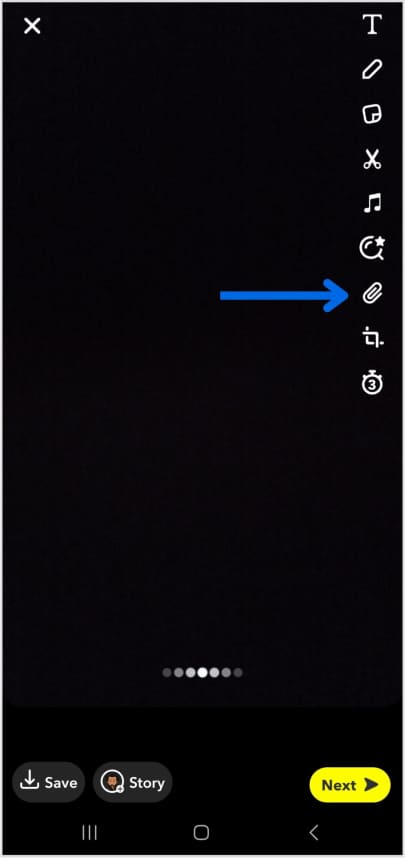
Step 3: Tap the Snapchat paperclip icon in the menu on the right to attach a link to Snap.
Tip: If the link is too long to type, copy it from your browser or another app before coming back to Snapchat.
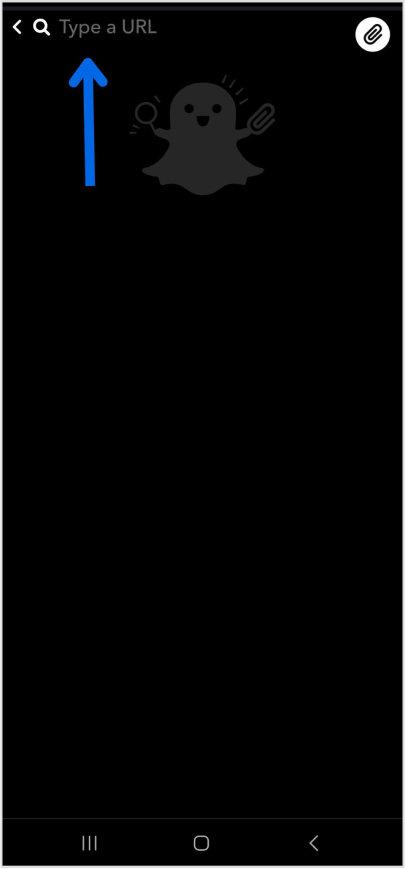
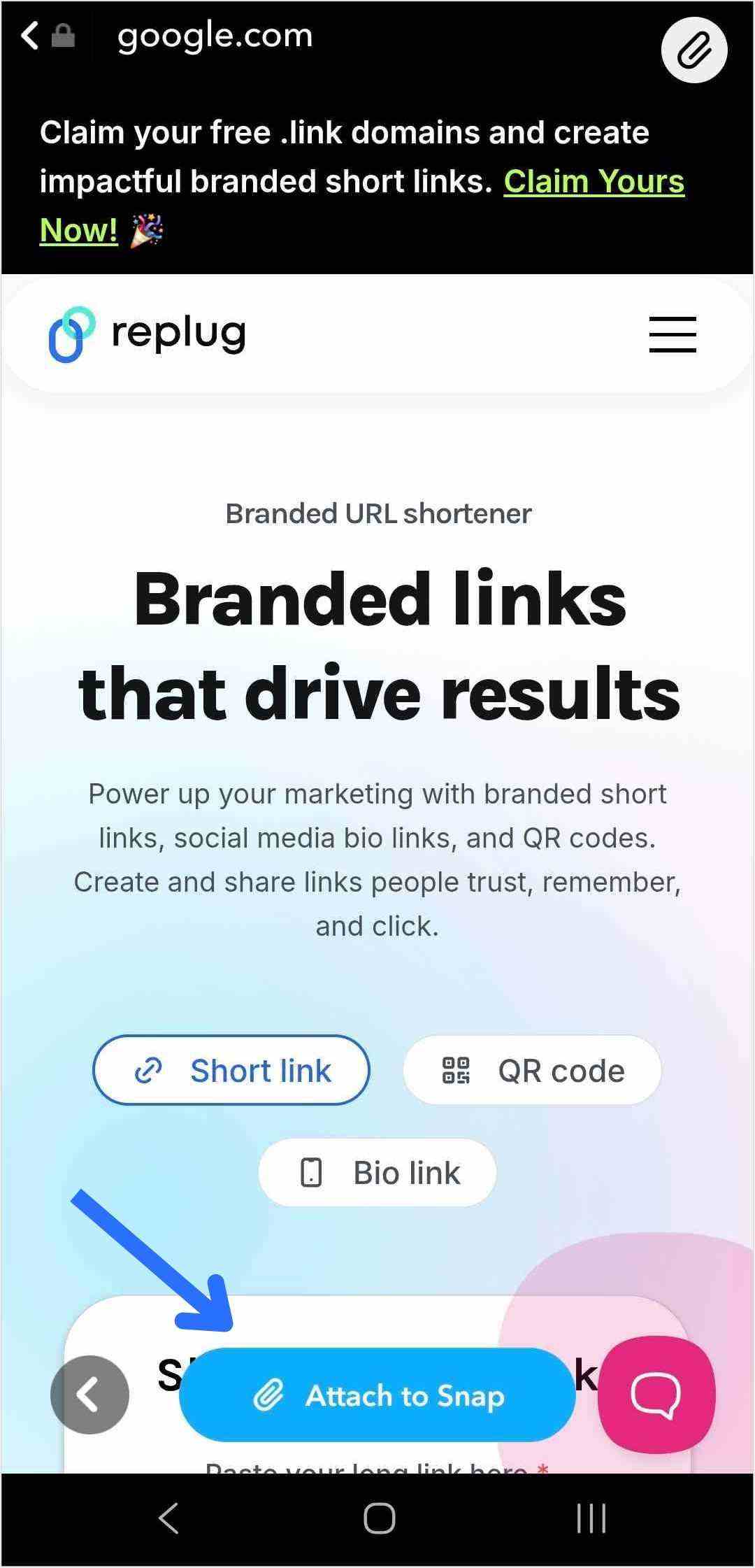
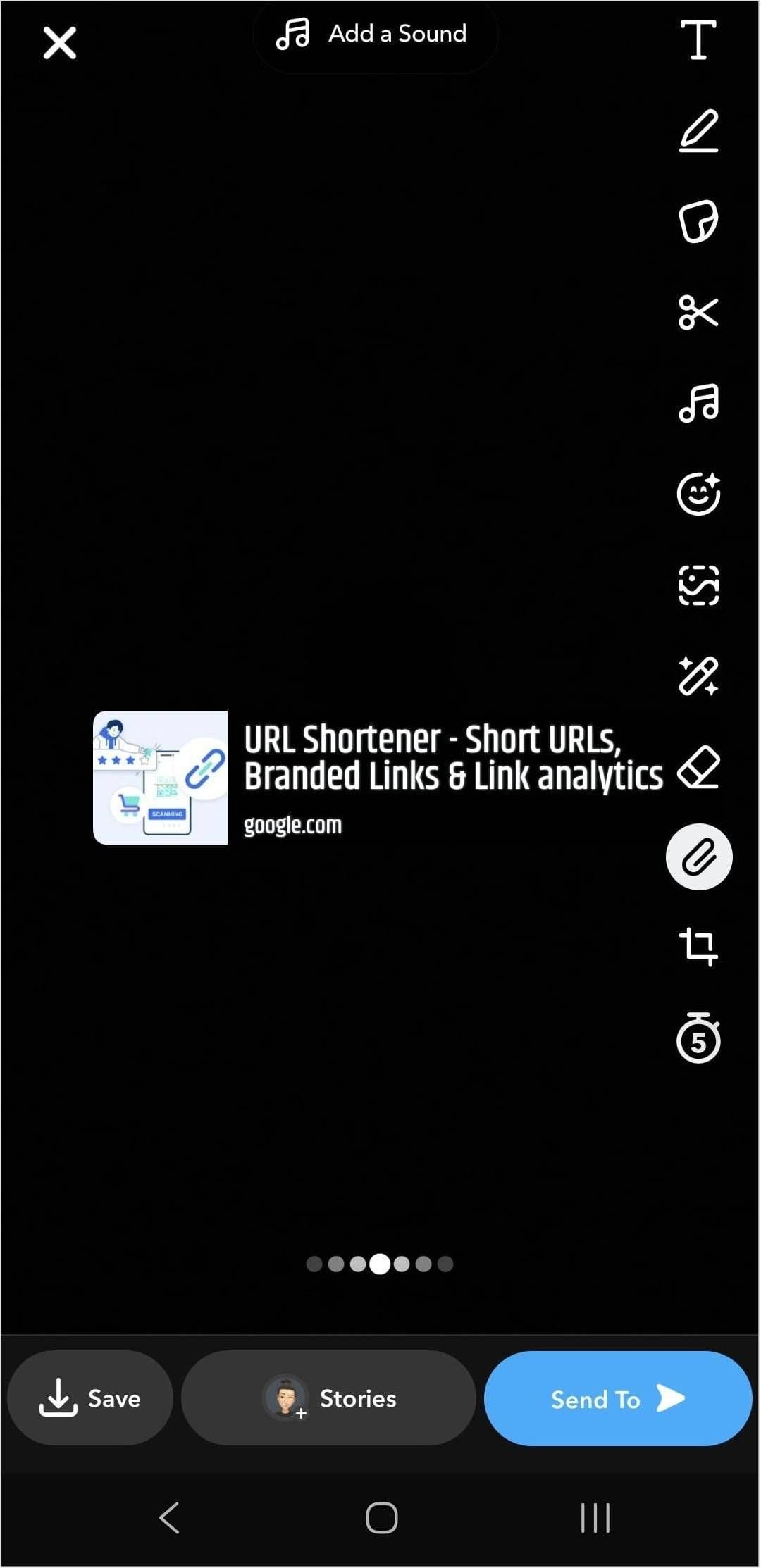
Step no 4: Paste the link into the “Type a URL” field and tap “Attach to Snap.”
Tip: Attaching a link to your Snap is just the first step. To drive traffic and get people to swipe up, dress up your snap! Use music, effects, emojis, and text to make your story more appealing and clickable.
Step 6:Tap the blue arrow to send your snap to friends, or tap the story button to add a link to your Snapchat story.
That’s it! Now your viewers can swipe up on Snapchat to visit the link directly.
A complete link management solution
for marketing professionals & agencies.
Try Replug for free
How brands can leverage Snapchat links?
Snapchat has approximately 460 million daily active users, making it a valuable platform for brands to effectively reach their target audience. Using the Snapchat linking feature is a smart way for brands to maximize engagement and guide followers to key content. Features like Snapchat Planets also offer brands new ways to understand user interactions and strengthen their community.
Here’s how brands can make the most out of their Snapchat link:
Control and direct traffic
By adding a Snapchat link, brands gain control over where their followers go next after swiping up on a snap. Whether directing users to the homepage, a specific product page, or a demo page, brands can guide their audience’s journey within the app.
To make these snaps more engaging, many teams now edit images with AI to quickly adapt visuals for different audiences, formats, and campaign goals while maintaining a consistent look.
Gain insights with powerful analytics
Each swipe up on Snapchat gives valuable engagement data. Analyzing these interactions enables brands to better understand the audience’s behavior and preferences, allowing for more targeted marketing strategies.
Utilizing tools like Replug not only shortens links but also provides valuable insights into user engagement and the effectiveness of different types of content. By tracking click data and analyzing other metrics, brands can refine their marketing initiatives and optimize their Snapchat presence.
Using a link shortener
Replug’s short URL generator free can provide short links and streamline the process of sharing them on Snapchat effortlessly. Shortened links are cleaner and take up less space, making them more visually appealing and easier for users to engage with.
A complete link management solution
for marketing professionals & agencies.
Try Replug for free
Craft comprehensive social media strategies
Maximizing the use of Snapchat features, including links, is crucial for developing a robust social media strategy. Brands that harness the full potential of Snapchat links can initiate conversations, explore relevant topics, and expand their reach to a wider audiences.
Frequently asked questions
How do I attach a link to Snap?
Tap the paperclip icon on the preview screen. Add your link — paste a copied URL, type one manually, or search for it Then tap “Attach to Snap”
Can I add multiple links to a single snap or story?
Currently, Snapchat only allows you to attach one link per snap or story. If you want to share multiple links, consider creating a series of snaps or stories.
Where is the paperclip icon on Snapchat?
It’s on the preview screen after you take a snap, in the vertical toolbar on the right side. Just tap the paperclip icon to attach a link to your snap.
Are there any restrictions on the type of content I can link to on Snapchat?
Snapchat’s community guidelines prohibit linking to certain types of content, such as illegal or explicit material. Ensure that the content you link to complies with Snapchat’s guidelines to avoid any issues.
Do users need to have the Snapchat app installed to view the linked content?
Yes, users need to have the Snapchat app installed on their devices to view linked content. When they swipe up on the link, it will open within Snapchat’s in-app browser.
Can I track engagement with the links I share on Snapchat?
While Snapchat does not provide built-in analytics for links shared on the platform, you can use link-shortening services like Replug to track clicks and engagement.
Do links expire on Snapchat?
Links attached to snaps or stories do not expire on Snapchat. However, you can remove a link anytime by editing the snap or story.
“Link in Bio” is all about breaking the limits of a single link. It’s a way to share multiple links, content, and products, making it an essential tool for individuals, businesses, and influencers.
In this guide, we’ll explore the basics, the role it plays in personal branding and marketing, and how it’s revolutionizing the way we navigate the online world. Whether you’re a social media pro or a newbie, link in bio is your shortcut to success in today’s fast paced world.
Here’s what you need to know.
What does “link in bio” mean?
Link in bio refers to a clickable URL appearing in your profile description, often on platforms like Instagram, TikTok, and Twitter. This link allows users to direct their audience to external websites, content, products, or any other online destinations.
Since many social media platforms limit the number of links or direct clickable links in posts and comments, the link in bio or “bio link”serves as a workaround, enabling users to share multiple links or promote specific content more effectively by directing their followers to their bio section, where they can find and click on the desired link.
It has become a valuable strategy for personal branding, content promotion, and marketing.
If you’re active on social media, you’ve probably run into the dreaded “limited links” problem. Instagram gives you five spots (generous…ish), but TikTok? Just one lonely link. Not exactly the dream when you’ve got a podcast, a blog, a product launch, and a playlist to share. That’s where a link in bio saves the day, turning that single space into a mini hub for everything you want your audience to click on.
Here’s why you should create a link in bio:
One link, many destinations: Social media platforms limit you to just adding a few links in your bio. A link in bio helps you make it count by leading visitors to multiple pages.
Showcase everything: Whether it’s your website, shop, blog, videos, or sign-up forms, you can share it all in one neat place.
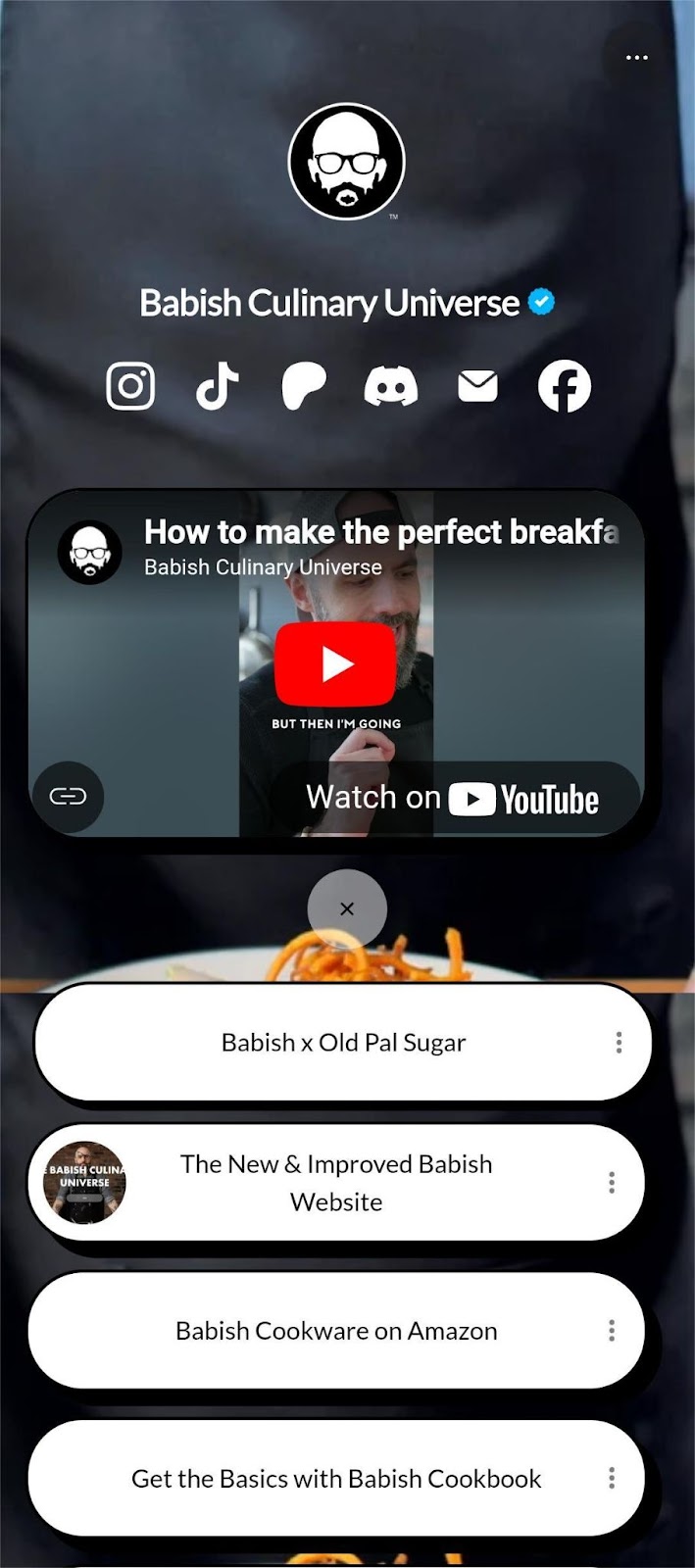
Here’s an example of the famous American Cook, Andrew Rea’s link in bio page for his series “Babish Culinary Universe”:
Make navigation easy: No more “link in latest post” confusion. Your audience knows exactly where to go.
Stay organized: Keep your important links tidy, clickable, and easy to update whenever you need.
Boost engagement: Get more clicks, views, leads, and conversions by directing people to the right content at the right time.
Top benefits of link in bio
A link in bio does more than hold a single URL; it helps you organize, optimize, and amplify your online presence. Here’s a quick look at why it’s a must-have for anyone growing their brand:
Combines all your important links into one
Instead of juggling multiple URLs, your link in bio leads followers to everything you want them to see, whether it’s your latest YouTube video, blog post, or product drop.
Simplifies the path to purchase or action
A link in bio lets you turn browsers into buyers by placing shop links, discount codes, or sign-ups just one tap away, all in one neatly organized spot.
Lets you retarget everyone who clicks
With tools like Replug, your link in bio becomes retargetable so that every click can feed into future ad campaigns and bring people back to your page.
Shows what content your audience loves
You can track clicks on your link in bio from one single dashboard using a top-notch link management platform. This tells you what’s resonating—so you can do more of what works.
Lets you create a fully branded mini landing page
Instead of a plain list of links, your link in bio can become a branded microsite that matches your aesthetic and makes your profile look polished and pro.
Automatically updates with your latest content
Add an RSS feed to your link in bio to keep it fresh, so whenever you post a new video, blog, or podcast, it shows up without you lifting a finger.
Boosts visibility through SEO-friendly design
An optimized, custom link in bio page can be indexed by search engines, giving your most important content extra visibility beyond just social clicks.
💡 Who benefits from a link in bio? Creators, brands, freelancers, agencies; anyone using social media to drive traffic, grow followers, or sell online.
To create a winning link in bio using Replug’s bio links feature, you can follow these steps:
Step 1: Access your Replug account
Sign in to your Replug account, or create one to start your 14-day free trial if you’re new to the platform.
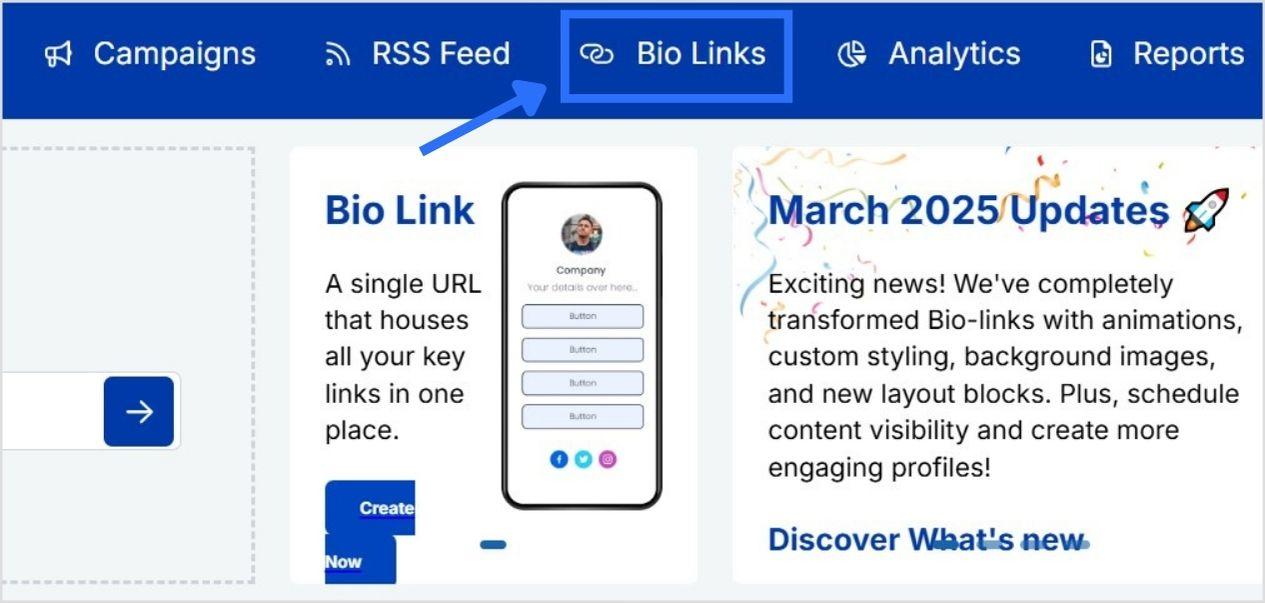
Step 2: Click on “Bio Links”
Once you’re logged in, go to the Replug dashboard and click on “Bio Links” from the navigation bar to get started.
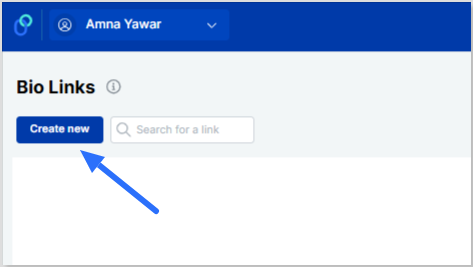
Step 3: Start creating a new link in bio
This will take you to the “Bio Links dashboard. From here, click on the “Create new” button to start creating a new bio link.
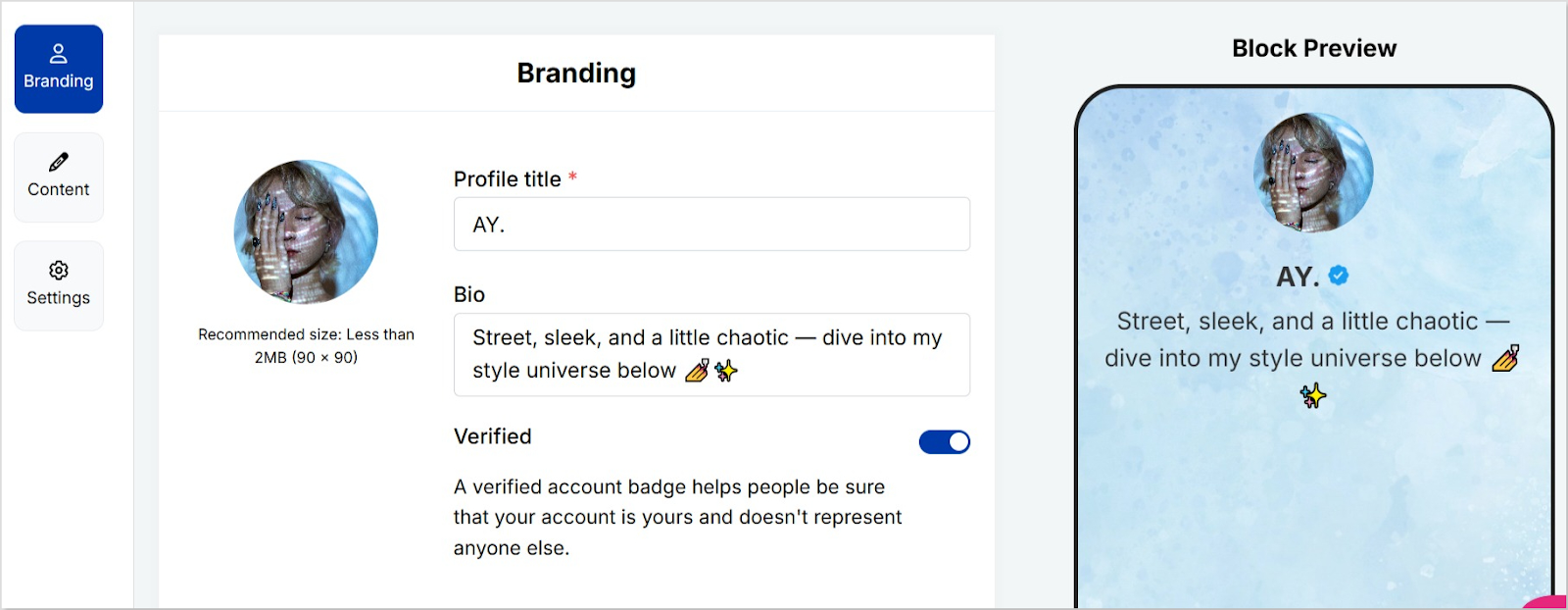
Replug lets you easily manage your bio profile with three main categories: Branding, Content, and Settings.
Branding: Customize the look and feel of your profile with themes, colors, fonts, and button styles.
Content: Add and organize different blocks like links, videos, images, and more to showcase your content.
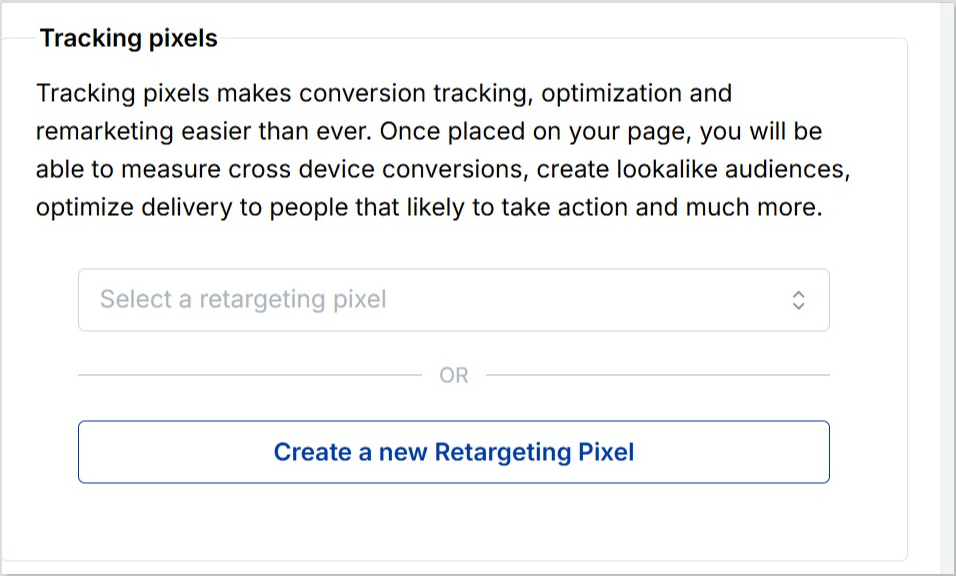
Settings: Adjust SEO settings, control how your profile appears in social media previews, and add tracking pixels.
Step 4: Brand your link in bio
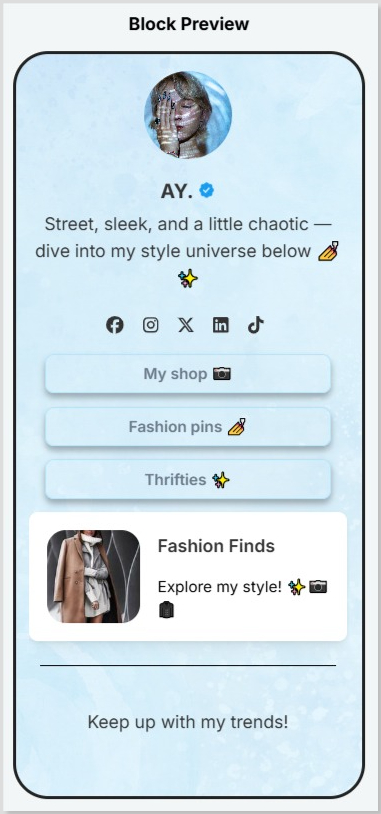
Customize your bio profile to match your personal style or brand. Upload a profile image, add your title and bio, and choose from a variety of themes, button styles, and colors.
You can also enable a background image and adjust its opacity for a more personalized look. If your account is verified, a badge will appear to help others recognize it’s officially you.
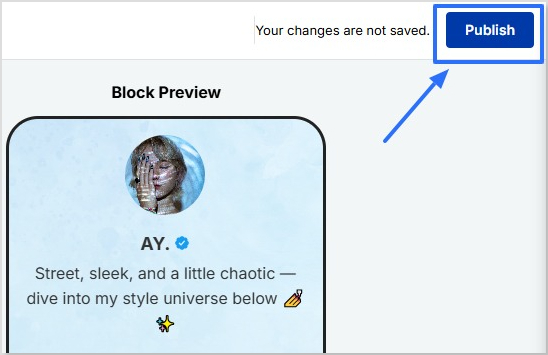
Click on the “Publish” button on the top rightto start customizing your bio link further. If you don’t, you won’t be able to save changes in real-time.
Step 5: Choose content blocks
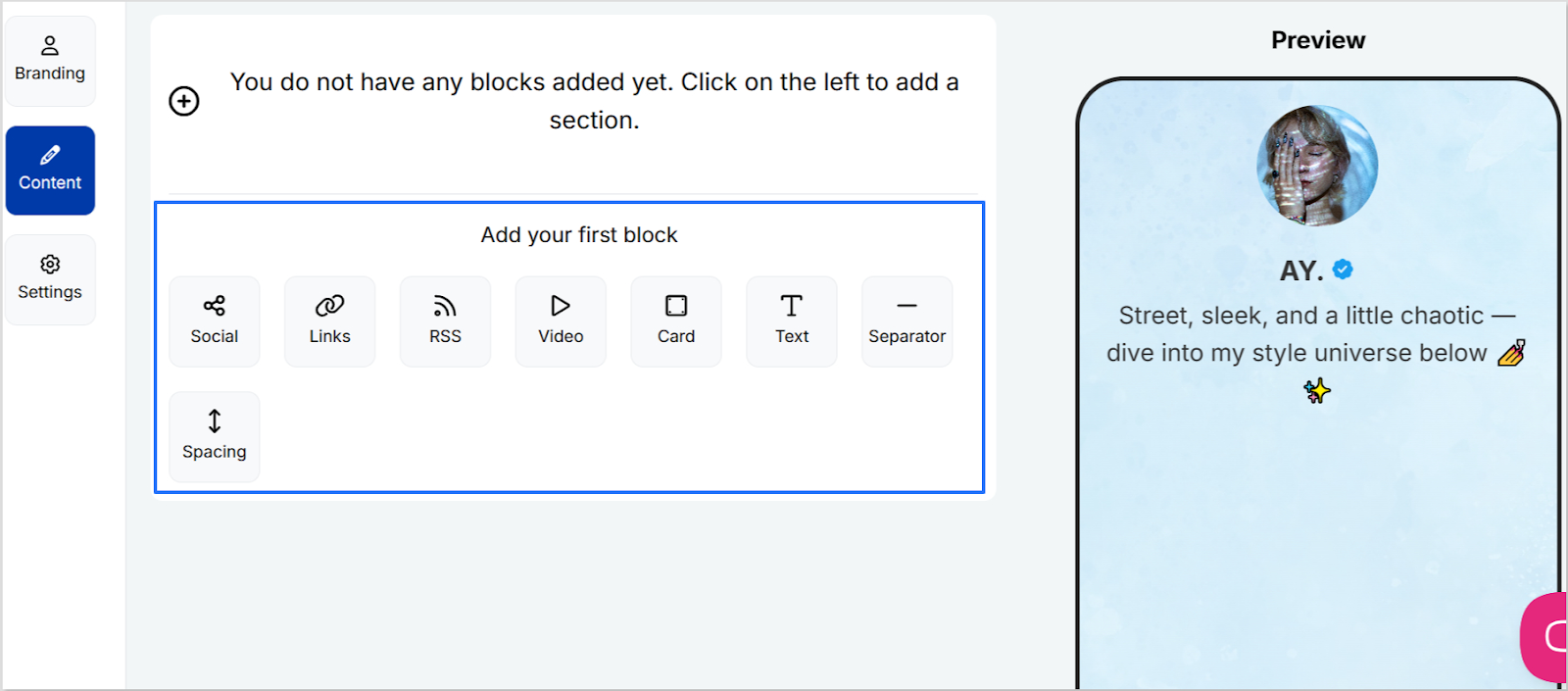
Choose the type of content blocks you want to add to your bio link page.
Replug offers various content block options, including social icons, links, RSS feeds, audio, video, text, cards, separator, and spacing. Select the ones that best suit your needs.
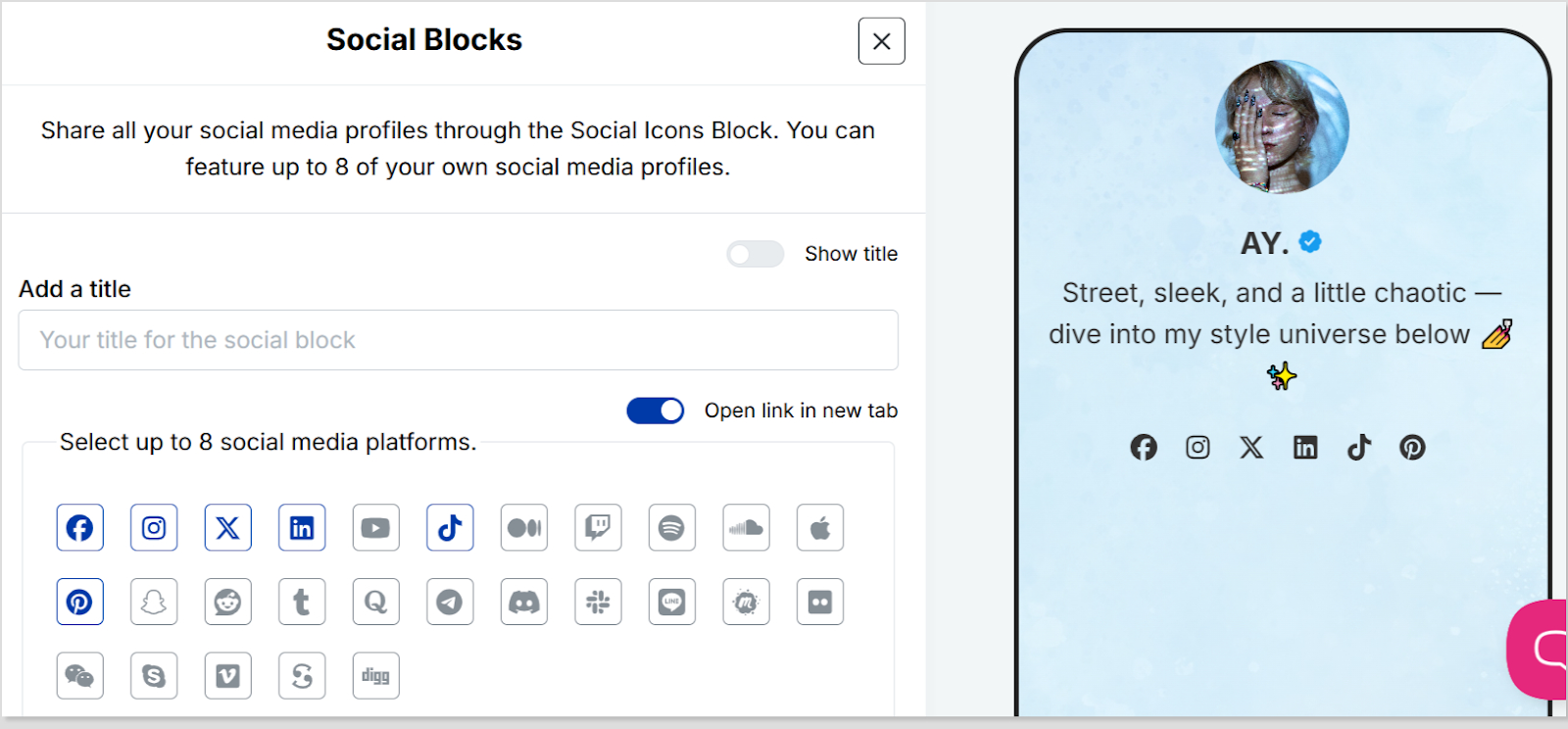
As an example, let’s start with adding social icons. For that, click on the “Social” block button.
Provide titles for each platform, customize the colors for the social icons, and paste the corresponding links. To add each platform, click the “Add Block” button.
You can also schedule, animate, or customize the appearance of your blocks.
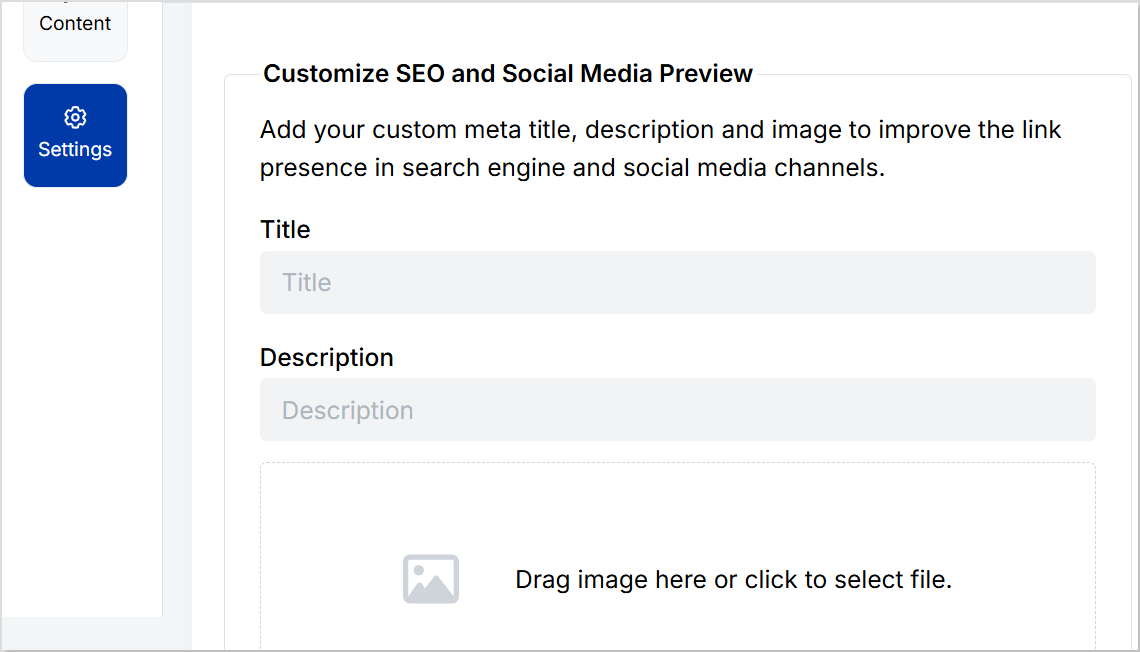
Step 6: Go to Settings and Customize SEO and Social Media Preview
Go to “Settings” to customize your bio link page further by adding a custom meta title, description, image, favicon image.
Furthermore, you can also add tracking pixels for conversion tracking, optimization, and remarketing.
Step 7: Review link in bio page
Review your link in bio page as you create it to ensure it looks and functions as you intended. Take advantage of the preview feature to see how it will appear.
Step 8: Update and create a custom URL for your bio link
Update your bio link to save changes.
Create a custom URL by changing the slug of your bio link. You can also connect your custom domain if you have one.
With your Replug-generated bio link, you can effectively share multiple links and content with your audience, making it a valuable tool for content promotion and marketing on the platform.
Enhance this even further by using this custom URL shortener free to create branded, trackable links that boost engagement.
Go beyond generic link pages!
Create custom bio links that truly fit your brand
With Replug, you can create bio links that are unique, engaging, and built to convert.
Make sure your bio link is short and easy to remember.
Use a clear and concise title for your bio link.
Add a description that tells people what they can expect to find on your bio link.
Use an eye-catching image for your bio link.
Share your bio link across your social profiles and include it in your emails. An email signature generator makes it easy to add your link professionally, so every message subtly drives traffic to your content.
Promote your bio link in your email signature and on your website.
Frequently asked questions
What is a “Link in Bio”?
A “Link in Bio” is a clickable hyperlink placed in the bio or profile description of a social media account, allowing users to direct their audience to external websites, content, or products.
Why use a “Bio Link”?
Users employ “Bio Link” to overcome limitations on the number of links in social media posts, making it easier to share multiple links, promote content, and enhance user experience.
How can I add a “Link in Bio” on Instagram?
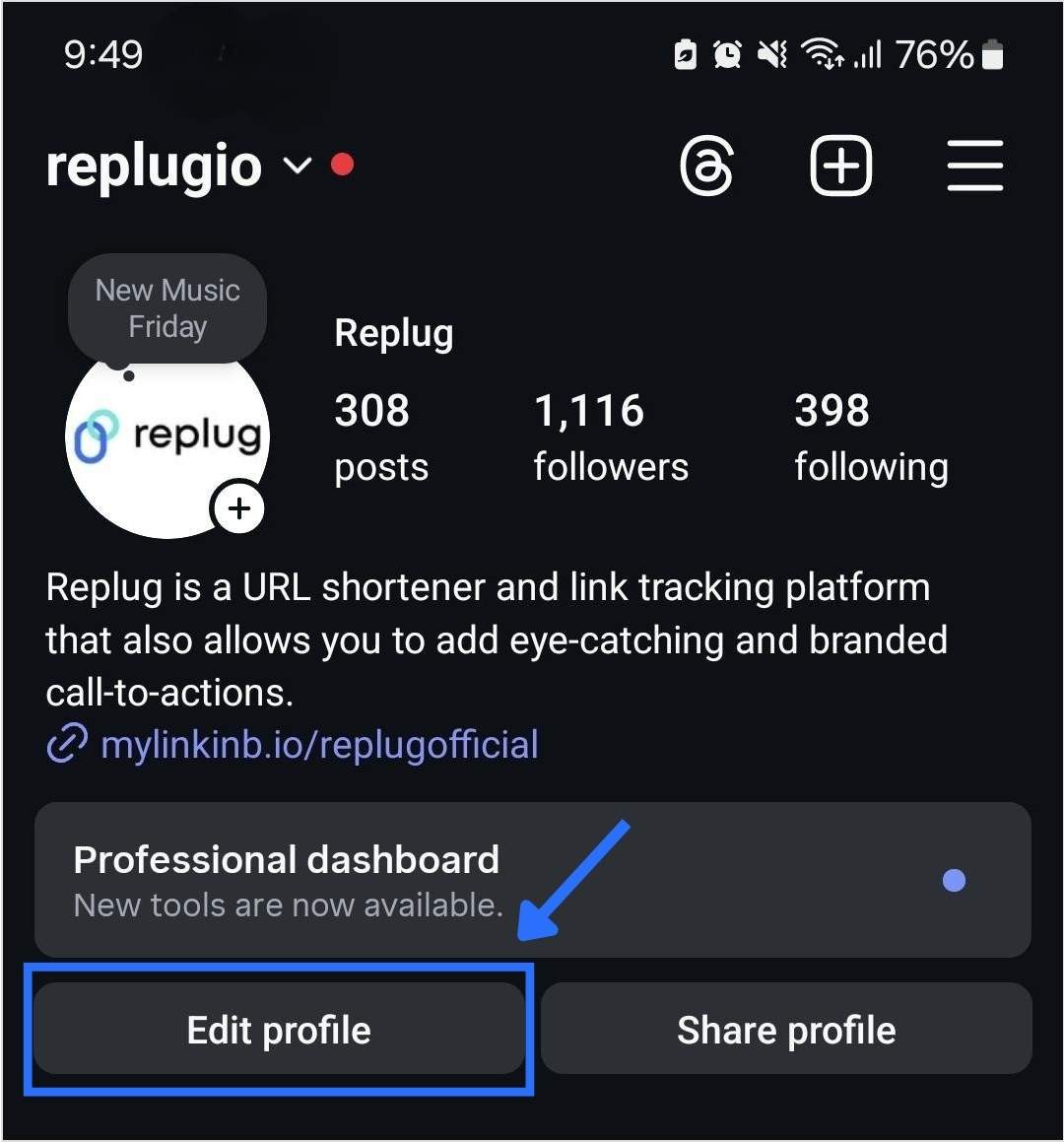
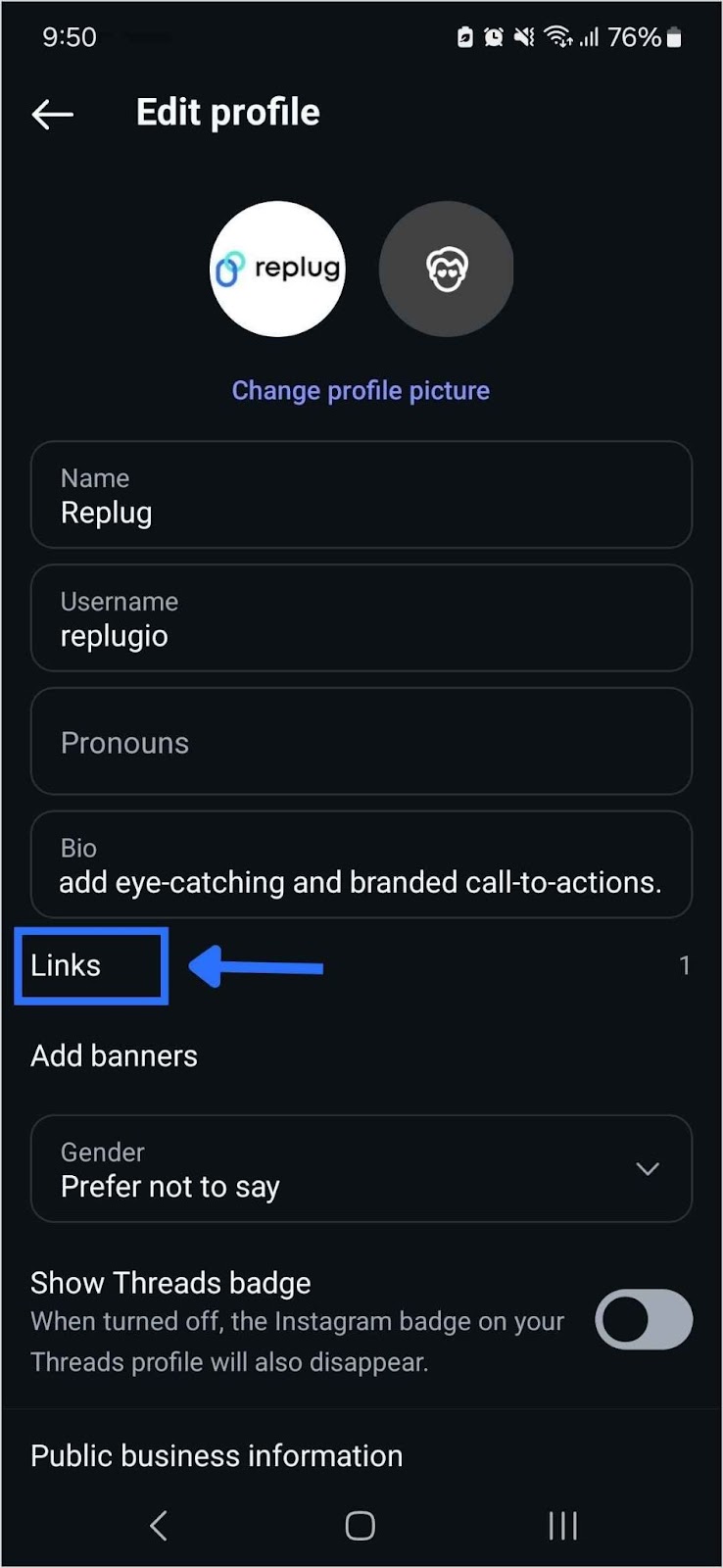
To add a “Link in Bio” on Instagram, go to your profile, click on “Edit Profile,” and enter your desired link in the website field. This link becomes your “Bio Link.”
Are there tools or services to manage “Link in Bio”?
Yes, there are third-party bio link tools and services like Replug that provide features to create and manage “Link in Bio” pages with multiple links.
Can I customize my “Link in Bio” page?
Yes, many “Link in Bio” services allow users to customize the appearance of their bio link page by adding branding elements, titles, and descriptions.
Instagram lets you add up to 5 links in your bio now, but that doesn’t mean they’re all going to convert. When it comes to personal branding or promoting a business on Instagram, every detail matters, including the link in your bio.
Your Instagram bio is one of the first things visitors notice, and it’s a powerful tool to drive traffic to your website, blog, or other social media profiles. If you’re pasting a long, messy URL straight into your profile, you’re missing the point. Instead, rename it using a branded short link.
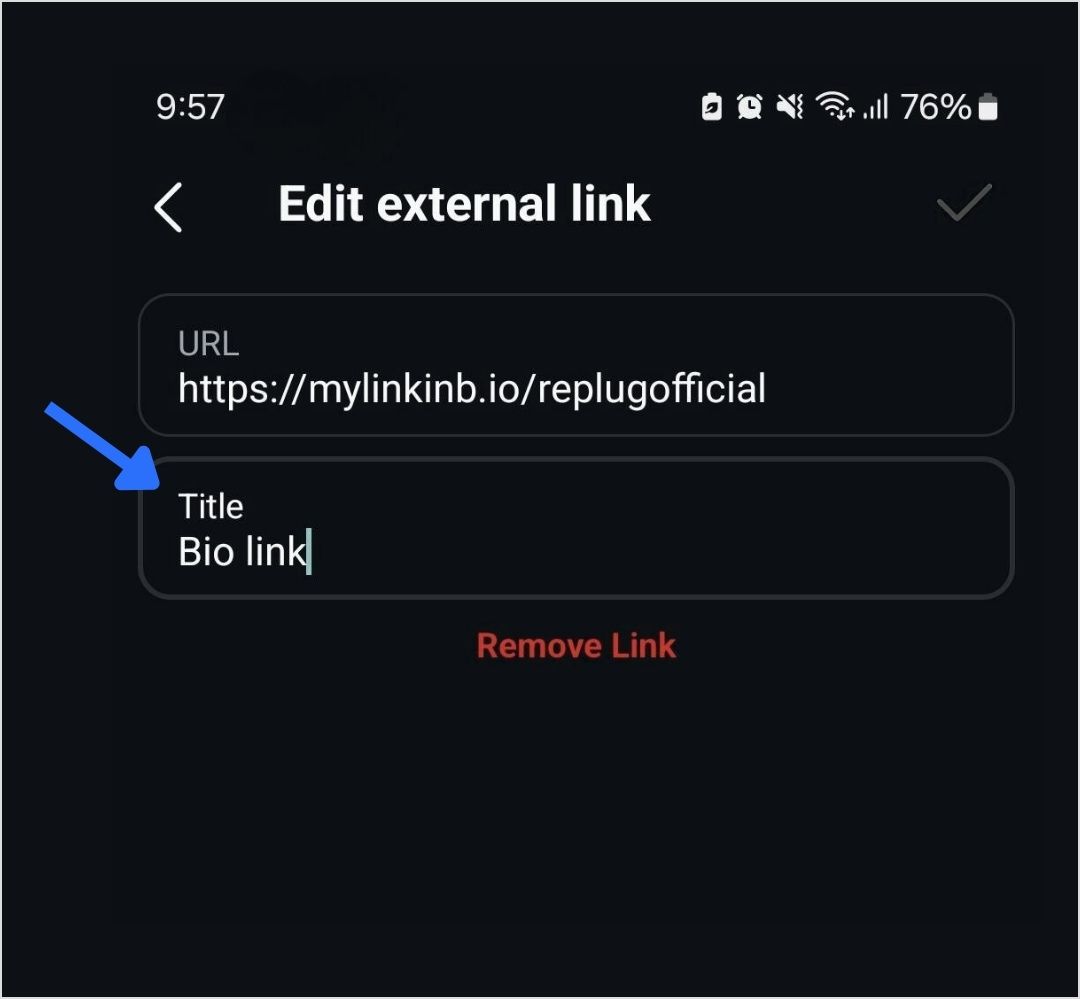
Let’s walk through how to rename your Instagram bio link, and how to stretch its potential using Replug.
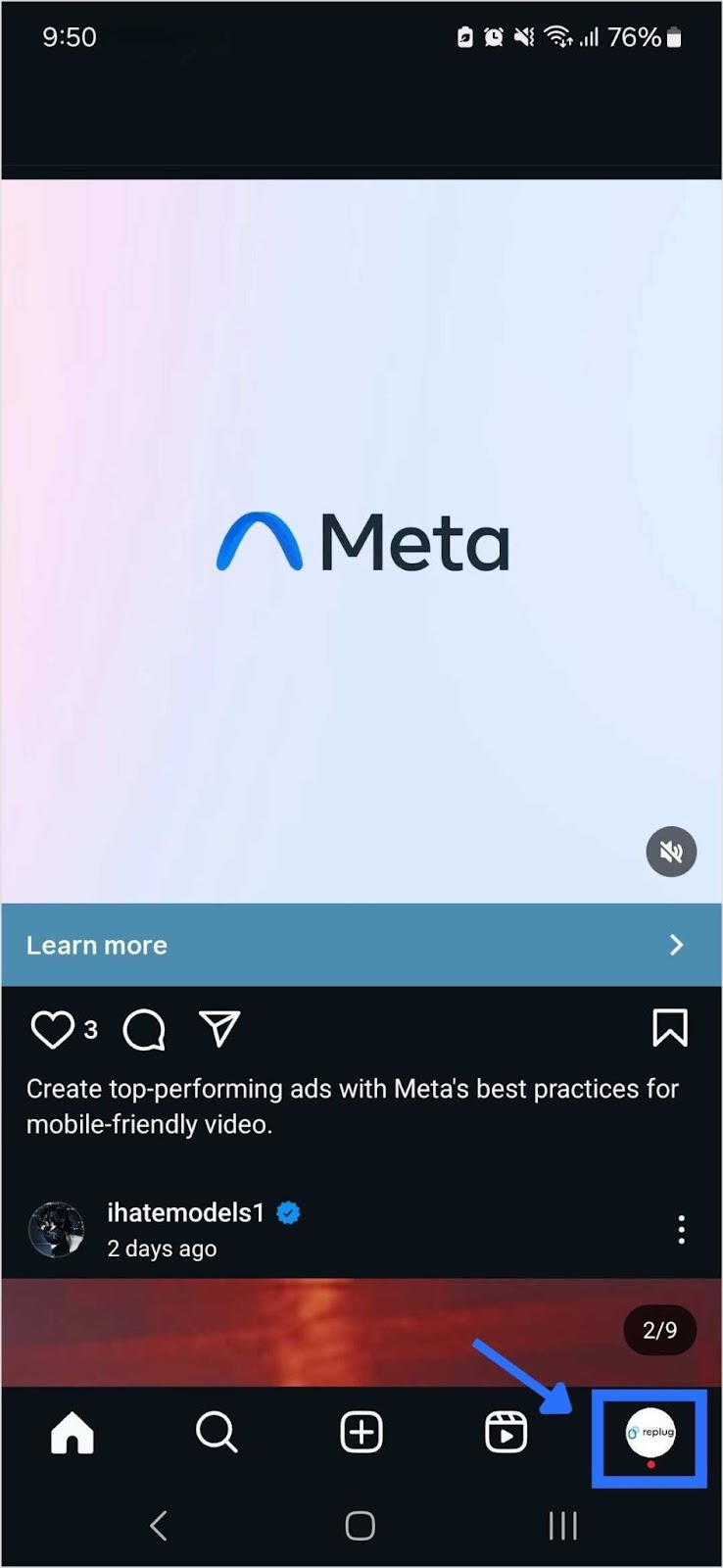
Step 6: Tap the save icon in the top-right corner to apply your changes. Your renamed link will now appear in your bio.
What is a “link in bio” on Instagram?
A “link in bio” on Instagram refers to the clickable URL that users can include in their profile’s bio section. Since Instagram does not allow clickable links in individual posts, the link in bio is a valuable method for directing followers to external content, such as websites, blog posts, online stores, or other social media profiles.
Why it’s important:
Traffic and conversion: The link in bio is a direct avenue to convert Instagram engagement into website traffic, sales, or other conversions. It’s an essential part of any Instagram marketing strategy.
Branding: A well-curated link and description contribute to a cohesive brand experience on Instagram, helping users quickly understand what to expect when they click the link.
How to make the most of your single Instagram bio link?
Renaming your Instagram link might seem like a small tweak, but it plays a big role in shaping user expectations, strengthening your branding, and increasing click-throughs. And if you’re managing multiple destinations? Users can use Replug’s link-in-bio tool, to overcome this limitation, which allows multiple links to be hosted on a single landing page.
Here’s how Replug can enhance your Instagram bio link:
Customizable landing page: Customize your branding by adding a profile name, description, profile image, cover photo, and brand colors. Additional tip: Enhance your visuals with a photo editor to give your bio link page a personal touch.
Multiple links: Share links to your latest blog posts, online store, social media channels, promotional offers, and more in one place.
Analytics: Track link performance to see which links are getting the most clicks, allowing you to optimize your content strategy based on data.
Add a relevant CTA: When it makes sense, add a call-to-action (CTA) to your link title like “Shop Now,” “Learn More,” or “Subscribe.” CTAs give your audience clear direction and can increase both clicks and conversions from your bio link.
Use custom, branded URLs: Custom URLs do more than save space’ they make your bio look cleaner and more intentional. Using tools like Replug’s URL shortener free tool, you can create branded links that match your style, improve trust, and keep your Instagram profile looking sharp.
Boost ROI with branded URLs!
Enhance your marketing campaigns by creating shareable, trackable, and fully multi-purpose
customizable branded URLs.
Keep it short: Long or cluttered titles can be overwhelming and easy to skip. A short, punchy title is more scannable, looks better in your bio, and makes it easier for followers to know exactly what to expect when they click.
Keep it clean: Avoid clutter in your link titles. Skip unnecessary punctuation, symbols, or random emojis. A clean, straightforward title is easier to read and looks more polished in your bio.
Match your brand voice: Your link title should reflect your brand’s tone, whether that’s casual, bold, or professional. Brand consistency helps build trust and makes your profile feel more intentional.
Final thoughts
By utilizing an efficient link management platform, and implementing effective strategies, you can transform your single Instagram bio link into a powerful driver of traffic and engagement. Regular updates, strong CTAs, and a well-structured landing page can significantly enhance the user experience and help you achieve your marketing goals.
FAQs for how to rename a link on Instagram bio
Why can you only have one link in your Instagram bio?
Instagram limits users to one link in their bio to keep profiles concise and avoid spammy behavior. This restriction encourages users to choose the most relevant link for their audience.
How can I add multiple links to my Instagram bio?
You can add multiple links by using our link-in-bio tool, Replug. It helps you create a landing page that hosts multiple links accessible through a single URL in your bio.
What is a link-in-bio tool?
A link-in-bio tool is a service that allows you to create a customizable landing page with multiple links.
Can I track the performance of my Instagram bio link?
Yes, Replug offers analytics features that allow you to track the number of clicks and other engagement metrics, helping you optimize your content strategy.
How often should I update my Instagram bio link?
You should update your Instagram bio link regularly to reflect your latest content, promotions, or events. Keeping the link current ensures it aligns with your marketing goals and provides value to your followers.
Can I use a custom domain for my Instagram bio link?
Yes, Replug allows you to use a custom domain, which can enhance brand recognition and trust among your audience.
Imagine sending a link that not only directs people where you want, but actually makes them more likely to click it.
That’s the power of vanity URLs; those clean, branded web addresses that turn long, tangled links into a memorable call-to-action.
In an age where attention spans are short and trust is everything, studies show that branded links can lift click-through rates by ~34–39% compared to generic URLs. This is simply because they look more credible and meaningful to users.
Whether you’re promoting a campaign on social media, printing a URL on a flyer, or boosting email engagement, vanity URLs help your brand stick in people’s minds.
Ready to get started? Let’s kick things off with the basics, i.e., what exactly is a vanity URL?
What is a vanity URL?
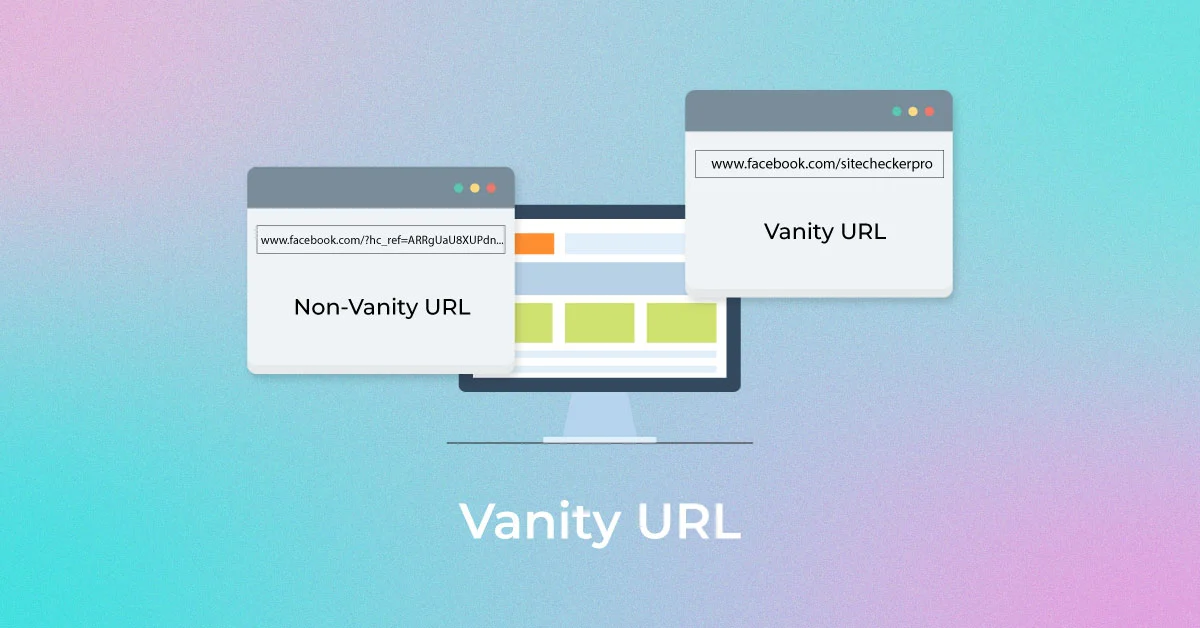
A “vanity URL” is a custom, easy-to-remember web address that’s built to reflect your brand or the content you’re promoting instead of a messy, long URL or a link full of numbers and random characters.
Unlike generic URLs that can be hard to read and forgettable, vanity URLs are short, descriptive, and often branded, making them far more user-friendly and trustworthy for your audience.
Every vanity URL is made up of three key parts:
Brand name: The recognizable name or domain that ties the link to your business or content.
TLD (Top-Level Domain): The extension, like “.com”, “.org”, or “.net” that follows your brand name.
URL slug: The part after the slash that describes the specific page or offer (e.g., /summer-sale).
Put together, these elements create a link that’s not just functional but memorable and meaningful.
Key characteristics of a vanity URL:
Memorable & short: Easy for people to recall without effort.
Branded: Includes your brand name for instant recognition.
Contextual: Gives users a clue about what they’ll see.
Descriptive: The slug tells you the purpose of the link.
Trustworthy: Looks safe and familiar, encouraging clicks.
Quite easier to use: Simple to type, share, and promote.
What is the purpose of a vanity URL?
The major purpose of a vanity URL is to turn a long, awkward link into a short, branded, easy-to-remember web address that improves how people perceive, trust, and interact with your content.
By including your brand name or relevant keywords, vanity URLs make links more memorable and shareable, whether you’re posting on social media, sending emails, or using print ads.
This clarity boosts click-through rates, gives users confidence about where they’re headed, and helps you track engagement and strengthen your marketing message across channels.
Why use a vanity URL?
If you want your links to work harder for your brand and your marketing, using a vanity URL makes a big difference.
Here are the key reasons people use them:
Build stronger brand recognition: Vanity URLs put your brand name front and center every time someone sees or clicks a link, reinforcing your brand identity.
Boost trust & credibility: Clean, branded URLs look professional and reassuring, making users more likely to click than long, confusing links.
Increase click-through rates: Studies show branded links often get higher engagement than generic or long URLs because users know what they’re clicking.
Make sharing easier: Short, memorable links are simple to type, remember, and share across social media, email, ads, and print.
Improve tracking & analytics: You can create unique vanity URLs for different campaigns and measure exactly which channels drive the most traffic.
Support SEO indirectly: Clean, keyword-rich URLs can help with visibility and give search engines and users a clearer context.
In short, vanity URLs are more than just pretty links. They help you connect better with your audience and get more value from every campaign.
How a vanity URL works?
A vanity URL works in a simple but clever way. It gives you a clean, branded address that redirects to the real page you want people to visit.
Instead of sharing a long, messy link with tracking codes or confusing paths, you create a short, human-friendly URL that people can type, remember, and trust on the go.
When someone enters that vanity URL in their browser or clicks it, the web server or link service automatically redirects them to the actual destination page, usually via a redirect (e.g., a 301 permanent redirect). This sends the user seamlessly to the actual content without changing anything on their end.
Note: This redirection happens behind the scenes, so from the visitor’s perspective, the experience feels smooth and direct. Vanity URLs also help with branding and can improve trust and engagement because users know where they’re being taken before they click.
Why do you need a vanity URL?
You might wonder at times why anyone needs a vanity URL when regular links also get the job done. The difference lies in clarity, trust, and results.
A vanity URL free service or tool lets you create a custom, branded link without paying, which is great for beginners or small businesses trying to level up their online presence.
Branded URLs like “yourbrand.com/deal” are easier for people to remember and type than long, cluttered links, so they’re more likely to click and engage with what you’re sharing.
That simple tweak can boost click-through rates and give your campaigns a professional look, no matter if you’re posting on social media, sending emails, or printing a URL on a flyer.
Plus, these clean links build credibility because users instantly see something familiar instead of random characters, making them feel confident about where the link leads.
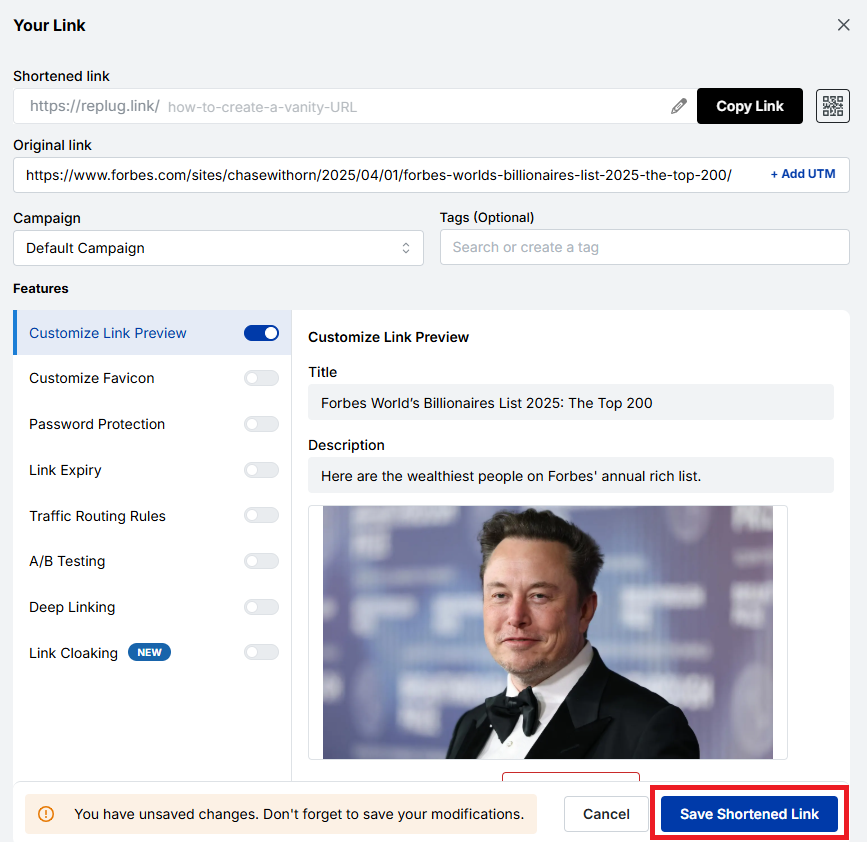
How to create a vanity URL: 6 simple steps to get one easily using Replug!
Creating a vanity URL helps you turn long, unorganized links into clean, branded, and memorable URLs. With Replug.io, the process is quick and beginner-friendly (no technical skills required).
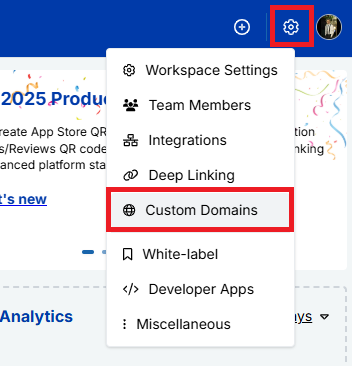
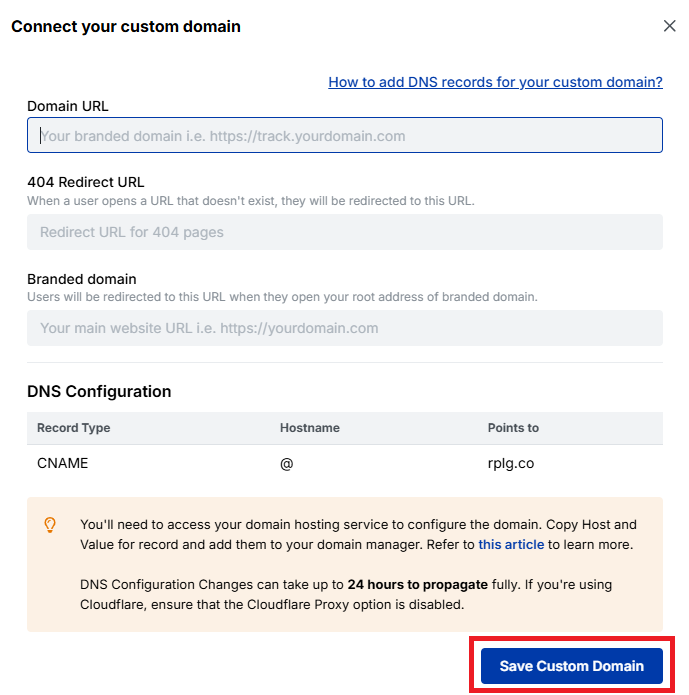
Next,navigate to “Workspace Settings” and, from the dropdown menu, click “Custom Domains”.
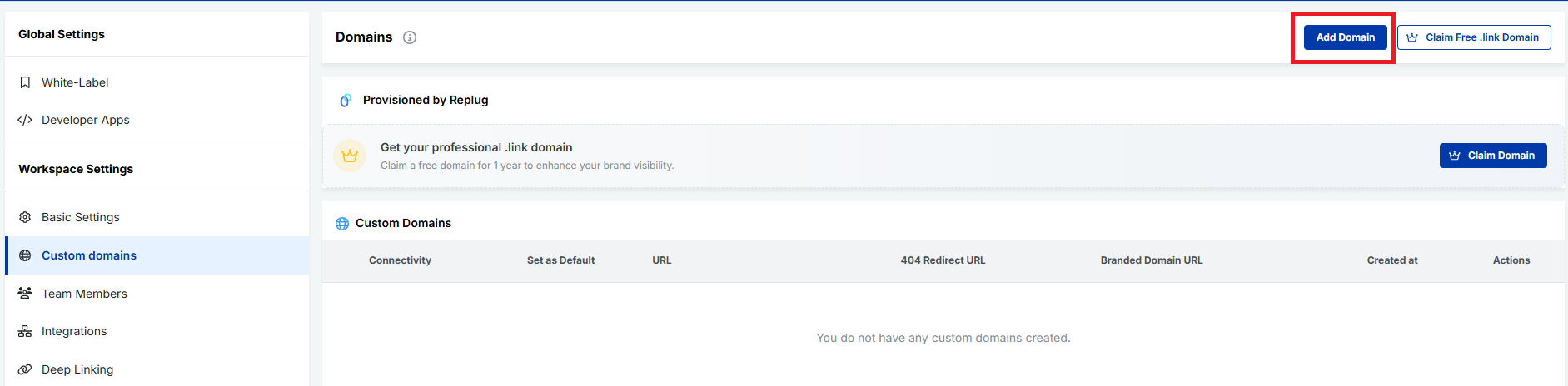
After that, connect your custom domain to use it as your vanity URL base. Follow the next snippets!
Fill the fields carefully, and click on the button labeled “Save Custom Domain”.
Step #3: Create a new short link
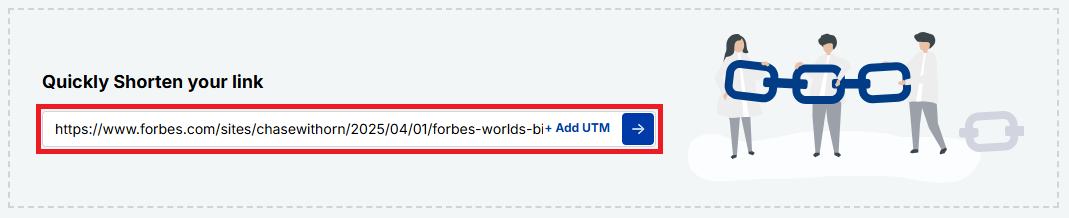
Now, paste your original long URL into the input field under “Quickly Shorten your link”. Then click the blue arrow button to generate your vanity URL automatically.
Step #4: Customize the URL slug
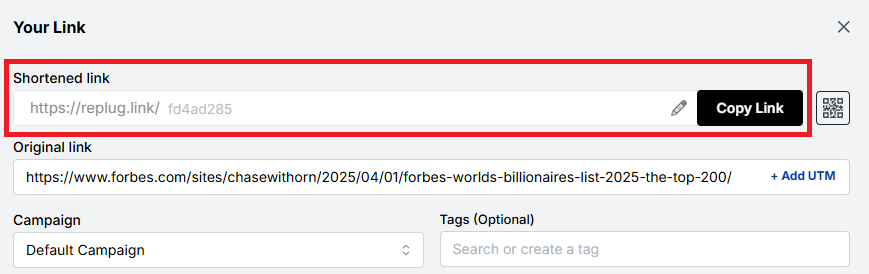
Your vanity URL will be generated within seconds.
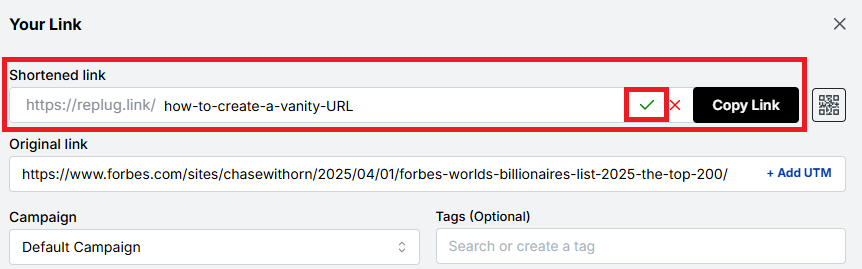
You can customize the URL slug using the “edit/pencil” icon to fit your needs. Edit the back-half of the link to make it branded, readable, and relevant to your content or campaign. Once done, click on the “tick” symbol.
Step #5: Save, test, & share your vanity URL
Save the link by clicking the button “Save Shortened Link”. Test it to ensure it works correctly, and start sharing it across your marketing channels.
Step #6: Access your vanity URL hassle-free
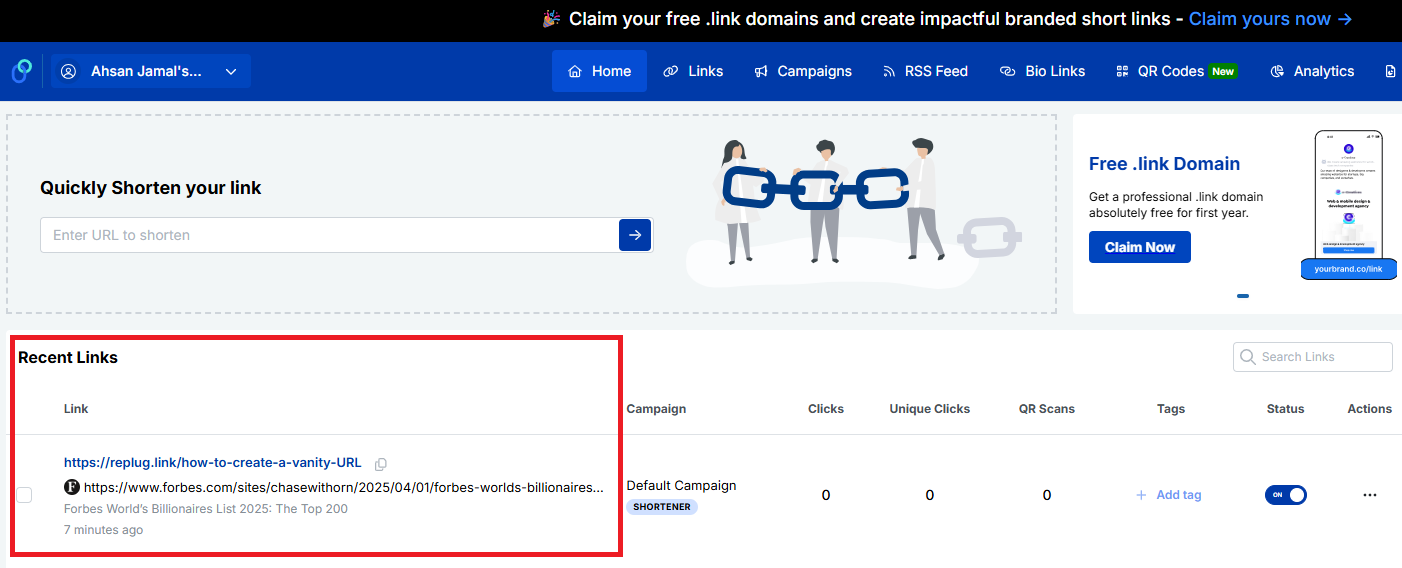
Once saved, your vanity URL will appear in the “Recent Links” section of your Replug dashboard. From here, you can easily copy the link at any time and view detailed analytics to track its performance.
That’s all there is to it!
Note: Using Replug to create a vanity URL is a simple yet powerful way to strengthen your brand and improve link trust. In just a few steps, you can transform ordinary links into polished, professional URLs that stand out.
Common uses for vanity URLs
Vanity URLs are more than just pretty links; they make it easier for people to find, remember, and trust what you’re sharing. Because they’re short and branded, businesses and creators use them in lots of places where clarity and engagement matter.
Marketing campaigns
Vanity URLs help tie your campaign message to a memorable link, allowing your audience to quickly recognize what the offer or message is about and revisit the offer.
Print campaigns
On flyers, posters, brochures, or billboards, short branded links are much easier to read and type, unlike long, complex URLs.
Social media posts
Clean URLs look better in bios and posts than generic long links, improving engagement and click-through rates on platforms where space and clarity matter the most.
Digital ads
Using vanity URLs in your ads (such as display or banner ads) looks professional, builds credibility, and improves brand recall, while still making the destination clear and trustworthy to users.
Emails
Including a neat vanity link in your email content (newsletters or promos) makes messages feel more authentic and more likely to be clicked by recipients. This often results in higher open and click-through rates.
SMS marketing
Branded short links are essential for SMS marketing, where character limits are paramount and readability matters. These links feel more legitimate than prolonged, unbranded URLs.
Event promotions
From webinar registrations to live events, a specific vanity URL helps people remember and find event pages easily across channels, or learn more.
Influencer & affiliate marketing
Influencers and affiliates can use vanity URLs to share personalized, easy-to-read links that still track traffic source and support attribution. Custom-branded URLs assist the best in this situation.
Internal systems
Within a company or organization, vanity URLs can point employees to frequently used tools, pages, or internal resources without messy addresses, improving efficiency and productivity.
Lead magnets
If you’re offering freebies like e-books, checklists, guides, or downloads, a vanity URL makes it clear what people are signing up for and reduces friction when accessing or sharing the content.
Customer/Client support
Customer support pages or help articles are easier to share and remember when tied to short, branded URLs rather than long system links.
These everyday uses show how vanity URLs work across both digital and offline channels, helping you connect with your audience wherever they are easily.
Major benefits of vanity URLs
Vanity URLs deliver real benefits that improve how your links work across branding, marketing, and user experience. From being easier to remember to providing valuable data, here’s how they help.
Easy to remember, type, recall, & share
Because vanity URLs are short and precise, people find them easier to recall, type into a browser, and share with others (whether online or in person) compared with long, complicated links. This makes them more likely to stick in your audience’s mind.
Shows what works & what doesn’t
With branded links, you can track performance more clearly, seeing which campaigns or channels are driving traffic and which aren’t. Good link analytics help you double down on winners!
Strengthens brand trust & recognition
Seeing your brand name in the URL builds familiarity and trust. Users are more comfortable clicking links that look professional and recognizable, which also strengthens brand awareness over time.
Improves SEO & link visibility
Including relevant keywords in your vanity URL can give search engines extra context, potentially helping visibility in search results and making your content easier to find.
Enhances user experience & click-through rates (CTR)
Clean, descriptive links communicate what to expect, making people more likely to click, which often leads to higher CTR compared with generic URLs.
Empowers online & offline sharing
Vanity URLs work great everywhere, from social media and emails to print ads and business cards, because they’re easy to remember and look pleasing in any format.
Enables verbal sharing seamlessly
When you’re speaking at an event, on a podcast, or on video, a simple branded URL is much easier to say (and remember) than a messy link full of characters.
Assists with link retargeting & link management
Many vanity URL tools let you add UTM tracking or retarget users who click your links, letting you re-engage visitors and fine-tune campaigns hassle-free.
Offers tracking benefits
Beyond clicks, you can track where traffic comes from, what devices users use, and how campaigns perform, giving you data-driven insight to improve future marketing.
Together, these benefits make vanity URLs a smart choice for any brand or marketer looking to enhance performance and connect with audiences more effectively.
Real-world vanity URL examples
Vanity URLs aren’t just a mere theory; you see them every day on big sites and platforms where brands and individuals replace long, disorganized links with clean, easy-to-remember ones.
These real-world examples show how familiar names use custom URLs that help with branding, trust, and recall exceptionally.
Vanity URL YouTube
Creators and brands often get a custom YouTube vanity URL like youtube.com/@BrandName, making it way simpler to share and remember than the default long link your channel starts with.
Vanity URL Facebook
Instead of a numeric profile URL, you can claim a Facebook vanity URL, such as facebook.com/YourBusiness, which looks cleaner and more professional.
Vanity URL LinkedIn
LinkedIn lets you customize your public profile to something like linkedin.com/in/JohnDoe, perfect for sharing in resumes or email signatures.
Vanity URL Zoom
Companies can set up custom Zoom vanity URLs or Zoom domains, such as yourcompany.zoom.us, that reflect their brand when users log in or join meetings.
Vanity URL Steam
Steam community profiles often use a Steam vanity URL like steamcommunity.com/id/YourName, an easier-to-share version compared with auto-generated numbers (a form of custom profile URL).
Vanity URL Discord
Discord lets users customize invite links or server invites (e.g., discord.gg/YourServerTag), which are much nicer than random code links.
Vanity URL Dropbox
High-profile brands like Dropbox use clean URLs, such as dropbox.com/backup, or social-profile links, such as facebook.com/dropbox, for ease of use.
Vanity URL Slack
Slack’s site and its pages often use simple branded URLs like slack.com/get-started, making it easy to understand where the link goes.
Vanity URL AEM
While not as universally “profile-style”, platforms built with Adobe Experience Manager (AEM) usually employ neat custom URLs like example.com/campaign-page for specific campaigns.
Vanity URL Oracle
Oracle’s cloud services and docs use branded paths such as oracle.com/cloud/what-is-cloud, which is cleaner than deep-nested URLs.
Vanity URL Airbnb
Airbnb uses simple, descriptive paths like airbnb.com/host or airbnb.com/contact that clearly explain what the page is about.
These realistic examples show how vanity URLs make it easy for people to recognize, trust, and remember links, no matter if it’s for social profiles, services, or product pages.
Vanity URLs vs. generic URLs vs. domain URLs
Understanding the difference between vanity URLs, generic URLs, and domain URLs can make it much easier to choose the right type of link for your audience or campaign.
Below is a simple breakdown showing how these three compare in terms of branding, memorability, trust, and use cases, written in a friendly, easy-to-digest way.
Type of URL
What it is
Branding
Memorability
Best for
Vanity URL
A custom, branded web address that’s short and meaningful, like yourbrand.com/sale, designed to be easy to remember and share.
✔️ High: includes brand name or message
✔️ Very easy to remember
Marketing, campaigns, social shares
Generic URL
A standard link that might be long or autogenerated, like example.com/page?id=12345.
❌ Low: usually no brand visible
❌ Harder to recall or type
Technical references, deep site pages
Domain URL
A base domain name itself (e.g., example.com). It is the main web address for a site.
✔️ Represents your entire brand
✔️ Easy at the top level
Homepage, business identity
Note: Vanity URLs give you customized, friendly links that make people feel confident clicking and remembering what they saw. Generic URLs do the job, but don’t do much for your brand or recall. Meanwhile, domain URLs are simply the core web address of a site, strong for broad identity, but not always as user-friendly for specific campaigns or pages. Overall, vanity URLs sit in the sweet spot between branding and usability.
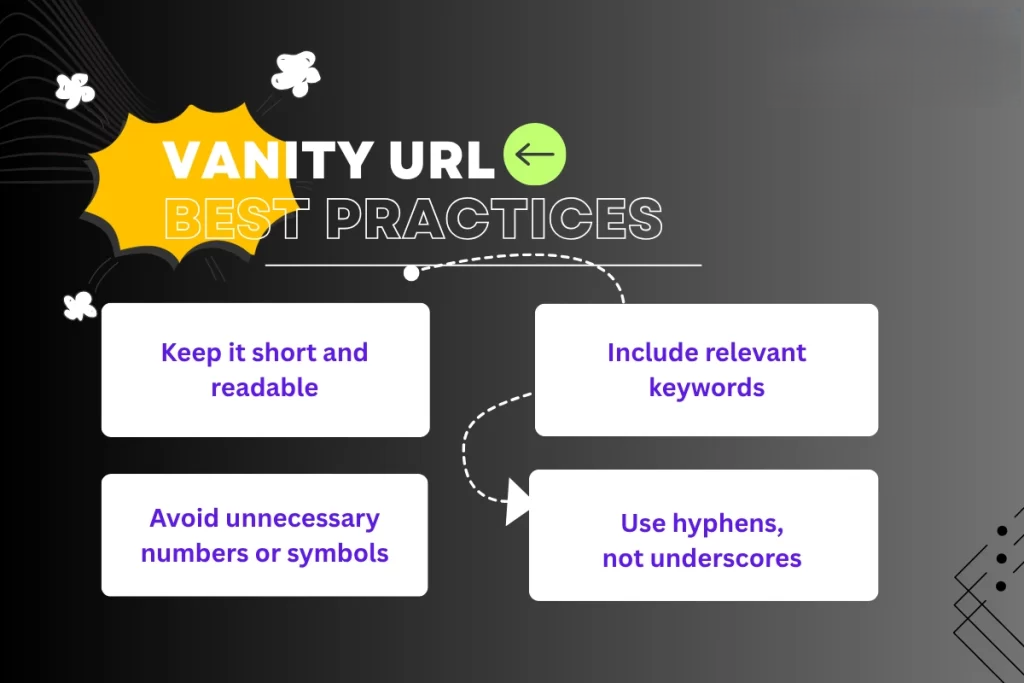
Vanity URL best practices
Before you start creating vanity URLs, it’s good to follow a few simple rules that make them actually effective and helpful for both users and your marketing goals.
Here are the most promising conventions to keep in mind. Have a look!
Keep it short, clear, & memorable
Short URLs are easier for people to remember, type, and share, especially when spoken aloud or printed on marketing materials. Avoid long, complicated slugs and stick to a concise structure.
Make it descriptive & natural
Your vanity URL should give users a clear idea of what they’ll see when they click. A simple phrase like /summer-sale or /get-ebook helps set expectations and builds trust.
Prioritize contextual use
Think about where the link will be used (social media, email, print ads, or spoken mentions), and tailor your vanity URL so it feels natural in that context. This makes the link more effective and user-friendly.
Make it intuitive & use lowercase
Stick to lowercase letters, avoid spaces, and keep the wording intuitive so that users won’t mistype or misunderstand the link. Lowercase also helps prevent confusion, since URLs are case-sensitive in practice.
Use keywords strategically
Including one or two relevant keywords that reflect your content or campaign can improve clarity and indirectly support SEO and recognizability. However, just don’t overstuff or make it awkward.
Reflect your brand identity
Use your brand name or a distinctive abbreviation in your vanity URLs to reinforce your brand and make the link feel familiar and trustworthy.
Use 301 redirects to preserve SEO
When you set up a vanity URL that points to another page, use a 301 permanent redirect so search engines know the page has moved and that any SEO value is passed along properly.
Use a vanity URL, only when required
Don’t force a custom URL everywhere! If a standard link already works well and is clear, there’s no need to reinvent it. Vanity URLs are most useful when they add real value for users or branding.
Note: Following these tips helps ensure your vanity URLs do what they’re supposed to: make links easier to use, more on-brand, and more effective in your campaigns.
How to choose the right vanity URL
Selecting the correct vanity URL might seem small, but it plays a significant role in how people remember and click your links. A good vanity URL makes your brand look professional!
Here’s how to pick one:
Keep it short & relevant
Short URLs are easier to read, type, and share, especially on social media or in messages. Keep in mind, if your URL is clear and to the point, people are more likely to trust and click it.
Work on keywords (related to your brand or campaign)
Including a keyword that matches your brand, product, or campaign helps the audience instantly understand what the link is about. This also makes your URL more searchable and meaningful.
Avoid special characters, such as dashes & underscores
Special characters can make a URL look messy or confusing. They’re harder to read and can even lead to typos, so keeping things simple and clean is usually better.
Must be consistent with your branding
Your vanity URL should reflect your brand’s identity in the best possible manner (think tone, style, and words you usually use). This builds familiarity and trust with your audience brilliantly.
Should clearly indicate the destination
People should know what they’re clicking on just by looking at the link. If your URL gives a good hint of where it leads, users feel more comfortable and less likely to hesitate.
Always check for possible errors
Before you finalize, double-check spelling, grammar, and meaning. A tiny mistake can change the whole impression or lead users to the wrong place, and that’s not at all good for your brand!
The advantages of using Replug for your vanity URLs
Using Replug for your vanity URLs makes managing and sharing links way easier and more effective than just dropping URLs everywhere.
Replug isn’t just a reliable link shortener; it acts as a powerful vanity URL generator that lets you create custom, branded links that are easy to remember and look more professional when you post them on social media, in emails, or on your website.
Maximize marketing ROI
by transforming ordinary URLs into branded short links that convert.
Try Replug for free
With this all-in-one link management platform, you can track how your links perform, add retargeting pixels or UTM tags for better marketing insights, and even boost engagement by turning every shared link into something that feels personal and trustworthy.
All of this helps your brand stand out, drive more clicks, and give you valuable data to improve your campaigns, without any tech headache.
Wrapping up
As you’ve seen, vanity URLs aren’t just a neat trick; they’re a smart way to make your links easier to remember, more trustworthy, and much more effective in connecting with your audience.
From boosting brand recognition and improving click-through rates to helping you track what works and what doesn’t, vanity URLs bring real value to your online presence.
Whether you’re running campaigns, sharing links on social media, or promoting events, the right custom URL can make a huge difference.
And if you want a simple, powerful tool to create branded short links, track performance, and even add CTAs or retargeting, you should give Replug a try today. It’s quick to set up and can really level up your link game!
Frequently asked questions
What is a good example of a vanity URL?
A good vanity URL is short, branded, and descriptive. For example, instead of a long tracking link like example.com/page?id=4321&utm=xyz, you could use something like brandname.com/sale, which is easy to remember and tells users what to expect.
What is a vanity URL slug?
A vanity URL slug is the part of a vanity URL that comes after the domain name and describes the specific page or campaign. For example, in brand.com/summer-sale, the slug is summer-sale. It should be short, meaningful, and help users know what the link points to.
What are the common use cases of a vanity URL?
Vanity URLs are widely used across marketing channels:
– Social media posts, – Email campaigns, – Print materials like flyers or billboards, – Product promotions, – Affiliate links, – Event pages, – Landing pages, and – Paid ads
They make links more memorable and build trust!
Is a vanity URL case-sensitive?
The domain part of a vanity URL is not case-sensitive, but the slug portion usually is. This means brand.com/Sale and brand.com/sale will be treated differently. Most people use lowercase for consistency and simplicity (it’s the best practice).
Is it possible to alter or redirect a vanity URL?
Yes, vanity URLs can be changed or redirected. Just update the redirect settings in your link management tool or DNS, and you’ll point that vanity URL to a new destination. This helps when campaigns change, or you want to reuse the same branded link.
What is the difference between a vanity URL, vanity domain, vanity page, and a custom URL?
– Vanity URL: A short branded web link that redirects to another page. – Vanity domain: A custom domain name used specifically for branding (e.g., go.brand.com). – Vanity page: A dedicated landing page created for a campaign or audience. – Custom URL: Any user-defined URL path or slug, often part of a vanity URL.
Each serves a slightly different purpose, but all aim to improve branding and clarity.
What is the difference between a vanity URL and a domain?
A vanity URL is a specific custom link (often on your domain) created for clarity or branding, like brand.com/offers. A domain, on the other hand, refers to the entire web address that identifies a site, like brand.com itself. The vanity URL sits under that domain and points to a particular page.
What is the difference between a vanity URL and a redirect?
A vanity URL is the clean link you share with users, while a redirect is the behind-the-scenes mechanism that takes visitors from that vanity URL to the actual destination (often a longer, complex web address). The redirect makes the vanity URL work.
What are the standard guidelines and requirements for vanity URL requests?
Requirements vary by platform, but generally:
– Pick a short, relevant slug – Avoid special characters or offensive terms – Follow brand naming rules, and – Ensure the URL isn’t already taken
Some services also require verification or minimum follower counts (e.g., social profiles) before you can claim a vanity URL.
What is a branded short domain, and how does it differ from a vanity URL?
A branded short domain is your own custom domain (like nyti.ms), often used with a vanity URL slug (nyti.ms/news). Whereas a vanity URL uses that domain plus extra path text. The branded short domain gives complete control and branding across all custom links.
How to get your Google+ vanity URL?
Google+ was discontinued in 2019, so vanity URLs for that platform are no longer obtainable. This applies even if some help pages still exist online. No current applicable process available!
How to change an existing vanity URL?
To change a vanity URL, go to the platform’s settings where it’s managed (e.g., social profile or link tool dashboard), edit the URL name or slug, and save. Some platforms may have limits on how often you can change it or minimum requirements before allowing edits.
How to customize branding for your vanity URL?
Branding your vanity URL means using your brand domain, keeping slugs relevant, and avoiding generic or vague names. Use your brand’s name or campaign words, so the link feels familiar and trustworthy. Ensure you use HTTPS and a consistent brand tone everywhere the URL appears.
How to request a subdomain or vanity URL?
If you control your domain, add a subdomain (like go.brand.com) in your DNS settings and point it with a redirect to the page you want. If you’re on a platform (e.g., a social network), follow that platform’s specific “custom URL” or “username” request page.
How do vanity URLs impact marketing?
Vanity URLs boost brand recognition, user trust, and click-through rates because they’re clear, branded, and shareable. They also help with tracking which campaigns or channels perform best.
What is a vanity URL in search engine optimization? Does SEO suffer from it?
A vanity URL in SEO is a short, custom-branded web address that redirects to a longer or more complex URL, making it easier for users to remember and share while reinforcing your brand or keywords.
A vanity URL doesn’t directly improve or hurt SEO because search engines index the destination content. However, it can indirectly boost SEO by increasing click-through rates and engagement, which signal relevance. As long as it uses proper redirects (like 301s), SEO shouldn’t suffer.
How to create SEO-friendly vanity URLs?
SEO-friendly URLs are all about making them easy for both people and search engines to understand. Here’s how to do it:
1. Keep them short, simple, and clean so people can easily remember and type them without mistakes. 2. Use a structure that makes sense and flows well when read (like yourbrand.com/sale-offer) rather than long, confusing strings. 3. Always set up permanent 301 redirects from your vanity URL to the actual page. This tells search engines that the page moved permanently and helps preserve SEO value over time.
How to create vanity URLs for your social media ads?
Use a custom link tool or your own branded domain to build short, relevant URLs (e.g., brand.com/black-friday). Then place these in your ad copy or CTA buttons to make the links more appealing and track their performance separately with analytics.
How to set up a vanity URL for your website?
Choose a short, branded path or subdomain on your domain, then set up a redirect (ideally a 301 permanent redirect) to the full destination page. Use a link management tool such as Replug or your site’s hosting/DNS settings. And remember, always test the link before sharing.
How to set up a vanity URL with a branded short domain?
To set up a vanity URL with a branded short domain:
1. Start by choosing a unique, memorable name that goes well with your brand and is easy to recall. 2. Then check domain availability and register it if it’s free. 3. Next, use a reliable link shortening tool or a custom domain tool (like Replug or similar) to connect your domain and create the short links. 4. After that, set up a 301 redirect from your short branded URL to your primary destination so that browsers and search engines know where it should go. 5. At the end, test your vanity URL to make sure it works properly, and then share or promote it wherever you need.
How to track a vanity URL performance efficiently?
Use analytics, either from your link-shortening tool or platforms like Google Analytics or Usermaven, to monitor clicks, referrers, device types, and conversion data. Adding UTM parameters behind the scenes can help you attribute which campaigns bring traffic.
How does a vanity URL white-label emails and links to the Microsite?
A vanity URL can serve as a white-label domain, so that both links and email addresses appear to come from your brand (e.g., pics.brand.com and noreply@brand.com). This keeps the entire experience consistent and credible when sending messages or linking to a microsite.
Rebrandly is a user-friendly tool for creating custom-branded short links, as well as shorter and more visually appealing versions of long URLs.
It’s commonly used in digital marketing to share links on social media and email campaigns.
Moreover, Rebrandly also offers detailed link tracking and analytics, helping users understand how their links are performing and where their audience is coming from.
Why consider Rebrandly alternatives?
Before we dive into the alternatives, let’s briefly touch on why agencies might be looking beyond Rebrandly. While Rebrandly offers solid link-management capabilities, it may fall short in some areas:
Feature limitations: Some agencies require more advanced features that Rebrandly doesn’t offer.
No hidden fees: Some Rebrandly alternatives might offer clearer, more transparent pricing with no surprise charges.
Integration needs: Certain agencies require seamless integration with specific tools that Rebrandly doesn’t support.
Faster support response: Some alternatives provide quicker and more efficient customer service, helping you resolve issues without delay.
Considering these factors, let’s explore the top alternatives that address these concerns and offer unique agency advantages.
Best Rebrandly alternatives: Pros, cons, and key features
1. Replug.io
Why Replug: Our top choice as the best Rebrandly alternative is Replug. This tool offers a comprehensive link management suite with link shortening, tracking, and retargeting features.
A complete link management solution
for marketing professionals & agencies.
Try Replug for free
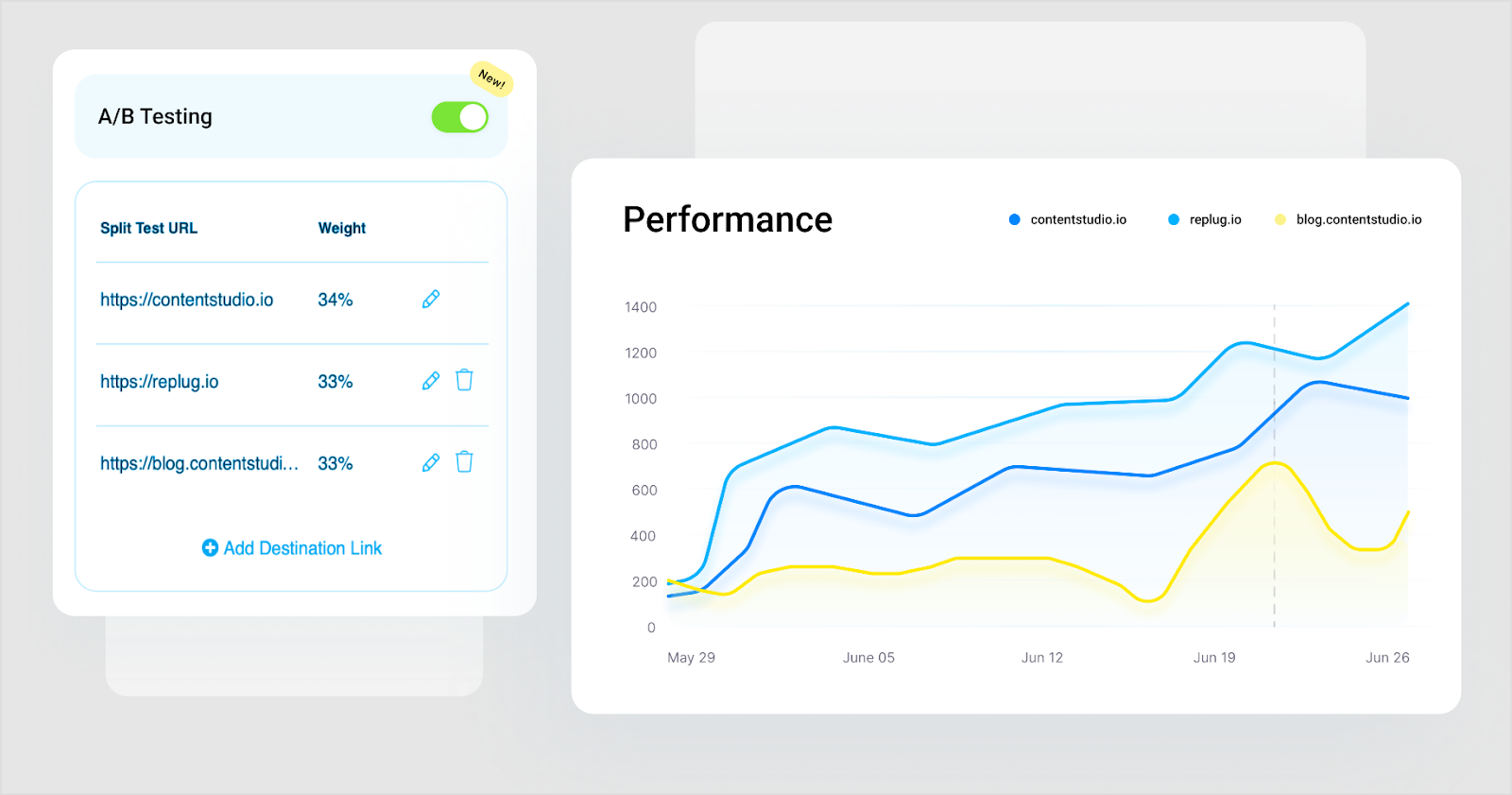
Also, Replug stands out for features like white-label, A/B testing, deep linking, and analytics. Overall, it’s a powerful tool for marketing campaigns.
Why Bitly: Bitly is a household name in link shortening, known for its simplicity and analytics. Bitly as an alternative to Rebrandly can be a great choice because it offers high-end link tracking performance which helps in enhancing user engagement.
Pros:
Simplicity and user-friendly interface
Powerful link tracking and analytics
Easy-to-use browser extension
Customizable short links
Cons:
Limited features in the free version
Advanced analytics require a premium subscription
No link retargeting, CTAs, and A/B testing.
3. TinyURL
Why TinyURL: TinyURL is your friend if you need a no-fuss solution. It’s straightforward and user-friendly, ideal for quick link shortening.
Pros:
Straightforward and no-fuss link shortening
Quick and easy to use
No registration required
Cons:
Lacks advanced features
Limited link-tracking capabilities
Boost ROI with branded URLs!
Enhance your marketing campaigns by creating shareable, trackable, and fully multi-purpose
customizable branded URLs.
Why BL.INK: BL.INK is a versatile URL shortener with advanced features like QR code generation and analytics. Perfect for marketing and tracking campaigns.
Pros:
All-round URL shortener
QR code generation
Analytics for link tracking
Custom branded domains
Cons:
Pricing may not suit budget-conscious users
Lacks many features, such as link retargeting and bio links that Rebrandly offers
Why Linkly: It’s a powerful link management tool that helps you optimize your online presence and marketing strategies. It allows you to create, customize, and track links, providing in-depth insights into audience engagement.
Pros:
Link customization
UTM parameters
Scheduled links
Password protection
Cons:
Learning curve (for new users)
Premium features may be pricey for some
6. Cutt.ly
Why Cutt.ly: It’s an advanced link management tool specializing in link shortening and tracking. It simplifies creating custom-branded short links and offers comprehensive analytics to help you understand link performance.
Pros:
In-depth link tracking and analytics.
Custom-branded links for a professional appearance.
Suitable for businesses of all sizes.
Cons:
Limited customization options for free users.
Analytics not as robust as some competitors
7. Short.io
Why Short.io: Short.io offers custom-branded links and link tracking, making it an excellent choice for businesses and marketers.
Pros:
Custom-branded links
Link tracking and analytics
User-friendly interface
Cons:
Some users report occasional reliability issues
8. Sniply
Why Sniply: Sniply combines link shortening with lead generation. It allows you to add call-to-actions to shared links, making it a powerful tool for marketers.
Pros:
Combines link shortening with lead generation
Allows call-to-action on short links
Great for marketers and brand promotion with CTAs
Cons:
Lacks in several important features.
Some features are reserved for premium users
9. Shorby
Why Shorby: Shorby focuses on enhancing social media profiles through link shortening and online branding. If you’re active on social media, it’s worth a look.
Pros:
Enhances social media profiles through link branding
Ideal for social media enthusiasts
Simplifies link sharing on social platforms
Cons:
May not be suitable for users with broader link management needs
Some features are specific to social media management
It’s a valid question. Replug offers features that set it apart from Rebrandly:
Link retargeting: Replug allows you to create short links and add retargeting pixels to them, helping you reach users who have engaged with your links before.
In conclusion, the world of link management offers a wide array of alternatives to Rebrandly. Each of these Rebrandly alternatives has pros and cons, catering to diverse needs.
Whether you’re looking for simplicity, analytics, branding, or lead generation, consider the options mentioned here and choose the one that aligns with your specific goals and preferences.
Happy link management!
FAQs on Rebrandly alternatives
Why Look for Rebrandly Alternatives?
Rebrandly has been a popular choice for link shortening and management, but it’s essential to have options that suit your unique needs. Whether you want more features, a different pricing structure, or a fresh interface, these Rebrandly alternatives are something for everyone.
Which Rebrandly alternative is best for marketing campaigns?
Replug is an excellent choice for marketing campaigns, offering various features for link management and user engagement.
Are these alternatives suitable for businesses and marketers?
Yes, many of these alternatives, such as Replug and BL.INK, offers advanced features and analytics, making them excellent choices for businesses and marketers.
Which link-shortening tool is similar to Rebrandly?
Replug is a link management tool similar to Rebrandly, offering custom-branded short links and robust analytics.
In the vast landscape of social media, X (formerly Twitter) is a prominent platform connecting people from all walks of life. In this guide, we’ll uncover the secrets of tweeting links with finesse.
Ready? Let’s get tweeting!
How to tweet a link without a URL?
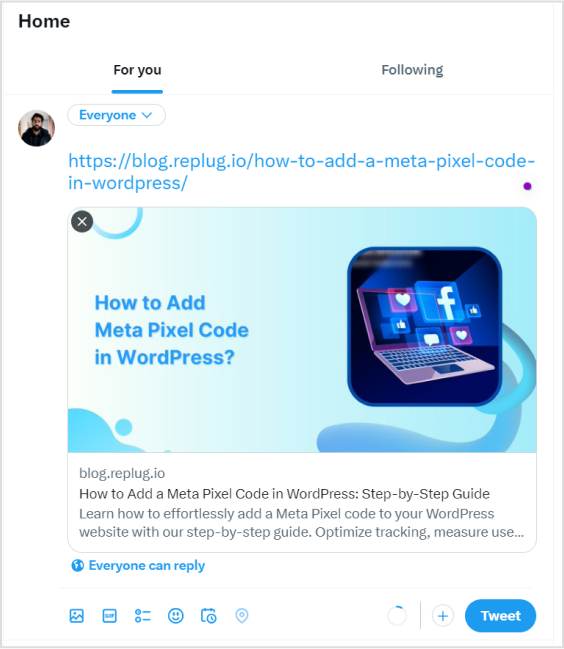
When crafting a tweet on X, the URL you include will be initially visible within the tweet text. However, upon posting the tweet, Twitter automatically generates a preview for certain URLs (not all), transforming the appearance of the tweet.
This preview showcases essential details from the linked page, such as a headline, description, and often an accompanying image.
As a result, the full URL is no longer prominently displayed in the tweet, offering a cleaner and more engaging presentation for users.
Here’s how to tweet a link without URL:
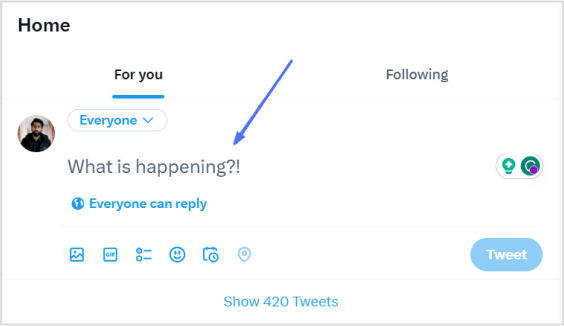
Step 1: Log in to X and paste your link into the compose box at the top of your Home timeline.
Step 2: Twitter will automatically generate a preview of your pasted link. Hit the Tweet button and Twitter will share the link without showing the URL.
That’s it! You’ve your link tweeted without the URL!
Important note:
Not all URLs will trigger a preview; some links, such as specific file types or websites with restricted access, may still display the full URL in the tweet. In addition, you only have 280 characters to use in a tweet. In this situation, you could:
Use a URL shortener service
Describe the link in your tweet.
And guess what? We have a solution for your long X URL problem!
Introducing Replug: Your solution for shortening X URLs
With Replug, you can transform lengthy URLs into concise links for your tweets. Say goodbye to character count woes and hello to engaging, impactful content.
Let’s dive into the simple process of Replug’s URL shortening and bring your X sharing to the next level!
Step 2: Next, you’ll be led to the main dashboard. To shorten your URL, enter the desired URL you want to track in the bar under “Quickly Shorten your link”:
Step 3: After entering your URL and clicking on the blue arrow button, Replug will automatically generate a shortened link that you can copy:
Step 4: You can also customize the URL with the slug of your choice by clicking on the pencil icon:
Step 5: Simply save your URL and you’re done! Share away, whenever, wherever.
Replug Analytics: Measure link success
Are your X links making the impact you desire?
With Replug Analytics, you can dive deep into your link performance and discover the key to boosting engagement, maximizing reach, and achieving your Twitter goals like never before!
Replug’s Analytics feature empowers you to make data-driven decisions and revolutionize your link-sharing strategy.
Yes, you can embed an image in a tweet by directly uploading it to x (formerly Twitter). When composing your tweet, upload the image, and it will be hosted on X’s servers, appearing within the tweet’s content for all users to see.
What are the benefits of using shortened links on Twitter?
Shortened links offer cleaner tweets, free up character space, and encourage more user interactions.
Are there any character limits for links on Twitter?
Yes, the X character limit is 280, and sharing lengthy URLs can consume valuable space. A reliable short URL generator helps keep tweets concise and engaging.
Black Friday is more than just a shopping day. It’s a high-stakes showdown for brands aiming to capture the spotlight and boost sales. Whether you’re a small business or a big retailer, a well-planned Black Friday campaign can maximize your impact and help you reach your goals.
Ready to turn browsers into buyers? With the right marketing ideas, you can stand out from the frenzy, win over new customers, and have your best Black Friday yet.
This blog discusses the 17 creative, tried-and-true strategies to help you cut through the noise, drive serious sales, and make this season unforgettable! Let’s dive in!
What is Black Friday marketing?
Let’s walk you through the inception of Black Friday marketing.
It all began in the U.S. back in the 1950s. It was a beautiful Friday after Thanksgiving, and a shopping storm was brewing in the U.S. As holiday lights started to sparkle, stores across the U.S. opened their doors with irresistible deals, marking the official start of Christmas shopping. Thus, Black Friday was born, a day when retailers rolled out jaw-dropping discounts, and shoppers raced to grab the best bargains before anyone else.
Fast forward to today, and Black Friday has grown into a global shopping sensation. It starts one month before Christmas, after Thanksgiving Day.
For retailers, it’s the perfect chance to boost sales and connect with new customers, while for shoppers, it’s a golden opportunity to score that dream item at an unbeatable price.
Why is it called “Black Friday”?
Black Friday was first used in 1869 when two investors, Jim Fisk and Jay Gould, crashed the market by dropping gold prices. As a result, foreign trade stopped, the stock market dropped by 20%, and farmers witnessed an unfortunate drop in wheat and corn values.
From 1950 to 1960, the term was used again for a day between the Army-navy game and Thanksgiving; the event summoned crowds of tourists and shoppers, requiring an extra few hours of effort by law enforcement to moderate the traffic.
In 1980, the term associated with shopping was used when retailers used the Black Friday term to reflect the backstory of accountants who used red ink for negative earnings and black for positive earnings.
Black Friday became the day when stores turned their profitability.
Since then, the term “Black Friday” has been in use. It has evolved into a season-long event that has spawned more shopping holidays like “Cyber Monday” and “Small Business Saturday”.
Black Friday is one of the most anticipated events for sellers and customers in the e-commerce business.
After the Pandemic, 80% of people switched to online shopping in the U.S. This makes it essential for e-commerce businesses to adopt smart, customer-centered strategies that attract and engage eager buyers.
1. Build your Black Friday email list
About 40% of people open their emails to see about Black Friday offers. This makes building an email list essential for connecting with customers. You can entice them with irresistible sales promotions by landing in their inboxes.
Don’t just focus on existing subscribers; invite new visitors to sign up for your email list by promoting your upcoming sales. Make your sign-up forms easy to fill by asking for their name and email address.
You can also use customer surveys and quizzes to grow your list. Consider offering incentives, like discount points, for those who subscribe and invite friends.
So, to nail your Black Friday marketing campaign, an email list is absolutely crucial. Your customers need to know that you’re offering those limited-time, unmissable deals!
Here is what boss business has to say about email list strategy:
2. Send personalized Black Friday advertising emails
Statistics show that 63% of people open emails specifically to find discounts. For businesses, this makes email marketing a no-brainer for Black Friday.
Here’s how you can build and send personalized Black Friday to promote your big sale in three easy steps:
Step 1: Create curiosity by sending an email one week before Black Friday to your customers and potential leads, informing them about the exciting upcoming event.
Step 2: Send a second email at the start of Black Friday to inform you about all discounts and offers. It will create fear of missing out.
Step 3: Send a third email to remind customers about the end of the sale and create a sense of emergency.
A customized email will make your customers feel important and exclusive. You need to post reminders on all social media channels along with an email campaign.
Here are some examples:
The famous SaaS platform Semrush and how it uses emails to promote its Black Friday sale. The marketing team creatively makes use of a catchy subject line, clickable images that lead to their Black Friday offer, and captivating images to entice its subscribers:
Here’s another example of Headline Studio by CoSchedule, an all-in-one AI Marketing Calendar platform. The highlights of this Black Friday marketing campaign include the use of an emoji in the subject line, a CTA button, and a visual representation of the price slash:
3. Boost Black Friday sales via Social Media
Top examples for Social Media Black Friday marketing campaigns:
Social media is the best platform to inform customers and users about your attractive discount offers and deals by sharing pro ads. According to stats, the most used social media platforms based on active users are Instagram, Facebook, YouTube, WhatsApp, and TikTok. Bulk WhatsApp messaging tools like WANotifier empower businesses to send personalized Black Friday deals and offers directly to customers, ensuring higher engagement and sales.
By providing information about upcoming offers before Black Friday, you can engage and excite your customers to check out all the deals on Black Friday. You should plan your offers and discounts wisely and share ads (paid and organic) to make people curious and excited about these offers.
You can also post stories, reels, posts, and videos or go live to introduce your Black Friday discounts and vouchers. Sponsored posts and stories are also a great source to gain an edge over the competition.
When scheduling your Black Friday content, make sure to use all social media features for maximum conversions wherever possible to maximize engagement and sales. Here are some excellent examples:
TikTok: Amazon gets weird
Amazon, the biggest e-commerce brand, took a weird and unusual take for its TikTok Black Friday marketing campaign:
KFC always has Finger Lickin’ Good deals for Black Friday. If that 50% discount doesn’t excite you, you’re probably missing out on life’s best flavors! Here’s an example of their Black Friday Marketing campaign on Facebook:
Instagram: Pro Direct Soccer drops the price (and the beat)
Pro Direct Soccer got a little swaggy with its huge price drop on Black Friday. Their Instagram reel took us on a jog with some upbeat music, cool visuals, and irresistible prices:
https://www.instagram.com/reel/ClgkHL0DNBL
YouTube: IKEA buys back old furniture on Black Friday
IKEA got us a little emo with its #BuybackFriday on YouTube. They didn’t offer a huge discount or anything; instead, they decided to take back old furniture and give it another life:
4. Roll out a Black Friday SMS marketing campaign
A Black Friday campaign isn’t complete without a solid SMS campaign.
But why SMS? Well, it’s immediate, super accessible, cost-friendly, and gets way more attention than email. When an SMS pops up on a customer’s phone, they’re way more likely to open it—especially during the busy Black Friday rush. Plus, you can send a quick, clear message with a link to all your deals.
Here’s how to make it work:
One week before: Send a sneak peek to get your customers curious about what’s coming. Build that excitement!
Black Friday morning: Hit them with the big news! Tell them that your discounts are live! Make it clear and action-oriented to get them shopping.
Last call: Remind them the sale’s almost over. Create some urgency to get those final clicks.
Another cool part about SMS marketing is that you can easily send loyalty and referral program invites, survey and feedback forms that can help you do better next year, and abandoned cart reminders.
It’s always better to use advanced SMS automation tools for your campaign. Some top SMS marketing software that can come in handy during the Holiday season are Insider, Textla, Birdeye, SlickText, Close, Ez Texting, and Salesmsg.
Here’s an example of how Function of Beauty understood the Black Friday marketing assignment:
If done right, SMS marketing can be a game-changer for your marketing strategy!
5. Upsell and cross-sell with discounts
Upselling and cross-selling are the best strategies to improve your Black Friday marketing.
In this, you can sell multiple products together to increase your earning potential.
An example of upselling could be that instead of selling a burger separately, you can make it a deal at a discount and at a better price by adding fries and drinks to attract customers.
Here’s an example of “Complete The Look” cross-sell offer with discounts by Adidas:
People prefer package deals over individual items. They won’t mind slight price fluctuation on deals – it can drive more sales and increase the number of products sold!
6. Offer multiple gift-giving opportunities
To craft a successful Black Friday marketing campaign, you should have multiple gift-giving opportunities to attract customers.
Give bundle discounts: You can attract more traffic to your stores by giving bundle discounts on your products. People buy more at a discount, which can increase sales in return.
Give your VIPs an exclusive Black Friday discount: To increase your earning potential, VIP customers receive exclusive discounts to appreciate their loyalty.
Focus on gift cards: To increase earning potential, you can distribute gift cards to your customers with attractive and special discounted offers and deals.
Here’s an example of Chuck E. Cheese, a famous restaurant chain in the United States:
Give a free gift with a purchase: To make your Black Friday sale attractive, make deals by announcing a buy-one-get-one offer. For example, if the customer buys a burger, offer a free drink. It will increase customers and urge them to buy more.
Here’s an example of the famous beauty brand Bobbi Brown:
Use coupon codes and vouchers: Boost your Black Friday sales with exclusive coupons and vouchers! Customers love a good deal, and these incentives can drive traffic, increase conversions, and make your offers stand out.
Check out this fantastic Black Friday offer by Kohl’s, where they offer a coupon code upon checkout for an additional discount:
7. Prevent cart abandonment using exit-intent popups
Cart abandonment occurs when an online shopper adds items to their cart but leaves the site without completing the purchase. This happens frequently, with customers leaving their carts full of products before finalizing checkout.
An exit-intent popup is a message that appears when a user is about to leave the site. These popups are highly effective at encouraging users to complete their purchases. Studies show that the average conversion rate for card abandonment popups is 17.12%
Exit-intent popups are especially powerful on Black Friday. They can showcase limited-time discounts and exclusive deals or even offer free shipping, reducing cart abandonment and boosting conversions.
Here’s an example of the exit intent popup of Usermaven, a website and product analytics tool:
Influencer partnerships are crucial for your Black Friday success. In fact, according to Influencer Marketing Hub, 24.2% of respondents intend to spend more than 40% of their marketing budget on influencer marketing.
Influencers help extend your reach to a wider audience, build trust, and create buzz around your deals. Their authentic recommendations can drive traffic, increase conversions, and boost brand visibility during the highly competitive Black Friday period. By collaborating with influencers, you tap into their loyal follower base, which can lead to a significant surge in sales.
Back in the picture again, we have Amazon. They used the famous TikToker Charlie D’Amelio to promote their Black Friday deals. Check it out:
Hashtags are essential for maximizing Black Friday visibility and engagement. They help categorize content, making it easier for shoppers to discover your deals among the flood of holiday offers.
Using popular and relevant hashtags, like #BlackFridayDeals or #HolidaySales, your posts reach a larger audience, attracting potential customers actively searching for discounts. Hashtags boost brand exposure and make it easy to join trending conversations, keeping your brand top-of-mind during the shopping season.
Creating a sense of urgency is key to boosting Black Friday sales.
Countdown timers, deal counters, and “limited time” alerts build anticipation before the sale starts and drive action once it begins. When shoppers see a countdown or “only hours left” message, they’re more motivated to act fast, knowing the deal won’t last forever.
By adding these urgency elements, you can maximize conversions and keep customers engaged right up until the final moments.
Here’s an example of Walmart’s “Limited time only” Black Friday offer:
This is how ContentStudio, a powerful social media management platform, uses a countdown banner on its landing page for its Black Friday software deal:
Retargeting ads are a powerful way to reconnect with customers who have previously visited your website and are especially useful for Black Friday promotions.
Pixel-based retargeting: This allows you to redisplay content to any anonymous site visitor who left without completing a purchase.
List-based retargeting: Here, you can upload a contact list to target individuals whose information you already have in your database. The platform will identify these users and show them relevant ads.
For Black Friday, where competition is fierce, a smart retargeting strategy is crucial to stand out. Using tools like Replug.io, you can add retargeting pixels to optimize reach and bring back potential customers. Replug’s features make it easy to track visitors and keep your brand visible.
Add social proof, like customer reviews, to your retargeting ads to increase trust. You can further shorten links for your Black Friday campaigns to make tracking and retargeting through Replug even more efficient and seamless.
12. Use bio links to direct people to your store
Bio links are clickable URLs added to the profile section of a page on social media channels such as Instagram or TikTok. They can direct customers to a website page or online store.
Before and on the Black Friday sale, you can put these bio links to direct people to your store to increase their promotions and customers. This can also save your customers time and give them a better experience.
13. Use deep links to direct people to the app store
Deep links are URLs that take users directly to an app store or specific app content, streamlining the journey for a faster, more convenient experience.
Drive more clicks, conversions, and app installations by deep linking
to your favorite platforms.
Try deep links for free
For Black Friday promotions, deep links can guide your audience straight to your app store, making the customer journey shorter and smoother while boosting engagement and retention. By bringing customers closer to the ultimate goal—conversion—deep links have increased conversions by up to 66%.
With deep links, customers can seamlessly purchase all their desired products in one app. Here’s an example of Waves Audio’s deep-linking ad for Black Friday:
Branded links are short, custom URLs unique to a brand. They offer a sleek alternative to long, generic links. These personalized links boost brand recognition and awareness, helping to build trust and credibility with your audience.
For example, Coca-Cola often uses branded links in tweets to make its posts instantly recognizable and catch people’s attention. For Black Friday promotions, branded links can enhance trust, attract more customers and increase sales:
Maximize marketing ROI
by transforming ordinary URLs into branded short links that convert.
Try Replug for free
15. Optimize checkout process
Optimizing the checkout process is essential for improving conversion rates.
For Black Friday sales, ensure the checkout process is streamlined to boost positive reviews and customer satisfaction. A well-optimized checkout should display all costs upfront, including shipping, taxes, and product price. This transparency leaves a positive impression on customers and encourages them to complete their purchase.
If the checkout process isn’t optimized, unexpected costs can lead to cart abandonment. Shoppers are eager to buy, but hidden fees often cause them to leave without completing their purchase.
An optimized checkout process enhances your e-commerce site’s user experience, helping maximize Black Friday sales.
For instance, this is what you’ll see upon checkout on Temu:
A/B testing, almost known as split testing, compares two versions of web pages or apps against each other to see which one performs the best.
In your Black Friday sale, you can use an A/B test to see the results of all ongoing marketing strategies.
You can check which strategies are working best and giving results by using advanced link management tools. Running an A/B test can have significant effects on your site or mobile app, such as:
It increases engagement
It reduces the bounce rate
It increases the conversion rate
It minimizes risk
It helps you create content effectively
A complete link management solution
for marketing professionals & agencies.
Try Replug for free
Through this test, you can check the effectiveness of your strategies and can modify your ideas for better results.
A call-to-action (CTA) is crafted to encourage the audience to take a specific action, guiding them through the customer journey. For Black Friday promotions, a well-placed CTA on a button or link can prompt users to check out the latest discounts and offers, helping to increase leads and conversions.
Using a tool like Replug makes it easy to create custom CTAs. Its built-in canvas allows you to design CTAs from scratch, whether a button, link, or form. This tailored approach ensures your Black Friday promotions are engaging and effective.
For this Black Friday, Lululemon, a famous Athletic clothing brand, creatively uses a “SHOP WE MADE TOO MUCH” CTA button. Upon clicking the button, the user is led straight to the Black Friday discount page:
Black Friday is a massive opportunity, but standing out requires more than just slapping a discount on your products. From building excitement early to leveraging data-driven insights and creating a seamless shopping experience, each strategy can help you connect with customers who are ready to buy.
Remember, Black Friday success is all about planning, flexibility, and staying ahead of trends. So, as the big day approaches, put these strategies into action, keep a pulse on customer feedback, and watch as your efforts turn into a holiday season win.
Happy selling!
FAQs about Black Friday marketing ideas
When should I start Black Friday promotions?
You should start your Black Friday promotions in the last week of October or the first week of November, as many people start looking for Black Friday in October. All the strategies for Black Friday should be managed before this day.
What types of promotions work best on Black Friday?
Discounts are popular, but there are many other successful strategies. Consider offering bundle deals, such as “Buy One, Get One” (BOGO), which offers gifts with purchase and limited-time discounts to create urgency. Make sure your promotions align with your brand and appeal to your specific audience.
What is the difference between Black Friday and Cyber Monday?
Both events offer a worldwide shopping experience. Black Friday belongs to the retail shopping arena, while Monday Cyber is designed for online shopping.
Black Friday follows the Friday after Thanksgiving. Monday cyber follows in the trail of Black Friday. It is one of a kind when online shoppers pick their online bargain without going to the retail stores.
How can I stand out from competitors on Black Friday?
Personalize your marketing wherever possible. Use segmented email campaigns, tailor social media ads to different audience groups, and emphasize what makes your brand unique. Excellent customer service and fast, easy checkout options can also set you apart.
How important is email marketing for Black Friday?
Email marketing is a must for Black Friday. With targeted, well-timed emails, you can build excitement, remind people about your sale, and re-engage customers who left items in their carts. Start with teasers, offer sneak peeks, and follow up with last-chance reminders.
How can I prevent my website from crashing due to high traffic?
This can definitely happen if you have a Black Friday sale. To optimize user experience, prepare your website ahead of time. Speak with your hosting provider to ensure it can handle a spike in visitors, and consider enabling a content delivery network (CDN) for faster load times. Reducing large image files and optimizing your website’s backend can also help.
What should I do if my Black Friday campaign doesn’t perform as expected?
It’s okay! If things don’t go as planned, use real-time data to adjust. Maybe you can add a flash sale, extend the promotion, or promote popular products more heavily. After the season, review analytics to learn what worked and what didn’t so you can improve for next year.
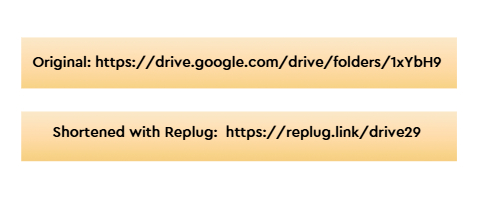


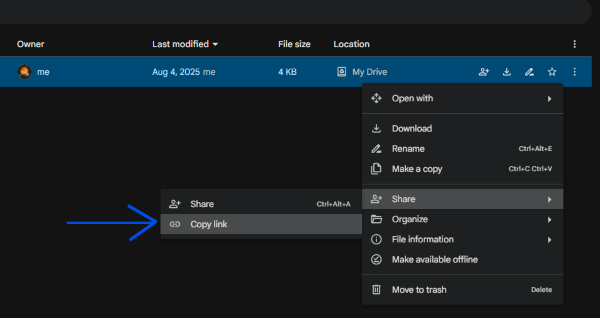
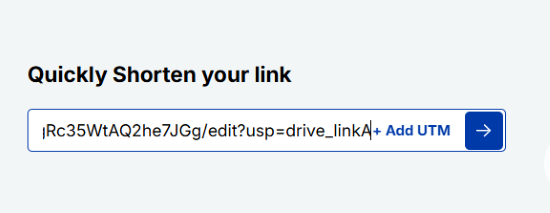
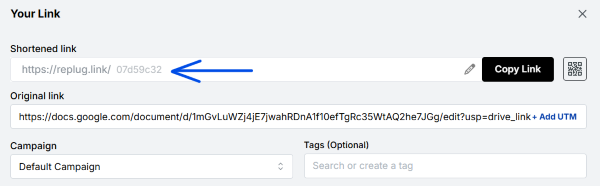
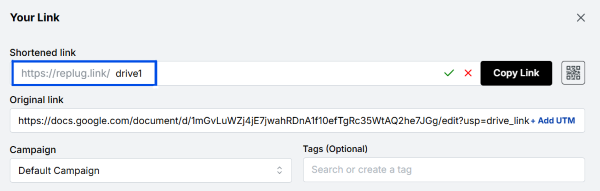
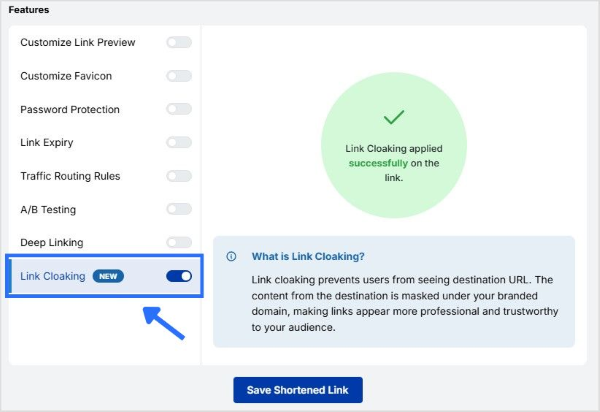

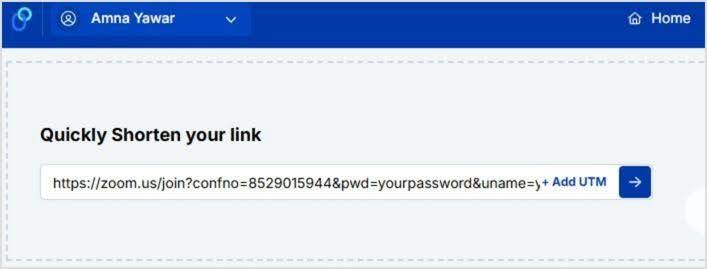
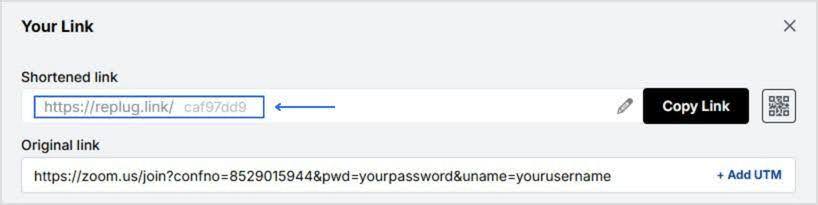
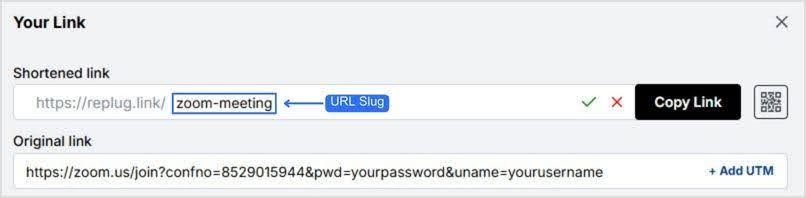
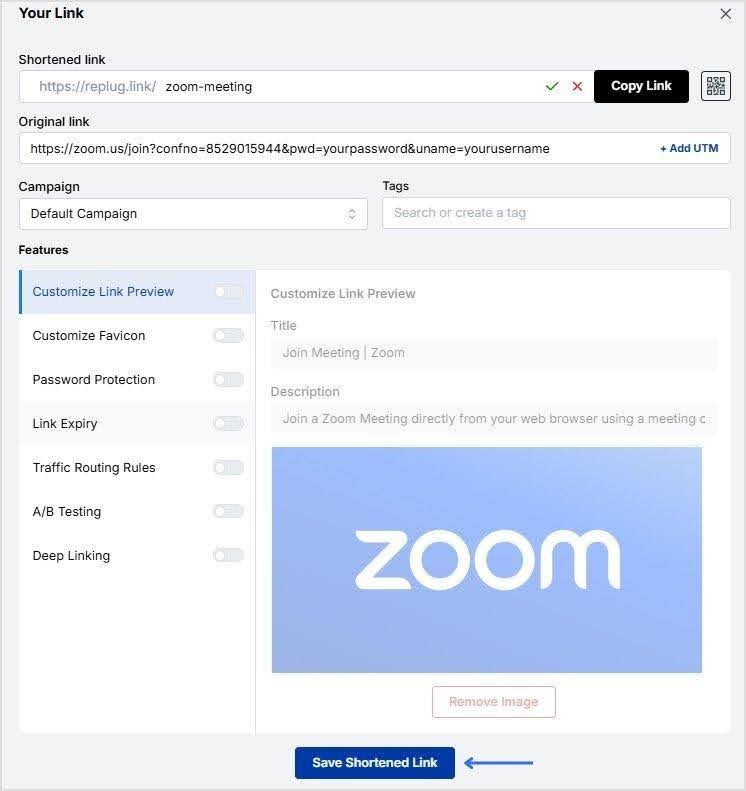
![link analytics dashboard - replug.io]](https://internal-blog.replug.io/wp-content/uploads/2024/12/replug-analytics-dashboard.gif)