Unlock the full potential of your Facebook profile by adding clickable links to your bio. Whether you’re a business promoting your services or an individual sharing your latest projects, strategically placed links can make a significant impact.
This guide will walk you through the quick and easy steps to incorporate links into your Facebook bio. Elevate your online presence and make it easy for visitors to explore what matters most to you.
Let’s dive in and optimize your Facebook profile for maximum impact.
Link in bio on Facebook: What does it mean?
The term “Link-in-bio” on Facebook refers to including clickable links in your Facebook profile, particularly in the “About” section.
This concept originated on Instagram, where users are limited to featuring only one link in their bio. To overcome this limitation, creative users developed link-in-bio landing pages that house a collection of links under a single URL.
While Facebook doesn’t have a restriction on the number of website addresses you can include in your bio, some users still choose to adopt the link-in-bio strategy. This approach offers a cleaner and more organized way to direct visitors to various pages on their website.
Some key takeaways:
The key takeaways and recommendations include:
Include multiple links: Businesses are encouraged to include multiple links in their Facebook bio to guide visitors to specific information and convert them into regular website visitors or customers.
Keep links up to date: Regularly update your links and ensure they support a clear call to action that aligns with your Facebook posts.
No limit on links: Unlike Instagram, Facebook doesn’t limit the number of websites you can add to your bio.
Short, branded, and UTM-tracking:For better analytics, optimize your links by making them short, branded, and including UTM-tracking information.
Reputable link management platform: Utilize a reputable link management tool to track traffic from your social media bios and campaigns effectively.
Go beyond generic link pages!
Create custom bio links that truly fit your brand
With Replug, you can create bio links that are unique, engaging, and built to convert.
Adding links to your Facebook profile is a simple yet powerful way to enhance your online presence. Whether you’re using the Facebook app on your mobile device or the desktop version, here’s a step-by-step guide:
On Mobile:
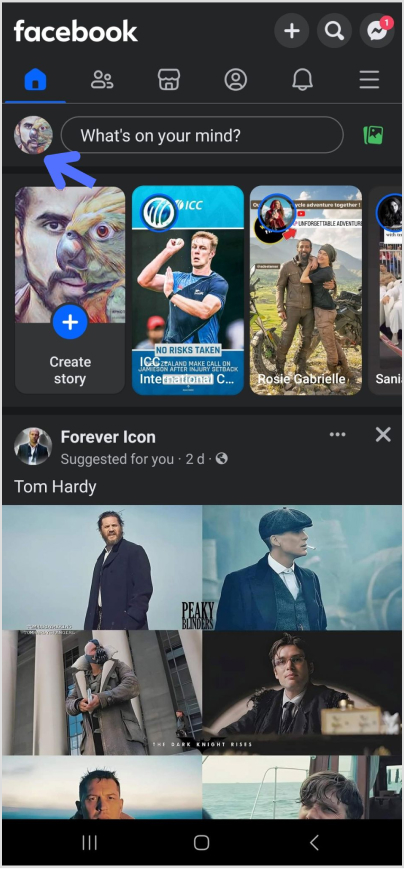
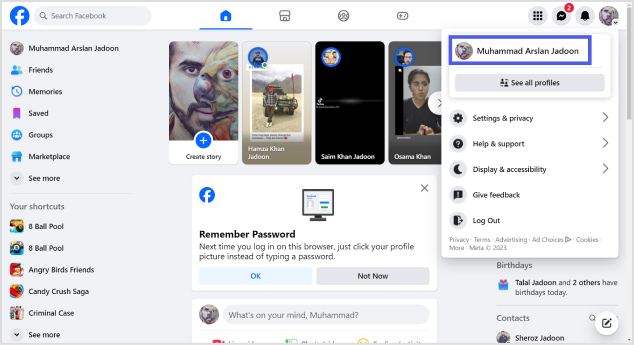
Step 01: Open the Facebook app and tap on your profile picture in the upper left corner.
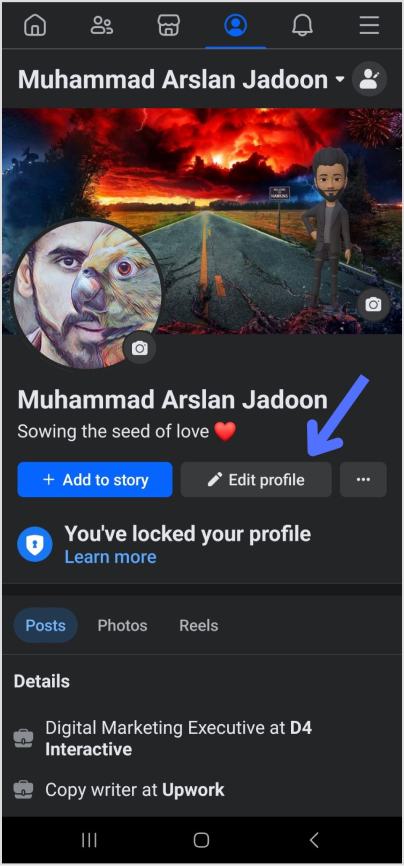
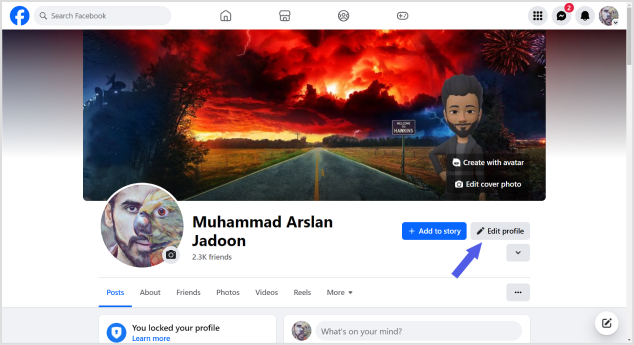
Step 02: Navigate to your profile page and tap “Edit profile.”
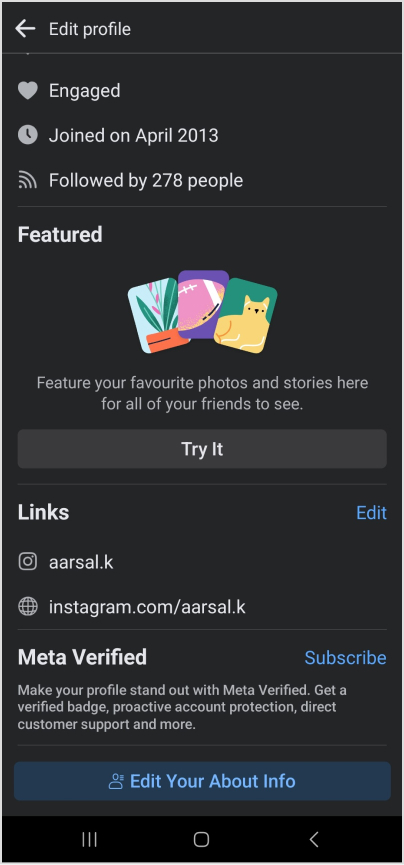
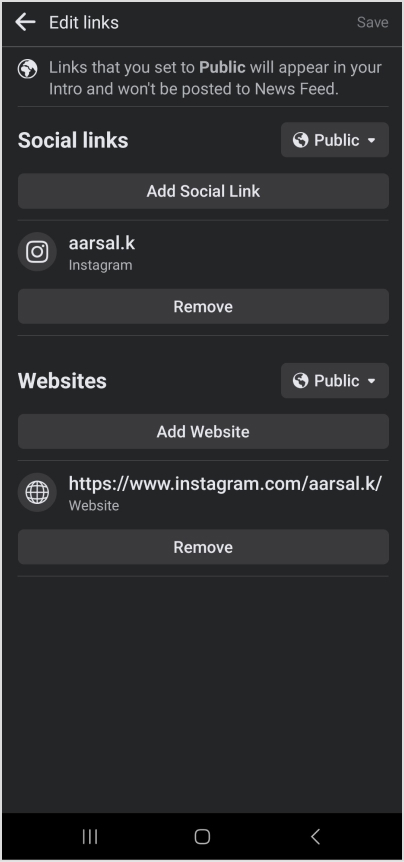
Step 03: Scroll down to the bottom of the page and tap “Edit” next to “Links.”
Step 04: To add social media handles, tap “Add Social Link,” choose a platform, and enter your username.
Step 05: For other website links, select “Websites,” enter the URLs, and tap “Save” when finished.
Go beyond generic link pages!
Create custom bio links that truly fit your brand
With Replug, you can create bio links that are unique, engaging, and built to convert.
Step 01: Log in to Facebook and click your profile image in the top left corner.
Step 02: Select “Edit profile” below your profile image.
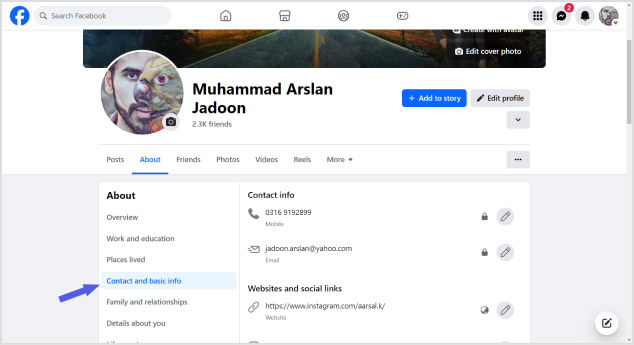
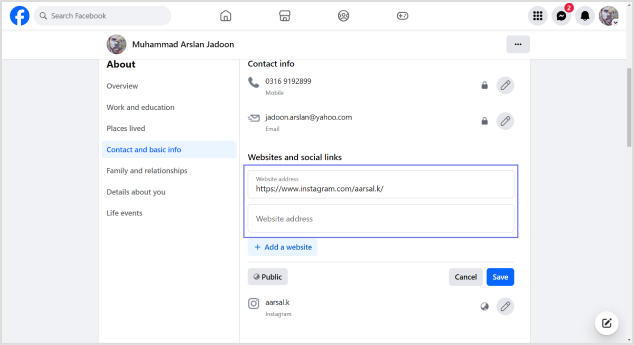
Step 03: Scroll down to “Edit your About info” and choose “Contact and basic info.”
Step 04: Navigate to the “Websites and social links” section and click the pencil icon to edit.
Step 05: Select “Add a website,” enter the URL, and repeat for additional sites. Click “Save” when done.
To add social media links, click the edit icon, choose “Add a social link,” and select your platform.
Enter your username (Facebook will generate a clickable link), and click “Save.”
These simple steps empower you to customize your profile, making it easy for visitors to explore your online presence effortlessly. Whether you’re on the go or at your desktop, optimizing your Facebook profile with links is a quick and effective way to showcase your interests and connect with others.
Go beyond generic link pages!
Create custom bio links that truly fit your brand
With Replug, you can create bio links that are unique, engaging, and built to convert.
10 Best practices for boosting traffic to your Facebook profile
Optimizing your Facebook business profile is essential for driving traffic and engaging your audience effectively. Here are expert-backed best practices to ensure your profile stands out and serves its purpose:
1.Keep your profile up-to-date
Regularly update your Facebook profile as part of a social media audit, ideally every six months or more frequently if you offer specials and promotions.
2. Use links to support a call to action
Provide all necessary links to fulfill a call to action directly on Facebook, eliminating the need for users to leave the platform.
3. Use short, branded links
Opt for shortened, branded URLs to convey professionalism and enhance brand identity, ensuring a memorable and credible online presence.
You can easily create such branded links using this URL shortener online, designed to help you boost trust, track performance, and strengthen your digital branding.
4. Utilize every aspect of your About page
Populate as many fields on the About page as possible, including contact information, links to social profiles, company privacy policy, services/products, and reviews.
5. Craft an informative intro section
Use the Intro section to concisely communicate whom you serve, the results you help them achieve, and what you assist them in avoiding.
6. Use emojis and graphics thoughtfully
Maintain engagement with visually appealing content while ensuring it aligns with your brand tone and doesn’t feel overly corporate.
7. Share achievements and unique value proposition
Showcase unique offers, stories, and achievements that provide a deeper understanding of your company beyond what’s available on the website
8. Track your metrics
Regularly monitor follower stats and engagement activities to ensure your audience aligns with your target demographic and your content resonates.
9. Condense Facebook URL parameters with link management
Use a link management platform to create short branded links that still track key analytics, enhancing the professionalism of your shared URLs.
10. Create curated lists of links using a link-in-bio tool
Consider using a link-in-bio microsite for a clean and professional presentation of multiple links, allowing visitors to explore your top content easily.
By incorporating these best practices, your Facebook business profile can become a powerful tool for attracting and engaging your audience while maintaining a professional and cohesive online presence.
Optimizing your Facebook profile with Replug link-in-bio:
In a world dominated by social media, where nearly three billion users scroll through Facebook, standing out and capturing a customer’s attention is essential.
Try Replug’s bio-links, i.e., a powerful feature put forward by this amazing platform to transform your Facebook profile into a dynamic hub for your brand. This customizable microsite allows you to strategically guide visitors to the content that matters most, all while seamlessly integrating branded and shortened URLs.
Learn how Replug streamlines your analytics, providing a comprehensive view of link performance across social media channels. Elevate your brand’s presence on the world’s most popular social platform and discover why countless brands choose Replug to make their mark.
Go beyond generic link pages!
Create custom bio links that truly fit your brand
With Replug, you can create bio links that are unique, engaging, and built to convert.
Is there a limit to the number of websites I can add to my Facebook page?
While there isn’t a strict limit, avoiding adding too many links is recommended for a cleaner and more professional appearance.
How do I edit or remove a link from my Facebook page?
Locate the pencil icon next to the “website and social links” section. Click on the pencil icon to edit, update, or remove a link. Click “Save” to apply the changes.
Can I add a link-in-bio to my Facebook page?
While link-in-bio features are more common on platforms like Instagram, you can create a curated list of links using a link management platform and share it on your Facebook page.
Can I track the performance of the links on my Facebook page?
Yes, consider using Replug’s platform to track analytics and performance metrics for all your links in a single dashboard view.
There are plenty of reasons you might want to unlink your Facebook and Instagram accounts. Maybe you want to keep your personal information more secure by limiting data sharing, or perhaps you prefer managing your accounts separately to create tailored content for each platform.
If you’re thinking about making the switch, this guide will walk you through the easy steps to disconnect your accounts! Alongside some other ultimate hacks to 3x your social media success.
So let’s get going.
Step-by-step guide to unlink accounts
Now, remember that there are two ways to do this: one is through Instagram, and one is through Facebook. For your convenience, we’ll list both.
On Instagram:
Step no 01: Open the Instagram app and head to your profile (just tap your picture in the bottom right).
Step no 02: Go to settings: Tap the three lines at the top right, then select Settings.
Step no 03: Find the account center at the bottom and tap it.
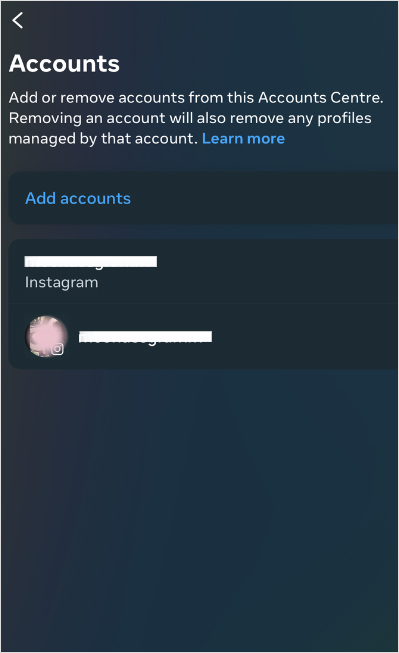
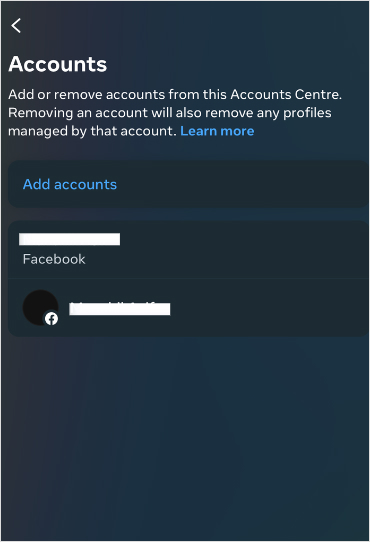
Step no 04: See linked accounts: Tap Accounts, and you’ll see your Facebook account there.
Step no 05: Unlink it: Tap on your Facebook account, choose Remove from Account Center, and confirm it. You’re done!
On Facebook:
Step no 01: Open the Facebook app and tap the three lines at the top right.
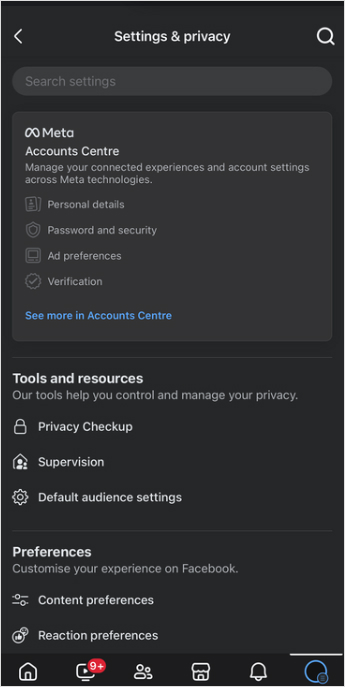
Step no 02: Go to settings: Scroll down to settings & privacy, then tap ‘Settings’.
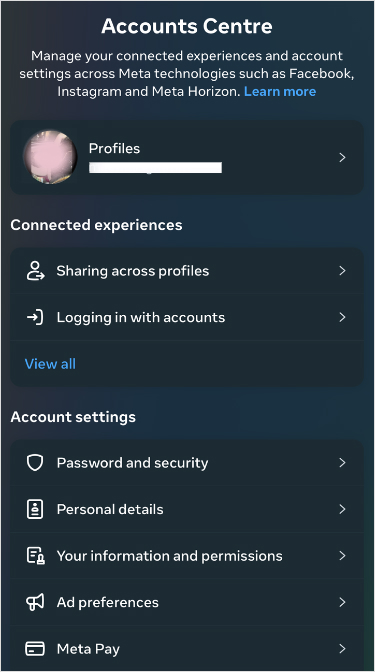
Step no 03:Open account center: Find Meta Account Center and tap it.
Step no 04:Unlink your Instagram: Tap Accounts, select your Instagram, and hit Remove from Account Center.
And that’s it! Your accounts will no longer be connected. Easy, right?
Once you’ve unlinked your accounts, consider implementing these strategies and tools to enhance your social media marketing:
1. Use bio-links to direct your audience
Why it matters: Platforms like Instagram limit you to just one clickable link in your bio, which makes bio-links crucial. This is your chance to direct followers to various resources and maximize the potential of that single link.
How to use: Use tools like Replug to create a single link that houses several destination links (e.g., blog posts, promotions, or products).
2. Branding matters: crafting custom URLs that convert
Why it matters: Custom URLs do wonders for your brand image. They not only improve recognition but also build trust with your audience, making them more likely to click through to your content.
How to use: Use an efficient URL shortener that allow for customization. Instead of a generic link, generate a branded shortened link. Try something more personalized, like yourbrand.com/promotion. It’s more memorable and adds a professional touch to your posts.
3. Re-engage your audience through smart link retargeting
Why it matters:Retargeting is a powerful way to reconnect with users who showed interest but didn’t take action. It’s about keeping your brand in front of them and encouraging them to engage.
How to use: Replug is a top-notch link optimization platform that lets you add retargeting pixels to your links hassle-free. Anyone who clicks on your links can be targeted with ads later, reminding them of what you offer. It’s a smart way to nurture leads and guide them toward making a purchase.
4. Track your links to see what works
Why it matters: To fine-tune your marketing strategies, you need to understand how users interact with your links. Link tracking gives you insight into clicks and conversions, helping you figure out what resonates with your audience.
How to use: Advanced tracking tools can help you track link performance. By analyzing this data, you can adapt your content strategy, optimize your posts, and ultimately drive more traffic where it matters most.
To manage all your social accounts effortlessly, Try using ContentStudio– An advance social media solution that allows you to schedule, automate, and distribute social media content efficiently to dominate the market.
Some of its key features include: 1. Unified social media management 2. Automated social media scheduling 3. Content discovery and curation 4. Engagement tracking and management
All in all, ContentStudio offers flexible pricing plans tailored to different needs, starting with affordable options for individuals and small businesses. Advanced plans are available for larger teams and enterprises, as well as feature-enhanced features and collaboration tools.
Conclusion
Unlinking your Facebook and Instagram accounts is a straightforward process that empowers you to manage your social media presence more effectively. You can enhance your social media strategy and drive better engagement by employing tools for link tracking, branded URLs, and efficient content management.
FAQs on unlink Facebook and Instagram
How do I unlink my Facebook and Instagram accounts?
To unlink your accounts, open the Instagram app, go to your profile, navigate to “Settings,” then “Account Center,” and finally select Facebook to remove it.
Why should I unlink my Facebook and Instagram accounts?
Unlinking can enhance your privacy, reduce data sharing, and allow you to manage your content more effectively on each platform.
Will unlinking my accounts delete any of my posts?
No, unlinking your accounts does not delete your posts on either platform. They remain intact and accessible.
Can I link my accounts again after unlinking?
Yes, you can link your Facebook and Instagram accounts again at any time through the Account Center in Instagram settings.
What are some tips for managing social media effectively after unlinking?
Consider using link management tools, creating branded URLs, implementing link tracking, and utilizing retargeting strategies to improve your social media presence.
“These links look absolutely horrible in my bio, but well, it’s not like I have a choice.”
Wait, hold that thought. What if we told you that there is an option to make your bio not look like a hacker wrote it – you know, with secret codes and suspicious data-stealing links?
We’re talking bio links here. Also known as “link in bio“, bio links let you combine multiple links into one neat, clickable link for your social bio. But to really make them work, you need to follow the best bio link practices—keeping things organized, user-friendly, and designed to boost engagement with just a single, clean link.
And that’s just the beginning.
This blog has everything you need to know about the best bio link practices. From what a bio link strategy is to the top bio link tools; this one’s for the bookmarks.
The click-worthy bio link strategy
Initially, the bio link trend started with Instagram, but today, these links can be added across all social media platforms.
Given that social media platforms typically limit users to just one external link, the bio link strategy allows individuals and brands to maximize that single link’s potential. Through this one link, you can send your fan following to a custom landing page (also known as a microsite, bio site, bio link page, and mini website), containing multiple clickable links to promote all the content goodies on your personal list. Now that’s a smart way to maximize your reach!
Go beyond generic link pages!
Create custom bio links that truly fit your brand
With Replug, you can create bio links that are unique, engaging, and built to convert.
Alright, now that that’s clear. How and when did bio links become the talk of the social media town? Here’s a short story of how it all began:
“Once upon a time, social media users were stuck with a single clickable link in their bios. Talk about frustrating! As if that wasn’t enough, those links were often long and looked like a random string of characters.
Enter the heroes of our story: link-shortening tools! Now, users can whip up short, eye-catching links—woohoo!
But wait, there was a catch… those short links still only led to one website. Major bummer, right? Well, guess what? Things took a wild and creative turn.
You can now add up to five links in your bio! But even then, five links can feel like a crowded party in a tiny room—boohoo.
Then came the “aha” moment! After countless experiments and a sprinkle of creativity, bio links were born!
Users can now easily include multiple links to everything they love—all with one sleek and tidy link!
End of story… kind of.“
Since technology keeps evolving so we can’t guarantee you that the story of bio links ends here. However, one thing’s for sure: These innocent-looking bio links are more than what meets the eye. They have the potential to connect your audience to a vast world of content, products, and interactions. What once seemed like a simple addition has now evolved into a powerful marketing tool.
It simplifies navigation: Instead of scattering links across posts, users have one clean link that directs followers to a central hub.
It drives traffic: A well-optimized bio link can drive more traffic to websites, product pages, and other key content.
It boosts engagement: it makes it easy for followers to access multiple resources, leading to higher engagement and click-through rates.
It is customizable: Many bio link tools have a personal branding feature that aligns your branding with the user’s identity or business.
Remember: Using best bio-link practices is essential to maximizing your link’s potential. For example, keeping your link page uncluttered and easy to navigate can significantly enhance user experience and engagement. It would be even simpler if you just used a link-in-bio tool to create a bio page that looks aesthetically pleasing and still remains functional.
Why do you even need a bio link?
That’s a good question, actually. Why do you even need a bio link?
It might seem like a hassle to hunt down the best bio link tools, compare their pricing, check which one is value for money, and add it to your cart… just for a link that’s hardly, what? 20 characters?
But as the saying goes: don’t judge a book by its cover.
In a world where every click counts, having a bio link is not just a nice-to-have; it’s a strategic necessity that can enhance your overall digital presence. So, to give your marketing efforts an extra boost, it’s essential to follow the core best bio link practices.
Imagine you wrote a food blog but had no idea how many people were clicking through. Or suppose you launched an email marketing campaign for a holiday discount on your entire menu but couldn’t track how many subscribers took advantage of the offer. Frustrating, right? Especially after all the time and money you poured into crafting that delectable content!
But not anymore. With a well-structured bio link, you can smoothly connect your audience to multiple resources; from blog posts and product pages to social media profiles and promotional content. Not only does this streamline your marketing efforts, but it also helps you measure the flavor of engagement, tweak your strategy to taste, and serve up results that drive conversions.
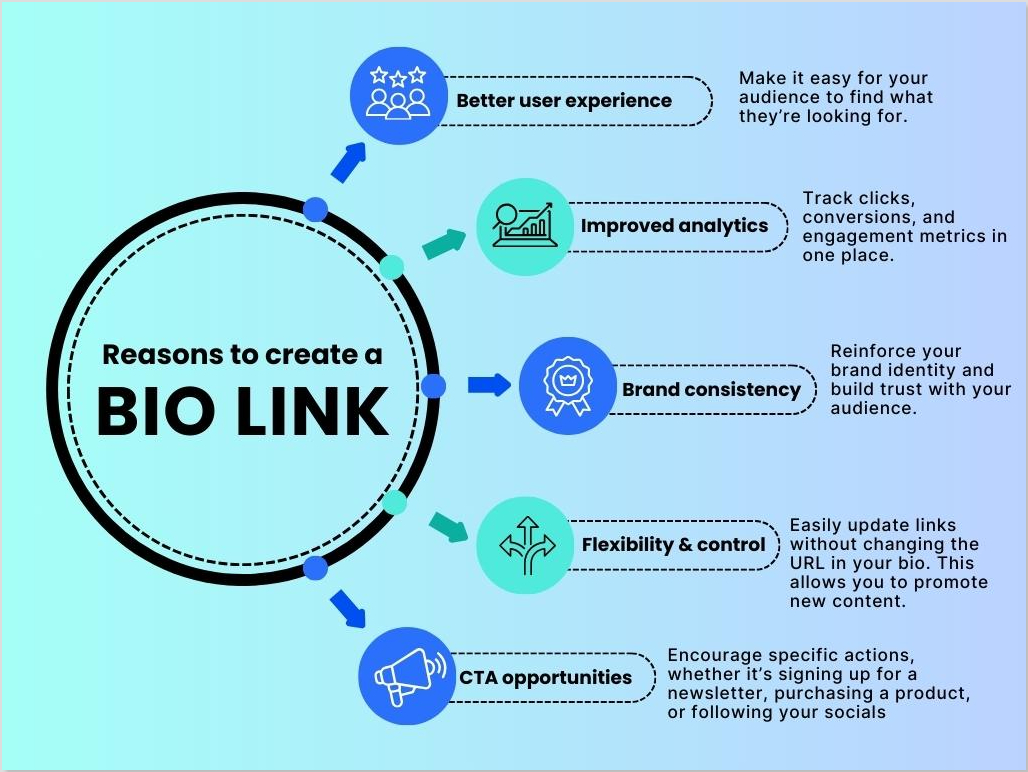
5 Reasons for using a bio link
Let’s look at some of the piping-hot reasons why you should consider creating a link in your bio to promote your online presence:
Better user experience: With a single link directing users to a hub of content, you make it easy for your audience to find what they’re looking for, improving their overall experience.
Improved analytics:Track clicks, conversions, and engagement metrics in one place to understand which links resonate most with your audience to refine your strategies.
Brand consistency: Use branded links generated by a free link shortener to reinforce your identity and build trust with your audience. A clean, professional link showcases your brand’s quality.
Flexibility and control: You can easily update links without changing the URL in your bio. This flexibility allows you to promote new content or campaigns on the fly.
Call to action opportunities: Use your bio link as a strategic tool to encourage specific actions, whether it’s signing up for a newsletter, purchasing a product, or following your social media accounts.
Creating a bio link isn’t exactly rocket science, but there’s a delicate balance between crafting a link that’s irresistibly clickable and one that makes users cringe.
Sure, having a solid link management tool is fantastic for handling the nitty-gritty, but to truly make your bio link shine, you need to whip up a recipe with a pinch of creativity, a handful of research, and a cup of common sense.
So, let’s head to the kitchen and spice up your bio links with some essential best bio link practices.
Tip 1: Don’t get too creative
Like we said: Pinch of creativity.
Crafting your bio link is like preparing the perfect base for a culinary masterpiece. Just as a chef knows that too many ingredients can ruin a dish, a cluttered bio link can confuse your audience.
One of the best bio link practices is to keep it as simple as possible. Think of it as a well-crafted dish—no frills, no fuss, just a smooth, enjoyable experience for your audience. When people see a straightforward link, they’re more likely to take that first bite.After all,simplicity is your secret ingredient!
Tip 2: Choose quality ingredients
Now that we’ve trimmed the excess, let’s select our finest ingredients! Your bio link page should be as eye-catching as a rainbow cake. Go for vibrant, high-contrast colours that pop and fonts that resonate with your brand’s personality. Add in some snazzy buttons with shadows and use striking visuals.
When your design shines, it creates excitement and sets the stage for what’s to come. Your audience should feel a sense of delight when they see your link. Remember, first impressions matter!
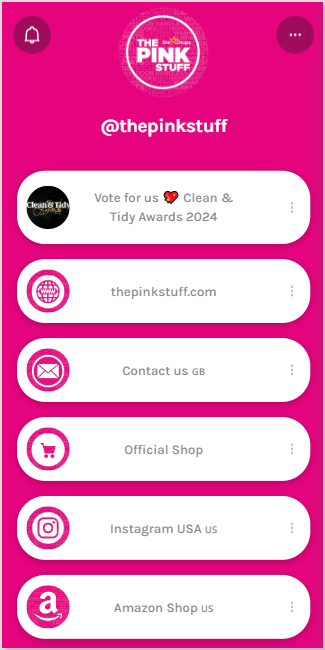
Here is a simple yet effective example: “The Pink Stuff” bio link page. Although not too fancy, the bright pink colour catches the eye and screams “The Pink Stuff”!
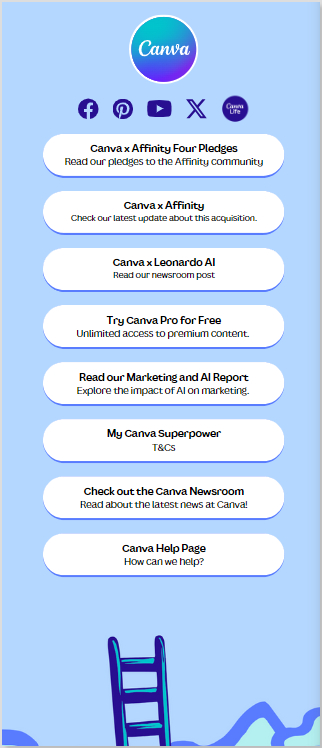
Another example is the infamous, everyone’s go-to editing tool, Canva. They are using their signature brand colours and shadows with the buttons to make their microsite pop:
Pro tip: When you think of following the best bio link practices consider colour psychology when choosing your palette. For example, red might evoke excitement, while yellow is associated with happiness. Pick colours that align with your brand message!
Tip 3: Experiment with flavours
Now, who doesn’t love a little culinary adventure? Just like some people crave a spicy Thai curry while others prefer a comforting bowl of tomato soup; your audience has diverse tastes. The same goes for bio links!
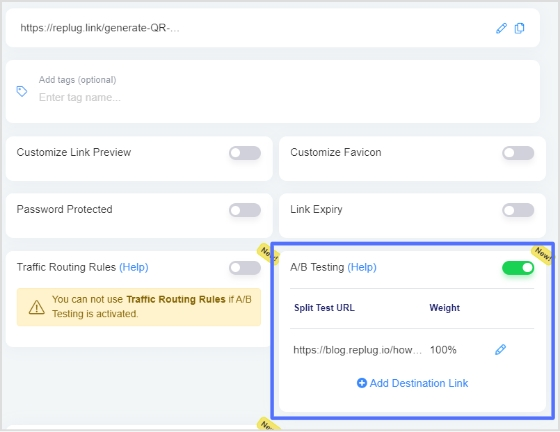
To solve this problem, you need to do some comparative analysis—or in marketing terms, we call we call it A/B testing. This is one of the most powerful and best bio link practices. Through A/B testing, with link management tools, you can discover which URL resonates best with your followers.
Pro tip: Try testing different URL slugs, like /best-recipe, /best-selling-dish, /chef-special, orCTAs like “Check it out!” versus “Don’t miss this!” to see which one gets more clicks. Small changes can lead to big results!
Tip 4: Keep it fresh and seasonal
Just as a seasonal menu entices diners to return for new flavours, your bio links need regular updates to stay relevant and exciting. No one wants to eat a dish that’s been on the menu for ages.
A lively café that introduces new specials each month creates buzz and anticipation. You want your bio links to have that same energy, keeping your audience curious about what’s next. New promotions, seasonal offerings, or trending topics are all great ways to keep your links lively and your audience engaged. It’s all about freshness!
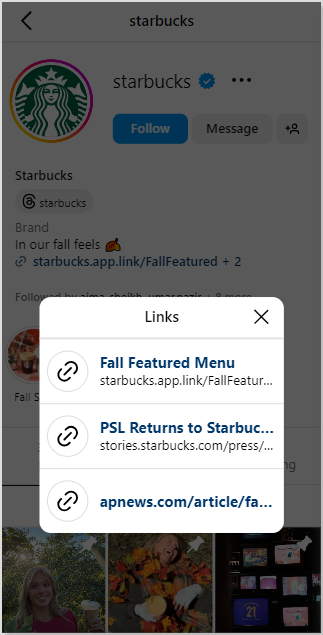
Here’s a perfect example of how Starbucks is brewing up some fall magic, making use of the best bio link practices to keep its audience in the loop with all the latest seasonal treats and cosy offerings:
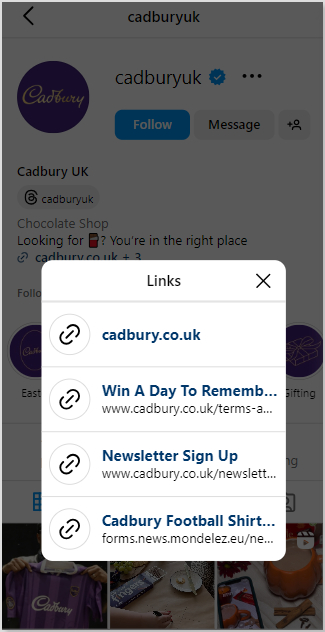
Cadbury also keeps its fans updated on the latest news and offerings through bio links. In the example below, Cadbury added a link for its ‘Win A Day To Remember’ campaign, celebrating its 200th anniversary with the biggest prize and reward giveaway yet.
Pro tip: Set a calendar reminder to update your bio links monthly. Also, Replug allows you to set an expiration time for limited-period offers without hassle. This ensures your content stays relevant and aligns with your current marketing goals.
Tip 5: Measure your success
Evaluating how your bio link performs is a crucial step in following the best bio link practices.
After you’ve crafted the perfect bio link, it’s time to evaluate how well it’s being received. Picture your link as a dish just served—what are the diners saying? Are they raving about it? Did they recommend it to their friends or come back for seconds?
Your link’s performance is about more than just looks; it’s about getting results! Is it driving subscriptions? Are people clicking it multiple times? Did that irresistible 50% off sale entice them? If your audience loves it, keep serving it up! If not, don’t be afraid to pivot and try something new.
Pro tip: Dive deep into your analytics with tools like Replug. Measure conversions, track engagement, and gather rich insights. This detailed analysis reveals whether your bio link is a hit or if it needs a little extra seasoning!
Presentation is everything! Your bio link should not only be functional but should also look as appetizing as a perfectly plated dish. From the layout to the design, every element should work together to create a user experience that draws people in. But here’s the catch—don’t settle for the same recipe every time. Keep experimenting with new designs for your microsite, keep your content fresh, and try creative approaches to avoid falling into a boring routine.
Remember: the key is to strike a balance between consistency and innovation so that your audience stays hungry for more!
Pro tip: Incorporate visual elements like icons or images on your mini website. This not only enhances the aesthetic but also makes navigation easier for your audience.
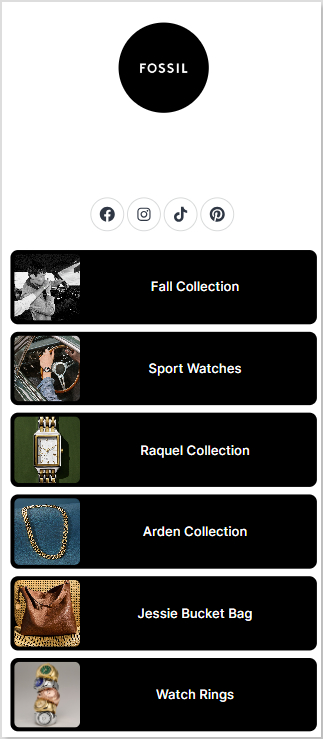
Here’s an example of Fossil’s landing page for inspiration. The incorporation of pictures on their mini website is a great depiction of how icons and images can make a huge difference in user experience:
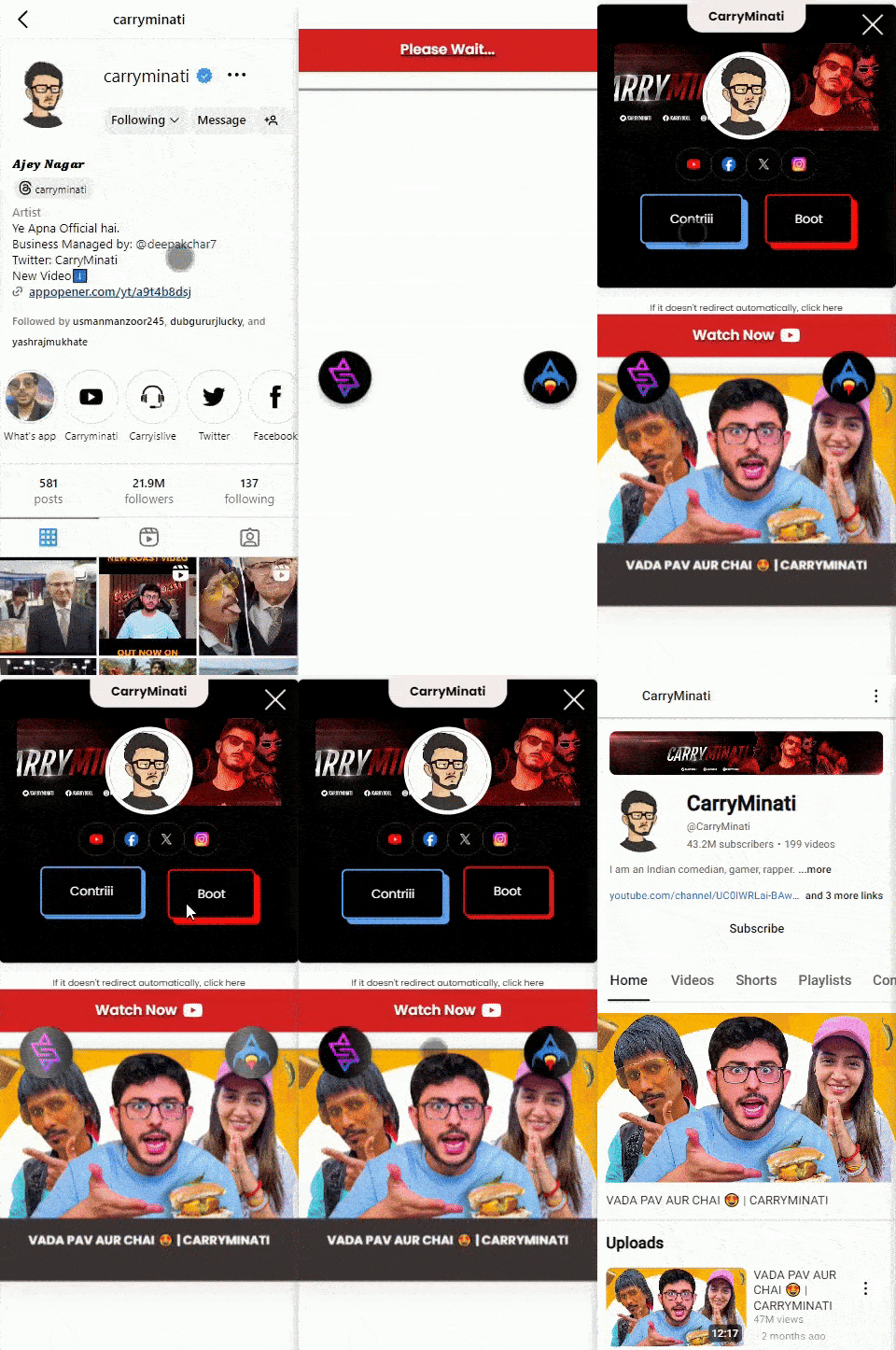
Here’s another stellar and creative example of the famous YouTuber and influencer Ajey Nagar. His landing page is super interactive, unique, and easy to navigate:
If this doesn’t tempt you to create your own microsite, you might be missing out on the easiest way to boost your online presence and drive more traffic from bio links!
Your bio link isn’t just a string of URLs—it’s your chance to present your audience with a full menu of your specialties.
Give your bio links that extra “oof” by including add-ons like exclusive sales, tip jars, or exciting giveaways like product launches or holiday promotions. Create a personal menu that lists your services, and include an FAQ form to help visitors find answers quickly. And don’t forget to link to your portfolio, letting your work speak for itself.
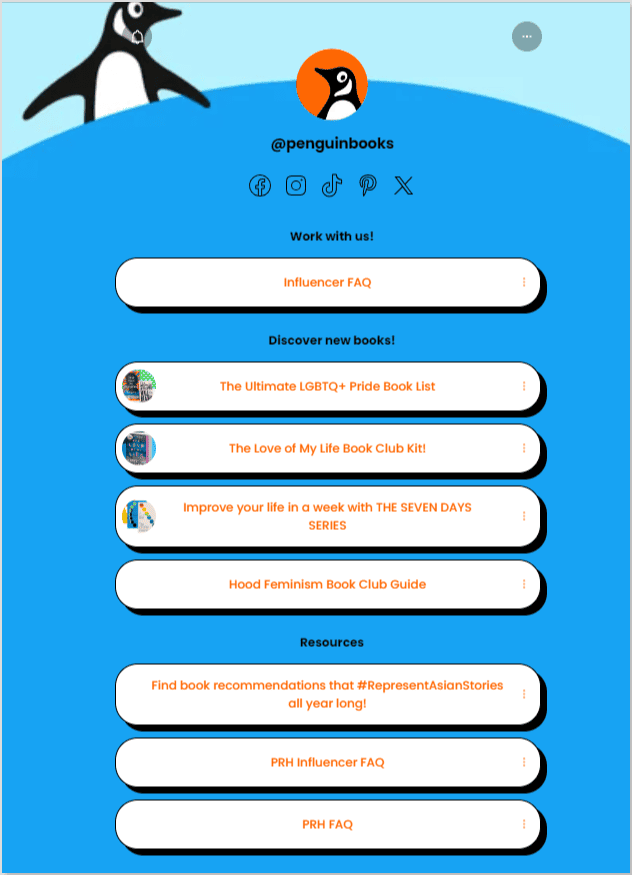
Penguin Books by Penguin Random House, the most renowned book publishing company in the world, uses multiple CTAs on its bio link page, including an FAQ section! Have a look:
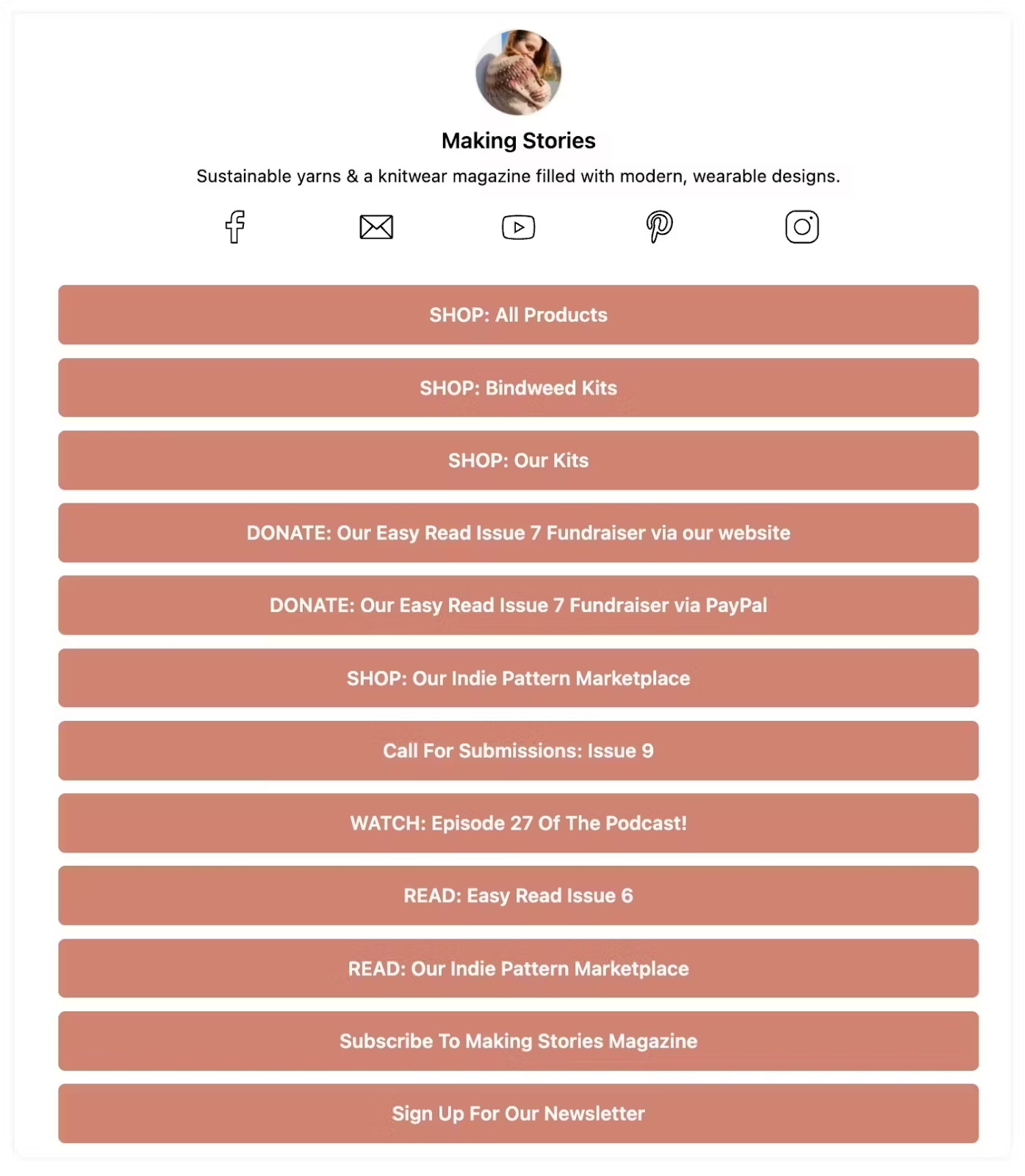
Here’s an example of Making Stories past link page showcasing their tip jar:
Also, if you’re an influencer and creator, this is your moment to savour the best bio link practices! You can share exclusive promotions and affiliate codes that entice your audience. These small yet mouthwatering additions enrich the experience for your visitors, encouraging them to engage and explore.
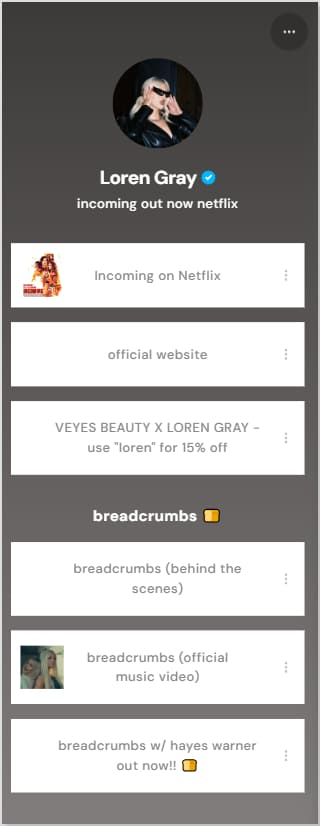
Here’s how the popular influencer Loren Gray is implementing the best bio link practices in her promotional efforts. She is using a coupon code CTA button on her bio link landing page to offer 15% off on her VEYES BEAUTY X LOREN GRAY collection:
Pro tip: Consider adding a “Featured” section in your bio link to highlight your most popular services or content. This can draw attention and encourage visitors to explore what you have to offer!
Now that we’ve talked about the best bio link practices for cooking up an Oscar-worthy bio link recipe, it’s crucial to identify the blunders you must avoid if you want your fans to click that “vote” button. After all, you can’t serve the perfect curry if you mistakenly add sugar instead of salt.
Through plenty of trial and error, countless experiments that missed the mark, and reviewing bio links that definitely don’t deserve a standing ovation, we’ve narrowed down some of the common mistakes you need to avoid when crafting the perfect bio link:
Mistake 1: Link stuffing
Link stuffing is equivalent to overloading your bio link with too many options.
Think of it like this. You have a steak dish on the menu and it says “marinated in a secret blend of 25 spices, served with a side of 12 sauces, topped with 10 different garnishes, and paired with an assortment of 8 sides”. Sounds overwhelming, right?
The same logic applies to bio links. When your audience sees a cluttered array of links, they might feel overwhelmed and skip the link-click. keep it simple and only add the links to your best content.
Mistake 2: Neglecting to update broken links
Neglecting to update broken links is like serving a delicious dish that’s gone stale.
Imagine a diner excitedly ordering a special only to find it’s no longer available. Disappointment sets in, and they might not return. Similarly, if your bio link leads to a broken or outdated page, like a 15% discount on your entire menu that’s no longer valid, your audience may feel frustrated and lose trust in your brand.
To follow the best bio link practices, regularly check your links to ensure they lead to active, relevant content. This way, your audience will have a delightful experience every time they visit!
Mistake 3: Using non-branded or generic URLs
Using non-branded or generic URLs is the same as serving a chef’s special dish on a disposable plate. This is an unspoken sin when it comes to implementing the best bio link practices.
While the food might be fantastic, your unique touch matters! When your audience sees a long, generic URL filled with random characters, it can feel impersonal and unprofessional. It’s like saying, “This is just any dish; nothing special here!”
Instead, opt for branded URLs that reflect your identity. For instance, you can use custom URL shorteners that offer advanced customization options.
Mistake 4: Linking to spammy websites
Linking to spammy websites is like serving food from a sketchy roadside stand.
You wouldn’t want to serve a dish made with subpar or contaminated ingredients, right? Similarly, linking to untrustworthy or spammy websites can harm your reputation and make your audience wary of clicking.
To keep your audience safe, always vet the websites to avoid URL phishing to make sure that they are credible and aligned with your brand values. This builds trust and encourages more clicks!
Mistake 5: Adding excessive affiliate links
Adding too many affiliate links is like piling on too many toppings on a pizza.
While a few extra toppings can enhance the flavour, too many can overwhelm the palate. If your bio link is packed with affiliate links, it may feel more like a sales pitch than a genuine resource, turning off your audience.
So, sprinkle in a few well-placed affiliate links while prioritizing valuable content. This balance keeps your audience engaged and more likely to click, ensuring that you’re on track with implementing the best bio link practices.
Mistake 6: Including private/personal information
Revealing private or personal information is like sharing your handwritten recipe with a crowd of strangers and can hinder you from putting the best bio link practices into action.
While transparency can build trust, oversharing can lead to discomfort or vulnerability. Your audience doesn’t need to know every detail about you; they’re interested in what you can offer them.
So, keep personal information to a minimum. Focus on sharing content that resonates with your audience while maintaining a professional boundary.
Top 3 bio link tools
Here are our top picks for the 3 best bio link tools that will turn your bio link strategy from “nay” to “yay”:
• Add bio links with retargeting pixels • Add social media profiles & catchy call-to-actions • Helps you run advanced marketing campaigns • Add RSS feed block • Track your links in-depth • A/B test links • White label solution • Keep links up to date • And much more
• Bio link landing page themes – customization options • Comprehensive location/referrer-based analytics and conversion tracking • Data collection (email addresses and phone numbers) to build a custom visitor list •Marketing tech capabilities
• Create bio links • Advanced customization features • In-depth analytics to track views, clicks, referrals, geo and more • Powerful and versatile link types • Opt-in forms, Forms, Tracking Pixels, and more
$7/month
To wrap things up
Cooking up the best bio link isn’t just about perfecting the recipe; it’s also about knowing which ingredients to leave out. Experiment, play around with your bio links, and learn from the missteps along the way. There’s no set recipe for success, but the core best practices? Those never go out of style.
Ready to optimize your bio link strategy? Start by applying these best bio link practices today!
FAQs for the best bio link practices
What should I put in my bio link?
Your bio link should include a selection of your most relevant and engaging content. Some content types you can add in your bio link are: – Links to your website – Recent blog posts – Social media profiles – Product pages – Any promotional offers. Aim for a mix of content that showcases your brand and provides value to your audience, keeping it organized and easy to navigate.
What is the best link in bio?
The best link in bio is one that effectively drives traffic to your most important content while providing a smooth user experience. It should be concise, visually appealing, and relevant to your audience’s interests. This can vary depending on your niche, but generally, a link that leads to a well-designed landing page with clear calls to action is ideal.
What is the best link bio tool?
There are multiple bio links tools in the market – it depends on your niche and specific needs. Our top pick is Replug since it offers multiple advanced features other than just bio link generation. Other than that you can opt for less advanced tools like Linktree, Campsite, Shorby, or Woorise. Through these bio link tools, you can easily implement the best bio link practices.
Is link in bio effective?
Absolutely! A link in bio is highly effective, especially for social media platforms with limited link options. It centralizes your important links, making it easier for your audience to find and engage with your content. You can: – Drive traffic from bio links – Get leads from your bio link – Enhance use experience – Increase engagement – Track the effectiveness of your promotions.
Is “link in bio” correct?
Yes, the term “link in bio” is correct and commonly used to refer to the practice of placing a single clickable link in a social media bio. This allows users to access multiple resources from one link, making it an effective way to share content on platforms with link limitations.
Have you ever encountered a brand or social media profile where the bio section fails to provide the information you need?That’s where bio links come into play, simplifying the process and making everything you want to share just a click away.
Whether it’s a YouTube video, social media post, blog post, or your latest product line, finding the right link sometimes feels like a treasure hunt. But no one has time to hop from page to page trying to find what they need.
The good news: we’re not stuck in the 19th century anymore. Phew! Thanks to some clever tech minds and a few social media revolutions, bio links were born.
From being an influencer to having a brand. From creating content to being an Agency—bio links let you gather all your important links, whether to your website, social profiles, or affiliate deals, into one easy-to-use spot. This one link does it all, making everything you want to share just a click away!
Curious about the full benefits of bio links and how they can enhance your online presence? Let’s get started.
What are bio links?
Remember when Instagram didn’t let you add links to your posts? That’s when bio links or “link in bio” became a thing; a clever way to share a single link in your profile. Fast forward to now, and it’s not just an Instagram hack. You’ll find link-in-bio features everywhere, from TikTok to Pinterest and X (formerly Twitter).
But here’s where it gets even better, i.e., bio link tools have evolved. Today, they don’t just let you share one link; they allow you to create a mini landing page, called a bio site, where you can link all your content, from product pages and online stores, to your latest blog posts or videos, hassle-free.
One such “bio links” feature is offered by Replug, too, which helps you host all your important links in one place. It’s like having one convenient space that showcases everything your audience needs to see.
The top 7 benefits of bio links
Bio links are loaded with powerful benefits! Here’s our list of the top 7 benefits of bio links to make your online presence stand out:
Benefit #1: You can create one link for all platforms
Done with the hassle of jumping across platforms to locate your links? Bio links are your go-to solution! They bring all your important stuff together in one easy spot, so your audience can find everything in a snap. No more searching – just one link to rule them all!
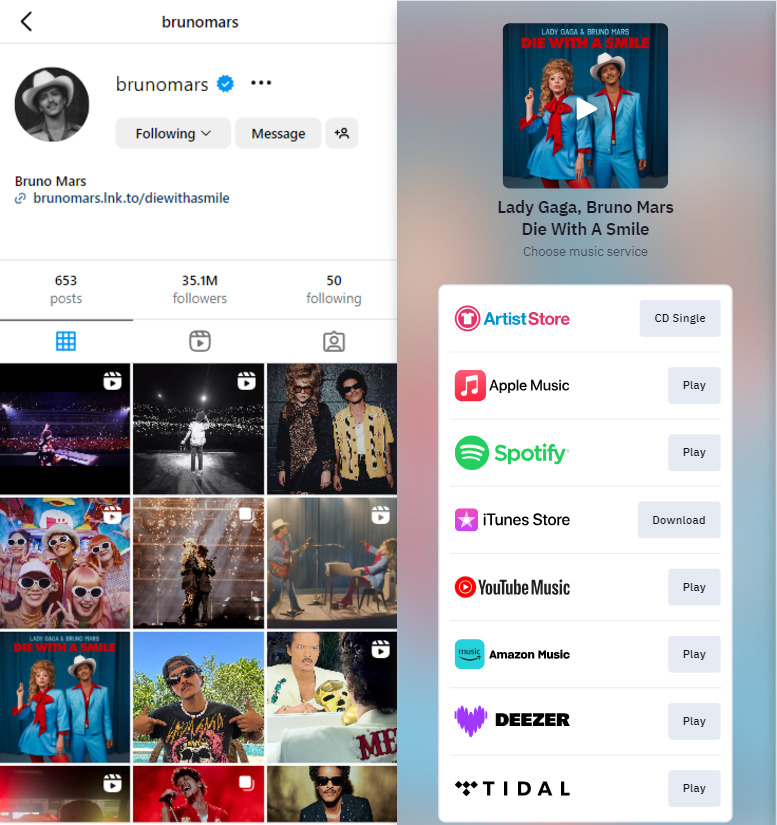
Let’s say you’re a music artist with a new EP. You want fans to listen on Spotify, Apple Music, SoundCloud, Deezer, iTunes Store, Amazon Music, and Tidal. Instead of placing one link into your social bio, you can use a bio link to create a single page with clickable options for each platform. It’s a simple and stylish way to share your music without the mess.
Here’s how the famous pop music artist Bruno Mars is using a custom bio link to promote his hit single featuring Lady Gaga:
Whether you’re showcasing a blog post, a YouTube video, or a product launch, the benefits of bio links are countless. Bio links feature organizes everything beautifully in one place. You can create a customized landing page that brings all your latest updates together, making it super easy for your followers to find and engage with everything you’re sharing.
Looking to boost those sales numbers? With bio links, your audience can skip the link chaos and go straight to your website or app, making it super easy to shop, ultimately benefiting your business.
Let’s say you’re launching a fresh line of eco-friendly skincare. Instead of cramming your bios with a million links, use a bio link to whip up a cool, all-in-one page. Show off direct links to buy your must-haves, like a refreshing face mist or a hydrating serum, and throw in a “Buy One, Get One 50% Off” deal on moisturizers. Your followers just click once and boom—they’re straight to your site. Easy shopping and more sales? Yes, please!
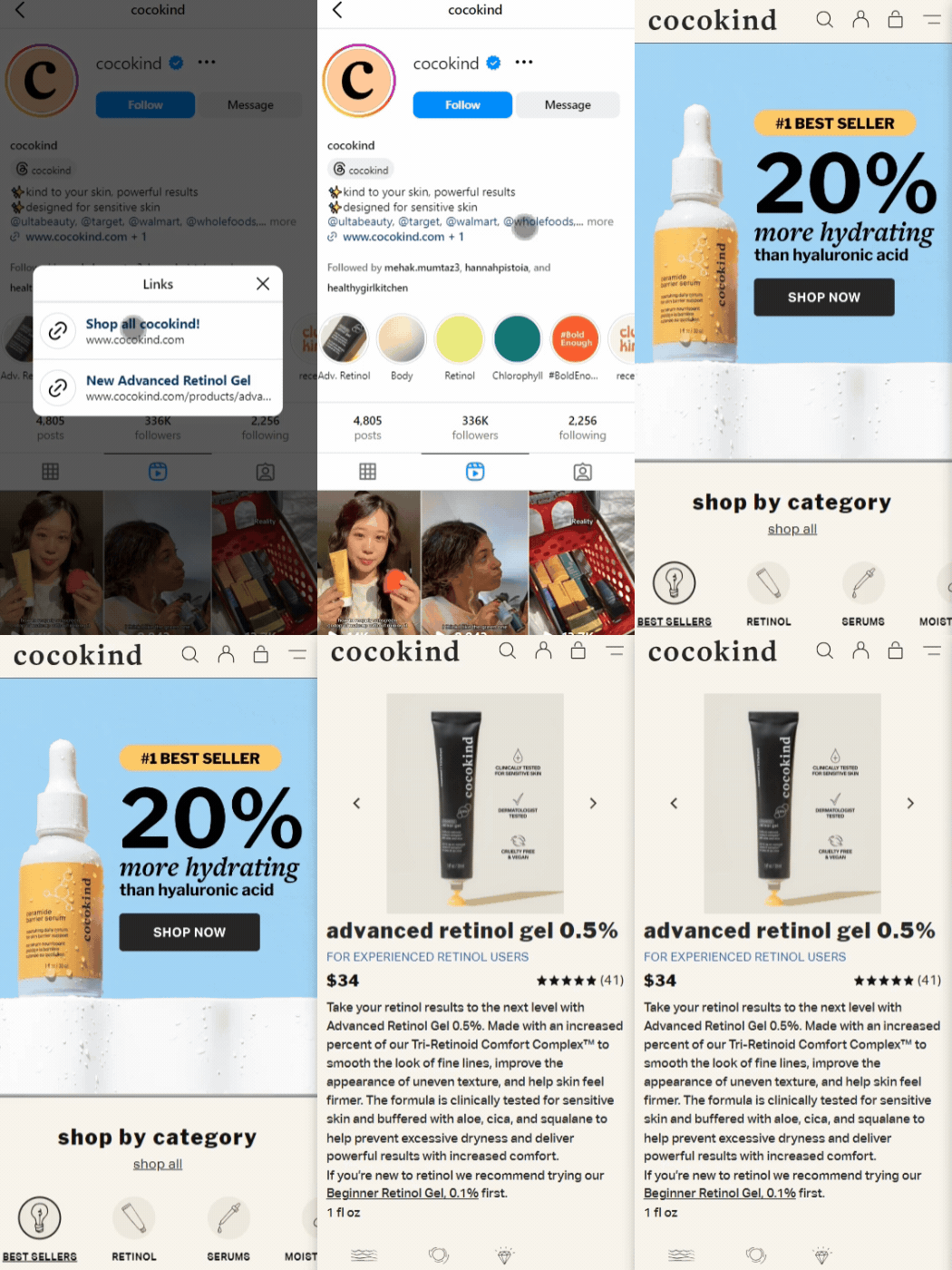
Here’s an example of the popular eco-friendly skincare brand “cocokind” and how they’re reaping the benefits of bio links to drive sales:
The bio link that “cocokind” is using on Instagram leads the audience straight to either the website or their featured product page for their new advanced retinol gel. It’s a win-win!
One of the many cool benefits of bio links is that you can retarget your audience with them! With Replug, you can turn visitors into customers using cross-channel retargeting to those who interact with your bio links. This means you can keep your audience hooked by keeping them up to date with your latest offers or exciting promotions, all through that one handy link.
Retargeting pixels are a powerful tool to track interactions with your bio links and place personalized ads that keep your audience engaged and coming back for more.
Okay, so here’s the thing—the benefits of bio links aren’t just limited to organizing your content. They’re also amazing for helping you understand if your marketing is resonating with your audience.
For example, if your post is getting all the clicks and sign-ups, you know you’re onto something. The best part? No more guessing games—the data’s right there, literally telling you what you should do next. Just start tracking and watch those results glow up!
But hold up, it gets even better. You’ll get the catch on what’s working—track clicks, conversions, and which posts are vibing with your audience. With the bio link analytics feature, you can also track exactly how many of your followers are clicking that link. Pretty cool, right?
Benefit #5: They help create branded landing pages
Looking for a highly converting landing page that captures your brand’s unique vibe? With your favourite colours, fonts, and all the little details that make your brand pop? One of the endless benefits of bio links is that you don’t have to sit through endless design sessions or drop a ton of cash just to end up with something that doesn’t quite hit the mark!
Replug is better than ordinary bio-link tools like Linktree when it comes to creating branded landing pages. You can easily create a microsite that reflects your style and keeps your audience engaged. Let us show you an example of a landing page created through Replug:
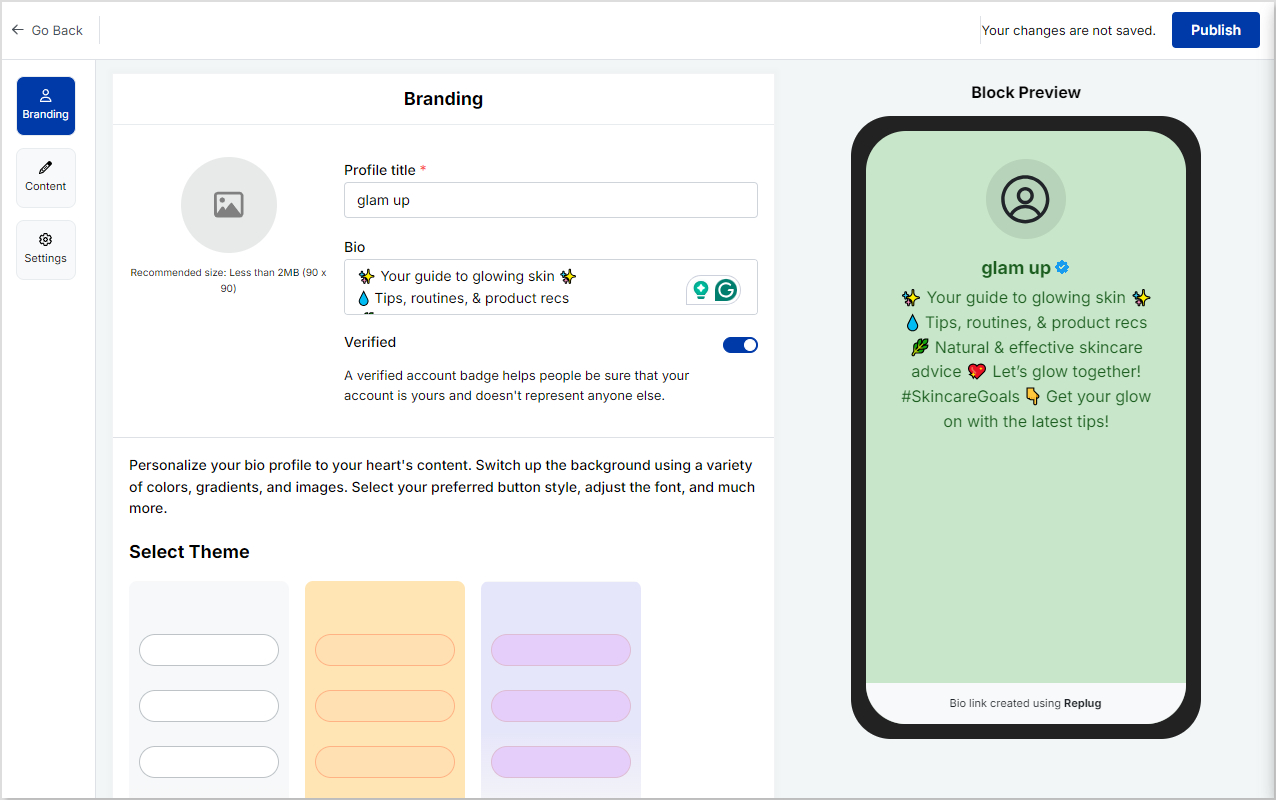
This is just an example we cooked up in 2 minutes. Imagine the magic you can create in more time than that with Replug’s amazing bio link feature! This feature lets you craft a landing page that looks exactly how you imagined—all on your own and in no time. The cherry on top? You can even add a verified badge!
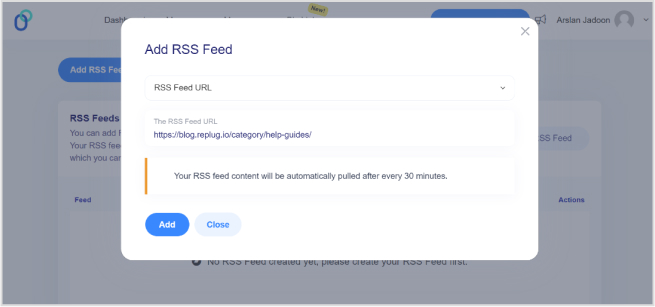
Okay, this one’s super lit and unique. Link management tools let you set up an RSS feed through its bio link feature so your audience stays updated without doing a thing. Instead of scrolling through your profile or searching for that new blog post, everything hits their feed the second you publish.
Here’s one of the coolest coolest benefits of bio links for RSS feeds. They’re not just for blogs—they work for podcasts, videos, whatever! You can keep your followers loyal without constantly pushing updates. Talk about a time saver.
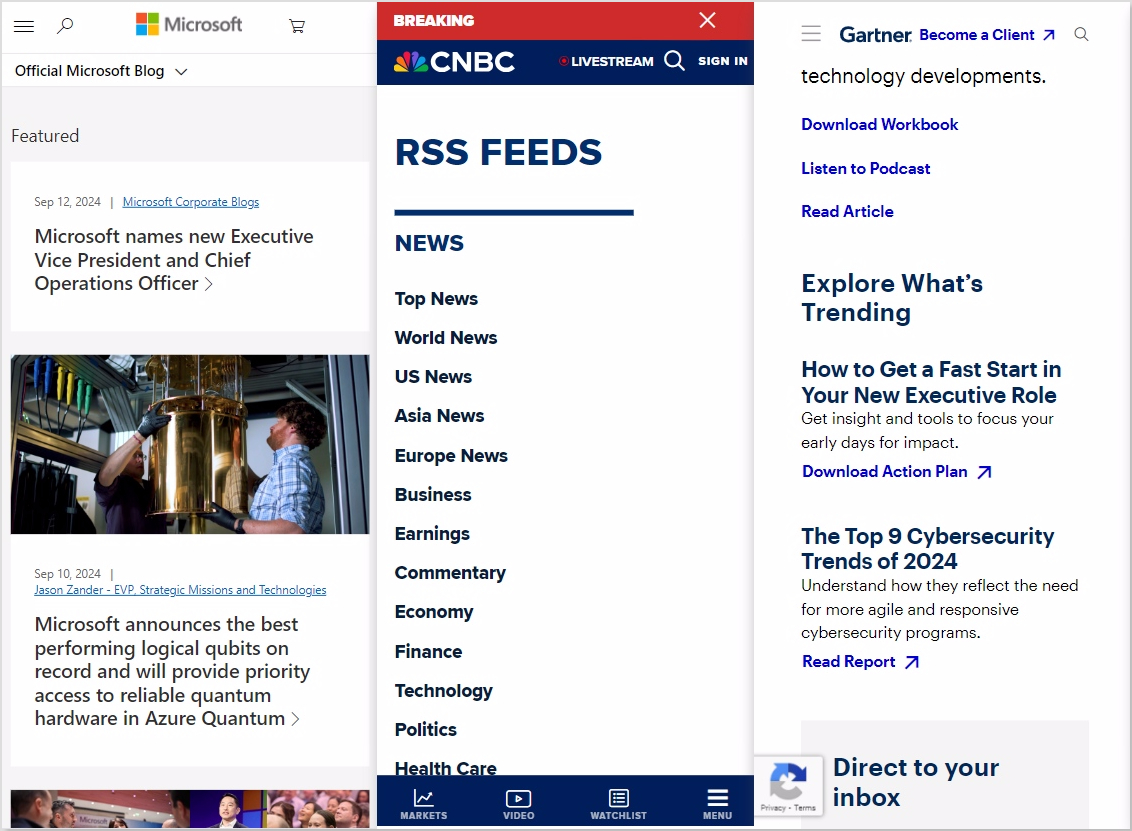
Examples? Check out the RSS feeds of Microsoft, CNBC, or Gartner to stay on top of the latest trends and news:
So, checking out what’s trending or hunting for the latest in health care? RSS feeds have you covered with fresh updates straight to your feed—no extra effort!
Slay.
Benefit #7: You can boost your SEO game
Let’s talk about the relationship between SEO and bio links. Link management tools allow you to create optimized landing pages, making your content easier to find and also giving your search rankings a major boost.
Let’s say that your killer blog just dropped, packed with all the latest tips and tricks. By using a bio link to direct followers to your best posts, you’re leveraging the benefits of bio links. Search engines see all that traffic and engagement, which is like giving Google a high-five and saying: “Hey, this content is awesome!”
So, make your SEO shine with smart bio links and watch your content climb those search rankings. It’s a simple way to make sure your best stuff gets the attention it truly deserves.
Who can use bio links?
1. Agencies and marketers
Bio links are like a personal toolkit for marketers and agencies. Whether it’s managing campaigns, lead magnets, or case studies, you can neatly combine everything into one link. Think of it as a well-organized closet—everything you need is in one place, easily accessible, and ready to go.
Some other smart ways marketers and agencies can use bio links include:
Event sign-ups
Client testimonials
Portfolio highlights
Product demos
Content hubs for campaigns
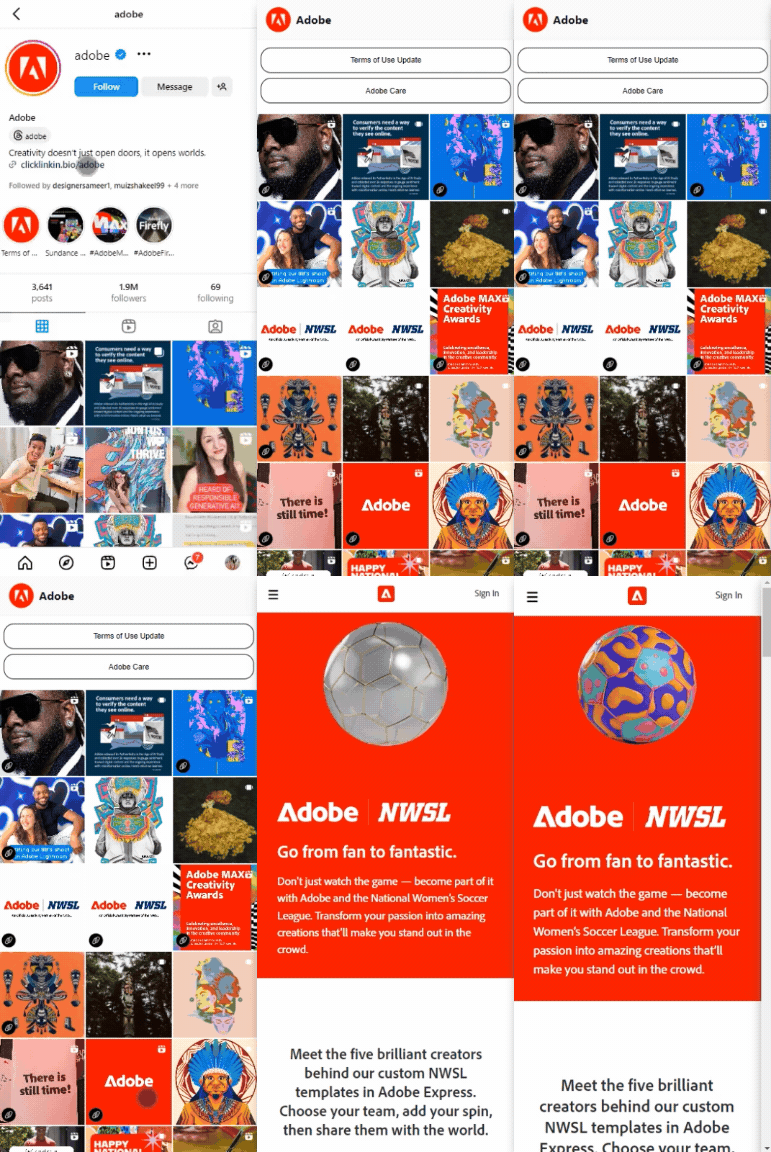
We absolutely love how Adobe uses a bio link to promote its portfolio:
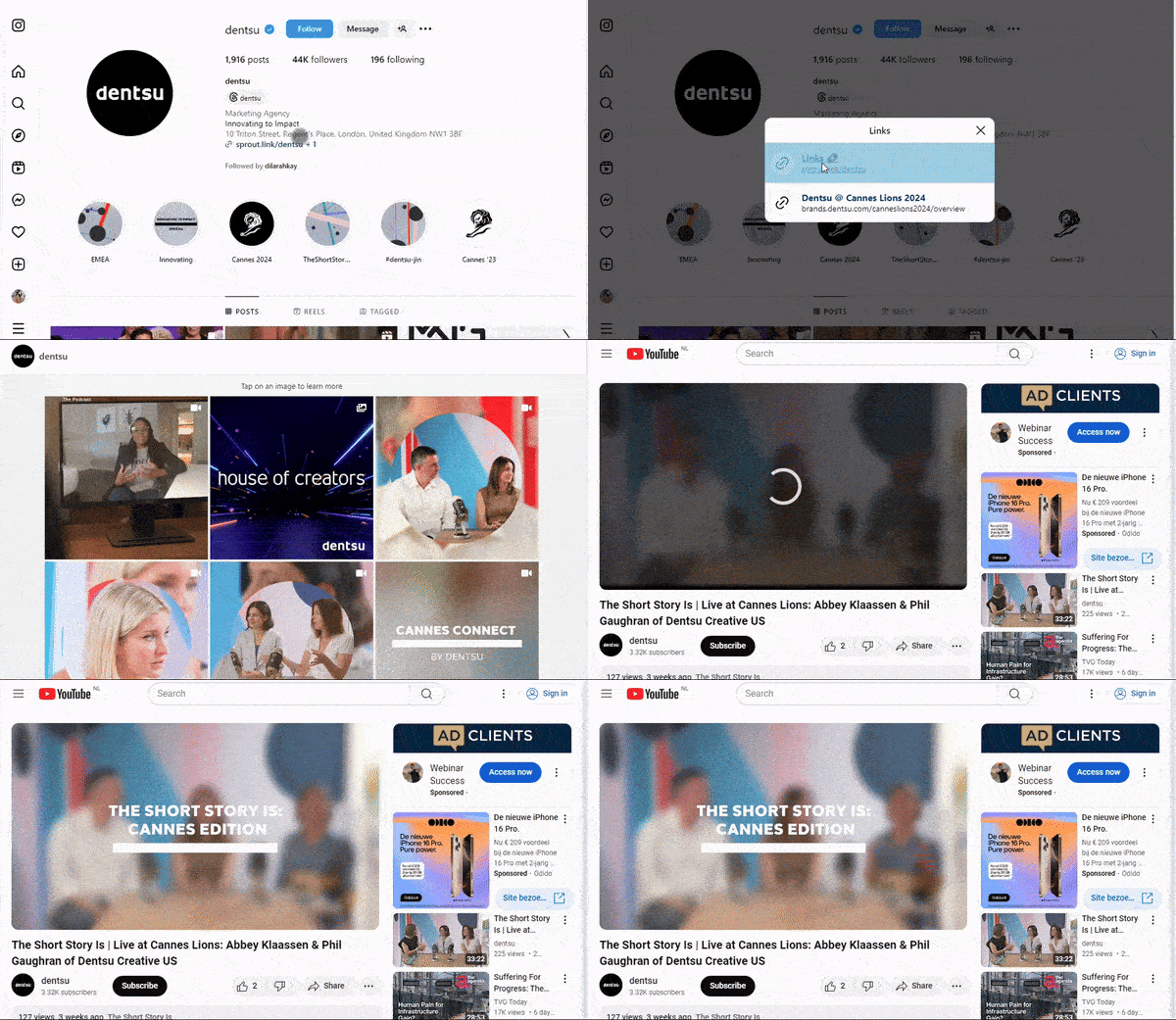
Here’s how the popular marketing agency Dentsu is creatively using bio links to lead users straight to its YouTube page:
Using bio links to redirect users to your website or your social media pages can boost traffic, and followers, and even get people to subscribe to your YouTube channel. How cool is that?
FYI, more YouTube subscribers can mean extra cash in your pocket. So, why not use bio links to boost your numbers and maybe get a little richer while you’re at it?
2. Influencers and creators
For influencers and creators, bio links are ideal for showcasing promotions and affiliate codes. Think of them as a secret doorway to exclusive deals, and adding a dash of creativity along with catchy flair can make them irresistible clicks for your followers. These hidden gems feel exclusive, making your followers feel like they’re getting a special treat just for them.
Some other cool uses of bio links for influencers and creators include:
Newsletters and subscriptions
Event registrations
Promoting new content
Portfolio Showcase
Merchandise sales
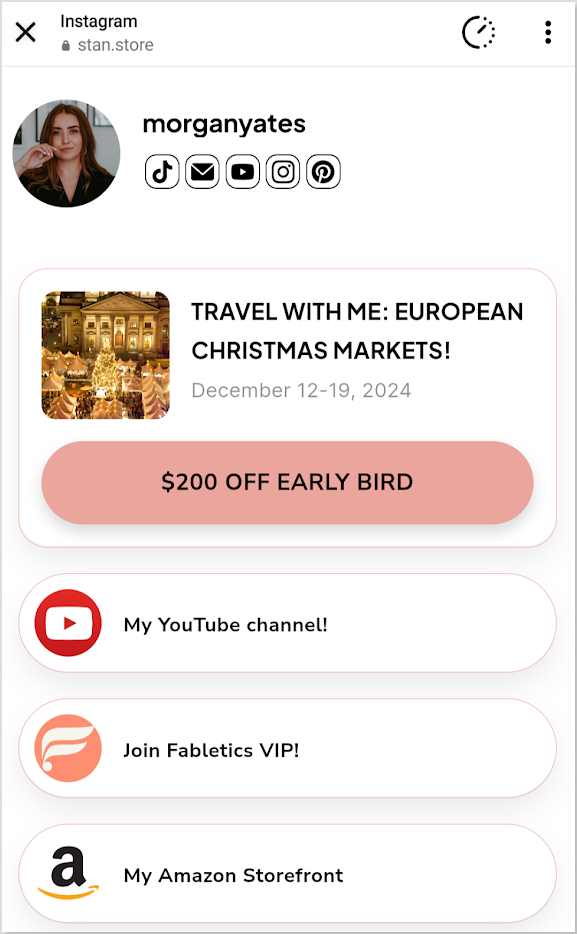
Morgan Yates, a popular lifestyle YouTuber uses bio links for promotions on her European travel offer:
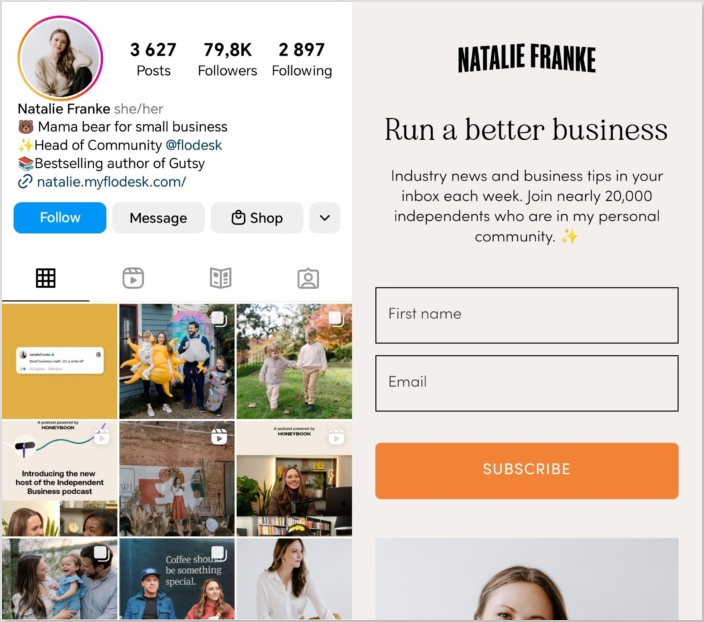
Here’s how Natalie Franke uses bio links in her Instagram bio newsletter subscriptions:
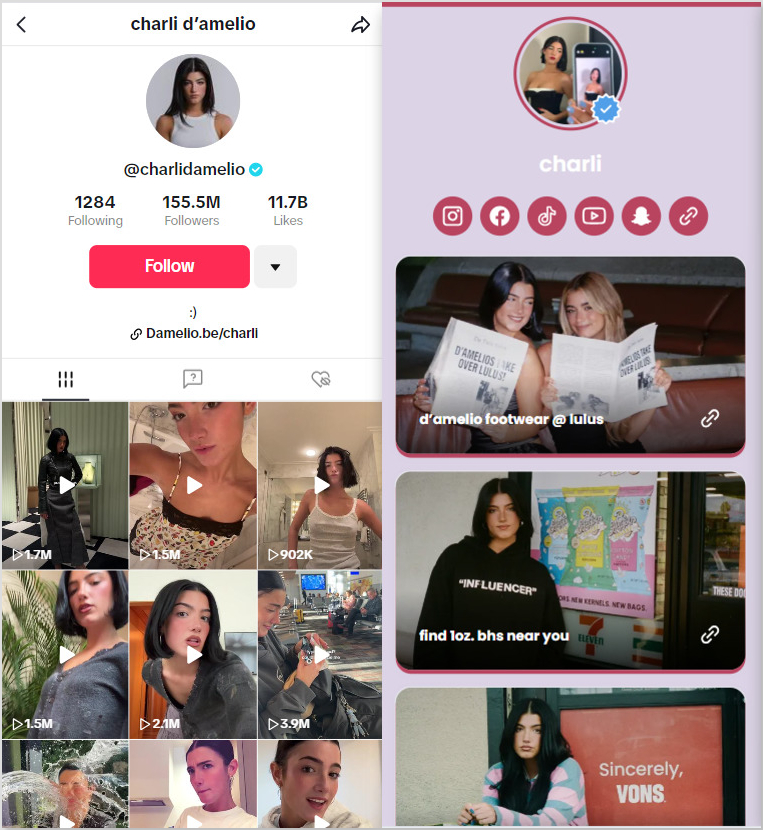
Another great example is Charli D’Amelio, the renowned influencer and American media personality. She effectively uses bio links on her TikTok to direct her followers straight to her merchandise landing page. One of the benefits of bio links for influencers like Charli is the ability to guide large audiences to a single, customized destination:
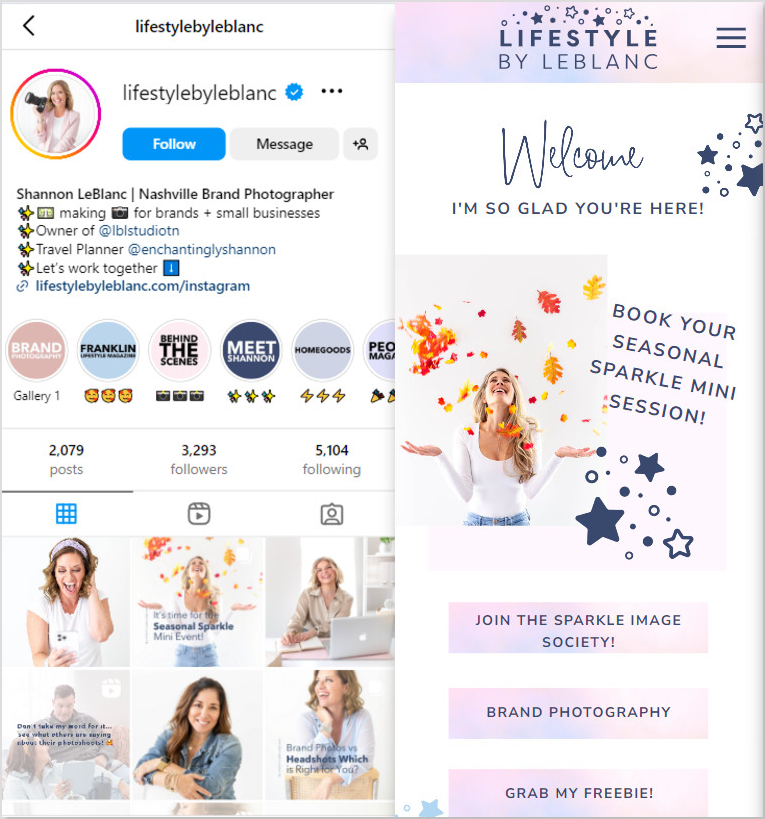
You can also creatively offer freebies through bio links just like Shannon LeBlanc does. Her mini website is to die for!
Having a bio link for e-commerce, from our research, is non-negotiable. Almost every other e-commerce store you see, whether it’s on Facebook, Instagram, TikTok, Pinterest, or wherever, is using bio links. For e-commerce stores, you can use bio links to guide your customers to different product categories, special deals, and fresh arrivals.
Some other great uses for bio links in e-commerce include:
Showcase new products and best-sellers
Featuring customer reviews
Leading users to an FAQ page
Linking to loyalty programs
Providing easy access to customer support
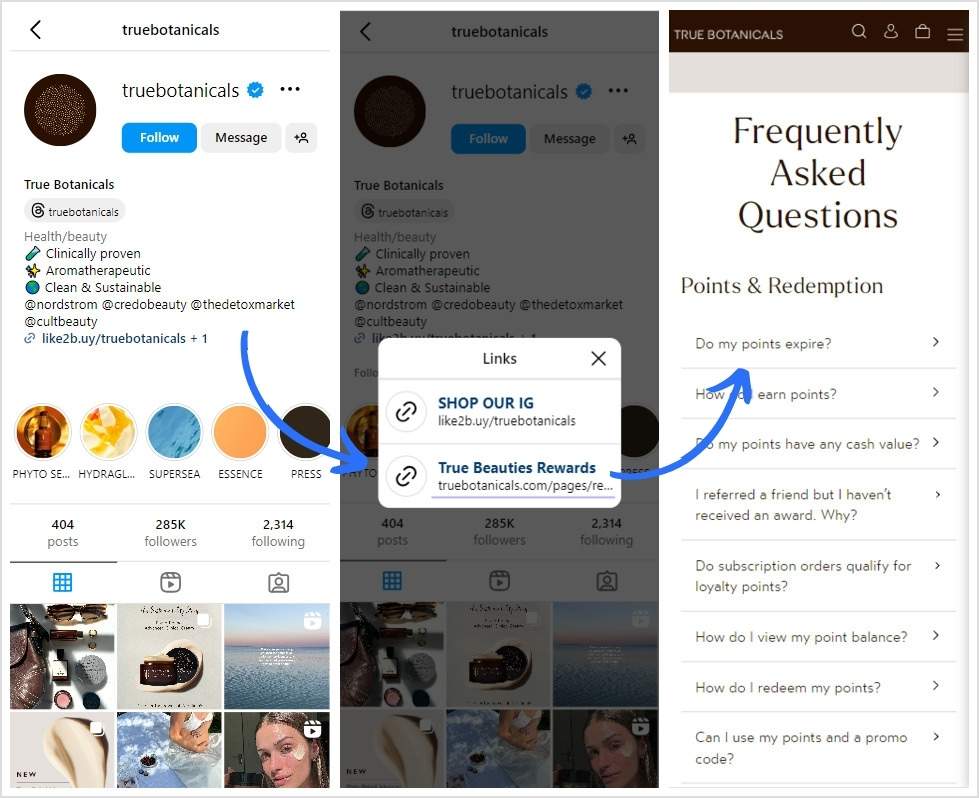
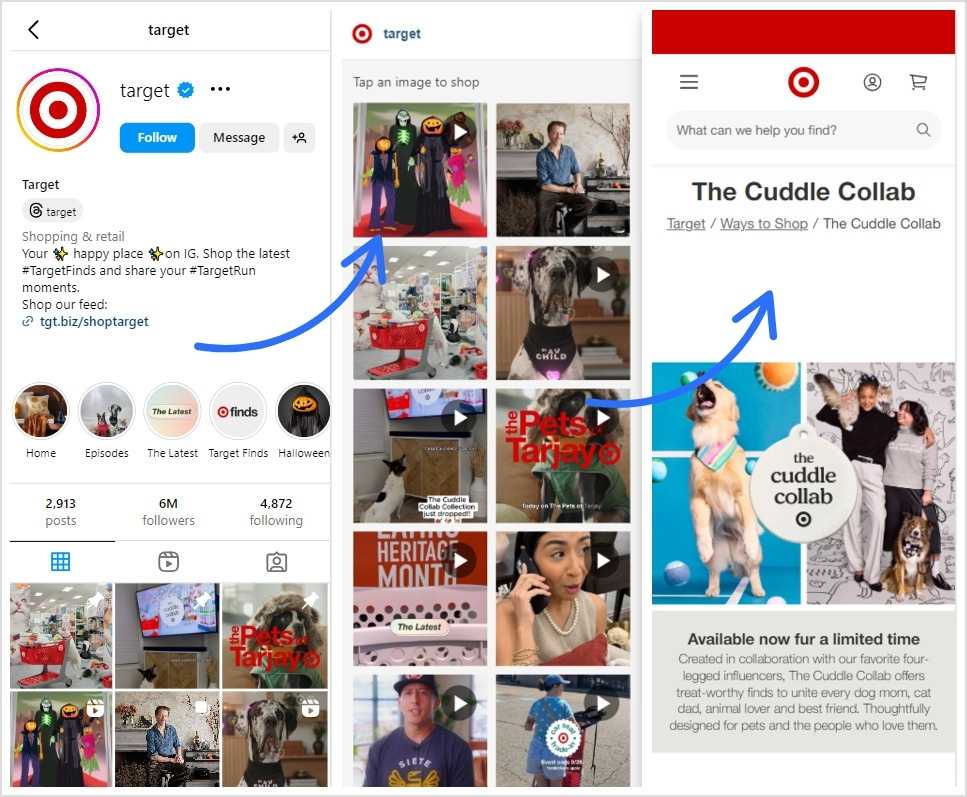
Here’s how True Botanicals is using branded bio links to lead its followers to its “True Beauties Rewards” FAQ landing page:
Another example that we absolutely love is Target:
Think of bio links as your fastest ticket to getting clients. For freelancers and entrepreneurs, bio links are like a digital business card, but way cooler. If you’re a part of this clan, bio links should be your go-to tool for showcasing your portfolio, services, and contact information. This way, your clients won’t have to open thousands of messy links just to see your amazing work.
Some other great uses for bio links for freelancers and entrepreneurs include:
Highlighting case studies
Sharing client testimonials
Featuring downloadable resources
Linking to booking calendars
Showcasing pricing packages
Promoting newsletters
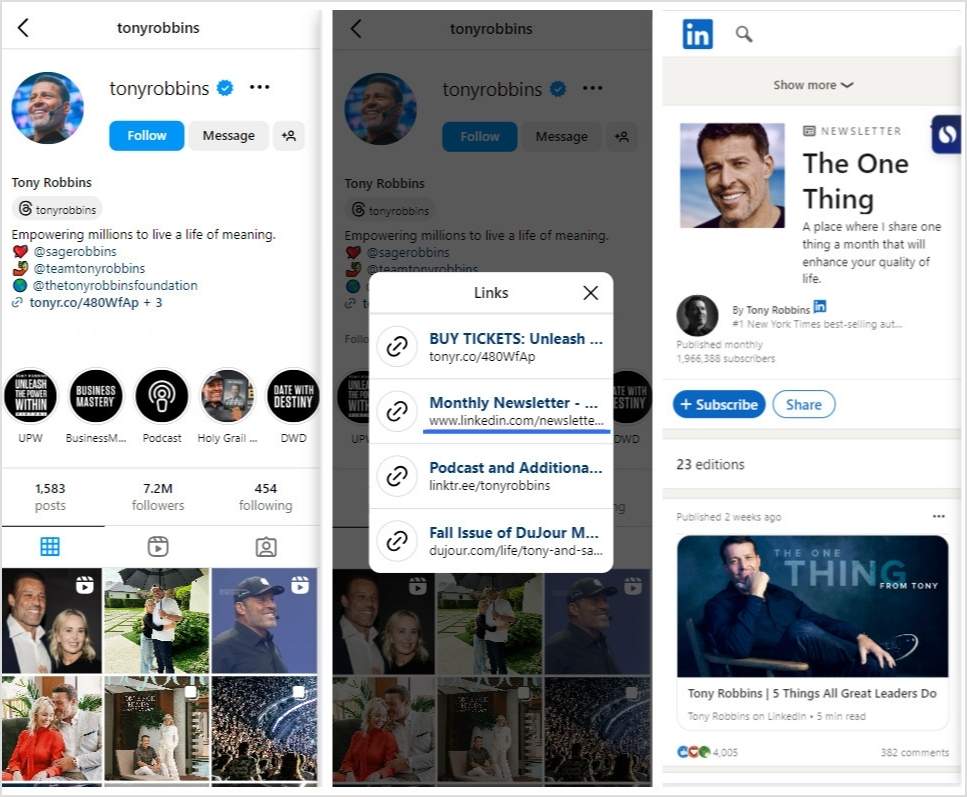
Here’s how the famous entrepreneur Tony Robbins is using a link in bio to lead his followers to his LinkedIn newsletter:
Bio links are a total hack for bloggers and content writers. With one link, you can send your readers straight to your hottest posts, must-read articles, or even a newsletter sign-up. They make it easy for your audience to stay connected and binge your content.
More fun ways to use bio links in blogging:
Dropping your latest viral posts
Pushing eBooks or resources
Showcasing guest articles
Sharing writing resources
Giving VIP access to exclusive reads
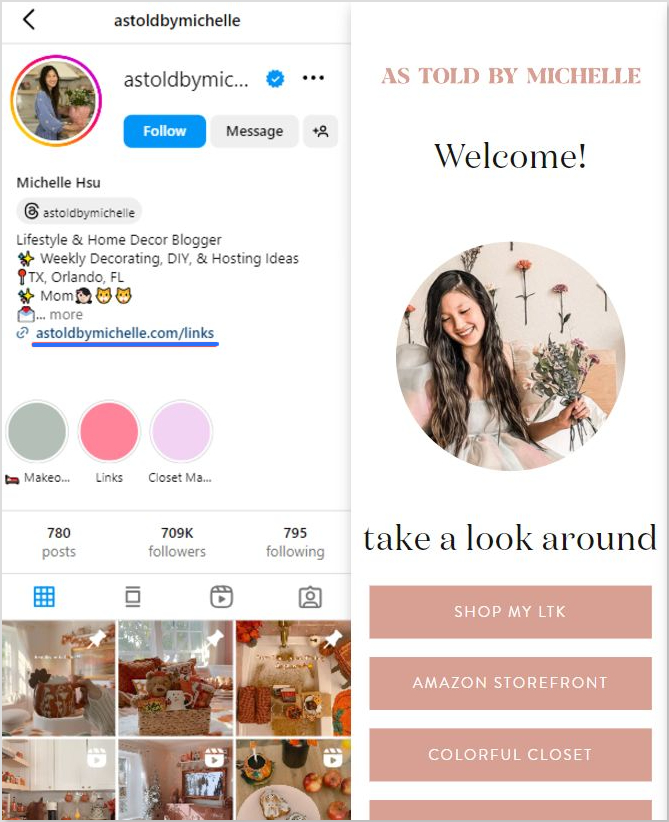
We absolutely adore how the Lifestyle & Home Decor Blogger Michelle Hsu is using bio links on her Instagram. Her microsite is beautiful, simple, and clean:
6. Podcasters and YouTubers
Bio links are a must-have for podcasters and YouTubers. With this one tiny yet powerful link, you can guide your audience directly to your newest episodes or videos. It’s like giving your followers special access to your latest content, making sure they are not behind on your latest content.
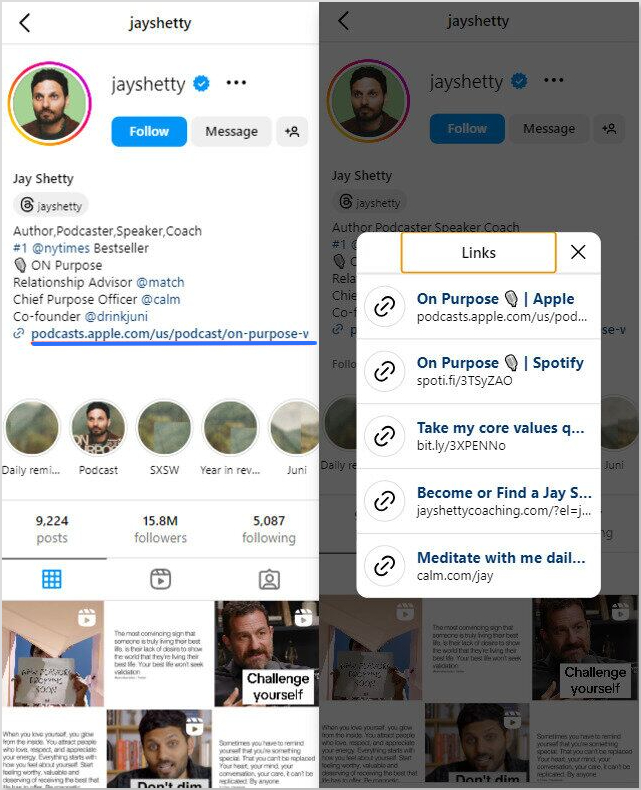
Here’s how Jay Shetty, the infamous podcaster is using a bio link on Instagram:
The bio link guides his fans to links to his podcasts on Spotify and Apple, and other relevant pages. He didn’t have to clutter his bio with multiple links, saving him from the mess and his fans from the confusion.
Long story short…
Bio links aren’t just some fancy URL hack—they’re basically your online sidekick, making sure your followers can find everything you’ve got going on without doing the digital scavenger hunt.
Whether you’re trying to boost sales, flex your SEO game, or just keep your content organized, bio links do the heavy lifting.
So, if you’re not using bio links yet… uh, what are you even doing? It’s time to give your audience a one-stop shop for all your good stuff. Because believe you me, your future self will thank youwhen those clicks start rolling in.
Ready to level up your online presence? Check out Replug’s advanced bio link feature to create stunning landing pages, and stop playing hide-and-seek with your links. And while you’re at it, try our link shortener free to track and optimize every click effortlessly.
Frequently asked questions
What are bio links and how do they work?
Bio links are single URLs in social media bios that lead to multiple resources. One of the key benefits of bio links is simplifying user access, allowing followers to find everything they need with one click.
How can bio links boost my sales?
Bio links direct users to product pages or promotions with ease, which is one of the main benefits of bio links. This streamlined access can increase conversion rates and ultimately boost sales.
What is the best free tool to generate Instagram bio?
Replug is amongst of the most user-friendly and best tools to generate an Instagram bio. You just have to describe yourself and set the tone of your bio and tada! You’re done.
Can bio links help with measuring marketing performance?
Absolutely! One of the benefits of bio links is that they provide valuable analytics on clicks and conversions, allowing you to optimize your marketing strategies based on user interactions.
How do bio links enhance branding opportunities?
Bio links allow for customized landing pages that reflect your brand identity. This is one of the significant benefits of bio links, as it enhances brand recognition and creates a consistent user experience.
In what ways can bio links improve my SEO?
Bio links consolidate traffic to optimized pages, which is one of the benefits of bio links. This can signal to search engines that your content is valuable, improving your search rankings and increasing visibility.
Looking for a more focused and impactful way to reach your target audience? Microsites might be the answer!
Don’t know what microsites are?
Worry not! This guide will help you understand and create microsites. Here’s what we’ll cover:
What are microsites? Learn what they are and their key features.
Why use them? Find out the benefits for businesses, creators, and organizations.
How do they differ? Compare microsites with landing pages and regular websites.
How to build one? Follow the steps to create a microsite from start to finish.
Other uses: See how microsites can be used in various fields beyond marketing.
Whether you’re an experienced marketer, content creator, or just looking for a new way to engage with your audience, microsites offer a powerful way to achieve your goals. Let’s get you started
A microsite, also known as a link-in-bio page or landing page, functions as a compact, focused website for your agency, brand, or profile. Its primary goal is to highlight a specific product, promote a special event, or effectively run targeted campaigns, drawing attention and engagement.
Can a microsite really enhance your social presence?
In 2026, social media is the main source of sales and conversions for almost every business of every type. In order to stand out, you need something unique such as medium to showcase your brand story, and microsites are one of the best way. A microsite can help by giving you a focused platform to showcase your best content, engage with your audience, and turn followers into loyal customers.
Here are some of the most common benefits of creating a microsite:
Cost-effective marketing: Unlike developing a full-fledged website, microsites are generally more affordable to create and maintain. This makes them a budget-friendly option for targeted marketing campaigns.
Campaign flexibility: Do you need to adjust your messaging on the fly? Microsites allow for quick and easy updates, making them ideal for dynamic campaigns or real-time promotions.
Keep track of important metrics: Advanced microsite tools allow you to track visitor count, bounce rate, time spent on the page, conversion rates, and user engagement. This hands-on approach helps you understand what’s working, make informed adjustments, and continuously improve your microsite for better results.
Get more creative: Microsites offer a platform to experiment with different content formats like videos, interactive elements, or downloadable resources. This can help gauge user preferences and create more customized content for future.
Retarget your audience: Utilize retargeting tools to add retargeting pixels to your microsite link. This way, you can track visitors and deliver targeted ads to them across various platforms, keeping your brand top-of-mind and encouraging return visits.
Improved user experience (UX): By focusing on a single objective, microsites provide a streamlined user experience. Visitors can find the information they need quickly and easily, leading to higher satisfaction.
Reduced bounce rate: A well-designed microsite keeps users engaged with relevant content, minimizing the chances of them bouncing off to another website. This translates to better campaign performance.
Pro tip: Place retargeting pixels on your microsite to reach users who have previously interacted with your brand or page. This allows for highly targeted follow-up ads with personalized offers or reminders to complete unfinished actions (e.g., abandoned shopping carts).
Microsite vs. websites vs. landing pages
Feature
Microsite
Website
Landing page
Purpose
Focused campaign or product
Comprehensive business overview
Single conversion goal
Scope
Limited, standalone
Extensive, multiple pages
Single page
Navigation
Minimal, focused
Complex, multiple menus
Minimal or none
Content
In-depth, specific
Diverse, informational
Persuasive, focused
Goal
Generate leads, awareness
Inform, engage, convert
Conversion
Call-to-Action (CTA)
Strong, clear
Multiple CTAs
Prominent, single CTA
Design
Simple, consistent
Complex, varied
Visually appealing, focused
SEO
Limited optimization
Comprehensive SEO strategy
Basic SEO
Loading time
Fast
Varies
Extremely fast
Analytics
Basic tracking
In-depth analytics
Conversion tracking
Mobile Optimization
Essential
Essential
Essential
Cost
Lower development
Higher development
Lower development
Microsite
Focused content: Microsites are dedicated to a single campaign, product, or theme. They provide in-depth content and a cohesive narrative around that specific focus.
Limited scope: Smaller in scale, microsites or bio-link pages are typically temporary and built for a particular purpose or timeframe.
Focused content: Microsites are created to concentrate on a specific topic, campaign, or product. They provide an in-depth exploration, offering detailed information, interactive elements, and often multimedia content.
Independent identity: Often housed on a separate URL or subdomain, microsites maintain a distinct online presence separate from the main website. This independence allows for tailored branding and user experiences.
Custom design: The beauty of microsites and bio-landing pages lies in their freedom. Their design can stray far from your main website, embracing a unique look and feel that perfectly aligns with the campaign’s branding and objectives.
Best for social media: Microsites and bio links are perfect for sharing on social media. Add them to your profile bio section, post captions or comment sections on your story, or share directly with your audience in the inbox if necessary.
A complete link management solution
for marketing professionals & agencies.
Try Replug for free
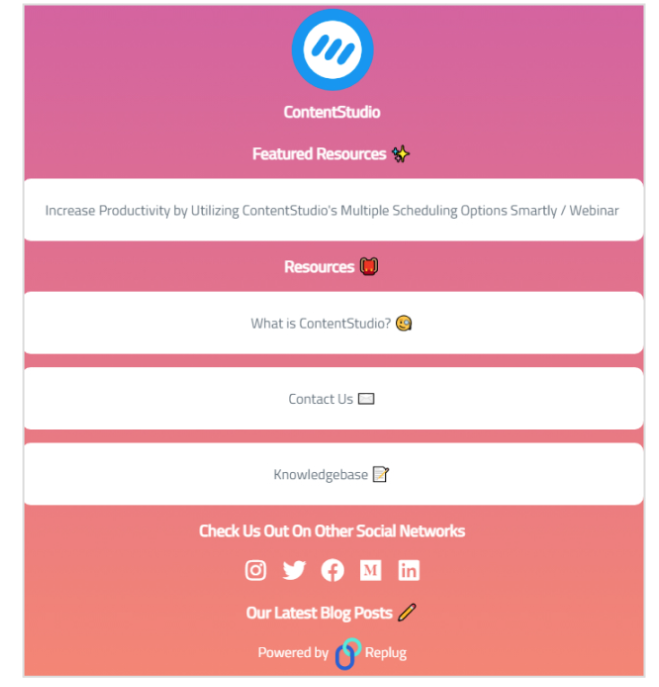
Here’s a quick example of ContentStudio( A social media management tool)
Single page: Like bio-landing pages, landing pages are designed as standalone web pages with a singular focus. All content is contained within one page, making it easy for users to understand the offer and take action quickly.
Conversion-oriented: The primary goal of a landing page is to drive a specific action, such as filling out a form, subscribing to a newsletter, or making a purchase. Every element on the page is optimized for conversion.
Coversion-focused: To minimize distractions, landing pages often have limited or no navigation links. This keeps the user focused on the call-to-action (CTA) and reduces the chances of them leaving the page without converting.
Can be customized: Both landing pages and microsites shine with their design flexibility. They can break away from the look of your main website, adopting a distinct style that aligns perfectly with your campaign’s branding and goals.
Integrated with main domain: Landing pages are usually part of the main website’s domain and are often linked to marketing campaigns like PPC ads, email marketing, or social media promotions.
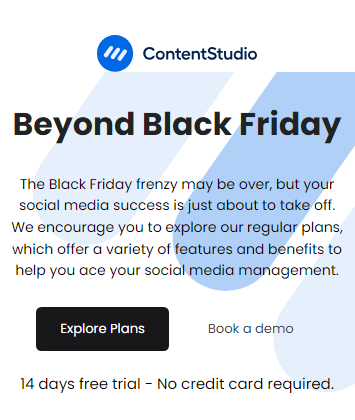
Here’s a ContentStudio black friday landing page.
Website
Broad content: A website covers all aspects of the brand, including a wide range of topics such as products, services, company information, and customer support.
Comprehensive scope: Websites are expansive, permanent fixtures that serve as the central hub for all online activities related to the brand.
Main domain: The primary online presence, usually hosted on the brand’s main domain, serves as the primary gateway for users to explore everything the brand offers.
Requires more maintenance: Require ongoing maintenance and updates to ensure content remains current, functional, and secure. They are continually evolving to reflect the brand’s ongoing needs and goals.
Broad keyword range: Optimize for a broad range of keywords and topics across multiple pages to attract organic search traffic and improve overall search visibility.
Multiple ways to engage users: Aim to engage users through a variety of content types, including blog posts, product information, company news, and interactive features. They encourage visitors to explore and interact with multiple sections.
Here’s an example of ContentStudio’s official website:
Replug.io is the best microsite builder of 2026, as it offers a straightforward way to create sleek microsites with a focus on link management and custom branding. Its features include easy-to-use designing capabilities, drag-and-drop editors, insightful analytics, making it a solid choice for tracking and optimizing your microsite’s performance.
Here’s what you get with the Replug – Microsite (Bio-link) tool:
Custom URL: Personalize your microsite with a unique URL that reflects your brand.
RSS feed: Keep your visitors updated with automatic content feeds.
Social media links: Seamlessly connect all your social media profiles in one place.
Audio links: Share your podcasts, music, or any audio content effortlessly.
Wix is renowned for its flexibility and extensive template library. With its drag-and-drop editor and robust design features, it caters to various needs, from simple microsites to comprehensive websites. Wix is suitable for users who want both ease of use and creative control.
Teachable is primarily known for online course creation but is also effective for building educational microsites. It provides tools for designing course landing pages, integrating with payment gateways, and managing user interactions, making it ideal for educational content and membership sites.
Podia offers a comprehensive platform for creating and selling digital products, memberships, and online courses. Its microsite-building capabilities include user-friendly design tools, sales integrations, and a focus on customer engagement, making it suitable for creators and educators.
SendOwl specializes in digital product sales and marketing. It allows users to build focused microsites for selling e-books, software, and other digital goods, with features such as payment integration, automated delivery, and promotional tools.
A quick overview of pricing plans
Tool
Basic plan/ Starter
Pro plan/ Growth
Pro+ plan /Enterprise plan
Replug
$19/month
$49/month
$79/month
Wix
$17/month
$29/month
$36 – 159/month
Teachable
$59/month
$159/month
$249/month
Podia
$9/month
$39/month
$89/month
SendOwl
$18/month
$37/month
$89/month
Criteria for choosing the right microsite builder
When selecting a microsite builder, consider the following criteria:
Ease of use
Look for a platform with an intuitive interface and drag-and-drop functionality to streamline the design process, especially if you lack coding skills.
Customization options
Ensure the tool offers a range of templates and design options to align with your brand’s aesthetics and campaign goals.
Integration capabilities
Choose a builder that integrates seamlessly with your existing tools, such as email marketing platforms, CRM systems, and analytics services.
Performance tracking
Opt for a tool with built-in analytics or integration with third-party analytics platforms to monitor and optimize your microsite’s performance.
Cost
Compare pricing plans and features to find a solution that fits your budget while meeting your specific needs for functionality and support.
Replug makes it much easier to create microsites. Here’s how to create a microsite using Replug:
Step 1: Sign in or create an account
If you’re already a Replug user, sign in. If not, create a free account to get started.
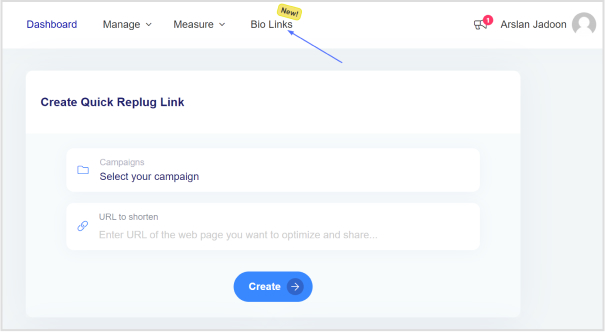
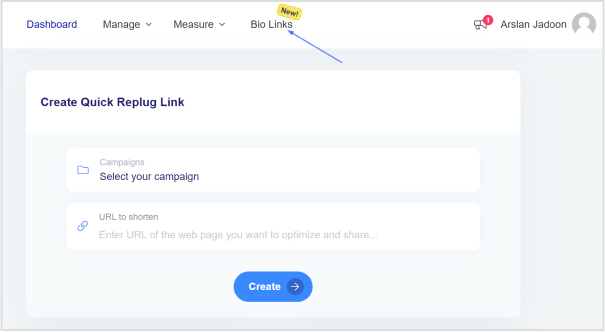
Step 2: Access “Bio Links”
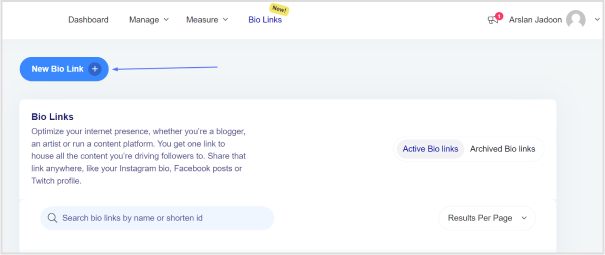
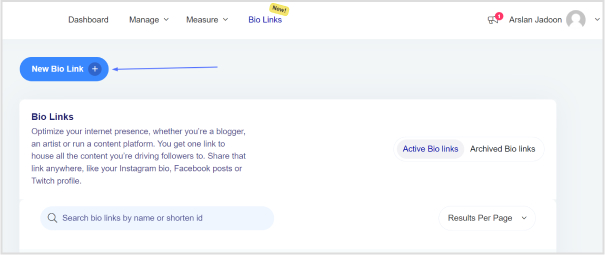
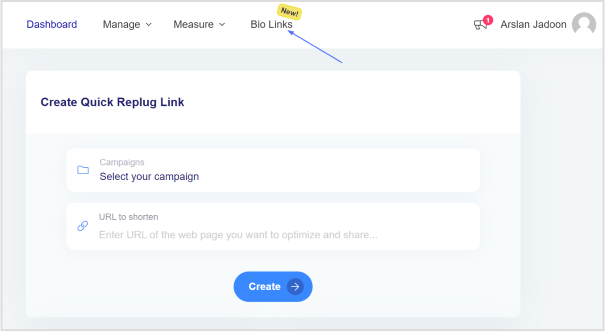
Go to the Replug dashboard and find the “Bio Links” feature.
Step 3: Create a new bio link
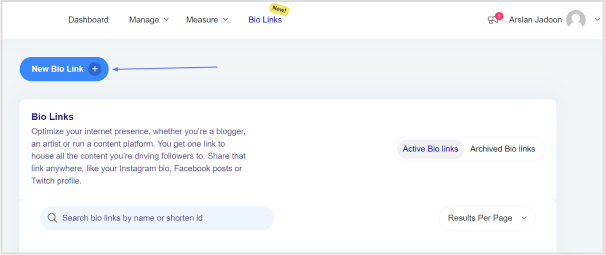
Click the “New Bio Link” button to begin creating your microsite.
Step 4: Choose content blocks
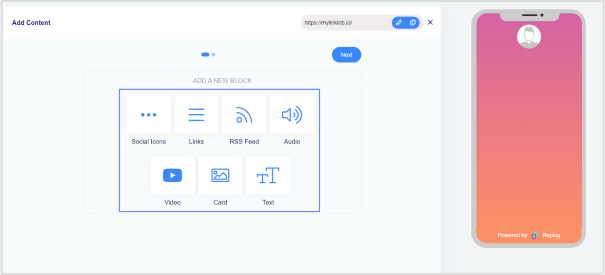
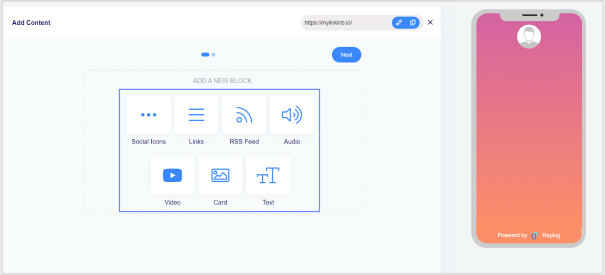
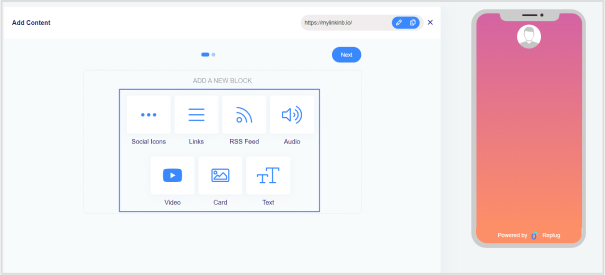
Select the content blocks you need, such as social icons, links, RSS feeds, audio, video, text, and cards. If you choose social icons, proceed to the next step.
Step 5: Configure social icons block
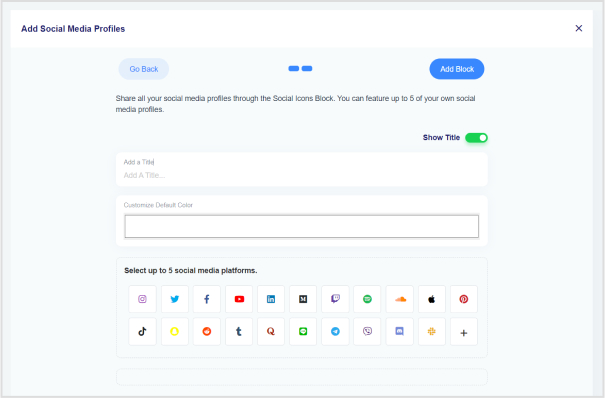
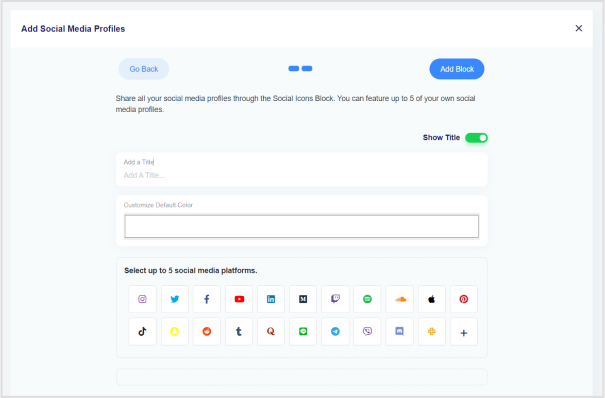
Choose up to 5 social media platforms. Add titles, customize colors, and paste the links. Click “Add Block” to include them.
Step 6: Add more content blocks
Repeat the process for additional content blocks. For example, to add website links, select the “Links” block and add titles, URLs, and links.
Step 7: Proceed to the next step
After adding all desired content blocks, click “Next.”
Step 8: Customize your bio link page
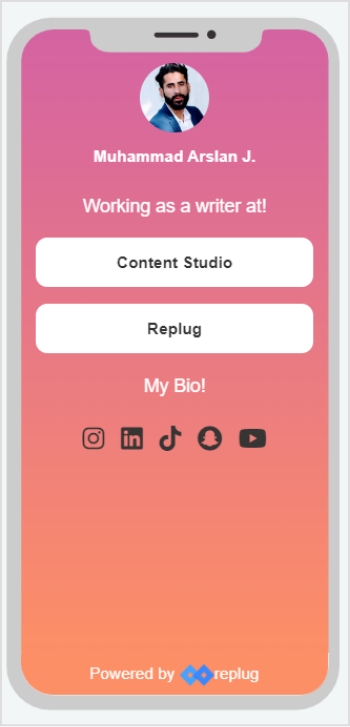
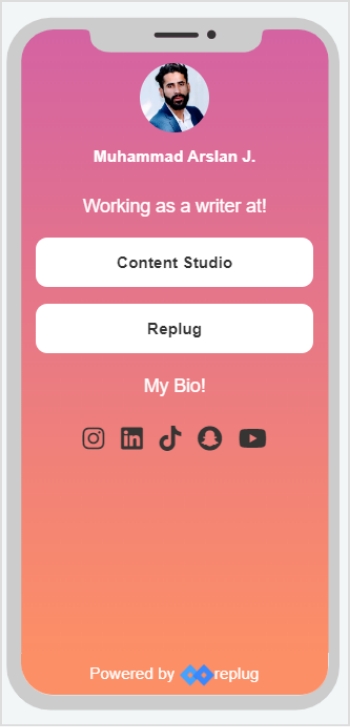
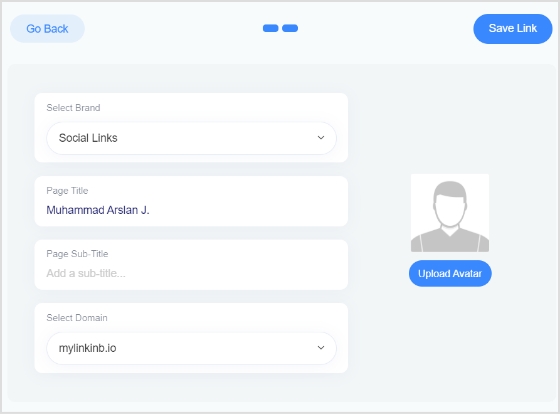
Personalize your page by adding your brand name, uploading an avatar, and including a title and subtitle.
And now you have your Microsite ready!
For more details, checkout the complete Replug help documents.
Go beyond generic link pages!
Create custom bio links that truly fit your brand
With Replug, you can create bio links that are unique, engaging, and built to convert.
With the Replug bio link, you can easily set up personalized microsites for different industries and purposes. It’s a great way to create unique landing pages that connect with your audience on a deeper level.
E-commerce
Amazon business microsite for flash sales Shopify business microsite for product bundles Etsy business microsite for pre-order exclusives
Exclusive content & webinar series User-generated content (UGC) campaigns Contest or giveaway promotion
Entertainment
Premium content Music album release, Industry events
Freelancers
Showcase portfolio Niche expertise Case studies & results
Education
Online course launch Open house event
Healthcare
New treatment option Wellness challenge
Why choose Replug bio link instead of other smart link tools?
What sets Replug apart is its comprehensive link management capabilities, perfectly suited for agencies, brands, and marketers.
Create stunning bio-landing pages in minutes with our intuitive drag-and-drop editor. Customize every element to match your brand identity – from colors and fonts to captivating animations. Want to showcase your latest blog posts? Our RSS feed integration has you covered. Need to drive traffic to specific pages? Add compelling call-to-action, and with our live preview, you can see your masterpiece come to life before hitting publish.
But it doesn’t stop there. Replug is an efficient link shortener tool that offers advanced analytics to track your audience’s behavior, helping you make data-driven decisions. Plus, our mobile-optimized designs ensure your bio link looks flawless on any device.
Finally, Replug offers affordable pricing plans that provide great value for the extensive features and capabilities it offers.
Conclusion
Overall, microsites can be a game-changer for targeted marketing, offering a focused platform to engage audiences and drive specific actions. Their ability to provide a tailored experience, combined with cost-effective development and flexible content options, makes them a valuable tool for achieving your marketing objectives.
FAQs related to microsite
Can I build a microsite myself, or do I need a developer?
There are user-friendly microsite-building tools available that don’t require coding knowledge. These platforms offer pre-built templates and drag-and-drop functionalities, making it easy for anyone to create a basic microsite.
How much does it cost to build a microsite?
The cost of building a microsite varies depending on its complexity and the platform you choose. Microsite builders often have free plans with limited features, while paid plans offer more functionalities and customization options.
Is it possible to update a microsite after it’s launched?
Absolutely. One of the advantages of microsites is their flexibility. You can easily make updates and changes to the content, design, and functionality to keep the site relevant and engaging throughout your campaign.
How can I measure the success of my microsite?
There are various metrics you can track to measure your microsite’s success. Common ones include website traffic, user engagement (time spent on the site), conversion rates (e.g., email sign-ups or purchases made), and social media shares.
What differentiates a microsite from a traditional website?
A microsite is a smaller, focused website dedicated to a specific campaign, product, or event, typically with its own unique URL. Unlike traditional websites that cover a broad range of topics, microsites provide in-depth content on a single subject.
If you’ve ever wondered who’s tapping on the links in your Instagram bio, you’re not alone. It’s a common question among users looking to understand their audience better and fine-tune their content strategy.
In this guide, We’ll uncover what you can (and can’t) glean from Instagram’s native data insights, and we’ll introduce you to a handy third-party tool that can give you a deeper dive into bio link clicks.
Whether you’re an aspiring influencer, a savvy entrepreneur, or just someone who loves sharing cool stuff on Instagram, understanding how to track bio link clicks is key to making the most of your social media presence. So, let’s dive in and discover the secrets to optimizing your bio links for maximum impact!
Can you see who clicks on your Instagram bio link?
Instagram’s analytics tell you how many clicks your bio link gets and where they’re coming from, but it doesn’t tell you who exactly is clicking. You can see general info like age, gender, and location of the people clicking, but not their names or usernames.
So while you won’t know the specific individuals clicking on your link, you can still keep an eye on how well it’s doing overall and get a sense of who’s interested in your content based on the demographic info provided.
A complete link management solution
for marketing professionals & agencies.
Try Replug for free
How to use the Instagram insight feature and track link clicks?
Using Instagram insights can give you valuable insights into your account’s performance and your audience’s behavior.
Note: Make sure you have a business or creator account on Instagram. If you still need to set one up, you can learn how to do so.
Here’s how to make the most of this feature:
Step 1: Open the Instagram mobile app and go to your profile.
Step 2: Tap on the Insights action button. You can find this either by tapping directly on the Insights button or by going to the Menu in the upper right corner and selecting Insights from there.
Step 3: Once you’re in Insights, you’ll see various metrics under the Overview section, giving you a snapshot of your account’s performance. You can also dive deeper into specific content by tapping on it for a more detailed breakdown of its performance.
To check your bio link click on Instagram:
Step 4: Tap on the “Activity” tab in the Instagram insight.
Step 5: Scroll down to find the section that shows how many clicks your bio link received during the last week.
Step 6: You can compare this data with previous results to see how you’re doing over time. Similar to tracking the right time to post on TikTok, this helps you spot trends and adjust your strategy. This comparison also helps you track your progress and identify your audience’s behavior.
A complete link management solution
for marketing professionals & agencies.
Try Replug for free
Limitations of Instagram insights
While Instagram Insight offers valuable data on bio link performance, it does come with certain limitations worth noting:
Lack of individual click details: Instagram Insight only reveals the total number of clicks on your bio link, without specifying who clicked or providing any other individualized information.
Absence of click-through rates: Although you can see the total clicks, Instagram doesn’t show how many people saw the link and decided to click. This omission makes it challenging to calculate click-through rates or compare link performance effectively.
Limited demographic insights: While basic demographic data like age, gender, and location of link-clickers is available, it may not offer comprehensive insights into your target audience’s characteristics.
Weekly reporting: Instagram Insight provides data every week, restricting real-time tracking or comparisons across different periods. For instance, comparing this month’s link performance to last month’s isn’t feasible within Instagram’s analytics framework.
Exclusive to business accounts: Access to Instagram Insight for bio links is restricted to business accounts. This limitation may inconvenience individual users unwilling to switch or small businesses lacking the resources to manage a separate account.
Can I find out who clicks my link-in-bio?
Unfortunately, Instagram’s native analytics don’t provide detailed information about who clicks on your bio link, which can be frustrating for businesses and brands looking to track the effectiveness of their promotions.
When monitoring traffic and click analytics on desktop, it’s also important to stay mindful of data privacy. Using a Windows VPN helps protect your browsing data, keeps your analytics secure, and ensures your link tracking remains private when managing campaigns from a PC.
Try Replug for bio link management and tracking:
Replug.io emerges as a top-notch alternative to Instagram Insights, offering robust link management and bio-link tracking capabilities.
By using Replug, you not only gain detailed analytics on your shared links but also improve client management with insights into audience behavior and preferences. By generating a personalized shortened bio link through this brilliant link shortener and integrating it into your Instagram bio, you unlock a wealth of data, including click information, geographical details, and device usage.
Utilizing Replug’s bio-link analytics provides you with unparalleled insights into audience behavior. Armed with this valuable information, you can track key performance indicators, refine your marketing strategies as needed, and optimize your return on investment (ROI) effortlessly.
A complete link management solution
for marketing professionals & agencies.
Try Replug for free
FAQs
Can I see who clicks on my Instagram bio link?
Unfortunately, Instagram’s native analytics don’t provide individual click details. However, third-party tools like Replug offer detailed insights into link clicks, including information about the individuals clicking on them.
How can I track the effectiveness of my Instagram bio link?
While Instagram Insights offers basic metrics, such as total clicks, they lacks detailed analytics. To track the effectiveness of your bio link and gain insights into audience behavior, consider using third-party tools like Replug, which provide comprehensive analytics on link performance.
What information does Replug provide about link clicks?
Replug offers detailed analytics on link clicks, including data on click activity, geographical location, device information, and even insights into the individuals clicking on the links.
Do I need a business account to use Replug for Instagram bio links?
No, Replug can be used by individuals and businesses alike to manage and track bio links on Instagram. Whether you’re a small business owner or an influencer, Replug provides valuable insights into link performance.
Welcome to the world of microsites – where big impact comes in bite-sized brilliance. You’re in the right place if you’re itching to engage a specific crowd and boost your online presence. This guide is your shortcut to crafting a microsite that does not just complement your main site but is a spotlight for your unique audience.
Let’s keep it simple
Why Microsites?
Tailored precision: Speak directly to your audience.
Boost engagement: Make a splash with a focused online hub.
Go beyond generic link pages!
Create custom bio links that truly fit your brand
With Replug, you can create bio links that are unique, engaging, and built to convert.
Creating a microsite isn’t just about having a digital presence; it’s about crafting an effective extension of your brand that speaks directly to a targeted audience.
Here are four essential components that make a microsite not just good, but great:
1. Separate domain:
Distinct identity: Use a unique domain name that sets your microsite apart from the main website.
Clear connection: Ensure visitors recognize the microsite as an extension, establishing a distinct yet related online presence.
2. Call-to-action buttons:
Purposeful engagement: Implement a clear and consistent call to action.
Guided user journey: Direct users to specific actions, whether it’s supporting a cause, watching educational content, or seamlessly redirecting to the main website.
3. Targeted at a specific audience:
Niche focus: Design the microsite around a single initiative.
Tailored messaging: Take advantage of the opportunity to narrow your audience, allowing for highly personalized messaging that resonates and boosts conversion rates.
4. Simple to navigate:
User-friendly design: Keep it smooth and obstacle-free.
Clear layout: Ensure easy navigation with a layout that allows visitors to focus on the message without distractions, reducing bounce rates.
Go beyond generic link pages!
Create custom bio links that truly fit your brand
With Replug, you can create bio links that are unique, engaging, and built to convert.
Replug makes it much easier to create microsites. Here’s how to create a microsite using this all-in-one link management platform:
Step 1: Sign in to Replug or create an account
If you’re already part of the Replug community, sign in. Otherwise, kickstart your journey by creating a free account.
Step 2: Access the “Bio Links” feature
Navigate to the Replug dashboard and locate the “Bio Links” feature.
Step 3: Create a new bio link
Click the “New Bio Link” button to kick off the creation of a tailored microsite.
Step 4: Choose content blocks
Select the content block type that suits your needs—options include social icons, links, RSS feeds, audio, video, text, and cards. If you go for social icons, move on to the next step.
Step 5: Configure social icons block
Pick up to 5 social media platforms to include. Add titles, customize colors, and paste the links. Click “Add Block” to include them in your bio link.
Step 6: Add more content blocks
Repeat the process if you want additional content blocks. For example, for website links, choose the “Links” block, and add titles, URLs, and website links.
Step 7: Proceed to the next step
Click “Next” after adding all desired content blocks to move to the next step in the bio link creation process.
Step 8: Customize your bio link page
Personalize your bio link page by choosing your brand name, uploading an avatar, and adding a title and subtitle.
Tip: Try AI avatar generator to create personalized avatars for your bio links
Following these simple steps, you’ve successfully created a microsite using Replug. Share it in your social media bios, offering your followers a centralized location to access multiple links and diverse content effortlessly.
Go beyond generic link pages!
Create custom bio links that truly fit your brand
With Replug, you can create bio links that are unique, engaging, and built to convert.
Replug’s Bio Links feature enables code-free microsite creation. No coding skills? No problem. Build your microsite effortlessly and showcase what matters most to you.
Spotlight your essentials:
Give your social media profile a facelift by spotlighting crucial links and social media sites. Replug lets you curate and customize, ensuring your microsite reflects your priorities.
User-friendly interface:
The platform’s simple-to-use and intuitive interface makes the microsite creation process a joy. No steep learning curves – just creativity at your fingertips.
Quick setup, lasting impact:
Replug’s streamlined setup ensures you can establish your online presence swiftly while maintaining your unique brand personality.
Ingenious customization:
Get creative without constraints. Replug’s customization features allow you to tailor your microsite’s layout, colors, and fonts, ensuring it aligns seamlessly with your brand identity.
Brand personality intact:
Keep your brand’s personality intact throughout the microsite creation journey. Replug empowers you to infuse your style, making your online presence unmistakably yours.
Audience engagement insights:
Enjoy the bonus of tracking every click. Replug’s analytics lets you monitor audience engagement, providing valuable insights into the popularity of your links and the effectiveness of your microsite.
Choose Replug Link-in-Bio for an all-in-one solution that simplifies microsite creation, amplifies your online presence, and provides the analytics you need to thrive in the digital landscape. It’s not just about a microsite; it’s about making a lasting impact with ease.
Enhance your digital strategy even further with this custom URL shortener, designed to help you create branded, trackable links that strengthen your online identity and boost engagement.
Go beyond generic link pages!
Create custom bio links that truly fit your brand
With Replug, you can create bio links that are unique, engaging, and built to convert.
A microsite is a small, specialized website that serves as an extension of a main website, often focusing on a specific campaign, product, or event.
Why would I need a microsite?
Microsites are useful for targeted marketing, highlighting specific initiatives, products, or events, allowing you to engage a niche audience effectively.
How does a microsite differ from a main website?
While a main website provides comprehensive information about a brand, a microsite is a focused, standalone site designed for a specific purpose or campaign.
Instagram has transitioned from being a mere social media platform for image sharing to a crucial marketing channel for businesses. With its extensive and engaged user base, it has become a space where products meet consumers, and connections evolve into transactions.
However, successfully leveraging Instagram for sales involves more than just visually appealing images—it requires a strategic approach.
Why sell your product or services on Instagram?
Selling your products or services on Instagram can significantly amplify your sales and broaden your audience reach. Here’s why:
Global popularity:
Instagram stands out as one of the most widely used social media platforms globally. By showcasing your products here, you tap into a vast user base, increasing your chances of discovery by a diverse audience.
Massive user engagement:
Social media users dedicate an average of 145 minutes, roughly 2 and a half hours, each day to their online interactions. With over a billion users worldwide, Instagram provides an extensive platform, ensuring your content reaches a considerable number of individuals.
Interactive platform:
Instagram offers a highly user-friendly environment for product sales. It allows creators to directly engage with their followers, fostering meaningful relationships. The simplicity of posting photos and videos serves as an effective means to promote your products and connect with your audience.
How to Sell on Instagram: Top 10 Strategies
Let’s delve into the essential steps to capture the attention of Instagram users and convert them into customers.
Set up your Instagram business account
Commence by ensuring that your Instagram profile is set up as a business account. This unlocks features such as Instagram Insights, contact information, and promotional tools, essential elements for driving sales. Optimize your profile by including a compelling bio, clear contact details, and a link to your website.
Tip: To enhance link accessibility, consider using Replug Link-in-bio, enabling the creation of a custom landing page containing multiple essential links.
Building robust brand awareness on Instagram involves a combination of artistic flair and strategic planning. Define your brand’s identity and values, emphasizing what sets you apart. Maintain consistency in visual aesthetics and messaging to create a recognizable and trustworthy brand image.
Replug’s short URLs can be advantageous here, providing a clean and uncluttered appearance while tracking engagement with individual products or campaigns. Engaging storytelling, facilitated by Replug’s analytics, adds a personal touch to your brand.
Create compelling visual content
In the visually-driven Instagram ecosystem, high-quality images and videos are not just aesthetic enhancements but crucial elements influencing sales.
Craft content that creatively showcases your products, utilizing Instagram’s visual features purposefully. Experiment with different formats while ensuring that your brand’s identity remains at the forefront of presentation.
Develop engaging captions and hashtags
While visuals catch the eye, captions add depth and substance. Craft captions aligned with your brand voice that encourage interaction.
Effective use of relevant hashtags enhances post visibility, acting as SEO for the Instagram algorithm. Research and select hashtags that resonate with your brand and specific posts, avoiding excessive and irrelevant tagging.
Create saleable posts
Saleable posts provide an interactive shopping experience directly within Instagram. To create a saleable post, set up your Instagram account for Sales and tag products in your posts, linking them to your online store. Ensure the post includes high-quality visuals, product tags, brief descriptions, a clear call to action, a “Shop” tab, and a link to your online store.
Tip: Replug’s link tracking can further enhance the analysis of user engagement with your posts.
Make use of Instagram stories and highlights
Instagram Stories offer a dynamic layer to your brand by providing a behind-the-scenes look at your business.
Use features like polls, questions, and stickers to engage your audience in a two-way conversation. Highlights serve as curated galleries, providing a visually appealing and permanent display of your best stories. These features contribute to a more engaging profile for both new visitors and potential customers.
Utilize Instagram Shopping features
Instagram Shopping allows you to create a digital storefront by tagging products in your posts.
This feature transforms the shopping experience into a fluid and engaging process. Craft a visually pleasing journey for users by organizing your products in a way that reflects your brand’s charm.
Collaborate and embrace influencer marketing
Collaborations and influencer marketing are strategic approaches to expand your brand’s reach in the crowded Instagram space.
Select influencers aligned with your brand identity to effectively broaden your audience.
Analyze performance
Sustainable growth on Instagram requires data-driven decisions.
Utilize Instagram Insights to understand user engagement and combine it with Replug’s link tracking for more detailed analysis. This combination allows you to refine your strategies, better understand user behavior, and ultimately reach your sales goals.
Optimize Instagram link in bio
The Instagram Link in Bio feature plays a crucial role in directing your audience to specific landing pages, promotions, or other essential links. Given that Instagram allows only one clickable link in the bio, it’s imperative to make the most of this limited space.
This is where tools like Replug’s Link-in-bio feature become valuable.
By using Replug Link-in-bio, you can create a customized landing page that consolidates multiple essential links. Whether you want to showcase your latest products, highlight special promotions, or provide links to other social media channels, Replug’s Link-in-bio offers an efficient gateway to everything your business has to offer.
Custom Landing Page: Create a landing page that aligns with your brand aesthetics and provides a user-friendly experience.
Multiple Links: Showcase a variety of links, such as new product launches, promotions, or additional social media profiles.
Replug Analytics: Utilize Replug’s analytics to track the performance of each link, gaining insights into which content resonates most with your audience.
Regular Updates: Keep the links in your Link-in-bio updated to align with your current business priorities and campaigns.
Closing note:
As you start your business on Instagram, remember that the platform’s popularity and engaged user base offer a prime opportunity for expanding your reach. Leverage the strategies discussed to not only boost sales but also to cultivate meaningful connections with your audience.
Regularly assess the performance of your strategies, keeping a pulse on audience preferences and platform trends. With dedication and strategic implementation, your Instagram presence can evolve into a powerful tool for driving sales and building a loyal customer base.
A complete link management solution
for marketing professionals & agencies.
Try Replug for free
FAQs
What are the benefits of selling on Instagram?
Selling on Instagram can boost sales and broaden audience reach due to its popularity, massive user base, and engaging platform.
How do I set up a business account on Instagram?
To set up a business account on Instagram, go to your profile settings, select “Switch to Professional Account,” and follow the prompts to fill in business details.
What strategies enhance brand presence on Instagram?
Strategies for brand presence include maintaining consistency in visuals, engaging with followers, and utilizing user-friendly features for product promotion.
Which tools optimize Instagram links for business?
Tools like Replug can optimize Instagram links by providing link tracking, analytics, and customization features for a seamless user experience.
How can I create shoppable posts on Instagram?
Create shoppable posts by setting up Instagram Shopping, tagging products in your posts, and providing essential details to guide users to the checkout page.
Understanding how to measure engagement on social media is important in today’s dynamic world in which every click, share, and comment shapes your brand’s online presence.
This guide is critical for those interested in tracking social media engagement. It will highlight essential metrics and introduce the capabilities of Replug in this context. So, let’s get started!
Why tracking social media engagement matter?
Social media platforms are not just virtual spaces; they serve as storefronts, customer service hubs, and stages for your brand’s performance. The engagement levels indicate whether your brand’s narrative resonates and if your virtual audience is genuinely interested.
Choosing the right metrics is crucial to avoid misleading data for your team or Facebook ad agency to interpret. The right metrics provide both quantitative data and qualitative insights, offering a comprehensive understanding of audience interaction. Regular social media reporting helps track these metrics effectively and make data-driven decisions for future strategies.
12 essential social media engagement metrics:
Let’s break down the 12 social media engagement metrics and provide explanations for each.
Likes, comments, reactions, shares, etc.
Likes:
Indicates how well your audience receives your content. The more likes, the higher the positive reception.
Comments:
Reflects deeper engagement. Comments often signify that your content has sparked curiosity, agreement, or even disagreement.
Shares:
Equivalent to a digital word-of-mouth recommendation. When users share your content, it demonstrates that they find it compelling and worth sharing with their circles.
Brand Mentions
Captures instances where users talk about your brand, providing insights into brand sentiment, context, and organic reach.
Video views and video completion rate
Video views:
Indicates the reach and initial interest in your video content. Platforms like Facebook count a view when a user watches for more than three seconds.
Video completion rate:
Measures the percentage of viewers who watched the video till the end. A high completion rate indicates engaging content.
Engagement rate
Offers a holistic view of content performance by combining likes, comments, and shares. It helps understand engagement relative to the number of followers.
Amplification rate
Reflects how share-worthy your audience finds your content. It is determined by the ratio of shares per post to the total number of followers.
Represents the total number of people who have seen your post. It focuses on how many people have been exposed to your content.
Impressions
Total number of times your content has been shown on someone’s screen, regardless of clicks. It indicates how often your content is being seen.
Share of voice (SOV)
Measures how much attention your brand gets compared to competitors. A high SOV means your brand is dominating the conversation in the industry.
Audience growth rate
Measures how fast a brand’s following increases over a specific period. It reflects the brand’s popularity and appeal.
Conversion metrics
Click-through rate (CTR)
Represents the percentage of users who click on a link in your post. It measures how effective your content is in compelling users to take the next step.
Pertains to visitors landing on your website through direct links from social networks. It reveals how well social media channels drive users to your main platform.
Conversion rate
Measures the percentage of users who take a desired action after interacting with your content, such as signing up or making a purchase.
A complete link management solution
for marketing professionals & agencies.
Try Replug for free
Replug: Your toolkit for social media engagement
Enter Replug.io, a powerful link management tool designed for comprehensive social media performance metrics. Beyond URL shortening, Replug offers a range of features:
Deep dive analytics:
Replug’s analytics transcend mere click tracking. Gain a comprehensive view of user interactions, including their origin, the timing of clicks, and the devices used. This detailed insight empowers brands to refine their social media marketing strategy based on the specific moments when their audience is most engaged.
Branded links:
Move beyond generic links. Replug empowers brands to create short links that are customized and branded according to their preference. These not only enhance brand recognition but also boost click-through rates, as users are more inclined to click on links they trust.
Link-in-bio tool:
Maximizes engagement opportunities within a single trackable link, perfect for platforms like Instagram.
Real-time data:
Things move fast in the digital realm, and Replug ensures you stay ahead. Real-time analytics allow brands to pivot on the fly. If a particular post is gaining traction, you’ll know instantly, enabling you to allocate resources strategically and capitalize on emerging opportunities.
A complete link management solution
for marketing professionals & agencies.
Try Replug for free
Conclusion:
Understanding and measuring these metrics empowers you to assess the impact of your social media efforts, refine your strategy, and build genuine connections with your audience. Each metric plays a unique role in providing insights into different aspects of your social media engagement.
Effective measurement of social media engagement is simplified with Replug’s intuitive features. Beyond mere numbers, Replug provides insights that ensure your connection with your audience is genuine, informed, and impactful.
FAQs
What is social media engagement?
Social media engagement refers to the interaction and participation of users with your content on social platforms. This includes likes, comments, shares, and other actions that indicate audience interest and involvement.
Why is social engagement important?
Social engagement is crucial for building brand awareness, fostering customer loyalty, and driving online visibility. It enhances your connection with the audience, influencing how your brand is perceived in the digital space.
With a staggering 5.04 billion users worldwide, social media has become an omnipresent force, shaping the way individuals connect, share, and engage in the digital era.
What makes URL-shortening tools effective for social media?
URL-shortening tools enhance the user experience by creating concise links and improving aesthetic appeal and character usage. They are particularly effective on platforms with character limits, ensuring a clean and user-friendly presentation.
Why use branded links to improve click-through rates?
Branded links build trust and recognition, encouraging users to click. They convey authenticity and are more likely to be clicked compared to generic links, ultimately boosting click-through rates and enhancing overall engagement.
Is Replug suitable for businesses of all sizes?
Yes, Replug is designed to cater to businesses of all sizes. Its versatile features and scalability make it adaptable to the needs of small businesses, startups, and large enterprises alike, offering a comprehensive solution for social media engagement.
Gone are the days of mundane Spotify links. Introducing smart links for music – your all-in-one ticket to global music domination.
Imagine sharing your songs, albums, and playlists seamlessly across platforms with just one link! It’s not just convenient for your fans; it’s a vibe! But here’s the magic – it’s not just about sharing; it’s about understanding.
Dive into the analytics playground! Discover where your fans are grooving, and what beats they vibe with, and turn those insights into your superpower. It’s not just music; it’s a connection that spans continents. Don’t just share your music; make it an experience!
Make smart links part of your promotional strategy; it’s what will convert listeners into lifelong fans. Let’s make your music journey unforgettable!
What is a smart music link?
A smart link for music is a single, easy-to-share link that directs listeners to your music on different streaming platforms like Spotify, Apple Music, YouTube, etc. It’s like a virtual business card for musicians. Instead of sharing multiple links, you share one smart link, and it automatically takes your fans to the right platform based on their location and device.
This becomes even more powerful when promoting tracks created or enhanced with tools like minimax music, helping artists distribute and market their AI-powered productions more efficiently.
Services like Replug, Linkfire, Linktree, and others help musicians create these links, making them convenient for fans and providing analytics and marketing tools for artists. A comprehensive music industry directory can further enhance these resources by connecting musicians with additional promotional opportunities and industry contacts. It’s a neat way to promote and share your music hassle-free!
Boost your conversion rates with irresistable CTAs with
Musicians can elevate their online presence by effortlessly creating smart music links using Replug’s innovative bio links feature. This bio link acts as a centralized hub, providing your audience with a seamless experience to explore and enjoy your music across platforms like Spotify, Apple Music, and YouTube.
Here’s how to create a smart link for music using Replug:
Step 2: Once logged into your Replug account, head to the Replug dashboard and locate the “Bio Links” feature.
Step 3: Initiate the bio link creation process by clicking on the “New Bio Link” button.
Step 4: Opt for the content block that aligns with your needs from Replug’s diverse options, such as social icons, links, RSS feeds, audio, video, text, or cards. In the case of music links, you can choose from links, audio, and social icons.
Step 5: Once all desired content blocks are added, proceed by clicking “Next.”
Step 6: Further personalize your bio link page by specifying your brand name, uploading an avatar, and adding a title and subtitle that aptly represent your content or brand.
Step 7: Review your bio link page during the creation process to ensure it aligns with your intentions.
Step 8: In the final step, enhance your bio link’s appeal and effectiveness by considering additional features or marketing elements.
Step 9: Save your bio link, and it will be ready to integrate into your bio.
With the bio link generated by Replug, effortlessly share diverse links and content with your audience, making it an invaluable tool for content promotion and marketing on the platform.
Boost your conversion rates with irresistable CTAs with
Using a smart music link with Replug offers numerous benefits for musicians and content creators:
Streamlined promotion: Smart music links consolidate multiple streaming platform URLs into a single shareable link, simplifying the promotion process. This ensures that audiences can access your music effortlessly, regardless of their preferred platform.
Enhanced accessibility: With a Replug smart music link, your audience can seamlessly switch between platforms like Spotify, Apple Music, and YouTube, catering to diverse listener preferences. This accessibility increases the likelihood of engagement and plays.
Centralized hub: Replug’s bio link feature serves as a centralized hub for your music and other content. It provides a cohesive and organized space where your audience can discover and explore various links, creating a unified online presence.
Customization options: Tailor your bio link page to reflect your brand identity. With features such as customizable colors, profile pictures, and content blocks, Replug allows you to create a visually appealing and personalized experience for your audience.
Analytics insights: Gain valuable insights into audience behavior through Replug’s analytics tools. Understand where your audience is engaging, and which platforms are most popular, and use this data to refine your promotional strategies and content.
Consistent branding: Maintain consistent branding across platforms by customizing your bio link page. This ensures that your audience recognizes and associates your brand identity with every interaction.
FAQs
What is a smart music link, and how does it benefit musicians?
A smart music link is a consolidated link that directs users to music on multiple streaming platforms. It benefits musicians by simplifying promotion, providing analytics insights, and enhancing accessibility for fans across various platforms.
How can I create a smart music link?
To create a smart music link with Replug, login, access the “Bio Links” feature, click “New Bio-Link,” add content blocks like social icons or links, customize, and save. Replug’s user-friendly interface streamlines the process.
Can I customize the appearance of my bio link page on Replug?
Absolutely! Replug allows extensive customization, including profile pictures, brand names, avatars, color schemes, and short links, ensuring your bio link page aligns with your brand identity perfectly.
What analytics insights does Replug provide for smart music links?
Replug’s analytics offer valuable insights into audience behavior, including engagement locations and popular platforms. This data empowers users to refine their promotional strategies.