Tag: Bio Links

  • How to Add Spotify Link to TikTok Bio?

    How to Add Spotify Link to TikTok Bio?

    Are you a music lover looking to share your favorite tunes on TikTok? Adding a Spotify link to your bio is a great way to let your followers know what you’re listening to and discover new tracks. However, the process of adding a Spotify link to your TikTok bio may seem confusing at first. 

    Don’t worry, though – in this guide, we’ll show you exactly how to do it in just a few simple steps. Whether you’re a seasoned TikTok user or just starting out, you’ll be able to share your musical taste with the world in no time!

    What is a TikTok link in bio?

    A TikTok link in bio is a clickable hyperlink that can be added to your TikTok profile page. This link appears in the “Bio” section of your profile and can be used to direct your followers to external websites, social media profiles, or any other online destination you want to promote

    By default, TikTok only allows users to add one link to their bio. However, there are third-party tools like Replug that can be used to add multiple links to your bio section. This feature is especially useful for content creators, small business owners, and anyone else looking to promote their online presence to a wider audience.

    How to add Spotify link to TikTok bio?

    Adding a link to your TikTok bio is a great way to share more information with your followers and drive traffic to your website or other social media profiles. Here’s how to add a Spotify link to the TikTok bio:

    Step 1: Open Spotify on your device and log in to your account. 

    Step 2: Tap the “setting icon” in the top right of the screen. 

    setting-icon

    Step 3: Tap “view profile” under your profile name to open your profile. 

    view-profile

    Step 4: Tap 3 “vertical dots” on your profile page. 

    three-dots

    Step 5: Tap “share”. 

    share

    Step 6: Tap “copy link”.

    copy-link

    Add this link to your TikTok bio:

    Step 1: Open TikTok on your mobile device and tap the “profile icon” in the bottom right corner. 

    profile-icon

    Step 2: Tap “edit profile”. 

    edit-profile

    Step 3: Tap “add a bio” to open the bio section. 

    add-a-bio

    Step 4: Paste your Spotify link, tap “save” and you’re done. 

    paste-link

    Also read: How to add your Discord link to TikTok bio (2 easy ways)

    How to add multiple links to your bio?

    Do you have more than one link you want to add to your TikTok bio? 

    Perhaps you want to share your social media profiles or promote your website alongside your Spotify account. Luckily, there’s an easy solution: Replug.

    It offers a top-notch, free bio link maker that allows you to add multiple links to your TikTok bio, helping you to increase your reach and engagement on the platform.

    With this efficient link optimization platform, you can create a single link that directs users to a landing page containing all of your important links. This means that you can easily promote your online presence in one convenient location. 

    Here’s a video showing you how to add multiple links to your TikTok bio using Replug.

    FAQs

    Can I add multiple links to my TikTok bio?

    By default, TikTok only allows you to add one link to your bio. However, third-party tools or a dedicated online TikTok bio link tool can be used to add multiple links to your TikTok bio, hassle-free.

    Is it free to use Replug to add multiple links to my TikTok bio?

    Replug is a free link shortener with limited features inside its free plan. However, it also offers paid plans with more advanced functionality for its subscribed users.

    How do I use Replug to add multiple links to my TikTok bio?

    To use Replug to add multiple links to your TikTok bio, sign up for an account and create a branded landing page with your desired links. Then, copy the Replug landing page URL and paste it into the “Website” field in your TikTok bio.

    Can I track clicks on my TikTok bio links with Replug?

    Yes, Replug offers advanced analytics that allows you to track clicks and engagement on your TikTok bio links and other links across your online presence.

    Trending:

    How to add Amazon link to TikTok bio?

    2 easy ways to add a Pinterest link to your TikTok bio

    How to get your TikTok Profile URL?

  • How to get to the link in the bio on Instagram?

    How to get to the link in the bio on Instagram?

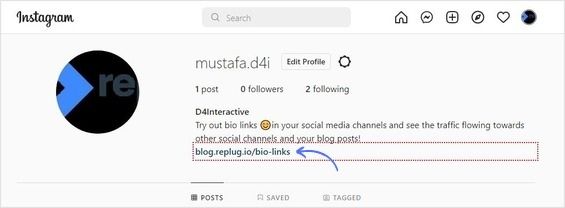
    A link in your Instagram bio is a great way to drive traffic to your website and increase engagement with your content. In addition, it allows you to direct potential followers to a landing page, portfolio, or blog post you want to promote. 

    You can also link to an email sign-up page, product page, or shop. This feature is handy for businesses, brands, and influencers who want to increase their reach and promote their content.

    Follow this step-by-step guide to quickly find any profile’s link in the bio on mobile and desktop.

    How to get to the link in the bio on Instagram on a mobile device?

    Step 1: Open the Instagram app on your mobile device.
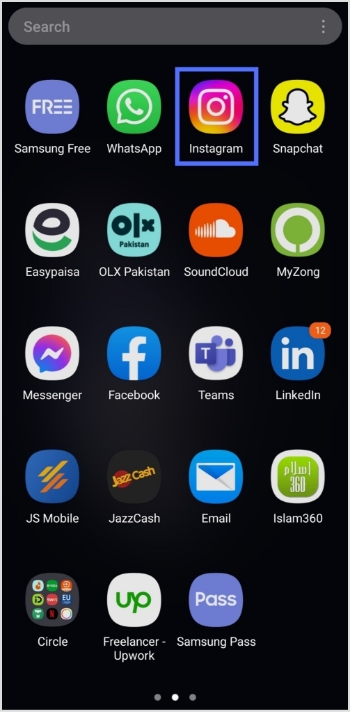
    Open Instagram

    Step 2: Tap on the user’s profile name (username) on whose caption you noticed the Link in Bio.
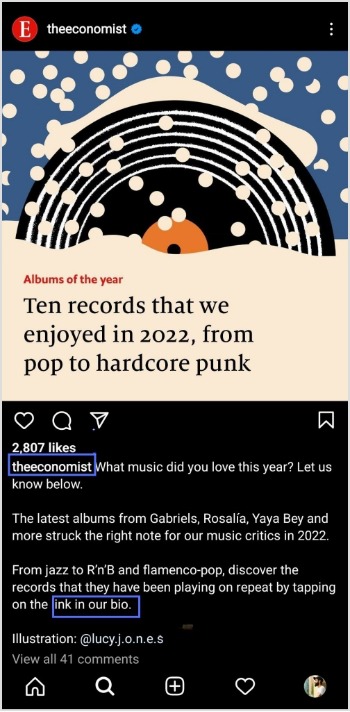
    click profile

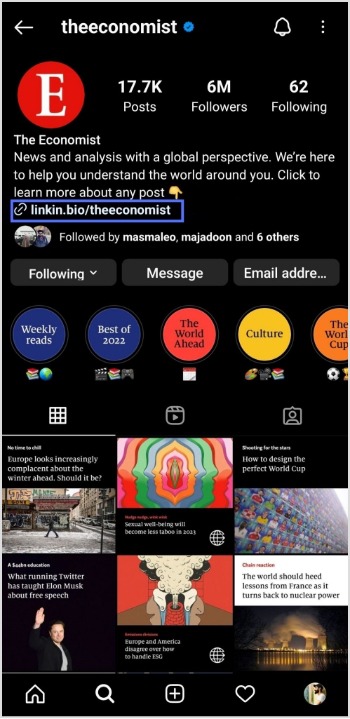
    Step 3: You will be taken to the user’s profile screen. Here you will see a website link that’s your “Link in Bio.” Just tap on the link to open it.
    How to get to the link in the bio on Instagram on a computer device?

    Here are two simple steps to find the Instagram link in the bio on a computer.

    Step 1: Click on the profile that says Link in bio in a post.

    user profile name

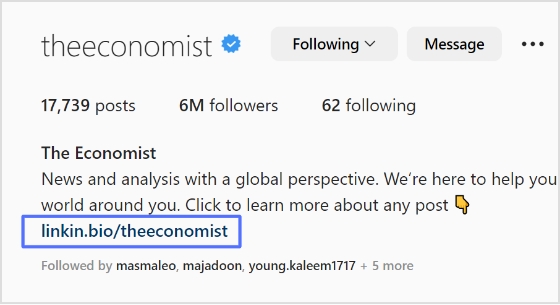
    Step 2: The website link will show up under their bio on their profile screen. Click on it to open the link.
    link in bio

    How To Add A Instagram Link In Bio?

    Adding an Instagram link in bio helps direct your followers and potential customers to your dedicated page.

    As a result, makes it easier for them to find your profile and learn more about your brand. It also encourages followers to engage with your content, which can help drive sales and increase brand awareness.

    Here’s how to add an Instagram link in the bio:

    Step 1: Open Instagram on your mobile and tap your profile icon in the bottom right corner.

    tap profile icon

    Step 2: Tap on the edit profile button on your profile page. 

    edit profile

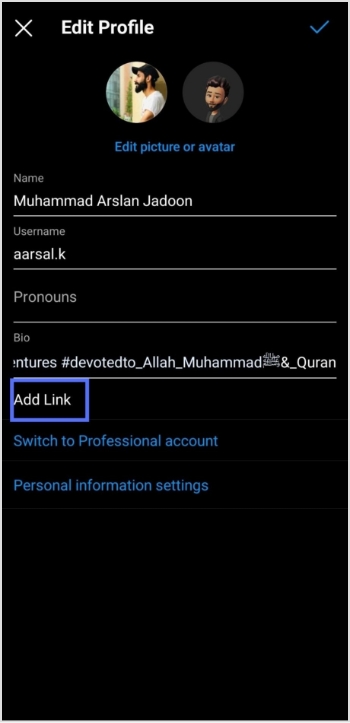
    Step 3: Now, you will see the add link section on your mobile screen. Tap on it. 
    add link

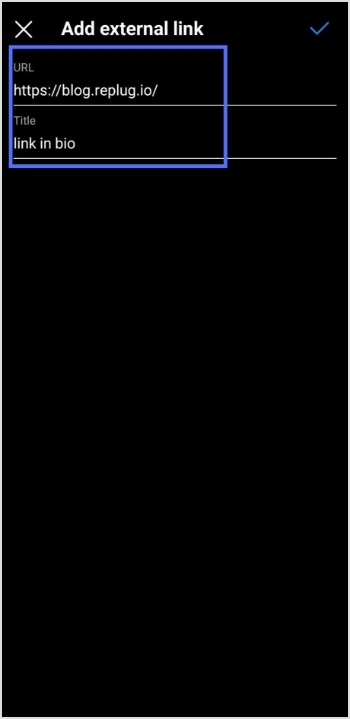
    Step 4: Tap the add external link section to add your website address. 

    url&title

    Step 5: Copy and paste the URL in the URL section and add a title in the title section. 
    add external link

    Step 6: Your link in the bio will now appear in your profile.
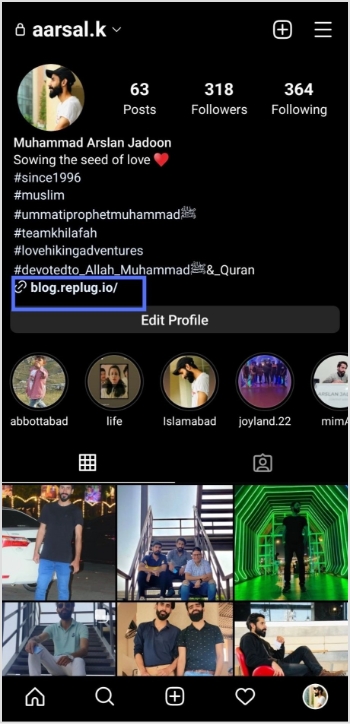
    url in bio (2)

    Your Instagram profile now has a link in the bio. 

    Instagram bio page with multiple bio links – Is it possible?

    Adding multiple bio links to your Instagram bio is a great way to drive more traffic to your website and other online resources. By adding links to your Instagram bio, you can easily direct your followers to your website, blog, YouTube channel, and other platforms where they can learn more about you and your business.

    Additionally, including multiple bio links allows you to showcase your work, products, or services in an efficient and organized way. You can use a free link shortener to create a single, short URL that links to multiple websites.

    Follow these steps to add multiple bio links to your Instagram profile. 

    Step 1: Sign in to your Replug account or create a new one if you don’t have one.
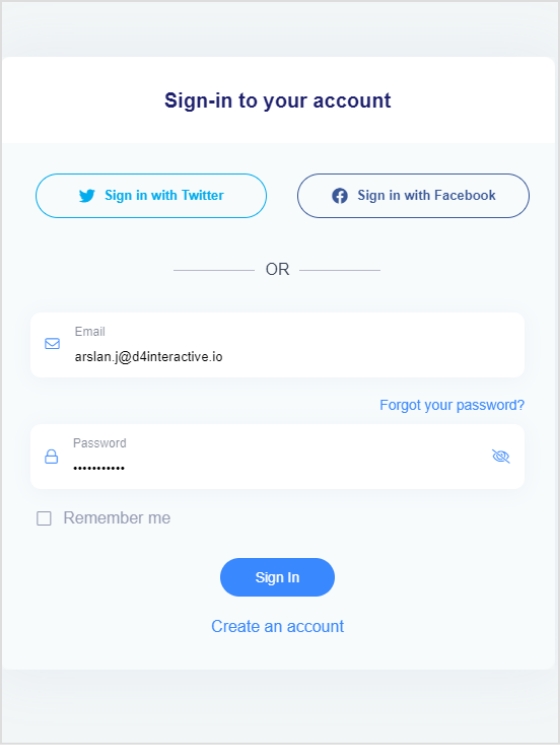
    signin or create account

    Step 2: You’ll be taken to the main dashboard page. Click on the bio links section from the main dashboard page.  
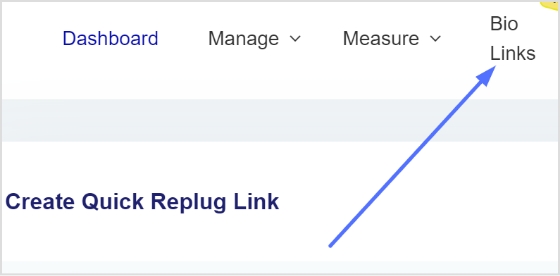
    bio link

    Step 3: Click the new bio link button to create your bio link. 
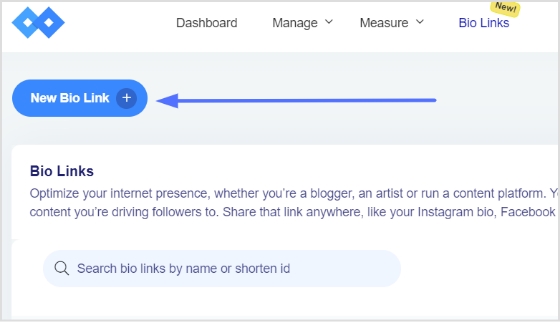
    add bio link

    Step 4: Add Social Icons, Links, RSS Feed, Audio, Video, Card, and Text as part of your bio links. Our bio link page, for example, has social icons and a card.

    Note: The above image shows you the options (blocks) you can choose for your Instagram bio or landing page.
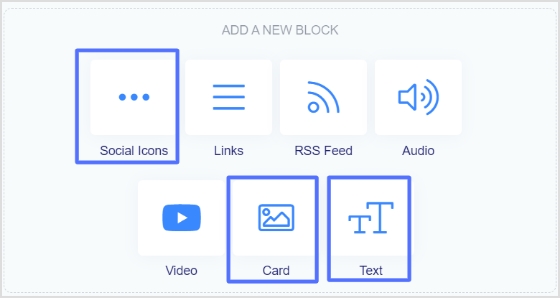
    social icons and next

    Step 5: Choose social icons and click next. You can choose up to 5 social icons (profiles).
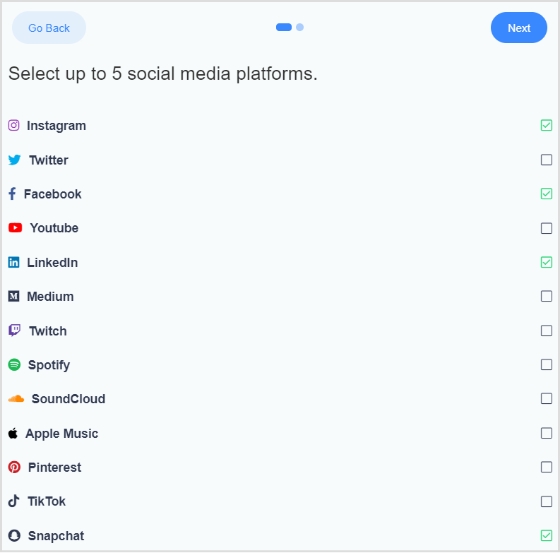
    social icons

    Step 6: Now, add a title to your social links, customize the icon’s color and enter the links or usernames for your social media accounts, as shown in the picture below.

    Note: When someone clicks on any of your social icons, they will go to the relevant social media profile. 
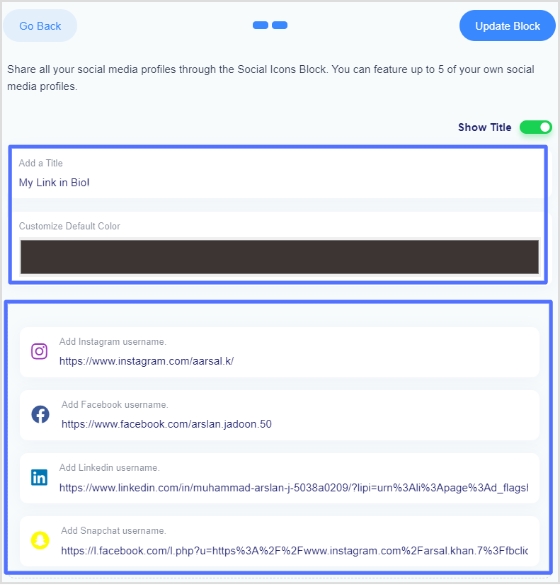
    social icons links, color, title

    Step 7: Now, click the update block button to add other blocks, like card, text, video, etc. 
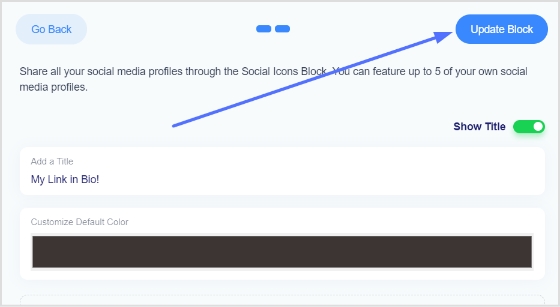
    update block

    Step 8: Now, choose another block, for example, a card.
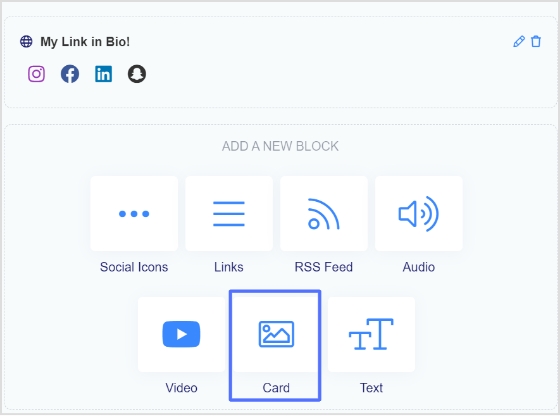
    click card

    Step 9: In the card section, add your destination URL add the card image, title, and description. Also, choose the style of the card and click the save block button.
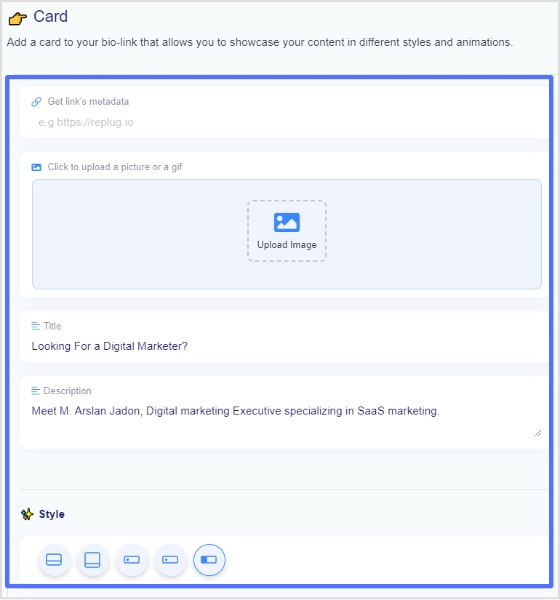
    card select

    If you want to see how any section or block looks, you can preview it side by side. Here is an example of how the card looks. 
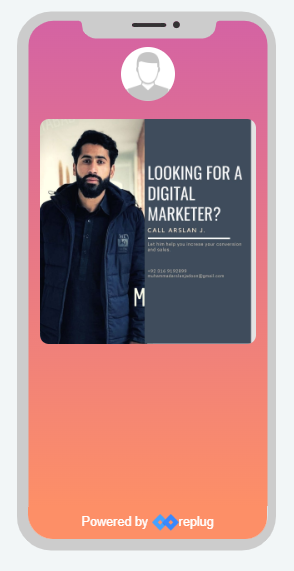
    preview card

    Step 8: Once you have added all the necessary blocks, click the next button.
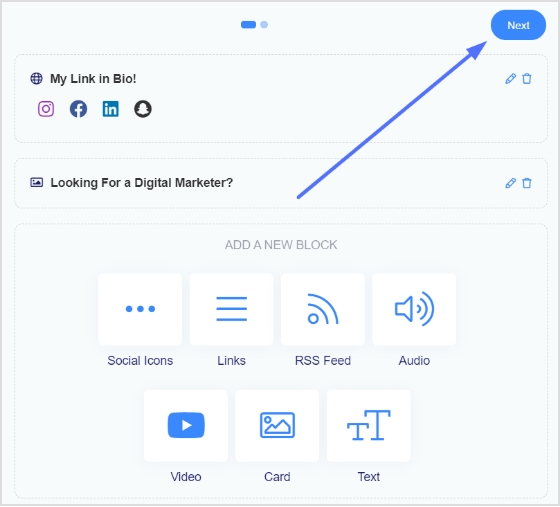
    click next

    Step 9: You are now on the final page. Upload your avatar, select a brand, add a title and sub-title, and choose a domain. 

    Note: Replug is an all-in-one link optimization platform that allows you to create a brand with a custom domain in seconds.  
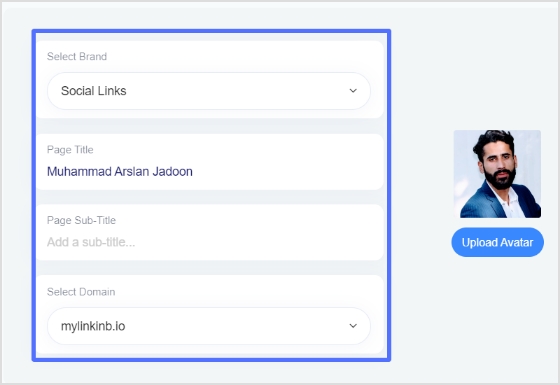
    final page

    Step 10: As you scroll down, you’ll find other cool features, such as custom appearances, SEO, social media open graph images, favicons, and retargeting pixels. Make your bio link more appealing by adding these features.
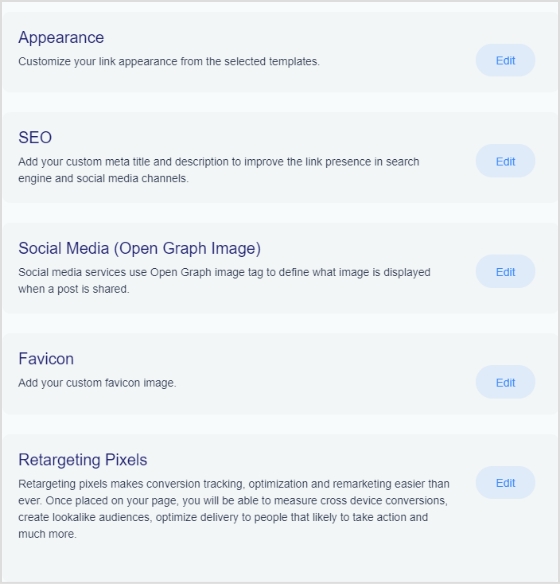
    rich features

    Step 11: Once you’re done, click the save link button, and your bio link is ready to share on any social platform.
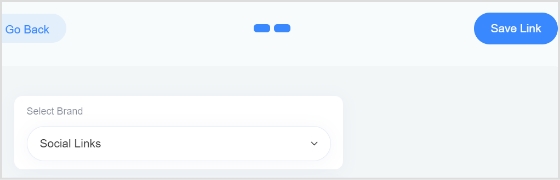
    save link

    Frequently asked questions

    Can you have more than one link in your bio? 

    Yes, you can have more than one link in your bio with the help of a free bio link tool like Replug. However, it is important to remember that a bio should be concise, so it is advisable to limit the number of links to two or three.

    Can I create a link with multiple links on Instagram? 

    Yes, you can create a link with multiple links using a top-notch Instagram bio link generator online. Simply create an account and follow the instructions to create a link with multiple links, often called bio links. 

    Trending Topics:

    How to get followers on Instagram fast?

    How to remove link from Instagram bio?
    How To Put A Link In TikTok Bio?

    How to Change Facebook URLs on Mobile and Desktop?

  • How to add a link in bio to your Instagram profile?

    How to add a link in bio to your Instagram profile?

    Most of us who use popular social media platforms are familiar with bio links. But many of us do not know about it or even how to add Instagram link in bio.

    What does Link in Bio Mean?

    It’s a clickable URL link that Instagram users can add to their Instagram profile. Many other social platforms such as Facebook, Twitter and others also have this option to add a link to their profile section.

    The next question in your mind must be who can add Instagram links?

    Anyone, either a regular Instagram user or a business account holder, can add Instagram links to their bio.

    Related: Instagram Story Hacks: 30 Ways To Boost Your Engagement

    How to put a Instagram link in bio?

    Creating a Instagram URL is simple. Follow the steps and you will have a bio link in no time. 

    Step 1 

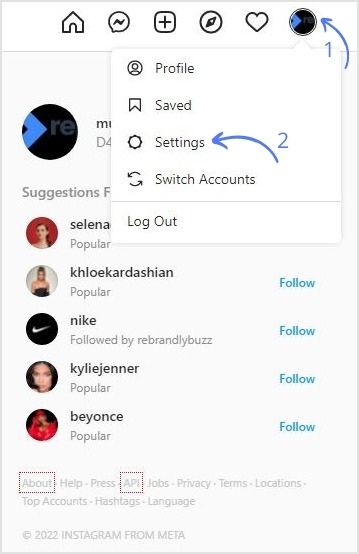
    Log in to your Instagram Account. Navigate to the profile icon on the top left corner and go to the settings page.

    Navigate-to-Profile-Tap-Settings

    Step 2

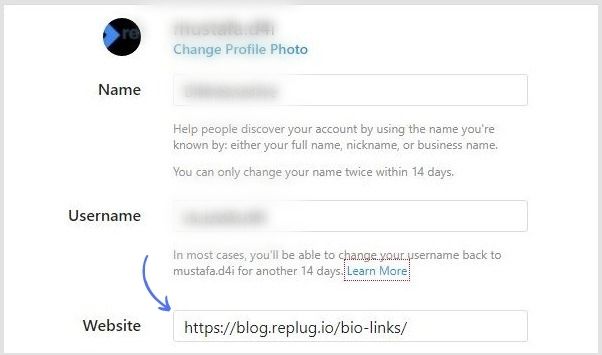
    Add your desired Instagram link in the website field.

    Instagram-Link-In-Bio
    Boost ROI with branded URLs - Replug dashboard showing performance metrics and branded URL creation

    Go beyond generic link pages!

    Create custom bio links that truly fit your brand

    With Replug, you can create bio links that are unique, engaging, and built to convert.

    Start free trial

    Step3

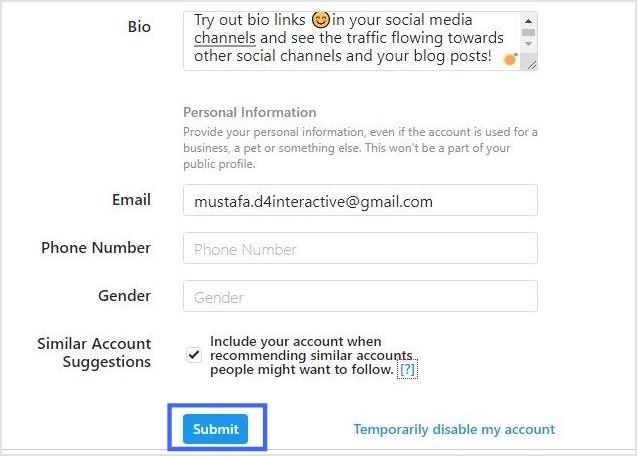
    Add an appealing bio if not added yet. Then, click on submit to complete the process.

    Submit

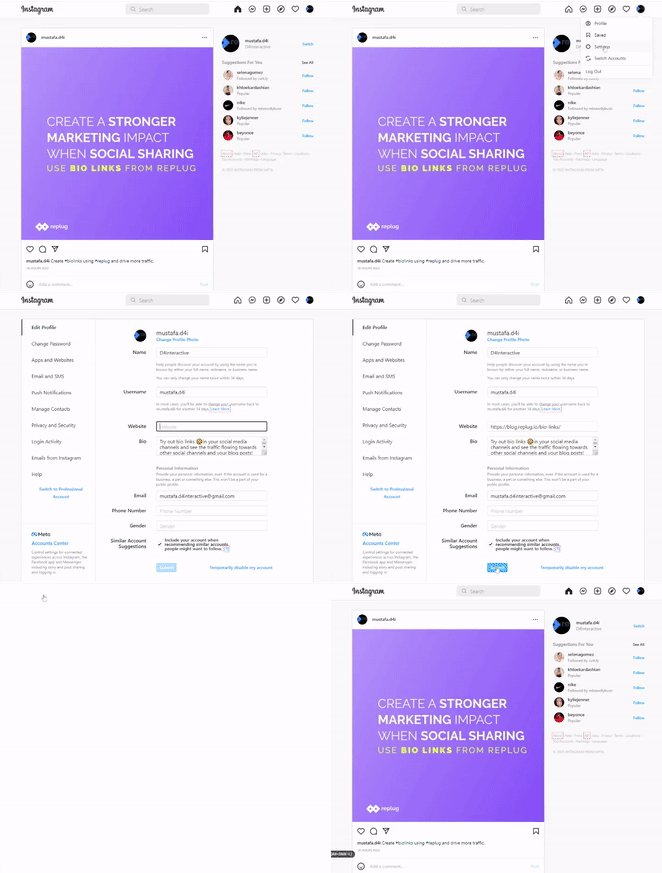
    Here’s a recap of the above steps

    Instagram-Link-In-Bio

    You may also like: How to get to the link in the bio on Instagram?

    How Would Your Instagram Link Appear to Others?

    Anyone that hovers over your profile pic can view your Bio Link. They can also view this link when they visit your profile.

    Instagram-Link

    How to Add Multiple Links in Your Instagram Bio?

    Replug enables users to easily add multiple short links. With the Instagram link in bio free tool, you can create a landing page for any link and add multiple CTA’s on that page routing to multiple destinations. It allows users to access more information about yourself or your business. 

    Why Do I Need An Instagram Link?

    Here are some of the significant benefits of adding a BIO Link.

    • Keeps your audience engaged
    • Drives traffic to your desired website and social pages
    • More conversions
    • Higher impact

    What Mistakes to Avoid When Creating a Instagram Link in Bio?

    We have identified inevitable mistakes to avoid when you add a link to your Instagram Bio.

    • Adding many links
    • Avoid long bios
    • Not adding a CTA
    • Do not boast about yourself
    • Unclear bio
    • Adding random links

    How To Use Your Bio Link Effectively?

    Here are some tips to use Instagram bio links to your advantage.

    • Follow a strategic approach when creating a link in bio free. Connect your account to ContentStudio and boost your engagement.
    • Use Bio links to direct users to access more information about yourself or your business.
    •  Promote business products and services such as discount offers, free trials, ETC.
    • A solid way to get leads with tracking analytics.

    That’s all from our side, just keep these tips in mind and start attracting solid leads with your Instagram bio Links. Now that you have learned how to add or even find an Instagram link within minutes, go create a bio link now and turn followers into customers.