Author: Amna Yawar

  • 16 ways to increase ecommerce sales using social media 

    16 ways to increase ecommerce sales using social media 

    Social media isn’t just for memes and viral trends anymore, it’s a powerhouse for ecommerce businesses. With more than half of social media marketers using platforms to sell products directly within apps, brands are leveraging social media to boost conversions. In fact, 87% of sellers say social selling has been effective for their business and has helped them increase ecommerce sales.

    If you’re looking for ways to increase ecommerce sales through social media, you’re in the right place. This guide will walk you through proven strategies to turn your social media presence into a revenue-driving machine.

    The role of social media in ecommerce growth

    Social media has revolutionized how businesses operate, especially in ecommerce. What started as a platform for connecting with friends and sharing updates has now become a powerful tool for driving online sales and building brand loyalty. If you’re running an online store, understanding the role of social media in ecommerce growth is no longer optional; it’s essential.

    With global ecommerce sales reaching an estimated $5.8 trillion in 2023 and projected to grow by 39% in the coming years, social media has emerged as a key driver of this growth (Statista). From increasing product discoverability to streamlining the purchase process, social media offers countless opportunities for businesses to connect with their audience and increase sales.

    Why social media is a game-changer for online sales

    Social media has fundamentally changed how consumers shop and interact with brands. Here’s why it’s a game-changer for online sales:

    1. Elevates product discoverability: Targeted ads, engaging content, and collaborations introduce products to a broader audience.
    2. Streamlines purchases: Features like Instagram Shop, Facebook Marketplace, and TikTok’s shopping tools simplify transactions.
    3. Builds customer loyalty: Direct engagement, personalized responses, and community efforts build strong relationships and repeat sales.
    4. Influencer marketing: Partnering with influencers builds brand credibility and connects products with engaged audiences.
    5. Precision targeting: Social media allows brands to target specific demographics, increasing ROI and marketing efficiency.
    6. Capitalizing on mobile shopping: As 60% of US adults consider mobile shopping essential, optimizing social shopping for mobile users enhances conversions.

    16 ways to increase ecommerce sales through social media

    1. Sell directly on social media platforms

    Social commerce is gaining momentum, with 63% of businesses already using it to amplify sales. It simplifies the path from discovery to checkout, encouraging impulse buys and improving conversion rates. 

    Social commerce is the buying and selling of products directly within social media platforms, allowing users to shop without leaving the app.

    By enabling businesses to sell directly on platforms like Instagram, Facebook, TikTok, and Pinterest, social commerce creates a seamless shopping experience. With 90% of people more likely to buy from brands they follow on social media, in-app features like checkout and “tap-to-buy” buttons make purchasing easy and drive sales while users browse.

    Setting up shops on Instagram, Facebook, TikTok & Pinterest

    To take advantage of this growing trend, you need to set up shops on the platforms your customers are using. Here’s how:

    • Instagram & Facebook: Build a virtual storefront that lets users browse and purchase directly from posts, stories, or shop sections.
    • TikTok: Integrate products into videos and live streams for instant sales.
    • Pinterest: Use shoppable pins that link directly to product pages, making it easy for users to shop as they explore.

    These tools create frictionless shopping experiences that can boost conversions.

    Live shopping: Turning engagement into sales

    Live shopping is growing on platforms like TikTok and Instagram, where brands can host real-time events to showcase products, engage with viewers, and offer exclusive deals. This creates urgency and encourages immediate purchases, helping businesses build trust with followers and strengthen relationships.

    2. Choose the right social media platforms

    Not all social media platforms are created equal, especially when it comes to ecommerce. Identifying where your target audience spends their time is key to maximizing sales. Here’s a breakdown of the best platforms for driving ecommerce sales:

    PlatformBest forAudience demographicsKey features
    Facebook– Wide-reaching sales ads
    – Customer engagement
    – 25-54 years
    – Diverse audience
    – Shoppable posts
    – Ads
    – Marketplace
    – Facebook Shops
    Instagram– Visual products
    – Influencer marketing
    – 18-34 years
    – Visually-driven content
    – Shoppable posts
    – Stories
    – Reels
    – Ads
    TikTok– Viral content
    – Trend-driven marketing
    – 16-24 years
    – Gen Z and trend followers
    – Product integration in videos
    – Live Shopping
    Pinterest– Product inspiration
    – High-intent shoppers
    – 25-45 years
    – Predominantly female
    – Shoppable pins
    – Boards
    – Inspiration-driven content

    Aligning your brand with the right platform for your audience can drive engagement and boost e-commerce sales.

    How to identify the right platform for your business

    To determine which platform works best for you, consider these questions:

    • Who is my target audience? Each platform caters to different demographics. If you’re targeting younger consumers, TikTok might be your best option, while Facebook or Instagram can reach a broader age range.
    • What content works best for my business? Visual-heavy brands may excel on Instagram and Pinterest, while TikTok is perfect for businesses creating fun, engaging video content.
    • What are my business goals? Whether you’re focused on immediate sales or building and increasing brand awareness, each platform offers features that can help you meet specific goals (e.g., shoppable posts, live streams, ads).

    Choosing the right social media platform for your ecommerce business comes down to understanding where your audience spends time and how they engage with content.  A well-planned strategy, combined with effective eCommerce website development, can enhance user experience and drive better engagement

    3. Use social media management tools 

    Social media management is a key factor in increasing ecommerce sales, and tools like ContentStudio can make a significant difference. These tools help businesses plan, schedule, and manage content across multiple platforms, simplifying the process and driving better results.

    Benefits of ContentStudio for ecommerce

    • Content scheduling: Easily schedule posts in advance to maintain a steady content flow. ContentStudio offers this feature, helping you stay on top of your social media presence.
    • Content planning: With a built-in content calendar, ContentStudio allows for effortless planning and automation. This saves time and allows businesses to focus on creating quality content.
    • Content management: Handling multiple social media accounts from one platform is made easy with ContentStudio, which supports integration with Facebook, Instagram, Twitter, and others. 

    Such social media tools streamline the process of content scheduling, planning, and multi-account management, ultimately increasing e-commerce sales.

    4. Increase sales with deep links

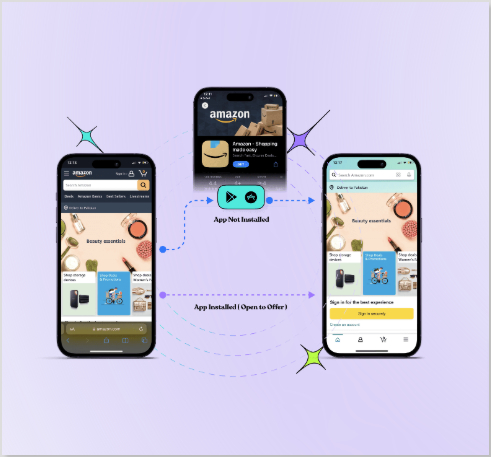
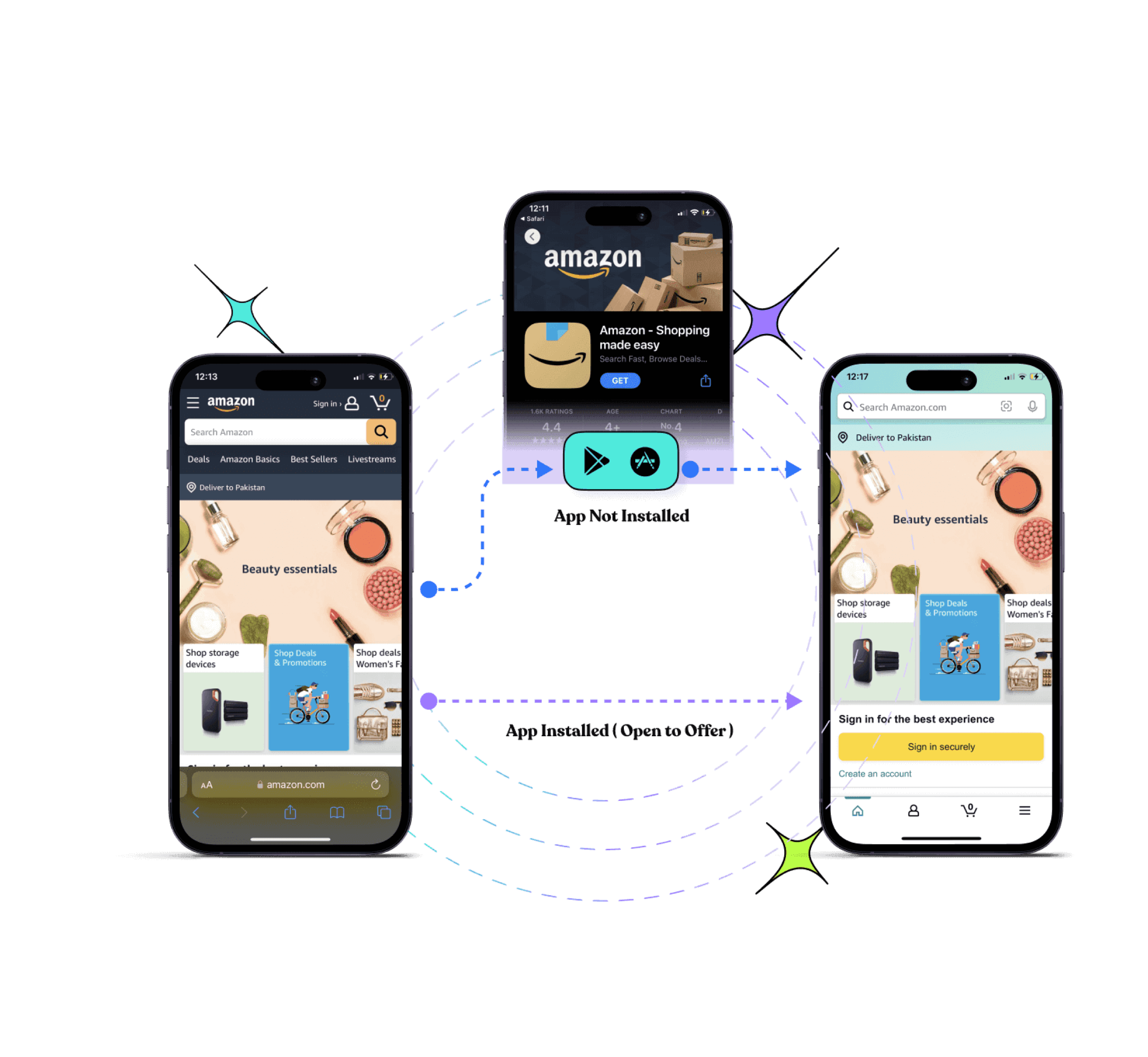
    With Replug’s deep linking, you can guide potential customers directly to the content that matters most, whether they have your app installed or not. This means less friction and more opportunities to convert visitors into paying customers.

    Here are the key advantages of deep lining:

    • Boost your app’s discovery: Whether users have your app installed or not, Replug’s deep links ensure they’re taken to the right destination on your ecommerce store, leading to higher chances of a successful purchase.
    • Drive traffic to your app from anywhere: Promote your app across social media, ads, emails, and more by using just one deep link to direct users to your app store or in-app content, reducing drop-off and increasing engagement.
    • Streamline the conversion funnel: Deep links allow you to bypass unnecessary steps, sending users straight to specific products or offers, increasing the likelihood of a purchase and improving sales.
    • Re-engage and win back users: With push notifications and targeted emails featuring deep links, you can bring back users who’ve lapsed, driving them back to your app and increasing retention.
    • Create deep links for any platform: Whether you’re marketing on Instagram, YouTube, or other apps, Replug’s social media deep links ensure users get exactly where they need to go, enhancing their experience and increasing conversions.
    Replug Branded Short Links CTA
    Drive more clicks, conversions, and app installations by deep linking
    to your favorite platforms.
    Try deep links for free

    5. Leverage social media analytics for better targeting

    Social media analytics play a vital role in optimizing marketing strategies by providing insights into customer behavior. Here are key ways to leverage analytics for better targeting and improving sales:

    Understanding customer behavior through data

    Through analyzing social media metrics such as likes, comments, and shares, businesses can uncover what resonates most with their audience. This data helps in crafting more personalized content and offers, improving engagement and conversions.

    Tracking key metrics (CTR, engagement, ROI)

    Tracking the right social media metrics is essential to assess the performance of your campaigns. Key metrics to monitor include:

    MetricWhat It measuresWhy it’s important
    CTR (Click-Through Rate)Measures clicks compared to impressions.Shows how effective your posts are at driving traffic to your website.
    EngagementLikes, shares, comments on posts.Likes, shares, and comments on posts.
    ROI (Return on Investment)Compares revenue to campaign costs.Helps determine the financial success of your campaign.

    Segmentation and audience insights for personalized marketing

    Segmentation tools allow you to categorize your audience based on factors like behaviors, interests, and demographics. By personalizing campaigns for different segments, you can ensure that your content is more relevant, increasing the chances of conversion.

    Cart abandonment & retargeting strategies

    Social media analytics can help identify abandoned carts. With Replug’s retargeting pixel feature, you can easily track website visitors who didn’t complete their purchase and retarget them with personalized ads across various platforms. 

    Replug Branded Short Links CTA
    A complete link management solution
    for marketing professionals & agencies.
    Try Replug for free

    6. Get creative with social media content

    The best part about social media? You can literally do whatever you want with your visuals! The freedom is unmatched, and it’s the perfect place to show off your products in ways that would be impossible in traditional marketing. From eye-catching video animations to scroll-stopping reels and behind-the-scenes content, the possibilities are endless. Want to level up your visuals even more?

    Understanding the product photography cost can help you plan for high-impact content that adds an immersive, interactive edge to your social media strategy. Here are a few strategies to enhance your ecommerce sales using creative social media content:

    • Visual experimentation: Go wild with your content! Reels, carousels, stories—use all of it. Glossier keeps it dreamy and soft, while Rhode makes their products look so luxurious it’s almost unfair.
    • Sensory marketing: Make them feel something! Jacquemus creates bold, eye-catching visuals that draw people in, while Summer Fridays nails the soothing vibes that make their skincare impossible to ignore.
    Jacquemus sensory marketing
    Summer Fridays sensory marketing
    • Oversized visuals: Big, bold, in-your-face visuals? Yes, please! Typology and The Ordinary keep it clean yet attention-grabbing, making their minimalist designs feel bold and premium.
    Typology oversized marketing
    • Keep up with the trends: Jump on the trends! TikTok challenges, viral hashtags, or whatever’s blowing up—this stuff works. Airbnb absolutely nails it when it comes to following the trends.
    @airbnb

    the @barbie dreamhouse is back on airbnb. but this time—ken’s hosting. the pink palace has been revamped with maximum kenergy and is ready for guests. booking opens on july 17 at 10am PT. 🛼 barbie airbnb kendreamhouse don’t miss BarbieTheMovie only in theaters july 21.

    ♬ original sound – airbnb – airbnb
    • Using memes: Memes are your secret weapon. They make your brand feel approachable and human. Wendy’s is a master at roasting the internet, and MoonPie is a meme machine that knows exactly how to turn the joke into a brand moment.
    Wendy's meme marketing
    Moonpie meme marketing
    • Interactive content: Get your followers involved! Polls, quizzes, and “choose your own adventure” stories make your audience feel like they’re a part of the experience. Starbucks uses Instagram polls to tease new drinks and get people buzzing.
    • Behind-the-scenes content: Everyone loves a sneak peek! Show what goes into your products or how your team works behind the scenes. Ben & Jerry’s shares quirky, fun content that lets their personality shine and keeps people connected.
    • User-generated content (UGC): Turn your customers into your best marketers. Repost their photos or videos using your products. Nike is fantastic at this, turning their customers into the face of their brand.

    Social media is your playground. Don’t be afraid to experiment, have fun, and do what works!

    7. Reduce cart abandonment with retargeting pixels

    Retargeting is an essential tactic for bringing back lost visitors. Replug’s retargeting feature allows you to reach customers who have shown interest in your product but didn’t make a purchase. 

    Through personalized ads, you can encourage these users to return and complete their transactions, ultimately improving your conversion rates. Let’s dig into the benefits:

    • No coding required: Add your retargeting pixel to any link in seconds, without coding or technical skills.
    • Run multi-platform retargeting campaigns: Expand your reach by retargeting users on popular social networks like Facebook, X (Twitter), LinkedIn, and Pinterest.
    Run multi-platform retargeting campaigns
    • Build your custom audience: With every click on your retargeted links, you can add users to your custom audience list for future remarketing campaigns, increasing your chances of conversion.
    • Reduce cart abandonments: Remind users who have abandoned their cart to complete their purchase, offering them an incentive to return, such as discounts or free shipping.
    • Add powerful CTAs to retargeted links: Replug makes it easy to add call-to-action buttons to your retargeting links, further encouraging users to click through and take action.
    Add CTAs to retargeted links
    • Leverage analytics for smarter retargeting: Use real-time analytics to track clicks, conversions, and campaign performance, helping you optimize your strategy and improve ROI.

    You may also like: 7 Retargeting Best Practices Every Marketer Should Follow

    8. Partnering with influencers 

    Influencer marketing has become a powerful tool in ecommerce. By collaborating with influencers, you can increase brand awareness and drive traffic to your e-commerce store. The key is to find the right influencers and structure your partnerships for maximum return on investment (ROI).

    Finding the right influencers for your niche

    Choosing the right influencers depends on your brand’s niche. Whether you’re selling beauty products, tech gadgets, or fashion, it’s crucial to partner with influencers whose audience aligns with your target market.

    Suppose your brand is leaning into e-commerce beverages. In that case, you can even launch a small-batch custom instant coffee line through a private-label platform, making influencer-driven campaigns easier to scale without having to handle production yourself.

    And, if you’re in the beauty industry, collaborating with makeup artists on platforms like Instagram or TikTok can be effective.

    Make sure to consider factors like:

    • Audience size and engagement
    • Relevance to your product or service
    • Authenticity of their content and community
    • Platform (Instagram, TikTok, YouTube, etc.)

    You may also like: Successful influencer marketing campaigns: 7 best examples

    Micro vs. macro influencers: which one drives more conversions?

    Understanding the differences between micro and macro influencers can help you decide which one will provide the best results for your brand.

    AspectMicro-influencersMacro-influencers
    Follower count1K to 100K100K+
    Engagement rateHigh (platforms like Instagram, TikTok)Lower (more common on Facebook, Instagram)
    CostAffordableExpensive
    ROI potentialHigh for conversions (Instagram, TikTok, YouTube)High for brand awareness (Instagram, YouTube, Facebook)

    Structuring influencer collaborations for ROI

    To maximize the ROI of influencer collaborations, make sure to clearly define goals, set expectations, and track performance. Here are some strategies:

    1. Offer clear value: Ensure that the partnership benefits both you and the influencer. Whether it’s through affiliate commissions, free products, or exposure, make the incentive attractive.
    2. Use affiliate link cloaking: With Replug’s link cloaking feature, you can disguise long and messy affiliate links, making them look clean and professional. This improves the user experience and builds trust with your audience.
    3. Create authentic content: Allow influencers creative freedom to produce content that resonates with their audience. Authentic content usually performs better and feels more genuine to followers.
    4. Track performance: Use trackable links, promo codes, or UTM parameters to measure the effectiveness of influencer campaigns. Tools like Replug can help you generate and manage these trackable links, giving you insights into how well each influencer is driving sales.
    5. Leverage multiple platforms: Don’t limit yourself to just one platform. A combination of Instagram, TikTok, and YouTube can help you reach a wider audience.
    Replug Branded Short Links CTA
    Maximize marketing ROI
    by transforming ordinary URLs into
    branded short links that convert.
    Try Replug for free

    9. Drive engagement with QR codes

    QR codes are an incredibly versatile tool for linking offline and online marketing efforts. Replug’s dynamic QR codes allow you to engage customers in-store, on print ads, or on packaging, building your brand presence both online and offline with detailed tracking to optimize your marketing strategies.

    Here’s how it works:

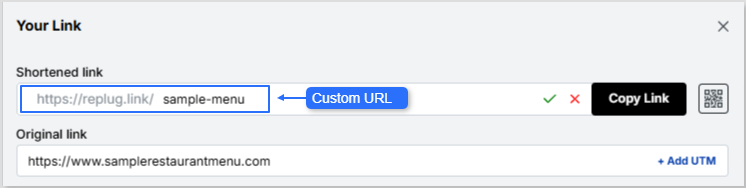
    • Create instant QR codes: Generate QR codes for any shortened link and instantly connect users to your digital presence. This is perfect for stores, events, promotions, and more!
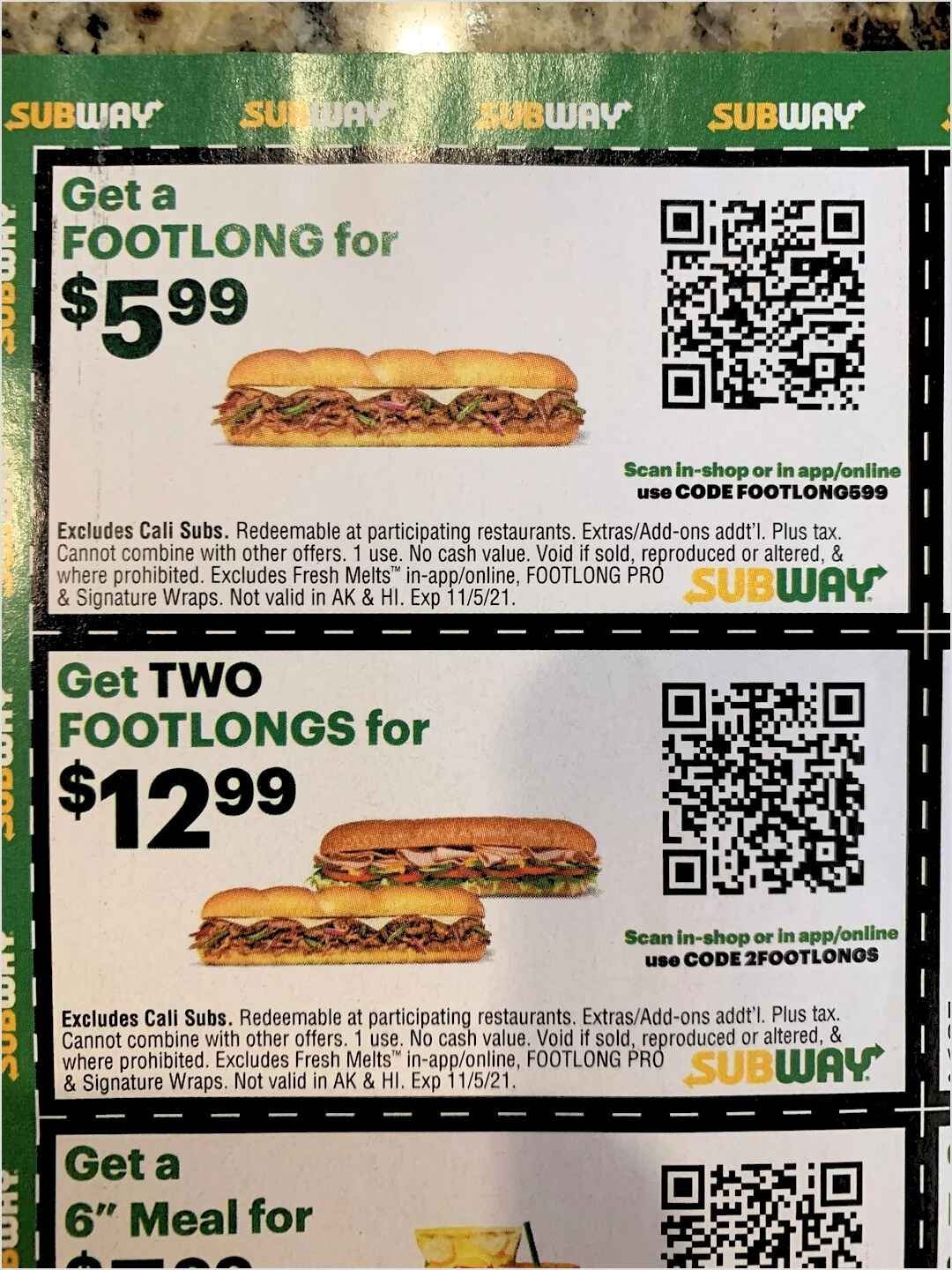
    • Enhance marketing with QR codes: Use QR codes for promotions, app installs, payments, digital menus, and more, integrating them into your physical marketing materials to bridge the gap between offline and online engagement.
    • Enjoy unlimited scans: Replug’s QR codes never expire, so you can keep reusing them without worrying about link expiration. Plus, you can update the destination URL anytime to keep your content relevant.
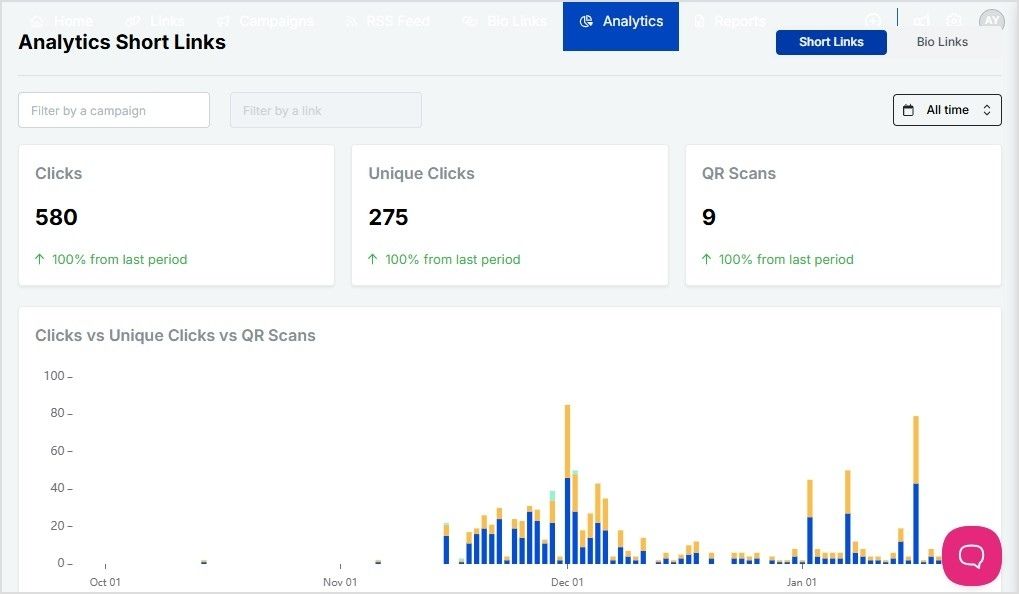
    • Track scans and conversions: With Replug’s link analytics, you can monitor how well your QR codes are performing. You can track scans, user actions, and conversions to optimize future campaigns.

    10. Enhance brand visibility with branded links

    When promoting products on social media, the links you share can make or break a sale. Branded links instantly make your product promotions look more trustworthy, professional, and click-worthy.

    Instead of using long, random URLs or generic shorteners, Replug helps you create customized short links with its trustworthy short URL generator that feature your brand name, leading to higher engagement, more clicks, and, ultimately, more sales.

    Why branded links drive more clicks & sales?

    Shoppers are hesitant to click on unfamiliar links, especially on social media. Branded links eliminate that hesitation by making your product promotions look more authentic and credible.

    • Enhance click-through rates: Branded links can boost CTR by up to 39%, helping you drive more traffic to product pages.
    • Enhance brand trust: Customers are more likely to click when they recognize the brand in the link, leading to higher conversions.
    • Make promotions look cleaner: Instead of messy, long URLs, branded links keep your posts sleek and professional.
    • Prevent link suspicion: Generic short links can look spammy. A branded link reassures customers they’re landing on a legitimate product page.
    • Track campaign performance: With Replug’s click analytics, you can monitor which links get the most clicks and optimize your strategy for better results.

    How to use branded links to increase ecommerce sales on social media?

    Branded links aren’t just for looks; they’re a powerful tool to drive more purchases from your social media audience. Here’s how to use them effectively:

    StrategyHow it helps
    Add to product promotionsMakes product links look professional and clickable.
    Use in influencer campaignsEnhances credibility and directs traffic to your store.
    Optimize for limited-time offersCreates urgency and makes discount links easy to share.
    Include in retargeting adsRecaptures lost customers and drives them back to checkout.
    Leverage UTM trackingHelps track which social media platforms drive the most conversions.

    11. Combining organic & paid strategies

    To maximize your ecommerce sales, you need to blend organic content with paid ads. Organic content builds trust and long-term relationships, while paid ads on platforms like Instagram, Facebook, and TikTok give you a quick visibility boost. The key is knowing where and how to apply each strategy for optimal results.

    Organic content: Building trust and engagement

    Organic posts on platforms like Instagram, Facebook, and TikTok can help you nurture relationships with followers. When done right, your content doesn’t just show off your products—it builds trust. And trust is a major driver of sales. According to McKinsey, there was a 20% increase in consumers shifting to ecommerce in 2020, and 68% of social media marketers say they use it to direct traffic to their websites.

    PlatformOrganic Strategy
    Instagram & FacebookRegularly post engaging content like stories and reels, showcase products, and use shopping features like product tags.
    TikTokUse fun, creative videos that blend entertainment and promotion, and take advantage of the platform’s viral potential.

    Paid campaigns: Quick visibility and actionable results

    Paid campaigns on Facebook, Instagram, and TikTok allow you to target audiences based on data-driven insights. With Instagram, TikTok, and Facebook offering the highest ROI for social selling (HubSpot), these platforms provide great opportunities for ecommerce brands to thrive. Reaching thousands of people by running ads on Reddit’s public discussion platforms can provide excellent visibility and boost sales.

    Additionally, Mobile commerce is expected to make up 44% of the ecommerce market in the United States by 2025, and platforms like Instagram and Facebook are designed to make mobile shopping as convenient as possible.

    PlatformPaid Strategy
    InstagramRun carousel ads and story ads with a clear CTA, driving traffic to your product pages or website.
    FacebookLeverage dynamic ads that show personalized product recommendations based on user behavior.
    TikTokUse native ads like In-Feed ads to engage a younger audience and drive immediate purchases.

    You may also like: How to Sell on Instagram: Top 10 Strategies for Success

    12. Driving traffic to your ecommerce store

    Driving traffic to your ecommerce store requires a blend of strategic efforts to nurture visibility, engage your audience, and convert them into customers. Let’s break it down:

    Using link in bio tools for better conversions

    Link-in-bio tools are essential for platforms like Instagram and TikTok, where only one clickable link is allowed in the bio. Tools like Replug allow you to showcase multiple links, such as product pages, blog posts, or special promotions. By directing traffic to a central hub, these tools simplify navigation, improve the user experience, and ultimately increase conversions. This feature allows your audience to easily find and purchase products directly from your bio.

    Boost ROI with branded URLs - Replug dashboard showing performance metrics and branded URL creation
    Turn your bio links into click-boosting machines
    Check

    Drive up to more clicks than plain URLs

    Check

    Share multiple destinations with one link

    Create bio links free

    Social media SEO: optimizing for discoverability

    Optimizing your social media for SEO is crucial for getting noticed. Here are some strategies to improve discoverability:

    • Profile optimization: Use clear, concise descriptions with relevant keywords in your bio. Ensure that your website and contact details are easily visible.
    • Hashtags: Include trending and niche-specific hashtags in your posts. Hashtags increase your content’s visibility and help users find your store through social media search.
    • Engaging content: Post content that is shareable and engaging. The more people interact with your posts, the higher the chance of being seen by potential customers.

    You may also like: Top 11 benefits of eCommerce SEO

    Utilize blog content & social media sharing

    Your blog content can play a big role in driving traffic. Here’s how to make the most out of it:

    • Share blog snippets: Post visually engaging excerpts or summaries of your blog posts to drive traffic from social media. Add call-to-action phrases like “Learn more” or “Shop now.”
    • Engagement: Share blog posts and encourage your followers to engage with the content by asking questions or sharing their thoughts in the comments.
    • Consistency: Schedule regular blog post shares using social media management tools to keep your audience engaged and always have fresh content going out at peak times.

    When you consistently share blog content across your social media channels, you expand your reach, drive traffic to your store, and build lasting relationships with your audience.

    13. Leveraging user-generated content (UGC) 

    User-generated content (UGC) is one of the most effective ways to build trust with your audience and increase ecommerce sales. When customers share their experiences, whether through reviews, photos, or videos, it feels more authentic and relatable. According to Stackla, 79% of people trust UGC over branded content, making it a powerful tool to drive conversions.

    Why UGC boosts conversions & engagement

    UGC acts as social proof, showing potential customers that real people love your products. This kind of content is often perceived as more genuine than traditional advertising. When your existing customers share their positive experiences, it creates a ripple effect, encouraging others to follow suit and purchase from your brand.

    A study found that the average consumer reads 10 online reviews before buying a new product. This makes UGC not only valuable for engagement but also crucial for converting leads into sales.

    Encouraging customers to share reviews and testimonials

    Reviews and testimonials are key to creating a strong foundation of trust. You should encourage customers to leave feedback by:

    • Offering incentives like discounts or exclusive access to products.
    • Highlighting positive reviews on your social media platforms to show appreciation and strenghten confidence in new customers.
    • Making it easy to leave reviews by integrating review options directly on your website or via email after a purchase.

    When customers see that others are enjoying your products, they’re more likely to trust your brand and make a purchase.

    Running UGC contests & giveaways for maximum reach

    UGC contests and giveaways are great ways to encourage customer engagement and expand your reach. For example:

    • Host a photo contest where customers share photos of themselves using your products, with the chance to win a prize.
    • Encourage creative content such as short videos, reviews, or stories, which you can repost on your social media profiles.

    Not only does this build community, but it also generates free shareable content that you can reuse in marketing campaigns.

    14. Use shoppable posts

    Shoppable posts help brands sell directly through social media platforms, eliminating the need for customers to leave the app to make a purchase. Here’s how you can use shoppable posts across different platforms:

    PlatformHow to use shoppable postsKey benefit
    Instagram– Tag products in posts, stories, and reels.
    – Link your product catalog to your profile.
    Direct in-app purchases and enhanced user experience.
    Facebook– Set up a Facebook Shop and tag products in posts.
    – Use “Shop Now” buttons.
    Easy transition from post to product purchase.
    Pinterest– Use “Product Pins” to tag products.
    – Show real-time pricing.
    Seamless shopping experience without leaving the platform.
    TikTok– Tag products in videos and live streams.
    – Connect your product catalog.
    Interactive shopping experience for Gen Z.

    You may also like: 21 Instagram Story Hacks To Boost Your Engagement

    15. Posting consistently and staying active

    Maintaining a consistent presence on social media is crucial for increasing ecommerce sales and building brand awareness. However, the key to success lies in finding the right balance between posting frequently and maintaining quality content.

    Here are some strategies to help you post consistently and keep your audience engaged:

    1. The importance of a content calendar: A content calendar helps you stay on top of trends, plan for promotions, and stay consistent without scrambling for ideas at the last minute. With tools like ContentStudio, you can schedule your posts across multiple platforms, track performance, and align your content with important dates or sales events. 
    2. Finding the right posting frequency: It’s tempting to want to post as much as possible, but flooding your followers’ feeds can actually hurt engagement. On the flip side, posting too infrequently may cause your audience to forget about you. The key is to find a posting frequency that aligns with your audience’s preferences. 
    3. Engaging with your audience: Respond to DMs, like and comment on followers’ posts, and reply to comments on your stories and posts. Social media algorithms also reward engagement, meaning your content is more likely to be seen if you actively engage with your followers. 

    You may also like: Top 10 Social Media Hacks to 3X Your Brand Growth

    16. Use social listening 

    Social media isn’t just about posting—it’s about listening, too. Customers constantly share feedback, opinions, and experiences, giving ecommerce brands direct insights into their needs and expectations. Social listening tools help track these conversations, identify trends, and refine marketing strategies in real-time.

    Here’s how it helps:

    1. Monitoring brand mentions & customer conversations: Tools like Brandwatch, Mention, and Sprout Social allow businesses to track brand mentions across platforms, helping them respond to feedback, resolve issues, and engage with customers more effectively.
    2. Identifying trends & buying behavior changes: Platforms like BuzzSumo and Talkwalker analyze trending topics, hashtags, and competitor activities, helping brands spot shifts in consumer behavior and adapt their strategies accordingly.

    Using social listening means making informed decisions based on what customers are actually saying, not just guessing.

    Key benefits of using social media for ecommerce

    Using social media for ecommerce offers a wide range of benefits that can help your business grow. Here are some of the most significant advantages:

    1. Increased traffic and conversions: Engaging content, ads, and deep linking drive users to product pages, reducing drop-offs. This is particularly important given the average cart abandonment rate of 70.19%. For instance, offering incentives like free shipping can motivate online shoppers.

    2. Higher ROI through social selling:  Platforms like Instagram, TikTok, and Facebook offer the highest ROI for social selling. Features such as shoppable posts, live shopping events, and influencer collaborations enable brands to monetize their social presence effectively.

    You may also like: 08 best retargeting platforms to retarget your potential audience

    3. Personalized marketing: Tailored content, loyalty programs, and targeted promotions enhance customer retention. For instance, according to eMarteker, features such as loyalty programs (63.4%) and exclusive offers (62.5%) are considered the most valuable to US consumers.

    4. Reduced cart abandonment: Social media can help address common reasons for cart abandonment, such as unexpected costs (47%) and forced account creation (25%) (Forbes). This valuable data can reduce friction in the buying process and encourage customers to complete their purchases. 

    5. Building brand loyalty: Social media enables brands to engage with their audience on a deeper level. Through interactive content, user-generated posts, and community-building efforts, businesses can build long-term relationships with their customers.

    Conclusion

    Social media has evolved into a powerful ecommerce engine. By leveraging the right platforms, creative content strategies, influencer collaborations, and data-driven marketing, businesses can drive traffic, and build lasting relationships with customers. 

    Integrating advanced tools like Replug further amplifies sales potential, offering features like deep links, branded short URLs, and retargeting pixels to enhance marketing effectiveness.

    Replug Branded Short Links CTA
    A complete link management solution
    for marketing professionals & agencies.
    Try Replug for free

    FAQs on how to increase ecommerce sales using social media

    How can social media drive ecommerce sales?

    Social media increases brand visibility, allows businesses to engage directly with customers, and offers shoppable posts that simplify the buying process. With targeted ads and influencer collaborations, brands can drive traffic and conversions.

    Which social media platform is best for ecommerce?

    The ideal platform depends on your audience. Instagram and Facebook are great for visual products, TikTok works well for younger demographics, and Pinterest is effective for high-intent shoppers.

    How does Replug help in increasing ecommerce sales through social media?

    Replug increases ecommerce sales through social media by offering branded short links, deep linking, and retargeting pixels, allowing businesses to optimize traffic, track engagement, and improve conversions.

    What is deep linking, and why is it important for increasing ecommerce sales?

    Deep linking directs users to specific product pages within an app instead of a generic homepage, reducing friction and increasing the likelihood of purchase. Replug’s deep linking feature ensures a seamless shopping experience.

    How can I reduce cart abandonment using social media?

    Using retargeting ads, engaging with customers through DMs, and promoting limited-time offers can encourage users to complete their purchases. Replug’s retargeting pixel allows businesses to reach users who abandon their carts and re-engage them effectively.

    How often should I post on social media for ecommerce success?

    Consistency is key. Posting at least 3-5 times per week ensures visibility and engagement. Using scheduling tools like ContentStudio can help maintain a steady posting schedule without overwhelming your audience.

  • How to scan a QR code on Samsung?

    How to scan a QR code on Samsung?

    It has become easier than ever to scan QR codes, especially if you’re using a Samsung device. You’ll find a QR code almost everywhere, from product labels and restaurant menus to posters and even emails! They’re a fast and convenient way to access websites, deals, and more.

    If you’re using a Samsung phone, you’re in luck! Samsung has built-in tools that make scanning QR codes effortless. Let’s look into the different methods you can use to scan QR codes on your Samsung device!

    6 methods to scan a QR code on Samsung

    Method 1: Scan a QR Code with the Camera App

    Samsung devices come with a native QR code scanner embedded directly in the Camera app. It’s simple, fast, and perfect for everyday use.

    1. Launch the Camera App: Open your Camera app on your Samsung phone.
    2. Point at the QR Code: Aim the camera at the QR code, ensuring it’s centered and clearly visible.
    3. Tap the notification: A pop-up notification will appear once the QR code is recognized. Tap on the notification to open the link or view the encoded information.

    If you’d like to test scanning a QR code with your Samsung Camera app, here’s one we’ve created using Replug.io

    QR code example

    Note: If the QR code doesn’t scan, make sure the QR code scanner is enabled in your camera settings. To enable it, go to Settings > Camera > Scan QR Codes and toggle it on.

    Replug goes beyond just creating QR codes. It also provides click tracking and engagement insights, making it an indispensable free link shortener for businesses and marketers.

    Method 2: Scan a QR Code with Samsung Internet

    Did you know Samsung’s built-in Internet browser also offers a QR code scanner? This method comes in handy if you’re already browsing and come across a QR code.

    1. Open Samsung Internet: Launch the Samsung Internet app.
    2. Tap the Menu button: Tap the three horizontal lines at the bottom-right corner to open the menu.
    3. Enable the QR scanner: Navigate to Settings > Layout and menu > Customize menu. Ensure the QR Code Scanner option is added to your menu.
    4. Scan the code: Once the scanner is enabled, tap the QR code icon in the menu to start scanning.

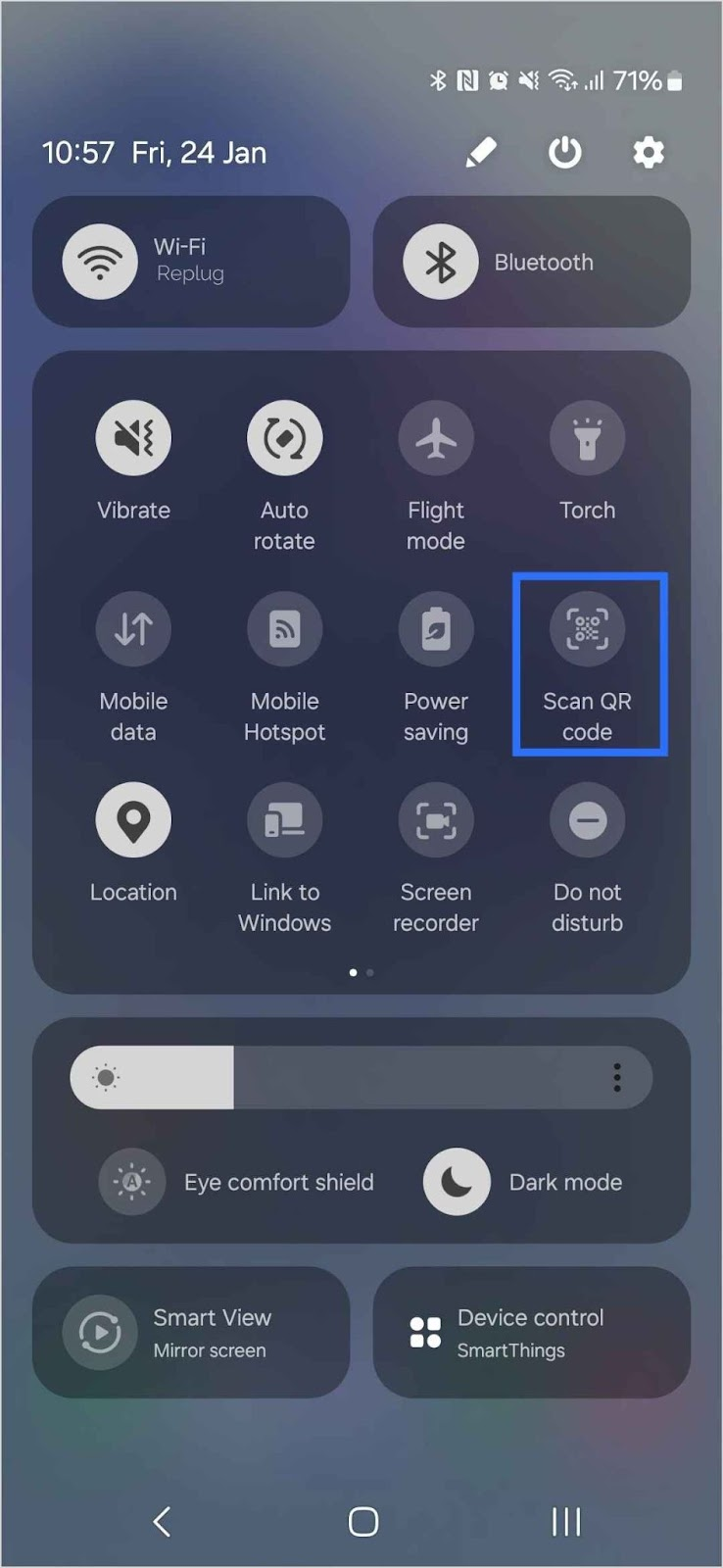
    Method 3: Scan a QR Code using Quick Settings

    For those times when you need to scan a QR code instantly, Samsung’s Quick Settings feature is a time-saver.

    Scan QR code using Samsung Quick Settings
    1. Swipe down: Swipe down from the top of your screen to access the Quick Settings menu.
    2. Locate the QR scanner: Look for the Scan QR Code option. Tap Edit and drag it into your Quick Settings if it’s not visible.
    3. Tap to scan: Once it’s set up, just tap Scan QR Code to start scanning quickly.

    Method 4: Scan a QR Code with Bixby Vision

    Bixby Vision is a Samsung feature that lets you get more information about the world around you using your phone’s camera. It can also scan QR codes and provide you with the link or content embedded within them.

    1. Open the Camera App: Launch the Camera app on your Samsung device.
    2. Activate Bixby Vision: Tap the Bixby Vision icon. You may need to grant it permission if it’s your first time using it.
    3. Scan the QR Code: Point the camera at the QR code, and Bixby Vision will recognize it.
    4. Tap “Go”: A prompt will appear with the URL or information embedded in the QR code. Tap Go to open the link.

    Note: Bixby Vision may not be available on all Samsung devices. If you don’t see the Bixby Vision icon, check if your device supports this feature by visiting Samsung’s official site or looking through your device’s settings. If your device doesn’t support it, you can always rely on other methods like the Camera app or Samsung Internet.

    Method 5: Scan a QR Code from Photos in Your Gallery

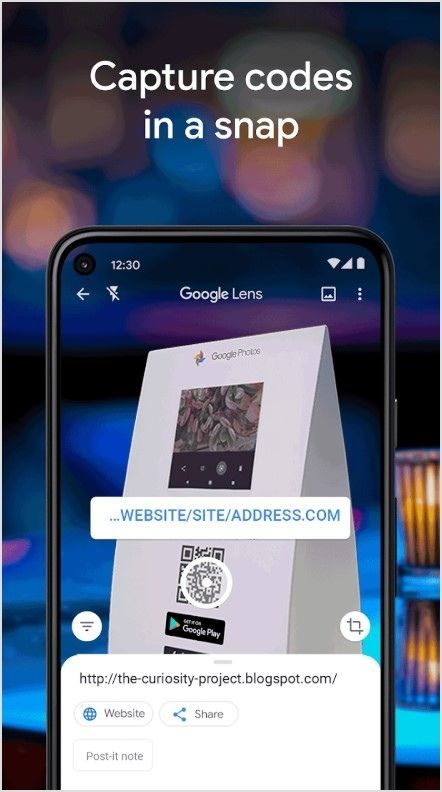
    What if you’ve saved a picture of a QR code, and now you need to scan it? No worries! Samsung makes it easy to scan QR codes directly from your photo gallery using Google Lens or Bixby Vision.

    Using Google Lens

    Scan QR code using Google Lens
    Source: Google Play Store
    1. Open Google Lens: Launch the Google Lens app.
    2. Select the photo: Choose the image from your gallery that contains the QR code.
    3. Click the link: Once Google Lens detects the QR code, it will show a clickable link. Tap on it to visit the website.

    Using Bixby Vision from the Gallery

    1. Open Your Gallery: Go to your phone’s gallery and find the saved image.
    2. Activate Bixby Vision: Tap the Bixby Vision icon on the image.
    3. Scan and open: Once Bixby Vision detects the QR code, it will present the link. Tap to open it.

    Method 6: Scan a QR code using third-party scanners

    If for some reason your Samsung phone doesn’t support the built-in QR code scanner, there’s always the option of using third-party QR code scanning apps. A quick search on the Play Store will give you plenty of reputable options to download and use. Simply install one, open the app, and follow the on-screen instructions to scan any QR code.

    Smart QR Codes: Track, analyze, and optimize with Replug

    QR codes aren’t just for quick link sharing—they’re a strategic tool for tracking engagement and optimizing marketing performance. Whether your audience scans a QR code on an iPhone or a QR code on Samsung devices, Replug helps you gather real-time insights and refine your campaigns for maximum impact.

    Why choose Replug for QR code management?

    FeatureWhat it doesWhy It matters
    Real-time trackingMonitors QR scans, unique clicks, and total interactions.Understand audience engagement instantly.
    In-depth analyticsProvides scan locations, device types (including iPhone and Samsung), and referral sources.Gain insights into how and where your QR codes are being scanned.
    QR performance chartsVisualizes scan trends over time.Identify patterns and optimize your strategy.
    Dynamic QR codesAllows URL changes without reprinting the code.Keep links updated without added costs.
    UTM codesTracks campaign performance across multiple channels.Measure marketing effectiveness with precision.
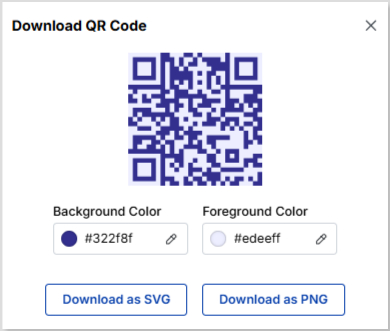
    Multiple download formatsExports QR codes in high-quality formats (PNG, SVG).Maintain a professional and branded appearance.

    Final Thoughts

    With all these options available, scanning QR codes on your Samsung phone has never been easier! Whether you’re using the Camera app, Samsung Internet, Quick Settings, Bixby Vision, or even third-party apps, you’ll be able to scan codes in no time.

    Now that you’ve mastered QR code scanning, it’s time to enjoy seamless access to links, promotions, and content on the go. 

    FAQs for how to scan a QR code on Samsung

    Why won’t my Samsung phone scan QR codes?

    If your Samsung phone isn’t scanning QR codes, make sure your camera lens is clean, the code is well-lit, and you’re holding your phone steady. Also, check if QR scanning is enabled in your camera settings. If it’s still not working, try using Google Lens or a third-party QR code scanner app.

    How to scan a QR code on Android?

    Most Android phones allow you to scan QR codes directly from the Camera app. Just open the camera, point it at the QR code, and tap the link that appears. If that doesn’t work, try using Google Lens from the Camera app or Google Assistant.

    How to scan a QR code on Samsung from the Gallery?

    To scan a QR code from an image in your Samsung Gallery, open the image, tap the three-dot menu, and select “Scan QR Code” (if available). If your phone doesn’t have this option, use Google Photos or Samsung’s built-in Bixby Vision.

    How can I track engagement on my shared QR codes?

    If you’re using QR codes for business or marketing, a dynamic QR code generator like Replug helps track scans, clicks, and engagement. It also lets you edit the destination URL without needing to reprint the code.

    Can I change a QR code’s destination link after creating it?

    Standard QR codes are static, meaning the link cannot be changed. However, with Replug’s dynamic QR codes, you can update the destination anytime without reprinting or regenerating a new code.

    What’s the best way to test a QR code before sharing it?

    Scan it using your Samsung Camera app or Quick Settings. For added accuracy, generate and test your QR codes with Replug, ensuring they work across different devices.

  • How to scan a QR code on your iPhone?

    How to scan a QR code on your iPhone?

    QR codes make accessing links, menus, and information effortless. Whether you’re on the go or browsing a menu, QR codes simplify the process. If you’re using an Apple device, scanning a QR code on your iPhone is a breeze, thanks to the built-in scanner in the Camera app.

    Below, we’ve outlined three simple methods to scan a QR code using your iPhone’s camera.

    3 methods to scan a QR code on an iPhone

    Method 1: Using the Camera app to scan QR Codes

    Apple has made QR scanning a breeze. Just follow these steps:

    1. Open the Camera app.
    2. Point your camera at the QR code, ensuring it’s within the frame.
    3. Hold still for a moment—your device will recognize the code and display a notification banner at the top.
    4. Tap the banner to open the link or perform the action associated with the QR code.

    Note: If your camera doesn’t pick up the code immediately, try adjusting the distance or ensuring there’s good lighting.

    Activating QR Code scanning in settings

    In rare cases, QR scanning might not work right away. If that happens, make sure the feature is turned on:

    1. Open the Settings app.
    2. Scroll down and select Camera.
    3. Toggle Scan QR Codes on.

    Want to test it out? Try scanning this QR code we generated using Replug!

    QR code example

    Replug not only helps generate QR codes but also tracks clicks and engagement, making it an excellent free link shortener online for businesses and marketers.

    Method 2: Using the QR Scanner in the Control Center

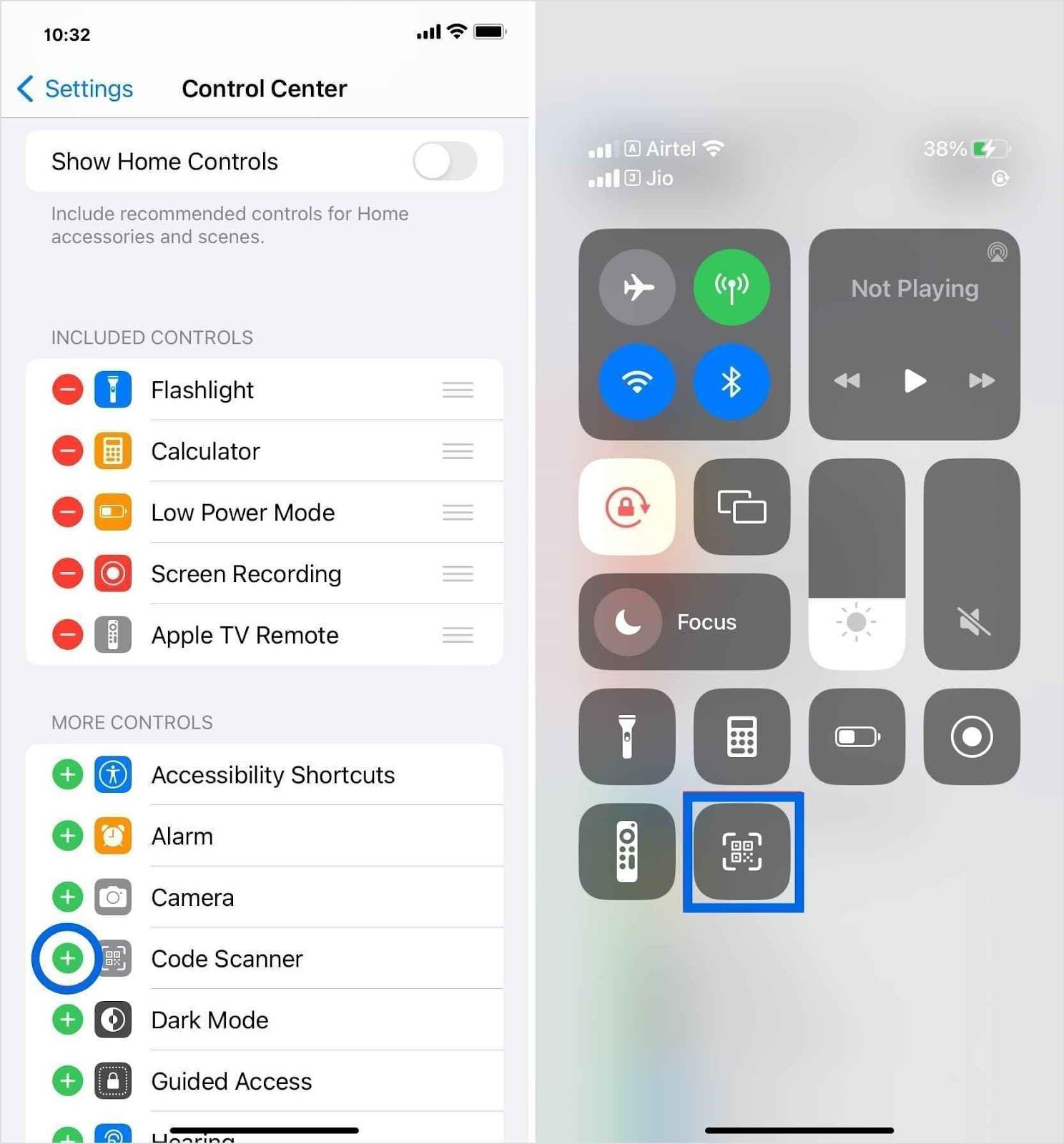
    For quicker access, you can add a QR scanner shortcut to your Control Center:

    Scan a QR code using the iPhone control center
    1. Go to Settings > Control Center.
    2. Tap the green plus icon next to the Code Scanner.
    3. Open Control Center by swiping down from the top-right corner (on newer iOS models) or up from the bottom (on older models).
    4. Tap the QR scanner icon and point your camera at the code.

    Method 3: Scanning QR Codes from photos or screenshots

    Received a QR code in a message or saved an image with one? No problem! Here’s how you can scan it directly from your gallery:

    1. Open the Photos app and select the image with the QR code.
    2. Touch and hold the QR code on your screen.
    3. A pop-up will appear with the option to open the link or take action.

    Note: If your device doesn’t support QR scanning through the camera, you can always download a third-party QR scanner app from the App Store. 

    Similarly, you can explore other productivity tools, like Call Recorder for iPhone, to safely record and manage your phone conversation.

    Scan, track, and optimize Your QR Codes with Replug

    QR codes are more than just a way to share links—they’re a powerful marketing tool when used strategically. With Replug’s custom QR code generator, you can go beyond basic QR generation and track every scan, analyze performance, and optimize your campaigns for better results.

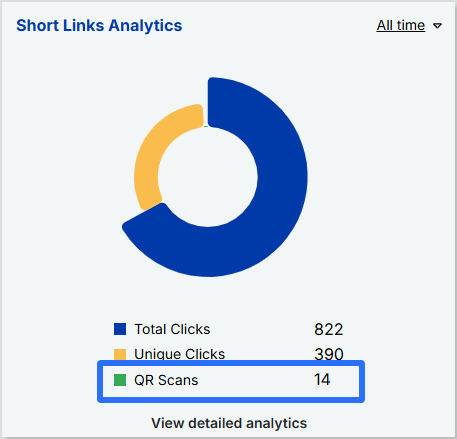
    Track every scan in real-time

    • Monitor QR scans, unique clicks, and total interactions.
    • Get insights into scan locations, devices, and referral sources.
    • View QR graph charts to analyze trends and optimize performance.
    Track QR scans in real time

    Optimize for maximum impact

    • Create dynamic QR codes that allow you to update the destination URL without reprinting the code.
    • Add UTM parameters to track campaign effectiveness across different marketing channels.
    • Download your QR codes in multiple formats (PNG, SVG) for high-quality use.

    Final thoughts

    Scanning QR codes on an iPhone is incredibly easy, whether through the Camera app, Control Center, or even from saved images. For businesses and marketers, using tools like Replug can take QR code functionality to the next level by providing tracking, analytics, and customization options.

    FAQs for how to scan a QR code on your iPhone

    How can you scan a QR code on an iPhone without a camera?

    If your camera isn’t working or you prefer an alternative method, you can use the Code Scanner in the Control Center or a third-party QR scanner to scan codes directly from images or files.

    How do I scan a QR code inside my phone without using another phone?

    You can scan a QR code from an image stored on your iPhone by using the Live Text feature in the Photos app or a third-party QR scanning app that allows you to upload and scan codes effortlessly.

    Can I customize my QR code’s appearance?

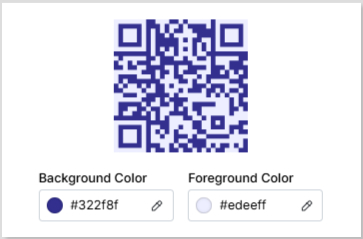
    Yes! While iPhones can scan basic QR codes, tools like Replug let you customize colors, add logos, and even create branded QR codes to match your business identity.

    How to scan QR code iPhone from a photo?

    1. Open the Photos app and select the image containing the QR code.
    2. Tap and hold the QR code until a pop-up appears.
    3. Select the option to open the link or take action.

    How to scan a QR code on your screen?

    If you come across a QR code while browsing online, take a screenshot and follow the steps to scan a QR code.

    How can I track the number of times my QR code has been scanned?

    Apple’s default scanner doesn’t track scans, but Replug lets you monitor scan activity, view analytics, and measure engagement in real-time.

  • 6 easy steps to create your perfect bio site

    6 easy steps to create your perfect bio site

    Managing all your links, such as your blog, social media profiles, online store, or YouTube channel, can quickly turn into a game of “Where’s that link again?”. It’s easy for things to get scattered, and for your audience, tracking down what they’re looking for can be a bit of a hassle. That’s where a bio site comes in handy.

    Instead of sharing a bunch of different links, you can bring everything together in one place, making it super easy for your audience to find exactly what they need with just one click.

    In this guide, we’ll walk you through what a bio site is and how to create one using Replug.io in just 6 easy steps.

    What is a bio site?

    A bio site (also known as a microsite or landing page) is essentially a one-page website where you can collect all your important links and share them in a way that’s clean and easy to navigate. 

    It’s basically like your online hub where visitors can click on one link and instantly access your blog, social media accounts, e-commerce store, latest YouTube videos, or even your favorite Spotify playlist. You can also view some bio link examples to get a better understanding of how they work. It’s a quick, convenient way to share everything without bombarding your audience with a long list of URLs.

    Related: How to put YouTube link in Instagram bio?

    Why do you need a bio site?

    Now, you might be thinking, “Can’t I just add my website link to my social bio?” Sure, but a bio site offers way more flexibility. There are countless benefits of bio links, but to name a few, here’s why you need a bio site:

    • Saves time: No need to constantly update your link in bio. Get a know-how of what is link in bio in detail. Then, go on and just update your bio site, and everything stays fresh with a single link.
    • Boosts engagement: An organized bio site makes it easier for followers to find what they’re interested in, increasing their engagement with your content.
    • Branding control: Customize your bio site with your colors, fonts, and buttons so it reflects your personal style or brand effortlessly.
    • Great for marketing: Use call-to-action buttons, embed videos, and track link performance, all in one place to improve your marketing strategy.
    • Perfect for social media: A bio site solves the one-link limit on platforms like Instagram, TikTok, and X (Twitter), giving you room to share everything.
    • Better user experience: Your followers won’t have to search for your content. Everything they need is organized in one simple URL.
    Boost ROI with branded URLs - Replug dashboard showing performance metrics and branded URL creation
    Turn your bio links into click-boosting machines
    Check

    Drive up to more clicks than plain URLs

    Check

    Share multiple destinations with one link

    Create bio links free

    How to create a bio site in 6 easy steps using Replug

    Setting up a bio site is easier than you think, and Replug makes it even simpler. Just follow these steps through our link in bio builder, and you’ll have a fully functional bio site in minutes.

    1. Choose the right bio site app

    There are plenty of bio site apps out there, but Replug stands out because it’s easy to use, allows for advanced bio site customization, and is packed with powerful analytics. Whether you want a minimal look or a fully branded page, Replug gives you the tools to make it happen.

    2. Sign in or create a new account

    Head over to Replug and create your account. If you already have an account, you can just log in to your account and get started with the bio site creation.

    3. Go to “Bio Links”

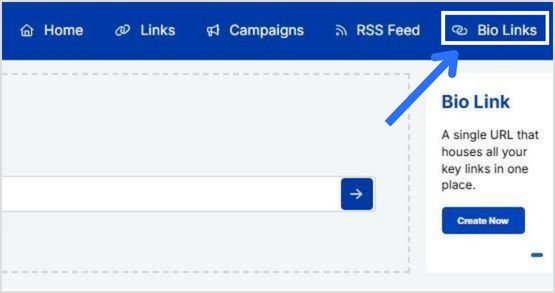
    Once you’re logged in, click “bio links” on your dashboard.

    Replug bio links

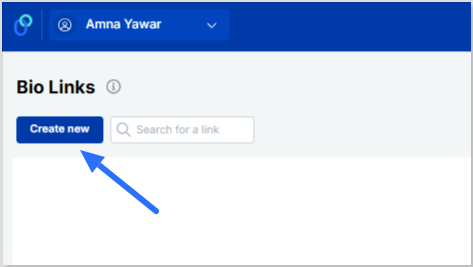
    From there, simply click “Create new” to get started.

    Click Create new

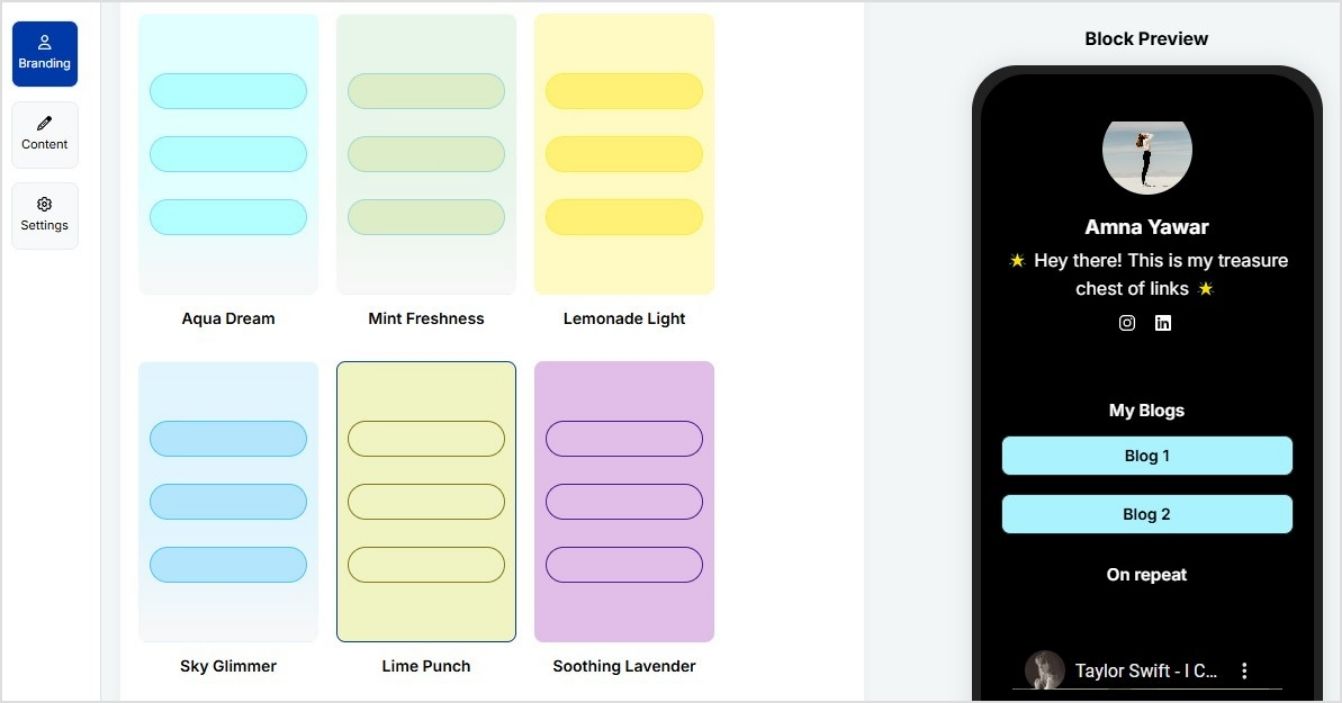
    4. Pick a template or customize your design

    You can now select from a variety of templates, adjust your color scheme, and even add your logo.

    Customize your bio site

    Related: Linktree 101: How it works and why you need it

    4. Add your links and content

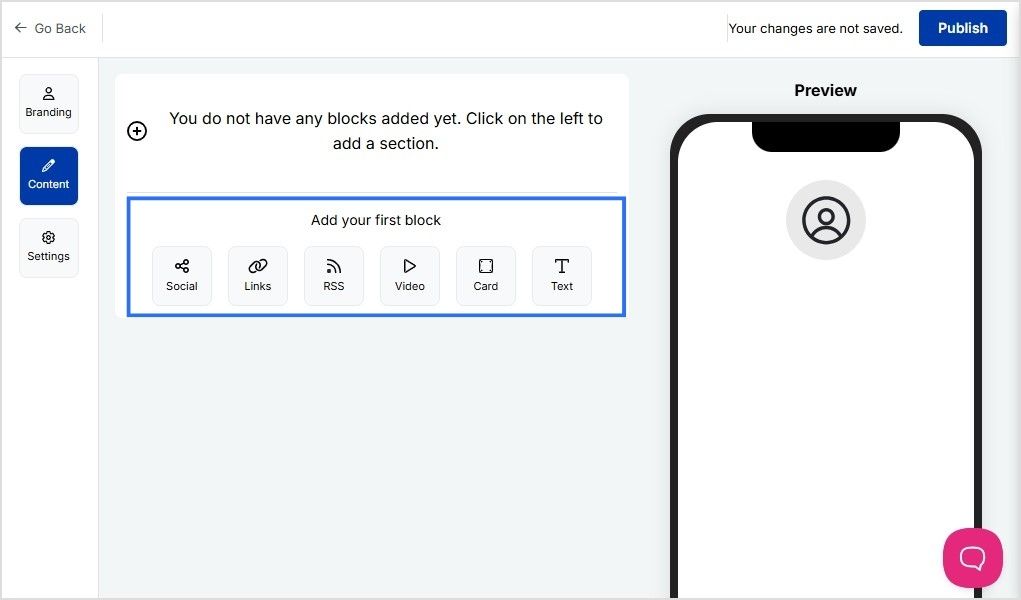
    Replug allows you to add multiple blocks to your bio site, including:

    • Links
    • Socials
    • RSS feed
    • Video
    • Card
    • Text
    Add blocks

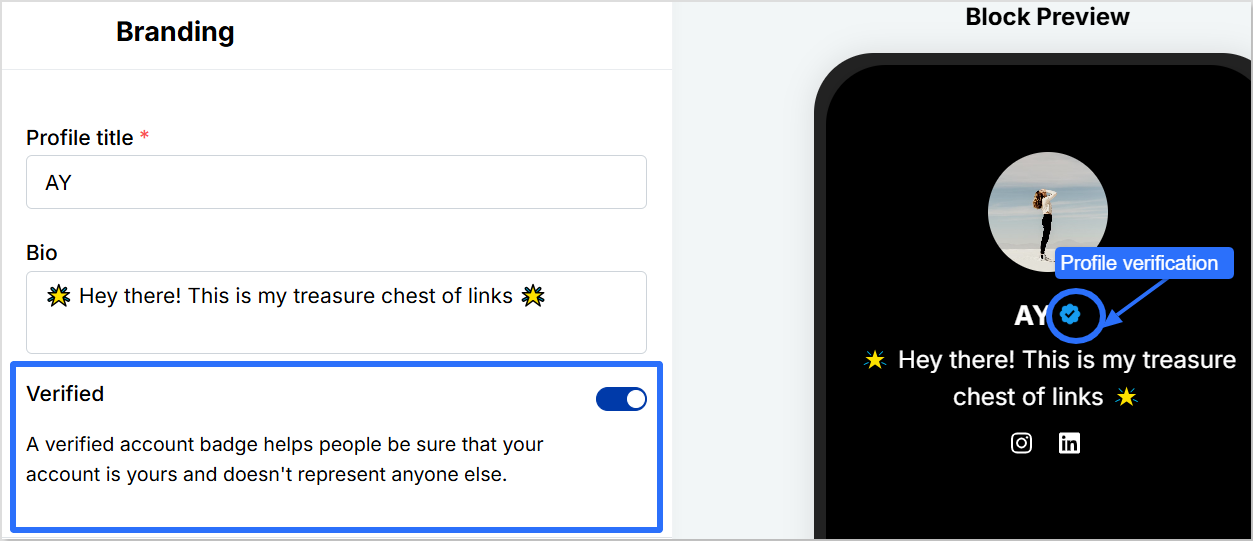
    Pro tip: Add a verification button to your profile using Replug to increase bio link clicks and gain trust.

    Profile verification

    5. Optimize for engagement and SEO

    Here’s where you can make your bio site really work for you:

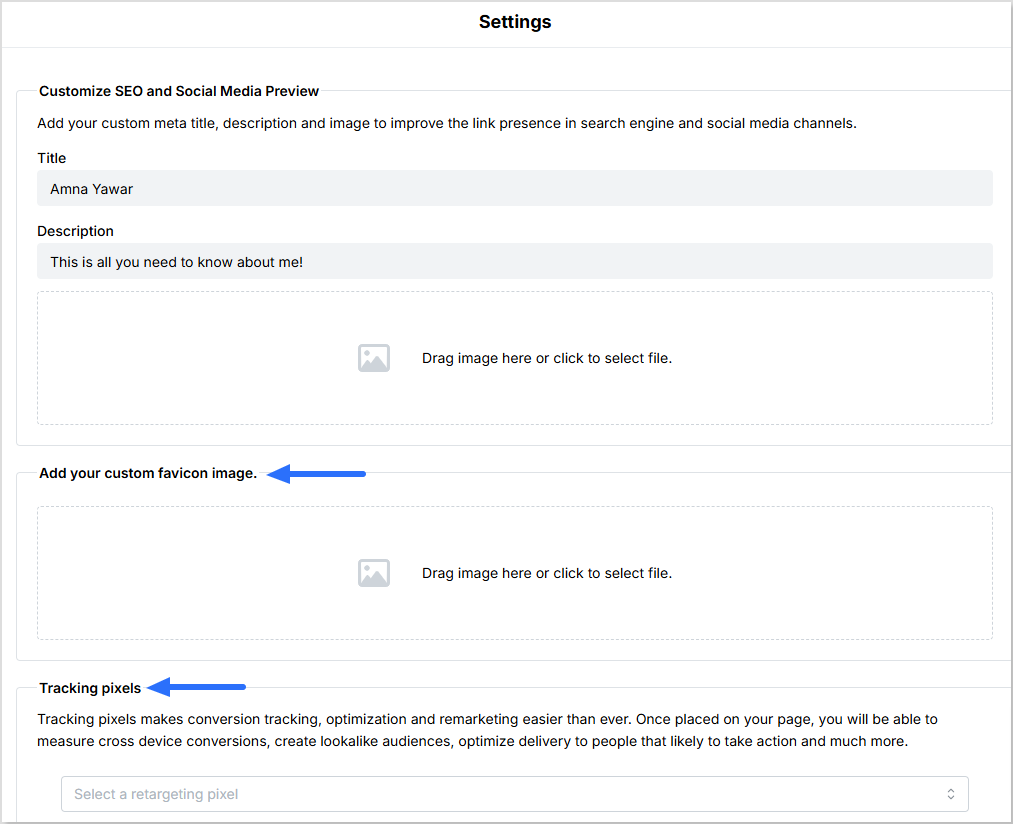
    • You can customize your meta title, description, and image to enhance your link’s visibility on search engines and social media platforms.
    • Add a custom favicon image to your bio site.
    • Add tracking pixels to measure cross-device conversions, create lookalike audiences, and optimize delivery to users most likely to take action.
    Optimize biosite for engagement and SEO

    Want to make updates? No problem! Replug lets you edit your bio site easily anytime, so you can tweak things as you go.

    6. Publish and share your bio site

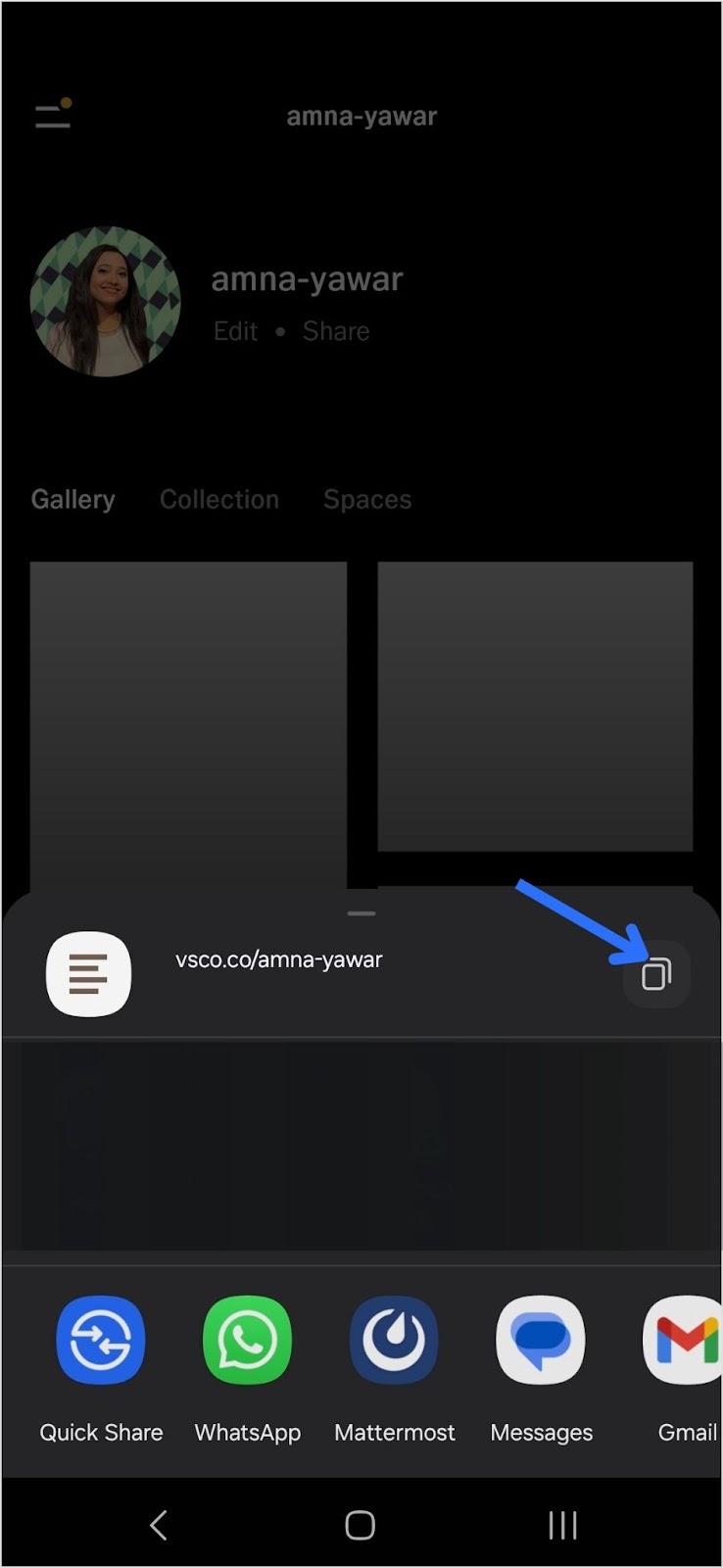
    Once your bio site is ready, hit publish! Now, copy the link and add it to your social media bios, email signatures, and anywhere else your audience can find you.

    One cool and advanced feature of Replug is that you can create a vanity URL for your bio links. Upon seeing your bio link, your followers will know exactly what your bio site is about.

    Create a custom bio link

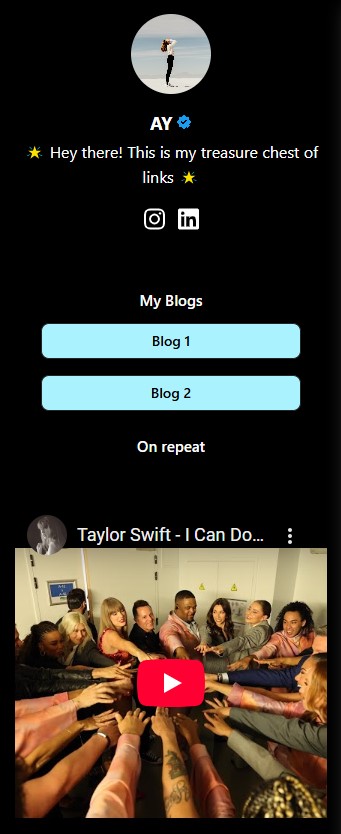
    Here’s what the final page for your bio site looks like:

    Bio site preview

    Conclusion

    Creating a bio site doesn’t have to be complicated. With the right tool like Replug, you can set up a professional, fully customized bio site in just a few minutes. Instead of juggling multiple links, you’ll have one clean, organized hub for all your content. Follow the best bio link practices to ensure best results.

    Whether you’re a creator, entrepreneur, or business, a well-optimized bio site boosts engagement, improves branding, and simplifies the way you share links. 

    You can further enhance your bio site’s performance by using this best free URL shortener to track clicks, optimize links, and manage all your URLs seamlessly.

    Boost ROI with branded URLs - Replug dashboard showing performance metrics and branded URL creation

    Go beyond generic link pages!

    Create custom bio links that truly fit your brand

    With Replug, you can create bio links that are unique, engaging, and built to convert.

    Start free trial

    FAQs for how to create a bio site

    Can I update my bio site after publishing?

    Yes! Once your bio site is live, you can edit links, design, and content anytime without changing the URL. This means you can keep your page fresh with new updates without losing traffic.

    How do I track clicks and engagement?

    Many bio site platforms, including Replug, offer built-in analytics. You can monitor link clicks, visitor behavior, and engagement rates to understand what’s working and optimize your page accordingly.

    Can I use my own domain for my bio site?

    Advanced link management platforms like Replug allow custom domains or vanity URLs, which help with branding and credibility. Instead of a generic link, you can have a personalized web address that makes your bio site look more professional.

    What’s the best way to drive traffic to my bio site?

    Add it to your social media bios, email signatures, and even business cards. You can also share it in posts, newsletters, or link it in YouTube descriptions to make it easily accessible.

    Will my bio site help with SEO?

    Yes! A well-optimized bio site with a custom meta title, description, and relevant keywords can improve search visibility. Plus, using high-quality content and links can enhance your online presence.

  • What is geotargeting and why is it important for marketers?

    What is geotargeting and why is it important for marketers?

    Running a global sale on your brand? Imagine this: a customer in New York sees prices in USD, a shopper in London gets prices in GBP, and someone in Paris enjoys a promo tailored just for them. Sounds like a marketer’s dream, right? That’s the power of geotargeting – and it’s easier to achieve than you think.

    We know it doesn’t exactly sound “easy,” but since technology improves rapidly every day, there are tools that make this process as smooth as butter. With the right tech, you can set up automatic price and promo adjustments based on where your customers are located, no sweat.

    Geotargeting isn’t just a cool feature; it’s a game-changer for global sales. In fact, according to a report by Factual, 89% of marketers experience higher sales by implementing this strategy. You’re not just offering a one-size-fits-all deal; you’re offering a localized experience that builds loyalty, increases conversion rates, and makes customers more likely to hit “buy now.” 

    In this guide, we’ll break down what geotargeting is, how it works, and why it’s a must-have for modern marketing. We’ll also discuss how Replug’s geo-analytics can drive conversions through its effective marketing features. Let’s get started!

    What is geotargeting?

    Geotargeting is a sophisticated digital marketing strategy that leverages advanced analytics such as users’ geographic location and more to run targeted campaigns.

    This technique can utilize a user’s current location (determined via GPS, IP address, or Wi-Fi) or their past location history to provide contextually relevant marketing messages. When combined with behavioral data (such as browsing habits, purchase history, or app usage) and demographic information (like age, gender, or income level), geotargeting enables businesses to craft highly personalized and effective marketing campaigns.

    The 5 major types of geotargeting

    Geotargeting lets you reach the right audience based on their location, ensuring your ads and content are relevant. Whether you’re targeting an entire country or a specific neighborhood, this strategy helps boost engagement and conversions.

    We’ve narrowed down five significant types of geotargeting:

    1. Country targeting: The broadest form of geotargeting, allowing brands to tailor ads by country. This is ideal for global campaigns that require different languages or localized messaging. 
    2. Regional targeting: Targets specific areas within a country, such as states, provinces, or cities. This is useful for businesses that operate in multiple regions but want to customize messaging. 
    3. Location radius targeting: Focuses on a defined radius around a specific location, ideal for brick-and-mortar businesses.
    4. Audience targeting: Segments consumers based on demographics, interests, and past behavior, ensuring ads reach the most relevant audience.
    5. Weather targeting: Adjusts advertising based on current weather conditions to influence purchasing decisions. 

    Using a combination of these geotargeting strategies helps brands reach the right audience at the right time, leading to higher engagement, better customer experiences, and increased sales.

    How does geotargeting work?

    Geotargeting works by using a combination of technologies and data sources to determine a user’s geographic location and deliver tailored content or advertisements based on that information. Here’s a step-by-step breakdown of how geotargeting works: 

    Geotargeting steps

    Step 1: Collect location data
    Location data is gathered through GPS, IP addresses, Wi-Fi, Bluetooth, and cell tower triangulation.

    Step 2: Integrate & analyze data
    This data is combined with behavioral, demographic, and contextual information to create detailed user profiles for targeted marketing.

    Step 3: Customize content & ads
    Content and ads are tailored based on user location, promoting relevant products or offers through display ads, push notifications, and social media.

    Step 4: Deliver in real- time
    Geotargeting delivers content at the most relevant moment, ensuring users receive timely and useful information.

    Step 5: Measure and optimize
    Track campaign performance with metrics like CTR and ROI. Tools like Replug can help analyze how shortened links perform, offering insights to optimize future campaigns.

    Note: Many link management tools like Replug also allow businesses and agencies to apply geotargeting to their links, making the process of directing users to the right content effortless and efficient.
    Replug Branded Short Links CTA
    A complete link management solution
    for marketing professionals & agencies.
    Try Replug for free

    Effective ways to run a geotargeting marketing campaign

    To optimize your geotargeting marketing campaigns, consider these strategies:

    • Leverage a link management tool: Use an advanced link management platform to shorten, brand, track, and manage your URLs effectively. These tools also provide insights into how your links perform across regions, helping you fine-tune your approach.
    • Use analytics to gain valuable insights: Powerful analytics tools help you track how your links are performing across various locations. By tracking metrics such as UTMS, total clicks and unique clicks by country, city, or region, you can adjust your content or offers to create custom campaigns and track better leads.
    • Rotate links for location-specific content: Instead of creating multiple links, use a single link to redirect users based on their location. For example, a U.S. customer can see discounts in USD, while a UK visitor sees GBP offers, all from a single link.

    For example, suppose you have a Black Friday sale. With Replug, U.S. visitors can see discounts in USD, UK visitors see GBP, and European visitors get a localized promo, all from a single short link. Here’s how you can effectively rotate your links using Replug:

    Apply traffic routing in Replug
    Edit routing rule in Replug

    Related: 5 top link rotators: Convert more with traffic routing

    • Add retargeting pixels to reduce cart abandonment: By adding retargeting pixels to your Replug links, you can reduce bounce rate, track users across different locations, and serve them follow-up ads based on their behavior. 
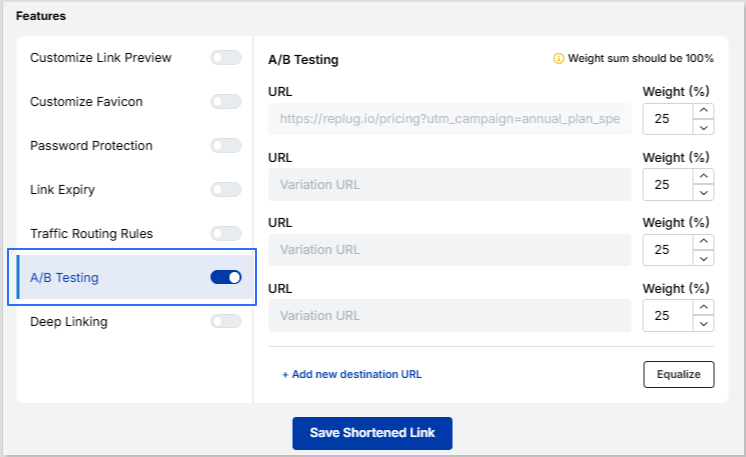
    • A/B test your campaigns to optimize performance: Replug allows you to A/B test up to 10 different versions of your links to see which performs best in different locations. By continually testing and refining your campaigns, you ensure that your marketing efforts are always aligned with your audience’s preferences.
    • Apply deep linking: Replug’s geotargeting and deep links work together to personalize user experiences. Geotargeting displays location-specific content, while deep links direct users straight to relevant pages.
    • Create custom CTAs for maximum conversions: With Replug, you can add custom CTAs to your links, tailoring engagement for different regions. For example, users in one area may see a “Get 20% off now!” CTA, while another region gets a different offer. 
    Boost ROI with branded URLs - Replug dashboard showing performance metrics and branded URL creation
    Boost your conversion rates with irresistable CTAs with

    for your marketing campaigns.

    Check

    Higher clicks

    Check

    More leads

    Check

    Better ROI

    Generate free CTAs

    These techniques allow you to effectively engage your audience, deliver tailored content, and maximize conversions, all while tracking your results to improve future campaigns.

    Why geotargeting is important for marketers

    Geotargeting helps marketers deliver hyper-relevant content based on users’ locations. Whether optimizing ads, creating content, improving local SEO, or refining user experiences, geotargeting ensures your message reaches the right people at the right time.

    In the U.S., 81% of people own a smartphone, and among millennials, that number jumps to 94%. With so many consumers glued to their mobile devices, location-based marketing naturally drives better results.

    Research from MarTech Series shows that 83% of marketers see more success when using location data. It’s not just about visibility—geotargeting helps businesses boost engagement, increase online and foot traffic, and strengthen customer relationships. In fact, campaigns that use location data are 80% more effective, making it easier to reach the right audience at the right time.

    Best practices for geotargeting success

    To maximize the impact of your geotargeting campaigns, consider these strategies:

    • Localized landing pages: Create region-specific pages with local testimonials, cultural references, and targeted offers to resonate with your audience and drive conversions.
    • Precision in SEM: Use platforms like Google Ads to target users by location, ensuring your ads reach the right people without wasting budget on irrelevant audiences.
    • Hyper-relevant content: Develop content, such as blogs and webinars, that addresses location-specific pain points, helping you establish authority and build stronger connections with custom audiences.
    • Social media ad targeting: Utilize platforms like Facebook, LinkedIn, and Instagram to push content to specific cities or neighborhoods, enhancing ad relevance and boosting click-through rates.
    • SMS marketing: Use SMS marketing to deliver location-based offers directly to users with high open rates, ensuring your messages get seen quickly.
    • Utilize geofencing: Set up virtual boundaries around key locations like competitor stores or landmarks to trigger timely promotions and location-based discounts.
    • Optimize for mobile: Ensure your geotargeting strategies are mobile-friendly, as a large portion of web traffic comes from mobile devices.
    • Test, analyze, and adapt: Continuously test and adapt your strategy based on real-time data to optimize targeting.
    • Ensure compliance: Follow regulations like GDPR and CCPA to protect user privacy and maintain trust.

    By incorporating these best practices into your geotargeting strategy, you can better engage your audience, increase conversions, and optimize your campaign performance.

    Who benefits most from geotargeting?

    Geotargeting isn’t just for big brands; it’s for anyone looking to optimize audience engagement. Here’s how different industries use it:

    IndustryHow Geotargeting Helps
    E-commerce storesShow location-specific prices, product availability, and shipping options.
    Affiliate marketersRedirect users to country-specific merchant pages.
    Content creators & influencersShare localized landing pages for events, sign-ups, or downloads.
    Event organizers & ticketing platformsAdjust event details to match time zones and local languages.
    Recruitment & job portalsDisplay job openings, salaries, and hiring details relevant to the user’s location.
    SaaS companiesProvide region-specific pricing, support options, and language preferences.
    Digital advertisers & marketersServe hyper-targeted ads based on a user’s region.
    Hospitality & travelShow region-specific hotel deals, flight options, and travel guides.
    Healthcare & telemedicineDirect patients to the right regional medical services, appointment booking pages, or language-specific healthcare content.
    Education & E-learningPromote location-based course offerings, tuition fees, or scholarship details.
    Finance & bankingOffer location-based promotions on bank accounts, credit cards, and financial services.

    Related: Basics of e-commerce marketing, key strategies and more

    4 best geotargeting examples

    Here are some examples of how some brands are putting geotargeting in action:

    1. Sephora

    Sephora operates in multiple locations and depending on the country that you are in, it delivers a personalized experience.

    For instance, the implementation of geotargeting leads to displaying different deals on landing page if you’re in Denmark versus if you’re in Mexico:

    Geotargeting example of Sephora Denmark
    Sephora Denmark
    Geotargeting example of Sephora Mexico
    Sephora Mexico

    2. SalesForce

    Salesforce, one of the leading cloud-based software companies, uses geotargeting marketing.

    Here’s an example of what their sign-up page looks like if you’re in the UK versus if you’re in the U.S. The description, tone, contact number, and price differ for each country.

    Geotargeting example of Salesforce UK
    Salesforce UK
    Geotargeting example of Salesforce U.S.
    Salesforce U.S.

    3. Foodpanda

    FoodPanda is one of Asia’s leading online food and grocery delivery platforms. 

    In the example below of Foodpanda’s Singapore and Thailand landing pages, you can see that they are entirely personalized – from their pictures to descriptions, they’ve used geotargeting to cater to their custom audiences.

    Geotargeting example of Foodpanda Singapore
    Foodpanda Singapore
    Geotargeting example of Foodpanda Thailand
    Foodpanda Thailand

    4. Adidas

    Adidas also offers a personalized experience using geotargeting. Below are examples of Adidas’s checkout page for “SAMBA OG shoes” for women in the UK and U.S. 

    At first glance, you might only notice that there’s a change in the currency, but that’s not the case. In the UK, they are focusing more on “free personalisation” whereas, in the U.S., this pair of shoes is one of their best sellers.

    Geotargeting example of Adidas UK
    Adidas UK
    Geotargeting example of Adidas U.S.
    Adidas U.S.

    Conclusion

    Geotargeting is a powerful way to enhance marketing campaigns, improve user experience, and drive higher conversions. By using location-based targeting, brands can connect with their audience more effectively than ever. With Replug’s link rotation feature, implementing geotargeting is simple, scalable, and incredibly efficient.

    Ready to boost engagement and conversions? Try Replug today!

    FAQs about geotargeting

    How accurate is geotargeting?

    Geotargeting accuracy depends on the method used. GPS and browser location services offer precise targeting, while IP-based geotargeting provides general location data.

    Can geotargeting be used for organic content?

    Yes! Many businesses use geotargeting for blog content, personalized landing pages, and localized product recommendations.

    Is geotargeting legal?

    Yes, but businesses must comply with privacy laws like GDPR and CCPA when collecting and using location data.

    How does Replug help with geotargeting?

    Replug’s link rotation feature allows you to create a single short link that redirects users to different destinations based on their location.

    Does geotargeting work for mobile users?

    Yes! Mobile geotargeting is highly effective, using GPS, Wi-Fi, and cell tower data to deliver precise location-based content.

  • How to become an affiliate marketer: 5 steps to success

    How to become an affiliate marketer: 5 steps to success

    Ever wondered how influencers, bloggers, and even everyday people turn their online presence into a steady income stream? Say hello to affiliate marketing.

    Here’s how it works: You promote products you love, and every time someone makes a purchase through your unique link, you earn a commission. No need to create your own product or handle customer service—just share what excites you!

    Affiliate marketing can be a game-changer whether you’re a blogger, YouTuber, or a newbie. To back this up, according to research, the average affiliate marketer earns around $8,038 per month, proving just how lucrative this side hustle can be!

    Hence, we’ve broken down how to become an affiliate marketer into five simple steps, from choosing your niche to optimizing your links so you can start earning in no time. 

    By the end of this blog, you’ll have everything you need to kickstart your affiliate marketing journey. So, grab a cup of coffee, and let’s get to it!

    Totally new to affiliate marketing? 

    Read our affiliate marketing guideline for beginners guide!

    What is affiliate marketing?

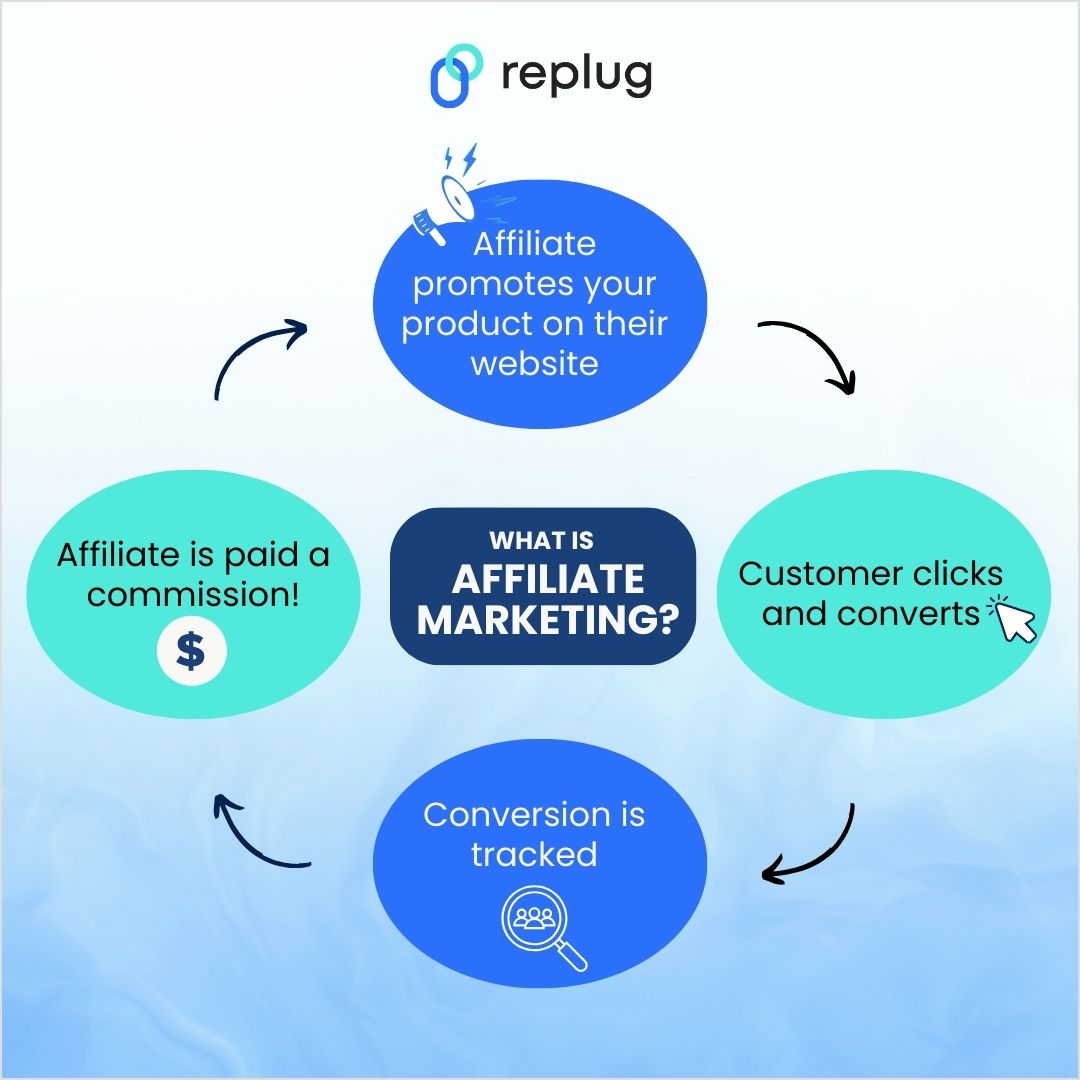
    Affiliate marketing is a performance-based marketing model where you, as an affiliate, promote someone else’s products or services. In return, you earn a commission when people take specific actions (usually a sale or a lead) through your marketing efforts.

    Affiliate marketing process
    What is affiliate marketing?

    It’s one of the most accessible and low-risk ways to start making money online because you don’t need to create products or manage inventory; you just need to focus on promotion. 

    The win-win?

    It’s a mutually beneficial arrangement. As a marketing professional, you’re helping businesses expand their reach while being rewarded for your promotional efforts. 

    Where to find affiliate programs?

    There are three main ways to find affiliate programs.

    Ways to find affiliate programsDescription
    Affiliate platformProcess: Browse their “Merchants” section, and explore options based on categories.
    Example: AvantLink, Commission Junction (CJ), Impact Radius, ShareASale
    Google searchProcess: Search for “[company name] affiliate program” to find their sign-up page.
    Example: Quick search for “Replug affiliate program” will direct you to their page, where you can easily apply.
    Direct outreachProcess: Call the company’s customer service or marketing team and pitch your idea to promote their products for a commission.
    Example: Small businesses may be open to starting an affiliate program if they see the potential benefits.

    Here’s a screenshot of what searching “Replug affiliate program” on Google search engine looks like:

    Replug affiliate program Google search

    5 steps to become an affiliate marketer

    To succeed in affiliate marketing, it’s important to understand that it’s not just about sharing affiliate links. Building a solid foundation will set you up for long-term success. Here are five crucial steps to guide you in the right direction:

    Step 1: Choose your niche and target audience

    Choosing a niche is the first and most critical step in your affiliate marketing journey. Your niche defines what products you will promote and who your target audience is. A niche is a focused market, like tech gadgets, beauty, health, fitness, or travel. The more specific your niche, the more you can tailor your content to meet your audience’s needs.

    For example, instead of just promoting general fitness products, you could focus on a specific sub-niche like home workout equipment for busy professionals or vegan supplements for athletes. A well-defined niche helps you stand out and build a dedicated audience that trusts your recommendations. 

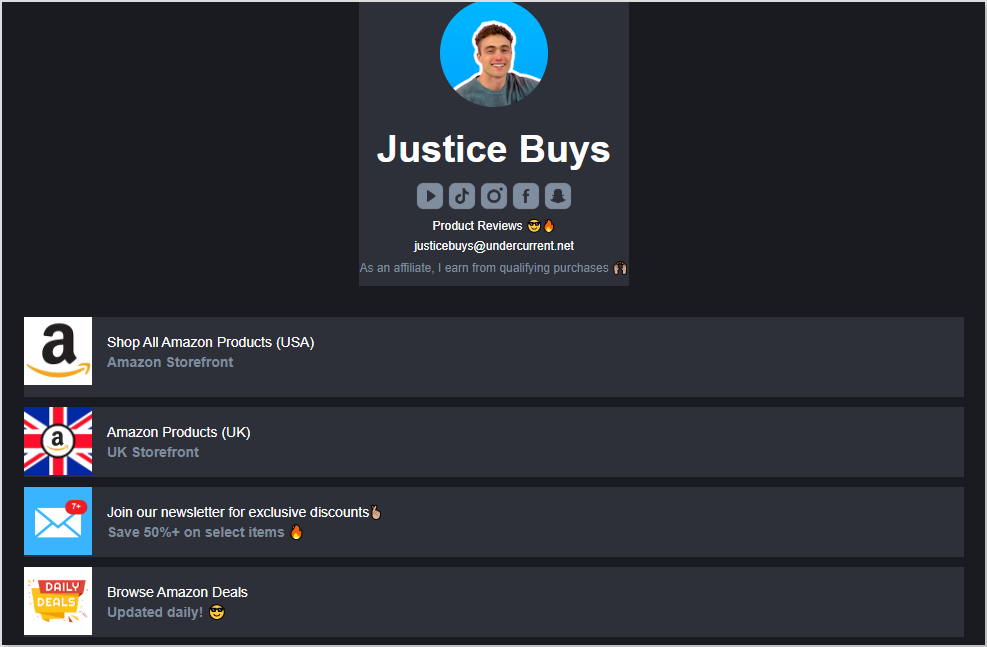
    Here’s how Justice Buys, a leading Amazon content creator and affiliate marketer, earns a commission by promoting products to Amazon buyers:

    Justice Buys affiliate marketing example

    How to choose the right niche:

    • Identify your passions or areas of interest.
    • Assess the demand and profitability of the niche (use tools like Google Trends).
    • Evaluate the competition—make sure there’s space for your voice.

    Once you’ve picked your niche, it’s time to identify your target audience. Are they beginners or experienced? What are their pain points, and what solutions are they looking for?

    Step 2: Analyze the competition

    Understanding the competition helps you position yourself strategically. Look at other affiliate marketers in your niche. What are they doing well? What’s missing from their content? Are there areas where you can improve?

    Check out popular blogs, social media accounts, and YouTube channels that cover your niche. What affiliate products are they promoting? What content formats are they using? This research helps you understand how you can differentiate yourself and bring something fresh to the table.

    Competition analysis tools:

    • SEMrush for competitor keyword research.
    • BuzzSumo to discover popular content and topics.
    • SimilarWeb to analyze competitor traffic sources.

    You may also like: Successful influencer marketing campaigns: 7 best examples

    Step 3: Select the right affiliate programs

    Choosing the right affiliate programs can make or break your success. You don’t want to promote products you don’t believe in, or that don’t resonate with your audience. Ideally, your affiliate products should align with your niche and audience’s needs.

    Some key factors to consider when selecting affiliate programs:

    • Commission rate: How much will you earn per sale? Some affiliate programs offer a one-time payment, while others offer recurring commissions (which are great for long-term income).
    • Cookie duration: This refers to how long you’ll receive a commission after a customer clicks on your affiliate link. A longer cookie duration is preferable.
    • Product quality: Make sure the products you promote are high quality, as your reputation as a trusted marketer is on the line.

    Popular affiliate programs include:

    • Amazon Associates (great for a wide range of products)
    • ShareASale (offers diverse merchants across multiple industries)
    • ClickBank (digital products with high commissions)

    Mind-blowing fact (and stat): Around 75,659 companies are using the Amazon Associates affiliate program!

    It’s that’s not your cue to become an affiliate marketer… why, just why?

    Step 4: Build your marketing platform

    Your marketing platform is the space where you’ll share your affiliate content. Whether it’s a blog, YouTube channel, podcast, or social media account, you need a platform to connect with your audience and deliver value. You don’t need to be everywhere; focus on the platforms your audience frequents most.

    Ways to build your platform:

    • Start a blog: A blog gives you control over your content and audience. Create long-form posts, product reviews, tutorials, and guides. Use SEO to rank your content and attract organic traffic.
    • YouTube: Create video content with affiliate links in the description. Videos work great for product demonstrations, reviews, and tutorials.

    Here’s an example of how Nikki La Rose, a famous beauty YouTuber influencer. She writes down multiple affiliate links to the products she uses in her YouTube videos.

    Nikki La Rose affiliate marketing example
    • Social Media: Instagram, Facebook, TikTok, and Pinterest are visual platforms where you can promote affiliate products using affiliate links in your bio or story swipe-ups.

    Check out how El Peterson, a popular content creator and affiliate marketer, links her Instagram bio with her Amazon Storefront.

    El Peterson affiliate marketing example
    El Peterson affiliate marketing Amazon Storefront

    You might also like: How to increase sales on Amazon

    Step 5: Craft engaging content

    Now comes the fun part—creating content! Affiliate marketing is all about providing value through content that informs, educates, and entertains. Whether you’re writing blog posts, creating videos, or sharing social media updates, always prioritize quality content that meets your audience’s needs.

    For instance, let’s say you’re promoting fitness products. Instead of simply adding an affiliate link in a post saying “Buy this product,” create content that helps your audience solve a problem. 

    Content should always feel authentic and trustworthy. People are more likely to click on your affiliate links if they feel they can trust your recommendations.

    How to become an affiliate marketer with Replug

    Now that you know the basics of affiliate marketing, let’s talk about how you can streamline your process using Replug for shortening and managing your affiliate links.

    Steps to get started with Replug:

    1. Go to Replug’s website and click on “Affiliate marketing program” in the Resources dropdown.
    2. Access the affiliate program page and click on “Become a Replug affiliate” button.
    3. Register for an account or sign in if you already have an account.
    4. Complete the application form
    5. Add in all the necessary information and click “Update”. 
    6. Access your affiliate dashboard and add in the payout method.
    7. Track performance
    8. Get paid!

    For detailed steps, check out: How to sign up for the Replug affiliate program?

    Advantages of using Replug:

    • Link shortening: Make your affiliate links clean and more appealing with this top-notch custom URL shortener, improving click-through rates.
    • Link cloaking: Protect your affiliate links from looking spammy, increasing click-through rates.
    • Custom branding: Reinforce your brand’s identity by customizing your links with branded domains.
    • Analytics: Get detailed performance tracking, such as click tracking and geotargeting, giving you insights into which links perform the best.
    • Bio links: Share multiple affiliate offers on a single landing page and direct your audience there via a simple bio link.
    • QR codes: Quickly generate a custom QR code for your affiliate links. This way, your followers can quickly scan your code, and upon making a purchase, you earn a commission.
    • Cross-platform integration: Integrate with social media, email campaigns, and other platforms so your links perform better everywhere.
    • Branded links: Turn generic affiliate links into branded links that are more clickable and trustworthy.
    • Link retargeting: Retarget users who clicked on your affiliate links but didn’t convert, driving them back to your offers.
    Boost ROI with branded URLs - Replug dashboard showing performance metrics and branded URL creation
    Boost ROI with
    branded URLs!

    Enhance your marketing campaigns by creating shareable, trackable, and fully multi-purpose customizable branded URLs.

    Try Replug for free

    Track and optimize your affiliate links

    Tracking and optimization are key to affiliate marketing success. Replug’s powerful analytics allow you to monitor every aspect of your links’ performance. You can see which pages, social media posts, or marketing strategies are driving the most traffic.

    Here’s how you can track and optimize your affiliate links effectively:

    • A/B testing: Replug allows you to test different versions of your affiliate links to determine which one performs better.
    • Click tracking: See which links get the most clicks and optimize your content strategy to focus on high-converting links.
    • Optimize for SEO: Replug’s custom URL features also help improve your SEO by ensuring your affiliate links are clean, readable, and keyword-optimized.
    • UTM builder: You can add UTM parameters to your affiliate links using Replug. This way, you can track the performance of your affiliate campaign depending on the UTM medium that you choose.

    Conclusion

    Affiliate marketing is a great way to earn passive income by promoting products you love and believe in. With the right approach, it can be a lucrative and sustainable business model. By following the steps in this guide, choosing the right affiliate programs, and optimizing your efforts using tools like Replug, you can maximize your affiliate marketing success.

    Replug Branded Short Links CTA
    A complete link management solution
    for marketing professionals & agencies.
    Try Replug for free

    FAQs on how to become an affiliate marketer

    How long does it take to make money with affiliate marketing?


    It typically takes a few months to start seeing substantial income from affiliate marketing. It depends on factors such as your niche, marketing efforts, and audience engagement.

    How do I find affiliate programs?

    You can find affiliate programs through networks like Amazon Associates, CJ Affiliate, ShareASale, or directly on the websites of brands you admire.

    How do I track the performance of my affiliate links?

    Replug offers detailed analytics that help you track clicks, geographical data, and more. You can use this data to optimize your affiliate links and boost performance.

  • How to sell on Amazon: A complete guide for beginners

    How to sell on Amazon: A complete guide for beginners

    Amazon is the world’s largest online marketplace, and learning how to sell on Amazon can open up endless opportunities for entrepreneurs and established businesses alike. Whether you’re looking to start a side hustle, expand your existing business, or dive into e-commerce for the first time, Amazon provides a vast customer base and a streamlined selling process. However, with approximately 1.9 million sellers actively competing for attention, success requires strategy, research, and the right approach.

    In this guide, we’ll break down the steps to help you start selling on Amazon, from setting up your account to marketing your products effectively.

    Let’s get started!

    The algorithm has changed

    Imagine launching your Amazon store, excited to see sales rolling in, only to find your product buried on page seven of search results.

    Ouch!

    That’s because Amazon’s A10 algorithm doesn’t work like it used to. Gone are the days when you could simply throw money at PPC ads and expect to rank.

    Previously, the A9 algorithm prioritized PPC sales, meaning you could run ads, generate sales, and climb the rankings quickly. A10 focuses more on relevance, customer satisfaction, and organic sales. Today, organic ranking, customer engagement, and external traffic play a much bigger role in your success.

    What’s new?

    • Organic sales matter more: The algorithm favors products that sell well without paid ads.
    • External traffic is king: Amazon rewards sellers who bring traffic from Google, blogs, or social media.
    • PPC ads have less impact: You still need ads, but PPC sales don’t boost rankings like before.
    • Customer engagement counts: Good reviews, seller ratings, and response time affect ranking.

    So, how do you win with A10? Let’s break it down.

    Understanding Amazon seller accounts and costs

    Before we begin, it’s wise to learn how Amazon structures its selling options. The platform offers two main selling plans: Individual and Professional. Both plans connect through Amazon Seller Central. Whether you aim to sell on Amazon for free or build a large-scale business, understanding these plans helps you pick the right path.

    Individual vs. professional selling plans

    Individual sellers

    • Pay a per-item fee of $0.99 whenever they sell a product.
    • Have no monthly subscription fee.
    • Rely on basic tools for selling on Amazon.
    • Often allows listing fewer than 40 items per month.

    Professional sellers

    • Pay a monthly subscription fee of $39.99.
    • Don’t pay that extra $0.99 fee per item.
    • Can access advanced selling features, such as bulk listing tools and reports.
    • Sell in certain restricted categories that aren’t open to individual sellers.

    Think about how many products you plan to list each month. If you expect higher sales, the Professional plan typically offers better value. However, the Individual plan is a solid choice if you’re selling fewer than 40 items per month.

    Fees you should expect

    One of the most common questions is: How much does it cost to sell on Amazon? Beyond your selling plan charges, here are additional fees to keep in mind when increasing sales on Amazon:

    • Referral fees: Amazon takes a percentage (often 8–15%) of each sale. This varies by product category.
    • Fulfillment fees: Using Amazon FBA requires payment for storage and shipping services.
    • Closing fees: These are charged on certain media categories (books, DVDs, and so on).

    Setting up your seller account

    Wondering how to become an Amazon seller and set up your account?

    You’ll need the following:

    1. A valid email address or Amazon customer account.
    2. A credit card that Amazon can charge.
    3. Government-issued ID for verification.
    4. Tax details (depending on your country).
    5. Phone number for verification.
    6. Bank account to receive earnings.

    Once you gather these items, you can register through Amazon Seller Central. Be sure to read and agree to Amazon’s terms of service.

    After your account is live, you can start exploring how to sell products on Amazon, manage listings, and monitor performance. Let’s begin:

    5 ways to sell on Amazon

    1. Listing your first product
    2. Choosing your business model and products
    3. Creating and optimizing product listings
    4. Understanding fulfillment options
    5. Marketing and promoting your products

    1. Listing your first product

    To list a product on Amazon, you have two options:

    1. Existing products: If the product is already being sold on Amazon, it has an Amazon Standard Identification Number (ASIN). Your listing will be merged with the existing product page, showing all sellers offering that item.
    2. New products (Private label): If you’re introducing a product that’s not yet on Amazon, like your exclusive line of eco-friendly water bottles, you’ll create a brand new listing.

    Suppose you’re selling eco-friendly water bottles that you sourced from a supplier, and an existing listing is already on Amazon for the same product.

    • Start by copying the ASIN from the “product details” section of the current listing.
    • Log into Seller Central, click Catalog, and select Add Products. Paste the ASIN into the search bar to find the listing.
    • Choose the condition of your item (New, Used, etc.) from the dropdown and select Sell this product.
    • Set your price, select your fulfillment option (FBM or FBA), and follow the prompts.
    • You can create your SKU by clicking Save and Finish. The listing will be added to your Manage Inventory page in Seller Central.

    Now, let’s look at adding a completely new product, for instance, “BrewNest Coffee Dripper”:

    • From Seller Central, click Add a product, then select I’m adding a product not sold on Amazon.
    • Select your product category and fill in all necessary details (title, price, description, photos, and fulfillment method).
    • Once everything is filled out, click Save and Finish. Your product will be submitted for approval.
    • After approval, Amazon will assign an ASIN and list it for sale. You can manage it through your Manage Inventory page.

    When your product page goes live, customers can find it by searching Amazon. With the right marketing and a quality product, your orders should start coming in.

    Related: How to increase sales on Shopify: 25 winning strategies

    2. Choosing your business model and products

    A well-defined plan makes all the difference when figuring out what to sell on Amazon. Whether you’re interested in private label items, retail arbitrage, or something else, assessing each model and performing thorough product research is highly recommended. If you’re exploring print-on-demand, Podbase is a helpful platform that simplifies product creation and order fulfillment, making it easier to test and scale custom product ideas.

    Various selling methods

    1. Private label: You work with a supplier to manufacture goods under your own brand. This approach can yield notable margins but typically requires more upfront costs. Shops like Alibaba can help you find private-label products.
    2. White labeling: You sell generic products with your own brand name or logo. No manufacturing or design experience is needed.
    1. Wholesale: You buy existing branded items in bulk and resell them. It’s a stable method but can involve heavier competition.
    2. Retail arbitrage: You look for discounted items in retail stores and resell them on Amazon at a markup. This model can have minimal startup costs but takes time to hunt for bargains. Places like BestBuy, Target, and Walmart are useful examples to start with.
    3. Dropshipping: You connect buyers with a supplier who ships products directly. This can cut down on inventory management, though you might have less control over product quality.

    Product research tactics

    Effective product research answers the question, “Where to buy products to sell on Amazon in a profitable way?” Here are several strategies:

    • Check for Amazon’s Best Sellers list. Popular product categories may have fierce competition, so look for underserved niches to boost your brand awareness.
    • Study customer reviews and ratings. Gain insights into what aspects of the product customers appreciate or dislike. This feedback can help you improve your listings, address potential issues, and align your offerings with customer expectations.
    • Do keyword research. Use tools like Helium 10 or Jungle Scout to find high-volume, relevant keywords that potential customers are searching for. This will help improve your product’s visibility and increase sales.
    • Review Amazon’s product restrictions. Before selling, thoroughly go through Amazon’s product restrictions to ensure compliance. Some items, like fine art and surveillance equipment, are prohibited, while others require pre-approval.
    • Keep seasonality in mind. Consider how seasonality affects your cash flow. There might be a possibility that an item booms in the summer but slumps in the winter.

    What makes a good product?

    Wondering if your product is good enough to sell on Amazon? Here are some things to keep in mind if you want your product to sell like hotcakes:

    1. Profit margins: After subtracting Amazon fees, shipping, and any production costs, does your item still turn a strong profit?
    2. Moderate competition: Look for subcategories or specialized areas where you can differentiate your offering.
    3. Manageable size: Heavier or larger goods can mean bigger shipping expenses.
    4. Durability: Fragile items have a higher risk of returns and negative reviews.
    5. Year-round demand: Some products sell steadily all year round, while others are tied to holiday seasons or trends.

    When asking yourself, “How to sell my product on Amazon so it stands out?” focus on finding an item that balances demand, profitability, and strong branding opportunities.

    Boost ROI with branded URLs - Replug dashboard showing performance metrics and branded URL creation
    Boost ROI with
    branded URLs!

    Enhance your marketing campaigns by creating shareable, trackable, and fully multi-purpose customizable branded URLs.

    Try Replug for free

    3. Creating and optimizing product listings

    The best way to attract Amazon shoppers is through well-crafted product listings. You need to ensure that your product listing is clear and has engaging content so you don’t risk falling behind in Amazon search results.

    Essential elements of a winning listing

    Optimized Amazon product listing on smartphone
    1. Title: Include your main keyword—maybe “Bluetooth Headphones” or “Organic Dog Treats.” Keep titles concise (under 200 characters) and add main details (brand, model, color, size).
    2. Images: Crisp, high-resolution photos from different angles can make or break a sale. Lifestyle images that show your product in use help buyers visualize how they’ll benefit.
    3. Bullet points: Highlight key features or benefits in short statements. Use easy-to-read language and sprinkle in relevant keywords naturally, like “Amazon product reviews” or “Amazon bestsellers rank” when appropriate.
    4. Product description: Give more in-depth information and address common buyer questions. Break text into paragraphs to make it inviting and easy to scan.

    Here’s an example of Adidas:

    Choosing the right keywords

    Think about what a shopper would type when looking for your product. Conducting keyword research can involve the following:

    • Using Amazon’s autocomplete option to see common search terms.
    • Reviewing top-performing competitor listings for keyword ideas.
    • Checking specialized keyword research platforms like Semrush or Ahrefs to pinpoint relevant words with strong search volume.

    Place your most important keyword phrases in your listing title and bullet points. Spread secondary terms naturally throughout the product description.

    Tips for ongoing optimization

    • Update visuals as you receive better photography or user-generated images.
    • Adjust bullet points based on frequently asked questions.
    • Test different versions of your title, bullet points, or images to see what increases your conversion rate.
    • Monitor comments and star ratings to see if product improvements or listing tweaks are needed.
    • Regularly refresh product visuals and optimize listings to maximize sales potential.

    Related: Top 11 benefits of eCommerce SEO

    4. Understanding fulfillment options

    Comparison of Amazon FBA and FBM fulfillment methods

    Storing, packing, and shipping goods might be the biggest challenge for new sellers. That’s where the debate begins: Fulfillment by Amazon (FBA) vs. Fulfillment by Merchant (FBM).

    Amazon FBA (Fulfillment by Amazon):

    • Amazon handles storage, packing, and shipping. 
    • Eligible for Prime shipping, increasing sales potential. 
    • Amazon provides customer service & returns. 
    • Higher fees for storage and fulfillment.

    Amazon FBM (Fulfillment by Merchant):

    • You store and ship products yourself, reducing fees. 
    • More control over inventory and order processing. 
    • No Prime eligibility, meaning fewer conversions.

    So, which method is right for you? It often depends on how quickly you expect to increase sales, your product’s size, and your margin. Some sellers even use both approaches to optimize costs, known as multi-channel fulfillment.y.

    5. Marketing and promoting your products

    With millions of items on Amazon, standing out takes strategy. Don’t skip marketing if you’re launching your first item or expanding a popular brand. Here are ways to market your Amazon products for higher sales:

    Leverage external Traffic (Amazon loves this!)

    • Social media ads: Promote your products on Instagram, TikTok, and Facebook.
    • Google ads: Amazon rewards listings that receive traffic from Google.
    • Influencer marketing: Work with micro-influencers to create product buzz.

    Promotions and deals

    Here are some ways to drive an upswing in sales:

    • Lightning deals that appear on Amazon’s deals page.
    • Coupons that buyers can “clip” and see during checkout.
    • Prime-exclusive discounts reward Prime members with lower prices.

    Run Amazon PPC campaigns (but smartly!)

    • Sponsored products:Appear in search results for targeted keywords.
    • Sponsored brands: Showcase multiple products under your brand.
    • Sponsored display: Retarget potential buyers.

    Tip: PPC is still useful but should complement an organic ranking strategy rather than being the main driver of sales.

    Track your campaigns regularly using campaign tracking. If a keyword isn’t converting, reduce the bid or add it to negative keywords.

    Building brand awareness

    1. Register your brand on Amazon Seller Central if you meet the trademark requirements. You’ll gain access to extra branding tools.
    2. Create a branded short domain to showcase your product catalog.
    3. Use A+ Content (for registered brands) to add detailed descriptions, comparison charts, and images that help buyers see why your product is worth it.

    Related: How to increase sales on Amazon: Understanding A10 [Updated]

    Optimize Amazon selling with Replug

    Building your brand image outside of Amazon can push more visitors to your listing and help you boost e-commerce sales. Here are some ways you can do it with Replug:

    Link management
    Easily shorten long and cluttered Amazon links into clean, custom URLs with this reliable URL shortener. With Replug, you can also generate link previews, add custom favicons, create password-protected short links for Amazon, A/B test multiple links, and set up link rotation. Our Amazon URL shortener is a one link destination for all your link management needs.

    Affiliate link cloaking
    Messy and intimidating Amazon affiliate links can turn potential buyers away. Replug allows affiliates to cloak long URLs, making them cleaner, safer, and more appealing for clicks.

    Deep links
    Direct users to specific product pages within the Amazon app instead of a generic web page using Replug’s deep linking feature. This improves user experience and boosts conversion rates by reducing unnecessary redirects.

    Bio links

    Turn your single bio link into a high-converting landing page. Showcase multiple Amazon products, deals and discounts, new finds and launches, and more with Replug’s bio link feature. It’s perfect for influencers, content creators, and businesses looking to drive traffic from Instagram, TikTok, and other social platforms.

    Retargeting
    Enhance your Amazon ad performance by embedding retargeting pixels into your short links. This enables you to cross-promote across different platforms, re-engage lost customers, and drive more traffic to your Amazon storefront.

    White-label branding
    Create a customized white-label dashboard with Replug in just a few minutes and build a branded experience for your clients. With Replug’s white-label solution, you can add your own logos, colors, and domain, making it look like an extension of your brand rather than a third-party tool.

    Advanced analytics
    Replug provides in-depth analytics that goes beyond Amazon’s default URL shortener. Gain insights into total clicks, unique clicks, referral sources, and geographic data. Plus, you can add UTM parameters to your links for precise tracking across various channels.

    QR codes
    Easily generate QR codes for your Amazon links and share them across different marketing channels. Customers can simply scan the code to access your Amazon storefront, streamlining the shopping experience and increasing conversions.

    Replug Branded Short Links CTA
    A complete link management solution
    for marketing professionals & agencies.
    Try Replug for free

    Conclusion

    You’ve now seen the major steps for how to sell on Amazon for beginners, from setting up a Seller Central account to planning your product lineup and using thoughtful keywords. Selling on Amazon can feel like a real adventure, but a well-researched approach helps you stay on track.

    Think of each sale as a stepping stone. Keep testing different product ideas, gather feedback from buyer reviews, and tweak your listings often. For off-Amazon marketing, remember to simplify your links and measure click performance with tools like Replug so you can make smart decisions about your campaigns.

    Ready to take the next step? Launch a small batch of products, learn from the process, and keep evolving. With consistent effort and an eye on what customers value, you can build a successful Amazon seller account that grows in ways you never imagined.

    FAQs on how to sell on Amazon

    How much does it cost to start selling on Amazon?

    Costs differ by the type of products you sell and how you fulfill orders. If you pick the Individual plan, you’ll pay $0.99 per sale instead of a flat monthly fee. You’ll also face referral fees (8–15%, depending on the category) and optional FBA fees.

    Do I need a business license to sell on Amazon?

    Some sellers start without an official license. Still, it’s wise to consult local rules, especially if you plan to scale fast. Certain regions or product categories may require tax registrations or formal business structures.

    What are the best products to sell on Amazon?

    Many new sellers look to categories like home and kitchen, electronics, or beauty. Others focus on niche items that solve specific problems. The best products often have good profit margins, consistent demand, and moderate competition.

    Can I use Replug to create deep links for Amazon?

    Yes! Deep linking allows users to open Amazon product pages directly in the Amazon app, improving conversions.

    How long does it take to start making money on Amazon?

    Some see their first sale within days, while others might wait weeks. It depends on your item’s appeal, strategy around Amazon PPC, and how you optimize listings.

    Can I sell on Amazon without inventory?

    Yes. Dropshipping and FBA are two ways to avoid storing items in your own space. With dropshipping, your supplier ships directly to the buyer. With FBA, Amazon stores and fulfills your inventory.

  • How to put your VSCO link in your Instagram bio?

    How to put your VSCO link in your Instagram bio?

    Instagram and VSCO go hand in hand. While Instagram is all about sharing curated content, VSCO is where creators showcase their raw, aesthetic side. If you’re an avid VSCO user, it’s crucial to know how to put your VSCO link to your Instagram bio so that you can drive traffic to your profile and share your creative portfolio with your followers.

    However, simply adding a VSCO link isn’t always enough. To make your bio more effective, using Replug to shorten and customize your link can enhance both its appearance and functionality. Plus, if you want to share multiple links, whether it’s for your VSCO, personal website, blog, or other social profiles, you can also use Replug’s link in bio builder to organize them all in one place.

    Ready to know how? Let’s get started!

    Adding your VSCO link to your Instagram profile can easily lead your followers to your stunning VSCO portfolio without them having to hunt for it. After all, Instagram has a staggering 500 million daily users.

    So, what’s more to think about? Let us guide you on how to add your VSCO link to your Instagram bio in a few easy steps:

    Step 1: Copy your VSCO profile link

    Before you can shorten your VSCO link, you need to find it.

    1. Open your VSCO app.
    2. Navigate to your profile and tap “Share”:
    Share your VSCO link
    1. Copy your VSCO link:
    Copy your VSCO link

    Step 2: Add your VSCO link to your Instagram bio

    Now that you have your short VSCO link, follow these steps to add it to your Instagram bio:

    1. Open Instagram and go to your profile.
    2. Tap “Edit Profile.”
    3. Find the “Add Link” field and click on “Add external link”
    Add external link on Instagram

    4. Add your VSCO link and click on the blue tick to save it. 

    Add VSCO link in Instagram bio

    Your followers will now be able to see your VSCO profile in your bio!

    Shorten your VSCO link with Replug

    Now, let’s make your link more presentable, branded, and optimized using Replug’s custom link shortener free:

    1. Sign in to your Replug account or create an account if you don’t already have one:
    Sign in or create an account on Replug
    1. Paste your VSCO profile under “Quickly Shorten your link”
    Shorten your VSCO link
    1. Customize the shortened link with a branded or neat alias:

    Now it’s time to give your VSCO short link a glow-up! You can easily create a custom URL by simply optimizing the slug. This will let your audience know exactly where your short link will lead them.

    Auto-generated short URL:

    Auto-generated Replug VSCO short link

    Custom URL:

    Custom VSCO URL
    Replug Branded Short Links CTA
    Maximize marketing ROI
    by transforming ordinary URLs into
    branded short links that convert.
    Try Replug for free
    • Save your custom URL. Now it’s ready to be shared!
    Save short VSCO link

    Replug offers a bio link feature if you want to share more than just your VSCO link. This allows you to create a single, customizable landing page containing multiple links. Instead of being restricted to just your VSCO, you can include:

    • Your VSCO profile
    • Your Instagram, Twitter, TikTok, and other social links
    • Your website or blog
    • Your latest projects or portfolio
    • Any other relevant links

    Learn how: How to add multiple links to Instagram bio using Replug?

    Boost ROI with branded URLs - Replug dashboard showing performance metrics and branded URL creation
    Turn your bio links into click-boosting machines
    Check

    Drive up to more clicks than plain URLs

    Check

    Share multiple destinations with one link

    Create bio links free

    Why use Replug for your Instagram bio?

    1. Neat and professional links: Even if your VSCO link looks fine, using Replug ensures that your bio remains visually clean while giving you a customizable and trackable link.

    2. Track link performance: Want to know how many people are clicking your VSCO link? Replug provides detailed analytics so you can track engagement and optimize your links for better performance.

    3. Share multiple links: Beyond just VSCO, you can share links to all your social profiles, including Instagram, with Replug’s Instagram link in bio free tool.

    4. Custom branding: Unlike generic link shorteners, Replug allows you to customize your shortened links and bio link page with brand colors, themes, and even a custom domain.

    5. Better user experience: Instead of constantly changing your Instagram bio link, you can set up your Replug page once and update it anytime without modifying your Instagram profile.

    Replug Branded Short Links CTA
    A complete link management solution
    for marketing professionals & agencies.
    Try Replug for free

    You may also like: How to add Amazon link to Instagram bio?

    Final thoughts

    Adding a VSCO link to your Instagram bio is great, but making it look neat and professional is even better. Replug helps you shorten your VSCO link for a cleaner appearance while also offering a bio link feature for those who want to share multiple links in one place. Whether you’re a photographer, influencer, or content creator, Replug makes your Instagram bio more effective and aesthetically pleasing.

    Ready to clean up your Instagram bio? Sign up for Replug and start shortening your links today! 

    FAQs on how to put VSCO link in your Instagram bio

    Can I make my VSCO link look more aesthetic in my Instagram bio?

    Absolutely! Using Replug, you can create a clean, custom-branded short link that fits your aesthetic and keeps your bio clutter-free.

    Will my Instagram followers know my VSCO link is legit?

    A customized, branded short link reassures your audience that your VSCO profile is safe to click, unlike long, messy URLs that may look suspicious.

    What if I want to share more than just my VSCO link?

    No problem! Replug’s bio link feature lets you showcase multiple links, whether it’s your VSCO, website, TikTok, or latest projects—all in one place.

    Can I see how many people are clicking my VSCO link?

    Yes! With Replug’s analytics, you’ll get real-time insights on link clicks, helping you understand how well your bio is driving traffic.

    Do I have to update my Instagram bio every time I change my VSCO link?

    Not if you use Replug! Simply update your link inside Replug’s dashboard, and your Instagram bio link stays the same.

  • QR code menus for restaurants: A complete guide

    QR code menus for restaurants: A complete guide

    Have you ever wondered if a small barcode could streamline your menu updates and boost guest satisfaction at the same time?

    Over the past couple of years, QR code menus have gained massive popularity amongst restaurants, and this trend is increasing day by day. Due to the increased smartphone usage, these scannable squares are changing how diners access information and place orders. From simplifying operations to enhancing customer satisfaction, QR code advertising has revolutionized how menus are presented.

    Before we discuss the benefits, creation, and uses of QR code menus, let’s take a step back and explore why QR codes have become a staple in the restaurant business.

    The rise of QR code menus

    Comparison of traditional paper menus and QR code menus
    Traditional menu vs. QR code menu

    What are QR code menus?

    QR code menus are two-dimensional barcodes scanned with a smartphone, linking customers to digital menus and eliminating the need for physical ones.

    While they gained popularity as a contactless solution during the pandemic, their benefits go beyond hygiene.

    In today’s world, where diners prioritize convenience and customization, QR code menus combine technology with practicality, transforming menus into dynamic, interactive experiences.

    Replug Branded Short Links CTA
    A complete link management solution
    for marketing professionals & agencies.
    Try Replug for free

    Now that we’ve set the stage, let’s explore the top five benefits of using QR codes for restaurant menus.

    5 benefits of using QR codes for restaurant menus

    1. Enhanced hygiene and safety

    Some diners worry about germs spreading through shared menus. QR code menus solve this by eliminating physical menus that change hands multiple times daily. Each table has a code that customers scan to view the menu on their device, offering a safer dining experience.

    For example, Pizza Hut’s “Clean. Contactless. Safe” system uses tabletop QR codes, letting customers access menus on their smartphones. This approach not only promotes hygiene but also adds convenience.

    Pizza Hut's QR code menu for contactless ordering

    Here’s another example of IHOP, the famous American multinational pancake house restaurant chain. They’ve also implemented QR code menus for a more hygienic experience:

    IHOP QR code menu

    Staff also benefit from this approach. They can focus on clearing tables and attending to other tasks instead of constantly wiping down menus or distributing them multiple times per shift.

    Pro Tip: Pair your QR code menus with digital payment options to create a fully contactless dining experience.

    2. Real-time updates and cost savings

    Printed menus are costly and hard to update, especially with frequent changes. QR code menus solve this by allowing real-time updates for seasonal specials, price changes, or out-of-stock items—no reprinting needed.

    This eco-friendly approach reduces paper waste and aligns with sustainability. For example, a café can update daily specials each morning using QR codes, ensuring customers always see the latest options hassle-free.

    3. Improved customer experience

    QR codes can connect customers to interactive digital menus featuring high-quality images, detailed descriptions, and pairing suggestions. For example, scanning a QR code at an Italian restaurant could reveal not only pasta options but also recommended wine pairings. These menus can include dietary filters, helping customers with allergies or specific preferences navigate with ease.

    Language options further enhance accessibility, welcoming a diverse range of customers. Additionally, promotions like “happy hour pizza” deals can be seamlessly showcased, making digital menus a versatile and engaging tool for restaurants.

    Bonus features to consider:

    • Multilingual menus for international diners.
    • Direct links to customer reviews or chef’s notes.
    • Integration with loyalty programs for exclusive discounts.
    • Promoting limited-time promotions and special deals

    We absolutely love how McDonald’s uses QR codes in their marketing strategy. Here’s how they strategically used QR codes to engage customers with the Kartik Aaryan meal, offering interactive experiences and boosting brand loyalty:

    McDonald's QR code for the Kartik Aryan meal campaign

    Here’s another example of Taco Bell’s Laco Tacos QR code marketing:

    Taco Bell QR code example

    4. Increased upselling opportunities

    QR code menus provide a unique opportunity to upsell dishes and drinks. Unlike traditional menus, digital menus can showcase dynamic content such as promotional banners, combo deals, or chef’s specials that capture attention in real-time.

    For example, when a customer views a dessert section, your QR code menu could pop up with a tempting “Pair this cake with our signature latte for just $2 more!” offer. These subtle nudges can significantly boost your revenue.

    5. Advanced analytics and insights

    QR code menus offer valuable data. With tools like Replug, restaurant owners can track clicks on popular pages, campaign results, and peak menu scan times.

    This feedback helps refine dishes, promotions, and inventory. For example, if an appetizer gets clicks but few orders, the description or photo can be adjusted. Real-time insights also prevent shortages, allowing owners to respond to trends effectively and align offerings with customer preferences.

    Related: Uses of QR Codes: Marketing, Sustainability & Convenience

    How to create a QR code for menus using Replug?

    Here’s how you can create QR codes for restaurant menus using Replug, i.e., your go-to custom url shortener.

    Important note: Before getting started, ensure your digital menu is uploaded online. This will provide you with the URL needed to link to your QR code.

    Step 1: Log in to your Replug account or sign up if you don’t already have one.

    Sign in or log in to Replug


    Step 2: Paste your menu URL into the field under “Quickly Shorten Your Link.”

    Quickly shorten your link using Replug


    Step 3: Once your link is shortened, you’ll see a QR code icon next to it. Click the icon to generate your QR code.

    Replug short link generation

    You can also create a custom URL by changing the short link slug so that when customers scan the QR code, they instantly recognize that the link leads directly to your restaurant’s menu. This boosts clarity and trust.

    Custom URL generation

    Step 4: Customize the QR code’s background and foreground colors to align with your branding and make it visually appealing.

    Customization of QR code

    Step 5: Test your QR code using your phone or tablet’s camera to ensure it works perfectly. Don’t skip this crucial step!

    Step 6: Download your QR code in PNG or SVG format, and place it wherever you need, such as tables, walls, menus, or marketing materials.

    Download your QR code in PNG or SVG

    That’s it! You have successfully generated a QR code using Replug’s QR code generator. Your QR code is now ready to make your menu more accessible and interactive.

    The best part about using Replug for creating your QR codes is the ability to create dynamic QRs. This means you can update the link behind your QR code anytime without needing to print a new one, whether for special promotions, seasonal menu updates, or even changing the link to a new location!

    Best practices for implementing QR code menus

    If you’re ready to take advantage of the benefits of QR code menus, here are some tips to ensure their success:

    1. Clear placement: Make sure the QR codes are easily visible and accessible. Place them on tables, flyers, walls, or even your receipts!
    2. Mobile-friendly design: Ensure your digital menu is optimized for smartphones. A clunky or slow-loading menu can frustrate customers.
    3. Test for functionality: Regularly test your QR codes to ensure they work seamlessly and direct users to the correct menu.
    4. Train your staff: Educate your team on how to assist customers unfamiliar with QR codes. Using mentoring software can support this training by providing expert guidance to the team members.
    5. Add branding: Incorporate your logo or colors into the QR code design to make it visually appealing and aligned with your brand. This feature will soon be available in Replug.

    Where can you use QR codes for menus?

    QR codes for menus are incredibly versatile and can be utilized in various areas of your restaurant to enhance accessibility and convenience. Here are some practical placements to consider:

    • On tables: Place QR codes on table tents or coasters, allowing diners to quickly scan and view the menu from their seats.
    • At the entrance: Display a QR code at the entrance so customers can browse the menu while waiting to be seated.
    • On walls or posters: A QR code on a prominent wall, poster, or digital signage can help streamline ordering for walk-in customers for casual or fast-casual setups.
    • On takeout packaging: Include QR codes on your takeout bags or boxes, linking to your menu or a special offer to encourage repeat orders.
    • In marketing materials: Add QR codes to flyers, coupons, or advertisements, letting potential customers preview your menu before visiting.
    • On your website: Link your QR code to your website. This way, you can easily share menu updates without printing new copies and enhance customer experience.

    Subway used QR codes on their coupons for footlong subs. By scanning the QR in-shop/app/online, the customer would get a footlong sub at a discounted price:

    Subway QR code for coupons

    By strategically placing QR codes, you create multiple touchpoints for customers to engage with your restaurant, improving their overall experience while simplifying your operations.

    The takeaway

    QR code menus have revolutionized the dining experience, offering unmatched convenience, cost-effectiveness, and enhanced customer engagement. From improving hygiene to providing dynamic content and upselling opportunities, the benefits are too compelling to ignore.

    Whether you’re a fine dining restaurant or a cozy café, integrating QR code menus is a smart move that caters to modern diner expectations. 

    Ready to make the switch? Start by designing a sleek, user-friendly QR code menu today, and watch as your restaurant thrives in the digital age!

    Replug Branded Short Links CTA
    A complete link management solution
    for marketing professionals & agencies.
    Try Replug for free

    FAQs for QR code menus

    How do QR code menus improve restaurant efficiency?

    QR code menus eliminate the need for physical menus, streamlining ordering and reducing staff time spent cleaning or distributing menus. Customers can access the menu directly on their phones, saving time.

    Can QR code menus be easily updated with new items or prices?

    Yes! QR codes link to a digital menu that can be updated in real-time. No need to print new copies. Simply update your menu online, and it’s automatically reflected.

    How do QR code menus enhance the dining experience for customers?

    QR codes offer interactive features like detailed descriptions, high-quality images, and language options, making it easier for customers to find what they want and enjoy a personalized experience.

    How can Replug help restaurants optimize QR code menu tracking?

    Replug provides data insights into which menu items are most clicked and viewed, helping restaurants fine-tune their offerings and promotions. You can track customer preferences and make informed decisions for better engagement.

  • Rebrandly vs. TinyURL vs. Replug: A comprehensive comparison

    Rebrandly vs. TinyURL vs. Replug: A comprehensive comparison

    Not all URL shorteners are created equal. 

    Some tools keep it simple, others pack in advanced features, and then there are those that raise the bar for link management altogether. Rebrandly, TinyURL, and Replug each bring something unique to the table, but how do they compare?

    Is TinyURL’s simplicity enough, or does Rebrandly’s branding finesse seal the deal? And where does Replug, with its dynamic marketing features, fit in? 

    Instead of sifting through countless features and reviews, we’ve done the heavy lifting for you. Let’s break down how these three tools compare in Rebrandly vs. TinyURL vs. Replug, so you can make the smartest choice for your goals!

    Wait, but why should you compare them?

    With so many link management tools available, why focus on Rebrandly, TinyURL, and Replug, right? 

    Well, it’s quite simple. These three tools have consistently proven themselves as top choices for link management. Each caters to a different audience: TinyURL appeals to those who need quick and easy link shortening, Rebrandly is perfect for professionals prioritizing branded links, and Replug stands out for its advanced marketing and tracking capabilities.

    By comparing these tools side by side, you’ll get a clear picture of their strengths, weaknesses, and which one aligns best with your goals. Whether you’re managing a personal blog, running campaigns for a brand, or driving affiliate marketing efforts, this comparison will help you make an informed decision.

    Pricing comparison: Which one fits your budget?

    When it comes to tools, price matters as much as features. Rebrandly, TinyURL, and Replug each offer different pricing plans, but which one gives you the best value for money?

    To make things simple, we’ve compared their monthly pricing plans to help you find the right fit for your needs:

    Plans
    ReplugTinyURLRebrandly
    Free plan14-day trial with all advanced featuresYes, with very limited volumeYes, with limited features
    Basic / Pro / Essentials$19/mo$9.99/mo$14/mo
    Professional / Bulk (100K, 250K, 720K) / Growth🔥 $49/mo (popular)$99/mo, $149/mo, $299/mo$39/mo
    Agency (Small, medium, large) / Bulk (1.5M, 3M, 5M) / Growth$79/mo, $149/mo, $299/mo$499/mo, $899/mo, $1,499/mo$199/mo
    Agency (Enterprise) / Custom / Enterprise$79/mo – $499/moCustomCustom
    Replug Branded Short Links CTA
    A complete link management solution
    for marketing professionals & agencies.
    Try Replug for free

    You may like: Bitly vs. Cuttly vs. Replug: Which link tool takes the crown?

    Now, let’s move on to the feature comparison.

    Feature comparison: Rebrandly vs. TinyURL vs. Replug

    Now that we’ve covered pricing, let’s talk about what really sets these tools apart. 

    From branding and customization to analytics and marketing capabilities, here’s a comprehensive comparison of how Rebrandly, TinyURL, and Replug stack up regarding features.

    URL shortening and link management

    Replug

    Replug offers unlimited custom links, ensuring that you never run out of options for creating personalized URLs. It supports up to 100 branded domains, making it an ideal choice for businesses with diverse branding needs. 

    Replug link management

    Advanced features like link previews, custom favicons,link expitation, and 404 redirections ensure a polished user experience. Additionally, Replug provides flexibility with bulk link edits, affiliate links, and SMS links, making it a comprehensive solution for link management.

    The best of all, Replug doubles as the best URL shortener, giving you full control over link customization, branding, and performance tracking, all in one place.

    Boost ROI with branded URLs - Replug dashboard showing performance metrics and branded URL creation
    Boost ROI with
    branded URLs!

    Enhance your marketing campaigns by creating shareable, trackable, and fully multi-purpose customizable branded URLs.

    Try Replug for free

    TinyURL

    TinyURL provides up to 5,000,000 custom links and supports 10 branded domains. While it does include essential features like link redirects, link expiration, and bulk link edits, it lacks support for link previews, custom favicons, and 404 redirections. 

    This makes TinyURL a good option for basic link management needs but limits its utility for those seeking advanced customization.

    Rebrandly

    Rebrandly allows up to 100,000 custom links and supports 100 branded domains, sort of matching Replug in this aspect. While it supports SMS link creation, link expiration, link redirects, and bulk link edits, it does not offer link previews or custom favicons. 

    However, its inclusion of 404 redirection makes it a reliable option for maintaining branded links.

    Verdict: Replug

    Replug emerges as the winner for URL shortening and link management. It provides unmatched flexibility with unlimited custom links, superior customization features like link previews and custom favicons, and comprehensive tools for managing links efficiently. 

    Analytics and reporting

    Replug

    Replug offers an extensive analytics dashboard with unlimited link history, engagement data, and customizable reporting features. Users can track key metrics such as total and unique clicks; and clicks from referral sources, geolocation data, and device types. You can also add UTM parameters to your links for advanced tracking.

    Replug analytics

    Additionally, Replug provides custom link analytics and unlimited automated reports across all plans, making it ideal for businesses looking for comprehensive, in-depth insights and better collaboration across teams.

    TinyURL

    TinyURL provides a solid analytics dashboard that includes data on clicks, referral sources, and device types, but lacks advanced features like custom analytics and UTM builders. It also limits analytics to two years of link history and doesn’t support clickstream data or social platform tracking.

    Rebrandly

    Rebrandly’s analytics features also include tracking clicks from referral sources, device types, and geolocation, but with significant limitations for larger-scale businesses. The platform restricts the number of reports—only 3 reports in the Growth plan and 20 in the Custom plan. 

    Click tracking and link destination edits are also limited in volume, and users must purchase add-ons to access additional features. This can be a significant drawback for businesses that need more extensive reporting capabilities.

    Verdict: Replug

    Replug wins in this category with its unlimited data volume, comprehensive analytics features, and automated reports in all plans. Unlike Rebrandly, which has strict limits on data volume and reporting options, Replug offers more flexibility and scalability for businesses of all sizes.

    Bio links

    Replug

    Replug offers a robust bio link feature that allows users to create fully customizable bio link pages (also known as a link gallery). You can add a title, description, and even a display picture to your bio link. Features like customizable backgrounds, buttons, and predefined themes enhance the appearance and functionality of your bio link page. 

    You can also integrate social links, videos, RSS feeds, and more using blocks. Additionally, Replug supports retargeting pixels for bio links and provides bio-link click analytics as well. For users with the agency enterprise plan, you can even manage up to 500 bio links, offering great scalability.

    Boost ROI with branded URLs - Replug dashboard showing performance metrics and branded URL creation

    Go beyond generic link pages!

    Create custom bio links that truly fit your brand

    With Replug, you can create bio links that are unique, engaging, and built to convert.

    Start free trial

    TinyURL

    TinyURL does not have a dedicated bio link or link gallery feature, limiting its offerings in this category. Overall, TinyURL’s focus remains on basic link shortening, and it lacks the advanced features needed for bio links.

    Rebrandly

    Rebrandly offers a bio link (Link Gallery) feature, providing users with a customizable bio link page. Users can add a title, description, and display picture, and make basic customizations for background and button styles. While the customization is not as extensive as Replug (limited to rounded corners for buttons and transparent backgrounds), Rebrandly does provide predefined themes. 

    It also supports social links, retargeting pixels, video embedding, and click analytics. However, it lacks some advanced features like the verification badge, downloadable QR codes, and customizable favicons.

    Verdict: Replug

    Replug is the clear winner with its comprehensive bio-link features, including customization options, blocks, analytics, and the ability to add retargeting pixels. It’s the perfect TinyURL and Rebrandly alternative for users looking for enhanced flexibility, stunning bio link landing pages, and advanced personalization.

    Also read: 7 benefits of bio links you need to know: your ultimate manual

    Link rotation

    Replug

    Replug offers a highly customizable link rotation feature, allowing you to rotate links based on a variety of factors such as country, device, browser, OS, date, days of the week, and even IP addresses. 

    Replug link rotation

    This extensive flexibility is ideal for businesses that want to target specific audience segments with tailored content. With such a wide range of criteria, Replug provides an efficient way to optimize link performance and improve engagement across different user groups.

    TinyURL

    TinyURL does not offer any link rotation features. This limits its usefulness for marketers or businesses that want to optimize content distribution. TinyURL is more suitable for basic link-shortening needs rather than advanced marketing campaigns.

    Rebrandly

    Rebrandly offers link rotation but with fewer options than Replug. It allows rotations based on country, region, city, day of the week, date, device, hour of the week, and language platform. 

    While this is still a solid feature for targeting specific audience segments, Rebrandly’s rotation options are not as customizable as Replug’s. However, it still provides enough flexibility for businesses with varied marketing needs.

    Verdict: Replug and Rebrandly

    Replug and Rebrandly both win in this category, as they offer link rotation features with different levels of customization. Replug excels with its broader range of rotation criteria, allowing for more specific targeting, while Rebrandly provides solid options for advanced location-based and time-based targeting.

    Also read: 5 top link rotators: Convert more with traffic routing

    QR Codes

    Replug

    Replug offers QR codes with unlimited downloads and QR scans in PNG and SVG formats across all plans. It supports dynamic QR codes, which allow you to change the destination after creation, a beneficial feature for ongoing campaigns. 

    Replug QR code

    While it doesn’t provide custom-size options or allow logo branding, it excels in practicality with unlimited QR code creation and dynamic QRs. Replug is a reliable tool for generating QR codes for most businesses, especially those looking for efficiency and scalability.

    TinyURL

    TinyURL allows for the generation of QR codes in PNG and SVG formats. However, it lacks dynamic QR code functionality, meaning you cannot edit the destination once the code is created. 

    Additionally, customization options are limited: it doesn’t allow you to adjust foreground colors, add logos, or modify size and frames. While TinyURL is simple and straightforward, it falls short regarding the advanced features needed for comprehensive marketing strategies.

    Rebrandly

    Rebrandly supports QR codes only in SVG format and offers customization options such as changing the background color and adding a branded logo. It also provides dynamic QR codes, enabling you to update the destination even after creation. 

    However, there is a limit of 100,000 QR codes even if you purchase their highest (custom) plan, which may be restrictive for larger campaigns. Rebrandly does not offer options for custom size adjustments or frames, making it less flexible than some other platforms in terms of visual customization.

    Verdict: Replug

    Replug emerges as the winner in this category. Its support for unlimited QR codes and dynamic QR functionality makes it an excellent option for businesses looking for flexibility and scalability. While customization options are more limited than Rebrandly, combining unlimited QR codes and dynamic editing provides significant value.

    Also read: QR Advertising: Your gateway to consumer engagement

    Replug Branded Short Links CTA
    A complete link management solution
    for marketing professionals & agencies.
    Try Replug for free

    White-label solution

    Replug

    Replug’s white-label dashboard is an excellent feature for agencies that want to offer link management services under their own brand. It allows you to fully customize various elements, such as the dashboard, logo, favicons, titles, meta images, descriptions, agency name, domain, branded reports, and emails. 

    Replug white label solution

    This comprehensive set of white-label features ensures that your agency’s branding takes center stage, allowing you to deliver a seamless, professional experience to your clients.

    TinyURL

    TinyURL does not offer any white-label options. This means you cannot customize the platform with your own branding, limiting the ability to provide a personalized experience for your clients. It’s a more basic offering compared to competitors with white-label features.

    Rebrandly

    Rebrandly does not provide a white-label solution either. While it offers link management services, there is no option to fully brand the dashboard or customize other features to match your company’s branding, which may limit its appeal for agencies seeking a professional, branded experience.

    Verdict: Replug

    Replug stands out in this category, as it offers comprehensive white-label options, allowing agencies to customize the platform to reflect their brand fully. Neither TinyURL nor Rebrandly offer a white-label solution.

    Custom CTA (call-to-action) campaigns

    Replug

    Replug excels with its customizable call-to-action (CTA) overlays for shared content. You can create a variety of CTA formats, including buttons, forms, links, banners, pop-ups, bridge pages, and exit-intent prompts. These options are perfect for lead generation, tracking, and enhancing audience engagement and conversions. 

    Replug CTA campaigns

    Replug also allows you to fully tailor each CTA campaign, adjusting text and theme colors to match your brand’s identity. Additionally, it provides detailed analytics to monitor and optimize campaign performance.

    TinyURL

    TinyURL does not offer custom CTA campaigns. The platform focuses primarily on basic link shortening and does not provide options to create or manage interactive overlays like buttons, forms, or pop-ups for enhancing user engagement.

    Rebrandly

    Rebrandly also lacks the ability to create custom CTA campaigns. While it offers link management features, it does not provide customizable overlays or interactive elements such as buttons or forms, limiting its potential for driving conversions and audience engagement.

    Verdict: Replug

    Replug is the clear winner in this category, thanks to its versatile CTA overlays that can be tailored to match your branding and provide detailed analytics for campaign tracking. Neither TinyURL nor Rebrandly offer this feature, making Replug the best TinyURL and Rebrandly alternative for agencies and businesses looking to create effective, customized CTA campaigns.

    Boost ROI with branded URLs - Replug dashboard showing performance metrics and branded URL creation
    Boost your conversion rates with irresistable CTAs with

    for your marketing campaigns.

    Check

    Higher clicks

    Check

    More leads

    Check

    Better ROI

    Generate free CTAs

    Retargeting pixels

    Replug

    Replug allows for retargeting pixel integration with several major platforms, including Meta, Google, Pinterest, Quora, LinkedIn, Reddit, X (Twitter), TikTok, and custom options.

    Replug retargeting pixels

    This broad support for retargeting pixels ensures that businesses can efficiently reach their audience across a wide range of platforms and optimize their advertising campaigns.

    TinyURL

    TinyURL does not offer any retargeting pixel integration. It focuses primarily on basic link shortening and lacks support for tracking pixels or retargeting features.

    Rebrandly

    Rebrandly also supports retargeting pixels, but with a more streamlined approach. Instead of selecting individual platforms, you can simply copy the retargeting pixel and paste it into your campaigns. This feature, called the “retargeting script” in Rebrandly, allows for seamless integration without the need to specify a platform, making it a convenient option for those who want simplicity and flexibility in their retargeting efforts.

    Verdict: Rebrandly

    Rebrandly wins in this category due to its straightforward and flexible approach to retargeting pixels. While Replug offers a broader range of platforms, Rebrandly’s retargeting script provides a simpler, more unified solution, making it a great option for users who value ease of use and simplicity in setting up retargeting campaigns.

    Deep links

    Replug

    Replug provides powerful deep linking capabilities, making it an ideal solution for businesses looking to direct users to specific web pages or within mobile apps. This flexibility ensures that links are optimized for a wide variety of use cases, including targeting personalized landing pages that align with your campaigns. 

    Replug deep links

    Additionally, Replug supports fallback options, allowing you to set an alternative destination if the primary link fails or becomes unavailable. This level of customization ensures a seamless and user-friendly experience for your audience, regardless of the platform they are on.

    TinyURL

    TinyURL does not offer deep linking features. While the platform excels at providing simple, shortened URLs, it lacks the ability to direct users to specific content or locations within an app or on a web page. This makes TinyURL less suitable for businesses that require precise targeting and personalized experiences through deep links.

    Rebrandly

    Rebrandly offers mobile deep linking, but it is only available in their custom plan. This feature allows you to link directly to specific content in mobile apps or web landing pages, making it useful for targeting users with precision. 

    Additionally, Rebrandly also offers three fallback options for deep links, ensuring that if the primary destination isn’t available, users are redirected to an alternative location, which adds an extra layer of reliability to the links. However, the limitation of deep linking being restricted to higher-tier plans means that many users may not have access to this feature unless they upgrade. 

    Verdict: Replug

    Replug takes the crown here due to its versatile and accessible deep-linking capabilities. The deep links are not restricted to mobile apps (unlike Rebrandly) and offer the flexibility to target specific web pages as well. 

    Replug Branded Short Links CTA
    Drive more clicks, conversions, and app installations by deep linking
    to your favorite platforms.
    Try deep links for free

    A/B Testing

    Replug

    Replug excels with its advanced A/B testing capabilities, available in all plans except the basic one. This feature lets you test up to 10 different URLs while offering full control over percentage distribution for each variation. It’s an invaluable tool for optimizing link performance and understanding what resonates with your audience.

    Replug A/B testing

    Whether you’re running email campaigns, social media posts, or ads, Replug’s A/B testing provides the benefits and insights you need to make smarter, data-driven decisions and maximize results.

    TinyURL

    TinyURL does not include A/B testing functionality, which limits its effectiveness for users looking to experiment with link variations and optimize performance.

    Rebrandly

    Rebrandly also lacks A/B testing capabilities, making it less suitable for businesses that prioritize performance analytics and campaign refinement.

    Verdict: Replug

    Replug takes the lead with its cutting-edge A/B testing features. By enabling users to experiment with multiple link variations, it helps optimize campaigns, boost conversions, and drive increased website traffic. For businesses aiming to enhance performance and achieve measurable results, Replug’s A/B testing is a game-changer.

    Other (yet important) factors to consider

    While features are a key focus, there are several other factors that play an equally important role in determining the right link management solution for your business. Here’s the list:

    Security and privacy

    Replug

    Replug provides robust security measures such as HTTPS for secure connections and unlimited password-protected links. However, it lacks advanced privacy certifications like GDPR compliance and doesn’t support SSO or two-factor authentication. However, it covers the basics well and provides sufficient security for your links and overall management purposes.

    TinyURL
    TinyURL includes two-factor authentication, ensuring an additional layer of protection against unauthorized access. However, it doesn’t offer password-protected links or advanced security features like GDPR compliance or SSO, limiting its privacy capabilities.

    Rebrandly
    Rebrandly excels in security and privacy by offering GDPR compliance, SSO, and two-factor authentication. Additionally, it provides public link stats for greater transparency and supports password-protected links, albeit with a limit of 1,000. This makes it a strong contender for businesses with stringent privacy requirements.

    Verdict: Rebrandly

    Rebrandly takes the lead in security and privacy protection, offering comprehensive features like GDPR compliance, SSO, and two-factor authentication, making it the best choice for businesses prioritizing data privacy. However, Replug’s unlimited password-protected links and TinyURL’s two-factor authentication provide solid options for users with less demanding requirements.

    Team Management

    Replug
    Replug excels in team management with its flexible collaboration-focused dashboard. It supports the creation of unlimited short links per month, making it suitable for businesses of all sizes. On its highest plan, Replug enables up to 100 team members per workspace across 100 workspaces, offering roles like Administrator, Collaborator, and Guest. 

    Replug team management

    A standout feature is the ability to assign a single team member to multiple workspaces, providing flexibility and seamless coordination across projects.

    TinyURL
    Team management is virtually nonexistent in TinyURL. It doesn’t support additional team members, workspaces, or specific roles, making it unsuitable for collaborative environments.

    Rebrandly
    Rebrandly offers a more limited setup with a maximum of one team member and two workspaces. However, it compensates by providing multiple roles, such as owner, admin, collaborator, guest, and user, catering to a more structured approach to team management for smaller teams.

    Verdict: Replug

    Replug wins in scalability, offering support for larger teams and workspaces, making it a great choice for growing businesses. On the other hand, Rebrandly, provides a more role-oriented approach, which could work well for smaller teams that need structured collaboration. TinyURL, lacking team management features, is unsuitable for team-based workflows.

    Also read: Best Geniuslink alternative: Geniuslink vs. Replug

    Customer support

    Replug
    Replug provides reliable customer support across all plans, ensuring users have access to assistance whenever needed. The onboarding process and dedicated support in agency plans are key highlights designed to offer personalized guidance. In addition, a comprehensive knowledge base ensures users can find answers to common queries independently.

    TinyURL
    TinyURL offers customer support tickets across all plans and includes emergency phone support and a dedicated account manager in its custom plan. While the offerings are more limited than those of competitors, its 99.9% SLA uptime and quick responsiveness are useful for resolving urgent complaints.

    Rebrandly
    Rebrandly shines with its extensive customer support options, particularly in higher-tier plans. Features include video tutorials, 24/7 email support, and a knowledge base for all plans except the free one. The enterprise plan goes a step further with dedicated account management, direct engineer support, and training. With a 99.99% SLA uptime guarantee, Rebrandly is well-suited for businesses requiring top-tier reliability.

    Verdict: Rebrandly

    Rebrandly takes the lead in customer support with its advanced options like direct engineer access and SLA uptime guarantees, making it ideal for enterprises. Replug, still a powerful Rebrandly alternative, follows with its dedicated agency support, while TinyURL remains suitable for simpler needs.

    Also read: Best Cuttly alternative – Cuttly vs. Replug

    At a glance: Pros and cons

    URL shorteners can do a lot for your marketing game, but they’re not a one-size-fits-all solution. To make things easier, we’ve summarized the basic pros and cons in a simple table:

    ProsCons
    ReplugUnlimited custom links & 100 branded domains.Comprehensive analytics, UTM builder, and automated reports.Advanced customization for bio links, link rotation, and QR codes.White-label solutions and customizable CTAs for better marketing.Ideal for agencies and marketers with diverse needs.Higher pricing for more advanced features; may be overkill for basic users.Some customization options (like QR code size) are limited.
    TinyURLSimple, cost-effective for basic link shortening.Up to 5 million custom links and 10 branded domains.Free plan available with basic features.Lacks advanced features like link previews, custom favicons, and link rotation.Limited analytics and no bio link capabilities.No white-label or CTA campaign options.
    RebrandlySolid branded link management with up to 100K custom links and 100 branded domains.Dynamic QR codes and custom link expiration.Great for professionals who want to maintain branded links.Analytics and reporting features are restricted depending on the plan.Lacks advanced link rotation options and white-label solutions.No customizable CTAs for audience engagement.

    To sum it up

    Choosing the right tool can streamline your strategy and maximize the value of your links. While tools like Rebrandly and TinyURL are solid choices, Replug takes the lead with its robust features designed for professionals and businesses alike.

    With Replug, you get clean, concise links and access to in-depth analytics, customizable options, and seamless integration with your workflow. The added bonus? The ability to manage your links from a single, user-friendly dashboard, making it the go-to tool for those looking to optimize their link-sharing experience.
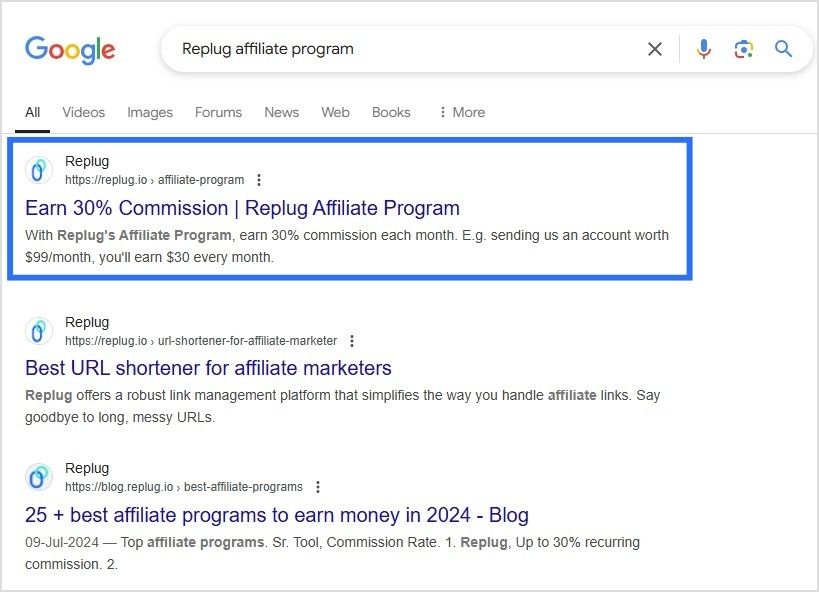
    Whether you’re focused on branding, tracking performance, or ensuring your links are secure, Replug offers everything you need in one powerful link management platform. So, if you’re serious about maximizing your custom links potential, Replug stands out as the top choice for marketers, agencies, and businesses.

    Replug Branded Short Links CTA
    A complete link management solution
    for marketing professionals & agencies.
    Try Replug for free

    FAQs

    What are the main differences between Rebrandly, TinyURL, and Replug?

    Rebrandly focuses on branded links, TinyURL on simplicity, and Replug on advanced marketing features like analytics, deep linking, and CTA campaigns.

    What are the analytics capabilities of Replug?

    Replug provides unlimited link history, engagement data, geolocation tracking, device insights, and customizable reports to optimize your strategies.

    Which platform offers the best link customization options?

    Replug leads in customization with features like unlimited branded domains, customizable CTAs, dynamic QR codes, and in-depth bio link personalization.

    Is Replug a good alternative to Rebrandly and TinyURL?

    Yes, Replug is an excellent alternative, offering advanced analytics, link rotation, retargeting pixels, and white-label solutions that the others lack.

    Does Replug support branded links like Rebrandly?

    Absolutely! Replug offers extensive branded link capabilities, including 100 branded domains, giving businesses complete control over their branding.

    Is Replug suitable for businesses of all sizes?

    Yes! Replug’s scalable plans and robust features, like team management and dynamic link capabilities, make it a fit for startups and large enterprises alike.