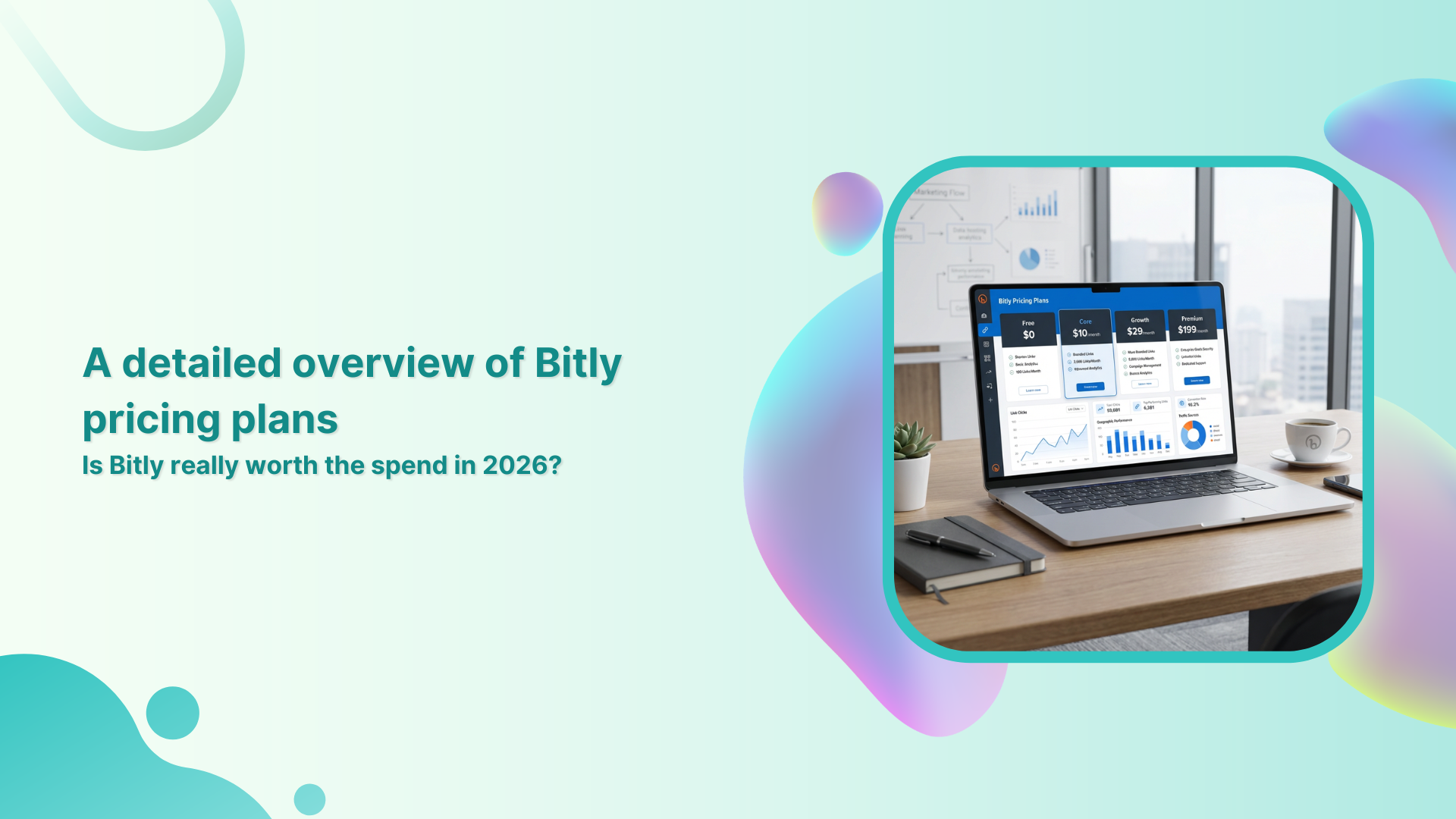
Remember when link shorteners felt like tiny side tools, not real budget items? Now, a link platform can cost hundreds or even thousands of dollars per year, making Bitly’s pricing hard to ignore in 2026. A few clicks and QR codes can quietly turn into a serious spend.
Bitly is one of the most recognized link management platforms on the internet, used by solo creators, agencies, and global brands. It handles short links, QR codes, and basic analytics that many teams lean on every day. The open question is whether the current Bitly plans still offer fair value for the price.
This guide walks through every Bitly plan, from Free to Enterprise, and shows how much each level costs, what you get, and where the limits hit. It also explains how Bitly’s monthly pricing compares with annual billing, and where that spend starts to feel heavy.
Along the way, there is a clear comparison with Replug, making it easier to decide if Bitly is enough or if a marketing‑focused alternative fits better.
All Bitly plans covered
Bitly breaks its offer into five tiers that climb in both features and cost. The lineup is Free, Core, Growth, Premium, and Enterprise, as outlined on Bitly’s pricing page.
Each level adds more links, QR codes, and data, and the “Growth” plan is where Bitly starts to act like a real business tool. To judge whether Bitly pricing is fair, it helps to see both Bitly pricing per month and Bitly pricing annually in one place.
| Plan | Bitly pricing per month | Bitly pricing annually |
| Free | $0/month | $0/month |
| Core | Annual plan only | $120/year ($10/month billed annually) |
| Growth | $35/month | $348/year ($29/month billed annually) |
| Premium | $300/month | $2,388/year ($199/month billed annually) |
| Enterprise | Custom pricing | Custom pricing |
Now, a closer look at what those plans really mean day to day.
Bitly Free plan features
- 5 new short links per month with unlimited clicks
- 2 QR codes per month and 2 custom landing pages included
- 3 custom back halves available per month
- Unlimited QR code scans
Bitly Core pricing plan features
- Raises the cap to 100 links, 5 QR codes, and 5 custom landing pages per month
- Includes 30 days of click and scan data
- Comes with a UTM builder and basic dashboards
- Advanced QR code customizations
- Link & QR code redirects
Bitly Growth pricing plan features
- Includes a custom domain for branded short links
- Offers 500 links, 10 QR codes, and 10 custom landing pages per month
- Bulk link creation and QR code exports are available
- Data history extends to approximately four months
Bitly Premium pricing plan features
- 3,000 links, 200 QR codes, and 20 landing pages per month
- City‑level and device-type data for more in-depth insights
- Mobile deep linking support is available
- One full year of analytics history
- Stronger, more advanced campaign management features
Bitly Enterprise pricing plan features
- Limits on links, QR codes, and landing pages are set on a case-by-case basis
- Support for multiple custom domains and multiple user and group permissions management
- Includes advanced performance tracking, customized onboarding & priority support, at-scale link & QR code generation, a dedicated customer success manager, and high-volume API & webhook access.
- Offers 99.9% SLA uptime and SSO logins
How Replug compares with Bitly: Get more value for your money with Replug!
Bitly is a serious, well-known tool, and for basic shortening and QR codes, it does the job. The catch is that many marketers now want more than raw clicks and simple reports.
When comparing Bitly vs. Replug, the real difference is not only price but also the level of help each platform provides with conversions, retargeting, and brand control.
Replug is a full link management platform built for professionals and agencies who live inside campaigns all day. Here is how Replug stacks up against Bitly at the levels most teams care about:
| Plan | Bitly Pricing | Replug Pricing |
| Free | $0/month | $0/month |
| Core/Essentials | $9/month | $10/month |
| Growth/Scale | $23/month | $29/month |
| Premium/Agency | $79/month | $199/month |
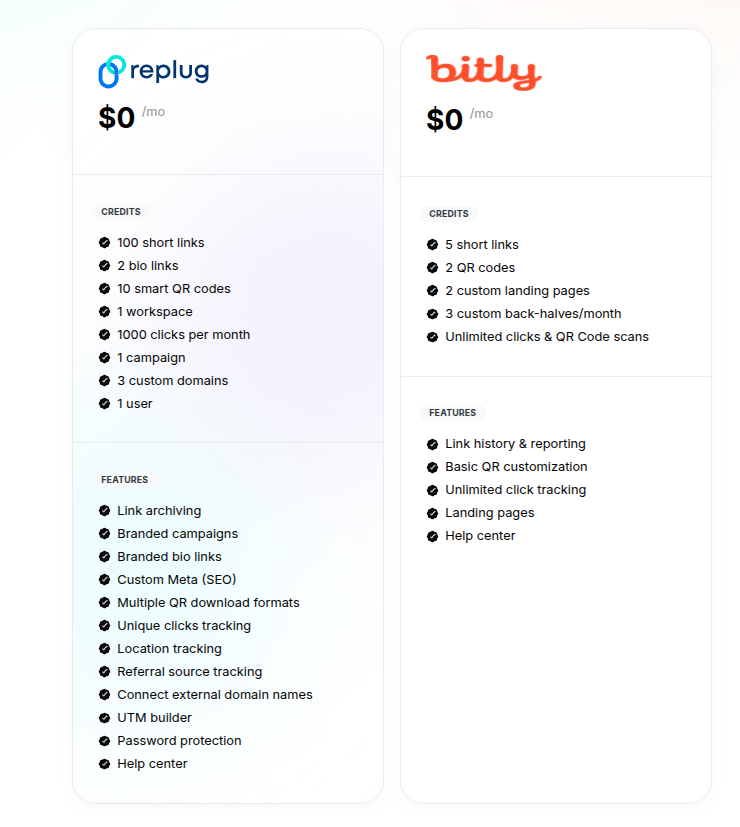
Replug’s Free plan vs. Bitly’s Free plan
Both Replug and Bitly offer free plans for shortening and managing links, but their capabilities differ significantly.
While Bitly provides basic link-shortening and tracking features, Replug’s free plan includes a broader set of marketing and analytics tools designed to help users manage campaigns, track performance, and optimize links more effectively. Have a look:
Replug’s Essentials plan vs. Bitly’s Core plan
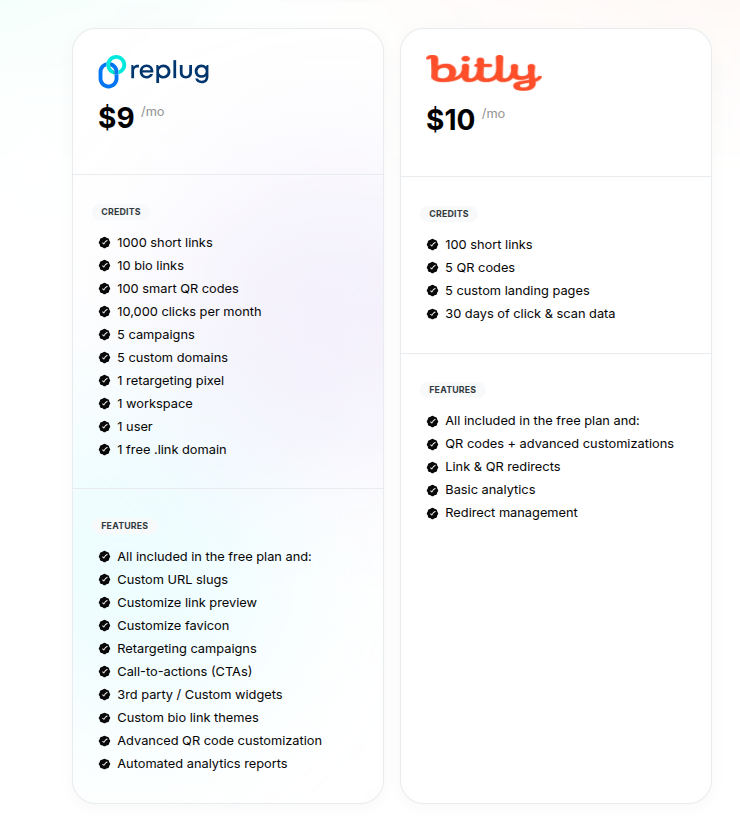
When comparing the paid entry-level plans, Replug’s Essentials plan ($9/month) delivers significantly more value than Bitly’s Core plan ($10/month).
Replug offers higher limits, including 1000 short links, 100 smart QR codes, 10 bio links, 10,000 monthly clicks, 5 campaigns, and 5 custom domains. In addition, powerful marketing features such as retargeting pixels, CTAs, customizable link previews, and automated analytics reports are also available.
In contrast, Bitly’s Core plan focuses primarily on basic link management, with 100 short links, 5 QR codes, and limited retention of analytics data. For a clearer comparison of the features and limits, take a closer look at the image below.
Replug’s Scale plan vs. Bitly’s Growth plan
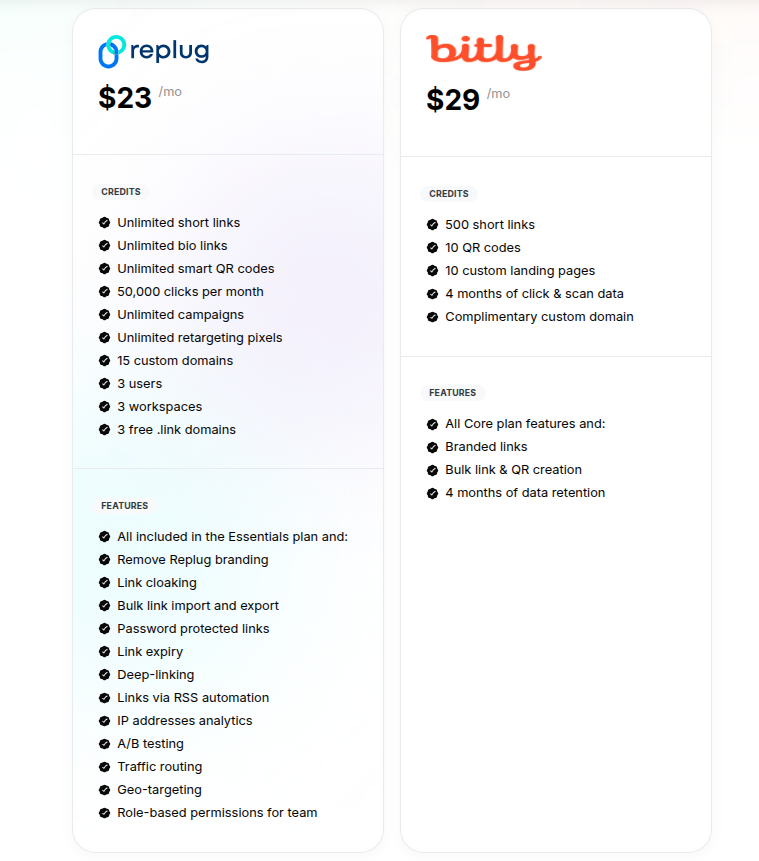
When comparing Replug’s Scale plan with Bitly’s Growth plan, Replug offers significantly more value at a lower price.
For just $23/month, Replug provides unlimited short links, bio links, campaigns, smart QR codes, and up to 50,000 monthly clicks, along with advanced features like A/B testing, geo-targeting, link cloaking, and retargeting pixels.
In contrast, Bitly’s $29/month Growth plan limits users to 500 short links, 10 QR codes and landing pages, and restricted data retention. Overall, Replug delivers broader functionality and scalability for teams and marketers.
Replug’s Agency plan vs. Bitly’s Premium plan
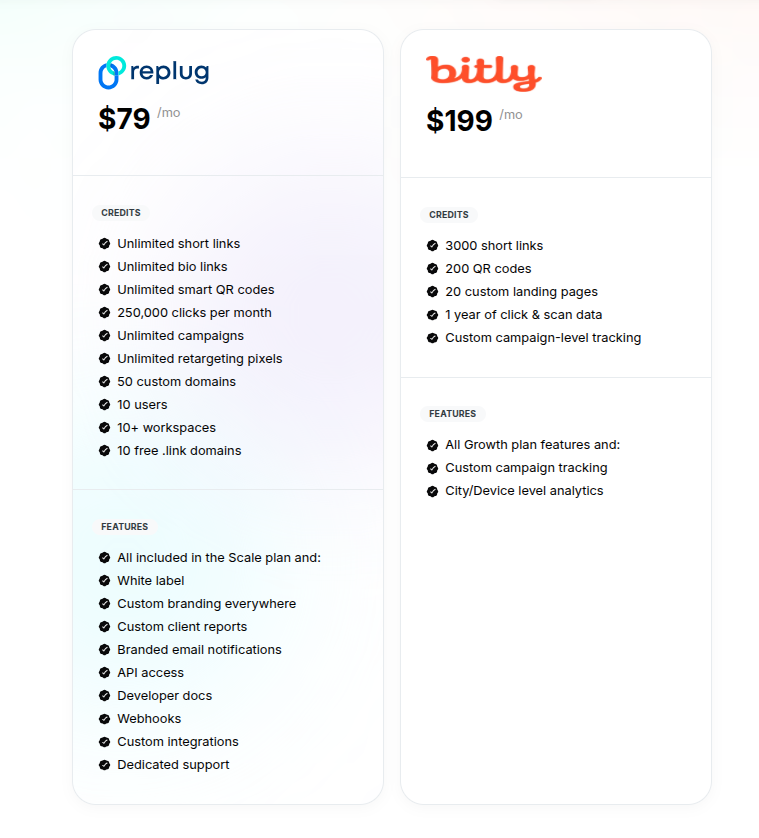
When comparing Replug’s Agency plan with Bitly’s Premium plan, Replug delivers far greater scalability and value for agencies and growing teams.
At $79/month, Replug offers unlimited short links, bio links, smart QR codes, campaigns, and retargeting pixels, along with 250,000 monthly clicks. Besides,50 custom domainsand advanced capabilities like white-labeling, API access, webhooks, custom integrations, and dedicated support are also included.
On the other hand, Bitly’s $199/month Premium plan limits users to 3,000 short links and 200 QR codes with fewer branding and automation options. For a clearer side-by-side comparison, please see the image below.
Where Bitly pricing starts to feel like a gamble
On paper, Bitly has a clear tiered structure. In practice, there is a point where the math starts to feel shaky, especially once you step above the “Growth” plan. The core job of branded links is already solved here, which makes the jump to higher tiers harder to justify for many teams.
Some key pressure points stand out:
- The most obvious issue is the step from “Growth” at around $29/month on annual billing to “Premium” at $199/month. That is a rise of about 585%, yet the main brand use case remains the same. You gain deeper analytics, more volume, and mobile deep linking, which are helpful but not always a must‑have. Many mid‑sized teams can live without city‑level data, so that extra spend can feel like a roll of the dice.
- Another major pain point is the lack of retargeting support across any Bitly plan. When someone clicks a Bitly link, you cannot add them to a remarketing audience directly from that click. For performance marketers, that missing link between traffic and ads often leads to a lower return on ad spend. It also means you still need yet another tool to handle remarketing.
- There is also no link rotation or A/B testing built into Bitly. You cannot send traffic to different landing pages from the same short link to see which one converts better. That blocks simple experiments that can raise conversion rates with small tweaks. Again, you end up piecing together extra tools and scripts.
- Agencies feel the lack of white-label features across the entire Bitly range. You cannot brand the dashboard, reports, or system emails as your own, even at “Premium.” That is a problem if you sell link services or report to clients. It forces you to either display Bitly branding or switch to a different platform.
- Team use is another sore spot, because rich user and group management lives only in “Enterprise.” If you want fine‑grained roles, permissions, and SSO, you move straight into a custom, high‑priced contract. On top of that, there are no CTA tools or lead capture overlays in any plan, so link clicks do not directly feed your sales funnel.
Is Bitly really worth it?
Whether Bitly is worth the spend comes down to how deep your needs go. There is no single right answer, but there are clear patterns that can guide the decision. Thinking in terms of goals instead of only budget makes the choice much easier.
However, Bitly may not be worth it if your marketing model relies on retargeting, call‑to‑action overlays, or direct lead capture from shared content:
- These are not offered on any Bitly plan, even at the highest prices, so you still have to pay for other tools.
- Teams that want collaboration features without an enterprise‑style contract may also find the jump to the “Enterprise” plan hard to accept.
- In those cases, the total cost for Bitly plus add‑ons can be far higher than it looks at first glance.
Consider Replug if you want branded short links along with retargeting, flexible CTAs, white-label options, and deep analytics in a single platform. In many comparisons, Replug lets a team cut both tool count and spend while gaining more direct control over conversions.
The right choice depends on whether you care more about clicks alone or about what happens after those clicks reach a page.
Replug: The most cost-effective alternative to Bitly
Bitly is a solid platform, and its pricing is clear on paper. The trouble starts when a team needs more than shortened URLs and basic reports.
The higher tiers offered require a large spend without adding core marketing features such as retargeting, CTAs, and white-label control. Paying more does not always mean you get features that match modern campaign work.
Replug takes a different path by focusing on the full click‑to‑conversion flow and offering a budget-friendly price. It includes branded short links and dynamic QR codes, but it also lets you:
- Add retargeting pixels to links
- Design on‑page CTAs and recommendation boxes
- Build bio link pages for social profiles
- Send traffic through deep links into apps
- Use link rotation, expiry, and password protection for controlled experiments
Detailed click analytics give you solid reporting without stacking extra tools. When you compare Bitly pricing annually with what Replug offers at competitive rates, the value per feature often favors Replug.
For teams that want their link platform to pull its weight in revenue terms, Replug is a smart option to explore. It helps marketers turn every shared link into a chance to collect leads, grow audiences, and improve ad performance. If Bitly feels like a high‑cost tracker, Replug feels more like a growth partner.
Frequently asked questions
How much does Bitly cost?
Bitly has a “Free” plan at $0, which includes a very small number of new links per month.
The “Core” plan is about $10 per month, billed annually at $120.
“Growth” costs $29 per month on an annual billing plan.
“Premium” jumps to $199 per month. Annual charge of $2,388.
“Enterprise” pricing is custom.
It is best to check the current price on Bitly’s site, as offers and limits can change.
Is Bitly really free to use?
Yes, Bitly offers a free plan that anyone can use without a credit card. That plan lets you create up to 5 new short links per month with unlimited clicks, plus a couple of QR codes and basic landing pages. It is fine for testing or very light use.
However, there is no custom domain, no click history, and no advanced analytics, so most businesses quickly outgrow it. To use Bitly at scale, you will almost always need a paid plan.
What are the risks of using Bitly?
Any public link shortener hides the final destination, which means some users and spam filters may treat those links with caution. If you rely solely on the default bit.ly domain, another person’s bad behavior can affect trust in your links.
There is also the normal platform risk that comes with any third‑party tool, since you depend on their uptime and policies. For stronger trust and control, a branded domain and a platform that gives full insight into click behavior, such as Replug, are usually safer.
How much does Bitly pay per 1000 views?
Bitly does not pay anything per thousand views or clicks. It is not a pay‑per‑click or ad-revenue network, but a link-management and analytics tool. If someone promises earnings from Bitly links, that offer is not coming from Bitly itself. Marketers who want to earn from traffic typically do that through their personalized products, affiliate programs, or ad platforms, not through Bitly.
What are the popular alternatives to Bitly in 2026?
Several tools compete with Bitly, each with a slightly different focus:
– Replug is a leading alternative for marketers seeking branded links, retargeting, CTAs, white-label options, and deep analytics in one place.
– Other options on the market include services such as Rebrandly, Short.io, and TinyURL, which handle shortening and branding with different feature sets.
For teams that care about conversion features and agency‑ready controls, Replug tends to stand out.