TikTok’s skyrocketing popularity has opened up exciting new opportunities for businesses to reach fresh audiences and measure the success of their campaigns. One of the best ways to track your marketing efforts on TikTok is by using UTM tags.
But let’s be honest—creating UTMs isn’t always straightforward. Many people end up using clunky methods like Google Sheets to manage their UTMs. That’s where we come in. At Replug, we designed a free UTM builder to simplify the process and help you get the most out of your TikTok ads.
In this guide, we’ll show you how to create UTMs for TikTok ads effortlessly. By the end, you’ll be able to track your campaigns with precision and make data-driven decisions to boost your marketing success.
What are UTM parameters?
UTM parameters, also known as UTM tags or UTM codes, are snippets of text appended to a URL to track the source, medium, campaign, term, and content of a marketing link. These parameters help marketers understand where their website traffic is coming from and how users interact with their marketing campaigns.
Here’s a breakdown of the five UTM parameters:
Source (utm_source): This parameter identifies the specific source of the traffic, such as the platform or website where the link was clicked. For example, if you’re running ads on TikTok, the source would be “tiktok”.
Medium (utm_medium): The medium parameter describes the marketing medium or type of traffic, such as email, social, or CPC (cost-per-click) advertising. For TikTok ads, the medium could be “cpc” (cost-per-click).
Campaign (utm_campaign): This parameter specifies the name of the marketing campaign associated with the link. It helps differentiate between different campaigns running simultaneously. For example, if you’re running a summer sale campaign on TikTok, the campaign name could be “summer_sale”.
Term (utm_term): This parameter is typically used for paid search campaigns to identify the keywords associated with the ad. However, for TikTok ads, it may not be as relevant unless you’re running keyword-targeted campaigns.
Content (utm_content): The content parameter allows you to differentiate between different elements within the same campaign. For example, if you’re testing two different ad creatives for your TikTok summer sale campaign, you could use “video_ad1” and “video_ad2” as content identifiers.
Why should you use UTM tags on TikTok?
Using UTM tags on TikTok offers several important benefits for marketers:
Track campaign performance:
UTM tags enable you to track the effectiveness of your TikTok campaigns accurately. By appending UTMs to your ad URLs, you can monitor metrics such as clicks, conversions, and engagement specific to each campaign, source, and medium.
Identify traffic sources:
With UTM tags, you can pinpoint the exact sources driving traffic to your website from TikTok. Whether it’s from organic posts, paid ads, or influencer collaborations, UTMs help you understand which channels are delivering the most value.
Measure ROI:
By tracking the performance of your TikTok campaigns using UTMs, you can calculate the return on investment (ROI) more precisely. This data allows you to assess the cost-effectiveness of your marketing efforts and allocate your budget more effectively in the future.
Optimize campaigns:
UTM-tagged URLs provide valuable insights into user behavior and preferences. By analyzing UTM data, you can identify trends, determine which content resonates best with your audience, and optimize your TikTok campaigns for better results.
Enhance reporting:
UTM parameters make it easier to generate detailed reports on your TikTok marketing activities. Whether you’re reporting to clients, stakeholders, or your team, UTMs provide clear and granular data that can support your analysis and decision-making.
Facilitate A/B testing:
UTMs allow you to conduct A/B tests effectively by tracking different variations of your TikTok ads or content. By comparing the performance of URLs with different UTM parameters, you can identify which strategies yield the highest conversion rates and refine your approach accordingly.
How to create UTMs for TikTok ads using Replug?
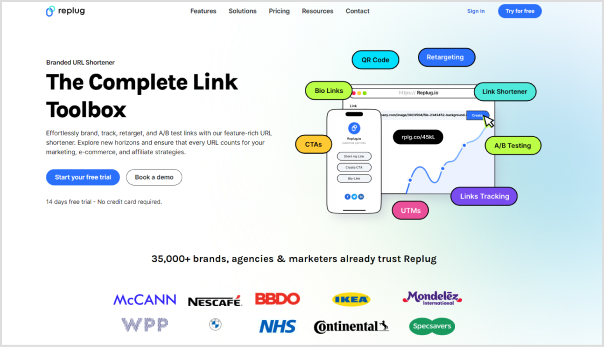
Replug is a top-notch link management platform that allows you to create and manage custom short links with UTM parameters for tracking purposes. Here’s a step-by-step guide to creating UTMs for TikTok ads using this one of a kind short URL generator free.
Step 1: Sign in to Replug
Visit the Replug app and sign in to your account. If you don’t have an account, you can sign up for free.
Step 2: Enter campaign and URL details
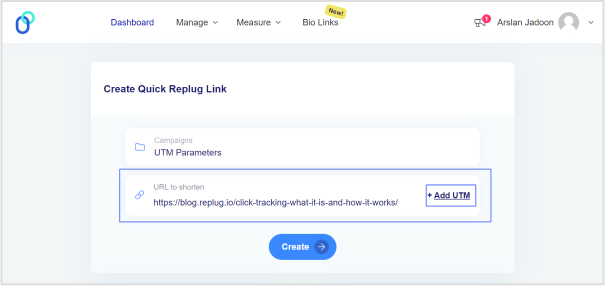
Once logged in, simply choose a campaign on your dashboard (create a new campaign if you’re a new user) and enter the TikTok campaign URL in the “URL to shorten” field.
Step 3: Configure UTM parameters
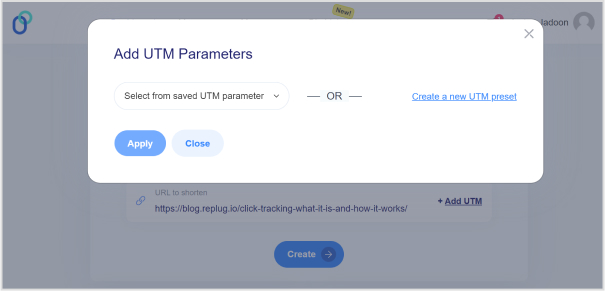
In the campaign creation process, you’ll have the option to add UTM parameters to your links. Specify the UTM parameters according to your campaign requirements. This typically includes parameters like source, medium, campaign, term, and content.
Note: For TikTok ads, ensure that you set the source as “tiktok” and the medium as “cpc” (cost-per-click), or any other relevant medium depending on your campaign goals.
Step 4: Generate short link
After configuring the UTM parameters, click the “Create” button and proceed to generate a short link for your TikTok ad. Replug will automatically create a shortened URL with the specified UTM parameters appended to it.
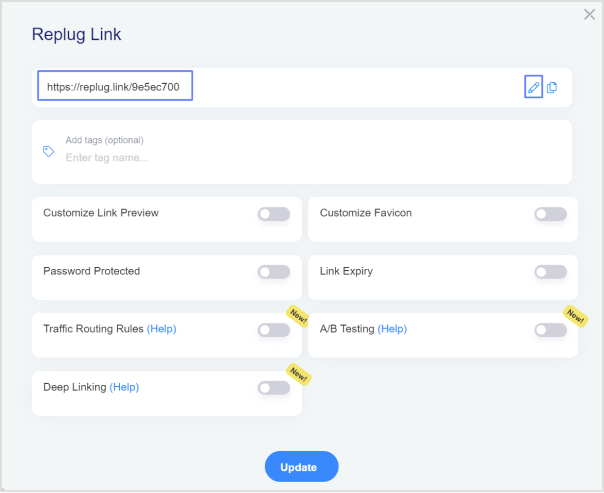
Step 5: Customize the URL slug
Replug allows you to customize the shortened URL. You can choose a unique identifier or keyword to make the link more memorable or reflect your content.
Step 6: Use shortened URL in the TikTok ad
Copy the shortened URL generated by Replug. Paste this URL as the destination URL in your TikTok ad setup when creating or editing your ad campaign.
Step 7: Track performance
Once your TikTok ad campaign is live, Replug will track the performance of the shortened URL with UTMs. You view analytics and track metrics such as clicks, conversions, and engagement for your TikTok ad campaign.
Note: Remember to analyze the data provided by Replug to optimize your TikTok ad strategy and maximize your marketing efforts. Happy tracking!
Final Note
UTM tags are invaluable tools for marketers looking to optimize their TikTok ad campaigns and maximize their ROI. By leveraging Replug’s UTM builder, you can easily create custom short links with UTMs, track the performance of your campaigns, and make data-driven decisions to achieve your marketing objectives.
FAQs
Is the TikTok UTM Builder compatible with all types of TikTok ad campaigns?
Yes, the TikTok UTM Builder is compatible with all TikTok ad campaigns, including video ads, sponsored hashtag challenges, branded effects, and influencer partnerships.
How do I track the performance of my TikTok ad campaigns with UTMs?
Replug automatically tracks the performance of the shortened URLs with UTMs. You can log in to your Replug account to access analytics and track metrics like clicks, conversions, and engagement for your TikTok ad campaigns.
Does Replug provide real-time analytics for TikTok ad campaigns?
Yes, Replug offers real-time analytics, allowing you to monitor the performance of your TikTok ad campaigns as they unfold. You can track clicks, conversions, and other engagement metrics in real-time to make timely adjustments and optimizations.
Are you a music lover looking to share your favorite tunes on TikTok? Adding a Spotify link to your bio is a great way to let your followers know what you’re listening to and discover new tracks. However, the process of adding a Spotify link to your TikTok bio may seem confusing at first.
Don’t worry, though – in this guide, we’ll show you exactly how to do it in just a few simple steps. Whether you’re a seasoned TikTok user or just starting out, you’ll be able to share your musical taste with the world in no time!
What is a TikTok link in bio?
A TikTok link in bio is a clickable hyperlink that can be added to your TikTok profile page. This link appears in the “Bio” section of your profile and can be used to direct your followers to external websites, social media profiles, or any other online destination you want to promote
By default, TikTok only allows users to add one link to their bio. However, there are third-party tools like Replug that can be used to add multiple links to your bio section. This feature is especially useful for content creators, small business owners, and anyone else looking to promote their online presence to a wider audience.
How to add Spotify link to TikTok bio?
Adding a link to your TikTok bio is a great way to share more information with your followers and drive traffic to your website or other social media profiles. Here’s how to add a Spotify link to the TikTok bio:
Step 1: Open Spotify on your device and log in to your account.
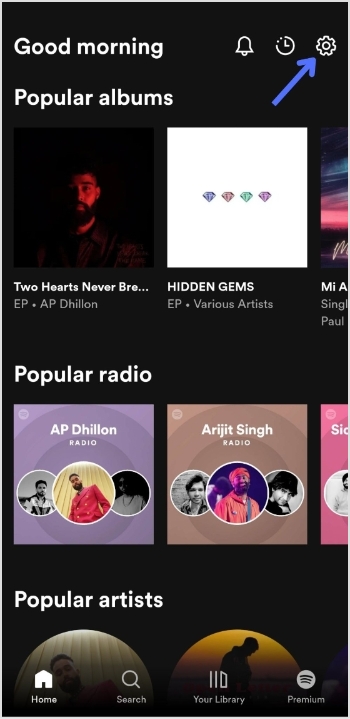
Step 2: Tap the “setting icon” in the top right of the screen.
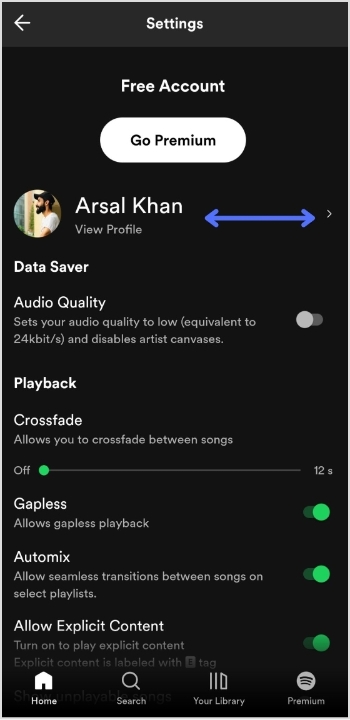
Step 3: Tap “view profile” under your profile name to open your profile.
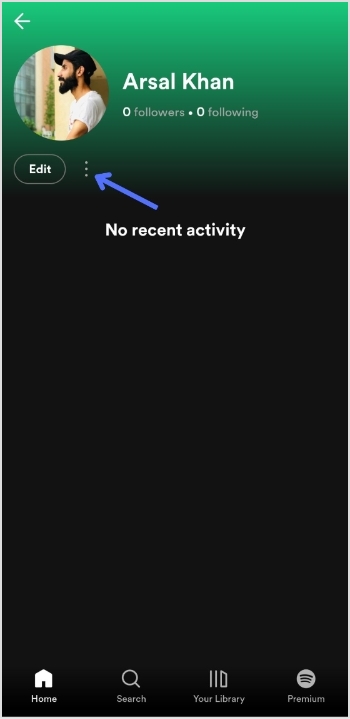
Step 4: Tap 3 “vertical dots” on your profile page.
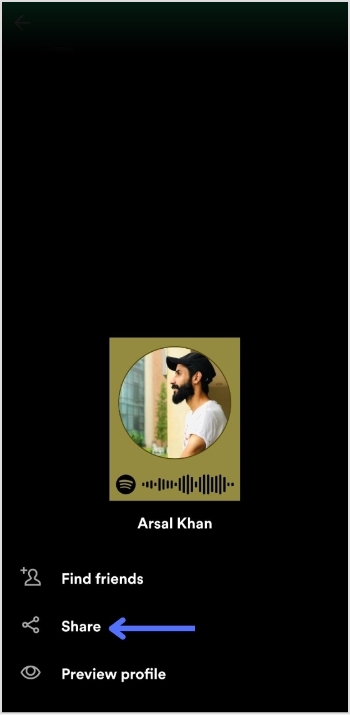
Step 5: Tap “share”.
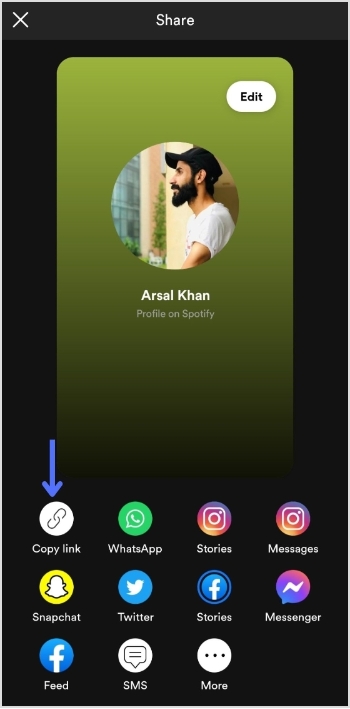
Step 6: Tap “copy link”.
Add this link to your TikTok bio:
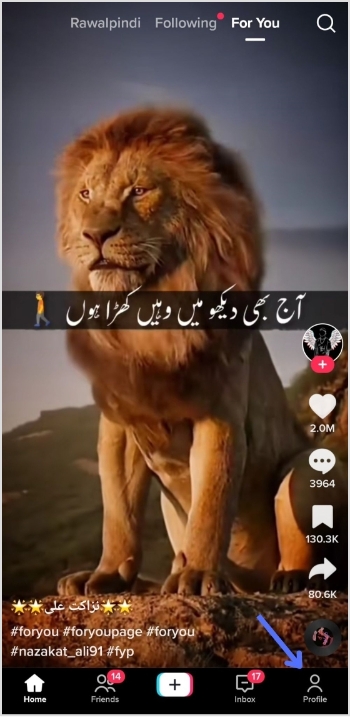
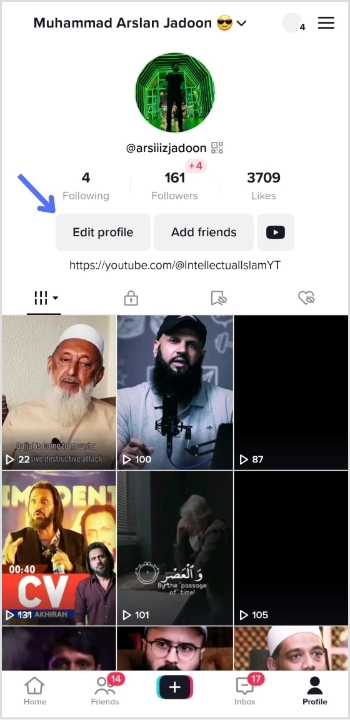
Step 1: Open TikTok on your mobile device and tap the “profile icon” in the bottom right corner.
Step 2: Tap “edit profile”.
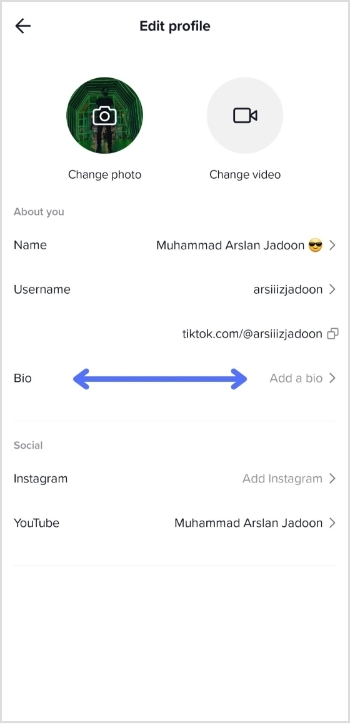
Step 3: Tap “add a bio” to open the bio section.
Step 4: Paste your Spotify link, tap “save” and you’re done.
Do you have more than one link you want to add to your TikTok bio?
Perhaps you want to share your social media profiles or promote your website alongside your Spotify account. Luckily, there’s an easy solution: Replug.
It offers a top-notch, free bio link maker that allows you to add multiple links to your TikTok bio, helping you to increase your reach and engagement on the platform.
With this efficient link optimization platform, you can create a single link that directs users to a landing page containing all of your important links. This means that you can easily promote your online presence in one convenient location.
Here’s a video showing you how to add multiple links to your TikTok bio using Replug.
FAQs
Can I add multiple links to my TikTok bio?
By default, TikTok only allows you to add one link to your bio. However, third-party tools or a dedicated online TikTok bio link tool can be used to add multiple links to your TikTok bio, hassle-free.
Is it free to use Replug to add multiple links to my TikTok bio?
Replug is a free link shortener with limited features inside its free plan. However, it also offers paid plans with more advanced functionality for its subscribed users.
How do I use Replug to add multiple links to my TikTok bio?
To use Replug to add multiple links to your TikTok bio, sign up for an account and create a branded landing page with your desired links. Then, copy the Replug landing page URL and paste it into the “Website” field in your TikTok bio.
Can I track clicks on my TikTok bio links with Replug?
Yes, Replug offers advanced analytics that allows you to track clicks and engagement on your TikTok bio links and other links across your online presence.
Are you an avid TikTok user and want to share your content with your Instagram followers? Do you wish to showcase your TikTok creations to a broader audience?
If you regularly share content across social platforms and want an easy way to manage, track, and organize all your shared links and posts, Replug offers a unified dashboard to manage everything in one place.
In this guide, we’ll show you how to post TikTok videos on Instagram, so you can double up your social media reach and get more eyes on your entertaining content.
So, get ready to learn the ropes and become a social media sensation!
Here’s how to share TikTok videos on Instagram:
TikTok has become a popular platform for creating and sharing short-form videos. But, if you want to share your TikTok content with your Instagram followers, you might be wondering how to do it. The good news is that it’s relatively easy to post TikTok videos on Instagram, and you can share them in various formats such as feeds, stories, and reels.
Plus, if you need a handy tool to download your TikTok videos for Instagram, consider using a TikTok video downloader to streamline the process.
How to post TikTok to your Instagram feed?
To post a TikTok video on your Instagram feed, follow these steps:
Step 1: Open the TikTok app and find the video you want to share.
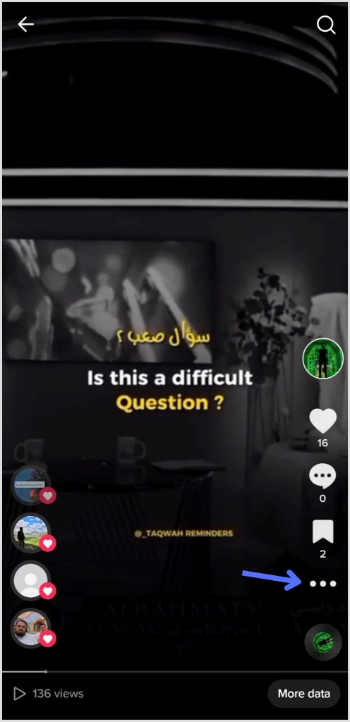
Step 2: Tap on the “3 dots” or “share” icon located on the right side of the screen.
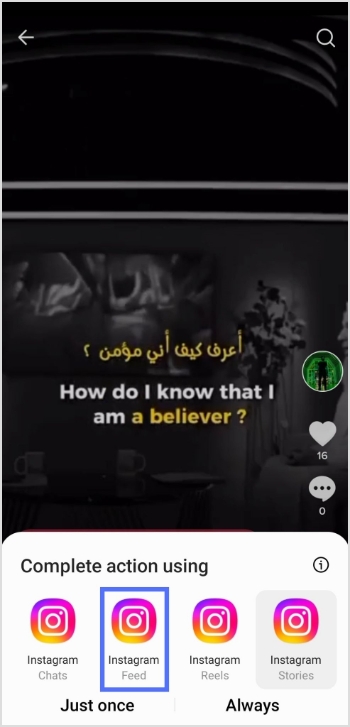
Step 3: Tap on the “Instagram” option.
Note: Before sharing or embedding the video link elsewhere, like in bios, descriptions, or other social media, you can use a trusted URL shortener to produce neat, brand-friendly URLs that look clean and are easy to manage.
Step 4: Choose to post the video to your Instagram feed.
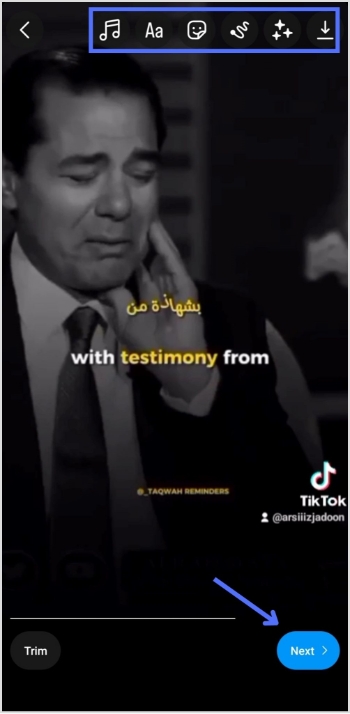
Step 5: Edit the video as desired, add filters, captions, or other adjustments, and then tap “Next.”
Step 6: Tap “share” and your video will be shared on your Instagram feed.
How to post a TikTok to Instagram stories?
To post a TikTok video on your Instagram stories, follow these steps:
Step 1: Open the TikTok app and find the video you want to share.
Step 2: Tap on the “Share” or “3-dots” icon located on the right side of the screen.
Step 3: Tap on the “Instagram” option.
Step 4: Choose to post the video to your Instagram story.
Step 5: Edit the video as desired, add filters, captions, or other adjustments, and share.
To post a TikTok video on your Instagram reels, follow these steps:
Step 1: Open the TikTok app and find the video you want to share.
Step 2: Tap on the “Share” icon located on the right side of the screen.
Step 3: Tap on the “Save video” option to save the video to your device.
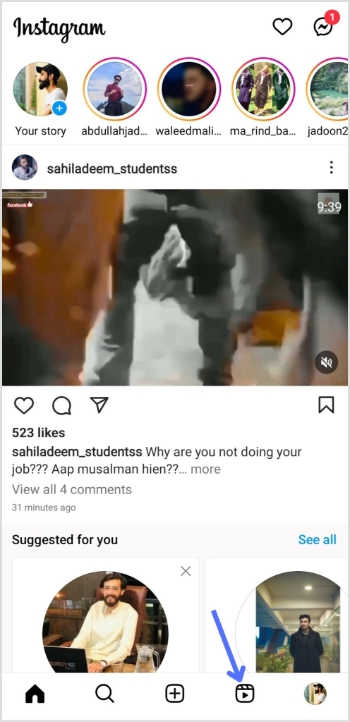
Step 4: Open the Instagram app and tap on the “Reels” option.
Step 5: Select the video you want to share from your device’s camera roll, add filters or other adjustments, and then tap “Share.”
And there you have it! Now you know how to post TikTok videos on Instagram, whether it’s for your feed, stories, or reels. So, go ahead and share your creative TikTok content with your Instagram followers and watch your social media presence grow!
FAQs
Can I post TikTok videos directly to Instagram?
No, you cannot post TikTok videos directly to Instagram. You need to save the TikTok video to your device first and then upload it to Instagram.
Will my TikTok video lose quality when I upload it to Instagram?
It’s possible that your TikTok video may lose some quality when you upload it to Instagram due to differences in compression and resolution. To minimize quality loss, try to save the TikTok video in the highest possible solution and choose the best Instagram video settings for your device.
Can I automate the process of sharing TikTok videos on Instagram?
While there is no direct way to automatically share TikTok videos to Instagram, you can use third-party apps or tools like Content Studio to automate the process to some extent. However, monitoring the results and making any necessary adjustments is important to ensure your content is shared accurately and effectively.
Creating a TikTok account can offer a number of benefits depending on your goals and interests. It’s a great way to discover and view the latest and trendiest videos, from funny memes to lip-syncs to dance challenges.
Additionally, TikTok provides a platform for users to showcase their creative talents and share their own videos with a wide audience. It can also be a great way to connect with others who share similar interests and hobbies.
Businesses and brands can also benefit from TikTok by connecting with their target audience. Thus, creating effective marketing campaigns and allowing users to purchase products directly from the app.
It can also be used for personal brand building by consistently creating and sharing engaging content. In addition, you can build a following and establish yourself as an expert in your field.
Overall, having a TikTok account can be a great way to connect with others, and grow your personal or professional brand.
How to create a TikTok account?
Step 1: Download the TikTok app from the App Store (iOS) or Google Play Store (Android).
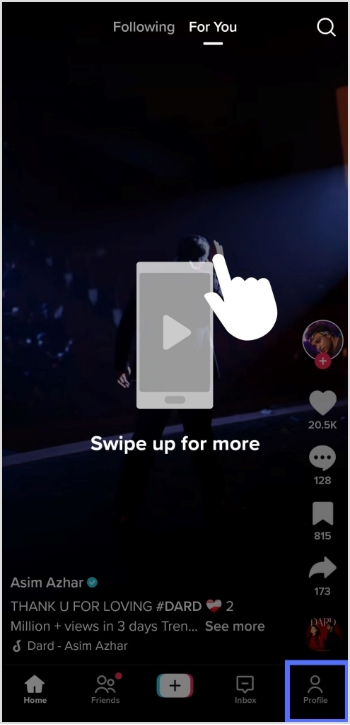
Step 2: Open the app and tap the profile icon in the bottom right corner.
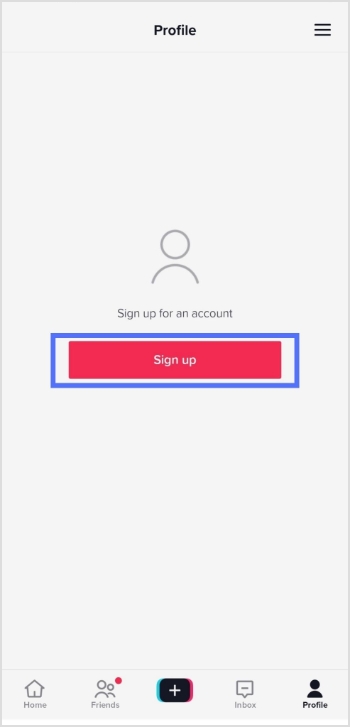
Step 3: Tap the sign-up button and choose how you like to sign up.
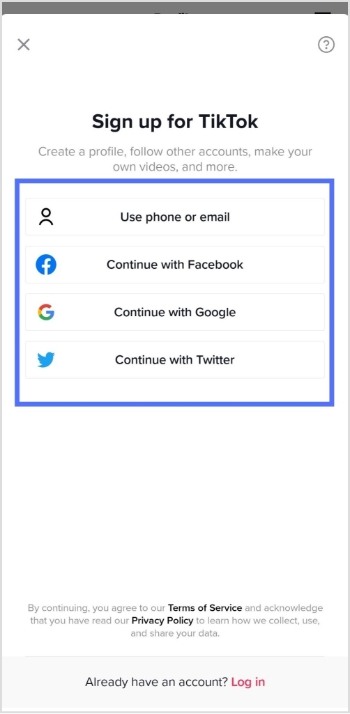
Step 4: Select how you want to create your account, either by using a phone number, or email address, or through a third-party account (such as Facebook or Google).
Step 5: Fill in the required information, including your name, birthday, and phone number.
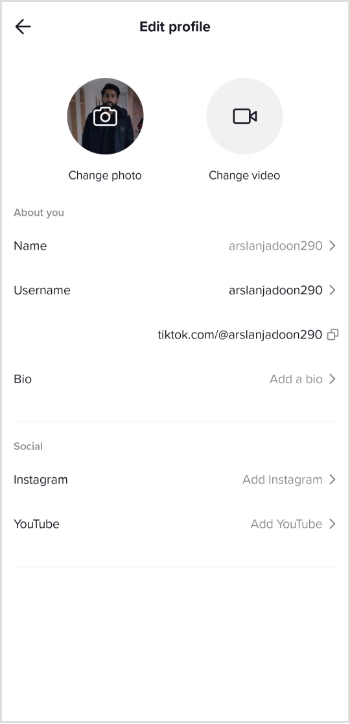
Step 6: Once your account is created, you will be prompted to fill in your profile information.
Step 7: You can also customize your account by selecting your preferred privacy settings, and connecting your other social media accounts.
Once you’ve finished customizing your account, you can start browsing and creating TikTok videos.
Note: You must be at least 13 years old to create a TikTok account.
For those of you who are into managing multiple links, whether for social accounts, content hubs, or marketing campaigns, Replug makes it much easier to organize, track, and optimize every URL from a single dashboard.
FAQs
Is making a TikTok account free?
Yes, making a TikTok account is free. Users can create an account using their email address, or phone number, or by connecting to their Google or Facebook account.
Does TikTok pay you?
TikTok has a monetization program called the TikTok Creator Fund that pays creators based on their engagement and the number of views they receive on the platform. To be eligible for the Creator Fund, a user must have a minimum of 1,000 followers and meet other requirements set by TikTok. Additionally, TikTok also allows creators to monetize their content through brand partnerships and sponsored posts.
Downloading your TikTok videos without the watermark can be challenging, as there is no straightforward method. This can be an issue if you create videos within the TikTok app and later want to share them on another social media platform, as the TikTok watermark will appear on the downloaded version of the video.
TikTok does not offer native tools for downloading videos without watermarks, but third-party apps and websites do. These apps and websites are created by independent developers and are not affiliated with TikTok. They can be used to download videos from TikTok with the watermark removed.
Most of these third-party tools are relatively straightforward, making downloading videos from TikTok as quick and easy as using the platform’s native tools. So, let’s get started and explore a reliable TikTok video downloader to simplify the process!
Save TikTok videos without watermarks with these free tools:
The process is quite simple to save a TikTok video without a watermark. All you need to do is copy the link of the video that you wish to download. This link can typically be found by clicking the “Share” button beneath the video on the TikTok app or website. Once you have copied the link, you can proceed to one of the tools mentioned.
Once you are on the website or application, you will likely see an input field where you can paste the video link you have copied. After you paste the link, you will be prompted to hit a download button or process. The tool will process the link, and the video will be ready for download in a few seconds without the watermark.
It’s important to note that saving a video without a watermark may not comply with the terms and conditions of TikTok and the content creator. So users should be careful while using these kinds of tools and take necessary precautions.
TikSave.io allows you to download TikTok videos without watermarks or user IDs. This means that when you download a video from TikTok using TikSave.io, the video will not have any overlaid text or logos that indicate the original creator of the video. Additionally, the video will not include any information about the user who uploaded it, such as their user ID.
To use TikSave.io, you must copy the link to the TikTok video you want to download and paste it into the input box on the website. Once you have done this, you can download the video in the format and quality you prefer. Downloading videos from TikTok using TikSave.io is simple and does not require special software or technical knowledge.
Overall this allows the user to download any TikTok video of their choice and save it to their device without any watermarks or UserID linked to it, making it an easy process.
SnapTik allows users to download TikTok videos without watermarks, which are then overlaid text or logos that indicate the original creator of the video. By using SnapTik.App, you can download TikTok videos in their original form without any branding or identification of the creator.
One of the main advantages of SnapTik is that it does not require users to install any software on their computers or mobile phones to use it. All you need is the link to the TikTok video you want to download, and you can use the website to download the video with just one click. The processing of the video is done on the SnapTik.App’s side and the user must just paste the link and download it.
This makes downloading TikTok videos simple and easy for the user, with no need for additional downloads or technical know-how. So SnapTik can be considered a user-friendly and efficient TikTok downloader.
TTDL (tiktokdownload) is a tool that can save as many videos as you want without limitations or restrictions. In addition, you can download videos without any watermarks, which means that the videos will not have any overlaid text or logos that indicate the original creator of the video. This allows you to have a clean and unbranded version of the videos.
SSSTik.io is one of the most popular TikTok story downloaders. It allows users to save videos without any watermarks, which are overlaid text or logos that indicate the original creator of the video.
One of the main advantages of SSSTik.io is that users don’t have to install any additional apps or software to use the service. All that is needed is a web browser and the link to the TikTok story you want to download. You simply paste the link into the input field on the website, and it processes the link and allows you to download the story without any watermarks.
TikMate is another excellent tool for downloading TikTok videos without a watermark. The process is the same as for the above-explained tools. First, open the TikTok app and find the video you want to download. Next, click the “Share” button on the video to “Copy the Link.” Then paste the video link into the TikMate website or application. After that, click the “Download” button and the “Download Without Watermark” button to download the video in Mp4 format without the watermark. Eventually, You’ll have your TikTok video downloaded without the watermark.
Note: If you’re interested in more than just watermark-free downloads, such as managing and optimizing all your shared links across social platforms, this all-in-one link optimization platform offers tools to help you do that efficiently.
Frequently asked questions
Do I have to pay to download TikTok videos without watermarks?
No, you don’t need to pay a single penny to download a TikTok video without a watermark. All you need to do is to visit one of the downloaders we discussed above, and you’ll have your video in just a few minutes.
Do I need to install the extension to download TikTok videos without a watermark?
No, you don’t need any extension to remove watermarks from the videos. Just paste the link to the video into any of the downloaders mentioned above, and you’ll have the video downloaded.
Are you a TikTok creator or business looking to track the performance of your content on the platform?
Understanding your analytics can help you create more effective and engaging content and optimize your TikTok marketing efforts.
If you’re looking for a powerful tool to manage link tracking, marketing campaigns, and social traffic, Replug.io offers a full suite of link-management and analytics capabilities that seamlessly integrate with your TikTok strategy.
This ultimate guide will show you how to check your TikTok analytics. Also, get the insights you need to succeed on TikTok.
So, keep reading till the very end!
How to check analytics on TikTok through a mobile phone?
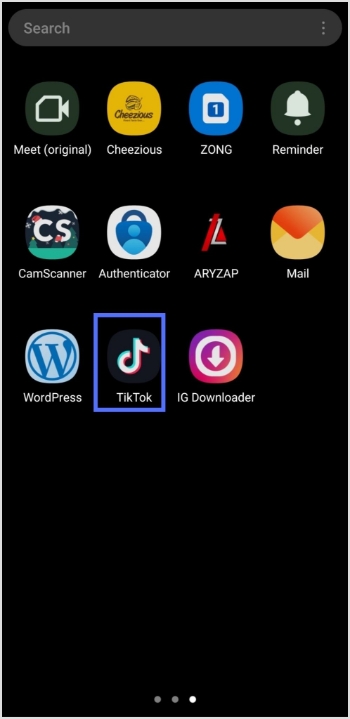
Step 1: Open the TikTok app on your mobile phone.
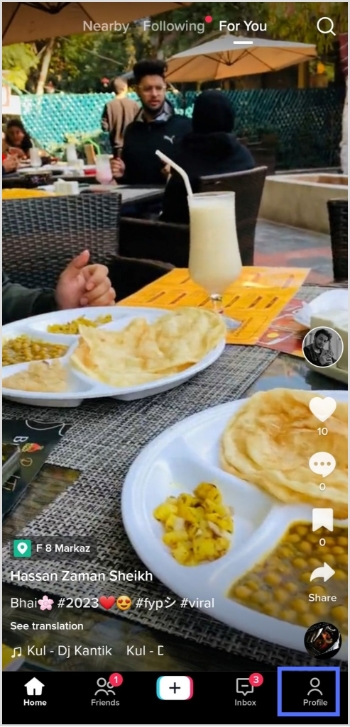
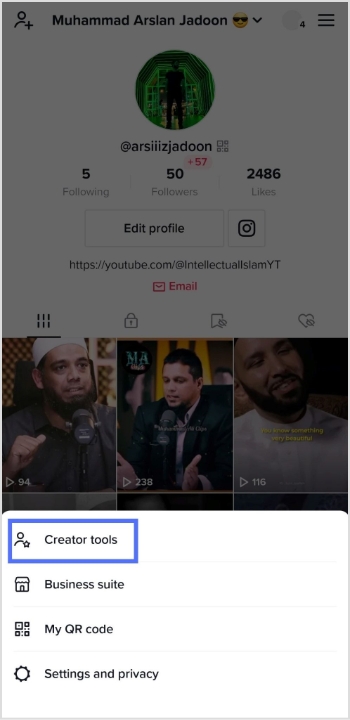
Step 2: Tap on the profile icon in the bottom right corner.
Step 3: Tap on three horizontal lines in the top right corner.
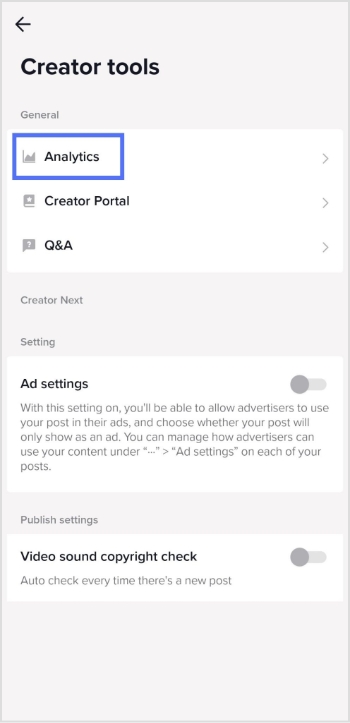
Step 4: Tap the creator tools menu to see the analytics.
Step 5:Tap the analytics menu on your mobile screen.
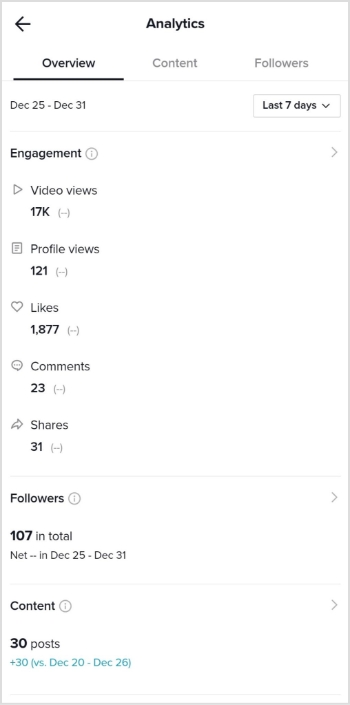
Step 6: You will now see the Analytics screen on your mobile device.
It’s worth noting that TikTok’s analytics may not be 100% accurate, as the platform uses algorithms to estimate specific metrics. However, the data should still give you a good overall idea of your content’s performance and how it compares to other content on the platform.
Note: Want to clean up long, messy URLs before you post them on TikTok? You can easily shorten a URL for free to make your bio links look neat and professional, helping you boost click-through and overall engagement. Also, tracking link is never easier than before with Replug!
Maximize marketing ROI
by transforming ordinary URLs into branded short links that convert.
Try Replug for free
How to Check analytics on TikTok Through a computer device?
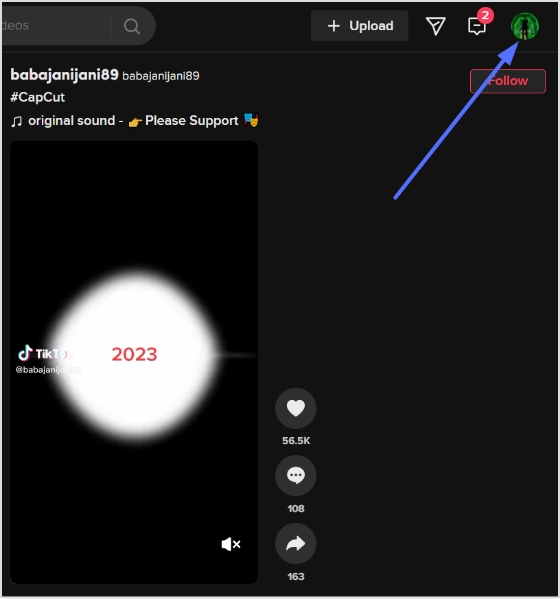
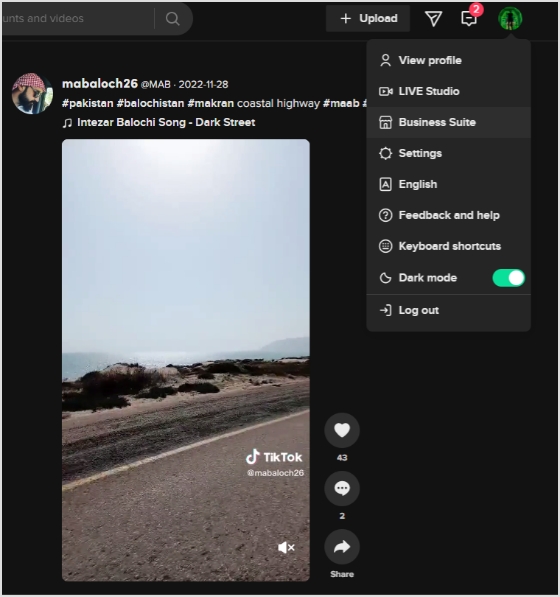
Step 1:Log in to TikTok on your computer or laptop.
Step 2: Click on your profile icon in the top right corner.
Step 3:A drop-down menu will open. Click business suite from the drop-down menu.
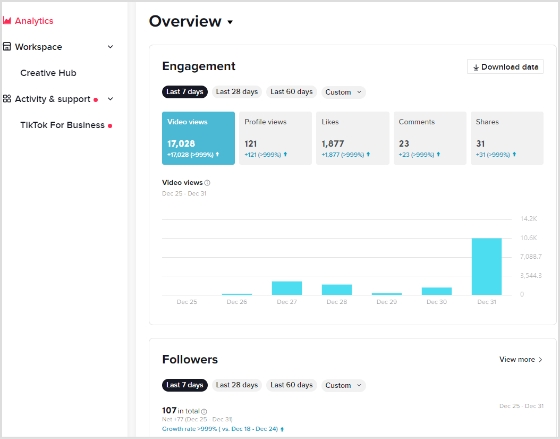
Step 4: Analytics screen will now open. You can check the performance of your content and more.
How to Understand Tiktok Analytics?
On TikTok, you can access analytics for your account by navigating to the Creator Studio. There are three main categories of analytics: Overview, Content, and Followers.
Overview: The Overview section provides information about your followers, video views, profile views, likes, and comments. Within this section, the Engagement tab lets you see metrics such as likes, comments, and shares for your videos within the chosen time frame.
Content: The Content tab offers more in-depth data and analytics for each video you post, including total views, total likes, comments, shares, average watch time, percentage of people watching the entire video, traffic source type (such as your profile or the For You feed), and audience territories. All content metrics are only available for the last seven days.
Followers: The Followers tab shows you insights about the community you’ve built on TikTok, including information about the locations of your followers and their activity times. You can also see your profile views and track changes in follower growth. If you have LIVE access, you can view analytics for your live streams in the LIV tab. This includes metrics like total views, new followers, total time, and diamonds earned.
TikTok doesn’t need any introduction. It has become the new normal, a buzzing phenomenon or a global trend, whatever you want to call it.
It’s the most downloaded app of all time. So it opens up an opportunity for businesses, brands, and influencers to cash in on this hot, trendy mobile platform.
For a few of those who haven’t had a chance to go through TikTok, I’d say it’s a short-form, vertical video app that has taken the world by storm.
There might be several ways to hop on the TikTok and become successful. However, understanding TikTok trends for individuals and businesses might set a pathway for long-lasting attention on the platform.
If you’re a business or brand and trying to get the hang of this 15-second vertical video trend, then you’re at the right place.
This article encapsulates major TikTok trends to follow and strategies to apply to make the most of this short-form vertical video social media platform.
Without any further ado, let’s jump right into it.
TikTok Trends for Businesses
Everyone knows that TikTok is on the rise, so brands and marketers want to cash in on this opportunity, and rightly so.
However, most companies don’t have TikTok trends for businesses to follow, and most end up frustrated after all. The reason is that they don’t have a plan in place.
One of the underestimated growth tactics is following the social media trends. We sat down to discover some of the hottest TikTok trends that businesses should surely look into. Here are those TikTok trends for businesses:
i. Influencers and Celebs are Joining TikTok
One of the trends businesses need to look at is how influencers and celebs take TikTok seriously. It’s a massive shift in the social media realm. There were celebrities in every part of the world who always avoided social media despite pressure from fans.
However, a lot of celebs have jumped on the bandwagon. Jennifer Aniston joined Instagram in 2019 and reached one million followers in five hours and sixteen minutes.
Similarly, some celebs and influencers are taking TikTok seriously. It seems like nobody wants to miss out on a boat. It’s a sign that there is attention shifting toward TikTok. The reason is that when influencers or celebs start a hashtag or hop on a platform, it means the audience follows it. As a result, the platform or a trend comes under the spotlight.
Millenials are quite popular, but Generation Z has taken over their position. Since we’re discussing TikTok trends, it’s impossible to talk about TikTok and not discuss Generation Z.
The TikTok’s popularity wouldn’t be the same if it weren’t for the Generation Z. The platform became wildly famous among Generation Z. According to Comscore, 32.5% of US-TikTok users are between 10 to 19, 29.5% are 20 to 29, 16.4% are 30 to 39, 13.9% are 40 to 49, and 7.1% are 50+.
The data shows that TikTok is the go-to platform for a younger audience, and brands could use TikTok as a source of engagement and relationship-building with the young audience through TikTok.
iii. Indie Musicians Collaborate with TikTokers
One of the TikTok trends is musical collaboration. Nowadays, indie singers and musicians create music, and besides putting it out on Spotify or SoundCloud, they collaborate with TikTokers to promote their songs.
TikTokers don’t only get the music to put out new videos, but they also get paid money to use that music in their TikTok content. You could easily spot such collaboration with hashtags such as #ad or #paid. Moreover, you could also notice that the TikToker would also mention the singer’s TikTok handle in the description or comment.
Brands should closely look at this TikTok trend, as they might be able to collaborate with the TikTokers in their niche. Check out the creative agency Collab Inc which connects content creators and brands.
iv. Social Commerce is Expected to Grow on TikTok
Social commerce isn’t a mystery anymore – Instagram, Snapchat, and YouTube have already been testing social media management tools. TikTok hasn’t been that far away. You can check out our tutorial on how to make money on TikTok.
It’s expected that the trend of TikTok commerce will go up in the next few years or so and users will be spending more money.While brands will be cashing in on their TikTok attention without leaving the TikTok app.
v. TikTok Challenges are Gaining Popularity
One of the TikTok trends businesses and brands should keep an eye on is the TikTok challenges. It works because an influencer or celebrity makes a TikTok video about a particular challenge, and it’s most likely to go viral if it happens to be fun.
Brands who keep an eye on TikTok trends to follow and take advantage of all the attention must keep an eye on the for you page or discover section on TikTok. Plus, following a bunch of creators would go a long way.
There might be dozens of more TikTok trends out there, and the strange part is that they keep changing every week. So anyway, stick around to keep learning about TikTok for business.
TikTok trends change from time to time, just like top trending hashtags on Twitter. Therefore, it’s difficult to point out a TikTok trend because no one knows how long it will last.
Brands who want to capitalize on TikTok trends shouldn’t overthink making videos on the latest TikTok trends – all they need is to create videos and move on.
When TikToker influencers come across a new trend through the discover page or for your section and find it interesting, they jump on the bandwagon and make a video around that.
Here are three TikTok trends that I spotted recently:
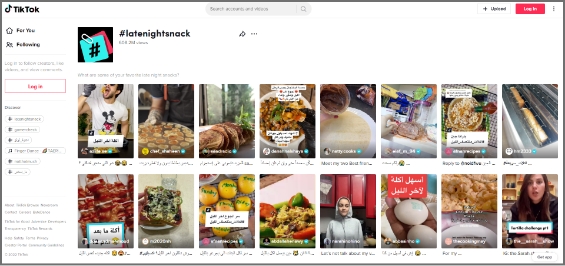
1. Latenightsnack
Latenightsnack trend was recently spotted on TikTok. It was about what people snack on late at night. TikTokers were making short, vertical videos about what they were eating while watching Netflix or working late.
This TikTok trend had gotten over 608 million views. So this is why it was trending on TikTok the other day.
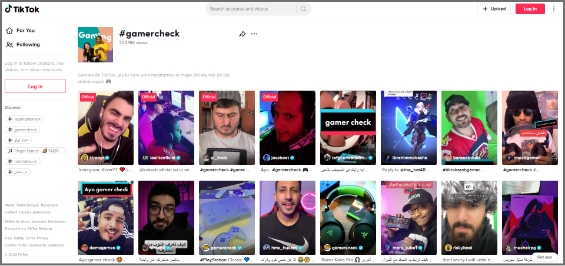
2. Gamercheck
Gamercheck was also a TikTok trend I came across lately. It was the trend about how TikTok users play games, what their gaming rooms look like, what gaming equipment they use, and all things gaming.
The Gamercheck TikTok trend had gotten over 300 million views, and the numbers were growing.
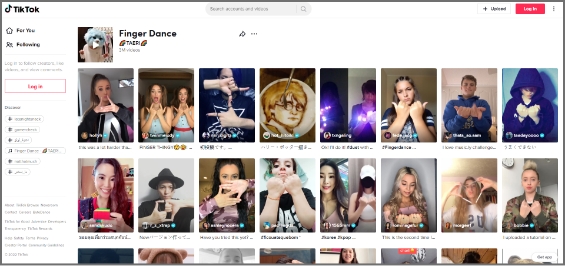
3. Finger Dance
Finger Dance was a relatively newer trend that was seen on Twitter. The TikTok trend was about finger dancing – TikTokers were making their fingers dance to the music. It was fun to watch people doing finger dancing.
This TikTok trend had reached 3 million views, but it looked like it would become a massive TikTok trend in the coming weeks.
Strategies to Apply to Trend on TikTok
Trending on TikTok doesn’t happen on a whim, especially if you’re a business. Usually, influencers and celebs fascinate people to follow the trends on social media.
However, if brands want to trend on TikTok, they must humanize themselves – people like to connect with people rather than bots or faceless social profiles.
Here are some strategies brands can opt for to trend on TikTok:
1.Understand the Market Demand
Trending on any social media platform is no easy game – you have to be an expert at this or know how to make content that immediately goes viral.
For the majority of the brands and individuals, it’s essential to figure out what’s happening in the market. It doesn’t apply to only brands who want to dominate on TikTok. But instead, it’s for everyone who wants to jump on this bandwagon.
Understanding the market demand means figuring out what people like, what they want to consume more, and what type of TikTok accounts are getting more traction.
The easiest way to understand the market demand is to spend a good couple of days on TikTok and analyze the “for you” and “discover” sections on TikTok. This will allow brands to comprehend what people are watching, liking, and enjoying.
2.Use Trending Sounds in the Videos
TikTok is a social media platform that might be new for most of us, but it’s certainly not impossible to pull this off.
One of the best strategies to go viral on TikTok or make trending videos is by simply using the trending sounds available on this short-form video app. If you’re new to TikTok, you’d probably think about where to find trending soundtracks on TikTok.
Well, you don’t need to find those popular sounds. In fact, TikTok allows you to use the TikTok sounds from the trending videos. All you need is to look out for the popular videos on the “discover page” or “for you” section.
The videos that get recommended to the TikTok users are the ones that are trending or gaining some traction.
Since you’re a business and want to trend on TikTok, the easiest way is to start using trending sounds in your TikTok videos. This will allow you to blend in with the TikTok community, and your content will start getting discovered through the trending sounds you have been using.
3. Collaborate with Other TikTokers
One of the easy wins for brands to trend on TikTok is collaborating with TikTokers. These TikTokers could be influencers or up-and-coming content creators. The brands may have to cherry-pick these TikTokers based on their content type, audience demographics, and fan loyalty.
Get paid through collaborations with other Tiktokers, and it doesn’t cost as much as Facebook or Instagram ads. However, the return of these collaborations could be an eye-opener.
If you haven’t had a chance to spot a TikTok collaboration, then you perhaps don’t know why these collaborations happen. Obviously, the content creators want to monetize their social media existence through these paid collaborations, and brands get the attention, eyeballs, and publicity.
If you think a single collaboration with a TikToker would get you to the For you page or the discover section, then you’re mistaken. It doesn’t happen so quickly for most brands, but with time and effort, you never know.
So don’t rule out the possibility of going viral on TikTok just by collaborating with a famous TikToker.
4. Upload Multiple Videos Every Day
One of the strategies that take TikTok influencers to the next level is that they upload multiple videos a day. The influx of continuous videos often helps such TikTokers in getting so much attention on the platform.
Any social media platform will put you on a pedestal if you keep putting out fresh content consistently. So an easy hack for trending on TikTok is to experiment with uploading multiple videos daily.
Sure, it’ll be tough to maintain the quality of every video, but it’s worth the risk. If you follow social media gurus, they put out a ton of content daily on Instagram, Twitter, and TikTok.
Evan Carmichael is a video curator who started on YouTube and now also has a TikTok account. He uploads multiple videos on TikTok every day.
He has got half a million TikTok followers.
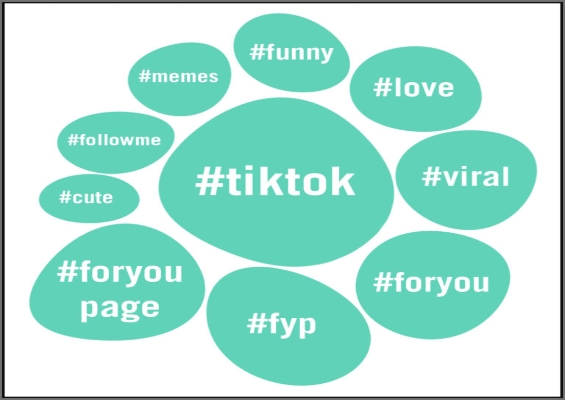
5. Use the Relevant Hashtags in the Video Descriptions
Hashtags have a lot of potential if done right. The majority of the users don’t know how to use hashtags across all social media platforms.
As far as the hashtags on TikTok are concerned, they play a vital role in taking any content on the “for you” page or discover section. Since the hashtags are connected to the discoverability of the content, they have the potential to make your videos quite popular.
However, the common mistake people make is going after generic hashtags. For instance, if they’re sharing a picture of rice, they might use hashtags such as #rice, #food, and #tasty.
So instead of using those generic hashtags, they must go after specific hashtags to be more precise, for instance, #chickenrice #bestfoodintown, #bestricerecipe, etc.
The hashtags must be relevant yet specific – opting for broad and short hashtags won’t help the cause.
6. Engage with TikTokers in the Same Niche
The most undervalued TikTok growth strategy that could help a brand or individual trend on TikTok is engaging with TikTokers in the same niche.
Usually, it’s said that you must engage with your audience through comments, replies, and DMs – the same applies to the TikTokers.
When TikTokers communicate with each other on the platform through DMs or comments, it builds a relationship among them, which could lead to collaborations and more opportunities.
Furthermore, the TikTokers openly engage with each other through commenting or duets. This gives a chance for the audience to pay attention to both sides. The audience loves their favorite content creators collaborating or talking publicly.
It opens up a plethora of opportunities for brands to cash in just by building relationships with TikTok content creators or providing a stage for other TikTok influencers to come on board and entertain the audience.
There are countless ways to get the attention on TikTok, which is key to gaining popularity and getting on the trending sections on the vertical videos app.
Best TikTok Examples to Understand TikTok Trending
It would be unfair to discuss TikTok trends and not talk about the TikTok influencers who have been crushing it with their uniqueness, innovation, and strengths.
Interestingly, some high-profile TikTokers don’t always worry about the trends. Sure, some try to cash in on it, but most just go with the flow.
Here are three TikTokers that have their unique style, posture, and genre, but they’re doing quite well on TikTok:
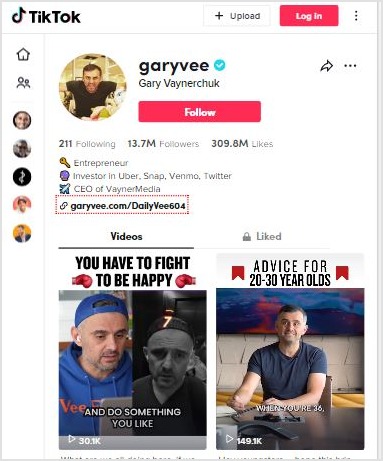
1. GaryVee
Gary Vaynerchuk is an entrepreneur, investor, author, and social media expert. He has over million followers on Instagram, Facebook, Twitter, YouTube, and TikTok.
He always advises people to post multiple times on TikTok and Instagram to pop up.
So it’s a no-brainer that if you start uploading several videos on TikTok daily, your numbers will skyrocket in a month or so. Once you start to get those followers consistently, you could be trending on TikTok.
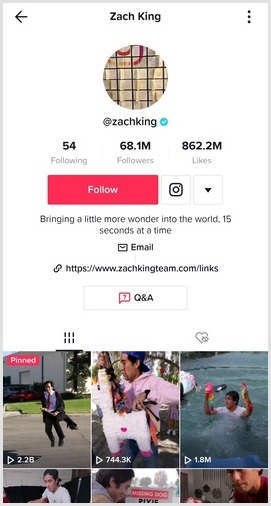
2. Zach King
Zach King is a popular social media influencer, filmmaker, and illusionist. He became popular from his 6-second magic videos on Vine. Even though Vine shut down, Zack didn’t stop there.
When TikTok popped up, he hopped on this 15-sec vertical video platform and started doing the same. And now, he is among the top TikTok influencers in the world. He has over 68 million followers on TikTok.
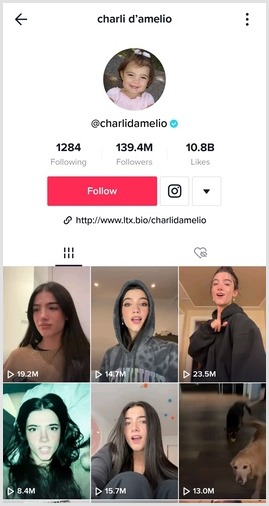
3. Charli D’Amelio
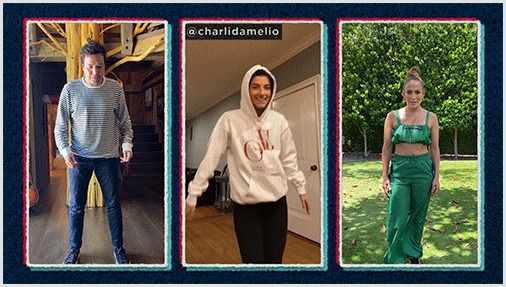
Charli D’Amelio is the biggest TikToker in the world. Now she has over 141 million TikTok followers. Not only is she the top TikToker, but she is also among the highest-paid TikTok influencers in the world.
The interesting thing about Charli is that she showcases her passion and talent for dancing in her TikTok videos. It’s a true testament to following your passion and making the most of it.
Why Brands Should Use a URL Shortener
Short URLs have not been this relevant before. It doesn’t matter what social media platform you’re focusing on. A URL shortener tool can come in handy.
Not only does it allow you to shorten the long URLs, but you can also create branded short URLs for newsletters and social media sharing.
Here are some of the main reasons why brands need a URL shortener:
Bio Links on TikTok, Instagram, and Twitter
All major social media platforms allow users to put their website or blog URL in the bio. However, a long URL doesn’t look reasonable. As a result, it affects the overall look and decency of the social media profile.
This is where an efficient short URL shortener comes in handy and solves the problem. It lets users convert long and clunky URLs into short and sweet URLs in no time at all.
Now brands can put their sales pages or discount offer page URLs in the bio section of Instagram or TikTok without any problem.
Placing the short URLs in the bio or story on social media platforms isn’t enough – it’s half the equation unless you could track the clicks.
The reason is that click tracking can help you analyze the conversion from the clicks. You might not want to generate short links that don’t have any performance tracking system in place.
When a brand is on the lookout for a link management tool for URL shortening, they must try to find a URL shortening tool that offers click tracking. Otherwise, it would be impossible for them to identify where the clicks are coming from. Usually, a website gets traffic from several sources.
Long URLs Look Spammy
One of the main reasons why URL shortener tools became popular is that long URLs often look spammy. People generally don’t trust those long URLs as they seem fishy.
Have you ever come across a long URL on social media that look malicious? We often receive such spammy links in the DM, and most receivers hesitate to click on those links.
Branded URLs are Trustworthy
A huge perk of using a branded URL shortener tool is that it could flawlessly integrate with your domain name.
Brands need trust from the audience, especially on social media platforms. So using a short branded domain for sharing social media content could turn things around for any business. Here’s the guide on adding a custom domain.
Drive Website Traffic from Social Media
Brands that develop websites want website visitors, they use different traffic strategies and digital marketing tactics to drive website visitors to their websites.
There are several ways to drive website traffic, such as:
Social media marketing
Social media ads
Search ads
SEO
Sponsored content
Guest posting
Paid collaborations
Most of you might already know about these different ways to drive website traffic. However, Replug.io allows you to drive visitors from sharing content on social media seamlessly.
If you want to test this feature of Replug, all you need is to start a campaign and choose retargeting as your campaign type. Then, opt for the widget as a call-to-action.
Choose the CTA type afterward; you can either go with a button, link, or form. Then, add a personalized headline, message body, CTA text, and the link to drive traffic. That’s it.
No doubt, TikTok has taken the world by storm, and it’s essential to figure out how to use this short-form, vertical video platform with immense attention on it.
We’ve discussed TikTok trends and strategies to make the most of popular TikTok trends. Plus, we also shared some TikTok influencer examples that are using the platform quite impressively.
We’ve previously discussed how to make money on TikTok in detail. If you haven’t seen this detailed guide, we highly recommend checking it out.
Since TikTok has taken the world by storm, everyone wants to know, does TikTok really pay?
To be short and sweet, yes, it does!
Now you must be wondering.
How to make money on TikTok?
Who can make money on TikTok?
TikTok is probably one of the hardest things to resist at the moment. Even though TikTok has become the most popular mobile app, most users still don’t know how to make money on TikTok.
No Worries!
We’ll walk you through how to start and monetize your TikTok account, but you have to put in the work and spend some time reading this piece.
So whether you installed TikTok just to watch funny videos or want to be a TikToker, this article could be an eye-opener for all of you.
Buckle up! It’s a complete guide on TikTok monetization.
Let’s get down to business by answering some highly relevant questions.
How Do I Start Making TikTok Money?
Hit the milestones from the number of followers and monthly views standpoint, then apply for the creator fund program.
Eligibility Factors: TikTok Creator Fund
It’s available to the creators that meet the following criteria:
Creator Age: At least 18 years old
Eligible Countries: US, UK, France, Germany, Spain, and Italy
Minimum Followers: 10,000
Last 30 Days’ Video Views: At least 100,000
Must Comply With: TikTok community guidelines and terms of service
Simply put, anybody can make money from TikTok. Just grow a following on TikTok by creating content around any of this:
Passion
Skill
Day job
Side hustle
Knowledge
Experience
Once your TikTok content starts getting traction on the platform, the followers will pour in, and some money-making opportunities will eventually begin to unfold.
The TikTok Creator Fund is a creator reward program that pays TikTok creators for being creative, inspirational, and consistent on the platform. It’s not a grant or ad revenue-sharing program. Instead, it’s a way of celebrating the uniqueness and talent that creators bring to the platform.
The purpose of the TikTok Creator Fund is to appreciate the creators’ success, commitment, and passion for showcasing their skills, talent, and passion. Since it’s not a monetization method, it may vary from month to month, depending on numerous factors.
How to Apply for TikTok Creator’s Fund?
First achieve the required number of followers and views. Then follow these steps to get your TikTok Creators Fund.
Open your TikTok app and go to the account settings.
Next, open the “Creator tools” and click the “TikTok Creator Fund” to apply for the program.
How Much Does TikTok Pay Per 1000?
It pays 2 to 4 cents per 1000 views.
How Many Views Do You Need to Get Paid by TikTok?
You must have at least 100,000 views in the last 30 days or so.
Keep in mind that a hundred thousand views are a minimum. The more views you get, the higher you could earn. However, other factors determine how much you’d make each month on TikTok.
Following are the elements that determine how much you’d make from TikTok:
Number of views on the videos
The engagement level of the audience
Compliance with terms of service and community guidelines
The authenticity of the views
15 Surefire Ways on How to Make Money on TikTok
Let’s quickly move on to the list of various methods to make money on TikTok:
Selling Direct-to-Consumer Products
If you have a 10 or 15 years old in your house, the kid would know the top TikTokers in the country. Nowadays, kids don’t know the TV stars and film celebs. Instead, they have favorite YouTubers and TikTokers.
Since TikTok is a short video platform that attracts an audience ranging from 12 to 60 years old, it has gotten so much attention lately. The TikTok demographics provide brands with loads of opportunities to sell directly to consumers.
Brands could potentially start their TikTok accounts or opt for either running TikTok ad campaigns to sell directly to the consumers. When a brand uses a platform like TikTok and connects with the potential audience, it widens the brand’s social media reach. This removes the middleman, but it also builds a relationship between the brand and the potential customers.
Reselling Fashion Accessories
You might think of TikTok as a platform to watch entertaining or funny videos, but it has gotten much bigger. Since TikTok has a massive audience, it has created business opportunities for brands, entrepreneurs, and almost everyone.
You may or may not have seen this, but many TikTok users are selling clothes and accessories on TikTok. TikTok may not have the transactional facility to carry out the selling and purchasing of products. Still, things seem to be working out for many.
One of the ways to make money on TikTok could be reselling fashion accessories, such as clothes like men’s leather blazers, jackets, suits, jewelry, makeup, and other relevant products. However, you may have to create a TikTok account dedicated to selling those items. Otherwise, it won’t work out. For example, you can’t use your same TikTok account for cat videos and selling clothes.
Promoting Songs on TikTok
Once you’ve managed to gain a sizeable audience on TikTok, there will be many monetization opportunities waiting for you. One of those opportunities would be promoting songs of indie singers.
Many indie singers who release their singles reach out to TikTok influencers and pay them to use their songs in their videos. Plus, TikTokers often tag them in the video description on TikTok. Thus, they also get promotions along with the song.
I have been noticing song promotion tactics for the last three years or so. It’s a win-win situation for both parties. The TikTok influencer gets paid a good amount for a 15 or 30-second video. The singer gets to promote the songs without spending hundreds of thousands of dollars on traditional marketing channels.
Hiring Micro-Influencers Over Superstars
Do you know celebs get paid millions of dollars to post on Instagram? According to Influencer Marketing Hub, Kendall Jenner is among the top 10 highest-paid celebs for publishing a single Instagram post. The article revealed that she could charge up to half a million for a single post on Instagram.
Most of us don’t have that kind of money to spend on influencer marketing. However, TikTok is a great platform for hiring micro-influencers over TV celebs. These TikTok influencers have an engaged audience, but they are also quite affordable compared to top-tier global celebrities.
Remember that it won’t happen on a whim. You can’t just download TikTok and start finding a TikTok influencer. You must give it time before you jump the gun.
Therefore, if you’re trying to make money on TikTok, you could put yourself in a micro-influencer shoe and try to build an engaged audience to attract sponsors. However, you’ll be better off sticking to a specific niche while creating TikTok videos.
Create Sponsored Content
Have you ever seen a popular tech YouTuber unboxing a cell phone or tech gadget? Well, tech companies pay those YouTube influencers to unbox and review their products.
The same thing could work out for you on TikTok. However, the key to getting paid for your TikTok videos, you must cross a threshold. In other words, you must have a rather large followers base to attract sponsored content deals.
TikTok Creator Marketplace is the official TikTok marketplace for finding TikTok influencers for your sponsored content deals. It’s a complete TikTok influencer discovery network that provides advertisers with the statistics to find the most suitable TikToker for sponsored content.
Accept Video Gifts
One of the TikTok monetization methods is receiving video gifts. Even though it won’t work for every video or creator, it is still a way to make money on TikTok. Before we dig deeper into how it works on the platform, let’s discuss the eligibility criteria for accepting video gifts.
The creator must be 18 years of age and should have 100,000 followers. In addition, the account should be at least 30 days old with at least one public video during that period. Above all, the TikTok account must not be violating the community guidelines.
The TikTok users should join the Creator Next program to access several TikTok monetization tools, including video gifts. The creator must enable this feature from account settings to accept video gifts. Go to the “Creator Tools” to enable this feature and select the “Video gifts.” Then, turn on the video gifts.
If the video gifts feature hasn’t rolled out in your country, you could go to the “Creator Tools” and toggle on the “Video gifts” feature.
Once it’s enabled on your TikTok account, the algorithm would decide the eligibility of the TikTok videos for video gifts. Then, the audience would see a gift button next to the comment section for sending you a video gift that you could redeem later on.
Grow & Sell TikTok Accounts
Most beginners have no idea about social media real estate. Buying and selling of social accounts and channels is a common practice, and TikTok is no exception. The point is that you can grow a TikTok account and flip it for thousands of dollars.
All you need is to figure out how you can scale a TikTok account rather quickly. There is no secret to growing a TikTok account rapidly. All you need is to create a content strategy by keeping the target audience in mind. If you hit the bullseye with your targeting and creating exciting content, your TikTok account would surely take off.
Once you cross a 100,000 followers mark, you could either monetize it with Creators Fund or sell your TikTok account for a heap of money.
Manage Influencer Campaigns
If you are camera shy and don’t want to create videos for TikTok, you can still monetize TikTok. However, you won’t be under the spotlight in this situation. Instead, you’d be offering your expertise to connect creators and brands.
So let me explain how it works: one of the easiest ways to earn money on TikTok is by managing influencer campaigns. All you need is to connect with TikTok influencers in your town, city, or country and build a strong relationship with them.
If you have a solid social media follower base, it’ll be easier for you to pull this off. Influencers usually don’t like to be friends with random people unless they’re formally introduced to them for business.
Once you have TikTok influencers onboard, you could help brands and influencers strike a deal and charge a small fee from both parties for your service.
Management Services
Social media influencers rely on management services to help them find clients to work with and get their merchandise ready for them or even manage their social media profiles.
Therefore, you could offer a management service for TikTokers or TikTok influencers and charge a fee. This way, you get a chance to use any of your soft skills or a passion for earning some side money.
There are various management services you can go for. Like TikTok video editing, music discovery, social media management, merchandise management, community management, etc.
You might not be monetizing your TikTok profile, but you’d be making money from your work for other TikTokers.
Place Affiliate Links
A common yet under-utilized method of making money on TikTok is placing affiliate links in your TikTok bio. You may not be able to make a clickable link in the video description on TikTok, but the bio link works like a charm.
Experts from different walks of life use Instagram and TikTok bios for giving away freebies using short links. Replug is a popular URL shortener for creating short branded links for TikTok or Instagram bio. This amazing link management platform offers branded URLs, custom audience clicks, performance tracking, retargeting, bio links, etc.
As far as placing the affiliate links in TikTok videos is concerned, you could insert the affiliate links in your TikTok bio. Not only does TikTok help you reach newer audiences, but it also creates chances for you to generate more affiliate sales.
Paid Collaborations
One of the ways to make money on TikTok is paid collaboration. Usually, smaller TikTokers pay influencers to collaborate with them and highlight their account in the paid video description.
Have you ever seen two or more TikTokers make videos together and mention each other’s handles in the video description? Well, it could be a paid collaboration.
Brands collaborate with TikTok influencers as well. They pay TikTokers to use their products or showcase their product in the video and cash in on the traction those TikTokers get on the platform.
TikTok Script Writing
You may have seen Fiverr gigs or Upwork projects about YouTube scripts. Well, TikTok scripts writing could be your TikTok monetization strategy. I’m not saying it would immediately work out for everyone, but you got to have a little faith when trying something new.
You need to reach out to the TikTokers in your genre or area of expertise and ask them if you could write their TikTok video scripts. You never know what happens after that. Don’t give up if the first 10 TikTokers turn you down; it won’t happen so quickly, so just keep on trying.
TikTok Video Editing
One of the secrets to winning on TikTok is creating unique, creative, and eye-catching videos. Therefore, your video editing skill can come in handy when trying to make money on TikTok. Several video editing tools can help you create content effectively
Reach out to the TikTokers and ask them if you could edit their videos. However, I’d suggest setting up your TikTok profiles and start uploading fantastically edited videos to showcase. You never know which one of these videos will go viral. All you need is to set up your TikTok profile as a TikTok video editor. Use the video description and account bio to explain what your service is.
Creating Original Music for TikTok
Many services sell original music for YouTube videos and Vlogs. Wouldn’t it be cool if you started offering premium music for TikTok? Of course, you’d need to crush it with your TikTok account to get the attention and drive TikTok creators to your music website.
Moreover, you could run TikTok ads to get the eyeballs around and make an impact. But, anyway, it’s only possible if you have a passion for music and you’re already creating music for selling on the internet.
Running TikTok Ads
Speaking of TikTok ads, it’s not something everyone around here has already explored. Most of you didn’t even know that this ad service exists until now.
The catch is that you could learn how to run TikTok ads by taking an online course and running a couple of test campaigns to brush up your ad running skills.
Once you’ve mastered the art of running TikTok ads, you could run these ad campaigns for TikTokers or brands who want to crush in on TikTok. You would surely make good money doing this.
So these were fifteen ways to make money on TikTok. I promise there are so many more out there that you should explore, but try to pick a few of these and see what happens next.
5 TikTok Influencers to Follow
Let’s take a sneak peek at five TikTok influencers and follow them to understand what separates them from the rest:
1. Charli D’Amelio
Charli D’Amelio is an American TikToker and without a doubt, the biggest TikToker in the world. As of December 2021, she had 136 million followers on TikTok. She is likewise, Charli is among the highest-paid TikTok influencers in the world.
2. Khabby Lame
Khabby Lame, a Senegalese content creator from Italy became famous for his comedic content. He lost his job in the pandemic and continued his passion which has provided him great fame. Now with 134 million followers and growing. he’s among the top TikTokers in the world.
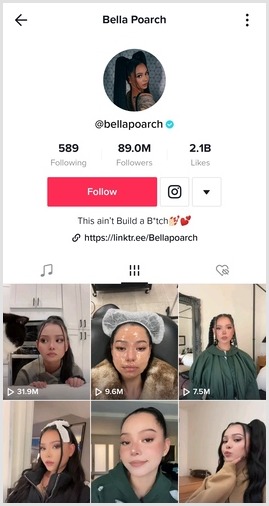
Bella Poarch is one of the top TikTokers in the world. She has 89 million followers on the platform. Besides TikTok, she is a singer and has already released her debut single, “build a bitch” in May 2021.
4. Zach King
Zach King is a famous social media influencer, filmmaker, and illusionist based in LA, California. He started making 6-second magic videos on Vine and became a popular social media personality. Now he is among the top TikTok influencers in the world. He has over 68 million followers on TikTok.
5.Addison Rae
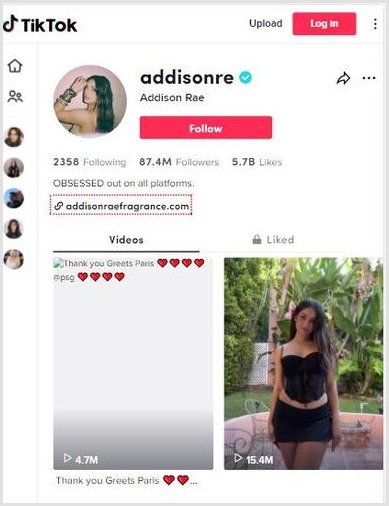
Famous for her dance and choreography, Addison Rae has over 87 million followers on TikTok. Plus, she is making 5 million annually using TikTok which is more than what Charli D’Amelio earns from TikTok.She has also launched her own fragrance brand. Further, she has appeared in the Netflix series and has also signed a film “Fashionista”.
How Would You Make Money on TikTok?
There are several ways to cash in on your TikTok account and get paid for making videos you love to make. However, remember that it doesn’t happen quickly, or maybe it doesn’t happen to every TikToker.
It doesn’t mean you can’t make it happen. If you have been consuming TikTok content for a while, you will notice that anybody could be a star on TikTok. All you need is to put your real self out there and do something you enjoy.
Unfortunately, making TikTok videos starts to look like a job you hate, which is unlikely to happen for you.
We shared many ways to start making money on TikTok, and it’s up to you which ones you’re going to pick and try out.
Let us know how you’d like to make money from TikTok.