Tag: seo friendly url

  • How to generate SEO-friendly URLs that rank higher & attract clicks

    How to generate SEO-friendly URLs that rank higher & attract clicks

    Imagine this: your website’s link lands in the search results. Isn’t that a good start? 

    But then you notice it reads like a random string of nonsense, full of messy parameters and no clues about what the page is about. 

    That’s the problem with non-optimized URLs. With around 13.7 billion searches happening on Google every single day, each URL becomes a tiny battleground for clicks and visibility.

    Now here’s where it gets even worse. A confusing, long URL won’t just annoy visitors; it can drag down your search ranking and click-through rate, spoiling your chances even before users arrive. 

    The perfect solution?

    Crafting SEO-friendly URLs that both search engines and real humans love. In the following sections, we’ll discuss exactly what an SEO-friendly URL looks like and why it matters so much.

    So, let’s get started!

    What is an SEO-friendly URL?

    An SEO-friendly URL is simply a web address that’s easy to read, meaningful to both people and search engines, and gives a quick clue about what the page is all about. 

    According to experts, “such URLs are unique URLs or links designed to meet the high standards of Google search engines and users”.

    Key characteristics of SEO-friendly URLs:

    • Descriptive: It clearly describes the content of the page, so someone taking a quick look at it can guess what it’s about.
    • Keyword-rich: It includes the page’s main topic or keyword, not in a spammy way, but naturally.
    • Human-readable: It treats humans in a really nice way. No strings full of code, numbers, or random characters.
    • Short & precise: It doesn’t carry on forever. The shorter and more to the point it is, the easier it is to remember and share.
    • Lowercase letters: Using all lowercase letters avoids confusion and problems with case-sensitive systems.
    • Static (not dynamic): It avoids long query strings, lots of URL parameters, and IDs, keeping the link stable and meaningful.
    • Use hyphens: Words are separated by hyphens (“-”) rather than underscores (“_”) or no separators, because search engines treat hyphens as word breaks.

    By sticking to these attributes, your URLs become far more user-friendly, shareable, and better understood by both search engines and humans.

    Example of an SEO-friendly URL (bad one):

    Example of an SEO-friendly URL (bad one)

    Example of an SEO-friendly URL (good one):

    Example of an SEO-friendly URL (good one)

    Why SEO-friendly URLs are important

    Your URL is more than a link. It’s a sneak peek into your content! 

    When your URLs speak the same language as your audience and search engines, you win on multiple fronts — more clicks, better rankings, greater trust, and ease of use.

    Here’s why SEO-friendly URLs matter:

    • Improves search engine rankings: A clean, descriptive URL gives search engines helpful context about your page. Even if it’s a moderate factor, it adds up.
    • Enhances click-through rates: When users see a URL that makes sense and reflects the content, they’re more likely to click. Descriptive URLs like “exampledotcom/best-coffee-recipes” attract more clicks than generic ones like “exampledotcom/page123”.
    • Better user experience: Easy-to-read URLs help users understand what a page is about before they click, which builds confidence.
    • Enhances user trust & avoids confusion: A cluttered or disorganized URL full of parameters and random numbers looks inadequate; a clean and readable one feels trustworthy and credible.
    • Make search results more meaningful: When the URL itself contains readable words relevant to the content, search results become more transparent and aligned with user intent.
    • Enhances crawlability & indexing: Search engines prefer logical, structured URLs. They’re quite easier to crawl and index.
    • Optimizes link sharing: Clean, short URLs are easier to copy, paste, and share on social media and other sites, boosting visibility.
    • Simplifies site navigation: A well-organized URL structure helps users and crawlers understand your site’s hierarchy and navigate more intuitively.
    • Supports a long-term SEO strategy: Rather than quick fixes, an SEO-friendly URL structure lays the foundation for scalable, maintainable SEO over time. This helps in fewer redirects, no broken links, and less confusion.

    20 best practices for creating SEO-friendly URLs

    Crafting SEO-friendly URLs isn’t just about adding keywords; it’s about building clear, meaningful links that both users and search engines can easily understand.

    To help you get it right every time, here’s a quick breakdown of the essential do’s and don’ts. Simple rules you can follow to make every link count.

    Do’sDon’ts
    Use descriptive keywords: Include primary keywords relevant to the content.Avoid keyword stuffing: Repeating the same keyword excessively.
    Keep it short and simple: Aim for concise and easy-to-read URLs.Avoid long URLs: Don’t include unnecessary words or parameters.
    Use hyphens to separate words: Makes URLs more readable for both users and search engines.Avoid underscores or spaces: These can confuse search engines and users.
    Ensure the URL structure matches the site hierarchy: Helps users navigate more easily.Avoid complex structures: URLs with excessive parameters or IDs are harder to read and rank lower in search results.
    Use lowercase letters: Prevents duplicate content issues.Avoid mixed-case URLs: They can cause confusion and potential errors.
    Make it evergreen: Use URLs that remain relevant even as content updates.Avoid dates in URLs: Limits the perceived freshness of content.
    Optimize for mobile users: Ensure URLs are user-friendly on mobile devices.Avoid unintuitive URLs: Random strings of letters and numbers are off-putting.
    Use secure URLs: Always use HTTPS to build trust and boost rankings.Avoid HTTP: Non-secure links can harm rankings and trust.
    Test URLs periodically: Ensure they lead to the correct pages and load properly.Avoid broken links: Damages SEO and user experience.
    Incorporate branding when possible: Branded URLs boost recognition.Avoid generic URLs: URLs like “page1.html” lack context.

    Let’s take a closer look!

    1. Optimize the URL slug

    The URL slug is the part of the URL after the domain name, such as:
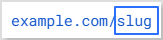
    URL slug example

    Keep it relevant and descriptive, clearly signaling the webpage’s content.

    Take out non-essential words in the slug, such as random characters, special symbols, and numbers that don’t contribute to clarity.

    Helpful Tip: If you’re updating content, avoid changing the slug unless necessary, to retain backlinks and traffic.

    2. Choose a top-level domain (TLD)

    Your domain extension (e.g., .com, .edu, .net, .org) influences user trust. While TLDs don’t directly affect SEO, “.com” is widely recognized and preferred by users, which creates a sense of credibility and reliability.

    3. Keep the URL short & precise

    Short links, or URLs, perform better in search engines and are easier to remember and share. Aim for a URL length of under 60 characters. While Google doesn’t penalize long URLs, shorter URLs contribute to a better user experience and higher click-through rates.


    Replug Branded Short Links CTA
    Maximize marketing ROI
    by transforming ordinary URLs into
    branded short links that convert.
    Try Replug for free

    4. Avoid using the full blog title as the URL

    Don’t use complete blog titles as your URL slug, as they can use up unnecessary characters. Long blog titles result in lengthy URLs.

    Optimize your URL by choosing a relevant focus keyword related to that web page. The aim should be to create descriptive URLs, so users are not confused about the particular page’s content.

    5. Remove punctuation marks

    Punctuation can unnecessarily complicate URLs, making them harder to handle efficiently. By eliminating them, you can create clean, user-friendly URLs that are easy for both visitors and search engines to interpret.

    6. Incorporate the primary keyword (must)

    Including the primary keyword in your URL contributes to improved SEO. This practice reinforces the topic of your page, increasing its likelihood of matching search queries and ranking higher in search results. 

    For instance, if you’re offering SEO services in a specific region or state, using a URL that emphasizes “SEO services in California” helps signal both the service and location to search engines. Pairing this approach with a local citations service further strengthens local signals, improving search rankings and attracting users specifically looking for SEO services in California.

    7. Use lowercase letters

    Some servers treat uppercase and lowercase URLs differently, potentially causing duplicate content issues. Stick to lowercase to avoid complications and ensure SEO-friendly URLs.

    Note: WordPress users shouldn’t worry, as it automatically puts URLs in lowercase and adds hyphens.
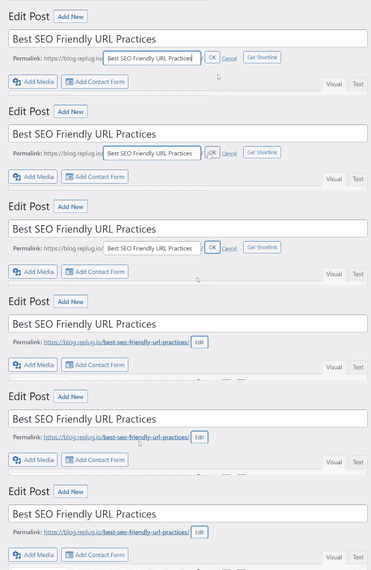
    WordPress lowercase URL

    8. Use hyphens, not underscores

    Google treats hyphens as spaces, making it easier to analyze your links. Underscores, however, can obscure your meaning. 

    For example:

    • Good: seo-friendly-url
    • Bad: seo_friendly_url

    Using hyphens makes it easier for Google’s web crawlers to understand and estimate the information on your website, helping in generating steady results.

    9. Incorporate keywords strategically

    Keywords in URLs can boost SEO and enhance user understanding. But it is a good practice to avoid keyword stuffing. 

    1–2 keywords are enough. You must never repeat a keyword in a URL. Google will never reward you for using the same keyword in a URL more than once.

    For instance:

    • Good practice: 
    Keyword optimized URL
    • Bad practice: 
    Keyword stuffed URL

    10. Limit folders & subfolders in the URL structure

    Keep URLs short and straightforward by minimizing the use of folders and subfolders. This practice improves readability and user experience, as excessively nested subfolders can make navigation complex for visitors and search engines.

    11. Use canonical tags for duplicate content

    If the same content exists on multiple URLs, canonical tags tell search engines which version is the original. This prevents duplicate content issues and ensures proper indexing. 

    Look at the figure below to know how canonical tags work:
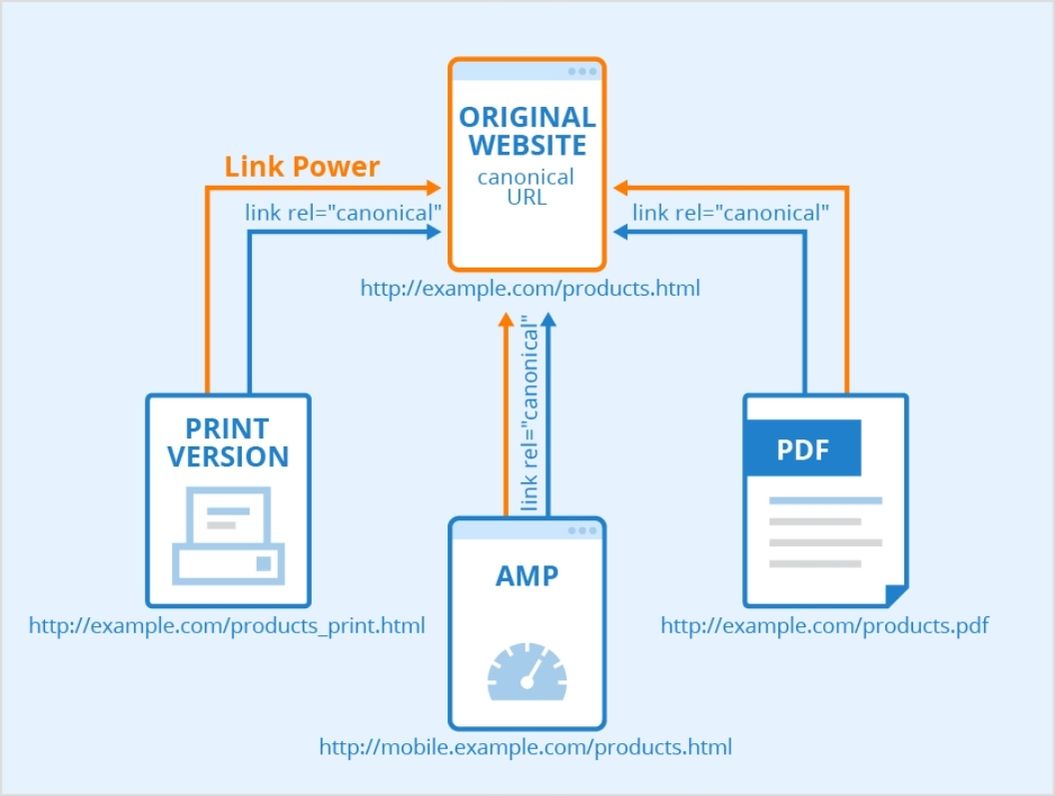
    Canonical tags process

    12. Prefer static over dynamic URLs

    Static URLs are more straightforward, easier to read, and more SEO-friendly. Dynamic URLs, on the other hand, are less search-engine-friendly, include UTM parameters, and are complex to understand.
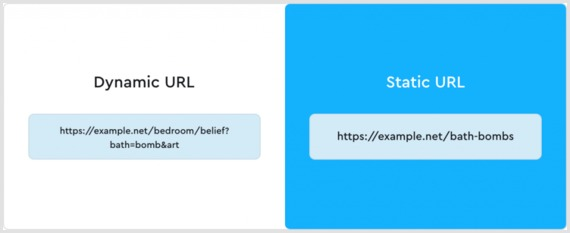
    Dynamic vs static URL

    Pro Tip: Using a first-rate, SEO friendly short URL generator gives you more control over your links through customization and tracking.

    Read also: Dynamic URLs vs. Static URLs

    13. Avoid redirect loops & broken links

    Minimizing redirect loops improves site speed and user experience. While redirects are sometimes necessary, excessive use can lead to issues with search engine crawlers. When needed, opt for 301 redirects for better SEO results.

    Besides, regularly check for and fix broken links, as they can harm your site’s credibility, disrupt user journeys, and negatively impact your SEO performance.

    14. Utilize futureproof URLs

    Refrain from incorporating dates in URLs to prevent content from becoming outdated. Futureproofing URLs by excluding time-sensitive information enables content updates without altering the URL structure.

    15. Hide “www” and HTTPS prefixes

    Modern browsers already indicate secure connections with a lock icon, so hiding prefixes like “www” or “https” can streamline your URLs.

    For instance:

    Hiding URL prefix

    Related: HTTP vs. HTTPS: Which one to choose & what’s the difference?

    16. Employ sub-domains when necessary

    Sub-domains can help organize content for specific markets or purposes. Anyhow, use them conservatively to avoid diluting your website’s authority. 

    These domains improve navigation and organize your website. The end goal of SEO is to improve user experience, and sub-domains just do that.

    17. Eliminate stop words

    Words like “the,” “is,” or “of” are often unnecessary in URLs. Removing them reduces URL length while retaining clarity.

    For example:

    • Before (👎):
    URL example with stop words
    • After (👍):
    URL example without stop words

    18. Use “safe” characters

    Stick to alphanumeric characters and hyphens in your URLs. Avoid spaces, &, %, #, and other special symbols that require encoding and may confuse both users and search engines.

    19. Prioritize readability

    Your URL should clearly convey what the page is about. Use meaningful words, separate them with hyphens, and keep it easy to read so both users and crawlers understand it at a glance.

    20. Avoid over-optimization

    Don’t force keywords into the URL or make it unnaturally long. Overloaded, spammy URLs harm user trust and may reduce SEO value even if technically allowed.

    Make every link count: Build SEO-friendly URLs with Replug!

    And there you have it! 

    Everything you need to know about creating SEO-friendly URLs that rank higher, attract clicks, and keep your visitors coming back. 

    Remember, a clean, clear URL isn’t just suitable for search engines; it’s a trust signal for real people, too. So, take a few minutes to clean up your links, and you’ll see the difference in your traffic and engagement.

    Ready to take things up a notch? Give Replug a try today! It’s one of the best tools out there for generating short, branded, and truly SEO-friendly URLs!

    Frequently asked questions

    Which URL is best for SEO?

    A vanity URL”, like “yourbrand.com/seo-guide”, is ideal because it’s short, easy to remember, and clearly communicates the page’s topic. That kind of clean address helps both users and search engines alike.

    How to check SEO-friendly URL?

    Use a tool like an SEO-friendly URL checker to evaluate whether your URL is readable, descriptive, uses hyphens, and avoids unnecessary parameters.

    Should a URL include keywords?

    Yes, including one relevant keyword helps users and gives a minor context signal to search engines. However, just don’t stuff in multiple keywords redundantly.

    Which is the best example of a SEO-friendly URL?

    Something like this:

    example.com/how-to-create-seo-friendly-urls

    Human-readable, descriptive, hyphen-separated, lowercase, and no weird characters or long query strings.

    How long can a URL be for SEO?

    There’s no strict character limit for SEO. Aim for ~60–70 characters or fewer to keep it clean and share-friendly, but readability and clarity matter more than exact length.

    Are long URLs bad for SEO?

    Not necessarily bad, but longer, cluttered URLs can hurt readability and user trust. They might cut off in search results or be harder to share.

    How to use SEO-friendly URLs in your site?

    Make sure when you publish or edit content, you:

    – use lowercase letters
    – hyphen-separate words
    – keep the slug short & meaningful
    – avoid dynamic parameters and session IDs
    – maintain a logical folder structure

    Give me some SEO-friendly URL examples?


    – yourbrand.com/vegan-dog-food-guidelines
    – yourbrand.com/blog/increase-click-through-rate
    – yourbrand.com/products/womens-leather-jacket

    These URLs are descriptive, keyword-rich (but not over‐stuffed), use hyphens, and stay readable.
  • What Is a Permalink? How Does It Impacts SEO Ranking?

    What Is a Permalink? How Does It Impacts SEO Ranking?

    What are Permalinks?

    Permalinks are permanent URLs that lead to specific webpages, enhancing navigation and SEO.

    In the vast landscape of SEO, where digital trails intertwine and vie for attention, there emerges a significant factor known as the permalink. Permalinks give your content a digital identity, helping search engines understand what it’s all about. They’re like carefully crafted labels that can boost your website’s position in search engine rankings.

    In simpler terms, permalinks are like digital fingerprints that help search engines find and rank your website. Using the right words in your permalinks can improve your website’s visibility and attract more visitors. So, let’s discover how they can boost your website’s presence online!

    What are the characteristics of a Permalink?

    The characteristics of a Permalink contribute to effective navigation, accessibility, and search engine optimization for web content. Here are the characteristics of a permalink:

    Permanent: Designed to remain unchanged over time.

    Descriptive: Includes keywords that describe the webpage’s content.

    Readable: Easy to read and understand.

    Consistent: Follows a consistent structure across the website.

    SEO-friendly: Optimized with relevant keywords for search engine visibility.

    Shareable: Allows easy sharing of specific web pages.

    User-friendly: Enhances overall user experience.

    Read also: How to generate SEO-friendly URLs that rank higher & attract clicks

    What is the structure and examples of a Permalink?

    The structure of a permalink typically consists of the base URL of the website followed by additional elements that identify the specific webpage. Here is a common structure for permalinks:

    https://www.example.com/category/post-title

    In this structure, “https://www.example.com” represents the base URL of the website, “category” indicates the category or section of the webpage, and “post-title” denotes the unique title of the specific post.

    Examples of permalinks based on the given structure:

    https://www.example.com/news/introduction-to-permalinks
    https://www.example.com/blog/seo-tips-for-beginners
    https://www.example.com/products/product-name

    https://www.example.com/events/upcoming-conference-detailsThese examples demonstrate how permalinks incorporate the website’s base URL, relevant category or section, and a descriptive element that represents the specific content of the webpage.

    Why should permalinks remain unchanged?

    One-Does-Not-Simply

    Here are the reasons why permalinks should remain unchanged:

    Consistency: Unchanged permalinks provide a consistent and reliable web address.

    Accessibility: They allow users to confidently bookmark, share, and reference specific web pages.

    SEO Impact: Consistent permalinks help search engines establish a historical record of the webpage and improve search engine rankings.

    Backlinks: Changing permalinks can invalidate existing backlinks, leading to traffic loss and credibility.

    User Experience: Unchanged permalinks improve user experience by avoiding broken links and confusion.

    Related: How to Rename Links Using Replug: 5 Simple Steps

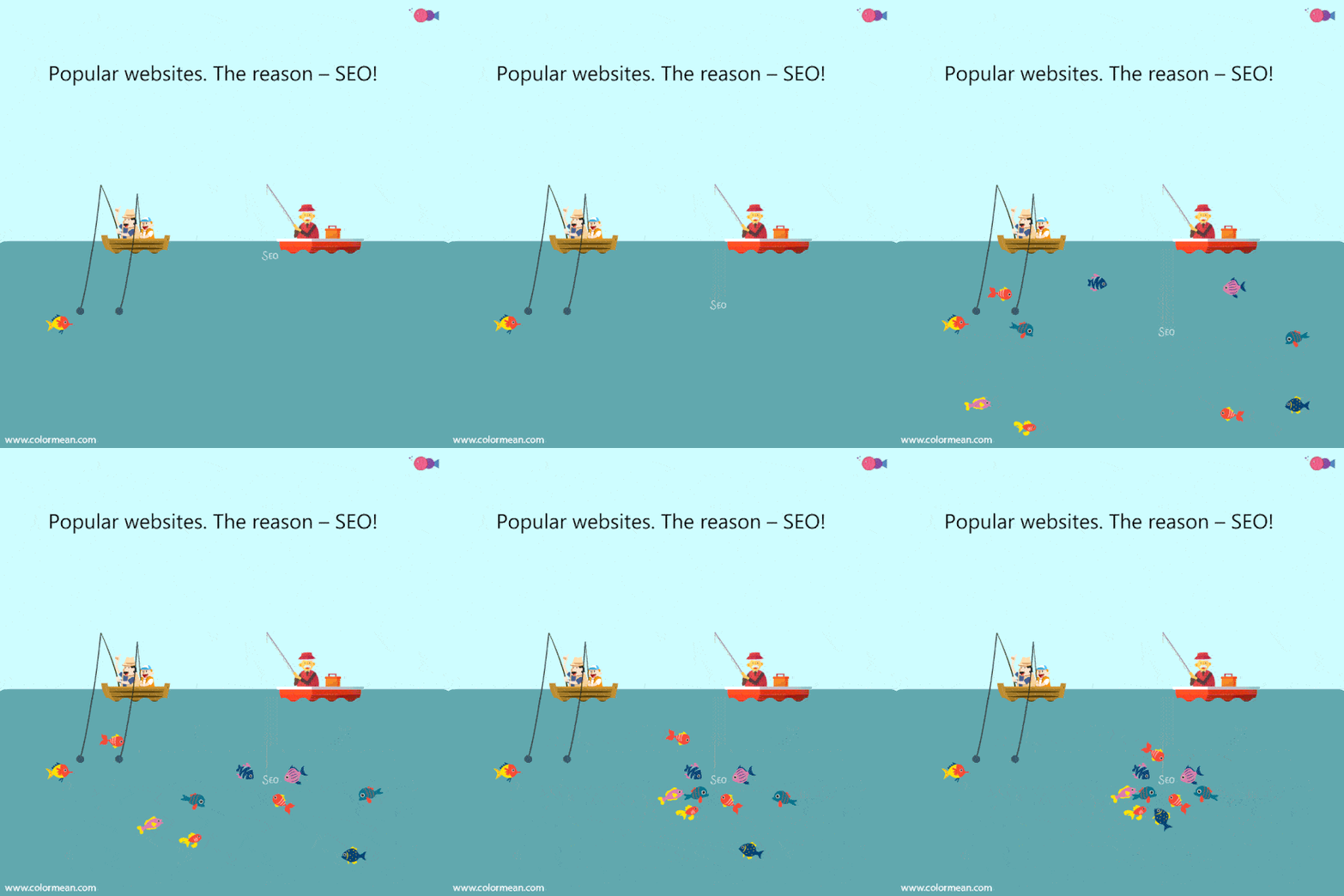
    Why Do Permalinks Matter & How Do Permalinks Affect SEO?

    SEO GiF

    Permalinks play an important role in search engine optimization (SEO) as they impact how search engines understand and rank your web pages.Here are some of the factors and tips to keep in mind for optimizing permalinks in the light of SEO:

    • Include relevant keywords: Incorporate keywords that accurately reflect the content of the page. This helps search engines understand the topic and improves your chances of ranking for relevant searches.
    • Keep it concise and readable: Create permalinks that are easy to read and understand.Use hyphens (-) to separate words and avoid using numbers or special characters. A clear and concise permalink improves user experience and SEO.
    • Use a hierarchical structure: Organize your permalinks in a logical and hierarchical structure that reflects the structure of your website. This helps search engines understand the relationships between different pages and sections.
    • Exclude stop words: Remove unnecessary words like “and,” “the,” or “of” from your permalinks. Focus on the essential keywords that convey the main topic of the page.
    • Avoid changing permalinks frequently: Once you set a permalink structure, try to stick with it to maintain consistency. Changing permalinks frequently can lead to broken links and negatively impact your SEO. If you need to change a permalink, set up proper redirects to maintain SEO value.
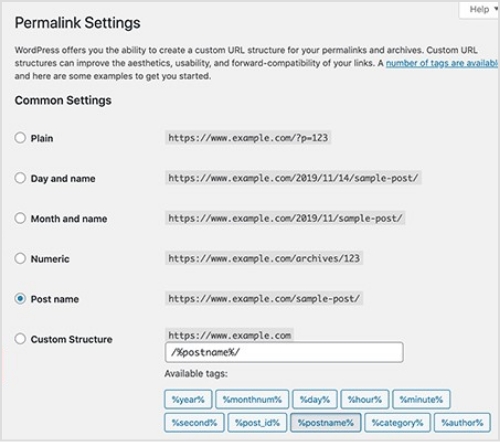
    • Customize permalink settings:
    permalink setting

    If you’re using a content management system (CMS) like WordPress, utilize its permalink settings to customize the URL structure. Choose a format that includes post titles or categories to optimize for SEO.

    • Consider user experience: Permalinks should not only be optimized for search engines but also for users. Create permalinks that are descriptive and provide a clear idea of what the page is about. This helps users understand the content before clicking.
    • Monitor and update: Regularly monitor your website’s performance, rankings, and user behavior. If you notice any issues or changes in search engine visibility, review and update your permalinks as needed.
    • Set up proper 301 redirects:
    301-redirect

    When you change the permalink, make sure to set up 301 redirects from the old URL to the new URL. This tells search engines that the content has permanently moved and preserves your SEO value.

    Related: What Does HTTP 302 Code Means For URL Shorteners?

    • Keep the keywords consistent: Try to include the same or similar keywords in the new permalink as in the old one. This helps search engines understand the relevance of the content and maintain your rankings.
    • Update internal links: Don’t forget to update any internal links within your website that point to the old permalink. Make sure they now point to the new permalink to provide a seamless user experience and maintain your SEO value.
    • Reach out to external websites: If you have control over external websites linking to your old permalink, it’s a good idea to contact them and ask if they can update the links. This way, you preserve the link equity and SEO value associated with those backlinks.
    • Submit your sitemap and fetch as Google: Update your website’s sitemap to include the new permalink and submit it to search engines. Additionally, use the “Fetch as Google” tool in Google Search Console to prompt search engines to crawl and index the new permalink.
    • Keep an eye on your website’s performance: Monitor your website’s rankings and performance after the permalink change. Check for any fluctuations or issues and make adjustments if necessary.
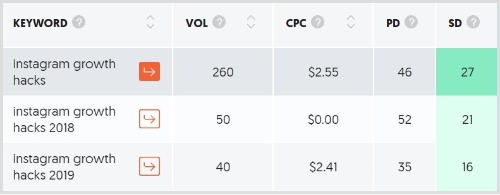
    • Keyword relevance:
    keyword-ideas

    Permalinks that include relevant keywords help search engines understand the content of a page. Including targeted keywords in the permalink can improve the page’s visibility for those specific search terms.

    • Click-through rates: A well-structured and descriptive permalink can attract more clicks from users in search engine results pages (SERPs). When the permalink accurately reflects the content, it provides a clear idea to users about what they can expect on the page, leading to higher click-through rates.
    • Backlink anchor text: When other websites link to your content, they often use the URL as the anchor text. Having relevant keywords in the permalink contributes to the anchor text of those backlinks, which can positively influence SEO and keyword rankings.
    • Indexing and crawling: Permalinks play a role in search engine crawling and indexing processes. Clear and logical permalink structures make it easier for search engine bots to understand the organization and hierarchy of your website, leading to better indexing and potentially improved search visibility.
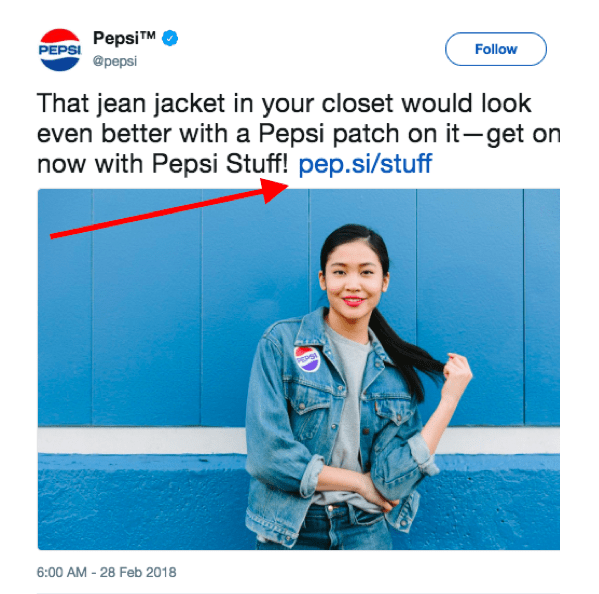
    • URL sharing:
    pepsi branded link

    When people share your content via social media, email, or other platforms, they often include the URL. Having a permalink that is concise, descriptive, and visually appealing can encourage more sharing and engagement, amplifying the reach of your content.

    • Credibility and trust: Permalinks that are readable and consistent convey a sense of professionalism and trustworthiness to users. A clean and well-formatted URL is more likely to be clicked and shared by users, contributing to increased traffic and potential backlinks.

    What are the steps to follow to create permalinks?

    Following the steps given below and create effective and SEO-friendly permalinks that accurately represent your content and enhance your website’s visibility in search engine results.

    • Determine the permalink structure: Decide on the format and structure you want to use for your permalinks. Consider including elements such as the post title, category, or date.
    • Access your content management system (CMS): If you’re using a CMS like WordPress, log in to the admin panel or dashboard.
    • Navigate to the permalink settings: In the CMS settings, locate the section related to permalinks. This may be under the “Settings” or “Permalinks” menu.
    • Customize the permalink structure: Within the permalink settings, choose the desired permalink structure that aligns with your preferences and website organization. Many CMS platforms offer predefined options or allow for customization.
    • Incorporate relevant keywords: When creating permalinks, include relevant keywords that accurately describe the content of the page. This helps search engines understand the topic and improve your chances of ranking for relevant searches.
    • Ensure readability and clarity: Create permalinks that are concise, easy to read, and understand. Use hyphens (-) to separate words and avoid unnecessary characters, numbers, or special symbols. Clear and readable permalinks benefit both search engines and users. To clean up long or complex URLs even further, consider running them through a URL shortener, which can convert bulky permanent links into branded, shareable ones.
    • Test the permalink: Before finalizing the permalink, click on it to ensure it directs to the correct page. Verify that the URL structure accurately represents the content and is free from any errors.
    • Avoid frequent permalink changes: It is generally advisable to maintain a consistent permalink structure to avoid broken links and negative impacts on SEO. If you must change a permalink, set up proper redirects to preserve SEO value and user experience.

    How to Change a Permalink in the WordPress Editor?

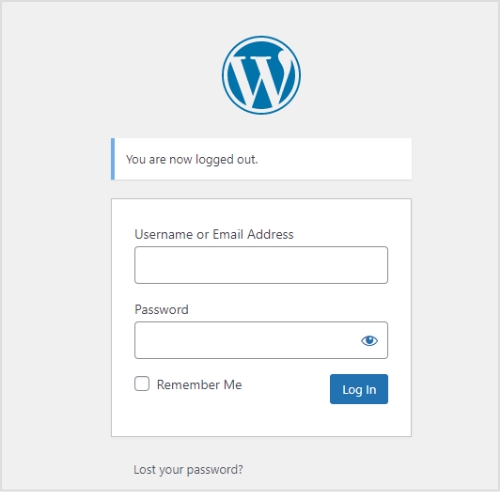
    wordpress-login

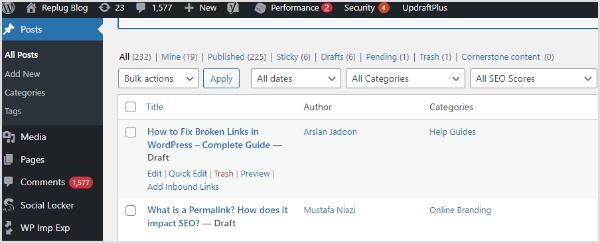
    In order to change a permalink in the WordPress Editor, follow these steps:

    edit-post

    Step 1: Log in to your WordPress dashboard.

    Step 2: Navigate to the “Posts” or “Pages” section, depending on where the content with the permalink is located.

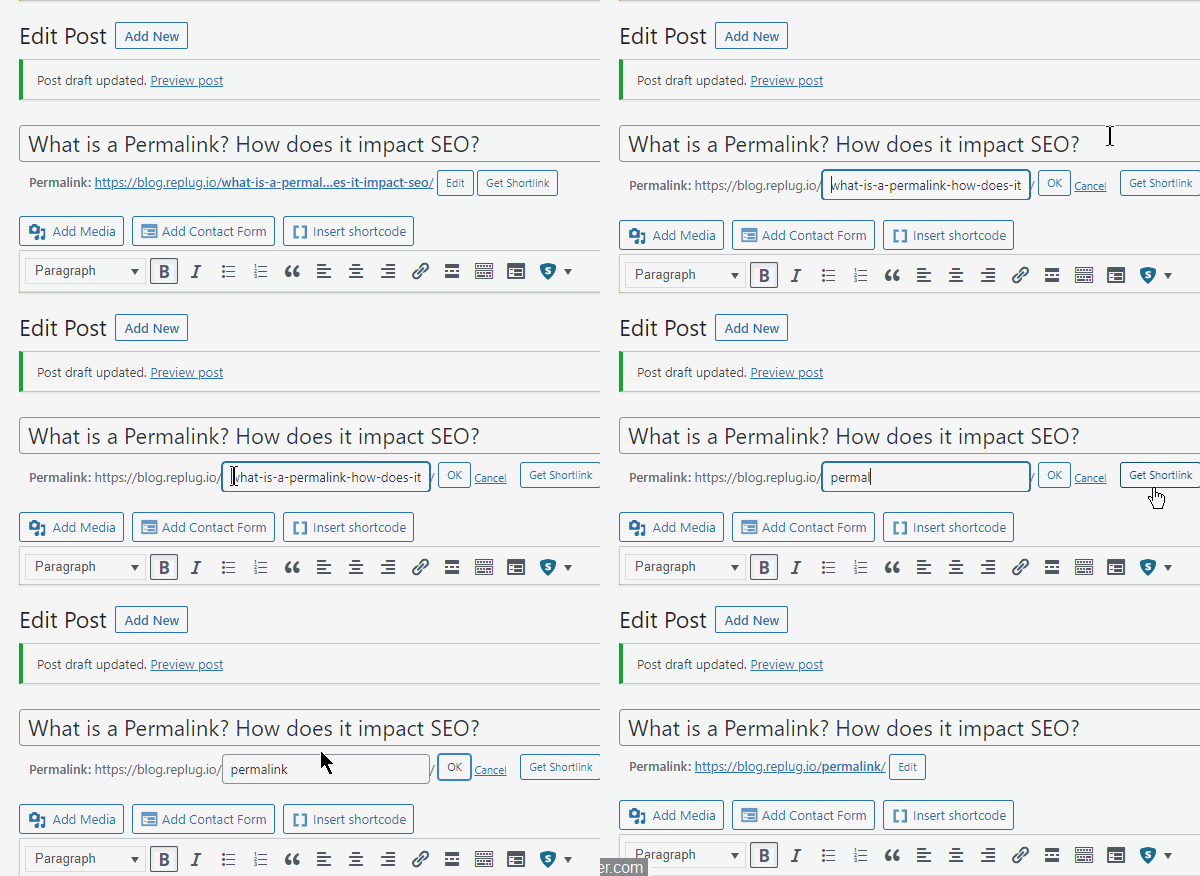
    Edit-Permalink-Wordpress

    Find the specific post or page you want to edit and click on it to open it in the editor.

    Step 3: In the editor, look for the section that displays the permalink. It is usually located below the title of the post or page.
    Click on the “Edit” button next to the permalink. This will allow you to modify the existing URL.

    Make the desired changes to the permalink. You can edit the text, remove certain words, or add new keywords.

    After making the changes, click on the “OK” or “Save” button to update the permalink.

    Once the permalink is updated, click on the “Update” or “Publish” button to save the changes to the post or page.

    Note: It’s important to note that changing the permalink will result in a new URL for that specific content. This may affect any existing links pointing to the old permalink. To mitigate this, WordPress automatically sets up redirects from the old URL to the new one.

    Frequently asked questions

    What is permalink or permanent link?

    A permalink, or permanent link, is a stable and unique URL for a specific piece of web content, such as a blog post or page. Unlike temporary URLs that may change, a permalink is designed to be a persistent address that remains the same over time, making it reliable for sharing and indexing by search engines. The name comes from combining the words “permanent” and “hyperlink”.

    If you’re managing a lot of links, especially in marketing campaigns, using a tool like Replug can help you brand, shorten, and track all your permanent URLs more effectively.

    What is the difference between permalinks, slugs, and links?

    – Permalinks are the permanent URLs that point to specific pages or posts on a website.
    – Slugs are the user-friendly and readable portion of the permalink that comes after the domain name.
    – Links, in general, refer to clickable URLs that direct users to web pages.

    What is the difference between permalinks and dynamic links?

    Permalinks are static and permanent URLs that remain constant over time and point to specific pages or posts on a website. Dynamic links, on the other hand, are generated dynamically and often include query strings or parameters that change based on user interactions or database queries.

    What is a permalink in wordpress?

    In WordPress, a permalink refers to the permanent URL structure assigned to each post, page, or custom post type. It is a web address that remains unchanged over time and provides a direct link to a specific piece of content on a WordPress website. Permalinks play a crucial role in identifying and accessing individual pages or posts, and they can be customized to reflect the content’s title, category, or other elements.

    What Happens If I Change My WordPress Permalinks?

    If you change your WordPress permalinks, it can affect your search engine rankings and lead to broken links. To mitigate this, set up proper redirects and update internal links to preserve SEO value and maintain user access to content.