We all know the struggle of long and ugly web addresses.
Do you ever dream of a tool that allows you to change your website address? How cool would that be?
That’s why we trust Replug!
But what about changing the web address with a branded domain?
It surely exudes professionalism and legitimacy. It shows you’re serious about your online presence and invested in the long game.
Plus, it tells visitors you’re not some fly-by-night operation – you’re here to stay and slay!
So, let’s explore how you can change the website address using a branded domain.
But before that, do you know what a web address is?
What is a website address?
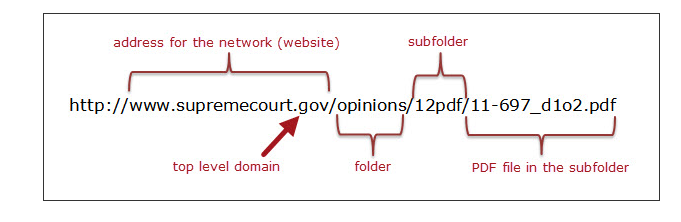
A web address, often referred to as a URL (Uniform Resource Locator), is the specific location of a resource on the internet. It comprises various components, including the protocol (like “https://”), domain name (e.g., www.yourwebsite.com), and additional path information (known as the slug).
Parts of a website address
Protocol/Scheme: This is the beginning part of a website address and typically starts with “http://” or “https://”. It defines the communication protocol used by the web browser to access the website.
Subdomain: This is an optional part that precedes the main domain name and is separated by a dot. For example, in “blog.example.com,” “blog” is the subdomain.
Domain Name: This is the main part of the website address and identifies the specific website. In “www.example.com,” “example” is the domain name.
Top-Level Domain (TLD): This is the last part of the domain and comes after the dot. Common TLDs include “.com,” “.org,” “.net,” and country-code TLDs like “.uk” or “.de.”
Path: The path indicates a specific location or page on the website. It comes after the domain name and is separated by slashes. For example, in “www.example.com/path/to/page,” “/path/to/page” is the path.
Query Parameters: These are optional parameters that come after a question mark (?) in the URL. They provide additional information to the website. For instance, in “www.example.com/search?q=term,” “?q=term” is a query parameter.
Fragment Identifier: The fragment identifier, often represented by a hash (#), points to a specific section within a webpage. It comes after the URL and is used to navigate to a particular section. For example, in “www.example.com/page#section,” “#section” is the fragment identifier.
A complete link management solution
for marketing professionals & agencies.
Try Replug for free
Distinguishing domain name & web address
The terms domain name, web address or website URL are often used interchangeably, but they have distinct meanings:
Think of your website as your house.
Your domain name is like your street address. It’s the unique identifier that tells people where to find your house in the whole neighborhood. (For example, 123 Main Street, Anytown, CA 90210). This address serves as the foundation of your online identity, which is why it is crucial to register your domain name carefully.
A web address or website URL is like a link to a specific room inside your house. It could be the front door (the homepage), the living room (a blog post), or even a specific shelf in the library (a specific product page).
Identifies a specific resource on the internet and specifies how to retrieve it.
Serves as a human-friendly label for the numeric IP address of a server.
Format
Complete URL including protocol, domain, and optional path/query.
Usually consists of subdomain, domain, and TLD.
Registration
Not registered; anyone can use any web address.
Must be registered and renewed through domain registrars.
Example Usage
Clicking a link in a browser or typing in the address bar.
Used in DNS to translate human-readable names into IP addresses.
DNS Resolution
Resolved by DNS to an IP address for server communication.
Resolved by DNS to an IP address for server communication.
Ownership
No ownership, can be used by anyone.
Owned by individuals, organizations, or businesses through registration.
Common TLDs
.com, .org, .net, .edu, .gov, etc.
.com, .org, .net, .edu, .gov, .io, .co, etc.
Difference between a website address, domain and a URL
Now let’s compare the above two terms with URL for more clarity.
Aspect
Definition
Example
Domain
The main part of a website address identifying a specific website.
In “www.example.com,” “example” is the domain.
Website Address
A broader term describing the location of a website, including multiple components like protocol, subdomain, domain name, TLD, path, query parameters, and fragment identifier.
In “https:// www.example.com/path/to/page?q=search#section,” the entire string is the website address.
URL (Uniform Resource Locator)
A specific type of website address providing the exact location of a resource on the internet, typically including the protocol, domain name, path, and optional components like query parameters and fragment identifier.
In “https:// www.example. com/page?q=search#section,” the protocol is “https,” the domain is “www.example.com,” the path is “/page,” the query parameter is “?q=search,” and the fragment identifier is “#section.”
Replug: All in one link management toolbox
Replug is an all-in-one link management platform that offers a comprehensive solution for managing your web links effectively. It goes beyond the basics, allowing you to enhance your links with call-to-action elements, retargeting pixels, and more. One standout feature is the ability to change your web address.
Let’s see how;
How to change a website address using Replug
To change a website address using Replug, follow these steps:
Sign in to your Replug account: If you don’t have an account, create one by visiting the Replug website.
Create a Brand: Create the brand or use the one that you already have.
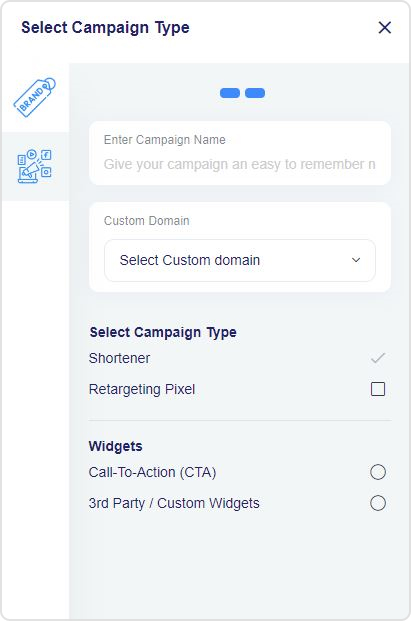
Choose the desired campaign: Select the campaign you want to edit or create a new one; if you don’t have one, you must create one first.
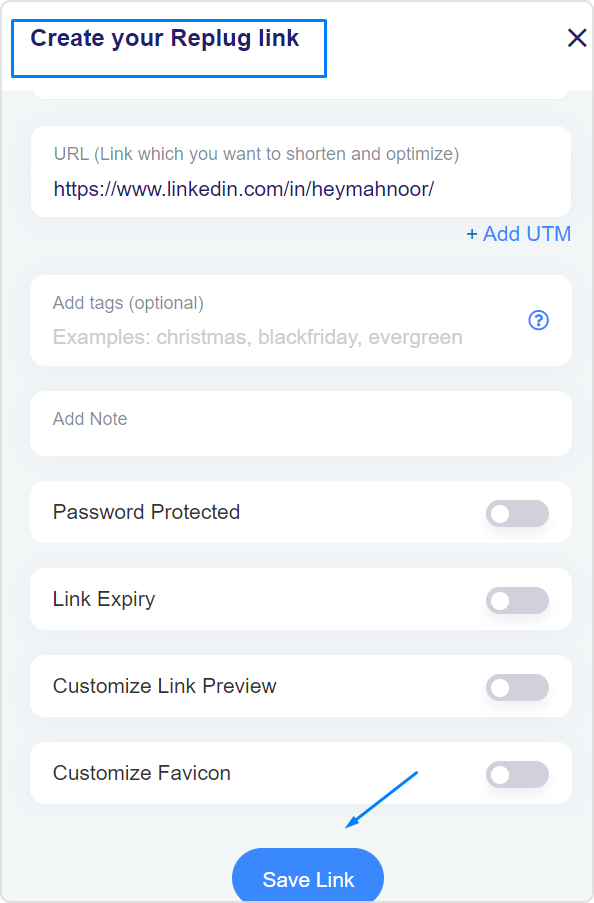
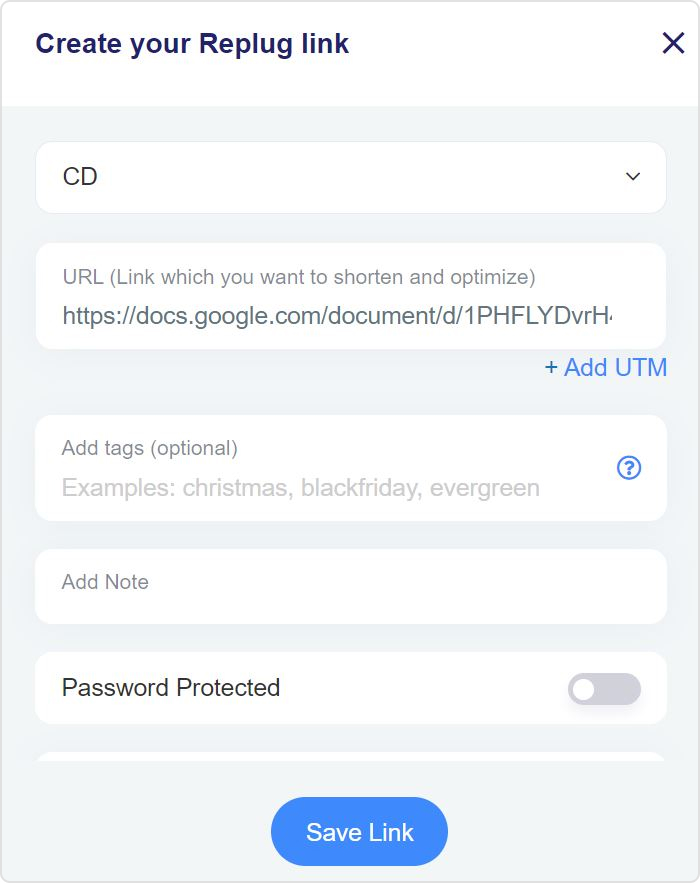
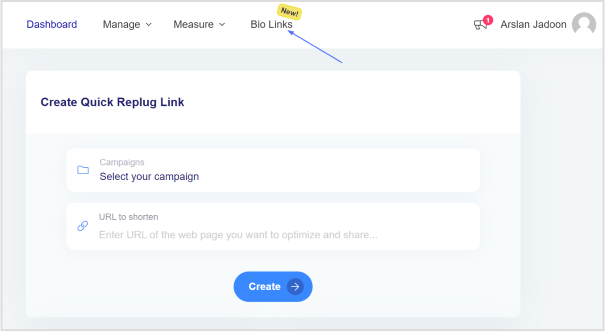
Edit the URL: In the Replug dashboard, paste your long URL into the “URL to shorten” field and click “Shorten.”
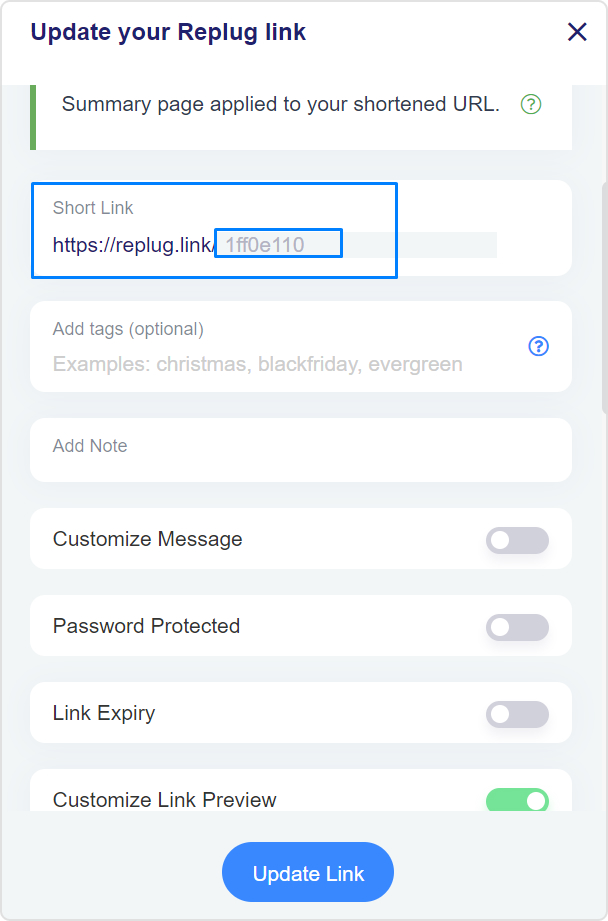
Customize the short URL: You can evenmake the short URL more user-friendly by adding a custom slug to the link.
Configure link settings: Set up any additional features, such as retargeting pixels or traffic routing, as needed.
Save the link: After configuring your link settings, save the link.
Now, here comes the moment we have promised: changing the website address with a branded domain using Replug!
Change website address with your branded domain
Making your website address look pro with a branded domain is a smart move! Let’s break it down step by step – it’s easier than you think!
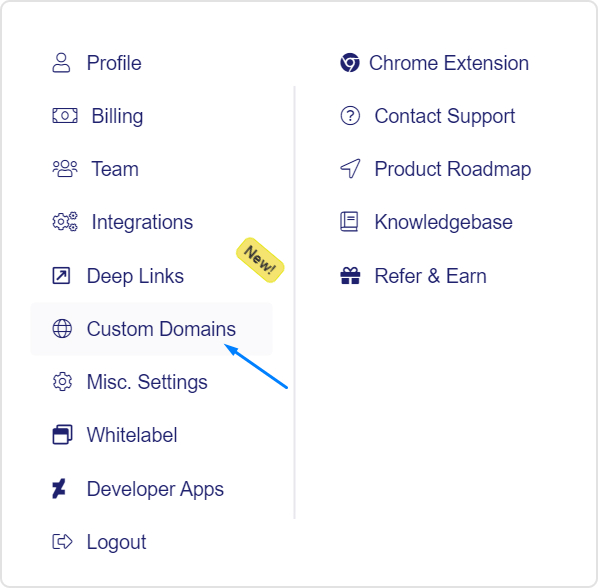
Go to “Settings” and click on “Custom Domains” from the drop-down menu in the Replug dashboard.
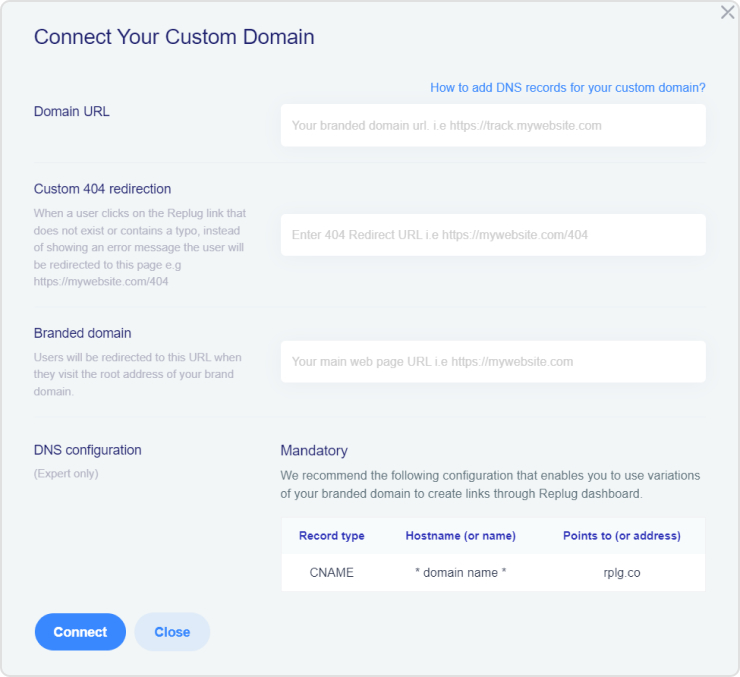
Add your custom domain and configure it as needed, including the Branded Domain and 404 Redirect URL.
After connecting your branded domain, you can edit your website URL using the branded domain.
Gone are the days of mundane Spotify links. Introducing smart links for music – your all-in-one ticket to global music domination.
Imagine sharing your songs, albums, and playlists seamlessly across platforms with just one link! It’s not just convenient for your fans; it’s a vibe! But here’s the magic – it’s not just about sharing; it’s about understanding.
Dive into the analytics playground! Discover where your fans are grooving, and what beats they vibe with, and turn those insights into your superpower. It’s not just music; it’s a connection that spans continents. Don’t just share your music; make it an experience!
Make smart links part of your promotional strategy; it’s what will convert listeners into lifelong fans. Let’s make your music journey unforgettable!
What is a smart music link?
A smart link for music is a single, easy-to-share link that directs listeners to your music on different streaming platforms like Spotify, Apple Music, YouTube, etc. It’s like a virtual business card for musicians. Instead of sharing multiple links, you share one smart link, and it automatically takes your fans to the right platform based on their location and device.
This becomes even more powerful when promoting tracks created or enhanced with tools like minimax music, helping artists distribute and market their AI-powered productions more efficiently.
Services like Replug, Linkfire, Linktree, and others help musicians create these links, making them convenient for fans and providing analytics and marketing tools for artists. A comprehensive music industry directory can further enhance these resources by connecting musicians with additional promotional opportunities and industry contacts. It’s a neat way to promote and share your music hassle-free!
Boost your conversion rates with irresistable CTAs with
Musicians can elevate their online presence by effortlessly creating smart music links using Replug’s innovative bio links feature. This bio link acts as a centralized hub, providing your audience with a seamless experience to explore and enjoy your music across platforms like Spotify, Apple Music, and YouTube.
Here’s how to create a smart link for music using Replug:
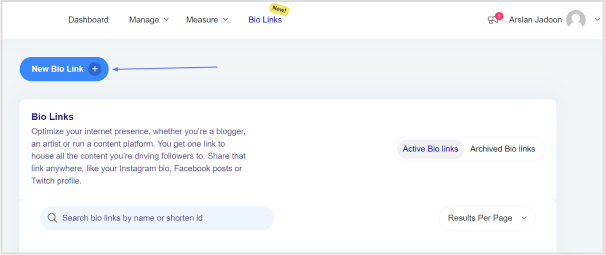
Step 2: Once logged into your Replug account, head to the Replug dashboard and locate the “Bio Links” feature.
Step 3: Initiate the bio link creation process by clicking on the “New Bio Link” button.
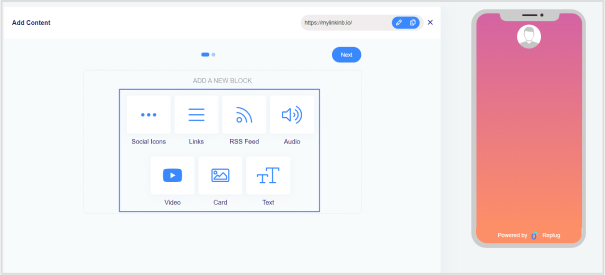
Step 4: Opt for the content block that aligns with your needs from Replug’s diverse options, such as social icons, links, RSS feeds, audio, video, text, or cards. In the case of music links, you can choose from links, audio, and social icons.
Step 5: Once all desired content blocks are added, proceed by clicking “Next.”
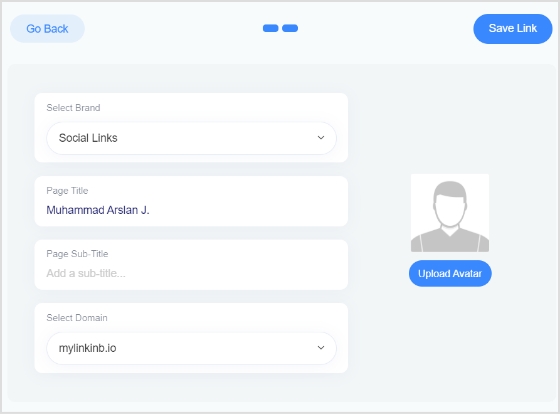
Step 6: Further personalize your bio link page by specifying your brand name, uploading an avatar, and adding a title and subtitle that aptly represent your content or brand.
Step 7: Review your bio link page during the creation process to ensure it aligns with your intentions.
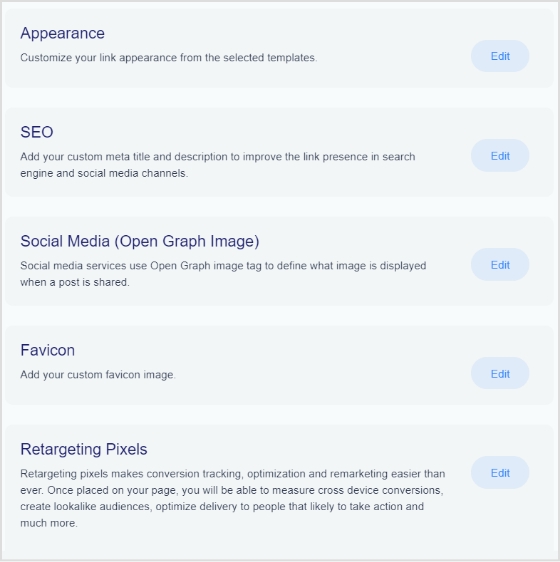
Step 8: In the final step, enhance your bio link’s appeal and effectiveness by considering additional features or marketing elements.
Step 9: Save your bio link, and it will be ready to integrate into your bio.
With the bio link generated by Replug, effortlessly share diverse links and content with your audience, making it an invaluable tool for content promotion and marketing on the platform.
Boost your conversion rates with irresistable CTAs with
Using a smart music link with Replug offers numerous benefits for musicians and content creators:
Streamlined promotion: Smart music links consolidate multiple streaming platform URLs into a single shareable link, simplifying the promotion process. This ensures that audiences can access your music effortlessly, regardless of their preferred platform.
Enhanced accessibility: With a Replug smart music link, your audience can seamlessly switch between platforms like Spotify, Apple Music, and YouTube, catering to diverse listener preferences. This accessibility increases the likelihood of engagement and plays.
Centralized hub: Replug’s bio link feature serves as a centralized hub for your music and other content. It provides a cohesive and organized space where your audience can discover and explore various links, creating a unified online presence.
Customization options: Tailor your bio link page to reflect your brand identity. With features such as customizable colors, profile pictures, and content blocks, Replug allows you to create a visually appealing and personalized experience for your audience.
Analytics insights: Gain valuable insights into audience behavior through Replug’s analytics tools. Understand where your audience is engaging, and which platforms are most popular, and use this data to refine your promotional strategies and content.
Consistent branding: Maintain consistent branding across platforms by customizing your bio link page. This ensures that your audience recognizes and associates your brand identity with every interaction.
FAQs
What is a smart music link, and how does it benefit musicians?
A smart music link is a consolidated link that directs users to music on multiple streaming platforms. It benefits musicians by simplifying promotion, providing analytics insights, and enhancing accessibility for fans across various platforms.
How can I create a smart music link?
To create a smart music link with Replug, login, access the “Bio Links” feature, click “New Bio-Link,” add content blocks like social icons or links, customize, and save. Replug’s user-friendly interface streamlines the process.
Can I customize the appearance of my bio link page on Replug?
Absolutely! Replug allows extensive customization, including profile pictures, brand names, avatars, color schemes, and short links, ensuring your bio link page aligns with your brand identity perfectly.
What analytics insights does Replug provide for smart music links?
Replug’s analytics offer valuable insights into audience behavior, including engagement locations and popular platforms. This data empowers users to refine their promotional strategies.
Welcome to the fascinating realm of the internet, where websites hold a hidden secret: their unique IP addresses.
Curious to uncover this mystery? Fear not, we’ll guide you through a simple step-by-step process.
For those who manage multiple website links and want to streamline link handling, Replug offers a powerful platform to shorten, brand, and track your URLs, on top of standard DNS-based IP lookups.
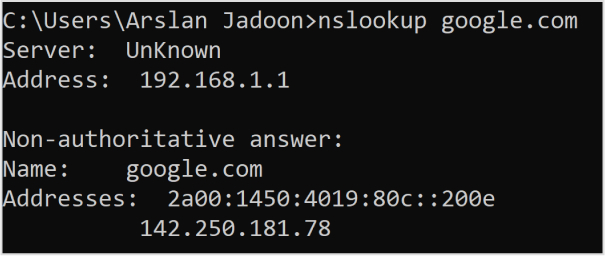
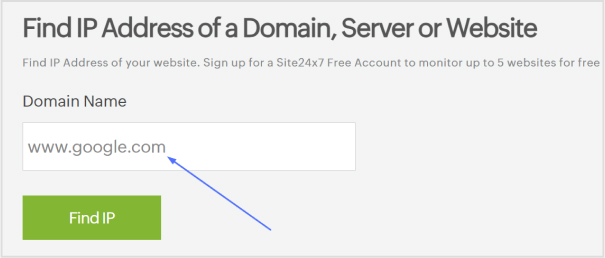
Besides, by using commands like ping and nslookup, or employing a handy DNS lookup tool, you’ll swiftly discover the IP address of any website.
Get ready to dive into the world of digital discovery and unravel the hidden secrets that make the web tick. Let’s get started on how to find the IP address of a website!
What is an IP address?
An IP address, or Internet Protocol address, is a unique numerical label assigned to each device connected to a computer network. It serves as a digital identifier for devices, allowing them to communicate and exchange data with other devices over the internet.
IP addresses come in two main versions:
IPv4 (Internet Protocol version 4) and IPv6 (Internet Protocol version 6).
IPv4 addresses are comprised of four sets of numbers separated by periods, such as 192.168.0.1.
IPv6 addresses are longer and written in a hexadecimal format, such as 2001:0db8:85a3:0000:0000:8a2e:0370:7334.
IP addresses enable the routing and delivery of information across networks, facilitating seamless connectivity in the digital world.
Because IPv4 addresses are limited in supply, many businesses now use IP rent services to temporarily acquire additional address resources without purchasing permanent IP blocks.
Finding the IP address of a website can be done in a few simple steps using either the ping command, the nslookup command, or a DNS lookup tool. For added convenience and privacy, you can check your IP address using tools like Surfshark, which offers a quick and secure way to see your current IP.
How to find the IP address of a website using the ping command?
Here’s a step-by-step guide to help you find the IP address using the ping command:
Step 1: Open the command prompt on your computer.
Step 2: Type “ping examplewebsite.com” in the command prompt (replace “examplewebsite.com” with the actual website you want to find the IP address for).
Step 3: Press Enter.
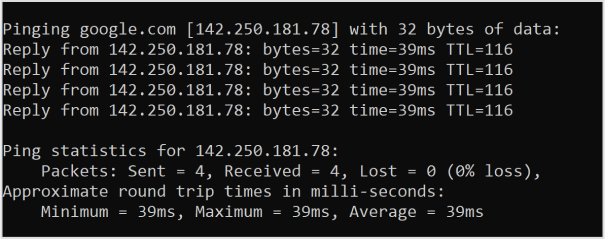
Step 4: The results will be displayed, including the IP address of the website.
Below, you can see the pinging results for Google.com
Remember that a website can have both IPv4 and IPv6 addresses, and the results may differ depending on the method used or the website itself. IPv6 addresses are newer and offer more combinations, while IPv4 addresses are more commonly used. Both types of addresses are valid and can be assigned to a website.
That’s it! You have now learned how to find the IP address of a website using different methods.
Remember, if you’re sharing the URL publicly or across social media, you could also use a short link created via Replug to make the address cleaner and more user-friendly, plus track performance if needed.
FAQs
What is an IP address and how does it work?
An IP address is a unique numerical label assigned to devices on a network. It allows devices to communicate and exchange data over the internet by providing them with a distinct identity.
How can I find the IP address of a website?
You can find the IP address of a website by using commands like ping or nslookup in the command prompt or by utilizing a DNS lookup tool online.
What is the difference between IPv4 and IPv6?
IPv4 uses a 32-bit address format and is widely used, while IPv6 uses a 128-bit address format and provides a larger pool of available addresses to accommodate the growing number of internet-connected devices.
Can I change my IP address?
Yes, you can change your IP address by contacting your internet service provider (ISP) or using certain software or tools that allow you to mask or modify your IP address.
Are IP addresses unique to each device?
Yes, IP addresses are unique to each device connected to a network. They serve as a digital identifiers for devices to ensure proper communication.
Can someone track my physical location through my IP address?
While IP addresses can provide a general indication of your location, they cannot pinpoint your exact physical address. However, certain techniques and additional data may potentially help narrow down your location.
What is a static IP address and a dynamic IP address?
A static IP address remains constant and is manually assigned to a device, while a dynamic IP address is automatically assigned by a network’s DHCP server and may change over time.
Have you ever tried clicking a link only to get hit with the “This site is not available in your region” message?
Frustrating, right? You’re not alone, not even close.
Internet shutdowns and systemic censorship affected 4.6 billion people in 2025, which is more than half the world’s population. And roughly 80% of global internet users live in countries that practice some form of online censorship or surveillance.
Whether it’s a government firewall, a workplace filter, school restrictions, or plain old geo-blocking, chances are you’ve knocked into a digital wall at some point.
The good news?
Those walls aren’t as solid as they look. There are dozens of reliable ways to get around them, some technical, some surprisingly simple.
In this post, we’re breaking down 22 proven methods to unblock websites and access restricted content in 2026.
But first, let’s get clear on the basics: What exactly is a blocked website, and why does it happen?
What is a blocked website?
A blocked website is any site you can’t access because someone (a government, your ISP, your school, or your employer) has deliberately restricted it.
Think of it like a locked door. The website exists, it’s running fine, but you’re simply not being allowed in based on your location, network, or device.
The goal behind blocking varies:
Governments do it to control information.
Schools and workplaces do it to limit distractions.
Streaming platforms do it to enforce licensing deals.
Whatever the reason, the result is the same: you hit a wall!
Why are websites blocked/banned?
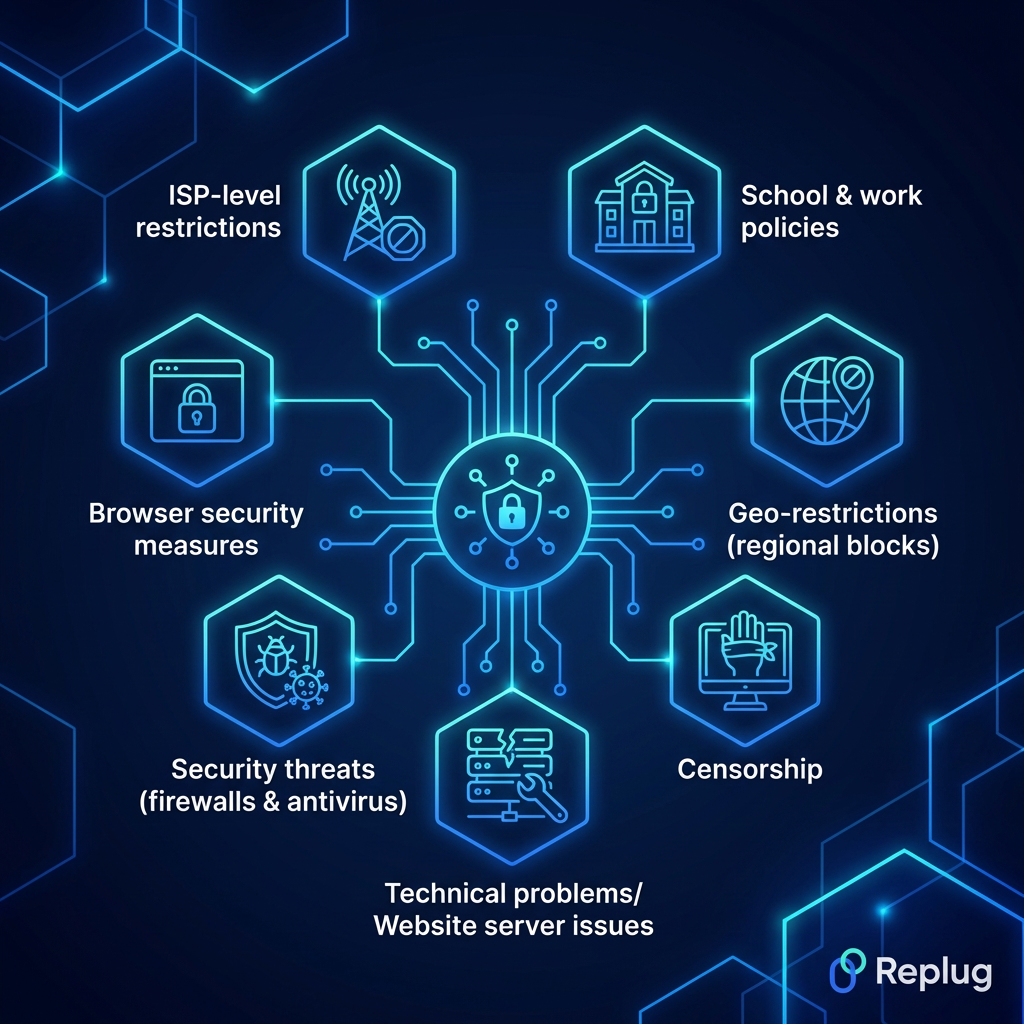
Websites get blocked for all kinds of reasons, and it’s not always a government pulling the strings. From your office Wi-Fi to your internet provider, restrictions can come from multiple directions.
Here’s a breakdown of the most common culprits:
School & work policies
Schools and workplaces block sites like social media, gaming platforms, or streaming services to keep students and employees focused. These restrictions are applied at the network level, so even if a site is perfectly legal, it’s off-limits on their Wi-Fi.
Geo-restrictions (regional blocks)
Ever seen “this content is not available in your country”? That’s geo-blocking. Platforms like Netflix, Hulu, or BBC iPlayer license their content by region, so they restrict access based on your IP address and location.
Censorship
Some governments block websites to control what their citizens can see or read online. Social media platforms, news outlets, and even messaging apps get restricted this way (China’s Great Firewall being the most well-known example).
Technical problems/Website server issues
Sometimes a site isn’t blocked on purpose; it’s just down. Server crashes, maintenance, or technical glitches can make a website temporarily inaccessible, and it can look a lot like a deliberate block from the user’s end.
Network admins (the people managing a Wi-Fi network) are privileged to block specific websites or entire categories of content for everyone connected. This is common in offices, hospitals, universities, and public hotspots.
Security threats (firewalls & antivirus)
Firewalls and antivirus software sometimes block websites they flag as dangerous (malware-infected pages, phishing sites, or suspicious domains). This type of block is actually protective, even if it occasionally catches harmless sites by mistake.
Browser security measures
Browsers like Chrome or Firefox have built-in safety features that warn you or block access to sites flagged for phishing, malware, or deceptive content. It’s your browser looking out for you, though it can sometimes be overly cautious.
ISP-level restrictions
Your Internet Service Provider can block or throttle access to certain websites, either by government mandate or their own policies. In many countries, ISPs are legally required to block specific categories of content, like piracy sites or adult (18+) platforms.
Is it legal to unblock websites?
Honestly, it depends on where you live.
In most Western countries, like the US, UK, Canada, and Australia, using tools like VPNs or proxies to access blocked content is completely legal. You might break a platform’s terms of service, but that’s not the same as breaking the law.
However, in countries like China, Russia, Iran, and North Korea, bypassing internet restrictions can land you in serious legal trouble. The rules vary wildly from one place to another.
So before you try any method to unblock a website, it’s worth doing a quick check on the laws in your specific country. When in doubt, err on the side of caution.
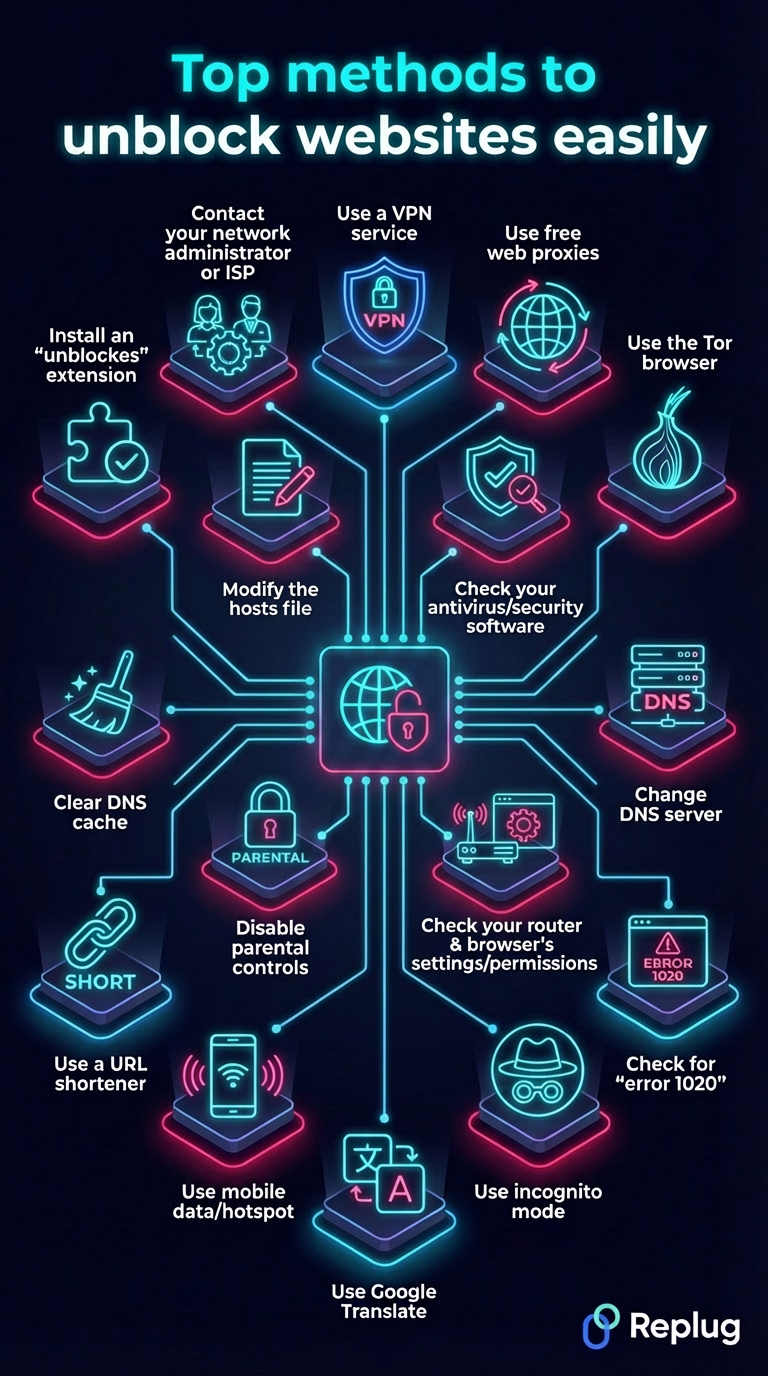
Top methods to unblock websites easily
There’s no single “one size fits all” solution when it comes to unblocking websites. Different situations call for different tools.
Below, we’ve rounded up the most effective ways people actually use, starting with the most powerful and effective one.
Method #01: Use a VPN service (best security)
A VPN(Virtual Private Network) is hands down the most popular and reliable way to unblock websites.
It works by routing your internet traffic through a server in another country, masking your real IP address and making it look like you’re browsing from somewhere else entirely.
The biggest benefits?
You get access to geo-blocked content, your traffic is encrypted, and your online activity stays private, all at the same time. It’s a clean, all-in-one solution.
That said, not all VPNs are created equal. A reputable VPN service will offer strong encryption, a strict no-logs policy, and fast server speeds; things that budget or free VPNs often cut corners on.
Watch out for VPNs that cap your bandwidth, log your data, or lack basic security features. For best results, always go with a paid, well-reviewed provider.
Method #02: Use free web proxies (fast & easy)
A web proxy acts as a middleman between you and the website you’re trying to reach.
You type the blocked URL into the proxy site, it fetches the page on your behalf, and boom, you’re in, without changing any settings on your device.
The biggest appeal here is convenience. No downloads, no sign-ups, no configuration. Just open your browser, find a proxy site, and you’re good to go in seconds. It’s a solid quick fix when you need access fast.
However, there are a few things to keep in mind. Free proxies are generally slower than VPNs, don’t encrypt your traffic, and some of them can be outright shady (logging your data or serving you ads laced with malware).
Users looking for more reliable performance often turn to a US proxy because they offer a balance between speed, stability, and lower detection rates during long browsing sessions.
Also, always verify that the proxy you’re using is actually working and safe. Tools like a free online proxy checker can help you confirm this before you commit.
For finding reliable and tested proxy options, resources like ProxyCoupons can point you toward trustworthy choices without the guesswork.
Method #03: Use the Tor browser (high anonymity)
If privacy is your top concern, Tor is about as anonymous as it gets.
The Tor browser routes your traffic through multiple encrypted layers across a network of volunteer-run servers called “nodes” before it reaches its destination. This makes it extremely difficult for anyone to trace your activity back to you.
It’s completely free, requires no account, and works right out of the box. Journalists, activists, and whistleblowers in heavily censored countries rely on it regularly for unblocking certain websites.
The main downside, however, is speed. Because your traffic is bouncing through several relays around the world, browsing can feel noticeably slow. It’s not ideal for streaming or downloading large files.
Some websites also block Tor exit nodes entirely, so you might still hit walls on certain platforms. Another thing worth noting is that Tor keeps you anonymous, but it doesn’t make you invincible.
Avoid logging into personal accounts or sharing sensitive information while using it, as that can quickly undo the anonymity it provides.
Method #04: Change DNS server to Cloudflare’s 1.1.1.1 or Google’s 8.8.8.8
When you type a website address or a URL into your browser, your DNS server is what translates it into an actual IP address.
By default, your ISP assigns you its own DNS, and that’s often where the blocking happens. Switching to a public DNS like Cloudflare’s 1.1.1.1 or Google’s 8.8.8.8 can bypass those restrictions pretty effectively.
The best part?
It’s free, takes just a few minutes to set up, and noticeably improves your browsing speed in many cases. No extra software needed, just a small tweak in your network settings.
That said, this method only works against DNS-level blocking. If a website is blocked through IP blocking or deep packet inspection, changing your DNS won’t help.
It also doesn’t encrypt your traffic or hide your activity as a VPN does, so your ISP can still see what sites you’re visiting, just not block them through DNS filtering.
Overall, it’s a great lightweight option for mild restrictions, but not a complete privacy solution on its own.
Method #05: Check for “error 1020” or similar warnings
Before trying any technical workaround, it’s worth pausing and reading the error message on your screen.
Error codes like “Error 1020”(Cloudflare access denied), “Error 403”(forbidden), or “Error 404”(not found) each tell a different story. Knowing which one you’re dealing with saves you a lot of wasted effort.
For example, Error 1020 usually means the website’s firewall is blocking your IP address specifically, not a government or ISP restriction.
In that case, simply clearing your cookies, switching browsers, or using a different network might fix it instantly without needing a VPN or proxy at all.
The benefit here is simple: diagnose first, act second. Jumping straight into complex solutions when a basic fix would do is just unnecessary hassle.
The thing to watch out for is misreading the error. Not every blocked page looks the same, and some sites show generic error pages that don’t reveal the real cause.
If the error message is vague, a quick Google search of the exact code will usually tell you exactly what you’re dealing with.
Method #06: Use incognito mode
Incognito mode(or “private browsing”) is probably the quickest thing you can try when a website isn’t loading.
It opens a fresh session with no cookies, cached data, or browser extensions running in the background. Sometimes that’s all it takes to get a blocked or misbehaving site to load normally.
This works particularly well when a site is blocked due to cookies tracking your location or login history, or when a browser extension like an AD Blocker is accidentally interfering with the page.
The benefits are pretty obvious. It’s instant, built into every major browser, and requires zero technical knowledge. Just press Ctrl+Shift+N(or Cmd+Shift+N on Mac), and you’re in.
However, don’t mistake incognito for a real privacy or unblocking tool. It doesn’t hide your IP address, bypass network-level restrictions, or fool your ISP in any way.
If a website is blocked by your school, workplace, or government, incognito mode won’t make a difference. Think of it as a first quick check rather than a proper solution.
Method #07: Use Google Translate
This method surprises a lot of people, but it actually works!
Google Translate can function as a makeshift proxy. Simply paste the blocked website’s URL into the translation box, set it to translate from any language into English, and click the link in the output.
Google fetches the page on your behalf, and you end up viewing it through Google’s servers rather than accessing it directly.
It’s completely free, requires no downloads or setup, and since the traffic appears to come from Google’s IP address, basic network filters often don’t catch it. Pretty clever for something that wasn’t designed for this purpose at all.
That said, it does have real limitations. The formatting of the page often looks broken or messy through the translation interface. Dynamic features, videos, and login-based content frequently don’t work properly. It also won’t bypass heavy government-level censorship or sophisticated firewalls.
Think of it as a handy little trick for occasional use. Great option for quickly reading a blocked article, but not something you’d want to rely on for regular browsing.
Method #08: Use mobile data or mobile hotspot
Sometimes the simplest fix is just switching networks entirely.
If a website is blocked on your school, office, or home Wi-Fi, it might load just fine on your mobile data. This is because your cellular network operates independently from whoever is managing that Wi-Fi.
You can either browse directly on your phone or turn on a mobile hotspot and connect your laptop to it.
The beauty of this method is how effortless it is. No settings to change, no apps to install; just toggle off Wi-Fi and switch to mobile data. It bypasses network-level and administrator-level blocks almost instantly.
The main thing to watch out for is your data usage. Streaming videos or downloading files over mobile data can eat up your plan surprisingly fast.
It’s also worth remembering that if a website is blocked at the ISP level or by government mandate in your country, your mobile carrier (being another ISP) may enforce the exact same restrictions.
So this method works brilliantly for workplace and school blocks, but won’t necessarily help with broader regional or government-imposed restrictions.
Method #09: Use a reliable URL shortener
Here’s a lesser-known trick that can work surprisingly well in certain situations.
When a specific URL is blacklisted by a network filter, the block is often tied to that exact web address. Running it through a URL shortener generates a brand new link pointing to the same destination, and many basic filters simply don’t recognize it as blocked content.
Maximize marketing ROI
by transforming ordinary URLs into branded short links that convert.
Try Replug for free
Tools like Replug.io go beyond just shortening links. They come packed with features like click tracking, branded links, and even A/B testing for different URLs. This makes them genuinely useful for marketers and everyday users alike, not just people trying to bypass restrictions.
The setup is dead simple. Paste your blocked URL, generate a shortened version, and try accessing it through that new link.
That said, this method only works against unsophisticated, URL-based filters. More advanced network systems that inspect traffic by destination IP address or domain won’t be fooled by a shortened link.
It’s also worth noting that some network filters have caught on to popular shortener domains and block those, too. Use it as a quick first attempt, but don’t rely on it as a permanent solution.
Method #10: Clear DNS cache
Your device stores a local record of previously visited websites called a DNS cache to speed up future visits.
However, sometimes this cache holds outdated or corrupted information, which can make a perfectly accessible website appear blocked or simply refuse to load.
Clearing your DNS cache forces your device to fetch fresh DNS information, which can instantly resolve access issues that have nothing to do with actual blocking.
It’s one of those fixes that takes under a minute but gets overlooked surprisingly often.
On Windows, it’s as simple as opening Command Prompt and running this command as administrator: ipconfig /flushdns.
On Mac, a quick Terminal command sudo killall -HUP mDNSResponder does the job, and
On mobile devices, toggling airplane mode or a simple restart usually clears it automatically.
The main thing to keep in mind is that this method only fixes locally stored DNS issues. It won’t help if a website is genuinely blocked by your ISP, network administrator, or government.
Think of it more as a housekeeping step than a full unblocking solution. Try it early in your troubleshooting process before jumping to more complex methods. You might be surprised how often it works.
Method #11: Install an “unblock websites” browser extension
Browser extensions designed to unblock websites are essentially lightweight VPNs or proxies that work directly inside your browser.
Popular options like Windscribe, Hola, or Browsec can be installed in just a couple of clicks from your browser’s extension store and start working almost immediately. No separate app or complicated setup required.
The appeal is obvious. They’re quick to install, beginner-friendly, and many offer a decent free tier that’s good enough for casual unblocking.
If you just need to access a blocked site occasionally without committing to a full VPN subscription, an extension is a pretty convenient middle ground.
That said, there are some real limitations. Browser extensions only route your browser traffic, not your entire device’s connection. So other apps remain unaffected.
Free extensions in particular can be hit or miss on privacy, with some known to log browsing data or inject ads into pages.
Before installing anything, check the reviews carefully and stick to well-known, reputable extensions. Avoid random ones with little to no user feedback.
The browser extension store, unfortunately, has its fair share of shady options dressed up to look legitimate.
Method #12: Contact your network administrator or ISP
Sometimes the most straightforward solution is just asking.
If a website you genuinely need access to is blocked on your work or school network, reaching out to your network administrator and explaining why you need it unblocked can actually work.
The same goes for your ISP. If a site appears to be incorrectly blocked, a simple support call or ticket can get it resolved faster than you’d expect.
This approach is especially useful in professional settings where you need access to a specific tool or platform for legitimate work purposes. A reasonable request with a clear explanation often gets approved without much pushback.
The thing to keep in mind is that this only works when the block is unintentional or when you have a valid, justifiable reason.
Don’t expect a school IT department to unblock social media just because you asked nicely. Timing and context matter too.
Framing your request around productivity or work necessity goes a long way compared to a vague “can you just unblock this?”
It won’t always work, but when it does, it’s the cleanest and most hassle-free solution on this entire list.
Method #13: Modify the hosts file (advanced)
Every computer has a hosts file, a small but powerful local text file that maps domain names to IP addresses before your DNS server even gets involved.
By editing this file, you can manually redirect a blocked domain to its correct IP address, effectively bypassing DNS-level blocks on your device.
It’s a genuinely effective method for technically savvy users, and since it works locally on your machine, it doesn’t rely on any third-party tools or services. No subscriptions, no extensions, no extra software needed.
However, this one comes with a clear warning: it’s not for beginners. Editing the hosts file incorrectly can break your internet connection or stop certain websites from loading altogether.
On Windows, you’ll find it at C:\Windows\System32\drivers\etc\hosts, and
On Mac or Linux, it sits at /etc/hosts.
You’ll need administrator privileges to make any changes!
It’s also worth noting that this method only bypasses DNS-based blocking. If the website is blocked through IP filtering or deep packet inspection, modifying the hosts file won’t help.
Always back up the original file before making any edits. That way, you can easily restore it if something goes wrong.
Method #14: Check your antivirus or security software
If a website suddenly stops loading and you can’t figure out why, your antivirus or security software might quietly be the culprit.
Many security tools come with built-in web filtering features that automatically block sites they flag as suspicious. And sometimes they get it wrong, flagging perfectly safe websites as threats.
The fix is usually straightforward. Open your antivirus dashboard, look for web protection or URL filtering settings, and check if the site in question has been added to a blocklist.
Most programs let you whitelist specific websites, which tells the software to stop interfering with them (in the future).
The benefit of catching this early is that it saves you from going down a rabbit hole of VPNs and proxies when the real issue is sitting right on your own device.
That said, be cautious about what you whitelist. Your antivirus flagged that site for a reason, and while false positives do happen regularly, it’s worth doing a quick check on the website’s credibility before overriding the block.
Tools like Google’s Safe Browsing checker or VirusTotal can help you verify if a site is genuinely safe before you grant it unrestricted access.
Method #15: Check your router & browser’s settings/permissions
Before assuming a website is blocked externally, it’s worth checking closer to home.
Many routers come with built-in parental controls or content filtering features that can block specific websites or entire categories of content. And, these settings sometimes get enabled without everyone in the household even knowing about it.
Log in to your router’s admin panel (usually accessible by typing 192.168.1.1 or 192.168.0.1 into your browser). Then navigate to the content filtering or parental controls section, and check if the site you’re trying to reach has been restricted there.
On the other side, certain browser permissions and settings, like strict safe browsing modes or content restrictions, can also prevent specific pages from loading correctly.
The benefit of checking here first is that it’s a quick, free fix that requires no extra tools. If something was accidentally misconfigured, you can sort it out in minutes.
Just be mindful that if you’re on someone else’s network (a family member’s or roommate’s), changing router settings without permission isn’t great etiquette. Have a conversation first, rather than quietly modifying settings that affect everyone connected to that network.
Method #16: Disable parental controls
Parental controls are one of the most overlooked reasons why a website might be blocked, especially on home networks and family devices.
These controls can be set up at multiple levels:
on the router,
directly on your device,
through your ISP, or
even within specific apps and browsers
If you’re scratching your head, wondering why a completely harmless site won’t load, parental controls might be quietly doing their job in the background.
Disabling or adjusting them is usually simple once you locate where they’ve been set up.
On Windows, check Family Safety settings.
On Mac, look under Screen Time.
Router-level controls are accessible through the admin panel, as covered in the previous method.
The obvious benefit is that once removed, your access is restored instantly (no third-party tools required).
That said, this one comes with a common-sense reminder. If the parental controls were set up by a parent or guardian for a minor, disabling them without permission isn’t appropriate.
This method is really aimed at adults who’ve inherited restricted settings on a device or network, or situations where controls were set up and simply forgotten about over time.
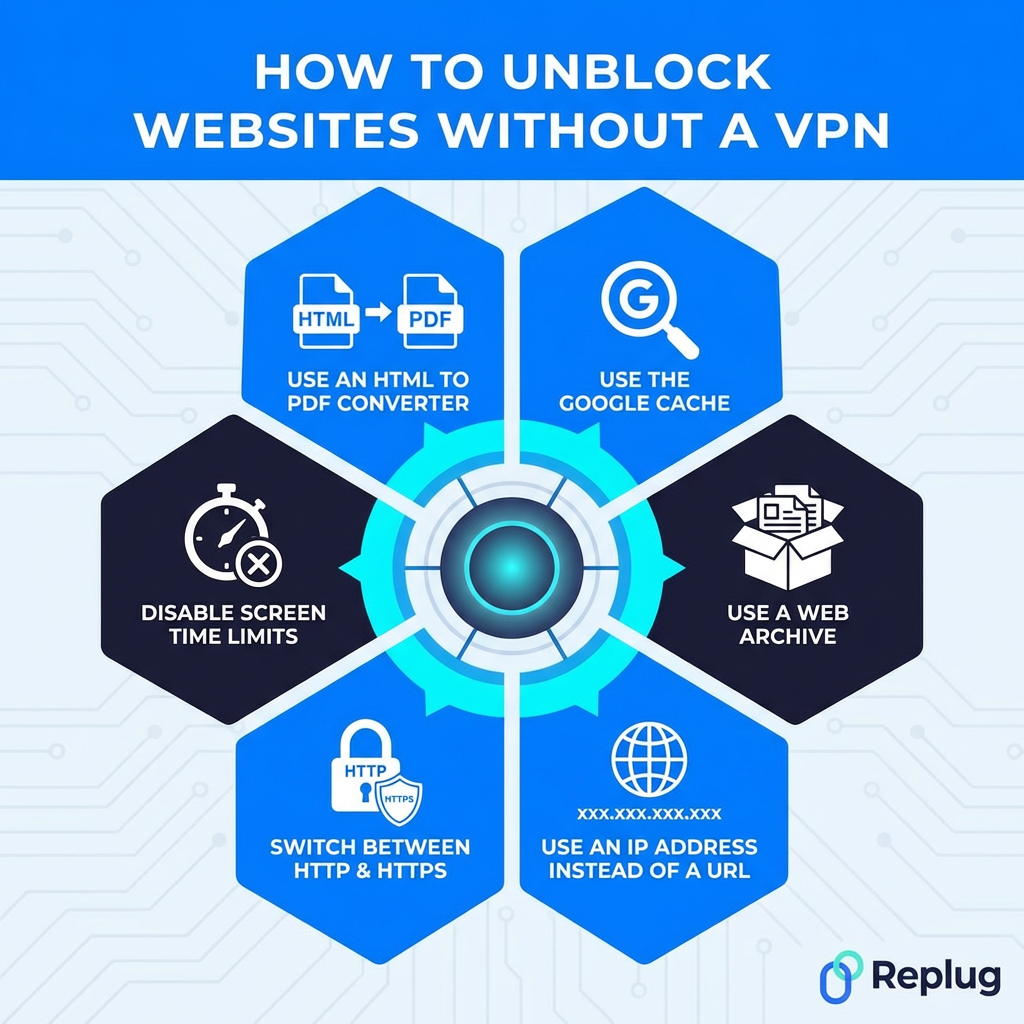
How to unblock websites without a VPN
Not everyone wants to pay for a VPN or go through the hassle of setting one up, and that’s completely fair. The good news is that there are several solid ways to access blocked content without one.
Here are some of the best alternatives worth trying:
Method #17: Use the Google cache
Google regularly saves snapshots of web pages every time it crawls them. By accessing the cached version, you’re essentially viewing a saved copy stored on Google’s servers rather than the live site itself, bypassing the block entirely.
Just type cache:websiteurl.com directly into Google’s search bar to access it.
It’s free, instant, and requires nothing extra. The downside is that cached pages can be outdated, and interactive or login-based content won’t work.
Method #18: Use a web archive
Web archives like the Wayback Machine(web.archive.org) store historical snapshots of websites going back years. If a site is blocked, you can often access a saved version simply by entering the URL into the archive’s search bar.
It’s completely free and requires no setup whatsoever. Great for accessing blocked articles, research pages, or reference content.
The catch is that archived versions are static snapshots, so dynamic content, videos, and anything requiring a login won’t function. It’s best suited for reading text-based content rather than interactive browsing.
Method #19: Use an IP address instead of a URL
Most website blocks target domain names rather than the actual IP address sitting behind them. So instead of typing www.website.com, try entering the site’s direct IP address into your browser.
You can find a website’s IP by running a simple nslookup <domain> or ping <domain> command in your device’s terminal or command prompt.
It’s free, instant, and requires no extra tools. However, this only works if the block is purely DNS-based. If the IP address itself is blocked, or the site uses shared hosting with multiple sites on one IP, this method won’t get you through.
Method #20: Switch between HTTP & HTTPS
Some network filters block either the HTTP or HTTPS version of a website, but not both. So if http://website.com isn’t loading, try https://website.com instead, or vice versa.
It sounds almost too simple, but it genuinely works in certain situations. No tools, no setup, completely free. Just manually edit the URL in your address bar and hit “Enter.”
The limitation is obvious. This only works when the block is version-specific and inconsistent. Against properly configured filters that block both versions simultaneously, simply switching protocols won’t make any difference.
Method #21: Disable screen time limits
Screen time features on iOS, Android, macOS, and Windows allow users to restrict access to specific websites or apps during set hours.
If a site suddenly becomes inaccessible at certain times of the day, screen time limits could be the reason rather than an external block. Check your device’s screen time or digital wellbeing settings and adjust or disable the restrictions as needed.
It’s a quick, free fix requiring no extra tools. Just keep in mind that on family-shared devices, these settings may be password-protected by a parent or guardian, so bypassing them without permission isn’t appropriate.
Method #22: Use an HTML to PDF converter
Online HTML to PDF converters like PDFcrowd or Web2PDF fetch a webpage on your behalf and convert it into a downloadable PDF file, similar to how a proxy works. Since the request comes from the converter’s servers rather than your device, basic network filters often don’t catch it.
It’s free, requires no installation, and works directly in your browser. Perfect for accessing blocked articles or text-heavy pages.
The downside is that it only works for reading static content. Videos, interactive elements, and login-required pages simply won’t convert properly.
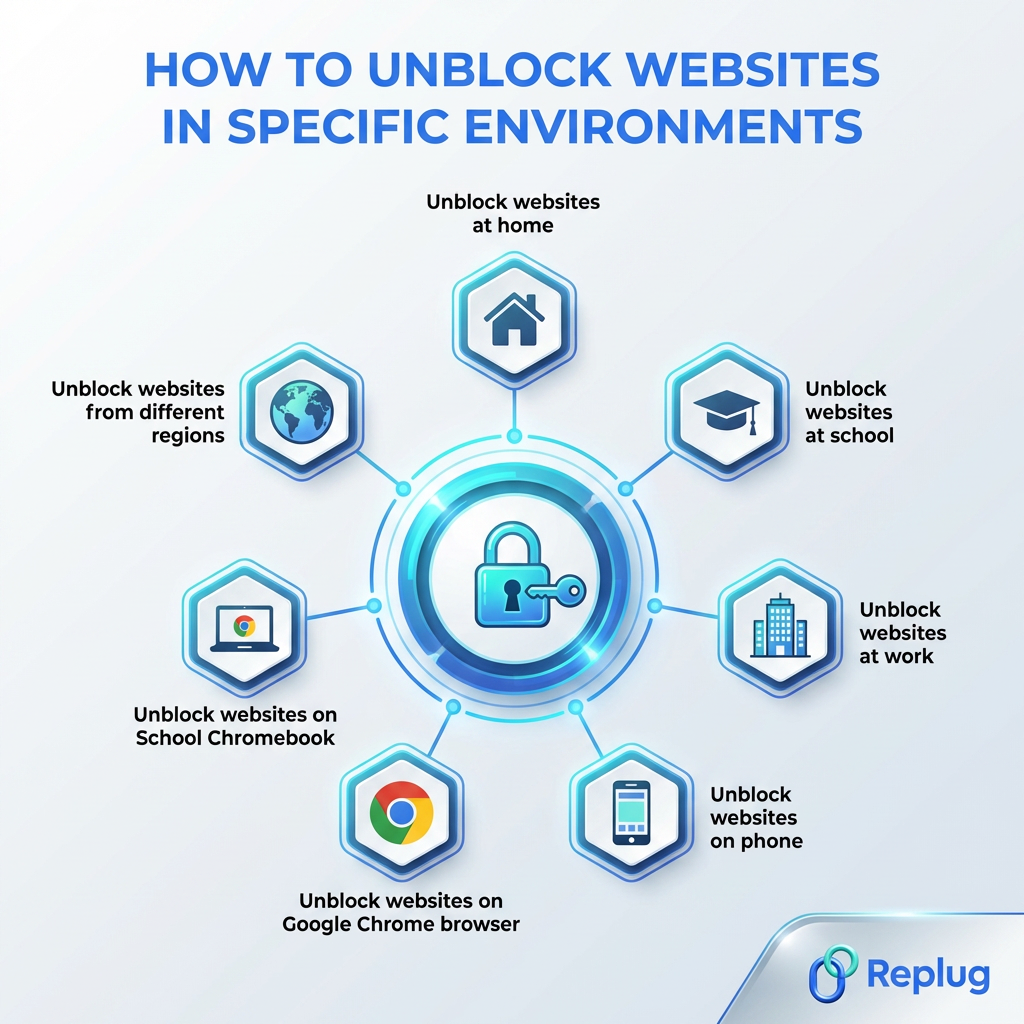
How to unblock websites in specific environments
The right unblocking method often depends on where you are and what device you’re using. A fix that works perfectly at home might be completely useless at school or work. Here’s a quick environment-by-environment breakdown to point you in the right direction.
Unblock websites at home
At home, you have the most control.
Start by checking your router’s content filtering settings and disabling any parental controls that might be active.
Switching your DNS to Cloudflare’s 1.1.1.1 or Google’s 8.8.8.8 is another easy win.
If your ISP is the one doing the blocking, a VPN is your best bet.
Since it’s your own network, you have full freedom to adjust settings without needing anyone’s permission, making your home the easiest environment to unblock websites in.
Unblock websites at school
School networks are typically locked down pretty tightly by IT administrators. Your best options here are:
Using mobile data instead of the school Wi-Fi, or installing a browser extension with built-in proxy or VPN functionality.
Google Translate and web proxies can also work against basic filters.
Just be aware that many schools actively monitor network activity, so it’s worth understanding your school’s policy before attempting any workaround. This is because some can get you in genuine trouble if caught.
Unblock websites at work
Workplace restrictions are similar to school blocks but often more sophisticated.
A reputable VPN app installed on your personal device is the cleanest solution, especially if you’re using your own laptop.
If you’re on a company-managed device, be cautious. IT departments can often see exactly what’s running on those machines. Using mobile data for personal browsing is a safer, less risky approach.
For work-related sites that are unnecessarily blocked, simply contacting your IT department with a clear business reason is always worth trying first.
Unblock websites on phone
To unblock websites on iPhone:
1. Start by checking screen time settings under Settings → Screen Time → Content & Privacy Restrictions → Content Restrictions → Web Content.
2. Select “Unrestricted Access” to allow all websites, or remove specific sites from the “Never Allow” list.
3. A screen time passcode is required if one was set.
To unblock websites on an Android smartphone:
Use a VPN,
Change your Private DNS to 1dns.cloudflare.net in settings, or
Use a proxy site.
If your Wi-Fi network is the issue, switching to mobile data usually bypasses it instantly.
For broader restrictions, installing a VPN app from the App Store is the most reliable fix.
iOS/Android also supports manual DNS changes under Wi-Fi settings, so swapping to a public DNS like 1.1.1.1 is another quick option worth trying.
Unblock websites on Google Chrome browser
Chrome has several built-in tools worth checking first.
Make sure Safe Browsing settings aren’t overly aggressive, and check that no extensions are interfering with site access.
Trying the site in an Incognito window rules out cookie or cache-related issues.
If the block is network-based, installing a Chrome VPN or proxy extension directly from the Chrome Web Store is the most straightforward browser-level fix.
Switching Chrome’s DNS settings to a public DNS server under Settings → Privacy and Security → Security is another solid option.
Unblock websites on School Chromebook
School-issued Chromebooks are among the toughest to work around because they’re typically enrolled in Google Admin, giving IT full control over what’s accessible. Most VPN extensions get blocked at the admin level before you can even use them.
Your most practical option is switching to mobile data via a hotspot rather than the school’s network entirely.
Alternatively, accessing cached versions or web archives of blocked content can work for reading purposes.
You can use proxy websites, browser-based proxies (“browser in a browser”), or translation services to bypass firewalls.
Specific unblocker platforms like Space Unblocker or Red Exploit Center can often be your friend.
For legitimate access needs, speaking directly to your teacher or IT administrator is genuinely the most effective route.
Unblock websites from different regions
Geo-blocked content (like streaming libraries, news sites, or regional platforms) requires tools that can mask or change your apparent location.
A VPN with servers in the target country is the most reliable and widely used solution here.
Proxy servers set to the relevant region work too, though with less security.
Smart DNS services are another popular option specifically for streaming, as they unblock geo-restricted content without slowing down your connection the way some VPNs can.
What is the best way to access a blocked website in 2026?
Honestly, it depends on your situation, but if we had to pick one method that works reliably across the board, a secure VPN is still the winner in 2026.
It handles geo-blocks, network restrictions, and ISP-level blocks all at once, while keeping your connection encrypted and your activity private. Nothing else on this list does all three simultaneously.
That said, if a VPN feels like too much for what you need, switching your DNS or using a web proxy gets the job done for lighter restrictions without any fuss.
The smartest approach is matching the method to the problem. For regional access testing, residential proxies can help simulate normal browsing from specific locations more naturally than basic proxy servers.
Always identify why a site is blocked first, then pick the tool that fits in the best. Don’t use a sledgehammer when a simple fix will do the job!
Wrapping up
And there you have it!
22 proven ways to unblock websites and take back control of your browsing experience. As internet restrictions continue to tighten globally, knowing your options isn’t just handy, it’s becoming essential.
No matter if you go with a full VPN setup, a quick DNS switch, or a simple Google Cache workaround, there’s genuinely something on this list for every situation and skill level.
The key takeaway is simple: no single method works for everything, so understanding why a site is blocked gets you halfway to fixing it.
Stay curious, browse smart, and always make sure whatever method you choose is legal and appropriate in your region.
Happy browsing!
Frequently asked questions
How do I unblock a website at school?
Your quickest options are:
– switching to mobile data, – using a web proxy, or – installing a browser extension with built-in VPN functionality
Google Translate and cached versions also work against basic filters. If it’s a site you genuinely need for academic purposes, asking your IT administrator directly is always worth trying first.
How do I unblock a website in Safari?
Here’s how to do it:
– Start by clearing Safari’s cache and cookies, then check Screen Time restrictions under your device settings. – Switching your DNS to 1.1.1.1 or 8.8.8.8 in your Wi-Fi settings can help bypass DNS-level blocks. – For stronger restrictions, installing a VPN app on your iPhone or Mac and running it alongside Safari is the most reliable fix.
How do I disable blocked sites?
It depends on where the block is coming from. Check your router’s admin panel, antivirus settings, parental controls, and browser extensions (any of these could be the source). Identify which one is doing the blocking first, then disable or whitelist the site from within that specific setting.
How to unblock websites on computer?
Here are the possible options:
– Try switching your DNS to Google’s 8.8.8.8 or Cloudflare’s 1.1.1.1, clearing your DNS cache, or checking your antivirus and firewall settings. – If the block is network-based, a VPN is your most reliable option. – For locally stored blocks, checking your hosts file and browser settings can also quickly resolve the issue.
How do I remove certain websites from being blocked?
Locate where the block originates (your router, antivirus, parental controls, browser, or hosts file) and whitelist or remove the site from that specific blocklist. Each platform handles this differently, but most have a straightforward whitelist or “allowed sites” section within their settings where you can add exceptions easily.
How to unblock websites on school computer without VPN?
Here’s how to do it:
– Use mobile data via a hotspot to bypass the school network entirely. – Alternatively, try web proxies, Tor browser, Google Translate, Google Cache, or the Wayback Machine for accessing blocked content. – Switching between HTTP and HTTPS versions of the URL occasionally works, too, against basic filters.
How to unblock websites on school Wi-Fi without VPN?
Here’s how to do it:
– Switch to your phone’s mobile hotspot instead of the school Wi-Fi. This instantly bypasses network-level restrictions. – Web proxies, browser extensions with built-in proxy features, URL shorteners, and Google Translate are also solid alternatives. – For reading blocked articles specifically, Google Cache and web archives like the Wayback Machine are quick and easy options.
How to unblock a website blocked by administrator?
If it’s a legitimate access need, contact the administrator directly and explain your reason. This is genuinely the cleanest solution.
Otherwise, using mobile data bypasses administrator-level network blocks entirely. A VPN installed on a personal device also works, though on managed devices, IT may be able to detect and restrict it.
How to unblock websites on School Chromebook when blocked by an administrator?
This is tricky since School Chromebooks are enrolled in Google Admin, giving IT deep control. Your best practical option is connecting to a mobile hotspot instead of the school network.
Accessing cached or archived versions of blocked pages works for reading content. For anything beyond that, speaking to your teacher or administrator remains the most straightforward legitimate route.
What are the key features to look for when choosing a VPN to unblock websites?
Must look for:
– Strong encryption (AES-256), – A strict no-logs policy, – A wide server network across multiple countries, – Fast connection speeds, and – A reliable kill switch
Split tunneling is a handy bonus. Always choose a paid, well-reviewed provider. Free VPNs frequently compromise on privacy and performance in ways that matter.
Here’s a number that for sure makes every business owner pause for a moment. Over 50% of customers will switch brands after just one bad experience (one, and that’s it!). No second chances, no benefit of the doubt; just gone.
So how do you actually know if your customers are happy before they walk out the door?
That’s exactly where CSAT comes in. If you’ve been googling “CSAT meaning” and getting buried under jargon-heavy explanations, you’re in the right place.
We’re breaking down what this metric really is, why it matters more than ever in 2026, and how you can start measuring it the smart way, without drowning in spreadsheets.
Ready to figure out what your customers truly think?
Let’s start with the basics: what exactly is a (CSAT) customer satisfaction score?
What is CSAT score?
A CSAT score(customer satisfaction score) is basically a quick pulse check on how happy your customers are with a specific interaction, product, or service.
Think of it like that “How did we do?” survey you get after a support chat or a delivery. Customers rate their experience, usually on a scale of 1 to 5, and the responses get crunched into one simple percentage.
The primary goal here isn’t to flatter your team’s ego with a high number. It’s to spot patterns: where you’re winning customers over and where you might be quietly losing them. It’s one of the easiest ways to put a real number on something that feels abstract (happiness).
Significance of customer satisfaction score
Now, since you have already learned the CSAT score meaning, let’s have a look at why it is so important:
Reduces churn: Happy customers don’t go shopping for alternatives. CSAT actually works as an early warning system. It helps you catch churn risk before customers actually cancel, instead of finding out the hard way after they’ve already left.
Boosts revenue & loyalty: This one’s straightforward: a small bump in CSAT can translate into a noticeably bigger lift in customer retention, and retained customers are far cheaper to keep happy than new ones are to acquire.
Measures service quality: CSAT puts a number on something that used to be a gut feeling. Instead of guessing whether your support team is doing a good job, you get real, comparable data straight from the people who experienced it.
Provides actionable insights: Every low score comes with a “why” attached if you ask the right follow-up question. That feedback loop tells you exactly what to fix (slow replies, confusing processes, unhelpful answers), instead of leaving you to guess.
Drives word-of-mouth referrals: People love talking about good experiences just as much as bad ones. Customers who walk away happy tend to tell several other people about it, which means a solid CSAT score quietly fuels your marketing without spending a single rupee on ads.
What is a good CSAT score
There’s no single magic number here!
What counts as a “good customer satisfaction score” really depends on your industry, your customers’ expectations, and what you’re benchmarking against.
That said, here’s a general scale most businesses can use as a quick gut check.
90%+ (exceptional)
You’re not just meeting expectations; you’re blowing past them. Scores this high usually mean your product, support, and overall experience are firing on all cylinders.
80%–89% (excellent)
This is the sweet spot most brands strive for. You’re clearly doing a lot right, even if there’s still a little room to polish things further.
75%–79% (good)
A solid, healthy score. Customers are walking away satisfied more often than not, though there’s likely still some friction worth smoothing out.
70%–74% (average/acceptable)
Not bad, but not something to celebrate either. You’re keeping customers reasonably happy, but competitors with stronger CX could start pulling ahead.
Below 70% (needs improvement)
This is your wake-up call. Something in the experience, whether it’s support, product quality, or response times, needs immediate attention before it starts costing you customers.
Industry benchmarks for CSAT scores
Comparing your score to a generic global average doesn’t tell you much. What actually matters is how you stack up against others in your specific industry, since expectations and norms shift a lot from sector to sector.
Financial services & banking: 80%–83%
Trust is everything in banking, so customers expect accuracy, security, and zero room for error, which keeps the bar high.
Target: ≥ 88%
Software / SaaS: 79%–80%
With endless alternatives just a click away, SaaS users expect smooth onboarding and fast support, making this one of the most competitive spaces for CSAT.
Target: ≥ 88%
E-commerce & retail: 78%–80%
Shoppers judge you on the entire customer journey (browsing, checkout, delivery, and returns), so even one weak link can drag your score down.
Target: ≥ 87%
Full-service restaurants: 81%–84%
Food, service, and atmosphere all factor in here, and the personal nature of dining out tends to push satisfaction scores a bit higher across the board.
Target: ≥ 89%
Healthcare: 74%–78%
Between long wait times, paperwork, and the emotional weight of care, healthcare naturally faces a tougher road to high satisfaction.
Target: ≥ 86%
Telecommunications & internet providers: 65%–74%
Frequent outages, billing confusion, and long hold times have made this one of the hardest industries to score well in.
Target: ≥ 80%
How to calculate CSAT score
Good news: The math behind this metric is refreshingly simple; no advanced degree in statistics required.
Here’s how the whole process works, step-by-step:
Step #01: Data collection
Everything starts with sending out a quick satisfaction survey right after a customer interacts with your product, support team, or service.
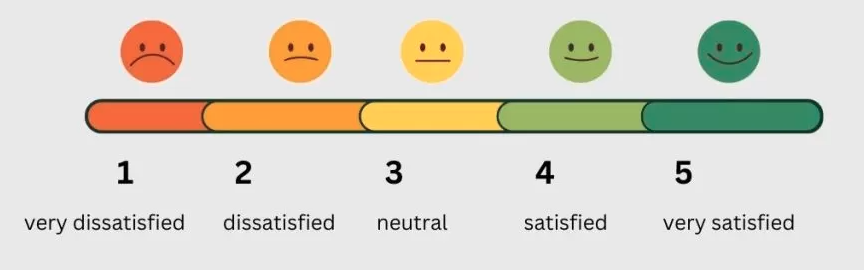
Keep it short; usually just one quick question like “How satisfied were you with your experience?” on a 1-to-5 Likert scale, since long customer surveys tend to get ignored or abandoned halfway through.
Very Unsatisfied
Unsatisfied
Neutral
Satisfied
Very Satisfied
Step #02: Spot positive responses
Once the responses start rolling in, you’ll need to separate the happy customers from the rest.
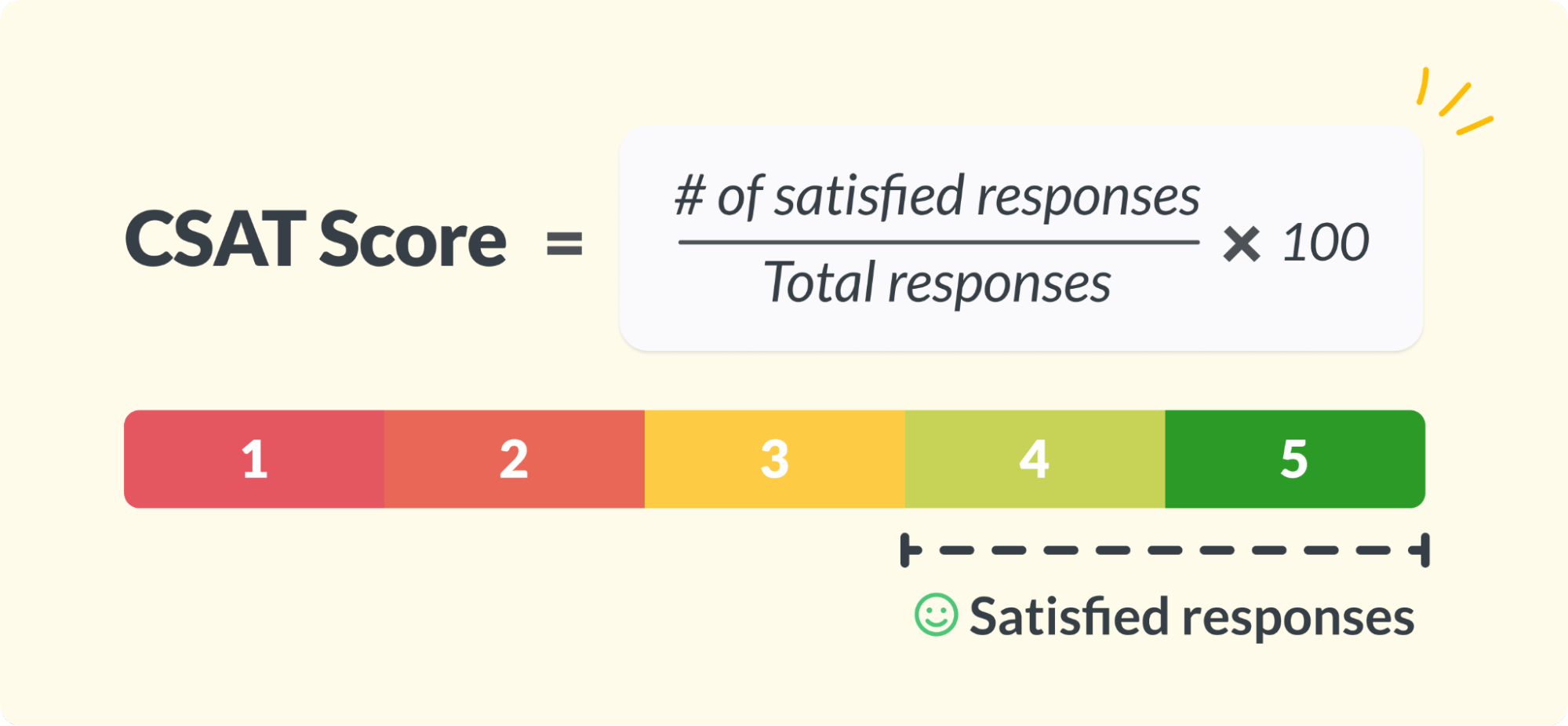
Anyone who rated their experience a “4” or “5” counts as satisfied. Ratings of “1”, “2”, or “3” don’t make the cut, even if a 3 feels like a neutral score on paper.
This is the foundation of the entire customer satisfaction score calculation, so getting this sorting step right really matters.
Step #03: CSAT example calculation
Now for the easy part. The customer satisfaction score formula is just: divide the number of satisfied customers (those 4s and 5s) by the total number of responses, then multiply by 100 to get a percentage.
Let’s say 200 people responded to your survey, and 150 of them rated you a 4 or 5. That’s 150 divided by 200, which gives you 0.75. Multiply that by 100, and you land on a CSAT score of 75%.
Simple, clean, and something you can track over time to see if you’re actually moving in the right direction.
How do you measure customer satisfaction score?
Measuring CSAT isn’t really about complicated tools or fancy dashboards. It’s about asking the right question at the right time.
Most businesses rely on something called the “Likert scale”, which is just a fancy term for those simple rating options you’ve probably answered a hundred times yourself:
Very Dissatisfied,
Dissatisfied,
Neutral,
Satisfied,
Very Satisfied
Often paired with numbers 1 through 5.
You’ll usually see this pop up right after a support call ends, a purchase goes through, or a feature gets used for the first time.
The trick is timing it well. Ask too early, and customers haven’t formed an opinion yet. Ask too late, and they’ve probably forgotten the details. Catch them right after the experience, and you’ll get honest, accurate feedback that actually reflects how they feel in that moment.
Pros & cons of CSAT
Like any metric, CSAT has its strengths and its blind spots, and knowing both helps you use it the smart way instead of relying on it for everything.
Pros
Explanation
✅ Simple & intuitive
One question, one scale! Customers and your team get it instantly without any confusion.
✅ High response rates
Short surveys mean people actually finish them instead of abandoning halfway through.
✅ Pinpoints specific touchpoints
You can tie feedback to one exact moment, like a support call or checkout step, instead of guessing where things went wrong.
✅ Actionable
Low scores come with clear, fixable problems attached, so your team knows exactly where to focus.
Cons
Explanation
⛔ Lacks context
A rating alone doesn’t tell you why someone felt that way unless you add a follow-up question.
⛔ Subjective & transient
Mood, timing, and personal bias can influence a score that has nothing to do with your actual service.
⛔ Does not measure loyalty
A satisfied customer today isn’t necessarily a loyal one tomorrow. That’s a different metric entirely.
⛔ Survey fatigue
Ask too often, and customers start ignoring or rushing through your surveys altogether.
How to improve CSAT score: Useful tips to follow
Once you know where you stand, the real work begins, i.e., actually moving that number up. Here are some practical, no-nonsense ways to improve customer satisfaction scores over time.
Speed up your response times. Customers value fast replies more than almost anything else, so cutting down wait times on support and queries can instantly lift satisfaction.
Train your support team properly. A knowledgeable, friendly agent can turn a frustrated customer into a happy one within minutes.
Act on the feedback you collect. Don’t just gather CSAT scores and file them away. Actually fix the recurring issues customers point out.
Personalize the experience. Use customer history and preferences so people feel like a name, not a ticket number.
Offer support across multiple channels. Let customers reach you through chat, email, or phone, whichever feels easiest for them.
Close the feedback loop. If someone leaves a low score, follow up and show them you actually listened.
Keep surveys short and well-timed. Send them right after the interaction, not days later when the details have faded.
CSAT vs. NPS vs. CES
These three metrics often get grouped, but each one answers a different question about your customer experience.
Here’s how they stack up side by side:
CSAT
NPS
CES
Full form
Customer Satisfaction Score
Net Promoter Score
Customer Effort Score
Primary question
“How satisfied were you with this experience?”
“How likely are you to recommend us to a friend or colleague?”
“How easy was it to get your issue resolved?”
What it measures
Satisfaction with a specific interaction or touchpoint
Overall loyalty and likelihood to advocate for your brand
The amount of effort a customer had to put in to get help
Best use case
Support tickets, purchases, onboarding steps
Quarterly or yearly relationship health checks
Support interactions, returns, troubleshooting steps
When to use
Right after a specific moment in the customer journey
Periodically, to track long-term brand perception
Immediately after a customer resolves an issue or completes a task
Why measure CSAT at present in 2026?
Customer expectations have shifted hard in the last couple of years, and honestly, patience is running thin than ever.
People compare every brand interaction to the smoothest one they’ve had recently, no matter if that’s a banking app or a food delivery service, and they expect you to keep up.
On top of that, the rise of AI-powered support, instant chat, and same-day everything means slow or clunky experiences stand out a lot more than they used to.
CSAT gives you a real-time pulse on whether you’re actually meeting these rising expectations or quietly falling behind. It’s not just a vanity metric anymore; it’s tied directly to retention, referrals, and revenue.
In a year where customers have endless alternatives just a scroll away, knowing exactly where you stand isn’t optional anymore; it’s the difference between growing and slowly losing ground.
How Replug assists in increasing CSAT score
Now that you know what drives a strong CSAT score, let’s talk about a tool that quietly helps you get there.
Replug.io is an all-in-one solution for managing custom shortened links with CTAs, retargeting pixels, and detailed analytics. Among its many features, the custom URL shortener deserves special mention.
Instead of sending customers clunky, generic links, you can create short link options that carry your brand name, look polished, and instantly feel more trustworthy.
Maximize marketing ROI
by transforming ordinary URLs into branded short links that convert.
Try Replug for free
Why does this matter for CSAT?
Because trust and ease shape every customer interaction, even something as small as clicking a link. You can create branded or customized links to reinforce your brand identity, making every link memorable and trustworthy. And the best part is, personalized branded short URLs are generated within seconds, with no technical hassle involved.
When every touchpoint feels professional and frictionless, it naturally reflects in your customer satisfaction metrics. So if you’re serious about improving CSAT, start with the small details. Replug helps you nail them effortlessly.
What’s the best way to analyze CSAT data effectively?
Don’t just look at the overall percentage. Break it down by touchpoint, team, and time period to spot patterns. A dip after a specific update or during a busy season tells you a lot more than one flat number ever could. Pairing CSAT with open-ended comments also helps you understand the “why” behind the score, not just the “what”.
How often should businesses measure CSAT?
It depends on the touchpoint.
– For things like support tickets or purchases, measure right after each interaction. – For a broader pulse on overall customer service quality, a monthly or quarterly review works well.
The key is consistency! Random, occasional surveys won’t give you a reliable trend to act on.
Can a customer satisfaction score help predict customer loyalty?
To some extent, yes, but it’s not a perfect predictor on its own. A happy customer today doesn’t always mean a loyal one next year. That’s why CSAT works best alongside NPS, which is specifically built to gauge long-term loyalty and advocacy.
Can I measure CSAT in real-time?
Absolutely, and most businesses already do this through their customer support tools. Live chat platforms and helpdesk software often trigger a quick rating request the moment a conversation ends, giving you instant feedback while the experience is still fresh in the customer’s mind.
Where does AI fit into CSAT?
AI plays a growing role here, especially through an AI answering service that can respond to common queries faster, reducing wait times that often drag scores down. AI also helps analyze open-ended feedback at scale, picking up patterns and sentiment that would take a human team much longer to spot manually.
Why is sample size important when measuring CSAT score?
A handful of responses can paint a misleading picture, good or bad. If only 5 people respond out of 500 customers, that score isn’t really representative of how everyone feels. A larger, more consistent sample gives you a far more accurate read on actual satisfaction levels.
What are the best channels for collecting CSAT feedback?
Email, in-app surveys, and live chat tend to perform best, since they reach customers right after an interaction. Some businesses also get creative by pairing surveys with small incentives, like branded corporate gifts, to boost response rates. If you’re working with an outsourced customer support agency, make sure CSAT collection is built into their process from day one, not added as an afterthought.
Working from home is our new reality. However, the universe sent the early signs through Robert Kelly’s interview in 2017.
We took it as a funny work from home meme until we all had our own BEST work from home memes in 2020-21 when the whole world was working from home.
Did the universe send early signs?
In March 2017, Robert Kelly, an associate professor of political science at Pusan University, South Korea was being interviewed by BBC news, about the South Korean president, from his home office when things got a bit chaotic.
His 4-year-old daughter walked in the room followed by her 9-month-old baby brother rolling into his office in a ‘hippity hoppity’ style, which, by the way, has now become shorthand for confidently entering into the room.
Kelly’s wife then scrambled in to hustle kids out of the scene leading this whole situation to an online family blooper.
Somehow, Kelly maintained his composure through the whole situation which was later linked to the rumours that he didn’t stand up to shoo his kids because he wasn’t wearing pants.
However, Kelly clarified that he didn’t stand up because he wanted the interviewer to cut the interview short.
Is it Karma?
The whole world laughed it off and he became a viral ‘dad’. However, Mr Karma also had Kelly’s episode tuned in and later it saw his memes trending on social media. It then decided to come to us in 2020 with a global pandemic, so we all could understand Kelly’s situation while working from home.
Is our current work-life a big compilation of funny work from home memes? YES!
The most difficult thing in the world is to spell pneumonoultramicroscopicsilicovolcanoconiosis, which refers to lung disease. The second most difficult thing is to imagine our digital lives without memes.Imagine your day without tripping on the best work from home memes? Can’t imagine, right?
Meme marketing is here to stay and the popularity of meme advertising can be evaluated with the fact that according to Google trends “Memes” is a more popular search term than “Jesus”.
Memes is the trending digital marketing strategy for brands these days. That’s why brands looking to optimize every share should consider a full link optimization platform, giving them branded, trackable links for every meme campaign.
What makes memes so special is the way attitudes, feelings and situations are communicated in a quick, snappy and witty manner. Therefore, it is no surprise the best way for brands to communicate as well is through memes especially with ad-averse generations who smell branded content from miles away.
The success of an organization majorly depends on its employees and employee work culture. Having proper remote work software can help businesses develop a perfect employee work culture.
Working from home is the new norm and we had no standard to compare and relate our emotions and challenges of working from home until the best work from home memes started flowing in.
Some of our top picks for best work from home memes are:
How it has been in the beginning!
The week started looking like this: Monday, Tuesday, another day, another day, another day seeped into the weekend, Sunday.
Zoom calls have become a part of our lives like vitamin supplements. Here is a guide to nail your zoom call while working from home – and hopefully not becoming the best work from home meme.
Preparing for Zoom Meetings Memes and Zoom Memes
Every Zoom call that could have been an email shows how everyone should not be a project or product manager. Have you ever heard about project management tools? They are there for a reason.
Can someone already give promotions, Nobel prizes and special mention in Christopher Nolan’s next film to all the parents who have been managing kids and work from home?
Audio meetings only are the new name for employee empowerment.
Legends to learn from on how to nail your Zoom meeting looks:
Legends to learn from on how to nail your Zoom meeting looks: Who is Tan France? The award for best zoom memes – style category goes to @GretchenTG.
Pro tip: For those managing multiple devices during meetings, using a device tracking tool can ensure you stay organized and avoid technical hiccups, helping you maintain that polished look on Zoom.
Or I will prefer to be a potato than to dress up for the meeting
However, after 4651208645132 Zoom calls, the data shows that the attention span of Zoom meetings is nearly the same for everyone
While working from offices, your dressing and styling was the way to express yourself but no one has the energy to iron clothes and to get out of PJs in that case,
Are Zoom backgrounds the new way to express yourself?
HR and trainers had been trying to crack the code of engaging the employees and keeping them motivated for work, but the only thing that worked, Thanks to Zoom, are the virtual backgrounds.
Some of our top picks from the most creative backgrounds for video calls are:
Funny Work from Home Memes – An opportunity for brands
Meme sharing has escalated in this pandemic due to their relevance, wit and timing. According to asurvey, memes have been the 3rd most shared type of content after personal news and funny videos.
Meme marketing and meme advertising is short-lived but the timely hijacking of trends can bring enormous results for brands and for driving consumer behaviors. Brands need to be very timely to hitch the wagons to stay relevant. There is nothing worse than an audience associating your brand with bad meme marketing, who are late to the trends.
How brands have navigated the meme game with funny work from home memes?
Meme-jacking for marketing benefit has been the most favorite and go-to strategy for marketers.
But making great use of memes isn’t as easy as it is to spell. Especially while working from home, brands had to up their brand meme game to get the attention of their audience in the ocean of content they are shown.
However, there are brands that have used funny work from home memes for advertising and engaged their social media audiences through challenges to let people enjoy themselves while they are staying and working from home.
Getty Museum:
By the end of March 2020, Getty Museum issued a playful challenge asking people to recreate their artwork using 3 objects lying around their home. People loved it! They used their creative ideas and sense of humour to share-worthy paintings which made a great case study for meme marketers, with these funny work from home memes. Getty museum accounts received thousands and thousands of submissions where people recreated Jeff Koons with piles of socks, Jacques Louis David with a fleece blanket, duct tape and used towels, scarves, shower caps for MacGyvered costumes.
Despite all the challenges we faced while working from home, are we ready to go back to the way things were before we hosted (or attended) webinars daily? Brands jumped in through best work from home memes to tell how they feel about this question.
While working from home was no less than a challenge for everyone especially when one has to manage kids, food, home and pets along with work, everyone slowly adjusted into the comfort of working from their homes, managing chaos from left, right and centre in their PJs. Now going back to work like we used to look far from something we all want. The time we took to adjust and gain productivity while working from home will be 5X more when we are asked to go back to work.
Therefore, for absolutely non-selfish reasons, I loved the idea of hybrid work.
Rounak Bhavsar even put together a pie chart for the reasons the majority is not happy going back to offices. I won’t be surprised if Mark Zuckerberg (CEO, Facebook) and Jack Dorsey (CEO, Twitter) come forward and admit that this pie chart has been the reason they approved a hybrid work policy for their employees. For businesses looking to implement hybrid work models effectively, platforms like Archie can streamline workspace management and enhance collaboration
But how mindful do we have to be while working from home?
While working from home, the lines of work and home get blurrier.
Are you working from home? Or are you staying at your office? While work-life balance has been an important discussion while we were working from offices, it is more crucial than ever before to set boundaries when we are working from home.
While funny work from home memes and videos might give you a sense of relevance to how everyone is in the same boat, it is important to set the boundaries where work is a part of your life – and not your whole life.
Funny work from home memes are a great way to connect with the common challenges and laugh at your problems, but it is also important to communicate the ways you can manage your work-life balance while working from home in content formats that get your attention.
How to strive for a better work-life balance?
Here are some tips to strive towards your work-life balance while working from home:
Just Kidding, These are some tips Really Simple Systems posted to their fb page.
Getting back to some real tips now.
Set the morning routine, which does not centre around work. Get dressed to take over the day.
Never check your work messages and emails from bed
Set a designated space and time for work that separates life from work to minimize distractions
Prepare a productive meeting space that isn’t too personal
Guarantee time for hobbies or something creative
Give yourself a weekly check-in so you don’t feel burned out
Train yourself to prepare lunch rather than ordering in
Continue to network and foster new relationships while working from home
Set rewards for yourself in the form of post-work activities that you enjoy
Set a designated space for meetings
Close your laptop at a specific wrap uptime
Setting ground rules for both work and home will not only help to maintain one’s sanity, it will also help a great deal to manage the expectations of your bosses and peers.
Otherwise, the freedom of working whenever you want can change the impression of someone not serious about their work and only trips over the funny work from home memes.
The perception of non-serious behavior is the last thing you want as an employee or even a boss.
Sometimes an unplanned, unscheduled manner of working style, both at an individual and an organizational level.
This is the reason most of us can relate to this funny work-from-home meme.