Most SaaS marketing teams treat branded links as a top-of-funnel tool. You create a clean, memorable link for your ad campaign, your product hunt launch, or your LinkedIn post, and once the user signs up, the link’s job is done.
That’s a missed opportunity.
The same infrastructure you’re using to drive signups (branded links, tracked CTAs, deep links, analytics) can be repurposed throughout the customer lifecycle to improve onboarding completion, accelerate feature adoption, and catch disengaged accounts before they churn.
This post breaks down how.
Why branded links perform better than you think (and why that matters post-signup)
Before getting into the tactics, a quick grounding in the data.
Branded links generate up to 39% higher click-through rates compared to generic shortened links. That’s not just because they look cleaner. It’s because users recognize the domain. They trust it. When a link comes from go.yourtool.com instead of bit.ly/4xkw93, it signals that the destination is intentional, not spammy.
That trust effect doesn’t disappear after someone becomes a customer. If anything, it gets more important. An email from your onboarding team with a tracked branded link to “complete your setup” hits differently than a raw URL dropped into plain text. It looks like a product experience, not an afterthought.
Using branded links across the customer lifecycle
1. Onboarding: turning passive signups into active users
The first two weeks after signup are where most SaaS churn starts. Users sign up with intent, get busy, and never complete setup. Generic “get started” emails get ignored.
Here’s how branded links make onboarding campaigns more effective:
Create step-specific links for each onboarding milestone. Instead of sending everyone to app.yourtool.com/dashboard, send them to a deep link that opens the exact screen they need next. setup.yourtool.com/connect-integration is specific. It tells the user exactly what they’re clicking into, and it removes the friction of figuring out where to go.
Deep links for mobile users. If your product has a mobile app, deep linking from onboarding emails directly into the relevant in-app screen dramatically improves activation rates. Users on mobile who click a link and land on a browser page instead of the app usually don’t continue. Deep links fix that.
Track completion by link. When you give each onboarding step its own branded tracked link, you can see exactly where users are dropping off. Is everyone clicking “Step 1” but 60% not clicking “Step 2”? That’s a signal about your onboarding flow, not just your email open rates.
2. Feature adoption: getting users to the features that stick them
In most SaaS products, there’s a small set of features that correlate with long-term retention. Users who set up integrations, invite teammates, or complete a specific workflow churn at a fraction of the rate of users who don’t.
The problem is that most users don’t naturally discover those features on their own.
Branded links let you run targeted feature adoption campaigns that feel like product guidance rather than marketing emails.
Link directly to the feature, not the homepage. If you want users to try your reporting dashboard, insights.yourtool.com/reports beats yourtool.com/login. Add a CTA overlay via Replug to give users context about what they’ll find when they click through.
Use CTAs on content links. When you share a help article, a tutorial video, or a case study in-app or via email, attach a CTA that prompts the next action. “See how [Company Name] used this feature to X” with a link to book a call or watch a walkthrough puts the conversion opportunity right in front of the user while they’re already engaged.
Segment by feature gap. You can create separate tracked links for users who haven’t used a specific feature yet. Their click behavior on those links tells you whether they’re curious but stuck, or simply unaware. That’s different follow-up logic.
3. Re-engagement: getting dormant users back before they cancel
A user who logs in once a week is at risk. A user who hasn’t logged in for 10 days is in serious trouble. Most teams wait until the user is already at the cancellation screen before reaching out.
Branded links can be part of an earlier detection and re-engagement system.
Send re-engagement campaigns with targeted deep links. Instead of “We miss you, come back!” emails with a generic homepage link, send something specific. “Your [Feature Name] report is ready” with a deep link that opens the report directly. Or “You set up [X] last month. Here’s what’s changed since then” with a link into the relevant section of the product. The specificity signals that you actually know what the user was doing, which is far more compelling than a mass re-engagement blast.
Track which re-engagement links work. This is where link analytics earn their keep. If users are clicking your re-engagement links but not completing the action, the link is doing its job and the product experience is failing them. If users aren’t clicking at all, the message isn’t landing. These are different problems with different fixes.
4. Detecting disengagement early through link behavior
This is where the data gets interesting.
When you track branded links at a granular level across your onboarding sequences, you’re not just collecting click metrics. You’re collecting behavioral signals. Which users clicked the integration setup link but never followed through? Which accounts opened three re-engagement emails and clicked none of the links? Which teams have some members clicking and others completely dark?
Those patterns, taken at the account level rather than the individual level, are early indicators of churn risk.
Tools like Hyperengage are built to aggregate exactly these kinds of signals. They pull link-level behavioral data together with product usage signals and surface it as account health scores that your customer success team can act on. Instead of waiting for a customer to submit a cancellation request, your CSM can proactively reach out to an account that’s showing disengagement patterns in their onboarding link behavior.
The link tracking you’re already running for marketing purposes becomes input into a retention playbook.
What this looks like in practice
Here’s a simplified version of how this could work for a mid-sized SaaS team:
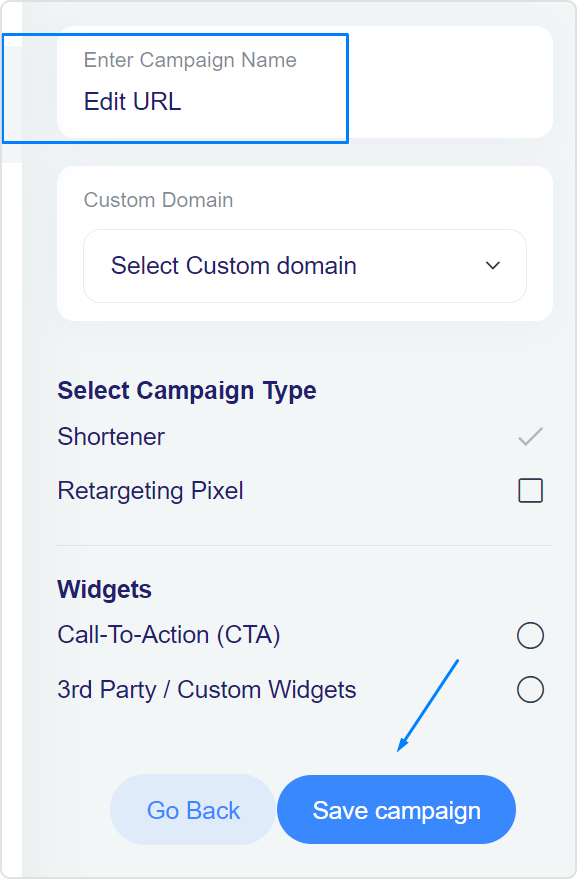
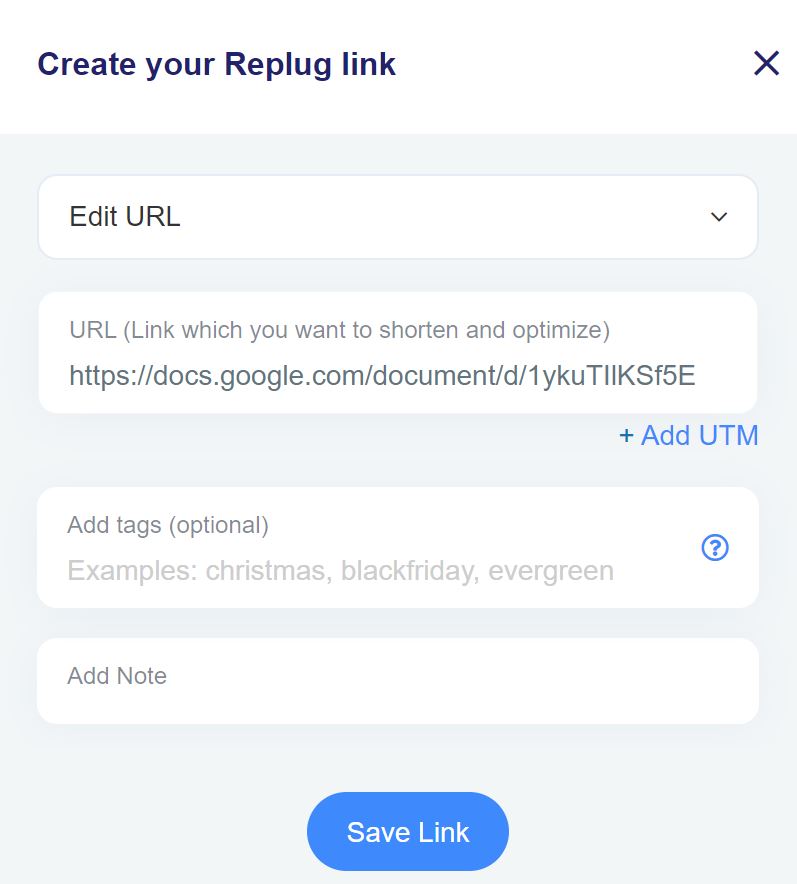
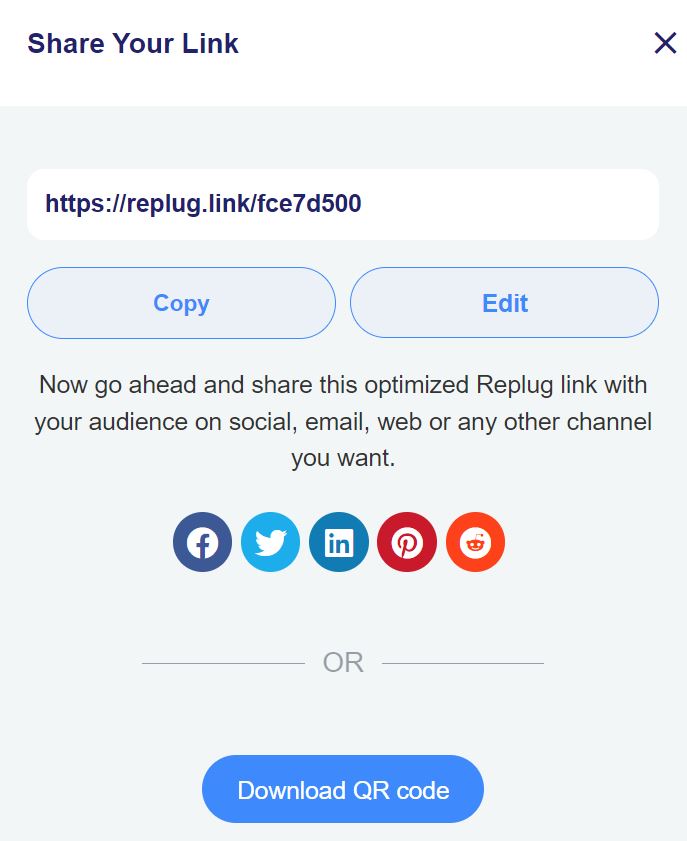
Marketing creates branded deep links for every onboarding email step, each link tracked separately in Replug.
The CRM or marketing automation tool segments users based on which links they’ve clicked vs. skipped.
Non-clickers on critical onboarding steps get flagged and routed to a re-engagement sequence with a different CTA.
Aggregate link behavior at the account level is passed to the CS platform to inform account health scores.
CS reviews accounts showing onboarding drop-off patterns and reaches out before the user hits the end of their trial or their renewal window.
The marketing infrastructure is already in place. It’s a matter of connecting it to the post-sales workflow.
Quick wins to start this week
If this feels like a big system to build, start smaller:
Replace all generic links in your onboarding emails with branded tracked links. One hour of work, immediate visibility into where users drop off.
Create deep links for your top three “sticky” features and A/B test them in your first 7-day email sequence against your current links.
Set up a CTA on your help content links so users reading documentation get a prompt to take the next step in the product.
Build a segment in your marketing tool for users who haven’t clicked any onboarding links in 5 days. That segment needs a different message than everyone else.
The takeaway
Branded links are not just an acquisition tool. The click-through lift, the trust signal, the tracking granularity: all of it applies just as much to a retention email as it does to a paid ad.
SaaS marketing teams that only use this infrastructure to drive signups are leaving a lot of retention leverage on the table. The onboarding window is short and the cost of churn is high. Putting branded links, deep links, and CTA overlays to work across the full customer journey is one of the more underutilized levers available to growth teams today.
Want to start tracking onboarding link behavior? Try Replug for free and get branded links set up for your next onboarding campaign in under 30 minutes.
Without solid marketing fundamentals, every campaign decision becomes a guess, budgets disappear, reports get messy, and nobody knows what actually drove sales.
This is because tactics without strategy burn fast. Ads go live with no clear offer, content goes out with no tracking, and revenue stays flat even when clicks look healthy.
There is a calmer way to work.
A clear understanding of the digital mark
Understanding fundamentals gives a steady base for every decision, from messaging to channel mix.
This guide walks through the classic 7 Ps of marketing. It shows how to build a customer‑centric plan and breaks down core digital channels. By the end, you’ll also know how tools like Replug help you market through data instead of guesswork.
Let’s break it all down, starting with the basics.
What are marketing fundamentals?
Marketing fundamentals are the basic marketing concepts that sit under every strong campaign. They go beyond promotion or catchy copy.
At a simple level, they describe how you discover, attract, keep, and grow the right customers, so that your work turns into repeatable revenue instead of random wins.
One of the best starting points for an introduction to marketing is the 7 Ps of the marketing mix.
These key marketing principles cover what you sell, how you price it, where people find it, how you promote it, who delivers it, the steps that support it, and the proof that your brand is real.
Here is a quick view of the 7 Ps.
The 7 Ps
What it covers
Product
What you sell and why it stands out
Price
How you charge, and the value people see
Place
Where and how customers get access
Promotion
How you share your message with the market
People
Everyone who shapes the customer experience
Process
The steps that move buyers from interest to delivery
Physical evidence
The visible signs of your brand such as site and packaging
Skipping any of these basics makes it harder to use marketing fundamentals well, because gaps in one area limit results in every other area.
What the 7 Ps of marketing actually cover
Read how each P works, and use them as a lever. Pull the right one at the right time, and your whole campaign shifts.
Product
Product is the offer you bring to market. It should solve a clear problem for a clear group of people. When the product fit is weak, no amount of ad spend can save the campaign.
As you shape your product, keep asking:
What problem does this solve?
Who cares deeply about that problem?
How is this different from the next best option?
A clear answer to those questions makes every later decision easier.
Price
Price signals both value and position. A very low price may bring fast sales yet harm perceived quality, while a higher price can support a premium image.
The key is to match the price with what the customer feels the offer is worth.
Think about:
What people already pay for similar offers
How sensitive are your buyers to price changes
Whether offers such as bundles, subscriptions, or payment plans fit your model
Pricing is not only about covering costs; it shapes how people see your brand.
Place
Place covers where people discover and buy your offer. For an e‑commerce store, this might be your site plus marketplaces. For a service, it might be sales calls booked through landing pages.
If the right buyers cannot reach you easily, growth stalls.
Ask yourself:
Where do target customers already shop, search, or hang out?
Do you need salespeople, self‑serve checkout, or both?
How does your buying path compare with your main competitors?
Make it as simple as possible for the right person to say “yes.”
Promotion
Promotion is how you tell the story of your offer. It covers ads, email, content, social media, and more. Strong promotion is clear, consistent, and aligned with the product, price, and place that you have already set.
Rather than trying every tactic, focus on:
A simple core message that explains your value
A few channels where your audience already pays attention
Repeating and refining what works instead of chasing every trend
Consistency often beats creativity that changes every week.
People
People include your team, partners, and support staff. The best message fails if a rude agent answers the chat or a slow response kills trust.
Training, culture, and scripts all matter here.
Think through:
Who interacts with customers at each stage?
What skills and tools do they need to do their best work?
How do you hire and train people to match your brand promise?
Every human touchpoint either builds or harms trust.
Process
Process is the set of steps that turn interest into delivery. Think sign‑up flow, checkout, onboarding, and follow‑up. Simple, smooth steps support higher conversion and lower churn.
You can map processes by:
Listing each step a buyer takes from first contact to repeat purchase
Spotting friction points, such as long forms or confusing emails
Removing steps that do not add value or clarity
A clean process makes it easier for buyers to move forward without needing extra help.
Physical evidence
Physical evidence is the visible proof that your brand is real. It includes your website, logo, packaging, social profiles, and even the style of your emails.
Consistent visuals and tone help people feel safe choosing you, and keeping that same look across dozens of social posts used to mean briefing a designer for every single variation.
Nano Banana inside Higgsfield holds the same style and character across every generated image, so that consistency doesn’t depend on a new design request each time.
Examples of physical evidence include:
Professional, on‑brand landing pages and product pages
Clear contact details and policies
Case studies, reviews, and testimonials with real names or companies
This visible proof often makes the difference when buyers compare similar offers.
What are the core digital marketing channels every marketer should know?
Basic digital marketing channels fall into inbound and outbound groups.
According to 23 key market research statistics, understanding your audience drives smarter channel selection across both categories.
Inbound methods pull people in with helpful content, strong search presence, and social proof. Outbound methods push messages out through ads, direct outreach, and mass media.
Most brands use a blend, though the balance shifts based on budget and timing.
Here are key channels that form the foundations of digital marketing:
Search engine optimization (SEO)
It focuses on free traffic from search engines. You research keywords, improve site structure, and build content that answers real questions.
Over time, this channel can drive steady traffic that supports many other content marketing fundamentals. It takes patience, but the compounding effect is powerful.
Content marketing
It turns your know‑how into articles, videos, podcasts, or guides.
The goal is to help before you sell, so that buyers see you as a trusted voice. When done with clear marketing fundamentals, content marketing feeds SEO, social, and email all at once.
A single strong piece can be repurposed into many smaller assets.
Email marketing
Email marketing builds direct lines to leads and customers. You can send welcome series, product education, or promo campaigns without relying on changing algorithms.
Because results are easy to track, email is one of the best channels for testing digital marketing principles such as personalization, timing, and offers. Make sure you follow the best email marketing practices for effective results.
Social media marketing
It lets you meet people where they already spend time.
Short posts, stories, and live streams can build community and awareness very fast. When combined with strong links and tracking, social platforms also feed traffic into your site and funnels or through social media retargeting.
Focus on the platforms where your audience is active instead of trying to be everywhere.
Affiliate marketing
It relies on partners who promote your offer for a commission. This channel can grow reach without large upfront spend because you pay for results.
Clear rules and good tracking keep things fair for both sides, and regular communication keeps partners motivated.
More traditional channels, such as print, radio, and TV, still matter in some markets. They can reach local or older groups that do not spend much time online.
For many brands, the best move is to combine online reach with a few focused offline bets.
Keep in mind that B2B programs usually have longer sales cycles and more decision makers, so they lean on education and trust. B2C efforts often need fast, clear offers that tap into emotion.
In both cases, solid marketing fundamentals guide which channels you pick and how you use them.
How to build a customer-centric marketing strategy
Every strong plan starts with one simple question: What does the customer actually need?
When you answer that with honesty and data, you can apply marketing strategy fundamentals in a clear way instead of chasing random tactics.
A customer‑first plan gives direction to channels, content, and offers. It also makes it easier to explain your choices to clients or internal teams.
The steps below give a simple path you can repeat for new products, markets, or campaigns.
Step 1: Know your audience
Use surveys, interviews, and on‑site polls to hear real language from buyers.
Add data from analytics tools to see what pages people visit and what content they share. From there, build personas that show segments such as B2B buyers, B2C shoppers, or repeat customers, along with their goals and pain points.
Try to capture:
What triggers them to look for a product like yours
What holds them back from buying
Which channels do they trust for information
Step 2: Analyze your environment
A SWOT view shows internal strengths and weaknesses along with external opportunities and threats. A PESTEL view focuses on wider forces such as laws, tech shifts, and social trends.
You can think of SWOT as inward and near-term, while PESTEL looks outward and long-term.
View type
Stands for
Main focus
SWOT
Strengths, weaknesses, opportunities, threats
Inside the business and direct market factors
PESTEL
Political, economic, social, technological, environmental, and legal
External macro-environment factors
Running both views once or twice a year keeps you aware of new risks and new openings before they surprise you.
Step 3: Set SMART objectives
Clear goals are specific, measurable, achievable, relevant, and time-bound (SMART).
Letter
Stands for
What it means
S
Specific
Clear and well-defined goals
M
Measurable
Goals trackable with numbers
A
Achievable
Realistic goals given your resources
R
Relevant
Goals tied to your business objectives
T
Time-bound
Goals that have a clear deadline
For example, you might aim to raise organic traffic by twenty percent in one quarter by publishing eight focused blog posts that target core marketing principles.
Try to define three to five main goals for the year and then break them into monthly actions so they turn into real work, not wishful thinking.
Step 4: Choose your channels
Not every channel suits every audience.
Pick two or three channels where your target customers already spend time and focus your effort there. For instance:
A B2B brand may lean on LinkedIn and email
A D2C brand may do better on Instagram and search.
Spreading thin across every platform dilutes impact.
Step 5: Build your messaging
Your message should speak directly to your customer’s problem and show clearly why your offer is the right fix.
Keep the core message consistent across every channel, even when the format changes. One clear value proposition, repeated well, outperforms five clever lines that say different things.
Step 6: Plan and execute your content
Turn your goals and messaging into a content calendar. Assign topics, formats, deadlines, and owners.
Consistency matters more than volume. A realistic plan that your team can stick to will always outperform an ambitious one that collapses in week two.
Step 7: Track, measure, and adjust
Set up tracking before anything goes live.
Define the metrics that match your SMART objectives, whether that is traffic, conversions, or retention. Review performance monthly and adjust what is not working. Strategy without measurement is just a plan on paper.
How to execute, measure, and improve your marketing strategy with Replug
A clear plan means nothing without execution.
Follow one simple cycle:
Plan
Execute
Analyze
Improve
Repeat it across every channel. That is how strategy turns into results.
Which is why Replug becomes a helpful execution partner.
Instead of guessing which links work or which calls to action should stay, you can manage, track, and improve all of them from one place.
Low conversion rates are normal on first touch. Replug lets you add retargeting pixels to your links so you can reach lost visitors again on Facebook, Google, LinkedIn, and TikTok, turning missed clicks into second chances.
Weak calls to action drain campaigns even with strong traffic. Replug’s CTA generator lets you build buttons, forms, and pop-ups and test wording, color, and layout without writing a single line of code.
A lack of brand trust often comes down to messy links. Replug fixes this with branded short links, custom domains, and clean affiliate links that look safe and on-brand every time.
Poor campaign visibility makes it hard to scale winners. Replug’s analytics dashboard tracks clicks, conversions, devices, locations, and referrers, with UTM tracking and A/B testing built in.
By combining this kind of link‑level insight with your broader strategy, you reduce guesswork and make each campaign easier to repeat and improve.
Good marketing starts with the right foundation
Understanding the marketing fundamentals is less about memorizing jargon and more about using a clear, simple frame for every decision. The 7 Ps keep your offer, price, place, promotion, people, process, and proof in sync. A customer‑first strategy, thoughtful channel mix, and data‑driven execution turn that frame into steady growth.
The next step is to pick one product or campaign and apply what you just read.
Map the 7 Ps for your offer
Define a few SMART goals
Choose one or two channels to focus on first
Track every important link and action
If you want help with link management, CTAs, retargeting, and analytics, explore how Replug can support your next campaign and make each click count more.
Frequently Asked Questions
What is the 3 3 3 rule in marketing?
The 3-3-3 rule in marketing is a strategic framework designed to simplify campaigns, prevent resource depletion, and boost effectiveness by focusing on three core pillars: three key messages, three target audience segments, and three primary marketing channels. This approach reduces clutter, increases brand consistency, and improves focus for better engagement.
What is the golden rule of marketing?
The golden rule of marketing is: know your customer better than they know themselves.
Every effective campaign starts with a deep understanding of your target audience, their problems, desires, and decision-making patterns. When you market to the right person, with the right message, at the right time, everything else falls into place.
What is inbound marketing?
Inbound marketing is a strategy that attracts customers to you by creating valuable content and experiences tailored to their needs.
Instead of interrupting people, inbound marketing earns attention through:
Blog posts and SEO content
Social media engagement
Email nurture sequences
Free tools, guides, and resources
What is outbound marketing?
Outbound marketing is a strategy where you initiate the conversation with potential customers, often interrupting their day to deliver a message.
Common outbound tactics include:
Paid ads (search, display, social)
Cold email and cold calling
TV, radio, and print advertising
Direct mail
What is B2B marketing?
B2B (Business-to-Business) marketing refers to strategies used by companies that sell products or services to other businesses.
Key characteristics:
Longer sales cycles with multiple decision-makers
Logic- and ROI-driven messaging
Channels like LinkedIn, email, webinars, and case studies
Emphasis on trust, credibility, and relationship-building
What is B2C marketing?
B2C (Business-to-Consumer) marketing refers to strategies used by companies that sell directly to individual customers.
Key characteristics:
Shorter, emotion-driven buying decisions
Broader audience targeting
Channels like social media, influencer campaigns, and paid search
Emphasis on brand experience and instant value
What are the core principles of effective product promotion?
Based on marketing fundamentals, effective product promotion rests on these core principles:
Clarity — Your core message must clearly explain the value you offer
Consistency — Repeat what works across channels rather than constantly reinventing
Channel fit — Focus on platforms where your audience already pays attention
Alignment — Promotion must match your Product, Price, and Place (the other Ps)
Tracking — Measure what drives results so you can optimize, not guess
Which fundamentals of marketing are essential for launching a new product successfully?
A successful product launch requires getting these 6 fundamentals right before going live:
Market fit product: Confirm your offer solves a real problem for a specific audience
Pricing strategy: Price based on perceived value, not just cost
Distribution (Place): Remove friction from the path to purchase
Promotion plan: Pick 2–3 channels; build one clear, repeatable message
People & process: Train your team and smooth out onboarding before driving traffic
Tracking setup: Use tools like Replug to measure results from day one
Black Friday is more than just a shopping day. It’s a high-stakes showdown for brands aiming to capture the spotlight and boost sales. Whether you’re a small business or a big retailer, a well-planned Black Friday campaign can maximize your impact and help you reach your goals.
Ready to turn browsers into buyers? With the right marketing ideas, you can stand out from the frenzy, win over new customers, and have your best Black Friday yet.
This blog discusses the 17 creative, tried-and-true strategies to help you cut through the noise, drive serious sales, and make this season unforgettable! Let’s dive in!
What is Black Friday marketing?
Let’s walk you through the inception of Black Friday marketing.
It all began in the U.S. back in the 1950s. It was a beautiful Friday after Thanksgiving, and a shopping storm was brewing in the U.S. As holiday lights started to sparkle, stores across the U.S. opened their doors with irresistible deals, marking the official start of Christmas shopping. Thus, Black Friday was born, a day when retailers rolled out jaw-dropping discounts, and shoppers raced to grab the best bargains before anyone else.
Fast forward to today, and Black Friday has grown into a global shopping sensation. It starts one month before Christmas, after Thanksgiving Day.
For retailers, it’s the perfect chance to boost sales and connect with new customers, while for shoppers, it’s a golden opportunity to score that dream item at an unbeatable price.
Why is it called “Black Friday”?
Black Friday was first used in 1869 when two investors, Jim Fisk and Jay Gould, crashed the market by dropping gold prices. As a result, foreign trade stopped, the stock market dropped by 20%, and farmers witnessed an unfortunate drop in wheat and corn values.
From 1950 to 1960, the term was used again for a day between the Army-navy game and Thanksgiving; the event summoned crowds of tourists and shoppers, requiring an extra few hours of effort by law enforcement to moderate the traffic.
In 1980, the term associated with shopping was used when retailers used the Black Friday term to reflect the backstory of accountants who used red ink for negative earnings and black for positive earnings.
Black Friday became the day when stores turned their profitability.
Since then, the term “Black Friday” has been in use. It has evolved into a season-long event that has spawned more shopping holidays like “Cyber Monday” and “Small Business Saturday”.
Black Friday is one of the most anticipated events for sellers and customers in the e-commerce business.
After the Pandemic, 80% of people switched to online shopping in the U.S. This makes it essential for e-commerce businesses to adopt smart, customer-centered strategies that attract and engage eager buyers.
1. Build your Black Friday email list
About 40% of people open their emails to see about Black Friday offers. This makes building an email list essential for connecting with customers. You can entice them with irresistible sales promotions by landing in their inboxes.
Don’t just focus on existing subscribers; invite new visitors to sign up for your email list by promoting your upcoming sales. Make your sign-up forms easy to fill by asking for their name and email address.
You can also use customer surveys and quizzes to grow your list. Consider offering incentives, like discount points, for those who subscribe and invite friends.
So, to nail your Black Friday marketing campaign, an email list is absolutely crucial. Your customers need to know that you’re offering those limited-time, unmissable deals!
Here is what boss business has to say about email list strategy:
2. Send personalized Black Friday advertising emails
Statistics show that 63% of people open emails specifically to find discounts. For businesses, this makes email marketing a no-brainer for Black Friday.
Here’s how you can build and send personalized Black Friday to promote your big sale in three easy steps:
Step 1: Create curiosity by sending an email one week before Black Friday to your customers and potential leads, informing them about the exciting upcoming event.
Step 2: Send a second email at the start of Black Friday to inform you about all discounts and offers. It will create fear of missing out.
Step 3: Send a third email to remind customers about the end of the sale and create a sense of emergency.
A customized email will make your customers feel important and exclusive. You need to post reminders on all social media channels along with an email campaign.
Here are some examples:
The famous SaaS platform Semrush and how it uses emails to promote its Black Friday sale. The marketing team creatively makes use of a catchy subject line, clickable images that lead to their Black Friday offer, and captivating images to entice its subscribers:
Here’s another example of Headline Studio by CoSchedule, an all-in-one AI Marketing Calendar platform. The highlights of this Black Friday marketing campaign include the use of an emoji in the subject line, a CTA button, and a visual representation of the price slash:
3. Boost Black Friday sales via Social Media
Top examples for Social Media Black Friday marketing campaigns:
Social media is the best platform to inform customers and users about your attractive discount offers and deals by sharing pro ads. According to stats, the most used social media platforms based on active users are Instagram, Facebook, YouTube, WhatsApp, and TikTok. Bulk WhatsApp messaging tools like WANotifier empower businesses to send personalized Black Friday deals and offers directly to customers, ensuring higher engagement and sales.
By providing information about upcoming offers before Black Friday, you can engage and excite your customers to check out all the deals on Black Friday. You should plan your offers and discounts wisely and share ads (paid and organic) to make people curious and excited about these offers.
You can also post stories, reels, posts, and videos or go live to introduce your Black Friday discounts and vouchers. Sponsored posts and stories are also a great source to gain an edge over the competition.
When scheduling your Black Friday content, make sure to use all social media features for maximum conversions wherever possible to maximize engagement and sales. Here are some excellent examples:
TikTok: Amazon gets weird
Amazon, the biggest e-commerce brand, took a weird and unusual take for its TikTok Black Friday marketing campaign:
KFC always has Finger Lickin’ Good deals for Black Friday. If that 50% discount doesn’t excite you, you’re probably missing out on life’s best flavors! Here’s an example of their Black Friday Marketing campaign on Facebook:
Instagram: Pro Direct Soccer drops the price (and the beat)
Pro Direct Soccer got a little swaggy with its huge price drop on Black Friday. Their Instagram reel took us on a jog with some upbeat music, cool visuals, and irresistible prices:
https://www.instagram.com/reel/ClgkHL0DNBL
YouTube: IKEA buys back old furniture on Black Friday
IKEA got us a little emo with its #BuybackFriday on YouTube. They didn’t offer a huge discount or anything; instead, they decided to take back old furniture and give it another life:
4. Roll out a Black Friday SMS marketing campaign
A Black Friday campaign isn’t complete without a solid SMS campaign.
But why SMS? Well, it’s immediate, super accessible, cost-friendly, and gets way more attention than email. When an SMS pops up on a customer’s phone, they’re way more likely to open it—especially during the busy Black Friday rush. Plus, you can send a quick, clear message with a link to all your deals.
Here’s how to make it work:
One week before: Send a sneak peek to get your customers curious about what’s coming. Build that excitement!
Black Friday morning: Hit them with the big news! Tell them that your discounts are live! Make it clear and action-oriented to get them shopping.
Last call: Remind them the sale’s almost over. Create some urgency to get those final clicks.
Another cool part about SMS marketing is that you can easily send loyalty and referral program invites, survey and feedback forms that can help you do better next year, and abandoned cart reminders.
It’s always better to use advanced SMS automation tools for your campaign. Some top SMS marketing software that can come in handy during the Holiday season are Insider, Textla, Birdeye, SlickText, Close, Ez Texting, and Salesmsg.
Here’s an example of how Function of Beauty understood the Black Friday marketing assignment:
If done right, SMS marketing can be a game-changer for your marketing strategy!
5. Upsell and cross-sell with discounts
Upselling and cross-selling are the best strategies to improve your Black Friday marketing.
In this, you can sell multiple products together to increase your earning potential.
An example of upselling could be that instead of selling a burger separately, you can make it a deal at a discount and at a better price by adding fries and drinks to attract customers.
Here’s an example of “Complete The Look” cross-sell offer with discounts by Adidas:
People prefer package deals over individual items. They won’t mind slight price fluctuation on deals – it can drive more sales and increase the number of products sold!
Give bundle discounts: You can attract more traffic to your stores by giving bundle discounts on your products. People buy more at a discount, which can increase sales in return.
Give your VIPs an exclusive Black Friday discount: To increase your earning potential, VIP customers receive exclusive discounts to appreciate their loyalty.
Focus on gift cards: To increase earning potential, you can distribute gift cards to your customers with attractive and special discounted offers and deals.
Here’s an example of Chuck E. Cheese, a famous restaurant chain in the United States:
Give a free gift with a purchase: To make your Black Friday sale attractive, make deals by announcing a buy-one-get-one offer. For example, if the customer buys a burger, offer a free drink. It will increase customers and urge them to buy more.
Here’s an example of the famous beauty brand Bobbi Brown:
Use coupon codes and vouchers: Boost your Black Friday sales with exclusive coupons and vouchers! Customers love a good deal, and these incentives can drive traffic, increase conversions, and make your offers stand out.
Check out this fantastic Black Friday offer by Kohl’s, where they offer a coupon code upon checkout for an additional discount:
7. Prevent cart abandonment using exit-intent popups
Cart abandonment occurs when an online shopper adds items to their cart but leaves the site without completing the purchase. This happens frequently, with customers leaving their carts full of products before finalizing checkout.
An exit-intent popup is a message that appears when a user is about to leave the site. These popups are highly effective at encouraging users to complete their purchases. Studies show that the average conversion rate for card abandonment popups is 17.12%
Exit-intent popups are especially powerful on Black Friday. They can showcase limited-time discounts and exclusive deals or even offer free shipping, reducing cart abandonment and boosting conversions.
Here’s an example of the exit intent popup of Usermaven, a website and product analytics tool:
Influencer partnerships are crucial for your Black Friday success. In fact, according to Influencer Marketing Hub, 24.2% of respondents intend to spend more than 40% of their marketing budget on influencer marketing.
Influencers help extend your reach to a wider audience, build trust, and create buzz around your deals. Their authentic recommendations can drive traffic, increase conversions, and boost brand visibility during the highly competitive Black Friday period. By collaborating with influencers, you tap into their loyal follower base, which can lead to a significant surge in sales.
Back in the picture again, we have Amazon. They used the famous TikToker Charlie D’Amelio to promote their Black Friday deals. Check it out:
Hashtags are essential for maximizing Black Friday visibility and engagement. They help categorize content, making it easier for shoppers to discover your deals among the flood of holiday offers.
Using popular and relevant hashtags, like #BlackFridayDeals or #HolidaySales, your posts reach a larger audience, attracting potential customers actively searching for discounts. Hashtags boost brand exposure and make it easy to join trending conversations, keeping your brand top-of-mind during the shopping season.
Creating a sense of urgency is key to boosting Black Friday sales.
Countdown timers, deal counters, and “limited time” alerts build anticipation before the sale starts and drive action once it begins. When shoppers see a countdown or “only hours left” message, they’re more motivated to act fast, knowing the deal won’t last forever.
By adding these urgency elements, you can maximize conversions and keep customers engaged right up until the final moments.
Here’s an example of Walmart’s “Limited time only” Black Friday offer:
This is how ContentStudio, a powerful social media management platform, uses a countdown banner on its landing page for its Black Friday software deal:
Retargeting ads are a powerful way to reconnect with customers who have previously visited your website and are especially useful for Black Friday promotions.
Pixel-based retargeting: This allows you to redisplay content to any anonymous site visitor who left without completing a purchase.
List-based retargeting: Here, you can upload a contact list to target individuals whose information you already have in your database. The platform will identify these users and show them relevant ads.
For Black Friday, where competition is fierce, a smart retargeting strategy is crucial to stand out. Using tools like Replug.io, you can add retargeting pixels to optimize reach and bring back potential customers. Replug’s features make it easy to track visitors and keep your brand visible.
Add social proof, like customer reviews, to your retargeting ads to increase trust. You can further shorten links for your Black Friday campaigns to make tracking and retargeting through Replug even more efficient and seamless.
12. Use bio links to direct people to your store
Bio links are clickable URLs added to the profile section of a page on social media channels such as Instagram or TikTok. They can direct customers to a website page or online store.
Before and on the Black Friday sale, you can put these bio links to direct people to your store to increase their promotions and customers. This can also save your customers time and give them a better experience.
13. Use deep links to direct people to the app store
Deep links are URLs that take users directly to an app store or specific app content, streamlining the journey for a faster, more convenient experience.
Drive more clicks, conversions, and app installations by deep linking
to your favorite platforms.
Try deep links for free
For Black Friday promotions, deep links can guide your audience straight to your app store, making the customer journey shorter and smoother while boosting engagement and retention. By bringing customers closer to the ultimate goal—conversion—deep links have increased conversions by up to 66%.
With deep links, customers can seamlessly purchase all their desired products in one app. Here’s an example of Waves Audio’s deep-linking ad for Black Friday:
Branded links are short, custom URLs unique to a brand. They offer a sleek alternative to long, generic links. These personalized links boost brand recognition and awareness, helping to build trust and credibility with your audience.
For example, Coca-Cola often uses branded links in tweets to make its posts instantly recognizable and catch people’s attention. For Black Friday promotions, branded links can enhance trust, attract more customers and increase sales:
Maximize marketing ROI
by transforming ordinary URLs into branded short links that convert.
Try Replug for free
15. Optimize checkout process
Optimizing the checkout process is essential for improving conversion rates.
For Black Friday sales, ensure the checkout process is streamlined to boost positive reviews and customer satisfaction. A well-optimized checkout should display all costs upfront, including shipping, taxes, and product price. This transparency leaves a positive impression on customers and encourages them to complete their purchase.
If the checkout process isn’t optimized, unexpected costs can lead to cart abandonment. Shoppers are eager to buy, but hidden fees often cause them to leave without completing their purchase.
An optimized checkout process enhances your e-commerce site’s user experience, helping maximize Black Friday sales.
For instance, this is what you’ll see upon checkout on Temu:
A/B testing, almost known as split testing, compares two versions of web pages or apps against each other to see which one performs the best.
In your Black Friday sale, you can use an A/B test to see the results of all ongoing marketing strategies.
You can check which strategies are working best and giving results by using advanced link management tools. Running an A/B test can have significant effects on your site or mobile app, such as:
It increases engagement
It reduces the bounce rate
It increases the conversion rate
It minimizes risk
It helps you create content effectively
A complete link management solution
for marketing professionals & agencies.
Try Replug for free
Through this test, you can check the effectiveness of your strategies and can modify your ideas for better results.
A call-to-action (CTA) is crafted to encourage the audience to take a specific action, guiding them through the customer journey. For Black Friday promotions, a well-placed CTA on a button or link can prompt users to check out the latest discounts and offers, helping to increase leads and conversions.
Using a tool like Replug makes it easy to create custom CTAs. Its built-in canvas allows you to design CTAs from scratch, whether a button, link, or form. This tailored approach ensures your Black Friday promotions are engaging and effective.
For this Black Friday, Lululemon, a famous Athletic clothing brand, creatively uses a “SHOP WE MADE TOO MUCH” CTA button. Upon clicking the button, the user is led straight to the Black Friday discount page:
Black Friday is a massive opportunity, but standing out requires more than just slapping a discount on your products. From building excitement early to leveraging data-driven insights and creating a seamless shopping experience, each strategy can help you connect with customers who are ready to buy.
Remember, Black Friday success is all about planning, flexibility, and staying ahead of trends. So, as the big day approaches, put these strategies into action, keep a pulse on customer feedback, and watch as your efforts turn into a holiday season win.
Happy selling!
FAQs about Black Friday marketing ideas
When should I start Black Friday promotions?
You should start your Black Friday promotions in the last week of October or the first week of November, as many people start looking for Black Friday in October. All the strategies for Black Friday should be managed before this day.
What types of promotions work best on Black Friday?
Discounts are popular, but there are many other successful strategies. Consider offering bundle deals, such as “Buy One, Get One” (BOGO), which offers gifts with purchase and limited-time discounts to create urgency. Make sure your promotions align with your brand and appeal to your specific audience.
What is the difference between Black Friday and Cyber Monday?
Both events offer a worldwide shopping experience. Black Friday belongs to the retail shopping arena, while Monday Cyber is designed for online shopping.
Black Friday follows the Friday after Thanksgiving. Monday cyber follows in the trail of Black Friday. It is one of a kind when online shoppers pick their online bargain without going to the retail stores.
How can I stand out from competitors on Black Friday?
Personalize your marketing wherever possible. Use segmented email campaigns, tailor social media ads to different audience groups, and emphasize what makes your brand unique. Excellent customer service and fast, easy checkout options can also set you apart.
How important is email marketing for Black Friday?
Email marketing is a must for Black Friday. With targeted, well-timed emails, you can build excitement, remind people about your sale, and re-engage customers who left items in their carts. Start with teasers, offer sneak peeks, and follow up with last-chance reminders.
How can I prevent my website from crashing due to high traffic?
This can definitely happen if you have a Black Friday sale. To optimize user experience, prepare your website ahead of time. Speak with your hosting provider to ensure it can handle a spike in visitors, and consider enabling a content delivery network (CDN) for faster load times. Reducing large image files and optimizing your website’s backend can also help.
What should I do if my Black Friday campaign doesn’t perform as expected?
It’s okay! If things don’t go as planned, use real-time data to adjust. Maybe you can add a flash sale, extend the promotion, or promote popular products more heavily. After the season, review analytics to learn what worked and what didn’t so you can improve for next year.
Web analytics tools act as a cornerstone for marketers, but with so many options, it can be hard to choose the right one.
No more confusion!
This blog will tell you all about the best web analytics tools available in 2026. We’ll compare features, user ratings, and pricing to help you choose the perfect web analytics tool and unlock website growth.
If you keep reading this blog further, in the next few minutes, you’ll have the knowledge to make an informed decision and maximize the value of your website traffic data.
For marketers who want a unified solution for link management and analytics, Replug.io offers a powerful platform that complements the tools discussed below.
Additionally, incorporating Free SEO Tools into your strategy can further enhance your ability to optimize your site, offering cost-effective solutions that improve your search rankings without straining your budget.
Quick overview: Which is the best web analytics tool? Usermaven cuts through website analytics confusion. Get real-time insights, prioritize privacy, and transform data into actions—all with a user-friendly setup and budget-friendly pricing. Boost conversions, improve user experience, and drive online success. Book your demo now!
Must-have features of web analytics tools
Here’s a concise list of the must-have features for web analytics tools:
Real-time link tracking: Gain insights into various links shared.
User behavior analysis: Understand why users act the way they do.
Mobile analytics: Understand how users interact on mobile devices.
E-commerce tracking: Optimize your online store with key metrics.
Heatmaps & session recordings: Visually see how users interact with your site.
A/B testing: Test and optimize your website for better conversions.
Cross-domain tracking: Track user journeys across multiple websites in your domain.
Auto-captured events: Gain insights from pre-defined user interactions without manual setup.
Annotations & notes: Add context to your data for deeper analysis and collaboration.
Integrations: Connect web analytics with other marketing tools.
Data visualization & reporting: Get clear, actionable insights from your data.
Customizable dashboards: Track key metrics at a glance.
Data export options: Analyze data further with other tools.
Whether you’re running marketing campaigns, sending out newsletters, or sharing content on social platforms, understanding how users interact with your shared material is just as important as tracking link and website analytics.
That’s why many marketers prefer to combine their analytics setup with a trusted link shortener, to not only shorten URLs for cleaner sharing but also track clicks, conversions, and user behaviour on every link they distribute.
Top 12 web analytics tools
Here are the top 12 web analytics tools we’ll be examining in detail:
Usermaven
GA4 (Google Analytics 4)
Matomo
Piwik PRO
Plausible
Simple Analytics
Clicky
Fathom Analytics
Chartbeat
Tiny Analytics
Statcounter
Open Web Analytics
Each of these website analytics tools offers unique features and benefits to help businesses understand and optimize their website performance. We’ll dive into each specifics in the following sections. First, let’s see their ratings;
The G2 ratings and Product Hunt ratings for the specified web analytics tools are as follows;
Tool
G2 Rating
Product Hunt Rating
Usermaven
4.9
4.9
GA4 (Google Analytics 4)
4.5
–
Matomo
4.2
4.7
Piwik PRO
4.6
5
Plausible
5.0
4.8
Simple Analytics
4.4
4.9
Clicky
4.5
–
Fathom Analytics
4.6
4.9
Chartbeat
4.4
–
Tiny Analytics
–
–
StatCounter
4.3
5
Open Web Analytics
4.5
–
1. Usermaven
“From data to decisions: Usermaven – Your perfect website analytics partner.”
Usermaven, a solid privacy friendly product and web analytics tool for marketers and enterprises of all sizes. When it comes to website analytics, Usermaven provides a comprehensive suite of features necessary in a web analytics tool for understanding and optimizing website performance.
Key features of Usermaven
Here are the key features relevant to web analytics:
Website metrics: Usermaven tracks the number of unique visitors, total pageviews, number of sessions, average visit duration, and bounce rate to provide insights into website performance and user engagement.
Events: Tracks specific user actions (e.g, clicks, form submissions, video plays) to understand how users interact with different elements of your website. Usermaven shows auto-captured events; you can pin events of your choice and create custom events as well.
Top Channels/Sources: Identifies the most effective marketing channels and traffic sources (e.g., organic search, social media, referrals) driving visitors to your site.
UTM traffic: Analyzes traffic from UTM-tagged campaigns, allowing you to measure the effectiveness of specific marketing efforts and adjust strategies accordingly.
Conversion goals: Sets and track specific conversion goals (e.g., form completions, purchases) to measure the success of your marketing efforts and website performance.
Device location: Provides data on the geographical locations of your visitors, helping you understand your audience’s distribution and target regions more effectively.
Funnels: Funnel analysis enable you to visualize the steps users take to complete a goal (e.g., checkout process), identifying drop-off points and opportunities to optimize the user journey for higher conversions.
Attribution: Track every customer touchpoint across multiple channels to understand the true impact of your marketing efforts. Usermaven offers seven attribution models, including Linear, First Touch, Last Touch, Position Decay, Time Decay (new), First Touch Non-Direct (new), and Last Touch Non-Direct (new), enabling data-driven decision-making.
User journey tracking: Visualize and analyze user paths through your product using Usermaven to identify friction points and improvement opportunities.
Maven AI: Leverage AI-driven insights and recommendations with Usermaven to optimize product performance and user experience.
Comprehensive reports: With the recent overhaul of the Reports feature, you can now schedule reports to be sent daily, weekly, or monthly and specify the exact hour for delivery.
Usermaven offers several pricing tiers to cater to different business needs and those who are looking for an ideal web analytics tool:
Pro: ($14/month) is ideal for businesses and agencies and includes unlimited websites, workspaces, and users, 2 years of data history, website analytics, and more.
Premium: ($24/month) includes everything in Pro plus unlimited data history, SaaS product analytics, multi-touch attribution, etc.
Enterprise: (custom pricing) is designed for businesses with custom requirements and includes everything in Premium.
Reviews
Sr.
What people like about it
What people dislike about it
1.
Like: User-friendly interface and intuitive design.
Dislike: Advanced features require a paid plan.
2.
Like: Excellent customer support and onboarding assistance.
3.
Like: Automated insights and actionable recommendations.
Note: These reviews of web analytics tools are synthesized from various sources such as G2, Capterra, Product Hunt, TrustRadius, Software Advice, and customer testimonials.
2. Google Analytics 4 (GA4)
Google Analytics 4 (GA4) is the latest version of Google’s popular web analytics tool, designed to provide comprehensive insights into user behavior across websites and apps. With enhanced machine learning capabilities and privacy-centric features, GA4 offers a more robust and flexible approach to tracking and analyzing user interactions.
Key features of GA4
Event-based tracking: GA4 focuses on events, allowing for detailed tracking of user interactions beyond just page views.
Cross-platform tracking: It enables tracking of user activity across the web and app, providing a unified view of customer journeys.
Enhanced measurement: Automatic tracking of common events like scrolls, outbound clicks, site searches, and file downloads.
Machine learning insights: Predictive analytics and insights powered by machine learning to identify trends and opportunities.
Debugging and testing: Integrated debugging and testing tools to streamline setup and ensure accurate data collection.
Flexible reporting: Customizable reporting and analysis tools to create tailored insights.
Audience building: Advanced audience segmentation capabilities for targeted marketing efforts.
Integration with Google products: Seamless integration with Google Ads, BigQuery, and other Google products.
User-centric measurement: Focus on user-centric data, enabling a better understanding of individual user journeys.
Pricing plan of GA4
Google Analytics 4 offers two main pricing plans:
Free tier: This plan provides basic features and is suitable for small to medium-sized businesses.
Google Analytics 360: Pricing for GA360 is customized based on business needs.
Reviews
Sr.
What people like about it
What people dislike about it
1
Like: Advanced tracking capabilities and event-based models.
Dislike: Steeper learning curve compared to Universal Analytics.
2
Like: Integration with other Google services.
Dislike: Privacy concerns (non-GDPR compliant)
3
Like: Predictive analytics powered by machine learning.
Dislike: Limited customer support in the free version.
3. Matomo
Matomo is a versatile web analytics tool that offers complete control over data, providing in-depth insights into user behavior and website performance. Matomo emphasizes privacy, data ownership, and customization to meet the unique needs of businesses and organizations.
Key features of Matomo
Open source: Matomo is open-source, giving users complete control over their data and the ability to customize the platform to their needs.
Data ownership: Users own 100% of their data, ensuring privacy and compliance with data protection laws like GDPR.
No data sampling: Provides accurate reports without data sampling, even for large datasets.
Privacy features: Enhanced privacy features, including anonymizing IP addresses and managing user consent.
Customizable dashboards: Users can create custom dashboards and reports tailored to specific business needs.
E-commerce tracking: Comprehensive e-commerce tracking capabilities to monitor sales, conversion rates, and product performance.
Integration with various platforms: Integrates with various CMS, e-commerce, and marketing platforms.
Performance metrics: Detailed insights into website performance, including page load times and server response times.
Pricing plan of Matomo
Matomo offers several pricing plans:
Free on-premise version: Users can download and host Matomo on their own servers at no cost.
Cloud hosting: Starting at €22 per month, this plan includes automatic updates, backups, and customer support.
Reviews
Sr.
What people like about it
What people dislike about it
1
Like: Full data ownership and privacy compliance.
Dislike: Initial setup can be complex.
2
Like: Comprehensive e-commerce tracking.<br>- Visual tools like heatmaps and session
Dislike: Requires technical knowledge to fully utilize features.
3
Like: Extensive integration options.
Dislike: User interface is less intuitive compared to competitors.
4. PiwikPro
Piwik PRO is a comprehensive web analytics tool tailored for enterprises that prioritize data privacy and regulatory compliance. Offering powerful analytics capabilities, Piwik PRO enables organizations to track user behavior while ensuring strict adherence to privacy laws such as GDPR and HIPAA.
Key features of PiwikPro
Data privacy compliance: PiwikPro is known for its strong focus on data privacy, ensuring compliance with GDPR, HIPAA, and other regulations.
User-friendly interface: Offers a clean and intuitive interface, making it easy for users to navigate and extract insights.
Customizable reports: Provides extensive customization options for reports, enabling users to tailor the data to their specific needs.
Comprehensive analytics: Includes features such as session recording, heatmaps, and funnel analytics to provide a deep understanding of user behavior.
Data ownership: Users have complete ownership and control over their data, with options for on-premises or cloud hosting.
Seamless integrations: Easily integrates with various third-party tools and platforms, enhancing its functionality.
Tag management system: Includes a high-powered tag management system for efficient data collection and tracking.
Support and training: Offers excellent customer support and training resources to help users maximize the platform’s potential.
Pricing plans of PiwikPro
PiwikPro offers a range of pricing plans tailored to different business needs. However, detailed pricing information is generally provided upon request. Commonly, they offer:
Core Plan: Free plan suitable for small websites with limited features.
Enterprise Plan: Comprehensive plan for large enterprises, with full access to all features and dedicated support. Pricing starts from €10,995 /year.
Reviews
Sr.
What people like about it
What people dislike about it
1
Like: Users appreciate the strong focus on data privacy and compliance with regulations like GDPR.
Dislike: Some users find the initial setup process to be complex and time-consuming.
2
Like: The customizable reports and extensive analytics capabilities are highly valued.
Dislike: Pricing is really high as compared to other options.
3
Like: Excellent customer support and comprehensive training resources receive positive feedback.
Dislike: The user interface, while functional, can be seen as less modern compared to competitors.
A complete link management solution
for marketing professionals & agencies.
Try Replug for free
5. Plausible
Plausible is a lightweight and privacy-focused web analytics tool designed to provide essential insights without compromising user privacy. It offers a simple and intuitive interface, delivering key metrics and real-time data to help website owners understand their audience and optimize their online presence.
Key features of Plausible
Privacy-focused analytics: Plausible emphasizes user privacy, offering analytics without the use of cookies and ensuring compliance with privacy regulations.
Simplified dashboard: Provides a clean and easy-to-use dashboard with essential metrics like visitors, page views, and bounce rates.
Real-time analytics: Offers real-time data updates, allowing users to monitor website performance instantly.
Goal tracking: Includes goal tracking features to measure specific actions and conversions on websites.
Customizable reports: Allows users to create custom reports and filter data based on various parameters.
Performance metrics: Provides insights into site speed, device types, and traffic sources to optimize performance.
Integration capabilities: Integrates seamlessly with popular platforms like WordPress, Shopify, and more.
Open source: Being open-source, Plausible offers transparency and allows for community contributions and customization.
Pricing plans of Plausible
Plausible offers transparent pricing plans based on the number of page views per month. As of the latest updates:
Growth: Starts from $9/month.
Business: Starts from $19/month.
Enterprise: Offers custom pricing.
Reviews
Sr.
What people like about it
What people dislike about it
1
Like: Users appreciate the simplicity and clarity of the dashboard.
Dislike: Some users find the customization options for reports and analytics to be somewhat limited compared to more complex tools.
2
Like: The focus on privacy and the ability to track goals and conversions without invasive tracking methods receive positive feedback.
Dislike: Users have reported occasional issues with integration and data accuracy, especially with certain CMS platforms.
3
Like: The open-source nature of Plausible is highly valued for its transparency and community-driven development.
Dislike: Pricing can become expensive as website traffic grows, which may not be cost-effective for very high-traffic sites.
6. Simple Analytics
Simple Analytics is a privacy-friendly web analytics tool that delivers essential website metrics without tracking personal data. An easy-to-use interface provides clear insights to help website owners make informed decisions while ensuring compliance with privacy regulations.
Key features of Simple Analytics
Privacy-focused analytics: Similar to Plausible, Simple Analytics emphasizes privacy by providing analytics without the use of cookies or tracking personal data.
Real-time dashboard: Offers a real-time dashboard that updates instantly, displaying essential metrics like visitors, page views, and referrers.
User-friendly interface: Provides a clean and intuitive interface, making it easy for users to navigate and understand their website analytics.
No ads or tracking: Ensures that the analytics tool itself does not track users or display ads, focusing solely on providing accurate data insights.
Goal tracking: Allows users to set and track goals, such as conversions or specific user actions, to measure website performance effectively.
Customizable reports: Offers customizable reports and filtering options to analyze data based on different parameters and time frames.
Integration capabilities: Integrates smoothly with various platforms and CMSs, simplifying setup and data collection processes.
Pricing plans of Simple Analytics
Simple Analytics offers straightforward pricing based on the number of page views per month:
Free: Ideal for personal websites or blogs.
Personal: Starts from $10/month.
Team: Starts from $40/month.
Enterprise: Contact sales.
Reviews
Sr.
What people like about it
What people dislike about it
1
Like: Users appreciate the simplicity and ease of use, especially the real-time dashboard and privacy-focused approach.
Dislike: Some users find the reporting capabilities to be basic compared to more feature-rich analytics tools.
2
Like: The commitment to privacy and no ads/tracking policy receives positive feedback.
Dislike: Integration with some specific platforms or custom setups may require additional configuration or support.
3
Like: Customer support is praised for being responsive and helpful.
Dislike: Pricing might be seen as slightly higher compared to competitors offering similar features.
7. Clicky
Clicky is a real-time web analytics tool that offers detailed insights into website traffic and user behavior. With features like heatmaps, uptime monitoring, and customizable dashboards, Clicky provides comprehensive data to help website owners optimize their online performance and user engagement.
Key features of Clicky
Real-time analytics: Provides real-time data updates, allowing users to monitor website traffic and activity instantly.
Detailed visitor information: Offers detailed insights into visitor behavior, including heatmaps, session details, and individual visitor tracking.
Goals and conversion tracking: Allows users to set goals and track conversions, providing insights into website performance and marketing campaigns.
Customizable dashboards: Provides customizable dashboards and reports to tailor analytics data according to user preferences.
Heatmaps: Offers heatmaps to visualize user interaction and engagement on web pages.
Uptime monitoring: Provides uptime monitoring to alert users of website downtime or performance issues.
API access: Offers API access for integration with other applications and services.
Pricing Plans of Clicky
Clicky offers pricing plans based on the number of websites and page views tracked:
Free Plan: Includes basic features with limited data retention and website tracking.
Pro Plan: Starts from $9.99/month.
Pro Plus: Starts from $14.99/month.
Pro Platinum: $19.99/month.
Custom: varied pricing.
Reviews
Sr.
What people like about it
What people dislike about it
1
Like: Users like the real-time analytics and detailed visitor information, including heatmaps and individual visitor tracking.
Dislike: Some users find the user interface to be less intuitive compared to other analytics tools.
2
Like: The goals and conversion tracking features receive positive feedback for their effectiveness in monitoring website performance.
Dislike: Pricing for higher traffic volumes may be perceived as expensive compared to competitors offering similar features.
3
Like: The “Spy” feature is praised for its real-time tracking capabilities and detailed insights into user behavior.
Dislike: Customer support responsiveness can vary, with occasional delays in resolving technical issues reported by some users.
8. Fathom Analytics
Fathom Analytics is a privacy-focused web analytics tool that provides straightforward and actionable insights without tracking personal data. It offers a clean, user-friendly interface, enabling website owners to understand their audience and improve their online presence while respecting user privacy.
Key features of Fathom Analytics
Privacy-focused analytics: Fathom Analytics prioritizes user privacy by offering analytics that is GDPR, CCPA, and PECR compliant without the use of cookies.
Real-time analytics: Provides real-time data updates and insights into website traffic and visitor behavior.
Simple dashboard: Offers a clean and intuitive dashboard for easy navigation and understanding of analytics data.
Goal tracking: Allows users to set goals and track conversions to measure the effectiveness of marketing campaigns and website performance.Incorporating free time tracking software can help you monitor the time spent on each campaign phase, ensuring that your efforts are both efficient and well-documented.
Website performance monitoring: Provides insights into website performance metrics such as page load times and bounce rates.
Customizable reports: Offers customizable reports and data filters to analyze website traffic based on various parameters.
Integration capabilities: Integrates with various platforms and content management systems (CMS) for seamless setup and data collection.
No ads or tracking: Ensures that the analytics tool itself does not track users or display ads, focusing solely on providing accurate and privacy-conscious data.
Pricing plans of Fathom Analytics
Fathom Analytics offers straightforward pricing plans based on the number of websites and page views tracked:
Up to 100,000 data points: $15 per month
Up to 1,000,000 data points: $60 per month
Up to 25,000,000 data points: $470 per month
Over 25,000,000 data points: Contact Fathom Analytics for a quote
Reviews
Sr.
What people like about it
What people dislike about it
1
Like: Users appreciate the privacy-focused approach and compliance with data protection regulations like GDPR.
Dislike: Some users find the feature set to be limited compared to more comprehensive analytics tools.
2
Like: The simplicity and ease of use of the dashboard receive positive feedback for making analytics accessible to all users.
Dislike: Pricing may be considered higher compared to other similar privacy-focused analytics solutions.
3
Like: The real-time analytics and customizable reports are praised for providing valuable insights into website performance.
Dislike: Integration with certain platforms or custom setups may require additional configuration or support.
Maximize marketing ROI
by transforming ordinary URLs into branded short links that convert.
Try Replug for free
9. Chartbeat
Chartbeat is a real-time web analytics tool tailored for content creators and publishers, offering in-depth insights into audience engagement and content performance. With features like real-time dashboards, headline testing, and in-depth reporting, Chartbeat helps optimize content strategy and maximize reader engagement.
Key features of Chartbeat
Real-time analytics: Provides real-time data updates on website traffic, engagement metrics, and content performance.
Audience insights: Offers detailed audience segmentation and insights to understand visitor behavior and demographics.
Content optimization: Helps optimize content strategy with insights into popular content, engagement levels, and reader retention.
Engagement metrics: Measures user engagement metrics such as scroll depth, time on page, and social sharing.
Traffic sources: Tracks and analyzes traffic sources to identify where visitors are coming from and their behavior patterns.
Video analytics: Provides analytics for video content, including views, completion rates, and engagement metrics.
Mobile analytics: Offers mobile-specific analytics to monitor and optimize performance across mobile devices.
Integration capabilities: Integrates with various CMS platforms, advertising networks, and marketing tools for comprehensive data collection and analysis.
You may also like: How to Build Custom Audiences through Replug URL Tracking
Pricing plans of Chartbeat
Chartbeat typically offers customized pricing plans based on specific business needs, website traffic, and additional features required. Detailed pricing information is usually provided upon request or through direct consultation with their sales team.
Reviews
Sr.
What people like about It
What people dislike about it
1
Like: Users appreciate the detailed real-time analytics and audience insights that help them understand visitor behavior.
Dislike: Some users find the interface to be complex and overwhelming, especially for new users.
2
Like: The content optimization tools and engagement metrics receive positive feedback for improving content strategy and performance.
Dislike: Pricing may be considered high, especially for smaller businesses or websites with lower traffic volumes.
3
Like: The integration capabilities and support for various platforms are praised for enhancing functionality and data collection.
Dislike: Customer support responsiveness can vary, with occasional delays reported when resolving technical issues.
10. Tiny Analytics
Next on our best web analytics tools list is Tiny Analytics. It is a minimalist web analytics tool that focuses on delivering essential insights without overwhelming complexity. Designed for simplicity and ease of use, it provides key metrics to help website owners understand their audience and improve their online performance.
Key features of Tiny Analytics
Simple and lightweight: Tiny Analytics focuses on simplicity and minimalism, providing essential analytics metrics without unnecessary complexity.
Real-time data updates: Offers real-time updates on website traffic, visitor behavior, and engagement metrics.
User-friendly interface: Provides a clean and intuitive interface for easy navigation and data visualization.
Privacy-conscious: Ensures user privacy with minimal data collection and no use of cookies or tracking mechanisms.
Customizable dashboards: Allows users to customize dashboards and reports according to their specific needs and preferences.
Goal tracking: Includes goal tracking features to monitor and measure conversions or specific actions on websites.
Mobile-friendly: Optimized for mobile devices, providing analytics on mobile traffic and performance.
Integration capabilities: Integrates smoothly with various platforms and content management systems (CMS) for seamless setup and data integration.
Pricing plan of Tiny Analytics
Free plan: $0/month.
Basic plan: Starts from $49/month.
Advanced: $129/month.
Reviews
Sr.
What people like about it
What people dislike about it
1
Like: Users like the simplicity and lightweight nature of Tiny Analytics, making it easy to use and understand analytics data.
Dislike: Some users may find the feature set limited compared to more comprehensive analytics tools.
2
Like: The real-time data updates and user-friendly interface receive positive feedback for providing instant insights and ease of use.
Dislike: Customization options for reports and dashboards may be perceived as limited for advanced users or specific needs.
11. Statcounter
Statcounter is a comprehensive web analytics tool that provides detailed statistics on website traffic and visitor behavior. With features like real-time data tracking, customizable reports, and user-friendly dashboards, StatCounter helps website owners and marketers optimize their online presence and improve user engagement.
Key features of Stat Counter
Website traffic analysis: Provides detailed insights into website traffic, including visitor trends, page views, and visitor locations.
Visitor behavior: Tracks visitor behavior such as entry pages, exit pages, bounce rates, and session durations.
Keyword analysis: Offers keyword analysis to understand how visitors find the website through search engines.
Customizable alerts: Allows users to set up customizable alerts for traffic spikes, visitor trends, or specific events.
User-friendly interface: Provides a straightforward and easy-to-use interface for navigating analytics data.
Geolocation tracking: Provides geolocation tracking to see where visitors are located globally.
Mobile analytics: Offers analytics for mobile website traffic and performance.
Customizable reports: Allows users to create customized reports and export data for further analysis.
Pricing plan of Stat Counter
Stat Counter offers various pricing plans tailored to different needs:
Basic plan: It is free of cost.
Premium plan: €16/month.
Premium plus: €28/month.
Reviews
Sr.
What people like about it
What people dislike about it
1
Like: Users appreciate the detailed website traffic analysis and visitor behavior tracking features.
Dislike: Some users find the interface outdated compared to more modern analytics tools.
2
Like: The customizable alerts and geolocation tracking receive positive feedback for providing actionable insights.
Dislike: Customer support response times can vary, with occasional delays reported when resolving issues.
12. Open Web Analytics
Open Web Analytics (OWA) is an open-source web analytics software that offers extensive tracking and reporting capabilities. It allows website owners to monitor visitor behavior, track conversions, and analyze traffic sources using customizable dashboards and reports. OWA provides flexibility and control over data, making it a suitable choice for businesses seeking a customizable analytics solution.
Key features of Open Web Analytics
Open source: Open Web Analytics is an open-source web analytics platform that allows for transparency, customization, and community contributions.
Real-time analytics: Provides real-time data updates on website traffic, visitor behavior, and engagement metrics.
Customizable dashboards: Offers customizable dashboards and reports to tailor analytics data according to user preferences.
Goal tracking: Allows users to set goals and track conversions to measure the effectiveness of marketing campaigns and website performance.
Event tracking: Provides event tracking capabilities to monitor specific user interactions and actions on websites.
User-friendly interface: Offers a user-friendly interface for easy navigation and data visualization.
Integration capabilities: Integrates with various platforms and content management systems (CMS) for seamless setup and data integration.
Privacy-conscious: Ensures user privacy by allowing users to host their analytics data and control data collection practices.
Pricing plan of Open Web Analytics
Open Web Analytics is typically free to use as it is open-source software. Users can download and install it on their own servers or hosting environments without cost.
Reviews
Sr.
What people like about it
What people dislike about it
1
Like: Users appreciate that Open Web Analytics is open-source, providing transparency, customization options, and community support.
Dislike: Setting up and configuring Open Web Analytics may require technical expertise and effort.
2
Like: The real-time analytics capabilities and customizable dashboards receive positive feedback for their usefulness in monitoring website performance.
Dislike: Documentation and support resources may be limited compared to commercial analytics solutions, requiring self-help or community assistance.
Why choose Usermaven over other website analytics tools
What if there was a solution that prioritized both user privacy and actionable insights, delivered with a user-friendly interface?
Look no further than Usermaven. Here’s how Usermaven stands out from the crowd:
Privacy champion:
User trust matters: Unlike GA4, Clicky, and many others, Usermaven is 100% GDPR and CCPA-compliant. We prioritize user privacy, never tracking personal data or selling your information.
Peace of mind: Focus on your website, not privacy regulations. Usermaven simplifies compliance compared to the complexities of self-hosting solutions like Open Web Analytics.
Effortless setup:
No coding required: Get started in minutes with our intuitive interface. Leave the coding headaches behind with Piwik Pro’s steeper learning curve.
Fast implementation: Unlike tools with delayed onboarding processes (Matomo), Usermaven empowers you to unlock insights quickly.
Actionable insights in real-time:
See it now act now: Witness user behavior unfold before your eyes. Usermaven provides real-time data, unlike delayed reporting in Stat Counter and Simple Analytics.
Go beyond the surface: Ditch vanity metrics. Usermaven dives deep, revealing user journeys, conversion funnels, and engagement patterns, offering more value than basic tools like Plausible and Tiny Analytics.
Cost-effective champion:
Value without the burden: Unlock powerful insights for less. Usermaven offers a free trial and flexible pricing plans, making it accessible to all businesses. This is a stark contrast to often-expensive solutions like Chartbeat and Fathom Analytics.
User reviews:
Hear from satisfied users: Usermaven boasts positive reviews praising its user-friendliness and privacy focus.
A complete link management solution
for marketing professionals & agencies.
Try Replug for free
Final verdict: The best web analytics tool
After carefully considering its distinctive features, stellar ratings, and competitive pricing, Usermaven emerges as the top choice for businesses seeking a web analytics tool that balances power with affordability.
Usermaven empowers you to understand, optimize, and convert your website visitors with unparalleled ease and complete user privacy. It’s the perfect solution for businesses and agencies seeking a powerful yet approachable website analytics tool.
Website analytics tools track and analyze user behavior on websites, providing insights into visitor interactions, traffic sources, and more.
How do I choose a web analytics tool?
Choose a web analytics tool based on your specific needs, such as features like real-time data, user privacy options, ease of use, and pricing that fits your budget.
What web analytics tool is better than Google Analytics?
Usermaven surpasses Google Analytics with its advanced features, intuitive interface, and stringent privacy controls, making it the superior choice for businesses seeking a comprehensive web analytics tool.
Spice up your social media game with some killer Instagram marketing tools! And take your brand to the next level!
Yes, you’ve heard me right! Whether it’s promoting your brand online, building social proof, generating leads, increasing engagement, or measuring brand analytics.
All that and more can be achieved with the right Instagram marketing tools. However, there are a lot of different marketing tools in the market now. And each of them serves multiple purposes. You must choose the right one per your brand’s needs and demands.
Below, we have reviewed the 14 best Instagram marketing tools, which can quickly skyrocket your brand’s online visibility.
Alright! Let’s dive into the details.
What is Instagram marketing?
Instagram marketing is the process of promoting a business, its products, or its services through the Instagram social media network.
It involves creating content that resonates with followers and encourages them to engage with the brand. With the right Instagram marketing strategy, one can increase the number of leads, expand the brand’s online visibility and connect with the targeted audience. Now let’s jump into the tools.
15 must-have Instagram marketing tools
When it comes to finding the right tool for the job, there are a lot of factors to consider, such as its user interface, effectiveness, customer service, etc. Thankfully, some tools out there hit the nail on the head.
Social Media Management Tools
1. ContentStudio
Get ready to meet the superstar of Instagram marketing tools –ContentStudio! Used for scheduling posts, influencer discovery, AI-based captions generator, workflow approval, Canva integration, tracking analytics, etc. So, plan, create, and schedule posts that will make your followers stop scrolling and say,
“Wow, this ismind-boggling” Move over, mere mortals!
ContentStudio is like having a personal marketing assistant but without coffee runs.
Moreover, you can use fancy filters to enhance your visual content and share it on social platforms to raise brand awareness. Also, you can write and customize posts per your potential audiences with the AI-writer feature.
And with our built-in Instagram competitor analytics tool, you can always stay one step ahead of the game.
Iconsuqaure lets you build a custom campaign to promote your product, schedule your postings and streamline your data. Due to the large amount of information that is available online, it might be challenging to keep track of how your audience perceives your business.
With this tool, you can ensure that your account gets the audience you want it to if you personalize each of your daily posts on it.
Moreover, if you’re curious about the number of times your brand has been mentioned on Instagram, you can easily find out through the platform’s analytics of Iconsuqare. Most freelancers and individuals in the field may find the tool pricey. However, it’s perfect for agencies and large-scale businesses.
If you’re here, you may already hear about Buffer. This tool is the real deal! It lets you kill two birds with one stone by allowing you to schedule Instagram posts ahead of time, spice them up with eye-catching visuals, and even create bio-links.
You’ll need a time-traveling tool to schedule your posts in advance to avoid the stress of last-minute content creation- like Buffer.
So you can spend more time binge-watching Netflix and less time trying to get along with boring market trends.
Keeping your brand alive nowadays is like swimming upstream with a lead weight tied to your ankle. Unless you’re happy being a loser, you might want to consider winning over your competitors.
We advise you to use this as an all-in-one link management tool to shorten a link, adding retargeting pixels, embedding CTAs, and creating social media bio-links.
Replug.io helps you automatically build custom audiences on different ad networks and convert anyone who views your content through its retargeting pixel feature.
Moreover, its bio-link feature allows you to host multiple social links in one customizable page, and with Replug’s Instagram link shortener, you can create clean, branded URLs that fit perfectly in your Instagram bio while driving clicks to your content.
So why wait? Give it a try today and see the results for yourself.
With Later, you can easily create bio links and also schedule your social media posts. Generate visual content calendars to help you stay organized and on top of your Instagram game.
And if you have multiple Instagram accounts, Later makes it easy to generate a different content library for each one, so you can keep your content fresh and engaging across all your profiles.
This beast has a drag-and-drop visual planner feature, so you can easily plan your posts before publishing them. Ensure your content is always on point and ready to be shared with your audience.
It offers various features to help businesses effectively manage their presence on Instagram. Such as real-time mention monitoring so you can keep a close eye on mentions of your brand, competitors, or products in real-time.
This lets you stay updated on what people say about your business and quickly respond to mentions.
And a unified dashboard for engagement so you can respond to reviews, comments, and direct messages (DMs) all in one place, simplifying the process and saving you time.
Also, Mentionlytics allows you to track your competitors’ activities, gaining insights into their strategies and performance. Or you can identify and follow top influencers in your industry, making establishing partnerships that can expand your reach and impact easier.
With Brand24, you can easily track the online activity surrounding your brand. Its unique ability is that it goes a step further by segmenting the audience’s responses based on their sentiments.
Its automated sentiment analysis helps you understand the audience’s sentiment toward your brand. So you can categorize responses as positive, negative, or neutral, providing valuable insights into public perception.
It also helps you promptly address any emerging issues or trends before they become significant problems with identifying sudden shifts. On the other hand, it’s an instant user engagement feature. You can immediately engage in a conversation with your customers.
By addressing their concerns in real-time, you can demonstrate your commitment to customer satisfaction and turn a negative experience into a positive one.
Listen up, folks! If you want your campaigns to be lit, you must get those influencers on board. They’re like the cool kids in high school – everyone wants to be like them and follow their lead.
But what’s even more important? Keeping an eye on engagement rates and account audits. For this purpose, I suggest Phlanx– a popular tool among influencer marketers and professionals in the industry.
It’s like having a genie in a bottle, but instead of wishes, it grants you social media success!
Phlanx helps you streamline your follower list, promote your brand online, handle influencer searches, audit your accounts, track engagement rates, and generate contracts. Also, it ensures that your content resonates with your targeted audience, which may lead to more meaningful interactions and a more robust online community.
With a comprehensive and user-friendly interface that provides reliable analytics, minter.io is another perfect Instagram marketing tool. It offers advanced insights into your social media followers and post engagements, allowing you to understand your audience better and optimize your content strategy.
Also, it ensures that the data and analytics provided are accurate and reliable. It also gives you the option to do the post-engagement analysis. Allowing you to delve into the performance of your posts, including likes, comments, and shares.
Moreover, You’ll also see the flexible date range selection. This feature lets you view performance trends over specific periods, making tracking progress and comparing results easier.
One of its unique features is its data export capability. You can easily export the generated reports to utilize the data outside the tool. This empowers you to integrate the insights into other marketing analyses or share them with team members.
With SparkToro, marketers can delve into the specific topics, trends, and subjects that capture the attention of their target audience. Understanding these interests enables marketers to align their content with what their audience genuinely cares about, increasing the chances of resonating with them.
Also, the platform provides data on the profiles and accounts that hold significance to the target audience. Marketers can use this information to identify influencers and brands their audience trusts and admires.
Collaborating or drawing inspiration from these influential figures can amplify the reach and credibility of their Instagram marketing efforts.
MetaHashtags is also one of the most popular Instagram marketing tools for generating Instagram hashtags. You can connect with a broader audience and attract new followers. So you can streamline your posts and stay ahead of the game.
Plus, with the free plan, you can generate as many Instagram hashtags as you need without additional cost. It offers many features, such as checking your competitors’ profiles and posts, removing banned hashtags, and filters for refined searches.
You can filter your search results by likes, frequency, and other parameters to get the most popular and frequently updated content.
Pricing plan of Metahashtags :
12. Canva
Creating visibility on instagram can be tricky, but a hidden key can make all the difference. The key is posting eye-catching visuals. And with Canva, you can create customizable Instagram visuals using features like their AI photo generator, which lets you bring new concepts to life with just a few words.
It has over 250,000 free templates; you will find the perfect design for your needs. Additionally, the user-friendly interface makes creating material with a professional appearance simple.
It has features like an online video recorder; you can easily capture footage on the go, while the video trimmer allows you to cut and edit your clips precisely.
Plus, you can easily incorporate high-quality footage into your projects without breaking the bank with access to a library of free stock videos. Other editing features, such as text animations and speech bubbles, allow you to add a professional touch to your videos and make them stand out.
Gleam is a comprehensive Instagram marketing tool designed for organizing contests, giveaways, and promotions. Through this tool, marketers gain the capability to develop and oversee engaging Instagram contests effortlessly.
This dynamic approach helps increase brand awareness, foster higher levels of engagement, and expand the base of followers.
It facilitates various interactive marketing activities, including contests, giveaways, and promotions. These strategies effectively capture the audience’s attention, encourage participation, and generate buzz around the brand or product. However, a successful Instagram marketing campaign on Gleam can contribute to a surge in followers.
Another Instagram marketing tool for searching, analyzing, and contacting influencers. It also dissects the audience’s demographics and offers useful insights. If you belong to a brand, agency, or advertising company, this is the right tool to interact with top influencers.
You can create an influencer list, export data, and start conversations.
Heepsy offers filters to find influencers by categories wise such as follower count, category, and location.
With ViralMango, you can effortlessly manage your links and showcase your performance metrics in style. Simplify your online presence and make your brand shine.
And if you’re wondering what is a media kit for influencers, ViralMango offers customizable templates that let you tweak your stats and design.
This tool also lets you add custom widgets to your links. Include thumbnails, catchy titles, and update them anytime. Perfect for driving traffic to your latest project or highlighting exclusive deals.
ViralMango’s analytics dashboard gives you deep audience insights. Track visitor data, referral sources, and more to optimize your growth strategy.
Pricing plan of ViralMango:
Free Plan Available
Paid Plans Starting at $9.99/month
Our take
In today’s day and age, Instagram marketing is no longer a choice but a must-have for any business looking to stay ahead of the game.
At the end of the day, the ball is in your court to find the Instagram marketing tool that fits your brand like a glove and doesn’t break the bank.
But even more crucial is to hit the nail on the head and use these tools like a pro according to your marketing game plan.
Nevertheless, ContentStudio is my top pick for the most effective marketing tool, since it includes everything you need. It has also several tools integrated mentioned above, i.e. Replug, Canva and several others useful integrations to uplift your Instagram marketing game. Thank you so much for staying with me till the end. We appreciate your time and effort.
FAQs on Instagram marketing tools
What are the types of Instagram marketing tools?
There are multiple types of Instagram marketing tools. Popular ones are Instagram analytics tools, content creation tools, scheduling tools, bio-link tools, hashtag research tools, ad management tools, Instagram stories, live video tools, contests, and giveaway tools.
Which is the best tool for scheduling Instagram posts?
ContentStudio is the best tool for managing or scheduling Instagram posts.
What are the benefits of Instagram marketing tools?
Generating leads, spreading brand awareness, analyzing buyer persona, building social proof, scheduling your Instagram posts, and increasing engagement.
Which is the best tool for generating bio links?
Replug is the best tool for generating Instagram bio-links.
What are the steps of creating an Instagram marketing strategy?
Setting goals- determining targeted audiences- conducting a competitive analysis- configuring an editorial calendar- building a consistent brand- enhancing follower base.
We all know the struggle of long and ugly web addresses.
Do you ever dream of a tool that allows you to change your website address? How cool would that be?
That’s why we trust Replug!
But what about changing the web address with a branded domain?
It surely exudes professionalism and legitimacy. It shows you’re serious about your online presence and invested in the long game.
Plus, it tells visitors you’re not some fly-by-night operation – you’re here to stay and slay!
So, let’s explore how you can change the website address using a branded domain.
But before that, do you know what a web address is?
What is a website address?
A web address, often referred to as a URL (Uniform Resource Locator), is the specific location of a resource on the internet. It comprises various components, including the protocol (like “https://”), domain name (e.g., www.yourwebsite.com), and additional path information (known as the slug).
Parts of a website address
Protocol/Scheme: This is the beginning part of a website address and typically starts with “http://” or “https://”. It defines the communication protocol used by the web browser to access the website.
Subdomain: This is an optional part that precedes the main domain name and is separated by a dot. For example, in “blog.example.com,” “blog” is the subdomain.
Domain Name: This is the main part of the website address and identifies the specific website. In “www.example.com,” “example” is the domain name.
Top-Level Domain (TLD): This is the last part of the domain and comes after the dot. Common TLDs include “.com,” “.org,” “.net,” and country-code TLDs like “.uk” or “.de.”
Path: The path indicates a specific location or page on the website. It comes after the domain name and is separated by slashes. For example, in “www.example.com/path/to/page,” “/path/to/page” is the path.
Query Parameters: These are optional parameters that come after a question mark (?) in the URL. They provide additional information to the website. For instance, in “www.example.com/search?q=term,” “?q=term” is a query parameter.
Fragment Identifier: The fragment identifier, often represented by a hash (#), points to a specific section within a webpage. It comes after the URL and is used to navigate to a particular section. For example, in “www.example.com/page#section,” “#section” is the fragment identifier.
A complete link management solution
for marketing professionals & agencies.
Try Replug for free
Distinguishing domain name & web address
The terms domain name, web address or website URL are often used interchangeably, but they have distinct meanings:
Think of your website as your house.
Your domain name is like your street address. It’s the unique identifier that tells people where to find your house in the whole neighborhood. (For example, 123 Main Street, Anytown, CA 90210). This address serves as the foundation of your online identity, which is why it is crucial to register your domain name carefully.
A web address or website URL is like a link to a specific room inside your house. It could be the front door (the homepage), the living room (a blog post), or even a specific shelf in the library (a specific product page).
Identifies a specific resource on the internet and specifies how to retrieve it.
Serves as a human-friendly label for the numeric IP address of a server.
Format
Complete URL including protocol, domain, and optional path/query.
Usually consists of subdomain, domain, and TLD.
Registration
Not registered; anyone can use any web address.
Must be registered and renewed through domain registrars.
Example Usage
Clicking a link in a browser or typing in the address bar.
Used in DNS to translate human-readable names into IP addresses.
DNS Resolution
Resolved by DNS to an IP address for server communication.
Resolved by DNS to an IP address for server communication.
Ownership
No ownership, can be used by anyone.
Owned by individuals, organizations, or businesses through registration.
Common TLDs
.com, .org, .net, .edu, .gov, etc.
.com, .org, .net, .edu, .gov, .io, .co, etc.
Difference between a website address, domain and a URL
Now let’s compare the above two terms with URL for more clarity.
Aspect
Definition
Example
Domain
The main part of a website address identifying a specific website.
In “www.example.com,” “example” is the domain.
Website Address
A broader term describing the location of a website, including multiple components like protocol, subdomain, domain name, TLD, path, query parameters, and fragment identifier.
In “https:// www.example.com/path/to/page?q=search#section,” the entire string is the website address.
URL (Uniform Resource Locator)
A specific type of website address providing the exact location of a resource on the internet, typically including the protocol, domain name, path, and optional components like query parameters and fragment identifier.
In “https:// www.example. com/page?q=search#section,” the protocol is “https,” the domain is “www.example.com,” the path is “/page,” the query parameter is “?q=search,” and the fragment identifier is “#section.”
Replug: All in one link management toolbox
Replug is an all-in-one link management platform that offers a comprehensive solution for managing your web links effectively. It goes beyond the basics, allowing you to enhance your links with call-to-action elements, retargeting pixels, and more. One standout feature is the ability to change your web address.
Let’s see how;
How to change a website address using Replug
To change a website address using Replug, follow these steps:
Sign in to your Replug account: If you don’t have an account, create one by visiting the Replug website.
Create a Brand: Create the brand or use the one that you already have.
Choose the desired campaign: Select the campaign you want to edit or create a new one; if you don’t have one, you must create one first.
Edit the URL: In the Replug dashboard, paste your long URL into the “URL to shorten” field and click “Shorten.”
Customize the short URL: You can evenmake the short URL more user-friendly by adding a custom slug to the link.
Configure link settings: Set up any additional features, such as retargeting pixels or traffic routing, as needed.
Save the link: After configuring your link settings, save the link.
Now, here comes the moment we have promised: changing the website address with a branded domain using Replug!
Change website address with your branded domain
Making your website address look pro with a branded domain is a smart move! Let’s break it down step by step – it’s easier than you think!
Go to “Settings” and click on “Custom Domains” from the drop-down menu in the Replug dashboard.
Add your custom domain and configure it as needed, including the Branded Domain and 404 Redirect URL.
After connecting your branded domain, you can edit your website URL using the branded domain.
Whether you’re familiar with it or not, chances are most of us have encountered different types of calls to action while browsing websites or social media platforms.
For instance,
You might have clicked on a “Learn More” button and ended up landing on a page containing more information related to that topic.
Or you might have clicked on a “Buy Now!” call to action button that takes you to a product page or a similar web-page.
Now why do they matter?
CTA buttons matter as they point users towards a desired action.
Hence, the name of the term is “Call to Action”.
What is a call to action button?
A call to action (CTA) button is a clickable button or link on a website, advertisement, or piece of content that encourages the audience to take a specific action.
A CTA can drive a variety of different actions depending on the content’s goal, such as generating leads, making a purchase, or subscribing to a newsletter.
CTAs are crucial to generating leads from a website, and can help motivate visitors into deeper engagement with a brand.
Why is a CTA button important?
CTA buttons are important because they act like helpful guides on your website, pointing visitors toward valuable content or actions that benefit both you and them. Here’s why:
Benefits for visitors:
Clarity: They tell visitors what to do next, eliminating confusion and helping them find what they’re looking for faster.
Convenience: They offer a one-click path to things like downloading resources, starting free trials, or contacting you.
Value: They highlight content or actions that can solve their problems or improve their experience.
Benefits for you:
Conversions: They encourage visitors to take specific actions, like signing up for a newsletter or making a purchase.
Engagement: They keep visitors actively interacting with your website and exploring what you offer.
Data: They provide valuable data about what actions users are most interested in, helping you make better decisions about your website content and marketing strategy.
Maximize marketing ROI
by transforming ordinary URLs into branded short links that convert.
Try Replug for free
Different types of CTA buttons to boost your CTR
CTA buttons can vary in style and size depending on your goal conversion and website style. Each type has a specific purpose and works best in different situations.
Let’s explore some common ones:
1. Lead generation:
Imagine offering a free e-book in exchange for an email address. Your CTA button could be “Get Your Free E-book Now!” and placed prominently near the e-book description.
2. Form submission:
This CTA helps gather visitor information, like “Sign Up for Our Newsletter” on a blog or “Tell Us Your Needs” on a contact page.
3. “Read More” button:
If you have snippets of longer content, this CTA encourages visitors to delve deeper, like “Read the Full Article” on a blog post preview.
This CTA leads visitors to explore your offerings, like “Browse Our Collections” on a clothing website or “Discover Our Services” on a marketing agency page.
5. Download now:
After someone signs up, a CTA like “Download Our Beginner’s Guide” keeps them engaged and learning more.
6. Purchase CTA button:
On product pages, a bold “Buy Now” or “Add to Cart” button prompts immediate purchase.
7. Demo/Trial CTA:
Let visitors try before they buy with CTAs like “Start Your Free Trial” or “Book Your Demo Today.”
8. Contact us:
Make it easy for people to reach out with a clear “Contact Us” or “Chat with Us Now” button.
8. Banner CTA
A Banner CTA, is a visually prominent element usually displayed at the top or within a webpage, often in the form of a banner or button. These banners are strategically designed to be eye-catching, fostering user engagement and interaction with the intended goal.
9. Social sharing CTA
Social sharing CTA, or Call to Action, is a prompt strategically placed on a website or social media platform to encourage users to share content, such as articles, images, or videos, with their network.
Best practices for designing an effective CTA button
Tell them what to do: Use strong verbs like “Download” or “Learn More.”
Highlight the benefit: What do they get by clicking? Free guide? Exclusive content?
Short and sweet: Keep the text easy to read.
Make it stand out: Use contrasting CTA button colors and good placement.
Mobile-friendly: Easy to tap on any device.
Remember, good CTAs guide users and improve their experience.
Bonus Tip:Replug.io is a tool that lets you design different types of CTAs like buttons, forms, and even pop-ups, without needing any coding skills. Plus, you can track how well your CTAs are performing to see what resonates with your audience. What’s best is that you can easily create short links to share your CTAs more efficiently and track their performance alongside your Replug campaigns.
It is clear, concise, and gets straight to the point.
Because it’s:
Free: Who doesn’t love trying something new for free?
Limited: Only a month to explore, so dive in quick!
Easy: Joining = binge-watching heaven awaits.
No pressure: A month lets you try before you commit.
2. Airbnb: “Try Hosting”
This button taps into users’ curiosity and encourages exploration.
It is because;
Intriguing: “Try Hosting” piques curiosity without making a big commitment.
Open-ended: It invites users to explore the possibilities of hosting without pressure.
Low barrier to entry: “Try” suggests it’s easy to get started and see if hosting is right for them.
Overall, it’s a smart way to encourage people to consider being Airbnb hosts without feeling overwhelmed.
3. “SPIN FOR A CHANCE TO SAVE” – TOMS
The “Spin for a Chance to Save” technique used by TOMS can be an effective way to grab attention and spark interest, especially for younger audiences. Here’s why:
It is because;
Gamification: Spinning a wheel is a fun and interactive way to engage users, making them more likely to participate compared to just clicking a button.
Surprise and anticipation: The mystery of what someone might win adds excitement and keeps them invested in the process.
Potential reward: Even if the savings aren’t guaranteed, the chance to win something appealing can motivate people to try.
Remember, your CTA buttons are your website’s secret weapon. Craft them with care, and track your clicks (and conversions) soar!
FAQs
What is a call to action button behavior?
A Call to Action (CTA) button prompts users to take a specific action, such as making a purchase or signing up. Its behavior should be clear, compelling, and guide users toward the desired action.
What should a call to action button say?
CTA button text should be concise, action-oriented, and aligned with the desired action. Examples include “Buy Now,” “Sign Up,” or “Learn More.”
How do I create a CTA button?
Use this top-notch call to action generator to design and customize your button. Specify the action, craft compelling text, set the button link, define the target audience, and save and implement the CTA on your website.
Have you ever wished your web address was shorter, catchier, or just fit your brand better?
Well, guess what? You can actually edit those links, just by following a couple of easy peasy steps!
This guide will show you how to easily edit URLs using Replug.io.
What’s Replug.io?
Replug.io is the ultimate solution for your link editing, branding, and retargeting needs. A feature rich URL editor to boost your online presence, just using links in multiple ways.
What’s a URL, and what does that mean?
A URL is basically the online address of any webpage or piece of content you see.
Ever wonder how you land on your favorite websites?
URLs are kind of like the addresses of things you find online, but instead of Google Maps, they use letters and numbers on the web.
They help locate what you are searching for, whether it’s a brand, social media platform or a blog.
So next time you click on a link or type something in the address bar, remember, you’re using a URL to navigate the vast world of the internet!
Here are some key things to remember about URLs:
They’re unique: Every webpage has its own special URL, like a fingerprint.
They can be long: Sometimes URLs can get a little messy with lots of codes and stuff, but that’s just them doing their job of being super precise.
They can be short: Some websites use special tools to make URLs shorter and easier to remember.
Reason to change or edit URL links
There are various reasons why you might find yourself needing to edit a URL.
There are lots of reasons to give your URLs a makeover! Maybe you want…
A shorter, snappier address: No one wants to type out a super long URL!
More flexibility: Regardless of the motive, the ability to edit URLs provides flexibility and control over your online presence.
A more descriptive name: Make it clear what people will find when they click.
Optimize it for search engines: Create a more user-friendly link, or align it with your branding strategy.
How to edit links?
One of the primary features Replug offers is the ability to edit the URL slug. The slug is the user-friendly part of the URL that comes after the domain name. With Replug, you can easily customize this part to make your URLs more SEO-friendly.
Log in to your Replug account.
Create a “Brand”.
Then, create a “Campaign.”
Next, create a short link by adding the original URL & click “Save Link”.
Now you’ll get a short link with the Replug domain i.e. replug.link/ your slug. You can edit this URL at this stage or any other time.
You can further edit your slug at any time of the campaign. Access the dashboard and click “Replug Links.”
Select the link you want to edit, and navigate to the “Edit” option.
By editing the slug, you can create URLs that not only convey the content but also contribute positively to your search engine rankings.
Did You Know?
You can add your branding to Replug with the White Label Solution. From a logo to your own branded domain, add personal branding with flexibility using Replug.
Maximize marketing ROI
by transforming ordinary URLs into branded short links that convert.
Try Replug for free
Edit URLs with your branded domain
Another noteworthy feature of Replug is the option to use a branded domain. This means you can replace generic URLs with a custom domain that reflects your brand identity.
Here’s how you can do it:
Go to the “Custom Domain” at the top right corner from the Replug Dashboard.
Next, click on the “Add Domain” button.
Add on the details for connecting “Custom Domain.”
Now, create a campaign by choosing the custom domain.
Now, you have to create a Replug link by using the “Custom Domain” campaign, which you created in the previous step.
Edit the URL link, you just created. Edit URL with your keyword connected to your domain name.
Now it has yourdomain.com/yourkeyword. Save link to complete the process.
By incorporating your brand into the URL, you not only enhance recognition, but also establish a sense of trust among your audience. Replug allows you to edit URL at any further time through “Replug Link” sections.
Start tracking, managing and editing links now with a 14 day free trial!
End note
Editing URLs can be fun and helpful, but be careful not to break any links or confuse your audience. With Replug and a little creativity, you can make your web addresses shorter, sweeter, and more unique!
Frequently asked questions
Can I edit any URLs?
Not all URLs can be edited, especially for websites you don’t own. But Replug works great for links you control, like your shortened link.
What’s a personalized URL?
A personalized URL can include your name or keywords related to your content. It’s like adding your own touch to the address.
Which URL shortener or link shortener is best for editing URLs?
Replug is probably the best link shortener because it’s easy to use, lets you edit slugs and use branded domains, and offers tracking tools to see how people are clicking your links.
How do I track my URL?
Replug shows you how many clicks your edited URL gets so you can see how well it’s working.
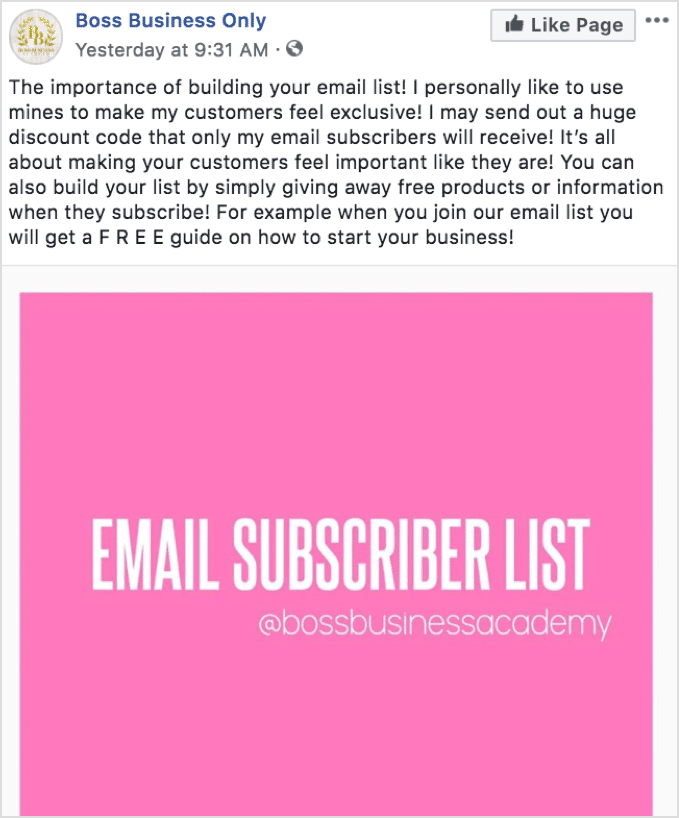
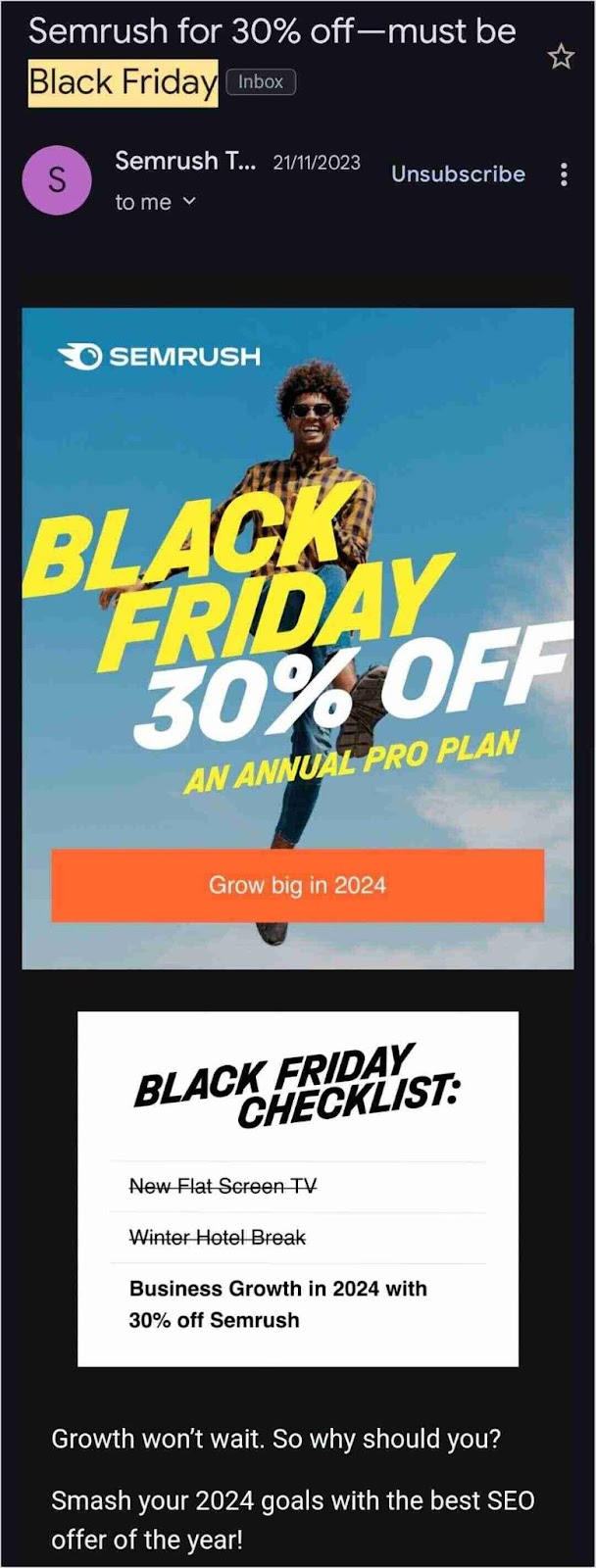
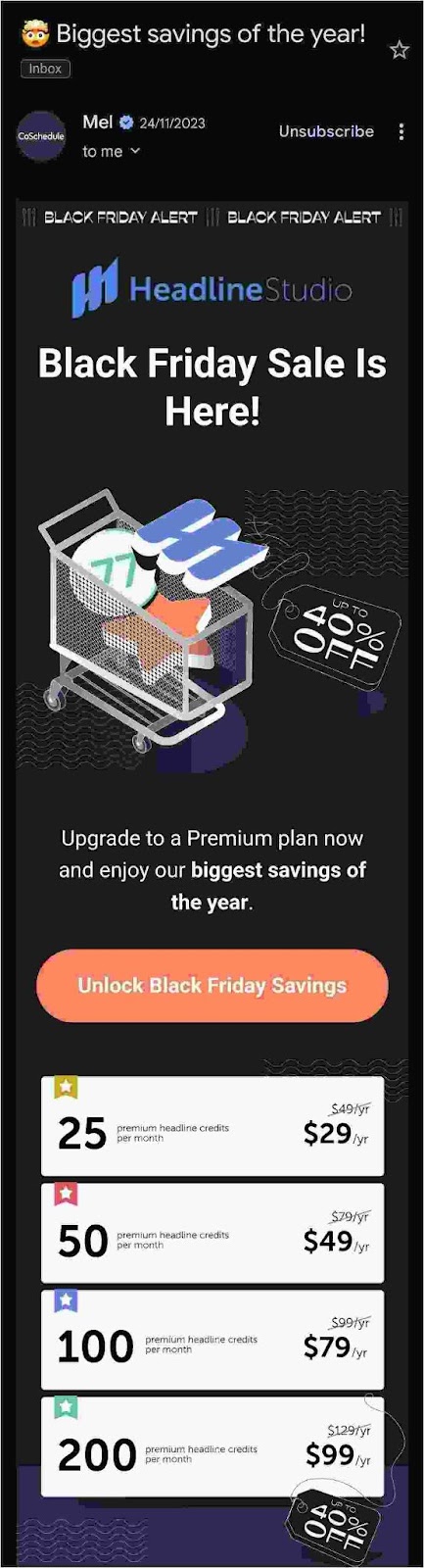

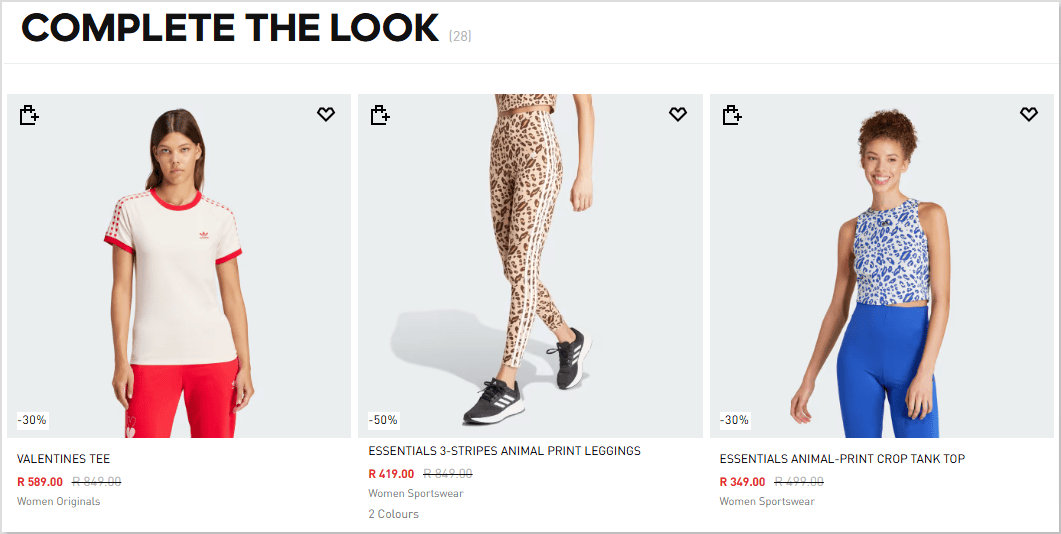
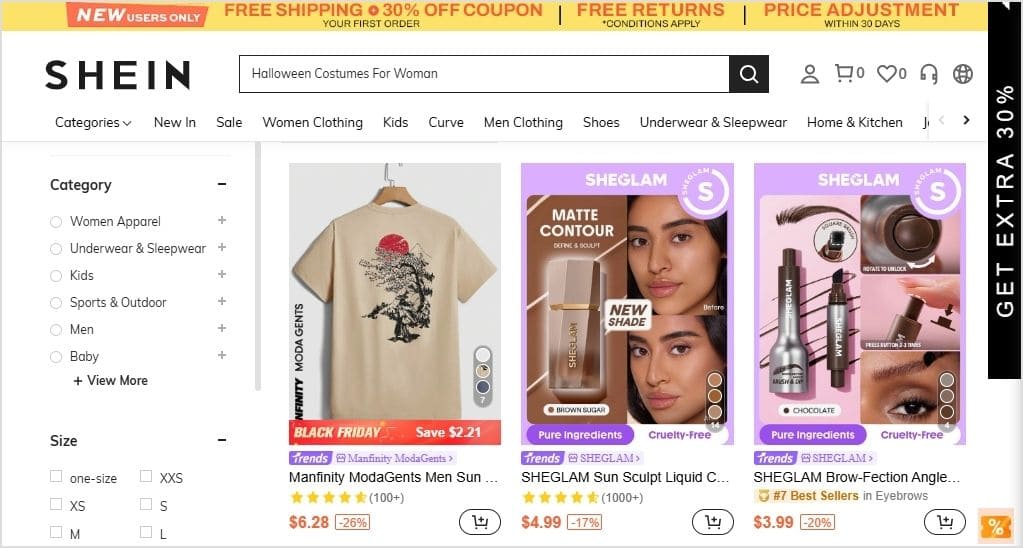
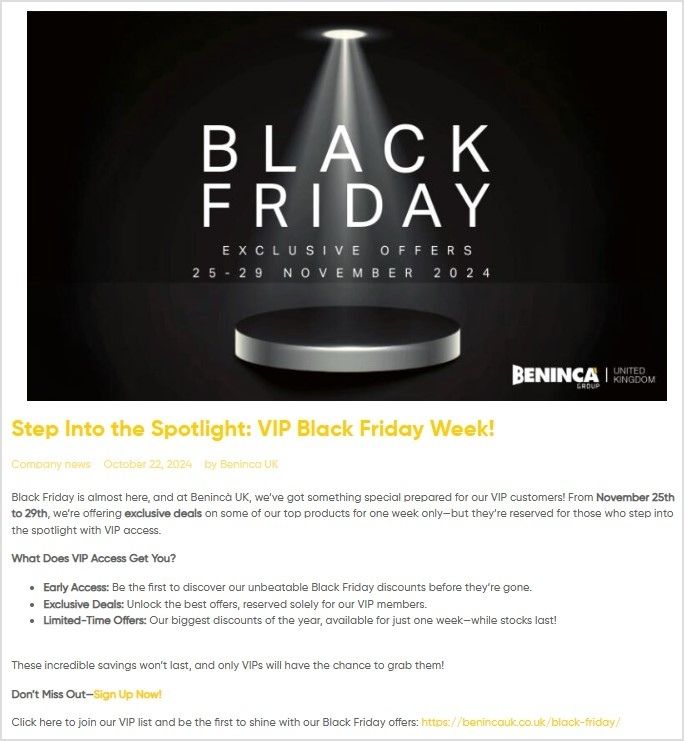
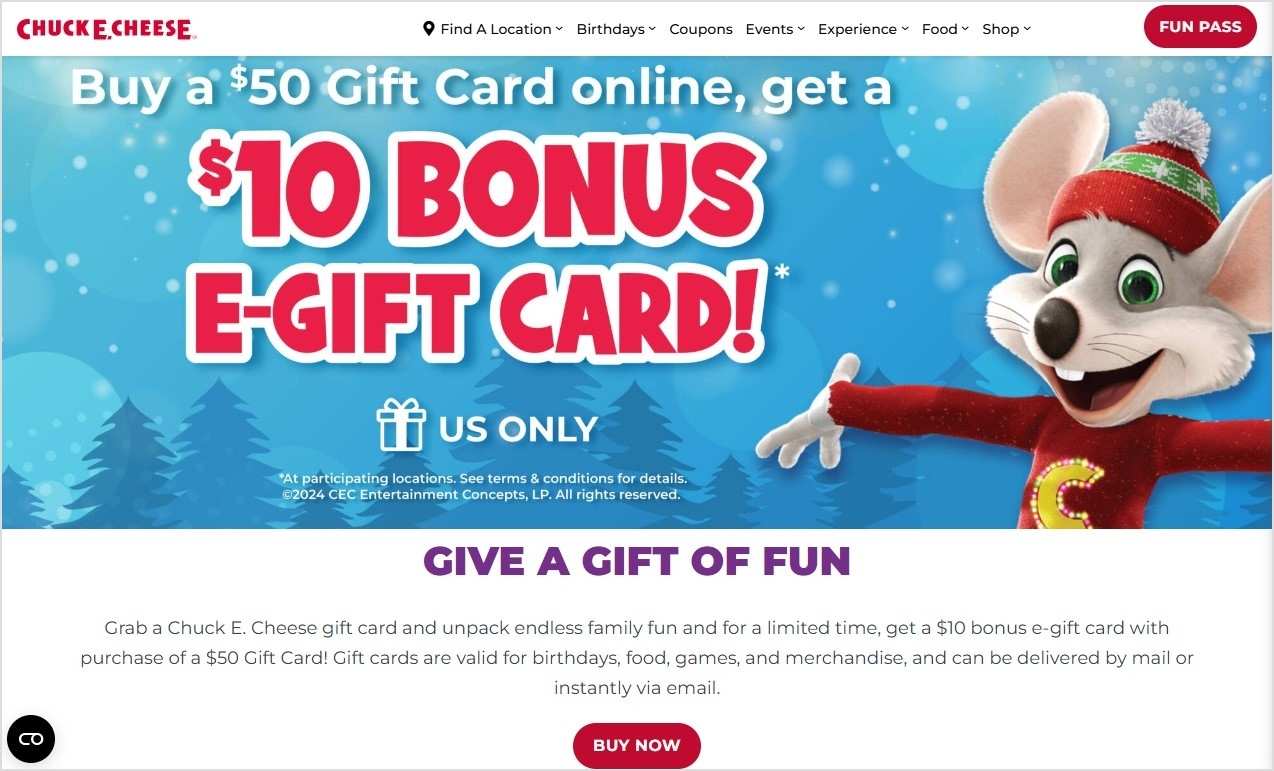
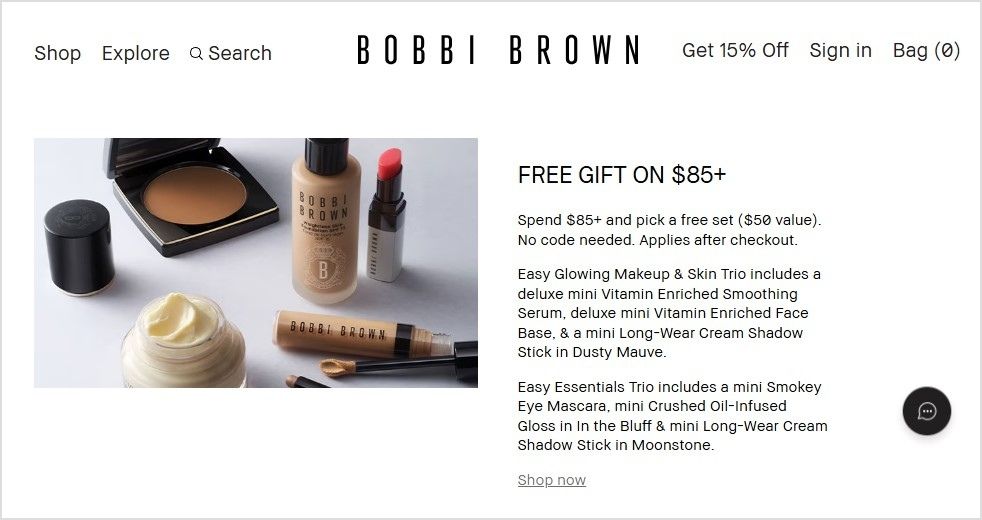
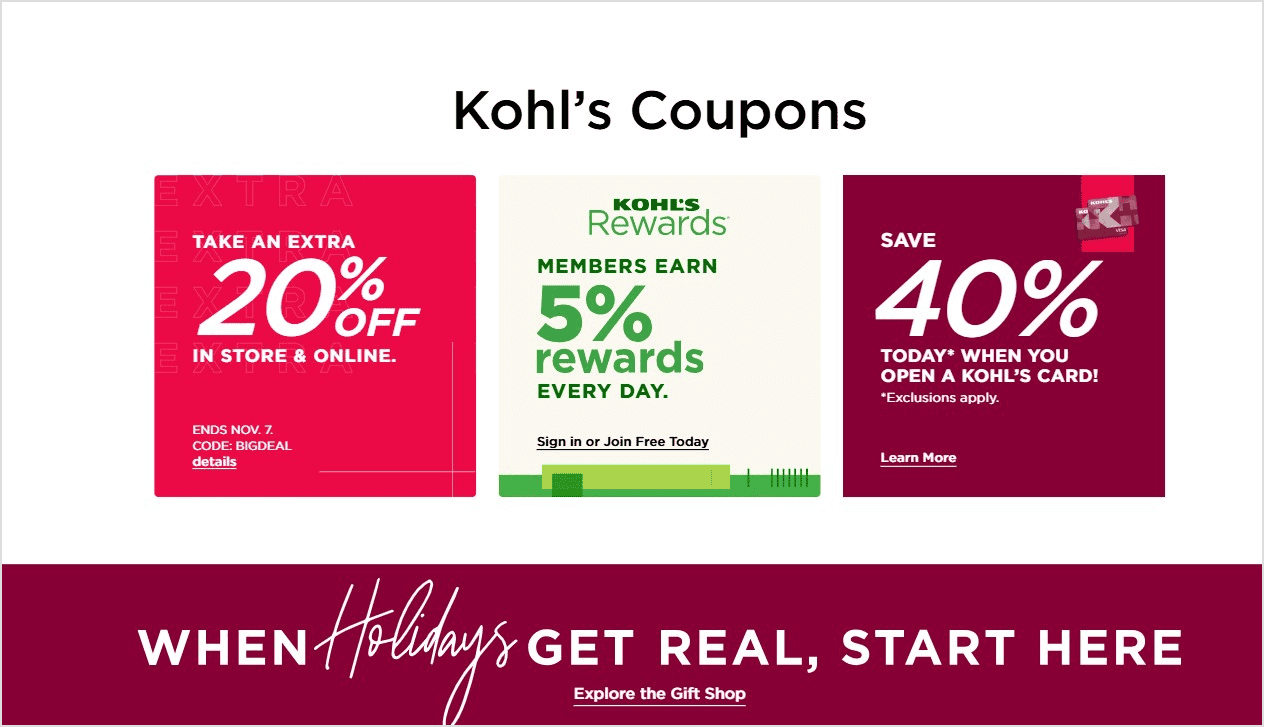
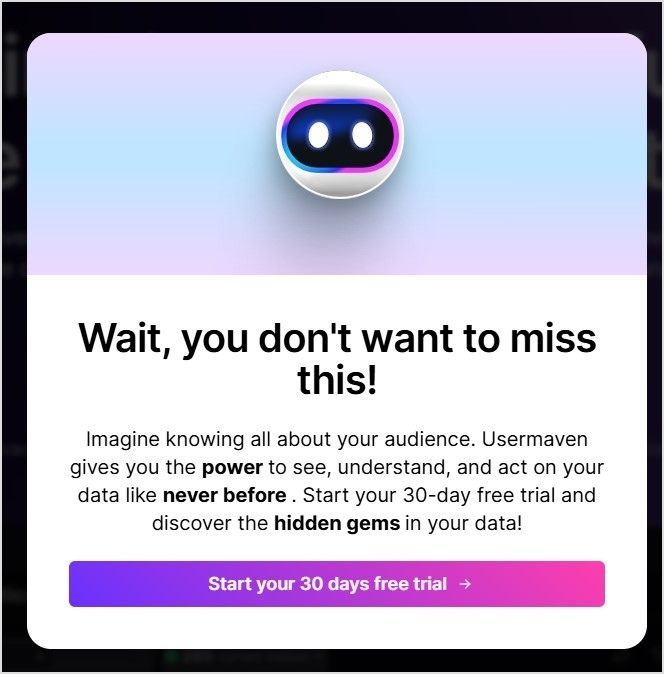
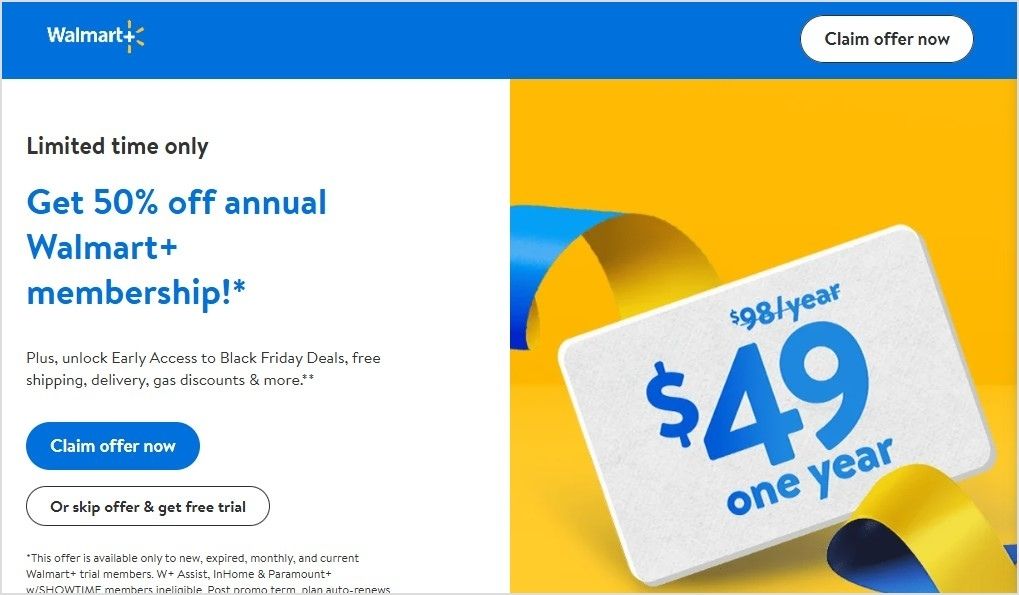



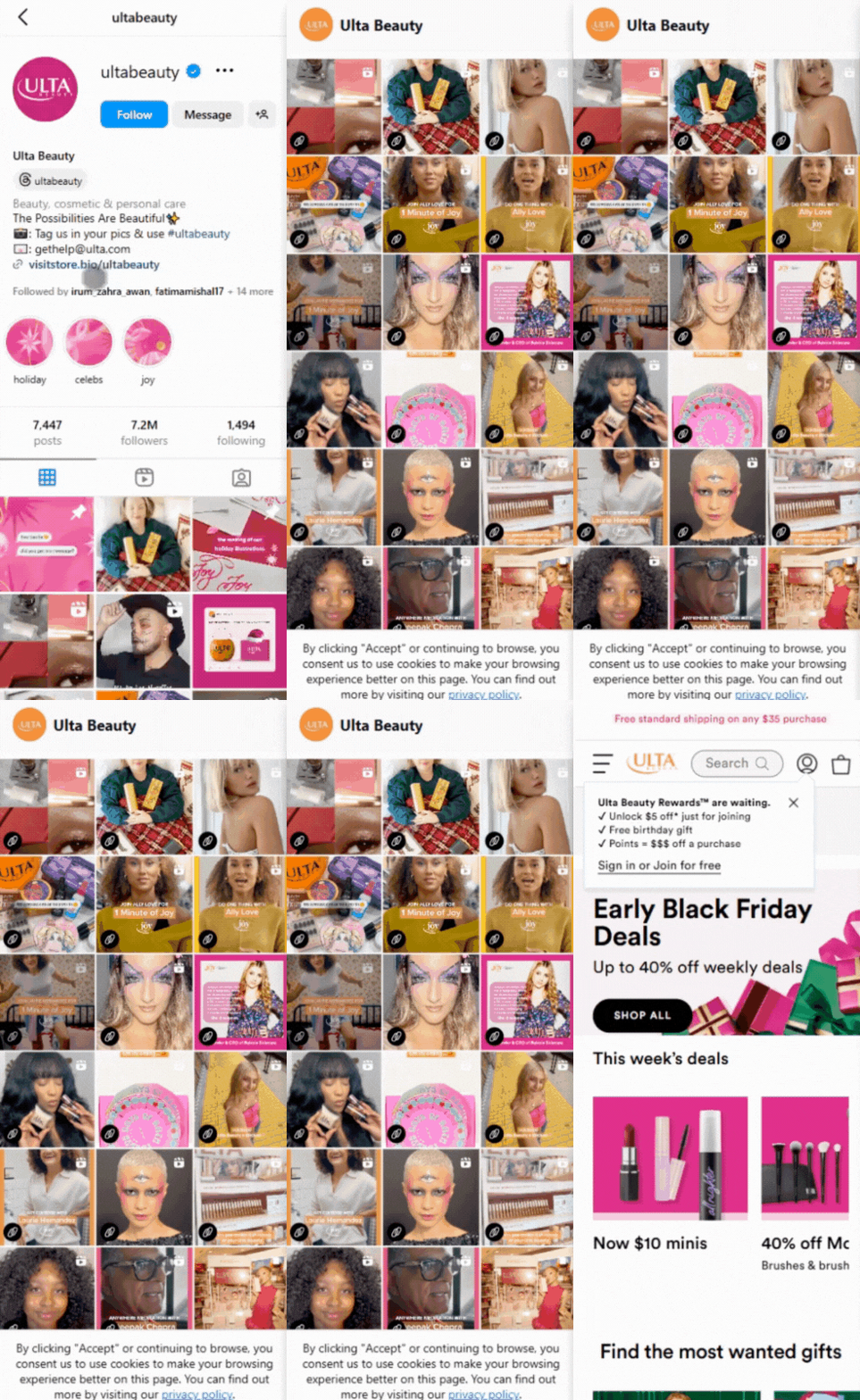
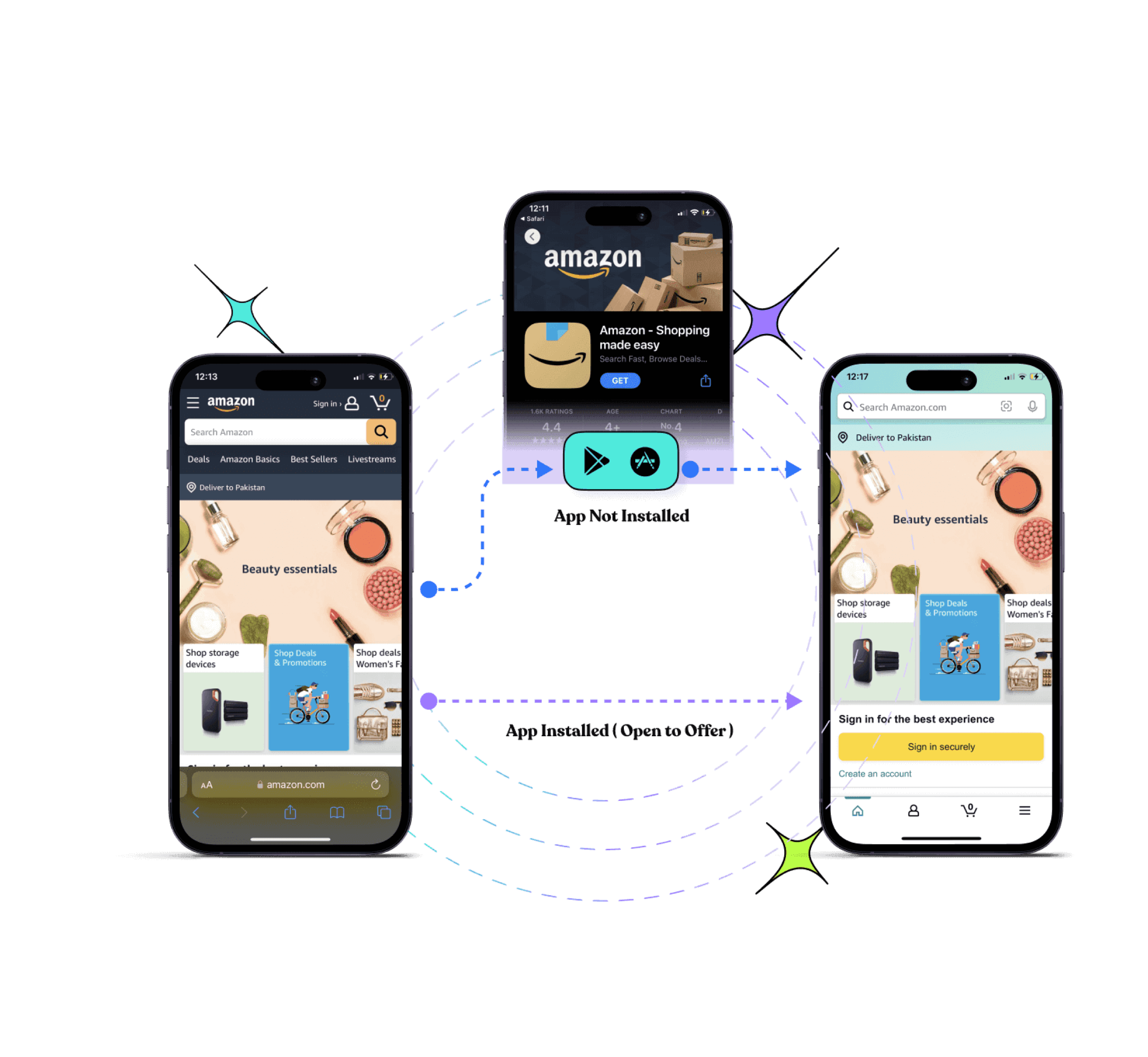
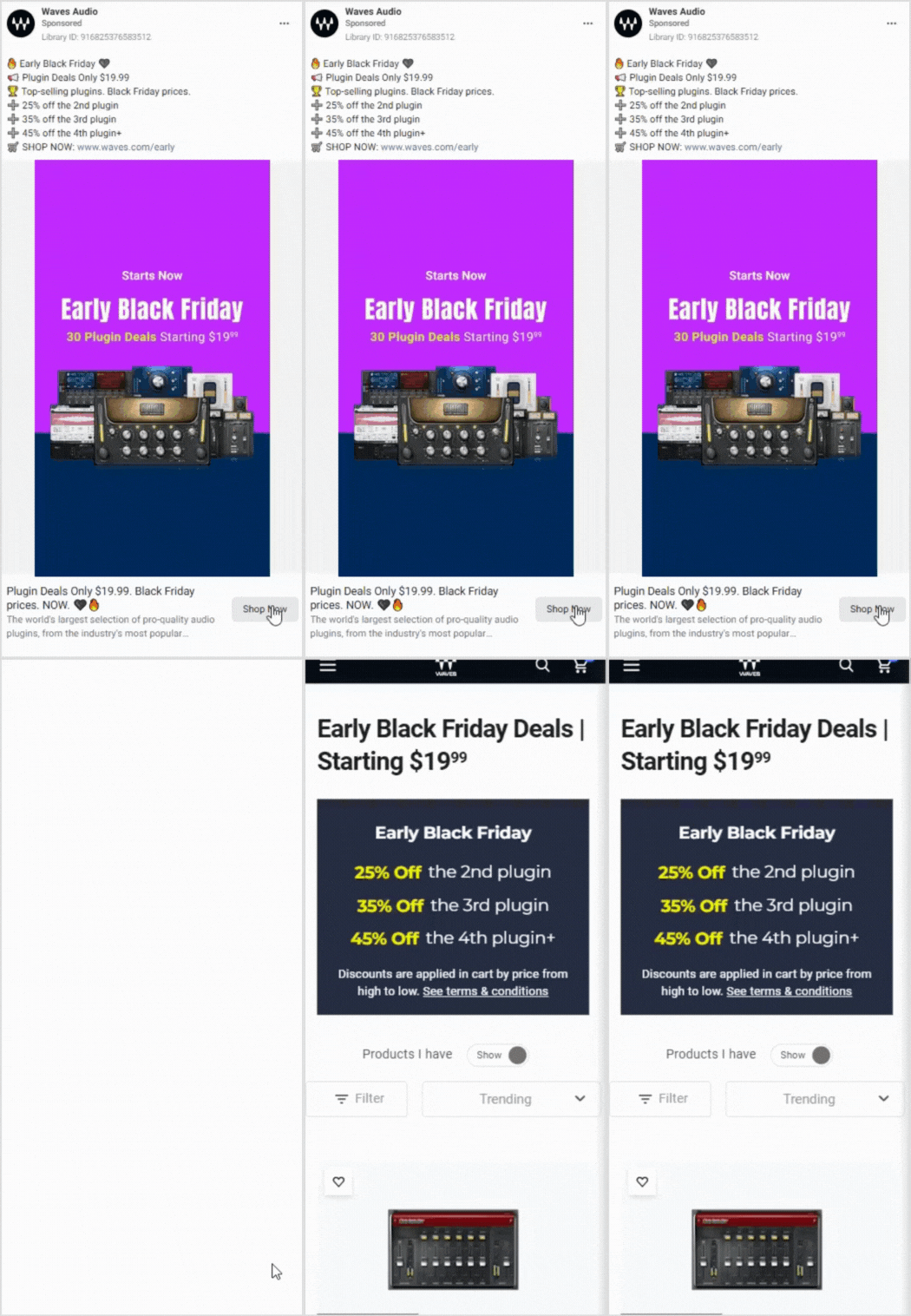

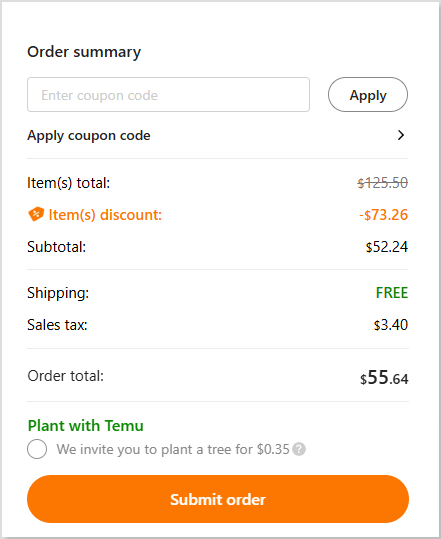

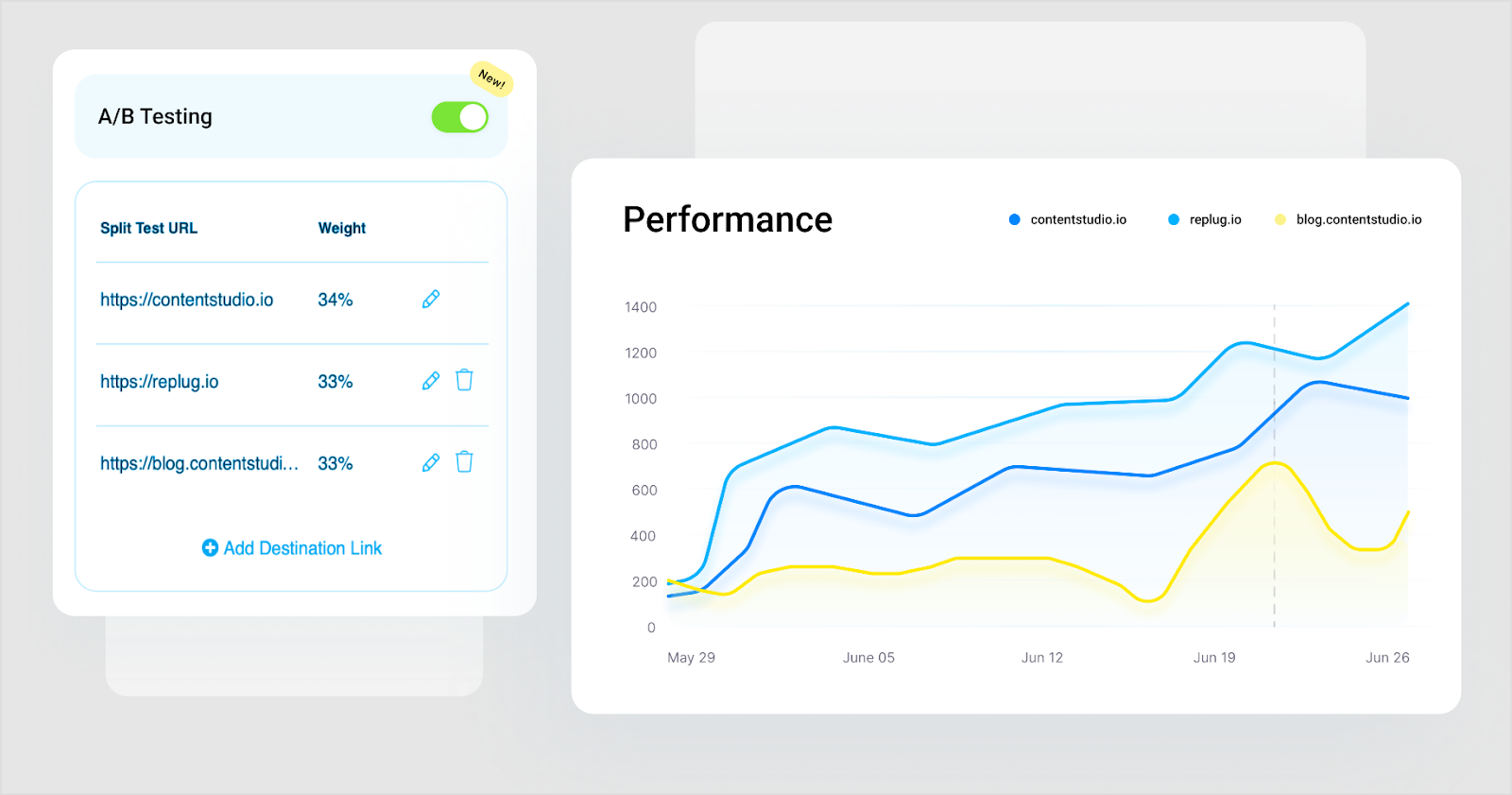
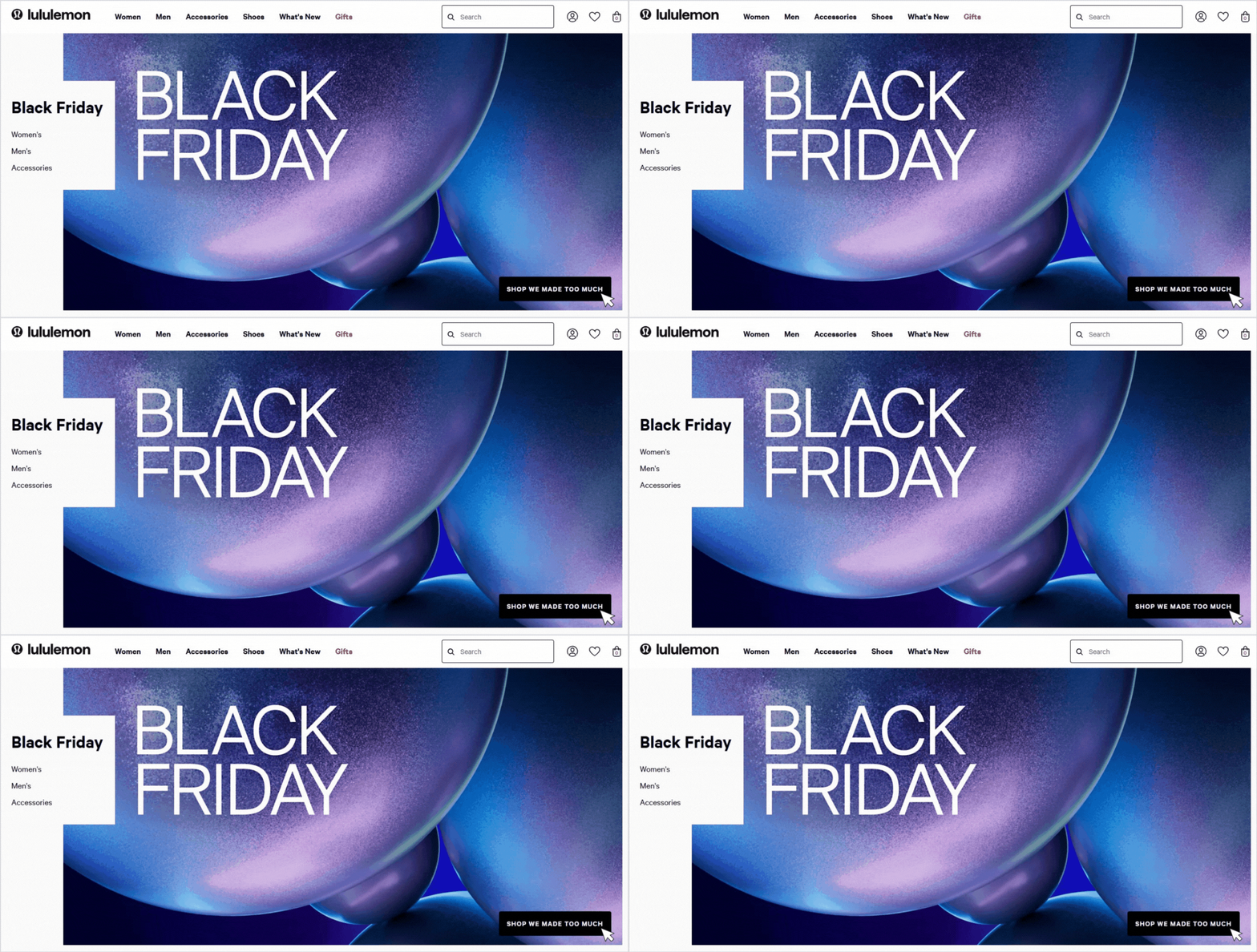

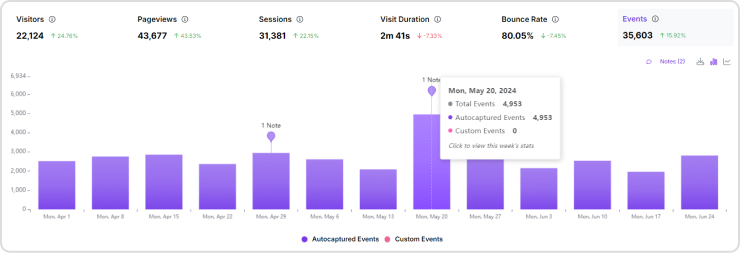
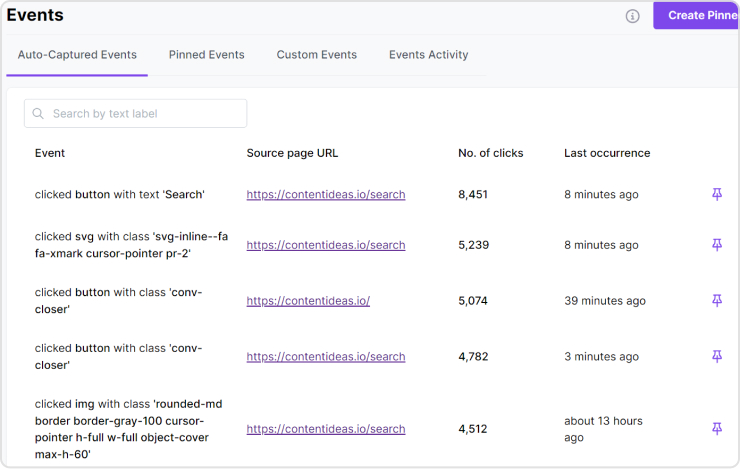
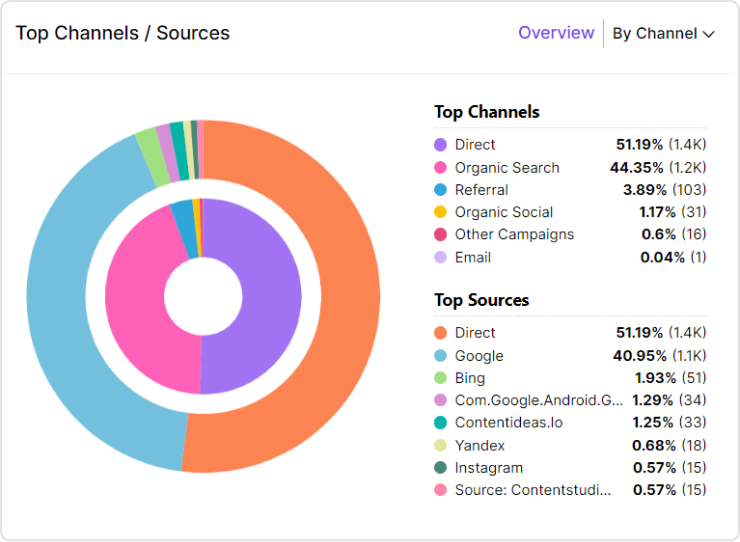
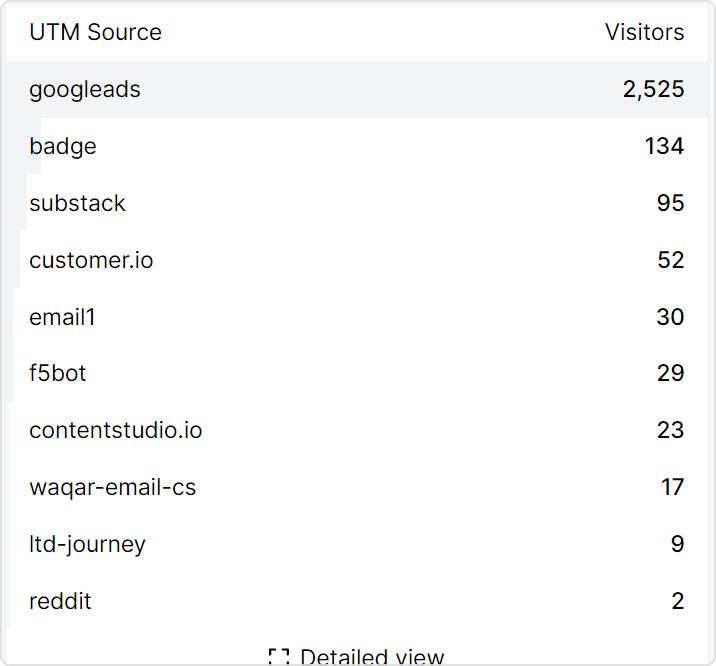
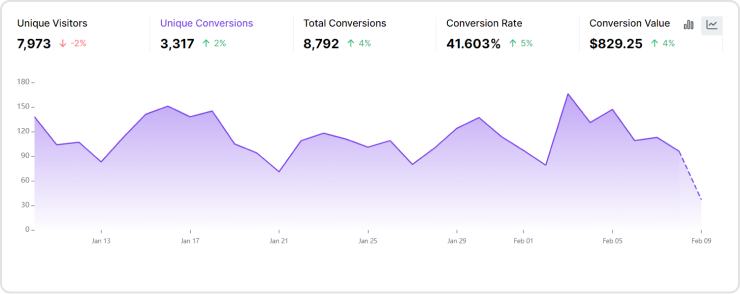
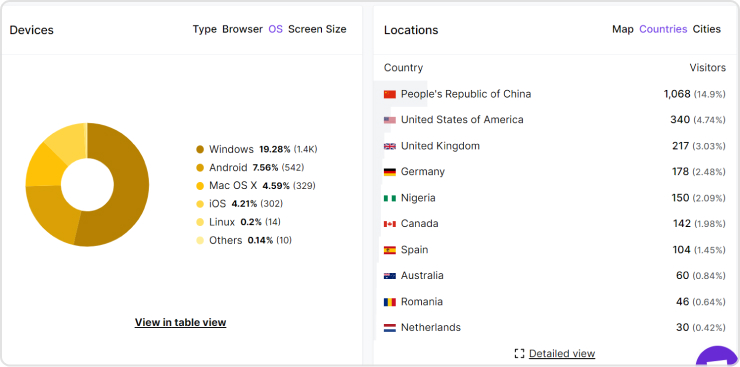
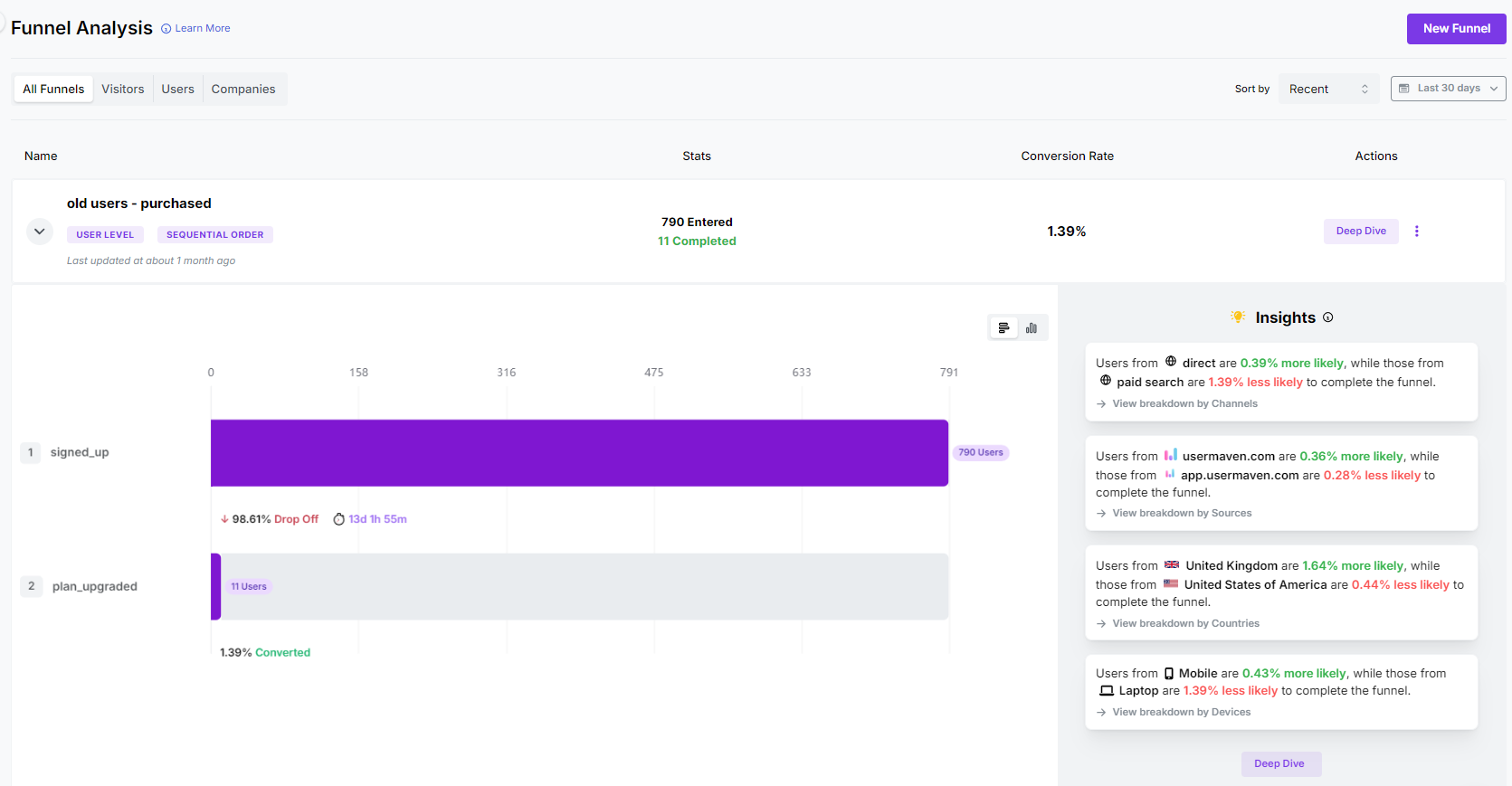
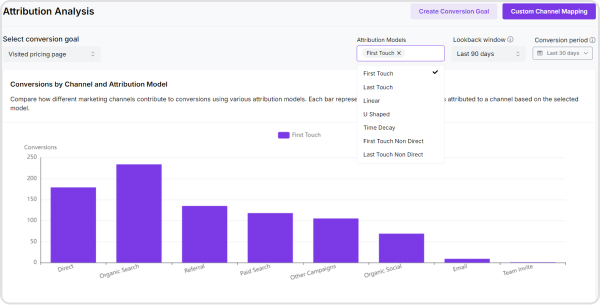
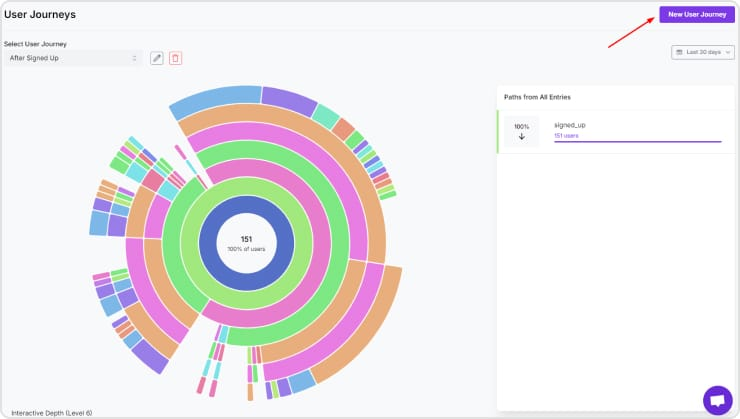
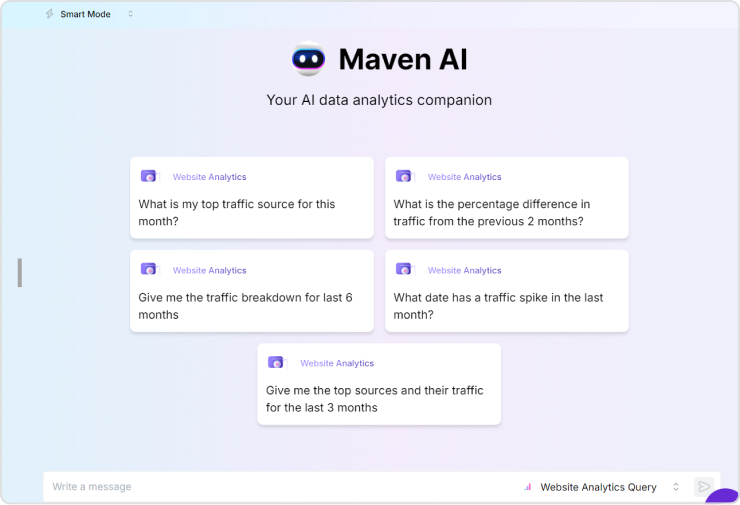
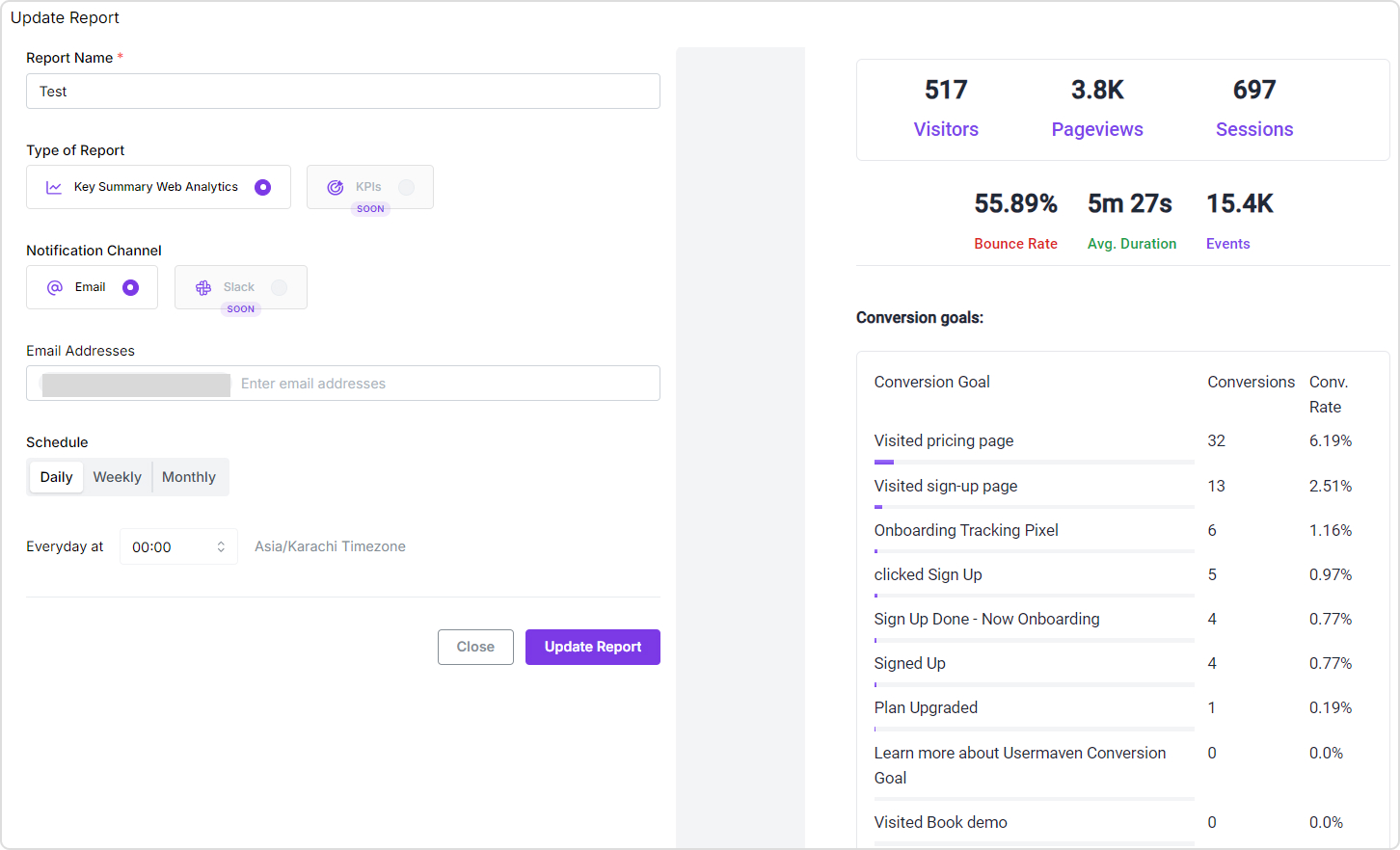





 Simple Analytics is a privacy-friendly web analytics tool that delivers essential website metrics without tracking personal data. An easy-to-use interface provides clear insights to help website owners make informed decisions while ensuring compliance with privacy regulations.



 Statcounter is a comprehensive web analytics tool that provides detailed statistics on website traffic and visitor behavior. With features like real-time data tracking, customizable reports, and user-friendly dashboards, StatCounter helps website owners and marketers optimize their online presence and improve user engagement.